

Page 1
®
MAXXUS
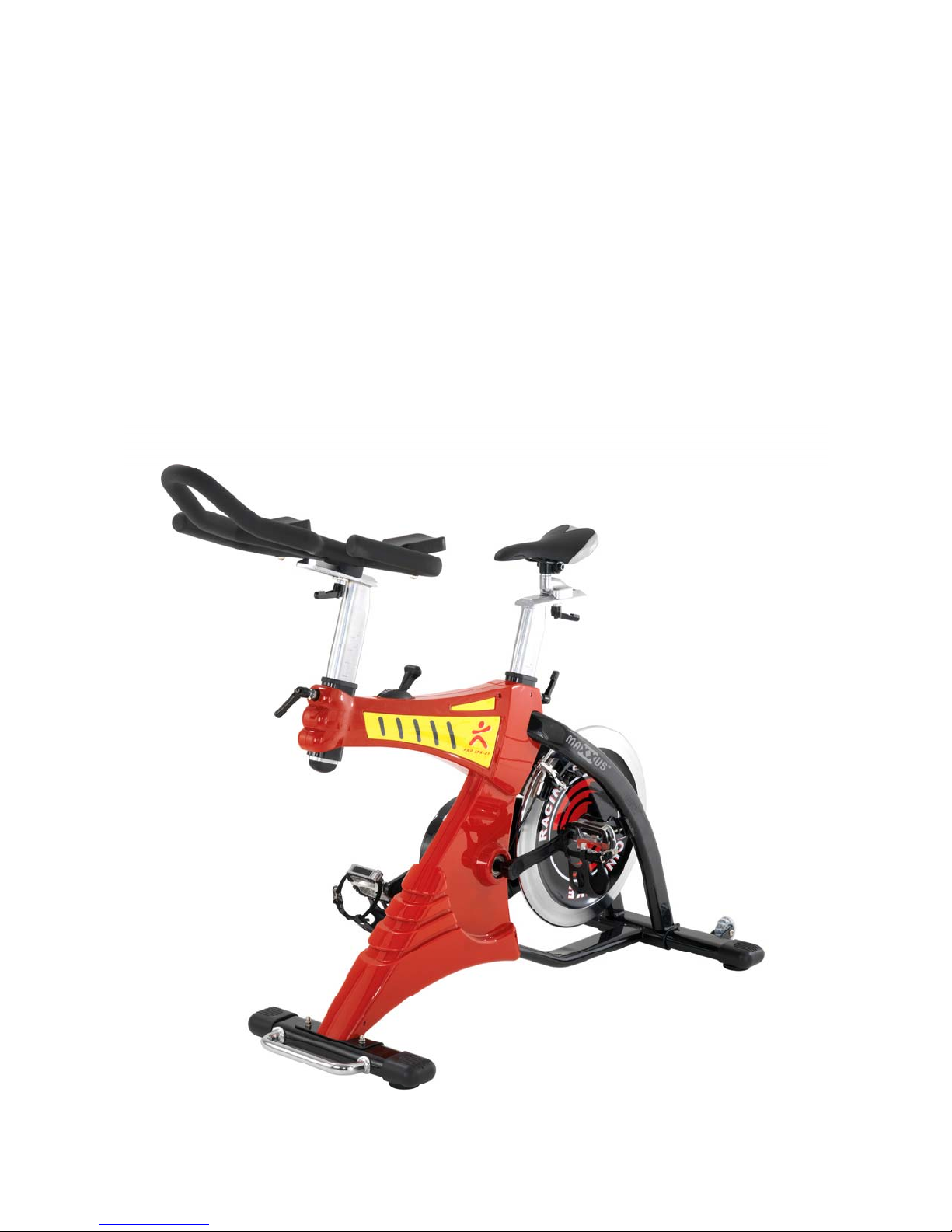
PRO SPK-21 FITNESS CYCLE
OWNER’S MANUAL
Page 2
Dear customer ,
Thank you for purchasing MAXXUS
designed to meet your workout needs and provide you with a healthier life.
Before you begin using this product, please read the Owner’s Manual completely
and thoroughly and follow the instructions of all WARNING and CAUTION labels.
If you have any questions about this product or are in need of replacement parts,
please contact Customer Service by calling (909) 212-5555 or emailing us at:
info@goldendesignsinc.com
®
Pro SPK-21 Fi t ness Cycle. T h i s p r od u ct was
____________________________________________________________
TABLE OF CONTENTS
WARNING & CAUTION LABEL S…..……………..…….……….…………………………….……… P. 1
SAFETY INSTRUCTIONS…………………………………….………………………………………… P. 2
PARTS LIST.……………………………………………………………………………………………… P. 3
EXPLODED DRAWING.………………………………………………………………………………… P. 4
PACKING PARTS LIST………………...…………..………………………………………………..….. P. 5
ASSEMBLY ………………………………………....…………………………………………….….….. P. 6
HOW TO USE THE BIKE ………………………….…………..……………………………………….. P. 9
SERIAL NUMBER LABEL…….…………..………..……….………………………………………… P. 10
WARRANTY ………………………..……………..………….………………………………………… P. 10
____________________________________________________________
WARNING & CAUTION LABELS
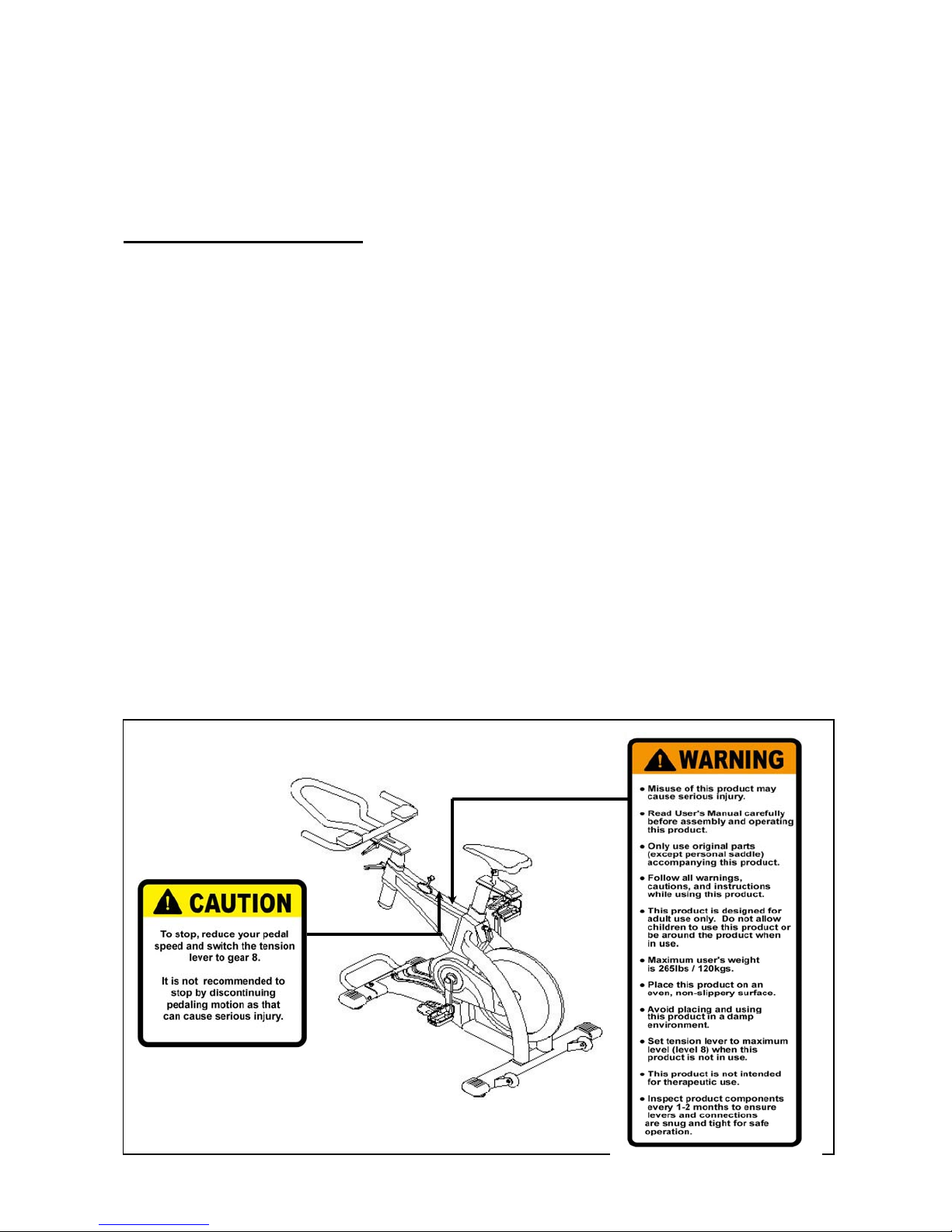
The diagram below shows the locations of the WARNING and CAUTION labels. Please
note the locations of these labels and carefully follow the instructions as described.
(Note: The labels shown below are not of actual size.)
1
Page 3

____________________________________________________________
SAFETY INSTRUCTIONS
Before you start to assemble and operate this product, please carefully read the Owner’s
Manual in its entirety. Please follow all instructions in this Owner’s Manual as described.
Be sure to read through the Safety Instructions below and keep this Owner’s Manual for
future reference.
● Misuse of this product may cause serious injury.
● Consult your physician before starting any exercise program.
Please follow your physician’s advice on fitness training.
● Please follow all warnings, cautions, and instructions carefully while using this product.
● Only use original parts (except personal saddle) accompanying this product.
● This product is designed for adult use only.
Do not allow children to use this product or be around this product when in use.
● The maximum user's weight is 265lbs / 120kgs.
● Place this product on an even, non-slippery surface.
Keep this product away from dust. Avoid placing and using this product in a damp
environment.
Please wear appropriate sports clothing while exercising.
Do not wear loose clothes that could become caught on the bike.
Please wear appropriate sports shoes for foot protection.
● To stop, reduce your pedal speed and switch the tension lever to gear 8.
It is not recommended to stop by discontinuing pedaling motion as that can cause
serious injury.
● Set tension lever to maximum level (level 8) when this product is not in use.
● This product is not intended for therapeutic use.
● Inspect product components every 1-2 months to ensure levers and connections are
snug and tight for safe operation. Replace any worn parts immediately.
2
Page 4

____________________________________________________________
PARTS LIST
Item Description Quantity Item Description Quantity
1 Main Frame 1 39 Nut 2
2 Rear Foot Bar 1 40 Adjustable Bolt 2
3 Front Foot Bar 1 41 Lock Nut 2
4 U-Zone Bar 1 42 Function Set 2
5 Seat Post 1 43 Stopper Set 1
6 Handle Post 1 44 Tension Lever 1
7 Seat Slider 1 45 Screw 2
8 Handle Bar 1 46 Inner Chain Cover 1
9 End Cap 2 47 Screw 2
10 Adjustable Pad 2 48 Belt 1
11 Move Wheel 2 49 Belt Deck 1
12 Hex Head Bolt 2 50 Screw 4
13 Nylon Nut 2 51 Outer Chain Cover 1
14 Washer 4 52 Round Head Screw 6
15 Hex Head Bolt 4 53 Left Crank 1
16 Cap Nut 2 54 Right Crank 1
17 End Cap 2 55 Left Pedal 1
18 Bearing 2 56 Right Pedal 1
19 Bearing 2 57 Bolt 2
20 S Nut 1 58 Cap 2
21 Belt Wheel Rod 1 59 Plug 2
22 Left Cover 1 60 Knob 4
23 Right Cover 1 61 Flat Washer 2
24 Top Left Cover 1 62 Seat 1
25 Top Right Cover 1 63 Round Head Bolt 2
26 Rear Cover 1 64 End Cap 1
27 Front Left Cover 1 65 Washer 2
28 Front Right Cover 1 66 Spanner 1
29 Screw 1 67 Spanner 1
30 Screw 1 68 Spring Washer 2
31 Screw 2 69 Nut 2
32 Screw 2 70 Elbow Pad 2
33 Tapping Screw 2 71 Bracket 1
34 Tapping Screw 2 72 Bolt 1
35 Flywheel 1 73 Nut 1
36 Belt Wheel 1 74 Washer 1
37 Fly Wheel Rod 1 75 Spring 1
38 Spring Washer 2
3
Page 5

____________________________________________________________
EXPLODED DRAWING
4
Page 6

____________________________________________________________
PACKING PARTS LIST
5
Page 7

____________________________________________________________
ASSEMBLY
● Read the Owner’s Manual in its entirety before assembly.
● Remove all parts from the box.
● Check to confirm receipt of all parts and quantities shown in the Packing Parts List on
page 5.
(Note: Some parts may be pre-assembled.)
STEP 1
STEP 2
Slide the Front Foot Bar (3) to the front of the
Main Frame (1) adding two Washers (14), two
Spring Washers (68), two Cap Nuts (16), and two
Hex Head Bolts (15) as shown in Figure 1.
** Tighten all bolts used in STEP 2 with the t wo
Spanner To ols (66) & (67).
** You can use the Styrofoam (inner packing
material) as a support to keep the Front Foot
Bar (3) higher for easier tightening of the
bolts and nuts.
STEP 3
Slide the Rear Foot Bar (2) to the rear of the Main
Frame (1) adding two Washers (14) and two Hex
Head Bolts (15) as shown in Figure 1.
** Tighten all bolts used in STEP 1 with the
Spanner Tool (66).
Insert the U-Zone Bar (4) into the holes of the
Front Foot Bar (3) adding two Washers (65)
and two Round Head Bolts (63) as shown in
Figure 1.
** Tighten all bolts used in STEP 3 with the
Spanner Tool (66).
6
Page 8

____________________________________________________________
ASSEMBLY
STEP 4
Attach the Left Pedal (55) and Right Pedal (56) to
the Left Crank (53) and Right Crank (5 4) as
shown in Figure 2.
** Tighten the Left & Right Pedals used in
STEP 4 with the Spanner Tool (67).
STEP 5
Insert the Seat Post (5) into the tube of the Main
Frame (1) with Knob (60) a s shown in Fi gure 3.
** Hand tighten ONLY.
STEP 6
Affix the Seat (62) on the bar of the Seat Slider (7).
Next, slide this set onto the Seat Post (5) w ith Flat
Washer (61) and Knob (60) and then tighten as
shown in Figure 3.
** Hand tighten ONLY.
7
Page 9

____________________________________________________________
ASSEMBLY
STEP 8
STEP 7
Insert the Handle Post (6) into the tube of the Main
Frame (1) with Knob (60) a s shown in Fi gure 4.
** Hand tighten ONLY.
Insert the bolts on the underside of each Elbow
Pad (70). Next, slide the other end of the bolts
into the holes on the Handle Bar (8) and screw on
one nut (69) on each side as shown in Figure 4.
There are two holes on either side of the handle
bar (8) for elbow pad (70) adjustments.
You can choose the hole which is suitable for you
and tighten the elbow pad (70) onto the handle
bar (8).
** Tighten all bolts and nuts used in STEP 8
with the Spanner Tool (67).
STEP 9
Attach the Handle Bar (8) onto the Handle Post (6)
with one Flat Washer (61) and Knob (60) as
shown in Figure 4.
** Hand tighten ONLY.
IMPORTANT NOTE:
Please make sure all Screws, Nuts, Bolts,
Pedals and Seat are tightened in correct
position.
8
Page 10

____________________________________________________________
HOW TO USE THE BIKE
After assembling the bike and tightening all appropriate compon ents as instructed, you can
now begin using bike.
Handle bar, seat, and elbow pad adjustments allow users to adjust the bike to fit one's size
and body frame. Streamline surface design fits in with ergonomics and increases comfort.
● HANDLEBAR ADJU STMENT
(1) Forward/Backward:
Loosen the knob (60) on the handle post (6), slide the handle bar (8) forward or
backward and tighten the knob (60) to lock the handle bar (8) into position.
(2) Up/Down:
Loosen the knob (60) on the main frame (1), slide the handle post (6) up or down
and tighten the knob (60) to lock the handle bar (8) into position.
●
SEA T ADJUSTMENT
(1) Forward/Backward:
Loosen the knob (60) on the seat post (5), slide the seat slider (7) forward or
backward and tighten the knob (60) to lock the seat (62) into position.
(2) Up/Down:
Loosen the knob (60) on the main frame (1), slide the seat post (5) up or down and
tighten the knob (60) to lock the seat (62) into position.
●
SEAT REPLACEMENT
The included seat (62) meets the standard specifications for this bike and can easily be
adjusted and removed. This seat is interchangeable with your own seat for add ed
personal comfort.
●
ELBOW PAD ADJUSTMENT
The movable elbow pad (70) design offers users different options for adjustable elbow
positioning. There are two holes on either side of the handle bar (8) for elbow pad (70)
adjustments. You can choose the hole which is suitable for your body type and tighten
the elbow p a d (70) onto the handle bar (8).
●
TENSION LEVEL ADJUSTMENT
This bike allows you to burn more calories at the lower tension levels. The different
levels provide you with options to extend your workout and increase muscle tone.
The 1 to 8 range of tension levels offer options for users to train their body gradually.
Level 1 is the lowest tension level; Level 8 is the highest tension level (brake).
Slide the tension lever (44) for tension level setting.
●
WATER BOTTLE & WATER BOTTLE HOLDER
The water bottle holder can be mounted anywhere of the Handle Bar (8). You can
install the water bottle holder at your discretion for added convenience.
●
STOP / BREAK
If you want to stop, reduce your pedal speed and switch the tension lever to level 8.
It’s not recommended to stop by discontinuing pedaling motion as that can cause
serious injury.
●
WHEN BIKE IS NOT IN USE
When the bike is not in use, set the tension lever to maximum level (level 8) to prevent
the flywheel from moving.
9
Page 11

____________________________________________________________
SERIAL NUMBER LABEL
The diagram below shows the location of the Serial Number Label. The serial number is
indicated on the label affixed to the lower part of the Main Frame.
(Note: The label shown below is not of actual size.)
____________________________________________________________
WARRANTY
This Limited Warranty applies in the United S tates to products distributed under the
MAXXUS brand name. This warranty extends only to the original purchaser and stands at
one (1) year from the date of purchase. This warranty is not transferable to anyone who
subsequently purchases the product from the original purchaser.
During the warranty period, MAXXUS has the option to replace or repair a part(s) that was
discovered damaged or has become damaged due to a manufacturer defect only, and may
be done so with serviceable used parts that are equivalent to t he new part s in performance.
This warranty does not cover: faulty set up procedures, assembly errors, alte rations,
modifications, misuse, abuse, accidents, improper maintenance, damage or malfunctions
caused by moving or dropping the product, unforeseen home damage, acts of nature, or
repairs not provided by MAXXUS customer service.
Questions to determine the validity of a defect claim may be done by a MAXXUS service
technician. MAXXUS reserves the right to change manufacturers of any parts to cover any
existing warranty. To obtain warranty parts, you must contact cust omer service (see p age 1).
Any evidence of alternative or erasing will be cause for immediate void of this Limited
Warranty. This warranty does not extend to any product not purchased from an authorized
reseller or dealer. Product on which the serial number has been altered, defected, or
removed is not eligible for warranty service.
MAXXUS makes no other warranties, expressed or implied, including any implied
warranties or merchantability and fitness for a p articular purpose. MAXXUS expressly
claims all warranties not stated in this Limited Warranty. Neither MAXXUS nor any of its
affiliates shall be responsible for incidental or consequential damages.
10
 Loading...