

Page 1

Table of Contents
EN
Instrument Set-up- - - - - - - - - - - - - - - - - - - - - - -2
Introduction- - - - - - - - - - - - - - - - - - - - - - - - - - - - - - -2
Overview - - - - - - - - - - - - - - - - - - - - - - - - - - - - - - - -2
Display - - - - - - - - - - - - - - - - - - - - - - - - - - - - - - - - - -3
Insert batteries - - - - - - - - - - - - - - - - - - - - - - - - - - - -3
Operations - - - - - - - - - - - - - - - - - - - - - - - - - - - - - -4
Switching ON/OFF - - - - - - - - - - - - - - - - - - - - - - - - -4
Clear - - - - - - - - - - - - - - - - - - - - - - - - - - - - - - - - - - -4
Message Codes - - - - - - - - - - - - - - - - - - - - - - - - - - -4
Adjusting measuring reference / tripod - - - - - - - - - - -4
Multifunctional endpiece- - - - - - - - - - - - - - - - - - - - - -5
Distance unit setting - - - - - - - - - - - - - - - - - - - - - - - -5
Tilt unit setting- - - - - - - - - - - - - - - - - - - - - - - - - - - - -5
Timer (automatic release) - - - - - - - - - - - - - - - - - - - -5
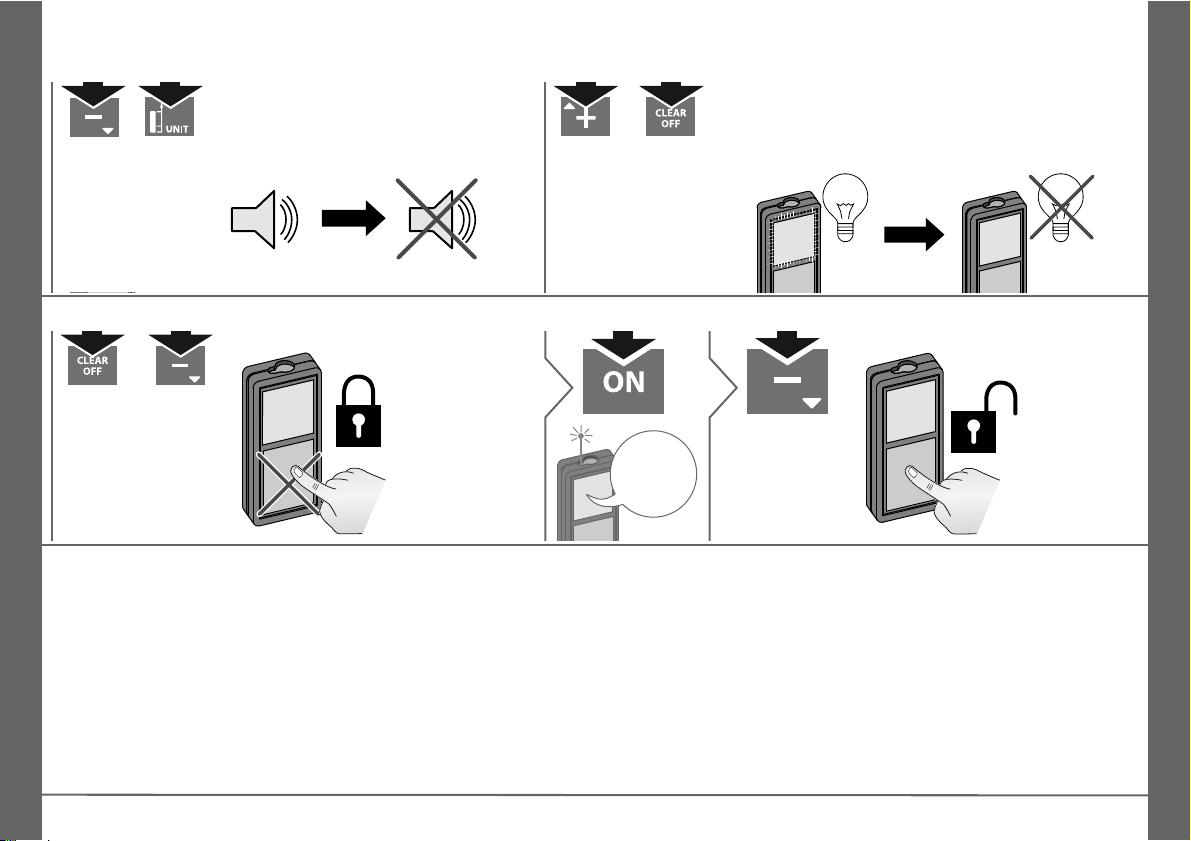
Beep ON/OFF- - - - - - - - - - - - - - - - - - - - - - - - - - - - -6
Illumination ON/OFF - - - - - - - - - - - - - - - - - - - - - - - -6
Keypad lock ON - - - - - - - - - - - - - - - - - - - - - - - - - - -6
Keypad lock OFF - - - - - - - - - - - - - - - - - - - - - - - - - -6
Measuring Functions - - - - - - - - - - - - - - - - - - -7
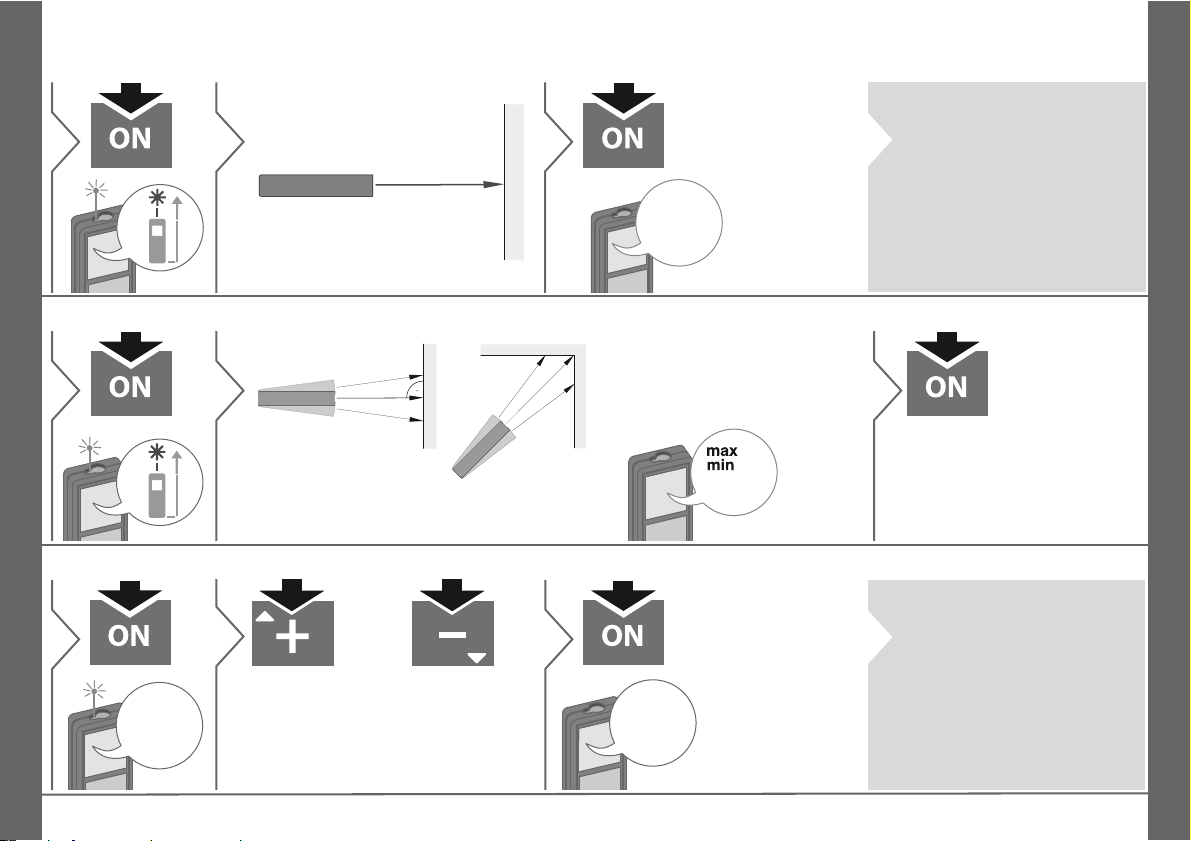
Measuring single distance - - - - - - - - - - - - - - - - - - - - 7
Permament / Minimum-Maximum measuring - - - - - - -7
Add / Subtract - - - - - - - - - - - - - - - - - - - - - - - - - - - - -7
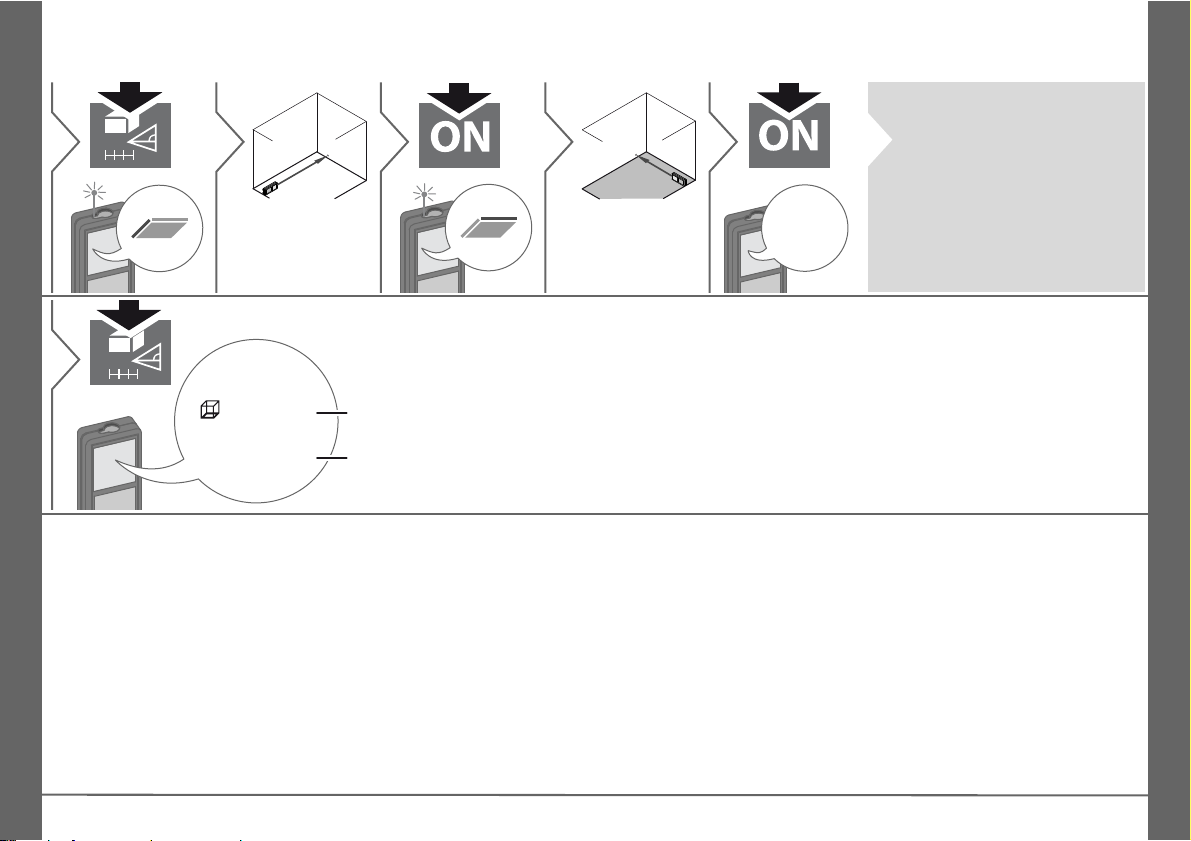
Area- - - - - - - - - - - - - - - - - - - - - - - - - - - - - - - - - - - -8
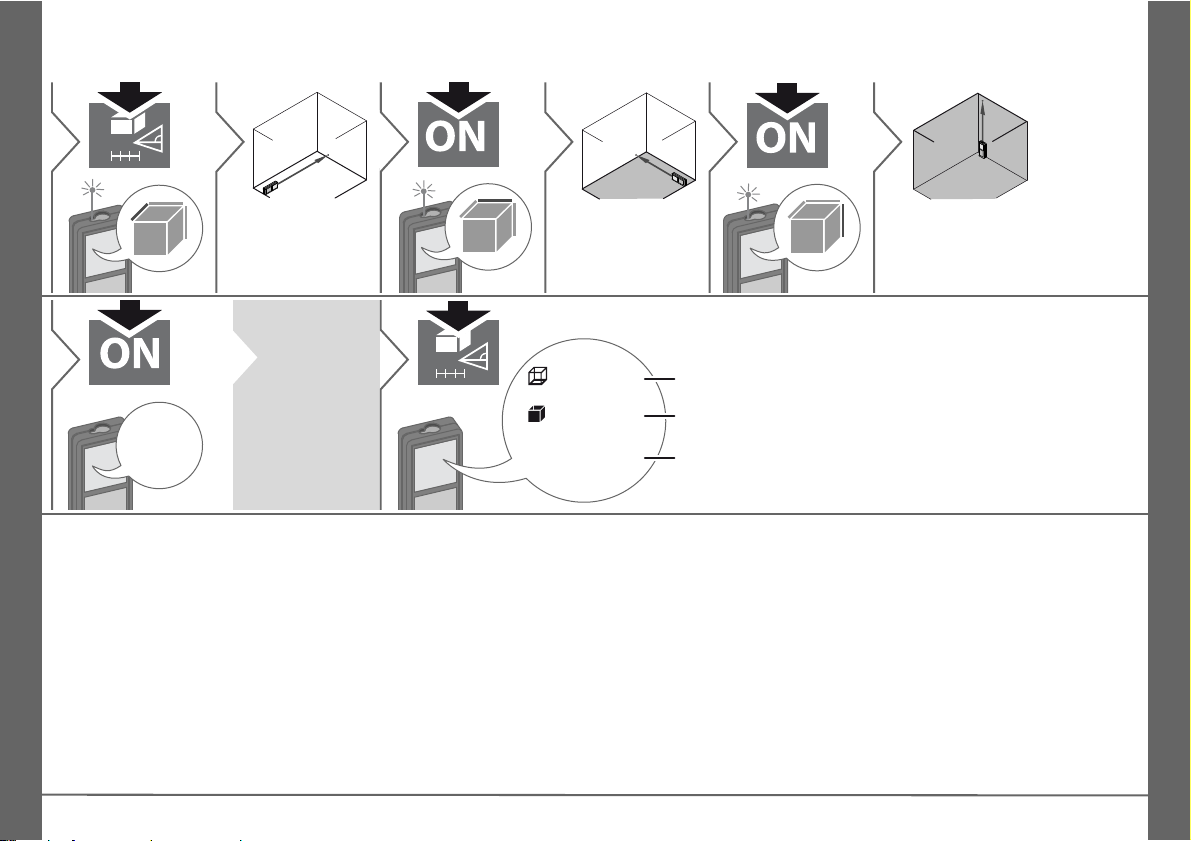
Volume- - - - - - - - - - - - - - - - - - - - - - - - - - - - - - - - - -9
Pythagoras (2-point) - - - - - - - - - - - - - - - - - - - - - - - 10
Pythagoras (3-point) - - - - - - - - - - - - - - - - - - - - - - - 10
Pythagoras (partial height) - - - - - - - - - - - - - - - - - - - 11
Stake out - - - - - - - - - - - - - - - - - - - - - - - - - - - - - - - 12
Smart Horizontal Mode - - - - - - - - - - - - - - - - - - - - - 13
Height tracking - - - - - - - - - - - - - - - - - - - - - - - - - - - 13
Leveling - - - - - - - - - - - - - - - - - - - - - - - - - - - - - - - - 14
Memory (20 last displays) - - - - - - - - - - - - - - - - - - - -14
Delete Memory - - - - - - - - - - - - - - - - - - - - - - - - - - -14
Calibration - - - - - - - - - - - - - - - - - - - - - - - - - - - - -15
Calibration of tilt sensor (Tilt Calibration) - - - - - - - - -15
Technical Data - - - - - - - - - - - - - - - - - - - - - - - - -16
Message Codes - - - - - - - - - - - - - - - - - - - - - - - -17
Care - - - - - - - - - - - - - - - - - - - - - - - - - - - - - - - - - - - -17
Safety Instructions - - - - - - - - - - - - - - - - - - - - -17
Areas of responsibility - - - - - - - - - - - - - - - - - - - - - -17
Permitted use - - - - - - - - - - - - - - - - - - - - - - - - - - - -18
Prohibited use - - - - - - - - - - - - - - - - - - - - - - - - - - - -18
Hazards in use - - - - - - - - - - - - - - - - - - - - - - - - - - -18
Limits of use - - - - - - - - - - - - - - - - - - - - - - - - - - - - -18
Disposal - - - - - - - - - - - - - - - - - - - - - - - - - - - - - - - -18
Electromagnetic Compatibility (EMC) - - - - - - - - - - - -18
FCC statement (applicable in U.S.) - - - - - - - - - - - - -19
Laser classification- - - - - - - - - - - - - - - - - - - - - - - - -19
Labelling - - - - - - - - - - - - - - - - - - - - - - - - - - - - - - - -19
Makita LD080PI
1
Page 2
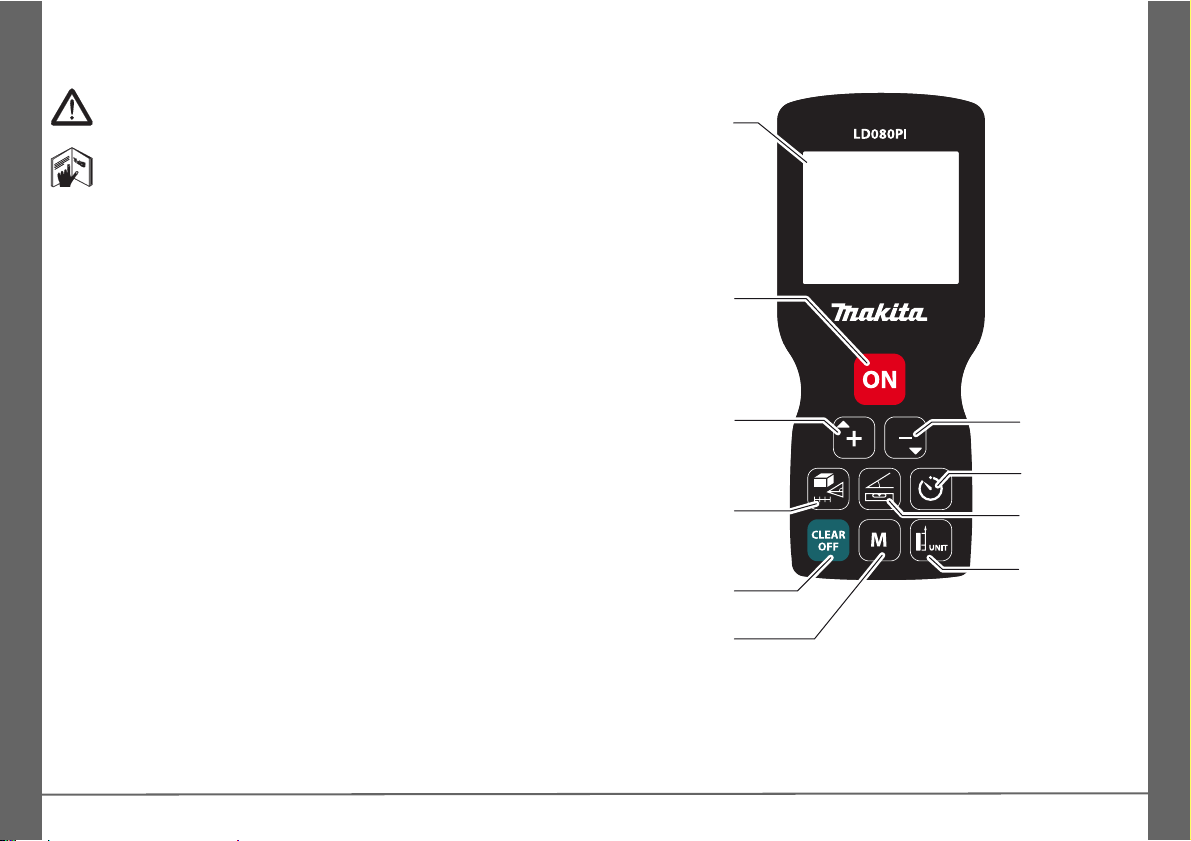
EN
®
®
Display
On/Measure
Area /
Volume /
Pythagoras/
Stake out
Clear / Off
Subtract
Inclination
functions
Add
Timer
Measuring
reference /
Units
Memory
Instrument Set-up
Introduction
The safety instructions and the user manual should be
read through carefully before the product is used for the
first time.
The person responsible for the product must ensure that
all users understand these directions and adhere to them.
The symbols used have the following meanings:
WARNING
Indicates a potentially hazardous situation or an unintended use
which, if not avoided, will result in death or serious injury.
CAUTION
Indicates a potentially hazardous situation or an unintended use
which, if not avoided, may result in minor injury and/or appreciable material, financial and environmental damage.
Important paragraphs which must be adhered to in practice
i
as they enable the product to be used in a technically
correct and efficient manner.
Overview
2
Makita LD080PI
Page 3
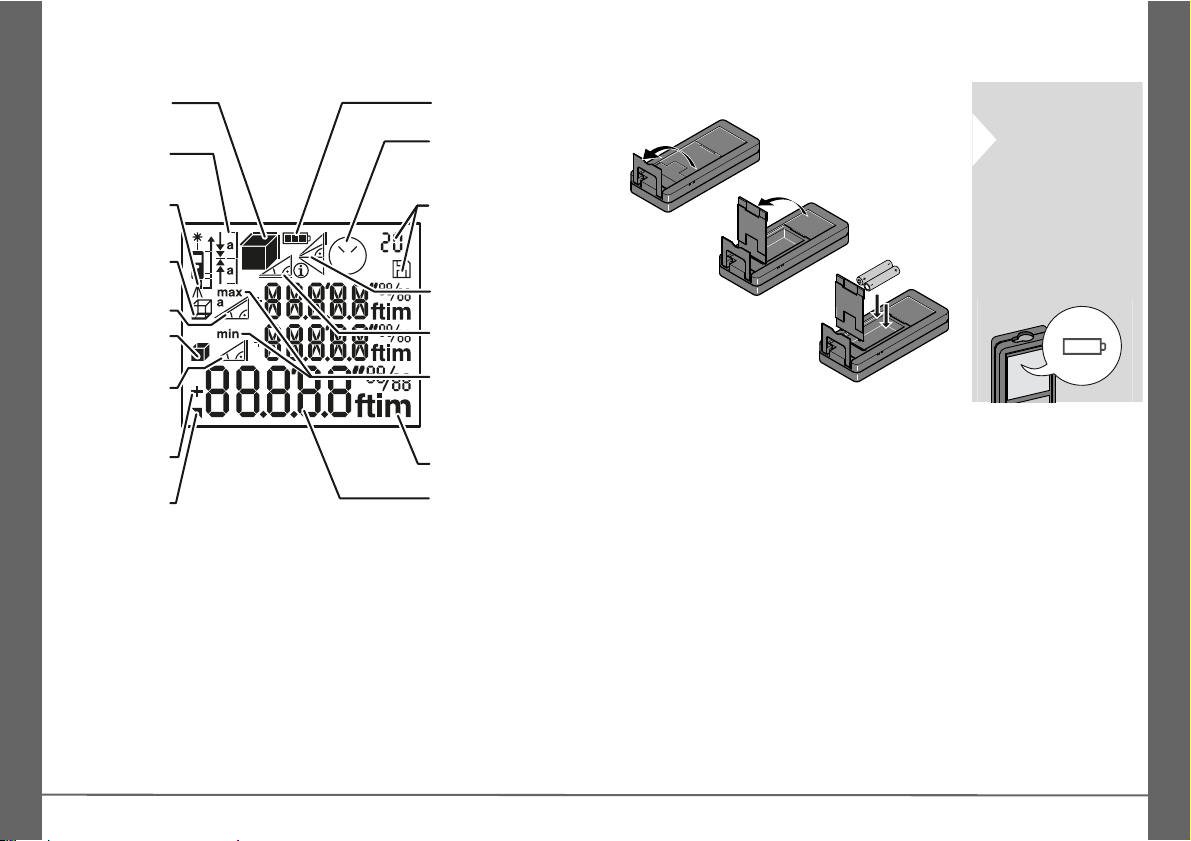
Instrument Set-up
Area /
Volume
Units
Stake out
Indirect height
Circumfer-
ence
Measuring
reference
2nd result
Battery
Angle
Wall area
Addition /
Subtraction
Timer
Memory
Pythagoras
Horizontal
measurement
Min/Max
Measuring
Main line
To ensure a reliable use, do not
use zinc-carbon
batteries.
Change batteries when battery
symbol is flashing.
EN
Display
Insert batteries
i
Makita LD080PI
3
Page 4
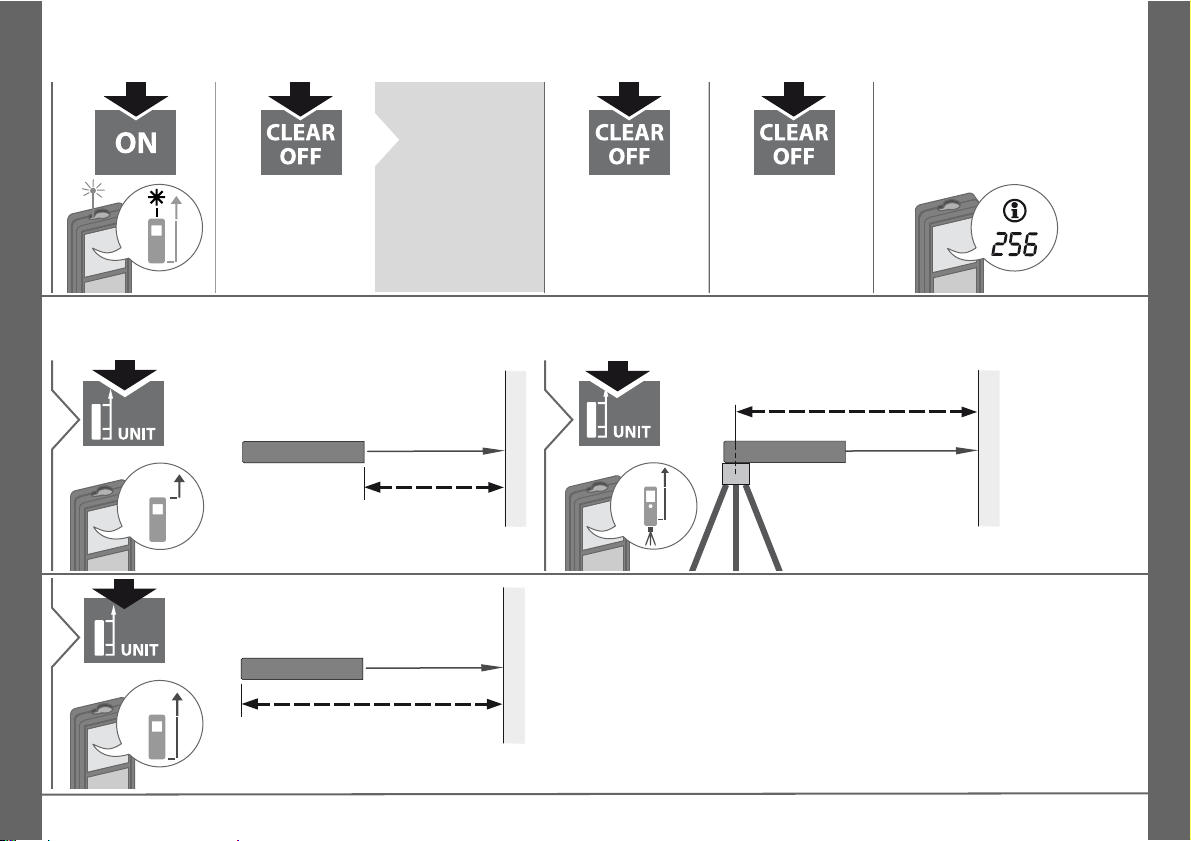
EN
2 sec
Device is
turned OFF.
Press ON button 2 sec to
start continuous
laser mode. If
no key is
pressed for 180
sec, the device
switches off automatically.
1x
Undo last action.
2x
Leave actual
function, go to default operation
mode.
If the info icon appears with a
number, observe the instructions in section "Message
Codes".
Example:
Distance is measured from the
front of the device.
1
Distance is measured
from the tripod thread
permanently.
2
Distance is measured from the rear
of the device (standard setting).
3
Operations
Switching ON/OFF Clear Message Codes
i
Adjusting measuring reference / tripod
4
Makita LD080PI
Page 5
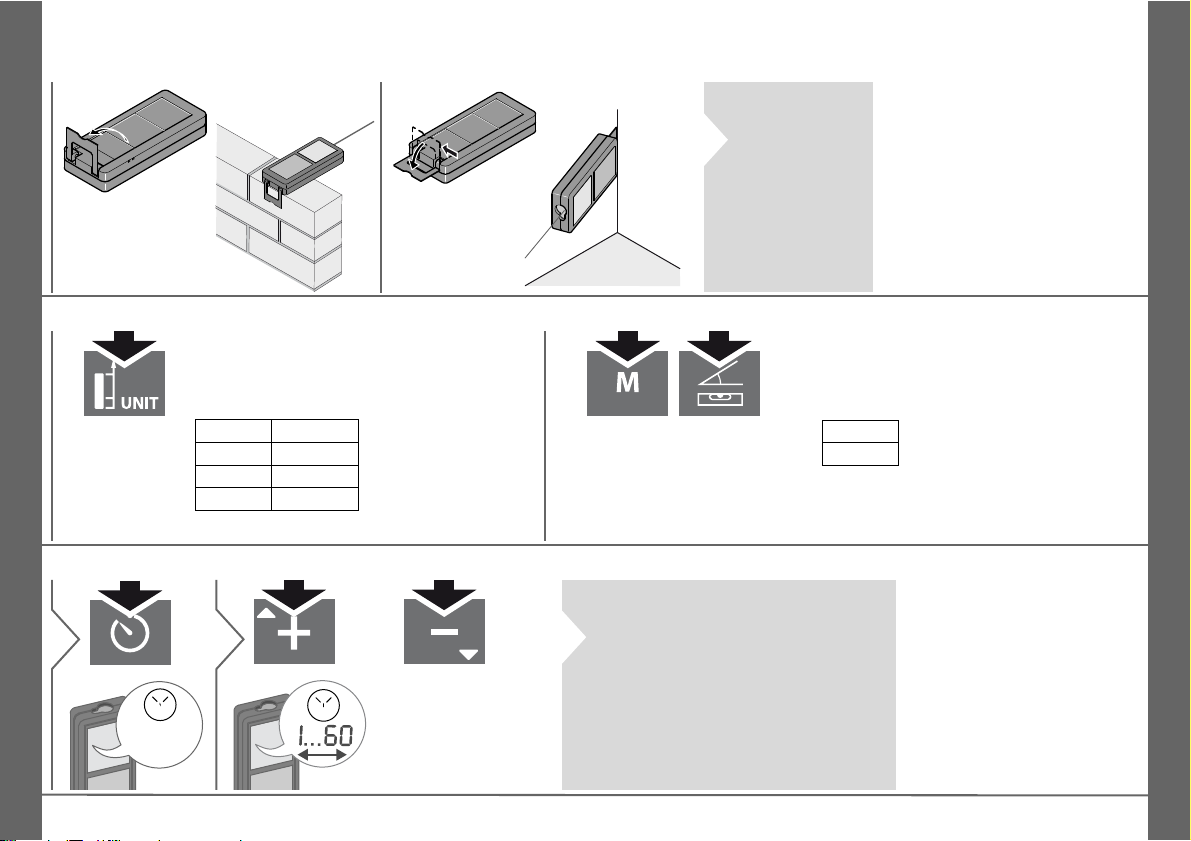
Operations
The orientation
of the endpiece
is automatically
detected and
the zero point is
accordingly adjusted.
0.000 m
0.0000 m
0.00 m
0.00 ft
0‘00‘‘ 1/32
0.00 in
0 in 1/32
Switch between the
following units:
2 sec
0.0 °
0.0 %
2 sec
simultaneously
Switch between the
following units:
s
1
Adjust delay of automatic release
(max. 60 sec,
standard setting
5sec)
2
Once the key is released with the
laser activated, the remaining seconds until the measurement are
displayed in a countdown. The delayed release is recommended for
precise aiming e.g. at long distances. It avoids shaking of the device
when pressing the measurement
key.
Multifunctional endpiece
Distance unit setting Tilt unit setting
Timer (automatic release)
EN
i
i
Makita LD080PI
5
Page 6
EN
2 sec
simultane-
ously
2 sec
simultane-
ously
2 sec
simultane-
ously
PRESS
MINUS
1
within
2 sec
2
Operations
Beep ON/OFF Illumination ON/OFF
Keypad lock ON Keypad lock OFF
6
Makita LD080PI
Page 7
Measuring Functions
1
Aim active laser at target.
2
8.532 m
3
Target surfaces: Measuring
errors can occur when measuring to colourless liquids,
glass, styrofoam or semi-permeable surfaces or when
aiming at high gloss surfaces. Against dark surfaces the
measuring time increases.
1
2 sec
8.532 m
Used to measure room diagonals (maximum values) or horizontal distance (minimum values)
The minimum and maximum distance measured is displayed
(min, max.). The last value measured is displayed in the main line.
min. max.
2
Stops permanent / minimum-maximum measuring.
3
7.332 m
1
The next measurement is added
to the previous
one.
2
The next measurement is subtracted from the
previous one.
5.515 m
12.847 m
3
The result is shown in the
main line and the measured
value above. This process
can be repeated as required.
The same process can be
used for adding or subtracting
areas or volumes.
Measuring single distance
Permament / Minimum-Maximum measuring
Add / Subtract
EN
i
Makita LD080PI
i
7
Page 8
EN
11x2
Aim laser at first
target point.
3
4
Aim laser at second target point.
24.352 m
2
5
The result is shown in the
main line and the measured
value above.
19.823 m
24.352 m
2
2 sec
Circumference
Area
6
Measuring Functions
Area
i
8
Makita LD080PI
Page 9
Measuring Functions
12x2
Aim laser at first
target point.
3
4
Aim laser at second target point.
5
6
Aim laser at third
target point.
78.694 m
3
7
The result is
shown in the
main line
and the
measured
value above.
208.703 m
2
80.208 m
78.694 m
3
2 sec
Circumference
Wall areas
Volume
8
Volume
i
EN
Makita LD080PI
9
Page 10
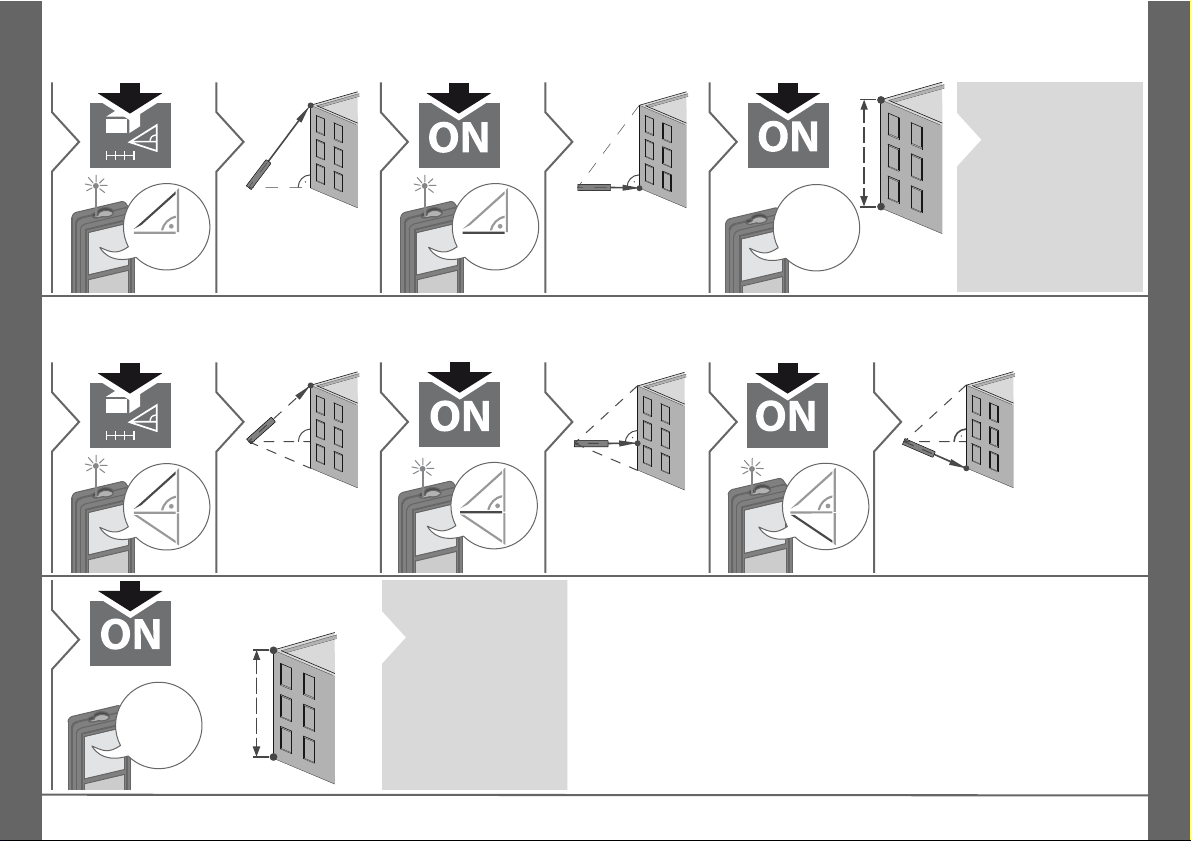
EN
13x2
Aim laser at upper point.
3
4
Aim laser rectangular at lower
point.
8.294 m
5
i
Notice additional
Pythagoras
measurement information at the
bottom of the
next page.
14x2
Aim laser at upper point.
3
4
Aim laser at rectangular point.
5
6
Aim laser at lower point.
8.294 m
7
i
Notice additional
Pythagoras
measurement information at the
bottom of the
next page.
Measuring Functions
Pythagoras (2-point)
Pythagoras (3-point)
10
Makita LD080PI
Page 11
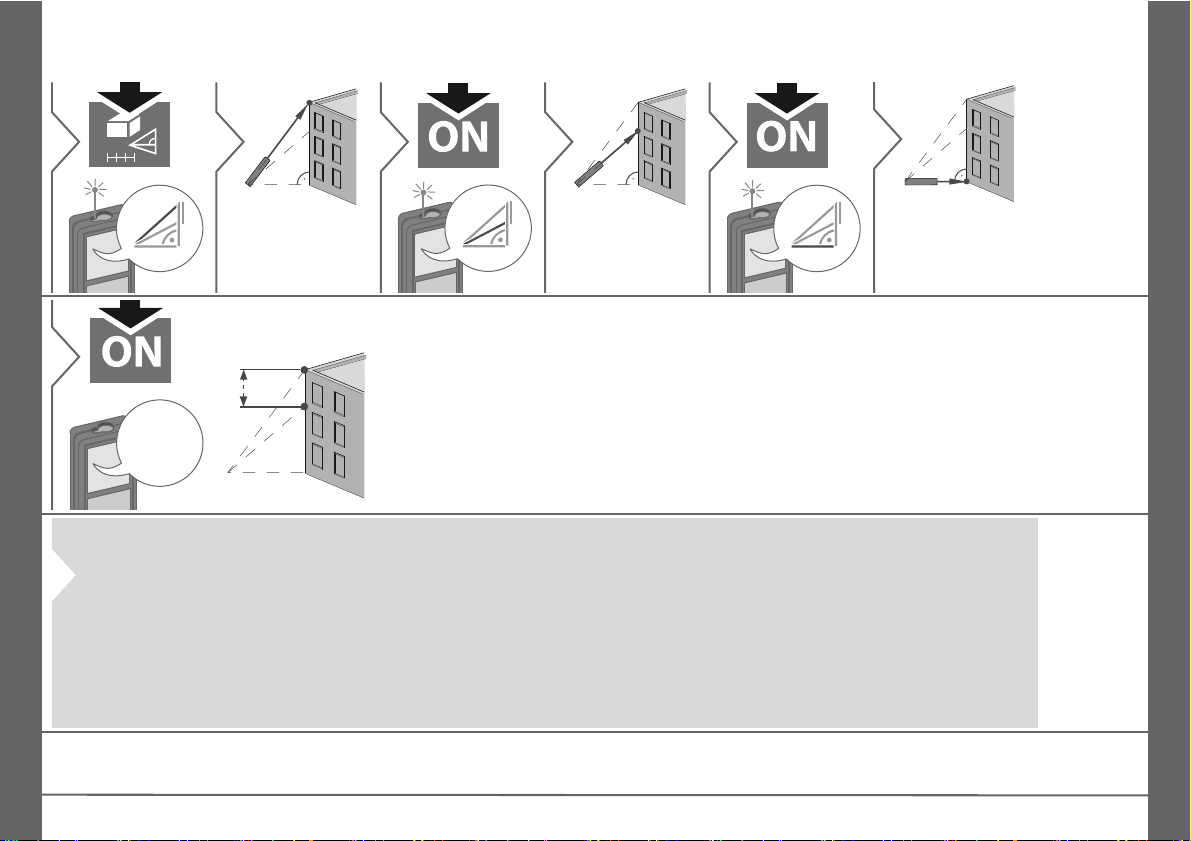
Measuring Functions
15x2
Aim laser at upper point.
3
4
Aim laser at 2nd
point.
5
6
Aim laser at rectangular point.
2.602 m
7
i
• The result is shown in the main line and the measured distance above.
• A reduced level of accuracy, lower than the level of accuracy of the instrument
itself, must generally be expected when the Pythagoras measuring method is
used. In order to obtain the best results we recommend to use a tripod or to flip
out the corner end piece.
• Pressing the measuring key for 2 sec in the function activates automatically
Minimum or Maximum measurement.
Pythagoras
measurements:
Pythagoras (partial height)
EN
Makita LD080PI
11
Page 12
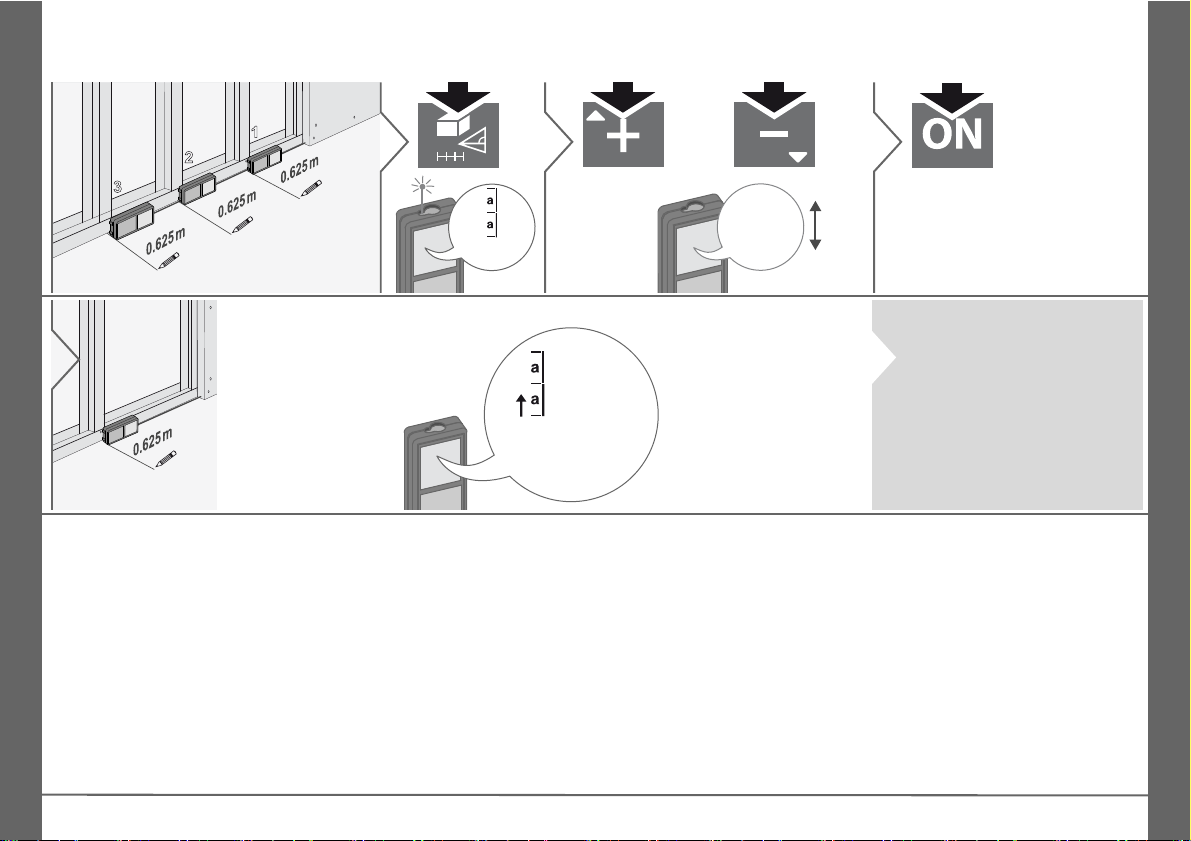
EN
1
2
3
1.000 m
1
6x
0.625 m
2
Adjust
value.
3
Approve value and
start measurement.
4
Move device
slowly along the
stake-out line.
The distance to
the next stake
out point is displayed.
0.625 m
0.240 m
0.240 m is missing
up to next 0.625 m
distance.
When approaching a stake
out point to less than 0.1 m
the instrument starts to
beep.
The function can be stopped
by pressing the CLEAR/OFF
button.
Measuring Functions
Stake out
i
12
Makita LD080PI
Page 13
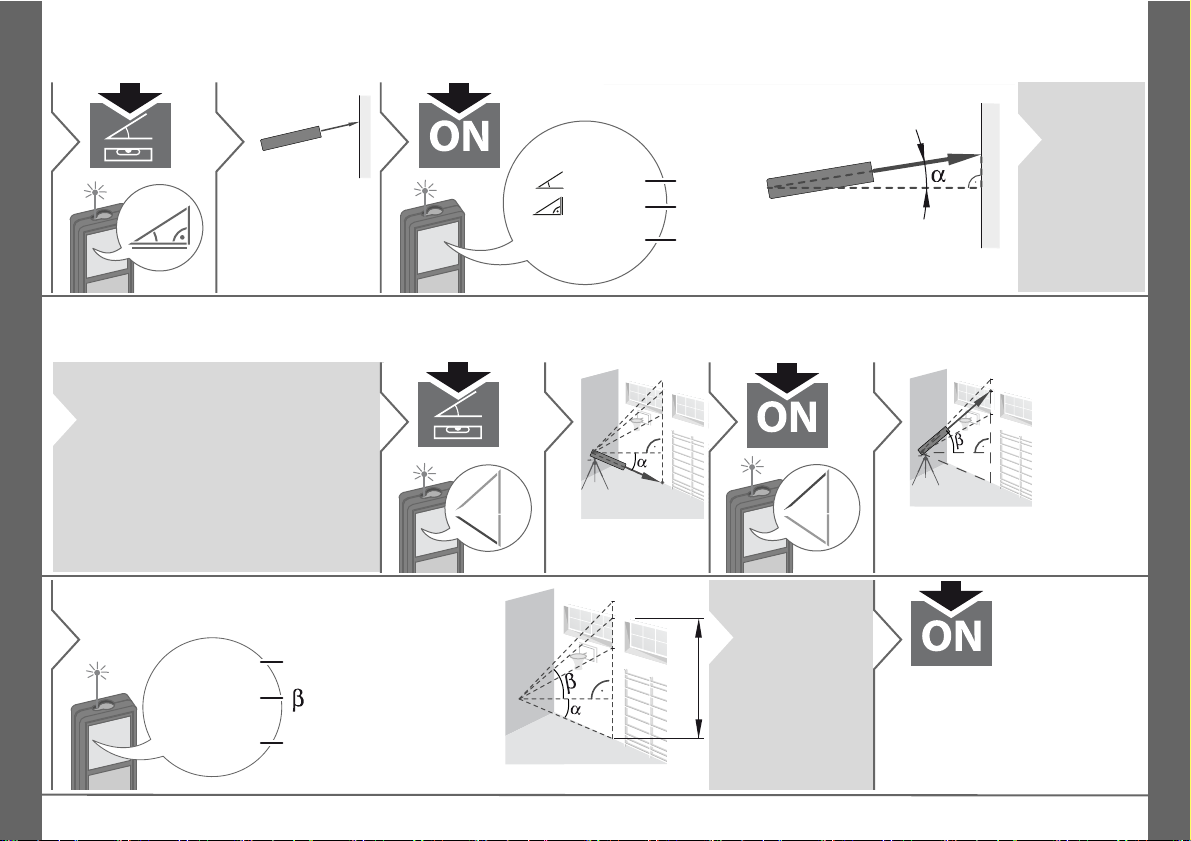
Measuring Functions
1
Aim laser at target.
2
0.032 m
24.3 °
4.827 m
α
z
x
y
z
y
3
(up to 360° and a transverse
tilt of ±10°)
i
Press key
again to
switch off
horizontal
measurement.
i
This function displays continously the tracking height if the device
is turned on a tripod. No 2nd distance measuring is needed as
only the angle is automatically
measured.
1
2x
x
x
Aim laser at lower point.
2
3
h1
h2
h3
Aim laser at upper points and
angle/ height tracking starts automatically.
4
h1
h2
h3
x
y
30.2 °
6.932 m
9.827 m
x
y
5
= Tracking height
= Tracking angle
i
The tracked
height "y" is in
90° to the 1st
aimed point
"x".
6
Stops Height tracking and
displays last measurement.
Smart Horizontal Mode
Height tracking
EN
Makita LD080PI
13
Page 14
EN
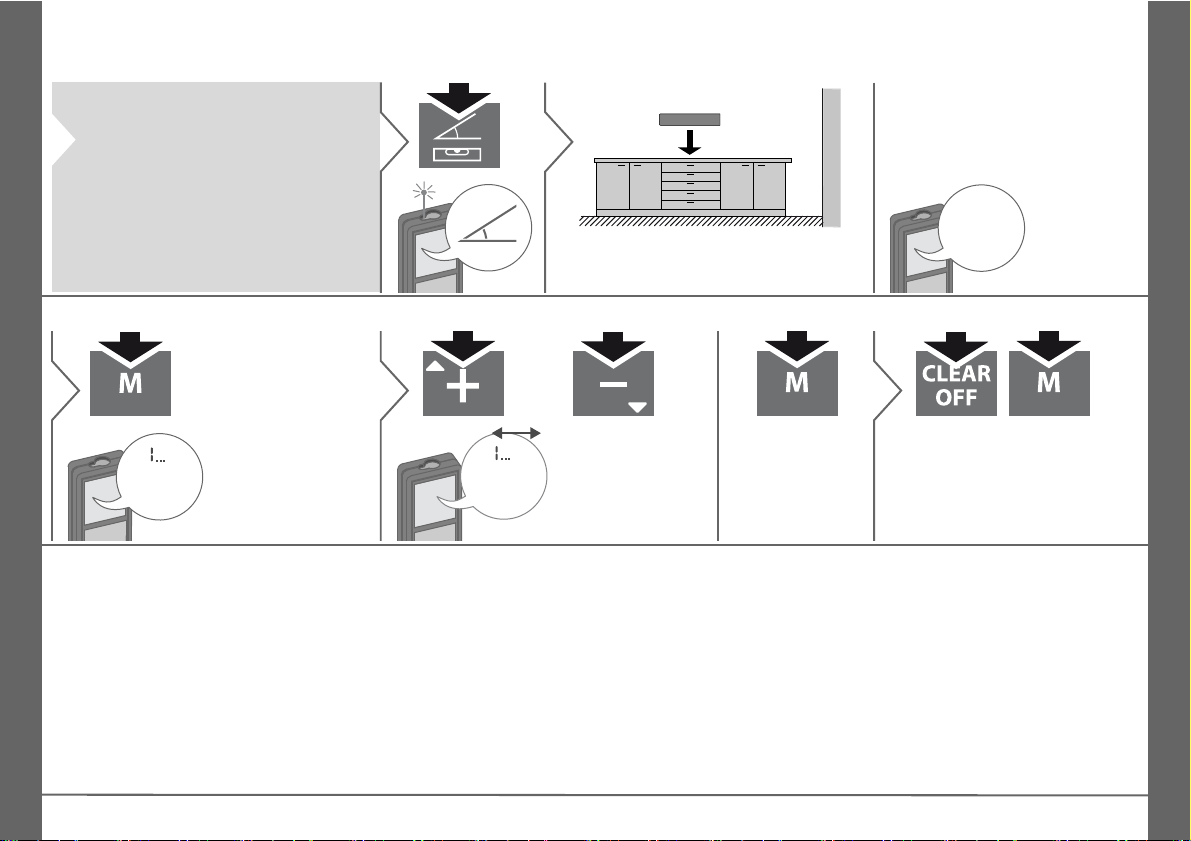
i
This function displays continously
the inclination of the device. From
an inclination of ±5° the device
starts beeping frequently. The
more it gets to 0° the faster it
beeps. If an inclination of ±0.3° is
reached the device beeps continuously.
1
3x
Place device on object to be levelled.
2
8.7 °
The inclination
is displayed
(Range
±180°).
8.294 m
20
20 last displays
are displayed.
1
8.294 m
20
Navigates trough
20 last displays.
2
The value from
the main line can
be used for further calculations.
2 sec
3
2 sec
simultaneously
Memory is completely deleted.
Measuring Functions
Leveling
Memory (20 last displays) Delete Memory
14
Makita LD080PI
Page 15
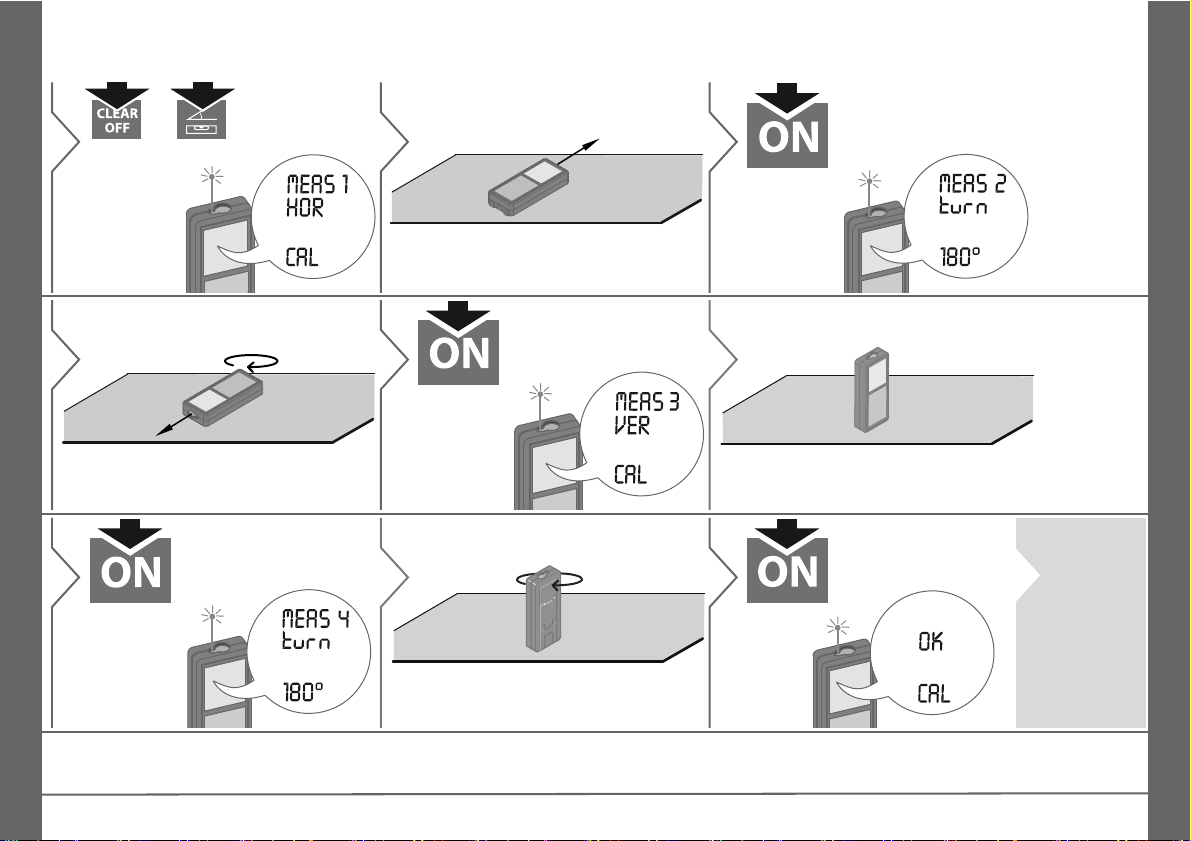
Calibration
1
2 sec
simultane-
ously
2
Place device on absolutely flat surface.
3
180°
4
Turn the device horizontally by 180°
and place it again on absolutely flat
surface.
5
6
Turn the device and place it again on absolutely flat surface.
7
180°
8
Turn the device horizontally by 180°
and place it again on absolutely flat
surface.
9
i
After 2 sec
the device
goes back
to the normal mode.
Calibration of tilt sensor (Tilt Calibration)
EN
Makita LD080PI
15
Page 16

EN
Technical Data
Distance measurement
Typical Measuring Tolerance* ± 1.5 mm / 0.06 in ***
Maximum Measuring
Tolerance**
Range of target plate 80 m / 262 ft
Typical Range* 80 m / 262 ft
Range at unfavourable
condition ****
Smallest unit displayed 0.1 mm / 1/32 in
Ø laser point
at distances
± 2.5 mm / 0.10 in ***
60 m / 197 ft
6 / 30 / 50 mm
(10 / 50 / 80 m)
Tilt measurement
Measuring tolerance to laser
beam*****
Measuring tolerance to
housing*****
Range 360°
± 0.2°
± 0.2°
General
Laser class 2
Laser type 635 nm, < 1 mW
Protection class IP54 (dust- and splash
Autom. laser switch off after 90 s
Autom. power switch-off after 180 s
Battery durability (2 x AAA) up to 5000 measure-
Dimension (H x D x W) 117 x 57 x 32 mm
Weight (with batteries) 0.14 kg / 4.938 oz
Temperature range:
- Storage
- Operation
water protected)
ments
4.6 x 2.4 x 1.3 in
-25 to 70 °C
-13 to 158 °F
-10 to 50 °C
14 to 122 °F
* applies for 100 % target reflectivity (white painted
wall), low background illumination, 25 ºC
** applies for 10 to 500 % target reflectivity, high background illumination, - 10 ºC to + 50 ºC
*** Tolerances apply from 0.05 m to 10 m with a confidence level of 95%. The maximum tolerance may
deteriorate to 0.1 mm/m between 10 m to 30 m and to
0.2 mm/m for distances above 30 m
**** applies for 100 % target reflectivity, background
illumination of approximately 30'000 lux
***** after user calibration. Additional angle related
deviation of +/- 0.01° per degree up to +/-45° in each
quadrant. Applies at room temperature. For the whole
operating temperature range the maximum deviation
increases by +/- 0.1°.
For accurate indirect results, the use
i
of a tripod is recommended. For
accurate tilt measurements a transverse tilt should be avoided.
Functions
Distance measuring yes
Min/Max measuring yes
Permanent measuring yes
Stake-out yes
Addition/Subtraction yes
Area yes
Volume yes
Pythagoras 2-point, 3-point,
Smart Horizontal Mode /
Indirect height
Height tracking yes
Levelling yes
Memory 20 displays
Beep yes
Illuminated display yes
Multifunctional endpiece yes
partial height
yes
16
Makita LD080PI
Page 17

Message Codes
If the message Error does not disappear
after switching on the device repeatedly,
contact the dealer.
If the message InFo appears with a
number, press the Clear button and
observe the following instructions:
No. Cause Correction
156 Transverse tilt
greater than 10°
162 Calibration mistake Make sure, the device
204 Calculation error Perform measurement
252 Temperature too
high
253 Temperature too
low
255 Received signal too
weak, measuring
time too long
256 Received signal too
high
257 Too much back-
ground light
258 Measurement
outside of measuring range
260 Laser beam inter-
rupted
Hold the instrument
without any transverse
tilt.
is placed on a absolutely horizontal and flat
surface. Repeat the
calibration procedure. If
the mistake still occurs,
contact your dealer.
again.
Let device cool down.
Warm device up.
Change target surface
(e.g. white paper).
Change target surface
(e.g. white paper).
Shadow target area.
Correct range.
Repeat measurement.
Care
• Clean the device with a damp, soft cloth.
• Never immerse the device in water.
• Never use aggressive cleaning agents
or solvents.
Safety Instructions
The person responsible for the instrument
must ensure that all users understand
these directions and adhere to them.
Areas of responsibility
Responsibilities of the manufacturer
of the original equipment:
Makita Corporation Anjo,
Aichi 446-8502 Japan
Internet: www.makita.com
The company above is responsible for
supplying the product, including the User
Manual in a completely safe condition.
The company above is not responsible for
third party accessories.
Responsibilities of the person in
charge of the instrument:
• To understand the safety instructions on
the product and the instructions in the
User Manual.
• To be familiar with local safety regulations relating to accident prevention.
• Always prevent access to the product by
unauthorised personnel.
EN
Makita LD080PI
17
Page 18

EN
Safety Instructions
Permitted use
• Measuring distances
• Tilt measurement
Prohibited use
• Using the product without instruction
• Using outside the stated limits
• Deactivation of safety systems and
removal of explanatory and hazard
labels
• Opening of the equipment by using tools
(screwdrivers, etc.)
• Carrying out modification or conversion
of the product
• Use of accessories from other manufacturers without express approval
• Deliberate dazzling of third parties; also
in the dark
• Inadequate safeguards at the surveying
site (e.g. when measuring on roads,
construction sites, etc.)
• Deliberate or irresponsible behaviour on
scaffolding, when using ladders, when
measuring near machines which are
running or near parts of machines or
installations which are unprotected
• Aiming directly in the sun
Hazards in use
WARNING
Watch out for erroneous measurements if
the instrument is defective or if it has been
dropped or has been misused or modified.
Carry out periodic test measurements.
Particularly after the instrument has been
subject to abnormal use, and before,
during and after important measurements.
CAUTION
Never attempt to repair the product yourself. In case of damage, contact a local
dealer.
WARNING
Changes or modifications not expressly
approved could void the user’s authority to
operate the equipment.
Limits of use
Refer to section "Technical data".
i
The device is designed for use in
areas permanently habitable by
humans. Do not use the product in explosion hazardous areas or in aggressive
environments.
Disposal
CAUTION
Flat batteries must not be disposed of with
household waste. Care for the environment and take them to the collection points
provided in accordance with national or
local regulations.
The product must not be disposed with
household waste.
Dispose of the product appropriately in accordance with the
national regulations in force in your
country.
Adhere to the national and country
specific regulations.
Product specific treatment and waste
management can be downloaded from our
homepage.
Electromagnetic Compatibility (EMC)
WARNING
The device conforms to the most stringent
requirements of the relevant standards
and regulations.
Yet, the possibility of causing interference
in other devices cannot be totally
excluded.
18
Makita LD080PI
Page 19
Safety Instructions
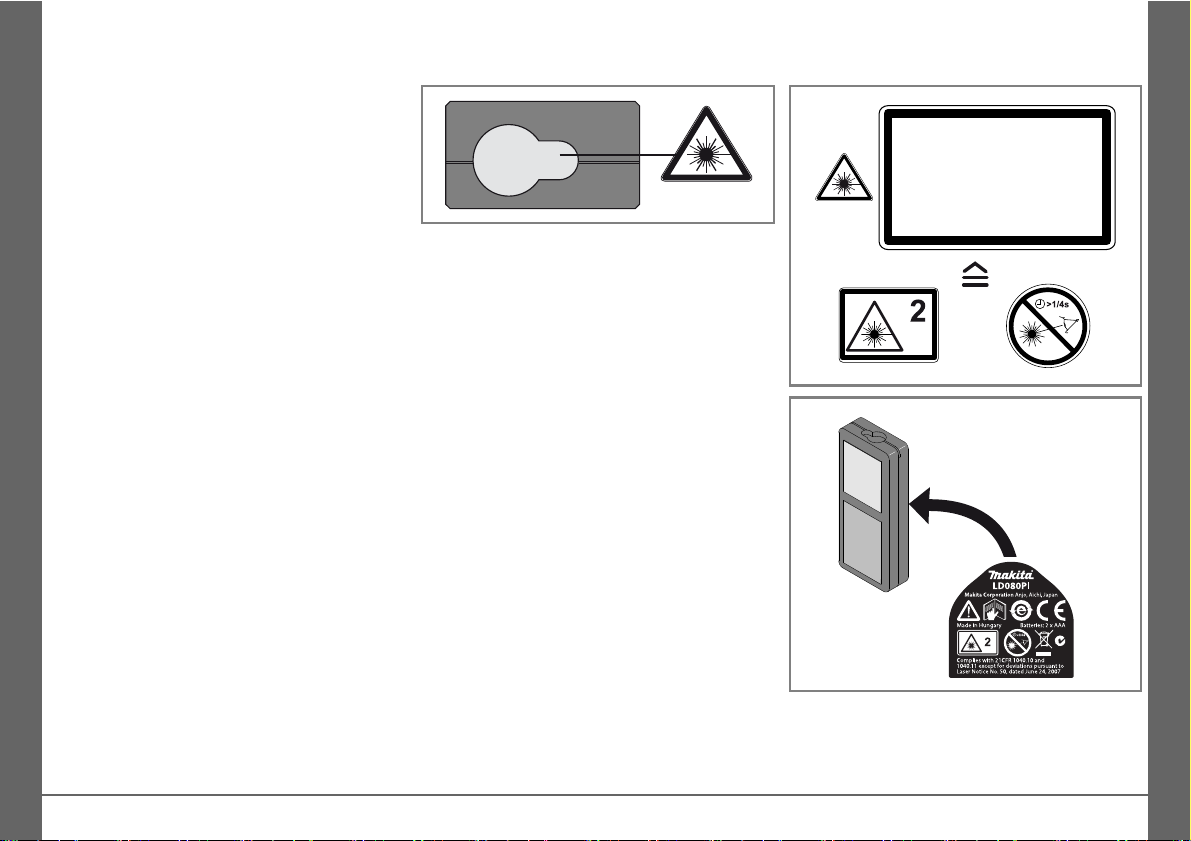
Laser Radiation
Do not stare into the beam
Laser class 2
acc. IEC 60825-1:2007
Maximum radiant power: <1mW
Emitted wavelength: 620-690nm
Beam divergence: 0.16 x 0.6 mrad
Impulse duration: 0.2 x 10
-9
s - 0.8 x 10⁻⁹s
EN
FCC statement (applicable in U.S.)
This equipment has been tested and found
to comply with the limits for a Class B
digital device, pursuant to part 15 of the
FCC Rules. These limits are designed to
provide reasonable protection against
harmful interference in a residential installation.This equipment generates, uses and
can radiate radio frequency energy and, if
not installed and used in accordance with
the instructions, may cause harmful interference to radio communications.
However, there is no guarantee that interference will not occur in a particular installation. If this equipment does cause
harmful interference to radio or television
reception, which can be determined by
turning the equipment off and on, the user
is encouraged to try to correct the interference by one or more of the following
measures:
• Reorient or relocate the receiving
antenna.
• Increase the separation between the
equipment and receiver.
• Connect the equipment into an outlet on
a circuit different from that to which the
receiver is connected.
• Consult the dealer or an experienced
radio/TV technician for help.
Laser classification
The device produces visible laser beams,
which are emitted from the instrument:
It is a Class 2 laser product in accordance
with:
• IEC60825-1 : 2007 „Radiation safety of
laser products“
Laser Class 2 products:
Do not stare into the laser beam or direct it
towards other people unnecessarily. Eye
protection is normally afforded by aversion
responses including the blink reflex.
WARNING
Looking directly into the beam with optical
aids (e.g. binoculars, telescopes) can be
hazardous.
CAUTION
Looking into the laser beam may be
hazardous to the eyes.
Labelling
Subject to change (drawings, descriptions
and technical data) without prior notice.
Makita LD080PI
19
 Loading...