

Page 1
LDT-3002
7
7
7
7
7
7
7
7
7
7
7
7
7
7
7
7
7
7
7
7
7
7
7
7
7
7
7
7
7
7
7
7
7
7
7
7
7
7
7
7
7
Installation and Operation
Instructions
The LDT-3002 combines up to three temperature sensors in one
housing. (Since the LDT-3002 is packed with different options, you may
not have all three sensors.) It shows the temperature in either °F or °C,
selectable by the user. This unit fits in a standard 2 1/8" (54 mm) hole
used by most marine equipment manufacturers.
Mounting
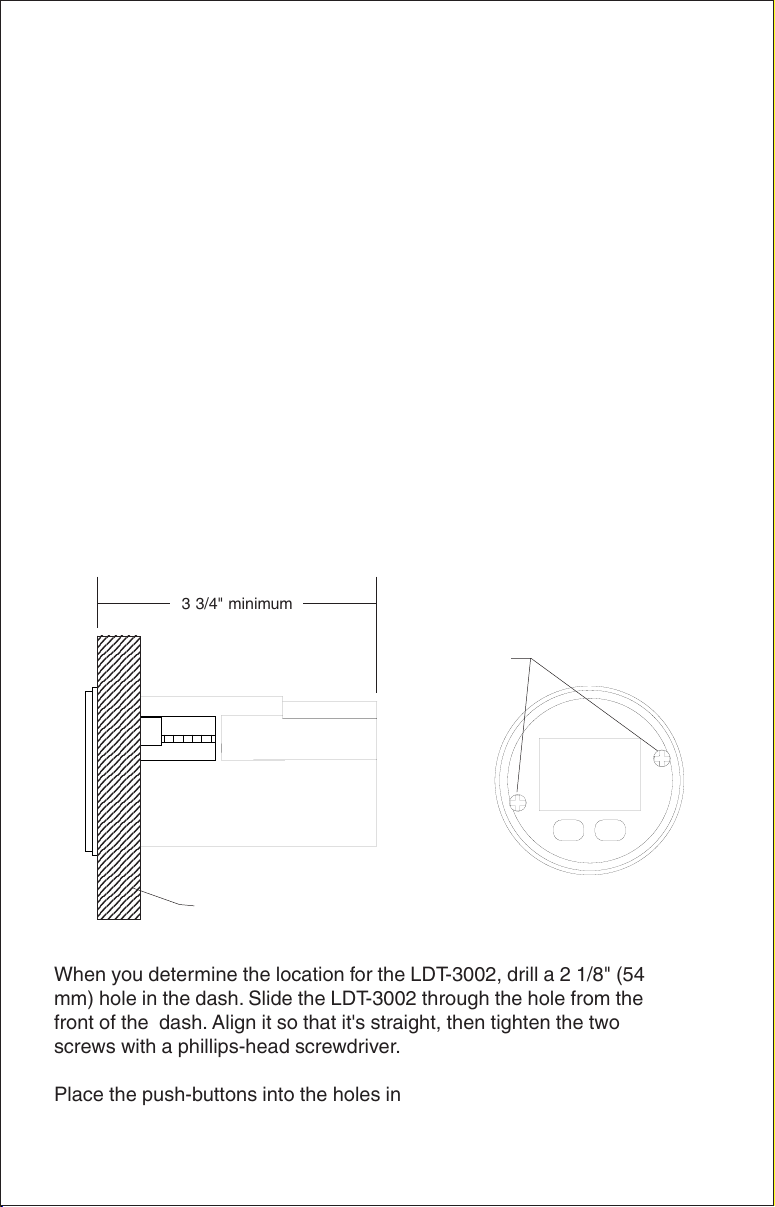
The LDT-3002 mounts in any dash or flat panel that's at least 2 1/2" (64
mm) in diameter. To mount the unit, first make certain there is at least
3 3/4" (95 mm) from the
dash. Also, be sure there is room to route the power and sensor cables.
The
maximum
usable dash thickness is 1 1/8" (28.5 mm).
front
of the dash to any obstruction behind the
3 3/4" minimum
23456
23456
23456
23456
23456
23456
23456
23456
23456
23456
23456
23456
23456
23456
23456
23456
23456
23456
23456
23456
23456
23456
23456
23456
23456
23456
23456
23456
23456
23456
23456
23456
23456
23456
23456
23456
23456
23456
23456
23456
23456
When you determine the location for the LDT-3002, drill a 2 1/8" (54
mm) hole in the dash. Slide the LDT-3002 through the hole from the
front of the dash. Align it so that it's straight, then tighten the two
screws with a phillips-head screwdriver.
Place the push-buttons into the holes in the bezel and snap it on to the
LDT-3002. The unit is now ready for wiring.
DASH
1
TIGHTEN
THESE
SCREWS
Page 2

DASH
TO
TEMPERATURE
SENSORS
GREEN
BLACK
WHITE
ACCESSORY
SWITCH
RED
2-AMP
FUSE
12-VOLT
BATTERY
GREEN
DASH
RED
TO
TEMPERATURE
SENSORS
2
WHITE
ACCESSORY
SWITCH
2-AMP
FUSE
BLACK
LIGHT
SWITCH
12-VOLT
BATTERY
Page 3

WIRING
Connect the wires as shown in the diagrams on the opposite page. The
LDT-3002 operates from 10 to 15 vdc (12-volt system). You can connect
the wires as shown in the diagram at the top of the page using only one
accessory switch (not included), which switches the unit's lights on at the
same time the unit is turned on, or you can wire the lights to a separate
switch as shown at the bottom of the page. Regardless of which wiring
method you use, the LDT-3002 must be wired to a 2-amp fuse! Failure to
fuse this product will void the warranty and could result in damage to the
unit or your boat.
Connecting the green wire to ground forces the LDT-3002 into showing
the temperature in Celcius when it's turned on. Otherwise, it shows the
temperature in Fahrenheit at power-on. If you don't want the temperature
in Celcius at power-on, cut the green wire and tape the end.
The unit won't be harmed if the power wires are connected backwards,
however, it won't work until they're properly connected.
SENSORS
The LDT-3002 can use the following sensors:
TS-W2BK Two temperature sensors - Water and Temp 2.
TS-3BK One temperature sensor - Temp 3 only.
We recommend you use the LDT-3002 with the above sensors in the
following combination:
One TS-W2BK. This gives you two temperature displays - Water and T2.
or
One TS-W2BK and one TS-3BK. This gives you three temperature displays - Water, T2, and T3.
For example, you can connect the TS-W2BK temperature sensors and
mount the sensor labeled "water" on the transom to measure surface
water temperature and the sensor labeled "T2" in the live well or on the
hull for outside air temp. The TS-W3BK has an extra connector so you
can attach the TS-2BK temperature sensor to it, then attach the TS-W3BK
to the LDT-3002 and have three separate temperature displays.
The temperature sensors can be mounted in any convenient location.
Use #8 stainless steel screws to attach the sensor to the hull. (Screws not
included.) When mounting the water temperature sensor , make certain
3
Page 4

to place it on the transom where it will be in contact with the water at all
times, if possible. (See the above diagram.)
OPERATION
To use the LDT-3002, simply turn the power on. The water temperature
shows in degrees Fahrenheit (or Celcius if the green wire is grounded).
The LDT-3002 has up to three temperature displays. To switch between
these modes, simply press the mode key.
To change the temperature displays from Fahrenheit to Celsius, simply
press the °F / °C key. Press this key again to switch back to °F.
Water Temperature
The first temperature to appear after turning the LDT-3002 on is the water
temperature. This sensor is typically mounted on the transom and measures surface water temperature.
MODE
T2 Temperature
The second temperature to appear is T2. This sensor can be mounted in
a live well, on the hull to measure outside air temperature, or just about
any other location.
MODE
T3 Temperature
If you have the T3 temperature sensor installed, it appears after T2. This
sensor can also be mounted in a live well, on the hull to measure outside
air temperature, or just about any other location.
4
Page 5

LOWRANCE ELECTRONICS
FULL ONE-YEAR WARRANTY
“We", “our”, or “us” refers to LOWRANCE ELECTRONICS, INC., the manufacturer of this
product. “You” or “your” refers to the first person who purchases this product as a consumer item for personal, family, or household use.
We warrant this product against defects or malfunctions in materials and workmanship,
and against failure to conform to this product’s written specifications, all for one year (1)
from the date of original purchase by you. WE MAKE NO OTHER EXPRESS WARRANTY
OR REPRESENTATION OF ANY KIND WHATSOEVER CONCERNING THIS PRODUCT.
Your remedies under this warranty will be available so long as you can show in a reasonable manner that any defect or malfunction in materials or workmanship, or any nonconformity with the product’s written specifications, occurred within one year from the date
of your original purchase, which must be substantiated by a dated sales receipt or sales
slip. Any such defect, malfunction, or non-conformity which occurs within one year from
your original purchase date will either be repaired without charge or be replaced with a
new product identical or reasonably equivalent to this product, at our option, within a reasonable time after our receipt of the product. If such defect, malfunction, or non-conformity
remains after a reasonable number of attempts to repair by us, you may elect to obtain
without charge a replacement of the product or a refund for the product. THIS REPAIR,
REPLACEMENT, OR REFUND (AS JUST DESCRIBED) IS THE EXCLUSIVE REMEDY
AVAILABLE TO YOU AGAINST US FOR ANY DEFECT, MALFUNCTION, OR NON-CONFORMITY CONCERNING THE PRODUCT OR FOR ANY LOSS OR DAMAGE RESULTING FROM ANY OTHER CAUSE WHATSOEVER. WE WILL NOT UNDER ANY CIRCUMSTANCES BE LIABLE TO ANYONE FOR ANY SPECIAL, CONSEQUENTIAL, INCIDENTAL, OR OTHER INDIRECT DAMAGE OF ANY KIND.
Some states do not allow the exclusion or limitation of incidental or consequential damages, so the above limitations or exclusions may not apply to you.
This warranty does NOT apply in the following circumstances: (1) when the product has
been serviced or repaired by anyone other than us, (2) when the product has been connected, installed, combined, altered, adjusted, or handled in a manner other than according to the instructions furnished with the product, (3) when any serial number has been
effaced, altered, or removed, or (4) when any defect, problem, loss, or damage has resulted from any accident, misuse, negligence, or carelessness, or from any failure to provide reasonable and necessary maintenance in accordance with the instructions of the
owner’s manual for the product.
We reserve the right to make changes or improvements in our products from time to time
without incurring the obligation to install such improvements or changes on equipment or
items previously manufactured.
This warranty gives you specific legal rights and you may also have other rights which may
vary from state to state.
REMINDER: You must retain the sales slip or sales receipt proving the date of your original purchase in case warranty service is ever required.
LOWRANCE ELECTRONICS
12000 E. SKELLY DRIVE TULSA, OK 74128
(800) 324-1356
5
Page 6

Lowrance's UPS Return Service - U.S.A. Only
Lowrance Electronics and United Parcel Service (UPS) are proud to offer
all of our customers free shipping for all units sent to us for repair or
service. If you have to send this unit to the factory, and you are in the
continental United States (excluding Alaska and Hawaii), use the enclosed
UPS shipping label for easy, free shipping to our factory customer service
department. There are six easy steps:
1. Call Lowrance at the toll-free number on the back of this manual for a
Return Authorization (RA) number and instructions about what accessories to return. Do not return a product to the factory without a
Return Authorization (RA) Number!
2. Pack your unit and any accessories in the original shipping container,
if possible. Be sure to include proof of purchase for warranty veri-
fication!
3. Write a brief note detailing the problem you're having with the unit.
Please include your name, address, and daytime telephone number.
4. Please include payment for non-warranty repairs. Check, money order,
Visa, or MasterCard may be used.
5. Fill in your name, address, zip code, date, and RA number in the blanks
provided on the UPS form included with your unit.
6. Attach the label to the shipping box, tear off the tab for your receipt
and give the package to any UPS driver or take the package to any
UPS Customer Center. You will not be charged for this shipment.
That's it! Your unit will be shipped to Lowrance's customer service department at no charge to you. Our normal in-plant turnaround on repairs is 3
working days. Units under warranty will be returned to you at no charge.
NOTE!
Lowrance will pay UPS surface shipping charges both to and from the
factory for this unit in the event it needs repair. Your unit is insured against
loss or shipping damage when you use the enclosed UPS label.
This UPS shipping offer is good only in the continental United States.
Lowrance Electronics may find it necessary to change or end our shipping policies, regulations, and special offers at any time. We reserve the
right to do so without notice.
6
Page 7

How to Obtain Service
(Canadian Customers Only)
We back your investment in quality products with quick, expert service and genuine
Lowrance replacement parts. If you need service or repairs, contact the Lowrance
Factory Customer Service Department at the toll-free number listed below. A technician may be able to solve the problem and save you the inconvenience of returning your
unit. You will be asked for your unit's serial number.
800-324-1356
Canada Only. Monday through Friday 8:00 A.M. - 8:00 P.M. Central Time.
When sending a product for repair, please do the following:
1. Always use the original shipping container and filler material the product was packed
in when shipping your product.
2 Always insure the parcel against damage or loss during shipment. Lowrance does
not assume responsibility for goods lost or damaged in transit.
3. For proper testing, repair, and service, send a brief note with the product describing
the problem. Be sure to include your name, return shipping address, and a daytime
telephone number.
How to Obtain Service
(International Customers Only - Except Canada)
If you need service or repairs, contact the dealer in the country you purchased your
unit.
WARRANTY REPAIR WILL BE HONORED ONLY IN THE
COUNTRY UNIT WAS PURCHASED.
Please follow the shipping instructions shown below on this page if you have to mail
your unit to the dealer. For proper testing, repair, and service, send a brief note with the
product describing the problem. Be sure to include your name, return shipping address, and a daytime telephone number.
Accessory Ordering Information - All Countries
To order accessories such as power cables or transducers, please contact:
1. Your local marine dealer. Most quality dealers that handle marine electronic equipment should be able to assist you with these items. Consult your local telephone
directory for listings.
2. Canadian customers only can write:
Lowrance/Eagle Canada, 919 Matheson Blvd., E. Mississauga, Ontario L4W2R7
or fax 416-629-3118
7
Page 8

Your unit's serial number
How to Obtain Service - U.S.A. Only
We back your investment in quality products with quick, expert service
and genuine Lowrance® replacement parts. If you're in the United States
and you have questions, please contact the Factory Customer Service
Department using our toll-free number listed below. You must send the
unit to the factory for warranty service or repair. Please call the factory
before sending the unit. You will be asked for your unit's serial number
(shown above). Use the following toll-free number:
800-324-1356
U.S.A.only. Monday through Friday 8:00 A.M. - 8:00 P.M. Central time, except holidays.
Your unit is covered by a full one-year warranty. (See page 5 for complete
warranty details.) If your unit fails and the failure is not covered by the
original warranty, Lowrance has a flat-rate repair policy that covers your
unit and accessories packed with the unit at the factory. There is a 180day warranty on all non-warranty repairs from the factory, which is similar
to the original warranty, but is for 180 days rather than one year. For further details, please call us at the above number.
Lowrance also gives you free UPS shipping from anywhere in the continental United States both to and from the factory for all warranty repairs.
You can also use the enclosed UPS shipping label for non-warranty shipments. See the inside of this flyer for more information.Remember, nonwarranty repairs are subject to Lowrance's published flat-rate charges
and 180-day warranty.
Copyright © 1996, Lowrance Electronics, Inc. All rights reserved.
LITHO IN U.S.A. 988-0099-06
8
 Loading...