

Page 1
Internal Use Only
North/Latin America http://aic.lgservice.com
Europe/Africa http://eic.lgservice.com
Asia/Oceania http://biz.lgservice.com
OLED TV
SERVICE MANUAL
CHASSIS : ED59E
MODEL : 55EF950* 55EF950*-ZA
CAUTION
BEFORE SERVICING THE CHASSIS,
READ THE SAFETY PRECAUTIONS IN THIS MANUAL.
Printed in KoreaP/NO : MFL69290303 (1507-REV00)
Page 2

CONTENTS
CONTENTS .............................................................................................. 2
SAFETY PRECAUTIONS ........................................................................ 3
SERVICING PRECAUTIONS .................................................................... 4
SPECIFICATION ....................................................................................... 6
ADJUSTMENT INSTRUCTION .............................................................. 15
BLOCK DIAGRAM .................................................................................. 28
EXPLODED VIEW .................................................................................. 38
SCHEMATIC CIRCUIT DIAGRAM ........................................... APPENDIX
TROUBLE SHOOTING GUIDE ................................................ APPENDIX
Only for training and service purposes
- 2 -
LGE Internal Use OnlyCopyright © LG Electronics. Inc. All rights reserved.
Page 3
SAFETY PRECAUTIONS
IMPORTANT SAFETY NOTICE
Many electrical and mechanical parts in this chassis have special safety-related characteristics. These parts are identified by in the
Schematic Diagram and Exploded View.
It is essential that these special safety parts should be replaced with the same components as recommended in this manual to prevent
Shock, Fire, or other Hazards.
Do not modify the original design without permission of manufacturer.
General Guidance
An isolation Transformer should always be used during the
servicing of a receiver whose chassis is not isolated from the AC
power line. Use a transformer of adequate power rating as this
protects the technician from accidents resulting in personal injury
from electrical shocks.
It will also protect the receiver and it's components from being
damaged by accidental shorts of the circuitry that may be
inadvertently introduced during the service operation.
If any fuse (or Fusible Resistor) in this TV receiver is blown,
replace it with the specified.
When replacing a high wattage resistor (Oxide Metal Film Resistor,
over 1 W), keep the resistor 10 mm away from PCB.
Keep wires away from high voltage or high temperature parts.
Before returning the receiver to the customer,
always perform an AC leakage current check on the exposed
metallic parts of the cabinet, such as antennas, terminals, etc., to
be sure the set is safe to operate without damage of electrical
shock.
Leakage Current Cold Check(Antenna Cold Check)
With the instrument AC plug removed from AC source, connect an
electrical jumper across the two AC plug prongs. Place the AC
switch in the on position, connect one lead of ohm-meter to the AC
plug prongs tied together and touch other ohm-meter lead in turn to
each exposed metallic parts such as antenna terminals, phone
jacks, etc.
If the exposed metallic part has a return path to the chassis, the
measured resistance should be between 1 MΩ and 5.2 MΩ.
When the exposed metal has no return path to the chassis the
reading must be infinite.
An other abnormality exists that must be corrected before the
receiver is returned to the customer.
Leakage Current Hot Check (See below Figure)
Plug the AC cord directly into the AC outlet.
Do not use a line Isolation Transformer during this check.
Connect 1.5 K / 10 watt resistor in parallel with a 0.15 uF capacitor
between a known good earth ground (Water Pipe, Conduit, etc.)
and the exposed metallic parts.
Measure the AC voltage across the resistor using AC voltmeter
with 1000 ohms/volt or more sensitivity.
Reverse plug the AC cord into the AC outlet and repeat AC voltage
measurements for each exposed metallic part. Any voltage
measured must not exceed 0.75 volt RMS which is corresponds to
0.5 mA.
In case any measurement is out of the limits specified, there is
possibility of shock hazard and the set must be checked and
repaired before it is returned to the customer.
Leakage Current Hot Check circuit
Only for training and service purposes
- 3 -
LGE Internal Use OnlyCopyright © LG Electronics. Inc. All rights reserved.
Page 4

SERVICING PRECAUTIONS
CAUTION: Before servicing receivers covered by this service
manual and its supplements and addenda, read and follow the
SAFETY PRECAUTIONS on page 3 of this publication.
NOTE: If unforeseen circumstances create conict between the
following servicing precautions and any of the safety precautions
on page 3 of this publication, always follow the safety precautions. Remember: Safety First.
General Servicing Precautions
1. Always unplug the receiver AC power cord from the AC power
source before;
a. Removing or reinstalling any component, circuit board
module or any other receiver assembly.
b. Disconnecting or reconnecting any receiver electrical plug
or other electrical connection.
c. Connecting a test substitute in parallel with an electrolytic
capacitor in the receiver.
CAUTION: A wrong part substitution or incorrect polarity
installation of electrolytic capacitors may result in an explosion hazard.
2. Test high voltage only by measuring it with an appropriate
high voltage meter or other voltage measuring device (DVM,
FETVOM, etc) equipped with a suitable high voltage probe.
Do not test high voltage by "drawing an arc".
3. Do not spray chemicals on or near this receiver or any of its
assemblies.
4. Unless specied otherwise in this service manual, clean
electrical contacts only by applying the following mixture to the
contacts with a pipe cleaner, cotton-tipped stick or comparable
non-abrasive applicator; 10 % (by volume) Acetone and 90 %
(by volume) isopropyl alcohol (90 % - 99 % strength)
CAUTION: This is a ammable mixture.
Unless specied otherwise in this service manual, lubrication
of contacts in not required.
5. Do not defeat any plug/socket B+ voltage interlocks with which
receivers covered by this service manual might be equipped.
6. Do not apply AC power to this instrument and/or any of its
electrical assemblies unless all solid-state device heat sinks
are correctly installed.
7. Always connect the test receiver ground lead to the receiver
chassis ground before connecting the test receiver positive
lead.
Always remove the test receiver ground lead last.
8. Use with this receiver only the test xtures specied in this
service manual.
CAUTION: Do not connect the test xture ground strap to any
heat sink in this receiver.
Electrostatically Sensitive (ES) Devices
Some semiconductor (solid-state) devices can be damaged easily by static electricity. Such components commonly are called
Electrostatically Sensitive (ES) Devices. Examples of typical ES
devices are integrated circuits and some eld-effect transistors
and semiconductor “chip” components. The following techniques
should be used to help reduce the incidence of component damage caused by static by static electricity.
1. Immediately before handling any semiconductor component or
semiconductor-equipped assembly, drain off any electrostatic
charge on your body by touching a known earth ground. Alternatively, obtain and wear a commercially available discharging wrist strap device, which should be removed to prevent
potential shock reasons prior to applying power to the unit
under test.
2. After removing an electrical assembly equipped with ES
devices, place the assembly on a conductive surface such as
aluminum foil, to prevent electrostatic charge buildup or exposure of the assembly.
3. Use only a grounded-tip soldering iron to solder or unsolder
ES devices.
4. Use only an anti-static type solder removal device. Some sol-
der removal devices not classied as “anti-static” can generate
electrical charges sufcient to damage ES devices.
5. Do not use freon-propelled chemicals. These can generate
electrical charges sufcient to damage ES devices.
6. Do not remove a replacement ES device from its protective
package until immediately before you are ready to install it.
(Most replacement ES devices are packaged with leads electrically shorted together by conductive foam, aluminum foil or
comparable conductive material).
7. Immediately before removing the protective material from the
leads of a replacement ES device, touch the protective material to the chassis or circuit assembly into which the device will
be installed.
CAUTION: Be sure no power is applied to the chassis or circuit, and observe all other safety precautions.
8. Minimize bodily motions when handling unpackaged replacement ES devices. (Otherwise harmless motion such as the
brushing together of your clothes fabric or the lifting of your
foot from a carpeted oor can generate static electricity sufcient to damage an ES device.)
General Soldering Guidelines
1. Use a grounded-tip, low-wattage soldering iron and appropriate tip size and shape that will maintain tip temperature within
the range or 500 °F to 600 °F.
2. Use an appropriate gauge of RMA resin-core solder composed
of 60 parts tin/40 parts lead.
3. Keep the soldering iron tip clean and well tinned.
4. Thoroughly clean the surfaces to be soldered. Use a mall wirebristle (0.5 inch, or 1.25 cm) brush with a metal handle.
Do not use freon-propelled spray-on cleaners.
5. Use the following unsoldering technique
a. Allow the soldering iron tip to reach normal temperature.
(500 °F to 600 °F)
b. Heat the component lead until the solder melts.
c. Quickly draw the melted solder with an anti-static, suction-
type solder removal device or with solder braid.
CAUTION: Work quickly to avoid overheating the circuit
board printed foil.
6. Use the following soldering technique.
a. Allow the soldering iron tip to reach a normal temperature
(500 °F to 600 °F)
b. First, hold the soldering iron tip and solder the strand
against the component lead until the solder melts.
c. Quickly move the soldering iron tip to the junction of the
component lead and the printed circuit foil, and hold it there
only until the solder ows onto and around both the component lead and the foil.
CAUTION: Work quickly to avoid overheating the circuit
board printed foil.
d. Closely inspect the solder area and remove any excess or
splashed solder with a small wire-bristle brush.
Only for training and service purposes
- 4 -
LGE Internal Use OnlyCopyright © LG Electronics. Inc. All rights reserved.
Page 5

IC Remove/Replacement
Some chassis circuit boards have slotted holes (oblong) through
which the IC leads are inserted and then bent at against the circuit foil. When holes are the slotted type, the following technique
should be used to remove and replace the IC. When working with
boards using the familiar round hole, use the standard technique
as outlined in paragraphs 5 and 6 above.
Removal
1. Desolder and straighten each IC lead in one operation by
gently prying up on the lead with the soldering iron tip as the
solder melts.
2. Draw away the melted solder with an anti-static suction-type
solder removal device (or with solder braid) before removing
the IC.
Replacement
1. Carefully insert the replacement IC in the circuit board.
2. Carefully bend each IC lead against the circuit foil pad and
solder it.
3. Clean the soldered areas with a small wire-bristle brush.
(It is not necessary to reapply acrylic coating to the areas).
"Small-Signal" Discrete Transistor
Removal/Replacement
1. Remove the defective transistor by clipping its leads as close
as possible to the component body.
2. Bend into a "U" shape the end of each of three leads remaining on the circuit board.
3. Bend into a "U" shape the replacement transistor leads.
4. Connect the replacement transistor leads to the corresponding
leads extending from the circuit board and crimp the "U" with
long nose pliers to insure metal to metal contact then solder
each connection.
Power Output, Transistor Device
Removal/Replacement
1. Heat and remove all solder from around the transistor leads.
2. Remove the heat sink mounting screw (if so equipped).
3. Carefully remove the transistor from the heat sink of the circuit
board.
4. Insert new transistor in the circuit board.
5. Solder each transistor lead, and clip off excess lead.
6. Replace heat sink.
Diode Removal/Replacement
1. Remove defective diode by clipping its leads as close as possible to diode body.
2. Bend the two remaining leads perpendicular y to the circuit
board.
3. Observing diode polarity, wrap each lead of the new diode
around the corresponding lead on the circuit board.
4. Securely crimp each connection and solder it.
5. Inspect (on the circuit board copper side) the solder joints of
the two "original" leads. If they are not shiny, reheat them and
if necessary, apply additional solder.
3. Solder the connections.
CAUTION: Maintain original spacing between the replaced
component and adjacent components and the circuit board to
prevent excessive component temperatures.
Circuit Board Foil Repair
Excessive heat applied to the copper foil of any printed circuit
board will weaken the adhesive that bonds the foil to the circuit
board causing the foil to separate from or "lift-off" the board. The
following guidelines and procedures should be followed whenever this condition is encountered.
At IC Connections
To repair a defective copper pattern at IC connections use the
following procedure to install a jumper wire on the copper pattern
side of the circuit board. (Use this technique only on IC connections).
1. Carefully remove the damaged copper pattern with a sharp
knife. (Remove only as much copper as absolutely necessary).
2. carefully scratch away the solder resist and acrylic coating (if
used) from the end of the remaining copper pattern.
3. Bend a small "U" in one end of a small gauge jumper wire and
carefully crimp it around the IC pin. Solder the IC connection.
4. Route the jumper wire along the path of the out-away copper
pattern and let it overlap the previously scraped end of the
good copper pattern. Solder the overlapped area and clip off
any excess jumper wire.
At Other Connections
Use the following technique to repair the defective copper pattern
at connections other than IC Pins. This technique involves the
installation of a jumper wire on the component side of the circuit
board.
1. Remove the defective copper pattern with a sharp knife.
Remove at least 1/4 inch of copper, to ensure that a hazardous
condition will not exist if the jumper wire opens.
2. Trace along the copper pattern from both sides of the pattern
break and locate the nearest component that is directly connected to the affected copper pattern.
3. Connect insulated 20-gauge jumper wire from the lead of the
nearest component on one side of the pattern break to the
lead of the nearest component on the other side.
Carefully crimp and solder the connections.
CAUTION: Be sure the insulated jumper wire is dressed so the
it does not touch components or sharp edges.
Fuse and Conventional Resistor
Removal/Replacement
1. Clip each fuse or resistor lead at top of the circuit board hollow
stake.
2. Securely crimp the leads of replacement component around
notch at stake top.
Only for training and service purposes
- 5 -
LGE Internal Use OnlyCopyright © LG Electronics. Inc. All rights reserved.
Page 6
SPECIFICATION
NOTE : Specifications and others are subject to change without notice for improvement
.
1. Application range
This specification is applied to the OLED TV with ED59E
chassis.
2. Requirement for Test
Each part is tested as below without special appointment.
1) Temperature: 25 °C ± 5 °C(77 °F ± 9 °F), CST: 40 °C ± 5 °C
2) Relative Humidity: 65 % ± 10 %
3) Power Voltage
: Standard input voltage (AC 100-240 V~, 50/60 Hz)
* Standard Voltage of each products is marked by models.
4) Specification and performance of each parts are followed
each drawing and specification by part number in
accordance with BOM.
5) The receiver must be operated for about 20 minutes prior to
the adjustment.
3. Test method
1) Performance: LGE TV test method followed
2) Demanded other specification
- Safety : CE, IEC specification
- EMC : CE, IEC specification
- Wireless : Wireless HD Specification (Option)
4. Model General Specification
No. Item Specication Remarks
DTV & Analog (Total 37 countries)
DTV (MPEG2/4, DVB-T) : 26 countrie
Germany, Netherland, Switzerland, Hungary, Austria, Slovenia, Bulgaria,
France, Spain, , Belgium, Luxemburg, Greece, Czech, Turkey, Morocco,
Ireland, Latvia, Estonia, Lithuania, Poland, Portugal, Romania, Albania,
Bosnia, Slovakia, Belarus
DTV (MPEG2/4, DVB-T2) :11 countries
UK(Ireland), Sweden, Denmark, Finland, Norway, Ukraine, Kazakhstan,
Russia, Italy, Croatia, Serbia
1 Market EU/CIS(PAL Market-37Countries)
DTV (MPEG2/4, DVB-C) : 37 countries
Germany, Netherland, Switzerland, Hungary, Austria, Slovenia, Bulgaria,
France, Spain, Italy, Belgium, Russia, Luxemburg, Greece, Czech, Croatia, Turkey, Morocco, Ireland, Latvia, Estonia, Lithuania, Poland, Portugal,
Romania, Albania, Bosnia, Serbia, Slovakia, Belarus, UK, Sweden, Denmark, Finland, Norway, Ukraine, Kazakhstan
DTV (MPEG2/4,DVB-S) : 37 countries
Germany, Netherland, Switzerland, Hungary, Austria, Slovenia, Bulgaria,
France, Spain,Belgium, Luxemburg, Greece, Czech, Turkey, Morocco,
Ireland, Latvia, Estonia, Lithuania, Poland, Portugal, Romania, Albania,
Bosnia, Slovakia, Belarus, UK(Ireland), Sweden, Denmark, Finland, Norway, Ukraine, Kazakhstan,Russia, Italy, Croatia, Serbia
Supported satellite : 35 satellites
ABS1 75.0E, AMOS 4.0W, ASIASAT3S 105.5E, ASTRA 19.2E, ASTRA
23.5E, ASTRA 28.2E, ASTRA 4.8E, ATLANTIC BIRD2 8.0W, ATLANTIC BIRD3 5.0W, BADR 26.0E, DIRECTV-1R 56.0E, EUROBIRD 9A
9.0E, EUROBIRD3 33.0E, EUTELSAT 36 A/B 36.0E, EUTELSAT W2A
10.0E, EUTELSAT W3A 7.0E, EUTELSAT7WA 7.3WEUTELSAT 16.0E,
EXPRESS AM1 40.0E, EXPRESS AM3 140.0E, EXPRESS AM33 96.5E,
HELLASSAT 39.0E, HISPASAT 1CDE 30.0WHOTBIRD 13.0E, INTELSAT10&7 68.5E, INTELSAT15 85.2E, INTELSAT1R 50.0W, INTELSAT903 33.5W, INTELSAT904 60.0E, NILESAT 7.0W, NSS12 57.0E,
THOR 0.8W, TURKSAT 42.0E, YAMAL201 90.0E, OTHER
Only for training and service purposes
- 6 -
LGE Internal Use OnlyCopyright © LG Electronics. Inc. All rights reserved.
Page 7
No. Item Specication Remarks
2 Broadcasting system
3 Program coverage
4 Receiving system
5 Input Voltage AC 100 ~ 240V 50/60Hz
1) PAL/SECAM B/G/I/D/K,
SECAM L/L’
2)DVB-T/T2, C, S/S2
1 ) Digital TV
- VHF, UHF
- C-Band,Ku-Band
2) Analogue TV
- VHF : E2 to E12
- UHF : E21 to E69
- CATV : S1 to S20
- HYPER : S21 to S47
Analog : Upper Heterodyne
Digital : COFDM, QAM
► DVB-T
- Guard Interval(Bitrate_Mbit/s)
1/4, 1/8, 1/16, 1/32
- Modulation : Code Rate
QPSK : 1/2, 2/3, 3/4, 5/6, 7/8
16-QAM : 1/2, 2/3, 3/4, 5/6, 7/8
64-QAM : 1/2, 2/3, 3/4, 5/6, 7/8
► DVB-T2
- Guard Interval(Bitrate_Mbit/s)
1/4, 1/8, 1/16, 1/32, 1/128, 19/128, 19/256,
- Modulation : Code Rate
QPSK : 1/2, 2/5, 2/3, 3/4, 5/6
16-QAM : 1/2, 2/5, 2/3, 3/4, 5/6
64-QAM : 1/2, 2/5, 2/3, 3/4, 5/6
256-QAM : 1/2, 2/5, 2/3, 3/4, 5/6
► DVB-T2
- Symbolrate : 4.0Msymbols/s to 7.2Msymbols/s
- Modulation :
16QAM, 64-QAM, 128-QAM and 256-QAM
► DVB-S/S2
- symbolrate
DVB-S2 (8PSK / QPSK) : 2 ~ 45Msymbol/s
DVB-S (QPSK) : 2 ~ 45Msymbol/s
- viterbi
DVB-S mode : 1/2, 2/3, 3/4, 5/6, 7/8
DVB-S2 mode : 1/2, 2/3, 3/4, 3/5, 4/5, 5/6, 8/9, 9/10
Only for training and service purposes
- 7 -
LGE Internal Use OnlyCopyright © LG Electronics. Inc. All rights reserved.
Page 8

5. External Input Support Format
5.1. Component (Y, CPB, PR)
No Resolution H-freq.(kHz) V-freq.(Hz) Pixel clock Proposed
1. 720*480 15.73 60 13.5135 SDTV ,DVD 480I
2 720*480 15.73 59.94 13.5 SDTV ,DVD 480I
3. 720*480 31.50 60 27.027 SDTV 480P
4 720*480 31.47 59.94 27.0 SDTV 480P
5 1280*720 45.00 60.00 74.25 HDTV 720P
6 1280*720 44.96 59.94 74.176 HDTV 720P
7 1920*1080 33.75 60.00 74.25 HDTV 1080I
8 1920*1080 33.72 59.94 74.176 HDTV 1080I
9 1920*1080 67.500 60 148.50 HDTV 1080P
10 1920*1080 67.432 59.94 148.352 HDTV 1080P
11 1920*1080 27.000 24.000 74.25 HDTV 1080P
12 1920*1080 26.97 23.976 74.176 HDTV 1080P
13 1920*1080 33.75 30.000 74.25 HDTV 1080P
14 1920*1080 33.71 29.97 74.176 HDTV 1080P
5.2. HDMI Input
(1) DTV mode
No Resolution H-freq.(kHz) V-freq.(Hz) Pixel clock(MHz) Proposed Proposed
1 640*480 31.46 59.94 25.13 SDTV 480P
2 640*480 31.50 60.00 25.13 SDTV 480P
3 720*480 15.73 59.94 13.50 SDTV, DVD 480I(525I)
Spec. out but display4 720*480 15.75 60.00 13.51 SDTV, DVD 480I(525I)
5 720*576 15.62 50.00 13.50 SDTV, DVD 576I(625I) 50Hz
6 720*480 31.47 59.94 27.00 SDTV 480P
7 720*480 31.50 60.00 27.03 SDTV 480P
8 720*576 31.25 50.00 27.00 SDTV 576P
9 1280*720 44.96 59.94 74.18 HDTV 720P
10 1280*720 45.00 60.00 74.25 HDTV 720P
11 1280*720 37.50 50.00 74.25 HDTV 720P
12 1920*1080 28.12 50.00 74.25 HDTV 1080I
13 1920*1080 33.72 59.94 74.18 HDTV 1080I
14 1920*1080 33.75 60.00 74.25 HDTV 1080I
15 1920*1080 26.97 23.97 63.30 HDTV 1080P
16 1920*1080 27.00 24.00 63.36 HDTV 1080P
17 1920*1080 33.71 29.97 79.12 HDTV 1080P
18 1920*1080 33.75 30.00 79.20 HDTV 1080P
19 1920*1080 56.25 50.00 148.50 HDTV 1080P
20 1920*1080 67.43 59.94 148.35 HDTV 1080P
21 1920*1080 67.50 60.00 148.50 HDTV 1080P
Only for training and service purposes
- 8 -
LGE Internal Use OnlyCopyright © LG Electronics. Inc. All rights reserved.
Page 9
22 3840*2160 53.95 23.98 297.00 UDTV 2160P UHD only
23 3840*2160 54.00 24.00 297.00 UDTV 2160P UHD only
24 3840*2160 56.25 25.00 297.00 UDTV 2160P UHD only
25 3840*2160 61.43 29.97 297.00 UDTV 2160P UHD only
26 3840*2160 67.50 30.00 297.00 UDTV 2160P UHD only
27 3840*2160 112.50 50.00 594.00 UDTV 2160P(DVB) UHDonly(Port1)
28 3840*2160 135.00 59.94 593.41 UDTV 2160P UHDonly(Port1)
29 3840*2160 135.00 60.00 594.00 UDTV 2160P UHDonly(Port1)
30 4096*2160 53.95 23.98 297.00 UDTV 2160P UHD only
31 4096*2160 54.00 24.00 297.00 UDTV 2160P UHD only
32 4096*2160 56.25 25.00 297.00 UDTV 2160P UHD only
33 4096*2160 61.43 29.97 297.00 UDTV 2160P UHD only
34 4096*2160 67.50 30.00 297.00 UDTV 2160P UHD only
35 4096*2160 112.50 50.00 594.00 UDTV 2160P(DVB) UHDonly(Port1)
36 4096*2160 135.00 59.94 593.41 UDTV 2160P UHDonly(Port1)
37 4096*2160 135.00 60.00 594.00 UDTV 2160P UHDonly(Port1)
(2) HDMI Input (PC)
No Resolution H-freq.(kHz) V-freq.(Hz) Pixel clock(MHz) Proposed Proposed
1 640*350 31.46 70.09 25.17 EGA
2 720*400 31.46 70.08 28.32 DOS
3 640*480 31.46 59.94 25.17 VESA(VGA)
4 800*600 37.87 60.31 40.00 VESA(SVGA)
5 1024*768 48.36 60.00 65.00 VESA(XGA)
6 1152*864 54.34 60.05 80.00 VESA
7 1280*1024 63.98 60.02 109.00 VESA(SXGA) FHD only
8 1360*768 47.71 60.01 85.00 VESA(WXGA)
9 1920*1080 67.50 60.00 158.40 WUXGA(CEA 861D) FHD only
10 3840*2160 67.50 30.00 297.00 UDTV 2160P UHD only
11 3840*2160 56.25 25.00 297.00 UDTV 2160P UHD only
12 3840*2160 54.00 24.00 297.00 UDTV 2160P UHD only
13 4096*2160 53.95 23.97 296.703 UDTV 2160P UHD only
14 4096*2160 54.00 24.00 297.00 UDTV 2160P UHD only
Only for training and service purposes
- 9 -
LGE Internal Use OnlyCopyright © LG Electronics. Inc. All rights reserved.
Page 10

5.3. 3D Mode - DTV/HDMI/USB
(1) RF Input
No. Resolution H-freq(kHz) V-freq.(Hz) Pixel clock(MHz) Proposed 3D input proposed mode
1 1280*720 37.50 50 74.25 HDTV 720P 2D to 3D, Side by Side, Top & Bottom
2 1920*1080 28.13 50 74.25 HDTV 1080I 2D to 3D, Side by Side, Top & Bottom
(2) HDMI Input
1) HDMI Input (3D supported mode automatically)
No. Resolution H-freq(kHz) V-freq.(Hz) Pixel clock(MHz) VIC
31.46 /
31.50
1 640*480
2 720*480
3 720*576 15.62 50.00 27.00 21
4 720*576
5 1280*720
31.46 /
31.50
62.93 /
63.00
31.46 /
31.50
31.46 /
31.50
62.93 /63.00 59.94 / 60.00 54.00/54.06 2,3
31.25 50.00 27.00 17,18
62.50 50.00 54.00 17,18
37.50 50.00 74.25 19
37.50 50.00 148.50 19 Side-by-side(Full) (HDTV 720P)
44.96 /
45.00
44.96 /
45.00
75.00 50.00 148.50 19
89.91/90.00 59.94 / 60.00 148.35/148.50 4
59.94/ 60.00 25.13/25.20 1
59.94/ 60.00 50.35/50.40 1 Side-by-side(Full) (SDTV 480P)
59.94/ 60.00 50.35/50.40 1
59.94 / 60.00 27.00/27.03 2,3
59.94 / 60.00 27.00/27.03 2,3 Side-by-side(Full) (SDTV 480P)
59.94 / 60.00 74.17/74.25 4
59.94 / 60.00 148.35/148.50 4 Side-by-side(Full) (HDTV 720P)
3D input proposed
mode
Top-and-Bottom
Side-by-side(half)
Frame packing
Line alternative
Top-and-Bottom
Side-by-side(half)
Frame packing
Line alternative
Top-and-Bottom
Side-by-side(half)
Side-by-side(Full)
Frame packing
Field alternative
Top-and-Bottom
Side-by-side(half)
Side-by-side(Full)
Frame packing
Line alternative
Top-and-Bottom
Side-by-side(half)
Top-and-Bottom
Side-by-side(half)
Frame packing
Line alternative
Frame packing
Line alternative
Proposed
Secondary(SDTV 480P)
Secondary(SDTV 480P)
Secondary(SDTV 480P)
(SDTV 480P)
Secondary(SDTV 480P)
Secondary(SDTV 480P)
Secondary(SDTV 480P)
(SDTV 480P)
(SDTV 576I)
Secondary(SDTV 576I)
(SDTV 576I)
Secondary(SDTV 576I)
Secondary(SDTV 576I)
Secondary(SDTV 576P)
Secondary(SDTV 576P)
(SDTV 576P)
Secondary(SDTV 576P)
(SDTV 576P)
Primary(HDTV 720P)
Primary(HDTV 720P)
Primary(HDTV 720P)
Primary(HDTV 720P)
Primary(HDTV 720P)
(HDTV 720P)
Primary(HDTV 720P)
(HDTV 720P)
Only for training and service purposes
- 10 -
LGE Internal Use OnlyCopyright © LG Electronics. Inc. All rights reserved.
Page 11
6 1920*1080
7 1920*1080
28.12 50.00 74.25 20
28.12 50.00 148.50 20 Side-by-side(Full) (HDTV 1080I)
33.72 /
33.75
33.72 /
33.75
56.25 50.00 148.50 20
67.43/67.50 59.94 / 60.00 148.35/148.50 5
26.97 /
27.00
26.97 /
27.00
28.12 25.00 74.25 33
28.12 25.00 148.50 33 Side-by-side(Full) (HDTV 1080P)
33.71 /
33.75
33.71 /
33.75
43.94/54.00 23.97 / 24.00 148.35/148.50 32
56.25 25.00 148.50 33
59.94 / 60.00 74.17/74.25 5
59.94 / 60.00 148.35/148.50 5 Side-by-side(Full) (HDTV 1080I)
23.97 / 24.00 74.17 / 74.25 32
23.97 / 24.00 148.35 / 148.50 32 Side-by-side(Full) (HDTV 1080P)
29.97 / 30.00 74.18/74.25 34
29.97 / 30.00 148.35/148.50 34 Side-by-side(Full) (HDTV 1080P)
Top-and-Bottom
Side-by-side(half)
Top-and-Bottom
Side-by-side(half)
Frame packing
Field alternative
Frame packing
Field alternative
Top-and-Bottom
Side-by-side(half)
Top-and-Bottom
Side-by-side(half)
Top-and-Bottom
Side-by-side(half)
Frame packing
Line alternative
Frame packing
Line alternative
Secondary(HDTV 1080I)
Primary(HDTV 1080I)
Secondary(HDTV 1080I)
Primary(HDTV 1080I)
Primary(HDTV 1080I)
(HDTV 1080I)
Primary(HDTV 1080I)
(HDTV 1080I)
Primary(HDTV 1080P)
Primary(HDTV 1080P)
Secondary(HDTV 1080P)
Secondary(HDTV 1080P)
Primary(HDTV 1080P)
Secondary(HDTV 1080P)
Primary(HDTV 1080P)
(HDTV 1080P)
Secondary(HDTV 1080P)
(HDTV 1080P)
67.43 / 67.5 29.97 / 30.00 148.35/148.50 34
56.25 50.00 148.50 31
67.43 /
67.50
59.94 / 60.00 148.35/148.50 16
Frame packing
Line alternative
Top-and-Bottom
Side-by-side(half)
Top-and-Bottom
Side-by-side(half)
Primary(HDTV 1080P)
(HDTV 1080P)
Primary(HDTV 1080P)
Secondary(HDTV 1080P)
Primary(HDTV 1080P)
Secondary(HDTV 1080P)
(3) DTV( 3D) (3D supported mode automatically)
No. Signal H-freq(kHz) V-freq.(Hz) Pixel clock(MHz) Proposed 3D input proposed mode
1 Frame compatible - - - -
Side by Side(half)
Top & Bottom
(4) DTV/ATV(CVBS/SCART) Input( 3D) (3D supported mode manually)
No. Signal H-freq(kHz) V-freq.(Hz) Pixel clock(MHz) Proposed 3D input proposed mode
1 HD/SD - - - - 2D to 3D
2 SD - - - -
Side by Side(half)
Top & Bottom
Only for training and service purposes
- 11 -
LGE Internal Use OnlyCopyright © LG Electronics. Inc. All rights reserved.
Page 12
(5) Component Input ( 3D) (3D supported mode manually)
No. Resolution H-freq(kHz) V-freq.(Hz) Pixel clock(MHz) Proposed 3D input proposed mode
1 1280*720 37.50 50.00 74.25 HDTV 720P
2 1280*720 45.00 60.00 74.25 HDTV 720P
3 1280*720 44.96 59.94 74.18 HDTV 720P
4 1920*1080 33.75 60.00 74.25 HDTV 1080I
5 1920*1080 33.72 59.94 74.18 HDTV 1080I
6 1920*1080 28.12 50.00 74.25 HDTV 1080I
7 1920*1080 67.50 60.00 148.50 HDTV 1080P
8 1920*1080 67.43 59.94 148.35 HDTV 1080P
9 1920*1080 27.00 24.00 74.25 HDTV 1080P
10 1920*1080 28.12 25.00 74.25 HDTV 1080P
11 1920*1080 56.25 50.00 74.25 HDTV 1080P
12 1920*1080 26.97 23.97 74.18 HDTV 1080P
13 1920*1080 33.75 30.00 74.25 HDTV 1080P
14 1920*1080 33.71 29.97 74.18 HDTV 1080P
2D to 3D,
Side by Side(half), Top & Bottom
2D to 3D,
Side by Side(half), Top & Bottom
2D to 3D,
Side by Side(half), Top & Bottom
2D to 3D,
Side by Side(half), Top & Bottom
2D to 3D,
Side by Side(half), Top & Bottom
2D to 3D,
Side by Side(half), Top & Bottom
2D to 3D,
Side by Side(half), Top & Bottom
2D to 3D,
Side by Side(half), Top & Bottom
2D to 3D,
Side by Side(half), Top & Bottom
2D to 3D,
Side by Side(half), Top & Bottom
2D to 3D,
Side by Side(half), Top & Bottom
2D to 3D,
Side by Side(half), Top & Bottom
2D to 3D,
Side by Side(half), Top & Bottom
2D to 3D,
Side by Side(half), Top & Bottom
(6) HDMI-PC Input (3D) (3D supported mode manually)
No. Resolution H-freq(kHz) V-freq.(Hz) Pixel clock(MHz) Proposed 3D input proposed mode
1 1024*768 48.36 60.00 65.00 HDTV 768P 2D to 3D,
2 1360*768 47.71 60.00 HDTV 768P
3 1920*1080 67.50 60.00 148.50 HDTV 1080P
3840*2160
4
(Ultea HD
model only)
4096*2160
5
(Ultea HD
model only)
6 Others - - -
54.00 24.00 296.70
56.25 25.00 297.00
67.50 30.00 296.70
54 24.00 297.00 HDTV 2160P
HDTV 2160P
640*350
720*400
640*480
800*600
1152*864
- 12 -
Only for training and service purposes
Side by Side(half),
Top & Bottom
2D to 3D,
Side by Side(half), Top & Bottom,
Checker Board, Frame Sequential,
Row Interleaving, Column Interleaving
2D to 3D,
Top & Bottom(half)
Side by Side(half)
2D to 3D,
Side by Side(half),
Top & Bottom
LGE Internal Use OnlyCopyright © LG Electronics. Inc. All rights reserved.
Page 13
(7) HDMI-DTV (3D supported mode manually)
No. Resolution H-freq(kHz) V-freq.(Hz) Pixel clock(MHz) Proposed 3D input proposed mode
1 720*480 31.50 60.00 27.03 SDTV 480P
2 720*576 31.25 50.00 27.00 SDTV 576P
3 37.50 50.00 74.25 HDTV 720P
4 1920*1080
5 1920*1080
33.75 60.00 74.25 HDTV 1080I
28.12 50.00 74.25 HDTV 1080I
27.00 24.00 74.25 HDTV 1080P
28.12 25.00 74.25 HDTV 1080P
33.75 30.00 74.25 HDTV 1080P
67.50 60.00 148.50 HDTV 1080P 2D to 3D, Side by Side(Half), Top &
56.25 50.00 148.50 HDTV 1080P
53.95 23.97 297.00
54.00 24.00 296.70
56.25 25.00 297.00
61.43 29.97 297.00
67.50 30.00 296.70
HDTV 2160P
2D to 3D, Side by Side(Half), Top & Bottom, Checker Board, Frame Sequential,
Row Interleaving, Column Interleaving
2D to 3D, Side by Side(Half), Top &
Bottom
2D to 3D, Side by Side(Half), Top & Bottom, Checker Board, Row Interleaving,
Column Interleaving
Bottom, Checker Board, Single Frame
Sequential,
Row Interleaving, Column Interleaving
2D to 3D,
Top & Bottom(half), Side by Side(half)
3840*2160
4096*2160
6
(Ultra HD
model only)
112.50
135.00
50.00(HDMI1,
HDMI2 Only)
60.00(HDMI1,
HDMI2 Only)
594.00
594.00
HDTV 2160P
2D to 3D,
Side by Side(half)
Top & Bottom
(8) USB – Movie (3D) (3D supported mode manually)
No. Resolution H-freq(kHz) V-freq.(Hz) Pixel clock(MHz) 3D input proposed mode
1 Under 704x480 - - - 2D to 3D
Over 704x480
2
Under 1080P
interlaced
Over 704x480
3
Under 1080P
progressive
4 - others -
Over 2160P
5
(Ultra HD model
only)
- - - 2D to 3D, Side by Side(Half), Top & Bottom
2D to 3D, Side by Side(Half), Top & Bottom,
- 50 / 60 -
- 24/25/30/50/60 - 2D to 3D, Side by Side(Half), Top & Bottom
Checker Board, Row Interleaving, Column Interleaving, Column Interleaving ,Frame Sequential
2D to 3D, Side by Side(Half), Top & Bottom,
Checker Board, Row Interleaving, Column Interleaving
Only for training and service purposes
- 13 -
LGE Internal Use OnlyCopyright © LG Electronics. Inc. All rights reserved.
Page 14
(9) USB, DLNA -Photo (3D) (3D supported mode manually)
No. Resolution H-freq(kHz) V-freq.(Hz) Pixel clock(MHz) 3D input proposed mode
1 USB(photo) - - - 2D to 3D, Side by Side(Half), Top & Bottom
(10) Miracast Intel WIDI (3D supported mode manually)
No. Resolution H-freq(kHz) V-freq.(Hz) Pixel clock(MHz) 3D input proposed mode
1 1024X768p - 30 / 60 -
2D to 3D, Side by Side(Half), Top & Bottom2 1280x720p - 30.00 / 60.00 -
3 1920X1080p 30.00 / 60.00
4 Others - 2D to 3D
(11) USB, DLNA (3D) (3D supported mode automatically)
No. Resolution H-freq(kHz) V-freq.(Hz) Pixel clock(MHz) 3D input proposed mode
1 1080p 33.75 30.00 74.25
2 2160p 67.50 30.00 297.00
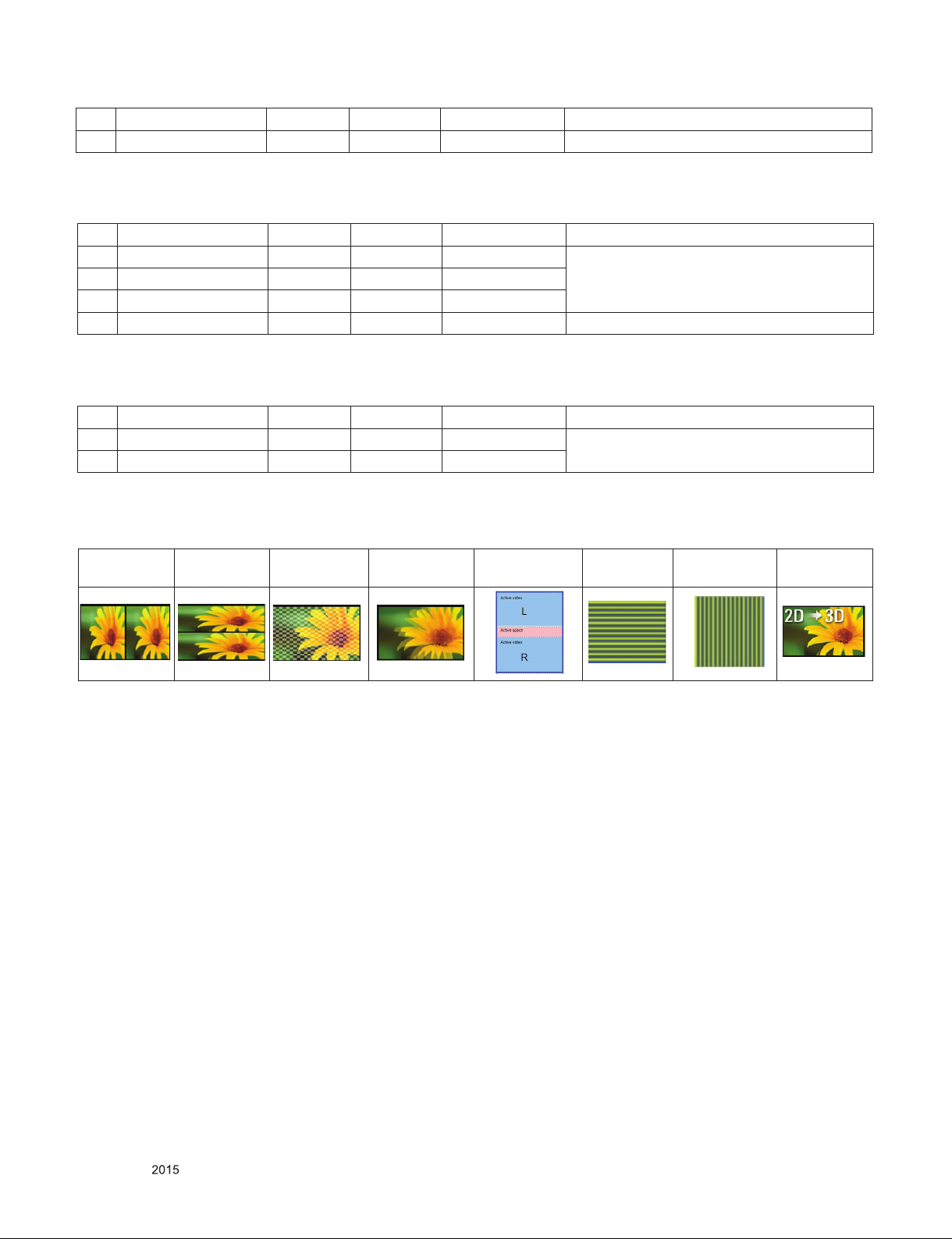
■ Remark: 3D Input mode
Side by Side(Half), Top & Bottom, Checker Board,
MPO(Photo), JPS(Photo)
Side by Side Top & Bottom Checkerboard
Single Frame
Sequential
Frame Packing
Row Inter-
leaving
Column Inter-
leaving
2D to 3D
Only for training and service purposes
- 14 -
LGE Internal Use OnlyCopyright © LG Electronics. Inc. All rights reserved.
Page 15
ADJUSTMENT INSTRUCTION
1. Application Range
This specification sheet is applied to ED59E Chassis applied
OLED TV all models manufactured in TV factory.
2. Designation
(1) Because this is not a hot chassis, it is not necessary to
use an isolation transformer. However, the use of isolation
transformer will help protect test instrument.
(2) Adjustment must be done in the correct order.
(3) The adjustment must be performed in the circumstance of
25 °C ± 5 °C of temperature and 65 % ± 10 % of relative
humidity if there is no specific designation.
(4) The input voltage of the receiver must keep AC 100-240
V~, 50/60 Hz.
(5) The receiver must be operated for about 5 minutes prior to
the adjustment when module is in the circumstance of over
15 °C.
In case of keeping module is in the circumstance of 0 °C, it
should be placed in the circumstance of above 15 °C for 2
hours.
In case of keeping module is in the circumstance of below
-20 °C, it should be placed in the circumstance of above 15
°C for 3 hours.
[Caution]
When still image is displayed for a period of 20 minutes or
longer (Especially where W/B scale is strong. Digital pattern
13ch and/or Cross hatch pattern 09ch), there can some
afterimage in the black level area.
4. Automatic Adjustment
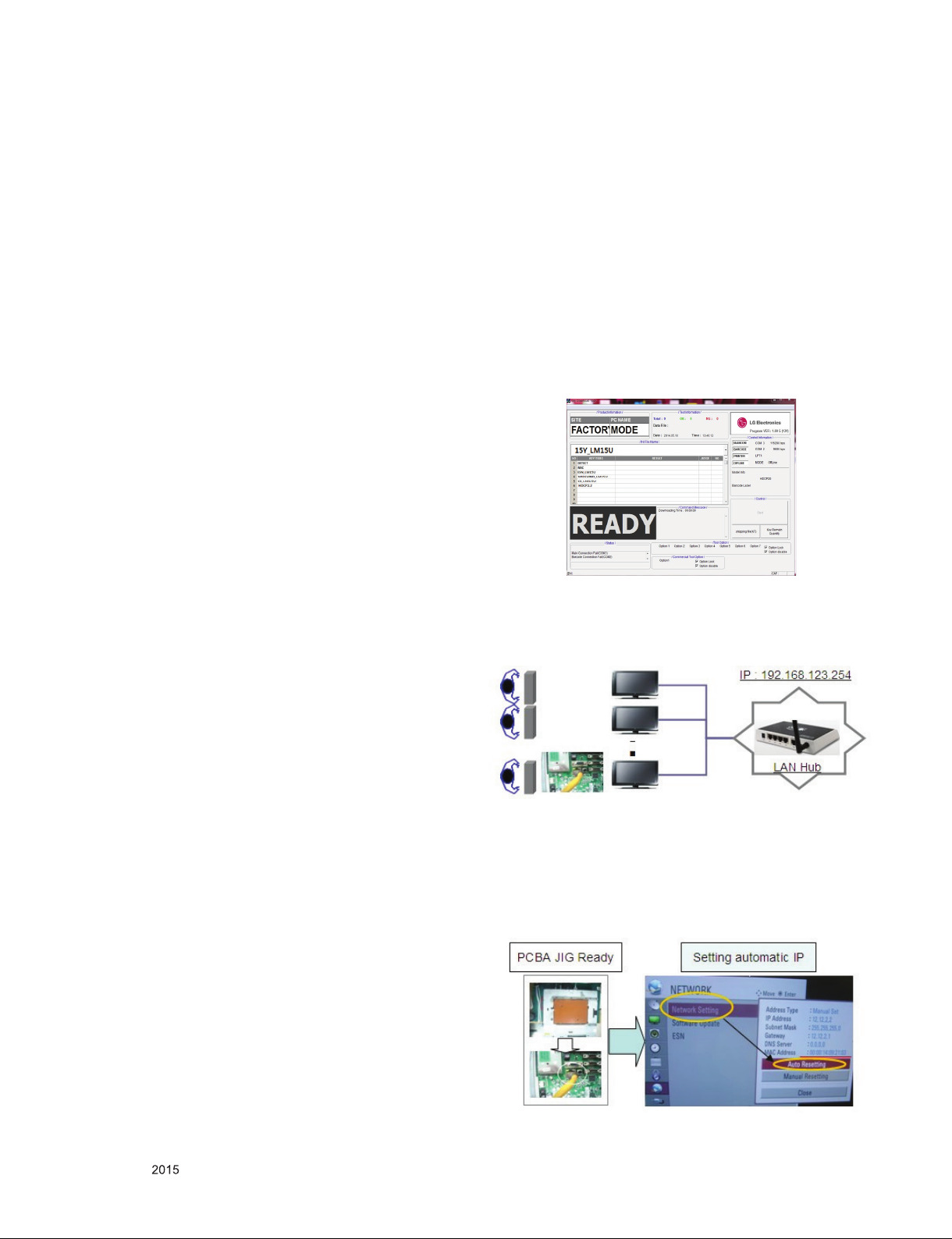
4.1. MAC address D/L , CI+ key D/L ,
Widevine key D/L, ESN D/L,
HDCP14/20 D/L
- Connect: USB port
4.2. Communication Prot connection
- Com 1,2,3,4 and 115200(Baudrate)
Mode check: Online Only
- check the test process
DETECT -> MAC -> ESN -> Widevine -> CI -> HDCP14 ->
HDCP20
-.Play : Press Enter key
-.Result: Ready, Test, OK or NG
-.Printer Out (MAC Address Label)
4.3. LAN Inspection
4.3.1. Equipment & Condition
- Each other connection to LAN Port of IP Hub and Jig
3. Adjustment items
3.1. Main PCB check process
- MAC Address Download
- ADC adjustment : 480i Comp1, 1920*1080 Comp1
- EDID/DDC download
Above adjustment items can be also performed in Final
Assembly if needed. Both Board-level and Final assembly
adjustment items can be check using In-Star Menu 1.
ADJUST CHECK.
3.2. Final assembly adjustment
- White Balance adjustment
- RS-232C functionality check
- PING Test
- Factory Option setting per destination
- Ship-out mode setting (In-Stop)
3.3. Etc
- Ship-out mode
- Service Option Default
- USB Download(S/W Update, Option, Service only)
- ISP Download(Option)
4.3.2. LAN inspection solution
- LAN Port connection with PCB
- Network setting at MENU Mode of TV
- setting automatic IP
- Setting state confirmation
If automatic setting is finished, you confirm IP and MAC
Address.
Only for training and service purposes
- 15 -
LGE Internal Use OnlyCopyright © LG Electronics. Inc. All rights reserved.
Page 16
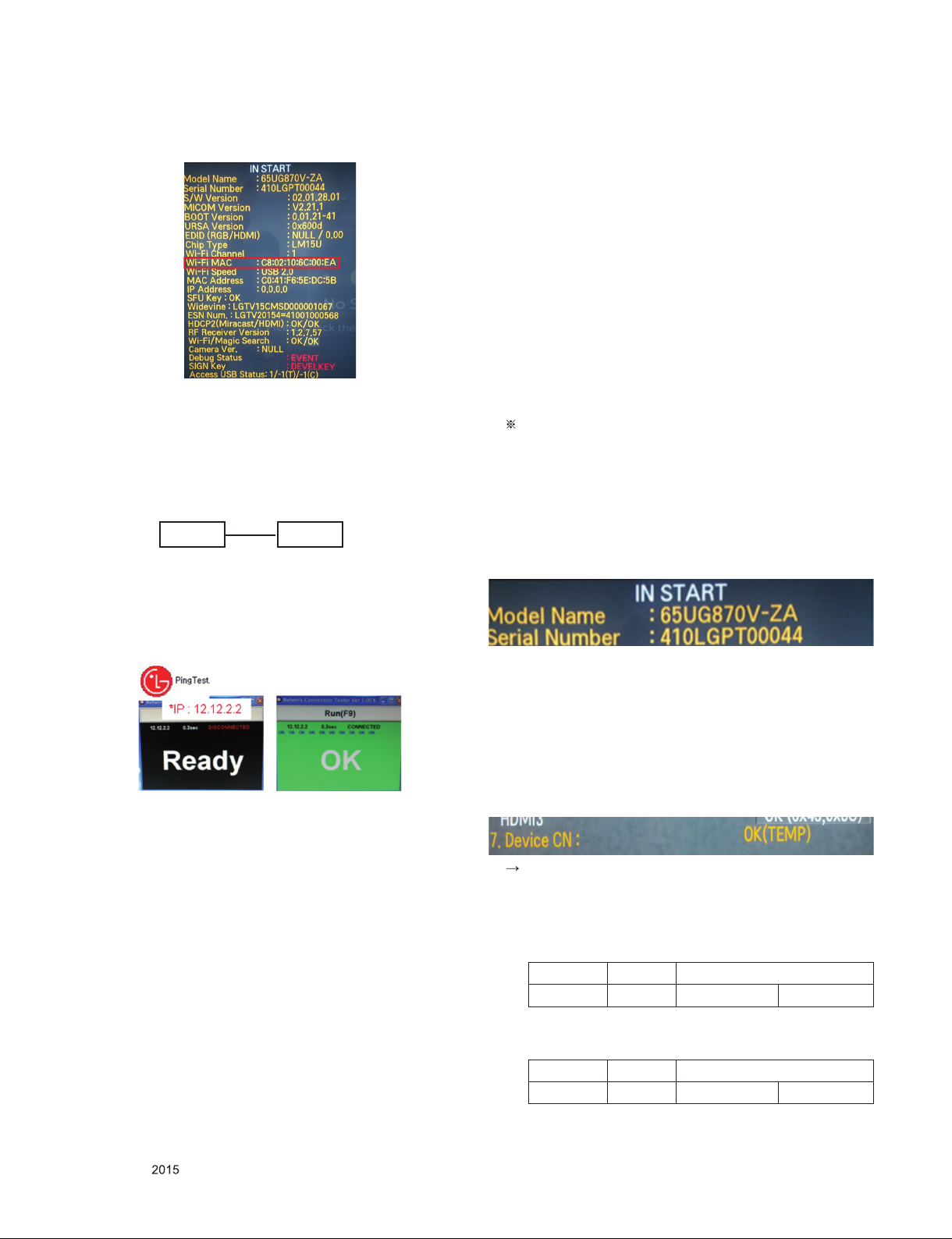
4.3.3. WIDEVINE Key Inspection
- - Confirm Key input Data at the “IN START” MENU Mode
4.5. Model name & Serial number
Download
4.5.1 Model name & Serial number D/L
- Press “P-ONLY” key of service remocon.
(Baud rate : 115200 bps)
- Connect RS-232C Signal to USB Cable to USB.
- Write Serial number by use USB port.
- Must check the serial number at Instart menu.
4.5.2 Method & notice
(1) Serial number D/L is using of scan equipment.
(2) Setting of scan equipment operated by Manufacturing
Technology Group.
(3) Serial number D/L must be conformed when it is produced
in production line, because serial number D/L is mandatory
by D-book 4.0
4.4. LAN PORT INSPECTION(PING TEST)
4.4.1. Equipment setting
(1) Play the LAN Port Test PROGRAM.
(2) Input IP set up for an inspection to Test Program.
*IP Number : 12.12.2.2
SET PC
4.4.2. LAN PORT inspection (PING TEST)
(1) Play the LAN Port Test Program.
(2) connect each other LAN Port Jack.
(3) Play Test (F9) button and confirm OK Message.
(4) remove LAN CABLE
Manual Download (Model Name and Serial Number)
If the TV set is downloaded By OTA or Service man,
Sometimes model name or serial number is initialized.
(Not always)
There is impossible to download by bar code scan, so It need
Manual download.
(1) Press the ‘instart’ key of ADJ remote controller.
(2) Go to the menu ‘7.Model Number D/L’ like below photo.
(3) Input the Factory model name or Serial number like photo.
(4) Check the model name Instart menu
→Factory name displayed
(5) Check the Diagnostics (DTV country only)
→Buyer model displayed
4.6. CI+ Key checking method(check the
Section 4.2) (Only EU Model)
Check whether the key was downloaded or not at ‘In Start’
menu. (Refer to below).
Check the Download to CI+ Key value in LGset.
Only for training and service purposes
4.6.1. check the method of CI+ Key value
a. check the method on Instart menu
b. check the method of RS232C Command
1) into the main ass’y mode (RS232 : aa 00 00)
CMD 1 CMD 2 Data 0
A 0 0
2) check the key download for transmitted command
(RS232 : ci 00 10)
CMD 1 CMD 2 Data 0
C I 1 0
- 16 -
LGE Internal Use OnlyCopyright © LG Electronics. Inc. All rights reserved.
Page 17
3) result value
- normally status for download : OKx
- abnormally status for download : NGx
4.6.2. check the method of CI+ Key value (RS232)
(1) into the main ass’y mode (RS232 : aa 00 00)
CMD 1 CMD 2 Data 0
A A 0 0
(2) check the mothed of CI+ key by command
(RS232 : ci 00 20)
CMD 1 CMD 2 Data 0
C I 2 0
(3) result value
i 01 OK 1d1852d21c1ed5dcx
CI+ Key Value
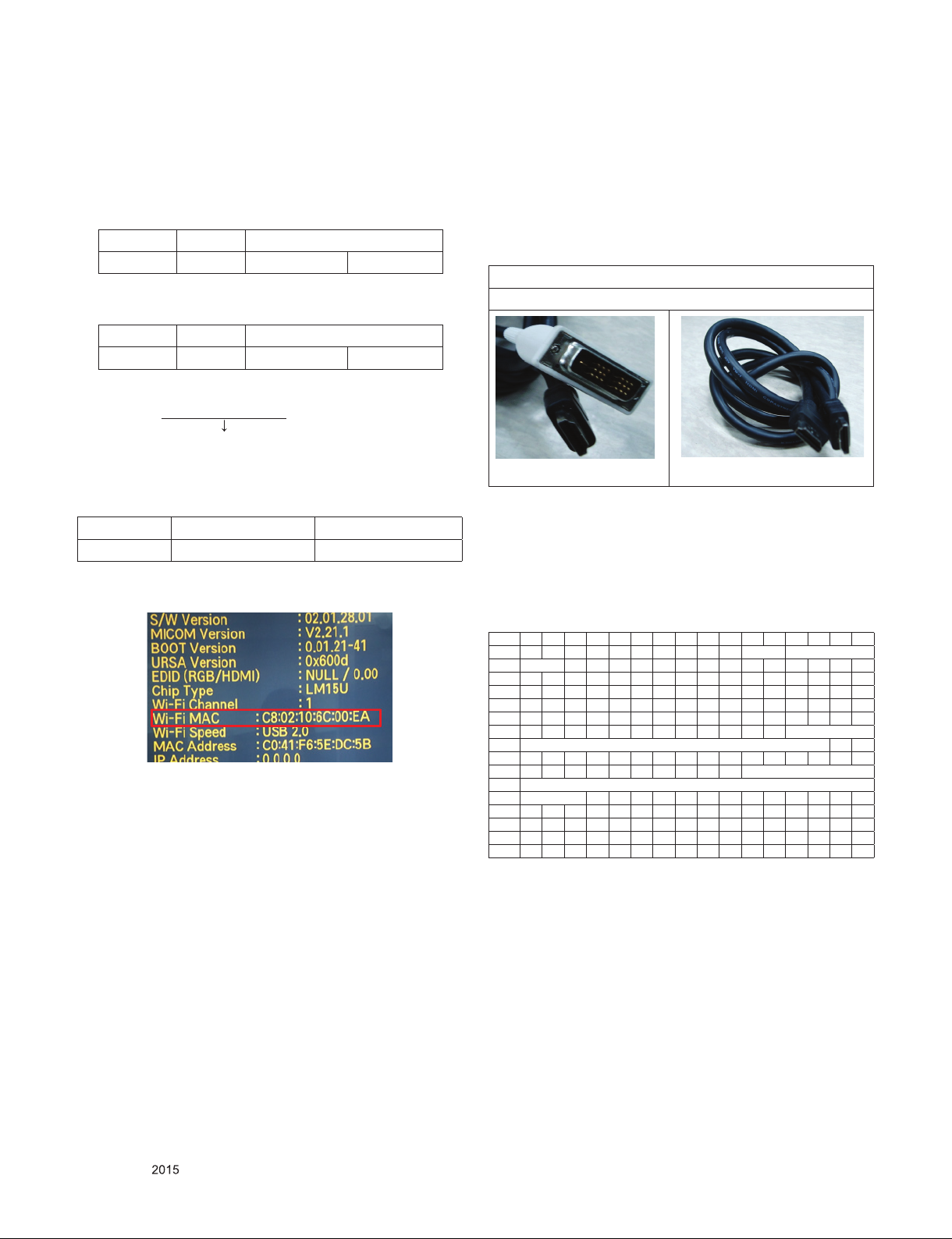
4.7. WIFI MAC ADRESS CHECK
4.7.1. Using RS232 Command
Command Set ACK
Transmission [A][l][][Set ID][][20][Cr] [O][K][x] or [N][G]
4.7.2. check the menu on in-start
5. Manual Adjustment
5.1. ADC adjustment is not needed
because of OTP(Auto ADC adjustment)
5.2. EDID (The Extended Display
Identification Data) /
DDC (Display Data Channel) download
5.2.1. Overview
It is a VESA regulation. A PC or a MNT will display an optimal
resolution through information sharing without any necessity
of user input. It is a realization of “Plug and Play”.
5.2.2. Equipment
▪ Since embedded EDID data is used, EDID download JIG,
HDMI cable and D-sub cable are not need.
▪ Adjust remocon.
5.2.3. Download method
(1) Press Adj. key on the Adj. R/C, then select “12.EDID D/L”.
By pressing Enter key, enter EDID D/L menu.
For HDMI EDID
DVI-D to HDMI or HDMI to HDMI
(2) Select [Start] button by pressing Enter key, HDMI1 /
HDMI2 / HDMI3 / HDMI4 are Writing and display OK or
NG.
5.2.4. Download method
▪Reference
- HDMI1 ~ HDMI3
- In the data of EDID, bellows may be different by Input mode.
0 1 2 3 4 5 6 7 8 9 A B C D E F
0x00 00 FF FF FF FF FF FF 00 1E 6D
ⓒ
0x01
0x02 0F 50 54 A1 8 00 31 40 45 40 61 40 71 40 81 80
0x03 01 01 01 01 01 01 02 3A 80 18 71 38 2D 40 58 2C
0x04 45 00 40 84 63 00 00 1E 66 21 50 B0 51 00 1B 30
0x05 40 70 36 00 40 84 63 00 00 1E 00 00 00 FD 00 3A
0x06 3E 1E 53 10 00 0A 20 20 20 20 20 20
0x07
0x00 02 03 3A F1 4E 10 9F 04 13 05 14 03 02 12 20 21
0x01 22 15 01 29 3D 06 C0 15 07 50
0x02
0x03
0x04 2D 40 58 2C 45 00 40 84 63 00 00 1E 01 1D 80 18
0x05 71 1C 16 20 58 2C 25 00 40 84 63 00 00 9E 01 1D
0x06 00 72 51 D0 1E 20 6E 28 55 00 40 84 63 00 00 1E
0x07 00 00 00 00 00 00 00 00 00 00 00 00 00 00 00
01 03 80 A0 5A 78 0A EE 91 A3 54 4C 99 26
ⓓ
ⓕ
10 28 10 E3 05 03 01 02 3A 80 18 71 38
ⓕ
ⓐ Product ID
ⓑ Serial No: Controlled on production line.
ⓒ Month, Year: Controlled on production line:
ex) Monthly : ‘01’ → ‘01’, Year : ‘2015’ → ‘19’
ⓓ Model Name(Hex): LGTV
ⓔ Checksum(LG TV): Changeable by total EDID data.
ⓕ Vendor Specific(HDMI)
ⓐ ⓑ
ⓓ
01
ⓕ
ⓔ1
ⓔ2
Only for training and service purposes
- 17 -
LGE Internal Use OnlyCopyright © LG Electronics. Inc. All rights reserved.
Page 18
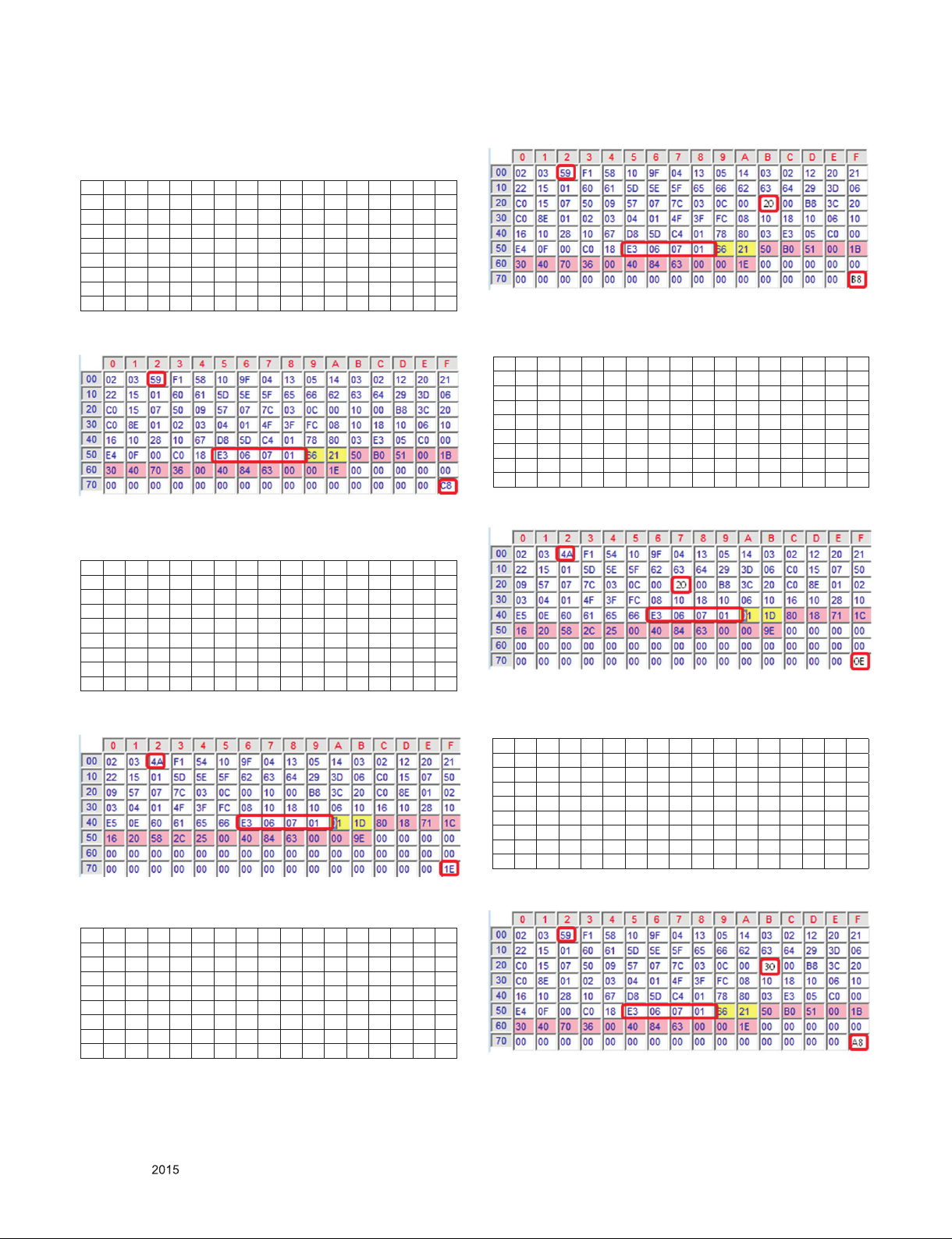
(1) DTS
# HDMI 1(C/S : A0 C8) – HDMI UHD Deep On Case
EDID Block 0, Bytes 0-127 [00H-7FH]
0 1 2 3 4 5 6 7 8 9 A B C D E F
00 00 FF FF FF FF FF FF 00 1E 6D 01 00 01 01 01 01
10 01 19 01 03 80 A0 5A 78 0A EE 91 A3 54 4C 99 26
20 0F 50 54 A1 08 00 31 40 45 40 61 40 71 40 81 80
30 01 01 01 01 01 01 08 E8 00 30 F2 70 5A 80 B0 58
40 8A 00 40 84 63 00 00 1E 02 3A 80 18 71 38 2D 40
50 58 2C 45 00 40 84 63 00 00 1E 00 00 00 FD 00 3A
60 3E 1E 88 3C 00 0 A 20 20 20 20 20 20 00 00 00 FC
70 00 4C 47 20 54 56 0A 20 20 20 20 20 20 20 01 A0
EDID Block 1, Bytes 128-255 [80H-FFH]
# HDMI 1(C/S : E6 1E) – HDMI UHD Deep Off Case
EDID Block 0, Bytes 0-127 [00H-7FH]
0 1 2 3 4 5 6 7 8 9 A B C D E F
00 00 FF FF FF FF FF FF 00 1E 6D 01 00 01 01 01 01
10 01 19 01 03 80 A0 5A 78 0A EE 91 A3 54 4C 99 26
20 0F 50 54 A1 08 00 31 40 45 40 61 40 71 40 81 80
30 01 01 01 01 01 01 02 3A 80 18 71 38 2D 40 58 2C
40 45 00 40 84 63 00 00 1E 66 21 50 B0 51 00 1B 30
50 40 70 36 00 40 84 63 00 00 1E 00 00 00 FD 00 3A
60 3E 1E 53 10 00 0A 20 20 20 20 20 20 00 00 00 FC
70 00 4C 47 20 54 56 0A 20 20 20 20 20 20 20 01 E6
EDID Block 1, Bytes 128-255 [80H-FFH]
# HDMI 2(C/S : E6 0E) – HDMI UHD Deep Off Case
EDID Block 0, Bytes 0-127 [00H-7FH]
0 1 2 3 4 5 6 7 8 9 A B C D E F
00 00 FF FF FF FF FF FF 00 1E 6D 01 00 01 01 01 01
10 01 19 01 03 80 A0 5A 78 0A EE 91 A3 54 4C 99 26
20 0F 50 54 A1 08 00 31 40 45 40 61 40 71 40 81 80
30 01 01 01 01 01 01 02 3A 80 18 71 38 2D 40 58 2C
40 45 00 40 84 63 00 00 1E 66 21 50 B0 51 00 1B 30
50 40 70 36 00 40 84 63 00 00 1E 00 00 00 FD 00 3A
60 3E 1E 53 10 00 0A 20 20 20 20 20 20 00 00 00 FC
70 00 4C 47 20 54 56 0A 20 20 20 20 20 20 20 01 E6
EDID Block 1, Bytes 128-255 [80H-FFH]
EDID Block 1, Bytes 128-255 [80H-FFH]
# HDMI 2(C/S : A0 B8) – HDMI UHD Deep On Case
EDID Block 0, Bytes 0-127 [00H-7FH]
0 1 2 3 4 5 6 7 8 9 A B C D E F
00 00 FF FF FF FF FF FF 00 1E 6D 01 00 01 01 01 01
10 01 19 01 03 80 A0 5A 78 0A EE 91 A3 54 4C 99 26
20 0F 50 54 A1 08 00 31 40 45 40 61 40 71 40 81 80
30 01 01 01 01 01 01 08 E8 00 30 F2 70 5A 80 B0 58
40 8A 00 40 84 63 00 00 1E 02 3A 80 18 71 38 2D 40
50 58 2C 45 00 40 84 63 00 00 1E 00 00 00 FD 00 3A
60 3E 1E 88 3C 00 0 A 20 20 20 20 20 20 00 00 00 FC
70 00 4C 47 20 54 56 0A 20 20 20 20 20 20 20 01 A0
# HDMI 3(C/S : A0 A8) – HDMI UHD Deep On Case
EDID Block 0, Bytes 0-127 [00H-7FH]
0 1 2 3 4 5 6 7 8 9 A B C D E F
00 00 FF FF FF FF FF FF 00 1E 6D 01 00 01 01 01 01
10 01 19 01 03 80 A0 5A 78 0A EE 91 A3 54 4C 99 26
20 0F 50 54 A1 08 00 31 40 45 40 61 40 71 40 81 80
30 01 01 01 01 01 01 08 E8 00 30 F2 70 5A 80 B0 58
40 8A 00 40 84 63 00 00 1E 02 3A 80 18 71 38 2D 40
50 58 2C 45 00 40 84 63 00 00 1E 00 00 00 FD 00 3A
60 3E 1E 88 3C 00 0 A 20 20 20 20 20 20 00 00 00 FC
70 00 4C 47 20 54 56 0A 20 20 20 20 20 20 20 01 A0
EDID Block 1, Bytes 128-255 [80H-FFH]
Only for training and service purposes
- 18 -
LGE Internal Use OnlyCopyright © LG Electronics. Inc. All rights reserved.
Page 19
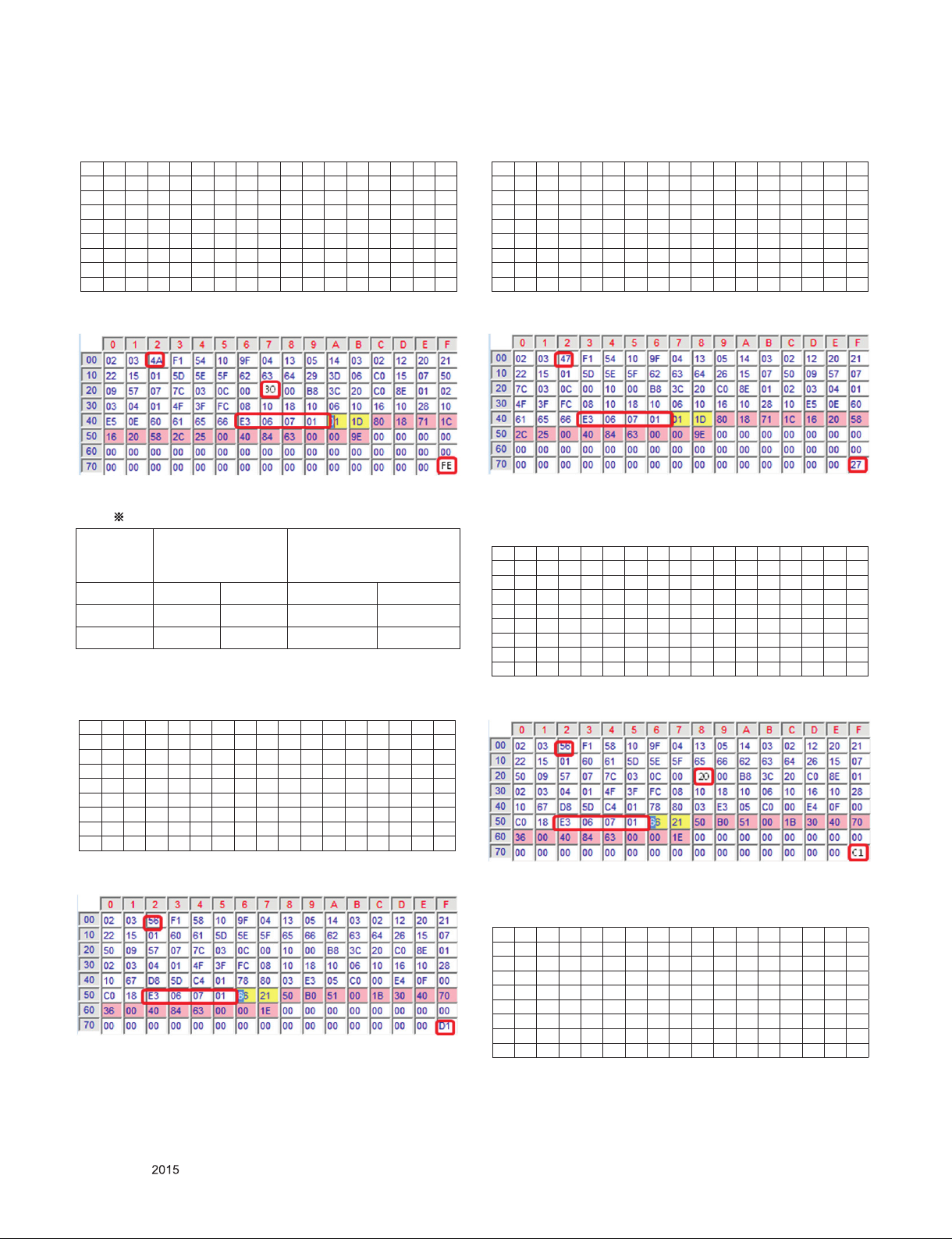
# HDMI 3(C/S : E6 FE) – HDMI UHD Deep Off Case
EDID Block 0, Bytes 0-127 [00H-7FH]
0 1 2 3 4 5 6 7 8 9 A B C D E F
00 00 FF FF FF FF FF FF 00 1E 6D 01 00 01 01 01 01
10 01 19 01 03 80 A0 5A 78 0A EE 91 A3 54 4C 99 26
20 0F 50 54 A1 08 00 31 40 45 40 61 40 71 40 81 80
30 01 01 01 01 01 01 02 3A 80 18 71 38 2D 40 58 2C
40 45 00 40 84 63 00 00 1E 66 21 50 B0 51 00 1B 30
50 40 70 36 00 40 84 63 00 00 1E 00 00 00 FD 00 3A
60 3E 1E 53 10 00 0A 20 20 20 20 20 20 00 00 00 FC
70 00 4C 47 20 54 56 0A 20 20 20 20 20 20 20 01 E6
# HDMI 1(C/S : E6 27) – HDMI UHD Deep Off Case
EDID Block 0, Bytes 0-127 [00H-7FH]
0 1 2 3 4 5 6 7 8 9 A B C D E F
00 00 FF FF FF FF FF FF 00 1E 6D 01 00 01 01 01 01
10 01 19 01 03 80 A0 5A 78 0A EE 91 A3 54 4C 99 26
20 0F 50 54 A1 08 00 31 40 45 40 61 40 71 40 81 80
30 01 01 01 01 01 01 02 3A 80 18 71 38 2D 40 58 2C
40 45 00 40 84 63 00 00 1E 66 21 50 B0 51 00 1B 30
50 40 70 36 00 40 84 63 00 00 1E 00 00 00 FD 00 3A
60 3E 1E 53 10 00 0A 20 20 20 20 20 20 00 00 00 FC
70 00 4C 47 20 54 56 0A 20 20 20 20 20 20 20 01 E6
EDID Block 1, Bytes 128-255 [80H-FFH]
Checksum(HDMI 1/2/3)
Input
HDMI Deep Color
On
FFh (Checksum)
HDMI Deep Color Off
FFh (Checksum)
HDMI1 A0 C8 E6 1E
HDMI2 A0 B8 E6 0E
HDMI3 A0 A8 E6 FE
(2) AC3
# HDMI 1(C/S : A0 D1) – HDMI UHD Deep On Case
EDID Block 0, Bytes 0-127 [00H-7FH]
0 1 2 3 4 5 6 7 8 9 A B C D E F
00 00 FF FF FF FF FF FF 00 1E 6D 01 00 01 01 01 01
10 01 19 01 03 80 A0 5A 78 0A EE 91 A3 54 4C 99 26
20 0F 50 54 A1 08 00 31 40 45 40 61 40 71 40 81 80
30 01 01 01 01 01 01 08 E8 00 30 F2 70 5A 80 B0 58
40 8A 00 40 84 63 00 00 1E 02 3A 80 18 71 38 2D 40
50 58 2C 45 00 40 84 63 00 00 1E 00 00 00 FD 00 3A
60 3E 1E 88 3C 00 0 A 20 20 20 20 20 20 00 00 00 FC
70 00 4C 47 20 54 56 0A 20 20 20 20 20 20 20 01 A0
EDID Block 1, Bytes 128-255 [80H-FFH]
# HDMI 2(C/S : A0 C1) – HDMI UHD Deep On Case
EDID Block 0, Bytes 0-127 [00H-7FH]
0 1 2 3 4 5 6 7 8 9 A B C D E F
00 00 FF FF FF FF FF FF 00 1E 6D 01 00 01 01 01 01
10 01 19 01 03 80 A0 5A 78 0A EE 91 A3 54 4C 99 26
20 0F 50 54 A1 08 00 31 40 45 40 61 40 71 40 81 80
30 01 01 01 01 01 01 08 E8 00 30 F2 70 5A 80 B0 58
40 8A 00 40 84 63 00 00 1E 02 3A 80 18 71 38 2D 40
50 58 2C 45 00 40 84 63 00 00 1E 00 00 00 FD 00 3A
60 3E 1E 88 3C 00 0 A 20 20 20 20 20 20 00 00 00 FC
70 00 4C 47 20 54 56 0A 20 20 20 20 20 20 20 01 A0
EDID Block 1, Bytes 128-255 [80H-FFH]
EDID Block 1, Bytes 128-255 [80H-FFH]
Only for training and service purposes
# HDMI 2(C/S : E6 17) – HDMI UHD Deep off Case
EDID Block 0, Bytes 0-127 [00H-7FH]
0 1 2 3 4 5 6 7 8 9 A B C D E F
00 00 FF FF FF FF FF FF 00 1E 6D 01 00 01 01 01 01
10 01 19 01 03 80 A0 5A 78 0A EE 91 A3 54 4C 99 26
20 0F 50 54 A1 08 00 31 40 45 40 61 40 71 40 81 80
30 01 01 01 01 01 01 02 3A 80 18 71 38 2D 40 58 2C
40 45 00 40 84 63 00 00 1E 66 21 50 B0 51 00 1B 30
50 40 70 36 00 40 84 63 00 00 1E 00 00 00 FD 00 3A
60 3E 1E 53 10 00 0A 20 20 20 20 20 20 00 00 00 FC
70 00 4C 47 20 54 56 0A 20 20 20 20 20 20 20 01 E6
- 19 -
LGE Internal Use OnlyCopyright © LG Electronics. Inc. All rights reserved.
Page 20
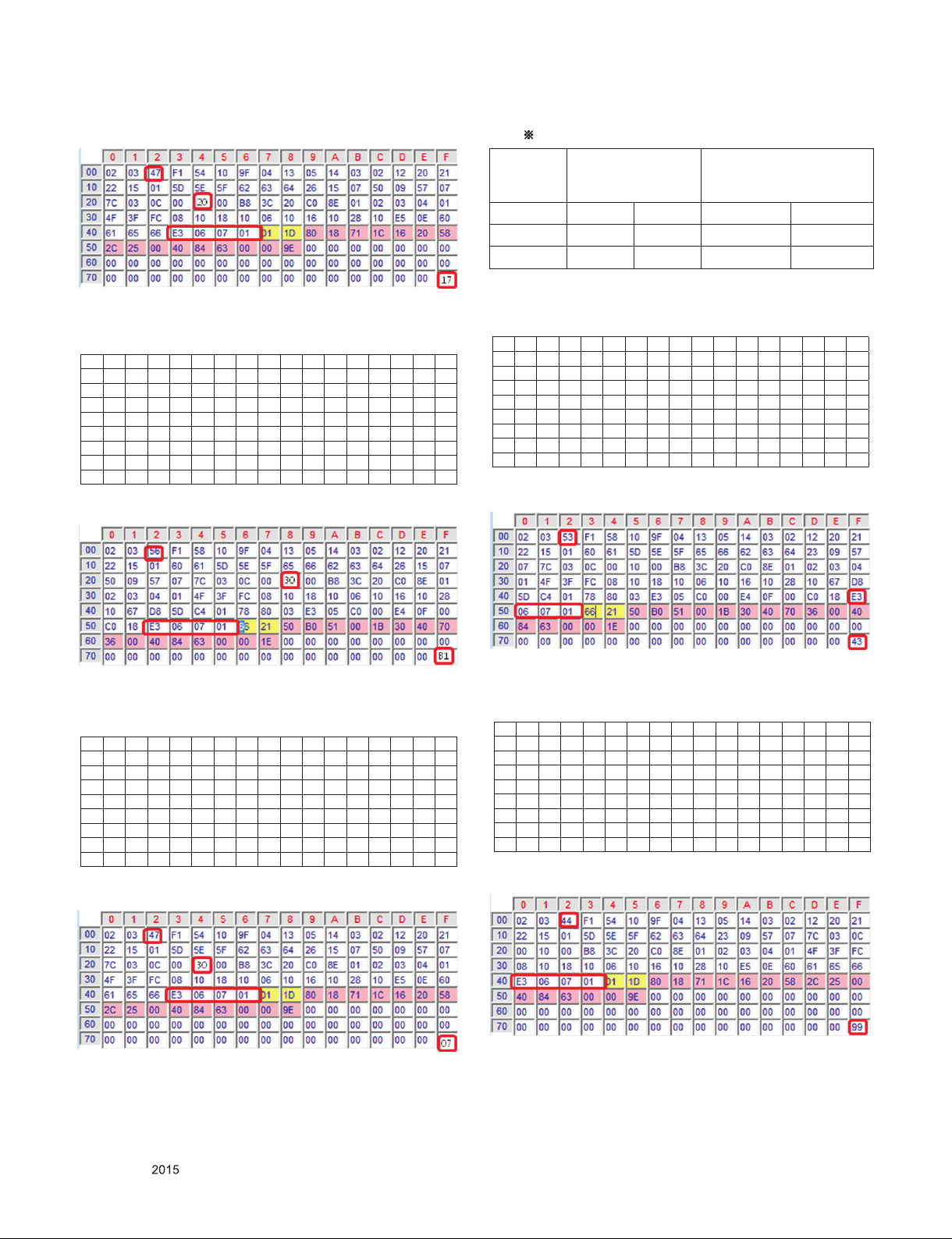
EDID Block 1, Bytes 128-255 [80H-FFH]
# HDMI 3(C/S : A0 B1) – HDMI UHD Deep On Case
EDID Block 0, Bytes 0-127 [00H-7FH]
0 1 2 3 4 5 6 7 8 9 A B C D E F
00 00 FF FF FF FF FF FF 00 1E 6D 01 00 01 01 01 01
10 01 19 01 03 80 A0 5A 78 0A EE 91 A3 54 4C 99 26
20 0F 50 54 A1 08 00 31 40 45 40 61 40 71 40 81 80
30 01 01 01 01 01 01 08 E8 00 30 F2 70 5A 80 B0 58
40 8A 00 40 84 63 00 00 1E 02 3A 80 18 71 38 2D 40
50 58 2C 45 00 40 84 63 00 00 1E 00 00 00 FD 00 3A
60 3E 1E 88 3C 00 0 A 20 20 20 20 20 20 00 00 00 FC
70 00 4C 47 20 54 56 0A 20 20 20 20 20 20 20 01 A0
EDID Block 1, Bytes 128-255 [80H-FFH]
Checksum(HDMI 1/2/3)
Input
HDMI Deep Color
On
FFh (Checksum)
HDMI Deep Color Off
FFh (Checksum)
HDMI1 A0 D1 E6 27
HDMI2 A0 C1 E6 17
HDMI3 A0 B1 E6 07
(3) PCM
# HDMI 1(C/S : A0 43– HDMI UHD Deep On Case
EDID Block 0, Bytes 0-127 [00H-7FH]
0 1 2 3 4 5 6 7 8 9 A B C D E F
00 00 FF FF FF FF FF FF 00 1E 6D 01 00 01 01 01 01
10 01 19 01 03 80 A0 5A 78 0A EE 91 A3 54 4C 99 26
20 0F 50 54 A1 08 00 31 40 45 40 61 40 71 40 81 80
30 01 01 01 01 01 01 08 E8 00 30 F2 70 5A 80 B0 58
40 8A 00 40 84 63 00 00 1E 02 3A 80 18 71 38 2D 40
50 58 2C 45 00 40 84 63 00 00 1E 00 00 00 FD 00 3A
60 3E 1E 88 3C 00 0 A 20 20 20 20 20 20 00 00 00 FC
70 00 4C 47 20 54 56 0A 20 20 20 20 20 20 20 01 A0
EDID Block 1, Bytes 128-255 [80H-FFH]
# HDMI 3(C/S : E6 07) – HDMI UHD Deep off Case
EDID Block 0, Bytes 0-127 [00H-7FH]
0 1 2 3 4 5 6 7 8 9 A B C D E F
00 00 FF FF FF FF FF FF 00 1E 6D 01 00 01 01 01 01
10 01 19 01 03 80 A0 5A 78 0A EE 91 A3 54 4C 99 26
20 0F 50 54 A1 08 00 31 40 45 40 61 40 71 40 81 80
30 01 01 01 01 01 01 02 3A 80 18 71 38 2D 40 58 2C
40 45 00 40 84 63 00 00 1E 66 21 50 B0 51 00 1B 30
50 40 70 36 00 40 84 63 00 00 1E 00 00 00 FD 00 3A
60 3E 1E 53 10 00 0A 20 20 20 20 20 20 00 00 00 FC
70 00 4C 47 20 54 56 0A 20 20 20 20 20 20 20 01 E6
EDID Block 1, Bytes 128-255 [80H-FFH]
# HDMI 1(C/S : E6 99) – HDMI UHD Deep off case
EDID Block 0, Bytes 0-127 [00H-7FH]
0 1 2 3 4 5 6 7 8 9 A B C D E F
00 00 FF FF FF FF FF FF 00 1E 6D 01 00 01 01 01 01
10 01 19 01 03 80 A0 5A 78 0A EE 91 A3 54 4C 99 26
20 0F 50 54 A1 08 00 31 40 45 40 61 40 71 40 81 80
30 01 01 01 01 01 01 02 3A 80 18 71 38 2D 40 58 2C
40 45 00 40 84 63 00 00 1E 66 21 50 B0 51 00 1B 30
50 40 70 36 00 40 84 63 00 00 1E 00 00 00 FD 00 3A
60 3E 1E 53 10 00 0A 20 20 20 20 20 20 00 00 00 FC
70 00 4C 47 20 54 56 0A 20 20 20 20 20 20 20 01 E6
EDID Block 1, Bytes 128-255 [80H-FFH]
Only for training and service purposes
- 20 -
LGE Internal Use OnlyCopyright © LG Electronics. Inc. All rights reserved.
Page 21
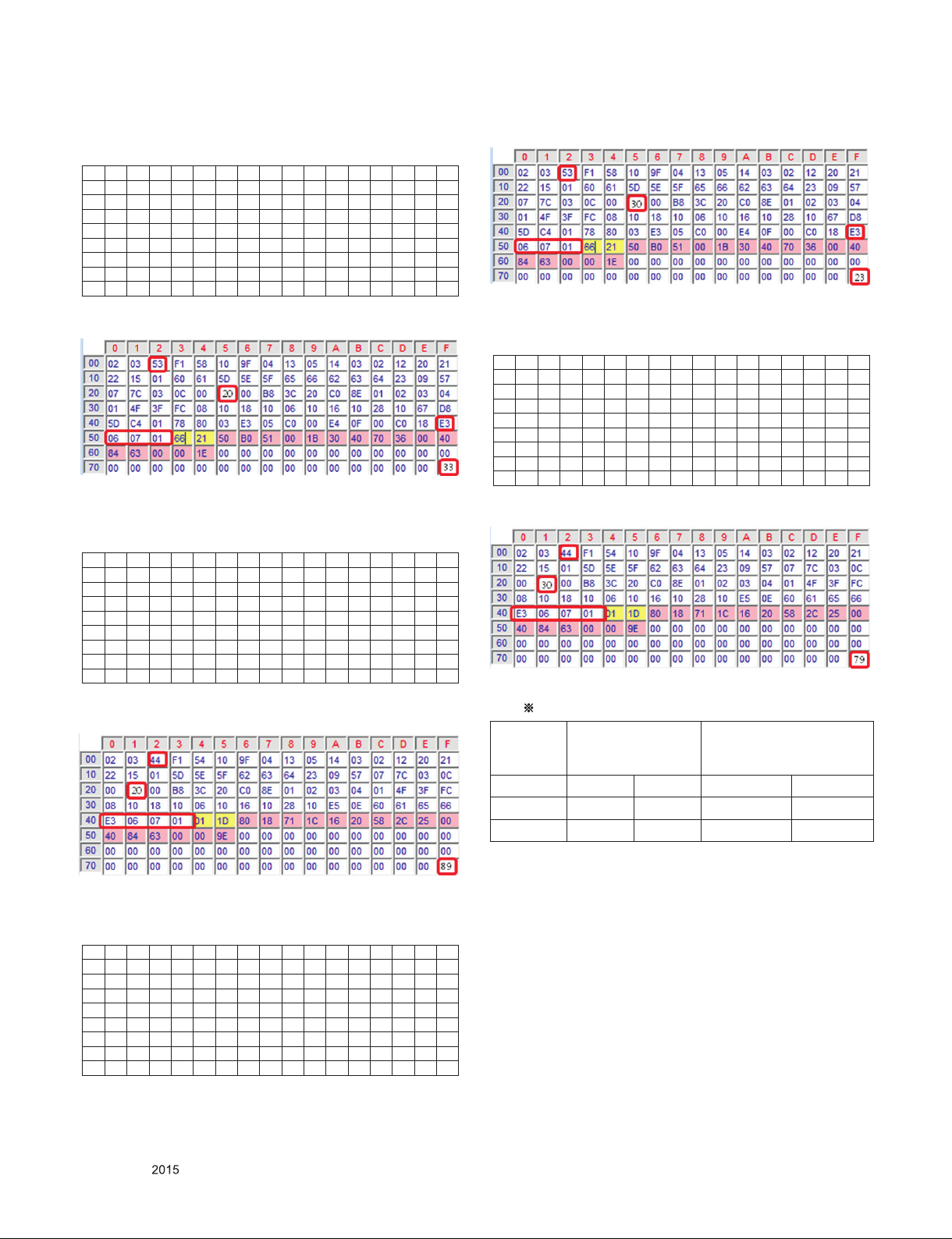
# HDMI 2(C/S : A0 33– HDMI UHD Deep On Case
EDID Block 0, Bytes 0-127 [00H-7FH]
0 1 2 3 4 5 6 7 8 9 A B C D E F
00 00 FF FF FF FF FF FF 00 1E 6D 01 00 01 01 01 01
10 01 19 01 03 80 A0 5A 78 0A EE 91 A3 54 4C 99 26
20 0F 50 54 A1 08 00 31 40 45 40 61 40 71 40 81 80
30 01 01 01 01 01 01 08 E8 00 30 F2 70 5A 80 B0 58
40 8A 00 40 84 63 00 00 1E 02 3A 80 18 71 38 2D 40
50 58 2C 45 00 40 84 63 00 00 1E 00 00 00 FD 00 3A
60 3E 1E 88 3C 00 0 A 20 20 20 20 20 20 00 00 00 FC
70 00 4C 47 20 54 56 0A 20 20 20 20 20 20 20 01 A0
EDID Block 1, Bytes 128-255 [80H-FFH]
EDID Block 1, Bytes 128-255 [80H-FFH]
# HDMI 2(C/S : E6 89) – HDMI UHD Deep off case
EDID Block 0, Bytes 0-127 [00H-7FH]
0 1 2 3 4 5 6 7 8 9 A B C D E F
00 00 FF FF FF FF FF FF 00 1E 6D 01 00 01 01 01 01
10 01 19 01 03 80 A0 5A 78 0A EE 91 A3 54 4C 99 26
20 0F 50 54 A1 08 00 31 40 45 40 61 40 71 40 81 80
30 01 01 01 01 01 01 02 3A 80 18 71 38 2D 40 58 2C
40 45 00 40 84 63 00 00 1E 66 21 50 B0 51 00 1B 30
50 40 70 36 00 40 84 63 00 00 1E 00 00 00 FD 00 3A
60 3E 1E 53 10 00 0A 20 20 20 20 20 20 00 00 00 FC
70 00 4C 47 20 54 56 0A 20 20 20 20 20 20 20 01 E6
EDID Block 1, Bytes 128-255 [80H-FFH]
# HDMI 3(C/S : E6 79) – HDMI UHD Deep off case
EDID Block 0, Bytes 0-127 [00H-7FH]
0 1 2 3 4 5 6 7 8 9 A B C D E F
00 00 FF FF FF FF FF FF 00 1E 6D 01 00 01 01 01 01
10 01 19 01 03 80 A0 5A 78 0A EE 91 A3 54 4C 99 26
20 0F 50 54 A1 08 00 31 40 45 40 61 40 71 40 81 80
30 01 01 01 01 01 01 02 3A 80 18 71 38 2D 40 58 2C
40 45 00 40 84 63 00 00 1E 66 21 50 B0 51 00 1B 30
50 40 70 36 00 40 84 63 00 00 1E 00 00 00 FD 00 3A
60 3E 1E 53 10 00 0A 20 20 20 20 20 20 00 00 00 FC
70 00 4C 47 20 54 56 0A 20 20 20 20 20 20 20 01 E6
EDID Block 1, Bytes 128-255 [80H-FFH]
Checksum(HDMI 1/2/3)
Input
HDMI Deep Color
On
FFh (Checksum)
HDMI Deep Color Off
FFh (Checksum)
HDMI1 A0 43 E6 99
HDMI2 A0 33 E6 89
HDMI3 A0 23 E6 79
# HDMI 3(C/S : A0 23– HDMI UHD Deep On Case
EDID Block 0, Bytes 0-127 [00H-7FH]
0 1 2 3 4 5 6 7 8 9 A B C D E F
00 00 FF FF FF FF FF FF 00 1E 6D 01 00 01 01 01 01
10 01 19 01 03 80 A0 5A 78 0A EE 91 A3 54 4C 99 26
20 0F 50 54 A1 08 00 31 40 45 40 61 40 71 40 81 80
30 01 01 01 01 01 01 08 E8 00 30 F2 70 5A 80 B0 58
40 8A 00 40 84 63 00 00 1E 02 3A 80 18 71 38 2D 40
50 58 2C 45 00 40 84 63 00 00 1E 00 00 00 FD 00 3A
60 3E 1E 88 3C 00 0 A 20 20 20 20 20 20 00 00 00 FC
70 00 4C 47 20 54 56 0A 20 20 20 20 20 20 20 01 A0
Only for training and service purposes
- 21 -
LGE Internal Use OnlyCopyright © LG Electronics. Inc. All rights reserved.
Page 22
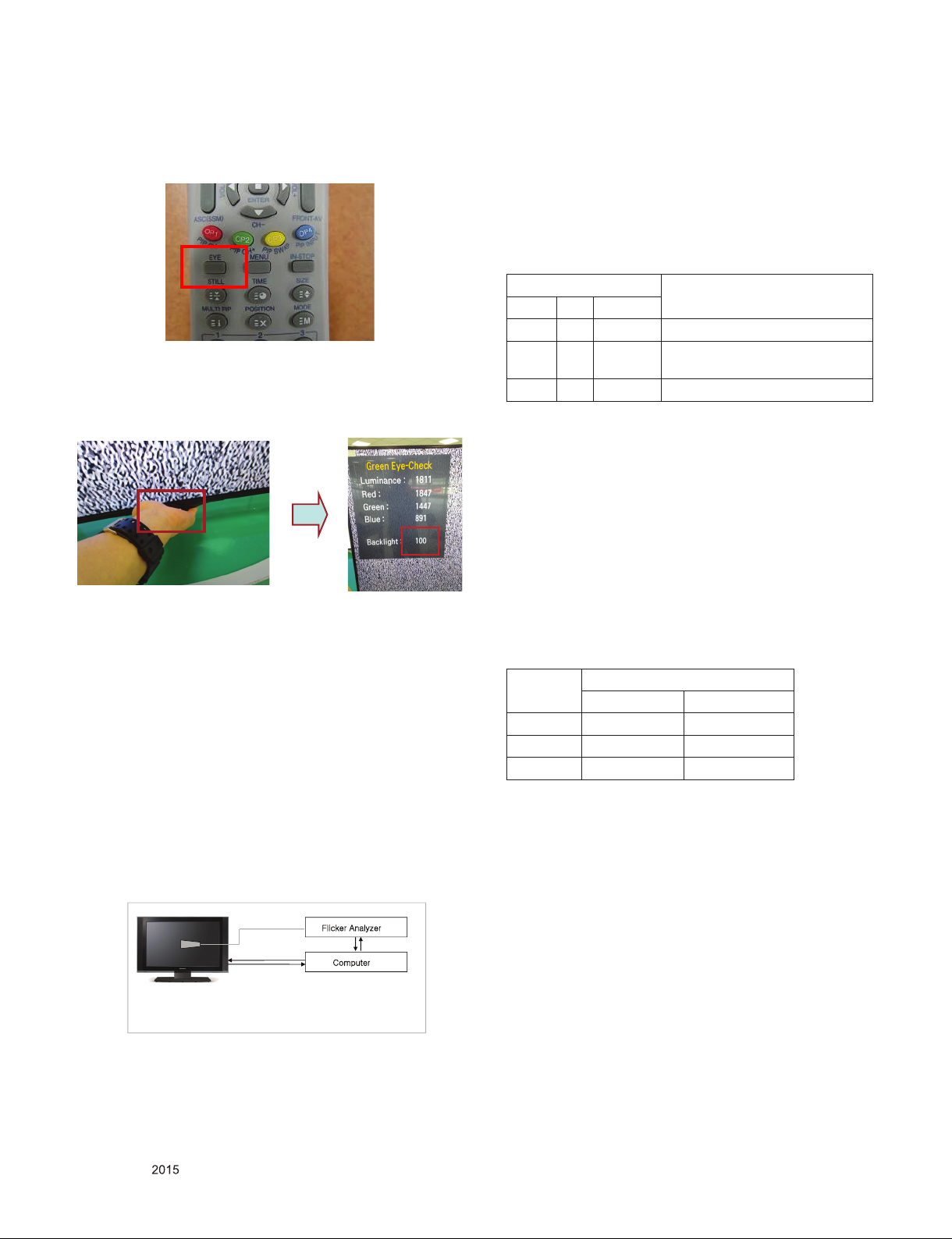
6. Green Eye Inspection Guide
(1) Turn on the TV set.
(2) Press “EYE” button on the Adjustment remote controller.
(3) Block the Intelligent Sensor module on the front C/A about
6 seconds. When the “Sensor Data” is lower than 20, you
can see the “OK” message.
→ If it doesn’t show “OK” message, the Sensor Module is
defected one. You have to replace that with a good one.
7.1.3. Adj. Command (Protocol)
(1) Command Format
CMD ID DATA CR RF
- CMD: Command
- ID : Command
- Data : Command
Ex) [Send: va 00 00\r\n]
▪RS-232C Command used during auto-adj.
RS-232C COMMAND Explanation
CMD ID DATA
`va 00 00 V-com pattern
`vb 00 00 ~ FE V-com adj.
(internal Flicker pattern)
`wb 00 FF V-com adj. completed
7.1.4. Adj. method
7.1.4.1. Auto Adj. method
1) Set TV in POWER-ONLY mode using POWER ONLY key
2) Zero calibrate probe then place it on the center of the
Display
3) Connect Cable (RS-232C to USB)
4) Select Model in “V-com adj. Program” and begin “V-com
adj.”
5) When V-com adj. is complete (OK)
6) Remove probe and RS-232C to USB cable to complete adj.
(4) After check the “OK” message come out, take out your
hand from the Sensor module.
→ Check “Sensor Data” value change from “0” to “100” or
not. If it doesn’t change the value, the sensor is also
defected one. You have to replace it.
7. Equipment
7.1.1. Equipment
(1) Color Analyzer: CA-310 (LED Module : CH 14) or
CM-H505
(2) Adj. Computer (During auto adj., RS-232C protocol is
needed)
(3) Adjustment Remote control
(4) Signal : internal flicker Pattern in SET
* Color Analyzer Matrix should be calibrated using CS-100.
7.1.2. Equipment connection MAP
wG
pGGGGG
{}GGmGG
GG
|ziGGyzTYZYjG
zGzSGG
mGh¡G
yzTYZYjG
jG
▪ V-com Adj. must begin as start command “va 00 00” , and
finish as end command “wb 00 ff”
▪ V-com adjust data
V-com Data
hex dec
Max 85 133
Default 68 104
Min 4 9 73
8. White Balance Adjustment
8.1. White Balance Adjustment
8.1.1. Overview
(1) W/B adj. Objective & How-it-works
1) Objective: To reduce each Panel's W/B deviation
2) How-it-works : When R/G/B gain in the OSD is at 192, it
means the panel is at its Full Dynamic Range. In order
to prevent saturation of Full Dynamic range and data,
one of R/G/B is fixed at 192, and the other two is
lowered to find the desired value.
3) Adjustment condition : normal temperature
① Surrounding Temperature : 25 °C ± 5 °C
② Warm-up time: About 5 Min
③ Surrounding Humidity : 20 % ~ 80 %
Only for training and service purposes
- 22 -
LGE Internal Use OnlyCopyright © LG Electronics. Inc. All rights reserved.
Page 23
8.1.2. Equipment
(1)Analyzer: CA-210 (LED Module : CH 14)
(2) Adj. Computer(During auto adj., RS-232C protocol is
needed)
(3) Adjustment Remote control
(4) Video Signal Generator MSPG-925F 720p/216-Gray
(Model:204, Pattern:49)
→ Only when internal pattern is not available
* Color Analyzer Matrix should be calibrated using CS-100.
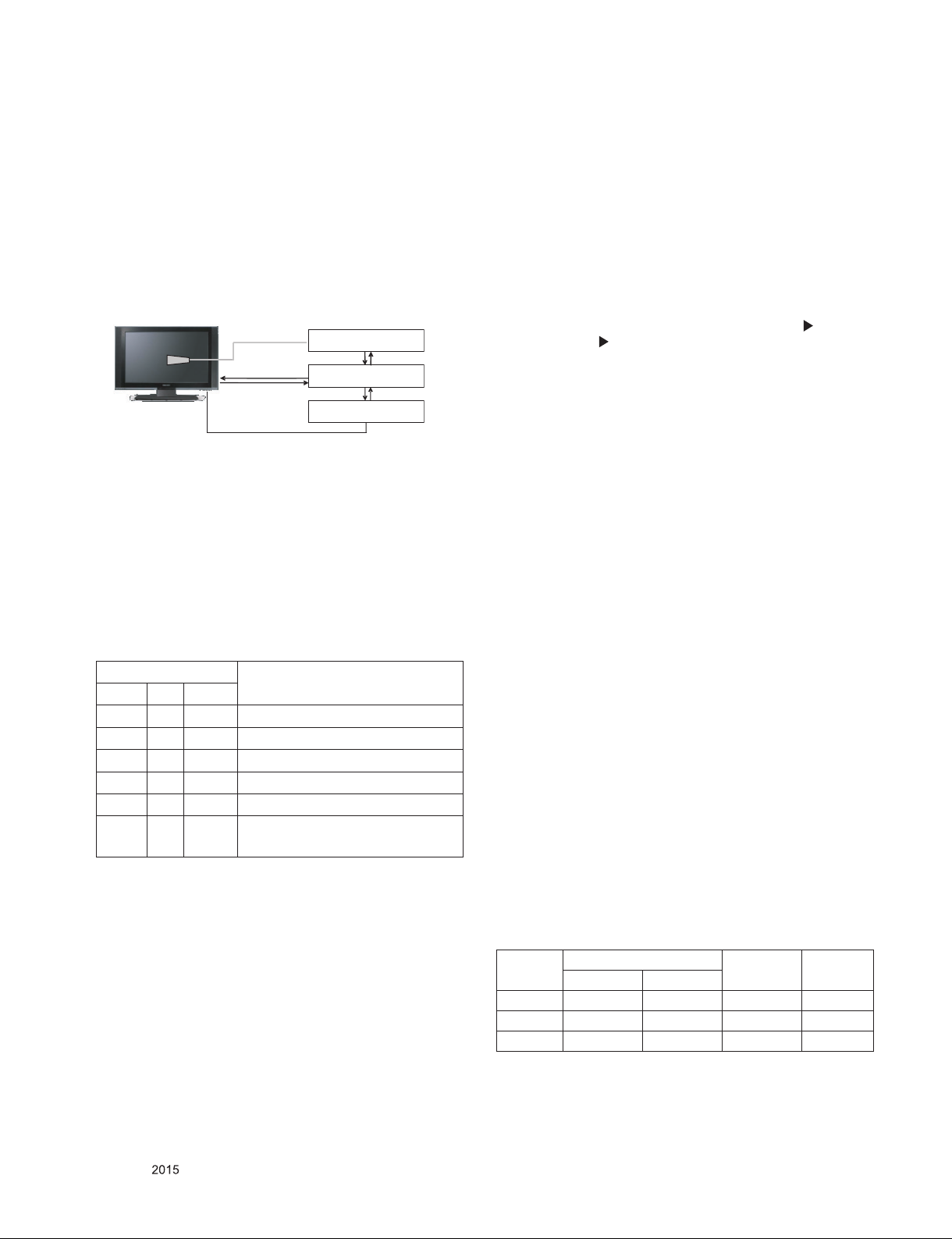
8.1.3. Equipment connection MAP
Color Analyzer
Probe
RS- 232C
Pattern Generator
Signal Source
* If TV internal pattern is used, not needed
RS-232C
Computer
RS-232C
8.1.4. Adj. Command (Protocol)
(1) Command Format
START 6E A 50 A LEN A 03 A CMD A 00 A VAL A CS A STOP
- LEN: Number of Data Byte to be sent
- CMD: Command
- VAL: FOS Data value
- CS: Checksum of sent data
- A: Acknowledge
Ex) [Send: JA_00_DD] / [Ack: A_00_okDDX]
▪RS-232C Command used during auto-adj.
RS-232C COMMAND Explanation
CMD ID DATA
wb 00 00 Begin White Balance adj.
wb 00 10 Gain adj.(internal white pattern)
wb 00 1f Gain adj. completed
wb 00 20 Offset adj.(internal white pattern)
wb 00 2f Offset adj. completed
wb 00 ff End White Balance adj.
(internal pattern disappears )
(5) When adj. is complete (OK Sing), check adj. status pre
mode (Warm, Medium, Cool)
(6) Remove probe and RS-232C to USB cable to complete
adj.
▪ W/B Adj. must begin as start command “wb 00 00” , and
finish as end command “wb 00 ff”, and Adj. offset if need
8.1.5.2 Manual adj. method
(1) Set TV in Adj. mode using POWER ON
(2) Zero Calibrate the probe of Color Analyzer, then place it on
the center of LCD module within 10cm of the surface..
(3) Press ADJ key à EZ adjust using adj. R/C à 7. White-
Balance then press the cursor to the right (KEY ).
(When KEY( ) is pressed 216 Gray internal pattern will be
displayed. )
(4) One of R Gain / G Gain / B Gain should be fixed at 192,
and the rest will be lowered to meet the desired value.
(5) Adj. is performed in COOL, MEDIUM, WARM 3 modes of
color temperature.
** G-fix adjustment
- Adjust modes (Cool), Fix the G gain to 172 (default data)
and change the others (G/B Gain ).
- Adjust two modes(Medium / Warm), Fix the one of R/G/B
gain to 192 (default data) and decrease the others.
▪ If internal pattern is not available, use RF input. In EZ Adj.
menu 7.White Balance, you can select one of 2 Testpattern: ON, OFF. Default is inner(ON). By selecting OFF,
you can adjust using RF signal in 216 Gray pattern.
▪ Adj. condition and cautionary items
1) Lighting condition in surrounding area
Surrounding lighting should be lower 10 lux. Try to
isolate adj. area into dark surrounding.
2) Probe location
- PDP: Color Analyzer (CA-100, CA-100+, CA210)
probe should be firmly attached to the Module
- LCD: Color Analyzer (CA-210) probe should be within
10cm and perpendicular of the module surface (80°~
100°)
3) Aging time
- After Aging Start, Keep the Power ON status during 5
Minutes.
- In case of LCD, Back-light on should be checked using
no signal or Full-white pattern.
Ex) wb 00 00 -> Begin white balance auto-adj.
wb 00 10 -> Gain adj.
ja 00 ff -> Adj. data
jb 00 c0
wb 00 1f -> Gain adj. complete
*(wb 00 20(start), wb 00 2f(endc)) -> Off-set adj.
wb 00 ff ->End white balance auto adj.
8.1.5. Adjustment method
8.1.5.1. Auto adj. method
(1) Set TV in adj. mode using POWER ON key
(2) Zero calibrate probe then place it on the center of the
Display
(3) Connect Cable (RS-232C to USB)
(4) Select mode in adj. Program and begin adj.
Only for training and service purposes
8.1.6. Reference (White Balance Adj. coordinate
and color temperature)
▪ Luminance: 206 Gray
▪ Standard color coordinate and temperature using CS-1000
(over 26 inch)
Mode
Cool 0.271 0.270 13000K 0.0000
Medium 0.286 0.289 9300K 0.0000
Warm 0.313 0.329 6500K 0.0000
- 23 -
Coordinate
x y
Temp ∆uv
LGE Internal Use OnlyCopyright © LG Electronics. Inc. All rights reserved.
Page 24
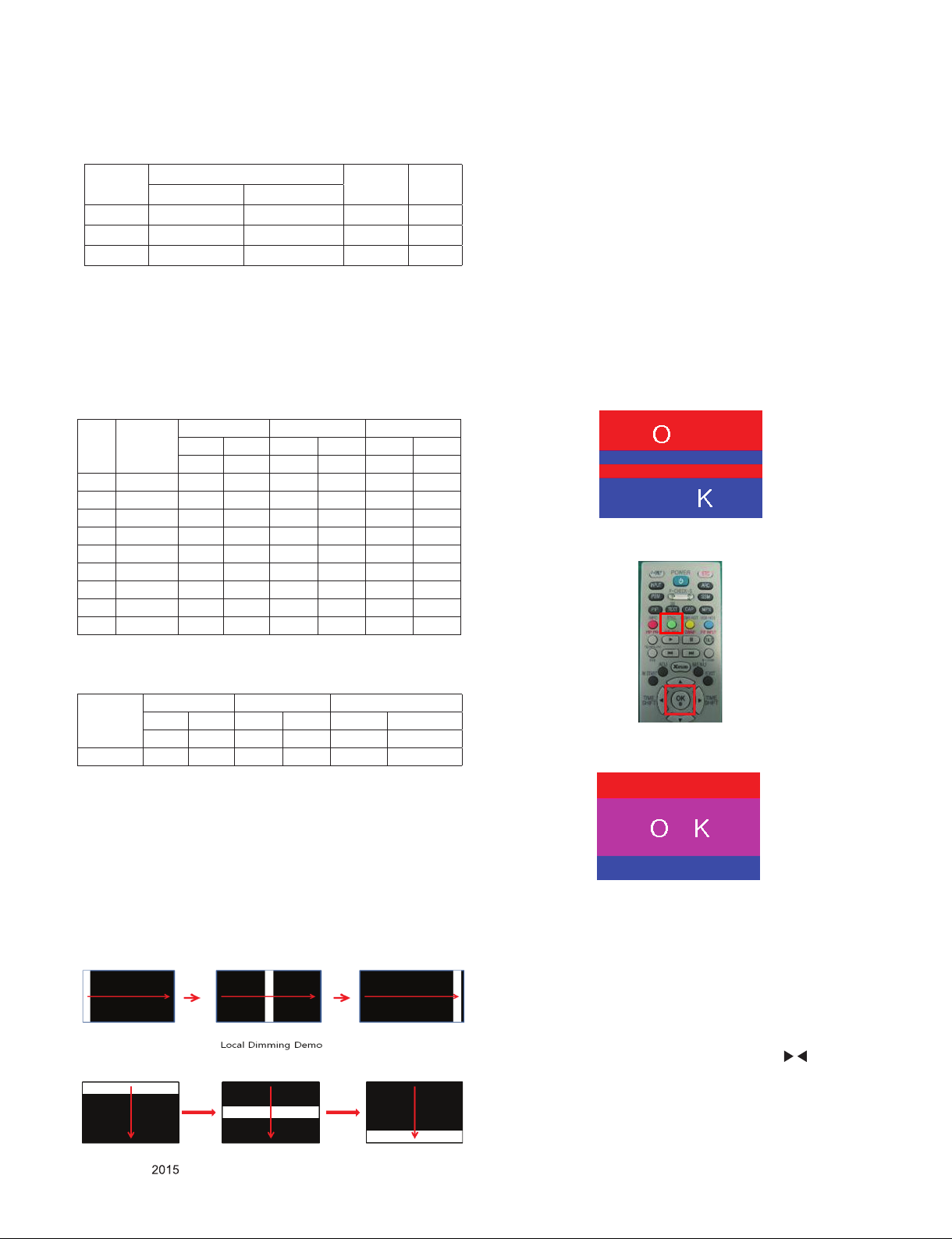
▪ Standard color coordinate and temperature using
CA-210(CH 14)
Mode
Cool 0.271±0.002 0.270±0.002 13000K 0.0000
Medium 0.286±0.002 0.289±0.002 9300K 0.0000
Warm 0.313±0.002 0.329±0.002 6500K 0.0000
Coordinate
x y
Temp ∆uv
8.1.7. EDGE & IOL LED White balance table
▪ Edge&ALEF LED module change color coordinate because
of aging time
▪ apply under the color coordinate table, for compensated
aging time.
▪ (Normal line) Edge & ALEF LED White balance table.
Model : (normal line)LGD
Aging
time
(Min)
1 0-2 282 289 297 308 324 348
2 3-5 281 287 296 306 323 346
3 6-9 279 284 294 303 321 343
4 10-19 277 280 292 299 319 339
5 20-35 275 277 290 296 317 336
6 36-49 274 274 289 293 316 333
7 50-79 273 272 288 291 315 331
8 80-119 272 271 287 290 314 330
9 Over 120 271 270 286 289 313 329
Cool Medium Warm
x y x y x y
271 270 286 289 313 329
8.3. Magic Motion Remote control test
- Equipment : RF Remote control for test, IR-KEY-Code
Remote control for test
- You must confirm the battery power of RF-Remote control
before test(recommend that change the battery per every lot)
- Sequence (test)
1) If you select the ‘start key(OK)’ on the Adjustment remote
control, you can pairing with the TV SET.
2) You can check the cursor on the TV Screen, when select
the "OK" key on the Adjustment remote control.
3) You must remove the pairing with the TV Set by select
‘Mute + OK Key’ on the Adjustment remote control.
8.4. 3D function test
(Pattern Generator MSHG-600, MSPG-6100[Support HDMI1.4])
* HDMI mode NO. 872 , pattern No.83
(1) Please input 3D test pattern like below.
(2) When 3D OSD appear automatically, then select green key.
(*) AUO, INX, Sharp, CSOT, BOE model (Cool : 13000K
Spec.) : DV
Cool Medium Warm
webOS
Target 278 280 293 299 320 339
x y x y x y
271 270 286 289 313 329
8.2. Local Dimming Function Check
(1) Turn on TV.
(2) At the Local Dimming mode, module Edge Backlight
moving right to left Back light of IOP module moving.
(3) Confirm the Local Dimming mode.
(4) Press “exit” Key.
[40/43/49/55/60/65UF77 : 6Block]
[70UF77 : 12Block]
[55/65UG87 : 16Block]
(3) Don't wear a 3D Glasses, Check the picture like below.
8.5. Option selection per country
8.5.1. Overview
- Option selection is only done for models in AJ/JA/IL
8.5.2.Method
(1) Press ADJ key on the Adj. R/C, then select Country Group
Menu
(2) Depending on destination, select Country Group Code or
Country Group then on the lower Country option, select
US, CA, MX. Selection is done using +, - or KEY
Only for training and service purposes
- 24 -
LGE Internal Use OnlyCopyright © LG Electronics. Inc. All rights reserved.
Page 25
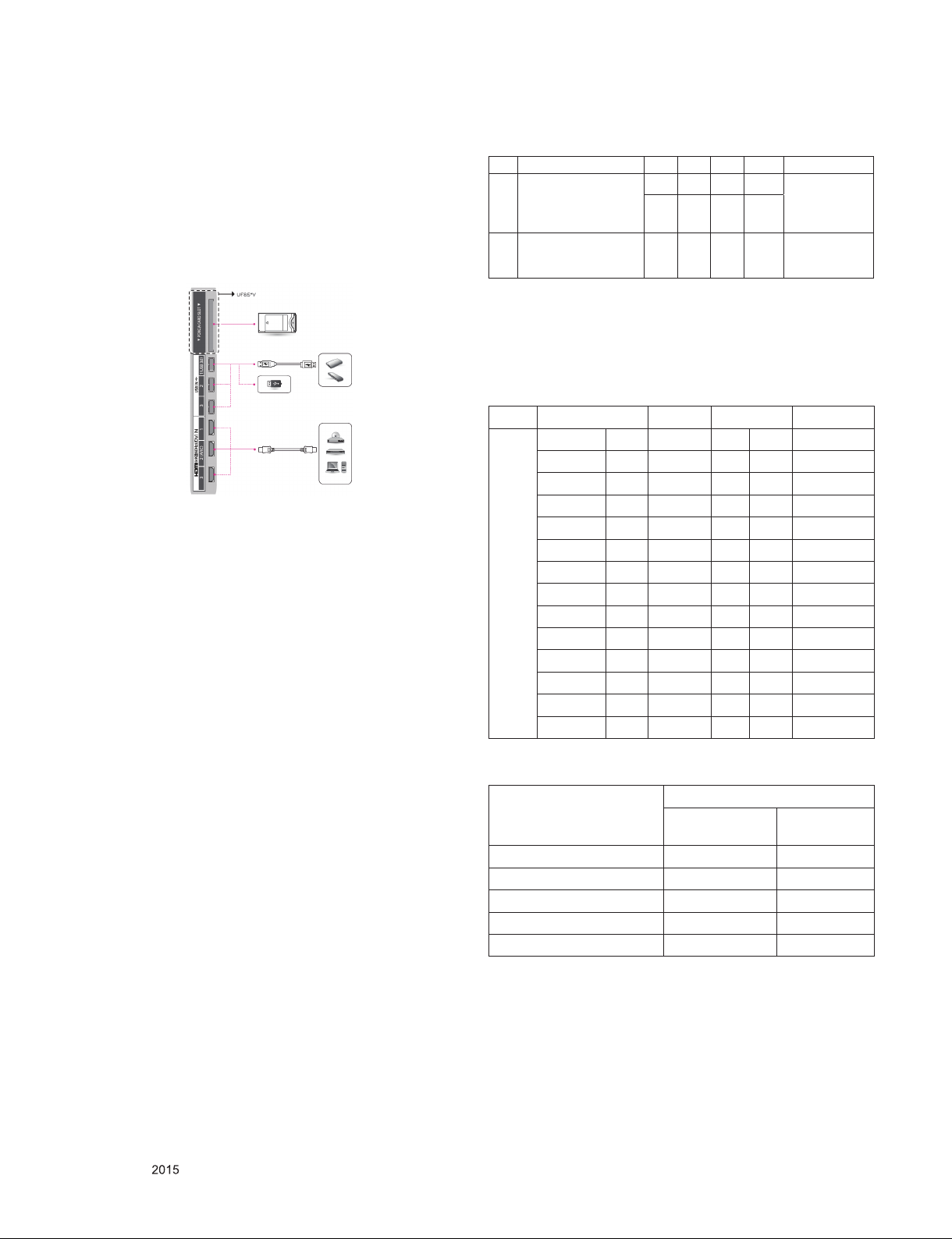
8.6. HDMI ARC Function Inspection
8.6.1. Test equipment
- Optic Receiver Speaker
- MSHG-600 (SW: 1220 ↑)
- HDMI Cable (for 1.4 version)
8.6.2. Test method
(1) Insert the HDMI Cable to the HDMI ARC port from the
master equipment (HDMI 2)
(2) Check the sound from the TV Set
(3) Check the Sound from the Speaker or using AV & Optic
TEST program (It’s connected to MSHG-600)
9. GND and Internal Pressure check
9.1. Method
(1) GND & Internal Pressure auto-check preparation
- Check that Power Cord is fully inserted to the SET.
(If loose, re-insert)
(2) Perform GND & Internal Pressure auto-check
- Unit fully inserted Power cord, Antenna cable and A/V
arrive to the auto-check process.
- Connect D-terminal to AV JACK TESTER
- Auto CONTROLLER(GWS103-4) ON
- Perform GND TEST
- If NG, Buzzer will sound to inform the operator.
- If OK, changeover to I/P check automatically.
(Remove CORD, A/V form AV JACK BOX.)
- Perform I/P test
- If NG, Buzzer will sound to inform the operator.
- If OK, Good lamp will lit up and the stopper will allow the
pallet to move on to next process.
9.2. Checkpoint
▪ TEST voltage
- GND: 1.5 KV / min at 100 mA
- SIGNAL: 3 KV / min at 100 mA
▪ TEST time: 1 second
▪ TEST POINT
- GND TEST = POWER CORD GND & SIGNAL CABLE
METAL GND
- Internal Pressure TEST = POWER CORD GND & LIVE &
NEUTRAL
▪ LEAKAGE CURRENT: At 0.5 mArms
10. Audio
No Item Min Ty p Max Unit Remark
Audio practical max
Output, L/R
1
(Distortion=10% max
Output)
Speaker
2
(8 Ω Impedance)
Measurement condition:
(1) RF input: Mono, 1 KHz sine wave signal, 100 % Modulation
(2) CVBS, Component: 1 KHz sine wave signal 0.5 Vrms
10 12 W
8.10 10.8 Vrms
10 12 W
EQ Off
AVL Off
Clear Voice Off
EQ On
AVL On
Clear Voice On
11. Preset CH information
Area System Band CH Frequency
MA
(WR)
11.1. Etc
PAL B V/UHF E5 C 05 175.25
PAL G V/UHF E51 C 51 711.25
PAL I V/UHF I41 C 41 631.25
SECAM D V/UHF R5 C 05 93.25
PAL B V/UHF E4 C 04 62.25
PAL G V/UHF E31 C 31 551.25
PAL I V/UHF I21 C 21 471.25
PAL I V/UHF I69 C 69 855.25
PAL G V/UHF E48 C 48 687.25
SECAM L V/UHF L4 C 08 200.00
SECAM L V/UHF L45 C 45 663.25
PAL G V/UHF E25 C 25 503.25
SECAM D V/UHF R7 C 07 183.25
SECAM D V/UHF R7 C 07 189.25
Power Status
Main B/D Ship-
ping Condition
Chassis Module Assembly ON N/A
Front Module Assembly N/A OFF
Factory incoming ON OFF
Final Assembly ON ON
Ship-Out OFF ON
AC Swithch
condtion
Only for training and service purposes
- 25 -
LGE Internal Use OnlyCopyright © LG Electronics. Inc. All rights reserved.
Page 26
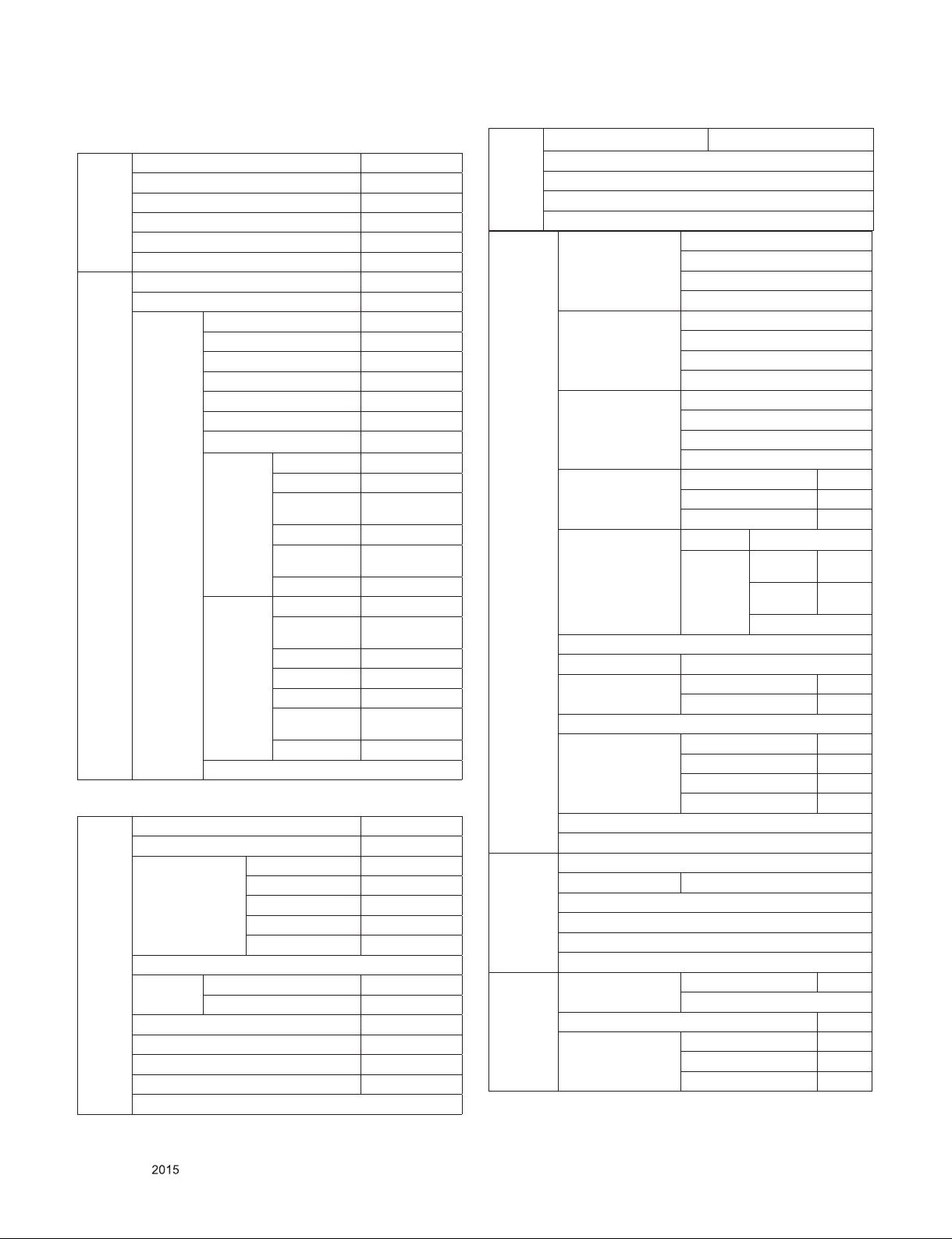
11.2. SET Factoring Condition
Quick Programmes
Picture Mode ECO
Sound Mode Standard
Aspect Ratio 16:9
Sleep Timer Off
Account Management Sign In
Picture Smart Picture Mode Off
Picture Mode ECO
Picture
Adjust
Sound Smart Sound Mode Off
Sound Mode Standard
Sound Effects Clear Voice II Off
Reset
Volume
Mode
Sound Out TV Speaker
DTV Audio Setting Auto
AV Sync. Adjust Off
Sound Optimizer Normal
Sound Test
Backlight 100
Contrast 100
Brightness 50
Sharpness 25
Colour 60
Tint R5
Colour Temperature C20
Advanced
Control
Picture
Option
Reset
Auto Volume Off
Volume Increase Rate Medium
Dynamic Control Low
Dynamic Colour Medium
Preferred Colour Skin-2/Grass3/
Colour Gamut Wide
Super Resolution
Gamma Medium
Noise Reduction Auto
MPEG Noise
Reduction
Black Level Auto
Real Cinema Off
Motion Eye Care High
LED Local Dimming
TruMotion Clear
Virtual Surround Plus Off
3D Sound Zooming Off
Equalizer Off
Balance L0/R0
Sky0
Medium
Low
High
Network TV Name LG Smart TV
Wired Connection(Ethernet)
Wi-F- Connection
Wi-Fi Direct
LG Connect
General Language Menu Language
Audio Language
Voice Recognition Language
Keyboard Languages
Location Broadcast Country Setting
Zip Code Setting
Service Country Setting Auto
LG Services Country
Time & Date Set Automatically
Time
Date
Time zone
Timer Sleep Timer Off
Timer Power On Off
Timer Power Off Off
Voice & Gesture Commands
Launch Account Management
Home/Store Mode HOME MODE
Eco Mode Auto Power Off 4 Hours
SIMPLINK
Data Based Services Collection of Watching Info On
Reset to Initial Settings
ABOUT THIS TV
Safety Off
TV Rating Locks None
Programme Locks
Application Locks
Input Locks
Reset PIN Code
Accessibility Pointer Options Tracking Speed Normal
Subtitle Off
Teletext Audio Description Off
Voice Tutorial
Gesture Motion Rec-
HDD Eco Mode On
Live Plus Off
Customized Ads Off
Cookies Off
Size
Audio Description Volume 10
Hard of Hearing Off
ognition
Animation
Guide
Tutorial
On
On
Only for training and service purposes
- 26 -
LGE Internal Use OnlyCopyright © LG Electronics. Inc. All rights reserved.
Page 27
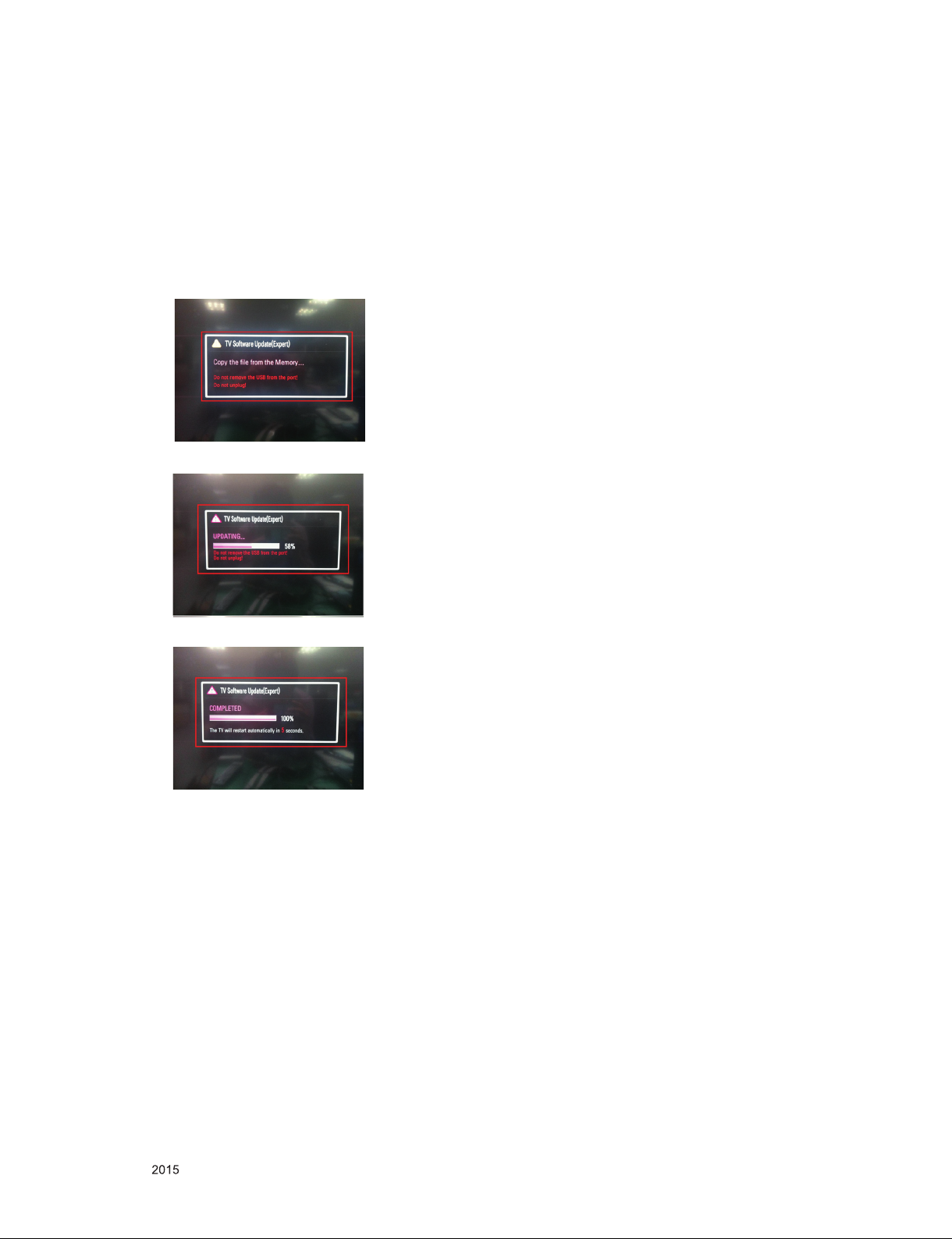
12.
USB S/W Download(Service only)
(1) Put the USB Stick to the USB socket
(2) Automatically detecting update file in USB Stick.
- If your downloaded program version in USB Stick is
Lower, it didn’t work.
But your downloaded version is Higher, USB data is
automatically detecting
(Download Version High & Power only mode, Set is
automatically Download)
(3) Show the message “Copying files from memory”.
(4) Updating is starting.
(5) Updating completed, the TV will restart automatically
(6) If your TV is turned on, check your updated version and
Tool option. (explain the Tool option, next stage)
* If downloading version is more new than your TV have,
TV can lost all channel data. In this case, you have to
channel recover. if all channel data is cleared, you didn’t
have a DTV/ATV test on production line.
* After downloading, have to adjust Tool Option again.
(1) Push "IN-START" key in service remote control.
(2) Select "Tool Option 1" and push "OK" key.
(3) Punch in the number. (Each model has their number)
Only for training and service purposes
- 27 -
LGE Internal Use OnlyCopyright © LG Electronics. Inc. All rights reserved.
Page 28

MAIN Audio AMP
(NTP7515)
Mstar
LM14A
CI Slot
P_TS
P_TS
T/C Demod
IF (+/-)
USB1 (3.0)
OPTIC
LAN
DDR3 1866 X 16
(512MB X 2EA)
HDMI2
HDMI1
Analog Demod
EEPROM(NVRAM)
(256Kbit)
HDMI2.0(6G)
Air/
Cable
USB2 (2.0)
51P/41P
eMMC
(4GB)
Sub Micom
(RENESAS
R5F100GEAFB)
SIF
X_TAL
24MHz
A
X_TAL
32.768KHz
I2S Out
I2C 4
Vx1
USB
P_TS
I2C 1
AV/COMP
SCART
(IN/OUT)
OCP
Vertical
CVBS/YPbPr
CVBS/RGB
SPDIF OUT
ETHERNET
I2C 3
(HW Port)
SUB
ASSY
IR / LED / KEY
WIFI/BT 11n Combo
USB_WIFI
CVBS
SMARTCARD_I/F
B-CAS
B-CAS
(JAPAN)
SPI FLASH(BOOT)
(32Mbit)
B
DDR3 1866 X 16
(512MB X 2EA)
USB3 (2.0)
URSA11
DDR3 1866 X 16
(128MB X 2EA)
RS232C
HDMI 2.0
SI2178B
HDMI Switch
MN864788
Panasonic
HDMI3
H/P Audio L/R
H/P
H/P Audio L/R
H/P AMP
1. LM14A + URSA11 Circuit
BLOCK DIAGRAM
Only for training and service purposes
- 28 -
LGE Internal Use OnlyCopyright © LG Electronics. Inc. All rights reserved.
Page 29
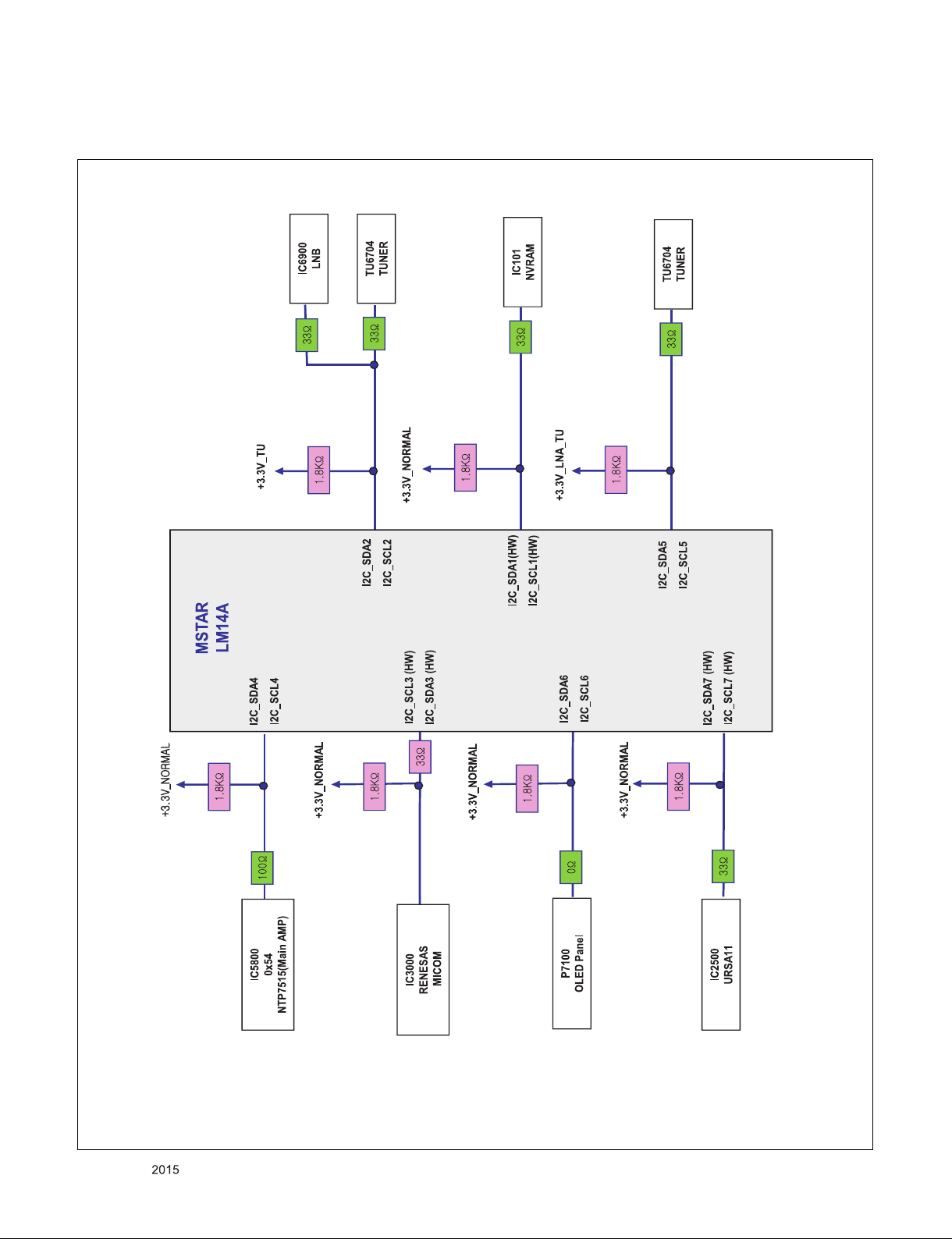
2. LM14A + URSA11 I2C
BLOCK DIAGRAM
Only for training and service purposes
- 29 -
LGE Internal Use OnlyCopyright © LG Electronics. Inc. All rights reserved.
Page 30
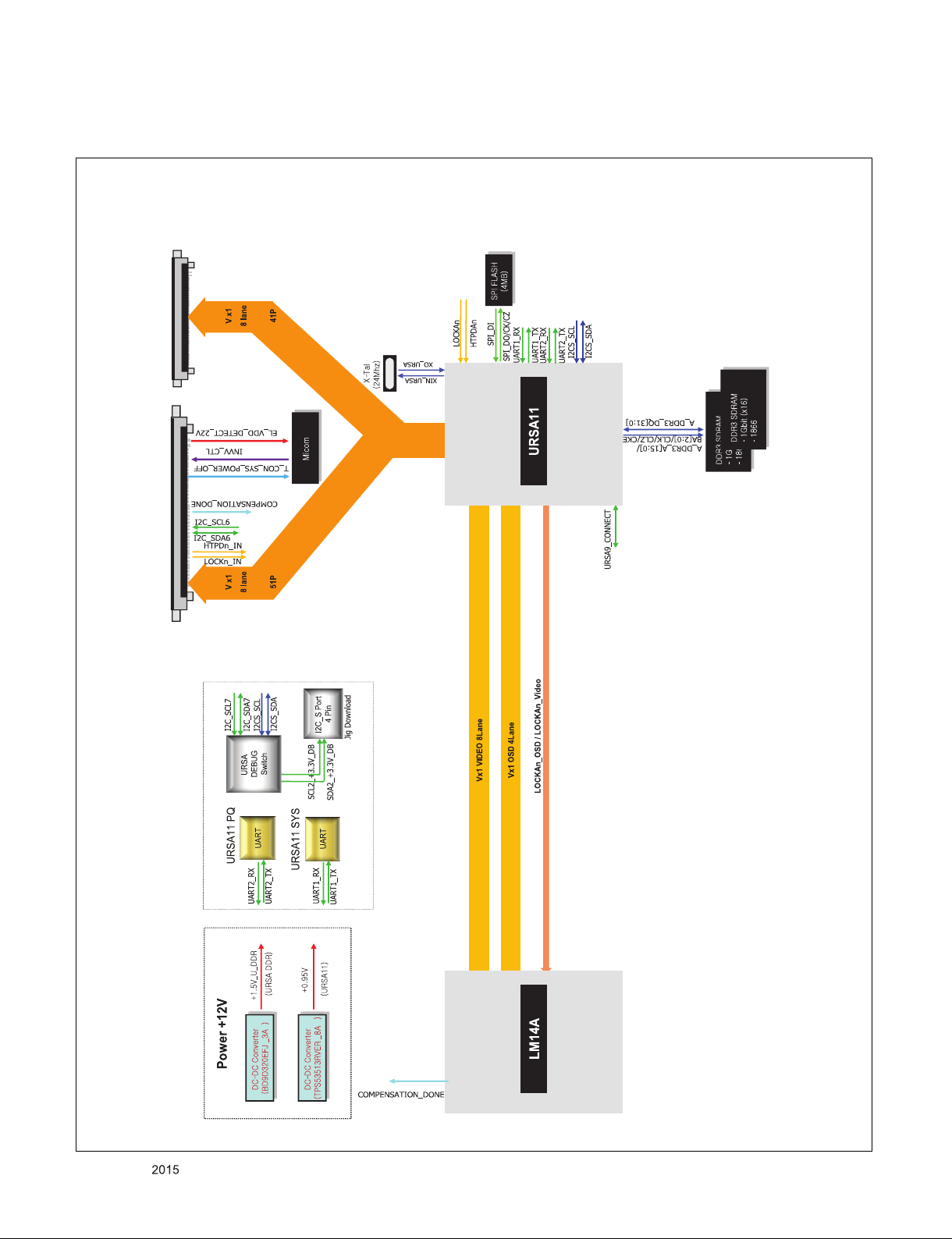
3. URSA11
BLOCK DIAGRAM
Only for training and service purposes
- 30 -
LGE Internal Use OnlyCopyright © LG Electronics. Inc. All rights reserved.
Page 31

4. LM14A + URSA11 Power
BLOCK DIAGRAM
Only for training and service purposes
- 31 -
LGE Internal Use OnlyCopyright © LG Electronics. Inc. All rights reserved.
Page 32

5. Tuner / CI
LM14A
AH11[TS1_CLK]
AH12(TS1_SYNC]
AJ10[TS1_VLD]
AH13/AG11/AG10/AJ11
AH10/AJ13/AG9/AH9
[TS1_D[0-7]]
D12[GPIO106]
LNB
IC6900
A8303SESTR-T
10 [TONECTRL]
2 [LNB]
7 [SCL]
8 [SDA]
AJ6[SCK4]
AG8 [SDA4]
AL2[VIFP]
AM2 [VIFM]
AK1[SIFP]
33ȳ
CI_MDI[0-7]
CI Slot
33ȳ
FE_DEMOD1_TS_DATA [0-7]
TPI_DATA[0-7]
/EB_WE_N
/EB_OE_N
CAM_IREQ_N
CAM_REG_N
CAM_WAIT_N
PCM_RESET
EB_DATA[0-7]
CI_DATA[0-7]
EB_ADDR[0-14]
CI_ADDR[0-14]
EB_BE_N1
EB_BE_N0
/PCM_CE1
/CI_CD1
/CI_CD2
CI 5V
Power detect
PCM_5V_CTL
+5V_CI_ON
TPI_SOP
TPI_VAL
TPI_CLK
TS_IN[0-7]
AK17/AL18/AK18/AL15
/AL16AK15/AM16/AK16
[TPI_DATA[0-7]]
TS_OUT[0-7]
CI_CD1
CI_CD2
AG21[PCM_CD_N]
CI_MISTRT
CI_MIVAL_ERR
CI_MCLKI
AL22[PCM_CE_N]
PCM_CE1
10K ȳ
AG19[PCM_IOWR_N]
AG20[PCM_IORD_N]
CI_IOWR
CI_IORD
AG14/AL20/AG15/AH15/AM19
AJ17/AJ16/AH17/AM20/AH19
AJ20/AK20/AG17/AJ19/AG18
[PCM_A[0-14]]
AH14/AG13/AG12/AK22
AK21/AL21/AM23AH20
[PCM_D[0-7]]
CI_ADDR[0-14]
EB_DATA[0-7]
AH16[PCM_RESET]
AG16[PCM_WAIT_N]
AJ14[PCM_REG_N]
AU20[PCMIRQA]
AT21[PCMOEN]
AK19[[PCM_WE_N]
AL19[TS0_CLK]
AM17[TS0_VLD]
AL17[TS0_SYNC]
TPI_CLK
TPI_VAL
TPI_SOP
PCM_RESET
CAM_WAIT_N
REG
CAM_IREQ_N
CI_OE
CI_WE
VCC
P4[GPIO_PM[4]]
+5V_CI_ON
TDJx-x351x
[+3.3V_TU] 11
[3.3V_Demod_TU] 26
[D_Demod_Core] 28
[IF_P_TU] 6
[IF_N_TU] 7
[FE_DEMOD1_TS_ERROR] 12
[FE_DEMOD1_TS_CLK] 14
[FE_DEMOD1_TS_SYNC] 15
[FE_DEMOD1_TS_VAL] 16
FE_DEMOD1_TS_DATA[0] 17
FE_DEMOD1_TS_DATA[1] 18
FE_DEMOD1_TS_DATA[2] 19
FE_DEMOD1_TS_DATA[3] 20
FE_DEMOD1_TS_DATA[4] 21
FE_DEMOD1_TS_DATA[5] 22
FE_DEMOD1_TS_DATA[6] 23
FE_DEMOD1_TS_DATA[7] 24
Demod_Core
[+3.3V_LNA_TU] 1
[LNB_TX] 29
[LNB_OUT] 31
[I2C_SCL2_TU] 27
[I2C_SDA2_TU] 30
+3.3V_TUNER
[RF_SWITCH_CTL] 2
[I2C_SCL5_TU] 4
[I2C_SDA5_TU] 5
[TU_SIF_TU] 8
[TU_CVBS_TU] 9
[IF_AGC_TU] 3
[/TU_RESET1_TU] 25
FE_DEMOD1_TS_CLK
FE_DEMOD1_TS_SYNC
FE_DEMOD1_TS_VAL
FE_DEMOD1_TS_DATA[0-7]
LNB_TX
I2C_SCL2
I2C_SDA2
33ȳ
33 ȳ
LNB_OUT
IF_P
IF_N
TU_SIF
TU_CVBS
IF_AGC
RF_SWITCH_CTL
I2C_SCL5
I2C_SDA5
33 ȳ
/TU_RESET1
AH7[SCK5]
AJ8[SDA5]
Y6 [GPIO0]
AC6[CVBS0]
AK3[IF_AGC]
CAM_CD1_N
OR
GATE
TPI_DATA[0-7]
AH13/AG11/AG10/AJ11
AH10/AJ13/AG9/AH9
[TS1_D[0-7]]
+3.3V_TU
1.8Kȳ
FE_DEMOD1_TS_ERROR
1.8Kȳ
+3.3V_LNA_TU
+5V_NORMAL
10K ȳ
33ȳ
33ȳ
BLOCK DIAGRAM
Only for training and service purposes
- 32 -
LGE Internal Use OnlyCopyright © LG Electronics. Inc. All rights reserved.
Page 33

6. Video & Audio IN
BLOCK DIAGRAM
Only for training and service purposes
- 33 -
LGE Internal Use OnlyCopyright © LG Electronics. Inc. All rights reserved.
Page 34

7. AUDIO OUT
BLOCK DIAGRAM
Only for training and service purposes
- 34 -
LGE Internal Use OnlyCopyright © LG Electronics. Inc. All rights reserved.
Page 35

8. HDMI
BLOCK DIAGRAM
Only for training and service purposes
- 35 -
LGE Internal Use OnlyCopyright © LG Electronics. Inc. All rights reserved.
Page 36

BLOCK DIAGRAM
9. USB / Wi-Fi / M-REMOTE / UART
Only for training and service purposes
- 36 -
LGE Internal Use OnlyCopyright © LG Electronics. Inc. All rights reserved.
Page 37

10. LM14A Internal Block
BLOCK DIAGRAM
Only for training and service purposes
- 37 -
LGE Internal Use OnlyCopyright © LG Electronics. Inc. All rights reserved.
Page 38

A10
A22
AG1
900
410
710
811
500
400
200
531
530
821
820
121
120
540
810
LV1
LV2
521
522
570
EXPLODED VIEW
IMPORTANT SAFETY NOTICE
Many electrical and mechanical parts in this chassis have special safety-related characteristics. These
parts are identified by in the Schematic Diagram and EXPLODED VIEW.
It is essential that these special safety parts should be replaced with the same components as
recommended in this manual to prevent X-RADIATION, Shock, Fire, or other Hazards.
Do not modify the original design without permission of manufacturer.
Only for training and service purposes
- 38 -
LGE Internal Use OnlyCopyright © LG Electronics. Inc. All rights reserved.
Page 39

CHIP CONFIG
Copyright ⓒ 2015 LG Electronics. Inc. All right reserved.
Only for training and service purposes
LGE Internal Use Only
CHIP_CONFIG[3:0]
{LED1, SPI_DI,LED0, PWM_PM}
Value Mode Description
4’b1000 SB51_ExtSPI 51 boot from SPI
4’b1001 HEMCU_ExtSPI ARM boot from SPI
4’b1010 HEMCU_ROM_EMMC ARM boot from ROM; outer storage is eMMC
4’b1011 HEMCU_ROM_NAND ARM boot from ROM; outer storage is NAND
4’b1100 DBUS for test only
4’b0000 SB51_ExtSPI + Authentication 51 boot from SPI with ARM authentication
4’b0001 SB51_ExtSPI + Authentication HEMCU_ExtSPI + Authentication
4’b0011 HEMCU_ROM_NAND + Authentication ARM boot from ROM with authentication;
+3.3V_NORMAL
OPT
R108 4.7K
R110 4.7K
OPT
R109 4.7K
R111 4.7K
OPT
R115 4.7K
R122 4.7K
OPT
R116 4.7K
R123 4.7K
LED1
SPI_DI_SOC
LED0
PWM_PM
LM14 HW Option
+3.3V_NORMAL
10K
BIT0
BIT1
BIT2
BIT3
BIT4
BIT5
BIT6
BIT7
BIT8
BIT9
BIT10
BIT11
20141113 version
BIT(0/1)
00
TW/COL
CN/HK
01
10
11
Display
BIT4
Resolution
BIT5
DVB
EU
AJJA
BIT0_0
ATSC
KR
BR
CI
Low
LCD
FHD
BIT0_1
R105 10K
R106 10K
US
BIT1_1
R112
10K
BIT1_0
R113
JP
JP
OLED
BIT2_1
BIT2_0
High
UHD
BIT3_1
R119 10K
BIT3_0
R120 10K
BIT5_1
BIT4_1
BIT6_1
R128 10K
BIT4_0
R129 10K
R132 10K
BIT5_0
R133 10K
BIT(6/7)
00
01
10
11
R135 10K
BIT6_0
R136 10K
LM15U only
R125 10K
R126 10K
BIT7_1
R138 10K
BIT7_0
R139 10K
B/E(FRC)
URSA9
URSA11-P
URSA11
BIT8_1
R140 10K
BIT8_0
R141 10K
NVRAM
Atmel_NVRAM
AT24C256C-SSHL-T
EAN61133501
A0
1
A1
2
A2
3
GND
4
BIT9_1
R142 10K
BIT9_0
R143 10K
BIT(2/3)
IC101
A0’h
BIT10_1
BIT10_0
00
01
10
11
R146 10K
R147 10K
VCC
8
WP
7
SCL
6
SDA
5
BIT11_1
R148 10K
BIT11_0
R149 10K
EU/CIS
T2/C/S2 PIP
T2/C/S2
T/C
C100
0.1uF
+3.3V_NORMAL
Write Protection
- Low : Normal Operation
- High : Write Protection
AR101
33
T2/C PIP
AJJA
T2/C/S2
T
T2
IC101-*1
BR24G256FJ-3
A0
1
A1
2
A2
3
GND
4
Rohm_NVRAM
I2C_SCL1
I2C_SDA1
VCC
8
WP
7
SCL
6
SDA
5
TW/COL
T2/C
T/C
PWM_DIM
PWM_DIM2
FAN_ON
AMP_RESET_N
PWM_PM
/USB_OCD2
USB_CTL2
FRC_FLASH_WP
DDTS_TX
SPI_CK_SOC
SPI_DI_SOC
SPI_DO_SOC
/TU_RESET1
/SPI_CS
M_RFModule_RESET
DDCA_CK
DDCA_DA
SOC_TX
SOC_RX
FRC_FLASH_SEL_SOC
/TU_RESET2
I2C_SCL6
I2C_SDA6
I2C_SCL3
I2C_SDA3
I2C_SCL1
I2C_SDA1
I2C_SCL2
I2C_SDA2
I2C_SCL5
I2C_SDA5
CPU_VID0
CORE_VID0
WOL_WAKE_UP_SOC
CN/HK
ATSC NIM+T2
DefaultT2/C PIP
CPU_VID1
LED0
LED1
KR
ATSC
ATSC PIP
R167
D9
PWM0/GPIO152
F10
PWM1/GPIO153
F8
PWM2/GPIO154
E9
PWM3/GPIO155
N5
PWM_PM/GPIO7
F4
SAR0/GPIO46
G5
SAR1/GPIO47
E5
SAR2/GPIO48
E4
SAR3/GPIO49
G4
SAR5
W5
PM_SPI_CK/GPIO1
V4
PM_SPI_DI/GPIO2
V5
PM_SPI_DO/GPIO3
Y6
PM_SPI_CZ/GPIO0
0
Y4
GPIO_PM[6]/[SPI-CZ1N]/GPIO16
Y5
OPT
GPIO_PM[10]/[SPI-CZ2N]/GPIO20
AL8
DDCA_CK/GPIO8
AK8
DDCA_DA/GPIO9
AH28
GPIO3/TX1/GPIO58
AH29
GPIO4/RX1
AA4
GPIO23/[TX3]/GPIO78
W6
GPIO24/[RX3]/GPIO79
F14
DIM2/TX4/GPIO112
F12
DIM3/RX4/GPIO113
AJ27
GPIO2/GPIO57
AJ7
GPIO28/SCK0/GPIO83
AH8
GPIO29/SDA0/GPIO84
E11
DDCR_CK/SCK3/GPIO54
E10
DDCR_DA/SDA3/GPIO53
AJ6
GPIO30/SCK4/GPIO85
AG8
GPIO31/SDA4/GPIO86
AH7
GPIO32/SCK5/GPIO87
AJ8
GPIO33/SDA5/GPIO88
L6
VID0/GPIO50
M6
VID1/GPIO51
AD5
LED0/GPIO29
AD4
LED1/GPIO30
AB5
WOL_INT_OUT/[GPIO]/GPIO52
North.AM
ISDB PIP
Default
ISDB EXTATSC+T2
ISDB INT
BR
IC100
LGE5332(LM14A)
JP
Default
SPI_CK_SOC
SPI_DI_SOC
SPI_DO_SOC
LVSYNC/[VX1_0-]
LHSYNC/[VX1_0+]
LDE/[VX1_1-]
LCK/[VX1_1+]
R_ODD[7]/LVB0N/[VX1_2-]
R_ODD[6]/LVB0P/[VX1_2+]
R_ODD[5]/LVB1N/[VX1_3-]
R_ODD[4]/LVB1P/[VX1_3+]
R_ODD[3]/LVB2N/[VX1_4-]
R_ODD[2]/LVB2P/[VX1_4+]
R_ODD[1]/LVBCLKN/[VX1_5-]
R_ODD[0]/LVBCLKP/[VX1_5+]
G_ODD[7]/LVB3N/[VX1_6-]
G_ODD[6]/LVB3P/[VX1_6+]
G_ODD[5]/LVB4N/[VX1_7-]
G_ODD[4]/LVB4P/[VX1_7+]
G_ODD[3]/LVA0N/[OSD_0-]
G_ODD[2]/LVA0P/[OSD_0+]
G_ODD[0]/LVA1P/[OSD_1+]
G_ODD[1]/LVA1N/[OSD_1-]
B_ODD[7]/LVA2N/[OSD_2-]
B_ODD[6]/LVA2P/[OSD_2+]
B_ODD[5]/LVACLKN/[OSD_3-]
B_ODD[4]/LVACLKP/[OSD_3+]
B_ODD[3]/LVA3N/[LOCKN]
B_ODD[2]/LVA3P/[HTPDN]
B_ODD[1]/LVA4N/[OSD_LOCKN]
B_ODD[0]/LVA4P/[OSD_HTPDN]
HTPDAn_Video_Pull_down
GPIO_PM[0]/GPIO10
GPIO_PM[3]/GPIO13
GPIO_PM[4]/GPIO14
GPIO_PM[7]/GPIO17
GPIO_PM[8]/GPIO18
GPIO_PM[9]/GPIO19
GPIO_PM[13]/GPIO23
GPIO_PM[1]/PM_UART1/GPIO11
GPIO_PM[5]/PM_UART1/GPIO15
GPIO_PM[11]/PM_UART0/GPIO21
GPIO_PM[12]/PM_UART0/GPIO22
SPI1_DI/GPIO107
SPI1_CK/GPIO106
SPI2_DI/GPIO109
SPI2_CK/GPIO108
VSYNC_LIKE/GPIO105
DIM0/GPIO110
DIM1/GPIO111
T-con I2C
BIT8
Protocol
BIT9
Division
Interface
BIT10
BIT11
OS(DDR)
/SPI_CS
TXOSD_3P
TXOSD_3N
TXOSD_2P
TXOSD_2N
TXOSD_1P
TXOSD_1N
TXOSD_0P
TXOSD_0N
V-BY-ONE
AF32
AF31
AG32
AG31
AH31
AH30
AJ31
AJ32
AK32
AK31
AL32
AL31
AK30
AL30
AK29
AL29
AK28
AM28
AL28
AK27
AK26
AL26
AM26
AK25
AL25
AK24
AL24
AK23
R172
10K
AE2
U6
P4
U5
AE5
AJ5
AG6
P5
P6
AJ4
AH4
G7
TESTPIN
E13
D12
F11
D11
E12
D14
E14
Low
16Kbit 32Kbit
NON_Division
EPI
WebOS Lite
LM14A+URSA9
FRC_FLASH_SEL_SOC
FRC_FLASH_WP
LOCKAn_OSD
URSA9_CONNECT
Data_Format_1
Data_Format_0
URSA_RESET_SoC
L/D_VSYNC_SOC
L/D_CLK_SOC
L/D_DI_SOC
TXVBY1_0N
TXVBY1_0P
TXVBY1_1N
TXVBY1_1P
TXVBY1_2N
TXVBY1_2P
TXVBY1_3N
TXVBY1_3P
TXVBY1_4N
TXVBY1_4P
TXVBY1_5N
TXVBY1_5P
TXVBY1_6N
TXVBY1_6P
TXVBY1_7N
TXVBY1_7P
TXOSD_0N
TXOSD_0P
TXOSD_1N
TXOSD_1P
TXOSD_2N
TXOSD_2P
TXOSD_3N
TXOSD_3P
R173
10K
HTPDAn_OSD_Pull_down
COMP1_DET
DDTS_RX
PCM_5V_CTL
PMIC_RESET
COMPENSATION_DONE
URSA9_CONNECT
/USB_OCD1
USB_CTL1
DATA_FORMAT_0_SOC
DATA_FORMAT_1_SOC
HP_DET
RF_SWITCH_CTL
L/D_DI_SOC
L/D_CLK_SOC
L/D_VSYNC_SOC
SC_DET
AV1_CVBS_DET
High
4_Division
Vx1
WebOS
LOCKAn_Video
HTPDAn_Video
LOCKAn_OSD
HTPDAn_OSD
R175
22
COMPENSATION_DONE
DATA_FORMAT_1_SOC
DATA_FORMAT_0_SOC
HTPDAn_OSD
HTPDAn_Video
EB_DATA[0-7]
EB_ADDR[0-14]
SM_Vsel
SM_CLK
SM_RST
SM_IO
SM_VCC
SM_CD
1K
R176
TCON_I2C_EN
EMMC_DATA[0-7]
FAN_ON
CAM_IREQ_N
EB_OE_N
EB_BE_N1
/PCM_CE1
EB_WE_N
CAM_CD1_N
PCM_RESET
CAM_REG_N
EB_BE_N0
CAM_WAIT_N
EMMC_CMD
EMMC_CLK
EMMC_RST
EMMC_STRB
OLED
GST_A
GCLK_A
MCLK_A
LM14A_ONLY
EB_DATA[0]
EB_DATA[1]
EB_DATA[2]
EB_DATA[3]
EB_DATA[4]
EB_DATA[5]
EB_DATA[6]
EB_DATA[7]
EB_ADDR[0]
EB_ADDR[1]
EB_ADDR[2]
EB_ADDR[3]
EB_ADDR[4] TPI_DATA[0]
EB_ADDR[5] TPI_DATA[1]
EB_ADDR[6]
EB_ADDR[7]
EB_ADDR[8]
EB_ADDR[9]
EB_ADDR[10]
EB_ADDR[11]
EB_ADDR[12]
EB_ADDR[13]
EB_ADDR[14]
BIT0
BIT1
BIT2
BIT3
BIT4
BIT5
EMMC_DATA[6]
EMMC_DATA[7]
EMMC_DATA[2]
EMMC_DATA[1]
EMMC_DATA[0]
EMMC_DATA[3]
EMMC_DATA[4]
EMMC_DATA[5]
AH14
PCM_D[0]/GPIO147
AG13
PCM_D[1]/GPIO148
AG12
PCM_D[2]/GPIO149
AK22
PCM_D[3]/GPIO119
AK21
PCM_D[4]/GPIO120
AL21
PCM_D[5]/GPIO121
AM23
PCM_D[6]/GPIO122
AH20
PCM_D[7]/GPIO123
AG14
PCM_A[0]/GPIO146
AL20
PCM_A[1]/GPIO145
AG15
PCM_A[2]/GPIO143
AH15
PCM_A[3]/GPIO142
AM19
PCM_A[4]/GPIO141
AJ17
PCM_A[5]/GPIO139
AJ16
PCM_A[6]/GPIO138
AH17
PCM_A[7]/GPIO137
AM20
PCM_A[8]/GPIO131
AH19
PCM_A[9]/GPIO129
AJ20
PCM_A[10]/GPIO125
AK20
PCM_A[11]/GPIO127
AG17
PCM_A[12]/GPIO136
AJ19
PCM_A[13]/GPIO132
AG18
PCM_A[14]/GPIO133
AH18
PCM_IRQA_N/GPIO135
AM22
PCM_OE_N/GPIO126
AG20
PCM_IORD_N/GPIO128
AL22
PCM_CE_N/GPIO124
AK19
PCM_WE_N/GPIO134
AG21
PCM_CD_N/GPIO151
AH16
PCM_RESET/GPIO150
AJ14
PCM_REG_N/GPIO144
AG19
PCM_IOWR_N/GPIO130
AG16
PCM_WAIT_N/GPIO140
C7
EMMC_IO15/[GPIO]/GPIO189
C6
EMMC_IO17/[GPIO]/GPIO188
C8
EMMC_IO9/[EMMC_CMD]/GPIO183
B8
EMMC_IO14/[GPIO]/GPIO185
A9
EMMC_IO10/[EMMC_CLK]/GPIO186
B7
EMMC_IO16/[GPIO]/GPIO187
B9
EMMC_IO11/[EMMC_RSTN]/GPIO190
A8
EMMC_IO12/[GPIO]/GPIO184
C9
EMMC_IO8/[NAND-DQS]/GPIO191
B6
EMMC_IO13/[GPIO]/GPIO217
C10
EMMC_IO6/[EMMC_D6]/GPIO221
B11
EMMC_IO7/[EMMC_D7]/GPIO220
A11
EMMC_IO2/[EMMC_D2]/GPIO219
C11
EMMC_IO1/[EMMC_D1]/GPIO218
A12
EMMC_IO0/[EMMC_D0]/GPIO194
B12
EMMC_IO3/[EMMC_D3]/GPIO193
C12
EMMC_IO4/[EMMC_D4]/GPIO192
B13
EMMC_IO5/[EMMC_D5]/GPIO222
EO_A
IC100
LGE5332(LM14A)
LM14A UF74
PMIC_RESET
LOCKOUT12
TS1_D0/GPIO182
TS1_D1/GPIO181
TS1_D2/GPIO180
TS1_D3/GPIO179
TS1_D4/GPIO178
TS1_D5/GPIO177
TS1_D6/GPIO176
TS1_D7/GPIO175
TS1_CLK/GPIO172
TS1_VLD/GPIO174
TS1_SYNC/GPIO173
TS0_D0/GPIO161
TS0_D1/GPIO162
TS0_D2/GPIO163
TS0_D3
TS0_D4/GPIO165
TS0_D5/GPIO166
TS0_D6/GPIO167
TS0_D7/GPIO168
TS0_CLK/GPIO171
TS0_VLD/GPIO169
TS0_SYNC/GPIO170
TS3_D0/GPIO206
TS3_D1/GPIO207
TS3_D2/GPIO208
TS3_D3/GPIO209
TS3_D4/GPIO210
TS3_D5/GPIO211
TS3_D6/GPIO212
TS3_D7/GPIO213
TS3_CLK/GPIO216
TS3_VLD/GPIO214
TS3_SYNC/GPIO215
GPIO8/[TS4_D[0]]/GPIO63
GPIO5/[TS4_CLK]/GPIO60
GPIO7/[TS4_VLD]/GPIO62
GPIO6/[TS4_SYNC]/GPIO61
VIFP
VIFM
SIFP
SIFM
IFAGC
TGPIO0/GPIO157
TGPIO1/GPIO158
TGPIO2/SCK1/GPIO159
TGPIO3/SDA1/GPIO160
NC_1
NC_2
NC_3
NC_4
NC_5
GPIO34/GPIO89
NC_6
AH13
AG11
AG10
AJ11
AH10
AJ13
AG9
AH9
AH11
AJ10
AH12
AK17
AL18
AK18
AL15
AL16
AK15
AM16
AK16
AL19
AM17
AL17
AH23
AH27
AJ23
AG27
AH24
AH26
AJ25
AG26
AH25
AJ26
AG24
AJ28
AG28
AJ29
AG29
AL2
AM2
AK1
AK2
AK3
AJ1
AJ2
R4
R5
AM7
AL7
AM8
AK7
AL5
AM5
M7
FE_DEMOD1_TS_DATA[0]
FE_DEMOD1_TS_DATA[1]
FE_DEMOD1_TS_DATA[2]
FE_DEMOD1_TS_DATA[3]
FE_DEMOD1_TS_DATA[4]
FE_DEMOD1_TS_DATA[5]
FE_DEMOD1_TS_DATA[6]
FE_DEMOD1_TS_DATA[7]
FE_DEMOD1_TS_CLK
FE_DEMOD1_TS_VAL
FE_DEMOD1_TS_SYNC
TPI_DATA[2]
TPI_DATA[3]
TPI_DATA[4]
TPI_DATA[5]
TPI_DATA[6]
TPI_DATA[7]
TPI_CLK
TPI_VAL
TPI_SOP
POL
GST_A
GST
GCLK
GCLK_A
MCLK
MCLK_A
OPT_P
SOE
FB
EO_A
E/O
HCONV
DPM
LOCKOUT12
LOCK
FE_DEMOD3_TS_DATA
FE_DEMOD3_TS_CLK
FE_DEMOD3_TS_VAL
FE_DEMOD3_TS_SYNC
Close to MSTAR
/USB_OCD3
USB_CTL3
I2C_SCL7
I2C_SDA7
C101 0.1uF
C102 0.1uF
ANALOG SIF
Close to MSTAR
CORE_VID1
TXVBY1_0N
TXVBY1_0P
TXVBY1_1N
TXVBY1_1P
R183 100
R184 100
R182
10K
5V_DET_HDMI_1
/USB_OCD3
USB_CTL3
EPI
C103 0.1uF
C104 0.1uF
R185 47
R186 47
PZ1608U121-2R0TF
R187
0
LM14A UF68/64
/TU_RESET2
WOL_WAKE_UP_SOC
FE_DEMOD1_TS_DATA[0-7]
TPI_DATA[0-7]
HDMI_SW_SDA
HDMI_SW_SCL
MN864778_RESET
OPT
C107
100pF
OPT
C109
33pF
R188
C105
300
1000pF
OPT
OPT
+3.3V_NORMAL
L100
C106
0.1uF
C108
0.047uF
25V
DTV_IF
IF_P
IF_N
OPT
C110
33pF
TU_SIF
IF_AGC
R100
1.8K
R101
1.8K
+3.3V_LNA_TU
+3.3V_NORMAL
R104
1.8K
R103
1.8K
R102
1.8K
I2C_SDA_MICOM
I2C_SCL_MICOM
R107
1.8K
I2C PULL UP
R114
1.8K
R121
1.8K
R124
1.8K
AR100
33
R127
1.8K
I2C_SDA3
I2C_SCL3
R130
1.8K
R131
1.8K
R134
1.8K
R137
1.8K
R189
1.8K
R190
1.8K
+3.3V_TU
THE SYMBOL MARK OF THIS SCHEMETIC DIAGRAM INCORPORATES
SPECIAL FEATURES IMPORTANT FOR PROTECTION FROM X-RADIATION.
FIRE AND ELECTRICAL SHOCK HAZARDS, WHEN SERVICING IF IS
ESSENTIAL THAT ONLY MANUFACTURES SPECIFIED PARTS BE USED FOR
THE CRITICAL COMPONENTS IN THE SYMBOL MARK OF THE SCHEMETIC.
HDMI_SW_SDA
HDMI_SW_SCL
I2C_SDA7
I2C_SCL7
I2C_SDA6
I2C_SCL6
I2C_SDA1
I2C_SCL1
I2C_SDA3
I2C_SCL3
I2C_SDA4
I2C_SCL4
I2C_SDA5
I2C_SCL5
I2C_SDA2
I2C_SCL2
I2C for URSA9 (URSA9 Only)
I2C for LCD Module
I2C for NAVRAM
I2C for Micom
I2C for Main Amp / Woofer AMP
I2C for tuner
I2C for tuner&LNB
GPIO PULL UP
+3.3V_NORMAL
OPT
R152 10K
R154 10K
R164 10K
R156 10K
R157 10K
R161 10K
Mstar Debug
MSTAR_DEBUG_OLD
MSTAR_DEBUG_NEW
P100
12507WS-04L
OPT
R165 10K
R166 10K
R170 10K
R168 10K
/TU_RESET1
RF_SWITCH_CTL
AMP_RESET_N
TCON_I2C_EN
/USB_OCD3
USB_CTL3
/USB_OCD2
USB_CTL2
M_RFModule_RESET
PCM_5V_CTL
1
2
DDCA_CK
3
DDCA_DA
4
5
P101
12505WS-04A00
1
2
3
4
5
RS232C_Debug
UART_4PIN_WAFER
P102
12507WS-04L
5
+3.3V_NORMAL
1
2
3
4
OPT
R178 10K
DDTS_Debug
DDTS_Debug
P103
12507WS-04L
SOC_RX
OPT
R179 10K
SOC_TX
5
+3.3V_NORMAL
1
2
3
4
OPT
R180 10K
DDTS_RX
OPT
R181 10K
DDTS_TX
2014-11-22LM15U
MAIN1_SYSTEM
1
Page 40

AVDDL_MOD11
Copyright ⓒ 2015 LG Electronics. Inc. All right reserved.
Only for training and service purposes
LGE Internal Use Only
AVDD15_MOD
C227 0.1uF
DVDD_DDR11
+1.1V_VDDC_CPU
DVDD_NODIE
5V_HDMI_1
C200
1uF
25V
+1.1V_VDDC
DVDD_DDR11
R200
10
AVDD5V_MHL
J10
J11
J12
J13
K10
K11
K12
K13
L10
L11
L12
R11
R12
R13
T11
T12
T13
U11
U12
U13
W21
Y21
AD29
AD30
W20
Y20
U19
V19
AA13
AF11
U21
U22
U23
U24
U25
V23
V24
V25
W23
W24
W25
Y23
Y24
Y25
AA22
AA23
AA24
AA25
AB24
AB25
AE16
AF16
L13
K21
N21
M21
L21
J9
K9
L9
VDDC_1
VDDC_2
VDDC_3
VDDC_4
VDDC_5
VDDC_6
VDDC_7
VDDC_8
VDDC_9
VDDC_10
VDDC_11
VDDC_12
VDDC_13
VDDC_14
VDDC_15
VDDC_16
VDDC_17
VDDC_18
VDDC_19
VDDC_20
VDDC_21
VDDC_22
VDDC_23
AVDDL_PREDRV_1
AVDDL_PREDRV_2
AVDDL_PREDRV_3
AVDDL_MOD_1
AVDDL_MOD_2
AVDDL_MOD_3
AVDD15_MOD_1
AVDD15_MOD_2
AVDDL_USB3_1
AVDDL_USB3_2
VDDC_CPU_1
VDDC_CPU_2
VDDC_CPU_3
VDDC_CPU_4
VDDC_CPU_5
VDDC_CPU_6
VDDC_CPU_7
VDDC_CPU_8
VDDC_CPU_9
VDDC_CPU_10
VDDC_CPU_11
VDDC_CPU_12
VDDC_CPU_13
VDDC_CPU_14
VDDC_CPU_15
VDDC_CPU_16
VDDC_CPU_17
VDDC_CPU_18
VDDC_CPU_19
VDDC_CPU_20
MCP_VDDC_1
MCP_VDDC_2
DVDD_NODIE
DVDD_DDR_1
DVDD_DDR_2
DVDD_DDR_3
DVDD_DDR_4
IC100
LGE5332(LM14A)
AVDD3P3_MHL3_1
AVDD3P3_MHL3_2
AVDD3P3_DADC_1
AVDD3P3_DADC_2
AVDD3P3_USB3_1
AVDD3P3_USB3_2
VDDP_3318_A/[3.3V/1.8V]
VDDP_3318_C/[3.3V/1.8V]
AVDD_DDR_LDO_A
AVDD_DDR_LDO_B
AVDD_HDMI_5V_PA
AVDD_DDR_VBP_A_1
AVDD_DDR_VBP_A_2
AVDD_DDR_VBP_A_3
AVDD_DDR_VBP_A_4
AVDD_DDR_VBN_A_1
AVDD_DDR_VBN_A_2
AVDD_DDR_VBN_A_3
AVDD_DDR_VBN_A_4
AVDD_DDR_VBP_B_1
AVDD_DDR_VBP_B_2
AVDD_DDR_VBP_B_3
AVDD_DDR_VBP_B_4
AVDD_DDR_VBN_B_1
AVDD_DDR_VBN_B_2
AVDD_DDR_VBN_B_3
AVDD_DDR_VBN_B_4
VDDC_24
VDDC_25
VDDC_26
VDDC_27
VDDC_28
VDDC_29
VDDC_30
VDDC_31
VDDC_32
VDDC_33
VDDC_34
VDDC_35
VDDC_36
VDDC_37
VDDC_38
VDDC_39
VDD_SRAM_1
VDD_SRAM_2
VDD_SRAM_3
CTRL_SRAMLDO
EMMC_CTRL
AVDD_NODIE
AVDDL_MHL3_1
AVDDL_MHL3_2
AVDD3P3_ETH
AVDD3P3_ADC_1
AVDD3P3_ADC_2
AVDD3P3_USB_1
AVDD3P3_USB_2
AVDD_AU33
AVDD_EAR33
AVDD3P3_DMPLL
VDDP_1
VDDP_2
AVDD_MOD_1
AVDD_MOD_2
AVDD_LPLL_1
AVDD_LPLL_2
AVDD_PLL_A
AVDD_PLL_B
AVDD_DDR_A_1
AVDD_DDR_A_2
AVDD_DDR_A_3
AVDD_DDR_A_4
AVDD_DDR_A_5
AVDD_DDR_A_6
AVDD_DDR_A_7
AVDD_DDR_B_1
AVDD_DDR_B_2
AVDD_DDR_B_3
AVDD_DDR_B_4
AVDD_DDR_B_5
AVDD_DDR_B_6
AVDD_DDR_B_7
GND_EFUSE
AC17
AC18
AC19
AC20
AC21
AC22
AD17
AD18
AD19
AD20
AD21
AD22
AE19
AE20
AE21
AE22
AE31
AC24
AD23
AE30
A6
V7
L7
N12
R7
T7
AVDD_DMPLL
Y7
AB7
AB8
AA7
AA8
G9
G10
AB15
AF13
AD7
AE7
AF8
AE15
AF15
V17
V18
W19
Y19
N15
N16
H16
K16
J21
K17
K18
K19
L17
L19
L20
J23
K22
K23
M22
N22
N23
P23
L18
L22
H7
G8
C14
B14
J17
J18
B15
C15
J19
J20
AC30
AC31
K24
L24
AD31
AD32
L23
M24
+1.1V_VDDC
DVDD_DDR11
AVDD33_ADC
R201
0
AVDD_DMPLL
VDDP_NAND_A
AVDD_DDR
AVDDP3P3_MHL
AVDD_DMPLL
AVDD_AU33
AVDD5V_MHL
C2100.47uF
C2110.47uF
C2120.47uF
C2130.47uF
C2140.47uF
C2150.47uF
C216
0.47uF
0.47uF
C220
AVDDP3P3
VDDP_NAND_C
WOL POWER ENABLE CONTROL
+3.5V_ST
PZ1608U121-2R0TF
L203
+3.3V_NORMAL
C242
0.1uF
WOL_CTL
R2020
+3.5V_WOL
AVDD_DMPLL
WOL_WAKE_UP
AVDD_DDR
0.1uF
C229
0.1uF
C219
0.1uF
C221
IN
R203
1K
EN
OPT
1st layer
0.1uF
C244
Close to chip side
C243
0.1uF
16V
WOL_WAKE_UP
R205
10K
WOL_WAKE_UP
+3.3V_NORMAL
IC201
AP2151WG-7
5
4
AVDD_DMPLL
IC200
AP2121N-3.3TRE1
VIN
R1690
3
2
1
GND
WOL_WAKE_UP_SOC
GND JIG POINT
+1.8V
1
2
3
4th layer
C245
VOUT
OUT
GND
FLG
0.1uF
+3.5V_WOL
AVDD_DMPLL
C246
1uF
10V
JP202
JP204
JP203
L208
PZ1608U121-2R0TF
2A
L209
PZ1608U121-2R0TF
2A
R204
10K
OPT
JP205
VDDP_NAND_C
VDDP_NAND_A
+1.1V_VDDC_CPU
C266
0.1uF
C260
10uF
10V
C239
C236
0.1uF
10uF
10V
+1.1V_VDDC
1st layer
C263
0.1uF
10uF
10V
C278
C276
Close to chip side
1st layer
C205
0.1uF
10uF
10V
C230
Close to chip side
+3.3V_NORMAL
0.1uF
0.1uF
C299
0.1uF
0.1uF
C235
C234
+1.5V_DDR
L227
PZ1608U121-2R0TF
L200
PZ1608U121-2R0TF
4A
C268
10uF
10V
+1.5V_Bypass Cap
AVDD_DDR
1st layer
L221
C209 0.1uF
C201
10uF
10V
C224 0.1uF
Close to chip side
4th layer
AVDD33_ADC
C207
10uF
10V
PZ1608U121-2R0TF
2A
Close to chip side
4th layer
AVDD_AU33
L219
PZ1608U121-2R0TF
2A
Close to chip side
4th layer
C208
10uF
10V
C322
BOTTOM_CAP_FOR_RIPPLE
Close to chip side
4th layer
C250
BOTTOM_CAP_FOR_RIPPLE
Close to chip side
C226 0.1uF
C225 0.1uF
C203 0.1uF
C294
C295
1uF
1uF
25V
25V
BOTTOM_CAP_FOR_RIPPLE
C292
0.47uF
6.3V
BOTTOM_CAP_FOR_RIPPLE
C323
10uF
0.1uF
16V
BOTTOM_CAP_FOR_RIPPLE
C261
10uF
0.1uF
16V
C204 0.1uF
C287 0.1uF
C251
0.47uF
6.3V
C252
0.47uF
6.3V
+1.1V_VDDC DVDD_DDR11
4th layer
C316
C247
0.47uF
6.3V
0.47uF
10uF
10V
C314
Close to chip side
+3.3V_Bypass Cap
+3.3V_NORMAL
C222
10uF
10V
+5V_NORMAL
RUE003N02
ROHM_HDMI_LEAK
+1.1V_Bypass Cap(CLOSE TO CHIP SIDE)
L226
PZ1608U121-2R0TF
2A
AVDDL_MOD11
L202
PZ1608U121-2R0TF
2A
AVDD15_MOD
2A
L224
0.1uF
C274
L201
PZ1608U121-2R0TF
BOTTOM_CAP_FOR_RIPPLE
Close to chip side
C307 0.1uF
C308 0.1uF
Close to chip side
4th layer
AVDDP3P3_MHL
C240
4th layer
0.47uF
C311
BOTTOM_CAP_FOR_RIPPLE
BOTTOM_CAP_FOR_RIPPLE
C241
0.47uF
0.1uF
6.3V
S
Q200
C223
10uF
10V
HDMI_LEAK
R206
10K
G
D
C248
C249
0.47uF
0.47uF
6.3V
6.3V
L215
PZ1608U121-2R0TF
2A
0
R207
non_HDMI_LEAK
D
VISHAY_HDMI_LEAK
Q200-*1
G
SI1012CR-T1-GE3
S
AVDD_DDR
PZ1608U121-2R0TF
AVDDP3P3
1st layer
C256
10uF
10V
Close to chip side
4th layer
C257
C324
0.47uF
0.47uF
6.3V
6.3V
Close to chip side
4th layer
C238
0.47uF
6.3V
Close to chip side
C217
0.1uF
10uF
10V
C253
BOTTOM_CAP_FOR_RIPPLE
BOTTOM_CAP_FOR_RIPPLE
C320
0.47uF
6.3V
THE SYMBOL MARK OF THIS SCHEMETIC DIAGRAM INCORPORATES
SPECIAL FEATURES IMPORTANT FOR PROTECTION FROM X-RADIATION.
FIRE AND ELECTRICAL SHOCK HAZARDS, WHEN SERVICING IF IS
ESSENTIAL THAT ONLY MANUFACTURES SPECIFIED PARTS BE USED FOR
THE CRITICAL COMPONENTS IN THE SYMBOL MARK OF THE SCHEMETIC.
LM14A
MAIN2_POWER
BSD-15Y-LM14A-002_00-HD
2014-12-21
2
Page 41

M0_DDR_A0
Copyright ⓒ 2015 LG Electronics. Inc. All right reserved.
Only for training and service purposes
LGE Internal Use Only
M0_DDR_A1
M0_DDR_A2
M0_DDR_A3
M0_DDR_A4
M0_DDR_A5
M0_DDR_A6
M0_DDR_A7
M0_DDR_A8
M0_DDR_A9
M0_DDR_A10
M0_DDR_A11
M0_DDR_A12
M0_DDR_A13
M0_DDR_A14
M0_DDR_A15
M0_DDR_BA0
M0_DDR_BA1
M0_DDR_BA2
M0_DDR_RASN
M0_DDR_CASN
M0_DDR_WEN
M0_DDR_ODT
M0_DDR_CKE
M0_DDR_RESET_N
M0_D_CLK
M0_D_CLKN
M0_DDR_CS1
M0_DDR_CS2
M0_DDR_DQ0
M0_DDR_DQ1
M0_DDR_DQ2
M0_DDR_DQ3
M0_DDR_DQ4
M0_DDR_DQ5
M0_DDR_DQ6
M0_DDR_DQ7
M0_DDR_DM0
M0_DDR_DQS0
M0_DDR_DQS_N0
M0_DDR_DQ8
M0_DDR_DQ9
M0_DDR_DQ10
M0_DDR_DQ11
M0_DDR_DQ12
M0_DDR_DQ13
M0_DDR_DQ14
M0_DDR_DQ15
M0_DDR_DM1
M0_DDR_DQS1
M0_DDR_DQS_N1
M0_DDR_DQ16
M0_DDR_DQ17
M0_DDR_DQ18
M0_DDR_DQ19
M0_DDR_DQ20
M0_DDR_DQ21
M0_DDR_DQ22
M0_DDR_DQ23
M0_DDR_DM2
M0_DDR_DQS2
M0_DDR_DQS_N2
M0_DDR_DQ24
M0_DDR_DQ25
M0_DDR_DQ26
M0_DDR_DQ27
M0_DDR_DQ28
M0_DDR_DQ29
M0_DDR_DQ30
M0_DDR_DQ31
M0_DDR_DM3
M0_DDR_DQS3
M0_DDR_DQS_N3
F17
IO[3]/A-A0[AB-A0]/A-A6
C17
IO[2]/A-A1[AB-A1]/A-A5
E17
IO[8]/A-A2[AB-A2]/A-A8
F18
IO[12]/A-A3[AB-A3]/A-A4
B18
IO[11]/A-A4[AB-A4]/A-BA1
E18
IO[14]/A-A5[AB-A5]/A-A0
A17
IO[10]/A-A6[AB-A6]/A-A1
D17
IO[13]/A-A7[AB-A7]/A-A2
C16
IO[0]/A-A8[AB-A8]/A-A9
E16
IO[5]/A-A9[AB-A9]/A-A11
B19
IO[9]/A-A10[AB-A10]/A-RASZ
B17
IO[6]/A-A11[AB-A11]/A-A7
D20
IO[26]/A-A12[AB-A12]/A-BG0
F16
IO[4]/A-A13[AB-A13]/A-PARITY
B16
IO[7]/A-A14[AB-A14]/A-A13
E20
IO[19]/A-A15[AB-A15]/A-A3
E19
IO[24]/A-BA0[AB-BA0]/A-A10
C18
IO[20]/A-BA1[AB-BA1]/A-CASZ
F19
IO[21]/A-BA2[AB-BA2]/A-BA0
G22
IO[15]/A-RASZ[AB-RASZ]/A-ODT
F21
IO[17]/A-CASZ[AB-CASZ]/A-WEZ
E21
IO[16]/A-WEZ[AB-WEZ]/A-A12
F20
IO[25]/A-ODT[AB-ODT]/A-ACTZ
C19
IO[18]/A-CKE[AB-CKE]/A-CKE
F15
IO[1]/A-RST[AB-RST]/A-RST
A20
IO[28]/A-MCLK[AB-MCLK]/A-MCLKZ
B20
IO[27]/A-MCLKZ[AB-MCLKZ]/A-MCLK
E15
IO[23]/A-CSB1[AB-CSB1]/A-CSB1
D15
IO[22]/A-CSB2[AB-CSB2]/A-CSB2
C23
IO[47]/A-DQ[0][A-DQL0]/A-DQ[0]
B22
IO[31]/A-DQ[1][A-DQL1]/A-DQ[1]
B24
IO[48]/A-DQ[2][A-DQL2]/A-DQ[2]
C21
IO[29]/A-DQ[3][A-DQL3]/A-DQ[3]
B25
IO[50]/A-DQ[4][A-DQL4]/A-DQ[6]
C20
IO[30]/A-DQ[5][A-DQL5]/A-DQ[7]
C24
IO[49]/A-DQ[6][A-DQL6]/A-DQ[4]
B21
IO[32]/A-DQ[7][A-DQL7]/A-DQ[5]
C22
IO[33]/A-DQM[0][A-DML]/A-DQM[0]
A23
IO[42]/A-DQS[0][A-DQSL]/A-DQS[0]
B23
IO[41]/A-DQSB[0][A-DQSLB]/A-DQSB[0]
D23
IO[35]/A-DQ[8][A-DQU0]/A-DQ[15]
D26
IO[45]/A-DQ[9][A-DQU1]/A-DQ[10]
E22
IO[38]/A-DQ[10][A-DQU2]/A-DQ[13]
D27
IO[46]/A-DQ[11][A-DQU3]/A-DQM[1]
F23
IO[36]/A-DQ[12][A-DQU4]/A-DQ[9]
E26
IO[43]/A-DQ[13][A-DQU5]/A-DQ[12]
D22
IO[34]/A-DQ[14][A-DQU6]/A-DQ[11]
E25
IO[44]/A-DQ[15][A-DQU7]/A-DQ[8]
E24
IO[37]/A-DQM[1][A-DMU]/A-DQ[14]
D24
IO[40]/A-DQS[1][A-DQSU]/A-DQS[1]
E23
IO[39]/A-DQSB[1][A-DQSUB]/A-DQSB[1]
C28
IO[69]/A-DQ[16][B-DQL0]/A-DQ[16]
C26
IO[53]/A-DQ[17][B-DQL1]/A-DQ[17]
B29
IO[70]/A-DQ[18][B-DQL2]/A-DQ[18]
A26
IO[54]/A-DQ[19][B-DQL3]/A-DQ[19]
C29
IO[72]/A-DQ[20][B-DQL4]/A-DQ[22]
C25
IO[52]/A-DQ[21][B-DQL5]/A-DQ[23]
A29
IO[71]/A-DQ[22][B-DQL6]/A-DQ[20]
B26
IO[51]/A-DQ[23][B-DQL7]/A-DQ[21]
B27
IO[55]/A-DQM[2][B-DML]/A-DQM[2]
B28
IO[64]/A-DQS[2][B-DQSL]/A-DQS[2]
C27
IO[63]/A-DQSB[2]/[B-DQSLB]/A-DQSB[2]
E29
IO[58]/A-DQ[24][B-DQU0]/A-DQ[31]
C31
IO[67]/A-DQ[25][B-DQU1]/A-DQ[26]
E27
IO[56]/A-DQ[26][B-DQU2]/A-DQ[29]
D31
IO[66]/A-DQ[27][B-DQU3]/A-DQM[3]
D29
IO[59]/A-DQ[28][B-DQU4]/A-DQ[25]
D30
IO[65]/A-DQ[29][B-DQU5]/A-DQ[28]
E28
IO[57]/A-DQ[30][B-DQU6]/A-DQ[27]
C30
IO[60]/A-DQ[31][B-DQU7]/A-DQ[24]
B31
IO[68]/A-DQM[3][B-DMU]/A-DQ[30]
A31
IO[62]/A-DQS[3][B-DQSU]/A-DQS[3]
B30
IO[61]/A-DQSB[3][B-DQSUB]/A-DQSB[3]
IC100
LGE5332(LM14A)
IO[75]/B-A0[CD-A0]/B-A6
IO[80]/B-A1[CD-A1]/B-A5
IO[83]/B-A2[CD-A2]/B-A8
IO[79]/B-A3[CD-A3]/B-A4
IO[87]/B-A4[CD-A4]/B-BA1
IO[86]/B-A5[CD-A5]/B-A0
IO[90]/B-A6[CD-A6]/B-A1
IO[78]/B-A7[CD-A7]/B-A2
IO[77]/B-A8[CD-A8]/B-A9
IO[73]/B-A9[CD-A9]/B-A11
IO[93]/B-A10[CD-A10]/B-RASZ
IO[84]/B-A11[CD-A11]/B-A7
IO[85]/B-A12[CD-A12]/B-BG0
IO[74]/B-A13[CD-A13]/B-PARITY
IO[81]/B-A14[CD-A14]/B-A13
IO[96]/B-A15[CD-A15]/B-A3
IO[88]/B-BA0[CD-BA0]/B-A10
IO[92]/B-BA1[CD-BA1]/B-CASZ
IO[82]/B-BA2[CD-BA2]/B-BA0
IO[97]/B-RASZ[CD-RASZ]/B-ODT
IO[94]/B-CASZ[CD-CASZ]/B-WEZ
IO[89]/B-WEZ[CD-WEZ]/B-A12
IO[95]/B-ODT[CD-ODT]/B-ACTZ
IO[91]/B-CKE[CD-CKE]/B-CKE
IO[76]/B-RST[CD-RST]/B-RST
IO[101]/B-MCLK[CD-MCLK]/B-MCLKZ
IO[100]/B-MCLKZ[CD-MCLKZ]/B-MCLK
IO[99]/B-CSB1[CD-CSB1]/B-CSB1
IO[98]/B-CSB2[CD-CSB2]/B-CSB2
IO[120]/B-DQ[0][C-DQL0]/B-DQ[0]
IO[104]/B-DQ[1][C-DQL1]/B-DQ[1]
IO[121]/B-DQ[2][C-DQL2]/B-DQ[2]
IO[102]/B-DQ[3][C-DQL3]/B-DQ[3]
IO[123]/B-DQ[4][C-DQL4]/B-DQ[6]
IO[105]/B-DQ[5][C-DQL5]/B-DQ[7]
IO[122]/B-DQ[6][C-DQL6]/B-DQ[4]
IO[103]/B-DQ[7][C-DQL7]/B-DQ[5]
IO[106]/B-DQM[0][C-DML]/B-DQM[0]
IO[115]/B-DQS[0][C-DQSL]/B-DQS[0]
IO[114]/B-DQSB[0][C-DQSLB]/B-DQSB[0]
IO[109]/B-DQ[8][C-DQU0]/B-DQ[15]
IO[116]/B-DQ[9][C-DQU1]/B-DQ[10]
IO[107]/B-DQ[10][C-DQU2]/B-DQ[13]
IO[119]/B-DQ[11][C-DQU3]/B-DQM[1]
IO[111]/B-DQ[12][C-DQU4]/B-DQ[9]
IO[117]/B-DQ[13][C-DQU5]/B-DQ[12]
IO[108]/B-DQ[14][C-DQU6]/B-DQ[11]
IO[118]/B-DQ[15][C-DQU7]/B-DQ[8]
IO[110]/B-DQM[1][C-DMU]/B-DQ[14]
IO[113]/B-DQS[1][C-DQSU]/B-DQS[1]
IO[112]/B-DQSB[1][C-DQSUB]/B-DQSB[1]
IO[145]/B-DQ[16][D-DQL0]/B-DQ[16]
IO[126]/B-DQ[17][D-DQL1]/B-DQ[17]
IO[143]/B-DQ[18][D-DQL2]/B-DQ[18]
IO[127]/B-DQ[19][D-DQL3]/B-DQ[19]
IO[142]/B-DQ[20][D-DQL4]/B-DQ[22]
IO[124]/B-DQ[21][D-DQL5]/B-DQ[23]
IO[144]/B-DQ[22][D-DQL6]/B-DQ[20]
IO[125]/B-DQ[23][D-DQL7]/B-DQ[21]
IO[128]/B-DQM[2][D-DML]/B-DQM[2]
IO[137]/B-DQS[2][D-DQSL]/B-DQS[2]
IO[136]/B-DQSB[2][D-DQSLB]/B-DQSB[2]
IO[131]/B-DQ[24][D-DQU0]/B-DQ[31]
IO[141]/B-DQ[25][D-DQU1]/B-DQ[26]
IO[130]_/B-DQ[26][D-DQU2]/B-DQ[29]
IO[140]/B-DQ[27][D-DQU3]/B-DQM[3]
IO[129]/B-DQ[28][D-DQU4]/B-DQ[25]
IO[139]/B-DQ[29][D-DQU5]/B-DQ[28]
IO[132]/B-DQ[30][D-DQU6]/B-DQ[27]
IO[138]/B-DQ[31][D-DQU7]/B-DQ[24]
IO[133]/B-DQM[3][D-DMU]/B-DQ[30]
IO[135]/B-DQS[3][D-DQSU]/B-DQS[3]
IO[134]/B-DQSB[3][D-DQSUB]/B-DQSB[3]
DDR_VTT
AR400
M0_DDR_A14
M0_DDR_A8
M0_DDR_A11
M0_DDR_A6
M0_DDR_A1
M0_DDR_A4
M0_DDR_A12
M0_DDR_BA1
M0_DDR_A13
M0_DDR_A9
M0_DDR_A7
M0_DDR_A2
M0_DDR_A5
M0_DDR_A3
M0_DDR_A0
M0_DDR_BA0
M0_DDR_BA2
M0_DDR_A15
M0_DDR_A10
M0_DDR_WEN
M0_DDR_CASN
M0_DDR_ODT
M0_DDR_RASN
M0_DDR_CKE
M0_D_CLKN
M0_D_CLK
AVDD_DDR
R410
R411
AVDD_DDR
R408
R409
1K 1%
1K 1%
1K 1%
1K 1%
56
1/16W
AR401
56
1/16W
AR402
56
1/16W
AR403
56
1/16W
AR404
56
1/16W
AR405
56
1/16W
AR406
56
1/16W
M0_DDR_VREFDQ
C472
0.1uF
M1_DDR_VREFDQ
C516
0.1uF
C474
1000pF
50V
C517
1000pF
50V
DDR_VTT
AVDD_DDR
C414
10uF
10V
CIS2 1J121
C424 0.1uF
C425 0.1uF
C426 0.1uF
C427 0.1uF
C428 0.1uF
C429 0.1uF
C430 0.1uF
C431 0.1uF
C432 0.1uF
C433 0.1uF
C434 0.1uF
C435 0.1uF
C436 0.1uF
C437 0.1uF
* DDR_VTT
R443
10K
1/16W
1%
L400
C417
10uF
10V
C535
10uF
10V
AVDD_DDR
R416
R417
AVDD_DDR
C421
10uF
10V
1%
1/16W
M0_1_DDR_VREFDQ
1K 1%
C479
0.1uF
1K 1%
R414
1K 1%
R415
1K 1%
VREFEN
C543
0.1uF
10K
R444
16V
C483
1000pF
50V
M1_1_DDR_VREFDQ
C518
0.1uF
C519
1000pF
50V
IC402
AP2303MPTR-G1
VIN
1
GND
2
3
VOUT
4
9
THERMAL
M1_DDR_A14
M1_DDR_A8
M1_DDR_A11
M1_DDR_A6
M1_DDR_A1
M1_DDR_A4
M1_DDR_A12
M1_DDR_BA1
M1_DDR_A13
M1_DDR_A9
M1_DDR_A7
M1_DDR_A2
M1_DDR_A5
M1_DDR_A3
M1_DDR_A0
M1_DDR_BA0
M1_DDR_BA2
M1_DDR_A15
M1_DDR_A10
M1_DDR_WEN
M1_DDR_CASN
M1_DDR_ODT
M1_DDR_RASN
M1_DDR_CKE
M1_D_CLKN
M1_D_CLK
AVDD_DDR
AVDD_DDR
[EP]
NC_3
8
NC_2
7
VCNTL
6
NC_1
5
1K
R405
1%
10K
R445
1K
R422
R446
10K
M8
H1
L8
B2
D9
G7
K2
K8
N1
N9
R1
R9
A1
A8
C1
C9
D2
E9
F1
H2
H9
J1
J9
L1
L9
A9
B3
E1
G8
J2
J8
M1
M9
P1
P9
T1
T9
B1
B9
D1
D8
E2
E8
F9
G1
G9
AVDD_DDR
AVDD_DDR
C410
C411
M1_DDR_VREFDQ
R404
C468
0.1uF
C469
0.1uF
SS_DDR3_4Gb_25n
IC403-*1
K4B4G1646D-BCMA
EAN63391401
N3
A0
P7
A1
P3
A2
N2
A3
P8
A4
P2
A5
R8
A6
R2
A7
T8
A8
R3
A9
L7
A10/AP
R7
A11
N7
A12/BC
T3
A13
M7
NC_5
M2
BA0
N8
BA1
M3
BA2
J7
CK
K7
CK
K9
CKE
L2
CS
K1
ODT
J3
RAS
K3
CAS
L3
WE
T2
RESET
F3
DQSL
G3
DQSL
C7
DQSU
B7
DQSU
E7
DML
D3
DMU
E3
DQL0
F7
DQL1
F2
DQL2
F8
DQL3
H3
DQL4
H8
DQL5
G2
DQL6
H7
DQL7
D7
DQU0
C3
DQU1
C8
DQU2
C2
DQU3
A7
DQU4
A2
DQU5
B8
DQU6
A3
DQU7
M0_DDR_VREFDQ
R400
240
0.1uF
0.1uF
DDR3 1.5V bypass Cap - Place these caps near Memory
SS_DDR3_4Gb_25n
Hynix_DDR3_4Gb_25n
IC400-*1
IC400-*2
K4B4G1646D-BCMA
H5TQ4G63CFR_RDC
EAN63391401
N3
P7
P3
N2
P8
P2
R8
R2
T8
R3
L7
R7
N7
T3
M7
M2
N8
M3
J7
K7
K9
L2
K1
J3
K3
L3
T2
F3
G3
C7
B7
E7
D3
E3
F7
F2
F8
H3
H8
G2
H7
D7
C3
C8
C2
A7
A2
B8
A3
EAN63053202
M8
N3
A0
A1
A2
A3
A4
A5
A6
A7
A8
A9
A10/AP
A11
A12/BC
A13
NC_5
BA0
BA1
BA2
CK
CK
CKE
CS
ODT
RAS
CAS
WE
RESET
DQSL
DQSL
DQSU
DQSU
DML
DMU
DQL0
DQL1
DQL2
DQL3
DQL4
DQL5
DQL6
DQL7
DQU0
DQU1
DQU2
DQU3
DQU4
DQU5
DQU6
DQU7
M8
VREFCA
A0
VREFCA
P7
A1
P3
A2
N2
H1
H1
A3
VREFDQ
VREFDQ
P8
A4
P2
A5
R8
L8
L8
A6
ZQ
ZQ
R2
A7
T8
A8
R3
B2
B2
A9
VDD_1
VDD_1
L7
D9
D9
A10/AP
VDD_2
VDD_2
R7
G7
G7
A11
VDD_3
VDD_3
N7
K2
K2
A12/BC
VDD_4
VDD_4
T3
K8
K8
A13
VDD_5
VDD_5
T7
N1
N1
A14
VDD_6
VDD_6
N9
M7
N9
VDD_7
NC_5
VDD_7
R1
R1
VDD_8
VDD_8
R9
R9
M2
VDD_9
VDD_9
BA0
N8
BA1
M3
BA2
A1
A1
VDDQ_1
VDDQ_1
A8
A8
J7
VDDQ_2
VDDQ_2
CK
C1
K7
C1
VDDQ_3
VDDQ_3
CK
C9
K9
C9
VDDQ_4
CKE
VDDQ_4
D2
D2
VDDQ_5
VDDQ_5
E9
E9
L2
VDDQ_6
VDDQ_6
CS
F1
F1
K1
VDDQ_7
VDDQ_7
ODT
H2
H2
J3
VDDQ_8
VDDQ_8
RAS
H9
H9
K3
VDDQ_9
VDDQ_9
CAS
L3
WE
J1
J1
NC_1
NC_1
J9
J9
T2
NC_2
NC_2
RESET
L1
L1
NC_3
NC_3
L9
L9
NC_4
NC_4
T7
F3
NC_6
DQSL
G3
DQSL
A9
A9
C7
VSS_1
VSS_1
DQSU
B3
B3
B7
VSS_2
VSS_2
DQSU
E1
E1
VSS_3
VSS_3
G8
G8
E7
VSS_4
VSS_4
DML
J2
J2
D3
VSS_5
VSS_5
DMU
J8
J8
VSS_6
VSS_6
M1
M1
E3
VSS_7
VSS_7
DQL0
M9
M9
F7
VSS_8
VSS_8
DQL1
P1
P1
F2
VSS_9
VSS_9
DQL2
P9
P9
F8
VSS_10
VSS_10
DQL3
T1
T1
H3
VSS_11
VSS_11
DQL4
T9
T9
H8
VSS_12
VSS_12
DQL5
G2
DQL6
H7
DQL7
B1
B1
VSSQ_1
VSSQ_1
B9
B9
D7
VSSQ_2
VSSQ_2
DQU0
D1
D1
C3
VSSQ_3
VSSQ_3
DQU1
D8
D8
C8
VSSQ_4
VSSQ_4
DQU2
E2
E2
C2
VSSQ_5
VSSQ_5
DQU3
E8
E8
A7
VSSQ_6
VSSQ_6
DQU4
F9
F9
A2
VSSQ_7
VSSQ_7
DQU5
G1
G1
B8
VSSQ_8
VSSQ_8
DQU6
G9
G9
A3
VSSQ_9
VSSQ_9
DQU7
Hynix_DDR3_2Gb
SS_DDR3_2Gb
IC400-*4
IC400-*3
H5TQ2G63FFR-RDC
K4B2G1646Q-BCMA
EAN63648701
EAN63667401
M8
N3
N3
VREFCA
A0
A0
P7
P7
A1
A1
P3
P3
A2
A2
H1
N2
N2
VREFDQ
A3
A3
P8
P8
A4
A4
P2
P2
A5
A5
R8
R8
L8
A6
A6
ZQ
R2
R2
A7
A7
T8
T8
A8
A8
R3
R3
B2
A9
A9
VDD_1
L7
L7
D9
A10/AP
A10/AP
VDD_2
R7
R7
G7
A11
A11
VDD_3
K2
N7
N7
A12/BC
A12/BC
VDD_4
K8
T3
T3
VDD_5
A13
A13
T7
N1
A14
VDD_6
N9
M7
M7
VDD_7
NC_5
NC_5
R1
VDD_8
R9
M2
M2
VDD_9
BA0
BA0
N8
N8
BA1
BA1
M3
M3
BA2
BA2
A1
VDDQ_1
A8
J7
J7
VDDQ_2
CK
CK
C1
K7
K7
VDDQ_3
CK
CK
C9
K9
K9
VDDQ_4
CKE
CKE
D2
VDDQ_5
E9
L2
L2
VDDQ_6
CS
CS
F1
K1
K1
VDDQ_7
ODT
ODT
H2
J3
J3
VDDQ_8
RAS
RAS
H9
K3
K3
VDDQ_9
CAS
CAS
L3
L3
WE
WE
J1
NC_1
J9
T2
T2
NC_2
RESET
RESET
L1
NC_3
L9
NC_4
T7
F3
F3
NC_6
DQSL
DQSL
G3
G3
DQSL
DQSL
A9
C7
C7
VSS_1
DQSU
DQSU
B3
B7
B7
VSS_2
DQSU
DQSU
E1
VSS_3
G8
E7
E7
VSS_4
DML
DML
J2
D3
D3
VSS_5
DMU
DMU
J8
VSS_6
M1
E3
E3
VSS_7
DQL0
DQL0
M9
F7
F7
VSS_8
DQL1
DQL1
P1
F2
F2
VSS_9
DQL2
DQL2
P9
F8
F8
VSS_10
DQL3
DQL3
T1
H3
H3
VSS_11
DQL4
DQL4
T9
H8
H8
VSS_12
DQL5
DQL5
G2
G2
DQL6
DQL6
H7
H7
DQL7
DQL7
B1
VSSQ_1
B9
D7
D7
VSSQ_2
DQU0
DQU0
D1
C3
C3
VSSQ_3
DQU1
DQU1
D8
C8
C8
VSSQ_4
DQU2
DQU2
E2
C2
C2
VSSQ_5
DQU3
DQU3
E8
A7
A7
VSSQ_6
DQU4
DQU4
F9
A2
A2
VSSQ_7
DQU5
DQU5
G1
B8
B8
VSSQ_8
DQU6
DQU6
G9
A3
A3
VSSQ_9
DQU7
DQU7
240
DDR3 1.5V bypass Cap - Place these caps near Memory
Hynix_DDR3_4Gb_25n
SS_DDR3_2Gb
IC403-*2
IC403-*3
H5TQ4G63CFR_RDC
K4B2G1646Q-BCMA
EAN63053202
EAN63667401
M8
M8
N3
VREFCA
VREFCA
A0
P7
A1
P3
A2
H1
N2
VREFDQ
VREFDQ
A3
P8
A4
P2
A5
R8
L8
A6
ZQ
R2
A7
T8
A8
R3
B2
A9
VDD_1
VDD_1
L7
D9
A10/AP
VDD_2
VDD_2
R7
G7
A11
VDD_3
VDD_3
K2
N7
A12/BC
VDD_4
VDD_4
K8
T3
VDD_5
VDD_5
A13
T7
N1
A14
VDD_6
VDD_6
N9
M7
VDD_7
VDD_7
NC_5
R1
VDD_8
VDD_8
R9
M2
VDD_9
VDD_9
BA0
N8
BA1
M3
BA2
A1
VDDQ_1
VDDQ_1
A8
J7
VDDQ_2
VDDQ_2
CK
C1
K7
VDDQ_3
VDDQ_3
CK
C9
K9
VDDQ_4
VDDQ_4
CKE
D2
VDDQ_5
VDDQ_5
E9
L2
VDDQ_6
VDDQ_6
CS
F1
K1
VDDQ_7
VDDQ_7
ODT
H2
J3
VDDQ_8
VDDQ_8
RAS
H9
K3
VDDQ_9
VDDQ_9
CAS
L3
WE
J1
NC_1
J9
T2
NC_2
RESET
L1
NC_3
L9
NC_4
T7
F3
NC_6
DQSL
G3
DQSL
A9
C7
VSS_1
VSS_1
DQSU
B3
B7
VSS_2
VSS_2
DQSU
E1
VSS_3
VSS_3
G8
E7
VSS_4
VSS_4
DML
J2
D3
VSS_5
VSS_5
DMU
J8
VSS_6
VSS_6
M1
E3
VSS_7
VSS_7
DQL0
M9
F7
VSS_8
VSS_8
DQL1
P1
F2
VSS_9
VSS_9
DQL2
P9
F8
VSS_10
VSS_10
DQL3
T1
H3
VSS_11
VSS_11
DQL4
T9
H8
VSS_12
VSS_12
DQL5
G2
DQL6
H7
DQL7
B1
VSSQ_1
VSSQ_1
B9
D7
VSSQ_2
VSSQ_2
DQU0
D1
C3
VSSQ_3
VSSQ_3
DQU1
D8
C8
VSSQ_4
VSSQ_4
DQU2
E2
C2
VSSQ_5
VSSQ_5
DQU3
E8
A7
VSSQ_6
VSSQ_6
DQU4
F9
A2
VSSQ_7
VSSQ_7
DQU5
G1
B8
VSSQ_8
VSSQ_8
DQU6
G9
A3
VSSQ_9
VSSQ_9
DQU7
M8
N3
VREFCA
A0
P7
A1
P3
A2
H1
H1
N2
VREFDQ
A3
P8
A4
P2
A5
L8
R8
L8
ZQ
A6
ZQ
R2
A7
T8
A8
B2
R3
B2
A9
VDD_1
D9
L7
D9
A10/AP
VDD_2
G7
R7
G7
A11
VDD_3
K2
K2
N7
A12/BC
VDD_4
K8
K8
T3
VDD_5
A13
N1
N1
VDD_6
N9
N9
M7
VDD_7
NC_5
R1
R1
VDD_8
R9
R9
M2
VDD_9
BA0
N8
BA1
M3
BA2
A1
A1
VDDQ_1
A8
A8
J7
VDDQ_2
CK
C1
C1
K7
VDDQ_3
CK
C9
C9
K9
VDDQ_4
CKE
D2
D2
VDDQ_5
E9
E9
L2
VDDQ_6
CS
F1
F1
K1
VDDQ_7
ODT
H2
H2
J3
VDDQ_8
RAS
H9
H9
K3
VDDQ_9
CAS
L3
WE
J1
J1
NC_1
NC_1
J9
J9
T2
NC_2
NC_2
RESET
L1
L1
NC_3
NC_3
L9
L9
NC_4
NC_4
T7
F3
NC_6
DQSL
G3
DQSL
A9
A9
C7
VSS_1
DQSU
B3
B3
B7
VSS_2
DQSU
E1
E1
VSS_3
G8
G8
E7
VSS_4
DML
J2
J2
D3
VSS_5
DMU
J8
J8
VSS_6
M1
M1
E3
VSS_7
DQL0
M9
M9
F7
VSS_8
DQL1
P1
P1
F2
VSS_9
DQL2
P9
P9
F8
VSS_10
DQL3
T1
T1
H3
VSS_11
DQL4
T9
T9
H8
VSS_12
DQL5
G2
DQL6
H7
DQL7
B1
B1
VSSQ_1
B9
B9
D7
VSSQ_2
DQU0
D1
D1
C3
VSSQ_3
DQU1
D8
D8
C8
VSSQ_4
DQU2
E2
E2
C2
VSSQ_5
DQU3
E8
E8
A7
VSSQ_6
DQU4
F9
F9
A2
VSSQ_7
DQU5
G1
G1
B8
VSSQ_8
DQU6
G9
G9
A3
VSSQ_9
DQU7
N3
P7
P3
N2
P8
P2
R8
R2
T8
R3
L7
R7
N7
T3
T7
M7
M2
N8
M3
J7
K7
K9
L2
K1
J3
K3
L3
T2
F3
G3
C7
B7
E7
D3
E3
F7
F2
F8
H3
H8
G2
H7
D7
C3
C8
C2
A7
A2
B8
A3
VREFCA
VREFDQ
ZQ
VDD_1
VDD_2
VDD_3
VDD_4
VDD_5
VDD_6
VDD_7
VDD_8
VDD_9
VDDQ_1
VDDQ_2
VDDQ_3
VDDQ_4
VDDQ_5
VDDQ_6
VDDQ_7
VDDQ_8
VDDQ_9
NC_1
NC_2
NC_3
NC_4
VSS_1
VSS_2
VSS_3
VSS_4
VSS_5
VSS_6
VSS_7
VSS_8
VSS_9
VSS_10
VSS_11
VSS_12
VSSQ_1
VSSQ_2
VSSQ_3
VSSQ_4
VSSQ_5
VSSQ_6
VSSQ_7
VSSQ_8
VSSQ_9
Hynix_DDR3_2Gb
IC403-*4
H5TQ2G63FFR-RDC
A0
A1
A2
A3
A4
A5
A6
A7
A8
A9
A10/AP
A11
A12/BC
A13
A14
NC_5
BA0
BA1
BA2
CK
CK
CKE
CS
ODT
RAS
CAS
WE
RESET
DQSL
DQSL
DQSU
DQSU
DML
DMU
DQL0
DQL1
DQL2
DQL3
DQL4
DQL5
DQL6
DQL7
DQU0
DQU1
DQU2
DQU3
DQU4
DQU5
DQU6
DQU7
M0_DDR_A0
M0_DDR_A1
M0_DDR_A2
M0_DDR_A3
M0_DDR_A4
M0_DDR_A5
M0_DDR_A6
M0_DDR_A7
M0_DDR_A8
M0_DDR_A9
M0_DDR_A10
M0_DDR_A11
M0_DDR_A12
M0_DDR_A13
M0_DDR_A14
M0_DDR_A15
M0_DDR_BA0
M0_DDR_BA1
M0_DDR_BA2
M0_D_CLK
M0_D_CLKN
M0_DDR_CKE
M0_DDR_CS2
M0_DDR_ODT
M0_DDR_RASN
M0_DDR_CASN
M0_DDR_WEN
M0_DDR_RESET_N
M0_DDR_DQS2
M0_DDR_DQS_N2
M0_DDR_DQS3
M0_DDR_DQS_N3
M0_DDR_DM2
M0_DDR_DM3
M0_DDR_DQ16
M0_DDR_DQ17
M0_DDR_DQ18
M0_DDR_DQ19
M0_DDR_DQ20
M0_DDR_DQ21
M0_DDR_DQ22
M0_DDR_DQ23
M0_DDR_DQ24
M0_DDR_DQ25
M0_DDR_DQ26
M0_DDR_DQ27
M0_DDR_DQ28
M0_DDR_DQ29
M0_DDR_DQ30
M0_DDR_DQ31
M8
H1
L8
B2
D9
G7
K2
K8
N1
N9
R1
R9
A1
A8
C1
C9
D2
E9
F1
H2
H9
J1
J9
L1
L9
A9
B3
E1
G8
J2
J8
M1
M9
P1
P9
T1
T9
B1
B9
D1
D8
E2
E8
F9
G1
G9
M1_DDR_A10
M1_DDR_A11
M1_DDR_A12
M1_DDR_A13
M1_DDR_A14
M1_DDR_A15
M1_DDR_BA0
M1_DDR_BA1
M1_DDR_BA2
M1_DDR_CKE
M1_DDR_CS2
M1_DDR_ODT
M1_DDR_RASN
M1_DDR_CASN
M1_DDR_WEN
M1_DDR_RESET_N
M1_DDR_DQS2
M1_DDR_DQS_N2
EAN63648701
M8
VREFCA
H1
VREFDQ
M1_DDR_DQS3
L8
ZQ
M1_DDR_DQS_N3
B2
VDD_1
D9
VDD_2
G7
VDD_3
K2
VDD_4
K8
VDD_5
N1
VDD_6
N9
M1_DDR_DM2
VDD_7
R1
VDD_8
R9
VDD_9
M1_DDR_DM3
A1
VDDQ_1
A8
VDDQ_2
C1
VDDQ_3
C9
VDDQ_4
D2
VDDQ_5
E9
M1_DDR_DQ16
VDDQ_6
F1
VDDQ_7
H2
VDDQ_8
H9
VDDQ_9
M1_DDR_DQ17
J1
NC_1
J9
NC_2
L1
M1_DDR_DQ18
NC_3
L9
NC_4
M1_DDR_DQ19
A9
VSS_1
B3
VSS_2
M1_DDR_DQ20
E1
VSS_3
G8
VSS_4
J2
VSS_5
J8
M1_DDR_DQ21
VSS_6
M1
VSS_7
M9
VSS_8
P1
M1_DDR_DQ22
VSS_9
P9
VSS_10
T1
VSS_11
T9
VSS_12
M1_DDR_DQ23
B1
VSSQ_1
B9
VSSQ_2
D1
VSSQ_3
D8
VSSQ_4
E2
M1_DDR_DQ24
VSSQ_5
E8
VSSQ_6
F9
VSSQ_7
G1
VSSQ_8
M1_DDR_DQ25
G9
VSSQ_9
M1_DDR_DQ26
M1_DDR_DQ27
M1_DDR_DQ28
M1_DDR_DQ29
M1_DDR_DQ30
M1_DDR_DQ31
Hynix_DDR3_4Gb_29n
IC400
H5TQ4G63AFR-RDC
EAN63053201
N3
M0_DDR_A0
M0_DDR_A1
M0_DDR_A2
M0_DDR_A3
M0_DDR_A4
M0_DDR_A5
M0_DDR_A6
M0_DDR_A7
M0_DDR_A8
M0_DDR_A9
M0_DDR_A10
M0_DDR_A11
M0_DDR_A12
M0_DDR_A13
M0_DDR_A14
M0_DDR_A15
M0_DDR_BA0
M0_DDR_BA1
M0_DDR_BA2
M0_D_CLK
M0_D_CLKN
M0_DDR_CKE
M0_DDR_CS1
M0_DDR_ODT
M0_DDR_RASN
M0_DDR_CASN
M0_DDR_WEN
M0_DDR_RESET_N
M0_DDR_DQS0
H28
K31
J29
K27
K30
J28
K32
H31
J32
G30
L30
J30
L29
G31
J31
M28
L28
L31
K28
N28
N27
L27
M27
M31
G32
N32
M30
G29
F32
T31
P30
T30
P31
U30
N31
U31
N30
R31
T32
R30
P27
U29
P28
U27
R28
V28
P29
U28
T28
T27
R27
AA31
W31
AA30
W32
AB31
V31
AB32
V30
W30
Y30
Y31
Y28
AB27
V27
AB29
W28
AB28
W27
AA27
Y27
AA28
Y29
M1_DDR_A0
M1_DDR_A1
M1_DDR_A2
M1_DDR_A3
M1_DDR_A4
M1_DDR_A5
M1_DDR_A6
M1_DDR_A7
M1_DDR_A8
M1_DDR_A9
M1_DDR_A10
M1_DDR_A11
M1_DDR_A12
M1_DDR_A13
M1_DDR_A14
M1_DDR_A15
M1_DDR_BA0
M1_DDR_BA1
M1_DDR_BA2
M1_DDR_RASN
M1_DDR_CASN
M1_DDR_WEN
M1_DDR_ODT
M1_DDR_CKE
M1_DDR_RESET_N
M1_D_CLK
M1_D_CLKN
M1_DDR_CS1
M1_DDR_CS2
M1_DDR_DQ0
M1_DDR_DQ1
M1_DDR_DQ2
M1_DDR_DQ3
M1_DDR_DQ4
M1_DDR_DQ5
M1_DDR_DQ6
M1_DDR_DQ7
M1_DDR_DM0
M1_DDR_DQS0
M1_DDR_DQS_N0
M1_DDR_DQ8
M1_DDR_DQ9
M1_DDR_DQ10
M1_DDR_DQ11
M1_DDR_DQ12
M1_DDR_DQ13
M1_DDR_DQ14
M1_DDR_DQ15
M1_DDR_DM1
M1_DDR_DQS1
M1_DDR_DQS_N1
M1_DDR_DQ16
M1_DDR_DQ17
M1_DDR_DQ18
M1_DDR_DQ19
M1_DDR_DQ20
M1_DDR_DQ21
M1_DDR_DQ22
M1_DDR_DQ23
M1_DDR_DM2
M1_DDR_DQS2
M1_DDR_DQS_N2
M1_DDR_DQ24
M1_DDR_DQ25
M1_DDR_DQ26
M1_DDR_DQ27
M1_DDR_DQ28
M1_DDR_DQ29
M1_DDR_DQ30
M1_DDR_DQ31
M1_DDR_DM3
M1_DDR_DQS3
M1_DDR_DQS_N3
M0_DDR_DQS_N0
M0_DDR_DQS_N1
M1_DDR_RESET_N
M1_DDR_DQS0
M1_DDR_DQS_N0
M1_DDR_DQS1
M1_DDR_DQS_N1
M1_DDR_DM0
M1_DDR_DM1
M0_DDR_DQS1
M0_DDR_DM0
M0_DDR_DM1
M0_DDR_DQ0
M0_DDR_DQ1
M0_DDR_DQ2
M0_DDR_DQ3
M0_DDR_DQ4
M0_DDR_DQ5
M0_DDR_DQ6
M0_DDR_DQ7
M0_DDR_DQ8
M0_DDR_DQ9
M0_DDR_DQ10
M0_DDR_DQ11
M0_DDR_DQ12
M0_DDR_DQ13
M0_DDR_DQ14
M0_DDR_DQ15
+1.5V_Bypass Cap
Close to DDR Power Pin
AVDD_DDR
C400 0.1uF
C401 0.1uF
Hynix_DDR3_4Gb_29n
M1_DDR_A0
M1_DDR_A1
M1_DDR_A2
M1_DDR_A3
M1_DDR_A4
M1_DDR_A5
M1_DDR_A6
M1_DDR_A7
M1_DDR_A8
M1_DDR_A9
M1_DDR_A10
M1_DDR_A11
M1_DDR_A12
M1_DDR_A13
M1_DDR_A14
M1_DDR_A15
M1_DDR_BA0
M1_DDR_BA1
M1_DDR_BA2
M1_D_CLK
M1_D_CLKN
M1_DDR_CKE
M1_DDR_CS1
M1_DDR_ODT
M1_DDR_RASN
M1_DDR_CASN
M1_DDR_WEN
M1_DDR_DQ0
M1_DDR_DQ1
M1_DDR_DQ2
M1_DDR_DQ3
M1_DDR_DQ4
M1_DDR_DQ5
M1_DDR_DQ6
M1_DDR_DQ7
M1_DDR_DQ8
M1_DDR_DQ9
M1_DDR_DQ10
M1_DDR_DQ11
M1_DDR_DQ12
M1_DDR_DQ13
M1_DDR_DQ14
M1_DDR_DQ15
N3
P7
P3
N2
P8
P2
R8
R2
T8
R3
L7
R7
N7
T3
T7
M7
M2
N8
M3
J7
K7
K9
L2
K1
J3
K3
L3
T2
F3
G3
C7
B7
E7
D3
E3
F7
F2
F8
H3
H8
G2
H7
D7
C3
C8
C2
A7
A2
B8
A3
DDR3
A0
P7
4Gbit
A1
P3
(x16)
A2
N2
A3
P8
A4
P2
A5
R8
A6
R2
A7
T8
A8
R3
A9
L7
A10/AP
R7
A11
N7
A12/BC
T3
A13
T7
A14
M7
NC_5
M2
BA0
N8
BA1
M3
BA2
J7
CK
K7
CK
K9
CKE
L2
CS
K1
ODT
J3
RAS
K3
CAS
L3
WE
T2
RESET
F3
DQSL
G3
DQSL
C7
DQSU
B7
DQSU
E7
DML
D3
DMU
E3
DQL0
F7
DQL1
F2
DQL2
F8
DQL3
H3
DQL4
H8
DQL5
G2
DQL6
H7
DQL7
D7
DQU0
C3
DQU1
C8
DQU2
C2
DQU3
A7
DQU4
A2
DQU5
B8
DQU6
A3
DQU7
C402 0.1uF
IC403
H5TQ4G63AFR-RDC
EAN63053201
DDR3
A0
4Gbit
A1
(x16)
A2
A3
A4
A5
A6
A7
A8
A9
A10/AP
A11
A12/BC
A13
A14
NC_5
BA0
BA1
BA2
CK
CK
CKE
CS
ODT
RAS
CAS
WE
RESET
DQSL
DQSL
DQSU
DQSU
DML
DMU
DQL0
DQL1
DQL2
DQL3
DQL4
DQL5
DQL6
DQL7
DQU0
DQU1
DQU2
DQU3
DQU4
DQU5
DQU6
DQU7
VREFCA
VREFDQ
VDD_1
VDD_2
VDD_3
VDD_4
VDD_5
VDD_6
VDD_7
VDD_8
VDD_9
VDDQ_1
VDDQ_2
VDDQ_3
VDDQ_4
VDDQ_5
VDDQ_6
VDDQ_7
VDDQ_8
VDDQ_9
VSS_1
VSS_2
VSS_3
VSS_4
VSS_5
VSS_6
VSS_7
VSS_8
VSS_9
VSS_10
VSS_11
VSS_12
VSSQ_1
VSSQ_2
VSSQ_3
VSSQ_4
VSSQ_5
VSSQ_6
VSSQ_7
VSSQ_8
VSSQ_9
VREFCA
VREFDQ
ZQ
VDD_1
VDD_2
VDD_3
VDD_4
VDD_5
VDD_6
VDD_7
VDD_8
VDD_9
VDDQ_1
VDDQ_2
VDDQ_3
VDDQ_4
VDDQ_5
VDDQ_6
VDDQ_7
VDDQ_8
VDDQ_9
NC_1
NC_2
NC_3
NC_4
VSS_1
VSS_2
VSS_3
VSS_4
VSS_5
VSS_6
VSS_7
VSS_8
VSS_9
VSS_10
VSS_11
VSS_12
VSSQ_1
VSSQ_2
VSSQ_3
VSSQ_4
VSSQ_5
VSSQ_6
VSSQ_7
VSSQ_8
VSSQ_9
M8
H1
L8
ZQ
B2
D9
G7
K2
K8
N1
N9
R1
R9
A1
A8
C1
C9
D2
E9
F1
H2
H9
J1
NC_1
J9
NC_2
L1
NC_3
L9
NC_4
A9
B3
E1
G8
J2
J8
M1
M9
P1
P9
T1
T9
B1
B9
D1
D8
E2
E8
F9
G1
G9
Hynix_DDR3_4Gb_29n
IC401
H5TQ4G63AFR-RDC
EAN63053201
N3
DDR3
A0
P7
A1
P3
A2
N2
A3
P8
A4
P2
A5
R8
A6
R2
A7
T8
A8
R3
A9
L7
A10/AP
R7
A11
N7
A12/BC
T3
A13
T7
A14
M7
NC_5
M2
BA0
N8
BA1
M3
BA2
J7
CK
K7
CK
K9
CKE
L2
CS
K1
ODT
J3
RAS
K3
CAS
L3
WE
T2
RESET
F3
DQSL
G3
DQSL
C7
DQSU
B7
DQSU
E7
DML
D3
DMU
E3
DQL0
F7
DQL1
F2
DQL2
F8
DQL3
H3
DQL4
H8
DQL5
G2
DQL6
H7
DQL7
D7
DQU0
C3
DQU1
C8
DQU2
C2
DQU3
A7
DQU4
A2
DQU5
B8
DQU6
A3
DQU7
+1.5V_Bypass Cap
Close to DDR Power Pin
4Gbit
(x16)
VREFCA
VREFDQ
VDDQ_1
VDDQ_2
VDDQ_3
VDDQ_4
VDDQ_5
VDDQ_6
VDDQ_7
VDDQ_8
VDDQ_9
VSS_10
VSS_11
VSS_12
VSSQ_1
VSSQ_2
VSSQ_3
VSSQ_4
VSSQ_5
VSSQ_6
VSSQ_7
VSSQ_8
VSSQ_9
VDD_1
VDD_2
VDD_3
VDD_4
VDD_5
VDD_6
VDD_7
VDD_8
VDD_9
VSS_1
VSS_2
VSS_3
VSS_4
VSS_5
VSS_6
VSS_7
VSS_8
VSS_9
AVDD_DDR
C403 0.1uF
C404 0.1uF
C405 0.1uF
Hynix_DDR3_4Gb_29n
IC404
H5TQ4G63AFR-RDC
EAN63053201
N3
M1_DDR_A0
M1_DDR_A1
M1_DDR_A2
M1_DDR_A3
M1_DDR_A4
M1_DDR_A5
M1_DDR_A6
M1_DDR_A7
M1_DDR_A8
M1_DDR_A9
M1_D_CLK
M1_D_CLKN
DDR3
A0
P7
4Gbit
A1
P3
(x16)
A2
N2
A3
P8
A4
P2
A5
R8
A6
R2
A7
T8
A8
R3
A9
L7
A10/AP
R7
A11
N7
A12/BC
T3
A13
T7
A14
M7
NC_5
M2
BA0
N8
BA1
M3
BA2
J7
CK
K7
CK
K9
CKE
L2
CS
K1
ODT
J3
RAS
K3
CAS
L3
WE
T2
RESET
F3
DQSL
G3
DQSL
C7
DQSU
B7
DQSU
E7
DML
D3
DMU
E3
DQL0
F7
DQL1
F2
DQL2
F8
DQL3
H3
DQL4
H8
DQL5
G2
DQL6
H7
DQL7
D7
DQU0
C3
DQU1
C8
DQU2
C2
DQU3
A7
DQU4
A2
DQU5
B8
DQU6
A3
DQU7
M0_1_DDR_VREFDQ
M8
H1
L8
R403
ZQ
AVDD_DDR
B2
D9
G7
K2
K8
N1
N9
R1
R9
A1
A8
C1
C9
D2
E9
F1
H2
H9
J1
NC_1
J9
NC_2
L1
NC_3
L9
NC_4
A9
B3
E1
G8
J2
J8
M1
M9
P1
P9
T1
T9
B1
B9
D1
D8
E2
E8
F9
G1
G9
240
C440
0.1uF
C441
0.1uF
DDR3 1.5V bypass Cap - Place these caps near Memory
SS_DDR3_4Gb_25n
Hynix_DDR3_4Gb_25n
N3
P7
P3
N2
P8
P2
R8
R2
T8
R3
L7
R7
N7
T3
M7
M2
N8
M3
J7
K7
K9
L2
K1
J3
K3
L3
T2
F3
G3
C7
B7
E7
D3
E3
F7
F2
F8
H3
H8
G2
H7
D7
C3
C8
C2
A7
A2
B8
A3
IC401-*1
K4B4G1646D-BCMA
A0
A1
A2
A3
A4
A5
A6
A7
A8
A9
A10/AP
A11
A12/BC
A13
NC_5
BA0
BA1
BA2
CK
CK
CKE
CS
ODT
RAS
CAS
WE
RESET
DQSL
DQSL
DQSU
DQSU
DML
DMU
DQL0
DQL1
DQL2
DQL3
DQL4
DQL5
DQL6
DQL7
DQU0
DQU1
DQU2
DQU3
DQU4
DQU5
DQU6
DQU7
IC401-*2
H5TQ4G63CFR_RDC
EAN63391401
EAN63053202
M8
VREFCA
N3
M8
A0
VREFCA
P7
A1
P3
H1
A2
VREFDQ
N2
H1
A3
VREFDQ
P8
A4
P2
L8
A5
ZQ
R8
L8
A6
ZQ
R2
A7
T8
B2
A8
VDD_1
R3
B2
D9
A9
VDD_1
VDD_2
L7
D9
G7
A10/AP
VDD_2
VDD_3
R7
G7
K2
A11
VDD_3
VDD_4
N7
K2
K8
A12/BC
VDD_4
VDD_5
T3
K8
N1
A13
VDD_5
VDD_6
T7
N1
N9
A14
VDD_6
VDD_7
M7
N9
R1
NC_5
VDD_7
VDD_8
R1
R9
VDD_8
VDD_9
R9
M2
VDD_9
BA0
N8
BA1
M3
A1
BA2
VDDQ_1
A1
A8
VDDQ_1
VDDQ_2
A8
J7
C1
VDDQ_2
CK
VDDQ_3
K7
C1
C9
VDDQ_3
CK
VDDQ_4
K9
C9
D2
CKE
VDDQ_4
VDDQ_5
D2
E9
VDDQ_5
VDDQ_6
E9
L2
F1
VDDQ_6
CS
VDDQ_7
F1
K1
H2
VDDQ_7
ODT
VDDQ_8
H2
J3
H9
VDDQ_8
RAS
VDDQ_9
H9
K3
VDDQ_9
CAS
L3
J1
WE
NC_1
J1
J9
NC_1
NC_2
J9
T2
L1
NC_2
RESET
NC_3
L1
L9
NC_3
NC_4
L9
T7
NC_4
NC_6
F3
DQSL
G3
DQSL
A9
VSS_1
A9
C7
B3
VSS_1
DQSU
VSS_2
B3
B7
E1
VSS_2
DQSU
VSS_3
E1
G8
VSS_3
VSS_4
G8
E7
J2
VSS_4
DML
VSS_5
J2
D3
J8
VSS_5
DMU
VSS_6
J8
M1
VSS_6
VSS_7
M1
E3
M9
VSS_7
DQL0
VSS_8
M9
F7
P1
VSS_8
DQL1
VSS_9
P1
F2
P9
VSS_9
DQL2
VSS_10
P9
F8
T1
VSS_10
DQL3
VSS_11
T1
H3
T9
VSS_11
DQL4
VSS_12
T9
H8
VSS_12
DQL5
G2
DQL6
H7
B1
DQL7
VSSQ_1
B1
B9
VSSQ_1
VSSQ_2
B9
D7
D1
VSSQ_2
DQU0
VSSQ_3
D1
C3
D8
VSSQ_3
DQU1
VSSQ_4
D8
C8
E2
VSSQ_4
DQU2
VSSQ_5
E2
C2
E8
VSSQ_5
DQU3
VSSQ_6
E8
A7
F9
VSSQ_6
DQU4
VSSQ_7
F9
A2
G1
VSSQ_7
DQU5
VSSQ_8
G1
B8
G9
VSSQ_8
DQU6
VSSQ_9
G9
A3
VSSQ_9
DQU7
N3
P7
P3
N2
P8
P2
R8
R2
T8
R3
L7
R7
N7
T3
M7
M2
N8
M3
J7
K7
K9
L2
K1
J3
K3
L3
T2
F3
G3
C7
B7
E7
D3
E3
F7
F2
F8
H3
H8
G2
H7
D7
C3
C8
C2
A7
A2
B8
A3
SS_DDR3_2Gb
IC401-*3
K4B2G1646Q-BCMA
A0
A1
A2
A3
A4
A5
A6
A7
A8
A9
A10/AP
A11
A12/BC
A13
NC_5
BA0
BA1
BA2
CK
CK
CKE
CS
ODT
RAS
CAS
WE
RESET
DQSL
DQSL
DQSU
DQSU
DML
DMU
DQL0
DQL1
DQL2
DQL3
DQL4
DQL5
DQL6
DQL7
DQU0
DQU1
DQU2
DQU3
DQU4
DQU5
DQU6
DQU7
Hynix_DDR3_2Gb
IC401-*4
H5TQ2G63FFR-RDC
EAN63648701
EAN63667401
M8
M8
N3
VREFCA
VREFCA
A0
P7
A1
P3
A2
N2
H1
H1
A3
VREFDQ
VREFDQ
P8
A4
P2
A5
R8
L8
L8
A6
ZQ
ZQ
R2
A7
T8
A8
R3
B2
B2
A9
VDD_1
VDD_1
L7
D9
D9
A10/AP
VDD_2
VDD_2
R7
G7
G7
A11
VDD_3
VDD_3
K2
K2
N7
A12/BC
VDD_4
VDD_4
K8
K8
T3
VDD_5
VDD_5
A13
T7
N1
N1
A14
VDD_6
VDD_6
N9
N9
M7
VDD_7
VDD_7
NC_5
R1
R1
VDD_8
VDD_8
R9
R9
M2
VDD_9
VDD_9
BA0
N8
BA1
M3
BA2
A1
A1
VDDQ_1
VDDQ_1
A8
A8
J7
VDDQ_2
VDDQ_2
CK
C1
C1
K7
VDDQ_3
VDDQ_3
CK
C9
C9
K9
VDDQ_4
VDDQ_4
CKE
D2
D2
VDDQ_5
VDDQ_5
E9
E9
L2
VDDQ_6
VDDQ_6
CS
F1
F1
K1
VDDQ_7
VDDQ_7
ODT
H2
H2
J3
VDDQ_8
VDDQ_8
RAS
H9
H9
K3
VDDQ_9
VDDQ_9
CAS
L3
WE
J1
J1
NC_1
NC_1
J9
J9
T2
NC_2
NC_2
RESET
L1
L1
NC_3
NC_3
L9
L9
NC_4
NC_4
T7
F3
NC_6
DQSL
G3
DQSL
A9
A9
C7
VSS_1
VSS_1
DQSU
B3
B3
B7
VSS_2
VSS_2
DQSU
E1
E1
VSS_3
VSS_3
G8
G8
E7
VSS_4
VSS_4
DML
J2
J2
D3
VSS_5
VSS_5
DMU
J8
J8
VSS_6
VSS_6
M1
M1
E3
VSS_7
VSS_7
DQL0
M9
M9
F7
VSS_8
VSS_8
DQL1
P1
P1
F2
VSS_9
VSS_9
DQL2
P9
P9
F8
VSS_10
VSS_10
DQL3
T1
T1
H3
VSS_11
VSS_11
DQL4
T9
T9
H8
VSS_12
VSS_12
DQL5
G2
DQL6
H7
DQL7
B1
B1
VSSQ_1
VSSQ_1
B9
B9
D7
VSSQ_2
VSSQ_2
DQU0
D1
D1
C3
VSSQ_3
VSSQ_3
DQU1
D8
D8
C8
VSSQ_4
VSSQ_4
DQU2
E2
E2
C2
VSSQ_5
VSSQ_5
DQU3
E8
E8
A7
VSSQ_6
VSSQ_6
DQU4
F9
F9
A2
VSSQ_7
VSSQ_7
DQU5
G1
G1
B8
VSSQ_8
VSSQ_8
DQU6
G9
G9
A3
VSSQ_9
VSSQ_9
DQU7
M1_1_DDR_VREFDQ
M8
VREFCA
H1
VREFDQ
L8
R419
240
C490
0.1uF
C491
0.1uF
DDR3 1.5V bypass Cap - Place these caps near Memory
Hynix_DDR3_4Gb_25n
SS_DDR3_4Gb_25n
IC404-*2
IC404-*1
H5TQ4G63CFR_RDC
K4B4G1646D-BCMA
EAN63053202
EAN63391401
N3
A0
P7
A1
P3
A2
N2
A3
P8
A4
P2
A5
R8
A6
R2
A7
T8
A8
R3
A9
L7
A10/AP
R7
A11
N7
A12/BC
T3
A13
M7
NC_5
M2
BA0
N8
BA1
M3
BA2
J7
CK
K7
CK
K9
CKE
L2
CS
K1
ODT
J3
RAS
K3
CAS
L3
WE
T2
RESET
F3
DQSL
G3
DQSL
C7
DQSU
B7
DQSU
E7
DML
D3
DMU
E3
DQL0
F7
DQL1
F2
DQL2
F8
DQL3
H3
DQL4
H8
DQL5
G2
DQL6
H7
DQL7
D7
DQU0
C3
DQU1
C8
DQU2
C2
DQU3
A7
DQU4
A2
DQU5
B8
DQU6
A3
DQU7
M8
M8
N3
VREFCA
VREFCA
A0
P7
A1
P3
A2
H1
H1
N2
VREFDQ
VREFDQ
A3
P8
A4
P2
A5
R8
L8
L8
A6
ZQ
ZQ
R2
A7
T8
A8
R3
B2
B2
A9
VDD_1
VDD_1
L7
D9
D9
A10/AP
VDD_2
VDD_2
R7
G7
G7
A11
VDD_3
VDD_3
K2
K2
N7
A12/BC
VDD_4
VDD_4
K8
K8
T3
VDD_5
VDD_5
A13
T7
N1
N1
A14
VDD_6
VDD_6
N9
N9
M7
VDD_7
VDD_7
NC_5
R1
R1
VDD_8
VDD_8
R9
R9
M2
VDD_9
VDD_9
BA0
N8
BA1
M3
BA2
A1
A1
VDDQ_1
VDDQ_1
A8
A8
J7
VDDQ_2
VDDQ_2
CK
C1
C1
K7
VDDQ_3
VDDQ_3
CK
C9
C9
K9
VDDQ_4
VDDQ_4
CKE
D2
D2
VDDQ_5
VDDQ_5
E9
E9
L2
VDDQ_6
VDDQ_6
CS
F1
F1
K1
VDDQ_7
VDDQ_7
ODT
H2
H2
J3
VDDQ_8
VDDQ_8
RAS
H9
H9
K3
VDDQ_9
VDDQ_9
CAS
L3
WE
J1
J1
NC_1
NC_1
J9
J9
T2
NC_2
NC_2
RESET
L1
L1
NC_3
NC_3
L9
L9
NC_4
NC_4
T7
F3
NC_6
DQSL
G3
DQSL
A9
A9
C7
VSS_1
VSS_1
DQSU
B3
B3
B7
VSS_2
VSS_2
DQSU
E1
E1
VSS_3
VSS_3
G8
G8
E7
VSS_4
VSS_4
DML
J2
J2
D3
VSS_5
VSS_5
DMU
J8
J8
VSS_6
VSS_6
M1
M1
E3
VSS_7
VSS_7
DQL0
M9
M9
F7
VSS_8
VSS_8
DQL1
P1
P1
F2
VSS_9
VSS_9
DQL2
P9
P9
F8
VSS_10
VSS_10
DQL3
T1
T1
H3
VSS_11
VSS_11
DQL4
T9
T9
H8
VSS_12
VSS_12
DQL5
G2
DQL6
H7
DQL7
B1
B1
VSSQ_1
VSSQ_1
B9
B9
D7
VSSQ_2
VSSQ_2
DQU0
D1
D1
C3
VSSQ_3
VSSQ_3
DQU1
D8
D8
C8
VSSQ_4
VSSQ_4
DQU2
E2
E2
C2
VSSQ_5
VSSQ_5
DQU3
E8
E8
A7
VSSQ_6
VSSQ_6
DQU4
F9
F9
A2
VSSQ_7
VSSQ_7
DQU5
G1
G1
B8
VSSQ_8
VSSQ_8
DQU6
G9
G9
A3
VSSQ_9
VSSQ_9
DQU7
N3
P7
P3
N2
P8
P2
R8
R2
T8
R3
L7
R7
N7
T3
M7
M2
N8
M3
J7
K7
K9
L2
K1
J3
K3
L3
T2
F3
G3
C7
B7
E7
D3
E3
F7
F2
F8
H3
H8
G2
H7
D7
C3
C8
C2
A7
A2
B8
A3
SS_DDR3_2Gb
IC404-*3
K4B2G1646Q-BCMA
A0
A1
A2
A3
A4
A5
A6
A7
A8
A9
A10/AP
A11
A12/BC
A13
NC_5
BA0
BA1
BA2
CK
CK
CKE
CS
ODT
RAS
CAS
WE
RESET
DQSL
DQSL
DQSU
DQSU
DML
DMU
DQL0
DQL1
DQL2
DQL3
DQL4
DQL5
DQL6
DQL7
DQU0
DQU1
DQU2
DQU3
DQU4
DQU5
DQU6
DQU7
Hynix_DDR3_2Gb
IC404-*4
H5TQ2G63FFR-RDC
EAN63648701
EAN63667401
M8
M8
N3
VREFCA
VREFCA
A0
P7
A1
P3
A2
H1
H1
N2
VREFDQ
VREFDQ
A3
P8
A4
P2
A5
R8
L8
L8
A6
ZQ
ZQ
R2
A7
T8
A8
R3
B2
B2
A9
VDD_1
VDD_1
L7
D9
D9
A10/AP
VDD_2
VDD_2
R7
G7
G7
A11
VDD_3
VDD_3
K2
K2
N7
A12/BC
VDD_4
VDD_4
K8
K8
T3
VDD_5
VDD_5
A13
T7
N1
N1
A14
VDD_6
VDD_6
N9
N9
M7
VDD_7
VDD_7
NC_5
R1
R1
VDD_8
VDD_8
R9
R9
M2
VDD_9
VDD_9
BA0
N8
BA1
M3
BA2
A1
A1
VDDQ_1
VDDQ_1
A8
A8
J7
VDDQ_2
VDDQ_2
CK
C1
C1
K7
VDDQ_3
VDDQ_3
CK
C9
C9
K9
VDDQ_4
VDDQ_4
CKE
D2
D2
VDDQ_5
VDDQ_5
E9
E9
L2
VDDQ_6
VDDQ_6
CS
F1
F1
K1
VDDQ_7
VDDQ_7
ODT
H2
H2
J3
VDDQ_8
VDDQ_8
RAS
H9
H9
K3
VDDQ_9
VDDQ_9
CAS
L3
WE
J1
J1
NC_1
NC_1
J9
J9
T2
NC_2
NC_2
RESET
L1
L1
NC_3
NC_3
L9
L9
NC_4
NC_4
T7
F3
NC_6
DQSL
G3
DQSL
A9
A9
C7
VSS_1
VSS_1
DQSU
B3
B3
B7
VSS_2
VSS_2
DQSU
E1
E1
VSS_3
VSS_3
G8
G8
E7
VSS_4
VSS_4
DML
J2
J2
D3
VSS_5
VSS_5
DMU
J8
J8
VSS_6
VSS_6
M1
M1
E3
VSS_7
VSS_7
DQL0
M9
M9
F7
VSS_8
VSS_8
DQL1
P1
P1
F2
VSS_9
VSS_9
DQL2
P9
P9
F8
VSS_10
VSS_10
DQL3
T1
T1
H3
VSS_11
VSS_11
DQL4
T9
T9
H8
VSS_12
VSS_12
DQL5
G2
DQL6
H7
DQL7
B1
B1
VSSQ_1
VSSQ_1
B9
B9
D7
VSSQ_2
VSSQ_2
DQU0
D1
D1
C3
VSSQ_3
VSSQ_3
DQU1
D8
D8
C8
VSSQ_4
VSSQ_4
DQU2
E2
E2
C2
VSSQ_5
VSSQ_5
DQU3
E8
E8
A7
VSSQ_6
VSSQ_6
DQU4
F9
F9
A2
VSSQ_7
VSSQ_7
DQU5
G1
G1
B8
VSSQ_8
VSSQ_8
DQU6
G9
G9
A3
VSSQ_9
VSSQ_9
DQU7
VDD_1
VDD_2
VDD_3
VDD_4
VDD_5
VDD_6
VDD_7
VDD_8
VDD_9
VDDQ_1
VDDQ_2
VDDQ_3
VDDQ_4
VDDQ_5
VDDQ_6
VDDQ_7
VDDQ_8
VDDQ_9
VSS_1
VSS_2
VSS_3
VSS_4
VSS_5
VSS_6
VSS_7
VSS_8
VSS_9
VSS_10
VSS_11
VSS_12
VSSQ_1
VSSQ_2
VSSQ_3
VSSQ_4
VSSQ_5
VSSQ_6
VSSQ_7
VSSQ_8
VSSQ_9
ZQ
AVDD_DDR
B2
D9
G7
K2
K8
N1
N9
R1
R9
A1
A8
C1
C9
D2
E9
F1
H2
H9
J1
NC_1
J9
NC_2
L1
NC_3
L9
NC_4
A9
B3
E1
G8
J2
J8
M1
M9
P1
P9
T1
T9
B1
B9
D1
D8
E2
E8
F9
G1
G9
AR407
56
1/16W
AR408
56
1/16W
AR409
56
1/16W
AR410
56
1/16W
AR411
56
1/16W
AR412
56
1/16W
AR413
56
1/16W
OPT
M0_DDR_RESET_N
OPT
1%
+3.3V_NORMAL
M1_DDR_RESET_N
CIS2 1J121
DDR_VTT
M0_DDR_CKE
M1_DDR_CKE
C544
10uF
L401
10V
C453 0.1uF
C454 0.1uF
C455 0.1uF
C456 0.1uF
C457 0.1uF
C458 0.1uF
C459 0.1uF
C460 0.1uF
C461 0.1uF
C462 0.1uF
C463 0.1uF
C464 0.1uF
C465 0.1uF
C466 0.1uF
R412
56
1%
R413
56
1%
R427
56
1%
R428
56
1%
C477
0.01uF
50V
1K
M0_D_CLK
M0_D_CLKN
1K
C497
0.01uF
50V
M1_D_CLKN
R418
R433
M1_D_CLK
THE SYMBOL MARK OF THIS SCHEMETIC DIAGRAM INCORPORATES
SPECIAL FEATURES IMPORTANT FOR PROTECTION FROM X-RADIATION.
FIRE AND ELECTRICAL SHOCK HAZARDS, WHEN SERVICING IF IS
ESSENTIAL THAT ONLY MANUFACTURES SPECIFIED PARTS BE USED FOR
THE CRITICAL COMPONENTS IN THE SYMBOL MARK OF THE SCHEMETIC.
+1.5V_Bypass Cap
Close to DDR Power Pin
AVDD_DDR
C446 0.1uF
C444 0.1uF
C445 0.1uF
+1.5V_Bypass Cap
Close to DDR Power Pin
AVDD_DDR
C475 0.1uF
C480 0.1uF
C476 0.1uF
LM14A
LM14A DDR
BSD-15Y-LM14A-004_00-HD
2014-12-30
04
Page 42

COMPENSATION_DONE_1
Copyright ⓒ 2015 LG Electronics. Inc. All right reserved.
Only for training and service purposes
LGE Internal Use Only
DPC_CTRL
ON_RF_DONE
HP_LOUT
HP_ROUT
OLED_FW_EMERGENCY
OLED
TDI0
TDI0_1
R602
0
R603
0
OPT
+3.3V_NORMAL
Jtag I/F
JTAG
1K
R614
For Main
JTAG
1K
R616
TRST_N0
TDI0
TDO0
TMS0
TCK0
SOC_RESET
C600
0.1uF
SW600
JS2235S
1
OPT
2
3
JTAG
6
5
4
R604
0
R605
0
OPT
TDO0
OPT
TDO0_1
JTAG
P600
12505WS-10A00
JTAG
11
1
2
3
4
5
6
7
8
9
10
JTAG
1K
R612
1K
JTAG
R609
Clock for MSD808KWD
MAIN Clock(24Mhz)
5pF
C614
lm14a_crystal_5pF
5pF
C615
System Clock for Analog block(24Mhz)
lm14a_crystal_5pF
GND_1
2
3
X-TAL_2
X-TAL_1
1
4
GND_2
24MHz
X600
R635
XIN_MAIN
1M
lm14a_crystal_2pF
XOUT_MAIN
C614-*1
2pF
C615-*1
2pF
lm14a_crystal_2pF
HDMI 1.4b &2.0
MHL OPT
HDMI2 DELETE
HDMI2_DDC DELETE
HDMI3 DELETE
HDMI_0_RX0HDMI_0_RX0+
HDMI_0_RX1HDMI_0_RX1+
HDMI_0_RX2HDMI_0_RX2+
HDMI_0_CLKHDMI_0_CLK+
TX0SCL
TX0SDA
HDMI_HPD_1
5V_DET_HDMI_1
HDMI_HPD_2
5V_DET_HDMI_2
DDC_SCL_HDMI3_MN864788
DDC_SDA_HDMI3_MN864788
HDMI_HPD_3
5V_DET_HDMI_3
TMS0
TDI0_1
R600
0
SPDIF_OUT
JTAG
R601
URSA_RESET_SoC
0
R636
0
R637
BIT6
BIT7
BIT8
BIT9
JTAG
0
LGE5332(LM14A)
T2
A_RX0N
T3
A_RX0P
U1
A_RX1N
V2
A_RX1P
V3
A_RX2N
W2
A_RX2P
R1
A_RXCN
R2
A_RXCP
R6
DDCDA_CK/GPIO38
T5
DDCDA_DA/GPIO39
Y2
HOTPLUGA
V6
CEC0/GPIO5
U4
HOTPLUGA_HDMI20_5V/GPIO34
L1
B_RX0N
M2
B_RX0P
M3
B_RX1N
N2
B_RX1P
P2
B_RX2N
P1
B_RX2P
K2
B_RXCN
K3
B_RXCP
L4
DDCDB_CK/GPIO40
L5
DDCDB_DA/GPIO41
M4
HOTPLUGB/GPIO31
M5
HOTPLUGB_HDMI20_5V/GPIO35
D2
C_RX0N
D3
C_RX0P
E2
C_RX1N
E3
C_RX1P
F2
C_RX2N
F1
C_RX2P
C3
C_RXCN
D1
C_RXCP
H6
DDCDC_CK/GPIO42
H5
DDCDC_DA/GPIO43
K6
HOTPLUGC/GPIO32
J6
HOTPLUGC_HDMI20_5V/GPIO36
G2
D_RX0N
G3
D_RX0P
H2
D_RX1N
H3
D_RX1P
J2
D_RX2N
J1
D_RX2P
F3
D_RXCN
G1
D_RXCP
J4
DDCDD_CK/GPIO44
K5
DDCDD_DA/GPIO45
H4
HOTPLUGD/GPIO33
J5
HOTPLUGD_HDMI20_5V/GPIO37
B5
SPDIF_IN/GPIO96
A5
SPDIF_OUT/GPIO97
IC100
LINEIN_L0
LINEIN_R0
LINEIN_L1
LINEIN_R1
LINEIN_L2
LINEIN_R2
MICCM0
MICIN0
LINEOUT_L2
LINEOUT_R2
EARPHONE_OUTL
EARPHONE_OUTR
ARC0/GPIO6
AVSS_VRM_ADC
I2S_IN_BCK/GPIO94
I2S_IN_SD/GPIO95
I2S_IN_WS/GPIO93
I2S_OUT_BCK/GPIO100
I2S_OUT_MCK/GPIO99
I2S_OUT_WS/GPIO98
I2S_OUT_SD/GPIO101
I2S_OUT_SD1/GPIO102
I2S_OUT_SD2/GPIO103
I2S_OUT_SD3/GPIO104
GPIO_PM[14]/GPIO24
GPIO_PM[15]/GPIO25
GPIO_PM[16]/GPIO26
IC100
LGE5332(LM14A)
0.047uF
0.047uF
0.047uF
0.047uF
0.047uF
0.047uF
0.047uF
0.047uF
1000pF
C620
C621
C622
C624
C627
C628
C629
C631
C632
C616 0.047uF
C617 0.047uF
C618 0.047uF
AA2
AA1
AA6
AA5
AA3
AC1
AC2
AB2
AB3
AD3
AD2
AD1
AC3
AD6
AC6
AC5
AB6
AC4
Y3
Y1
RIN0P
GIN0M
GIN0P
BIN0P
HSYNC0
VSYNC0
RIN1P
GIN1M
GIN1P
BIN1P
SOGIN1
RIN2P
GIN2M
GIN2P
BIN2P
VCOM
CVBS0
CVBS1
CVBS2
CVBS_OUT1
GPIO19/[LED0]/GPIO74
GPIO20/[LED1]/GPIO75
RESET
XTAL_IN
XTAL_OUT
IRIN/GPIO4
DM_P0
DP_P0
DM_P1
DP_P1
DM_P2
DP_P2
SSUSB_TXP
SSUSB_TXN
DM_PSS
DP_PSS
SSUSB_RXP
SSUSB_RXN
SSUSB_TXP1
SSUSB_TXN1
DM_PSS1
DP_PSS1
SSUSB_RXP1
SSUSB_RXN1
TN
TP
RN
RP
B1
C1
A2
B2
D4
T6
D5
AM4
AK4
F5
A4
B4
C4
B3
AL6
AK6
AM14
AL14
AM13
AK13
AK12
AL13
AK9
AL10
AM10
AK10
AM11
AL11
BIT11
C633 0.1uF
C634 0.1uF
EPHY_TDN
EPHY_TDP
EPHY_RDN
EPHY_RDP
I2C_SCL4
I2C_SDA4
SOC_RESET
XIN_MAIN
XOUT_MAIN
WIFI_DM
WIFI_DP
USB_DM3
USB_DP3
SSUSB_TXP
SSUSB_TXN
USB_DM1
USB_DP1
SSUSB_RXP
SSUSB_RXN
USB_DM2
USB_DP2
AC-coupling CAP
Place near by MST
C612
1000pF
OPT
R624 33
R625
R626
R628 33
50V
33
R630 33
R631
R632
R634 33
R619 68
68
68
33
C613 0.047uF
R620 33
R621 33
R622 33
AF6
AE6
AF2
AF1
AG5
AG4
AF3
AG1
AH2
AH3
AF4
AF5
P3
AG3
VAG
AG2
D8
0
JTAG
D6
R606
C5
G6
E6
F6
E8
F9
E7
F7
R638 0
AG7
AH6
AH5
C601
2.2uF
C602
2.2uF
C603
2.2uF
C604
2.2uF
C605 1uF
TCK0
JTAG
BIT10
DPC_CTRL
ON_RF_DONE
HDMI_EN
COMPENSATION_DONE_1
OLED_FW_EMERGENCY
C606
10uF
10V
1K
R608
R610
22
R611
22
COMP1/AV1/DVI_L_IN
COMP1/AV1/DVI_R_IN
SC_L_IN
SC_R_IN
SCART_Lout
SCART_Rout
HP_LOUT
HP_ROUT
HDMI_ARC
1uF
C609
+3.3V_NORMAL
R618
22
C607
22pF
C608
22pF
JTAG
R613
0
L60 0
PZ1 608U 121- 2R0T F
47K
R615
JTAG
C611
22pF
TDO0_1
TRST_N0
AUD_SCK
AUD_LRCK
AUD_LRCH
SC_R
SC_G
SC_B
SC_ID
SC_FB
COMP1_Pr
COMP1_Y
COMP1_Pb
TU_CVBS
AV1_CVBS_IN
SC_CVBS_IN
DTV/MNT_V_OUT
HDMI 5V DET : Select TR or DIODE
+5V_NORMAL
HDMI_EN
R641
R640
3.3K
OPT
R642
OPT
33
OPT
B
C
Q601
MMBT3904(NXP)
E
OPT
5V_DET_HDMI_1
0
R643
0
HDMI_EN_DIODE
THE SYMBOL MARK OF THIS SCHEMETIC DIAGRAM INCORPORATES
SPECIAL FEATURES IMPORTANT FOR PROTECTION FROM X-RADIATION.
FIRE AND ELECTRICAL SHOCK HAZARDS, WHEN SERVICING IF IS
ESSENTIAL THAT ONLY MANUFACTURES SPECIFIED PARTS BE USED FOR
THE CRITICAL COMPONENTS IN THE SYMBOL MARK OF THE SCHEMETIC.
LM14A
MAIN4_EXT_IN/OUTPUT
2014-11-20
04
Page 43

LGE5332(LM14A)
Copyright ⓒ 2015 LG Electronics. Inc. All right reserved.
Only for training and service purposes
LGE Internal Use Only
A15
GND_1
A18
GND_2
A21
GND_3
A24
GND_4
A27
GND_5
A30
GND_6
B10
GND_7
B32
GND_8
C2
GND_9
C13
GND_10
C32
GND_11
D18
GND_12
D21
GND_13
D25
GND_14
D28
GND_15
D32
GND_16
E30
GND_17
E31
GND_18
E32
GND_19
F22
GND_20
F24
GND_21
F25
GND_22
F26
GND_23
F27
GND_24
F28
GND_25
F29
GND_26
F30
GND_27
F31
GND_28
G11
GND_29
G12
GND_30
G13
GND_31
G14
GND_32
G15
GND_33
G16
GND_34
G17
GND_35
G18
GND_36
G19
GND_37
G20
GND_38
G21
GND_39
G23
GND_40
G24
GND_41
G25
GND_42
G26
GND_43
G27
GND_44
G28
GND_45
H8
GND_46
H9
GND_47
H10
GND_48
H11
GND_49
H12
GND_50
H13
GND_51
H14
GND_52
H15
GND_53
H17
GND_54
H18
GND_55
H19
GND_56
H20
GND_57
H21
GND_58
H22
GND_59
H23
GND_60
H24
GND_61
H25
GND_62
H26
GND_63
H27
GND_64
H30
GND_65
J3
GND_66
J7
GND_67
J8
GND_68
J14
GND_69
J15
GND_70
J16
GND_71
J22
GND_72
J24
GND_73
J25
GND_74
J26
GND_75
J27
GND_76
K7
GND_77
K8
GND_78
K14
GND_79
K15
GND_80
K25
GND_81
K26
GND_82
L2
GND_83
L3
GND_84
L8
GND_85
L14
GND_86
L15
GND_87
L16
GND_88
L25
GND_89
L26
GND_90
M1
GND_91
M8
GND_92
M9
GND_93
M10
GND_94
M11
GND_95
M12
GND_96
M13
GND_97
M14
GND_98
M15
GND_99
M16
GND_100
M17
GND_101
M18
GND_102
M19
GND_103
M20
GND_104
M25
GND_105
M26
GND_106
M29
GND_107
M32
GND_108
N3
GND_109
N7
GND_110
N8
GND_111
N9
GND_112
N10
GND_113
N11
GND_114
N13
GND_115
N14
GND_116
N17
GND_117
N18
GND_118
N19
GND_119
N20
GND_120
N24
GND_121
N25
GND_122
N26
GND_123
P8
GND_124
P9
GND_125
P10
GND_126
P11
GND_127
P12
GND_128
P13
GND_129
P14
GND_130
P15
GND_131
P16
GND_132
P17
GND_133
P18
GND_134
P19
GND_135
P20
GND_136
P24
GND_137
P25
GND_138
P26
GND_139
R3
GND_140
R8
GND_141
R9
GND_142
R10
GND_143
R14
GND_144
R15
GND_145
R16
GND_146
R17
GND_147
R18
GND_148
R19
GND_149
R20
GND_150
R21
GND_151
R22
GND_152
R23
GND_153
R24
GND_154
R25
GND_155
R26
GND_156
R29
GND_157
R32
GND_158
T8
GND_159
T9
GND_160
T10
GND_161
T14
GND_162
T15
GND_163
T16
GND_164
T17
GND_165
T18
GND_166
T19
GND_167
T20
GND_168
T21
GND_169
T22
GND_170
IC100
GND_171
GND_172
GND_173
GND_174
GND_175
GND_176
GND_177
GND_178
GND_179
GND_180
GND_181
GND_182
GND_183
GND_184
GND_185
GND_186
GND_187
GND_188
GND_189
GND_190
GND_191
GND_192
GND_193
GND_194
GND_195
GND_196
GND_197
GND_198
GND_199
GND_200
GND_201
GND_202
GND_203
GND_204
GND_205
GND_206
GND_207
GND_208
GND_209
GND_210
GND_211
GND_212
GND_213
GND_214
GND_215
GND_216
GND_217
GND_218
GND_219
GND_220
GND_221
GND_222
GND_223
GND_224
GND_225
GND_226
GND_227
GND_228
GND_229
GND_230
GND_231
GND_232
GND_233
GND_234
GND_235
GND_236
GND_237
GND_238
GND_239
GND_240
GND_241
GND_242
GND_243
GND_244
GND_245
GND_246
GND_247
GND_248
GND_249
GND_250
GND_251
GND_252
GND_253
GND_254
GND_255
GND_256
GND_257
GND_258
GND_259
GND_260
GND_261
GND_262
GND_263
GND_264
GND_265
GND_266
GND_267
GND_268
GND_269
GND_270
GND_271
GND_272
GND_273
GND_274
GND_275
GND_276
GND_277
GND_278
GND_279
GND_280
GND_281
GND_282
GND_283
GND_284
GND_285
GND_286
GND_287
GND_288
GND_289
GND_290
GND_291
GND_292
GND_293
GND_294
GND_295
GND_296
GND_297
GND_298
GND_299
GND_300
GND_301
GND_302
GND_303
GND_304
GND_305
GND_306
GND_307
GND_308
GND_309
GND_310
GND_311
GND_312
GND_313
GND_314
GND_315
GND_316
GND_317
GND_318
GND_319
GND_320
GND_321
GND_322
GND_323
GND_324
GND_325
GND_326
GND_327
GND_328
GND_329
GND_330
GND_331
GND_332
GND_333
GND_334
GND_335
GND_336
GND_337
GND_338
GND_339
T23
T24
T25
T26
U2
U3
U8
U9
U10
U14
U15
U16
U17
U18
U20
U26
V1
V8
V9
V10
V11
V12
V13
V14
V15
V16
V20
V21
V22
V26
V29
V32
W3
W8
W9
W10
W11
W12
W13
W14
W15
W16
W17
W18
W22
W26
Y8
Y9
Y10
Y11
Y12
Y13
Y14
Y15
Y16
Y17
Y18
Y22
Y26
AA9
AA10
AA11
AA12
AA14
AA15
AA16
AA17
AA18
AA21
AA26
AA29
AA32
AB9
AB10
AB11
AB12
AB13
AB14
AB16
AB17
AB18
AB19
AB20
AB21
AB22
AB23
AB26
AB30
AC7
AC8
AC9
AC10
AC11
AC12
AC13
AC16
AC23
AC25
AC26
AC27
AC28
AD8
AD9
AD10
AD11
AD12
AD13
AD14
AD15
AD16
AD24
AD25
AD26
AD27
AD28
AE3
AE8
AE9
AE10
AE11
AE12
AE13
AE14
AE17
AE18
AE23
AE24
AE25
AE26
AE27
AE28
AE29
AF9
AF10
AF17
AF18
AF19
AF20
AF21
AF22
AF23
AF24
AF25
AF26
AF27
AF28
AF29
AF30
AG22
AG23
AG30
AH21
AH22
AJ3
AJ22
AJ30
AK5
AK11
AK14
AL1
AL3
AL4
AL9
AL12
AL23
AL27
AM25
AM29
AM31
THE SYMBOL MARK OF THIS SCHEMETIC DIAGRAM INCORPORATES
SPECIAL FEATURES IMPORTANT FOR PROTECTION FROM X-RADIATION.
FIRE AND ELECTRICAL SHOCK HAZARDS, WHEN SERVICING IF IS
ESSENTIAL THAT ONLY MANUFACTURES SPECIFIED PARTS BE USED FOR
THE CRITICAL COMPONENTS IN THE SYMBOL MARK OF THE SCHEMETIC.
LM14A
LM14A_GND
BSD-15Y-LM14A-007_00-HD
2014-11-13
07
Page 44

CI Region
Copyright ⓒ 2015 LG Electronics. Inc. All right reserved.
Only for training and service purposes
LGE Internal Use Only
CI SLOT
+5V_CI_ON
CI_DATA[0-7]
* Option name of this page : CI_SLOT
(because of Hong Kong)
CI TS INPUT
+5V_NORMAL
R900
10K
CI_SLOT
CLOSE TO MSTAR
CI DETECT
/CI_CD2
/CI_CD1
/CI_CD1
TPI_DATA[4]
TPI_DATA[5]
TPI_DATA[6]
TPI_DATA[7]
CI_IORD
CI_IOWR
CI_MDI[0]
CI_MDI[1]
CI_MDI[2]
CI_MDI[3]
CI_MDI[4]
CI_MDI[5]
CI_MDI[6]
CI_MDI[7]
PCM_RESET
CAM_WAIT_N
TPI_CLK
TPI_VAL
TPI_SOP
TPI_DATA[0]
TPI_DATA[1]
TPI_DATA[2]
TPI_DATA[3]
CLOSE TO MSTAR
CI_MISTRT
CI_MIVAL_ERR
CI_MCLKI
REG
IC900
74LVC1G32GW
1B 5 VCC
3GND2A4 Y
OR_GATE_CI_TI
IC900-*1
SN74LVC1G32DCKR
1A5
B
2
GND
3
CI_SLOT
4
CI_SLOT
AR901
33
R901
47
R902
47
R903 33
R904
R905 33
CI_SLOT
AR900 33
/CI_CD2
CI_SLOT
C900
2pF
50V
+3.3V_NORMAL
OR_GATE_CI_TOSHIBA
IC900-*2
TOSHIBA ELECTRONICS KOREA CORPORATION
VCC
IN_B
1
IN_A
2
Y
GND
3
+5V_NORMAL
CI_SLOT
R906
10K
CI_SLOT
CI_SLOT
CI_SLOT
+5V_NORMAL
VCC
5
OUT_Y
4
CI_SLOT
CI_SLOT
CI_SLOT
33
CI_SLOT
R907
10K
CI_SLOT
R908 10K
CI_SLOT
GND
0.1uF
R909
+3.3V_NORMAL
C901
10K
R910
100
CI_SLOT
R911
10K
CI_SLOT
C902
10uF
10V
CI_SLOT
R912
100
R913
47
CI_SLOT
R918 33
R919 33
R920 100
CI_ADDR[0]
CI_ADDR[1]
CI_ADDR[2]
CI_ADDR[3]
CI_ADDR[4]
CI_ADDR[5]
CI_ADDR[6]
CI_ADDR[7]
CI_ADDR[8]
CI_ADDR[9]
CI_ADDR[10]
CI_ADDR[11]
CI_ADDR[12]
CI_ADDR[13]
CI_ADDR[14]
CI_OE
CI_WE
CI_IORD
CI_IOWR
@netLa
AR903 33
CI_SLOT
AR902 33
REG
CI_DATA[0]
CI_DATA[1]
CI_DATA[2]
CI_DATA[3]
CI_DATA[4]
CI_DATA[5]
CI_DATA[6]
CI_DATA[7]
CI_SLOT
CI_SLOT
CI_SLOT
CI_MDI[7]
CI_MDI[6]
CI_SLOT
JK900
10125901-015LF
35
36
37
38
39
40
41
42
43
44
45
46
47
48
49
50
51
52
53
54
55
56
57
58
59
65
66
67
68
GND
CAM_CD1_N
1
2
3
4
5
6
7
8
9
10
11
12
13
14
15
16
17
18
19
20
21
22
23
24
25
2660
2761
2862
2963
3064
31
32
33
34
G1G2
69
GND
GND
R914
R915
C903
0.1uF
CI_SLOT
47
CI_SLOT
CI_SLOT
100
GND
CI_DATA[3]
CI_DATA[4]
CI_DATA[5]
CI_DATA[6]
CI_DATA[7]
CI_DATA[0]
CI_DATA[1]
CI_DATA[2]
@netLa
R916
10K
CI_ADDR[10]
CI_ADDR[11]
CI_ADDR[9]
CI_ADDR[8]
CI_ADDR[13]
CI_ADDR[14]
CI_ADDR[12]
CI_ADDR[7]
CI_ADDR[6]
CI_ADDR[5]
CI_ADDR[4]
CI_ADDR[3]
CI_ADDR[2]
CI_ADDR[1]
CI_ADDR[0]
/PCM_CE1
CI_OE
CI_WE
C904
GND
CI_ADDR[0-14]
+5V_NORMAL
R917
10K
CI_SLOT
CAM_IREQ_N
0.1uF
CI_SLOT
CLOSE TO MSTAR
CI_MDI[5]
CI_MDI[4]
CI_MDI[3]
CI_MDI[2]
CI_MDI[1]
CI_MDI[0]
CI_MISTRT
CI_MIVAL_ERR
CI_MCLKI
CI HOST I/F
FE_DEMOD1_TS_DATA[7]
FE_DEMOD1_TS_DATA[6]
FE_DEMOD1_TS_DATA[5]
FE_DEMOD1_TS_DATA[4]
FE_DEMOD1_TS_DATA[3]
FE_DEMOD1_TS_DATA[2]
FE_DEMOD1_TS_DATA[1]
FE_DEMOD1_TS_DATA[0]
CI_SLOT
AR906
33
CI_SLOT
AR907
33
CI_SLOT
AR908 33
CI_SLOT
AR909 33
CI_SLOT
AR913 33
CI_SLOT
AR904 33
CI_SLOT
AR905 33
FE_DEMOD1_TS_DATA[0-7]
FE_DEMOD1_TS_SYNC
FE_DEMOD1_TS_VAL
FE_DEMOD1_TS_CLK
EB_ADDR[0]
EB_ADDR[1]
EB_ADDR[2]
EB_ADDR[3]
EB_ADDR[4]
EB_ADDR[5]
EB_ADDR[6]
EB_ADDR[7]
EB_ADDR[8]
EB_ADDR[9]
EB_ADDR[10]
EB_ADDR[11]
EB_ADDR[12]
EB_ADDR[13]
EB_ADDR[14]
CAM_REG_N
EB_OE_N
EB_WE_N
EB_BE_N1
EB_BE_N0
EB_DATA[0]
EB_DATA[1]
EB_DATA[2]
EB_DATA[3]
EB_DATA[4]
EB_DATA[5]
EB_DATA[6]
EB_DATA[7]
FE_DEMOD1_TS_DATA[0-7]
EB_DATA[0-7]
CI POWER ENABLE CONTROL
+5V_NORMAL
C905
0.1uF
50V
CI_SLOT
R922
PCM_5V_CTL
CI_SLOT
R921
10K
100
THE SYMBOL MARK OF THIS SCHEMETIC DIAGRAM INCORPORATES
SPECIAL FEATURES IMPORTANT FOR PROTECTION FROM X-RADIATION.
FIRE AND ELECTRICAL SHOCK HAZARDS, WHEN SERVICING IF IS
ESSENTIAL THAT ONLY MANUFACTURES SPECIFIED PARTS BE USED FOR
THE CRITICAL COMPONENTS IN THE SYMBOL MARK OF THE SCHEMETIC.
PCMCI
IN
EN
AP2151WG-7
5
4
IC901
CI_SLOT
CI_DATA[0-7]
+5V_CI_ON
OUT
1
GND
2
FLG
3
C906
1uF
25V
CI_SLOT
R923
10K
CI_SLOT
UF71/7500
PCMCI
EB_DATA[0-7]
2014-07-24
9
Page 45

[EG92 ONLY] PWR
Copyright ⓒ 2015 LG Electronics. Inc. All right reserved.
Only for training and service purposes
LGE Internal Use Only
+3.5V_ST
5V
5V
ZD2308
ZD2309
3.5V_Diode
3.5V_Diode
L/D_DI
PANEL_CTL
L/D_CLK
PWM_DIM
PWM_DIM2
L/D_VSYNC
+3.3V - eMMC
+3.3V_NORMAL
3.3V_EMMC
L2304
PZ1608U121-2R0TF
C2308
C2309
0.1uF
22uF
16V
10V
+1.8V - LM15U, eMMC
& Vx1 pull-up
+3.3V_NORMAL
+3.3V_NORMAL
+12V
L2300
BLM18PG121SN1D
Placed on SMD-TOP
C2303
C2300
C2301
0.1uF
10uF
10uF
16V
16V
16V
OPT
POWER_ON/OFF2_1
R1
C2305
100pF
50V
Switching freq: 700K
DPC_CTRL
5V
ZD2307
3.5V_Diode
+1.8V
AZ1117EH-ADJTRG1
1%
R2302
51K
R2305
15K
1%
R2
+3.5V_ST
10K
R2390
R2347
10K
C2395
0.1uF
5V
16V
ZD2306
3.5V_Diode
+12V
C2394
0.1uF
DVDD18_EMMC
L2305
PZ1608U121-2R0TF
C2307
0.1uF
16V
IC2301
OUTIN
R2303
10K
ADJ/GND
C2306
1uF
10V
1%
1%
VREG5
C2313
0.015uF
50V
1/16W
1/16W
VFB
75
33
EN
SS
Vout=0.765*(1+R1/R2)
1
2
3
UBW2012-121F
5V
ZD2305
50V
C2312
22uF
10V
+1.8V
R2307
R2308
IC2302
TPS54427DDA
1
2
THERMAL
3
4
4A
RL_ON
Q2303 MMBT3906(NXP)
L2395
R2309
1
C2310
10uF
10V
8
9
7
6
5
R2389
10K
D2399
PTVS13VS1UR
23.2V
C2311
10uF
10V
[EP]GND
VIN
VBST
SW
GND
+3.5V_ST
UBW2012-121F
L2396
UBW2012-121F
L2397
16V
0.1uF
C2314
10K
R2391
2
PS064T-2R2MS
L2306
2.2uH
C2326
22uF
1
Q2398 MMBT3906(NXP)
3
+3.3V_NORMAL
+3.3V_LED
LD2300
R231 5
3.3K
+3.3V_LED
2.5V
ZD2303
DCDC_DIODE
MAX A
+3.3V_NORMAL
C2329
22uF
10V
10V
DCDC_DIODE_0DR050008AA(SEMTECH)
P2399
SMAW200-H24S5
PWR ON
2
1
DPC
4
3
3.5V
6
5
3.5V
8
7
GND
9
10
12V
12
11
12V
14
13
12V
16
15
GND
18
17
24V
19
20
24V
21
22
GND
23
24
25
ZD2300
0DTKE00018A
DCDC_DIODE_0DTKE00018A(KEC)
C2333
C2334
100uF
10uF
10V
0DR050008AA
ZD2300-*1
+3.3V_NORMAL
R2394
1K
R2393
INV CTL
PDIM#2
GND
3.5V
GND
12V
12V
GND
12V_ON
24V
24V
GND
PD_OLED_AC
R2392
22K
1%
+12V
L2309
PZ1608U121-2R0TF
C2322
10uF
16V
C2324
0.1uF
22
0
PD_OLED_AC
R2395
100
R2300
L2398
UBW2012-121F
L2399
UBW2012-121F
R1
C2325
1.0V_DCDC_TI
C2332-*1
3300pF
50V
100pF
Switching freq: 700K
+2.5V
POWER_ON/OFF2_3
+3.3V_NORMAL
TU_JP
C2320
0.1uF
16V
+24V AUDIO AMP
+24V
+24V_AMP
L2310
UBW2012-121F
+12V
C2396
C2397
10uF
16V
INV_CTL
OLED_AC_DET
PANEL_CTL
C2399
0.1uF
50V
DDR +1.5V
R2320
R2321
18K
4.7K
1%
1%
50V
R2322
22K
1%
R2
C2398
10uF
10uF
16V
16V
+24V
ROHM_BD9D321_1.5V_DDR_DCDC
R2326
10K
VREG
C2332
C2328
2200pF
1uF
50V
10V
1.0V_DCDC_ROHM
POWER_ON/OFF2_3
BD9D321EFJ
EN
1
FB
2
3
SS
4
Vout=0.765*(1+R1/R2)=1.554V
TU_JP
R2312
10K
TU_JP
C2321
0.1uF
IC2300
TJ4220GDP-ADJ
1
NC_1
2
EN2
3
VIN3
4
NC4
EAN62206201
Vout=0.6*(1+R1/R2)
12V_ON,PAENL_CTL IS FOR OLED QSM
IC2303
[EP]
VIN
8
BOOT
9
7
THERMAL
SW
6
GND
5
3A
TU_JP
[EP]GND
8
GND
9
7
ADJ/SENSE
THERMAL
6
VOUT
5
2A
NC_2
0.1uF
C2336
16V
L2312
2.2uH
PS064T-2R2MS
TU_JP
R2316
22K
1%
TU_JP
R2317
47K
1%
C2338
22uF
10V
+2.5V_Normal
R2
R1
TU_JP
C2323
10uF
10V
+1.5V_DDR
C2339
22uF
10V
TU_JP
ZD2301
0DR050008AA
5V
TU_JP_DCDC_DIODE(KEC)
TI_TPS54327_1.5V_DDR_DCDC
IC2303-*1
TPS54327DDAR
EN
1
VFB
2
VREG5
3
SS
4
DCDC_DIODE
ZD2302
2.5V
0DTKE00018A
ZD2301-*1
RESET_IC_DIODES(MAIN)
IC2307-*1
R2356
0
ST_3.5V-->3.5V
APX803E29
VCC
3
PD_20_24V_DIODES
IC2308-*1
APX803D29
RESET
2
POWER_DET
C2364
0.1uF
16V
not to RESET
at 8kV ESD
C2365
0.1uF
PWR_DET_SEPARATE
16V
POWER_DET_1
24V-->3.48V
20V-->3.51V
12V-->3.58V
RESET
2
1
EAN61829902
GND
VCC
3
1
GND
Power_DET
+12V
OLED_AC_DET
OLED_AC_DET
PD_UHD_24V
R2340-*2
9.1K
1%
PD_UHD_24V
R2341-*2
1.6K
1%
PD_+12V
R2335
2.7K
1%
PD_+12V
R2336
1.2K
1%
PD_20V
R2340-*1
5.6K
1%
PD_20V
R2341-*1
1.3K
1%
+24V
+3.5V_ST
PD_24V
R2340
8.2K
1%
PD_24V
R2341
1.5K
1%
PD_+3.5V
R2343
0
5%
RESET_IC_ROHM(SUB)
VDD
C2350
0.1uF
16V
PD_20_24V_ROHM
VDD
C2351
0.1uF
16V
PD_20_24V
R2349
100K
IC2307
BD48K28G
3
PD_20_24V
R2348
100K
IC2308
BD48K28G
3
+3.5V_ST
R2354
10K
VOUT
2
1
GND
VOUT
2
1
GND
OPT
R2355
0
PWR_DET_MERGE
PWR_DET_SEPARATE
+5.0V normal & USB
C2347
OPT
2200pF
C2349
50V
R233 9 16K 1%
R234 2150K 1 %
SW_OUT211SW_OUT1
+5V_USB_2
+5V_USB_3
R2344
10K
COMP25RLIM26RSET127RSET228AGND
12
SW_EN213SW_EN1
USB_CTL3
22SS23FB24
21
20
19
18
17
16
15
14
NFAULT2
USB_CTL2
100pF
50V
LX_3
LX_2
LX_1
BST
SW_IN2
SW_IN1
NFAULT1
/USB_OCD3
+12V
[EP]GND
VIN
8
VBST
9
7
THERMAL
SW
6
GND
5
L2314
120-ohm
C2340
10uF
35V
OPT
C2341
10uF
35V
C2344
0.1uF
50V
1uF
25V
C234 3
R233 7 16K 1%
[EP]
VIN_1
1
THERMAL
VIN_2
2
29
VIN_3
3
PGND_1
4
SN1302001(TPS65286RHDR)
PGND_2
5
PGND_3
6
V7V
6A
7
9EN10
8
MODE/SYNC
C2346
0.0068uF
50V
10K
R2338
IC2305
POWER_ON/OFF1
LM15 Power SEQUENCE
POWER_ON/OFF1(5V)
POWER_ON/OFF2_1(3.3V)
POWER_ON/OFF2_3(1.5V, 2.5V)
POWER_ON/OFF2_4(1.1V)
R2
C2352
0.047uF
1%
25V
C2357
82pF
5%
50V
L2313
4.7uH
C2355
0.047uF
25V
100K
R2350
R1
1/16W
/USB_OCD2
1%
R2353
1/16W
1/16W
1/16W
6.8K
R2351
C2362
C2359
22uF
22uF
10V
10V
51K
R2352
C2360
1uF
0DTKE00018A
5%
10V
100K
Vout=0.6*(1+R1/R2)
5.1V:R1-51K, R2-6.8K
C2363
10uF
10V
+5V_NORMAL
ZD2304
DCDC_DIODE_0DR050008AA(SEMTECH)
0DR050008AA
ZD2304-*1
DCDC_DIODE_0DTKE00018A(KEC)
Page 46

LM14A CPU
Copyright ⓒ 2015 LG Electronics. Inc. All right reserved.
Only for training and service purposes
LGE Internal Use Only
UF64/68
C2510-*1
10uF
25V
+3.3V_NORMAL
R2513
10K
CPU_VID0
DIODEDS_CPU_CORE_VID_FET(SUB)
R2514
0 5%
D
Q2502-*1
G
2N7002K
S
UF64/68
C2512-*1
10uF
25V
G
PZ1608U121-2R0TF
Placed on SMD-TOP
UF77/83/84
C2510
10uF
16V
R25 15
22K
1%
R25 16
75K
1%
D
CPU_VID1
S
2N7002KA
Q2502
KEC_CPU_CORE_VID_FET(MAIN)
+12V
L2502
UF77/83/84
C2513
C2512
0.1uF
10uF
16V
16V
OPT
R1
R2521
5.6K
C2514
100pF
50V
1%
R2
R2519-*1
27K
CPU_VID_LM14_A0
1/16W
1%
R25 19
75K
1/1 6W
+3.3V_NORMAL C2515
R2517
10K
R2518
0 5%
D
Q2503-*1
G
2N7002K
S
DIODEDS_CPU_CORE_VID_FET(SUB)
1%
1%
R25 20
1.6 K
CPU_VID_LM14_A1
D
G
S
2N7002KA
Q2503
KEC_CPU_CORE_VID_FET(MAIN)
R25 22
11K
1%
R25 23
10K
1%
IC2502
TPS54427DDA
1
2
3
4
4A
R2-1
High
High
THERMAL
[EP]GND
VIN
8
0.1uF
VBST
9
7
SW
6
GND
5
R2-2
High
Low
LowLow
R2524
POWER_ON/OFF2_4
1uF
10V
Boot
Kernel
Kernel
10K
EN
VFB
VREG5
SS
C2516
2200pF
50V
Vout=0.765*(1+R1/R2)
+1.1V_VDDC_CPU
16V
C2517
L2503
2.2uH
PS064T-2R2MS
C2518
22uF
10V
DCDC_DIODE_0DR050008AA(SEMTECH)
0DR050008AA
ZD2501-*1
LM14_A1
LM14_A0
V_out
V_out
1.06
1.163
1.01
1.013
0.96
0.969
0DTKE00018A
C2519
22uF
DCDC_DIODE_0DTKE00018A(KEC)
10V
ZD2501
LM14A CORE
+12V
L2500
PZ1608U121-2R0TF
Placed on SMD-TOP
C2500
C2501
10uF
10uF
25V
25V
Boot
Kernel
Vout=0.8*(1+R1/R2)
OPT
C2502
0.1uF
25V
LM14_A1
V_out
0.98
0.98
PGND
AGND
VIN
FB
IC2501
BD86106EFJ
EAN62653301
1
2
3
4
6A
LM14_A0
V_out
1.15
0.98
THERMAL
MAX 3A
+1.1V_VDDC
L2501
C2504
0.0068uF
50V
R2501
10K
2uH
OPT
C2505
C2506
10uF
10uF
10V
10V
POWER_ON/OFF2_4
+3.3V_NORMAL
LM14A_A0_ONLY
CORE_VID0
OPT
C2507
100uF
R2502
10K
LM14A_A0_ONLY
C2508
10uF
10V
LM14A_A0_ONLY
LM14A_A0_ONLY
R2503
0 5%
OPT
C2509
10uF
10V
R2-1.13V
R2504
15K
1%
R2505
56K
1%
G
C2511
47pF
50V
D
S
1/1 6W
1/1 6W
2N7002KA
Q2500
KEC_CPU_CORE_VID_FET
R2510
R1
15K
1%
ZD2500
1/16W
1%
1/1 6W
1%
0DR050008AA
ZD2500-*1
0DTKE00018A
DCDC_DIODE_0DTKE00018A(KEC)
R2
R2511
56K
R25 12
6.2 K
DCDC_DIODE_0DR050008AA(SEMTECH)
[EP]
SW_2
8
SW_1
9
7
EN
6
R2500
6.8K
COMP
5
C2503
0.1uF
16V
Delete this part when LM14A0 used all.
D
Q2500-*1
G
2N7002K
S
DIODEDS_CPU_CORE_VID_FET
LM14A1 CORE_VID1 NOT USE.
CORE_VID1
THE SYMBOL MARK OF THIS SCHEMETIC DIAGRAM INCORPORATES
SPECIAL FEATURES IMPORTANT FOR PROTECTION FROM X-RADIATION.
FIRE AND ELECTRICAL SHOCK HAZARDS, WHEN SERVICING IF IS
ESSENTIAL THAT ONLY MANUFACTURES SPECIFIED PARTS BE USED FOR
THE CRITICAL COMPONENTS IN THE SYMBOL MARK OF THE SCHEMETIC.
LM14A
LM15U_PWR_2_ALL
BSD-15Y-LM14A-025_00-HD
2015-01-21
25
Page 47

Renesas MICOM
Copyright ⓒ 2015 LG Electronics. Inc. All right reserved.
Only for training and service purposes
LGE Internal Use Only
For Debug
+3.5V_ST
MICOM_DEBUG
P3000
12507WS-04L
1
2
3
4
5
R3014 10K
MICOM_DEBUG
LM14A Power SEQUENCE
POWER_ON/OFF1(5V)
POWER_ON/OFF2_1(3.3V)
POWER_ON/OFF2_3(1.5V)
POWER_ON/OFF2_4(1.1V)
SOC_RESET
MICOM MODEL OPTION
+3.5V_ST
Don’t remove R3016,
not making float P40
R3016 1K
MICOM_DEBUG
MICOM_RESET
I2C_SCL_MICOM
I2C_SDA_MICOM
3D&L_DIM_EN
PANEL_CTL
WOL/WIFI_POWER_ON
HDMI_CEC_MICOM
POWER_ON/OFF2_3
EYE_SDA
EYE_SCL
+3.5V_ST
EAW30067102
32.768KHz
EPSON_MICOM_CRYSTAL(MAIN)
50V
12pF
C3002
EAW58239602
HDMI_WAUP:HDMI_INIT
MHL_DET_LM15
+3.5V_ST
C3000
0.1uF
P62
P63
R30370
10K
GND
R3032
C3001 0.47uF
REGC
VSS
VDD
46
47
48
1
2
3
4
5
6
7
8
9
10
11
12
13
14
15
MHL_DET_LM15
+3.5V_ST
R3021
LCD
5%
10K
R3021-*1
1K
OLED
1/16W
P60/SCLA0
P61/SDAA0
P31/TI03/TO03/INTP4
IR
R3000
100
P75/KR5/INTP9/SCK01/SCL01
P74/KR4/INTP8/SI01/SDA01
P73/KR3/SO01
P72/KR2/SO21
P71/KR1/SI21/SDA21
P70/KR0/SCK21/SCL21
P30/INTP3/RTC1HZ/SCK11/SCL11
AR3000
3.3K
EYE_Q
32.768KHz
DAISHINKU_MICOM_CRYSTAL(SUB)
DAISHINKU_MICOM_CRYSTAL(SUB)
POWER_DET_1
P137/INTP0
P122/X2/EXCLK
P121/X1
43
44
45
IC3000
R5F100GEAFB#30
16
17
EPSON_MICOM_CRYSTAL(MAIN)
X3000-*1
EPSON_MICOM_CRYSTAL(MAIN)
50V
12pF
C3003
X3000
R3028
4.7M
OPT
DAISHINKU_MICOM_CRYSTAL(SUB)
R3029 33
MICOM_RESET_22OHM
RESET
P124/XT2/EXCLKS
P123/XT1
40
41
42
18
19
20
21
C3002-*1
18pF
50V
C3003-*1
15pF
50V
MICOM_DEBUG
LOGO_LIGHT
MICOM_RESET
WIFI_EN
P120/ANI19
P41/TI07/TO07
P40/TOOL0
37
38
39
22
23
24
LOGO_LIGHT
+3.5V_ST
10K
MICOM_RESET_SW
SW3000
R3030
JTP-1127WEM
C3004
1%
0.1uF
OPT
270K
4 3
R3031
16V
1/1 6W
P140/PCLBUZ0/INTP6
36
P00/TI00/TXD1
35
P01/TO00/RXD1
34
P130
33
P20/ANI0/AVREFP
32
P21/ANI1/AVREFM
31
P22/ANI2
30
P23/ANI3
29
P24/ANI4
28
P25/ANI5
27
P26/ANI6
26
P27/ANI7
25
12
MICOM_RESET_33OHM
R3029-*1 33
RL_ON
SCART_MUTE
POWER_ON/OFF2_4
POWER_ON/OFF2_1
KEY2
KEY1
MODEL1_OPT_3
MODEL1_OPT_0
SIDE_HP_MUTE
MHL_EN
MODEL1_OPT_1
SCART_MUTE
POWER_ON/OFF2_4
MHL_EN
P146
MICOM MODEL OPTION
MICOM_H15
MICOM_LM15U/LM14A
R3008 10K
MICOM_OLED
MICOM_LCD
R3009 10K
R3013 10K
MICOM_LOGO
R3012 10K
MICOM_NON_LOGO
MODEL1_OPT_0
MODEL1_OPT_1
MODEL1_OPT_3
MODEL_OPT_0
MODEL_OPT_1
MODEL_OPT_3 H15
R3006 10K
R3004 10K
THE SYMBOL MARK OF THIS SCHEMETIC DIAGRAM INCORPORATES
SPECIAL FEATURES IMPORTANT FOR PROTECTION FROM X-RADIATION.
FIRE AND ELECTRICAL SHOCK HAZARDS, WHEN SERVICING IF IS
ESSENTIAL THAT ONLY MANUFACTURES SPECIFIED PARTS BE USED FOR
THE CRITICAL COMPONENTS IN THE SYMBOL MARK OF THE SCHEMETIC.
0
NON LOGO
LCD
LM15U/LM14A
P147/ANI18
P17/TI02/TO02
1
LOGO
OLED
P51/INTP2/SO11
P50/INTP1/SI11/SDA11
P16/TI01/TO01/INTP5
P13/TXD2/SO20
P10/SCK00/SCL00
P14/RXD2/SI20/SDA20
P12/SO00/TXD0/TOOLTXD
P15/PCLBUZ1/SCK20/SCL20
P11/SI00/RXD0/TOOLRXD/SDA00
LED_R
POWER_DET
WOL_WAKE_UP
WOL_CTL
POWER_ON/OFF1
LED_R
SOC_RESET
LM14A : Active high reset
SOC_TX
INV_CTL
R3015
10K
MICOM_LM14A
SOC_RX
EDID_WP
AMP_MUTE
URSA_RESET_MICOM
URSA_RESET_MICOM
CEC_REMOTE
30V
D3000-*1
EAH62792701
CEC_DIODE(SUB)
BAT54_TSC
D3000
BAT54_SUZHO
CEC_DIODE(MAIN)
EAH61433701
For CEC
R3033
27K
+3.5V_ST
G
S
D
Q3001
RUE003N02
ROHM_CEC_FET(MAIN)
EBK61731401
R3034
120K
S
G
D
HDMI_CEC_MICOM
Q3001-*1
SI1012CR-T1-GE3
VISHAY_CEC_FET(SUB)
EBK61731301
BSD-15Y-LM14A-030_00-HD
LM14A
MICOM
2015-01-21
30
Page 48

BODY_SHIELD
Copyright ⓒ 2015 LG Electronics. Inc. All right reserved.
Only for training and service purposes
LGE Internal Use Only
FOOSUNG_HDMI_JACK
20
DAADR019A
JK3301
19
HOT_PLUG_DETECT
18
VDD[+5V]
17
DDC/CEC_GND
16
SDA
15
SCL
14
RESERVED
13
CEC
12
TMDS_CLK-
11
TMDS_CLK_SHIELD
10
TMDS_CLK+
9
TMDS_DATA0-
8
TMDS_DATA0_SHIELD
7
TMDS_DATA0+
6
TMDS_DATA1-
5
TMDS_DATA1_SHIELD
4
TMDS_DATA1+
3
TMDS_DATA2-
2
TMDS_DATA2_SHIELD
1
TMDS_DATA2+
5V_HDMI_3
VA3300
ESD_HDMI
VA3302
CEC_REMOTE
ESD_HDMI
R3300
100K
AR3300
5.1
1/16W
Q3300
2N3904S
AR3301
5.1
1/16W
EDID external EEPROM
E
BODY_SHIELD
MMBT3904(NXP)
+5V_NORMAL
R3378
10K
OPT
R3380
0
19
HOT_PLUG_DETECT
18
VDD[+5V]
17
DDC/CEC_GND
16
SDA
15
SCL
14
RESERVED
13
CEC
12
TMDS_CLK-
11
TMDS_CLK_SHIELD
10
TMDS_CLK+
9
TMDS_DATA0-
8
TMDS_DATA0_SHIELD
7
TMDS_DATA0+
6
TMDS_DATA1-
5
TMDS_DATA1_SHIELD
4
TMDS_DATA1+
3
TMDS_DATA2-
2
TMDS_DATA2_SHIELD
1
TMDS_DATA2+
5V_HDMI_1
VA3308
ESD_HDMI
VA3312
CEC_REMOTE
ESD_HDMI
R3315
100K
VA3309
ESD_HDMI
Q3303
2N3904S
C
E
VA3311
ESD_HDMI
R3316
1K
R3318
1K
B
HDMI_HPD_3
HDMI_HPD_3_788
5V_DET_HDMI_3
R3312
3.3K
HDMI3
BODY_SHIELD
FOOSUNG_HDMI_JACK
20
DAADR019A
JK3302
R3309
1.8K
R3305
4.7K
NON_HDMI_EXT_EDID
R3339
4.7K
HDMI_EXT_EDID
VA3304
ESD_HDMI
CK-_HDMI3_MN864788
CK+_HDMI3_MN864788
D0-_HDMI3_MN864788
D0+_HDMI3_MN864788
D1-_HDMI3_MN864788
D1+_HDMI3_MN864788
D2-_HDMI3_MN864788
D2+_HDMI3_MN864788
OPT
R3370 0
R3371 0
OPT
AR3304
33
VA3306
ESD_HDMI
DDC_SDA_HDMI3
DDC_SCL_HDMI3
R3302
R3337
1K
33
C
OPT
1K
B
R3303
E
AR3306
5.1
1/16W
AR3307
5.1
1/16W
R3324
1.8K
OPT
OPT
R3336
R3319
33
4.7K
R3376 0
R3377 0
AR3308
33
5V_DET_HDMI_1
R3335
3.3K
OPT
HDMI_HPD_1
HDMI_HPD_1_788
DDC_SDA_HDMI1_MN864788
DDC_SCL_HDMI1_MN864788
CK-_HDMI1_MN864788
CK+_HDMI1_MN864788
D0-_HDMI1_MN864788
D0+_HDMI1_MN864788
D1-_HDMI1_MN864788
D1+_HDMI1_MN864788
D2-_HDMI1_MN864788
D2+_HDMI1_MN864788
HDMI1
TMDS_DATA2+
TMDS_DATA2_SHIELD
TMDS_DATA2-
TMDS_DATA1+
TMDS_DATA1_SHIELD
TMDS_DATA1-
TMDS_DATA0+
TMDS_DATA0_SHIELD
TMDS_DATA0-
TMDS_CLK_SHIELD
DDC/CEC_GND
HOT_PLUG_DETECT
TMDS_CLK+
TMDS_CLK-
RESERVED
VDD[+5V]
CNPLUS_HDMI_JACK
JK3300-*1
5501-56219
CEC
SCL
SDA
JK3301-*1
5501-56219
CNPLUS_HDMI_JACK
JK3302-*1
5501-56219
TMDS_DATA2+
1
1
TMDS_DATA2_SHIELD
2
2
TMDS_DATA2-
3
3
TMDS_DATA1+
4
4
TMDS_DATA1_SHIELD
5
5
TMDS_DATA1-
6
6
TMDS_DATA0+
7
7
TMDS_DATA0_SHIELD
8
8
TMDS_DATA0-
9
9
TMDS_CLK+
10
10
TMDS_CLK_SHIELD
11
11
TMDS_CLK-
12
12
CEC
13
13
RESERVED
14
14
SCL
15
15
SDA
16
16
DDC/CEC_GND
17
17
VDD[+5V]
18
18
HOT_PLUG_DETECT
19
19
20
20
BODY_SHIELD
CNPLUS_HDMI_JACK
TMDS_DATA2+
1
TMDS_DATA2_SHIELD
2
TMDS_DATA2-
3
TMDS_DATA1+
4
TMDS_DATA1_SHIELD
5
TMDS_DATA1-
6
TMDS_DATA0+
7
TMDS_DATA0_SHIELD
8
TMDS_DATA0-
9
TMDS_CLK+
10
TMDS_CLK_SHIELD
11
TMDS_CLK-
12
CEC
13
RESERVED
14
SCL
15
SDA
16
DDC/CEC_GND
17
VDD[+5V]
18
HOT_PLUG_DETECT
19
20
BODY_SHIELD
Q3302-*1
C
NXP_HDMI_EXT_EDID_TR
10K
OPT
R3379
10K
R3384
OPT
R3381
0
R3385
0
DDC pull-up
5V_HDMI_2
AR3309
47K
1/16W
B
ROHM_HDMI_EXT_EDID
IC3301
BR24G02FJ-3GTE2
A0
1
A1
2
A2
3
GND
4
+5V_NORMAL
A2CA1
MMBD6100
D3300
KEC_HDMI_EXT_EDID_TR
VCC
8
WP
7
SCL
6
SDA
5
DDC_SDA_HDMI2_MN864788
DDC_SCL_HDMI2_MN864788
2N3904S
Q3302
E
C
B
HDMI_EXT_EDID
5V_HDMI_1
+5V_NORMAL
R3323
4.7K
EDID_WP
A2CA1
MMBD6100
D3301
47K
1/16 W
AR34 00
R3321
22
HDMI_EXT_EDID
R3322
22
HDMI_EXT_EDID
DDC_SDA_HDMI1_MN864788
DDC_SCL_HDMI1_MN864788
+5V_NORMAL
5V_HDMI_3
A2CA1
MMBD6100
D3302
AR3401
1/16W
47K
DDC_SCL_HDMI3
DDC_SDA_HDMI3
ATMEL_HDMI_EXT_EDID
IC3301-*1
AT24C02C-SSHM-T
A0
1
A1
2
A2
3
GND
4
FAN_ON
R3388
0
OPT
DDC_SCL_HDMI3
DDC_SDA_HDMI3
VCC
8
WP
7
SCL
6
SDA
5
+5V_NORMAL
R3320
10K
HDMI_EXT_EDID
G
HDMI_EXT_EDID
S
HDMI_EXT_EDID
Q3305
2N7002KA
R3314
33
+5V_NORMAL
R3317
10K
HDMI_EXT_EDID
HDMI_EXT_EDID
G
S
HDMI_EXT_EDID
Q3306
2N7002KA
R3313
33
R3326 0
OPT
R3325 0
OPT
5V_HDMI_3
D
5V_HDMI_3
D
+5V_NORMAL
R3386
+5V_NORMAL
A2CA1
D3303
MMBD6100
OPT
47K
DDC_SCL_HDMI3_MN864788
A2CA1
D3304
MMBD6100
OPT
R3387
47K
DDC_SDA_HDMI3_MN864788
5V_HDMI_2
BODY_SHIELD
20
19
HOT_PLUG_DETECT
18
VDD[+5V]
17
DDC/CEC_GND
16
SDA
15
SCL
14
13
12
11
10
9
8
7
6
5
4
3
2
1
DAADR019A
JK3300
FOOSUNG_HDMI_JACK
RESERVED
CEC
TMDS_CLK-
TMDS_CLK_SHIELD
TMDS_CLK+
TMDS_DATA0-
TMDS_DATA0_SHIELD
TMDS_DATA0+
TMDS_DATA1-
TMDS_DATA1_SHIELD
TMDS_DATA1+
TMDS_DATA2-
TMDS_DATA2_SHIELD
TMDS_DATA2+
CEC_REMOTE
HDMI 5V_DET(DIODE SW)
5V_HDMI_1
5V_HDMI_2
5V_HDMI_3
A2CA1
MMBD6100
D3305
A2CA1
MMBD6100
D3306
1.8K
R3389
+1.10V_VDDC_MN864778
+12V
L3300
BLM18PG121SN1D
C3300
10uF
16V
POWER_ON/OFF1
R3342
10K
R1
R3341
R3340
2.7K
3.9K
1%
1%
C3301
100pF
50V
Switching freq: 700K
VA3301
ESD_HDMI
HDMI_EN_DIODE
OPT
R2
14K
1%
R3374 0
R3375 0
10K
R3344
R334 3
VA3303
+12V
R3345
330K
OPT
R3304
1K
C
Q3301
2N3904S
R3301
100K
E
ESD_HDMI
HDMI_ARC
OPT
HDMI_ARC_788
AR3302
5.1
1/16W
AR3303
5.1
1/16W
IC3302
TPS54327DDAR
C3303
EN
0.1uF
1
16V
VFB
2
VREG5
3
SS
4
C3304
3300pF
50V
3A
C3302
1uF
10V
Vout=0.765*(1+R1/R2)
OPT
R3338
33
R3306
1K
B
TYPICAL 1100mA
8
9
7
THERMAL
6
5
R3308
1.8K
OPT
R3307
4.7K
OPT
R3372 0
R3373 0
CK-_HDMI2_MN864788
CK+_HDMI2_MN864788
D0-_HDMI2_MN864788
D0+_HDMI2_MN864788
D1-_HDMI2_MN864788
D1+_HDMI2_MN864788
D2-_HDMI2_MN864788
D2+_HDMI2_MN864788
[EP]GND
VIN
C3305
VBST
SW
GND
HDMI_HPD_2
HDMI_HPD_2_788
VA3307
VA3305
ESD_HDMI
ESD_HDMI
HDMI2 with ARC
+1.10V_VDDC_MN864778
0.1uF
L3301
16V
3.6uH
LPH6050T-3R6N-R
5V_DET_HDMI_2
R3310
3.3K
AR3305
DDC_SDA_HDMI2_MN864788
33
DDC_SCL_HDMI2_MN864788
HDMI2
C3306
C3307
22uF
22uF
10V
10V
ZD3300
2.5V
+1.10V_VDDC_MN864778
+1.10V_VDDC_MN864778
L3302
BLM18PG121SN1D
HDMI_3.3V
L3303
BLM18PG121SN1D
HDMI_3.3V
3.3V Power Separation
+3.3V_NORMAL
C3311
22uF
10V
OPT
OPT
C3308 1000pF
C3312 1000pF
P_VDD33
C3309 0.33uF
C3313 0.1uF
L3304
BLM18PG121SN1D
C3314 0.33uF
C3310
100uF
6.3V
C3317
0.33uF
P_VDD11
0.1uF
OPT
OPT
C3323
C3315 1000pF
C3320 1000pF
C3318 0.1uF
C3321 4.7uF
P_AVDDH33
C3324 4.7uF
C3322 0.1uF
C3319 0.1uF
+5V_NORMAL
R3346
10K
HDMI3.3_FET_AOS(MULTI)
G
S
AO3438
Q3304
C3316
22uF
10V
G
S
NTR4501NT1G
Q3304-*1
HDMI3.3_FET_ONSEMI(MULTI)
C3325
4.7uF
10V
C3326 0.33uF
D
D
+1.10V_VDDC_MN864778
+1.10V_VDDC_MN864778
HDMI_3.3V
C3327
10uF
10V
HDMI_3.3V
L3305
BLM18PG121SN1D
L3306
BLM18PG121SN1D
C3329
L3307
BLM18PG121SN1D
HDMI_3.3V
L3308
BLM18PG121SN1D
C3328 0.33uF
1000pF
C3330 0.33uF
1000pF
OPT
C3331
P_AVDD33
C3332 0.33uF
P_AVDDH11
P_AVDD11
OPT
C3335 1000pF
C3333 0.33uF
P_PVDD33
0.1uF
C3336
C3334
4.7uF
10V
C3337 0.33uF
P_XOUT
R335 2
1.8K
R3353 0
R3354 0
R3355 0
R3356 0
VSS_12
TX1SCL
141
40
VSS_4
AVDD33RX3
C3351 0.1uF
OPT
OPT
139NC140
41
42
P3RXCM43P3RXCP
TX0SDA
TX0SCL
TX1SDA
TX1SCL
CH0ASD0
VDD11_9
VDD33_4
136
137
138
44
45
P3RX0M46P3RX0P
AVDD11RX3_1
C3352 0.1uF
P_XIN
TX0SDA
TX0SCL
TX1SDA
TX1SCL
CH0ASD2
CH0ASD1
134
135
47
AVDD11RX3_2
C3353 0.1uF
P_VDD33
+5V_NORMAL
R334 9
1.8K
R335 0
1.8K
R335 1
1.8K
HDMI_HPD_3_788
10K
R3311
P_VDD11
P_AVDD33
P_AVDD11
TX0SDA
TX0HPD
OPT
C3338 4.7uF
C3340 4.7uF
C3339 0.33uF
HDMI TX port 1
HDMI_0_RX2+
HDMI_0_RX2-
HDMI_0_RX1+
HDMI_0_RX1-
HDMI_0_RX0+
HDMI_0_RX0-
HDMI_0_CLK+
HDMI TX port 0
HDMI_0_CLK-
C3341 10uF10V
C3342 10uF10V
C3343 0.1uF
C3344 0.1uF
C3345 0.1uF
C3346 0.1uF
C3347 0.1uF
C3348 0.1uF
C3349 0.1uF
C3350 0.1uF
CH1ASD0
CH1ALRCLK
CH1ABCLK
VSS_1
VDD11_1
P1TX2P
AVDD11TX_1
P1TX2M
P1TX1P
AVDD11TX_2
P1TX1M
P1TX0P
AVDD33TX_1
P1TX0M
P1TXCP
AVDD11TX_3
P1TXCM
VSS_2
VDD11_2
P0TX2P
AVDD11TX_4
P0TX2M
P0TX1P
AVDD11TX_5
P0TX1M
P0TX0P
AVDD33TX_2
P0TX0M
P0TXCP
AVDD11TX_6
P0TXCM
VSS_3
VDD11_3
NIRQA1
P_PVDD33
P_VDD33
1
2
3
4
5
6
7
8
9
10
11
12
13
14
15
16
17
18
19
20
21
22
23
24
25
26
27
28
29
30
31
32
33
34
35
36
[EP]
TX1HPD
TX0SCL
143
144
THERMAL
37
38
NIRQA0
VDD33_1
TX1SDA
142
145
39
PVDD33
X-TAL_1
R3357
2.2M
HDMI_HPD_2_788
HDMI_HPD_1_788
CH0AMCLK
VDD33IO
CH0ABCLK
CH0ALRCLK
CH0ASD3
129
130
131
132
133
IC3300
48
50
51
P3RX1M49P3RX1P
P3RX2M52P3RX2P
AVDD11RX3_3
C3354 0.1uF
GND_13X-TAL_2
HDMI_ARC_788
NCS
128
53
VSS_5
X3300
27MHz
1
2
MOSI/LPSA0
VSS_11
MISO
125
126
127
54
55
P2RXCM56P2RXCP
AVDD33RX2
C3355 0.1uF
C3357
20pF
GND_2
4
C3358
20pF
10K
10K
R3358
VDD11_7
VSS_10
VDD11_8
SCLK/LPSA1
122
123
124
57
58
P2RX0M59P2RX0P
AVDD11RX2_1
AVDD11RX2_2
C3356 0.1uF
C3359 0.1uF
R3359
VSS_9
120
121
60
61
P2RX1M62P2RX1P
P_VDD33
P_XIN
P_XOUT
VDD33_3
SYSCLK/XI
NC/XO
117
118
119
63
64
P2RX2M65P2RX2P
AVDD11RX2_3
C3360 0.1uF
MN864778_RESET
HDMI_SW_SDA
R3361 0
R3360 0
HSCL0
NRESET
HSDA0
115
116
66
VSS_6
VDD11_4
Place between
PIN 44,47,50
HDMI_SW_SCL
R3362 0
R3363 10K
VDD11_6
NTEST
113
114
67
68
NIRQ1
VDD33_2
C3361 10uF10V
I2C_SDA2
R3382
R3383
OPT
0
OPT
TX1ARCIN
TX0ARCIN
110
111
112
69
70
RX3P5V71RX2P5V72RX1P5V
Place between
C3362 10uF10V
PIN 57,60,63
I2C_SCL2
0
CEC
109
108
107
106
105
104
103
102
101
100
99
98
97
96
95
94
93
92
91
90
89
88
87
86
85
84
83
82
81
80
79
78
77
76
75
74
73
5V_HDMI_2
RX0SCL
RX0SDA
RX1SCL
RX1SDA
VSS_8
P0RX2P
P0RX2M
AVDD11RX0_3
P0RX1P
P0RX1M
AVDD11RX0_2
P0RX0P
P0RX0M
AVDD11RX0_1
P0RXCP
P0RXCM
AVDD33RX0
VSS_7
P1RX2P
P1RX2M
AVDD11RX1_3
P1RX1P
P1RX1M
AVDD11RX1_2
P1RX0P
P1RX0M
AVDD11RX1_1
P1RXCP
P1RXCM
AVDD33RX1
VDD11_5
RX2SCL
RX2SDA
RX3SCL
RX3SDA
RX0P5V
5V_HDMI_1
R3365
R3369
10
R3367
R3368
47K
47K
P_AVDDH33
10
P_AVDDH11
C3363 10uF10V
C3364 10uF10V
C3365 0.1uF
C3366 0.1uF
C3367 0.1uF
C3368 0.1uF
C3369 0.1uF
C3370 0.1uF
C3371 0.1uF
C3372 0.1uF
AR3402
47K
1/16W
5V_HDMI_3
R3366
10
R3364
47K
P_VDD33
DDC_SCL_HDMI1_MN864788
DDC_SDA_HDMI1_MN864788
DDC_SCL_HDMI2_MN864788
DDC_SDA_HDMI2_MN864788
D2+_HDMI1_MN864788
D2-_HDMI1_MN864788
D1+_HDMI1_MN864788
D1-_HDMI1_MN864788
D0+_HDMI1_MN864788
D0-_HDMI1_MN864788
CK+_HDMI1_MN864788
CK-_HDMI1_MN864788
D2+_HDMI2_MN864788
D2-_HDMI2_MN864788
D1+_HDMI2_MN864788
D1-_HDMI2_MN864788
D0+_HDMI2_MN864788
D0-_HDMI2_MN864788
CK+_HDMI2_MN864788
CK-_HDMI2_MN864788
DDC_SCL_HDMI3
DDC_SDA_HDMI3
HDMI1
HDMI2
THE SYMBOL MARK OF THIS SCHEMETIC DIAGRAM INCORPORATES
SPECIAL FEATURES IMPORTANT FOR PROTECTION FROM X-RADIATION.
FIRE AND ELECTRICAL SHOCK HAZARDS, WHEN SERVICING IF IS
ESSENTIAL THAT ONLY MANUFACTURES SPECIFIED PARTS BE USED FOR
THE CRITICAL COMPONENTS IN THE SYMBOL MARK OF THE SCHEMETIC.
D0-_HDMI3_MN864788
CK+_HDMI3_MN864788
CK-_HDMI3_MN864788
HDMI3
D1-_HDMI3_MN864788
D1+_HDMI3_MN864788
D0+_HDMI3_MN864788
D2-_HDMI3_MN864788
D2+_HDMI3_MN864788
LM15U
HDMI
2014-11-04
10
Page 49

COMPONENT 1 PHONE JACK
Copyright ⓒ 2015 LG Electronics. Inc. All right reserved.
Only for training and service purposes
LGE Internal Use Only
JK3801
PEJ038-4G6
5 M5_GND
4 M4
3 M3_DETECT
1 M1
6 M6
EAG61030012
VA3801
5.5V
VA3802
5.5V
COMP1_Pb_1
VA3803
5.5V
C3802
150pF
OPT
+3.3V_NORMAL
VA3804
5.6V
R3801
10K
1608 sizs For EMI
C3805
27pF
50V
OPT
R3802
1K
1608 sizs For EMI
0
C3804
27pF
50V
OPT
1608 sizs For EMI
0
C3803
27pF
50V
OPT
0
R3804
R3803
R3805
COMP1_DET
C3806
27pF
50V
OPT
C3807
27pF
50V
OPT
C3808
100pF
50V
OPT
R3808751/4W
R3806
75
1%
R3807
75
1%
CVBS 1 PHONE JACK
C3822
R3814
0.01uF
VA3808
25V
+3.3V_NORMAL
R3815
47K
VA3809
5.6V
R3816
10K
470K
1608 sizs For EMI
R3819
0
C3819
C3816
100pF
560pF
50V
50V
OPT
OPT
E
Q3801
B
C
AV1_CVBS_DET
1608 sizs For EMI
R3820
L3803
0
C3817
C3820
560pF
100pF
50V
50V
OPT
OPT
1uH
C3818
150pF
50V
R3821751/4W
C3821
47pF
1%
50V
C3823
0.01uF
25V
C3814
150pF
OPT
R3817
470K
CM2012F1R0KT
C3815
150pF
50V
FOR S2A
R3822
10K
R3823
COMP1/AV1/DVI_L_IN
R3825
12K
R3824
10K
0
AV1_CVBS_IN
R3826
12K
COMP1/AV1/DVI_R_IN
5.6V
COMP1_Y
R3809
0
C3811
47pF
1%
50V
JK3803
PEJ038-4Y6
5 M5_GND
4 M4
3 M3_DETECT
C3810
10pF
50V
C3809
10pF
50V
COMP1_Pb
COMP1_Pr
EAG61030011
1 M1
6 M6
VA3806
5.5V
VA3807
5.6V
C3824
0.1uF
50V
SPDIF OUT
SPDIF_OUT
RS232C
RIN1
DOUT1
DOUT1
RIN1
R3800
Solteam
JK3802-*1
JSTIB15
VIN
A
VCC
B
GND
C
Fiber Optic
4
SHIELD
foxconn
+3.3V_NORMAL
33
C3800
18pF
50V
VA3800
5.5V
OPT
ADUC 5S 02 0R5L
JP3814
JP3813
JP3815
C3801
0.1uF
16V
RS232C
1R
3DETECT
4L
5GND
PEJ038-3B6
JK3804
JK3802
2F11TC1-EM52-4F
VIN
A
VCC
B
GND
C
Fiber Optic
4
SHIELD
HP OUT
AR3800
100
1/16W
HP_LOUT
HP_ROUT
Close to Main soc
OPT
C3827
0.01uF
C3828
0.01uF
HP_OUT
L3801
PZ1608U121-2R0TF
L3802
HP_OUT
HP_OUT
C2386
0.22uF
25V
HP_OUT
C3825
0.22uF
25V
HP_LOUT_AMP
PZ1608U121-2R0TF
HP_ROUT_AMP
HP_LOUT_MAIN
R3831
22K
OPT
HP_ROUT_MAIN
OPT
R3832
22K
OPT
HP_OUT
R3829
150
1/10W
5%
HP_OUT
R3830
150
1/10W
5%
HP_DET
HP_OUT
R3828
100
1/16W
5%
+3.3V_NORMAL
HP_OUT
R3827
10K
VA3810
5.6V
HP_OUT
HP_OUT
JK3805
PJ752-F04L3BE-A
33
22
44
11
THE SYMBOL MARK OF THIS SCHEMETIC DIAGRAM INCORPORATES
SPECIAL FEATURES IMPORTANT FOR PROTECTION FROM X-RADIATION.
FIRE AND ELECTRICAL SHOCK HAZARDS, WHEN SERVICING IF IS
ESSENTIAL THAT ONLY MANUFACTURES SPECIFIED PARTS BE USED FOR
THE CRITICAL COMPONENTS IN THE SYMBOL MARK OF THE SCHEMETIC.
JACK_COMMON_V
LM14A
JACK_COMMON_V
2014-09-06
38 01
Page 50

[EF95 ONLY] IR/COMBO
Copyright ⓒ 2015 LG Electronics. Inc. All right reserved.
Only for training and service purposes
LGE Internal Use Only
P4101
12507WR-08L
9
P4100
12507WR-10L
11
WIFI POWER ENABLE CONTROL
1
2
3
4
5
6
7
8
1
2
3
4
5
6
7
8
9
10
JP4111
JP4112
100
R4100
C4100
0.1uF
R4101
100
JP4113
0.1uF
C4101
D4100
50V
3300pF
C4102
RCLAMP0502BA
WIFI_DMDP_ESD
C
E
Place Near Wafer
C4104
5pF
50V
0.1uF
C4103
C4106
1000pF
50V
OPT
LOGO_LIGHT
B
Q4100
MMBT3904(NXP)
WOL/WIFI_POWER_ON
R4103
10
R4104
10
C4105
5pF
50V
10V
22uF
C4107
+3.5V_ST
1K
R4102
LOGO_LIGHT
C4108
100pF
50V
M_RFModule_RESET
WIFI_DM
WIFI_DP
L4100
BLM18PG121SN1D
C4110
0.1uF
OPT
C4109
0.1uF
R4105
5%
10K
+3.5V_ST
16V
R4110
C4111
0.1uF
OPT
+3.5V_ST
OPT
R4106
LOGO_LIGHT
R4116
100
100
R4109
100
R4108
+3.5V_WIFI
+3.5V_ST
10K
1%
10K
10K
R4111
10K
R4107
LOGO_LIGHT
1%
LOGO_LIGHT
IR
EYE_SCL
EYE_SDA
R4112
R4113
100
KEY1
100
KEY2
+3.5V_ST
WIFI_EN
C4112
0.1uF
R4115 33
R4114
10K
OPT
IN
EN
IC4100
AP2191WG-7
5
4
OUT
1
GND
2
FLG
3
+3.5V_WIFI
THE SYMBOL MARK OF THIS SCHEMETIC DIAGRAM INCORPORATES
SPECIAL FEATURES IMPORTANT FOR PROTECTION FROM X-RADIATION.
FIRE AND ELECTRICAL SHOCK HAZARDS, WHEN SERVICING IF IS
ESSENTIAL THAT ONLY MANUFACTURES SPECIFIED PARTS BE USED FOR
[OLED]MULTI JACK
THE CRITICAL COMPONENTS IN THE SYMBOL MARK OF THE SCHEMETIC.
Page 51

+5V_USB FOR USB1
Copyright ⓒ 2015 LG Electronics. Inc. All right reserved.
Only for training and service purposes
LGE Internal Use Only
/USB_OCD1
USB_CTL1
R4304
10K
+3.3V_NORMAL
R4305
4.7K
OCP USB1
+5V_NORMAL
C4300
0.1uF
16V
+5V_USB_3
USB3
MAX 1.0A
+5V_USB_1
IC4300
BD2242G
VIN
1
GND
2
EN
3
VOUT
6
ILIM
5
1%
OC
4
14K
R4306
USB_ESD(KEC)
0DTKE00018A
D4301-*1
USB_DM3
USB_DP3
5V
D4301
0DR050008AA
USB_ESD(SD05)
+5V_USB_2
C4322
10uF
10V
R4300
2.2
R4301
2.2
C4323
22uF
10V
D4302
RCLAMP0502BA
EAH61515101
SEMTECH_USB_DMDP_ESD(MAIN)
D4302-*1
DF3D6.8MS
EAH62735601
TOSHIBA_USB_DMDP_ESD(SUB)
USB2
1234
JK4302
USB DOWN STREAMUSB DOWN STREAM
3AU04S-305-ZC-(LG)
5
MAX 1.0A
1234
JK4300
5
3AU04S-305-ZC-(LG)
USB_DM2
USB_DP2
5V
D4303
0DR050008AA
USB_ESD(SD05)
USB_ESD(KEC)
0DTKE00018A
D4303-*1
C4310
10uF
R4302
2.2
R4303
2.2
C4311
22uF
10V
10V
D4300
EAH61515101
RCLAMP0502BA
D4300-*1
SEMTECH_USB_DMDP_ESD(MAIN)
DF3D6.8MS
EAH62735601
TOSHIBA_USB_DMDP_ESD(SUB)
THE SYMBOL MARK OF THIS SCHEMETIC DIAGRAM INCORPORATES
SPECIAL FEATURES IMPORTANT FOR PROTECTION FROM X-RADIATION.
FIRE AND ELECTRICAL SHOCK HAZARDS, WHEN SERVICING IF IS
ESSENTIAL THAT ONLY MANUFACTURES SPECIFIED PARTS BE USED FOR
THE CRITICAL COMPONENTS IN THE SYMBOL MARK OF THE SCHEMETIC.
USB_DM1
USB_DP1
SSUSB_RXP
SSUSB_RXN
SSUSB_TXP
SSUSB_TXN
USB3.0_TVS
D4304
RCLAMP0544T.TCT
6.5VTO11.0V
1
8
2 7
3 6
4 5
9
USB3.0_TVS
D4305
RCLAMP0544T.TCT
6.5VTO11.0V
1
8
2 7
3 6
4 5
9
C4312
22uF
10V
USB_ESD(SD05)
ZD4302
C4313
10uF
10V
5V
+5V_USB_1
0DR050008AA
USB_ESD(KEC)
0DTKE00018A
ZD4302-*1
USB1 (3.0)
MAX 1.2A
STDA_SSRX-
STDA_SSRX+
GND_DRAIN
STDA_SSTX-
STDA_SSTX+
CNPLUS CO., LTD
JK4301
5205-56209
EAG63374203
VBUS
1
D-
2
D+
3
GND
4
5
6
7
8
9
SHIELD
10
BSD-15Y-LM14A-043_00-HD
LM14A
USB
2014-11-12
43
Page 52

Full Scart(18 Pin Gender)
Copyright ⓒ 2015 LG Electronics. Inc. All right reserved.
Only for training and service purposes
LGE Internal Use Only
SHIELD
19
AV_DET
18
COM_GND
17
SYNC_IN
16
SYNC_OUT
15
SYNC_GND
14
RGB_IO
13
R_OUT
12
R_GND
11
G_OUT
10
G_GND
9
ID
8
B_OUT
7
AUDIO_L_IN
6
B_GND
5
AUDIO_GND
4
AUDIO_L_OUT
3
AUDIO_R_IN
2
AUDIO_R_OUT
1
DA1R018H91E
JK4600
EU
JP4613
VA4606
5.6V
EU
VA4610
5.6V
EU
VA4611
5.6V
EU
VA4607
5.5V
EU
VA4608
5.5V
EU
VA4602
5.6V
VA4603
5.5V
VA4604
5.5V
EU
VA4605
5.5V
EU
VA4600
20V
EU
VA4609
5.6V
EU
EU
EU
VA4601
5.6V
EU
R4606
+3.3V_NORMAL
EU
CLOSE TO JUNCTION
R4601
10K
EU
R4602
100
EU
C4604
EU
R4614
0
68pF
C4613
EU
0.1uF
R4616
3.9K
OPT
SC_FB
SC_R
SC_G
SC_B
SC_ID
DTV/MNT_L_OUT
DTV/MNT_R_OUT
FOR S2A
EU
L4602
1uH
L4600
L4601
EU
R4608
22
R4615
15K
SC_L_IN
SC_R_IN
EU
C4602
4700pF
C4603
4700pF
C4606
150pF
50V
EU
68pF
C4612
EU
EU
EU
R4600
75
EU
R4619
10K
EU
R4622
10K
BLM18PG121SN1D
EU
C4600
1000pF
50V
BLM18PG121SN1D
EU
C4601
1000pF
50V
EU
EU
R4603
75
EU
R4604
75
EU
R4605
75
EU
R4607
75
EU
EU
C4605
150pF
50V
EU
EU
R4618
12K
EU
R4621
12K
EU
75
EU
R4620
470K
EU
R4623
470K
SC_DET
SC_CVBS_IN
DTV/MNT_V_OUT
THE SYMBOL MARK OF THIS SCHEMETIC DIAGRAM INCORPORATES
SPECIAL FEATURES IMPORTANT FOR PROTECTION FROM X-RADIATION.
FIRE AND ELECTRICAL SHOCK HAZARDS, WHEN SERVICING IF IS
ESSENTIAL THAT ONLY MANUFACTURES SPECIFIED PARTS BE USED FOR
THE CRITICAL COMPONENTS IN THE SYMBOL MARK OF THE SCHEMETIC.
SCART_JACK_V
LM15U
2014-09-18
SCART_JACK_V 46
01
Page 53

Ethernet Block
Copyright ⓒ 2015 LG Electronics. Inc. All right reserved.
Only for training and service purposes
LGE Internal Use Only
LAN_JACK_POWER
FREEPORT_LAN
JK5000-*1
26LM3L-3C100-02HF
R1
R2
R3
R4
R5
R6
R7
R8
R9
R10
R11
L1
L2
L3
L4
16
SHIELD
C5001
C5000
0.01uF
R5000
0
0.1uF
50V
16V
EMI
UDE_LAN
JK5000
BS-RSD0303
R1
R2
R3
R4
R5
R6
R7
R8
R9
R10
R11
L1
L2
L3
L4
16
R1
R2
R3
R4
R5
R6
R7
R8
R9
R10
R11
P1
P2
P3
P4
SHIELD
P1[CT]
P2[TD+]
P3[TD-]
P4[RD+]
P5[RD-]
P6[CT]
P7
P8
9
P10[GND]
P11
YL_C
YL_A
GN_C
GN_A
C5002
0.1uF
16V
VA5000
5.5V
LAN_ESD(MAIN)
VA5000-*1
LAN_ESD(SUB)
C5003
0.01uF
50V
VA5001
5.5V
LAN_ESD(MAIN)
ICVS0518150FR_
LAN_ESD(SUB)
VA5002
5.5V
LAN_ESD(MAIN)
VA5001-*1
ICVS0518150FR_
VA5002-*1
LAN_ESD(SUB)
VA5003
5.5V
LAN_ESD(MAIN)
VA5003-*1
ICVS0518150FR_
LAN_ESD(SUB)
EPHY_TDP
EPHY_TDN
EPHY_RDP
EPHY_RDN
ICVS0518150FR_
THE SYMBOL MARK OF THIS SCHEMETIC DIAGRAM INCORPORATES
SPECIAL FEATURES IMPORTANT FOR PROTECTION FROM X-RADIATION.
FIRE AND ELECTRICAL SHOCK HAZARDS, WHEN SERVICING IF IS
ESSENTIAL THAT ONLY MANUFACTURES SPECIFIED PARTS BE USED FOR
THE CRITICAL COMPONENTS IN THE SYMBOL MARK OF THE SCHEMETIC.
LAN_V
LM15U
LAN_V
2014-09-10
50 01
Page 54

AUDIO AMP(NTP7515)
Copyright ⓒ 2015 LG Electronics. Inc. All right reserved.
Only for training and service purposes
LGE Internal Use Only
PZ1608U121-2R0TF
C5800
1uF
10V
C5801
1uF
10V
AUD_LRCH
AUD_LRCK
AR5800
100
+3.3V_NORMAL
R5801
10K
C
B
Q5800
2N3904S
KEC_AMP_MUTE_TR
E
R5804
100
C5802
33pF
50V
1000pF
AMP_MUTE
I2C_SDA4
I2C_SCL4
B
R5800
10K
C
Q5800-*1
MMBT3904(NXP)
NXP_AMP_MUTE_TR
E
C5803
50V
+3.3V_NORMAL
L5801
C5805
0.1uF
16V
C5804
33pF
50V
AMP_RESET_N
AUD_SCK
VDD_PLL
R5805
100
1/16W
NC_1
NC_2
GND
NC_3
DVDD
SDATA
WCK
NC_4
SDA
R5806
4.7K
[EP]GND
1
2
3
4
5
6
7
8
9
10
TP5801
TP5802
C5806
1000pF
50V
GND_IO
VDD_IO
39
40
THERMAL
11
12
SCL
FAULT
RESET
AD
CLK_I
37
38
41
IC5800
NTP7515
0x54
13
14
MONITOR_0
MONITOR_1
MONITOR_2
C5808
22000pF
I2S_AMP
WOOFER_MUTE
WOOFER_MUTE
I2S_AMP
C5807
36
15
50V
50V
22000pF
PGND1A
BST1A
34
35
16
17
BST2B
PGND2B
PVDD1A
OUT1A
32
33
18
19
OUT2B
PVDD2B
+24V_AMP
C5809
10uF
35V
PVDD1B
31
30
29
28
27
26
25
24
23
22
21
20
+24V_AMP
PVDD2A
OUT1B
PGND1B
BST1B
VDR1
NC_5
AGND
VDR2
BST2A
PGND2A
OUT2A
C5810
10uF
35V
C5811
22000pF
50V
C5812
22000pF
50V
R5807
3.3
R5808
3.3
R5809
3.3
R5810
3.3
1/10W
C5813
390pF
50V
C5814
390pF
50V
1/10W
1/10W
C5815
390pF
50V
C5816
390pF
50V
1/10W
5%
5%
C5817
1uF
10V
5%
5%
SM-6045-100
GET_AMP_COIL
L5804-*1
SM-6045-100
GET_AMP_COIL
L5802-*1
10.0uH
TAIYO_AMP_COIL
NRS6045T100MMGK
L5802
10.0uH
TAIYO_AMP_COIL
NRS6045T100MMGK
L5805
10.0uH
SM-6045-100
GET_AMP_COIL
L5805-*1
10.0uH
C5818
1uF
10V
TAIYO_AMP_COIL
NRS6045T100MMGK
L5803
10.0uH
TAIYO_AMP_COIL
NRS6045T100MMGK
L5804
10.0uH
10.0uH
C5819
0.47uF
50V
SM-6045-100
GET_AMP_COIL
L5803-*1
10.0uH
C5820
0.47uF
50V
SPK_L+
SPK_L-
SPK_R+
SPK_R-
C5821
0.1uF
50V
C5822
0.1uF
50V
C5823
0.1uF
50V
C5824
0.1uF
50V
SPK_L+
R5811
4.7K
R5812
4.7K
SPK_L-
SPK_R+
R5813
4.7K
R5814
4.7K
SPK_R-
4P Box type
WAFER-ANGLE
4
3
2
1
P5800
SPEAKER_L
SPEAKER_R
THE SYMBOL MARK OF THIS SCHEMETIC DIAGRAM INCORPORATES
SPECIAL FEATURES IMPORTANT FOR PROTECTION FROM X-RADIATION.
FIRE AND ELECTRICAL SHOCK HAZARDS, WHEN SERVICING IF IS
ESSENTIAL THAT ONLY MANUFACTURES SPECIFIED PARTS BE USED FOR
THE CRITICAL COMPONENTS IN THE SYMBOL MARK OF THE SCHEMETIC.
LM14A
NTP_AMP
BSD-15Y-LM14A-058_00-HD
2015-01-08
58
Page 55

+12V
Copyright ⓒ 2015 LG Electronics. Inc. All right reserved.
Only for training and service purposes
LGE Internal Use Only
EU
L6000
AUD_OUT >> EU/CHINA_HOTEL_OPT
330pF
C6009
EU
C6000
10uF
DTV/MNT_L_OUT
SCART_Lout
CLOSE TO MSTAR
Near Place Scart AMP
EU
R6019
EU
0
10K
1/16W
5%
R60 03
EU
R6018
EU
0
1/16W
10K
R6001
5%
EU
EU
R6000
2.2K
C6002
6800pF
SCART_AMP_R_FB
SCART_AMP_L_FB
OPT
220K
R6005
EU
OPT
R6002
470K
SCART_AMP_L_FB
EU
R6006
5.6K
EU
R6004 33K
C6003 33pF
EU
EU
R6020
0
1/16W
5%
IC6000
AZ4580MTR-E1
EU
VCC
8
OUT2
7
IN2-
6
IN2+
5
OPT
OPT
OUT1
1
IN1-
2
IN1+
3
VEE
4
R6007
100K
1/16W
5%
OPT
R6009
100K
1/16W
5%
OPT
R6012
100K
R6015
100K
1/16W
5%
1/16W
5%
EU
C6004
0.1uF
50V
SIGN600007
R6008 33K
C6005
EU
EU
R6021
0
1/16W
5%
EU
33pF
EU
R6016
5.6K
OPT
R6010
470K
SCART_AMP_R_FB
EU
R6017
220K
OPT
C6007
6800pF
C6012
330pF
EU
EU
R6011
C6008
2.2K
EU
10uF
DTV/MNT_R_OUT
SCART_Rout
[SCART AUDIO MUTE]
DTV/MNT_L_OUT
Q6000
MMBT3904(NXP)
DTV/MNT_R_OUT
Q6001
MMBT3904(NXP)
C
E
C
E
EU
R6013
1K
B
EU
EU
R6014
1K
B
EU
EU_SCART_MUTE_ISAHAYA
Q6002
RT1P141C-T112
E
C
B
EU_SCART_MUTE_NXP
SCART_MUTE
PDTA114ET
Q6002-*1
E
C
B
CLOSE TO MSTAR
THE SYMBOL MARK OF THIS SCHEMETIC DIAGRAM INCORPORATES
SPECIAL FEATURES IMPORTANT FOR PROTECTION FROM X-RADIATION.
FIRE AND ELECTRICAL SHOCK HAZARDS, WHEN SERVICING IF IS
ESSENTIAL THAT ONLY MANUFACTURES SPECIFIED PARTS BE USED FOR
THE CRITICAL COMPONENTS IN THE SYMBOL MARK OF THE SCHEMETIC.
BSD-15Y-LM14A-060_00-HD
SCART AMP
Page 56

EARPHONE AMP
Copyright ⓒ 2015 LG Electronics. Inc. All right reserved.
Only for training and service purposes
LGE Internal Use Only
HP_ROUT_MAIN
HP_ROUT_AMP
HP_OUT_2.2uF(CN_DRA)
HP_BYPASS
R6107
0
SIDE_HP_MUTE
C6100-*1
2.2uF
10V
HP_OUT_1uF
C6100
1uF
10V
HP_OUT
R6100
10K
HP_OUT
C6104
18pF
HP_OUT
1%
R6103
43K
HP_OUT
+3.3V_NORMAL
HP_OUT
4.7K
R6105
R6106
43K
1%
HP_OUT
C6108
10pF
50V
HP_OUT
C6102
1uF
10V
+INR
-INR
OUTR
GND_1
MUTE
VSS
CN
IC6100
TPA6138A2
1
HP_OUT
2
3
4
5
6
7
C6103
1uF
10V
HP_OUT
HP_OUT_2.2uF(CN_DRA)
R6102
43K
C6109
18pF
1%
HP_OUT
HP_OUT
C6107
0.1uF
16V
HP_OUT
R6101
10K
+INL
14
-INL
13
OUTL
12
UVP
11
GND_2
10
VDD
9
CP
8
HP_OUT
C6106
10pF
50V
HP_OUT
R6104
43K
1%
HP_OUT
+3.3V_NORMAL
HP_OUT
C6105
1uF
10V
C6101-*1
2.2uF
10V
HP_OUT_1uF
C6101
1uF
10V
HP_BYPASS
R6108
HP_LOUT_MAIN
0
HP_LOUT_AMP
THE SYMBOL MARK OF THIS SCHEMETIC DIAGRAM INCORPORATES
SPECIAL FEATURES IMPORTANT FOR PROTECTION FROM X-RADIATION.
FIRE AND ELECTRICAL SHOCK HAZARDS, WHEN SERVICING IF IS
ESSENTIAL THAT ONLY MANUFACTURES SPECIFIED PARTS BE USED FOR
THE CRITICAL COMPONENTS IN THE SYMBOL MARK OF THE SCHEMETIC.
BSD-15Y-LM14A-061_00-HD
HEADPHONE AMP
Page 57

B-CAS (SMART CARD) INTERFACE
Copyright ⓒ 2015 LG Electronics. Inc. All right reserved.
Only for training and service purposes
LGE Internal Use Only
SMARTCARD_PWR_SEL
CAM_IREQ_N
R6300 33
JAPAN
+3.3V_NORMAL
2.7K
R6301
R6303
JAPAN
OPT
R6302
R6304
OPT
2.7K
JAPAN
R6305
R6306
CLKDIV1 CLKDIV2 : F_CRD_CLK
2.7K
---------------------------- 1 0 CLKIN
JAPAN
+5V_NORMAL
OPT
BLM18PG121SN1D
JAPAN
L6300
SIGN630003
JAPAN
C6301
10uF
10V
C6302
0.1uF
INT CMDVCC : STATUS
+3.3V_NORMAL
IC6300
TDA8024TT
CLKDIV1
1
CLKDIV2
2
5V/3V
3
PGND
4
S2
5
VDDP
PRES
PRES
AUX2
AUX1
CGND
6
S1
7
VUP
I/O
JAPAN
8
9
10
11
12
13
14
JAPAN
C6303
0.1uF
16V
JAPAN
16V
AUX2UC
28
AUX1UC
27
I/OUC
26
XTAL2
25
XTAL1
24
OFF
23
GND
22
VDD
21
RSTIN
20
CMDVCC
19
PORADJ
18
VCC
17
RST
16
CLK
15
C6304
0.1uF
JAPAN
16V
R6307 33
R6308 33
R6309 33
R6310 33
JAPAN
JAPAN
JAPAN
JAPAN
JAPAN
R6311 33
Place CLK C3 far from C2,C7,C4 and C8
75 ohm in I/O is for short circuit Protection
OPT
JAPAN
R6317
1.2K
L6301
BLM18PG121SN1D
JAPAN
C6305
0.1uF
16V
JAPAN
JAPAN
JAPAN
R6315
R6318
1.2K
JAPAN
C6306
0.1uF
16V
+3.3V_NORMAL
10K
R6312
1.2K
JAPAN
R6313
75
OPT
R6319
1.2K
JAPAN
R6316
1.2K
+3.3V_NORMAL
JAPAN
C6307
0.33uF
16V
JAPAN
R6314
1K
/PCM_CE1
SMARTCARD_DATA
EB_OE_N
SMARTCARD_CLK
EB_BE_N0
SMARTCARD_DET
EB_BE_N1
SMARTCARD_RST
EB_WE_N
SMARTCARD_VCC
B-CAS SLOT
P6300
10057542-1311FLF(B CAS Slot)
VCC
C1
RST
C2
CLK
C3
RESERVED_1
C4
GND
C5
JAPAN
VPP
C6
I/O
C7
RESERVED
C8
SW1
S1
SW2
S2
-------------------------------- HIGH HIGH CARD PRESENT
LOW HIGH CARD not PRESENT
THE SYMBOL MARK OF THIS SCHEMETIC DIAGRAM INCORPORATES
SPECIAL FEATURES IMPORTANT FOR PROTECTION FROM X-RADIATION.
FIRE AND ELECTRICAL SHOCK HAZARDS, WHEN SERVICING IF IS
ESSENTIAL THAT ONLY MANUFACTURES SPECIFIED PARTS BE USED FOR
THE CRITICAL COMPONENTS IN THE SYMBOL MARK OF THE SCHEMETIC.
JAPAN_DIODE(SD05)
0DR050008AA
ZD6300
5V
JAPAN_DIODE(SD05)
0DR050008AA
JAPAN_DIODE(KEC)
0DTKE00018A
ZD6300-*1
JAPAN_DIODE(KEC)
0DTKE00018A
ZD6301-*1
ZD6301
5V
BSD-15Y-LM14A-063_00-HD
JAPAN B-CAS
63
Page 58

FE_DEMOD1_TS_ERROR
Copyright ⓒ 2015 LG Electronics. Inc. All right reserved.
Only for training and service purposes
LGE Internal Use Only
FE_DEMOD2_TS_ERROR
Global F/E Option Name
1. TU
2. Tuner Name = TDJ’H’,TDj’M’...
3. Country Name = KR,US,BR,EU ...
Example of Option name
TU_ALL_IntDemod = All Tuner type for Internal demod
TU_M/W = apply TDSM&TDSW Type Tuner
14’ Tuner Type for Global
TDJ’H’-G101D : Half NIM for EU,AJJA
TDJ’H’-H101F : Half NIM for US, KR
TDJ’K’-T101F : Half NIM for TW
TDJ’M’-C301D,F : FULL NIM for China
TDJ’M’-B101F : Brazil NIM with Isolater Type
TDJ’M’-K101F : colombia NIM
TDJ’M’-G101D,G105D,G151D : EU Combo&Full NIM
TDJ’M’-H101F,H151F : Korea PIP tuner
TDJ’W’-A151D : AJJA T2 PIP
1
2
3
4
5
6
7
8
9
10
11
12
14
15
16
17
18
19
20
21
22
23
24
25
26
27
28
29
30
31
34
36
37
38
39
40
45
close to Tuner
L6500
+3.3V_LNA_TU
RF_SWITCH_CTL_TU
IF_AGC_TU
I2C_SCL5_TU
I2C_SDA5_TU
IF_P_TU
should be guarded by ground,Match GND VIA
IF_N_TU
TU_SIF_TU
TU_CVBS_TU
+3.3V_TU
FE_DEMOD1_TS_ERROR
FE_DEMOD1_TS_CLK
FE_DEMOD1_TS_SYNC
FE_DEMOD1_TS_VAL
FE_DEMOD1_TS_DATA[0]
FE_DEMOD1_TS_DATA[1]
FE_DEMOD1_TS_DATA[2]
FE_DEMOD1_TS_DATA[3]
FE_DEMOD1_TS_DATA[4]
FE_DEMOD1_TS_DATA[5]
FE_DEMOD1_TS_DATA[6]
FE_DEMOD1_TS_DATA[7]
/TU_RESET1_TU
+3.3V_DEMOD_TU
I2C_SCL2_TU
D_Demod_Core
LNB_TX
I2C_SDA2_TU
LNB_OUT
FE_DEMOD2_TS_ERROR
FE_DEMOD2_TS_SYNC
FE_DEMOD2_TS_CLK
+2.5V_DEMOD
FE_DEMOD2_TS_VAL
FE_DEMOD2_TS_DATA
/TU_RESET2_TU
PZ1608U121-2R0TF
C6501
0.1uF
TU_ALL_IntDemod
C6502
0.1uF
16V
+3.3V_TUNER
close to Tuner
close to TUNER
TU_K/M/W_TW/BR/CO
TU_K/M/W_TW/BR/CO
C6504
R6503
0.1uF
10K
C6505
47pF
50V
OPT
C6503
47pF
50V
OPT
R6504
10
TU_ALL_IntDemod
R6505
10
TU_ALL_IntDemod
TU_M/W
C6507
16V
0.1uF
PZ1608U121-2R0TF
TU_M/W
C6506
0.1uF
LNB_TX
LNB_OUT
FE_DEMOD2_TS_ERROR
FE_DEMOD2_TS_SYNC
FE_DEMOD2_TS_CLK
FE_DEMOD2_TS_VAL
FE_DEMOD2_TS_DATA
R6507
R6506
TU_ALL_IntDemod
TU_ALL
AR6500
33
C6519
33pF
TU_H/M_EU/BR/TW/CO/KR
C6520
33pF
TU_H/M_EU/BR/TW/CO/KR
TU_M_KR/EU/CN // W_ALL
TU_M_KR/EU/CN // W_ALL
close to Tuner
TU_M/W
R6501
100
TU_M/W
L6505
C6509
0.1uF
TU_JP
R6527
100
C6514
TU_JP
16V
0.1uF
TU_JP
1K
TU_K/M/W_TW/BR/CO
1K
I2C_SCL5
I2C_SDA5
L6502
OPT
L6501
PZ1608U121-2R0TF
C6510
0.1uF
FE_DEMOD1_TS_ERROR
FE_DEMOD1_TS_CLK
FE_DEMOD1_TS_SYNC
FE_DEMOD1_TS_VAL
FE_DEMOD1_TS_DATA[0-7]
/TU_RESET1
TU_M/W
L6503
PZ1608U121-2R0TF
C6511
0.1uF
Demod_Core
OPT
C6512
18pF
50V
+2.5V_Normal
L6506
BLM18PG121SN1D
TU_JP
/TU_RESET2
TU_M/W
TU_W_BR/TW
AR6500-*1
200
1/16W
IF_P
IF_N
+3.3V_TUNER
+3.3V_TUNER
OPT
C6513
18pF
50V
1. should be guarded by ground
2. No via on both of them
3. Signal Width >= 12mils
Signal to Signal Width = 12mils
RF_SWITCH_CTL
Ground Width >= 24mils
IF_AGC
TU_ALL_2178B
R6513 0
AR6501
33
TU_M/W
I2C_SCL2
I2C_SDA2
TU_SIF
+3.3V_TUNER
TU_ALL_2178B
R6516
200
B
1608 perallel
because of derating
TU_ALL_2178B
R6517
200
E
0TR390609DC
KEC_TU_ALL_2178B_TR(SUB)
Q6502
2N3906S-RTK
C
FE_DEMOD1_TS_CLK_1
FE_DEMOD1_TS_SYNC_1
FE_DEMOD1_TS_VAL_1
FE_DEMOD1_TS_DATA0_1
FE_DEMOD2_TS_CLK
FE_DEMOD2_TS_SYNC
FE_DEMOD2_TS_VAL
FE_DEMOD2_TS_DATA
TU_CVBS
E
NXP_TU_ALL_2178B_TR(MAIN)
B
Q6502-*1
MMBT3906(NXP)
C
EBK61012701
+3.3V_NORMAL
ESD_TU_M/W
ZD65015V
TU_K/M/W_NON_JP
TU_K/M/W_NON_JP
TU_K/M/W_NON_JP
TU_K/M/W_NON_JP
Close to Tuner
TU_M/W
TU_JP
TU_JP
TU_JP
TU_JP
C6500
0.1uF
16V
R65020
R65110
R65120
R65140
R65150
R65180
R65200
R65220
+5V_NORMAL
TU_M/W
C6515
1uF
25V
+3.3V_NORMAL
C6517
22uF
10V
TU_M/W_BCD_LDO(MAIN)
IC6500
AP2132MP-2.5TRG1
R6500
10K
TU_M/W
VCTRL
VIN
PG
EN
1
2
3
2A
4
EAN61387601
TU_M/W
C6516
0.1uF
Vout=0.6*(1+R1/R2)
FE_DEMOD1_TS_CLK
FE_DEMOD1_TS_SYNC
FE_DEMOD1_TS_VAL
FE_DEMOD1_TS_DATA[0]
L6504
PZ1608U121-2R0TF
BCD
[EP]
GND
8
ADJ
9
7
THERMAL
VOUT
6
NC
5
+3.3V_TUNER
C6508
0.1uF
16V
FE_DEMOD3_TS_CLK
FE_DEMOD3_TS_SYNC
FE_DEMOD3_TS_VAL
FE_DEMOD3_TS_ERROR
FE_DEMOD3_TS_DATA
T2 : Max 1.7A
else : Max 0.7A
Demod_Core
TU_M/W_1.2V
10K
R2
R65 21
R1
R65 19
10. 5K
TU_M/W_1.2V
TAEJIN TECHNOLOGY CO., LTD.
POK
EN
IN
BIAS
R6521-*1
R6519-*1
TU_M/W
C6518
10uF
10V
TU_M/W_HTC_LDO(SUB)
IC6500-*1
TJ2132GDP
1
9
2
THERMAL
3
4
EAN63492001
18K
TU_M/W_1.1V
16K
TU_M/W_1.1V
8
7
6
5
[EP]GND
GND
FB
OUT
SS
THE SYMBOL MARK OF THIS SCHEMETIC DIAGRAM INCORPORATES
SPECIAL FEATURES IMPORTANT FOR PROTECTION FROM X-RADIATION.
FIRE AND ELECTRICAL SHOCK HAZARDS, WHEN SERVICING IF IS
ESSENTIAL THAT ONLY MANUFACTURES SPECIFIED PARTS BE USED FOR
THE CRITICAL COMPONENTS IN THE SYMBOL MARK OF THE SCHEMETIC.
BSD-15Y-LM14A-065_00-HD
LM14A
TU_CIRCUIT
Page 59

TU_K_BR
Copyright ⓒ 2015 LG Electronics. Inc. All right reserved.
Only for training and service purposes
LGE Internal Use Only
TU6706
TDJK-T351F
TU_H_US
TU6705
TDJH-H351F
TU_M_T2_KR
TU6704
TDJM-H451F
TU_M_EU
TU6702
TDJM-G351D
TU_W_JP
TU6703
TDJW-J351F
A1
A1
TU_GND_A
EMS Improvement
C6704
C6705
3300pF
3300pF
630V
630V
TU_GND_A
TU_GND_B
TUNER EMS GND SEPERATION
DVB ESD
Improvement
R6706
R6705
0
0
TU_M_EU_EMS2
TU_M_EU_EMS3
TU_M_EU_EMS1
4th Layer
TU_GND_A
GND A_1
GND A_2
GND A_3
GND A_4
TU_GND_B
GND B_1
GND B_2
GND B_3
GND B_4
R6707
0
C6706
0.022uF
630V
TU_GND_A1_22nF
C6706-*1
1000pF
630V
TU_GND_A1_1nF
EU/CIS
X
0 ohm
1 nF
22 ohm
EU/CIS
10 ohm
1 nF
R6700
TU_GND_A2_0ohm
R6700-*1
0.022uF
630V
TU_GND_A2_22nF
GND_A
AJJA
X
0 ohm
X
X
AJJA
X1 nF
X
1 nF
1 nF
TU_GND_A3_1nF
0
TU_GND_A4_22ohm
TU_GND_A3_22nF
TW/COL
TW/COL
C6700-*1
0.022uF
630V
C6700
1000pF
630V
R6703
CN/HK
CN/HK
TU_GND_A
22
1st layer
22 nF
22 nF
22 ohm
1 nF
22 ohm
22 nF
22 nF1 nF
KR
X
KR
47
SHIELD
B[3.3V]
1
IF_AGC
3
SCL
4
SDA
5
IF[P]
6
IF[N]
7
SIF
8
CVBS
9
B1
B1
TU_GND_B
C6703
1000pF
630V
TU_GND_B1_1nF
R6704
22
TU_GND_B2_22ohm
C6703-*1
0.022uF
630V
TU_GND_B1_22nF
R6704-*1
0
TU_GND_B2_0ohm
North.AM
X
0 ohm
X
X
North.AM
X
X
1 nF
1 nF
TU_GND_B
R6704-*2
10
TU_GND_B2_10ohm
GND_B
BR
22 nF
22 nF
22 nF
22 ohm
BR
22 nF
22 ohm
22 nF
22 nF
TU_GND_A
C6707
1000pF
630V
TU_GND_B3_1nF
R6708
0
TU_GND_B5_0ohm
C6707-*1
0.022uF
630V
TU_GND_B3_22nF
JP
1 nF
0 ohm
1 nF
22 ohm
JP
X
X
1 nF
1 nF
A1
A1
C6708
1000pF
630V
TU_GND_B4_1nF
C6708-*1
0.022uF
630V
TU_GND_B4_22nF
R6708-*1
22
TU_GND_B5_22ohm
47
SHIELD
B1
1
2
3
4
5
6
7
8
9
+3.3V
NC
DIF_AGC
SCL_RF
SDA_RF
DIF[P]
DIF[N]
SIF
CVBS
B1
TU_GND_B
TU_GND_A
+3.3V
1
NC_1
2
DIFAGC
3
SCL_RF
4
SDA_RF
5
DIF[P]
6
DIF[N]
7
SIF
8
CVBS
9
NC_2
10
+3.3V_RF
11
ERROR
12
GND
13
MCLK
14
SYNC
15
VALID
16
DATA
17
NC_3
18
NC_4
19
NC_5
20
NC_6
21
NC_7
22
NC_8
23
NC_9
24
RESET_DEMOD
25
+3.3V_DEMOD
26
SCL_DEMOD.
27
+1.2V_DEMOD
28
NC_10
29
SDA_DEMOD
30
A1
A1
B1
B1
B1[+3.3V]
1
NC_1
2
AIF_AGC
3
SCL_RF
4
SDA_RF
5
AIF[P]
6
AIF[N]
7
SIF
8
CVBS
9
NC_2
10
B2[+3.3V]
11
ERROR
12
GROUND
13
MCKL
14
SYNC
15
VALID
16
DATA0
17
DATA1
18
DATA2
19
DATA3
20
DATA4
21
DATA5
22
DATA6
23
DATA7
24
RESET_DEMOD
25
B3[+3.3V]
26
SCL_DEMOD
27
B4[+1.2V]
28
F22_OUTPUT
29
SDA_DEMOD
30
LNB
31
GND
32
47
SHIELD
A1
A1
B1
B1
47
TU_GND_B
SHIELD
TU_GND_A
TU_M_CO
TU6704-*4
TDJM-K352F
B1[+3.3V]
1
NC_1
3
SCL_RF
4
SDA_RF
5
NC_2
6
NC_3
7
SIF
8
CVBS
9
NC_4
10
NC_5
11
ERROR
12
GND
13
MCLK
14
SYNC
15
VALID
16
DATA0
17
DATA1
18
DATA2
19
DATA3
20
DATA4
21
DATA5
22
DATA6
23
DATA7
24
RESET_DEMOD
25
B2[+3.3V]
26
SCL_DEMOD
27
B3[+1.2V]
28
NC_6
29
SDA_DEMOD
30
A1
B1B1A1
47
SHIELD
TU_M_TW/PA
TU6704-*3
TDJM-K351F
B1[+3.3V]
1
NC_1
3
SCL_RF
4
SDA_RF
5
NC_2
6
NC_3
7
SIF
8
CVBS
9
NC_4
10
NC_5
11
ERROR
12
GND
13
MCLK
14
SYNC
15
VALID
16
DATA0
17
DATA1
18
DATA2
19
DATA3
20
DATA4
21
DATA5
22
DATA6
23
DATA7
24
RESET_DEMOD
25
B2[+3.3V]
26
SCL_DEMOD
27
B3[+1.2V]
28
NC_6
29
SDA_DEMOD
30
A1
B1B1A1
47
SHIELD
TU_M_AJ/JA
TU6704-*2
TDJM-G355D
B1[+3.3V]
1
NC_1
2
AIF_AGC
3
SCL_RF
4
SDA_RF
5
AIF[P]
6
AIF[N]
7
SIF
8
CVBS
9
NC_2
10
B2[+3.3V]
11
ERROR
12
GND
13
MCLK
14
SYNC
15
VALID
16
DATA0
17
DATA1
18
DATA2
19
DATA3
20
DATA4
21
DATA5
22
DATA6
23
DATA7
24
RESET_DEMOD
25
B3[+3.3V]
26
SCL_DEMOD
27
B4[+1.2V]
28
NC_3
29
SDA_DEMOD
30
A1
B1B1A1
47
SHIELD
TU_M_CN
TU6704-*1
TDJM-C451D
B1[+3.3V]
1
NC_1
2
NC_2
3
SCL_RF
4
SDA_RF
5
NC_3
6
NC_4
7
SIF
8
CVBS
9
NC_5
10
NC_6
11
ERROR
12
GROUND
13
MCLK
14
SYNC
15
VALID
16
DATA0
17
DATA1
18
DATA2
19
DATA3
20
DATA4
21
DATA5
22
DATA6
23
DATA7
24
RESET_DEMOD
25
B2[+3.3V]
26
SCL_DEMOD
27
B3[+1.2V]
28
NC_7
29
SDA_DEMOD
30
A1
B1B1A1
47
SHIELD
TU_GND_B
TU_GND_A
A1
A1
47
SHIELD
+3.3V_LNA
1
NC_1
2
NC_2
3
SCL_RF
4
SDA_RF
5
NC_3
6
NC_4
7
NC_5
8
NC_6
9
NC_7
10
+3.3V_RF
11
NC_8
12
GND_1
13
RESET_M_DEMOD
25
+3.3V_DEMOD
26
SCL_DEMOD
27
+1.2V_DEMOD
28
NC_9
29
SDA_DEMOD
30
LNB
31
GND_2
32
NC_10
33
M_ERROR
34
GND_3
35
M_SYNC
36
M_MCLK
37
+2.5V_DEMOD
38
M_VALID
39
M_DATA
40
S_ERROR
41
S_SYNC
42
S_MCLK
43
S_VALID
44
S_RESET_DEMOD
45
S_DATA
46
B1
B1
TU_GND_B
+3.3V_LNA_TU
RF_SWITCH_CTL_TU
IF_AGC_TU
I2C_SCL5_TU
I2C_SDA5_TU
IF_P_TU
IF_N_TU
TU_SIF_TU
TU_CVBS_TU
+3.3V_TU
FE_DEMOD1_TS_ERROR
FE_DEMOD1_TS_CLK_1
FE_DEMOD1_TS_SYNC_1
FE_DEMOD1_TS_VAL_1
FE_DEMOD1_TS_DATA0_1
FE_DEMOD1_TS_DATA[1]
FE_DEMOD1_TS_DATA[2]
FE_DEMOD1_TS_DATA[3]
FE_DEMOD1_TS_DATA[4]
FE_DEMOD1_TS_DATA[5]
FE_DEMOD1_TS_DATA[6]
FE_DEMOD1_TS_DATA[7]
/TU_RESET1_TU
+3.3V_DEMOD_TU
I2C_SCL2_TU
D_Demod_Core
LNB_TX
I2C_SDA2_TU
LNB_OUT
FE_DEMOD2_TS_ERROR
FE_DEMOD2_TS_SYNC
FE_DEMOD2_TS_CLK
+2.5V_DEMOD
FE_DEMOD2_TS_VAL
FE_DEMOD2_TS_DATA
FE_DEMOD3_TS_ERROR
FE_DEMOD3_TS_SYNC
FE_DEMOD3_TS_CLK
FE_DEMOD3_TS_VAL
/TU_RESET2_TU
FE_DEMOD3_TS_DATA
1
2
3
4
5
6
7
8
9
10
11
12
13
14
16
17
18
19
20
21
22
23
24
25
26
27
30
31
32
33
34
35
36
40
41
42
43
44
45
46
47
48
49
THE SYMBOL MARK OF THIS SCHEMETIC DIAGRAM INCORPORATES
SPECIAL FEATURES IMPORTANT FOR PROTECTION FROM X-RADIATION.
FIRE AND ELECTRICAL SHOCK HAZARDS, WHEN SERVICING IF IS
ESSENTIAL THAT ONLY MANUFACTURES SPECIFIED PARTS BE USED FOR
THE CRITICAL COMPONENTS IN THE SYMBOL MARK OF THE SCHEMETIC.
TU_SYMBOL_V_DVB
2014-08-11
67_01
Page 60

DVB-S2 LNB Part Allegro
Copyright ⓒ 2015 LG Electronics. Inc. All right reserved.
Only for training and service purposes
LGE Internal Use Only
LNB_OUT
(Option:LNB)
C6900
0.1uF
LNB
Close to Tuner
Surge protectioin
C6901
33pF
LNB
D6900
LNB
R6900
2.2K
1W
LNB
LNB_TSC
SS23L
D6901-*1
LNB_TSC
D6901
MBR230LSFT1G
LNB_ONSEMI
C6902
0.22uF
LNB
25V
A_GND
2A
D6902-*1
SS23L
30V
30V
30V
D6902
LNB_ONSEMI
30V
C6903
0.01uF
50V
LNB
LNB
D6903
LNB_SMAB34
40V
D6903-*1
LNB_SX34
40V
C6906
10uF
25V
C6905
10uF
25V
LNB
close to Boost pin(#1)
C6904
0.1uF
50V
A_GND
LNB
A_GND
NC_1
LNB
NC_2
TDI
TDO
C6907
10uF
25V
LNB
[EP]
1
2
3
4
5
THERMAL
21
IC6900-*1
DT1803
LNB_DMBT
7
8
SCL9ADD
SDA6IRQ
C6908 0.1uF
PGND18NC_319NC_420BOOST
16LX17
10
TONECTRL
15
14
13
12
11
D6904-*1
40V
LNB_SX34
D6904
40V
LNB_SMAB34
LNB
VCP
LNB
NC_1
TDI
TDO
VIN
GND
VREG
ISET
TCAP
LPH6050T-150M-R
A_GND
NC_2
NC_3
BOOST
[EP]GND
18
19
20
1
THERMAL
2
21
3
IC6900
A8303SESTR-T
4
LNB
5
7
8
6
SCL9ADD
SDA
IRQ
GNDLX
16LX17
10
TONECTRL
+12V
LNB
L6900
3.5A
15uH
VIN
15
GND
14
VREG
13
ISET
12
TCAP
11
+3.3V_NORMAL
OPT
3.3K
R6907
3A
Max 1.3A
C6909
10uF
25V
LNB
A_GND
close to VIN pin(#15)
C6910
0.1uF
50V
LNB
C6912
LNB
0.1uF
LNB
C6911 0.22uF
Input trace widths should be sized to conduct at least 3A
Ouput trace widths should be sized to conduct at least 2A
LNB
R6903
39K
1/16W
1%
Caution!! need isolated GND
A_GND
R6904
0
THE SYMBOL MARK OF THIS SCHEMETIC DIAGRAM INCORPORATES
SPECIAL FEATURES IMPORTANT FOR PROTECTION FROM X-RADIATION.
FIRE AND ELECTRICAL SHOCK HAZARDS, WHEN SERVICING IF IS
ESSENTIAL THAT ONLY MANUFACTURES SPECIFIED PARTS BE USED FOR
THE CRITICAL COMPONENTS IN THE SYMBOL MARK OF THE SCHEMETIC.
LNB
AR6900
33
I2C_SCL2
I2C_SDA2
R6905
EU/CIS
LNB_TX
0
LNB
R6906
0
0
R6908
JAPAN
BSD-15Y-LM14A-069_00-HD
LM14A
LNB
69
Page 61

[51P Vx1
Copyright ⓒ 2015 LG Electronics. Inc. All right reserved.
Only for training and service purposes
LGE Internal Use Only
output wafer]
51pin_Wafer
P7100
FI-RE51S-HF-J-R1500
1
2
3
4
5
6
7
8
9
10
11
12
13
14
15
16
17
18
19
20
21
22
23
24
25
26
27
28
29
30
31
32
33
34
35
36
37
38
39
JP7102
40
41
42
43
44
45
46
47
48
49
50
51
52
T_CON_SYS_POWER_OFF
TXDAP7_L
TXDAN7_L
TXDAP6_L
TXDAN6_L
TXDAP5_L
TXDAN5_L
TXDAP4_L
TXDAN4_L
TXDAP3_L
TXDAN3_L
TXDAP2_L
TXDAN2_L
TXDAP1_L
TXDAN1_L
TXDAP0_L
TXDAN0_L
LOCKAn_IN
HTPDAn_IN
EL_VDD_DETECT_22V
EL_VDD_DETECT_22V
T_CON_SYS_POWER_OFF
R7101
100
R7100
3D&L_DIM_EN
+3.3V_NORMAL
R7103
100
R7104
10K
R7125
10K
C7100
0.1uF
16V
+1.8V
LOCKAn_HTPDAn_3.3VPullup
R7109
10K
LOCKAn_HTPDAn_3.3VPullup
R7111
LOCKAn_IN
HTPDAn_IN
POWER_DET_1
JP7101
22
R7105100
R7124
0
OPT
CONPENSATION_DONE -> TEMP USE(HDMI ARC PROBLEM)
LED_R
+3.3V_NORMAL
INV_CTL
COMPENSATION_DONE
COMPENSATION_DONE_1
CONPENSATION_DONE1 -> FINAL USE
100
+1.8V
LOCKAn_HTPDAn_3.3VPullup
R7108
10K
LOCKAn_HTPDAn_3.3VPullup
R7110
100
R7106
4.7K
OPT
R7112 0
+3.3V_NORMAL
R7107
4.7K
OPT
R7113 0
+3.3V_NORMAL
LOCKAn_HTPDAn_3.3VPullup
LOCKAn_HTPDAn_3.3VPullup
B
+3.3V_NORMAL
LOCKAn_HTPDAn_3.3VPullup
LOCKAn_HTPDAn_3.3VPullup
B
Data_Format_0
Data_Format_1
LOCKAn_HTPDAn_3.3VPullup
R7115
10K
R7118
10K
C
Q7101
MMBT3904(NXP)
LOCKAn_HTPDAn_3.3VPullup
E
LOCKAn_HTPDAn_3.3VPullup
R7114
10K
R7117
10K
C
Q7100
MMBT3904(NXP)
LOCKAn_HTPDAn_3.3VPullup
E
G
S
Q7102
2N7002KA
R7116
OPT
33
KEC_FET
Q7103
2N7002KA
R7119
R7121
10K
C
Q7105
B
MMBT3904(NXP)
LOCKAn_HTPDAn_3.3VPullup
E
R7120
10K
C
Q7104
B
MMBT3904(NXP)
LOCKAn_HTPDAn_3.3VPullup
E
TCON_I2C_EN
KEC_FET
R7122 0
D
TCON_I2C_EN
G
R7123 0
D
S
OPT
33
LOCKAn
HTPDAn
G
DIODE_FET
D
Q7102-*1
2N7002K
S
G
I2C_SCL6
D
Q7103-*1
2N7002K
S
DIODE_FET
I2C_SDA6
THE SYMBOL MARK OF THIS SCHEMETIC DIAGRAM INCORPORATES
SPECIAL FEATURES IMPORTANT FOR PROTECTION FROM X-RADIATION.
FIRE AND ELECTRICAL SHOCK HAZARDS, WHEN SERVICING IF IS
ESSENTIAL THAT ONLY MANUFACTURES SPECIFIED PARTS BE USED FOR
THE CRITICAL COMPONENTS IN THE SYMBOL MARK OF THE SCHEMETIC.
UF71/7500
Vx1 51P
2014-05-19
21
Page 62

[41P Vx1
Copyright ⓒ 2015 LG Electronics. Inc. All right reserved.
Only for training and service purposes
LGE Internal Use Only
output wafer]
41pin_Wafer
P7200
FI-RE41S-HF-J-R1500
10
11
12
13
14
15
16
17
18
19
20
21
22
23
24
25
26
27
28
29
30
31
32
33
34
35
36
37
38
39
40
41
42
1
R7201 100
2
3
4
5
6
7
8
9
OPT
OLED_FW_EMERGENCY
ON_RF_DONE
TXDBP7_L
TXDBN7_L
TXDBP6_L
TXDBN6_L
TXDBP5_L
TXDBN5_L
TXDBP4_L
TXDBN4_L
TXDBP3_L
TXDBN3_L
TXDBP2_L
TXDBN2_L
TXDBP1_L
TXDBN1_L
TXDBP0_L
TXDBN0_L
OPT
R7200 100
THE SYMBOL MARK OF THIS SCHEMETIC DIAGRAM INCORPORATES
SPECIAL FEATURES IMPORTANT FOR PROTECTION FROM X-RADIATION.
FIRE AND ELECTRICAL SHOCK HAZARDS, WHEN SERVICING IF IS
ESSENTIAL THAT ONLY MANUFACTURES SPECIFIED PARTS BE USED FOR
THE CRITICAL COMPONENTS IN THE SYMBOL MARK OF THE SCHEMETIC.
UF71/7500
Vx1 41P
14/07/19
22
Page 63

eMMC I/F
Copyright ⓒ 2015 LG Electronics. Inc. All right reserved.
Only for training and service purposes
LGE Internal Use Only
DVDD18_EMMC
3.3v power delete, 131120
10K
1/16W
AR8104
EMMC_DATA[0-7]
EMMC_DATA[0]
EMMC_DATA[1]
EMMC_DATA[2]
EMMC_DATA[3]
EMMC_DATA[4]
EMMC_DATA[5]
EMMC_DATA[6]
EMMC_DATA[7]
EMMC_CLK
EMMC_CMD
EMMC_RST
AR8100
0
1/16W
R81040
R81050
R81060
R81070
AR8102
0 1/16W
OPT
C8100
0.1uF
16V
C8107
10pF
OPT
50V
Don’t Connect Power At VDDI
(Just Interal LDO Capacitor)
1/16W
DAT3
10K
AR8103
DAT4
DAT5
DAT6
10K
R8117
EMMC_CMD_BALL
EMMC_CLK_BALL
10K
R8116
DVDD18_EMMC
EMMC_RESET_BALL
Bottom
OPT
C8108
0.1uF
16V
EMMC_VDDI
EMMC_VDDI
eMMC V5.0 GND
3.3V_EMMC
OPT
C8109
2.2uF
10V
C8102
0.1uF
16V
EMMC_STRB
C8105
0.1uF
16V
C8103
2.2uF
10V
DAT3
DAT4
DAT7
DAT5
C8106
2.2uF
10V
Bottom
OPT
C8111
4.7uF
10V
OPT
DAT6
C8101
1uF
10V
DAT7
R8103
pattern 0.2mm
C8104
2.2uF
10V
DVDD18_EMMC
SAMSUNG ELECTRONIC CO.,LTD
KLM4G1FEPD-B031
A3
DAT0
A4
DAT1
A5
DAT2
B2
DAT3
B3
DAT4
B4
DAT5
B5
DAT6
B6
DAT7
M6
CLK
M5
CMD
A7
RFU_1
E5
RFU_2
G3
RFU_3
K6
RFU_4
K7
RFU_5
E8
RFU_6
E9
RFU_7
RFU_8
RFU_9
RFU_10
RFU_11
RFU_13
H5
DS
K5
RSTN
C6
VDD_1
M4
VDD_2
N4
VDD_3
P3
VDD_4
P5
VDD_5
E6
VDDF_1
F5
VDDF_2
VDDF_3
K9
VDDF_4
C2
VDDI
C4
VSS_1
N2
VSS_2
N5
VSS_3
P4
VSS_4
P6
VSS_5
A6
VSS_6
E7
VSS_7
G5
VSS_8
VSS_9
J5
VSS_10
K8
VSS_11
A1
NC_1
A2
NC_2
A8
NC_3
A9
NC_4
NC_5
NC_6
NC_7
NC_8
NC_9
B1
NC_10
B7
NC_11
B8
NC_12
B9
NC_13
NC_14
NC_15
NC_16
NC_17
NC_18
C1
NC_19
C3
NC_20
C5
NC_21
EAN63829501
IC8100-*3
EMMC5.0_4G_SAMSUNG
NC_22
NC_23
NC_24
NC_25
NC_26
NC_27
NC_28
NC_29
NC_30
NC_31
NC_32
NC_33
NC_34
NC_35
NC_36
NC_37
NC_38
NC_39
NC_40
NC_41
NC_42
NC_43
NC_44
NC_45
NC_46
NC_47
NC_48
NC_49
NC_50
NC_51
NC_52
NC_53
NC_54
NC_55
NC_56
NC_57
NC_58
NC_59
NC_60
NC_61
NC_62
NC_63
NC_64
NC_65
NC_66
NC_67
NC_68
NC_69
NC_70
NC_71
NC_72
NC_73
NC_74
NC_75
NC_76
NC_77
NC_78
NC_79
NC_80
NC_81
NC_82
NC_83
NC_84
NC_85
NC_86
NC_87
NC_88
NC_89
NC_90
NC_91
NC_92
NC_93
NC_94
NC_95
NC_96
NC_97
NC_98
NC_99
NC_100
NC_101
RFU_12
NC_102
NC_103
NC_104
NC_105
NC_106
NC_107
C7
C8
C9
C10
C11
C12
C13
C14
D1
D2
D3
D4
D12
D13
D14
E1
E2
E3
E12
E13
E14
F1
F2
F3
F12
F13
F14
G1
G2
G12
G13
G14
H1
H2
H3
H12
H13
H14
J1
J2
J3
J12
J13
J14
K1
K2
K3
K12
K13
K14
L1
L2
L3
L12
L13
L14
M1
M2
M3
M7
M8
M9
M10
M11
M12
M13
M14
N1
N3
N6
N7
N8
N9
N10
N11
N12
N13
N14
P1
P2
P7
P8
P9
P11
P12
P13
P14
A3
A4
A5
B2
B3
B4
B5
B6
M6
M5
A7
E5
G3
K6
K7
E8
E9
E10
F10
G10
K10
P10
H5
K5
C6
M4
N4
P3
P5
E6
F5
J10
K9
C2
C4
N2
N5
P4
P6
A6
E7
G5
H10
J5
K8
A1
A2
A8
A9
A10
A11
A12
A13
A14
B1
B7
B8
B9
B10
B11
B12
B13
B14
C1
C3
C5
IC8100-*2
H26M41103HPR
DAT0
DAT1
DAT2
DAT3
DAT4
DAT5
DAT6
DAT7
CLK
CMD
RFU_1
RFU_2
RFU_3
RFU_4
RFU_5
VSF_1
VSF_2
VSF_3
VSF_4
VSF_5
VSF_6
VSF_7
DS
RSTN
VCCQ_1
VCCQ_2
VCCQ_3
VCCQ_4
VCCQ_5
VCC_1
VCC_2
VCC_3
VCC_4
VDDI
VSSQ_1
VSSQ_2
VSSQ_3
VSSQ_4
VSSQ_5
VSS_1
VSS_2
VSS_3
VSS_4
VSS_5
VSS_6
NC_1
NC_2
NC_3
NC_4
NC_5
NC_6
NC_7
NC_8
NC_9
NC_10
NC_11
NC_12
NC_13
NC_14
NC_15
NC_16
NC_17
NC_18
NC_19
NC_20
NC_21
C7
NC_22
C8
NC_23
C9
NC_24
C10
NC_25
C11
NC_26
C12
NC_27
C13
NC_28
C14
NC_29
D1
NC_30
D2
NC_31
D3
NC_32
D4
NC_33
D12
NC_34
D13
NC_35
D14
NC_36
E1
NC_37
E2
NC_38
E3
NC_39
E12
NC_40
E13
NC_41
E14
NC_42
F1
NC_43
F2
NC_44
F3
NC_45
F12
NC_46
F13
NC_47
F14
NC_48
G1
NC_49
G2
NC_50
G12
NC_51
G13
NC_52
G14
NC_53
H1
NC_54
H2
NC_55
H3
NC_56
H12
NC_57
H13
NC_58
H14
NC_59
J1
NC_60
J2
NC_61
J3
NC_62
J12
NC_63
J13
NC_64
J14
NC_65
K1
NC_66
K2
NC_67
K3
NC_68
K12
NC_69
K13
NC_70
K14
NC_71
L1
NC_72
L2
NC_73
L3
NC_74
L12
NC_75
L13
NC_76
L14
NC_77
M1
NC_78
M2
NC_79
M3
NC_80
NC_81
NC_82
NC_83
NC_84
NC_85
NC_86
NC_87
NC_88
NC_89
NC_90
NC_91
NC_92
NC_93
NC_94
NC_95
NC_96
NC_97
NC_98
NC_99
NC_100
NC_101
NC_102
NC_103
NC_104
NC_105
NC_106
NC_107
NC_108
M7
M8
M9
M10
M11
M12
M13
M14
N1
N3
N6
N7
N8
N9
N10
N11
N12
N13
N14
P1
P2
P7
P8
P9
P11
P12
P13
P14
EMMC5.0_8G_HYNIX
E10
F10
G10
K10
P10
J10
H10
A10
A11
A12
A13
A14
B10
B11
B12
B13
B14
IC8100
THGBMBG5D1KBAIL
A3
DAT0
A4
DAT1
A5
DAT2
B2
DAT3
B3
DAT4
B4
DAT5
B5
DAT6
B6
DAT7
M6
CLK
M5
CMD
A6
VSS_1
A7
RFU_2
C5
NC_21
E5
RFU_4
E8
RFU_5
E9
VSF_1
E10
VSF_2
F10
VSF_3
G3
RFU_9
G10
RFU_10
H5
DS
J5
VSS_5
K6
RFU_13
K7
RFU_14
K10
RFU_15
P7
RFU_16
P10
10K
RFU_17
K5
RSTN
C6
VCCQ_1
M4
VCCQ_2
N4
VCCQ_3
P3
VCCQ_4
P5
VCCQ_5
E6
VCC_1
F5
VCC_2
J10
VCC_3
K9
VCC_4
C2
VDDI
E7
VSS_2
G5
VSS_3
H10
VSS_4
K8
VSS_6
C4
VSSQ_1
N2
VSSQ_2
N5
VSSQ_3
P4
VSSQ_4
P6
VSSQ_5
A1
NC_1
A2
NC_2
A8
NC_3
A9
NC_4
A10
NC_5
A11
NC_6
A12
NC_7
A13
NC_8
A14
NC_9
B1
NC_10
B7
NC_11
B8
NC_12
B9
NC_13
B10
NC_14
B11
NC_15
B12
NC_16
B13
NC_17
B14
NC_18
C1
NC_19
C3
NC_20
C7
NC_22
EMMC5.0_4G_TOSHIBA
NC_23
NC_24
NC_25
NC_26
NC_27
NC_28
NC_29
NC_30
NC_31
NC_32
NC_33
NC_34
NC_35
NC_36
NC_37
NC_38
NC_39
NC_40
NC_41
NC_42
NC_43
NC_44
NC_45
NC_46
NC_47
NC_48
NC_49
NC_50
NC_51
NC_52
NC_53
NC_54
NC_55
NC_56
NC_57
NC_58
NC_59
NC_60
NC_61
NC_62
NC_63
NC_64
NC_65
NC_66
NC_67
NC_68
NC_69
NC_70
NC_71
NC_72
NC_73
NC_74
NC_75
NC_76
NC_77
NC_78
NC_79
NC_80
NC_81
NC_82
NC_83
NC_84
NC_85
NC_86
NC_87
NC_88
NC_89
NC_90
NC_91
NC_92
NC_93
NC_94
NC_95
NC_96
NC_97
NC_98
NC_99
NC_100
NC_101
NC_102
NC_103
NC_104
NC_105
NC_106
NC_107
C8
C9
C10
C11
C12
C13
C14
D1
D2
D3
D4
D12
D13
D14
E1
E2
E3
E12
E13
E14
F1
F2
F3
F12
F13
F14
G1
G2
G12
G13
G14
H1
H2
H3
H12
H13
H14
J1
J2
J3
J12
J13
J14
K1
K2
K3
K12
K13
K14
L1
L2
L3
L12
L13
L14
M1
M2
M3
M7
M8
M9
M10
M11
M12
M13
M14
N1
N3
N6
N7
N8
N9
N10
N11
N12
N13
N14
P1
P2
P8
P9
P11
P12
P13
P14
EMMC_RESET_BALL
DAT6
DAT5
EMMC_STRB
EMMC_CLK_BALL
EMMC_CMD_BALL
THGBMBG6D1KBAIL
A3
DAT0
A4
DAT1
A5
DAT2
B2
DAT3
B3
DAT4
B4
DAT5
B5
DAT6
B6
DAT7
M6
CLK
M5
CMD
A6
VSS_1
A7
RFU_2
C5
NC_21
E5
RFU_4
E8
RFU_5
E9
VSF_1
E10
VSF_2
F10
VSF_3
G3
RFU_9
G10
RFU_10
H5
DS
J5
VSS_5
K6
RFU_13
K7
RFU_14
K10
RFU_15
P7
RFU_16
P10
RFU_17
K5
RSTN
C6
VCCQ_1
M4
VCCQ_2
N4
VCCQ_3
P3
VCCQ_4
P5
VCCQ_5
E6
VCC_1
F5
VCC_2
J10
VCC_3
K9
VCC_4
C2
VDDI
E7
VSS_2
G5
VSS_3
H10
VSS_4
K8
VSS_6
C4
VSSQ_1
N2
VSSQ_2
N5
VSSQ_3
P4
VSSQ_4
P6
VSSQ_5
A1
NC_1
A2
NC_2
A8
NC_3
A9
NC_4
A10
NC_5
A11
NC_6
A12
NC_7
A13
NC_8
A14
NC_9
B1
NC_10
B7
NC_11
B8
NC_12
B9
NC_13
B10
NC_14
B11
NC_15
B12
NC_16
B13
NC_17
B14
NC_18
C1
NC_19
C3
NC_20
C7
NC_22
IC8100-*1
C8
NC_23
C9
NC_24
C10
NC_25
C11
NC_26
C12
NC_27
C13
NC_28
C14
NC_29
D1
NC_30
D2
NC_31
D3
NC_32
D4
NC_33
D12
NC_34
D13
NC_35
D14
NC_36
E1
NC_37
E2
NC_38
E3
NC_39
E12
NC_40
E13
NC_41
E14
NC_42
F1
NC_43
F2
NC_44
F3
NC_45
F12
NC_46
F13
NC_47
F14
NC_48
G1
NC_49
G2
NC_50
G12
NC_51
G13
NC_52
G14
NC_53
H1
NC_54
H2
NC_55
H3
NC_56
H12
NC_57
H13
NC_58
H14
NC_59
J1
NC_60
J2
NC_61
J3
NC_62
J12
NC_63
J13
NC_64
J14
NC_65
K1
NC_66
K2
NC_67
K3
NC_68
K12
NC_69
K13
NC_70
K14
NC_71
L1
NC_72
L2
NC_73
L3
NC_74
L12
NC_75
L13
NC_76
L14
NC_77
M1
NC_78
M2
NC_79
M3
NC_80
M7
NC_81
EMMC5.0_8G_TOSHIBA
NC_82
NC_83
NC_84
NC_85
NC_86
NC_87
NC_88
NC_89
NC_90
NC_91
NC_92
NC_93
NC_94
NC_95
NC_96
NC_97
NC_98
NC_99
NC_100
NC_101
NC_102
NC_103
NC_104
NC_105
NC_106
NC_107
M8
M9
M10
M11
M12
M13
M14
N1
N3
N6
N7
N8
N9
N10
N11
N12
N13
N14
P1
P2
P8
P9
P11
P12
P13
P14
THE SYMBOL MARK OF THIS SCHEMETIC DIAGRAM INCORPORATES
SPECIAL FEATURES IMPORTANT FOR PROTECTION FROM X-RADIATION.
FIRE AND ELECTRICAL SHOCK HAZARDS, WHEN SERVICING IF IS
ESSENTIAL THAT ONLY MANUFACTURES SPECIFIED PARTS BE USED FOR
THE CRITICAL COMPONENTS IN THE SYMBOL MARK OF THE SCHEMETIC.
BSD-15Y-LM14A-081_00-HD
LM14A
eMMC
Page 64

RS-232C Control INTERFACE
Copyright ⓒ 2015 LG Electronics. Inc. All right reserved.
Only for training and service purposes
LGE Internal Use Only
+3.5V_ST
RS232C
R6820
100
RS232C
R6821
100
DOUT1
RIN1
RS232C
RS232C
RS232C
RS232C
C6808
0.1uF
C6809
0.1uF
C6810
0.1uF
C6811
0.1uF
C1+
C1-
C2+
C2-
DOUT2
RIN2
V+
V-
RS232C
IC6801
MAX3232CDR
1
2
3
4
5
6
7
8
EAN41348201
OPT
ZD6802
ADUC 20S 02 010L
RS232C
C6813
0.1uF
VCC
16
GND
15
DOUT1
14
RIN1
13
ROUT1
12
DIN1
11
DIN2
10
ROUT2
9
SOC_RX
SOC_TX
20V
OPT
ZD6803
ADUC 20S 02 010L
20V
THE SYMBOL MARK OF THIS SCHEMETIC DIAGRAM INCORPORATES
SPECIAL FEATURES IMPORTANT FOR PROTECTION FROM X-RADIATION.
FIRE AND ELECTRICAL SHOCK HAZARDS, WHEN SERVICING IF IS
ESSENTIAL THAT ONLY MANUFACTURES SPECIFIED PARTS BE USED FOR
THE CRITICAL COMPONENTS IN THE SYMBOL MARK OF THE SCHEMETIC.
UF71/7500
RS232C
2014-05-19
22
Page 65

LM14A+URSA
Copyright ⓒ 2015 LG Electronics. Inc. All right reserved.
Only for training and service purposes
LGE Internal Use Only
CLIP Top Side for Covershield
EAG64250901
M13501
CLIP1
EAG64250901
M13502
CLIP2
EAG64250901
M13503
CLIP4
CLIP 1 - PUSH TYPE
SMD Top Side for Covershield
EMI_SMD_26
M13510
MDS62110226
9T 8.5T 8.5T
EMI_SMD_4
M13516
MDS62110216
8.5T
MDS62110216
MDS62110216
M13511
M13517
8.5T
EMI_SMD_2
EMI_SMD_5
MDS62110216
EMI_SMD_3
M13512
EMI_SMD_6
M13518
MDS62110216
8.5T 8.5T
EAG64250901
M13504
MDS62110226
CLIP3
M13538
EMI_SMD_25
9T 8.5T
EMI_SMD_7
M13519
MDS62110216
M13539
MDS62110216
MDS62110216
EMI_SMD_1
EMI_SMD_8
M13520
8.5T 8.5T
7.5T
ESD_USB3.0_SMD
M13521
MDS62110216
M13522
MDS62110221
13.5T
EMI_SMD_9
EMI_SMD_10
M13531
MDS62110221
13.5T
M13532
MDS62110228
11.5T
EMI_SMD_11
M13523
MDS62110217
12.5T
M13533
MDS62110217
12.5T
EMI_SMD_12
EMI_SMD_20
EMI_SMD_13
M13524
MDS62110228
M13534
MDS62110221
13.5T
EMI_SMD_21
MDS62110228
M13535
MDS62110221
13.5T
M13525
11.5T
EMI_SMD_22
EMI_SMD_14
MDS62110228
M13536
M13526
MDS62110228
11.5T
EMI_SMD_23
THE SYMBOL MARK OF THIS SCHEMETIC DIAGRAM INCORPORATES
SPECIAL FEATURES IMPORTANT FOR PROTECTION FROM X-RADIATION.
FIRE AND ELECTRICAL SHOCK HAZARDS, WHEN SERVICING IF IS
ESSENTIAL THAT ONLY MANUFACTURES SPECIFIED PARTS BE USED FOR
THE CRITICAL COMPONENTS IN THE SYMBOL MARK OF THE SCHEMETIC.
EMI_SMD_15
M13537
MDS62110228
11.5T11.5T
EMI_SMD_24
M13527
MDS62110221
13.5T
EMI_SMD_16
M13528
MDS62110221
13.5T
EMI_SMD_17
M13529
MDS62110228
11.5T11.5T
EMI_SMD_18
EMI_SMD_19
M13530
MDS62110228
11.5T
CLIP TYPE
14.06.10
Page 66

AG10
Copyright ⓒ 2015 LG Electronics. Inc. All right reserved.
Only for training and service purposes
LGE Internal Use Only
AH10
AF10
AH11
AG11
AF11
AG12
AF12
AG13
AH13
AF13
AH5
AG5
AF5
AG6
AF6
AG7
AH7
AF7
AH8
AG8
AF8
AG9
AF9
PAD_RA0N
PAD_RA0P
PAD_RA1N
PAD_RA1P
PAD_RA2N
PAD_RA2P
PAD_RACKN
PAD_RACKP
PAD_RA3N
PAD_RA3P
PAD_RA4N
PAD_RA4P
PAD_RB0N
PAD_RB0P
PAD_RB1N
PAD_RB1P
PAD_RB2N
PAD_RB2P
PAD_RBCKN
PAD_RBCKP
PAD_RB3N
PAD_RB3P
PAD_RB4N
PAD_RB4P
IC12800
LGE5352(URSA11)
PAD_A0P/VBY0PAD_A0M/VBY0+
PAD_A1P/VBY1PAD_A1M/VBY1+
PAD_A2P/VBY2-
PAD_A2M/VBY2+
PAD_ACKP/VBY3PAD_ACKM/VBY3+
PAD_A3P/VBY4-
PAD_A3M/VBY4+
PAD_A4P/VBY5-
PAD_A4M/VBY5+
PAD_B0P/VBY6-
PAD_B0M/VBY6+
PAD_B1P/VBY7-
PAD_B1M/VBY7+
PAD_MOD_GPIO0
PAD_MOD_GPIO1
PAD_B2P
PAD_B2M
PAD_BCKP
PAD_BCKM
PAD_B3P
PAD_B3M
PAD_B4P
PAD_B4M
PAD_C0P
PAD_C0M
IC12800
LGE5352(URSA11)
N3
PAD_RXCP_P0
M2
PAD_RXCN_P0
P1
PAD_RX0P_P0
N1
PAD_RX0N_P0
R2
PAD_RX1P_P0
R3
PAD_RX1N_P0
T1
PAD_RX2P_P0
L1
L3
K2
K3
J3
H2
H3
G1
G3
F2
E2
E1
D1
D2
C2
C3
K5
K4
L5
L6
J6
H6
J5
J4
G5
G4
H5
G6
R128040.1uF
TXDAN0_L
R128050.1uF
TXDAP0_L
R128060.1uF
TXDAN1_L
TXDAP1_L
R128070.1uF
R128080.1uF
TXDAN2_L
R128090.1uF
TXDAP2_L
TXDAN3_L
R128100.1uF
TXDAP3_L
R128110.1uF
T2
PAD_RX2N_P0
U2
PAD_RXCP_P1
U1
PAD_RXCN_P1
W3
PAD_RX0P_P1
V2
PAD_RX0N_P1
Y1
PAD_RX1P_P1
W1
PAD_RX1N_P1
AA2
PAD_RX2P_P1
AA3
PAD_RX2N_P1
AA6
NC_9
AF4
PAD_HDMI_SCL_P0/[TX]
AE4
PAD_HDMI_SDA_P0/[TX]
AC1
PAD_TXCP_P0
AB1
PAD_TXCN_P0
AD2
PAD_TX0P_P0
AD3
PAD_TX0N_P0
AE1
PAD_TX1P_P0
AE2
PAD_TX1N_P0
AF2
PAD_TX2P_P0
AF1
PAD_TX2N_P0
VIDEOOSD
TXVBY1_0N
TXVBY1_0P
TXVBY1_1N
TXVBY1_1P
TXVBY1_2N
TXVBY1_2P
TXVBY1_3N
TXVBY1_3P
TXVBY1_4N
TXVBY1_4P
TXVBY1_5N
TXVBY1_5P
TXVBY1_6N
TXVBY1_6P
TXVBY1_7N
TXVBY1_7P
TXOSD_0N
TXOSD_0P
TXOSD_1N
TXOSD_1P
TXOSD_2N
TXOSD_2P
TXOSD_3N
TXOSD_3P
PAD_F4P
PAD_F4M
PAD_G0P
PAD_G0M
PAD_E1P
PAD_E1M
PAD_E2M
PAD_ECKM
B3
A3
A4
B4
B5
C5
A6
C6
B7
C7
C8
B9
C9
A10
C10
B11
B12
A12
A13
B13
B14
C14
A15
C15
E9
D9
F8
F9
F10
E11
E10
D10
E12
D12
F11
F12
PAD_E0P/VBY8PAD_E0M/VBY8+
PAD_E1P/VBY9PAD_E1M/VBY9+
C128220.1uF
C128230.1uF
C128200.1uF
C128210.1uF
C128180.1uF
C128190.1uF
C128160.1uF
C128170.1uF
C128140.1uF
C128150.1uF
C128120.1uF
C128130.1uF
C128100.1uF
C128110.1uF
C128080.1uF
C128090.1uF
C128060.1uF
C128070.1uF
C128040.1uF
C128050.1uF
C128020.1uF
C128030.1uF
C128000.1uF
C128010.1uF
AH14
PADA_VBY1_RXM[0]
AG14
PADA_VBY1_RXP[0]
AF14
PADA_VBY1_RXM[1]
AG15
PADA_VBY1_RXP[1]
AG16
PADA_VBY1_RXM[2]
AH16
PADA_VBY1_RXP[2]
AF16
PADA_VBY1_RXM[3]
AH17
PADA_VBY1_RXP[3]
AF17
PADA_VBY1_RXM[4]
AG18
PADA_VBY1_RXP[4]
AF18
PADA_VBY1_RXM[5]
AG19
PADA_VBY1_RXP[5]
AF19
PADA_VBY1_RXM[6]
AH20
PADA_VBY1_RXP[6]
AG20
PADA_VBY1_RXM[7]
AF20
PADA_VBY1_RXP[7]
AF21
PADA_VBY1_RXM[8]
AG22
PADA_VBY1_RXP[8]
AH22
PADA_VBY1_RXM[9]
AF22
PADA_VBY1_RXP[9]
AG23
PADA_VBY1_RXM[10]
AF23
PADA_VBY1_RXP[10]
AG24
PADA_VBY1_RXM[11]
AF24
PADA_VBY1_RXP[11]
AH25
PADA_VBY1_RXM[12]
AF25
PADA_VBY1_RXP[12]
AG26
PADA_VBY1_RXM[13]
AF26
PADA_VBY1_RXP[13]
AF27
PADA_VBY1_RXM[14]
AF28
PADA_VBY1_RXP[14]
AE27
PADA_VBY1_RXM[15]
AE28
PADA_VBY1_RXP[15]
U11 ONLY, NC FOR U11P
PAD_E2P/VBY10-
PAD_E2M/VBY10+
PAD_ECKP/VBY11PAD_ECKM/VBY11+
PAD_E3P/VBY12-
PAD_E3M/VBY12+
PAD_E4P/VBY13-
PAD_E4M/VBY13+
PAD_F0P/VBY14-
PAD_F0M/VBY14+
PAD_F1P/VBY15-
PAD_F1M/VBY15+
PAD_MOD_GPIO8/VBY16PAD_MOD_GPIO9/VBY16+
PAD_F2P/VBY17-
PAD_F2M/VBY17+
PAD_FCKP/VBY18PAD_FCKM/VBY18+
PAD_F3P/VBY19-
PAD_F3M/VBY19+
RESERVED FOR U11P TEST
PAD_E0P/[TEST]
PAD_E0M/[TEST]
PAD_E2P/[TEST]
PAD_ECKP/[TEST]
C128240.1uF
C128250.1uF
C128260.1uF
C128270.1uF
C128280.1uF
C128290.1uF
C128300.1uF
C128310.1uF
TXDBN0_L_URSA11
TXDBP0_L_URSA11
TXDBN1_L_URSA11
TXDBP1_L_URSA11
TXDBN2_L_URSA11
TXDBP2_L_URSA11
TXDBN3_L_URSA11
TXDBP3_L_URSA11
TXDBN4_L_URSA11
TXDBP4_L_URSA11
TXDBN5_L_URSA11
TXDBP5_L_URSA11
TXDBN6_L_URSA11
TXDBP6_L_URSA11
TXDBN7_L_URSA11
TXDBP7_L_URSA11
TXDAN4_L
TXDAP4_L
TXDAN5_L
TXDAP5_L
TXDAN6_L
TXDAP6_L
TXDAN7_L
TXDAP7_L
TXDBN0_L_URSA11
TXDBP0_L_URSA11
TXDBN1_L_URSA11
TXDBP1_L_URSA11
TXDBN2_L_URSA11
TXDBP2_L_URSA11
TXDBN3_L_URSA11
TXDBP3_L_URSA11
TXDBN4_L_URSA11
TXDBP4_L_URSA11
TXDBN5_L_URSA11
TXDBP5_L_URSA11
TXDBN6_L_URSA11
TXDBP6_L_URSA11
TXDBN7_L_URSA11
TXDBP7_L_URSA11
URSA9 VIDEO/OSD LOCKn
LOCKAn_Video
LOCKAn_OSD
10K
R12800
10K
R12801
FOR 120Hz ONLY
CAP MOVE
TO SHT 143
(DELETE_MP)NXP_VBY1_LOCK_LED_TR
B
+3.3V_NORMAL
LOCKAn_Video
+3.3V_NORMAL
B
LOCKAn_OSD
+3.3V_NORMAL
(DELETE_MP)KEC_VBY1_LOCK_LED_TR
22
R12802
Q14000-*1
C
MMBT3906(NXP)
E
LD1 4000
19- 21/R 6C-F R1S1 L/3T
10K
(DELETE_MP)VBY1_LOCK_LED
R14 000
E
Q14000
2N3906S-RTK
C
(DELETE_MP)VBY1_LOCK_LED
THE SYMBOL MARK OF THIS SCHEMETIC DIAGRAM INCORPORATES
SPECIAL FEATURES IMPORTANT FOR PROTECTION FROM X-RADIATION.
FIRE AND ELECTRICAL SHOCK HAZARDS, WHEN SERVICING IF IS
ESSENTIAL THAT ONLY MANUFACTURES SPECIFIED PARTS BE USED FOR
THE CRITICAL COMPONENTS IN THE SYMBOL MARK OF THE SCHEMETIC.
10K
E
B
Q12800
MMBT3906(NXP)
(DELETE_MP)NXP_BY1_LOCK_LED
C
LD1 2800
SML -512 UW
(DELETE_MP)_VB1_LOCK_LED
R12 803
(DELETE_MP)VBY1_LOCK_LED
(DELETE_MP)VBY1_LOCK_LED
C
Q12800-*1
B
2N3906S-RTK
E
(DELETE_MP)KEC_VBY1_LOCK_LED
BSD-15Y-LM14A-140_00-HD
URSA11 INPUT
Page 67

A-MVREFDQ_U
Copyright ⓒ 2015 LG Electronics. Inc. All right reserved.
Only for training and service purposes
LGE Internal Use Only
IC12800
LGE5352(URSA11)
DRAM_VREF_B
DRAM_ZQ_B
E24
G27
F25
G23
G26
F24
G28
E27
F28
D26
H26
F26
H25
D27
F27
J24
H24
H27
G24
K24
K23
H23
J23
J27
D28
K28
J26
D25
C28
N27
L26
N26
L27
P26
K27
P27
K26
L23
P25
L24
P23
M24
R24
L25
P24
M27
N24
N28
M26
N23
M23
V27
T27
V26
T28
W27
R27
W28
R26
U24
W23
R23
W25
T24
W24
T23
V23
T26
U23
U26
U27
V24
U25
B25
A25
PAD_IO[78]/B-A0/[CD-A0]
PAD_IO[89]/B-A1/[CD-A1]
PAD_IO[80]/B-A2/[CD-A2]
PAD_IO[75]/B-A3/[CD-A3]
PAD_IO[86]/B-A4/[CD-A4]
PAD_IO[74]/B-A5/[CD-A5]
PAD_IO[96]/B-A6/[CD-A6]
PAD_IO[87]/B-A7/[CD-A7]
PAD_IO[92]/B-A8/[CD-A8]
PAD_IO[73]/B-A9/[CD-A9]
PAD_IO[90]/B-A10/[CD-A10]
PAD_IO[83]/B-A11/[CD-A11]
PAD_IO[84]/B-A12/[CD-A12]
PAD_IO[77]/B-A13/[CD-A13]
PAD_IO[82]/B-A14/[CD-A14]
PAD_IO[88]/B-A15/[CD-A15]
PAD_IO[85]/B-BA0/[CD-BA0]
PAD_IO[93]/B-BA1/[CD-BA1]
PAD_IO[81]/B-BA2/[CD-BA2]
PAD_IO[97]/B-RASZ/[CD-RASZ]
PAD_IO[94]/B-CASZ/[CD-CASZ]
PAD_IO[79]/B-WEZ/[CD-WEZ]
PAD_IO[95]/B-ODT/[CD-ODT]
PAD_IO[91]/B-CKE/[CD-CKE]
PAD_IO[76]/B-RST/[CD-RST]
PAD_IO[101]/B-MCLK/[CD-MCLK]
PAD_IO[100]/B-MCLKZ/[CD-MCLKZ]
PAD_IO[99]/B-CSB1/[C-CSB1]
PAD_IO[98]/B-CSB2/[D-CSB2]
PAD_IO[121]/B-DQ[0]/[C-DQL0]
PAD_IO[103]/B-DQ[1]/[C-DQL1]
PAD_IO[120]/B-DQ[2]/[C-DQL2]
PAD_IO[104]/B-DQ[3]/[C-DQL3]
PAD_IO[123]/B-DQ[4]/[C-DQL4]
PAD_IO[102]/B-DQ[5]/[C-DQL5]
PAD_IO[122]/B-DQ[6]/[C-DQL6]
PAD_IO[105]/B-DQ[7]/[C-DQL7]
PAD_IO[110]/B-DQ[8]/[C-DQU0]
PAD_IO[117]/B-DQ[9]/[C-DQU1]
PAD_IO[107]/B-DQ[10]/[C-DQU2]
PAD_IO[119]/B-DQ[11]/[C-DQU3]
PAD_IO[111]/B-DQ[12]/[C-DQU4]
PAD_IO[118]/B-DQ[13]/[C-DQU5]
PAD_IO[109]/B-DQ[14]/[C-DQU6]
PAD_IO[116]/B-DQ[15]/[C-DQU7]
PAD_IO[106]/B-DQM[0]/[C-DML]
PAD_IO[108]/B-DQM[1]/[C-DMU]
B19
DRAM_VREF_A
R13000240
A19
DRAM_ZQ_A
1%
PAD_IO[115]/B-DQS[0]/[C-DQSL]
PAD_IO[114]/B-DQSB[0]/[C-DQSLB]
PAD_IO[113]/B-DQS[1]/[C-DQSU]
PAD_IO[112]/B-DQSB[1]/[C-DQSUB]
MIU1 (U11 ONLY)
PAD_IO[143]/B-DQ[16]/[D-DQL0]
PAD_IO[126]/B-DQ[17]/[D-DQL1]
PAD_IO[142]/B-DQ[18]/[D-DQL2]
PAD_IO[127]/B-DQ[19]/[D-DQL3]
PAD_IO[144]/B-DQ[20]/[D-DQL4]
PAD_IO[125]/B-DQ[21]/[D-DQL5]
PAD_IO[145]/B-DQ[22]/[D-DQL6]
PAD_IO[124]/B-DQ[23]/[D-DQL7]
PAD_IO[129]/B-DQ[24]/[D-DQU0]
PAD_IO[141]/B-DQ[25]/[D-DQU1]
PAD_IO[139]_/B-DQ[26]/[D-DQU2]
PAD_IO[138]/B-DQ[27]/[D-DQU3]
NPAD_IO[130]/B-DQ[28]/[D-DQU4]
PAD_IO[133]/B-DQ[29]/[D-DQU5]
PAD_IO[132]/B-DQ[30]/[D-DQU6]
PAD_IO[140]/B-DQ[31]/[D-DQU7]
PAD_IO[128]/B-DQM[2]/[D-DML]
PAD_IO[131]/B-DQM[3]/[D-DMU]
PAD_IO[137]/B-DQS[2]/[D-DQSL]
PAD_IO[136]/B-DQSB[2]/[D-DQSLB]
PAD_IO[135]/B-DQS[3]/[D-DQSU]
PAD_IO[134]/B-DQSB[3]/[D-DQSUB]
B-MVREFDQ_U
R13003 240
1%
A_DDR3_A[0]
A_DDR3_A[1]
A_DDR3_A[2]
A_DDR3_A[3]
A_DDR3_A[4]
A_DDR3_A[5]
A_DDR3_A[6]
A_DDR3_A[7]
A_DDR3_A[8]
A_DDR3_A[9]
A_DDR3_A[10]
A_DDR3_A[11]
A_DDR3_A[12]
A_DDR3_A[13]
A_DDR3_A[14]
A_DDR3_A[15]
A_DDR3_BA[0]
A_DDR3_BA[1]
A_DDR3_BA[2]
A_DDR3_RASZ
A_DDR3_CASZ
A_DDR3_WEZ
A_DDR3_ODT
A_DDR3_CKE
A_DDR3_RESET
A_DDR3_MCLK
A_DDR3_MCLKZ
A_DDR3_CSB1
A_DDR3_CSB2
A_DDR3_DQ[0]
A_DDR3_DQ[1]
A_DDR3_DQ[2]
A_DDR3_DQ[3]
A_DDR3_DQ[4]
A_DDR3_DQ[5]
A_DDR3_DQ[6]
A_DDR3_DQ[7]
A_DDR3_DQ[8]
A_DDR3_DQ[9]
A_DDR3_DQ[10]
A_DDR3_DQ[11]
A_DDR3_DQ[12]
A_DDR3_DQ[13]
A_DDR3_DQ[14]
A_DDR3_DQ[15]
A_DDR3_DM0
A_DDR3_DM1
A_DDR3_DQS0
A_DDR3_DQS0B
A_DDR3_DQS1
A_DDR3_DQS1B
A_DDR3_DQ[16]
A_DDR3_DQ[17]
A_DDR3_DQ[18]
A_DDR3_DQ[19]
A_DDR3_DQ[20]
A_DDR3_DQ[21]
A_DDR3_DQ[22]
A_DDR3_DQ[23]
A_DDR3_DQ[24]
A_DDR3_DQ[25]
A_DDR3_DQ[26]
A_DDR3_DQ[27]
A_DDR3_DQ[28]
A_DDR3_DQ[29]
A_DDR3_DQ[30]
A_DDR3_DQ[31]
A_DDR3_DM2
A_DDR3_DM3
A_DDR3_DQS2
A_DDR3_DQS2B
A_DDR3_DQS3
A_DDR3_DQS3B
A_DDR3_DQ[0-15]
A_DDR3_DQ[16-31]
+1.5V_U_DDR
R13007
1K
1%
R13008
1K
1%
+1.5V_U_DDR
URSA11P
R13005
1K
1%
URSA11P
R13006
1K
1%
A-MVREFDQ_U
C13054
0.1uF
B-MVREFDQ_U
URSA11P
C13053
0.1uF
C13058
1000pF
URSA11P
C13057
1000pF
15/01/21
THE SYMBOL MARK OF THIS SCHEMETIC DIAGRAM INCORPORATES
SPECIAL FEATURES IMPORTANT FOR PROTECTION FROM X-RADIATION.
FIRE AND ELECTRICAL SHOCK HAZARDS, WHEN SERVICING IF IS
ESSENTIAL THAT ONLY MANUFACTURES SPECIFIED PARTS BE USED FOR
THE CRITICAL COMPONENTS IN THE SYMBOL MARK OF THE SCHEMETIC.
BSD-15Y-LM14A-142_00-HD
URSA11_DDR
Page 68

A_DDR3_MCLK
Copyright ⓒ 2015 LG Electronics. Inc. All right reserved.
Only for training and service purposes
LGE Internal Use Only
(120Hz)DDR_Ext
A_DDR3_MCLKZ
R13014
(120Hz)DDR_Ext
56
C13062
0.01uF
56
R13015
(120Hz)DDR_Ext
A_DDR3_DQ[0-15]
A_DDR3_A[0]
A_DDR3_A[1]
A_DDR3_A[2]
A_DDR3_A[3]
A_DDR3_A[4]
A_DDR3_A[5]
A_DDR3_A[6]
A_DDR3_A[7]
A_DDR3_A[8]
A_DDR3_A[9]
A_DDR3_A[10]
A_DDR3_A[11]
A_DDR3_A[12]
A_DDR3_A[13]
A_DDR3_A[15]
A_DDR3_BA[0]
A_DDR3_BA[1]
A_DDR3_BA[2]
A_DDR3_CKE
A_DDR3_CSB1
A_DDR3_ODT
A_DDR3_RASZ
A_DDR3_CASZ
A_DDR3_WEZ
A_DDR3_RESET
A_DDR3_DQS0
A_DDR3_DQS0B
A_DDR3_DQS1
A_DDR3_DQS1B
A_DDR3_DM0
A_DDR3_DM1
A_DDR3_DQ[0]
A_DDR3_DQ[1]
A_DDR3_DQ[2]
A_DDR3_DQ[3]
A_DDR3_DQ[4]
A_DDR3_DQ[5]
A_DDR3_DQ[6]
A_DDR3_DQ[7]
A_DDR3_DQ[8]
A_DDR3_DQ[9]
A_DDR3_DQ[10]
A_DDR3_DQ[11]
A_DDR3_DQ[12]
A_DDR3_DQ[13]
A_DDR3_DQ[14]
A_DDR3_DQ[15]
URSA11_DDR_SAMSUNG
IC13001
K4B1G1646G-BCMA
EAN63370001
N3
A0
P7
A1
P3
A2
N2
A3
P8
A4
P2
A5
R8
A6
R2
A7
T8
A8
R3
A9
L7
A10/AP
R7
A11
N7
A12/BC
T3
A13
M7
NC_5
M2
BA0
N8
BA1
M3
BA2
J7
CK
K7
CK
K9
CKE
L2
CS
K1
ODT
J3
RAS
K3
CAS
L3
WE
T2
RESET
F3
DQSL
G3
DQSL
C7
DQSU
B7
DQSU
E7
DML
D3
DMU
E3
DQL0
F7
DQL1
F2
DQL2
F8
DQL3
H3
DQL4
H8
DQL5
G2
DQL6
H7
DQL7
D7
DQU0
C3
DQU1
C8
DQU2
C2
DQU3
A7
DQU4
A2
DQU5
B8
DQU6
A3
DQU7
VREFCA
VREFDQ
VDD_1
VDD_2
VDD_3
VDD_4
VDD_5
VDD_6
VDD_7
VDD_8
VDD_9
VDDQ_1
VDDQ_2
VDDQ_3
VDDQ_4
VDDQ_5
VDDQ_6
VDDQ_7
VDDQ_8
VDDQ_9
VSS_1
VSS_2
VSS_3
VSS_4
VSS_5
VSS_6
VSS_7
VSS_8
VSS_9
VSS_10
VSS_11
VSS_12
VSSQ_1
VSSQ_2
VSSQ_3
VSSQ_4
VSSQ_5
VSSQ_6
VSSQ_7
VSSQ_8
VSSQ_9
DDR_VTT_URSA_1
(120Hz)DDR_Ext
(120Hz)DDR_Ext
(120Hz)DDR_Ext
AR13000
AR13001
AR13002
56
56
U_MVREFCA_A0
M8
H1
(120Hz)DDR_Ext
R13016 240
L8
ZQ
1%
B2
D9
G7
K2
K8
N1
N9
R1
R9
A1
A8
C1
C9
D2
E9
F1
H2
H9
J1
NC_1
J9
NC_2
L1
NC_3
L9
NC_4
T7
NC_6
A9
B3
E1
G8
J2
J8
M1
M9
P1
P9
T1
T9
B1
B9
D1
D8
E2
E8
F9
G1
G9
+1.5V_U_DDR
+1.5V_U_DDR
A_DDR3_A[14]
A_DDR3_A[0]
A_DDR3_A[1]
A_DDR3_A[2]
A_DDR3_A[3]
A_DDR3_A[4]
A_DDR3_A[5]
A_DDR3_A[6]
A_DDR3_A[7]
A_DDR3_A[8]
A_DDR3_A[9]
A_DDR3_A[10]
A_DDR3_A[11]
A_DDR3_A[12]
A_DDR3_A[13]
A_DDR3_A[14]
A_DDR3_A[15]
A_DDR3_BA[0]
A_DDR3_BA[1]
A_DDR3_BA[2]
A_DDR3_MCLK
A_DDR3_MCLKZ
A_DDR3_CKE
A_DDR3_CSB2
A_DDR3_ODT
A_DDR3_RASZ
A_DDR3_CASZ
A_DDR3_WEZ
A_DDR3_RESET
56
A_DDR3_DQ[16-31]
(120Hz)DDR_Ext
AR13003
56
(120Hz)DDR_Ext
AR13004
56
(120Hz)DDR_Ext
AR13005
56
A_DDR3_DQS2
A_DDR3_DQS2B
A_DDR3_DQS3
A_DDR3_DQS3B
A_DDR3_DM2
A_DDR3_DM3
A_DDR3_DQ[16]
A_DDR3_DQ[17]
A_DDR3_DQ[18]
A_DDR3_DQ[19]
A_DDR3_DQ[20]
A_DDR3_DQ[21]
A_DDR3_DQ[22]
A_DDR3_DQ[23]
A_DDR3_DQ[24]
A_DDR3_DQ[25]
A_DDR3_DQ[26]
A_DDR3_DQ[27]
A_DDR3_DQ[28]
A_DDR3_DQ[29]
A_DDR3_DQ[30]
A_DDR3_DQ[31]
(120Hz)DDR_Ext
AR13006
56
URSA11_DDR_SAMSUNG
IC13002
K4B1G1646G-BCMA
N3
A0
P7
A1
P3
A2
N2
A3
P8
A4
P2
A5
R8
A6
R2
A7
T8
A8
R3
A9
L7
A10/AP
R7
A11
N7
A12/BC
T3
A13
M7
NC_5
M2
BA0
N8
BA1
M3
BA2
J7
CK
K7
CK
K9
CKE
L2
CS
K1
ODT
J3
RAS
K3
CAS
L3
WE
T2
RESET
F3
DQSL
G3
DQSL
C7
DQSU
B7
DQSU
E7
DML
D3
DMU
E3
DQL0
F7
DQL1
F2
DQL2
F8
DQL3
H3
DQL4
H8
DQL5
G2
DQL6
H7
DQL7
D7
DQU0
C3
DQU1
C8
DQU2
C2
DQU3
A7
DQU4
A2
DQU5
B8
DQU6
A3
DQU7
VREFCA
VREFDQ
VDD_1
VDD_2
VDD_3
VDD_4
VDD_5
VDD_6
VDD_7
VDD_8
VDD_9
VDDQ_1
VDDQ_2
VDDQ_3
VDDQ_4
VDDQ_5
VDDQ_6
VDDQ_7
VDDQ_8
VDDQ_9
VSS_1
VSS_2
VSS_3
VSS_4
VSS_5
VSS_6
VSS_7
VSS_8
VSS_9
VSS_10
VSS_11
VSS_12
VSSQ_1
VSSQ_2
VSSQ_3
VSSQ_4
VSSQ_5
VSSQ_6
VSSQ_7
VSSQ_8
VSSQ_9
URSA11_DDR_NANYA
U_MVREFCA_A1
M8
H1
R13017 240
L8
ZQ
1%
+1.5V_U_DDR
B2
D9
G7
K2
K8
N1
N9
R1
R9
+1.5V_U_DDR
A1
A8
C1
C9
D2
E9
F1
H2
H9
J1
NC_1
J9
NC_2
L1
NC_3
L9
NC_4
T7
NC_6
A_DDR3_A[14]
A9
B3
E1
G8
J2
J8
M1
M9
P1
P9
T1
T9
B1
B9
D1
D8
E2
E8
F9
G1
G9
IC13001-*1
NT5CB64M16FP-EK
EAN63511401
N3
A0
P7
A1
P3
A2
N2
A3
P8
A4
P2
A5
R8
A6
R2
A7
T8
A8
R3
A9
L7
A10/AP
R7
A11
N7
A12/BC
T3
NC_6
M7
NC_5
M2
BA0
N8
BA1
M3
BA2
J7
CK
K7
CK
K9
CKE
L2
CS
K1
ODT
J3
RAS
K3
CAS
L3
WE
T2
RESET
F3
DQSL
G3
DQSL
C7
DQSU
B7
DQSU
E7
DML
D3
DMU
E3
DQL0
F7
DQL1
F2
DQL2
F8
DQL3
H3
DQL4
H8
DQL5
G2
DQL6
H7
DQL7
D7
DQU0
C3
DQU1
C8
DQU2
C2
DQU3
A7
DQU4
A2
DQU5
B8
DQU6
A3
DQU7
VREFCA
VREFDQ
VDD_1
VDD_2
VDD_3
VDD_4
VDD_5
VDD_6
VDD_7
VDD_8
VDD_9
VDDQ_1
VDDQ_2
VDDQ_3
VDDQ_4
VDDQ_5
VDDQ_6
VDDQ_7
VDDQ_8
VDDQ_9
VSS_1
VSS_2
VSS_3
VSS_4
VSS_5
VSS_6
VSS_7
VSS_8
VSS_9
VSS_10
VSS_11
VSS_12
VSSQ_1
VSSQ_2
VSSQ_3
VSSQ_4
VSSQ_5
VSSQ_6
VSSQ_7
VSSQ_8
VSSQ_9
M8
H1
L8
ZQ
B2
D9
G7
K2
K8
N1
N9
R1
R9
A1
A8
C1
C9
D2
E9
F1
H2
H9
J1
NC_1
J9
NC_2
L1
NC_3
L9
NC_4
T7
NC_7
A9
B3
E1
G8
J2
J8
M1
M9
P1
P9
T1
T9
B1
B9
D1
D8
E2
E8
F9
G1
G9
URSA11_DDR_NANYA
IC13002-*1
NT5CB64M16FP-EK
EAN63511401
N3
A0
P7
A1
P3
A2
N2
A3
P8
A4
P2
A5
R8
A6
R2
A7
T8
A8
R3
A9
L7
A10/AP
R7
A11
N7
A12/BC
T3
NC_6
M7
NC_5
M2
BA0
N8
BA1
M3
BA2
J7
CK
K7
CK
K9
CKE
L2
CS
K1
ODT
J3
RAS
K3
CAS
L3
WE
T2
RESET
F3
DQSL
G3
DQSL
C7
DQSU
B7
DQSU
E7
DML
D3
DMU
E3
DQL0
F7
DQL1
F2
DQL2
F8
DQL3
H3
DQL4
H8
DQL5
G2
DQL6
H7
DQL7
D7
DQU0
C3
DQU1
C8
DQU2
C2
DQU3
A7
DQU4
A2
DQU5
B8
DQU6
A3
DQU7
VREFCA
VREFDQ
VDD_1
VDD_2
VDD_3
VDD_4
VDD_5
VDD_6
VDD_7
VDD_8
VDD_9
VDDQ_1
VDDQ_2
VDDQ_3
VDDQ_4
VDDQ_5
VDDQ_6
VDDQ_7
VDDQ_8
VDDQ_9
VSS_1
VSS_2
VSS_3
VSS_4
VSS_5
VSS_6
VSS_7
VSS_8
VSS_9
VSS_10
VSS_11
VSS_12
VSSQ_1
VSSQ_2
VSSQ_3
VSSQ_4
VSSQ_5
VSSQ_6
VSSQ_7
VSSQ_8
VSSQ_9
M8
H1
L8
ZQ
B2
D9
G7
K2
K8
N1
N9
R1
R9
A1
A8
C1
C9
D2
E9
F1
H2
H9
J1
NC_1
J9
NC_2
L1
NC_3
L9
NC_4
T7
NC_7
A9
B3
E1
G8
J2
J8
M1
M9
P1
P9
T1
T9
B1
B9
D1
D8
E2
E8
F9
G1
G9
* DDR_VTT
+1.5V_U_DDR
(120Hz)DDR_Ext
(120Hz)DDR_Ext
C13014
10uF
10V
(120Hz)DDR_Ext
100K
1%
R13001
C13019
10uF
10V
R13002
100K
1%
(120Hz)DDR_Ext
(120Hz)DDR_Ext
DDR_VTT_URSA
(120Hz)DDR_Ext
CIS21J121
(120Hz)DDR_Ext
C13004
10uF
10V
L13000
C13009
(120Hz)DDR_Ext
10uF
10V
+1.5V_U_DDR
(120Hz)DDR_Ext
C13005
0.1uF
(120Hz)DDR_Ext
C13010
0.1uF
(120Hz)DDR_Ext
C13000
0.1uF
Close to DDR POWER PIN
+1.5V_U_DDR
(120Hz)DDR_Ext
C13001
0.1uF
(120Hz)DDR_Ext
C13006
0.1uF
Close to DDR POWER PIN
+1.5V_U_DDR
(120Hz)DDR_Ext
(120Hz)DDR_Ext
C13007
0.1uF
(120Hz)DDR_Ext
C13008
0.1uF
16V
(120Hz)DDR_Ext
C13012
0.1uF
(120Hz)DDR_Ext
C13013
0.1uF
16V
C13003
0.1uF
Close to DDR POWER PIN
+1.5V_U_DDR
(120Hz)DDR_Ext
C13002
0.1uF
16V
(120Hz)DDR_Ext
IC13000
AP2303MPTR-G1
VIN
1
GND
2
VREFEN
3
VOUT
4
C13020
0.1uF
16V
(120Hz)DDR_Ext
C13011
0.1uF
(120Hz)DDR_Ext
C13017
0.1uF
(120Hz)DDR_Ext
C13018
0.1uF
16V
[EP]
NC_3
8
NC_2
9
7
THERMAL
VCNTL
6
NC_1
5
(120Hz)DDR_Ext
C13015
0.1uF
(120Hz)DDR_Ext
C13016
0.1uF
(120Hz)DDR_Ext
C13021
0.1uF
(120Hz)DDR_Ext
C13024
0.1uF
16V
+3.3V_NORMAL
L13001
CIS21J121
(120Hz)DDR_Ext
(120Hz)DDR_Ext
C13022
0.1uF
(120Hz)DDR_Ext
C13023
0.1uF
(120Hz)DDR_Ext
C13027
0.1uF
(120Hz)DDR_Ext
C13028
0.1uF
16V
(120Hz)DDR_Ext
C13039
10uF
10V
(120Hz)DDR_Ext
(120Hz)DDR_Ext
C13031
0.1uF
16V
(120Hz)DDR_Ext
C13032
0.1uF
16V
C13025
0.1uF
(120Hz)DDR_Ext
C13026
0.1uF
(120Hz)DDR_Ext
C13034
0.1uF
16V
(120Hz)DDR_Ext
C13035
0.1uF
16V
(120Hz)DDR_Ext
C13029
0.1uF
(120Hz)DDR_Ext
(120Hz)DDR_Ext
C13037
0.1uF
16V
(120Hz)DDR_Ext
C13038
0.1uF
16V
C13030
0.1uF
(120Hz)DDR_Ext
C13040
0.1uF
16V
(120Hz)DDR_Ext
C13041
0.1uF
16V
(120Hz)DDR_Ext
C13033
0.1uF
(120Hz)DDR_Ext
C13042
0.1uF
16V
(120Hz)DDR_Ext
C13043
0.1uF
16V
(120Hz)DDR_Ext
C13036
0.1uF
(120Hz)DDR_Ext
C13044
0.1uF
16V
(120Hz)DDR_Ext
C13045
0.1uF
16V
DDR PHY VREF
+1.5V_U_DDR
(120Hz)DDR_Ext
R13009
1K
1%
(120Hz)DDR_Ext
R13010
1K
1%
Decap removed
DDR_VTT_URSA_1
DDR_VTT_URSA
L13002
BLM18PG121SN1D
(120Hz)DDR_Ext
(120Hz)DDR_Ext
(120Hz)DDR_Ext
C13046
C13048
0.1uF
0.1uF
16V
16V
(120Hz)DDR_Ext
C13047
0.1uF
16V
(120Hz)DDR_Ext
C13055
0.1uF
(120Hz)DDR_Ext
C13049
1uF
10V
U_MVREFCA_A0
(120Hz)DDR_Ext
(120Hz)DDR_Ext
C13050
0.1uF
16V
C13059
1000pF
(120Hz)DDR_Ext
C13051
0.1uF
16V
(120Hz)DDR_Ext
C13052
0.1uF
16V
+1.5V_U_DDR
(120Hz)DDR_Ext
R13012
1K
1%
(120Hz)DDR_Ext
R13013
1K
1%
(120Hz)DDR_Ext
C13056
0.1uF
16V
(120Hz)DDR_Ext
C13060
0.1uF
U_MVREFCA_A1
(120Hz)DDR_Ext
C13061
1000pF
A_DDR3_CKE
+1.5V_U_DDR
R13004
1K
R14200
10K
1/16W
(120Hz)DDR_Ext
OPT
1%
(120Hz)DDR_Ext
A_DDR3_RESET
For 120Hz Vb1
(120Hz)DDR_Ext
C128320.1uF
(120Hz)DDR_Ext
(120Hz)DDR_Ext
(120Hz)DDR_Ext
(120Hz)DDR_Ext
(120Hz)DDR_Ext
(120Hz)DDR_Ext
(120Hz)DDR_Ext
(120Hz)DDR_Ext
(120Hz)DDR_Ext
(120Hz)DDR_Ext
(120Hz)DDR_Ext
(120Hz)DDR_Ext
(120Hz)DDR_Ext
(120Hz)DDR_Ext
(120Hz)DDR_Ext
TXDBN0_L
C128330.1uF
TXDBP0_L
TXDBN1_L
C128340.1uF
TXDBP1_L
C128350.1uF
C128360.1uF
TXDBN2_L
C128370.1uF
TXDBP2_L
C128380.1uF
TXDBN3_L
C128390.1uF
TXDBP3_L
C128400.1uF
TXDBN4_L
TXDBP4_L
C128410.1uF
TXDBN5_L
C128420.1uF
C128430.1uF
TXDBP5_L
TXDBN6_L
C128440.1uF
TXDBP6_L
C128450.1uF
C128460.1uF
TXDBN7_L
C128470.1uF
TXDBP7_L
TXDBN0_L_URSA11
TXDBP0_L_URSA11
TXDBN1_L_URSA11
TXDBP1_L_URSA11
TXDBN2_L_URSA11
TXDBP2_L_URSA11
TXDBN3_L_URSA11
TXDBP3_L_URSA11
TXDBN4_L_URSA11
TXDBP4_L_URSA11
TXDBN5_L_URSA11
TXDBP5_L_URSA11
TXDBN6_L_URSA11
TXDBP6_L_URSA11
TXDBN7_L_URSA11
TXDBP7_L_URSA11
R13011
1K
Close to DDR POWER PIN
15/01/21
THE SYMBOL MARK OF THIS SCHEMETIC DIAGRAM INCORPORATES
SPECIAL FEATURES IMPORTANT FOR PROTECTION FROM X-RADIATION.
FIRE AND ELECTRICAL SHOCK HAZARDS, WHEN SERVICING IF IS
ESSENTIAL THAT ONLY MANUFACTURES SPECIFIED PARTS BE USED FOR
THE CRITICAL COMPONENTS IN THE SYMBOL MARK OF THE SCHEMETIC.
UF77 ONLY
URSA11_DDR
BSD-15Y-LM14A-143_00-HD
Page 69

URSA_RESET
Copyright ⓒ 2015 LG Electronics. Inc. All right reserved.
Only for training and service purposes
LGE Internal Use Only
XIN_URSA
XO_URSA
I2CS_SDA
I2CS_SCL
URSA_UART2_TX
URSA_UART2_RX
URSA_UART1_TX
SPI_CZ
SPI_CK
SPI_DI
SPI_DO
OPT
OPT
0.01uF
0.01uF
25V
25V
C13217
C13218
URSA_UART1_RX
VID1
VID0
AR13200
33
C13200
C13201
56pF
56pF
50V
50V
OPT
OPT
OPT
0.01uF
25V
C13219
R14402 33
R14403 33
OPT
0.01uF
25V
C13220
R13211 0
R13212 0
10K
R13200
OPT
10K
R13201
OPT
R13202 33
OPT
R13203 33
OPT
R13204 33
OPT
R13205 33
OPT
R13206 33
OPT
R13207 33
OPT
R13208 33
OPT
R13209 33
OPT
R13210 33
OPT
LGE5352(URSA11)
AD26
PAD_RESET
AH4
PAD_XOUT
AH3
PAD_XIN
AE9
PAD_I2C_S_SDA
AD9
PAD_I2C_S_SCL
AD10
PAD_I2C_M_SDA
AE10
PAD_I2C_M_SCL/[VSYNC_LIKE_SP1]
E8
PAD_GPIO00/[UART2_TX]
F7
PAD_GPIO01/[UART2_RX]
E7
PAD_GPIO02/[UART1_TX]
F6
PAD_GPIO03/[CHIP_VDET]
AD27
PAD_SPI_CZ
AC27
PAD_SPI_CK
AC28
PAD_SPI_DI
AC26
PAD_SPI_DO
AE25
PAD_INTERUPT_R21
AD25
PAD_INTERUPT_R20
D7
PAD_IRE/[UART1_RX]
AC25
PAD_TESTPIN
AC9
GND_EFUSE
AC19
GPIO[09]
AD19
GPIO[08]
AC18
GPIO[07]
AE19
GPIO[06]
AD7
GPIO[64]
AE7
GPIO[65]
AC7
GPIO[66]
AD8
GPIO[67]
AC8
GPIO[63]
M4
GPIO[70]
M5
GPIO[72]
N4
GPIO[73]
N5
GPIO[71]
AE6
NC_1
AD6
NC_2
GPIO (RESERVED FOR U11)
U11 ONLY, NC FOR U11P
IC12800
PAD_I2C_HSC_SDA/[VSYNC_LIKE_SPI2]
PAD_I2C_HSC_SCL/[VSYNC_LIKE_SPI3]
PAD_SPI1_CK/GPIO58
PAD_SPI1_DI/GPIO59
PAD_SPI2_CK/GPIO56
PAD_SPI2_DI/GPIO57
PAD_SPI3_CK/GPIO54
PAD_SPI3_DI/GPIO55
PAD_SPI4_CK/GPIO52
PAD_SPI4_DI/GPIO53
PAD_VSYNC_LIKE/GPIO40
PAD_DIM00/GPIO32
PAD_DIM01/GPIO33
PAD_DIM02/GPIO34
PAD_DIM03/GPIO35
PAD_DIM04/GPIO36
PAD_DIM05/GPIO37
PAD_DIM06/GPIO38
PAD_DIM07/GPIO39
PAD_TCON0/STV2
PAD_TCON1/OE
PAD_TCON2/YV1C
PAD_TCON3/CPV
PAD_TCON4/STV1
PAD_TCON5/SFT
PAD_TCON6/TPV
PAD_TCON7/POL
PAD_TCON8/[VX1T_HTPDN]
PAD_TCON9/[VX1T_LOCKN]
PAD_TCON10/[HDMI_R_DDC_CLK3]
PAD_TCON11/[HDMI_R_DDC_DAT3]
PAD_TCON12/[HDMI_R_HP3]
PAD_TCON13/[HDMI_R_CEC3]
PAD_TCON14/[HDMI_T_CEC]
PAD_TCON15/[HDMI_T_HPD]
PAD_GPIO04
PAD_GPIO05
GPIO[74]
GPIO[75]
GPIO[76]
GPIO[69]
PAD_GPIO10
PAD_GPIO12/[VX1_RX_HTPD_O]
PAD_GPIO13/[VX1_RX_HTPD_V]
PAD_GPIO15/[VX1_RX_LOCK_O]
PAD_GPIO16/[VX1_RX_LOCK_V]
PAD_GPIO11
PAD_GPIO14
PAD_GPIO17
NC_3
NC_4
NC_5
NC_6
NC_7
NC_8
AD11
AC10
AC23
AD24
AD23
AC22
AE24
AE22
AD22
AC21
AC24
AE13
AD13
AC13
AE15
AC14
AD14
AD15
AC15
E4
D5
E6
E5
F5
F4
D6
D4
AC4
AD4
AA4
AB5
AB4
AA5
AD5
AE5
AD21
AD20
AC6
AC5
AB7
AB6
AE21
AC20
AE12
AD12
AD18
AC11
AC12
AE18
B1
AG1
AH2
AH27
B28
AG28
C13214
5pF
50V
0.01uF
25V
C13202
URSA_OPT_0
Div_BIT0
Div_BIT1
URSA_OPT_4
URSA_L/D_ctrl
URSA_OPT_5
URSA_OPT_6
C13215
5pF
50V
DIM0
DIM1
DIM2
URSA_OPT_1
URSA_BIT0
URSA_BIT1
URSA_BIT2
Data_Format_1
Data_Format_0
0.01uF
25V
C13205
URSA_RX_Vx1_HTPDn
R13218 10K
URSA_RX_Vx1_HTPDn
R13219 10K
URSA_L/D_ctrl
URSA_L/D_ctrl
R13215 33
C13216
5pF
+3.3V_NORMAL
50V
C13204
0.01uF
25V
R13228 33
R13229 33
OPT
R13226
10K
R13227
10K
C13203
0.01uF
25V
L/D_CLK
L/D_DI
L/D_VSYNC
C13213
0.01uF
25V
C13206
0.01uF
25V
SPI Flash
FLASH_WP_URSA
FRC_FLASH_WP
U_SPI_WP_f_SoC
R13243
10K
URSA9_CONNECT
LOCKAn_OSD
LOCKAn_Video
FLASH_WP_URSA
(DELETE_MP)VBY1_LOCK_LED
SPI_CZ
SPI_DO
+3.3V_NORMAL
R14400
10K
OPT
R14401
10K
HTPDAn
+3.3V_NORMAL
22
R13241
(DELETE_MP)VBY1_LOCK_LED
LD1 3200
SML -512 UW
R13238
(DELETE_MP)VBY1_LOCK_LED
10K
10K
R13242
(DELETE_MP)VBY1_LOCK_LED
E
MMBT3906(NXP)
(DELETE_MP)NXP_LOCKAN_LED_TR
B
C
B
Q13 200- *1
2N3 906S -RTK
(DELETE_MP)KEC_LOCKAN_LED_TR
R13245
R13244
U_SPI_WP_f_URSA
R13248
U_SPI_WP_f_SoC
LOCKAn
Q13200
E
C
33
1K
URSA11_SERIAL_FLASH_MEMORY_MXIC(MAIN)
IC13200
MX25L3235E
1K
R13250
10K
OPT
MACRONIX INTERNATIONAL CO., LTD.
SO/SIO1
WP/SIO2
GND
CS
EAN62459501
1
2
3
4
Clock for URSA11
C13207
8pF
50V
NON_OLED
C13208
8pF
50V
NON_OLED
C13208-*1
6.8pF
50V
C13207-*1
6.8pF
OLED_55EG9200
50V
OLED_55EG9200
VCC
8
HOLD/SIO3
7
SCLK
6
SI/SIO0
5
GND_1
2
3
X-TAL_2
X-TAL_1
1
24MHz
4
GND_2
IC13200-*1
W25Q32FVSSIG
WINBOND ELECTRONICS CORP.
URSA11_SERIAL_FLASH_MEMORY_WINBOND(SUB)
+3.3V_NORMAL
DO[IO1]
WP[IO2]
CS
GND
EAN62459301
1
2
3
4
C13209
0.1uF
16V
R1325510K
SPI_CK
SPI_DI
XIN_URSA
R13254
1M
X13200
XO_URSA
VCC
8
HOLD_OR_RESET[IO3]
7
CLK
6
DI[IO0]
5
URSA_PQ_DEBUG
P13201
12507WS-04L
1
2
3
4
5
URSA_SYS_DEBUG
P13202
12507WS-04L
1
2
3
4
5
SW13200
1 2
D13200
1N4148W
100V
OPT
43
+3.3V_NORMAL
R13263
10K
C13212
0.1uF
16V
URSA_PQ_DEBUG
+3.3V_NORMAL
R13260
10K
URSA_SYS_DEBUG
C13211
0.1uF
16V
URSA_SYS_DEBUG
+3.3V_NORMAL
C13210
1uF
10V
OPT
R13258
470K
OPT
URSA_PQ_DEBUG
R13269
URSA_PQ_DEBUG
R13268 33
URSA_PQ_DEBUG
R13267
URSA_SYS_DEBUG
R13266
URSA_SYS_DEBUG
0
R13259
33
33
33
URSA Reset
+3.3V_NORMAL
R13264
10K
OPT
0
R13265
URSA_UART2_RX
URSA_UART2_TX
URSA_UART1_RX
URSA_UART1_TX
URSA_RESET
URSA_RESET_MICOM
URSA_RESET_SoC
URSA Option
10K
High
URSA_OPT_0
URSA_OPT_1
URSA_OPT_4
URSA_OPT_5
URSA_OPT_6
BIT [2/1/0]
0/0/0
0/0/1
0/1/0
0/1/1
1/0/0
1/0/1
1/1/0
1/1/1
Low
Rx_LVDS
Rx_Vx1
OS_Moudule
LGD_Module
PRINT_ON
PRINT_OFF
Reserverd
Reserverd
Reserverd
Reserverd
Tx Lane
4K@120 (4 DDR)
4k@60 (2 DDR)
4K@120 8K(98UF8K 4DDR)
OLED 4K@120(4 DDR)
FHD@120 (4 DDR)
FHD@60 (2 DDR)
FHD@60 (4 DDR)
Reserved
4K@60(4 DDR)
URSA_OPT_6
URSA_OPT_5
URSA_OPT_4
Div_BIT0
Div_BIT1
URSA_OPT_0
URSA_OPT_1
URSA_BIT0
URSA_BIT1
URSA_BIT2
BIT [1/0]
0/0
0/1
1/0
1/1
Reserved
Reserved
Division Type
Rx Interface
Module Type
Tx Lane
Module Division
Non Division
2 Division
4 Division
8 Division
R13213 10K
URSA_OPT_6_1
URSA_OPT_5_1
R1321410K
URSA_OPT_6_0
URSA_OPT_5_0
THE SYMBOL MARK OF THIS SCHEMETIC DIAGRAM INCORPORATES
SPECIAL FEATURES IMPORTANT FOR PROTECTION FROM X-RADIATION.
FIRE AND ELECTRICAL SHOCK HAZARDS, WHEN SERVICING IF IS
ESSENTIAL THAT ONLY MANUFACTURES SPECIFIED PARTS BE USED FOR
THE CRITICAL COMPONENTS IN THE SYMBOL MARK OF THE SCHEMETIC.
R13216
R1322010K
Debug Print OFF
10K
OPT
R13221
R1321710K
Div_BIT0_1
R13222 10K
10K
R13223
Div_BIT0_0
R1322410K
Div_BIT1_1
URSA_RX_LVDS
10K
Div_BIT1_0
R13225
URSA_RX_Vx1
+3.3V_NORMAL
LGD_Module
R13233
URSA_OPT_0_1
R13230 10K
URSA_OPT_1_1
10K
OS_Module
URSA_OPT_0_0
R13231 10K
URSA_OPT_1_0
R13232
10K
URSA_BIT0_1
URSA_BIT0_0
R13234 10K
R13235 10K
R13236 10K
URSA_BIT1_1
URSA_BIT2_1
URSA_BIT1_0
URSA_BIT2_0
R13237 10K
R13239 10K
R13240 10K
Chip Config
Debug/ISP ADDR
Slave (Debug Port:0XB4,ISP:0X98)
CHIP_CONF:{DIM2,DIM1,DIM0}
CHIP_CONF=3’d7:111:boot from SPI Flash
+3.3V_NORMAL
OPT
10K
R13249
10K
R13247
10K
R13246
R13253
OPT
R13252
OPT
R13251
DIM0
10K
DIM1
10K
DIM2
10K
Debugging for URSA11
I2C_S Port
URSA_DEBUG_WAFER
P13200
12507WS-04L
5
WAFER-STRAIGHT
1
2
3
4
R
132 57
URSA_DEBUG
R
132 56
URSA_DEBUG
33
SCL2_+3.3V_DB
33
SDA2_+3.3V_DB
I2C_SCL7
I2CS_SCL
SCL2_+3.3V_DB
R13261
0
URSA_MP
R13262
0
OPT
SW13201
JS2235S
1
2
URSA_DEBUG_SW
3
6
5
4
R13270
0
URSA_MP
R13271
0
OPT
I2C_SDA7
I2CS_SDA
SDA2_+3.3V_DB
BSD-15Y-LM14A-144_00-HD
URSA11_GPIO
Page 70

+12V
Copyright ⓒ 2015 LG Electronics. Inc. All right reserved.
Only for training and service purposes
LGE Internal Use Only
L13411
BLM18PG121SN1D
C13443
10uF
25V
UF77
C13617
0.1uF
16V
UF64/68
C13617-*1
0.1uF
25V
+1.5V URSA DDR
POWER_ON/OFF2_1
R13424
10K
EN
C13445
1uF
10V
C13446
2200pF
50V
FB
VREG
SS
R13421
R13422
18K
R1
C13444
100pF
50V
3.6K
1%
1%
R13423
22K
1%
R2
Vout=0.765*(1+R1/R2)=1.516V
IC13403
BD9D321EFJ
1
9
2
THERMAL
3
4
3A
MAX 4.7A
+1.5V_U_DDR
[EP]
VIN
8
7
6
5
BOOT
SW
GND
16V
0.1uF
C13447
PS064T-2R2MS
L13412
2.2uH
C13448
22uF
10V
C13449
22uF
10V
ZD13401
2.5V
2.5V
ZD13400
C13451
150uF
6.3V
POWER_ON/OFF2_3
VDDC
C13450
0.1uF
+0.95V URSA11 Core
R13404
10K
1%
0.1uF
4.7
R13403
5%
1%
1/1 6W
16V
C13405
27K
1/1 6W
R13 405
PGOOD
VBST
NC_1
SW_1
SW_2
SW_3
SW_4
91K
R13 406
[EP]
RF
1
2
EN
3
4
5
6
7
8
9
C13400
22uF
C13401
22uF
C13402
0.1uF
16V
C13411
22uF
C13403
1000pF
50V
R13401 1K
R13400
2K
1/16W
5%
L13403
1.0uH
R13402
3.3
1/10W
C13404
470pF
50V
R13407
39K
1/16W
5%
TRIP26NC_327GND128GND2
THERMAL
29
IC13402
TPS53513RVER
8A
10
PGND_111PGND_212PGND_313PGND_414PGND_5
R1
R13408
10K
1/16W
1%
VID_CTRL
R2
12K
R13409
1/16W
1%
1%
24VO25
FB
23
GND
22
MODE
21
VREG
20
VDD
19
NC_2
18
VIN_3
17
VIN_2
16
VIN_1
15
R13411
C13406
2200pF
50V
5.1K
1/16W
20K
R13410
1/16W
1%
C13408
1uF
25V
L13402
C13407
10uF
25V
+12V
C13409
10uF
25V
Vout=0.6*(1+R1/R2)=0.98V_FOR 0.95V at URSA11 VIA
VID_CTRL
VID_CTRL
D
URSA11_VID
R13414
100K
1/16W
R13412
100K
1/16W
1%
URSA11_VID
1%
20K
R13413
1/16W
URSA11_VID
EBK62072501
D
Q13400
2N7002KA
URSA11_VID_FET_KEC(MAIN)
G
S
G
R1:10K/R2:17.1K, V=0.95V(VID0=L,VID1=L)
R1:10K/R2:17.1K//120K, V=1.008V(VID0=H,VID1=L)
R1:10K/R2:17.1K//120K, V=1.008V(VID0=L,VID1=H)
R1:10K/R2:17.1K//120K//120K, V=1.05V(VID0=H,VID1=H)
1%
G
1%
20K
R13415
1/16W
URSA11_VID
Q13401
D
2N7002KA
URSA11_VID_FET_KEC(MAIN)
EBK62072501
G
S
D
EBK62072501
Q13400-*1
2N7002KA
URSA11_VID_FET_DIODES(SUB)
S
S
URSA11_VID_FET_DIODES(SUB)
EBK62072501
Q13401-*1
2N7002KA
R13416 0
URSA11_VID
R13417 0
URSA11_VID
URSA11_VID_PULLDOWN
R13418
10K
R13419
OPT
10K
+3.3V_NORMAL
OPT
R13420
10K
R13425
10K
URSA11_VID_PULLDOWN
VID0
VID1
THE SYMBOL MARK OF THIS SCHEMETIC DIAGRAM INCORPORATES
SPECIAL FEATURES IMPORTANT FOR PROTECTION FROM X-RADIATION.
FIRE AND ELECTRICAL SHOCK HAZARDS, WHEN SERVICING IF IS
ESSENTIAL THAT ONLY MANUFACTURES SPECIFIED PARTS BE USED FOR
THE CRITICAL COMPONENTS IN THE SYMBOL MARK OF THE SCHEMETIC.
15/01/21
BSD-15Y-LM14A-146_00-HD
URSA11_DCDC
Page 71

VDDC
Copyright ⓒ 2015 LG Electronics. Inc. All right reserved.
Only for training and service purposes
LGE Internal Use Only
C14800
10uF
10V
+3.3V_NORMAL
L14804
BLM18PG121SN1D
L14805
BLM18PG121SN1D
L14807
BLM18PG121SN1D
L14806
BLM18PG121SN1D
L14800
BLM18PG121SN1D
L14801
BLM18PG121SN1D
L14802
BLM18PG121SN1D
L14803
BLM18PG121SN1D
AVDD_MOD
VDDC
AVDDL_DRV_MOD
DVDD_DDR
AVDDL_DVI_RX
AVDDL_HDMITX
C14803
10uF
10V
C14802
10uF
10V
AVDD_DVI_ALLRX
C14804
10uF
10V
AVDD_HDMITX
C14805
10uF
10V
C14807
10uF
10V
OPT
C14808
0.1uF
16V
C14809
0.1uF
16V
C14810
0.1uF
16V
VDDP_AVDD_PLL
C14818
0.1uF
16V
C14816
0.1uF
16V
C14817
0.1uF
16V
C14819
10uF
10V
C14814
10uF
10V
C14811
10uF
10V
C14812
0.1uF
16V
C14813
0.1uF
16V
C14821
10uF
10V
C14824
10uF
10V
C14822
10uF
10V
C14823
10uF
10V
C14820
10uF
10V
C14825
0.1uF
16V
C14826
0.1uF
16V
OPT
C14827
0.1uF
16V
C14828
0.1uF
16V
OPT
C14830
10uF
10V
C14831
1uF
10V
C14829
0.1uF
16V
C14832
10uF
10V
C14835
C14843
0.1uF
0.1uF
16V
16V
C14848
C14839
1uF
0.1uF
10V
16V
OPT
C14833
0.1uF
16V
OPT
C14844
0.1uF
16V
C14846
0.1uF
16V
Close to Chip side
C14837
C14845
0.1uF
0.1uF
16V
16V
4th Layer
C14842
C14836
0.1uF
0.1uF
16V
16V
C14834
C14840
C14905
0.1uF
16V
0.47uF
6.3V
0.1uF
16V
Close to Chip side
C14841
0.1uF
16V
Close to Chip side
C14852
0.1uF
16V
C14850
0.1uF
16V
C14856
0.1uF
16V
C14857
0.1uF
16V
C14858
0.1uF
16V
C14904
0.47uF
6.3V
4th Layer
Close to Chip side
C14854
0.1uF
16V
C14860
1uF
10V
Close to Chip side
C14853
0.47uF
6.3V
4th Layer
Close to Chip side
4th Layer
C14855
C14851
0.1uF
16V
0.47uF
6.3V
C14859
10uF
10V
C14862
0.47uF
6.3V
Close to Chip side
C14849
0.1uF
16V
4th Layer
4th Layer
C14863
0.1uF
16V
C14864
0.1uF
16V
C14876
C14868
10uF
10V
C14872
0.1uF
16V
C14878
1uF
10uF
10V
10V
4th Layer
Close to Chip side
4th Layer
+1.5V_U_DDR
C14867
10uF
10V
C14869
10uF
10V
C14871
10uF
10V
C14873
0.1uF
16V
C14875
0.1uF
16V
+1.5V_U_DDR AVDD_15_MOD
L14808
BLM18PG121SN1D
URSA11
C14870
10uF
10V
C14874
0.1uF
16V
C14879
0.1uF
16V
C14877
0.1uF
16V
C14880
0.1uF
16V
C14881
0.1uF
16V
C14882
C14883
10uF
10V
C14884
0.1uF
16V
0.47uF
6.3V
4th Layer
Close to Chip side
C14885
0.1uF
16V
C14886 0.1uF16V
C14887 0.1uF16V
C14888
0.1uF
16V
4th Layer
4th Layer
4th Layer
4th Layer
AVDDL_DVI_RX
C14890
0.1uF
16V
AVDDL_DRV_MOD
VDDP_AVDD_PLL
AVDD_DVI_ALLRX
C14889
0.1uF
16V
+1.5V_U_DDR
C14891 0.47uF 6.3V
C14892 0.22uF 16V
C14893 0.47uF 6.3V
C14894 0.22uF 16V
C14895 0.22uF 16V
C14896 0.47uF 6.3V
C14897 0.22uF 16V
C14898 0.47uF 6.3V
VDDC
AVDDL_HDMITX
DVDD_DDR
+1.5V_U_DDR
AVDD_15_MOD
AVDD_MOD
AVDD_HDMITX
OPT
OPT
OPT
OPT
LGE5352(URSA11)
N7
VDDC_1
N8
VDDC_2
P7
VDDC_3
P8
VDDC_4
P9
VDDC_5
R5
VDDC_6
R6
VDDC_7
R7
VDDC_8
R8
VDDC_9
R9
VDDC_10
T5
VDDC_11
T6
VDDC_12
T7
VDDC_13
T8
VDDC_14
T9
VDDC_15
T10
VDDC_16
U4
VDDC_17
U5
VDDC_18
U6
VDDC_19
U7
VDDC_20
U8
VDDC_21
U9
VDDC_22
U10
VDDC_23
M3
AVDDL_HDMIRX_1
W6
AVDDL_HDMIRX_2
W7
AVDDL_HDMIRX_3
W8
AVDDL_HDMIRX_4
AB3
AVDDL_HDMITX_4
Y7
AVDDL_HDMITX_1
Y8
AVDDL_HDMITX_2
Y9
AVDDL_HDMITX_3
W9
AVDDL_LVDSRX/AVDDL_VBY1RX_1
W10
AVDDL_LVDSRX/AVDDL_VBY1RX_2
Y10
AVDDL_LVDSRX/AVDDL_VBY1RX_3
J8
AVDDL_MOD_1
J9
AVDDL_MOD_2
J10
AVDDL_MOD_3
K8
AVDDL_MOD_4
K9
AVDDL_MOD_5
K10
AVDDL_PREDRV_1
L8
AVDDL_PREDRV_2
L9
AVDDL_PREDRV_3
L10
AVDDL_PREDRV_4
M10
AVDDL_PREDRV_5
T16
DVDD_DDR_1
U16
DVDD_DDR_3
U17
DVDD_DDR_4
T17
DVDD_DDR_2
P15
AVDD_DDR0_1
P16
AVDD_DDR0_2
P17
AVDD_DDR0_3
R15
AVDD_DDR0_4
R16
AVDD_DDR0_5
R17
AVDD_DDR0_6
P19
AVDD_DDR1_1
P20
AVDD_DDR1_2
R19
AVDD_DDR1_3
R20
AVDD_DDR1_4
T19
AVDD_DDR1_5
T20
AVDD_DDR1_6
J12
AVDD_15_MOD_1
K12
AVDD_15_MOD_2
L12
AVDD_15_MOD_3
M12
AVDD_15_MOD_4
Y14
AVDD_MOD_1
Y15
AVDD_MOD_2
AA14
AVDD_MOD_3
AA15
AVDD_MOD_4
W20
VDDP_1
Y20
VDDP_2
AA20
VDDP_3
AC3
AVDD_HDMITX_1
Y13
AVDD_HDMITX_2
AA13
AVDD_HDMITX_3
P3
AVDD_HDMIRX_1
W12
AVDD_HDMIRX_2
Y12
AVDD_HDMIRX_3
AA12
AVDD_HDMIRX_4
AA19
AVDD_XTAL
W19
AVDD_PLL_1
Y19
AVDD_PLL_2
Y16
AVDD_LVDSRX/AVDD_VBY1RX_1
AA16
AVDD_LVDSRX/AVDD_VBY1RX_2
AA17
AVDD_LVDSRX/AVDD_VBY1RX_3
A18
AVDD_DDR_VBP_A_1
B18
AVDD_DDR_VBP_A_2
R13
AVDD_DDR_VBP_A_3
R14
AVDD_DDR_VBP_A_4
A16
AVDD_DDR_VBN_A_1
B16
AVDD_DDR_VBN_A_2
P13
AVDD_DDR_VBN_A_3
P14
AVDD_DDR_VBN_A_4
U18
AVDD_DDR_VBP_B_1
U19
AVDD_DDR_VBP_B_2
Y27
AVDD_DDR_VBP_B_3
Y28
AVDD_DDR_VBP_B_4
V18
AVDD_DDR_VBN_B_1
V19
AVDD_DDR_VBN_B_2
AB27
AVDD_DDR_VBN_B_3
AB28
AVDD_DDR_VBN_B_4
IC12800
NC FOR U11P
U11 ONLY
U11 MIU POWER ONLY
U11P MIU
POWER ONLY
GND_1
GND_2
GND_3
GND_4
GND_5
GND_6
GND_7
GND_8
GND_9
GND_10
GND_11
GND_12
GND_13
GND_14
GND_15
GND_16
GND_17
GND_18
GND_19
GND_20
GND_21
GND_22
GND_23
GND_24
GND_25
GND_26
GND_27
GND_28
GND_29
GND_30
GND_31
GND_32
GND_33
GND_34
GND_35
GND_36
GND_37
GND_38
GND_39
GND_40
GND_41
GND_42
GND_43
GND_44
GND_45
GND_46
GND_47
GND_48
GND_49
GND_50
GND_51
GND_52
GND_53
GND_54
GND_55
GND_56
GND_57
GND_58
GND_59
GND_60
GND_61
GND_62
GND_63
GND_64
GND_65
GND_66
GND_67
GND_68
GND_69
GND_70
GND_71
GND_72
DRAM_VDD_A_1
DRAM_VDD_A_2
DRAM_VDD_B_1
DRAM_VDD_B_2
H1
K1
A2
B2
G2
J2
L2
N2
P2
W2
Y2
AB2
AC2
AG2
D3
E3
F3
T3
U3
V3
Y3
AE3
AF3
AG3
C4
P4
R4
T4
V4
W4
AG4
P5
V5
W5
B6
K6
M6
N6
P6
V6
A7
G7
H7
J7
K7
L7
M7
V7
B8
G8
H8
M8
V8
AA8
AB8
A9
G9
H9
M9
N9
V9
AA9
AB9
B10
G10
H10
N10
P10
R10
V10
AA10
AB10
+1.5V_U_DDR
C14899 0.1uF16V
A20
B20
R14800
0
URSA11P
C14900 0.1uF16V
A26
B26
Close to Chip
URSA11P
IC12800
LGE5352(URSA11)
C11
GND_73
G11
GND_74
H11
GND_75
J11
GND_76
K11
GND_77
L11
GND_78
M11
GND_79
N11
GND_80
P11
GND_81
R11
GND_82
T11
GND_83
U11
GND_84
V11
GND_85
W11
GND_86
Y11
GND_87
AA11
GND_88
AB11
GND_89
C12
GND_90
G12
GND_91
H12
GND_92
N12
GND_93
P12
GND_94
R12
GND_95
T12
GND_96
U12
GND_97
V12
GND_98
AB12
GND_99
C13
GND_100
D13
GND_101
E13
GND_102
F13
GND_103
G13
GND_104
H13
GND_105
J13
GND_106
K13
GND_107
L13
GND_108
M13
GND_109
N13
GND_110
T13
GND_111
U13
GND_112
V13
GND_113
W13
GND_114
AB13
GND_115
D14
GND_116
E14
GND_117
F14
GND_118
G14
GND_119
H14
GND_120
J14
GND_121
K14
GND_122
L14
GND_123
M14
GND_124
N14
GND_125
T14
GND_126
U14
GND_127
V14
GND_128
W14
GND_129
AB14
GND_130
B15
GND_131
D15
GND_132
E15
GND_133
F15
GND_134
G15
GND_135
H15
GND_136
J15
GND_137
K15
GND_138
L15
GND_139
M15
GND_140
N15
GND_141
T15
GND_142
U15
GND_143
V15
GND_144
W15
GND_145
AB15
GND_146
AF15
GND_147
C16
GND_148
D16
GND_149
E16
GND_150
F16
GND_151
G16
GND_152
H16
GND_153
J16
GND_154
K16
GND_155
L16
GND_156
M16
GND_157
N16
GND_158
V16
GND_159
W16
GND_160
AB16
GND_161
AC16
GND_162
AD16
GND_163
AE16
GND_164
B17
GND_165
C17
GND_166
D17
GND_167
E17
GND_168
F17
GND_169
G17
GND_170
H17
GND_171
J17
GND_172
K17
GND_173
L17
GND_174
M17
GND_175
N17
GND_176
V17
GND_177
W17
GND_178
Y17
GND_179
AB17
GND_180
AC17
GND_181
AD17
GND_182
AG17
GND_183
C18
GND_184
D18
GND_185
E18
GND_186
F18
GND_187
G18
GND_188
H18
GND_189
J18
GND_190
K18
GND_191
L18
GND_192
M18
GND_193
N18
GND_194
W18
GND_195
Y18
GND_196
AA18
GND_197
AB18
GND_198
GND_199
GND_200
GND_201
GND_202
GND_203
GND_204
GND_205
GND_206
GND_207
GND_208
GND_209
GND_210
GND_211
GND_212
GND_213
GND_214
GND_215
GND_216
GND_217
GND_218
GND_219
GND_220
GND_221
GND_222
GND_223
GND_224
GND_225
GND_226
GND_227
GND_228
GND_229
GND_230
GND_231
GND_232
GND_233
GND_234
GND_235
GND_236
GND_237
GND_238
GND_239
GND_240
GND_241
GND_242
GND_243
GND_244
GND_245
GND_246
GND_247
GND_248
GND_249
GND_250
GND_251
GND_252
GND_253
GND_254
GND_255
GND_256
GND_257
GND_258
GND_259
GND_260
GND_261
GND_262
GND_263
GND_264
GND_265
GND_266
GND_267
GND_268
GND_269
GND_270
GND_271
GND_272
GND_273
GND_274
GND_275
GND_276
GND_277
GND_278
GND_279
GND_280
GND_281
GND_282
GND_283
GND_284
GND_285
GND_286
GND_287
GND_288
GND_289
GND_290
GND_291
GND_292
GND_293
GND_294
GND_295
GND_296
GND_297
GND_298
GND_299
GND_300
GND_301
GND_302
GND_303
GND_304
GND_305
GND_306
GND_307
GND_308
GND_309
GND_310
GND_311
GND_312
C19
D19
E19
F19
G19
H19
J19
K19
L19
M19
N19
AB19
AH19
C20
D20
E20
F20
G20
H20
J20
K20
L20
M20
N20
U20
V20
AB20
A21
B21
C21
D21
E21
F21
G21
H21
J21
K21
L21
M21
N21
P21
R21
T21
U21
V21
W21
Y21
AA21
AB21
AG21
A22
B22
C22
D22
E22
F22
G22
H22
J22
K22
L22
M22
N22
P22
R22
T22
U22
V22
W22
Y22
AA22
AB22
A23
B23
C23
D23
E23
F23
Y23
AA23
AB23
AH23
A24
B24
C24
D24
Y24
AA24
AB24
C25
J25
M25
R25
V25
Y25
AA25
AB25
AG25
C26
E26
W26
Y26
AA26
AB26
AE26
A27
B27
C27
AA27
AG27
J28
M28
R28
V28
THE SYMBOL MARK OF THIS SCHEMETIC DIAGRAM INCORPORATES
SPECIAL FEATURES IMPORTANT FOR PROTECTION FROM X-RADIATION.
FIRE AND ELECTRICAL SHOCK HAZARDS, WHEN SERVICING IF IS
ESSENTIAL THAT ONLY MANUFACTURES SPECIFIED PARTS BE USED FOR
THE CRITICAL COMPONENTS IN THE SYMBOL MARK OF THE SCHEMETIC.
BSD-15Y-LM14A-148_00-HD
URSA11_Power
Page 72

Page 73

Main PCB for Broadband
Copyright ⓒ 2015 LG Electronics. Inc. All right reserved.
Only for training and service purposes
LGE Internal Use Only
EF9500
Module
2
1
Local Dim.To PSU
Speaker
IR / Logo
wifi
3
4
5
Main processor_Digital(LM14A),
1
DDR Memory / eMMC
Main processor_URSA11
2
Micom
3
Audio AMP (Max 20W)
4
HDMI Switch_MN864788
5
Page 74

Interconnection - 1
Copyright ⓒ 2015 LG Electronics. Inc. All right reserved.
Only for training and service purposes
LGE Internal Use Only
EF9500
2
2
1
3
[PCBs]
1
Main PCB
2
PSU
3
WIFI / BT Combo Ass’y
4
IR /Logo PCB
4
Page 75

Contents of Standard Repair Process
Copyright ⓒ 2015 LG Electronics. Inc. All right reserved.
Only for training and service purposes
LGE Internal Use Only
No. Error symptom (High category) Error symptom (Mid category) Page Remarks
1
2 No video/No audio 2
3 Picture broken/ Freezing 3
4 Color error 4
5
6
7
8
9 Wrecked audio/discontinuation/noise 9
10
11
A. Video error
B. Power error
C. Audio error
No video/Normal audio 1
Vertical/Horizontal bar, residual image,
light spot, external device color error
No power 6
Off when on, off while viewing, power
auto on/off
No audio/Normal video 8
Remote control & Local switch checking
MR13 operating checking 11
5
7
10
12
13 Camera operating checking 13
14 External device recognition error 14
15 E. Noise Circuit noise, mechanical noise 15
16 F. Exterior error Exterior defect 16
D. Function error
First of all, Check whether there is SVC Bulletin in GCSC System for these model.
Wifi operating checking 12
Page 76

Standard Repair Process
Copyright ⓒ 2015 LG Electronics. Inc. All right reserved.
Only for training and service purposes
LGE Internal Use Only
Error
symptom
A. Video error
No video/ Normal audio
Established
date
Revised date
First of all, Check whether all of cables between board is inserted properly or not.
(Main B/D↔ Power B/D, LVDS Cable, Speaker Cable, IR B/D Cable,,,)
☞A9 ☞A1
N
Y
Check Back Light
On with naked eye
☞A9
Check Power Board 24V output
On
Normal
voltage
N
Repair Power
Board or parts
Y N Check Power
Board
24V, 12V,3.5V etc.
Replace Inverter
Y
or module
Normal
voltage
N
Repair Power
Board or parts
End
Replace T-con/Main
Y
Board or module
And Adjust VCOM
No video
Normal audio
Normal
audio
Move to No
video/No audio
1/16
※Precaution
Always check & record S/W Version and White
Balance value before replacing the Main Board
☞A4 & A2
Replace Main Board
1
Re-enter White Balance value
Page 77

Standard Repair Process
Copyright ⓒ 2015 LG Electronics. Inc. All right reserved.
Only for training and service purposes
LGE Internal Use Only
Error
symptom
No Video/
No audio
No video/ No audio
☞A9
Check various
voltages of Power
Board ( 3.5V,12V,20V
or 24V…)
A. Video error
Normal
voltage?
Replace Power
Board and repair
parts
Y
N
Check and
replace
MAIN B/D
Established
date
Revised date
End
2/16
2
Page 78

Standard Repair Process
Copyright ⓒ 2015 LG Electronics. Inc. All right reserved.
Only for training and service purposes
LGE Internal Use Only
☞ A3
Check RF Signal level
Normal
Signal?
N
Check RF Cable
Connection
1. Reconnection
2. Install Booster
Normal
Picture?
Y
Close
Y
N
Error
symptom
A. Video error
Picture broken/ Freezing
Established
date
Revised date
. By using Digital signal level meter
. By using Diagnostics menu on OSD
( Setting→ Quick Setting → Programmes → Programme Tuning → Manual Tuning → Check the Signal )
- Signal strength (Normal : over 50%)
- Signal Quality (Normal: over 50%)
Check whether other equipments have problem or not.
(By connecting RF Cable at other equipment)
→ DVD Player ,Set-Top-Box, Different maker TV etc`
☞ A4
Normal
Picture?
Contact with signal distributor
or broadcaster (Cable or Air)
Y
S/W Version
N
Check
SVC
Bulletin?
Y
S/W Upgrade
Normal
Picture?
Y
N
Check
Tuner soldering
N
N
Replace
Main B/D
Y
3/16
Close
Close
3
Page 79

Standard Repair Process
Copyright ⓒ 2015 LG Electronics. Inc. All right reserved.
Only for training and service purposes
LGE Internal Use Only
☞A6
Check color by input
-External Input
-COMPONENT
-AV
-HDMI
Error
symptom
Color
error?
Check error
color input
mode
☞ A7
※ Check
and replace
Y
Link Cable
(V by one)
N
and contact
condition
External Input/
Component
error
A. Video error
Color error
Color
error?
Check
external
device and
cable
N
Y
Replace Main B/D
Established
date
Revised date
External device
/Cable
normal
N
Color
error?
End
Y
4/16
Y
Replace module
N
Replace Main/T-con B/D
HDMI
error
Check external
device and
cable
4
Request repair
for external
device/cable
N
External device
/Cable
normal
Y
Replace Main/T-con B/D
Page 80

Standard Repair Process
Copyright ⓒ 2015 LG Electronics. Inc. All right reserved.
Only for training and service purposes
LGE Internal Use Only
Error
symptom
Vertical / Horizontal bar, residual image,
A. Video error
light spot, external device color error
Vertical/Horizontal bar, residual image, light spot
☞A6
Check color condition by input
-External Input
-Component
-HDMI
Screen
normal?
N
Replace
module
Check external
Y
device
connection
condition
Normal?
N
Request repair
for external
device
External device screen error-Color error
Check screen
condition by input
Check S/W Version
Check
version
Y
S/W Upgrade
N
-External Input
-Component
-HDMI/DVI
Component
☞ A7
Check and
Y
replace Link
Cable
External
Input
error
error
Established
date
Revised date
Y
N
Replace Main/T-con B/D
(adjust VCOM)
For LGD panel
Replace Main B/D
Screen
normal?
End
For other panel
Connect other external
device and cable
(Check normal operation of
External Input, Component,
RGB and HDMI/DVI by
connecting Jig, pattern
Generator ,Set-top Box etc.
Screen
N
normal?
Y
Request repair for
external device
5/16
Replace
Module
N
Screen
normal?
Y
End
Replace
Main/T-con
B/D
Normal
screen?
End
N
Y
5
HDMI/
DVI
Connect other external
device and cable
(Check normal operation of
External Input, Component,
RGB and HDMI/DVI by
connecting Jig, pattern
Generator ,Set-top Box etc.
Y
Screen
normal?
N
Replace
Main /T-con
B/D
Page 81

Standard Repair Process
Copyright ⓒ 2015 LG Electronics. Inc. All right reserved.
Only for training and service purposes
LGE Internal Use Only
symptom
☞A8
Check
Logo LED
. Stand-By: Red or Turn On
. Operating: Turn Off
Power LED
Check Power cord
was inserted properly
Error
On?
N
Normal?
Y
Close
Y
N
※
Check ST-BY 3.5V
☞A9
B. Power error
No power
DC Power on
by pressing Power Key
On Remote control
Normal
voltage?
Y
Y
N
Established
date
Revised date
☞A9
Y
N
Check Power
On ‘”High”
Replace Main B/D
Normal
operation?
☞A9
Measure voltage of each output of Power B/D
N
Y
Replace Main B/D
Normal
voltage?
Replace Power B/D
OK?
Y
6/16
Replace
Power
B/D
Replace Power
B/D
6
Page 82

Standard Repair Process
Copyright ⓒ 2015 LG Electronics. Inc. All right reserved.
Only for training and service purposes
LGE Internal Use Only
Check outlet
Check A/C cord
Check for all 3- phase
power out
Error
symptom
Error?
Y
Fix A/C cord & Outlet
and check each 3
phase out
B. Power error
Off when on, off while viewing, power auto on/off
☞A10
N
Check Power Off
Mode
☞A9
(If Power Off mode
is not displayed)
Check Power B/D
voltage
※ Caution
Check and fix exterior
of Power B/D Part
Abnormal
Abnormal
Established
date
Revised date
CPU
1
Normal
voltage?
Replace Power B/D
Replace Main B/D
Y
N
Replace Power B/D
Replace Main B/D
Normal?
N
7/16
Y
End
* Please refer to the all cases which
can be displayed on power off mode.
Status Power off List Explanation
"POWEROFF_REMOTEKEY" Power off by REMOTE CONTROL
"POWEROFF_OFFTIMER" Power off by OFF TIMER
"POWEROFF_SLEEPTIMER" Power off by SLEEP TIMER
"POWEROFF_INSTOP" Power off by INSTOP KEY
"POWEROFF_AUTOOFF" Power off by AUTO OFF
Normal
Abnormal
"POWEROFF_ONTIMER" Power off by ON TIMER
"POWEROFF_RS232C" Power off by RS232C
"POWEROFF_RESREC" Power off by Reservated Record
"POWEROFF_RECEND" Power off by End of Recording
"POWEROFF_SWDOWN" Power off by S/W Download
"POWEROFF_UNKNOWN" Power off by unknown status except listed case
"POWEROFF_ABNORMAL1" Power off by abnormal status except CPU trouble
"POWEROFF_CPUABNORMAL" Power off by CPU Abnormal
7
Page 83

Standard Repair Process
Copyright ⓒ 2015 LG Electronics. Inc. All right reserved.
Only for training and service purposes
LGE Internal Use Only
No audio
Screen normal
Error
C. Audio error
symptom
No audio/ Normal video
☞A11 ☞A12+A9
Check user
menu >
Speaker off
Off
Cancel OFF
N
Y
Check audio B+
24V of Power
Board
Replace Power Board and repair parts
Established
date
Revised date
Normal
voltage
Y
N
8/16
Check
Speaker
disconnection
Disconnection
Y
Replace Speaker
8
N
Replace MAIN Board
End
Page 84

Standard Repair Process
Copyright ⓒ 2015 LG Electronics. Inc. All right reserved.
Only for training and service purposes
LGE Internal Use Only
Check input
signal
-RF
-External Input
signal
Error
symptom
C. Audio error
Wrecked audio/ discontinuation/noise
Established
date
Revised date
→ abnormal audio/discontinuation/noise is same after “Check input signal” compared to No audio
☞A12+A9
Check audio
B+ Voltage (24V)
Y
Normal
voltage?
N
Replace Power B/D
Replace Main B/D
N
Y
Signal
normal?
N
Y
(When RF signal is not
received)
Request repair to external
cable/ANT provider
(In case of
External Input
signal error)
Check and fix
external device
Wrecked audio/
Discontinuation/
Noise for
all audio
Wrecked audio/
Discontinuation/
Noise only
for D-TV
Wrecked audio/
Discontinuation/
Noise only
for Analog
Wrecked audio/
Discontinuation/
Noise only
for External Input
Check and replace
speaker and
connector
Replace Main B/D
Connect and check
other external
device
Normal
audio?
9/16
End
Check and fix external device
9
Page 85

Standard Repair Process
Copyright ⓒ 2015 LG Electronics. Inc. All right reserved.
Only for training and service purposes
LGE Internal Use Only
Error
symptom
D. Function error
MR15/P operating checking
2. MR15 (Magic Remocon) operating error
☞A4
Check the
INSTART menu
RF Receiver ver
is “00.00”?
☞A14
Check & Repair
connection
Y
RF assy
☞A4
RF Receiver ver
is “00.00”?
Y
N
Check MR15
itself Operation
N
Close
Normal
operating?
Check & Replace
Battery of MR15
Normal
operating?
Replace
MR15
Y
N
Y
N
Press the
Close
wheel
Established
date
Revised date
Is show ok
message?
Y
Close
Is show ok
message?
Close
Y
Turn off/on the
N
set and press
the wheel
N
11/15
Press the back
key about 5sec
Down load the Firmware
* INSTART MENU14.RF
Remocon Test3. Firmware
download
* If you conduct the loop at 3times, change the M4.
11
Page 86

Standard Repair Process
Copyright ⓒ 2015 LG Electronics. Inc. All right reserved.
Only for training and service purposes
LGE Internal Use Only
Error
symptom
D. Function error
Remote control & Local switch checking
1. Remote control(R/C) operating error
☞A13
Check R/C itself
Operation
Check R/C Operating
When turn off light
in room
If R/C operate,
Explain the customer
cause is interference
from light in room.
operating?
Normal
Y
N
Check & Replace
Baterry of R/C
Normal
operating?
Replace R/C
Check & Repair
Cable connection
Connector solder
Y
Close
N
Normal
operating?
Y
Close
☞A13
Check B+
N
On Main B/D
Established
date
Revised date
Y
N
3.5V
Normal
Voltage?
☞A9
Check 3.5v on Power B/D
Replace Power B/D or
Replace Main B/D
(Power B/D don’t have problem)
☞A13
Check IR
Output signal
10/16
Replace
Main B/D
Normal
Signal?
N
Repair/Replace
IR B/D
Y
10
Page 87

Standard Repair Process
Copyright ⓒ 2015 LG Electronics. Inc. All right reserved.
Only for training and service purposes
LGE Internal Use Only
Error
symptom
3.Wifi operating error
☞A4
Check the
INSTART menu
Wi-Fi Mac value
is “NG”?
☞A15
Check & Repair
Wifi cable
connection
☞A4
Wi-Fi Mac value
is “NG”?
D. Function error
Wifi operating checking
☞A15
N
Y
Check the Wifi wafer
N
Close
1pin
Established
Revised date
Normal
Voltage?
Y
Close
date
N
12/16
Replace
Main B/D
Y
Change the Wifi
assy
12
Page 88

Standard Repair Process
Copyright ⓒ 2015 LG Electronics. Inc. All right reserved.
Only for training and service purposes
LGE Internal Use Only
Check
input
signal
Error
symptom
Y
Signal
input?
N
Check and fix
external device/cable
D. Function error
External device recognition error
Check technical
information
- Fix information
- S/W Version
Technical
information?
Fix in
accordance
with technical
information
Y
External Input and
N
Component
Recognition error
HDMI/
DVI, Optical
Recognition error
Established
date
Revised date
14/16
Replace Main B/D
Replace Main B/D
14
Page 89

Standard Repair Process
Copyright ⓒ 2015 LG Electronics. Inc. All right reserved.
Only for training and service purposes
LGE Internal Use Only
Identify
nose
type
Error
symptom
Circuit
noise
Mechanical
noise
Circuit noise, mechanical noise
Check
location of
noise
Check location of
noise
E. Noise
※ Mechanical noise is a natural
phenomenon, and apply the 1st level
description. When the customer does not
agree, apply the process by stage.
※ Describe the basis of the description
in “Part related to nose” in the Owner’s
Manual.
Replace PSU
OR
OR
Established
date
Revised date
※ When the nose is severe, replace the module
(For models with fix information, upgrade the
S/W or provide the description)
※ If there is a “Tak Tak” noise from the
cabinet, refer to the KMS fix information and
then proceed as shown in the solution manual
(For models without any fix information,
provide the description)
15/16
15
Page 90

Standard Repair Process
Copyright ⓒ 2015 LG Electronics. Inc. All right reserved.
Only for training and service purposes
LGE Internal Use Only
Error
symptom
Zoom part with
exterior damage
F. Exterior defect
Module
damage
Cabinet
damage
Remote
controller
damage
Exterior defect
Replace module
Replace cabinet
Replace remote controller
Established
date
Revised date
16/16
Stand
dent
Replace stand
16
Page 91

Contents of Standard Repair Process Detail Technical Manual
Copyright ⓒ 2015 LG Electronics. Inc. All right reserved.
Only for training and service purposes
LGE Internal Use Only
No. Error symptom Content Page Remarks
1
A. Video error_ No video/Normal
audio
2 Check White Balance value A2
3
A. Video error_ video error /Video
lag/stop
4 Version checking method A4
5 Tuner Checking Part A5
A. Video error _Vertical/Horizontal bar,
6
residual image, light spot
7 A. Video error_ Color error
<Appendix>
8
Defected Type caused by T-Con/
Inverter/ Module
Check back light with naked eye A1
TUNER input signal strength checking
method
connection diagram A6
Check Link Cable (EPI) reconnection
condition
Exchange Module (1) A-1/2
Exchange Module (2) A-2/2
A3
A7
Continue to the next page
Page 92

Contents of Standard Repair Process Detail Technical Manual
Copyright ⓒ 2015 LG Electronics. Inc. All right reserved.
Only for training and service purposes
LGE Internal Use Only
Continued from previous page
No. Error symptom Content Page Remarks
9
B. Power error_ No power
10 Check power input Voltage & ST-BY 3.5V A9
11
12
13
14
15
16 Wifi operation checking method A15
17 E. Etc Tool option changing method A16
B. Power error_Off when on, off
while viewing
C. Audio error_ No audio/Normal
video
D. Function error
Check front display Logo A8
POWER OFF MODE checking method A10
Checking method in menu when there is
no audio
Voltage and speaker checking method
when there is no audio
Remote controller operation checking
method
Motion Remote operation checking
method
A11
A12
A13
A14
Page 93

Standard Repair Process Detail Technical Manual
Copyright ⓒ 2015 LG Electronics. Inc. All right reserved.
Only for training and service purposes
LGE Internal Use Only
Error
symptom
Content
A. Video error_No video/Normal audio
Check back light with naked eye
Established
date
Revised
date
A1
After Remove the Rear Cover, turning on the power and check with the naked eye,
Whether you can see video
A1
Page 94

Standard Repair Process Detail Technical Manual
Copyright ⓒ 2015 LG Electronics. Inc. All right reserved.
Only for training and service purposes
LGE Internal Use Only
Error
symptom
Content
A. Video error_No video/Normal audio
Check White Balance value
Established
date
Revised
date
A2
Entry method
1. Press the ADJ button on the remote controller for adjustment.
2. Enter into White Balance of item 10.
3. After recording the R, G, B (GAIN, Cut) value of Color Temp
(Cool/Medium/Warm), re-enter the value after replacing the MAIN BOARD.
A2
Page 95

Standard Repair Process Detail Technical Manual
Copyright ⓒ 2015 LG Electronics. Inc. All right reserved.
Only for training and service purposes
LGE Internal Use Only
Error
symptom
Content
A. Video error_Video error, video lag/stop
TUNER input signal strength checking method
Established
date
Revised
date
A3
Quick Settings Programmes Programme Tunning
Manual Tuning
When the signal is strong, use the
attenuator (-10dB, -15dB, -20dB etc.)
A3
Page 96

Standard Repair Process Detail Technical Manual
Copyright ⓒ 2015 LG Electronics. Inc. All right reserved.
Only for training and service purposes
LGE Internal Use Only
Error
symptom
Content
A. Video error_Video error, video lag/stop
version checking method
1. Checking method for remote controller for adjustment
Established
date
Revised
date
A4
Version
Press the IN-START with the remote
controller for adjustment
A4
Page 97

Standard Repair Process Detail Technical Manual
Copyright ⓒ 2015 LG Electronics. Inc. All right reserved.
Only for training and service purposes
LGE Internal Use Only
Error
symptom
Content
A. Video error_Video error, video lag/stop
TUNER checking part
Established
date
Revised
date
A5
Checking method:
1. Check the signal strength or check whether the screen is normal when the external device is connected.
2. After measuring each voltage from power supply, finally replace the MAIN BOARD.
A5
Page 98

Standard Repair Process Detail Technical Manual
Copyright ⓒ 2015 LG Electronics. Inc. All right reserved.
Only for training and service purposes
LGE Internal Use Only
Error
symptom
Content
A. Video error _Vertical/Horizontal bar,
residual image, light spot
connection diagram
Established
date
Revised
date
A6
As the part connecting to the external input, check
the screen condition by signal
A6
Page 99

Standard Repair Process Detail Technical Manual
Copyright ⓒ 2015 LG Electronics. Inc. All right reserved.
Only for training and service purposes
LGE Internal Use Only
Error
symptom
Content
Check Link Cable (EPI) reconnection condition
A. Video error_Color error
Established
date
Revised
date
A7
Check the contact condition of the Link Cable, especially dust or mis insertion.
A7
Page 100

Appendix : Exchange the Module (1)
Copyright ⓒ 2015 LG Electronics. Inc. All right reserved.
Only for training and service purposes
LGE Internal Use Only
Vertical abnormal display
Crosstalk
Brightness difference
Press damage
Line Dim
Crosstalk
Un-repairable Cases
In this case please exchange the module.
Burnt
A – 1/2
 Loading...