

Page 1
Please read this manual carefully before operating
your set.
Retain it for future reference.
Record model number and serial number of the set.
See the label attached on the back cover and quote
this information to your dealer
when you require service.
LCD TV PLASMA TV
OWNER’S MANUAL
LCD TV MODELS
32LC7D
32LC7DC
37LC7D
42LC7D
PLASMA TV MODELS
42PC5D
42PC5DC
50PC5D
50PC5DC
www.lgusa.com / www.lg.ca / www.lgcommercial.com
As an ENERGY STAR
Partner LGE U. S. A.,Inc.
has determined that this
product meets the
ENERGY STAR guidelines
for energy efficiency.
ENERGY STAR is a set of power-saving
guidelines issued by the U.S.
Environmental Protection Agency(EPA).
Page 2
LG's own special digital image generator, consisting
of a full digital image processor, six different main
picture quality factors.
High-definition television. High-resolution digital
television broadcast and playback system composed
of roughly a million or more pixels, 16:9 aspect-ratio
screens, and AC3 digital audio. A subset of digital
television, HDTV formats include 1080i and 720p
resolutions.
With HDMI CEC support of LG’s audio/video device
connected to the HDMI (high-definition multimedia
interface), LG TV with this logo works easily with one
remote control.
Manufactured under license from Dolby Laboratories.
“
Dolby
“and the double-D symbol are trademarks of
Dolby Laboratories.
is a trademark of SRS Labs, Inc.
TruSurround XT technology is incorporated under
license from SRS Labs, Inc.
It has 2 HDMI ports that connect audio and video
devices with one cable and produces the highest
quality digital images and sound.
Page 3
1
WARNING / CAUTION
WARNING / CAUTION
To prevent fire or shock hazards, do not expose
this product to rain or moisture.
FCC NOTICE
Class B digital device
This equipment has been tested and found to comply
with the limits for a Class B digital device, pursuant to
Part 15 of the FCC Rules. These limits are designed
to provide reasonable protection against harmful
interference in a residential installation. This equipment
generates, uses and can radiate radio frequency energy
and, if not installed and used in accordance with the
instructions, may cause harmful interference to radio
communications. However, there is no guarantee that
interference will not occur in a particular installation.
If this equipment does cause harmful interference to
radio or television reception, which can be determined
by turning the equipment off and on, the user is
encouraged to try to correct the interference by one
or more of the following measures:
- Reorient or relocate the receiving antenna.
- Increase the separation between the equipment and
receiver.
- Connect the equipment to an outlet on a circuit
different from that to which the receiver is connected.
- Consult the dealer or an experienced radio/TV
technician for help.
Any changes or modifications not expressly approved
by the party responsible for compliance could void
the user’s authority to operate the equipment.
CAUTION
Do not attempt to modify this product in any way
without written authorization from LG Electronics.
Unauthorized modification could void the user’s
authority to operate this product
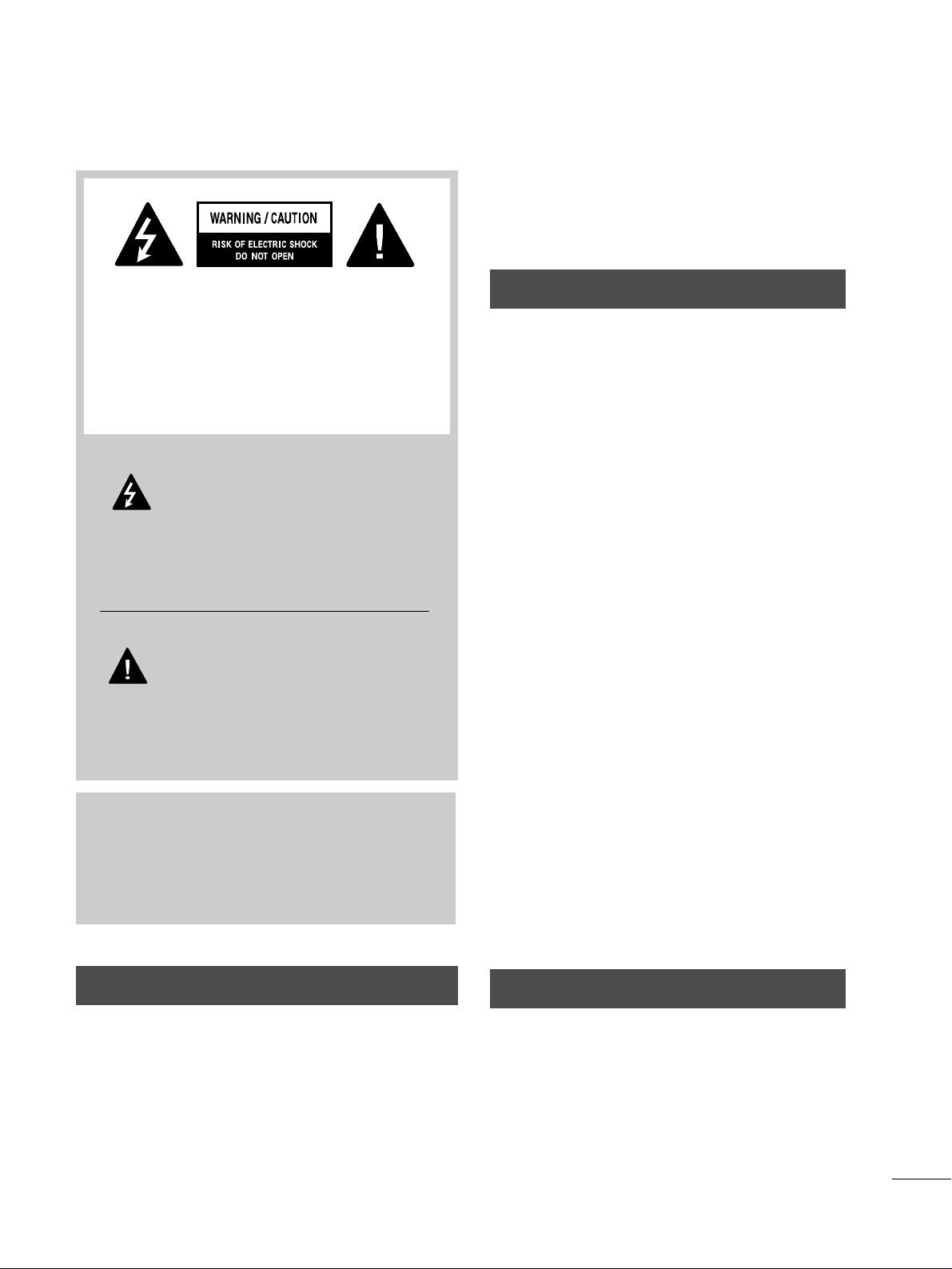
The lightning flash with arrowhead
symbol, within an equilateral triangle, is
intended to alert the user to the presence
of uninsulated “dangerous voltage” within the
product’s enclosure that may be of sufficient
magnitude to constitute a risk of electric shock to
persons.
The exclamation point within an equilateral
triangle is intended to alert the user to
the presence of important operating and
maintenance (servicing) instructions in the literature accompanying the appliance.
TO REDUCE THE RISK OF ELECTRIC SHOCK
DO NOT REMOVE COVER (OR BACK). NO
USER SERVICEABLE PARTS INSIDE. REFER TO
QUALIFIED SERVICE PERSONNEL.
WARNING/CAUTION
TO REDUCE THE RISK OF FIRE AND ELECTRIC
SHOCK, DO NOT EXPOSE THIS PRODUCT TO
RAIN OR MOISTURE.
NOTE TO CABLE/TV INSTALLER
This reminder is provided to call the CATV system
installer’s attention to Article 820-40 of the National
Electric Code (U.S.A.). The code provides guidelines for
proper grounding and, in particular, specifies that the
cable ground shall be connected to the grounding system
of the building, as close to the point of the cable entry
as practical.
Page 4
2
IMPORTANT SAFETY INSTRUCTIONS
SAFETY INSTRUCTIONS
Important safety instructions shall be provided with each apparatus. This information shall be given in a separate
booklet or sheet, or be located before any operating instructions in an instruction for installation for use and
supplied with the apparatus.
This information shall be given in a language acceptable to the country where the apparatus is intended to be used.
The important safety instructions shall be entitled “Important Safety Instructions”. The following safety
instructions shall be included where applicable, and, when used, shall be verbatim as follows. Additional safety
information may be included by adding statements after the end of the following safety instruction list. At the
manufacturer’s option, a picture or drawing that illustrates the intent of a specific safety instruction may be
placed immediately adjacent to that safety instruction:
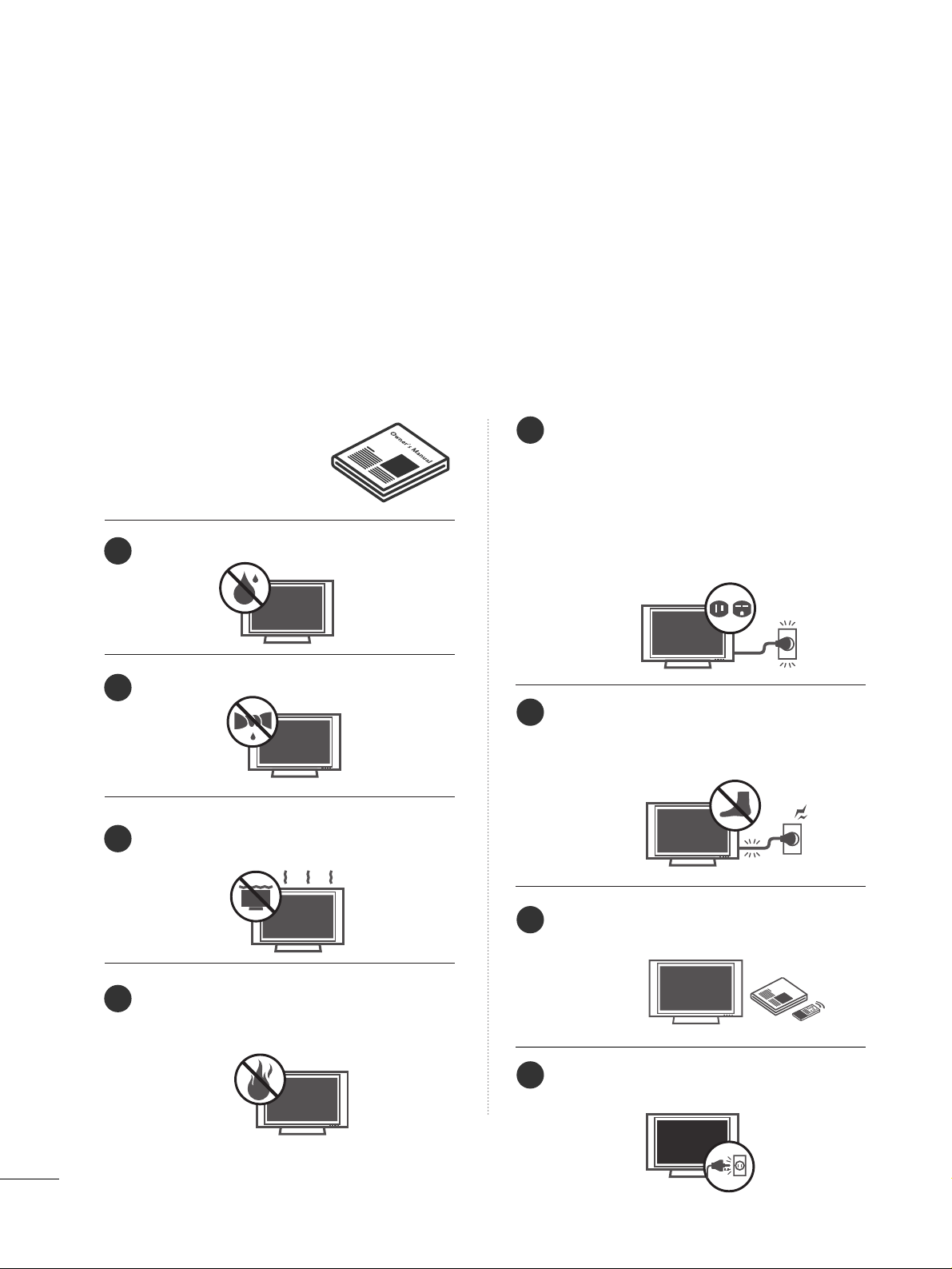
Read these instructions.
Keep these instructions.
Heed all warnings.
Follow all instructions.
Do not use this apparatus near water.
Clean only with dry cloth.
Do not block any ventilation openings. Install in
accordance with the manufacturer’s instructions.
Do not install near any heat sources such as
radiators, heat registers, stoves, or other apparatus
(including amplifiers)that produce heat.
Do not defeat the safety purpose of the polarized
or grounding-type plug. A polarized plug has
two blades with one wider than the other. A
grounding type plug has two blades and a third
grounding prong, The wide blade or the third
prong are provided for your safety. If the provided
plug does not fit into your outlet, consult an
electrician for replacement of the obsolete outlet.
Protect the power cord from being walked on
or pinched particularly at plugs, convenience
receptacles, and the point where they exit from
the apparatus.
Only use attachments/accessories specified by
the manufacturer.
Unplug this apparatus when unused for long
periods of time.
Owner Manual
Owner Manual
Owner Manual
Owner Manual
Owner Manual
Owner Manual
Owner Manual
Owner Manual
Owner Manual
Owner ManualOwner Manual
1
2
3
4
5
6
7
8
Owner Manual
Page 5
3
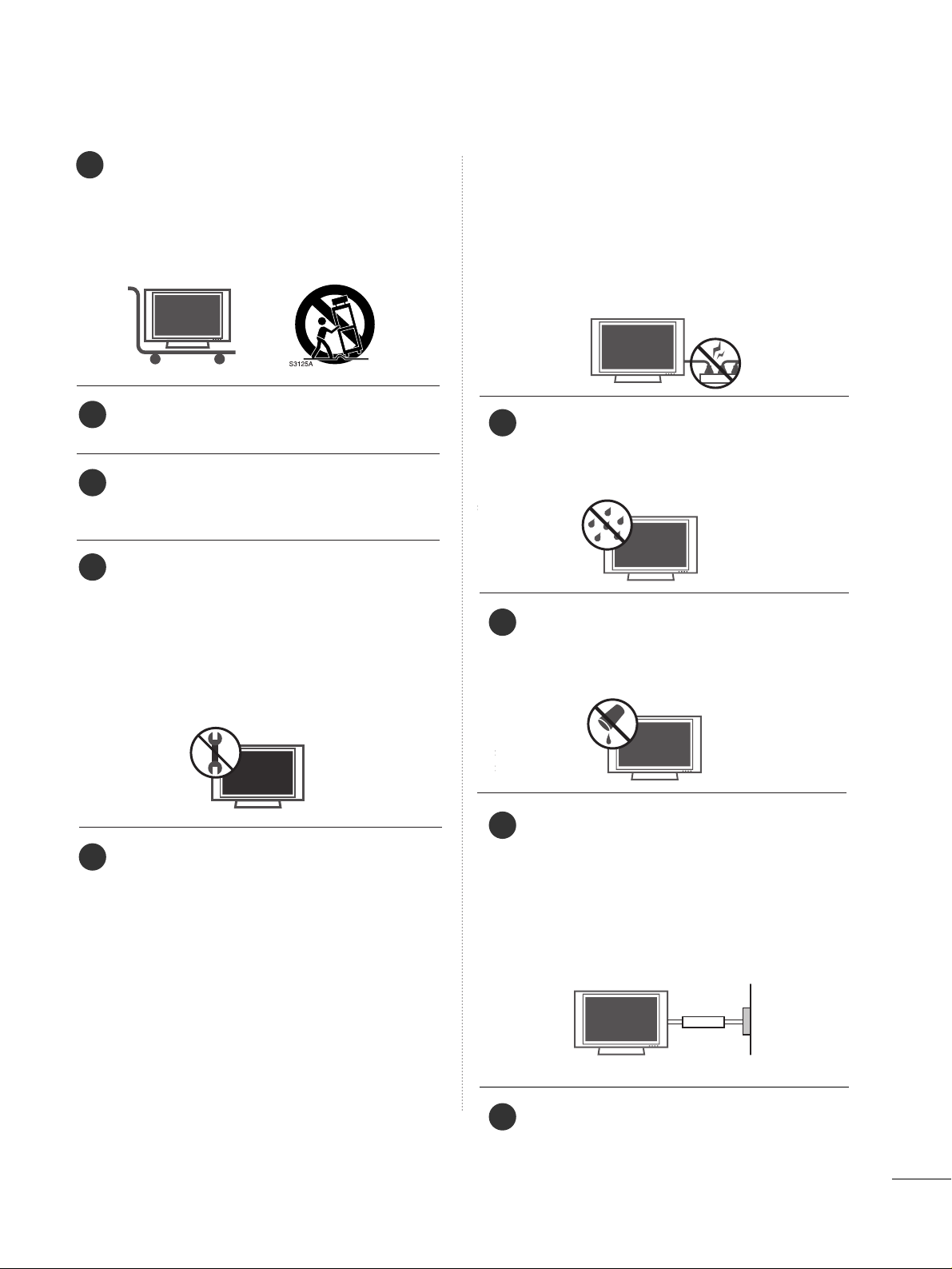
Use only with the cart, stand, tripod, bracket,
or table specified by the manufacturer, or sold
with the apparatus. When a cart is used, use
caution when moving the cart/apparatus
combination to avoid injury from tip-over.
Never touch this apparatus or antenna during
a thunder or lighting storm.
Do not allow a impact shock or any objects to
fall into the product, and do not drop onto the
screen with something.
Refer all servicing to qualified service personnel.
Servicing is required when the apparatus has
been damaged in any way, such as power-supply
cord or plug is damaged, liquid has been
spilled or objects have fallen into the apparatus,
the apparatus has exposed to rain or moisture,
does not operate normally, or has been
dropped.
CAUTION concerning the Power Cord :
Most appliances recommend they be placed
upon a dedicated circuit; that is, a single outlet
circuit which powers only that appliance and
has no additional outlets or branch circuits.
Check the specification page of this owner's
manual to be certain.
Do not overload wall outlets. Overloaded wall
outlets, loose or damaged wall outlets, extension
cords, frayed power cords, or damaged or
cracked wire insulation are dangerous. Any of
these conditions could result in electric shock
or fire. Periodically examine the cord of your
appliance, and if its appearance indicates damage or deterioration, unplug it, discontinue use
of the appliance, and have the cord replaced
with an exact replacement part by an authorized
servicer. Protect the power cord from physical
or mechanical abuse, such as being twisted,
kinked, pinched, closed in a door, or walked
upon. Pay particular attention to plugs, wall
outlets, and the point where the cord exits the
appliance.
Outdoor use marking :
WARNING - To reduce the risk of fire or elec-
tric shock, do not expose this appliance to rain
or moisture.
Wet Location Marking : Apparatus shall not be
exposed to dripping or splashing and no
objects filled with liquids, such as vases, shall
be placed on or over apparatus.
GGRROOUU NNDDIINNGG
Ensure that you connect the earth ground wire
to prevent possible electric shock. If grounding
methods are not possible, have a qualified
electrician install a separate circuit breaker.
Do not try to ground the unit by connecting it
to telephone wires, lightening rods, or gas pipes.
DDIISS CCOONNNNEE CCTTIINNGG DDEEVVIICC EE FFRROOMM MMAAII NN SS
Mains plug is the disconnecting device. The
plug must remain readily operable.
Owner Manual
Owner Manual
Owner Manual
Owner Manual
Owner Manual
Owner Manual
9
12
10
11
13
14
15
16
17
Powe r
Supply
Short-circuit
Breaker
Page 6

4
CONTENTS
WARNING / CAUTION
. . . . . . . . . . . . . . . . . . . . . . . . . . . . 1
SAFETY INSTRUCTIONS
. . . . . . . . . . . . . . . . . . . . . . . . . . 2
INTRODUCTION
. . . . . . . . . . . . . . . . . . . . . . . . . . . . . . . . . . . . . . . . 6
Feature of this TV . . . . . . . . . . . . . . . . . . . . . . . . . . . . . . . . . . . . . . . . . . . . .
6
PREPARATION
Accessories
. . . . . . . . . . . . . . . . . . . . . . . . . . . . . . . . . . . . . . . . . . . . . . . . . . . . . . 7
Front Panel Information . . . . . . . . . . . . . . . . . . . . . . . . . . . . . . . . . . . . . 8
Back Panel Information
. . . . . . . . . . . . . . . . . . . . . . . . . . . . . . . . . . . . 10
Back Cover for Wire Arrangement
. . . . . . . . . . . . . . . . . . . . . 12
Attaching the TV to a Wall
. . . . . . . . . . . . . . . . . . . . . . . . . . . . . . . 14
Stand Installation
. . . . . . . . . . . . . . . . . . . . . . . . . . . . . . . . . . . . . . . . . . . . 15
VESA Wall Mounting
. . . . . . . . . . . . . . . . . . . . . . . . . . . . . . . . . . . . . . . . 16
Desktop Pedestal Installation
. . . . . . . . . . . . . . . . . . . . . . . . . . . . 16
Antenna or Cable Connection
. . . . . . . . . . . . . . . . . . . . . . . . . . 17
EXTERNAL EQUIPMENT SETUP
HD Receiver Setup
. . . . . . . . . . . . . . . . . . . . . . . . . . . . . . . . . . . . . . . . .18
DVD Setup
. . . . . . . . . . . . . . . . . . . . . . . . . . . . . . . . . . . . . . . . . . . . . . . . . . . . . .21
VCR Setup . . . . . . . . . . . . . . . . . . . . . . . . . . . . . . . . . . . . . . . . . . . . . . . . . . . . . 23
Other A/V Source Setup
. . . . . . . . . . . . . . . . . . . . . . . . . . . . . . . . . 25
PC Setup . . . . . . . . . . . . . . . . . . . . . . . . . . . . . . . . . . . . . . . . . . . . . . . . . . . . . . . . 26
AV Out Setup & Digital Audio Output
. . . . . . . . . . . . . 29
WATCHING TV / CHANNEL CONTROL
Remote Control Key Functions . . . . . . . . . . . . . . . . . . . . . . . . . 30
Turning On TV
. . . . . . . . . . . . . . . . . . . . . . . . . . . . . . . . . . . . . . . . . . . . . . . . 32
Channel Selection
. . . . . . . . . . . . . . . . . . . . . . . . . . . . . . . . . . . . . . . . . . . 32
Volume Adjustment
. . . . . . . . . . . . . . . . . . . . . . . . . . . . . . . . . . . . . . . . .32
On-Screen Menus Selection
. . . . . . . . . . . . . . . . . . . . . . . . . . . . . 33
Channel Search
. . . . . . . . . . . . . . . . . . . . . . . . . . . . . . . . . . . . . . . . . . . . . . . 34
- Auto Scan (EZ Scan) . . . . . . . . . . . . . . . . . . . . . . . . . . . . . . . . .34
- Add / Delete Channel (Manual Scan) . . . . . . . . . 35
- Channel Editing
. . . . . . . . . . . . . . . . . . . . . . . . . . . . . . . . . . . . . . . . 36
DTV Signal Strength . . . . . . . . . . . . . . . . . . . . . . . . . . . . . . . . . . . . . . . . 37
Input Source Selection
. . . . . . . . . . . . . . . . . . . . . . . . . . . . . . . . . . . . 38
Input Label . . . . . . . . . . . . . . . . . . . . . . . . . . . . . . . . . . . . . . . . . . . . . . . . . . . . .39
SimpLink
. . . . . . . . . . . . . . . . . . . . . . . . . . . . . . . . . . . . . . . . . . . . . . . . . . . . . . . . . 40
PICTURE CONTROL
Picture Size (Aspect Ratio) Control . . . . . . . . . . . . . . . . . . 42
Preset Picture Settings
. . . . . . . . . . . . . . . . . . . . . . . . . . . . . . . . . . . . . 44
- EZ Picture - Preset
. . . . . . . . . . . . . . . . . . . . . . . . . . . . . . . . . . . . 44
- Color Tone - Preset.
. . . . . . . . . . . . . . . . . . . . . . . . . . . . . . . . . . 45
Manual Picture Adjustment
. . . . . . . . . . . . . . . . . . . . . . . . . . . . . . 46
- EZ Picture - User Mode
. . . . . . . . . . . . . . . . . . . . . . . . . . . .
46
- Color Tone - User Mode
. . . . . . . . . . . . . . . . . . . . . . . . . . . 47
XD - Picture Improvement Technology
. . . . . . . . . . . . . 48
Advanced - Cinema 3:2 Pulldown Mode
. . . . . . . . . . .
49
Advanced - Black (Darkness) Level
. . . . . . . . . . . . . . . . . . . 50
Picture Reset
. . . . . . . . . . . . . . . . . . . . . . . . . . . . . . . . . . . . . . . . . . . . . . . . . .51
Image Sticking Minimization (ISM) Method
. . . . . . .
52
Low - Power Picture Mode
. . . . . . . . . . . . . . . . . . . . . . . . . . . . . . . 53
SOUND & LANGUAGE CONTROL
Preset Sound Setting (EZ Sound)
. . . . . . . . . . . . . . . . . . . . 54
Sound Setting Adjustment - User Mode
. . . . . . . . . . . 55
Balance
. . . . . . . . . . . . . . . . . . . . . . . . . . . . . . . . . . . . . . . . . . . . . . . . . . . . . . . . . .56
TV Speakers On/Off Setup
. . . . . . . . . . . . . . . . . . . . . . . . . . . . . . 57
Stereo/SAP Broadcasts Setup
. . . . . . . . . . . . . . . . . . . . . . . . . . 58
Audio Language
. . . . . . . . . . . . . . . . . . . . . . . . . . . . . . . . . . . . . . . . . . . . . .
59
On-Screen Menus Language Selection
. . . . . . . . . . . . . 60
Caption/Text
. . . . . . . . . . . . . . . . . . . . . . . . . . . . . . . . . . . . . . . . . . . . . . . . . .61
- Analog Broadcasting System Captions
. . . . . . . 61
- Digital Broadcasting System Captions
. . . . . . . . 62
Caption Option
. . . . . . . . . . . . . . . . . . . . . . . . . . . . . . . . . . . . . . . . . . . . .63
Page 7

5
TIME SETTING
Clock Setting . . . . . . . . . . . . . . . . . . . . . . . . . . . . . . . . . . . . . . . . . . . . . . . . . . 64
- Auto Clock Setup
. . . . . . . . . . . . . . . . . . . . . . . . . . . . . . . . . . . . 64
- Manual Clock Setup
. . . . . . . . . . . . . . . . . . . . . . . . . . . . . . . . . 65
Auto On/Off Timer Setting
. . . . . . . . . . . . . . . . . . . . . . . . . . . . . 66
Sleep Timer Setting . . . . . . . . . . . . . . . . . . . . . . . . . . . . . . . . . . . . . . . . . 67
Auto Shut-off Setting
. . . . . . . . . . . . . . . . . . . . . . . . . . . . . . . . . . . . . . . 68
PARENTAL CONTROL / RATINGS
Set Password & Lock System . . . . . . . . . . . . . . . . . . . . . . . . . . . 69
- Setting up Your Password
. . . . . . . . . . . . . . . . . . . . . . . . . 69
- Set Password
. . . . . . . . . . . . . . . . . . . . . . . . . . . . . . . . . . . . . . . . . . . 70
- Lock System
. . . . . . . . . . . . . . . . . . . . . . . . . . . . . . . . . . . . . . . . . . . . .70
Channel Blocking
. . . . . . . . . . . . . . . . . . . . . . . . . . . . . . . . . . . . . . . . . . . . 71
External Input Blocking
. . . . . . . . . . . . . . . . . . . . . . . . . . . . . . . . . . . .71
Movie & TV Rating
. . . . . . . . . . . . . . . . . . . . . . . . . . . . . . . . . . . . . . . . . . 72
- Movie Rating (MPAA)
. . . . . . . . . . . . . . . . . . . . . . . . . . . . . . . .72
- TV Rating Children & General
(for USA only) . . 73
- TV Rating English & French
(for Canada only) . . 74
APPENDIX
Troubleshooting . . . . . . . . . . . . . . . . . . . . . . . . . . . . . . . . . . . . . . . . . . . . . . 75
Maintenance
. . . . . . . . . . . . . . . . . . . . . . . . . . . . . . . . . . . . . . . . . . . . . . . . . . . 77
Product Specifications
. . . . . . . . . . . . . . . . . . . . . . . . . . . . . . . . . . . . . 78
Programming the Remote Control
. . . . . . . . . . . . . . . . . . . 80
IR Codes . . . . . . . . . . . . . . . . . . . . . . . . . . . . . . . . . . . . . . . . . . . . . . . . . . . . . . .84
External Control Through RS-232C . . . . . . . . . . . . . . . . . .86
Page 8

6
FEATURE OF THIS TV
INTRODUCTION
What is a Plasma TV?
Using plasma is the best way to achieve flat panel
displays with excellent image quality and large screen
sizes that are easily viewable. The Plasma TV can be
thought of as a descendant of the neon lamp and or
a series of fluorescent lamps.
How does it work?
Plasma TV is an array of cells, known as pixels, which
are comprised of three sub-pixels, corresponding to
the colors red, green, and blue. Gas in a plasma state
is used to react with phosphors in each sub-pixel to
produce colored light (red, green, or blue). These
phosphors are the same types used in Cathode Ray
Tube (CRT) devices such as televisions and common
computer monitors.
Plasma TV offers a rich, dynamic display because each
sub-pixel is individually controlled by advanced
electronics to produce over 16 million different
colors. This means that you get perfect images that
are easily viewable in a display that is fewer than five
inches thick.
160° - Wide angle range of vision
Your flat panel plasma screen offers an exceptionally
broad viewing angle of over 160 degrees. This means
that the display is clear and visible to viewers anywhere
in the room.
Wide Screen
The wide screen offers a theater-like experience in
your own home.
Multimedia
Connect your plasma display to a PC and use it for
conferencing, games, and Internet browsing. The
Picture-in-Picture feature allows you to view your PC
and video images simultaneously.
Versatile
The light weight and thin size makes it easy to install
your plasma display in a variety of locations where
conventional TVs do not fit.
The Plasma TV Manufacturing Process: a few
minute colored dots may be present on the
Plasma TV screen
The Plasma TV is composed of 0.9 to 2.2 million
cells. A few cell defects will normally occur in the
Plasma TV manufacturing process. Several tiny, minute
colored dots visible on the screen should be acceptable.
This also occurs in other Plasma TV manufacturers'
products. The tiny dots appearing does not mean
that this Plasma TV is defective. Thus a few cell
defects are not sufficient cause for the Plasma TV to
be exchanged or returned. Our production technology
minimizes these cell defects during the manufacture
and operation of this product.
Cooling Fan Noise-
This feature is not available for all models.
In the same way that a fan is used in a PC computer
to keep the CPU (Central Processing Unit) cool, the
Plasma TV is equipped with cooling fans to cool the
Monitor and improve its reliability. Therefore, a certain
level of noise could occur while the fans are operating
and cooling the Plasma TV.
The fan noise doesn't have any negative effect on the
Plasma TV's efficiency or reliability. The noise from
these fans is normal during the operation of this
product. We hope you understand that a certain level
of noise from the cooling fans is acceptable and is not
sufficient cause for the Plasma TV to be exchanged or
returned.
FOR LCD TV
If the TV feels cold to the touch, there may be a small
“flicker” when it is turned on. This is normal, there is
nothing wrong with TV.
Some minute dot defects may be visible on the
screen, appearing as tiny red, green, or blue spots.
However, they have no adverse effect on the monitor's
performance.
Avoid touching the LCD screen or holding your finger(s)
against it for long periods of time. Doing so may
produce some temporary distortion effects on the
screen.
OOnn DDiissppoossaall
a. The fluorescent lamp used in this product contains
a small amount of mercury.
b. Do not dispose of this product with general
household waste.
c. Disposal of this product must be carried out in
accordance to the regulations of your local authority.
Page 9
PREPARATION
7
PREPARATION
ACCESSORIES
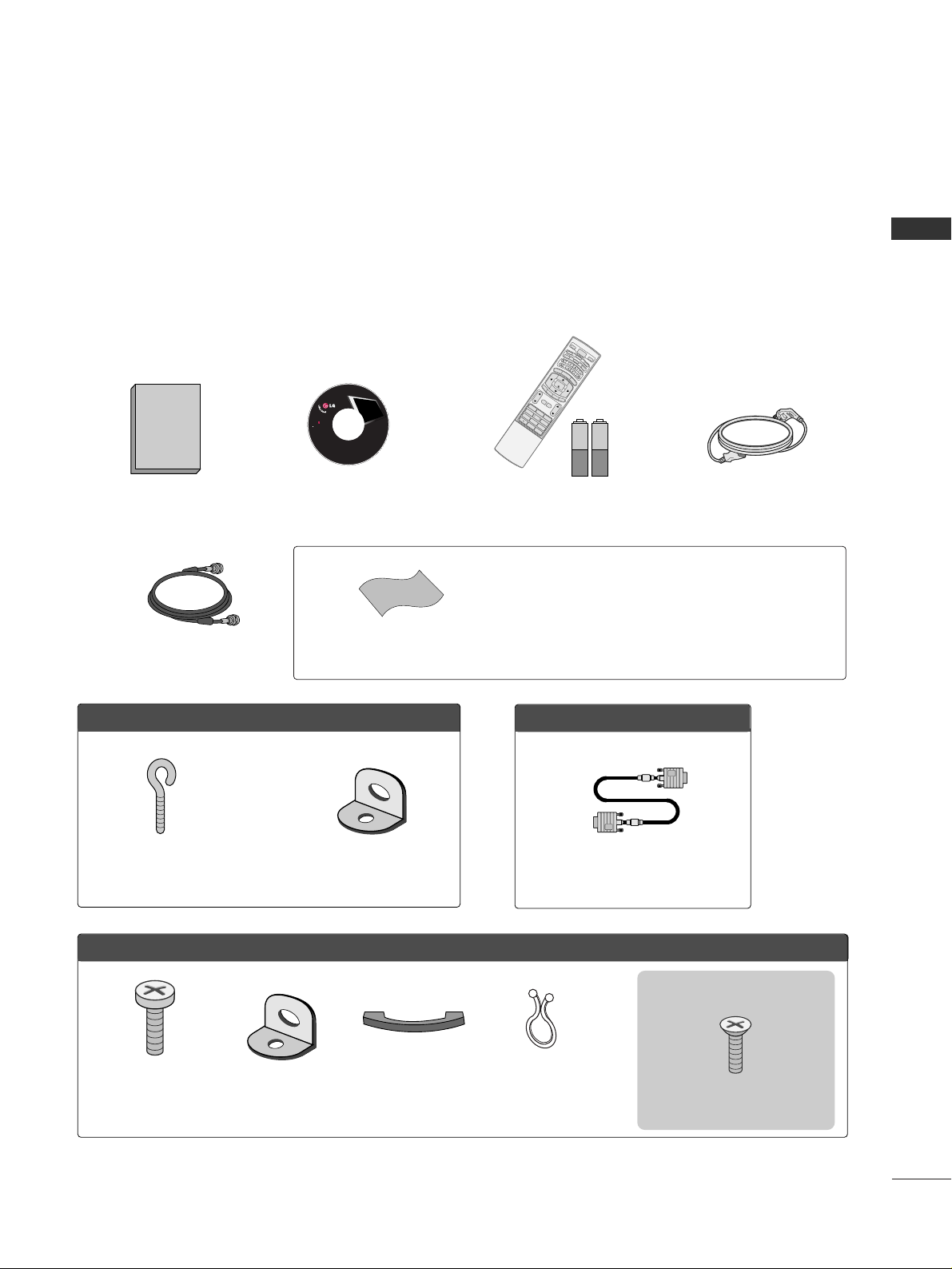
Ensure that the following accessories are included with your product. If an accessory is missing, please contact
the dealer where you purchased the product.
User must use shielded signal interface cables (D-sub 15 pin cable) with ferrite cores to maintain standard
compliance for the product.
75ohm Round Cable
OOppttiioonn EExxttrraass
D-sub 15 pin Cable
FFoorr LLCCDD TTVV mmooddeellss
2-Eye-bolts
(Refer to p.14)
2-Wall brackets
(Refer to p.14)
FFoorr PPllaassmmaa TTVV mmooddeellss
Cable
Management
2- TV Bracket Bolts
(Refer to p.14)
2- TV Brackets,
2- Wall Brackets
(Refer to p.14)
Twist Holder
Arrange the wires with
the twist holder.
4-Bolts for stand assembly
(Refer to p.15)
3322// 3377 ii nncchheess oonn llyy
* Slightly wipe stained spot on the exterior only with the polishing
cloth for the product exterior if there is stain or fingerprint on
surface of the exterior.
* Do not wipe roughly when removing stain. Please be cautions of
that excessive pressure may cause scratch or discoloration.
Polishing Cloth
Owner's Manual
1.5V 1.5V
Owner’s Manual CD Manual
123
456
78
0
9
B
A
C
K
V
O
L
C
H
M
UTE
FA
V
B
R
IG
H
T
-
M
E
N
U
BRIGHT +
E
N
T
E
R
E
X
IT
T
IMER
RAT
IO
SIMPLINK
P
O
W
E
R
V
C
R
TV
DV
D
A
U
D
I
O
CABLE
S
T
B
M
O
D
E
T
V
IN
P
UT
IN
P
U
T
C
H
E
N
U
BRIGHT +
E
N
T
E
R
R
AT
IO
SIMPLINK
1
4
7
Remote Control,
Batteries
Power Cord
LCD TV PLASMA TV
Owner's Manual
http://www.lgusa.com
www.lg.ca
Copyright© 2007 LGE,
All Rights Reserved.
Page 10
PREPARATION
8
FRONT PANEL INFORMATION
PREPARATION
■
Here shown may be somewhat different from your TV.
■
NOTE: If your product has a protection tape attached, remove the tape.
And then wipe the product with a cloth (If a polishing cloth is included with your product, use it).
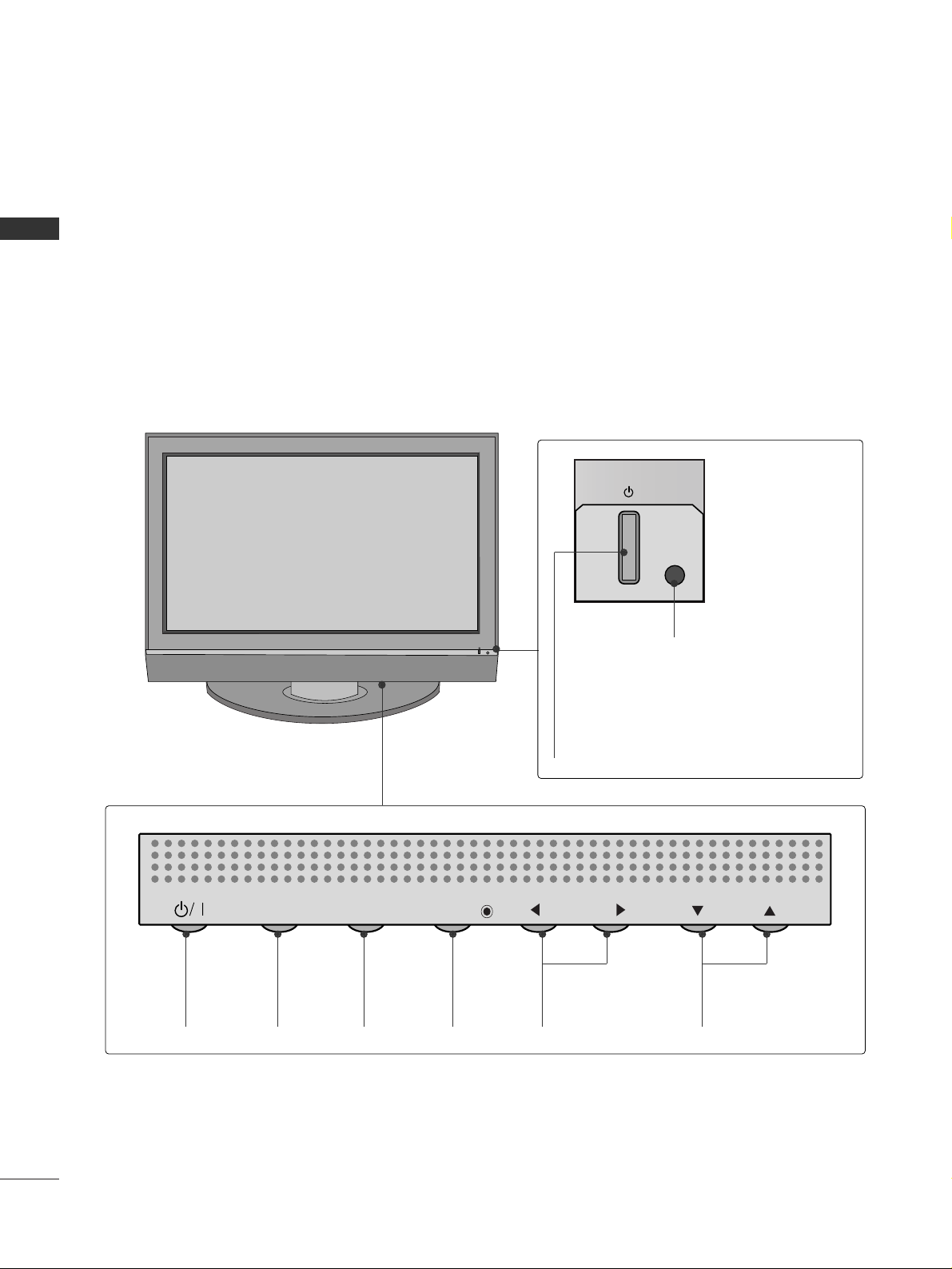
Front Panel Controls
Power/Standby Indicator
Illuminates red in standby mode.
When the TV is turned on, the indicator
blinks green and then illuminates green
before the picture is displayed.
Remote Control Sensor
POWER
Button
INPUT
Button
MENU
Button
ENTER
Button
VOLUME
(
FF,GG
)Buttons
CHANNEL
(
EE,DD
)Buttons
Plasma TV Model
INPUT
MENU
ENTER
VOL
CH
Page 11
PREPARATION
9
CH
VOL
ENTER
MENU
INPUT
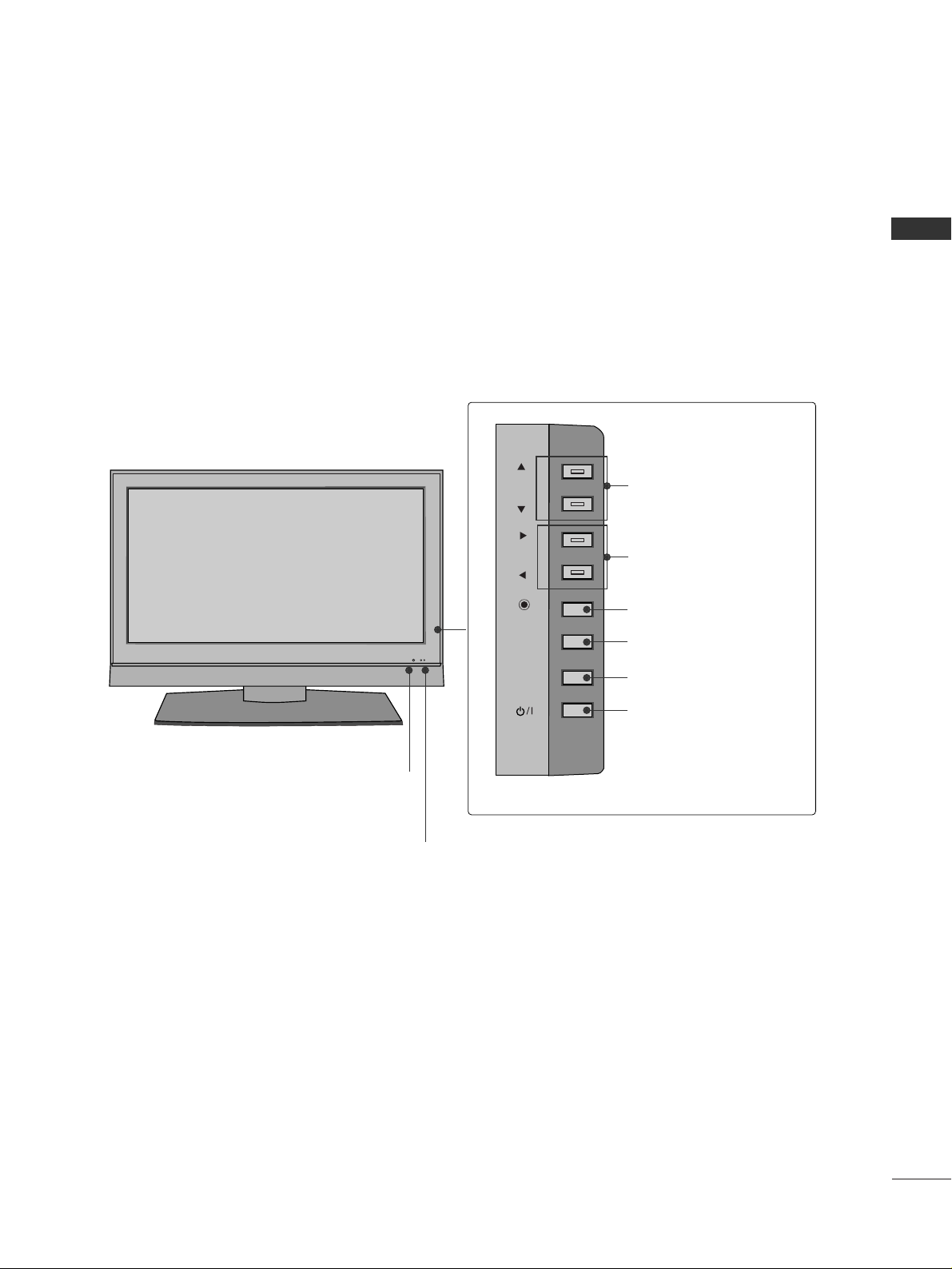
Remote Control Sensor
Power/Standby Indicator
Illuminates red in standby mode.
When the TV is turned on, the indicator blinks green and
then illuminates green before the picture is displayed.
CHANNEL (DD,EE)Buttons
VOLUME (
FF,GG
)Buttons
ENTER Button
MENU Button
INPUT Button
POWER Button
LCD TV Model
Page 12
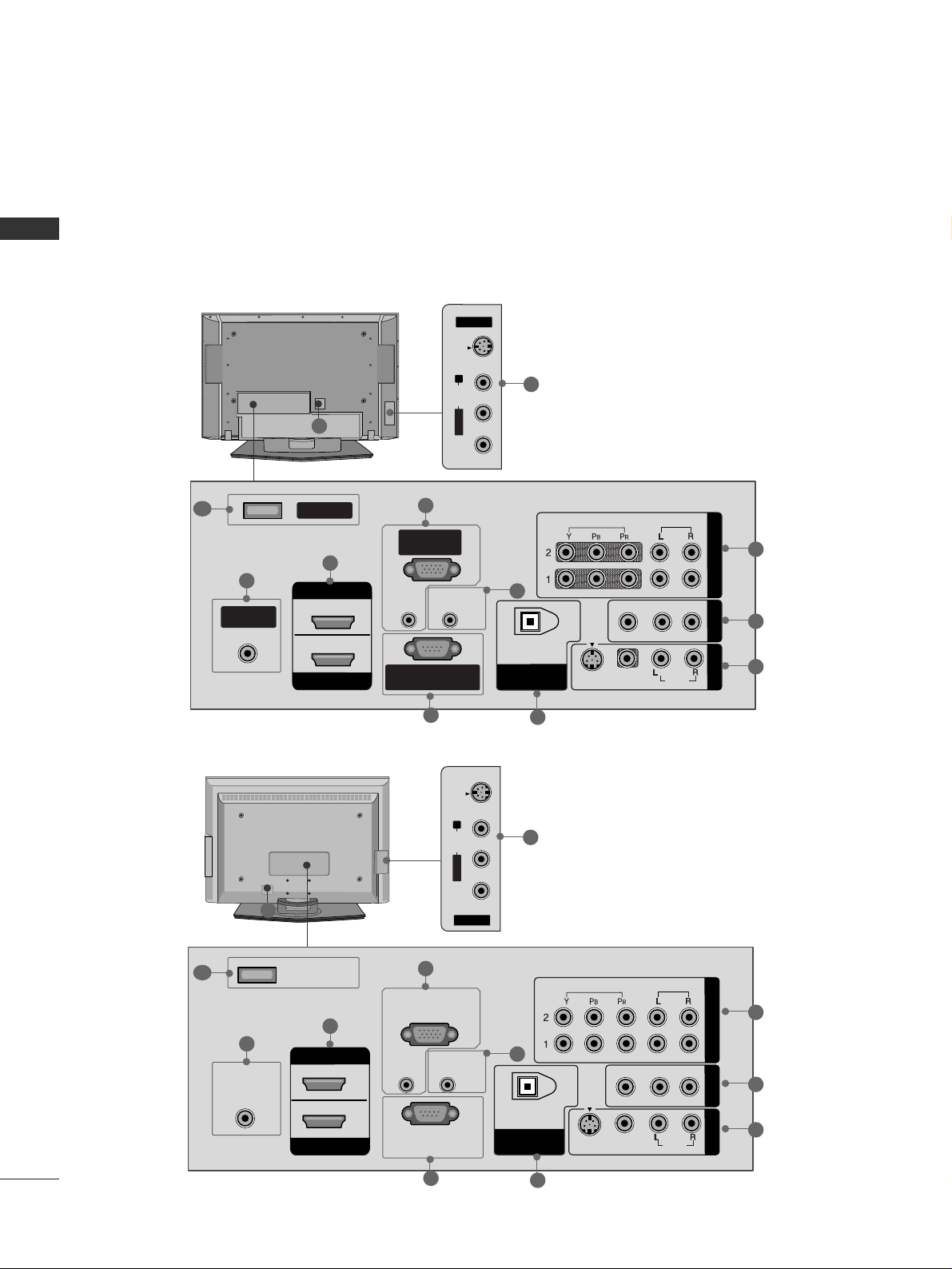
PREPARATION
10
BACK PANEL INFORMATION
PREPARATION
Back Connection Panel
Plasma TV Model
LCD TV Model
AV IN 2
L/MONO
R
AUDIO
VIDEO
S-VIDEO
R
VIDEO
AUDIO
VIDEO
AUDIO
MONO
( )
S-VIDEO
ANTENNA/
CABLE IN
REMOTE
CONTROL IN
RS-232C IN
(CONTROL & SERVICE)
RGB IN
(PC)
AUDIO IN
(RGB/DVI)
DIGITAL AUDIO
OUT
OPTICAL
SERVICE
COMPONENT IN
AV OUT
AV IN 1
HDMI IN
HDMI/DVI IN
1
2
2
1
12
8
3
7
6
9
5
4
11
AV IN 2
L/ MONO
R
AUDIO
VIDEO
S-VIDEO
R
HDMI IN
HDMI/DVI IN
VIDEO
AUDIO
VIDEO
AUDIO
MONO
( )
S-VIDEO
ANTENNA/
CABLE IN
REMOTE
CONTROL IN
RS-232C IN
(CONTROL & SERVICE)
RGB IN
(PC)
AUDIO IN
(RGB/DVI)
DIGITAL AUDIO
OUT
OPTICAL
1
2
SERVICE
COMPONENT IN
AV OUT
AV IN 1
2
1
8
3
7
6
9
5
4
11
10
10
12
■
Here shown may be somewhat different from your TV.
Page 13

PREPARATION
11
COMPONENT IN
Connect a component video/audio device to these
jacks.
AV OUT
Connect a second TV or monitor.
AV (Audio/Video) IN 1
Connect audio/video output from an external
device to these jacks.
S-VIDEO
Connect S-Video out from an S-VIDEO device.
ANTENNA/CABLE IN
Connect over-the air signals to this jack.
Connect cable signals to this jack.
DIGITAL AUDIO OUT
Connect digital audio from various types of equipment.
Note: In standby mode, these ports do not work.
HDMI/DVI IN 1, HDMI IN 2
Connect a HDMI (DVI) connection to either input.
RGB IN (PC)
Connect the output from a PC.
AUDIO IN (RGB/DVI)
Connect the audio from a PC or DTV.
Remote Control Port
Connect a wired remote control.
RS-232C IN (CONTROL & SERVICE) PORT
For external control devices.
SERVICE
Power Cord Socket
For operation with AC power.
Caution: Never attempt to operate the TV on DC
power.
AV (Audio/Video) IN 2
Connect audio/video output from an external
device to these jacks.
S-VIDEO
Connect S-Video out from an S-VIDEO device.
1
11
12
2
3
4
5
6
7
8
9
10
Page 14
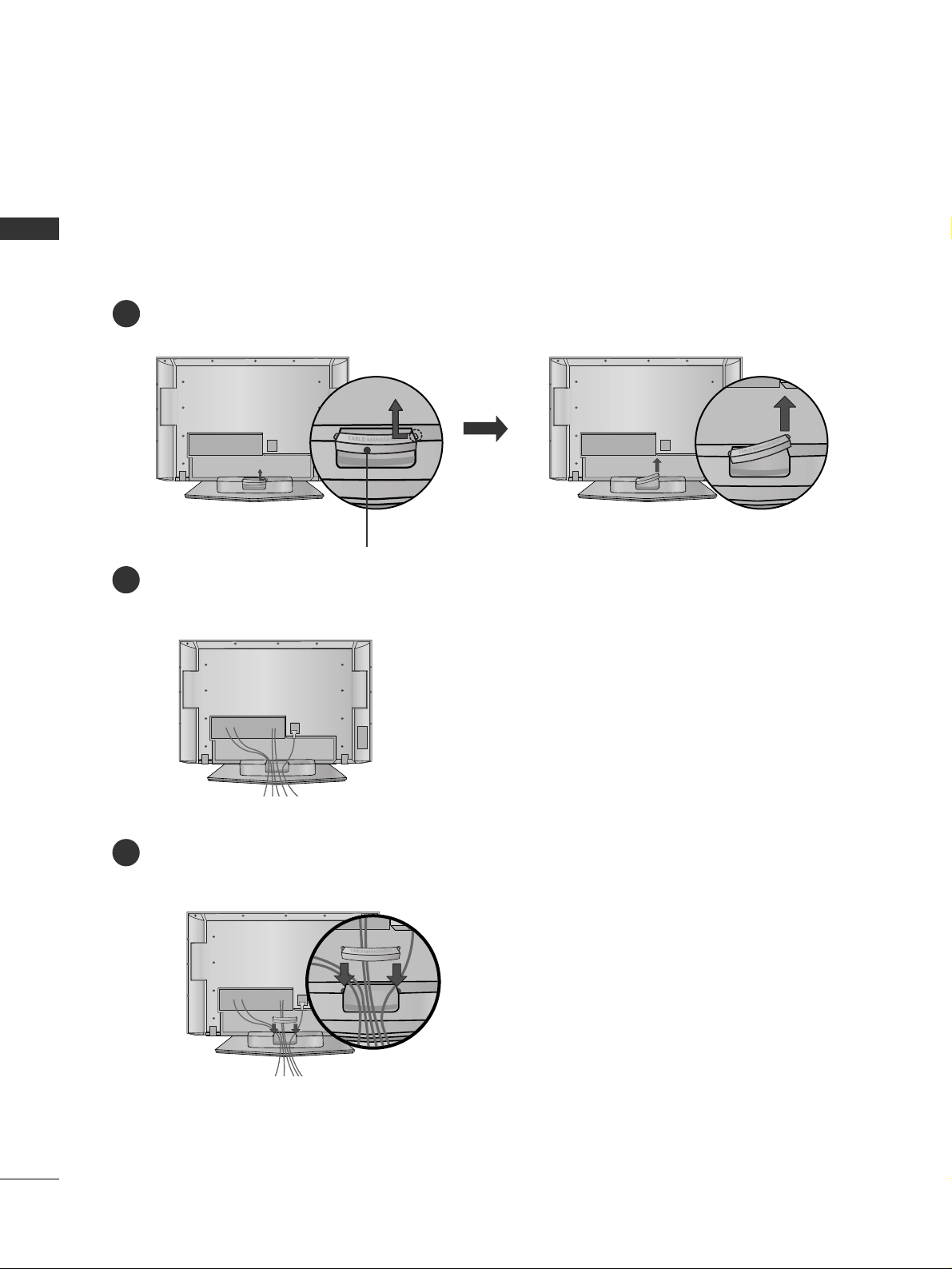
PREPARATION
12
BACK COVER FOR WIRE ARRANGEMENT
PREPARATION
Plasma TV Model
Hold the CABLE MANAGEMENT with both hands and pull it backward as shown.
Connect the cables as necessary.
To connect an additional equipment, see the EXTERNAL EQUIPMENT SETUP section.
1
2
Install the CABLE MANAGEMENT as shown.
3
CABLE MANAGEMENT
■
Here shown may be somewhat different from your TV.
Page 15
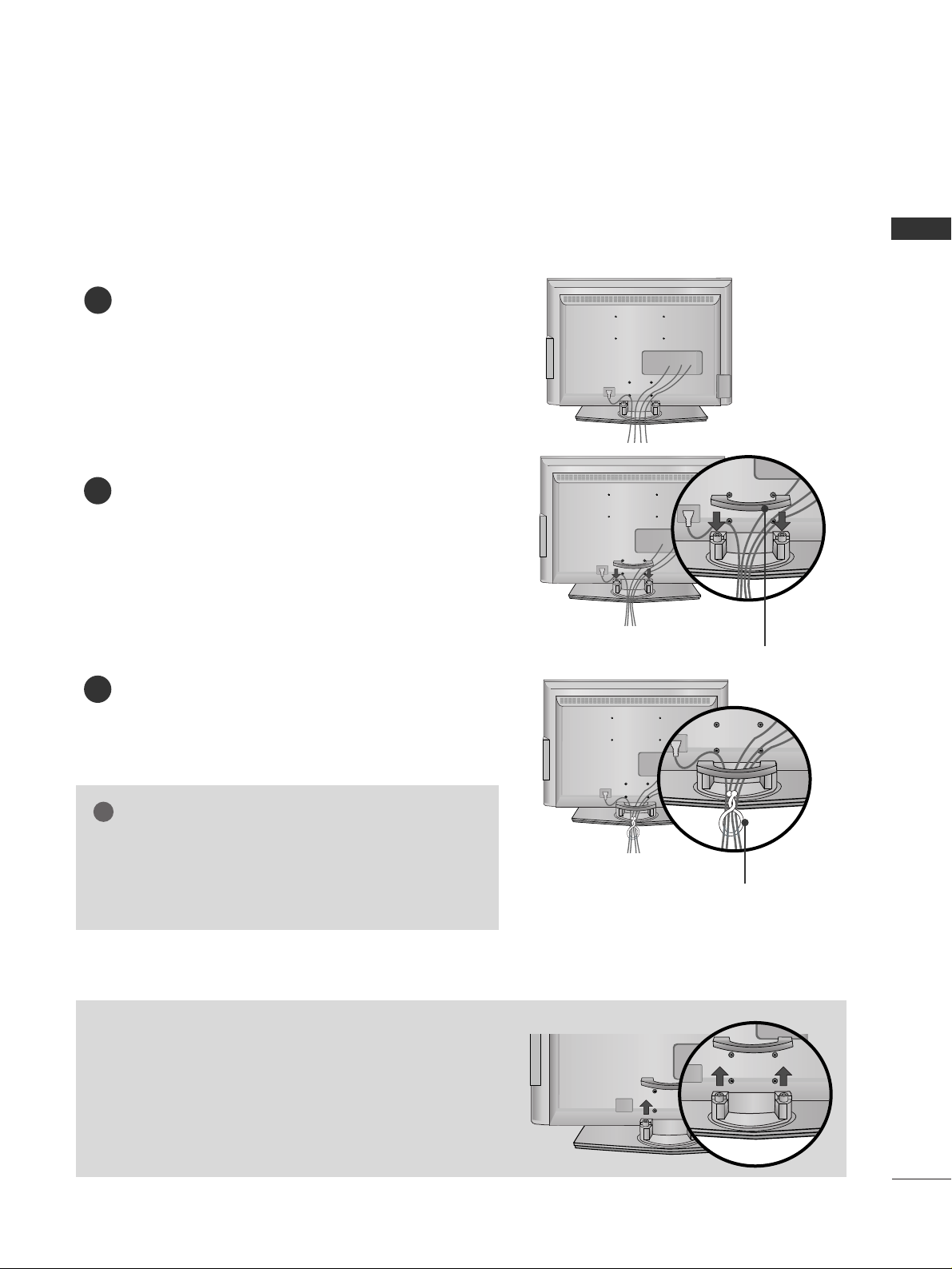
PREPARATION
13
LCD TV Model
Connect the cables as necessary.
To connect an additional equipment, see the
EXTERNAL EQUIPMENT SETUP section.
Install the CABLE MANAGEMENT as shown.
How to remove the CABLE MANAGEMENT
GG
Hold the CABLE MANAGEMENT with both hands and
pull it backward.
CABLE MANAGEMENT
TWIST HOLDER
GG
Do not hold the CABLE MANAGEMENT when moving
the product.
- If the product is dropped, you may be injured or the
product may be broken.
NOTE
!
1
2
Bundle the cables using the supplied TWIST
HOLDER.
3
Page 16
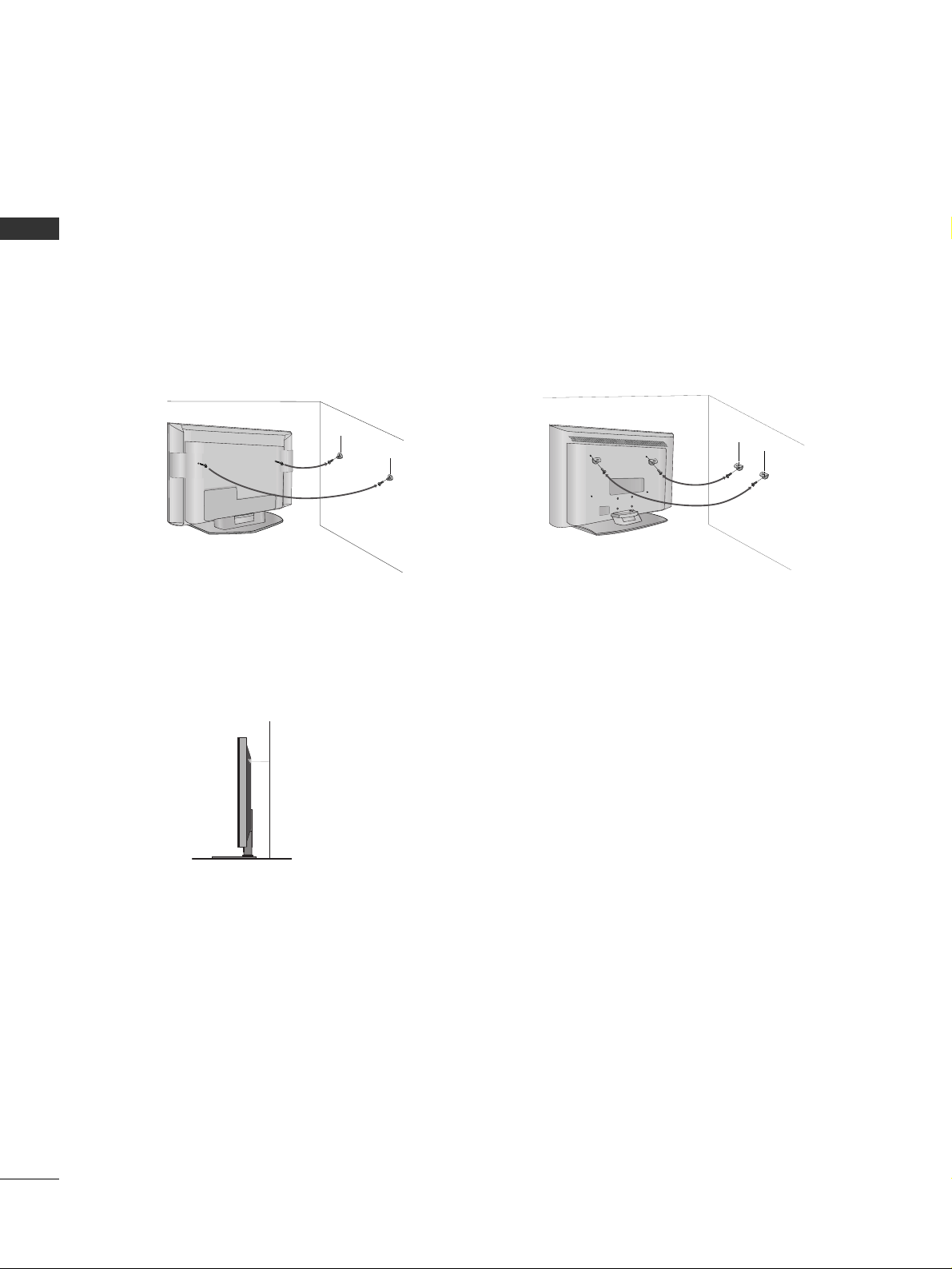
PREPARATION
14
ATTACHING THE TV TO A WALL
PREPARATION
We recommend that you set up the TV close to a wall so it cannot fall over if pushed backwards.
Additionally, we recommend that the TV be attached to a wall so it cannot be pulled in a forward direction,
potentially causing injury or damaging the product.
Caution: Please make sure that children don’t climb on or hang from the TV.
Plasma TV Model LCD TV Model
■
Insert the eye-bolts (or TV brackets and bolts) to tighten the product to the wall as shown in the picture.
*If your product has the bolts in the eye-bolts position before inserting the eye-bolts, loosen the bolts.
Secure the wall brackets with the bolts (not provided as parts of the product, must purchase separately) to
the wall. Match the height of the bracket that is mounted on the wall to the holes in the product.
Ensure the eye-bolts or brackets are tightened securely.
■
Use a sturdy rope (not provided as parts of the product, must purchase separately) to tie the product. It is safer to tie the rope so it
becomes horizontal between the wall and the product.
■
Here shown may be somewhat different from your TV.
Page 17
PREPARATION
15
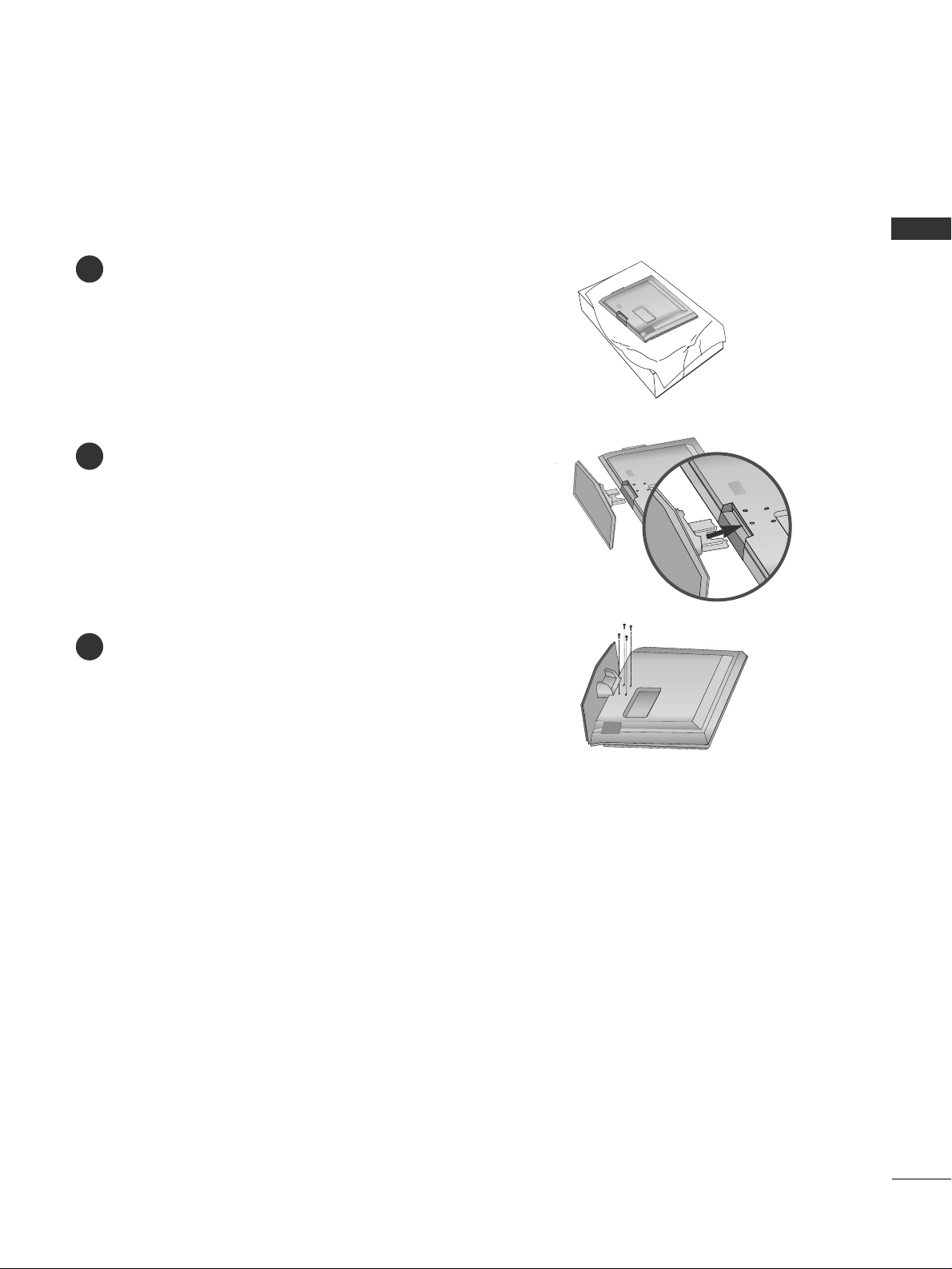
STAND INSTALLATION (Only 32/37 inches LCD TV models)
Carefully place the product screen side down on
a cushioned surface that will protect product and
screen from damage.
Assemble the product stand with the product as
shown.
Securely install the 4 bolts provided.
1
2
3
Page 18
PREPARATION
16
VESA WALL MOUNTING
PREPARATION
R
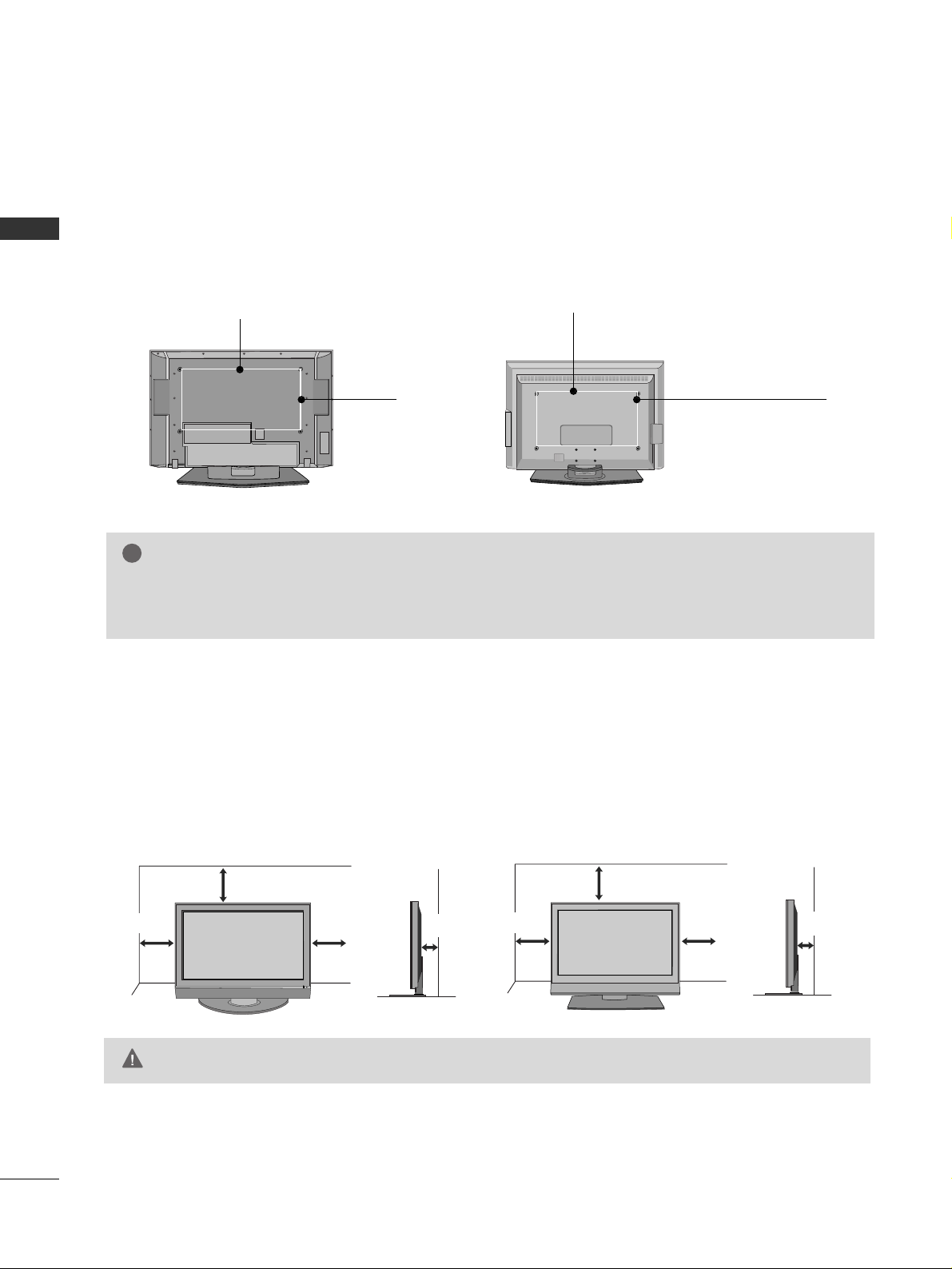
For proper ventilation, allow a clearance of 4inches on all four sides from the wall.
4 inches
4 inches
4 inches
4 inches
4 inches
4 inches
4 inches
4 inches
GG
Ensure adequate ventilation by following the clearance recommendations.
CAUTION
Plasma TV Model LCD TV Model
DESKTOP PEDESTAL INSTALLATION
This product accepts a VESA-compliant mounting interface pad. (optional)
There 4 threaded holes are available for attaching the bracket.
GG
Screw length needed depends on the wall mount used. For further information, refer to the VESA
Wall Mounting Instruction Guide.
NOTE
!
R
Plasma TV Model LCD TV Model
600 mm
400 mm 400 mm
(32 inches only: 100 mm)
600 mm
(32 inches only: 200 mm)
Page 19
PREPARATION
17
ANTENNA OR CABLE CONNECTION
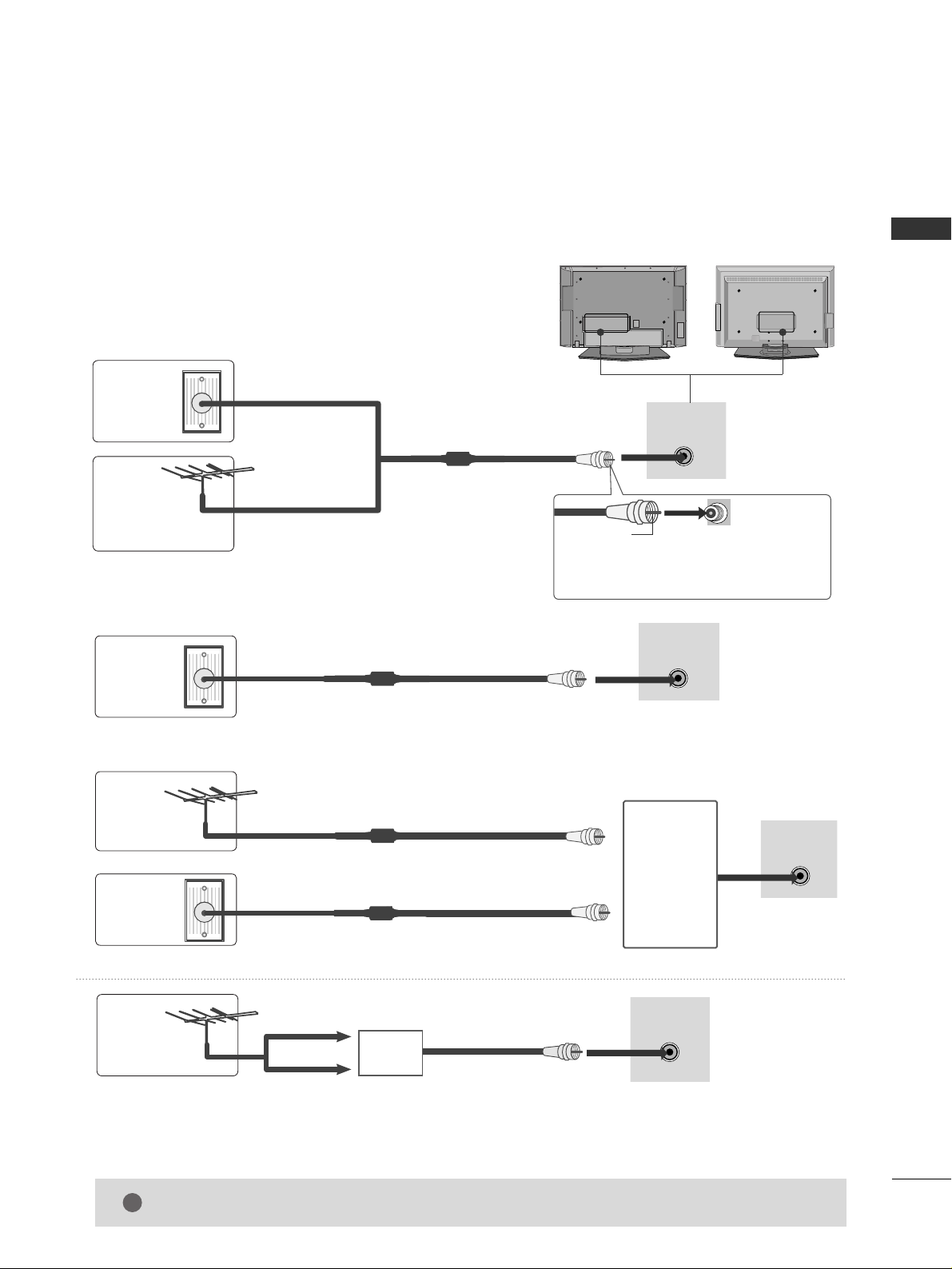
1. Antenna (Analog or Digital)
Wall Antenna Socket or Outdoor Antenna without a Cable Box
Connections.
For optimum picture quality, adjust antenna direction if needed.
2. Cable
Wall
Antenna
Socket
Outdoor
Antenna
(VHF, UHF)
Cable TV
Wall Jack
Multi-family Dwellings/Apartments
(Connect to wall antenna socket)
RF Coaxial Wire (75 ohm)
RF Coaxial Wire (75 ohm)
Single-family Dwellings /Houses
(Connect to wall jack for outdoor antenna)
Be careful not to bend the bronze wire
when connecting the antenna.
Copper Wire
R
( )
ANTENNA/
CABLE IN
R
( )
ANTENNA/
CABLE IN
R
( )
ANTENNA/
CABLE IN
GG
The TV will let you know when the analog, cable, and digital channel scans are complete.
NOTE
!
■
To improve the picture quality in a poor signal area, please purchase a signal amplifier and install properly.
■
If the antenna needs to be split for two TV’s, install a 2-Way Signal Splitter.
■
If the antenna is not installed properly, contact your dealer for assistance.
Antenna
UHF
Signal
Amplifier
VHF
3. Using both cable and antenna
Cable TV
Wall Jack
Antenna
RF Coaxial Wire (75 ohm)
RF Coaxial Wire (75 ohm)
R
( )
ANTENNA/
CABLE IN
Diplexer
(Signal
Combiner)
R
R
Page 20
EXTERNAL EQUIPMENT SETUP
18
EXTERNAL EQUIPMENT SETUP
HD RECEIVER SETUP
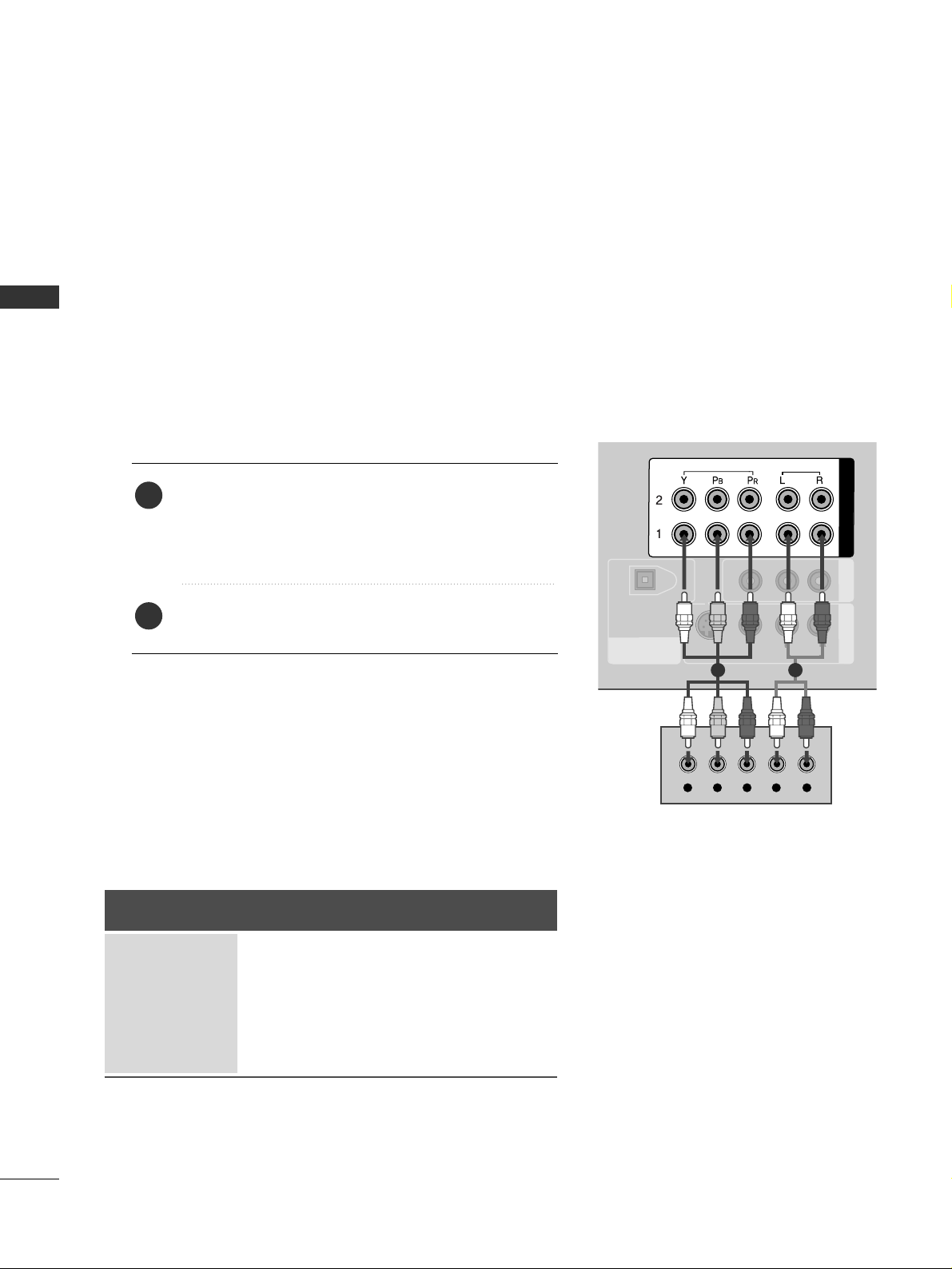
This TV can receive Digital Over-the-air/Cable signals without an external digital set-top box. However, if you
do receive digital signals from a digital set-top box or other digital external device, refer to the figure as shown
below.
DIGITAL AUDIO
OUT
OPTICAL
AV OUT
AV IN 1
VIDEO
AUDIO
MONO
( )
S-VIDEO
COMPONENT IN
VIDEO
AUDIO
Y L RPB PR
When connecting Component cable
1 2
1. How to connect
Connect the video outputs (Y, PB, PR
)
of the digital set
top box to the
CC OO MMPP OO NN EENNTT IINN VVIIDD EE OO 11
jacks on
the set. Match the jack colors
(Y = green, P
B = blue, and PR = red).
Connect the audio output of the digital set-top box to
the
CC OO MMPP OO NN EENNTT II NN AAUU DDIIOO 11
jacks on the set.
2
1
2. How to use
■
Turn on the digital set-top box.
(
Refer to the owner’s manual for the digital set-top box. operation
)
■
Select
CC oo mmpp oonn ee nntt 11
input source by using the
IINNPPUUTT
button on the remote control.
■
If connected to
CC OO MMPP OO NNEENNTT II NN 22
input, select
CC oo mmpp oonn ee nntt 22
input source.
Signal
480i
480p
720p
10 8 0 i
10 8 0 p
Component 1/2
Yes
Yes
Yes
Yes
Yes
HDMI1/DVI,
HDMI2
No
Yes
Yes
Yes
Yes
■
To prevent the equipment damage, never plug in any power cords until you have finished connecting all equipment.
■
This part of EXTERNAL EQUIPMENT SETUP mainly use picture for LCD TV model.
Page 21
EXTERNAL EQUIPMENT SETUP
19
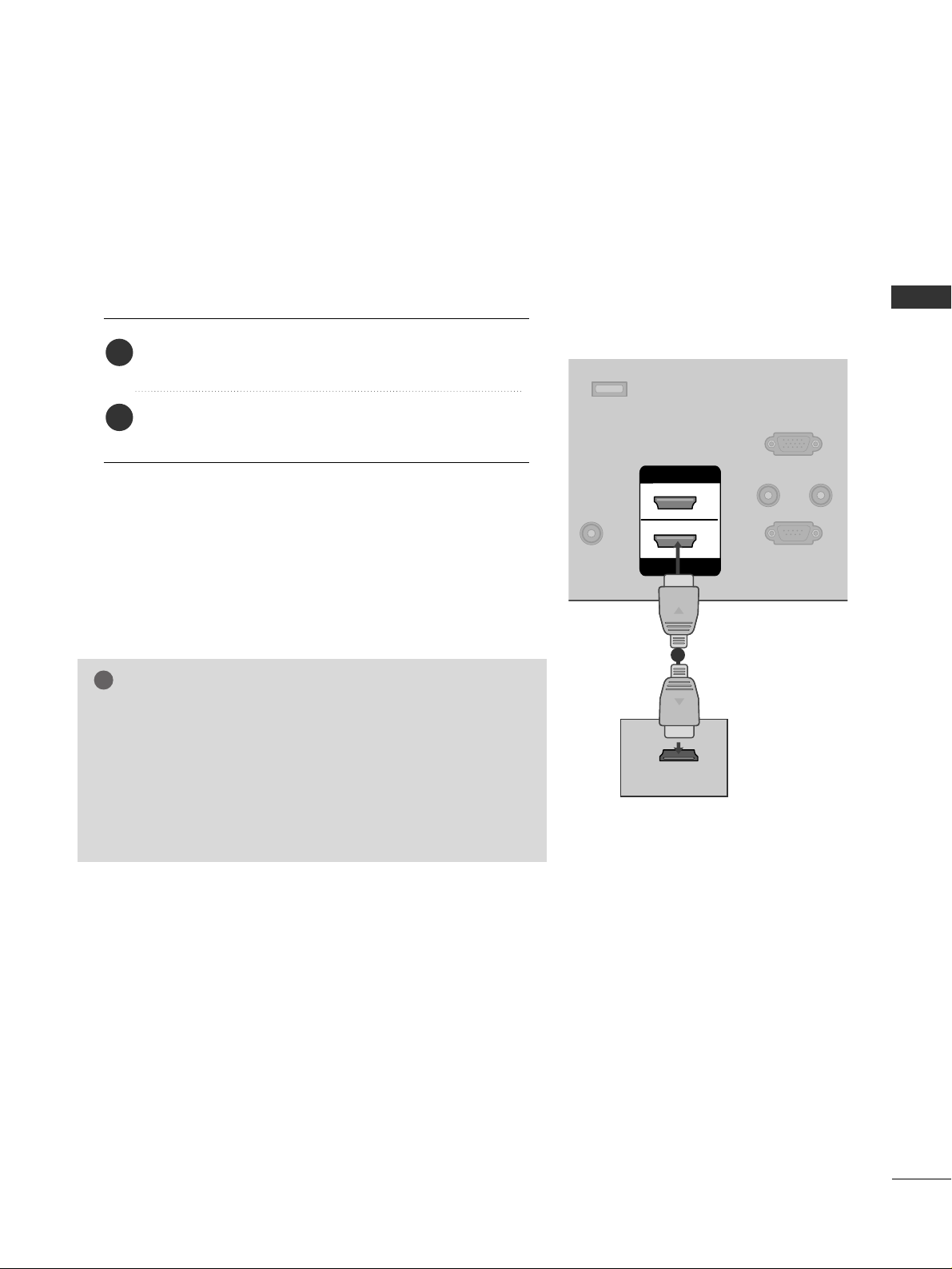
When connecting HDMI cable
Connect the digital set-top box to
HHDDMM II//DD VVII IINN 11
or
HHDDMMII II NN 22
jack on the set.
No separated audio connection is necessary.
HDMI supports both audio and video.
1. How to connect
2. How to use
■
Turn on the digital set-top box.
(
Refer to the owner’s manual for the digital set-top box.
)
■
Select
HHDDMMII11 //DDVVII
or
HHDD MMII22
input source by using the
IINNPPUUTT
button on the remote control.
2
1
REMOTE
CONTROL IN
RS-232C IN
(CONTROL & SERVICE)
RGB IN
(PC)
AUDIO IN
(RGB/DVI)
SERVICE
HDMI IN
HDMI/DVI IN
1
2
HDMI-DTV OUTPUT
1
GG
When connected, the TV will tell a connected device what
resolution it supports and the resolution it prefers. If the
device supports this Auto HDMI function, the player output
resolution will be automatically set to 720p.
GG
If the device does not support Auto HDMI, you need to set
the output resolution appropriately.
NOTE
!
Page 22
EXTERNAL EQUIPMENT SETUP
20
EXTERNAL EQUIPMENT SETUP
REMOTE
CONTROL IN
RS-232C IN
(CONTROL & SERVICE)
RGB IN
(PC)
AUDIO IN
(RGB/DVI)
DIGITAL AUDIO
OUT
OPTICAL
SERVICE
COMPONENT IN
AV OUT
AV IN 1
VIDEO
AUDIO
MONO
( )
S-VIDEO
ANTENNA/
CABLE IN
HDMI IN
HDMI/DVI IN
1
2
L R
DVI-DTV OUTPUT
VIDEO
AUDIO
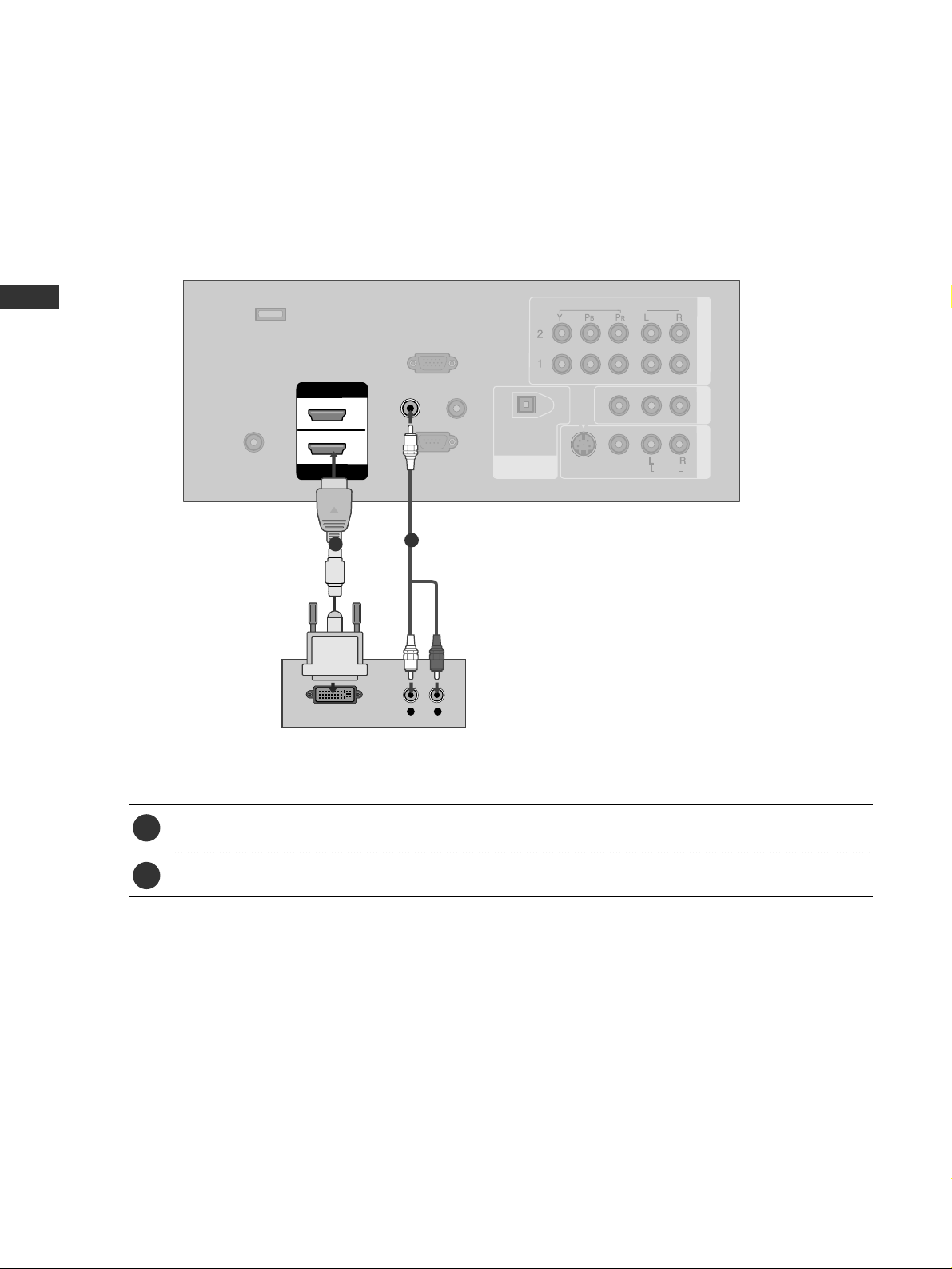
Connect the DVI output of the digital set-top box to the
HHDDMMII// DDVVII IINN 11
jack on the set.
Connect the audio output of the digital set-top box to the
AAUU DDIIOO IINN ((RR GG BB //DD VV II
))
jack on the set.
1. How to connect
■
Turn on the digital set-top box. (Refer to the owner’s manual for the digital set-top box.
)
■
Select
HHDDMMII11 //DDVVII
input source by using the
IINNPPUUTT
button on the remote control.
2. How to use
2
1
1
2
When connecting HDMI to DVI cable
Page 23
EXTERNAL EQUIPMENT SETUP
21
DVD SETUP
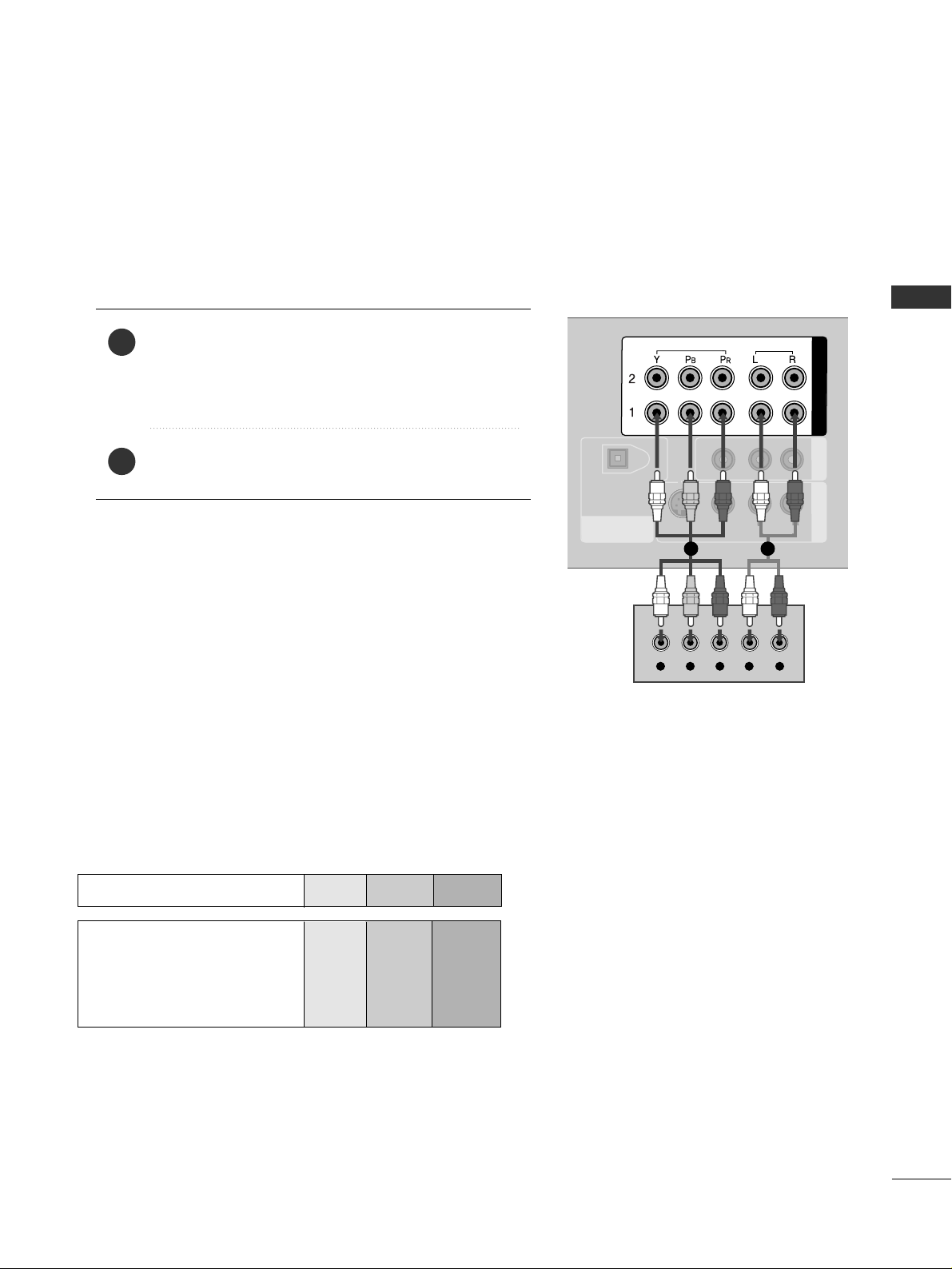
When connecting Component cable
DIGITAL AUDIO
OUT
OPTICAL
AV OUT
AV IN 1
VIDEO
AUDIO
MONO
( )
S-VIDEO
COMPONENT IN
VIDEO
AUDIO
Y L RPB PR
Component Input ports
To get better picture quality, connect a DVD player to the component input ports as shown below.
Component ports on the TV
YPB PR
Video output ports
on DVD player
Y
Y
Y
Y
P
B
B-Y
Cb
Pb
P
R
R-Y
Cr
Pr
Connect the video outputs (Y, PB
, PR
)
of the DVD to the
CC OO MMPP OO NN EENNTT II NN VV II DD EE OO 11
jacks on the set.
Match the jack colors
(
Y = green, P
B = blue, and PR = red
)
.
Connect the audio outputs of the DVD to the
CC OO MMPP OO NN EENNTT II NN AAUUDDIIOO11
jacks on the set.
1. How to connect
2. How to use
■
Turn on the DVD player, insert a DVD.
■
Select
CC oo mmpp oonn ee nntt 11
input source by using the
IINNPPUUTT
button on the remote control.
■
If connected to
CC OO MMPP OO NNEENNTT II NN 22
input, select
CC oo mmpp oonn ee nntt 22
input source.
■
Refer to the DVD player's manual for operating instructions.
2
1
1 2
Page 24
EXTERNAL EQUIPMENT SETUP
22
EXTERNAL EQUIPMENT SETUP
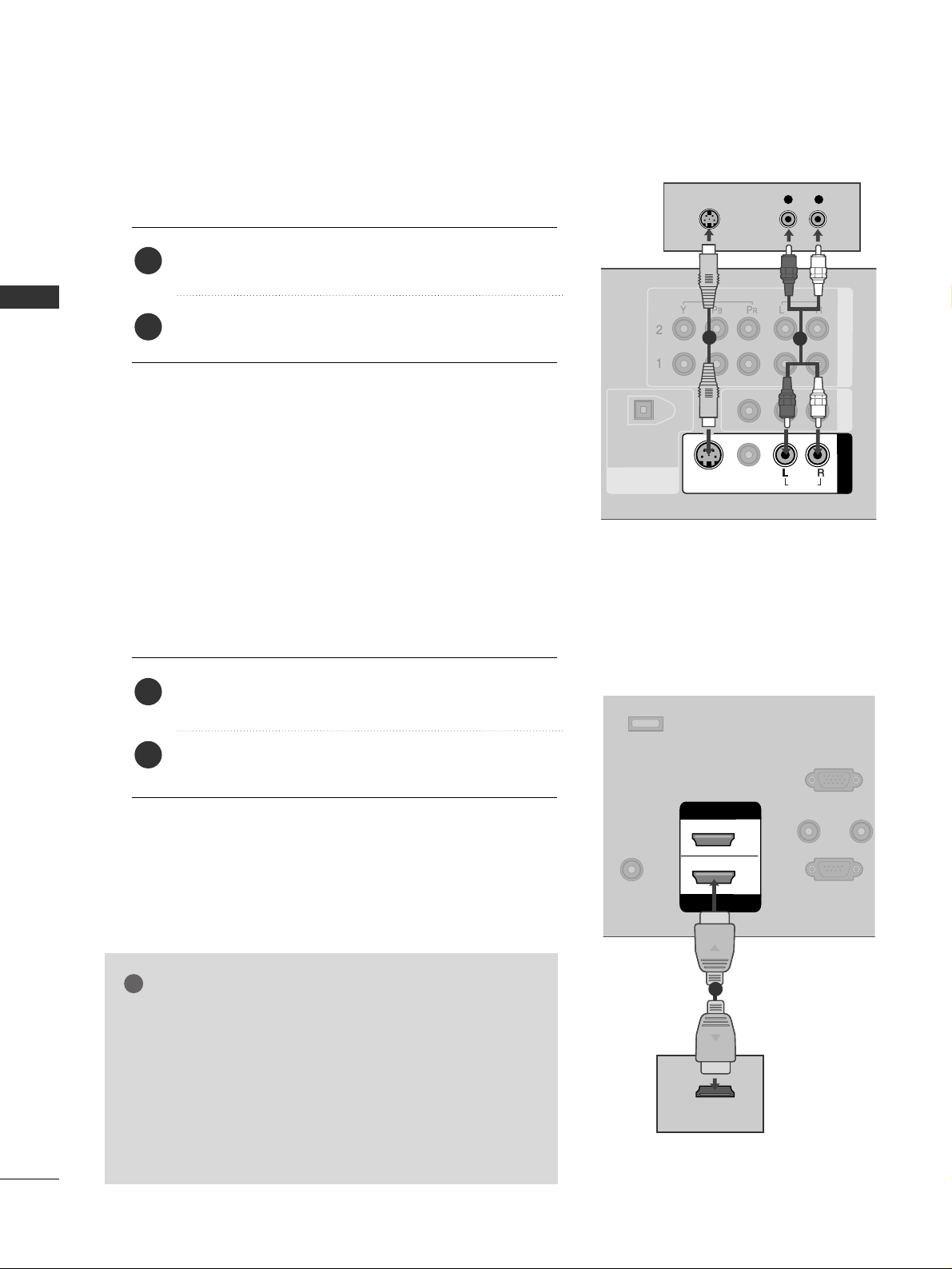
When connecting with an S-Video cable
DIGITAL AUDIO
OUT
OPTICAL
COMPONENT IN
AV OUT
AV IN 1
VIDEO
S-VIDEO
AUDIOUDIO
MONO
( )
VIDEO
AUDIO
L R
S-VIDEO
AUDIO
1
2
REMOT
CONTROL
RS-232C IN
(CONTROL & SERVICE
RGB IN
(PC)
AUDIO IN
(RGB/DVI)
SERVICE
ANTENNA/
CABLE IN
HDMI IN
HDMI/DVI IN
1
2
HDMI-DVD OUTPUT
1
Connect the S-VIDEO output of the DVD to the
SS -- VV II DDEEOO
input on the set.
Connect the audio outputs of the DVD to the
AAUUDD II OO
input jacks on the set.
1. How to connect
2. How to use
■
Turn on the DVD player, insert a DVD.
■
Select
AA VV 11
input source by using the
IINNPPUUTT
button on the
remote control.
■
If connected to
AAVV IINN22
, select
AA VV 22
input source.
■
Refer to the DVD player's manual for operating instructions.
When connecting HDMI cable
Connect the HDMI output of the DVD to the
HHDDMM II//DD VVII IINN 11
or
HHDDMMII II NN 22
jack on the set.
No separated audio connection is necessary.
HDMI supports both audio and video.
1. How to connect
2. How to use
■
Select
HHDDMMII11 //DDVVII
or
HHDD MMII22
input source by using
the
IINNPPUUTT
button on the remote control.
■
Refer to the DVD player's manual for operating instructions.
2
1
2
1
GG
When connected, the TV will tell a connected device what
resolution it supports and the resolution it prefers. If the
device supports this Auto HDMI function, the player output resolution will be automatically set to 720p.
GG
If the device does not support Auto HDMI, you need to
set the output resolution appropriately.
To get the best picture quality, adjust the output resolution
of the DVD to 720p.
NOTE
!
Page 25
EXTERNAL EQUIPMENT SETUP
23
VCR SETUP
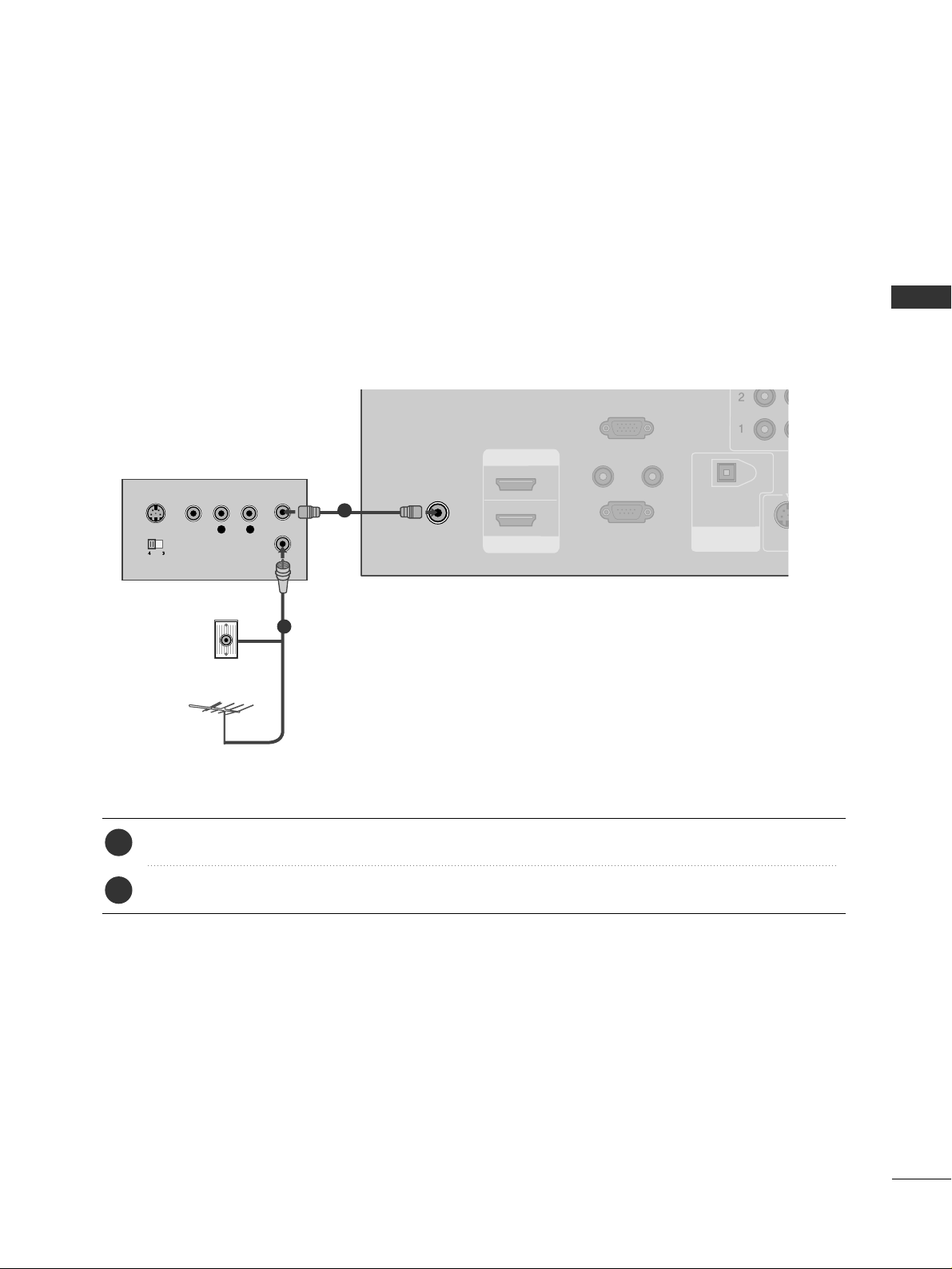
When connecting with an antenna
■
To avoid picture noise (interference), leave an adequate distance between the VCR and TV.
■
Use the ISM feature in the Option menu to avoid having a fixed image remain on the screen for a long period
of time. If the 4:3 picture format is used; the fixed images on the sides of the screen may remain visible on
the screen. This phenomenon is common to all manufactures and in consequence the manufactures warranty
does not cover the product bearing this phenomenon.
REMOTE
CONTROL IN
RS-232C IN
(CONTROL & SERVICE)
RGB IN
(PC)
AUDIO IN
(RGB/DVI)
DIGITAL AUDIO
OUT
OPTICAL
S-VID
VIDEO
AUDIO
( )
ANTENNA/
CABLE IN
HDMI IN
HDMI/DVI IN
1
2
L R
S-VIDEO VIDEO
OUTPUT
SWITCH
ANT IN
ANT OUT
Wall Jack
Antenna
1
2
Connect the RF antenna out socket of the VCR to the
AANNTTEENNNNAA//CCAABB LLEE II NN
socket on the set.
Connect the antenna cable to the RF antenna in socket of the VCR.
1. How to connect
■
Set VCR output switch to 3 or 4 and then tune TV to the same channel number.
■
Insert a video tape into the VCR and press PLAY on the VCR. (Refer to the VCR owner’s manual.
)
2. How to use
2
1
Page 26
EXTERNAL EQUIPMENT SETUP
24
EXTERNAL EQUIPMENT SETUP
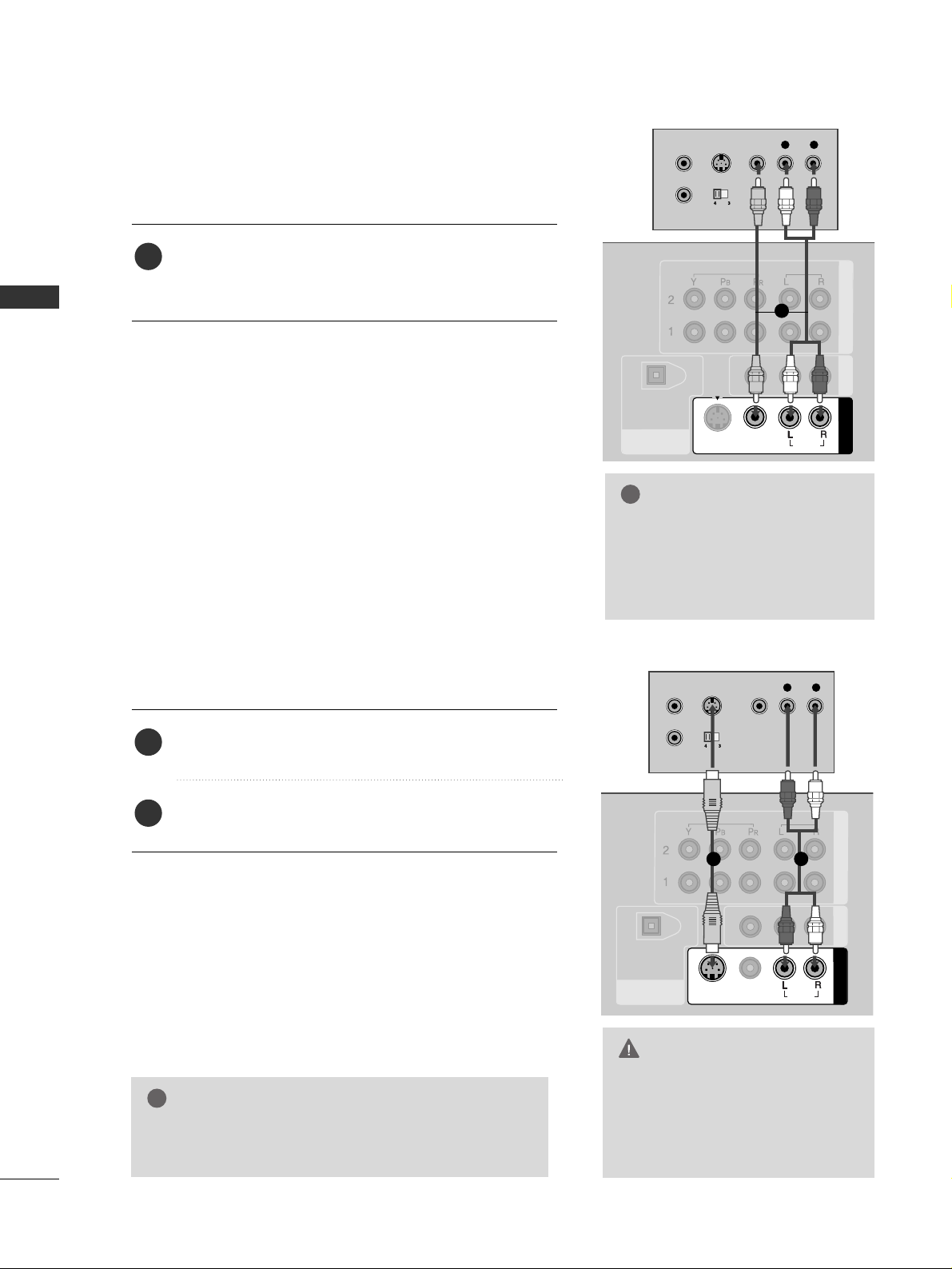
GG
Do not connect to both Video
and S-Video at the same time. In
the event that you connect both
Video and the S-Video cables,
only the S-Video will work.
CAUTION
When connecting with a RCA cable
GG
The picture quality is improved: compared to normal
composite (RCA cable) input.
NOTE
!
DIGITAL AUDIO
OUT
OPTICAL
COMPONENT IN
AV OUT
AV IN 1
S-VIDEO
VIDEO
AUDIO
MONO
( )
L R
S-VIDEO VIDEO
OUTPUT
SWITCH
ANT IN
ANT OUT
VIDEO
AUDIO
VIDEO
AUDIO
( )
L R
S-VIDEO VIDEO
OUTPUT
SWITCH
ANT IN
ANT OUT
DIGITAL AUDIO
OUT
OPTICAL
COMPONENT IN
AV OUT
AV IN 1
VIDEO
S-VIDEO
AUDIO
MONO
( )
VIDEO
AUDIO
Connect the
AAUUDD II OO/VV II DDEEOO
jacks between TV and
VCR. Match the jack colors (Video = yellow, Audio Left
= white, and Audio Right = red)
1. How to connect
2. How to use
■
Insert a video tape into the VCR and press PLAY on the
VCR. (Refer to the VCR owner’s manual.
)
■
Select
AA VV 11
input source by using the
IINNPPUUTT
button on
the remote control.
■
If connected to
AAVV IINN22
, select
AA VV 22
input source.
When connecting with an S-Video cable
Connect the S-VIDEO output of the VCR to the
SS -- VVII DDEEOO
input on the set.
Connect the audio outputs of the VCR to the
AAUUDD II OO
input jacks on the set.
1. How to connect
2. How to use
■
Insert a video tape into the VCR and press PLAY on the VCR.
(
Refer to the VCR owner’s manual.
)
■
Select
AA VV 11
input source by using the
IINNPPUUTT
button on the
remote control.
■
If connected to
AAVV IINN22
, select
AA VV 22
input source.
1
2
1
GG
If you have a mono VCR, connect the audio cable from the
VCR to the
AAUUDD II OO
LL//MM OO NN OO
jack of the set.
NOTE
!
1
1
2
Page 27
EXTERNAL EQUIPMENT SETUP
25
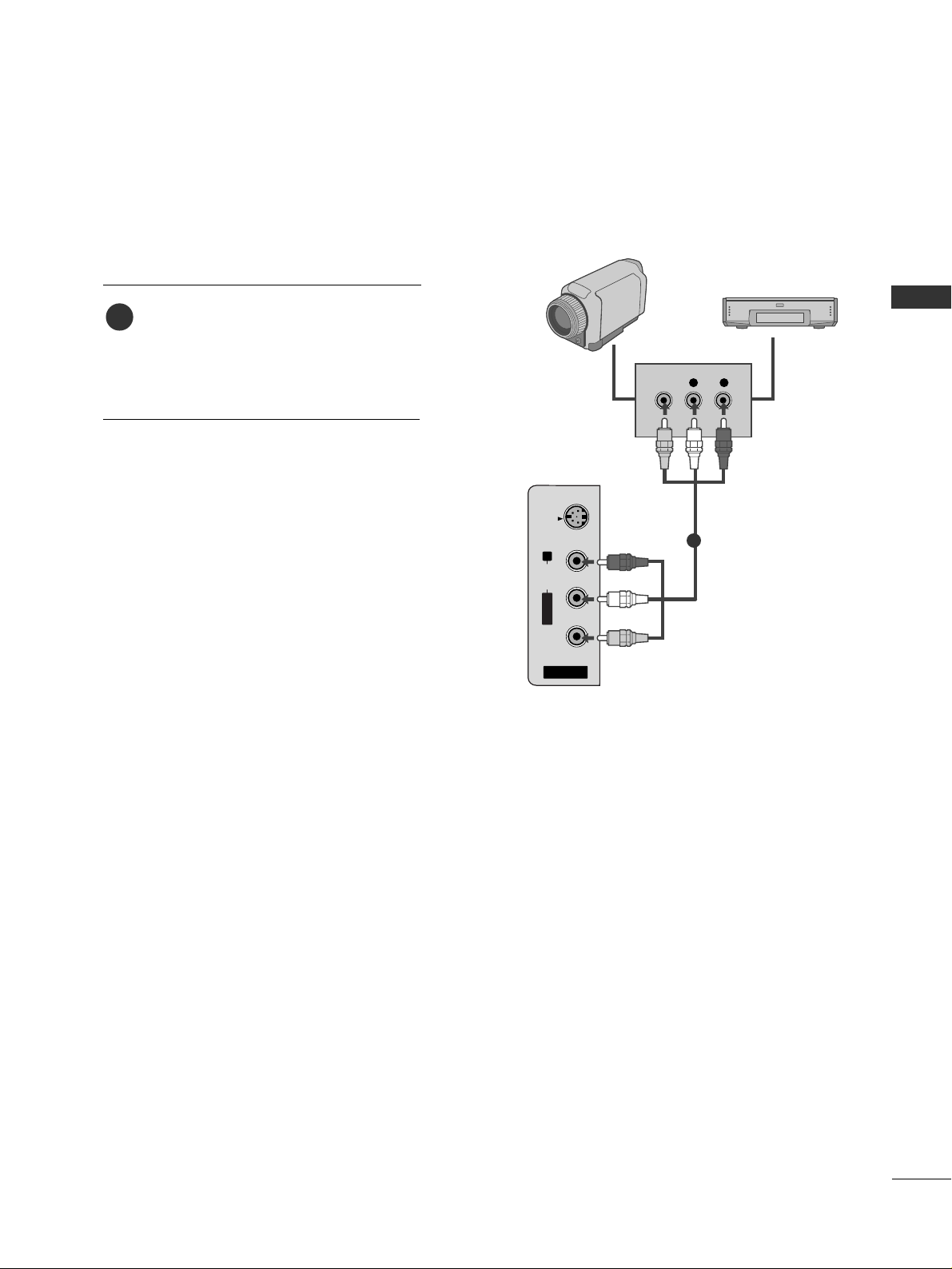
OTHER A/V SOURCE SETUP
AV IN 2
L/ MONO
R
AUDIO
VIDEO
S-VIDEO
L R
VIDEO
Camcorder
Video Game Set
Connect the
AAUUDDIIOO/VVIIDDEEOO
jacks
between TV and external equipment.
Match the jack colors
.
(
Video = yellow, Audio Left = white, and
Audio Right = red
)
1. How to connect
2. How to use
■
Select
AA VV 22
input source by using the
IINNPPUUTT
button on the remote control.
■
If connected to
AAVV IINN11
input, select
AA VV 11
input source.
■
Operate the corresponding external equipment.
1
1
ex) LCD TV Model
Page 28
EXTERNAL EQUIPMENT SETUP
26
PC SETUP
EXTERNAL EQUIPMENT SETUP
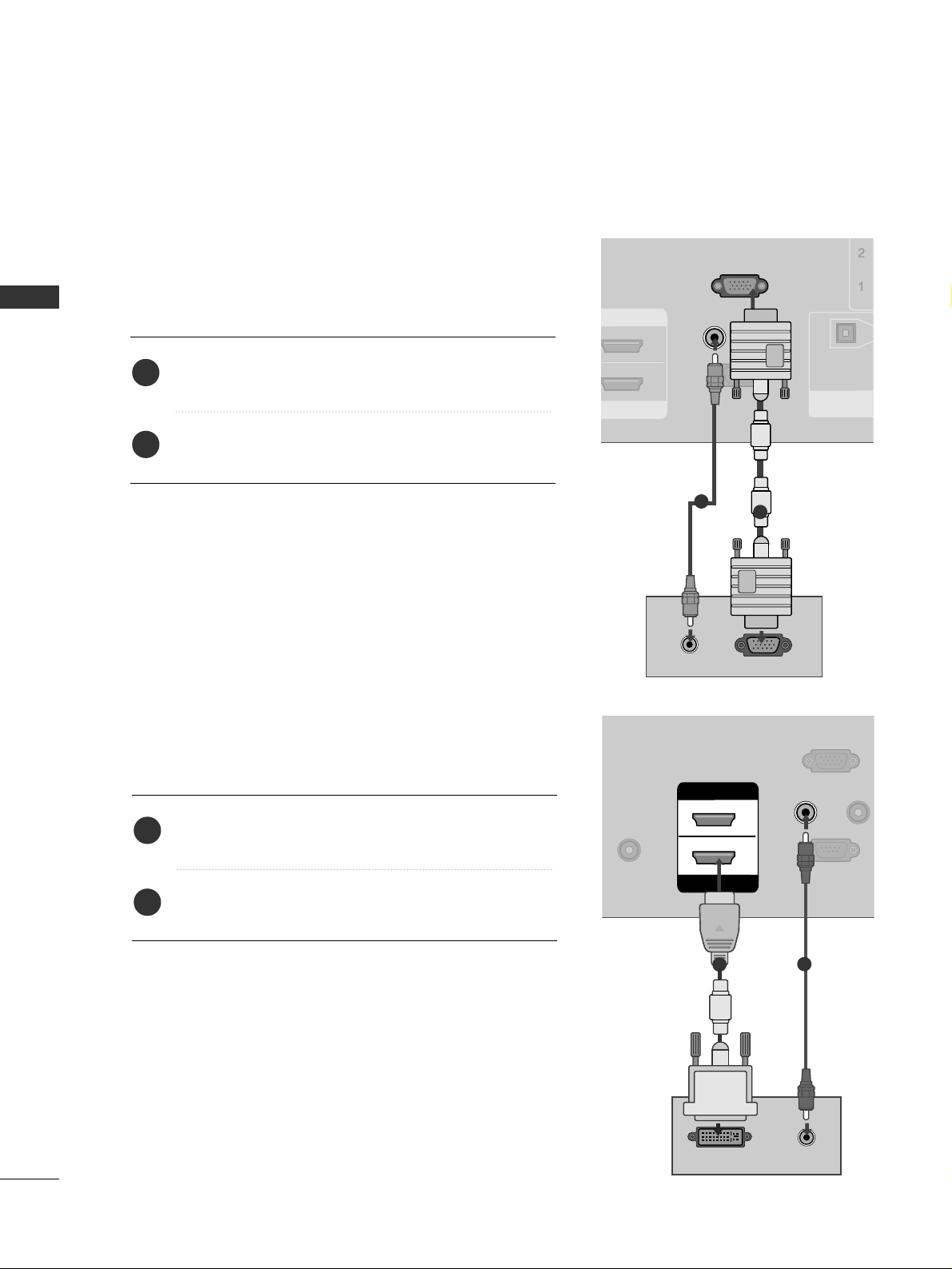
When connecting HDMI to DVI cable
REMOTE
CONTROL
RS-232C IN
(CONTROL & SERVICE
RGB IN
(PC)
AUDIO IN
(RGB/DVI)
DVI-PC OUTPUT AUDIO
ANTENNA/
CABLE IN
HDMI IN
HDMI/DVI IN
1
2
1
2
Connect the DVI output of the PC to the
HHDDMMII// DDVVII
IINN 11
jack on the set.
Connect the PC audio output to the
AAUUDDII OO II NN
((
RR GG BB //DD VV II
))
jack on the set.
1. How to connect
2. How to use
■
Turn on the PC and the TV.
■
Select
HHDDMMII11 //DDVVII
input source by using the
IINNPPUUTT
button on the remote control.
2
1
This TV provides Plug and Play capability, meaning that the PC adjusts automatically to the TV's settings.
When connecting D-sub 15pin cable
RGB OUTPUTAUDIO
REMOTE
CONTROL IN
RS-232C IN
(CONTROL & SERVICE)
RGB IN
(PC)
AUDIO IN
(RGB/DVI)
DIGITAL AUDIO
OUT
OPTICAL
HDMI IN
1
2
Connect the RGB output of the PC to the
RR GG BB IINN
((
PP CC
))
jack on the set.
Connect the PC audio output to the
AAUUDDII OO IINN
((
RR GG BB //DD VV II
))
jack on the set.
1. How to connect
2. How to use
■
Turn on the PC and the TV.
■
Select
RR GG BB -- PPCC
input source by using the
IINNPPUUTT
button
on the remote control.
2
1
1
2
Page 29
EXTERNAL EQUIPMENT SETUP
27
GG
To get the the best picture quality, adjust the PC
graphics card to 1024x768, 60Hz.
GG
Depending on the graphics card, DOS mode may
not work if a HDMI to DVI Cable is in use.
GG
If the video doesn’t fit the screen, try pressing the
ADJUST button to adjust the screen position of TV.
GG
Check the image on your TV. There may be noise
associated with the resolution, vertical pattern,
contrast or brightness in PC mode. If noise is
present, change the PC output to another resolution, change the refresh rate to another rate or
adjust the brightness and contrast on the VIDEO
menu until the picture is clear. If the refresh rate of
the PC graphic card can not be changed, change
the PC graphic card or consult the manufacturer of
the PC graphic card.
GG
Avoid keeping a fixed image on the screen for a
long period of time. The fixed image may become
permanently imprinted on the screen.
GG
The synchronization input form for Horizontal and
Vertical frequencies is separate.
NOTES
!
RGB-PC, HDMI1/DVI-PC mode
Horizontal Vertical
Frequency(KHz)Frequency(Hz
)
31.469 70.08
31.469 70.08
31.469 59.94
37.879 60.31
48.363 60.00
47.776 59.87
47.720 59.799
47.130 59.65
Resolution
720x400
1360x768
640x350
* RGB-PC mode only: 640x350, 720X400
640x480
800x600
1024x768
HDMI1/DVI-DTV,
HDMI2-DTV mode
Horizontal Vertical
Frequency(KHz)Frequency(Hz
)
31.469 59.94
31.500 60.00
44.960 59.94
45.000 60.00
33.720 59.94
33.750 60.00
27.000 24.00
33.750 30.00
Resolution
720x480
1280x720
1920x1080i
1920x1080p
1280x768
1366x768
Supported Display Specifications
Page 30
EXTERNAL EQUIPMENT SETUP
28
EXTERNAL EQUIPMENT SETUP
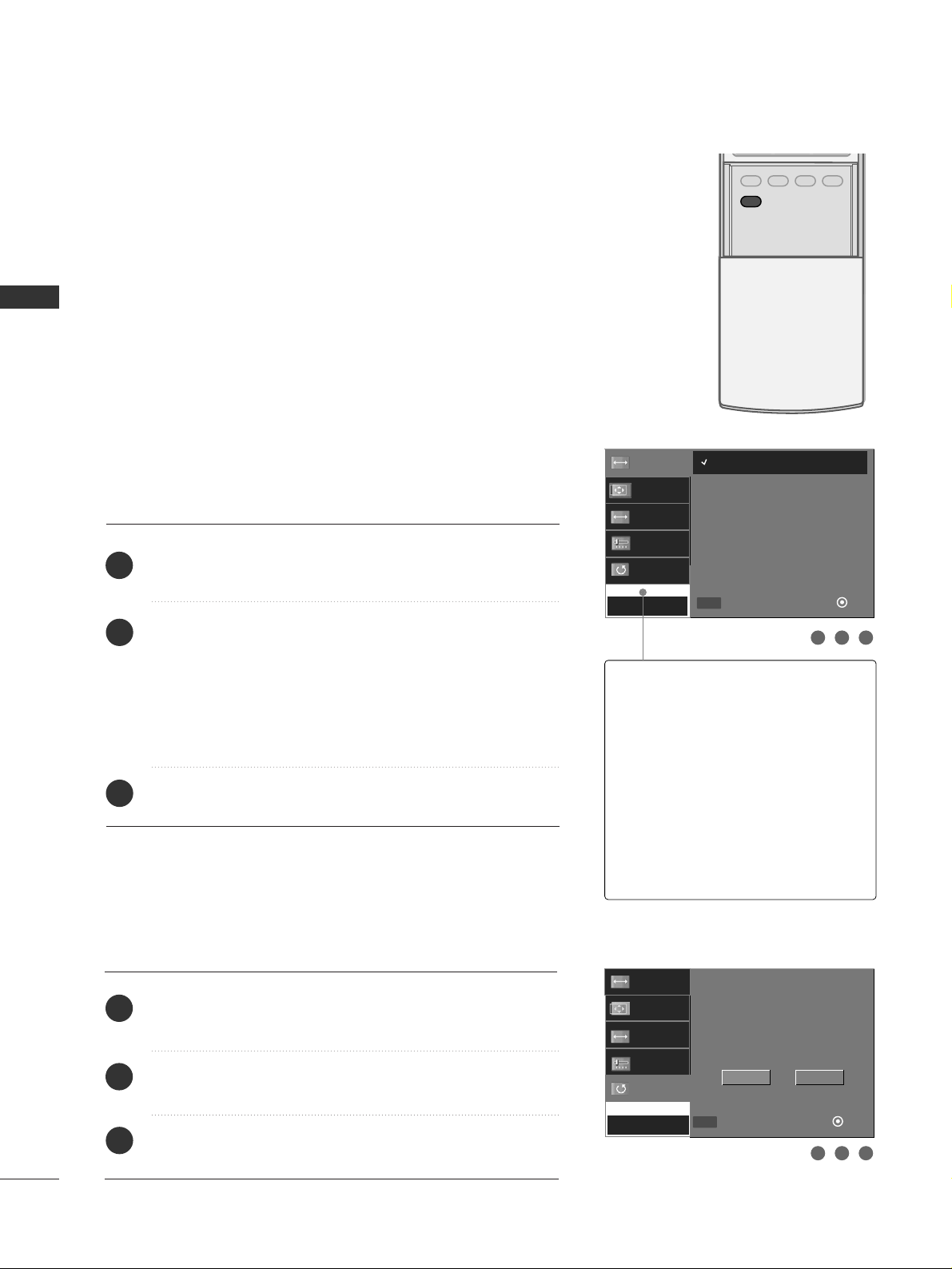
Screen Setup for PC mode
Overview
When the RGB input of the set is connected to a PC output, select
the RGB-PC as the main input mode.
When HDMI/DVI connect to PC output and select HDMI/DVI input,
this function is used.
After connecting RGB-PC or HDMI/DVI to PC input and checking the
screen quality.
When you change the resolution, select the proper resolution in present input to see the best picture appearance.
Adjustment for screen Resolution, Position, Size,
and Phase
Press the
AADD JJ UUSSTT
button and then use
DD
or EEbutton to
select
RR ee ss oo lluutt iioonn, PPoo ss iittiioo nn, SSiizz ee
, or
PPhhaa ss ee
.
Press the
EENNTTEERR
button and then use
DD EE FF GG
button to
make appropriate adjustments.
■
The
PPhhaassee
adjustment range is
--1166 ~++1166
.
In HDMI/DVI-PC mode,
PPhhaassee
is not available.
■
The
SSiizzee
adjustment range is
--3300
~
++3300
.
In HDMI/DVI-PC mode,
SSiizzee
is not available.
Press the
EENNTTEERR
button.
Initializing (Reset to original factory values)
Press the
AADD JJ UUSSTT
button and then use
DD
or EEbutton to
select
RR ee sseett
.
Press the
EENNTTEERR
button and then use
FF
or
GG
button to
select
YY eess
.
Press the
EENNTTEERR
button.
To initialize the adjusted values
ADJUST
SAP
SOUND
PICTURE
CC
1
2
3
1
2
3
1 2 3
1 2 3
Resolution
Position
Size
Phase
Reset
Initialize Settings
Yes
No
Resolution
Position
Size
Phase
Reset
Move
Close
Ok
FF GG
DD
EE
MENU
1024 x 768
1280 x 768
1360 x 768
1366 x 768
RReessoolluuttiioonn
This function allows you select
resolution of XGA/WXGA.
PPoossiittiioonn
This function is to adjust picture to
left/right and up/down as you prefer.
SSiizzee
This function is to minimize any vertical bars or stripes visible on the
screen background. And the horizontal screen size will also change.
PPhhaassee
This function allows you to
remove any horizontal noise and
clear or sharpen the image of characters.
Move
Close
Ok
FF GG
DD
EE
MENU
Page 31
EXTERNAL EQUIPMENT SETUP
29
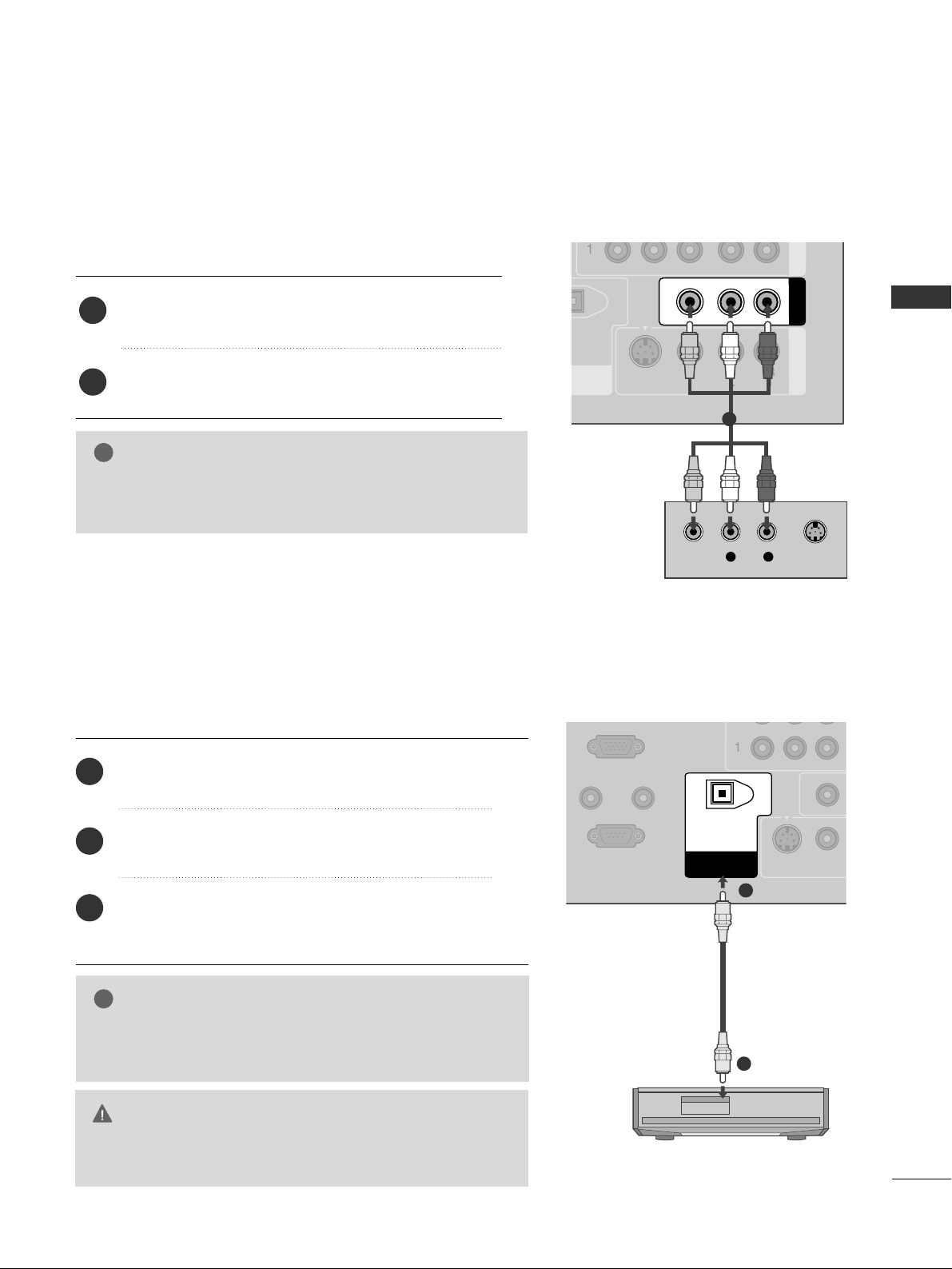
AV OUT SETUP
The TV has a special signal output capability which allows you to hook up the second TV or monitor.
L R
S-VIDEOVIDEO
NT IN
AV OUT
AV IN 1
VIDEO
AUDIO
MONO
( )
S-VIDEO
Connect the second TV or monitor to the TV’s
AAVV OOUUTT
jacks.
See the Operating Manual of the second TV or monitor
for further details regarding that device’s input settings.
1. How to connect
GG
Component1-2, RGB-PC, HDMI1/DVI, HDMI2, DTV input
sources cannot be used for AV out.
NOTE
!
2
1
1
Send the TV’s audio to external audio equipment via the Digital Audio Output (Optical)port.
REMOTE
CONTROL IN
RS-232C IN
(CONTROL & SERVICE)
(PC)
AUDIO IN
(RGB/DVI)
VIDEO
S-VIDEO
DIGITAL AUDIO
OUT
OPTICAL
GG
When connecting with external audio equipments, such as amplifiers or speakers, please turn the TV speakers off. (
GG
pp..5577
)
NOTE
!
GG
Do not look into the optical output port. Looking at the
laser beam may damage your vision.
CAUTION
Connect one end of an optical cable to the TV Digital
Audio (Optical)Output port.
Connect the other end of the optical cable to the
digital audio (optical)input on the audio equipment.
Set the “TV Speaker option - Off ” in the AUDIO
menu. (
GG
pp..55 77
). See the external audio equipment
instruction manual for operation.
1. How to connect
2
3
1
1
2
DIGITAL AUDIO OUTPUT
Page 32
WATCHING TV / CHANNEL CONTROL
30
REMOTE CONTROL FUNCTIONS
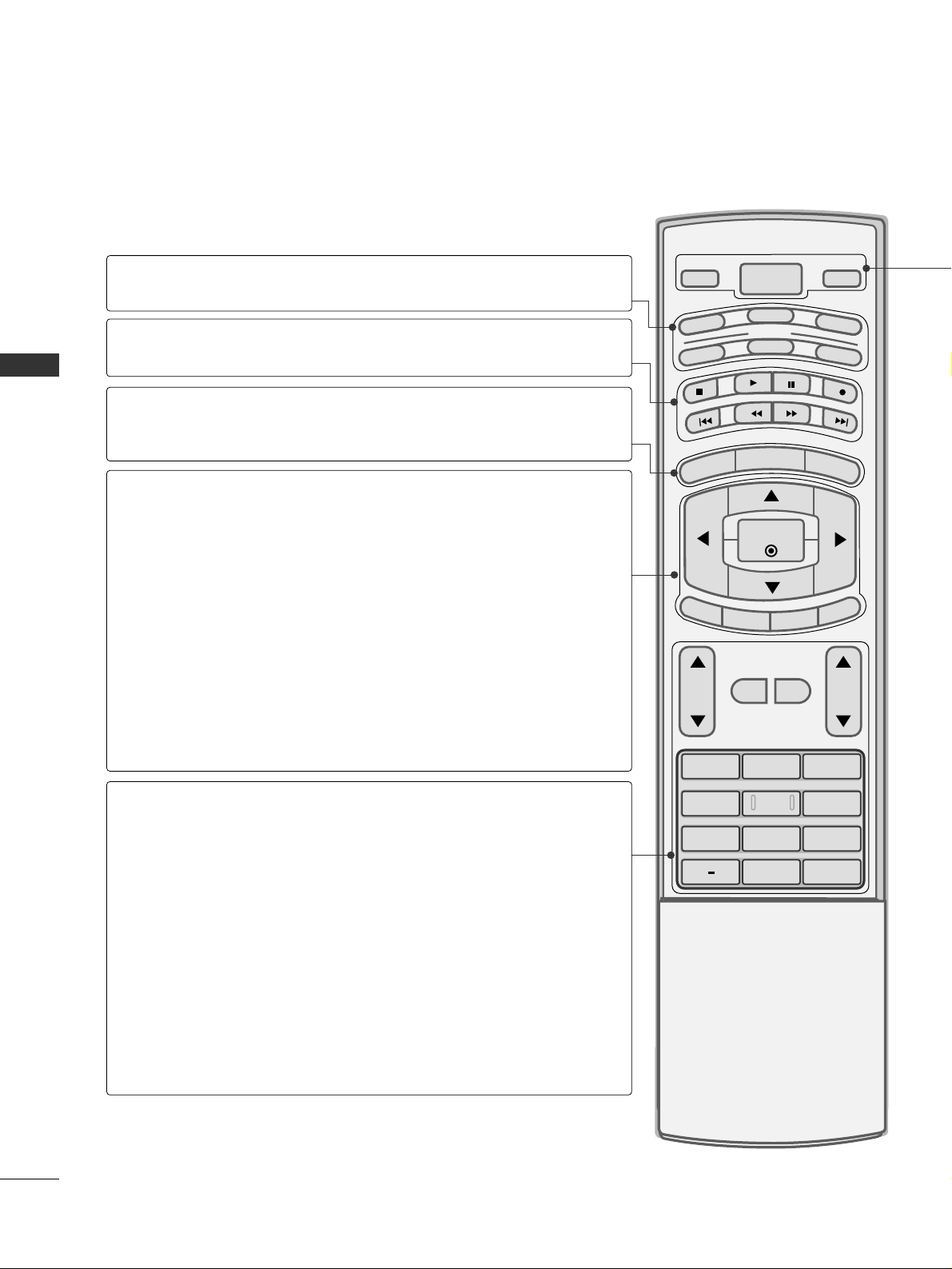
WATCHING TV / CHANNEL CONTROL
1 2 3
4 5 6
7809
BACK
VOL CH
MUTE
FAV
BRIGHT -
MENU
BRIGHT +
ENTER
EXIT
TIMER
RATIO
SIMPLINK
POWER
VCR
TV
DVD
AUDIO
CABLE
STB
MODE
TV INPUT
INPUT
When using the remote control, aim it at the remote control sensor on the TV.
MODE
MENU
BRIGHT -/ +
THUMBSTICK
(Up/Down/Left
Right/ENTER)
EXIT
TIMER
RATIO
SIMPLINK
VOLUME UP
/DOWN
MUTE
FAV
CHANNEL
UP/DOWN
— (DASH)
BACK
Select the remote’s operating mode. TV, DVD, VCR,
AUDIO, CABLE, or STB.
Control video cassette recorders or DVD players.
Displays the main menu.
Adjust the brightness on screen.
Navigate the on-screen menus and adjust the system settings to your preference.
Clear all on-screen displays and return to TV viewing
from any menu.
Select the amount of time before your TV turns off automatically.
GG
pp..6677
Change the aspect ratio.
GG
pp..4422
See a list of AV devices connected to TV. When you toggle this button, the SimpLink menu appears at the screen.
GG
pp..4400
Increase/decrease the sound level.
Switch the sound on or off.
GG
pp..3322
Scroll through the programmed Favorite channels.
GG
pp..3366
Select available channels.
Used to enter a program number for multiple program
channels such as 2-1, 2-2, etc.
Tune to the last channel viewed.
VCR/DVD
control buttons
NUMBER button
Page 33
WATCHING TV / CHANNEL CONTROL
31
POWER
TV INPUT
INPUT
Turns your TV or any other programmed equipment on or off, depending on the mode.
In AV 1-2, Component 1-2, RGB-PC, HDMI1/DVI, and HDMI2 input sources, screen returns to
the last TV channel.
External input modes rotate in regular sequence: TV, AV1-2, Component 1-2, RGB-PC,
HDMI1/DVI and HDMI2.
(AV 1-2, Component 1-2, RGB-PC, HDMI1/DVI, and HDMI2 input sources are linked automatically, only if a device is connected.)
PICTURE
SOUND
SAP
CC
ADJUST
Selects the factory preset picture depend on
the viewing environment.
GG
pp..4444
Selects the factory preset sound for type of
program.
GG
pp..5544
Analog mode: Selects MTS sound (Mono,
Stereo, or a SAP)
GG
pp..5588
DTV mode: Changes the audio language.
Select a closed caption.
GG
pp..6611
(*In DTV/CADTV mode
GG
pp..6622
)
Adjust the screen resolution, position, size and
phase.
GG
pp..2288
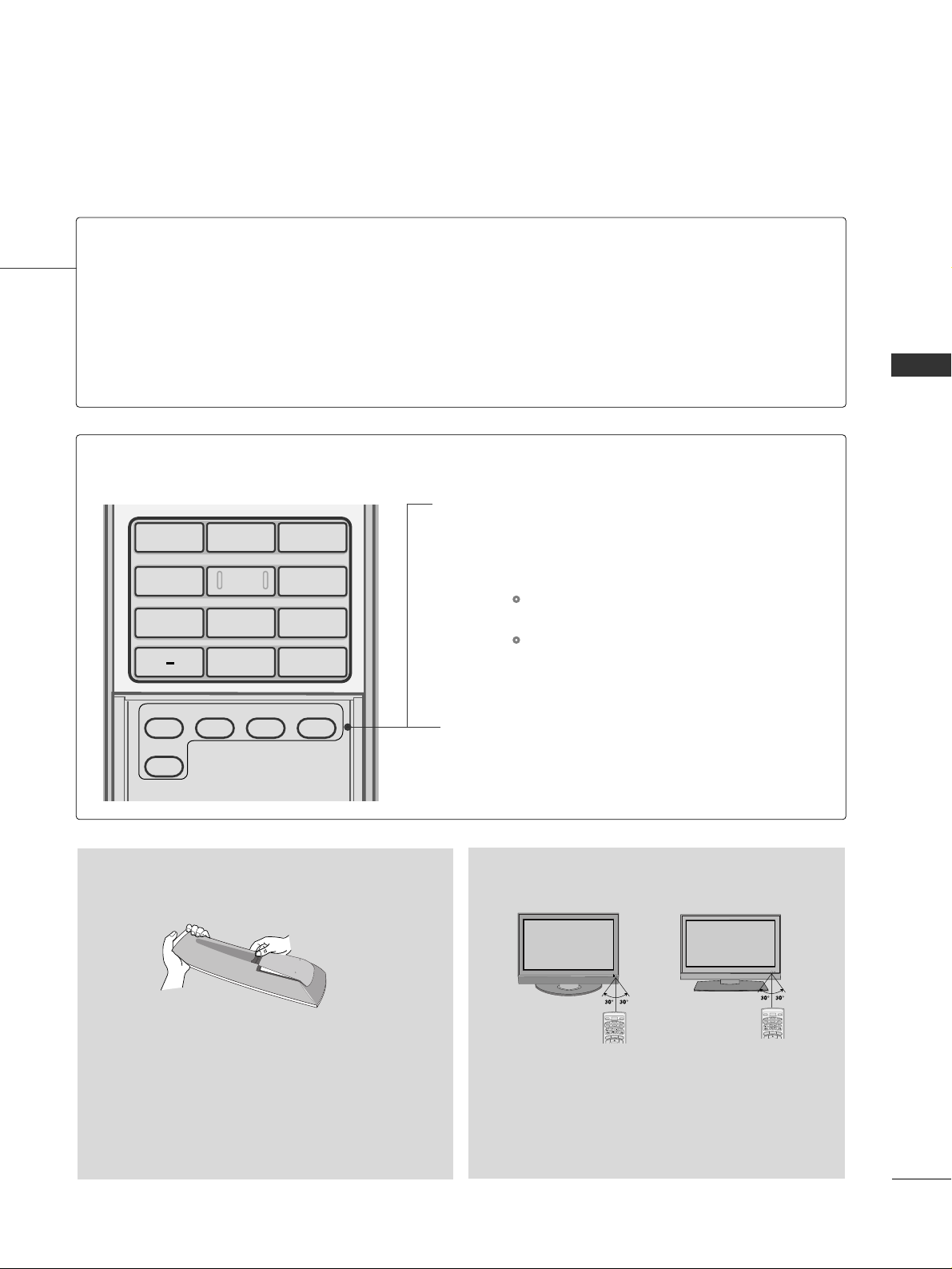
Inside the Sliding Cover
■
Open the battery compartment cover on the back
side and install the batteries matching correct
polarity (+ with +, - with -).
■
Install two 1.5V AA batteries. Don’t mix old or
used batteries with new ones.
■
Close cover.
■
Use a remote control up to 7 meters distance
and 30 degree (left/right) within the receiving
unit scope.
■
Dispose of used batteries in a recycle bin to
preserve environment.
BRIGH
T -
MENU
B
R
IG
H
T
+
POWER
V
C
R
T
V
DVD
A
U
D
I
O
CABLE
S
T
B
MODE
TV INPUT
INPUT
BRIGHT -
MENU
B
R
IG
HT
+
POWER
V
C
R
T
V
DVD
A
U
D
I
O
CABLE
S
T
B
MODE
TV INPUT
INPUT
Installing Batteries
Remote control effective range
1 2 3
4 5 6
7809
BACK
PICTURE
ADJUST
SOUND
SAP
CC
Page 34
WATCHING TV / CHANNEL CONTROL
32
TURNING ON TV
WATCHING TV / CHANNEL CONTROL
NOTE
!
GG
If you intend to be away on vacation, disconnect the power plug from the wall power outlet.
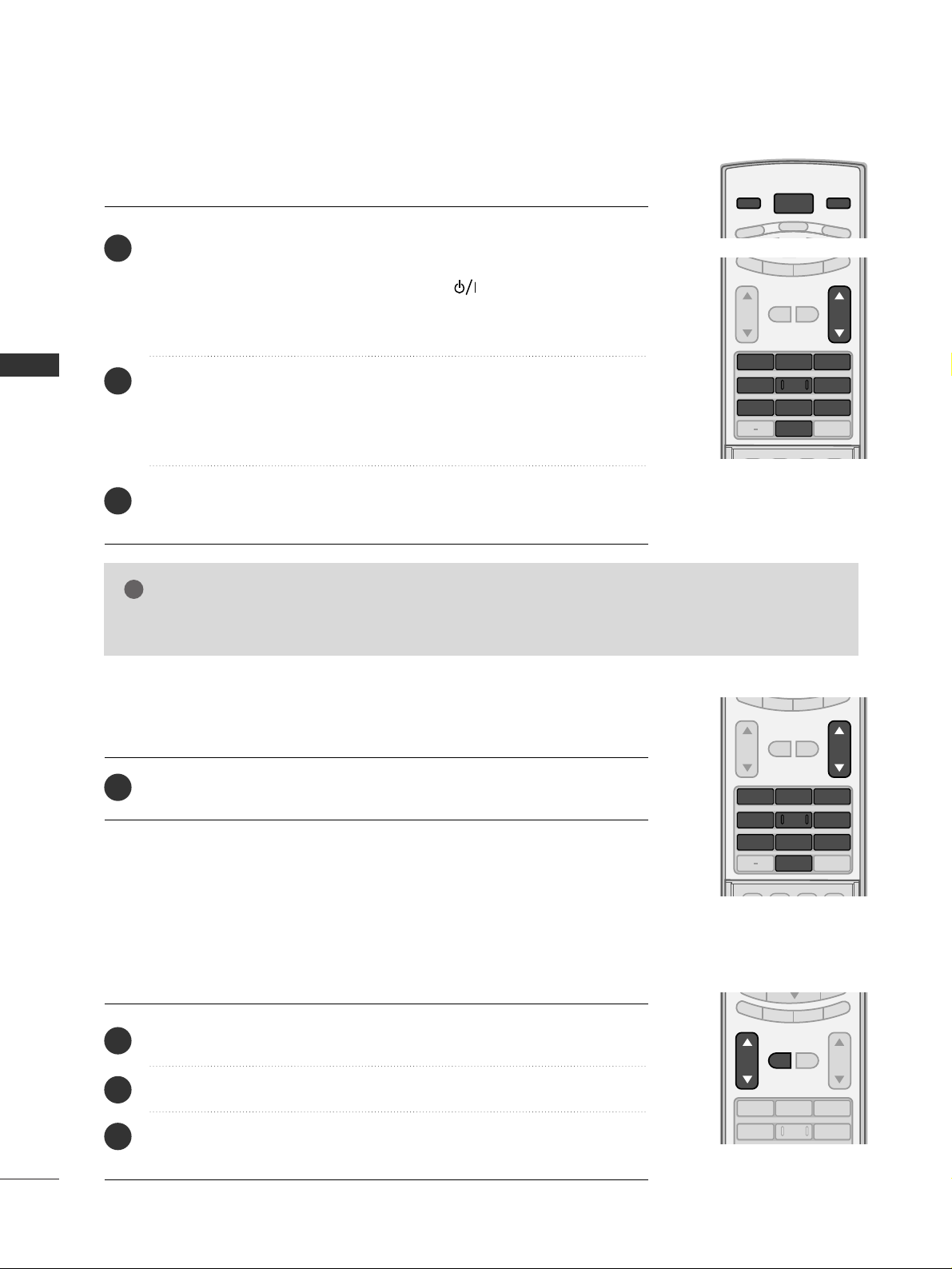
First, connect power cord correctly.
At this moment, the TV switches to standby mode.
■
In standby mode to turn TV on, press the ,
IINNPPUUTT,CCHH ((
DD
or
EE
))
button on the TV or press the
PPOOWWEERR, IINNPPUUTT, TTVV IINNPPUUTT, CCHH((
DD
or
EE
)), NNuummbbeerr ((00~99))
button on the remote control.
Select the viewing source by using the
TTVV IINNPPUUTT, IINNPPUUTT
button on the
remote control.
■
This TV is programmed to remember which power state it was last set
to, even if the power cord is out.
When finished using the TV, press the
PPOOWWEERR
button on the remote
control. The TV reverts to standby mode.
POWER
VCR
TV
DVD
TV INPUT
INPUT
SAP
SOUND
PICTURE
CC
123
456
7809
BACK
VOL CH
MUTE
FAV
EXIT
TIMER
RATIO
SIMPLINK
1
2
3
SAP
SOUND
PICTURE
CC
123
456
7809
BACK
VOL CH
MUTE
FAV
EXIT
TIMER
RATIO
SIMPLINK
Press the
CCHH ((
DD
or
EE
))
or
NNUUMMBBEERR
buttons to select a channel number.
1
VOLUME ADJUSTMENT
CHANNEL SELECTION
Press the
VVOOLL ((
DD
or
EE
))
button to adjust the volume.
If you want to switch the sound off, press the
MMUUTTEE
button.
You can cancel the Mute function by pressing the
MMUUTTEE
or
VVOOLL ((
DD
or
EE
))
button.
123
456
VOL CH
MUTE
FAV
EXIT
TIMER
RATIO
SIMPLINK
Adjust the volume to suit your personal preference.
1
2
3
Page 35
WATCHING TV / CHANNEL CONTROL
33
ON-SCREEN MENUS SELECTION
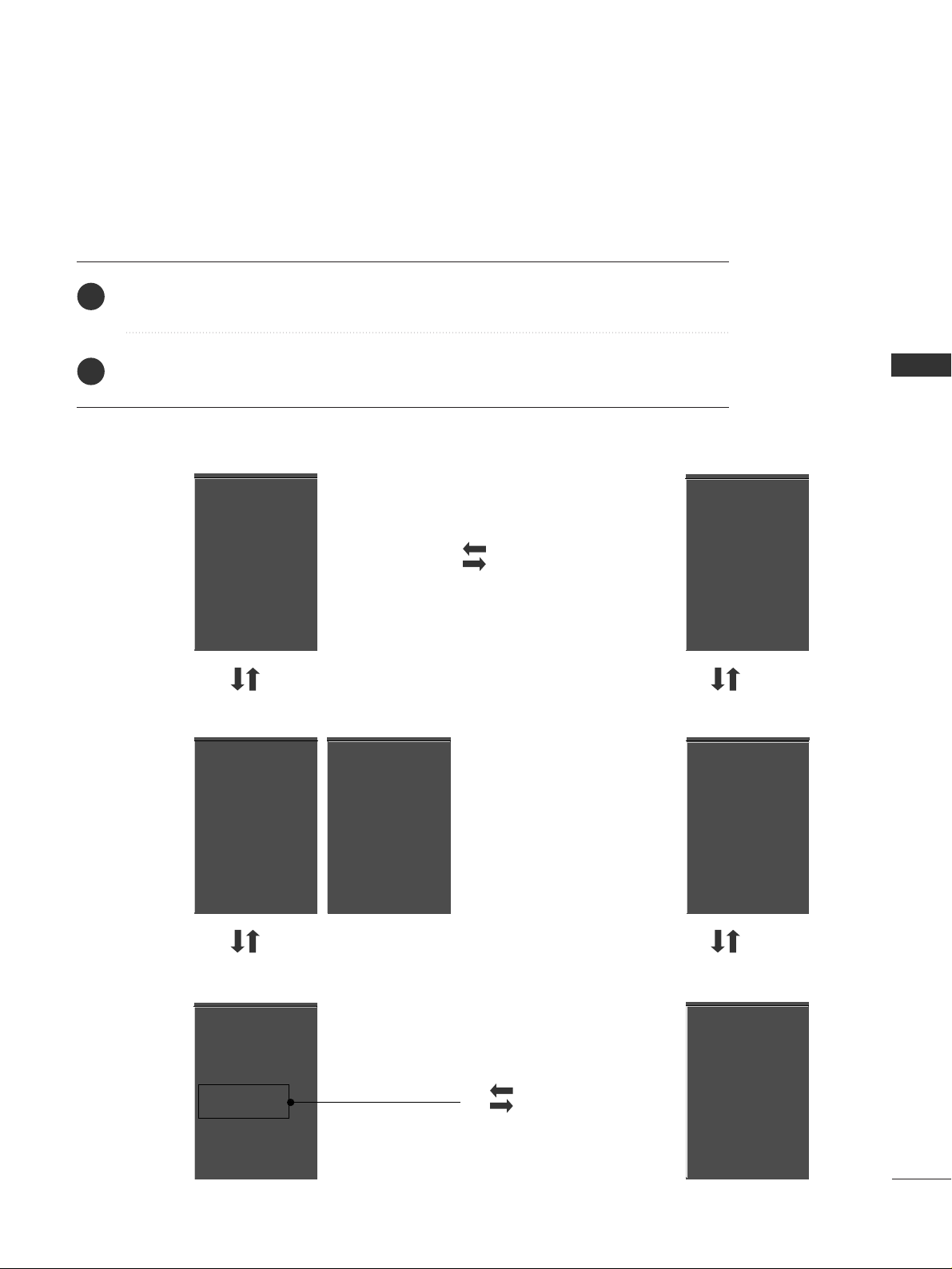
Press the
MMEENNUU
button and then use
DD
or
EE
button to select the each menu.
Press the
GG
button and then use
DD EE FF GG
button to display the available menus.
Your TV's OSD (On Screen Display)may differ slightly from what is shown in this manual.
SETUP
VIDEO
OPTION
LOCK
TIME
EZ Scan
Manual Scan
Channel Edit
DTV Signal
Input Source
Input Label
Set ID
EZ Picture
Color Temperature
XD
Advanced
Video Reset
Auto Clock
Manual Clock
Off Timer
On Timer
Sleep Timer
Auto Off
Aspect Ratio
Caption/Text
Caption Option
Language
ISM Method
Low Power
SimpLink
AUDIO
Audio Language
EZ Sound
Balance
TV Speaker
Lock System
Set Password
Block Channel
Movie Rating
TV Rating-Children
TV Rating-General
Input Block
2
1
Lock System
Set Password
Block Channel
TV Rating-English
TV Rating-French
Input Block
For USA
For Canada
Plasma TV model only
Page 36
WATCHING TV / CHANNEL CONTROL
34
CHANNEL SEARCH
WATCHING TV / CHANNEL CONTROL
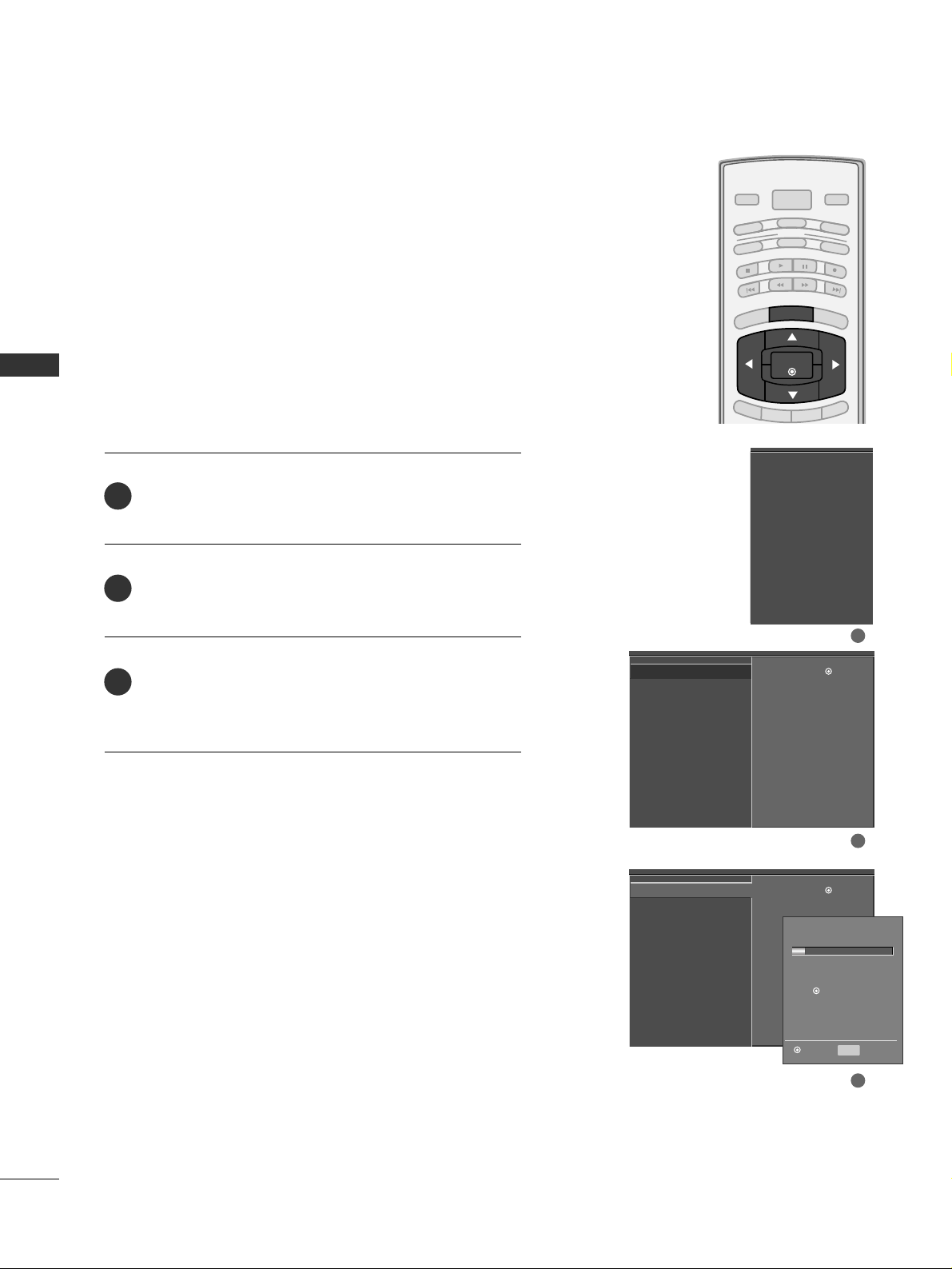
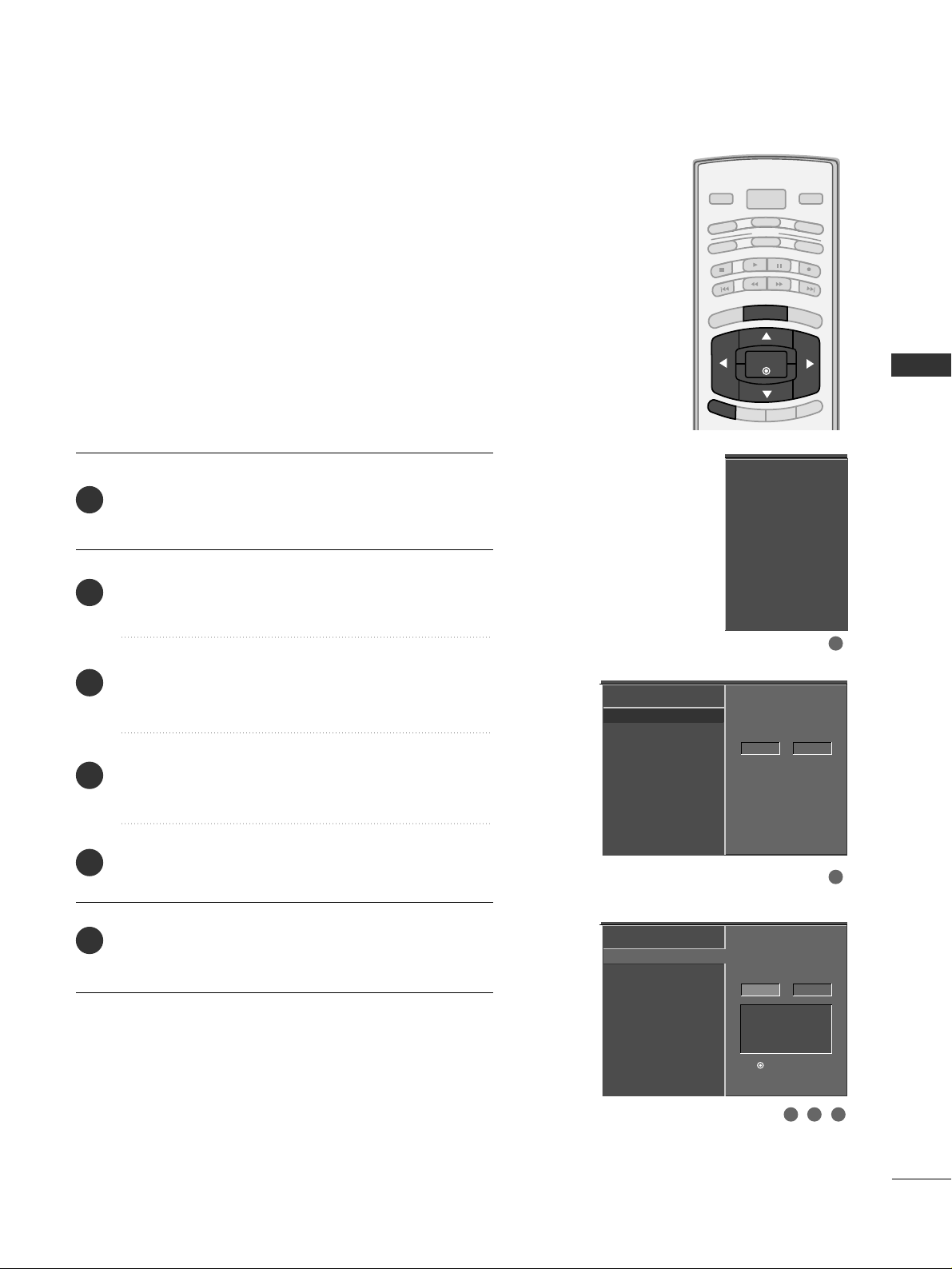
Press the
MMEENNUU
button and then use
DD
or
EE
button
to select the
SSEETTUU PP
menu.
Press the
GG
button and then use
DD
or
EE
button to
select
EE ZZ SS ccaann
.
Press the
EE NN TTEERR
button to begin the channel search.
Allow
EE ZZ SS ccaann
to complete the channel search cycle
for
AANNTTEENNNNAA
and
CC AABBLLEE
.
Automatically finds all channels available through antenna
or cable inputs, and stores them in memory on the channel
list.
Run EZ Scan again after any Antenna/Cable connection
changes.
A password is required to gain access to EZ Scan menu if
the Lock System is turned on.
EZ Scan
Manual Scan
Channel Edit
DTV Signal
Input Source
Input Label
Set ID
EZ Scan
G
Manual Scan
Channel Edit
DTV Signal
Input Source
Input Label
Set ID
Selection (Gor )
leads you to the EZ
scan screen.
EZ Scan
Manual Scan
Channel Edit
DTV Signal
Input Source
Input Label
Set ID
Selection (Gor )
leads you to the EZ
scan screen.
2
3
1
Processing EZ scan...
TV Ch.20
0 channel(s) found
Press to stop the
current scan and start
DIGITAL ANTENNA channel
scan.
MENU Previous
Next
1
2
3
BRIGHT -
BRIGHT +
ENTER
TIMER
RATIO
SIMPLINK
POWER
VCR
TV
DVD
AUDIO
CABLE
STB
MODE
TV INPUT
INPUT
EXIT
MENU
Auto Scan (EZ Scan)
Page 37
WATCHING TV / CHANNEL CONTROL
35
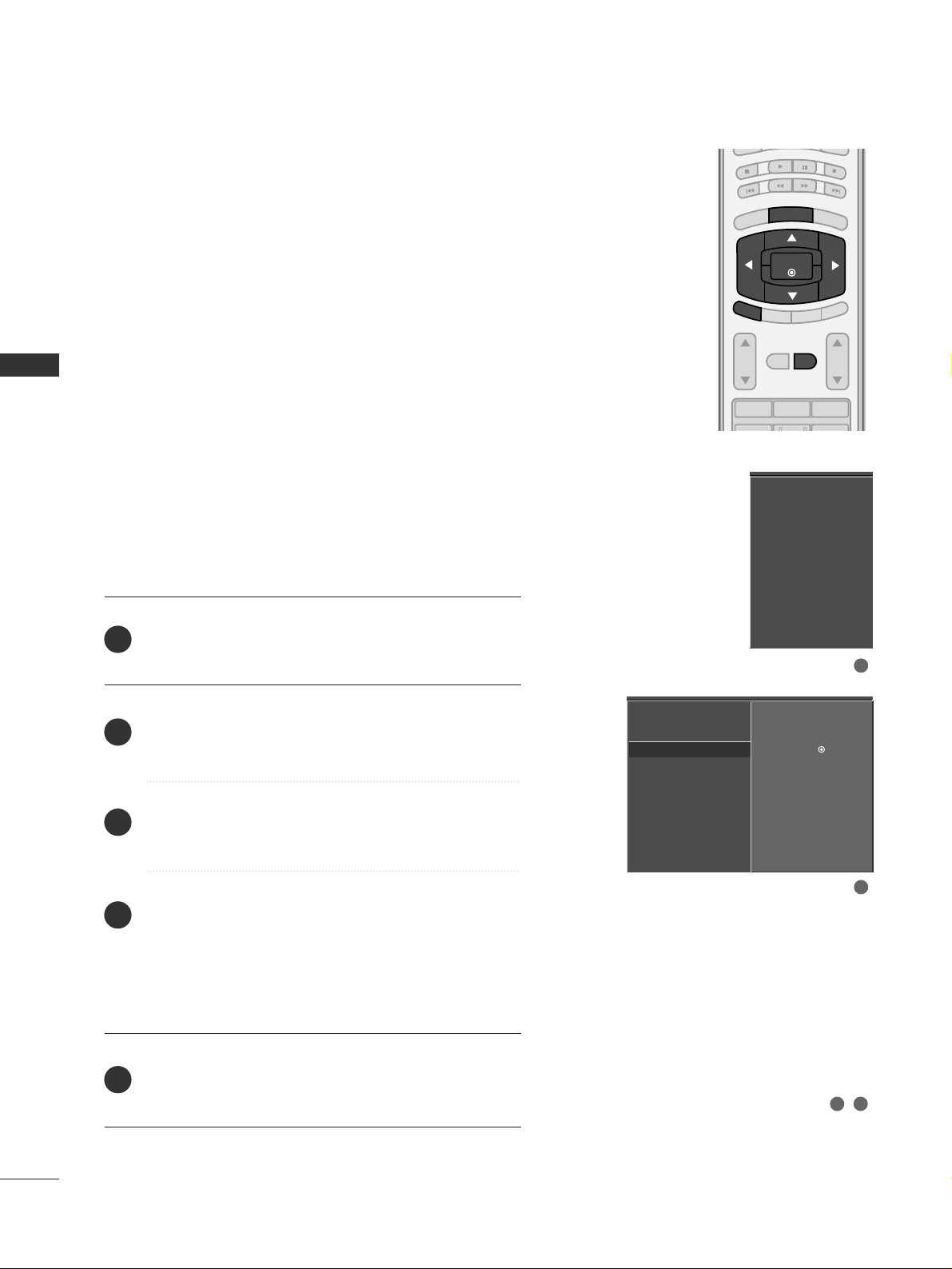
A password is required to gain access to Manual Scan
menu if the Lock System is turned on.
Press the
MMEENNUU
button and then use
DD
or
EE
button
to select the
SSEETTUUPP
menu.
Press the
GG
button and then use
DD
or
EE
button to
select
MMaannuuaall SSccaann
.
Press the
GG
button and then use
DD
or
EE
button to
select
TT VV, DDTTVV, CC AATTVV
, and
CC AADD TTVV
.
Press the
GG
button and then use
DD
or
EE
button to
select channel you want to add or delete.
Press the
EENNTTEERR
button to add or delete the channel.
Press the
EEXXIITT
button to return to TV viewing or press
MMEENNUU
button to return to the previous menu.
BRIGHT -
BRIGHT +
ENTER
TIMER
RATIO
SIMPLINK
POWER
VCR
TV
DVD
AUDIO
CABLE
STB
MODE
TV INPUT
INPUT
EXIT
MENU
EZ Scan
Manual Scan
G
Channel Edit
DTV Signal
Input Source
Input Label
Set ID
Select channel type and
RF-channel number.
TV 2
EZ Scan
Manual Scan
Channel Edit
DTV Signal
Input Source
Input Label
Set ID
EZ Scan
Manual Scan
Channel Edit
DTV Signal
Input Source
Input Label
Set ID
2
1
4
3
6
5
Select channel type and
RF-channel number.
TV
GG
2
Press
to delete the channel.
TV 2-0
DD
EE
1
2
3 4 5
Add/Delete Channel (Manual Scan)
Page 38
WATCHING TV / CHANNEL CONTROL
36
WATCHING TV / CHANNEL CONTROL
There are two different ways in order to add or delete
scanned channels. One is "Custom List" and the other is
"Favorite List" in the channel list. Both of them are available
after EZ Scan on the SETUP menu.
A Custom List can be created by toggling each channel on
or off with ENTER button. The channels in the Custom List
are displayed in black, and the channels deleted from the
Custom List are displayed in gray. Once a channel is highlighted you can add or delete the channel by referring to the
small window at the top-left corner of the screen.
You can create your own Favorite List. Use the
FFAAVV
button
on the remote control when a channel is highlighted and
then add or delete the channel to/from your Favorite List.
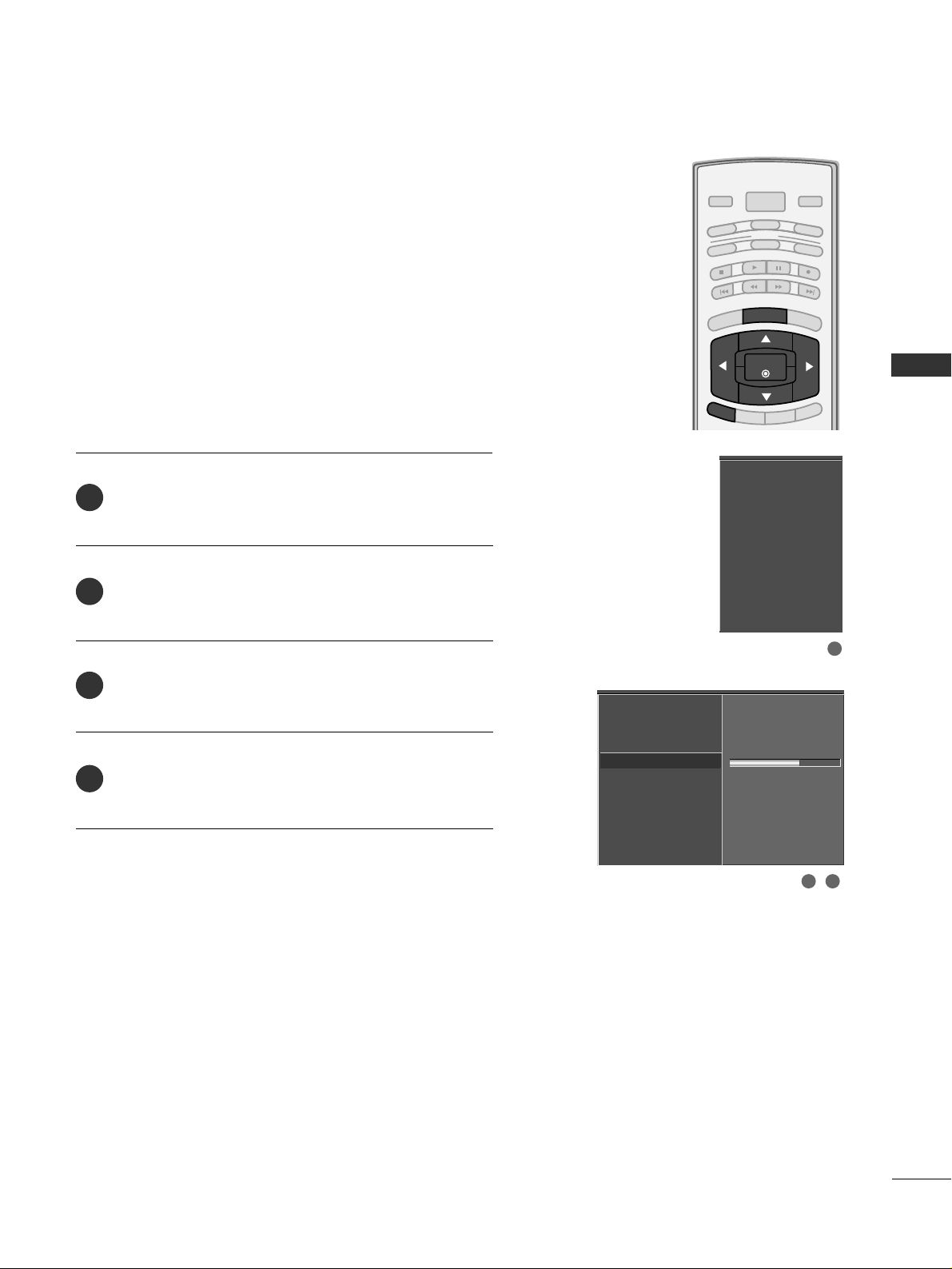
Press the
MMEENNUU
button and then use
DD
or
EE
button
to select the
SSEETTUUPP
menu.
Press the
GG
button and then use
DD
or
EE
button to
select
CC hhaa nnnneell EE ddii tt
.
Press the
GG
button. You will now see a screen filled
with channel numbers and a preview picture.
Use
DD EE FF GG
button to select a channel and then
use the
EENNTTEERR
button to add or delete it.
Press
FFAAVV
button to add the channel to the Favorite List.
The heart-mark will appear in front of that channel
number.
Press
EE XX IITT
button to return to TV viewing or press
MMEENNUU
button to return to the previous menu.
123
VOL CH
MUTE
FAV
BRIGHT -
BRIGHT +
ENTER
TIMER
RATIO
SIMPLINK
AUDIO
STB
EXIT
MENU
EZ Scan
Manual Scan
Channel Edit
G
DTV Signal
Input Source
Input Label
Set ID
Selection ( Gor ) leads
you to the channel edit
screen.
EZ Scan
Manual Scan
Channel Edit
DTV Signal
Input Source
Input Label
Set ID
2
1
4
3
5
1
2
3 4
Channel Editing
DD
EE
Page 39
WATCHING TV / CHANNEL CONTROL
37
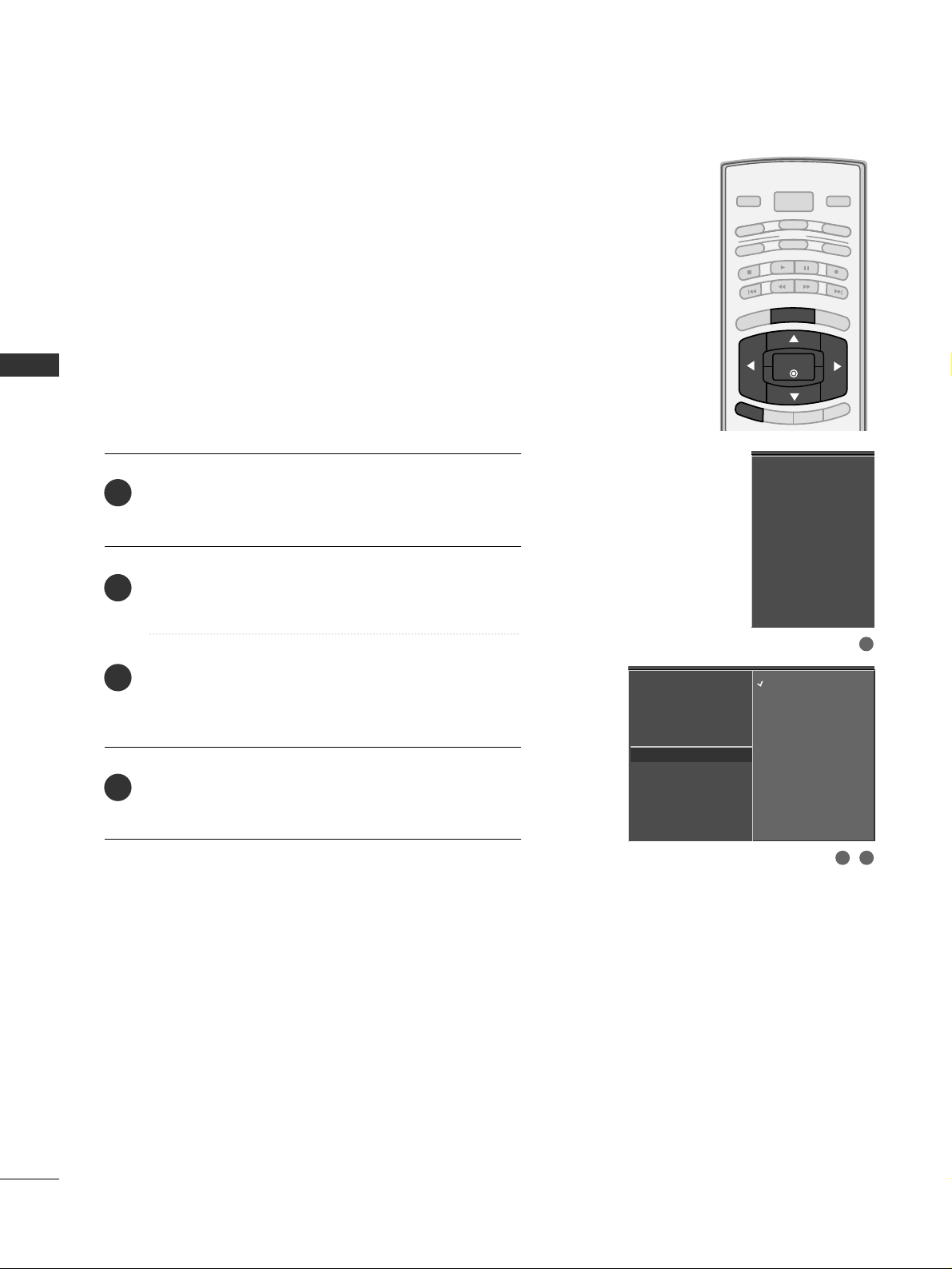
DTV SIGNAL STRENGTH
This feature displays the DTV signal levels being received
and indicates whether you need to adjust your antenna or
digital cable input. The higher the signal strength, the less
likely you are to experience picture degradation.
DTV Signal: This function is only available when the input
signal is DTV or CADTV.
Press the
MMEENNUU
button and then use
DD
or
EE
button
to select the
SSEETTUU PP
menu.
Press the
GG
button and then use
DD
or
EE
button to
select
DDTTVV SSiiggnnaall..
View the on-screen signal strength monitor to see
the quality of the signal being received.
Press
EEXXIITT
button to return to TV viewing or press
MM EE NNUU
button to return to the previous menu.
BRIGHT -
BRIGHT +
ENTER
TIMER
RATIO
SIMPLINK
POWER
VCR
TV
DVD
AUDIO
CABLE
STB
MODE
TV INPUT
INPUT
EXIT
MENU
EZ Scan
Manual Scan
Channel Edit
DTV Signal
Input Source
Input Label
Set ID
Bad Normal Good
EZ Scan
Manual Scan
Channel Edit
DTV Signal
Input Source
Input Label
Set ID
2
3
4
1
1
2 3
Page 40
WATCHING TV / CHANNEL CONTROL
38
INPUT SOURCE SELECTION
WATCHING TV / CHANNEL CONTROL
Changes the picture source so you can watch your off-air
TV, cable TV, VCR, DVD, or any other devices that are
connected to your TV.
Press the
MMEENNUU
button and then use
DD
or
EE
button
to select the
SSEETTUU PP
menu.
Press the
GG
button and then use
DD
or
EE
button to
select
IInn ppuu tt SSoouurrcc ee ..
Press the
GG
button and then use
DD
or
EE
button to
select the source:
TT VV, AA VV 11, AA VV 22, CCoo mmpp oo nneenntt 11
,
CCoo mmpp oo nneenntt 22, RR GG BB --PPCC, HHDDMM II 11//DD VVII
, or
HHDD MMII22
.
Press
EE XX IITT
button to return to TV viewing or press
MMEENNUU
button to return to the previous menu.
EZ Scan
Manual Scan
Channel Edit
DTV Signal
Input Source
G
Input Label
Set ID
TV
AV1
AV2
Component1
Component2
RGB-PC
HDMI1/DVI
HDMI2
EZ Scan
Manual Scan
Channel Edit
DTV Signal
Input Source
Input Label
Set ID
2
3
4
1
1
2 3
BRIGHT -
BRIGHT +
ENTER
TIMER
RATIO
SIMPLINK
POWER
VCR
TV
DVD
AUDIO
CABLE
STB
MODE
TV INPUT
INPUT
EXIT
MENU
Page 41
WATCHING TV / CHANNEL CONTROL
39
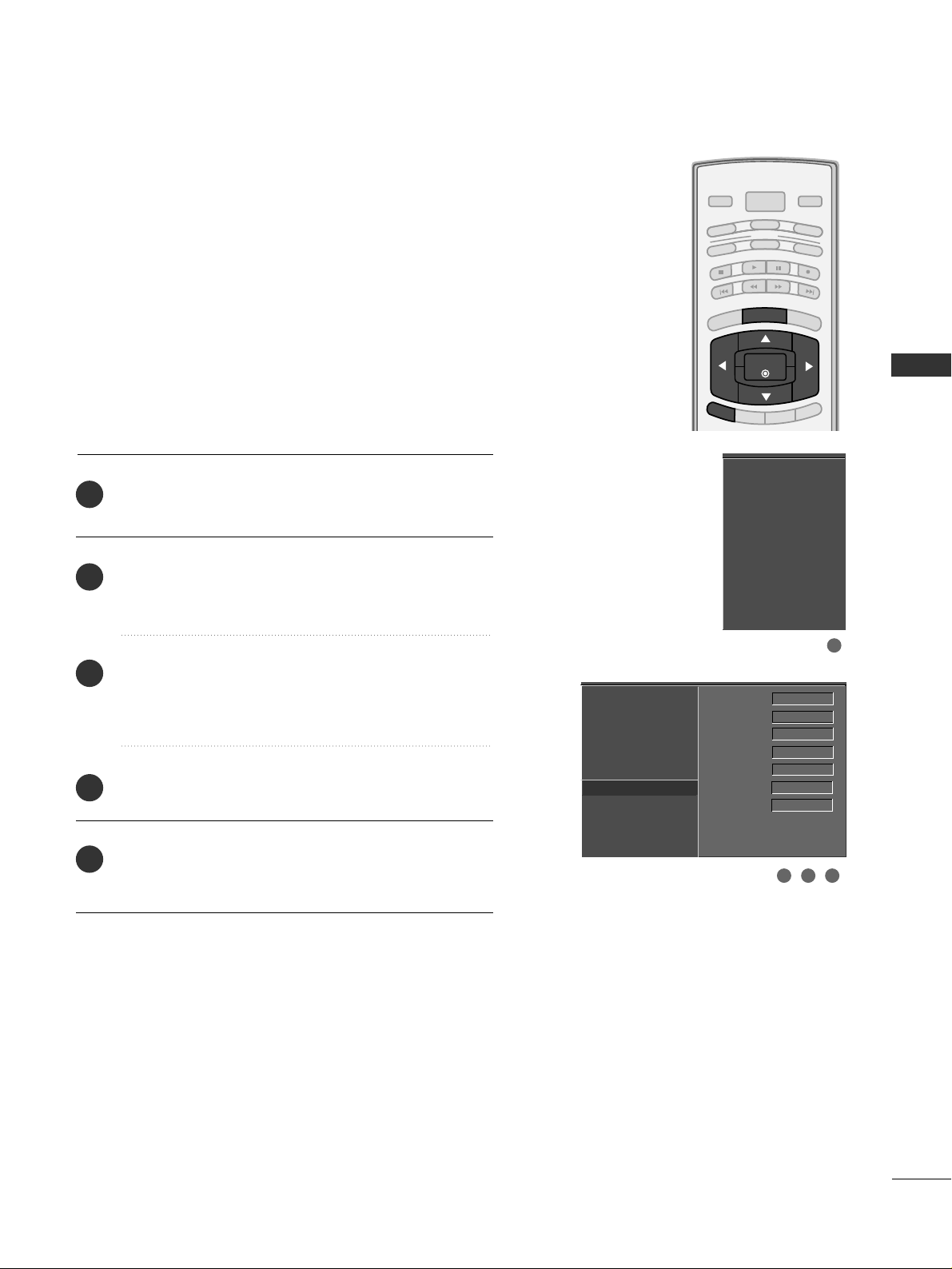
INPUT LABEL
Sets a label to each input source which is not in use when
you press the INPUT button.
Press the
MMEENNUU
button and then use
DD
or
EE
button
to select the
SSEETTUU PP
menu.
Press the
GG
button and then use
DD
or
EE
button to
select
IInn ppuu tt LLaa bb eell
.
Press the
GG
button and then use
DD
or
EE
button to
select the source:
AA VV 11, AA VV 22,CCoo mmpp oo nneenntt 11
,
CCoo mmpp oo nneenntt 22, RR GG BB --PPCC, HHDDMM II 11//DD VVII
or
HHDD MMII22
.
Press the
FF
or
GG
button to select the label.
Press
EE XX IITT
button to return to TV viewing or press
MMEENNUU
button to return to the previous menu.
EZ Scan
Manual Scan
Channel Edit
DTV Signal
Input Source
Input Label
G
Set ID
AV1 Cable Box
AV2 VCR
Component1 DVD
Component2 Set Top Box
RGB-PC PC
HDMI1/DVI Game
HDMI2 Satellite
EZ Scan
Manual Scan
Channel Edit
DTV Signal
Input Source
Input Label
Set ID
2
3
4
5
1
1
3 42
BRIGHT -
BRIGHT +
ENTER
TIMER
RATIO
SIMPLINK
POWER
VCR
TV
DVD
AUDIO
CABLE
STB
MODE
TV INPUT
INPUT
EXIT
MENU
Page 42
WATCHING TV / CHANNEL CONTROL
40
WATCHING TV / CHANNEL CONTROL
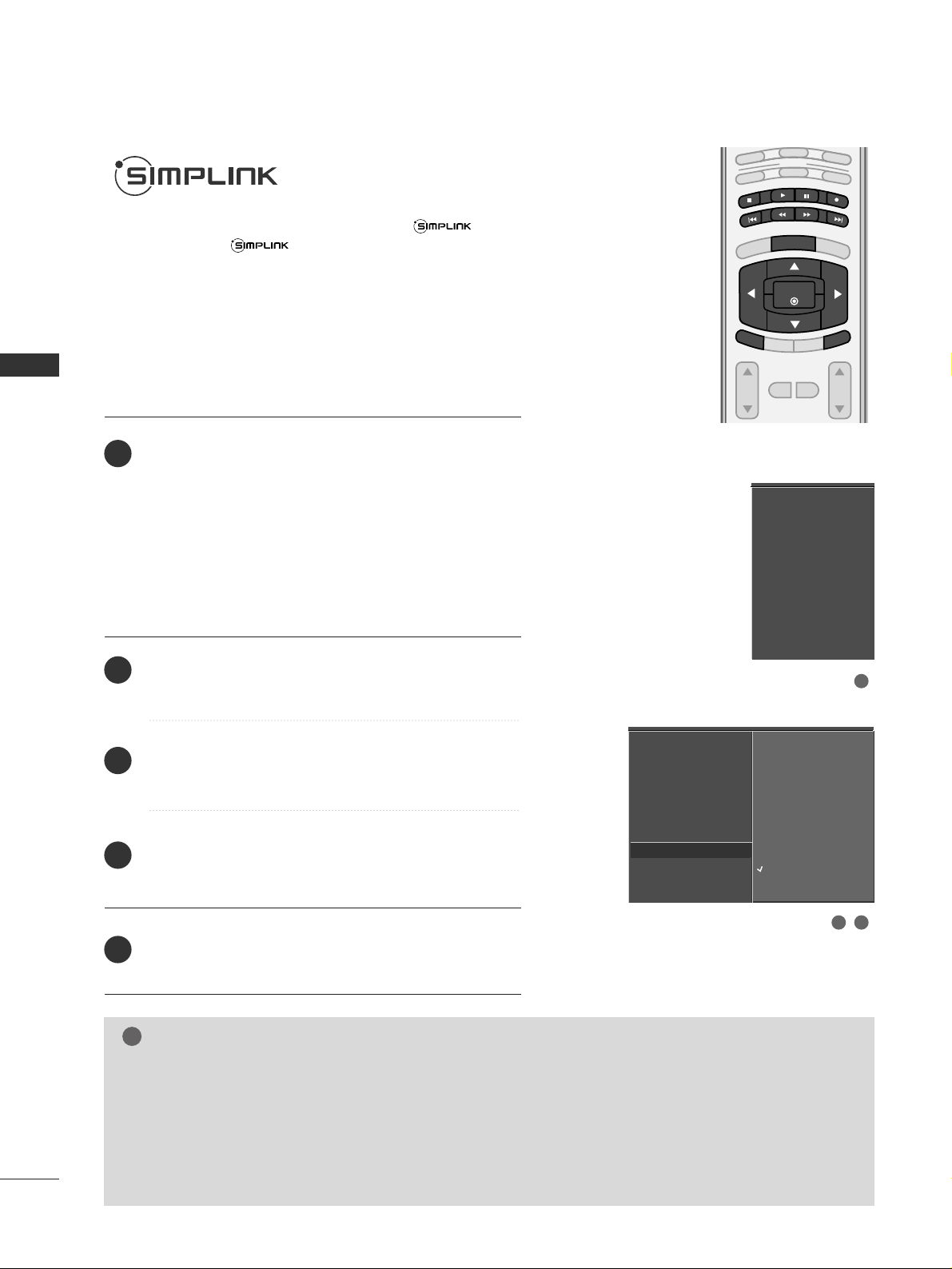
This operates only for the devices with the logo.
Please check the logo.
This allows you to control and play other AV devices
connected to the display through HDMI cable without
additional cables and settings.
If you do not want
SSii mm pp LLii nnkk
menu, select
OO ff ff
.
VOL CH
MUTE
FAV
BRIGHT -
MENU
BRIGHT +
ENTER
EXIT
TIMER
VCR
TV
DVD
AUDIO
CABLE
STB
MODE
RATIO
SIMPLINK
ENTER
EXIT
MENU
Connect the HDMI/DVI IN 1 or HDMI IN 2 terminal
of the TV to the rear terminal (HDMI output) of the
Simplink device with the HDMI cable.
After connecting the HDMI jack for the home theater
with simplink function in the above method, connect
the DIGITAL AUDIO OUT OPTICAL on the back of the
TV to the DIGITAL AUDIO OUT terminal on the back
of the simplink device with the Optical cable.
Press the
MMEENNUU
button and then use
DD
or
EE
button
to select the
OO PPTTIIOO NN
menu.
Press the
GG
button and then use
DD
or EEbutton to
select
SSiimm ppLL iinnkk
.
Press the
GG
button and then use
DD
or EEbutton to
select
OOnn
.
Press
EEXXIITT
button to return to TV viewing or press
MMEENNUU
button to return to the previous menu.
NOTE
!
GG
When operating the external device with SimpLink, press the
TT VV
button among the MODE button on the
remote control.
GG
When you switch the Input source with the
IINN PPUUTT
button on the remote control, you can stop the
operation of device worked by SimpLink.
GG
When you select or operate the media device with home theater function, the speaker automatically
switches to home theater speaker (HT speaker).
SimpLink Preparations
2
3
4
5
1
3 4
2
Aspect Ratio
Caption/Text
Caption Option
Language
ISM Method
Low Power
SimpLink
Aspect Ratio
Caption/Text
Caption Option
Language
ISM Method
Low Power
SimpLink
G
Off
On
Page 43
WATCHING TV / CHANNEL CONTROL
41
■
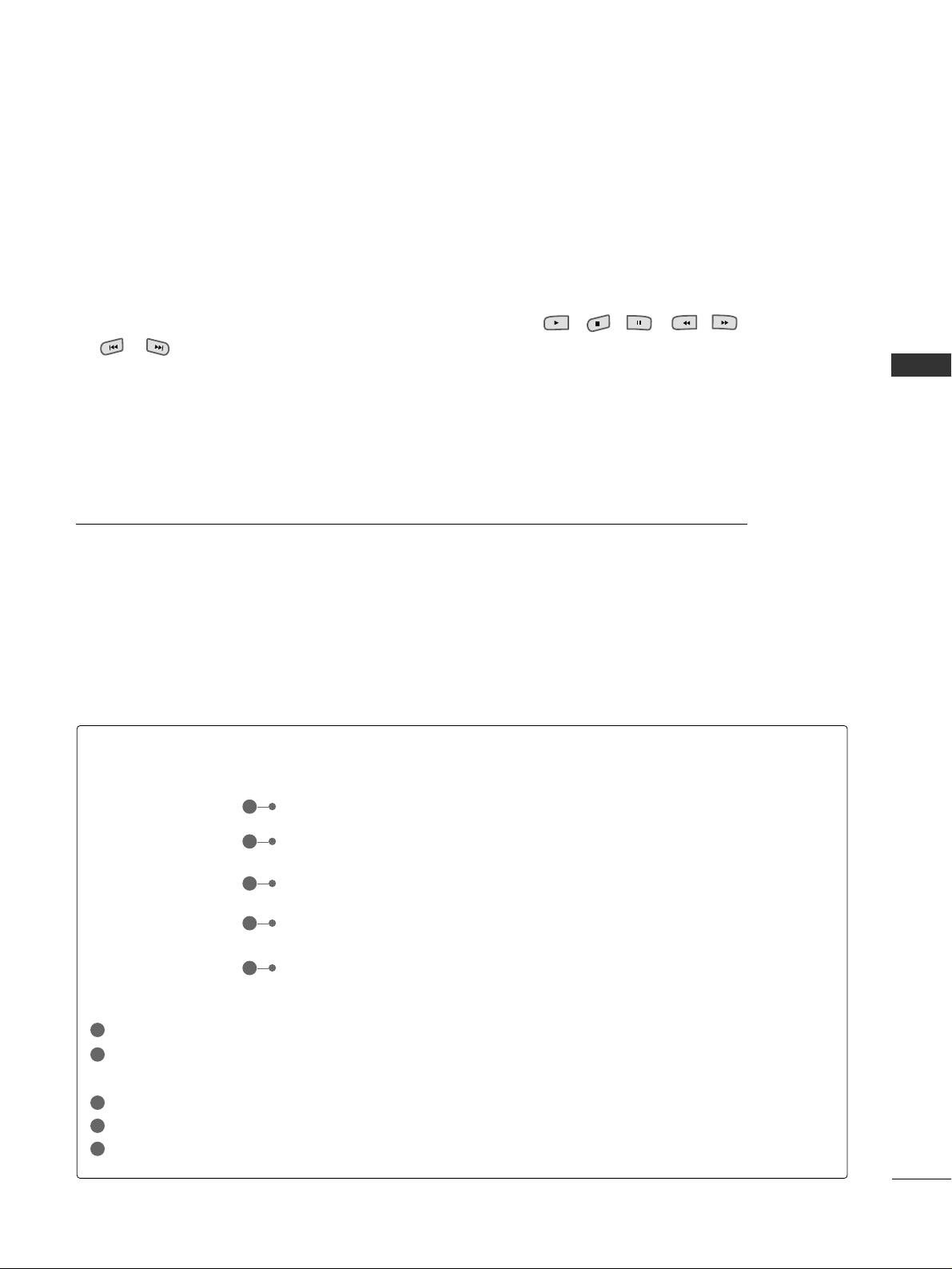
DDii rr ee cctt PP llaayy::
After connecting AV devices to TV, you can directly control the devices and play
media without additional settings.
■
SSeelleecctt AAVV ddee vviiccee::
Enables you to select one of AV devices connected to TV and play it.
■
DDii ss cc ppll aayybbaacckk::
Control connected AV devices by pressing the
,, ,,
,,
,
DD EE
FF GG
,
EENNTTEERR
buttons and buttons for play, stop, pause, fast reverse, fast forward,
chapter skip.
■
PPooww ee rr ooff ff aall ll dd ee vviicceess::
When you power off TV, all connected devices are turned off.
■
SSwwiitt cchh aauuddiioo--oouutt::
Offers an easy way to switch audio-out.
(A device, which is connected to TV through HDMI cable but does not support SimpLink, does not
provide this function)
SimpLink Menu
TTVV vviieewwiinn gg
: Switch to the previous TV channel regardless of the current mode.
DDIISS CC pp llaa yybb aacc kk
: Select and play discs. When multiple discs are available, the titles of discs are conveniently dis-
played at the bottom of the screen.
VV CCRR ppll aayybbaacckk
: Play and control the connected VCR.
HHDDDD RR ee ccoorrdd iinngg ss ppll aayybbaacckk
: Play and control recordings stored in HDD.
AAuuddiioo OO uutt ttoo HH TT ssppeeaakkeerr//AAuu ddiioo OOuutt tt oo TT VV
: Select HT speaker or TV speaker for Audio Out.
SimpLink Functions
1
2
3
4
5
GG
Selected Device
GG
When no device is connected
(displayed in gray)
GG
When a device is connected
(displayed in bright color)
1
2
3
4
5
Page 44
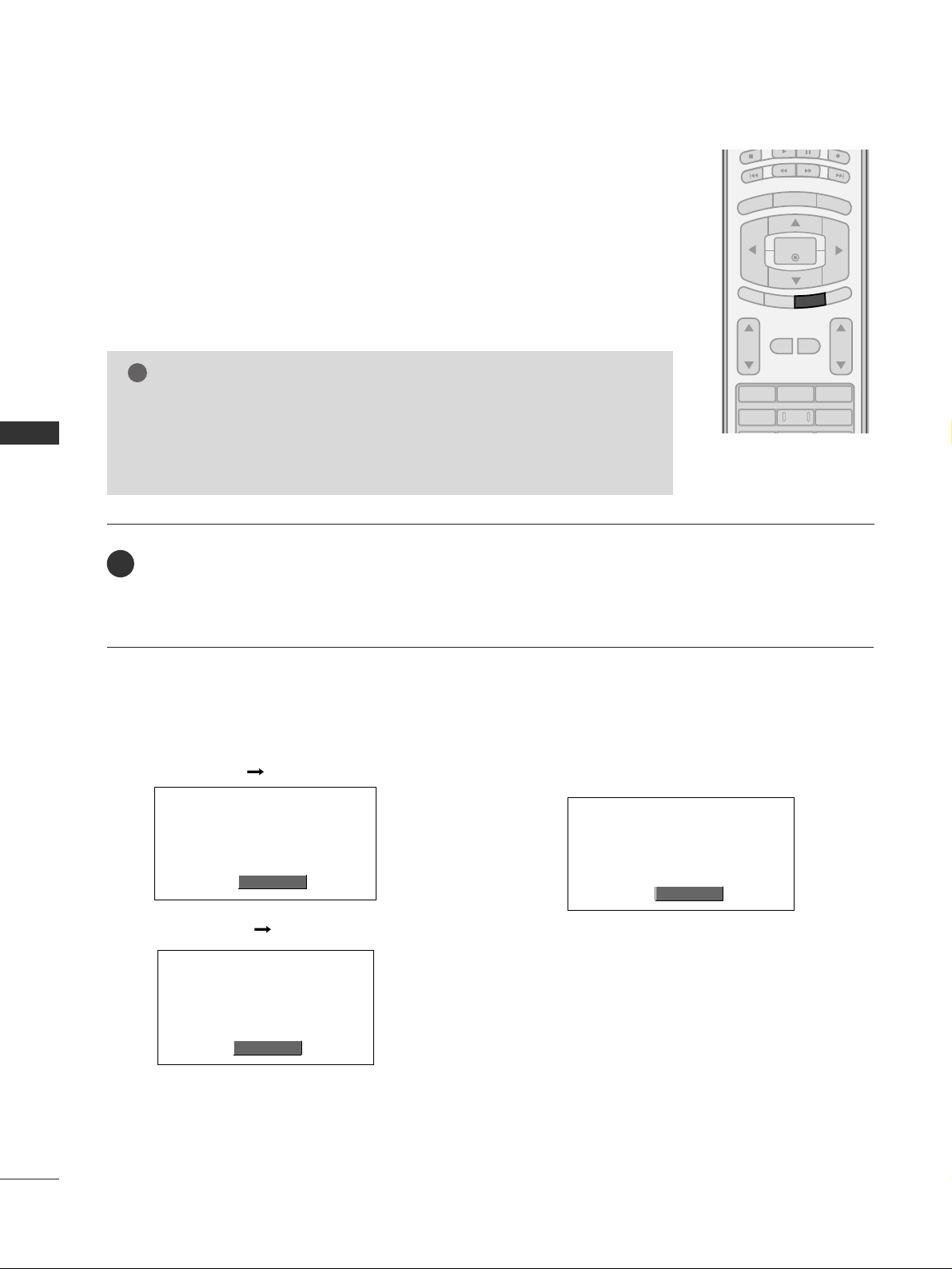
PICTURE CONTROL
42
PICTURE SIZE (ASPECT RATIO) CONTROL
PICTURE CONTROL
123
456
VOL CH
MUTE
FAV
BRIGHT -
MENU
BRIGHT +
ENTER
EXIT
TIMER
SIMPLINK
RATIO
This feature allows an analog picture with a 4:3 aspect ratio is displayed on your TV.
When you receive an analog picture with a 4:3 aspect ratio on your 16:9 TV, you
need to specify how the picture is to be displayed.
■
RGB-PC/DVI-PC input source use 4:3 or 16:9 aspect ratio.
Set by program
Selects the proper picture proportion to match
the source’s image.
4:3
Choose 4:3 when you want to view a picture
with an original 4:3 aspect ratio.
NOTE
!
GG
If a fixed image is displayed on the screen for a long time, the image may
become imprinted on the screen and remain visible.
This phenomenon is common to all manufactures and in consequence the
manufactures warranty does not cover the product bearing this phenomenon.
Press the
RRAATTIIOO
button repeatedly to select the desired picture format.
■
You can also adjust
AAssppeecctt RRaattiioo
in the
OOPPTTIIOONN
menu.
1
Set By Program
4:3
Set By Program
(4:3 4:3)
(16:9 16:9)
Page 45
PICTURE CONTROL
43
16:9
Adjust the picture horizontally, in a linear proportion to fill the entire screen.
Horizon
The screen size is, more enlarged at both sides,
to create a spectacular view.
Zoom 1
Choose Zoom 1 when you want to view the
picture without any alteration. However, the
top and bottom portions of the picture will be
cropped.
Zoom 2
Choose Zoom 2 when you want the picture to
be altered, both vertically extended and
cropped. The picture taking a halfway trade off
between alteration and screen coverage.
16:9
Horizon
Zoom 1
Zoom 2
Page 46
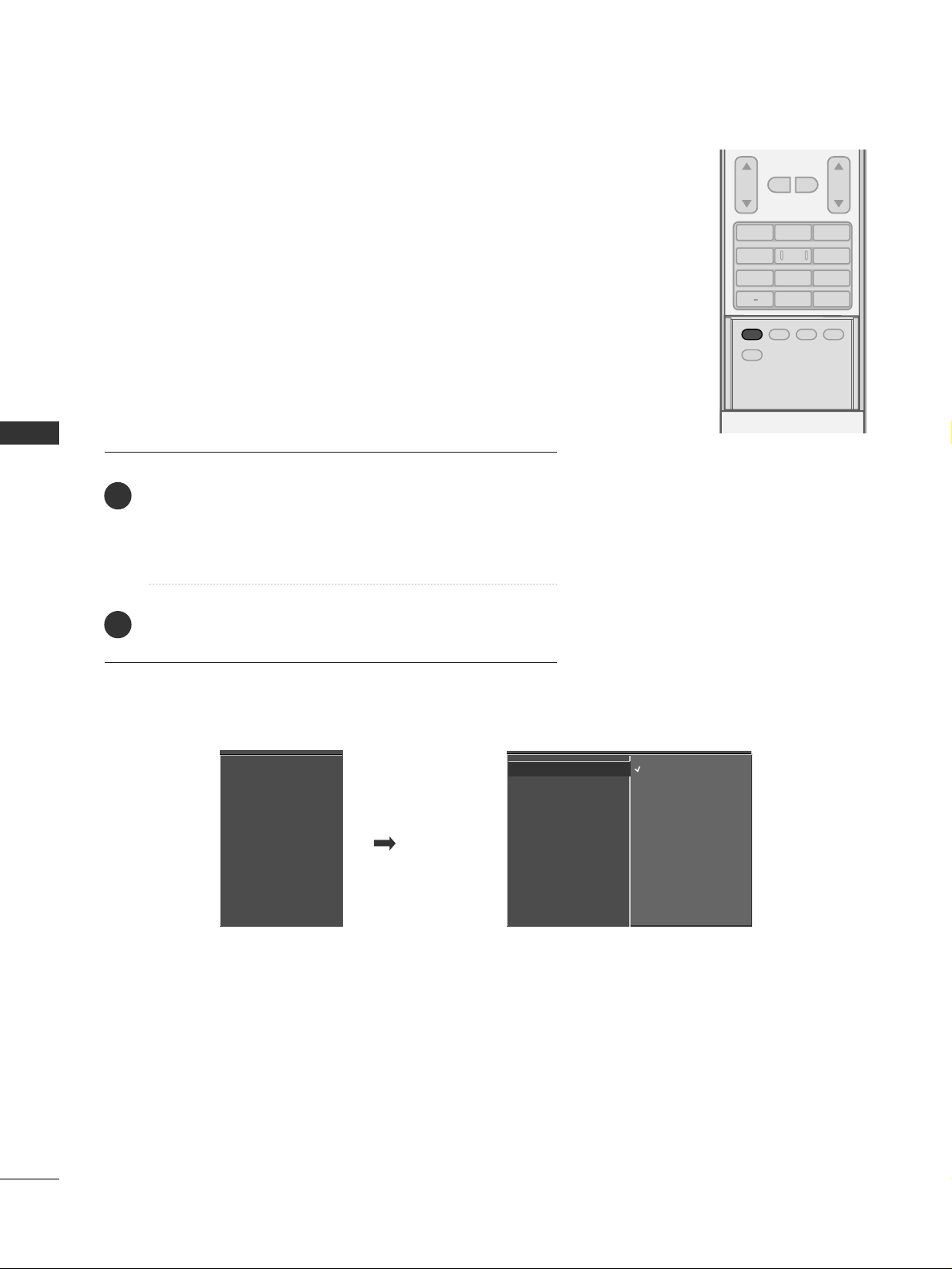
PICTURE CONTROL
44
PRESET PICTURE SETTINGS
PICTURE CONTROL
ADJUST
SAP
SOUND
PICTURE
CC
123
456
7809
BACK
VOL CH
MUTE
FAV
EZ Picture - Preset
Press the
PPII CCTTUU RREE
button repeatedly to select the picture
appearance setup option as below :
DDaayyllii gghhtt, NN oorrmm aall, NN iigghh tt TTii mmee, UUssee rr 11
, and
UUssee rr 22
(your own settings).
Press the
EE XX IITT
button to save and return to TV viewing.
EZ Picture adjusts the TV for the best picture appearance. Select
the preset value in the EZ Picture menu based on the program
category.
DDaayylliigghhtt,NNoorrmmaall,NNiigghhtt TTiimmee
Settings are preset for the
optimum picture quality at the factory and are not adjustable.
In the
UUsseerr11
and
UUsseerr22
modes only, user can directly adjust
the contrast, brightness, color, sharpness, tint.
■
You can also use the
VVIIDDEEOO
menu to adjust
EE ZZ PP iicctt uurree
.
2
1
EZ Picture
Color Temperature
XD
Advanced
Video Reset
EZ Picture
G
Color Temperature
XD
Advanced
Video Reset
Daylight
Normal
Night Time
User1
User2
Page 47
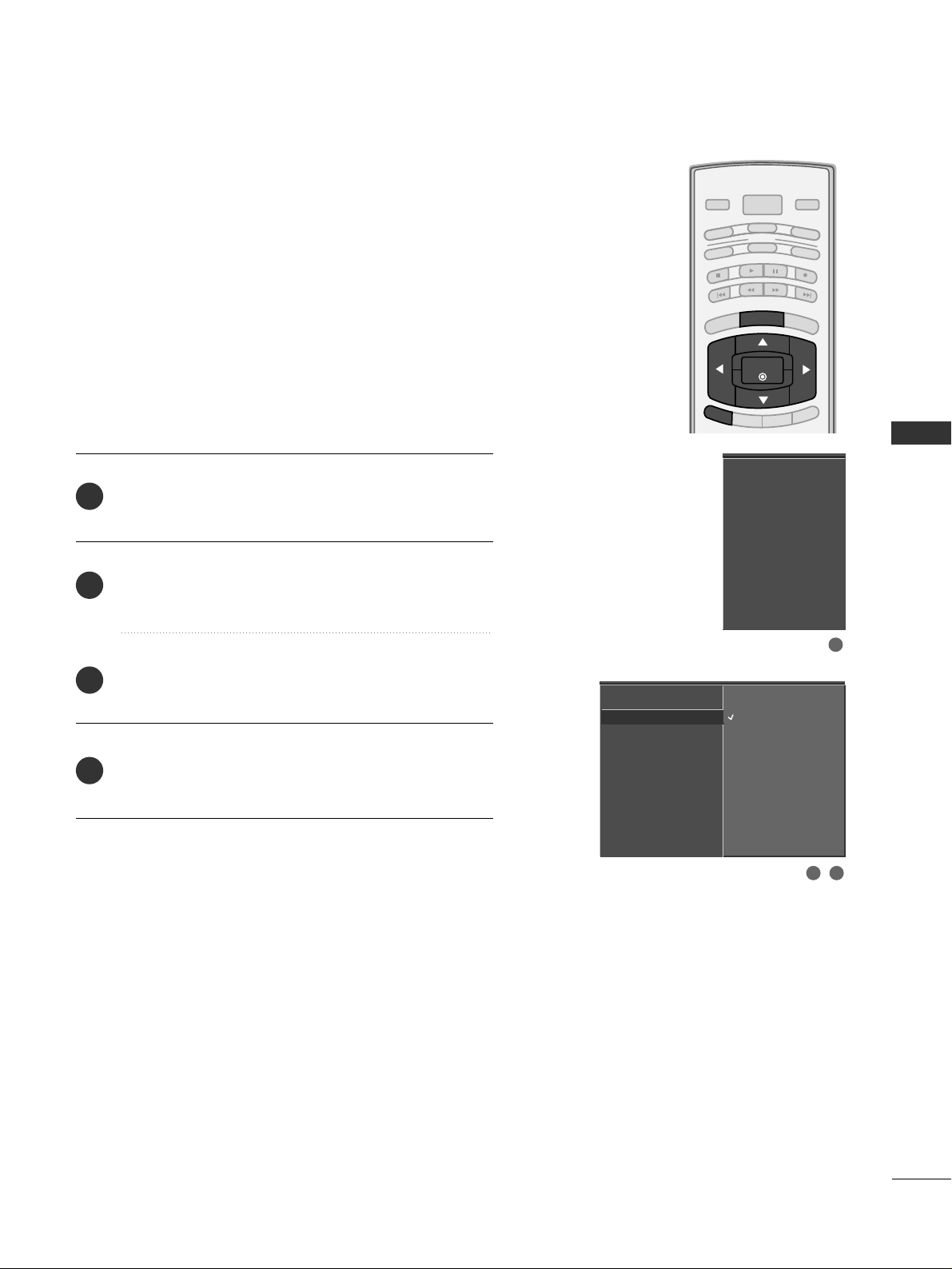
PICTURE CONTROL
45
BRIGHT -
BRIGHT +
ENTER
TIMER
RATIO
SIMPLINK
POWER
VCR
TV
DVD
AUDIO
CABLE
STB
MODE
TV INPUT
INPUT
EXIT
MENU
Color Tone - Preset
Choose one of three automatic color adjustments. Set to
warm to enhance hotter colors such as red, or set to cool
to see less intense colors with more blue.
Press the
MMEENNUU
button and then use
DD
or
EE
button
to select the
VV II DDEEOO
menu.
Press the
GG
button and then use
DD
or
EE
button to
select
CCoo lloorr TTeemmppeerraa ttuurree
.
Press the
GG
button and then use
DD
or
EE
button to
select either
CC oo ooll,MMeedd iiuumm, WW aarrmm
or
UUss ee rr
.
Press
EE XX IITT
button to return to TV viewing or press
MMEENNUU
button to return to the previous menu.
2
3
4
1
EZ Picture
Color Temperature
G
XD
Advanced
Video Reset
Cool
Medium
Warm
User
EZ Picture
Color Temperature
XD
Advanced
Video Reset
1
2 3
Page 48
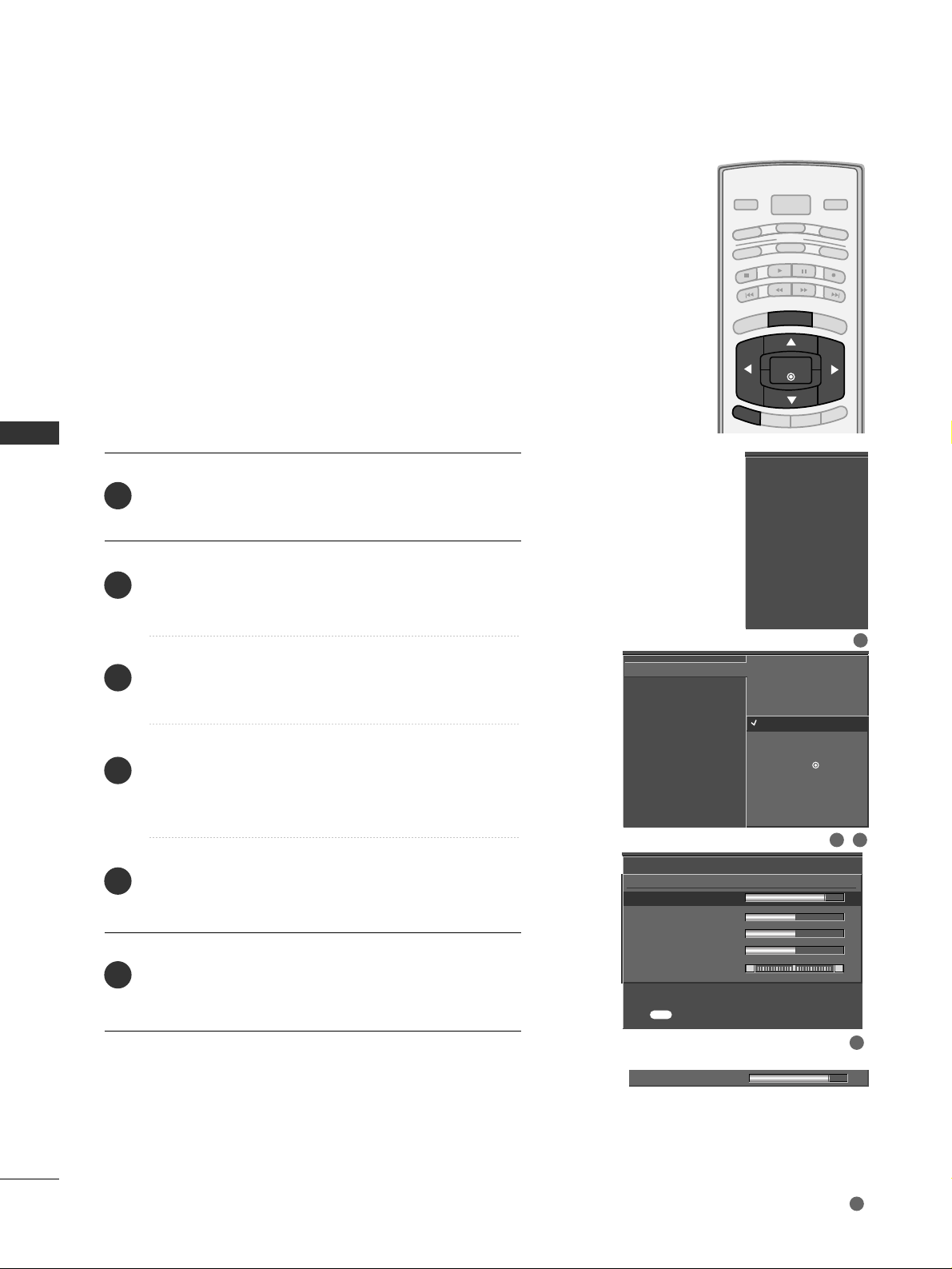
PICTURE CONTROL
46
MANUAL PICTURE ADJUSTMENT
PICTURE CONTROL
BRIGHT -
BRIGHT +
ENTER
TIMER
RATIO
SIMPLINK
POWER
VCR
TV
DVD
AUDIO
CABLE
STB
MODE
TV INPUT
INPUT
EXIT
MENU
EZ Picture - User Mode
Adjust the picture appearance to suit your preference and
viewing situations.
EZ Picture
Color Temperature
XD
Advanced
Video Reset
Daylight
Normal
Night Time
User 1
G
User 2
Selection ( Gor ) leads you
to the detailed setting
screen.
Contrast 85
FF
G
EE
User1
Contrast 85
G
Brightness 50
Color 50
Sharpness 50
Tint 0
R G
Press to confirm.
MENU
EZ Picture
Color Temperature
XD
Advanced
Video Reset
1
2 3
4
5
Press the
MMEENNUU
button and then use
DD
or
EE
button
to select the
VV II DDEEOO
menu.
Press the
GG
button and then use
DD
or
EE
button to
select
EE ZZ PP iicctt uurree
.
Press the
GG
button and then use
DD
or
EE
button to
select
UUsseerr 11
or
UUsseerr 22
.
Press the
GG
button and then use
DD
or
EE
button to
select the desired picture option
((
CC oonn tt rr aa ss tt
,
BB rr iigghh ttnneessss,CC oo lloo rr,SShhaarrpp nneessss
, or
TT iinntt
))
.
Press the
GG
button and then useFFor GGbutton to
make appropriate adjustments.
Press
EE XX IITT
button to return to TV viewing or press
MMEENNUU
button to return to the previous menu.
2
3
4
5
6
1
Page 49
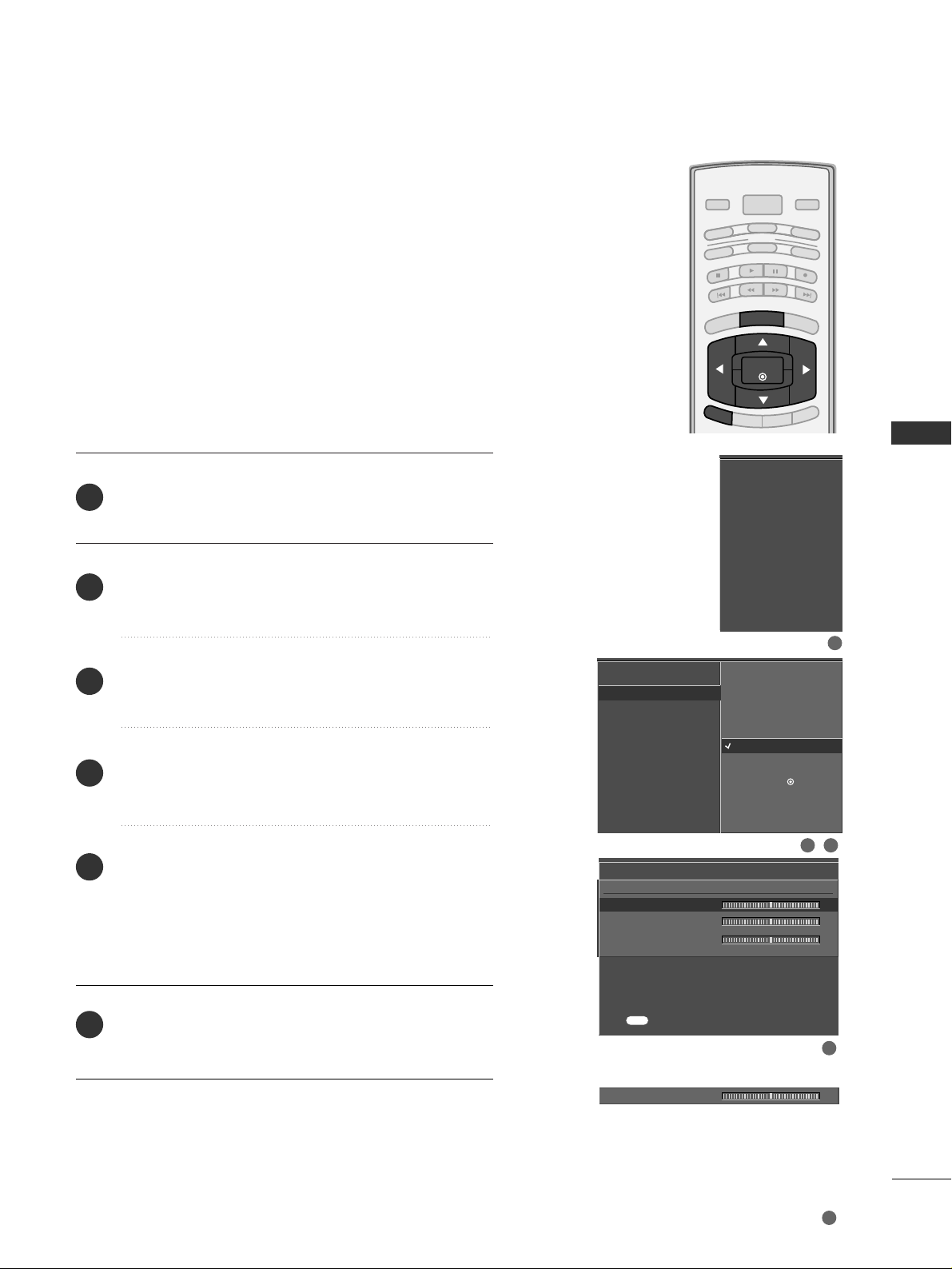
PICTURE CONTROL
47
BRIGHT -
BRIGHT +
ENTER
TIMER
RATIO
SIMPLINK
POWER
VCR
TV
DVD
AUDIO
CABLE
STB
MODE
TV INPUT
INPUT
EXIT
MENU
You can also adjust the detailed settings (Red, Green, Blue)
by selecting the
CCooll oo rr TTeemm pp ee rraatt uurr ee --UUss eerr
menu.
Color Tone - User Mode
Press the
MMEENNUU
button and then use
DD
or
EE
button
to select the
VV II DDEEOO
menu.
Press the
GG
button and then use
DD
or
EE
button to
select
CCoo lloorr TTeemmppeerraa ttuurree
.
Press the
GG
button and then use
DD
or
EE
button to
select
UUss ee rr
.
Press the
GG
button and then use
DD
or
EE
button to
select
RR eedd, GGrreeeenn
, or
BB lluuee
.
Press the
GG
button and then use
FF
or
GG
button to
make appropriate adjustments.
■
The adjustment range of
RR eedd, GGrree ee nn
, or
BB ll uu ee
is -
20
~ +20.
Press
EE XX IITT
button to return to TV viewing or press
MMEENNUU
button to return to the previous menu.
EZ Picture
Color Temperature
XD
Advanced
Video Reset
EZ Picture
Color Temperature
XD
Advanced
Video Reset
2
3
4
5
6
1
User
Red 0
G
Green 0
Blue 0
Press to confirm.
MENU
Selection ( Gor ) leads you
to the detailed setting
screen.
Cool
Medium
Warm
User
G
Red 0
FF
G
EE
2 3
1
4
5
Page 50
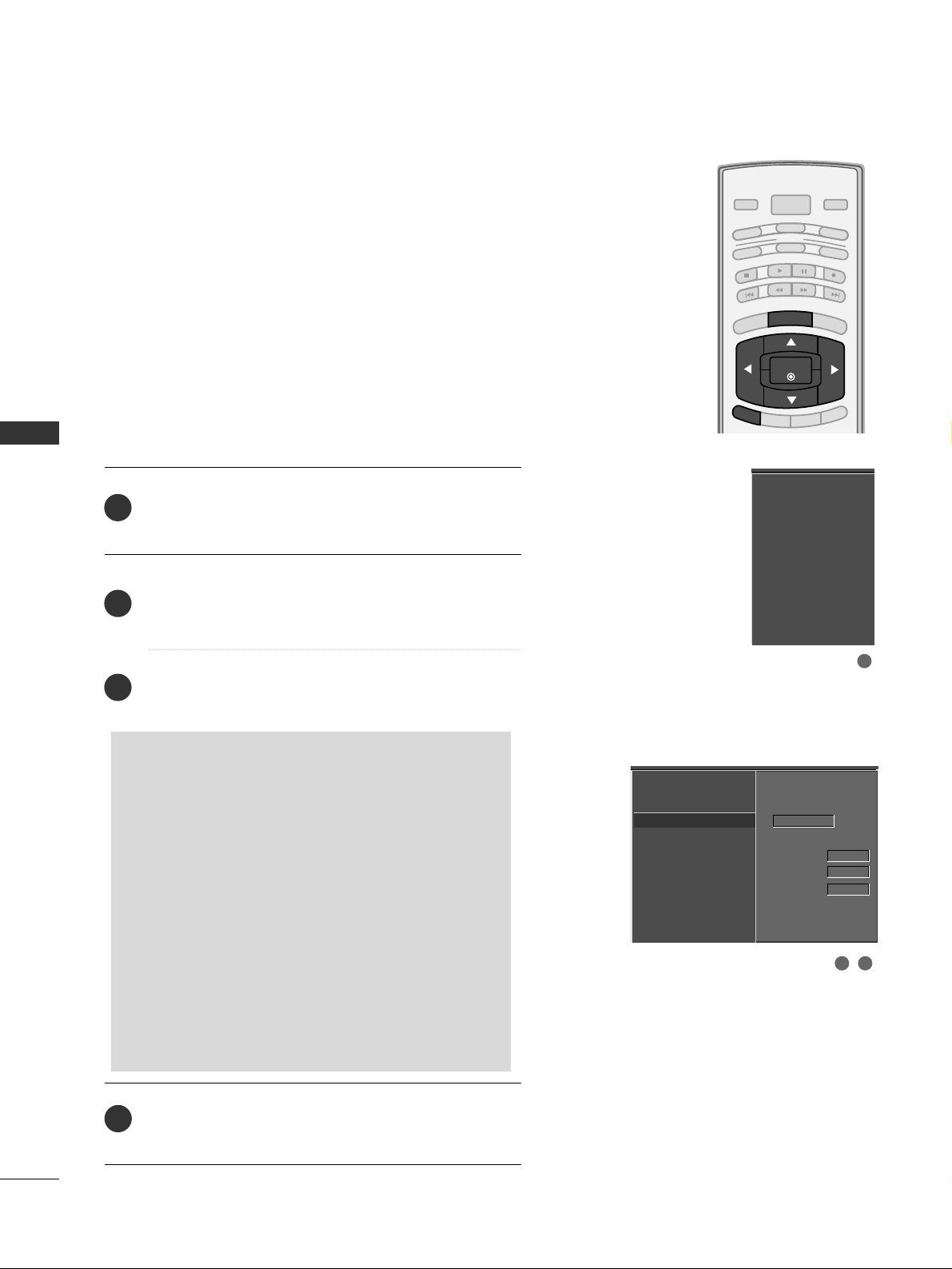
PICTURE CONTROL
48
XD - PICTURE IMPROVEMENT TECHNOLOGY
PICTURE CONTROL
BRIGHT -
BRIGHT +
ENTER
TIMER
RATIO
SIMPLINK
POWER
VCR
TV
DVD
AUDIO
CABLE
STB
MODE
TV INPUT
INPUT
EXIT
MENU
Press the
MMEENNUU
button and then use
DD
or
EE
button
to select the
VV II DDEEOO
menu.
Press the
GG
button and then use
DD
or
EE
button to
select
XX DD
.
Press the
GG
button and then use
DD
or
EE
button to
select
AAuuttoo orMMaa nnuuaall
.
Press
EE XX IITT
button to return to TV viewing or press
MMEENNUU
button to return to the previous menu.
XD is LG Electronic’s unique picture improving technology
to display a real HD source through an advanced digital signal processing algorithm.
When selecting EZ Picture options (Daylight, Normal and
Night time), XD is automatically changed to Auto.
When selecting EZ Picture options (User 1 and User 2), you
can choose the Auto / Manual.
When selecting the Manual, you can adjust the XD
Contrast, XD color and XD Noise.
EZ Picture
Color Temperature
XD
G
Advanced
Video Reset
Manual
XD Contrast On
XD Color On
XD Noise On
EZ Picture
Color Temperature
XD
Advanced
Video Reset
2
3
4
1
SSeelleeccttii nngg tthh ee MMaann uuaall
1. Press the
GG
button and then use
FF
or
GG
but-
ton to select
XX DD CC oo nnttrraasstt, XX DD CCoolloorr
or
XX DD NNooiissee
.
■
XX DD CC oo nnttrraasstt::
Optimizing the contrast
automatically according to the brightness of
the reflection.
■
XX DD CCoolloorr::
Adjusting the colors of the
reflection automatically to reproduce as
closely as possible to the natural colors.
■
XX DD NNooii ss ee ::
Removing the noise up to the
point where it does not damage the original
picture.
2. Use the
DD
or
EE
button to select
OO nn
or
OO ff ff
.
2 3
1
Page 51
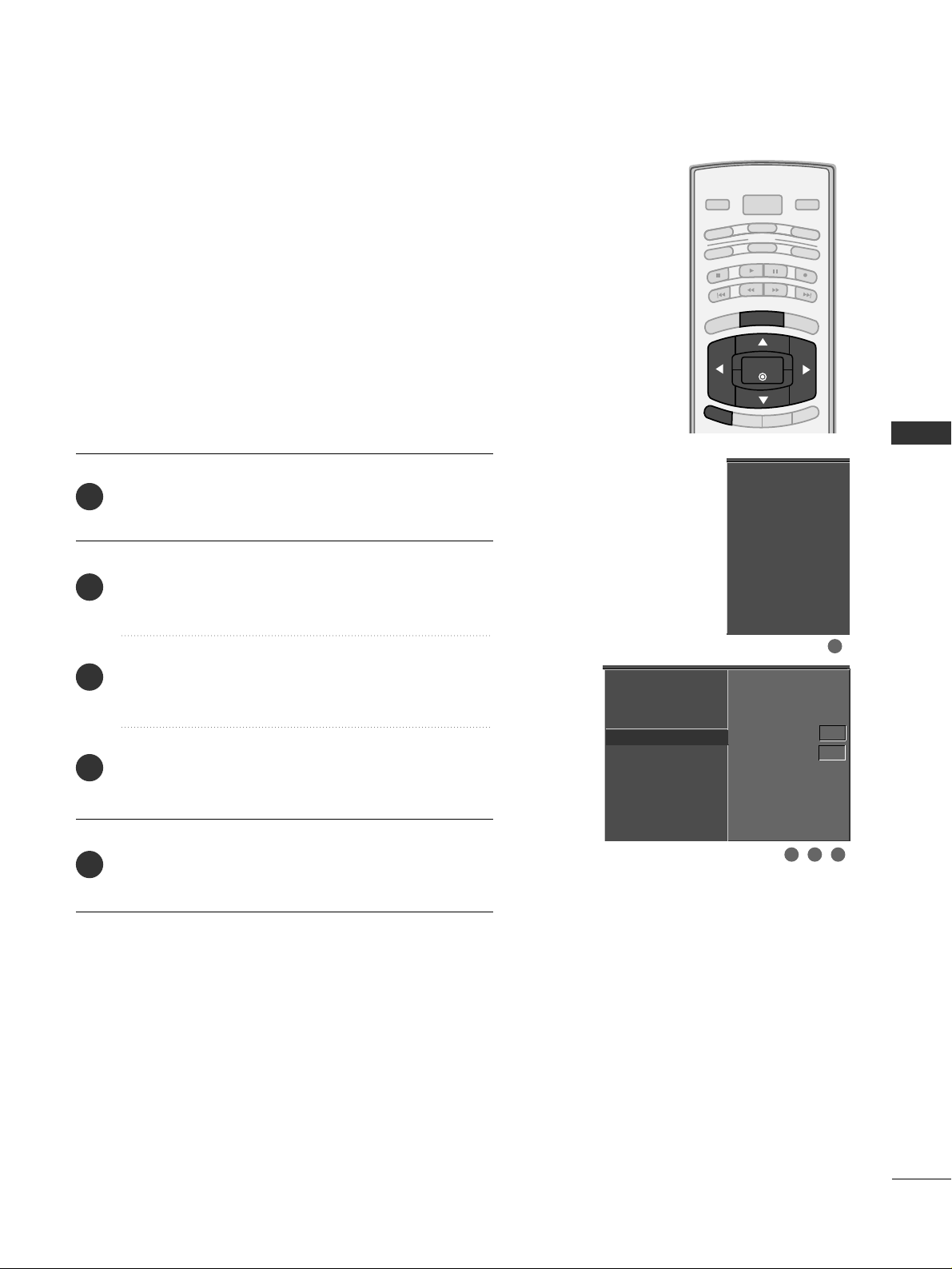
PICTURE CONTROL
49
ADVANCED - CINEMA 3:2 PULL DOWN MODE
BRIGHT -
BRIGHT +
ENTER
TIMER
RATIO
SIMPLINK
POWER
VCR
TV
DVD
AUDIO
CABLE
STB
MODE
TV INPUT
INPUT
EXIT
MENU
Press the
MMEENNUU
button and then use
DD
or
EE
button
to select the
VV II DDEEOO
menu.
Press the
GG
button and then use
DD
or
EE
button to
select
AAdd vvaa nncceedd
.
Press the
GG
button and then use
DD
or
EE
button to
select
CCiinneemmaa 33:: 22 MMoo ddee
.
Press the
GG
button and then use
DD
or
EE
button to
select
OO nn
or
OO ff ff
.
Press
EE XX IITT
button to return to TV viewing or press
MMEENNUU
button to return to the previous menu.
Set up the TV for the best picture appearance for viewing
movies.
When you operate Cinema 3:2 Mode (3:2 Pull-Down Mode
or Cinema Correction Mode), the TV will adjust 24 fps
video from movies to 30 fps video for display.
This feature operates only in Analog, AV1, AV2, and
Component 480i mode.
EZ Picture
Color Temperature
XD
Advanced
G
Video Reset
Cinema 3:2 Mode Off
Black Level Low
EZ Picture
Color Temperature
XD
Advanced
Video Reset
2
3
4
5
1
2 3 4
1
Page 52
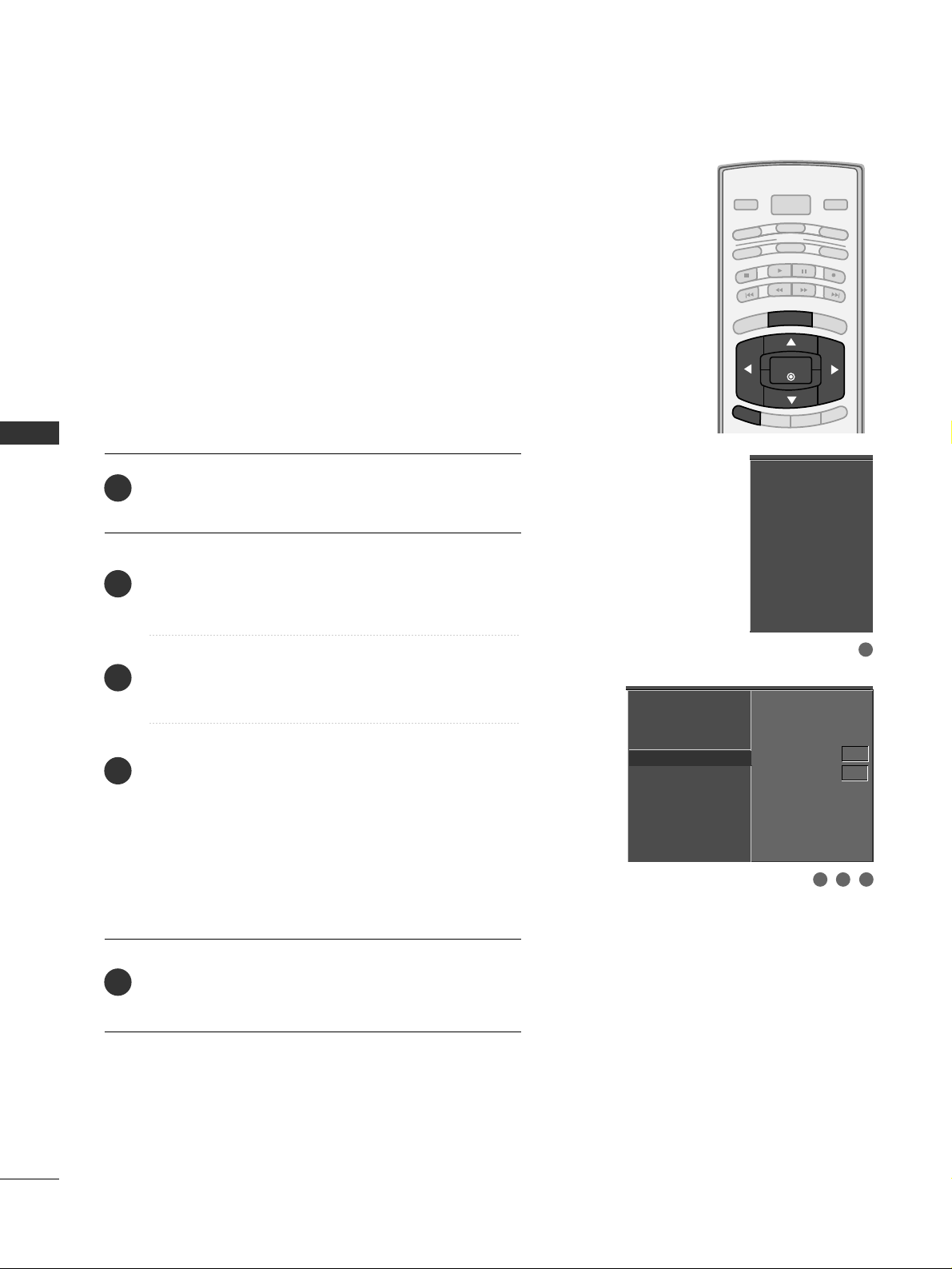
PICTURE CONTROL
50
ADVANCED - BLACK (DARKNESS) LEVEL
PICTURE CONTROL
BRIGHT -
BRIGHT +
ENTER
TIMER
RATIO
SIMPLINK
POWER
VCR
TV
DVD
AUDIO
CABLE
STB
MODE
TV INPUT
INPUT
EXIT
MENU
Press the
MMEENNUU
button and then use
DD
or
EE
button
to select the
VV II DDEEOO
menu.
Press the
GG
button and then use
DD
or
EE
button to
select
AAdd vvaa nncceedd
.
Press the
GG
button and then use
DD
or
EE
button to
select
BB llaacckk ll ee vveell
.
Press the
GG
button and then use
DD
or
EE
button to
select
LL oo ww
or
HHii gg hh
.
■
LL oo ww
The screen gets darker.
■
HHii gg hh
The screen gets brighter.
Press
EE XX IITT
button to return to TV viewing or press
MMEENNUU
button to return to the previous menu.
Adjusting the contrast and the brightness of the screen
using the black level of the screen.
This feature operates only in AV1, AV2, HDMI1/DVI, or
HDMI2mode.
EZ Picture
Color Temperature
XD
Advanced
G
Video Reset
Cinema 3:2 Mode Off
Black Level Low
EZ Picture
Color Temperature
XD
Advanced
Video Reset
2
3
4
5
1
3 42
1
Page 53
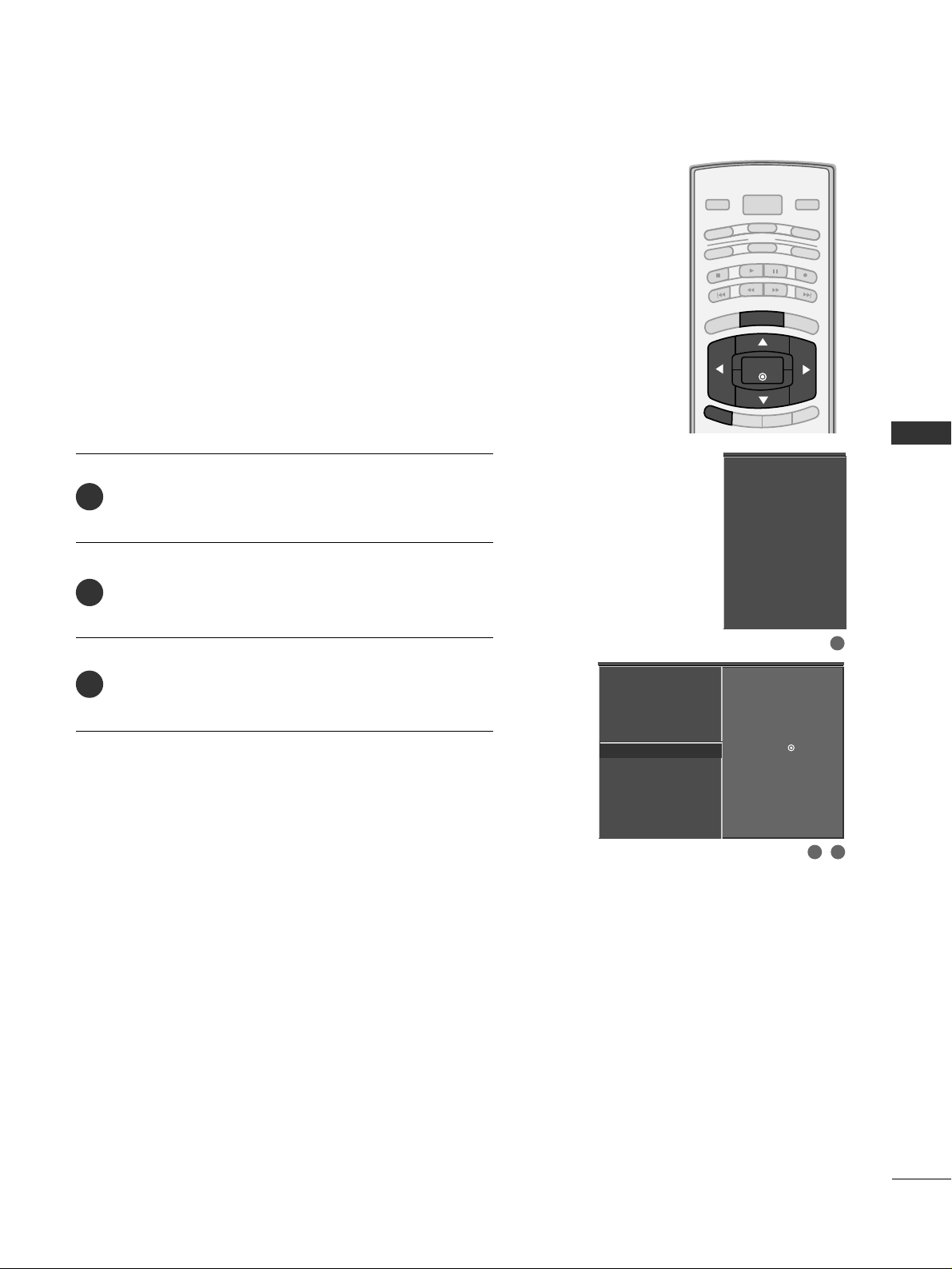
PICTURE CONTROL
51
PICTURE RESET
BRIGHT -
BRIGHT +
ENTER
TIMER
RATIO
SIMPLINK
POWER
VCR
TV
DVD
AUDIO
CABLE
STB
MODE
TV INPUT
INPUT
EXIT
MENU
Press the
MMEENNUU
button and then use
DD
or
EE
button
to select the
VVIIDDEEOO
menu.
Press the
GG
button and then use
DD
or
EE
button to
select
VViiddeeoo RReesseett
.
Press the
GG
button to reset the Video menu options to
original values.
Use to quickly reset all the Video menu options to their
original factory preset values.
2
3
1
EZ Picture
Color Temperature
XD
Advanced
Video Reset
G
Selection ( Gor ) resets to
the factory settings (default).
EZ Picture
Color Temperature
XD
Advanced
Video Reset
2 3
1
Page 54
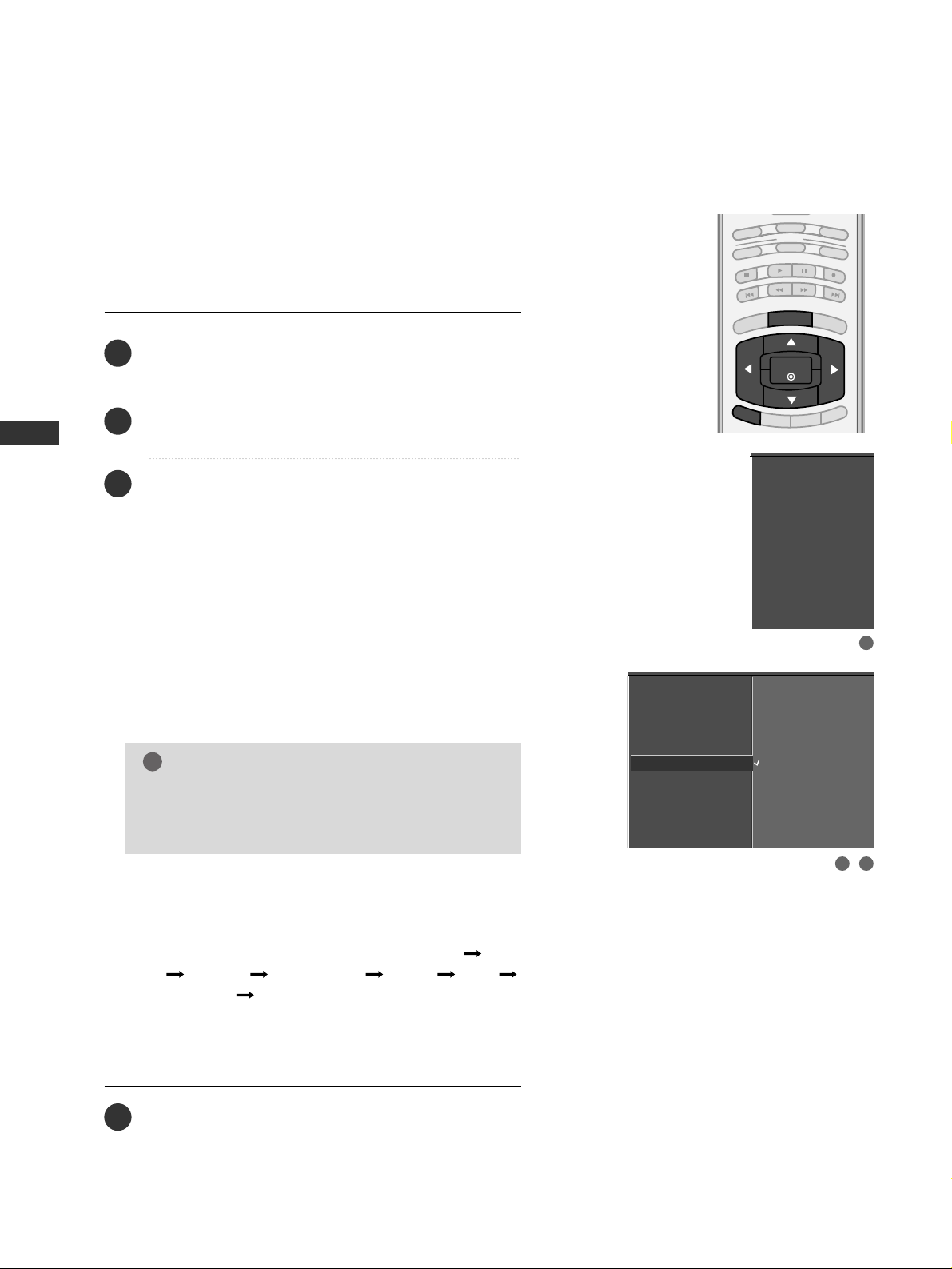
PICTURE CONTROL
52
IMAGE STICKING MINIMIZATION (ISM) METHOD
-
Plasma TV only
PICTURE CONTROL
BRIGHT -
BRIGHT +
ENTER
TIMER
RATIO
SIMPLINK
VCR
TV
DVD
AUDIO
CABLE
STB
MODE
EXIT
MENU
32
Press the
MMEENNUU
button and then use
DD
or
EE
button
to select the
OO PPTTIIOO NN
menu.
Press the
GG
button and then use
DD
or
EE
button to
select
IISSMM MMeett hhoodd
.
Press the
GG
button and then use
DD
or
EE
button to
select either
NN oorrmm aall, WW hhiitt ee WWaasshh, OO rr bbii tteerr
or
IInn vveerrssiioonn
.
■
NN oorrmm aall
If image sticking is never a problem, ISM is not necessary - set to Normal.
■
WW hhiitt ee WWaasshh
White Wash removes ghost images from the screen.
Use sparingly. Watch the TV normally for a while before
using this feature to see if the ghost image disappears on
its own.
■
OO rr bbii tteerr
Orbiter may help prevent ghost images. However, it is
best not to allow any fixed image to remain on the
screen. To avoid a ghost image on the screen, the
image will move once per 2 minutes : Left Right
Upside Downside Right Left
Downside Upside.
■
IInn vveerrssiioonn
Inversion will automatically invert the plasma display
panel color every 30 minutes.
Press
EE XX IITT
button to return to TV viewing or press
MMEENNUU
button to return to the previous menu.
2
3
4
1
A frozen still picture from a PC/video game displayed on the
screen for prolonged periods will result in a ghost image.
Use our unique method to minimize any fixed image on the
screen.
Aspect Ratio
Caption/Text
Caption Option
Language
ISM Method
G
Low Power
SimpLink
Normal
White Wash
Orbiter
Inversion
Aspect Ratio
Caption/Text
Caption Option
Language
ISM Method
Low Power
SimpLink
GG
An excessive ghosted image may be impossible to
clear entirely with White Wash. To return to normal viewing, press the any button.
NOTE
!
1
Page 55
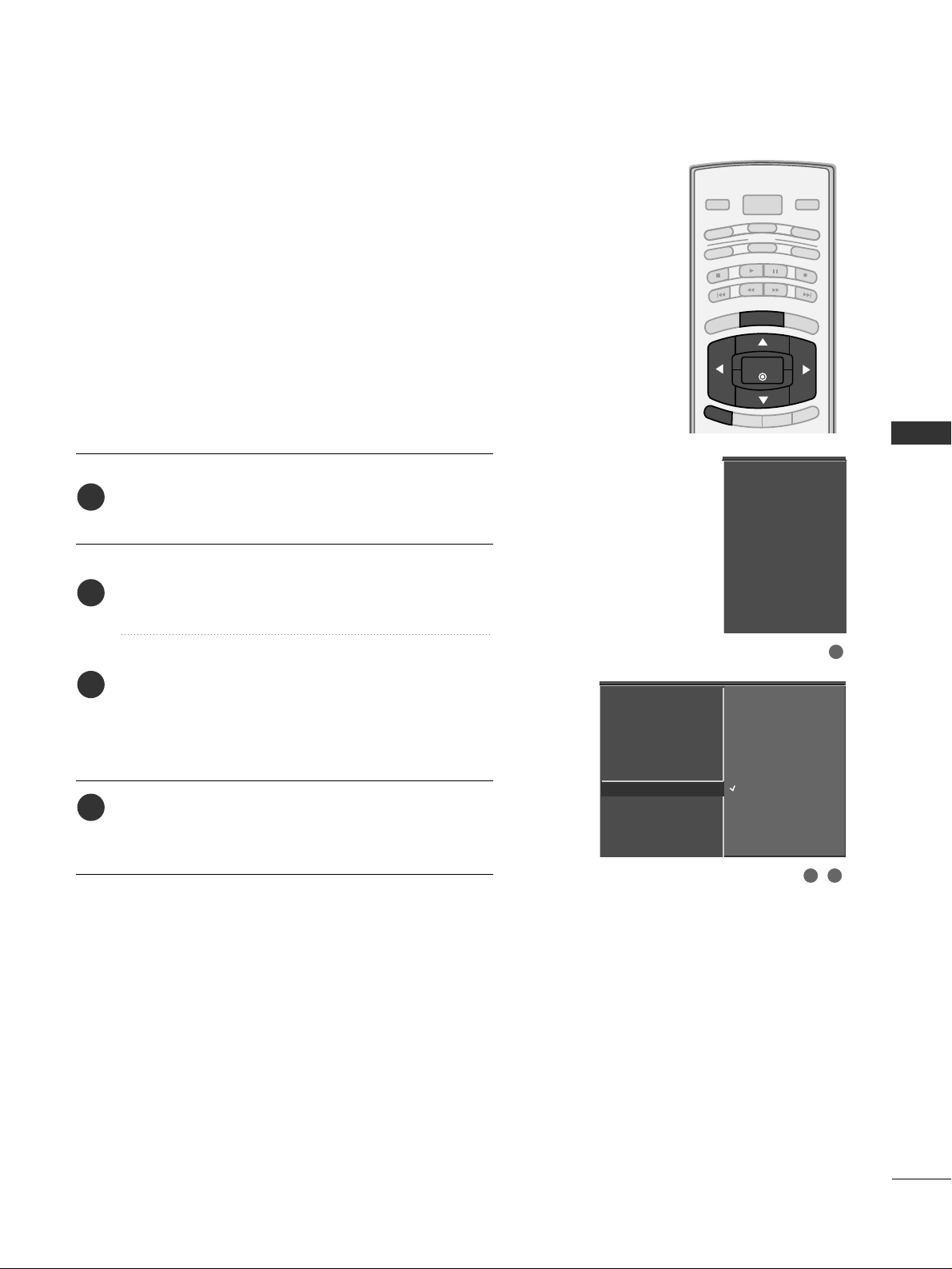
PICTURE CONTROL
53
LOW - POWER PICTURE MODE
-
Plasma TV only
BRIGHT -
BRIGHT +
ENTER
TIMER
RATIO
SIMPLINK
POWER
VCR
TV
DVD
AUDIO
CABLE
STB
MODE
TV INPUT
INPUT
EXIT
MENU
Low power reduces the plasma display power consumption.
Press the
MMEENNUU
button and then use
DD
or
EE
button
to select the
OO PPTTIIOO NN
menu.
Press the
GG
button and then use
DD
or
EE
button to
select
LLoo ww PPoo ww ee rr
.
Press the
GG
button and then use
DD
or
EE
button to
select
OO nn
or
OO ff ff
.
■
When you select
OO nn
, the screen darkens.
Press
EE XX IITT
button to return to TV viewing or press
MMEENNUU
button to return to the previous menu.
2
3
4
1
Aspect Ratio
Caption/Text
Caption Option
Language
ISM Method
Low Power
SimpLink
Aspect Ratio
Caption/Text
Caption Option
Language
ISM Method
Low Power
G
SimpLink
Off
On
1
32
Page 56
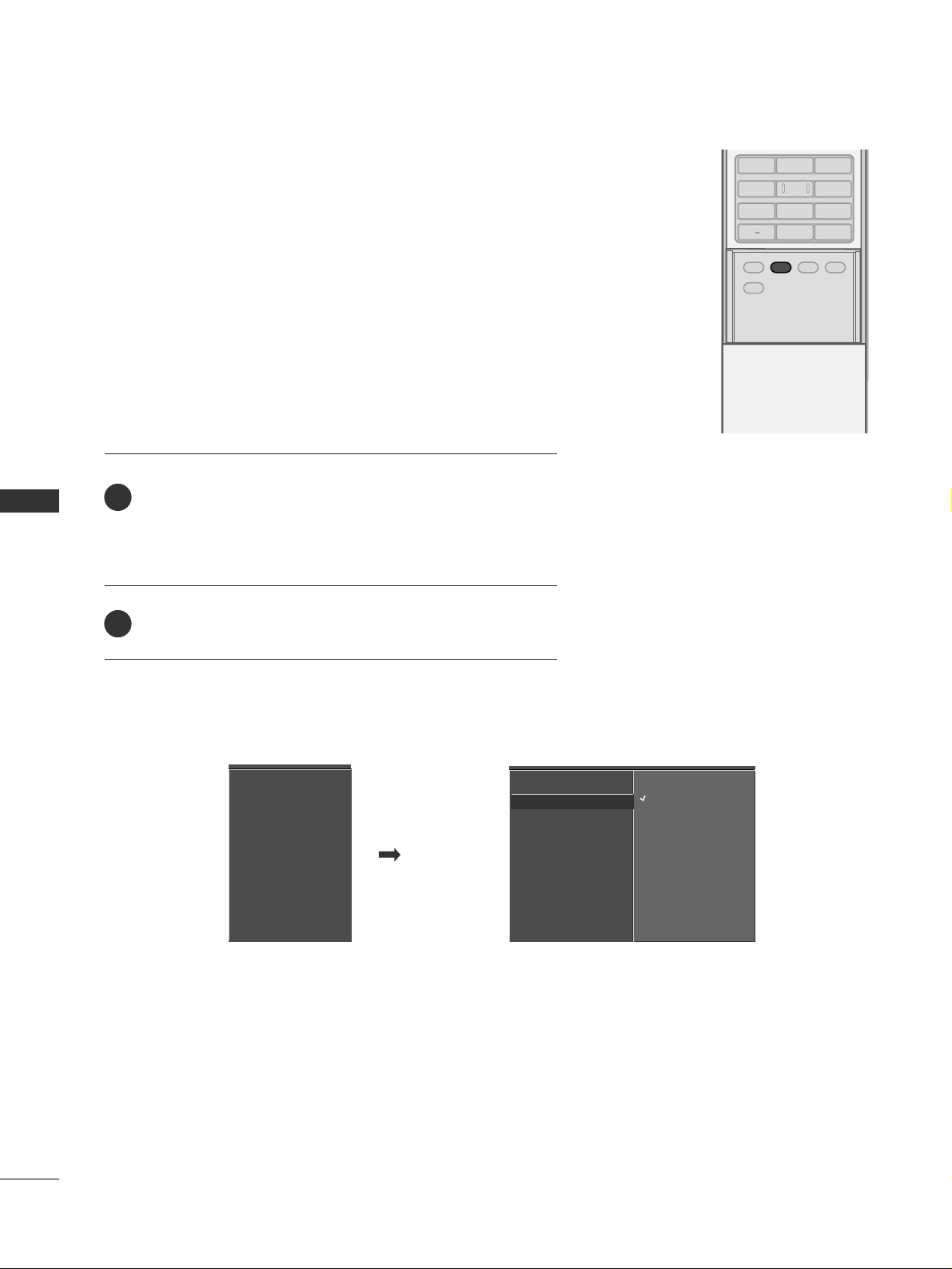
SOUND & LANGUAGE CONTROL
54
PRESET SOUND SETTINGS (EZ SOUND)
SOUND & LANGUAGE CONTROL
ADJUST
SAP
SOUND
PICTURE
CC
123
456
7809
BACK
EZ Sound lets you enjoy the best sound without any special
adjustment because the TV sets the appropriate sound options
based on the program content.
Normal, Stadium, News, Music and Theater are preset for good
sound quality at the factory and are not adjustable.
When you select the Stadium or Theater, the AUDIO menuBalance option is disabled and the Balance option is set to 0
automatically.
Press the
SSOO UUNNDD
button repeatedly to select the appropri-
ate sound setup as below :
NN oorrmm aall
,
SSttaadd iiuumm, NN eewwss, MMuussiicc, TThheeaa tteerr
, and
UUss ee rr
(
your own settings).
Press
EE XX IITT
button to return to TV viewing.
■
You can also adjust
EE ZZ SS oo uu nndd
in the
AAUUDDIIOO
menu.
2
1
Audio Language
EZ Sound
Balance
TV Speaker
Audio Language
EZ Sound
G
Balance
TV Speaker
Normal
Stadium
News
Music
Theater
User
Page 57
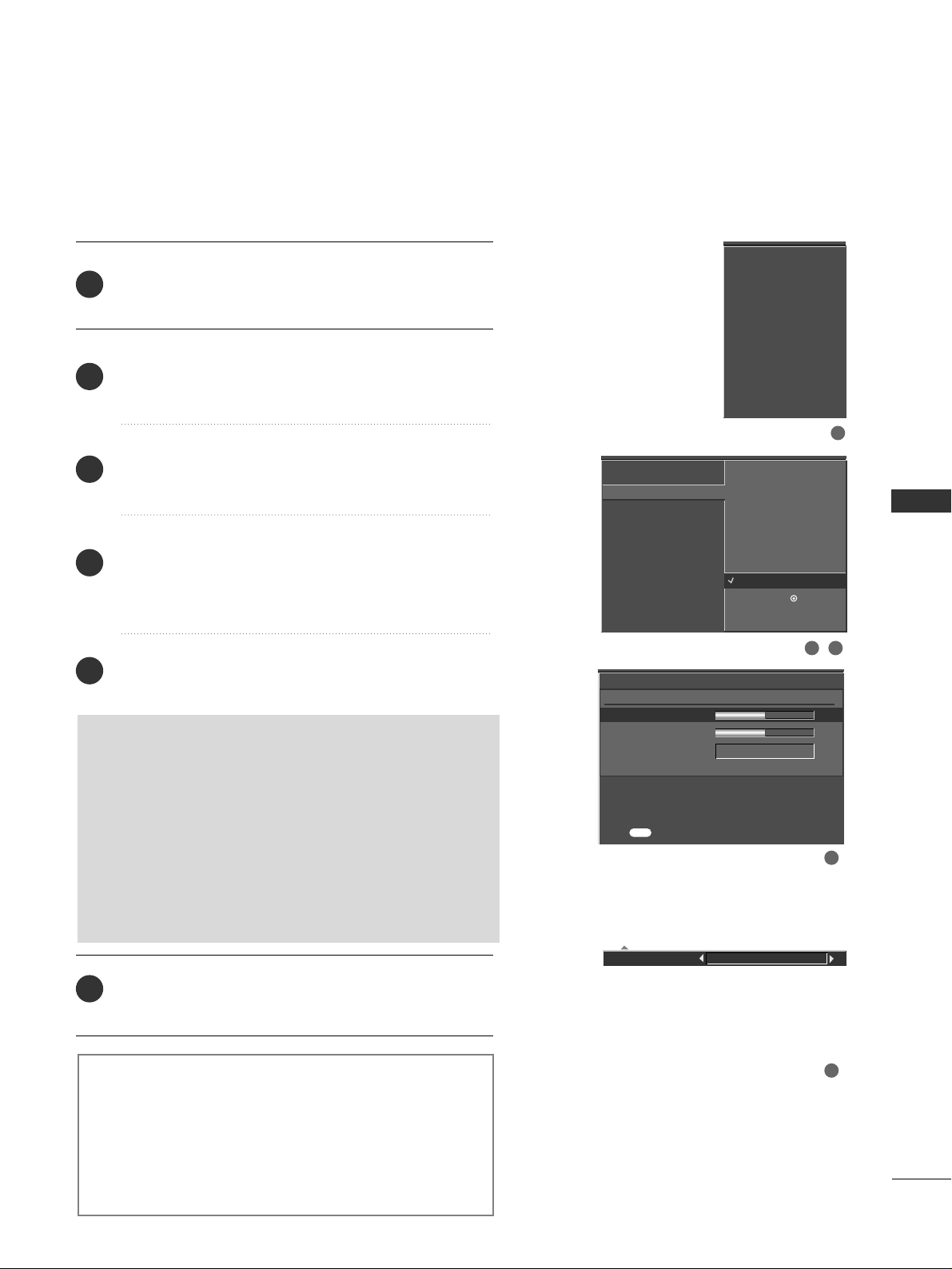
SOUND & LANGUAGE CONTROL
55
SOUND SETTING ADJUSTMENT - USER MODE
Front Surround Off
SSRRSS TT rruuSS uurrrroo uunndd XXTT
Takes advantage of any multi-channel format without
needing to add extra speakers or equipment. Dialog clarity,
bass enrichment, and the addition of stereo audio
enhancement produces an immersive sound experience
from standard stereo material.
Press the
MMEENNUU
button and then use
DD
or
EE
button
to select the
AAUUDDII OO
menu.
Press the
GG
button and then use
DD
or
EE
button to
select
EE ZZ SS oo uu nndd
.
Press the
GG
button and then use
DD
or
EE
button to
select
UUss ee rr
.
Press the
GG
button and then use
DD
or
EE
button to
select the desired sound option (
TTrr ee bbll ee,BB aassss
,or
FFrroonntt SSuurrrroouunn dd
).
Press the
GG
button and then use
FF
or
GG
button to
make appropriate adjustments.
SSeelleecc ttiinn gg tthhee FFrroonntt ssuurr rr oouu nndd
Press the
GG
button and then use
FF
or
GG
button to
select
OO ff ff
or
SS RR SS
(
Sound Retrieval System)
TTrruuSS uu rr rr oo uu nndd XX TT
.
■
When SRS (Sound Retrieval System) TruSurround XT
is selected,
BB aall aann ccee
is disable and set to 0.
■
When
OO ff ff
is selected,
BB aall aann ccee
is restored to the
original value set the user.
Press
EE XX IITT
button to return to TV viewing or press
MMEENN UU
button to return to the previous menu.
Adjust the sound to suit your taste and room situations.
Audio Language
EZ Sound
Balance
TV Speaker
Selection ( Gor ) leads you
to the detailed setting
screen.
Normal
Stadium
News
Music
Theater
User
G
User
Treble 50
G
Bass 50
Front Surround Off
Press to confirm.
MENU
2
3
4
5
6
1
213
4
5
Audio Language
EZ Sound
Balance
TV Speaker
Page 58
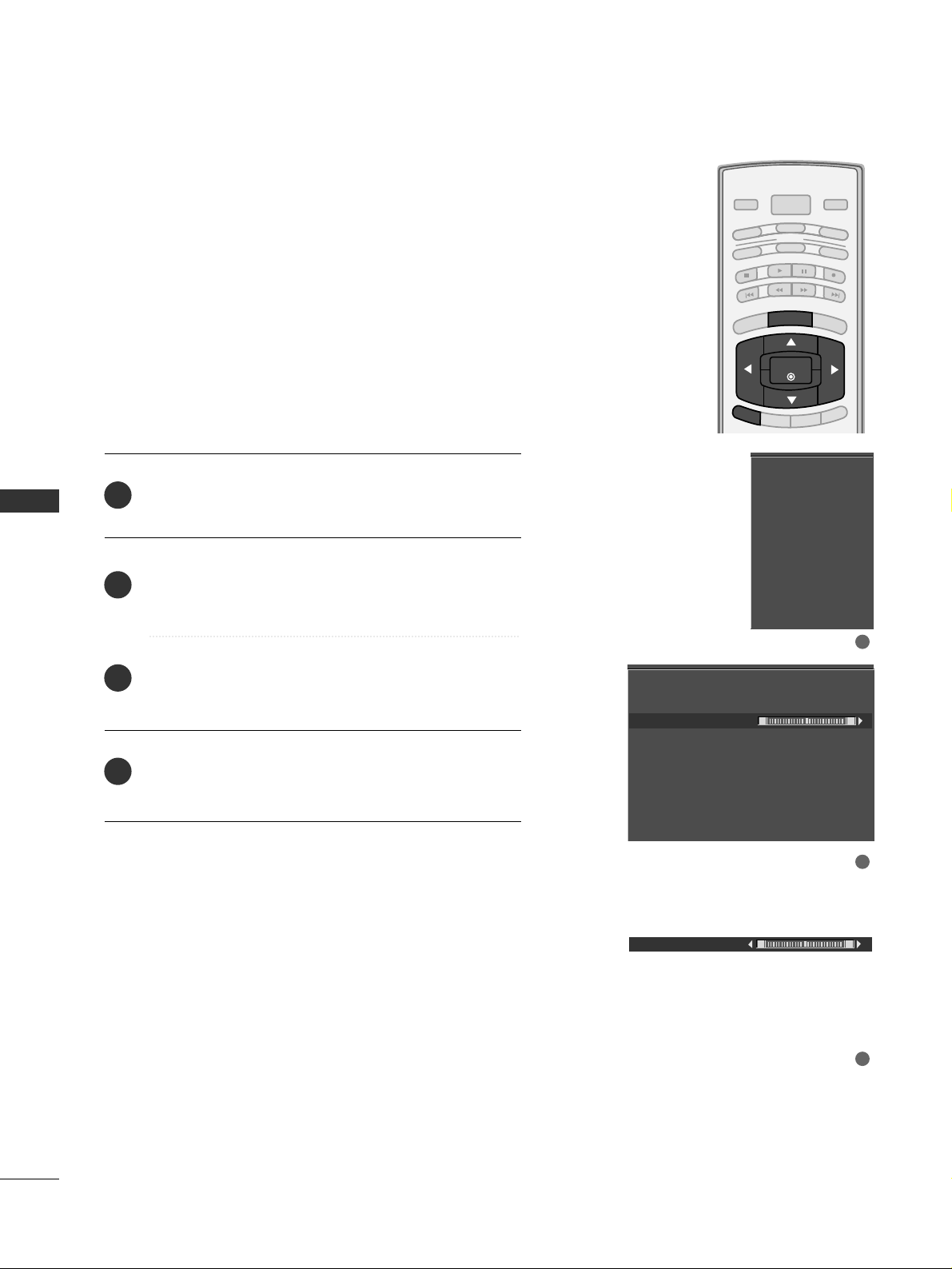
SOUND & LANGUAGE CONTROL
56
BALANCE
SOUND &LANGUAGE CONTROL
BRIGHT -
BRIGHT +
ENTER
TIMER
RATIO
SIMPLINK
POWER
VCR
TV
DVD
AUDIO
CABLE
STB
MODE
TV INPUT
INPUT
EXIT
MENU
Press the
MMEENNUU
button and then use
DD
or
EE
button
to select the
AAUUDDII OO
menu.
Press the
GG
button and then use
DD
or
EE
button to
select
BB aall aann ccee
.
Press the
GG
button and then use
FF
or
GG
button to
make appropriate adjustments.
Press
EE XX IITT
button to return to TV viewing or press
MMEENNUU
button to return to the previous menu.
Adjust the left/right sound of speaker to suit your taste and
room situations.
L R
Balance 0
2
3
4
1
Audio Language
EZ Sound
Balance
TV Speaker
Audio Language
EZ Sound
Balance 0
TV Speaker
L R
1
2
3
Page 59
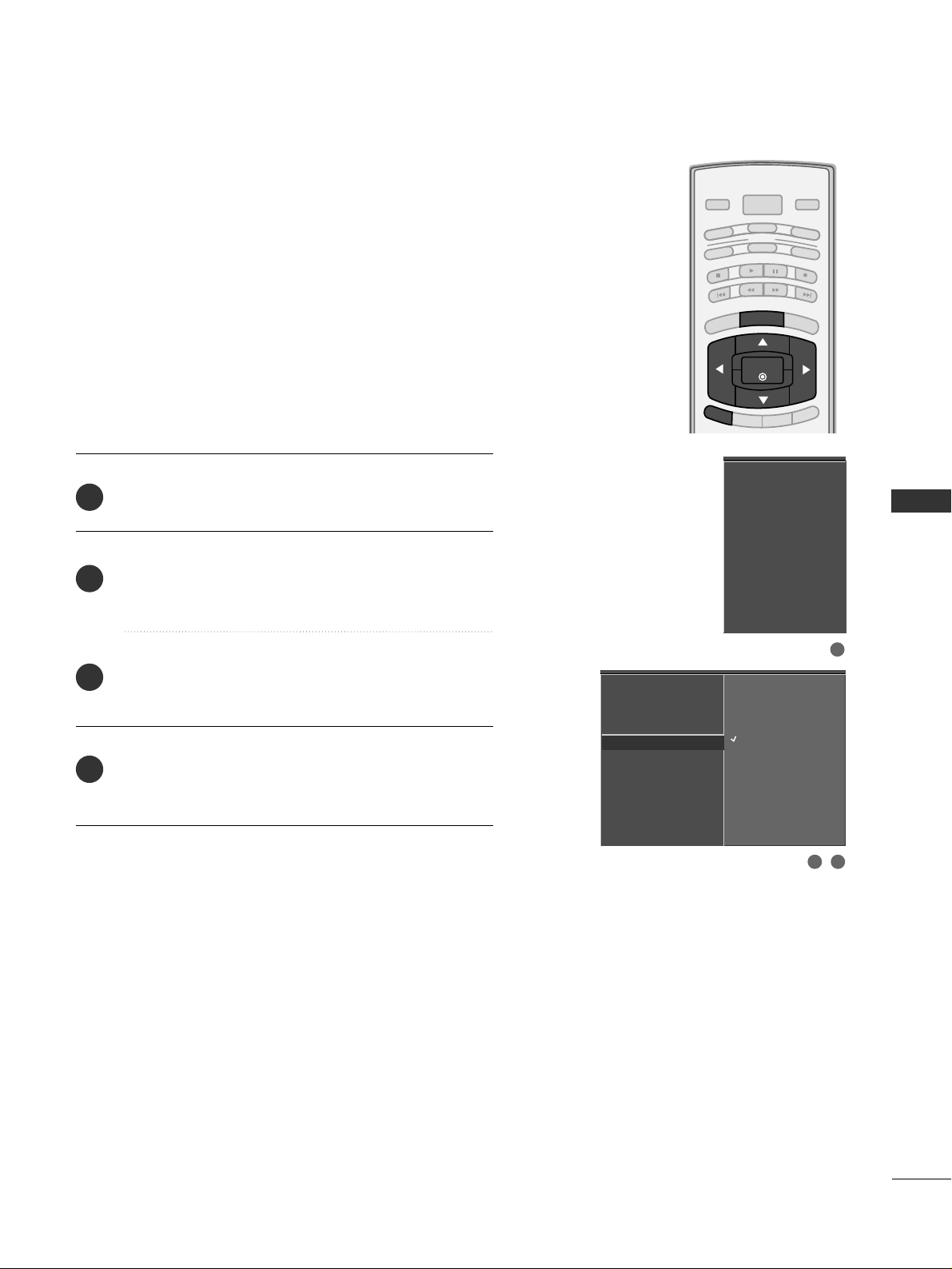
SOUND & LANGUAGE CONTROL
57
TV SPEAKERS ON/OFF SETUP
BRIGHT -
BRIGHT +
ENTER
TIMER
RATIO
SIMPLINK
POWER
VCR
TV
DVD
AUDIO
CABLE
STB
MODE
TV INPUT
INPUT
EXIT
MENU
Press the
MMEENNUU
button and then use
DD
or
EE
button
to select the
AAUUDDII OO
menu.
Press the
GG
button and then use
DD
or
EE
button to
select
TTVV SSppee aakk ee rr
.
Press the
GG
button and then use
DD
or
EE
button to
select
OO nn
or
OO ff ff
.
Press
EE XX IITT
button to return to TV viewing or press
MMEENNUU
button to return to the previous menu.
Turn the TV speakers off if using external audio equipment.
Feature turns the TV Speakers option On or Off.
Audio Language
EZ Sound
Balance
TV Speaker
G
Off
On
2
3
4
1
Audio Language
EZ Sound
Balance
TV Speaker
2 3
1
Page 60
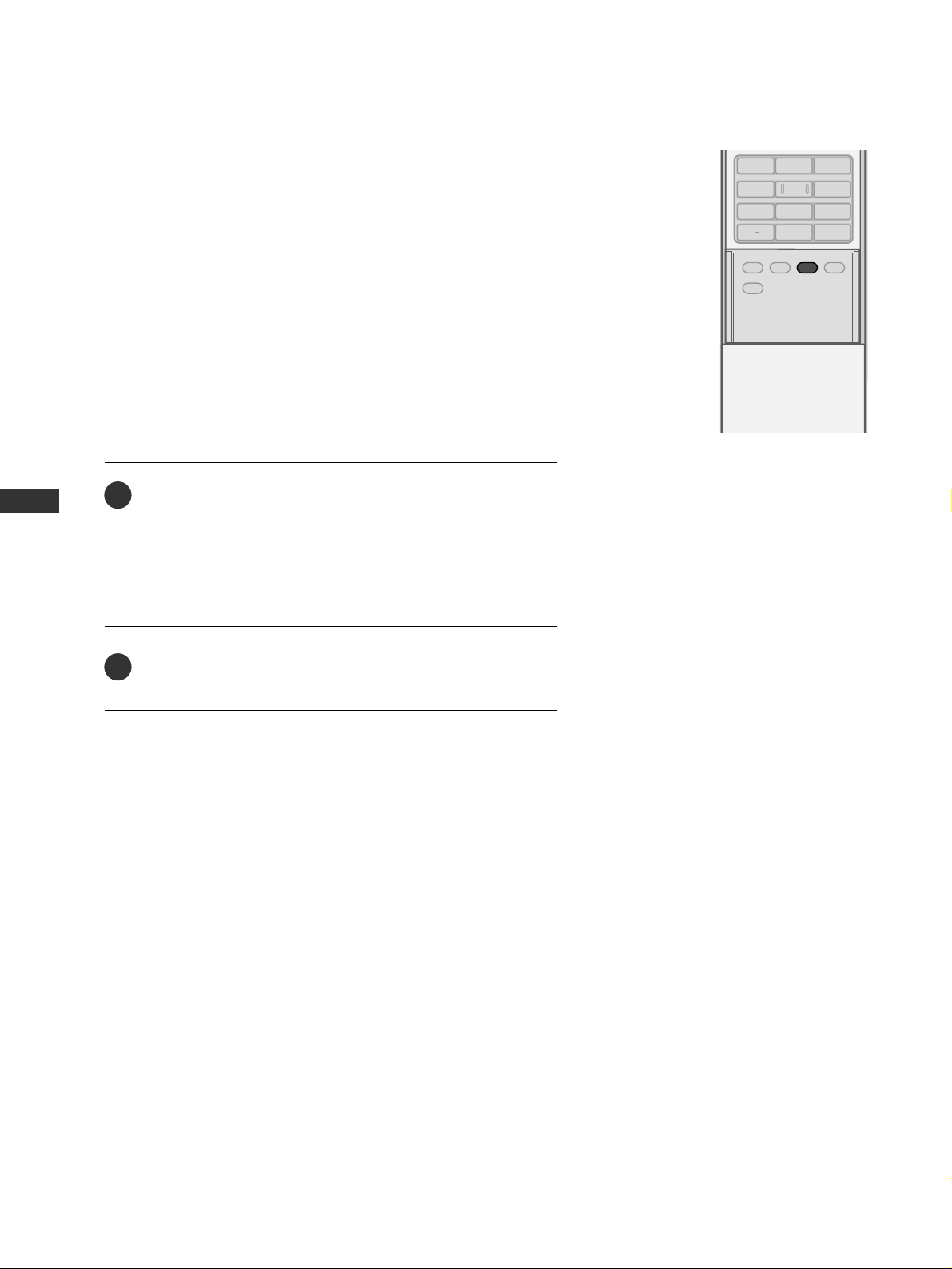
SOUND & LANGUAGE CONTROL
58
STEREO/SAP BROADCASTS SETUP
SOUND &LANGUAGE CONTROL
ADJUST
SAP
SOUND
PICTURE
CC
123
456
7809
BACK
This TV can receive MTS stereo programs and any SAP
(
Secondary Audio Program)that accompanies the stereo program if the station transmits an additional sound signal as well
as the original one and when you select Stereo or SAP on the
remote control.
Mono sound is automatically received if the broadcast is only in
Mono; even though Stereo or SAP has been selected.
Select Mono if you want to listen to the mono sound in remote
areas during stereo/SAP broadcasting.
Stereo or SAP can be received in Analog channel.
Use the
SS AA PP
button to select your desired MTS mode in
analog signal. Each time you press the
SS AA PP
button,
MMoo nnoo
,
SStteerreeoo
, or
SS AA PP
appear in turn.
■
If other languages available on the digital signal, select
them with the
SS AA PP
button.
Press
EE XX IITT
button to save and return to TV viewing.
2
1
Page 61
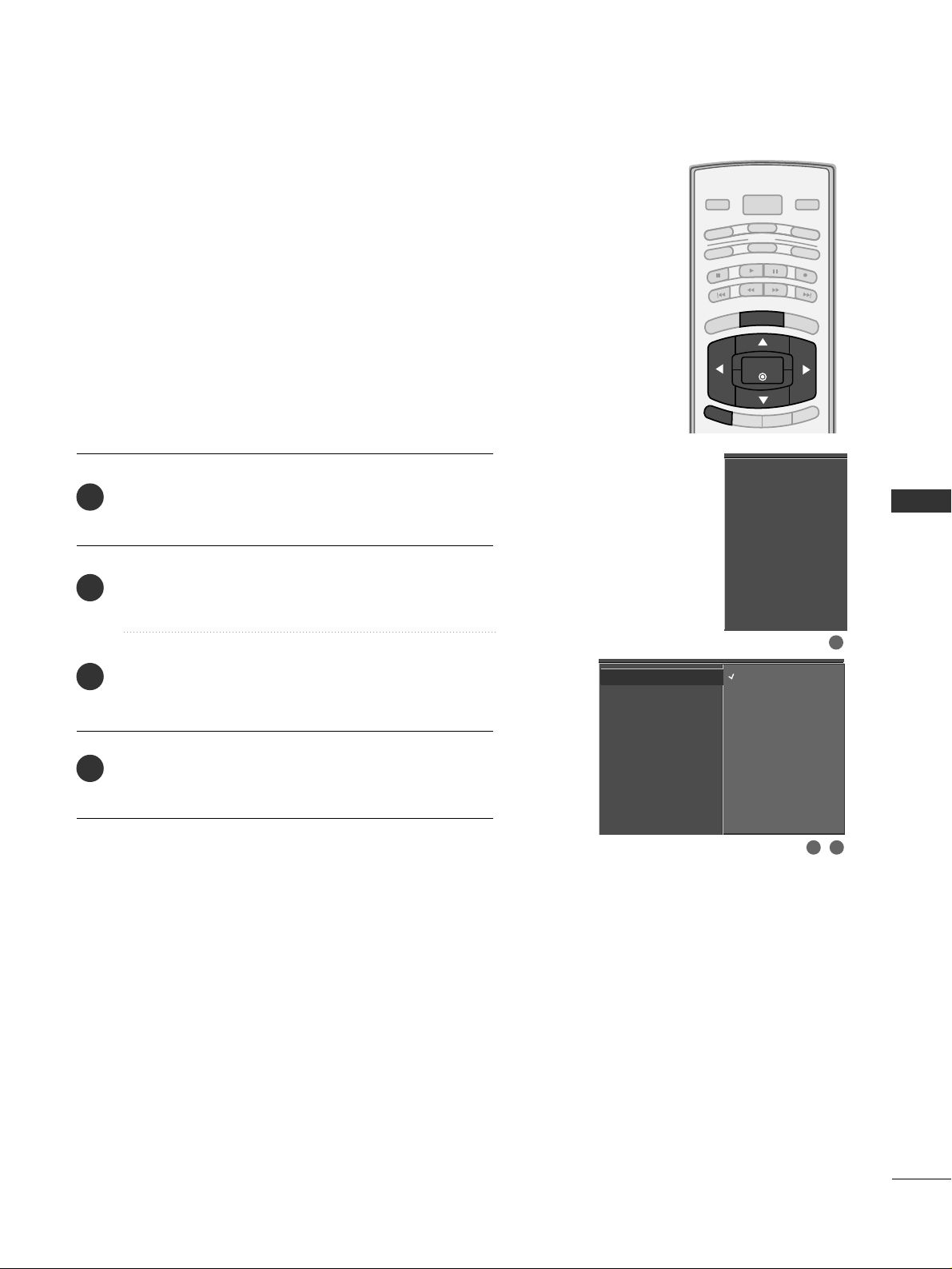
SOUND & LANGUAGE CONTROL
59
AUDIO LANGUAGE
BRIGHT -
BRIGHT +
ENTER
TIMER
RATIO
SIMPLINK
POWER
VCR
TV
DVD
AUDIO
CABLE
STB
MODE
TV INPUT
INPUT
EXIT
MENU
Other languages may be available if a digital signal is provided by the broadcasting station.
This feature operates only in DTV/CADTV mode.
Press the
MMEENNUU
button and then use
DD
or
EE
button
to select the
AAUUDDII OO
menu.
Press the
GG
button and then use
DD
or
EE
button to
select
AAuuddiioo LLaa nngguu aagg ee
.
Press the
GG
button and then use
DD
or
EE
button to
select :
EE nnggll iisshh, SSpp aann iisshh
, or
FFrreenncc hh
.
Press
EE XX IITT
button to return to TV viewing or press
MMEENNUU
button to return to the previous menu.
Audio Language
G
EZ Sound
Balance
TV Speaker
English
Spanish
French
2
3
4
1
Audio Language
EZ Sound
Balance
TV Speaker
2 3
1
Page 62
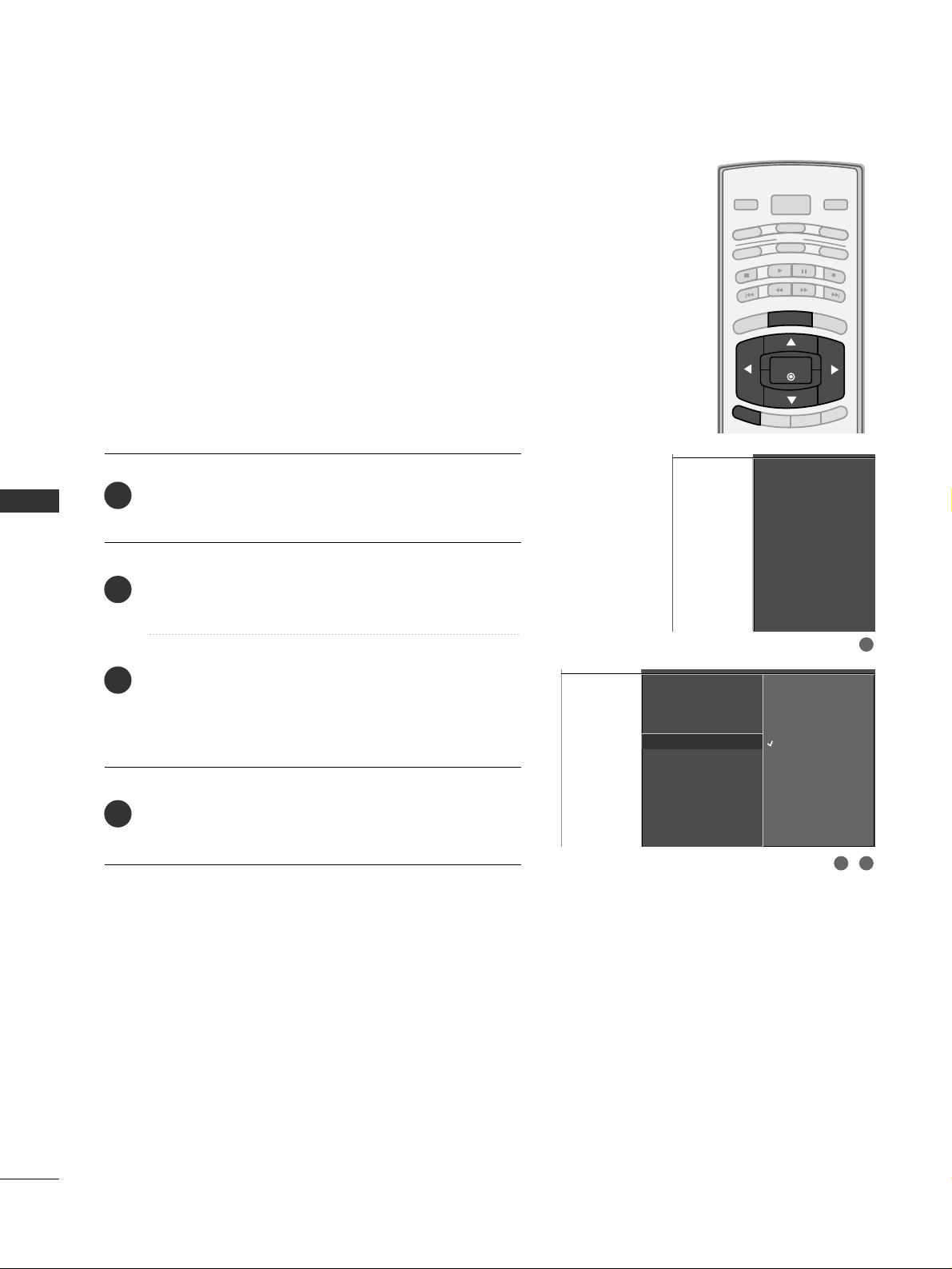
SOUND & LANGUAGE CONTROL
60
ON-SCREEN MENUS LANGUAGE SELECTION
SOUND &LANGUAGE CONTROL
BRIGHT -
BRIGHT +
ENTER
TIMER
RATIO
SIMPLINK
POWER
VCR
TV
DVD
AUDIO
CABLE
STB
MODE
TV INPUT
INPUT
EXIT
MENU
Aspect Ratio
Caption/Text
Caption Option
Language
ISM Method
Low Power
SimpLink
Aspect Ratio
Caption/Text
Caption Option
Language
G
ISM Method
Low Power
SimpLink
The menus can be shown on the screen in the selected language. First select your language.
English
Español (Spanish)
Français (French)
Press the
MMEENNUU
button and then use
DD
or
EE
button
to select the
OO PPTTIIOONN
menu.
Press the
GG
button and then use
DD
or EEbutton to
select
LLaa nngguuaaggee..
Press the
GG
button and then use
DD
or
EE
button to
select your desired language.
From this point on, the on-screen menus will be shown
in the selected language.
Press the
EE XX IITT
button to return to TV viewing or
press
MMEENNUU
to return to the previous menu.
1
2
3
4
1
32
Page 63
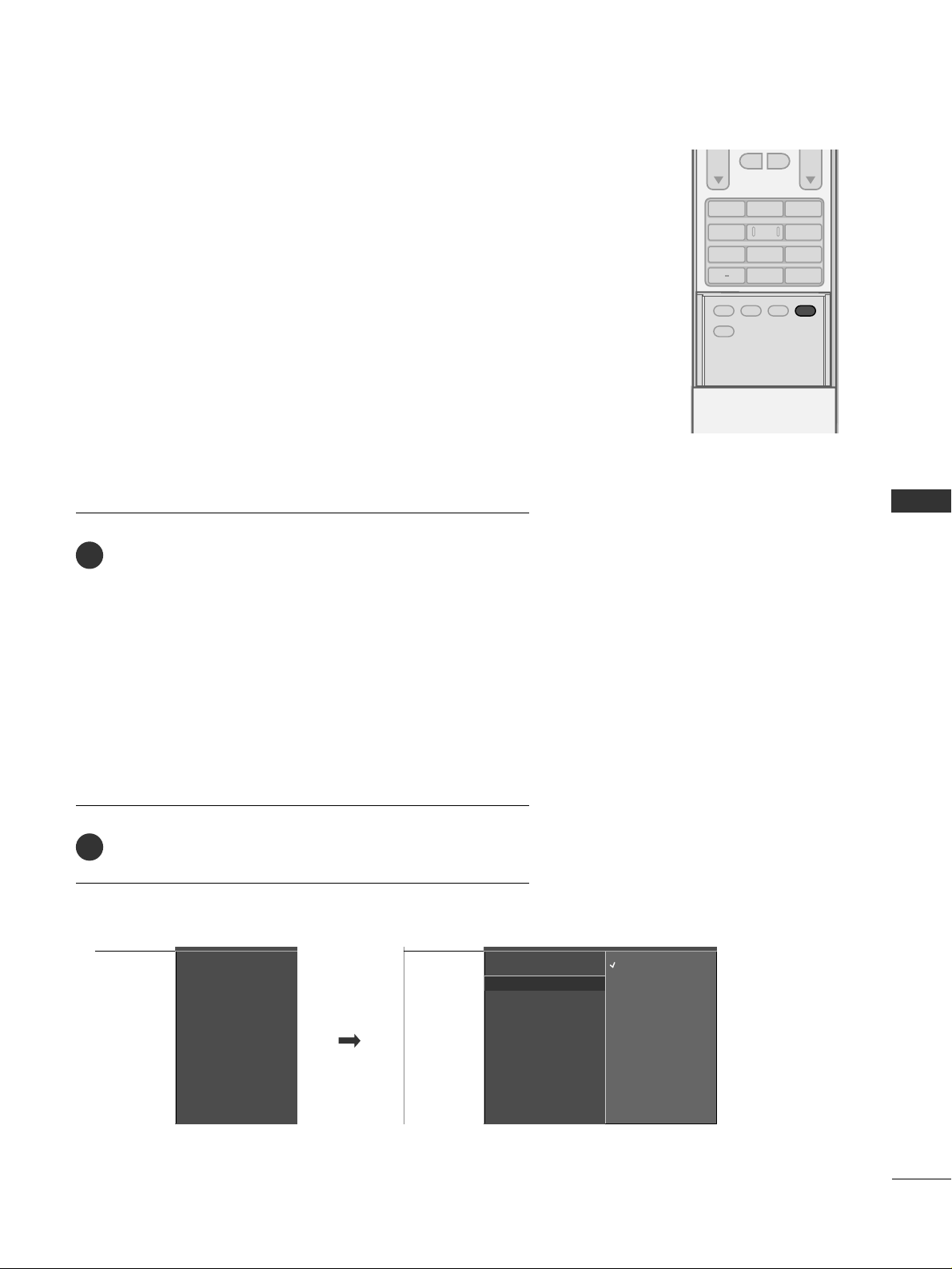
SOUND & LANGUAGE CONTROL
61
CAPTION / TEXT
ADJUST
SAP
SOUND
PICTURE
CC
123
456
7809
BACK
VOL CH
MUTE
FAV
Use the
CC CC
button repeatedly to select Caption
OO ff ff, CC CC 11
,
CC CC 22, CC CC 33, CC CC 44, TTee xx tt11, TTee xx tt22, TTee xx tt33
or
TTee xx tt44
.
■
CC AAPPTT II OO NN
The term for the words that scroll across the bottom of the
TV screen; usually the audio portion of the program provided
for the hearing impaired.
■
TT EE XX TT
The term for the words that appear in a large black frame
and almost cover the entire screen; usually messages provided by the broadcaster.
Press
EE XX IITT
to save and return to TV viewing.
2
1
Analog Broadcasting System Captions
Select a caption mode for displaying captioning information if
provided on a program. Analog caption displays information at
any position on the screen and is usually the program's dialog.
Text displays information, usually at the bottom position and is
used for a data service, generally not program related.
Caption/Text, if provided by the broadcaster, would be available
for both digital and analog channels on the Antenna/Cable.
This TV is programmed to memorize the caption/text mode which
was last set when you turn the power off.
When you select the CC1 ~ Text4, Caption option must be disabled.
■
You can also use the
OO PPTTIIOO NN
menu to select
CC aappttii oo nn/TT ee xx tt
.
Aspect Ratio
Caption/Text
Caption Option
Language
ISM Method
Low Power
SimpLink
Aspect Ratio
Caption/Text
G
Caption Option
Language
ISM Method
Low Power
SimpLink
Off
CC1
CC2
CC3
CC4
Text1
Text2
Text3
Text4
Page 64
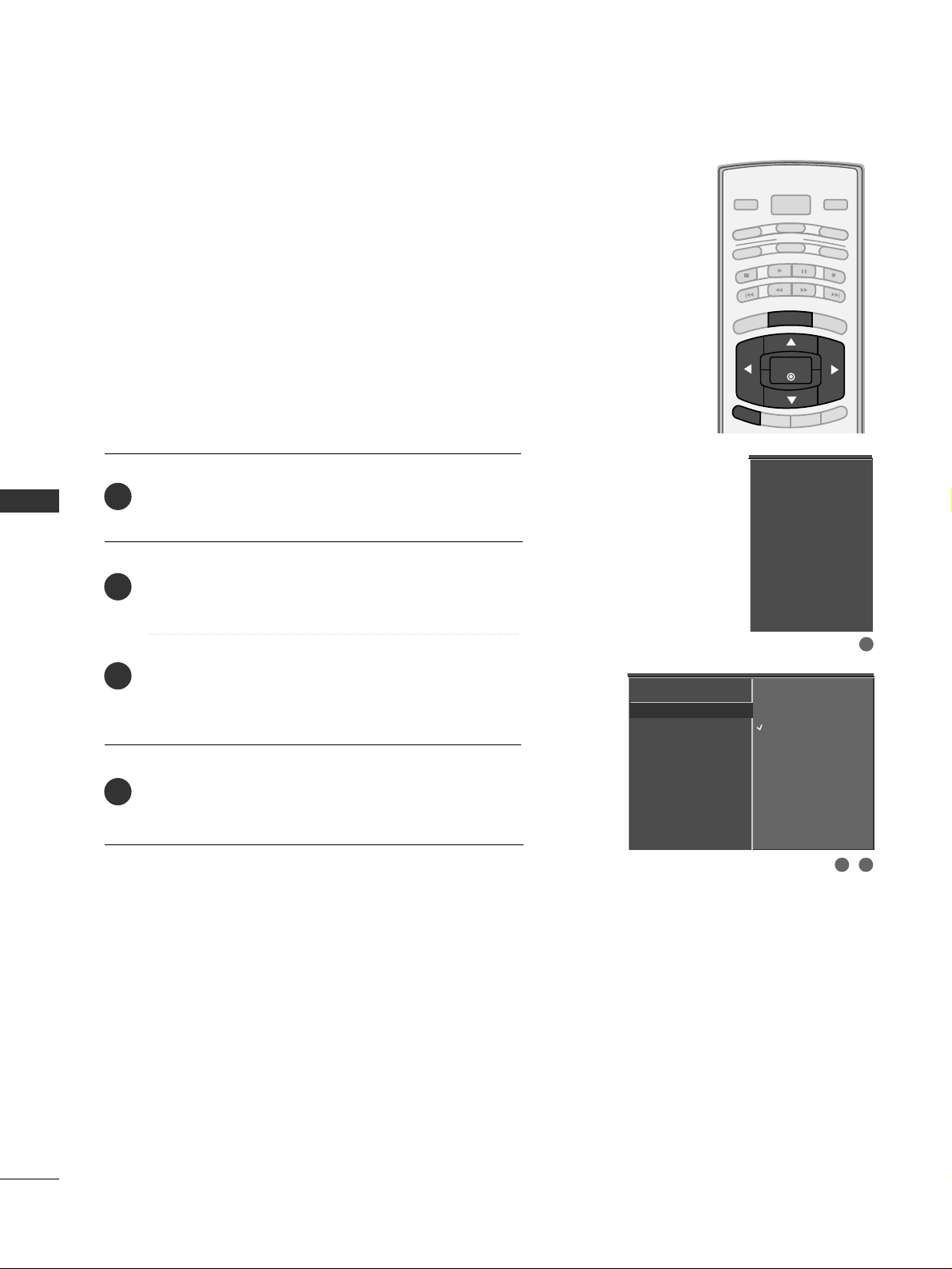
SOUND & LANGUAGE CONTROL
62
SOUND &LANGUAGE CONTROL
BRIGHT -
BRIGHT +
ENTER
TIMER
RATIO
SIMPLINK
POWER
VCR
TV
DVD
AUDIO
CABLE
STB
MODE
TV INPUT
INPUT
EXIT
MENU
Press the
MMEENNUU
button and then use
DD
or
EE
button
to select the
OO PPTTIIOO NN
menu.
Press the
GG
button and then use
DD
or
EE
button to
select
CC aappttii oo nn/TT ee xx tt
.
Press the
GG
button and then use
DD
or
EE
button to
select available caption languages :
EE nnggll iisshh, SSpp aann iisshh
or
FFrreenncc hh
.
Press
EE XX IITT
button to return to TV viewing or press
MMEENNUU
button to return to the previous menu.
Choose the language you want the DTV/CADTV Captions
to appear in.
Other Languages can be chosen for digital sources only if
they are included on the program.
Aspect Ratio
Caption/Text
G
Caption Option
Language
ISM Method
Low Power
SimpLink
Off
English
Spanish
French
Aspect Ratio
Caption/Text
Caption Option
Language
ISM Method
Low Power
SimpLink
2
3
4
1
1
32
Digital Broadcasting System Captions
Page 65
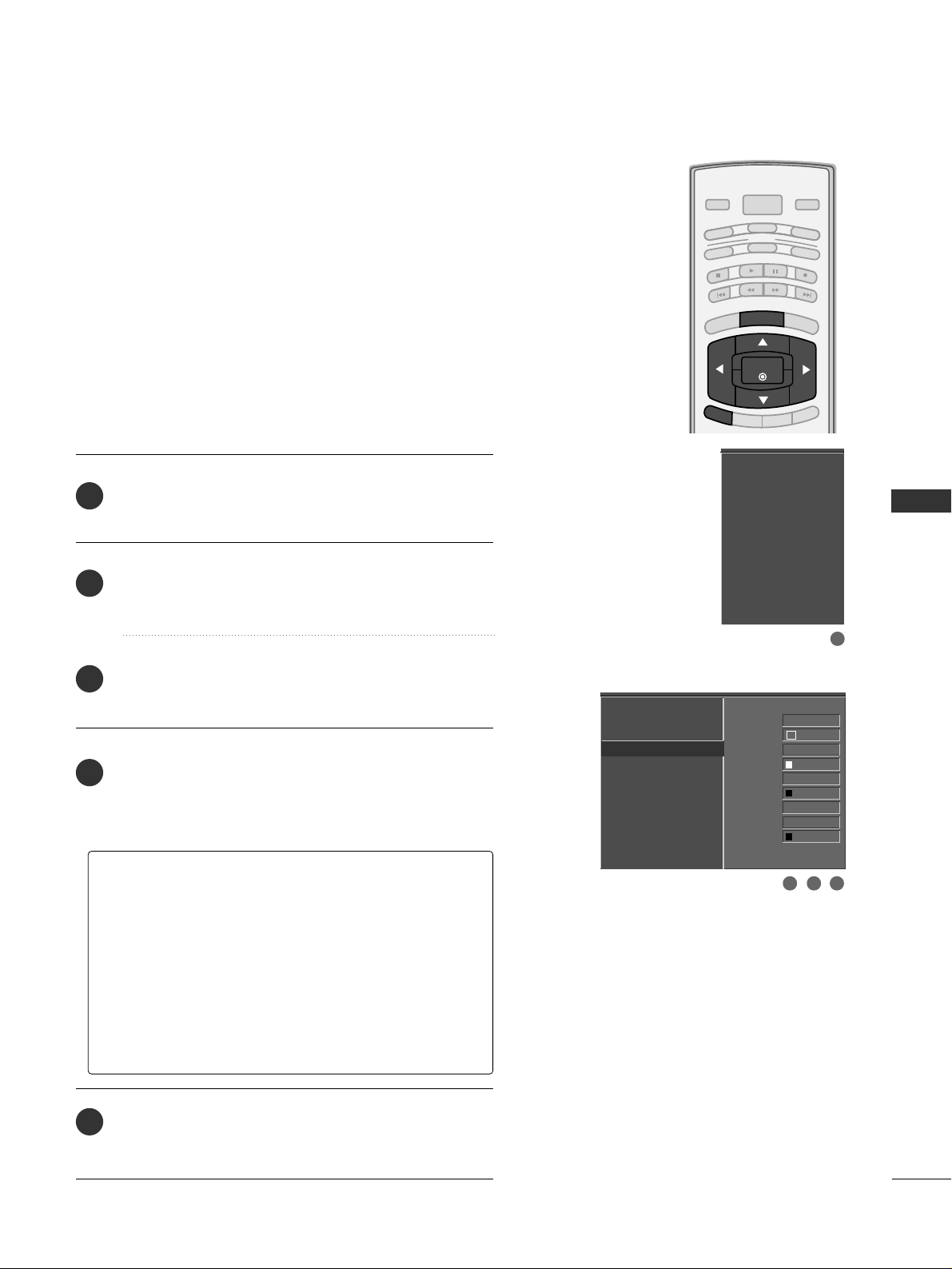
SOUND & LANGUAGE CONTROL
63
CAPTION OPTION
BRIGHT -
BRIGHT +
ENTER
TIMER
RATIO
SIMPLINK
POWER
VCR
TV
DVD
AUDIO
CABLE
STB
MODE
TV INPUT
INPUT
EXIT
MENU
Customize the DTV/CADTV captions that appear on your
screen.
Press the
MMEENNUU
button and then use
DD
or
EE
button
to select the
OO PPTTIIOO NN
menu.
Press the
GG
button and then use
DD
or
EE
button to
select
CCaa pptt iioonn OO pp ttiioonn
.
Press the
GG
button and then use
FF
or
GG
button to
select
CC uuss ttoo mm
.
Use
DD
or
EE
button to customize the
SSttyyll ee, FFoo nntt
,
etc., to your preference.
A preview icon is provided at the bottom of the
screen, use it to see the caption language.
Press
EE XX IITT
button to return to TV viewing or press
MMEENNUU
button to return to the previous menu.
2
3
4
5
1
GG
SSiizzee
: Set the word size.
GG
FFoonntt
: Select a typeface for the text.
GG
TTeexxtt CCoolloorr
: Choose a color for the text.
GG
TTeexxtt OOppaacciittyy
: Specify the opacity for the text color.
GG
BBgg ((BBaacckkggrroouunndd))CCoolloorr
: Select a background color.
GG
BBgg ((BBaacckkggrroouunndd))OOppaacciittyy
: Select the opacity for
the background color.
GG
EEddggee TTyyppee
: Select an edge type.
GG
EEddggee CCoolloorr
: Select a color for the edges.
Aspect Ratio
Caption/Text
Caption Option
G
Language
ISM Method
Low Power
SimpLink
Style Custom
Size A Standard
Font Font 0
Text Color White
Text Opacity
Solid
Bg Color Black
Bg Opacity Solid
Edge Type None
Edge Color Black
Aspect Ratio
Caption/Text
Caption Option
Language
ISM Method
Low Power
SimpLink
1
3 42
Page 66
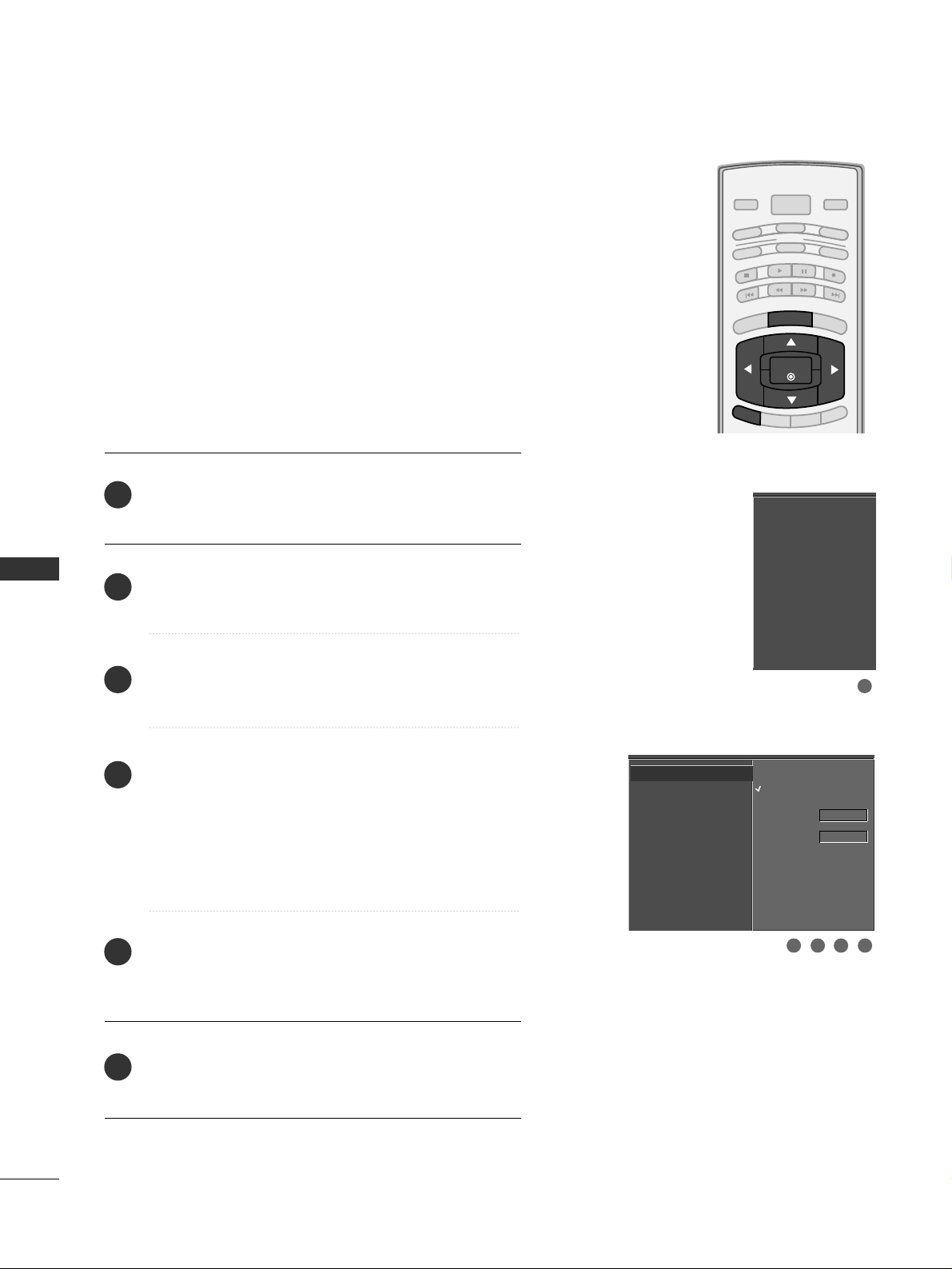
TIME SETTING
64
TIME SETTING
BRIGHT -
BRIGHT +
ENTER
TIMER
RATIO
SIMPLINK
POWER
VCR
TV
DVD
AUDIO
CABLE
STB
MODE
TV INPUT
INPUT
EXIT
MENU
CLOCK SETTING
Auto Clock Setup
The time is set automatically from a digital channel signal.
The digital channel signal includes information for the
current time provided by the broadcasting station.
Set the clock manually if the current time is set incorrectly
by the auto clock function.
The factory default value of the Auto Clock is Off, because
a clock information sent each broadcasting station is different.
Press the
MMEENNUU
button and then use
DD
or
EE
button
to select the
TT II MMEE
menu.
Press the
GG
button and then use
DD
or
EE
button to
select
AAuutt oo CCll oo cckk
.
Press the
GG
button and then use
DD
or
EE
button to
select
OO nn
.
Press the
GG
button and then use
DD
or
EE
button to
select your viewing area time zone:
U.S.A :
EE aa ss tt eerr nn, CC eennttrr aa ll, MMoo uunnttaa ii nn, PP aacciiff ii cc
,
AAllaa ss kkaa
or
HHaaww aaii ii
.
Canada :
EE aa ss tt eerr nn, CC eennttrr aall, MMoo uu nn tt aa iinn, PP aacc ii ff ii cc
,
NN ee ww FF..ll aann dd
or
AAttll aann ttiicc
.
Press the
GG
button and then use
DD
or
EE
button to
select
AAuuttoo, OO ff ff, OO nn
, depending on whether or not
your viewing area observes Daylight Saving time.
Press
EE XX IITT
button to return to TV viewing or press
MMEENNUU
button to return to the previous menu.
Auto Clock
G
Manual Clock
Off Timer
On Timer
Sleep Timer
Auto Off
Off
On
Time Zone Eastern
Auto
Daylight
Saving
Auto Clock
Manual Clock
Off Timer
On Timer
Sleep Timer
Auto Off
2
3
4
5
6
1
1
32 54
Page 67
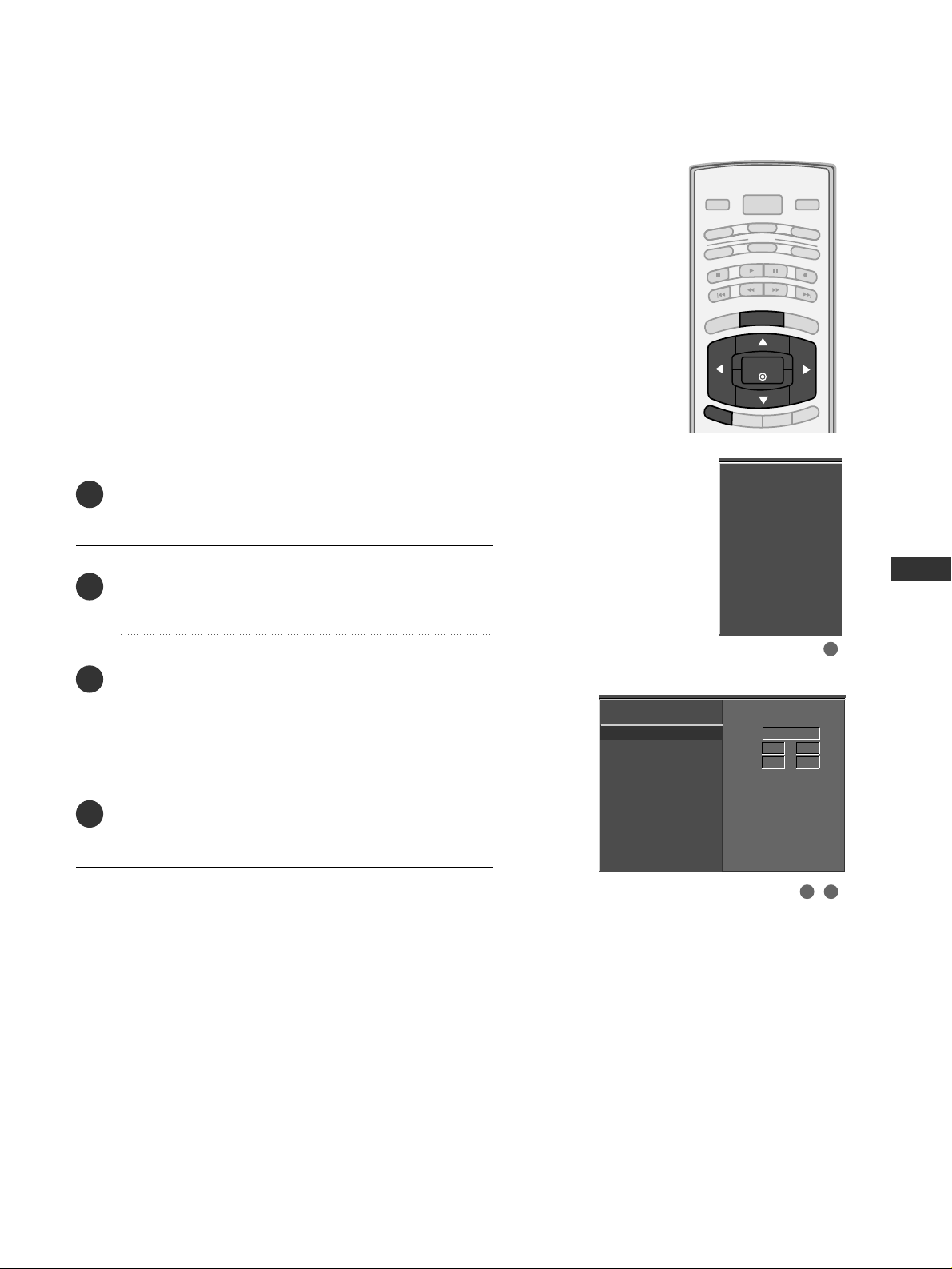
TIME SETTING
65
BRIGHT -
BRIGHT +
ENTER
TIMER
RATIO
SIMPLINK
POWER
VCR
TV
DVD
AUDIO
CABLE
STB
MODE
TV INPUT
INPUT
EXIT
MENU
Manual Clock Setup
Press the
MMEENNUU
button and then use
DD
or
EE
button
to select the
TT II MMEE
menu.
Press the
GG
button and then use
DD
or
EE
button to
select
MMaannuuaall CClloocckk
.
Press the
GG
button and then use
FF
or
GG
button to
select either the year, date, or time option. Once
selected, use the
DD
or
EE
button to set the year, date,
and time options.
Press
EE XX IITT
button to return to TV viewing or press
MMEENNUU
button to return to the previous menu.
If the current time setting is wrong, reset the clock manually.
Auto Clock
Manual Clock
G
Off Timer
On Timer
Sleep Timer
Auto Off
Year - - - Date - - / - Time - - : - - - -
Auto Clock
Manual Clock
Off Timer
On Timer
Sleep Timer
Auto Off
2
3
4
1
1
32
Page 68
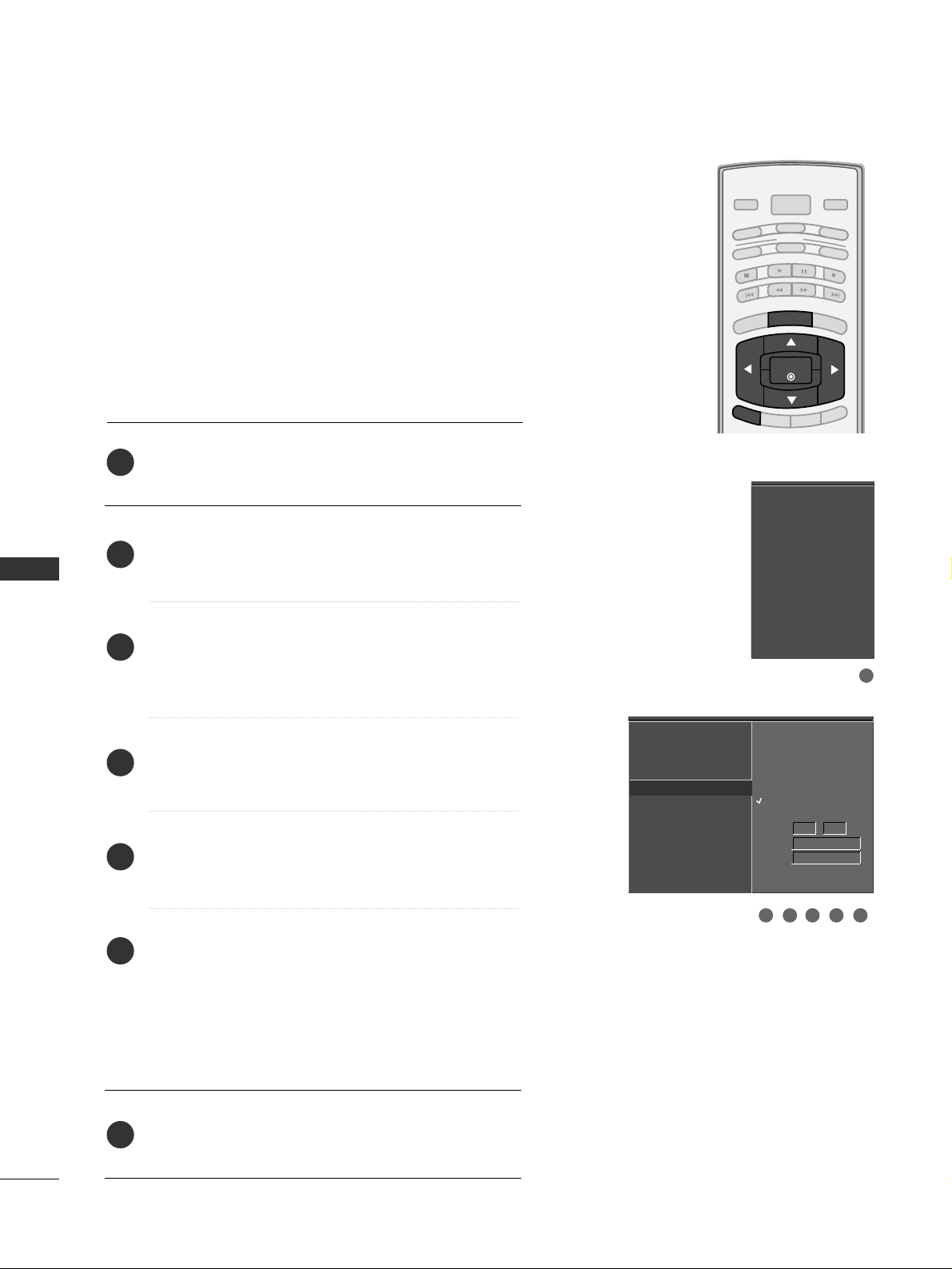
TIME SETTING
66
TIME SETTING
BRIGHT -
BRIGHT +
ENTER
TIMER
RATIO
SIMPLINK
POWER
VCR
TV
DVD
AUDIO
CABLE
STB
MODE
TV INPUT
INPUT
EXIT
MENU
AUTO ON/OFF TIMER SETTING
Press the
MMEENNUU
button and then use
DD
or
EE
button
to select the
TT II MMEE
menu.
Press the
GG
button and then use
DD
or
EE
button to
select
OO ffff TTii mmeerr
or
OO nn TTiimm eerr
.
Press the
GG
button and then use
DD
or
EE
button to
select
OO nn
.
■
To cancel the
OO nn//OOffff tt ii mmee rr
function, select
OO ff ff
.
Press the
GG
button and then use
DD
or
EE
button to set
the hour.
Press the
GG
button and then use
DD
or
EE
button to set
the minutes.
OO nnllyy OOnn ttii mmeerr
Press the
GG
button and then use
DD
or
EE
button to
select the channel at turn-on.
Press the
GG
button and then use
DD
or
EE
button to set
the sound level at turn-on.
Press
EE XX IITT
button to return to TV viewing or press
MMEENNUU
button to return to the previous menu.
Auto Clock
Manual Clock
Off Timer
On Timer
G
Sleep Timer
Auto Off
Auto Clock
Manual Clock
Off Timer
On Timer
Sleep Timer
Auto Off
2
3
4
5
6
7
1
The timer function operates only if the current time has
been set.
The Off-Timer function overrides the On-Timer function if
they are both set to the same time.
The TV must be in standby mode for the On-Timer to work.
If you do not press any button within 2 hours after the TV
turns on with the On Timer function, the TV will automatically revert to standby mode.
1
32 54 6
Off
On
Time 6 : 30 AM
Ch. TV 2-0
Vol 17
Page 69
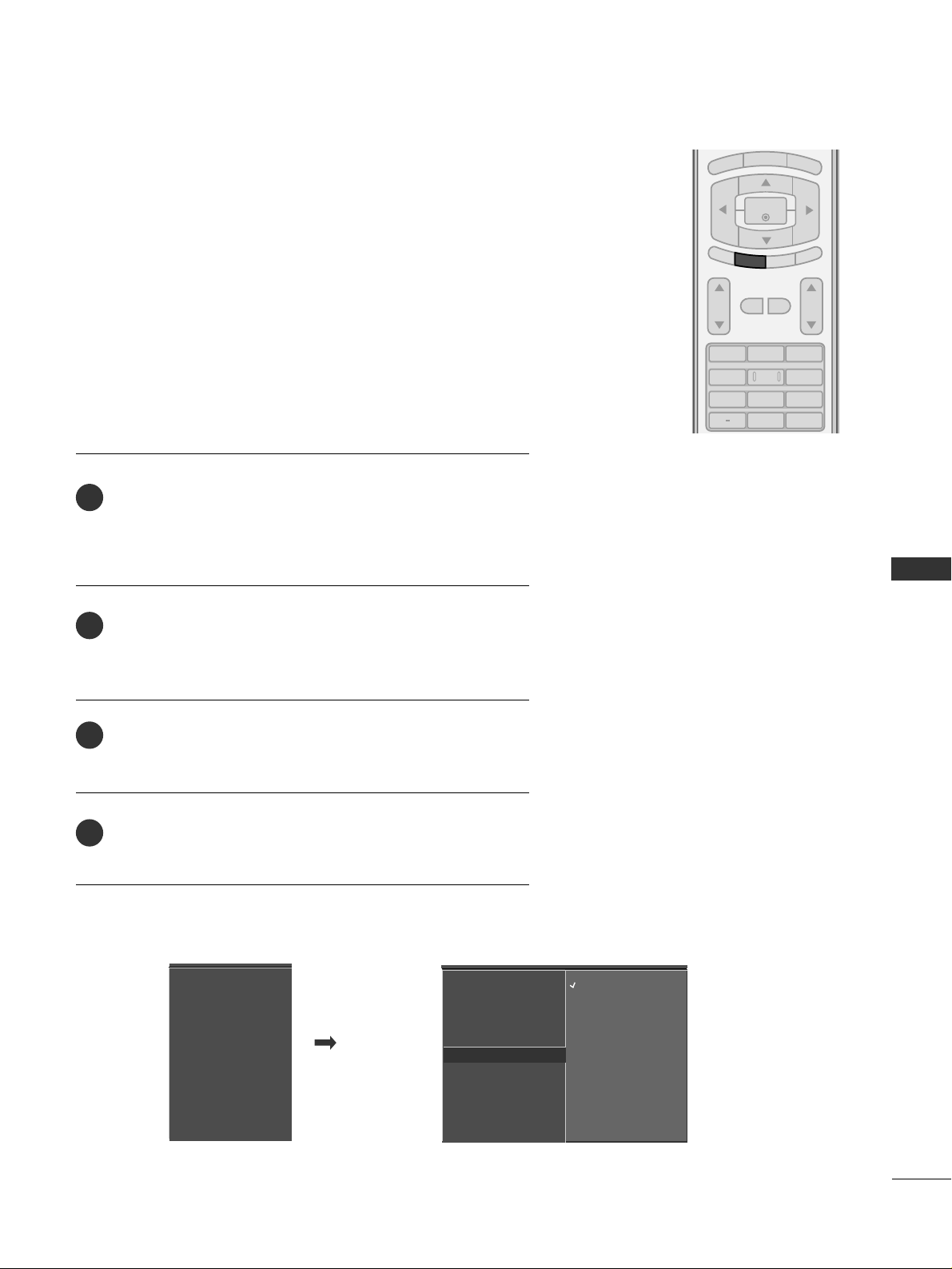
TIME SETTING
67
SLEEP TIMER SETTING
123
456
7809
BACK
VOL CH
MUTE
FAV
BRIGHT -
MENU
BRIGHT +
ENTER
EXIT
SIMPLINK
RATIO
TIMER
Press the
TTII MMEERR
button repeatedly to select the number of
minutes. First the
OO ff ff
option appears on the screen, followed
by the following sleep timer options : 10, 20, 30, 60, 90,
120, 180, and 240 minutes.
When the number of minutes you want is displayed on the
screen, press the
EE NN TTEERR
button. The timer begins to count
down from the number of minutes selected.
To check the remaining minutes before the TV turns off, press
the
TTII MMEERR
button once.
To cancel the Sleep Timer, press the
TTII MMEERR
button repeat-
edly to select
OO ff ff
.
The Sleep Timer turns the TV off at the preset time.
Note that this setting is cleared when the TV is turned off.
■
You can also set up the
SSlleeeepp TTiimmeerr
in the
TT II MMEE
menu.
2
3
4
1
Auto Clock
Manual Clock
Off Timer
On Timer
Sleep Timer
G
Auto Off
Off
10 min
20 min
30 min
60 min
90 min
120 min
180 min
240 min
Auto Clock
Manual Clock
Off Timer
On Timer
Sleep Timer
Auto Off
Page 70
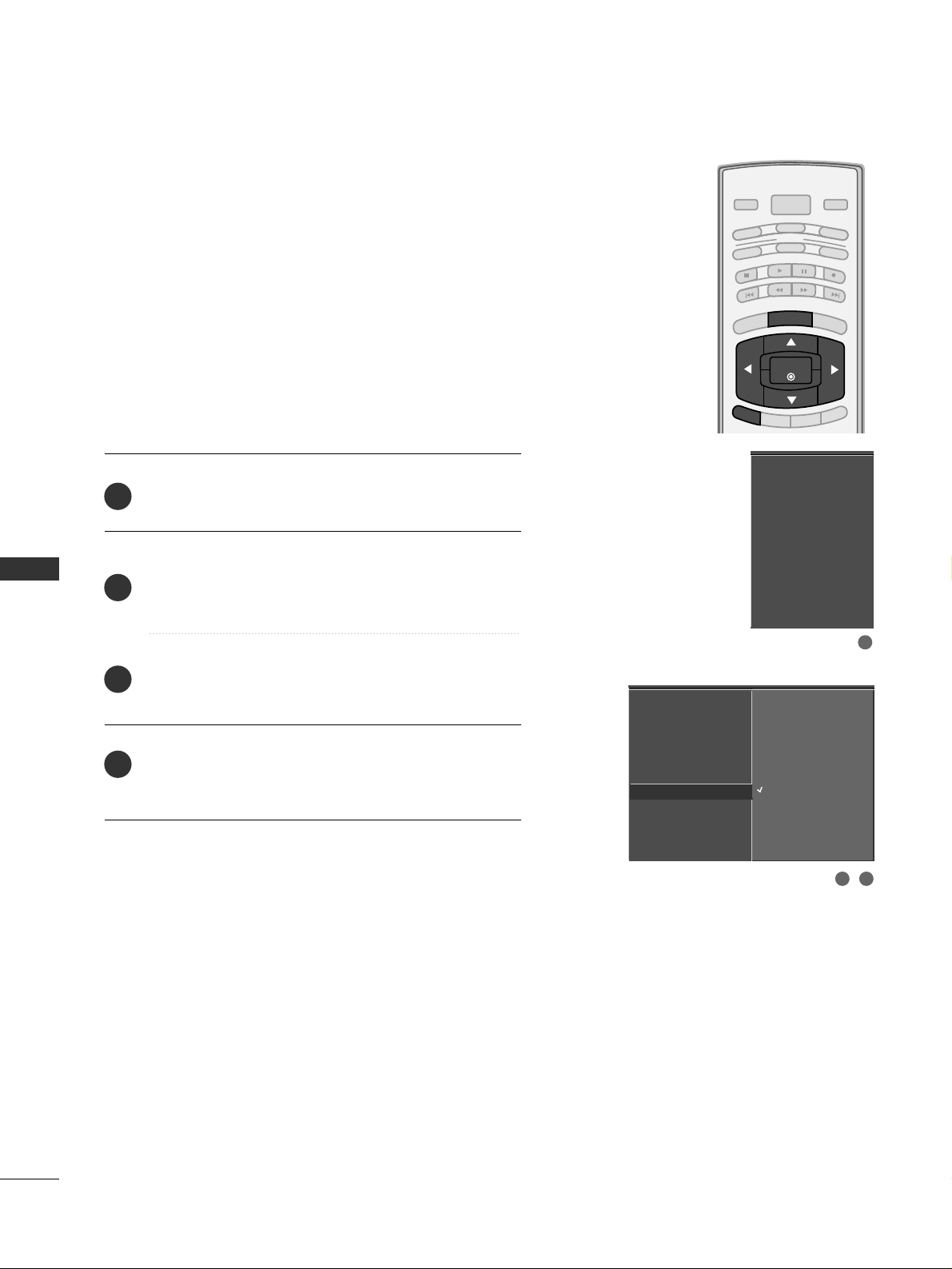
TIME SETTING
68
AUTO SHUT-OFF SETTING
TIME SETTING
BRIGHT -
BRIGHT +
ENTER
TIMER
RATIO
SIMPLINK
POWER
VCR
TV
DVD
AUDIO
CABLE
STB
MODE
TV INPUT
INPUT
EXIT
MENU
If set to on and there is no input signal, the TV turns off
automatically after 10 minutes.
Press the
MMEENNUU
button and then use
DD
or
EE
button
to select the
TT II MMEE
menu.
Press the
GG
button and then use
DD
or
EE
button to
select
AAuuttoo OO ffff
.
Press the
GG
button and then use
DD
or
EE
button to
select
OO nn
or
OO ff ff
.
Press
EE XX IITT
button to return to TV viewing or press
MMEENNUU
button to return to the previous menu.
Auto Clock
Manual Clock
Off Timer
On Timer
Sleep Timer
Auto Off
G
Off
On
TV will be automatically
turned off, in case of No
Signal for 10 minutes.
Auto Clock
Manual Clock
Off Timer
On Timer
Sleep Timer
Auto Off
2
3
4
1
1
32
Page 71
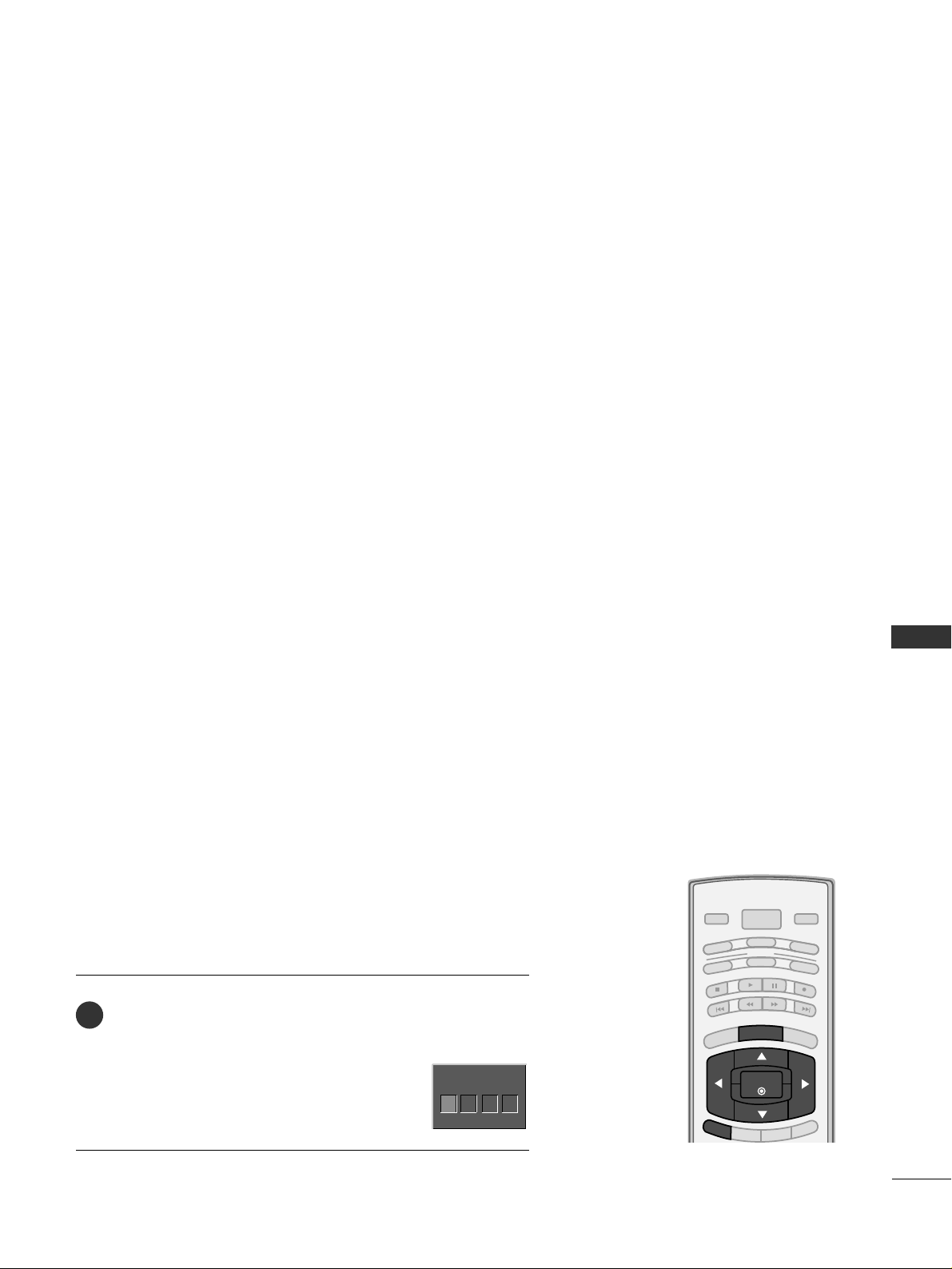
PARENTAL CONTROL / RATING
69
PARENTAL CONTROL / RATINGS
Parental Control can be used to block specific channels, ratings and other viewing sources.
The Parental Control Function (V-Chip) is used to block program viewing based on the ratings
sent by the broadcasting station. The default setting is to allow all programs to be viewed.
Viewing can be blocked by choosing the type of the program and the categories. It is also possible to block all program viewing for a time period. To use this function, the following must be
done :
1. Set ratings and categories to be blocked.
2. Specify a password
3. Enable the lock
V-Chip rating and categories
Rating guidelines are provided by broadcasting stations. Most television programs and television
movies can be blocked by TV Rating and/or Individual Categories. Movies that have been shown
at the theaters or direct-to-video movies use the Movie Rating System (MPAA)only.
Ratings for Television programs including made-for-TV movies :
■
TV-G(General audience
)
■
TV-PG(Parental guidance suggested
)
■
TV-14(Parents strongly cautioned
)
■
TV-MA (Mature audience only
)
■
TV-Y(All children
)
■
TV-Y7(Children 7 years older
)
SET PASSWORD & LOCK SYSTEM
Set up blocking schemes to block specific channels, ratings, and
external viewing sources.
A password is required to gain access to this menu.
Press the
MMEENNUU
button and then use the
DD
or
EE
button
to select the
LL OO CC KK
menu. Then, press the
GG
button.
■
Enter the password as requested.
■
The TV is set up with the initial
password “0-0-0-0”.
BRIGHT -
BRIGHT +
ENTER
TIMER
RATIO
SIMPLINK
POWER
VCR
TV
DVD
AUDIO
CABLE
STB
MODE
TV INPUT
INPUT
EXIT
MENU
Enter Password
1
Enter Password
** **
Setting up Your Password
Page 72
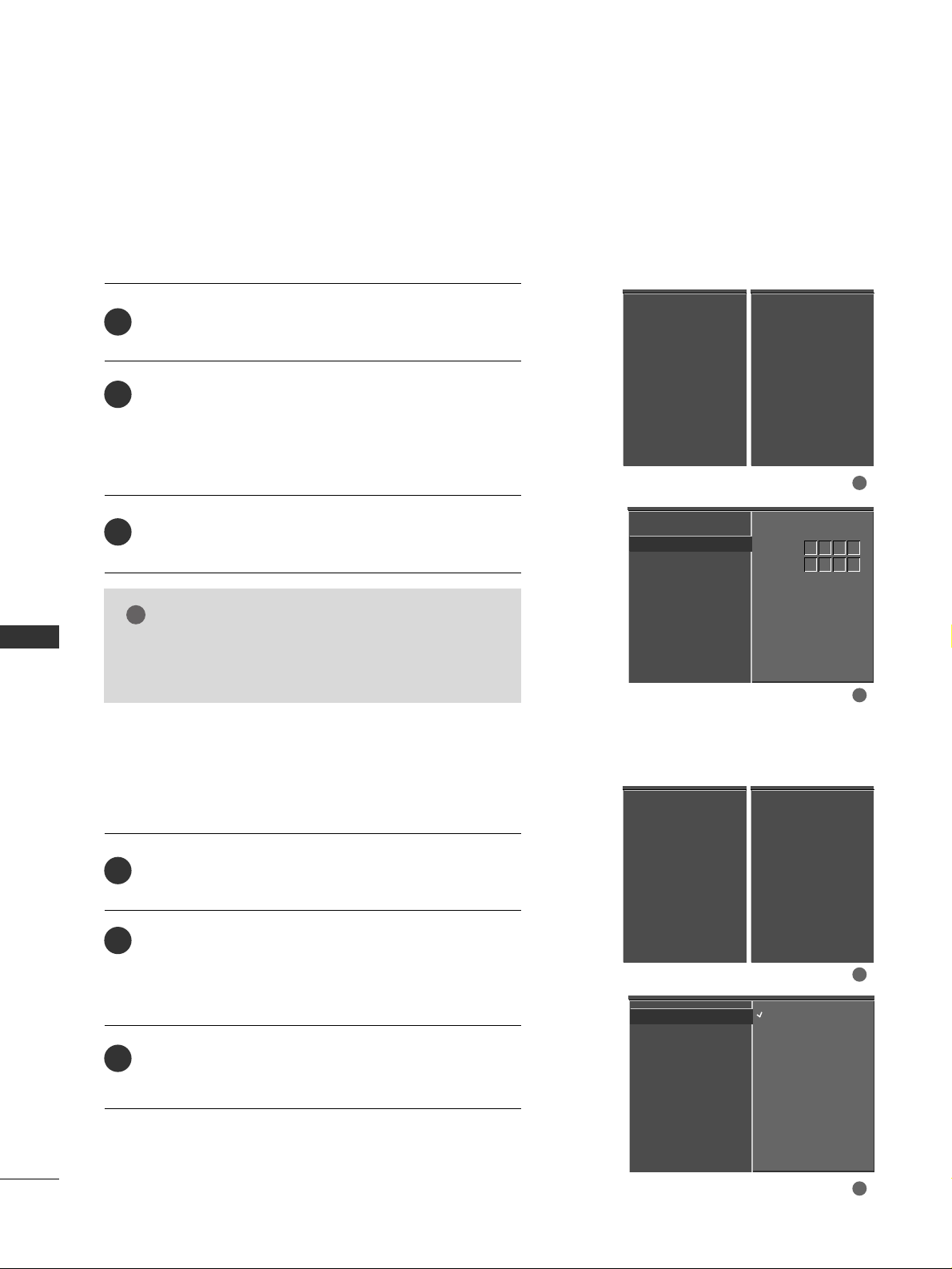
PARENTAL CONTROL / RATING
70
PARENTAL CONTROL /RATINGS
After inputting the password, use the
DD
or
EE
button
to choose
SSeett pp aasssswwoorrdd
.
Press the
GG
button and then choose any 4 digits for
your new password.
As soon as the 4 digits are entered, re-enter the same
4 digits on the
CC oo nn ffiirrmm
.
Then your changed password has been memorized.
Press
EE XX IITT
to return to TV viewing or press
MMEENNUU
to return to the previous menu.
Change the password by inputting a new password twice.
Lock System
Set Password
G
Block Channel
Movie Rating
TV Rating-Children
TV Rating-General
Input Block
New
Confirm
2
3
1
****
****
1
2
NOTE
!
GG
If you ever forget your password, key in ‘7’, ‘7’, ‘7’, ‘7’
on the remote control.
Lock System
Set Password
Block Channel
Movie Rating
TV Rating-Children
TV Rating-General
Input Block
Lock System
Set Password
Block Channel
TV Rating-English
TV Rating-French
Input Block
For USA For Canada
After inputting the password, use the
DD
or
EE
button
to choose
LLoo cckk SSyysstteemm
.
Press the
GG
button and then use the
DD
or
EE
button
to select
OO nn
or
OO ff ff
.
■
When you select
OO nn
, the Lock System is enable.
Press
EE XX IITT
button to return to TV viewing or press
MMEENNUU
button to return to the previous menu.
Enables or disables the blocking scheme you set up previously.
Lock System
G
Set Password
Block Channel
Movie Rating
TV Rating-Children
TV Rating-General
Input Block
Off
On
Lock System
Set Password
Block Channel
Movie Rating
TV Rating-Children
TV Rating-General
Input Block
2
3
1
1
2
Lock System
Set Password
Block Channel
TV Rating-English
TV Rating-French
Input Block
For USA For Canada
Set Password
Lock System
Page 73
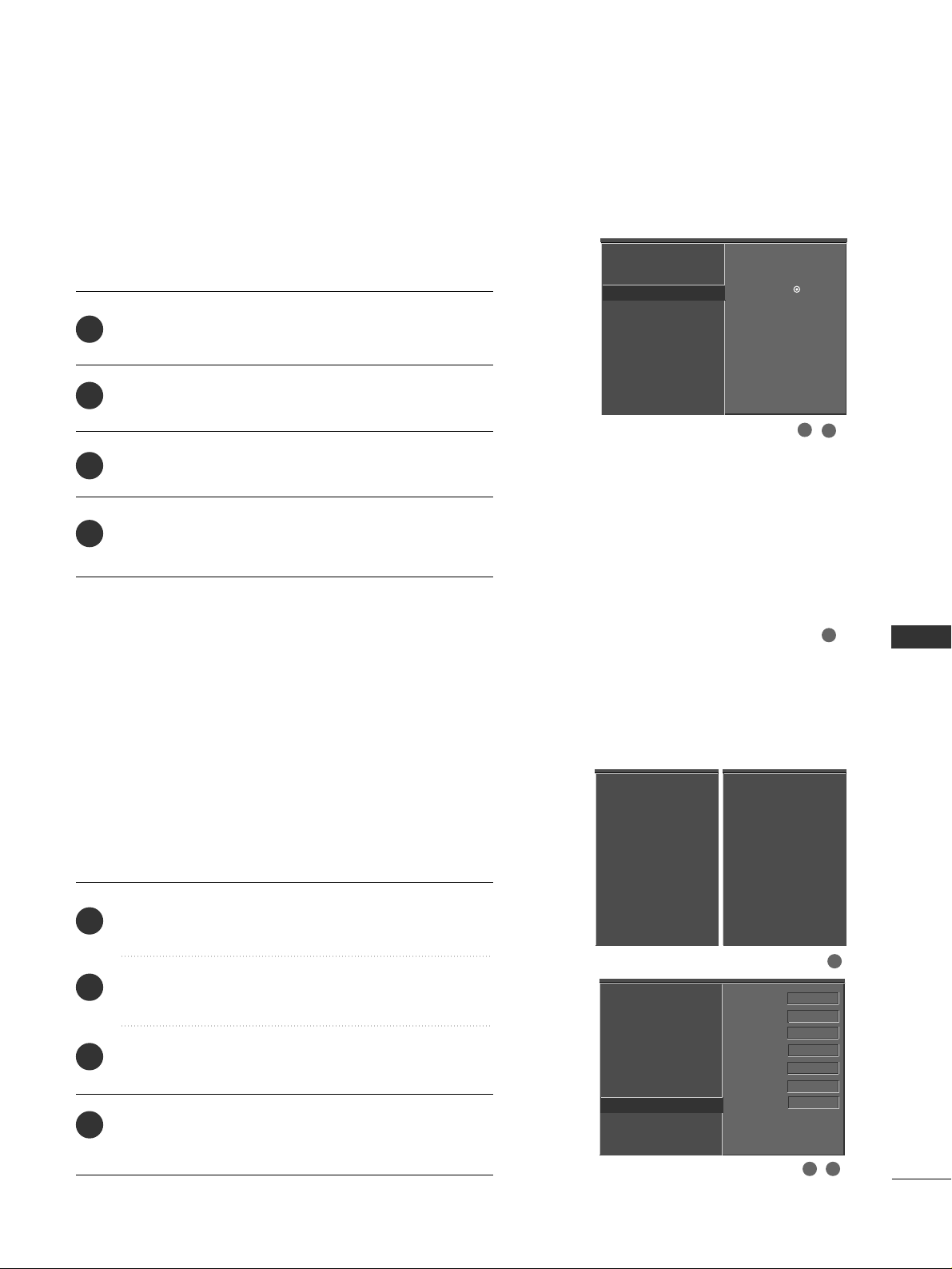
PARENTAL CONTROL / RATING
71
CHANNEL BLOCKING
EXTERNAL INPUT BLOCKING
Blocks any channels that you do not want to watch or that
you do not want your children to watch.
After inputting the password, use the
DD
or
EE
button
to choose
BB lloocckk CC hhaannnn eell
.
Press the
GG
button. You will now see a screen filled
with channel numbers and a preview picture.
Use
DD EE FF GG
button to select a channel and then
use the
EE NN TTEERR
button to block or unblock it.
Press
EE XX IITT
button to return to TV viewing or press
MMEENNUU
button to return to the previous menu.
Lock System
Set Password
Block Channel
G
Movie Rating
TV Rating-Children
TV Rating-General
Input Block
Selection ( Gor
) leads you
to the block channel screen.
2
3
4
1
1
2
3
Enables you to select a source to block from the external
source devices you have hooked up.
After inputting the password, use the
DD
or
EE
button
to choose
IInn ppuu tt BBlloocckk
.
Press the
GG
button and then use the
FF
or
GG
button
to select a source.
Press the
GG
button and then use the
DD
or
EE
button
to select
OO nn
or
OO ff ff
on the each source.
Press
EE XX IITT
button to return to TV viewing or press
MMEENNUU
button to return to the previous menu.
Lock System
Set Password
Block Channel
Movie Rating
TV Rating-Children
TV Rating-General
Input Block
G
AV1 On
AV2 On
Component1 Off
Component2 On
RGB-PC
Off
HDMI1/DVI On
HDMI2 Off
2
3
4
1
1
32
Lock System
Set Password
Block Channel
Movie Rating
TV Rating-Children
TV Rating-General
Input Block
Lock System
Set Password
Block Channel
TV Rating-English
TV Rating-French
Input Block
For USA For Canada
DD
EE
Page 74
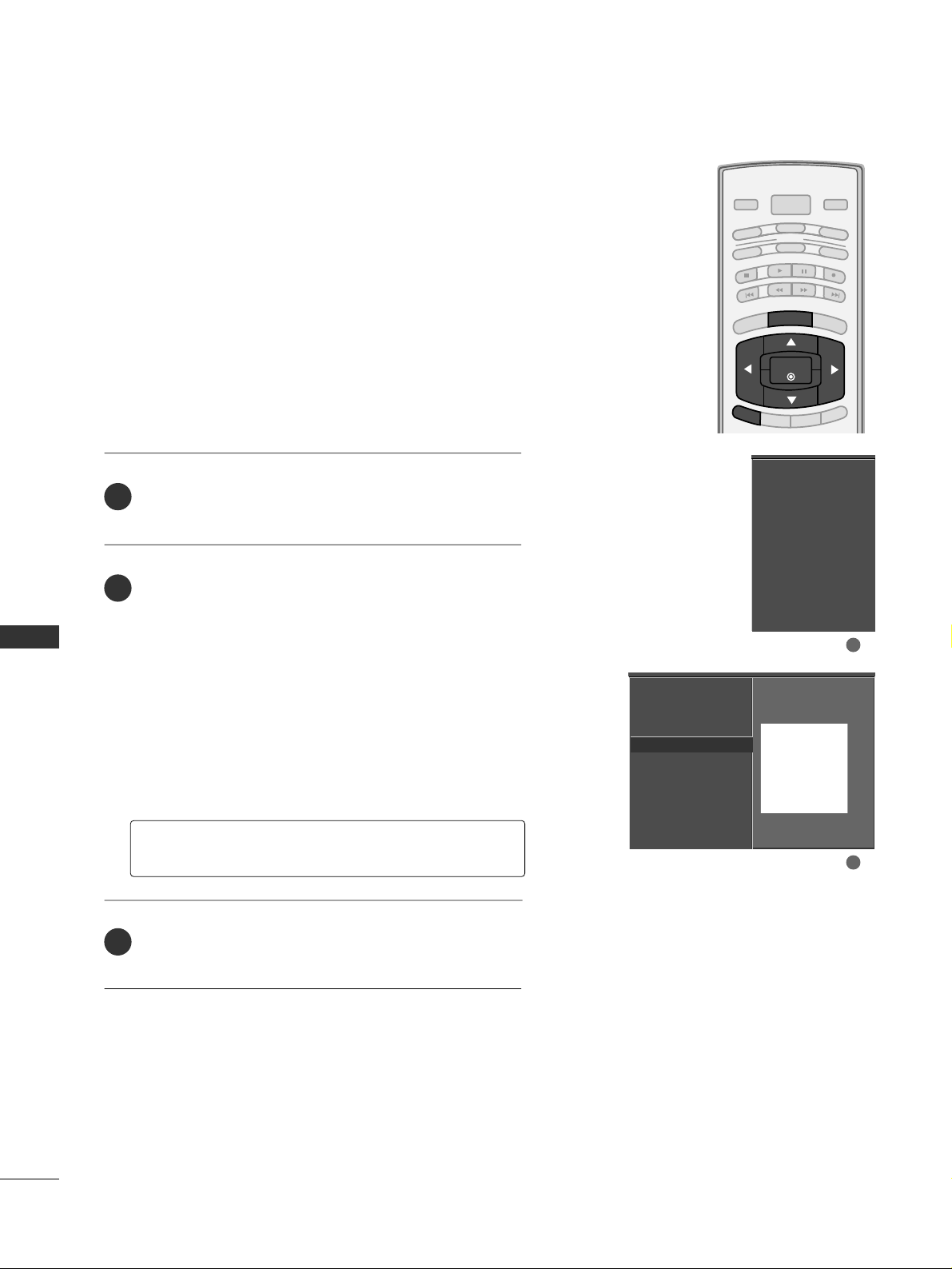
PARENTAL CONTROL / RATING
72
PARENTAL CONTROL /RATINGS
BRIGHT -
BRIGHT +
ENTER
TIMER
RATIO
SIMPLINK
POWER
VCR
TV
DVD
AUDIO
CABLE
STB
MODE
TV INPUT
INPUT
EXIT
MENU
MOVIE & TV RATING
Movie Rating (MPAA)
-
for USA only
Blocks movies according to the movie ratings limits specified, so children cannot view certain movies. You can set
the ratings limit by blocking out all the movies with the
ratings above a specified level. Keep in mind that the
movie ratings limit only applies to movies shown on TV,
not TV programs, such as soap operas.
After inputting the password, use the
DD
or
EE
button
to choose
MMoovvii ee RR aatt iinngg
.
Press the
GG
button and then use the
DD
or
EE
button
to select GG,
PP GG, PPGG --11 33, RR, NN CC --11 77
or XX.
■
G (General audience)
■
PG (Parental guidance suggested)
■
PG-13 (Parents strongly cautioned)
■
R (Restricted)
■
NC-17 (No one 17 and under admitted)
■
X (Adult only)
■
Blocking Off (Permits all programs)
Press
EE XX IITT
button to return to TV viewing or press
MMEENNUU
button to return to the previous menu.
GG
If you set PG-13 : G and PG movies will be available,
PG-13, R, NC-17 and X will be blocked.
Lock System
Set Password
Block Channel
Movie Rating
TV Rating-Children
TV Rating-General
Input Block
Lock System
Set Password
Block Channel
Movie Rating
G
TV Rating-Children
TV Rating-General
Input Block
Blocking off : permits all
programs
G
PG
PG-13
R
NC-17
X
Blocking Off
2
3
1
1
2
Page 75
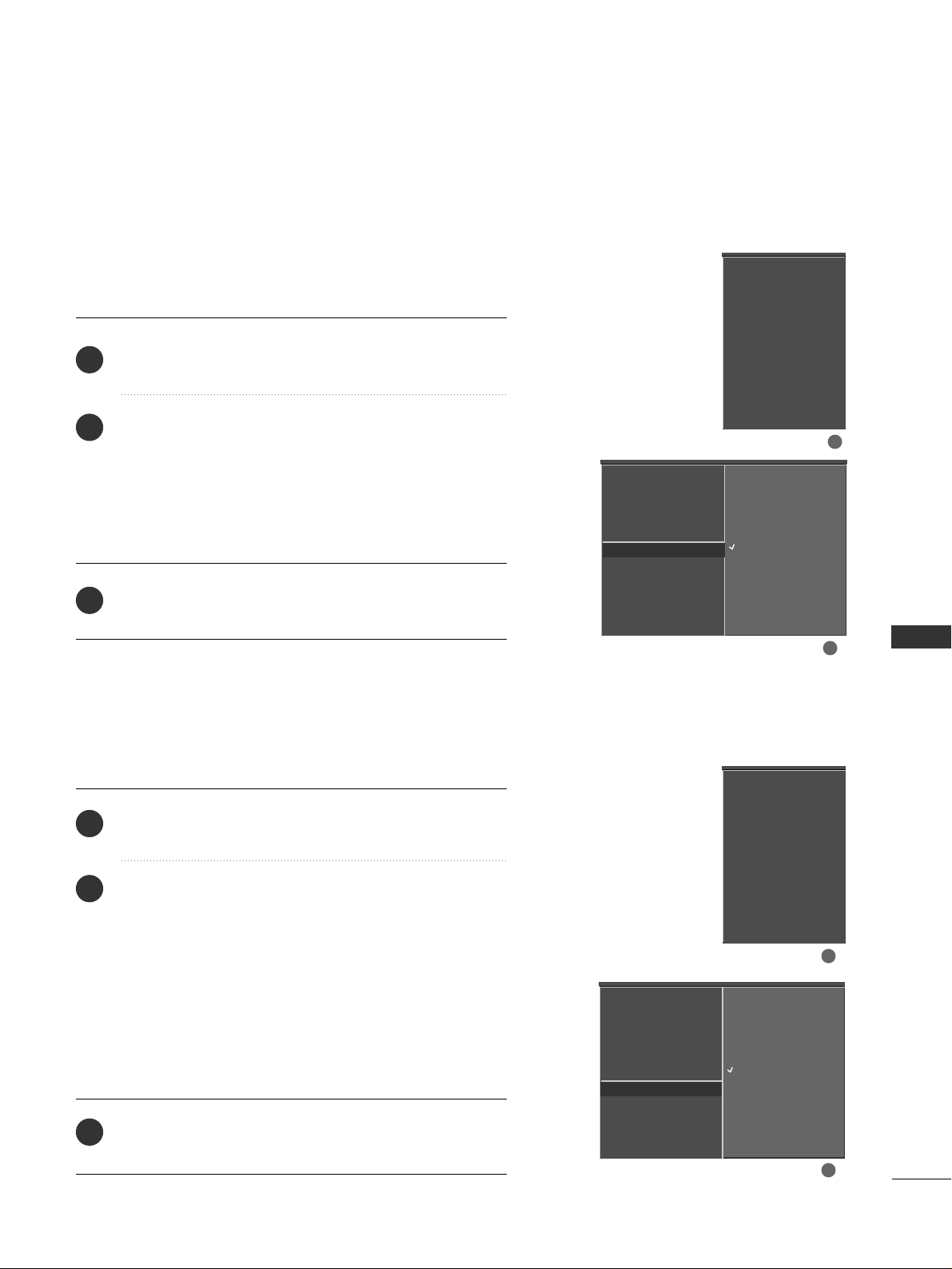
PARENTAL CONTROL / RATING
73
TV Rating Children
-
for USA only
After inputting the password, use the
DD
or
EE
button to
choose
TTVV RRaa ttiinn gg--CC hhiill ddrr ee nn
.
Press the
GG
button and then use the
DD
or
EE
button to
select
AA gg ee
, or
FFaanntt aassyy VV iioolleennccee
.
Press the
GG
button and then use the
DD
or
EE
button to
select block options.
■
Age(applies to TV-Y, TV-Y7)
■
Fantasy Violence(applies to TV-Y7)
Press
EE XX IITT
button to return to TV viewing or press
MMEENNUU
button to return to the previous menu.
Prevents children from watching certain children's TV programs, according to
the ratings limit set. The children rating does not apply to other TV programs.
Unless you block certain TV programs intended for mature audiences in the TV
Rating - sub menu, your children can view those programs.
TV Rating General
-
for USA only
After inputting the password, use the
DD
or
EE
button to
choose
TTVV RRaa ttiinn gg--GGeenneerraall
.
Press the
GG
button and then use the
DD
or
EE
button to
select
AA gg ee, DDii aalloo gg uuee, LLaa nngguuaaggee, SS ee xx
or
VV iioo lleenncc ee
.
Press the
GG
button and then use the
DD
or
EE
button to
select block options.
■
Age(applies to TV-G,TV-PG,TV-14,TV-MA)
■
Dialogue-sexual dialogue (applies to TV-PG,TV-14)
■
Language-adult language (applies to TV-PG,TV-14,TV-MA)
■
Sex-sexual situations (applies to TV-PG,TV-14,TV-MA)
■
Violence (applies to TV-PG,TV-14,TV-MA)
Press
EE XX IITT
button to return to TV viewing or press
MMEENNUU
button to return to the previous menu.
Based on the ratings, blocks certain TV programs that you
and your family do not want to view.
Lock System
Set Password
Block Channel
Movie Rating
TV Rating-Children
G
TV Rating-General
Input Block
Age
Fantasy Violence
Lock System
Set Password
Block Channel
Movie Rating
TV Rating-Children
TV Rating-General
Input Block
Lock System
Set Password
Block Channel
Movie Rating
TV Rating-Children
TV Rating-General
Input Block
Lock System
Set Password
Block Channel
Movie Rating
TV Rating-Children
TV Rating-General
G
Input Block
Age
Dialogue
Language
Sex
Violence
2
3
1
2
3
1
1
2
1
2
Page 76
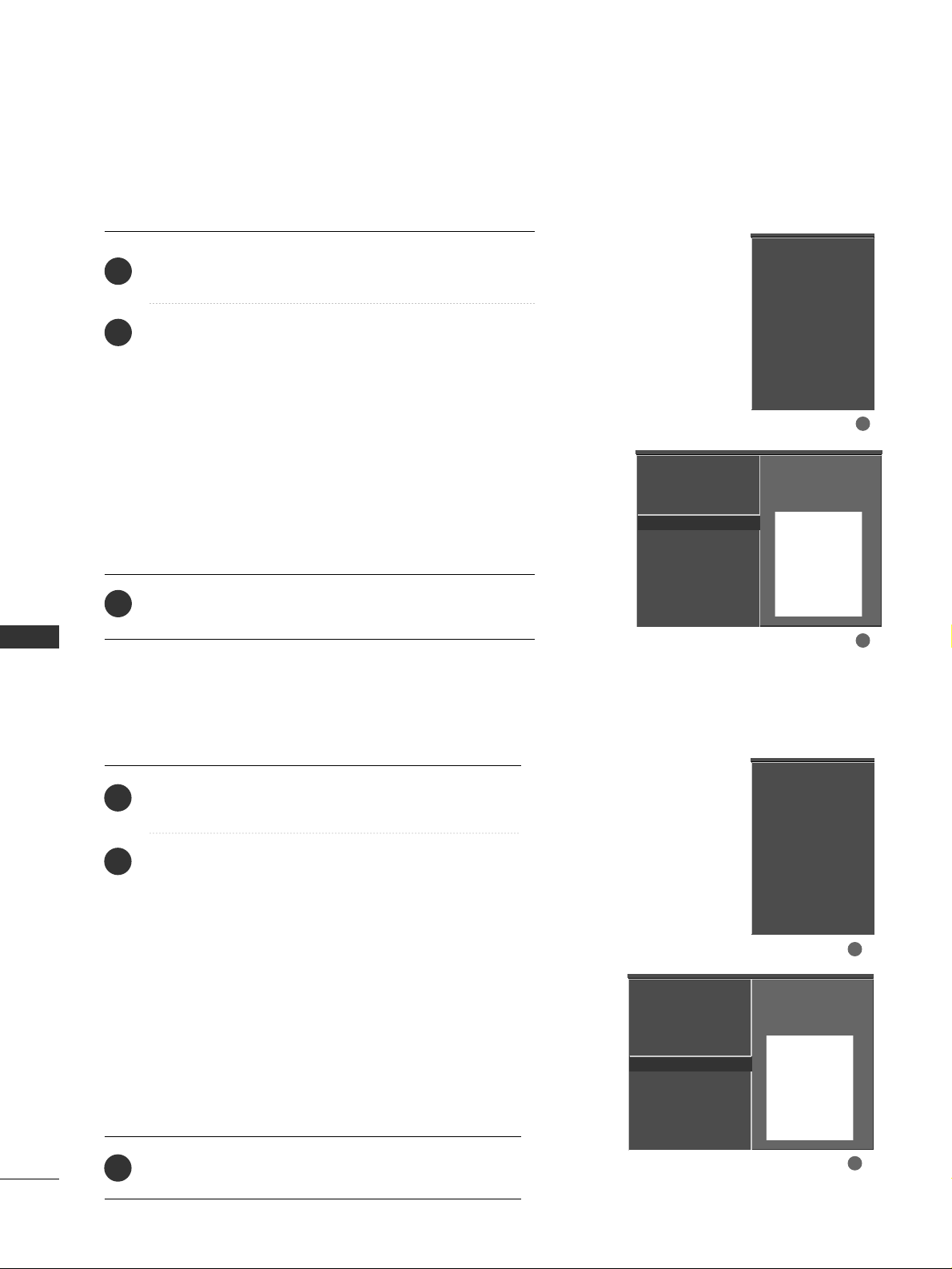
PARENTAL CONTROL / RATING
74
PARENTAL CONTROL /RATINGS
TV Rating English
-
for CANADA only
After inputting the password, use the
DD
or
EE
button to
choose
TTVV RRaa ttiinn gg--EEnnggll iisshh
.
Press the
GG
button and then use the
DD
or
EE
button to
select EE, CC,
CC 88++, GG, PP GG, 1144 ++, 1188 ++
, or
BB lloocckkiinngg OOffff
.
■
E (Exempt)
■
C (Children)
■
C8+ (Children eight years and older)
■
G (General programming, suitable for all audiences)
■
PG (Parental Guidance )
■
14+ (Viewers 14 years and older)
■
18+ (Adult programming)
■
Blocking Off (Permits all programs)
Press
EE XX IITT
button to return to TV viewing or press
MMEENNUU
button to return to the previous menu.
Selecting canadian english language rating system.
TV Rating French
-
for CANADA only
After inputting the password, use the
DD
or
EE
button
to choose
TTVV RRaa ttiinn gg--FFrreenncchh
.
Press the
GG
button and then use the
DD
or
EE
button
to select EE, GG,
88aannss++, 1133aa nnss++, 1166aa nnss++, 1188aa nnss++
,
or
BB lloocckkiinngg ooff ff
.
■
E(Exempt)
■
G(General)
■
8ans+ (General-Not convenient for little children)
■
13ans+ (Not convenient for children of 13 years
and younger)
■
16ans+ (Not convenient for children of 16 years
and younger)
■
18ans+ (This programs is only for adults)
■
Blocking off (Permits all programs)
Press
EE XX IITT
button to return to TV viewing or press
MMEENNUU
button to return to the previous menu.
Selecting canadian french language rating system.
Lock System
Set Password
Block Channel
TV Rating-English
G
TV Rating-French
Input Block
Lock System
Set Password
Block Channel
TV Rating-English
TV Rating-French
Input Block
Lock System
Set Password
Block Channel
TV Rating-English
TV Rating-French
Input Block
Lock System
Set Password
Block Channel
TV Rating-English
TV Rating-French
G
Input Block
2
3
1
2
3
1
Blocking off : permits all
programs
E
C
C8+
G
PG
14+
18+
Blocking Off
Blocking off : permits all
programs
E
G
8 ans+
13 ans+
16 ans+
18 ans+
Blocking Off
1
2
1
2
Page 77
APPENDIX
75
TROUBLESHOOTING
APPENDIX
TThhee ooppeerraattiioonn ddooeess nnoott wwoorrkk nnoorrmmaallllyy..
TThhee vviiddeeoo ffuunnccttiioonn ddooeess nnoott wwoorrkk..
No picture &No sound
No or poor color
or poor picture
Poor reception on
some channels
Lines or streaks
in pictures
Horizontal/vertical bars
or picture shaking
Picture appears slowly
after switching on
The remote control
doesn’t work
Power is suddenly
turned off
■
Check to see if there is any object between the product and the remote control
causing obstruction. Ensure you are pointing the remote control directly at the TV.
■
Ensure that the batteries are installed with correct polarity (+ to +, - to -).
■
Ensure that the correct remote operating mode is set: TV, VCR etc.
■
Install new batteries.
■
Is the sleep timer set?
■
Check the power control settings. Power interrupted.
■
No broadcast on station tuned with Auto off activated.
■
Check whether the product is turned on.
■
Try another channel. The problem may be with the broadcast.
■
Is the power cord inserted into wall power outlet?
■
Check your antenna direction and/or location.
■
Test the wall power outlet, plug another product’s power cord into the outlet
where the product’s power cord was plugged in.
■
This is normal, the image is muted during the product startup process. Please
contact your service center, if the picture has not appeared after five minutes.
■
Adjust Color in menu option.
■
Keep a sufficient distance between the product and the VCR.
■
Try another channel. The problem may be with the broadcast.
■
Are the video cables installed properly?
■
Activate any function to restore the brightness of the picture.
■
Check for local interference such as an electrical appliance or power tool.
■
Station or cable product experiencing problems, tune to another station.
■
Station signal is weak, reorient antenna to receive weaker station.
■
Check for sources of possible interference.
■
Check antenna (Change the direction of the antenna).
Page 78
APPENDIX
76
APPENDIX
TThheerree iiss aa pprroobblleemm iinn PPCC mmooddee.. ((OOnnllyy PPCC mmooddee aapppplliieedd))
■
Adjust resolution, horizontal frequency, or vertical frequency.
■
Check the input source.
■
Work the Auto configure or adjust clock, phase, or H/V position. (Option)
■
Check the signal cable.
■
Reinstall the PC video card.
The signal is out of range
Screen color is unstable
or single color
Vertical bar or stripe on
background &
Horizontal Noise &
Incorrect position
■
Press the VOL or VOLUME button.
■
Sound muted? Press MUTE button.
■
Try another channel. The problem may be with the broadcast.
■
Are the audio cables installed properly?
■
Adjust Balance in menu option.
■
A change in ambient humidity or temperature may result in an unusual noise
when the product is turned on or off and does not indicate a fault with the
product.
Picture OK & No sound
Unusual sound from
inside
the product
No output from one
of the speakers
TThhee aauuddiioo ffuunnccttiioonn ddooeess nnoott wwoorrkk..
Page 79
APPENDIX
77
MAINTENANCE
Early malfunctions can be prevented. Careful and regular cleaning can extend the amount of time you can
enjoy your new TV.
Caution: Be sure to turn the power off and unplug the power cord before you begin any cleaning.
Cleaning the Screen
Here’s a great way to keep the dust off your screen for a while. Wet a soft cloth in a mixture of lukewarm
water and a little fabric softener or dish washing detergent. Wring the cloth until it’s almost dry, and then
use it to wipe the screen.
Make sure the excess water is off the screen, and then let it air-dry before you turn on your TV.
Cleaning the Cabinet
■
To remove dirt or dust, wipe the cabinet with a soft, dry, lint-free cloth.
■
Please be sure not to use a wet cloth.
Extended Absence
GG
If you expect to leave your TV dormant for a long time (such as a vacation), it’s a good idea to unplug
the power cord to protect against possible damage from lightning or power surges.
CAUTION
2
1
Page 80
APPENDIX
78
PRODUCT SPECIFICATIONS
APPENDIX
■
The specifications shown above may be changed without prior notice for quality improvement.
42PC5D (42PC5D-UC)
42PC5DC (42PC5DC-UC)
50PC5D (50PC5D-UC)
50PC5DC (50PC5DC-UC)
MODELS
41.3 x 30.2 x 12.2 inches
1048.0 x 766.0 x 310.0 mm
41.3 x 28.1 x 3.3 inches
1048.0 x 713.0 x 83.5 mm
61.7 pounds / 28.0 kg
54.2 pounds / 24.6 kg
48.9 x 34.9 x 14.6 inches
1242.0 x 887.6 x 370.0 mm
48.9 x 32.6 x 3.5 inches
1242.0 x 827.2 x 88.0 mm
86.6 pounds / 39.3 kg
76.3 pounds / 34.6 kg
AC100-240V ~ 50/60Hz
NTSC-M, ATSC, 64 & 256 QAM
VHF 2-13, UHF 14-69, CATV 1-135, DTV 2-69, CADTV 1-135
75 ohm
32 ~ 104°F (0 ~ 40°C)
Less than 80%
-4 ~ 140°F (-20 ~ 60°C)
Less than 85%
Dimensions
(Width x Height x Depth)
Weight
Power requirement
Television System
Program Coverage
External Antenna Impedance
Environment condition
Including stand
Excluding stand
including stand
excluding stand
Operating Temperature
Operating Humidity
Storage Temperature
Storage Humidity
Page 81
APPENDIX
79
32LC7D(32LC7D-UB)
32LC7DC(32LC7DC-UB)
37LC7D
(37LC7D-UB)
42LC7D
(42LC7D-UB)
MODELS
31.8 x 23.9x 9.8 inches
806.6 x 606.5 x 249.0mm
31.8 x 21.7 x 3.1 inches
806.6 x 552.3 x 79.0 mm
30.2 pounds / 13.7 kg
24.7 pounds / 11.2 kg
36.5 x 27.3 x 11.0 inches
927.0 x 692.8 x 280.5 mm
36.5 x24.8 x 3.5 inches
927.0 x 630.0 x 88.0 mm
44.1 pounds / 20.0 kg
35.3 pounds / 16.0 kg
40.7 x 29.5 x 11.3 inches
1033.4 x 750.0 x 287.6 mm
40.7 x 27.0x 3.5 inches
1033.4 x 686.8 x 88.5 mm
54.9 pounds / 24.9 kg
45.0 pounds / 20.4 kg
AC100-240V ~ 50/60Hz
NTSC-M, ATSC, 64 & 256 QAM
VHF 2-13, UHF 14-69, CATV 1-135, DTV 2-69, CADTV 1-135
75 ohm
32 ~ 104°F (0 ~ 40°C)
Less than 80%
-4 ~ 140°F (-20 ~ 60°C)
Less than 85%
Dimensions
(Width x Height x Depth)
Weight
Power requirement
Television System
Program Coverage
External Antenna Impedance
Environment condition
Including stand
Excluding stand
including stand
excluding stand
Operating Temperature
Operating Humidity
Storage Temperature
Storage Humidity
Page 82

APPENDIX
80
PROGRAMMING THE REMOTE CONTROL
APPENDIX
The provided universal remote control can be programmed to operate most remote-controllable devices.
Note that the remote may not control all models of other brands.
Programming a code into a remote mode
To find out whether your remote control can operate each device without programming, turn on the device
(such as a VCR) and press the corresponding mode button on the remote.
After that, press the
PPOOWWEERR
button. If the device is turned off and it responds properly the remote control
need not be programmed. If not, the remote should be programmed to operate the device. The programming procedures are explained below.
Press the
MMEENNUU
and
MMUUTTEE
button continuously at the same time for two seconds; the currently selected
device button is illuminated.
If you don't press any button for 20 seconds, the light on the mode button will be turned off. In that case,
you have to repeat from step 2.
Enter the appropriate code from the code table on the following pages. When pressing the button, the
light blinks at a time. If the device turned off, the programming is successful.
Press the
MMEENNUU
button to store the code. After blinking twice, this code is stored.
Test the remote control functions to see if the device responds properly. If not, steps 2-5.
2
3
4
5
1
Page 83
APPENDIX
81
Remote Control Code
Brand Codes Brand Codes Brand Codes
AIWA 034
AKAI 016 043 046 124
12 5 1 4 6
AMPRO 072
ANAM 031 033 103
AUDIO DYNAMICS
012 023 0 39 0 43
BROKSONIC 035 037 129
CANON 028 031 033
CAPEHART 108
CRAIG 003 040 135
CURTIS MATHES 031 033 041
DAEWOO 005 007 010 064
065 108 110 111
112 11 6 117 11 9
DAYTRON 108
DBX 012 023 039 043
DYNATECH 034 053
ELECTROHOME 059
EMERSON 006 017 025 027
029 031 034 035
036 037 046 101
12 9 13 1 13 8 15 3
FISHER 003 008 009 010
FUNAI 034
GE 031 033 063 072
10 7 10 9 14 4 147
GO VIDEO 132 136
HARMAN KARDON 012 045
HITACHI 004 018 026 034
043 063 137 150
INSTANTREPLAY 031 033
JCL 031 033
JCPENNY 012 013 015 033
040 066 101
JENSEN 043
JVC 012 031 033 043
048 050 055 060
13 0 15 0 15 2
KENWOOD 014 034 039 043
047 048
LG (GOLDSTAR) 001 012 013 020
101 10 6 114 12 3
LLOYD 034
LXI 003 009 013 014
017 034 101 106
MAGIN 040
MAGNAVOX 031 033 034 041
067 068
MARANTZ 012 031 033 067
069
MARTA 101
MATSUI 027 030
MEI 031 033
MEMOREX 003 010 014 031
033 034 053 072
101 10 2 134 139
MGA 0 45 046 059
MINOLTA 013 020
MITSUBISHI 013 020 045 046
049 051 059 061
151
MTC 034 040
MULTITECH 024 034
NEC 012 023 039 043
048
NORDMENDE 043
OPTONICA 053 054
PANASONIC 066 070 074 083
13 3 14 0 1 4 5
PENTAX 013 020 031 033
063
PHILCO 031 034 067
PHILIPS 031 033 034 054
067 071 101
PILOT 101
PIONEER 013 021 048
PORTLAND 108
PULSAR 072
QUARTZ 011 014
QUASAR 033 066 075 145
RCA 013 020 033 034
040 041 062 063
107 109 140 144
14 5 14 7
REALISTIC 003 008 010 014
031 033 034 040
053 054 101
RICO 058
RUNCO 148
SALORA 014
SAMSUNG 032 040 102 104
10 5 107 10 9 112
113 115 12 0 12 2
12 5
SANSUI 022 043 048 135
SANYO 003 007 010 014
10 2 134
SCOTT 017 037 112 129
131
SEARS 003 008 009 010
013 014 017 02 0
031 0 42 073 081
101
SHARP 031 054 149
SHINTOM 024
SONY 003 009 031 052
056 057 058 076
077 078 149
SOUNDESIGN 034
STS 013
SYLVANIA 031 033 034 059
067
SYMPHONIC 034
TANDY 010 034
TATUNG 039 043
TEAC 034 039 043
TECHNICS 031 033 070
TEKNIKA 019 031 033 034
101
THOMAS 034
TMK 006
TOSHIBA 008 013 042 047
059 082 112 131
TOTEVISION 040 101
UNITECH 040
VECTOR RESEARCH
012
VICTOR 048
VIDEO CONCEPTS
012 034 0 46
VIDEOSONIC 040
WARDS 003 013 017 024
031 033 034 040
053 054 131
YAM AH A 012 034 039 0 43
ZENITH 034 048 056
058 072 080 101
VCR
Page 84
APPENDIX
82
Cable Box
APPENDIX
Brand Codes Brand Codes Brand Codes
Brand Codes Brand Codes Brand Codes
ABC 003 004 039 042
046 052 053
AJIN 112
ANTRONIK 014
ARCHER 005 007 014 024
CABLE STAR 026
CENTURION 092
CENTURY 007
CITIZEN 007
COLOUR VOICE 065 090
COMBANO 080 081
COMTRONICS 019 030
DIAMOND 023
EAGLE 020 030 040
EASTERN 057 062 066
ELECTRICORD 032
GE 072
GEMINI 008 022 025 054
GI 052 074
GOLDEN CHANNEL
030
HAMLIN 049 050 055
HITACHI 052 055
HOSPITALITY 070 077
JERROLD 002 003 004 008
009 010 052 069
074
LG (GOLDSTAR) 001 106 101 005
M-NET 037
MACOM 033
MAGNAVOX 010 012 064 079
MEMOREX 100
MOVIE TIME 028 032
NSC 015 028 038 071
073
OAK 016 031 037 053
PANASONIC 044 047
PARAGON 100
PHILIPS 006 012 013 020
065 085 090
PIONEER 034 051 052 063
076
POST NEWS WEEK016
PRUCER 059
PTS 011 048 071 072
073 074
PULSAR 100
RCA 047
REGAL 049 050
REGENCY 057
REMBRANT 025
SAMSUNG 102 107 030 068
SCIENTIFIC ATLANTA
003 011 041 042
043 045 046
SHERITECH 022
SIGNAL 030
SIGNATURE 052
SL MARX 030
SPRUCER 047 078
STARCOM 002 004 008 009
STARGATE 008 030
TADIRAN 030
TAEKWANG 110
TAIHAN 105
TANDY 017
TEXSCAN 029
TOCOM 039 040 056
TOSHIBA 100
UNIKA 007 014 024
UNITED CABLE 004 053
UNIVERSAL 005 007 014 024
026 027 032 035
VIEWSTAR 012 015 018 086
087 088 089
ZENITH 100 114 060 093
ALPHASTAR DSR 123
AMPLICA 050
BIRDVIEW 051 126 129
CHANNEL MASTER
013 014 015 018
036 055
CHAPARRAL 008 009 012 077
CITOH 054
CURTIS MATHES 050 145
DRAKE 005 006 007 010
011 0 52 112 116
141
DX ANTENNA 024 046 056 076
ECHOSTAR 038 040 057 058
093 094 095 096
097 098 099 100
12 2
ELECTRO HOME 089
EUROPLUS 114
FUJITSU 017 021 022 027
13 3 13 4
GENERAL INSTRUMENT
003 004 016 029
031 059 101
HITACHI 139 140
HOUSTON TRACKER
033 037 039 051
057 104
HUGHES 068
JANIEL 060 147
JERROLD 061
KATHREIN 108
LEGEND 057
LG 001
LUTRON 132
LUXOR 062 144
MACOM 010 059 063 064
065
MEMOREX 057
NEXTWAVE 028 124 125
NORSAT 069 070
PACE SKY SATELLITE
14 3
PANASONIC 060 142
PANSAT 121
PERSONAL CABLE 117
PHILIPS 071
PICO 105
PRESIDENT 019 102
PRIMESTAR 030 110 111
PROSAT 072
RCA 066 106
REALISTIC 043 074
SAMSUNG 123
SATELLITE SERVICE CO
028 035 047 057
085
SCIENTIFIC ATLANTA
032 138
SONY 103
STARCAST 041
SUPER GUIDE 020 124 125
TEECOM 023 026 075 087
088 090 107 130
13 7
TOSHIBA 002 127
UNIDEN 016 025 042 043
044 045 048 049
078 079 080 086
101 135 136
VIEWSTAR 115
WINEGARD 128 146
ZENITH 081 082 083 084
091 120
HDSTB
Page 85
APPENDIX
83
Audio
DVD
Brand Codes Brand Codes Brand Codes
Brand Codes Brand Codes Brand Codes
AIWA 014 028 070 096
12 5 12 9 13 9 2 2 9
230
AKAI 163
ANAM 003 014 017 023
059 106 189 216
217 23 5 2 36
BURMECTER 252
CARVER 086
CLARION 199
DAEWOO 027 053 060 084
10 2 148 19 8 2 21
DENON 015 075 130 143
FANTASIA 071
FINEARTS 022
FISHER 089 099
LG(GOLDSTAR) 001 021 024 029
0 8 7 10 7 10 8 110
19 0 191 19 2 210
211 212 2 39
HAITAI 034 035 188 222
HARMAN/KARDON 068
JVC 004 013 141
K E C 18 5 18 6 18 7
KOHEL 030
NAD 045 046
KENWOOD 038 050 067 089
17 0 17 1 1 9 7 2 0 6
215 22 2
INKEL 037 058 062 069
078 079 095 121
12 2 14 9 15 0 15 1
15 2 15 3 15 4 15 5
15 7 15 8 15 9 16 0
189 207 222 224
225 226 227 243
247
LOTTE 014 016 036 098
10 0 172 173 174
17 5 17 6 17 7 17 8
17 9 18 0 18 1 18 3
201 202 208 213
214 219 223 232
238 240
LXI 103
MAGNAVOX 111
MARANTZ 002 018 020 025
034 041 081 090
097 112
MCINTOSH 049
MCS 104
MEMOREX 107
NAD 046
ONKYO 013 040 041 047
048 056 057 132
13 3 14 0
OPTIMUS 158
PANASONIC 007 033 064 113
14 2 2 2 0 24 1 2 51
PENNEY 104
PHILIPS 026 112 143
PIONEER 039 042 043 063
065 091 093 094
115 12 3 12 7 2 5 0
QUASAR 113
RCA 080
RCX 092
REALISTIC 103 106
SAMSUNG 124 145 146 182
19 3 19 4 195 2 0 3
204 244 245 246
SANSUI 011 135 138 144
SANYO 019 083 234
SCOTT 106 186
SHARP 031 032 051 052
072 082 117 119
156 184 199 200
206 209
SHERWOOD 005 006 158
SONY 044 045 109 114
118 12 6 2 4 8 2 4 9
TAEKWANG 012 020 073 074
076 077 105 161
16 2 16 3 16 4 16 5
16 6 16 7 16 8 16 9
205 231 233 242
TEAC 010 085 106 136
18 5 18 7 2 3 7
TECHNICS 101 113 128 134
14 7 218
TOSHIBA 137
THE 061
VICTOR 088 131
WARDS 089
YAMAH A 054 055 066 092
19 9
APEX DIGITAL 022
DENON 020 014
GE 005 006
HARMAN KARDON 027
JVC 012
LG 001 010 016 025
MAGNAVOX 013
MARANTZ 024
MITSUBISHI 002
NAD 023
ONKYO 008 017
PANASONIC 003 009
PHILIPS 013
PIONEER 004 026
PROCEED 021
PROSCAN 005 006
RCA 005 006
SAMSUNG 011 015
SONY 007
THOMPSON 005 006
TOSHIBA 019 008
YAMAHA 009 018
ZENITH 010 016 025
Page 86
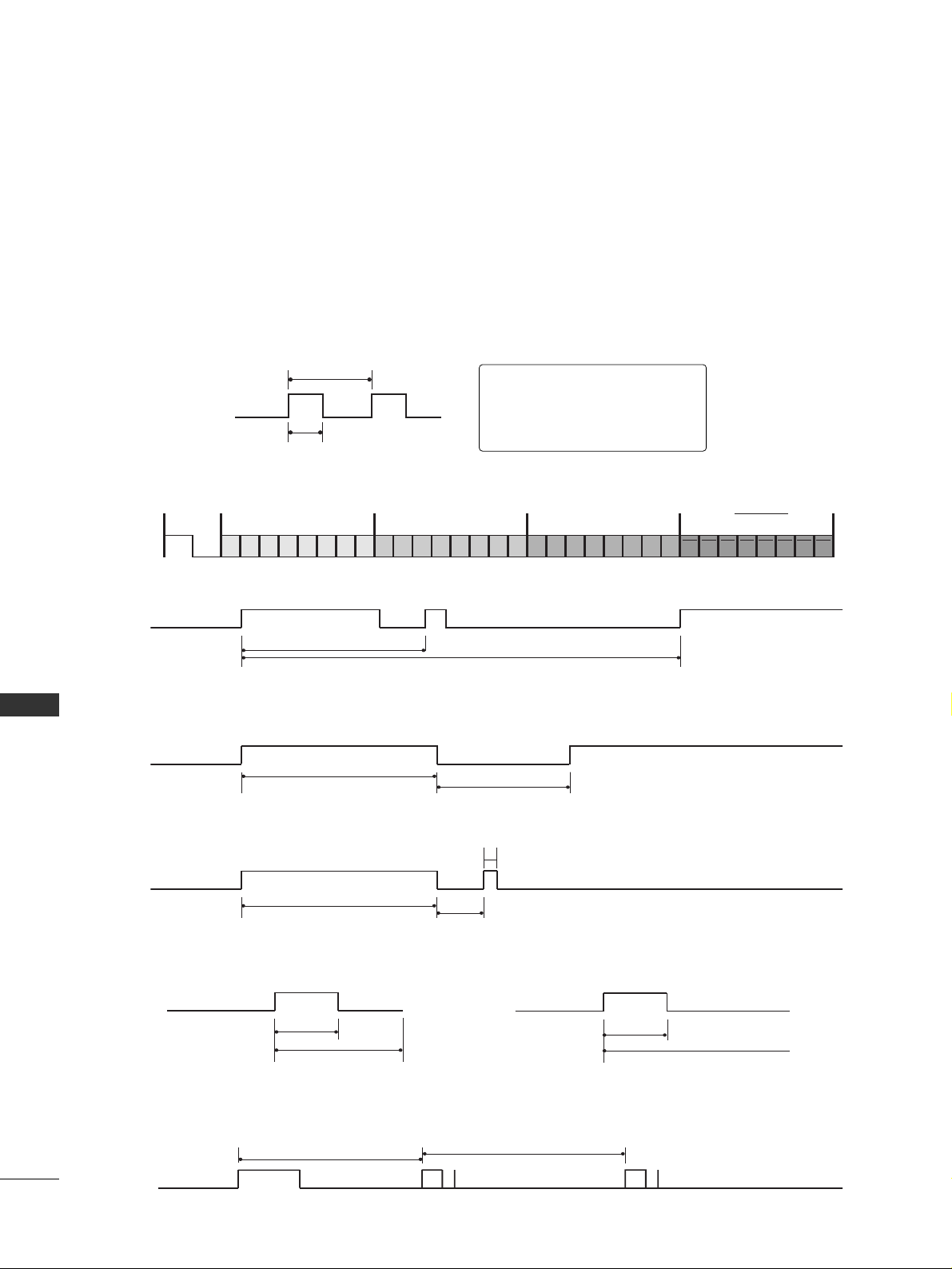
APPENDIX
84
IR CODES
APPENDIX
■
Configuration of frame
1st frame
Repeat frame
■
Lead code
■
Repeat code
■
BB iitt ddee ss ccrrii ppttiioonn
■
FFrraammee iinn tteerrvvaall :: TTff
The waveform is transmitted as long as a key is depressed.
C0 C1 C2 C3 C4 C5 C6 C7 C0 C1 C2 C3 C4 C5 C6 C7 D0 D1 D2 D3 D4 D5 D6 D7 D0 D1 D2 D3 D4 D5 D6 D7
Lead code Low custom code High custom code Data code Data code
Repeat code
Tf
4.5 ms
9 ms
2.25 ms
9 ms
0.55 ms
0.56 ms
1.12 ms
0.56 ms
2.24 ms
Tf Tf
Tf=108ms @455KHz
Bit ”0” Bit ”1”
1. How to Connect
■
Connect your wired remote control to the Remote Control port on the TV.
2. Remote Control IR Codes
■
Output waveform
Single pulse, modulated with 37.917KHz signal at 455KHz
T1
Tc
Carrier frequency
FCAR = 1/TC = fOSC/12
Duty ratio = T1/TC = 1/3
Page 87
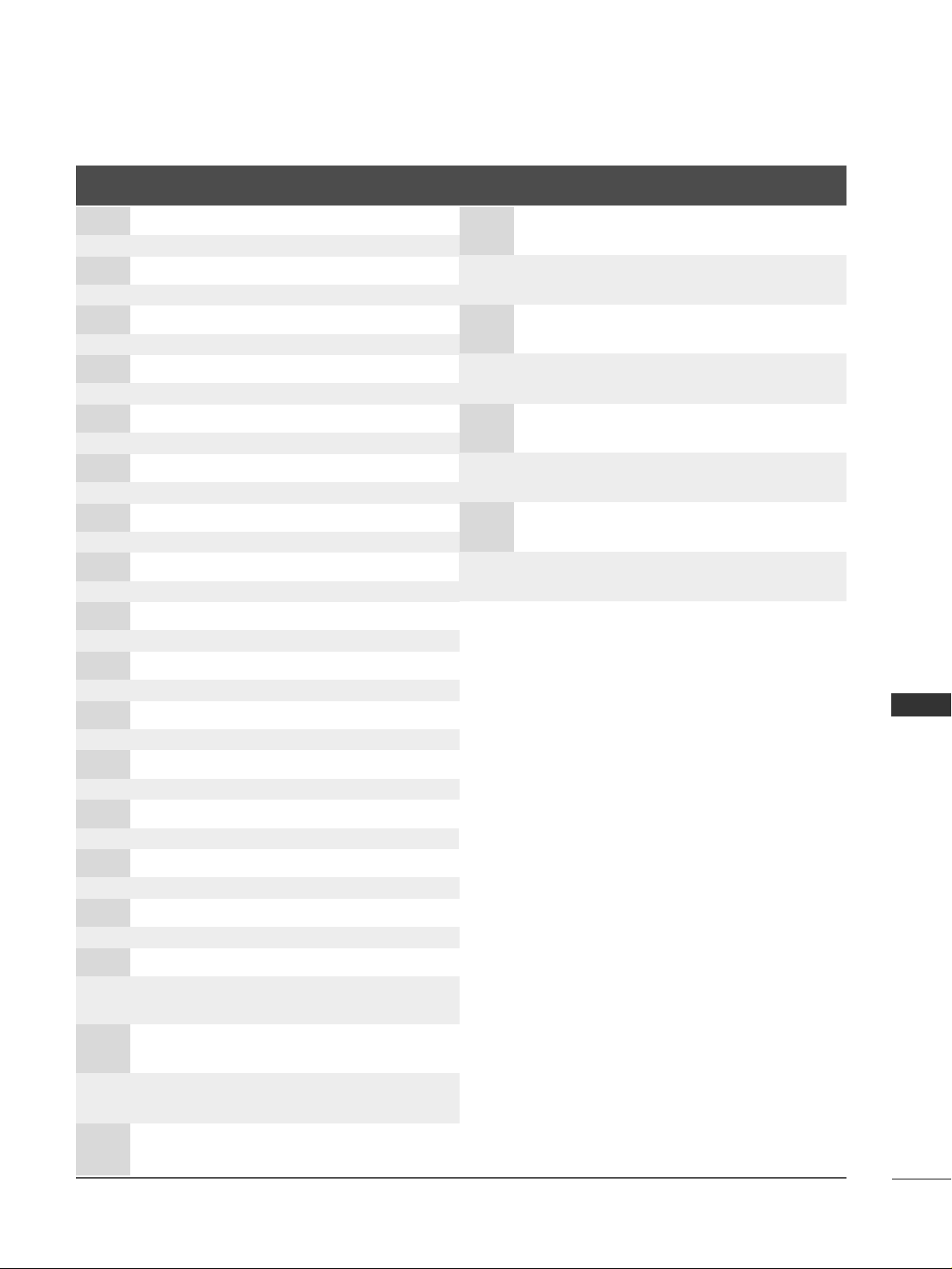
APPENDIX
85
Code
Function Note
(Hexa)
Code
Function Note
(Hexa)
0F TV INPUT Remote control Button
0B INPUT Remote control Button
08 POWER
Remote control Button (Power On/Off)
79 RATIO Remote control Button
0E TIMER Remote control Button
10-19 Number Key 0-9 Remote control Button
4C - (Dash) Remote control Button
1A BACK Remote control Button
09 MUTE Remote control Button
02 VOL
DD
Remote control Button
03 VOL
EE
Remote control Button
00 CH
DD
Remote control Button
01 CH
EE
Remote control Button
1E FAV Remote control Button
7E SIMPLINK Remote control Button
39 CC Remote control Button
40
DD
Remote control Button
41
EE
Remote control Button
07
FF
Remote control Button
06
GG
Remote control Button
44 ENTER Remote control Button
43 MENU Remote control Button
52 SOUND Remote control Button
4D PICTURE Remote control Button
5B EXIT Remote control Button
0A SAP Remote control Button
CB ADJUST Remote control Button
E1 BRIGHT - Remote control Button
E0 BRIGHT + Remote control Button
D6 TV Discrete IR Code
(TV Input Selection)
C4 POWER ON Discrete IR Code
(Only Power On)
C5 POWER OFF Discrete IR Code
(Only Power Off)
5A AV1 Discrete IR Code
(AV1 Input Selection)
D0 AV2 Discrete IR Code
(AV2 Input Selection)
BF COMPONENT1 Discrete IR Code
(Component1 Input Selection)
D4 COMPONENT2 Discrete IR Code
(Component2 Input Selection)
D5 RGB-PC Discrete IR Code
(RGB-PC Input Selection)
CE HDMI1/DVI Discrete IR Code
(HDMI1/DVI Input Selection)
CC HDMI2 Discrete IR Code
(HDMI2 Input Selection)
76 Ratio 4:3 Discrete IR Code
(Only 4:3 Mode)
77 Ratio 16:9 Discrete IR Code
(Only 16:9 Mode)
AF Ratio Zoom Discrete IR Code
(Only Zoom1 Mode)
Page 88
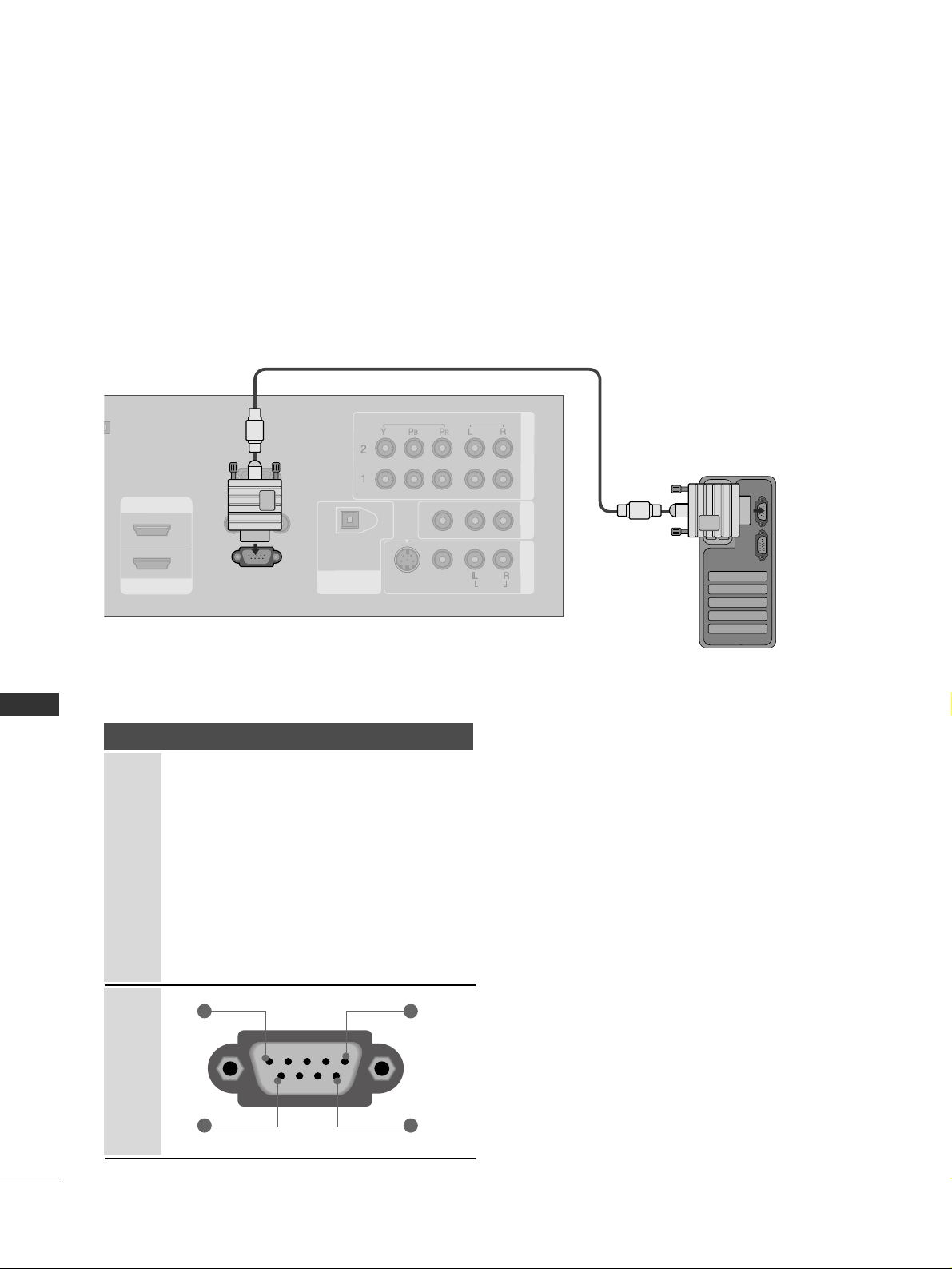
APPENDIX
86
EXTERNAL CONTROL THROUGH RS-232C
APPENDIX
RS-232C Setup
The RS-232C port allows you connect the RS-232C input jack to an external control device (such as a computer
or an A/V control system) to control the TV’s functions externally.
■
Note: RS-232C on this unit is intended to be used with third party RS-232 control hardware and software.
The instructions below are provided to help with programming software or to test functionality using telenet
software.
REMOTE
CONTROL IN
RS-232C IN
(CONTROL & SERVICE)
RGB IN
(PC)
AUDIO IN
(RGB/DVI)
DIGITAL AUDIO
OUT
OPTICAL
SERVICE
COMPONENT IN
AV OUT
AV IN 1
VIDEO
AUDIO
MONO
( )
S-VIDEO
HDMI IN
HDMI/DVI IN
1
2
VIDEO
AUDIO
Type of Connector; D-Sub 9-Pin Male
No. Pin Name
1 No connection
2 RXD (Receive data
)
3 TXD (Transmit data
)
4 DTR (DTE side ready
)
5 GND
6 DSR (DCE side ready
)
7 RTS (Ready to send
)
8 CTS (Clear to send
)
9 No Connection
1
6
5
9
PC
Page 89
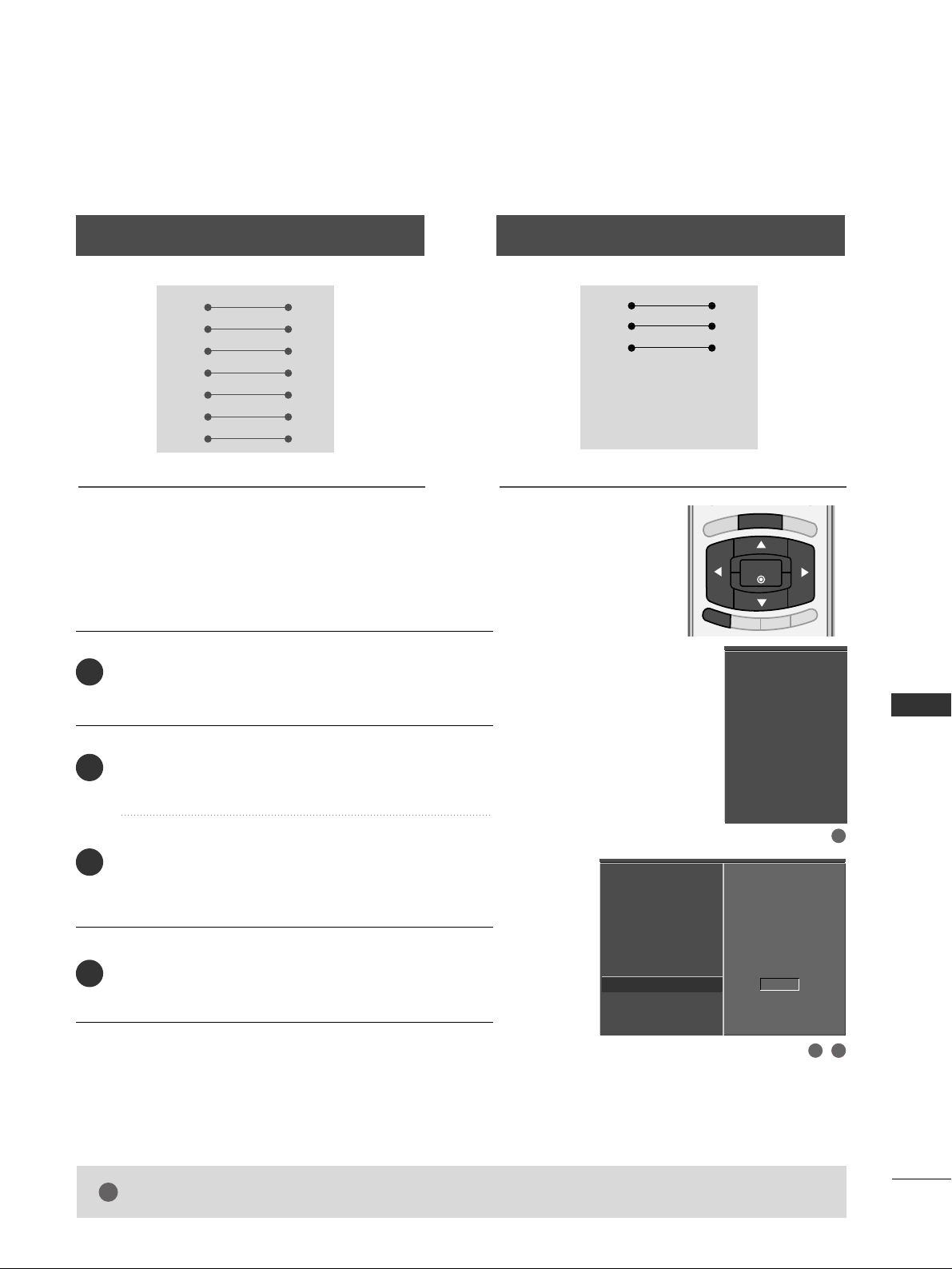
APPENDIX
87
RS-232C Configurations
Press the
MMEENNUU
button and then use
DD
or
EE
button
to select the
SSEETTUUPP
menu.
Press the
GG
button and then use
DD
or
EE
button to
select
SSeett IIDD
.
Press the
GG
button and then use
DD
or
EE
button to
adjust
SSeett IIDD
to choose the desired TV ID number.
The adjustment range of Set ID is 1~ 99.
Press
EEXXIITT
button to return to TV viewing or press
MMEENNUU
button to return to the previous menu.
Use this function to specify a TV ID number.
Refer to ‘Real Data Mapping’.
GG
pp..8899
.
Either cable below can be used.
Set ID
BRIGHT -
BRIGHT +
ENTER
TIMER
RATIO
SIMPLINK
EXIT
MENU
Communication Parameters
■
Baud rate : 9600 bps (UART
)
■
Data length : 8 bits
■
Parity : None
■
Stop bit : 1 bit
■
Communication code : ASCII code
■
Use a crossed (reverse) cable.
EZ Scan
Manual Scan
Channel Edit
DTV Signal
Input Source
Input Label
Set ID
G
1
EZ Scan
Manual Scan
Channel Edit
DTV Signal
Input Source
Input Label
Set ID
2
1
3
4
PC TV
RXD 2 3 TXD
TXD 3 2 RXD
GND 5 5 GND
DTR 4 6 DSR
DSR 6 4 DTR
RTS 7 8 CTS
CTS 8 7 RTS
D-Sub 9 D-Sub 9
PC TV
RXD 2 3 TXD
TXD 3 2 RXD
GND 5 5 GND
DTR 4 6 DTR
DSR 6 4 DSR
RTS 7 7 RTS
CTS 8 8 CTS
D-Sub 9 D-Sub 9
7-Wire Configuration
(
Serial female-female NULL modem cable
)
3-Wire Configurations
(
Not standard
)
2312
NOTE
!
GG
This product has command echo back in the RS-232C Command.
Page 90
APPENDIX
88
Command Reference List
APPENDIX
CC OO MMMMAANNDD11 CC OOMMMMAANNDD22
20. Channel Tuning
21. Channel Add/Del
22. K ey
23. Input Select
DATA
(Hexadecimal)
CC OO MMMMAANNDD11 CC OOMMMMAANNDD22
DATA
(Hexadecimal)
CCOOMMMMAANN DD11 CC OO MMMMAANNDD22
DATA0
(Hexadecimal)
DATA1
(Hexadecimal)
DATA2
(Hexadecimal)
DATA3
(Hexadecimal)
DATA4
(Hexadecimal)
DATA5
(Hexadecimal)
physical major major low minor high minor low attribute
program high program low
m a
mb0 ~ 1
mc (
GG
p.91)
xb(
GG
p.91)
01. Power k a 0 ~ 1
02. Input Select k b 0 ~ 9
03. Aspect Ratio k c (
GG
p.89)
04. Screen Mute k d 0 ~ 1
05. Volume Mute k e 0 ~ 1
06. Volume Control k f 0 ~ 64
07. Contrast k g 0 ~ 64
08. Brightness k h 0 ~ 64
09. Color k i 0 ~ 64
10. Tint k j 0 ~ 64
11. Sharpness k k 0 ~ 64
12. OSD Select k l 0 ~ 1
13. Remote Control
Lock Mode
14. Treble k r 0 ~ 64
15. Bass k s 0 ~ 64
16. Balance k t 0 ~ 64
17.
Color Temperature
k u 0 ~ 3
18. ISM Method j p (
GG
p.90)
19 . L o w P o w e r j q 0 ~ 1
k m
0 ~ 1
Plasma TV Model Only
Transmission / Receiving Protocol
TT rraann ssmmiissssiioonn
[Command 1] : First command to control the set.
(j, k, m or x)
[Command 2] : Second command to control the set.
[Set ID] : You can adjust the set ID to choose desired TV ID
number in Setup menu. Adjustment range is 1
~ 99.
When selecting Set ID ‘0’, every connected the TV is
controlled. Set ID is indicated as decimal (1
~ 99
)
on
menu and as Hexa decimal (0x0
~ 0x63
)
on transmission
/receiving protocol.
[DATA] : To transmit command data.
Transmit ‘FF’ data to read status of command.
* In this model, TV will not send the status during the standby mode.
[Cr] : Carriage Return
ASCII code ‘0x0D’
[ ] : ASCII code ‘space (0x20)’
OOKK AAcckk nnoowwlleeddgg ee mm eenntt
The TV transmits ACK (acknowledgement) based on this format when receiving normal data. At this time, if the data is
data read mode, it indicates present status data. If the data is
data write mode, it returns the data of the PC computer.
* In this model, TV will not send the status during the standby mode.
* Data Format
[Command 2] : Use as command.
[Set ID] : Use the small character, if set ID is 10, it will send the ‘0’, ‘a’.
[DATA] : Use the small character, if data is 0 x ab, it will send the ‘a’, ‘b’.
[OK] : Use the large character.
* In this model, TV will send the echo, CR, LF with acknowl-
edgement message.
* When it send the power on acknowledgement message, it will
be like below.
ex) ka 01 01 (CR) (LF) a 01 OK 01 x (CR) (LF)
EE rrrroorr AAcckk nnoowwlleeddgg ee mm eenn tt
The TV transmits ACK (acknowledgement) based on this format when receiving abnormal data from non-viable functions
or communication errors.
Data1: Illegal Code
Data2: Not supported function
Data3: Wait more time
* In this model, TV will not send the status during the standby mode.
* Data Format
[Command 2] : Use as command.
[Set ID] : Use the small character, if set ID is 10, it will send the ‘0’, ‘a’.
[DATA] : Use the small character, if data is 0 x ab, it will send the ‘a’, ‘b’.
[NG] : Use the large character
* In this model, TV will send the echo, CR, LF with acknowl-
edgement message.
* When it send the power on acknowledgement message, it will
be like below.
ex) ka 01 01 (CR) (LF) a 01 NG 01 x (CR) (LF)
[[CC oo mm mm aa nndd11]][[CCoommmmaann dd 22]] [[ ]][[SS eett II DD]][[ ]][[DD aa ttaa ]] [[ CC rr]]
[[CC oo mm mm aa nndd22]][[ ]][[SSeett IIDD ]] [[ ]][[OO KK]][[DDaatt aa ]] [[xx]]
[[CC oo mm mm aa nndd22]][[ ]][[SSeett IIDD ]] [[ ]][[NNGG ]] [[ DDaattaa]][[xx ]]
Page 91

APPENDIX
89
0011.. PPoowweerr ((CCoommmmaanndd22::aa))
To control Power On/Off of the TV.
Transmission [k][a][ ][Set ID][ ][Data][Cr]
Data 0 : Power Off Data 1 : Power On
Acknowledgement [a][ ][Set ID][ ][OK/NG][Data][x]
* In a like manner, if other functions transmit ‘FF’ data
based on this format, Acknowledgement data feedback
presents status about each function.
* In this model, TV will send the Acknowledge after
power on processing completion.
* There might be a time delay between command and
acknowledgement.
0022.. IInnppuutt SSeelleecctt ((CCoommmmaanndd22::bb)) ((MMaaiinn PPiiccttuurree IInnppuutt))
To select input source for the TV.
Transmission [k][b][ ][Set ID][ ][Data][Cr]
Data 0: DTV Data 5: Component 2
Data 1: Analog Data 7: RGB-PC
Data 2: AV1 Data 8: HDMI1/DVI
Data 3: AV2 Data 9: HDMI2
Data 4: Component 1
Acknowledgement [b][ ][Set ID][ ][OK/NG][Data][x]
0033.. AAssppeecctt RRaattiioo ((CCoommmmaanndd22::cc)) ((MMaaiinn ppiiccttuurree ffoorrmmaatt))
To adjust the screen format.
You can also adjust the screen format using the RATIO
button on remote control or in the Option menu.
Transmission [k][c][ ][Set ID][ ][Data][Cr]
Date 1: 4:3 5: Zoom 2
2: 16:9 6: Set by program
3: Horizon
4: Zoom 1
Acknowledgement [c][ ][Set ID][ ][OK/NG][Data][x]
0044.. SSccrreeeenn MMuuttee ((CCoommmmaanndd22::dd))
To select screen mute on/off.
Transmission [k][d][ ][Set ID][ ][Data][Cr]
Data 0 : Screen mute off (Picture on)
Data 1 : Screen mute on (Picture off)
Acknowledgement [d][ ][Set ID][ ][OK/NG][Data][x]
0055.. VVoolluummee MMuuttee ((CCoommmmaanndd22::ee))
To control volume mute on/off.
You can also adjust mute using the MUTE button on
remote control.
Transmission [k][e][ ][Set ID][ ][Data][Cr]
Data 0 : Volume mute on (Volume off)
Data 1 : Volume mute off (Volume on)
Acknowledgement [e][ ][Set ID][ ][OK/NG][Data][x]
0066.. VVoolluummee CCoonnttrrooll ((CCoommmmaanndd22::ff))
To adjust volume.
You can also adjust volume with the volume buttons on
remote control.
Transmission [k][f][ ][Set ID][ ][Data][Cr]
Data Min : 0 ~ Max : 64
Refer to ‘Real data mapping’ as shown below.
Acknowledgement [f][ ][Set ID][ ][OK/NG][Data][x]
0077.. CCoonnttrraasstt ((CCoommmmaanndd22::gg))
To adjust screen contrast.
You can also adjust contrast in the Video menu.
Transmission [k][g][ ][Set ID][ ][Data][Cr]
Data Min : 0 ~ Max : 64
Refer to ‘Real data mapping’ as shown below.
Acknowledgement [g][ ][Set ID][ ][OK/NG][Data][x]
0088.. BBrriigghhttnneessss ((CCoommmmaanndd22::hh))
To adjust screen brightness.
You can also adjust brightness in the Video menu.
Transmission [k][h][ ][Set ID][ ][Data][Cr]
Data Min : 0 ~ Max : 64(*transmit by Hexadecimal code)
Refer to ‘Real data mapping’ as shown below.
Acknowledgement [h][ ][Set ID][ ][OK/NG][Data][x]
0099.. CCoolloorr ((CCoommmmaanndd22::ii))
To adjust the screen color.
You can also adjust color in the Video menu.
Transmission [k][i][ ][Set ID][ ][Data][Cr]
Data Min : 0 ~ Max : 64
Refer to ‘Real data mapping’ as shown below.
Acknowledgement [i][ ][Set ID][ ][OK/NG][Data][x]
*Real data mapping
0 : Step 0
A : Step 10 (SET ID 10)
F : Step 15 (SET ID 15)
10 : Step 16 (SET ID 16)
63 : Step 99 (SET ID 99)
64 : Step 100
* Tint : R50 ~ G50
* Balance : L50 ~ R50
Page 92

APPENDIX
90
APPENDIX
1100 .. TT ii nntt ((CCoommmmaann dd 22::jj ))
To adjust the screen tint.
You can also adjust tint in the Video menu.
Transmission [k][j][ ][Set ID][ ][Data][Cr]
Data Red : 0 ~ Green : 64
*Refer to ‘Real data mapping’.
GG
p.89.
Acknowledgement [ j ][ ][Set ID][ ][OK/NG][Data][x]
1111 .. SS hhaarr pp nneess ss ((CCoommmmaann dd 22:: kk))
To adjust the screen sharpness.
You can also adjust sharpness in the Video menu.
Transmission [k][k][ ][Set ID][ ][Data][Cr]
Data Min: 0 ~ Max: 64
*Refer to ‘Real data mapping’.
GG
p.89.
Acknowledgement [k][ ][Set ID][ ][OK/NG][Data][x]
1122 .. OO SS DD SSeelleecctt ((CCoommmmaann dd 22:: ll ))
To select OSD (On Screen Display) on/off.
Transmission [k][l][ ][Set ID][ ][Data][Cr]
Data 0: OSD off Data 1: OSD on
Acknowledgement [l][ ][Set ID][ ][OK/NG][Data][x]
1133 .. RRee mm oo ttee CCoonn ttrrooll LLoocc kk MMoodd ee ((CCoommmmaann dd 22:: mm ))
To lock the remote control and the front panel controls
on the set.
Transmission [k][m][ ][Set ID][ ][Data][Cr]
Data 0: Lock off Data 1: Lock on
Acknowledgement [m][ ][Set ID][ ][OK/NG][Data][x]
If you’re not using the remote control and front panel
controls on the TV, use this mode. When main power is
on/off, remote control lock is released.
11 44 .. TT rreebbllee (( CC oo mm mm aa nndd22 :: rr))
To adjust treble.
You can also adjust treble in the Audio menu.
Transmission [k][r][ ][Set ID][ ][Data][Cr]
Data Min: 0 ~ Max: 64(*transmit by Hexadecimal code)
*Refer to ‘Real data mapping’.
GG
p.89.
Acknowledgement [r][ ][Set ID][ ][OK/NG][Data][x]
11 55 .. BB aa ssss (( CC oo mm mm aa nndd22 :: ss))
To adjust bass.
You can also adjust bass in the Audio menu.
Transmission [k][s][ ][Set ID][ ][Data][Cr]
Data Min: 0 ~ Max: 64(*transmit by Hexadecimal code)
*Refer to ‘Real data mapping’.
GG
p.89.
Acknowledgement [s][ ][Set ID][ ][OK/NG][Data][x]
1166 .. BBaall aa nnccee ((CCoommmmaann dd 22:: tt))
To adjust balance.
You can also adjust balance in the Audio menu.
Transmission [k][t][ ][Set ID][ ][Data][Cr]
Data Min: 0 ~ Max: 64(*transmit by Hexadecimal code)
*Refer to ‘Real data mapping’.
GG
p.89.
Acknowledgement [t][ ][Set ID][ ][OK/NG][Data][x]
1177 .. CCoolloorr TT ee mm pp ee rraattuurree ((CC oomm mm aa nndd22 :: uu))
To adjust color temperature.
You can also adjust color temperature in the Video
menu.
Transmission [k][u][ ][Set ID][ ][Data][Cr]
Data 0: Medium 1: Cool 2: Warm 3: User
Acknowledgement [u][ ][Set ID][ ][OK/NG][Data][x]
1188 .. II SS MM MMeetthh oo dd (( CCoo mm mm aa nndd22 ::pp ))
To avoid having a fixed image remain on screen.
(This feature is not available for all models.)
Transmission [ j ][p][ ][Set ID][ ][Data][Cr]
Data 1: Inversion 2: Orbiter
4: White Wash 8: Normal
Acknowledgement [p][ ][Set ID][ ][OK/NG][Data][x]
1199 .. LLooww PP oo wwee rr (( CC oo mm mm aa nndd22 :: qq ))
To control the low power function on/off.
(This feature is not available for all models.)
Transmission [ j ][q][ ][Set ID][ ][Data][Cr]
Data 0: Low power off 1: Low power on
Acknowledgement [q][ ][Set ID][ ][OK/NG][Data][x]
2200 .. CChhaa nnnn eell TT uunn ii nngg ((CCoommmmaann dd:: mm aa))
To tune channel to following physical/major/minor number.
Transmission [m][a][ ][Set ID][ ][Data0][ ][Data1]
[ ][Data2][ ][Data3][ ][Data4][ ][Data5][Cr]
Digital channels have a Physical, Major, and Minor channel
number. The Physical number is the actual digital channel number, the Major is the number that the channel should be
mapped to, and the Minor is the sub-channel. Since the ATSC
tuner automatically maps the channel to the Major number,
the Physical number is not required when sending a command.
Data 0: Physical Channel Number
NTSC air: 02~45, NTSC cable: 01, 0E~7D
ATSC air: 01~45, ATSC cable: 01~87
Data1 & 2: Major Channel Number
Data1: High byte Data2: Low byte
Two bytes are available for the Major and Minor, normally only the second byte is used.
Data3 & 4: Minor Channel Number
Not needed for NTSC.
Page 93
APPENDIX
91
Data5:
The table above lists the binary code which must be
converted to Hexadecimal before sending. For example:
The binary code to tune the sub source to an NTSC
cable channel is “1000 0001”, which translates to “81”
in Hex.
* 7th bit : For which source do you want to change the
channel.
* 6th bit: Use a two part or one part channel. Most cases
just use 0 since it’s ignored when using NTSC.
* 5th bit: Use 0 with NTSC since it can only use the phys-
ical channel number. Normally use 1 for ATSC since most
times it doesn’t matter what the physical number is.
* 4th bit: Set to 0.
* 3-0 bits: Choose signal type.
* Tune Command Examples:
1. Tune to the analog (NTSC) cable channel 35.
Data 0 = Physical of 35 = 23
Data 1 & 2 = No Major = 00 00
Data 3 & 4 = No Minor = 00 00
Data 5 = 0000 0001 in binary = 01
Total = ma 00 23 00 00 00 00 01
2. Tune to the digital (ATSC) local channel 30-3.
Data 0 = Don’t know Physical = 00
Data 1 & 2 = Major is 30 = 00 1E
Data 3 & 4 = Minor is 3 = 00 03
Data 5 = 0010 0010 in binary = 22
Total = ma 00 00 00 1E 00 03 22
Acknowledgement[a][ ][Set ID][ ][OK][Data0][Data1]
[Data2][Data3][Data4][x][a][ ][Set ID]
[ ][NG][Data0][x]
2211.. CChhaannnneell AAdddd//DDeell ((CCoommmmaanndd:: mm bb))
To add and delete the channels
Transmission [m][b][ ][Set ID][ ][Data][Cr]
Data 0: Channel Delete Data 1: Channel Add
Acknowledgement [b][ ][Set ID][ ][OK/NG][Data][x]
2222.. KKeeyy ((CCoommmmaanndd:: mm cc))
To send IR remote key code.
Transmission [m][c][ ][Set ID][ ][Data][Cr]
Data Key code: Refer to page 85.
Acknowledgement [c][ ][Set ID][ ][OK/NG][Data][x]
2233.. IInnppuutt sseelleecctt((CCoommmmaanndd:: xx bb)) ((MMaaiinn PPiiccttuurree IInnppuutt))
To select input source for TV.
Transmission [x][b][ ][Set ID][ ][Data][Cr]
Data 00 : DTV (Antenna) Data 40 : Component 1
Data 01 : DTV (Cable) Data 41 : Component 2
Data 10 : Analog (Antenna) Data 60 : RGB PC
Data 11 : Analog (Cable) Data 90 : HDMI1/DVI
Data 20 : AV1 Data 91 : HDMI2
Data 21 : AV2
Acknowledgement [b][ ][Set ID][ ][OK/NG][Data][x]
Step
NTSC Air
NTSC Cable
ATSC Air
ATSC Cable_std
ATSC Cable_hrc
ATSC Cable_irc
ATSC cable_auto
Reserved
-
Reserved
1
0
0
1
1
0
0
1
1
x
1
2
0
0
0
0
1
1
1
1
x
1
3
0
0
0
0
0
0
0
0
x
1
4
x
x
x
x
x
x
x
x
x
x
Reserved
5
01Use
No Use
Two/One
Part Channel
6
01Tw o
One
Using Physical
Channel
7
01Main
Main/Sub
Picture
0
0
1
0
1
0
1
0
1
x
1
Page 94

 Loading...