

Page 1
Internal Use Only
North/Latin America http://aic.lgservice.com
Europe/Africa http://eic.lgservice.com
Asia/Oceania http://biz.lgservice.com
LED TV
SERVICE MANUAL
CHASSIS :
MODEL :
LD41A
22/23/24MT55V
22/23/24MT55V-PZP
CAUTION
BEFORE SERVICING THE CHASSIS,
READ THE SAFETY PRECAUTIONS IN THIS MANUAL.
MFL67234659 (1401-REV00)
Printed in KoreaP/NO :
Page 2

CONTENTS
CONTENTS .............................................................................................. 2
SAFETY PRECAUTIONS ......................................................................... 3
SERVICING PRECAUTIONS .................................................................... 4
SPECIFICATION ....................................................................................... 6
ADJUSTMENT INSTRUCTION .............................................................. 11
TROUBLE SHOOTING ........................................................................... 16
BLOCK DIAGRAM .................................................................................. 23
EXPLODED VIEW .................................................................................. 24
SCHEMATIC CIRCUIT DIAGRAM ..............................................................
Copyright © LG Electronics. Inc. All right reserved.
Only for training and service purposes
- 2 -
LGE Internal Use Only
Page 3
AC Volt-meter
SAFETY PRECAUTIONS
IMPORTANT SAFETY NOTICE
Many electrical and mechanical parts in this chassis have special safety-related characteristics. These parts are identified by in the
Schematic Diagram and Exploded View.
It is essential that these special safety parts should be replaced with the same components as recommended in this manual to prevent
Shock, Fire, or other Hazards.
Do not modify the original design without permission of manufacturer.
General Guidance
An isolation Transfo rmer should always be used during the
servicing of a receiver whose chassis is not isolated from the AC
power line. Use a transformer of adequate power rating as this
protects the technician from accidents resulting in personal injury
from electrical shocks.
It will also protect the receiver and it's components from being
damaged by accidental shorts of th e circuitry that may be
inadvertently introduced during the service operation.
If any fuse (or Fusible Resistor) in this TV receiver is blown,
replace it with the specified.
When replacing a high wattage resistor (Oxide Metal Film Resistor,
over 1W), keep the resistor 10mm away from PCB.
Keep wires away from high voltage or high temperature parts.
Before returning the receiver to the customer,
always perform an AC leakage current check on the exposed
metallic parts of the cabinet, such as antennas, terminals, etc., to
be sure the set is safe to operate without damage of electrical
shock.
Leakage Current Cold Check(Antenna Cold Check)
With the instrument AC plug removed from AC source, connect an
electrical jumper across the two AC plug prongs. Place the AC
switch in the on position, connect one lead of ohm-meter to the AC
plug prongs tied together and touch other ohm-meter lead in turn to
each exposed metallic parts such as antenna terminals, phone
jacks, etc.
If the exposed metallic part has a return path to the chassis, the
measured resistance should be between 1MΩ and 5.2MΩ.
When the exposed metal has no return path to the chassis the
reading must be infinite.
An other abnormality exists that must be corrected before the
receiver is returned to the customer.
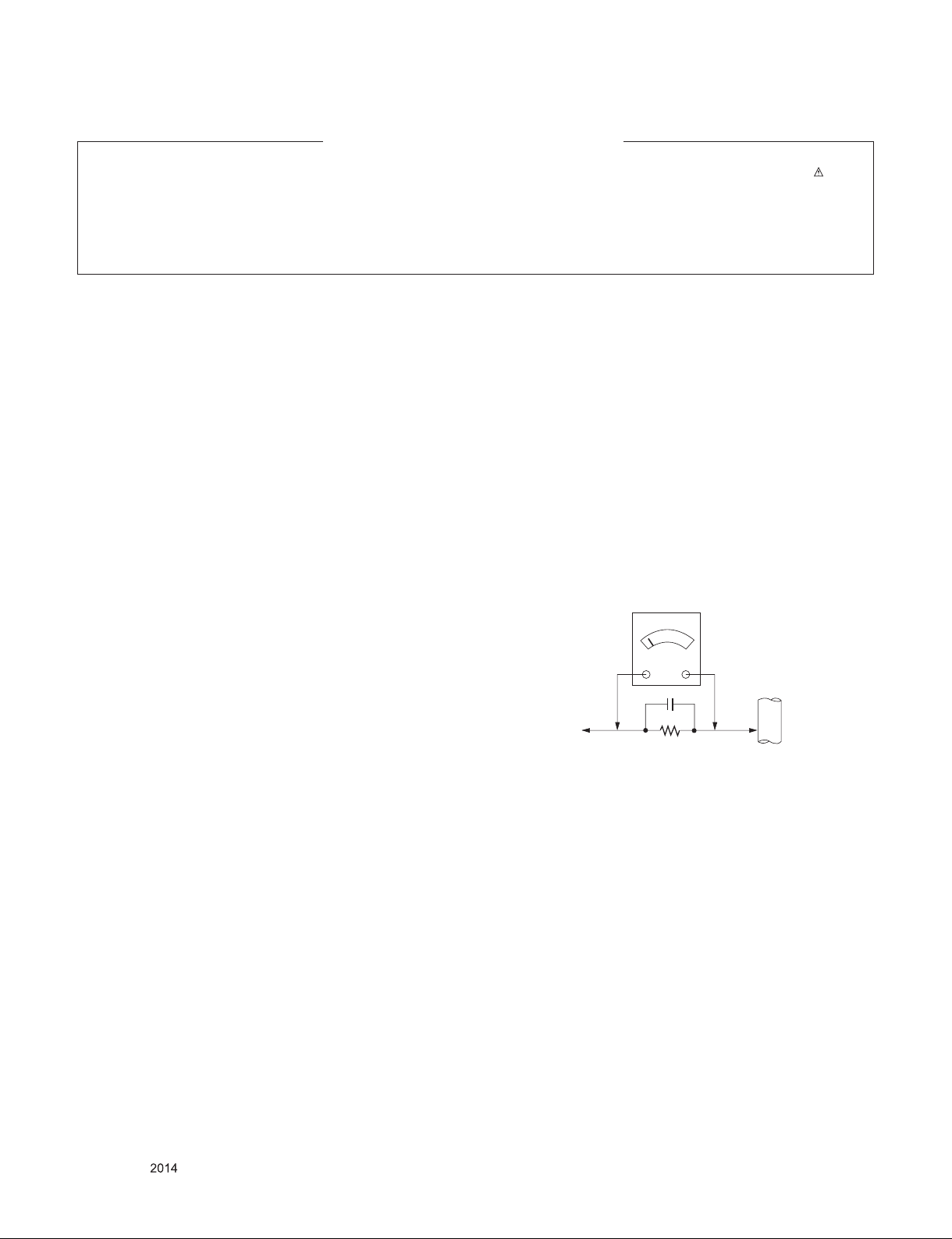
Leakage Current Hot Check (See below Figure)
Plug the AC cord directly into the AC outlet.
Do not use a line Isolation Transformer during this check.
Connect 1.5K/10watt resistor in parallel with a 0.15uF capacitor
between a known good earth ground (Water Pipe, Conduit, etc.)
and the exposed metallic parts.
Measure the AC voltage across the resistor using AC voltmeter
with 1000 ohms/volt or more sensitivity.
Reverse plug the AC cord into the AC outlet and repeat AC voltage
measurements for each exp ose d metallic par t. Any voltage
measured must not exceed 0.75 volt RMS which is corresponds to
0.5mA.
In case any measurement is out of the limits specified, there is
possibility of shock hazard and the set must be checked and
repaired before it is returned to the customer.
Leakage Current Hot Check circuit
Good Earth Ground
such as WATER PIPE,
To Instrument's
exposed
METALLIC PARTS
When 25A is impressed between Earth and 2nd Ground
for 1 second, Resistance must be less than 0.1
*Base on Adjustment standard
0.15µF
1.5 Kohm/10W
CONDUIT etc.
Copyright © LG Electronics. Inc. All right reserved.
Only for training and service purposes
- 3 -
LGE Internal Use Only
Page 4

SERVICING PRECAUTIONS
CAUTION: Before servicing receivers covered by this service
manual and its supplements and addenda, read and follow the
SAFETY PRECAUTIONS on page 3 of this publication.
NOTE: If unforeseen circumstances create conflict between the
following servicing precautions and any of the safety precautions on
page 3 of this publication, always follow the safety precautions.
Remember: Safety First.
General Servicing Precautions
1. Always unplug the receiver AC power cord from the AC power
source before;
a. Removing or reinstalling any component, circuit board
module or any other receiver assembly.
b. Disconnecting or reconnecting any receiver electrical plug or
other electrical connection.
c. Connecting a test substitute in parallel with an electrolytic
capacitor in the receiver.
CAUTION: A wrong part substitution or incorrect polarity
installation of electrolytic capacitors may result in an
explosion hazard.
2. Test high voltage only by measuring it with an appropriate high
voltage meter or other voltage measuring device (DVM,
FETVOM, etc) equipped with a suitable high voltage probe.
Do not test high voltage by "drawing an arc".
3. Do not spray chemicals on or near this receiver or any of its
assemblies.
4. Unl ess sp ecified othe rwise in this service manua l, clean
electrical contacts only by applying the following mixture to the
contacts with a pipe cleaner, cotton-tipped stick or comparable
non-abrasive applicator; 10% (by volume) Acetone and 90% (by
volume) isopropyl alcohol (90%-99% strength)
CAUTION: This is a flammable mixture.
Unless specified otherwise in this service manual, lubrication of
contacts in not required.
5. Do not defeat any plug/socket B+ voltage interlocks with which
receivers covered by this service manual might be equipped.
6. Do not apply AC power to this instrument and/or any of its
electrical assemblies unless all solid-state device heat sinks are
correctly installed.
7. Always connect the test receiver ground lead to the receiver
chassis ground before connecting the test receiver positive
lead.
Always remove the test receiver ground lead last.
8. Use with this receiver only the test fixtures specified in this
service manual.
CAUTION: Do not connect the test fixture ground strap to any
heat sink in this receiver.
Electrostatically Sensitive (ES) Devices
Some semiconductor (solid-state) devices can be damaged easily
by static electricity. Such components com monly are called
Electrostatically Sensitive (ES) Devices. Examples of typical ES
devices are integrated circuits and some field-effect transistors and
semiconductor "chip" compon ents. The following techniques
should be used to help reduce the incide nce of component
damage caused by static by static electricity.
1. Immediately before handling any semiconductor component or
semiconductor-equipped assembly, drain off any electrostatic
charge on your body by touching a known earth ground.
Alter natively, obtain and wear a comme rcially availab le
discharging wrist strap device, which should be removed to
prevent potential shock reasons prior to applying power to the
unit under test.
2. After removing an electrical assembly equipped with ES
devices, place the assembly on a conductive surface such as
aluminum foil, to prevent electrostatic charge buildup or
exposure of the assembly.
3. Use only a grounded-tip soldering iron to solder or unsolder ES
devices.
4. Use only an anti-static type solder removal device. Some solder
removal devices not classified as "anti-static" can generate
electrical charges sufficient to damage ES devices.
5. Do not use freon-propelled chemicals. These can generate
electrical charges sufficient to damage ES devices.
6. Do not remove a replacement ES device from its protective
package until immediately before you are ready to install it.
(Most re pla cem ent ES dev ice s are packaged with leads
electrically shorted together by conductive foam, aluminum foil
or comparable conductive material).
7. Immediately before removing the protective material from the
leads of a replacement ES device, touch the protective material
to the chassis or circuit assembly into which the device will be
installed.
CAUTION: Be sure no power is applied to the chassis or circuit,
and observe all other safety precautions.
8. Mi nimiz e bodil y motions w hen h an dl ing u np ac kaged
replacement ES devices. (Otherwise harmless motion such as
the brushing together of your clothes fabric or the lifting of your
foot from a carp eted floor can ge ner ate st atic electricit y
sufficient to damage an ES device.)
General Soldering Guidelines
1. Use a grounded-tip, low-wattage soldering iron and appropriate
tip size and shape that will maintain tip temperature within the
range or 500 ˚F to 600 ˚F.
2. Use an appropriate gauge of RMA resin-core solder composed
of 60 parts tin/40 parts lead.
3. Keep the soldering iron tip clean and well tinned.
4. Thoroughly clean the surfaces to be soldered. Use a mall wirebristle (0.5 inch, or 1.25cm) brush with a metal handle.
Do not use freon-propelled spray-on cleaners.
5. Use the following unsoldering technique
a. Allow the soldering iron tip to reach normal temperature.
(500 ˚F to 600 ˚F)
b. Heat the component lead until the solder melts.
c. Quickly draw the melted solder with an anti-static, suction-
type solder removal device or with solder braid.
CAUTION: Work quickly to avoid overheating the circuit
board printed foil.
6. Use the following soldering technique.
a. Allow the soldering iron tip to reach a normal temperature
(500 ˚F to 600 ˚F)
b. First, hold the soldering iron tip and solder the strand against
the component lead until the solder melts.
c. Quickly move the soldering iron tip to the junction of the
component lead and the printed circuit foil, and hold it there
only un til the solder fl ows onto and around both the
component lead and the foil.
CAUTION: Work quickly to avoid overheating the circuit
board printed foil.
d. Closely inspect the solder area and remove any excess or
splashed solder with a small wire-bristle brush.
Copyright © LG Electronics. Inc. All right reserved.
Only for training and service purposes
- 4 -
LGE Internal Use Only
Page 5

IC Remove/Replacement
Some chassis circuit boards have slotted holes (oblong) through
which the IC leads are inserted and then bent flat against the
circuit foil. When holes are the slotted type, the following technique
should be used to remove and replace the IC. When working with
boards using the familiar round hole, use the standard technique
as outlined in paragraphs 5 and 6 above.
Removal
1. Desolder and straighten each IC lead in one operation by gently
prying up on the lead with the soldering iron tip as the solder
melts.
2. Draw away the melted solder with an anti-static suction-type
solder removal device (or with solder braid) before removing the
IC.
Replacement
1. Carefully insert the replacement IC in the circuit board.
2. Carefully bend each IC lead against the circuit foil pad and
solder it.
3. Clean the soldered areas with a small wire-bristle brush.
(It is not necessary to reapply acrylic coating to the areas).
"Small-Signal" Discrete Transistor
Removal/Replacement
1. Remove the defective transistor by clipping its leads as close as
possible to the component body.
2. Bend into a "U" shape the end of each of three leads remaining
on the circuit board.
3. Bend into a "U" shape the replacement transistor leads.
4. Connect the replacement transistor leads to the corresponding
leads extending from the circuit board and crimp the "U" with
long nose pliers to insure metal to metal contact then solder
each connection.
CAUTION: Maintain original spacing between the replaced
component and adjacent components and the circuit board to
prevent excessive component temperatures.
Circuit Board Foil Repair
Excessive heat applied to the copper foil of any printed circuit
board will weaken the adhesive that bonds the foil to the circuit
board causing the foil to separate from or "lift-off" the board. The
following guidelines and procedures should be followed whenever
this condition is encountered.
At IC Connections
To repair a defective copper pattern at IC connections use the
following procedure to install a jumper wire on the copper pattern
si de of the circuit board. (Use this techniq ue onl y on IC
connections).
1. Carefully remove the damaged copper pattern with a sharp
knife. (Remove only as much copper as absolutely necessary).
2. carefully scratch away the solder resist and acrylic coating (if
used) from the end of the remaining copper pattern.
3. Bend a small "U" in one end of a small gauge jumper wire and
carefully crimp it around the IC pin. Solder the IC connection.
4. Route the jumper wire along the path of the out-away copper
pattern and let it overlap the previously scraped end of the good
copper pattern. Solder the overlapped area and clip off any
excess jumper wire.
At Other Connections
Use the following technique to repair the defective copper pattern
at connections other than IC Pins. This technique involves the
installation of a jumper wire on the component side of the circuit
board.
Power Output, Transistor Device
Removal/Replacement
1. Heat and remove all solder from around the transistor leads.
2. Remove the heat sink mounting screw (if so equipped).
3. Carefully remove the transistor from the heat sink of the circuit
board.
4. Insert new transistor in the circuit board.
5. Solder each transistor lead, and clip off excess lead.
6. Replace heat sink.
Diode Removal/Replacement
1. Remove defective diode by clipping its leads as close as
possible to diode body.
2. Bend the two remaining leads perpendicular y to the circuit
board.
3. Observing diode polarity, wrap each lead of the new diode
around the corresponding lead on the circuit board.
4. Securely crimp each connection and solder it.
5. Inspect (on the circuit board copper side) the solder joints of
the two "original" leads. If they are not shiny, reheat them and if
necessary, apply additional solder.
Fuse and Conventional Resistor
Removal/Replacement
1. Clip each fuse or resistor lead at top of the circuit board hollow
stake.
2. Securely crimp the leads of replacement component around
notch at stake top.
3. Solder the connections.
1. Remove the defective copper pattern with a sharp knife.
Remove at least 1/4 inch of copper, to ensure that a hazardous
condition will not exist if the jumper wire opens.
2. Trace along the copper pattern from both sides of the pattern
break an d loc ate the nearest component that is dir ect ly
connected to the affected copper pattern.
3. Connect insulated 20-gauge jumper wire from the lead of the
nearest component on one side of the pattern break to the lead
of the nearest component on the other side.
Carefully crimp and solder the connections.
CAUTION: Be sure the insulated jumper wire is dressed so the
it does not touch components or sharp edges.
Copyright © LG Electronics. Inc. All right reserved.
Only for training and service purposes
- 5 -
LGE Internal Use Only
Page 6

SPECIFICATION
NOTE : Specications and others are subject to change without notice for improvement.
1. Application Range
This spec sheet is applied all of the TV used LD41A chassis.
2. Specication
Each part is tested as below without special appointment
1) Temperature : 25 ˚C ± 5 ˚C (77 ˚F ± 9 ˚F),
CST : 40 ˚C ± 5 ˚C
2) Relative Humidity : 65 % ± 10 %
3) Power Voltage : Standard input voltage
(100 V - 240 V ~, 50 / 60 Hz)
· Standard Voltage of each products is marked by models
4) Specication and performance of each parts are followed
each drawing and specication by part number in accordance with BOM.
5) The receiver must be operated for about 5 minutes prior to
the adjustment.
3.Test method
1) Performance : LGE TV test method followed
2) Demanded other specication
- Safety : CE,IEC specication
- EMC : CE,IEC specication
Copyright © LG Electronics. Inc. All right reserved.
Only for training and service purposes
- 6 -
LGE Internal Use Only
Page 7
4. General specication
4.1. TV
No Item Specication Remarks
1 Market EU(PAL/DVB Market) DTV & Analog (Total 37 countries)
DTV (MPEG2/4, DVB-T) :37 countries
UK/Italy/Germany/France/Spain/Sweden/Finland/Netherlands/ Belgium/Luxemburg/ Greece/Denmark/Czech/
Austria /Hungary/Swiss/Croatia/Turkey
Norway/Slovenia/Poland/Ukraine/Portugal/Ireland/Morocco/
Latvia/Estonia/Lithania/Rumania/Bulgaria/Russia/Slovakia
Bosnia/Serbia/Albania/Kazakhstan/Belarus
*4 Country, Nordic option(EU model only)
- Denmark , Finland, Norway, Sweden
DTV (MPEG2/4, DVB-T2): 8 countries
UK/Denmark/Sweden/Finland/Norway/Ireland/Ukraine/
Kazakhstan
DTV (MPEG2/4, DVB-C): 37 countries
UK/Italy/Germany/France/Spain/Sweden/Finland/Netherlands/ Belgium/Luxemburg/ Greece/Denmark/Czech/
Austria /Hungary/Swiss/Croatia/Turkey
Norway/Slovenia/Poland/Ukraine/Portugal/Ireland/Morocco/
Latvia/Estonia/Lithania/Rumania/Bulgaria/Russia/Slovakia
Bosnia/Serbia/Albania/Kazakhstan/Belarus
DTV (MPEG2/4,DVB-S): 29 countries → 55V model supported
Italy/Germany/France/Spain/Netherlands/ Belgium/
Luxemburg/ Greece/ Czech/Austria /Hungary/Swiss/Croatia/
Turkey/Slovenia/Poland/Portugal/ Morocco/Latvia/
Estonia/Lithuania/Rumania/Bulgaria/Russia/Slovakia
Bosnia/Serbia/Albania/ Belarus
Supported satellite : 22 satellites → 55V model supported
HISPASAT 1C/1D, ATLANTIC BIRD 2, NILESAT 101/102,
ATLANTIC BIRD 3, AMOS 2/3, THOR 5/6, IRIUS 4,
EUTELSAT-W3A, EUROBIRD 9A, EUTELSAT-W2A, HOTBIRD 6/8/9, EUTELSAT-SESAT, ASTRA 1L/H/M/KR, ASTRA
3A/3B, BADR 4/6, ASTRA 2D, EUROBIRD 3, EUTELSATW7, HELLASSAT 2, EXPRESS AM1, TURKSAT 2A/3A,
INTERSAT10
2 Broadcasting system 1)Analogue TV
1) PAL-BG
2) PAL-DK
3) PAL-I/I’
4) SECAM-BG
5) SECAM-DK
6) SECAM L/L’
Analogue TV :
(RF) VHF: E2 to E12, UHF : E21 to E69
(CATV) S1 to S20, HYPER: S21 to S47
Digital TV : VHF, UHF
Satellite TV : VHF, UHF, C-Band, Ku-Band
* DVB-T2 ( T2 model only support )
*DVB-S/S2(Satellite model only support )
Digital TV
1) DVB-T/C/T2
Satellite Digital TV
1) DVB-T2/C/S/S2
3 Channel Storage ATV – 135EA, DTV – 1000EA
Copyright © LG Electronics. Inc. All right reserved.
Only for training and service purposes
- 7 -
LGE Internal Use Only
Page 8
No Item Specication Remarks
4 Receiving system Analog : Upper Heterodyne
Digital : COFDM, QAM
5 Interface RF / Composite /
Component(CVBS) / HDMI / D-Sub
/ Scart /USB / Audio In / Headphone
Out / LAN(option)
6 DVB DVB-T CI : UK, Finland, Denmark, Norway, Sweden, Russia, Spain,
DVB-C CI : Switzerland, Austria, Slovenia, Hungary, Bulgaria
DVB-S (Only 55V model) CI + : Germany (Astra HD+)
► DVB-T
- Guard Interval(Bitrate_Mbit/s)
1/4, 1/8, 1/16, 1/32
- Modulation : Code Rate
QPSK : 1/2, 2/3, 3/4, 5/6, 7/8
16-QAM : 1/2, 2/3, 3/4, 5/6, 7/8
64-QAM : 1/2, 2/3, 3/4, 5/6, 7/8
► DVB-T2
- Guard Interval(Bitrate_Mbit/s)
1/4, 1/8, 1/16, 1/32, 1/128, 19/128, 19/256,
- Modulation : Code Rate
QPSK : 1/2, 2/5, 2/3, 3/4, 5/6
16-QAM : 1/2, 2/5, 2/3, 3/4, 5/6
64-QAM : 1/2, 2/5, 2/3, 3/4, 5/6
256-QAM : 1/2, 2/5, 2/3, 3/4, 5/6
► DVB-C
- Symbolrate :
4.0Msymbols/s to 7.2Msymbols/s
- Modulation :
16QAM, 64-QAM, 128-QAM and 256-QAM
► DVB-S/S2
- symbolrate
DVB-S2 (8PSK / QPSK) : 2 ~ 45Msymbol/s
DVB-S (QPSK) : 2 ~ 45Msymbol/s
- viterbi
DVB-S mode : 1/2, 2/3, 3/4, 5/6, 7/8
DVB-S2 mode : 1/2, 2/3, 3/4, 3/5, 4/5, 5/6, 8/9, 9/10
Scart Jack is Full scart and support RF-OUT(analog)
Ireland, Luxemburg, Belgium, Netherland
CI+ : France(Canal+), Italy(DGTVi)
CI+ : Switzerland(UPC,Cablecom), Netherland(Ziggo),
Germany(KDG,CWB), Finland(labwise)
Copyright © LG Electronics. Inc. All right reserved.
Only for training and service purposes
- 8 -
LGE Internal Use Only
Page 9
5. External Input Support Format
5.1. RGB/ HDMI (PC)
No. Resolution H-freq(kHz) V-freq(Hz) Pixel clock(MHz) Remark
1 720*400 31.468 70.080 28.321
2 640*480 31.469 59.940 25.175
3 640*480 37.500 75.000 31.500
4 800*600 37.879 60.317 40.000
5 800*600 46.875 75.000 49.500
6 1024*768 48.363 60.004 65.000
7 1024*768 56.476 70.069 75.000 HDMI(PC) only
8 1024*768 60.023 75.029 78.750
9 1152*864 67.500 75.000 108.000
10 1280*720 45.000 60.000 74.250
11 1280*800 49.702 59.810 83.500
12 1280*1024 63.981 60.020 108.000
13 1280*1024 79.976 75.025 135.000
14 1400*1050 65.317 59.978 121.750
15 1440*900 55.935 59.887 106.500
16 1600*900 60.000 60.000 108.000
17 1680*1050 64.674 59.883 119.000
18 1680*1050 65.290 59.954 146.250
19 1920*1080 67.500 60.000 148.500
5.2. HDMI (DTV)
No. Resolution H-freq(kHz) V-freq(Hz) Pixel clock(MHz) Remark
1 720* 480 31.469 / 31.5 59.94 / 60 27.00/ 27.03 SDTV 480P
2. 720*576 31.25 50.00 27.864 SDTV 576P
3. 1280*720 37.50 50.00 74.250 HDTV 720P
4 1280* 720 44.96 / 45 59.94 / 60 74.17/ 74.25 HDTV 720P
5 1920* 1080 33.72 / 33.75 59.94 / 60 74.17/ 74.25 HDTV 1080I
6 1920* 1080 28.125 50.00 74.25 HDTV 1080I
7 1920* 1080 27.00 24 74.25 HDTV 1080P
8 1920* 1080 33.75 30.00 74.25 HDTV 1080P
9 1920* 1080 56.250 50 148.5 HDTV 1080P
10 1920* 1080 67.43 / 67.5 59.94 / 60 148.35/ 148.50 HDTV 1080P
Copyright © LG Electronics. Inc. All right reserved.
Only for training and service purposes
- 9 -
LGE Internal Use Only
Page 10
5.3. Component
No
1. 720* 480 15.73 59.94 13.500 SDTV, DVD 480I( 525I)
2. 720* 480 15.75 60.00 13.514 SDTV, DVD 480I( 525I)
3. 720* 576 15.625 50.00 13.500 SDTV, DVD 576I( 625I) 50Hz
4. 720* 480 31.47 59.94 27.000 SDTV 480P
5. 720* 480 31.50 60.00 27.027 SDTV 480P
6. 720* 576 31.25 50.00 27.000 SDTV 576P 50Hz
7. 1280* 720 44.96 59.94 74.176 HDTV 720P
8. 1280* 720 45.00 60.00 74.250 HDTV 720P
9. 1280* 720 37.50 50.00 74.25 HDTV 720P 50Hz
10. 1920* 1080 33.72 59.94 74.176 HDTV 1080I
11. 1920* 1080 33.75 60.00 74.250 HDTV 1080I
12. 1920* 1080 28.125 50.00 74.250 HDTV 1080I 50Hz
13. 1920* 1080 56.25 50 148.5 HDTV 1080P
14. 1920* 1080 67.432 59.94 148.350 HDTV 1080P
15. 1920* 1080 67.5 60.00 148.5 HDTV 1080P
Resolution H-freq(kHz) V-freq(Hz) Pixel clock( MHz)
Specication
Remark
Copyright © LG Electronics. Inc. All right reserved.
Only for training and service purposes
- 10 -
LGE Internal Use Only
Page 11
ADJUSTMENT INSTRUCTION
(6)
(5)
1. Application Range
This document is applied to LD41A chassis TV which is manufactured in TV (or Monitor) Factory or is produced on the basis
of this data.
2. Designation
1) The adjustment is according to the order which is designated and which must be followed, according to the plan which
can be changed only on agreeing.
2) Power adjustment : Free Voltage.
3) Magnetic Field Condition: Nil.
4) Input signal Unit: Product Specication Standard.
5) Reserve after operation: Above 5 Minutes (Heat Run)
Temperature : at 25 °C ± 5 °C
Relative humidity : 65 % ± 10 %
Input voltage : 220 V, 60 Hz
6) Adjustment equipments : Color Analyzer (CA-210 or CA-
110), DDC Adjustment Jig equipment, SVC remote controller.
7) Push The "IN STOP KEY" – For memory initialization
Case1 : Software version up
1) After downloading S/W by USB , Multi-vision set will
reboot automatically
2) Push "In-stop" key
3) Push "Power on" key
4) Function inspection
5) After function inspection, Push "In-stop" key.
Case2 : Function check at the assembly line
1) When TV set is entering on the assembly line, Push "Instop" ke y at rst.
2) Push "Power on" key for turning it on.
→ If you push "Power on" key, TV set will recover channel
information by itself.
3) After function inspection, Push "In-stop" key.
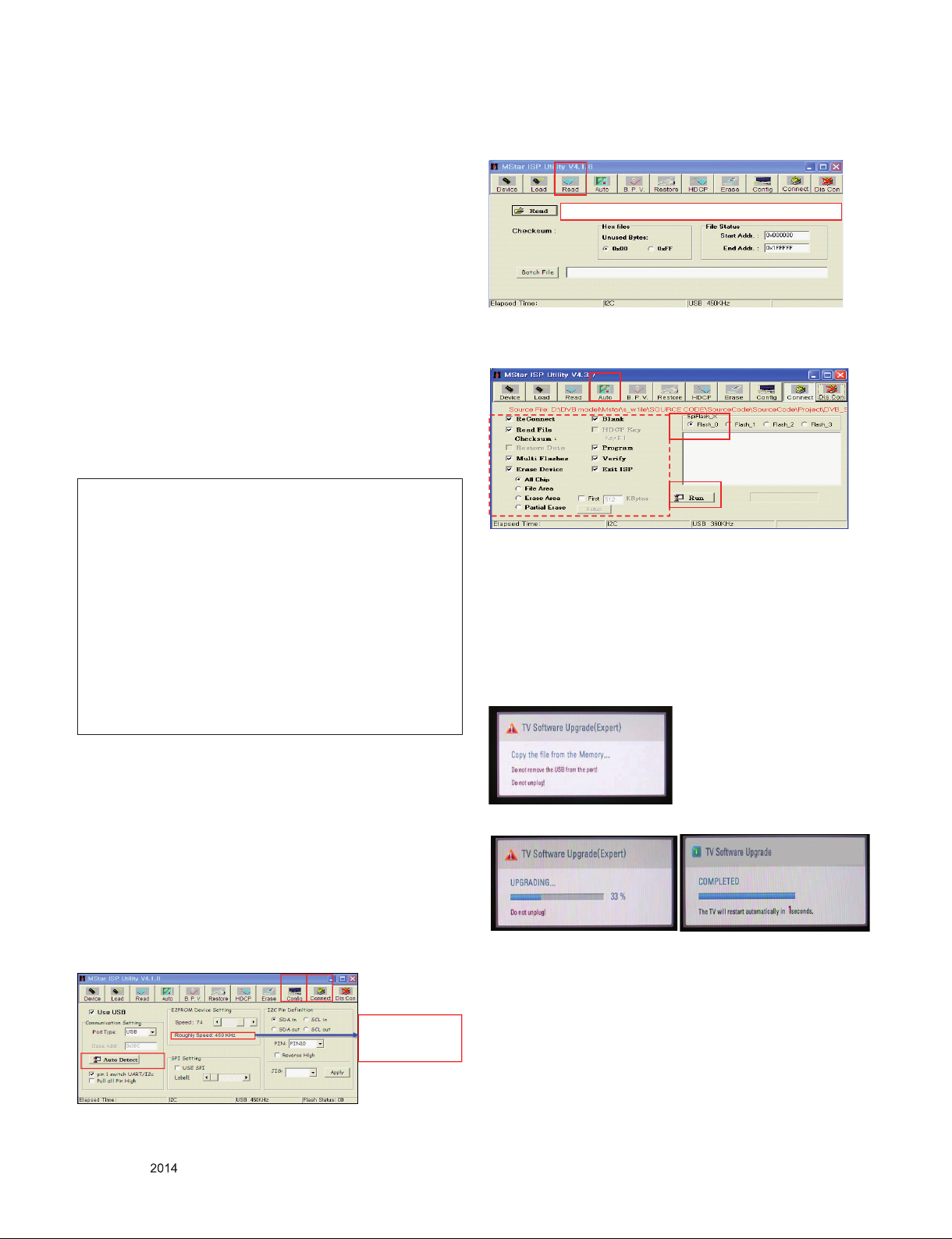
4) Click “Read” tab, and then load download le(XXXX.bin) by
clicking “Read”
(4)
filexxx.bin
5) Click “Auto” tab and set as below
6) Click “Run”.
7) After downloading, check “OK” message.
(5)
(7) ……….OK
* USB DOWNLOAD(*.epk le download)
1) Make New folder named “LG_DTV” and put ISP le(*.epk)
in the folder.
2) Put the USB Stick to the USB socket.
3) Automatically detecting update le in USB Stick
- If your downloaded program version in USB Stick is
Low, it didn’t work. But your downloaded version is
High, USB data is automatically detecting.
4) Show the message “Copy the le from the Memory…”
3. Main PCB check process
* APC - After Manual-Insult, executing APC
* Boot le Download
1) Execute ISP program “Mstar ISP Utility” and then click
“Cong” tab.
2) Set as below, and then click “Auto Detect” and check “OK”
message. If display “Error”, Check connect computer, jig,
and set.
3) Click “Connect” tab. If display “Can’t ”, Check connect
computer, jig, and set.
(1) (3)
Please Check the Speed :
Use the speed under
(2) OK
Copyright © LG Electronics. Inc. All right reserved.
Only for training and service purposes
200KHz.
- 11 -
5) Updating is starting.
6) Updating Completed, The TV will restart automatically.
7) If your TV is turned on, check your updated version and
Tool option. (explain the Tool option, next stage)
* If downloading version is more high than your TV
have, TV can lost all channel data. In this case, you
have to channel recover. if all channel data is cleared,
you didn’t have a DTV/ATV test on production line.
LGE Internal Use Only
Page 12

3.1. EDID Process
3.1.1. EDID download
1) Press “Power only” key of service remote controller.
2) Press the “ADJ” Key of service remote controller.
3) Enter EDID D/L mode by pushing “►” key at “EDID D/L”.
4) Select “Start” menu to download EDID data.
5) Check the “OK” message.
6) Press EXIT key on R/C.
G
G
WUG{GvXG G G
WUG{GvXG G G
XUG{GvYG G G
XUG{GvYG G G
YUG{GvZG G G
YUG{GvZG G G
ZUG{Gv[G G G
ZUG{Gv[G G G
[UG{Gv\G G G
[UG{Gv\G G G
\UG{Gv]G
\UG{Gv]G
]UGjGnG
]UGjGnG
^UGhGvG
^UGhGvG
_UGhkjGjG
_UGhkjGjG
`UG~GiG G G
`UG~GiG G G
XWUGXWGwG~iGG G G
XWUGXWGwG~iGG G G
XXUG{GwGG G G G
XXUG{GwGG G G G
XYUGlkpkGkVsG ඖG G
XYUGlkpkGkVsG ඖG G
XZUGzGiVjG
XZUGzGiVjG
X[UG{GzGzG
X[UG{GzGzG
X\UGlUGpGhG
X\UGlUGpGhG
X]UGzwrGsGhG
X]UGzwrGsGhG
X^UzwkpmGsGhG
X^UzwkpmGsGhG
G G G
G G G
→ Caution: - Do not connect HDMI & D-sub Cable when
* Edid data and Model option download (RS232)
NO Item CMD 1CMD 2Data 0
G G
G G
G G
G G
oktpXGG GG GG G GG GG GvrG G G
oktpXGG GG GG G GG GG GvrG G G
G G
G G
yniGG GG G GG GG GG GG GvrG G G
yniGG GG G GG GG GG GG GvrG G G
G G G
G G G
G zG G yG G
G zG G yG G
download EDID.
lkpkGkVsG
lkpkGkVsG
G
G
G
G
3.1.2. RGB EDID Data
- RGB EDID Data (Rev2, 2012.08.29) – Checksum : C1
3.1.3. HDMI EDID Data
- HDMI EDID Data (Rev2, 2012.08.29)
Checksum : 15 CE (HDMI1) / 15 BE (HDMI2)
Enter
download
MODE
EDID data and
Model option
download
Download
‘Mode In’
Download A E 00 10 Automatically download
A A 0 0 When transfer the
‘Mode In’,
Carry the command.
(The use of a internal
Data)
*(week), **(year), ***(Check sum) : Adjustable Data
**** (physical address) : (HDMI1 : 10, HDMI2 : 20),
****(Check sum) : (HDMI1 : CE, HDMI2 : BE)
: Screen size,
: Color Characteristics
3.2. Function Check
3.2.1. Check display and sound
*Check Input and Signal items. (cf. work instructions)
1) TV(DTV, RF, Satellite(Satellite model))
2) AV (SCART/CVBS)
3) COMPONENT (480i)
4) HDMI1/2(PC : 1366 x 768 @ 60Hz) –
5) RGB(PC : 1366 x 768 @ 60Hz)
6) PC Audio In
7) Headphone out
8) USB
9) LAN (2xMT55V model Only)
* Display and Sound check is executed by Remote controller
* Some models do not support RGB & PC audio in. It depends
on model spec.
→ Caution : Not to push the INSTOP KEY after completion if
the function inspection.
Copyright © LG Electronics. Inc. All right reserved.
Only for training and service purposes
- 12 -
LGE Internal Use Only
Page 13

3.3. CI+ key writing process.
(Device CN)
3.3.1. Download method
3.3.1.1. Communication Prot Connection
2 ) Check the method of CI+ key value(RS232)
a) Into the main ass’y mode(RS232: aa 00 00)
CMD 1 CMD 2 Data 0
A A 0 0
b) Check the mothed of CI+ key by command
(RS232: ci 00 20)
CMD 1 CMD 2 Data 0
C I 2 0
Connection : PCBA (USB Port) → USB to Serial Adapter (UC-
232A) → RS-232C cable → PC(RS-232C port)
→ Caution : LD31Q/LD31A chassis support only UC-232A
driver. ( only use this one. )
3.3.2. CI+ Key Download
1) Set CI+ Key path Directory at Start Mac & CI+ Download
Programme.
2) Set COM 1,2,3,4 / 115200(Baudrate) (1)/(2)
3) Click port connection button(1)
4) Start CI+ Key Download, Push the button(4)
5) Check OK or NG.
6) After completing download, CI + key values are increase by
one automatically. To write CI+ key next SET, click CI+ key
writing button(5) directly.
7) Check whether the key was downloaded or not at ‘In Start’
menu. (Refer to below).
3) Result value
i 01 OK 1d1852d21c1ed5dcx
CI+ Key Value
3.3.3. Check the Download to CI+ Key value in LG
set.
1) Check the method of CI+ Key value
a) Check the method on Instart menu
Copyright © LG Electronics. Inc. All right reserved.
Only for training and service purposes
- 13 -
LGE Internal Use Only
Page 14

4. Total Assembly line process
4.1. Tool option & ADC Check
1) Press "Power on" key of service remote control.
2) Connect USB Port → USB to Serial Adapter (UC-232A) →
RS-232C cable → PC(RS-232C port)
3) Check the 'Tool Option' (Refer to the BOM Comments or
Adjustment spec)
4) Check the ‘ADC’ is ok.
4.2. Model name & Serial number Download
4.2.1. Model name & Serial number D/L
1) Press "Power on" key of service remote control.
2) Connect USB Port → USB to Serial Adapter (UC-232A) →
RS-232C cable → PC(RS-232C port)
3) Write Model Name & Serial Number by use USB Port
4) Must check the serial number at the Diagnostics of SET UP
menu. (Refer to below).
4.2.2. Method & notice
1) Model Name & Serial Number D/L is using of scan equipment.
2) Setting of scan equipment operated by Manufacturing
Technology Group.
3) Serial number D/L must be conformed when it is produced
in production line, because serial number D/L is mandatory
by D-book 4.0
* Manual Download (Model Name and Serial
Number)
If the TV set is downloaded By OTA or Service man, Sometimes model name or serial number is initialized.( Not always)
There is impossible to download by bar code scan, so It need
Manual download.
1) Press the 'Instart' key of ADJ remote controller.
2) Go to the menu 'Model Number D/L' like below photo.
3) Input the Factory model name (ex 24LN4500) or Serial
number like photo.
4.3. Function Check
4.3.1. Check display and sound
*Check Input and Signal items. (cf. work instructions)
1) TV
1) TV(DTV, RF, Satellite(Satellite model))
2) AV (SCART/CVBS)
3) COMPONENT (480i)
4) HDMI1/2(PC : 1366 x 768 @ 60Hz) –
5) RGB(PC : 1366 x 768 @ 60Hz)
6) PC Audio In
7) Headphone out
8) USB
9) LAN (2xMT55V model Only)
* Display and Sound check is executed by Remote controller
* Some models do not support RGB & PC audio in. It depends
on model spec.
→ Caution : Not to push the INSTOP KEY after completion if the
function inspection.
4.3.2. PCMCIA CARD Check
You must adjust DTV 29 Channel and insert PCMCIA CARD
to socket.
- If PCMCIA CARD works normally, video signals will appear
on screen.
But it works abnormally, "No CA module" will appear on
screen.
→ Caution: Set up "RF mode" before launching products.
4.3.3. PIP Check
1) Press "Power on" key of service remote control.
2) Input RGB & TV(ATV or DTV) signal.
3) Set Input mode to RGB.
4) Press ‘PIP" key of ADJ remote controller
5) Check TV Video & Audio signal of Sub picture.
4) Check the model name Instart menu → Factory name
displayed (ex 24MT55D)
5) Check the Diagnostics (DTV country only) → Buyer model
displayed (ex 24MT45D-PZP)
Copyright © LG Electronics. Inc. All right reserved.
Only for training and service purposes
- 14 -
LGE Internal Use Only
Page 15

4.4. White balance adjustment
-Equipment
1) Color Analyzer: CA-210 (LED Module : CH 14)
2) Adj. Computer(During auto adj., RS-232C protocol is
needed)
3) Adjust Remocon
*RGB Gains are xed data for each model.
Insert RS-232C Jack which is connected with PC for White
Balance or equivalent device.
→ Total Assembly line should be check whether the color
coordinate(x,y) data refer to below table were meet or not.
Color
Temperature
Luminance
(cd/m²)
*Note : x,y coordinates are drifted about 0.007 after 30 mins
*Note : Manual W/B process using adjusts Remote control.
1) After enter Service Mode by pushing "ADJ" key,
2) Enter "White Balance" by pushing "►" key at "White Bal-
G
WUG{GvXG G G
XUG{GvYG G G
YUG{GvZG G G
ZUG{Gv[G G G
[UG{Gv\G
\UG{Gv]G
]UGjGnG G G
^UGhGvG
_UGhkjGjG GG GG GG GG
`UG~GiGG GG GG GG GG ඖG G G
XWUGXWGwG~iGG G G
XXUG{GwGG G G G
XYUGlkpkGkVsGG GG GG GG GG GG G G G G
XZUGzGiVjG
X[UG{GzGzG
X\GlUGpGhG
G G G
Cool 9,300 °K X=0.290 (±0.03)
Medium 8,000 °K X=0.300 (±0.03)
Warm 6,500 °K X=0.318 (±0.03)
Cool Min : 80 Typ : 110 <Test Signal>
Medium Min : 80 Typ : 110
Warm Min : 70 Typ : 110
Y=0.298 (±0.03)
Y=0.310 (±0.03)
Y=0.334 (±0.03)
<Test Signal>
Inner pattern
(204gray,80IRE)
Inner pattern
(204gray,80IRE)
heat-run. So checking color coordinate within 5-min at
total assembly line, consider x,y coordinates might be
up to 0.007 than x,y target of each color temperature.
ance".
G G
~GiG
jG{UG ඔG jG ඖG
G G
yTnG G XWWG G
nTnG G XW[G G
iTnG G X`YG G
yTjG G ][G G
nTjG G ][G G
iTjG G ][G G
G G
{TwG G vuG G
iG G XWWG G
yG G {GzG G
4.5. DPM Operation check
■ Measurement Condition: 100~240V@ 50/60Hz
1) Set Input to RGB-PC and connect D-sub cable to set –
RGB Mode
Set Input to HDMI (with Input Label set to PC) and con-
nect HDMI cable to set – HDMI Mode
2) Cut off H sync or V sync of signal.
3) Check DPM operation refer to the below table.
Operating Condition Sync
Power S/W On Sleep mode -
RGB,HDMI
(H/V)
Off/Off Off Amber 1
Video LED
(SET)
Wattage
(W)
4.6. Model Name & SW Version & Adjust check.
* Press the ‘Instart’ key of ADJ remote controller
4.6.1. Model Name& SW Version Check
1) Check ‘Model Name’.
2) Check ‘S/W Version’ (Refer to the IC Ver. in the BOM)
4.6.2. Adjust Check
1) Check ‘Country Group’
2) Check ‘Area Option’
3) Check ‘Tool Option’ (Refer to the BOM Comments)
4) Check ‘Adjust ADC[Comp&RGB]’ is OK.
5) Check ‘EDID[RGB&HDMI]’ is OK.
* After check all, Press the 'EXIT' key of ADJ remote controller
to go out SVC menu.
* When doing Adjustment, Please make circumstance as
below.
Copyright © LG Electronics. Inc. All right reserved.
Only for training and service purposes
- 15 -
LGE Internal Use Only
Page 16

1. No Power
Replace X101
N
Check C400
Voltage Level (19V)
Check Power connector
OK ?
Replace Adapter
Y
N Y
Check IC401 Output
Voltage Level (3.3V)
Replace IC401 &
Recheck
Y
N
Check X101 Clock
24MHz
Replace IC100 Flash
Memory
Y
Check IC403 Output
Voltage Level (5V)
Replace IC403 &
Recheck
Y
N
Check IC402 Output
Voltage Level (1.15V)
Replace IC402 &
Recheck
N
Y
TROUBLE SHOOTING
Copyright © LG Electronics. Inc. All right reserved.
Only for training and service purposes
- 16 -
LGE Internal Use Only
Page 17

2. No Screen on
Replace Cable
N
Module Back Light On?
Check IC1001 & Q1002
Replace LED Driver IC or FET
Y
N
N
Check Panel Power 5V (P602 #1)
Check IC403 Output 5V
Replace IC403 &
Recheck
Y
N
Check Panel input Clock
P602 (#10, #11 )
Check IC101
Repair Main B/D
Y
N
Check FFC Cable for Damage or
Open Conductors
Check LED Driver NDRV
(R1052)
Replace T-Con Board or Module
Y
Check IC101
Replace Main SOC
N
Check WLED_ENABLE High?
Y
Copyright © LG Electronics. Inc. All right reserved.
Only for training and service purposes
- 17 -
LGE Internal Use Only
Page 18

3. No Video - Digital TV
Check RF Cable
Y
1. Check RF IC(L2603) Power (3.3V)
2. Check IC2600 Output voltage(1.2V)
Replace IC401 & IC2600 Recheck
Y
N
Check SCL/SDA Li ne(TU2600 #4, #5) Replace TU2600 or IC101
N
Copyright © LG Electronics. Inc. All right reserved.
Only for training and service purposes
- 18 -
LGE Internal Use Only
Page 19

6. No Video - HDMI
Replace Main Scaler
(IC101)
Check input signal format
Is it supported?
Check JK800/801 for proper
connection or Damage
Replace Connector
Y
N
Check I2C Signal
(JK800/801)
Re Download EDID Data
Y
N
Y
Check HDMI Cable for Damage or
Open Connector
Y
Copyright © LG Electronics. Inc. All right reserved.
Only for training and service purposes
- 19 -
LGE Internal Use Only
Page 20

BLOCK DIAGRAM
Copyright © LG Electronics. Inc. All right reserved.
Only for training and service purposes
- 20 -
LGE Internal Use Only
Page 21

EXPLODED VIEW
IMPORTANT SAFETY NOTICE
Many electrical and mechanical parts in this chassis have special safety-related characteristics. These parts
are identified by in the Schematic Diagram and EXPLODED VIEW.
It is essential that these special safety parts should be replaced with the same components as recommended
in this manual to prevent X-RADIATION, Shock, Fire, or other Hazards.
Do not modify the original design without permission of manufacturer.
535
LV1
A2
400
820
830
540
910
900
120
121
810
200
300
Copyright © LG Electronics. Inc. All right reserved.
Only for training and service purposes
- 21 -
800
511
302
510
501
LGE Internal Use Only
Page 22

19V to 12V (For HD Panel)
Copyright ⓒ 2014 LG Electronics. Inc. All right reserved.
Only for training and service purposes
LGE Internal Use Only
JK400
KJA-DC-1-0032
11.11.07
6604->6601
8
7
6
5
8
7
6
5
8
7
6
5
FB
VCC
EN/SYNC
BST
FB
VCC
EN/SYNC
BST
FB
VCC
EN/SYNC
BST
IC403
MP2315GJ
1
2
3
4
MULTI_ON
8
7
6
5
C415
0.1uF
R406
68
C412
0.1uF
50V
R407
68
C413
0.1uF
50V
16V
FB
VCC
EN/SYNC
BST
R408
68
C414
0.1uF
50V
R409
10K
OPT
R410
2K
R411
100K
R412
20K
+3.3V_Normal
R414
10K
OPT
R413
2K
R415
68
C416
0.1uF
50V
C417
0.1uF
16V
C418
0.1uF
16V
R416
75K
1%
C419
0.1uF
16V
OPT
R417
2K
L400
4.7uH
L401
10uH
R418
33K
10uH
L402
C422
10uF
R419
33K
C421
22uF
6.3V
C420
0.1uF
16V
16V
C423
22uF
6.3V
C424
10uF
C425
10uF
16V
OPT
10V
C426
10uF
L403
10uH
+12V_Normal
R42 1
43K
C432
0.1uF
1%
R42 2
100 K
1%
R42 3
10K
1%
+3.3V_ST
R401
10K
+3.3V_ST
R42 7
5.1 K
1%
R42 8
27K
1%
R42 9
10K
1%
+1.15V_VDDC
R42 4
4.7 K
1%
R42 5
0
5%
R42 6
10K
1%
+5V_Normal
R43 0
39K
1%
R43 1
R43 2
15K
1%
10K
1%
16V
POWER_ON/OFF1
3.3V TO 1.5V LDO(DDR Power)
+3.3V_Normal
R433
10K
+3.3V_ST
R434
100K
B
C433
10uF
10V
PANEL POWER CONTROL
+5V_Normal
+12V_Normal
FHD(5V Panel)
R435
0
PANEL_CTL
FHD
R3466
1K
HD(12V Panel)
R437
0
NC_1
EN2
VIN3
NC4
B
R436
4.7K
+3.3V_ST
R440
22K
R438
100
C
Q400
MMBT3904(NXP)
E
TJ4220GDP-ADJ
1
2
3
4
C
MMBT3904(NXP)
Q404
FHD
R3467
E
0
FHD
10K
R439
IC404
B
9
THERMAL
C439
4.7uF
10V
[EP]GND
GND
8
ADJ/SENSE
7
VOUT
6
NC_2
5
R441
100K
FHD(5V Panel)
R442
10K
C
Q401
MMBT3904(NXP)
E
G
PMV48XP
Q402
C434
1uF
10V
OPT
C435
0.01uF
25V
C440
4.7uF
16V
HD(12V Panel)
R442-*1
4.7K
S
D
1%
10K
R445
1%
R443
1K
1%
R444
10K
+12V_PANEL_POWER
HD(12V Panel)
Q403
AO3407A
S
G
C436
D
1uF
16V
HD(12V Panel)
13.06.28
For Module Power Sequence
R441 : 22k --> 100k
R442 : 1k --> 10k
R446
0
+3.3V_Normal
C438
0.1uF
16V
+1.5V_DDR
C437
10uF
10V
OPT
+5V_PANEL_POWER
FHD(5V Panel)
R447
0
C428
0.1uF
16V
C429
0.1uF
16V
C430
0.1uF
10V
16V
OPT
R420
33K
C427
C431
10uF
10uF
10V
10V
IC400
AAM
GND
IN
SW
AAM
GND
IN
SW
MP2315GJ
1
2
3
4
IC401
MP2315GJ
1
2
3
4
C406
0.1uF
50V
C407
0.1uF
50V
R402
47K
OPT
R403
47K
JP400
4
2
1
JP401
C400
47uF
25V
105C
+19V
OPT
OPT
C402
C401
10uF
10uF
25V
25V
Check the Ripple
C404
2.2uF
25V
C405
2.2uF
25V
19V to 1.15V (M1 Core)
IC402
10K
C410
0.47uF
MP2315GJ
AAM
1
IN
2
SW
3
GND
4
19V TO 5V DCDC CONVERTER
OPT
16V
OPT
R405
AAM
47K
IN
C411
0.1uF
50V
SW
GND
C403
2.2uF
25V
MULTI_ON
LED_AMBER
C408
0.1uF
50V
D400
MMBD6100
A2
A1
OPT
R404
47K
R400
C
C409
2.2uF
25V
THE SYMBOL MARK OF THIS SCHEMETIC DIAGRAM INCORPORATES
SPECIAL FEATURES IMPORTANT FOR PROTECTION FROM X-RADIATION.
FIRE AND ELECTRICAL SHOCK HAZARDS, WHEN SERVICING IF IS
ESSENTIAL THAT ONLY MANUFACTURES SPECIFIED PARTS BE USED FOR
THE CRITICAL COMPONENTS IN THE SYMBOL MARK OF THE SCHEMETIC.
MA55
POWER
2013/09/16
4 13
Page 23

Module(HD)
Copyright ⓒ 2014 LG Electronics. Inc. All right reserved.
Only for training and service purposes
LGE Internal Use Only
PIN22
0~0.7V
2.7~3.3V
PIN22 (29")
0~0.7V JEDIA
2.7~3.3V
PIN21
21.6
GND
ALL panel
NC
+12V_PANEL_POWER
111116
100uF Ecap
Deletion
EAE38362801
HD(12V Panel)
C600
0.1uF
16V
VESA
JEDIA
VESA
RXA3+
RXA3-
RXACK+
RXACK-
RXA2+
RXA2-
RXA1+
RXA1-
RXA0+
RXA0-
26"/27.5" (LVDS)
R607 0
4.7K/10W*4ea 5.6/10W*2ea
5.6 K
R60 4
HD(12V Panel)
23.6" (LVDS)
R608 0
5.6 K
R60 5
HD(12V Panel)
JP600
HD(12V Panel)
P600
10031HR-30
1
2
3
4
5
6
7
8
9
10
11
12
13
14
15
16
17
18
19
20
21
22
23
24
25
26
27
28
29
30
31
Module(FHD)
+5V_PANEL_POWER
FHD(5V Panel)
C602
0.1uF
16V
For Interlace Mode
High : Interlace Mode
Low : Normal Mode
2013.07.15
INTERLACE_CTRL
RXACK+
RXACK-
RXA2+
RXA2-
RXBCK+
RXBCK-
RXB2+
RXB2-
RXA3+
RXA3-
RXA1+
RXA1-
RXA0+
RXA0-
RXB3+
RXB3-
RXB1+
RXB1-
RXB0+
RXB0-
+3.3V_Normal
OPT
R625
4.7K
5.6 K
R61 5
FHD(5V Panel)
FHD(5V Panel)
OPT
R626
100
JP613
5.6 K
R61 6
JP614
FHD(5V Panel)
R627
0
FHD(5V Panel)
P602
10031HR-30
1
2
3
4
5
6
7
8
9
10
11
12
13
14
15
16
17
18
19
20
21
22
23
24
25
26
27
28
29
30
31
IR/LED and Control
KEY_SCL
KEY_SDA
LB_joy_stick
R606-*2 150
Amber LED(Non M75):5.9mA
Amber LED(M75) : 16mA
LED_RED
R600
10K
OPT
LED_AMBER
R601
C
B
Q600
MMBT3904(NXP)
E
10K
R602
10K
OPT
(IR Port protection against ESD)
C
B
Q601
MMBT3904(NXP)
E
4.7K
R603
+3.3V_ST
IR
1/10W
1%
+3.3V_ST
MT_joy_stick
R606 150
1/10W
1%
touch_key
R606-*1 270
1/10W
1%
121018
100ohm->200ohm
KEY2
KEY1
+3.3V_ST
MT_joy_stick
R610 270
LB_joy_stick
121118
touch_key
R610-*2
R610-*1 330
680
1/10W
5%
Red LED(Non M75):4.8mA
Red LED(M75) : 5.9mA
R604,R610
2012->1608
R609
200
1/10W
1%
1/10W
1%
0424
50V
C601
1000pF
Close to Wafer
20V
VA600
+3.3V_ST
R613
3.3K
R611
100
R612
100
TOUCH KEY
R623
22
TOUCH KEY
R624
22
R614
3.3K
D410
CDS3C30GTH
30V
D411
30V
CDS3C30GTH
12.07.17
Change D601~3
JP601
JP602
JP603
JP606
JP605
JP604
JP608
JP609
JP610
JP611
JP612
JP607
P601
12507WR-12L
1
2
3
4
5
6
7
8
9
10
11
12
13
IR_OUT(Ready)
+3.3V_ST
R617
IR_OUT
22
(OPT)IR_OUT
Q602
MMBT3904(NXP)
(OPT)IR_OUT
C
E
(OPT)IR_OUT
R618
10K
B
C603
1000pF
50V
(OPT)IR_OUT
MMBT3904(NXP)
OPT
R619
0
(OPT)IR_OUT
(OPT)IR_OUT
R620
10K
Q603
+3.3V_ST
C
E
R621
10K
(OPT)IR_OUT
B
(OPT)IR_OUT
R622
47K
IR
THE SYMBOL MARK OF THIS SCHEMETIC DIAGRAM INCORPORATES
SPECIAL FEATURES IMPORTANT FOR PROTECTION FROM X-RADIATION.
FIRE AND ELECTRICAL SHOCK HAZARDS, WHEN SERVICING IF IS
ESSENTIAL THAT ONLY MANUFACTURES SPECIFIED PARTS BE USED FOR
THE CRITICAL COMPONENTS IN THE SYMBOL MARK OF THE SCHEMETIC.
MA55
IR/CONTROL/MODULE
2013/05/23
6
Page 24

DSUB RGB
Copyright ⓒ 2014 LG Electronics. Inc. All right reserved.
Only for training and service purposes
LGE Internal Use Only
130529
DSUB_VSYNC/HSYNC Pull-Down
DSUB_VSYNC
2:E18
DSUB_HSYNC
2:E18
DSUB_B+
DSUB_G+
DSUB_R+
11.10.31
To Improve EMI
DSUB
R731
2.4K
DSUB
R732
10K
RS232C(SIDE)
75
R700
DSUB
DSUB
VA700
20V
DSUB
R701
75
R702
75
To Improve Ringing issue
LOW capacitance Part apply
121128
ESD improve
OPT->APPLY
DSUB
VA701
20V
DSUB
DSUB
VA703
11.10.27
Hotel_Model(RS232C apply)
NON_Hotel_Model(RS232C Bypass)
PM_TXD
PM_RXD
VA702
VA704
20V
20V
OPT
OPT
R705
10K
DSUB
121128
ESD improve
OPT->APPLY
121128
ESD improve
OPT->APPLY
JP700
JP701
JP703
JP704
DSUB
DSUB
5.5V
5.5V
5.5V
VA706
VA705
C700
0.33uF
16V
Hotel_Model(RS232C apply)
RIN 2
DOU T2
8
7
Hotel_Model(RS232C apply)
9
10
DIN 2
ROU T2
NON_Hotel_Model(RS232C Bypass)
JK700
KJA-PH-1-0177
C701
0.33uF
16V
6V-5
IC700
MAX3232CDR
11
12
DIN 1
R703
0
R704
0
R706
100
JP702
4 M4
5 M5_GND
C2-
ROU T1
3 M3_DETECT
Hotel_Model(RS232C apply)
C2+
4
13
RIN 1
R707
100
1 M1
DSUB
D700
MMBD6100
A2
C
A1
R708
10K
DSUB
20V
DSUB
JP707
JP705
DSUB
H_SYN C
DDC_D ATA
BLUE_ GND
GND_2
RED2GREEN3BLUE4GND_15DDC_G ND
GREEN _GND
RED_G ND
13
12
11
8
7
6
1
JK703
SPG09-DB-010
C702
0.33uF
16V
0.1uF
C1-2V+
3
14
15
GND16VCC
DOU T1
VA708
20V
VA709
20V
JP708
JP706
6 M6
Hotel_Model(RS232C apply)
+5V_Normal
VA707
121128
ESD improve
OPT->APPLY
VA710
20V
DSUB
JP709
121128
JP710
SHILE D
16
+3.3V_ST
C704
0.1uF
16V
(OPT)IR_OUT
R709
0
ESD improve
OPT->APPLY
DDC_C LOCK
V_SYN C
NC10SYNC_ GND
15
14
9
C703
16V
Hotel_Model(RS232C apply)
C1+
1
Hotel_Model(RS232C apply)
+3.3V_ST
VA711
20V
DSUB
R710
47K
DSUB
IR_OUT
R711
10K
DSUB
DSUB
B
RGB_DDC_SCL
RGB_DDC_SDA
R713
47K
C
E
+3.3V_ST
DSUB_DET
Q700
MMBT3904(NXP)
DSUB
SW DEBUG Wafer
12507WS-04L
1
2
3
4
P701
USB(SIDE)
3AU04S-305-ZC-(LG)
JK701
1234
USB DOWN STR EAM
5
JP713
JP712
JP711
C705
0.1uF
VA712
121128
ESD improve
OPT->APPLY
DSUB/SCART Switch
IC701
AP2191DSG
NC
GND
8
1
OUT_2
IN_1
7
2
OUT_1
IN_2
6
3
FLG
EN
5
16V
20V
VA716
121128
ESD improve
OPT->APPLY
20V
4
111026
ESD diode deletion
EAH39491601 2EA
120103
ESD diode addition
EAF61530301 2EA
USB_DM
USB_DP
USB_CTL
1:AL8
1:AL7
R725
10K
+5V_Normal
R726
47
C708
0.1uF
16V
USB_OCD
DSUB_R+
DSUB_G+
DSUB_B+
SC1_R+
SC1_G+
SC1_B+
C711
0.01uF
25V
DSUB
C710
6.3V
22uF
OPT
DSUB
C712
6.3V
C709
22uF
470pF
50V
C713
0.01uF
25V
DSUB
DSUB
C714
6.3V
22uF
OPT
DSUB
C715
6.3V
22uF
C716
0.01uF
25V
DSUB
C717
6.3V
22uF
OPT
DSUB
C718
6.3V
22uF
C719
0.01uF
25V
DSUB
C720
6.3V
22uF
OPT
DSUB
C721
6.3V
22uF
C727
0.01uF
25V
DSUB
C728
6.3V
22uF
OPT
DSUB
C729
6.3V
22uF
C730
0.01uF
25V
DSUB
C731
6.3V
22uF
OPT
DSUB
C732
6.3V
22uF
RED_1_INPUT
DSUB
HD_SYNC_SIGNAL_DETECTOR
DSUB
R727 470K
GREEN_1_INUT
GROUND1
BLUE_1_INPUT
GROUND2
RED_2_INPUT
GROUND3
GREEN_2_INPUT
GROUND4
BLUE_2_INPUT
VD_1_INPUT
1
2
3
4
5
6
7
8
9
10
11
12
IC702
BA7657F
+5V_Normal
HD_1_INPUT
24
HD_2_INPUT
23
HD_OUTPUT
22
RED_OUTPUT
21
VCC
20
GREEN_OUTPUT
19
COMPOSITE_VIDEO_INPUT
18
COMPOSITE_SYNC_OUTPUT
17
CONTROL
16
BLUE_OUTPUT
15
VD_OUTPUT
14
VD_2_INPUT
13
DSUB
DSUB
R712
22
DSUB
R715
75
DSUB
R716
75
DSUB
R714
68K
R734
0
DSUB
C722
0.1uF
R728
2K
DSUB
C725
22uF
10V
DSUB
R729
75
DSUB
C733
22uF
10V
DSUB_HSYNC
DSUB/SC1_HSYNC
DSUB/SC1_R+
DSUB/SC1_G+
DSUB/SC1_B+
DSUB/SC1_VSYNC
SC1_FB
DSUB_VSYNC
PC AUDIO(SIDE)
+3.3V_Normal
AUDIO_IN
R721
12.08.10
470K
47K->470K
VA715
JP715
20V
OPT
6 M6
AUDIO_IN
1 M1
3 M3_DETECT
4 M4
5 M5_GND
KJA-PH-1-0177
JK702
120918
JIG GND Point addition
5
Jack Shield (HDMI1, HDMI2, RGB)
JP718
VA713
20V
AUDIO_IN
JP717
VA714
20V
AUDIO_IN
JP716
JP719 JP721JP720JP714
JackShield(for NonCKD)
C707
220pF
50V
C706
220pF
50V
M700
MGJ63348201
AUDIO_IN
AUDIO_IN
R718
470K
OPT
R717
470K
OPT
AUDIO_IN
R719
15K
AUDIO_IN
R720
15K
M700-*1
MGJ63348202
AUDIO_IN
R724
1K
R722
10K
AUDIO_IN
R723
10K
AUDIO_IN
JackShield(for CKD)
PC_AUDIO_DET
PC_R_IN
PC_L_IN
ETHERNET
MAIN(ETHERNET)
JK704-*1
RJ45VT-01SN002
9
9
111026
LAN Jack deletion
111117
LAN Jack Addition for T2
SUB(ETHERNET_XMULTIPLE(MP))
JK704
RJ45VT-01SN002
1
1
2
2
3
3
4
4
5
5
6
6
7
7
8
8
1
2
3
4
5
6
7
8
9
9
LAN JACK
C734
0.01uF
50V
LAN JACK
C735
0.01uF
50V
DSUB/SC1_OUT_CTRL
LAN JACK
5.6B
ZD700
5.6B
ZD701
LAN JACK
OPT
VA717
5.5V
OPT
DSUB
R730
4.7K
VA718
5.5V
OPT
R733
B
VA719
10K
+3.3V_ST
C
E
5.5V
DSUB
Q701
MMBT3904(NXP)
DSUB
OPT
5.5V
VA720
EPHY_TP
EPHY_TN
EPHY_RP
EPHY_RN
THE SYMBOL MARK OF THIS SCHEMETIC DIAGRAM INCORPORATES
SPECIAL FEATURES IMPORTANT FOR PROTECTION FROM X-RADIATION.
FIRE AND ELECTRICAL SHOCK HAZARDS, WHEN SERVICING IF IS
ESSENTIAL THAT ONLY MANUFACTURES SPECIFIED PARTS BE USED FOR
THE CRITICAL COMPONENTS IN THE SYMBOL MARK OF THE SCHEMETIC.
MA55
INTERFACE
2013/05/23
7
Page 25

HDMI
Copyright ⓒ 2014 LG Electronics. Inc. All right reserved.
Only for training and service purposes
LGE Internal Use Only
HDMI_1
5V_HDMI_1
HDMI Port1
SHIELD
20
19
HDMI Port1
R801
1K
18
17
16
15
14
13
12
11
CK+
10
EAG61491201
D0-
9
D0_GND
8
D0+
7
D1-
6
D1_GND
5
D1+
4
D2-
3
D2_GND
2
D2+
1
120825
ESD component addition
JK801
HDMI_2 With MHL
5V_HDMI_2
SHIELD
EAG61491201
HDMI2
JK800
20
19
18
17
16
15
14
13
12
11
CK+
10
D0-
9
D0_GND
8
D0+
7
D1-
6
D1_GND
5
D1+
4
D2-
3
D2_GND
2
D2+
1
OPT
R800
1K
120825
ESD component addition
NON MHL
R808
0
OPT
VA800
20V
OPT
VA801
20V
OPT
VA803
OPT
VA802
20V
20V
+3.3V_ST
R802
47K
HDMI Port1
OPT
VA804
R804 0
(OPT)HDMI1_ARC
OPT
VA806
20V
+3.3V_ST
R803
47K
HDMI2
OPT
VA805
OPT
VA808
20V
OPT
VA807
20V
R809
47K
HDMI Port1
C
B
HDMI Port1
Q800
MMBT3904(NXP)
R805
10K
E
OPT
VA809
20V
(OPT)ESD_HDMI_SEMTECH(DEV)
1
2
3
4
5
(OPT)ESD_HDMI_SEMTECH(DEV)
1
2
3
4
5
HDMI2
D800
RCLAMP0524PA
10
9
8
7
6
D801
RCLAMP0524PA
10
9
8
7
6
HDMI2
R806
10K
B
MMBT3904(NXP)
R810
47K
C
Q801
MMBT3904(NXP)
HDMI2
E
MMBT3904(NXP)
R807 0
(OPT)HDMI2_ARC
(OPT)ESD_HDMI_SEMTECH(DEV)
D802
RCLAMP0524PA
10
1
2
9
3
8
7
4
6
5
(OPT)ESD_HDMI_SEMTECH(DEV)
D803
RCLAMP0524PA
1
10
2
9
8
3
4
7
6
5
MHL
R813
0
VA810
5.6V
OPT
HDMI Port1
Q802
HDMI_ARC
HDMI_CEC
CK-_HDMI1
CK+_HDMI1
D0-_HDMI1
D0+_HDMI1
D1-_HDMI1
D1+_HDMI1
D2-_HDMI1
D2+_HDMI1
HDMI_ARC
HDMI_CEC
CK-_HDMI2
CK+_HDMI2
D0-_HDMI2
D0+_HDMI2
D1-_HDMI2
D1+_HDMI2
D2-_HDMI2
D2+_HDMI2
C800
0.047uF
25V
HDMI2
5V_DET_HDMI_1
HDMI Port1
C
B
E
TMDS_CH1-
TMDS_CH1+
TMDS_CH2-
TMDS_CH2+
5V_DET_HDMI_2
HDMI2
R811
33
C
OPT
Q803
E
120715
Added for ESD prevention
120825
OPT->APPLY
R812
10K
HDMI Port1
VA812
20V
120715
Added for ESD prevention
120825
OPT->APPLY
D800-*1
IP4283CZ10-TBA
NC_4
TMDS_CH1-
10
1
NC_3
TMDS_CH1+
9
2
GND_2
GND_1
8
3
NC_2
TMDS_CH2-
7
4
NC_1
TMDS_CH2+
5
6
(OPT)ESD_HDMI_NXP
OPT
R814
10K
B
HDMI2
HDMI2
VA811
VA813
20V
20V
D802-*1
IP4283CZ10-TBA
TMDS_CH1-
1
TMDS_CH1+
2
GND_1
3
TMDS_CH2-
4
TMDS_CH2+
5
(OPT)ESD_HDMI_NXP
MHL_CD_SENSE
R817
300K
HDMI2
HDMI Port1
VA814
20V
D801-*1
IP4283CZ10-TBA
1
2
GND_1
3
4
5
(OPT)ESD_HDMI_NXP
DDC_SDA_2
DDC_SCL_2
NC_4
10
NC_3
9
GND_2
8
NC_2
7
NC_1
6
10
9
8
7
6
IP4283CZ10-TBA
TMDS_CH1-
TMDS_CH1+
GND_1
TMDS_CH2-
TMDS_CH2+
(OPT)ESD_HDMI_NXP
HPD1
DDC_SDA_1
DDC_SCL_1
NC_4
NC_3
GND_2
NC_2
NC_1
HPD2
D803-*1
1
2
3
4
5
CEC
HDMI_CEC
5V_HDMI_1
HDMI Port1
R819
2.7K
+5V_Normal
A2CA1
HDMI Port1
MMBD6100
D804
HDMI Port1
R820
2.7K
100
DDC_SDA_1
DDC_SCL_1
CEC_REMOTE_S7
5V_HDMI_2
R824
2.7K
+5V_Normal
A2CA1
MMBD6100
D806
R825
2.7K
120915
47K->2.7K
DDC_SDA_2
DDC_SCL_2
+3.3V_ST
A2CA1
MMBD6100
D807
R823
MHL OCP
AVDD5V_MHL
121109
Change 0ohm -> 10ohm
(EOS Issue..Mstar Recommand)
R818
10
5V_HDMI_2
C801
10uF
10V
MHL
MHL
D805
MBR230LSFT1G
30V
100K
OPT
R822
OUT_3
OUT_2
OUT_1
+3.3V_Normal
R821
/MHL_OCP_DET
NC_4
10
NC_3
9
GND_2
8
NC_2
7
NC_1
6
10K
MHL
BD82020FVJ
8
7
6
OC
5
MHL
IC800
+5V_Normal
5V MHL Normal
GND
1
IN_1
2
IN_2
3
EN
4
C802
0.1uF
MHL
R816
0
R826
Q806
MHL
R827
R828
C
B
10K
MHL
C
16V
20K
MHL
E
10K
MHL
E
B
Q807
MHL
+3.3V_Normal
R829
2.7K
MHL
C
E
Q808
MHL
R830
10K
B
MHL
R831
10K
MHL
/VBUS_EN
(Active Low)
MHL_OCP_EN
(Active High)
THE SYMBOL MARK OF THIS SCHEMETIC DIAGRAM INCORPORATES
SPECIAL FEATURES IMPORTANT FOR PROTECTION FROM X-RADIATION.
FIRE AND ELECTRICAL SHOCK HAZARDS, WHEN SERVICING IF IS
ESSENTIAL THAT ONLY MANUFACTURES SPECIFIED PARTS BE USED FOR
THE CRITICAL COMPONENTS IN THE SYMBOL MARK OF THE SCHEMETIC.
MA55
2013/05/23
HDMI 8
Page 26

+19V
Copyright ⓒ 2014 LG Electronics. Inc. All right reserved.
Only for training and service purposes
LGE Internal Use Only
21.6/26/27.5/29 Panel
21.6/26/27.5/29 Panel
R1000
MULTI_ON
4.7K
21.6/26/27.5/29 Panel
OPT
R1001
10K
21.6/26/27.5/29 Panel
C1001
C1000
10uF
10uF
25V
25V
+3.3V_ST
21.6/26/27.5/29 Panel
10K
R10 02
1/1 6W
21.6/26/27.5/29 Panel
C
Q1000
B
MMBT3904(NXP)
E
121118
Change 2012 -> 1608
for cost down
5%
1/16W
24V_Panel
24V_Panel
C1002
2200pF
50V
0
R1003
C1004
0.1uF
50V
OPT
24V_Panel
R1004
470K
1/16W
5%
CMI_29"
R1004-*1
1K
1/16W
1%
FIRST BOOST UP
21.6/26/27.5/29 Panel
C1005
100pF
50V
21.6/26/27.5/29 Panel
C1007
R1005
0.22uF
10K
1/16W
16V
CMI_29"
C1002-*1
0.033uF
50V
24V_Panel
C1006
47pF
50V
1%
1/16W
18K
R1003-*1
CMI_29"
24V_Panel
R1053
21.6/26/27.5/29 Panel
TPS40210DGQR
RC
1
SS
2
DIS/EN
3
COMP
4
FB
5
CMI_29"
C1006-*1
470pF
50V
1.5K
1/16W
21.6/26/27.5/29 Panel
R1006
220K
1/16W
IC1000
11
THERMAL
21.6/26/27.5/29 Panel
21.6/26/27.5/29 Panel
[EP]
VDD
10
BP
9
GDRV
8
ISNS
7
GND
6
21.6/26/27.5/29 Panel
R1007
30K
1/16W
21.6/26/27.5/29 Panel
21.6/26/27.5/29 Panel
C1009
C1008
0.1uF
1uF
50V
25V
121118
Change 10V -> 25V
for derating
21.6/26/27.5/29 Panel
L1000
33uH
D1000
BR210
100V
21.6/26/27.5/29 Panel
-55TO+105C
C1012
33uF
100V
21.6/26/27.5/29 Panel
R1009
3.3
1/16W
24V_Panel
C1010
R1047
100pF
1K
50V
1%
24V_Panel
121212
1k->3.9K
220pF->330pF
VOUT = VREF*(1+51K/680)
= 0.7 *(1+51K/680)
= 53.2V
-55TO+105C
21.6/26/27.5/29 Panel
21.6/26/27.5/29 Panel
G
24V_Panel
R1008
1K
1%
R1011
CMI_29"
R1047-*1
3.9K
1%
21.6/26/27.5/29 Panel
C3430
C1013
1uF
33uF
50V
100V
C1014
1uF
50V
D
Q1001
AOD478
S
0.11W1%
21.6/26/27.5/29 Panel
CMI_29"
C1010-*1
330pF
50V
24V_Panel
R1050
100K
21.6/26/27.5/29 Panel
R1049
100K
21.6/26/27.5/29 Panel
21.6/26/27.5/29 Panel
CMI_29"
R1008-*1
3.9K
1%
R1051
0
R1012
51K
+24V_BLU
1/8W
1%
CMI_29"
R1013
680
1/8W
1%
+19V
LGD FHD/CMI 24"
R1014
0
CMI_29"
R1015
0
REDUCE INDUCTOR TEMP ISSUE
VOUT#1=53.2V
CMI_29"
CMI_29"
R1020-*1
R1017-*1
CMI 29"Panel OVP
120K
1/8W
270K
1/8W
1%
1%
CMI_29"
R1022-*1
6.2K
1%
WLED_ENABLE
LGD FHD/CMI 24"
R1017
0
1/8W
5%
LGD FHD/CMI
R1016
100
WLED_DIM_ADJ
BLU_CURRENT_CTL
R1024-*1
LGD FHD/CMI
CMI_29"
3K
1%
L1001
33uH
LGD FHD/CMI
LGD FHD/CMI
R1023
100K
1%
LGD FHD/CMI 24"
R1020
510K
1/8W
1%
R1022
22K
1%
LGD FHD/CMI 24"
LGD FHD/CMI
C1019
R1019
100pF
100K
1%
LGD FHD/CMI
R1021
75K
1%
C1020
100pF
50V
LGD FHD/CMI
LGD FHD/CMI
50V
LGD FHD/CMI
R1024
1.5K
1%
LGD FHD/CMI
R1025
22K
1%
LGD FHD/CMI 24"
C1021
1000pF
50V
CMI_29"
L1002
33uH
R1054
0
1/8W
NC_1
PGND_1
PGND_2
PDIM
RISET
NC_2
OVP
LS8
LS7
LS6
LS5
EN
LGD FHD/CMI
IC1001
DT1641AS
1
2
3
4
5
6
7
8
9
10
11
12
25
THERMAL
LGD FHD/CMI
D1001
UF3D(SUZHOU GRANDE)
+19V
[EP]GND
VIN
24
23
22
21
20
19
18
17
16
15
14
13
VREF
CS
NDRV
RSS
COMP
RT
LS1
LS2
LS3
LS4
LGND
LGD FHD/CMI
C1022
1uF
25V
LGD FHD/CMI
C1023
1uF
25V
LGD FHD/CMI
R1037
1%
220K
LGD FHD/CMI
R1035
39K
1%
R1036
1.5K
1%
LGD FHD/CMI
LGD FHD/CMI
LGD FHD/CMI
R1039
30K
1%
C1024
4700pF
50V
LGD FHD/CMI
R1038
1.5K 1%
C1025-*1
0.1uF
LGD FHD/CMI
R1052
LGD FHD/CMI 24"
C1025
0.047uF
25V
CMI_29"
25V
D
CMI_29"
0
Q1002
SMK630D
G
S
D
LGD FHD/CMI 24"
Q1002-*1
AOD478
G
S
0.1
1%
R1044
LGD FHD/CMI
WLED_ENABLE
WLED_DIM_ADJ
+24V_BLU
JP1000
JP1001
C1003
1uF
10V
OPT
JP1002
JP1003
CSOT 27.5" Connector
20022WR-14A00
24V
1
24V
2
24V
3
24V
4
24V
5
GND
6
GND
7
GND
8
GND
9
GND
10
ERROR_OUT
11
INV_ON
12
NC
13
PWN_DIM
14
P1000
15
REDUCE RIPPLE CURRENT
LGD FHD/CMI
ERROR_OUT
JP1007
LGD 21.6"/26" Connector
P1001
SM14B-SRSS-TB
24V
1
24V
2
24V
3
24V
4
24V
5
GND
6
GND
7
GND
8
GND
9
GND
10
11
INV_ON
12
NC
13
PWN_DIM
14
15
GND
PANEL
CSOT(27.5")
LGD(21.6/26")
CMI(23.6")
LGD(FHD)
CMI(29")
Input
Voltage
24V
24V
19V
19V
53.2V
Option
(21.6/26
/27.5
/29 Panel)
set
Not Set
Not Set
set
Option
(24V Panel)
setset
set
Not set
Not set
Not Set
Option
(LGD FHD
/CMI)
Not set
Not set
Set
Set
Set
Option
(LGD FHD
/CMI 24")
Not set
Not set
Set
Set
Not Set
Option
(CMI 29")
Not set
Not set
Not Set
Not Set
Set
13
05002HR-H12J05
P1003
CMI_23.6" Connector
CMI_29"
P1002
SMAW200-03
3
2
1
12
11
10
9
8
7
6
5
4
3
2
1
JP1008
JP1009
LED_CH3/23.8"LGD
R1048
0
LED_CH3/23.8"LGD
R1055
0
R10290
CMI_29"
R10300
LGD FHD
R1033
LGD FHD
R1034
NOT23.8"LGD
R1031
NOT23.8"LGD
R1032
0
0
0
0
LGD FHD
R1041
0
LGD FHD
R1040
0
LGD FHD
R1042
0
LGD FHD
R1043
0
0
0
0
0
LED_CH1
R1058
R1057
R1056
LED_CH2/NOT23.8"LGD
LED_CH2/NOT23.8"LGD
LED Driver Setting
LED_CH1
R1059
21.5 inch LGD Panel : LED_CH2, LED_CH3 SET
23 inch LGD Panel : LED_CH2, LED_CH3 SET
27 inch LGD Panel : LED_CH2 SET
29 inch CMI Panel : LED_CH1, LED_CH2 SET
23.8 inch LGD FHD panel : LED CH1/CH2 : NOTSET
LED CH3 SET
JP1010
JP1011
JP1012
JP1014 M1004
JP1013
M1002
M1000
M1001
M1003
R10270
CMI_29"
CMI_29"
R10280
CMI_29"
CMI_29"
R1026
10K
CMI_29"
ZD1000
33V
+19V
+24V_BLU
0
R3423
JP1004
JP1005
0
R1010
JP1006
C1011
OPT
1uF
10V
OPT
WLED_ENABLE
WLED_DIM_ADJ
GND
C1027
33uF
100V
-55TO+105C
CMI_29"
C1026
33uF
100V
-55TO+105C
M1005
M1006
M1007
M1008
CMI_29"
R1046
1M
1/8W
1%
CMI_29"
R1045
1M
1/8W
1%
CMI_29"
C1028
0.1uF
250V
LGD FHD/CMI 24"
R1045-*1
0
7
6
5
4
3
2
1
12507WR-06L
P1004
LGD FHD
CMI_29"
C1029
0.1uF
250V
LGD FHD/CMI 24"
LGD FHD/CMI 24"
C1028-*1
1uF
100V
6
5
4
3
2
1
12507WR-06L
LGD FHD
P1005
C1029-*1
1uF
100V
7
THE SYMBOL MARK OF THIS SCHEMETIC DIAGRAM INCORPORATES
SPECIAL FEATURES IMPORTANT FOR PROTECTION FROM X-RADIATION.
FIRE AND ELECTRICAL SHOCK HAZARDS, WHEN SERVICING IF IS
ESSENTIAL THAT ONLY MANUFACTURES SPECIFIED PARTS BE USED FOR
THE CRITICAL COMPONENTS IN THE SYMBOL MARK OF THE SCHEMETIC.
MA55
LED DRIVER
2013/05/23
10
Page 27

R1201
Copyright ⓒ 2014 LG Electronics. Inc. All right reserved.
Only for training and service purposes
LGE Internal Use Only
DDR_EXT
R1202
DDR_EXT
1K 1%
1K 1%
C1201
DDR_EXT
C1202
DDR_EXT
0.1uF 16V
+1.5V_DDR+1.5V_DDR
+1.5V_DDR
R1204
1K 1%
A-MVREFDQ
1000pF 50V
DDR_EXT
R1205
DDR_EXT
1K 1%
DDR_EXT
C1203
DDR_EXT
0.1uF 16V
C1204
A-MVREFCA
C1217
C1218
DDR_EXT
1uF 10V
DDR_EXT
C1219
1uF 10V
DDR_EXT
C1206
C1239
C1251
DDR_EXT
DDR_EXT
DDR_EXT
10uF10V
0.1uF 16V
1000pF 50V
0.1uF 16V
C1238
1uF 10V
DDR_EXT
C1241
1uF 10V
DDR_EXT
+1.5V_DDR
C1220
1uF 10V
DDR_EXT
0.1uF 16V
CLose to DDR3
+1.5V_DDR
DDR_EXT
DDR_EXT
DDR_EXT
DDR_EXT
DDR_EXT
DDR_EXT
DDR_EXT
DDR_EXT
DDR_EXT
DDR_EXT
A-MVREFCA
A-MVREFDQ
10V
C1205 10uF
C1207 0.1uF
C1208 0.1uF
C1210 0.1uF
C1211 0.1uF
C1212 0.1uF
C1213 0.1uF
C1214 0.1uF
C1215 0.1uF
C1216 0.1uF
A-MA14
CLose to Saturn7M IC
DDR_EXT
R1203
240
1%
DDR_1600_1G_SS
IC1201
K4B1G1646G-BCK0
EAN61836301
M8
VREFCA
H1
VREFDQ
L8
ZQ
B2
VDD_1
D9
VDD_2
G7
VDD_3
K2
VDD_4
K8
VDD_5
N1
VDD_6
N9
VDD_7
R1
VDD_8
R9
VDD_9
A1
VDDQ_1
A8
VDDQ_2
C1
VDDQ_3
C9
VDDQ_4
D2
VDDQ_5
E9
VDDQ_6
F1
VDDQ_7
H2
VDDQ_8
H9
VDDQ_9
J1
NC_1
J9
NC_2
L1
NC_3
L9
NC_4
T7
NC_6
A9
VSS_1
B3
VSS_2
E1
VSS_3
G8
VSS_4
J2
VSS_5
J8
VSS_6
M1
VSS_7
M9
VSS_8
P1
VSS_9
P9
VSS_10
T1
VSS_11
T9
VSS_12
B1
VSSQ_1
B9
VSSQ_2
D1
VSSQ_3
D8
VSSQ_4
E2
VSSQ_5
E8
VSSQ_6
F9
VSSQ_7
G1
VSSQ_8
G9
VSSQ_9
A10/AP
A12/BC
NC_5
RESET
DQSL
DQSL
DQSU
DQSU
DQL0
DQL1
DQL2
DQL3
DQL4
DQL5
DQL6
DQL7
DQU0
DQU1
DQU2
DQU3
DQU4
DQU5
DQU6
DQU7
LGE2134(256M)
E11
B_DDR3_A[0]
F12
B_DDR3_A[1]
D10
B_DDR3_A[2]
B10
B_DDR3_A[3]
E15
B_DDR3_A[4]
B11
B_DDR3_A[5]
F14
B_DDR3_A[6]
C11
B_DDR3_A[7]
D14
B_DDR3_A[8]
A12
B_DDR3_A[9]
F16
B_DDR3_A[10]
D13
B_DDR3_A[11]
D15
B_DDR3_A[12]
C12
B_DDR3_A[13]
E13
B_DDR3_A[14]
A9
B_DDR3_BA[0]
D16
B_DDR3_BA[1]
A10
B_DDR3_BA[2]
C13
B_DDR3_MCLK
B13
B_DDR3_MCLKZ
E17
B_DDR3_MCLKE
B8
B_DDR3_ODT
C8
B_DDR3_RASZ
B9
B_DDR3_CASZ
D11
B_DDR3_WEZ
F10
B_RESET
D12
B_DDR3_CS0
A19
B_DDR3_DQSL
B18
B_DDR3_DQSU
C16
B_DDR3_DQML
D21
B_DDR3_DQMU
C18
B_DDR3_DQSBL
C17
B_DDR3_DQSBU
A20
B_DDR3_DQL[0]
A16
B_DDR3_DQL[1]
C19
B_DDR3_DQL[2]
C15
B_DDR3_DQL[3]
C20
B_DDR3_DQL[4]
C14
B_DDR3_DQL[5]
B21
B_DDR3_DQL[6]
B15
B_DDR3_DQL[7]
F18
B_DDR3_DQU[0]
D19
B_DDR3_DQU[1]
D17
B_DDR3_DQU[2]
E21
B_DDR3_DQU[3]
E19
B_DDR3_DQU[4]
D20
B_DDR3_DQU[5]
D18
B_DDR3_DQU[6]
F20
B_DDR3_DQU[7]
E9
ZQ
256SCALER
IC101-*1
LCD_TV_SCALER_128M
IC101-*2
LGE2131(M1A_128M)
E11
B_DDR3_A[0]
F12
B_DDR3_A[1]
D10
B_DDR3_A[2]
B10
B_DDR3_A[3]
E15
B_DDR3_A[4]
B11
B_DDR3_A[5]
F14
B_DDR3_A[6]
C11
B_DDR3_A[7]
D14
B_DDR3_A[8]
A12
B_DDR3_A[9]
F16
B_DDR3_A[10]
D13
B_DDR3_A[11]
D15
B_DDR3_A[12]
C12
B_DDR3_A[13]
E13
B_DDR3_A[14]
A9
B_DDR3_BA[0]
D16
B_DDR3_BA[1]
A10
B_DDR3_BA[2]
C13
B_DDR3_MCLK
B13
B_DDR3_MCLKZ
E17
B_DDR3_MCLKE
B8
B_DDR3_ODT
C8
B_DDR3_RASZ
B9
B_DDR3_CASZ
D11
B_DDR3_WEZ
F10
B_RESET
D12
B_DDR3_CS0
A19
B_DDR3_DQSL
B18
B_DDR3_DQSU
C16
B_DDR3_DQML
D21
B_DDR3_DQMU
C18
B_DDR3_DQSBL
C17
B_DDR3_DQSBU
A20
B_DDR3_DQL[0]
A16
B_DDR3_DQL[1]
C19
B_DDR3_DQL[2]
C15
B_DDR3_DQL[3]
C20
B_DDR3_DQL[4]
C14
B_DDR3_DQL[5]
B21
B_DDR3_DQL[6]
B15
B_DDR3_DQL[7]
F18
B_DDR3_DQU[0]
D19
B_DDR3_DQU[1]
D17
B_DDR3_DQU[2]
E21
B_DDR3_DQU[3]
E19
B_DDR3_DQU[4]
D20
B_DDR3_DQU[5]
D18
B_DDR3_DQU[6]
F20
B_DDR3_DQU[7]
E9
ZQ
LCD_TV_SCALER_256M
IC101-*3
LGE2132(M1A_256M)
E11
B_DDR3_A[0]
F12
B_DDR3_A[1]
D10
B_DDR3_A[2]
B10
B_DDR3_A[3]
E15
B_DDR3_A[4]
B11
B_DDR3_A[5]
F14
B_DDR3_A[6]
C11
B_DDR3_A[7]
D14
B_DDR3_A[8]
A12
B_DDR3_A[9]
F16
B_DDR3_A[10]
D13
B_DDR3_A[11]
D15
B_DDR3_A[12]
C12
B_DDR3_A[13]
E13
B_DDR3_A[14]
A9
B_DDR3_BA[0]
D16
B_DDR3_BA[1]
A10
B_DDR3_BA[2]
C13
B_DDR3_MCLK
B13
B_DDR3_MCLKZ
E17
B_DDR3_MCLKE
B8
B_DDR3_ODT
C8
B_DDR3_RASZ
B9
B_DDR3_CASZ
D11
B_DDR3_WEZ
F10
B_RESET
D12
B_DDR3_CS0
A19
B_DDR3_DQSL
B18
B_DDR3_DQSU
C16
B_DDR3_DQML
D21
B_DDR3_DQMU
C18
B_DDR3_DQSBL
C17
B_DDR3_DQSBU
A20
B_DDR3_DQL[0]
A16
B_DDR3_DQL[1]
C19
B_DDR3_DQL[2]
C15
B_DDR3_DQL[3]
C20
B_DDR3_DQL[4]
C14
B_DDR3_DQL[5]
B21
B_DDR3_DQL[6]
B15
B_DDR3_DQL[7]
F18
B_DDR3_DQU[0]
D19
B_DDR3_DQU[1]
D17
B_DDR3_DQU[2]
E21
B_DDR3_DQU[3]
E19
B_DDR3_DQU[4]
D20
B_DDR3_DQU[5]
D18
B_DDR3_DQU[6]
F20
B_DDR3_DQU[7]
E9
ZQ
128SCALER
IC101
N3
A0
P7
A1
P3
A2
N2
A3
P8
A4
P2
A5
R8
A6
R2
A7
T8
A8
R3
A9
L7
R7
A11
N7
T3
A13
M7
M2
BA0
N8
BA1
M3
BA2
J7
CK
K7
CK
K9
CKE
L2
CS
K1
ODT
J3
RAS
K3
CAS
L3
WE
T2
F3
G3
C7
B7
E7
DML
D3
DMU
E3
F7
F2
F8
H3
H8
G2
H7
D7
C3
C8
C2
A7
A2
B8
A3
A-MA0
A-MA1
A-MA2
A-MA3
A-MA4
A-MA5
A-MA6
A-MA7
A-MA8
A-MA9
A-MA10
A-MA11
A-MA12
A-MA13
A-MBA0
A-MBA1
A-MBA2
A-MCKE
A/B_DDR3_CS
A-MODT
A-MRASB
A-MCASB
A-MWEB
A-MRESETB
A-MDQSL
A-MDQSLB
A-MDQSU
A-MDQSUB
A-MDML
A-MDMU
A-MDQL0
A-MDQL1
A-MDQL2
A-MDQL3
A-MDQL4
A-MDQL5
A-MDQL6
A-MDQL7
A-MDQU0
A-MDQU1
A-MDQU2
A-MDQU3
A-MDQU4
A-MDQU5
A-MDQU6
A-MDQU7
R1235
56
R1236
56
DDR_EXT
R1231
10K
DDR_EXT
1%
DDR_EXT
C1209
DDR_EXT
0.01uF
50V
1%
A-MCKB
+1.5V_DDR
A-MCK
A-MDQSUB
A-MDQSLB
A-MDQSU
A-MDQSL
A/B_DDR3_CS
A-MA0
A-MA1
A-MA2
A-MA3
A-MA4
A-MA5
A-MA6
A-MA7
A-MA8
A-MA9
A-MA10
A-MA11
A-MA12
A-MA13
A-MA14
A-MBA0
A-MBA1
A-MBA2
A-MCK
A-MCKB
A-MCKE
A-MODT
A-MRASB
A-MCASB
A-MWEB
A-MRESETB
A-MDML
A-MDMU
A-MDQL0
A-MDQL1
A-MDQL2
A-MDQL3
A-MDQL4
A-MDQL5
A-MDQL6
A-MDQL7
A-MDQU0
A-MDQU1
A-MDQU2
A-MDQU3
A-MDQU4
A-MDQU5
A-MDQU6
A-MDQU7
R1237
240
1%
LGE2133(128M)
E11
B_DDR3_A[0]
F12
B_DDR3_A[1]
D10
B_DDR3_A[2]
B10
B_DDR3_A[3]
E15
B_DDR3_A[4]
B11
B_DDR3_A[5]
F14
B_DDR3_A[6]
C11
B_DDR3_A[7]
D14
B_DDR3_A[8]
A12
B_DDR3_A[9]
F16
B_DDR3_A[10]
D13
B_DDR3_A[11]
D15
B_DDR3_A[12]
C12
B_DDR3_A[13]
E13
B_DDR3_A[14]
A9
B_DDR3_BA[0]
D16
B_DDR3_BA[1]
A10
B_DDR3_BA[2]
C13
B_DDR3_MCLK
B13
B_DDR3_MCLKZ
E17
B_DDR3_MCLKE
B8
B_DDR3_ODT
C8
B_DDR3_RASZ
B9
B_DDR3_CASZ
D11
B_DDR3_WEZ
F10
B_RESET
D12
B_DDR3_CS0
A19
B_DDR3_DQSL
B18
B_DDR3_DQSU
C16
B_DDR3_DQML
D21
B_DDR3_DQMU
C18
B_DDR3_DQSBL
C17
B_DDR3_DQSBU
A20
B_DDR3_DQL[0]
A16
B_DDR3_DQL[1]
C19
B_DDR3_DQL[2]
C15
B_DDR3_DQL[3]
C20
B_DDR3_DQL[4]
C14
B_DDR3_DQL[5]
B21
B_DDR3_DQL[6]
B15
B_DDR3_DQL[7]
F18
B_DDR3_DQU[0]
D19
B_DDR3_DQU[1]
D17
B_DDR3_DQU[2]
E21
B_DDR3_DQU[3]
E19
B_DDR3_DQU[4]
D20
B_DDR3_DQU[5]
D18
B_DDR3_DQU[6]
F20
B_DDR3_DQU[7]
E9
ZQ
DDR_1600_1G_HYNIX
IC1201-*1
H5TQ1G63EFR-PBC
N3
P7
P3
N2
P8
P2
R8
R2
T8
R3
L7
R7
N7
T3
M7
M2
N8
M3
J7
K7
K9
L2
K1
J3
K3
L3
T2
F3
G3
C7
B7
E7
D3
E3
F7
F2
F8
H3
H8
G2
H7
D7
C3
C8
C2
A7
A2
B8
A3
EAN61829003
A0
A1
A2
A3
A4
A5
A6
A7
A8
A9
A10/AP
A11
A12/BC
NC_7
NC_5
BA0
BA1
BA2
CK
CK
CKE
CS
ODT
RAS
CAS
WE
RESET
DQSL
DQSL
DQSU
DQSU
DML
DMU
DQL0
DQL1
DQL2
DQL3
DQL4
DQL5
DQL6
DQL7
DQU0
DQU1
DQU2
DQU3
DQU4
DQU5
DQU6
DQU7
M8
VREFCA
H1
VREFDQ
L8
ZQ
B2
VDD_1
D9
VDD_2
G7
VDD_3
K2
VDD_4
K8
VDD_5
N1
VDD_6
N9
VDD_7
R1
VDD_8
R9
VDD_9
A1
VDDQ_1
A8
VDDQ_2
C1
VDDQ_3
C9
VDDQ_4
D2
VDDQ_5
E9
VDDQ_6
F1
VDDQ_7
H2
VDDQ_8
H9
VDDQ_9
J1
NC_1
J9
NC_2
L1
NC_3
L9
NC_4
T7
NC_6
A9
VSS_1
B3
VSS_2
E1
VSS_3
G8
VSS_4
J2
VSS_5
J8
VSS_6
M1
VSS_7
M9
VSS_8
P1
VSS_9
P9
VSS_10
T1
VSS_11
T9
VSS_12
B1
VSSQ_1
B9
VSSQ_2
D1
VSSQ_3
D8
VSSQ_4
E2
VSSQ_5
E8
VSSQ_6
F9
VSSQ_7
G1
VSSQ_8
G9
VSSQ_9
THE SYMBOL MARK OF THIS SCHEMETIC DIAGRAM INCORPORATES
SPECIAL FEATURES IMPORTANT FOR PROTECTION FROM X-RADIATION.
FIRE AND ELECTRICAL SHOCK HAZARDS, WHEN SERVICING IF IS
ESSENTIAL THAT ONLY MANUFACTURES SPECIFIED PARTS BE USED FOR
THE CRITICAL COMPONENTS IN THE SYMBOL MARK OF THE SCHEMETIC.
DDR_1600_1G_NANYA
IC1201-*2
NT5CB64M16DP-DH
EAN61859501
N3
VREFCA
A0
P7
A1
P3
A2
N2
VREFDQ
A3
P8
A4
P2
A5
R8
A6
R2
A7
T8
A8
R3
A9
L7
A10/AP
R7
A11
N7
A12
T3
NC_6
M7
NC_5
M2
BA0
N8
BA1
M3
BA2
VDDQ_1
J7
VDDQ_2
CK
K7
VDDQ_3
CK
K9
VDDQ_4
CKE
VDDQ_5
L2
VDDQ_6
CS
K1
VDDQ_7
ODT
J3
VDDQ_8
RAS
K3
CAS
VDDQ_9
L3
WE
T2
RESET
F3
DQSL
G3
DQSL
C7
DQSU
B7
DQSU
E7
DML
D3
DMU
E3
DQL0
F7
DQL1
F2
DQL2
F8
VSS_10
DQL3
H3
VSS_11
DQL4
H8
VSS_12
DQL5
G2
DQL6
H7
DQL7
VSSQ_1
D7
VSSQ_2
DQU0
C3
VSSQ_3
DQU1
C8
VSSQ_4
DQU2
C2
VSSQ_5
DQU3
A7
VSSQ_6
DQU4
A2
VSSQ_7
DQU5
B8
VSSQ_8
DQU6
A3
VSSQ_9
DQU7
DDR_1600_2G_SS
IC1201-*3
K4B2G1646E-BCK0
M8
H1
L8
ZQ
B2
VDD_1
D9
VDD_2
G7
VDD_3
K2
VDD_4
K8
VDD_5
N1
VDD_6
N9
VDD_7
R1
VDD_8
R9
VDD_9
A1
A8
C1
C9
D2
E9
F1
H2
H9
J1
NC_1
J9
NC_2
L1
NC_3
L9
NC_4
T7
NC_7
A9
VSS_1
B3
VSS_2
E1
VSS_3
G8
VSS_4
J2
VSS_5
J8
VSS_6
M1
VSS_7
M9
VSS_8
P1
VSS_9
P9
T1
T9
B1
B9
D1
D8
E2
E8
F9
G1
G9
N3
P7
P3
N2
P8
P2
R8
R2
T8
R3
L7
R7
N7
T3
M7
M2
N8
M3
J7
K7
K9
L2
K1
J3
K3
L3
T2
F3
G3
C7
B7
E7
D3
E3
F7
F2
F8
H3
H8
G2
H7
D7
C3
C8
C2
A7
A2
B8
A3
EAN61848802
A0
A1
A2
A3
A4
A5
A6
A7
A8
A9
A10/AP
A11
A12/BC
A13
NC_5
BA0
BA1
BA2
CK
CK
CKE
CS
ODT
RAS
CAS
WE
RESET
DQSL
DQSL
DQSU
DQSU
DML
DMU
DQL0
DQL1
DQL2
DQL3
DQL4
DQL5
DQL6
DQL7
DQU0
DQU1
DQU2
DQU3
DQU4
DQU5
DQU6
DQU7
M8
VREFCA
H1
VREFDQ
L8
ZQ
B2
VDD_1
D9
VDD_2
G7
VDD_3
K2
VDD_4
K8
VDD_5
N1
VDD_6
N9
VDD_7
R1
VDD_8
R9
VDD_9
A1
VDDQ_1
A8
VDDQ_2
C1
VDDQ_3
C9
VDDQ_4
D2
VDDQ_5
E9
VDDQ_6
F1
VDDQ_7
H2
VDDQ_8
H9
VDDQ_9
J1
NC_1
J9
NC_2
L1
NC_3
L9
NC_4
T7
NC_6
A9
VSS_1
B3
VSS_2
E1
VSS_3
G8
VSS_4
J2
VSS_5
J8
VSS_6
M1
VSS_7
M9
VSS_8
P1
VSS_9
P9
VSS_10
T1
VSS_11
T9
VSS_12
B1
VSSQ_1
B9
VSSQ_2
D1
VSSQ_3
D8
VSSQ_4
E2
VSSQ_5
E8
VSSQ_6
F9
VSSQ_7
G1
VSSQ_8
G9
VSSQ_9
DDR_1600_2G_NANYA
IC1201-*4
NT5CB128M16FP-DI
EAN61859702
N3
A0
P7
A1
P3
A2
N2
A3
P8
A4
P2
A5
R8
A6
R2
A7
T8
A8
R3
A9
L7
A10/AP
R7
A11
N7
A12/BC
T3
A13
M7
NC_6
M2
BA0
N8
BA1
M3
BA2
J7
CK
K7
CK
K9
CKE
L2
CS
K1
ODT
J3
RAS
K3
CAS
L3
WE
T2
RESET
F3
DQSL
G3
DQSL
C7
DQSU
B7
DQSU
E7
DML
D3
DMU
E3
DQL0
F7
DQL1
F2
DQL2
F8
DQL3
H3
DQL4
H8
DQL5
G2
DQL6
H7
DQL7
D7
DQU0
C3
DQU1
C8
DQU2
C2
DQU3
A7
DQU4
A2
DQU5
B8
DQU6
A3
DQU7
M8
VREFCA
H1
VREFDQ
L8
ZQ
B2
VDD_1
D9
VDD_2
G7
VDD_3
K2
VDD_4
K8
VDD_5
N1
VDD_6
N9
VDD_7
R1
VDD_8
R9
VDD_9
A1
VDDQ_1
A8
VDDQ_2
C1
VDDQ_3
C9
VDDQ_4
D2
VDDQ_5
E9
VDDQ_6
F1
VDDQ_7
H2
VDDQ_8
H9
VDDQ_9
J1
NC_1
J9
NC_2
L1
NC_3
L9
NC_4
T7
NC_5
A9
VSS_1
B3
VSS_2
E1
VSS_3
G8
VSS_4
J2
VSS_5
J8
VSS_6
M1
VSS_7
M9
VSS_8
P1
VSS_9
P9
VSS_10
T1
VSS_11
T9
VSS_12
B1
VSSQ_1
B9
VSSQ_2
D1
VSSQ_3
D8
VSSQ_4
E2
VSSQ_5
E8
VSSQ_6
F9
VSSQ_7
G1
VSSQ_8
G9
VSSQ_9
MA55
M1_DDR (2DDR)
2013/05/23
12
Page 28

CI Region
Copyright ⓒ 2014 LG Electronics. Inc. All right reserved.
Only for training and service purposes
LGE Internal Use Only
* Option name of this page : CI_SLOT
(because of Hong Kong)
CI SLOT
+5V_Normal
CI_SLOT
CLOSE TO MSTAR
120915
ADDED
R1900
10K
/CI_CD1
CI_TS_DATA[4]
CI_TS_DATA[5]
CI_TS_DATA[6]
CI_TS_DATA[7]
CI_IORD
CI_IOWR
CI_MDI[0]
CI_MDI[1]
CI_MDI[2]
CI_MDI[3]
CI_MDI[4]
CI_MDI[5]
CI_MDI[6]
CI_MDI[7]
PCM_RST
/PCM_WAIT
CI_TS_CLK
CI_TS_VAL
CI_TS_SYNC
CI_TS_DATA[0]
CI_TS_DATA[1]
CI_TS_DATA[2]
CI_TS_DATA[3]
CLOSE TO MSTAR
CI_MISTRT
CI_MIVAL_ERR
CI_MCLKI
+5V_CI_ON
CI_DATA[0-7]
CI TS INPUT
+5V_Normal
R1908
10K
CI_SLOT
AR1900
33
CI_SLOT
CI_SLOT
CI_SLOT
R1903
47
R1904
47
CI_SLOT
R1905 100
R1906
R1907 33
CI_SLOT
/CI_CD2
C1900
2pF
50V
CI_SLOT
CI_SLOT
CI_SLOT
33
AR1901 33
+5V_Normal
REG
R1909
10K
CI_SLOT
R1910 10K
CI_SLOT
GND
CI_SLOT
R1911
CI_SLOT
C1902
CI_SLOT
0.1uF
R1913
CI_SLOT
C1901
0.1uF
16V
CI_SLOT
C1904
10uF
10V
R1915
100
CI_SLOT
16V
10K
100
GND
P1900
EAG41860102
10067972-000LF
35
36
37
38
39
40
41
42
43
44
45
46
47
48
49
50
51
52
53
54
55
56
57
58
59
65
66
67
68
2
CI_SLOT
69
GND
CI_MDI[7]
CI_DATA[0-7]
CI_DATA[3]
CI_SLOT
R1918
C1905
0.1uF
47
CI_SLOT
100
CI_SLOT
GND
CI_DATA[4]
CI_DATA[5]
CI_DATA[6]
CI_DATA[7]
CI_DATA[0]
CI_DATA[1]
CI_DATA[2]
R1919
CI_SLOT
CI_DATA[0-7]
CI_ADDR[10]
CI_ADDR[11]
CI_ADDR[9]
CI_ADDR[8]
CI_ADDR[13]
CI_ADDR[14]
CI_ADDR[12]
CI_ADDR[7]
CI_ADDR[6]
CI_ADDR[5]
CI_ADDR[4]
CI_ADDR[3]
CI_ADDR[2]
CI_ADDR[1]
CI_ADDR[0]
10K
/PCM_CE
CI_OE
CI_WE
R1920
10K
CI_SLOT
CI_SLOT
C1906
0.1uF
16V
CLOSE TO MSTAR
GND
CI_ADDR[0-14]
+5V_Normal
/PCM_IRQA
120915
ADDED
120915
ADDED
3
4
5
6
7
8
9
10
11
12
13
14
15
16
17
18
19
20
21
22
23
24
25
2660
2761
2862
2963
3064
31
32
33
34
G1G2
1
R1917
GND
CI_MDI[6]
CI_MDI[5]
CI_MDI[4]
CI_MDI[3]
CI_MDI[2]
CI_MDI[1]
CI_MDI[0]
CI_MISTRT
CI_MIVAL_ERR
CI_MCLKI
CI HOST I/F
CI_ADDR[7]
CI_ADDR[6]
CI_ADDR[5]
CI_ADDR[4]
CI_DET
CI_SLOT
AR1903 33
AR1904 33
R1921 33
R1922 33
R1923 100
AR1902
33
CI_SLOT
CI_SLOT
CI_SLOT
CI_SLOT
CI_SLOT
PCM_A[0]
PCM_A[1]
PCM_A[2]
PCM_A[3]
FE_TS_DATA[7]
FE_TS_DATA[6]
FE_TS_DATA[5]
FE_TS_DATA[4]
FE_TS_DATA[3]
FE_TS_DATA[2]
FE_TS_DATA[1]
FE_TS_DATA[0]
FE_TS_SYNC
FE_TS_VAL_ERR
FE_TS_CLK
1OE
1A1
2Y4
1A2
2Y3
1A3
2Y2
1A4
2Y1
GND
1
2
3
4
5
6
7
8
9
10
0ITO742440D
FE_TS_DATA[0-7]
FE_TS_DATA[0-7]
IC1902
TOSHIBA
TC74LCX244FT
CI_SLOT
+3.3V_Normal
VCC
20
CI_SLOT
2OE
19
1Y1
18
2A4
17
1Y2
16
2A3
15
1Y3
14
2A2
13
1Y4
12
2A1
11
C1907
0.1uF
16V
PCM_A[7]
PCM_A[6]
PCM_A[5]
PCM_A[4]
CI_SLOT
AR1910
33
CI_ADDR[0]
CI_ADDR[1]
CI_ADDR[2]
CI_ADDR[3]
CI DETECT
+3.3V_Normal
/CI_CD2
/CI_CD1
CI_SLOT
IC1900
74LVC1G32GW
1B 5 VCC
3GND2A4 Y
CI POWER ENABLE CONTROL
IN
EN
IC1901
AP2151WG-7
5
CI_SLOT
4
1
2
3
PCM_5V_CTL
+5V_Normal
R1901
10K
CI_SLOT
CI_SLOT
R1902
100
+3.3V_Normal
CI_DATA[0]
CI_DATA[1]
CI_DATA[0-7]
CI_ADDR[8]
CI_ADDR[9]
CI_ADDR[10]
CI_ADDR[11]
CI_ADDR[12]
CI_ADDR[13]
CI_ADDR[14]
CI_OE
CI_WE
CI_IORD
CI_IOWR
CI_DATA[2]
CI_DATA[4]
CI_DATA[5]
CI_DATA[7]
REG
R1912
10K
CI_SLOT
R1914
47
CI_SLOT
OUT
GND
FLG
C1903
1uF
25V
CI_SLOT
L1900
BLM18PG121SN1D
CI_SLOT
R1916
100K
CI_SLOT
CI_DET
/PCM_CD
CI_DATA[0-7]
+5V_CI_ON
AR1905 33
CI_SLOT
AR1906 33
CI_SLOT
AR1908 33
AR1909 33
AR1907
CI_SLOT
CI_SLOT
CI_SLOT
33
PCM_D[0]
PCM_D[1]
PCM_D[2]
PCM_D[3]CI_DATA[3]
PCM_D[4]
PCM_D[5]
PCM_D[6]CI_DATA[6]
PCM_D[7]
PCM_A[8]
PCM_A[9]
/PCM_OE
/PCM_WE
/PCM_IORD
/PCM_IOWR
PCM_A[10]
PCM_A[11]
PCM_A[12]
PCM_A[13]
PCM_A[14]
/PCM_REG
PCM_D[0-7]
PCM_D[0-7]
THE SYMBOL MARK OF THIS SCHEMETIC DIAGRAM INCORPORATES
SPECIAL FEATURES IMPORTANT FOR PROTECTION FROM X-RADIATION.
FIRE AND ELECTRICAL SHOCK HAZARDS, WHEN SERVICING IF IS
ESSENTIAL THAT ONLY MANUFACTURES SPECIFIED PARTS BE USED FOR
THE CRITICAL COMPONENTS IN THE SYMBOL MARK OF THE SCHEMETIC.
MA55
PCMCI
2013/05/23
19
Page 29

TU_GND_A
Copyright ⓒ 2014 LG Electronics. Inc. All right reserved.
Only for training and service purposes
LGE Internal Use Only
L14 TUNER_EU T2/C/S2
TU2601
TDJM-C301D
TUNER_CHINA
B1[+3.3V]
1
RF_SW_CTL
2
NC_1
3
SCL_RF
4
SDA_RF
5
NC_2
6
NC_3
7
SIF
8
CVBS
9
NC_4
10
NC_5
11
ERROR
12
GND_1
13
MCLK
14
SYNC
15
VAILD
16
D0
17
D1
18
D2
19
D3
20
D4
21
D5
22
D6
23
D7
24
RESET_DEMOD
25
B2[+3.3V]
26
SCL_DEMOD
27
B3[+1.1V]
28
NC_6
29
SDA_DEMOD
30
A1
A1
47
SHIELD
B1
B1
TU_GND_B
A1
TU_GND_A
TU2600
EU_TUNER(LNB)
A1
47
47
TDJM-G101D
B1[+3.3V]
1
NC_1
2
AIF_AGC
3
SCL_RF
4
SDA_RF
5
AIF[P]
6
AIF[N]
7
NC_2
8
NC_3
9
NC_4
10
B2[+3.3V]
11
ERROR
12
GND_1
13
MCLK
14
SYNC
15
VALID
16
D0
17
D1
18
D2
19
D3
20
D4
21
D5
22
D6
23
D7
24
RESET_DEMOD
25
B3[+3.3V]
26
SCL_DEMOD
27
B4[+1.1V]
28
F22_OUTPUT
29
SDA_DEMOD
30
LNB
31
GND
32
B1
B1
TUNER_CHINA
Close to TUNER
TU_GND_B
C2500
0.1uF
16V
+3.3V_TU
C2600
100pF
50V
C2602
0.1uF
16V
T2_OR_CHINA
EU_T2
C2601
0.1uF
16V
OPT
R2501
20K
C2606
0.1uF
16V
EU_T2
AR2600 0
EU_T2
AR2601 0
EU_T2
AR2602 0
R2600
R2601
C2603
20pF
50V
R2603
C2604
20pF
50V
C2605
0.1uF
50V
+3.3V_LNA
C2607
100pF
50V
EU_T2
R2604
10
EU_T2
R2605
10
FE_TS_DATA[0]
FE_TS_DATA[1]
FE_TS_DATA[2]
FE_TS_DATA[3]
FE_TS_DATA[4]
FE_TS_DATA[5]
FE_TS_DATA[6]
FE_TS_DATA[7]
10
22
EU_T2
R2602
0
22
C2608
0.1uF
16V
should be guarded by ground
R2606
0
FE_TS_ERR
FE_TS_CLK
FE_TS_SYNC
FE_TS_VAL
DEMOD_RESET
DEMOD_SCL
LNB_TX
DEMOD_SDA
LNB_OUT
IF_AGC_MAIN
(Apply)T2CS2_CHINA
(Apply)T2CS2_CHINA
C2609
C2612
20pF
20pF
50V
50V
FE_TS_DATA[0-7]
+3.3V_S2_DE
C2613
C2610
0.1uF
100pF
16V
50V
+1.2V_DEMOD
C2611
C2614
100pF
0.1uF
50V
16V
R2608
R2607
TUNER_CHINA
R2500
1K
33
33
AR2600-*1 47
AR2601-*1 47
AR2602-*1 47
+3.3V_TU
R2609
1K
C2615
20pF
50V
CHINA
CHINA
CHINA
C2616
20pF
50V
R2611
1K
RF_SWITCH_CTL
(OPT)TU_I2C_FILTER
TU_SCL
(OPT)TU_I2C_FILTER
TU_SDA
IF_P_MSTAR
IF_N_MSTAR
R2608-*1
MLG1005SR27JT
R2607-*1
MLG1005SR27JT
close to TUNER
C2617
0.1uF
16V
CHINA
CHINA
R2614
4.7K
R2615 0
OPT
+3.3V_TU
CHINA
R2616
470
B
R2617
82
CHINA
E
Q2600
MMBT3906(NXP)
CHINA
C
TU_SIF
+3.3V_TU
CHINA
R2619
220
1%
B
R2618
0
OPT
CHINA
R2620
220
1%
E
Q2601
MMBT3906(NXP)
CHINA
C
TU_CVBS
+3.3V_LNA
+3.3V_TU
C2618
1uF
10V
C2619
22uF
10V
R2621
3.3K
L2600
UBW2012-121F
C2620
0.1uF
16V
EN
GND
ADJ/NC
+3.3V_TU
IC2600
AP7361-Y-13
T2_OR_CHINA
1
2
3
+3.3V_TU
C2622
22uF
10V
CHINA
C2633
L2603
UBW2012-121F
OPT
C2626
C2623
0.1uF
47uF
16V
6.3V
OUT
5
R2623
12K
IN
4
C2621
0.1uF
16V
1%
R1
R2624
22K
1%
R2
L2601
BLM18PG121SN1D
GND seperation for CHINA tuner
TU_GND_A
R2622
R2626
R2625
1000pF
630V
0
0
0
NON_CHINA
NON_CHINA
NON_CHINA
ERROR & VALID PIN
FE_TS_VAL
+3.3V_Normal
C2628
C2624
22uF
0.1uF
10V
16V
+1.2V_DEMOD
C2627
0.1uF
16V
Vo=0.8*(1+R1/R2)
+3.3V_S2_DE
C2629
C2625
0.1uF
10uF
16V
10V
R2630
R2627
R2628
0
0
0
NON_CHINA
NON_CHINA
NON_CHINA
R2629
0
GPIO must be added.
R2631
1
C2631
10uF
10V
TU_GND_B
C2632
1000pF
630V
CHINA
FE_TS_VAL_ERR
THE SYMBOL MARK OF THIS SCHEMETIC DIAGRAM INCORPORATES
SPECIAL FEATURES IMPORTANT FOR PROTECTION FROM X-RADIATION.
FIRE AND ELECTRICAL SHOCK HAZARDS, WHEN SERVICING IF IS
ESSENTIAL THAT ONLY MANUFACTURES SPECIFIED PARTS BE USED FOR
THE CRITICAL COMPONENTS IN THE SYMBOL MARK OF THE SCHEMETIC.
MA55
2013/05/23
TUNER_EU_ERRC 26
Page 30

DVB-S2 LNB Part Allegro
Copyright ⓒ 2014 LG Electronics. Inc. All right reserved.
Only for training and service purposes
LGE Internal Use Only
(Option:LNB)
2A
LNB
D2702
30V
LNB
C2704
0.01uF
50V
LNB
C2706
10uF
25V
LNB
C2707
10uF
25V
LNB
C2708
10uF
25V
LNB_SX34
D2704-*1
40V
D2704
LNB_SMAB34
40V
3A
LNB
L2701
SP-7850_15
15uH
3.5A
+12V_LNB
Max 1.3A
LNB
C2710
10uF
25V
Input trace widths should be sized to conduct at least 3A
Ouput trace widths should be sized to conduct at least 2A
LNB_OUT
LNB
C2700
18pF
50V
close to TUNER
R2700
0
LNB
D2700
LNB
C2701
18pF
50V
LNB
C2702
33pF
50V
Close to Tuner
Surge protectioin
Caution!! need isolated GND
A_GND
LNB
R2701
2.2K
1W
MBR230LSFT1G
LNB
C2703
0.22uF
25V
A_GND
LNB
D2701
30V
close to Boost pin(#1)
LNB
C2705
0.1uF
50V
A_GND
LNB_SMAB34
D2703
40V
LNB_SX34
D2703-*1
40V
A_GND
LNB
50V
C2709
0.1uF
VCP
LNB
NC_1
TDI
TDO
[EP]GND
1
2
3
4
5
A_GND
GNDLX
NC_2
NC_3
BOOST
18
19
20
THERMAL
21
LNB
IC2700
A8303SESTR-T
7
8
6
SCL9ADD
SDA
IRQ
LNB
R2702
33
LNB
R2703
33
DEMOD_SCL
DEMOD_SDA
16LX17
15
14
13
12
11
10
TONECTRL
LNB_TX
VIN
GND
VREG
ISET
TCAP
A_GND
close to VIN pin(#15)
LNB
C2711
0.1uF
50V
LNB
C2713
0.1uF
50V
LNB
C2712
0.22uF
25V
LNB
R2704
36K
1/16W 1%
Max 1.3A
+12V_Normal
BLM18PG121SN1D
L2700
+12V_LNB
LNB
THE SYMBOL MARK OF THIS SCHEMETIC DIAGRAM INCORPORATES
SPECIAL FEATURES IMPORTANT FOR PROTECTION FROM X-RADIATION.
FIRE AND ELECTRICAL SHOCK HAZARDS, WHEN SERVICING IF IS
ESSENTIAL THAT ONLY MANUFACTURES SPECIFIED PARTS BE USED FOR
THE CRITICAL COMPONENTS IN THE SYMBOL MARK OF THE SCHEMETIC.
Page 31

SCART / COMPONENT&COMPSIT
Copyright ⓒ 2014 LG Electronics. Inc. All right reserved.
Only for training and service purposes
LGE Internal Use Only
SCART AMP
COMPONENT
6A
[GN/YL]E-LUG
5A
[GN/YL]O-SPRING
4A
[GN/YL]CONTACT
5B
[BL]O-SPRING
7C
[RD1]E-LUG-S
5C
[RD1]O-SPRING
4C
[RD1]CONTACT
5D
[WH]O-SPRING
4E
[RD2]CONTACT
5E
[RD2]O-SPRING
6E
PPJ245N2-01
[RD2]E-LUG
JK2800
ZD2800-*1
(OPT)ESD_COMP_ZENER_KEC
ZD2801-*1
(OPT)ESD_COMP_ZENER_KEC
ESD_COMP_ZENER_KEC
5.6B
ZD2800
5.6B
ZD2801
ESD_COMP_ZENER_KEC
OPT
VA2800
5.6V
5.6B
ZD2802
5.6B
ZD2803
5.6B
ZD2804
5.6B
ZD2805
VA2801
5.6V
OPT
VA2802
5.6V
OPT
R28 00
75
1%
R28 01
75
1%
C2802
1000pF
50V
C2803
1000pF
50V
+3.3V_Normal
R2809
470K
R2820
470K
R2821
75
1%
R2828
10K
VA2803
OPT
R2824
5.6V
+3.3V_Normal
10K
R2829
1K
R2822
10K
R2823
10K
R2825
OPT
C2800
0.1uF
16V
+19V
EU
C2817
VCC
OUT2
IN2-
IN2+
0.1uF
50V
EU
R2869
EU
R2860
R2864
470K
C2820
330pF
50V
2.2K
C2822
EU
10uF
OPT
EU
16V
SCART1_Rout
EU
R2867
33K
10K
EU
C2824
33pF
50V
EU
R2863
5.6K
EU
R2858
220K
DTV/MNT_R_OUT
IC2801
COMP_Y+/AV_CVBS_IN
DTV/MNT_L_OUT
1K
COMP_Pr+
AV_CVBS_DET
COMP_Pb+
SCART1_Lout
C2821
10uF
16V
EU
330pF
C2819
EU
R2861
2.2K
OPT
R2865
470K
EU
50V
220K
R2857
EU
R2866
33K
C2823
33pF
50V
EU
EU
R2862
5.6K
R2868
10K
EU
AZ4580MTR-E1
OUT1
1
IN1-
2
IN1+
3
VEE
4
8
EU
7
6
5
CLOSE TO MSTAR
CLOSE TO MSTAR
COMP_DET
R2826
12K
R2827
12K
COMP_L_IN
COMP_R_IN
FULL SCART
SCART
JK2801
PSC008-01
22
21
20
19
18
17
16
15
14
13
12
11
10
9
8
7
6
5
4
3
2
1
AV_DET
COM_GND
SYNC_IN
SYNC_OUT
SYNC_GND2
SYNC_GND1
RGB_IO
R_OUT
RGB_GND
R_GND
D2B_OUT
G_OUT
D2B_IN
G_GND
ID
B_OUT
AUDIO_L_IN
B_GND
AUDIO_GND
AUDIO_L_OUT
AUDIO_R_IN
AUDIO_R_OUT
D2811
20V
D2812
20V
D2813
20V
D2814
20V
D2815
5.6V
D2817
5.6V
5.6B
ZD2806
5.6B
ZD2807
EU
EU
EU
EU
EU
EU
+3.3V_Normal
SC1_R+
SC1_G+
SC1_B+
+3.3V_Normal
OPT
R2816
75
R2830
IN
GND
BIAS
C3484
68pF
EU
50V
22
R2817
3.9K
EU
EU
EU
R2818
12K
R2819
12K
OPT
C2809
0.1uF
16V
OPT
C2810
4.7uF
10V
OPT
C2811
16V
0.1uF
SC1_L_IN
SC1_R_IN
DTV/MNT_VOUT
+3.3V_Normal
DSUB
B
LB45
R2873
0
R2874
10K
C
DSUB
Q2000
MMBT3904(NXP)
E
SC1_FB
DSUB/SC1_VSYNC
SC1_ID
Analog Switch
Scaler Vsync
SAR2(LED Amber)
OPT
IC2802
MM1756DURE
VCC
6
PS
5
OUT
4
EU
EU
75
C3485
68pF
50V
R2811
75
1%
L2607
220nH
EU
1
2
3
EU
EU
R2815
EU
R2814
15K
D2816
20V
EU
EU
R2812
10K
EU
R2813
10K
R2808
10K
R2810
1K
SCART1_DET
D2808
5.6V
OPT
EU
R2807
75
D2810
5.6V
EU
1%
EU
EU
R2806
75
EU
1%
R2802
EU
75
1%
R2803
EU
75
1%
EU
R2804
470K
EU
R2805
470K
OPT
C2801
47pF
50V
SC1_CVBS_IN
EU
C2806
1000pF
50V
EU
C2807
1000pF
50V
THE SYMBOL MARK OF THIS SCHEMETIC DIAGRAM INCORPORATES
SPECIAL FEATURES IMPORTANT FOR PROTECTION FROM X-RADIATION.
FIRE AND ELECTRICAL SHOCK HAZARDS, WHEN SERVICING IF IS
ESSENTIAL THAT ONLY MANUFACTURES SPECIFIED PARTS BE USED FOR
THE CRITICAL COMPONENTS IN THE SYMBOL MARK OF THE SCHEMETIC.
D2818
5.6V
OPT
D2819
5.6V
OPT
EU
C2804
1000pF
50V
EU
C2805
1000pF
50V
DTV/MNT_L_OUT
DTV/MNT_R_OUT
MA55
COMPONENT/SCART
2013/05/23
28
Page 32

AUDIO AMP(TI)
Copyright ⓒ 2014 LG Electronics. Inc. All right reserved.
Only for training and service purposes
LGE Internal Use Only
R3453
0
Separate DGND AND AVSS
+3.3V_ST
OPT
R3450
10K
R3454
10K
R3451
10K
OPT
R3452
10K
B
AMP_MUTE
R3455
C
100
Q3450
MMBT3904(NXP)
E
C3450
1000pF
50V
AUD_MASTER_CLK
AUD_LRCK
AUD_SCK
AUD_LRCH
AMP_SDA
AMP_SCL
AMP_RESET
+3.3V_Normal
C3451
0.1uF
16V
This parts are Located
on AVSS area.
50V
C3455
C3454
0.047uF
25V
A_SEL_FAULT
18K
1%
R3464
0 R3465
R3457 2K
R3456
C3453
0.1uF
16V
0
C3452
0.1uF
16V
4700pF
R3458
470
AVDD
MCLK
OSC_RES
DVSSO
VR_DIG
PDN
LRCLK
SCLK
SDIN
SDA
SCL
+3.3V_Normal
50V
13
14
15
16
17
18
19
20
21
22
23
24
C3456
0.1uF
16V
4700pF
25V
C3457
VR_ANA
12
25
RESET26STEST
R3459
470
C3458
PLL_FLTP
11
0.047uF
AVSS
PLL_FLTM
8
9
10
27
29
DVDD28DVSS
C3460
0.1uF
16V
PBTL
7
30
GND
NC_2
AGND31VREG
C3462
50V
C3459 2200pF
BST_A
NC_1
SSTIMER
3
4
5
6
THERMA L
49
IC3450
TAS5733
32
33
34
BST_D
GVDD_OUT
25V
1uF
C3461
C3463
50V
0.033uF
OUT_A
PVDD_AB_1
PVDD_AB_2
1
2
48
47
46
45
44
43
42
41
40
39
38
37
35
36
OUT_D
PVDD_CD_1
PVDD_CD_2
0.033uF
50V
C3464
0.1uF
50V
[EP]
PGND_AB_2
PGND_AB_1
OUT_B
NC_6
NC_5
BST_B
BST_C
NC_4
NC_3
OUT_C
PGND_CD_2
PGND_CD_1
C3465
0.1uF
50V
+19V
C3466
10uF
25V
C3467
10uF
25V
+19V
50V
0.033uF
C3468
50V
0.033uF
C3469
R3462181/16W
R3463181/16W
R3460
18
C3470
330pF
50V
C3471
330pF
50V
R3461
18
C3472
330pF
50V
C3473
330pF
50V
COIL_GETPLUS
L3451-*1
10.0uH
COIL_ABCO
L3451
10uH
COIL_ABCO
L3453
10uH
COIL_ABCO
L3450
10uH
COIL_ABCO
L3452
10uH
COIL_GETPLUS
L3453-*1
10.0uH
C3474
0.47uF
50V
C3475
0.47uF
50V
COIL_GETPLUS
L3450-*1
10.0uH
C3476
0.1uF
50V
C3477
0.1uF
50V
C3478
0.1uF
50V
C3479
0.1uF
50V
COIL_GETPLUS
L3452-*1
10.0uH
Close to Speaker
OPT
C3480
2200pF
50V
OPT
C3481
2200pF
50V
OPT
C3482
2200pF
50V
OPT
C3483
2200pF
50V
SPK_L+
SPEAKER_L
SPK_L-
SPK_R+
SPEAKER_R
SPK_R-
WAFER-ANGLE
P3401
Headphone block
+3.3V_Normal
Head Phone
6 M6
Head Phone
1 M1
3 M3_DETECT
4 M4
KJA-PH-1-0177-2
JK3400
5 M5_GND
THE SYMBOL MARK OF THIS SCHEMETIC DIAGRAM INCORPORATES
SPECIAL FEATURES IMPORTANT FOR PROTECTION FROM X-RADIATION.
FIRE AND ELECTRICAL SHOCK HAZARDS, WHEN SERVICING IF IS
ESSENTIAL THAT ONLY MANUFACTURES SPECIFIED PARTS BE USED FOR
THE CRITICAL COMPONENTS IN THE SYMBOL MARK OF THE SCHEMETIC.
JP3400
JP3406
JP3405
JP3407
R3400
47K
Head Phone
VA3401
VA3400
20V
20V
OPT
Head Phone
R3412
1K
VA3402
20V
Head Phone
HP_DET
OPT
Q3400
MMBT3904(NXP)
E
C
E
C
OPT
Q3402
MMBT3904(NXP)
B
B
B
B
C
OPT
Q3404
MMBT3904(NXP)
E
C
OPT
Q3403
MMBT3904(NXP)
E
Head Phone
Head Phone
MUTE control
R3415
R3414
C3402
1000pF
1K
50V
OPT
C3400
1000pF
1K
OPT
50V
Head Phone
C3406
10uF
10V
Head Phone
C3405
10uF
10V
OPT
Q3405
MMBT3906(NXP)
C
B
OPT
R3416
3.3K
HP_LOUT
HP_ROUT
+3.3V_ST
E
C
B
Q3406
E
MMBT3904(NXP)
OPT
OPT
R3417
10K
D3400
MMBD6100
C
A2
A1
OPT
SB_MUTE
HP_MUTE
Dip Detection Circuit
+19V
OPT
KDS226
AC
D3401
OPT
C
R3420
470
E
OPT
MMBT3906(NXP)
B
Q3407
C
R3421
12K
OPT
R3422
12K
C3429
4.7uF
50V
OPT
85C
OPT
R3418
47K
OPT
C3410
10uF
25V
A
OPT
R3419
220K
11.10.27
Apply->OPT
MA55
AMP_TAS5733/HP
OPT
SPK_L+
SPK_L-
SPK_R+
SPK_R-
OPT
C3428
47uF
25V
105C
SB_MUTE
3K:
With SCART MUTE BLOCK
12K:
Without SCART MUTE BLOCK
2013/05/23
34
4
3
2
1
Page 33

/PF_CE1
Copyright ⓒ 2014 LG Electronics. Inc. All right reserved.
Only for training and service purposes
LGE Internal Use Only
NC_1
NC_2
NC_3
NC_4
NC_5
NC_6
RY/BY
NC_7
NC_8
VCC_1
VSS_1
NC_9
NC_10
NC_11
NC_12
NC_13
NC_14
NC_15
/PF_OE
/PF_CE0
PF_ALE
/PF_WE
/PF_WP
RE
CE
CLE
ALE
WE
WP
/F_RB
1
2
3
4
5
6
7
8
9
10
11
12
13
14
15
16
17
18
19
20
21
22
23
24
DIMMING
BLU_CURRENT_CTL
R118
10K
/FLASH_WP
NAND FLASH MEMORY
AR103
22
AR104
22
NAND_FLASH_2G_TOSHIBA
EAN60991001
IC102-*1
TC58NVG1S3ETA00
WLED_DIM_ADJ
R100
EEPROM
NVRAM_ST
IC104
M24256-BRMN6TP
E0
1
E1
2
A0’h
E2
3
VSS
4
Flash Memory
+3.3V_ST
/SPI_CS
SPI_SDO
R102
3.3K
NC_29
48
NC_28
47
NC_27
46
NC_26
45
I/O8
44
I/O7
43
I/O6
42
I/O5
41
NC_25
40
NC_24
39
NC_23
38
VCC_2
37
VSS_2
36
NC_22
35
NC_21
34
NC_20
33
I/O4
32
I/O3
31
I/O2
30
I/O1
29
NC_19
28
NC_18
27
NC_17
26
NC_16
25
C111
3.9K
2.2uF
VCC
8
WC
7
SCL
6
SDA
5
SPI_FLASH_MACRONIX
MX25L8006EM2I-12G
CS#
SO/SIO1
WP#
GND
0.1uF
R113
R156
R157
C105
1
2
3
4
10V
16V
IC100
R107
1K
R106
1K
OPT
10K
10K
100
+3.3V_Normal
C101
0.1uF
16V
NC_1
NC_2
NC_3
NC_4
NC_5
NC_6
RY/BY
RE
CE
NC_7
NC_8
VCC_1
VSS_1
NC_9
NC_10
CLE
ALE
WE
WP
NC_11
NC_12
NC_13
NC_14
NC_15
R111
R112 22
VCC
8
HOLD#
7
SCLK
6
SI/SIO0
5
+3.3V_Normal
NC_1
NC_2
NC_3
NC_4
NC_5
R109
3.9K
NC_6
R/B
RE
CE
NC_7
NC_8
VCC_1
VSS_1
NC_9
NC_10
CLE
ALE
WE
WP
NC_11
NC_12
NC_13
NC_14
NC_15
NAND_FLASH_1G_TOSHIBA
EAN61508001
TC58NVG0S3ETA0BBBH
1
2
3
4
5
6
7
8
9
10
11
12
13
14
15
16
17
18
19
20
21
22
23
24
PWM0
PWM1
PWM2
22
I2C_SCL
I2C_SDA
+3.3V_ST
C104
0.1uF
16V
R122
33
H27U1G8F2CTR-BC
1
NAND_FLASH_1G_HYNIX
2
3
4
5
6
7
8
9
10
11
12
13
14
15
16
17
18
19
20
21
22
23
24
IC102-*2
SPI_SCK
SPI_SDI
IC102
EAN35669103
48
47
46
45
44
43
42
41
40
39
38
37
36
35
34
33
32
31
30
29
28
27
26
25
I2C
R101
4.7K
NVRAM_RENESAS
IC104-*1
R1EX24256BSAS0A
A0
1
A1
2
A2
3
VSS
4
EAN62389501
DO[IO1]
%WP[IO2]
NC_29
48
NC_28
47
NC_27
46
NC_26
45
I/O7
44
I/O6
43
I/O5
42
I/O4
41
NC_25
40
NC_24
39
NC_23
38
VCC_2
37
VSS_2
36
NC_22
35
NC_21
34
NC_20
33
I/O3
32
I/O2
31
I/O1
30
I/O0
29
NC_19
28
NC_18
27
NC_17
26
NC_16
25
NC_29
NC_28
NC_27
NC_26
I/O8
I/O7
I/O6
I/O5
NC_25
NC_24
NC_23
VCC_2
VSS_2
NC_22
NC_21
NC_20
I/O4
I/O3
I/O2
I/O1
NC_19
NC_18
NC_17
NC_16
+3.3V_Normal
R140
R141
R103
1K
1K
4.7K
VCC
8
WP
7
SCL
6
SDA
5
SPI_FLASH_WINBOND
IC100-*1
W25Q80BVSSIG
CS
1
2
3
GND
4
+3.3V_Normal
AR101
C102
10uF 10V
C103
0.1uF
16V
AR102
R144
R145
2.2K
2.2K
NON_OS_512k_ST
IC104-*2
M24512-RMN6TP
E0
1
E1
2
E2
3
VSS
4
EAN43349003
VCC
8
HOLD[IO3]
7
CLK
6
DI[IO0]
5
<CHIP Config>
(PAD_PM_SPI_DI, PAD_PM_LED, PAD_PWM_PM)
LG-NonOS SB51_ExtSPI 3’b000 51 boot from SPI
LG-OS HEMCU_ExtSPI 3’b001 MIPS boot from SPI
+3.3V_ST
OPT
OPT
R119 4.7K
R116 4.7K
R123 2.7K
OPT
R120 4.7K
R117 4.7K
R124 4.7K
BOOT KEY OPTION
R104 100
+3.3V_ST
OPT
IC104-*3
VCC
1
8
WP
7
2
SCL
6
3
SDA
5
4
AUD_MASTER_CLK
If calculate current LED_RED level = 2.469V
If R123 is 2.7K, LED_RED level = 2.75V
And LED_RED high threshold is 2.5V when boot up
Please use 2.7K for R123
TOUCH KEY
R114
10K
JOYSTIC
R115
10K
R121
56
OPT
1%
C100
100pF
50V
LED_RED
LED_AMBER
SPI_SDI
HIGH : TOUCK KEY
LOW : JOYSTIC
BOOT_KEY_OPTION
AUD_MASTER_CLK_0
RXA3+
RXA3RXACK+
RXACK-
RXA2+
RXA2-
RXA1+
RXA1-
RXA0+
RXA0-
RXB3+
RXB3-
RXBCK+
RXBCK-
RXB2+
RXB2-
RXB1+
RXB1-
RXB0+
RXB0-
+5V_Normal
R136
WLED_ENABLE
100
Q100
MMBT3904(NXP)
OPT
C116
2.2uF
10V
MODEL_OPT_4
MODEL_OPT_5
MODEL_OPT_6
LGE2133(128M)
U19
LVA4P/TTL_B[0]/HCONV/GPIO170
T20
LVA4M/TTL_B[1]/E_O/GPIO171
T21
LVA3P/TTL_B[2]/FB/GPIO172
T19
LVA3M/TTL_B[3]/OPT_P/GPIO173
R21
LVACKP/TTL_B[4]/MCLK/GPIO174
R20
LVACKM/TTL_B[5]/GCLK/GPIO175
R19
LVA2P/TTL_B[6]/GST/GPIO176
P20
LVA2M/TTL_B[7]/POL/GPIO177
P19
LVA1P/TTL_G[0]/EPI0+/GPIO178
N20
LVA1M/TTL_G[1]/EPI0-/GPIO179
N21
LVA0P/TTL_G[2]/EPI1+/GPIO180
N19
LVA0M/TTL_G[3]/EPI1-/GPIO181
M21
LVB4P/TTL_G[4]/EPI2+/GPIO182
M20
LVB4M/TTL_G[5]/EPI2-/GPIO183
M19
LVB3P/TTL_G[6]/EPI3+/GPIO184
L20
LVB3M/TTL_G[7]/EPI3-/GPIO185
L19
LVBCKP/TTL_R[0]/EPI4+/GPIO186
K20
LVBCKM/TTL_R[1]/EPI4-/GPIO187
K21
LVB2P/TTL_R[2]/EPI5+/GPIO188
K19
LVB2M/TTL_R[3]/EPI5-/GPIO189
J21
LVB1P/TTL_R[4]/EPI6+/GPIO190
J20
LVB1M/TTL_R[5]/EPI6-/GPIO191
J19
LVB0P/TTL_R[6]/EPI7+/GPIO192
H20
LVB0M/TTL_R[7]/EPI7-/GPIO193
C
E
DEMOD_SCL
DEMOD_SDA
8
7
6
5
PCM_A[7]
PCM_A[6]
PCM_A[5]
PCM_A[4]
PCM_A[3]
PCM_A[2]
PCM_A[1]
PCM_A[0]
22
VCC
WC
SCL
SDA
PCM_A[0-7]
AMP_SDA
AMP_SCL
I2C_SDA
I2C_SCL
KEY_SDA
KEY_SCL
NON_OS_512k_ATMEL
AT24C512C-SSHD-T
A0
A1
A2
GND
22
EAN43349004
LGE2131(M1A_128M)
U19
LVA4P/TTL_B[0]/HCONV/GPIO170
T20
LVA4M/TTL_B[1]/E_O/GPIO171
T21
LVA3P/TTL_B[2]/FB/GPIO172
T19
LVA3M/TTL_B[3]/OPT_P/GPIO173
R21
LVACKP/TTL_B[4]/MCLK/GPIO174
R20
LVACKM/TTL_B[5]/GCLK/GPIO175
R19
LVA2P/TTL_B[6]/GST/GPIO176
P20
LVA2M/TTL_B[7]/POL/GPIO177
P19
LVA1P/TTL_G[0]/EPI0+/GPIO178
N20
LVA1M/TTL_G[1]/EPI0-/GPIO179
N21
LVA0P/TTL_G[2]/EPI1+/GPIO180
N19
LVA0M/TTL_G[3]/EPI1-/GPIO181
M21
LVB4P/TTL_G[4]/EPI2+/GPIO182
M20
LVB4M/TTL_G[5]/EPI2-/GPIO183
M19
LVB3P/TTL_G[6]/EPI3+/GPIO184
L20
LVB3M/TTL_G[7]/EPI3-/GPIO185
L19
LVBCKP/TTL_R[0]/EPI4+/GPIO186
K20
LVBCKM/TTL_R[1]/EPI4-/GPIO187
K21
LVB2P/TTL_R[2]/EPI5+/GPIO188
K19
LVB2M/TTL_R[3]/EPI5-/GPIO189
J21
LVB1P/TTL_R[4]/EPI6+/GPIO190
J20
LVB1M/TTL_R[5]/EPI6-/GPIO191
J19
LVB0P/TTL_R[6]/EPI7+/GPIO192
H20
LVB0M/TTL_R[7]/EPI7-/GPIO193
MT45, MT55 EU(T2/C/S2) EAX65377501
128SCALER
IC101
LGE2133(128M)
2013.7.15
R132
R135
10K
R133
4.7K
B
R134
4.7K
OPT
R125 22
R126 22
Delete DVB_S opt
131204
/MHL_OCP_DET
PCM_A[0-14]
/PCM_CD
/PCM_CE
PCM_D[0-7]
128SCALER
IC101
PM_SPI_SCZ2/GPIO_PM[10]/GPIO17
PM_UART_RX/GPIO_PM[5]/GPIO12
LCD_TV_SCALER_128M
IC101-*2
PM_SPI_SCZ2/GPIO_PM[10]/GPIO17
PM_UART_TX/GPIO_PM[1]/GPIO8
PM_UART_RX/GPIO_PM[5]/GPIO12
10K
INTERLACE_CTRL
DSUB/SC1_OUT_CTRL
EEPROM(IC104)
I2C_SCL
I2C_SDA
DEMOD_RESET
PANEL_CTL
AMP_SCL
AMP_SDA
TU_SCL
TU_SDA
AV_CVBS_DET
PC_AUDIO_DET
COMP_DET
MODEL_OPT_0
MODEL_OPT_1
MODEL_OPT_2
HP_DET
SCART1_DET
MHL_OCP_EN
AMP_RESET
RF_SWITCH_CTL
USB_CTL
USB_OCD
PCM_D[0]
PCM_D[1]
PCM_D[2]
PCM_D[3]
PCM_D[4]
PCM_D[5]
PCM_D[6]
PCM_D[7]
/PCM_IORD
/PCM_IOWR
/PCM_IRQA
/PCM_OE
/PCM_REG
PCM_RST
/PCM_WAIT
/PCM_WE
SAR0/GPIO35
SAR1/GPIO36
SAR2/GPIO37
SAR3/GPIO38
SAR4/GPIO39
GPIO_PM[13]/GPIO20
GPIO_PM[14]/GPIO21
PM_LED/GPIO4
GPIO_PM[0]/GPIO7
GPIO_PM[15]/GPIO22
GPIO_PM[4]/GPIO11
GPIO_PM[7]/GPIO14
GPIO_PM[8]/GPIO15
PWM_PM/GPIO200
PM_UART_TX/GPIO_PM[1]/GPIO8
SAR0/GPIO35
SAR1/GPIO36
SAR2/GPIO37
SAR3/GPIO38
SAR4/GPIO39
GPIO_PM[13]/GPIO20
GPIO_PM[14]/GPIO21
PM_LED/GPIO4
GPIO_PM[0]/GPIO7
GPIO_PM[15]/GPIO22
GPIO_PM[4]/GPIO11
GPIO_PM[7]/GPIO14
GPIO_PM[8]/GPIO15
PWM_PM/GPIO200
R184 22
R183 22
PCM_A[0]
PCM_A[1]
PCM_A[2]
PCM_A[3]
PCM_A[4]
PCM_A[5]
PCM_A[6]
PCM_A[7]
PCM_A[8]
PCM_A[9]
PCM_A[10]
PCM_A[11]
PCM_A[12]
PCM_A[13]
PCM_A[14]
D5
F8
E7
E6
D6
W10
Y10
P3
Y3
Y5
W11
D3
AA3
W5
D4
L15
Y11
R18133
AA19
AA20
AA18
D5
F8
E7
E6
D6
W10
Y10
P3
Y3
Y5
W11
D3
AA3
W5
D4
L15
Y11
Y1
GPIO78
W4
GPIO79
K17
I2C_SCKM3/I2C_DDCR_CK/GPIO77
J15
I2C_SDAM3/I2C_DDCR_DA/GPIO76
U8
SDAM2/GPIO55
T7
SCKM2/GPIO56
U7
SCKM0/GPIO58
V7
SDAM0/GPIO59
F6
I2S_IN_BCK/GPIO159
G6
I2S_IN_SD/GPIO160
AA4
I2C_SCKM1/GPIO80
Y4
I2C_SDAM1/GPIO81
J6
ET_TXD[0]/GPIO62
K6
EXT_TX_CLK/GPIO64
G7
I2S_IN_WS/GPIO158
J4
ET_COL/GPIO60
J5
ET_TXD[1]/GPIO61
H19
LCK/GPIO194
G20
LDE/GPIO195
G19
LHSYNC/GPIO196
G21
LVSYNC/GPIO197
J17
UART2_RX/GPIO69
J16
UART2_TX/GPIO70
E8
UART3_TX/GPIO52
D7
UART3_RX/GPIO53
U6
GPIO46[CTS]
V6
GPIO47[RTS]
K15
UART1_TX/GPIO48
L16
UART1_RX/GPIO49
H5
ET_TX_EN/GPIO63
K5
ET_RXD[0]/GPIO65
K4
ET_MDC/GPIO66
H6
ET_MDIO/GPIO67
L5
ET_RXD[1]/GPIO68
U17
PCMADR[0]/NF_AD[0]/GPIO130
R18
PCMADR[1]/NF_AD[1]/GPIO129
V17
PCMADR[2]/NF_AD[2]/GPIO127
R16
PCMADR[3]/NF_AD[3]/GPIO126
U16
PCMADR[4]/NF_AD[4]/GPIO104
T17
PCMADR[5]/NF_AD[5]/GPIO106
W18
PCMADR[6]/NF_AD[6]/GPIO107
U20
PCMADR[7]/NF_AD[7]/GPIO108
Y19
PCMADR[8]/GPIO113
PCMADR[9]/GPIO115
PCMADR[10]/GPIO119
W21
PCMADR[11]/GPIO117
V20
PCMADR[12]/GPIO109
Y17
PCMADR[13]/GPIO112
V18
PCMADR[14]/GPIO111
V19
PCMCD_N/GPIO135
W19
PCMCE_N/GPIO120
U18
PCMDATA[0]/GPIO131
V16
PCMDATA[1]/GPIO132
W17
PCMDATA[2]/GPIO133
Y20
PCMDATA[3]/GPIO125
R15
PCMDATA[4]/GPIO124
PCMDATA[5]/GPIO123
T15
PCMDATA[6]/GPIO122
Y21
PCMDATA[7]/GPIO121
W20
PCMIORD_N/GPIO116
V21
PCMIOWR_N/GPIO114
Y18
PCMIRQA_N/GPIO110
T16
PCMOE_N/GPIO118
R17
PCMREG_N/GPIO128
T18
PCM_RESET/GPIO134
W16
PCMWAIT_N/GPIO105
U15
PCMWE_N/GPIO198
C106
C107
0.1uF
0.1uF
16V
16V
KEY_SCL
KEY_SDA
MHL_CD_SENSE
/VBUS_EN
DSUB_DET
BOOT_KEY_OPTION
5V_DET_HDMI_2
POWER_ON/OFF1
MULTI_ON
/FLASH_WP
LED_RED
PM_TXD
PM_RXD
TS0CLK/GPIO92
TS0DATA[0]/GPIO82
TS0DATA[1]/GPIO83
TS0DATA[2]/GPIO84
TS0DATA[3]/GPIO85
TS0DATA[4]/GPIO86
TS0DATA[5]/GPIO87
TS0DATA[6]/GPIO88
TS0DATA[7]/GPIO89
TS0SYNC/GPIO91
TS0VALID/GPIO90
TS1CLK/GPIO103
TS1DATA[0]/GPIO93
TS1DATA[1]/GPIO94
TS1DATA[2]/GPIO95
TS1DATA[3]/GPIO96
TS1DATA[4]/GPIO97
TS1DATA[5]/GPIO98
TS1DATA[6]/GPIO99
TS1DATA[7]/GPIO100
TS1SYNC/GPIO102
TS1VALID/GPIO101
PM_SPI_SCZ1/GPIO_PM[6]/GPIO13
PM_SPI_SCK/GPIO1
PM_SPI_SCZ0/GPIO0
PM_SPI_SDI/GPIO2
PM_SPI_SDO/GPIO3
SPDIF_IN/GPIO161
SPDIF_OUT/GPIO162
IRIN/GPIO5
DDCA_CK/UART0_RX
DDCA_DA/UART0_TX
PWM0/GPIO71
PWM1/GPIO72
PWM2/GPIO73
PWM3/GPIO74
PWM4/GPIO75
NF_ALE/GPIO146
NF_CEZ/GPIO142
NF_CLE/GPIO141
NF_RBZ/GPIO147
NF_REZ/GPIO144
NF_WEZ/GPIO145
NF_WPZ/GPIO199
KEY1
KEY2
SC1_ID
LED_AMBER -> SC1_ID
LED_AMBER
PM_LED -> LED_AMBER
V10
CI_TS_DATA[0]
T14
CI_TS_DATA[1]
T13
CI_TS_DATA[2]
U13
CI_TS_DATA[3]
V15
CI_TS_DATA[4]
U12
CI_TS_DATA[5]
V13
CI_TS_DATA[6]
U14
CI_TS_DATA[7]
T11
T12
V12
Y14
Y16
AA15
Y13
AA16
W12
AA13
W14
W13
Y15
W15
B3
R189 33
A3
R188 33
A4
C3
A2
R190 33
for SERIAL FLASH
B1
RP
C2
TN
C1
TP
B2
RN
D2
D1
D8
HWRESET
E5
G4
G5
J18
K18
K16
L18
L17
T8
T9
U9
U11
V9
U10
T10
W2
IF_AGC
W1
SIFM
W3
SIFP
V2
IM
V1
IP
AA2
XIN
Y2
XOUT
U19
256SCALER
LVA4P/TTL_B[0]/HCONV/GPIO170
T20
LVA4M/TTL_B[1]/E_O/GPIO171
T21
LVA3P/TTL_B[2]/FB/GPIO172
T19
LVA3M/TTL_B[3]/OPT_P/GPIO173
R21
LVACKP/TTL_B[4]/MCLK/GPIO174
R20
LVACKM/TTL_B[5]/GCLK/GPIO175
R19
LVA2P/TTL_B[6]/GST/GPIO176
P20
LVA2M/TTL_B[7]/POL/GPIO177
P19
LVA1P/TTL_G[0]/EPI0+/GPIO178
N20
LVA1M/TTL_G[1]/EPI0-/GPIO179
N21
LVA0P/TTL_G[2]/EPI1+/GPIO180
N19
LVA0M/TTL_G[3]/EPI1-/GPIO181
M21
LVB4P/TTL_G[4]/EPI2+/GPIO182
M20
LVB4M/TTL_G[5]/EPI2-/GPIO183
M19
LVB3P/TTL_G[6]/EPI3+/GPIO184
L20
LVB3M/TTL_G[7]/EPI3-/GPIO185
L19
LVBCKP/TTL_R[0]/EPI4+/GPIO186
K20
LVBCKM/TTL_R[1]/EPI4-/GPIO187
K21
LVB2P/TTL_R[2]/EPI5+/GPIO188
K19
LVB2M/TTL_R[3]/EPI5-/GPIO189
J21
LVB1P/TTL_R[4]/EPI6+/GPIO190
J20
LVB1M/TTL_R[5]/EPI6-/GPIO191
J19
LVB0P/TTL_R[6]/EPI7+/GPIO192
H20
LVB0M/TTL_R[7]/EPI7-/GPIO193
U19
LVA4P/TTL_B[0]/HCONV/GPIO170
T20
LVA4M/TTL_B[1]/E_O/GPIO171
T21
LVA3P/TTL_B[2]/FB/GPIO172
T19
LVA3M/TTL_B[3]/OPT_P/GPIO173
R21
LVACKP/TTL_B[4]/MCLK/GPIO174
R20
LVACKM/TTL_B[5]/GCLK/GPIO175
R19
LVA2P/TTL_B[6]/GST/GPIO176
P20
LVA2M/TTL_B[7]/POL/GPIO177
P19
LVA1P/TTL_G[0]/EPI0+/GPIO178
N20
LVA1M/TTL_G[1]/EPI0-/GPIO179
N21
LVA0P/TTL_G[2]/EPI1+/GPIO180
N19
LVA0M/TTL_G[3]/EPI1-/GPIO181
M21
LVB4P/TTL_G[4]/EPI2+/GPIO182
M20
LVB4M/TTL_G[5]/EPI2-/GPIO183
M19
LVB3P/TTL_G[6]/EPI3+/GPIO184
L20
LVB3M/TTL_G[7]/EPI3-/GPIO185
L19
LVBCKP/TTL_R[0]/EPI4+/GPIO186
K20
LVBCKM/TTL_R[1]/EPI4-/GPIO187
K21
LVB2P/TTL_R[2]/EPI5+/GPIO188
K19
LVB2M/TTL_R[3]/EPI5-/GPIO189
J21
LVB1P/TTL_R[4]/EPI6+/GPIO190
J20
LVB1M/TTL_R[5]/EPI6-/GPIO191
J19
LVB0P/TTL_R[6]/EPI7+/GPIO192
H20
LVB0M/TTL_R[7]/EPI7-/GPIO193
from CI SLOT
FE_TS_DATA[0]
FE_TS_DATA[1]
FE_TS_DATA[2]
FE_TS_DATA[3]
FE_TS_DATA[4]
FE_TS_DATA[5]
FE_TS_DATA[6]
FE_TS_DATA[7]
HP_MUTE
SOC_RESET
IR
RGB_DDC_SCL
RGB_DDC_SDA
PWM0
PWM1
PWM2
AMP_MUTE
PCM_5V_CTL
PF_ALE
/PF_CE0
/PF_CE1
/F_RB
/PF_OE
/PF_WE
/PF_WP
Close to MSTAR
R194 0
R195 0
X101
24MHz
1M
1%
R187
IC101-*1
LGE2134(256M)
LCD_TV_SCALER_256M
IC101-*3
LGE2132(M1A_256M)
CI_TS_CLK
CI_TS_DATA[0-7]
CI_TS_SYNC
CI_TS_VAL
FE_TS_CLK
FE_TS_DATA[0-7]
FE_TS_SYNC
FE_TS_VAL_ERR
Internal demod out
/SPI_CS
SPI_SCK
5V_DET_HDMI_1
SPI_SDI
SPI_SDO
EPHY_RP
EPHY_TN
EPHY_TP
EPHY_RN
+3.3V_Normal
C119
R193
10K
C113 24pF
50V
C114 24pF
50V
PM_SPI_SCZ2/GPIO_PM[10]/GPIO17
PM_UART_RX/GPIO_PM[5]/GPIO12
PM_SPI_SCZ2/GPIO_PM[10]/GPIO17
PM_UART_TX/GPIO_PM[1]/GPIO8
PM_UART_RX/GPIO_PM[5]/GPIO12
0.1uF
16V
R196
0
R127 47
C110 0.1uF
16V
R128 47
C112 0.1uF
16V
ANALOG SIF
Close to MSTAR
C117
0.1uF
16V
C118
0.1uF
16V
SAR0/GPIO35
SAR1/GPIO36
SAR2/GPIO37
SAR3/GPIO38
SAR4/GPIO39
GPIO_PM[13]/GPIO20
GPIO_PM[14]/GPIO21
PM_LED/GPIO4
GPIO_PM[0]/GPIO7
GPIO_PM[15]/GPIO22
GPIO_PM[4]/GPIO11
GPIO_PM[7]/GPIO14
GPIO_PM[8]/GPIO15
PWM_PM/GPIO200
PM_UART_TX/GPIO_PM[1]/GPIO8
SAR0/GPIO35
SAR1/GPIO36
SAR2/GPIO37
SAR3/GPIO38
SAR4/GPIO39
GPIO_PM[13]/GPIO20
GPIO_PM[14]/GPIO21
PM_LED/GPIO4
GPIO_PM[0]/GPIO7
GPIO_PM[15]/GPIO22
GPIO_PM[4]/GPIO11
GPIO_PM[7]/GPIO14
GPIO_PM[8]/GPIO15
PWM_PM/GPIO200
C120
0.047uF
25V
100pF
LCD_TV_SCALER_128M
IC101-*1
LGE2134(256M)
Y1
256SCALER
GPIO78
W4
GPIO79
K17
I2C_SCKM3/I2C_DDCR_CK/GPIO77
J15
I2C_SDAM3/I2C_DDCR_DA/GPIO76
U8
SDAM2/GPIO55
T7
SCKM2/GPIO56
U7
SCKM0/GPIO58
V7
SDAM0/GPIO59
F6
I2S_IN_BCK/GPIO159
G6
I2S_IN_SD/GPIO160
AA4
I2C_SCKM1/GPIO80
Y4
I2C_SDAM1/GPIO81
J6
ET_TXD[0]/GPIO62
K6
EXT_TX_CLK/GPIO64
G7
I2S_IN_WS/GPIO158
J4
ET_COL/GPIO60
J5
ET_TXD[1]/GPIO61
H19
LCK/GPIO194
G20
LDE/GPIO195
G19
LHSYNC/GPIO196
G21
LVSYNC/GPIO197
J17
UART2_RX/GPIO69
J16
UART2_TX/GPIO70
E8
UART3_TX/GPIO52
D7
UART3_RX/GPIO53
U6
GPIO46[CTS]
V6
GPIO47[RTS]
K15
UART1_TX/GPIO48
L16
UART1_RX/GPIO49
H5
ET_TX_EN/GPIO63
K5
ET_RXD[0]/GPIO65
K4
ET_MDC/GPIO66
H6
ET_MDIO/GPIO67
L5
ET_RXD[1]/GPIO68
U17
PCMADR[0]/NF_AD[0]/GPIO130
R18
PCMADR[1]/NF_AD[1]/GPIO129
V17
PCMADR[2]/NF_AD[2]/GPIO127
R16
PCMADR[3]/NF_AD[3]/GPIO126
U16
PCMADR[4]/NF_AD[4]/GPIO104
T17
PCMADR[5]/NF_AD[5]/GPIO106
W18
PCMADR[6]/NF_AD[6]/GPIO107
U20
PCMADR[7]/NF_AD[7]/GPIO108
Y19
PCMADR[8]/GPIO113
AA19
PCMADR[9]/GPIO115
AA20
PCMADR[10]/GPIO119
W21
PCMADR[11]/GPIO117
IF_AGC_MAIN
OPT
C115
1000pF
50V
TU_SIF
OPT
C121
50V
D5
F8
E7
E6
D6
W10
Y10
P3
Y3
Y5
W11
D3
AA3
W5
D4
L15
Y11
D5
F8
E7
E6
D6
W10
Y10
P3
Y3
Y5
W11
D3
AA3
W5
D4
L15
Y11
IF_N_MSTAR
DTV_IF
IF_P_MSTAR
OPT
OPT
C108
C109
33pF
33pF
50V
50V
V20
PCMADR[12]/GPIO109
Y17
PCMADR[13]/GPIO112
V18
PCMADR[14]/GPIO111
V19
PCMCD_N/GPIO135
W19
PCMCE_N/GPIO120
U18
PCMDATA[0]/GPIO131
V16
PCMDATA[1]/GPIO132
W17
PCMDATA[2]/GPIO133
Y20
PCMDATA[3]/GPIO125
R15
PCMDATA[4]/GPIO124
AA18
PCMDATA[5]/GPIO123
T15
PCMDATA[6]/GPIO122
Y21
PCMDATA[7]/GPIO121
W20
PCMIORD_N/GPIO116
V21
PCMIOWR_N/GPIO114
Y18
PCMIRQA_N/GPIO110
T16
PCMOE_N/GPIO118
R17
PCMREG_N/GPIO128
T18
PCM_RESET/GPIO134
W16
PCMWAIT_N/GPIO105
U15
PCMWE_N/GPIO198
TS0DATA[0]/GPIO82
TS0DATA[1]/GPIO83
TS0DATA[2]/GPIO84
TS0DATA[3]/GPIO85
TS0DATA[4]/GPIO86
TS0DATA[5]/GPIO87
TS0DATA[6]/GPIO88
TS0DATA[7]/GPIO89
TS1DATA[0]/GPIO93
TS1DATA[1]/GPIO94
TS1DATA[2]/GPIO95
TS1DATA[3]/GPIO96
TS1DATA[4]/GPIO97
TS1DATA[5]/GPIO98
TS1DATA[6]/GPIO99
TS1DATA[7]/GPIO100
TS1VALID/GPIO101
PM_SPI_SCZ1/GPIO_PM[6]/GPIO13
PM_SPI_SCK/GPIO1
PM_SPI_SCZ0/GPIO0
PM_SPI_SDI/GPIO2
PM_SPI_SDO/GPIO3
SPDIF_IN/GPIO161
SPDIF_OUT/GPIO162
DDCA_CK/UART0_RX
DDCA_DA/UART0_TX
TS0CLK/GPIO92
TS0SYNC/GPIO91
TS0VALID/GPIO90
TS1CLK/GPIO103
TS1SYNC/GPIO102
HWRESET
IRIN/GPIO5
PWM0/GPIO71
PWM1/GPIO72
PWM2/GPIO73
PWM3/GPIO74
PWM4/GPIO75
NF_ALE/GPIO146
NF_CEZ/GPIO142
NF_CLE/GPIO141
NF_RBZ/GPIO147
NF_REZ/GPIO144
NF_WEZ/GPIO145
NF_WPZ/GPIO199
IF_AGC
V10
T14
T13
U13
V15
U12
V13
U14
T11
T12
V12
Y14
Y16
AA15
Y13
AA16
W12
AA13
W14
W13
Y15
W15
B3
A3
A4
C3
A2
B1
RP
C2
TN
C1
TP
B2
RN
D2
D1
D8
E5
G4
G5
J18
K18
K16
L18
L17
T8
T9
U9
U11
V9
U10
T10
W2
W1
SIFM
W3
SIFP
V2
IM
V1
IP
AA2
XIN
Y2
XOUT
Y1
W4
K17
J15
U8
T7
U7
V7
F6
G6
AA4
Y4
J6
K6
G7
J4
J5
H19
G20
G19
G21
J17
J16
E8
D7
U6
V6
K15
L16
H5
K5
K4
H6
L5
U17
R18
V17
R16
U16
T17
W18
U20
Y19
AA19
AA20
W21
V20
Y17
V18
V19
W19
U18
V16
W17
Y20
R15
AA18
T15
Y21
W20
V21
Y18
T16
R17
T18
W16
U15
Y1
GPIO78
W4
GPIO79
K17
I2C_SCKM3/I2C_DDCR_CK/GPIO77
J15
I2C_SDAM3/I2C_DDCR_DA/GPIO76
U8
SDAM2/GPIO55
T7
SCKM2/GPIO56
U7
SCKM0/GPIO58
V7
SDAM0/GPIO59
F6
I2S_IN_BCK/GPIO159
G6
I2S_IN_SD/GPIO160
AA4
I2C_SCKM1/GPIO80
Y4
I2C_SDAM1/GPIO81
J6
ET_TXD[0]/GPIO62
K6
EXT_TX_CLK/GPIO64
G7
I2S_IN_WS/GPIO158
J4
ET_COL/GPIO60
J5
ET_TXD[1]/GPIO61
H19
LCK/GPIO194
G20
LDE/GPIO195
G19
LHSYNC/GPIO196
G21
LVSYNC/GPIO197
J17
UART2_RX/GPIO69
J16
UART2_TX/GPIO70
E8
UART3_TX/GPIO52
D7
UART3_RX/GPIO53
U6
GPIO46[CTS]
V6
GPIO47[RTS]
K15
UART1_TX/GPIO48
L16
UART1_RX/GPIO49
H5
ET_TX_EN/GPIO63
K5
ET_RXD[0]/GPIO65
K4
ET_MDC/GPIO66
H6
ET_MDIO/GPIO67
L5
ET_RXD[1]/GPIO68
U17
PCMADR[0]/NF_AD[0]/GPIO130
R18
PCMADR[1]/NF_AD[1]/GPIO129
V17
PCMADR[2]/NF_AD[2]/GPIO127
R16
PCMADR[3]/NF_AD[3]/GPIO126
U16
PCMADR[4]/NF_AD[4]/GPIO104
T17
PCMADR[5]/NF_AD[5]/GPIO106
W18
PCMADR[6]/NF_AD[6]/GPIO107
U20
PCMADR[7]/NF_AD[7]/GPIO108
Y19
PCMADR[8]/GPIO113
AA19
PCMADR[9]/GPIO115
AA20
PCMADR[10]/GPIO119
W21
PCMADR[11]/GPIO117
V20
PCMADR[12]/GPIO109
Y17
PCMADR[13]/GPIO112
V18
PCMADR[14]/GPIO111
V19
PCMCD_N/GPIO135
W19
PCMCE_N/GPIO120
U18
PCMDATA[0]/GPIO131
V16
PCMDATA[1]/GPIO132
W17
PCMDATA[2]/GPIO133
Y20
PCMDATA[3]/GPIO125
R15
PCMDATA[4]/GPIO124
AA18
PCMDATA[5]/GPIO123
T15
PCMDATA[6]/GPIO122
Y21
PCMDATA[7]/GPIO121
W20
PCMIORD_N/GPIO116
V21
PCMIOWR_N/GPIO114
Y18
PCMIRQA_N/GPIO110
T16
PCMOE_N/GPIO118
R17
PCMREG_N/GPIO128
T18
PCM_RESET/GPIO134
W16
PCMWAIT_N/GPIO105
U15
PCMWE_N/GPIO198
IC101-*2
LGE2131(M1A_128M)
GPIO78
GPIO79
I2C_SCKM3/I2C_DDCR_CK/GPIO77
I2C_SDAM3/I2C_DDCR_DA/GPIO76
SDAM2/GPIO55
SCKM2/GPIO56
SCKM0/GPIO58
SDAM0/GPIO59
I2S_IN_BCK/GPIO159
I2S_IN_SD/GPIO160
I2C_SCKM1/GPIO80
I2C_SDAM1/GPIO81
ET_TXD[0]/GPIO62
EXT_TX_CLK/GPIO64
I2S_IN_WS/GPIO158
ET_COL/GPIO60
ET_TXD[1]/GPIO61
LCK/GPIO194
LDE/GPIO195
LHSYNC/GPIO196
LVSYNC/GPIO197
UART2_RX/GPIO69
UART2_TX/GPIO70
UART3_TX/GPIO52
UART3_RX/GPIO53
GPIO46[CTS]
GPIO47[RTS]
UART1_TX/GPIO48
UART1_RX/GPIO49
ET_TX_EN/GPIO63
ET_RXD[0]/GPIO65
ET_MDC/GPIO66
ET_MDIO/GPIO67
ET_RXD[1]/GPIO68
PCMADR[0]/NF_AD[0]/GPIO130
PCMADR[1]/NF_AD[1]/GPIO129
PCMADR[2]/NF_AD[2]/GPIO127
PCMADR[3]/NF_AD[3]/GPIO126
PCMADR[4]/NF_AD[4]/GPIO104
PCMADR[5]/NF_AD[5]/GPIO106
PCMADR[6]/NF_AD[6]/GPIO107
PCMADR[7]/NF_AD[7]/GPIO108
PCMADR[8]/GPIO113
PCMADR[9]/GPIO115
PCMADR[10]/GPIO119
PCMADR[11]/GPIO117
PCMADR[12]/GPIO109
PCMADR[13]/GPIO112
PCMADR[14]/GPIO111
PCMCD_N/GPIO135
PCMCE_N/GPIO120
PCMDATA[0]/GPIO131
PCMDATA[1]/GPIO132
PCMDATA[2]/GPIO133
PCMDATA[3]/GPIO125
PCMDATA[4]/GPIO124
PCMDATA[5]/GPIO123
PCMDATA[6]/GPIO122
PCMDATA[7]/GPIO121
PCMIORD_N/GPIO116
PCMIOWR_N/GPIO114
PCMIRQA_N/GPIO110
PCMOE_N/GPIO118
PCMREG_N/GPIO128
PCM_RESET/GPIO134
PCMWAIT_N/GPIO105
PCMWE_N/GPIO198
PM_SPI_SCZ1/GPIO_PM[6]/GPIO13
LCD_TV_SCALER_256M
IC101-*3
LGE2132(M1A_256M)
PM_SPI_SCZ1/GPIO_PM[6]/GPIO13
TS0CLK/GPIO92
TS0DATA[0]/GPIO82
TS0DATA[1]/GPIO83
TS0DATA[2]/GPIO84
TS0DATA[3]/GPIO85
TS0DATA[4]/GPIO86
TS0DATA[5]/GPIO87
TS0DATA[6]/GPIO88
TS0DATA[7]/GPIO89
TS0SYNC/GPIO91
TS0VALID/GPIO90
TS1CLK/GPIO103
TS1DATA[0]/GPIO93
TS1DATA[1]/GPIO94
TS1DATA[2]/GPIO95
TS1DATA[3]/GPIO96
TS1DATA[4]/GPIO97
TS1DATA[5]/GPIO98
TS1DATA[6]/GPIO99
TS1DATA[7]/GPIO100
TS1SYNC/GPIO102
TS1VALID/GPIO101
PM_SPI_SCK/GPIO1
PM_SPI_SCZ0/GPIO0
PM_SPI_SDI/GPIO2
PM_SPI_SDO/GPIO3
SPDIF_IN/GPIO161
SPDIF_OUT/GPIO162
HWRESET
IRIN/GPIO5
DDCA_CK/UART0_RX
DDCA_DA/UART0_TX
PWM0/GPIO71
PWM1/GPIO72
PWM2/GPIO73
PWM3/GPIO74
PWM4/GPIO75
NF_ALE/GPIO146
NF_CEZ/GPIO142
NF_CLE/GPIO141
NF_RBZ/GPIO147
NF_REZ/GPIO144
NF_WEZ/GPIO145
NF_WPZ/GPIO199
TS0CLK/GPIO92
TS0DATA[0]/GPIO82
TS0DATA[1]/GPIO83
TS0DATA[2]/GPIO84
TS0DATA[3]/GPIO85
TS0DATA[4]/GPIO86
TS0DATA[5]/GPIO87
TS0DATA[6]/GPIO88
TS0DATA[7]/GPIO89
TS0SYNC/GPIO91
TS0VALID/GPIO90
TS1CLK/GPIO103
TS1DATA[0]/GPIO93
TS1DATA[1]/GPIO94
TS1DATA[2]/GPIO95
TS1DATA[3]/GPIO96
TS1DATA[4]/GPIO97
TS1DATA[5]/GPIO98
TS1DATA[6]/GPIO99
TS1DATA[7]/GPIO100
TS1SYNC/GPIO102
TS1VALID/GPIO101
PM_SPI_SCK/GPIO1
PM_SPI_SCZ0/GPIO0
PM_SPI_SDI/GPIO2
PM_SPI_SDO/GPIO3
SPDIF_IN/GPIO161
SPDIF_OUT/GPIO162
HWRESET
IRIN/GPIO5
DDCA_CK/UART0_RX
DDCA_DA/UART0_TX
PWM0/GPIO71
PWM1/GPIO72
PWM2/GPIO73
PWM3/GPIO74
PWM4/GPIO75
NF_ALE/GPIO146
NF_CEZ/GPIO142
NF_CLE/GPIO141
NF_RBZ/GPIO147
NF_REZ/GPIO144
NF_WEZ/GPIO145
NF_WPZ/GPIO199
IF_AGC
IF_AGC
SIFM
SIFP
XOUT
V10
T14
T13
U13
V15
U12
V13
U14
T11
T12
V12
Y14
Y16
AA15
Y13
AA16
W12
AA13
W14
W13
Y15
W15
B3
A3
A4
C3
A2
B1
RP
C2
TN
C1
TP
B2
RN
D2
D1
D8
E5
G4
G5
J18
K18
K16
L18
L17
T8
T9
U9
U11
V9
U10
T10
W2
W1
SIFM
W3
SIFP
V2
IM
V1
IP
AA2
XIN
Y2
XOUT
V10
T14
T13
U13
V15
U12
V13
U14
T11
T12
V12
Y14
Y16
AA15
Y13
AA16
W12
AA13
W14
W13
Y15
W15
B3
A3
A4
C3
A2
B1
RP
C2
TN
C1
TP
B2
RN
D2
D1
D8
E5
G4
G5
J18
K18
K16
L18
L17
T8
T9
U9
U11
V9
U10
T10
W2
W1
W3
V2
IM
V1
IP
AA2
XIN
Y2
THE SYMBOL MARK OF THIS SCHEMETIC DIAGRAM INCORPORATES
SPECIAL FEATURES IMPORTANT FOR PROTECTION FROM X-RADIATION.
FIRE AND ELECTRICAL SHOCK HAZARDS, WHEN SERVICING IF IS
ESSENTIAL THAT ONLY MANUFACTURES SPECIFIED PARTS BE USED FOR
THE CRITICAL COMPONENTS IN THE SYMBOL MARK OF THE SCHEMETIC.
MA55
2013/05/23
MAIN1_NON_EU 51
Page 34

MODEL OPTION
Copyright ⓒ 2014 LG Electronics. Inc. All right reserved.
Only for training and service purposes
LGE Internal Use Only
RF_SWITCH_CTL
RF_SW_OPT
R203 0
+3.3V_Normal
1K
OPT
R290
1K
R293
MODEL OPTION
PIN NAME
PIN NO.
Auto
J5
H19
G20
G19
U6
K5
K4
L5
0
1
0
0
1
DVB_T/C(china)
EXTERNAL_NO_DDR
NON_DUALSTREAM
MODEL_OPT_4
EXT 128MB
LOW
FHD
S/W_NON_AJ
NON_M120
S/W_TW S/W_EU/AJ
0
0
1
0
1
0
MODEL_OPT_0
OPT
OPT
EXT_128MB
R221 1K
R206 1K
R291 1K
R222 1K
OPT
EXT_NON_128MB
R294 1K
R224 1K
R207 1K
R223 1K
M_OPT 2 R209:CHINA, R208:EU_T2
131204
HD
OPT
EU_T2
R226 1K
R211 1K
R208 1K
CHINA
R209 1K
R212 1K
MODEL_OPT_0
FHD
R227 1K
MODEL_OPT_2
AUD_LRCH
MODEL_OPT_4
MODEL_OPT_1
MODEL_OPT_5
MODEL_OPT_2
AUD_LRCH
MODEL_OPT_4
MODEL_OPT_5
MODEL_OPT_6
MODEL_OPT_6
AUD_LRCK
AUD_LRCK
* Dual Stream is only Korea 3D spec
Memory
INT+EXT1DET
128M Only
256M Only
128M+128M
Memory OPTION
128M+256M
256M+128M
256M+256M
MODEL_OPT_6
EXT 256MB
0
0
0
1
0
1
HIGH
HD
S/W_AJMODEL_OPT_1
DVB_T2/C/S2
M120
EXTERNAL_DDR
DUALSTREAM
MT55/MT75
KR
EU
BR
AJ/HK
Etc
ScalerArea DDR
128
256
128?
256
256
128
128
256?
128
128
OPT4 OPT6
1
1
0
1
1
0
0
1
0
0
+1.15V_VDDC
2.5V
ZD201
+3.3V_Normal
5V
ZD202
OPT
0.1uF
C228
C275
C277
10uF
10uF
1uF
10V
10V
10V
C259
C255
0.1uF
16V
16V
VDDC 1.15V
C283
0.1uF
16V
C202
10uF
10V
C280
1uF
10V
Normal Power 3.3V
C235
C209
10uF 10V
C204
10uF 10V
C284
0.1uF 16V
VDDC : 2026mA
C203
0.1uF
16V
C245
0.1uF 16V
0.1uF 16V
+1.15V_VDDC
H/P OUT
HP_LOUT
HP_ROUT
Head Phone
AUDIO OUT
SCART1_Lout
SCART1_Rout
4.7uF
DDR3 1.5V
0.1uF 16V
R205
10uF10V
C278
111026Switch
EBF32593901 Deletion
10
AVDD_NODIE
C208
10uF
10V
C206
0.1uF
16V
AVDD_AU33
C215
0.1uF
16V
AVDD_DDR0:55mA
C248
AVDD_DDR1:55mA
C218
0.1uF
16V
C236
10uF
10V
0.1uF 16V
SOC_RESET
C240
0.1uF
16V
C241
0.1uF
16V
LGE2133(128M)
C254
C207
1uF 10V
0.1uF 16V
AVDD_AU33
+1.5V_DDR
AVDD_NODIE
+3.3V_Normal
AVDD_NODIE
+3.3V_Normal
AVDD_DMPLL
+1.15V_VDDC
+1.15V_VDDC
+1.15V_VDDC
+1.15V_VDDC
+3.3V_Normal
AVDD5V_MHL
C260
1uF
10V
R4
AVDD_AU33
L11
AVDD_DDR0_CLK
L13
AVDD_DDR1_CLK
M11
AVDD_DDR0_CMD
K13
AVDD_DDR1_CMD
C5
AVDD_DDR0_D_1
K12
AVDD_DDR0_D_2
L12
AVDD_DDR0_D_3
C6
AVDD_DDR1_D_1
K14
AVDD_DDR1_D_2
L14
AVDD_DDR1_D_3
B5
AVDD_DRAM_1
B6
AVDD_DRAM_2
R8
AVDD_DVI_USB_MPLL_1
R9
AVDD_DVI_USB_MPLL_2
L7
AVDD_MOD_1
L8
AVDD_MOD_2
P8
AVDD_NODIE
K9
AVDD_PLL
R5
AVDD3P3_DMPLL
P11
AVDDL_MOD
C7
DVDD_DDR_1
M13
DVDD_DDR_2
R6
DVDD_NODIE
A7
DVDD_RX_1_1
M12
DVDD_RX_1_2
B7
DVDD_RX_2_1
M14
DVDD_RX_2_2
N11
VDDC_1
N12
VDDC_2
N13
VDDC_3
N14
VDDC_4
N15
VDDC_5
P12
VDDC_6
P13
VDDC_7
P14
VDDC_8
L9
VDDP
AA10
AVDD5V_MHL
+1.5V_DDR
128SCALER
IC101
HDMI1_ARC
R231
0
10V
10V
10V
10V
10V
10V
256SCALER
IC101-*1
I2S_OUT_BCK/GPIO165
I2S_OUT_MCK/GPIO163
I2S_OUT_SD/GPIO166
I2S_OUT_WS/GPIO164
LGE2133(128M)
M4
ARC0
W7
RXC0N
Y8
RXC0P
W8
RXC1N
Y9
RXC1P
AA9
RXC2N
W9
RXC2P
AA7
RXCCKN
Y7
RXCCKP
N2
CEC/GPIO6
E3
DDCDA_CK/GPIO27
E2
DDCDA_DA/GPIO28
W6
DDCDC_CK/GPIO31
AA6
DDCDC_DA/GPIO32
L4
HOTPLUGA/GPIO23
Y6
HOTPLUGC/GPIO25
F1
RXA0N
G3
RXA0P
G1
RXA1N
G2
RXA1P
H3
RXA2N
H2
RXA2P
F3
RXACKN
F2
RXACKP
U4
EAR_OUTL
T4
EAR_OUTR
P2
AUL1
R2
AUL2
T1
AUL3
R3
AUR1
R1
AUR2
T3
AUR3
U2
AUOUTL0
V3
AUOUTR0
T2
AUVAG
CVBSOUT1
CVBS0
CVBS1
CVBS2
USB0_DM
USB1_DM
USB0_DP
USB1_DP
BIN0M
BIN0P
GIN0M
GIN0P
RIN0M
RIN0P
HSYNC0
VSYNC0
BIN1M
BIN1P
GIN1M
GIN1P
RIN1M
RIN1P
SOGIN1
T6
V5
U5
T5
V4
VCOM
E4
F4
F7
F5
C4
Y12
B4
AA12
J2
J3
K3
J1
K2
K1
M6
L6
L2
L3
M1
M2
N1
N3
M3
CVBSOUT1
I2S_OUT_BCK/GPIO165
I2S_OUT_MCK/GPIO163
I2S_OUT_SD/GPIO166
I2S_OUT_WS/GPIO164
USB0_DM
USB1_DM
USB0_DP
USB1_DP
HSYNC0
VSYNC0
SOGIN1
CVBS0
CVBS1
CVBS2
BIN0M
BIN0P
GIN0M
GIN0P
RIN0M
RIN0P
BIN1M
BIN1P
GIN1M
GIN1P
RIN1M
RIN1P
T6
V5
U5
T5
V4
VCOM
E4
F4
F7
F5
C4
Y12
B4
AA12
J2
J3
K3
J1
K2
K1
M6
L6
L2
L3
M1
M2
N1
N3
M3
M4
W7
Y8
W8
Y9
AA9
W9
AA7
Y7
N2
E3
E2
W6
AA6
L4
Y6
F1
G3
G1
G2
H3
H2
F3
F2
U4
T4
P2
R2
T1
R3
R1
T3
U2
V3
T2
C243 0.047uF
25V
C237 0.047uF
25V
C238 0.047uF
25V
C221
25V
R232
0.047uF
100
C222
25V R233
0.047uF
33
C223
25V
R234
0.047uF
100
R235
C224
25V
33
0.047uF
C225
25V
R236
0.047uF
100
C226
25V
R237
0.047uF
33
R210
33
R213
33
R238
C227
25V
68
0.047uF
R239
C229
25V
33
0.047uF
C230
25V
R240
0.047uF
68
R241
C231
25V
33
0.047uF
R242
C232
25V
68
0.047uF
C233
25V R243
0.047uF
33
C234
50V
1000pF
LCD_TV_SCALER_128M
IC101-*2
LGE2131(M1A_128M)
ARC0
RXC0N
RXC0P
RXC1N
RXC1P
RXC2N
RXC2P
I2S_OUT_BCK/GPIO165
RXCCKN
I2S_OUT_MCK/GPIO163
RXCCKP
I2S_OUT_SD/GPIO166
CEC/GPIO6
I2S_OUT_WS/GPIO164
DDCDA_CK/GPIO27
DDCDA_DA/GPIO28
DDCDC_CK/GPIO31
DDCDC_DA/GPIO32
HOTPLUGA/GPIO23
HOTPLUGC/GPIO25
RXA0N
RXA0P
RXA1N
RXA1P
RXA2N
RXA2P
RXACKN
RXACKP
EAR_OUTL
EAR_OUTR
AUL1
AUL2
AUL3
AUR1
AUR2
AUR3
AUOUTL0
AUOUTR0
AUVAG
R20133
R24533
R24633
0.047uF
CVBSOUT1
CVBS0
CVBS1
CVBS2
USB0_DM
USB1_DM
USB0_DP
USB1_DP
BIN0M
BIN0P
GIN0M
GIN0P
RIN0M
RIN0P
HSYNC0
VSYNC0
BIN1M
BIN1P
GIN1M
GIN1P
RIN1M
RIN1P
SOGIN1
DTV/MNT_VOUT
TU_CVBS
SC1_CVBS_IN
OPT
C244
1000pF
50V
USB_DM
USB_DP
SIDE USB
COMP_Pb+
COMP_Y+/AV_CVBS_IN
COMP_Y+/AV_CVBS_IN
LCD_TV_SCALER_256M
R247
C239
68
25V
COMP_Pr+
LGE2132(M1A_256M)
T6
M4
V5
U5
T5
V4
VCOM
E4
F4
F7
F5
C4
Y12
B4
AA12
J2
J3
K3
J1
K2
K1
M6
L6
L2
L3
M1
M2
N1
N3
M3
ARC0
W7
RXC0N
Y8
RXC0P
W8
RXC1N
Y9
RXC1P
AA9
RXC2N
W9
RXC2P
AA7
RXCCKN
Y7
RXCCKP
N2
CEC/GPIO6
E3
DDCDA_CK/GPIO27
E2
DDCDA_DA/GPIO28
W6
DDCDC_CK/GPIO31
AA6
DDCDC_DA/GPIO32
L4
HOTPLUGA/GPIO23
Y6
HOTPLUGC/GPIO25
F1
RXA0N
G3
RXA0P
G1
RXA1N
G2
RXA1P
H3
RXA2N
H2
RXA2P
F3
RXACKN
F2
RXACKP
U4
EAR_OUTL
T4
EAR_OUTR
P2
AUL1
R2
AUL2
T1
AUL3
R3
AUR1
R1
AUR2
T3
AUR3
U2
AUOUTL0
V3
AUOUTR0
T2
AUVAG
10K
R248
10K
R249
IC101-*3
I2S_OUT_BCK/GPIO165
I2S_OUT_MCK/GPIO163
I2S_OUT_SD/GPIO166
I2S_OUT_WS/GPIO164
OPT
OPT
R250
10K
R251
10K
CVBSOUT1
USB0_DM
USB1_DM
USB0_DP
USB1_DP
+3.3V_Normal
OPT
OPT
DSUB/SC1_B+
DSUB/SC1_G+
DSUB/SC1_R+
DSUB/SC1_HSYNC
DSUB/SC1_VSYNC
LB45
R3468
LB45
0
R3469
LB45
0
R3470
0
CVBS0
CVBS1
CVBS2
VCOM
BIN0M
BIN0P
GIN0M
GIN0P
RIN0M
RIN0P
HSYNC0
VSYNC0
BIN1M
BIN1P
GIN1M
GIN1P
RIN1M
RIN1P
SOGIN1
T6
V5
U5
T5
V4
E4
F4
F7
F5
C4
Y12
B4
AA12
J2
J3
K3
J1
K2
K1
M6
L6
L2
L3
M1
M2
N1
N3
M3
I2S_I/F
AUD_SCK
AUD_MASTER_CLK_0
AUD_LRCH
AUD_LRCK
SC1_B+
SC1_G+
SC1_R+
HDMI1_ARC
C212
HDMI
1uF
HDMI_ARC
D0-_HDMI2
D0+_HDMI2
D1-_HDMI2
D1+_HDMI2
D2-_HDMI2
D2+_HDMI2
CK-_HDMI2
CK+_HDMI2
CEC_REMOTE_S7
DDC_SCL_1
DDC_SDA_1
DDC_SCL_2
DDC_SDA_2
HPD1
HPD2
D0-_HDMI1
D0+_HDMI1
D1-_HDMI1
D1+_HDMI1
D2-_HDMI1
D2+_HDMI1
CK-_HDMI1
CK+_HDMI1
4.7uF
SC1_L_IN
C211
PC_L_IN
10V
COMP_L_IN
SC1_R_IN
PC_R_IN
COMP_R_IN
C213
1uF
10V
BLM18SG121TN1D
L214
C210
10V
Head Phone
10V
R21410
R21510
L212Head Phone 5.6uH
L213Head Phone 5.6uH
C214 2.2uF
C201 2.2uF
C216 2.2uF
C217 2.2uF
C242 2.2uF
C219 2.2uF
C220
4.7uF
10V
AUVRM
LGE2134(256M)
M4
ARC0
W7
RXC0N
Y8
RXC0P
W8
RXC1N
Y9
RXC1P
AA9
RXC2N
W9
RXC2P
AA7
RXCCKN
Y7
RXCCKP
N2
CEC/GPIO6
E3
DDCDA_CK/GPIO27
E2
DDCDA_DA/GPIO28
W6
DDCDC_CK/GPIO31
AA6
DDCDC_DA/GPIO32
L4
HOTPLUGA/GPIO23
Y6
HOTPLUGC/GPIO25
F1
RXA0N
G3
RXA0P
G1
RXA1N
G2
RXA1P
H3
RXA2N
H2
RXA2P
F3
RXACKN
F2
RXACKP
U4
EAR_OUTL
T4
EAR_OUTR
P2
AUL1
R2
AUL2
T1
AUL3
R3
AUR1
R1
AUR2
T3
AUR3
U2
AUOUTL0
V3
AUOUTR0
T2
AUVAG
2.5V
ZD203
OPT
SOC_RESET
+3.3V_ST
C200
4.7uF
10V
OPT
D200
MMBD6100
A2CA1
SB_MUTE
STby 3.5V
+3.3V_ST
5V
ZD200
C266
R200
62K
L201
BLM18PG121SN1D
L202
BLM18PG121SN1D
L200
BLM18PG121SN1D
AVDD_DMPLL
C205
10uF
10V
Normal 2.5V
M1A 2.5V inbeded
128SCALER
IC101
AUVRM
GND_1
GND_2
GND_3
GND_4
GND_5
GND_6
GND_7
GND_8
GND_9
GND_10
GND_11
GND_12
GND_13
GND_14
GND_15
GND_16
GND_17
GND_18
GND_19
GND_20
GND_21
GND_22
GND_23
GND_24
GND_25
GND_26
GND_27
GND_28
GND_29
GND_30
GND_31
GND_32
GND_33
GND_34
GND_35
GND_36
GND_37
GND_38
GND_39
GND_40
GND_41
GND_42
GND_43
GND_44
GND_45
GND_46
GND_47
GND_48
GND_49
GND_50
GND_51
GND_52
GND_53
GND_54
GND_55
GND_56
GND_57
GND_58
GND_59
GND_60
GND_61
GND_62
GND_63
GND_64
GND_65
GND_66
GND_67
GND_68
GND_69
GND_70
GND_71
GND_72
GND_73
GND_74
GND_75
GND_76
GND_77
GND_78
GND_79
GND_80
GND_81
GND_82
GND_83
GND_84
GND_EFUSE
256SCALER
IC101-*1
U3
A6
A13
A15
A18
B12
B14
B16
B17
B19
B20
C9
C10
C21
D9
E20
F9
F11
F13
F15
F17
F19
F21
G8
G9
G10
G11
G12
G13
G14
G15
G16
G17
G18
H7
H8
H9
H10
H11
H12
H13
H14
H15
H16
H17
H18
J7
J8
J9
J10
J11
J12
J13
J14
K8
K10
K11
L10
M5
M7
M8
M9
M10
N4
N5
N6
N7
N8
N9
N10
P4
P5
P6
P7
P9
P10
P15
P16
P17
P18
R10
R11
R12
R13
R14
K7
AUVRM
R4
AVDD_AU33
L11
AVDD_DDR0_CLK
L13
AVDD_DDR1_CLK
M11
AVDD_DDR0_CMD
K13
AVDD_DDR1_CMD
C5
AVDD_DDR0_D_1
K12
AVDD_DDR0_D_2
L12
AVDD_DDR0_D_3
C6
AVDD_DDR1_D_1
K14
AVDD_DDR1_D_2
L14
AVDD_DDR1_D_3
B5
AVDD_DRAM_1
B6
AVDD_DRAM_2
R8
AVDD_DVI_USB_MPLL_1
R9
AVDD_DVI_USB_MPLL_2
L7
AVDD_MOD_1
L8
AVDD_MOD_2
P8
AVDD_NODIE
K9
AVDD_PLL
R5
AVDD3P3_DMPLL
P11
AVDDL_MOD
C7
DVDD_DDR_1
M13
DVDD_DDR_2
R6
DVDD_NODIE
A7
DVDD_RX_1_1
M12
DVDD_RX_1_2
B7
DVDD_RX_2_1
M14
DVDD_RX_2_2
N11
VDDC_1
N12
VDDC_2
N13
VDDC_3
N14
VDDC_4
N15
VDDC_5
P12
VDDC_6
P13
VDDC_7
P14
VDDC_8
L9
VDDP
AA10
AVDD5V_MHL
LGE2134(256M)
GND_10
GND_11
GND_12
GND_13
GND_14
GND_15
GND_16
GND_17
GND_18
GND_19
GND_20
GND_21
GND_22
GND_23
GND_24
GND_25
GND_26
GND_27
GND_28
GND_29
GND_30
GND_31
GND_32
GND_33
GND_34
GND_35
GND_36
GND_37
GND_38
GND_39
GND_40
GND_41
GND_42
GND_43
GND_44
GND_45
GND_46
GND_47
GND_48
GND_49
GND_50
GND_51
GND_52
GND_53
GND_54
GND_55
GND_56
GND_57
GND_58
GND_59
GND_60
GND_61
GND_62
GND_63
GND_64
GND_65
GND_66
GND_67
GND_68
GND_69
GND_70
GND_71
GND_72
GND_73
GND_74
GND_75
GND_76
GND_77
GND_78
GND_79
GND_80
GND_81
GND_82
GND_83
GND_84
GND_EFUSE
AUVRM
GND_1
GND_2
GND_3
GND_4
GND_5
GND_6
GND_7
GND_8
GND_9
U3
A6
A13
A15
A18
B12
B14
B16
B17
B19
B20
C9
C10
C21
D9
E20
F9
F11
F13
F15
F17
F19
F21
G8
G9
G10
G11
G12
G13
G14
G15
G16
G17
G18
H7
H8
H9
H10
H11
H12
H13
H14
H15
H16
H17
H18
J7
J8
J9
J10
J11
J12
J13
J14
K8
K10
K11
L10
M5
M7
M8
M9
M10
N4
N5
N6
N7
N8
N9
N10
P4
P5
P6
P7
P9
P10
P15
P16
P17
P18
R10
R11
R12
R13
R14
K7
LGE2131(M1A_128M)
R4
AVDD_AU33
L11
AVDD_DDR0_CLK
L13
AVDD_DDR1_CLK
M11
AVDD_DDR0_CMD
K13
AVDD_DDR1_CMD
C5
AVDD_DDR0_D_1
K12
AVDD_DDR0_D_2
L12
AVDD_DDR0_D_3
C6
AVDD_DDR1_D_1
K14
AVDD_DDR1_D_2
L14
AVDD_DDR1_D_3
B5
AVDD_DRAM_1
B6
AVDD_DRAM_2
R8
AVDD_DVI_USB_MPLL_1
R9
AVDD_DVI_USB_MPLL_2
L7
AVDD_MOD_1
L8
AVDD_MOD_2
P8
AVDD_NODIE
K9
AVDD_PLL
R5
AVDD3P3_DMPLL
P11
AVDDL_MOD
C7
DVDD_DDR_1
M13
DVDD_DDR_2
R6
DVDD_NODIE
A7
DVDD_RX_1_1
M12
DVDD_RX_1_2
B7
DVDD_RX_2_1
M14
DVDD_RX_2_2
N11
VDDC_1
N12
VDDC_2
N13
VDDC_3
N14
VDDC_4
N15
VDDC_5
P12
VDDC_6
P13
VDDC_7
P14
VDDC_8
L9
VDDP
AA10
AVDD5V_MHL
LCD_TV_SCALER_128M
IC101-*2
GND_10
GND_11
GND_12
GND_13
GND_14
GND_15
GND_16
GND_17
GND_18
GND_19
GND_20
GND_21
GND_22
GND_23
GND_24
GND_25
GND_26
GND_27
GND_28
GND_29
GND_30
GND_31
GND_32
GND_33
GND_34
GND_35
GND_36
GND_37
GND_38
GND_39
GND_40
GND_41
GND_42
GND_43
GND_44
GND_45
GND_46
GND_47
GND_48
GND_49
GND_50
GND_51
GND_52
GND_53
GND_54
GND_55
GND_56
GND_57
GND_58
GND_59
GND_60
GND_61
GND_62
GND_63
GND_64
GND_65
GND_66
GND_67
GND_68
GND_69
GND_70
GND_71
GND_72
GND_73
GND_74
GND_75
GND_76
GND_77
GND_78
GND_79
GND_80
GND_81
GND_82
GND_83
GND_84
GND_EFUSE
AUVRM
GND_1
GND_2
GND_3
GND_4
GND_5
GND_6
GND_7
GND_8
GND_9
LCD_TV_SCALER_256M
IC101-*3
LGE2132(M1A_256M)
U3
A6
A13
A15
A18
B12
B14
B16
B17
B19
B20
C9
C10
C21
D9
E20
F9
F11
F13
F15
F17
F19
F21
G8
G9
G10
G11
G12
G13
G14
G15
G16
G17
G18
H7
H8
H9
H10
H11
H12
H13
H14
H15
H16
H17
H18
J7
J8
J9
J10
J11
J12
J13
J14
K8
K10
K11
L10
M5
M7
M8
M9
M10
N4
N5
N6
N7
N8
N9
N10
P4
P5
P6
P7
P9
P10
P15
P16
P17
P18
R10
R11
R12
R13
R14
K7
R4
AVDD_AU33
L11
AVDD_DDR0_CLK
L13
AVDD_DDR1_CLK
M11
AVDD_DDR0_CMD
K13
AVDD_DDR1_CMD
C5
AVDD_DDR0_D_1
K12
AVDD_DDR0_D_2
L12
AVDD_DDR0_D_3
C6
AVDD_DDR1_D_1
K14
AVDD_DDR1_D_2
L14
AVDD_DDR1_D_3
B5
AVDD_DRAM_1
B6
AVDD_DRAM_2
R8
AVDD_DVI_USB_MPLL_1
R9
AVDD_DVI_USB_MPLL_2
L7
AVDD_MOD_1
L8
AVDD_MOD_2
P8
AVDD_NODIE
K9
AVDD_PLL
R5
AVDD3P3_DMPLL
P11
AVDDL_MOD
C7
DVDD_DDR_1
M13
DVDD_DDR_2
R6
DVDD_NODIE
A7
DVDD_RX_1_1
M12
DVDD_RX_1_2
B7
DVDD_RX_2_1
M14
DVDD_RX_2_2
N11
VDDC_1
N12
VDDC_2
N13
VDDC_3
N14
VDDC_4
N15
VDDC_5
P12
VDDC_6
P13
VDDC_7
P14
VDDC_8
L9
VDDP
AA10
AVDD5V_MHL
AUVRM
GND_1
GND_2
GND_3
GND_4
GND_5
GND_6
GND_7
GND_8
GND_9
GND_10
GND_11
GND_12
GND_13
GND_14
GND_15
GND_16
GND_17
GND_18
GND_19
GND_20
GND_21
GND_22
GND_23
GND_24
GND_25
GND_26
GND_27
GND_28
GND_29
GND_30
GND_31
GND_32
GND_33
GND_34
GND_35
GND_36
GND_37
GND_38
GND_39
GND_40
GND_41
GND_42
GND_43
GND_44
GND_45
GND_46
GND_47
GND_48
GND_49
GND_50
GND_51
GND_52
GND_53
GND_54
GND_55
GND_56
GND_57
GND_58
GND_59
GND_60
GND_61
GND_62
GND_63
GND_64
GND_65
GND_66
GND_67
GND_68
GND_69
GND_70
GND_71
GND_72
GND_73
GND_74
GND_75
GND_76
GND_77
GND_78
GND_79
GND_80
GND_81
GND_82
GND_83
GND_84
GND_EFUSE
U3
A6
A13
A15
A18
B12
B14
B16
B17
B19
B20
C9
C10
C21
D9
E20
F9
F11
F13
F15
F17
F19
F21
G8
G9
G10
G11
G12
G13
G14
G15
G16
G17
G18
H7
H8
H9
H10
H11
H12
H13
H14
H15
H16
H17
H18
J7
J8
J9
J10
J11
J12
J13
J14
K8
K10
K11
L10
M5
M7
M8
M9
M10
N4
N5
N6
N7
N8
N9
N10
P4
P5
P6
P7
P9
P10
P15
P16
P17
P18
R10
R11
R12
R13
R14
K7
THE SYMBOL MARK OF THIS SCHEMETIC DIAGRAM INCORPORATES
SPECIAL FEATURES IMPORTANT FOR PROTECTION FROM X-RADIATION.
FIRE AND ELECTRICAL SHOCK HAZARDS, WHEN SERVICING IF IS
ESSENTIAL THAT ONLY MANUFACTURES SPECIFIED PARTS BE USED FOR
THE CRITICAL COMPONENTS IN THE SYMBOL MARK OF THE SCHEMETIC.
MA55
MAIN2_NON_EU
2013/05/23
52
Page 35

 Loading...