

Page 1
System x PDU Technical Reference – International
v3.0.2
BASIC PDUS MONITORED PDUS SWITCHED & MONITORED
PDUS
Lenovo basic Power
Distribution Units (PDUs)
provide an economical, basic
power distribution capacity
for rack based systems.
Lenovo switched Power
Distribution Units (PDU)
provides outlet dense advanced
power distribution for efficient
energy monitoring to help
protect and manage your
System x® rack environment.
Lenovo switched and
monitored Power
Distribution Units (PDUs)
simplify deployment and
provide outlet-dense
advanced power
distribution for efficient
energy management to
protect and manage your
high-availability System x
rack environment.
Page 2

.
Authors
Rani Doughty
rdoughty@lenovo.com
Matthew Archibald
marchibald@lenovo.com
Questions / Comments: power@lenovo.com
Data Center Services, Enterprise Business Group
Revision History
1.0 – July 15, 2009 Initial Release. First published by William S Champion.
1.2.0 – February 17, 2010 Corrected Ultra Density PDU part numbers, update server label ratings.
1.3.0 – April 21, 2010 Added Switched and Monitored PDU section
2.0.0 – September 20,
2010
Major format change to make navigation easier. Updates to Line Cords
and Plugs section. New section added, PDU Mounting Options. New Basic
0U PDUs added.
2.1.0 – January 19, 2011 New Switched & Monitored PDUs added. Update to line cord information,
helpful links, and IEC 309 Pin & Sleeve Plug Decode section.
2.2.0 – August 12, 2011 Updated pictures for some of the new Switched & Monitored PDUs,
System x server label ratings, and look/feel of tables.
2.3.0 – June 20, 2012 Updated 3 phase PDU information to include total derated circuit
capacity. Updated withdrawn. List statistics the Switched and Monitored
PDUs gather. Added navigational aids and circuit capacities section to
Introduction. Updated images of PDUs. Added withdrawn PDUs section
to the Introduction. Update FE diagrams.
2.3.1 – February 03, 2014 Update to Label Rating section to include new systems. Add feature code
information for PDUs.
3.0.0 – August 01, 2014 Major Release, format change, and corrections. Added the Higher
Voltage DC PDU.
3.0.1 – March 07, 2015 Update to template, tables, link errors
3.0.2 – March 27, 2015 Update to template
Contributors:
Gordon Harris – System x product marketing
Reviewers:
Jerrod Buterbaugh – System x, Data Center Services
2
Page 3

.
Table of Contents
INTRODUCTION.............................................................................................................................7
HOW TO USE THIS GUIDE...........................................................................................................................7
PDU TYPES EXPLAINED.............................................................................................................................8
Basic PDUs (non-Monitored)..................................................................................8
Monitored PDUs.....................................................................................................8
Switched and Monitored PDUs...............................................................................8
SUMMARY OF PDUS................................................................................................................................9
C13 AND C19 PLUGS.............................................................................................................................13
CIRCUIT CAPACITIES................................................................................................................................14
BASIC PDUS (NON-MONITORED)..................................................................................................15
UNIVERSAL RACK PDU...........................................................................................................................18
Quick Specs..........................................................................................................18
Front View and Outlets.........................................................................................21
Input Line Cords...................................................................................................22
Specifications – Asia Pacific.................................................................................23
Specifications – EMEA.........................................................................................23
Accessory Kit........................................................................................................25
Racking.................................................................................................................26
Installation and Maintenance Guide.....................................................................29
FRONT END PDU..................................................................................................................................30
Quick Specs..........................................................................................................30
Front and Back View and Outlets.........................................................................31
Input Line Cords...................................................................................................32
Specifications.......................................................................................................32
Accessory Kit........................................................................................................34
Racking.................................................................................................................35
Installation and Maintenance Guide.....................................................................39
DPI® ENTERPRISE – C13 PDU................................................................................................................40
Quick Specs..........................................................................................................40
Front View and Outlets.........................................................................................42
Input Line Cords...................................................................................................44
Specifications.......................................................................................................45
Accessory Kit........................................................................................................46
Racking.................................................................................................................47
Installation and Maintenance Guide.....................................................................52
DPI ENTERPRISE – C19 PDU..................................................................................................................53
Quick Specs..........................................................................................................53
Front View and Outlets.........................................................................................54
Input Line Cords...................................................................................................56
Specifications.......................................................................................................57
Accessory Kit........................................................................................................58
Racking.................................................................................................................60
Installation and Maintenance Guide.....................................................................63
ULTRA DENSITY ENTERPRISE PDU............................................................................................................64
3
Page 4

.
Quick Specs..........................................................................................................64
Front and Back View and Outlets.........................................................................66
Input Line Cords...................................................................................................69
Specifications.......................................................................................................70
Accessory Kit........................................................................................................72
Racking.................................................................................................................74
Installation and Maintenance Guide.....................................................................78
0U 24 C13 PDU................................................................................................................................ 79
Quick Specs..........................................................................................................79
Front View and Outlets.........................................................................................80
Input Line Cords...................................................................................................82
Specifications.......................................................................................................82
Accessories..........................................................................................................84
Racking.................................................................................................................86
Installation and Maintenance Guide.....................................................................89
0U 12 C19 / 12 C13 PDU.................................................................................................................. 90
Quick Specs..........................................................................................................90
Front View and Outlets.........................................................................................90
Input Line Cords...................................................................................................92
Specifications.......................................................................................................92
Accessories..........................................................................................................93
Racking.................................................................................................................94
Installation and Maintenance Guide.....................................................................97
1U HIGHER VOLTAGE PDU.....................................................................................................................98
Quick Specs..........................................................................................................98
Front View and Outlets.........................................................................................98
Input Line Cords.................................................................................................100
Specifications.....................................................................................................100
Accessory Kit......................................................................................................102
Racking...............................................................................................................104
Installation and Maintenance Guide...................................................................108
MONITORED PDUS.....................................................................................................................109
DPI ENTERPRISE PDU+ C13.................................................................................................................110
Quick Specs........................................................................................................110
Front and Back View and Outlets.......................................................................111
Single phase – 39M2816
....................................................................................113
Input Line Cords
.................................................................................................114
Specifications.....................................................................................................115
Accessories kit...................................................................................................116
Racking...............................................................................................................117
Installation and Maintenance Guide...................................................................120
SWITCHED AND MONITORED PDUS............................................................................................121
1U 12 C13 SWITCHED AND MONITORED PDU........................................................................................123
Quick Specs........................................................................................................123
Front and Back View and Outlets.......................................................................124
4
Page 5

.
Single phase –
46M4004
....................................................................................126
Input Line Cords.................................................................................................127
Specifications.....................................................................................................128
Accessory Kit......................................................................................................129
Racking...............................................................................................................131
Installation and Maintenance Guide...................................................................134
1U 9 C19 / 3 C13 SWITCHED AND MONITORED PDU.............................................................................135
Quick Specs........................................................................................................135
Front and Back View and Outlets.......................................................................137
Input Line Cords.................................................................................................140
Specifications.....................................................................................................141
Accessory Kit......................................................................................................143
Racking...............................................................................................................145
Installation and Maintenance Guide...................................................................148
0U 24 C13 SWITCHED AND MONITORED PDU........................................................................................149
Quick Specs........................................................................................................149
Front View and Outlets.......................................................................................149
Input Line Cord..................................................................................................151
Specifications.....................................................................................................151
Accessories........................................................................................................152
Racking...............................................................................................................154
Installation and Maintenance Guide...................................................................157
0U 12 C13 / 12 C19 SWITCHED AND MONITORED PDU.........................................................................158
Quick Specs........................................................................................................158
Front View and Outlets.......................................................................................158
Input Line Cord..................................................................................................160
Specifications.....................................................................................................160
Accessories........................................................................................................162
Racking...............................................................................................................164
Installation and Maintenance Guide...................................................................166
LINE CORDS AND PLUGS.............................................................................................................167
UNIVERSAL RACK PDU LINE CORD PLUGS.................................................................................................167
39Y8952 Universal Rack PDU 230VAC (CEE7-VII Europe)................................167
39Y8953 Universal Rack PDU 230VAC (Denmark/Switz. IEC 309 P+N+G)........168
39Y8954 Universal Rack PDU 220VAC (Israel SI-32).......................................168
39Y8955 Universal Rack PDU 230VAC (Italy CEI 23-16)...................................169
39Y8956 Universal Rack PDU 220-250VAC (South Africa SABS 164)..............169
39Y8957 Universal Rack PDU 230VAC (UK BS 1363/A)....................................170
39Y8958 Universal Rack PDU 230-240VAC (AUS/NZ 3112 Australia/NZ).......170
39Y8960 Universal Rack PDU 220-240VAC (Brazil NBR 14136).......................171
39Y8961 Universal Rack PDU 230VAC (India IS 6538).....................................171
39Y8962 Universal Rack PDU 220VAC (Argentina IRAM 2073).........................172
Universal Rack PDU 16A/200-240VAC (IEC320 C19 to C20)............................172
FRONT END PDU LINE CORD PLUGS........................................................................................................173
39Y8934 Front End 220-240VAC / 32A Cord (IEC 309 P+N+G)........................173
39Y8935 Front End 220-240VAC / 63A Cord (IEC 309 P+N+G)........................174
5
Page 6

.
39Y8936 Front End 220VAC / 30A Cord (KSC 8305 30A).................................176
39Y8937 Front End 230VAC / 32A Cord (AUS/NZ 3112 32A)..........................177
1U PDU DETACHED LINE CORD PLUGS....................................................................................................178
40K9611 – DPI 32A Cord (IEC 309 3P+N+G)....................................................178
40K9612 – DPI 32A Cord (IEC 309 P+N+G)......................................................179
40K9613 – Lenovo DPI 63A Cord (IEC 309 P+N+G)..........................................180
40K9617 – Lenovo DPI 32A Cord (AUS/NZ 3112 32A).....................................181
40K9618 – DPI 30A Cord (KSC 8305 30A)........................................................182
0U PDU ATTACHED LINE CORD AND PLUGS..............................................................................................183
Attached 16A 3ph Cord (IEC309 3P+N+G)........................................................183
Attached 32A 1ph Cord (IEC309 P+N+G)..........................................................184
Attached 32A 3ph Cord (IEC309 3P+N+G)........................................................185
HIGHER VOLTAGE DC PDU LINE CORD AND HARD WIRING..........................................................................186
HVDC Line cord and plug....................................................................................186
RE-TERMINATION FOR A/NZ..................................................................................................................187
ENVIRONMENTAL MONITORING PROBE FOR MONITORED PDUS...............................................188
EMP SHIPMENT MATRIX......................................................................................................................190
Note: The EMP can also be connected to a supported UPS if the UPS is equipped
with a Network Management Card (NMC)..........................................................191
What's in the box?...............................................................................................191
REFERENCE................................................................................................................................192
LABEL RATINGS....................................................................................................................................192
Label Ratings Explained......................................................................................192
Flex System Enterprise Chassis Label Rating.....................................................192
NeXtScale System Chassis Label Rating
.............................................................194
BladeCenter System Chassis Label Rating
.........................................................194
System x Tower Server Label Rating
.................................................................196
System x Rack Server Label Rating
...................................................................198
DS Storage Label Rating
....................................................................................202
Expansion (EXP) Unit Storage Label Rating
.......................................................202
Storwize Label Rating
........................................................................................203
iDataPlex Chassis Label Rating
..........................................................................204
System x Top of Rack (ToR) Ethernet Switch Label Rating
.................................208
xSeries Server Label Rating
..............................................................................209
ADDITIONAL PLUG INFORMATION...........................................................................................................210
IEC 320 Connectors...........................................................................................210
Rong Fend RF-203P Connector.........................................................................212
IEC 309 Plug Sleeve Ratings..............................................................................212
IEC 309 Pin Decode............................................................................................214
INGRESS PROTECTION (IP) DECODE.........................................................................................................215
THREE PHASE POWER CALCULATION DIAGRAMS.......................................................................................215
60A Three Phase Delta Power Calculations.......................................................215
50A Three Phase Delta Power Calculations.......................................................216
30A Three Phase Delta Power Calculations.......................................................216
32A Three Phase Delta Power Calculations.......................................................216
6
Page 7

.
16A Three Phase Delta Power Calculations.......................................................219
SUPPORT...................................................................................................................................220
HELPFUL LINKS....................................................................................................................................221
7
Page 8

.
Introduction
Only Lenovo System x Power Distribution Units (PDUs) that are currently marketed
Internationally are included in this guide. The intent of this guide is to provide PDU
information needed in planning power requirements.
This guide is best used in softcopy form, since it contains hyperlinks for navigation.
This guide covers the following PDUs:
• Basic PDUs (non-Monitored)
• Monitored PDUs
• Switched and Monitored PDUs
For questions or additional information on rack, stack and power related topics,
contact power@lenovo.com.
How to use this guide
This guide is sectioned up by PDU types (non-Monitored, Monitored, and Switched
and Monitored PDUs).
To help determine the type of PDU required, refer to the PDU types explained section
which discusses the differences between these type of PDUs.
Once the type is selected, refer to the individual sections on Basic PDUs, Monitored
PDUs, and Monitored and Switched PDUs for additional information and options
available.
8
Page 9

.
PDU types explained
The following section discusses the differences between an Lenovo Basic PDU, a
Monitored PDU, and a Switched and Monitored PDU.
Basic PDUs (non-Monitored)
A Basic PDU does not have the ability to collect power statistics or have the outlets
controlled remotely.
Monitored PDUs
A Monitored PDU (also known as PDU+) has the ability to collect power statistics.
These statistics can be viewed through the PDUs web interface or via System
Management tool such as Lenovo Systems Director, Active Energy Manager (AEM).
A Monitored PDU does not have the ability to control the outlets remotely.
Switched and Monitored PDUs
A Switched and Monitored PDU has the ability to collect power statistics. These
statistics can be viewed through the PDUs web interface or via System Management
tool such as Lenovo Systems Director, Active Energy Manager (AEM).
A monitored PDU has the ability to control the outlets remotely (switch individual
outlets on/off) via the PDUs web interface or via Lenovo Active Energy Manager
(AEM).
All monitored (and switched and monitored) PDUs collect the below data at a PDU
level and outlet level:
PDU Input Statistics:
Input Voltage (V) - Present Value, Min, Max
Input Current (A) - Present Value, Min, Max
Power Factor (0.0 – 1.0) - Present Value, Min, Max
Input Frequency (Hz) - Present Value, Min, Max
Input Power (W) - Present Value, Min, Max
Cumulative Kilowatt Hours – Present Value, Min, Max
Individual Outlet Statistics:
Output Voltage (V) - Present Value, Min, Max
Output Current (A) - Present Value, Min, Max
Output Power Factor (0.0 – 1.0) - Present Value, Min, Max
Load Watts (W) - Present Value, Min, Max
Cumulative Kilowatt Hours – Present Value, Min, Max
9
Page 10
.
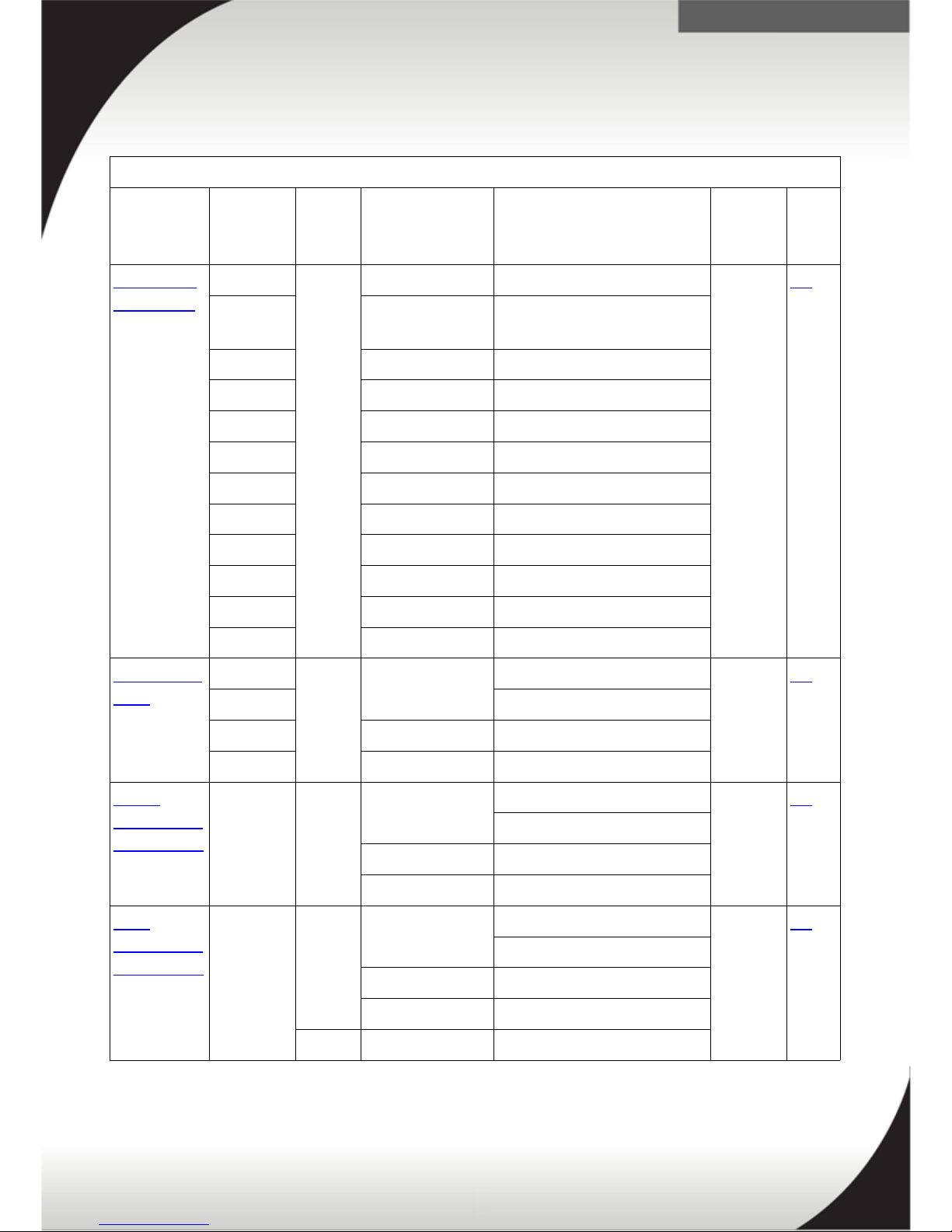
Summary of PDUs
This section is a quick summary and links to all of the available PDUs Internationally.
Basic PDUs
PDU Option
Number
Phase
(ph)
Voltage (V) Line Cord
(Derated)
Number
/ Type
Outlet
Page
Link
Universal
Rack PDU*
39Y8952 1ph 230VAC 16A CEE7-VII Europe 7 / C13 18
39Y8953 230VAC 32A Denmark/Switz.
IEC309 P+N+G
39Y8954 220VAC 16A Israel SI-32
39Y8955 230VAC 16A Italy CEI 23-16
39Y8956 220-250VAC 16A Sth Afr SABS 164
39Y8957 230VAC 13A UK BS 1363/A
39Y8958 230-240VAC 15A AUS/NZ 3112
39Y8959 220VAC 16A China GB 2099.1
39Y8960 220-240VAC 16A Brazil NBR 6147
39Y8961 230VAC 16A India IS 6538
39Y8962 220VAC 16A Arg IRAM 2073
All** 100-250VAC 16A IEC320 C19 to C20
Front End
PDU
39Y8934 1ph 220-240VAC 32A IEC 309 P+N+G 3 / C19 31
39Y8935 63A IEC 309 P+N+G
39Y8936 230-240VAC 32AAUS/NZ 3112
39Y8937 220VAC 30A KSC 8305
DPI®
Enterprise
– C13 PDU
39Y8941 1ph 220-240VAC 32A IEC 309 P+N+G 12 /
C13
42
63A IEC 309 P+N+G
230-240VAC 32A AUS/NZ 3112
220VAC 30A KSC 8305
DPI
Enterprise
– C19 PDU
39Y8948 1ph 220-240VAC 32A IEC 309 P+N+G 6 / C19 53
63A IEC 309 P+N+G
230-240VAC 32AAUS/NZ 3112
220VAC 30A KSC 8305
3ph Y 380-415VAC 32A (32A/ph) IEC309
* - The Universal Rack PDU has a 15A a limit due to all the outlets are connected to a single 15A
internal breaker.
** - This line cord comes with all the Universal Rack PDUs in addition to country specific line cord.
Note: ph indicates phase (1 or 3), Δ indicates three phase delta, and Y Indicates three phase Wye
10
Page 11

.
Basic PDUs Continued
PDU Option
Number
Phase
(ph)
Voltage
(V)
Line Cord
(Derated)
Number
/ Type
of Outlet
Pag
e
Link
Ultra Density
Enterprise
PDU
71762NX 1ph 220-
240VAC
32A IEC 309 P+N+G 9 / C19
3 / C13
64
63A IEC 309 P+N+G
230240VAC
32A AUS/NZ 3112
220VAC 30A KSC 8305
3ph Y 380-
415VAC
32A (32A/ph) IEC 309
3P+N+G
0U 24 C13 PDU 46M4122 3ph Y 380-
415VAC
16A (16A/ph) IEC 309
3P+N+G
24 /
C13
76
46M4131 1ph 200-
240VAC
32A IEC 309 P+N+G
0U 12 C19 / 12
C13 PDU
46M4143 3ph Y 380-
415VAC
32A IEC 309 P+N+G 12 /
C12
12 /
C13
86
1U Higher
Voltage PDU
44T0966 - 240V-
380VDC
90A DC Hardwired (no
plug)
6 /
Rong
Feng
RF203P
94
11
Page 12

.
Monitored PDUs
PDU Option
Number
Phase
(ph)
Voltage (V) Line Cord
(Derated)
Number
/ Type of
Outlet
Page
Link
DPI
Enterprise
PDU+ C13
39M2816 1ph 220-
240VAC
32A IEC 309 P+N+G 12 / C13 103
63A IEC 309 P+N+G
230240VAC
32A AUS/NZ 3112
220VAC 30A KSC 8305
12
Page 13
.
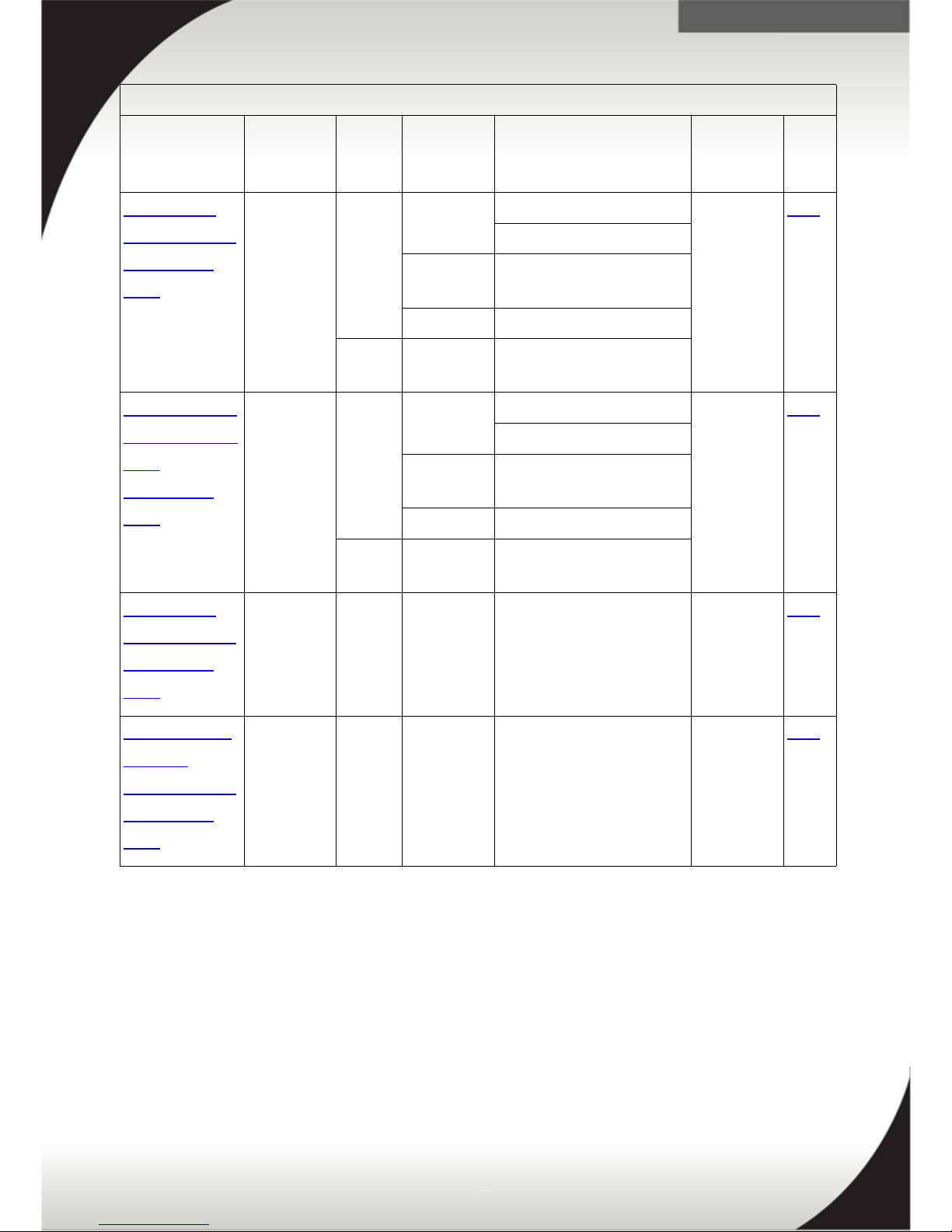
Switched and Monitored PDUs
PDU Option
Number
Phase
(ph)
Voltage
(V)
Line Cord
(Derated)
Number /
Type of
Outlet
Page
Link
1U 12 C13
Switched and
Monitored
PDU
46M4004 1ph 220-
240VAC
32A IEC 309 P+N+G 12 / C13 116
63A IEC 309 P+N+G
230240VAC
32A AUS/NZ 3112
220VAC 30A KSC 8305
3ph Y 380-
415VAC
32A (32A/ph) IEC
309 3P+N+G
1U 9 C19 / 3
C13 Switched
and
Monitored
PDU
46M4002 1ph 220-
240VAC
32A IEC 309 P+N+G 9 / C19
3 / C13
128
63A IEC 309 P+N+G
230240VAC
32A AUS/NZ 3112
220VAC 30A KSC 8305
3ph Y 380-
415VAC
32A (32A/ph) IEC
309 3P+N+G
0U 24 C13
Switched and
Monitored
PDU
46M4119 1ph 220-
240VAC
32A IEC 309 P+N+G 24 / C13 139
0U 12 C13 /
12 C19
Switched and
Monitored
PDU
46M4137 3ph Y 380-
415VAC
32A (32A/ph) IEC
309 3P+N+G
12 / C19
12 / C13
147
Note: ph indicates phase (1 or 3), Δ indicates three phase delta, and Y Indicates
three phase Wye
13
Page 14
.
C13 and C19 plugs
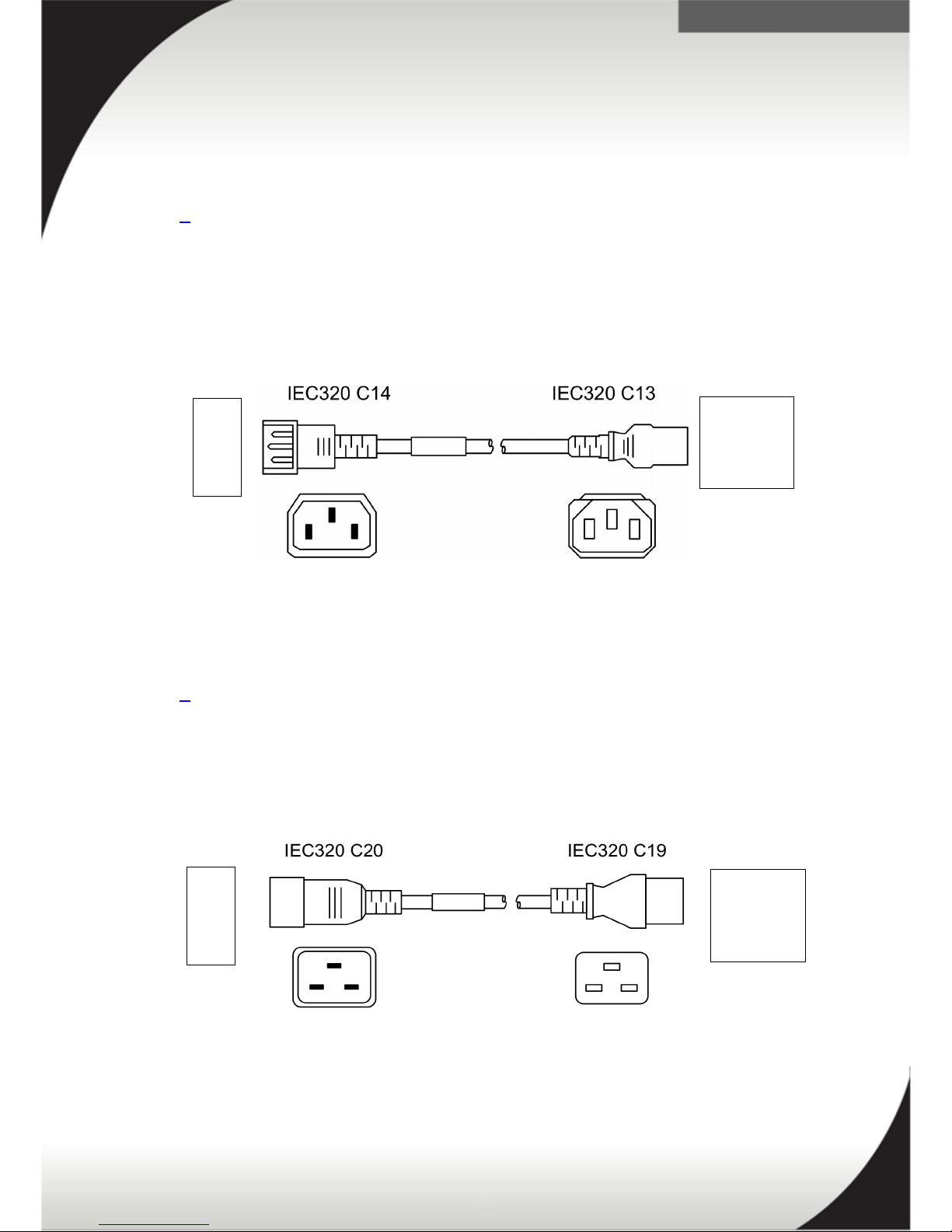
There are two types of PDU to PSU line cords available. These are C13 to C14 and
C19 to C20.
Figure 1 shows the C13 to C14 plugs. These plugs are used for the following:
• Lenovo NeXtScale chassis's.,
• Lenovo System x Rack servers,
• Lenovo System x Tower servers, and
• Lenovo BladeCenter S (model dependent)
Figure 2 shows the C19 to C20 plugs. These plugs are used for the following:
• Lenovo BladeCenter,
• Lenovo Flex System, and
• Lenovo PureFlex System
14
Figure 2: C19 to C20 plugs
Hardware
PDU
Figure 1: C13 to C14 plugs
Hardware
PDU
Page 15

.
Circuit Capacities
The following table represents the derated values/Watt capacities for power circuits
running between 13A-63A@100V-415V for both single phase and three phase
electrical circuits.
Branch Circuit Rating Volt-ampere (VA)
13A / 230V 1ph 2990VA
15A / 230V 1ph 3450VA
15A/ 240V 1ph 3600VA
16A/ 220V 1ph 3520VA
16A / 230V 1ph 3680VA
16A / 240V 1ph 3840VA
16A / 380V 3ph Y 6080VA / ph
16A / 415V 3ph Y 6640VA / ph
30A / 220V 1ph 6600VA
32A / 220V 1ph 7040VA
32A / 230V 1ph 7360VA
32A / 240V 1ph 7680VA
32A / 380V 3ph Y 12160VA / ph
32A / 415V 3ph Y 13280VA / ph
63A / 220V 1ph 13860VA
63A/ 240V 1ph 15120VA
Note: the symbols represent the following:
ph indicates phase (1 or 3),
Δ indicates three phase delta,
Y indicates three phase WYE,
P indicates pole or hot conductor,
N indicates neutral conductor, and
G indicates ground conductor.
15
Page 16
.
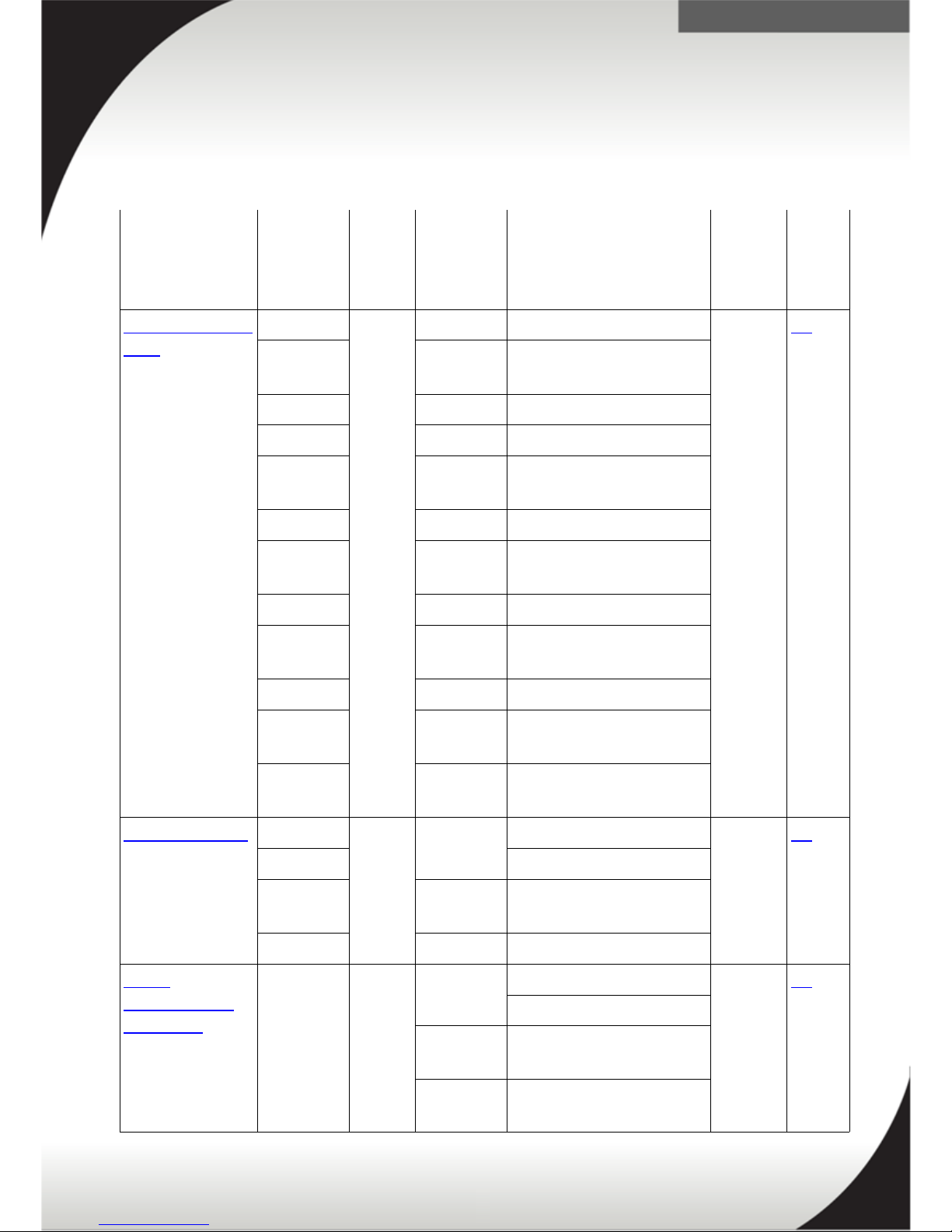
Basic PDUs (non-Monitored)
The following section provides information and part numbering for Basic PDUs. Click
on the description of each PDU to read more information.
PDU Option
Number
Phase
(ph)
Voltage
(V)
Line Cord
(Derated)
Number
/ Type
of
Outlet*
Page
Link
Universal Rack
PDU**
39Y8952 1ph 230VAC 16A CEE7-VII Europe 7 / C13 18
39Y8953 230VAC 32A Denmark/Switz.
IEC309 P+N+G
39Y8954 220VAC 16A Israel SI-32
39Y8955 230VAC 16A Italy CEI 23-16
39Y8956 220-
250VAC
16A South Africa
SABS 164
39Y8957 230VAC 13A UK BS 1363/A
39Y8958 230-
240VAC
15A AUS/NZ 3112
39Y8959 220VAC 16A China GB 2099.1
39Y8960 220-
240VAC
16A Brazil NBR 6147
39Y8961 230VAC 16A India IS 6538
39Y8962 220VAC 16A Argentina IRAM
2073
All*** 100-
250VAC
16A IEC320 C19 to
C20
Front End PDU 39Y8934 1ph 220-
240VAC
32A IEC 309 P+N+G 3 / C19 31
39Y8935 63A IEC 309 P+N+G
39Y8936 230-
240VAC
32AAUS/NZ 3112
39Y8937 220VAC 30A KSC 8305
DPI®
Enterprise –
C13 PDU
39Y8941 1ph 220-
240VAC
32A IEC 309 P+N+G 12 /
C13
42
63A IEC 309 P+N+G
230240VAC
32A AUS/NZ 3112
220VAC 30A KSC 8305
16
Page 17

.
DPI Enterprise
– C19 PDU
39Y8948 1ph 220-
240VAC
32A IEC 309 P+N+G 6 / C19 53
63A IEC 309 P+N+G
230240VAC
32AAUS/NZ 3112
220VAC 30A KSC 8305
3ph Y 380-
415VAC
32A (32A/ph) IEC 309
3P+N+G
PDU Option
Number
Phase
(ph)
Voltage
(V)
Line Cord
(Derated)
Number
/ Type
of
Outlet*
Page
Link
Ultra Density
Enterprise
PDU
71762NX 1ph 220-
240VAC
32A IEC 309 P+N+G 9 / C19
3 / C13
64
63A IEC 309 P+N+G
230240VAC
32A AUS/NZ 3112
220VAC 30A KSC 8305
3ph Y 380-
415VAC
32A (32A/ph) IEC 309
3P+N+G
0U 24 C13 PDU 46M4122 3ph Y 380-
415VAC
16A (16A/ph) IEC 309
3P+N+G
24 /
C13
76
46M4131 1ph 200-
240VAC
32A IEC 309 P+N+G
0U 12 C19 / 12
C13 PDU
46M4143 3ph Y 380-
415VAC
32A IEC 309 P+N+G 12 /
C12
12 /
C13
86
1U Higher
Voltage PDU
44T0966 - 240V-
380VDC
90A DC Hardwired (no
plug)
6 /
Rong
Feng
RF203P
94
* For outlet types refer to the C13 and C19 plugs section for additional information.
** The Universal Rack PDU has a 15A a limit due to all the outlets are connected to a single 15A
internal breaker.
*** This line cord comes with all the Universal Rack PDUs in addition to country specific line cord.
17
Page 18

.
Universal Rack PDU
This section discusses the Lenovo Universal Rack PDU. This section is broken up into
the following sections.
• Quick Specs
• Front View and Outlets
• Input Line Cords
• Specifications – Asia Pacific
• Accessory Kit
• Racking
• Installation and Maintenance Guide
Quick Specs
The following table is a quick overview of the Universal Rack PDU. For additional
information refer to the Specifications – Asia Pacific and Specifications – EMEA
sections.
PDU 39Y8956 + Line Cord 4.3m SABS (South Africa)
Outlets types Seven IEC C13
Type 16A /230V
Power Capacity 3680VA @ 230V
Power Limit per PDU 15A
Phase Single phase
PDU 39Y8952 + Line Cord 4.3m CEE7-VII (Europe)
Outlets types Seven IEC C13
Type 16A /230V
Power Capacity 3680VA @ 230V
Power Limit per PDU 15A
Phase Single phase
18
Page 19

.
PDU 39Y8957 + Line Cord 4.3m BS 1363/A (HK/UK)
Outlets types Seven IEC C13
Type 13A/230V
Power Capacity 2990VA @ 230V
Power Limit per PDU 15A (line cord 13A)
Phase Single phase
PDU 39Y8958 + Line Cord 4.3m AS/NZ 3112 (Aust/NZ)
Outlets types Seven IEC C13
Type 15A/230V
Power Capacity 3450VA @ 230V
Power Limit per PDU 15A
Phase Single phase
PDU 39Y8959 + Line Cord 4.3m GB 2099.1 (China)
Outlets types Seven IEC C13
Type 16A/220V
Power Capacity 3520VA @ 220V
Power Limit per PDU 15A
Phase Single phase
PDU 39Y8960 + Line Cord 4.3m NBR 6147 (Brazil)
Outlets types Seven IEC C13
Type 15A/125V
Power Capacity 1875VA @ 125V
Power Limit per PDU 15A
Phase Single phase
PDU 39Y8961 + Line Cord 4.3m IS6538 (India)
Outlets types Seven IEC C13
Type 16A/240V
Power Capacity 3840VA @ 240V
Power Limit per PDU 15A
Phase Single phase
19
Page 20

.
PDU 39Y8962 + Line Cord 4.3m IRAM 2037 (Argentina)
Outlets types Seven IEC C13
Type 16A/220V
Power Capacity 3520VA @ 220V
Power Limit per PDU 15A
Phase Single phase
PDU 39Y8953 + Line Cord 4.3m IEC 309 P+N+G (Denmark/Switzerland)
Outlets types Seven IEC C13
Type 16A/230V
Power Capacity 3680VA @ 230V
Power Limit per PDU 15A
Phase Single phase
PDU 39Y8954 + Line Cord 4.3m SI 32 (Israel)
Outlets types Seven IEC C13
Type 16A/230V
Power Capacity 3680VA @ 230V
Power Limit per PDU 15A
Phase Single phase
PDU 39Y8955 + Line Cord 4.3m CEI 23-16 (Italy)
Outlets types Seven IEC C13
Type 16A/230V
Power Capacity 3680VA @ 230V
Power Limit per PDU 15A
Phase Single phase
20
Page 21

.
All PDUs + Line Cord IEC320 C19 to C20
Outlets types Seven IEC C13
Type 16A/100-250VAC
Power Capacity 3200VA @ 200V
Power Limit per PDU 15A
Phase Single phase
21
Page 22
.
Front View and Outlets
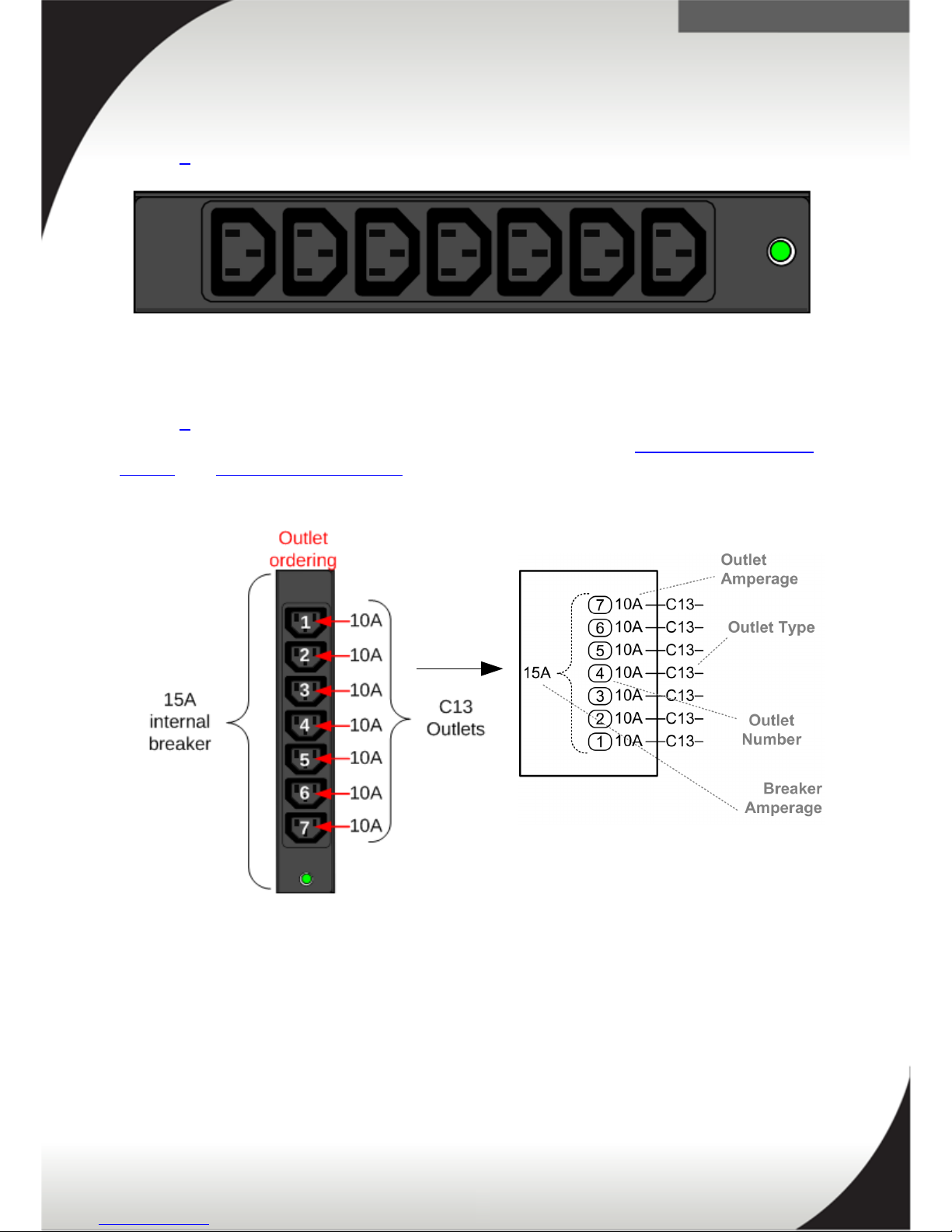
Figure 3 displays a front view of the DPI Universal Rack PDU.
Figure 4 displays the outlet numbering and amperage of the DPI Universal Rack PDU.
The PDU has a 15A internal breaker and C13 outlets. See the Specifications – Asia
Pacific and Specifications – EMEA sections for additional information.
22
Figure 3: Front view of the DPI Universal PDU
Figure 4: Outlets and amperage
Page 23

.
Input Line Cords
The following input line cords are for connecting the PDU to appropriate power
circuits. This may include for example, the wall or floor outlets to provide power to
the PDU. See the Universal Rack PDU line cord plugs section for pictures of the
plugs.
PDU P/N Feature
Code
Country Line Cord Shipped with PDU Current
Limit
39Y8956 5958 South
Africa
4.3m SABS 164 single phase 16A/230V 16A/15A**
39Y8952 5954 Europe 4.3m CEE7-VII single phase 16A/230V 16A/15A**
39Y8957 5959 HK/ UK 4.3m BS 1363/A single phase
13A/230V
13A
39Y8958 5960 Aust/NZ 4.3m AS/NZ 3112 single phase
15A/230V
15A
39Y8959 5961 China 4.3m GB 2099.1 single phase
16A/220V
16A/15A**
39Y8960 5953 Brazil 4.3m NBR 6147 single phase 15A/125V 15A
39Y8961 5962 India 4.3m IS6538 single phase 16A/240V 16A/15A**
39Y8962 5952 Argentina 4.3m IRAM 2037 single phase
16A/220V
16A/15A**
39Y8953 5955 Den/Swis 4.3m IEC 309 P+N+G single phase
16A/230V
16A/15A**
39Y8954 5956 Israel 4.3m SI 32 single phase 16A/230V 16A/15A**
39Y8955 5957 Italy 4.3m CEI 23-16 single phase 16A/230V 16A/15A**
All PDUs 6252 All IEC320 C19 to C20 1phase 16A/100-
250VAC
16A/15A**
*For technical specification refer to Specifications – Asia Pacific / Specifications –
EMEA section.
** Line current is limited to 15A due to the input circuit breaker of the PDU.
23
Page 24

.
Specifications – Asia Pacific
The following table are specifications for the Universal Rack PDU for AP.
Asia Pacific - Universal Rack PDU – Specifications
Input Line Cord* to PDU or
UPS
Aus/NZ Honk Kong / UKTaiwan
(US LV)
China
Outlets types seven IEC
C13
seven IEC
C13
seven IEC
C13
seven IEC
C13
seven IEC
C13
Power Capacity** 3000VA @
200V
3450VA @
230V
2990VA @
230V
1800VA @
120V
3300VA @
220V
Power Limit per
Outlet
10A 10A 10A 10A 10A
Power Limit per
PDU
15A circuit
breaker
15A
circuit
breaker
15A circuit
breaker
15A circuit
breaker
15A circuit
breaker
Monitoring/
Switching
No/No No/No No/No No/No No/No
U Space 1U, half rack width
Grounding Screw No
* For input line cord part numbers refer to the Input Line Cords section.
** For the purpose of this table, you can consider 1VA = 1 Watt.
24
Page 25

.
Specifications – EMEA
The following table are specifications for the Universal Rack PDU for EMEA.
EMEA – Universal Rack PDU – Specifications
Input Line
Cord*
to PDU or UPS 16A/230V United Kingdom Saudi Arabia (US
LV)
Outlets types seven IEC C13 seven IEC
C13
seven IEC C13 seven IEC C13
Power
Capacity**
3000VA @ 200V 3450VA @
230V
2990VA @
230V
1800VA @ 120V
Power Limit
per Outlet
10A 10A 10A 10A
Power Limit
per PDU
15A circuit
breaker
15A circuit
breaker
15A circuit
breaker
(13A line cord)
15A circuit breaker
Monitoring/
Switching
No/No No/No No/No No/No
U Space 1U, half rack width
Grounding
Screw
No
* For input line cord part numbers refer to the Input Line Cords section.
** For the purpose of this table, you can consider 1VA = 1 Watt.
25
Page 26
.
Accessory Kit
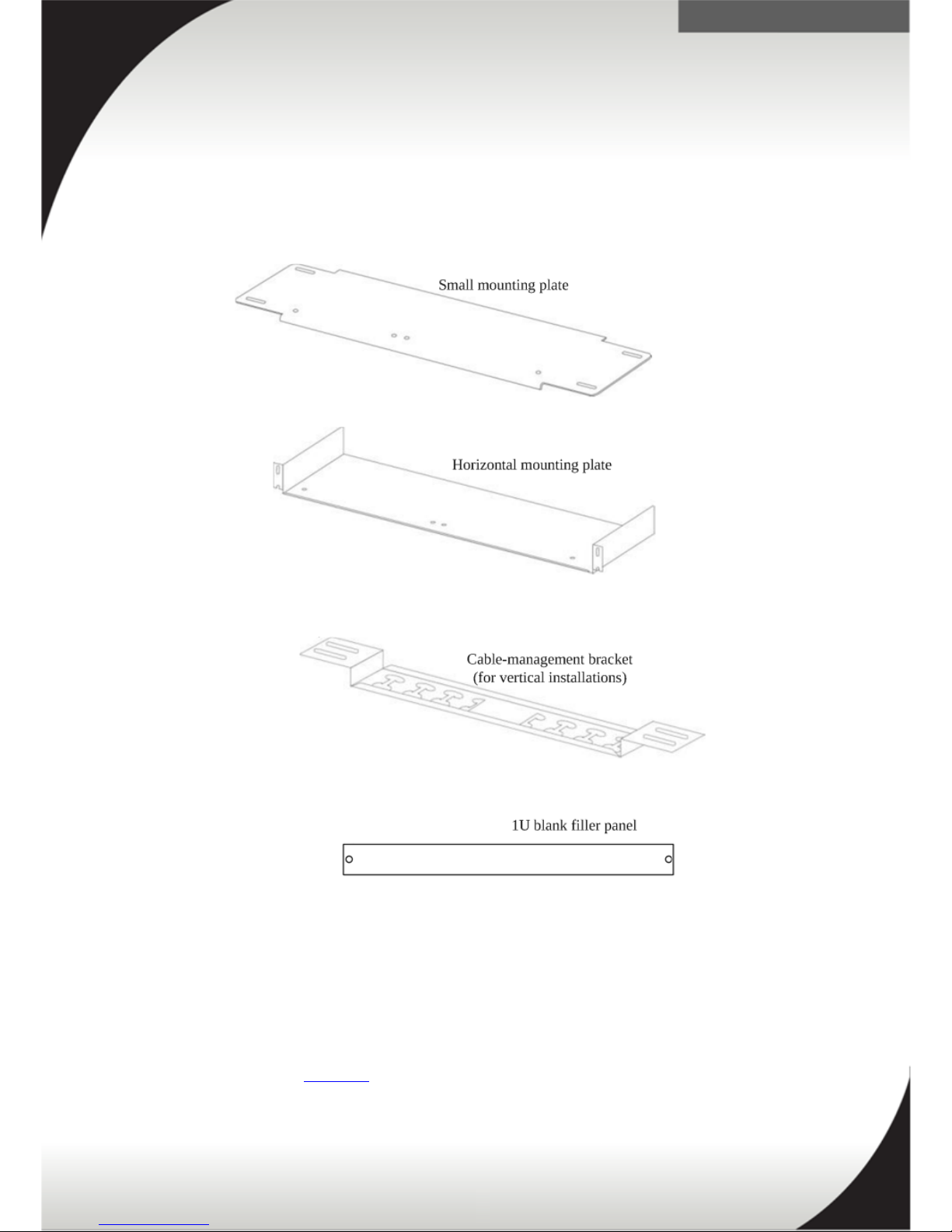
The following items make up the accessory kit that contains miscellaneous hardware
for installing the Rack PDU in a rack cabinet. These are shipped with the PDUs.
These accessories are for supporting the racking of the DPI PDUs in either the side
pocket of a rack or U space of a rack. Some parts may be unused, depending on how
and where the PDU is installed.
Refer to the following Racking section for information on racking the DPI PDU.
26
Figure 5: Accessory kit
Page 27
.
Racking
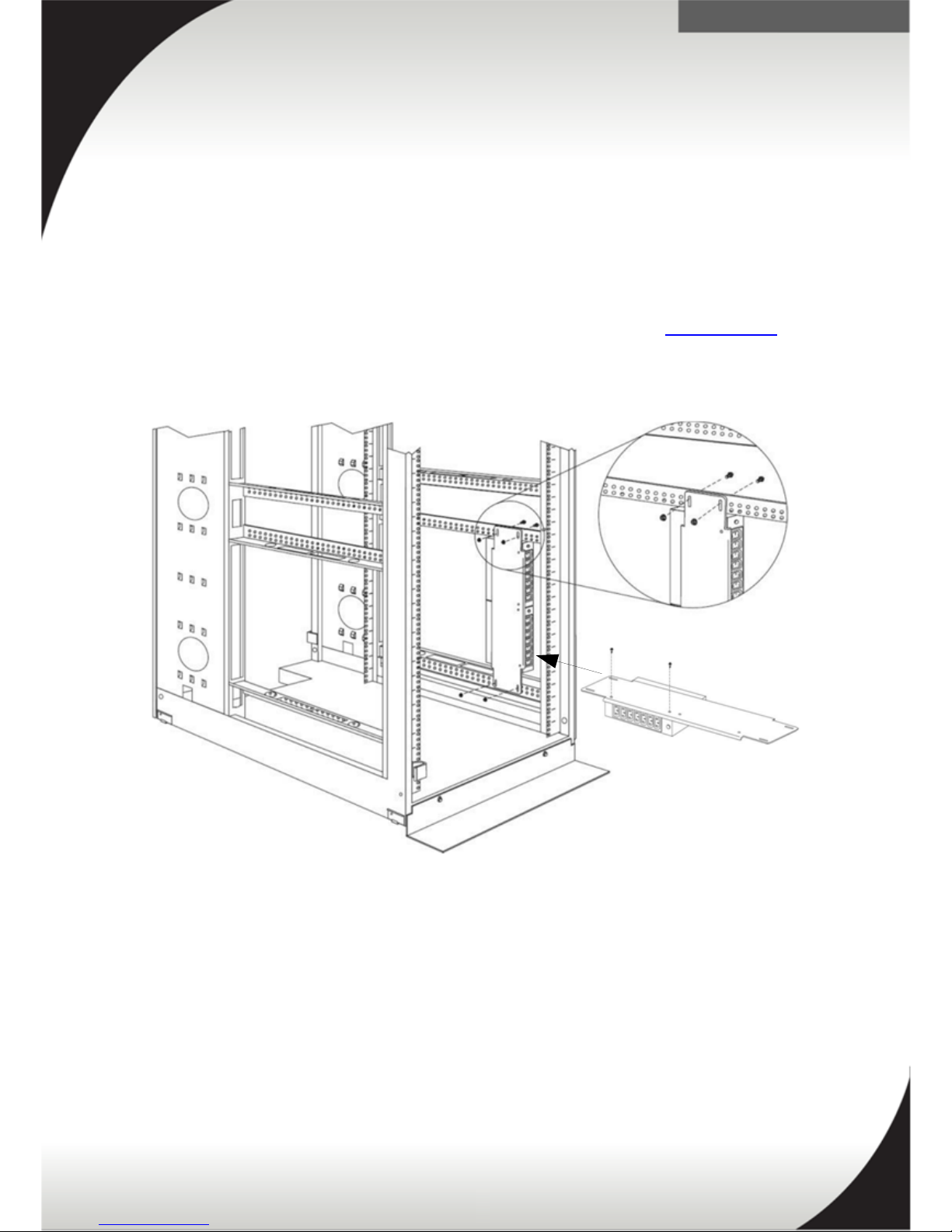
This section discusses mounting the DPI PDU in the side pockets of a rack and EIA (U
space) of a rack.
Mounting in side pocket
Mounting the DPI PDUs in the side pocket requires the use of the small vertical
mounting plate, shipped as part of the PDU accessory kit, see the Accessory Kit
section for additional information.
For racking in an Enterprise rack see the following section.
27
Figure 6: Mount in side of rack
Page 28
.
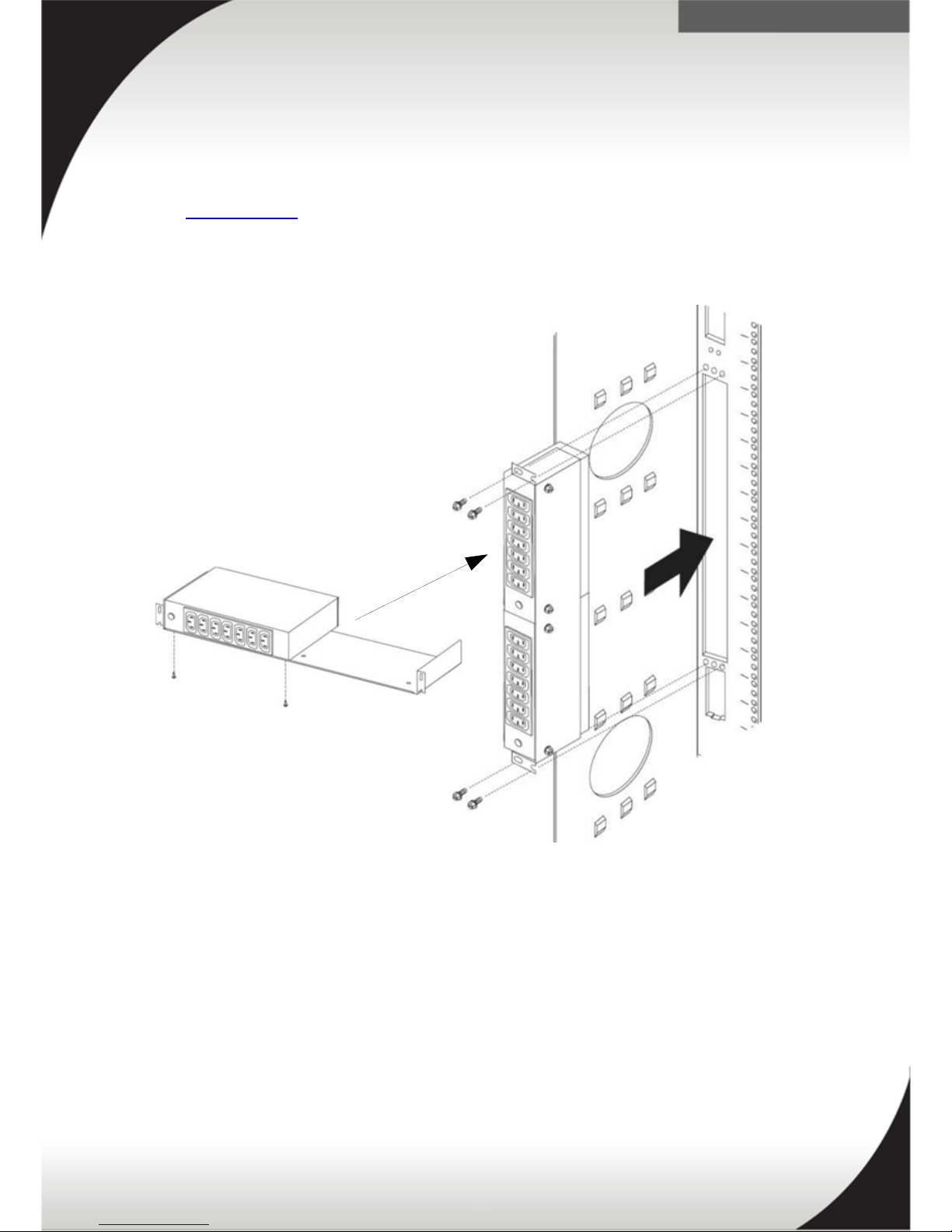
Mounting In Lenovo Enterprise Rack (9308 & 1410) & Lenovo Enterprise V2 Rack
(9363) Rear Zero Pocket
Mounting the DPI PDU (39Y8951) in the side pocket of an enterprise rack requires
the use of the horizontal mounting bracket, shipped as part of the PDU accessory kit,
see the Accessory Kit section for additional information.
Two DPI PDUs will fit in the side pocket with this mounting bracket.
28
Figure 7: DPI PDU side pocket mounting in Enterprise rack
Page 29
.
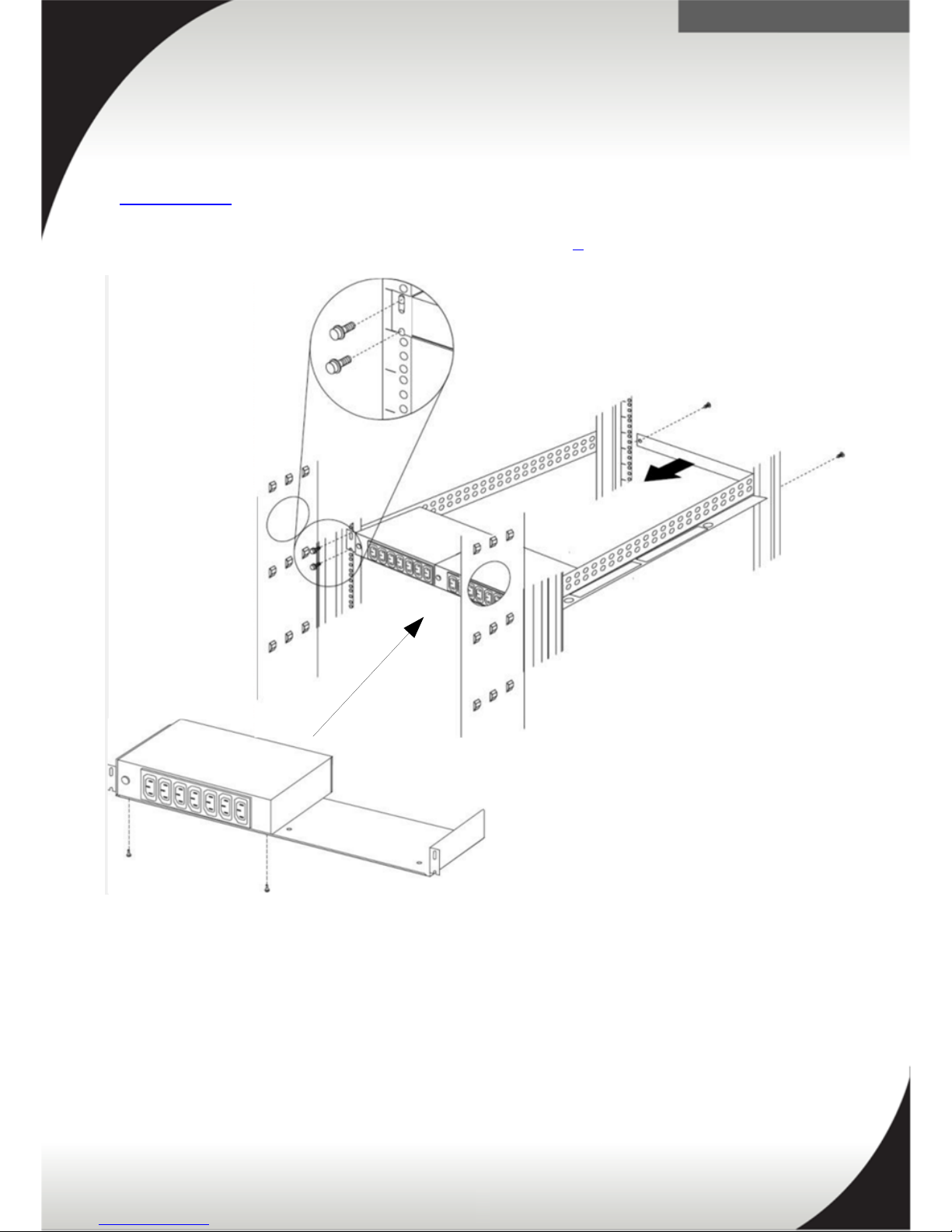
Mounting in EIA (U space) of rack
Mounting the DPI PDU (39Y8951) in the U space of a rack requires the use of the
horizontal mounting bracket, shipped as part of the PDU accessory kit, see the
Accessory Kit section for additional information.
Two PDUs will fit in 1U of rack space as seen in figure 8.
29
Figure 8: DPI PDU horizontal U Space mounting in rack
Page 30

.
Installation and Maintenance Guide
The following link is the installation and maintenance guide for the Lenovo Universal
Rack PDU:
ftp://ftp.software.ibm.com/systems/support/system_x_pdf/02r2738.pdf
30
Page 31

.
Front End PDU
This section discusses the Front End PDU. There are 3 types of Front End PDUs
(39Y8934, 39Y8935, 39Y8936, and 39Y8937). Each model is shipped with a different
line cord.
• Quick Specs
• Front and Back View and Outlets
• Input Line Cords
• Specifications
• Accessory Kit
• Racking
• Installation and Maintenance Guide
Quick Specs
The following tables are quick overviews of the Lenovo Front End PDUs. For
additional information refer to the Specifications section.
PDU 39Y8934 + Included Line Cord IEC 309 P+N+G
Outlet Types three IEC C19
Type 32A/220-240V
Power Capacity 7360VA @ 230V
Power Limit per PDU 32A
Phase Single phase
PDU 39Y8935 + Included Line Cord IEC 309 P+N+G
Outlet Types three IEC C19
Type 63A/220-240V
Power Capacity 14490VA @ 230V
Power Limit per PDU 63A
Phase Single phase
31
Page 32

.
PDU 39Y8936 + Included Line Cord KSC 8305
Outlet Types three IEC C19
Type 30A/220V
Power Capacity 6600VA @ 220V
Power Limit per PDU 30A
Phase Single phase
PDU 39Y8937 + Included Line Cord AS/NZS 3112
Outlet Types three IEC C19
Type 32A/230V
Power Capacity 7360VA @ 230V
Power Limit per PDU 32A
Phase Single phase
32
Page 33

.
Front and Back View and Outlets
Figure 9 displays the front and back view of the Front End PDU. Figure 10 and 11
displays the outlets and amperage.
33
Figure 11: Internal outlet and amperage
Figure 9: Front and back view of the FE PDU
Figure 10: Outlets and amperage
Page 34

.
Input Line Cords
The following input line cords are for connecting the PDU to appropriate power
circuits. This may include for example, the wall or floor outlets to provide power to
the PDU. There are 3 types of Front End PDUs (39Y8934, 39Y8935, 39Y8936, and
39Y8937). Each model is shipped with a different line cord, outlined below. See the
Front End PDU Line cord plugs for a picture of the line cord plugs.
PDU P/N FC Line Cords shipped with PDU
39Y8934 A11V Lenovo DPI IEC 309 P+N+G (2.5m) line cord 32A / 220-240VAC
Single Phase
39Y8935 A11W Lenovo DPI IEC 309 P+N+G (2.5m) line cord 63A 220V-240VAC
Single Phase
39Y8936 A11Y Lenovo DPI KSC 8305 30A (2.5m) line cord 30A 230VAC Single
Phase
39Y8937 A11X Lenovo DPI AS/NZS 3112 32A (2.5m) line cord 32A 220VAC
Single Phase
34
Page 35

.
Specifications
The following table are specifications for the 39Y8934, 39Y8935, 39Y8936, and
39Y8937 Front End PDUs.
Specifications
PDU Part Number 39Y8934 39Y8935 39Y8936 39Y8937
PDU Feature
Code*
A11V A11W A11Y A11X
Type 32A/220-
240V
63A/220-240V 30A/220V 32A/230V
Phase Single Single Single Single
Outlets types three IEC
C19
three IEC C19 three IEC C19 three IEC C19
Power Capacity** 7360VA @
230V
14490VA @
230V
6600VA @
220V
7360VA @
230V
Power Limit per
Outlet
16A 16A 16A 16A
Power Limit per
PDU
32A 64A 30A 32A
Power Monitoring/
Switching
No/No No/No No/No No/No
U Space 1U, half rack width or side pocket
Grounding Screw No
* For input line cord descriptions refer to the Input Line Cords section.
** For the purpose of this table, you can consider 1VA = 1 Watt.
35
Page 36

.
Accessory Kit
The following is miscellaneous hardware for installing the Rack PDU in a rack cabinet.
The large vertical mounting bracket is shipped standard with the PDU.
Miscellaneous hardware kit also included for attaching the front-end PDU to the a
mounting plate and installing in a rack cabinet. Cable straps also included.
These accessories are for supporting the racking of the Front End PDUs in either the
side pocket of a rack or U space of a rack. Some parts may be unused, depending on
how and where the PDU is installed.
Refer to the following Racking section for information on racking the Front End PDU.
36
Figure 12: Accessory kit
Page 37

.
Racking
This section discusses mounting the Front-end PDUs (39Y8934, 39Y8935, 39Y8936,
and 39Y8937) in the side pockets of a rack and EIA (U space) of a rack.
Mounting in side pocket of rack
Mounting the Front-end PDUs (39Y8934, 39Y8935, 39Y8936, and 39Y8937) in the
side pocket requires the use of the large vertical mounting plate, shipped as part of
the PDU accessory kit, see the Accessory Kit section for additional information.
37
Figure 13: Front-end PDU vertical mounting in side pocket
Page 38

.
Mounting In Lenovo Enterprise Rack (9308 & 1410) & Lenovo Enterprise V2 Rack
(9363) Rear Zero Pocket
Mounting the Front-end PDUs (39Y8934, 39Y8935, 39Y8936, and 39Y8937) in the
side pocket of an Enterprise rack, requires the use of the large vertical mounting
plate, shipped as part of the PDU accessory kit, see the Accessory Kit section for
additional information. There are several ways to mount it.
Option 1
The line cord will be routed directly at the back of the rack.
38
Figure 14: Front-end PDU mounting in side pocket of enterprise PDU
option 1
Page 39

.
Option 2
Mounting the Front-end PDUs (39Y8934, 39Y8935, 39Y8936, and 39Y8937) in the
side pocket of an Enterprise rack, requires the use of the large vertical mounting
plate, shipped as part of the PDU accessory kit, see the Accessory Kit section for
additional information. There are several ways to mount it.
Line cord routed back through rack U space when the PDU is installed this way.
39
Figure 15: Front-end PDU mounting in side pocket of enterprise
PDU option 2
Page 40

.
Mounting in side pocket
Mounting the Front-end PDUs (39Y8934, 39Y8935, 39Y8936, and 39Y8937) in 1U
space of the rack requires a horizontal mounting plate.
Note: The Front-end PDU is only shipped with the large vertical wall mounting plate.
The PDU can be mounted in a 1U horizontal space of the rack if you have rack PDU
hardware to mount it in. See the Accessory Kit section for additional information on a
horizontal panel.
Note: You must remove any horizontally-mounted Front End PDUs from the EIA
mounting space before you relocate your rack cabinet. Horizontal installation of
Front End PDUs is not supported during relocation or shipping of a rack cabinet.
40
Figure 16: Front-end PDU horizontal mounting in 1U space of rack
Page 41

.
Installation and Maintenance Guide
The following link is the installation and maintenance guide for the Lenovo Front End
PDU:
39Y8934, 39Y8935, 39Y8936, and 39Y8937
ftp://ftp.software.ibm.com/systems/support/system_x_pdf/02r2739.pdf
41
Page 42

.
DPI® Enterprise – C13 PDU
This section discusses the 39Y8941 DPI C13 PDU. This section is broken up into the
following sections.
• Quick Specs
• Front View and Outlets
• Input Line Cords
• Specifications
• Accessory Kit
• Racking
• Installation and Maintenance Guide
Quick Specs
The following tables is a quick overview of the 39Y8941 PDU, for additional
information refer to the Specifications section.
PDU 39Y8941 + Line Cord 40K9611
Type 32A/380-415V
Outlets types twelve IEC C13
Power Capacity 22080VA @ 230V
Power Limit per PDU 96A
Phase Three phase
PDU 39Y8941 + Line Cord 40K9612
Type 32A/220-240V
Outlets types twelve IEC C13
Power Capacity 7360VA @ 230V
Power Limit per PDU 32A
Phase Single phase
42
Page 43

.
PDU 39Y8941 + Line Cord 40K9613
Type 63A/220-240V
Outlets types twelve IEC C13
Power Capacity 14490VA @ 230V
Power Limit per PDU 63A
Phase Single phase
PDU 39Y8941 + Line Cord 40K9617
Type 32A/230V
Outlets types twelve IEC C13
Power Capacity 7360VA @ 230V
Power Limit per PDU 32A
Phase Single phase
PDU 39Y8941 + Line Cord 40K9618
Type 30A/220V
Outlets types twelve IEC C13
Power Capacity 6600VA @ 220V
Power Limit per PDU 30A
Phase Single phase
43
Page 44

.
Front View and Outlets
Figure 17 displays a front view of the 39Y8941 PDU.
Single phase 39Y8941PDU
44
Figure 17: Front and back view of the DPI Enterprise C13 PDU
Figure 18: Outlets and amperage
Page 45

.
Three phase 39Y8941 PDU
45
Figure 19: Outlet and amperage
Page 46

.
Input Line Cords
The following input line cords are for connecting the PDU to appropriate power
circuits. This may include for example, the wall or floor outlets to provide power to
the PDU. See the 1U PDU Detached line cord plugs section for a picture of the line
cord plugs.
PDU P/N Line
Cord
P/N
Feature Code
for Bundle (PDU
& Line Cord)
Orderable Line cord description
39Y8941 40K9611 6016 Lenovo DPI IEC-309 3P+N+G (4.3m) line
cord 32A (32A / Phase) 380-415VAC Three
Phase Wye 96A Total Circuit Capacity
39Y8941 40K9612 6014 Lenovo DPI IEC 309 P+N+G (4.3m) line cord
32A / 220-240VAC Single Phase
39Y8941 40K9613 6015 Lenovo DPI IEC 309 P+N+G (4.3m) line cord
63A / 220V-240VAC Single Phase
39Y8941 40K9617 6017 Lenovo DPI AS/NZS 3112 32A (4.3m) line
cord 32A / 220VAC Single Phase
39Y8941 40K9618 6018 Lenovo DPI KSC 8305 30A (4.3m) line cord
30A / 230VAC Single Phase
46
Page 47

.
Specifications
The following table are specifications for the 39Y8941 DPI C13 PDU.
Specifications Line cord PN Line cord PN Line cord PN Line cord PN Line cord PN
Input Line
Cord Type*
40K9611 40K9612 40K9613 40K9617 40K9618
Type 32A/380-
415V
32A / 220240V
63A/220V240V
32A / 230V 30A / 230V
Phase Three Single Single Single Single
Outlets types twelve IEC
C13
twelve IEC
C13
twelve IEC
C13
twelve IEC
C13
twelve IEC
C13
Power
Capacity**
22080VA @
230V
7360VA @
230V
14490VA @
230V
7360VA @
230V
6900VA @
230V
Power Limit
per Outlet
10A 10A 10A 10A 10A
Grouping*** Two C13
outlets per
breaker
Four C13
outlets per
phase
Two C13
outlets per
breaker
Two C13
outlets per
breaker
Two C13
outlets per
breaker
Two C13
outlets per
breaker
Power Limit
per Group
16A per
breaker 32A
per phase
16A 16A 16A 16A
Power Limit
per PDU
96A 32A 63A 32A 30A
Monitoring/
Switching
No/No
U Space 1U or side pocket
Grounding
Screw
Yes on back panel
* For input line cord part numbers refer to the Input Line Cords section.
** For the purpose of this table, you can consider 1VA = 1 Watt.
*** There are 2 outlets per group. See the Front View and Outlets section for group
details.
47
Page 48

.
Accessory Kit
The following items make up the accessory kit that contains miscellaneous hardware
for installing the Rack PDU in a rack cabinet. These are shipped with the PDU.
Miscellaneous hardware kit for attaching the mounting brackets to the PDU and
installing in a rack, and cable straps are also included.
These accessories are for supporting the racking of the DPI C13 PDUs in either the
side of a rack, the side pocket of a rack or U space of a rack. Some parts may be
unused, depending on how and where the PDU is installed.
Refer to the following Racking section for information on racking the DPI C13 PDU.
48
Figure 20: Accessory kit
Page 49

.
Racking
This section discusses mounting the DPI C13 (39Y8941) in the side of a rack, the side
pockets of a rack and EIA (U space) of a rack.
Mounting in side pocket
Mounting the DPI C13 PDUs in the side pocket requires the use of the vertical
mounting bracket, shipped as part of the PDU accessory kit, see the Accessory Kit
section for additional information.
49
Figure 21: DPI C13 PDU vertical mounting in rack
Page 50

.
Mounting In Lenovo Enterprise Rack (9308 & 1410) & Lenovo Enterprise V2 Rack
(9363) Rear Zero Pocket (side pocket)
Mounting the DPI PDUs (39Y8941) in the side pocket of an enterprise rack requires
the use of the horizontal mounting bracket, shipped as part of the PDU accessory kit,
see the Accessory Kit section for additional information.
50
Figure 22: DPI C13 PDU side pocket mounting in Enterprise rack
Page 51

.
Mounting in EIA (U space) of rack
Mounting the DPI C13 PDUs (39Y8941) in the U space of a rack requires the use of
the horizontal mounting bracket, shipped as part of the PDU accessory kit, see the
Accessory Kit section for additional information.
1 PDU will fit in 1U of rack space see figure 23.
Note: You must remove any horizontally-mounted Front End PDUs from the EIA
mounting space before you relocate your rack cabinet. Horizontal installation of
Front End PDUs is not supported during relocation or shipping of a rack cabinet.
51
Figure 23: DPI C13 PDU horizontal mounting in rack
Page 52

.
Installation and Maintenance Guide
The following link is the installation and maintenance guide for the Lenovo DPI
Enterprise – C13 PDU
39Y8941
ftp://ftp.software.ibm.com/systems/support/system_x_pdf/43v6030.pdf
52
Page 53

.
DPI Enterprise – C19 PDU
This section discusses the 39Y8948 DPI Enterprise C19 PDU. This section is broken
up into the following sections.
• Quick Specs
• Front View and Outlets
• Input Line Cords
• Specifications
• Accessory Kit
• Racking
• Installation and Maintenance Guide
Quick Specs
The following table are quick specs for the 39Y8948 PDU with each available line
cord. For additional information refer to the Specifications section.
PDU 39Y8948 + Line Cord 40K9611
Type 32A / 380V-415V
Outlets types six IEC C19
Power Capacity 22080VA @ 230V
Power Limit per PDU 96A
Phase Three phase
PDU 39Y8948 + Line Cord 40K9612
Type 32A / 220V-240V
Outlets types six IEC C19
Power Capacity 7360VA @ 230V
Power Limit per PDU 32A
Phase Single phase
53
Page 54

.
PDU 39Y8948 + Line Cord 40K9613
Type 63A / 220V-240V
Outlets types six IEC C19
Power Capacity 14490VA @ 230V
Power Limit per PDU 63A
Phase Single phase
PDU 39Y8948 + Line Cord 40K9617
Type 32A / 230V
Outlets types six IEC C19
Power Capacity 7360VA @ 230V
Power Limit per PDU 32A
Phase Single phase
PDU 39Y8948 + Line Cord 40K9618
Type 30A / 220V
Outlets types six IEC C19
Power Capacity 6600VA @ 220V
Power Limit per PDU 30A
Phase Single phase
54
Page 55

.
Front View and Outlets
The 39Y8948 PDU has 5 optional line cords for use in different regions. The following
figure displays a front view picture of the PDU.
Figure 25 shows the 39Y8948 PDU outlets and amperage.
55
Figure 24: Front panel of the DPI Enterprise C19 PDU
Page 56

.
Outlet and amperage for the three and single phase 39Y8941 PDU.
Note: Derated 16A MAX available per breaker/group.
56
Figure 25: Lenovo DPI C19 PDU outlet and breaker amperage
Page 57

.
Input Line Cords
The following input line cords are for connecting the PDU to appropriate power
circuits. This may include for example, the wall or floor outlets to provide power to
the PDU. See page 1U PDU Detached line cord plugs for a picture of the line cord
plugs.
PDU P/N Line Cord
P/N
Feature
Code for
Bundle (PDU
& Line Cord)
Orderable Line cord description
39Y8948 40K9611 6066 Lenovo DPI IEC-309 3P+N+G (4.3m) line cord
32A (32A / Phase) 380-415VAC Three Phase
Wye 96A Total Circuit Capacity
39Y8948 40K9612 6064 Lenovo DPI IEC 309 P+N+G (4.3m) line cord
32A / 220-240VAC Single Phase
39Y8948 40K9613 6065 Lenovo DPI IEC 309 P+N+G (4.3m) line cord
63A / 220V-240VAC Single Phase
39Y8948 40K9617 6067 Lenovo DPI AS/NZS 3112 32A (4.3m) line cord
32A / 220VAC Single Phase
39Y8948 40K9618 6068 Lenovo DPI KSC 8305 30A (4.3m) line cord
30A / 230VAC Single Phase
57
Page 58

.
Specifications
The following table are specifications for the 39Y8948 DPI C19 PDU.
Specifications Line cord PN Line cord PN Line cord PN Line cord PN Line cord PN
Input Line
Cord Type*
40K9611 40K9612 40K9613 40K9617 40K9618
Type 32A/380-
415V
32A / 220240V
63A/220V240V
32A / 230V 30A / 230V
Phase Three Single Single Single Single
Outlets types six IEC C19 six IEC C19 six IEC C19 six IEC C19 six IEC C19
Power
Capacity**
22080VA @
230V
7360VA @
230V
14490VA @
230V
7360VA @
230V
6600VA @
220V
Power Limit
per Outlet
16A 16A 16A 16A 16A
Power Limit
per Phase
32A - - - -
Power Limit
per PDU
96A 32A 63A 32A 30A
Monitoring/
Switching
No/No
U Space 1U or side pocket
Grounding
Screw
Yes on back panel
* For input line cord descriptions refer to the Input Line Cords section.
** For the purpose of this table, you can consider 1VA = 1 Watt.
58
Page 59

.
Accessory Kit
The following items make up the accessory kit that contains miscellaneous hardware
for installing the Rack PDU in a rack cabinet. These are shipped with the PDU.
Miscellaneous hardware kit for attaching the mounting brackets to the PDU and
installing in a rack, and cable straps are also included.
These accessories are for supporting the racking of the DPI C19 PDU in either the
side of a rack, the side pocket of a rack or U space of a rack. Some parts may be
unused, depending on how and where the PDU is installed.
Refer to the following Racking section for information on racking the DPI C19 PDU.
59
Figure 26: Accessory kit
Page 60

.
Racking
This section discusses mounting the DPI C19 (39Y8948) in the side of a rack, the side
pockets of a rack and EIA (U space) of a rack.
Mounting in side pocket
Mounting the DPI C19 PDU in the side pocket requires the use of the vertical
mounting bracket, shipped as part of the PDU accessory kit, see the Accessory Kit
section for additional information.
60
Figure 27: DPI C19 PDU vertical mounting in rack
Page 61

.
Mounting In Lenovo Enterprise Rack (9308 & 1410) & Lenovo Enterprise V2 Rack
(9363) Rear Zero Pocket (side pocket)
Mounting the DPI PDU (39Y8948) in the side pocket of an enterprise rack requires
the use of the horizontal mounting bracket, shipped as part of the PDU accessory kit,
see the Accessory Kit section for additional information.
61
Figure 28: DPI C19 PDU side pocket mounting in Enterprise rack
Page 62

.
Mounting in EIA (U space) of rack
Mounting the DPI C19 PDU (39Y8948) in the U space of a rack requires the use of
the horizontal mounting bracket, shipped as part of the PDU accessory kit, see the
Accessory Kit section for additional information.
1 PDU will fit in 1U of rack space see figure 29.
Note: You must remove any horizontally-mounted Front End PDUs from the EIA
mounting space before you relocate your rack cabinet. Horizontal installation of
Front End PDUs is not supported during relocation or shipping of a rack cabinet.
62
Figure 29: DPI C19 PDU horizontal mounting in rack
Page 63

.
Installation and Maintenance Guide
The following link is the installation and maintenance guide for the Lenovo DPI
Enterprise – C19 PDU
39Y8948
ftp://ftp.software.ibm.com/systems/support/system_x_pdf/43v6030.pdf
63
Page 64

.
Ultra Density Enterprise PDU
This section discusses the 71762NX Ultra Density Enterprise C19/C13 PDU. This
section is broken up into the following sections.
• Quick Specs
• Front and Back View and Outlets
• Input Line Cords
• Specifications
• Accessory Kit
• Racking
• Installation and Maintenance Guide
Quick Specs
The following tables ares a quick overview of the 71762NX PDU with each available
line cord. For additional information refer to the Specifications section.
PDU 71762NX + Line Cord 40K9611
Type 32A / 380V-415V
Outlets types Nine IEC C19, and three IEC C13
Power Capacity 22080VA @ 230V
Power Limit per PDU 96A
Phase Three phase
PDU 71762NX + Line Cord 40K9612
Type 32A / 220V-240V
Outlets types Nine IEC C19, and three IEC C13
Power Capacity 7360VA @ 230V
Power Limit per PDU 32A
Phase Single phase
64
Page 65

.
PDU 71762NX + Line Cord 40K9613
Type 63A / 220V-240V
Outlets types Nine IEC C19, and three IEC C13
Power Capacity 14490VA @ 230V
Power Limit per PDU 63A
Phase Single phase
PDU 71762NX + Line Cord 40K9617
Type 32A / 230V
Outlets types Nine IEC C19, and three IEC C13
Power Capacity 7360VA @ 230V
Power Limit per PDU 32A
Phase Single phase
PDU 71762NX + Line Cord 40K9618
Type 30A / 220V
Outlets types Nine IEC C19, and three IEC C13
Power Capacity 6600VA @ 220V
Power Limit per PDU 30A
Phase Single phase
65
Page 66

.
Front and Back View and Outlets
The 71762NX has detachable single phase line cord options and three phase option.
The following figures displays a front and back view of the PDU.
The following figures show the PDUs outlets and amperage for single phase and three
phase.
66
Figure 30: Front and back panels of the Ultra Density Enterprise C19 PDU
Page 67

.
Three phase 71762NX PDU
67
Figure 31: Outlets and amperage
Page 68

.
Single phase model 71762NX PDU
68
Figure 32: Outlets and amperage
Page 69

.
Input Line Cords
The following input line cords are for connecting the PDU to appropriate power
circuits. This may include for example, the wall or floor outlets to provide power to
the PDU. See the 1U PDU Detached line cord plugs for a picture of the line cord
plugs.
PDU P/N
(&
Feature
Code)
Line Cord
P/N (&
Feature
Code)
Feature
Code for
Bundle (PDU
& Line Cord)
Orderable Line cord description
71762NX 40K9611 6504 Lenovo DPI IEC-309 3P+N+G (4.3m) line
cord 32A (32A / Phase) 380-415VAC Three
Phase Wye 96A Total Circuit Capacity
71762NX 40K9612 6502 Lenovo DPI IEC 309 P+N+G (4.3m) line cord
32A / 220-240VAC Single Phase
71762NX 40K9613 6503 Lenovo DPI IEC 309 P+N+G (4.3m) line cord
63A / 220V-240VAC Single Phase
71762NX 40K9617 6505 Lenovo DPI AS/NZS 3112 32A (4.3m) line
cord 32A / 220VAC Single Phase
71762NX 40K9618 6506 Lenovo DPI KSC 8305 30A (4.3m) line cord
30A / 230VAC Single Phase
69
Page 70

.
Specifications
The following table are specifications for 71762NX DPI Ultra Density Enterprise PDU.
Specifications Line cord PN Line cord PN Line cord PN Line cord PN Line cord PN
Input Line
Cord Type*
40K9611 40K9612 40K9613 40K9617 40K9618
Type 32A/380-
415V
32A / 220240V
63A/220V240V
32A / 230V 30A / 230V
Phase Three Single Single Single Single
Outlets types nine IEC
C19,
three IEC
C13
nine IEC
C19,
three IEC
C13
nine IEC
C19,
three IEC
C13
nine IEC
C19,
three IEC
C13
nine IEC C19,
three IEC
C13
Power
Capacity**
22080VA @
230V
7360VA @
230V
14490VA @
230V
7360VA @
230V
6600VA @
220V
Power Limit
per Outlet
IEC C19:
16A
IEC C13:
10A
IEC C19:
16A
IEC C13:
10A
IEC C19:
16A
IEC C13:
10A
IEC C19:
16A
IEC C13:
10A
IEC C19: 16A
IEC C13: 10A
Grouping One C19 +
one C13 or
One C19
outlet per
breaker /
Three C19 +
one C13
outlets per
phase
One C19 +
one C13 or
One C19
outlet per
breaker
One C19 +
one C13 or
One C19
outlet per
breaker
One C19 +
one C13 or
One C19
outlet per
breaker
One C19 +
one C13 or
One C19
outlet per
breaker
Power Limit
per Group
20A per
breaker /
32A per
phase
20A 20A 20A 20A
Power Limit
per PDU
96A 32A 63A 32A 30A
Monitoring/
Switching
No/No
U Space 1U or side pocket
Grounding
Screw
Yes on back panel
* For input line cord part numbers refer to the Input Line Cords section.
** For the purpose of this table, you can consider 1VA = 1 Watt.
70
Page 71

.
Accessory Kit
The following items make up the accessory kit that contains miscellaneous hardware
for installing the Rack PDU in a rack cabinet. These are shipped with the PDU.
Misc hardware kit also included for attaching PDU to brackets and installing in a
rack. Cable straps also included.
These accessories are for supporting the racking of the C19/C13 Ultra Density
Enterprise PDU in either the side of a rack, the side pocket of a rack or U space of a
rack. Some parts may be unused, depending on how and where the PDU is installed.
Refer to the following Racking section for information on racking the C19/C13 Ultra
Density Enterprise PDU.
71
Figure 33: Accessory kit
Page 72

.
Racking
This section discusses mounting for the 71762NX Ultra Density C19/C13 PDU in the
side of a rack, the side pockets of an Enterprise rack (0U space) and EIA (U space) of
a rack.
Mounting in side pocket
Mounting the Ultra Density C19/C13 PDU in the side pocket requires the use of the
vertical mounting bracket, shipped as part of the PDU accessory kit, see the
Accessory Kit section for additional information.
72
Figure 34: Enterprise Ultra Density C19/C13 PDU vertical mounting in rack
Page 73

.
Mounting In Lenovo Enterprise Rack (9308 & 1410) & Lenovo Enterprise V2 Rack
(9363) Rear Zero Pocket (side pocket)
Mounting the 71762NX Ultra Density C19/C13 PDU in the side pocket of an
enterprise rack requires the use of the horizontal mounting bracket, shipped as part
of the PDU accessory kit, see the Accessory Kit section for additional information.
73
Figure 35: Ultra Density Enterprise PDU side pocket mounting in Enterprise rack
Page 74

.
Mounting in EIA (U space) of rack
Mounting the 71762NX Ultra Density C19/C13 PDU in the U space of a rack requires
the use of the horizontal mounting bracket, shipped as part of the PDU accessory kit,
see the Accessory Kit section for additional information.
1 PDU will fit in 1U of rack space see figure 36.
74
Figure 36: Ultra Density Enterprise PDU horizontal mounting in rack
Page 75

.
Installation and Maintenance Guide
The following link is the installation and user guide for the Lenovo Ultra Density
Enterprise PDU
71762NX
http://www.ibm.com/support/entry/portal/docdisplay?lndocid=MIGR-5076527
75
Page 76

.
0U 24 C13 PDU
This section discusses the 46M4131 and 46M4122 0U 24 C13 PDU. This section is
broken up into the following sections.
• Quick Specs
• Front View and Outlets
• Input Line Cords
• Specifications
• Accessories
• Racking
• Installation and Maintenance Guide
Quick Specs
The following tables are quick specs for the 46M4122 and 46M4131 PDUs. For
additional information, refer to the Specifications section.
PDU 46M4131 + Attached Line Cord
Type 32A / 220V-240V
Outlets types twenty four IEC C13
Power Capacity 7360VA @ 230V
Power Limit per PDU 32A
Phase Single phase
PDU 46M4122 + Attached Line Cord
Type 16A / 220V-240V
Outlets types twenty four IEC C13
Power Capacity 11040VA @ 230V
Power Limit per PDU 48A
Phase Three phase
76
Page 77

.
Front View and Outlets
There are 2 type of 0U 24 C13 PDU's. The 46M4122 and 46M4131. The PDUs are
identical except for the line cord. The line cord determines single phase or three
phase operation. The 46M4131 has an attached single phase line cord. The 46M4122
has an attached 3 phase line cord. The following figure displays a front view picture
of the PDU.
Figure 38 below shows the single phase outlets and amperage, and figure 39 on page
78 shows the three phase PDU outlets and amperage.
Single phase 46M4131 PDU
77
Figure 37: Front panel of the 0U 24 C13 PDU
Figure 38: Outlets and amperage
Page 78

.
Three phase 46M4122 PDU
Each phase has eight 10A outlets. For derated, 16A max is available per breaker.
Refer to the Specifications for additional information.
78
Figure 39: Outlets and amperage
Page 79

.
Input Line Cords
The following input line cords are for connecting the PDU to appropriate power
circuits. This may include for example, the wall or floor outlets to provide power to
the PDU. See page 0U PDU Attached line cord and plugs for a picture of the line cord
plugs.
PDU P/N Feature
Code
Line Cord
P/N
Line Cord Description
46M4131 5925 Attached Attached 3.0 meter line cord IEC 309 P+N+G
32A / 220-240VAC Single Phase
46M4122 5922 Attached Attached 3.0 meter line cord IEC-309 3P+N+G
16A (16A / Phase) 380-415VAC Three Phase
Wye 48A Total Circuit Capacity
79
Page 80

.
Specifications
The following table are specifications for the 46M4131 and 46M4122 0U C13 PDUs.
Specifications
PDU Part Number 46M4131 46M4122
Feature Code 5925 5922
Input Line Cord
Type*
Attached Attached
Phase Single phase Three phase
Type 32A / 220V-240V 16A / 220V-240V
Outlets types twenty four IEC C13 twenty four IEC C13
Power Capacity** 7360VA@230V 11040VA@230V
Power Limit per
Outlet
10A 10A
Grouping Eight C13 outlets per breaker Eight C13 outlets per
breaker /
Eight C13 outlets per phase
Power Limit per
Group
20A 20A*** / 16A
Power Limit per
PDU
32A 48A
Power
Monitoring/Switchi
ng
No/No No/No
U Space Side pocket
Grounding Screw Yes on front panel
* For input line cord part numbers refer to the Input Line Cords section.
** For the purpose of this table, you can consider 1 VA = 1 Watt.
*** 20A breaker in the PDU is limited to 16A due to the supply circuit limit
80
Page 81

.
Accessories
The following items make up the accessory kit that contains miscellaneous hardware
for installing the Rack PDU in a rack cabinet. These are shipped with the PDU.
Miscellaneous hard ware kit for attaching the mounting brackets to the PDU and
installing in a rack cabinet.
These accessories are for supporting the racking of the 0U C13 PDUs in the side
pocket of a rack. Some parts may be unused, depending on how and where the PDU is
installed.
Refer to the following Racking section for information on racking the 0U C13 PDU.
81
Figure 40: Accessory kit for PDUs 46M4128, 46M4125, and 46M4140
Page 82

.
Racking
This section discusses mounting for the Lenovo 0U PDUs in the back of the Lenovo
Standard racks (9307 and 9956), mounting in the back of the Lenovo Enterprise
racks (9308 and 1410), and the Lenovo Enterprise rack v2 (9363), and the mounting
in Lenovo racks with integrated PDU mounting keyholes (9362, 9361, and 9360). This
section applies to the following 0U Basic PDUs:
46M4131 – 1ph 0U 24 C13 PDU
46M4122 – 3ph 0U 24 C13 PDU
Mounting in the Lenovo Standard Rack Cabinet (9307 and 9956)
Mounting the 0U PDUs at the back of a Standard Rack Cabinet (9307 and 9956)
requires the use of the two small mounting brackets, shipped as part of the PDU
accessory kit, see the Accessories section for additional information.
82
Figure 41: Standard rack cabinet mounting
Page 83

.
Mounting In Lenovo Enterprise Rack (9308 & 1410) & Lenovo Enterprise V2 Rack
(9363) Rear Zero Pocket (side pocket)
Mounting the 0U PDUs at the back of an Enterprise Rack Cabinet (9308 and 1410) and
the Lenovo Enterprise V2 Rack (9363) requires the use of the two upper and two
lower mounting brackets, shipped as part of the PDU accessory kit, see the
Accessories section for additional information.
83
Figure 42: Enterprise rack cabinets
Page 84

.
Mounting In the Back of Lenovo Racks with Integrated PDU Mounting Keyholes (9362,
9361, and 9360)
Mounting the 0U PDUs at the back of a rack with mounting key holes is displayed in
Figure 43
.
84
Figure 43: Rack with mounting keyholes at the rear
Page 85

.
Installation and Maintenance Guide
The following link is the installation and user guide for the Lenovo 0U 24 C13 PDU
46M4122, and 46M4131
http://www.ibm.com/support/entry/portal/docdisplay?lndocid=MIGR-5085549
85
Page 86

.
0U 12 C19 / 12 C13 PDU
This section discusses the 46M4143 0U 12 C19 / 12 C13 PDU. This section is broken
up into the following sections.
• Quick Specs
• Front View and Outlets
• Input Line Cords
• Specifications
• Accessories
• Racking
• Installation and Maintenance Guide
Quick Specs
The following table is a quick overview of the 46M4143 PDU. For additional
information refer to the Specifications section.
PDU 46M4143 + Attached Line Cord
Type 32A / 220V-240V
Outlets types twelve IEC C13 & twelve IEC C19
Power Capacity 22080VA @ 230V
Power Limit per PDU 96A
Phase Three phase
Front View and Outlets
The 46M4140 has 12 C19 outlets and 12 C13 outlets on the front of the PDU. It
comes with an attached line cord for plugging in to a suitable wall/floor outlet. The
following figure displays a front view picture of the PDU.
Figure 45 on page 87 shows the PDUs outlets and amperage.
86
Figure 44: Front panel of the 0U 12 C19 / 12 C13 PDU – PN 46M4140
Page 87

.
Each phase has four 10A outlets and four 16A outlets. For derated, 16A max is
available per breaker.
Refer to the Specifications for additional information.
87
Figure 45: Outlets and amperage
Page 88

.
Input Line Cords
The following input line cords are for connecting the PDU to appropriate power
circuits. This may include for example, the wall or floor outlets to provide power to
the PDU. See the 0U PDU Attached line cord and plugs section for a picture of the
line cord plug.
PDU P/N Feature
Code
Line Cord
P/N
Line Cord Description
46M4143 5927 Attached Attached 3.0 meter line cord IEC-309 3P+N+G
32A (32A / Phase) 380-415VAC Three Phase
Wye 96A Total Circuit Capacity
Specifications
The following table are specifications for the 46M4143 0U 12 C19 / 12 C13 PDU.
Specifications
PDU Part Number 46M4143
Feature Code 5927
Input Line Cord Type Attached
Phase 3 phase
Type 32A/ 220V-240V, 380-415V
Outlets types twelve IEC C13 & twelve IEC C19
Power Capacity* 22080VA@230V
Power Limit per Outlet Each C13 outlet is limited to10A
Each C19 outlet is limited to 16A
Grouping Two C13 + two C19 outlets per breaker
Four C13 + four C19 outlets per phase
Power Limit per Group 20A
Power Limit per PDU 96A
Power
Monitoring/Switching
No/No
U Space Side pocket
Grounding Screw Yes on front panel
* For the purpose of this table, you can consider 1 VA = 1 Watt.
88
Page 89

.
Accessories
The following items make up the accessory kit that contains miscellaneous hardware
for installing the Rack PDU in a rack cabinet. These are shipped with the PDU.
Miscellaneous hardware kit for attaching the PDU to the mounting brackets and
installing the PDU in a rack cabinet.
These accessories are for supporting the racking of the 0U C19 / C13 PDU in the
side pocket of a rack.
Refer to the following Racking section for information on racking the 0U C19 / C13
PDU.
89
Figure 46: Accessory kit
Page 90

.
Racking
This section discusses mounting for the Lenovo 0U PDU (46M4143) in the back of the
Lenovo Standard racks (9307 and 9956), mounting in the back of the Lenovo
Enterprise racks (9308 and 1410), and the Lenovo Enterprise rack v2 (9363), and
the mounting in Lenovo racks with integrated PDU mounting keyholes (9362, 9361,
and 9360).
Mounting in the Lenovo Standard Rack Cabinet (9307 and 9956)
Mounting the 0U PDUs at the back of a Standard Rack Cabinet (9307 and 9956)
requires the use of the two small mounting brackets, shipped as part of the PDU
accessory kit, see the Accessories section for additional information.
90
Figure 47: Standard rack cabinet mounting
Page 91

.
Mounting In Lenovo Enterprise Rack (9308 & 1410) & Lenovo Enterprise V2 Rack
(9363) Rear Zero Pocket (side pocket)
Mounting the 0U PDU at the back of an Enterprise Rack Cabinet (9308 and 1410) and
the Lenovo Enterprise V2 Rack (9363) requires the use of the two upper and two
lower mounting brackets, shipped as part of the PDU accessory kit, see the
Accessories section for additional information.
91
Figure 48: Enterprise rack cabinets
Page 92

.
Mounting In the Back of Lenovo Racks with Integrated PDU Mounting Keyholes (9362,
9361, and 9360)
Mounting the 0U PDU at the back of a rack with mounting key holes is displayed in
Figure 49
.
92
Figure 49: Rack with mounting keyholes at the rear
Page 93

.
Installation and Maintenance Guide
The following link is the installation and user guide for the 0U 12 C19 / 12 C13 PDU
46M4143
http://www.ibm.com/support/entry/portal/docdisplay?lndocid=MIGR-5085549
93
Page 94

.
1U Higher Voltage PDU
This section discusses the 44T0966 1U Higher Voltage PDU. This section is broken up
into the following sections.
• Quick Specs
• Front View and Outlets
• Input Line Cords
• Specifications
• Accessory Kit
• Racking
• Installation and Maintenance Guide
Quick Specs
The following table is a quick overview of the 44T0966 Higher Voltage DC (HVDC)
PDU. For additional information refer to the Specifications section.
PDU 44T0966 + Attached Line Cord
Type 90A/240V-380VDC
Outlets types Six RF-203P
Power Capacity 21600W
Phase -N/A
Front View and Outlets
The 44T0966 has detachable single phase line cord options and three phase option.
The following figure displays a front view of the PDU.
94
Figure 50: Front and back panels of the Ultra Density Enterprise C19 PDU
Page 95

.
The following figures show the PDU outlets and amperage.
95
Figure 51: Outlets and amperage
Page 96

.
Input Line Cords
The following input line cords are for connecting the PDU to appropriate power
circuits. This may include for example, the wall or floor outlets to provide power to
the PDU. This PDU will need to be hardwired and has no plug. Refer to the Higher
Voltage DC PDU Line cord and hard wiring section for additional information.
PDU P/N Line Cord
P/N
Feature
Code for
Bundle (PDU
& Line Cord)
Orderable Line cord description
44T0966 Attached A580 Attached 90A DC line cord 90A@240-
380VDC (4.3m) line cord hard wired (i.e. no
plug)
Note: RF-203P outlet refers to Rong Feng RF-203P DC outlet.
Note: The high-voltage dc power cord that comes with the PDU must be connected to
a properly wired and grounded high-voltage dc power source by a licensed
electrician. Refer to the HVDC Line cord and plug section for additional details.
Specifications
The following table are specifications for the 44T0966 1U Higher Voltage DC PDU.
Specifications Line cord PN
Input Line Cord Type* 44T0966
Type 90A/240V-380VDC
Phase -
Outlets types Six Rong Feng RF-203P DC
Power Capacity** 21600W
Power Limit per Outlet 15A
Power Limit per PDU 90A
Monitoring/Switching No/No
U Space 1U or side pocket
Grounding Screw Yes on back panel
* For input line cord part numbers refer to the Input Line Cords section.
96
Page 97

.
Accessory Kit
The following items make up the accessory kit that contains miscellaneous hardware
for installing the Rack PDU in a rack cabinet. These are shipped with the PDU.
Misc hardware kit also included for attaching PDU to brackets and installing in a
rack. Cable straps also included.
These accessories are for supporting the racking of the 1U Higher Voltage DC PDU in
either the side of a rack, the side pocket of a rack or U space of a rack. Some parts
may be unused, depending on how and where the PDU is installed.
Refer to the following Racking section for information on racking the 44T0966 PDU.
97
Figure 52: Accessory kit
Page 98

.
Racking
This section discusses mounting for the 44T0966 PDU in the side of a rack, the side
pockets of an Enterprise rack (0U space) and EIA (U space) of a rack.
Mounting in side pocket
Mounting the Higher Voltage DC PDU in the side pocket requires the use of the
vertical mounting bracket, shipped as part of the PDU accessory kit, see the
Accessory Kit section for additional information.
98
Figure 53: 44T0966 PDU vertical mounting in rack
Page 99

.
Mounting In Lenovo Enterprise Rack (9308 & 1410) & Lenovo Enterprise V2 Rack
(9363) Rear Zero Pocket (side pocket)
Mounting the 44T0966 PDU in the side pocket of an enterprise rack requires the use
of the horizontal mounting bracket, shipped as part of the PDU accessory kit, see the
Accessory Kit section for additional information.
99
Figure 54: 44T0966 PDU side pocket mounting in Enterprise rack
Page 100

.
Mounting in EIA (U space) of rack
Mounting the 44T0966 PDU in the U space of a rack requires the use of the
horizontal mounting bracket, shipped as part of the PDU accessory kit, see the
Accessory Kit section for additional information.
1 PDU will fit in 1U of rack space see figure 55.
100
Figure 55: 44T0966 PDU horizontal mounting in rack
 Loading...