

Page 1

Lenovo Smart Tab
Safety, Warranty & Quick Start Guide
English/Deutsch/Français/Italiano/Español
Page 2

Contents
English ............................................................................................................1
Deutsch .......................................................................................................16
Français ......................................................................................................31
Italiano ........................................................................................................47
Español ......................................................................................................62
Page 3

English
Read this guide carefully before using your device.
All information labeled with * in this guide only refers to the WLAN + LTE model.
Read first - regulatory information
Device models equipped with wireless communications comply with the radio
frequency and safety standards of all countries and regions in which they have been
approved for wireless use. In addition, if your product contains a telecom modem,
it complies with the requirements to connect to the telephone network in your
country.
Be sure to read the Regulatory Notice for your country or region before using
the wireless devices contained in your device. To obtain a PDF version of the
Regulatory Notice, refer to the “Downloading publications” section below.
Getting support
To get support on network services and billing, contact your wireless network
operator. To learn how to use your device and view its technical specifications, go
to https://support.lenovo.com.
Downloading publications
Electronic versions of your publications are available from
https://support.lenovo.com. To download the publications for your device, go to
https://support.lenovo.com and follow the instructions on the screen.
Accessing your tablet User Guide
Your User Guide contains detailed information about your device. To access your
User Guide, go to https://support.lenovo.com and follow the instructions on the
screen.
Legal notices
Lenovo and the Lenovo logo are trademarks of Lenovo in the United States, other
countries, or both.
Other company, product, or service names may be trademarks or service marks of
others.
Manufactured under license from Dolby Laboratories. Dolby, Dolby Atmos, and the
double-D symbol are trademarks of Dolby Laboratories.
LIMITED AND RESTRICTED RIGHTS NOTICE: If data or software is delivered
pursuant a General Services Administration “GSA” contract, use, reproduction, or
disclosure is subject to restrictions set forth in Contract No. GS-35F-05925.
1
Page 4

5
4
11
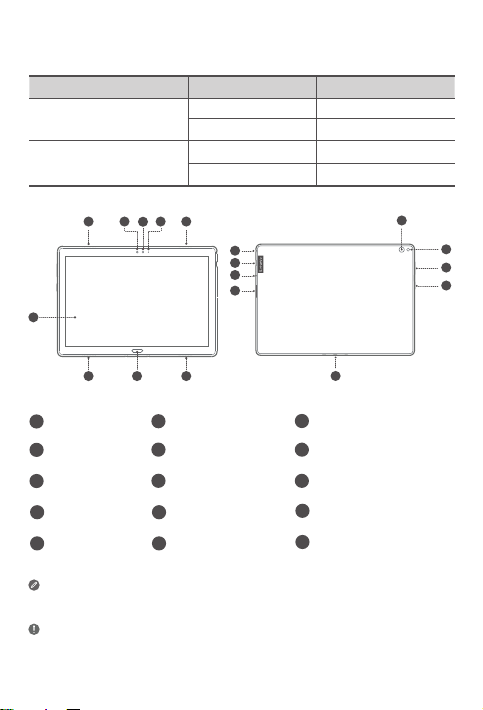
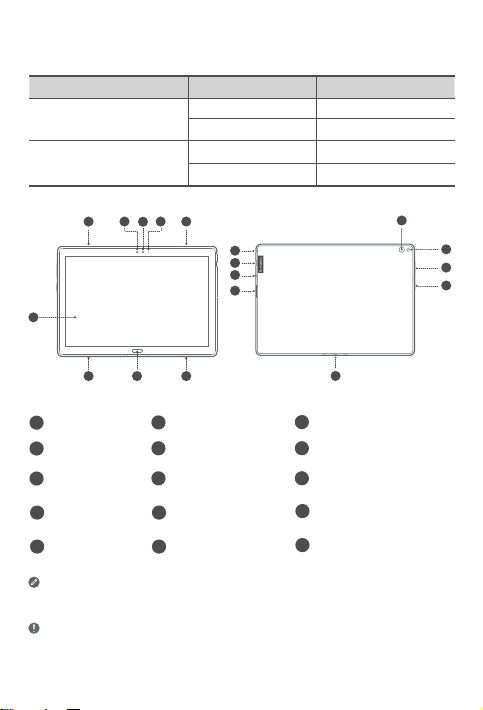
Device overview
Marketing name Model Version
Lenovo Tab P10
Lenovo Tab M10
Lenovo TB-X705F WLAN
Lenovo TB-X705L WLAN + LTE
Lenovo TB-X605F WLAN
Lenovo TB-X605L WLAN + LTE
2
3
1
2 2
Touch screen
1
4
Light sensor
Card tray
7
Headset connector11Rear camera
10
Volume buttons
13
• Connect your device to other Lenovo accessories through Smart Connector. The
• Your device supports CTIA earphones.
• The WLAN version does not have a Nano-SIM card slot.
• All information labeled with
※
accessories vary by country/region.
6
2
10
9
8
7
Speakers
2
5
Indicator
Microphone
8
Power button
14
※
in this guide only refers to the Lenovo Tab P10.
3
Front camera
6
Fingerprint sensor
9
Type C USB 2.0 connector
12
Flash
15
Smart connector
15
※
2
12
13
14
※
Page 5

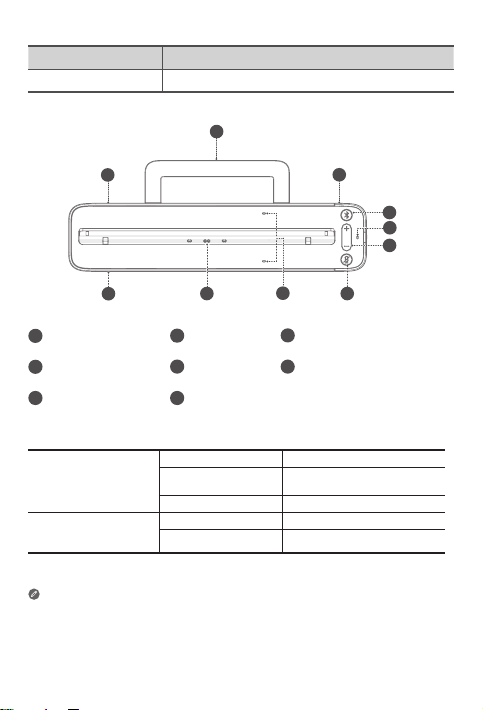
Marketing name Model
Lenovo Smart Dock Lenovo HA-200
2
5
6
Volume buttons
3
4
5
6
7
Speakers
1
4
Bluetooth button
Microphone On/O
7
button
1
1
8
Stability support3 Power adapter connector
2
5
Microphone
Smart connector
8
Indicator
Bluetooth button
Microphone On/Off
button
• The microphone on/off button will stay red until the first time you log into your
Amazon account while docked.
• To turn off Bluetooth of the dock, press and hold the Bluetooth button and
microphone on/off button together.
• All pictures and illustrations in this document are for reference only and may differ
from the final product.
Solid blue Bluetooth connected
Fast blinking blue Pairing mode
O Bluetooth not connected
Red Microphone disabled
O Microphone on
3
Page 6

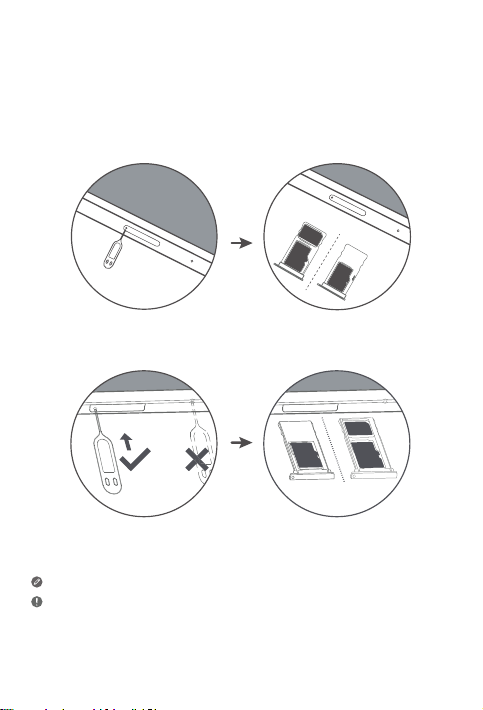
Installing cards
Use a microSD card (sold separately) for extra storage.
*To access cellular networks with your tablet (WLAN + LTE version only), insert a
Nano-SIM card provided by your carrier into the slot as shown below.
Nano-SIM
microSD
microSD
Figure 1: Lenovo Tab P10
IM
Nano-S
microSD
microSD
Figure 2: Lenovo Tab M10
Only Nano-SIM cards work with your tablet.
• Do not insert or remove the Nano-SIM card while your tablet is powered on. Doing so
may cause permanent damage to your Nano-SIM card or tablet.
• Do not insert the eject tool into the microphone. Doing so may cause permanent
damage to your tablet.
4
Page 7

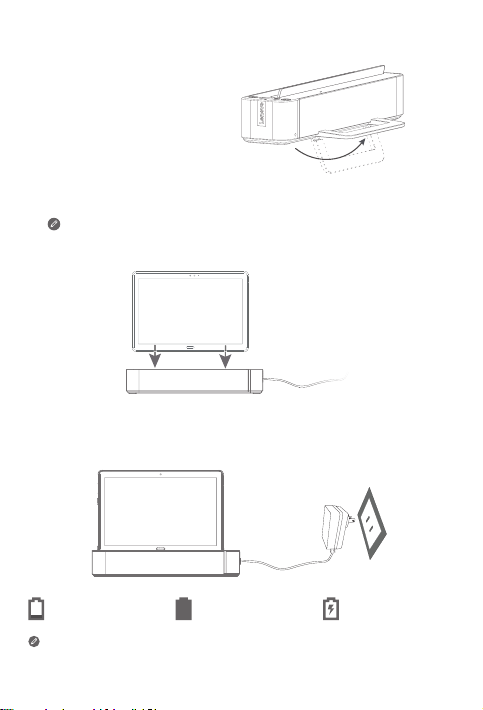
Getting started
1. Open the stability support.
2. Plug the power adaptor into the dock and then into a power outlet.
3. Place your tablet in the dock.
Make sure to correctly align the smart connector on the dock with the
smart connector on the tablet. The tablet will vibrate and the display will
change when docked correctly.
Charging your tablet
You might need to charge the battery before using your device.
As shown in the picture below, you can charge the battery through the dock.
Low battery Fully charged Charging
You can check the charging status through the battery status icon in the
notification panel when the tablet is powered on and being charged.
5
Page 8

Turning on/o the tablet
Turn on: Press and hold the power button until the Lenovo
logo appears.
Turn o: Press and hold the power button for a few
seconds, then tap Power o.
Restart: Press and hold the power button for about 10 seconds
until the device turns o. Then turn it on again in the normal way.
Connecting your tablet to your dock via Bluetooth
1. Place your tablet in the dock.
2. Log in to your Amazon account on the tablet.
3. Make sure the Bluetooth of the tablet and the dock are turned on. They will
connect automatically.
If the tablet cannot connect to your dock automatically, press and hold the
Bluetooth button on the dock for a few seconds to enter pairing mode. In
pairing mode, you can manually pair the dock with the tablet.
Talking to your Lenovo Smart Tab
1. Log in to your Amazon account on the tablet.
2. Enable the hands free feature on the tablet’s Quick Settings panel.
3. Say “Alexa” to get your device’s attention.
Please make sure the default voice assistant on your tablet settings is
setto “Alexa”.
Things to try
The things to try provides examples of things you can ask.
Alexa, what’s the weather?
Alexa, play my Flash Briefing.
Alexa, how tall is Mt. Everest?
Alexa, add “Dinner with Mom” to my calendar.
Alexa, what are some top-rated Indian
restaurants?
To learn more about the app and access additional features, check out “Things to
Try” in the Amazon Alexa app.
Alexa, set an alarm for 6 a.m.
Alexa, set a timer for 20 minutes.
Alexa, is it going to rain today?
Alexa, what movies are playing nearby?
Alexa, how far away is the Statue of
Liberty?
6
Page 9

Important safety and handling information
Plastic bag notice
Danger: Plastic bags can be dangerous. Keep plastic bags away from babies and
children to avoid danger of suocation.
Built-in rechargeable battery notice
Danger: Do not attempt to replace the internal rechargeable lithium ion
battery. Replacing the original battery with an incompatible type may result
in an increased risk of personal injury or property damage due to explosions,
excessive heat, or other risks.
Do not attempt to disassemble or modify the battery pack. Attempting to do
so can cause harmful explosions or battery fluid leakage.
When disposing of the battery, comply with all relevant local ordinances or
regulations. Do not dispose the battery pack in municipal waste. Dispose
used batteries according to the instructions.
The battery pack contains a small amount of harmful substances. To avoid
injury:
• Keep the battery pack away from open flames or other heat sources.
• Do not expose the battery pack to water, rain, or other corrosive liquids.
• Do not leave the battery in an extremely high temperature surrounding
environment.
• Avoid short-circuiting the battery pack.
• Keep the battery pack out of reach of small children and pets.
• Do not leave the battery in an extremely low air pressure surrounding
environment. It may result in an explosion or the leakage of flammable
liquid or gas from the battery.
To extend battery life, we recommend charging the battery to at least 30
to 50% capacity each time, and recharging it every three months to prevent
over discharge.
Caution about high volume usage
Warning: Exposure to loud noise from any source for extended periods of time
may aect your hearing. The louder the sound, the less time is required before your
hearing could be aected. To protect your hearing:
• Limit the amount of time you use headsets or headphones at high volume.
• Avoid turning up the volume to block out noisy surroundings.
• Turn the volume down if you can’t hear people speaking near you.
7
Page 10

If you experience hearing discomfort, including the sensation of pressure or fullness
in your ears, ringing in your ears or mued speech, you should stop listening to the
device through your headset or headphones and have your hearing checked.
To prevent possible hearing damage, do not listen at high volume levels for long
periods.
Safety instructions for parents and adult supervisors
Your mobile device is not a toy. Not recommended for children under 3 years of
age to play with it. As with all electrical products, precautions should be observed
during handling and using of electrical products to reduce the risk of electric shock.
If parents choose to allow children 3 or older to use the device, they should caution
his or her child about the potential hazard while using and handling the mobile
device.
Parents should inspect the mobile device (including the ac power adapter and
the small part, as applicable) periodically for damage. Routinely check this mobile
device to ensure that the device is working properly and is safe for children to use.
Service and support information
The following information describes the technical support that is available for your
product, during the warranty period or throughout the life of your product. Refer
to the Lenovo Limited Warranty (LLW) for a full explanation of Lenovo warranty
terms. See “Lenovo Limited Warranty notice” later in this document for details on
accessing the full warranty.
Online technical support
Online technical support is available during the lifetime of a product at:
https://support.lenovo.com
Telephone technical support
You can get help and information from the Customer Support Center by telephone.
Before contacting a Lenovo technical support representative, please have the
following information available: model and serial number, the exact wording of any
error message, and a description of the problem.
Your technical support representative might want to walk you through the problem
while you are at your device during the call.
8
Page 11

Worldwide Lenovo Support telephone list
Important: Telephone numbers are subject to change without notice. The most up-
to-date telephone list for the Customer Support Center is always available at:
https://www.lenovo.com/support/phone
If the telephone number for your country or region is not listed, contact your
Lenovo reseller or Lenovo marketing representative.
Warranty information
Lenovo Limited Warranty notice
This product is covered by the terms of the LLW, version L505-0010-02 08/2011.
Read the LLW at https://www.lenovo.com/warranty/llw_02. You can read the LLW
in a number of languages from this Web site. If you cannot view the LLW from the
Web site, contact your local Lenovo oce or reseller to obtain a printed version of
the LLW.
Warranty period and type of warranty service
Country or region Warranty period
United Kingdom, Australia, New Zealand
India, Mexico
United States of America, Canada, Japan
Spain, France, Germany, Italy
Parts and Labor - 1 year
Battery Pack - 1 year
Dock -1 year
Parts and Labor - 1 year
Battery Pack - 1 year
Dock -1 year
Parts and Labor - 1 year
Battery Pack - 1 year
Dock -1 year
Parts and Labor - 2 years
Battery Pack - 1 year
Dock -2 years
* Excludes some components. 90-day limited warranty for power adapters,
keyboards, plastics, and hinges.
Type of
warranty service
1,3
1,4
1,5
1,3
9
Page 12

Type of warranty service
1. Customer Replaceable Unit (“CRU”) Service
2. On-site Service
3. Courier or Depot Service
4. Customer Carry-In Service
5. Mail-in Service
6. Customer Two-Way Mail-in Service
7. Product Exchange Service
For a full explanation of the types of warranty service, refer to the full warranty.
See “Lenovo Limited Warranty notice” for details on accessing the full warranty.
If you need support for this device, do not go back to your point of purchase. Please
visit https://support.lenovo.com, where you will find answers to frequently asked
questions, software updates and details on how to get in touch with us.
EurAsia compliance mark
Environmental, recycling, and disposal information
General recycling statement
Lenovo encourages owners of information technology (IT) equipment to
responsibly recycle their equipment when it is no longer needed. Lenovo oers a
variety of programs and services to assist equipment owners in recycling their IT
products. For information on recycling Lenovo products, go to
http://www.lenovo.com/recycling.
10
Page 13

Important battery and WEEE information
Batteries and electrical and electronic equipment marked with the
symbol of a crossed-out wheeled bin may not be disposed as unsorted
municipal waste. Batteries and waste of electrical and electronic
equipment (WEEE) shall be treated separately using the collection
framework available to customers for the return, recycling, and
treatment of batteries and WEEE. When possible, remove and isolate
batteries from WEEE prior to placing WEEE in the waste collection
stream. Batteries are to be collected separately using the framework
available for the return, recycling, and treatment of batteries and
accumulators.
Country-specific information is available at:
http://www.lenovo.com/recycling
Recycling information for Japan
Recycling and disposal information for Japan is available at:
http://www.lenovo.com/recycling/japan
Additional recycling statements
Additional information about recycling device components and batteries is in your
User Guide. See “Accessing your tablet User Guide” for details.
Battery recycling marks
Battery recycling information for Taiwan
Battery recycling information for the United States and Canada
11
Page 14

Battery recycling information for the European Union
Energy eciency mark
Restriction of Hazardous Substances Directive (RoHS)
Turkey
The Lenovo product meets the requirements of the Republic of Turkey Directive on
the Restriction of the Use of Certain Hazardous Substances in Waste Electrical and
Electronic Equipment (WEEE).
Türkiye AEEE Yönetmeligine Uygunluk Beyanı
Bu Lenovo ürünü, T.C. Çevre ve Orman Bakanlıgı’nın “Atık Elektrikli ve Elektronik Esya Bazı Zararlı
Maddelerin Kullanımının Sınırlandırılmasına Dair Yönetmelik (AEEE)” direktierine uygundur.
AEEE Yönetmeligine Uygundur.
Ukraine
Цим підтверджуємо, що продукція Леново відповідає вимогам нормативних актів України, які
обмежують вміст небезпечних речовин
India
RoHS compliant as per E-waste (Management) Rules.
Vietnam
Lenovo products sold in Vietnam, on or after September 23, 2011, meet the
requirements of the Vietnam Circular 30/2011/TT-BCT (“Vietnam RoHS”).
European Union
Lenovo products sold in the European Union, on or after 3 January 2013 meet
the requirements of Directive 2011/65/EU on the restriction of the use of certain
hazardous substances in electrical and electronic equipment (“RoHS recast” or
“RoHS 2”). For more information about Lenovo progress on RoHS, go to:
https://www.lenovo.com/us/en/social_responsibility/RoHS-Communication.pdf
Singapore
Lenovo products sold in Singapore, on or after June 1, 2017, meet the requirements
of Government Gazette order No. S 263/2016 Restriction of Hazardous Substances
in Electrical and Electronic Equipment in Singapore (“SG-RoHS”).
12
Page 15

European Union compliance statement
European Union conformity
EU contact: Lenovo, Einsteinova 21, 851 01 Bratislava, Slovakia
Compliance with the RE Directive
Lenovo PC HK Limited declares that the radio equipment type Lenovo TB-X705F,
Lenovo TB-X705L, Lenovo TB-X605F, Lenovo TB-X605L, Lenovo HA-200 is in
compliance with Directive 2014/53/EU.
The full text of the EU declaration of conformity is available at the following internet
address:
http://www.lenovo.com/us/en/social_responsibility/EU_DoC_tablets
This radio equipment operates with the following frequency bands and maximum
radio-frequency power:
Model Name Frequency Bands
UMTS B1 23
UMTS B8 24
LTE B1/B7 22.5
LTE B3/B8/B20/B40 23.5
Lenovo TB-X705L
Lenovo TB-X705F
LTE B38 23
WLAN 2400-2483.5 17.5
WLAN 5150-5350 16
WLAN 5470-5850 15.5
Bluetooth 2400-2483.5 10.5
WLAN 2400-2483.5 18
WLAN 5150-5350 16.5
WLAN 5470-5850 15.5
Bluetooth 2400-2483.5 9.5
Maximum Conducted
Power (dBm)
13
Page 16

Model Name Frequency Bands
UMTS B1 22.5
UMTS B8 24
Lenovo TB-X605L
Lenovo TB-X605F
Lenovo HA-200 Bluetooth 2400-2483.5 9.93
The Lenovo HA-200 device should be used with a separation distance of 20 cm to
the human body.
The above information is for EU countries only. Please refer to the actual
product for supported frequency bands in other countries.
LTE B1, 3, 7, 8, 20, 38, 40 23.5
WLAN 2400-2483.5 20
WLAN 5150-5850 17
Bluetooth 2400-2483.5 9.5
WLAN 2400-2483.5 20
WLAN 5150-5850 17
Bluetooth 2400-2483.5 9.5
Maximum Conducted
Power (dBm)
14
Page 17

Specific Absorption Rate information
YOUR MOBILE DEVICE MEETS INTERNATIONAL GUIDELINES FOR EXPOSURE TO
RADIO WAVES.
Your mobile device is a radio transmitter and receiver. It is designed not to exceed
the limits for exposure to radio waves (radio frequency electromagnetic fields)
recommended by international guidelines. The guidelines were developed by an
independent scientific organization (ICNIRP) and include a substantial safety margin
designed to assure the safety of all persons, regardless of age and health.
The radio wave exposure guidelines use a unit of measurement known as the
Specific Absorption Rate, or SAR. The SAR limit for mobile devices is 2W/kg.
Tests for SAR are conducted using standard operating positions with the device
transmitting at its highest certified power level in all tested frequency bands. The
highest SAR values under the ICNIRP guidelines for your device model are listed
below:
Maximum SAR for this model and conditions under which it was recorded.
Lenovo TBX705L
Europe
10g SAR
Limit (2.0
W/kg)
During use, the actual SAR values for your device are usually well below the
values stated. This is because, for purposes of system eciency and to minimize
interference on the network, the operating power of your mobile device is
automatically decreased when full power is not needed for the data connection.
The lower the power output of the device, the lower its SAR value.
If you are interested in further reducing your RF exposure then you can easily do
so by limiting your usage or simply using a hands-free kit to keep the device away
from the body.
Lenovo TBX705F
Lenovo TBX605F
Lenovo TBX605L
Body-worn LTE B40, Wi-Fi,
Bluetooth
Body-worn Wi-Fi, Bluetooth 1.01 W/kg
Body-worn Wi-Fi, Bluetooth 1.25 W/kg
Body-worn WCDMA Band I,
Wi-Fi, Bluetooth,
LTE
1.15 W/kg
1.50 W/kg
15
Page 18

Deutsch
Lesen Sie diese Anleitung vor der Verwendung Ihres Geräts sorgfältig durch.
Alle Informationen mit einem Stern (*) beziehen sich auf das Modell mit
WLAN + LTE.
Zuerst lesen - Vorschriften und Gesetze
Mit drahtloser Kommunikationstechnik ausgestattete Gerätemodelle erfüllen
die Funkfrequenz- und Sicherheitsnormen aller Länder oder Regionen,
in denen sie für den drahtlosen Gebrauch zugelassen wurden. Wenn Ihr
Produkt ein Telekommunikationsmodem enthält, erfüllt es außerdem die
Anforderungen hinsichtlich des Anschlusses an das Telefonnetz Ihres Landes.
Lesen Sie unbedingt Gesetzlicher Hinweis für Ihr Land oder Ihre Region, bevor
Sie die in Ihrem Gerät enthaltenen drahtlosen Geräte verwenden. Wie Sie
eine PDF-Version von Gesetzlicher Hinweis erhalten können, erfahren Sie im
nachfolgenden Abschnitt „Herunterladen von Veröentlichungen“.
Unterstützung
Zur Unterstützung bei Netzwerkdiensten und Rechnungsstellung kontaktieren
Sie den Betreiber Ihres Mobilfunknetzes. Um zu erfahren, wie Sie Ihr Gerät
nutzen und die technischen Spezifikationen anzeigen, gehen Sie zu
https://support.lenovo.com.
Herunterladen von Veröentlichungen
Die elektronischen Versionen von Veröentlichungen sind verfügbar unter
https://support.lenovo.com. Zum Herunterladen der Veröentlichungen
für Ihr Gerät rufen Sie https://support.lenovo.com auf und befolgen Sie die
Anweisungen auf dem Bildschirm.
Zugri auf die Bedienungsanleitung des Tablets
Die Bedienungsanleitung enthält ausführliche Informationen zu Ihrem Gerät.
Um auf die Bedienungsanleitung zuzugreifen, besuchen Sie
https://support.lenovo.com und befolgen Sie die Anweisungen auf dem
Bildschirm.
Rechtshinweise
Lenovo und das Lenovo-Logo sind Marken von Lenovo in den Vereinigten
Staaten und/oder anderen Ländern.
Sonstige Unternehmens-, Produkt- oder Dienstleistungsnamen können
Marken oder Dienstleistungsmarken anderer Markeninhaber sein.
Hergestellt unter Lizenz der Firma Dolby Laboratories. Dolby, Dolby Atmos
und das Doppel-D-Symbol sind Marken von Dolby Laboratories.
HINWEISE ZU EINGESCHRÄNKTEN RECHTEN: Werden Daten oder Software
gemäß einem GSA-Vertrag (General Service Administration) ausgeliefert,
unterliegt die Verwendung, Vervielfältigung oder Oenlegung den in VertragNr. GS-35F-05925 festgelegten Einschränkungen.
16
Page 19

5
4
11
Geräteübersicht
Marketingname Modell Version
Lenovo Tab P10
Lenovo Tab M10
Lenovo TB-X705F WLAN
Lenovo TB-X705L WLAN + LTE
Lenovo TB-X605F WLAN
Lenovo TB-X605L WLAN + LTE
2
3
1
2 2
Touchscreen
1
Lichtsensor
4
Kartenfach
7
Headset-
10
Anschluss
Lautstärketasten14Betriebstaste
13
• Verbinden Sie Ihr Gerät über den Smart-Anschluss mit anderem Lenovo-
• Ihr Gerät unterstützt CTIA-Ohrhörer.
• Das WLAN-Modell weist keinen Nano-SIM-Kartensteckplatz auf.
• Alle Informationen mit einem Stern
※
Zubehör. Das Zubehör ist je nach Land/Region unterschiedlich.
P10.
6
2
5
8
11
2
10
9
8
7
Lautsprecher
Anzeige
Mikrofon
Kamera an der
Rückseite
15
Kamera an der
3
Vorderseite
Fingerabdrucksensor
6
Typ-C-Anschluss USB 2.0
9
※
12
Blitz
Smart-Anschluss
15
※
beziehen sich nur auf das Lenovo Tab
17
12
13
14
※
Page 20

Marketingname Modell
Lenovo Smart Dock Lenovo HA-200
2
3
5
Lautstärketasten
6
4
5
6
7
Lautsprecher
1
Bluetooth-Taste
4
Mikrofon Ein/Aus-
7
Tast e
1
1
8
Stabilitätsstütze3 Netzteil-Anschluss
2
Mikrofon
5
Smart-
8
Anschluss
Anzeige
Leuchtet blau Bluetooth verbunden
Bluetooth-Taste
Mikrofon Ein/AusTaste
• Die Mikrofon Ein/Aus-Taste bleibt rot, bis Sie sich zum ersten Mal bei Ihrem
Amazon-Konto anmelden, während das Gerät an das Dock angeschlossen ist.
• Um Bluetooth am Dock zu deaktivieren, halten Sie die Bluetooth-Taste und die
Ein/Aus-Taste für das Mikrofon gemeinsam gedrückt.
• Alle Abbildungen und Illustrationen in diesem Dokument dienen nur der
Referenz und können vom eigentlichen Produkt abweichen.
Blinkt schnell blau Kopplungsmodus
Aus Bluetooth nicht
Rot Mikrofon deaktiviert
Aus Mikrofon ein
18
verbunden
Page 21

Einsetzen von Karten
Verwenden Sie für mehr Speicherplatz eine microSD-Karte (separat
erhältlich).
*Zum Zugri auf Mobilfunknetze mit Ihrem Tablet (nur Version WLAN + LTE)
setzen Sie eine Nano-SIM-Karte Ihres Mobilfunkanbieters in den Steckplatz
ein, wie unten abgebildet.
Nano-SIM
microSD
microSD
Abbildung 1: Lenovo Tab P10
IM
Nano-S
microSD
microSD
Abbildung 2: Lenovo Tab M10
Ihr Tablet ist nur mit Nano-SIM-Karten kompatibel.
• Das Einsetzen oder Entfernen der Nano-SIM-Karte darf nicht bei
eingeschaltetem Tablet erfolgen. Dies kann Ihre Nano-SIM-Karte oder das
Tablet dauerhaft beschädigen.
• Führen Sie das Auswurfwerkzeug nicht in das Mikrofon ein. Dies kann das
Tablet dauerhaft beschädigen.
19
Page 22

Erste Schritte
1. Önen Sie die Stabilitätsstütze.
2. Schließe Sie das Netzteil an das Dock und dann an eine Netzsteckdose an.
3. Setzen Sie das Tablet in das Dock ein.
Stellen Sie sicher, dass Sie den Smart-Anschluss am Dock korrekt am
Smart-Anschluss am Tablet ausrichten. Das Tablet vibriert und die
Anzeige ändert sich, wenn das Gerät richtig mit dem Dock verbunden ist.
Aufladen des Tablets
Ggf. müssen Sie den Akku aufladen, bevor Sie das Gerät starten können.
Sie können den Akku über das Dock laden, wie in der Abbildung unten dargestellt.
Niedrige Akkuladung Vollständig geladen Wird geladen
Sie können den Ladestatus über das Akkustatussymbol im
Benachrichtigungsbereich überprüfen, wenn das Tablet eingeschaltet ist
und geladen wird.
20
Page 23

Ein-/Ausschalten des Tablets
Einschalten: Halten Sie die Betriebstaste gedrückt, bis
das Lenovo-Logo erscheint.
Ausschalten: Halten Sie die Betriebstaste einige
Sekunden lang gedrückt und tippen Sie dann auf Aus.
Neustart: Halten Sie die Betriebstaste etwa 10 Sekunden
lang gedrückt, bis sich das Gerät ausschaltet. Schalten
Sie es dann wie gewohnt ein.
Verbinden des Tablets mit dem Dock über Bluetooth
1. Setzen Sie das Tablet in das Dock ein.
2. Melden Sie sich auf dem Tablet bei Ihrem Amazon-Konto an.
3. Stellen Sie sicher, dass Bluetooth beim Tablet und beim Dock eingeschaltet
ist. Sie verbinden sich automatisch.
Wenn sich das Tablet nicht automatisch mit dem Dock verbinden kann,
halten Sie die Bluetooth-Taste am Dock einige Sekunden lang gedrückt,
um in den Kopplungsmodus zu wechseln. Im Kopplungsmodus können
Sie das Dock manuell mit dem Tablet koppeln.
Sprechen mit Ihrem Lenovo Smart Tab
1. Melden Sie sich auf dem Tablet bei Ihrem Amazon-Konto an.
2. Aktivieren Sie die Freisprechfunktion über den Schnelleinstellungsbereich des Tablets.
3. Sagen Sie „Alexa“, damit das Gerät zuhört.
Stellen Sie sicher, dass der Standardsprachassistent in Ihren TabletEinstellungen auf „Alexa“ eingestellt ist.
Zum Ausprobieren
Dieser Abschnitt bietet Beispiele für Dinge, nach denen Sie Alexa fragen können.
Alexa, wie wird das Wetter?
Alexa, was gibt es in den Nachrichten?
Alexa, wie hoch ist der Mount Everest?
Alexa, füge „Abendessen mit Mama“
zu meinem Kalender hinzu.
Alexa, welche indischen Restaurants mit
Top-Bewertungen gibt es in der Nähe?
Um mehr über die App zu erfahren und auf weitere Funktionen zuzugreifen,
beachten Sie „Dinge, die Sie testen können“ in der Amazon Alexa-App.
Alexa, stelle einen Wecker für 6 Uhr
morgens.
Alexa, stelle einen Timer für 20
Minuten.
Alexa, wird es heute regnen?
Alexa, welche Filme laufen in der Nähe?
Alexa, wie weit ist das Brandenburger
Tor entfernt?
21
Page 24

Wichtige Sicherheitshinweise und
Nutzungsinformationen
Hinweis zu Plastiktüten
Gefahr: Plastiktüten können gefährlich sein. Bewahren Sie Plastiktüten nicht in
Reichweite von Kleinkindern und Kindern auf, um Erstickungsgefahr zu vermeiden.
Hinweise zu integrierten wiederaufladbaren Akkus
Gefahr: Versuchen Sie nicht, den internen wiederaufladbaren Lithiumionenakku
auszutauschen. Das Ersetzen des Akkus durch einen Akku inkompatiblen Typs
kann zu einem erhöhten Risiko von Verletzungen oder Sachschäden durch
Explosionen, übermäßige Hitzeentwicklung und andere Gefahren führen.
Versuchen Sie nicht, den Akkupack auseinanderzunehmen oder zu verändern.
Dies kann gefährliche Explosionen oder das Austreten von Batterieflüssigkeit
verursachen.
Beachten Sie bei der Entsorgung des Akkus alle relevanten lokalen Vorschriften
und Bestimmungen. Entsorgen Sie den Akkupack nicht im Haushaltsmüll.
Entsorgen Sie verbrauchte Akkus und Batterien ordnungsgemäß.
Der Akkupack enthält eine geringe Menge an schädlichen Substanzen. Zur
Vermeidung von Verletzungen:
• Halten Sie den Akkupack von oenen Flammen oder anderen
Hitzequellen entfernt.
• Setzen Sie den Akkupack nicht Wasser, Regen oder korrosiven
Flüssigkeiten aus.
Lassen Sie den Akku nicht in einer Umgebung mit sehr hohen Temperaturen.
•
• Vermeiden Sie einen Kurzschluss des Akkupacks.
• Halten Sie den Akkupack von kleinen Kindern und Haustieren fern.
• Lassen Sie den Akku nicht in einer Umgebung mit sehr niedrigem
Luftdruck. Dies kann zu einer Explosion oder dem Austreten von
entflammbarer Flüssigkeit oder Gas aus dem Akku führen.
Zum Verlängern der Akkulebensdauer empfehlen wir, den Akku stets auf
wenigstens 30 bis 50% seiner Kapazität aufzuladen und ihn alle drei Monate
neu aufzuladen, um eine übermäßige Entladung zu verhindern.
Vorsicht bei der Nutzung bei hoher Lautstärke
Warnung: Laute Geräusche von beliebigen Tonquellen über einen längeren
Zeitraum können Ihr Gehör schädigen. Je lauter das Geräusch, desto schneller
kann es Ihr Gehör beeinträchtigen. So schützen Sie Ihr Gehör:
• Schränken Sie die Dauer der Nutzung von Kopfhörern oder Ohrhörern bei
hoher Lautstärke ein.
• Vermeiden Sie es, die Lautstärke zu erhöhen, um Außengeräusche
auszublenden.
• Regeln Sie die Lautstärke herab, wenn Sie Personen neben sich nicht
sprechen hören können.
22
Page 25
Falls Sie Hörbeschwerden feststellen, wie zum Beispiel Druckgefühl
oder ein Gefühl verstopfter Ohren, Ohrenklingeln oder eine gedämpfte
Sprachwahrnehmung, sollten Sie das Hören über das Headset oder den
Kopfhörer des Geräts beenden und Ihre Ohren untersuchen lassen.
Um mögliche Gehörschäden zu vermeiden, hören Sie eine Audioausgabe bei
hohem Lautstärkepegel nicht für längere Zeit.
Sicherheitshinweise für Eltern und erwachsene
Aufsichtspersonen
Ihr Mobilgerät ist kein Spielzeug. Es wird davon abgeraten, Kinder unter 3
Jahren damit spielen zu lassen. Wie bei allen elektrischen Produkten sind bei der
Handhabung und Benutzung elektrischer Produkte Vorsichtsmaßnahmen einzuhalten,
um das Risiko eines elektrischen Schlags zu reduzieren. Wenn Eltern Kindern ab 3
Jahren die Benutzung des Geräts erlauben, sollten sie die Kinder über die möglichen
Gefahren bei der Benutzung und Handhabung des Mobilgeräts aufklären.
Die Eltern sollten das Mobilgerät (einschließlich Netzteil und Kleinteilen, wie
vorhanden) regelmäßig auf Schäden überprüfen. Prüfen Sie das Mobilgerät
routinemäßig, um sicherzustellen, dass es einwandfrei funktioniert und seine
Benutzung für Kinder sicher ist.
Informationen zu Service und Unterstützung
Im Folgenden finden Sie Informationen zur technischen Unterstützung,
die für Ihr Produkt während des Garantiezeitraums bzw. für die gesamte
Lebensdauer Ihres Produkts zur Verfügung steht. Zur vollständigen
Erläuterung der Garantiebedingungen von Lenovo lesen Sie bitte die
begrenzte Herstellergarantie von Lenovo. Weitere Informationen für den
Zugri auf den vollständigen Text der Garantie finden Sie im Abschnitt
„Hinweis zur begrenzten Herstellergarantie von Lenovo“ in diesem Dokument.
Technische Unterstützung über das Internet
Technische Unterstützung über das Internet steht Ihnen für die gesamte
Lebensdauer des Produkts unter der folgenden Adresse zur Verfügung:
https://support.lenovo.com
Technische Unterstützung per Telefon
Hilfe und Informationen können Sie telefonisch beim Kunden-Support-Center
erhalten. Bevor Sie sich an einen technischen Kundendienstmitarbeiter von
Lenovo wenden, sollten Sie die folgenden Informationen bereithalten: Modell
und Seriennummer, den genauen Wortlaut einer etwaigen Fehlermeldung und
eine Beschreibung des Problems.
Der Kundendienstmitarbeiter führt Sie möglicherweise während des Gesprächs
durch den Problemlösungsprozess, während Sie Ihr Gerät bedienen.
23
Page 26
Liste der weltweit gültigen Lenovo SupportTelefonnummern
Wichtig: Telefonnummern können ohne vorherige Ankündigung geändert
werden. Die aktuelle Telefonliste für das Kunden-Support-Center ist unter
folgender Adresse zu finden:
https://www.lenovo.com/support/phone
Wenn für Ihr Land oder Ihre Region keine Telefonnummer angegeben ist,
wenden Sie sich an Ihren Lenovo Vertriebspartner oder an Ihren Lenovo
Vertriebsbeauftragten.
Garantieinformationen
Hinweis zur begrenzten Herstellergarantie von Lenovo
Dieses Produkt unterliegt den Bedingungen der begrenzten Herstellergarantie
von Lenovo, Version L505-0010-02 08/2011. Lesen Sie die begrenzte
Herstellergarantie unter https://www.lenovo.com/warranty/llw_02. Sie können
die begrenzte Herstellergarantie auf dieser Website in einer Reihe von Sprachen
lesen. Wenn Sie die begrenzte Herstellergarantie auf der Website nicht anzeigen
können, wenden Sie sich an Ihre Lenovo Niederlassung vor Ort oder Ihren
Vertriebspartner, um eine gedruckte Version der Herstellergarantie zu erhalten.
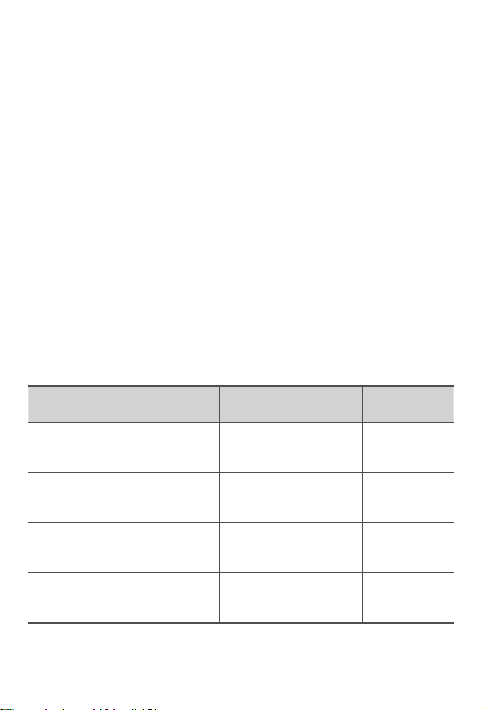
Garantiedauer und Art der Garantieleistung
Land oder Region Garantiezeitraum
Großbritannien, Australien,
Neuseeland
Indien, Mexiko
Vereinigte Staaten von Amerika
(USA), Kanada, Japan
Spanien, Frankreich, Deutschland,
Italien
Teile und Service – 1 Jahr
Akku – 1 Jahr
Dock – 1 Jahr
Teile und Service – 1 Jahr
Akku – 1 Jahr
Dock – 1 Jahr
Teile und Service – 1 Jahr
Akku – 1 Jahr
Dock – 1 Jahr
Teile und Service – 2 Jahre
Akku – 1 Jahr
Dock – 2 Jahre
* Mit Ausnahme einiger Teile. Eingeschränkte Garantie für Netzteile,
Tastaturen, Kunststoteile und Scharniere von 90Tagen.
24
Art des
Garantieservice
1,3
1,4
1,5
1,3
Page 27
Art des Garantieservice
1. CRU-Service (Customer Replaceable Unit)
2. Vor-Ort-Service
3. Kurier- oder Aufbewahrungsservice
4. Anlieferung durch den Kunden
5. Einsendeservice
6. Einsende- und Rücksendeservice
7. Austauschservice für das Produkt
Zur vollständigen Erläuterung der Arten des Garantieservice lesen Sie bitte
den vollständigen Text der Garantie.
Weitere Informationen für den Zugri auf den vollständigen Text der Garantie
finden Sie im Abschnitt „Hinweis zur begrenzten Herstellergarantie von
Lenovo“.
Wenn Sie Unterstützung zu diesem Gerät benötigen, wenden Sie sich nicht an
den Händler, bei dem Sie das Gerät gekauft haben. Besuchen Sie
https://support.lenovo.com. Dort finden Sie Antworten auf häufig gestellte
Fragen, Softwareaktualisierungen und Details dazu, wie Sie mit uns in Kontakt
treten können.
EurAsia-Regelkonformitätseinstufung
Informationen zu Umweltverträglichkeit,
Wiederverwertung und Entsorgung
Allgemeine Recycling-Angaben
Lenovo fordert die Besitzer von IT-Geräten auf, diese Geräte nach ihrer
Nutzung ordnungsgemäß der Wiederverwertung zuzuführen. Lenovo bietet
Kunden entsprechende Programme zur umweltgerechten Wiederverwertung/
Entsorgung ihrer IT-Produkte an. Informationen zur Wiederverwertung von
Lenovo Produkten finden Sie unter folgender Adresse:
http://www.lenovo.com/recycling.
25
Page 28
Wichtige Informationen zu Batterien/Akkus und WEEE
Batterien/Akkus sowie elektrische und elektronische Geräte,
die mit dem Symbol einer durchgestrichenen Abfalltonne
auf Rädern gekennzeichnet sind, dürfen nicht als allgemeiner
Hausmüll entsorgt werden. Batterien/Akkus sowie Elektro- und
Elektronikaltgeräte (WEEE) müssen gesondert im verfügbaren
Sammelsystem für die Rückgabe, Wiederverwertung und
Handhabung von Batterien/Akkus und WEEE zurückgegeben
werden. Wenn möglich sollten Batterien/Akkus aus Elektro- und
Elektronikaltgeräten entfernt und isoliert werden, bevor die
Elektro- und Elektronikaltgeräte entsorgt werden. Batterien/Akkus
sind gesondert im entsprechenden System für die Rückgabe,
Wiederverwertung und Handhabung von Batterien/Akkus
zurückzugeben.
Länderspezifische Informationen erhalten Sie unter der folgenden
Adresse: http://www.lenovo.com/recycling
Recycling-Informationen für Japan
Informationen zu Recycling und Entsorgung in Japan finden Sie unter:
http://www.lenovo.com/recycling/japan
Zusätzliche Hinweise zur Wiederverwertbarkeit
Weitere Informationen zur Wiederverwertbarkeit von Gerätekomponenten
und Akkus finden Sie in der Bedienungsanleitung. Weitere Informationen
finden Sie im Abschnitt „Zugri auf die Bedienungsanleitung des Tablets“.
Batterie/Akku-Recycling-Kennzeichnungen
Batterie/Akku-Recycling-Informationen für Taiwan
Batterie/Akku-Recycling-Informationen für die USA und Kanada
26
Page 29
Batterie/Akku-Recycling-Informationen für die Europäische Union
Energieezienz-Einstufung
Richtlinie zur Beschränkung von Gefahrstoen (RoHS)
Türkei
Das Lenovo-Produkt erfüllt die Anforderungen der Richtlinie der Republik
Türkei zu Einschränkungen für den Gebrauch von bestimmten Gefahrstoen
in Elektro- und Elektronik-Altgeräten (WEEE).
Türkiye AEEE Yönetmeligine Uygunluk Beyanı
Bu Lenovo ürünü, T.C. Çevre ve Orman Bakanlıgı’nın “Atık Elektrikli ve Elektronik Esya Bazı
Zararlı Maddelerin Kullanımının Sınırlandırılmasına Dair Yönetmelik (AEEE)“ direktierine
uygundur.
AEEE Yönetmeligine Uygundur.
Ukraine
Цим підтверджуємо, що продукція Леново відповідає вимогам нормативних актів
України, які обмежують вміст небезпечних речовин
Indien
RoHS compliant as per E-waste (Management) Rules.
Vietnam
Produkte von Lenovo, die seit dem 23.September2011 in Vietnam verkauft
wurden, erfüllen die Anforderungen des Vietnam Circular 30/2011/TT-BCT
(„Vietnam RoHS“).
Europäische Union
Lenovo-Produkte, die seit dem 03.01.2013 innerhalb der Europäischen Union
verkauft wurden, erfüllen die Anforderungen der Richtlinie 2011/65/EU zu
Einschränkungen des Gebrauchs von bestimmten Gefahrstoen in elektrischen
und elektronischen Geräten („RoHS recast“ oder „RoHS2“). Weitere Informationen
darüber, wie Lenovo die RoHS-Richtlinie umsetzt, finden Sie unter:
https://www.lenovo.com/us/en/social_responsibility/RoHS-Communication.pdf
Singapur
Lenovo-Produkte, die seit dem 1. Juni 2017 in Singapur verkauft wurden,
erfüllen die Anforderungen der Government Gazette Anordnung Nr.
S 263/2016 zu Einschränkungen von Gefahrstoen in elektrischen und
elektronischen Geräten in Singapur („SG-RoHS“).
27
Page 30
Konformitätserklärung Europäische Union
Europäische Union – Konformität
EU contact: Lenovo, Einsteinova 21, 851 01 Bratislava, Slovakia
Einhaltung der RE-Richtlinie
Lenovo PC HK Limited erklärt, dass der Funkgerätetyp Lenovo TB-X705F,
Lenovo TB-X705L, Lenovo TB-X605F, Lenovo TB-X605L und Lenovo HA-200
die Richtlinie 2014/53/EU erfüllt.
Den vollständigen Text der EU-Konformitätserklärung finden Sie unter der
folgenden Internetadresse:
http://www.lenovo.com/us/en/social_responsibility/EU_DoC_tablets
Dieses Funkgerät arbeitet mit den folgenden Frequenzbändern und
maximaler Hochfrequenzleistung:
Modellbezeichnung Frequenzbänder
UMTS B1 23
UMTS B8 24
LTE B1/B7 22,5
LTE B3/B8/B20/B40 23,5
Lenovo TB-X705L
Lenovo TB-X705F
LTE B38 23
WLAN 2400-2483.5 17,5
WLAN 5150-5350 16
WLAN 5470-5850 15,5
Bluetooth 2400-2483.5 10,5
WLAN 2400-2483.5 18
WLAN 5150-5350 16,5
WLAN 5470-5850 15,5
Bluetooth 2400-2483.5 9,5
Maximale
Sendeleistung (dBm)
28
Page 31
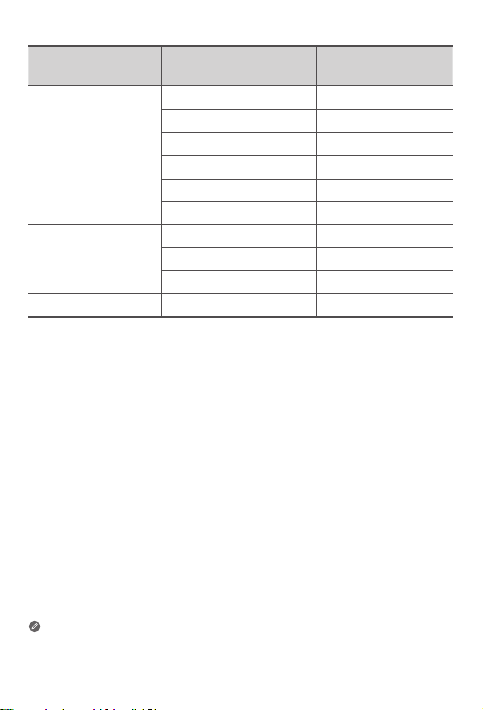
Modellbezeichnung Frequenzbänder
UMTS B1 22,5
UMTS B8 24
Lenovo TB-X605L
Lenovo TB-X605F
Lenovo HA-200 Bluetooth 2400-2483.5 9,93
Das Gerät Lenovo HA-200 sollte mit einem Trennabstand von 20cm zum
menschlichen Körper verwendet werden.
Die obenstehenden Informationen gelten nur für EU-Länder. Informationen
zu den in anderen Ländern unterstützten Frequenzbändern finden Sie am
Produkt selbst.
LTE B1, 3, 7, 8, 20, 38, 40 23,5
WLAN 2400-2483.5 20
WLAN 5150-5850 17
Bluetooth 2400-2483.5 9,5
WLAN 2400-2483.5 20
WLAN 5150-5850 17
Bluetooth 2400-2483.5 9,5
29
Maximale
Sendeleistung (dBm)
Page 32
Informationen zur spezifischen
Absorptionsrate
IHR MOBILGERÄT ERFÜLLT DIE INTERNATIONALEN RICHTLINIEN FÜR DIE
FUNKWELLENEXPOSITION.
Ihr Mobilgerät ist ein Funksender und -empfänger. Es ist so ausgelegt, dass es die
in internationalen Richtlinien empfohlenen Expositionsgrenzwerte für Funkwellen
(elektromagnetische Hochfrequenzfelder) nicht übersteigt. Diese Richtlinien
wurden von einer unabhängigen wissenschaftlichen Organisation (ICNIRP)
entwickelt und enthalten einen bedeutenden Sicherheitstoleranzwert, um die
Sicherheit von Personen jeden Alters und Gesundheitszustands zu gewährleisten.
Die Expositionsrichtlinien für Funkwellen verwenden eine Maßeinheit namens
spezifische Absorptionsrate oder SAR. Der SAR-Grenzwert für Mobilgeräte
beträgt 2W/kg. SAR-Tests werden in den üblichen Betriebsstellungen
durchgeführt, wobei das Gerät auf allen getesteten Frequenzbändern auf
dem höchsten zugelassenen Leistungspegel sendet. Die höchsten SAR-Werte
gemäß den ICNIRP-Richtlinien für Ihr Gerätemodell sind unten aufgeführt:
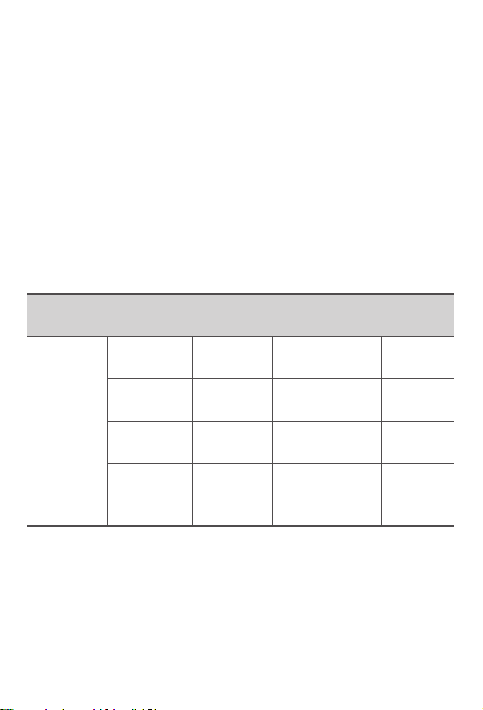
Maximaler SAR-Wert für dieses Modell und Aufzeichnungsbedingungen
des Werts.
Lenovo TBX705L
Europa
10g SARGrenzwert
(2,0W/kg)
Beim Gebrauch liegen die tatsächlichen SAR-Werte für Ihr Gerät
normalerweise weit unter den angegebenen Werten. Dies liegt daran, dass
aus Gründen der Systemezienz und zur Minderung von Störungen im Netz
die Betriebsleistung Ihres Mobilgeräts automatisch gesenkt wird, wenn für die
Datenverbindung nicht die volle Leistung benötigt wird.
Je niedriger die Ausgangsleistung des Geräts, desto niedriger sein SAR-Wert.
Falls Sie die Funkwellenexposition weiter senken möchten, können Sie einfach
die Nutzungshäufigkeit begrenzen oder ein Freisprech-Kit nutzen, um das
Gerät von Ihrem Körper entfernt zu halten.
Lenovo TBX705F
Lenovo TBX605F
Lenovo TBX605L
Am Körper
getragen
Am Körper
getragen
Am Körper
getragen
Am Körper
getragen
30
LTE B40, Wi-Fi,
Bluetooth
Wi-Fi, Bluetooth 1,01W/kg
Wi-Fi, Bluetooth 1,25W/kg
WCDMA Band I,
Wi-Fi, Bluetooth,
LTE
1,15W/kg
1,50W/kg
Page 33

Français
Lisez attentivement ce guide avant d’utiliser votre appareil.
Toutes les informations accompagnées du symbole * dans ce guide font
uniquement référence au modèle WLAN +LTE.
À lire en premier - Informations réglementaires
Les modèles d’appareil équipés de systèmes de communication sans fil
respectent les normes de fréquence radioélectrique et de sécurité de tous
les pays et régions dans lesquels leur utilisation sans fil est autorisée. De plus,
si votre produit est équipé d’un modem, il est conforme aux exigences de
connexion au réseau téléphonique dans votre pays.
Lisez attentivement le document Avis réglementaire spécifique à votre pays
ou à votre région avant d’utiliser les fonctions de communication sans fil
fournies avec votre appareil. Pour obtenir une version PDF du document
Avis réglementaire, consultez la section «Téléchargement de publications»
ci-dessous.
Obtenir de l’aide
Pour obtenir une assistance sur les services réseau et la facturation, contactez
votre opérateur de réseau sans fil. Pour apprendre à utiliser votre appareil et
consulter ses caractéristiques techniques, rendez-vous sur le site
https://support.lenovo.com.
Téléchargement de publications
Les versions électroniques de vos publications sont disponibles sur le site
https://support.lenovo.com. Pour télécharger les publications concernant
votre appareil, consultez le site https://support.lenovo.com et suivez les
informations à l’écran.
Accès au Guide de l’utilisateur de votre tablette
Votre Guide de l’utilisateur contient des informations détaillées concernant
votre appareil. Pour accéder à votre Guide de l’utilisateur, rendez-vous sur
https://support.lenovo.com et suivez les instructions qui s’affichent à l’écran.
Mentions légales
Lenovo et le logo Lenovo sont des marques déposées de Lenovo aux ÉtatsUnis et/ou dans d’autres pays.
Les autres noms de société, de produit ou de service sont des marques
commerciales ou des marques de service d’autres sociétés.
Fabriqué sous licence Dolby Laboratories. Dolby, Dolby Atmos et le symbole
double-D sont des marques commerciales de Dolby Laboratories.
REMARQUE SUR LES DROITS LIMITÉS ET RESTREINTS: si les données
ou les logiciels sont fournis conformément à un contrat «General Services
Administration» («GSA»), l’utilisation, la reproduction et la divulgation sont
soumises aux restrictions stipulées dans le contrat n
o
GS-35F-05925.
31
Page 34
5
4
11
Présentation de l’appareil
Nom commercial Modèle Version
Lenovo Tab P10
Lenovo Tab M10
Lenovo TB-X705F WLAN
Lenovo TB-X705L WLAN + LTE
Lenovo TB-X605F WLAN
Lenovo TB-X605L WLAN + LTE
2
3
1
2 2
Écran tactile
1
Capteur de
4
7
10
13
※
luminosité
Tiroir
Connecteur de
casque d’écoute
Boutons de
réglage du volume
• Branchez votre appareil à d’autres accessoires Lenovo via le Smart
• Votre appareil prend en charge les écouteurs CTIA.
• La version WLAN ne comporte pas de logement pour carte nano-SIM.
• Toutes les informations accompagnées du symbole
Connector. Les accessoires varient selon le pays/la région.
uniquement référence au modèle Lenovo Tab P10.
6
14
2
Haut-parleurs
2
5
Voyant
Microphone
8
Caméra arrière
11
Bouton
d’alimentation
10
9
8
7
15
3
Appareil photo avant
Lecteur d’empreintes
6
9
12
15
※
digitales
Connecteur USB 2.0
type C
※
Flash
Smart Connector
※
dans ce guide font
32
12
13
14
Page 35
Nom commercial Modèle
Lenovo Smart Dock Lenovo HA-200
2
1
1
Haut-parleurs
1
4
Bouton Bluetooth
Bouton Marche/Arrêt
7
du microphone button
8
Support
2
stabilisateur
5
Microphone
Smart
8
Connector
3
4
5
6
5
3
6
7
Connecteur de l’adaptateur
d’alimentation
Boutons de réglage du
volume
Voyant
Bleu fixe Bluetooth connecté
Bouton Bluetooth
Bouton Marche/
Arrêt du
microphone
•
Le bouton marche/arrêt du microphone reste rouge jusqu’à votre première
connexion à votre compte Amazon lorsque la tablette est sur la station d’accueil.
• Pour désactiver le Bluetooth de la station d’accueil, appuyez longuement sur le
bouton du Bluetooth et le bouton marche/arrêt du microphone simultanément.
• Toutes les images et les illustrations de ce document sont fournies à titre de
référence uniquement et peuvent différer du produit final.
Bleu clignotant
rapidement
Éteint Bluetooth non connecté
Rouge Microphone désactivé
Éteint Microphone activé
33
Mode jumelage
Page 36
Installation des cartes
Utilisez une carte microSD (vendue séparément) pour bénéficier d’un
stockage supplémentaire.
*Pour accéder aux réseaux cellulaires avec votre tablette (version WLAN +
LTE uniquement), insérez une carte nano-SIM fournie par votre opérateur
dans le logement comme indiqué ci-dessous.
Nano-SIM
microSD
microSD
Figure1: Lenovo Tab P10
IM
Nano-S
microSD
microSD
Figure2: Lenovo Tab M10
Seules des cartes nano-SIM fonctionnent avec votre tablette.
• N’insérez pas ou ne retirez pas la carte nano-SIM lorsque l’appareil est allumé.
Vous risquez d’endommager définitivement la carte nano-SIM ou votre
tablette.
• N’insérez pas l’outil d’éjection dans le microphone. Vous risquez
d’endommager définitivement votre tablette.
34
Page 37
Prise en main
1. Ouvrez le support stabilisateur.
2. Branchez l’adaptateur secteur dans la station d’accueil, puis dans une prise électrique.
3. Placez votre tablette dans la station d’accueil.
Assurez-vous d’aligner correctement le Smart Connector de la
station d’accueil avec le Smart Connector de la tablette. La tablette
vibre et l’écran change lorsque la tablette est correctement ancrée
à la station d’accueil.
Chargement de la tablette
Vous devrez peut-être charger la batterie avant d’utiliser votre appareil.
Comme vous pouvez le voir sur l’image ci-dessous, vous pouvez charger la
batterie via la station d’accueil.
Batterie faible Batterie pleine En charge
Vous pouvez vérifier l’état de charge grâce à l’icône d’état de la batterie
dans le panneau de notification lorsque la tablette est allumée et en charge.
35
Page 38
Mise sous tension/hors tension de la tablette
Mise sous tension: maintenez le bouton d’alimentation
enfoncé jusqu’à ce que le logo Lenovo s’ache.
Mise hors tension: maintenez le bouton d’alimentation
enfoncé pendant quelques secondes, puis appuyez sur
Éteindre.
Redémarrer: maintenez le bouton d’alimentation
enfoncé pendant 10secondes environ jusqu’à ce que
l’appareil s’éteigne. Rallumez l’appareil normalement.
Connexion de la tablette à la station d’accueil via
la fonction Bluetooth
1. Placez votre tablette dans la station d’accueil.
2. Connectez-vous à votre compte Amazon sur la tablette.
3. Assurez-vous que la fonction Bluetooth de la tablette est activée et que la
station d’accueil est allumée. La connexion se fait automatiquement.
Si la tablette ne parvient pas à se connecter automatiquement à votre station
d’accueil, maintenez le bouton Bluetooth de la station d’accueil enfoncé
pendant quelques secondes pour passer en mode jumelage. En mode jumelage,
vous pouvez jumeler manuellement la station d’accueil avec la tablette.
Parler à votre Lenovo Smart Tab
1. Connectez-vous à votre compte Amazon sur la tablette.
2. Activez la fonction mains libres dans le panneau des réglages rapides de
la tablette.
3. Dites «Alexa» pour attirer l’attention de votre appareil.
Assurez-vous que le réglage de l’assistant vocal par défaut de votre
tablette est défini sur « Alexa ».
Choses à essayer
Les suggestions donnent des exemples de questions à poser.
Alexa, quel temps fait-il?
Alexa, lis mon flash quotidien.
Alexa, à quelle altitude se trouve le
mont Everest ?
Alexa, ajoute «Dîner avec maman» à
mon calendrier.
Alexa, quels sont les restaurants
indiens les mieux notés?
Pour en savoir plus sur l’application et accéder à des fonctions supplémentaires,
consultez « Choses à essayer » dans l’application Amazon Alexa.
Alexa, programme une alarme pour
6 heures du matin.
Alexa, mets un minuteur de 20 minutes.
Alexa, est-ce qu’il va pleuvoir
aujourd’hui?
Alexa, quels sont les films à l’ache
dans le coin ?
Alexa, à quelle distance se trouve
l’Arc du Triomphe?
36
Page 39

Consignes importantes de sécurité et de
manipulation
Consigne relative aux sacs plastiques
Danger: les sacs plastiques peuvent être dangereux. Tenez-les à l’écart des
nouveau-nés et des enfants afin d’éviter tout risque de suocation.
Consignes relatives aux batteries rechargeables intégrées
Danger: ne tentez pas de remplacer la batterie interne au lithium-ion
rechargeable. Remplacer la batterie d’origine par une batterie d’un type
incompatible peut provoquer une explosion, une surchaue ou d’autres
risques entraînant un risque accru de blessures corporelles ou de dégâts
matériels.
N’essayez pas de démonter ou de modifier la batterie. Une telle tentative
s’accompagne d’un risque d’explosions dangereuses ou d’une fuite du liquide
de la batterie.
Lorsque la batterie est épuisée, conformez-vous aux réglementations locales
en vigueur en matière de collecte des déchets. Ne jetez pas la batterie
avec les déchets ménagers. Conformez-vous aux directives pour mettre les
batteries usagées au rebut.
La batterie contient une faible quantité de substances toxiques. Pour éviter
toute blessure:
• Tenez la batterie éloignée du feu ou d’autres sources de chaleur.
• N’exposez pas la batterie à l’eau, à la pluie ou à tout liquide corrosif.
• Ne laissez pas la batterie dans un environnement soumis à des
températures extrêmement élevées.
• Ne mettez pas la batterie en court-circuit.
• Tenez les jeunes enfants et les animaux domestiques éloignés de la
batterie.
• Ne laissez pas la batterie dans un environnement soumis à une pression
extrêmement basse. Cela pourrait entraîner une explosion ou une fuite
d’un liquide ou d’un gaz inflammable.
Pour prolonger la durée de vie de la batterie, il est conseillé de la charger à
environ 30 à 50% de sa capacité à chaque utilisation et de la recharger tous
les trois mois pour éviter tout risque de décharge excessive.
Mise en garde contre une utilisation à un volume élevé
Avertissement: l’exposition à un niveau sonore élevé, peu importe la source,
pendant des périodes prolongées peut aecter l’audition. Plus le son est fort,
plus vite votre audition en sera aectée. Pour protéger votre ouïe:
• Limitez le temps d’utilisation de casques ou d’écouteurs à un volume élevé.
• Évitez d’augmenter le volume pour couvrir des bruits de fond.
• Baissez le volume si vous ne pouvez pas entendre les personnes près de vous.
37
Page 40
Si vous ressentez une gêne auditive, notamment une sensation de pression
ou de plénitude, de siement dans les oreilles ou de paroles étouées, vous
devriez arrêter d’utiliser vos écouteurs ou votre casque et faire contrôler
votre audition.
Pour éviter toute lésion auditive, n’utilisez pas les écouteurs ou le casque
d’écoute à des volumes sonores élevés pendant de longues périodes.
Instructions de sécurité pour les parents et superviseurs adultes
Votre appareil mobile n’est pas un jouet. Il n’est pas recommandé de
laisser des enfants de moins de 3ans jouer avec l’appareil. Comme pour
tout appareil électrique, des précautions doivent être prises pendant la
manipulation et l’utilisation de produits électriques afin de réduire le risque
d’électrocution. Si les parents décident de laisser leurs enfants de 3ans ou
plus utiliser l’appareil, ils doivent les avertir des dangers potentiels lors de
l’utilisation et la manipulation du dispositif mobile.
Les parents doivent régulièrement inspecter l’appareil mobile (y compris l’adaptateur
secteur et les petits composants, le cas échéant) pour contrôler l’absence de
dommages. Vérifiez régulièrement cet appareil mobile pour vous assurer qu’il
fonctionne correctement et que des enfants peuvent l’utiliser en toute sécurité.
Informations concernant l’entretien et le
support technique
Les informations ci-après décrivent l’assistance technique disponible pour votre
produit, pendant la période de garantie ou pendant toute la durée de vie du
produit. Pour plus de détails sur les dispositions de votre garantie, consultez la
Garantie limitée Lenovo. Voir «Notification de Garantie limitée Lenovo» plus loin
dans ce document pour plus d’informations sur l’accès à la garantie complète.
Assistance technique en ligne
Un support technique en ligne est disponible pendant toute la durée de vie
du produit sur le site: https://support.lenovo.com
Assistance technique téléphonique
Vous pouvez obtenir de l’aide et des informations en appelant le service
après-vente. Avant de contacter l’assistance technique Lenovo, munissez-vous
des informations suivantes: modèle et numéro de série, formulation exacte
des éventuels messages d’erreur et description de l’incident survenu.
Votre interlocuteur vous demandera peut-être de reproduire l’incident sur
votre appareil au cours de l’appel.
38
Page 41
Numéros de téléphone du support Lenovo pour le monde
entier
Important: les numéros de téléphone sont susceptibles d’être modifiés sans
préavis. Vous pouvez consulter la liste actualisée des numéros de téléphone
du service après-vente sur le site: https://www.lenovo.com/support/phone
Si le numéro de téléphone correspondant à votre pays ou votre région
n’est pas répertorié, prenez contact avec votre revendeur ou partenaire
commercial Lenovo.
Informations relatives à la garantie
Notification de Garantie limitée Lenovo
Ce produit est couvert par les conditions de la Garantie limitée Lenovo,
version L505-0010-02 08/2011. Les conditions de la Garantie limitée Lenovo
sont consultables à l’adresse https://www.lenovo.com/warranty/llw_02. La
Garantie limitée Lenovo est disponible dans diérentes langues sur ce site
Web. Si vous ne pouvez pas acher la Garantie limitée Lenovo sur le site
Web, contactez une agence ou un revendeur Lenovo près de chez vous pour
obtenir une version imprimée.
Période de garantie et type de service prévu par la garantie
Pays ou région Période de garantie
Royaume-Uni, Australie,
Nouvelle-Zélande
Inde, Mexique
États-Unis d’Amérique, Canada,
Japon
Espagne, France, Allemagne,
Italie
Pièces et main d’œuvre – 1 an
Batterie – 1 an
Station d’accueil – 1an
Pièces et main d’œuvre – 1 an
Batterie – 1 an
Station d’accueil – 1an
Pièces et main d’œuvre – 1 an
Batterie – 1 an
Station d’accueil – 1an
Pièces et main d’œuvre –
2 ans
Batterie – 1 an
Station d’accueil – 2ans
* Exclut certains composants. Garantie limitée de 90jours sur les adaptateurs,
claviers, pièces en plastique et charnières.
Type de service
de garantie
1,3
1,4
1,5
1,3
39
Page 42
Type de service de garantie
1. Service d’unité remplaçable par l’utilisateur («CRU»)
2. Intervention sur site
3. Service de collecte ou de dépôt
4. Service d’expédition/retrait par le client
5. Service postal
6. Service postal d’envoi/retour par le client
7. Service de remplacement du produit
Pour plus d’informations sur les diérents types de services prévus par la
garantie, reportez-vous à la garantie complète.
Voir «Notification de Garantie limitée Lenovo» pour plus d’informations sur
l’accès à la garantie complète.
Si vous avez besoin d’assistance pour cet appareil, ne vous adressez pas à
votre point de vente. Rendez-vous sur https://support.lenovo.com. Ce site
contient des réponses aux questions fréquemment posées, des mises à jour
logicielles et les coordonnées des interlocuteurs et services à contacter.
Marque de conformité eurasienne
40
Page 43

Les garanties statutaires de conformité et des
vices cachés
Cette information complète les informations contenues dans le « Chapitre 2 –
Dispositions nationales particulières » de la Garantie Limitée Lenovo (L5050010-02).
France
Autres Droits
En sus des droits consentis au titre de la garantie commerciale de Lenovo,
vous pouvez en votre qualité de consommateur, mettre en oeuvre la garantie
légale de conformité (articles L. 211-1 à L. 212-1 du Code de la consommation) et
la garantie contre les vices cachés (articles 1641 à 1649 du Code civil).
Ces deux garanties doivent être invoquées contre le professionnel qui vous a
vendu le produit en question.
Si vous décidez d’invoquer la garantie légale de conformité :
• Il vous faut lle faire endéans les deux ans à compter de la délivrance du
produit ;
• Vous pouvez choisir entre la réparation ou le remplacement du produit,
sous réserve des conditions de coût prévues à l’article L.211-9 du Code de la
consommation ; et
• Il appartiendra au professionnel de démontrer que les conditions
d’applicabilité de cette garantie ne sont pas réunies pendant les 6 mois
suivant la délivrance du produit pour se dégager de son obligation de
garantie. Pour les produits vendus à partir du 18 mars 2016, ce délai est
porté à 24 mois.
Si vous décidez d’agir en garantie contre les vices cachés, il vous faut le faire
endéans les deux ans suivant la découverte du vice. Au cas où les conditions
d’applicabilité de cette garantie sont réunies, vous pourrez, au choix, choisir
entre la résolution de la vente ou une réduction du prix d’achat.
41
Page 44
Informations relatives à l’environnement, au
recyclage et à la mise au rebut
Consigne générale de recyclage
Lenovo encourage les propriétaires de matériel informatique (TI) à recycler
leur matériel dès lors que celui-ci n’est plus utilisé. Lenovo propose une
gamme de programmes et services concernant le recyclage du matériel
informatique. Pour plus d’informations sur le recyclage des produits Lenovo,
consultez la page http://www.lenovo.com/recycling.
Informations importantes concernant la batterie et la
directive DEEE
Les équipements électriques et électroniques agrémentés d’un
symbole représentant une poubelle à roulettes barrée d’une croix
ne doivent pas être jetés avec les déchets municipaux non triés. Les
batteries et les déchets d’équipements électriques et électroniques
(DEEE) doivent être traités séparément dans l’infrastructure de
collecte mise à la disposition des clients pour le retour, le recyclage
et le traitement des batteries et des DEEE. Dans la mesure du
possible, retirez et isolez les batteries des déchets d’équipements
électriques et électroniques (DEEE) avant de mettre ces derniers
au rebut. Les batteries doivent être collectées séparément par le
biais de l’infrastructure disponible pour la collecte, le recyclage et le
traitement des batteries et des accumulateurs usagés.
Des informations spécifiques à chaque pays sont disponibles à
l’adresse suivante: http://www.lenovo.com/recycling
Informations sur le recyclage pour le Japon
Les informations sur le recyclage et la mise au rebut des produits pour le
Japon sont disponibles à l’adresse suivante:
http://www.lenovo.com/recycling/japan
Déclarations complémentaires relatives au recyclage
Des informations complémentaires sur le recyclage des composants de
l’appareil et des batteries sont disponibles dans votre Guide de l’utilisateur.
Voir «Accès au Guide de l’utilisateur de votre tablette» pour plus
d’informations.
42
Page 45
Logos pour le recyclage des batteries
Informations sur le recyclage des batteries pour Taïwan
Informations sur le recyclage des batteries pour les États-Unis et le Canada
Informations sur le recyclage des batteries pour l’Union européenne
Logo de l’ecacité énergétique
Directive européenne RoHS (Restriction of Hazardous
Substances)
Turquie
Ce produit Lenovo est conforme aux exigences de la directive de la
République de Turquie relative aux restrictions d’utilisation de certaines
substances dangereuses dans les déchets d’équipements électriques et
électroniques (DEEE).
Türkiye AEEE Yönetmeligine Uygunluk Beyanı
Bu Lenovo ürünü, T.C. Çevre ve Orman Bakanlıgı’nın “Atık Elektrikli ve Elektronik Esya Bazı Zararlı
Maddelerin Kullanımının Sınırlandırılmasına Dair Yönetmelik (AEEE)” direktierine uygundur.
AEEE Yönetmeligine Uygundur.
Ukraine
Цим підтверджуємо, що продукція Леново відповідає вимогам нормативних актів
України, які обмежують вміст небезпечних речовин
Inde
RoHS compliant as per E-waste (Management) Rules.
43
Page 46
Vietnam
Les produits Lenovo distribués au Vietnam à compter du 23septembre2011
respectent les exigences de la circulaire 30/2011/TT-BCT («Vietnam RoHS»)
du Vietnam.
Union européenne
Les produits Lenovo distribués dans l’Union européenne à compter du
3janvier2013 répondent aux exigences énoncées dans la directive
2011/65/UE relative à la limitation de l’utilisation de certaines substances
dangereuses dans les équipements électriques et électroniques («RoHS
recast» ou «RoHS2»). Pour en savoir plus sur la progression de Lenovo
quant aux restrictions des substances dangereuses (RoHS), visitez:
https://www.lenovo.com/us/en/social_responsibility/RoHS-Communication.pdf
Singapour
Les produits Lenovo distribués à Singapour à compter du 1er juin 2017
répondent aux exigences énoncées dans la directive n°S263/2016 du Journal
ociel, relative à la limitation de l’utilisation d’un certain nombre de substances
dangereuses dans les équipements électriques et électroniques («SG-RoHS»).
Déclaration de conformité aux normes CE
Conformité Union européenne
EU contact: Lenovo, Einsteinova 21, 851 01 Bratislava, Slovakia
Conformité à la directive RE
Lenovo PC HK Limited certifie que les équipements radio Lenovo TB-X705F,
Lenovo TB-X705L, Lenovo TB-X605F, Lenovo TB-X605L, Lenovo HA-200 sont
conformes à la directive 2014/53/UE.
Le texte complet de la déclaration de conformité EU est consultable à
l’adresse Internet suivante:
http://www.lenovo.com/us/en/social_responsibility/EU_DoC_tablets
Cet équipement radio fonctionne avec les bandes de fréquences et les
puissances de radiofréquence maximales suivantes:
44
Page 47
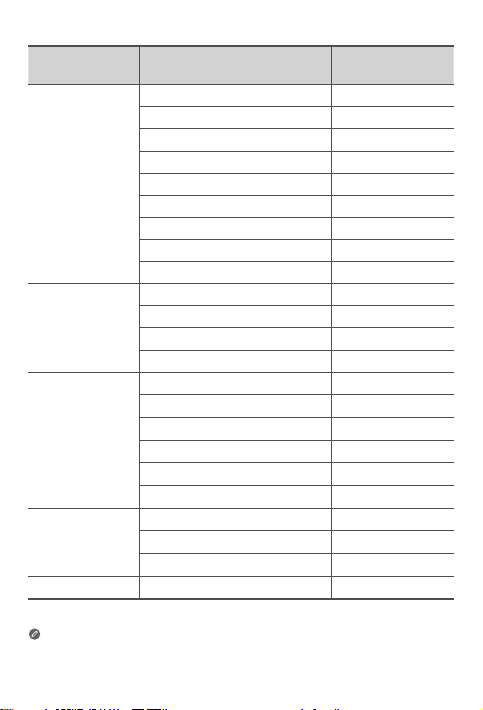
Dénomination du
modèle
Lenovo TB-X705L
Lenovo TB-X705F
Lenovo TB-X605L
Lenovo TB-X605F
Lenovo HA-200 Bluetooth 2400-2483.5 9,93
L’appareil Lenovo HA-200 doit être utilisé à une distance de 20cm du corps humain.
Les informations ci-dessus s’appliquent aux pays de l’UE uniquement.
Reportez-vous au produit pour connaître les bandes de fréquences prises
en charge dans les autres pays.
Bandes de fréquences
UMTS B1 23
UMTS B8 24
LTE B1/B7 22,5
LTE B3/B8/B20/B40 23,5
LTE B38 23
WLAN 2400-2483.5 17,5
WLAN 5150-5350 16
WLAN 5470-5850 15,5
Bluetooth 2400-2483.5 10,5
WLAN 2400-2483.5 18
WLAN 5150-5350 16,5
WLAN 5470-5850 15,5
Bluetooth 2400-2483.5 9,5
UMTS B1 22,5
UMTS B8 24
LTE B1, 3, 7, 8, 20, 38, 40 23,5
WLAN 2400-2483.5 20
WLAN 5150-5850 17
Bluetooth 2400-2483.5 9,5
WLAN 2400-2483.5 20
WLAN 5150-5850 17
Bluetooth 2400-2483.5 9,5
45
Puissance maximale
(dBm)
Page 48
Informations sur le débit d’absorption
spécifique (DAS)
VOTRE APPAREIL MOBILE RÉPOND AUX DIRECTIVES INTERNATIONALES
CONCERNANT L’EXPOSITION AUX ONDES RADIO.
Votre appareil mobile est un émetteur et un récepteur radio. Il est conçu
pour ne pas dépasser les limites d’exposition aux ondes radio (champs
électromagnétiques de fréquence radio) recommandées par les directives
internationales. Ces directives ont été établies par une organisation
scientifique indépendante (ICNIRP) et incluent une marge de sécurité
importante pour garantir la sécurité de tous les individus, quels que soient
leur âge et leur état de santé.
Les directives d’exposition aux ondes radio utilisent une unité de mesure
connue sous le nom de débit d’absorption spécifique (DAS). La limite de DAS
pour les appareils mobiles est de 2W/kg. Lors des tests visant à déterminer
le DAS, l’appareil est utilisé dans des positions de fonctionnement standard
et fonctionne à son niveau de puissance certifié le plus élevé dans toutes les
bandes de fréquences testées. Les valeurs de DAS maximales conformes aux
directives ICNIRP pour votre modèle sont répertoriées ci-dessous:
Valeur de DAS maximale pour ce modèle et conditions dans lesquelles
elle a été enregistrée.
Lenovo TBX705L
Limite
du DAS
(Europe):
10g (2,0
W/kg)
En cours d’utilisation, les valeurs de DAS réelles de votre appareil sont
généralement bien inférieures aux valeurs mentionnées. En eet, à des
fins d’ecacité système et pour réduire les interférences sur le réseau, la
puissance de fonctionnement de votre appareil mobile est automatiquement
réduite lorsque la pleine puissance n’est pas requise pour la connexion.
Plus la puissance de sortie de l’appareil est basse, plus sa valeur DAS est faible.
Si vous souhaitez réduire votre exposition aux fréquences radio, vous pouvez
le faire facilement en limitant votre utilisation ou simplement en utilisant un
kit mains libres pour garder l’appareil à distance du corps.
Lenovo TBX705F
Lenovo TBX605F
Lenovo TBX605L
Près du
corps
Près du
corps
Près du
corps
Près du
corps
LTE B40, Wi-Fi,
Bluetooth
Wi-Fi, Bluetooth 1,01 W/kg
Wi-Fi, Bluetooth 1,25 W/kg
WCDMA Band I,
Wi-Fi, Bluetooth,
LTE
46
1,15 W/kg
1,50 W/kg
Page 49

Italiano
Prima di utilizzare il dispositivo, leggere attentamente la presente guida.
Tutte le informazioni contrassegnate con un * in questa guida si riferiscono
solo al modello WLAN + LTE.
Informazioni preliminari - Informazioni sulle normative
I modelli del dispositivo dotati di comunicazioni wireless sono conformi agli
standard di sicurezza e di frequenza radio di ogni paese o regione in cui sia
stata ottenuta l’approvazione per l’utilizzo del wireless. Inoltre, se il prodotto
contiene un modem telecom, è conforme ai requisiti di connessione alla rete
telefonica nel proprio paese.
Prima di utilizzare i dispositivi wireless contenuti nel dispositivo, leggere
l’Avviso normativo che si applica al paese o alla regione di residenza. Per
ottenere una versione PDF dell’Avviso normativo, fare riferimento alla sezione
“Download delle pubblicazioni” qui di seguito.
Richiesta di supporto
Per il supporto sui servizi di rete e sulla fatturazione, contattare il proprio
operatore di rete wireless. Per informazioni su come utilizzare il dispositivo e
per le caratteristiche tecniche, visitare il sito Web https://support.lenovo.com.
Download delle pubblicazioni
Le versioni in formato elettronico delle pubblicazioni sono disponibili sul sito Web
https://support.lenovo.com. Per scaricare le pubblicazioni relative al dispositivo,
visitare il sito Web https://support.lenovo.com e seguire le istruzioni sullo schermo.
Accesso alla Guida dell’utente del tablet
La Guida dell’utente contiene informazioni dettagliate sul dispositivo. Per
accedere alla Guida dell’utente, visitare il sito Web https://support.lenovo.com
e seguire le istruzioni visualizzate.
Informazioni legali
Lenovo e il logo Lenovo sono marchi di fabbrica di Lenovo negli Stati Uniti
e/o in altri paesi.
Altri nomi di società, prodotti o servizi possono essere marchi di fabbrica o di
servizio di altre società.
Prodotto su licenza di Dolby Laboratories. Dolby, Dolby Atmos e il simbolo
della doppia D sono marchi di Dolby Laboratories.
AVVISO SU DIRITTI LIMITATI E RISTRETTI: qualora dati o software siano forniti in base
ad un contratto “GSA” (General Services Administration), l’uso, la riproduzione o la
divulgazione sono soggetti alle limitazioni specificate nel Contratto n. GS-35F-05925.
47
Page 50
5
4
11
Panoramica del dispositivo
Nome commerciale Modello Versione
Lenovo Tab P10
Lenovo Tab M10
Lenovo TB-X705F WLAN
Lenovo TB-X705L WLAN + LTE
Lenovo TB-X605F WLAN
Lenovo TB-X605L WLAN + LTE
2
3
1
2 2
Touch screen
1
Sensore luminoso
4
Vassoio schede8Microfono
7
Connettore per
10
cue
Pulsanti volume
13
• Collegare il proprio dispositivo ad altri accessori Lenovo attraverso il
• Il dispositivo supporta le cuffie CTIA.
• La versione WLAN non dispone di un alloggiamento per schede Nano-SIM.
• Tutte le informazioni contrassegnate con un
connettore smart. Gli accessori variano in base al paese/regione.
solo al modello Lenovo Tab P10.
6
※
2
Altoparlanti
2
Indicatore
5
Fotocamera
11
posteriore
Pulsante di
14
alimentazione
10
9
8
7
3
6
9
12
15
※
in questa guida si riferiscono
15
Fotocamera anteriore
Sensore impronte digitali
Connettore USB 2.0
tipo C
Lampeggiante
Connettore smart
48
12
13
14
※
※
Page 51
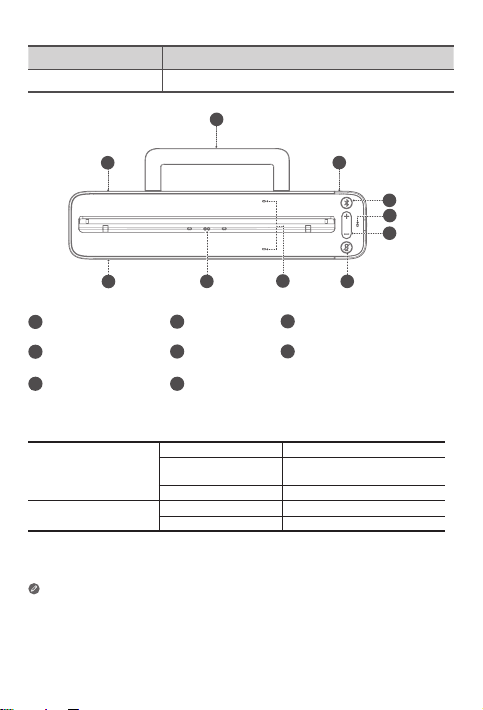
Nome commerciale Modello
Lenovo Smart Dock Lenovo HA-200
2
1
1
Altoparlanti
1
Pulsante Bluetooth5Microfono
4
Pulsante on/o
7
microfono
Supporto di
2
stabilità
Connettore
8
smart
8
3
5
3
6
7
Connettore adattatore di
alimentazione
Pulsanti volume
4
5
6
Indicatore
Blu fisso Bluetooth collegato
Pulsante Bluetooth
Pulsante on/off
microfono
• Durante il collegamento, il pulsante di accensione/spegnimento del microfono
rimane rosso fino al primo accesso all’account Amazon.
• Per disattivare il Bluetooth del dock, tenere premuti insieme il pulsante
Bluetooth e il pulsante di accensione/spegnimento del microfono.
• Tutte le immagini e illustrazioni in questo documento sono solo per
riferimento e possono differire dal prodotto finale.
Blu lampeggiante
veloce
O Bluetooth non collegato
Rosso Microfono disabilitato
O Microfono acceso
49
Modalità di associazione
Page 52
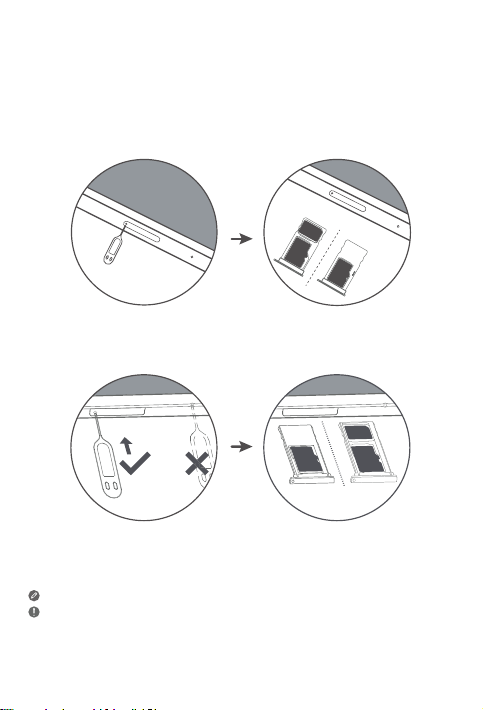
Installazione delle schede
Utilizzare una scheda microSD (venduta separatamente) per incrementare lo
spazio di memorizzazione.
*Per accedere alle reti cellulari con il tablet (solo versione WLAN + LTE),
inserire la scheda Nano-SIM fornita dal proprio operatore nell’alloggimento
come mostrato di seguito.
Nano-SIM
microSD
microSD
Figura 1: Lenovo Tab P10
IM
Nano-S
microSD
microSD
Figura 2: Lenovo Tab M10
Il tablet funziona solo con le schede Nano-SIM.
• Non inserire o rimuovere la scheda Nano-SIM quando il tablet è acceso. Ciò
potrebbe causare danni permanenti alla scheda Nano-SIM o al tablet.
• Non inserire lo strumento per la rimozione nel microfono. Il mancato rispetto di
questa indicazione potrebbe causare danni permanenti al tablet.
50
Page 53
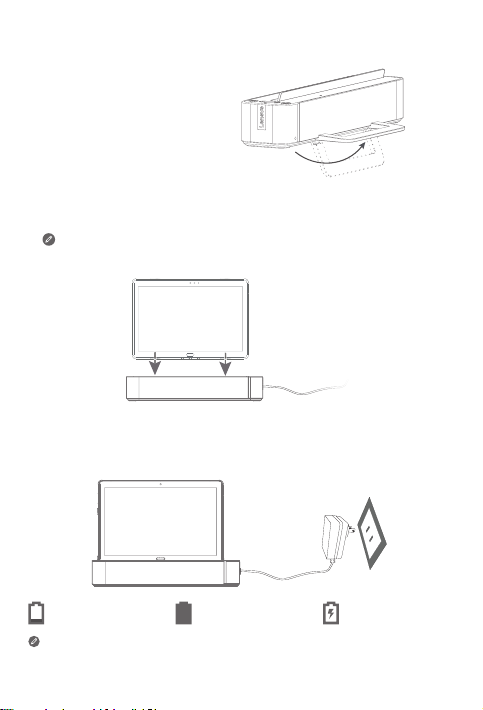
Come iniziare
1. Aprire il supporto di stabilità.
2. Inserire l’adattatore di alimentazione nella dock e quindi nella presa
elettrica.
3. Posizionare il tablet sulla dock.
Verificare di allineare correttamente il connettore sulla dock con il
connettore smart sul tablet. Il tablet vibrerà e quando sarà collegato
correttamente, il display cambierà visualizzazione.
Caricamento del tablet
Prima di utilizzare il dispositivo, potrebbe essere necessario caricare la batteria.
Come mostrato nell’immagine in basso, è possibile caricare la batteria
mediante la dock.
Batteria scarica Batteria carica In carica
È possibile verificare lo stato di carica dall’icona di stato della batteria nel
pannello di notifica quando il tablet è accesso e in carica.
51
Page 54
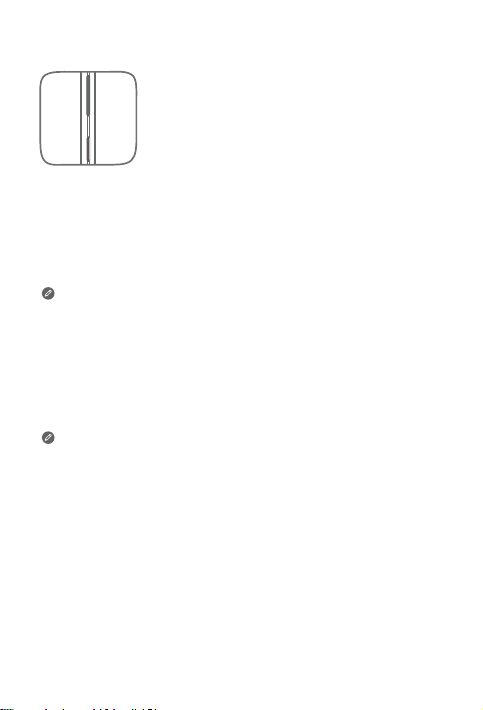
Accensione/spegnimento del tablet
Accensione: tenere premuto il pulsante di accensione
fino alla visualizzazione del logo Lenovo.
Spegnimento: tenere premuto il pulsante di accensione
per pochi secondi, quindi toccare Alimentazione.
Riavvio: tenere premuto il pulsante Alimentazione per
circa 10 secondi fino allo spegnimento del dispositivo.
Riaccenderlo quindi normalmente.
Collegamento del tablet alla dock mediante Bluetooth
1. Posizionare il tablet sulla dock.
2. Accedere al proprio account Amazon sul tablet.
3. Assicurarsi che il Bluetooth del tablet e la dock siano accesi. Si
connetteranno automaticamente.
Se il tablet non si connette automaticamente alla dock, premere
premuto il pulsante Bluetooth sulla dock per alcuni secondi per
entrare in modalità di associazione. In modalità di associazione, è
possibile associare manualmente la dock al tablet manualmente.
Parlare al Lenovo Smart Tab
1. Accedere al proprio account Amazon sul tablet.
2. Abilitare la funzione vivavoce sul pannello delle impostazioni rapide del tablet.
3. Pronunciare “Alexa” per recuperare l’attenzione del proprio dispositivo.
Verificare che l’assistente vocale predefinito sia configurato nelle
impostazioni del tablet su “Alexa”.
Cose da provare
Cose da provare fornisce esempi di cose di poter chiedere.
Alexa, che tempo fa?
Alexa, quali sono le ultime notizie?
Alexa, quant’è alto l’Everest?
Alexa, aggiungi “Cena con mamma”
al mio calendario.
Alexa, quali sono i ristoranti indiani
con le migliori recensioni?
Per ulteriori informazioni sull’app e accedere a funzionalità aggiuntive,
consulta “Cose da provare” nell’app Amazon Alexa..
Alexa, metti una sveglia per le 6:00
del mattino.
Alexa, imposta un timer da venti minuti.
Alexa, pioverà oggi?
Alexa, quali film ci sono al cinema
qui vicino?
Alexa, quanto dista la Statua della Libertà?
52
Page 55

Informazioni importanti su sicurezza e
gestione dei dati
Informazioni sulle buste in plastica
Pericolo: le buste in plastica possono risultare pericolose. Tenerle lontano
dalla portata di neonati e bambini per prevenire il rischio di soocamento.
Informazioni sulla batteria ricaricabile incorporata
Pericolo: non tentare di sostituire la batteria al litio ricaricabile interna. La
sostituzione di una batteria originale con una non compatibile potrebbe
aumentare il rischio di lesioni personali o danni alla proprietà a causa di
esplosioni, calore eccessivo o altri rischi.
Non provare a smontare o modificare il pacco batteria. Il mancato rispetto
di questa precauzione può causare esplosioni pericolose o perdita di liquido
dalla batteria.
Per lo smaltimento della batteria, rispettare tutte le ordinanze o normative
locali di riferimento. Non smaltire il pacco batteria tra i rifiuti urbani. Smaltire
le batterie usate secondo le istruzioni.
Il pacco batteria contiene una piccola quantità di sostanze pericolose. Per
evitare lesioni:
• Tenere il pacco batteria lontano da fiamme aperte o altre fonti di calore.
• Non esporre il pacco batteria ad acqua, pioggia o altri liquidi corrosivi.
• Non lasciare la batteria in un ambiente circostante con temperatura
estremamente elevata.
• Evitare corto circuiti del pacco batteria.
• Tenere il pacco batteria fuori dalla portata di bambini piccoli ed animali.
• Non lasciare la batteria in un ambiente circostante con pressione dell’aria
estremamente bassa. Potrebbe provocare un’esplosione oppure la
perdita di liquido infiammabile o gas dalla batteria.
Per prolungare la durata della batteria, consigliamo di caricarla almeno al 30 - 50%
della capacità ogni volta e di ricaricarla ogni tre mesi per evitare scariche eccessive.
Attenzione all’ascolto a volume elevato
Avvertenza: l’esposizione a rumori forti provenienti da qualsiasi sorgente per
lunghi periodi può danneggiare l’udito. Più il volume è elevato, meno tempo è
necessario perché possano verificarsi danni all’udito. Per proteggere l’udito:
• Limitare il tempo di utilizzo delle cuffie o degli auricolari ad alto volume.
• Evitare di aumentare il volume per non sentire i rumori esterni.
• Abbassare il volume se non si riesce a sentire le persone vicine mentre parlano.
53
Page 56
In caso si avvertano fastidi all’udito, incluse sensazioni di pressione o di orecchie
tappate, fischi o suoni smorzati, interrompere l’ascolto del dispositivo tramite le
cue o gli auricolari e rivolgersi a un medico per il controllo dell’udito.
Per evitare possibili danni all’udito, non utilizzare a volume elevato per lunghi
periodi di tempo.
Istruzioni di sicurezza per genitori e supervisori adulti
Il dispositivo mobile non è un gioco. Non è raccomandato come gioco per i
bambini sotto i 3 anni di età. Come per ogni altro prodotto elettrico, devono
essere osservate precauzioni durante la manipolazione e l’utilizzo di prodotti
elettrici per ridurre il rischio di folgorazione. Se i genitori scelgono di permettere
ai bambini di 3 o più anni di usare il dispositivo, devono avvertire il proprio figlio
circa i possibili rischi durante l’uso e la manipolazione del dispositivo mobile.
I genitori devono ispezionare periodicamente il dispositivo mobile (incluso
l’adattatore di alimentazione CA e le parti più piccole, se presenti) e verificare
l’assenza di danni. Controllare regolarmente il dispositivo mobile per assicurarsi
che funzioni correttamente e sia sicuro per l’uso da parte dei bambini.
Informazioni su assistenza e supporto
Le informazioni riportate di seguito descrivono il supporto tecnico disponibile
per il prodotto durante il periodo di garanzia o per la durata del prodotto.
Per la spiegazione completa dei termini di garanzia Lenovo, consultare la
Garanzia limitata Lenovo (LLW). Per informazioni sull’accesso alla garanzia
completa, consultare la sezione “Informazioni sulla Garanzia limitata Lenovo”,
riportata successivamente in questo documento.
Supporto tecnico in linea
Il supporto tecnico online è disponibile per tutta la durata del prodotto
all’indirizzo: https://support.lenovo.com
Supporto tecnico telefonico
È possibile ottenere assistenza e informazioni tramite telefono dal Centro di
assistenza clienti. Prima di rivolgersi al rappresentante del supporto tecnico
Lenovo, tenere a portata di mano le informazioni seguenti: modello e numero
di serie, testo esatto di eventuali messaggi di errore e descrizione del problema.
È possibile che il rappresentante del supporto tecnico richieda di riprodurre il
problema sul dispositivo durante la telefonata.
54
Page 57
Elenco telefonico internazionale per l’assistenza Lenovo
Importante: i numeri di telefono sono soggetti a modifica senza preavviso. Un
elenco aggiornato dei numeri di telefono per il Centro di assistenza clienti è
sempre disponibile al sito Web: https://www.lenovo.com/support/phone
Se il numero di telefono per il proprio paese o la propria area non è presente
nell’elenco, contattare il rivenditore Lenovo o il concessionario Lenovo di zona.
Informazioni sulla garanzia
Informazioni sulla garanzia limitata Lenovo
Questo prodotto è coperto dai termini della Garanzia limitata Lenovo, versione
L505-0010-02 08/2011. Consultare la Garanzia limitata Lenovo all’indirizzo
https://www.lenovo.com/warranty/llw_02. Sul sito Web, la Garanzia limitata
Lenovo è disponibile in diverse lingue. Se non è possibile visualizzarla, contattare
l’ucio locale Lenovo o il rivenditore per ottenere una versione stampata.
Periodo di garanzia e tipo di servizio di garanzia
Paese o regione Periodo di garanzia
Parti di ricambio e
Regno Unito, Australia, Nuova Zelanda
India, Messico
Stati Uniti d’America, Canada,
Giappone
Spagna, Francia, Germania, Italia
assistenza - 1 anno
Pacco batteria - 1 anno
Dock -1 anno
Parti di ricambio e
assistenza - 1 anno
Pacco batteria - 1 anno
Dock -1 anno
Parti di ricambio e
assistenza - 1 anno
Pacco batteria - 1 anno
Dock -1 anno
Parti di ricambio e
assistenza - 2 anni
Pacco batteria - 1 anno
Dock -2 anni
* Esclusi alcuni componenti. Garanzia limitata di 90 giorni per alimentatori,
tastiere, parti in plastica e cerniere.
Tipo di servizio
di garanzia
1,3
1,4
1,5
1,3
55
Page 58
Tipo di servizio di garanzia
1. Servizio CRU (Customer Replaceable Unit)
2. Servizio a domicilio
3. Servizio di trasporto o deposito
4. Servizio con consegna presso il centro assistenza a cura del cliente
5. Servizio con spedizione postale a cura del cliente
6. Servizio con spedizione postale del prodotto da riparare e del prodotto
riparato a carico del cliente
7. Servizio di sostituzione del prodotto
Per una spiegazione completa dei tipi di servizio di garanzia, fare riferimento
alla garanzia completa.
Per informazioni sull’accesso alla garanzia completa, consultare la sezione
“Informazioni sulla Garanzia limitata Lenovo”.
Se occorre supporto per questo dispositivo, non rivolgersi al punto vendita.
Visitare https://support.lenovo.com, dove è possibile trovare risposte alle
domande più frequenti, aggiornamenti del software e informazioni dettagliate
su come mettersi in contatto con noi.
Certificato di conformità EurAsia
Informazioni sull’ambiente, sul riciclo e sullo
smaltimento
Istruzioni generali per il riciclo
Lenovo consiglia ai proprietari di apparecchiature IT di riciclarle in modo
responsabile e adeguato quando non sono più utilizzabili. Lenovo ore vari
programmi e servizi per assistere i proprietari delle apparecchiature nel riciclo
dei prodotti IT. Per informazioni sul riciclo dei prodotti Lenovo, visitare il sito
Web http://www.lenovo.com/recycling.
56
Page 59
Informazioni importanti su batteria e RAEE
Le batterie e le apparecchiature elettriche ed elettroniche
contrassegnate con il simbolo di un cestino sbarrato non possono
essere smaltite come normale rifiuto urbano. La restituzione, il
riciclo e il trattamento delle batterie e dei rifiuti di apparecchiature
elettriche ed elettroniche (RAEE) devono avvenire separatamente,
avvalendosi di una struttura di raccolta messa a disposizione
dei clienti. Se possibile, rimuovere e isolare le batterie dai RAEE
prima di inserire questi ultimi nel flusso di raccolta dei rifiuti. Le
batterie devono essere raccolte separatamente avvalendosi di una
struttura di raccolta resa disponibile per la restituzione, il riciclo e il
trattamento di batterie e accumulatori.
Le informazioni specifiche per il proprio paese sono disponibili
all’indirizzo: http://www.lenovo.com/recycling
Informazioni sul riciclo per il Giappone
Per informazioni sul riciclo e lo smaltimento per il Giappone, è possibile
visitare il sito: http://www.lenovo.com/recycling/japan
Ulteriori istruzioni di riciclo
Ulteriori informazioni sul riciclo delle batterie e dei componenti del
dispositivo sono incluse nella Guida dell’utente. Per informazioni dettagliate,
consultare la sezione “Accesso alla Guida dell’utente del tablet”.
Simboli relativi al riciclo delle batterie
Informazioni sul riciclo delle batterie per Taiwan
Informazioni sul riciclo delle batterie per Stati Uniti e Canada
57
Page 60
Informazioni sul riciclo delle batterie per l’Unione Europea
Marchio per l’ecienza energetica
Direttiva sulla restrizione di sostanze pericolose (RoHS)
Turchia
Il prodotto Lenovo soddisfa i requisiti della direttiva vigente nella Repubblica
di Turchia sulla restrizione dell’uso di sostanze pericolose (RoHS) nei rifiuti di
apparecchiature elettriche ed elettroniche (RAEE).
Türkiye AEEE Yönetmeligine Uygunluk Beyanı
Bu Lenovo ürünü, T.C. Çevre ve Orman Bakanlıgı’nın “Atık Elektrikli ve Elektronik Esya Bazı Zararlı
Maddelerin Kullanımının Sınırlandırılmasına Dair Yönetmelik (AEEE)” direktierine uygundur.
AEEE Yönetmeligine Uygundur.
Ucraina
Цим підтверджуємо, що продукція Леново відповідає вимогам нормативних актів
України, які обмежують вміст небезпечних речовин
India
RoHS compliant as per E-waste (Management) Rules.
Vietnam
I prodotti Lenovo venduti in Vietnam, a partire dal 23 settembre 2011, soddisfano
i requisiti della direttiva Vietnam Circular 30/2011/TT-BCT (“Vietnam RoHS”).
Unione Europea
I prodotti Lenovo venduti nell’Unione Europea a partire dal 3 gennaio 2013,
soddisfano i requisiti della direttiva 2011/65/UE sulla restrizione dell’uso
di determinate sostanze pericolose nelle apparecchiature elettriche ed
elettroniche (“rielaborazione della direttiva RoHS” o “RoHS 2”). Per ulteriori
informazioni sui progressi di Lenovo in materia di RoHS, visitare:
https://www.lenovo.com/us/en/social_responsibility/RoHS-Communication.pdf
Singapore
I prodotti Lenovo venduti a Singapore a partire dal 1° giugno 2017 soddisfano i requisiti
dell’ordinanza della Gazzetta Uciale n. S 263/2016 sulla Restrizione di sostanze
pericolose nelle apparecchiature elettriche ed elettroniche a Singapore (“SG-RoHS”).
58
Page 61
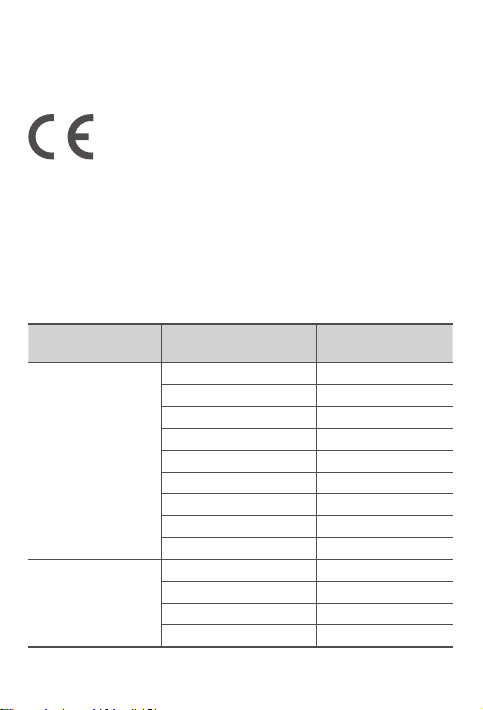
Dichiarazione di conformità per l’Unione Europea
Conformità dell’Unione Europea
EU contact: Lenovo, Einsteinova 21, 851 01 Bratislava, Slovakia
Conformità alla Direttiva RE
Lenovo PC HK Limited dichiara che l’apparecchiatura radio tipo Lenovo
TB-X705F, Lenovo TB-X705L, Lenovo TB-X605F, Lenovo TB-X605L, Lenovo
HA-200 è conforme alla Direttiva 2014/53/EU.
Il testo completo della Dichiarazione di conformità UE è disponibile al
seguente indirizzo Internet:
http://www.lenovo.com/us/en/social_responsibility/EU_DoC_tablets
Questa apparecchiatura radio opera utilizzando le bande di frequenza e la
potenza massima di radiofrequenza indicate di seguito:
Nome del modello Bande di frequenza
UMTS B1 23
UMTS B8 24
LTE B1/B7 22,5
LTE B3/B8/B20/B40 23,5
Lenovo TB-X705L
Lenovo TB-X705F
LTE B38 23
WLAN 2400-2483.5 17,5
WLAN 5150-5350 16
WLAN 5470-5850 15,5
Bluetooth 2400-2483.5 10,5
WLAN 2400-2483.5 18
WLAN 5150-5350 16,5
WLAN 5470-5850 15,5
Bluetooth 2400-2483.5 9,5
Potenza massima
trasmessa (dBm)
59
Page 62
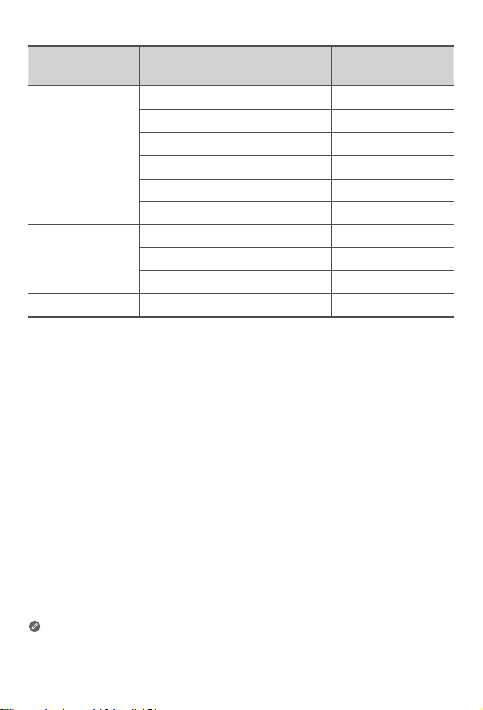
Nome del
modello
Lenovo TB-X605L
Lenovo TB-X605F
Lenovo HA-200 Bluetooth 2400-2483.5 9,93
Il dispositivo Lenovo HA-200 deve essere utilizzato con una distanza di
separazione di 20 cm dal corpo umano.
Le suddette informazioni si riferiscono solo ai paesi europei. Fare
riferimento al prodotto effettivo per le bande di frequenza supportate
negli altri paesi.
Bande di frequenza
UMTS B1 22,5
UMTS B8 24
LTE B1, 3, 7, 8, 20, 38, 40 23,5
WLAN 2400-2483.5 20
WLAN 5150-5850 17
Bluetooth 2400-2483.5 9,5
WLAN 2400-2483.5 20
WLAN 5150-5850 17
Bluetooth 2400-2483.5 9,5
60
Potenza massima
trasmessa (dBm)
Page 63
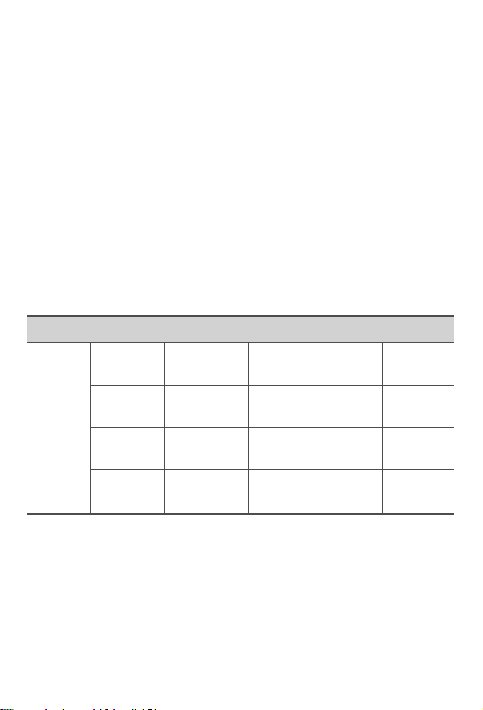
Informazioni sul Tasso di assorbimento specifico
QUESTO DISPOSITIVO MOBILE SODDISFA LE LINEE GUIDA INTERNAZIONALI
SULL’ESPOSIZIONE ALLE ONDE RADIO.
Il dispositivo mobile in uso è un trasmettitore e ricevitore di frequenze radio. È
progettato in modo da rispettare i limiti di esposizione alle onde radio (campi
elettromagnetici a radio frequenza) raccomandati dalle linee guida internazionali.
Le linee guida sono state sviluppate da un’organizzazione scientifica indipendente
(ICNIRP) e comprendono un sostanziale margine di sicurezza volto a garantire la
sicurezza di tutti, indipendentemente dall’età e dalle condizioni di salute.
Le linee guida in materia di esposizione alle onde radio utilizzano un’unità
di misura comunemente nota come Specific Absorption Rate (Tasso di
assorbimento specifico) o SAR. Il limite di SAR per i dispositivi mobili è di
2W/kg. I test per i livelli di SAR vengono eseguiti utilizzando le normali posizioni
d’uso con il dispositivo che trasmette al massimo livello di potenza certificato in
tutte le bande di frequenza testate. I valori di SAR più elevati ai sensi delle linee
guida ICNIRP per questo modello di dispositivo sono elencati d seguito:
SAR massimo per questo modello e condizioni nelle quali è stato registrato.
Lenovo
Limite
di SAR
10g
Europa
(2,0 W/
kg)
Durante l’utilizzo, i valori di SAR eettivi per il dispositivo sono generalmente
ben al di sotto dei valori riportati. Questo poiché, per l’ecienza del sistema
e per minimizzare l’interferenza sulla rete, la potenza di funzionamento
di questo dispositivo mobile si abbassa automaticamente quando non è
necessaria la potenza massima per la connessione dati.
Minore è la potenza di uscita del dispositivo, minore è il suo valore di SAR.
Chi è interessato a ridurre ulteriormente l’esposizione alle radiofrequenze, può
farlo in modo semplice limitando l’utilizzo o utilizzando un kit vivavoce per
tenere il dispositivo lontano dal corpo.
TB-X705L
Lenovo
TB-X705F
Lenovo
TB-X605F
Lenovo
TB-X605L
A contatto
con il corpo
A contatto
con il corpo
A contatto
con il corpo
A contatto
con il corpo
LTE B40, Wi-Fi,
Bluetooth
Wi-Fi, Bluetooth 1,01 W/kg
Wi-Fi, Bluetooth 1,25 W/kg
WCDMA Band I,
Wi-Fi, Bluetooth, LTE
61
1,15 W/kg
1,50 W/kg
Page 64

Español
Lea esta guía cuidadosamente antes de utilizar su dispositivo.
Toda la información etiquetada con * en esta guía solo se refiere al modelo
WLAN + LTE.
Lea primero: información regulatoria
Los modelos de dispositivos equipados con comunicaciones inalámbricas
cumplen con los estándares de frecuencia de radio y de seguridad de
cualquier país o región en el cual han sido aprobados para su uso inalámbrico.
Además, si su producto tiene un módem de telecomunicación, cumple con los
requerimientos de conexión a la red telefónica de su país.
Asegúrese de leer las Normas regulatorias de su país o región antes de
utilizar los dispositivos inalámbricos contenidos en su dispositivo. Para
obtener una versión PDF de las Normas regulatorias, diríjase a la sección
“Descargar publicaciones” a continuación.
Obtener soporte
Para obtener soporte de facturación y servicios de red, contacte a su
operador de red inalámbrica. Para obtener información acerca de cómo
utilizar su dispositivo y ver sus especificaciones técnicas, ingrese en
https://support.lenovo.com.
Descargar publicaciones
Las versiones electrónicas de las publicaciones están disponibles en
https://support.lenovo.com. Para descargar las publicaciones sobre su
dispositivo, ingrese en https://support.lenovo.com y siga las instrucciones que
aparecen en pantalla.
Acceso a la Guía del usuario de su tablet
La Guía del usuario contiene información detallada sobre el dispositivo. Para
acceder a su Guía del usuario, ingrese en https://support.lenovo.com y siga las
instrucciones que aparecen en pantalla.
Avisos legales
Lenovo y el logo de Lenovo son marcas registradas de Lenovo en los Estados
Unidos, otros países o ambos.
Otros nombres de servicios, productos o compañías pueden ser marcas
registradas o marcas de servicios de terceros.
Fabricado bajo licencia de Dolby Laboratories. Dolby, Dolby Atmos y el
símbolo doble D son marcas registradas de Dolby Laboratories.
AVISO DE DERECHOS RESTRINGIDOS Y LIMITADOS: Si se entregan datos
o software en conformidad con un contrato de Administración general de
servicios (General Services Administration, GSA), el uso, la reproducción o la
divulgación están sujetos a las restricciones enumeradas en el Contrato N.º
GS-35F-05925.
62
Page 65
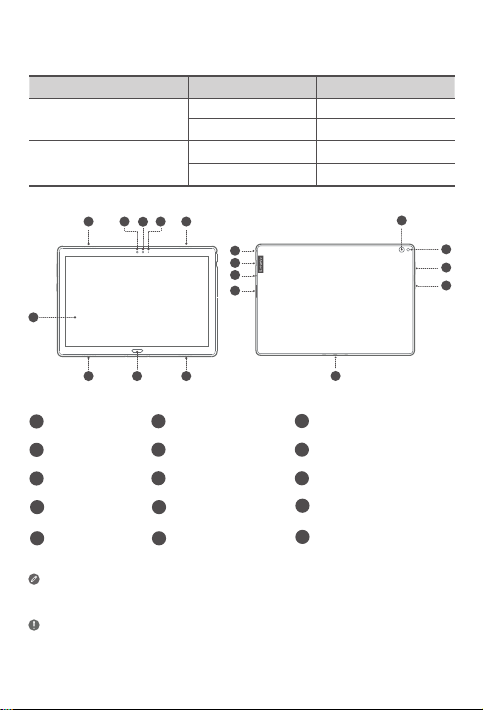
5
4
11
Resumen del dispositivo
Nombre del producto Modelo Versión
Lenovo Tab P10
Lenovo Tab M10
Lenovo TB-X705F WLAN
Lenovo TB-X705L WLAN + LTE
Lenovo TB-X605F WLAN
Lenovo TB-X605L WLAN + LTE
2
3
1
2 2
Pantalla táctil
1
4
Sensor de luz
Bandeja de tarjeta8Micrófono
7
Conector de
10
auriculares
Botones de
13
volumen
• Conecte su dispositivo a otros accesorios Lenovo a través del conector
• Su dispositivo soporta auriculares CTIA.
• La versión de WLAN no tiene ranura de tarjeta Nano-SIM.
• Toda la información etiquetada con
※
smart. Los accesorios varían según el país/región.
Tab P10.
2
10
9
8
7
6
Parlantes
2
5
Indicador
3
6
9
Cámara posterior
11
Botón de encendido15Conector smart
14
12
※
en esta guía solo se refiere a Lenovo
15
Cámara frontal
Sensor de huellas
※
digitales
Conector USB2.0 tipo C
※
Flash
63
12
13
14
Page 66
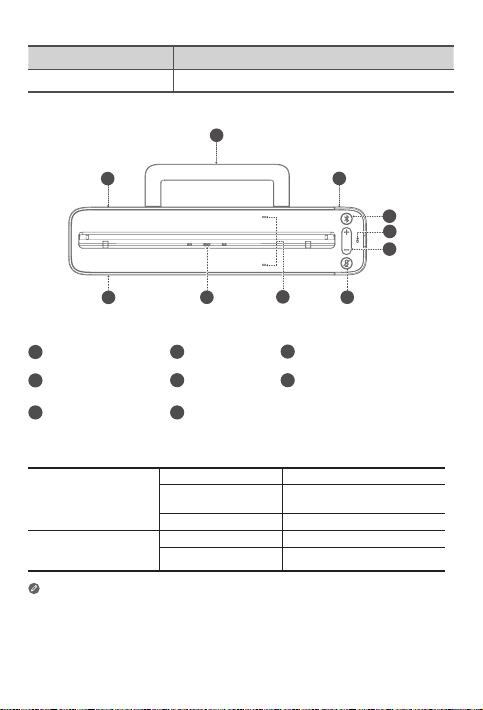
Nombre del Producto Modelo
Lenovo Smart Dock Lenovo HA-200
2
1
1
Parlantes
1
4
Botón de Bluetooth5Micrófono
Botón de encendido/
7
apagado del micrófono
Soporte de
2
estabilidad
Conector smart
8
8
3
5
3
6
7
Conector del adaptador
de corriente
Botones de volumen
4
5
6
Indicador
Azul constante Bluetooth conectado
Botón de Bluetooth
Botón de
encendido/apagado
de micrófono
• El botón de encendido/apagado del micrófono permanecerá rojo la primera
vez que inicie sesión en su cuenta de Amazon mientras esté acoplado.
• Para desactivar la conexión de Bluetooth, mantenga presionado el botón de
Bluetooth y el botón de encendido/apagado del micrófono al mismo tiempo.
• Todas las fotos e ilustraciones en este documento son solo de referencia y
pueden diferir del producto final.
Azul intermitente
rápido
Apagado Bluetooth desconectado
Rojo Micrófono deshabilitado
Apagado Micrófono encendido
64
Modo de vinculación
Page 67
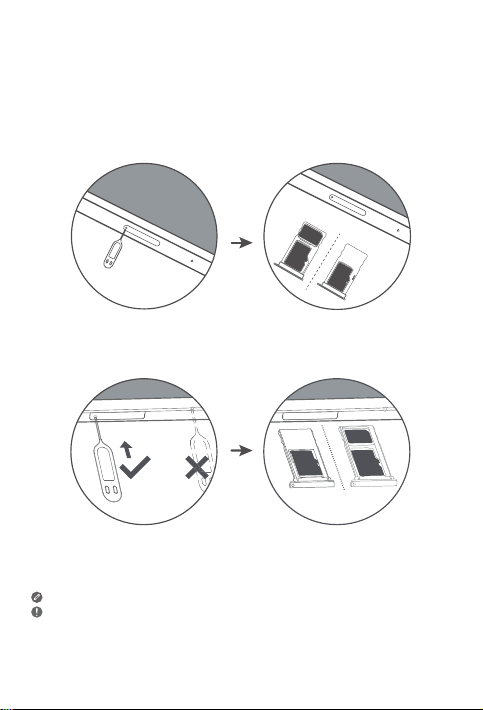
Instalar tarjetas
Utilice una tarjeta microSD (se vende por separado) para almacenamiento
adicional.
*Para acceder a redes celulares con su tablet (solo la versión WLAN + LTE),
inserte en la ranura una tarjeta Nano-SIM proporcionada por el operador tal
como se muestra a continuación.
Nano-SIM
microSD
microSD
Figura 1: Lenovo Tab P10
IM
Nano-S
microSD
microSD
Figura 2: Lenovo Tab M10
Las tarjetas Nano-SIM son las únicas que funcionan con su dispositivo.
• No inserte o retire la tarjeta Nano-SIM mientras su tablet se está cargando. El
hacerlo puede dañar de forma permanente a la tarjeta Nano-SIM o a la tablet.
• No inserte la herramienta de expulsión en el micrófono. El hacerlo puede dañar
de forma permanente su tablet.
65
Page 68
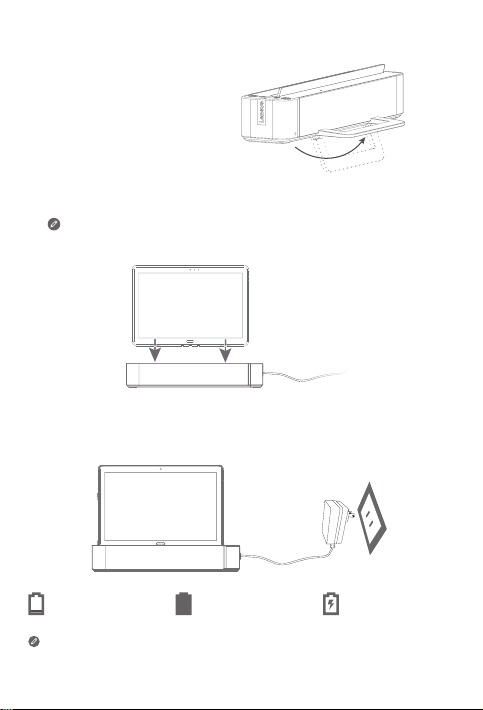
Introducción
1. Abra el soporte de estabilidad.
2. Enchufe el adaptador de corriente en el acople y luego en una toma de corriente.
3. Coloque su tablet en el acople.
Asegúrese de alinear correctamente el conector smart en el acople
con el conector smart en la tablet. La tablet vibrará y la pantalla
cambiará cuando se acople correctamente.
Carga de la tablet
Es posible que deba cargar la batería antes de utilizar el dispositivo.
Tal como se muestra en la imagen a continuación, puede cargar la batería a
través del acople.
Batería baja
Puede verificar el estado de carga mediante el icono de estado de la batería
en el panel de notificaciones cuando la tablet esté encendida y cargándose.
Batería con carga
completa
66
Cargando
Page 69
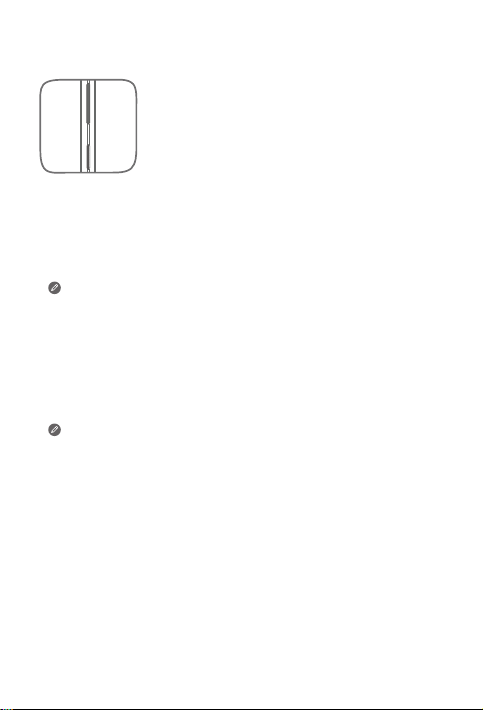
Encender/apagar la tablet
Encender: Mantenga presionado el botón de encendido
hasta que el logo de Lenovo aparezca.
Apagar: Mantenga presionado el botón de encendido
por unos segundos, luego toque Apagar.
Reiniciar: Mantenga presionado el botón de encendido
aproximadamente 10 segundos hasta que el dispositivo se
apague. Luego, vuelva a encenderlo de la forma normal.
Conectar su tablet a su acople a través de Bluetooth
1. Coloque su tablet en el acople.
2. Inicie sesión en su cuenta Amazon desde la tablet.
3. Asegúrese de que el Bluetooth de la tablet y el acople estén encendidos.
Se conectarán automáticamente.
Si la tablet no se puede conectar a su acople automáticamente,
mantenga presionado el botón de Bluetooth en el acople por
unos segundos para entrar al modo de vinculación. En el modo de
vinculación, puede vincular el acople con su tablet de forma manual.
Hablar con su Lenovo Smart Tab
1. Inicie sesión en su cuenta Amazon desde la tablet.
2. Habilite la opción de manos libres en el panel Configuración Rápida de la tablet.
3. Diga “Alexa” para captar la atención del dispositivo.
Asegúrese de que el asistente de voz por defecto en la
configuración de su tablet esté configurado para “Alexa”.
Sugerencias
Las cosas para intentar son ejemplos de preguntas.
Alexa, ¿qué tiempo hace?
Alexa, pon mi Resumen de noticias.
Alexa, ¿qué altura tiene el monte
Everest?
Alexa, añade “Cena con mamá” a mi
calendario.
Alexa, dime algunos de los restaurantes
indios con mejores valoraciones.
Para conocer más sobre la app y acceder a características adicionales,
consulte “Sugerencias” en la app de Amazon Alexa.
Alexa, pon una alarga a las 6 de la
mañana.
Alexa, pon un temporizador de 20 minutos.
Alexa, ¿va a llover hoy?
Alexa, ¿qué películas ponen en los
cines de mi zona?
Alexa, ¿a qué distancia está la
Sagrada Familia?
67
Page 70

Información importante sobre seguridad y manejo
Aviso sobre bolsas de plástico
Peligro: Las bolsas de plástico pueden ser peligrosas. Manténgalas fuera del
alcance de bebés y niños para evitar el peligro de asfixia.
Aviso sobre la batería recargable incorporada
Peligro: No intente reemplazar la batería interna recargable de iones de litio.
Reemplazar la batería con un tipo de batería incompatible puede aumentar
el riesgo de lesiones personales o daño a la propiedad debido a explosiones,
calor excesivo u otros riesgos.
No intente desarmar o modificar el paquete de la batería. Esto puede causar
explosiones perjudiciales o pérdidas de líquido de la batería.
Al desechar la batería, cumpla con todas las disposiciones o regulaciones
locales pertinentes. No deseche el paquete de la batería en residuos
municipales. Deseche las baterías usadas según las instrucciones.
El paquete de la batería contiene una pequeña cantidad de sustancias
perjudiciales. Para evitar lesiones:
• Mantenga el paquete de la batería lejos de llamas abiertas u otras
fuentes de calor.
• No exponga el paquete de la batería al agua, la lluvia u otros líquidos
corrosivos.
• No deje la batería en un entorno con temperatura ambiente
extremadamente alta.
• Evite los cortocircuitos en el paquete de la batería.
• Mantenga el paquete de la batería fuera del alcance de los niños y las
mascotas.
• No deje la batería en un entorno con presión de aire extremadamente
baja. Puede ocasionar una explosión o la pérdida de líquido o gas
inflamable proveniente de la batería.
Para prolongar la vida útil de la batería, recomendamos cargarla al menos del
30 al 50% de capacidad cada vez, y recargarla cada tres meses para evitar el
exceso de descarga.
Tenga cuidado con la exposición a un alto volumen
Advertencia: La exposición a ruidos fuertes de cualquier tipo durante
períodos prolongados puede afectar su capacidad auditiva. Cuanto más
alto sea el sonido, menos tiempo tarda su audición en verse afectada. Para
proteger su capacidad auditiva:
• Limite la cantidad de tiempo que utiliza los auriculares a un volumen alto.
• No suba el volumen para bloquear entornos ruidosos.
• Baje el volumen si no puede escuchar a la gente que lo rodea.
68
Page 71

Si siente molestias en la audición, sensación de presión o inflamación del
oído, zumbido en los oídos o murmullos sordos, debe dejar de utilizar el
dispositivo con auriculares y hacerse un control de audición.
A fin de evitar daños en el oído, no escuche a niveles de volumen altos
durante períodos prolongados.
Instrucciones de seguridad para padres y supervisores adultos
Su dispositivo móvil no es un juguete. No se recomienda que los niños
menores de 3 años jueguen con él. Al igual que con todos los productos
eléctricos, deben respetarse las precauciones durante la manipulación y el
uso de productos eléctricos para reducir el riesgo de descarga eléctrica. Si
los padres deciden permitir que un niño de 3 años o más utilice el dispositivo,
deben advertir a su hijo acerca del peligro potencial que existe al usar y
manipular el dispositivo móvil.
Los padres deben inspeccionar el dispositivo móvil (incluido el adaptador
de CA y las piezas pequeñas, según corresponda) en forma periódica
para detectar daños. Compruebe habitualmente el dispositivo móvil para
asegurarse de que el mismo funcione de manera correcta y que sea seguro
para que su hijo lo utilice.
Información sobre servicio y soporte
La siguiente información describe el soporte técnico disponible para el
producto, durante el periodo de garantía o a lo largo de su vida útil. Consulte
la Garantía limitada de Lenovo (LLW) para obtener una explicación detallada
de los términos de la garantía de Lenovo. Vea el “aviso de Garantía limitada
de Lenovo” más adelante en este documento para obtener detalles sobre el
acceso a la garantía completa.
Soporte técnico en línea
El soporte técnico en línea está disponible durante la vida útil de un producto
en: https://support.lenovo.com
Soporte técnico por teléfono
Puede obtener ayuda e información por teléfono a través del Centro de
atención al cliente. Antes de ponerse en contacto con un representante del
servicio de soporte técnico de Lenovo, disponga de la siguiente información:
modelo y número de serie, enunciado exacto del mensaje de error y
descripción del problema.
El representante del servicio de soporte técnico puede sugerir guiarlo
mientras utiliza su dispositivo durante la llamada para resolver el problema.
69
Page 72
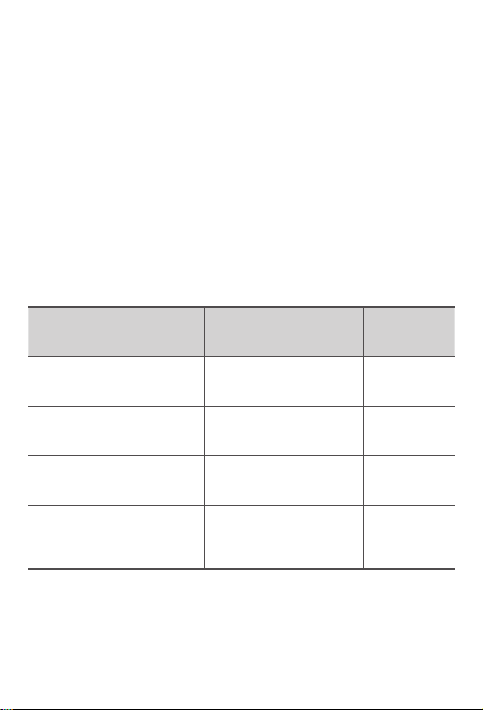
Lista de teléfonos mundiales de soporte de Lenovo
Importante: Los números de teléfono pueden ser modificados sin previo
aviso. La lista telefónica más actualizada para el Centro de atención al cliente
está siempre disponible en: https://www.lenovo.com/support/phone
Si no se indica el número de teléfono correspondiente a su país o región,
póngase en contacto con el distribuidor de Lenovo o con el representante de
ventas de Lenovo.
Información sobre la garantía
Aviso de garantía limitada de Lenovo
Este producto está cubierto por los términos de LLW, versión L505-0010-02
08/2011. Lea el LLW en https://www.lenovo.com/warranty/llw_02. Puede
ver la garantía limitada de Lenovo en varios idiomas en este sitio web. Si no
puede ver la garantía limitada de Lenovo desde el sitio web, comuníquese
con la oficina local de Lenovo o el distribuidor para obtener una versión
impresa de la garantía limitada de Lenovo.
Periodo y tipo de servicio de garantía
País o región Periodo de garantía
Reino Unido, Australia, Nueva
Zelanda
India, México
Estados Unidos de América,
Canadá, Japón
España, Francia, Alemania, Italia
Piezas y mano de obra: 1 año
Paquete de batería: 1 año
Acople: 1 año
Piezas y mano de obra: 1 año
Paquete de batería: 1 año
Acople: 1 año
Piezas y mano de obra: 1 año
Paquete de batería: 1 año
Acople: 1 año
Piezas y mano de obra:
2 años
Paquete de batería: 1 año
Acople: 2 años
* Excluye algunos componentes. Garantía limitada de 90 días para
adaptadores de alimentación, teclados, plásticos y bisagras.
Tipo de
servicio de
garantía
1,3
1,4
1,5
1,3
70
Page 73
Tipo de servicio de garantía
1. Servicio de Unidad reemplazable por el cliente (Customer Replaceable
Unit, CRU)
2. Servicio en los locales
3. Servicio de recogida a domicilio
4. Servicios de acarreo
5. Servicio por correo
6. Servicios por correo de ida y vuelta
7. Servicio de intercambio de productos
Para obtener una explicación detallada de los tipos de servicio de garantía,
consulte la garantía completa.
Consulte el “Aviso de Garantía limitada de Lenovo” para conocer los detalles
sobre cómo acceder a la garantía completa.
Si necesita soporte para este dispositivo, no se dirija al punto de compra.
Visite https://support.lenovo.com, donde encontrará respuestas a las
preguntas más comunes, actualizaciones de software y detalles sobre cómo
contactarnos.
Etiqueta de conformidad de Eurasia
Información sobre medio ambiente, reciclaje y
eliminación
Declaración general de reciclaje
Lenovo recomienda a los propietarios de equipos de tecnología de la
información (TI) que reciclen sus equipos cuando ya no sean necesarios.
Lenovo dispone de una variedad de programas y servicios para ayudar a
los propietarios de equipos a reciclar sus productos de TI. Para obtener
información sobre cómo reciclar productos Lenovo, ingrese en
http://www.lenovo.com/recycling.
71
Page 74
Información importante sobre la batería y los residuos de
aparatos eléctricos y electrónicos (RAEE)
Los equipos eléctricos y electrónicos marcados con el símbolo
de un contenedor de basura con ruedas tachado no pueden ser
eliminados como residuos municipales mezclados. Las baterías
y los residuos de aparatos eléctricos y electrónicos (RAEE) se
deben tratar de forma separada, mediante el uso de un marco de
recolección disponible para que los clientes los devuelvan, reciclen
y traten. Cuando sea posible, retire y separe las baterías de los
RAEE antes de desecharlos. Las baterías se deben recolectar por
separado según el marco disponible para la devolución, reciclaje y
tratamiento de baterías y acumuladores.
Puede encontrar información específica de cada país en:
http://www.lenovo.com/recycling
Información de reciclaje para Japón
La información de reciclaje y eliminación para Japón está disponible en:
http://www.lenovo.com/recycling/japan
Declaraciones adicionales de reciclaje
Puede encontrar información adicional acerca de cómo reciclar componentes
y baterías del dispositivo en su Guía de usuario. Consulte “Acceso a la Guía
del usuario de su tablet” para obtener más detalles.
Etiquetas de reciclaje de baterías
Información sobre el reciclaje de baterías para Taiwán
Información sobre el reciclaje de baterías para los Estados Unidos y Canadá
72
Page 75

Información sobre el reciclaje de baterías para la Unión Europea
Etiqueta de eficiencia energética
Directiva de Restricción de Sustancias Peligrosas (RoHS)
Turquía
El producto Lenovo cumple con los requisitos de la Directiva de la República
de Turquía sobre la Restricción en el uso de ciertas sustancias peligrosas en la
basura de aparatos eléctricos y electrónicos (RAEE).
Türkiye AEEE Yönetmeligine Uygunluk Beyanı
Bu Lenovo ürünü, T.C. Çevre ve Orman Bakanlıgı’nın “Atık Elektrikli ve Elektronik Esya Bazı
Zararlı Maddelerin Kullanımının Sınırlandırılmasına Dair Yönetmelik (AEEE)” direktierine
uygundur.
AEEE Yönetmeligine Uygundur.
Ucrania
Цим підтверджуємо, що продукція Леново відповідає вимогам нормативних актів
України, які обмежують вміст небезпечних речовин
India
RoHS compliant as per E-waste (Management) Rules.
Vietnam
Los productos Lenovo vendidos en Vietnam, el 23 de septiembre de 2011
o después de esa fecha, cumplen los requisitos de la Circular de Vietnam
30/2011/TT-BCT (“Vietnam RoHS”).
Unión Europea
Los productos Lenovo vendidos en la Unión Europea, el 3 de enero de 2013
o después de esa fecha, cumplen con los requerimientos de la Directiva
2011/65/EU sobre la restricción del uso de ciertas sustancias peligrosas en
aparatos eléctricos y electrónicos (“RoHS recast” o “RoHS 2”). Para obtener
más información sobre el progreso de Lenovo sobre RoHS, visite:
https://www.lenovo.com/us/en/social_responsibility/RoHS-Communication.pdf
Singapur
Los productos Lenovo vendidos en Singapur, el 1 de junio de 2017 o después
de esa fecha, cumplen con los requisitos de la Gaceta Gubernamental
identificada bajo el número de orden S 263/2016 sobre la Restricción de
sustancias peligrosas en aparatos eléctricos y electrónicos (“SG-RoHS”).
73
Page 76
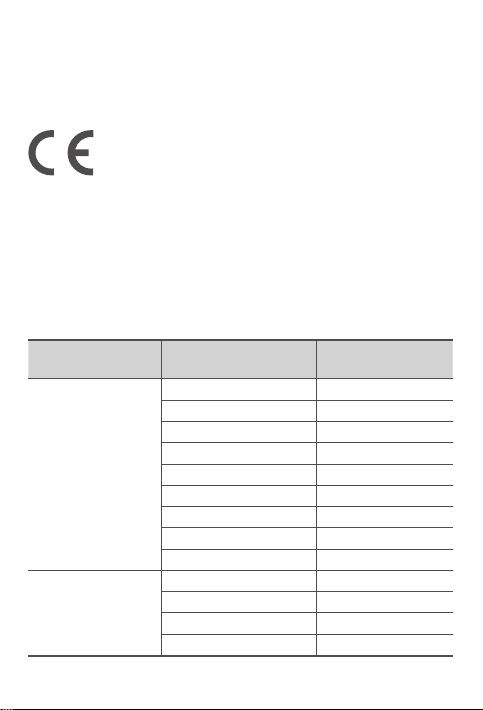
Declaración de conformidad de la Comunidad
Europea
Conformidad de la Unión Europea
EU contact: Lenovo, Einsteinova 21, 851 01 Bratislava, Slovakia
Cumplimiento con la directiva de RE
Lenovo PC HK Limited declara que los equipos de radio de tipo Lenovo
TB-X705F, Lenovo TB-X705L, Lenovo TB-X605F, Lenovo TB-X605L, Lenovo
HA-200 se encuentran en conformidad con la Directiva 2014/53/EU.
El texto completo de la declaración de conformidad de la UE está disponible
en la siguiente dirección de Internet:
http://www.lenovo.com/us/en/social_responsibility/EU_DoC_tablets
Este equipo de radio funciona con las siguientes bandas de frecuencia y
máxima potencia de radiofrecuencia:
Nombre del modelo Bandas de frecuencia
UMTS B1 23
UMTS B8 24
LTE B1/B7 22,5
LTE B3/B8/B20/B40 23,5
Lenovo TB-X705L
Lenovo TB-X705F
LTE B38 23
WLAN 2400-2483.5 17,5
WLAN 5150-5350 16
WLAN 5470-5850 15,5
Bluetooth 2400-2483.5 10,5
WLAN 2400-2483.5 18
WLAN 5150-5350 16,5
WLAN 5470-5850 15,5
Bluetooth 2400-2483.5 9,5
Potencia máxima
conducida (dBm)
74
Page 77
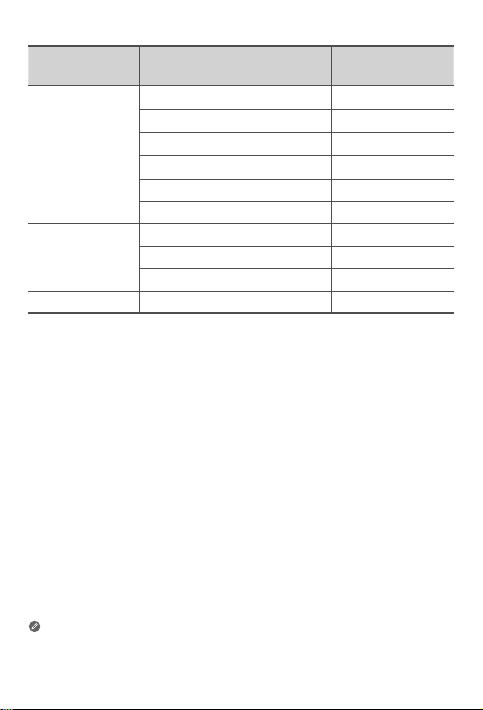
Nombre del
modelo
Lenovo TB-X605L
Lenovo TB-X605F
Lenovo HA-200 Bluetooth 2400-2483.5 9,93
El dispositivo Lenovo HA-200 debe usarse a una distancia de separación de
20 cm del cuerpo humano.
La información anterior solo corresponde a países de la UE. Consulte el
producto en cuestión para conocer las bandas de frecuencia admitidas en
otros países.
Bandas de frecuencia
UMTS B1 22,5
UMTS B8 24
LTE B1, 3, 7, 8, 20, 38, 40 23,5
WLAN 2400-2483.5 20
WLAN 5150-5850 17
Bluetooth 2400-2483.5 9,5
WLAN 2400-2483.5 20
WLAN 5150-5850 17
Bluetooth 2400-2483.5 9,5
75
Potencia máxima
conducida (dBm)
Page 78

Información del índice de absorción específico
SU DISPOSITIVO MÓVIL CUMPLE CON LAS PAUTAS INTERNACIONALES
PARA LA EXPOSICIÓN A LAS ONDAS DE RADIO.
Su dispositivo móvil es un transmisor y receptor de radio. Se diseñó para no
superar los límites de exposición a las ondas de radio (campos electromagnéticos
de radiofrecuencia) recomendados por las pautas internacionales. Una
organización científica independiente (ICNIRP) desarrolló estas pautas e incluyen
un margen de seguridad importante, diseñado para garantizar la seguridad de
todas las personas, independientemente de la edad o salud.
Las pautas de exposición a ondas de radio utilizan una unidad de medida
conocida como Tasa de absorción específica o SAR. El límite de SAR para
los dispositivos móviles es de 2 W/kg. Las pruebas de SAR se realizan en
posiciones de funcionamiento estándares, mientras el dispositivo transmite
al máximo nivel de potencia certificado en todas las bandas de frecuencia
probadas. Los valores SAR máximos bajo las pautas de la ICNIRP para el
modelo de su dispositivo se enumeran a continuación:
SAR máximo para este modelo y las condiciones en las que se registró.
Lenovo TBX705L
Límite
SAR de
10g en
Europa
(2,0
W/kg)
Por lo general, durante su uso normal, los valores reales de SAR para el
dispositivo se mantienen por debajo de los valores indicados. Esto ocurre
porque, a los efectos de la eficiencia del sistema y para reducir al mínimo las
interferencias en la red, la potencia de funcionamiento de su dispositivo móvil
se reduce automáticamente cuando no se necesita toda la potencia para la
conexión de datos.
Cuanto menor sea la potencia de salida del dispositivo, menor será el valor
de SAR.
Si le interesa reducir aún más su exposición a RF entonces puede hacerlo
fácilmente limitando su uso o usando el kit de manos libres a fin de mantener
al dispositivo lejos del cuerpo.
Lenovo TBX705F
Lenovo TBX605F
Lenovo TBX605L
Uso
corporal
Uso
corporal
Uso
corporal
Uso
corporal
LTE B40, Wi-Fi,
Bluetooth
Wi-Fi, Bluetooth 1,01 W/kg
Wi-Fi, Bluetooth 1,25 W/kg
WCDMA Band I,
Wi-Fi, Bluetooth,
LTE
1,15 W/kg
1,50 W/kg
76
Page 79
© Copyright Lenovo 2018.
V1.2_20181204
73110100828LE
Printed in China
 Loading...