

Page 1

Setup Guide
M
70a/M90a
Printed in China
PN: SPXXXXXX
Page 2

Initial Setup
* For selected models
Page 3
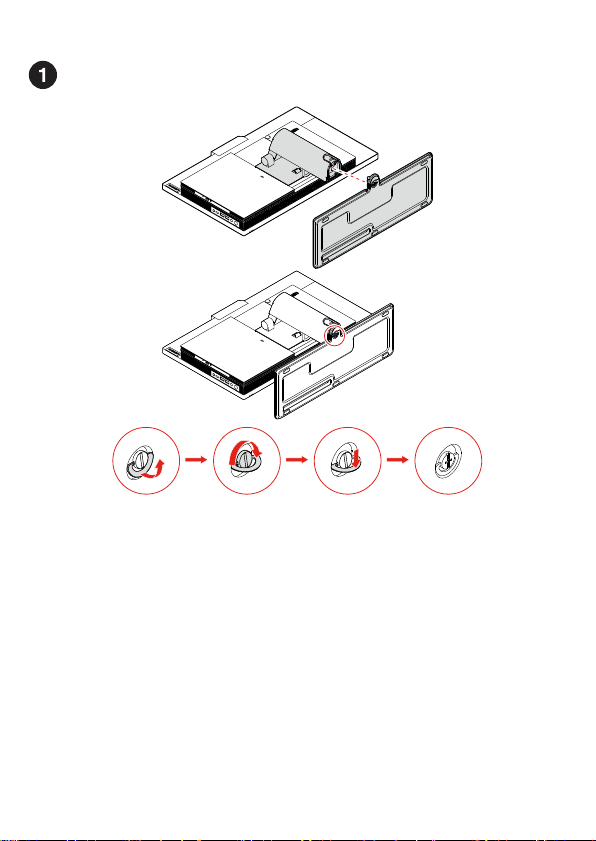
Page 4

Page 5

Page 6

Page 7

Overview
Page 8

USB 3.2 connector Gen 1 (M70a)
* 1. Integrated camera activity indicator
* 2. Microphones
* 3. Integrated camera or IR camera
shield
* 4. Integrated camera or IR camera
* 5. Multi-touch screen
* 6. E-privacy button
* 7. Microphone mute/unmute indicator
8. Storage drive activity indicator
9. System status indicator
* 10. Microphone mute/unmute control
11. USB-CTM connector (USB 3.2 Gen 1)
12. USB 3.2 connector Gen 2
13. USB 3.2 connectors Gen 2 (M90a) or
Read the statement on USB transfer rate in the User Guide. Refer to the Safety and Warranty Guide for accessing the User Guide.
14. Headset connector
* 15. Optical drive eject/close button
* 16. Optical drive activity indicator
* 17. SD-card slot
18. Power button
19. Security-lock slot
20. Cable cover eject button
21. DisplayPort® 1.2 out connector
22 Power cord c onnector
* 23. Serial connector
24. Ethernet connector
25. USB 3.2 connectors Gen 1 (3)
26. USB 3.2 connector Gen 1 (with
keyboard smart power on feature)
* For selected models
Page 9

Customer Replaceable Units (CRUs)
* • Computer stand
Refer to the User Guide for C RU definition.
* • Computer stand base
* • Keybo ard
• Memory module
* • Mouse
* • M.2 solid-state drive
* • Optical drive
* • Optical drive holder
• Pow er adap ter
• Power cord
• Rear cover
• System bo ard shield
* • Storage drive
• Storage drive bracket
• VESA® mount bracket
• VESA mount bracket cover
* For selected models
Page 10

Additional information
Technology
Frequency
band [MHz]
Maximum
transmit
power
WLAN
802.11b/g /n/ax
WLAN
802.11a/n/ ac/ax
WLAN
802.11a/n/ ac/ax
Technology
Frequency
band [MHz]
Maximum
transmit
power
Bluetooth
BR/EDR/LE
European Union — compliance with the Radio Equipment Directive
Hereby, Lenovo (Singapore) Pte. Ltd., declares that
the radio equipment types ThinkCentre M70a a nd
M90a are in compliance with Directive 2014/53/EU.
The full text of the system EU declaration of
conformity is available at the following Internet
address:
https://www.lenovo.com/us/en/compliance/eudoc
This radio equipment operates with the follo wing
frequency bands and maximum radio-frequency
power:
2400 - 2483.5 < 20 dBm
5150 - 5725 < 23 dBm
5725 - 5875 < 13.98 dBm
2400 - 2483.5 < 20 dBm
Usage of all the radio devices is limited to indoor in
the band 5150 MHz to 5350 MHz (channels 36, 40,
44, 48, 52, 56, 60, 64).
Tip-over hazard prevention notice (for
ThinkCentre M90a with E-privacy or full
function monitor stand)
This equipment is not suitable for use in locations
where children are likely to be present, avoid
hurting your child when machine falling down.
Page 11

E-manual
Second Edition (July 2020)
LIMITED AND RESTRICTED RIGHTS NOT ICE: If data or software is delivered pursuant to a
General Services Administ ration “GSA” contract, use, reproduction, or disclosure is subject to
restrictions set forth in Contract No. GS-35F-05925.
© Copyright Lenovo 2020.
Reduce I Reuse I Recycle
 Loading...