

Page 1

P/N: 2900-301463 Rev 1 www.kramerAV.com
USER MANUAL
Security Guide for
VSM–ON–CLOUD
Page 2

Kramer Electronics Ltd.
Security Guide for – Contents
i
Contents
Introduction 1
Cloud 1
Security 2
Data Handling 3
Page 3

Kramer Electronics Ltd.
Security Guide for – VSM–ON–CLOUD
1
Introduction
Kramer’s VSM–ON–CLOUD service helps organizations around the world manage their VIA
Devices from anywhere. This enables servicing customers, getting business done faster, and
working more effectively.
Kramer’s security practices are strongly bound into the internal security culture as well as the
research and development processes. VSM–ON–CLOUD supports comprehensive network
technology and maintains strategic partnerships with cloud providers that protect your data
with industry-leading security standards. This allows your organization to adapt to changing
environments and meet market requirements. Industry standard security practices help
protect your organizational and employee data for your most critical applications. Easy-tohandle license management and the robust cloud infrastructure backbone of VSM–ON–
CLOUD round out the portfolio.
Cloud
Location
VSM–ON–CLOUD data center is part of the Oracle cloud space and is designed to tolerate
system or hardware failures with minimal client impact to ensure a constant and smooth
workflow. All VSM–ON–CLOUD servers are part of the Oracle cloud Farms in the US and
Europe.
Backup policy
Kramer keeps a high level of operational quality and works to ensure that customers are not
impacted by unplanned outages.
To accomplish this, Kramer runs the following scheduled backups, aligning with the Oracle
Silver Plan policy to ensure full reliability and data loss protection:
• Weekly – Incremental backup every Sunday at midnight, retained for 4 weeks.
• Monthly – Incremental backup on the 1st day of each month at midnight, retained for 12
months.
• Yearly – Full backup on January 1st at midnight, retained for 5 years.
Update policy
VSM–ON–CLOUD allows administrators to work freely within an up-to-date environment that
delivers a familiar browser-based experience for setups. VSM–ON–CLOUD uses a manual
update model for VSM Applications that enables customers running different versions to
request an upgrade when they are ready to upgrade the full VIA base. Security patches and
other Cloud related updates are done automatically by the Cloud team. Updates are rolled out
on a monthly base unless they are flagged as critical. These updates underly another process
requiring manual setups.
Page 4

Kramer Electronics Ltd.
Security Guide for – VSM–ON–CLOUD
2
Outages
In case of an unplanned outage, Kramer commits to work as fast as possible to restore full
access to the data and bound services as well as processes that may underly the same
challenges.
Security
Kramer is aware of ever evolving security threats and takes this topic very seriously. We
constantly monitor and improve our products, applications, and services and have developed
routines that allow us to meet the growing demands and challenges of security in today’s
quickly evolving environment.
Server Encryption
VSM–ON–CLOUD services, use an exhaustive approach to help ensure the availability,
confidentiality and integrity of your data while keeping it protected locally with the Oracle
managed key protection system.
Communication Encryption
VSM–ON–CLOUD services are designed with privacy in mind. VSM–ON–CLOUD works with
encrypted communication only. All data and communication benefit from strong encryption
and the supported Hypertext Transfer Protocol Secure (HTTPS). TLS 1.2 encrypted
communication by Transport Layer Security (TLS) ensures that data in transit is also strongly
protected.
All VSM–ON–CLOUD servers run behind a firewall with only required ports open. All ports are
over TLS 1.2 with certificate level encryption.
Web communication uses TLS 1.2 with an additional IP blocking mechanism to avoid
multithread attacks and more.
App communication also uses TLS 1.2 with an additional security mechanism to ensure
stable, reliable, and secure communication.
App communication goes through a middle sever at all times to avoid direct connection to any
DB or web component. The middle server continually forwards requests and based on that
response back to the request initiator.
Kramer VSM–ON–CLOUD does not provide any government with direct or systematic access
to customer data.
Page 5
Kramer Electronics Ltd.
Security Guide for – VSM–ON–CLOUD
3
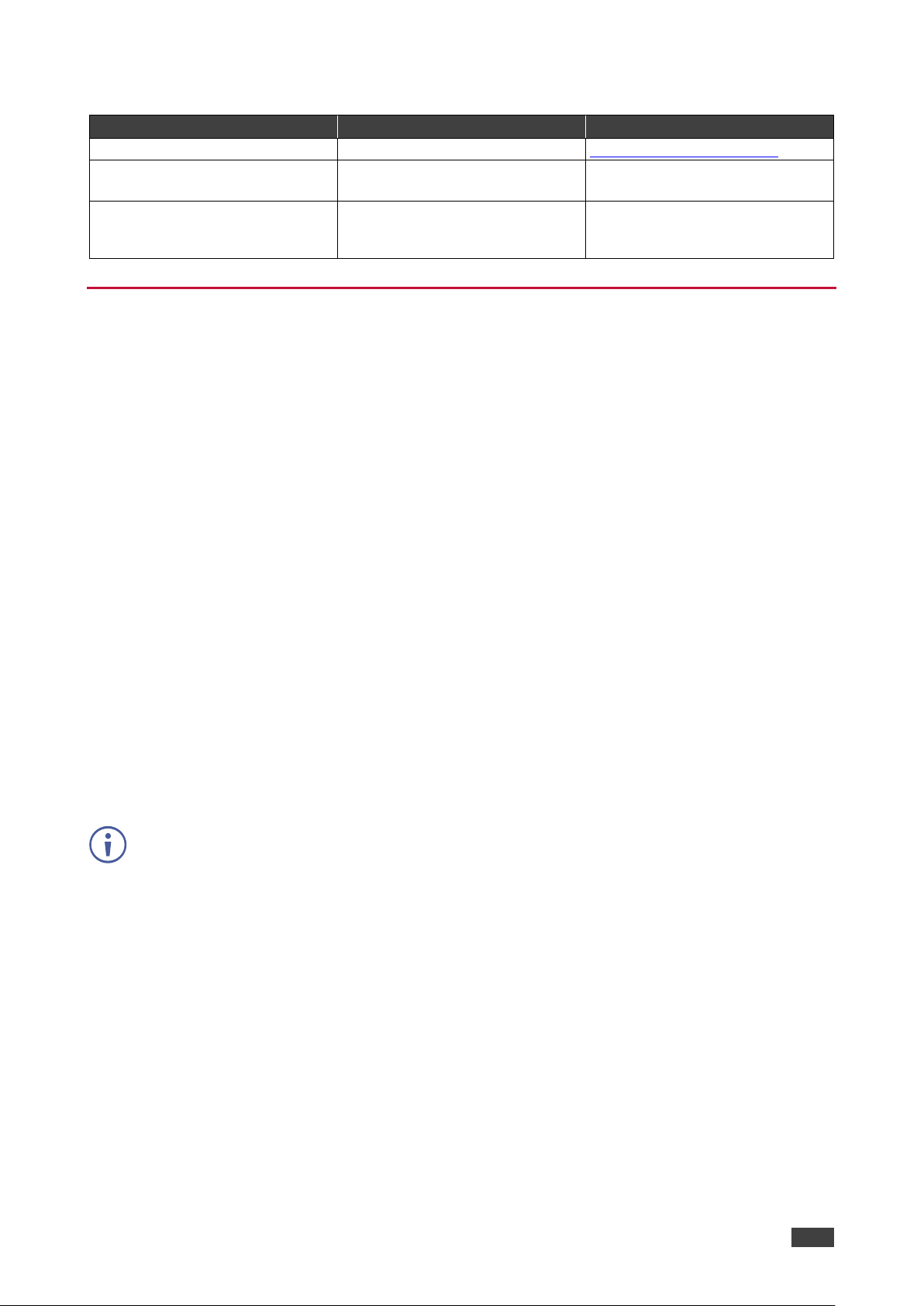
Ports & Domains
Port
Description
Domain
5671
Middle server TLS 1.2
https://rabbit.cloudvsm.com
443
Web portal TLS 1.2
<domain_name>.cloudvsm.com
e.g., kramer.cloudvsm.com
8004
FileServer TLS 1.2
Defined at the time of setup.
Changes according to customer
requirements.
Data Handling
The following data is stored on the Kramer VSM–ON–CLOUD server:
• VSM–ON–CLOUD user credentials.
• IP Address of all VIA devices published on VSM–ON–CLOUD.
• VIA usage logs for reporting on VSM.
The following data is not stored on the Kramer VSM–ON–CLOUD server:
• VIA device user and system credentials used during a collaboration session.
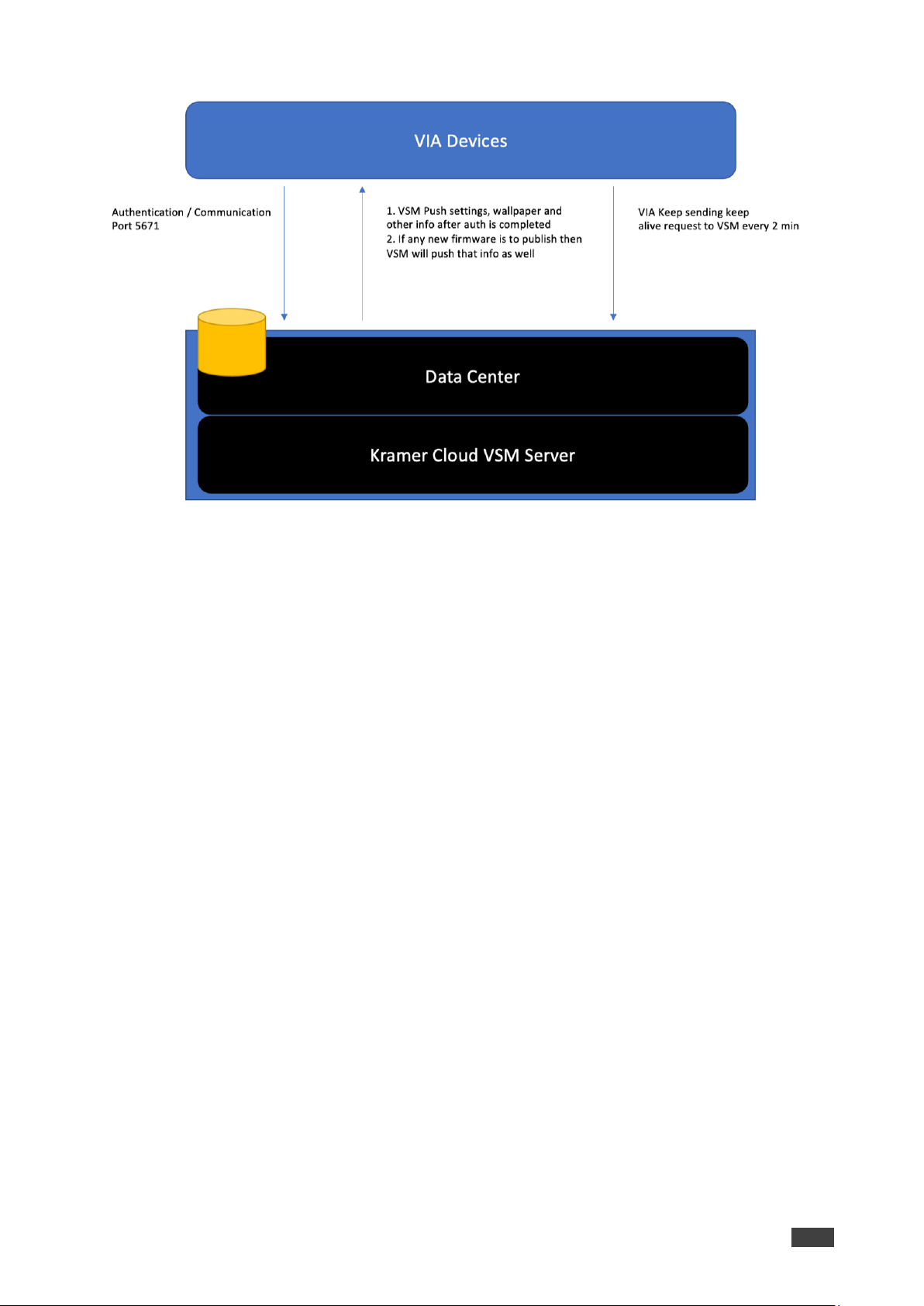
In addition to constant handshaking and traffic, the following communication and information
passes between VIA devices and VSM–ON–CLOUD, but is not stored on the Kramer VSM–ON–
CLOUD server:
• Health check – performed every 2 minutes.
• Disk status, usage stats, and other related information.
• Logs of usage by the end-user for reports and analytics. Each loop requires a minimum
of 5kbps to a maximum of 50kbps.
• If a customer using Digital Signage or upgrading firmware, then it requires files sent out
from the Cloud to VIA devices.
For an accurate bandwidth estimate, a specific event and device breakdown is required.
Page 6
Kramer Electronics Ltd.
Security Guide for – VSM–ON–CLOUD
4
Figure 1: VIA Data Flow
Page 7
www.KramerAV.com
[email protected]
P/N:
2900-301463
Rev:
1
SAFETY WARNING
Disconnect the unit from the power supply before opening and servicing
For the latest information on our products and a list of Kramer distributors, visit our website where
updates to this user manual may be found.
We welcome your questions, comments, and feedback.
All brand names, product names, and trademarks are the property of their respective owners.
 Loading...