

Page 1

OWNER’S MANUAL
MODEL D42 M32702
CONSOLE TOWER
ELECTRONIC AIR CLEANER, IONIZER & VOC FILTER
IMPORTANT: PLEASE READ MANUAL BEFORE OPERATING UNIT
Features
• Lifetime Electronic Filter never needs replacing — simply washes clean
• Electronically removes dust, mites, pollen, pet dander, mold, bacteria, viruses,
tobacco smoke, cooking smoke and grease and more, down to 0.01 micron
• Activated Carbon Odour & Gas (VOC) Removal Filter removes Volatile Organic
Compounds emitted from common sources within the home and office
• Dual Negative Ionizer restores the air’s natural ion balance
• Quiet 3-Speed Fan is comfortable for room occupants
• Performance Indicator Light shows Air Cleaner is operating properly at a glance
• Ideal for rooms up to 612 ft² (57 m²) for one room air change every 20 minutes
SEARS CANADA INC., TORONTO, ONTARIO, M5B 2B8
Page 2
BENEFITS
• Helps provide relief from allergy, asthma and respiratory
illness.
• Helps clear a smokey environment quickly, so everyone
can work and relax together.
• Helps reduce the time and money spent cleaning and
redecorating. Prevents damaging black dust from
staining walls, upholstery and window coverings.
• Helps reduce tobacco, cooking and pet odours.
• Revitalizes the air with healthy negative ions.
• Improves indoor air quality for a fresher, more
comfortable environment, year-round.
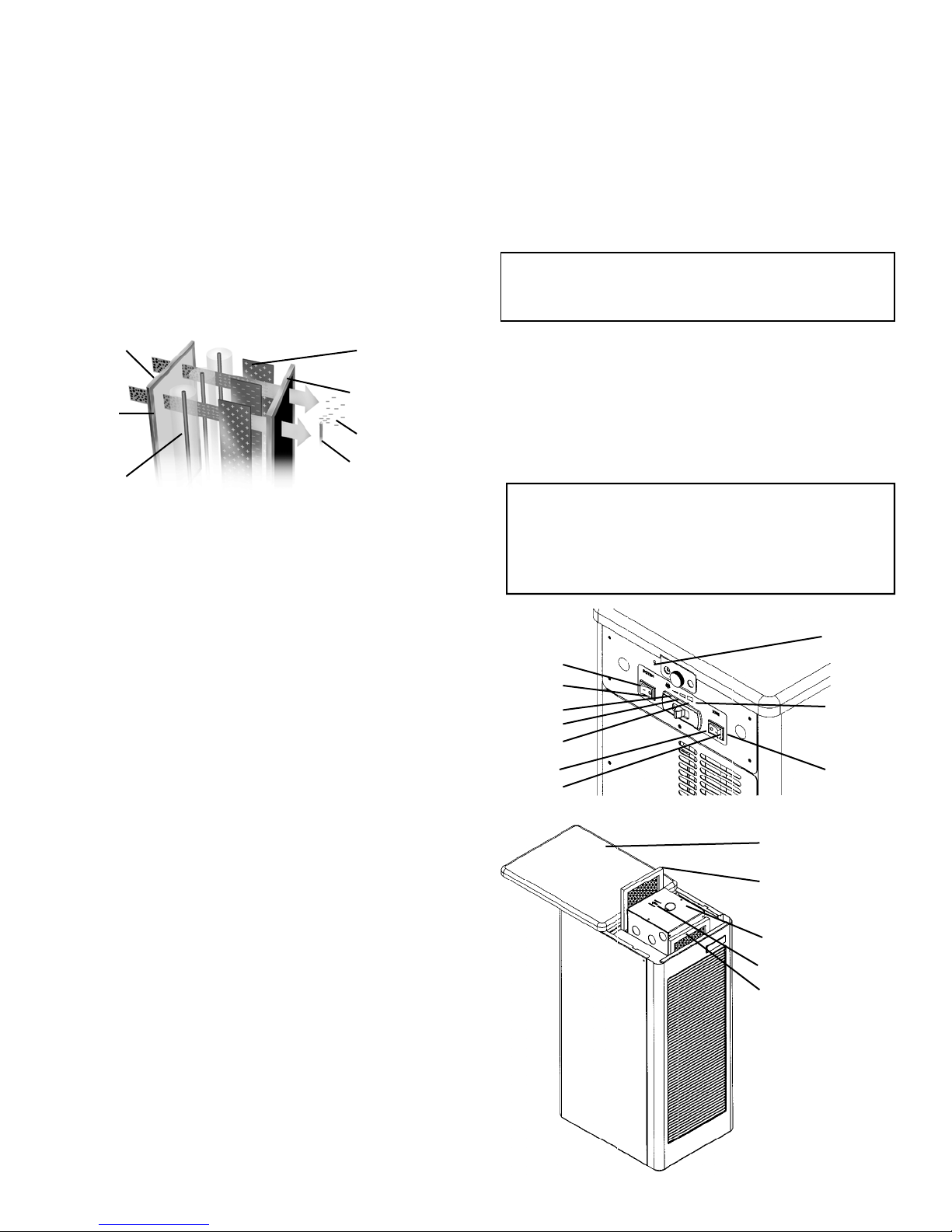
HOW IT WORKS
1 Dirty Air
2 Prefilter
3 Charging
Section
Dirty air is drawn in through the front grill and passes through
a 4-stage filtering system.
The Prefilter consists of aluminum mesh and a close knit
polymesh. It prevents larger particles, lint and hair from
entering the collecting cell.
The next step is a 2-Stage Electrostatic Collecting Cell. The
dirt particles are charged with a high positive voltage by a
series of fine ionizing wires. The charged particles are drawn
through to the collecting plates where the dirt adheres to the
grounded plates and remains until the cell is taken out and
washed. Removes particles down to 0.01 micron
(1/2,540,000 of an inch).
The air is then drawn through an Activated Carbon Odour &
Gas VOC (Volatile Organic Compound) Removal Filter to
help remove offensive odours and gases. Clean air is then
discharged out the back of the Air Cleaner.
Dual Negative Ionizer needles, controlled by a separate
switch, are located in the clean air stream. Adding healthy
negative ions to the air revitalizes the air similar to that near a
waterfall, spring, the ocean, or after a rainfall. Studies have
shown that negative ions have a beneficial effect on human
biochemistry, both physically and mentally.
4 Collecting Cell
Plates
5 Odour & Gas
Removal Filter
7 Negative Ions
and Clean Air
6 Ionizing Needles
OPERATING INSTRUCTIONS
1. Lean Air Cleaner on side panel and pull out of box. If
your unit has any signs of damage, immediately contact
the store where the Air Cleaner was purchased.
2. Keep the shipping carton and packaging in case the
need arises to store or transport the unit.
3. Remove all pa ckaging from the unit. Choose a suitable
location to allow unobstructed circulation from the front
and back of the unit. If unit has to be placed against a
wall, allow at least 6-8 inches (15-20 cm) for circulation.
4. Operate Air Cleaner at voltage shown on back of unit.
5. The controls for the Air Cleaner are located on the re ar
panel. To turn the Air Cleaner on, push the System
Switch to the ON position. This controls the power to the
Fan Control Switch and to the power board. When the
Fan Control Switch is in the extreme left position, the fan
is on low; center position is medium; and to the right is
high speed. When the System Switch is turned ON, the
green Performance Indicator Light, located behind the
front grill, should be illuminated.
Use the low or medium speed for quiet, continuous or
nighttime use. Use the high speed for initial cleaning of
heavy concentrations of dirty air (i.e. smoke) or after leaving
the room.
6. The negative ions are controlled by a separate switch
located to the right of the fan control switch. When the
switch is ON, the red light will illuminate. Note: The
Negative Ion Emitter will not work without the
System Switch being ON.
7. To access the prefilter, collecting cell or activated carbon
filter, turn the system switch off. Undo the thumbscrew
located under the switches, on the rear panel, and slide
the top panel to the rear of the unit.
You may notice arcing or snapping from the cell. It is normal
to hear some arcing when the unit is new or first turned on.
Arcing in the cell may also be caused by high humidity (over
80%), after washing, or when a large particle of dirt or hair is
caught in the cell. If the arcing is continuous and constant,
then refer to the Troubleshooting Chart.
System Switch
ON
OFF
Low
Medium
Fan Control
Switch
High
OFF
Negative Ion
Switch
ON
Top Panel
Activated Carbon Odour
& Gas (VOC) Removal
Filter
Collecting Cell
Air Flow Direction Arrow
Prefilter
Page 3
CLEANING INSTRUCTIONS
The prefilter and collecting cell must be washed on a re gular
basis for the Air Cleaner to function at its peak efficiency.
The frequency of cleaning will vary from one environment to
another, therefore the cell should be checked monthly to
determine cleaning schedule. On average, the cell should be
washed every 2-3 months.
COLLECTING CELL AND PREFILTER
1. Turn Air Cleaner OFF. Remove prefilter and collecting
cell from the Air Cleaner.
2. Rinse prefilter and collecting cell, and spray complet ely
with DAX Detergent (or non-chlorine, non-corrosive, nonabrasive, non-ammonia, liquid household detergent).
Let stand for 5 minutes. Rinse well with hot water (120°
F / 49°C maximum). Repeat process 3 times.
3. If dirt remains, let cell soak in a solution of DAX
Detergent and hot water for 30 minutes.
4. For drying, place the cell on a 45° angle on one end,
with the arrow pointing sideways, and let stand for 10-24
hours. A hair dryer may be used to speed up drying
time. Make sure the cell is completely dry before
reinserting back into Air Cleaner. The cell is inserted with
the arrow pointing back toward the fan blower.
5. If arcing or snapping occurs or the lights do not come on
when the cell is placed back in the unit and turned on,
then remove the cell and allow to dry longer.
ODOUR & GAS (VOC) REMOVAL FILTER
1. The Activated Carbon Odour & Gas (VOC) Removal
Filter must be replaced at regular intervals if odour
removal is desired (approximately every 3-6 months).
ODOUR REMOVAL FILTERS ARE NOT WASHABLE.
CABINET
1. Turn Air Cleaner OFF.
2. A soft, damp, lint-free cloth may be used to remove dirt
and fingerprints from painted surfaces and grills.
NEVER USE AN ABRASIVE CLEANER ON THE
CABINET.
WARNING
• DO NOT WASH COLLECTING CELL IN
DISHWASHER.
• Never use any object to clean between the cell plates as
this may cause damage to the plates or ionizing wires.
• Never place the cell in an oven to dry.
• The edges of the cell may be sharp — handle with care.
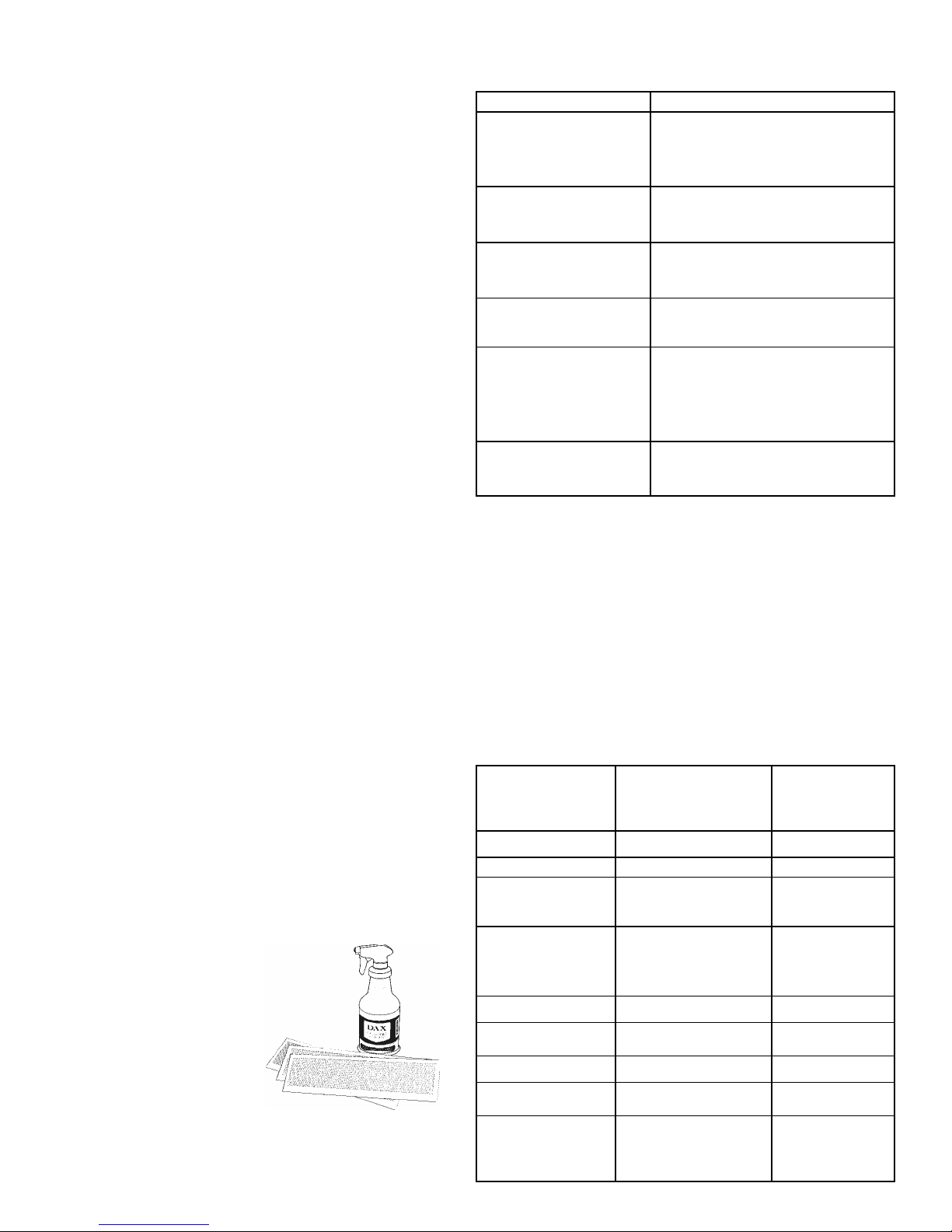
DAX Detergent, No. 32921, and
the Activated Carbon Odour &
Gas (VOC) Removal Filter,
No. 32712, are available from
your Sears outlet.
TROUBLESHOOTING CHART
PROBLEM CAUSE
Fan does not operate
Both Operation Lights off
• Unit not plugged in
• Cell access door not closed
tightly
• System switch not ON
Green Performance
Light on
Red Ion Light off
Fan does not operate
Green Performance
Light on
Fan operating
Both Operation Lights off
Cell arcing excessively
• Negative Ion switch not in ON
position
• Speed selector switch not
positioned correctly
• Fan motor malfunction
• Cell wet from washing
• Short in cell (see below)
• Cell wet from washing
• Cell plate(s) bent
• Cell dirty or large lint ball/hair
caught in cell
• Broken ionizing wire
Cell does not go in far
enough to allow top
cover to close
The two Operation Lights, located behind the front grill are
also used as the high voltage fault indicator. If the fan is
operating, and the lights do not come on, then there is a
problem in the high voltage circuit. To determine the
problem, turn the Air Cleaner OFF and remove the collecting
cell. Close the top cover and replace the thumbscrew, then
turn the Air Cleaner back ON. If the lights come back on, the
problem lies in the collecting cell. Check the cell for wetness
from washing or look for a broken ionizing wire(s) or bent cell
plate(s).
If the lights do not come on, the problem is with the power
board or the Operation Light(s). If you are unable to correct
any of the above problems, call 1-800-267-8305.
• Cell is inserted wrong. Cell should
be inserted with arrow pointing
back toward fan blower
TECHNICAL DATA
Dimensions
Width
Depth
Height
Weight 31.0 lbs 14.1 kg
Input Voltage 120 V 60 Hz
Power
Consumption
(maximum)
Air Flow
High
Medium
Low
Cell Output Voltage 6200 VDC @ < 1 mA
Collecting Cell
Surface
Negative Ionizer -5000 VDC @ <.1 mA
Negative Ion
Output
Ideal for rooms up
to: (for 1 room air
change every 20
minutes)
10.0 in
13.0 in
24.5 in
104 Watts
245 cfm
175 cfm
150 cfm
1191 in² 7683 cm²
2 x 327.7 K/in³ 2 x 20 K/cm³
612 ft²
25.4 cm
33.0 cm
62.2 cm
413 m³/hr
297 m³/hr
255 m³/hr
57.0 m²
Page 4

IMPORTANT SAFEGUARDS
Safety points you should know about your Electronic Air Cleaner and Ionizer.
Caution:
** Read Owner’s Manual and safeguards before using
** Save Owner’s Manual for later use
** Follow all warnings and instructions marked on Air Cleaner
FOR YOUR PERSONAL SAFETY
1. The Air Cleaner is equipped with a grounded plug. Do not
defeat the purpose of this plug by removing the grounding pin,
as this may result in an electrical shock or create an unsafe
condition.
2. When the po wer cord or plug is damaged or frayed, unplug the
Air Cleaner from the wall outlet and refer servicing to qualified
service personnel.
3. Do not overload wall outlets and extension cords, as this can
result in fire or electric shock.
4. Do not allow anything to rest on or roll over the power cord, and
do not place the unit where power cord is subject to traffic or
abuse. This may result in a shock or fire hazard.
5. Do not attempt to service the Air Cleaner yourself as opening or
removing switch cover may expose you to dangerous voltage or
other hazards. Refer all servicing to qualified personnel.
6. Never push objects of any kind into the Air Cleaner through
cabinet slots, as they may touch dangerous voltage points, or
short out parts that could result in a fire or electric shock.
7. If the Air Cleaner has been dropped or the cabinet has been
damaged, unplug the unit from the wall outlet and refer
servicing to qualified service personnel.
8. Unplug the Air Cleaner from the wall outlet before cleaning. Do
not use liquid cleaners or aerosol cleaners on cabinet. Use a
damp, lint-free cloth for cleaning, except when cleaning the cell.
9. Do not use the Air Cleaner near water, i.e. near a bathtub, sink,
laundry tub, in a wet basement, in the rain or near a swimming
pool, etc.
If liquid has been spilled into the Air Cleaner, unplug the unit
from the wall outlet and refer servicing to qualified service
personnel.
10. Do not use the Air Cleaner near open fire or flame, or sources
of heat i.e. fireplaces, wood burning stoves, kerosene heaters,
stove tops, ovens, etc.
11. Do not use the Air Cleaner on soft surfaces i.e. beds, sofas.
12. Do not use the Air Cleaner when oxygen is being used or when
combustible gases are present.
13. The Air Cleaner has slots or openings in the cabinet for
ventilation purposes, to provide reliable operation of the unit,
and to protect it from overheating. These openings must not be
blocked or covered.
14. The Air Cleaner should be operated only from the type of power
source indicated on the rating label. If you are not sure of the
type of power supply at your home, consult your local power
company.
15. It is normal for the Air Cleaner to make occasional snapping or
popping sounds, particularly when being turned on after
washing. If the snapping or popping is continuous or frequent,
unplug the unit and call 1-800-267-8305.
16. If the Air Cleaner does not operate normally by following the
operating instructions, unplug the unit from the wall outlet and
refer servicing to qualified service personnel.
Your Electronic Air Cleaner is guaranteed for one (1) full year from the date of original purchase, against electrical and mechanical defects in
material and workmanship, under normal use and maintenance, which will be repaired or replaced without charge, upon inspection by an
authorized service center. The warranty does not include the Prefilter or Carbon Filter.
This guarantee is in lieu of any other warranty, either expressed or implied.
SEARS CANADA INC. will not be responsible for:
1. Normal maintenance including cleaning or replacement of filters, as outlined in the Owner’s Manual.
2. Damage or repairs needed as a consequence of any misuse, negligent handling, improper servicing, unauthorized alteration, improper
operations or use on voltage other than that stamped on the Air Cleaner.
3. Any personal injury, property damage, or any incidental or consequential damages of any kind, resulting from defects, malfunctions,
misuse, or alteration of the product.
4. Damage as a result of floods, winds, fires, lightning, accidents, corrosive atmosphere, or other conditions beyond the control of Sears
Canada Inc.
5. Parts, including filters not supplied or designated by Sears Canada Inc.
If warranty service is required, take the Electronic Air Cleaner into the nearest Sears outlet or Sears Parts & Service Center, wit h a proof of
purchase. The original carton and packaging must be used. If not, and if goods arrive damaged due to improper packaging, warranty will be
void.
For more information, call Toll Free 1-800-267-8305
LIMITED ONE YEAR WARRANTY
32702.pub
06/06
 Loading...