

Page 1
Operating Instructions
REFRIGERATOR/FREEZER COMBINATION
GBI F
Italiano, 1
E
Espanol, 37
English,13
PL
Polski,
NBAA 33 NF NX D
49
Français, 25
RO
Românã, 61
Contents
GB
Installation, 14
Positioning and connection
Reversible doors
Description of the appliance, 15-16
Control panel
Overall view
Start-up and use, 17-18-19
Starting the appliance
Chiller system
Using the refrigerator to its full potential
Using the freezer to its full potential
Maintenance and care, 20
Switching the appliance off
Cleaning the appliance
Avoiding mould and unpleasant odours
Replacing the light bulb
Precautions and tips, 21
General safety
Disposal
Respecting and conserving the environment
Troubleshooting, 22
Assistance, 23
Page 2

Installation
! Before placing your new appliance into operation
GB
please read these operating instructions carefully. They
contain important information for safe use, for installation
and for care of the appliance.
! Please keep these operating instructions for future
reference. Pass them on to possible new owners of the
appliance.
Positioning and connection
Positioning
1. Place the appliance in a well-ventilated humidity-free
room.
2. Do not obstruct the rear fan grills. The compressor
and condenser give off heat and require good
ventilation to operate correctly and save energy.
3. Leave a space of at least 10 cm between the top part
of the appliance and any furniture above it, and at
least 5 cm between the sides and any furniture/side
walls.
4. Ensure the appliance is away from any sources of
heat (direct sunlight, electric stove, etc.).
5. In order to maintain the correct distance between the
appliance and the wall behind it, fit the spacers
supplied in the installation kit, following the
instructions provided.
Levelling
1. Install the appliance on a level and rigid floor.
2. If the floor is not perfectly horizontal, adjust the
refrigerator by tightening or loosening the rear feet.
Electrical connections
After the appliance has been transported, carefully
place it vertically and wait at least 3 hours before
connecting it to the electricity mains. Before inserting the
plug into the electrical socket ensure the following:
The appliance is earthed and the plug is compliant
with the law.
The socket can withstand the maximum power of the
appliance, which is indicated on the data plate located
on the bottom left side of the fridge (e.g. 150 W).
The voltage must be in the range between the values
indicated on the data plate located on the bottom left
side (e.g. 220-240V).
The socket is compatible with the plug of the
appliance.
If the socket is incompatible with the plug, ask an
authorised technician to replace it (see Assistance).
Do not use extension cords or multiple sockets.
! Once the appliance has been installed, the power
supply cable and the electrical socket must be easily
accessible.
! The cable must not be bent or compressed.
! The cable must be checked regularly and replaced by
authorised technicians only (see Assistance).
! The manufacturer declines any liability should these
safety measures not be observed.
Reversible doors
If it is necessary to change the direction in which the
doors open, please contact the Technical Assistance
Centre.
14
Page 3
Description of the
appliance
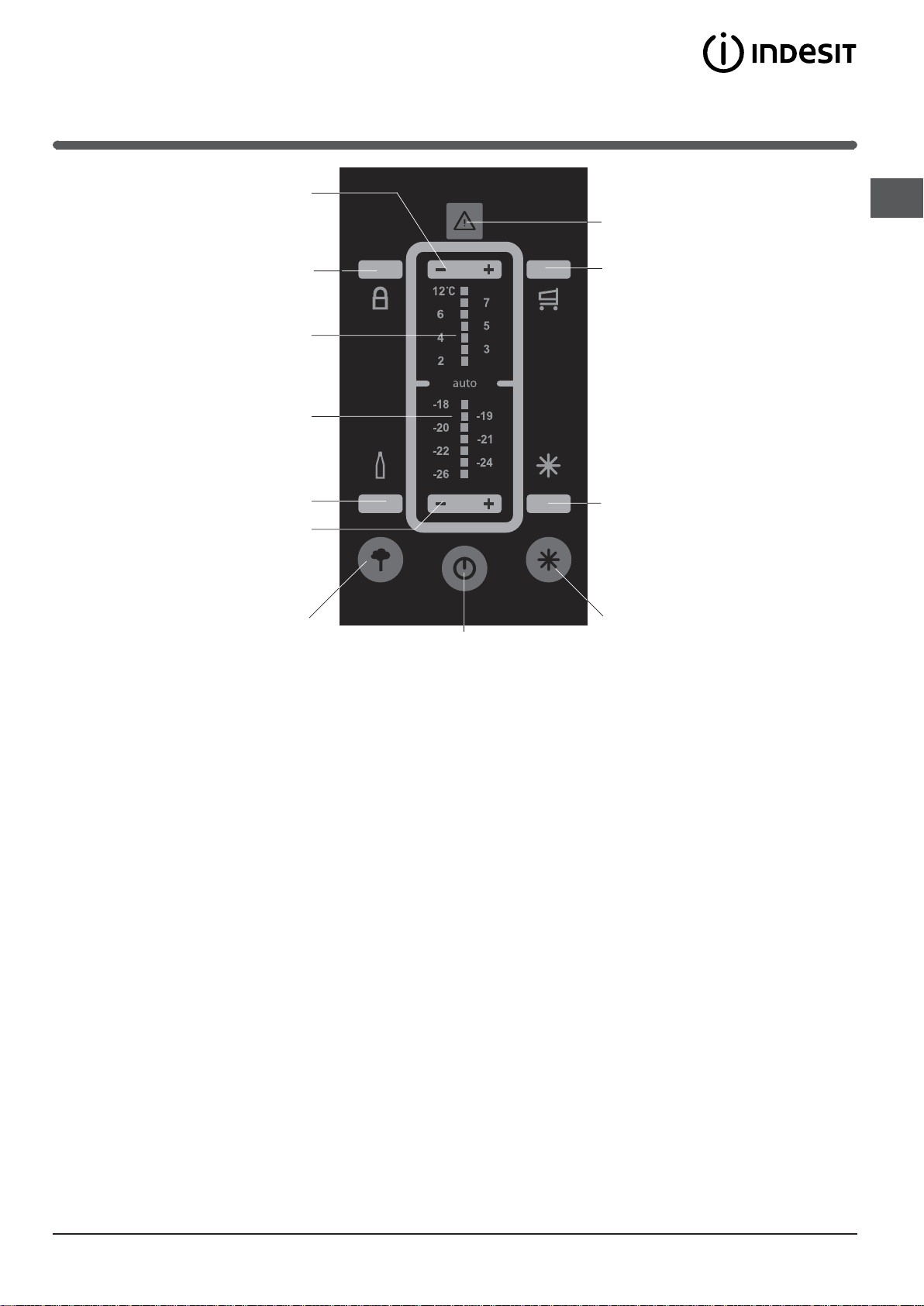
Control panel
REFRIGERATOR
Temperature
Adjustment
GB
ALARMS
CHILD LOCK
REFRIGERATOR
status bar
FREEZER
status bar
BOTTLE CHILL
FREEZER
Temperature
Adjustment
ECO
ON/OFF
It is possible to switch the whole product (both the
refrigerator and freezer compartments) on by pressing
this button. The red LED indicates that the product is
switched off, while the green LED shows that it is
operating. To switch the product off, press and hold the
ON/OFF button for at least two seconds.
ECO
This is used to activate and deactivate the ECO function
(the optimal temperature for energy saving levels). When
activated, the AUTO LED and the ECO LED illuminate
simultaneously.
ALARMS
This controls all the alarm signals connected to product
operation.
CHILD LOCK
Activates or deactivates the control panel button lock in
order to avoid the risk of the various functions being
activated accidentally by children.
REFRIGERATOR - and + Temperature Adjustment
Enable the temperature setting of the refrigerator to be
modified, with the relative confirmation of the
temperature selected shown on the display. It is also
possible to use these buttons to deactivate the
refrigerator compartment only (the display shows - -).
SUPER COOL
SUPER
FREEZE
ON/OFF
REFRIGERATOR status bar
Indicates the set temperature relating to the refrigerator
compartment or shows that it has been deactivated (in
this case the status bar is disabled).
FREEZER status bar
Shows the set temperature relating to the freezer
compartment.
SUPER COOL
Activates or deactivates the SUPER COOL function (rapid
cooling). The SUPER COOL LED illuminates.
SUPER FREEZE
Activates or deactivates the SUPER FREEZE function
(rapid freezing). The SUPER FREEZE LED illuminates.
HOLIDAY
Activates or deactivates the HOLIDAY function (the
AUTO LED and HOLIDAY LED illuminates).
BOTTLE CHILL
Activates or deactivates the BOTTLE CHILL function (It
reduces the temperature of the freezer for the period of
time required to cool a bottle.). the BOTTLE CHILL
illuminates)
HOLIDAY
FREEZER - and + Temperature Adjustment
Enable the temperature setting of the freezer to be
modified, with the relative confirmation of the
temperature selected shown on the display.
15
Page 4
Description of the
appliance
GB
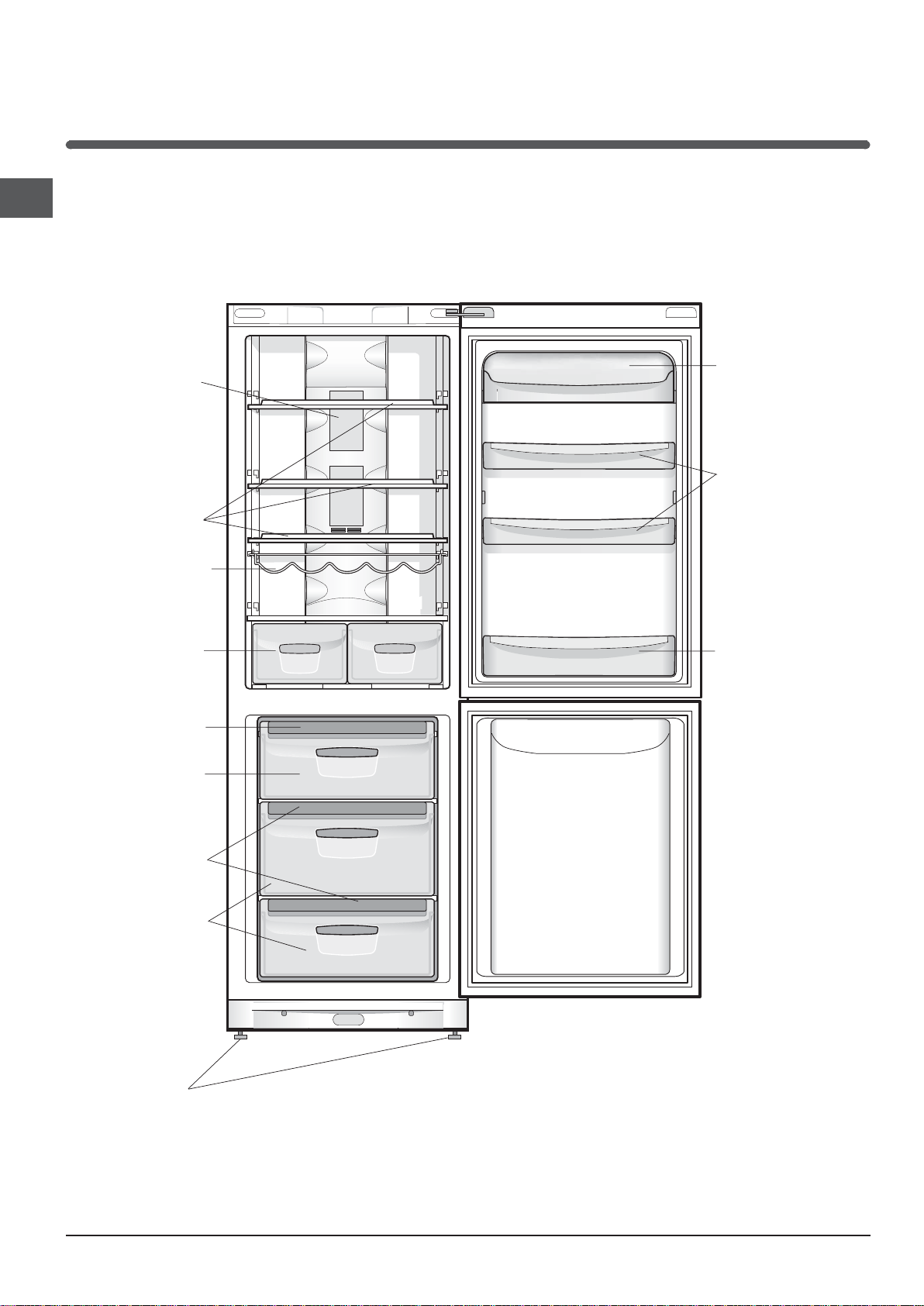
Overall view
The instructions contained in this manual are applicable to different model refrigerators. The diagrams may not
directly represent the appliance purchased. For more complex features, consult the following pages.
Removable lidded
LAMP
(see Maintenance)
SHELVES
WINE RACK
*
shelf with EGG TRAY
Removable
multipurpose
SHELVES
FRUIT and
VEGETABLE
Ice3 ice tray•
FREEZER and
STORAGE
compartment
Ice3 ice tray•
STORAGE
compartment
Levelling FEET
bin
BOTTLE shelf
Varies by number and/or position.
Available only on certain models.
*
16
Page 5
Start-up and use
Starting the appliance
! After transportation of the appliance, carefully place it in
an upright position and wait at least 3 hours before
connecting it to the electricity mains, to make sure it
operates as it should.
Clean the inside of the refrigerator well using warm
water and bicarbonate of soda before placing food
inside it.
The appliance comes with a motor protection control
system which makes the compressor start
approximately 8 minutes after being switched on. The
compressor also starts each time the power supply is
cut off whether voluntarily or involuntarily (blackout).
Freezer Compartment
When the product is switched on (the ON/OFF button is
pressed for more than two seconds) the freezer
compartment is set to its default value of -18°C. We
recommend that the SUPER FREEZE function is set (the
freezer status bar continues to display the set value) in
order to accelerate the cooling process of the
compartment; when the inside of the compartment has
reached its optimal temperature the function will be
deactivated and the food may be placed inside.
Refrigerator Compartment
When the appliance is switched on the refrigerator
compartment is set to its default value of +5°C. We
recommend that the SUPER COOL function is set (the
refrigerator status bar continues to display the set value) in
order to accelerate the cooling process of the
compartment. After a few hours it will be cool enough for
food to be placed inside.
The temperatures are automatically set to +5°C for the
refrigerator compartment and -18°C for the freezer
compartment (these are standard food storage values.
When the ECO function is active, the appliance
automatically adjusts the temperatures according to the
conditions inside and outside the refrigerator; the operation
of this function is signalled by the text AUTO.
Whenever it is necessary to activate the ECO function at
temperatures that are different to the standard storage
values, the ECO button must be pressed as soon as the
function is activated and held down while the new
-
temperatures are set using the
these conditions, the temperatures may be set to 4°C, 5°C
and 6°C for the refrigerator compartment and -18°C, -19°C
and -20°C for the freezer compartment.
When the HOLIDAY function is active the temperature may
not be adjusted, however the appliance adjusts itself
automatically so that the optimal settings for the situation
are used: +12°C for the refrigerator compartment and 18°C for the freezer compartment. This function is
indicated by the text.
To activate and deactivate the functions simply press the
relevant button and the function status will be signalled by
the corresponding LED switching on or off.
Several functions (SUPER COOL, SUPER FREEZE,
BOTTLE CHILL
(HOLIDAY,...); remember that there is a pre-set order of
priority which will help you to use the product in the best
possible way.
When the
BOTTLE CHILL
flashing and to silence the sound signal. This flashing and
sound signal indicates that the function is complete and that
the bottle should be removed from the freezer compartment.
, ECO) are incompatible with others
BOTTLE CHILL
button to stop the corresponding LED from
and + buttons. Under
function has finished, press the
GB
Navigating the display
Setting the temperatures:
If the product is switched on, the refrigerator and freezer
status bars will indicate the temperatures set at that
-
and
moment. To change them, simply press the
buttons corresponding to the compartment for which you
wish to change the set temperature. More specifically,
each time one of the buttons is pressed the temperature is
increased or decreased by 1°, and the level of cold is
adjusted accordingly.The temperature values that may be
selected for the refrigerator compartment are +12°C, +7°C,
+6°C, +5°C, +4°C, +3°C and +2°C, while the values that
may be set for the freezer are -18°C, -19°C, -120°C, -21°C,
-22°C, -24°C and -26°C.
+
Child Lock
In order to activate the Child Lock function, the Child Lock
button must be pressed for 2 seconds; the activation of the
button lock is confirmed by a short beep and the
illumination of the corresponding LED.
To deactivate the function, press the Child Lock button for
2 seconds; deactivation will be confirmed by a short beep
and by the corresponding LED switching off.
! The FREEZER status bar is also used to indicate an
unusual temperature increase in the freezer
compartment (
see Troubleshooting
).
17
Page 6
Chiller system
GB
No Frost
The No Frost system
circulates cold air
continuously to collect
humidity and prevent ice
and frost formation. The
system maintains an
optimal humidity level in
the compartment,
preserving the original
quality of the food,
preventing the food from
sticking together and making defrosting a thing of the
past.
Do not block the aeration cells by placing food or
containers in direct contact with the refrigerating back
panel. Close bottles and wrap food tightly.
Using the refrigerator to its full potential
Adjust the temperature using the display.
Press the SUPER COOL button (rapid cooling) to lower
the temperature quickly. For example, when you place
a large number of new food items inside a fridge the
internal temperature will rise slightly. The function
quickly cools the groceries by temporarily reducing the
temperature until it reaches the ideal level.
Place only cold or lukewarm foods in the compartment,
not hot foods (see Precautions and tips).
Remember that cooked foods do not last longer than
raw foods.
Do not store liquids in open containers. They will
increase humidity in the refrigerator and cause
condensation to form.
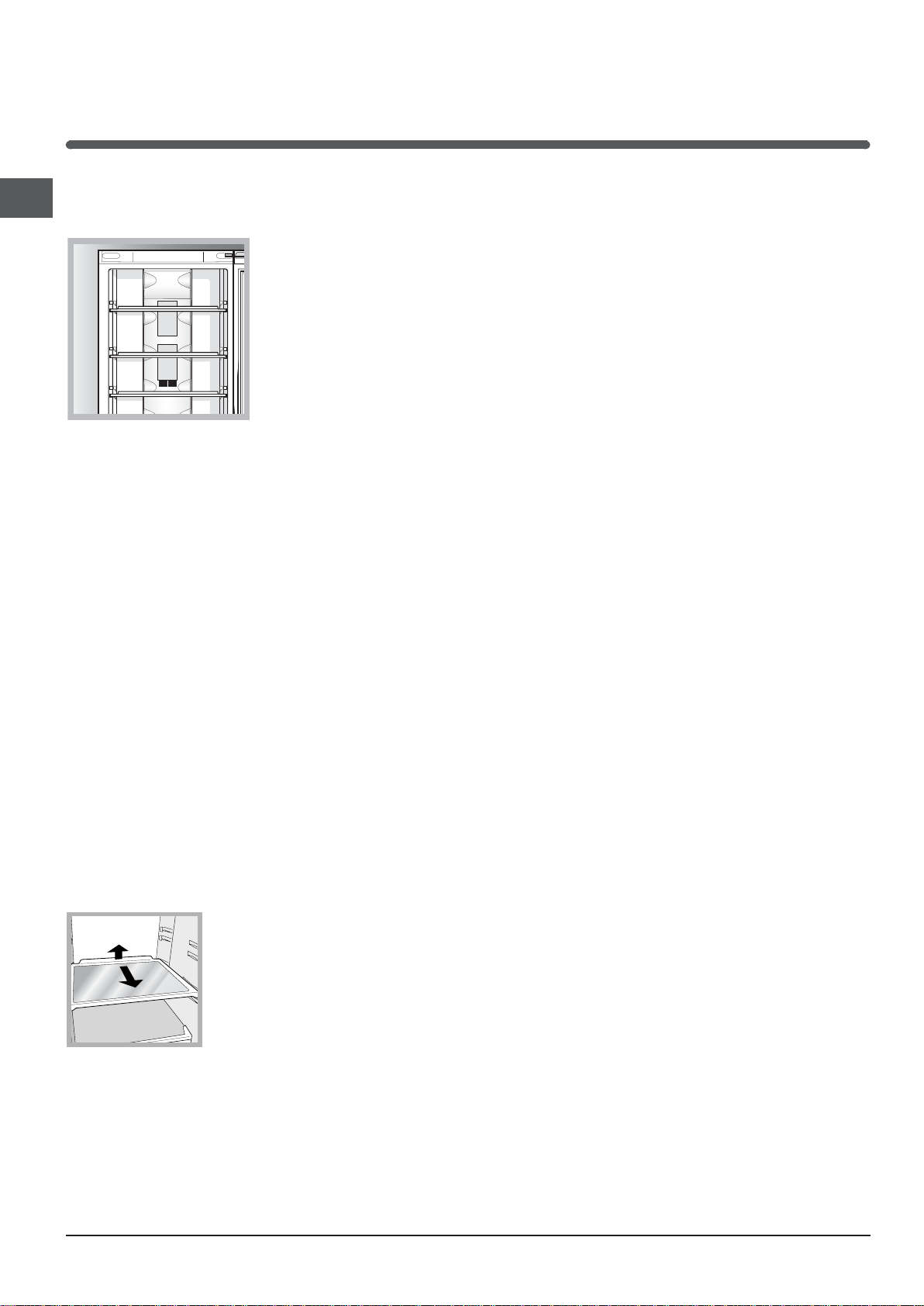
SHELVES: with or without grill.
1
2
Due to the special guides the
shelves are removable and the
height is adjustable (see
diagram), allowing easy storage
of large containers and food.
Height can be adjusted without
complete removal of the shelf.
Using the freezer to its full potential
Adjust the temperature using the display.
To freeze foods in safely and correctly, follow the
instructions below: place the food in the FREEZER
and STORAGE compartment, making sure that it does
not come into contact with any food that has already
been frozen; press the rapid-freezing SUPER FREEZE
button (the corresponding LED lights up) and close
the door. The function deactivates automatically after
24 hours or when the inside of the compartment has
reached the optimal temperature (the LED switches
off).
Do not re-freeze food that is defrosting or that has
already been defrosted. These foods must be cooked
and eaten (within 24 hours).
Fresh food that needs to be frozen must not come into
contact with food that has already been defrosted.
Do not place glass bottles which contain liquids, and
which are corked or hermetically sealed in the freezer
because they could break.
The maximum quantity of food that may be frozen
daily is indicated on the plate containing the technical
properties located on the bottom left side of the
refrigerator compartment (for example: Kg/24h: 4).
In order to obtain a greater amount of space in the
freezer compartment, you may remove the bins
(except the lowest bin and the special COOL CARE
ZONE bin, which has an adjustable temperature) and
place the food directly onto the evaporator plates.
! Do not open the door during freezing.
! If there is a power cut or malfunction, do not open the
freezer door. This will help maintain the temperature inside
the freezer, ensuring that foods are conserved for at least 9
-14 hours.
! to avoid blocking the air circulation inside the freezer
compartment, it is advisable not to obstruct the
ventilation holes with food or containers.
18
Page 7
Ice3 ice tray
The fact that they are situated on the top part of the
freezer drawers ensures greater cleanliness: the ice no
longer comes into contact with the food placed inside
the freezer compartment; furthermore, the dripping of
the water during filling is avoided (a lid to cover up the
hole after filling with water is also provided).
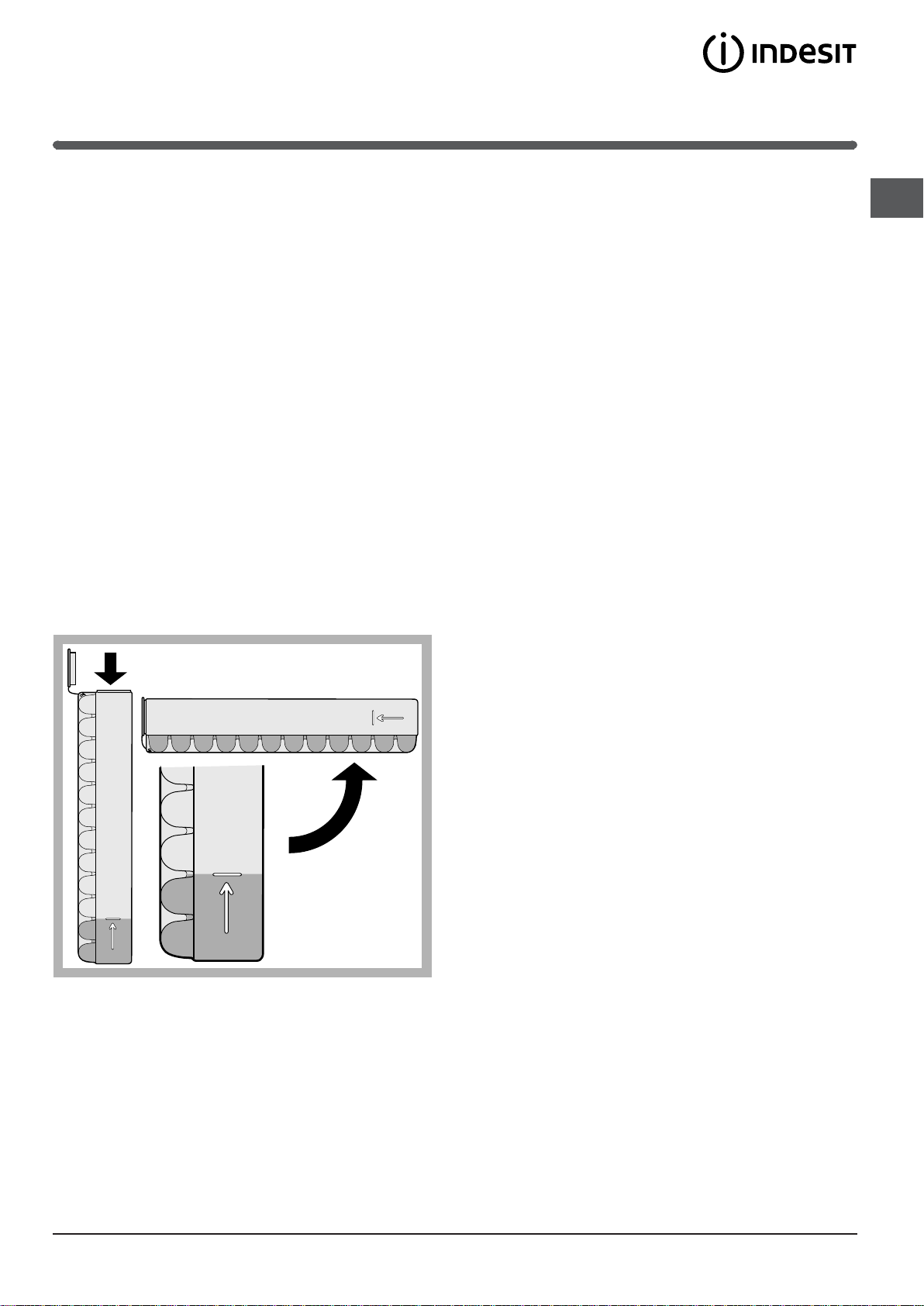
1. Pull out the tray by pushing it up.
Check that the tray is ompletely empty and fill it with
water through the opening provided.
2. Take care not to exceed the level indicated (MAX
WATER LEVEL). Excess water prevents the ice cubes
from dispensing (if this happens, wait for the ice to
melt and empty the tray).
3. Turn the tray 90°: due to the connected compartments
each mould fills with water (see diagram).
4. Close the opening with the lid provided and put the
tray back.
5. When the ice has formed (minimum time
approximately 8 hours) knock the tray against a hard
surface and wet the outside so that the ice cubes
come loose and take them out through the opening.
GB
WATER LEVEL
MAX
WATER LEVEL
MAX
MAX
WATER LEVEL
19
Page 8
Maintenance and care
Switching the appliance off
GB
During cleaning and maintenance it is necessary to
disconnect the appliance from the electricity supply:
1. Press and hold the ON/OFF button for approximately
two seconds, until everything on the display switches
off apart from the red LED corresponding to the ON/
OFF button.
2. pull the plug out of the socket
!
If this procedure is not followed, the alarm may sound.
This alarm does not indicate a malfunction. To restore
normal operation, it is sufficient to hold the ON/OFF
button down for more than two seconds. To disconnect
the appliance, follow points 1 and 2.
Cleaning the appliance
The external and internal parts, as well as the rubber
seals may be cleaned using a sponge that has been
soaked in lukewarm water and bicarbonate of soda or
neutral soap. Do not use solvents, abrasive products,
bleach or ammonia.
The removable accessories may be soaked in warm
water and soap or dishwashing liquid. Rinse and dry
them carefully.
The back of the appliance may collect dust which can
be removed by delicately using the hose of a vacuum
cleaner set on medium power. The appliance must be
switched off and the plug must be pulled out before
cleaning the appliance.
Replacing the light bulb
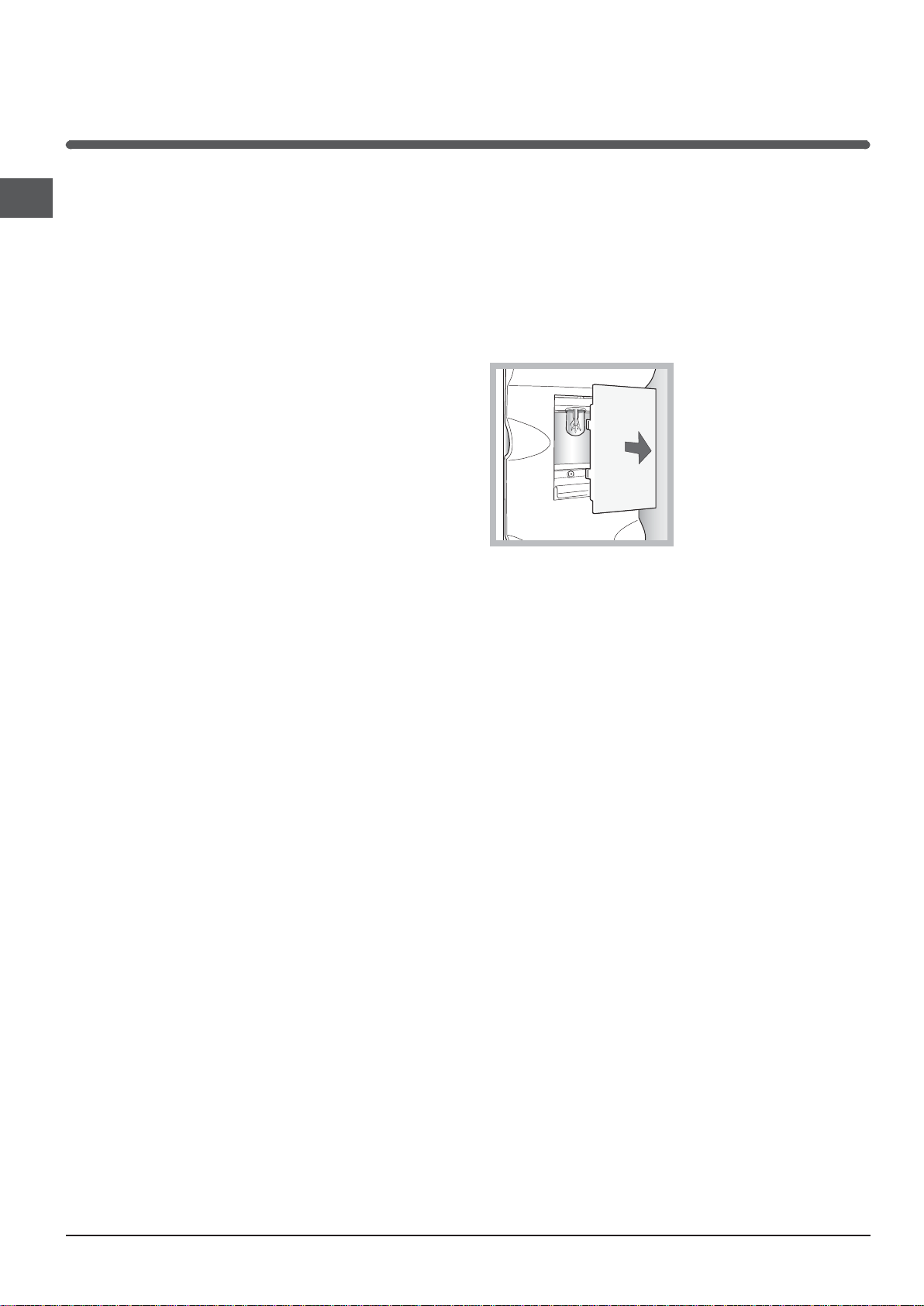
To replace the light bulb in the refrigerator compartment,
pull out the plug from the electrical socket. Follow the
instructions below.
Access the light bulb by removing the cover as
indicated in the diagram.
Replace it with a similar light bulb within the power
range indicated on the cover (15W or 25W).
Avoiding mould and unpleasant odours
The appliance is manufactured with hygienic
materials which are odour free. In order to maintain an
odour free refrigerator and to prevent the formation of
stains, food must always be covered or sealed
properly.
If you want to switch the appliance off for an extended
period of time, clean the inside and leave the doors
open.
20
Page 9
Precautions and tips
! The appliance was designed and manufactured in
compliance with international safety standards. The
following warnings are provided for safety reasons and
must be read carefully.
This appliance complies with the following
Community Directives:
- 73/23/EEC of 19/02/73 (Low Voltage) and
subsequent amendments;
-89/336/EEC of 03.05.89 (Electromagnetic
Compatibility) and subsequent amendments.
- 2002/96/CE..
General safety
The appliance was designed for domestic use inside the
home and is not intended for commercial or industrial
use.
The appliance must be used to store and freeze food
products by adults only and according to the instructions
in this manual.
The appliance must not be installed outdoors, even in
covered areas. It is extremely dangerous to leave the
appliance exposed to rain and storms.
Do not touch the appliance with bare feet or with wet or
moist hands and feet.
Do not touch the internal cooling elements:
this could cause skin abrasions or frost/freezer burns.
Disposal
GB
Observe local environmental standards when
disposing packaging material for recycling purposes.
The European Directive 2002/96/EC on Waste
Electrical and Electronic Equipment (WEEE), requires
that old household electrical appliances must not be
disposed of in the normal unsorted municipal waste
stream. Old appliances must be collected separately
in order to optimise the recovery and recycling of the
materials they contain and reduce the impact on
human health and the environment. The crossed out
wheeled bin symbol on the product reminds you of
your obligation, that when you dispose of the
appliance it must be separately collected.
Consumers should contact their local authority or
retailer for information concerning the correct disposal
of their old appliance.
Respecting and conserving the
environment
Install the appliance in a fresh and well-ventilated
room. Ensure that it is protected from direct sunlight
and do not place it near heat sources.
Try to avoid keeping the door open for long periods or
opening the door too frequently in order to conserve
energy.
When unplugging the appliance always pull the plug from
the mains socket, do not pull on the cable.
Before cleaning and maintenance, always switch off the
appliance and disconnect it from the electrical supply.
It is NOT sufficient to hold the ON/OFF button down for
more than two seconds to eliminate all electrical contact.
In the case of a malfunction, under no circumstances
should you attempt to repair the appliance yourself.
Repairs carried out by inexperienced persons may cause
injury or further malfunctioning of the appliance.
Do not use any sharp or pointed utensils or electrical
equipment - other than the type recommended by the
manufacturer - inside the frozen food storage
compartments.
Do not put ice cubes taken directly from the freezer into
your mouth.
Do not allow children to tamper with the controls or play
with the appliance. Under no circumstance should they
be allowed to sit on the bins or to hang from the door.
Keep packaging material out of the reach of children! It
can become a choking or suffocation hazard.
Do not fill the appliance with too much food:
cold air must circulate freely for food to be preserved
properly. If circulation is impeded, the compressor will
work continuously.
Do not place hot food directly into the refrigerator. The
internal temperature will increase and force the
compressor to work harder and will consume more
energy.
Defrost the appliance if ice forms (see Maintenance).
A thick layer of ice makes cold transference to food
products more difficult and results in increased
energy consumption.
Regularly check the door seals and wipe clean to
ensure they are free of debris and to prevent cold air
from escaping (see Maintenance).
21
Page 10
Troubleshooting
If the appliance does not work, before calling for Assistance (see Assistance), check for a solution from the
GB
following list.
Malfunctions:
The display is completely switched off.
The motor does not start.
The display is on but it is dim.
The alarm sounds, the ALARM LED
lights up and the refrigerator
compartment light flashes.
The alarm sounds, the ALARM LED
lights up and the freezer status bar
LEDs light up in sequence.
The alarm sounds, the ALARM LED
flashes and the freezer status bar
LEDs flash simultaneously.
The refrigerator and the freezer do not
cool well.
Possible causes / Solutions:
The plug has not been inserted into the electrical socket, or not far enough to
make contact, or there is no power in the house.
The appliance comes with a motor protection control (see Start-up and use).
Pull out and reverse the plug before putting it back in the socket.
The refrigerator door has been open for more than two minutes.
The buzzer stops when the door is closed or when the ALARM button is
pressed.
The temperature inside the freezer is too high. The freezer will maintain a
temperature of around 0°C so that the food will not refreeze, allowing you to
eat it within 24 hours or to refreeze it after it has been cooked.
To switch off the buzzer, press the ALARM button. Press a second time to
display the set value on the freezer status bar, switch off the ALARM LED and
restore normal operation.
The temperature of the freezer is dangerously high: the food inside must not
be eaten. The freezer will maintain a temperature of approximately 0°C.
To switch off the buzzer, press the RESET ALARM button. Press a second
time to display the set value on the freezer status bar, switch off the ALARM
LED and restore normal operation.
The doors do not close properly or the seals are damaged.
The doors are opened too frequently.
The temperature that has been set is too high (see Start-up and use).
The refrigerator or the freezer have been over-filled.
The food inside the refrigerator is
beginning to freeze.
The motor runs continuously.
The Aircooler fan does not rotate
The appliance makes a lot of noise.
Early ending of functions
The freezer status bar LEDs do not
indicate the set temperature, and are
lit in a constant manner.
The temperature that has been set is too low (see Start-up and use).
The SUPER COOL and/or SUPER FREEZE and/or BOTTLE CHILL functions
have been activated.
The door is not closed properly or is continuously opened.
The outside ambient temperature is very high.
The refrigerator door is open.
The Aircooler system is only activated automatically when it becomes
necessary to restore perfect operational conditions inside the refrigerator
compartment.
The appliance has not been installed on a level surface (see Installation).
The appliance has been installed between cabinets that vibrate and make
noise.
The internal refrigerant makes a slight noise even when the compressor is off.
This is not a defect, it is normal.
Electrical disturbance on the network or brief interruptions of the power supply.
Contact the Technical Assistance Centre.
22
Page 11
Assistance
Before calling for Assistance:
Check if the malfunction can be solved on your own (see Troubleshooting).
If after all the checks, the appliance still does not operate or the problem persists, call the nearest Service
Centre
model serial number
Communicating:
type of malfunction
appliance model (Mod.)
serial number (S/N)
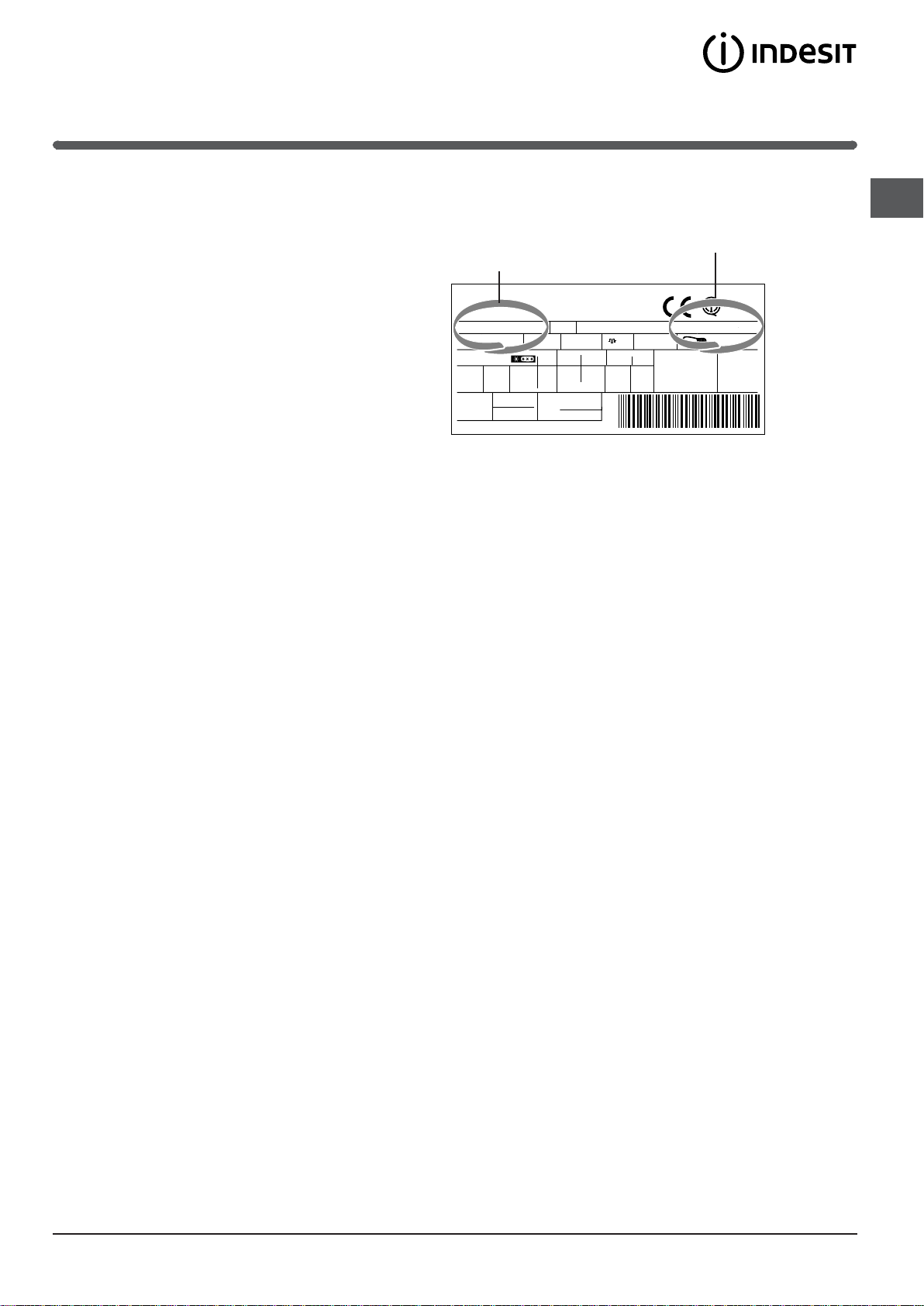
This information can be found on the data
plate located on the bottom left side of the
refrigerator compartment.
Gross
Bruto
Brut
TI
75
Test
P.S-I.
RG 2330
Mod.
220 - 240 V- 50 Hz 150 W
340
Total
Gross
Bruto
Brut
Compr.
R 134 a
Syst.
kg 0,090
Kompr.
Made in Italy 13918
93139180000 S/N 704211801
Net
Util
Utile
Pressure
HIGH-235
LOW 140
Cod.
Gross
Bruto
Brut
Fuse
W
A
Freez. Capac
Poder de Cong
4,0
kg/24 h
Max 15 w
Class
Clase
Classe
N
Never call on unauthorized technicians and always refuse spare parts which are not originals.
GB
23
Page 12
GB
195069646.00
03/2008 - Xerox Business Services
24
 Loading...