

Page 1
1-Stage Heat Pump
Manual Changeover
Battery
SC 3000
Programmable Electronic Thermostat
Installation, Operation & Application Guide
For more information on our complete range of American-made
products – plus wiring diagrams, troubleshooting tips and more,
visit us at www.icmcontrols.com
• 7-Day Programmable
• Single Stage Heat Pump/Non-Heat Pump Systems
• Single Stage Heat/Cool Systems
• Millivolt and Hydronic
(water or steam) System Compatible
• Manual Changeover
• Simpleset® Programming
• Compatible with Gas, Oil, Electric, or Millivolt
• Relay Outputs
(minimum voltage drop in thermostat)
• Ideally Suited for Residential
–
Residential (New Construction/ Replacement),
Light Commercial
Page 2

Table of Contents
Specifications ................................................................................................................................................. 1
Important Safety Information ........................................................................................................................1
Package Contents/Tools Required .................................................................................................................. 1
To Remove Existing Thermostat ................................................................................................................... 2
To Install Thermostat ..................................................................................................................................... 2
Wiring Diagrams ............................................................................................................................................. 4
Heating Only ................................................................................................................................................4
Heating/Cooling ............................................................................................................................................ 5
Heat Pump ................................................................................................................................................... 6
Cooling Only ................................................................................................................................................. 6
Zone Valve/Damper Motor System .............................................................................................................. 7
Operation ....................................................................................................................................................... 8
Setting the Setpoint Temperature ................................................................................................................. 8
Setting the Temperature Differential ............................................................................................................. 8
Setting to Heat Pump or Non-Heat Pump ...................................................................................................... 9
Starting the Thermostat ................................................................................................................................ 9
Testing the Thermostat ............................................................................................................................... 10
Operating Modes ......................................................................................................................................... 11
Setting the Time and Day of the Week ........................................................................................................ 12
Programming ............................................................................................................................................... 13
Simpleset™ Programming ............................................................................................................................ 15
Factory Programming .................................................................................................................................. 15
Personal Program Schedule ......................................................................................................................... 16
Troubleshooting ........................................................................................................................................... 17
Page 3

1
Package includes: SimpleComfort® 3000 thermostat on base, thermostat cover, wiring labels, screws and
wall anchors, Installation, Operation and Application Guide.
Tools required for installation: Drill with 3/16” bit, hammer, screwdriver.
Electrical rating: • Millivolt to 30 VAC/VDC
• DC Power: 3.0 VDC (2 “AA” alkaline batteries included)
• 1 amp maximum per terminal
• 3 amp maximum total load
Temperature control range: 45°F to 90°F (7°C to 32°C) Accuracy: ± 1°F (± 0.5°C)
System configurations: 1-stage heat, 1-stage cool, heat pump, gas, oil, electric, millivolt
Terminations: RH, RC, W, Y, B, O, G
Specications
WARNING!
:
Always turn off power at the main power supply before installing, cleaning, or removing
thermostat.
• This thermostat is for 24 VAC/VDC applications only; do not use on voltages over 30 VAC/VDC
• Do not short across terminals of gas valve or system control to test operation; this will damage your
thermostat and void your warranty
• All wiring must conform to local and national electrical and building codes
• Do not use air conditioning when the outdoor temperature is below 50 degrees; this can damage your
A/C system and cause personal injuries
• Use this thermostat only as described in this manual
Important Safety Information
Package Contents/Tools Required
Page 4
2
ELECTRICAL SHOCK HAZARD
– Turn off power at the main service panel by removing the fuse
or switching the appropriate circuit breaker to the OFF position before removing the existing
thermostat.
IMPORTANT: Thermostat installation must conform to local and national building and electrical
codes and ordinances.
Note: Mount the thermostat about five feet above the floor. Do not mount the thermostat
on an outside wall, in direct sunlight, behind a door, or in an area affected by a vent or
duct.
1. Turn off power to the heating and cooling system by removing the fuse or switching the appropriate
circuit breaker off.
ELECTRICAL SHOCK HAZARD
– Turn off power at the main service panel by removing the fuse
or switching the appropriate circuit breaker to the OFF position before removing the existing
thermostat.
1. Turn off power to the heating and cooling system by removing the fuse or switching the appropriate
circuit breaker off.
2. Remove cover of old thermostat. This should expose the wires.
3. Label the existing wires with the enclosed wire labels before removing wires.
4. After labeling wires, remove wires from wire terminals.
5. Remove existing thermostat base from wall.
6. Refer to the following section for instructions on how to install this thermostat.
To Remove Existing Thermostat
To Install Thermostat
Page 5

3
To Install Thermostat (continued)
2. To remove cover, insert and twist a coin or screwdriver in the slots on the sides of the thermostat.
3. Put thermostat base against the wall where you plan to mount it (Be sure wires will feed through
the wire opening in the base of the thermostat).
4. Mark the placement of the mounting holes.
5. Set thermostat base and cover away from working area.
6. Using a 3/16” drill bit, drill holes in the places you have marked for mounting.
7. Use a hammer to tap supplied anchors in mounting holes.
8. Align thermostat base with mounting holes and feed the control wires through wire opening.
9. Use supplied screws to mount thermostat base to wall.
10. Insert stripped, labeled wires in matching wire terminals. See “Wiring Diagrams” section of this
manual (Pages 4-7).
CAUTION!
:
Be sure exposed portion of wires does not touch other wires.
11. Tighten screws on terminal block. Gently tug wire to be sure of proper connection. Double check
that each wire is connected to the proper terminal.
12. Seal hole for wires behind thermostat with non-flammable insulation or putty.
13. Set Gas/Electric switch:
• Set to Gas for oil or gas systems
• Set to Electric for heat pumps or electric heat systems
14. Insert two fresh “AA” alkaline batteries into thermostat; oriented in the direction shown on the
battery holder.
15. Replace cover on thermostat by snapping it in place.
16. Turn on power to the system at the main service panel.
17. Test thermostat operation as described in “Testing the Thermostat” (Page 10).
Page 6
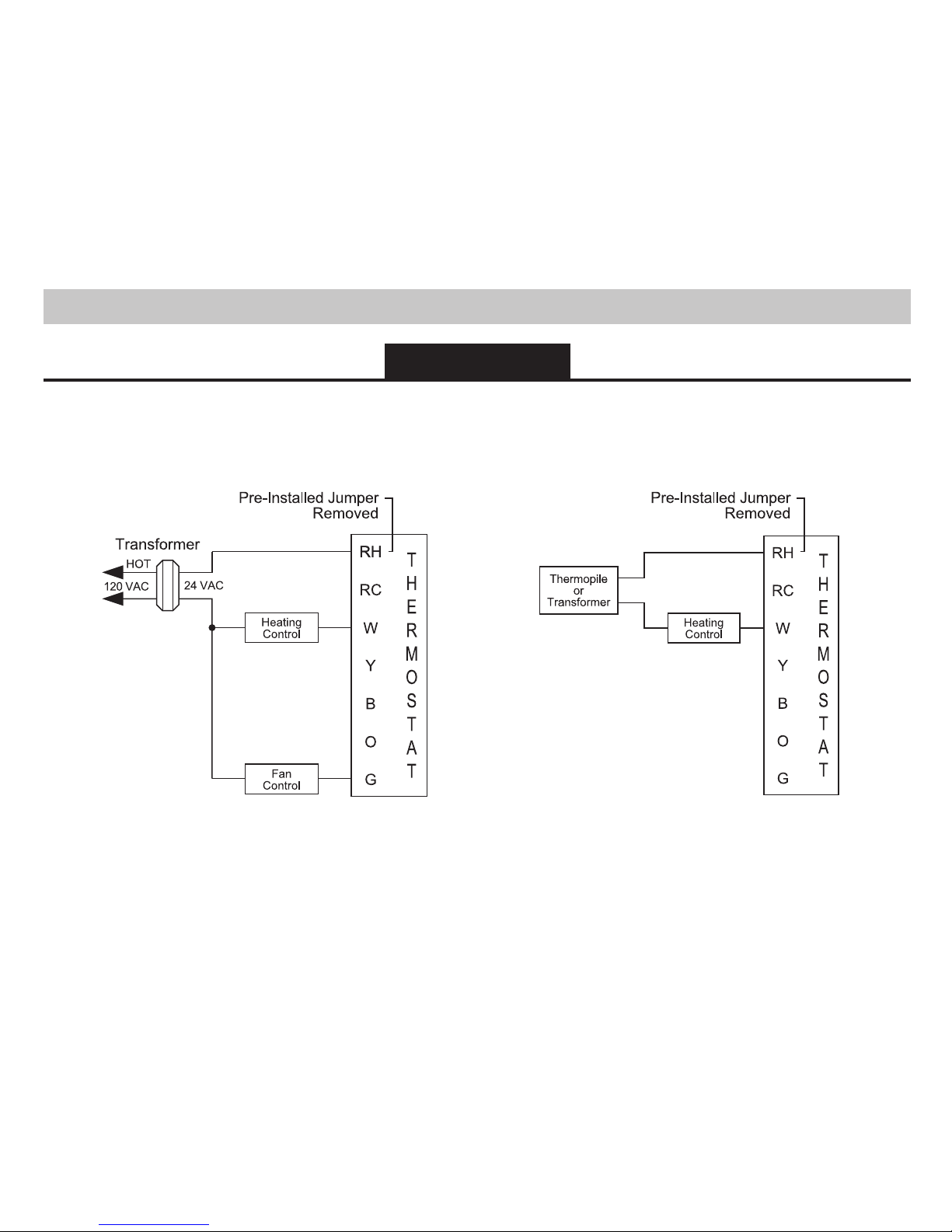
4
3-Wire,
Single Transformer
2-Wire,
Single Transformer or Millivolt
Heating Only
Wiring Diagrams
Page 7

5
5-Wire*,
Two Transformer
4-Wire,
Single Transformer
Heating/Cooling
Page 8

6
Cool Active
Reversing Valve
Heat Active
Reversing Valve
3-Wire,
Single Transformer
Heat Pump Cooling Only
Page 9

7
Zone Valve/Damper Motor System
3-Wire, Zone Valve/Damper Motor System
2-Wire, Zone Valve/Damper Motor System
Note: Differential temperature may need to be increased for zone/damper
systems (see Page 8).
Page 10

8
The SimpleComfort® 3000 thermostat has buttons that are used to:
• Adjust the setpoints of the thermostat
• Set the modes
• Program the schedule
• Reset the thermostat
1. With the Mode switch in Heat or Cool, the current temperature setpoint displays.
2. Press the or button until the desired temperature setpoint displays.
3. The new temperature setpoint is automatically saved in memory.
1. The default temperature differential is 1°. When your room temperature varies by 1°F, the thermostat
turns on your system. If you notice your system turning on and off too frequently, increase the
temperature differential.
2. Place the Cool/Off/Heat switch in OFF position.
3. Remove cover and press both and buttons.
4. Press the or button to select desired settings.
5. When finished, move the Cool/Off/Heat switch to Heat or Cool position to lock the setting into memory.
Operation
Setting the Setpoint Temperature
Setting the Temperature Differential
Page 11

9
CAUTION!
: Do not use air conditioning when the outdoor temperature is below 50 degrees. This can
damage your air conditioning system and cause personal injuries.
1. Move the Fan Auto/On switch to the Auto position.
2. Move the Cool/Off/Heat switch to Cool or Heat, depending on the season.
Room Temperature
OFF Indicator
Time
1. The factory default setting is non-heat pump.
2. Place Cool/Off/Heat switch in the OFF position.
3. Remove cover and press both the and buttons. Differential setting displays.
4. Press SW6 button. Heat pump ON/OFF displays.
5. Use the or button to configure heat pump setting.
6. Move Cool/Off/Heat switch to Heat or Cool to lock setting into memory.
Setting to Heat Pump or Non-Heat Pump
Starting the Thermostat
Page 12

10
Once the thermostat is installed, it should be thoroughly tested.
CAUTION!
: Do not energize the air conditioning system when the outdoor temperature is below 50
degrees. It can result in equipment damage or personal injury.
Cool Test
1. Slide Mode button to Cool position. Cool mode screen is displayed.
2. Adjust set temperature so it is 5 degrees below room temperature.
3. Air conditioning should come on within a few seconds.
4. Adjust the set temperature 2 degrees above the room temperature and the
A/C should turn off. There may be a fan delay on your system.
Note: There is a four minute delay to protect your compressor.
Heat Test
1. Slide Mode button to Heat position. Heat mode screen is displayed.
2. Adjust the set temperature so it is 5 degrees above the room temperature.
3. Heat should come on within a few seconds.
4. Adjust the set temperature so it is 2 degrees below the room temperature
and the heat should turn off. There may be a fan delay on your system.
Note: For heat pumps, there is a four minute delay to protect your
compressor.
Fan Test
1. Slide Fan switch to ON position.
2. Indoor fan turns ON.
3. Slide Fan switch to Auto position.
4. Indoor fan turns OFF.
Testing the Thermostat
Page 13

11
OFF Mode
• In this mode, the thermostat will not turn on the heating or cooling devices (manual fan can operate)
• OFF mode is also used to access setup and the program schedule
Cool Mode
• In this mode, the thermostat controls the cooling system
• Press the Mode button to enter and exit Program Cool mode
• In Program Cool mode, the thermostat will follow the program schedule that is stored in memor y
Heat Mode
• In this mode, the thermostat controls the heating system
• Press the Mode button to enter or exit the Program Heat mode
• In Program Heat mode, the thermostat will follow the program schedule that is stored in memor y
Hold Functions
When in Programmable Cool or Programmable Heat, you can lock in the present settings indefinitely by
pressing the Hold button once (PROG flashes). Press Hold button again to leave Hold mode (PROG solid).
For a temporary hold period, raise or lower set temperature to desired set temperature. The thermostat
will automatically return to programmed set temperature after 2 hours.
Operating Modes
Page 14

12
The time and day of the week must be set for your program schedule to operate correctly.
1. Slide the Cool/Off/Heat switch to the OFF position.
2. Press the button and hold in for 6 seconds.
3. Press the or button to adjust the time.
4. Press the button while the time is displayed. The display shows the day
currently set on the thermostat (1=Monday 2=Tuesday, etc.).
5. Press the or button to set the correct day of the week that today is.
Note: Sliding the Cool/Off/Heat switch to Cool or Heat positions will lock
the values into memory. Press the button to enter programming.
Setting the Time and Day of the Week
Page 15

13
Program Overview
The SC3000 programmable thermostat has four periods (MORN, DAY, EVE, NITE) that are customizable
for each day of the week. Each period will have a start time, heat temperature, and cool temperature. The
SC3000 monitors the day and time, while maintaining the specific conditions you have chosen for each
period in your program.
1. Place Cool/Off/Heat switch in OFF position.
2. Press the button for 6 seconds.
3. Press the button twice:
• Day is displayed (1-7)
4. Press the or button to change the day you want to program (1=Monday, 2=Tuesday, etc.).
5. Press the button to advance to the next parameter:
Note: You can use the button to return to the previous parameter.
• Period is displayed (MORN, DAY, EVE, NITE)
6. Press the or button to change period of day.
7. Press the button to advance to the next parameter.
• Set time is displayed
8. Press the or button to change set time.
9. Press the button to advance to the next parameter.
(continued on next page)
Programming
Page 16

14
• Heat temperature is displayed (50°F to 90°F)
10. Press the or button to adjust heat set temperature.
11. Press the button to advance to the next parameter.
• Cool temperature is displayed (45°F to 85°F)
12. Press the or button to adjust cool set temperature.
13. Press the button to advance to the next parameter.
Repeat Steps 1-13 to program each day of the week individually or use the Simpleset™ feature (see Page
15) to program every day the same as Monday.
When programming is complete, slide the Cool/Off/Heat switch to Heat or Cool to exit.
PROG must display on the screen for the thermostat to follow the program schedule. If PROG does not
appear, press the mode button once. If PROG flashes, it is in hold and will not make transitions. To exit
hold, press the hold button once.
Page 17

15
Simpleset™ programming is a convenient method of programming the thermostat. Once the entire
Monday (Day 1) schedule is set, Simpleset™ programming will copy the Monday schedule to every day of
the week.
After the complete Monday schedule is set (see Programming on Page 13), you are at the Day 2 screen:
1. Press the button once. Day 1 screen displays.
2. Press the button for 2 seconds:
• The days of the week will count down from 7 to 1 and this will lock the
settings into memory
• Once the schedule is locked in, you can go through each day and make
any changes you require; this feature speeds up the programming of
the standard weekday/weekend schedule
3. Slide Cool/Off/Heat switch to Heat or Cool to exit Program mode.
The SC3000 comes preprogrammed with the following schedule:
MORN 6:00 AM DAY 8:00 AM EVE 6:00 PM NITE 10:00 PM
HEAT 70°F HEAT 62°F HEAT 70°F HEAT 62°F
COOL 78°F COOL 85°F COOL 78°F COOL 82°F
MONDAY
thru
SUNDAY
Factory Programming
Simpleset™ Programming
Page 18

16
Use the following personal program schedule to record your settings:
MORN DAY EVE NITE
HEAT HEAT HEAT HEAT
COOL COOL COOL COOL
MONDAY
1
MORN DAY EVE NITE
HEAT HEAT HEAT HEAT
COOL COOL COOL COOL
TUESDAY
2
MORN DAY EVE NITE
HEAT HEAT HEAT HEAT
COOL COOL COOL COOL
WEDNESDAY
3
MORN DAY EVE NITE
HEAT HEAT HEAT HEAT
COOL COOL COOL COOL
THURSDAY
4
MORN DAY EVE NITE
HEAT HEAT HEAT HEAT
COOL COOL COOL COOL
FRIDAY
5
Personal Program Schedule
Page 19

17
Troubleshooting
MORN DAY EVE NITE
HEAT HEAT HEAT HEAT
COOL COOL COOL COOL
SATURDAY
6
MORN DAY EVE NITE
HEAT HEAT HEAT HEAT
COOL COOL COOL COOL
SUNDAY
7
Symptom Remedy
No display Check batteries; display is blank when batteries are not present or are dead
System fan does not come on
properly
Verify wiring is correct, check Gas/Electric switch position
Program schedule activates at the
wrong time
Check time (AM/PM) set on thermostat (see “Setting the Time,” Page 12)
Thermostat turns on and off too
frequently
Adjust temperature differential (see “Setting the Temperature Differential,”
Page 8)
Thermostat does not follow program Verify it is operating in Program mode; check time (AM/PM); check if in Hold
mode
“PROGram” flashes (in Hold mode) Press Hold button to remove from Hold mode
Fan runs continuously Check Fan Auto/On switch
Low battery indicator Batteries need to be replaced
Problem not listed above Press reset button once*
* Reset Button Function:
Time, day and program/non-program changed to last saved settings (saved after
program or configuration change), configuration and program unchanged, ASC
timer reset to 0.
Page 20

ONE-YEAR LIMITED WARRANTY
The Seller warrants its products against defects in material or workmanship for a period of one
(1) year from the date of manufacture. The liability of the Seller is limited, at its option, to repair,
replace or issue a non-case credit for the purchase prices of the goods which are provided to
be defective. The warranty and remedies set forth herein do not apply to any goods or parts
thereof which have been subjected to misuse including any use or application in violation of the
Seller’s instructions, neglect, tampering, improper storage, incorrect installation or servicing
not performed by the Seller. In order to permit the Seller to properly administer the warranty,
the Buyer shall: 1) Notify the Seller promptly of any claim, submitting date code information or
any other pertinent data as requested by the Seller. 2) Permit the Seller to inspect and test the
product claimed to be defective. Items claimed to be defective and are determined by Seller
to be non-defective are subject to a $30.00 per hour inspection fee. This warranty constitutes
the Seller’s sole liability hereunder and is in lieu of any other warranty expressed, implied or
statutory. Unless otherwise stated in writing, Seller makes no warranty that the goods depicted
or described herein are fit for any particular purpose.
LIA167-1
Patent No. 424,953
7313 William Barry Blvd., North Syracuse, NY 13212
(Toll Free) 800-365-5525 (Phone) 315-233-5266 (Fax) 315-233-5276
www.icmcontrols.com
 Loading...