

Page 1
Non-Programmable
SC 2300
Manual Changeover
Non-Programmable Electronic Thermostat
• Up to two-stage heat / two-stage cool
• Mercury-free, environmentally safe
• For use with 24 VAC systems
• Non-heat pump
• Manual Changeover
• Compatible with Gas, Oil, or Electric
Installation, Operation & Application Guide
For more information on our complete range of American-made
products – plus wiring diagrams, troubleshooting tips and more,
visit us at www.icmcontrols.com
2 Heat/2 Cool
Page 2

Table of Contents
Parts Diagram .............................................................................................................................1
Specifications ..............................................................................................................................2
Important Safety Information .....................................................................................................2
Package Contents/Tools Required ............................................................................................... 3
General Description ..................................................................................................................... 3
Features/Benefits........................................................................................................................3
To Remove Existing Thermostat ................................................................................................ 4
To Install Thermostat .................................................................................................................. 4
Installing and Changing Batteries ................................................................................................ 6
Replacing Wiring Labels ..............................................................................................................6
Operation .................................................................................................................................... 7
Setting the Setpoint Temperature .............................................................................................. 7
Setting a New Temperature Differential ...................................................................................... 7
Changing Fahrenheit to Celsius ................................................................................................... 8
Starting the Thermostat ............................................................................................................. 8
LED Indicator ..............................................................................................................................9
Wiring Diagrams ........................................................................................................................ 10
Troubleshooting ........................................................................................................................ 12
CAUTION!
:
This thermostat should be installed by trained technicians only.
Adhere to all local and national codes. Disconnect all power to the
system before installing, removing, or cleaning.
Page 3
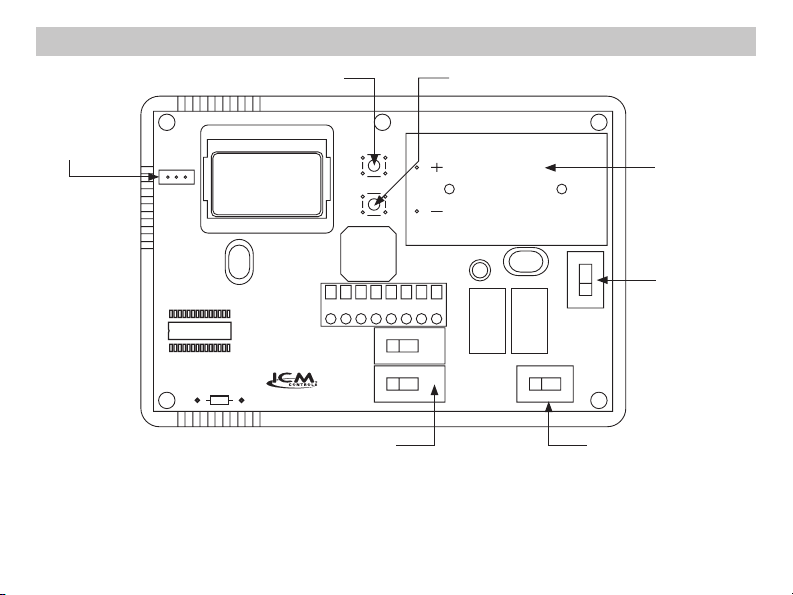
Celsius/
Fahrenheit
Jumper
F–C
Parts Diagram
Up Button Down Button
RH
CRCY2 W2 Y1 W1G
2300
Battery
Compartment
Gas/Electric
Switch
ONAUTO
Mode Switch or
Cool/Off/Heat Switch
Fan Switch
1
Page 4
Specications
Input:
• Voltage: 24 VAC (18-30 VAC)
• DC Power: 3.0 VDC (2 “AA” alkaline batteries included)
Output:
• Maximum: 1 amp per terminal (3 amp total for all terminals)
• Temperature control ranges: 45°F to 90°F (7°C to 32°C)
Accuracy: ± 1°F (± 0.5°C)
• System configurations: Multi-stage – Two-stage heat or two-stage cool
• Terminations: RH, RC, W1, W2, Y1, Y2, G, C
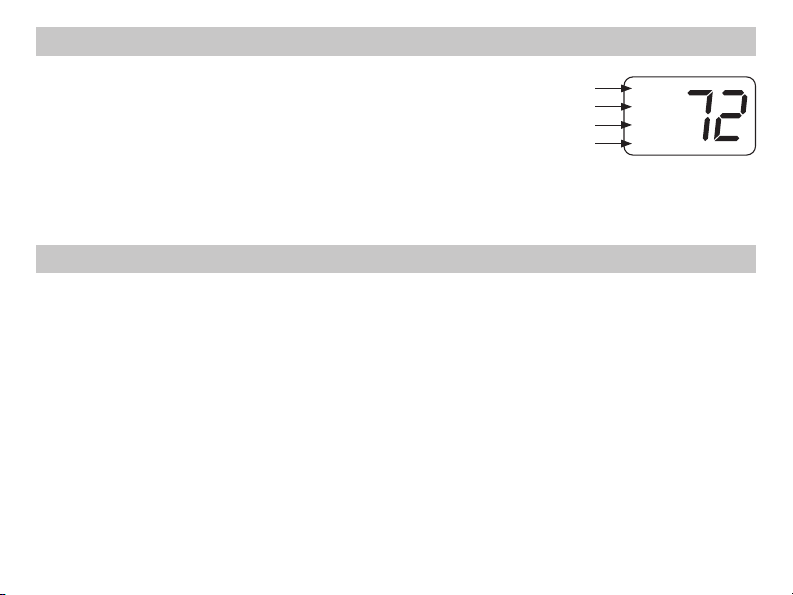
Room temperature
setpoint
Room temperature
Low battery indicator
Temperature
differential setting
SET
ROOM
LO BAT
DIFF
Important Safety Information
• Always turn off power at the main power source by unscrewing fuse or switching circuit breaker to the off
position before installing, removing, cleaning, or servicing this thermostat
• Read all of the information in this manual before installing this thermostat
• This thermostat should be installed only by a professional contractor
• This is a 24 VAC low-voltage thermostat; do not install on voltages higher than 30 VAC
• All wiring must conform to local and national building and electrical codes and ordinances
• Do not short (jumper) across terminals on the gas valve or at the system control to test installation; this will
damage the thermostat and void the warranty
• Do not switch system to cool if the temperature is below 50°F (10°C) This can damage the air conditioning
system and may cause personal injury
• The thermostat will not control your heating/air conditioning system without power; it requires two charged
“AA” batteries for thermostat operation and a continuous 24 VAC circuit for proper system control
• Replace batteries every year or when the low battery indicator appears on the ther mostat’s display
• Use this thermostat only as described in this manual
2
Page 5

Package Contents/Tools Required
Package includes: SimpleComfort
labels, screws and wall anchors, Installation, Operation and Application Guide.
Tools required for installation: Drill with 3/16” bit, hammer, screwdriver.
®
2300 non-programmable thermostat on base, thermostat cover, wiring
General Description
The SimpleComfort
up to 2-stage heat/2-stage cool. It will operate with multi-stage systems that are manual changeover.
There are no optional items required for standard installations. This thermostat is also compatible as a
master thermostat in zoned system applications.
The SimpleComfort
properly, this thermostat can reduce heating and cooling costs throughout the year.
®
2300 is intended to operate and is compatible with 24 VAC residential systems with
®
2300 will automatically control the heat and/or air conditioning system. When used
Features/Benets
• The SimpleComfort® 2300 thermostat is a digital, mercury-free, non-programmable, electronic thermostat
• Compatible with multi-stage heating/cooling systems; works with gas, oil, or electric systems
• Compatible as a master thermostat in zoned system applications
• Visual low battery indication
• Automatic Heating System Shutdown: If temperature exceeds 90°F (32°C)
• System Customization: Choose Fahrenheit or Celsius display; three available temperature differential
settings
3
Page 6

To Remove Existing Thermostat
ELECTRICAL SHOCK HAZARD
or switching the appropriate circuit breaker to the OFF position before removing the existing
thermostat.
1. Turn off power to the heating and cooling system by removing the fuse or switching off the appropriate
circuit breaker.
2. Remove cover of old thermostat. This should expose the wires.
3. Label the existing wires with the enclosed wire labels before removing wires.
4. After labeling wires, remove wires from wire terminals.
5. Remove existing thermostat base from wall.
6. Refer to the following section for instructions on how to install this thermostat.
– Turn off power at the main service panel by removing the fuse
To Install Thermostat
ELECTRICAL SHOCK HAZARD
or switching the appropriate circuit breaker to the OFF position before removing the existing
thermostat.
IMPORTANT: Thermostat installation must conform to local and national building and electrical
Note:
1. Turn off power to the heating and cooling system by removing the fuse or switching off the appropriate
circuit breaker. Move the Cool/OFF/Heat switch to OFF
codes and ordinances.
Mount the thermostat about five feet above the floor. Do not mount the thermostat on an
outside wall, in direct sunlight, behind a door, or in an area affected by a vent or duct.
4
– Turn off power at the main service panel by removing the fuse
.
Page 7

To Install Thermostat (continued)
2. Move the FAN AUTO/ON switch to AUTO.
3. To remove cover, insert and twist a coin or screwdriver in the slots on the sides of the thermostat.
4. Put thermostat base against the wall where you plan to mount it (Be sure wires will feed through the
wire opening in the base of the thermostat).
5. Mark the placement of the mounting holes.
6. Set thermostat base and cover away from working area.
7. Using a 3/16” drill bit, drill holes in the places you have marked for mounting.
8. Use a hammer to tap supplied anchors into mounting holes.
9. Align thermostat base with mounting holes and feed the control wires through wire opening.
10. Use supplied screws to mount thermostat base to wall.
CAUTION!
11. Tighten screws on terminal block. Gently tug wire to be sure of proper connection. Double check that
each wire is connected to the proper terminal.
12. Seal hole for wires behind thermostat with non-flammable insulation or putty.
13. Set the Gas/Electric switch to electric or gas/oil.
14. Set the temperature scale jumper to Fahrenheit or Celsius.
CAUTION!
15. Install two “AA” alkaline batteries.
16. Replace cover on thermostat by snapping it in place.
17. Turn on power to the system at the main service panel.
:
Be sure exposed portion of wires does not touch other wires.
:
Installing batteries incorrectly can damage thermostat.
5
Page 8

Installing and Changing Batteries
If your LCD is blank, or displaying LO BAT, the batteries are not installed or need to be changed. We
suggest you change the batteries at least once a year, or whenever the LO BAT warning displays.
Note: Af ter installing new batteries, you have to reset the room temperature setting and the
Step 1: Move the Cool/Off/Heat switch into the Off position.
Step 2: Move the Fan Auto/On switch into the Auto position.
Step 3: Remove the cover, and install the two “AA” alkaline batteries into the battery compartment.
If the display is on, the batteries are installed properly.
differential setting.
Proper battery installation is important! Make sure the positive ends of the batteries match the
positive terminals in the battery compartment.
Replacing Wiring Labels
Replace the old labels with the enclosed new labels:
Old New Type
R, V-VR or VR-R RH 24 VAC, heat transformer
Y, Y1 or M Y1 Stage 1 cooling
G or F G Fan contactor circuit
Y2 Y2 2nd stage cooling control
W1, W2 or W-U W2 2nd stage heating control
C, X or B C 24 VAC, transformer common side
W1 W1 Stage 1 heating
RC 24 VAC, cool transformer
6
Page 9

Operation
Setting the Setpoint Temperature
Step 1: Press the or button; the current temperature setpoint displays.
Step 2: Press the or button until the desired temperature setpoint displays.
Note:
Holding down either
The new temperature setting is automatically saved. After 5 seconds, the display
returns to showing the current room temperature.
temperature display.
Setting a New Temperature Differential
IMPORTANT: The default temperature differential is factory set at 1°F. When your room temperature
Step 1: Remove the cover and the batteries.
Step 2: Reinstall the batteries and the cover. The display will show
Step 3: Press the or button to adjust the temperature differential down or up.
The display will return to the room temperature
display five seconds after the last input. The new
temperature differential setting will be saved.
varies by 1°F, the thermostat turns your system on. If you notice your system turning on and
off too frequently, increase the temperature differential accordingly.
This is the temperature differential setting.
the or button will scroll the
Differential Setting °F °C
1 1°F 0.5°C
2 2°F 1.0°C
3 3°F 1.5°C
7
Page 10

Operation (Continued)
Changing Fahrenheit to Celsius
The temperature displays in degrees Fahrenheit as a factory set default. Follow these steps to change to
degrees Celsius:
Step 1: Remove the cover and the batteries.
Step 2: Move the F/C jumper to the desired position, F or C using the center pin as a common.
Step 3: Reinstall the batteries and the cover.
Your LCD readout changes accordingly.
Starting the Thermostat
Step 1: Move the Fan switch into the Auto position.
• In Auto, indoor fan runs only during a heating or cooling cycle
• In ON, indoor fan runs continuously
Fan
Auto On
Step 2: Move the Mode switch to either Cool or Heat position, depending on
the season. The thermostat will now operate and maintain the room
temperature at the desired setpoint.
Note:
When the thermostat operates the system, there is built-in
compressor protection. After the compressor turns off, the
system will not turn it back on for about five minutes. This
protects the compressor.
8
Mode
Cool Off Heat
Page 11

LED Indicator
There is one LED indicator located on the front of the thermostat. It is designed to inform you of the
following:
AUX (GREEN):
This turns on when the second stage
heating is in operation. Auxiliary
heating turns on 2 degrees below first
stage and is not adjustable.
AUX (GREEN)
Aux
Cool Off Heat OnAuto
9
Page 12

Wiring Diagrams
IMPORTANT: If installing on systems with separate heat and cool transformers, remove factory jumper
from RH and RC terminals.
SC 2300 SC 2300
Factory Installed Jumper Factory Installed Jumper
10
W2G CRHY2 W1Y1 RC
W/
Y/
W2G CR
W1
Y1
2-Stage Heat / 1-Stage Cool
Note:
Factory installed jumper across RH/RC
W2G CRHY2 W1Y1 RC
W/
Y/
W2G CR
Y2
W1
Y1
2-Stage Heat / 2-Stage Cool
Note:
Factory installed jumper across RH/RC
Page 13

IMPORTANT: If installing on systems with separate heat and cool transformers, remove factory
jumper from RH and RC terminals.
SC 2300
W2G CRHY2 W1Y1 RC
W/
Y2
2-Stage Heat / 2-Stage Cool
(For separate heat and cool transformers)
Y1
Y/
W2G CR
W1
RC
11
Page 14

Troubleshooting
Symptom Remedy
The system isn’t turning on Check the wiring (see Installation, Page 4)
LCD is blank, or displaying “LO BAT” Replace batteries, or make sure the existing ones are properly installed
Thermostat does not turn on the system as
frequently as it should
Thermostat is not properly controlling the fan Check that the fan switch settings match your system (gas or electric)
Thermostat is continuously turning on and off Increase the temperature differential (see Setting a New Temperature
Temperature displayed is not accurate Your thermostat has two options for temperature readout: Fahrenheit
12
Check the batteries
(see Installing and Changing Batteries, Page 6)
Decrease the temperature differential (see Setting a New Temperature
Differential, Page 7)
Differential, Page 7)
(default) or Celsius; check that the “jumper” is properly set to your
preference
Plug the hole for wiring behind the thermostat with non-flammable
insulation to prevent airflow into the thermostat
Page 15

This page left blank intentionally.
Page 16

ONE-YEAR LIMITED WARRANTY
The Seller warrants its products against defects in material or workmanship for a period of one
(1) year from the date of manufacture. The liability of the Seller is limited, at its option, to repair,
replace or issue a non-case credit for the purchase prices of the goods which are provided to
be defective. The warranty and remedies set forth herein do not apply to any goods or parts
thereof which have been subjected to misuse including any use or application in violation of the
Seller’s instructions, neglect, tampering, improper storage, incorrect installation or ser vicing
not performed by the Seller. In order to permit the Seller to properly administer the warranty,
the Buyer shall: 1) Notify the Seller promptly of any claim, submitting date code information or
any other pertinent data as requested by the Seller. 2) Permit the Seller to inspect and test the
product claimed to be defective. Items claimed to be defective and are determined by Seller
to be non-defective are subject to a $30.00 per hour inspection fee. This warranty constitutes
the Seller’s sole liability hereunder and is in lieu of any other warranty expressed, implied or
statutory. Unless otherwise stated in writing, Seller makes no warranty that the goods depicted
or described herein are fit for any particular purpose.
Patent No. 424,953
7313 William Barry Blvd., North Syracuse, NY 13212
(Toll Free) 800-365-5525 (Phone) 315-233-5266 (Fax) 315-233-5276
www.icmcontrols.com
LIA186-1
 Loading...