

Page 1

M2
Monitor Arm
Page 2
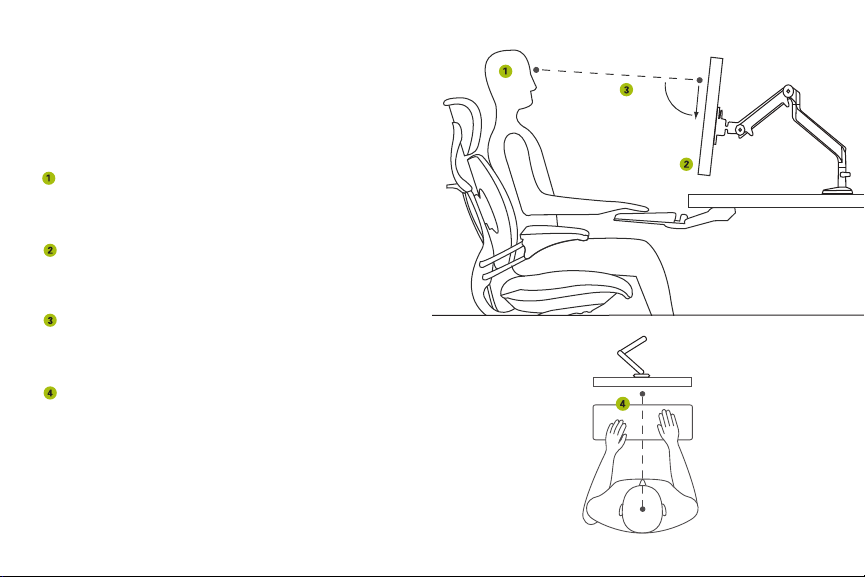
Positioning the Monitor
90˚
The M2 offers virtually effortless adjustment. Simply grasp
the monitor and move it to the desired position. Use the
following guidelines for ideal ergonomic positioning.
Height
Position the first line of text on the monitor at or just
below eye level.
Distance
Position monitor at a comfortable distance from your
eyes, approximately one arm’s length away.
Angle
Tilt the top of the monitor away from you so your line
of sight is perpendicular to it.
Alignment
Position the monitor so it’s in line with the space bar
of your keyboard and the centerline of your body.
The M2 also allows the monitor to be pushed out of the
way to create extra space on the work surface or turned
to promote collaboration with others.
Page 3
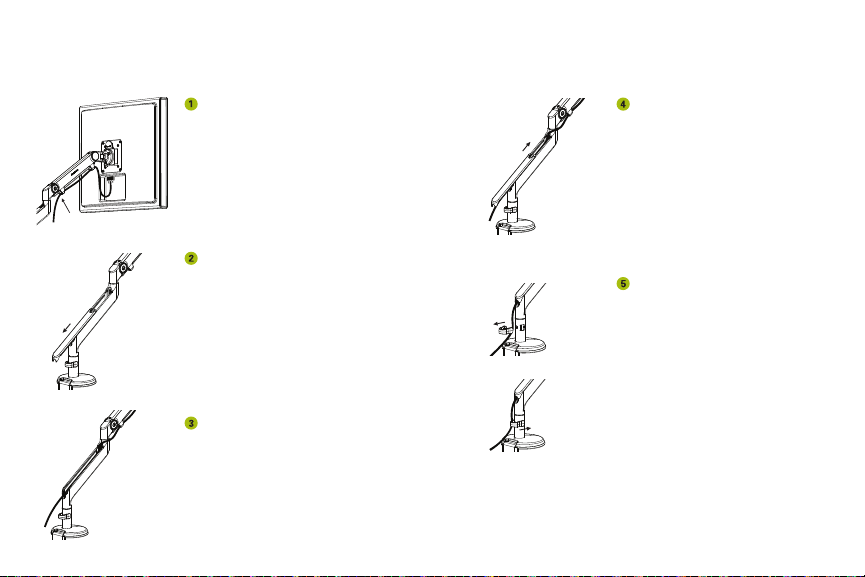
Cable Management
Route power and monitor
cables through the cable clips
on the M2’s upper link.
Slide the plastic cover on the
lower link downward until it
disengages, then remove.
Route cables inside the
lower link.
Place the plastic cover back
onto the lower link and slide
upward until it clicks into place.
Remove the cable clip on the
base stem then reattach over
the cables to secure them
in place.
Page 4
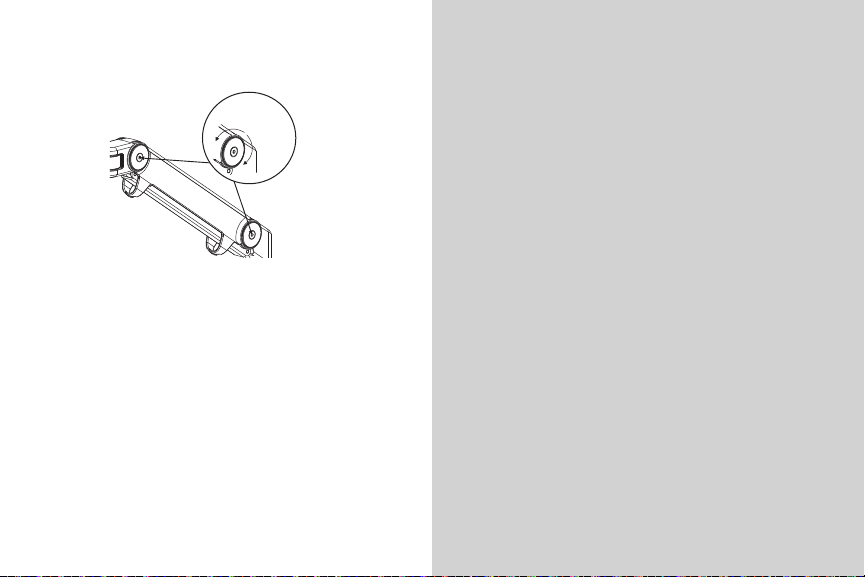
Counterbalancing the Monitor
Decrease
Friction
Increase
Friction
Warranty
The monitor should be easy to move up and down and
should stay in place once adjusted. If the monitor is
difficult to adjust, or moves without assistance, it is not
properly counterbalanced.
Use the provided hex key to turn the screws located
within the half-dollar-size friction discs located on the
side of the M2. Turn each screw counterclockwise to
decrease friction when the monitor is difficult to adjust.
Turn each screw clockwise to increase friction when the
monitor will not stay in place. Be sure to apply approxi-
mately the same amount of rotation to each screw.
The following Warranty is
in lieu of all other warranties
express or implied, including,
but not limited to, the implied
warranty of merchantability and
fitness for a particular purpose.
Humanscale warrants on the
M2 monitor arm:
15 years, 24/7 use: all
components
This Warranty is applicable to
the initial purchaser only and is
non-transferable. Humanscale
warrants that, at the time
of customer’s acceptance,
the product will be in good
working order and will be free
from defects in materials and
workmanship. This does not
apply to normal wear and tear
or damage caused by accident,
neglect, misuse, or improper
installation or operation.
Humanscale will not be
responsible for damage due
to service, maintenance,
modifications or tampering
by anyone other than a
Humanscale-authorized
representative. In the event
a product is defective and
Humanscale receives written
notice of the defect within the
Warranty period, Humanscale,
at its option, will either repair or
replace the defective product.
This Warranty does not cover
damage caused by a carrier, or
transportation of the product
from one location to another, or
alterations made by owner.
Limitation of Liability
In no event will Humanscale
be liable to purchasers for any
special, collateral, incidental
or consequential damages,
however caused, whether by
Humanscale’s negligence or
otherwise.
Page 5
Humanscale and the Environment
For all its advancements, the M2’s most notable
achievement is that it treads lightly where the
environment is concerned.
Few part• s mean few manufacturing processes
Light • weight means minimal material to source,
process, dispose of, and ship
Slim • profile enables less wasteful packaging
D• urable design means it won’t need to be replaced
for a very, very long time
No g• as cylinders, which are difficult to recycle
52% recycled content and 99% recyclable•
C• ontributes to valuable LEED-CI, -NC and -EB points
www.humanscale.com
HSM2TAG0809
 Loading...