

Page 1

HP Vectra 500 Series PC
Hardware and BIOS
Technical Reference Manual
Models: 510 5/xx
515 5/xx
February 1996
Page 2

Notice
The information contained in this document is subject to change
without notice.
Hewlett-Packard makes no warranty of any kind with regard to this
material, including, but not limited to, the implied warranties of
merchantability and fitness for a particular purpose.
Hewlett-Packard shall not be liable for errors contained herein or for
incidental or consequential damages in connection with the furnishing,
performance, or use of this material.
Hewlett-Packard assumes no responsibility for the use or reliability of
its software on equipment that is not furnished by Hewlett-Packard.
This document contains proprietary information that is protected by
copyright. All rights are reserved. No part of this document may be
photocopied, reproduced, or translated to another language without the
prior written consent of Hewlett-Packard Company.
IBM is a registered trademark of International Business Machines
Corporation.
Intel is a registered trademark of Intel Corporation.
Microsoft and MS-DOS are U.S. registered trademarks of Microsoft
Corporation.
Operating System/2 and OS/2 are registered trademarks of International
Busines Machines Corporation.
PC/XT is a trademark of International Business Machines Corporation.
Pentium is a U.S. registered trademark of Intel Corporation.
XT is a trademark of International Business Machines Corporation.
Windows is a U.S. trademark of Microsoft Corporation.
Hewlett-Packard France
Grenoble Personal Computer Division
Technical Marketing
38053 Grenoble Cedex 9
France
1996 Hewlett-Packard Company
Page 3

iii
Preface
This manual is a technical reference and BIOS document for engineers and
technicians providing system level support for HP Vectra 500 Series PCs for
models: 510 5/xx and 515 5/xx.
It is assumed that the reader possesses a detailed understanding of ATcompatible microprocessor functions and digital addressing techniques.
Technical information that is readily available from other sources, such as
manufacturer’s proprietary publications, has not been reproduced.
This manual contains summary BIOS information only. For detailed
information, it is recommend the reference work cited in the next section.
For additional reference material, refer to the bibliography.
Ordering Information for the Phoenix BIOS Manual
System BIOS for IBM PCs, Compatibles, and EISA Computers (ISBN 0-20157760-7) by Phoenix Technologies is available in many bookstores. It can also
be ordered directly from the publisher as follows:
In the U.S.A.
Call Addison-Wesley in Massachusetts at +1-617-944-3700, and be prepared to
give a credit card number and expiry date.
In Europe
Send your request to Addison-Wesley at the address given below, and be
prepared to give a credit card number and expiry date.
Addison-Wesley
Concertgebouwplein 25
1071 LM Amsterdam, The Netherlands
Tel: +31 (20) 671 72 96
Fax: +31 (20) 675 21 41
Page 4

iv
Conventions
The following conventions are used throughout this manual to identify specific
elements:
❒ Hexadecimal numbers are identified by a lower case h.
For example, 0FFFFFFFh or 32F5h
❒ Binary numbers and bit patterns are identified by a lower case b.
For example, 1101b or 10011011b
Bibliography
❒ System BIOS for IBM PCs, Compatibles, and EISA Computers
(ISBN 0-201-57760-7) by Phoenix Technologies. Addison-Wesley
(publisher).
The following Hewlett-Packard publications may also assist the reader of this
manual.
❒ HP Vectra 500 Series Familiarization Guide. The HP Part Number is:
D41xx+49A90001
❒ HP Vectra 500 Series PC Reference Guide for either the desktop or
minitower (supplied with the PC). The HP Part Number for these books are:
D4140-90001 - Desktop
D4170-90001 - Minitower
❒ HP Vectra 500 Series Service Handbook - 2nd edition. The HP Part
Number is:
5063-9064
The following Intel publication provides more detailed information:
❒ Pentium Processor (241595-1)
Page 5

Contents
v
1 HP Vectra 500 Series
System Overview. . . . . . . . . . . . . . . . . . . . . . . . . . . . . . . . . . . . . . . . . . . 2
HP Vectra 500 Series Desktop – Minitower Comparison . . . . . . . . . . . . . 3
HP Vectra 500 Series Block Diagram . . . . . . . . . . . . . . . . . . . . . . . . . . 4
Principal Components and Features . . . . . . . . . . . . . . . . . . . . . . . . . . 5
HP Vectra 500 Series System Board. . . . . . . . . . . . . . . . . . . . . . . . . . . . . . 6
HP Vectra 500 Series Desktop Backplane . . . . . . . . . . . . . . . . . . . . . . . . . 7
HP Vectra 500 Series Minitower Backplane. . . . . . . . . . . . . . . . . . . . . . . . 7
Processor . . . . . . . . . . . . . . . . . . . . . . . . . . . . . . . . . . . . . . . . . . . . . . . . . . . 8
Superscalar Architecture . . . . . . . . . . . . . . . . . . . . . . . . . . . . . . . . . . . . . . 8
Floating Point Unit (FPU) . . . . . . . . . . . . . . . . . . . . . . . . . . . . . . . . . . . . . 8
Dynamic Branch Prediction . . . . . . . . . . . . . . . . . . . . . . . . . . . . . . . . . . . . 9
Instruction and Data Cache . . . . . . . . . . . . . . . . . . . . . . . . . . . . . . . . . . . . 9
Data Integrity . . . . . . . . . . . . . . . . . . . . . . . . . . . . . . . . . . . . . . . . . . . . . . 10
PCI Chip Set . . . . . . . . . . . . . . . . . . . . . . . . . . . . . . . . . . . . . . . . . . . . . . . 10
PCI, Cache and Memory Controller (82437FX) . . . . . . . . . . . . . . . . . . . 12
Data Path Unit (82438FX) . . . . . . . . . . . . . . . . . . . . . . . . . . . . . . . . . . . . 13
The PCI/ISA Bridge and IDE Controller (82371FB) . . . . . . . . . . . . . . . . 14
The 82438FX and 82371FB Feature Summary. . . . . . . . . . . . . . . . . . . . 14
Super I/O Chip. . . . . . . . . . . . . . . . . . . . . . . . . . . . . . . . . . . . . . . . . . . . . . 15
NS PC87332VF Feature Summary. . . . . . . . . . . . . . . . . . . . . . . . . . . . . . 16
Flexible Drive Controller (FDC) . . . . . . . . . . . . . . . . . . . . . . . . . . . . . . . 16
Serial/Parallel Ports. . . . . . . . . . . . . . . . . . . . . . . . . . . . . . . . . . . . . . . . . . 17
Graphics/Integrated Video . . . . . . . . . . . . . . . . . . . . . . . . . . . . . . . . . . . . 17
IDE to PCI Controller . . . . . . . . . . . . . . . . . . . . . . . . . . . . . . . . . . . . . . . . 18
Flash ROM . . . . . . . . . . . . . . . . . . . . . . . . . . . . . . . . . . . . . . . . . . . . . . . . . 18
Security Features . . . . . . . . . . . . . . . . . . . . . . . . . . . . . . . . . . . . . . . . . . . 18
Physical Characteristics . . . . . . . . . . . . . . . . . . . . . . . . . . . . . . . . . . . . . . 20
Electrical Specifications . . . . . . . . . . . . . . . . . . . . . . . . . . . . . . . . . . . . . . 20
Environmental Specifications. . . . . . . . . . . . . . . . . . . . . . . . . . . . . . . . . . 22
2 Summary of the HP/Phoenix BIOS
HP/Phoenix BIOS Description. . . . . . . . . . . . . . . . . . . . . . . . . . . . . . . 24
Overview of Address Space . . . . . . . . . . . . . . . . . . . . . . . . . . . . . . . . . 24
Page 6

Contents
vi
System Memory Map . . . . . . . . . . . . . . . . . . . . . . . . . . . . . . . . . . . . . . . . 25
BIOS I/O Port Map . . . . . . . . . . . . . . . . . . . . . . . . . . . . . . . . . . . . . . . . . . 25
Addressing System Board Components . . . . . . . . . . . . . . . . . . . . . . . . . 27
3 Desktop Management Interface
DMI Information Structure. . . . . . . . . . . . . . . . . . . . . . . . . . . . . . . . . . 32
Accessing BIOS DMI Information . . . . . . . . . . . . . . . . . . . . . . . . . . . . 34
The DMI Header . . . . . . . . . . . . . . . . . . . . . . . . . . . . . . . . . . . . . . . . . . . . 34
Verifying the DMI Information Structure . . . . . . . . . . . . . . . . . . . . . . . . 35
DMI Sub-Structure Tables . . . . . . . . . . . . . . . . . . . . . . . . . . . . . . . . . . . . 35
4 Power-On Self-Tests and Error Messages
Power-On Self Test (POST) . . . . . . . . . . . . . . . . . . . . . . . . . . . . . . . . . 42
Shadow RAM. . . . . . . . . . . . . . . . . . . . . . . . . . . . . . . . . . . . . . . . . . . . . . . 42
Error Messages . . . . . . . . . . . . . . . . . . . . . . . . . . . . . . . . . . . . . . . . . . . . . 45
Beep Codes . . . . . . . . . . . . . . . . . . . . . . . . . . . . . . . . . . . . . . . . . . . . . . . . 47
5 The Ultra VGA Video Controllers
The Integrated Ultra VGA Video Controller . . . . . . . . . . . . . . . . . . . . 50
Video Memory. . . . . . . . . . . . . . . . . . . . . . . . . . . . . . . . . . . . . . . . . . . . . . 50
Video Modes . . . . . . . . . . . . . . . . . . . . . . . . . . . . . . . . . . . . . . . . . . . . . . . 51
Typical Windows 95 Video Resolutions. . . . . . . . . . . . . . . . . . . . . . . . . . 55
VESA Connector. . . . . . . . . . . . . . . . . . . . . . . . . . . . . . . . . . . . . . . . . . . . 55
DB15 Connector Pinout . . . . . . . . . . . . . . . . . . . . . . . . . . . . . . . . . . . . . . 56
Video Controller Summary. . . . . . . . . . . . . . . . . . . . . . . . . . . . . . . . . . 56
Page 7

1
1
HP Vectra 500 Series
This chapter provides a description of the HP Vectra 500 Series desktop
(Models 510 5/xx) and minitower (Models 515 5/xx) PCs with detailed
system specifications.
Page 8

2
1 HP Vectra 500 Series
System Overview
System Overview
The HP Vectra 500 Series PC, Models 510 5/xx and 515 5/xx1, are Pentium
processor, ISA/PCI-based PC and features the Intel Triton chip set.
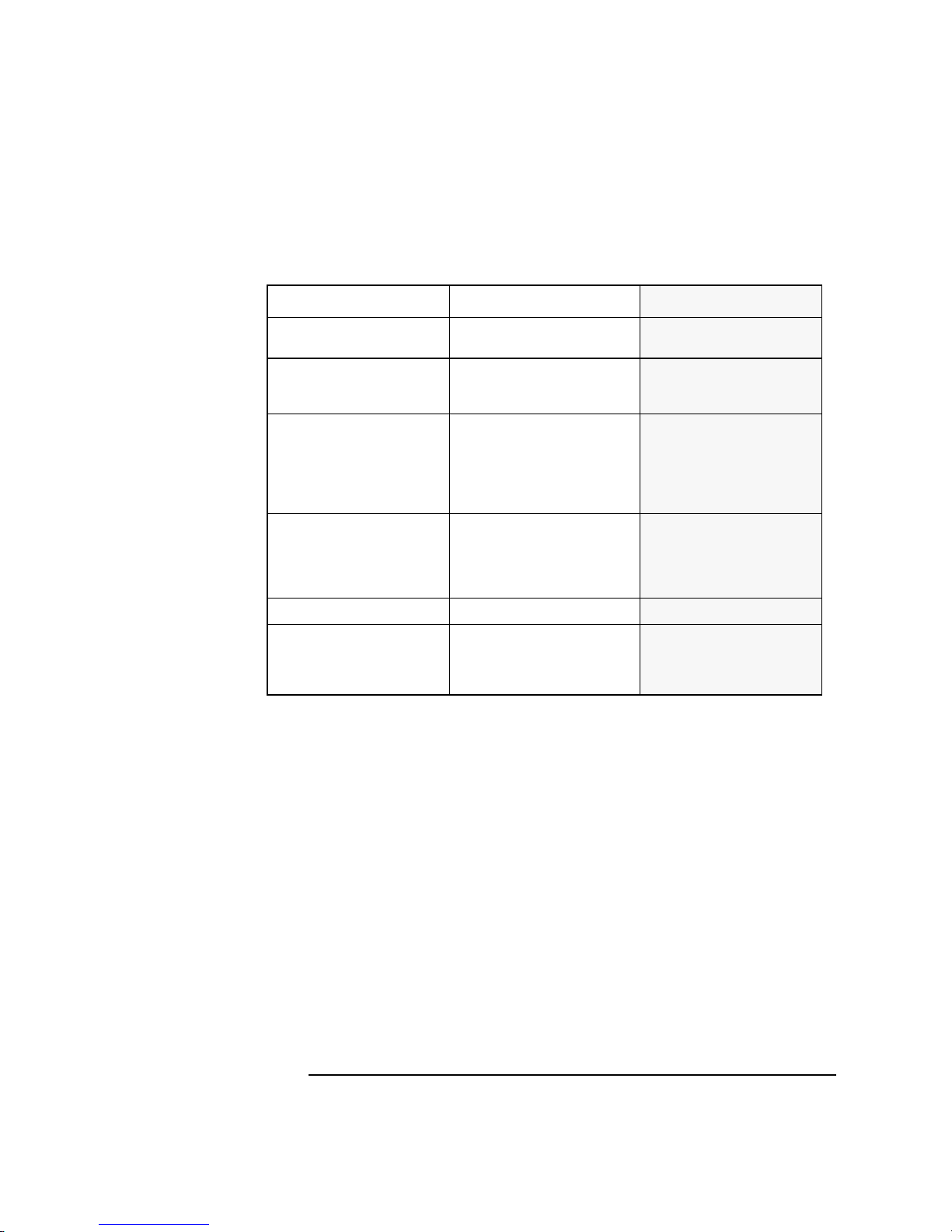
The following table details the main features on the HP Vectra 500 Series
PC, Models 510 5/xx and 515 5/xx.
1. This document does not apply to the HP Vectra 500 Series Models 502, 510,
512, 514, 522, 560, 562, 564, 572 and 574.
Function Features
Processor
Pentium 75
Pentium 100
Pentium 120
Pentium 133
Pentium 150
Pentium 166
Level-two cache memory
(optional)
256 KB synchronous cache are standard on the following models::
515MC 5/133
515MCx 5/133
515MCx 5/166
Main memory
8 MB or 16 MB standard
128 MB maximum
Video controller
Trio 64 PnP on PCI bus
Video memory 1 MB standard
upgradable to 2 MB
Enhanced IDE hard disk controller
Integrated in chip set (part of 82371FB multipurpose chip)
Integrated on PCI bus
Primary channel dedicated for hard disk drives
Secondary channel recommended for CD-ROM drives
Secondary IDE controller
No secondary IDE controller
(Two channels on enhanced IDE controller - see above)
Flexible disk controller
Integrated in SMC 932 Super I/O chip on ISA bus
Serial / parallel port controller
Integrated in SMC 932 Super I/O chip on ISA bus
Page 9
3
1 HP Vectra 500 Series
System Overview
HP Vectra 500 Series Desktop – Minitower Comparison
Desktop Minitower
IDE Controller
Primary channel connectors
Two connectors for hard disk drives
Two connectors for hard disk drives
IDE Controller
Secondary channel connectors
One red connector recommended for
CD-ROM
Two red connectors recommended
for CD-ROM and supplementary
hard disk drive
Flexible disk controller connectors Two connectors :
- One for a 3.5-inch flexible disk drive
- One for either a tape drive or a
5.25-inch disk drive
Two connectors for 3.5-inch
flexible disk drive
One connector for 5.25-inch flexible
disk drive or a tape drive
Maximum two devices connected
simultaneously
Accessory board slots
(on backplane)
One 16-bit ISA (short 16cm /6.3-inch)
One 16-bit ISA (full-length)
One 32-bit PCI or one
16-bit ISA Combination (full-length)
One 32-bit PCI (full-length)
One 16-bit ISA (short length)
Two 32-bit PCI (full-length)
One 32-bit PCI or one
16-bit ISA Combination
Two 16-bit ISA (full-length)
Internal device shelves One for hard disk drive
Two for hard disk drives
Front-access device shelves One 3.5-inch
One 5.25-inch
One 5.25-inch, 1-inch high (or an
internal drive)
One 3.5-inch
Three 5.25-inch
Page 10
4
1 HP Vectra 500 Series
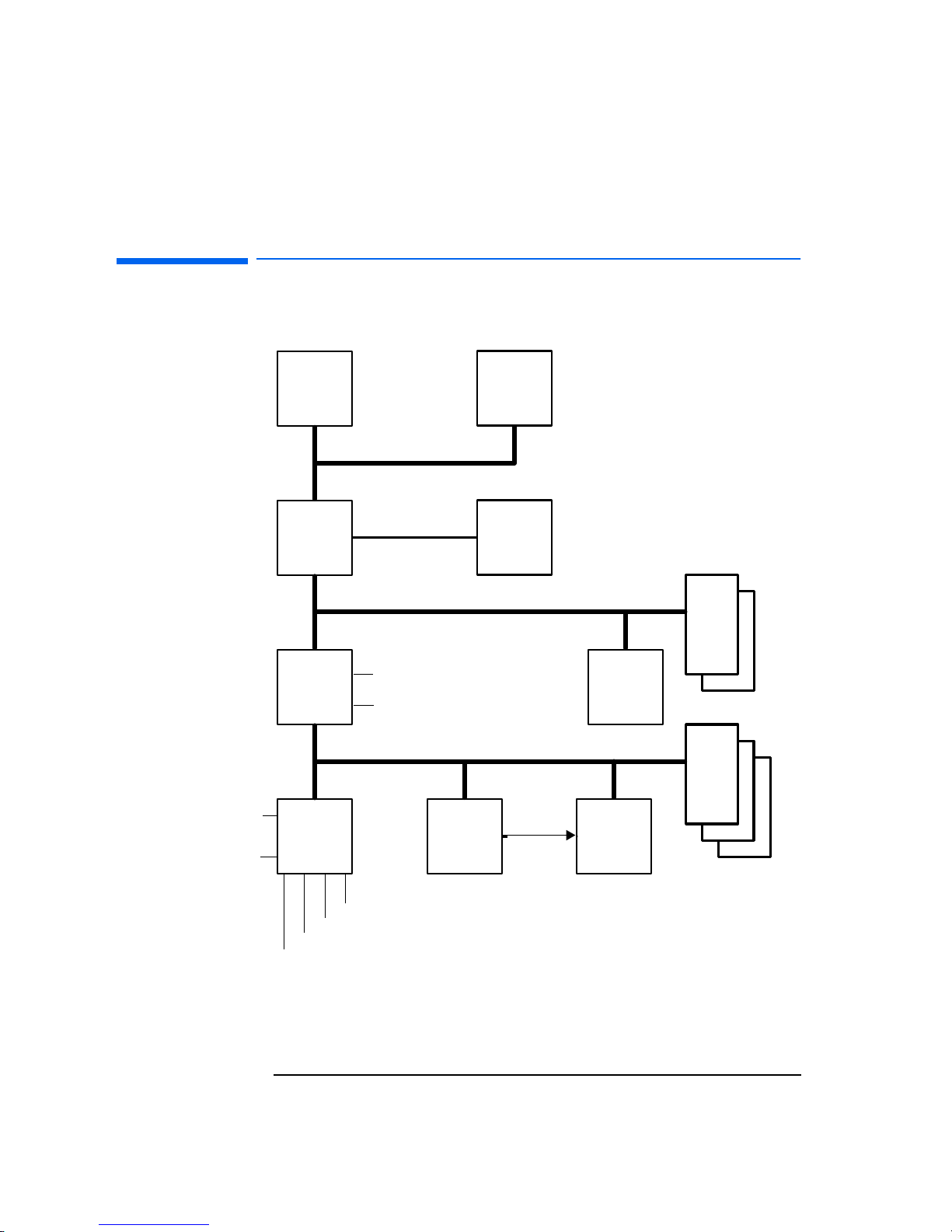
HP Vectra 500 Series Block Diagram
HP Vectra 500 Series Block Diagram
256 KB
Level-Two
Cache
Memory
(8 MB -
128 MB)
Intel
82371FB
PCI/ISA
Bridge
S3 Trio
Video
Controller
SMC932
Super I/O
Controller
I/O Decode
Lo gi c
BIOS
Flash ROM
Pentium
Processor
Intel Triton
82437/8FX
Chipset
Host Bus
PCI Bus
ISA Bus
PCI Accessory
Board Slots
ISA Accessory
Board Slots
IDE Controller Channel 1
IDE Controller Channel 2
FDD
Par alle l
Serial 1
Serial 2
Keyboard
Mouse
Flash
Support
Page 11

5
1 HP Vectra 500 Series
Principal Components and Features
Principal Components and Features
The main features of the system board are:
• supports Pentium processors of several different clock speeds (75, 100,
133 and 166 MHz, and 120 Mhz when available) with accompanying
voltage regulator module (VRM)
• a PCI bus video controller: all models of the HP Vectra 500 Series have an
integrated 64-bit Ultra VGA controller on the PCI bus (S3 Trio 64 Pnp)
• an Enhanced IDE controller with two channels on the PCI bus
❒ a primary IDE channel for two IDE hard disk drives
❒ a secondary IDE channel for an IDE CD-ROM drive and, in the mini-
tower models, a fourth IDE device (such as a third IDE hard disk drive)
• a combined controller on the ISA bus for
❒ 2 flexible disk drives and/or tape drives
❒ 2 serial ports
❒ 1 parallel port
• sockets for DRAM main memory: the HP Vectra 500 Series PCs provide
six sockets for main memory, allowing installation of up to 128 MB
• a system ROM (using flash ROM technology) that can be easily updated
with the latest firmware, using the Phlash.exe program supplied with the
firmware upgrade. The system ROM contains:
❒ the BIOS (system BIOS, video BIOS and low option ROM)
❒ menu-driven SETUP with context-sensitive help (in U.S. English only)
• a keyboard/mouse controller and interface.
Page 12
6
1 HP Vectra 500 Series
Principal Components and Features
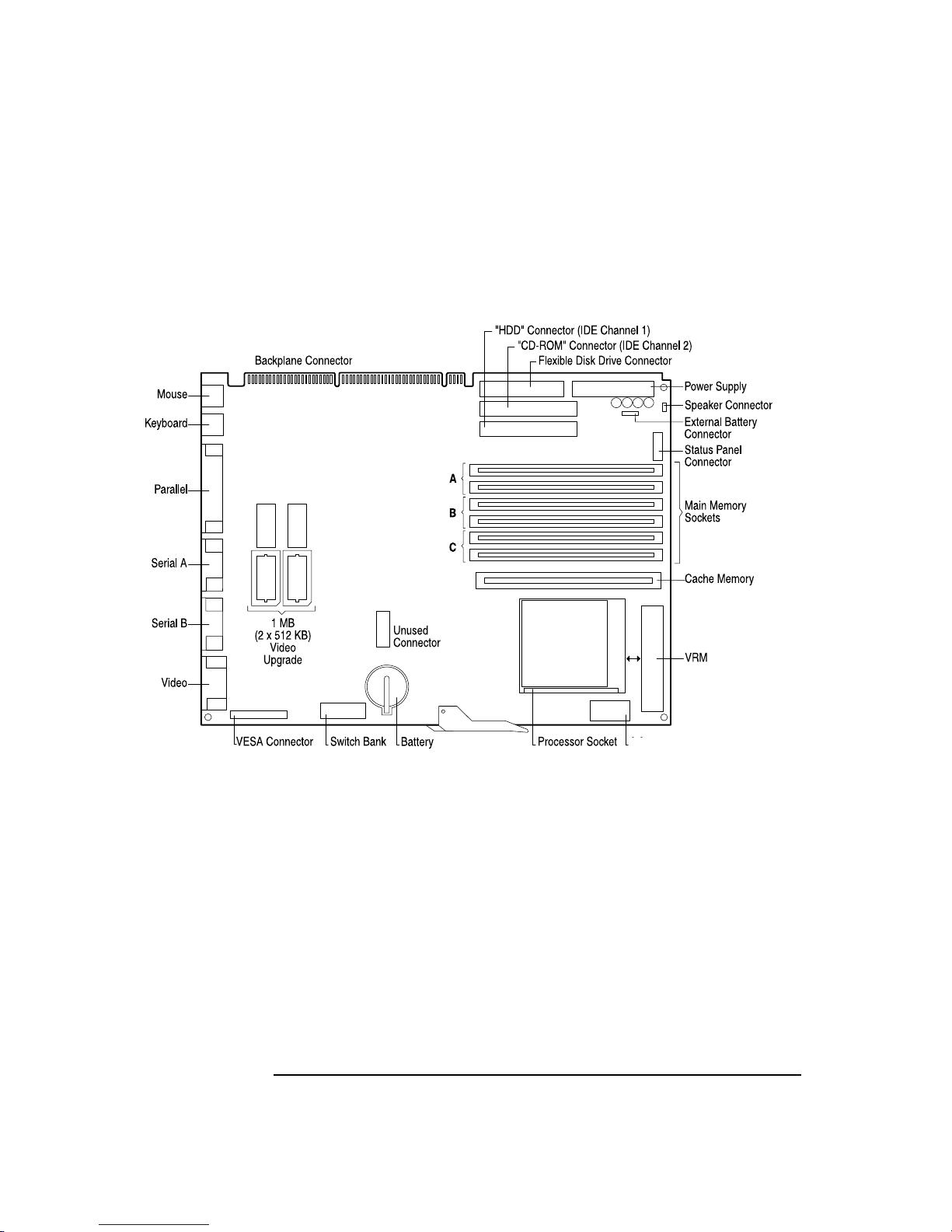
HP Vectra 500 Series System Board
*
This video upgrade applies only to the models with integrated video controller.
3.3V
*
Page 13
7
1 HP Vectra 500 Series
Principal Components and Features
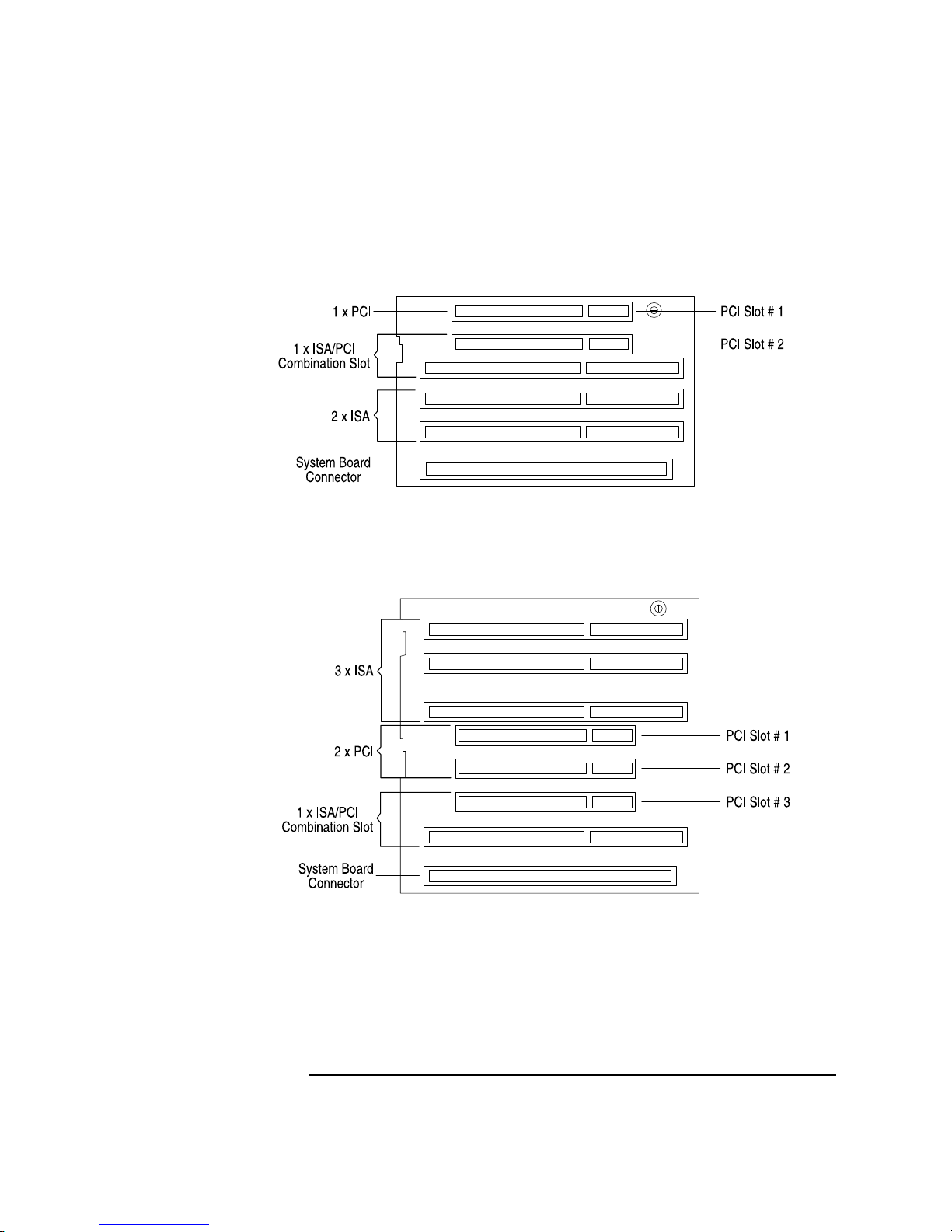
HP Vectra 500 Series Desktop Backplane
HP Vectra 500 Series Minitower Backplane
Page 14

8
1 HP Vectra 500 Series
Principal Components and Features
Processor
The Pentium processor uses 64-bit architecture and is 100% compatible
with Intel’s family of x86 processors. All application software that has been
written for Intel386 and Intel486 processors can run on the Pentium without
modification. The Pentium processor contains all the features of the
Intel486 processor, with the following added features which enhance
performance:
• Superscalar Architecture
• Floating Point Unit
• Dynamic Branch Prediction
• Instruction and Data cache
• Data Integrity
• Supports MultiProcessor Specification (MPS) 1.1
• PCI bus architecture
• Advanced Power Management capability for reducing power consumption
The processor is seated in a Zero Insertion Force (ZIF) socket.
Superscalar Architecture
The Pentium processor’s superscalar architecture has two instructions
pipelines and a floating-point unit, each capable of independent operation.
The two pipelines allow the Pentium to execute two integer instructions in
parallel, in a single clock cycle. Using the pipelines halves the instruction
execution time and almost doubles the performance of the processor,
compared with an Intel486 microprocessor of the same frequency.
Frequently, the microprocessor can issue two instructions at once (one
instruction to each pipeline). This is called instruction pairing. Each
instruction must be simple. One pipeline will always receive the next
sequential instruction of the one issued to the other pipeline.
Floating Point Unit (FPU)
The Floating Point Unit incorporates optimized algorithms and dedicated
hardware for multiply, divide, and add functions. This increases the
processing speed of common operations by a factor of three.
Page 15

9
1 HP Vectra 500 Series
Principal Components and Features
Dynamic Branch Prediction
The Pentium processor uses dynamic branch prediction. To dynamically
predict instruction branches, the processor uses two prefetch buffers. One
buffer is used to prefetch code in a linear way, and one to prefetch code
depending on the contents of the Branch Target Buffer (BTB). The BTB is a
small cache which keeps a record of the last instruction and address used. It
uses this information to predict the way that the instruction will branch the
next time it is used. When it has made a correct prediction, the branch is
executed without delay, thereby enhancing performance.
Instruction and Data Cache
The Pentium processor has separate code and data caches on-chip. Each
cache is 8 KB in size with a 32-bit line. The cache acts as temporary storage
for data and instructions from the main memory. As the system is likely to
use the same data several times, it is faster to get it from the on-chip cache
than from the main memory.
Each cache has a dedicated Translation Lookaside Buffer (TLB). The TLB is
a cache of the most recently accessed memory pages. The data cache is
configured to be Write-Back on a line-by-line basis (a line is an area of
memory of a fixed size).
The data cache tags (directory entries used to reference cached memory
pages) are triple ported to support two data transfers and an inquire cycle in
the same clock cycle. The code cache tags are also triple ported to support
snooping (a way of tracking accesses to main memory by other devices) and
split line accesses.
Individual pages of memory can be configured as cacheable or noncacheable by software or hardware. They can also be enabled and disabled
by hardware or software.
Page 16

10
1 HP Vectra 500 Series
Principal Components and Features
Data Integrity
The processor uses a number of techniques to maintain data integrity. It
employs two methods of error detection:
• Data Parity Checking
This is supported on a byte-by-byte basis, generating parity bits for data
addresses sent out of the microprocessor. These parity bits are not used
by the external subsystems.
• Internally
The processor uses functional redundancy checking to provide maximum
error detection of the processor and its interface.
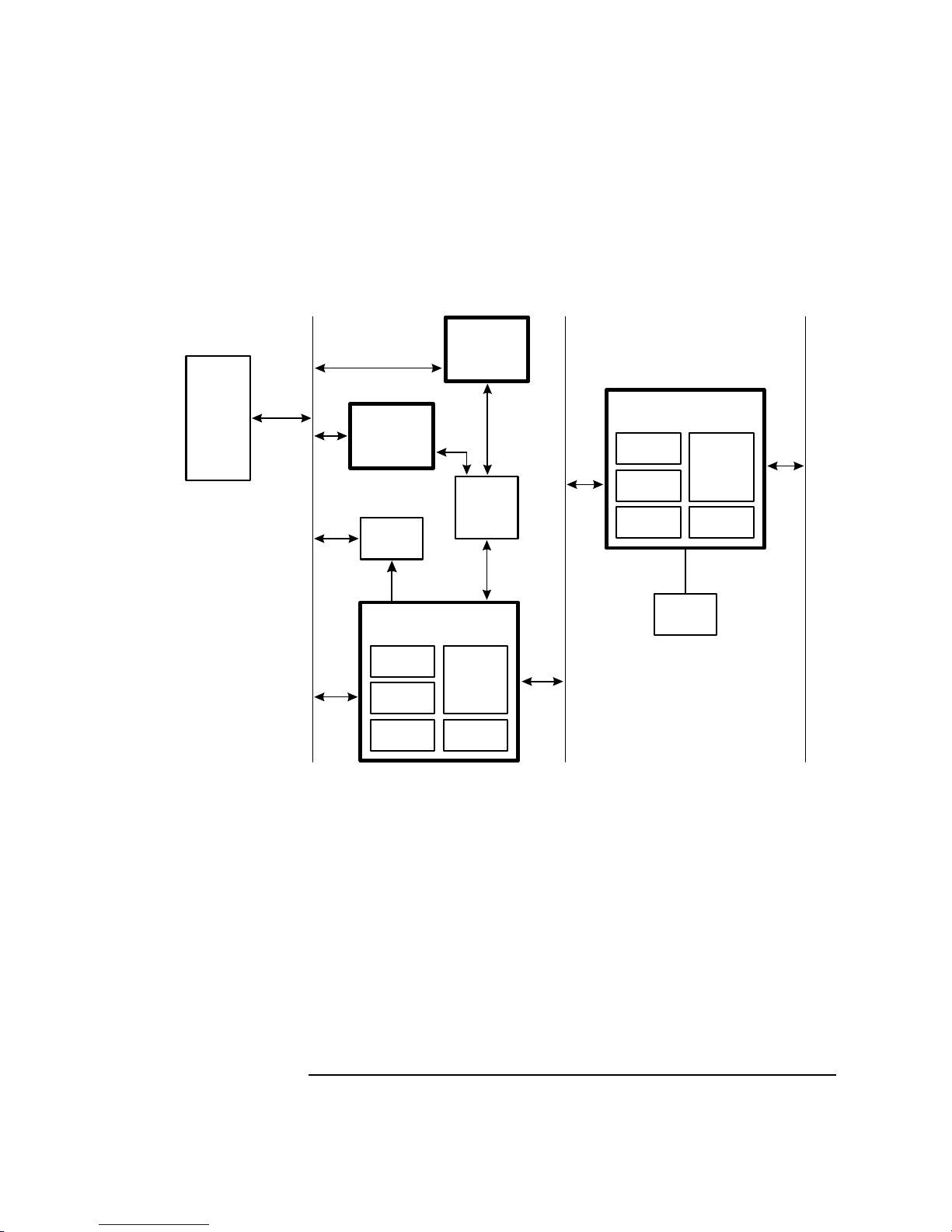
PCI Chip Set
The chip set consists of three devices:
• The PCI, Cache, and Memory Controller (82437FX)
• Two Data Path Units (82438FX)
• The PCI/ISA bridge and IDE controller (82371FB)
The 82437FX and 82438FX2 devices provide the core cache and memory
system architecture, and the PCI interface.
Page 17
11
1 HP Vectra 500 Series
Principal Components and Features
Level-Two
Cache
Main
Memory
82371FB
PCI/ISA Bridge
BIOS
Pentium
Processor
82437FX PCI, Cache and
Memory Controller
Host Bus
PCI Bus
ISA Bus
82438FX
Data Path Unit
PCI
Master
IDE
Controller
82438FX
Data Path Unit
ISA Bus
Controller
PCI
Master
PCI
Slave
APIC
Cache
Controller
Write
Buffer
Main
Memory
Controller
PCI
Slave
Page 18

12
1 HP Vectra 500 Series
Principal Components and Features
PCI, Cache and Memory Controller (82437FX)
The 82437FX device integrates cache and memory control functions and
provides bus control functions for the transfer of information between the
microprocessor, cache, main memory and the PCI bus. The cache controller
supports the Pentium Cache Write-Back mode and 256 KB of direct
mapped, write-back level-two cache, using synchronous pipeline burst
SRAMs.
82437FX Feature Summary
Function Features
Cache controller ❒ Direct mapped organization
❒ Buffered write-back
❒ External cache tags
❒ 32-byte line size
❒ Uses synchronous pipeline burst SRAM
❒ Supports 3-1-1-1
1
burst reads
Write buffer ❒ Buffers all processor writes to main memory
❒ Buffers memory writes to PCI for selected memory regions
❒ Supports 3-1-1-1
1
write access timing
DRAM controller ❒ Uses dedicated DRAM memory address and data buses
❒ Page mode - one or two pages open simultaneously
❒ Supports pipelined accesses
❒ Full RAS/CAS programmability
❒ Flexible bank configurations (each bank programmable for
DRAM size, bank width and single or double-sided modules)
❒ Self configuring bank start addresses
❒ Shadow RAM support for the memory region 640 KB - 1 MB
(in 16 KB segments)
❒ System management memory support
❒ RAS only refresh
❒ Fast memory access 7-2-2-2
1
with Extended Data Out (EDO)
memory
PCI slave interface ❒ Becomes processor (local) bus master to generate DRAM
requests on behalf of other PCI bus masters
❒ Supports PCI bus burst cycles
❒ Supports posted writes to DRAM for PCI burst writes
❒ Supports read-ahead from DRAM for PCI burst reads
Page 19
13
1 HP Vectra 500 Series
Principal Components and Features
Data Path Unit (82438FX)
The 82438FX component contains a 64-bit data path between the host bus
and main memory. A 4
×64-bit deep buffer provides 3-1-1-1 writes to main
memory.
This buffer is used for:
• writes from processor to main memory
• level-two cache write back cycles
• transfers from PCI to main memory.
1.
The Pentium’s internal cache has a 32-byte line size, which is four times the width of the Pentium’s
host data bus. Burst reads and writes by the Pentium involve a full cache line, and so require four
back-to-back cycles to complete. The first cycle in each burst of four always requires more time to
complete than the three subsequent cycles. This is because the first cycle includes the addressing
phase and precharge timing (for memory).
PCI master interface ❒ Provides for programmable PCI bus memory regions in
memory address map
❒ Supports PCI bus burst cycles for 64-bit and 32-bit misaligned
Pentium reads and writes
❒ Optional posting of PCI memory and I/O writes
❒ Optional buffering of PCI memory writes
❒ Optional read-ahead for processor to PCI accesses
PCI bus arbiter ❒ Supports PCI bus arbitration for up to four masters
❒ Supports rotating priority scheme
Function Features
Page 20

14
1 HP Vectra 500 Series
Principal Components and Features
The PCI/ISA Bridge and IDE Controller (82371FB)
The 82371FB device serves as a bridge between the PCI bus and the ISA
expansion bus, and incorporates a two-channel PCI IDE controller. It
incorporates the logic for a PCI interface, a DMA interface, a DMA controller
that supports fast DMA transfers, data buffers to isolate the PCI and ISA
buses, Timer/Counter logic, and NMI control logic.
The 82371FB PCI/ISA bridge also provides decode for the following
peripheral devices:
• Flash BIOS
• Real Time Clock/CMOS Memory
• Keyboard/Mouse Controller
• Flexible Disk Controller
• Two Serial Ports
• One Parallel Port
• PCI Accessory Board Slots.
The 82438FX and 82371FB Feature Summary
Function Features
Data buffer
(for 82438FX and 82371FB together)
❒ Provides a high performance 64-bit data path between the
processor (local) bus and main memory
❒ Provides a 32-bit data path to the PCI bus
❒ Provides a 8-deep x 64-bits wide write buffer for all processor
writes to main memory
❒ Provides a one-level posted write buffer for all processor writes
to PCI bus memory
PCI master / slave interface
(for 82371FB only)
❒ Fully compatible with PCI specification
❒ Supports PCI-to-ISA / ISA-to-PCI bus master cycle translations
❒ Supports programmable memory regions to provide fast
positive decode for PCI master accesses
❒ Implements subtractive decoding for unclaimed PCI cycles
❒ Supports PCI-to-ISA posted memory writes
❒ Translates DMA transfers for PCI slaves
❒ Supports PCI address/data parity generation and checking
Page 21

15
1 HP Vectra 500 Series
Principal Components and Features
Super I/O Chip
The basic input/output control functions are provided by the Super I/O chip,
the SMC 932. This chip is 100% compatible with ISA architecture and
provides:
• an integrated flexible drive controller that supports 3.5-inch and 5.25-inch
flexible disk drives, and tape drives
• a multi-mode parallel port
• two serial ports
• keyboard controller
•RTC
• 256 bytes of CMOS memory.
ISA bus controller
(for 82371FB only)
❒ Fully compatible with ISA bus standard
❒ Supports asynchronous ISA bus operation up to 16 MHz
❒ Integrates:
❒ two 82C37A DMA controllers
❒ two 82C59A interrupt controllers
❒ 82C54 timer
❒ hidden ISA refresh controller
❒ support for BIOS
❒ port A, B and NMI logic
Fast IDE controller
(for 82371FB only)
❒ Supports PIO and Bus Master IDE
❒ Supports up to Mode 4 timings
❒ Up to 22 MB/s transfer rate
❒ 8×32-bit buffer for Bus Master IDE PCI burst transfers
Function Features
Page 22

16
1 HP Vectra 500 Series
Principal Components and Features
NS PC87332VF Feature Summary
Flexible Drive Controller (FDC)
The FDC is software and register compatible with the 82077AA, and 100%
IBM compatible. It has an A and B drive-swapping capability and a non-burst
DMA option.
Function Features
Flexible disk controller ❒ Software compatible with the DP8473, the 765A, and the
N82077
❒ 16-byte FIFO (default disabled)
❒ Burst and non-burst modes
❒ Perpendicular recording drive support
❒ New high-performance internal digital data separator (no
external filter components required)
❒ Low-power CMOS with enhanced power-down mode
❒ Automatic media-sense support
UARTs ❒ Software compatible with the PC16550A and PC16450
❒ MIDI compatible
Bidirectional parallel port ❒ Enhanced Parallel Port (EPP) compatible
❒ Extended Capabilities Port (ECP) compatible
❒ Bidirectional under either software or hardware control
❒ Ability to multiplex FDC signals on parallel port pins for external
FDD
❒ Includes protection circuit against damage caused when printer
is switched on, or operated at higher voltages
Address decoder Provides selection of all primary and secondary ISA addresses
including COM 1 - 4 and LPT 1 - 3
Enhanced power management ❒ Special configuration registers for power down
❒ Enhanced programmable power down FDC command
❒ Auto power down and wake up modes
❒ 3 special pins for power management
❒ Typical current consumption during power down is less than
10µA
❒ Reduced pin leakage current
Page 23

17
1 HP Vectra 500 Series
Principal Components and Features
Serial/Parallel Ports
The Super I/O chip supports two serial ports and one bidirectional parallel
port. The serial ports are high speed UARTs with 16 Byte FIFOs, and can be
programmed as COM1, COM2, COM3, COM4, or disabled.
The parallel port can operate in four modes:
• Standard mode (PC/XT, PC/AT, and PS/2 compatible)
• Bidirectional mode (PC/XT, PC/AT, and PS/2 compatible)
• Enhanced mode (Enhanced Parallel Port or EPP compatible)
• High speed mode (MS/HP Extended Capabilities Port or ECP
compatible).
It can be programmed as LPT1 (378h, IRQ7), LPT2 (278h, IRQ5), or
disabled.
Graphics/Integrated Video
The integrated video subsystem is composed of a PCI bus video controller
and a DRAM array. The HP Vectra 500 Series PC uses the S3 Trio 64 PnP
video controller. These video controller embed a RAMDAC, and supports
video resolutions of up to 1280 x 1024.
Video Controller
The S3 Trio 64PnP video controllers offer full compatibility with VGA. In
addition, the features are enhanced beyond Super VGA by hardware which
accelerates graphical user interface operation in Windows 95.
The enhanced features include:
• direct connectivity to PCI bus
• true acceleration for 8, 16 and 32-bit pixel depths
• 57 MHz clock for video memory
• fully programmable Pixel Clock Generator up to 135 MHz
• supports 2 MB DRAM
• fast linear addressing with full software relocation.
Page 24

18
1 HP Vectra 500 Series
Principal Components and Features
Video DRAM
The HP Vectra 500 Series PC is supplied with 1 MB of video DRAM as
standard. An additional 1 MB video DRAM accessory can be installed, to give
a total of 2 MB video DRAM. The upgrade consists of two 512 KB video
memory chips.
Video Resolutions Supported
For further details, refer to chapter 5, The Ultra VGA Video Controllers, for
a table containing all the video resolutions supported.
IDE to PCI Controller
This IDE to PCI controller implementation supports the full Enhanced IDE
feature set. The BIOS uses the auto-detected drive geometry information to
select the fastest configuration supported by each installed IDE drive.
• Supports data transfer rate of up to 12 MB/s.
• 32-bit Windows and DOS I/O transfers (many IDE controllers use
Windows integral IDE driver which only supports 16-bit I/O transfers).
Flash ROM
The PC uses 128 KB of 200ns, Flash ROM. The HP BIOS boot code contains
SETUP, video BIOS, error messages, and ISA and PCI initialization. During
programming of the Flash ROM, the power supply switch and the reset
button are disabled to prevent accidental interruption.
Security Features
The PC has many security features to protect stored data, to protect the
SETUP configuration, and to prevent unauthorized operation of software
applications:
• user password
• administrator password (system configuration protection)
• power-on prompt, with user of administrator password
• power-on keyboard and mouse lock, with user password
Page 25

19
1 HP Vectra 500 Series
Principal Components and Features
• space bar power-on protection (feature can be disabled in SETUP)
• communications port protection (ports can be disabled in SETUP)
• flexible disk drive protection (disks can be read and/or write protected in
SETUP)
• boot protection (boot on flexible disk, CD-ROM, and hard disk can be
enabled or disabled in SETUP)
• cover lock and, in the desktop, security bracket.
Page 26

20
1 HP Vectra 500 Series
Principal Components and Features
Physical Characteristics
Electrical Specifications
Desktop Models
Input voltage:
The HP Vectra 500 Series Desktop PCs are equipped with a 100 W (rated)
power supply.
This power supply requires an input voltage in the following range:
• 100-127 Vac and 200-240 Vac auto-ranging at a frequency of 50 and 60 Hz.
Desktop Unit
Weight: 20 lbs (9 kg)
Dimensions: 15.3 inches (D) by 16.5 inches (W) by 4.9 inches (H)
(39 cm by 42 cm by 12.5 cm)
Footprint: 1.8 sq ft (0.17 m
2
)
Minitower Unit
Weight: 28.7 lbs (13 kg)
Dimensions: 17.3 inches (D) by 7.6 inches (W) by 17.2 inches (H)
(44 cm by 19.2 cm by 43.8 cm)
Footprint: 0.9 sq ft (0.084 m
2
)
Keyboard
Flat: 18 inches (W) by 7 inches (D) by 1.3 inches (H)
(464mm by 178mm by 33mm)
Standing: 18 inches (W) by 7 inches (D) by 2 inches (H)
(464mm by 178mm by 51mm)
Page 27

21
1 HP Vectra 500 Series
Principal Components and Features
Power Availability (Continuous Operation):
• 100 W continuous.
• For each ISA accessory board:
4.5 A at 5 V
1.5 A at 12 V
0.3 A at -12 V
0.1 A at -5 V.
• For PCI accessory boards:
4.5 A at 5 V
0.5 A at 12 V
0.1 A at -12 V
Minitower Models
Input voltage:
The HP Vectra 500 Series Minitower PCs are equipped with a 160 W
continuous (rated) power supply.
This power supply requires an input voltage in the following range:
• 100-127 Vac and 176-264 Vac at a frequency of 47 Hz to 63 Hz, with
manual switching between 115 and 230 V.
Heat Dissipation:
• Maximum thermal dissipation: 91 kcal per hour
(360 BTUs per hour).
Power Availability (Continuous Operation):
• 160 W continuous, 200 W peak.
• For each ISA accessory board:
1.4 A at 5 V
0.13 A at 12 V
0.1 A at -12 V
0.03 A at -5 V.
• For PCI accessory boards:
3 x 5V PCI slots.
Page 28

22
1 HP Vectra 500 Series
Principal Components and Features
Environmental Specifications
Desktop Unit (with hard disk)
Minitower Unit (with hard disk)
NOTE Operating temperature and humidity ranges may vary depending
upon the mass storage devices installed. High humidity levels can
cause improper operation of disk drives. Low humidity levels can
aggravate static electricity problems and cause excessive wear of the
disk surface.
Operating Temperature + 40° to 104° F (+5°C to +40°C)
Recommended Operating
Temperature
+59°F to +158°F (+15°C to +30°C)
Storage Temperature -40°F to +158°F (-40°C to +70°C)
Over Temperature Shutdown +122°F (+50°C)
Operating Humidity 15% to 80% (relative)
Storage Humidity 8% to 80% (relative)
Operating Altitude 10000 ft (3100m) max
Storage Altitude 15000ft (4600m) max
Operating Temperature + 41°
to 104° F (+5°C to +40°C)
Recommended Operating
Temperature
+59°F to +158°F (+15°C to +30°C)
Storage Temperature -40°F to +158°F (-40°C to +70°C)
Over Temperature Shutdown +122°F (+50°C)
Operating Humidity 15% to 80% (relative)
Storage Humidity 8% to 80% (relative)
Operating Altitude 10000 ft (3100m) max
Storage Altitude 15000ft (4600m) max
Page 29

23
2
Summary of the HP/Phoenix BIOS
This chapter is a summary of the main features of the new HP/Phoenix
system BIOS.
For a more detailed description, refer to the manual System BIOS for IBM
PCs, Compatibles, and EISA Computers by Phoenix Technologies Ltd.
Information for ordering this manual is given in the preface.
Page 30

24
2 Summary of the HP/Phoenix BIOS
HP/Phoenix BIOS Description
HP/Phoenix BIOS Description
This chapter and the following two chapters give an overview of the
HP/Phoenix BIOS. The information is divided into three main sections:
• The address space, with details of the interrupts used, described in this
chapter.
• The Desktop Management Interface or DMI, which is the new method for
storing and accessing information about the PC, described in chapter 3.
• The Power-On-Self-Test or POST, which is the sequence of tests the PC
performs to ensure that the system is functioning correctly, described in
chapter 4.
Overview of Address Space
Peripheral devices, accessory devices and system controllers are accessed
via the system I/O space, which is not located in system memory space. The
64 KB of addressable I/O space comprises 8-bit and 16-bit registers (called
I/O ports) located in the various system components. When installing an
accessory board, ensure that the I/O address space selected is in the free
area of the space reserved for accessory boards (100h to 3FFh).
Page 31

25
2 Summary of the HP/Phoenix BIOS
Overview of Address Space
System Memory Map
NOTE Reserved memory used by accessory boards must be located in the
area from C8000h to EFFFFh.
BIOS I/O Port Map
This section describes the HP BIOS port map. The next section provides
more details about how the BIOS uses the system board components
mentioned in the I/O port list.
00000h - 9FFFFh 640 KB–Base Memory Area
A0000h - BFFFFh 128 KB–Video Memory
C0000h - C7FFFh 32 KB–Video BIOS
C8000h - DFFFFh 96 KB–Accessory Boards Memory
E0000h - E7FFFh 32 KB–Available
E8000h - EFFFFh Reserved
F0000h - FFFFFh 64 KB–System BIOS
100000h - FFFFFFFFh 1 MB plus–Extended Memory
I/O Address Ports Function Bits
0000-000F DMA Controller 1 8
0020-0021 Interrupt Controller 1 8
0040-0043 Interval Timer 1 8
0060, 0064 Keyboard Controller 8
0061 NMI Status and Control 8
0070 NMI Mask register, RTC address 8
0071 RTC data 8
0081-0083, 008F DMA Low Page register 8
0092 Alternate reset and A20 Function 8
0096-009F Internal Ports 8
00A0-00A1 Interrupt Controller 2 8
00C0-00DF DMA Controller 2 8
Page 32

26
2 Summary of the HP/Phoenix BIOS
Overview of Address Space
1.
For certain models only.
2.
These addresses are dedicated to configuration registers for PCI devices.
00F0-00FF Co-processor error
0170-0177, 0376 Secondary IDE Controller
01F0-01F7 Primary IDE Controller
0200-0207 Joystick Interface
1
020-0233 Sound Board Interface
1
0278-027F Parallel Port 3
02E8-02EF Serial Port 4
02F8-02FF Serial Port 2
0330-0331 MPU MIDI Interface
1
0370-0377 Secondary Flexible Disk Controller
0378-037F Parallel Port 2
0388-38B FM Music Synthesizer
1
03B0-03DF Integrated Video Graphics Controller
03C0-03DF Integrated Video Graphics Controller
03BC-03BF Parallel Port 1
03E8-03EF Communications Board
1
03F0--03F5-03F7 Integrated Flexible Disk Controller
03F8-03FF Serial Port 1
0CF8-0CFF Used for PCI Configuration
2
0496-0497 HP Reserved
0678-067A Parallel Port if ECP Mode is Selected
0778-077A Parallel Port if ECP Mode is Selected
I/O Address Ports Function Bits
Page 33

27
2 Summary of the HP/Phoenix BIOS
Overview of Address Space
Addressing System Board Components
This section provides more details of how the BIOS uses the system board
components mentioned in the I/O port list.
DMA Channel Controllers
The system controller supports seven DMA channels, each with a page
register used to extend the addressing range of the channel to 16 MB. The
only types of DMA transfer allowed are:
“I/O-to-memory” and “memory-to-I/O”
“I/O-to-I/O” and “memory-to-memory” transfers are disallowed by the
hardware configuration. The following table summarizes how the DMA
channels are allocated.
First DMA controller (used for 8-bit transfers)
Channel Function
0 Free
1 Free if not used for parallel port or sound board
2 Flexible disk drive controller
3 Free if not used for parallel port or sound board
Second DMA controller (used for 16-bit transfers)
Channel Function
4 Used to cascade DMA channels 0-3
5 Free if not used for sound board
6 Free
7 Free if not used for sound board
Page 34

28
2 Summary of the HP/Phoenix BIOS
Overview of Address Space
Interrupt Controllers
The system has two 8259A compatible interrupt controllers. They are
arranged as a master interrupt controller and a slave that is cascaded
through the master.
The following table shows how the master and slave controllers are
connected. The Interrupt Requests (IRQ) are numbered sequentially,
starting with the master controller, and followed by the slave.
1.
IRQ15 can be made available by disabling the secondary channel of the IDE
controller in the SETUP program.
2.
IRQ3 and IRQ4 can be made available by disabling the serial ports in the
SETUP program.
IRQ (Interrupt Vector) Interrupt Request Description
IRQ0(08h) System timer
IRQ1(09h) Keyboard controller
IRQ2(0Ah) Slave IRQ Cascade connection from INTC2 (Interrupt Controller 2)
IRQ8(70h) Real time clock
IRQ9(71h) Available for PCI accessory boards, if not used by ISA boards
IRQ10(72h) Available for PCI accessory boards, if not used by ISA boards
IRQ11(73h) Available for PCI accessory boards, if not used by ISA boards
IRQ12(74h) Mouse
IRQ13(75h) Pentium processor
IRQ14(76h) Integrated primary IDE hard disk controller
IRQ15(77h) Free, if not used by secondary channel of IDE controller
1
(CD-
ROM)
IRQ3(0Bh) Free, if not used used for serial port
2
IRQ4(0Ch) Free, if not used used for communications board or serial port
2
IRQ5(0Dh)
3
Free, if not used used for sound board or parallel port
4
IRQ6(0Eh) Flexible disk drive controller
IRQ7(0Fh) Free, if not used used for parallel port
3
Page 35

29
2 Summary of the HP/Phoenix BIOS
Overview of Address Space
PCI Interrupt Request Lines
PCI devices generate interrupt requests using up to four PCI interrupt
request lines (INTA#, INTB#, INTC#, and INTD#).
When a PCI device makes an interrupt request, the request is re-directed to
the system interrupt controller. The interrupt request will be re-directed to
one of the IRQ lines made available for PCI devices.
All PCI devices with interrupt transfer support will use and share INTA#.
A multiple-function PCI device may support several INT lines. These devices
will require more than one system interrupt request line.
3.
If there is a need to use another IRQ for the sound board, the following
Interrupt Vectors can be used: IRQ2, IRQ7 and IRQ10.
4.
IRQ5 and IRQ7 can be made available by disabling the parallel ports in the
SETUP program.
Page 36

30
2 Summary of the HP/Phoenix BIOS
Overview of Address Space
Page 37

31
3
Desktop Management Interface
This chapter describes an important feature of HP’s new style BIOS, the
Desktop Management Interface or DMI.
Page 38

32
3 Desktop Management Interface
DMI Information Structure
DMI Information Structure
This BIOS presents a new method for storing and accessing information
about the PC, called the Desktop Management Interface or DMI.
The system administrator uses the DMI to access information about the PC,
such as the BIOS version number, the serial number, the processor type, and
the size of the hard disk drive. This information is stored in the Management
Information Format Database, or MIF.
Pointers are used to indicate the position of a table or a string value. The
following rules apply to pointers:
• Pointers must never be zero. For empty strings, the pointer must point to
a null (zero) value.
• Far pointers are in Intel (little endian) format, with the segment in the
high word and the offset in the low word.
All string values are terminated by a null (zero) value.
Page 39

33
3 Desktop Management Interface
DMI Information Structure
Overview of the DMI Information Structure
Page 40

34
3 Desktop Management Interface
Accessing BIOS DMI Information
Accessing BIOS DMI Information
To access BIOS information, do the following steps:
1 Locate the DMI header.
Search for the “$DMI” signature in the segment E0000:0 or F0000:0.
2 Verify the checksums.
Refer to "Verifying the DMI Information Structure," on page 35.
3 Locate the first sub-structure table using the far pointer given in the
DMI header.
4 Walk through the tables to locate the desired table.
Each table is identified by a unique type. The type is given by the first byte
of the table.
The length of the table is given by the second byte. The next table follows
immediately after the current one.
5 Read off the required values.
Each type of table has a pre-defined format. For a list of the major table
types, refer to "DMI Sub-Structure Tables," on page 35.
6 Use the pointer to retrieve string values.
All string values are terminated by a null (zero) value.
The DMI Header
The DMI header is the starting point for all DMI information.
Field Offset Length Value
DMI Header Signature 0h 4 bytes “$DMI”
Version 4h 1 byte 00010010 (Ver 1.2)
DMI Header Length 5h 1 byte 0Eh
Pointer to DMI structures 0Ah 4 bytes (DWORD) Far pointer (variable)
Length of DMI structures 0Ch 2 bytes (WORD) variable
Checksum of DMI structures 0Ch 1 byte variable
Checksum of DMI header 0Dh 1 byte variable
Page 41

35
3 Desktop Management Interface
Accessing BIOS DMI Information
Verifying the DMI Information Structure
Before accessing the DMI tables, the checksums must be verified to ensure
the reliability of the information. To calculate a checksum value of a
structure, do the following steps:
1 Add together all the bytes of the structure.
2 Convert the value to negative.
3 Cast the value to a byte (take the low byte).
There are two checksums, one for the DMI header and another for the
remaining DMI structure. To verify these two checksums, do the following
steps:
1 Locate the DMI header.
2 Using the length value of the DMI header, calculate the checksum value
for the DMI header. (When adding together the bytes of the header, exclude the checksum byte, offset 0Dh.)
3 Verify this value against the checksum given for the DMI header.
4 Retrieve the position and length of the DMI structures.
5 Calculate the checksum value for the DMI structures.
6 Verify this value against the checksum given for the DMI structures.
DMI Sub-Structure Tables
Each type of table has a pre-defined format. Although the structure can
evolve over time, new fields are always added to the end of the table and the
length value reflects this new size.
To parse several tables in order to find a specific table, simply use the table
length. Using this method will ensure that the parser can function even
when the tables evolve over time.
To locate specific BIOS information, use the DMI sub-structure tables which
are listed on the following pages.
Page 42

36
3 Desktop Management Interface
Accessing BIOS DMI Information
Type 1 : BIOS Information
Field Offset Length Value Description
Type 0h 1 byte 1 BIOS information table
Length 1h 1 byte 15h Table length (in bytes)
Vendor 2h 4 bytes
(DWORD)
variable Far pointer to string containing BIOS
vendor name.
BIOS Version 6h 4 bytes
(DWORD)
variable Far pointer to string containing BIOS
version number.
BIOS Starting Address Ah 2 bytes
(WORD)
variable Segment location of BIOS starting
address, i.e. E800h.
BIOS Release Date Ch 4 bytes
(DWORD)
variable Far pointer to string containing BIOS
release date.
BIOS Characteristics 10h 4 bytes
(DWORD)
variable
bit field
Bit field value indicating which functions
the BIOS supports.
BIOS ROM Size 14h 1 byte variable Value indicating the size of the BIOS
ROM: 0 ➪ 64K, 1 ➪ 128K, 2 ➪ 256K,
3 ➪ 512K, etc.
Type 2: Component ID
Field Offset Length Value Description
Type 0h 1 byte 2 Component ID table
Length 1h 1 byte 0Ah Table length
Manufacturer 2h 2 bytes
(WORD)
variable Near pointer to string containing
manufacturer’s name.
Product 4h 2 bytes
(WORD)
variable Near pointer to string containing product
name.
Version
(Board Revision)
6h 2 bytes
(WORD)
variable Near pointer to string containing date
code.
Serial Number 8h 2 bytes
(WORD)
variable Near pointer to string containing serial
number.
Page 43

37
3 Desktop Management Interface
Accessing BIOS DMI Information
Type 3: Processor Information
Field Offset Length Value Description
Type 0h 1 byte 3 Processor information table
Length 1h 1 byte 0Bh Table length
Processor Type 2h 1 byte ENUM Value indicating processor type:
1 ➪ Other
2 ➪ Unknown
3 ➪ Central Processor
4 ➪ Math Processor
5 ➪ DSP Processor
6 ➪ Video Processor
Processor Family 3h 1 byte ENUM Value indicating processor family:
1 ➪ Other
2 ➪ Unknown
6 ➪ 80486
A ➪ 80487
B ➪ Pentium
20 ➪ Powe r PC
Processor
Manufacturer
4h 2 bytes
(WORD)
variable Near pointer to string containing
processor manufacturer’s name.
Processor Version 6h 2 bytes
(WORD)
variable Near pointer to string describing the
processor.
Max Speed 8h 2 bytes
(WORD)
variable Decimal value of maximum processor
speed.
Example: 66d for a 66 MHz processor.
Processor Upgrade Ah 1 byte ENUM Value indicating processor upgrade type:
1 ➪ Other
2 ➪ Unknown
3 ➪ Daughter Board
4 ➪ ZIF Socket
5 ➪ Replaceable Piggy Back
6 ➪ None
Page 44

38
3 Desktop Management Interface
Accessing BIOS DMI Information
HP-Specific DMI Sub-Structure Structures
Type 80h: HP ID
Field Offset Length Value Description
Type 0h 1 byte 80h HP ID information table
Length 1h 1 byte 6 Table length
Signature 02h 2 “HP” Hewlett-Packard signature
PC ID 04h 1 byte variable PC Identification
Capabilities 05h 1 byte BITMAP Bit 7=1 ➪ Tatooing supported
Bit 6=1 ➪ PCMCIA device is present
Bit 5=1 ➪ Infrared is present
Bit 4=1 ➪ Two embedded serial ports
present
Bit 3=1 ➪ Minitower (1) or Desktop (0)
Bit 2=1 ➪ Embedded LAN present
Bit 1=1 ➪ Using integrated video
Bit 0=1 ➪ Supports HP LAN boot ROM
Type 81h: HP Configuration ID
Field Offset Length Value Description
Type 0h 1 byte 81h HP Configuration table
Length 1h 1 byte 3 Table length
Serial/Parallel Count 02h 1 byte variable Bits 7-4 ➪ Number of integrated parallel
ports
Bits 3-0 ➪ Number of integrated serial
ports
Page 45

39
3 Desktop Management Interface
Accessing BIOS DMI Information
Type 84h: HP System Information
Field Offset Length Value Description
Type 0h 1 byte 84h HP system information table
Length 1h 1 byte Eh Table length
System Power-on
Time
02h 2 bytes variable Short pointer to string containing date
and time of last boot.
Format: “ccyymmddHHMM”
The value “************” indicates RTC
has failed.
Base Memory Size 04h 2 bytes variable Size of base memory in kilobytes
Extended Memory Size 06h 2 bytes variable Extended Memory size in 64 KB blocks
HP BIOS Version 08h 4 bytes variable Long pointer to string describing HP BIOS
version
CPU Name 0Ch 2 bytes variable Short pointer to string describing CPU
name
Page 46

40
3 Desktop Management Interface
Accessing BIOS DMI Information
Page 47

41
4
Power-On Self-Tests and Error Messages
This chapter describes the power-on self-tests (POST), which are contained
in the PC’s ROM BIOS, and the error messages which can result.
Page 48

42
4 Power-On Self-Tests and Error Messages
Power-On Self Test (POST)
Power-On Self Test (POST)
Each time the system is powered on, or a reset is performed, the POST is
executed. The POST process verifies the basic functionality of the system
components and initializes certain system parameters. The POST performs
the tests in the order described in this chapter.
The POST displays a graphic screen with the HP Vectra logo. If the POST
detects an error, the error message is displayed. To see the tests performed
during the POST, press
Esc when the HP Vectra logo appears and the
display will switch to text mode. In this mode, a summary configuration
screen will be displayed at the end of the POST. Pressing the PAUSE/
BREAK key at any time will allow you to inspect the screen contents. Press
any key to resume
If the POST is initiated by a soft reset
Ctrl Alt and Delete, the RAM tests
are not executed and shadow RAM is not cleared. In all other respects, the
POST executes in the same way following power-on or a soft reset.
NOTE The POST does not detect when a slave hard disk drive (“HDD 1”
or “HDD 3” in the setup) has been installed or changed.
Shadow RAM
On HP personal computers, access to certain ROM data is enhanced by
using shadow RAM. During the POST, the BIOS and other ROM data is
copied into high-speed shadow RAM. The shadow RAM is addressed at the
same physical location as the original ROM in a manner which is completely
transparent to applications. This technique provides faster access to the
system BIOS firmware.
POST Test Description
System BIOS Tests
LED Test
Tests the LEDs on the control panel.
Processor Test
Tests the processor’s registers. Test failure causes the boot process to
abort.
System (BIOS) ROM Test
Calculates an 8-bit checksum. Test failure causes the boot process to
abort.
Page 49

43
4 Power-On Self-Tests and Error Messages
Power-On Self Test (POST)
RAM Refresh Timer Test
Tests the RAM refresh timer circuitry. Test failure causes the boot process
to abort.
Interrupt RAM Test
Checks the first 64 KB of system RAM used to store data corresponding to
various system interrupt vector addresses. Test failures cause the boot
process to abort.
Shadow the System ROM
BIOS
Tests the system ROM BIOS and shadows it. Failure to shadow the ROM
BIOS will cause an error code to display. The boot process will continue,
but the system will execute from ROM. This test is not performed after a
soft reset (using Ctrl Alt and Delete).
Load CMOS Memory
Checks the serial EEPROM and returns an error code if it has been
corrupted. Copies the contents of the EEPROM into CMOS RAM.
CMOS RAM Test
Checks the CMOS RAM for start-up power loss, verifies the CMOS RAM
checksum(s). Test failure causes error codes to display.
Internal Cache
Memory Test
Tests the processor’s internal level-one cache RAM. Test failure causes an
error code to display and the boot process to abort.
Video Tests
Initialize the Video
Initializes the video subsystem, tests the video shadow RAM, and, if
required, shadows the video BIOS. A failure causes an error code to
display, but the boot process continues.
Page 50

44
4 Power-On Self-Tests and Error Messages
Power-On Self Test (POST)
System Board Tests
Test External Cache
Tests the level-two cache. A failure causes an error code to display and
disables the external cache.
Shadow SCSI ROM
Tests for the presence of HP SCSI ROMs. If SCSI ROMs are detected, their
contents are copied into the shadow RAM area. A failure will cause an
error code to display.
8042 Self-Test
Downloads the 8042 and invokes the 8042 internal self-test. A failure
causes an error code to display.
Timer 0/Timer 2 Test
Tests Timer 0 and Timer 2. Test failure causes an error code to display.
DMA Subsystem Test
Checks the DMA controller registers. Test failure causes an error code to
display.
Interrupt Controller Test
Tests the Interrupt masks, the master controller interrupt path (by forcing
an IRQ0), and the industry-standard slave controller (by forcing an IRQ8).
Test failure causes an error code to display.
Real-Time Clock Test
Checks the real-time clock registers and performs a test that ensures that
the clock is running. Test failure causes an error code to display.
Memory Tests
RAM Address Line
Independence Test
Verifies the address independence of real-mode RAM (no address lines
stuck together). Test failure causes an error code to display.
Size Extended Memory
Sizes and clears the protected mode (extended) memory and writes the
value into CMOS bytes 30h and 31h. If the system fails to switch to
protected mode, an error code is displayed.
Real-Mode Memory Test
(First 640KB)
Read/write test on real-mode RAM. (This test is not done during a reset
using Ctrl Alt and Del ete). The test checks each block of
system RAM to determine how much is present. Test failure of a 64 KB
block of memory causes an error code to display, and the test is aborted.
Shadow RAM Test
Tests shadow RAM in 64 KB segments (except for segments beginning at
A000h, B000h, and F000h). If they are not being used, segments C000h,
D000h and E000h are tested. Test failure causes an error code to display.
Protected Mode RAM
Test (Extended RAM)
Tests protected RAM in 64 KB segments above 1 MB. (This test is not
done during a reset using Ctrl Alt and Delete ). Test failure
causes an error code to display.
Keyboard / Mouse Tests
Keyboard Test
Invokes a built-in keyboard self-test of the keyboard’s microprocessor and
tests for the presence of a keyboard and for stuck keyboard keys. Test
failure causes an error code to display.
Mouse Test
If a mouse is present, invokes a built-in mouse self-test of the mouse’s
microprocessor and for stuck mouse buttons. Test failure causes an error
code to display.
Page 51

45
4 Power-On Self-Tests and Error Messages
Power-On Self Test (POST)
Error Messages
When the PC is switched on or reset, a power-on hardware test is
performed. If an error occurs, an error message is displayed.
NOTE: HP’s new style BIOS does not display POST error codes (such as 910B) which
existed in the BIOS of previous HP Vectra PCs.
Tests of Flexible Disk Drive A
Flexible Disk Controller
Subsystem Test
Tests for proper operation of the flexible disk controller. Test failure
causes an error code to display.
Coprocessor Tests
Internal Numeric
Coprocessor Test
Checks for proper operation of the numeric coprocessor part of the
processor. Test failure causes an error code to display.
Parallel Port Tests
Parallel Port Test
Tests the integrated parallel port registers, as well as any other parallel
ports. Test failure causes an error code to display.
Serial Port Tests
Serial Port Test
Tests the integrated serial port registers, as well as any other serial ports.
Test failure causes an error code to display.
Hard Disk Drive Tests
Hard Disk Controller
Subsystem Test
Tests for proper operation of the hard disk controller. Test failure causes
an error code to display. The test does not detect hard disk replacement
or changes in the size of the hard disk.
System Configuration Tests
System Generation
Initiation of the system generation (SYSGEN) process, which compares
the configuration information stored in the CMOS memory with the actual
system. If a discrepancy is found, an error code will be displayed.
Plug and Play
Configuration
Configures any Plug and Play device detected (either PCI or ISA):
❒ All PCI devices, and any ISA device necessary for loading the operating
system will be configured for use.
❒ Any ISA device that is not required for loading the operating system,
will be initialized (prepared for loading of a device driver), but not fully
configured for use.
Page 52

46
4 Power-On Self-Tests and Error Messages
Power-On Self Test (POST)
Message Corrective Action and/or Explanation
Operating system not found Check whether the disk, HDD, FDD or CD-ROM disk drive is
connected.
If it is connected, check that it is detected by Setup.
Check that your boot device is enabled on the Setup
Security menu.
If the problem persists, check that the boot device contains
the operating system.
Missing operating system If you have configured HDD user parameters, check that
they are correct. Otherwise, use HDD type “Auto”
parameters.
Failure fixed disk
(preceded by a 30” time-out)
Check that HDD is connected.
Check that HDD is detected in Setup.
Check that boot on hard disk drive is enabled in Setup.
Diskette Drive A (or B) error Check whether the diskette drive is connected. Check
Setup for the configuration.
System battery is dead You may get this message if the PC is disconnected for a
few days. When you Power-on the PC, run Setup to update
the configuration information. The message should no
longer be displayed. Should the problem persist, replace the
battery.
Keyboard error Check that the keyboard is connected.
Resource Allocation Conflict -PCI
device 0079 on system board
Clear CMOS.
Video Plug and Play interrupted or
failed Re-enable in Setup and try again
You may have powered your PC Off/On too quickly and the
PC turned off Video plug and play as a protection.
System CMOS checksum bad - run
Setup
CMOS contents have changed between 2 power-on
sessions. Run Setup for configuration.
I/O device IRQ conflict Serial ports A and B may have been assigned the same IRQ.
Assign a different IRQ to each serial port and save the
configuration.
No message, system “hangs” after
POST
Check that cache memory and main memory are correctly
set in their sockets.
Other An error message may be displayed and the PC may “hang”
for 20 seconds and then beep. The POST is probably
checking for a mass storage device which it cannot find and
the PC is in Timeout Mode. After Timeout, run Setup to
check the configuration.
Page 53

47
4 Power-On Self-Tests and Error Messages
Power-On Self Test (POST)
Beep Codes
If a terminal error occurs during POST, the system issues a beep code before
attempting to display the error. Beep codes are useful for identifying the
error when the system is unable to display the error message.
Beep Pattern
Numeric
Code Description
B4 This does not indicate an error.
There is one short beep before system
startup.
98 Video configuration failure or
Option ROMs checksum failure
16H BIOS ROM checksum failure
20H DRAM refresh test failure
22H 8742 Keyboard controller test failure
2C RAM failure
2E RAM failure on data bits in low byte of
memory bus
30 RAM failure on data bits in high byte of
memory bus
46 ROM copyright notice check failure
58 Unexpected interrupts test failure
Page 54

48
4 Power-On Self-Tests and Error Messages
Power-On Self Test (POST)
Page 55

49
5
The Ultra VGA Video Controllers
This chapter gives details of the Video Subsystems used by the HP Vectra
500 Series PCs.
All models have the Trio S3 64 PnP video controller integrated on the
system board.
Page 56

50
5 The Ultra VGA Video Controllers
The Integrated Ultra VGA Video Controller
The Integrated Ultra VGA Video Controller
The HP Vectra 500 Series PCs provide an integrated Ultra VGA video
subsystem, comprising a S3 Trio 64 PnP family video controller and 1 MB
DRAM. Two sockets are provided for installation of an additional 1 MB
(2
×512 KB modules) DRAM.
The video subsystem uses the PCI bus for data transfers between the
processor and the video subsystem, and has the following features:
• 100% compatible with IBM
VGA display standard
• 32-bit video memory access with 1 MB DRAM. This increases to 64-bit
access when an additional 1 MB DRAM is installed
• Hardware acceleration of graphical user interface (GUI) operations
• Support for up to 2 MB DRAM at 60 ns
• Graphics resolutions of up to 1280 x 1024
• Integrated 24-bit RAMDAC
• Green PC power saving features
• Standard and Enhanced Video Graphics Array (VGA) modes
• DDC 1 compliant.
Video Memory
The S3 Trio 64 PnP integrated video subsystem has 1 MB of video DRAM
preinstalled on the system board, and provide two sockets for the
installation of a pair of 512KB video DRAM chips, giving a total of 2 MB video
memory.
Page 57

51
5 The Ultra VGA Video Controllers
The Integrated Ultra VGA Video Controller
Video Modes
The video subsystem is responsible for generating video data (which is
placed in video memory) to be sent to the display.
The following table details the standard VGA modes which are currently
implemented in the video BIOS. These modes are supported by standard
BIOS functions; that is, the video BIOS (which is mapped contiguously in
the address range C0000h to C7FFFh) contains all the routines required to
configure and access the video subsystem.
Standard VGA Modes
Mode No. Standard
Interface
Type
Resolution
No. of
Colors
Vertical
Refresh (Hz)
Horizontal
Refresh (kHz)
Dot Clock
(MHz)
00h VGA text 40 x 25 chars b/w 70 31.5 25.175
00h VGA text 40 x 25 chars b/w 70 31.5 25.175
00h+ VGA text 40 x 25 chars b/w 70 31.5 28.322
01h VGA text 40 x 25 chars 16 70 31.5 25.175
01h VGA text 40 x 25 chars 16 70 31.5 25.175
01h+ VGA text 40 x 25 chars 16 70 31.5 28.322
02h VGA text 80 x 25 chars b/w 70 31.5 25.175
02h VGA text 80 x 25 chars b/w 70 31.5 25.175
02h+ VGA text 80 x 25 chars b/w 70 31.5 28.322
03h VGA text 80 x 25 chars 16 70 31.5 25.175
03h VGA text 80 x 25 chars 16 70 31.5 25.175
03h+ VGA text 80 x 25 chars 16 70 31.5 28.322
04h VGA graph 320 x 200 4 70 31.5 25.175
05h VGA graph 320 x 200 4 70 31.5 25.175
06h VGA graph 640 x 200 2 70 31.5 25.175
07h VGA text 80 x 25 chars Mono 70 31.5 28.322
07h+ VGA text 80 x 25 chars Mono 70 31.5 28.322
0Dh VGA graph 320 x 200 16 70 31.5 25.175
0Eh VGA graph 640 x 200 16 70 31.5 25.175
0Fh VGA graph 640 x 350 Mono 70 31.5 25.175
10h VGA graph 640 x 350 16 70 31.5 25.175
11h VGA graph 640 x 480 2 60 31.5 25.175
12h VGA graph 640 x 480 16 60 31.5 25.175
13h VGA graph 320 x 200 256 70 31.5 25.175
Page 58

52
5 The Ultra VGA Video Controllers
The Integrated Ultra VGA Video Controller
The extended modes supported by the video BIOS are:
Extended Video Modes with 1 MB DRAM
VESA
Mode No.
Extended
Mode No.
Interface
Type
Resolution
No. of
Colors
Vertical
Refresh
(Hz)
Horizontal
Refresh
(kHz)
Dot Clock
(MHz)
10Ah 54h text 132 x 43 chars 16 70 31.5 40.000
109h 55h text 132 x 25 chars 16 70 31.5 40.000
100h 68h graph 640 x 400 256 70 31.5 25.175
101h 69h graph 640 x 480 256 60 31.5 25.175
101h 69h graph 640 x 480 256 72 37.9 31.500
101h 69h graph 640 x 480 256 75 37.5 31.500
102h 6Ah graph 800 x 600 16 56 35.1 36.000
102h 6Ah graph 800 x 600 16 60 37.9 40.000
102h 6Ah graph 800 x 600 16 72 48.1 50.000
102h 6Ah graph 800 x 600 16 75 47.5 49.500
103h 6Bh graph 800 x 600 256 56 35.1 36.000
103h 6Bh graph 800 x 600 256 60 37.9 40.000
103h 6Bh graph 800 x 600 256 72 48.1 50.000
103h 6Bh graph 800 x 600 256 75 46.8 49.500
104h 6Ch graph 1024 x 768 16 43 (i) 35.5 44.900
104h 6Ch graph 1024 x 768 16 60 48.4 65.000
104h 6Ch graph 1024 x 768 16 70 56.5 75.000
104h 6Ch graph 1024 x 768 16 75 60.2 80.000
105h 6Dh graph 1024 x 768 256 43 (i) 35.5 44.900
105h 6Dh graph 1024 x 768 256 60 48.4 65.000
105h 6Dh graph 1024 x 768 256 70 56.5 75.000
105h 6Dh graph 1024 x 768 256 75 60.2 80.000
106h 6Eh graph 1280 x 1024 16 45 (i) 47.7 75.000
107h 6Fh graph 1280 x 1024 256 45 (i) 47.7 37.500 x 2
107h 6Fh graph 1280 x 1024 256 60 63.7 55.000 x 2
107h 6Fh graph 1280 x 1024 256 72 77.7 65.000 x 2
107h 6Fh graph 1280 x 1024 256 75 79.5 67.500 x 2
110h 70h graph 640 x 480 32 K 60 31.5 25.175
110h 70h graph 640 x 480 32 K 72 37.5 31.500
110h 70h graph 640 x 480 32 K 75 37.5 31.500
111h 71h graph 640 x 480 64 60 31.5 25.175
111h 71h graph 640 x 480 64 72 37.5 31.500
111h 71h graph 640 x 480 64 75 37.5 31.500
112h 72h graph 640 x 480 16 M 60 31.5 25.175
112h 72h graph 640 x 480 16 M 72 37.9 31.500
112h 72h graph 640 x 480 16 M 75 37.5 31.500
Page 59

53
5 The Ultra VGA Video Controllers
The Integrated Ultra VGA Video Controller
113h 73h graph 800 x 600 32 K 60 37.9 40.000
113h 73h graph 800 x 600 32 K 72 48.1 50.000
113h 73h graph 800 x 600 32 K 75 46.8 49.500
114h 74h graph 800 x 600 64 60 37.9 40.000
114h 74h graph 800 x 600 64 72 48.1 50.000
114h 74h graph 800 x 600 64 75 46.8 49.500
115 75h graph 800 x 600 16 M 60 37.9 40.000
115 75h graph 800 x 600 16 M 72 48.1 50.000
115 75h graph 800 x 600 16 M 75 46.8 49.500
116 76h graph 1024 x 768 32 K 43 (i) 35 44.900
116 76h graph 1024 x 768 32 K 60 48.9 65.000
116 76h graph 1024 x 768 32 K 70 56.5 75.000
116 76h graph 1024 x 768 32 K 75 60.4 80.000
117 77h graph 1024 x 768 64 43 (i) 35 44.900
117 77h graph 1024 x 768 64 60 48.9 65.000
117 77h graph 1024 x 768 64 70 56.5 75.000
117 77h graph 1024 x 768 64 75 60.4 80.000
118 78h graph 1024 x 768 16 M 43 (i) 35.2 44.900
119 79h graph 1280 x 1024 32 K 45 (i) 48.7 75.000
11A 7A graph 1280 x 1024 64 45 (i) 48.7 75.000
120 7c graph 1600 x 1200 256 48.5 (i) 62 65.000 x 2
201 49 graph 640 x 480 256 60 31.5 25.175
201 49 graph 640 x 480 256 72 37.9 31.500
201 49 graph 640 x 480 256 75 37.5 31.500
202 4A graph 800 x 600 16 56 35.1 36.000
202 4A graph 800 x 600 16 60 37.9 40.000
202 4A graph 800 x 600 16 72 48.1 50.000
202 4A graph 800 x 600 16 75 46.9 49.500
203 4B graph 800 x 600 256 56 35.1 36.000
203 4B graph 800 x 600 256 60 37.9 40.000
203 4B graph 800 x 600 256 72 48.1 50.000
203 4B graph 800 x 600 256 75 46.8 49.500
204 4C graph 1024 x 768 16 43 (i) 35.5 44.900
204 4C graph 1024 x 768 16 60 48.4 65.000
204 4C graph 1024 x 768 16 70 56.5 75.000
204 4C graph 1024 x 768 16 75 60.3 80.000
205 4D graph 1024 x 768 256 60 48.4 44.900
205 4D graph 1024 x 768 256 70 56.5 65.000
205 4D graph 1024 x 768 256 75 60.2 75.000
VESA
Mode No.
Extended
Mode No.
Interface
Type
Resolution
No. of
Colors
Vertical
Refresh
(Hz)
Horizontal
Refresh
(kHz)
Dot Clock
(MHz)
Page 60

54
5 The Ultra VGA Video Controllers
The Integrated Ultra VGA Video Controller
Extended Video Modes with 2 MB DRAM
205 4D graph 1024 x 768 256 75 60.2 80.000
207h 4Eh graph 1152 x 864 256 60 55.3 80.000
208h 4Fh graph 1280 x 1024 16 43 (i) 47.7 37.500 x 2
208h 4Fh graph 1280 x 1024 16 60 63.7 55.000 x 2
208h 4Fh graph 1280 x 1024 16 72 77.7 65.000 x 2
208h 4Fh graph 1280 x 1024 16 75 79.8 65.000 x 2
i =interlaced
VESA
Mode No.
Extended
Mode No.
Interface
Type
Resolution
No. of
Colors
Vertical
Refresh
(Hz)
Horizontal
Refresh
(kHz)
Dot Clock
(MHz)
107h 6Fh graph 1280 x 1024 256 45 (i) 47.7 37.500 x 2
107h 6Fh graph 1280 x 1024 256 60 63.7 55.000 x 2
107h 6Fh graph 1280 x 1024 256 72 77.7 65.000 x 2
107h 6Fh graph 1280 x 1024 256 75 79.5 67.500 x 2
115h 75h graph 800 x 600 16. M 60 37.9 40.000
115h 75h graph 800 x 600 16. M 72 41.8 50.000
115h 75h graph 800 x 600 16. M 75 46.8 49.500
116h 76h graph 1024 x 768 32 K 43i 35 44.900
116h 76h graph 1024 x 768 32 K 60 48.9 65.000
116h 76h graph 1024 x 768 32 K 70 56.5 75.000
116h 76h graph 1024 x 768 32 K 75 60.2 80.000
116h 76h graph 1024 x 768 32 K 85 68.7 95.000
117h 77h graph 1024 x 768 64 43i 35 44.900
117h 77h graph 1024 x 768 64 60 48.9 65.000
117h 77h graph 1024 x 768 64 70 56.5 75.000
VESA
Mode No.
Extended
Mode No.
Interface
Type
Resolution
No. of
Colors
Vertical
Refresh
(Hz)
Horizontal
Refresh
(kHz)
Dot Clock
(MHz)
Page 61

55
5 The Ultra VGA Video Controllers
The Integrated Ultra VGA Video Controller
Typical Windows 95 Video Resolutions
VESA Connector
The Video Electronics Standards Association (VESA) defines a standard
video connector, variously known as the VESA feature connector,
auxiliary connector, or pass-through connector. The integrated video
controller supports an output-only VESA feature connector. This connector
is integrated directly on the system board, and is connected directly to the
pixel data bus and the synchronization signals.
To use the VESA feature connector in DOS, or Windows 95, the FCON.EXE
utility must be executed. This utility configures the system.
WARNING Use of the VESA feature connector will disable the 1 MB video
memory upgrade, if one is installed. Only the standard 1 MB of
video memory will be used.
1.
Interlaced.
Resolution Number of colors Refresh Rate (Hz) Memory
640 x 480 16, 256, 64K 60, 72, 75 1 MB
800 x 600 256, 64K 56, 60, 72, 75
1024 x 768 256 i43
1
60, 70, 75
1280 x 1024 16 i45
1
, 60, 70, 75
Resolution Number of colors Refresh Rate (Hz) Memory
640 x 480 16, 256, 64K, 16M 60, 72, 75 2 MB
800 x 600 256, 64K, 16M 56, 60, 72, 75
1024 x 768 256, 64K i43
1
, 60, 70, 75
1280 x 1024 16, 256 i451, 60, 72, 75
Page 62

56
5 The Ultra VGA Video Controllers
Video Controller Summary
DB15 Connector Pinout
Video Controller Summary
HP Vectra 500 Series
Video Controllers Integrated 64-bit Ultra VGA on PCI bus
(S3 Trio 64 PnP)
Hardware Acceleration of major
graphics operations to speed up
applications using graphical user
interfaces (GUIs)
yes
DRAM support 1-2 MB of 60 ns
1 MB preinstalled, with 2 sockets for
upgrade to 1 MB (pair of 512KB modules)
Graphics Resolutions Up to 1280 x 1024
Pixel Clock (Max.) 135 MHz
6 - Ground
11 - Not Used
12 - Data from display (DDC1)
13 - H-Sync
14 - V-Sync
15 - Not Used
7 - Ground
8 - Ground
10 - Ground
9 - Not Used
Red -1
Green - 2
Blue - 3
Not Used - 4
Ground - 5
 Loading...