

Page 1
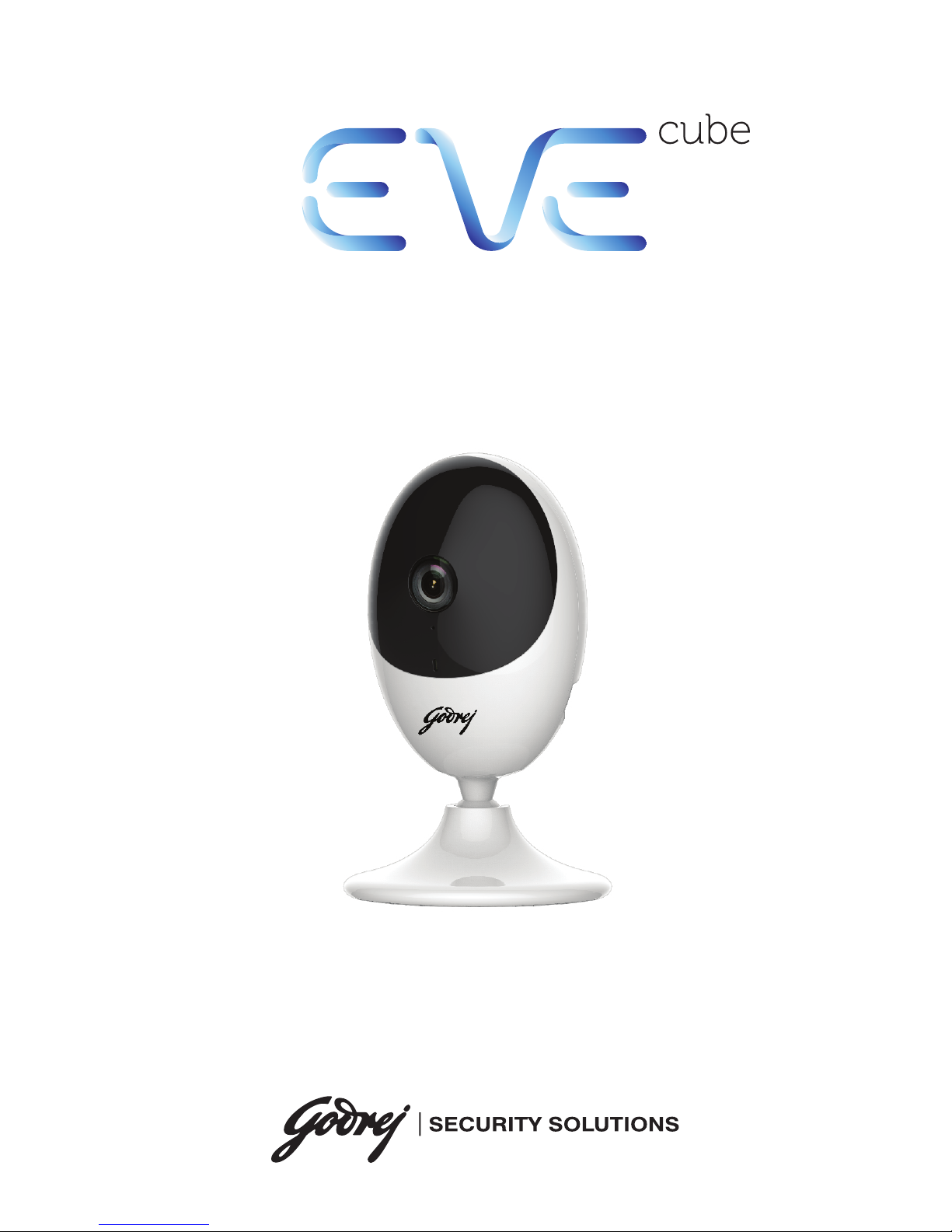
easy viewing everywhere
Quick Start Guide
Wifi Network Camera
Page 2

About this Manual
The Manual includes instructions for using and managing the product. Pictures, charts,
images and all other information hereinafter are for description and explanation only.
The information contained in the Manual is subject to change, without notice, due to
firmware updates or other reasons.
Legal Disclaimer
Regarding the product with internet access, the use of product shall be wholly at your
own risks. Our company shall not take any responsibilites for abnormal operation,
privacy leakage or other damages resulting from cyber attack, hacker attack, virus
inspection, or other internet security risks; however, our company will provide timely
technical support if required. Surveillance laws vary by jurisdiction. Please check all
relevant laws in your jurisdiction before using this product in order to ensure that your
use conforms to the applicable law. You futher agree that this product is only for civil
use, and godrej shall not be liable in the event that this product is used with illegitimate
purposes, such as third-party rights infringement, medical treatment, safety equipment
or other situations where the product failure could lead to death or personal injury, or
weapon of mass destruction, chemincal and biological weapon, nuclear explosion, and
any unsafe nuclear energy uses or anti-humanity usages. You should undertake all
responsibilities for losses or damages resulting from the above usages whatsoever. In
the event of any conflicts between the above and the applicable law, the later prevails.
The purpose of the Products is to provide an adequate warning in the event of illegal
encroachment in certain area; however, the proper installation of the Products will not
eliminate, but only reduce, that accidents will not occur or that there will be no personal
injury or property loss as a result. You are highly recommended to raise your vigilance
and strengthen the safety awareness in the daily life.
GODREJ does not undertake any liability for personal injury or property damage, as the
result of product interruption or service termination cause by:
a) improper installation or usage other than as requested;
b) the protection of national or public interests;
c) Force Majeure;
d) yourself or the third party, including not limitation, using any third party’s products,
software, applications, and among others.
1
Page 3
Regulatory Information
This device complies with Part 15 of the FCC Rules. Operation is subject to the
following two conditions:
(1) This device may not cause harmful interference, and
(2) This device must accept any interference received, including interference that may
cause undesired operation.
Note: This product has been tested and found to comply with the limits for a Class B
digital device, pursuant to Part 15 of the FCC Rules. These limits are designed to
provide reasonable protection against harmful interference in a residential installation.
This product generates, uses, and can radiate radio frequency energy and, if not
installed and used in accordance with the instructions, may cause harmful interference
to radio communications. However, there is no guarantee that interference will not
occur in a particular installation. If this product does cause harmful interference to
radio or television reception, which can be determined by turning the equipment o
and on, the user is encouraged to try to correct the interference by one or more of the
following measures:
—Reorient or relocate the receiving antenna.
—Increase the separation between the equipment and receiver.
—Connect the equipment into an outlet on a circuit dierent from that to which the
receiver is connected.
—Consult the dealer or an experienced radio/TV technician for help.
Please take attention that changes or modification not expressly approved by the party
responsible for compliance could void the user’s authority to operate the equipment.
This equipment should be installed and operated with a minimum distance 20cm
between the radiator and your body
EU Conformity Statement
This product and - if applicable - the supplied accessories too are marked with
"CE" and comply therefore with the applicable harmonized European
standards listed under the EMC Directive 2014/30/EU, the RoHS Directive
2011/65/EU, Radio Equipment Directive 2014/53/EU.
2012/19/EU (WEEE directive): Products marked with this symbol cannot be
disposed of as unsorted municipal waste in the European Union. For proper
recycling, return this product to your local supplier upon the purchase of
equivalent new equipment, or dispose it of at designated collection points. For
more information see: www.recyclethis.info.
2006/66/EC (battery directive): This product contains a battery that cannot be
disposed of as unsorted municipal waste in the European Union. See the
product documentation for specific battery information. The battery is marked
with this symbol, which may include lettering to indicate cadmium (Cd), lead
(Pb), or mercury (Hg). For proper recycling, return the battery to your supplier
or to a designated collection point. For more information see:
www.recyclethis.info.
2
Page 4
3
Industry Canada ICES-003 Compliance
This device meets the CAN ICES-3 (B)/NMB-3(B) standards requirements.
This device complies with Industry Canada licence-exempt RSS standard(s). Operation
is subject to the following two conditions:
(1) this device may not cause interference, and
(2) this device must accept any interference, including interference that may cause
undesired operation of the device.
This equipment should be installed and operated with a minimum distance 20cm
between the radiator and your body.
Safety Instructions
These instructions are intended to ensure that a user can use the product correctly to
avoid danger or property loss.
The precaution measure is divided into “Warnings” and “Cautions”
Warnings: Serious injury or death may occur if any of the warnings are neglected.
Cautions: Injury or equipment damage may occur if any of the cautions are neglected.
Warnings: Follow these safeguards to
prevent serious injury or death.
Cautions: Follow these precautions to
prevent potential injury or material damage.
Warnings
•Proper configuration of all passwords and other security settings is the
responsibility of the installer and/or end-user.
• In the use of the product, you must be in strict compliance with the electrical
safety regulations of the nation and region. Please refer to technical specifications
for detailed information.
• Do not connect several devices to one power adapter as adapter overload may
cause over-heating or a fire hazard.
• Please make sure that the plug is firmly connected to the power socket. When the
product is mounted on wall or ceiling, the device shall be firmly fixed.
• If smoke, odor, or noise rise from the device, turn o the power at once and unplug
the power cable, and contact the service center.
Page 5

4
Make sure the power supply voltage is correct before using the camera.
•Do not drop the camera or subject it to physical shock.
• Do not touch sensor modules with fingers. If cleaning is necessary, use a clean
cloth with a bit of ethanol and wipe it gently. If the camera will not be used for an
extended period, replace the lens cap to protect the sensor from dirt.
•Do not aim the camera at the sun or extra bright places. Blooming or smearing may
occur (which is not a malfunction), and aect the sensor’s endurance at the same
time.
•The sensor may be burned out by a laser beam, so when any laser equipment is in
use, make sure that the surface of sensor will not be exposed to the laser beam.
• Do not place the camera in extremely hot, cold (the operating temperature shall be
-10°C to +40°C), dusty, or damp locations, and do not expose it to high
electromagnetic radiation.
•To avoid heat accumulation, ensure that there is good ventilation to the device.
• Keep the camera away from liquids.
• While in delivery, pack the camera in its original, or equivalent, packing, packing
materials. Or packing of the same texture.
• Regular part replacement: a few parts (e.g. electrolytic capacitor) of the equipment
shall be replaced regularly according to their average endurance. The average time
varies because of dierences between operating environments and usage history,
so regular checking is recommended for all users. Please contact your dealer for
more details.
• Improper use or replacement of the battery may result in hazard of explosion.
Replace with the same or equivalent type only. Dispose of used batteries according
to the instructions provided by the battery manufacturer.
•If the product does not work properly, please contact your dealer or the nearest
service center. Never attempt to disassemble the camera yourself. (We shall not
assume any responsibility for problems caused by unauthorized repair or
maintenance.)
Cautions
Page 6
5
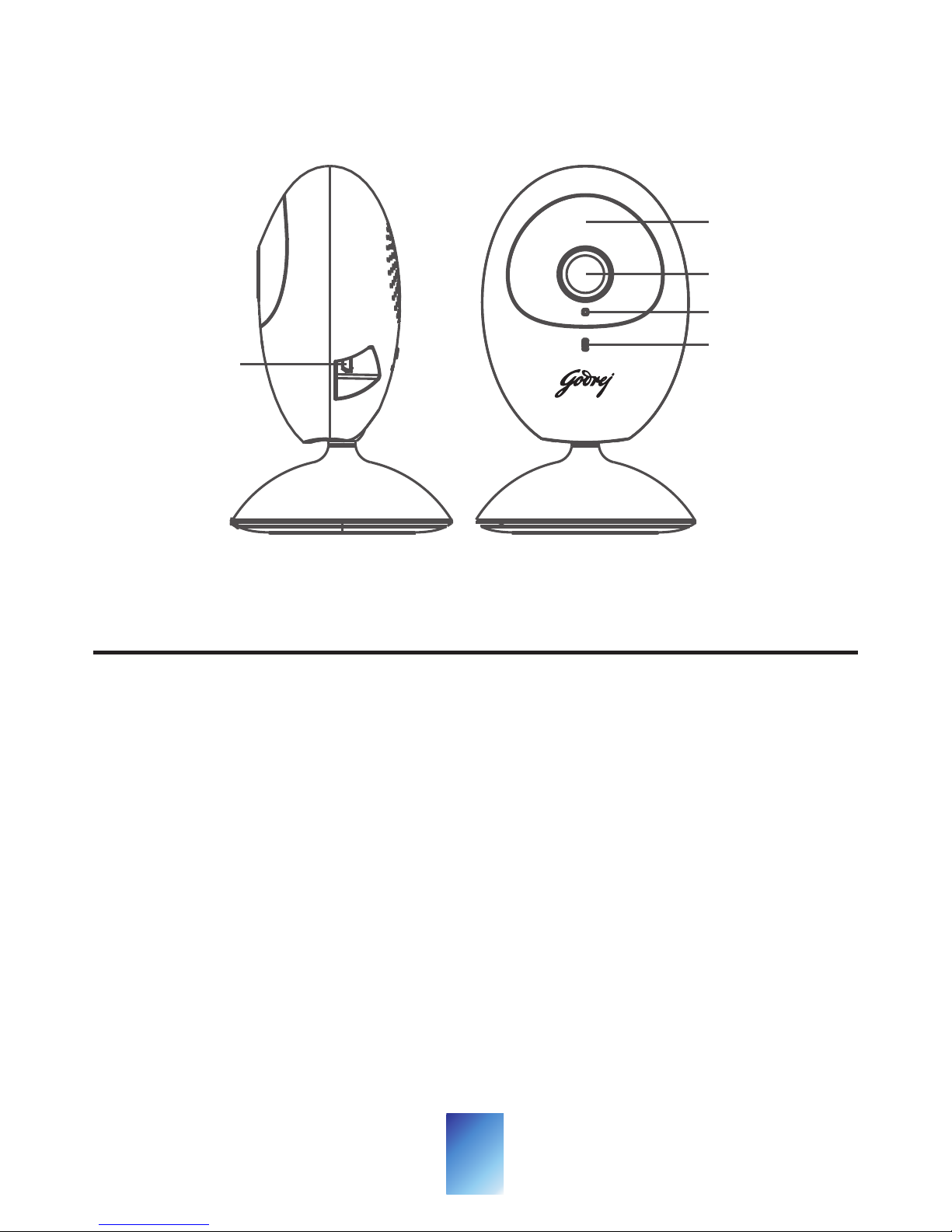
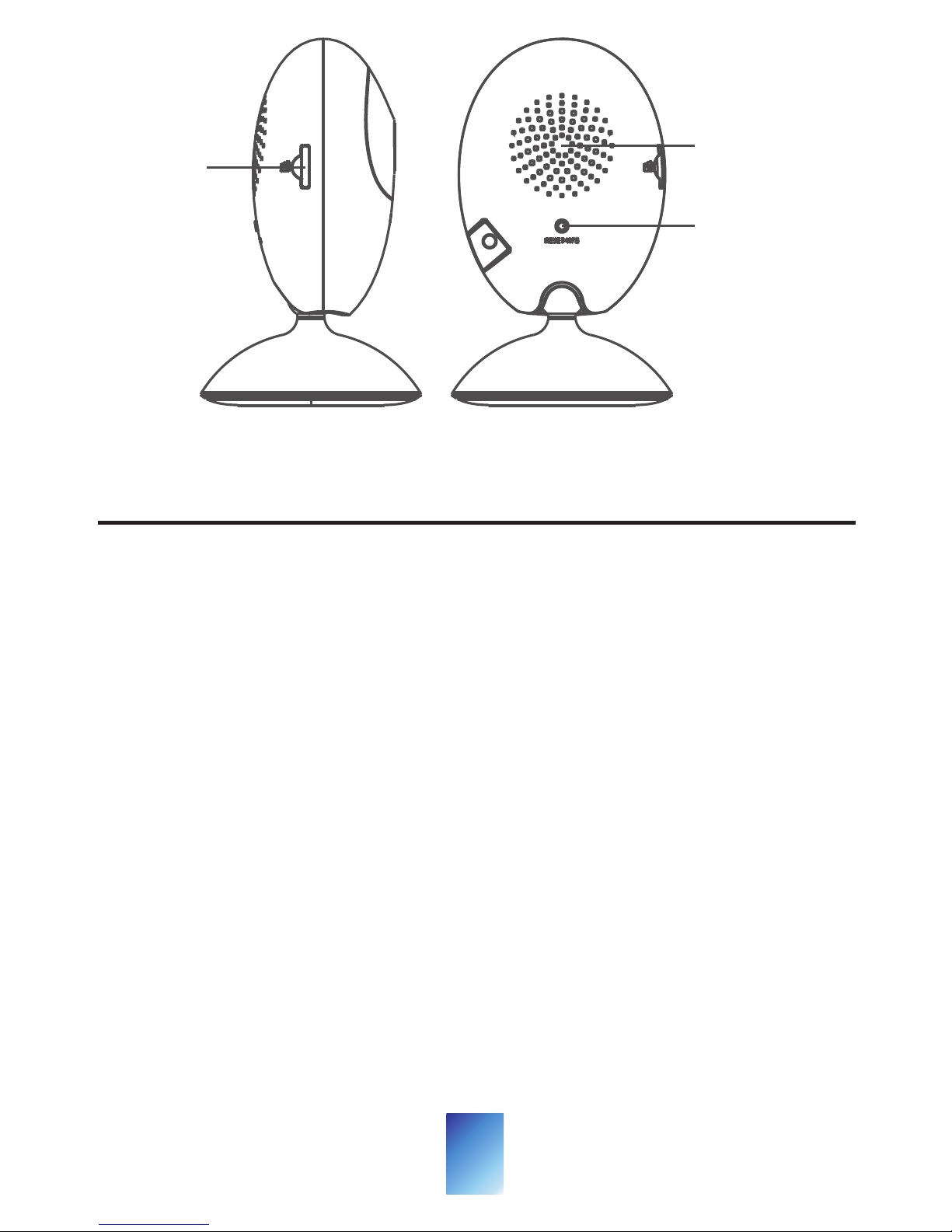
Appearance
Name
Description
IR Light
LED
Indicator
Auto light source for night vision. The light is
behind the anti-reflection panel. You can see
the light when it is on.
• Flashing blue: The camera is on and ready for
the Wi-Fi connection.
• Steady blue: The camera is running properly.
• Flashing red: Network exception.
Power Input
IR Light
Lens
MIC
LED
Indicator
Micro USB interface for the power supply
(5V). Plug the power cable into the power
input interface to power on the camera.
Power
Input
• Steady red: The camera is starting up.
Page 7
6
RESET/WPS
WPS: Set Wi-Fi connection via WPS (Wi-Fi
Protected Setup) function.
RESET: Hold down the button for 4 seconds
when the camera is running.
Memory
For microSD card. If a memory card is
Card Slot
used, video files will be stored in the
memory card. You would need to
Description
Memory
Card Slot
Speaker
RESET/WPS
initialize it via the Godrej EVE app.initialize it via the Godrej EVE app.
Name
Page 8
7
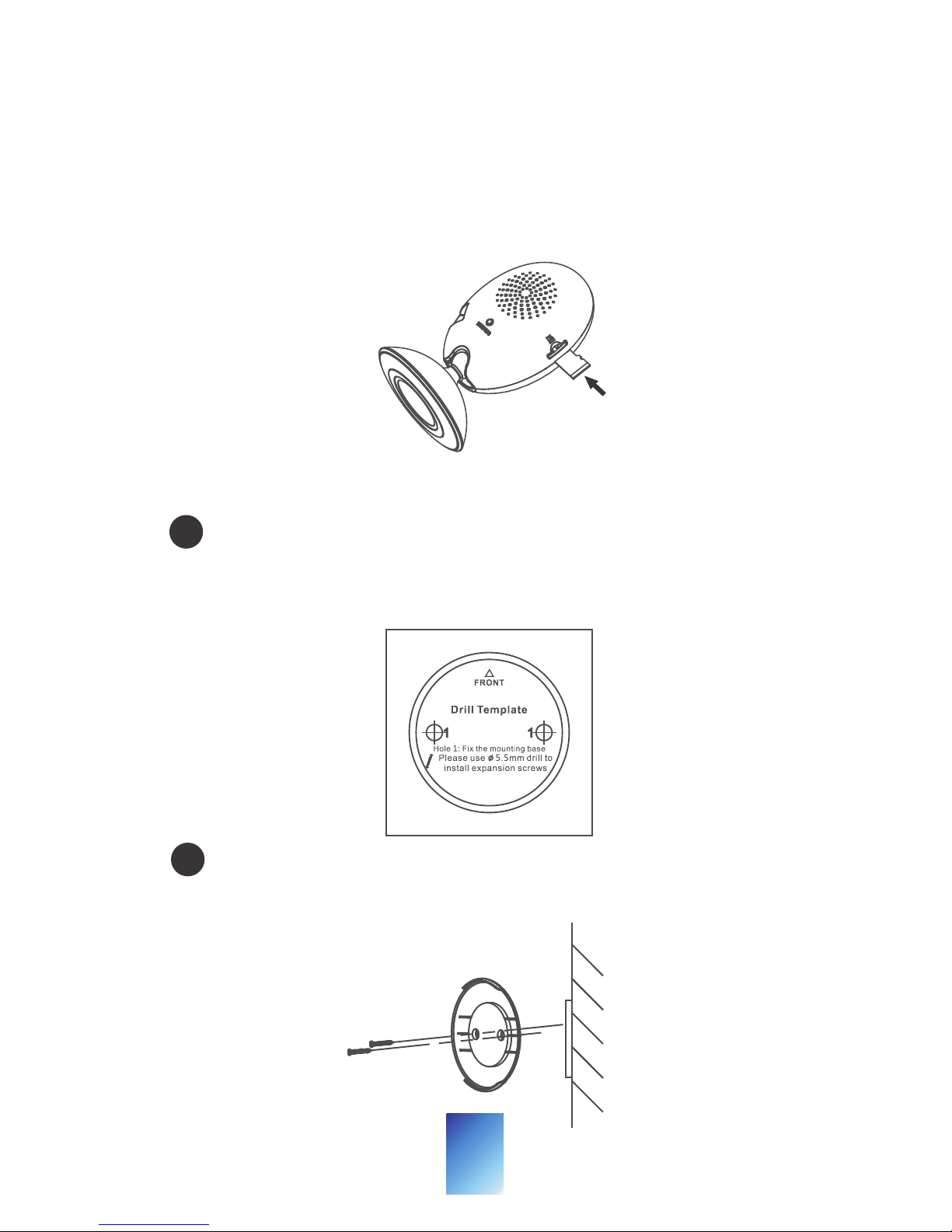
Insert the memory card into the card slot on
the side of the camera, as shown below.
The camera supports memory card upto
128 GB
Installation
2
Install the camera.
Paste the mounting template onto the
installation surface.Drill and insert
screws in the position shown in the
template
1
Fix the mounting base to the installation
position according to the holes on the
mounting template.
2
1
Install memory card (optional).
Page 9
1
2
70°
25°
8
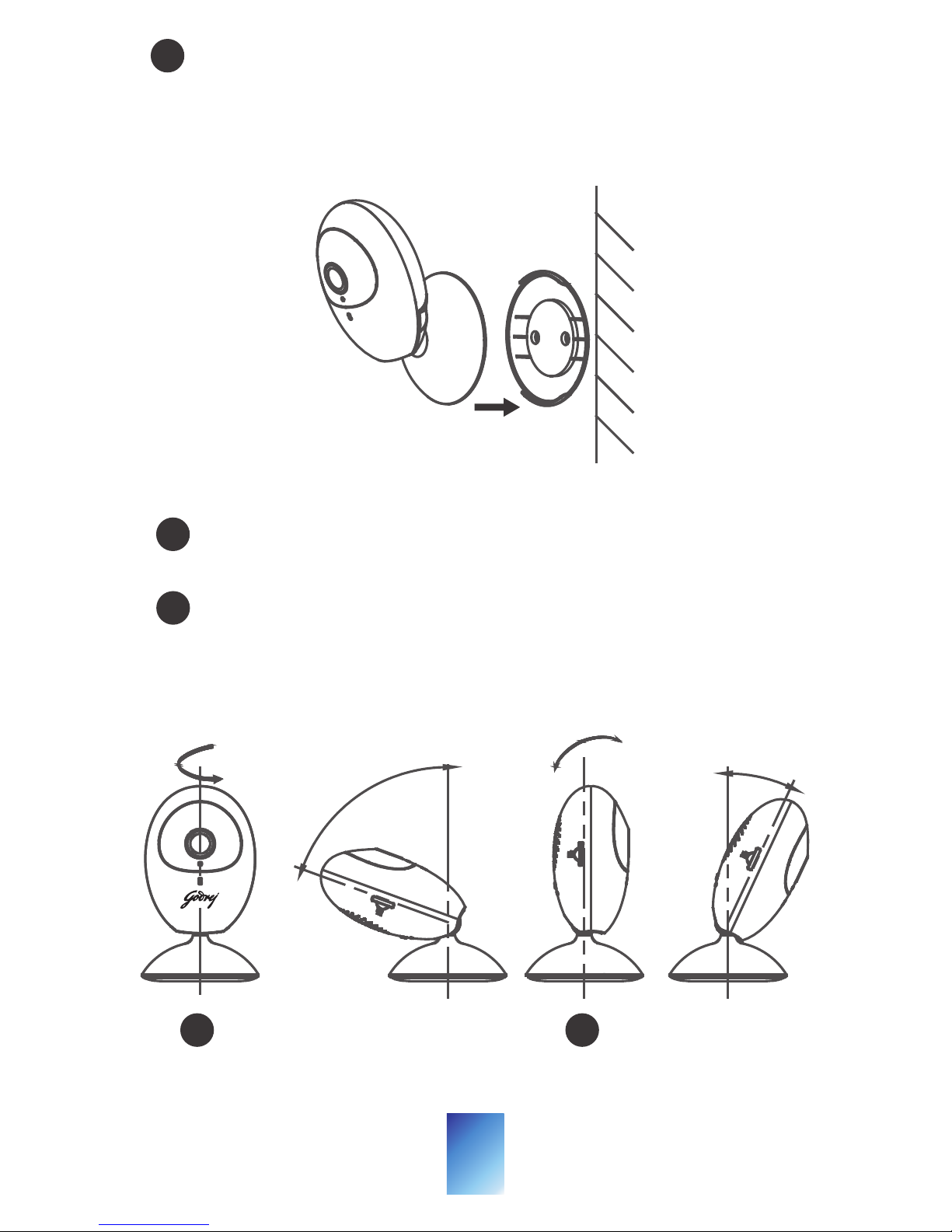
Line up and wedge the lower edge of the
camera base with the mounting base and
then push the camera to the mounting
base to secure it.
Rotate the camera body to adjust the
camera view.
3
1
Pull and push the camera body to adjust it
to the desired tilting position.
2
Adjust the View.
360°
3
Page 10
9
Operations
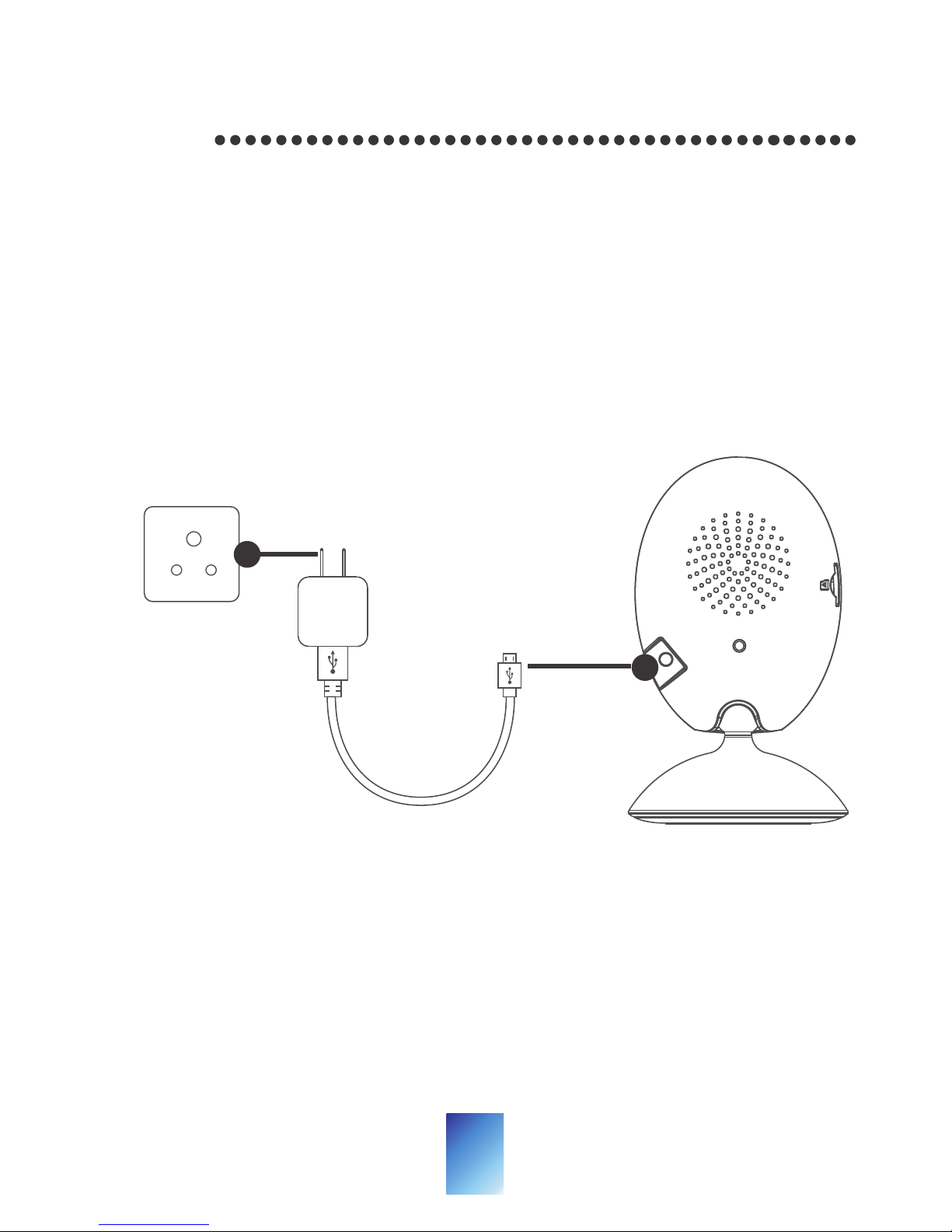
Step 1
Power on the Camera
Connect the camera to the power adapter with
the Micro USB cable, and then plug the power
adapter into the power outlet. When the blue
light flashes, the camera is powered on. You can
set the Wi-Fi connection.
RESET WPS
Micro USB Cable
Power Outlet
Page 11
Godrej EVE app Setup
- Connect your mobile device to Wi-Fi.
- Download and install the Godrej EVE app from App
TM
Store (for iOS) or Google Play (for android).
- Launch the app and register for a new account.
Follow the onscreen instruction to complete
OR
registration process.
Step 2
10
Page 12

Add the Camera to Your Godrej EVE Account
Note:
Start the adding process only when the
indicator flashes blue.
- Connect your mobile phone to a Wi-Fi (5G Wi-Fi is
not supported yet).
- Log into the Godrej EVE app.
- In the Home page, tap “+” on the upper-right
corner to add a camera.
- Scan the QR code on the bottom of the camera or
on the Quick Start Guide cover.
- Tap Connect to a Network button in the popup
interface.
- Choose Wireless Connection to set the Wi-Fi
connection.
- Input the Wi-Fi password that your mobile phone
has connected to, and tap Next to start the Wi-Fi
connection. (Locate the camera within 3 meters
from the router.)
- Tap Add button in the next interface to finish
adding.
Step 3
11
Page 13
12
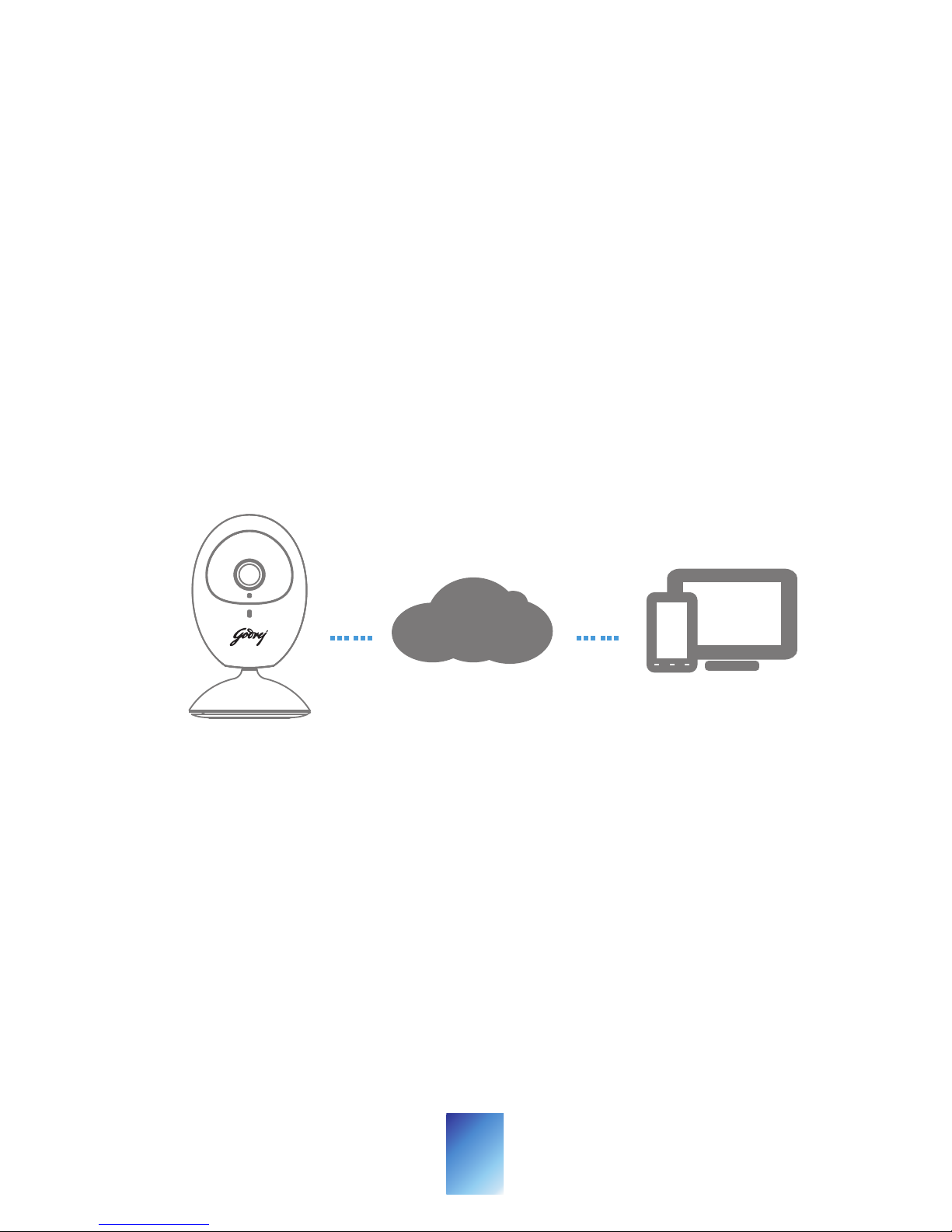
With Godrej EVE cloud service, you can realize
some certain functions of this product (including,
but not limited to, live view, and remote
playback), which depend on the internet and
telecom value-added services. To learn more
about these functions, visit the Godrej EVE
website www.eve.godrejsecure.com and register
for a new account.
Live View
Launch the
Godrej EVE app and you can get the
live view of the connected devices.
……
……
Godrej EVE
Page 14

13
- Check the microSD card status by tapping on
the Storage Status in the Device Settings
interface.
- If the microSD card status displays as
Uninitialized, tap to initialize it. The status will
then change to Normal. You can then start
recording any event triggered video in the
camera such as motion detection.
Playback
Launch the
Godrej EVE app, tap a connected
device and tap Gallery button to play back.
Alarm Notification
Launch the
Godrej EVE app and tap Message to
see the alarm messages.
Recording
 Loading...