

Page 1

Keep it simple. Those three words can tell you a lot about the DX-10 — and how to
get more out of digital photography. You’ll be surprised by the 850,000-pixel CCD’s
image quality, the special effects and the easy data handling. But the greatest
surprise might be how they’re combined in such a trim, good-looking package.
The design almost asks you to take it along. And the natural response is “for sure.”
Digital Camera
FUJIFILM DX-10
Traveling Light Is
Imaging Right
850,000
PIXELS
Page 2

Quality and Convenience
850,000 Square Pixels
Sharp, precise and lifelike —
that’s what you can expect from
a DX-10 image. Sporting a
1/3-inch CCD with 850,000
pixels, it delivers quality that’s
a step ahead. Since the
pixels are square, there’s
no distortion when you
transfer data to a PC for display or printing.
Color reproduction is just as accurate. With its thoroughgoing
noise reduction, the RGB primary-color filter ensures naturallooking tones. And Fujifilm’s original image processing algorithm
boosts accuracy and produces smooth gradations.
Science Meets Art
With the DX-10, you get AE, Auto Flash and the rest of the automation you want. The Continuous Mode is at hand for action
sequences, while the Digital 1.6× Telephoto Mode creates a
zoom effect that’s ideal for candid portraits.
You’ll probably want to rely on these high-performance
capabilities most of the time, but don’t forget the full complement of
manual modes that put you in charge. When you want to explore
the subtleties of digital photography, use the manual exposure,
flash and white balance. They’ll put your signature style on an
image.
More Fun
The Best of Times
When you want to see your images
on a large screen or share them,
connect the DX-10 to a TV monitor
through the video output terminal. To
enliven the show, there are five
playback modes, including Multi-
Frame display of nine images and 3× Playback Zoom. Especially
when you mix them, they’re sure to make a business presentation
or social gathering more memorable.
Very Special Effects
There’s no end to the
fun when you’re part of
the digital world. After
an image is recorded,
select the DX-10’s
Effects Mode to alter it in some very interesting ways. You can add a
sepia tone to create the feeling of an old-time photograph, or bring
out the highlights with a gold or silver tone. This treatment also
includes using the digital equivalent of a convex or
concave lens to distort an image.
Easy PC Input
Simplify the Smart Way
The DX-10 stores images on a
SmartMedia™ Card that’s handy for
both shooting and data handling.
Removable and ultracompact, the
cards hold from 2 MB to 16
MB, and they’re easily
replaced when
they’re full.
Transferring data to
your PC is quick and easy
when you use the optional
Floppy Disk Adapter or optional PC Card Adapter. Just put the
SmartMedia™ Card in the adapter, and insert it in the computer.
Then you’ll be ready to e-mail an image or add an original touch.
Since files are recorded in the JPEG (Exif) format,
they can be opened with nearly all of today’s
graphics software, so there aren’t any worries
about compatibility.
Lifelike Output
A Perfect Pair
The Digital Printer NX-70 is the ideal choice for photo-like output from
the DX-10. Since it has a SmartMedia™ Card slot, you can move the
card directly from the camera to the printer, without bothering to
download images to a PC.
Clean, economical and environmentally friendly, it uses Fujifilm’s
own Thermo-Autochrome (TA) paper that generates its own colors.
With 16.7 million colors to capture every gradation, your output will be
lifelike and natural. And you can have multiple 2-cut, 4-cut or
16-cut output—of a single image or different ones—on a
single sheet. For business or
simply more fun, sticker
sheets are also available in
these three varieties.
Digital Camera
FUJIFILM DX-10
When you’re ready to go, so is the DX-10. It comes with a long list of
features and creative advantages, but it’s the basics that matter most.
See how light it is, and then check a sample image captured by the
850,000-pixel CCD. Those simple steps will tell you this one is made for
mobility and quality.
Your Digital Sidekick Is Ready for the Road
Mode Dial
All the basic modes are right at
hand. Just turn the dial for shooting,
playback and other functions.
Four-Direction Key
After choosing the appropriate
mode, use this key to make your
final selection. It makes
operation easy and accessible.
Color LCD Monitor
If you want to make sure a shot is right, check it
immediately on the 1.8-inch color LCD monitor. It can
also be used as a viewfinder.
Digital Printer NX-70
Actual Size
Trim, Lightweight Design
The pocket-size DX-10
weighs only 200 g/7.1 oz.,
and it measures 110 (W)
×
77 (H) ×33 (D) mm/4.3 (W)
×
3.0 (H) ×1.3 (D) in.
▼
▼
▼
Mary’s Home Page
Mary’s Home Page
All pictures in this brochure are image photos only.
Page 3
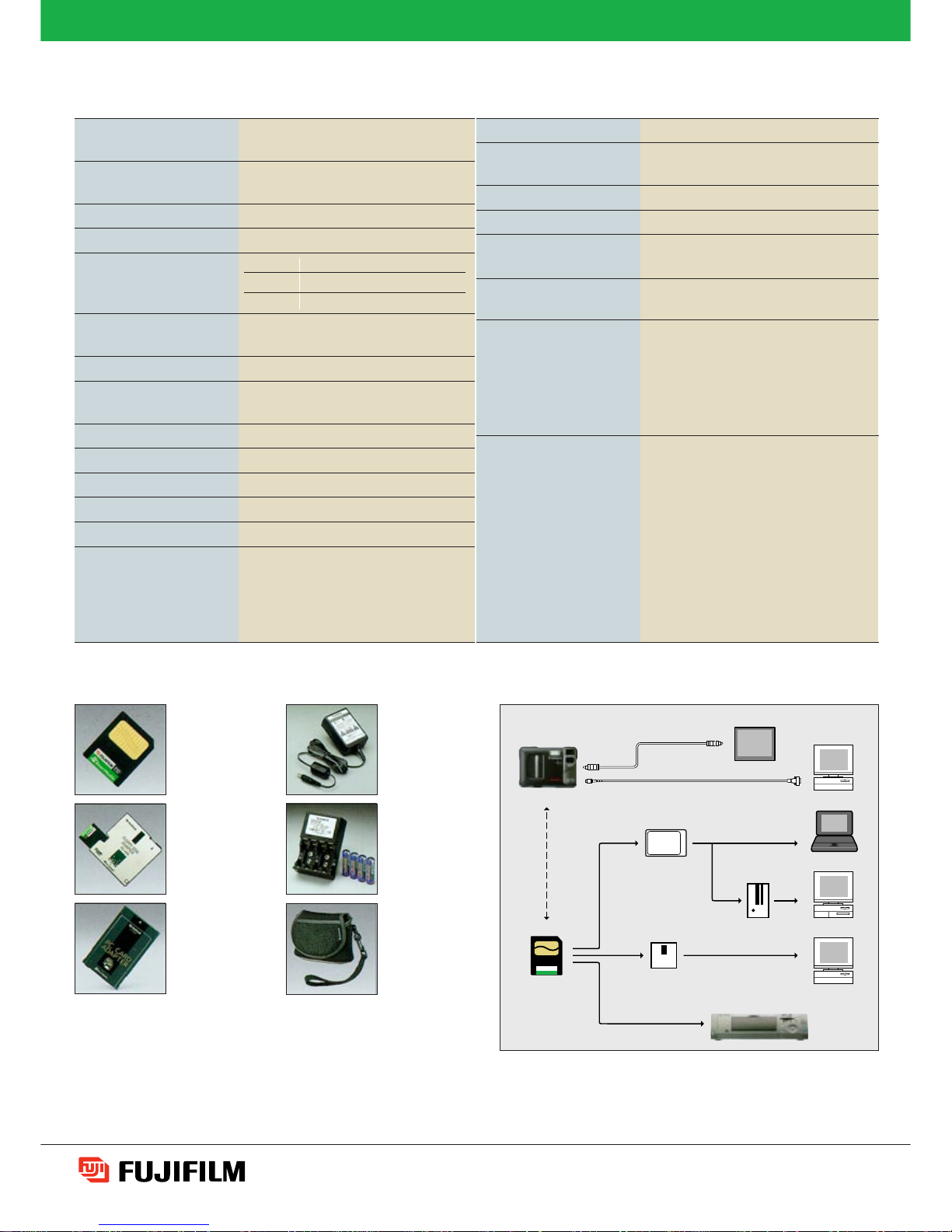
Floppy Disk
Adapter
FD-A1/A1S/A1N
SmartMedia™
Cards
MG-4S
MG-8S
MG-16S
OPTIONAL ACCESSORIES SYSTEM CONFIGURATION
SPECIFICATIONS
AC Power Adapter
AC-5V
PC Card Adapter
PC-AD2/AD3
Battery Charger
with Battery
BK-68PF
Soft Case
SC-DX8
CCD sensor 1/3-inch CCD with 850,000 square
pixels
Resolution 1,024 × 768 / 640 × 480 pixels,
24-bit color
File format JPEG (Exif) with 2 compression levels
Storage media SmartMedia™ Card (3.3V, 2~16 MB)
Number of images Mode
2MB MG-4S MG-8S MG-16S
Fine 6 13 27 54
Normal 13 26 54 108
Lens focal length f = 5.5 mm (equivalent to 40 mm with a
35 mm camera)
Lens/Aperture Fujinon lens with 2 steps (F4/F8)
Focus distance Normal Mode: 70 cm/2.3 ft. to infinity
Macro Mode: 10 cm/3.9 in.
Sensitivity Equivalent to ISO 150
Exposure control Program AE
White balance Auto/Manual (4 modes)
Shutter speeds 1/4~1/5,000 sec.
Viewfinder Optical viewfinder, LCD monitor
Flash Built-in Auto Flash with approx. 3.0 m/
9.8 ft. range and light sensor control
Modes: Auto (in dim light), Red-Eye
Reduction, Fill-in, Flash Off
Slow-Sync, Daylight-Sync
Digital interface RS-232C
Video output U model: NTSC (Live, Freeze, Playback)
E model: PAL (Live, Freeze, Playback)
LCD monitor 1.8-inch D-TFD color LCD monitor
Power source 4 AA batteries, AC power adapter
Dimensions 110 (W) × 77 (H) × 33 (D) mm/
4.3 (W) × 3.0 (H) × 1.3 (D) in.
Weight Approx. 200 g/7.1 oz. (excluding hand-
strap, batteries and SmartMedia™ Card)
Other functions Shooting: Auto, Manual, Self-Timer,
Digital 1.6× Telephoto
Playback: Single, Nine-Shot Multi-Frame,
3× Zoom, Auto Play
Effects: Wide/Slim, Concave/Convex,
Gold/Silver, Sepia
Included accessories • SmartMedia™ Card (2MB, 3.3V)
• Video cable
• Hand-strap
• 4 AA alkaline batteries
•
Serial cables for Windows®and Macintosh
®
• CD-ROM
for Windows®and Macintosh
®
•
Data transfer software,
•
TWAIN driver for downloads and
camera control
•
Adobe®PhotoDeluxe 2.0
DIGITAL CAMERA FUJIFILM DX-10
Specifications are subject to change without notice.
Macintosh®is a registered trademark of Apple Computer, Inc.
Windows®is a registered trademark of Microsoft Corporation.
All other trademarks are the property of their respective holders.
DX-10
Digital Printer NX-70
SmartMedia™ Card
Video
TV Monitor
Computer
Laptop Computer
Desktop Computer
Computer
PC Card Adapter
Serial
PC Card Reader
Floppy Disk Adapter
FUJI PHOTO FILM CO., LTD.
26-30, NISHIAZABU 2-CHOME, MINATO-KU, TOKYO 106-8620, JAPAN
Ref. No. EB-815E(SK·98·12·DT·MW) Printed in Japan © 1998 Fuji Photo Film Co., Ltd.
For more information on Fujifilm digital products, please visit our Website: http://home.fujifilm.com
 Loading...