

Page 1

Contents
Before driving
Introduction 2
Instrumentation 4
Controls and features 21
Seating and safety restraints 72
Starting and driving
Starting 99
Driving 104
Roadside emergencies 135
Servicing
Maintenance and care 156
Capacities and specifications 197
Reporting safety defects 205
Index 206
All rights reserved. Reproduction by any means, electronic or mechanical
including photocopying, recording or by any information storage and retrieval
system or translation in whole or part is not permitted without written
authorization from Ford Motor Company.
Copyrightr1997 Ford Motor Company
Elemental Chlorine Free
1
Page 2
Introduction
ICONS
Indicates a warning. Read the
following section on Warnings for a
full explanation.
Indicates vehicle information related
to recycling and other
environmental concerns will follow.
Correct vehicle usage and the
authorized disposal of waste
cleaning and lubrication materials
are significant steps towards
protecting the environment.
WARNINGS
Warnings provide information which may reduce the risk of personal
injury and prevent possible damage to others, your vehicle and its
equipment.
BREAKING-IN YOUR VEHICLE
There are no particular breaking-in rules for your vehicle. During the
first 1 600 km (1 000 miles) of driving, vary speeds frequently. This is
necessary to give the moving parts a chance to break in.
If possible, you should avoid full use of the brakes for the first 1 600 km
(1 000 miles).
INFORMATION ABOUT THIS GUIDE
The information found in this guide was in effect at the time of printing.
Ford may change the contents without notice and without incurring
obligation.
2
Page 3

Introduction
SPECIAL NOTICES
Notice to owners of utility type vehicles
Before you drive your vehicle, please read this Owner’s Guide carefully.
Your vehicle is not a passenger car. As with other vehicles of this type,
failure to operate this vehicle correctly may result in loss of control or an
accident.
Be sure to read Driving off road in the Driving chapter as well as the
‘‘Four Wheeling’’ supplement included with 4WD and utility type vehicles.
Using your vehicle as a snowplow
Do not use this vehicle for snowplowing.
Using your vehicle as an ambulance
Do not use this vehicle as an ambulance.
Your vehicle is not equipped with the Ford Ambulance Preparation
package.
3
Page 4
Instrumentation
OFF
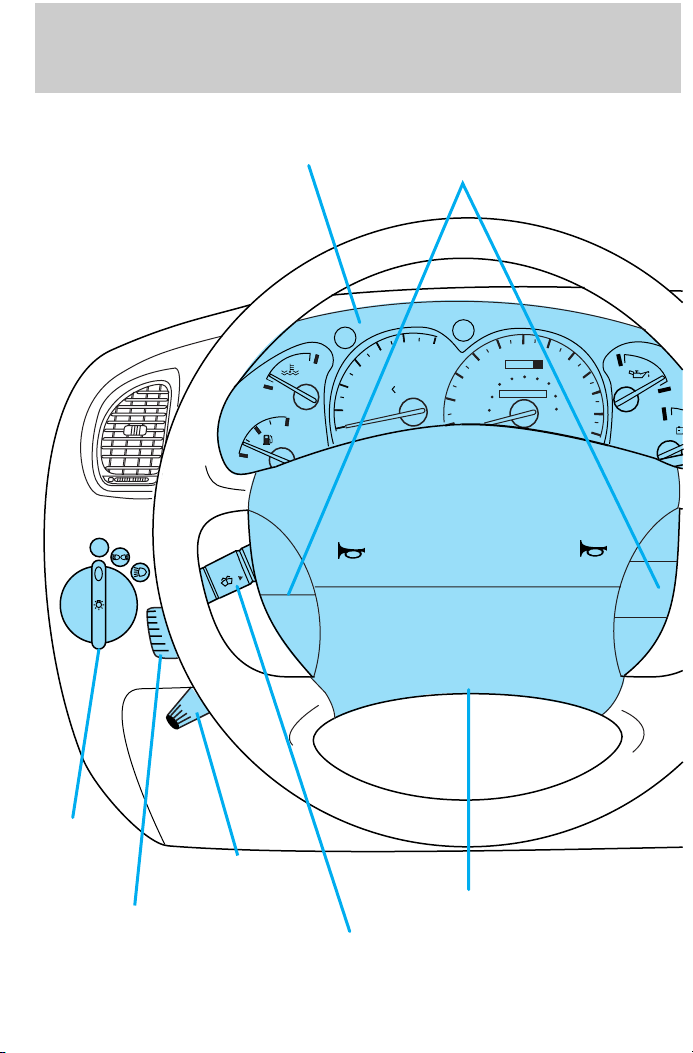
Instrument cluster
(pg. 6)
H
C
F
E
ON
OFF
2
1
0
4
3
Speed control
(pg. 11)
5
6
UNLEADED
FUEL ONLY
SRS
60
70
50
oooo
40
60
30
40
20
20
10
100
80
120
000000
80
140
160
H
90
100
180
110
200
H
RSM
SET
ACC
COAST
Headlamp
control
(pg. 21)
Instrument panel
dimmer switch
4
(pg. 22)
Tilt steering
wheel lever
(pg. 41)
Turn signal and
wiper/washer control
(pg. 35)
Driver side air
bag
(pg. 82)
Page 5
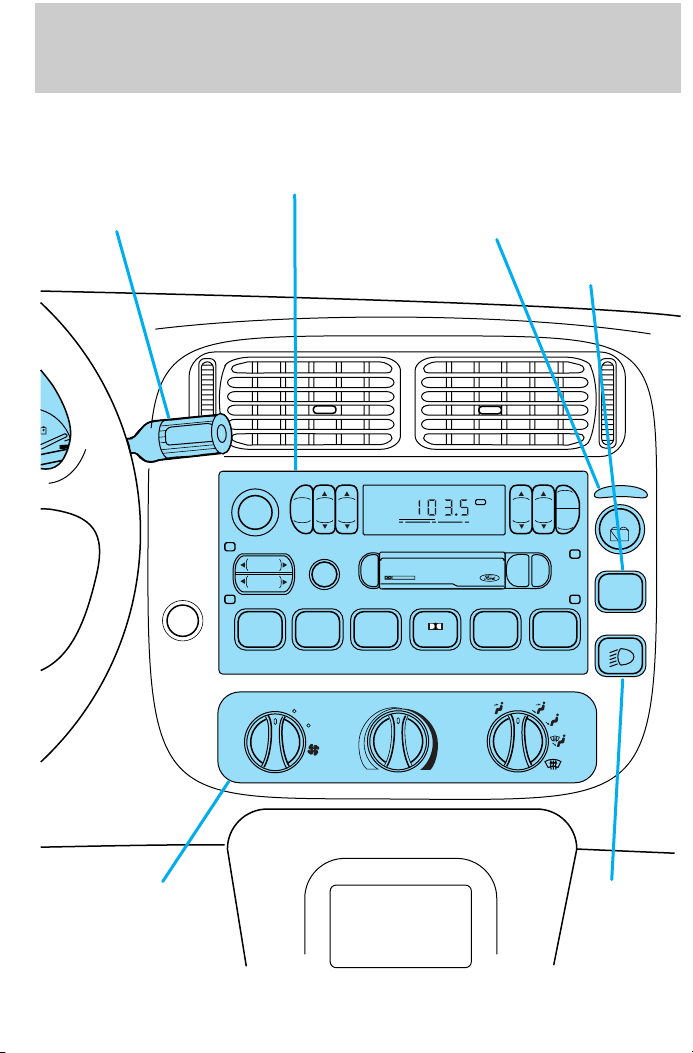
Gearshift
(includes
overdrive button)
(pg. 108)
OD
ON/OFF
Electronic sound
system; refer to
Audio Guide
(pg. 34)
Instrumentation
Rear window
defroster control
(pg. 34)
Rear
window/washer
control
(pg. 42)
Climate controls
(pg. 43)
VOL – PUSH ON
SEEK
TUNE
DISCS
REW
1
BAL FADE
TAPE CD
OFF
6
CLK
AUTO
SET
PUSH
EJ
SIDE 1-2
3
FM 1
DOLBY SYSTEM
4
COMP5SHUFFLE
AM
BASSTREB
FM
SCAN
FF
2
LO
HI
Foglamp
control*
(page 21)
5
Page 6
Instrumentation
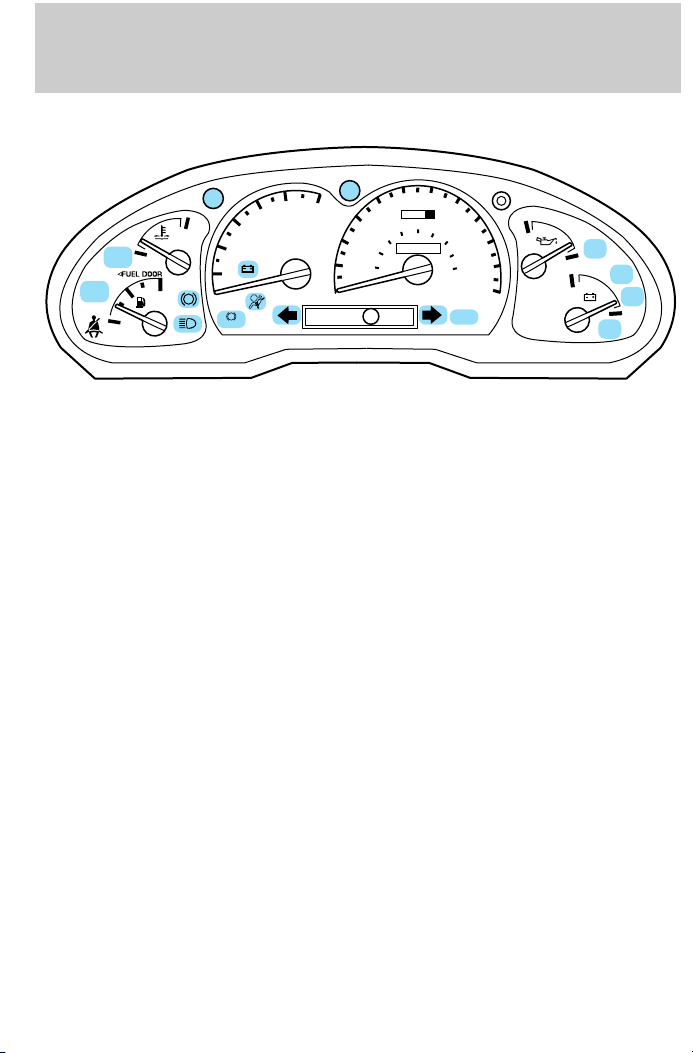
WARNING LIGHTS AND CHIMES
DOOR
CHECK
GAGE
4
RPMx1000
3
H
2
1
0
ABS
!
BRAKE
FUEL
RESET
CHECK
ENGINE
C
F
E
Check engine
Your vehicle is equipped with a
computer that monitors the engine’s
emission control system. This
system is commonly known as the
On Board Diagnostics System (OBD
II). This OBD II system protects the
environment by ensuring that your
vehicle continues to meet
government emission standards. The OBD II system also assists the
service technician in properly servicing your vehicle.
The Check Engine indicator light illuminates when the ignition is first
turned to the ON position to check the bulb. If it comes on after the
engine is started, one of the engine’s emission control systems may be
malfunctioning. The light may illuminate without a driveability concern
being noted. The vehicle will usually be drivable and will not require
towing.
AJAR
60
40
20
MPH
70
50
60
0 0 0
100
80
0 0 0 0 0 0
120
80
140
km/h
THEFT
90
160
180
H
00
1
101
20
1
SPEED
CONT
L
4WD
HIGH
4WD
H
LOW
L
O/D
OFF
5
6
40
30
20
10
RND21
P
CHECK
ENGINE
6
Page 7

Instrumentation
What you should do if the check engine light illuminates
Light turns on solid:
This means that the OBD II system has detected a malfunction.
Temporary malfunctions may cause your Check Engine light to
illuminate. Examples are:
1. The vehicle has run out of fuel. (The engine may misfire or run
poorly.)
2. Poor fuel quality or water in the fuel.
3. The fuel cap may not have been properly installed and securely
tightened.
These temporary malfunctions can be corrected by filling the fuel tank
with good quality fuel and/or properly installing and securely tightening
the gas cap. After three driving cycles without these or any other
temporary malfunctions present, the Check Engine light should turn off.
(A driving cycle consists of a cold engine startup followed by mixed
city/highway driving.) No additional vehicle service is required.
If the Check Engine light remains on, have your vehicle serviced at the
first available opportunity.
Light is blinking:
Engine misfire is occurring which could damage your catalytic converter.
You should drive in a moderate fashion (avoid heavy acceleration and
deceleration) and have your vehicle serviced at the first available
opportunity.
Under engine misfire conditions, excessive exhaust temperatures
could damage the catalytic converter, the fuel system, interior
floor coverings or other vehicle components, possibly causing a fire.
Fuel reset
Illuminates when the ignition key is
turned to the ON position and the
fuel pump shut-off switch has been
triggered. For more information,
refer to Fuel pump shut-off switch
in the Roadside emergencies
chapter.
FUEL
RESET
7
Page 8
Instrumentation
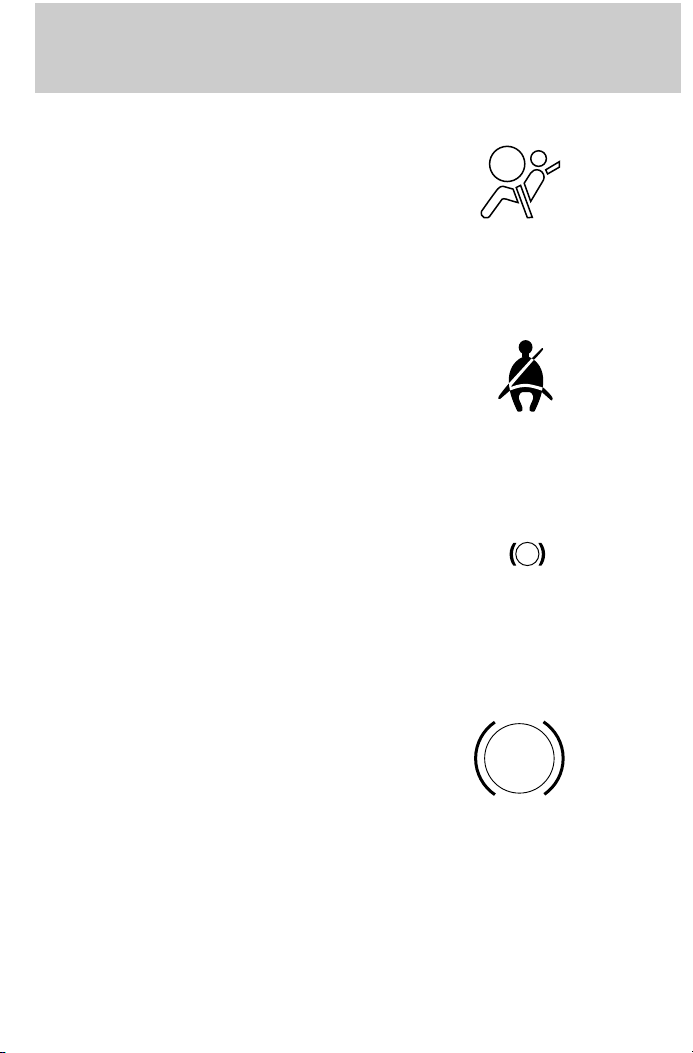
Air bag readiness
Momentarily illuminates when the
ignition is turned ON. If the light
fails to illuminate, continues to flash
or remains on, have the system
serviced immediately.
Safety belt
Momentarily illuminates when the
ignition is turned ON to remind you
to fasten your safety belts. For more
information, refer to the Seating
and safety restraints chapter.
Brake system warning
Momentarily illuminates when the
ignition is turned ON and the engine
is off. Also illuminates when the
parking brake is engaged.
Illumination after releasing the
parking brake indicates low brake
fluid level.
!
BRAKE
Anti-lock brake system (ABS)
Momentarily illuminates when the
ignition is turned on and the engine
is off. If the light remains on,
continues to flash or fails to
illuminate, have the system serviced
immediately.
8
ABS
Page 9
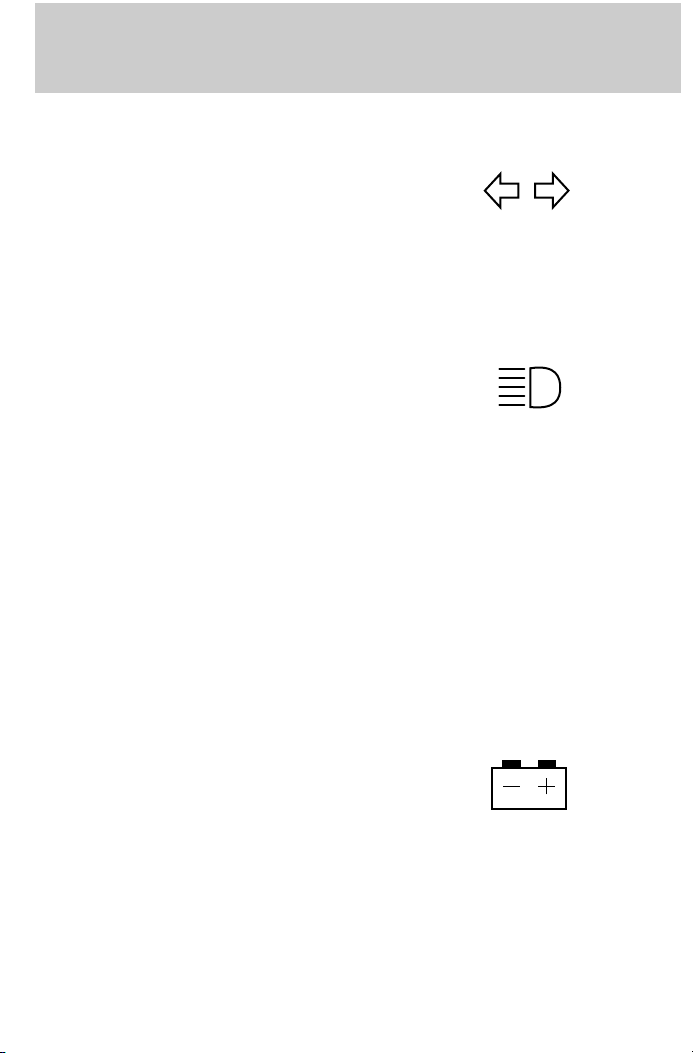
Turn signal
Illuminates when the left or right
turn signal or the hazard lights are
turned on. If one or both of the
indicators stay on continuously,
check for a burned-out turn signal
bulb. Refer to Exterior bulbs in the
Maintenance and care chapter.
High beams
Illuminates when the high beam
headlamps are turned on.
Anti-theft system (if equipped)
Refer to Anti-theft system in the
Controls and features chapter.
Instrumentation
THEFT
Charging system
Momentarily illuminates when the
ignition is turned ON and the engine
is off. The light also illuminates
when the battery is not charging
properly, requiring electrical system
service.
9
Page 10

Instrumentation
Check gage
Illuminates when the key is in the
ON position and the engine coolant
temperature is high, the engine oil
pressure is low or the fuel level is
near empty. Refer to Engine
coolant temperature gauge,
Engine oil pressure gauge or Fuel gauge in this chapter for more
information.
Four wheel drive low (if equipped)
Illuminates when four-wheel drive
low is engaged.
CHECK
GAGE
4WD
LOW
Four wheel drive high (if equipped)
Illuminates when four-wheel drive
high is engaged.
4WD
Door ajar
Illuminates when the ignition switch
is in the ON or START position and
any door is open.
10
HIGH
DOOR
AJAR
Page 11

Instrumentation
O/D off (if equipped)
Illuminates when the transmission
control switch has been pushed.
When the light is on, the
transmission does not shift into
overdrive. If the light does not come
on when the transmission control
switch is depressed or if the light
flashes when you are driving, have
your vehicle serviced.
Speed control (if equipped)
This light comes on when either the
SET/ACCEL or RESUME controls
are pressed. It turns off when the
speed control OFF control is
pressed, the brake is applied or the
ignition is turned to the OFF
position.
Safety belt warning chime
Chimes to remind you to fasten your safety belts.
For information on the safety belt warning chime, refer to the Seating
and safety restraints chapter.
O/D
OFF
SPEED
CONT
Supplemental restraint system (SRS) warning chime
For information on the SRS warning chime, refer to the Seating and
safety restraints chapter.
Key-in-ignition warning chime
Sounds when the key is left in the ignition in the OFF/LOCK or ACC
position and the driver’s door is opened.
Headlamps on warning chime
Sounds when the headlamps or parking lamps are on, the ignition is off
(and the key is not in the ignition) and the driver’s door is opened.
11
Page 12
Instrumentation
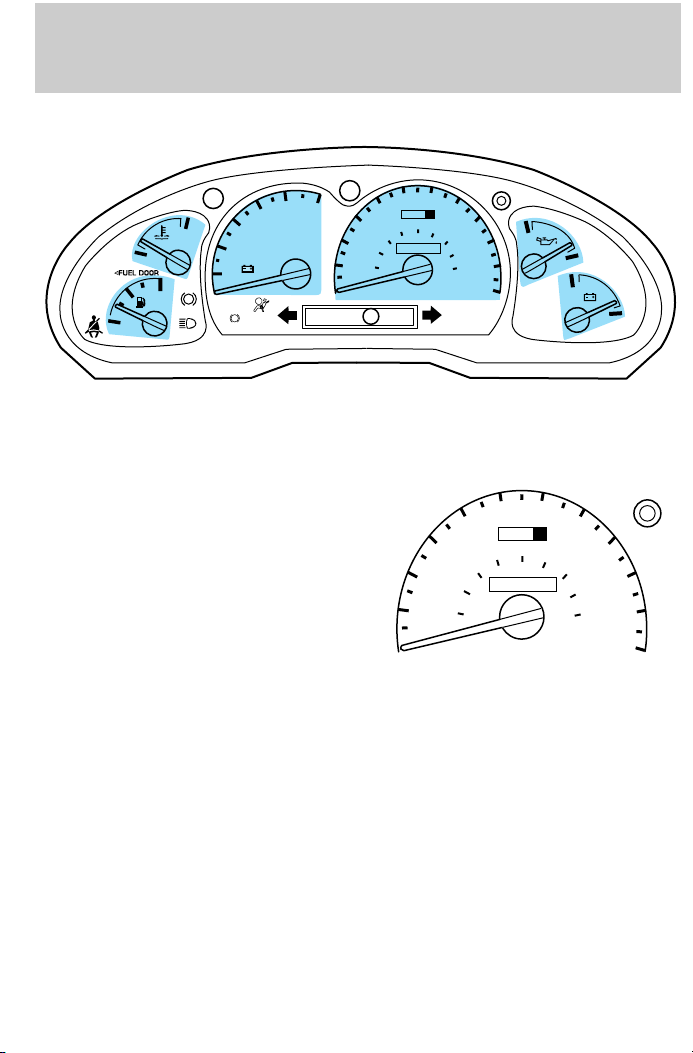
GAUGES
CHECK
GAGE
H
CHECK
C
FUEL
RESET
ENGINE
F
1
0
ABS
E
Speedometer
Indicates the current vehicle speed.
2
BRAKE
5
6
4
RPMx1000
3
!
P
DOOR
AJAR
50
40
60
30
40
20
20
10
MPH
RND21
60
0 0 0
100
80
0 0 0 0 0 0
20
10
70
30
120
80
140
km/h
40
20
90
00
1
160
180
1
THEFT
50
60
40
MPH
101
20
60
80
0 0 0 0 0 0
0 0 0
100
H
70
L
120
km/h
80
140
SPEED
CONT
4WD
HIGH
4WD
H
LOW
L
O/D
OFF
90
00
1
160
180
101
20
1
12
Page 13
Instrumentation
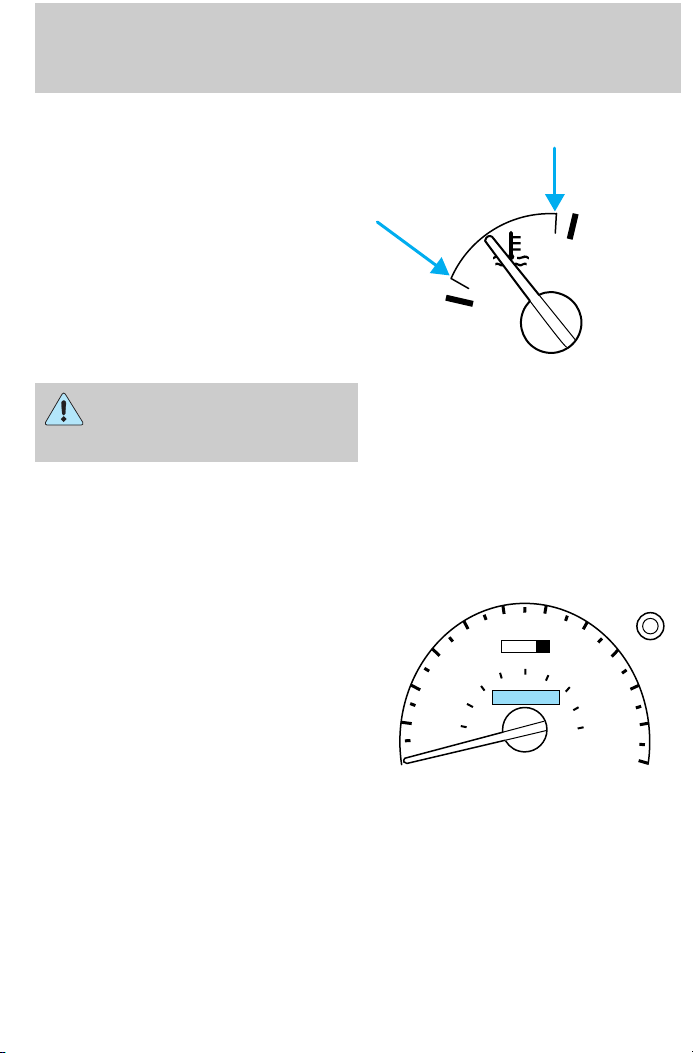
Engine coolant temperature gauge
Indicates the temperature of the
engine coolant. At normal operating
temperature, the needle remains
within the normal area (the area
between the ‘‘H’’ and ‘‘C’’). If it
enters the red section, the engine is
overheating. Stop the vehicle as
soon as safely possible, switch off
the ignition and let the engine cool.
C
Refer to Engine coolant in the
Maintenance and care chapter.
Never remove the coolant
recovery cap while the
engine is running or hot.
This gauge indicates the temperature of the engine coolant, not the
coolant level. If the coolant is not at its proper level or mixture, the
gauge indication will not be accurate.
Odometer
Registers the total kilometers
(miles) of the vehicle.
30
20
10
40
50
40
20
MPH
60
80
60
70
0 0 0
100
0 0 0 0 0 0
H
120
km/h
80
140
90
00
1
160
180
101
20
1
13
Page 14
Instrumentation
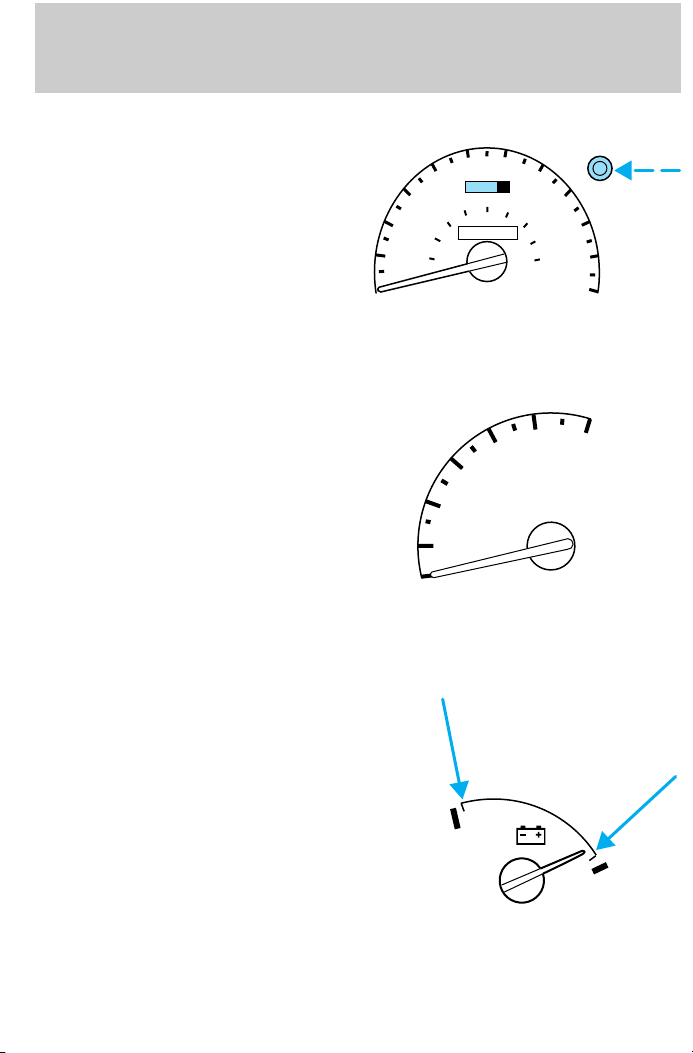
Trip odometer
Registers the kilometers (miles) of
individual journeys. To reset,
depress the control.
Tachometer
Indicates the engine speed in
revolutions per minute.
Driving with your tachometer
pointer in the red zone may damage
the engine.
10
20
30
40
50
40
20
MPH
1
0
60
2
60
0 0 0
100
80
0 0 0 0 0 0
3
70
120
4
80
90
140
00
1
160
180
1
km/h
5
RPMx1000
101
20
6
Battery voltage gauge
This gauge shows the battery
voltage when the ignition is in the
ON position. If the pointer moves
and stays outside the normal
operating range (as indicated), have
the vehicle’s electrical system
checked as soon as possible.
14
H
L
Page 15
Instrumentation
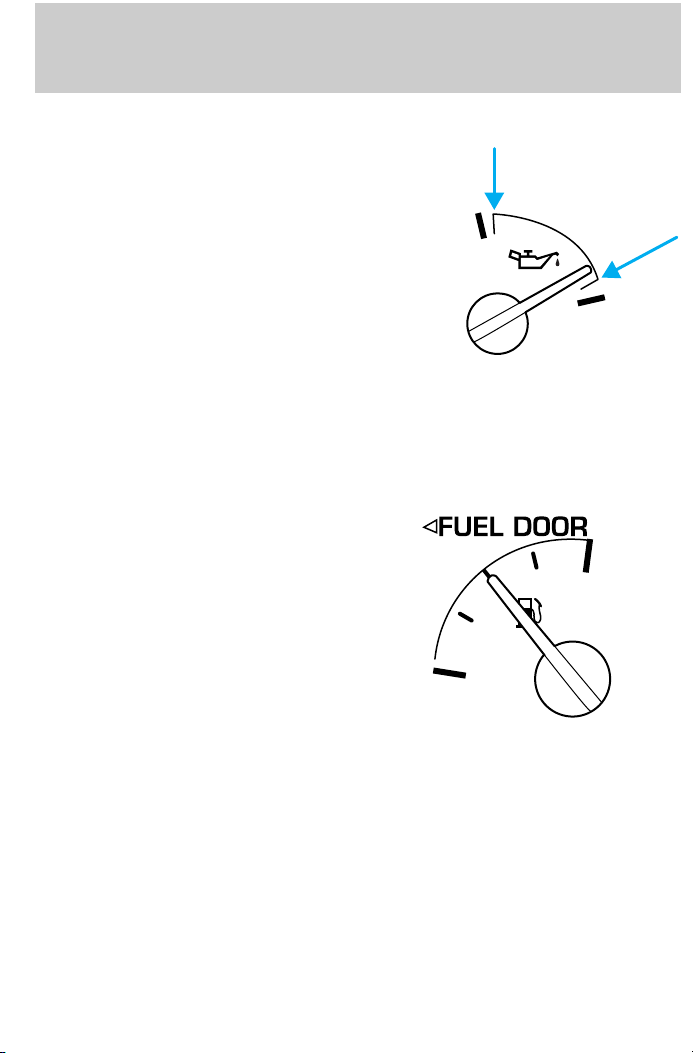
Engine oil pressure gauge
This shows the engine oil pressure
in the system. Sufficient pressure
exists as long as the needle remains
in the normal range (the area
between the ‘‘H’’ and ‘‘L’’).
If the gauge indicates low pressure,
stop the vehicle as soon as safely
possible and switch off the engine
immediately. Check the oil level.
Add oil if needed (refer to
Checking and adding engine oil in
the Maintenance and care
chapter). If the oil level is correct,
have your vehicle checked at your dealership or by a qualified
technician.
Fuel gauge
Displays approximately how much
fuel is in the fuel tank (when the
key is in the ON position). The fuel
gauge may vary slightly when the
vehicle is in motion. The ignition
should be in the OFF position while
the vehicle is being refueled. When
the gauge first indicates empty,
there is a small amount of reserve
fuel in the tank. When refueling the
vehicle from empty indication, the
amount of fuel that can be added
will be less than the advertised
capacity due to the reserve fuel.
The FUEL DOOR icon and arrow indicates which side of the vehicle the
fuel filler door is located.
H
L
F
E
15
Page 16
Instrumentation
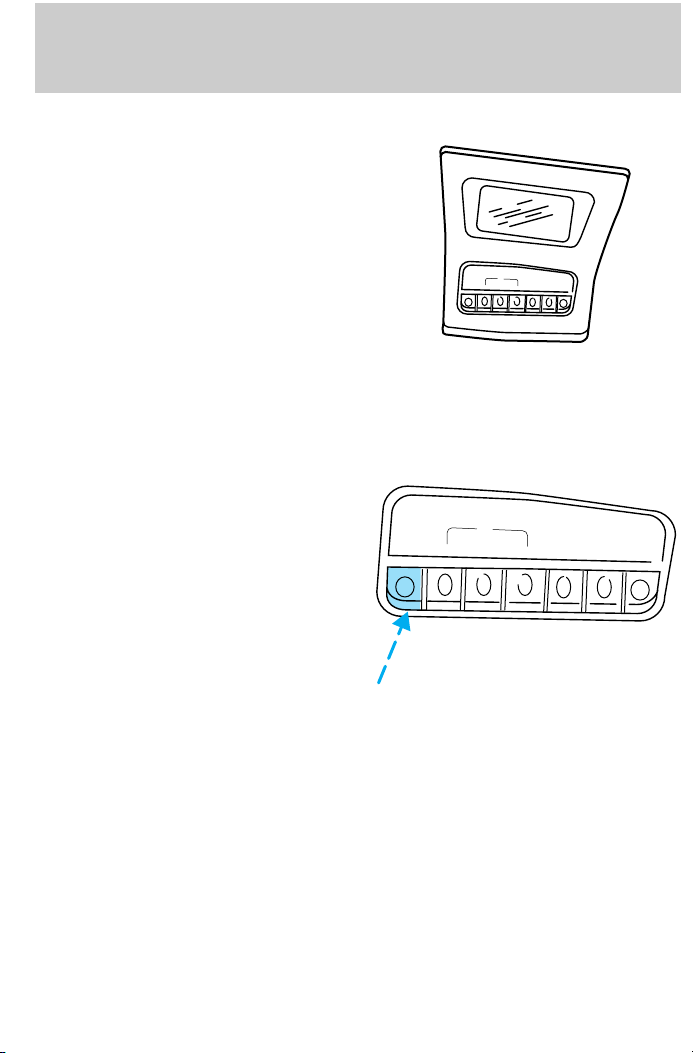
MESSAGE CENTER (IF EQUIPPED)
With the ignition in the ON position,
the message center displays
important vehicle information
through a constant monitor of
vehicle systems. You may select
display features on the message
center for a display of status
preceded by a brief indicator chime.
The system will also notify you of
potential vehicle problems with a
display of system warnings.
Selectable features
English/metric display
Press to toggle the message center
display between metric or English
units.
ENGLISH/
METRIC
RANGE
FUEL
ENGLISH
METRIC
RANGE
FUEL
STATUS
SYSTEM
STATUS
OIL CHANGE
RESET
ECON
CHECK
RESET
OIL
SYSTEM
CHECK
CHANGE
RESET
RESET
ECON
16
Page 17
Instrumentation
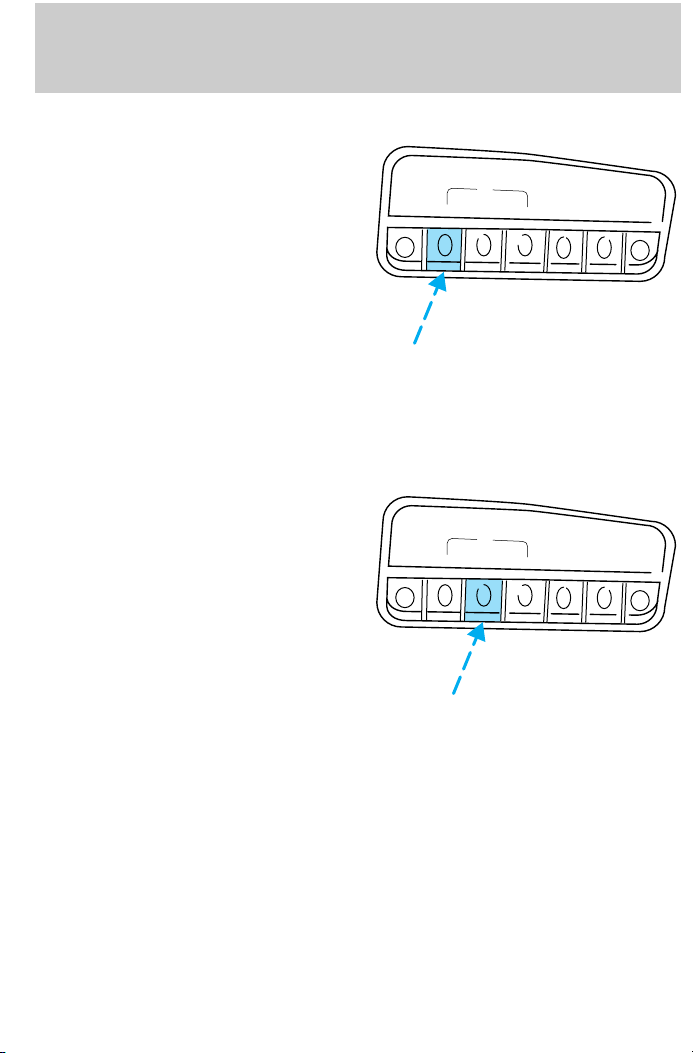
Fuel range
Press once to display the
approximate kilometers (miles) left
to drive before the fuel tank is
empty.
ENGLISH/
METRIC
Press again to display the distance
driven since this function was last
manually reset.
For maximum accuracy of this
display feature, the ignition should
be in the Off position during fueling.
The display FUEL LEVEL ERROR
indicates a problem with the fuel
indication system. See your dealer or qualified service technician for
system maintenance.
Fuel status
Press once to display the
approximate amount of fuel
remaining in the fuel tank.
ENGLISH/
METRIC
Press again to display the
approximate amount of fuel used
since the system was last reset.
RANGE
RANGE
FUEL
STATUS
FUEL
STATUS
ECON
ECON
RESET
CHECK
SYSTEM
CHECK
SYSTEM
RESET
OIL
CHANGE
RESET
OIL
CHANGE
RESET
17
Page 18
Instrumentation
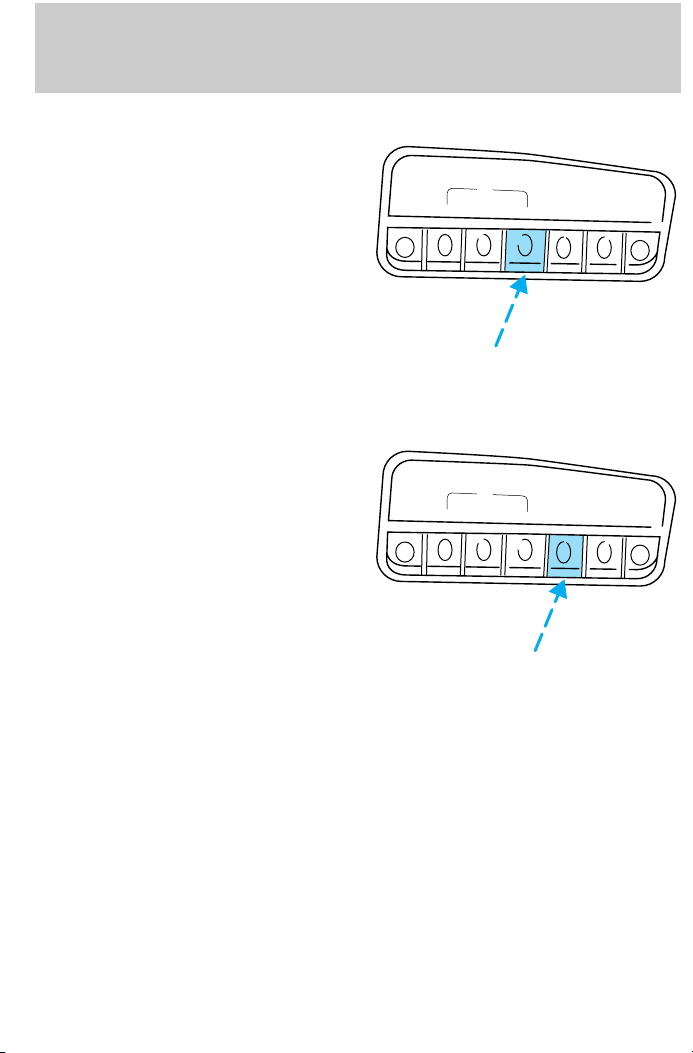
Fuel economy
Press once to display your vehicle’s
average fuel economy in
kilometers/liters (miles/gallons).
Press again to display the fuel
economy that your vehicle is getting
at that particular time. Your vehicle
must be moving in order for this
display to function properly.
Reset
Press the reset control to reset the
current feature being displayed.
Warnings, distance driven, average
fuel economy, fuel used and
personalized oil reset percentage are
the only features that respond to
reset.
ENGLISH/
METRIC
ENGLISH/
METRIC
RANGE
RANGE
FUEL
STATUS
FUEL
STATUS
OIL
SYSTEM
CHECK
SYSTEM
CHECK
CHANGE
RESET
OIL
CHANGE
RESET
RESET
ECON
RESET
ECON
18
Page 19
Instrumentation
System check
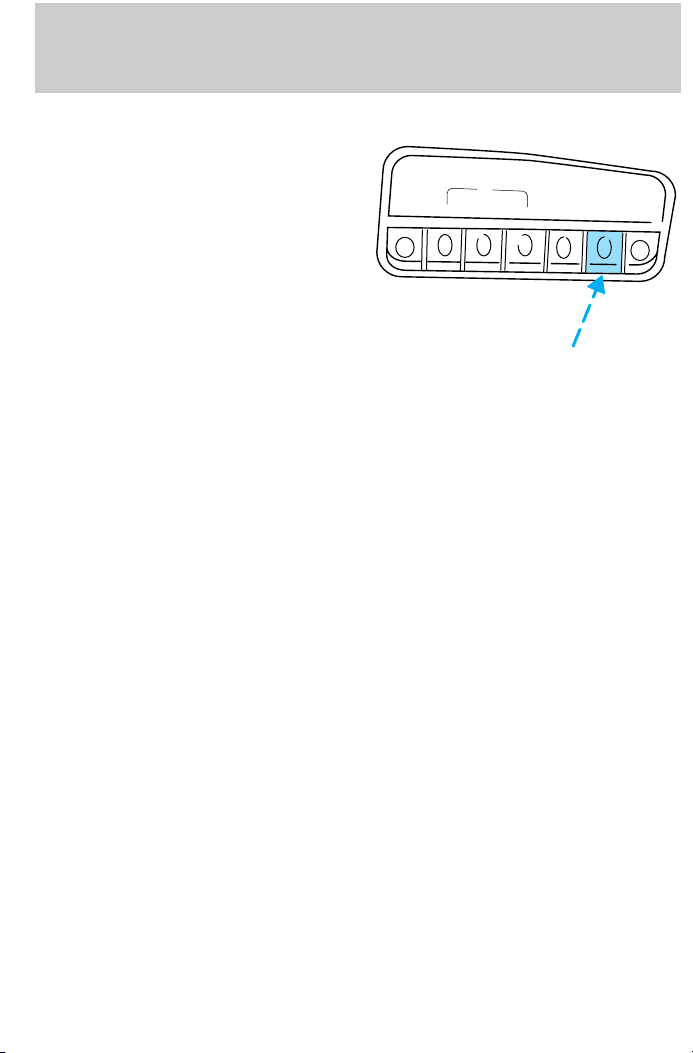
Press the system check control to
display the status of the following
systems:
ENGLISH/
METRIC
• engine oil life left
• engine oil level
• voltage level
• engine coolant temperature
• washer fluid level
• automatic ride control
(if equipped)
• fuel level
The engine oil life left has two phases. The first display will indicate the
oil change status (OK, SOON, REQUIRED). The second display will
indicate the percentage of oil life remaining. The display OIL TEMP
SIGNAL ERROR indicates a problem with the system. Following this
display, contact your dealer or qualified service technician for system
maintenance.
Operating the message center during system check
The message center controls can be operated as follows during the
system check sequence:
1. Press the system check controls to advance to the next display.
2. Press the reset control to immediately conclude the system check.
3. Press the range, fuel status or fuel economy control to conclude the
system check and display the requested feature.
4. Press the metric/English control to conclude the system check and
change the previous display to the new mode.
5. Press the oil change reset control to conclude the system check and
begin the oil change reset procedure.
An oil change is recommended whenever indicated by the message
center. Use only recommended engine oils.
The message center will tell you the percent of oil life left during system
check. This percentage is based on your driving history and the time
since your last oil change. In order to ensure accurate oil life left
RANGE
FUEL
STATUS
OIL
SYSTEM
CHECK
CHANGE
RESET
RESET
ECON
19
Page 20
Instrumentation
indications, you should only perform the following procedure after you
have the oil changed.
Oil change reset
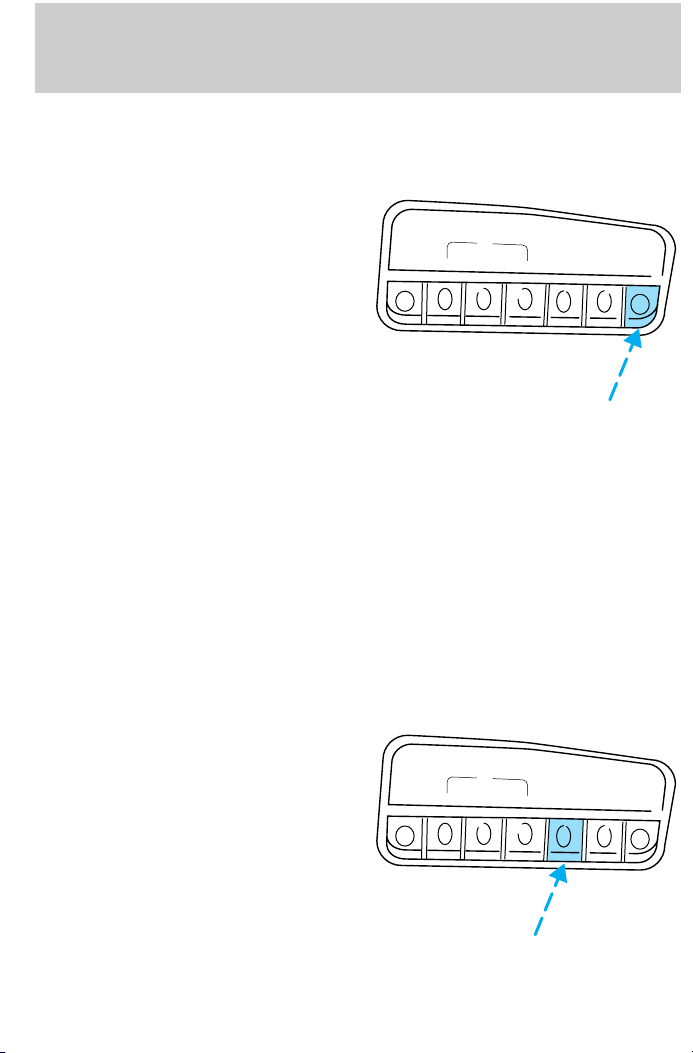
Press the OIL CHANGE RESET
control to reset the oil life feature to
100% (or your personalized oil reset
percentage). After you have the oil
ENGLISH/
METRIC
changed, you must press and hold
the OIL CHANGE RESET control
for five seconds. The message
center will count down for five
seconds. After a successful reset,
the message center will display OIL
LIFE RESET TO 100%. (If you have
established a personalized oil reset
percentage, the display will show
that percentage instead of 100%.) This reset procedure should be
performed only after an oil change to ensure accurate oil life indications.
Your personalized oil reset percentage allows you to establish a smaller
oil change interval than the manufacturer’s recommended interval. To
establish your personalized oil reset percentage:
1. Press and hold the OIL CHANGE RESET control and press the RESET
control while the display is still counting down the 5 seconds to reset.
The display will change to START OIL LIFE AT XXX%.
2. Press the OIL CHANGE RESET control until the displayed percentage
is the personalized oil reset percentage you desire. Your choices are
100%, 90%, 80%, 70%, 60%, 50%, 40% and 30%.
1. Press the RESET control to
complete the procedure. Pressing
any control other than RESET or
OIL CHANGE RESET will abort this
ENGLISH/
METRIC
procedure and will not establish
your new personalized oil reset
percentage.
When your personalized oil reset
percentage has been established, it
will be used beginning with the
completion of your next OIL
CHANGE RESET procedure.
RANGE
RANGE
FUEL
STATUS
FUEL
STATUS
OIL
SYSTEM
CHECK
SYSTEM
CHECK
CHANGE
RESET
OIL
CHANGE
RESET
RESET
ECON
RESET
ECON
20
Page 21
Controls and features
HEADLAMP CONTROL
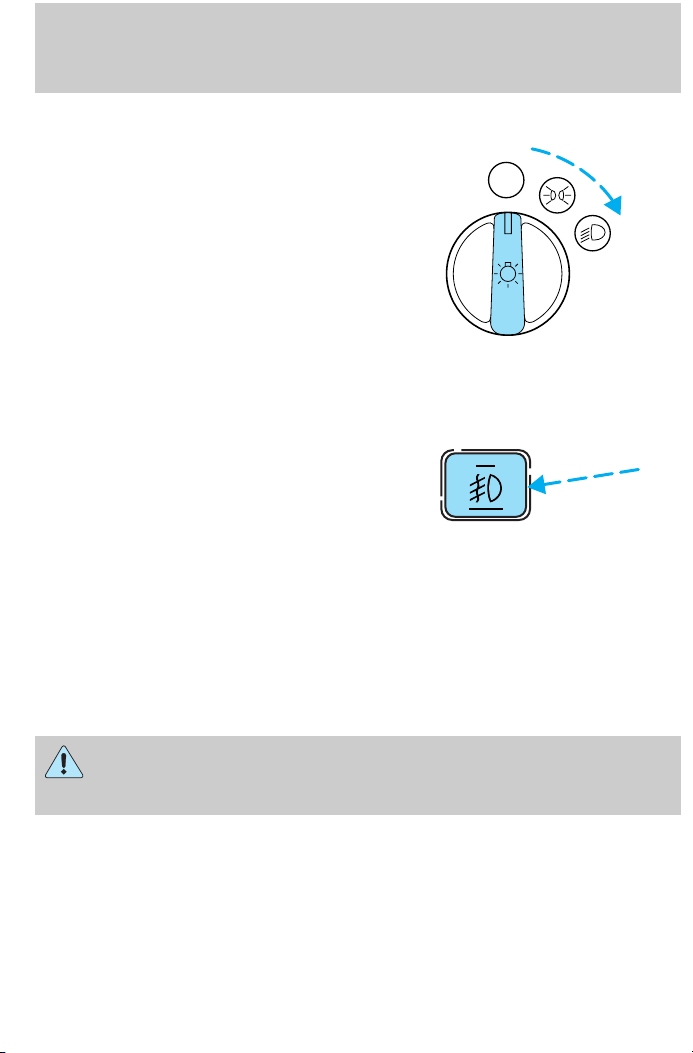
Rotate the headlamp control
clockwise to the first position to
turn on the parking lamps only.
Rotate to the second position to also
turn on the headlamps.
Foglamp control (if equipped)
Turn on the low-beam headlamps
and press the foglamp control to
activate the foglamps. The foglamp
control button will illuminate when
the foglamps are on.
Press the foglamp control a second
time to deactivate the foglamps.
Daytime running lamps (DRL) (if equipped)
Turns the highbeam headlamps on with a reduced output. To activate:
• the engine must be running
• the headlamp control is in the OFF or Parking lamps position.
OFF
The Daytime Running Light (DRL) system will not illuminate the
tail lamps and parking lamps. Turn on your headlamps at dusk.
Failure to do so may result in a collision.
21
Page 22
Controls and features
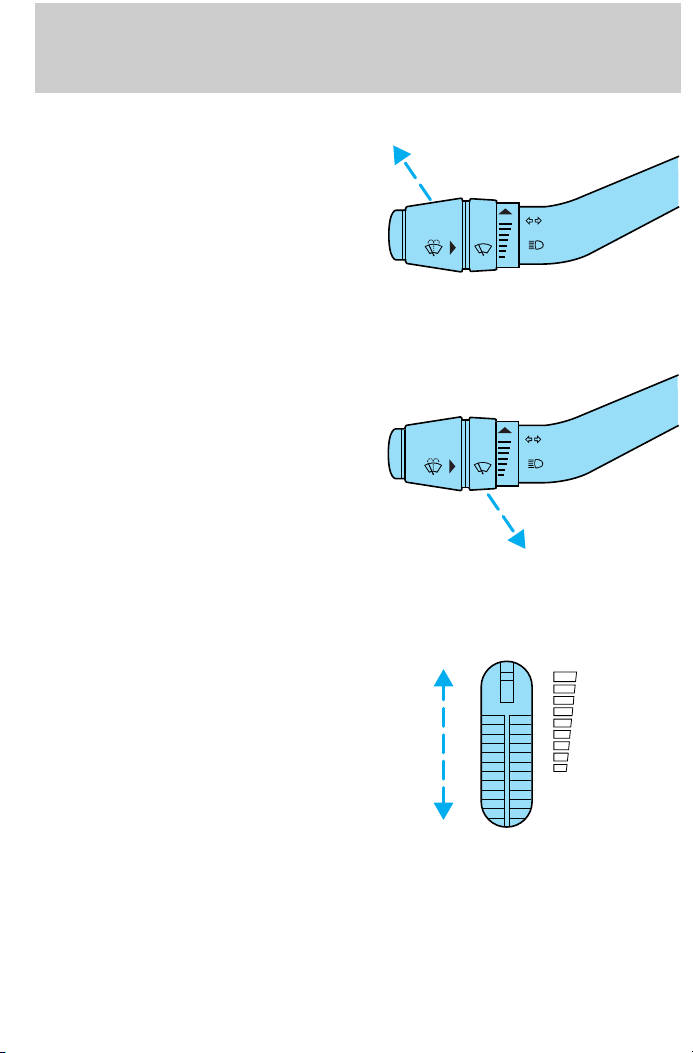
High beams
Push forward to activate.
Flash to pass
Pull toward you to activate and
release to deactivate.
PANEL DIMMER CONTROL
Use to adjust the brightness of the
instrument panel during headlight
and parklamp operation.
• Rotate up to brighten.
• Rotate down to dim.
Use to control the dome lamps.
• Rotate all the way up to turn on.
• Rotate all the way down to
override.
DIM
22
Page 23
Controls and features
CLIMATE CONTROL SYSTEM
Manual heating and air conditioning system (if equipped)
OFF
A/C
MAX
A/C
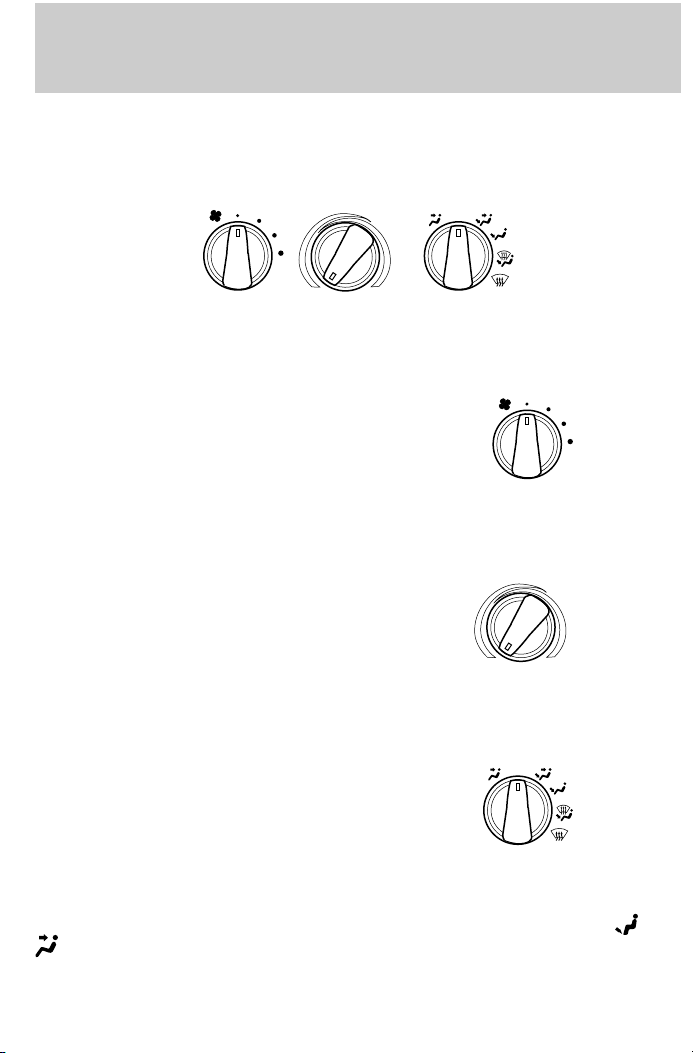
Fan speed control
Controls the volume of air circulated
in the vehicle.
Temperature control knob
Controls the temperature of the
airflow inside the vehicle.
Mode selector control
Controls the direction of the airflow
to the inside of the vehicle.
OFF
A/C
MAX
A/C
The air conditioning compressor will operate in all modes except
. However, the air conditioning will only function if the outside
temperature is about 10°C (50°F) or above.
and
23
Page 24

Controls and features
Since the air conditioner removes considerable moisture from the air
during operation, it is normal if clear water drips on the ground under
the air conditioner drain while the system is working and even after you
have stopped the vehicle.
Under normal conditions, your vehicle’s climate control system should be
left in any position other than MAX A/C or OFF when the vehicle is
parked. This allows the vehicle to ‘‘breathe’’ through the outside air inlet
duct.
• MAX A/C-Uses recirculated air to cool the vehicle. MAX A/C is noisier
than A/C but more economical and will cool the inside of the vehicle
faster. Airflow will be from the instrument panel registers. This mode
can also be used to prevent undesirable odors from entering the
vehicle.
• A/C-Uses outside air to cool the vehicle. It is quieter than MAX A/C
but not as economical. Airflow will be from the instrument panel
registers.
•
• OFF-Outside air is shut out and the fan will not operate. For short
•
•
•
(Vent)-Distributes outside air through the instrument panel
registers. However, the air will not be cooled below the outside
temperature because the air conditioning does not operate in this
mode.
periods of time only, use this mode to prevent undesirable odors from
entering the vehicle.
(Panel and floor)-Distributes outside air through the instrument
panel registers and the floor ducts. Heating and air conditioning
capabilities are provided in this mode. For added customer comfort,
when the temperature control knob is anywhere in between the full
hot and full cold positions, the air distributed through the floor ducts
will be slightly warmer than the air sent to the instrument panel
registers.
(Floor)-Allows for maximum heating by distributing outside air
through the floor ducts. However, the air will not be cooled below the
outside temperature because the air conditioning does not operate in
this mode.
(Floor and defrost)-Distributes outside air through the
windshield defroster ducts and the floor ducts. Heating and air
conditioning capabilities are provided in this mode. For added
customer comfort, when the temperature control knob is anywhere in
between the full hot and full cold positions, the air distributed through
24
Page 25
Controls and features
the floor ducts will be slightly warmer than the air sent to the
instrument panel registers. If the temperature is about 10°C (50°F) or
higher, the air conditioner will automatically dehumidify the air to
prevent fogging.
•
Operating tips
• In humid weather, select before driving. This will prevent your
• To prevent humidity buildup inside the vehicle, don’t drive with the
• Don’t put objects under the front seat that will interfere with the
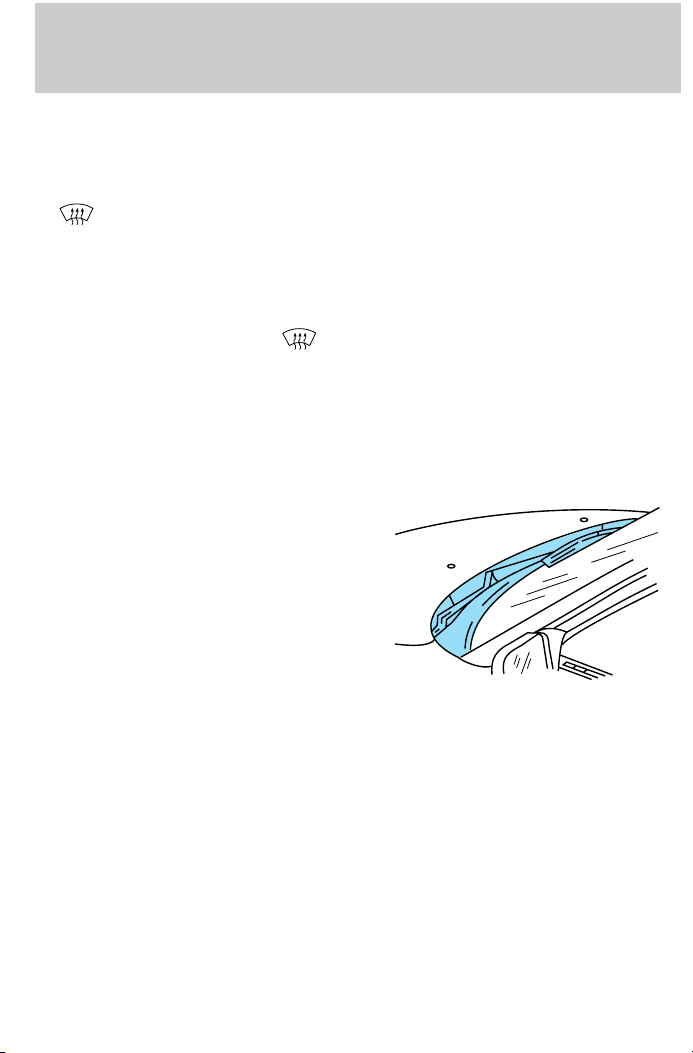
• Remove any snow, ice or leaves
-Distributes outside air through the windshield defroster ducts.
It can be used to clear ice or fog from the windshield. If the
temperature is about 10°C (50°F) or higher, the air conditioner will
automatically dehumidify the air to prevent fogging.
windshield from fogging. After a few minutes, select any desired
position.
climate control system in the OFF position.
airflow to the back seats.
from the air intake area (at the
bottom of the windshield under
the hood).
• If your vehicle has been parked with the windows closed during hot
weather, the air conditioner will do a much faster job of cooling if you
drive for two or three minutes with the windows open. This will force
most of the hot, stale air out of the vehicle. Then operate your air
conditioner as you would normally.
• When placing objects on top of your instrument panel, be careful to
not place them over the defroster outlets. These objects can block
airflow and reduce your ability to see through your windshield. Also,
avoid placing small objects on top of your instrument panel. These
objects can fall down into the defroster outlets and block airflow and
possibly damage your climate control system.
25
Page 26
Controls and features
Electronic Automatic Temperature Control (EATC) system
(if equipped)
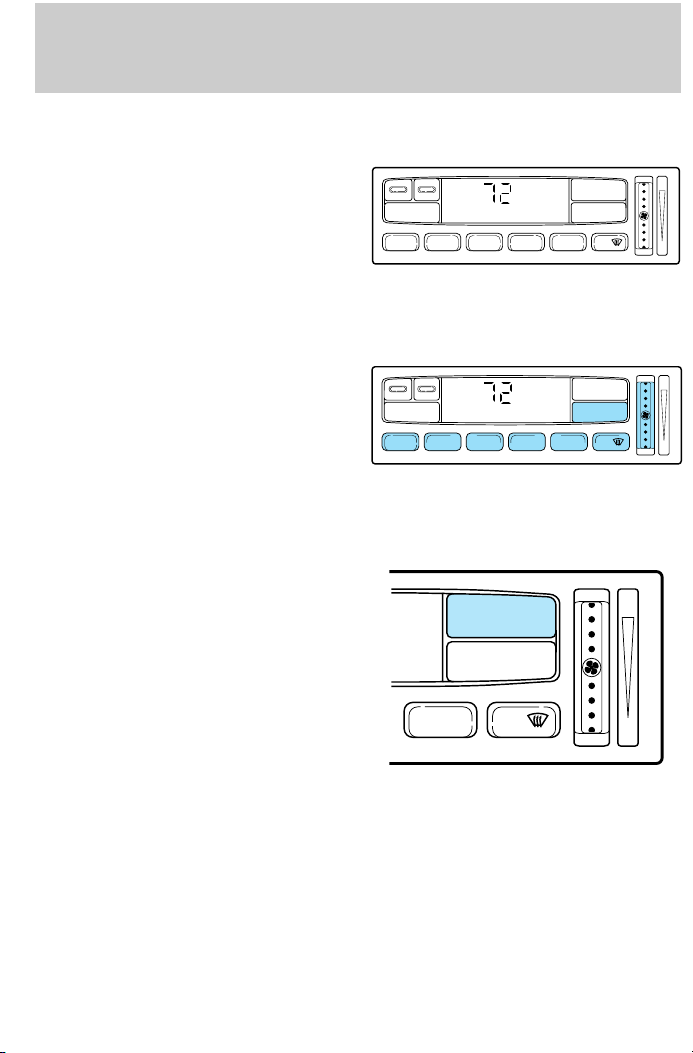
The EATC system will maintain a
selected temperature and
automatically control airflow. You
can override automatic operation
with any of the override controls,
the fan speed control or the steering
wheel controls.
Turning the EATC on
Press AUTOMATIC, any of the
override controls or the fan speed
control. The EATC will only operate
when the ignition is in the ON
position.
Turning the EATC off
Press OFF.
REAR FAN OFF AUTOMATIC
VENT PNL • FLR FLOOR FLR • DEF DEF
MAX A/C
REAR FAN OFF AUTOMATIC
VENT PNL • FLR FLOOR FLR • DEF DEF
MAX A/C
OFF
F
˚
AUTO
F
˚
AUTO
OFF
OFF
HI
LO
HI
LO
HI
AUTOMATIC
FLR • DEF DEF
LO
Automatic operation
Press AUTOMATIC and select the desired temperature. The selected
temperature and the word AUTO will appear in the display window. The
EATC system will either heat or cool to achieve the selected
temperature. The system will automatically determine fan speed, airflow
location and if fresh outside air or recirculated air is required. Fan speed
26
Page 27
Controls and features
remains automatic unless the fan speed thumbwheel is turned or the
steering wheel fan speed control is pressed.
When in AUTOMATIC and weather conditions require heat, air will be
sent to the floor. However, if the engine is not warm enough to provide
heat, the fan will be at a low speed and the air will be directed to the
windshield. In 3½ minutes or less, the fan speed will start to increase
and the airflow location will change to the floor area.
If unusual conditions exist (i.e.-window fogging, etc.), the manual
override controls allow you to select airflow locations and the fan control
allows you to adjust fan speed as necessary.
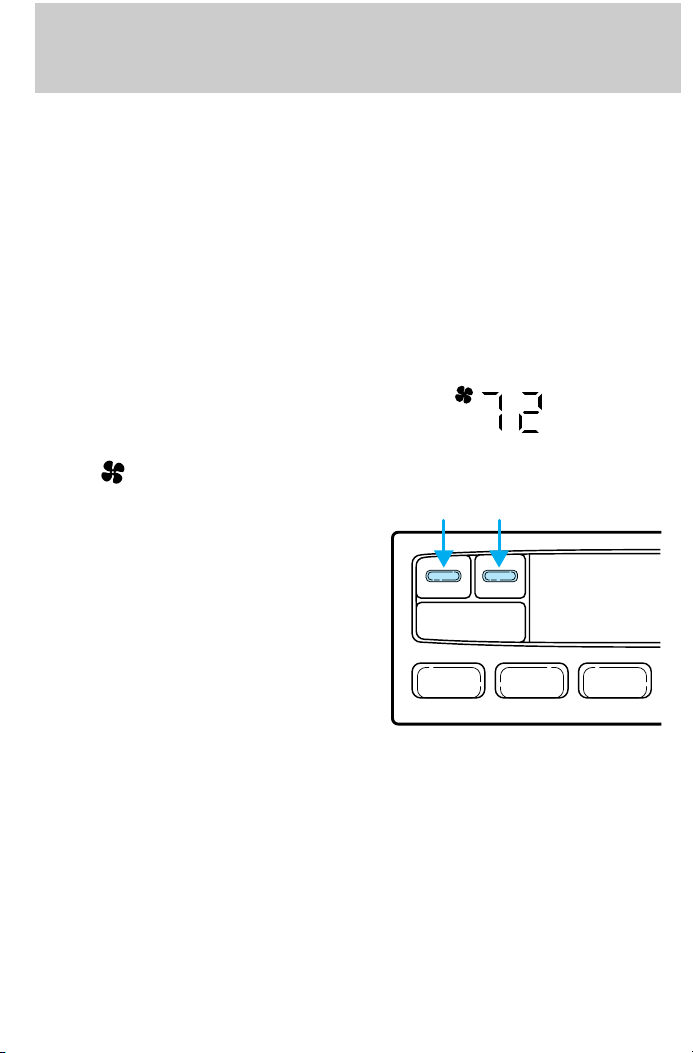
Temperature selection
The display window indicates the
selected temperature, function
(AUTO or one of the override
controls) and manual control of fan
speed (
) if automatic fan speed is
not desired.
To control the temperature, select
any temperature between 18°C
(65°F) and 29°C (85°F) by pressing
the blue (cooler) or red (warmer)
buttons.
REAR FAN OFF
F
˚
AUTO
VENT PNL • FLRMAX A/C
For continuous maximum cooling, push the blue button until 16°C
(60°F) is shown in the display window. The EATC will continue
maximum cooling (disregarding the displayed temperature) until a
warmer temperature is selected by pressing the red button.
For continuous maximum heating, push the red button until 32°C (90°F)
is shown in the display window. The EATC will continue maximum
heating (disregarding the displayed temperature) until a cooler
temperature is selected by pressing the blue button.
27
Page 28
Controls and features
Temperature conversion
Press MAX A/C and DEF at the
same time (for one second) to
switch between Fahrenheit and
Celsius.
REAR FAN OFF AUTOMATIC
VENT PNL • FLR FLOOR FLR • DEF DEF
MAX A/C
AUTO
If your vehicle has an English/Metric (E/M) control, this control will also
change the temperature display
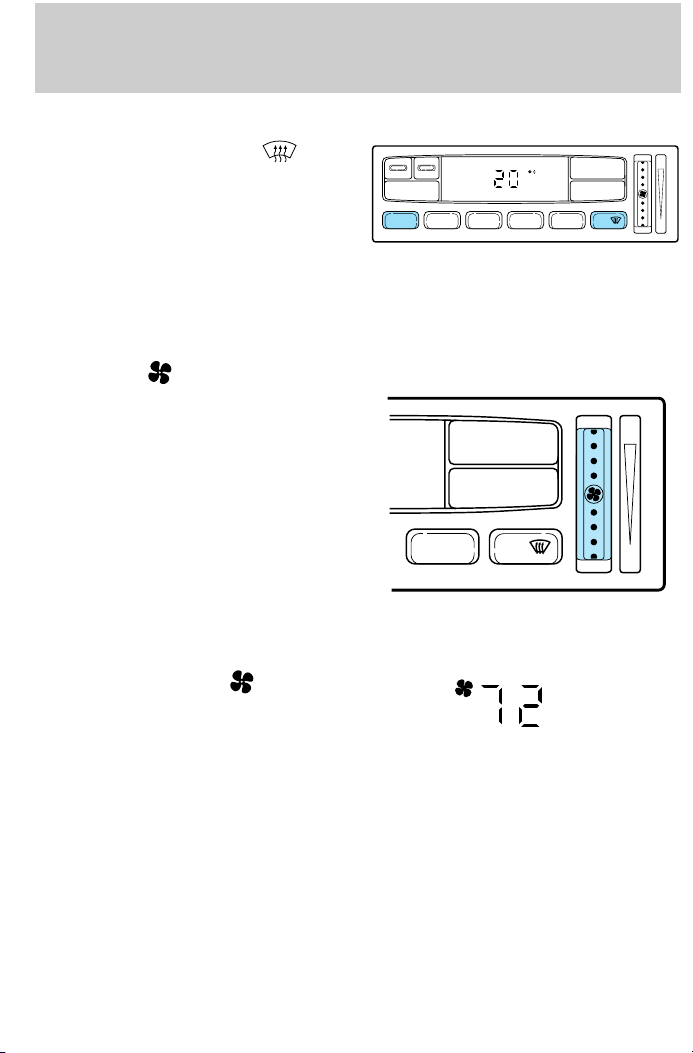
Fan speed ( )
When AUTOMATIC is pressed, fan
speed is adjusted automatically for
existing conditions. You can override
OFF
fan speed at any time. To control
fan speed manually, use the
AUTOMATIC
thumbwheel or steering wheel
control to cancel automatic fan
speed operation. Rotate the
FLR • DEF DEF
thumbwheel up for higher fan speed
or down for lower fan speed. Press
the steering wheel fan speed control
up for higher fan speed or down for
lower fan speed.
The display will show
to indicate
manual fan operation.
F
˚
AUTO
OFF
HI
LO
HI
LO
To return to automatic fan operation, press AUTOMATIC.
28
Page 29
Controls and features
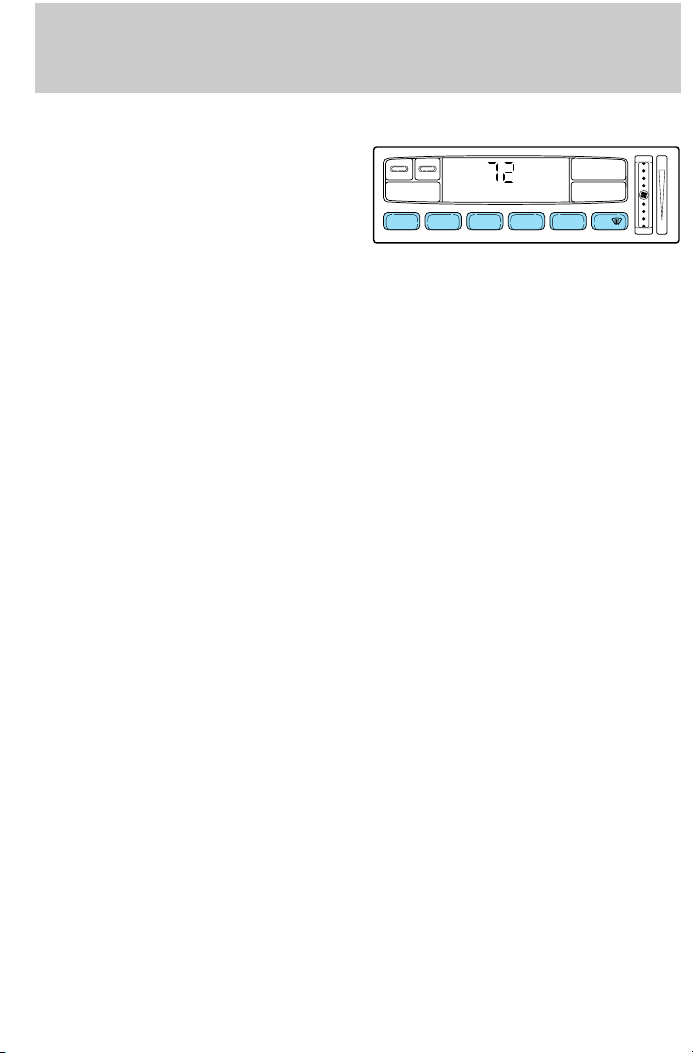
Manual override controls
The override controls are located at
the bottom of the EATC and allow
you to determine where airflow is
directed. To return to full automatic
REAR FAN OFF AUTOMATIC
VENT PNL • FLR FLOOR FLR • DEF DEF
MAX A/C
F
˚
AUTO
OFF
control, press AUTOMATIC.
The air conditioning compressor will operate in all modes except FLOOR
and VENT. It will also operate only when required when AUTOMATIC
has been selected. However, the air conditioning will only function if the
outside temperature is about 10°C (50°F) or above.
Since the air conditioner removes considerable moisture from the air
during operation, it is normal if clear water drips on the ground under
the air conditioner drain while the system is working and even after you
have stopped the vehicle.
Under normal conditions, your vehicle’s climate control system should be
left in any position other than MAX A/C or OFF when the vehicle is
parked. This allows the vehicle to ‘‘breathe’’ through the outside air inlet
duct.
• MAX A/C-Uses recirculated air to cool the vehicle. The temperature
will display 16°C (60°F). To exit, press AUTOMATIC or any other
override controls. MAX A/C is noisier than normal A/C but more
economical and will cool the inside of the vehicle faster. Airflow is
from the instrument panel registers. This mode can also be used to
prevent undesirable odors from entering the vehicle.
• VENT-Distributes outside air through the instrument panel registers.
However, the air cannot be cooled below the outside temperature
because the air conditioning does not operate in this mode.
• PNL •FLR -Distributes outside air through the instrument panel
registers and the floor ducts. Heating and air conditioning capabilities
are provided in this mode. The air will be heated or cooled based on
the temperature selection. For added customer comfort, the air
distributed through the floor ducts will be slightly warmer than the air
sent to the instrument panel registers.
HI
LO
29
Page 30
Controls and features
• FLOOR-Allows for maximum heating by distributing outside air
through the floor ducts. However, the air cannot be cooled below the
outside temperature because the air conditioning does not operate in
this mode.
• FLR •DEF-Distributes outside air through the windshield defroster
ducts and the floor ducts. Heating and air conditioning capabilities are
provided in this mode. The air will be heated or cooled based on the
temperature selection. For added customer comfort, the air
distributed through the floor ducts will be slightly warmer than the air
sent to the windshield defroster ducts. If the temperature is about
10°C (50°F) or higher, the air conditioner will automatically
dehumidify the air to prevent fogging.
• DEF
ducts. It can be used to clear ice or fog from the windshield. If the
outside air temperature is about 10°C (50°F) or higher, the air
conditioner will automatically dehumidify the air to prevent fogging.
• OFF-Outside air is shut out and the fan will not operate. For short
periods of time only, use this mode to prevent undesirable odors from
entering the vehicle.
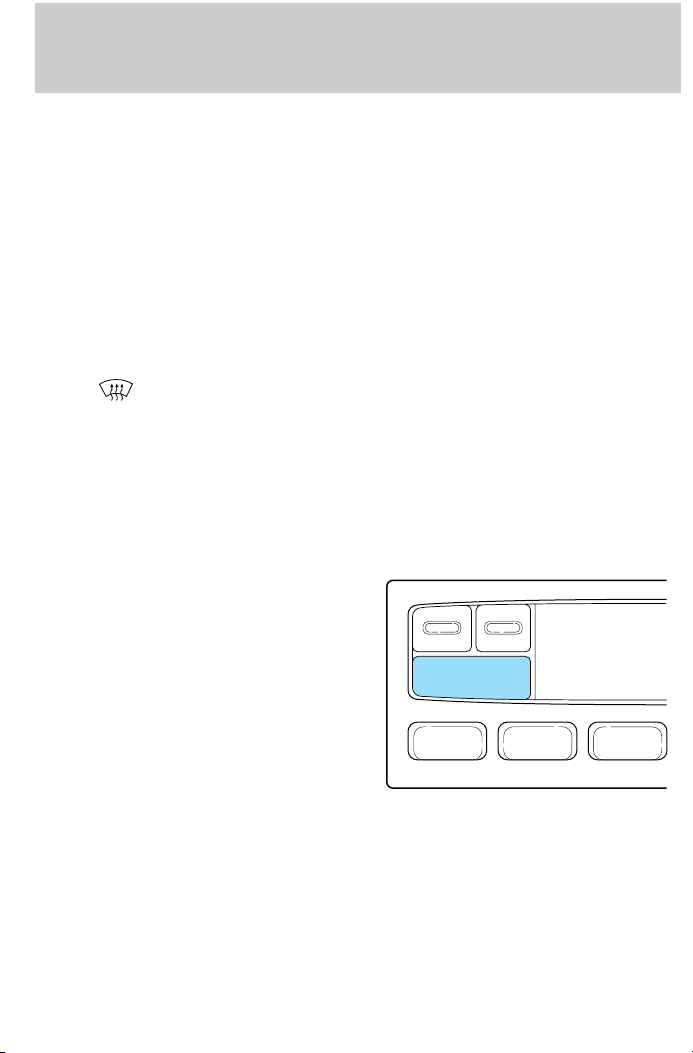
Rear fan off
Press REAR FAN OFF to turn off
the rear console fan. This overrides
the rear console fan speed control.
-Distributes outside air through the windshield defroster
REAR FAN OFF
VENT PNL • FLRMAX A/C
The EATC display window will indicate REAR FAN OFF.
The rear console fan will remain off until REAR FAN OFF is pressed
again.
30
Page 31

Controls and features
Operating tips
• In humid weather, select DEF before driving. This will prevent
your windshield from fogging. After a few minutes, select any desired
position.
• To prevent humidity buildup inside the vehicle, don’t drive with the
climate control system in the OFF position.
• Don’t put objects under the front seat that will interfere with the
airflow to the back seats.
• Remove any snow, ice or leaves
from the air intake area (at the
bottom of the windshield).
• If your vehicle has been parked with the windows closed during hot
weather, the air conditioner will do a much faster job of cooling if you
drive for two or three minutes with the windows open. This will force
most of the hot, stale air out of the vehicle. Then operate the air
conditioner as you would normally.
• When placing objects on top of your instrument panel, be careful to
not place them over the defroster outlets. These objects can block
airflow and reduce your ability to see through your windshield. Also,
avoid placing small objects on top of your instrument panel. These
objects can fall down into the defroster outlets and block airflow and
possibly damage your climate control system.
31
Page 32

Controls and features
Rear console climate controls (if equipped)
Depending on the equipment
package of your vehicle, the rear
console may not be equipped with
rear console audio/climate controls.
Turn the air distribution control to
the desired airflow position.
The instrument panel climate controls must be on in order for the rear
climate control console controls to work.
Turn the fan speed control to the
desired position.
-
VOLUME +MODE
SEEK MEMORY
-
VOLUME +MODE
SEEK MEMORY
32
Page 33

Select for air to flow through
these vents:
Controls and features
– VOLUME + BAND
SEEK
MEMORY
Select
these vents:
for air to flow through
– VOLUME + BAND
SEEK
MEMORY
33
Page 34

Controls and features
REAR WINDOW DEFROSTER
The rear defroster control is located
on the instrument panel.
Press the defroster control to clear
the rear window of thin ice and fog.
• The small LED will illuminate
when the defroster is activated.
The ignition must be in the ON position to operate the rear window
defroster.
The defroster turns off automatically after 10 minutes or when the
ignition is turned to the OFF position. To manually turn off the defroster
before ten minutes have passed, push the control again.
4WD CONTROL (IF EQUIPPED)
This control operates the 4WD.
Refer to Four-wheel drive (4WD)
operation in the Driving chapter
for more information.
AUTO
HIGH
LOW
AUDIO SYSTEM
Refer to the ‘‘Audio Guide’’ in your owner portfolio.
34
Page 35

Controls and features
TURN SIGNAL CONTROL
• Push down to activate the left
turn signal.
• Push up to activate the right turn
signal.
POSITIONS OF THE IGNITION
1. ACCESSORY, allows the electrical
accessories such as the radio to
operate while the engine is not
running.
2. LOCK, locks the steering wheel,
automatic transmission gearshift
lever and allows key removal.
3. OFF, shuts off the engine and all
accessories without locking the
steering wheel.
4. ON, all electrical circuits
operational. Warning lights
illuminated. Key position when driving.
5. START, cranks the engine. Release the key as soon as the engine
starts.
2
1
3
4
5
35
Page 36

Controls and features
SPEED CONTROL (IF EQUIPPED)
To turn speed control on
• Press ON.
Vehicle speed cannot be controlled
until the vehicle is traveling at or
above 48 km/h (30 mph).
Do not use the speed control in heavy traffic or on roads that
are winding, slippery, or unpaved.
Do not shift the gearshift lever into N (Neutral) with the speed
control on.
To turn speed control off
• Press OFF or
• Turn off the vehicle ignition.
ON
OFF
ON
OFF
Once speed control is switched off, the previously programmed set speed
will be erased.
36
Page 37

Controls and features
To set a speed
• Press SET ACC/SET ACCEL. For
speed control to operate, the
speed control must be ON and
the vehicle speed must be greater
than 48 km/h (30 mph).
If you drive up or down a steep hill, your vehicle speed may vary
momentarily slower or faster than the set speed. This is normal.
Speed control cannot reduce the vehicle speed if it increases above the
set speed on a downhill. If your vehicle speed is faster than the set
speed while driving on a downhill, you may want to shift to the next
lower gear or apply the brakes to reduce your vehicle speed.
If your vehicle slows down more than 16 km/h (10 mph) below your set
speed on an uphill, your speed control will disengage. This is normal.
Pressing RES/RSM/RESUME will re-engage it.
Do not use the speed control in heavy traffic or on roads that
are winding, slippery, or unpaved.
SET
ACC
COAST
RSM
37
Page 38

Controls and features
To set a higher set speed
• Press and hold SET ACC/SET
ACCEL. Release the control when
the desired vehicle speed is
reached or
• Press and release SET ACC/SET
ACCEL. Each press will increase
the set speed by 1.6 km/h (1
mph) or
• Accelerate with your accelerator
pedal, then press and release SET
ACC/SET ACCEL.
You can accelerate with the accelerator pedal at any time during speed
control usage. Releasing the accelerator pedal will return your vehicle to
the previously programmed set speed.
To set a lower set speed
• Press and hold CST/COAST.
Release the control when the
desired speed is reached or
• Press and release CST/COAST.
Each press will decrease the set
speed by 1.6 km/h (1 mph) or
SET
ACC
COAST
SET
ACC
COAST
RSM
RSM
38
Page 39

• Depress the brake pedal. When
the desired vehicle speed is
reached, press SET ACC/SET
ACCEL.
To disengage speed control
• Depress the brake pedal or
Controls and features
RSM
SET
ACC
COAST
• Depress the clutch pedal (if
equipped)
Disengaging the speed control will
not erase the previously
programmed set speed.
39
Page 40

Controls and features
Pressing OFF will erase the
previously programmed set speed.
To return to a previously set speed
• Press RES/RSM/RESUME. For
RES/RSM/RESUME to operate,
the vehicle speed must be faster
than 48 km/h (30 mph).
ON
OFF
SET
ACC
COAST
RSM
Indicator light
This light comes on when either the
SET ACC/SET ACCEL or
RES/RSM/RESUME controls are
pressed. It turns off when the speed
control OFF control is pressed, the
brake is applied or the ignition is
turned to the OFF position.
40
SPEED
CONT
Page 41

TILT STEERING (IF EQUIPPED)
Pull the steering control toward you
to move the steering wheel up or
down. Hold the control while
adjusting the wheel to the desired
position, then release the control to
lock the steering wheel in position.
Controls and features
Never adjust the steering wheel when the vehicle is moving.
HAZARD FLASHER
For information on the hazard flasher control, refer to Hazard lights
control in the Roadside emergencies chapter.
41
Page 42

Controls and features
WINDSHIELD WIPER/WASHER CONTROLS
Rotate the windshield wiper control
to the desired interval, low or high
speed position.
The bars of varying length are for
intermittent wipers. When in this
position rotate the control upward
for fast intervals and downward for
slow intervals.
Push the control on the end of the
stalk to activate washer. Push and
hold for a longer wash cycle.
Speed dependent wipers
When the windshield wiper control is set on the intermittent settings,
speed-sensitive front wipers automatically adjust as the vehicle’s speed
increases.
Rear window wiper and washer
Rear window wiper and washer (if equipped)
For rear wiper operation, rotate the
rear window wiper and washer
control to the desired interval
position.
OFF
R.WIPE
HI
42
PUSH
Page 43

Controls and features
Press the control for rear washer
fluid operation.
OFF
R.WIPE
HI
PUSH
STEERING WHEEL CONTROLS (IF EQUIPPED)
These controls allow you to operate some radio and climate control
features.
Radio control features
• Press MEM/NEXT to select a
preset station from memory.
• Press BAND/MODE to select AM,
FM1, FM2, TAPE or CD (if
equipped).
• Press VOL up or down to adjust
the volume.
NEXT
MODE
Climate control features
• Press TEMP up or down to adjust temperature.
• Press FAN up or down to adjust fan speed.
43
Page 44

Controls and features
OVERHEAD CONSOLE (IF EQUIPPED)
The appearance of your vehicle’s overhead console will vary according to
your option package. All overhead consoles show the outside
temperature and compass display.
Storage compartment (if equipped)
Press the OPEN control to open the
storage compartment. The door will
open slightly and can be moved to
full open.
LAMP
MODE
LAMP
Installing a garage door opener (if equipped)
The storage compartment can be converted to accommodate a variety of
aftermarket garage door openers:
• Remove the storage clip from the
door.
• Place Velcroy hook onto side of
aftermarket transmitter opposite
of actuator control.
• Place the transmitter into storage
compartment, control down.
• Place the provided height
adaptors onto the back of the
GARAGE control as needed.
OPEN
44
Page 45

• Press the GARAGE control to
activate the transmitter.
Moon roof (if equipped)
• Press and release the rear portion
of the moon roof control to open.
• To halt motion at any point
during one-touch opening, press
the control a second time.
• Press and hold (as desired) the
front portion of the moon roof
control to close.
The moon roof has a sliding shade
that can be manually opened or
closed when the glass panel is shut.
To close the shade, pull it toward
the front of the vehicle.
Controls and features
MODELAMP LAMP
Do not let children play with the moon roof. They may seriously
hurt themselves.
Electronic compass/temperature display
A compass and outside temperature display are contained in the
overhead console.
45
Page 46

Controls and features
The compass and temperature
display can be turned off and on by
pressing the MODE control on the
overhead console. The vehicle
heading is displayed as one of N,
NE, E, SE, S, SW, W and NW.
Outside air temperature
The temperature can be displayed in Centigrade or Fahrenheit by
pressing the MODE control.
If the outside temperature falls below 3.3°C (38°F), the display will
alternate from ‘‘ICE’’ to the outside temperature at a two second rate for
one minute.
The compass reading may be
affected when you drive near large
buildings, bridges, power lines and
powerful broadcast antenna.
Magnetic or metallic objects placed
in or on the vehicle may also affect
compass accuracy. Adjustments may
need to be made to the zone and
calibration of the compass.
LAMP
MODE
9 VAR
OPEN
GARAGE
LAMP
46
LAMP MODE LAMP
73° NW
Page 47

Compass zone adjustment
1. Determine which magnetic zone
you are in by referring to the zone
map.
2. Press and hold the MODE control
until VAR appears in the display,
then release. The display should
show the current zone number.
3. Press the MODE control until the
desired zone number appears. The
display will flash and then return to
normal operation. The zone is now
updated.
Controls and features
1
2
3
4
5
6
78
LAMP
MODE
9 VAR
LAMP
15
11
10
9
14
13
12
47
Page 48

Controls and features
Compass calibration adjustment
Perform this adjustment in an open
area free from steel structures and
high voltage lines:
• Press and hold the MODE control
until CAL appears in the display
(approximately eight seconds)
and release.
• Drive the vehicle slowly (less
than 5 km/h [3 mph]) in circles
until CAL indicator turns off in
about 2–3 complete circles.
AUTOLAMP DELAY SYSTEM (IF EQUIPPED)
The autolamp sets the headlamps to turn on and off automatically. The
autolamp may be set to:
• turn on the lamps automatically at night
• turn off the lamps automatically during daylight
• keep the lamps on for up to three minutes after the key is turned to
OFF
Setting autolamp
1. Make sure the headlamp control
is in the OFF position. Leaving the
headlamp control on will override
the autolamp.
2. Turn the ignition to the ON
position or start the vehicle.
LAMP
MODE
CAL
OFF
LAMP
48
Page 49

Controls and features
3. Slide the delay control all the way
to the left.
The further you move the knob to
the right, the longer the headlamps
AUTOLAMP
stay on after the ignition is turned
to the OFF position. The autolamp
will keep the headlamps on for a
maximum of three minutes after the
ignition is turned to OFF.
4. The autolamp automatically turns the lamps on and off. The indicator
light will illuminate when the headlamps turn on.
Automatic dimming rear view mirror
The autolamp/automatic dimming
mirror is equipped with an
automatic dimming feature. This
feature will change from the normal
state to the non-glare ‘‘active’’ state
AUTOLAMP
when bright lights (glare) reach the
mirror. When the mirror detects
bright light from front or behind, it
will adjust automatically to minimize glare.
The mirror will automatically return to the normal position whenever the
vehicle is placed in R (Reverse) (when the mirror is in the ON position).
This helps to ensure a bright clear view in the mirror when backing up.
DELAY
OFF
OFF
MAX.
DELAY
MAX.
49
Page 50

Controls and features
POWER WINDOWS (IF EQUIPPED)
Press and hold the rocker switches to open and close windows.
• Press the top portion of the
rocker switch to close.
AUTO
• Press the bottom portion of the
rocker switch to open.
AUTO
50
Page 51

One touch down
• Press AUTO and release quickly.
The window will open fully.
Depress again to stop window
operation.
Window lock
The window lock feature allows only
the driver to operate the power
windows.
To lock out all the window controls
except for the driver’s press the
right side of the control. Press the
left side to restore the window
controls.
Controls and features
AUTO
WINDOW LOCK
POWER DOOR LOCKS (IF EQUIPPED)
Press U to unlock all doors and L to
lock all doors.
U L
51
Page 52

Controls and features
Two step unlocking (if equipped)
When unlocking the driver door with the key, turn it once toward the
rear of the vehicle to unlock that door only. Turn the key to the rear a
second time to unlock all doors.
If the vehicle is equipped with the optional perimeter alarm system, this
feature will work from all doors.
CHILDPROOF DOOR LOCKS
When these locks are set, the rear
doors cannot be opened from the
inside. The rear doors can be
opened from the outside when the
doors are unlocked.
The childproof locks are located on
rear edge of each rear door and
must be set separately for each
door. Setting the lock for one door
will not automatically set the lock
for both doors.
Move lock control up to engage the
lock. Move control down to disengage childproof locks.
POWER SIDE VIEW MIRRORS (IF EQUIPPED)
To adjust your mirrors:
1. Select
2. Move the control in the direction
you wish to tilt the mirror.
to adjust the left mirror or to adjust the right mirror.
3. Return to the center position to lock mirrors in place.
52
Page 53

Heated outside mirrors (if equipped)
Both mirrors are heated
automatically to remove ice, mist
and fog when the rear window
defrost is activated.
Do not remove ice from the mirrors
with a scraper or attempt to
readjust the mirror glass if it is
frozen in place. These actions could
cause damage to the glass and
mirrors.
CENTER CONSOLE
Your vehicle may be equipped with a
variety of console features. These
include:
• utility compartment with
cassette/compact disc storage
• auxiliary power point
• cupholders
• tissue box holder
• cellular phone (if equipped)
• ashtray or removable ashcup
• compact disc changer (if
equipped)
Controls and features
Use only soft cups in the cupholder. Hard objects can injure you
in a collision.
53
Page 54

Controls and features
Rear console features
The rear console incorporates the
following features:
• air vents
• audio system controls
• rear seat climate controls
• cupholders
Refer to the ‘‘Audio Guide’’ for more
information on the rear console
audio system controls.
AUXILIARY POWER POINT
The power point is an additional
power source for electrical
accessories.
54
Page 55

Controls and features
CENTER ARMREST/REAR CUPHOLDER
Do not attempt to raise the console
armrest when the rear cupholder is
in use. If you find resistance when
raising the armrest, make sure the
cupholder is fully closed or else
damage may occur to the armrest.
POSITIVE RETENTION FLOOR MAT
Position the floor mat so that the
eyelet is over the pointed end of the
retention post and rotate forward to
lock in. Make sure that the mat does
not interfere with the operation of
the accelerator or the brake pedal.
To remove the floor mat, reverse the
installation procedure.
REAR LIFTGATE
The liftgate area is only intended for cargo, not passengers. You can open
and close the liftgate from outside the vehicle. It cannot be opened from
inside the cargo area.
55
Page 56

Controls and features
• To open the liftgate window,
unlock the liftgate (with the key
or power door locks) and push
the key lock cylinder.
• To open the liftgate, unlock the
liftgate and pull up on the handle
under the license plate lamp
shield.
To lock the liftgate and the liftgate
window, use the key or the power
door locks, depress the key lock
cylinder or press the door lock
switch on the left side of the cargo area.
The liftgate door and window should be closed before driving your
vehicle. If not, possible damage may occur to the liftgate door lift
cylinders and attaching hardware.
Make sure that the liftgate door and/or window are closed to
prevent exhaust fumes from being drawn into the vehicle. This
will also prevent passengers and cargo from falling out. If you must
drive with the liftgate door or window open, keep the vents open so
outside air comes into the vehicle.
56
Page 57

Controls and features
CARGO COVER (IF EQUIPPED)
Your vehicle may be equipped with a cargo area shade that covers the
luggage compartment of your vehicle.
To install the shade:
1. Fasten the cover into the
mounting brackets (make sure the
cover is right side up).
2. Pull the end of the shade toward
you and hook the sides into the
notches in the rear trim panels.
To prevent the possibility of
injuries, the fasteners for
the cargo area cover must be
properly attached to the mounting
clips on the rear trim panels.
Do not place any objects on
the cargo area cover. They
may obstruct your vision or strike
occupants of the vehicle in the
case of a sudden stop or collision.
Rewinding the shade
With extended use, the cargo shade may lose its spring tension. If this
occurs, the shade must be manually rewound. This is a two-person
operation.
1. Remove the shade from the vehicle and extend it with the smooth
grain facing you.
57
Page 58

Controls and features
2. Wrap the vinyl around the roller
tube twice. Tuck the edges of the
vinyl inside the end cap with each
wrap.
3. Fold the edges of the vinyl
towards the center, making sure
that the edges clear the end cap
slots. Use tape or a rubber band to
hold the vinyl to the left side of the
tube.
4. Push in the right end cap
(marked RH) about
1
⁄4of the total
length to disengage the clutch and
hold the end cap in while turning
the roller tube toward you 14 times.
5. Let go of the right end cap. The
clutch will now engage and stop the
shade from losing its spring tension.
6. Unfold the vinyl and place it into
the end cap slots.
7. Insert the shade into the side
mounting brackets and check to
make sure that it operates properly.
The cover may cause injury in a sudden stop or accident if it is
not securely installed.
REMOTE ENTRY SYSTEM
The remote entry system allows you to lock or unlock all vehicle doors
without a key.
The remote entry features only operate with the ignition in the OFF
position.
58
Page 59

Unlocking the doors
Press this control to unlock the
driver door. The interior lamps will
illuminate.
Press the control a second time
within five seconds to unlock all
doors.
Locking the doors
Press this control to lock all doors.
To confirm all doors are closed and
locked, press the control a second
time within five seconds. The doors
will lock again, the horn will chirp
and the lamps will flash.
If any of the doors are ajar, the horn
will make two quick chirps,
reminding you to properly close all
doors.
Controls and features
59
Page 60

Controls and features
Sounding a panic alarm
Press this control to activate the
alarm.
To deactivate the alarm, press the
control again or turn the ignition to
ACC or ON.
This device complies with part 15 of
the FCC rules and with RS-210 of
Industry Canada. Operation is
subject to the following two
conditions: (1) This device may not
cause harmful interference, and (2)
This device must accept any
interference received, including
interference that may cause undesired operation.
Changes or modifications not expressly approved by the party
responsible for compliance could void the user’s authority to
operate the equipment.
Memory seat feature (if equipped)
The remote entry system can also
control the memory seat feature.
60
Page 61

Controls and features
Press the control once to unlock the
driver’s door and move the memory
seat feature to the corresponding
memory position, just as if you had
pressed the memory control in the
vehicle.
When your dealer programs new
transmitters:
• the first transmitter programmed
will recall memory position one.
• the second transmitter
programmed will recall memory
position two.
• the third transmitter programmed recall memory position three.
• the fourth transmitter programmed will not recall a memory position.
Memory positions can be changed at any time. The memory feature can
be deactivated or reactivated by performing the following:
1. Make sure the alarm system (if equipped) is not armed or triggered,
the ignition is off and all doors and the liftgate window are closed.
2. Turn the ignition key from OFF to ON.
3. Press the power door unlock control three times.
4. Turn the ignition key from ON to OFF.
5. Press the power door unlock control three times.
6. Turn the ignition switch back to ON. The horn will chirp.
7. Press the power door unlock switch twice.
8. Press the unlock control two times, then press the lock control. The
horn will chirp twice if the remote memory seat feature was deactivated
or will sound three times (two short chirps followed by one long chirp) if
the feature was activated.
9. Turn the ignition to OFF. The horn will chirp once to confirm that you
activated or deactivated the remote memory seat feature.
The memory feature will continue to work from the door switch even
when deactivated at the remote entry module.
61
Page 62

Controls and features
Replacing the battery
The transmitter is powered by one coin type three-volt lithium battery
CR2032 or equivalent. Typical operating range will allow you to be up to
10 meters (33 feet) away from your vehicle. A decrease in operating
range can be caused by:
• battery weakness due to time and use
• weather conditions
• nearby radio towers
• structures around the vehicle
• other vehicles parked next to the vehicle
To replace the battery:
1. Twist a thin coin between the two halves of the transmitter near the
key ring. DO NOT TAKE THE FRONT PART OF THE TRANSMITTER
APART.
2. Place the positive (+ ) side of new battery in the same orientation.
Refer to the diagram inside the transmitter unit.
3. Snap the two halves back together.
Replacing lost transmitters
Take all your vehicle’s transmitters
to your dealer for reprogramming if:
• a transmitter is lost or
• you want to purchase additional
transmitters (up to four may be
programmed).
To reprogram the transmitters, place
the key in the ignition and switch
from OFF to ON five times in rapid
succession (within 10 seconds).
After doors lock/unlock, press any
button on all transmitters (up to
four). When completed, switch the ignition to OFF.
All transmitters must be programmed at the same time.
62
Page 63

Controls and features
Reprogramming transmitters
To reprogram all transmitters, place the key in the ignition and switch
from OFF to ON eight times in a row (within 10 seconds). After doors
lock/unlock, press any button on all transmitters (up to four). When
completed, switch the ignition to OFF.
All transmitters must be reprogrammed at the same time.
Illuminated entry
The interior lamps and the puddle lamps (located on the bottom of the
exterior rear view mirrors) illuminate when the remote entry system is
used to unlock the door(s) or sound the personal alarm.
The system automatically turns off after 25 seconds or when the ignition
is turned to the START or ACC position. The dome lamp switch (if
equipped) must not be set to the OFF position for the illuminated entry
system to operate.
The inside lights will not turn off if:
• they have been turned on with the dimmer control or
• any door is open.
Battery saver will shut off the interior lamps 45 minutes after the last
door is closed.
Autolock
Autolock is a feature that will automatically lock all doors when:
• all vehicle doors, liftgate and liftgate window are fully closed
• the ignition key is in the ON position
• you shift into or through R (Reverse)
• the brake pedal is released
The autolock feature repeats when:
• any door is opened and then closed
• the brake pedal is released
Deactivating autolock
Before following the activation or deactivation procedures, make sure
that the anti-theft system is not armed, the ignition is OFF and all
vehicle doors and liftgate window are closed.
63
Page 64

Controls and features
1. Enter the 5 digit entry code.
2. Press and release the 3/4 control
while holding the 7/8 control.
3. Release the 7/8 control.
The horn will chirp once if autolock
was deactivated or twice (one short
and one long chirp) if autolock was
activated.
To reactivate autolock, repeat steps 1 through 3.
Autolock can also be activated or deactivated using the following
procedure:
You must complete steps 1 through 5 within 30 seconds or the procedure
will have to be repeated. If the procedure needs to be repeated, you
must wait 30 seconds.
1. Turn the ignition key to ON.
2. Press the power door unlock control three times.
3. Turn the ignition key from ON to OFF.
4. Press the power door unlock control three times.
5. Turn the ignition key back to ON. The doors will lock and unlock.
6. Press the power door unlock switch. The horn will chirp once upon
successful toggling of the Autolock feature.
7. Turn ignition to OFF. The horn will chirp to confirm procedure is
complete.
1 2
3
45678
0
9
Keyless entry system (if equipped)
With the keyless entry keypad, you
can:
• lock or unlock the vehicle doors
without using the key
• arm and disarm the perimeter
alarm system (if equipped)
• activate/deactivate the autolock feature
64
12
3
45678
0
9
Page 65

Controls and features
See also Remote entry system and Perimeter alarm system in this
chapter for more information.
Your vehicle has a factory-set 5 digit code that operates the keyless entry
system. You can also program your own 5 digit personal entry code.
The factory-set code is located:
• on the owner’s wallet card in the glove compartment
• taped to the computer module
When pressing the controls on the keyless entry keypad, press the
middle of the buttons to ensure a good activation.
Programming your own personal entry code
1. Enter the factory-set code (keypad will illuminate when pressed).
2. Press the 1/2 control within five
seconds of step 1.
3. Enter your personal 5 digit code.
Enter each digit within five seconds
of the previous one.
Do not set a code that includes five of the same number or presents
them in sequential order. Thieves can easily figure out these types of
codes.
Your personal code does not replace the permanent code that the
dealership gave you. You can use either code to unlock your vehicle. If a
second personal code is entered, the module will erase the first personal
code in favor of the new code.
If you wish to erase your personal code, use the following instructions:
1 2
3
45678
0
9
65
Page 66

Controls and features
Erasing personal code
1. Enter the factory-set code.
2. Press 1/2 within five seconds of
step one.
3. Press the 7/8 and 9/0 controls at
the same time within five seconds of
step two.
The system will now only respond
to the factory-set code.
Unlocking the doors with the keyless entry system
To unlock the driver’s door, enter either the factory-set code or personal
code (each digit pressed within 5 seconds of the prior digit). The interior
lamps will illuminate.
To unlock all doors, enter the
factory-set code or personal code
(driver door unlocks) and press the
3/4 control within 5 seconds.
1 2
12
3
45678
3
45678
0
9
0
9
Locking the doors with the keyless entry system
To lock all the doors, press 7/8 and
9/0 at the same time. It is not
necessary to first enter the keypad
code.
This will arm your perimeter alarm
system (if equipped). Refer to
Perimeter alarm system in this
chapter for more information.
66
12
3
45678
0
9
Page 67

Controls and features
Operating your perimeter alarm system (if equipped) from the
keyless entry pad
The keyless entry system arms by
pressing 7/8 and 9/0.
To disarm or reset a triggered alarm,
enter the five digit code.
All doors must be fully closed for
the alarm system to arm. Refer to
the Perimeter alarm system
section, if equipped, in this chapter
for more details.
PERIMETER ALARM SYSTEM (IF EQUIPPED)
Arming the system
When armed, this system will help protect your vehicle from
unauthorized entry. When unauthorized entry occurs, the system will
flash the headlamps, parking lamps and the theft indicator lamp and will
chirp the horn.
The system is ready to arm whenever the ignition is turned OFF. Any of
the following actions will prearm the alarm system:
• Press the remote entry lock
control
• Open a door and press the power
door lock control to lock the
doors
1 2
3
45678
0
9
67
Page 68

Controls and features
• Pressing 7/8 and 9/0 on the
keyless entry pad at the same
time to lock the doors (doors
opened or closed).
If a door is open, the system is prearmed and is waiting for the door to
close. The theft indicator on the instrument cluster will be lit
continuously when the system is prearmed.
Once the doors are closed, the system will arm in 30 seconds.
When you press the lock control
twice within 5 seconds, the horn will
chirp once to let you know that the
system is armed.
If the doors are not closed and you
press the remote entry transmitter
twice to confirm the doors are
locked, the horn will chirp twice to
warn you that the system is not
arming.
1 2
3
45678
0
9
68
Page 69

Controls and features
Disarming the system
You can disarm the system by any of the following actions:
• Unlock the doors by using your
remote entry transmitter.
• Unlock the doors with a key. Turn the key full travel (toward the front
of the vehicle) to make sure the alarm disarms.
• Unlock the doors by using your
keyless entry keypad.
• Turn ignition to ACC or ON.
• Press the panic control on the
remote entry transmitter. This
will disarm the system only if the
alarm is sounding.
1 2
3
45678
0
9
SecuriLockY anti-theft system
The SecuriLocky anti-theft system provides an advanced level of vehicle
theft protection. Your vehicle’s engine can only be started with the two
69
Page 70

Controls and features
special SecuriLocky electronically coded keys provided with your
vehicle. Each time you start your vehicle, the SecuriLocky key is read
by the SecuriLocky anti-theft system. If the SecuriLocky key
identification code matches the code stored in the SecuriLocky
anti-theft system, the vehicle’s engine is allowed to start. If the
SecuriLocky key identification code does not match the code stored in
the system or if a SecuriLocky key is not detected (vehicle theft
situation), the vehicle’s engine will not operate.
Spare SecuriLocky keys can be purchased from your dealership and
programmed to your SecuriLocky anti-theft system. Refer to
Programming spare SecuriLocky keys for more information.
If one or both of your SecuriLocky keys are lost or stolen and you want
to ensure the lost or stolen key will not operate your vehicle, bring your
vehicle and all available SecuriLocky keys to your dealership for
reinitialization.
Theft indicator
The theft indicator on the instrument cluster will operate as follows:
• When the ignition is OFF, the theft indicator will flash briefly every 2
seconds to indicate the SecuriLocky system is protecting your
vehicle.
• When the ignition is turned to RUN or START, the theft indicator will
light for 3 seconds and then go out. If the theft indicator stays on for
an extended period of time or flashes rapidly, have the system
serviced by your dealership or a qualified technician.
Programming spare SecuriLockYkeys
Spare SecuriLocky keys can be purchased from your dealership and
programmed to your SecuriLocky anti-theft system (up to a total of 8
keys). Your dealership can program your new SecuriLocky key(s) to
your vehicle or you can do it yourself using the following simple
procedure. To program a new SecuriLocky key yourself, you will need
two previously programmed SecuriLocky keys (keys that already
operate your vehicle’s engine). If two previously programmed
SecuriLocky keys are not available (one or both of your original keys
were lost or stolen), you must bring your vehicle to your dealership to
have the spare SecuriLocky key(s) programmed.
70
Page 71

Controls and features
Procedure to program spare SecuriLockYkeys to your vehicle
New SecuriLocky keys must have the correct mechanical key cut for
your vehicle.
Conventional (non-SecuriLocky) keys cannot be programmed to your
vehicle.
You will need to have two previously programmed SecuriLocky keys and
the new unprogrammed SecuriLocky key readily accessible for the
procedure. Please read and understand the entire procedure before you
begin.
1. Insert the first previously programmed SecuriLocky key into the
ignition switch and turn the ignition from OFF to RUN (maintain ignition
in RUN for at least one second).
2. Turn ignition to OFF and remove the first SecuriLocky key from the
ignition switch.
3. Within five seconds of turning the ignition to OFF, insert the second
previously programmed SecuriLocky key into the ignition switch and
turn the ignition from OFF to RUN (maintain ignition in RUN for at least
one second but no more than 5 seconds).
4. Turn the ignition to OFF and remove the second SecuriLocky key
from the ignition switch.
5. Within 10 seconds of turning the ignition to OFF, insert the
unprogrammed SecuriLocky key (new key) into the ignition switch and
turn the ignition from OFF to RUN (maintain ignition switch in RUN for
at least one second). This step will program your new SecuriLocky key.
6. If it is desired to program additional SecuriLocky key(s), repeat this
procedure from step 1.
If the programming procedure was successful, the new SecuriLocky
key(s) will start the vehicle’s engine. The theft indicator (located on the
instrument cluster) will light for three seconds and then go out.
If the programming procedure was not successful, the new SecuriLocky
key(s) will not operate the vehicle’s engine. The theft indicator will flash
on and off. Wait at least one minute and then repeat the procedure from
step 1. If failure repeats, bring your vehicle to your dealership to have
the spare SecuriLocky key(s) programmed.
71
Page 72

Seating and safety restraints
SEATING
Adjusting the front power seat (if equipped)
Never adjust the driver’s seat or seatback when the vehicle is
moving.
Do not pile cargo higher than the seatbacks to avoid injuring
people in a collision or sudden stop.
Always drive and ride with your seatback upright and the lap
belt snug and low across the hips.
Press to raise or lower the front
portion of the seat cushion.
Press to raise or lower the rear
portion of the seat cushion.
72
Page 73

Seating and safety restraints
Press the control to move the seat
forward, backward, up or down.
Memory seats (if equipped)
This system allows automatic
positioning of the driver seat and
outside rearview mirrors to three
programmable positions.
The memory seat control is located
on the driver door.
• To program position one, move
the driver seat to the desired
position using the seat controls.
Press the SET control. The SET
control indicator light will briefly
illuminate. While the light is
illuminated, press control 1.
• To program position two, repeat the previous procedure using control
2.
• To program position three, repeat the previous procedure but press
controls 1 and 2 simultaneously.
A position can only be set or recalled when the transmission gearshift is
in Park or Neutral. A memory seat position may be programmed at any
time.
The memory seat positions are also recalled when you press your remote
entry transmitter UNLOCK control.
To program the memory seat to remote entry transmitter, refer to
Remote entry system in the Controls and features chapter .
SET
12
73
Page 74

Seating and safety restraints
Using the power lumbar support
The power lumbar control is located
on the outboard side of the seat.
Press one side of the control to
adjust firmness.
Press the other side of the control
to adjust softness.
REAR SEATS
Head restraints
Push or pull the head rests to the
desired position.
74
Page 75

Seating and safety restraints
Folding rear seats (if equipped)
If your vehicle is equipped with a
built-in child seat, the seatback
cannot be folded down unless the
built-in child seat is fully stowed.
1. Press the lower release control
downward to unlatch the seatback.
2. Rotate the seatback downward
into the load floor position.
3. Press down on the top outboard
area of the seatback until a click is
heard. The seat is now latched in
the floor position.
PUSH
PUSH
75
Page 76

Seating and safety restraints
To return the seat to the upright
position:
• Press downward on the upper
corner of the seatback and hold.
• Pull the release handle upward to
unlatch the seat.
• Rotate the seatback upward until
the seatback latches in the
upright position. The seatback
will click when it is locked into
position.
SAFETY RESTRAINTS
PUSH
PUSH
Safety restraints precautions
Always drive and ride with your seatback upright and the lap
belt snug and low across the hips.
To prevent the risk of injury, make sure children sit where they
can be properly restrained.
Never let a passenger hold a child on his or her lap while the
vehicle is moving. The passenger cannot protect the child from
injury in a collision.
76
Page 77

Seating and safety restraints
All occupants of the vehicle, including the driver, should always
wear their safety belts.
It is extremely dangerous to ride in a cargo area, inside or
outside of a vehicle. In a collision, people riding in these areas
are more likely to be seriously injured or killed. Do not allow people to
ride in any area of your vehicle that is not equipped with seats and
safety belts. Be sure everyone in your vehicle is in a seat and using a
safety belt properly.
Each seating position in your vehicle has a specific safety belt
assembly which is made up of one buckle and one tongue that
are designed to be used as a pair. 1) Use the shoulder belt on the
outside shoulder only. Never wear the shoulder belt under the arm. 2)
Never swing it around your neck over the inside shoulder. 3) Never use
a single belt for more than one person.
Combination lap and shoulder belts
1. To fasten, insert the tongue into
the slot in the buckle.
77
Page 78

Seating and safety restraints
2. To unfasten, push the red release
button and remove the tongue from
the buckle.
The front and rear outboard safety restraints in the vehicle are
combination lap and shoulder belts. The front and rear seat passenger
outboard safety belts have two types of locking modes described below:
Vehicle sensitive mode
The vehicle sensitive mode is the normal retractor mode, allowing free
shoulder belt length adjustment to your movements and locking in
response to vehicle movement. For example, if the driver brakes
suddenly or turns a corner sharply, or the vehicle receives an impact of 8
km/h (5 mph) or more, the combination safety belts will lock to help
reduce forward movement of the driver and passengers.
Automatic locking mode
In this mode, the shoulder belt is automatically pre-locked. The belt will
still retract to remove any slack in the shoulder belt.
The automatic locking mode is not available on the driver safety belt.
When to use the automatic locking mode
• When a tight lap/shoulder fit is desired.
• Anytime a child safety seat is installed in the vehicle. Refer to Safety
Restraints for Children or Safety Seats for Children later in this
chapter.
78
Page 79

Seating and safety restraints
How to use the automatic locking mode
• Buckle the combination lap and
shoulder belt.
• Grasp the shoulder portion and
pull downward until the entire
belt is extracted.
• Allow the belt to retract. As the belt retracts, you will hear a clicking
sound. This indicates the safety belt is now in the automatic locking
mode.
How to disengage the automatic locking mode
Disconnect the combination lap/shoulder belt and allow it to retract
completely to disengage the automatic locking mode and activate the
vehicle sensitive (emergency) locking mode.
79
Page 80

Seating and safety restraints
Front safety belt height adjustment
Your vehicle has safety belt height
adjustments for the driver and front
passenger. Adjust the height of the
shoulder belt so the belt rests
across the middle of your shoulder.
To lower the shoulder belt height,
push the button and slide the height
control down. To raise the height of
the shoulder belt, slide the height
adjuster up. Pull down on the height
adjustment assembly to make sure it
is locked in place.
Position the shoulder belt height adjuster so that the belt rests
across the middle of your shoulder. Failure to adjust the safety
belt properly could reduce the effectiveness of the safety belt and
increase the risk of injury in a collision.
Safety belt extension assembly
If the safety belt assembly is too short, even when fully extended, 20 cm
(8 inches) can be added to the safety belt assembly by adding a safety
belt extension assembly (part number 611C22). Safety belt extension
assemblies can be obtained from your dealer at no cost.
Use only extensions manufactured by the same supplier as the safety
belt. Manufacturer identification is located at the end of the webbing on
the label. Also, use the safety belt extension only if the safety belt is too
short for you when fully extended. Do not use extensions to change the
fit of the shoulder belt across the torso.
Safety belt warning light and indicator chime
The seat belt warning light illuminates in the instrument cluster and a
chime sounds to remind the occupants to fasten their safety belts.
80
Page 81

Seating and safety restraints
Conditions of operation
If... Then...
The driver’s safety belt is not
buckled before the ignition key
is turned to ON...
The driver’s safety belt is
buckled while the indicator
light is illuminated and the
warning chime is sounding...
The driver’s safety belt is
buckled before the ignition key
is turned to ON...
Safety belt maintenance
Check the safety belt systems periodically to make sure they work
properly and are not damaged. Check the safety belts to make sure there
are no nicks, wears or cuts. All safety belt assemblies, including
retractors, buckles, front seat belt buckle assemblies (slide bar)(if
equipped), shoulder belt height adjusters (if equipped), child safety seat
tether bracket assemblies (if equipped), and attaching hardware, should
be inspected after a collision. Ford recommends that all safety belt
assemblies used in vehicles involved in a collision be replaced. However,
if the collision was minor and a qualified technician finds that the belts
do not show damage and continue to operate properly, they do not need
to be replaced. Safety belt assemblies not in use during a collision should
also be inspected and replaced if either damage or improper operation is
noted.
The safety belt warning light
illuminates for one to two minutes and
the warning chime sounds for four to
eight seconds.
The safety belt warning light and
warning chime turn off.
The safety belt warning light and
indicator chime remain off.
Failure to replace the safety belt assembly under the above
conditions could result in severe personal injuries in the event of
a collision.
Refer to Cleaning and maintaining the safety belts in the
Maintenance and care section.
81
Page 82

Seating and safety restraints
AIR BAG SUPPLEMENTAL RESTRAINT SYSTEM (SRS)
60
5
6
70
50
4
oooo
40
80
100
80
120
3
H
2
C
1
0
F
E
OFF
ON
OFF
Important supplemental restraint system (SRS) precautions
The supplemental restraint system
is designed to:
• work with the safety belt to
protect the driver and right front
passenger.
• reduce certain upper body
injuries.
140
60
30
90
40
160
000000
100
20
180
20
110
10
0
120
km/h
RPMx1000
SRS
P RND21
RSM
SET
ACC
COAST
VOL – PUSH ON
AM
BASSTREB
FM
SEEK
SCAN
TUNE
DISCS
FF
REW
2
1
LO
HI
BAL FADE
AUTO
PUSH
SET
TAPE CD
EJ
DOLBY SYSTEM
COMP5SHUFFLE
SIDE 1-2
6
4
3
OFF
A/C
*
MAX
*
A/C
CLK
ST
FM 1
82
Failure to follow these instructions will affect the performance of
the safety belts and increase the risk of personal injury.
The right front passenger air bag is not designed to restrain
occupants in the center front seating position.
Page 83

Seating and safety restraints
All occupants of the vehicle including the driver should always
wear their safety belts even when air bag SRS is provided.
Do not place objects or mount equipment on or near the air bag
cover on the steering wheel or in front seat areas that may come
into contact with a deploying air bag. Failure to follow this instruction
may increase the risk of personal injury in the event of a collision.
Do not attempt to service, repair, or modify the Air Bag
Supplemental Restraint System or its fuses. See your Ford or
Lincoln-Mercury dealer.
Children and air bags
For additional important safety
information, read all information on
safety restraints in this guide.
Children should always wear their
safety belts. Failure to follow these
instructions may increase the risk of
injury in a collision.
Air bag can kill or injure a
child in a child seat. If you
must use a forward-facing child
seat in the front seat, move seat
all the way back.
83
Page 84

Seating and safety restraints
How does the air bag supplemental restraint system work?
The SRS is designed to activate
when the vehicle sustains sufficient
longitudinal deceleration.
The fact that the air bags did not
inflate in a collision does not mean
that something is wrong with the
system. Rather, it means the forces
were not of the type sufficient to
cause activation.
The air bags inflate and deflate
rapidly upon activation.
After air bag deployment, it is
normal to notice a smoke-like,
powdery residue or smell the burnt
propellant. This may consist of
cornstarch, talcum powder (to
lubricate the bag) or sodium
compounds (e.g., baking soda) that
result from the combustion process
that inflates the air bag. Small
amounts of sodium hydroxide may
be present which may irritate the
skin and eyes, but none of the
residue is toxic.
84
Several air bag system components get hot after inflation. Do not
touch them after inflation.
Page 85

Seating and safety restraints
If the air bag is inflated, the air bag will not function again
and must be replaced immediately. If the air bag is not
replaced, the unrepaired area will increase the risk of injury in a
collision.
The SRS consists of:
• driver and passenger air bag modules (which include the inflators and
air bags),
• one or more impact and safing sensors,
• a readiness light and tone
• and the electrical wiring which connects the components.
The diagnostic module monitors its own internal circuits and the
supplemental air bag electrical system warning (including the impact
sensors), the system wiring, the air bag system readiness light, the air
bag back up power and the air bag ignitors.
Determining if the system is operational
The SRS uses a readiness light in the instrument cluster or a tone to
indicate the condition of the system. Refer to the Air bag readiness
section in the Instrumentation chapter. Routine maintenance of the air
bag is not required.
A difficulty with the system is indicated by one or more of the following:
• The readiness light will either flash or stay lit.
• The readiness light will not
illuminate immediately after
ignition is turned on.
• A series of five beeps will be heard. The tone pattern will repeat
periodically until the problem and light are repaired.
If any of these things happen, even intermittently, have the SRS serviced
at your dealership or by a qualified technician immediately. Unless
serviced, the system may not function properly in the event of a
collision.
85
Page 86

Seating and safety restraints
Disposal of air bags and air bag equipped vehicles
For disposal of air bags or air bag equipped vehicles, see your local
dealership or qualified technician. Air bags MUST BE disposed of by
qualified personnel.
SAFETY RESTRAINTS FOR CHILDREN
Important child restraint precautions
You are required by law to use safety restraints for children in the U.S.
and Canada. If small children ride in your vehicle (generally children who
are four years old or younger and who weigh 18 kg [40 lbs] or less), you
must put them in safety seats made especially for children. Check your
local and state or provincial laws for specific requirements regarding the
safety of children in your vehicle.
Never let a passenger hold a child on his or her lap while the
vehicle is moving. The passenger cannot protect the child from
injury in a collision.
Always follow the instructions and warnings that come with any infant or
child restraint you might use.
When possible, place children in the rear seat of your vehicle. Accident
statistics suggest that children are safer when properly restrained in the
rear seating positions than in the front seating position.
Children and safety belts
Children who are too large for child safety seats (as specified by your
child safety seat manufacturer) should always wear safety belts.
Follow all the important safety restraint and air bag precautions that
apply to adult passengers in your vehicle.
If the shoulder belt portion of a combination lap and shoulder belt can
be positioned so it does not cross or rest in front of the child’s face or
neck, the child should wear the lap and shoulder belt. Moving the child
closer to the center of the vehicle may help provide a good shoulder belt
fit.
If the shoulder belt cannot be properly positioned:
• move the child to one of the seats with a lap belt only (if equipped) or
• if the child is the proper size, restrain the child in a safety seat.
86
Page 87

Seating and safety restraints
Do not leave children, unreliable adults, or pets unattended in
your vehicle.
To improve the fit of lap and shoulder belts on children who have
outgrown child safety seats, Ford recommends use of a belt-positioning
booster seat that is labelled as conforming to all Federal motor vehicle
safety standards. Belt-positioning booster seats raise the child and
provide a shorter, firmer seating cushion that encourages safer seating
posture and better fit of lap and shoulder belts on the child.
A belt-positioning booster should be used if the shoulder belt rests in
front of the child’s face or neck, or if the lap belt does not fit snugly on
both thighs, or if the thighs are too short to let the child sit all the way
back on the seat cushion when the lower legs hang over the edge of the
seat cushion. You may wish to discuss the special needs of your child
with your pediatrician.
SAFETY SEATS FOR CHILDREN
Child and infant or child safety seats
Use a safety seat that is recommended for the size and weight of the
child. Carefully follow all of the manufacturer’s instructions with the
safety seat you put in your vehicle. If you do not install and use the
safety seat properly, the child may be injured in a sudden stop or
collision.
When installing a child safety seat:
• Use the correct safety belt buckle
for that seating position.
• Make sure the tongue is securely
fastened in the buckle.
• Keep the buckle release button
pointing up and away from the
safety seat, with the tongue
between the child seat and the
release button, to prevent
accidental unbuckling.
• Place seat back in upright position.
87
Page 88

Seating and safety restraints
• Put the safety belt in the automatic locking mode. Refer to Automatic
locking mode.
Ford recommends the use of a child safety seat having a top tether
strap. Install the child safety seat in a seating position which is capable
of providing a tether anchorage. For more information on top tether
straps, refer to Attaching safety seats with tether straps.
Carefully follow all of the manufacturer’s instructions included
with the safety seat you put in your vehicle. If you do not install
and use the safety seat properly, the child may be injured in a sudden
stop or collision.
Installing child safety seats in combination lap and shoulder belt
seating positions
1. Position the child safety seat in a
seat with a combination lap and
shoulder belt.
back.
88
Air bag can kill or injure a child in a child seat. If you must use a
forward-facing child seat in the front seat, move seat all the way
Page 89

Seating and safety restraints
2. Pull down on the shoulder belt
and then grasp the shoulder belt
and lap belt together.
3. While holding the shoulder and
lap belt portions together, route the
tongue through the child seat
according to the child seat
manufacturer’s instructions. Be sure
the belt webbing is not twisted.
4. Insert the belt tongue into the
proper buckle for that seating
position until you hear and feel the
latch engage. Make sure the tongue
is latched securely by pulling on it.
89
Page 90

Seating and safety restraints
5. To put the retractor in the
automatic locking mode, grasp the
shoulder portion of the belt and pull
downward until all of the belt is
extracted and a click is heard.
6. Allow the belt to retract. The belt will click as it retracts to indicate it
is in the automatic locking mode.
7. Pull the lap belt portion across
the child seat toward the buckle and
pull up on the shoulder belt while
pushing down with your knee on the
child seat.
8. Allow the safety belt to retract to
remove any slack in the belt.
9. Before placing the child in the
seat, forcibly tilt the seat forward
and back to make sure the seat is
securely held in place.
90
Page 91

Seating and safety restraints
10. Try to pull the belt out of the retractor to make sure the retractor is
in the automatic locking mode (you should not be able to pull more belt
out). If the retractor is not locked, unbuckle the belt and repeat steps
two through nine.
Check to make sure the child seat is properly secured before each use.
Attaching safety seats with tether straps
Some manufacturers make safety seats that include a tether strap that
goes over the back of the vehicle seat and attaches to an anchoring
point. Other manufacturers offer the tether strap as an accessory.
Contact the manufacturer of your child safety seat for information about
ordering a tether strap.
Tether anchorage hardware
A tethered seat can be installed in the front seat. Put the tether strap
over the seatback and attach it to a anchor bracket.
An anchor bracket can be installed on the rear edge of the front seat
cushion.
The provision (attaching hole) is provided in the rear edge of the front
passenger seat cushion frame. The anchorbracket must be installed using
the instructions provided with the kit.
Tether anchorage hardware kits (part number 613D74) including
instructions, may be obtained at no charge from any Ford or
Lincoln-Mercury dealer.
Tighten the anchor according to specifications. Otherwise, the
safety seat may not be properly secured and the child may be
injured in a sudden stop or collision.
BUILT-IN CHILD SEATS
Built-in child safety seat (if equipped)
The rear seat may include a built-in child seat. This child seat conforms
to all Federal and local motor vehicle safety standard. Read the labels
located on the child seat cushion and shoulder belt for information on
the built-in child seat.
91
Page 92

Seating and safety restraints
Use the built-in child seat only if the child is at least 9 months old,
weighs 9–29 kg (20–60 lb) and the child’s shoulders (top) are below the
shoulder harness slots in the built-in child seat.
Children not meeting these requirements should be secured in an
approved aftermarket seat. Refer to Children and infant or child
safety seats in this chapter.
Placing your child in the built-in child seat
Failure to follow all of the instructions on the use of this child
restraint system can result in your child striking the vehicle’s
interior during a sudden stop or crash.
The second row seatback must be fully locked before operating
the child restraint system. Check the position of the seatback
release lever.
Never use the Built-In Child Seat as a booster cushion with the
adult safety belts. A child using the adult belts could slide
forward and out from under the safety belts.
1. Grasp the strap and pull toward
you approximately 25 mm (1 inch),
then slide hand under the head
restraint and slide upwards to the
full position.
92
Page 93

2. Pull both Velcrot straps to
release the child seat cushion.
3. Lower the child seat cushion.
Seating and safety restraints
93
Page 94

Seating and safety restraints
4. Unfold the cushion protector flap
onto adult seat cushion
5. If connected, disconnect the chest clip and buckles.
6. Place the child in the seat and
position the left shoulder belt over
the child’s left shoulder first, then
place the right shoulder belt over
the child’s right shoulder.
94
Page 95

Seating and safety restraints
7. Insert the left and right safety
belt tongues into the left and right
slots of the crotch buckle. Verify
that the indicator window on each
tongue is green to ensure proper
safety belt connections.
If both tongues do not latch in the buckle, do not use the child
seat. See your dealer for repairs.
8. Fasten the right and left chest
clip halves together and adjust the
clip to comfortably hold the
shoulder belts in place over the
child’s chest.
The chest clip is designed to easily
pull apart in a collision. The clip
helps to keep belts snug on a
sleeping or squirming child.
95
Page 96

Seating and safety restraints
9. Pull on the safety belt tongues to
ensure that they are both securely
latched. If they are not properly
latched, repeat steps seven and
eight.
If necessary, the shoulder belt may be put in automatic locking mode
(ALR) to limit the child’s movement in the seat. The ALR mode should
be used if the child is sleeping or attempting to get out of the seat.
If not placed in ALR mode, the child seat shoulder belts are in vehicle
sensitive (emergency locking) mode, which allow some movement of the
shoulder belts (like adult shoulder belts).
In emergency locking mode, the shoulder belts of the child seat will lock
in response to hard braking, hard cornering or if your vehicle is involved
in a collision with an impact of 8 km/h (5 m.p.h.) or more.
Activating the automatic locking mode (ALR) on the built-in child
safety seat
1. Fully extend the right shoulder belt.
2. Allow the belts to tighten snugly against the child’s shoulders.
Deactivating the automatic locking mode (ALR) on the built-in
child safety seat
1. Disconnect the chest clip and remove the left and right safety belt
tongues from the crotch buckle.
2. Allow the shoulder belts to fully retract.
96
Page 97

Seating and safety restraints
Removing your child from the built-in child safety seat
1. Disconnect the chest clip by
squeezing the release tabs together
and pulling the two sides apart.
2. Press the release button on the
crotch buckle.
3. Slide the shoulder belts off the
child’s shoulders and remove the
child from the seat.
If ALR is activated, hold either the left or right shoulder belt out fully
while helping the child slide arms out of the belts.
4. Fold the cushion protector flap onto the child seat cushion. Slide the
belt tongues up and out of the way of the cushion, then return the child
seat cushion to the stowed (upright) position.
5. Slide the Velcrot straps through the D-rings on the child seat cushion
and attach.
6. Slide the head restraint down until the top of the head restraint is
flush with the top of the adult seat back.
97
Page 98

Seating and safety restraints
7. Press firmly on the top center of
the built-in child safety seat head
restraint to ensure it is stowed
properly.
Inspecting the built-in child seat after a collision
Inspect all built-in child restraints, including seats, buckles, retractors,
seat latches. Interlocks and attaching hardware should be inspected by a
qualified technician after any collision. If the child seat was in use during
a collision, Ford recommends replacing it. Built-in child restraints not in
use during a collision should be inspected and replaced if either damage
or improper operation is noted.
98
Page 99

Starting
PREPARING TO START YOUR VEHICLE
Engine starting is controlled by the ignition system. This system meets
all Canadian Interference-Causing Equipment standard requirements
regulating the impulse electrical field strength of radio noise.
When starting a fuel-injected engine, avoid pressing the accelerator
before or during starting. Only use the accelerator when you have
difficulty starting the engine. For more information on starting the
vehicle, refer to Starting the engine in this chapter.
Extended idling at high engine speeds can produce very high
temperatures in the engine and exhaust system, creating the risk
of fire or other damage.
Do not park, idle, or drive your vehicle in dry grass or other dry
ground cover. The emission system heats up the engine
compartment and exhaust system, which can start a fire.
Do not start your vehicle in a closed garage or in other enclosed
areas. Exhaust fumes can be toxic. Always open the garage door
before you start the engine. See Guarding against exhaust fumes in
this chapter for more instructions.
If you smell exhaust fumes inside your vehicle, have your dealer
inspect your vehicle immediately. Do not drive if you smell
exhaust fumes.
Important safety precautions
A computer system controls the engine’s idle revolutions per minute
(RPM). When the engine starts, the idle RPM runs faster to warm the
engine. If the engine idle speed does not slow down automatically, have
the vehicle checked.
Before starting the vehicle:
1. Make sure all vehicle occupants have buckled their safety belts. For
more information on safety belts and their proper usage, refer to the
Seating and safety restraints chapter.
2. Make sure the headlamps and vehicle accessories are off.
99
Page 100

Starting
If starting a vehicle with an automatic transmission:
• Make sure the parking brake is
set.
• Make sure the gearshift is in P (Park).
If starting a vehicle with a manual transmission:
• Make sure the parking brake is set.
• Push the clutch pedal to the
floor.
100
 Loading...