

Page 1
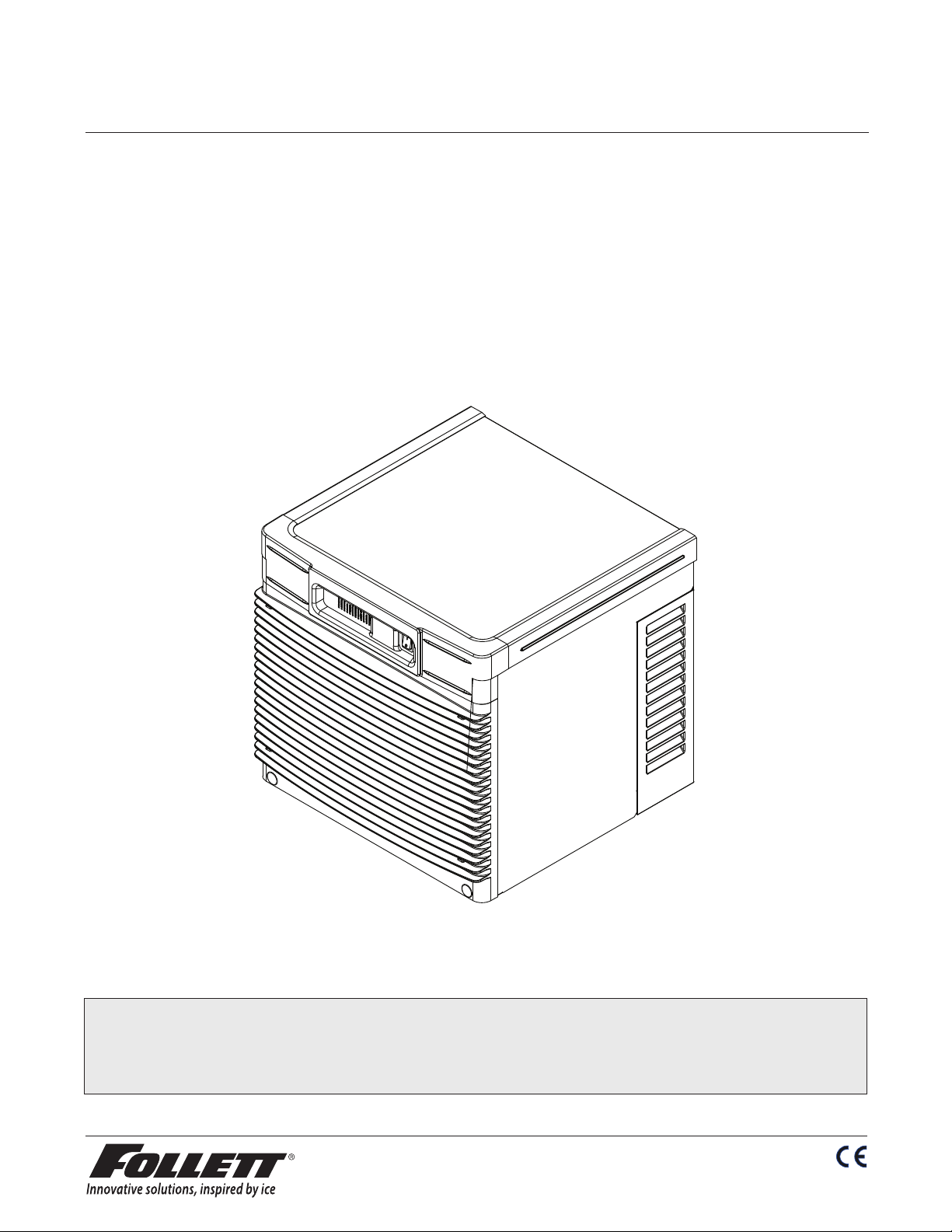
HCE/HME700A, HCE/HME700W, Ice Machines
230 V/50 Hz (Self-contained)
Order parts online
www.follettice.com
Operation and Service Manual
Serial Numbers After H58642
Following installation, please forward this manual
to the appropriate operations person.
801 Church Lane • Easton, PA 18040, USA
Toll free (877) 612-5086 • +1 (610) 252-7301
www.follettice.com
01021674R06
Page 2
CAUTION!
• This appliance should be permanently connected by a qualied person in accordance with application codes.
• If the supply cord is damaged, it must be replaced by the manufacturer, its service agent or similarly qualied
persons in order to avoid a hazard.
• Connect to potable water supply only.
• This appliance can be used by children aged 8 years and above and persons with reduced physical, sensory,
or mental capabilities, or lack of experience and knowledge if they have been given supervision or instruction
concerning use of the appliance in a safe way and understand the hazards involved. Children should be
supervised to ensure that they do not play with the appliance.
• This appliance is intended to be used for household and similar applications such as staff kitchen areas
in shops, offices and other working environments; farm houses and by clients in hotels, motels and
other residential type environments; bed and breakfast type environments; catering and similar non-retail
applications.
• WARNING! To avoid a hazard due to instability of the appliance, it must be xed in accordance with the
instructions.
• Warranty does not cover exterior or outside installations.
• Moving parts. Do not operate with front cover removed.
• Hot parts. Do not operate with cover removed.
• To reduce risk of shock, disconnect power before servicing.
• To prevent circuit breaker overload, wait 15 minutes before restarting this unit. This allows the compressor to
equalize and the evaporator to thaw.
• Drain line must be vented.
• Water supply must be treated by a scale-inhibiting lter.
• Most ice machine cleaners contain citric or phosphoric acid, which can cause skin irritation. Read caution
label on product and follow instructions carefully.
• Ice is slippery. Maintain counters and oors around dispenser in a clean and ice-free condition.
• Ice is food. Follow recommended cleaning instructions to maintain cleanliness of delivered ice.
2
Page 3

Table of contents
Welcome to Follett Corporation ............................................................................................................................ 4
Specications ......................................................................................................................................................... 5
Operation ................................................................................................................................................................. 7
Cleaning .......................................................................................................................................................... 7
Weekly exterior care ................................................................................................................................. 7
Monthly condenser cleaning .................................................................................................................... 7
Semi-annual evaporator cleaning .................................................................................................................... 7
Service ................................................................................................................................................................... 12
Ice machine operation ................................................................................................................................... 12
Water system ................................................................................................................................................. 13
Electrical system ............................................................................................................................................ 14
Normal control board operation .............................................................................................................. 14
Error faults .............................................................................................................................................. 15
Hard error ............................................................................................................................................... 15
Soft errors ............................................................................................................................................... 15
Relay output indication ........................................................................................................................... 15
Flushing logic ......................................................................................................................................... 15
Wiring diagram ....................................................................................................................................... 16
Compressor data .................................................................................................................................... 17
Gearmotor data ...................................................................................................................................... 17
Resistance of windings .......................................................................................................................... 17
Mechanical system ................................................................................................................................. 18
Evaporator disassembly ......................................................................................................................... 18
Evaporator reassembly ........................................................................................................................... 21
Refrigeration system ...................................................................................................................................... 25
Refrigeration pressure data .................................................................................................................... 25
Refrigeration system diagram.................................................................................................................25
Refrigerant charge size .......................................................................................................................... 26
Refrigerant replacement requirements ................................................................................................... 26
Evacuation .............................................................................................................................................. 26
Ambients ................................................................................................................................................ 26
Ice capacity test ..................................................................................................................................... 26
Bin full detection system ................................................................................................................................ 27
Troubleshooting ............................................................................................................................................. 28
Replacement parts ........................................................................................................................................ 30
3
Page 4
Welcome to Follett
Follett equipment enjoys a well-deserved reputation for excellent performance, long-term reliability and
outstanding after-the-sale support. To ensure that this equipment delivers the same degree of service, we ask
that you review the installation manual (provided as a separate document) before beginning to install the unit.
Our instructions are designed to help you achieve a trouble-free installation. Should you have any questions or
require technical help at any time, please call our technical service group at (877) 612-5086 or +1 (610) 252-
7301.
Before you begin
After uncrating and removing all packing material, inspect the equipment for concealed shipping damage. If damage
is found, notify the shipper immediately and contact Follett Corporation so that we can help in the ling of a claim,
if necessary.
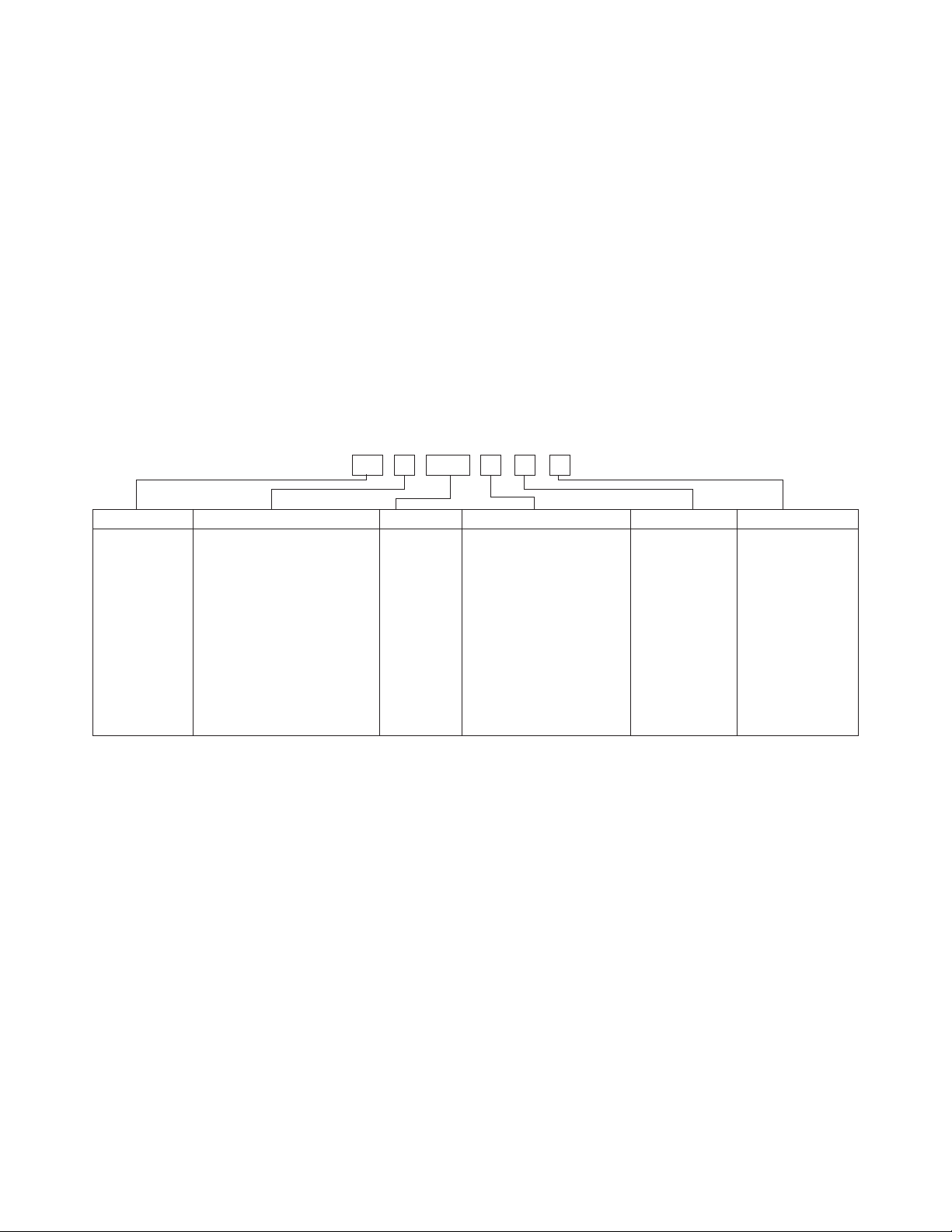
Check your paperwork to determine which model you have. Follett model numbers are designed to provide information
about the type and capacity of Follett equipment. Following is an explanation of the different model numbers in the
Horizon 700 series.
Chewblet® Ice Machine Model Number Configurations
A V SC 700HC
MC Maestro™
Chewblet
(400 Series)
HC Horizon
Chewblet
(1000, 1400,
1650 Series)
HM Horizon
Micro
Chewblet
C 208-230/60/1 (icemaking head)
Self-contained only.
D 115/60/1 (icemaking head)
Self-contained and remote.
If remote unit, high side is
208-230/60/1.
E 230/50/1 (icemaking head)
Self-contained only.
F 115/60/1 (icemaking head)
Remote only. High side is
208-230/60/3.
400 up to
454 lbs
(206kg)
700 up to
750 lbs
(340kg)
1000 up to
1036 lbs
(471kg)
1400 up to
1450 lbs
(658kg)
1650 up to
1580 lbs
(717kg)
CondenserSeriesVoltageMachine
A Air-cooled, self-contained
W Water-cooled,
self-contained
R Air-cooled, remote
condensing unit
N Air-cooled, no condensing
unit for
connection to parallel rack
system
V Vision™
H Harmony™
B Ice storage
bin
J Drop-in
M Ice Manager™
diverter valve
system
ConfigurationApplication
®
S RIDE
(RIDE remote ice
delivery equipment)
T Top-mount
4
Page 5
Specications
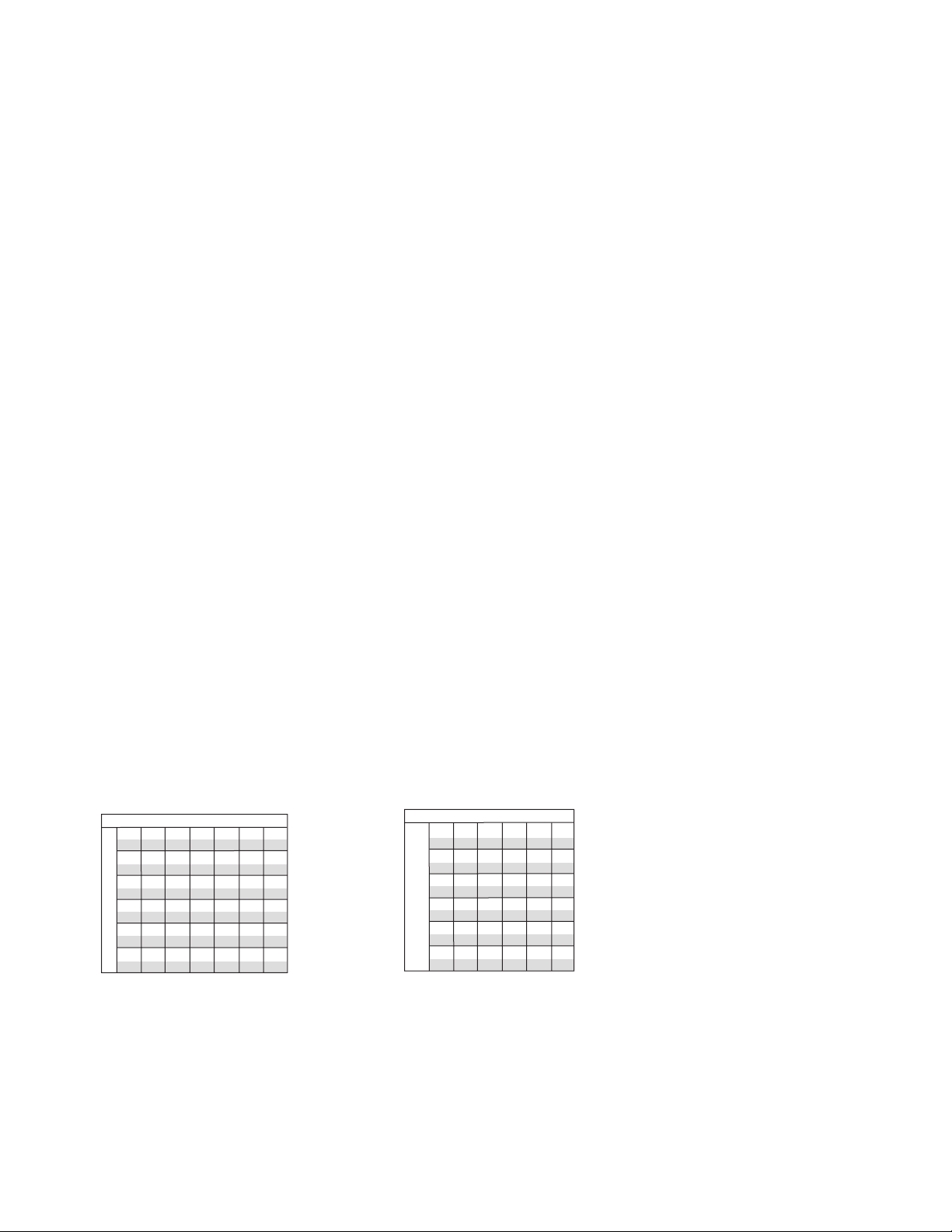
Water-cooled ice machine capacity/24 hrs.
Electrical
Each ice machine requires its own separate circuit with electrical disconnect within 10 ft (6m).
Equipment ground required.
Standard electrical: HCE/HME700: 230/50/1 (6 ft (2m) cord
Maximum ice machine fuse: 15A each
Amperage: 7A
Plumbing
3/8" OD push-in water inlet
3/4" MPT drain
1/4" FPT condenser inlet (water-cooled condenser only)
1/4" FPT condenser drain (water-cooled condenser only)
Notes: 3/4" vented drain line must slope a minimum of 1/4" per foot (6mm per 30.4 cm run).
Drain to be hard piped and insulated.
To prevent back ow, do not connect drains.
Separate drains for ice machine and condenser.
Water shut-off recommended within 10 feet (3 m).
Water supply must be treated by a scale-inhibiting lter (Follett item# 00130286).
Ambient
Air temperature 100 F/38 C max. 50 F/10 C min.
Water temperature 90 F/32 C max. 45 F/7 C min.
Water pressure – potable 70 psi max. (483 kPa) 10 psi min. (89 kPa)
Note: Water-cooled condenser pressure 150 psi (1034 kPa)
Heat rejection
Air-cooled rejects 8850 BTU/hr
Water-cooled rejects 10150 BTU/hr
Ice production
Note: Water regulating valve set to maintain a 215 PSIG (95°F Saturated R404A) discharge pressure at all
conditions.
Air-cooled ice machine capacity/24 hrs.
Ambient Air Temperature F/C
60
70
F
16
651
295
620
281
572
259
569
258
537
244
600
272
574
260
538
244
519
235
504
229
21
C
50
10
60
16
70
21
80
27
90
32
Inlet Water Temperature F/C
571
259
531
280
506
230
493
224
471
214
Ambient Air Temperature F/C
60
70
80
592
269
567
257
537
244
514
233
508
230
90
27
32
583
lbs
264
kg
548
lbs
249
kg
528
lbs
239
kg
489
lbs
222
kg
484
lbs
220
kg
80
90
100
27
32
38
518
460
209
443
201
416
189
415
188
389
176
lbs
kg
lbs
kg
lbs
kg
lbs
kg
lbs
kg
235
492
223
479
217
452
205
430
195
F
16
21
C
608
600
50
276
272
10
578
571
60
262
259
16
554
540
70
251
245
21
530
521
80
240
236
27
515
512
90
234
232
32
Potable Make-up Water Temperature F/C
5
Page 6
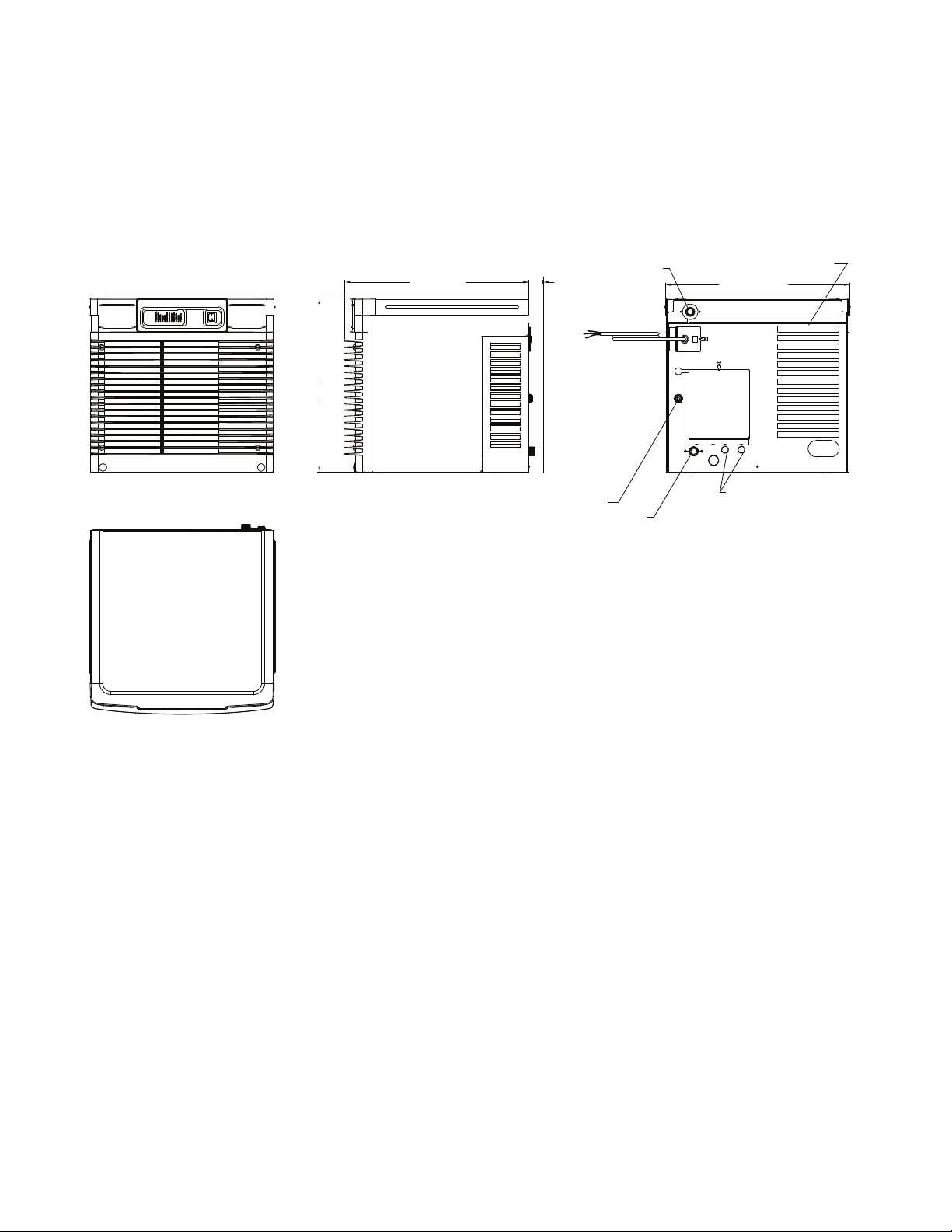
Dimensions and clearances
Entire front of ice machine must be clear of obstructions/connections to allow removal.
1" (26 mm) clearance above ice machine for service.
1" (26 mm) minimum clearance on sides.
The intake and exhaust air grilles must provide at least 160 sq in (1032 sq cm) of open area.
Air-cooled model HCE700A ice machines – 18" (458 mm) minimum clearance between discharge and air
intake-grilles.
21.25
(54 cm)
ICE TRANSPORT HOSE CONNECTION
" (57 cm)
"
3/8"OD PUSH-IN WATER INLET
1.75 MIN.22.44
3/4" MPT DRAIN
AIR EXHAUST
22.46" (57 cm)
1/4" FPT CONDENSER
(WATER COOLED ONLY)
Operation
Cleaning and preventive maintenance (all models)
Note: Do not use bleach to sanitize or clean the icemaker.
Preventive maintenance
Periodic cleaning of Follett’s icemaker system is required to ensure peak performance and delivery of clean,
sanitary ice. The recommended cleaning procedures that follow should be performed at least as frequently as
recommended, and more often if environmental conditions dictate.
Cleaning of the condenser can usually be performed by facility personnel. Cleaning of the icemaker system,
in most cases, should be performed by your facility’s maintenance staff or a Follett authorized service agent.
Regardless of who performs the cleaning, it is the operator’s responsibility to see that this cleaning is performed
according to the schedule below. Service problems resulting from lack of preventive maintenance will not be
covered under the Follett warranty.
6
Page 7
Weekly exterior care
The exterior may be cleaned with a stainless cleaner such as 3M Stainless Steel Cleaner & Polish or equivalent.
Monthly condenser cleaning (air-cooled icemaker only)
1. Use a vacuum cleaner or stiff brush to carefully clean condenser coils of air-cooled icemakers to ensure
optimal performance.
2. When reinstalling counter panels in front of remote icemakers, be sure that ventilation louvers line up with
condenser air duct.
Semi-annual evaporator cleaning (every 6 months)
WARNING
• Wear rubber gloves and safety goggles (and/or face shield) when handling ice machine cleaner or sanitizer.
CAUTION
• Use only Follett approved SafeCLEAN™ Cleaner (part #00132001) and NU-CALGON IMS-II or IMS-III
SANITIZER (00979674).
• Do not mix Cleaner and Sanitizer solutions together.
• DO NOT USE BLEACH.
• It is a violation of Federal law to use these solutions in a manner inconsistent with their labeling.
• Read and understand all labels printed on packaging before use.
Note: Complete procedure for cleaning an sanitizing MUST be followed. Ice must be collected for
10minutes before putting ice machine back into service.
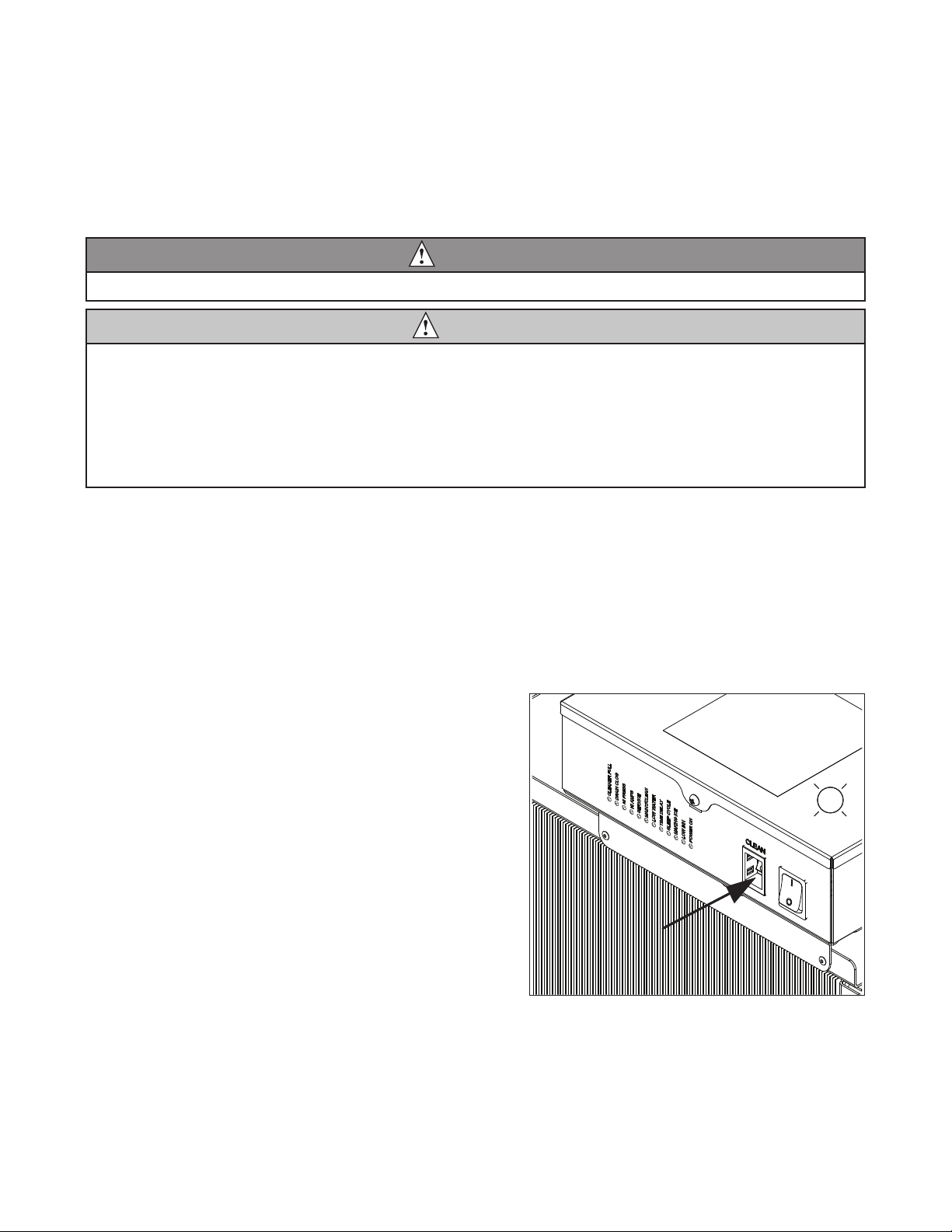
1. To clean – Remove cover. Press the CLEAN button.
The machine will drain. Wait for the LO WATER light
to come on (Fig. 1).
Fig. 1
LO WATER
7
Page 8
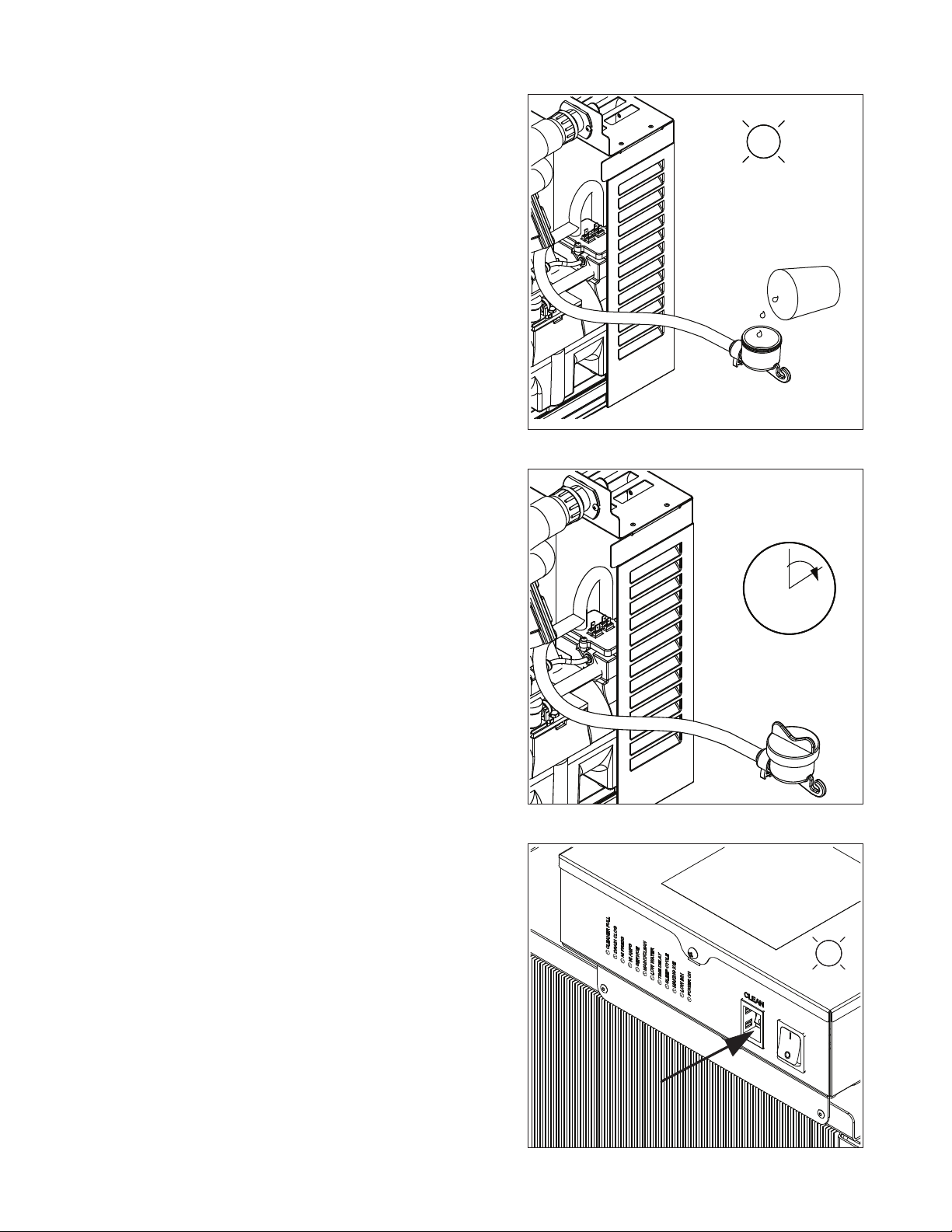
2. Mix 1 gallon (3.8L) 120 F (49 C) water and
7 ounces (198g) (one 7 ounce packet of Follett
SafeCLEAN ice machine cleaner, part# 00132001).
Locate cleaning cup. Fill until CLEANER FULL light
comes on (Fig. 2).
Note: Do not use bleach to sanitize or clean the
icemaker.
3. Replace cover on cleaning cup. Wait until machine
restarts. Machine will clean, then ush 3 times in
approximately 15 minutes (Fig. 3).
Fig. 2
CLEANER
FULL
Fig. 3
4. To sanitize – Press CLEAN button. The machine will
drain. Wait for LO WATER light to come on
(Fig. 4).
15
Fig. 4
LO WATER
8
Page 9
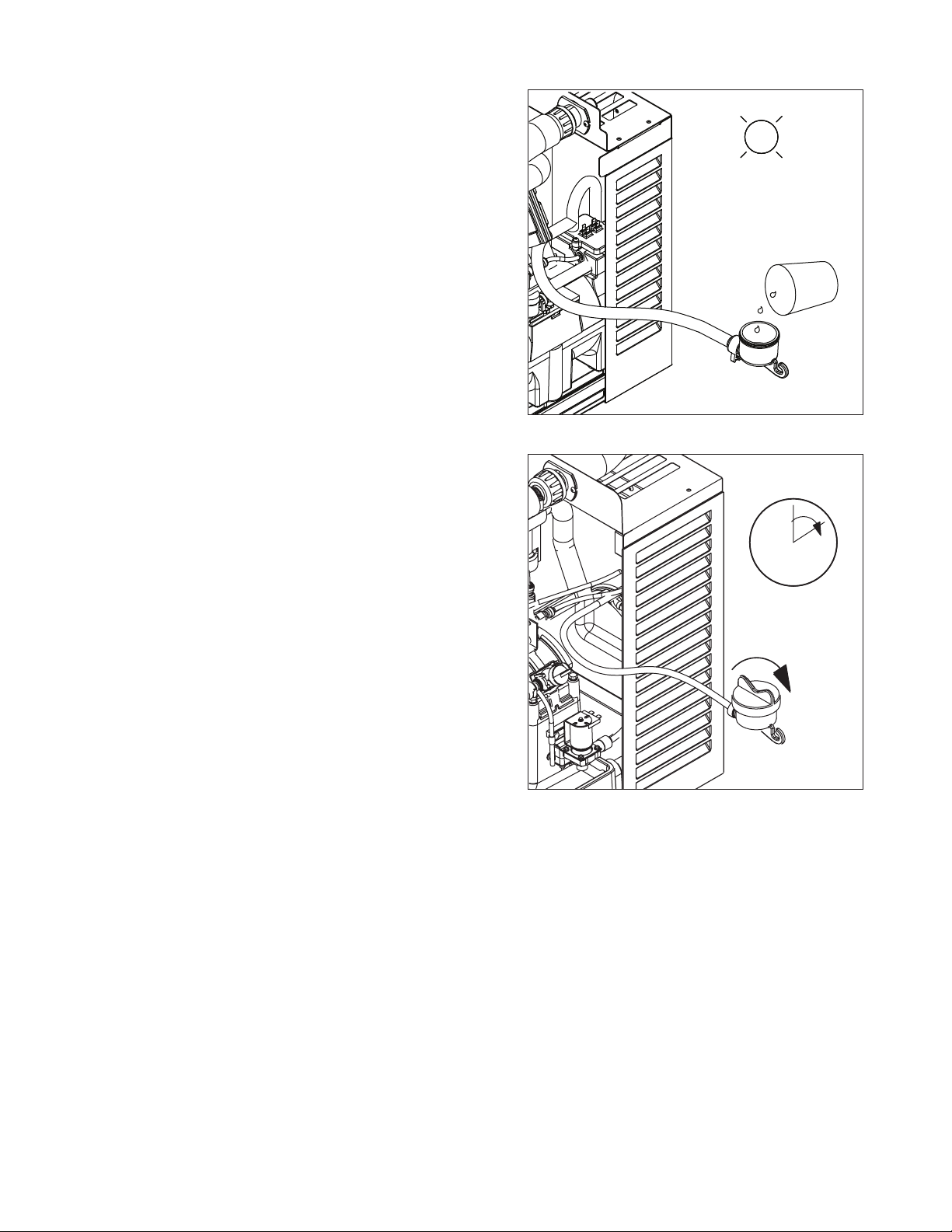
5. Mix 1 gallon 120 F (49 C) water and 1.6 ounces
(48ml) NU-CALGON IMS-II or IMS-III SANITIZER.
Fill until CLEANER FULL light comes on (Fig. 5).
Place one Sani-Sponge™ in remaining sanitizing
solution and retain for Step 9.
Note: Do not use bleach to sanitize or clean the
icemaker.
6. Replace cover on cleaning cup. Wait until machine
restarts. Machine will sanitize, then ush 3 times in
approximately 15 minutes (Fig. 6).
Fig. 5
CLEANER
FULL
Fig. 6
15
9
Page 10
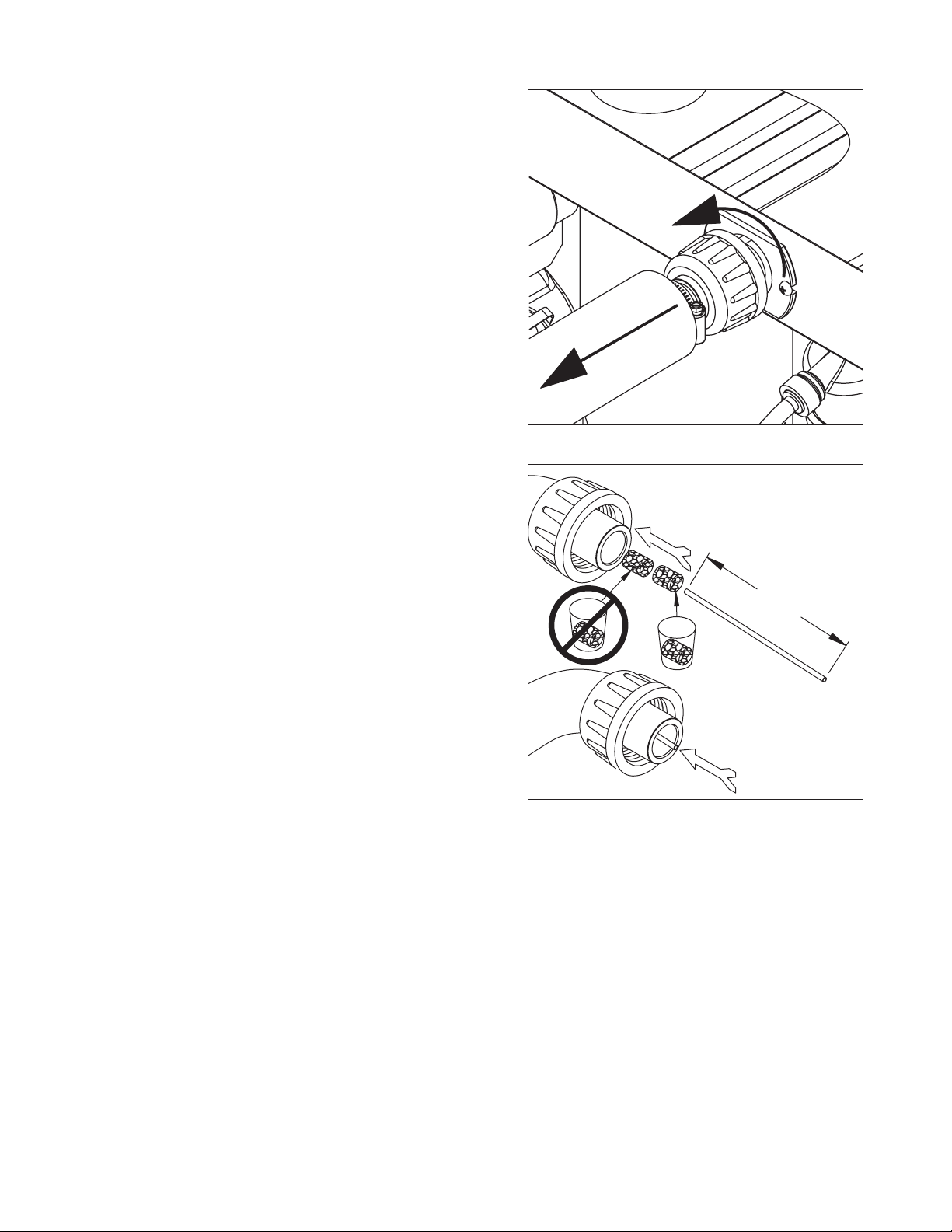
7. Disconnect coupling as shown (Fig. 7).
Note: Steps 8-11 must be completed before machine
ushes and starts producing ice.
8. Using disposable food service grade gloves, insert
dry Sani-Sponge™ (kit part# 00132068). Next,
insert Sani-Sponge soaked in Nu-Calgon IMS-II or
IMS-III sanitizer solution (from Step 5). Push both
Sani-Sponges down ice transport tube with supplied
pusher tube(Fig.8).
Fig. 7
Fig. 8
1
16"
(407mm)
2
3
10
10
Page 11
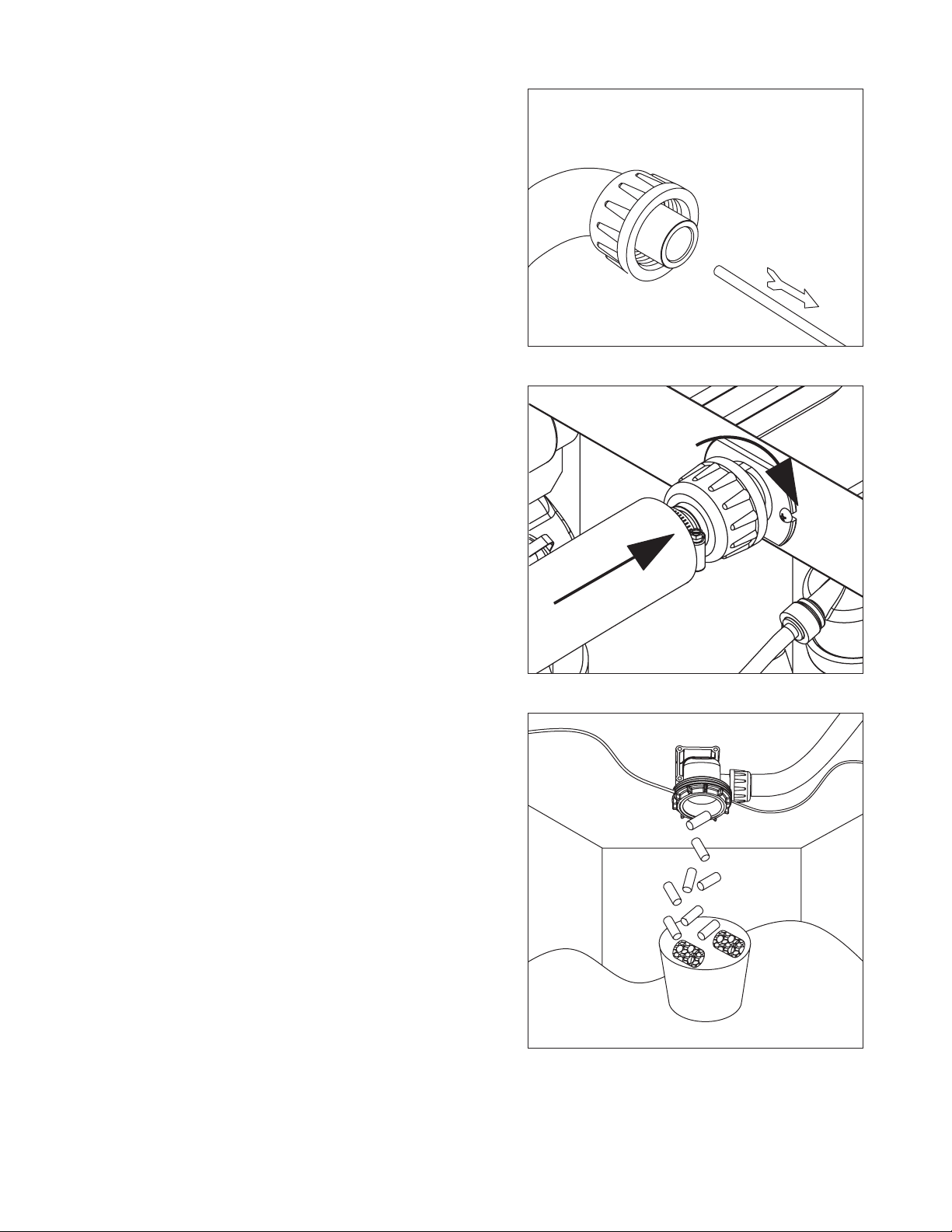
9. Remove and discard 16" (407mm) pusher tube
(Fig.9).
10. Reconnect coupling. When sanitizing cycle ends,
machine will start producing ice. Press power
switch ON. Ice pushes Sani-Sponges through tube
(Fig.10).
Fig. 9
Fig. 10
11. Place a sanitary (2 gallon or larger) container in bin
or dispenser to collect Sani-Sponges and ice for 10
minutes. Collect 5.5 lbs (3kg) of ice from unit. Discard
ice and Sani-Sponges (Fig. 11).
Fig. 11
1111
Page 12
Service
Ice machine operation (all models)
Follett’s ice machine consists of ve distinct functional systems covered in detail as follows:
§ Water system
§ Electrical control system
§ Mechanical assembly
§ Refrigeration system
§ Bin full
The Horizon ice machine overview
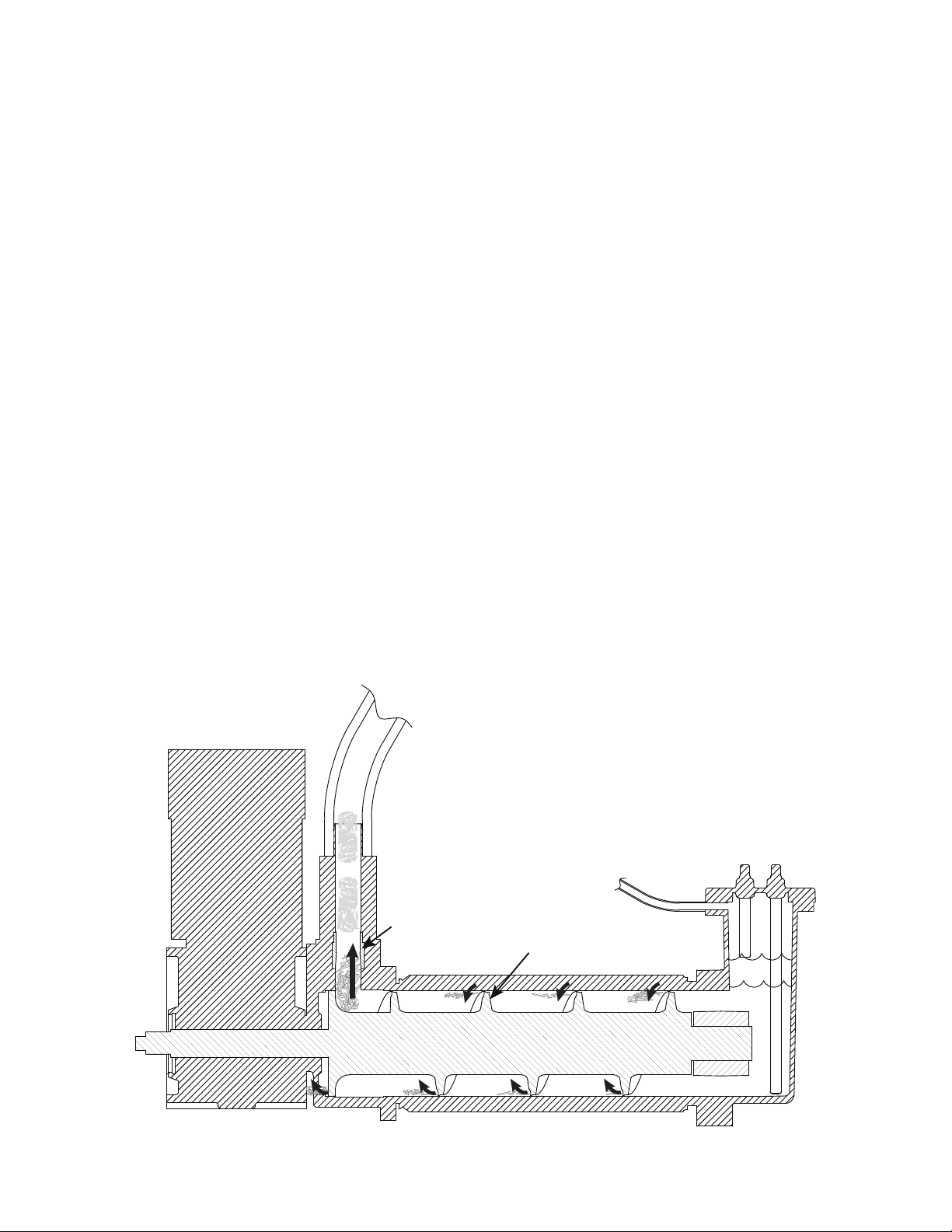
The Follett Horizon ice machine uses a horizontal, cylindrical evaporator to freeze water on its inner surface.
The refrigeration cycle is continuous; there is no batch cycle. The evaporator is ooded with water and the level
is controlled by sensors in a reservoir. A rotating auger (13 RPM) continuously scrapes ice from the inner wall
of the evaporator. The auger moves harvested ice through the evaporator into an ice extrusion canal. The ice
is forced through a restrictive nozzle that squeezes out the water and creates the Chewblet. The continuous
extrusion process pushes the Chewblets through a transport tube into a dispenser or bin.
A solid state PC board controls and monitors the functionality of the ice machine. In addition to sequencing
electrical components, the board monitors various operational parameters. A full complement of indicator lights
allows visual status of the machine's operation. Additionally, the PC board controls the self-ushing feature
of the ice machine. The evaporator water is periodically drained and replenished to remove minerals and
sediment.
A unique “bin full” detection system is incorporated in the Horizon ice machine. A switch located at the ice
discharge port of the machine detects the position of the transport tube. When the bin lls up with ice, the
transport tube moves out of the normal running position, and the switch turns the ice maker off. A domed
housing at the end of the transport tube contains the ice extrusion loads during shut down.
Harvest system diagram
Ice Transport Tube
Water Inlet
Compression
Nozzle
Auger
12
Page 13

Water system
The water level in the evaporator is controlled by a feed solenoid and level detecting sensors. Referencing the
diagram below, water sensing rods extend down into the reservoir at the end of the evaporator assembly. The
system works via electrical conductivity as follows:
One of the longest probes is a common. When water is between any of the other probes and the common, the
PC board will sense the activation. During normal operation, the water level rises and falls between the Normal
High and Normal Low sensors. As water is consumed to make ice, the level will fall until the Normal Low sensor
is exposed, triggering the water feed solenoid on. Water will ll until the Normal High sensor is activated.
Note: The potable water dissolved solids content must be greater than 10 ppm for the water control system to
function properly. If using reverse osmosis water ltration system, ensure T.D.S level is greater than 10
ppm.
Water system diagram
Water level diagram
NORMAL
OPERATING
RANGE
13
NORMAL LO
COMMON
NORMAL HI
ALARM LO
Page 14
Electrical system
FLASHINGON or OFF
Legend:
OFFON
ATTENTION!
To prevent circuit breaker overload, wait 15 minutes before
restarting this unit. This allows the compressor to equalize and
the evaporator to thaw.
Normal control board operation
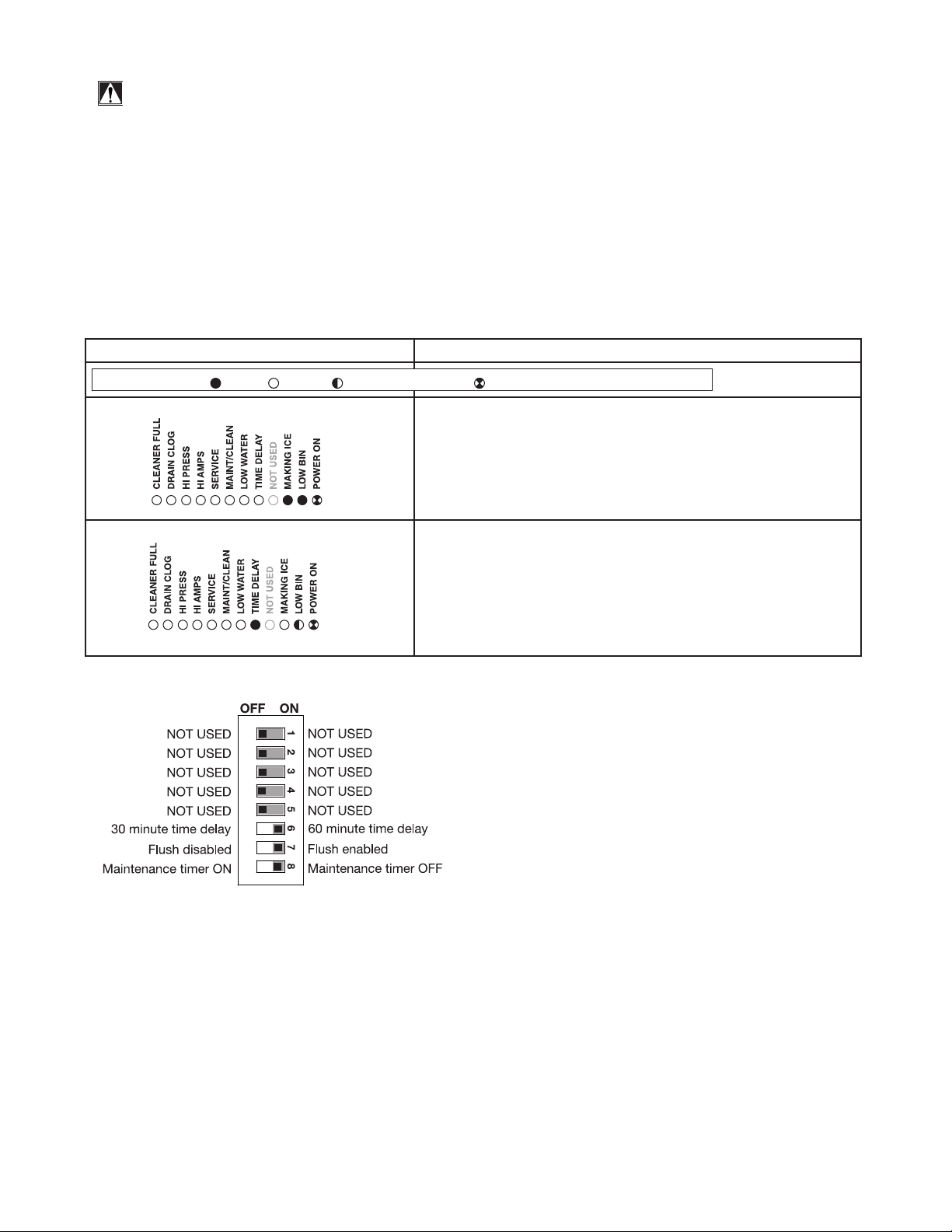
The PC board indicator lights provide all the information necessary to determine the machine's status. Green
indicator lights generally represent “go” or normal operation; Yellow indicators represent normal off conditions;
Red indicators generally represent alarm conditions, some of which will lock the machine off.
A ashing green light labeled POWER indicates power to the machine. All other normal operation status
indicators are covered as follows:
Ice machine disposition Operating conditions
1. Ice machine is making ice.
.
2. Ice machine is not making ice.
DIP Switch Settings
1. Normal running.
2. Normal time delay. When the bin lls with ice, the LOW
BIN light goes out momentarily and the refrigeration
and auger drive systems immediately shut down. (Note:
The fan motor will continue to run for 10 minutes to cool
condenser) The TIME DELAY light comes on, initiating
the time delay period. When the time delay expires, the
machine will restart provided that the LOW BIN light is on.
14
Page 15

Error faults:
The Horizon PC board monitors various operating parameters including high pressure, auger gearmotor
amperage limits, clogged drain, and low water alarm conditions. There are two types of errors namely “hard” or
“soft”. A hard error is one that shuts the machine off and will not allow restart until the reset button is pressed.
Even cycling power will not reset a hard error. A soft error can either be automatically reset should the condition
rectify, or if power is cycled. Should an error occur, consult the troubleshooting guide in this manual or a Follett
service technician.
Soft errors:
HI AMPS: The PC board monitors the amperage of the auger motor. Should the gear motor experience current
draw above the allowable limit, the machine will shut down and the TIME DELAY and HI AMP will be illuminated.
After the time delay the machine will restart and the TIME DELAY and HI AMP will clear.
LO WATER: During operation, the water level cycles between the normal low and normal high sensors. Should
the water be shut off to a running machine, a soft error will occur. The error sequence is as follows: During
operation, the water level falls to the normal low sensor, and when it does the water feed solenoid is energized.
If water is not detected at the normal low sensor within 10 seconds, a soft error will occur. The machine will shut
down, but the water feed solenoid will remain energized. Should water return, it will ll to the normal low sensor
and the machine will resume normal operation. The error will clear automatically.
HI PRESSURE: Should the refrigeration pressure rise above 425 psi, the machine will shut down and the TIME
DELAY and HIGH PRESSURE will be illuminated. After the time delay, and if the pressure has fallen back below
the reset point of 295 psi, the machine will restart and the TIME DELAY and HIGH PRESSURE will clear.
Hard error:
DRAIN CLOG: The drain clog sensor, located in the chassis, underneath the rear drain pan, will detect the
presence of water just below the top edge of the pan. If water does not properly ow out of the drain pan it will
overow into the chassis and rise to the sensor (especially during a self-ushing purge cycle). Pressing the reset
button will restart the ice machine.
Relay output indication:
Each relay on the board has an indicator light associated with its output. For example, when the relay for the
water feed solenoid is energized, the adjacent indicator light glows green.
Flushing logic
Flush on y: For every one (1) hour of ice making time, the machine will open the drain valve for a duration of
60 seconds. While the drain valve is open, the machine will continue to make ice and the water feed valve will
cycle to maintain water level.
Off cycle: At the completion of off-cycle time delay, the machine checks for a cumulative one (1) hour of ice
making time since the last off-cycle ush. If the cumulative ice making time exceeds one (1) hour, the machine
will open the drain valve for 60 seconds to drain the evaporator in its entirety. It will then rell with water and
begin making ice. If the ice making time is less than 1 hour, the machine will start and begin making ice
without draining the evaporator.
15
Page 16

Wiring diagram
COMP.
R
S
C
O.L.
WHITE
#10
#8
5
6
4
BLACK
#7
#11 WHITE
CONTACTOR
BLACK
#2
BLACK
BLACK
#5
1 2
C1 RUN
C2 START
BLACK
#4
#1 BLACK
S1
#13
#3
WHITE
GRN-YEL
#33
SNUBBER
#32
5
4
POWER
LOW BIN
MAKING ICE
SLEEP CYCLE
TIME DELAY
LOW WATER
MAINT/CLEAN
SERVICE
HI AMPS
HI PRESSURE
DRAIN CLOG
CLEANER FULL
D1
D3
D2
COMPRESSOR
P16
#28 BLACK
#12 BLACK
P15
ICE AUX WATER AUX
T1
D6
D5
D4
S1
K1
D16
HI PRS
P14
#29 WHITE
BLACK
#14
2
1
D9
D8
D7
MODEL SELECT
D19D22D21D20
D11
D10
5
6
PROGRAM
1
P9
2
D37
D18
K3
D13
D12
RESET
S2
P10
SERIAL COMM
P17
WATER LE VELS
CURRENT SENS
D17
D14
RS485 UI
P7
D48
D15
P8
P13
P11
BIN RS485
P12
P5
P4
AUGER
T2
P18
P
HIGH
MAINT.
BIN
RED
PRESS
CLEAN
BLACK
YELLOW
ORANGE
#27
HI PRS
P14
BIN
P12 CLEAN SAFEP11
P17
WATER LEVELS
BLACK
VIOLET
GRN-YEL
A B C D
SENSOR
DRAIN CLOG
BLACK
#26
WATER SENSOR
RESERVOIR
L1
L2/N
WHITE
#30
GND
P2
#31
N N N N N N N N N
L1 L1L1
P1
BLACK
WHITE
#16
VALVE
WATER SOLENOID
FAILSAFE/EVAP
P21
P20
P19
P3P6P22
BLACK
#15
WHITE
#18
#19 BLACK
BLACK
#17
DRAIN VALVE
#20
GRN-YEL
#21
FAN
WHITE
#24
WHITE/
#22
AUGER
CAP
BLACK
BLUE
#25
BLUE/
PINK
BLACK
GRN-YEL
#23
AUGER
GRAY
WHITE
16
Page 17

Compressor data
Compressor current draw at 230 VAC
Air/Water-cooled 60 F/15.5 C 70 F/21.1 C 80 F/26.7 C 90 F/32.2 C 100 F/37.8 C
4.13A 4.06A 4.08A 4.10A 4.45A
Locked rotor amps: 31A @ 230V
Gearmotor data
Gearmotor current: 0.53A @ 230V
Gearmotor torque-out (high amp) trip point: 0.9A @ 230V
Locked rotor amps: 1A @ 230V
Resistance of windings
230 vac gearmotor (Brother):
White to black: 62Ω
White to tan: 62Ω
Tan to black: 124Ω
Compressor start winding (230V) 5.95Ω
Compressor run winding (230V) 0.69Ω
Fan motor 38Ω
Fan motor data
Fan motor current 0.75A @ 230V
17
Page 18

Mechanical System
1
2
3
Evaporator disassembly
1. Press CLEAN button to purge evaporator. Turn
power OFF when LO WATER lights.
2. Unscrew and disconnect transport tube from
louvered docking assembly.
3. Unplug gear motor.
Fig. 12
Fig. 13
Fig. 14
4. Remove shuttle housing:
§ Remove vent tube (Fig. 14.1).
§ Disconnect shuttle housing switch connections
(Fig.14.2).
§ Remove two screws and lift shuttle housing (Fig. 14.3).
3
§ Remove stream divider (Fig. 14.4).
2
1
4
18
Page 19

5. Remove gear motor:
§ Remove gear motor insulation (Fig. 15.1).
§ Remove 1/4-20 screw, retainer, and spacer (Fig. 15.2).
§ Remove two 1/2" bolts (Fig. 15.3).
§ Pull gear motor from auger (Fig. 15.4).
§ Remove main housing insulation (Fig. 15.5).
6. Remove all traces of petro-gel from auger shaft.
7. Remove main housing:
§ Use an allen wrench to remove 3/16" allen screws (3)
(Fig. 16.1).
§ Remove shaft insulation (Fig. 16.2).
§ Remove main housing (Fig. 16.3).
Fig. 15
1
Fig. 16
4
3
2
3
3
5
8. Remove and discard mating ring and seal
(Fig.17.1).
9. Carefully remove auger (Fig. 17.2).
WARNING!
Use caution when removing auger. The auger is
very sharp - handle with care to avoid personal
injury.
1
Fig. 17
1
1
1
2
1
2
19
Page 20

10. Press the lever on the back of the reservoir
(Fig.18.1) to release and remove the solenoid
(Fig.18.2).
11. Remove three screws to remove the reservoir
insulation (Fig.19).
Fig. 18
1
2
Fig. 19
12. Remove three screws to remove the reservoir
(Fig.20).
Fig. 20
20
Page 21

Fig. 21
13. To remove the rear bushing, place the auger into the
evaporator and use it to gently tap and dislodge the
rear bushing housing (Fig.21).
Evaporator reassembly Fig. 22
1. Remove and inspect O ring seal. Replace if
damaged in any way.
2. Place rear bushing into evaporator.
3. Install the three bolts: partially tighten each bolt,
alternating bolts until the rear bushing is fully seated
and properly aligned (Fig.22).
4. When fully seated, remove the bolts.
5. Install the reservoir with three bolts (Fig.23).
Fig. 23
21
Page 22

6. Install the reservoir insulation, tube clamp, and
solenoid lever with three screws.
7. Install solenoid.
1. Remove and inspect O ring seal. Replace if
damaged in any way (Fig. 25.1).
2. Clean O ring groove. Lubricate O ring with petrol-gel
and reinstall (Fig. 25.2).
Fig. 24
Fig. 25
3. Use cardboard disc to press new mating ring into
main housing (Fig. 26.1).
4. Lube the shaft with liquid soap in the area shown
(Fig. 26.2) and slip on seal and spring (Fig. 26.3).
Note: Do not touch the sealing surfaces with bare
hands. Contact with bare skin will cause
premature seal failure.
5. Install auger (Fig. 26.4).
Fig. 26
Do NOT
touch!
2
Cardboard
disc
2
1
1
4
22
3
Page 23

6. Install main housing:
§ Slide main housing onto auger shaft (Fig. 27.1).
§ Install main housing insulation (Fig. 27.2).
§ Use an allen wrench to install 3/16" allen screws (3)
(Fig. 27.3).
Fig. 27
1
7. Apply a coat of petrol-gel to the auger shaft.
8. Install gear motor:
§ Install main housing insulation (Fig. 28.1).
§ Slide gear motor onto the auger shaft (Fig. 28.2).
§ Install two 1/2" bolts (Fig. 28.3).
9. Use screwdriver to orient auger shaft to align with
motor shaft keyway (Fig. 29.1).
10. Install key into keyway (Fig. 29.2).
3
Fig. 28
3
Fig. 29
3
3
2
3
2
1
11. Install spacer, ensure that key is captured in slot
(Fig.30.1)
2
1
Fig. 30
1
23
Page 24

12. Insert screwdriver into groover of auger shaft and
pry shaft outwards (Fig.31.1).
13. Insert retainer into groove (Fig.31.2), ensure that
retainer is aligned with hole in spacer.
14. Install screw and tighten (Fig.32.1).
Fig. 31
1
2
Fig. 32
1
15. Install gear motor insulation.
2
Fig. 33
24
Page 25

16. Install shuttle housing:
3
2
1
NO
CONNECT
BLACK
ORANGE
§ Install stream divider (Fig.34.1).
§ Place shuttle housing and install two screws
(Fig.34.2).
§ Plug in shuttle housing connections (Fig.34.3).
§ Connect vent tube (Fig. 34.4).
Fig. 34
1
NO
CONNECT
2
3
4
BLACK
ORANGE
1 7. Plug in gear motor.
§ BROWN to BLUE
§ BLACK to BLACK
§ WHITE to GRAY
18. Connect transport tube to louvered docking
assembly.
Fig. 35
BROWN to BLUE
BLACK to BLACK
WHITE to GRAY
Fig. 36
25
Page 26

Refrigeration system
Refrigerant pressure data
Air-cooled condensers (air)
Pressure (psig)
discharge/suction
Water-cooled condensers (water) 60 F/16 C 70 F/21 C 80 F/27 C 90 F/32 C
Pressure (psig)
discharge/suction 215/29 215/31 215/33 215/35
Note: The water control valve is factory set to maintain 215 ± 15 psi discharge pressure @ 70 F/21 C water.
Refrigeration system diagram
HIGH SIDE
REFRIGERATION
LINE RUN
60 F/16 C 70 F/21 C 80 F/27 C 90 F/32 C 10 0 F/38 C
190/31 220/33 250/35 285/37 315/40
HIGH SIDE
SERVICE PORT
FILTER-DRIER
THERMOSTATIC
EXPANSION
VALVE
LOW SIDE
SERVICE PORT
CONDENSER
HEAT
EXCHANGER
LOW SIDE
REFRIGERATION
LINE RUN
COMPRESSOR
LOW PRESSURE LIQUID
26
LOW PRESSURE VAPORHIGH PRESSURE LIQUIDHIGH PRESSURE VAPOR
Page 27

Refrigeration charge
All service on refrigeration systems must be performed in accordance with all federal, state and local laws. It is the
responsibility of the technician to ensure that these requirements are met. Recharging ice machine to other than
factory specications will void the warranty.
R404A ice machine charge specications
Model Charge Refrigerant type
HCE700A (air-cooled) 19 oz (539g) R404A
HCE700W (water-cooled) 15 oz (425g) R404A
Refrigerant replacement requirements
1. Non-contaminated refrigerant removed from any Follett refrigeration system can be recycled and
returned to the same system after completing repairs. Recycled refrigerant must be stored in a clean,
approved storage container. If additional refrigerant is required, virgin or reclaimed refrigerant that
meets ARI standard 700-88 must be used.
2. In the event of system contamination (for example, a compressor burn out, refrigerant leak, presence of
non-condensibles or moisture), the system must be repaired, evacuated and recharged using virgin or
reclaimed refrigerant that meets ARI standard 700-88.
3. Follett Corporation does not approve of recovered refrigerants. Improper refrigeration servicing
procedures will void the factory warranty.
Evacuation
Evacuate the system to a level of 500 microns. When the 500 micron level is reached, close all valves. Allow the
system to sit for approximately 20 minutes. During this period the system pressure should not rise. If the system
pressure rises and stabilizes there is moisture in the system and further evacuation is needed. If the pressure
continues to rise check the system for leaks.
Ambients Minimum Maximum
1
Air temperature
Water temperature2 45 F/7 C 90 F/32.2 C
1
Ambient air temperature is measured at the air-cooled condenser coil inlet.
2
Ambient water temperature is measured in the ice machine water reservoir.
50 F/10 C 100 F/37.8 C
Ice capacity test
Ice machine production capacity can only be determined by weighing ice produced in a specic time period.
1. Replace all panels on ice machine.
2. Run ice machine for at least 15 minutes.
3. Weigh and record weight of container used to catch ice.
4. Catch ice for 15 or 20 minutes.
5. Weigh harvested ice and record total weight.
6. Subtract weight of container from total weight.
7. Convert fractions of pounds to decimal equivalents (ex. 6 lbs 8oz = 6.5 lbs).
8. Calculate production using following formula:
1440 min. x wt. of ice produced
Total test time in minutes
=
Production capacity/24 hr.
9. Calculated amount per 24 hours should be checked against rated capacity for same ambient and water
temperatures in Ice Production Tables.
27
Page 28

“Bin full” detection system
The Follett Horizon ice machine incorporates a unique “bin full” detection system that consists of the shuttle and
actuator. The shuttle incorporates a ag and switch. Referencing the gure below, the normal running position
of the ag is down, and the switch is closed. When the bin lls to the top and ice can no longer move through
the tube, the machine will force the shuttle ag up, opening the switch and shutting the machine off. The shuttle
actuator, located above the ice bin allows the ice to curl up within it when the bin is full. In this way, there are no
loads generated that would tend to lift off the lid of the bin.
Shuttle ag and sensor
Running Off
Shuttle actuator
Running
Off
28
Page 29

Troubleshooting
Please see “Service” section for a description of each function.
Ice machine disposition Possible causes Corrective action
Legend:
OFFON
1. Ice machine is in running
condition but not making ice.
.
2. Machine in TIME DELAY without
full bin.
3. Ice machine is not making ice.
HI AMPS.
.
4. Ice machine is not making ice.
HI PRESSURE.
.
FLASHINGON or OFF
1. Defective compressor.
2. Defective start relay.
3. Defective start capacitor.
4. Defective run capacitor.
5. Defective main contactor.
6. No output from PC board.
7. Machine in Purge cycle.
1. Ice jamming due to improperly
installed transport tube causing
a false shuttle.
2. Shuttle stuck in up position.
3. Damaged or improperly installed
thermostat (open).
4. Transport tube backed-out of
coupling.
1. Poor water quality causing ice to
jam auger.
2. Damaged shuttle mechanism.
3. Intermittent drive output from
PC board. Evaporator will freeze
causing a HI AMPS error.
4. Gearmotor is unplugged.
1. High ambient temperatures
>100 F (38 C).
2. Poor ventilation or air
recirculation.
3. Clogged condenser (air-cooled).
4. No water ow through condenser
(water-cooled).
5. Fan not working properly. No
air ow.
• Blocked fan blades
• No fan output from PC board
• Faulty fan motor
1. Replace compressor.
2. Replace start relay.
3. Replace start capacitor.
4. Replace run capacitor.
5. Replace main contactor.
6. Replace PC board.
7. Check for Purge operation.
1. Correct transport tube routing.
2. Repair or replace shuttle
mechanism.
3. Replace or reposition
thermostat.
4. Correct coupling installation.
1. Clean ice machine. Increase
ushing frequency.
2. Replace or repair shuttle
mechanism.
3. Replace PC board.
4. Plug in gearmotor.
1. Air condition area to below
100F (38 C).
2. Reposition ice machine or
properly ventilate. Prevent
ice machine exhaust from
recirculating.
3. Clean condenser grille (aircooled).
4. Restore water ow to condenser.
5. Correct air ow.
• Remove any blockage from
fan blades
• Replace PC board
• Replace fan motor
29
Page 30

Ice machine disposition Possible causes Corrective action
5. Ice machine is not making ice.
Drain clog.
.
1. Drain hose kinked or plugged
causing water to back up.
2. Improper oor drain routing/pitch
causing water to back up.
3. High TDS levels and leaking
drain solenoid may cause an
errant drain clog.
4. No vent on external drain line.
1. Remove kink or blockage from
drain hose.
2. Re-route oor drain.
3. Clean area around drain sensor
and/or replace Drain solenoid
valve.
4. Add vent to drain line.
6. Ice machine is making ice.
Excessive water in bin or
coming into bin from transport
tube.
7. Ice machine is not making ice.
Lo water.
8. Service required.
1. Failed water sensors. Processor
assumes there is no water when
there is water.
2. Blocked reservoir vent.
3. Defective water feed solenoid
valve. Stuck in open position.
1. Water supply is insufficient.
2. Low water pressure.
3. Defective water feed solenoid
valve. Stuck in closed position.
4. No water feed output from
PC board.
1. 30,000 hour bushing check. 1. Call Follett technical service
1. Clean or replace water probe
assembly. Check wiring
connections.
2. Clean or replace vent tubes.
3. Replace water feed solenoid
valve.
1. Restore water supply and check
water lters. If evaporator was
completely empty the reset
button may have to be pressed
to restart the ice machine.
2. Ice machine will eventually start
when water reaches normal lo
level.
3. Replace water feed solenoid
valve.
4. Replace PC board.
group at (877) 612-5086 or
+1 (610) 252-7301.
ATTENTION!
To prevent circuit breaker overload, wait 15 minutes before
restarting this unit. This allows the compressor to equalize and
the evaporator to thaw.
30
Page 31

THIS PAGE INTENTIONALLY LEFT BLANK
31
Page 32

Replacement parts
Evaporator assembly
Order parts online
www.follettice.com
2
14
3
30
31
5
13
11
15
23
28
32
4
34
6
33
32
1
8
7
9
34
10
17
22
4
6
33
21
12
18
24
17
20
17
29
25
16
12
26
19
27
32
Page 33

Order parts online
www.follettice.com
Reference # Description Part #
1 Tube, ice transport, molded 01006485
2 Shuttle assembly 01006253
3 Switch, shuttle 001006261
4 Compression nozzle 01048941
5 Chamber, expansion 01103589
6 Insulation (sold per foot) 204360
7 Auger hardware (includes screw, spacer, retainer) - S/N E03141 and after 01041474
7 Auger hardware (includes washer and 2 nuts) - before S/N E03141 01006493
8 Key 00974394
9 Bolt, gearmotor mounting (1) 00974352
10 Gearmotor, 230 V (includes capacitor) 01006238
11 Main housing 01006204
12 O ring 00974329
13 Seal, auger shaft 00969592
14 Cup, sanitizer 00924035
15 Gasket, sanitizer 00124032
16 Cap, sanitizer (includes gasket) 00130880
Not shown Tubing, water, 3/8" OD 502719
Not shown Tubing, water, 1/4" OD 502079
17 Retainer kit, evaporator 01006535
18 Solenoid, water feed (230 V) 00116848
19 Reservoir lid and sensors 01006295
20 Clip, water shut-off valve 502922
21 Clamp, cleaning cup 00983544
22 Valve, shut-off, water 502921
23 Auger (includes seal, key, and auger hardware) 01006196
24 Evaporator (includes (2) o-rings) 01006188
25 Rear bushing housing and bushing (includes (1) o-ring) 01006279
26 Reservoir assembly, water (includes lid and insulation) 01006287
27 Solenoid, purge (230 V) 00974287
28 Tube, vent 00991786
29 Tube, sanitizer 00991778
Not shown Insulation kit, evaporator/gear motor/reservoir 00974600
30 Kit, MicroChewblet 00997585
31 Extended expansion chamber assembly 01103357
32 O-ring, top 01053180
33 O-ring, bottom 00974337
34 Allen screw, 5x32 (each) 0105004
33
Page 34

Air-cooled assembly
Order parts online
www.follettice.com
6
11
12
3
1
9
8
4
7
5
13
10
2
34
Page 35

Order parts online
www.follettice.com
Reference # Description Part #
1 Condenser 01006394
2 Fan motor assembly - 230 V, 50/60 Hz 00130930
3 Electrical box support 00153635
4 Cut-out, high pressure safety 00117077
5 Insulation, bulb, TXV 00106534
6 Drier 502724
7 Valve, expansion, thermal (includes insulation and (2) clamps) 01006360
8 Insulation, TXV 502830
9 Compressor - 230 V, 50/60 Hz (includes start/run components and drier) 01006352
10 Base, ice machine 01006303
11 Heat exchanger (includes insulation) 00172353
12 Heat exchanger insulation 00186197
Not shown Fan blade 00170290
13 Sensors, chassis 01006378
35
Page 36

Water-cooled assembly
1
Order parts online
www.follettice.com
11
10
19
20
3
2
4
13
9
14
12
16
17
8
6
7
5
36
18
Page 37

Order parts online
www.follettice.com
Reference # Description Part #
1 Electrical box support 00969925
2 Valve, water regulating 01006329
3 Union, water 202148
4 Cut-out, high pressure safety 00117077
5 Insulation, bulb, TXV 00106534
6 Drier 502724
7 Valve, expansion, thermal (includes insulation and (2) clamps) 01006360
8 Insulation, TXV 502830
9 Condenser, w/c 00117234
10 Valve, shut-off, water 502222
11 Coupling 206411
12 Ty-rap 204584
13 Receiver 00123109
14 Compressor - 230 V, 50/60 Hz (includes start/run components and drier) 01006352
15 Base, ice machine 01006303
16 Heat exchanger (includes insulation) 00172353
17 Heat exchanger insulation 00186197
18 Sensors, chassis 01006378
19 Elbow 00129486
37
Page 38

Electrical box
Order parts online
www.follettice.com
1
7
2
5
6
3
4
8
9
38
Page 39

Order parts online
www.follettice.com
Reference # Description Part #
1 Cover, electrical box, air/water-cooled 01006386
2 Board, control, 230 V, 50/60 Hz (includes stand-offs) 01026582
3 Stand-offs (set of 8) 00130906
4 Capacitor, compressor run - 230 V, 50/60 Hz 502837
5 Relay, compressor starting - 230 V, 50/60 Hz 502836
6 Contactor - 230 V, 50/60 Hz 00117010
7 Capacitor, compressor starting - 230 V, 50/60 Hz 502835
8 Switch, evaporator clean 00117036
9 Switch, ice machine power 208867
39
Page 40

Integration kit – top-mount and RIDE remote ice delivery
Top mount configuration
Order parts online
www.follettice.com
12
10
13
2
2
3
5
6
7
8
11
4
1
RIDE model configuration
1
12
11
3
2
4
5
6
7
8
10
9
2
40
Page 41

Order parts online
www.follettice.com
Reference # Description Part #
1 Shuttle actuator 00171322
2 Clamp 500377
3 Actuator elbow (includes gasket and screws) 00171264
4 Screws 209100
5 Gasket 00167122
6 Actuator body 00171272
7 Gasket, coupling 00126532
8 Ring, locking (includes coupling gasket) 00171371
9 Ice transport tube, 10' (3m) 00171280
9 Ice transport tube, 20' (6m) 00171298
10 Insulation, transport tube 501176
Not shown Insulated polywire ice transport tube, per foot 00174896
11 Insulation, elbow 00168922
12 Insulation, actuator 00168930
13 Ice transport tube, top mount, 30" (762mm) 00171306
Not shown Integration kit, top mount 00171389
Not shown Integration kit, RIDE model (includes 10' (3m) of tube and insulation) 00171397
Not shown Extension-ll tube, 9" 00135723
Not shown Extension-ll tube, 4" 00153684
Not shown Diverter plate (single agitator Cornelius dispensers and left-hand dispense
chute on dual-agitator Cornelius dispensers)
Not shown Diverter plate (right-hand dispense chute on dual-agitator dispensers) 00996207
Not shown Follett SafeCLEAN ice machine cleaner (case of 24 x 7oz packets) 00132001
Not shown Sani-Sponge kit 00132068
Not shown Integration kit, Vision 00997171
Not shown High-capacity lter system 00978957
Not shown Primary lter (1) 00978965
Not shown Primary lter (6) 00978973
Not shown Pre-lter (1) 00130211
Not shown Pre-lter (12) 00954305
Not shown IMSII sanitizer concentrate - 16 oz. 00979674
307277
41
Page 42

Skins assembly
Order parts online
www.follettice.com
2
5
4
3
15
1
13
10
14
9
8
6
7
12
42
11
Page 43

Order parts online
www.follettice.com
Reference # Description Part #
1 Grille, front 01006154
2 Front cover, air- & water-cooled 01006162
3 Tubing, water, 3/8" OD 502719
4 Fitting, water inlet 502924
5 Elbow, water inlet 502925
6 Coupling (includes O-ring) 00171207
7 O-ring 00144675
8 Bulkhead tting 00171215
9 Nut 00145342
10 Hose clamp 500377
11 Plate, strain relief 00192070
12 Louvered docking assembly (includes water tubing, water inlet tting, water
inlet elbow, strain relief plate, bulkhead connector kit, and drain pan)
13 Screw 203460
14 Bulkhead connector kit 00171223
Not shown Gasket, front cover (inside), per foot (4 feet required) 00939058
Not shown Louver, intake/exhaust (13.75" x 17.75"), per foot (6 feet required) 00978304
Not shown Gasket, air intake (front cover, outside) 00131532
15 Pan, drain 01006543
01006170
43
Page 44

Page 45

Rejestracja gwarancji i ocena sprzętu
Dziękujemy za zakup urządzenia firmy Follett. Mamy nadzieję, że nasze urządzenia spełniają i przekraczają Państwa oczekiwania, gdyż
naszym celem jest dostarczenie klientom wysoce wartościowych produktów i usług, zasługujących na ich pełne uznanie.
Prosimy zapoznać się z załączoną instrukcją instalacji i obsługi. Istotne jest przeprowadzenie instalacji zgodnie z wymogami
producenta, co zapewni działanie urządzenia z maksymalną wydajnością.
Follett LLC nie będzie ponosić odpowiedzialności za szkody wtórne, wydatki, koszty podłączania lub odłączania lub jakiekolwiek straty
wynikające z wady urządzenia.
Aby uzyskać szczegółowe informacje na temat warunków gwarancji, prosimy odwiedzić naszą strone internetową www.follettice.com/
productwarranties.
Rejestracja gwarancji i ocena urządzenia to istotne czynności, ułatwiające nam utrzymanie aktualnych danych o miejscach instalacji
naszych urządzeń i o ich działaniu. Prosimy o zarejestrowanie gwarancji na nabyte urządzenie firmy Follett na naszej witrynie www.
follettice.com/support, gdzie należy wybrać Warranty Registration (Rejestracja gwarancji) i Equipment Evaluation (Ocena urządzenia).
Jest to łatwe i nieskomplikowane, prosimy o znalezienie na to paru minut jeszcze dzisiaj. Na formularzu jest również miejsce na
przekazanie nam komentarzy i informacji zwrotnych. Proszę podzielić się z nami swoimi wrażeniami, abyśmy mogli wykorzystać je w
naszych ciągłych dążeniach do usprawnień.
Jesteśmy dumni z naszych znakomitych urządzeń i staramy się usilnie wspierać je znakomitą obsługą klienta i wsparciem technicznym.
Chcielibyśmy wiedzieć, w jaki jeszcze sposób moglibyśmy Państwu pomóc. Z przyjemnością odpowiemy na Państwa pytania.
Registro de Garantía y Evaluación del Equipo
Gracias por haber elegido este producto Follett ®. Esperamos que nuestro equipo cumpla o supere sus expectativas porque es nuestro
objetivo ofrecer productos y servicios de gran valor que se ganen su plena confianza.
Le rogamos consulte el manual de instalación y de instrucciones adjunto, ya que es muy importante que la instalación se realice según
las especificaciones de fábrica para que el equipo funcione a su máxima eficiencia.
Follett LLC no se hace responsable de los daños indirectos, costos, gastos por conexión y desconexión o pérdidas por causa de defecto
de la máquina.
Si desea una información más completa sobre la garantía, visite nuestro sitio web www.follettice.com/productwarranties.
Las operaciones de registro de la garantía y evaluación del equipo son importantes para que podamos realizar un seguimiento de
nuestro equipo y registrar el rendimiento de la maquinaria. Por favor, registre las garantías del equipo Follett en nuestro sitio web www.
follettice.com/support y seleccione Registro de la Garantía y Evaluación del Equipo. Es muy sencillo, solo le llevará un momento
realizar hoy mismo el registro. En el formulario incluimos un espacio en blanco para sus comentarios y opiniones. Infórmenos sobre su
experiencia para que podamos incorporarla a nuestros continuos esfuerzos de mejora.
Nos enorgullecemos de producir un equipo excepcional y trabajamos duro para respaldarlo con un soporte técnico y un servicio de
atención al cliente de primera. Le rogamos nos indique qué más podemos hacer para ayudarle. Estaremos encantados de responder a sus
dudas.
Enregistrement de la garantie et évaluation de l’équipement
Merci d’avoir acheté un équipement Follett®. Notre objectif étant d’offrir des produits et des services de grande valeur vous satisfaisant
pleinement, nous espérons que celui-ci satisfera, voire dépassera, vos attentes !
Veuillez consulter le manuel d’installation et d’exploitation. Il est important que l’installation soit réalisée conformément aux
spécifications de l’usine, de sorte que votre équipement fonctionne à son rendement maximum.
Follett LLC n’est pas responsable de tout dommage consécutif, de toute dépense, de tout frais de raccordement ou de déconnexion, ni de
toute perte liée à un défaut de la machine.
Pour lire la garantie dans son ensemble, visitez notre site Internet www.follettice.com/productwarranties.
L’enregistrement de la garantie et l’évaluation de l’équipement sont importants pour nous aider à suivre notre équipement et pour
enregistrer les performances de la machine. Nous vous demandons donc d’enregistrer la garantie de votre équipement Follett sur notre
site Internet, www.follettice.com/support, dans la section Warranty Registration and Equipment Evaluation. Cette opération est simple ;
veuillez prendre un moment pour la réaliser aujourd’hui.
Le formulaire contient également un espace pour nous faire parvenir vos commentaires et un retour d’informations. Veuillez nous faire
part de votre expérience pour que nous puissions prendre appui dessus pour poursuivre nos efforts constants d’amélioration.
Nous sommes fiers de produire des équipements exceptionnels et nous travaillons avec acharnement pour y associer une assistance à la
clientèle et technique exceptionnelle. N’hésitez pas à nous indiquer dans quelle mesure nous pouvons vous aider. Nous serions ravis de
répondre à vos questions.
45
Page 46

Garantieregistrierung und Produktbeurteilung
Vielen Dank, dass Sie sich für ein Follett®-Produkt entschieden haben. Wir hoffen, dass unser Produkt Ihre Erwartungen erfüllen oder
sogar übertreffen wird, weil wir uns zum Ziel gesetzt haben, hochwertige Produkte und Leistungen anzubieten, die Ihre uneingeschränkte
Anerkennung verdienen werden!
Lesen Sie sich bitte die beiliegende Installations- und Betriebsanleitung durch. Es ist wichtig, dass die Installation entsprechend den
Werksangaben erfolgt, damit Ihr Produkt mit maximalem Wirkungsgrad arbeiten kann.
Follett LLC ist nicht für Folgeschäden, Ausgaben, Gebühren für Anschluss oder Abschaltung oder Verluste aufgrund eines Defekts der
Maschine haftbar.
Vollständige Garantieinformationen finden Sie auf unserer Website unter www.follettice.com/productwarranties.
Garantieregistrierung und Produktbeurteilung sind wichtig, damit wir einen Überblick über unsere Produkte behalten und ihre Effizienz
bewerten können. Wir möchten Sie bitten, Garantien für Follett-Produkte auf unserer Website www.follettice.com/support zu registrieren und
den Punkt „Garantieregistrierung und Produktbeurteilung” zu wählen. Es ist ganz einfach. Nehmen Sie sich bitte einen Moment Zeit, um
die Registrierung heute vorzunehmen. Auf dem Formular ist auch Platz für Kommentare und Feedback vorhanden. Teilen Sie uns bitte Ihre
Erfahrungen mit unseren Produkten mit, damit wir sie für unsere fortlaufenden Produktverbesserungen verwenden können.
Wir sind stolz darauf, dass wir besondere Produkte herstellen, und wir bemühen uns, unsere Produkte mit besonderem Kundendienst zu
unterstützen. Lassen Sie uns bitte wissen, was wir noch für Sie tun können. Wir werden Ihre Fragen gerne beantworten.
Registrazione della garanzia e valutazione dell’attrezzatura
Grazie per aver acquistato un dispositivo Follett®. Ci auguriamo che il nostro prodotto soddisfi o superi le Sue aspettative, in quanto il nostro
obiettivo è quello di offrire prodotti e servizi di alta qualità che soddisfino pienamente le vostre esigenze!
La preghiamo di leggere attentamente il manuale per l’installazione e per l’uso allegato. È infatti importante che l’installazione sia effettuata
secondo le specifiche di fabbrica in modo tale che il dispositivo operi con la massima efficienza.
La Follett LLC non si assume alcuna responsabilità per danni conseguenti, spese, costi di collegamento o scollegamento o eventuali perdite
dovute ad un difetto della macchina.
Per visualizzare i dettagli completi relativi alla garanzia, recarsi alla pagina www.follettice.com/productwarranties.
La registrazione della garanzia e la valutazione dell’attrezzatura sono importanti per aiutarci a tenere traccia dei nostri dispositivi e a
registrare le prestazioni della macchina. Le chiediamo dunque di registrare le garanzie relative al dispositivo Follett sul nostro sito Web alla
pagina www.follettice.com/support scegliendo Registrazione della garanzia e Valutazione dell’attrezzatura. Farlo è semplice; dedichi pochi
minuti a registrare il prodotto oggi stesso. Sul modulo è inoltre previsto uno spazio in cui potrà fornirci i Suoi commenti e il Suo riscontro. Ci
faccia sapere della Sua esperienza in modo che possiamo farne tesoro per il nostro continuo miglioramento.
Siamo orgogliosi di produrre macchinari di ottima qualità e lavoriamo sodo per offrire un servizio di assistenza clienti e tecnico di qualità
altrettanto elevata. Ci faccia sapere come possiamo esserle di aiuto. Saremo lieti di rispondere a tutte le Sue domande.
Registo da garantia e avaliação do equipamento
Obrigado por ter adquirido equipamento Follett®. Fazemos votos de que o nosso equipamento cumpra ou exceda as suas expectativas, dado
que temos por objetivo fornecer produtos e serviços de elevado valor que mereçam a sua total satisfação!
Pedimos-lhe que leia o manual de instalação e operações em anexo. É importante que a instalação seja levada a cabo de acordo com as
especificações da fábrica, para que o seu equipamento funcione com a eficiência máxima.
A Follett LLC não assume a responsabilidade por quaisquer prejuízos indiretos, despesas, custos de ligação ou desligação ou quaisquer outras
perdas decorrentes de um defeito na máquina.
Para consultar os dados da garantia, visite o nosso website www.follettice.com/productwarranties.
O registo da garantia e a avaliação do equipamento são importantes para nos ajudar a estar a par do nosso equipamento e registar o
desempenho da máquina. Pedimos-lhe que registe as garantias de equipamento Follett no nosso website www.follettice.com/support, em
“Warranty Registration and Equipment Evaluation”. É muito simples; tire uns minutos para fazer o registo hoje mesmo. O formulário inclui
também espaço para os seus comentários e feedback. Conte-nos a sua experiência para que possamos usá-la nos nossos esforços contínuos de
melhoria.
Temos muito orgulho em produzir equipamento excecional e empenhamo-nos em proporcionar um apoio técnico e um apoio ao cliente
igualmente excecionais. Diga-nos o que mais podemos fazer para o ajudar. Teremos todo o prazer em responder às suas perguntas.
Registrering af garanti og evaluering af udstyr
Tak for dit køb af Follett ®-udstyr. Forhåbentlig synes du, at vores udstyr lever op til eller overstiger dine forventninger, for vores målsætning
er at levere produkter og serviceydelser af høj kvalitet, som du er fuldstændig tilfreds med!
Gennemlæs venligst den vedlagte installations- og driftsmanual. Det er vigtigt at installationen udføres i henhold til fabriksspecifikationerne,
så dit udstyr kan fungere med maksimal effektivitet.
Follett LLC hæfter ikke for følgeskader, udgifter, tilslutnings- eller frakoblingsomkostninger eller nogen form for tab, der skyldes en
maskindefekt.
Du kan læse de fulde oplysninger om garantien på vores website www.follettice.com/productwarranties.
46
Page 47

Registrering af garantien og evaluering af udstyret er vigtigt for at hjælpe os med at følge op på vores udstyr og registrere maskinens
ydelse. Vi beder dig registrere garantier på Follett-udstyr på vores website www.follettice.com/support og vælge Warranty Registration and
Equipment Evaluation (Registrering af garanti og evaluering af udstyr). Det er nemt at gøre, så vi beder dig bruge et øjeblik på at registrere
dig i dag. Formularen har også plads til, at du kan give os kommentarer og feedback. Fortæl os om dine erfaringer, så vi kan bruge dem i
vores fortsatte bestræbelser på at forbedre os.
Vi sætter en ære i at fremstille udstyr i særklasse og arbejder hårdt på at kunne bakke udstyret op med fremragende kundeservice og teknisk
support. Fortæl os, hvad vi ellers kan gøre for at hjælpe dig. Vi svarer gerne på dine spørgsmål.
Registratie van garanties en beoordeling van apparatuur
Gefeliciteerd met uw aankoop van Follett ®-apparatuur. We hopen dat onze apparatuur uw verwachtingen invult of zelfs overstijgt, omdat
we ernaar streven om hoogwaardige producten en diensten te leveren die u uitermate tevreden stellen!
Lees de bijgevoegde installatie- en bedieningshandleiding zorgvuldig door. Het is belangrijk dat de installatie uitgevoerd wordt volgens de
fabrieksspecificaties, zodat uw apparatuur zo efficiënt mogelijk werkt.
Follett LLC is niet aansprakelijk voor enige gevolgschade, uitgaven, montage- of demontagekosten of enige door een defect van de machine
geleden verliezen.
Bezoek onze website www.follettice.com/productwarranties voor alle garantiegegevens.
De registratie van garanties en de beoordeling van apparatuur is belangrijk voor ons om onze apparatuur te helpen traceren en de prestaties
van de machine te registreren. We verzoeken u dan ook om garanties van Follett-uitrusting te registreren op onze website www.follettice.
com/support en om “Warranty Registration” (Registratie van garanties) en “Equipment Evaluation” (Beoordeling van apparatuur) te kiezen.
Gelieve hier even tijd voor vrij te maken. Het is namelijk zeer eenvoudig. Er is op het formulier ook plaats om opmerkingen en feedback te
geven. Breng ons gerust op de hoogte over uw ervaring met onze apparatuur, zodat we ons kunnen blijven verbeteren.
We zijn trots op onze productie van uitstekende apparatuur en werken hard om dit bij te staan door een voortreffelijke klantendienst en
technische ondersteuning. Aarzel echter niet om enige andere bijstand te vragen. We zullen uw vragen met plezier beantwoorden.
Garantiregistrering och utvärdering av utrustning
Tack för att du köpt utrustning från Follett ®. Vi hoppas att du ska tycka att den uppfyller eller överträffar dina förväntningar, då vårt mål är
att leverera produkter och tjänster av högt värde som gör dig helt nöjd!
Studera medföljande installations- och bruksanvisning. Det är viktigt att installationen genomförs enligt fabrikens anvisningar så att din
utrustning arbetar med högsta effektivitet.
Follett LLC ansvarar inte för följdskador, kostnader, avgifter eller förluster som orsakats av fel på maskinen.
Fullständiga garantivillkor finns på vår hemsida www.follettice.com/productwarranties.
Garantiregistrering och utvärdering av utrustning är viktig för oss så att vi kan följa upp vär ultrustning och dess funktion. Vi vill att du
registrerar Folletts utrustningsgaranti på vår hemsida www.follettice.com/support, där du väljer Garantiregistrering och produktutvärdering.
Det är enkelt att göra, så ta dig tid en minut och registrera dig idag. Det finns också utrymme på blanketten för kommentarer och
synpunkter. Berätta för oss vad du tycker så att vi kan använda det i våra ansträngningar att alltid bli bättre.
Vi är stolta över att producera överlägsen utrustning och vi arbetar hårt med att stötta den med överlägset kundansvar och tekniskt stöd. Tala
om för oss vad vi kan göra mer för att hjälpa dig. Vi svarar gärna på dina frågor.
Warranty Registration and Equipment Evaluation
Thank you for purchasing Follett ® equipment. We hope you find that our equipment meets or exceeds your expectations, as our goal is to
deliver high value products and services that earn your complete satisfaction!
Please review the enclosed installation and operations manual. It is important that the installation be performed to factory specifications, so
your equipment operates to its maximum efficiency.
Follett LLC will not be liable for any consequential damages, expenses, connecting or disconnecting charges or any losses resulting from a
defect of the machine.
For full warranty details, visit our website www.follettice.com/productwarranties.
Warranty registration and equipment evaluation is important to help us keep track of our equipment and to record the machine’s
performance. We request that you register Follett equipment warranties on our website www.follettice.com/support and choose Warranty
Registration and Equipment Evaluation. It’s simple to do; please take a moment to register today. There is also space on the form to provide
us with comments and feedback. Please let us know about your experience so we can capture it for our continuous improvement efforts.
We pride ourselves on producing outstanding equipment and we work hard to back it up with outstanding customer and technical support.
Please let us know what else we can do to assist you. We would be happy to answer your questions.
47
Page 48

Voice (610) 252-7301
Voice (877) 612-5086
801 Church Lane
Easton, PA 18040
www.follettice.com
CE DECLARATION OF CONFORMITY
15 November 2012
Manufacturer: FOLLETT CORPORATION
Address: 801 Church Lane
Easton, Pennsylvania 18040
USA
We declare under sole responsibility that the following equipment to which this declaration relates, meets the
principal protection requirements and is in conformity with the relevant sections of the applicable CE standards
and other normative documents. If changes are made to the product, which is covered by this declaration of
conformity, the declaration of conformity is no longer valid.
Equipment type: Horizon Icemaker
Models: HCE700A, HCE700W, HME700A, HME700W
HCE1000A, HCE1000W, HME1000A, HME1000W
HCE1400A, HCE1400W, HME1400A, HME1400W
CE Directives and Amendments: Low Voltage Directive 2006/95/EC
EMC Directive 2004/108/EC
Harmonized Standards applied: EN55014-1:2006, EN55014-2:1997 + A1:2001 + A2:2008,
EN61000-3-2:2006, EN61000-3-3:1995 + A1:2001 + A2:2005
EN60335-2-24:2010,
EN60335-1:2002 + A1:2004 + All:2004 + A2:2006 + A12:2006 +
A13:2008
Date/Signature of
authorized representative:
Title of signatory: Executive Vice President
Horizon Technical Construction File CE Horizon Declar of Conformity.doc
Horizon, Harmony, Ice Manager, SafeCLEAN, Sani-Sponge and Vision are trademarks of Follett LLC.
Chewblet, RIDE and Follett are registered trademarks of Follett LLC, registered in the US.
00162644R02
11/12
801 Church Lane • Easton, PA 18040, USA
Toll free (877) 612-5086 • +1 (610) 252-7301
www.follettice.com
01021674R06
© Follett LLC 4/17
 Loading...