

Page 1
Page 2

Balance adjustment ................................................... 12
FADER adjustment ..................................................... 13
LOUDNESS function ................................................... 13
Protection against theft .............................................. 13
RADIO (Tuner) .......................................................... 14
Introduction ............................................................. 14
Selecting the frequency band ...................................... 14
Presetting buttons ..................................................... 14
Storing the last station heard ...................................... 14
Automatic tuning ...................................................... 14
Manual tuning .......................................................... 15
AUTOSTORE function ................................................. 15
Emergency alarm reception ........................................ 16
EON function ............................................................ 16
Stereophonic stations ................................................ 16
Menu ...................................................................... 16
- MENU button functions ............................................ 16
- AF SWITCHING function ............................................ 17
- TRAFFIC INFO function ............................................. 17
- REGIONAL MODE function ......................................... 18
- MP3 DISPLAY function ............................................. 18
- SPEED VOLUME function ........................................... 19
- EXTERNAL AUDIO VOL function .................................. 19
- RADIO OFF function ................................................. 19
- RESTORE DEFAULT function ....................................... 19
CCCCOOOONNNNTTTTEEEENNNNTTTTSS
SS
INTRODUCTION ......................................................... 3
Advice ..................................................................... 3
- Road safety ............................................................ 3
- Reception conditions ................................................ 3
- Care and maintenance ............................................. 4
- Compact Disc ......................................................... 4
Technical data .......................................................... 5
HI-FI Bose System .................................................... 6
QUICK REFERENCE GUIDE ........................................... 7
Steering wheel controls .............................................. 9
General ................................................................... 10
- Radio section .......................................................... 10
- Compact Disc section ............................................... 10
- MP3 CD section ...................................................... 10
- Audio section .......................................................... 10
FUNCTIONS AND ADJUSTMENTS................................... 11
Turning the sound system on ...................................... 11
Turning the sound system off ...................................... 11
Selecting Radio/CD/CD Changer ................................. 11
Audio source memory function .................................... 11
Volume adjustment ................................................... 11
SPEED VOLUME function ............................................ 11
MUTE/PAUSE function ............................................... 12
Audio adjustments .................................................... 12
Bass/Treble adjustment ............................................. 12
604.31.595 Radio 159 Brera Sider GB 29-10-2007 16:31 Pagina 1
Page 3

COMPACT DISC PLAYER .............................................. 20
Introduction ............................................................. 20
Selecting the CD player .............................................. 20
Loading/ejecting CD ................................................. 20
Possible error messages ............................................. 21
Display information ................................................... 21
Select track ............................................................. 21
Fast forward/backward ............................................. 21
Pause function ......................................................... 21
Protection against theft .............................................. 22
- Entering the secret code ........................................... 22
- Code Card .............................................................. 22
MP3 CD PLAYER ....................................................... 23
Introduction ............................................................. 23
MP3 mode .............................................................. 23
Display information ................................................... 24
Select next/previous directory .................................... 24
Protection against theft .............................................. 24
CD CHANGER (CDC) .................................................. 25
Introduction ............................................................. 25
Selecting the CD Changer ........................................... 25
Possible error messages ............................................. 25
Selecting a CD .......................................................... 25
TROUBLESHOOTING .................................................. 26
604.31.595 Radio 159 Brera Sider GB 29-10-2007 16:31 Pagina 2
Page 4
QUICK
GUIDE
FUNCTIONS AND
ADJUSTMENTS
RADIOCOMPACT
DISC PLAYER
MP3 CD
PLAYER
CD
CHANGER
INTRODUCTION
3
ADVICE
Road safety
You are advised to learn how to use the various radio functions (e.g.: storing stations)
before starting to drive.
Reception conditions
Reception conditions change constantly
when driving. Reception may be disturbed
by the presence of mountains, buildings or
bridges particularly when far away from the
station being listened to.
IMPORTANT When receiving traffic information, the volume may be higher than normal.
IIIINNNNTTTTRRRROOOODDDDUUUUCCCCTTTTIIIIOOOONN
NN
The car sound system, fitted with CD player
(radio with Compact Disc player) or MP3 CD
player (radio with MP3 CD player) has been
designed in accordance with the special features of the passenger compartment, with a
personalised design that blends with the style
of the dashboard. The sound system cannot
be adapted to other vehicles and for this reason it cannot be removed.
The radio is installed in a user-friendly position for the driver and passenger and the
graphics on the front panel make location of
the controls quick, facilitating use.
The CD Changer is available at Lineaccessori
Alfa Romeo.
In the following pages you will find the instructions for use, which you are advised to
read through carefully. The instructions also
contain the procedure for controlling the CD
Changer (if provided) through the radio. For
the instructions for use of the CD Changer
refer to the specific manual.
Too high a volume when
driving can put the driver’s
life at risk and that of other people. Therefore the volume should
always be adjusted in such a way
that it is always possible to hear
the noises of the surrounding environment (e.g.: horns, ambulance,
police sirens, etc.).
WARNING
Care and maintenance
The radio structure ensures long operation
with no need for particular maintenance.
In the event of a fault, contact Alfa Romeo
Authorized Services.
To clean the front panel only use a soft, antistatic cloth. Cleaning and polishing products might spoil the surface.
Compact Disc
Remember that dirt, marks or distortion on
Compact Disc can cause skipping. To obtain
optimum playing conditions we give the following advice:
❒
Only use Compact Discs which have the
following brand:
604.31.595 Radio 159 Brera Sider GB 29-10-2007 16:31 Pagina 3
Page 5
QUICK
GUIDE
FUNCTIONS AND
ADJUSTMENTS
RADIO
COMPACT
DISC PLAYER
MP3 CD
PLAYER
CD
CHANGER
INTRODUCTION
4
IMPORTANT Should copy-protected CDs be
used, then, few seconds may be required
for playing them. Moreover, due to the proliferation of always new and different protection methods, it is not guaranteed that
the CD player can play whatever protected
disc. Copy protection is often indicated on
the CD cover in small letters or hard to read
characters. Usually it is indicated by writings
like: “COPY CONTROL”, “COPY PROTECTED”, “THIS CD CANNOT BE PLAYED ON A
PC/MAC”, or it is identified by symbols like:
❒
Carefully clean all Compact Discs of fingerprints and dust using a soft cloth. Support Compact Discs from the outer circumference and clean from the centre outwards;
❒
Never use chemical products for cleaning
(e.g.: spray cans, antistatic or thinners) as
they might damage the surface of Compact Discs;
❒
After use, put Compact Discs back in their
container, to avoid marks or scratches that
may cause skipping when playing;
❒
Do not expose Compact Discs to direct sunlight, high temperatures or damp for prolonged lengths of time to prevent them
from bending;
❒
Do not stick labels or write on the recorded surface of Compact Discs.
To remove a Compact Disc from its container,
press the centre and raise the disc carefully, holding it by the outer circumference.
Always hold Compact Discs by the outer circumference. Never touch the surface.
To remove fingerprints and dust, use a soft
cloth starting from the centre of the Compact Disc outwards.
Do not use highly scratched, cracked, or distorted discs, etc. The use of these discs will
involve malfunctioning or damage to the
player.
For optimal playing use original CDs only.
Regular operation is not guaranteed if using
R/RW CDs not properly mastered and/or
CDs with max. capacity higher than 650
MB.
IMPORTANT Do not use the protective sheets
for CD in commerce or discs with stabilisers,
etc. as they might get stuck in the internal
mechanism and damage the disc.
604.31.595 Radio 159 Brera Sider GB 29-10-2007 16:31 Pagina 4
Page 6
QUICK
GUIDE
FUNCTIONS AND
ADJUSTMENTS
RADIOCOMPACT
DISC PLAYER
MP3 CD
PLAYER
CD
CHANGER
INTRODUCTION
5
IMPORTANT The CD player can read most of
the compression systems currently on sale
(e.g.: LAME, BLADE, XING, FRAUNHOFER)
however, due to the evolution of these systems, reading of all compression formats
is not guaranteed.
IMPORTANT When loading a multi-session
CD, only the first session will be played.
TECHNICAL DATA
For Alfa 159
Radio
Maximum power: 4x40W
Speakers
The system includes:
– 2 tweeters with 30 W max. power,
set at dashboard ends;
– 2 mid-woofers with a diameter of 165
mm and 30W max. power, set in front
doors;
– 2 tweeters with 30 W max. power,
set in rear doors;
– 2 mid-woofers with a diameter of 165
mm and 30W max. power, set in rear
doors.
Protected discs (and their cover) very often
are not marked with the audio CD identification symbol:
For Alfa BRERA / Alfa SPIDER
Radio
Maximum power: 4x40W
Speakers
The system includes:
– 2 tweeters with 30 W max. power,
set at dashboard ends;
– 2 mid-woofers with a diameter of 165
mm and 30W max. power, set on doors;
– 2 mid-woofers with a diameter of 80
mm and 25W max. power, set in rear
sides.
604.31.595 Radio 159 Brera Sider GB 29-10-2007 16:31 Pagina 5
Page 7
QUICK
GUIDE
FUNCTIONS AND
ADJUSTMENTS
RADIO
COMPACT
DISC PLAYER
MP3 CD
PLAYER
CD
CHANGER
INTRODUCTION
6
HI-FI BOSE SYSTEM
(optional for versions/
markets where applicable)
The HI-FI BOSE system installed on your car
has been accurately designed to offer outstanding sound quality and reproduce the
musical realism of a live concert, for all the
seats in the passenger compartment.
The system’s features include outstanding
faithful reproduction of crystalline treble
tones and full, rich basses which among other things, make the Loudness function superfluous. In addition, the complete range
of the sounds is reproduced in the whole passenger compartment enveloping the occupants with the natural spatial sensation that
is felt when listening to live music.
The components adopted are patented and
are the result of the most sophisticated technology, but at the same time they are easy
and intuitive to use, so that even less expert
people can use the system.
Technical data for Alfa 159
The system includes:
– 2 tweeters with 50 W max. power,
set at dashboard ends;
– 2 mid-woofers with a diameter of 165
mm and 90 W max. power, set in front
doors;
– 2 rear tweeters with 50 W max.
power, set in rear doors;
– 2 mid-woofers with a diameter of 165
mm and 90 W max. power, set in rear
doors;
– 1 mid-tweeter (Centerfill) with a
diameter of 80 mm and 50 W max.
power, set in the middle of the dashboard;
– 1 Sub-woofer (Saloon versions), with
a diameter of 250 mm and 200 W max.
power, set on the rear window parcel
shelf;
– 1 Bass-box reflex (Sportwagon versions) 130 mm diameter, 200 W max.
power, set in the boot;
– Power amplifier with 6 independent
channels, set on the rear window parcel
shelf and controlling all installed speakers.
Technical data for Alfa BRERA /
Alfa SPIDER
The system includes:
– 2 tweeters (power 50 W max. each),
located at dashboard ends;
–2 mid-woofers, (diameter 165 mm,
power 90 W max. each), located in the
doors, designed for top playback of midbass frequencies;
–2 rear tweeters, (power 50 W max.
each), located on rear inside valance panels;
–1 mid-tweeter (Centerfill) (diameter
80 mm, power 50 W max.), located in
the middle of the dashboard;
– 1 sub-woofer (diameter 265 mm,
power 200 W max.), located in the rear
side of the car;
– Amplifier with 6 independent channels, located in the rear side of the car and
controlling all the other car speakers.
604.31.595 Radio 159 Brera Sider GB 29-10-2007 16:31 Pagina 6
Page 8
FUNCTIONS AND
ADJUSTMENTS
RADIOCOMPACT
DISC PLAYER
MP3 CD
PLAYER
CD
CHANGER
INTRODUCTION
7
QUICK
GUIDE
QQQQUUUUIIIICCCCKKKK GGGGUUUUIIIIDDDDEE
EE
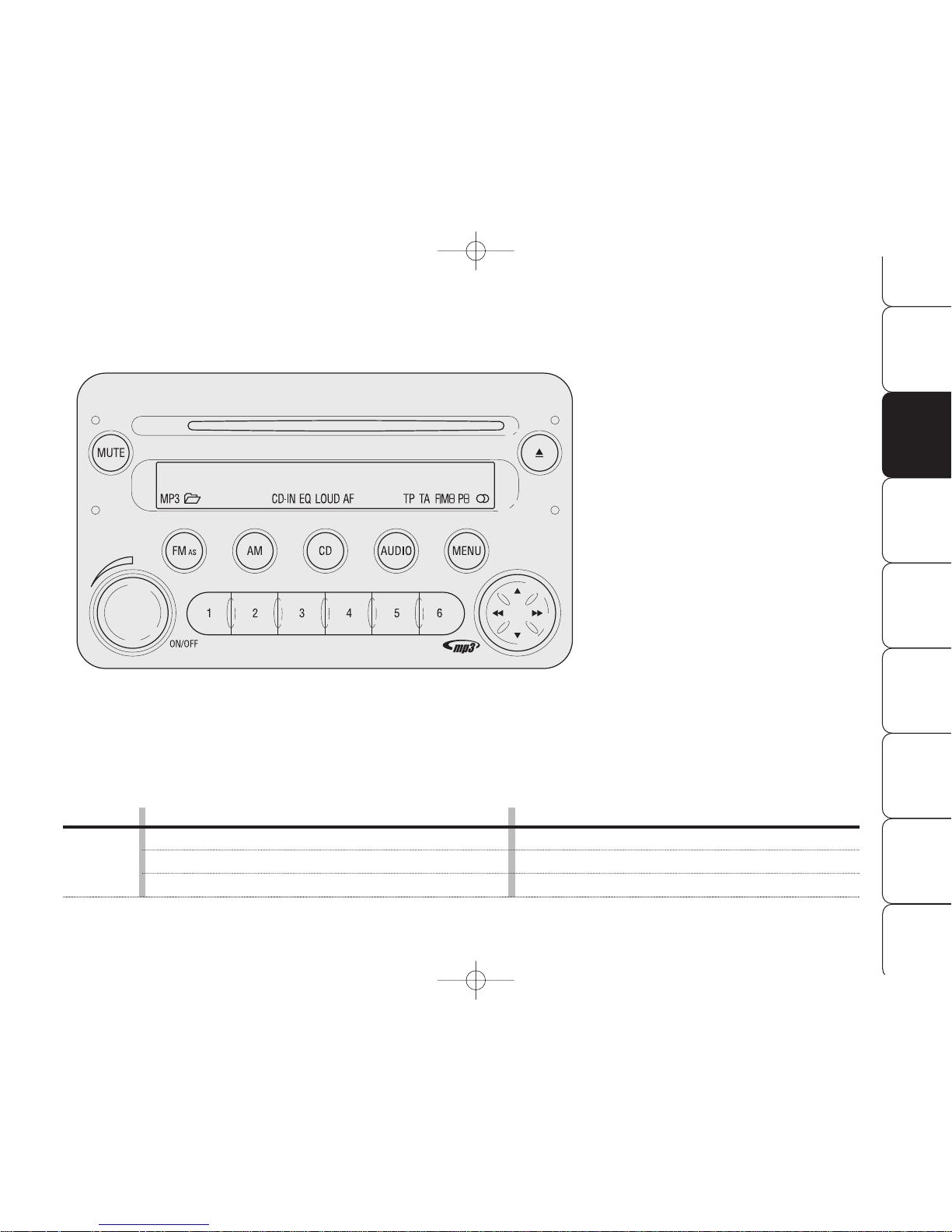
AUDIO SECTION
❒
Loudness function (excluding versions
with Bose HI-FI system)
❒
Standard equalization (excluding versions
with Bose HI-FI system)
❒
Personal equalization (excluding versions
with Bose HI-FI system)
❒
Automatic volume changing according to
car speed (SPEED VOLUME)
❒
MUTE function
RADIO SECTION
❒
Traffic information reception (TA)
❒
Automatic storage of 6 stations in the
dedicated FM band - FMT (AS – Autostore)
CD / MP3 CD SECTION
❒
Play / Pause
❒
Previous / next track selection
❒
FF / FR
❒
Previous / next directory selection
Button
ON/OFF
Mode
Brief knob pressing
Long knob pressing
Knob rotation LH/RH
A0F0270m
GENERAL FUNCTIONS
On
Off
Volume adjustment
604.31.595 Radio 159 Brera Sider GB 29-10-2007 16:31 Pagina 7
Page 9
FUNCTIONS AND
ADJUSTMENTS
RADIO
COMPACT
DISC PLAYER
MP3 CD
PLAYER
CD
CHANGER INTRODUCTION
8
QUICK
GUIDE
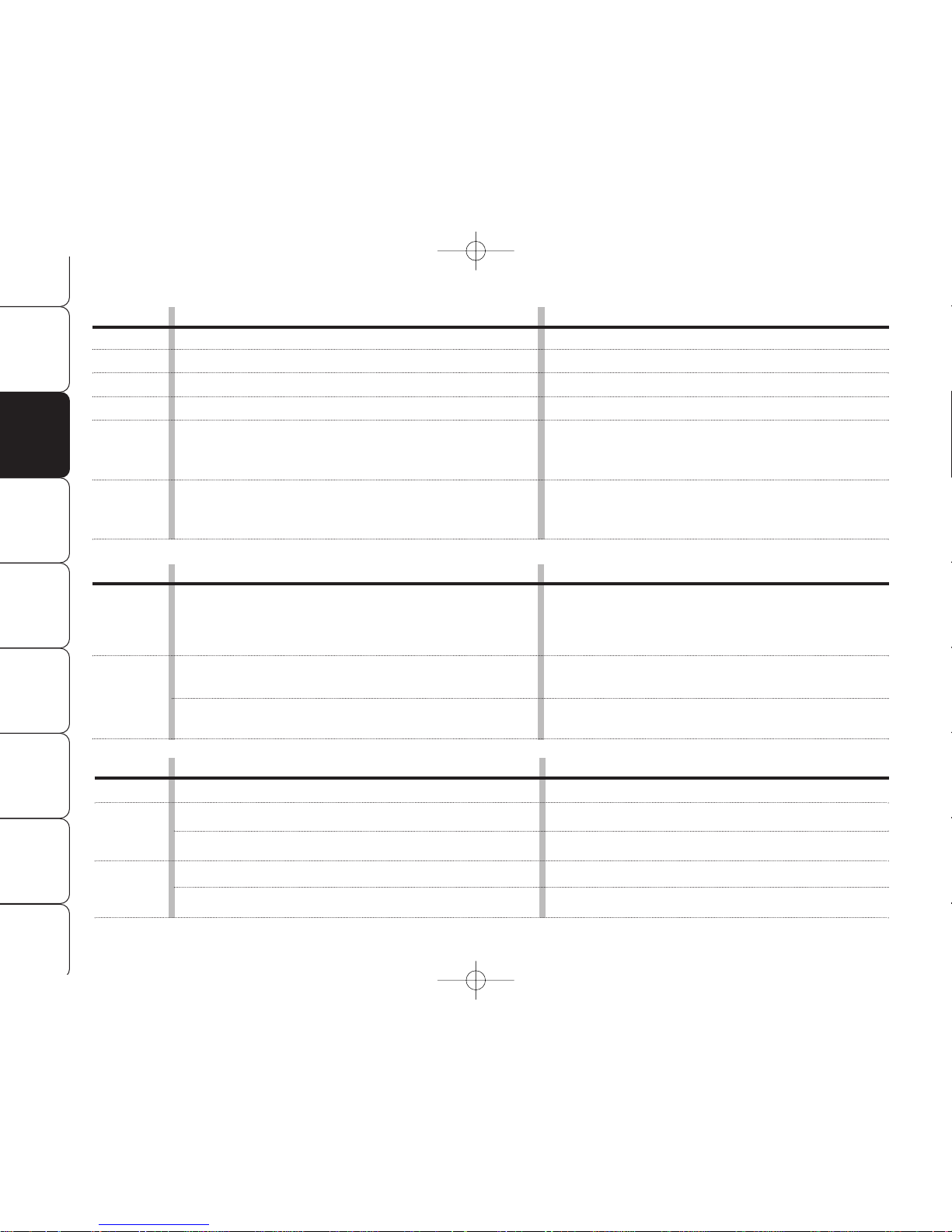
Button
FM AS
AM
CD
MUTE
AUDIO
MENU
Button
÷N˜
O
1 2 3 4 5 6
Button
ı
÷˜
N
O
GENERAL FUNCTIONS
Radio band selection FM1, FM2, FM Autostore
Radio band selection MW, LW
Audio source selection (radio/CD/CD-Changer)
Volume on/off (MUTE / PAUSE)
Audio settings: bass (BASS), treble (TREBLE),
right/left sound adjustment (BALANCE),
front/rear sound adjustment (FADER)
Advanced functions adjustment
Mode
Brief cyclic button pressing
Brief cyclic button pressing
Brief cyclic button pressing
Brief button pressing
Menu activation: brief button pressing
Adjustment selection: press button
NorO
Value adjustment: press button
÷or˜
Menu activation: brief button pressing
Adjustment selection: press button
NorO
Value adjustment: press button
÷or˜
RADIO FUNCTIONS
Radio station tuning:
•
Automatic tuning
•
Manual tuning
Current radio station storage
Stored station recall
Mode
Automatic tuning: press button
÷or˜
(long pressing for fast forward)
Manual tuning: press button
NorO
(long pressing for fast forward)
Long button pressing
respectively for preset/memories from 1 to 6
Brief button pressing
respectively for preset/memories from 1 to 6
CD FUNCTIONS
CD ejection
Previous/next track playback
CD track fast forward/backward
Previous/next CD playback (for CD Changer)
Previous/next directory playback (for MP3 CD)
Mode
Brief button pressing
Brief pressing on buttons
÷or˜
Long pressing on buttons
÷or˜
Brief pressing on buttons
NorO
Brief pressing on buttons
NorO
604.31.595 Radio 159 Brera Sider GB 29-10-2007 16:31 Pagina 8
Page 10
FUNCTIONS AND
ADJUSTMENTS
RADIOCOMPACT
DISC PLAYER
MP3 CD
PLAYER
CD
CHANGER
INTRODUCTION
9
QUICK
GUIDE
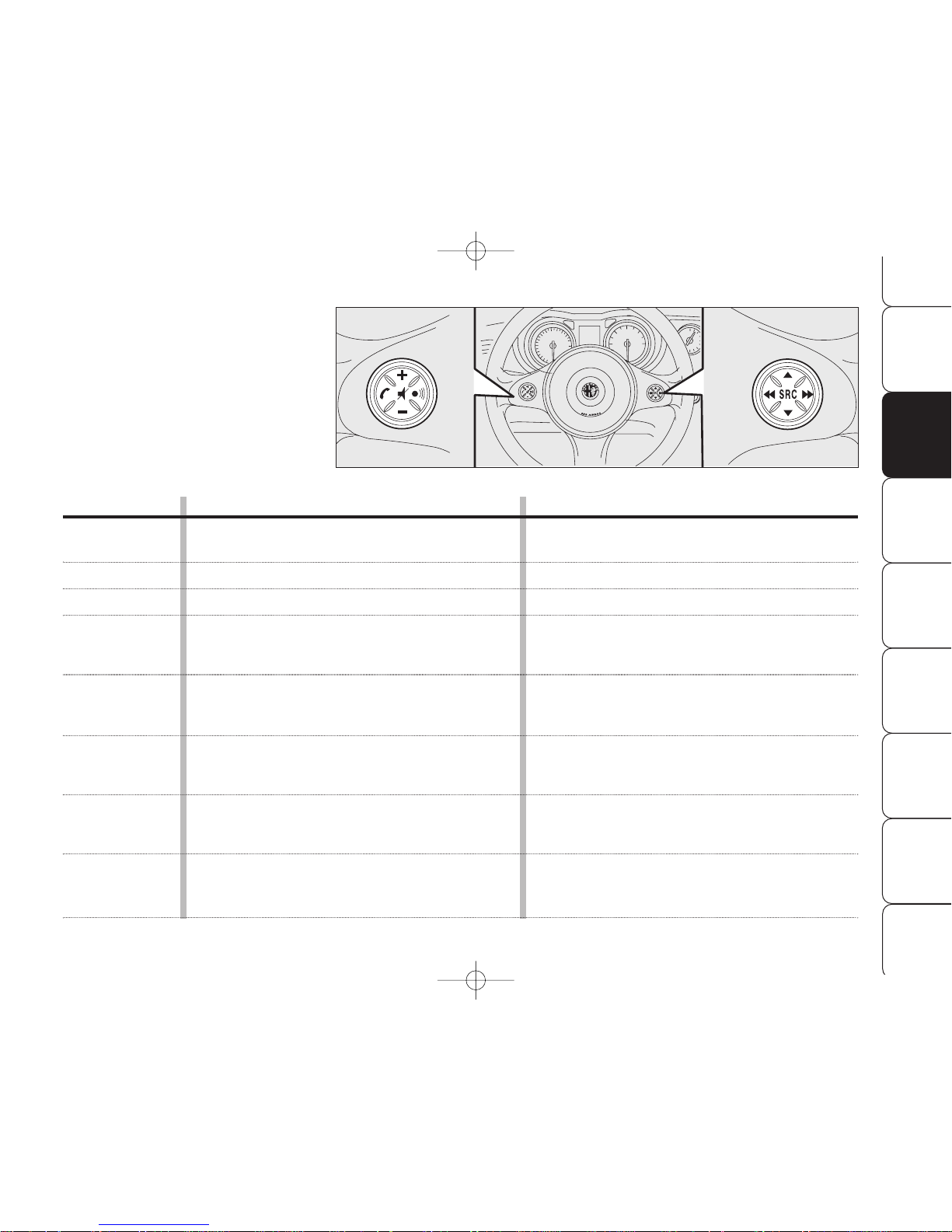
STEERING WHEEL CONTROLS
(where provided)
Button
^
+
–
SRC
N
O
÷
˜
FUNCTION
AudioMute on/off
(with sound system on)
Volume up
Volume down
Radio frequency
(FM1, FM2, FMT, MW, LW) and audio source
(Radio - CD - MP3 - CD Changer) selection button
Radio: recall preset stations (1 to 6)
MP3: select next directory
CD Changer: select next CD in the CD Changer
Radio: recall preset stations (6 to 1)
MP3: select previous directory
CD Changer: select previous CD in the CD Changer
Radio: automatic tuning to previous station
CD player: select previous track
CD Changer: select previous track
Radio: automatic tuning to next station
CD player: select next track
CD Changer: select next track
Mode
Brief button pressing
Press button
Press button
Press button
Press button
Press button
Press button
Press button
A0F0267m
604.31.595 Radio 159 Brera Sider GB 29-10-2007 16:31 Pagina 9
Page 11
FUNCTIONS AND
ADJUSTMENTS
RADIO
COMPACT
DISC PLAYER
MP3 CD
PLAYER
CD
CHANGER INTRODUCTION
10
QUICK
GUIDE
On multimedia CDs in addition to sound tracks also
data tracks are recorded.
Playing one of these CDs may
cause rustling and such a volume
as to compromise road safety, as
well as causing damage to the final stages and speakers.
MP3 CD section
❒
MP3-Info function (ID3-TAG);
❒
Directory selection (previous/next);
❒
Track selection (forward/backward);
❒
Fast forward/backward;
❒
MP3 CD data display: directory name,
ID3-TAG info, time elapsed from start of
track, file name);
❒
Playing audio CDs and R/RW CDs.
Audio section
❒
Mute/Pause function;
❒
Soft Mute function;
❒
Loudness function (excluding versions
with Bose HI-FI system);
❒
7 band graphic equalizer (excluding versions with Bose HI-FI system);
❒
Separate bass/treble adjustment;
❒
Right/left channel balancing.
Compact Disc section
❒
Direct disc selection;
❒
Track selection (forward/backward);
❒
Fast forward/backward;
❒
CD Display function: displaying CD
name/time elapsed from start of track;
❒
Playing audio CDs and R/RW CDs.
GENERAL
The set possesses the following functions:
Radio section
❒
PLL tuning with FM/AM/MW/LW frequency bands;
❒
RDS (Radio Data System) with TA (traffic announcements) - TP (Program Type)
- EON (Enhanced Other Network) - REG
(Regional programmes);
❒
AF: alternative frequency search selection
in RDS mode;
❒
emergency alarm presetting;
❒
automatic/manual station tuning;
❒
FM Multipath detector;
❒
manual storage of 36 stations: 18 in the
FM band (6 in FM1, 6 in FM2, 6 in
FMT), 6 in the MW band and 6 in the LW
band;
❒
automatic storage (AUTOSTORE function)
of 6 stations in FM band;
❒
SPEED VOLUME function (excluding versions with Bose HI-FI system): automatic volume adjustment with car speed;
❒
automatic Stereo/Mono switching.
604.31.595 Radio 159 Brera Sider GB 29-10-2007 16:31 Pagina 10
Page 12
RADIOCOMPACT
DISC PLAYER
MP3 CD
PLAYER
CD
CHANGER
INTRODUCTION
11
QUICK
GUIDE
FUNCTIONS AND
ADJUSTMENTS
SELECTING CD/CD CHANGER
FUNCTIONS
Pressing briefly and repeatedly button CD
it is possible to select the following audio
sources in sequence:
❒
CD (only if the Compact Disc is inserted);
❒
CHANGER (CD Changer - only if the CD
Changer is connected).
AUDIO SOURCE MEMORY
FUNCTION
If while listening to a CD another function is
selected (e.g.: the radio), playing is stopped
and when the CD mode is resumed, it starts
again from the point in which it was
stopped.
If while listening to the radio another function is selected, when the Radio mode is
resumed, it is tuned to the last station selected.
VOLUME ADJUSTMENT
Adjust volume through button/knob
ON/OFF.
If the volume level is changed during the
broadcast of a traffic bulletin, the new setting is maintained only until the end of the
bulletin.
SPEED VOLUME FUNCTION
(excluding versions with Bose
HI-FI system)
The SVC function makes it possible to automatically adapt the volume level to the
speed of the car, increasing it as the speed
increases to maintain the ratio with the noise
level inside the passenger compartment.
See section MENU for activating/deactivating this function.
TURNING THE
SOUND SYSTEM ON
The set is switched on pressing briefly the
button/knob ON/OFF.
When turning the sound system on, the volume level will be brought to 20 if it was set
to over.
If the radio is turned on when the key is not
fitted into the ignition device, it will turn off
automatically after about 20 minutes. After
automatic switching off, it is however possible to turn the radio on again for other 20 minutes by pressing the button/knob ON/OFF.
TURNING THE
SOUND SYSTEM OFF
Keep button/knob ON/OFF pressed.
SELECTING RADIO FUNCTIONS
Pressing briefly and repeatedly button FMAS it is possible to select the following functions in sequence:
❒
TUNER (“FM1”, “FM2”, “FMT”);
Pressing briefly and repeatedly button AM it
is possible to select the following functions
in sequence:
❒
TUNER (“MW”, “LW”).
FFFFUUUUNNNNCCCCTTTTIIIIOOOONNNNSSSS AAAANNNNDDDD AAAADDDDJJJJUUUUSSSSTTTTMM
MMEEEENNNNTTTTSSSS
604.31.595 Radio 159 Brera Sider GB 29-10-2007 16:31 Pagina 11
Page 13
RADIO
COMPACT
DISC PLAYER
MP3 CD
PLAYER
CD
CHANGER INTRODUCTION
12
QUICK
GUIDE
FUNCTIONS AND
ADJUSTMENTS
AUDIO ADJUSTMENTS
The options proposed by the audio menu differ according to the audio source selected:
AM/FM/CD/CDC.
To change Audio functions, press briefly button AUDIO. The display will show “BASS”.
To scroll the Menu options, use buttons
N
or O. To change the setting of the option
selected, press buttons
÷
or
˜
.
The display will show the current status of
the function selected.
The functions controlled by the menu are the
following:
❒
BASS (bass adjustment);
❒
TREBLE (treble adjustment);
❒
BALANCE (right/left balance);
❒
FADER (excluding versions with Bose HIFI system) (front/rear balance);
❒
LOUDNESS (excluding versions with Bose
HI-FI system) (LOUDNESS on/off);
❒
EQUALIZER (excluding versions with Bose
HI-FI system) (standard equalization activation and selection);
❒
USER EQUALISER (personal equalization
setting).
TONE ADJUSTMENT
(bass/treble)
Proceed as follows:
❒
Use button
N
or Oto select “BASS”
or “TREBLE” in the AUDIO menu;
❒
press button
÷
or
˜
to in-
crease/decrease the basses or trebles.
Pressing the buttons briefly the change is gradual by steps. Pressing longer, changing is
faster.
BALANCE ADJUSTMENT
Proceed as follows:
❒
Use button
N
or Oto select “BALANCE”
in the AUDIO menu;
❒
press button
÷
to increase the sound
from the right speakers or button
˜
to increase the sound from the left speakers.
Pressing the buttons briefly the change is gradual by steps. Pressing longer, changing is
faster.
Select “
÷0 ˜
” to set the same val-
ue for both right and left speakers.
MUTE /PAUSE FUNCTION
(turning off the volume
completely)
To switch on the Mute function, briefly press
the button MUTE. Volume will gradually lower and the display will show the word
“MUTE” (when in radio mode) or “PAUSE”
(when in CD or CD-Changer mode).
To switch off the Mute function, press the
button MUTE again. Volume will gradually
become louder returning to the value set before switching on the Mute function.
Changing volume will deactivate the Mute
function and the volume will be set to the
new level selected.
With the Mute function on:
❒
if an emergency alarm or a traffic bulletin
arrives with the TA function on, the message ignores the Mute function. The Mute
function will be resumed at the end of the
traffic announcement.
604.31.595 Radio 159 Brera Sider GB 29-10-2007 16:31 Pagina 12
Page 14
RADIOCOMPACT
DISC PLAYER
MP3 CD
PLAYER
CD
CHANGER
INTRODUCTION
13
QUICK
GUIDE
FUNCTIONS AND
ADJUSTMENTS
PRESET/USER*/CLASSIC/
ROCK/JAZZ functions
(equalizer on/off)
The integrated equalizer can be turned on
or off. With the equalizer off, it is possible
to change the sound settings only adjusting the bass (“BASS”) and treble tones
(“TREBLE”), while activating the function
makes it possible to adjust the sound curves.
To turn the equalizer off, select “PRESET”
by means of button
÷
or
˜
.
To turn the equalizer on, use button
÷
or
˜
to select one of the following op-
tions:
❒
“USER” (adjustment of the 7 equalizer
bands that can be changed by the user);
❒
“CLASSIC” (predefined equalizer adjustment for best playing of classic music);
❒
“ROCK” (predefined equalizer adjustment for best playing of rock and pop music);
❒
“JAZZ” (predefined equalizer adjustment
for best playing of jazz music).
When one of the equalizer settings is on,
the display shows “EQ”.
*USER EQ SETTINGS function
(only if the USER equalizer
setting has been selected)
(excluding versions with
Bose HI-FI system)
To set a personal equalizer adjustment, use
button
N
or Oto select USER and then
press button
O
for long.
The display shows a graph with 7 bars,
where each bar represents a frequency.
Choose the bar to be adjusted using button
÷
or
˜
; the bar chosen starts to flash
and it is possible to adjust it using button
N
or O.
To store the new settings, press button AUDIO again. The display still shows “USER EQ
SETTINGS”.
ANTITHEFT PROTECTION
Refer to section “CD PLAYER”.
FADER ADJUSTMENT
Proceed as follows:
❒
Use button
N
or Oto select “FADER” in
the AUDIO menu;
❒
press button
÷
to increase the sound
from the rear speakers or button
˜
to
increase the sound from the front speakers.
Pressing the buttons briefly the change is gradual by steps. Pressing longer, changing is
faster.
Select “
÷0 ˜
” to set the same val-
ue for both front and rear speakers.
LOUDNESS FUNCTION
The Loudness function improves the sound
volume when listening at low level, increasing the basses and trebles.
To switch the function on/off, use button
N
or Oto select “LOUDNESS” in the AUDIO menu. The function condition (on or off)
is shown on the display for few seconds by
“LOUDNESS ON” or “LOUDNESS OFF”.
604.31.595 Radio 159 Brera Sider GB 29-10-2007 16:31 Pagina 13
Page 15
FUNCTIONS AND
ADJUSTMENTS
COMPACT
DISC PLAYER
MP3 CD
PLAYER
CD
CHANGER INTRODUCTION
14
QUICK
GUIDE
RADIO
Each band is shown by the respective wording on the display.
The last station selected in the respective frequency band will be tuned.
The FM band is divided into sections: FM1,
FM2 and FMT. The FMT reception band is reserved to the stations stored automatically
with the AutoSTore function.
PRESETTING BUTTONS
The buttons with symbols from 1 to 6 make
it possible to set the following presettings:
❒
18 in the FM band (6 in FM1, 6 in FM2,
6 in FMT);
❒
6 in the MW band;
❒
6 in the LW band;
To call a preset station, choose the required
frequency band and then press briefly the
corresponding preset button (from 1 to 6).
Pressing the respective preset button for
longer than 2 seconds will store the tuned
station. Storing is confirmed by a beep.
STORING THE LAST STATION
HEARD
The radio automatically keeps in storage the
last station heard for each reception band,
which is then tuned when the radio is turned
on or the reception band is changed.
AUTOMATIC TUNING
Briefly press button
÷
or
˜
to start
automatically searching the tuning for the
next station that it is possible to receive in
the direction chosen.
If button
÷
or
˜
is pressed for longer,
quick searching takes place. When the button
is released, the tuner stops on the next receivable station.
If the TA function is on (traffic information),
the tuner only searches stations which broadcast traffic bulletins.
INTRODUCTION
When the set is turned on the last function
selected before turning off is played (Radio,
CD or CD Changer).
To select the Tuner source while listening
to another audio source, press briefly buttons FM or AM, according to the required
frequency band.
When Tuner is on, the display will show the
selected station name (RDS stations only)
(or frequency), the frequency band (e.g.:
FM1) and the preselection button number
(e.g.: P1).
SELECTING THE FREQUENCY
BAND
If in the Tuner mode, briefly and repeatedly press button FM or AM to select the required frequency band.
Every time the button is pressed the following bands are selected in sequence:
❒
Pressing button FM: “FM1”, “FM2”,
“FMT”;
❒
Pressing button AM: , “MW” and “LW”.
RRRRAAAADDDDIIIIOOOO ((((TTTTUUUUNNNNEEEERRRR))
))
604.31.595 Radio 159 Brera Sider GB 29-10-2007 16:31 Pagina 14
Page 16
FUNCTIONS AND
ADJUSTMENTS
COMPACT
DISC PLAYER
MP3 CD
PLAYER
CD
CHANGER
INTRODUCTION
15
QUICK
GUIDE
RADIO
AUTOSTORE FUNCTION
(automatic station storage)
To switch on the AutoSTore function, keep
button FM-AS pressed until receiving the confirmation beep. With this function the radio automatically stores the six stations with
the strongest signal in decreasing order of
intensity of the FMT frequency band.
IMPORTANT Activating the AutoSTore function cancels the stations stored previously in
the FMT band.
If the TA function is on (traffic information),
only the stations that send traffic information will be stored.
During automatic storage the display shows
“FM AST”.
To interrupt AutoSTore press button FM-AS
again: the radio will automatically tune to
the station heard before activation of the AutoSTore function.
At the end of the AutoSTore function the radio automatically tunes on the first preset
station in the FMT band stored on preset button 1.
On buttons numbered from 1 to 6, the stations are automatically stored that give a
strong signal in that moment in the present
band.
Activating the AutoSTore function in MW or
LW bands will automatically select the FMT
band where the function is then run.
IMPORTANT Sometimes the AutoSTore function is unable to find 6 stations with a strong
signal. In this case the previous stations will
be stored on the free preset buttons.
MANUAL TUNING
This allows manual station searching in the
chosen band.
Select the required frequency band and then
press briefly and repeatedly button
N
or
O
to start searching in the chosen band. Pressing one of the buttons
N
or Olonger obtains
fast forward searching, which is stopped when
the button is released.
604.31.595 Radio 159 Brera Sider GB 29-10-2007 16:31 Pagina 15
Page 17
FUNCTIONS AND
ADJUSTMENTS
COMPACT
DISC PLAYER
MP3 CD
PLAYER
CD
CHANGER INTRODUCTION
16
QUICK
GUIDE
RADIO
EMERGENCY ALARM
RECEPTION
In the RDS mode the radio is set to receive
emergency announcements in the case of
exceptional circumstances or events that
may cause general danger (earthquakes,
floods, etc.), if they are broadcast by the
station tuned.
This function is activated automatically and
cannot be deactivated.
During emergency announcement the display will show the message “ALARM”. During this announcement the volume will
change as described for traffic announcements (see paragraph “TA FUNCTION”).
EON FUNCTION
(Enhanced Other Network)
Certain countries have circuits which group
together several stations enabled to broadcast traffic information. In this case the programme of the station being heard will be
interrupted temporarily:
❒
to receive traffic information (only with
TA function on);
❒
to listen to regional programmes every
time these bulletins are given by one of
the stations of the same circuits.
STEREOPHONIC STATIONS
If the signal received is weak, the device
switches automatically from Stereo to Mono.
MENU
MENU button functions
To activate the menu function, briefly press
button MENU. The display shows the word
“MENU”.
To scroll the menu functions use button
N
or O. To change the setting of the selected function use button
÷
or
˜
.
The display will show the current status of
the function selected.
The functions controlled by the menu are the
following:
❒
AF SWITCHING (ON/OFF)
❒
TRAFFIC INFO (ON/OFF)
❒
REGIONAL MODE regional programmes
(ON/OFF);
❒
MP3 DISPLAY (MP3 CD data display);
❒
SPEED VOLUME (excluding versions with
Bose HI-FI system) (automatic volume
control in relation to speed);
❒
EXTERNAL AUDIO VOL (external audio
sources control)
❒
RADIO OFF (System power off mode).
❒
RESTORE DEFAULT
To exit the menu function, press button
MENU again.
604.31.595 Radio 159 Brera Sider GB 29-10-2007 16:31 Pagina 16
Page 18
FUNCTIONS AND
ADJUSTMENTS
COMPACT
DISC PLAYER
MP3 CD
PLAYER
CD
CHANGER
INTRODUCTION
17
QUICK
GUIDE
RADIO
TRAFFIC INFO function
(traffic information)
Certain stations in the FM band (FM1, FM2
and FMT) are enabled to also broadcast information about traffic conditions. In this
case the display shows “TP”.
To turn the TA (traffic information) function
on/off, briefly press button MENU, select
“TRAFFIC INFO” and then ON/OFF.
IMPORTANT If the TA function (traffic information) is on, with CD, CD Changer (if installed), Telephone or Mute/Pause active:
automatic station tuning will start.
With the TA function it is possible:
❒
to search only RDS stations that transmit
in the FM band, enabled to broadcast traffic information;
❒
to receive traffic information although CD
player or CD Changer are being used;
❒
to receive traffic information at a predefined minimum volume even with the radio volume off.
IMPORTANT In certain countries radio stations exist which, even if the TP function is
on (the display shows “TP”), do not transmit traffic information.
If the radio is working in the AM band, when
TA is activated, it passes to the FM1 band
on the last station heard.
The volume with which the traffic bulletin
is transmitted varies depending on the listening volume:
❒
listening volume below 20: traffic bulletin
volume = 20 (fixed value);
❒
listening volume above 20: traffic bulletin
volume = listening volume +1.
If the volume is changed during a traffic bulletin the value is not shown on the display
and the new value is kept only for the bulletin in progress.
When receiving traffic information the display will show message “TRAFFIC INFORMATION”.
The TA function is interrupted by pressing
any sound system button.
AF SWITCHING function
(alternative frequency search)
Within the RDS system the radio can work
in two different modes:
❒
“AF ON”: alternative frequency search on
(the display shows “AF”);
❒
“AF OFF”: alternative frequency search
off.
With “AF ON”, the radio is automatically
tuned to the station with the strongest signal that is broadcasting the same programme. During the journey it will thus be
possible to continue listening to the station
chosen without having to change the frequency when changing area.
Of course, the station being listened to must
be receivable in the area the car is crossing.
To turn the AF function on/off press button
MENU, select “AF SWITCHING” and then
ON/OFF. If the AF function has been turned
on the display shows “AF”.
If the radio is working in the AM band, when
the AF function is activated, it passes to the
FM1 band on the last station selected.
604.31.595 Radio 159 Brera Sider GB 29-10-2007 16:31 Pagina 17
Page 19
FUNCTIONS AND
ADJUSTMENTS
COMPACT
DISC PLAYER
MP3 CD
PLAYER
CD
CHANGER INTRODUCTION
18
QUICK
GUIDE
RADIO
The display will show the current status of
the function:
❒
“REGIONAL MODE: ON”: function on.
❒
“REGIONAL MODE: OFF”: function off.
If the function is off and a regional programme is tuned that works in a determinate area and the car enters a different area,
the regional station of the new area is received.
IMPORTANT If AF and REG are both active,
when passing from one region to another the
radio could not tune properly to a valid alternative frequency.
MP3 CD DISPLAY
(MP3 CD data display)
With this function it is possible to choose the
information shown on the display, when listening to a MP3 CD.
This function can be selected only if a MP3
CD is loaded: in this event the display shows
“MP3 DISPLAY”.
To change the function use buttons
÷
or
˜
.
The display shows the setting among the six
possible:
❒
TITLE (track title, if ID3-TAG available)
❒
AUTHOR (track author, if ID3-TAG available)
❒
ALBUM (album title, if ID3-TAG available)
❒
DIR (directory name);
❒
FILENAME (MP3 file name);
❒
TIME (time elapsed from start of track).
REGIONAL MODE function
(regional broadcast reception)
Certain national broadcasters, at determinate times of the day, transmit regional programmes which differ from region to region.
This function makes it possible to tune in only on local stations (regional) (see paragraph “EON function”).
Activate this function if you want to tune automatically to regional stations broadcasting
in the selected band.
To turn the function on/off use button
÷
or
˜
.
604.31.595 Radio 159 Brera Sider GB 29-10-2007 16:31 Pagina 18
Page 20
FUNCTIONS AND
ADJUSTMENTS
COMPACT
DISC PLAYER
MP3 CD
PLAYER
CD
CHANGER
INTRODUCTION
19
QUICK
GUIDE
RADIO
EXTERNAL AUDIO VOL function
With this function it is possible to adjust (setting from 0 to 40) or exclude (OFF) external
audio sources.
To turn this function on/off, use button
÷
or
˜
.
The display will show the current status of
the function:
❒
“EXTERN FUNCTION OFF”: function off.
❒
“EXTERN VOLUME: 23”: function on with
volume level 23.
RADIO OFF function
(system power on/off mode)
This function enables to switch off the sound
system according to two different modes.
To turn the function on use button
÷
or
˜
.
The display will show the selected mode:
❒
“00 MIN”: deactivation dependent on ignition key. The sound system will turn off
automatically as soon as the key is removed from the ignition device;
❒
“20 MIN”: deactivation independent of
ignition key. The sound system will stay
on for max. 20 minutes after removing
the key from the ignition device.
IMPORTANT When the sound system is
switched off automatically after removing
the key from the ignition device (for both
immediate or 20-minute delayed power
off), it will switch on automatically fitting
the key into the ignition device. If the sound
system has been switched off pressing the
button ON/OFF, when fitting the key into
the ignition device, it will stay off.
RESTORE DEFAULT function
This function enables to restore default settings. Options available are the following:
❒
NO: no restore;
❒
YES: restore default settings. During this
operation the display will show the message “RESTORING”. At the end of this operation, the audio source will not be
changed and the previous situation is displayed.
SPEED VOLUME function
(volume changing with speed)
(excluding versions with
Bose HI-FI system)
This function makes it possible to automatically adapt the volume level to the speed
of the car, increasing it as the speed increases to maintain the ratio with the noise
level inside the passenger compartment.
To turn the function on/off use button
÷
or
˜
. The display will show the current
status of the function:
❒
OFF: function off
❒
LOW: function on
(low sensitivity)
❒
HIGH: function on
(high sensitivity).
604.31.595 Radio 159 Brera Sider GB 29-10-2007 16:31 Pagina 19
Page 21
FUNCTIONS AND
ADJUSTMENTS
RADIO
MP3 CD
PLAYER
CD
CHANGER INTRODUCTION
20
QUICK
GUIDE
COMPACT
DISC PLAYER
SELECTING THE COMPACT DISC
PLAYER
To turn on the Compact Disc player integrated in the set, proceed as follows:
❒
insert a CD with the set on: the first track
will be played;
or
❒
if a CD is already inserted, turn the set on
and press briefly button CD to select
“CD”: the last heard track will be played.
For optimal playing use only original CDs.
When using R/RW CDs, use top quality CDs
mastered at the as low as possible speed.
INSERTING/EJECTING A CD
To insert the CD set it gently in place to activate the powered loading system, which
will position it correctly.
Press button
ı
, with the device on, to operate the powered CD eject system. After
ejection, the source heard before playing the
CD will return.
If CD is not ejected, the device will reload
it automatically after about 20 seconds and
then will set to Tuner (Radio).
CD cannot be ejected if the device is off.
Inserting the ejected CD without fully removing it from the slot, the tuner will not
change the source to CD.
INTRODUCTION
This section only describes CD player operation variants: as concerns sound system operation, refer to section “FUNCTIONS AND
ADJUSTMENTS”.
CCCCOOOOMM
MMPPPPAAAACCCCTTTT DDDDIIIISSSSCCCC PPPPLLLLAAAAYYYYEEEERRRR
604.31.595 Radio 159 Brera Sider GB 29-10-2007 16:31 Pagina 20
Page 22
FUNCTIONS AND
ADJUSTMENTS
RADIO
MP3 CD
PLAYER
CD
CHANGER
INTRODUCTION
21
QUICK
GUIDE
COMPACT
DISC PLAYER
POSSIBLE ERROR MESSAGES
If the CD inserted is illegible (e.g.: CD-ROM
inserted, CD not inserted properly or reading error), the display will show the message “CD ERROR” for about 2 seconds.
The CD is then ejected and the previous
source before CD was selected returns.
DISPLAY INFORMATION
When the CD player is working, the display
shows the following information which
means:
“T05”: shows the number of the track on
the CD;
“03:42”: shows the time elapsed since the
start of the track (if the corresponding Menu
function is on);
SELECT TRACK
(forward/backward)
Briefly press button
÷
to play the previ-
ous track and button
˜
to play the next
one. Tracks are played in sequence: after the
last track, the first one will be played and
vice versa.
If playing the track started more than 3 seconds ago, pressing briefly button
÷
the
track is played again from the start. In this
case if wanting to play the previous track,
press the button twice consecutively.
FAST FORWARD/BACKWARD
Keep button
˜
pressed to move the track
selected forward at high speed and keep button
÷
pressed to move it quickly backward. Fast forward/backward is stopped
once the button is released.
PAUSE FUNCTION
To pause the CD player, press button MUTE.
The display will show “PAUSE”.
To resume playing the track, press button
MUTE again.
The pause function is deactivated changing
the sound source.
604.31.595 Radio 159 Brera Sider GB 29-10-2007 16:31 Pagina 21
Page 23
FUNCTIONS AND
ADJUSTMENTS
RADIO
MP3 CD
PLAYER
CD
CHANGER INTRODUCTION
22
QUICK
GUIDE
COMPACT
DISC PLAYER
Entering the secret code
When turning the sound system on (in the
event of code request), the display will show
the word “CODE” for about 2 seconds, followed by four dashes “- - - -”.
The secret code comprises four figures from
1 to 6, each corresponding to one of the
dashes.
To enter the first digit of the code, press the
corresponding key of the preset stations
(from 1 to 6). Enter the other code digits in
the same way.
If the four figures are not entered within 20
seconds, the display shows the word
“CODE” for 2 seconds and then fours dashes “- - - -”. This is not to be considered as an
incorrect code entry.
After entering the fourth digit (within 20 seconds), the radio starts working.
If a wrong code is entered, the radio sounds
a beep, the display shows the word “CODE”
for 2 seconds and then fours dashes “- - - -”
to warn the user that it is necessary to enter the correct code.
Every time the user enters a wrong code,
the waiting time increases gradually (1 min,
2 min, 4 min, 8 min, 16 min, 30 min,1h,
2h, 4h, 8h, 16h, 24h) until reaching a maximum of 24 hours. The waiting time will
be shown on the display with the word
“WAIT”. When this goes off it is possible
to start the new code entry procedure.
Code Card
This the document that certifies possession
of the radio. The Code Card contains the radio model, serial number and secret code.
IMPORTANT Keep the Code Card carefully to
be able to give the related data to the competent authorities in the event of theft.
ANTITHEFT PROTECTION
The radio is fitted with an antitheft protection system based on the exchange of information between the radio and the electronic control unit (Body Computer) installed
on the car.
This system warrants the highest level of security and prevents entry of the secret code
every time the radio supply is disconnected.
If the result of the check is positive, the set
starts working, whereas if the comparison
codes are not the same or if the electronic
control unit (Body Computer) is replaced,
the device informs the user of the need to
enter the secret code according to the procedure described in the following paragraph.
604.31.595 Radio 159 Brera Sider GB 29-10-2007 16:31 Pagina 22
Page 24
FUNCTIONS AND
ADJUSTMENTS
RADIOCOMPACT
DISC PLAYER
CD
CHANGER
INTRODUCTION
23
QUICK
GUIDE
MP3 CD
PLAYER
MP3 MODE
In addition to standard audio CDs, the sound
system can also play audio files in MP3 format. Sound system will operate as described
in the previous section (“Sound system with
Compact Disc player”) when inserting a conventional audio CD.
For optimal playing use only top quality CDs
mastered at a speed as low as possible.
MP3 CD files are structured by directories,
with sequential lists of all directories containing MP3 tracks (directories and sub-directories are all brought to the same level), directories not containing MP3 tracks
cannot be selected.
Technical data and operating conditions for
MP3 files are as follows:
❒
adopted CD-ROM shall be mastered according to ISO9660 Standard;
❒
music files shall be renamed as “.mp3”
otherwise they cannot be played;
❒
sampling frequencies are: 44.1 kHz,
stereo (96 to 320 kbit/s) - 22.05 kHz,
mono or stereo (32 to 80 kbit/s);
❒
it is possible to play variable bit-rate tracks
(files).
IMPORTANT Characters: blank, ‘ (apostrophe), ( and ) (open and closed brackets)
are not admitted in MP3 track names. When
sampling MP3 CD you must not use these
characters to name files otherwise the sound
system will not be able to play it.
INTRODUCTION
This section only describes MP3 CD player
operation variants: as concerns sound system operation, refer to section “FUNCTIONS
AND ADJUSTMENTS”.
NOTE MPEG Layer-3 audio decoding technology licensed from Fraunhofer IIS and
Thomson multimedia.
MM
MMPPPP3333 CCCCDDDD PPPPLLLLAAAAYYYYEEEERRRR
604.31.595 Radio 159 Brera Sider GB 29-10-2007 16:31 Pagina 23
Page 25
FUNCTIONS AND
ADJUSTMENTS
RADIO
COMPACT
DISC PLAYER
CD
CHANGER INTRODUCTION
24
QUICK
GUIDE
MP3 CD
PLAYER
PROTECTION AGAINST THEFT
Refer to section “COMPACT DISC PLAYER”.
SELECT NEXT/PREVIOUS
DIRECTORY
Press button
N
to select the next directory
or press button
O
to select the previous one.
The name of the new selected directory will
be shown on the display.
Directories are selected in cyclic sequence:
after the last directory the first one is selected and vice versa.
If no other directory/track is selected in the
following 2 seconds, the first track in the
new directory will be played.
If the last track in the currently selected directory is played, the next will then be
played.
DISPLAY INFORMATION
ID3-TAG info display
In addition to time elapsed, directory name
and file name, also ID3-TAG info relevant
to track Title, Artist, Author (see section
“MP3 DISPLAY FUNCTION”) are displayed.
The MP3 directory name shown on the display corresponds to the name with which
the directory is stored on the CD, followed
by an asterisk.
Example of full MP3 directory name: BEST
OF *.
If you want to display one ID3-TAG info (Title, Artist, Album) and the track being played
has no ID3-TAG info then, the file name will
be displayed.
604.31.595 Radio 159 Brera Sider GB 29-10-2007 16:31 Pagina 24
Page 26
FUNCTIONS AND
ADJUSTMENTS
RADIOCOMPACT
DISC PLAYER
MP3 CD
PLAYER
INTRODUCTION
25
QUICK
GUIDE
CD
CHANGER
INTRODUCTION
This section only describes CD Changer
(where provided) operation variants: as concerns sound system operation, refer to section “FUNCTIONS AND ADJUSTMENTS”.
SELECTING THE CD CHANGER
Turn on the set, then press briefly and repeatedly button CD until selecting “CHANGER”.
POSSIBLE ERROR MESSAGES
Error messages will be displayed in the following cases:
❒
no CD in the CD Changer: the display will
show “NO CD” until changing the sound
source;
❒
selected CD is illegible (CD not in the selected position or CD not inserted properly): the display shows “CD ERROR” after the number of the selected CD. The
next CD will be selected; if there are no
other CDs or if they are also illegible the
display will show the wording “NO CD”
until the sound source is changed;
❒
error in CD reading: the display shows
“CD ERROR”. The next CD will be selected; if there are no other CDs in the CD
Changer (after the last CD search will
restart from the first one) or if they are
also illegible the display will show the
wording “NO CD” until the sound source
is changed;
❒
a CD-ROM is inserted: next CD will be
selected.
CCCCDDDD CCCCHHHHAAAANNNNGGGGEEEERRRR ((((CCCCDDDDCCCC))
))
Installation and connection
of a Lineaccessori CD
Changer shall only be performed by Alfa Romeo Authorized
Services.
SELECTING THE CD
Press button
N
to select the next CD and
button Oto select the previous CD.
If the loader does not contain a disc in the
position selected, the display briefly shows
the wording “NO CD”, and the next CD is
played automatically.
604.31.595 Radio 159 Brera Sider GB 29-10-2007 16:31 Pagina 25
Page 27

26
OVERVIEW
Low volume
The Fader function shall only be set to “F”
(front), to prevent sound system output
power reduction and volume muting if the
Fader level set is = R+9.
Required source cannot be
selected
No CD loaded. Load the CD or the MP3 CD
you want to play.
TTTTRRRROOOOUUUUBBBBLLLLEEEESSSSHHHHOOOOOOOOTTTTIIIINNNNGG
GG
COMPACT DISC PLAYER
CD not played
Loaded CD is dirty. Clean the CD.
Loaded CD is scratched. Try to play another
CD.
Required CD cannot be loaded
Another CD is already loaded. Press button
ı
and remove the CD.
MP3 FILE READING
Skipping when reading MP3 files
Loaded CD is scratched or dirty. Clean the
CD as described in paragraph “CD” in section “INTRODUCTION”.
MP3 track length not displayed
correctly
In certain cases (due to recording) MP3
track length can be displayed incorrectly.
604.31.595 Radio 159 Brera Sider GB 29-10-2007 16:31 Pagina 26
Page 28

NNNNOOOOTTTTEEEESS
SS
604.31.595 Radio 159 Brera Sider GB 29-10-2007 16:31 Pagina 27
Page 29

604.31.595 Radio 159 Brera Sider GB 29-10-2007 16:31 Pagina 28
Page 30

604.31.595 Radio 159 Brera Sider GB 29-10-2007 16:31 Pagina 29
Page 31

604.31.595 Radio 159 Brera Sider GB 29-10-2007 16:31 Pagina 30
Page 32

604.31.595 Radio 159 Brera Sider GB 29-10-2007 16:31 Pagina 31
Page 33

SERVIZI AL CLIENTE
ASSISTENZA TECNICA - INGEGNERIA ASSISTENZIALE
Largo Senatore G. Agnelli, 5 - 10040 Volvera - Torino (Italia)
Fiat Group Automobiles S.p.A.
Publication no. 60431595 - 2
nd
Edition - 10/2007
All rights reserved. Reproduction, even in part is prohibited without written permission
from Fiat Group Automobiles S.p.A.
SS EE RR VV II CC EE
604.31.595 Radio 159 Brera Sider GB 29-10-2007 16:31 Pagina 32
Page 34

 Loading...