

Page 1
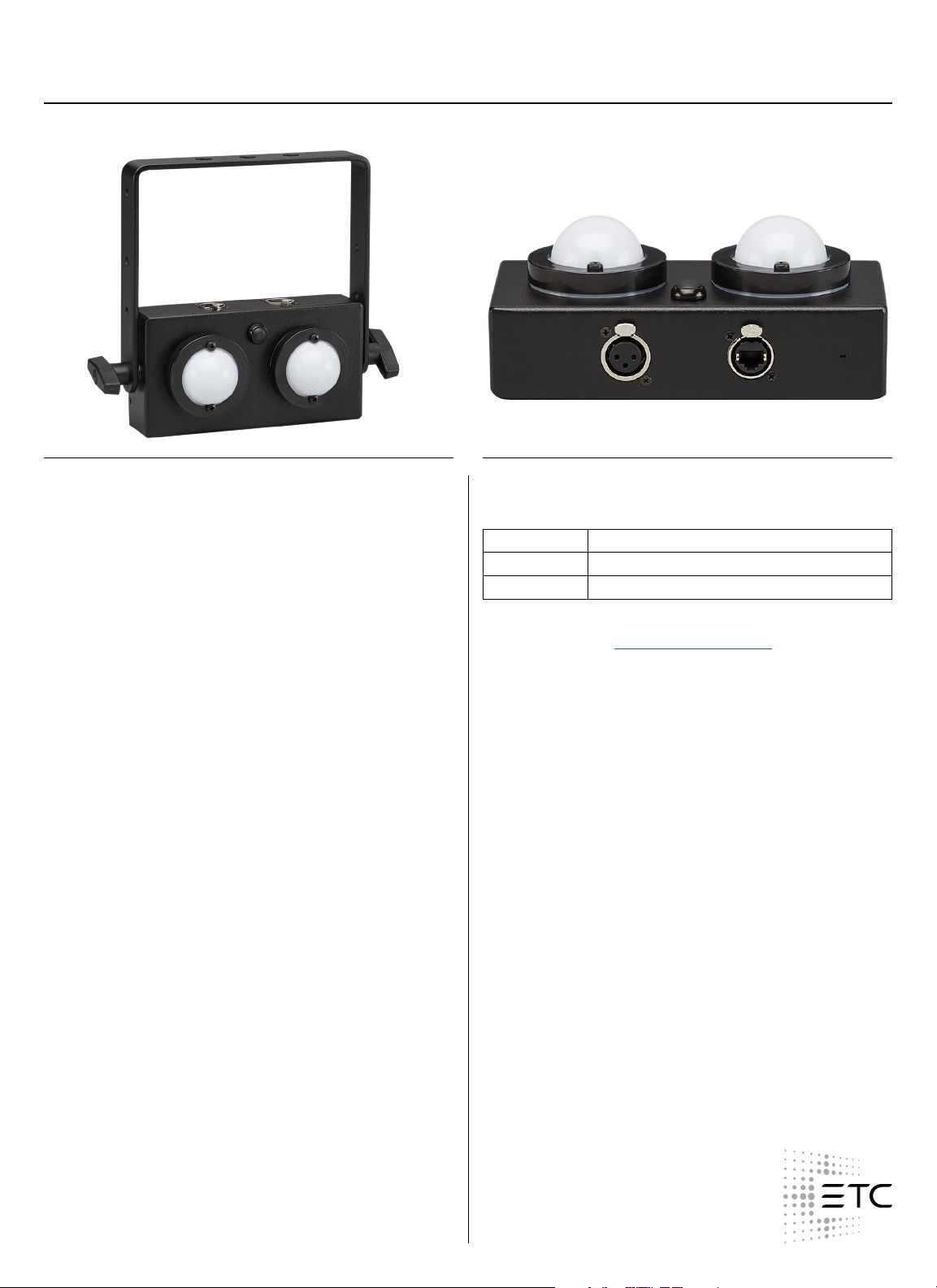
CueSpider Large OutstationETC
CueSystem Series
GENERAL INFORMATION
CueSystem is a highly flexible cue light system using dedicated
hardware and software along with standard Ethernet protocols
to control a network of outstations. This customizable
backstage communication network provides an immediate visual
communication system complete with advanced features such as text
based cue information and outstation acknowledgement providing
peace of mind in show-critical applications.
CueSpider Large is equipped with two high-visibility signal lights
ideally suited for use at distance such as a front-of-house balcony
rail or truss tower. A local ‘acknowledge’ button allows operators
to confirm that they are in place and ready. An optional 3-pin XLR
single-button remote is available for outboard connection of the
acknowlegdge button, useful when CueSpider Large is installed out
of arms reach. For more complex shows, a dedicated PC software
application provides familiar cue recording and playback functionality
that can be uploaded to a dedicated rack-mount or desktop playback
unit. Prefer a hands-on approach? CueSpider outstations can also be
operated manually or on the fly via the desktop or rack-mount desks,
available in 4-, 8- and 12-way configurations.
APPLICATIONS
• Professional theatre
• Touring productions
• School auditoriums/theatre
• Community theatre
• House of worship
• TV studio
FEATURES
• Rugged metal enclosure with rear mounting point for wall
hanging
• Yoke included for pipe hanging (clamp available separately)
• Standard Power over Ethernet (PoE) connectivity
• CueSpider Large is a class 3 PoE device connecting directly
to the CueSystem network via a NEUTRIK® etherCON/RJ45
connector
• Convection cooled product for silent auditorium use
• Acknowledge button provides feedback to stage manager
that user is ready (external remote available separately)
• Seamless real-time synchronization with PC application for
additional live monitoring, patching and recording/playback
of cues
ORDERING INFORMATION
CueSpider Large Outstation
MODEL DESCRIPTION
CSNOSSLRG CueSpider Large Outstation
CSNOSSLRGR CueSpider Large External Remote Button
The CueSystem PC Application is downloadable free of charge from
the ETC website. Visit etcconnect.com/cuesystem to download the
installer.
REGULATORY AND COMPLIANCE
• cETLus Listed
• Conforms to UL STD.62368-1
• Certified to CSA STD.C22.2#62368-1
1 of 4
Page 2
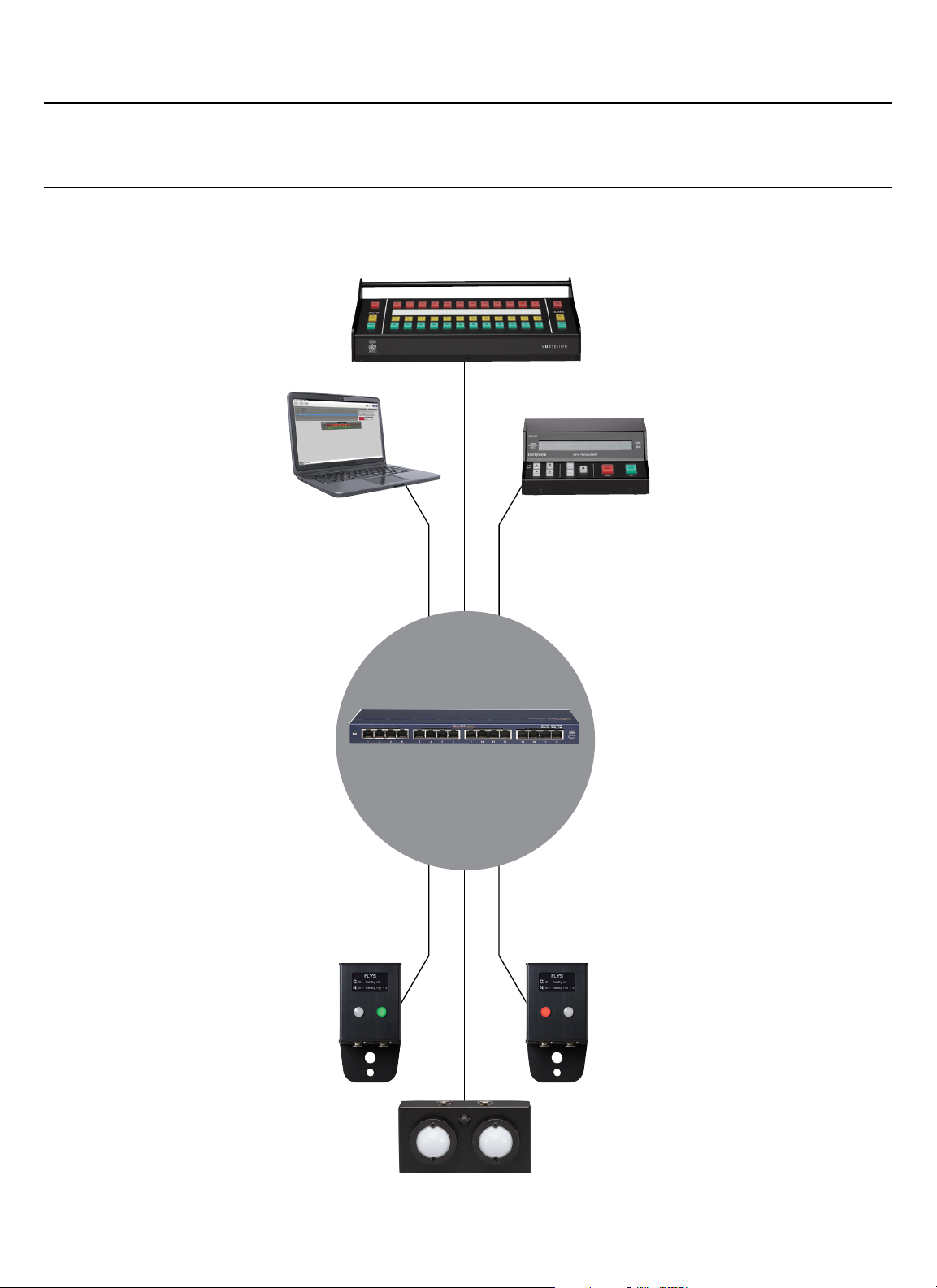
CUESYSTEM SYSTEM DIAGRAM
CueSpider Large OutstationETC
CueSystem Series
CueSystem Desk
Laptop
CueSystem
Playback Unit
Ethernet
connectivity
CueSpider Outstations
2 of 4
Page 3

CueSpider Large OutstationETC
CueSystem Series
SPECIFICATIONS
ALL CUESYSTEM USER OPTIONS, PATCHING, RECORDING
AND PLAYBACK FEATURES ARE CONFIGURED LIVE USING THE
CUESYSTEM PC APPLICATION, AVAILABLE FOR DOWNLOAD
FROM ETCCONNECT.COM/CUESYSTEM
GENERAL
• Independent operation of outstations from either desk or PC
software. PC may be present or not with no effect on system
operation
• CueSpider series outstations are constructed of rugged
aluminum extrusion
• ETC recommends the use of NEUTRIK® etherCON connectors
to minimize the risk of inadvertent device disconnection
• Red button provides standby warning - may be userconfi gured to either illuminate or fl ash. When using the
fl ashing option, the user may press the fl ashing red light on
the outstation, causing the red light to turn solid red on both
the outstation and desk, providing visual ‘ready’ indication to
the stage manager.
• Green LED provides GO indication
DISPLAY SCREENS – PATCH
• Shows a simple view of all connected devices complete with
IP address and local patch ID
• Free-text title entry allows each channel to have a friendly
name which is displayed on the PC virtual desk display and in
the OLED display of a compatible connected outstation
• Simple point-and-click patching of a desk channel to one or
more outstations
• Real-time status report provides instant notifi cation if a device
is offl ine
• Identify function provides a simple method of physically
locating an outstation
DISPLAY SCREENS – DEVICE DISCOVERY
• Device discovery utility operates by listening to UDP pings
from connected equipment meaning it is not necessary to
know the current IP address of a device
• Simple auto-populating list provides convenient point-andclick access to connected devices
• Provides ability to remotely confi gure the IP address of a
connected device
• Firmware update tool provides simple mechanism for
checking and updating fi rmware versions on all connected
devices.
DISPLAY SCREENS – OVERVIEW
• On-board system overview allows user to import any JPEG or
PNG image fi le as a background, similar to a lighting console
magic sheet
• Simple drag-and-drop placement of icons allows user to place
a graphical representation of connected outstations over
imported image for easier reference
• Outstation graphics provide real-time reporting of current
status for easy system monitoring
SPECIFICATIONS
DISPLAY SCREENS – PROGRAM
• Multiple desks may be added to the system, providing a
simple method of partitioning outstations if required
• Cue list entry with free-text naming of cues allows stage
manager to use custom references
• Ability to insert and delete a cue
• Cue list re-number function
• No forced behaviorial entry - user is free to program any
combination of channels of cue light colors
• Real-time updating to main show fi le
• ‘Live’ playback mode provides simple, clutter-free display
of cue list, current and next cue, along with large ‘GO’ and
‘BACK’ buttons
• Blind preview of any cue in list
DISPLAY SCREENS – USER OPTIONS
• Confi gurable startup behavior including auto-connect to
hardware desks
• User-selectable outstation behavior allows red standby light to
be fl ashing or solid
• User-selectable GO button behavior between latching,
momentary or dual function
WINDOWS PC MINIMUM REQUIREMENTS
• Pentium P4 or higher processor (inc. AMD and other
manufacturers’ equivalents)
• 2 GHz CPU clock or higher
• 1 GB RAM or higher
• Minimum 1 x RJ45 Ethernet port
• 10/100 Mbps Network Interface Card or better
• Video output with 1024 x 764 display resolution or higher
• Video in 16-bit color or higher
• Windows 7, 8 or 10 operating system
• Microsoft .NET framework 3.5 or newer (installer will
download if not present)
3 of 4
Page 4
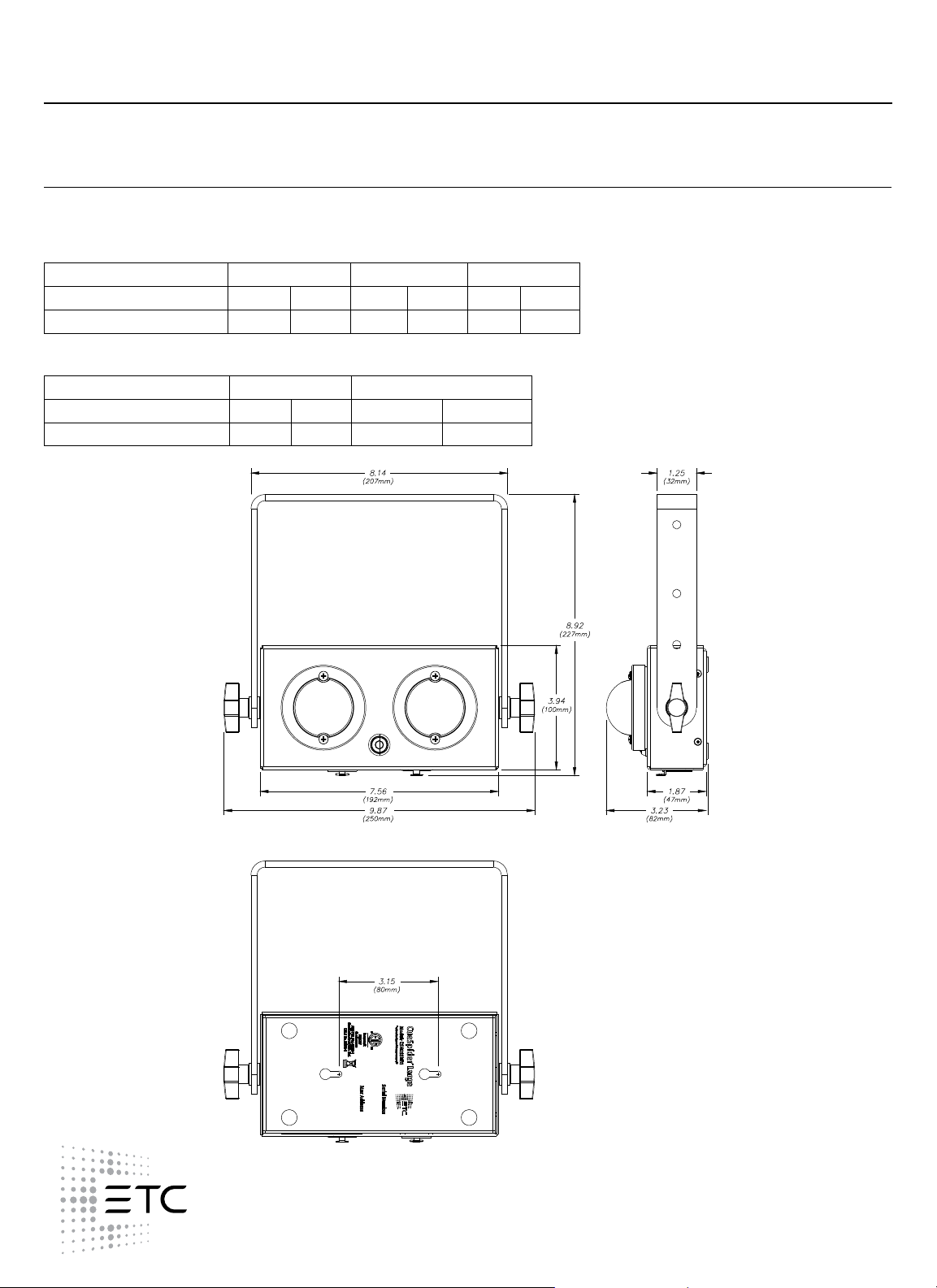
CueSpider Large OutstationETC
PHYSICAL
Product Dimensions
MODEL HEIGHT WIDTH DEPTH
in mm in mm in mm
CueSpider Large (exc. yoke) 3.94 100 7.56 192 3.23 82
Product Weight
MODEL WEIGHT SHIPPING WEIGHT
lb kg lb kg
CueSpider Large 1.80 0.82 2.00 0.91
CueSystem Series
Corporate Headquarters l Middleton, WI USA
Global Offices l London, UK l Rome, IT l Holzkirchen, DE l Paris, FR l Hong Kong l Singapore l New York, NY l Orlando, FL l Los Angeles, CA
Copyright©2019 ETC. All Rights Reserved. All product information and specifications subject to change. Rev A 02/19
Trademark and patent info: etcconnect.com/IP
etcconnect.com
4 of 4
 Loading...