

Page 1
WARNING
TO PREVENT FIRE OR SHOCK HAZARD, DO NOT USE THIS PLUG WITH AN EXTENSION CORD, RECEPTACLE
OR OTHER OUTLET UNLESS THE BLADES CAN BE FULLY INSERTED TO PREVENT BLADE EXPOSURE. TO
PREVENT FIRE OR SHOCK HAZARD, DO NOT EXPOSE THIS APPLIANCE TO RAIN OR MOISTURE.
CAUTION
ISK OF ELECTRIC SHOCK
R
O NOT OPEN
D
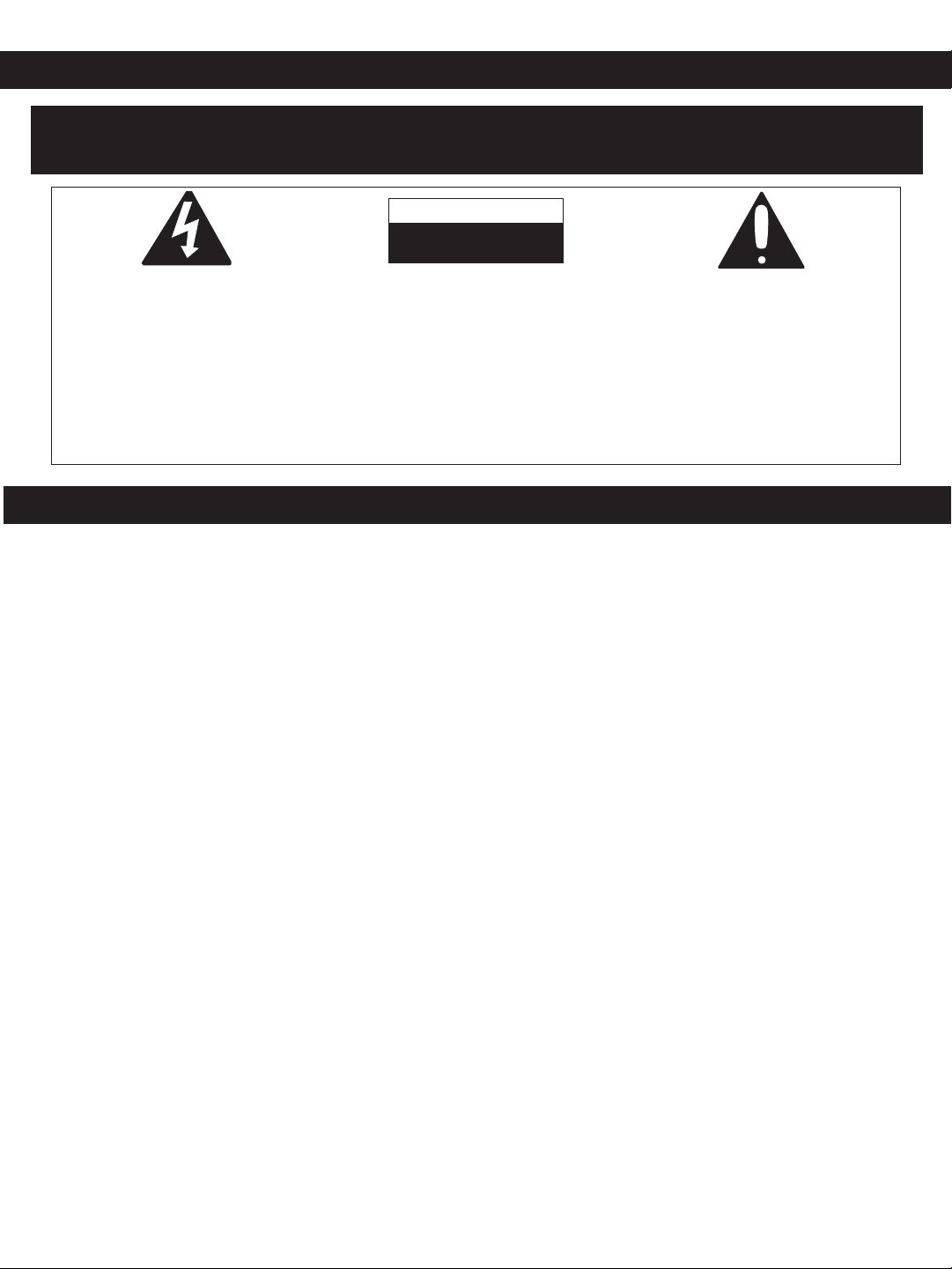
The lightning flash with
arrowhead symbol, within an
equilateral triangle is intended
to alert the user to the
presence of uninsulated
‘dangerous voltage’ within the
product’s enclosure that may
be of sufficient magnitude to
constitute a risk of electric
shock to persons.
IMPORTANT SAFETY INSTRUCTIONS
1. Read these instructions.
2. Keep these instructions.
3. Heed all warnings.
4. Follow all instructions.
5. Do not use this apparatus near water.
6. Clean only with dry cloth.
7. Do not block any ventilation openings. Install in accordance with the manufacturer’s instructions.
8. Do not install near any heat sources such as radiators, heat registers, stoves, or other apparatus
(including amplifiers) that produce heat.
9. Do not defeat the safety purpose of the polarized or grounding-type plug. A polarized plug has two
blades with one wider than the other. A grounding-type plug has two blades and a third grounding prong.
The wide blade or the third prong are provided for your safety. If the provided plug does not fit into your
outlet, consult an electrician for replacement of the obsolete outlet.
10. Protect the power cord from being walked on or pinched particularly at plugs, convenience receptacles,
and the point where they exit from the apparatus.
11. Only use attachments /accessories specified by the manufacturer.
12. Unplug this apparatus during lightning storms or when unused for long periods of time.
13. Refer all servicing to qualified service personnel. Servicing is required when the apparatus has been
damaged in any way, such as power-supply cord or plug is damaged, liquid has been spilled or objects
have fallen into the apparatus, the apparatus has been exposed to rain or moisture, does not operate
normally, has changed its performance, or has been dropped.
14. This appliance shall not be exposed to dripping or splashing water and that no object filled with liquids
such as vases shall be placed on the apparatus.
15. Do not overload wall outlet. Use only power source as indicated.
16. Use replacement parts as specified by the manufacturer.
17. The product may be mounted to a wall only if recommended by the manufacturer.
18. Upon completion of any service or repairs to this product, ask the service technician to perform safety
checks.
CAUTION: TO REDUCE THE
RISK OF ELECTRIC SHOCK DO
NOT REMOVE COVER (OR
BACK), NO USER
SERVICEABLE PARTS INSIDE.
REFER SERVICING TO
QUALIFIED SERVICE
PERSONNEL.
The exclamation point within
an equilateral triangle is
intended to alert the user to the
presence of important
operating and maintenance
(servicing) instructions in the
literature accompanying the
appliance.
1
Page 2
INFORMATION:
This equipment has been tested and found to comply with the limits for a Class B digital device, pursuant
o Part 15 of the FCC Rules. These limits are designed to provide reasonable protection against harmful
t
interference in a residential installation. This equipment generates, uses, and can radiate radio frequency
energy and, if not installed and used in accordance with the instructions, may cause harmful interference
to radio communications. However, there is no guarantee that interference will not occur in a particular
installation. If this equipment does cause harmful interference to radio or television reception, which can
be determined by turning the equipment off and on, the user is encouraged to try to correct the
interference by one or more of the following measures:
• Reorient or relocate the receiving antenna.
• Increase the separation between the equipment and receiver.
• Connect the equipment into an outlet on a circuit different from that to which the receiver is connected.
• Consult the dealer or an experienced radio/TV technician for help.
LASER SAFETY: This unit employs a laser. Only qualified service personnel should attempt to service
this device due to possible eye injury.
CAUTION: USE OF CONTROLS, ADJUSTMENTS OR PERFORMANCE OF PROCEDURES OTHER
THAN THOSE SPECIFIED HEREIN MAY RESULT IN HAZARDOUS RADIATION EXPOSURE.
WARNING: DO NOT EXPOSE THIS APPLIANCE TO RAIN OR MOISTURE.
DANGER:
Invisible and hazardous laser radiation when open and interlock failed or defeated. Avoid
direct exposure to beam.
FCC WARNING:
This equipment may generate or use radio frequency energy. Changes or modifications to this equipment
may cause harmful interference unless the modifications are expressly approved in the instruction manual.
The user could lose the authority to operate this equipment if an unauthorized change or modification is
made.
Thank you
For purchasing the Portable CD audio system from Emerson. This uniquely designed product has a built-in
CD player with a 16 track programmable memory and repeat playback. It also features a great sounding
digital tuning AM/FM stereo radio with 15 random preset station memories.
We are sure that this unit will provide you with many years of exceptional performance with a minimum of
care and maintenance. Please review the contents of this instruction manual completely and carefully before
operating your unit, to make sure that you understand all functions and operations and get the maximum
benefit out of all the great features included in this product.
The serial number of your unit can be found on a label on the bottom of the cabinet. We suggest that you
record the serial number in the space provided below in case this information is ever needed at a future
date.
Model Number: PD5800
Serial Number _______________________________________
2
Page 3
PREPARATION FOR USE
AC Plug
AC Outlet
+
+
+
+
+
+
+
+
Unpacking and Setup
• Carefully remove the unit from the display carton and remove all packing material from the unit itself.
• The detachable AC power cord is packed in the carton separately from the unit. Make sure that the AC
power cord is not accidentally discarded with the carton or packing material.
• Press the OPEN/CLOSE area to open the CD compartment door. There is a white card in the CD
compartment which is intended to prevent the CD pickup from moving during shipment of the product.
Remove this card from the CD compartment before use.
Power Sources
This portable audio system is designed to operate on either 120V AC 60Hz house current or by using eight
(8) ‘C’ batteries, not included. Attempting to operate this unit from any other power source may cause
damage to the unit, which is not covered by your warranty.
AC Operation
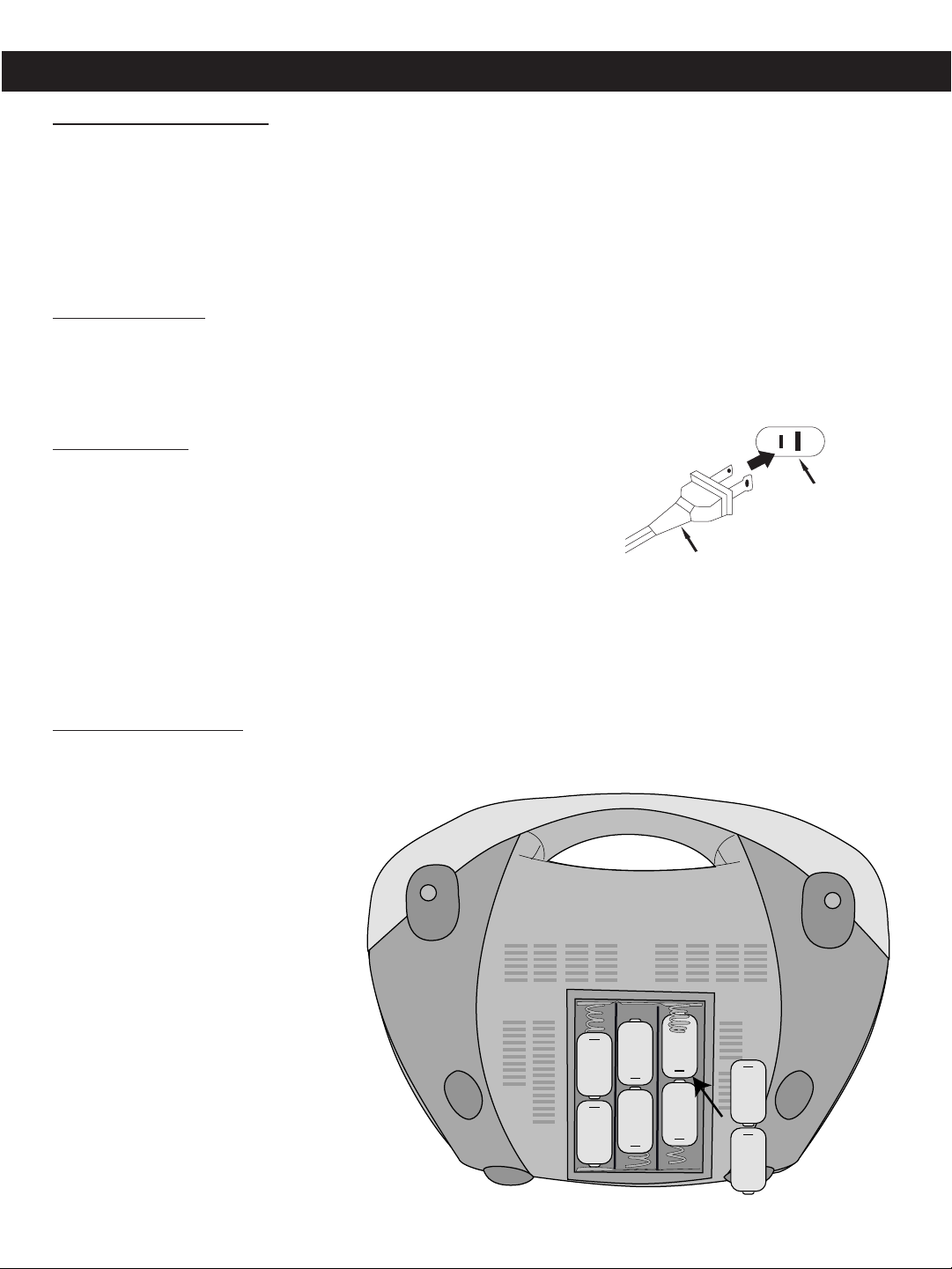
Unwind the AC cord and extend it to its full length. Insert the small end of
the AC cord into the AC socket on the rear of the unit. Insert the other
end of the AC cord into any convenient 120V 60Hz household outlet.
Please note that this unit is equipped with a polarized AC plug which has
one blade wider than the other. This is a safety feature to reduce the
likelihood of electric shock. This polarized AC plug will only fit in a polarized AC outlet. If you find that you
cannot insert this plug into your outlet, you may have an obsolete non-polarized outlet. Please do not try to
defeat this safety feature by using a non-polarized adapter or by filing the wider blade to make it fit into your
outlet. If this plug does not fit into your outlet, you should contact a qualified licensed electrician to replace
your obsolete outlet.
Battery Installation
To use this unit with battery power, remove the battery compartment on the bottom of the unit by sliding it in
towards the rear of the unit. Insert eight (8) ‘C’ size batteries following the diagram in the compartment.
NOTE: The AC power cord must be
disconnected from the AC socket on
the rear of the unit in order for the unit
to operate on battery power.
3
Page 4
1 3 64 109 11 12 138752
14
15 1716 18 19
LOCATION OF CONTROLS
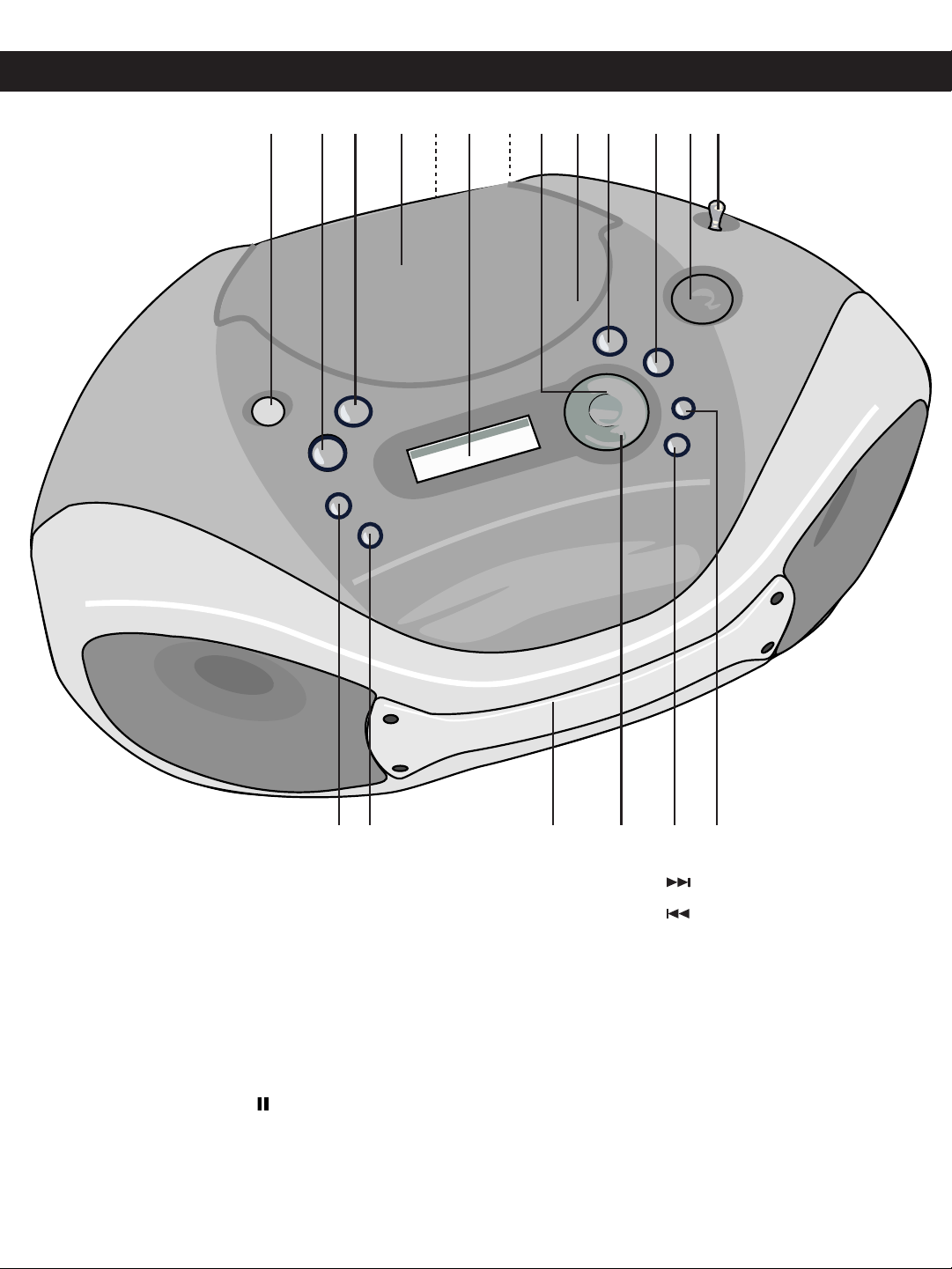
1. BASS BOOST Button
2. POWER OFF Button
3. CD Function Button
4. CD Compartment
5. AC Socket (Rear of Unit)
6. Display
7. Battery Compartment (Bottom of Unit)
8. PLAY/PAUSE (¤ / )/PRESET UP
Button
9. OPEN/CLOSE Area
10. SKIP/TUNING Button
11. SKIP/TUNING Button
12. VOLUME Control
13. FM Rod Antenna
14. RADIO Function Button
15. BAND Button
16. Carrying Handle
17. STOP (n) Button
18. REPEAT/MONO Button
19. MEMORY Button
4
Page 5
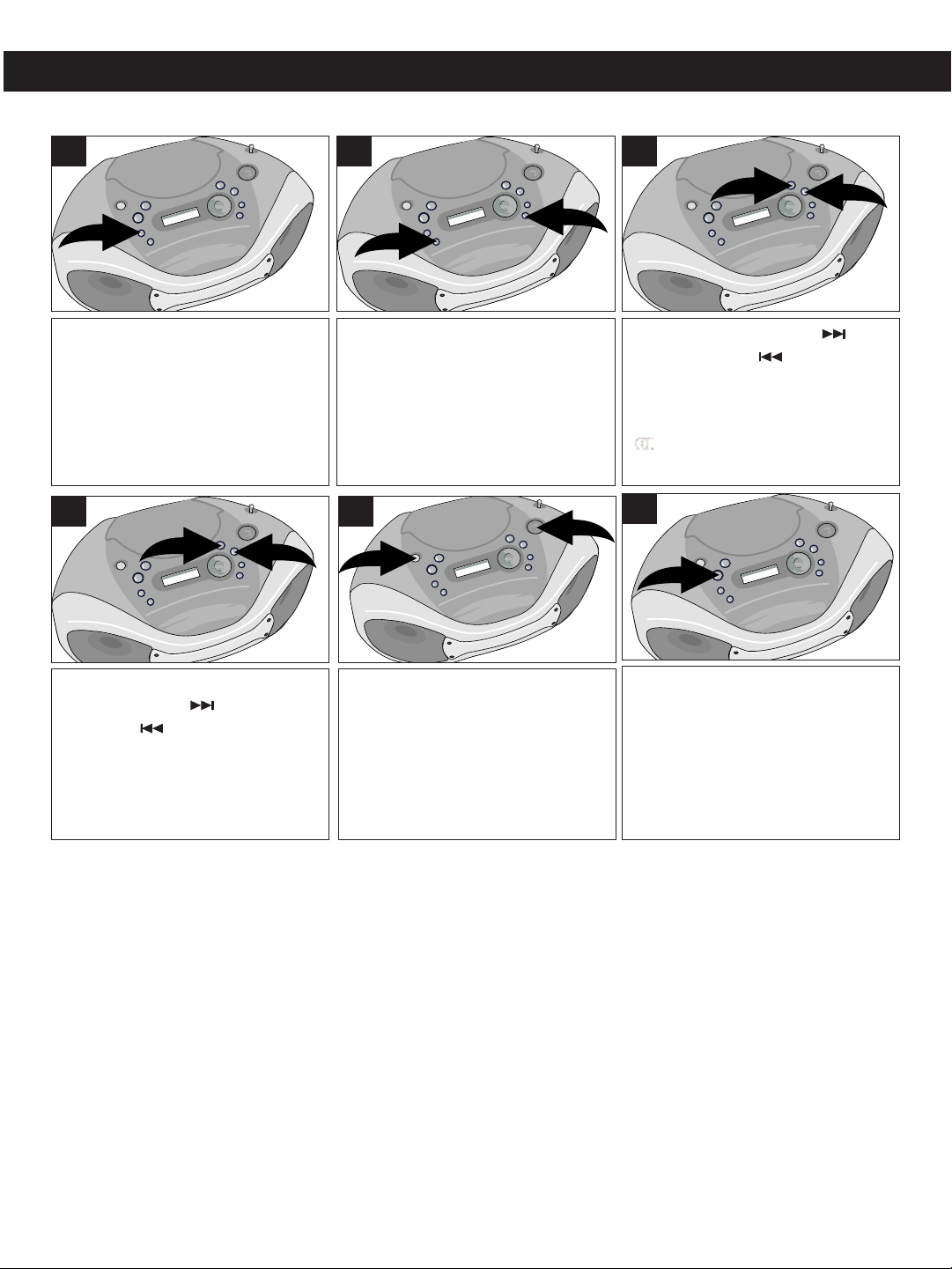
OPERATING INSTRUCTIONS
2
1
2
1
2
1
2
1
LISTENING TO THE RADIO
1
Press the RADIO Function button
to turn the unit on and select the
Radio mode.
4
2
Press the BAND but ton ∂ to
select AM or FM. Noise present in
FM broadcasts can be reduced by
pressing the REPEAT/M ONO
button ∑; “MONO” will appear in
the display and the broadcast will
be in mono.
5
3
Use the SKIP/TUNING ∂ or
SKIP/TUNING ∑ button to
select t he desired AM or FM
station. When a strong FM Stereo
signal is received, the FM Stereo
( ) indicator will light.
6
If you press and hold the
SKIP/TUNING ∂ or SKIP/
TU NI NG ∑ button for one
second, then release, the unit will
automatically scan to the next
broadcasting station.
For an enhanced Bass sound,
press the BASS BOOST button
∂ . Ad jus t th e VO LUM E ∑ as
desired.
Press the POWER OFF button to
turn the radio off.
HINTS FOR BETTER RECEPTION
FM - Make sure that the telescopic FM Rod Antenna is raised and extended to its full length. You may have
to vary the direction of the antenna to find the strongest signal for each FM station.
AM - The AM ferrite bar antenna is located inside the cabinet. It may be necessary to turn the unit slightly so
that the internal antenna is pointing in the direction of the AM transmitter. You may have to experiment to
find the position that provides the strongest reception for each of your favorite AM stations.
5
Page 6
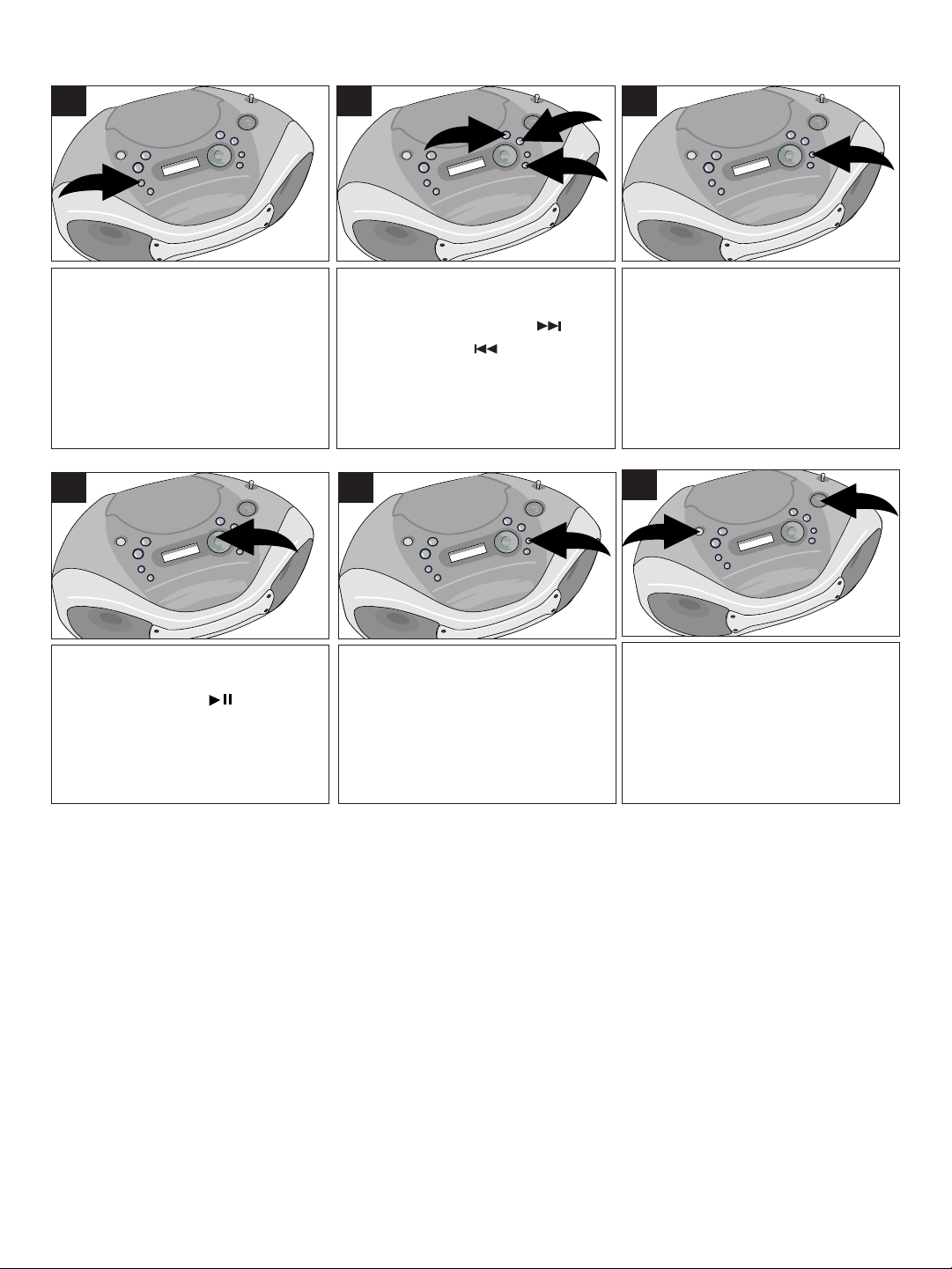
2
1
1
3
2
TO SET/RECALL THE RADIO PRESETS (15 RANDOM)
1
Press the RADIO Function button
to turn the unit on and select the
Radio mode.
4
2
Press th e BAND bu tton ∂ to
select AM or FM.
Use the SKIP/TUNING ∑ or
SKIP/TUNING ∏ button to
select t he desired AM or FM
station.
5
3
Press the MEMO RY but ton;
“MEMORY” wi ll blink in the
display and a preset number will
appear.
6
Select the desired preset number
(up to 15) by repeatedly pressing
the PLAY/PAUSE ( )/ PRESET
UP button.
Press the MEMORY button again
to set the preset. Repeat steps 2
through 4 to set more presets (up
to 15).
For an enhanced Bass sound,
press the BASS BOOST button
∂ . Ad jus t th e VO LUM E ∑ as
desired.
6
Page 7
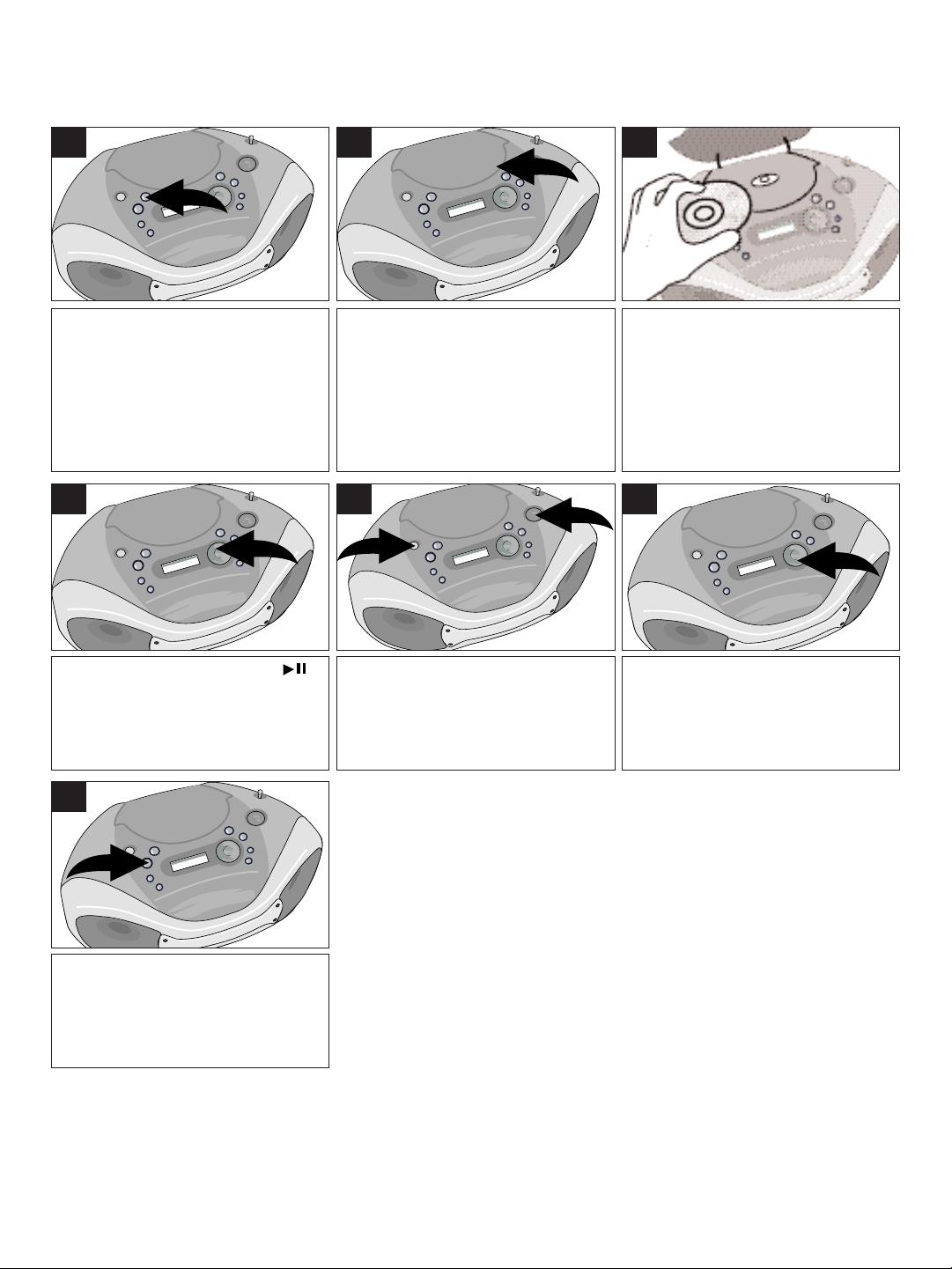
PLAYING COMPACT DISCS
2
1
NORMAL PLAYBACK
1
Press the CD Function button to
turn the unit on and select the CD
mode.
4
2
Open the CD compartment lid by
pressing the OPEN/CLOSE area.
5
3
Insert a disc, label side up, into
the c ompartme nt. P res s the
OPEN/CLOSE area to close the
CD compartment lid; th e total
tracks and p lay ing t ime will
appear in the display.
6
Press the PLAY/PAUSE ( )/
PRESET UP bu tto n to begin
playback; the current track and
elapsed playing time will appear
in the display.
7
Press the POWER OFF button to
turn the CD off.
For an enhanced Bass sound,
press the BASS BOOST button
∂ . Ad jus t th e VO LUM E ∑ as
desired.
NOTES:
• If a disc is inserted incorrectly, dirty, damaged or not present at all,
”dISC” will appear in the display.
• As each track is played, the track number is shown in the display.
• To prevent damage to the disc, never open the CD door while the disc is
rotating. Wait for the disc to stop before opening the CD door. Never
touch the lens when the CD compartment door is open.
• It is not recommended to carry the unit while a disc is playing. If the unit
is shaken or bumped, the disc may skip or stop.
• This unit will play 3” CD singles, no adapter is needed.
When the disc is through playing,
it will stop. Press the STOP (n)
button to stop the disc before it is
finished.
7
Page 8
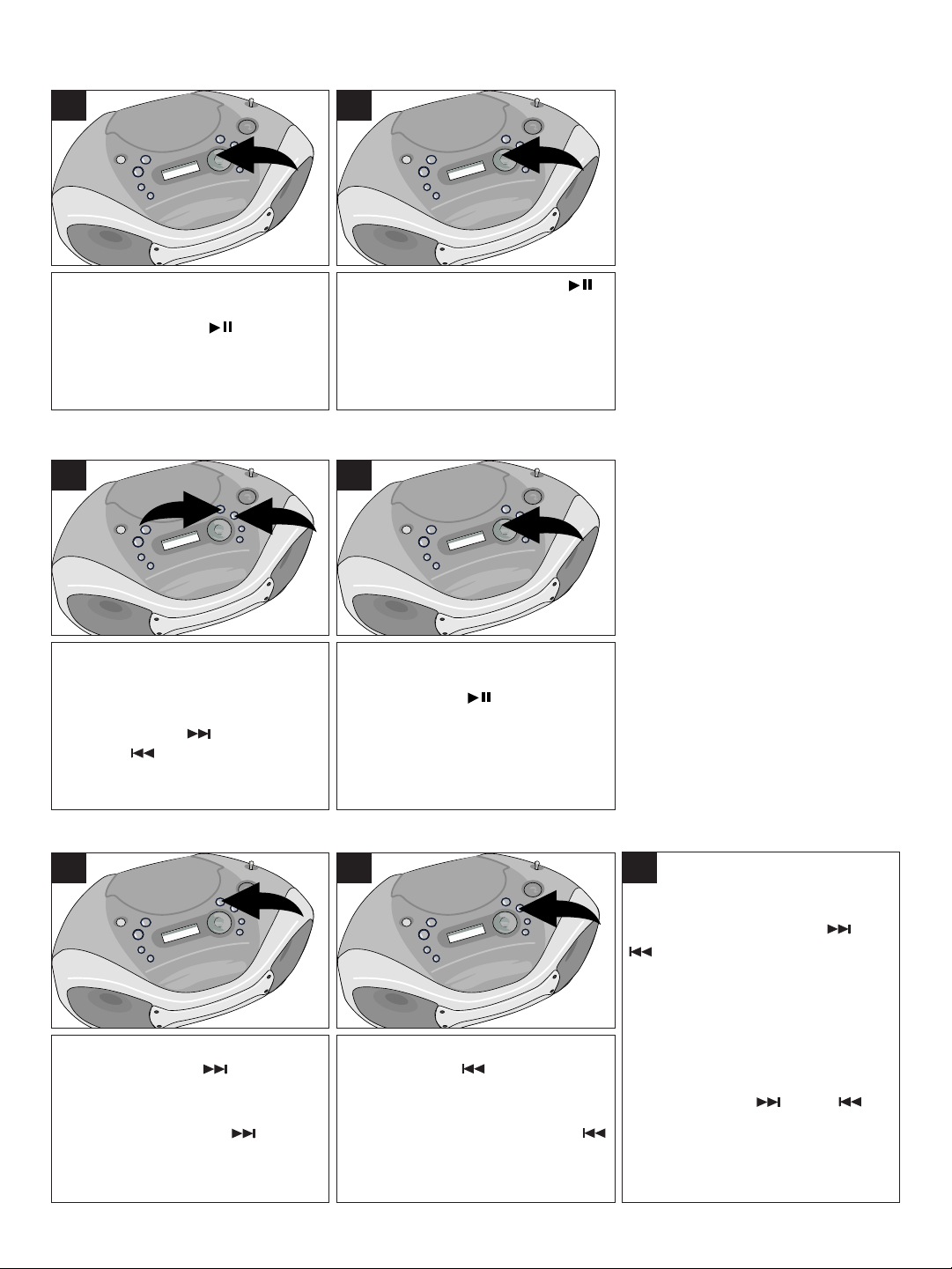
2
1
CD PAUSE CONTROL
1
During CD playback, if you wish to
pause the disc momentarily, press
the PLAY/PAUSE ( )/ PRESET
UP button. Playback stops but the
disc continues to spin and the track
number blinks in the display.
2
Press the PLAY/PAUSE ( )/
PRESET UP bu tto n a gain to
release Pa use and res ume
normal CD playback. The sound
returns and th e track number
stops blinking.
TO BEGIN PLAYBACK FROM A SPECIFIC TRACK
1
2
After you insert the disc into the CD
player and the total number of tracks
and playing t im e appear on th e
display, you may press the
SKIP/TUNI NG ∂ or SKIP/
TUNING ∑ button to select a
specific track for playback.
When the desired track number
appears in the display, press the
PLAY/PAUSE ( )/PRESET UP
button. Playback will begin on the
track you selected.
FORWARD/REVERSE SKIP TRACK AND HIGH-SPEED MUSIC SEARCH
1 3
During p layback, pre ss the
SKIP/TUN ING once to
advance the player t o the
beginning of the next track. Press
the SKI P/TUNING button
repeatedly to advance the player
to higher numbered tracks.
2
During playback, press the
SKIP/TUNING button once to
move the player back to the
beginning of the playing track. Press
the TUNING/Skip/Search
button repeatedly to move the player
back to lower numbered tracks.
During playback, press and hold
either the SKIP/TUNING ∂ or
∑ button to move the player
forwa rd o r back ward withi n a
track to locate a specific musical
passage. The player will move
forward or bac kward at high
speed as long as the buttons are
depressed. When you release the
SKIP/TUNING ∂ or ∑
butto n, normal pla yba ck w ill
resume.
8
Page 9

1
3
2
4
1
2
TO REPEATEDLY PLAY BACK ONE TRACK/ALL TRACKS
1
To repeat a single track, press the
REPEA T/FM M ONO but ton ∂
once; “ ” will bl ink i n t he
display. Press the TUNING/Skip/
Search UP ∑ or DOWN ∏ button
to select the specific track that
you wish to repeat. W he n the
desired track number appears in
the display, pre ss t he
PLAY/PAUSE ( )/PRESET UP
button π to begin playback. The
specific track you selected will be
repeated continuously.
2
To repeat all of the tracks on a
disc cont inu ously, pr ess the
REPEAT/MONO button ∂ twice;
“ ” will appear in the display.
Press the PLAY/PAUSE ( )/
PRESET UP button ∑ to begin
playback.
3
To c ancel Rep eat Playback ,
press the REPEAT/FM MONO
button until the Repeat indicator
disappears from the display.
PROGRAMMED PLAYBACK
The CD player in this unit has a 16 track programmable memory that allows you to program up to 16 tracks
on any disc for playback in any desired order. You may program 16 different tracks or you may also program
certain tracks to play more than once.
NOTE: You cannot program a disc while it is playing. If the disc is playing, press the STOP (n) button first
and then follow the programming steps below.
To perform programmed playback, proceed as follows:
1
Press the CD Function button to
turn the unit on and select the CD
mode.
PROGRAMMED PLAYBACK SECTION CONTINUED ON NEXT PAGE.
2
Open the CD compartment lid by
pressing the OPEN/CLOSE area
and insert your disc in the CD
player. Close the CD compartment door.
9
3
Press the MEMO RY but ton;
“PR:01” (Program Number) and
“1” (track number) will appear and
“MEMORY” wi ll blink in the
display.
Page 10

3
2
1
4
3
2
1
1
2
5
6
Press the SKIP/TUNING ∂ or
SKIP/TUNING ∑ button to
select the first track that you wish
to program. When the desired
track number (Example: Track 5)
appears in the display, press the
MEMORY b utton ∏ a gai n;
“MEMORY” will sto p blinki ng.
Repeat above and the display will
then show, “Pr :02” indi cating
program 2 is ready to be set.
7
When the last programmed track
has been played, the player will
stop. To cancel the Programmed
Playb ack mode, pre ss t he
MEMORY button ∂ to enter the
Program mode and then press the
STOP (n) button ∑ to cancel.
Repeat step 4 to enter up to 16
tracks in the program memory.
NOTES ON PROGRAMMED PLAYBACK:
• You can review the program by pressing the MEMORY button when
playback is stopped.
• You can change tracks in a program by simply selecting the desired
track using the PROGRAM button, and then use the SKIP/TUNING
UP or DOWN button to change it.
• Press the STOP (n) button to stop the program before it is finished.
• You can scroll through the program while it is playing using the
SKIP/TUNING or button.
After programming up to 16 tracks
in the CD Program Memory, press
the PLAY/PAUSE ( )/ PRESET
UP button to begin programmed
playback; “MEMORY” will appear in
the display and playback will begin
on the first track that you
programmed. The player will
continue to play all of the tracks that
you programmed in the order in
which you programmed them.
PROGRAMMED REPEAT
1
It is also possible to use the
Program and Repeat functions
to gether to repeat a specific
program indefinitely. First, program
the tracks you wish to hear in the
order you wish to hear them, as
described on the previous page.
Th en, press the REPEAT/FM
MONO button twice. Both
indicators will appear in the display.
2
Press the PLAY/PAUSE ( )/
PRESET UP bu tto n t o b egin
pr og ra mm ed repeat playback.
The player will play the tracks you
selected in the order in which you
programmed them. When the last
track in the program has been
played, the entire program will
begin again.
10
3
Programmed Repeat operation
will continue indefinitely until you
press the STOP (n) button, or
turn the unit off.
Page 11
CARE AND MAINTENANCE
B
E
N
Z
E
N
E
C
L
E
A
N
E
R
aring for Compact Discs
C
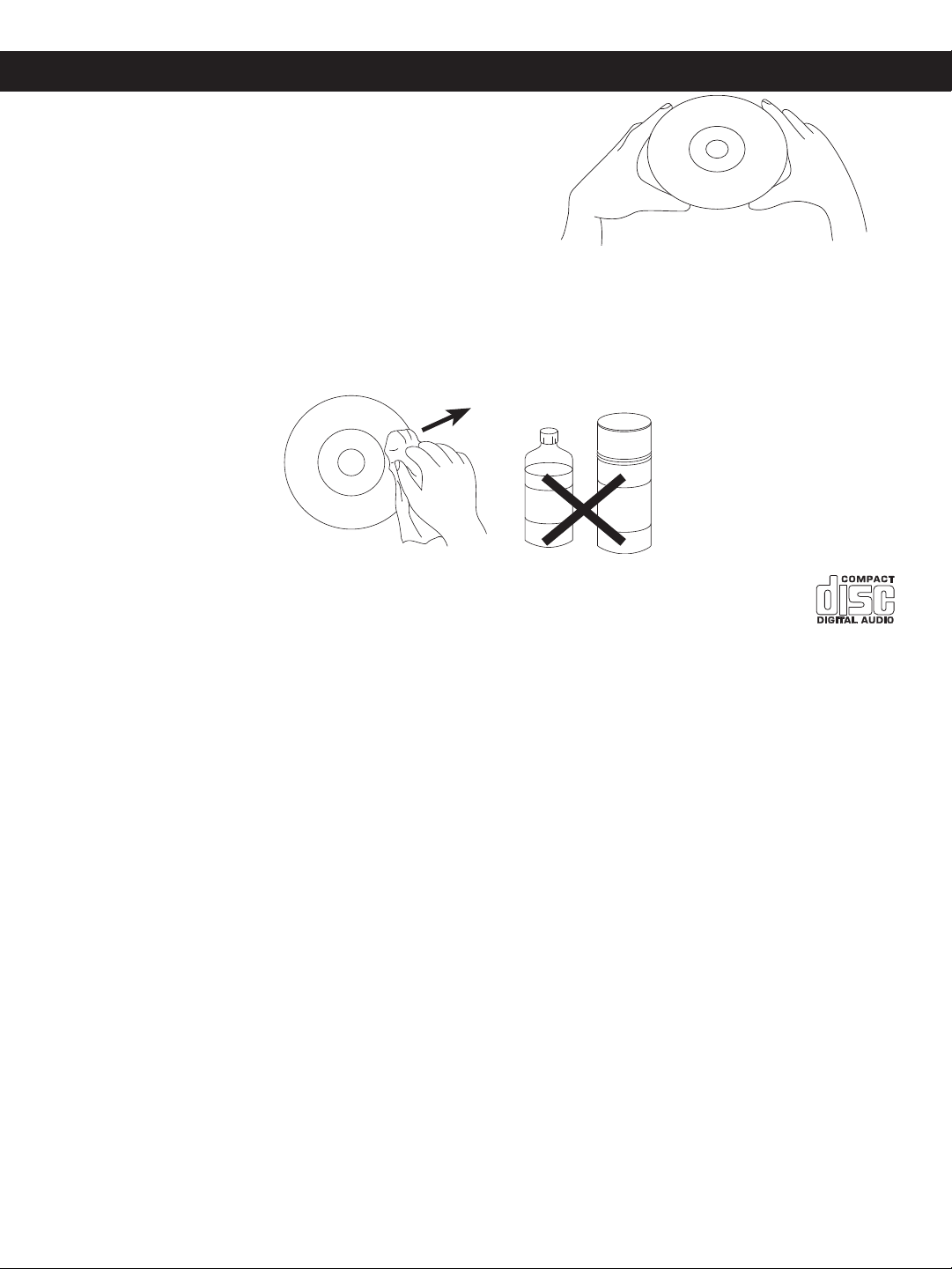
• Treat the disc carefully. Handle the disc only by its edges.
Never allow your fingers to come in contact with the shiny,
unprinted side of the compact disc.
• Do not attach adhesive tape, stickers, etc. to the compact
disc label.
• Clean the compact disc periodically with a soft, lint-free, dry
cloth. Never use detergents or abrasive cleaners to clean
the compact disc. If necessary, use a CD cleaning kit.
• If a compact disc skips or gets stuck on a section of the compact disc, it is probably dirty or damaged
(scratched).
• When cleaning the compact disc, wipe in straight lines from the center of the compact disc to the outer
edge of the compact disc. Never wipe in circular motions.
• This unit is designed to play only compact discs bearing the identification logo as shown here.
Other discs may not conform to the CD standard and may not play properly.
• Compact Discs should be stored in their cases after each use to avoid damage.
• Do not expose compact discs to direct sunlight, high humidity, high temperatures, or dust, etc.
Prolonged exposure or extreme temperatures can warp the disc.
• Do not stick or write anything on either side of the disc. Sharp writing instruments, or the ink may damage
the surface.
Cleaning the unit
• To prevent fire or shock hazard, disconnect your unit from the AC power source when cleaning.
• The finish on your unit may be cleaned with a dust cloth and cared for as other furniture. Use caution
when cleaning and wiping the plastic parts.
• Mild soap and a damp cloth may be used on the front panel.
11
Page 12

TROUBLESHOOTING GUIDE
®
AUTHORIZED SERVICE
CALL TOLL FREE: 1-800-695-0098
FOR CUSTOMER SERVICE, PLEASE WRITE TO:
Emerson Radio Corp.
Consumer Affairs Dept.
1901 Diplomat Drive
Farmers Branch, TX 75234
TO FIND THE LOCATION AND
PHONE NUMBER OF YOUR
NEAREST AUTHORIZED
SERVICE CENTER...
Should this unit exhibit a problem, check the following before seeking service.
Symptom Possible Cause Solution
Radio
Noise or sound distorted Station not tuned properly for Retune the AM or FM broadcast
on radio broadcasts. AM or FM. station.
FM: Telescopic antenna is not Reorient FM telescopic antenna.
properly adjusted.
AM: Unit is not positioned Rotate unit until best reception is
correctly. obtained.
AM or FM, no sound. RADIO Function button not pressed. Press the RADIO Function button.
Volume at minimum. Increase volume.
Compact Disc Player
CD Player will not play. CD Function button not pressed. Press the CD Function button.
CD is not installed or installed Insert CD with label side up.
upside-down.
CD skips while playing. Disc is dirty or scratched. Wipe disc with cloth or use
another disc.
General
No sound. Power cord disconnected. Connect power cord.
No batteries, or weak, dead or Insert fresh batteries correctly.
inserted incorrectly.
12
Page 13

EMERSON RADIO CORP.
LIMITED WARRANTY
Emerson Radio Corp. warrants manufacturing defects in original material, including
original parts and workmanship, under normal use and conditions, for a period of ninety
(90) days from the date of original purchase in the U.S. With your dated proof of
purchase, we will provide repair service at no charge for labor and parts at an authorized
Depot Repair Facility, or replace the product in our discretion. For repair or
replacement, pack your unit in a padded box, enclose your check or money order
payable to Emerson Radio Corp. in the amount of $9.00 (not required by California
residents) to cover shipping and handling costs, and enclose a copy of your proof of
purchase. Send your unit to:
Emerson Radio Corp.
1901 Diplomat Drive
Farmers Branch, TX 75234
This warranty does not cover damage from negligence, misuse, abuse, accident, failure
to follow operating instructions, commercial use, rental, repairs by an unauthorized
facility, or products purchased, used, serviced or damaged outside of the United States.
THIS WARRANTY GIVES YOU SPECIFIC LEGAL RIGHTS, AND YOU MAY ALSO
HAVE OTHER RIGHTS WHICH VARY FROM STATE TO STATE.
AU898M
13
Page 14

EMERSON
®
PART NO.: 16-2890
302-01 Printed in China
Page 15

PORTABLE CD PLAYER WITH
®
DIGITAL TUNING AM/FM RADIO
OWNER’S MANUAL
PD5800
Visit our web site at www.emersonradio.com
 Loading...