

Page 1
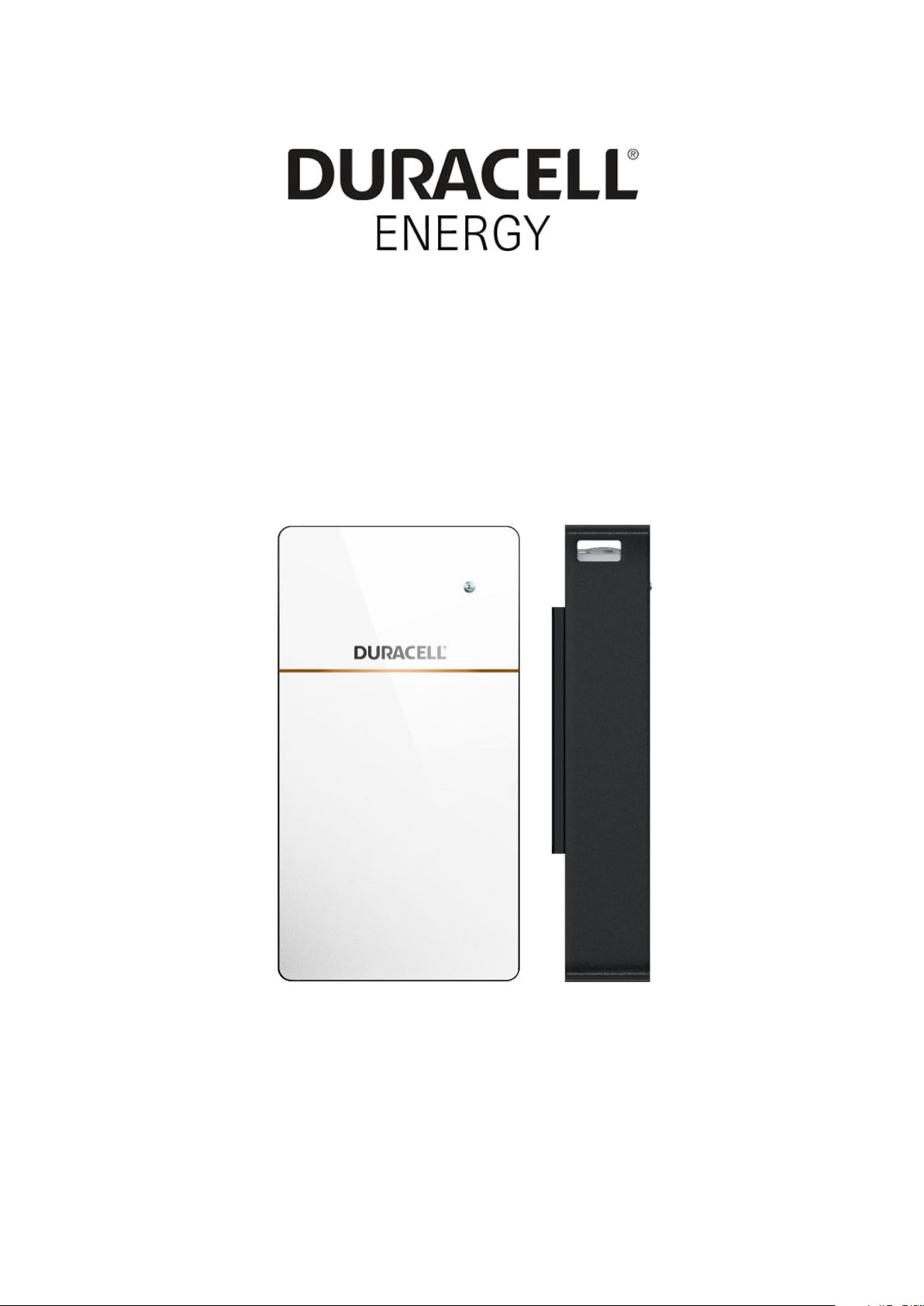
Duracell 5+ Battery Module | USER MANUAL
PD-5KWH-50V-1G
USER MANUAL
Duracell 5+ Battery Module
Page 2

Duracell 5+ Battery | USER MANUAL
Content
PRODUCT SPECIFICATIONS
ERRORS OR OMISSIONS
ELECTRONIC DEVICE: DO NOT THROW AWAY
1. Important Safety Instructions 4
1.1 Symbols in this Document
1.2 General Information
2. Standard Packing List 6
.......................................................................................................................... 3
............................................................................................................................... 3
........................................................................................................................ 4
............................................................................................................................... 4
................................................................................................ 3
3. Mechanical Installation 7
3.1 Single battery installation ..................................................................................................................... 7
4. Electrical Connection Error! Bookmark not defined.
4.1 Top connection interface ....................................................................................................................... 8
5.
Start the Battery Array
6. System Setting 10
6.1 Normal Operation
6.2 Duracell 5+ Battery Module Care
9
................................................................................................................................. 10
............................................................................................................ 10
2
Page 3
Duracell 5+ Battery | USER MANUAL
To secure the full 10-year product warranty, ensure your Duracell 5+
Warning: Read this entire document before installing or using Duracell 5+
battery is installed by a qualified installer.
battery modules. Failure to follow any of the instructions or warnings in
this document can result in electric shock, serious injury, or death - or you
may damage the
battery module, potentially rendering it inoperable.
PRODUCT SPECIFICATIONS
All specifications and descriptions contained in this document are verified to be
accurate at the time of printing. However, because continuous improvement is
a goal at Duracell, we reserve the right to make product modifications at any
time.
The images provided in this document are for demonstration purposes only.
Depending on the product version and market region, details may appear
slightly different.
ERRORS OR OMISSIONS
To communicate any inaccuracies or omissions in this manual, please send an
email to
ELECTRONIC DEVICE: DO NOT THROW AWAY
Proper disposal of batteries is required. Refer to your local codes for disposal
requirements (i.e. EC N 1013/2006 among European Union).
©2020 Duracell Energy Ltd. All rights reserved.
All information in this document is subject to copyright and other intellectual
property rights of Duracell Energy Ltd. and its licensors. This material may
not be modified, reproduced, or copied, in whole or in part, without the
prior written permission of Duracell Energy Ltd. and its licensors. Additional
information is available upon request. The following are trademarks or
registered trademarks of Duracell Energy Ltd. in the UK and other countries.
All other trademarks contained in this document are the property of their
respective owners and their use herein does not imply sponsorship or
endorsement of their products or services. The unauthorized use of any
trademark displayed in this document or on the product is strictly prohibited.
3
Page 4
Duracell 5+ Battery | USER MANUAL
1. Important Safety Instructions
SAVE THESE IMPORTANT SAFETY INSTRUCTIONS. Duracell 5+ battery
module installation and repair instructions assume knowledge of high voltage electricity and should only be
performed by certified installers.
Duracell Energy Ltd assumes no liability for injury or property damage due to repairs attempted by unqualified
individuals or a failure to properly follow these instruc
using.
tions. These warnings and cautions must be followed when
1.1 Symbols in this Document
This manual uses the following symbols to highlight important information:
Warning
Caution
Note
WARNING indicates a hazardous situation that, if not avoided, could result
injury or death.
CAUTION indicates a hazardous situation that, if not avoided, could result
damage to the equipment.
NOTE indicates an important step or tip that leads to the best results but is not
safety or damage related.
in
in
1.2 General Information
Warning: Read this entire document before installing or using Duracell 5+ battery. Failure to do so or
to follow any of the instructions or warnings in
injury, or death, or can
damage the battery, potentially rendering it inoperable.
this document can result in electrical shock, serious
Warning: A battery can present a risk of electrical shock, fire, or explosion from vented gases. Observe
proper precautions.
Warning: Duracell 5+ battery installation must be carried out only by
certified installers, who have been trained in dealing with high voltage electricity.
Warning: the battery is heavy and challenging to lift.
Warning: Use Duracell 5+ battery only as directed.
Warning: Do not use Duracell 5+ battery if it is defective, appears cracked,
otherwise damaged, or fails to operate.
Warning: Before beginning the wiring portion of the installation, first power off the inverter and then open
the AC and DC disconnect switches (if applicable for the installation).
Warning: Do not attempt to open, disassemble, repair, tamper with, or modify
Duracell 5+ battery is not user serviceable. Battery cells in Duracell 5+ batteries are not replaceable. Contact
the authorised reseller who sold the Duracell 5+ battery for any
Warning: Do not connect Duracell 5+ battery to alternating current (AC)
battery must be wired to either an inverter or a DC combiner panel that is then wired to an inverter. No
other wiring configuration may be used.
Warning: Duracell 5+ battery contains components, such as switches and relays, that can produce arcs or
sparks.
arning: Duracell 5+ battery contains components, such as switches and relays, that can produce arcs or
W
sparks.
broken, or
Duracell 5+ battery.
repairs.
carrying conductors. Duracell 5+
4
Page 5
Duracell 5+ Battery | USER MANUAL
1.3 ENVIRONMENTAL CONDITIONS
Warning: To protect Duracell 5+ battery and its components from damage when transporting, handle with care. Do not
impact, pull, +
Warning: Do not insert foreign objects into any part of Duracell 5+ battery.
Warning: Do not expose Duracell 5+ battery or its components to direct
Warning: Do not install Duracell 5+ battery near heating equipment.
Warning: Do not immerse Duracell 5+ battery or its components in water or other fluids.
Caution: Do not use cleaning solvents to clean Duracell 5+ battery or expose Duracell 5+ battery to flammable or harsh
chemicals or vapours.
Caution: Do not use fluids, parts, or accessories other than those specified in this manual, including use of non-genuine
Duracell 5+ parts or accessories, or parts or accessories not purchased directly from a certified party.
Caution: Do not place Duracell 5+ battery in a storage condition for more than one (1) month, or permit the electrical feed on
the Duracell 5+ battery to be severed for more than one (1) month, without placing Duracell 5+ battery into a storage
condition in accordance with ’s storage specifications.
Caution: Do not paint any part of Duracell 5+, including any internal or external components such as the exterior shell or
casing.
Caution: Do not connect Duracell 5+ battery directly to photovoltaic (PV) solar wiring.
Caution: When installing Duracell 5+ battery in a garage or near vehicles, keep it out of the driving path. If possible, install the
Duracell 5+ battery on a side wall and/or above the height of vehicle bumpers.
Warning: Install Duracell 5+ battery at a height that prevents damage from flooding.
Warning: Operating or storing Duracell 5+ battery in temperatures outside its
specified range might cause damage to the battery.
Warning: Do not expose the Duracell 5+ battery to ambient temperatures above 60°C (140°F) or below -30°C (-22°F).
Caution: Ensure that no water sources are above or near the Duracell 5+ battery, including downspouts, sprinklers, or faucets.
5
Page 6
Duracell 5+ Battery | USER MANUAL
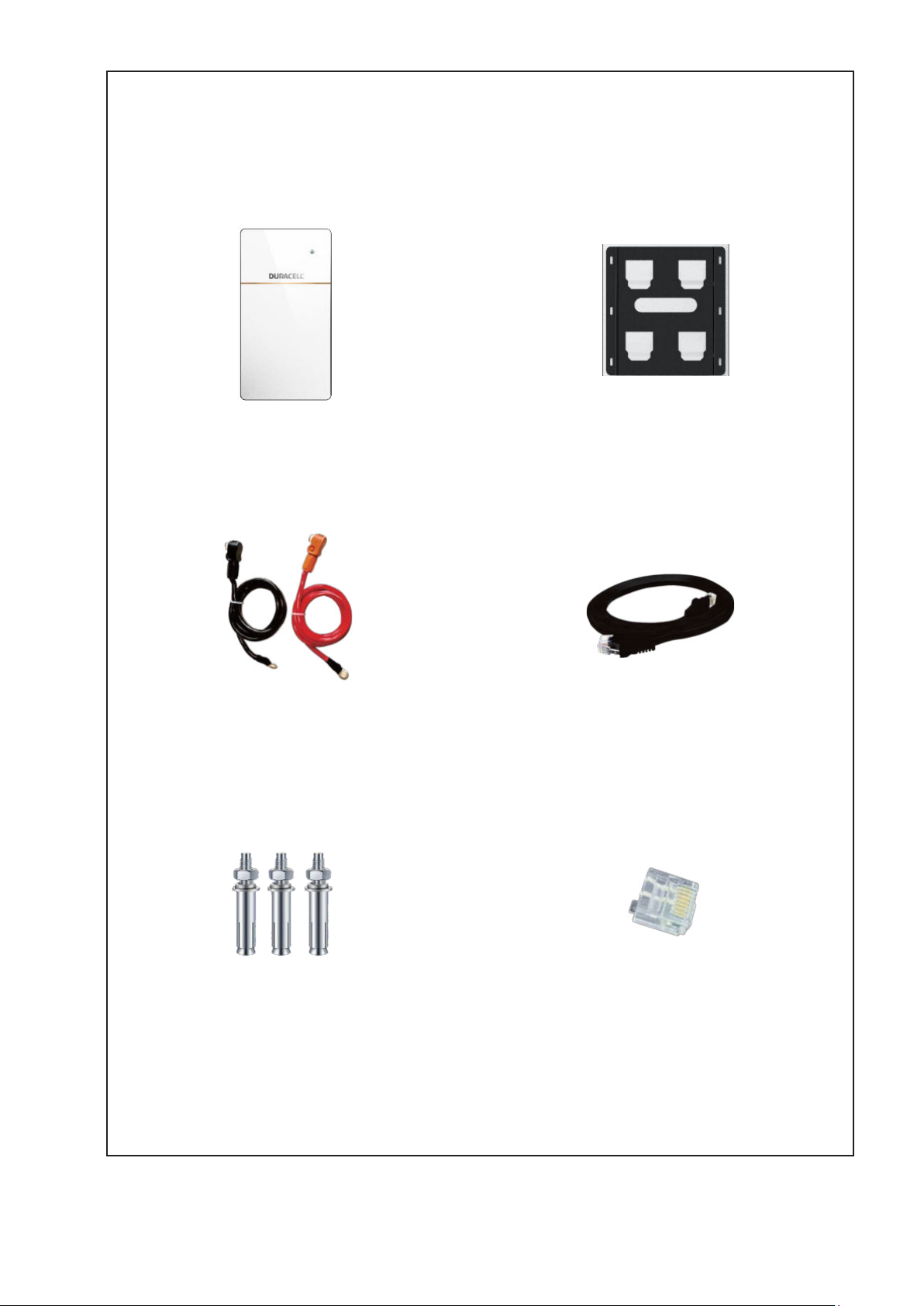
2. Standard Packing List
Battery Power Cables
Communication Cable
M6 Expansion Bolts
Terminator
Duracell 5+ LFP Battery
Battery<__>inverter
Battery Bracket
Battery<__>Inverter
6
Page 7
Duracell 5+ Battery | USER MANUAL
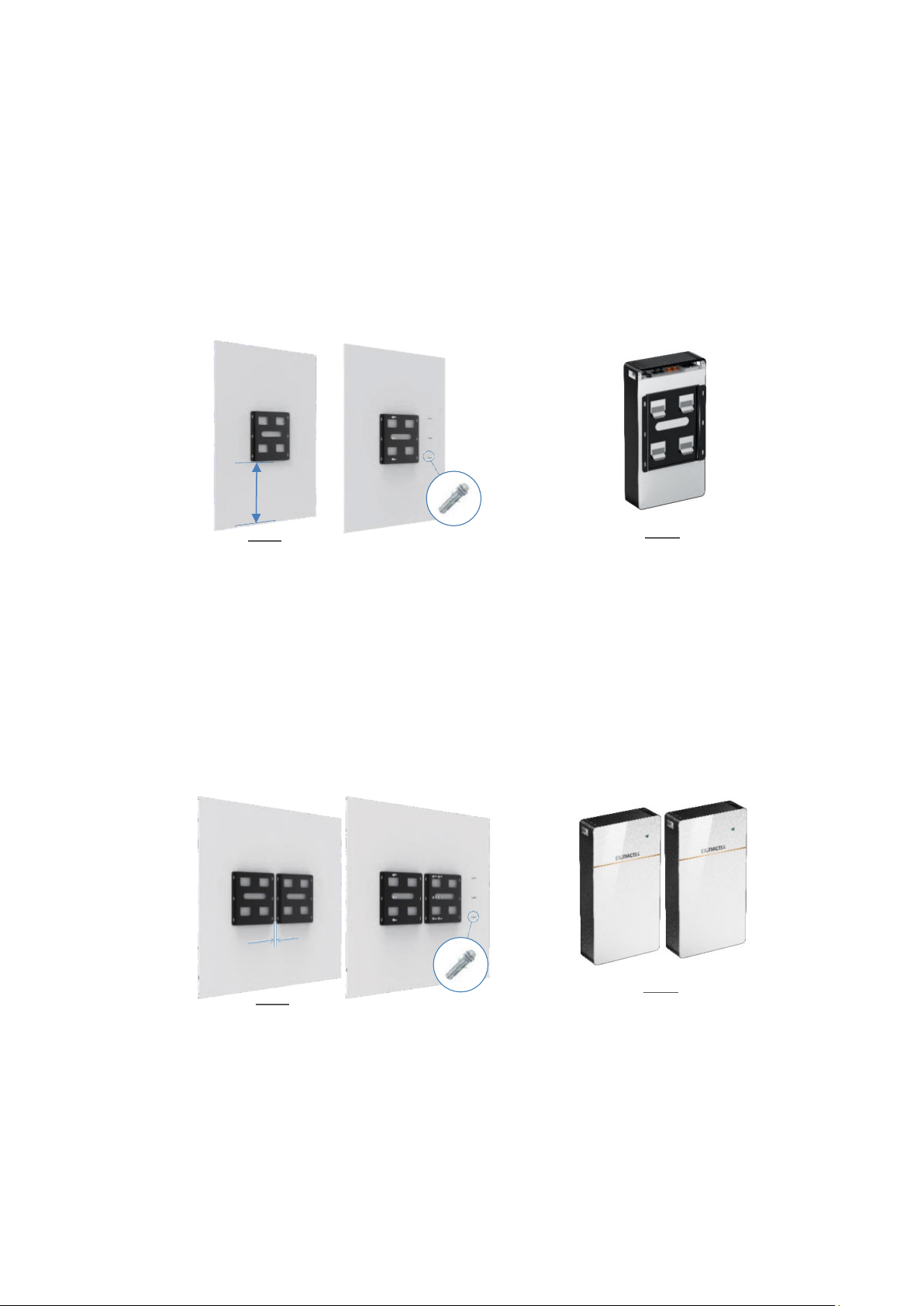
3. Mechanical Installation
Step 1
Step 2
to the battery bracket.
Step 1
Step 2
to the battery bracket.
greater than 20mm
3.1 Single battery installation
Confirm the exact
position of the battery
Minimum 200mm
above ground.
bracket
Please use M6 expansion,
bolts to fix the battery
bracket on the wall according
to the fixed position.
Mount the battery module
3.2 Multiple battery
Bracket spacing is
Confirm the exact
position of the battery
bracket
Please use M6 expansion,
bolts to fix the battery
bracket on the wall according
to the fixed position.
Mount the battery module
7
Page 8
Duracell 5+ Battery | USER MANUAL
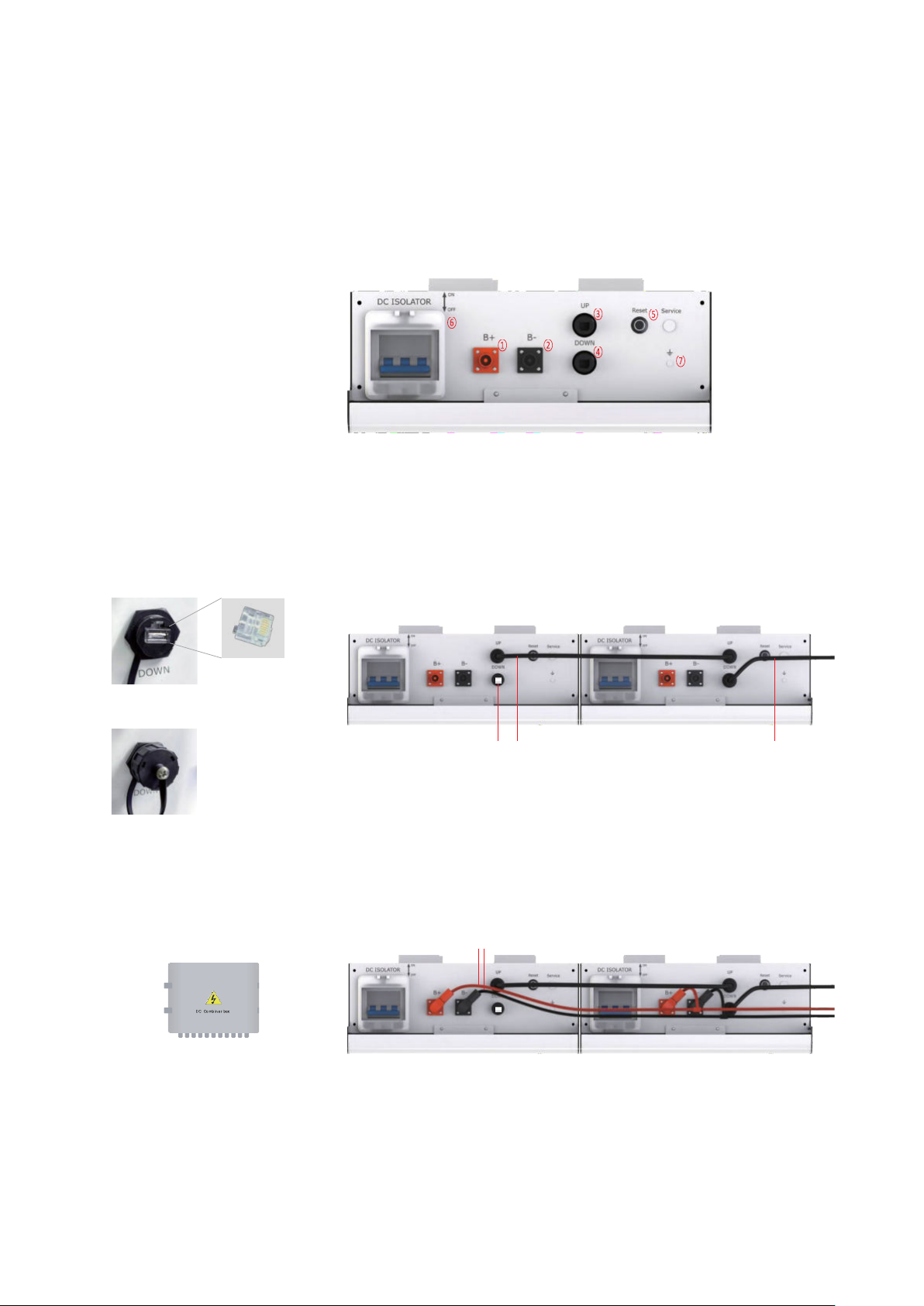
① Battery<-->Inverter Power Cables (+)
② Battery<-->Inverter Power Cables (-)
③ Communication cables(up)
④ Communication cables(down)
⑤ Battery reset button
DC Isolator
⑥
Grounding Point
⑦
⑧ Communication cable
COM resistor
⑨
1.
Plug in COM Resistor
2.
Put on a protective
cap
4. Electrical connection
4.1 Top connection interface
Step 3, Cable Connection and COM Resistor
Connect battery power cables and communication cables as shown below.
Plug in the COM resistor to the last communication interface, which is open.
Please note that even with a single battery installation or multi battery
installation, the COM resistor is required to strengthen the CAN Bus signal.
⑨ ⑧ ⑧
⑩ standard parallel kits withstand
maximum of 100A current. If you
have a larger load demand, you can choose to
configure the DC combiner box.
DC combiner box
⑩
8
Page 9
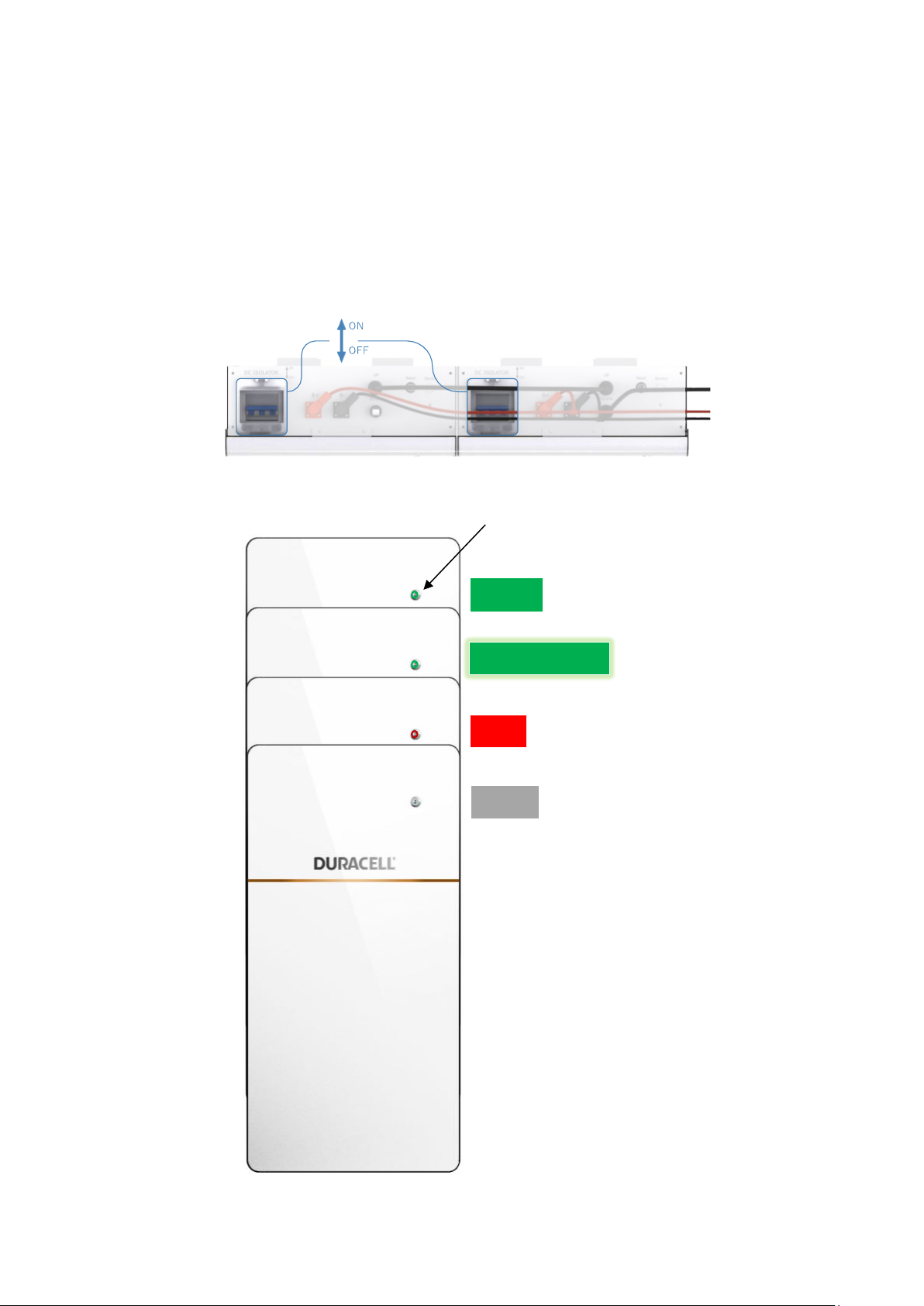
5.
Normal, 30%<SOC<100%
Green
Normal, 10%<SOC<30%
Flashing Green
Alarm or Protection
Red
Power Off or Sleep
None
The indicator light is on, showing green, and the machine is on
Start the Battery Array
Step 4, please pull on the DC Isolator
Duracell 5+ LFP Battery | USER MANUAL 10
Page 10
April 2021 Version 1.1
6. System Setting
6.1 NORMAL OPERATION
During normal operation, if Duracell 5+ Battery Modules are installed correctly, the inverter and battery will start
communication immediately, then begin to process power commands. See the inverter manual for further
configuration instructions.
Warning: Do not operate Duracell 5+battery module unless all covers are in place.
Warning: Do not disconnect anything from or add anything to Duracell 5+ battery
Caution: Do not try to communicate with Duracell 5+ battery module using third party tools or diagnostics.
module.
Caution: Do not lean on, stack anything on top of, or hang anything from the Duracell 5+
6.2 Duracell 5+ BATTERY MODULE CARE
Keep the top edge of the Duracell 5+ battery module clear of particles to maintain optimal airflow.
To clean Duracell 5+Battery Module, use a soft, lint-free cloth. The cloth can be
should not be dripping.
Caution: Do not use cleaning solvents to clean Duracell 5+ battery module.
dampened with only water if needed. It
battery module or the conduit.
* reserves the right to modify the technical datasheet and appearance of the product in the user manual without
prior advice to the users.
Duracell 5+ LFP Battery | USER MANUAL 11
 Loading...