

Page 1
S
D-Link DFM-562I
Software Modem Card
Before Your Begin
If you purchased this Modem to make your Internet connection with PC, you must
have an established Internet account from an Internet Service Provider (ISP).
Check Your Package Contents
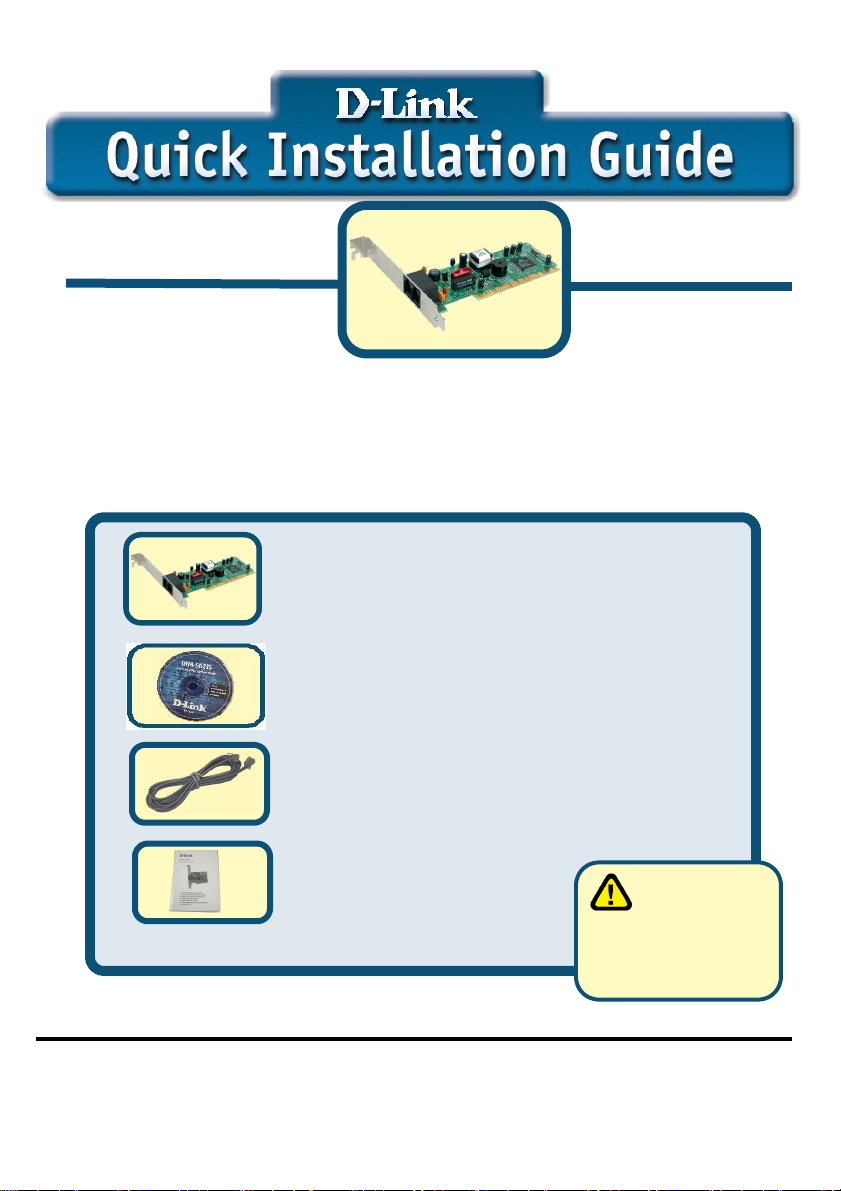
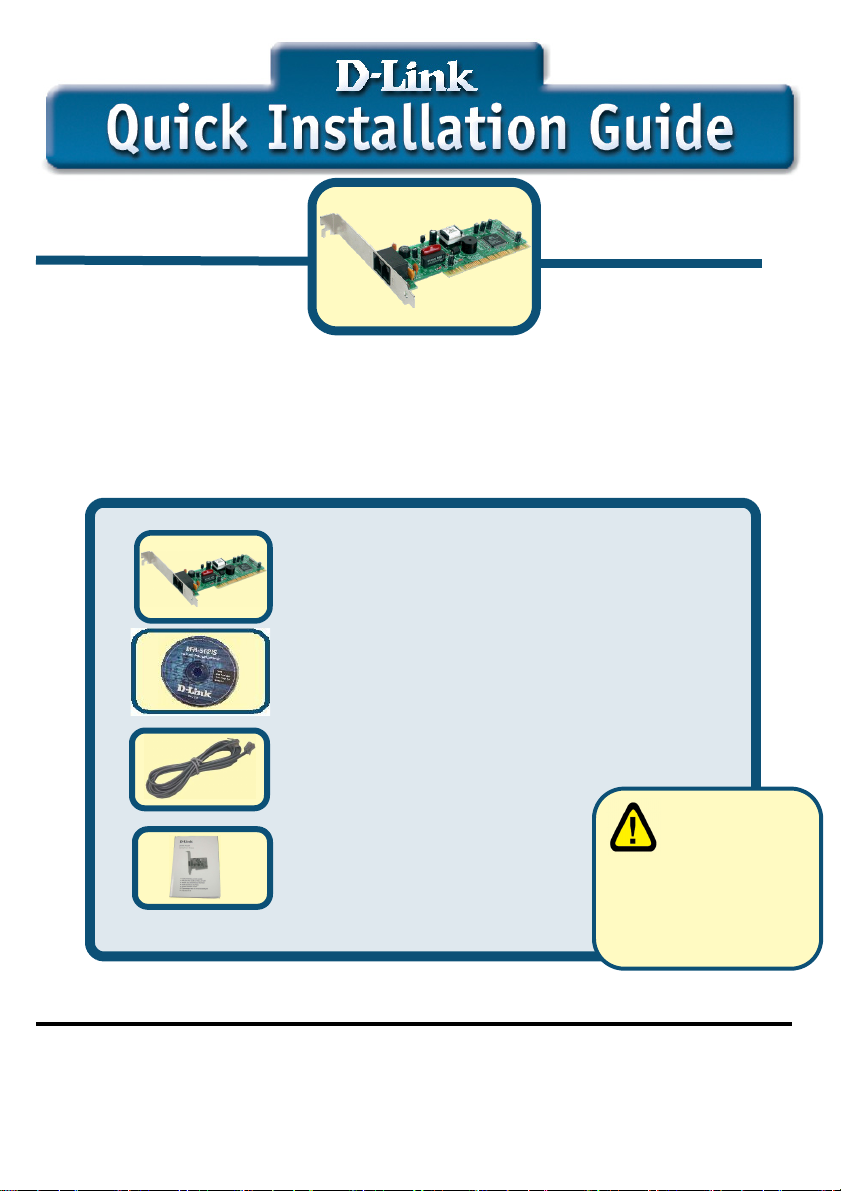
These are the items included with your D-Link 562IS purchase:
If any of the above items are missing, please contact your reseller.
©2003 D-Link Corporation, Inc. All rights reserved. Trademarks or registered trademarks are the property of their respective
holders. Software and specifications subject to change without notice. D-Link DFM-562IS HSFi PCI Modem
1
• D-Link DFM-562IS Software Modem Card
• CD-ROM (containing Manual and Q.I.G.)
• Phone Cable
• D-Link DFM-562IS User’s Guide
Using a power
supply with a
different voltage rating
will damage and void
the warranty for this
product.
Page 2
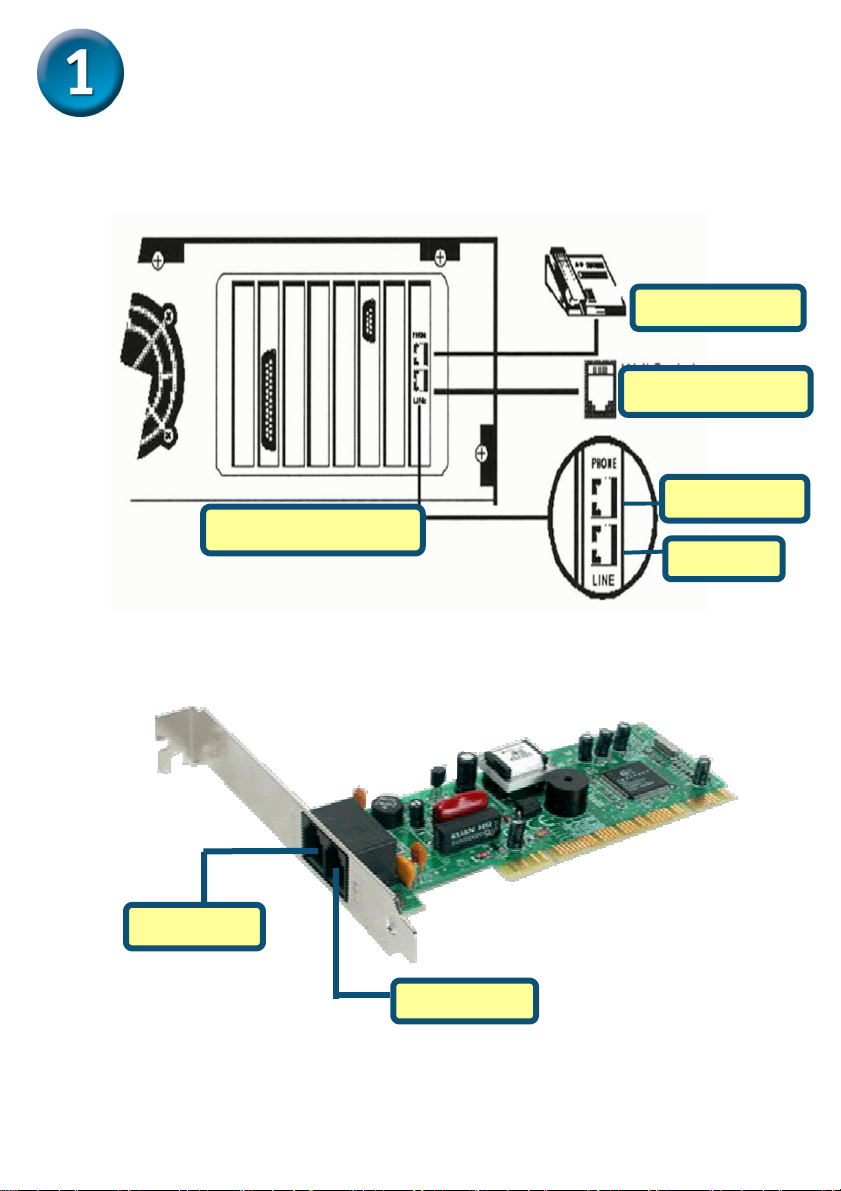
Hardware Installation
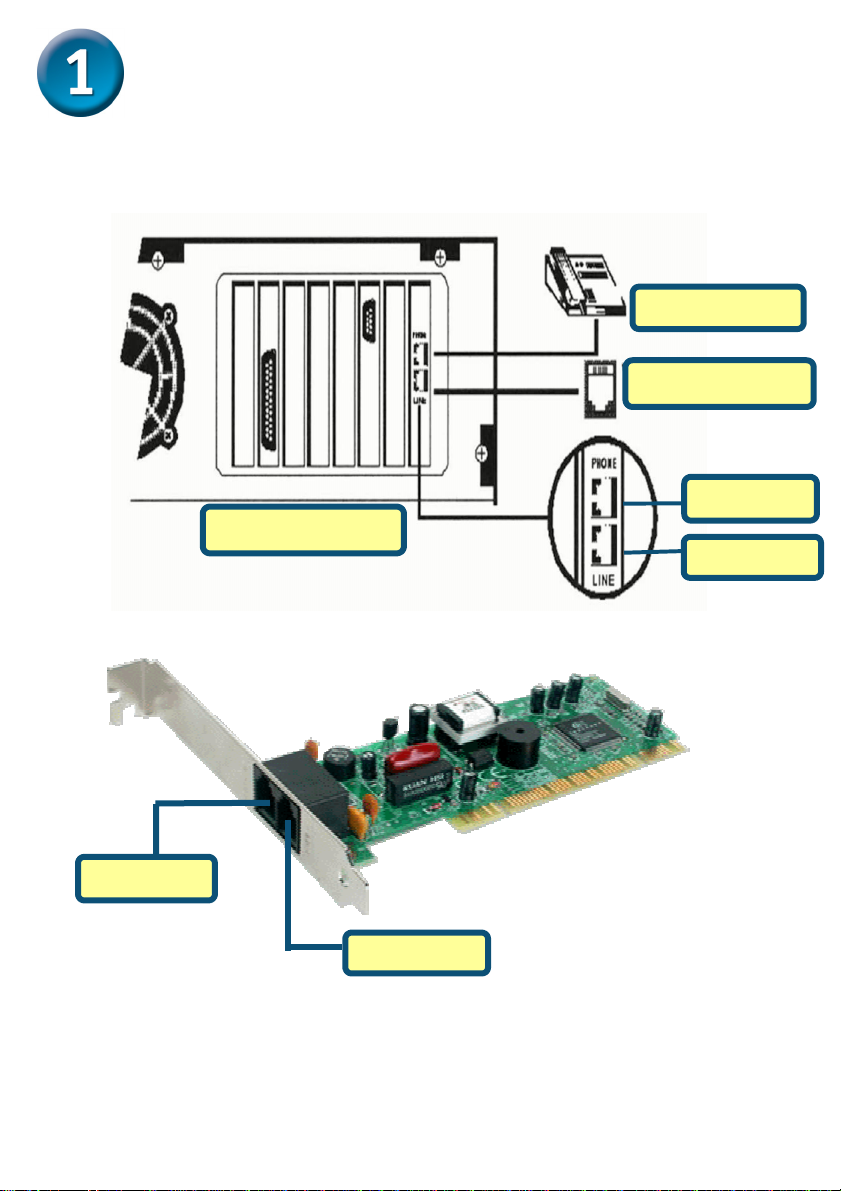
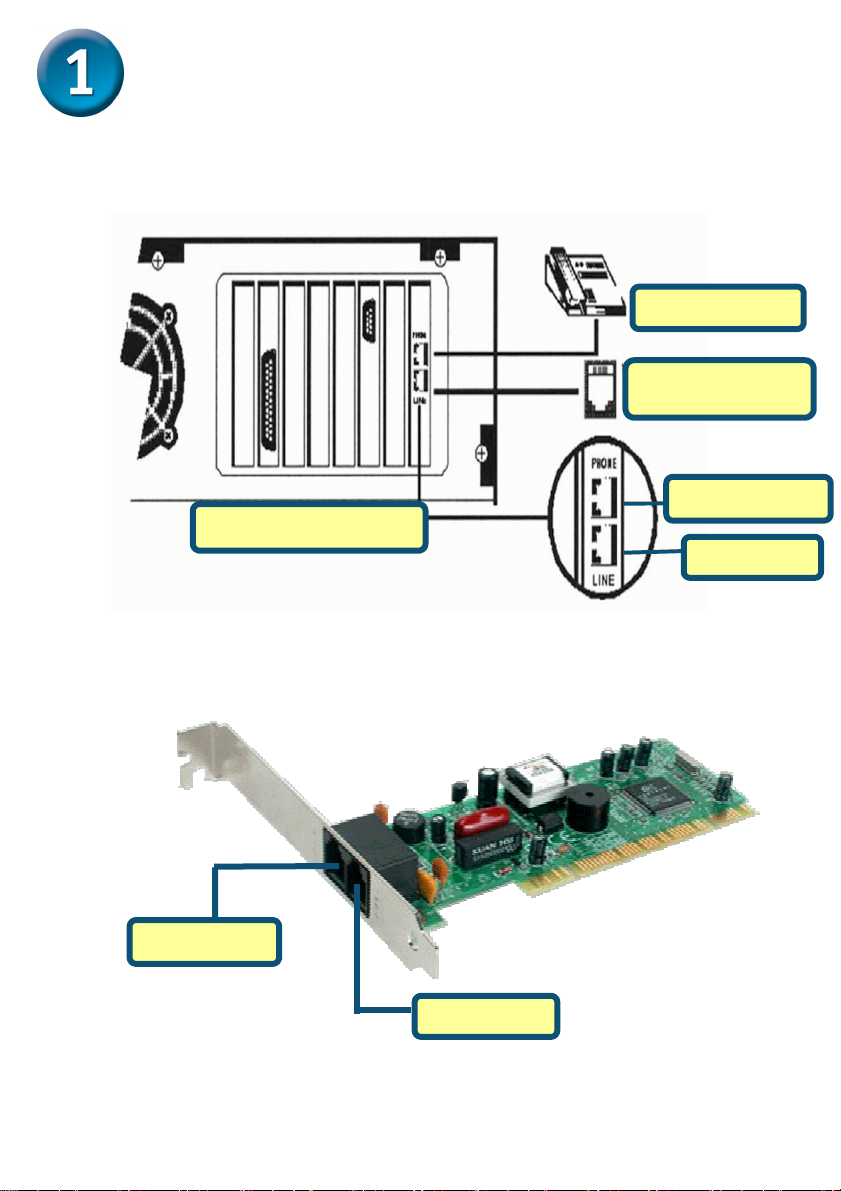
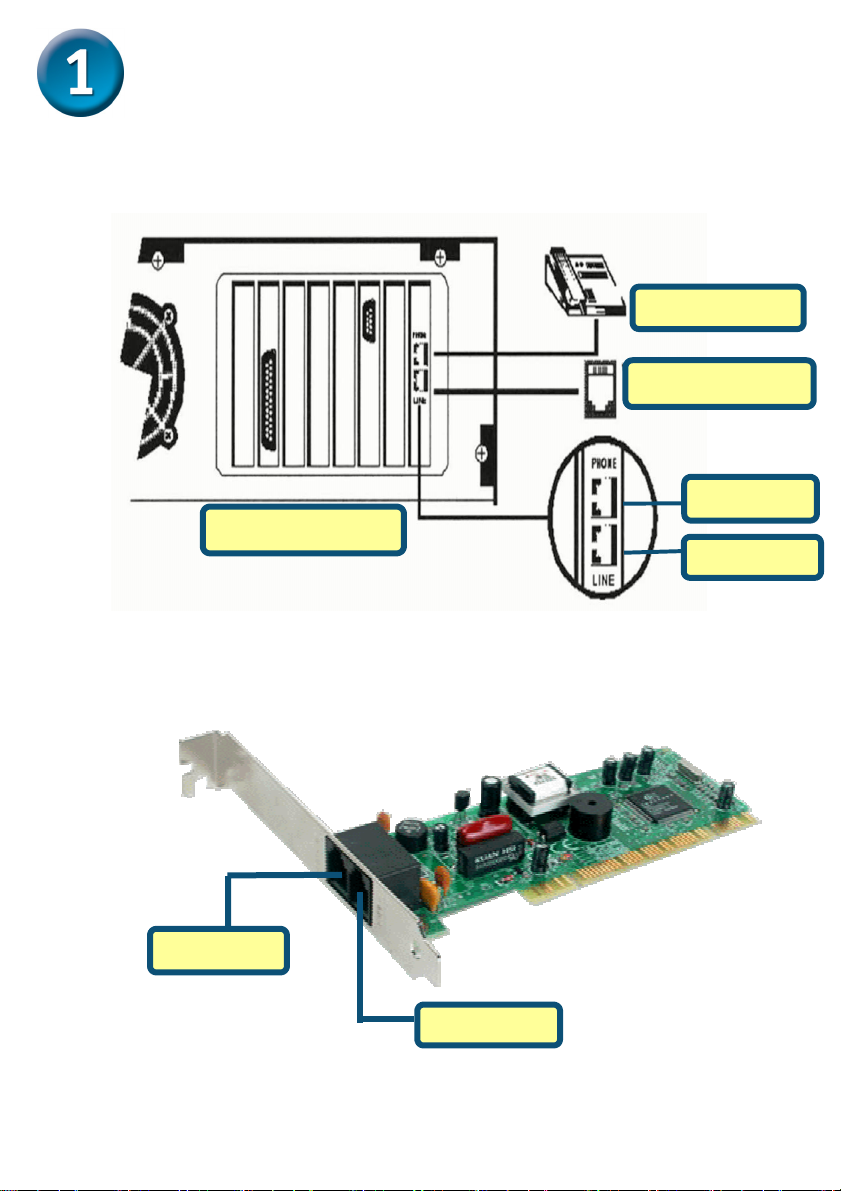
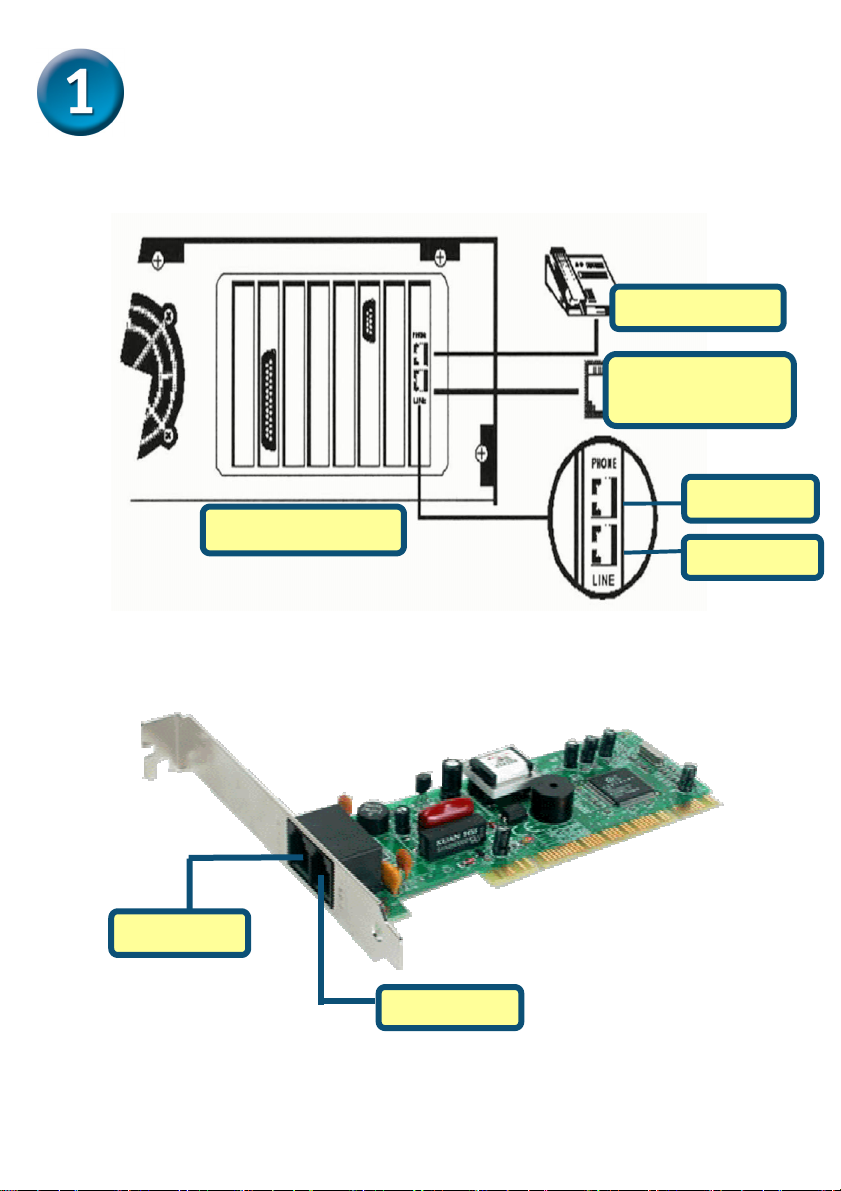
Please unplug the telephone Line and plug the telephone line into the socket on the
back of the modem marked LINE.
Telephone
WALL SOCKET
PHONE
COMPUTER
LINE
PHONE
LINE
2
Page 3
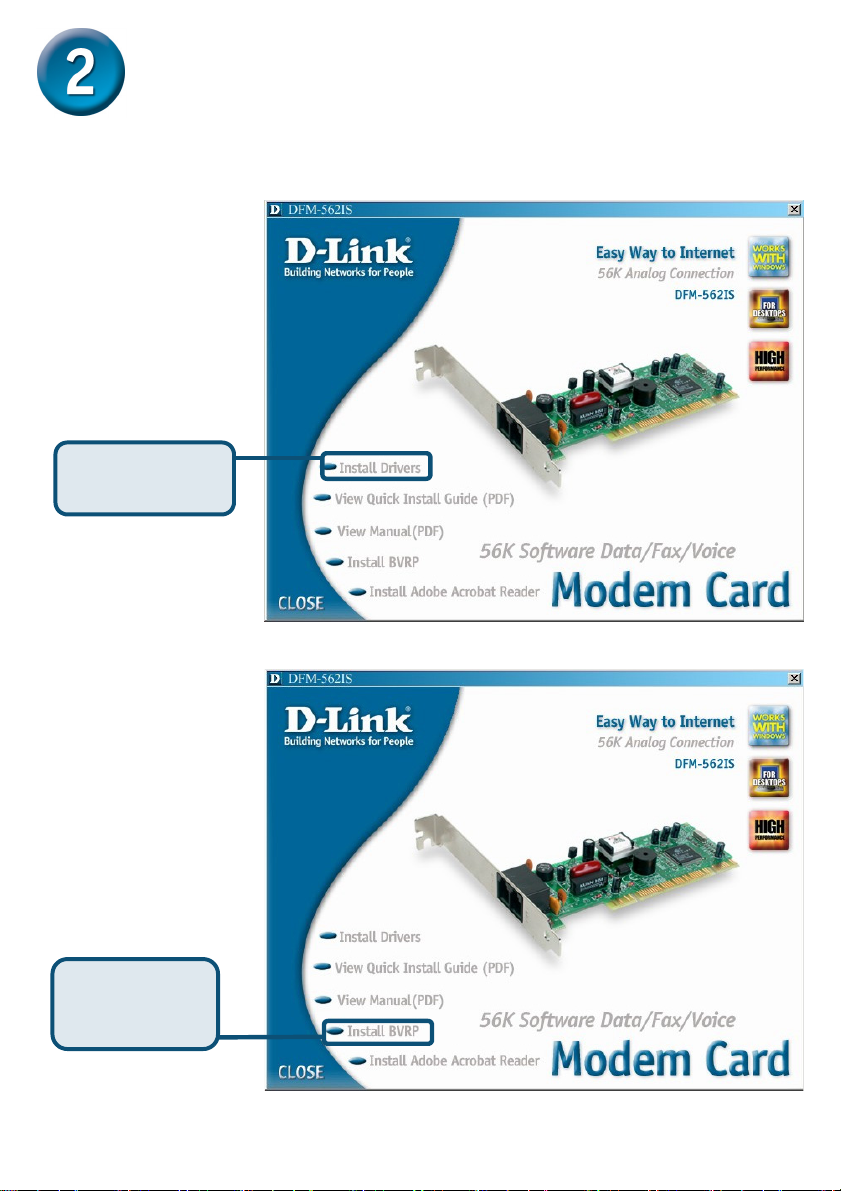
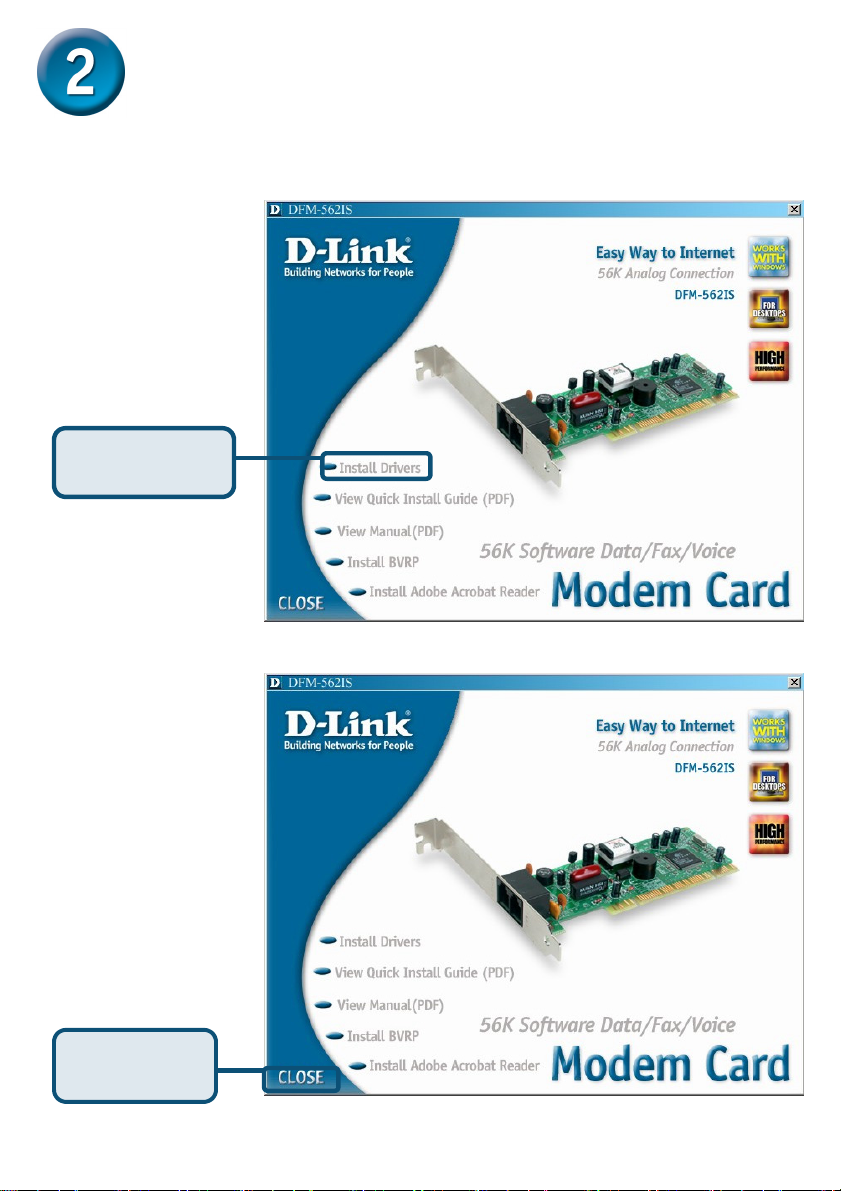
Install Drivers
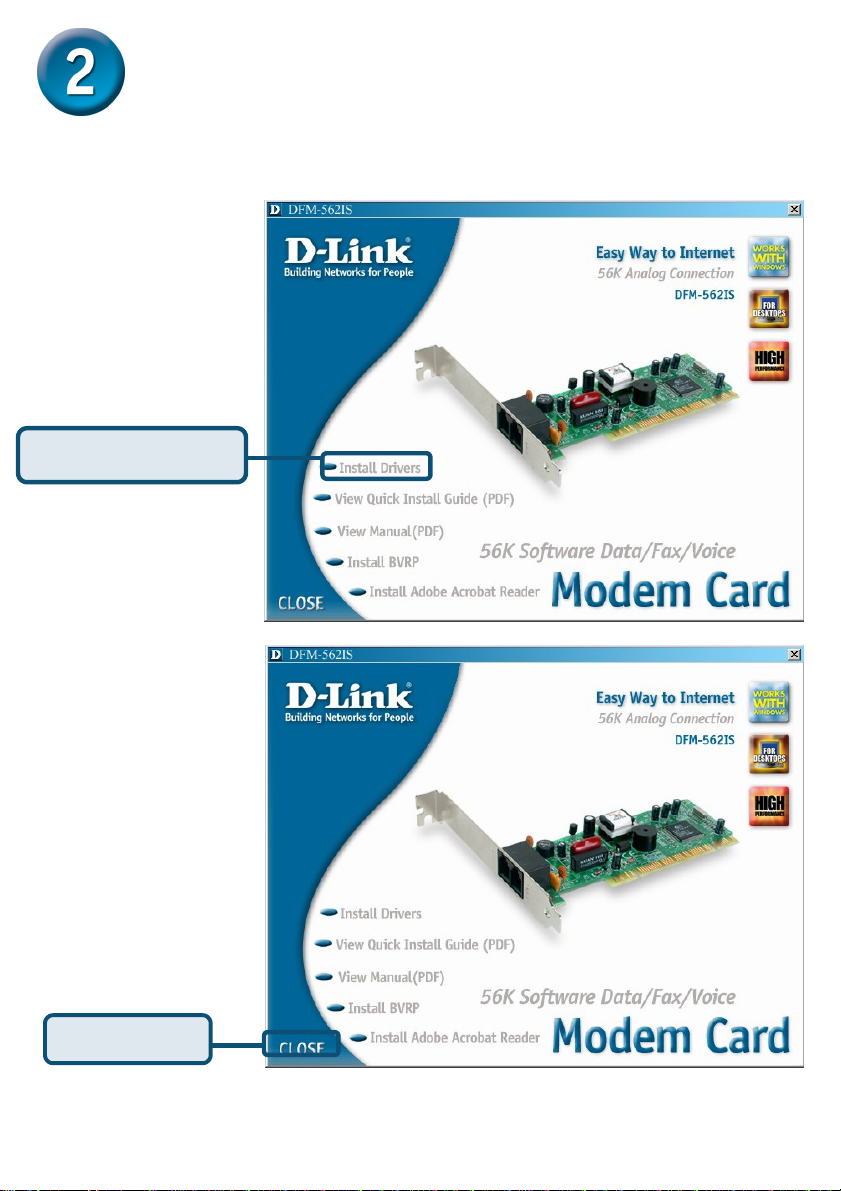
2.1 Windows 98/ME
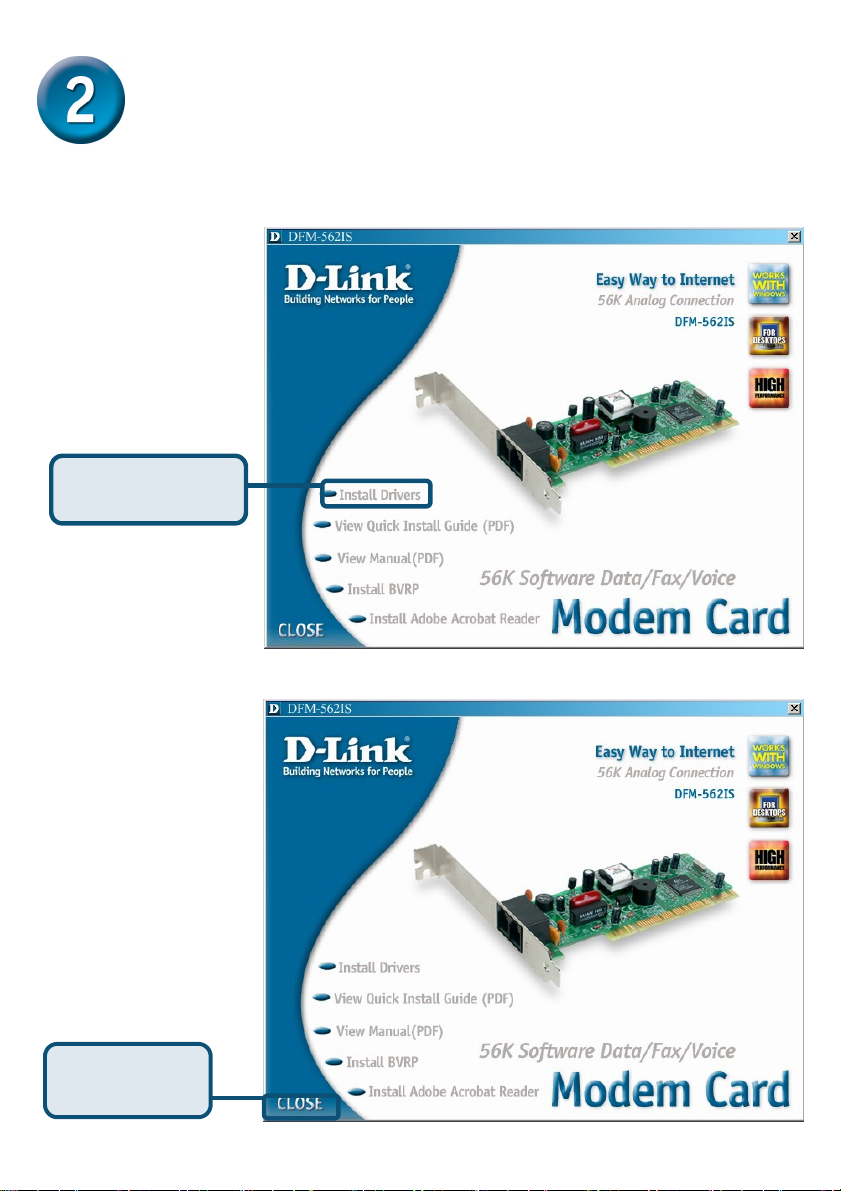
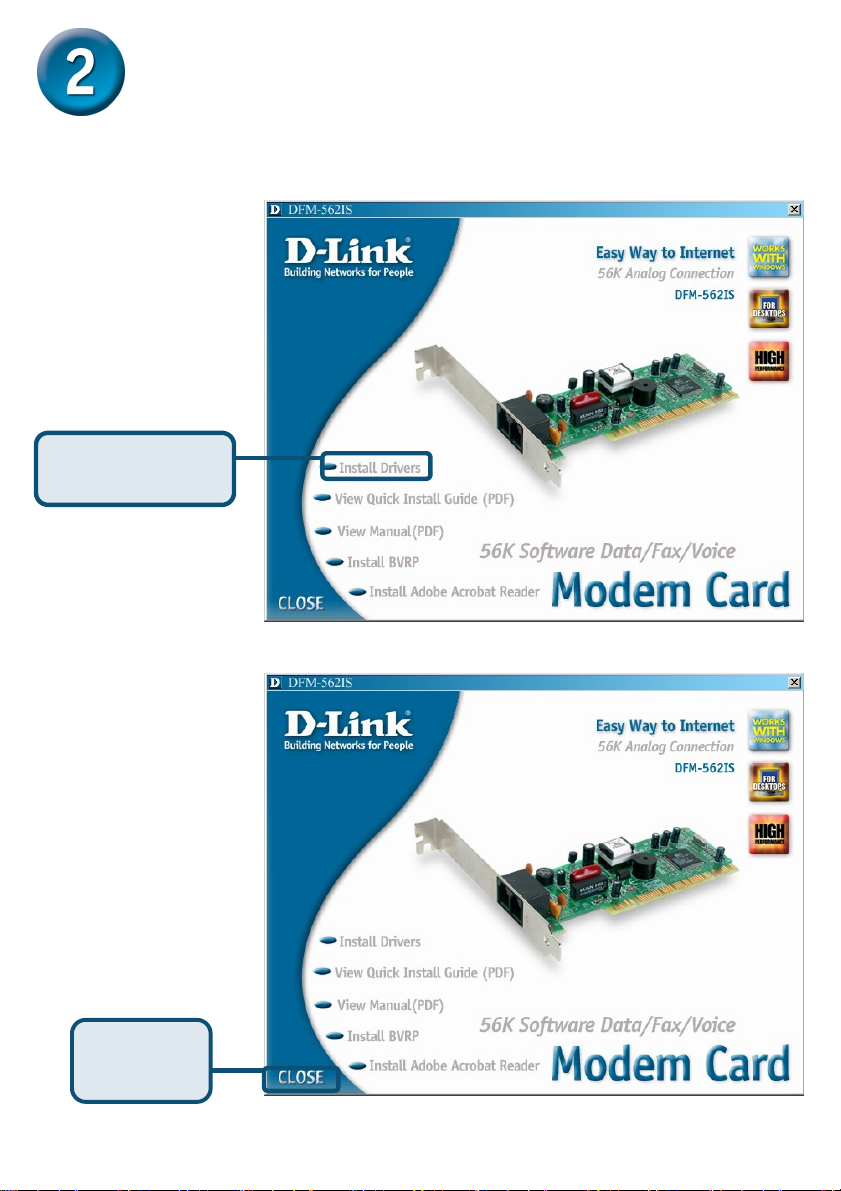
When the system was
complete, windows will
detect the modem
automatic, please click
Cancel. Then insert the
driver CD supplied.
Click Install Drivers
After system will
auto Install Modem.
Please click Close to
end the window
Click CLOSE
3
Page 4
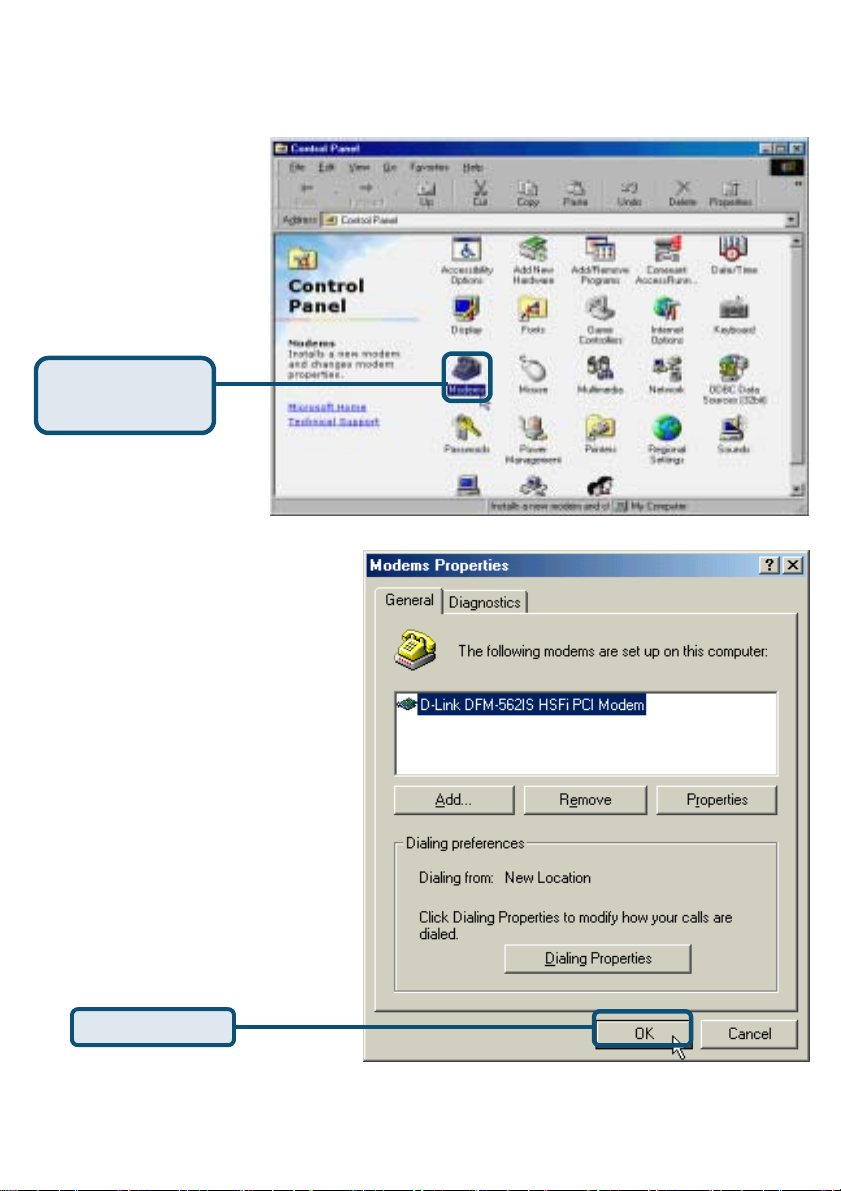
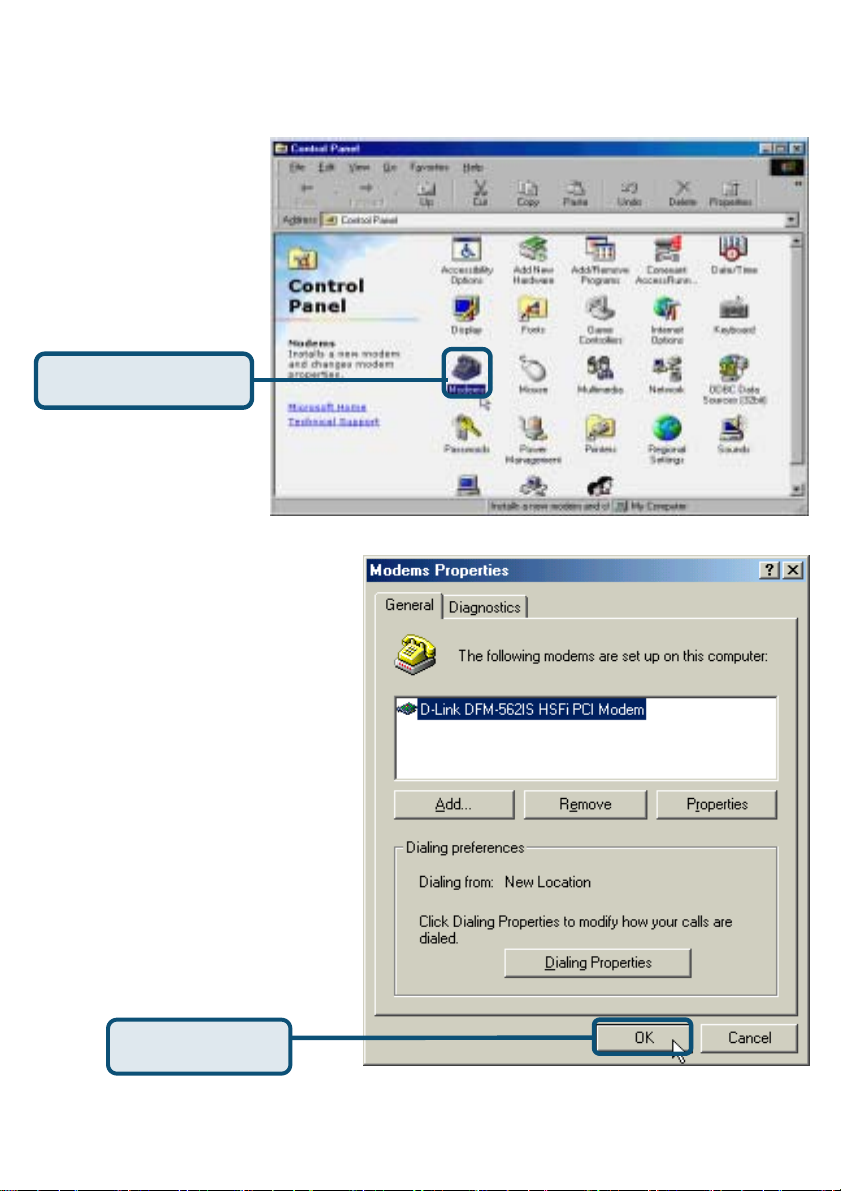
2.1 Windows 98/ME (continue)
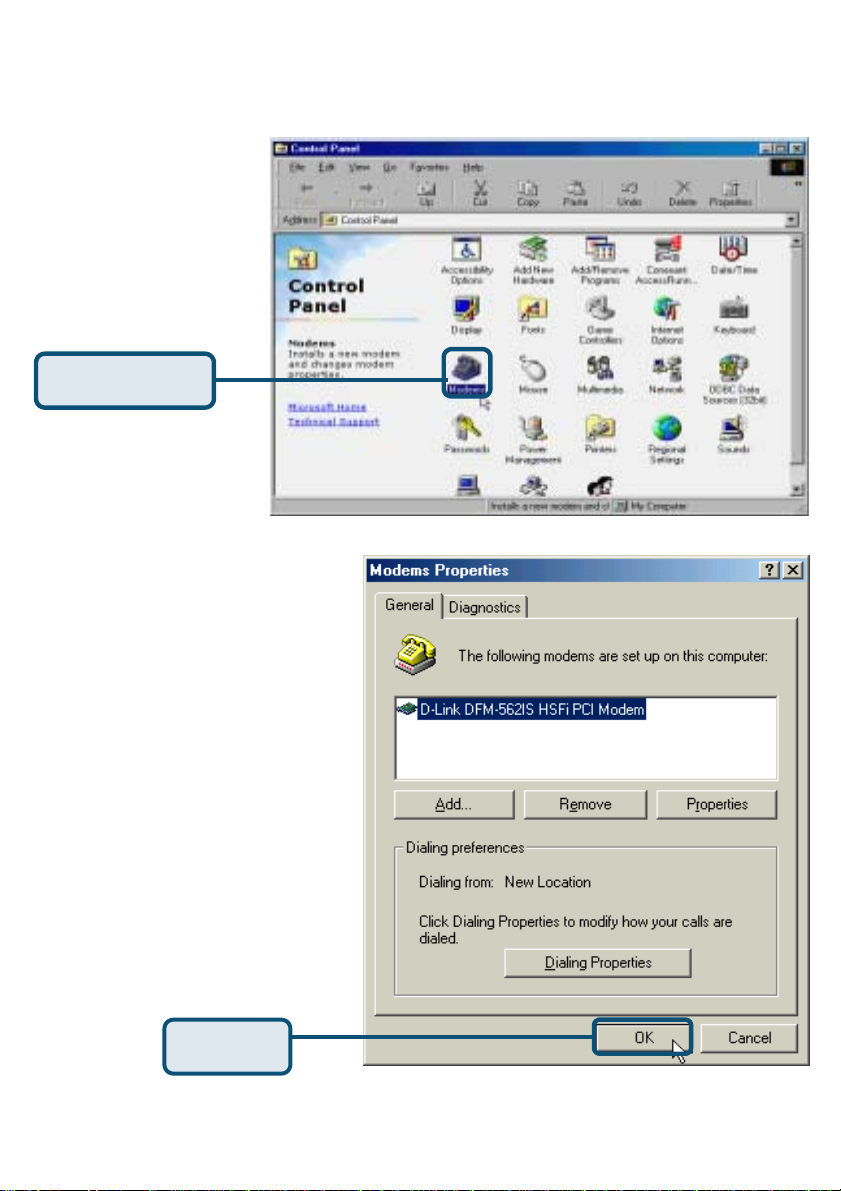
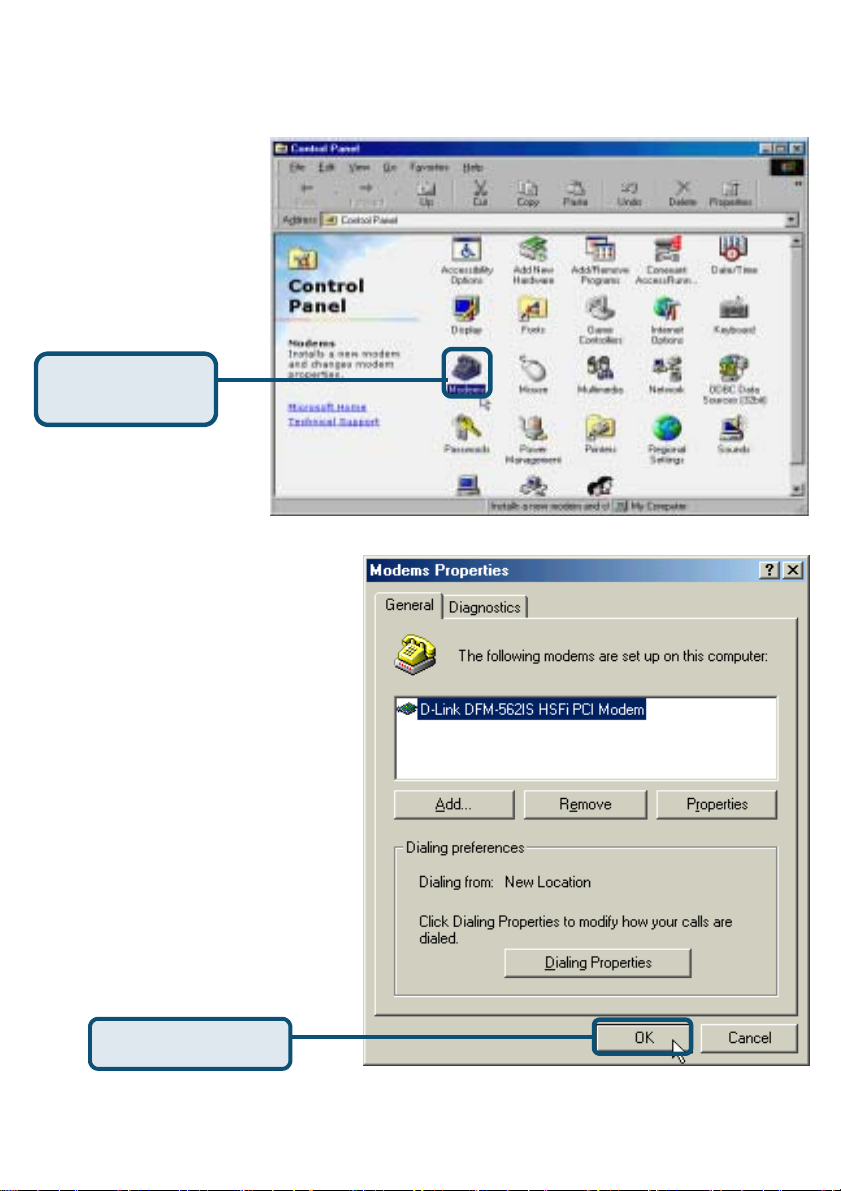
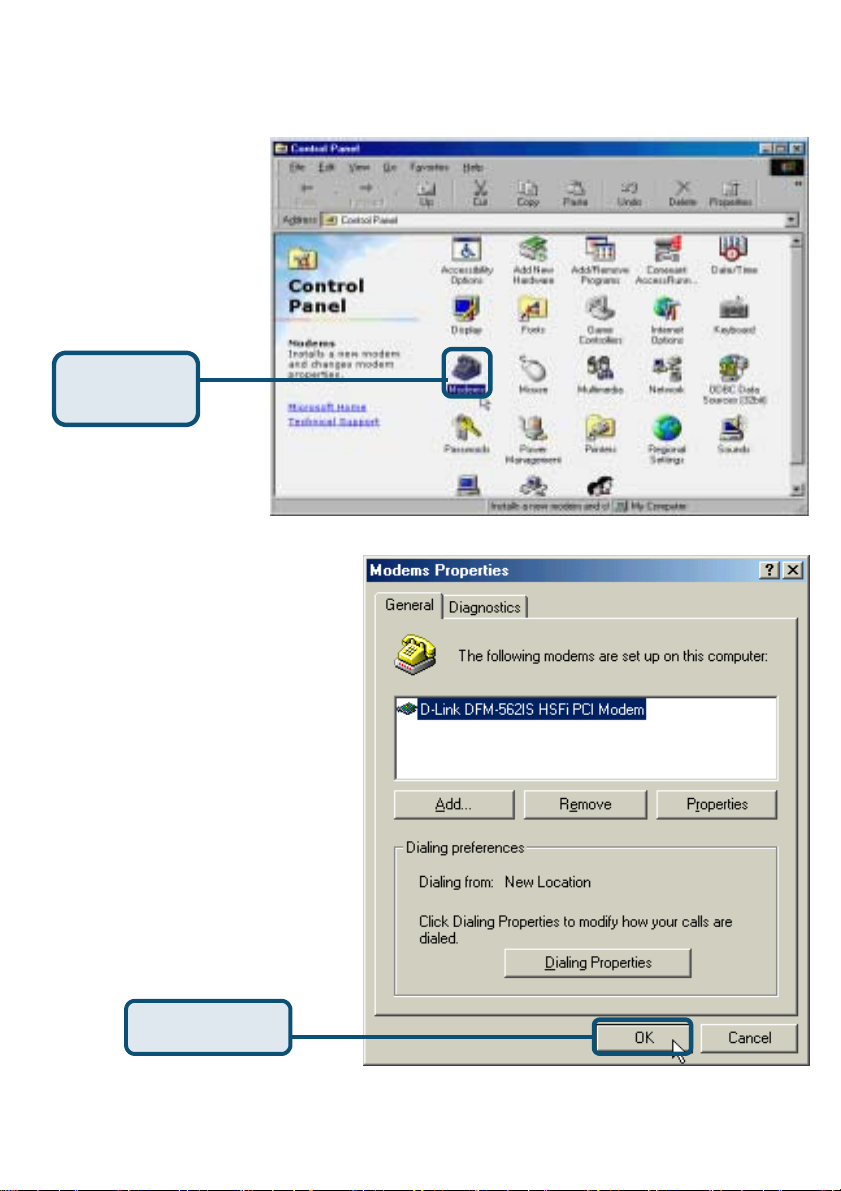
Please select Start /
Settings /
Control Panel and
double-click
on the Modems icon.
Click Modems
Check Modem Model No For
D-Link DFM-562IS HSFi PCI
Modem.
If correct the installation is
complete
then click OK to exit.
Click OK
4
Page 5
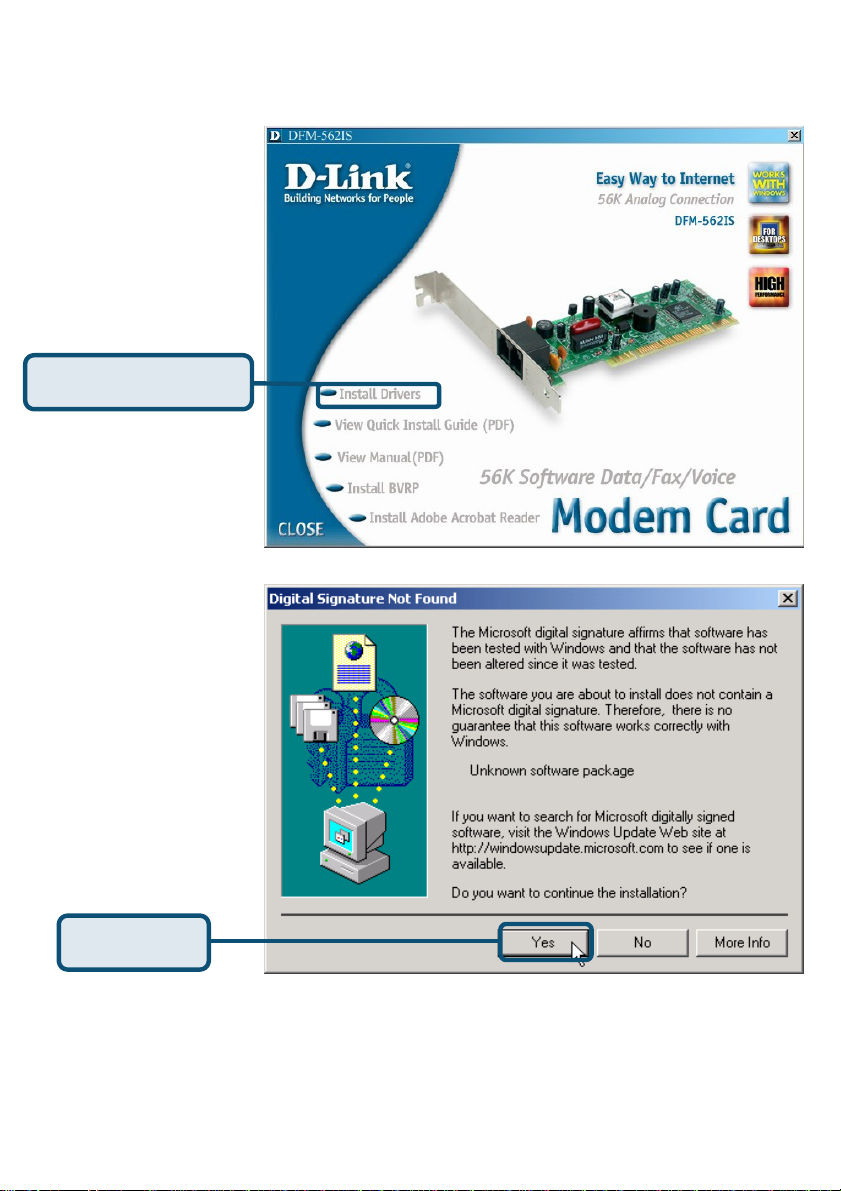
2.2 Windows 2K
When the system was
complete, windows will
detect the modem
automatic, please click
Cancel. Then insert the
driver CD supplied.
Click Install Drivers
Click Yes ignore the
message.
Click Yes
5
Page 6
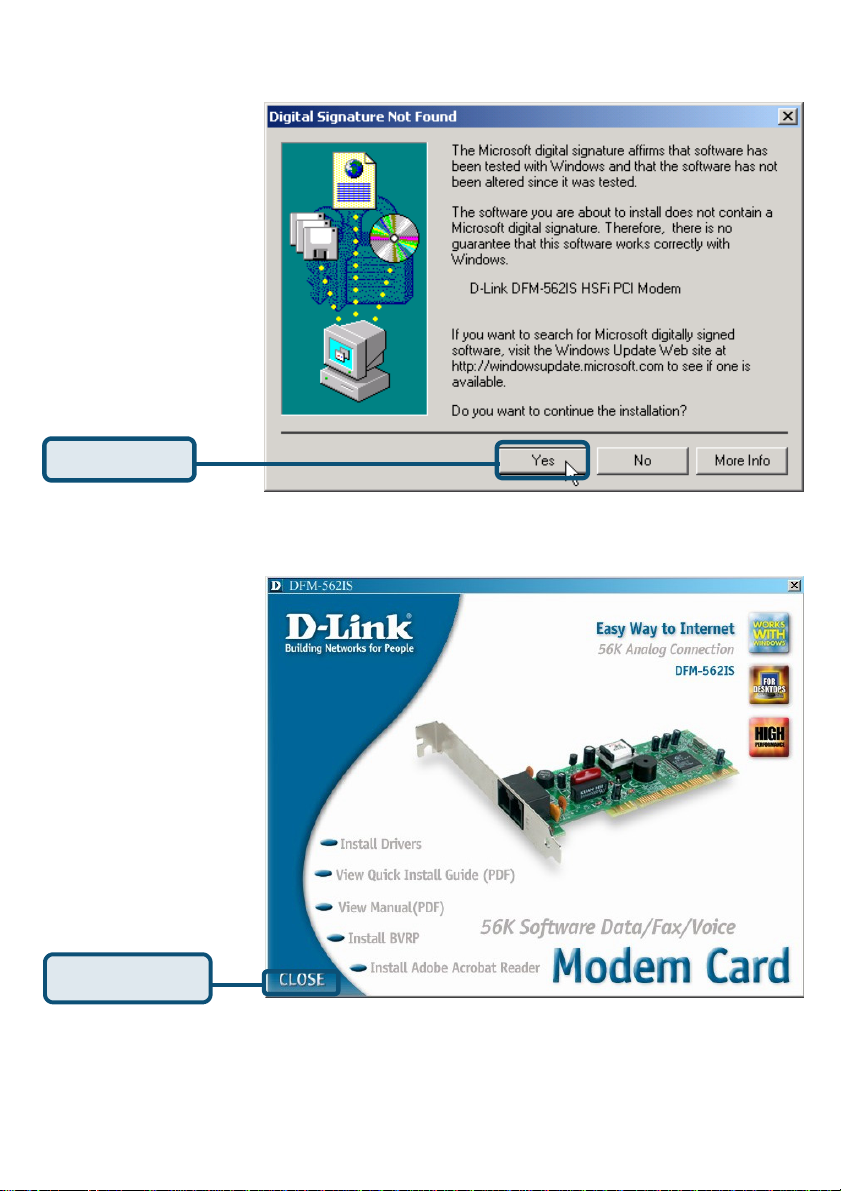
Click Yes ignore the
message.
Click Yes
After system will
auto Install Modem.
Please click Close to
end the window
Click CLOSE
6
Page 7
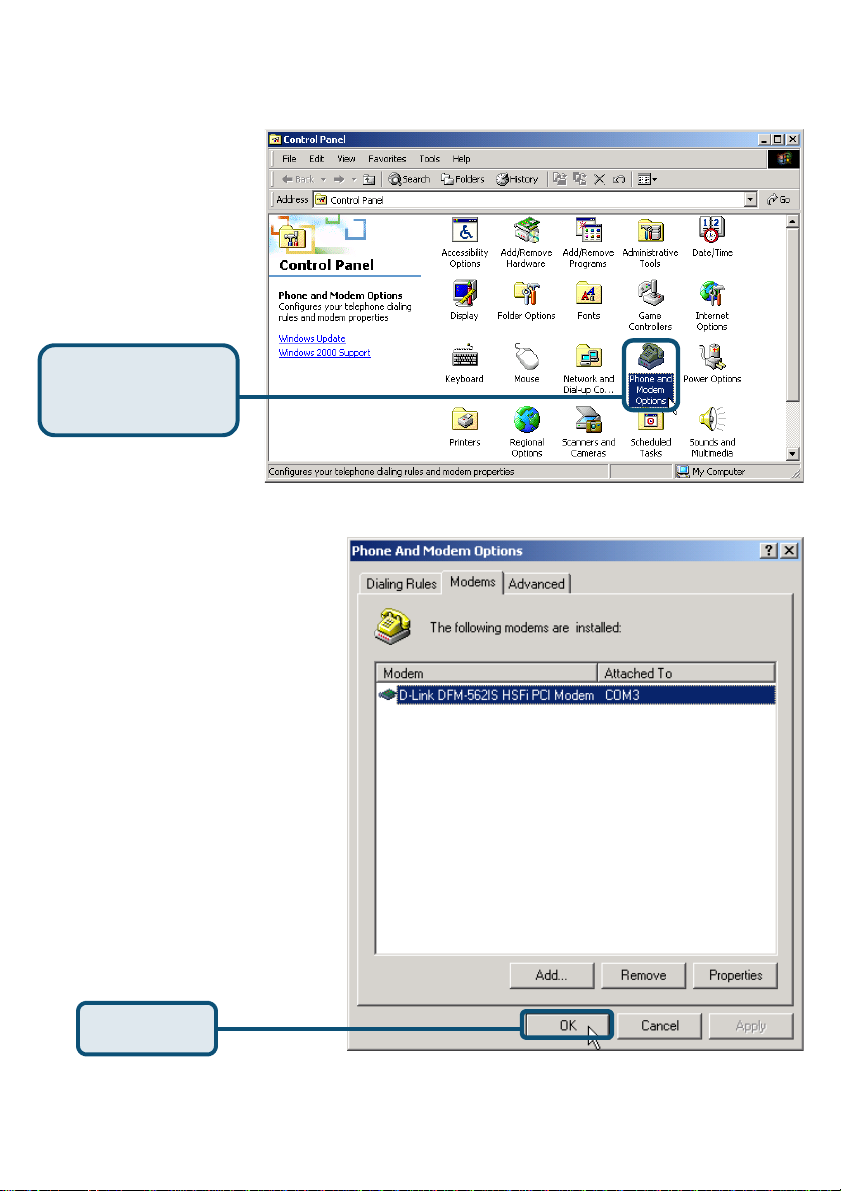
2.2 Windows 2K(continue)
Please select Start /
Settings/Control Panel
and double-click on the
Phone and Modem
Options icon.
Click Phone and
Modem Options
Check Modem Model No.
For D-Link DFM-562IS HSFi
Modem
If installation is complete
then click OK to exit.
Click OK
7
Page 8
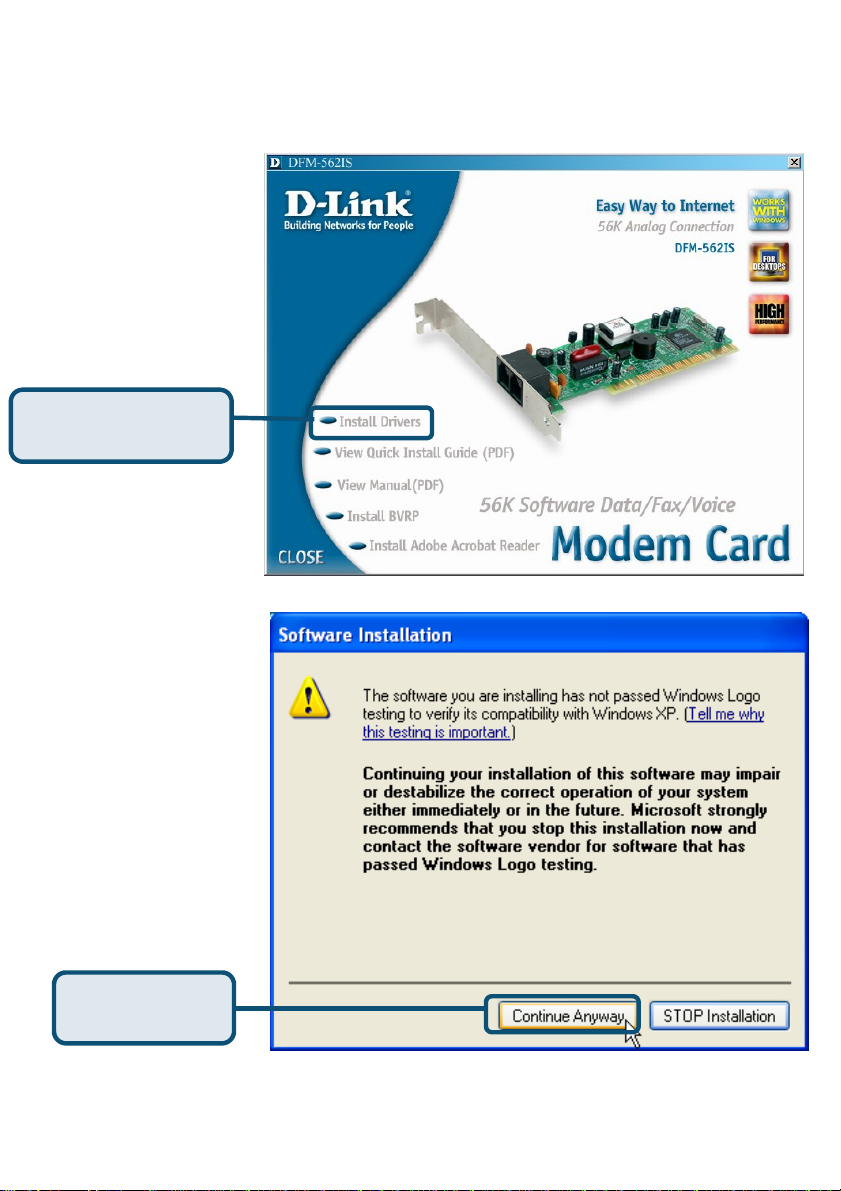
2.3 Windows XP
Click Install Drivers
Click Continue
Anyway
8
Page 9
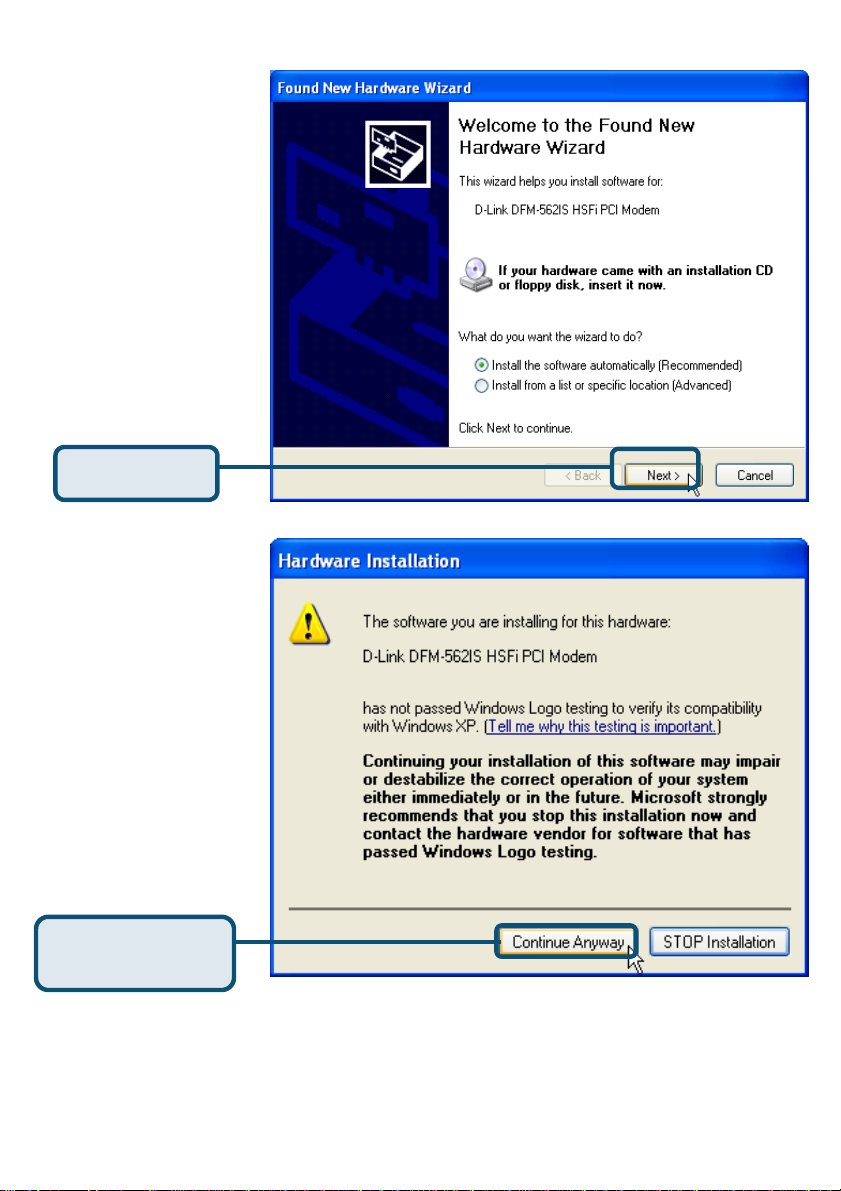
Select the Install the
software automatically
[Recommended] then
click Next to search for
the driver.
Click Next
Click Continue Anyway
to skip the warning
message.
9
Click Continue
Anyway
Page 10
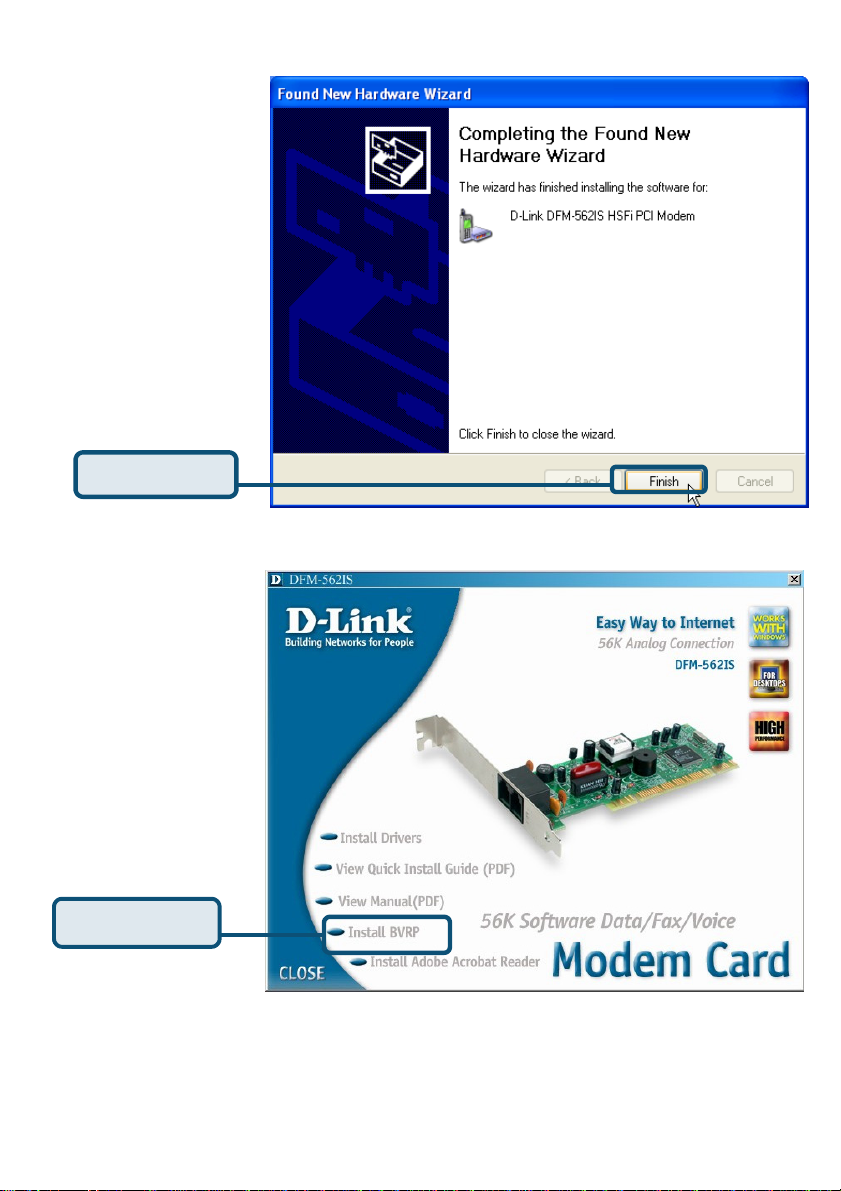
Install complete
Click Finish
Please click Close to
end the window
Click CLOSE
10
Page 11
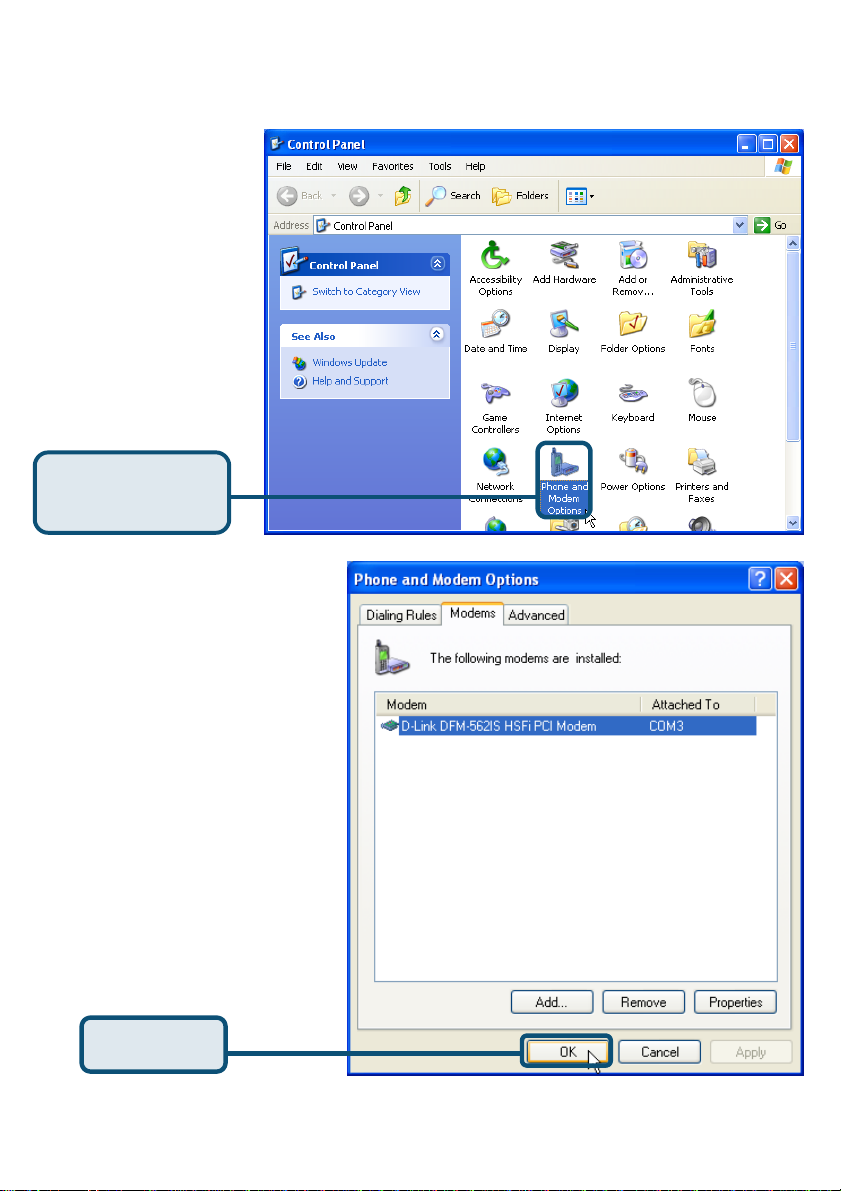
2.3 Windows XP(continue)
Please select Start /
Settings/Control Panel
and double-click on the
Phone and Modem
Options icon.
Click Phone and
Modem Options
Check Modem Model No.
For D-Link DFM-562IS
HSFi PCI Modem.
If installation is complete
then click OK to exit.
Click OK
11
Page 12
Technical Support
You can find software updates and user documentation on the D-Link website.
D-Link provides free technical support for customers within the United States and
within Canada for the duration of the warranty period on this product.
U.S. and Canadian customers can contact D-Link technical support through our
website, or by phone.
Tech Support for customers within the United States:
D-Link Technical Support over the Telephone:
(877) 453-5465
24 hours a day, seven days a week.
D-Link Technical Support over the Internet:
http://support.dlink.com
email:[email protected]
Tech Support for customers within Canada:
D-Link Technical Support over the Telephone:
(800) 361-5265
Monday to Friday 8:30am to 9:00pm EST
D-Link Technical Support over the Internet:
http://support.dlink.ca
email:[email protected]
12
Page 13
S
D-Link DFM-562I
Software Modem Card
Voraussetzungen
Um mit diesem Modem einen Internetanschluss für Ihren PC einzurichten,
benötigen Sie ein bereits bestehendes Konto bei einem Internet Service Provider
(ISP).
Prüfen Sie den Paketinhalt
Mit dem Kauf Ihres D-Link 562IS erhalten Sie folgendes Zubehör:
• D-Link DFM-562IS Software Modem Card
• CD-ROM (enthält Handbuch und
Garantie)
• Telefonkabel
• D-Link DFM-562IS Benutzerhandbuch
Hinweis: Die
Verwendung eines
Netzadapters mit
abweichender Nennspannung
kann zur Beschädigung des
Geräts führen sowie zum
Verlust aller
Garantieansprüche.
Bei Fehlen einiger der oben aufgeführten Positionen kontaktieren Sie bitte Ihren Händler.
©2003 D-Link Corporation, Inc. Alle Rechte vorbehalten. Warenzeichen oder eingetragene Warenzeichen sind Eigentum der entsprechenden
13
Inhaber. Änderungen an Software und Spezifikationen vorbehalten. D-Link DFM-562IS HSFi PCI Modem
Page 14
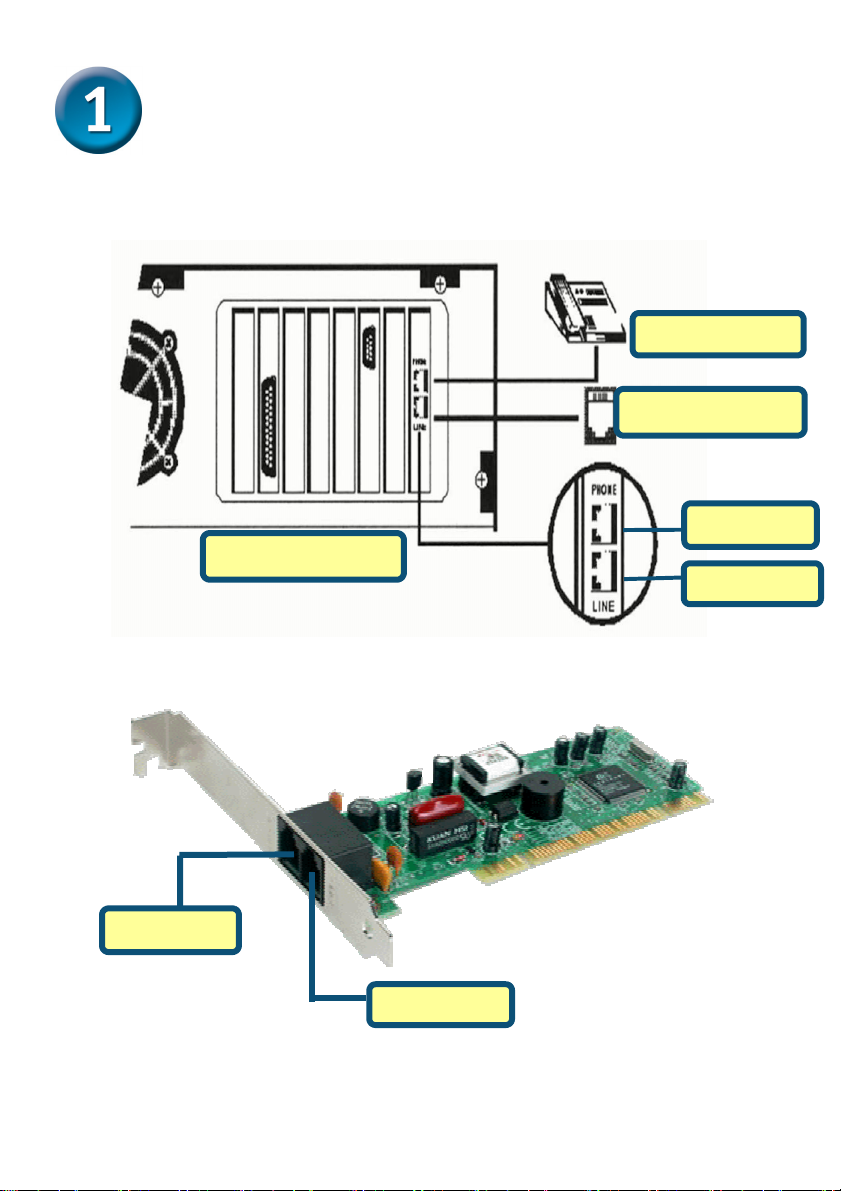
Hardware-Installation
Stecken Sie Ihr Telefonkabel aus und in die vorgesehene Buchse LINE auf der
Rückseite des Modems wieder ein.
Telefon
Wandbuchse
Telefon
COMPUTER
Leitung
Telefon
Leitung
14
Page 15
Treiber-Installation
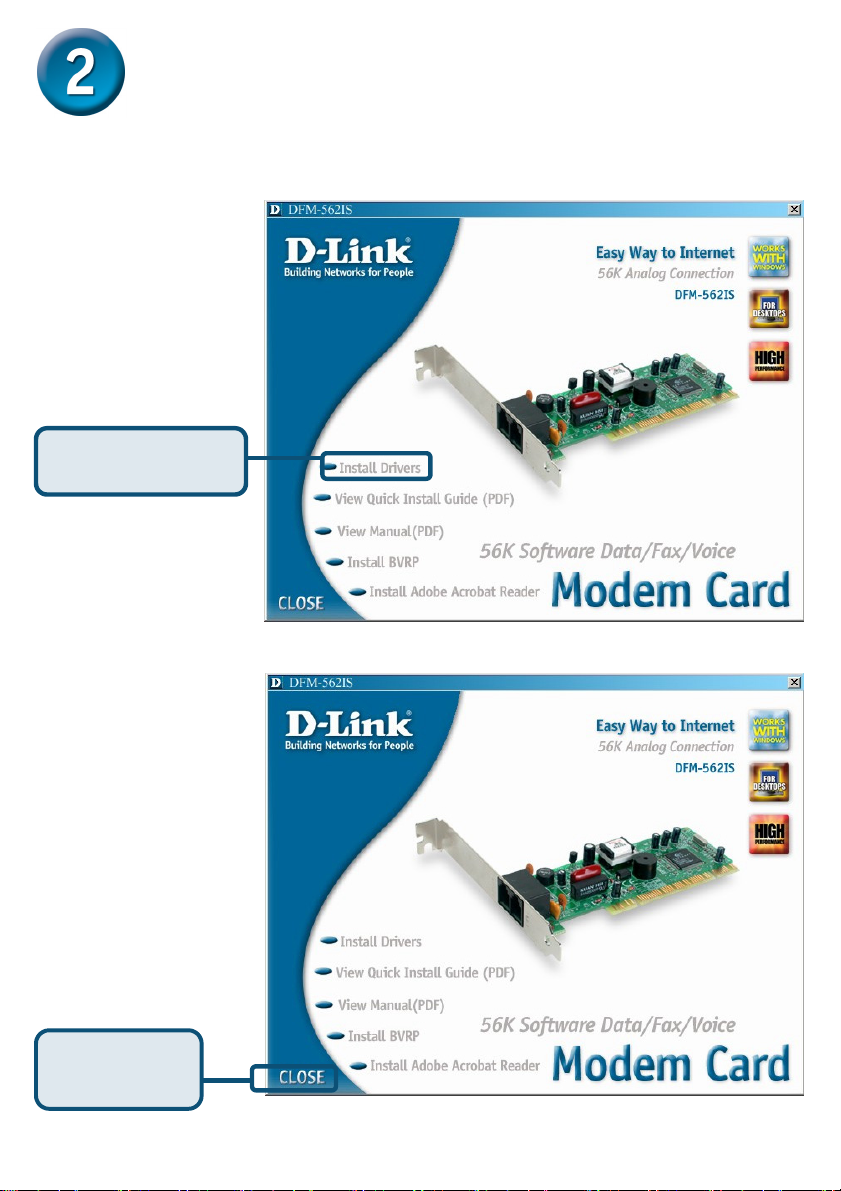
2.1 Windows 98/ME
Wenn das System
vollständig eingerichtet
ist, wird das Modem von
Windows automatisch
erkannt. Klicken Sie auf
Abbrechen und legen
Sie die mitgelieferte CD
ein.
Klicken Sie auf
Install Drivers
Danach installiert das
System das Modem
automatisch.
Schließen Sie das
Fenster mit Close.
Klicken Sie auf
15
Page 16
2.1 Windows 98/ME (Forts.)
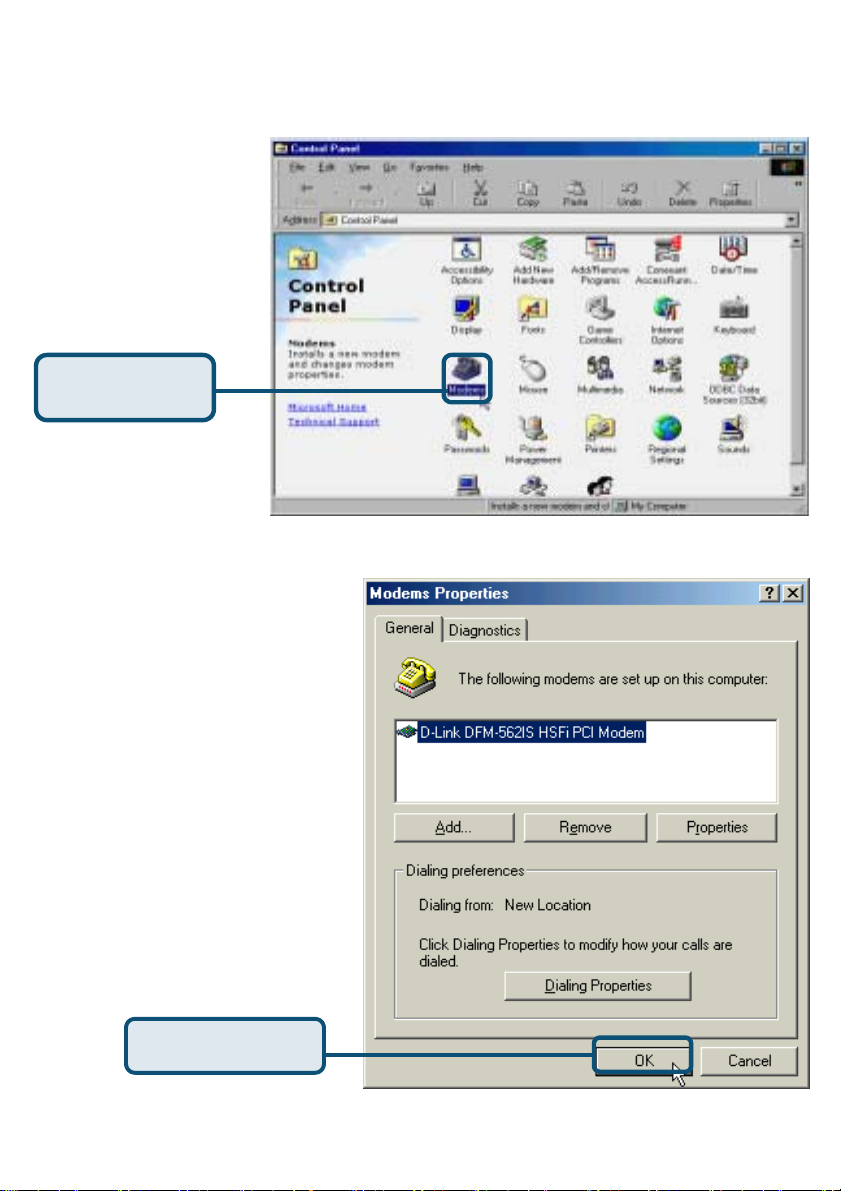
Klicken Sie auf Start /
Einstellungen /
Systemsteuerung und
doppelklicken Sie dann
auf
das Symbol Modem.
Klicken Sie auf
Modem
Überprüfen Sie die Modellnummer
des Modems:
D-Link DFM-562IS HSFi PCI
Modem
.
Stimmt diese mit der angezeigten
Nummer überein, ist die
Installation bereits erfolgt.
Klicken Sie zum Beenden auf OK.
16
Klicken Sie auf OK.
Page 17
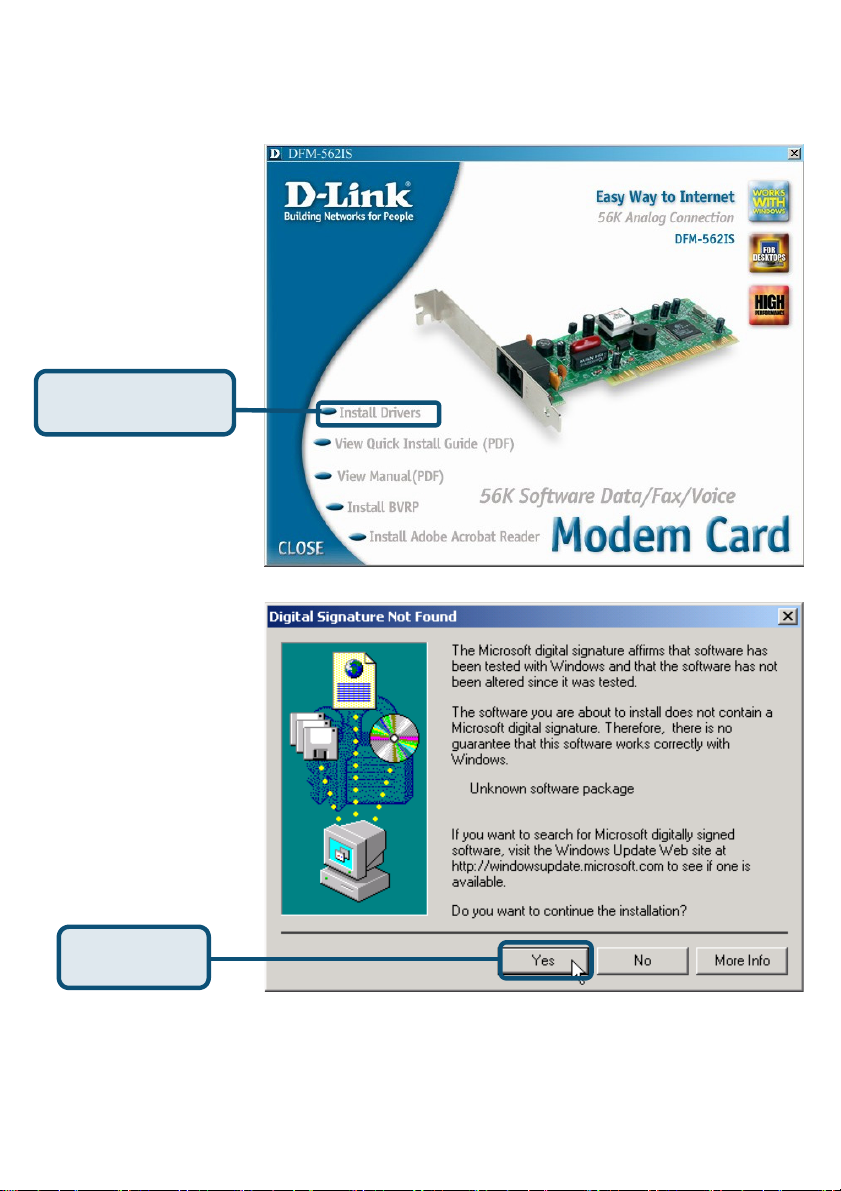
2.2 Windows 2000
Nach vollständiger
Einrichtung des Systems
erkennt Windows das
Modem automatisch.
Klicken Sie auf
Abbrechen. Legen Sie
dann die mitgelieferte
Treiber-CD ein.
Klicken Sie auf
Install Drivers
Klicken Sie auf Ja, um die
Meldung zu überspringen.
Klicken Sie
auf Ja
17
Page 18
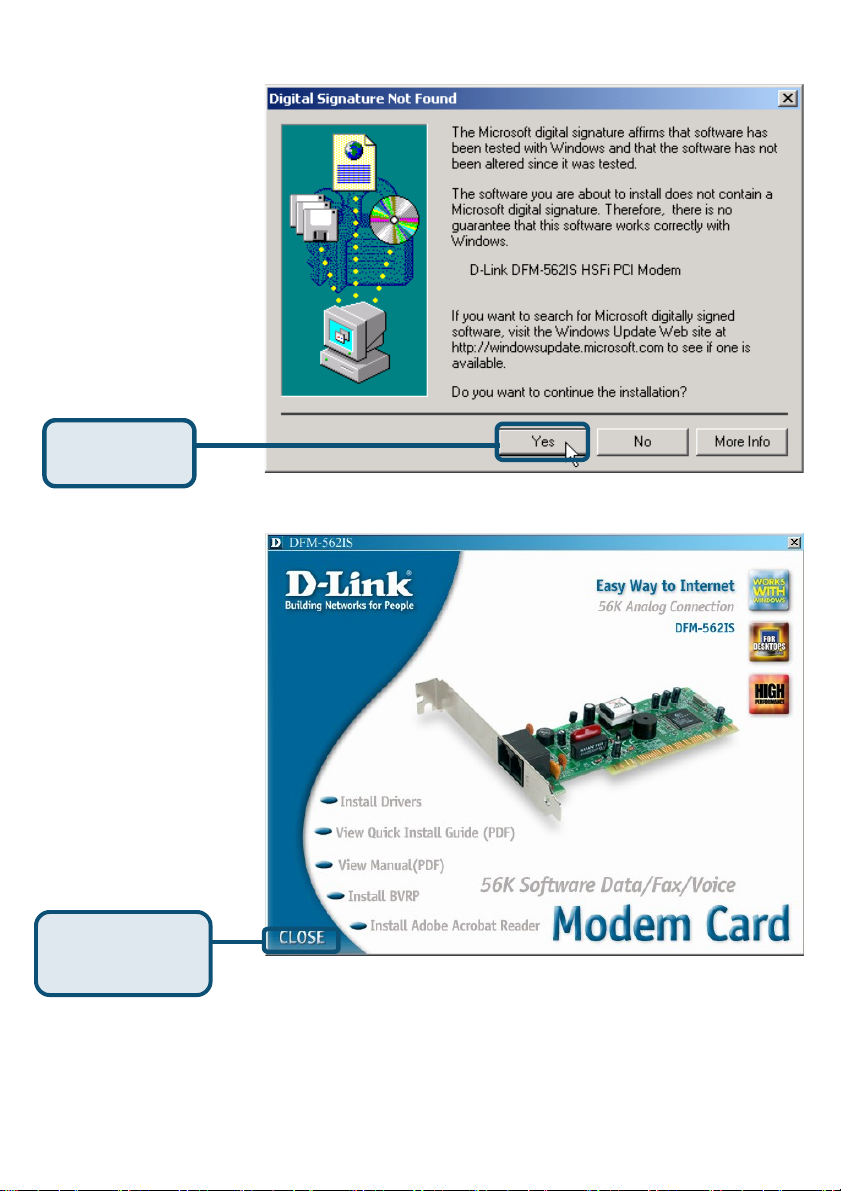
Klicken Sie auf Ja, um die
Meldung zu überspringen.
Klicken Sie
auf Ja
Danach installiert das
System das Modem
automatisch.
Schließen Sie das
Fenster mit Close.
Klicken Sie auf
CLOSE
18
Page 19
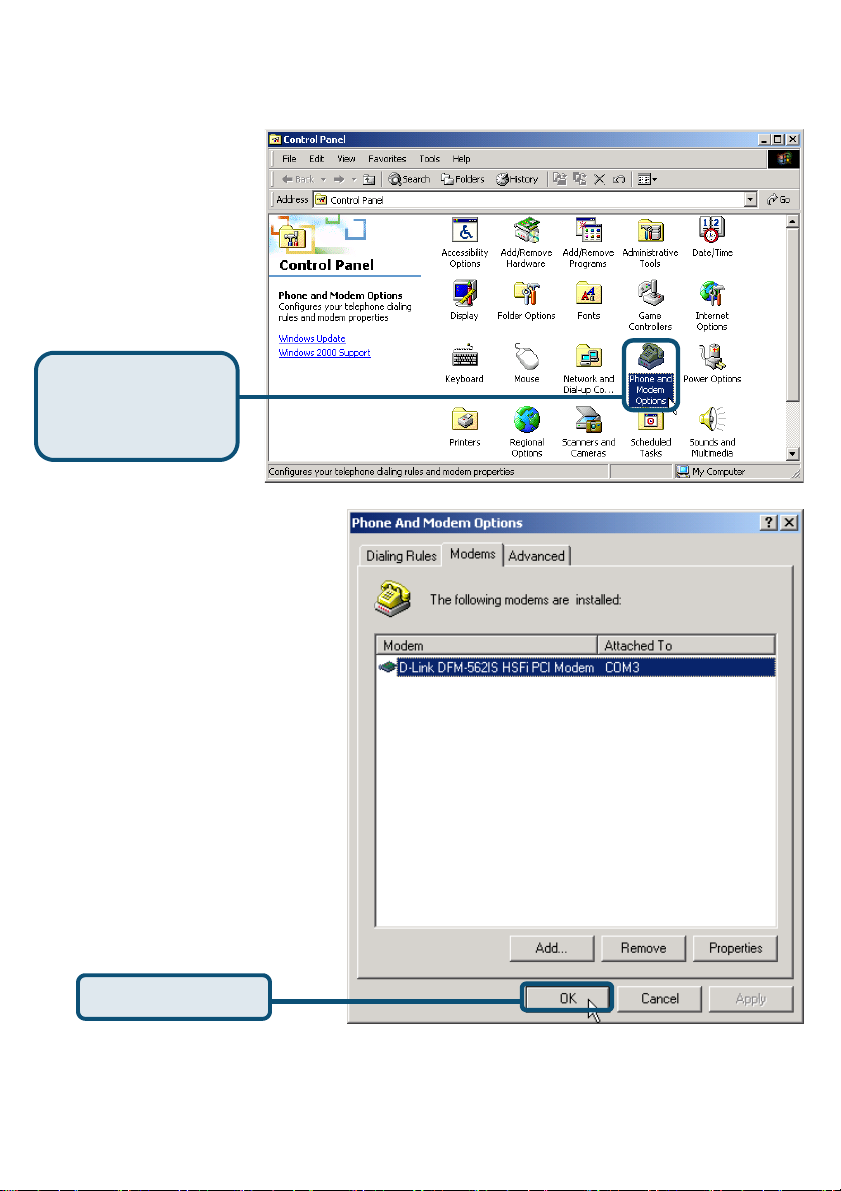
2.2 Windows 2000 (Forts.)
Klicken Sie auf Start /
Einstellungen /
Systemsteuerung und
doppelklicken Sie auf das
Symbol Telefon- und
Modemoptionen.
Klicken Sie auf
Telefon- und
Modemoptionen
Überprüfen Sie die
Modellnummer des Modems,
d.h.:
D-Link DFM-562IS HSFi
Modem
Nach vollständiger Installation
klicken Sie auf OK.
.
19
Page 20
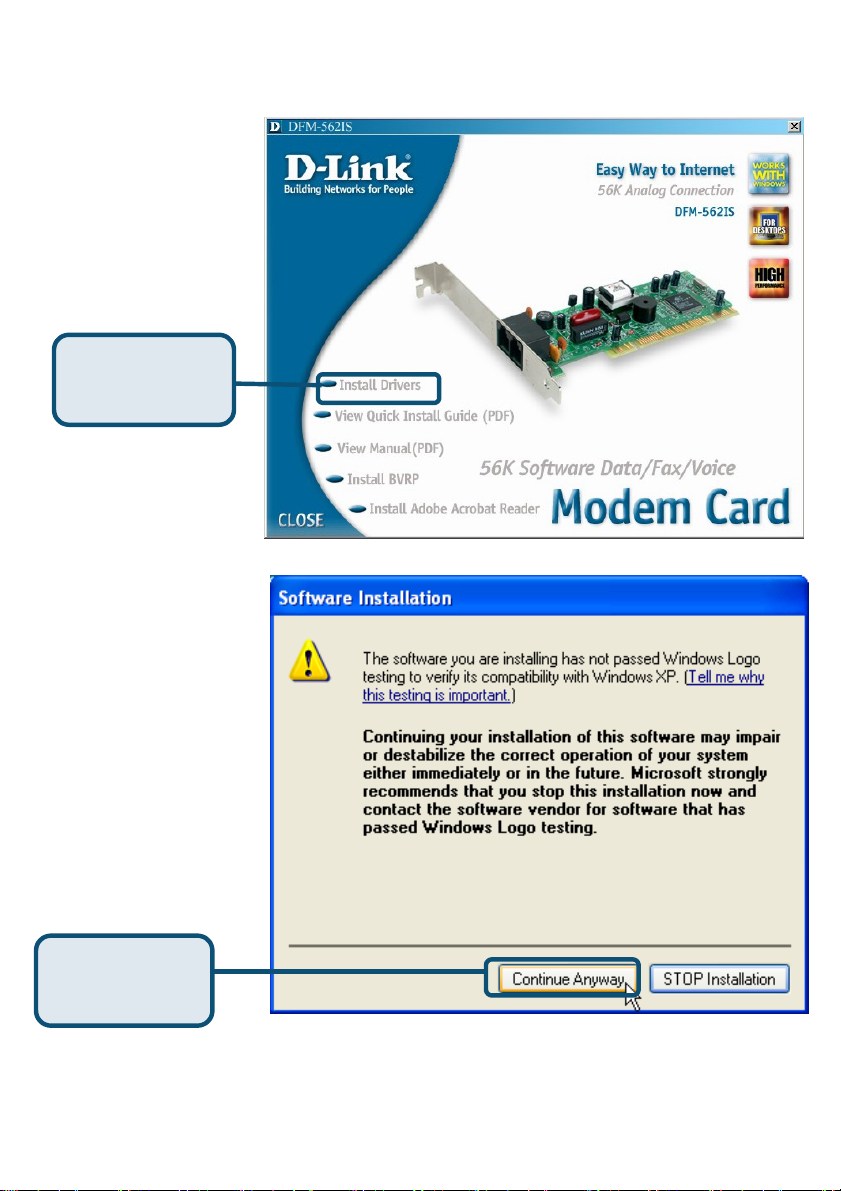
2.3 Windows XP
Klicken Sie auf
Install Drivers
Klicken Sie auf
Installation
fortsetzen
20
Page 21
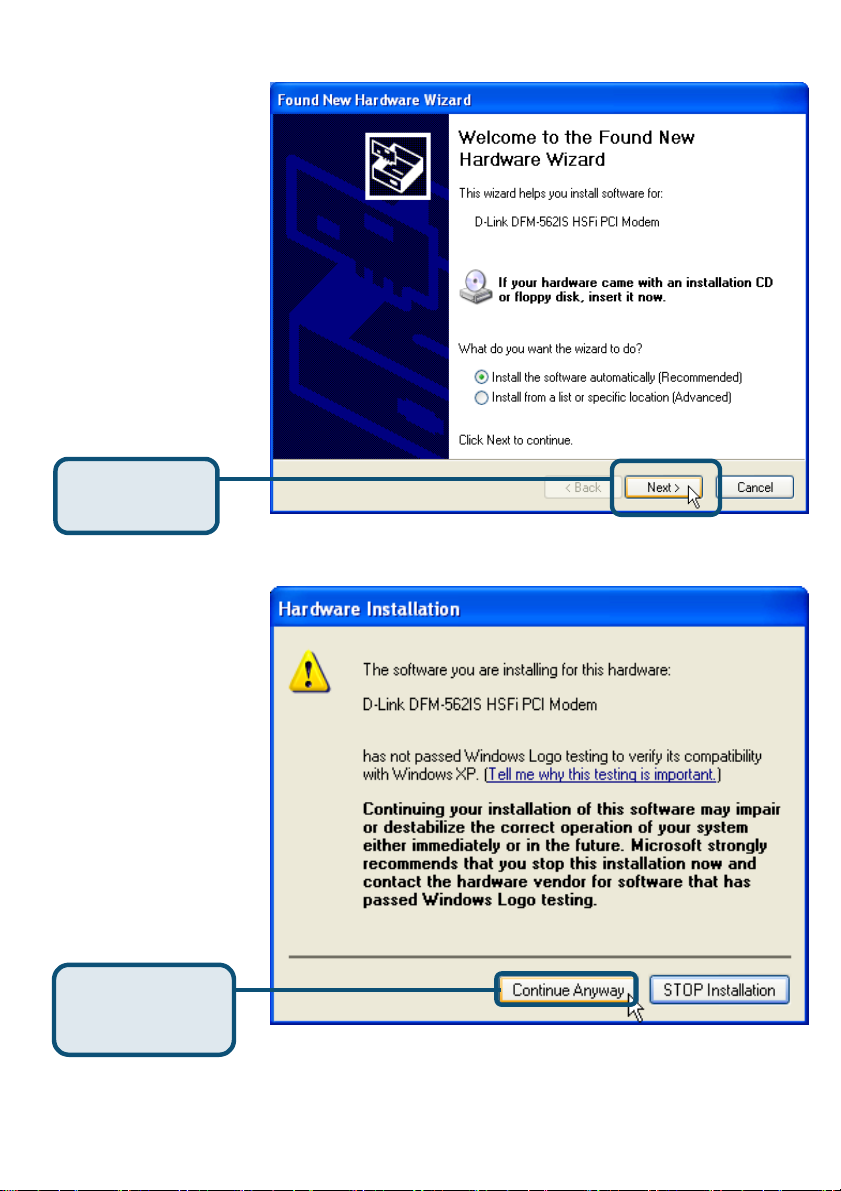
Wählen Sie die Option
Software automatisch
installieren (Empfohlen)
aus und klicken Sie auf
Weiter, um nach dem
Treiber zu suchen.
Klicken Sie auf
Weiter
Klicken Sie auf Installation
fortsetzen, um die
Warnung zu überspringen.
Klicken Sie auf
Installation
fortsetzen
21
Page 22
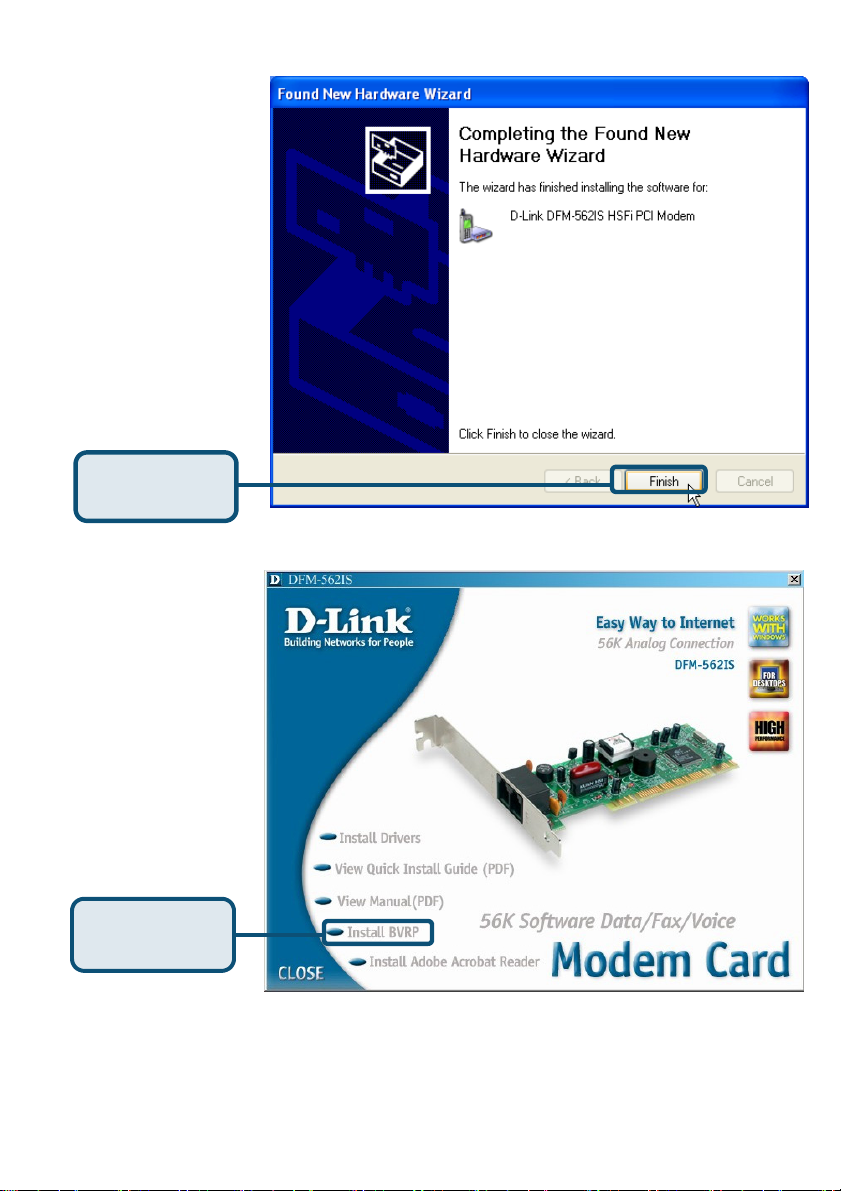
Die Installation ist
beendet.
Klicken Sie auf
Fertigstellen
Schließen Sie das Fenster
mit Close.
Klicken Sie auf
CLOSE
22
Page 23
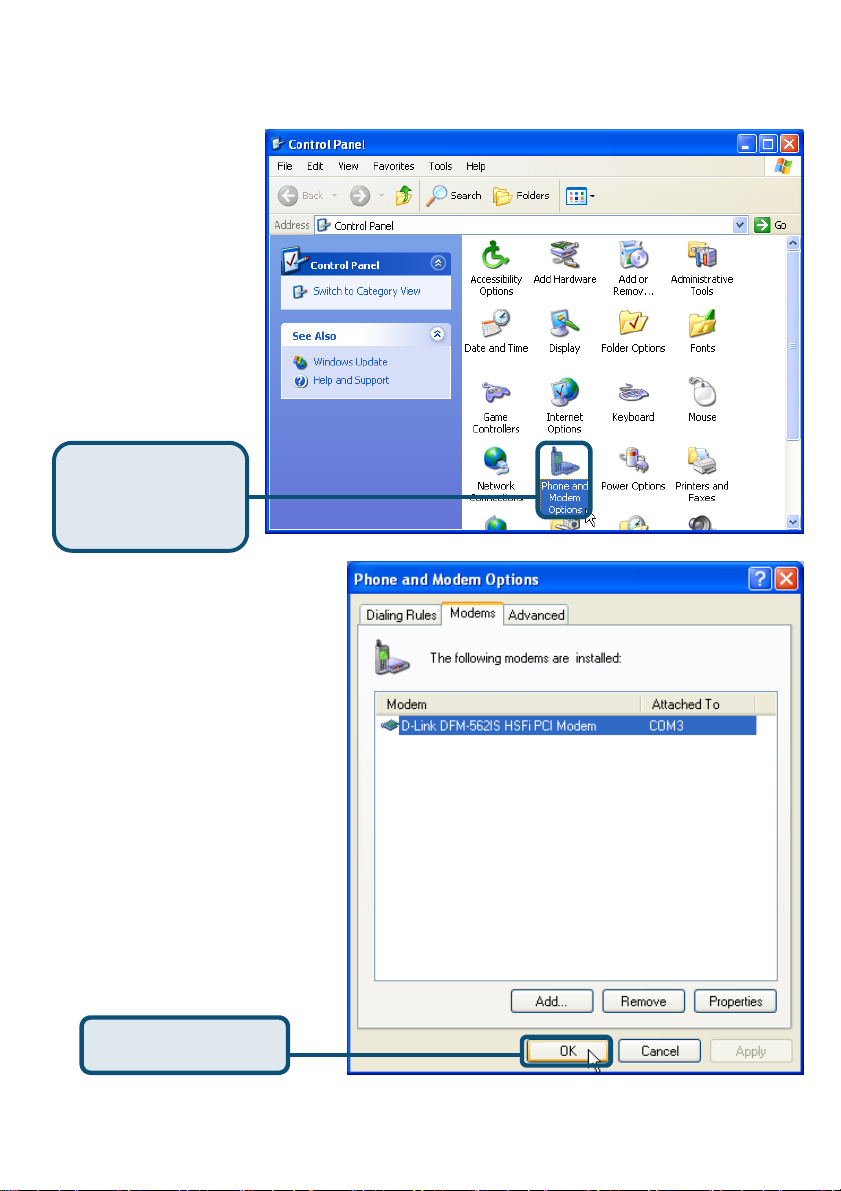
2.3 Windows XP (Forts.)
Klicken Sie auf Start /
Einstellungen /
Systemsteuerung und
doppelklicken Sie auf das
Symbol Telefon- und
.
Modemoptionen
Klicken Sie auf
Telefon- und
Modemoptionen
Überprüfen Sie die
Modellnummer des Modems,
d.h.: D-Link DFM-562IS
HSFi PCI Modem.
Nach vollständiger Installation
klicken Sie auf OK.
Klicken Sie auf OK
23
Page 24
Technische Unterstützung
Aktualisierte Versionen von Software und Benutzerhandbuch finden Sie
auf der Website von
D-Link unter www.dlink.de
D-Link bietet kostenfreie technische Unterstützung für Kunden in
Deutschland, Österreich, der Schweiz und in Osteuropa.
Unsere Kunden können technische Unterstützung über unsere Website oder
telefonisch anfordern.
Technische Unterstützung von D-Link per Telefon:
00800 7250 4000
Telefonische technische Unterstützung erhalten Sie montags bis
donnerstags von 08.00 bis 19.00 Uhr, freitags von 08.00 bis 17.00 Uhr.
Technische Unterstützung von D-Link im Internet:
www.dlink.de
24
Page 25
Carte modem logiciel
DFM-562IS D-Link
Avant de commencer
Si vous avez acheté ce modem pour pouvoir vous connecter à l’internet à partir de
votre PC, il vous faut un compte internet auprès d’un fournisseur de services
internet (ISP).
Vérifiez le contenu de l’emballage
Voici les éléments que doit contenir l’emballage D-Link 562IS :
• Carte modem logiciel DFM-562IS D-Link
• CD-ROM (contenant le manuel et le
guide d’installation rapide)
• Câble téléphonique
• Guide d’utilisation du
DFM-562IS D-Link
L’alimentation du
modem sous une
tension différente
de la tension
nominale
endommagera ce
produit et annulera
la garantie
Si l’un des éléments ci-dessus manque, contactez votre revendeur.
©2003 D-Link Systems, Inc. Tous droits réservés. Les marques sont la propriété de leurs propriétaires respectifs. Le logiciel et
25
les spécifications sont susceptibles d’être modifiés sans préavis. D-Link DFM-562IS HSFi PCI Modem
Page 26
Installation du matériel
Débranchez la ligne téléphonique et branchez-la sur la prise marquée LINE qui se
trouve à l’arrière du modem.
TÉLÉPHONE
PRISE MURALE
TÉLÉPHONE
ORDINATEUR
LIGNE
TÉLÉPHONE
26
LIGNE
Page 27
Installation des pilotes
2.1 Windows 98/ME
Une fois le matériel
installé, Windows
détecte
automatiquement le
modem. Cliquez sur
Annuler. Puis mettez
le CD fourni dans le
lecteur de CD-ROM.
Cliquez sur
Install Drivers
Le système
installe
automatiquement
le modem.
Cliquez sur CLOSE
pour fermer la fenêtre.
Cliquez sur
CLOSE
27
Page 28
2.1 Windows 98/ME (suite)
Sélectionnez Démarrer
/ Paramètres /
Panneau de
configuration et
double-cliquez sur
l’icône Modems
Cliquez sur
Modems
Vérifiez le numéro de modèle du
modem PCI HSFI DFM-562IS
D-Link.
S’il est correct, c’est que
l’installation est terminée.
Cliquez sur OK pour quitter.
Cliquez sur OK
28
Page 29
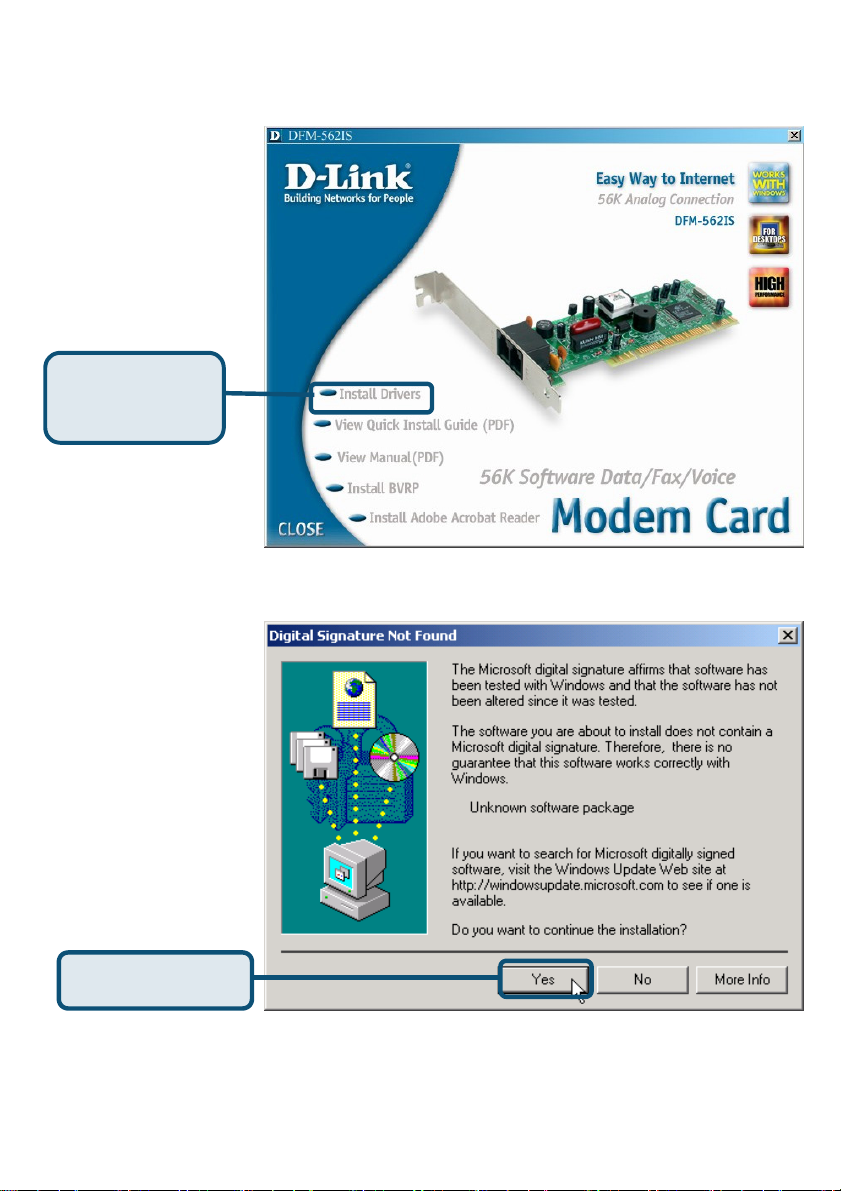
2.2 Windows 2K
Une fois le matériel
installé, Windows
détecte
automatiquement le
modem. Cliquez sur
Annuler. Puis mettez
le CD fourni dans le
lecteur de CD-ROM.
Cliquez sur
Install Drivers
Cliquez sur Oui
pour ignorer le
message.
Cliquez sur Yes
29
Page 30
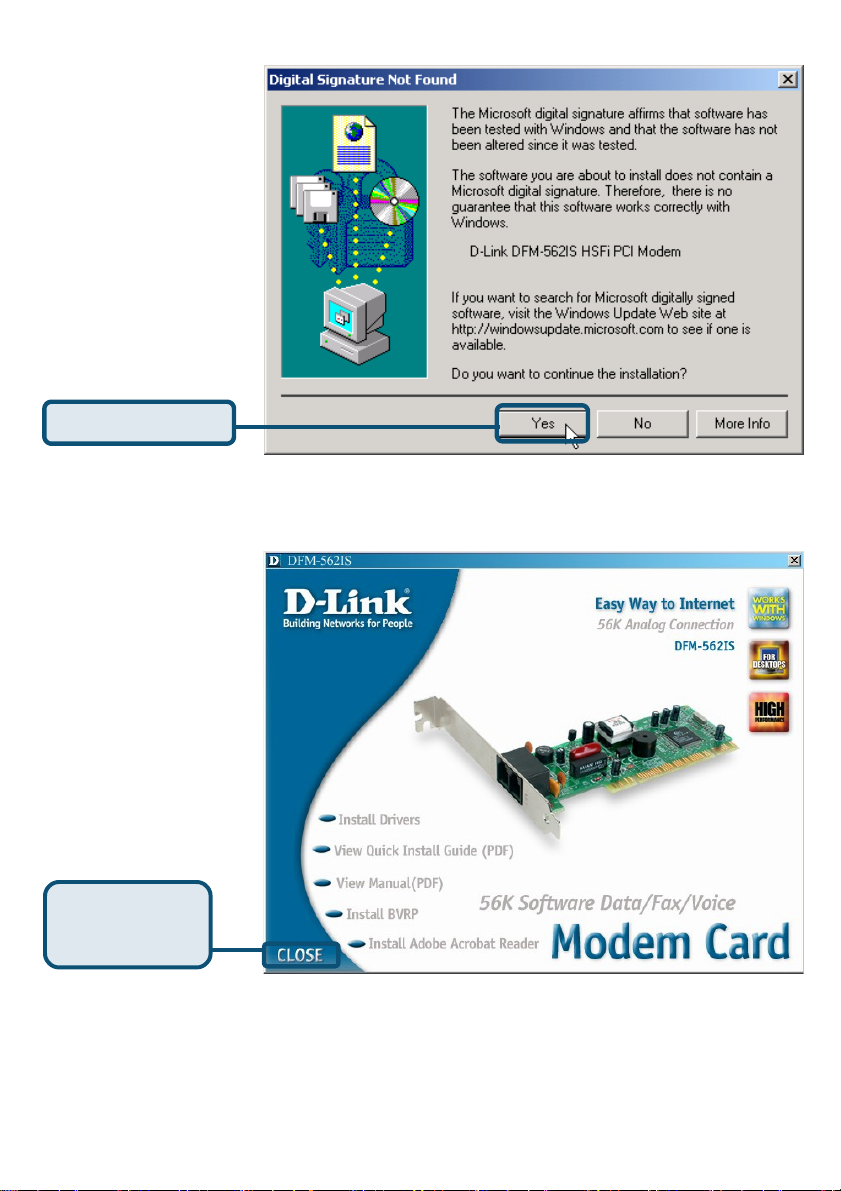
Cliquez sur Oui
pour ignorer le
message.
Cliquez sur Yes
Le système
installe
automatiquement
le modem.
Cliquez sur CLOSE
pour fermer la
fenêtre.
Cliquez sur
CLOSE
30
Page 31
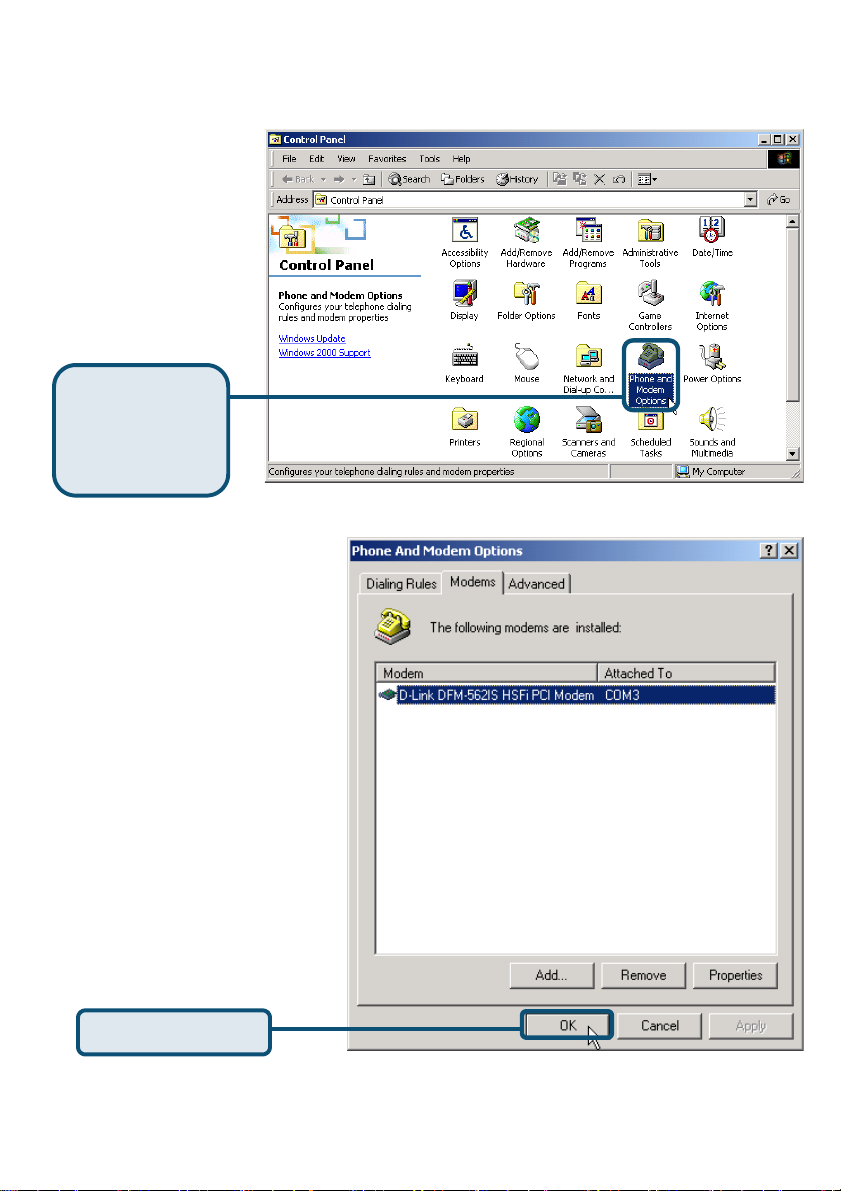
2.2 Windows 2K (suite)
Sélectionnez Démarrer /
Paramètres / Panneau
de configuration et
double-cliquez sur
l’icône Options de
modems et téléphonie.
Cliquez sur
Options de
modems et
téléphonie
Vérifiez le numéro de modèle
du modem DFM-562IS HSFi
D-Link.
S’il est correct, c’est que
l’installation est terminée.
Cliquez sur OK pour quitter.
31
Page 32
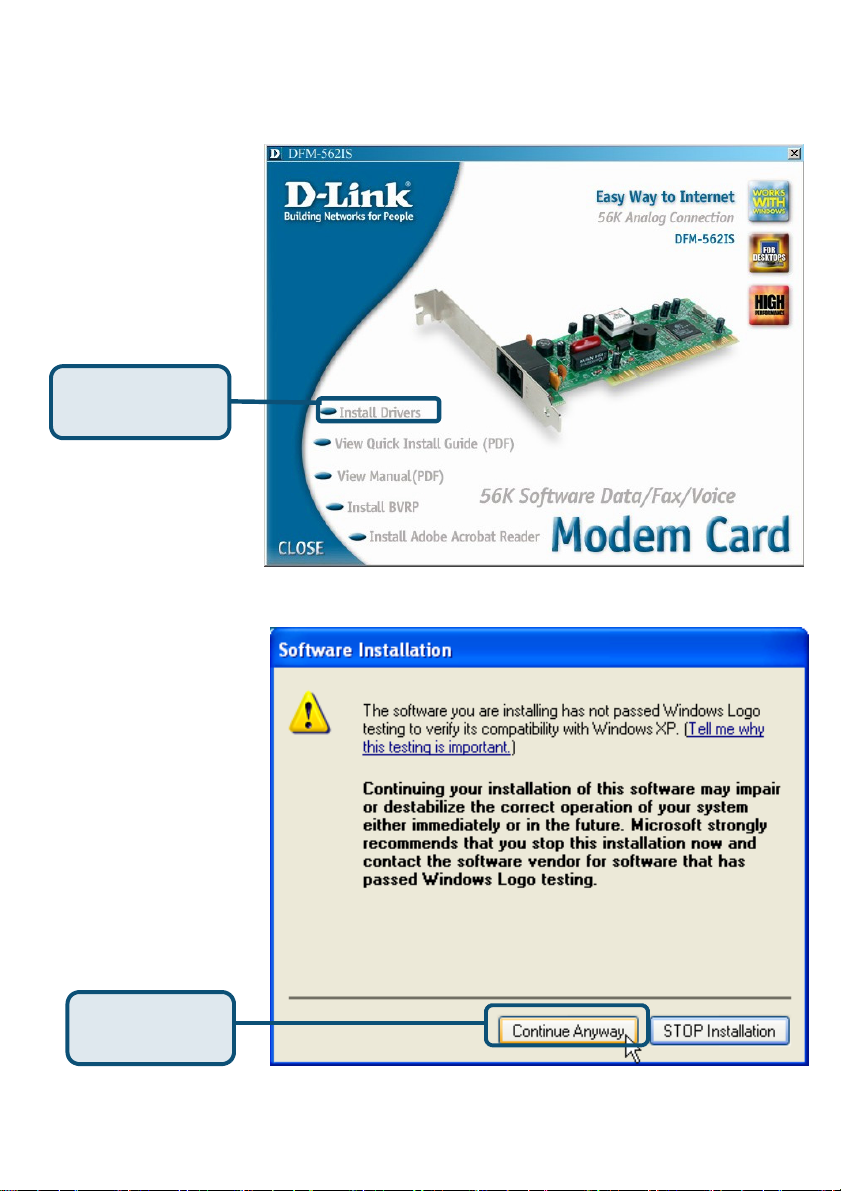
2.3 Windows XP
Cliquez sur
Install Drivers
Cliquez sur
Continuer
32
Page 33
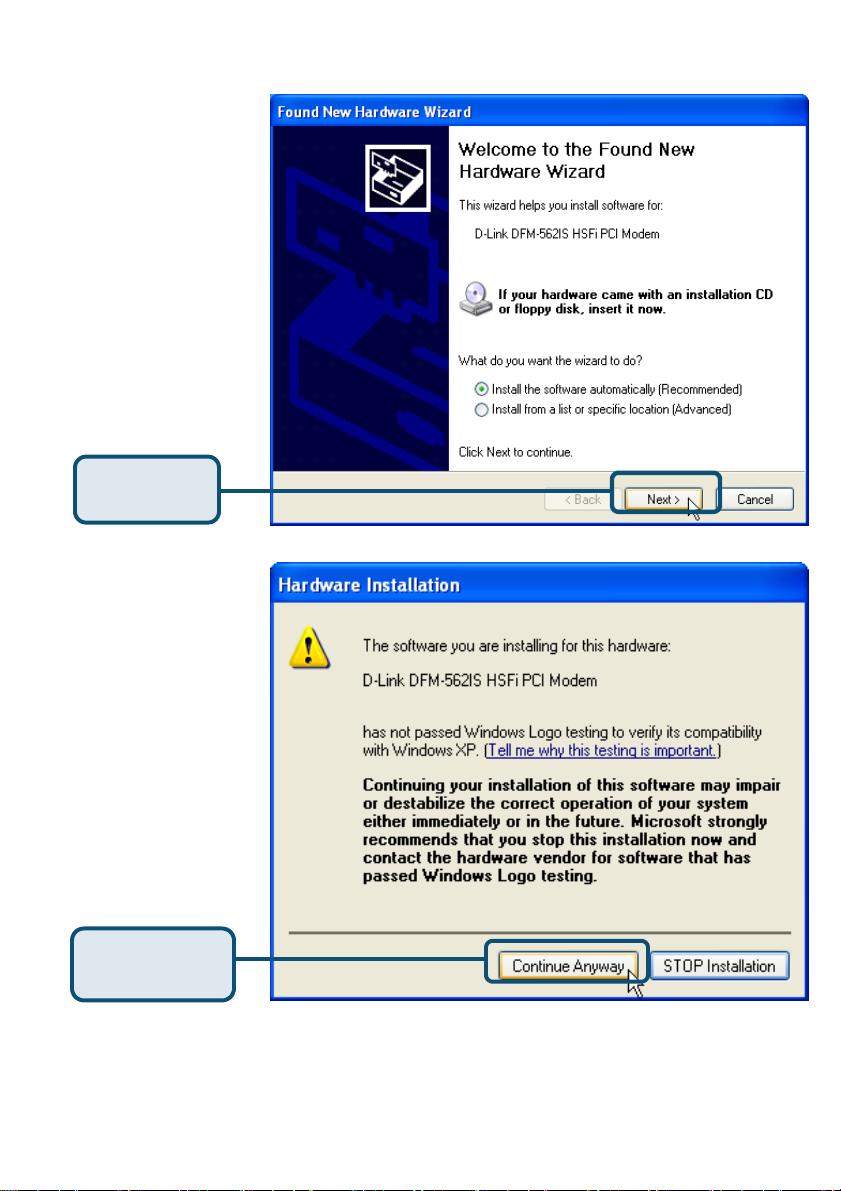
Sélectionnez l’option
Installer le logiciel
automatiquement
[recommandé], puis
cliquez sur Suivant pour
rechercher le pilote.
Cliquez sur
Suivant
Cliquez sur Continuer
pour sauter le message
d’avertissement.
Cliquez sur
Continuer
33
Page 34
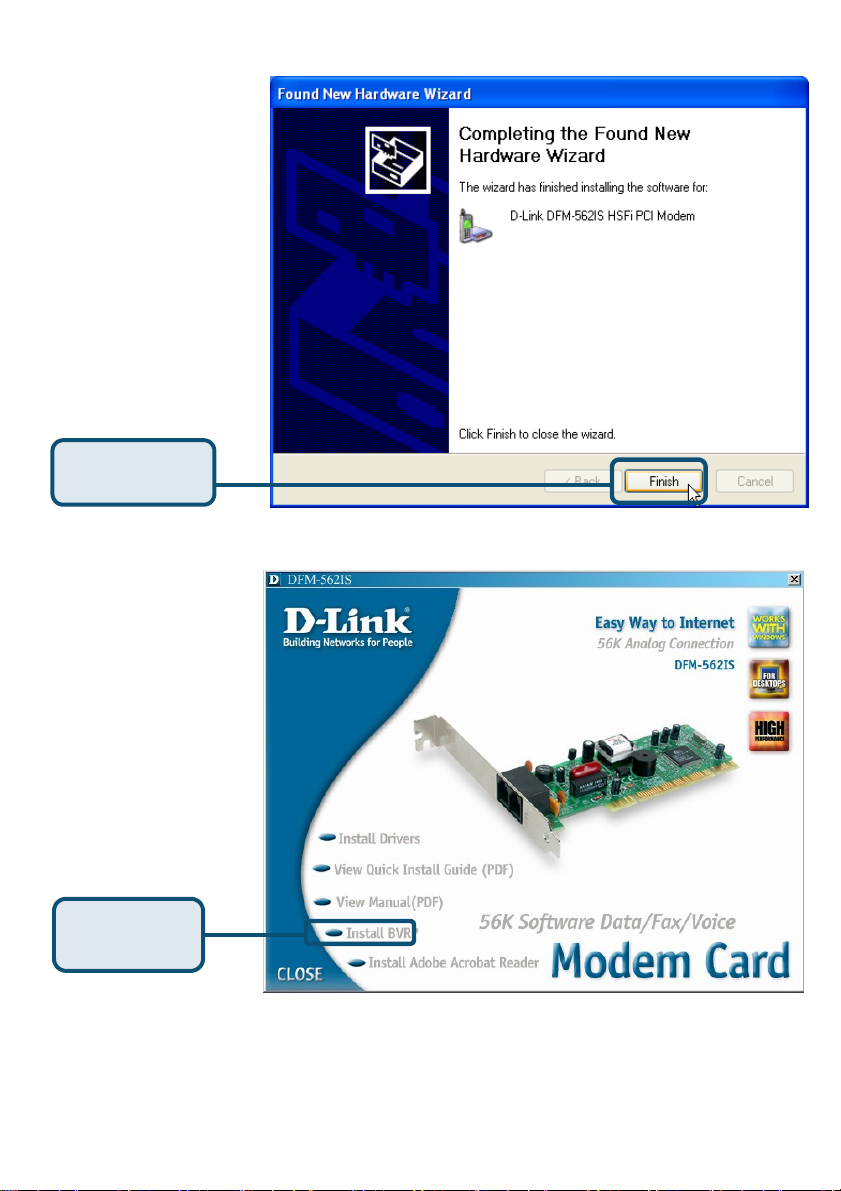
L’installation est
terminée.
Cliquez sur
Cliquez sur CLOSE
pour fermer la
fenêtre.
Cliquez sur
CLOSE
34
Page 35
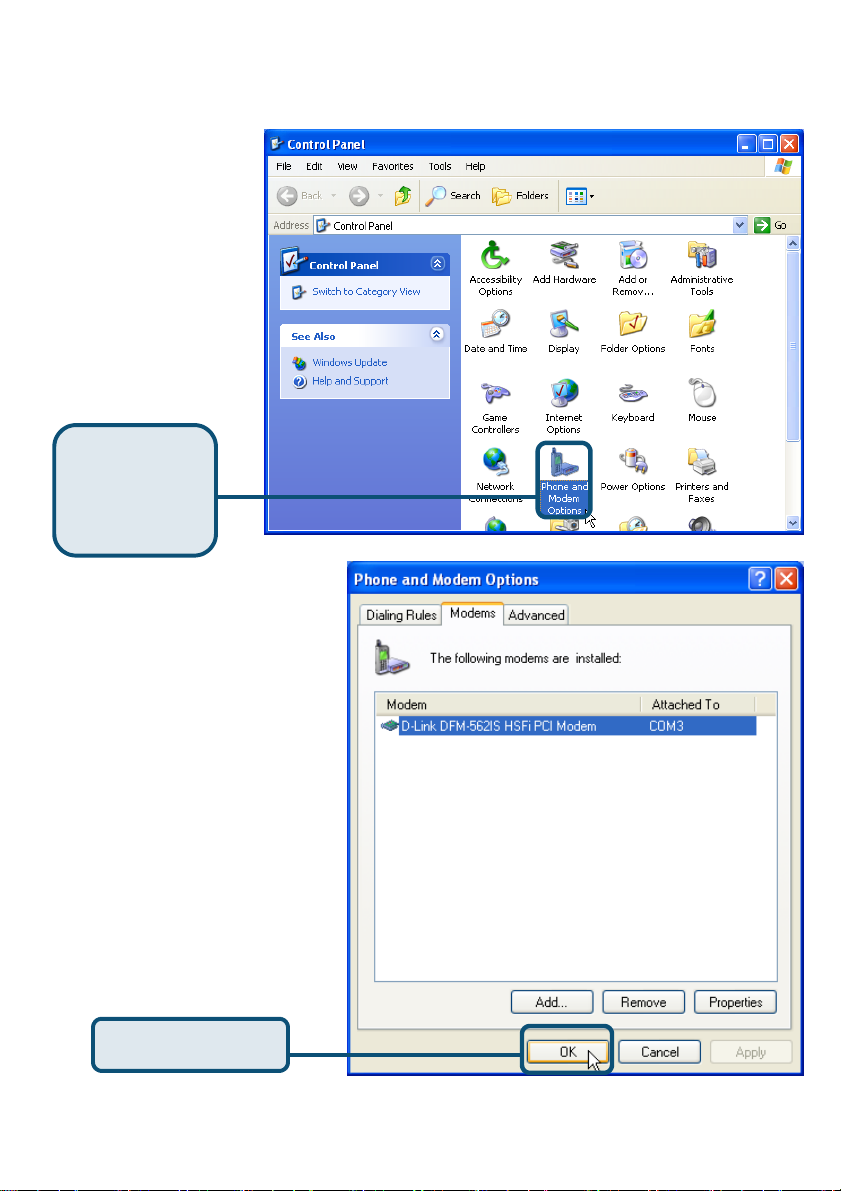
2.3 Windows XP (suite)
Sélectionnez
Démarrer /
Paramètres /
Panneau de
configuration et
double-cliquez sur
l’icône Options de
modems et
téléphonie.
Cliquez sur
Options de
modems et
téléphonie
Vérifiez le numéro de modèle
du modem DFM-562IS HSFi
PCI D-Link.
S’il est correct, c’est que
l’installation est terminée.
Cliquez sur OK pour quitter.
Cliquez sur OK
35
Page 36
Assistance technique
Vous trouverez la documentation et les logiciels les plus récents
sur le site web D-Link.
Le service technique de D-Link est gratuit pour les clients aux
Etats-Unis durant la période de garantie.
Ceuxci peuvent contacter le service technique de
D-Link par notre site internet ou par téléphone.
Assistance technique D-Link par téléphone :
0 820 0803 03
Assistance technique D-Link sur internet :
Web :http://www.dlink.fr
E-mail :[email protected]
36
Page 37
S
D-Link DFM-562I
Software Modem Card
Antes de empezar
Si se ha adquirido este módem para establecer una conexión Internet con un PC, se
ha de disponer de una cuenta Internet con un proveedor de servicios Internet (ISP).
Comprobar el contenido del paquete
Éstos son los artículo incluidos en el D-Link 562IS:
• D-Link DFM-562IS Software Modem Card
• CD-ROM (contiene manual y guía de
instalación rápida)
• Cable telefónico
• Guía del usuario del
D-Link DFM-562IS
El uso de una fuente
de alimentación con
distinto voltaje puede ser
perjudicial y anular la garantía
de este producto.
Si falta alguno de estos componentes, por favor contacte con su proveedor.
©2003 D-Link Corporation, Inc. Reservados todos los derechos. Las marcas o marcas registradas son propiedad de los respectivos
titulares. El software y las especificaciones pueden ser modificados sin previo aviso. D-Link DFM-562IS HSFi PCI Modem
37
Page 38
Instalar el hardware
Desconectar la línea telefónica y conectarla en la toma del panel trasero del módem,
marcada como LINE.
Teléfono
ROSETA
TELÉFONO
ORDENADOR
LÍNEA
TELÉFONO
38
LÍNEA
Page 39
Instalar controladores
2.1 Windows 98/ME
Cuando el sistema
esté completo,
Wndows detectará
automáticamente el
módem; hacer click en
Cancel. Después
introducir el CD
suministrado.
Hacer click en
Install Drivers
El sistema instalará
automáticamente el
módem.
Hacer click en Close
para cerrar la ventana.
Hacer click
en CLOSE
39
Page 40
2.1 Windows 98/ME (continuación)
Seleccionar Start /
Settings /
Control Panel y hacer
doble click en el icono
Modems.
Hacer click en
Modems
Comprobar el nº de módelo del
módem D-Link DFM-562IS HSFi
PCI Modem.
Si es correcto, la instalación ha
finalizado; hacer click en OK para
salir.
Hacer click en OK
40
Page 41
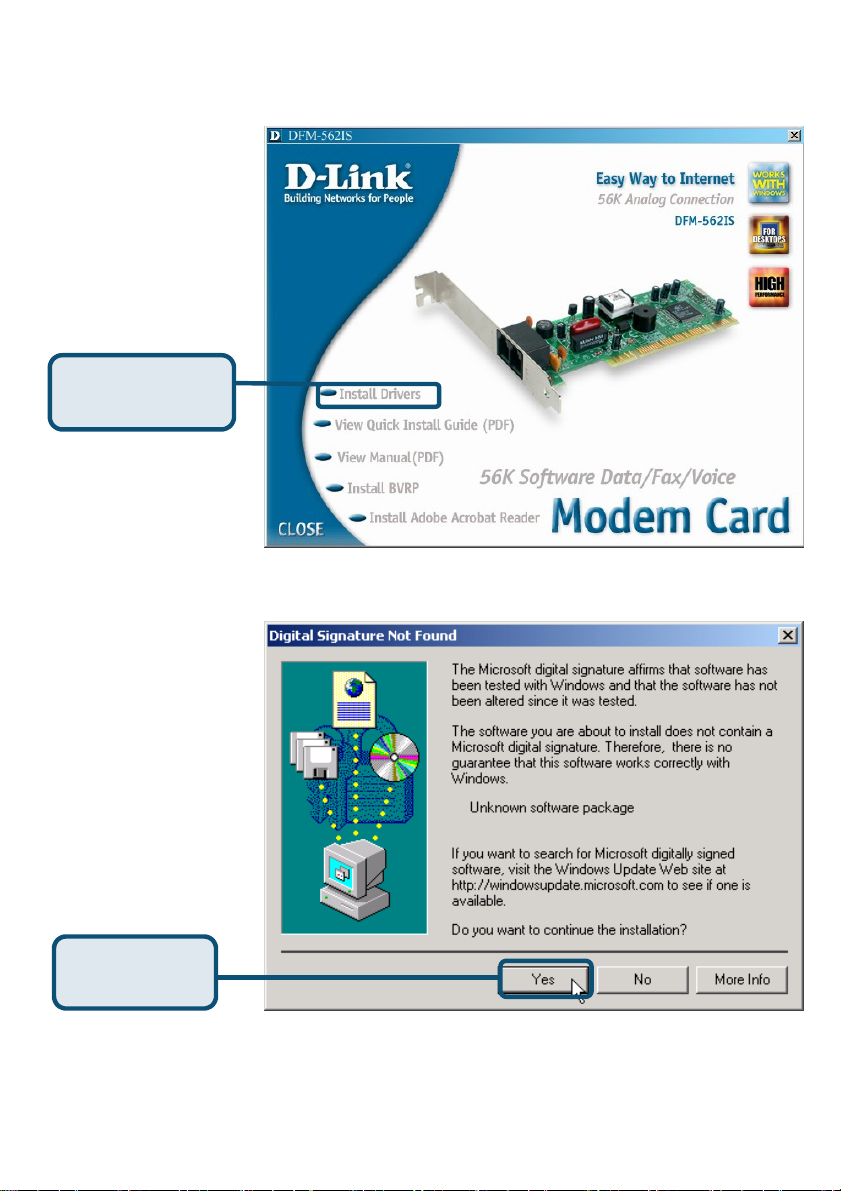
2.2 Windows 2K
Cuando el sistema esté
completo, Wndows
detectará
automáticamente el
módem; hacer click en
Cancel. Después
introducir el CD
suministrado.
Hacer click en
Install Drivers
Hacer click en Yes
para ignorar el
Hacer click
en Yes
41
Page 42
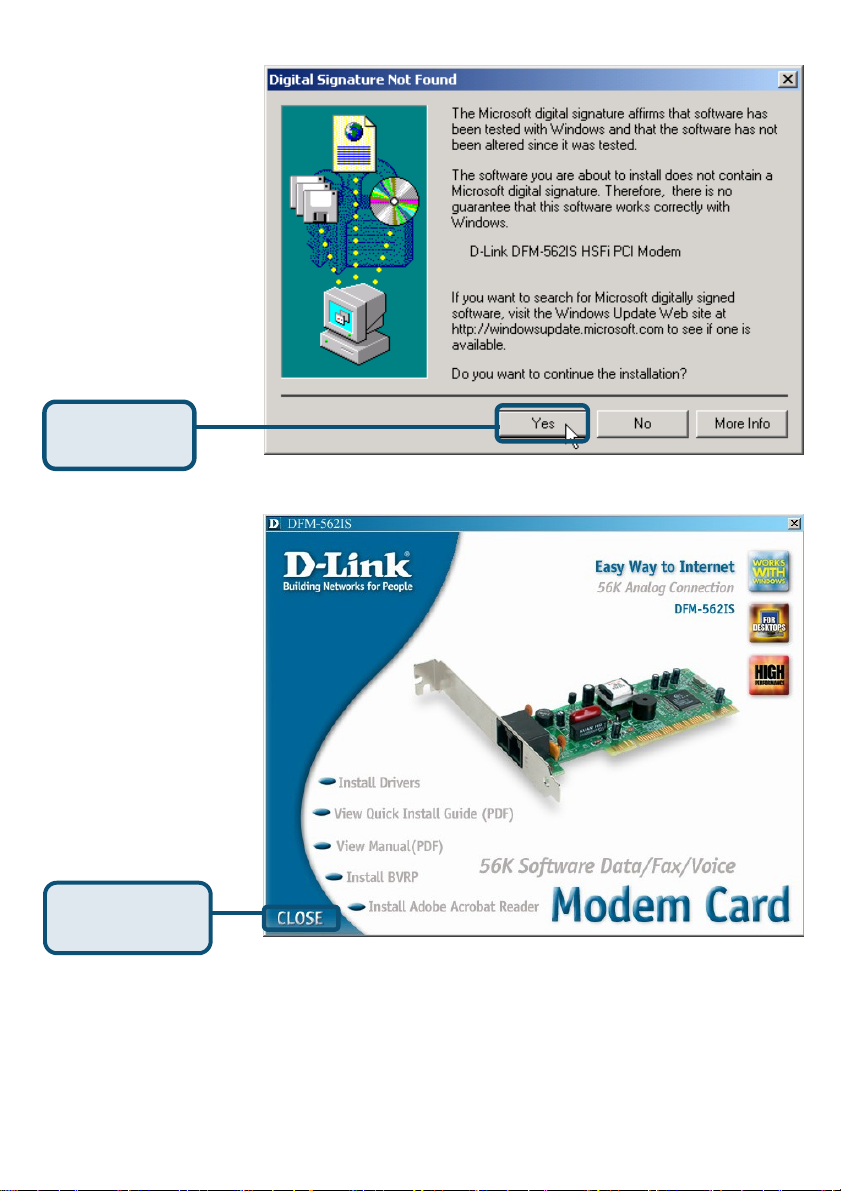
Hacer click en Yes
para ignorar el
Hacer click
en Yes
El sistema instalará
automáticamente el
módem.
Hacer click en Close
para cerrar la ventana.
Hacer click
en CLOSE
42
Page 43
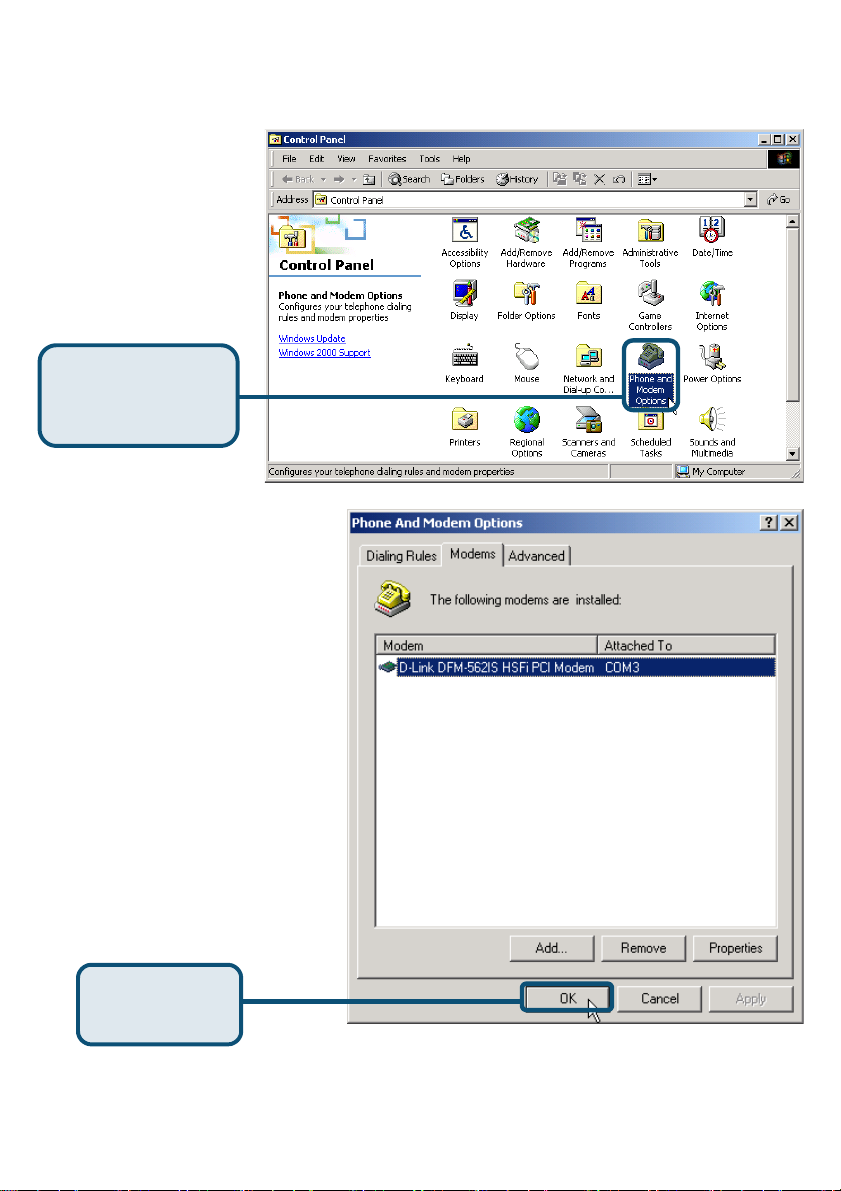
2.2 Windows 2K(continuación)
Seleccionar Start /
Settings / Control
Panel y hacer doble
click en el icono Phone
and Modem Options.
Hacer click en
Phone and
Modem Options
Comprobar el nº de módelo
del módem D-Link DFM-
562IS HSFi Modem.
Si la instalación ha finalizado,
hacer click en OK para salir.
Hacer click
en OK
43
Page 44
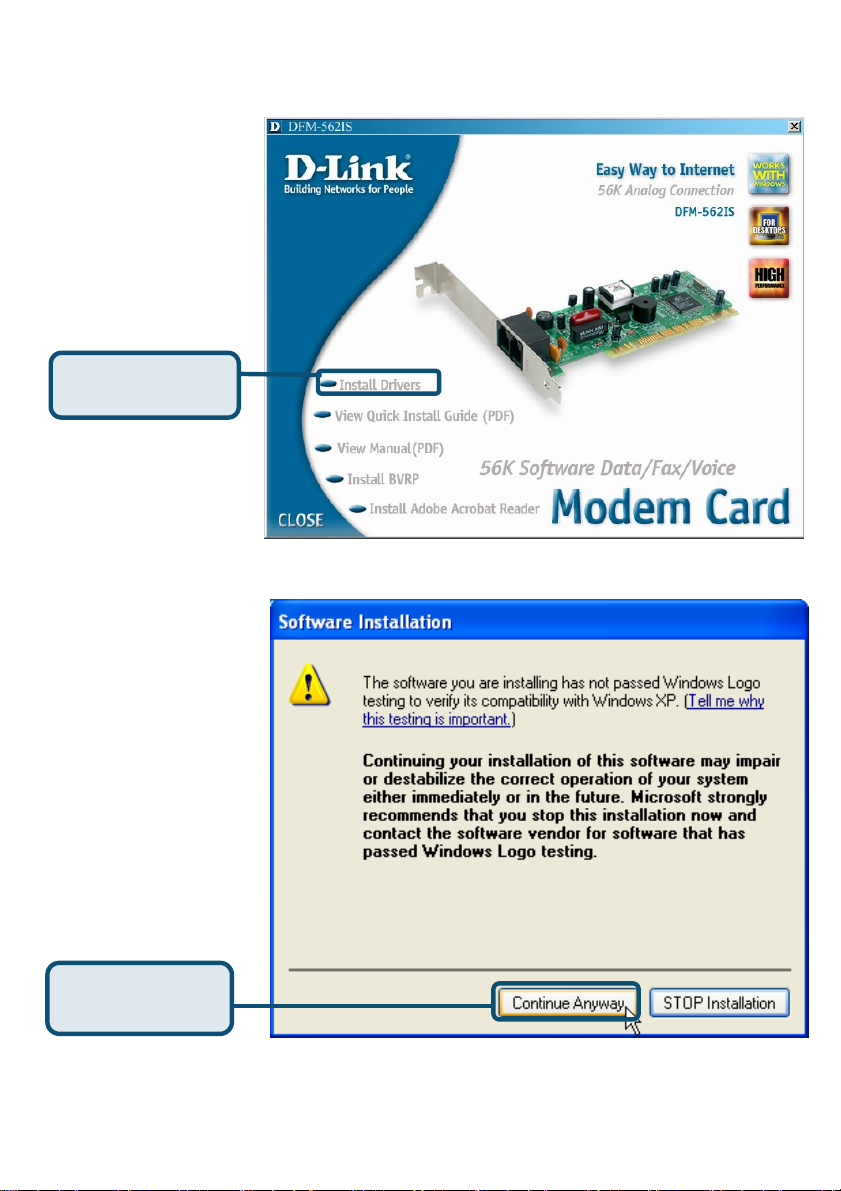
2.3 Windows XP
Hacer click en
Hacer click en
Continue
44
Page 45
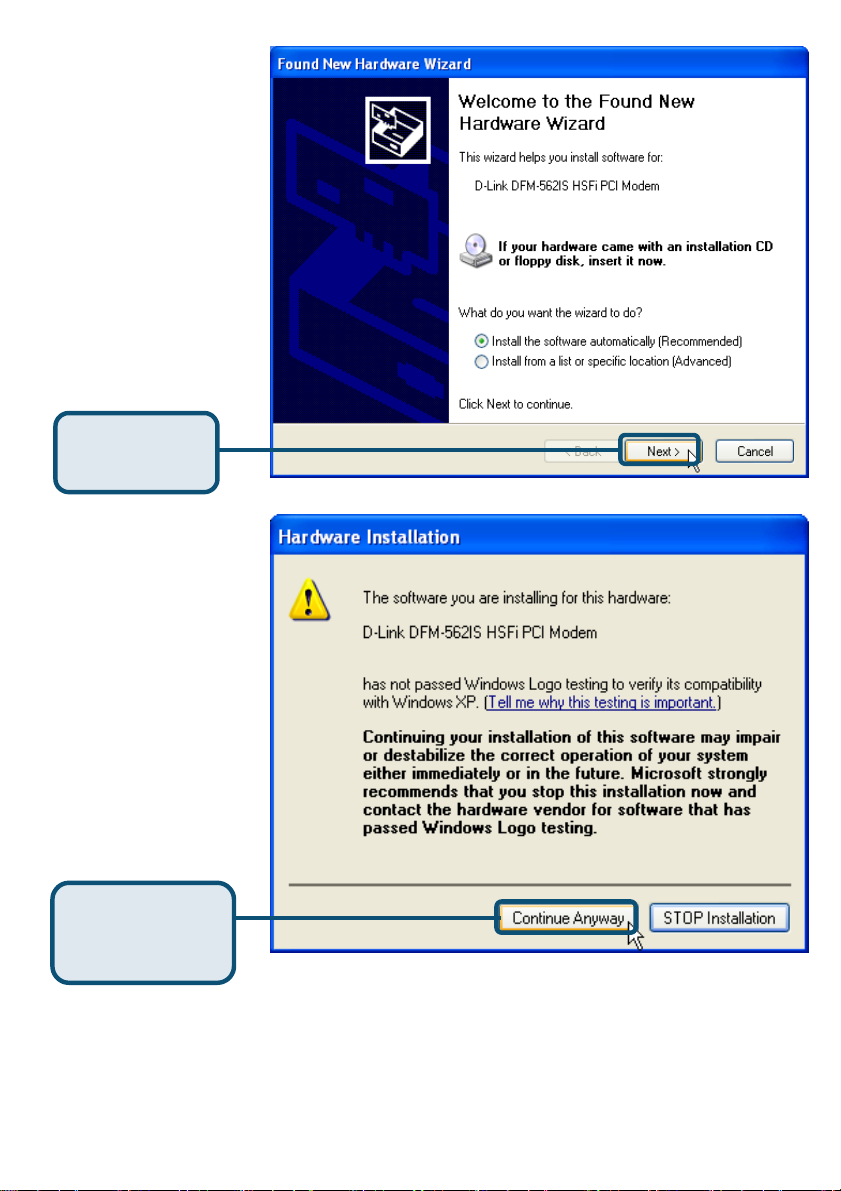
Seleccionar Install the
software automatically
[Recommended];
después hacer click en
Next para buscar el
Hacer click
en Next
Hacer click en Continue
Anyway para obviar el
mensaje de advertencia.
Hacer click en
Continue
Anyway
45
Page 46
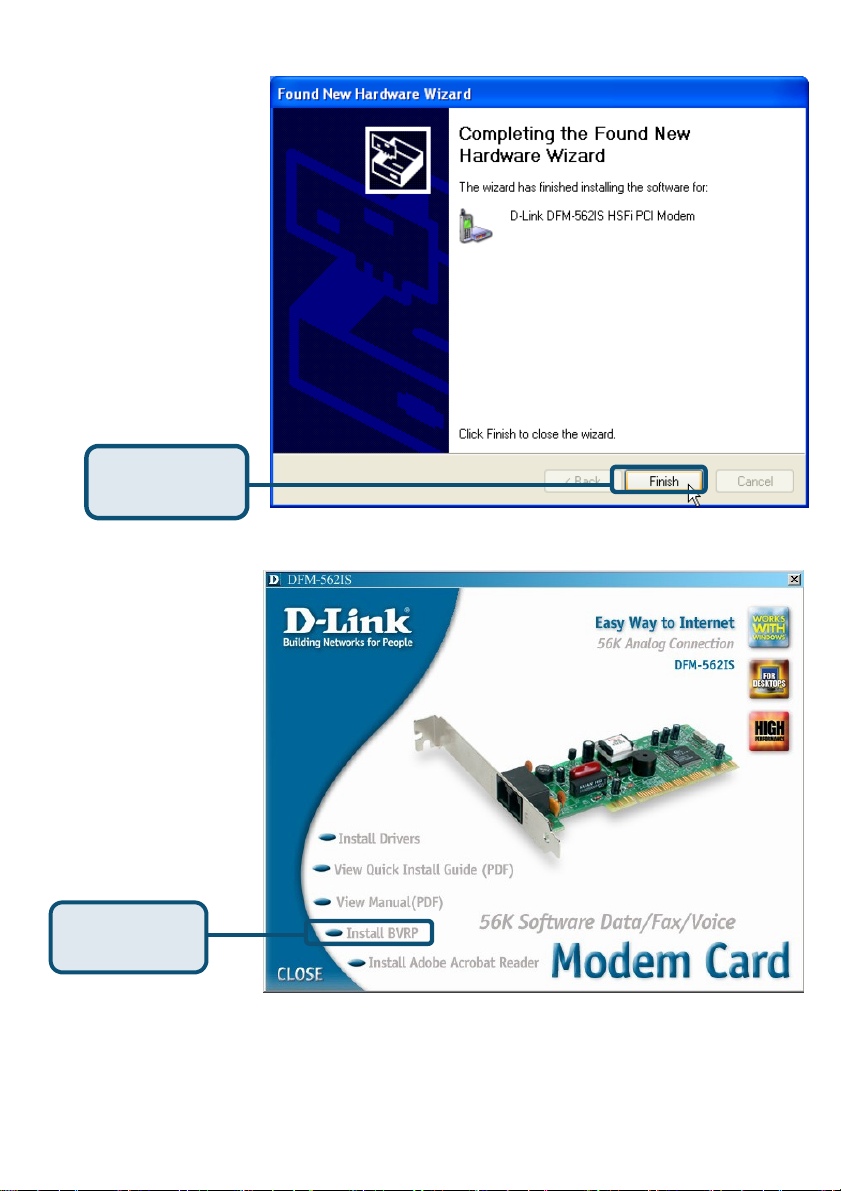
Completar la
Hacer click
en Finish
Hacer click en Close
para cerrar la ventana
Hacer click
en CLOSE
46
Page 47
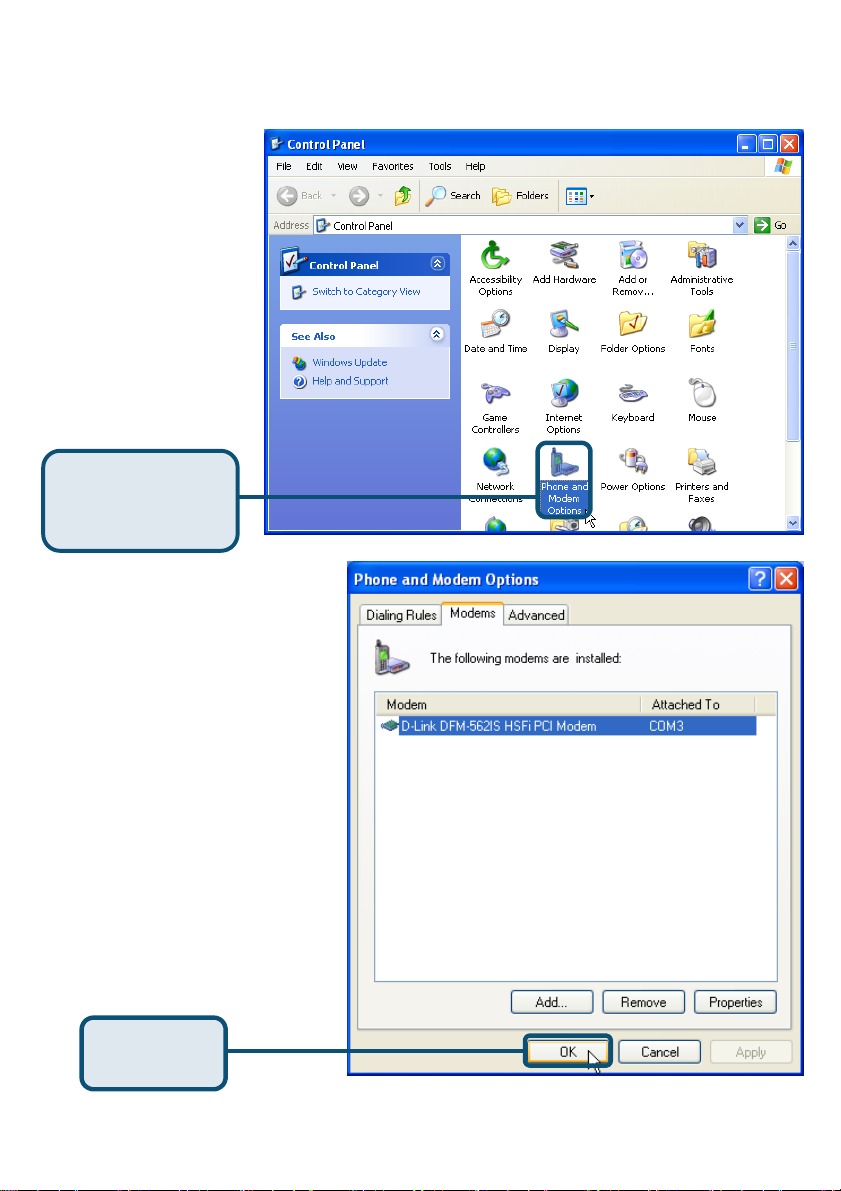
2.3 Windows XP(continuación)
Seleccionar Start /
Settings / Control
Panel y hacer doble
click en el icono Phone
and Modem Options.
Hacer click en
Phone and
Modem Options
Comprobar el nº de
módelo del módem D-Link
DFM-562IS
Modem.
HSFi PCI
Si la instalación ha
finalizado, hacer click en
OK para salir.
Hacer click
en OK
47
Page 48
Asistencia Técnica
Puede encontrar el software más reciente y documentación
para el usuario en el sitio web de
D-Link .
D-Link ofrece asistencia técnica gratuita para clientes dentro
de España durante el periodo de garantía del producto.
Los clientes españoles pueden ponerse en contacto con la
asistencia técnica de D-Link a través de nuestro sitio web o
por teléfono.
Asistencia Técnica de D-Link por teléfono:
93-4090775
de lunes a viernes desde las 9:00 hasta las14:00 y de las
15:30 hasta las 18:30
Asistencia Técnica de D-Link a través de Internet:
http://www.dlink.es/supporto/main/view.html
email: [email protected]
48
Page 49
S
Scheda modem
D-Link DFM-562I
Prima di cominciare
Se si desidera utilizzare il Modem per connettersi a Internet da un PC, è necessario
richiedere un account Internet a un Internet Service Provider (ISP).
Contenuto del pacchetto
Il pacchetto del modem D-Link 562IS include i seguenti componenti:
• Scheda Modem D-Link DFM-562IS
• CD-ROM (con manuale utente e manuale
rapido d’installazione.)
• Cavo telefonico
• D-Link DFM-562IS
User’s Guide
L’utilizzo di un
trasformatore
differente può
danneggiare il dispositivo
e compromettere la
garanzia
.
Se uno dei componenti dovesse risultare mancante, contattare il rivenditore .
©2003 D-Link Corporation, Inc. Tutti i diritti sono riservati. I marchi e i marchi registrati sono dei rispettivi proprietari.
Software e specifiche sono soggetti a cambiamenti senza preavviso. Modem PCI D-Link DFM-562IS HSFi
49
Page 50
Installazione hardware
Disconnettere la linea telefonica e connetterla al connettore LINE posto sul pannello
posteriore del modem..
Telefono
Presa a muro
Telefono
COMPUTER
LINEA
Telefono
50
LINEA
Page 51
Installazione dei driver
2.1 Windows 98/ME
Quando il sistema è
completo, Windows
individua
automaticamente il
modem. Cliccare su
Cancel e inserire il
CD dei driver.
Cliccare su
Install Drivers
Il sistema installa
automaticamente il
Modem.
Cliccare su Close per
Cliccare su
CLOSE
51
Page 52
2.1 Windows 98/ME (continua)
Selezionare Start /
Impostazioni /
Pannello di Controllo.
Fare doppio clic
sull’icona Modem.
Cliccare su Modem
Verificare il numero di modello per
il modem PCI D-Link DFM-562IS
HSFi.
Se è corretto, l’installazione è
completa. Cliccare su OK per
uscire.
Cliccare su OK
52
Page 53
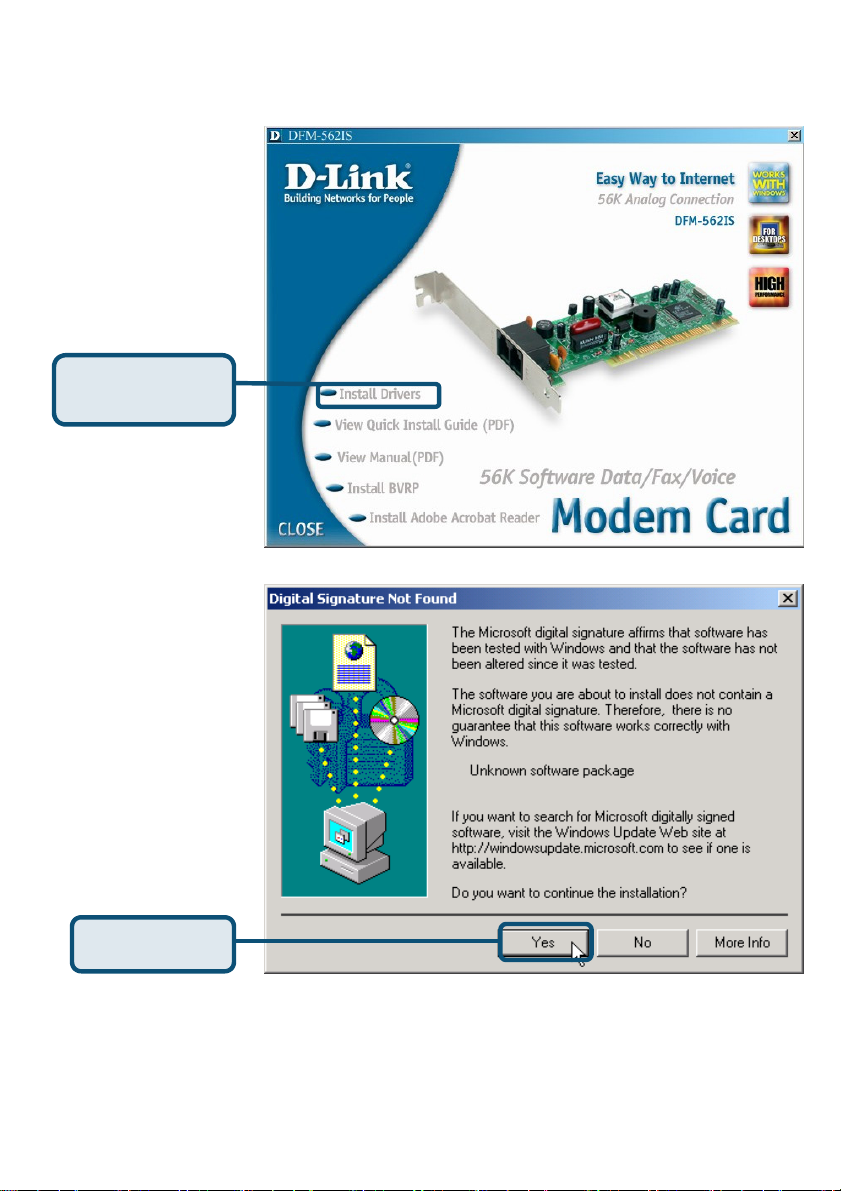
2.2 Windows 2K
Quando il sistema è
completo, Windows
individua
automaticamente il
modem. Cliccare su
Cancel e inserire il
CD dei driver.
Cliccare su
Install Drivers
Cliccare su Si per
ignorare il
Cliccare su Si
53
Page 54
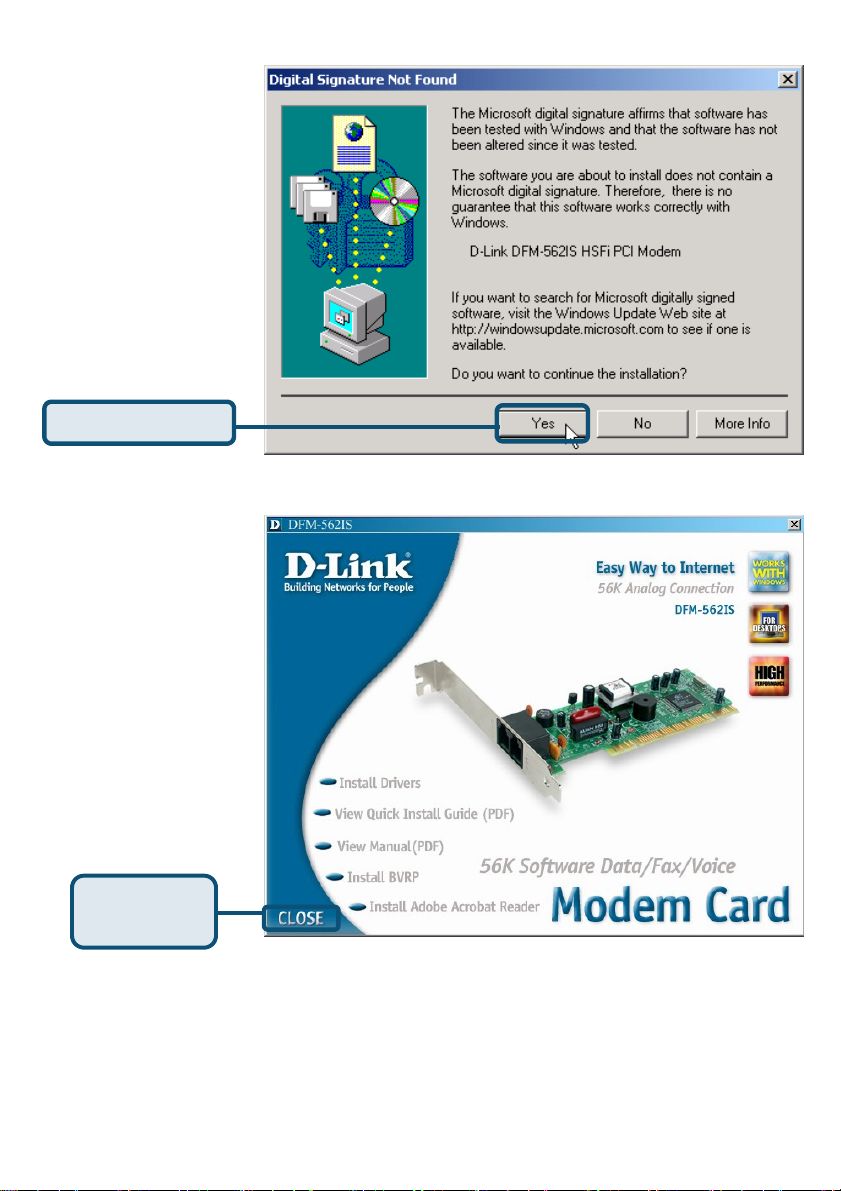
Cliccare su Si per
ignorare il messaggio.
Cliccare su Si
Il sistema installa
automaticamente il
modem.
Cliccare su Close per
chiudere la finestra
Cliccare su
CLOSE
54
Page 55
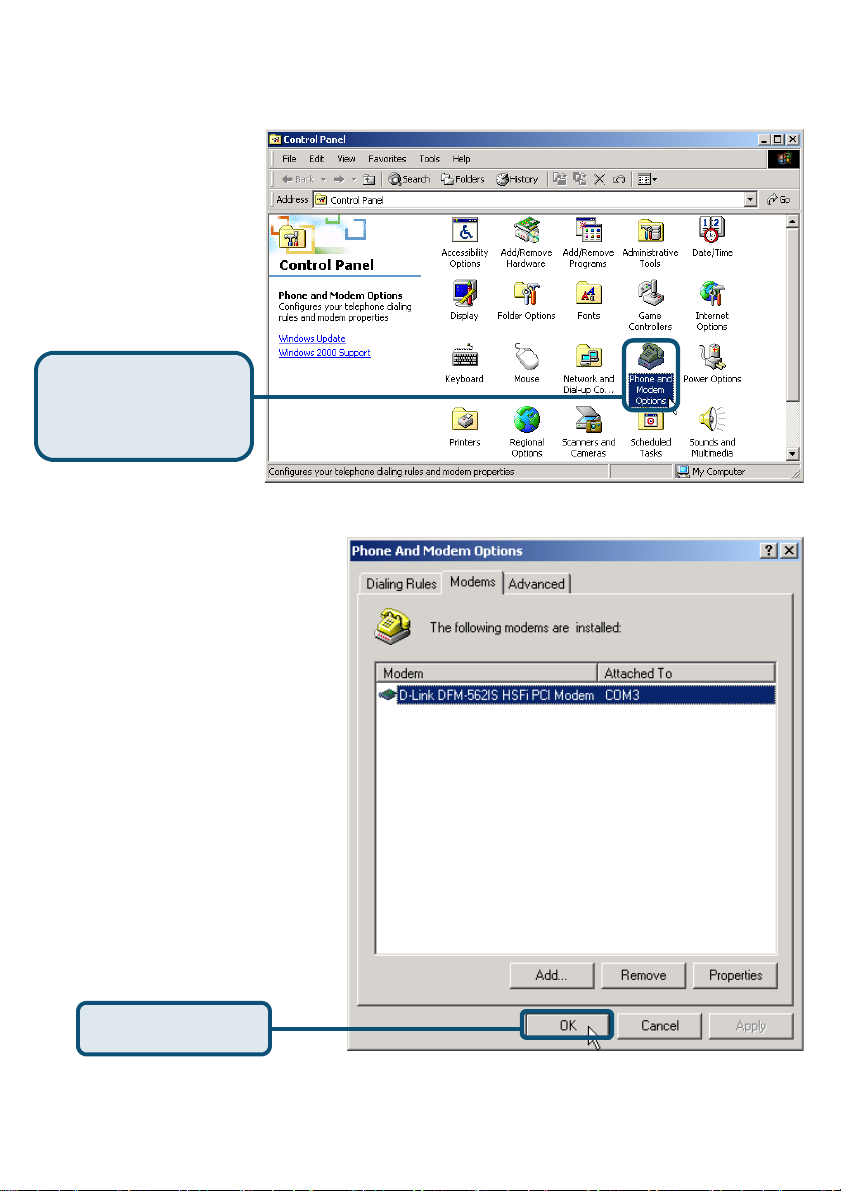
2.2 Windows 2K(continua)
Selezionare Start /
Impostazioni/Pannello
di Controllo. Fare
doppio clic sull’icona
Opzioni Telefono e
Modem
Verificare il numero di
modello per il modem D-Link
DFM-562IS HSFi
Se l’installazione è completa ,
cliccare su OK per uscire.
Cliccare su
Opzioni Telefono
e modem
Cliccare su OK
55
Page 56
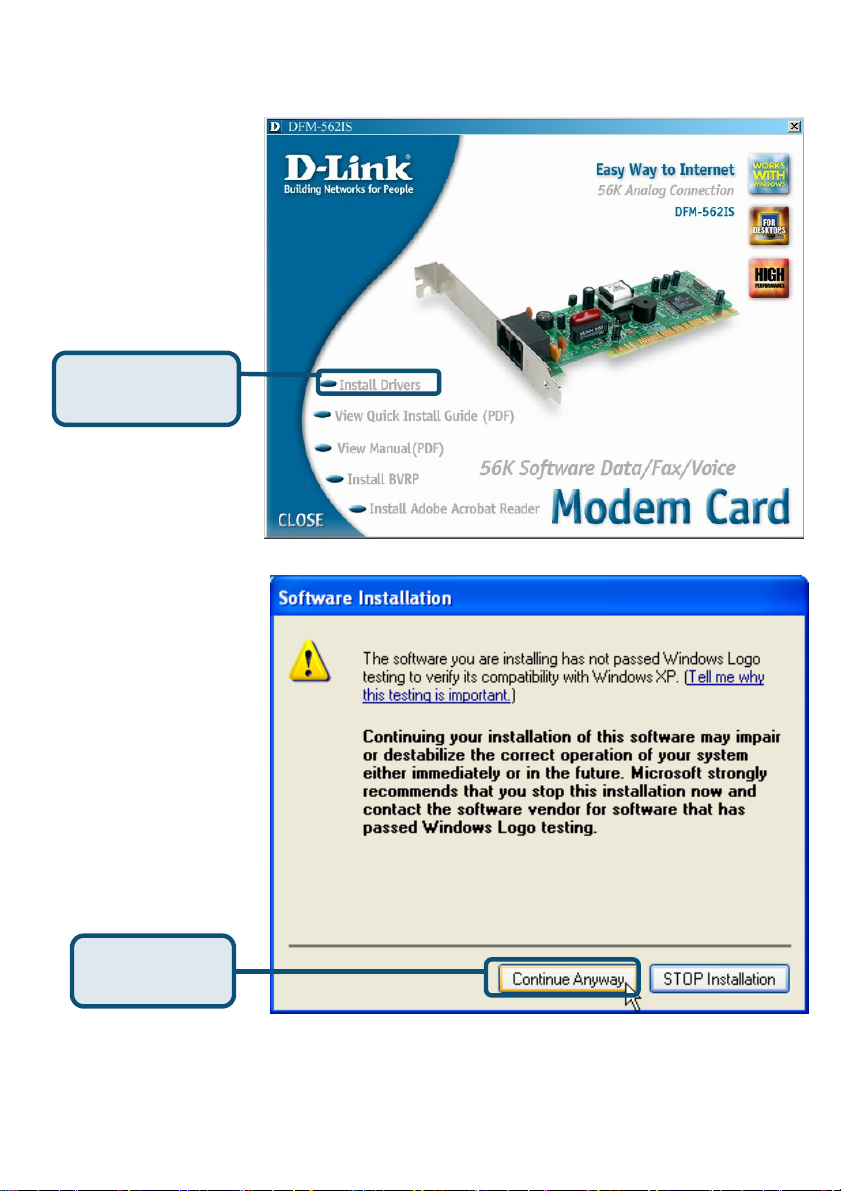
2.3 Windows XP
Cliccare su
Install Drivers
Cliccare su
Continua
56
Page 57
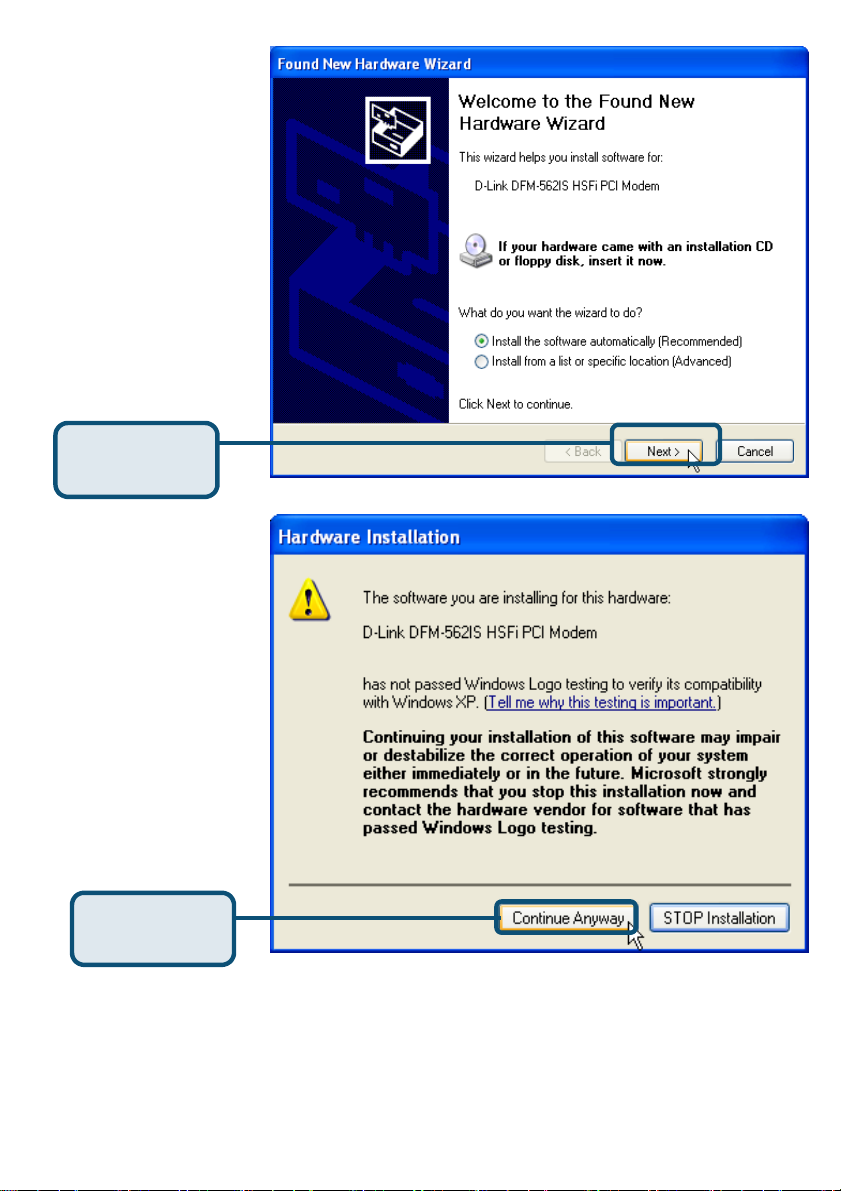
Selezionare Installa
automaticamente il
software
[Raccomandato] e
cliccare su Avanti per
avviare la ricerca.
Cliccare su
Avanti
Cliccare su Continua
per ignorare il
messaggio.
Cliccare su
Continua
57
Page 58
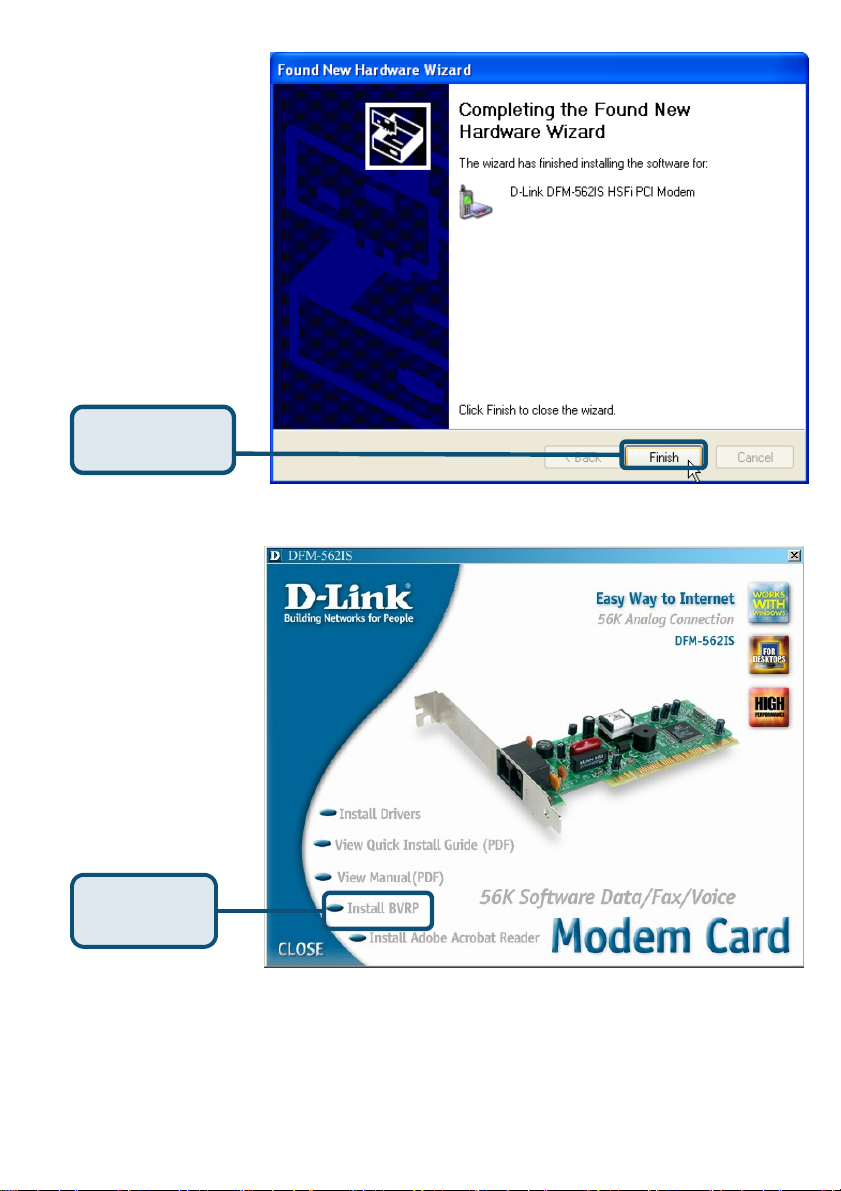
L’installazione è
terminata
Cliccare su
Fine
Cliccare su
Close per chiudere la
finestra
Cliccare su
CLOSE
58
Page 59
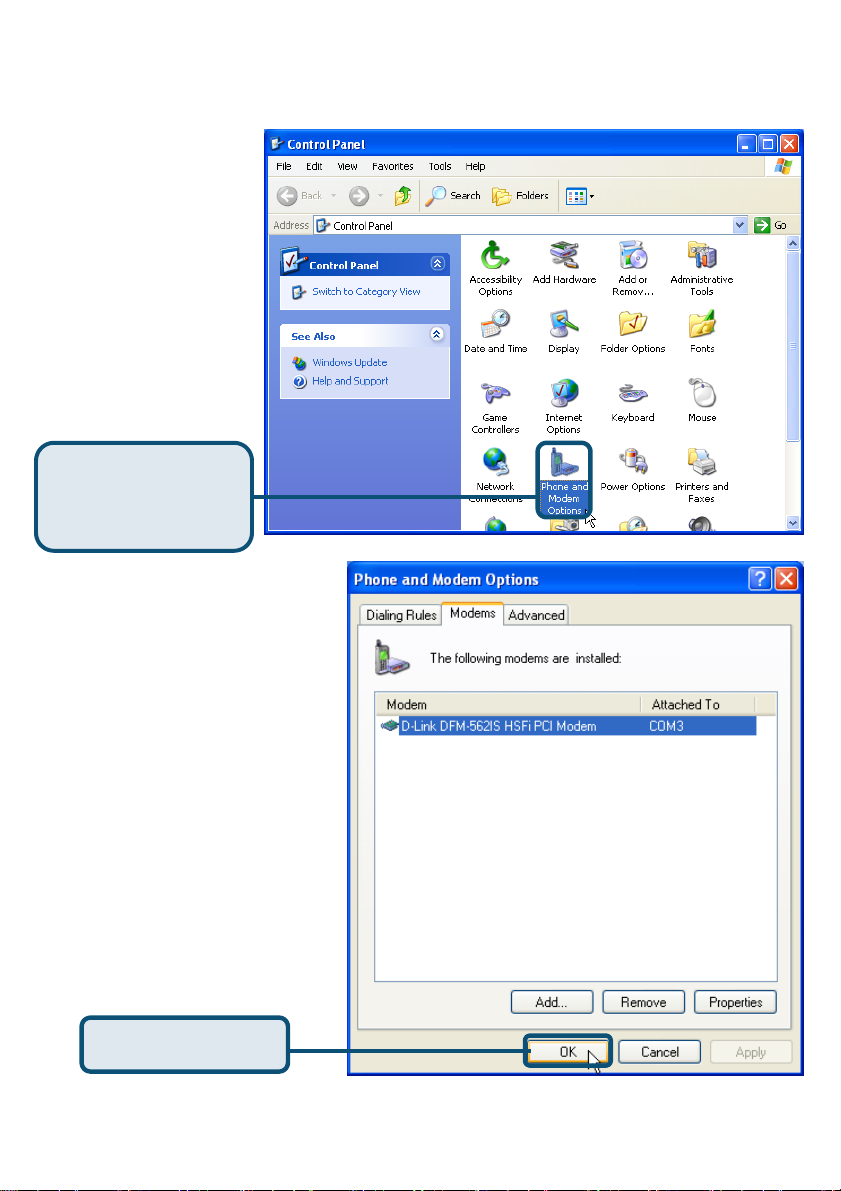
2.3 Windows XP(continua)
Selezionare Start /
Impostazioni/Pannello
di Controllo e fare
doppio clic sull’icona
Opzioni Telefono e
Modem .
Opzioni Telefono
Cliccare su
e Modem
Verificare il numero di
modello per il modem PCI
D-Link DFM-562IS
Se l’installazione è
terminata, cliccare su OK
per uscire.
HSFi.
Cliccare su OK
59
Page 60
Supporto tecnico
Supporto tecnico
Le ultime versioni del software e la documentazione
Le ultime versioni del software e la documentazione
aggiornata sono disponibili al sito D-Link.
aggiornata sono disponibili al sito D-Link.
D-Link fornisce un supporto tecnico gratuito ai clienti
D-Link fornisce un supporto tecnico gratuito ai clienti
residenti in Italia per tutto il periodo di validità della garanzia
residenti in Italia per tutto il periodo di validità della garanzia
I clienti residenti in Italia possono contattare il supporto
I clienti residenti in Italia possono contattare il supporto
tecnico D-Link telefonicamente o attraverso il Web.
tecnico D-Link telefonicamente o attraverso il Web.
Supporto tecnico D-Link telefonico:
Supporto tecnico D-Link telefonico:
dal Lunedì al Venerdì dalle ore 9.00 alle ore 19.00 con orario
dal Lunedì al Venerdì dalle ore 9.00 alle ore 19.00 con orario
Supporto tecnico D-Link via Internet:
Supporto tecnico D-Link via Internet:
http://www.dlink.it/supporto/main/view.html
http://www.dlink.it/supporto/main/view.html
del prodotto.
del prodotto.
02-39607160
02-39607160
email: [email protected]
email: [email protected]
continuato
continuato
60
Page 61
S
м
м
внутренний програм
D-Link DFM-562I
ный моде
Прежде чем начать
Если вы планируете использовать данный модем для соединения компьютера
с Интернет, то вы должны иметь учетную запись у вашего провайдера
Интернет.
Проверьте содержимое комплекта
Следующие компоненты включены в поставку D-Link 562IS:
• Внутренний программный модем
D-Link DFM-562IS
• CD-ROM (содержит руководство
пользователя и руководство по быстрой
установке)
• Телефонный кабель
• Руководство пользователя
D-Link DFM-562IS
другими характеристиками
и напряжением может
повлечь выход из строя
устройства и потерю
гарантии
Использование
источника
питания с
Если что-либо из перечисленного отсутствует, обратитесь к вашему поставщику.
©2003 D-Link Corporation, Inc. All rights reserved. Trademarks or registered trademarks are the property of their respective
holders. Software and specifications subject to change without notice. D-Link DFM-562IS HSFi PCI Modem
61
Page 62
Установка оборудования
Отключите телефонную линию и вставьте телефонный шнур в разъем,
помеченный как LINE на задней панели устройства.
Телефон
Телефонная
розетка
Телефон
Компьютер
Линия
Телефон
62
Линия
Page 63
Установка драйверов
2.1 Windows 98/ME
После загрузки
Windows обнаружит
модем автоматически,
нажмите Отмена.
Затем вставьте
компакт-диск с
драйверами
Нажмите
Install Drivers
Затем система
автоматически
установит драйвера
Нажмите Close для
выхода
Нажмите
CLOSE
63
.
Page 64
2.1 Windows 98/ME (продолжение)
Выберите Пуск\
Настройки\ Панель
Управления. Затем
дважды кликните на
значке Модемы.
Нажмите
Modems
Проверьте модель
установленного модема
D-Link DFM-562IS HSFi PCI
Modem.
Если установка завершена
корректно, нажмите OK для
выхода.
64
Нажмите OK
Page 65
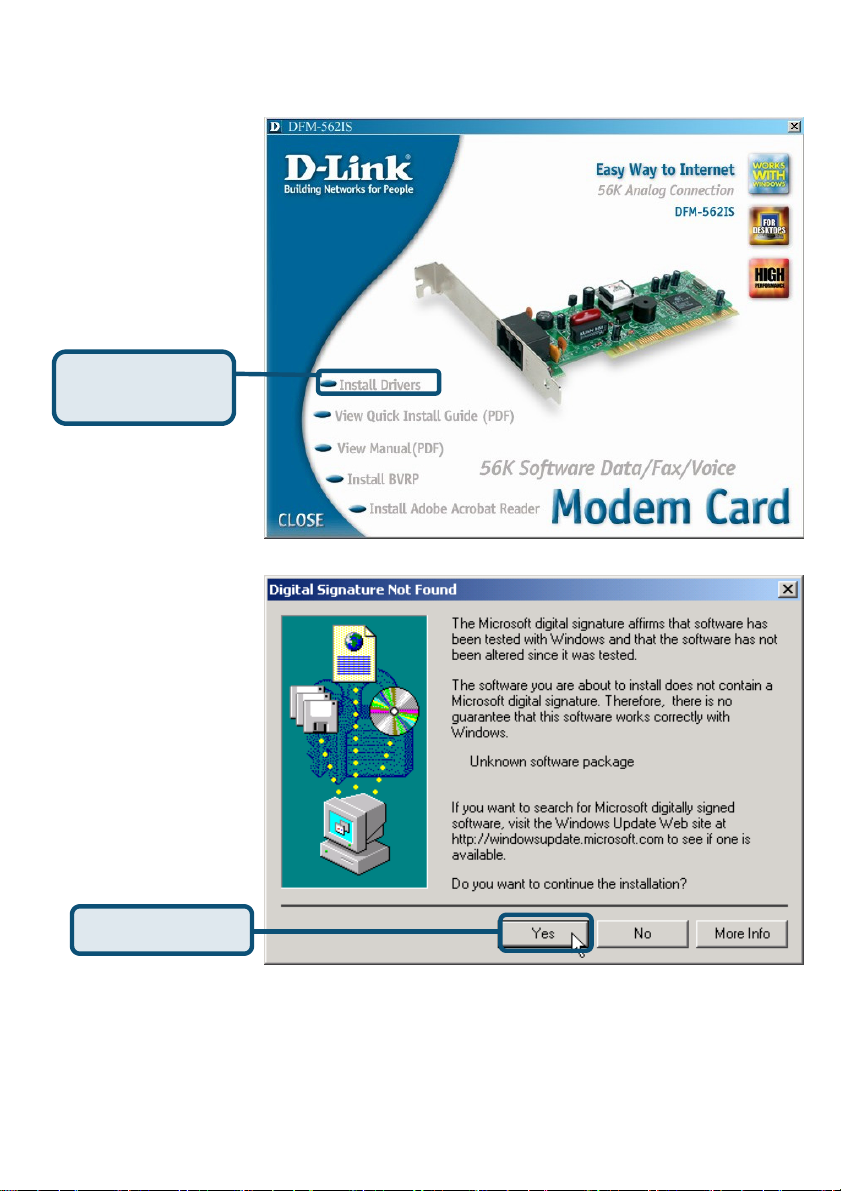
др
2.2 Windows 2K
После загрузки
Windows обнаружит
модем
автоматически,
нажмите Отмена.
Затем вставьте
компакт-диск с
айверами
Нажмите
Install Drivers
Нажмите Yes и
игнорируйте
сообщение
Нажмите Yes
65
Page 66
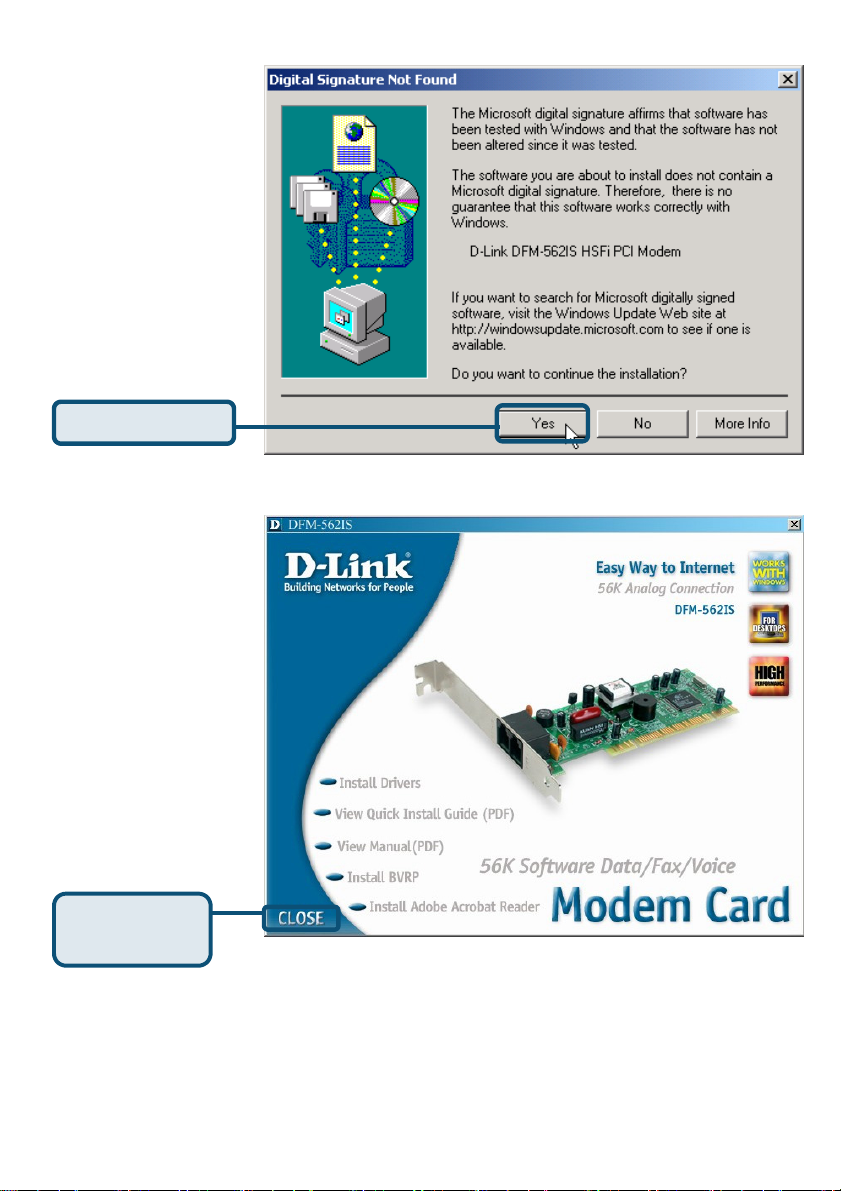
Нажмите Yes и
игнорируйте
сообщение
Нажмите Yes
Затем система
автоматически
установит модем.
Нажмите Close для
выхода
Нажмите
CLOSE
66
Page 67
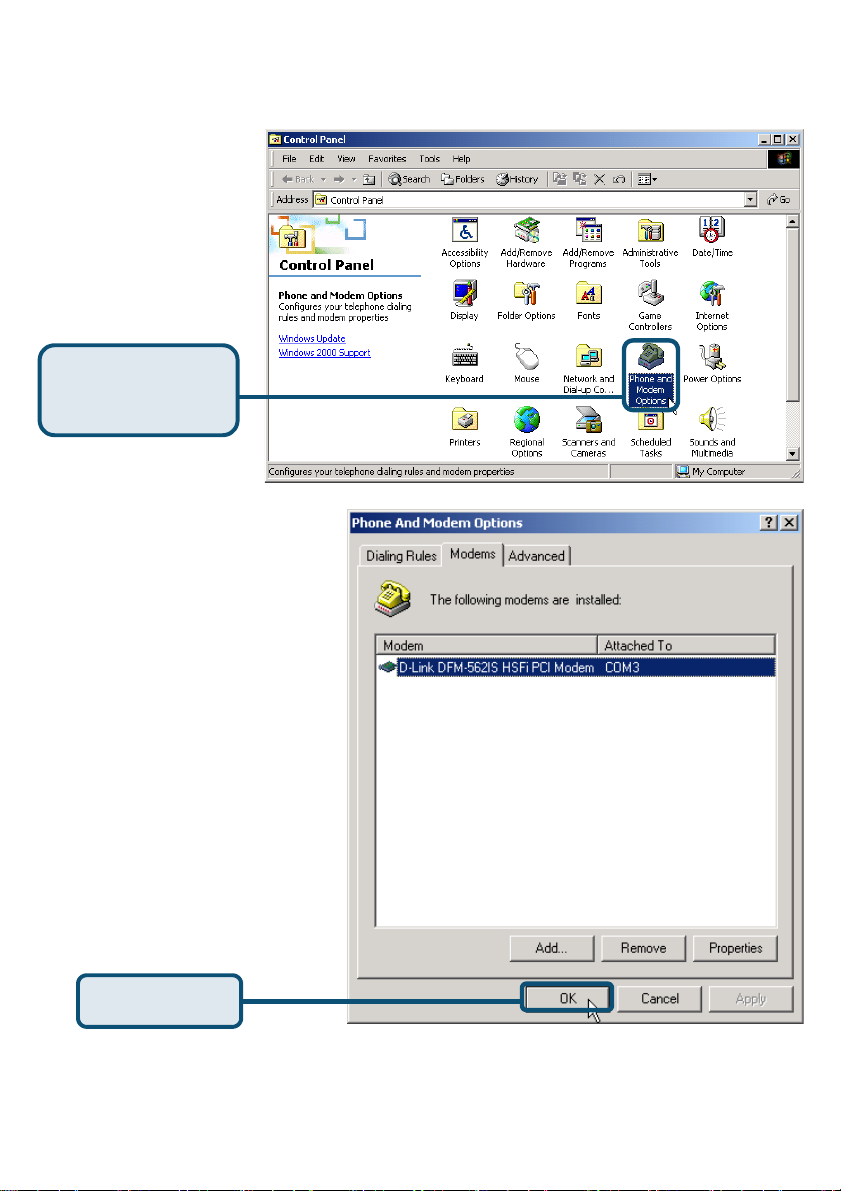
2.2 Windows 2K(продолжение)
Выберите Пуск\
Настройки\ Панель
Управления. Затем
дважды кликните на
значке Телефон и
Модем.
Проверьте модель
установленного модема
D-Link DFM-562E
External Modem.
Если установка завершена
корректно, нажмите OK для
выхода
Нажмите Phone
and Modem
Нажмите OK
67
Page 68
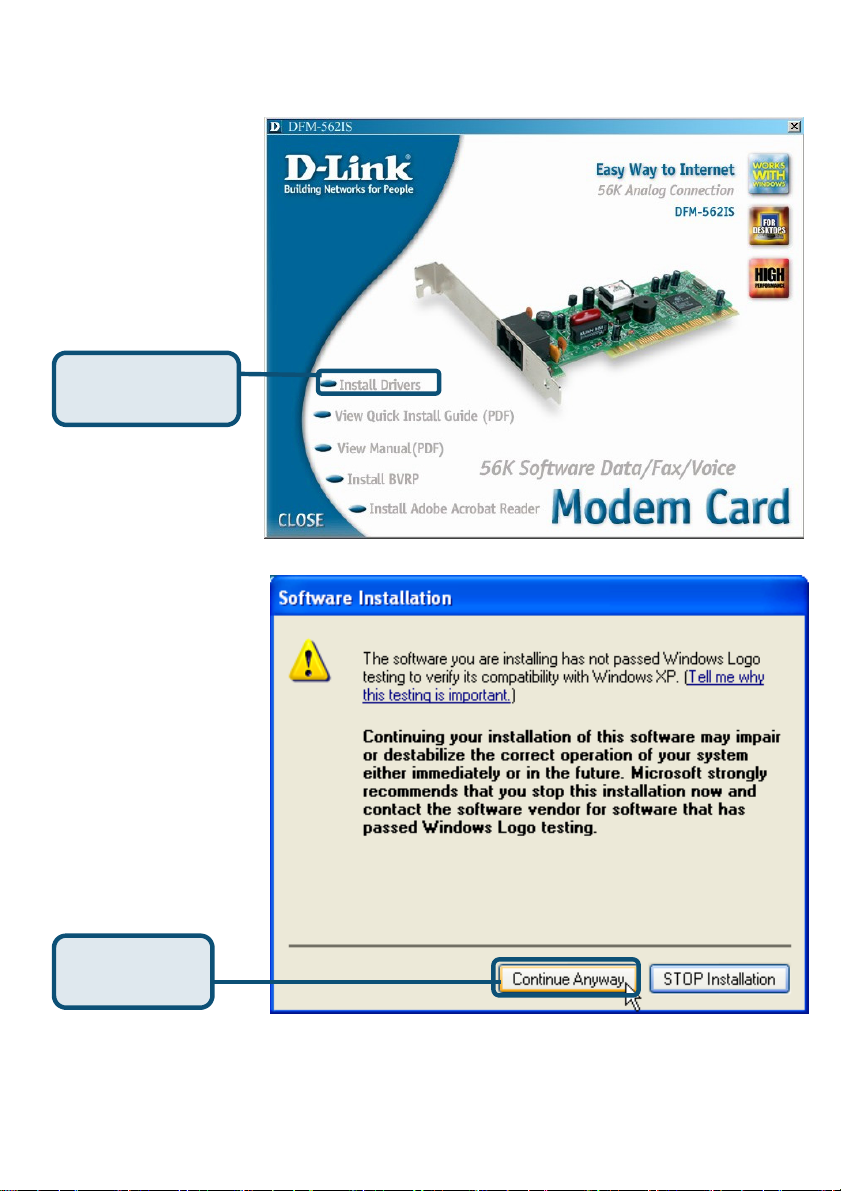
2.3 Windows XP
Нажмите
Install Drivers
Нажмите
Continue
68
Page 69
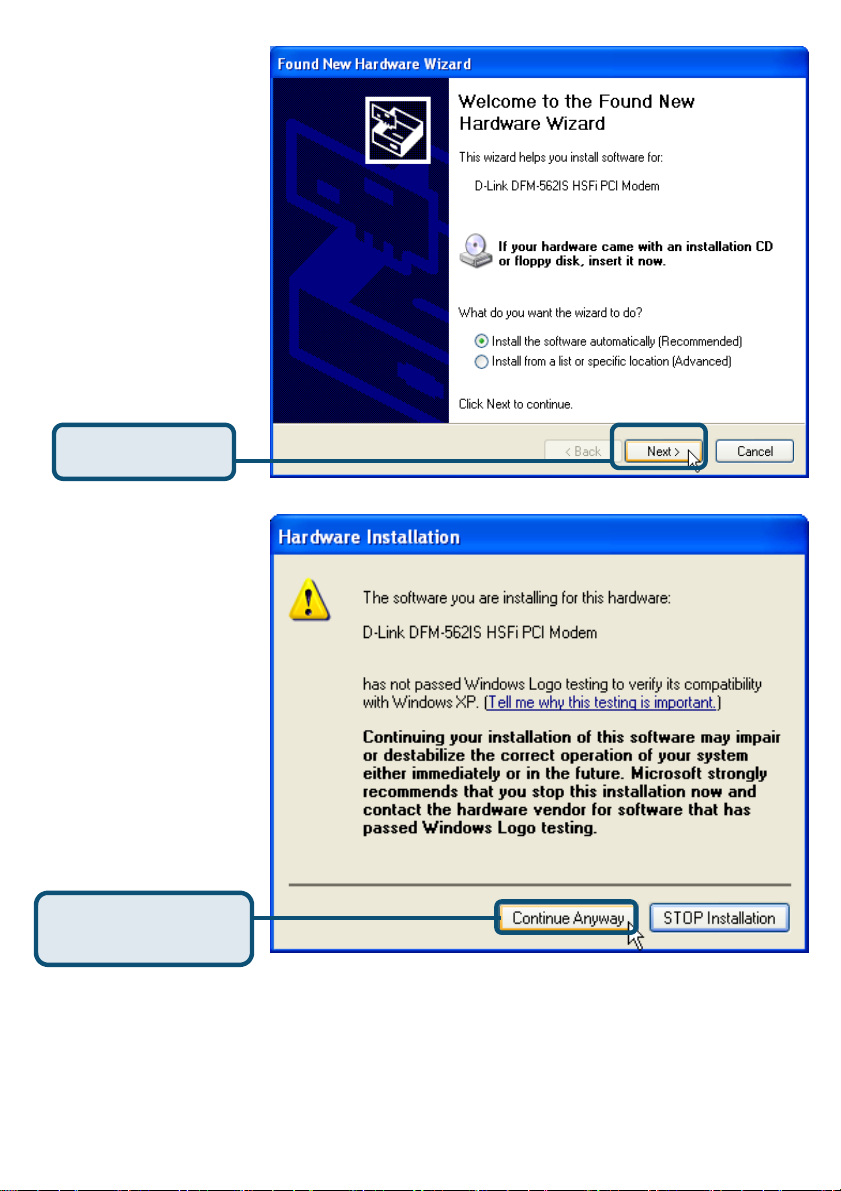
Выберите Установить
драйвера
автоматически
[Рекомендуется] затем
нажмите Далее для
поиска драйверов.
Нажмите Next
Нажмите Continue
Anyway для пропуска
предупреждающего
сообщения.
Нажмите Continue
Anyway
69
Page 70
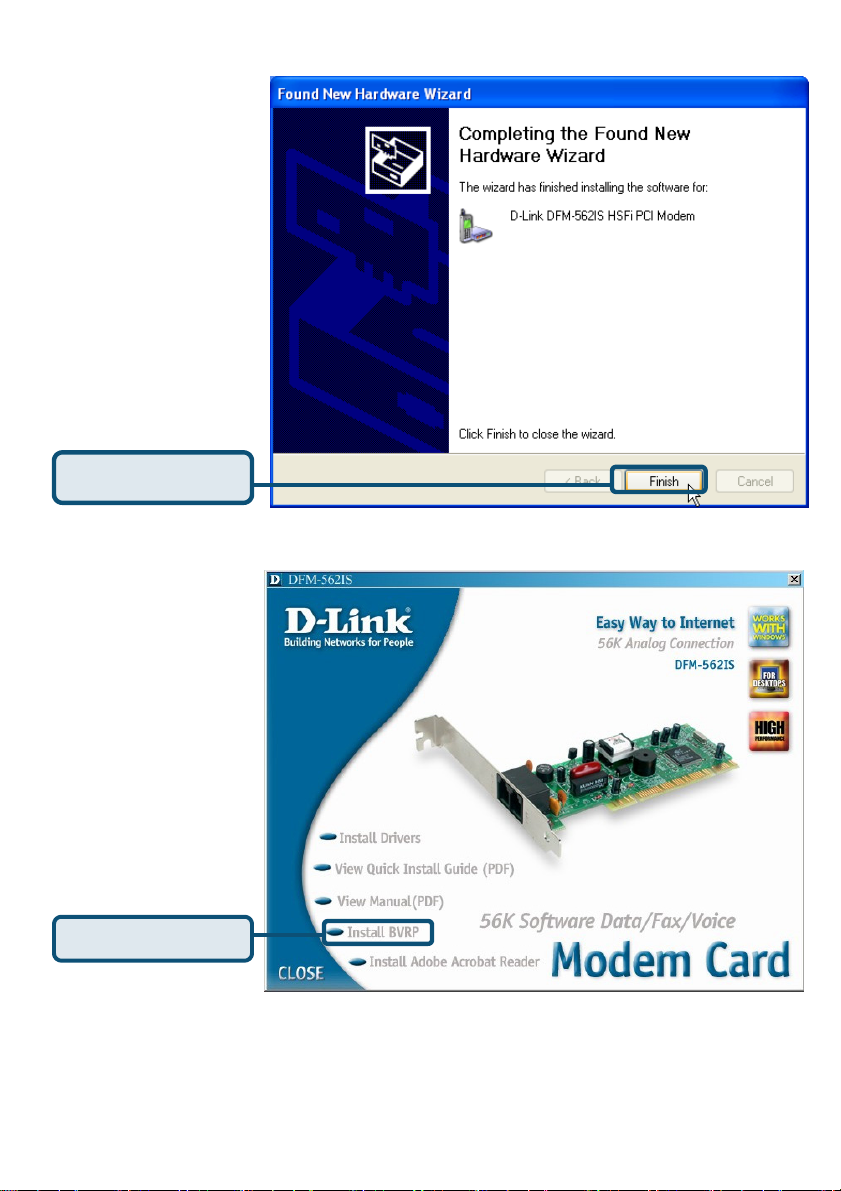
Установка
завершена
Нажмите Finish
Нажмите Close для
выхода
Нажмите CLOSE
70
Page 71
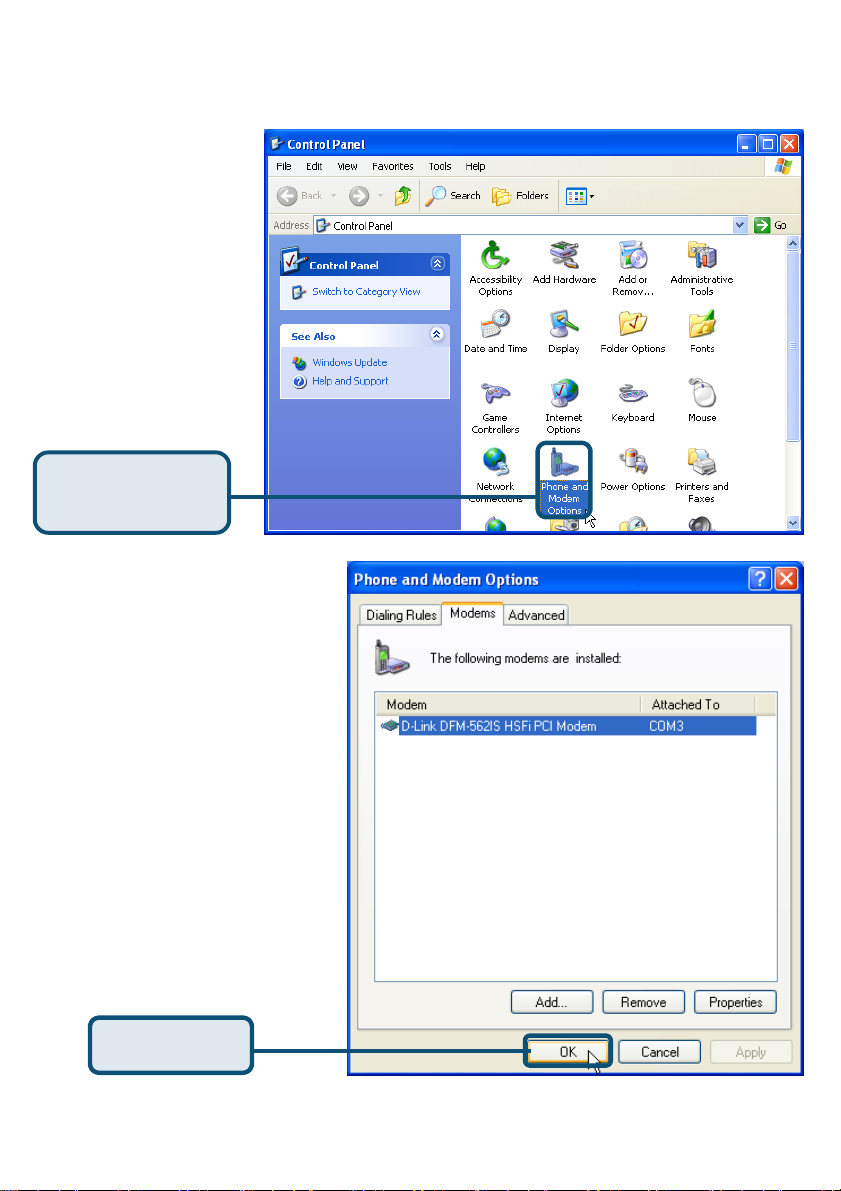
2.3 Windows XP(продолжение)
Выберите Пуск\
Настройки\ Панель
Управления. Затем
дважды кликните на
значке Телефон и
Модем.
Нажмите Phone
and Modem
Проверьте модель
установленного модема
D-Link DFM-562IS
HSFi PCI Modem.
Если установка
завершена корректно,
нажмите OK для
выхода.
Нажмите OK
71
Page 72
Техническа поддержка
Вы можете найти последнюю версию програмного
обеспечения и документацию по продуктам на сайте
D-Link
D-Link
обеспечивает бесплатную техническую поддержку
клиентов в течение гарантийного срока изделия.
Клиенты могут связаться со службой технической поддержки D-Link через
наш web-сайт, или по телефону.
Телефоны службы технической поддержки D-Link:
+7 (095) 744 00 99
Техническая Поддержка D-Link через Internet:
72
 Loading...