

Page 1
Page 2
Warning and Attention Symbols
You must be aware of safety when you install and use this system. This User Guide provides
various procedures. If you do some of these procedures carelessly, you could injure or kill
yourself or damage equipment or property. Some other procedures require special attention.
The lightning flash with arrowhead symbol, within an equilateral triangle, is intended to
alert the user to the presence of uninsulated “dangerous voltage” within the product’s
enclosure that may be of sufficient magnitude to constitute a risk of electric shock to
persons.
The exclamation point within an equilateral triangle is intended to alert the user to the
presence of important operating and maintenance (servicing) instructions in the
literature accompanying the apparatus.
For Your Safety
Do not try to open the case. There is risk of electrical shock, which may cause
damage to the apparatus and/or personal injury or death to you. There are no userserviceable parts inside. Opening the case or making unauthorized changes will void
the warranty.
Warning: To reduce the risk of fire or electric shock, do not expose this apparatus to
rain or moisture.
Important Software Notice
As with all software controlled products, unexpected behavior could arise if the user tries to
perform operations in a non-routine manner. This product, like almost any other high tech
product, is subject to bugs and hence DISH Network CANNOT AND DOES NOT GUARANTEE
OR WARRANT THAT ALL FEATURES, SUCH AS PARENTAL CONTROLS, WILL WORK AS
INTENDED UNDER ALL CIRCUMSTANCES. DISH Network endeavors to improve such
conditions and will periodically download improvements.
In compliance with the terms of the GNU Public License (GPL), EchoStar is making some source
code available to the public to download from www.echostar.com.
Equipment and Software Covered by this Guide
This Guide covers the VIP®922 satellite
ViP922. This Guide may cover other devices, not listed here.
Copyright Notice
Copyright © 2010 EchoStar Technologies L.L.C., Englewood, Colorado 80112. All rights
reserved. The information in this Guide may change without notice. We may issue revisions to tell
you about such changes. Please send comments or questions about this Guide to: Technical
Publications, EchoStar Corporation, 100 Inverness Terrace East, Englewood, CO 80112.
Printed in the United States of America. Part Number: 176779 revision 02
DISH Network is a registered trademark of DISH Network L.L.C. For information about DISH
Network, please visit our website at www.dishnetwork.com
We acknowledge all product names, trade names, or corporate names we mention in this Guide
to be the proprietary property of the registered owners.
Manufactured under license from Dolby Laboratories. “Dolby” and the double-D symbol are
trademarks of Dolby Laboratories.
HDMI, the HDMI logo, and High-Definition Multimedia Interface are trademarks or registered
trademarks of HDMI Licensing LLC.
HomePlug is a trademark and registered trademark of the HomePlug Powerline Alliance, Inc.
.
Page 3

SAFETY
IMPORTANT SAFETY INSTRUCTIONS
PROPER CARE OF YOUR EQUIPMENT
i
Page 4

SAFETY
IMPORTANT SAFETY INSTRUCTIONS
1. Read these instructions.
2. Keep these instructions.
3. Heed all warnings.
4. Follow all instructions.
5. Do not use this apparatus near water.
6. Clean only with a dry cloth.
7. Do not block any ventilation openings. Install in accordance with
the manufacturer’s instructions.
8. Do not install near any heat sources such as radiators, heat
registers, stoves, or other apparatus (including amplifiers) that
produce heat.
9. Do not defeat the safety purpose of the polarized or groundingtype plug. A polarized plug has two blades with one wider than
the other. A grounding-type plug has two blades and a third
grounding prong. The wide blade or the third prong are provided
for your safety. If the provided plug does not fit into your outlet,
consult an electrician for replacement of the obsolete outlet.
10.Protect the power cord from being walked on or pinched,
particularly at plugs, convenience receptacles, and the point
where they exit from the apparatus.
11. Use only attachments/accessories specified by the
manufacturer.
12.Unplug this apparatus during lightning storms or when unused
for long periods of time.
13.Refer all servicing to qualified service personnel. Servicing is
required when the apparatus has been damaged in any way,
such as the power supply cord or plug is damaged, liquid has
been spilled or objects have fallen into the apparatus, the
apparatus has been exposed to rain or moisture, does not
operate normally, or has been dropped.
14.Apparatus shall not be exposed to dripping or
splashing and no objects filled with liquids, such as vases,
shall be placed on the apparatus.
ii
Page 5

Important Safety Instructions
CAUTION—To reduce the risk of fire, use only No. 26
AWG or larger telecommunication line cord.
• Locate the receiver in an open, well-ventilated area. Do not place
the receiver in an enclosure (such as a cabinet) without proper
ventilation.
• Do not impede ventilation by covering the ventilation slots (such
as with magazines, curtains, tablecloth, etc.), or the receiver will
overheat.
• Do not stack the receiver on top of or below other electronic
devices as this can cause heat build-up and vibration.
• Do not install the receiver in any area where the temperature can
be less than 40°F or more than 113°F, and do not cover it.
• Connect the power plug to an outlet having a safety ground
connection. The power plug must be readily accessible so that
the equipment can be easily disconnected from the AC power.
• Operate the receiver using only the type of power source
indicated on the marking label. Unplug the receiver power cord
by gripping the power plug, not the cord.
• Do not overload wall outlets or extension cords — this can result
in a risk of fire or electrical shock.
• Never insert objects of any kind through openings into the
receiver, as the objects may touch dangerous voltage points or
short out parts. This could cause fire or electrical shock.
• Do not attempt to service the receiver yourself, as opening or
removing covers may expose you to dangerous voltage, and will
void the Limited Warranty. Refer all servicing to authorized
service personnel.
• Unplug the receiver from the AC power outlet before cleaning.
The receiver is still connected to the AC power whenever it is
plugged in to a live power outlet, even if the receiver is “turned
off” using the remote control or front panel button.
iii
Page 6
SAFETY
IMPORTANT SAFETY INSTRUCTIONS (continued)
• Do not place naked flame sources such as lighted candles on or
near the receiver.
• Do not expose the remote control batteries to excessive heat or
fire.
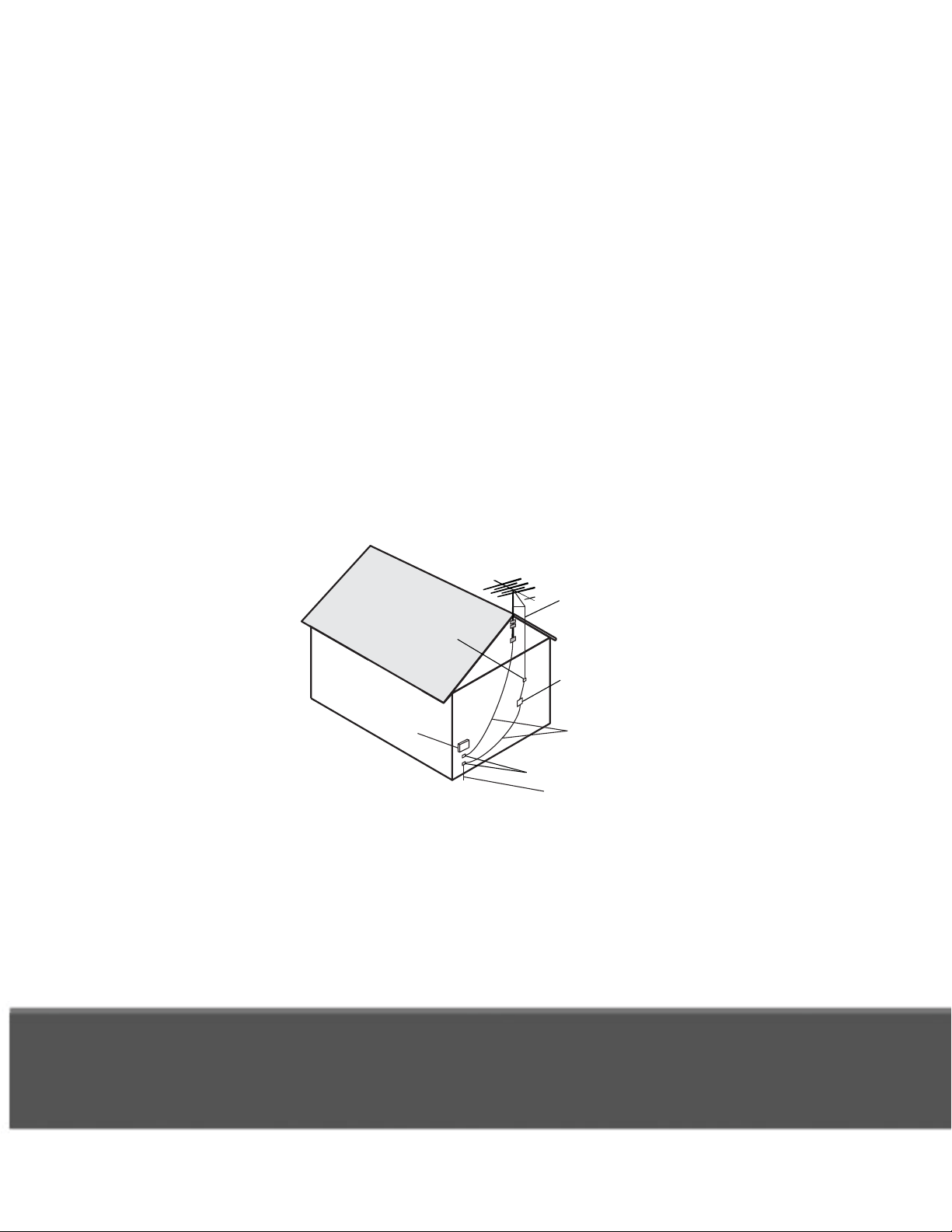
Note to Installer: This reminder is provided to call the installer's
attention to Article 810 section II of the National Electrical Code
(NEC) that provides guidelines for proper grounding and, in
particular, specifies that the cable ground shall be connected to the
grounding system of the building as close to the point of cable entry
as practical.
Example of Antenna Grounding
National Electrical Code, 2008
Antenna
Lead in Wire
Ground Clamp
Antenna
Discharge
Unit
Electric
Service
Equipment
(NEC Section 810-20)
Grounding
Conductors
(NEC Section 810-21)
Ground Clamp
Power Service Grounding
Electrode System
(NEC Art. 250, Part H)
Do not locate the antenna near overhead light or power circuits, or
where it can fall into such power lines or circuits. When installing the
antenna, take extreme care to avoid touching such power lines or
circuits, as contact with them can be fatal.
iv
Page 7

Proper Care of Your Equipment
PROPER CARE OF YOUR EQUIPMENT
• Always handle the receiver carefully. Excessive shock and
vibration can damage the hard drive.
• Always turn the receiver off, unplug it, and then let it sit idle for at
least 30 seconds before moving it.
• If the receiver is cold to the touch, do not plug it in immediately.
Let it sit unplugged at room temperature for at least 45 minutes
before plugging it in.
• The use of accessories or attachments not recommended by the
receiver manufacturer will void the Limited Warranty.
• If you plug the receiver’s power cord into an outlet that contains
surge suppression, then verify you are using a HomePlugcompatible surge-protected power strip or socket . Do not plug
the receiver into an outlet with ground fault protection.
• During an electrical storm or when the receiver is left unattended
and unused for long periods of time, unplug the power cord from
the wall outlet, and disconnect the lines between the receiver
and the antenna. This will provide additional protection against
damage caused by lightning or power-line surges.
• In some TVs, the presence of fixed images for extended periods
of time may cause permanent imprints on the screen. Consult
your TV’s manufacturer and user manual to determine if this is
an issue for your TV.
v
Page 8

SAFETY
vi
Page 9
Getting More Help
Getting More Help
• FINDING MORE INFORMATION
• TROUBLESHOOTING
1
Page 10
Getting More Help
Finding More Information
INDING MORE INFORMATION
F
How to get help:
•
If your new ViP®922
least one remote control, you together to
access various forms of on-screen user Remote is
not working on page 9.
• For more information on how to use your remote controls, refer to the
Quick Reference Guide that came with your ViP922 receiver.
• You can operate many of the features of your ViP922 receiver using
the capacitive-touch front panel controls, too. Note that this front panel
requires a light touch to activate it (and then it glows a little brighter)
before you touch the specific control to perform your intended function.
• On the Main Menu (accessed by pressing MENU on your linked remote
control or touching MENU on the front panel), a Help tile is displayed.
yet linked with at
Selecting this tile accesses a Help area where you can browse the onscreen user manual, view help videos, try out the interactive help
application, or search for help on any topic for the VIP922 receiver and
its remote controls. Most information a user needs is available in this
area of your receiver.
• Beginning on the next page, this guide provides tips for troubleshooting
certain kinds of issues you might encounter with your satellite system.
Also, you can find more information on your new satellite receiver and
its remote controls at www.dishnetwork.com. Select the Support link.
2
Page 11
T
ROUBLESHOOTING
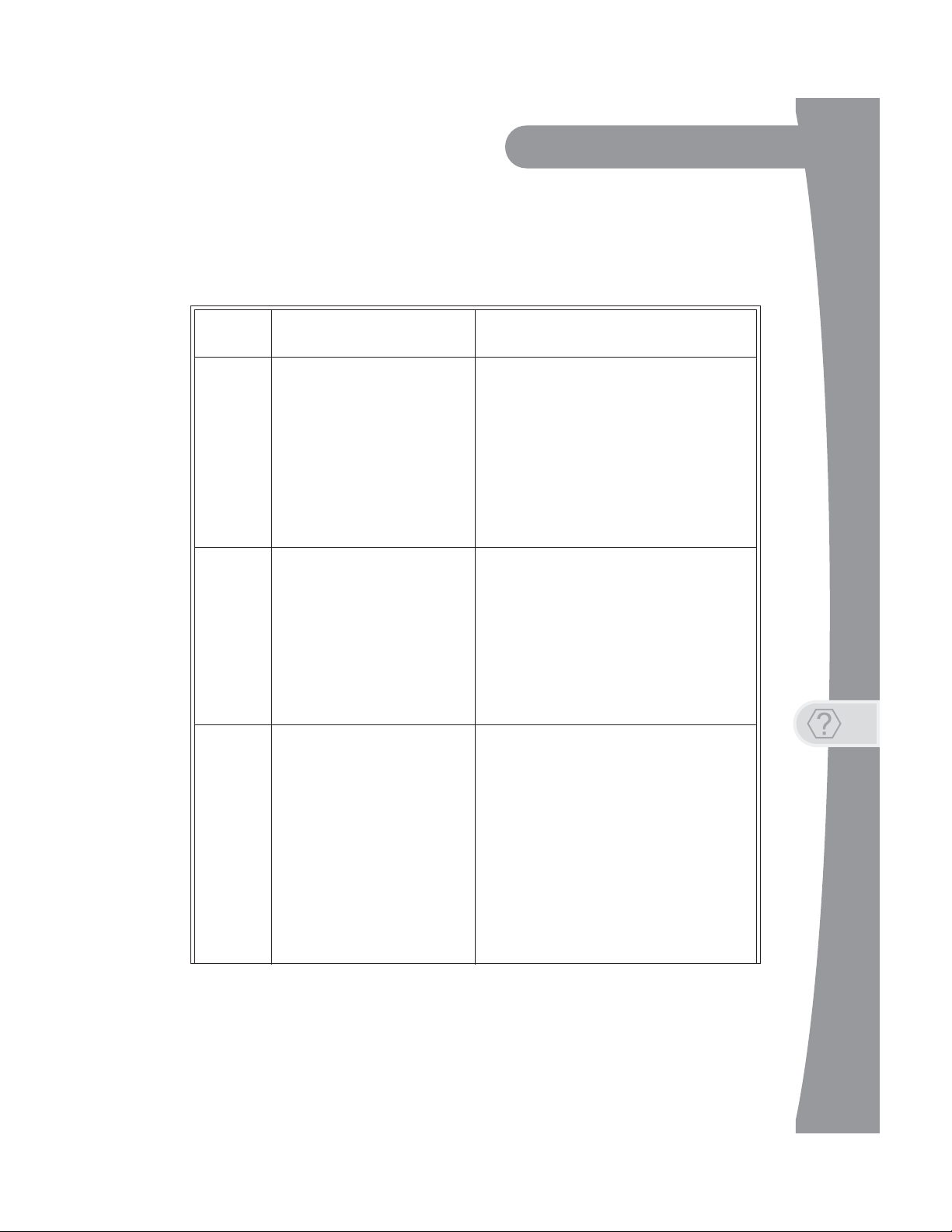
Message Numbers
Getting More Help
Troubleshooting
Message
Number
001
002
003, 004
Possible Reason(s) What to Do
Check the coaxial cables and their connections
to and from the multi-dish switch. Make sure that
all required cables are in place, and check that
all cable connections are tight and dry (for
outdoor cables). Run the Check Switch test, as
There may be a problem with the
multi-dish switch.
Heavy rain, snow, or cloud cover
may be interfering with satellite
signal transmission, or there may
be other interference.
The wrong type of coaxial cable
may be used in the system, or the
total run length of cable may be
too long. There may also be a
problem with the multi-dish
switch.
follows:
1.
Press MENU
eceiver’s front panel.
r
2. Select the Settings tile, and then scroll dow
to
Point Dish.
3.Access the Point Dish scree
heck Switch to run the test.
C
If this does not work, call the Customer Service
Center at 1-800-333-DISH (3474) for help.
• Note the local weather conditions. R
an
y snow or other debris
collected on
the satellite dish has a clear line of sight to the
satellite. Check whether branche
ve grown into the line of sight of the dish.
ha
• Make sure that the satellite dish is aimed at
the satellite. Check the strength of the signal
using the Point Dish screen (select the
Settings tile and scroll down to Point Dish).
C
onsult with your installer in order to re-a
th
e dish, if necessary, to obtain the strong
ssible signal.
po
• Make sure the system uses RG-6 co
cable; if not, contact yo
• Check the dish-to-receiver cable run length. If
your system is labeled DISH Pro, the ca
can be
th
e coaxial cables and their connectio
an
d from the multi-dish switch. Make sure that
all required cables are in place
th
at all cable connections are tight and
(for ou
do
es not work, run th
fo
llows:
1. Press MENU on your remote control or the
receiver’s front panel.
2.Select the Settings tile, a
do
wn to Point Dish.
3.Access the Point Dish scree
C
heck Switch to run the test.
on your remote control or th
the satellite dish. Make sure that
as much as 200 feet in length.
tdoor cables and connections). If
e
n and select
which may have
ur dealer or installer.
e Check Switch test, as
emove
s or leaves
axial
Check
ns to
, and check
dry
nd then scroll
n and select
ble
this
im
est
n
3
Page 12
Getting More Help
Troubleshooting
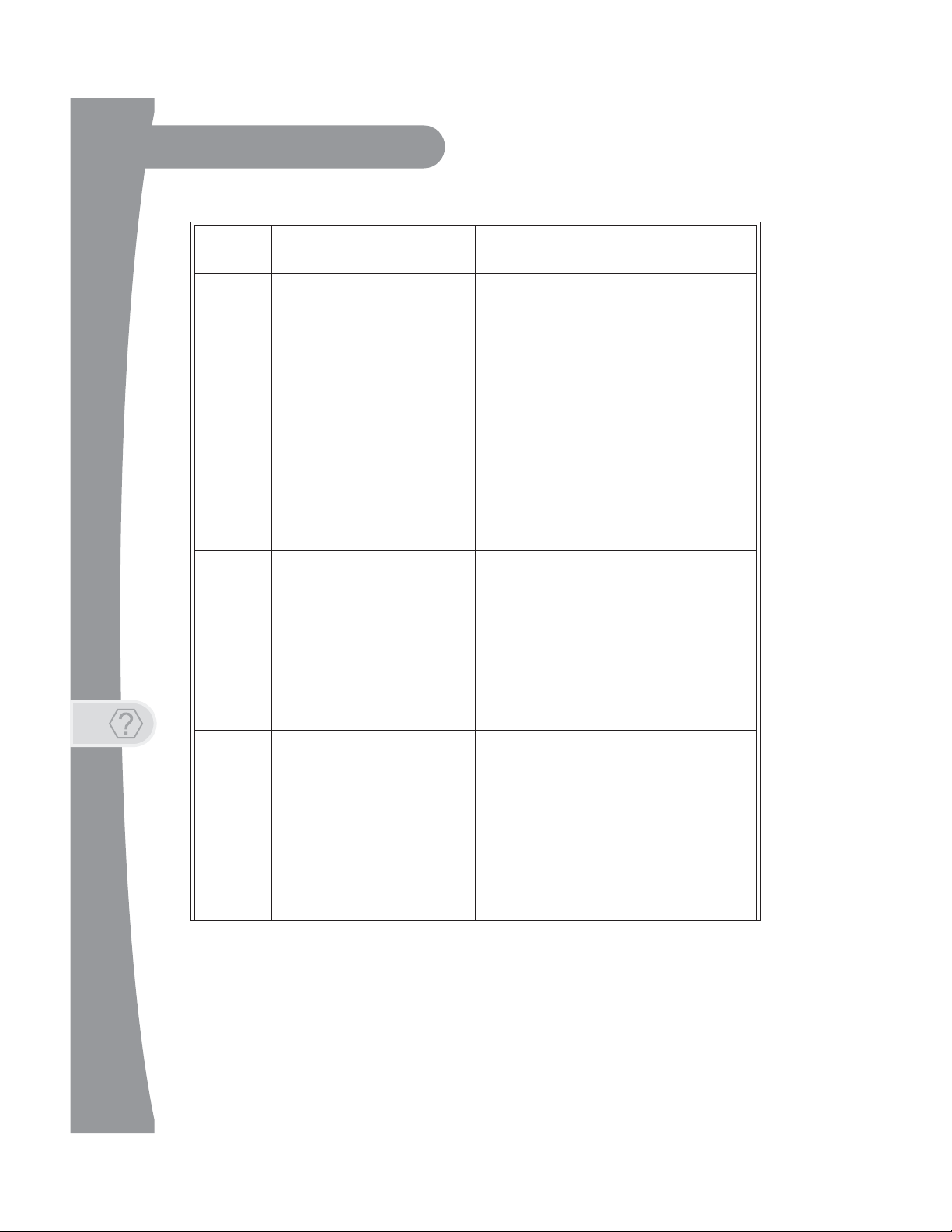
Message
Number
005
006
011, 012
Possible Reason(s) What to Do
ve just authorized your receiver
tdoor cables and connections).
e dish anten
are both tight a
to the satellite(s). Check whether
na.
Signal Strength bar on the
d displays the word
ssible sig
nal.
The receiver may not have
received authorization for
programming yet. The satellite
dish may have moved so that it is
no longer picking up the satellite
signal. The cable connections
may have loosened or have
moisture inside. There may be an
interruption of the satellite signal.
The receiver may not be
connected to an active telephone
line or broadband Internet
connection.
Viewers in specific areas are
prohibited from watching certain
programs. For example, viewers
who live close to a particular
football stadium may be
prohibited from watching football
games that are played in that
stadium.
• If you ha
(added it to your account), then wait a few
minutes to see if the message has been
removed. Make sure that all required cables
are in place, and check that all cable
connections
ou
• Make sure that the satellite dish ha
line of sight
branches or leaves are in
th
•
Check that the
Point Dish screen (select the Settings tile,
scroll down, and select Point Dish) is green
an
contact your installer to re-aim the satellite
dish, if necessary, to obtain the strongest
po
•
If you have not authorized the receiver, then
call the Customer Service Center at 1-800333-DISH (3474) and do so.
You must keep each installed receiver
connected to an active telephone line or
broadband Internet connection at all times.
Program providers, not DISH Network, specify
which programs are blacked out for specific
areas.
nd dry (for
s a clear
the line of sight of
Locked. If not, the
you
Call
013, 014
You may have tried to tune to a
program on a channel to which
you don’t subscribe.
• You must subscribe to a channel before
can tune
th
DISH (3474) to subscribe to
ne
• If you subscrib
these messages, then press the red reset
bu
of
message ha
complete.
• If you believe this message was displayed by
mistake,
1-800-333-DISH
to a program on that channel.
e Customer Service Center at 1-800-333-
w channel(s).
tton behind the small doo
the receiver’s fro
e to the channel and you see
nt panel and see if the
s been removed after the reset is
call the Customer Service Center at
(3474).
one (or more)
r on the left side
4
Page 13
Getting More Help
Troubleshooting
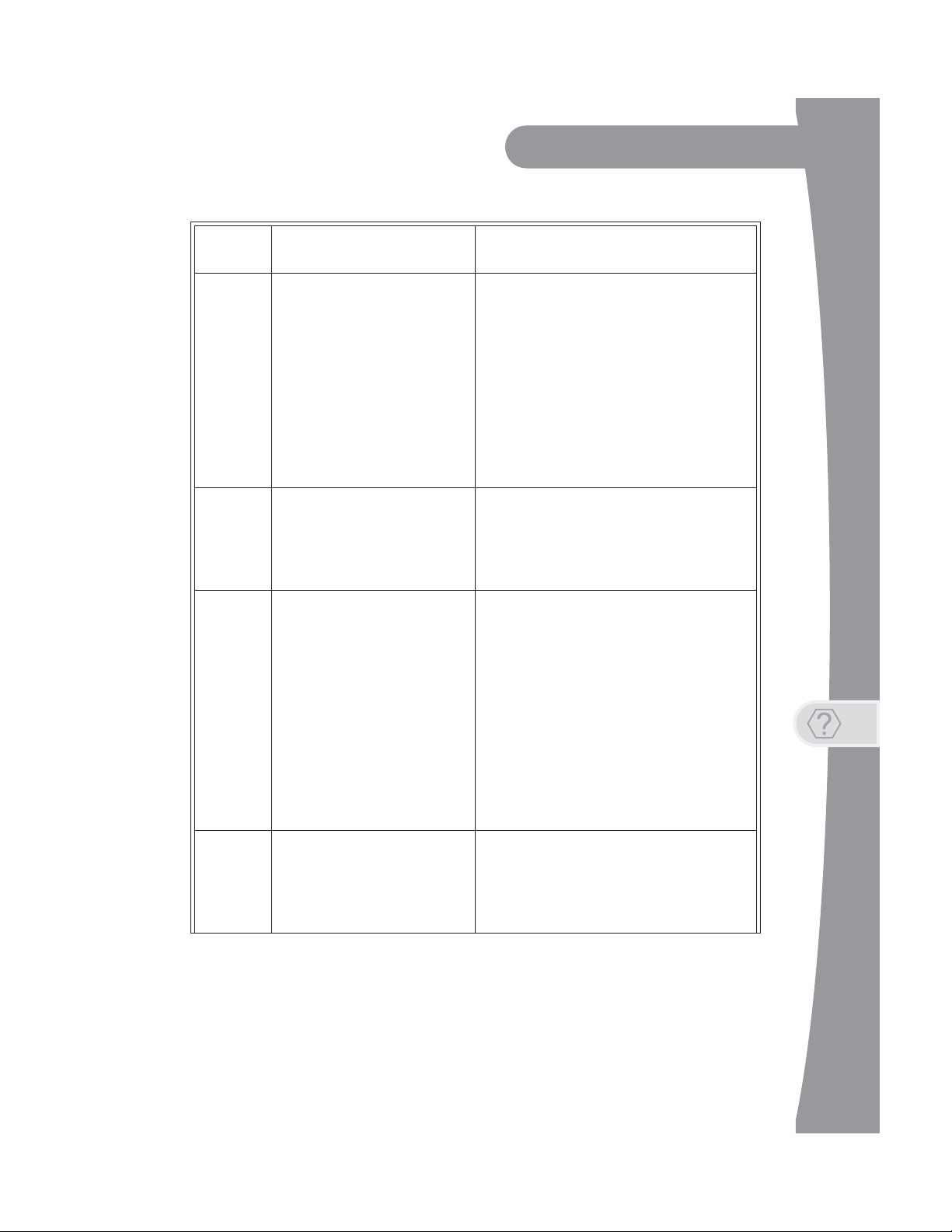
Message
Number
015
018
022
Possible Reason(s) What to Do
nutes to see if the message
d check that all cable
are both tight a
to the satellite(s). Check whether
wn, and select Point Dish
/or to get authorization to make
are both tight a
o the satellite. Check
or leaves have grown into the line of
wn, and select Point Dish
You may have just plugged in the
receiver and it is acquiring the
satellite signal, or the receiver
may have temporarily lost the
signal.
The receiver may not be
connected to an active telephone
line or broadband Internet
connection.
The receiver may not have
received authorization for
programming yet. The satellite
dish may have moved so that it is
no longer picking up the satellite
signal. The cable connections
may have loosened or have
moisture inside. There may have
been an interruption of the
satellite signal.
• Wait a few mi
go
es away. Make sure that all required cables
are in place, an
connections
ou
tdoor cables and connections).
• Make sure that the satellite dish ha
line of sight
branches or leaves have grown into the line of
sight of the dish antenna.
• Check that the Signal Strength bar
Point Dish scree
scroll do
an
d displays the word Locked. If not, th
contact your installer t
dish, if necessary, to obtain the strongest
po
ssible signal.
• You must connect the receiver to an act
telephone line or broadband Internet
connection at all times.
• Call the Customer Service Center at 1-800333-DISH (3474) for help
limit and
pu
rchase.
• If you have authorized the receiver, wait a few
minutes to see if the messag
removed. Make sure that all required cables
are in place, and check that all cable
connections
ou
tdoor cables and connections).
• Make sure that the satellite dish ha
line of sight t
branches
sight of the dish antenna.
• Check that the Signal Strength bar
Point Dish scree
scroll do
an
d displays the word Locked. If not, contact
your installer to re-aim the satellite dish. If you
have not authorized the receiver, then call the
Customer Service Center at 1-800-333-DISH
(3474) and do so.
nd dry (for
s a clear
n (select the Settings tile
o re-aim the
checking the credit
n (select the Settings tile
on the
) is green
satellite
e has been
nd dry (for
s a clear
whether
on the
) is green
en
a
,
ive
,
028
The receiver may need to get
new software before you can use
it to order Pay-Per-View
programs.
Press the POWER button to turn the receiver off.
Doing this allows the receiver to download new
software via satellite. This download may take
several minutes; do not disturb or unplug the
receiver during this time. After the downloaded
software is installed, you will be able to order
Pay-Per-View programs through your receiver.
5
Page 14
Getting More Help
Troubleshooting
Message
Number
059
060
061
074
Possible Reason(s) What to Do
If your setup includes a multi-dish switch, then
You may have tried to close an
installation menu without having
performed the Check Switch test
on the Point Dish screen.
You may have aimed the satellite
dish at one satellite, but selected
the option for another satellite on
the Point Dish screen.
The receiver is downloading
current software.
The receiver gives you three
chances to enter the correct
password. If you fail to do so, the
receiver “times out” and will not
allow you to try again for several
minutes.
run the Check Switch test, as follows:
1.
Press MENU
eceiver’s front panel.
r
2. Select the Settings tile, scroll down, and then
select Point Dish.
3.Access the Point Dish scree
C
heck Switch to run the test.
• Make sure that you have selected the opt
r the correct satellite on the Poin
fo
screen (select the Settings tile, scroll down,
d select Point Dish).
an
• Make sure that the cable(s) for the satellite
that you have selected is connected to the
LNBF that receives signals from that satellite.
Contact your in
dish, if
It is very important for the receiver to get the
latest software to function properly. The satellite
download may take several minutes. Do not
disturb or unplug the receiver during this time.
Wait a few minutes and then try again to enter
the password.
Note: The “time out” feature is designed to
prevent someone from trying password after
password until he or she happens to guess the
right one and then gains unauthorized access to
the receiver.
on your remote control or th
necessary, at the correct satellite(s).
staller to re-aim the satellite
e
n and select
ion
t Dish
Connect the receiver to an active telephone line
or broadband Internet connection. Make sure
that the telephone line or Internet connection to
which you connect the receiver is working
properly.
Note: To order Pay-Per-View programs, you
must keep each receiver connected to an active
telephone line or broadband Internet
connection. The receiver uses the telephone line
to make toll-free calls (when the phone is not in
use) or the Internet connection to send purchase
information to DISH Network.
If you want to reset the receiver to its factory
default settings, select Yes. If you do not want to
reset the receiver to factory defaults, select No.
078,
079, 080
093
You may not have connected the
receiver to an active telephone
line or broadband Internet
connection, or the telephone line
or Internet connection may be
defective.
You may have selected the Reset
to Factory Defaults option.
6
Page 15

Getting More Help
Troubleshooting
Signal loss on all channels
1. Ensure you have selected the correct input/source or channel number
on your TV for watching digital channels using your satellite receiver. If
you are using the optional digital OTA tuner module and missing local
channels, then
2.
Try a different satellite TV channel. Sometimes just one channel may
experiencing a problem,
channel seems to have
o
n one or some channels. If all channels are expe
then continue w
3. Verify that the coax cables connecting to your receiver are hand tight,
and are properly connected to your DISH Network antenna.
see Missing Over-The-Air channels (optional module)
while other channels are fine. If
the problem, go to the next section,
riencing the problem,
ith Step 3.
just one
Signal loss
.
be
4. Verify that your DISH Network antenna is still in place
appear to have been damaged or moved. If the antenna is out of proper
alignment, then you may receive
your channels.
5.
Try resetting your satellite receiver. Press the red
the small door
few seconds. Y
control to turn it of
from the power outlet for
POWER again to turn it back
6. Check the Signal Strength bar for your satellite channels using the
screen and changing satellite locations and
Dish
needed. Satellite TV transponders
40 are likely to experience some
7. Your antenna may need to be adjusted. Contact DISH Network or
retailer, as applicable, for assistance. If you want to try adjusti
local
antenna yourself, refer to any instructions accomp
the
antenna, or to www
recommendations and general information on antenna
on the left side of your receiver’s front panel and wait
ou can also press the
f (in standby mode), then unplug the
30 seconds, plug
.antennaweb.org
signal loss messages on some or
POWER button on the remote
it back in, and select
on (out of standby mode).
with a signal strength
video loss.
for over-the-air antenna
and does not
reset button behind
satellite receiver
transponders, as
below about
anying the
alignment.
Signal loss on one or some channels
1. Try a different channel. Sometimes just one channel may be
experiencing a problem, while other channels are fine. If all channels
are experiencing the problem,
all channels. If just one
problem,
then continue with Step 2 on the next page
go to the previous section, Signal loss
channel or a few channels seem
.
to have a
all of
a
Point
your
ng
on
7
Page 16

Getting More Help
Troubleshooting
2. Press the GUIDE button twice and check if the Program Guide is set to
show All Channels or All Subscribed. If another Favorites list is
displayed, then other channels may appear to be missing. If you try to
access
ov
3. Try resetting your satellite receiver. Press the red
the small door
few seconds. Y
control to turn it of
from the power outlet
POWER again to turn it back
channels not shown in the current list, then the receiver skip
er them.
reset button behind
on the left side of your receiver’s front panel and wait
ou can also press the
f (in standby mode), then unplug the
for at least 30 seconds, plug it back in, and
on (out of standby mode).
POWER button on the remote
satellite receiver
select
s
a
4. If you are using the optional digital tuner m
channels, see Missing Over
-The-Air channels (optional module)
odule and missing local
Missing Over-The-Air channels (optional module)
1. Your ViP922 receiver is able to tune satellite TV channels and local
digital channels (with an optional, digital OTA tuner module). It is
possible that some missing channels are channels still broadcasting in
analog.
2.
You can go to the website www.antennaweb.org to find out which
channels in your
channel
channel
may need
TV’
channels using
source or channel on your TV
3.
Check the Signal Strength bar for Over-The-Air (OTA) channels; se
MENU
Local Channels,
channel experiencing
cha
likely to
4. Your antenna may need to be adjusted. Contact your local inst
antenna ret
adjusting the antenna
the antenna,
antenna recommendations and general information on antenna
alignment.
you are missing is still broadcasting in analog, you can view
using a TV’s analog tuner. To view any analog
s remote control. When you want to return to watching digit
and then the Main Menu’s Settings tile,
nnels with an indicated signal strength below approximate
experience some video loss.
area are currently broadcasting a digital signal. If
channels, you
to change input/source or channels on your TV
your ViP922 receiver, change back to the correct input/
.
scroll down, and select
then the option to Add a New Channel. Fin
problems and verify it has a strong signal. OT
ailer, as applicable, for assist
yourself, refer to any instructions accomp
or visit the www.antennaweb.org website for
ance. If you want to try
using the
over-the-air
.
local
the
the
al
lect
d a
A
ly 60 are
aller or
anying
8
Page 17

Getting More Help
Troubleshooting
Remote is not working
1. Verify the batteries are installed according to the diagram inside the
remote control’s battery compartment.
2. Try changing the batteries in the remote control. Batteries should all be
of the same
3. Confirm your remote is in the correct mode for
control. For
mode button
type (for example, alkaline or lithium) and size.
the device you want to
example, to control your satellite receiver, press the SA
on the remote before the function you want performed.
T
4. Make sure you are using the correct remote control
V
iP922 receiver. These remotes use radio frequency
operate your V
us
ing infrared (IR) light signals. If you have programmed the remote to
control your equipment in other device modes, then the remote
must
have a clear line of sight to the front of these other devices.
5. Check that the remote control antenna is hand tightened
p
anel connector on your ViP922 receiver. The small antenna
not
be touching other cables, connectors,
antenna
linking a remote, hold it within a coup
6. Verify you have linked your remote control to your ViP922 receiver
T
ouch POWER on the receiver on the front panel
cap
acitive controls, then select SYSTEM INFO. With
screen displayed, any linked
right-hand side of the screen. If your remote is not listed, hold it close to
the remote
and release the SA
remote
7. If your remote still doesn’t work, select
screen and listen for the confirmation tone. Af
press the SA
tone, continue with
8. If your remote is not listed or cannot be un-linked
screen, then do the following:
is now linked to and controls your ViP922 receiver.
iP922 receiver. Other
to point straight up usually attains the best performance.
remote control(s) should
antenna attached to the back of the receiver,
T mode button. Check several button
T button to link the remote again. If you do not hear
the next step to un-link the remote control manually.
equipment is usually controlled
or equipment. Adjusting this
le of feet of this remote antenna.
Un-Link on the System Info
provided for your
(RF) signals to
onto the back
to activate the
the System Info
be listed on the
and then press
s to see if your
ter
you hear it, you can
on the System Info
control
should
When
.
the
Access the System Info screen, as in Step 6 above
-
- Press and hold down the SAT button for a few seconds until all
device-mode
- Press the RECALL and 0 (number zero) buttons at the same time
(SAT lights up), and then release them.
buttons light up, and then release SAT.
the
9
Page 18

Getting More Help
Troubleshooting
- Press the SEARCH button (SAT lights up).
- Press the VOL+ button (SAT lights up)
- Press the STOP button (SAT lights up, then un-link tone is heard).
- Go back to Step 6 and repeat to re-link your remote control.
Forgot password for Parental Controls
1. If you have forgotten your existing password, you must call 1-800-3333474 (DISH) with your Receiver CA ID number to get more assistance.
Locate the Receiver ID number by selecting SYSTEM INFO on the front
p
anel, or alternately, by pressing MENU twice. You can also view
detailed information by selecting the Settings
then selecting System Info.
the
letter R and before the dash).
tile, scrolling down, and
Write down the Receiver ID number (aft
er
2. To reset your password, press MENU to access the Main
the Settings tile,
Edit Password option. When prompted for
mus
t re-enter your existing password before you ca
a new p
pr
assword. If you have forgotten your existing pa
eceding Step 1.
then select Parental Controls, and then
your old pa
Menu, select
choose the
ssword, you
n enter and confirm
ssword, see the
Parental Controls issues
1. If you have set up parental controls (for example, blocking programs
according to their ratings), but the programs are not being blocked, then
you may not have locked your ViP922 receiver. See the topics for
Parent
al Controls in the on-screen Manual under the Help tile.
2. If you have forgotten your password and therefore cannot
receiver
, then see Forgot password for Parental Controls.
unlock your
Program Guide issues
1. If you try to display future programs in the Electronic Program Guide
(EPG), but are unable to find the program schedule you are looking for,
then first try scrolling the guide out far into the future until a guideinformation update is triggered. You may also try dis
Program
information may show the programs
2. The Program Guide can display
The Guide cannot display a time or day earlier than the present.
Guide again later. By that time, periodic updates
for the times you want.
only programs that have not yet ended.
playing the
to the guide
10
Page 19

Getting More Help
Troubleshooting
3. If some channels are missing when you are using the Program Guide or
Info banner, you may have locked the satellite receiver to hide adult
channels, or you may have displayed a Favorites lists or the All HD list
instead of All Channels or All Subscribed. To show the missing
channels, unlock the ViP922 receiver (see the topics for Parental
Controls in the on-screen Manual under the Help tile), or press GUIDE
again and choose the All Channels, All Subscribed, or a different
Fav
orites list containing the channels (see Favorites and Quick Clicks
the on-rec
Timer issues
1. If a program is locked (see Parental Controls in the Help area), you
must enter your password first before you may create a timer for that
program.
eiver
Help area).
in
2. If you have set up the maximum number of event timers, then
satellite receiver
additional one,
3. If you try to extend the end of an event timer and create a conflict
other timers’ st
4. If you stop or skip a timer that recurs, the next showing of the
is not af
(Timers set to record Once are automatically deleted after they occur.)
5. If you set a timer that misses the beginning or end of
may want to change the
fected. To stop all occurrences, you must delete the event timer.
displays an error message when you try to set
giving you the option of deleting an existing event timer.
art times, then an error message displays.
a program, you
Start Early or End Late options for that timer.
your
up an
program
Events not recording
1. Ensure event timers you have set that you want to record programs are
listed as DVR (Digital Video Recorder) timers, not Auto-Tune timers.
2. If you set up a recurring event timer, but it does not record
spe
cific showings of the program, then double-check that you set
correct recurrence frequency
3. If you set up a timer to Record Series, ensure that you have se
the correct
4. If you have several timers set for the same or overlapping time periods,
then one or more will be skipped. Ensure that
of the recordings correctly
lower priority than existing timers
(Select the Se
choice between Only New Episodes or New and Reruns.
ttings tile, then Series Timer Defaults to change it.)
for that timer (Weekly, Daily, Mon-Fri.).
you have set the Priority
. By default, new event timers are set
, but that default can be
one or more
lected
with
changed.
with
the
11
Page 20

Getting More Help
Troubleshooting
5. Press the DVR button on your remote control and select Daily
Schedule on the My Media screen to see what specific events in the
near future may be skipped due to timer conflicts.
Events disappearing from Recordings list
1. If you run out of space for more recordings on your satellite receiver,
then existing recordings that are not protected are erased, starting with
the oldest unprotected one, as needed, to make room for new
recordings
Y
ou should be aware that certain
record more event
record event
remote
as they occur
control, or select Daily Schedule on the My Media screen.
.
timers you set up may match and
s than you expected. To view timers scheduled
s in the near future, press the DVR button twice on
to
your
2. If you do not want a recording to be deleted, select Protect on
screen for
that recording.
the
Network connectivity issues
1. If your receiver is connected to the Internet, but you are having trouble
accessing certain On Demand options or other Internet-based services
from your receiver, then you may have a problem with your broadband
Internet connection or home network. For more information on your
receiver
dishnetwork.com website. Select the Suppor
2. Press MENU and select the Settings tile, then select Broadban
Setup. On the Broadband Setup screen, verify that a valid IP address
for
is all zeroes, then select Reset Connection.
3.
If the Connection Status is still Not Connected, or
on
home network, router
the inst
for
computer(s) can access the Internet via this network.
4.
To connect your satellite receiver to your router or gatew
a
HomePlug-to-Ethernet adapter, like a SlingLink, plug
SlingLink
ensure that
plugged into
gateway device,
SlingLink(s), and then
’s Ethernet connectivity and home networking
t link on the web page.
your home network is listed. If the IP address seems to be
the Broadband Setup screen say Failed, then troubleshoot
or gateway device, and broad
allation instructions, user guides, help, and support
the equipment on your home network. Ensure that
directly into nearby non-switched, non-GFI power outlets
no halogen lights, power supply units or
the same outlets. If you need to restart your router
unplug your ViP922 receiver first,
your router. Plug them back in in reverse order.
options, see the
d
invalid or
one or more items
your
band modem. See
information
your existing
ay device using
the receiver and
adapters are
or
followed by the
and
12
Page 21

Getting More Help
Troubleshooting
5. You may want to check with your Internet Service Provider (ISP)
regarding Fair Access Policy (FAP) before using all your receiver’s
Internet features. Some of these features may exceed usage limits.
Caller ID issues
1. If the Caller ID feature is not working, verify that you are currently
subscribed to the Caller ID service from your phone service provider.
2. Verify that your active telephone line is connected securely
jack on the
telecommunication line cord.
3.
Check that you have the feature enabled on
the
MENU button on your remote, selecting the Settings tile,
down, and then
back of your satellite receiver using No. 26
your receiver by pressing
selecting Caller ID Settings.
to the phone
or larger
scrolling
Telephone issues
1. If you hear clicks or no dial tone when trying to make a voice call, the
satellite receiver may have been trying to send Pay-Per-View purchase
information to DISH Network. The receiver will hang up automatically if
it finds the telephone line is in use, allowing you to obtain a dial tone
and try your call again.
If you try to send or receive a FAX or modem transmission when
2.
satellite receiver is trying to
DIS
H Network, the receiver will disconnect automatically.
transmission
a
fter obtaining a new dial tone.
may have been interrupted; if so, it will
send Pay-Per-View purchase
need to be re-sent
information to
The original
the
13
Page 22

Getting More Help
Troubleshooting
14
Page 23

APPENDIX
LIMITED WARRANTY
RESIDENTIAL CUSTOMER AGREEMENT
STAYING LEGAL
FCC COMPLIANCE
15
Page 24

Appendix
LIMITED WARRANTY
This Limited Warranty is a legal document. Keep it in a safe place. Remember to
retain your Bill of Sale for warranty service! Any items returned without a copy of the
Proof of Purchase will be considered out of warranty.
What the Warranty Covers
This warranty extends only to the original user of the equipment and is limited to the purchase
price of each part. DISH Network L.L.C. and its affiliated companies (“DISH Network”) warrant
this system against defects in materials or workmanship as follows:
• Labor: For a period of 1 year from the original date of purchase, if DISH Network deter-
mines that the equipment is defective subject to the limitations of this warranty, it will be
replaced at no charge for labor. DISH Network warrants any such work done aga
fects in materials or workmanship for the remaining portion of the origin
de
riod.
pe
• Parts: For a period of 1 year from the original date of purchase, DISH Network will supply
at no charge
tive subject to the limitations of this warranty. DISH Network warrants any such replace
arts against defects in materials or workmanship for the remaining part of the original war-
p
ranty peri
Note: “Part
d remote control. It does not include other parts purchased separately.
an
, new or re-manufactured parts in exchange for parts determined to be defec-
od.
s” means items included in this package, which may include the TV co
What the Warranty Does Not Cover
• This warranty does not cover installation of the system. If applicable, such installation will
be warranted under a separate installation agreement.
• This warranty does not cover consumer instruction, physical setup or adjustment
nsumer electronic devices, remote control batteries, signal reception problems, l
co
use of the system, or unused programming charges due to system malfunction.
• This warranty does not cover cosmetic damage, damage due to lightning, electrical or telephone line surges, battery leakage, fire, flood, or other acts of Nature, accident, misuse
use, repair or alteration by other than authorized factory service, use of accessories n
ab
mmended by the TV converter manufacturer, negligence, commercial or institution
reco
e, or improper or neglected maintenance.
us
• This warranty does not cover equipment sold AS IS or WITH ALL FAULTS, shipping an
ndling, removal or reinstallation, shipping damage if the equipment was not packe
ha
ipped in the manner prescribed, nor equipment purchased, serviced, or operated outsid
sh
he continental United States of America.
t
inst
al warranty
ment
nverter
of any
oss of
,
al
d
d and
,
ot
e
If You Need Assistance
1 Call the customer support number at 1-800-333-DISH (3474) or visit our website at
www.dishnetwork.com
To display the receiver ID number, press the MENU on the remote control, select Settings,
scroll down, and then select System Info. The Receiver ID begins with the letter R.
2 A Customer Service Representative will assist you. If the Representative determines you
should return any equipment, you will be given steps and an address for which to return
your equipment. Whether under warranty or not, you will be responsible for the cost of shipping back the defective equipment.
16
. Have the date of purchase and your receiver ID number available.
Page 25

Limited Warranty
3 Returned equipment must be packaged properly, using either the original shipping materials
or other appropriate packaging. Include a copy of the Bill of Sale. Any items returned without a copy of the Proof of Purchase will be considered out of warranty.
4 Follow the instructions given to you by the Customer Service Representative when return-
ing your equipment for service.
Legal Limitations
REPLACEMENT AS PROVIDED UNDER THIS WARRANTY IS YOUR EXCLUSIVE REMEDY.
DISH NETWORK SHALL NOT BE HELD LIABLE FOR ANY INCIDENTAL OR
CONSEQUENTIAL DAMAGES FOR BREACH OF ANY EXPRESSED OR IMPLIED
WARRANTY ON THIS SYSTEM, NOR FOR ANY INCIDENTAL OR CONSEQUENTIAL
DAMAGES RESULTING FROM THE USE OF, OR INABILITY TO USE, THIS SYSTEM.
UNDER NO CIRCUMSTANCES SHALL DISH NETWORK'S LIABILITY, IF ANY, EXCEED THE
PURCHASE PRICE PAID FOR THIS SYSTEM. EXCEPT TO THE EXTENT PROHIBITED BY
APPLICABLE LAW, ANY IMPLIED WARRANTY OF MERCHANTABILITY OR FITNESS FOR A
PARTICULAR PURPOSE ON THIS SYSTEM IS LIMITED IN DURATION TO THE PERIOD OF
THIS WARRANTY. DISH NETWORK RESERVES THE RIGHT TO REFUSE TO HONOR THIS
WARRANTY IF DISH NETWORK DETERMINES ANY OF THE ABOVE EXCEPTIONS TO
HAVE CAUSED THIS SYSTEM NOT TO HAVE PERFORMED PROPERLY. THIS WARRANTY
SHALL BE VOID IF ANY FACTORY-APPLIED IDENTIFICATION MARK, INCLUDING BUT NOT
LIMITED TO SERIAL OR CONDITIONAL ACCESS NUMBERS, HAS BEEN ALTERED OR
REMOVED. THIS WARRANTY SHALL ALSO BE VOID IF THE TV CONVERTER HAS BEEN
OPENED BY AN UNAUTHORIZED PERSON.
If You Need Assistance
1. Call the Customer Service Center at 1-800-333-DISH (3474). Have the date of purchase
d either your customer account number, the receiver conditional access number, or th
an
rece
iver model number ready. Display the System Info menu to find these numbers.
2. A Customer Service Representative will assist you.
3. If the Representative determines you should return any equipment, you will be directed to
ll a Return Authorization representative. Before shipping any equipment, you must talk to
ca
a Return Authorization representative and must obtain a Return Authorization (RA) number.
4. You will be given the appropriate address for which to return your equipment. Whether
der warranty or not, you will be responsible for the cost of shipping back the defecti
un
eq
uipment. For faster service, see the Advance Exchange Program below.
5. Returned equipment must be packaged properly, using either the original shipping materials
or the packaging in which the replacement equipment is shipped. Include a copy of the Bill
of Sale. Any items returned without a copy of the Proof of Purchase will be considered ou
rranty. Follow the instructions given to you by the Customer Service Representative.
of wa
6. Write the RA number in large, clearly visible characters on the outside of the shipping b
that you use to re
ments without an RA number clearly visible on the outside of the box will be returned to y
at your expe
turn the equipment. To avoid confusion and misunderstandings, ship-
nse.
e
ve
ox
ou
t
17
Page 26

Appendix
DISH Network’s Exchange Program
DISH Network offers two options if you need to replace your satellite receiver equipment or its
accessories.
Advance Exchange Program
The Advance Exchange Program allows you to have replacement equipment shipped
immediately to you (depending upon where you live, it could take three to five business days).
Along with replacement equipment, you will receive a prepaid shipping label and instructions on
how to return the defective equipment. The shipping charge, for receiving replacement
equipment and returning the defective equipment, is a one-time fee based on DISH Network's
competitive bulk shipping rates (additional charges may apply outside of the continental US).
This fee will be charged to your billing account or your valid credit card. If you do not ship the
defective equipment to DISH Network within ten days after receiving the replacement, your
billing account or credit card will be charged the market price of the replacement. If you return
the defective equipment after ten days, you will receive a full refund less an administrative fee.
If your equipment is out of warranty and can be repaired your billing account or credit card will be
charged the standard repair fee for the replacement. If damage to the defective equipment is
found, which DISH Network in its sole discretion determines has voided the warranty, or makes
the equipment unrepairable, billing account or credit card will be charged the market price of the
replacement.
Post Receipt Exchange Program
You may choose to ship the equipment to us at your cost. To provide faster service, upon receipt
of your equipment you will be shipped a replacement. Your original equipment will not be
available for return.
The equipment you return will be checked to verify whether it is covered under this warranty. If
the defective equipment is covered under this warranty, it will be replaced and shipped back to
you at no additional cost (additional charges may apply outside of the continental US).
If your equipment is out of warranty and can be repaired your billing account or credit card will be
charged the standard repair fee for the replacement. If damage to the defective equipment is
found, which DISH Network in its sole discretion determines has voided the warranty, or makes
the equipment unrepairable, your billing account or credit card will be charged the market price
of the replacement.
Accessory Warranty
An accessory is any DISH Network branded equipment, displaying the DISH Network logo,
excluding the receiver, cables and hookups, and non-mechanical components. A one-year
warranty becomes effective upon the activation of the DISH system or date of purchase, if
bought separately. A proof of purchase is required to verify the purchase date. If an accessory
has an expired warranty, no exchange will be issued. You may purchase replacement
accessories from DISH Network or your local retailer.
18
Page 27

RESIDENTIAL CUSTOMER AGREEMENT
Thank you for choosing DISH Network®.
To view this Residential Customer Agreement in Spanish, please visit www.dishnetwork.com or
call us at 1-800-333-DISH and we will send you a copy. Para ver este acuerdo en español por
favor visite www.dishnetwork.com o llame al 1-800-333-DISH y le enviaremos una copia.
DISH Network is happy to answer any questions you may have and to provide you with technical
and other customer support. You may contact us 24 hours a day, any day of the year, by any of
the following means:
Phone: 1-800-333-DISH (3474)
Email: care@dishnetwork.com
Mail: DISH NETWORK CUSTOMER SERVICE CENTER
P.O. BOX 9033
LITTLETON, CO 80160
Website:www.dishnetwork.com
For purposes of this Residential Customer Agreement (the "Agreement") and any customer
agreement(s) applicable to the promotion(s) under which you are receiving services and/or
equipment from DISH Network (each, a "Promotion Agreement"): (i) "you" and "your" refer to
you, the DISH Network subscriber; and (ii) "DISH Network," "we," "us" or "our" refer to DISH
Network L.L.C. (formerly known as EchoStar Satellite L.L.C.) or, where applicable under the
particular circumstances, third-party billing agents.
"DISH Network" is a trademark of DISH Network L.L.C.
THIS AGREEMENT, TOGETHER WITH ANY APPLICABLE PROMOTION AGREEMENT, SETS
FORTH THE TERMS AND CONDITIONS UNDER WHICH DISH NETWORK WILL PROVIDE
ITS SERVICES AND EQUIPMENT TO YOU. THIS AGREEMENT IS EFFECTIVE UNTIL WE
CHANGE OR REPLACE IT. IF YOU ARE A NEW DISH NETWORK CUSTOMER, YOUR
ACTIVATION OF A DISH NETWORK ACCOUNT AND RECEIPT OF DISH NETWORK
SERVICES OR EQUIPMENT SHALL CONSTITUTE YOUR ACCEPTANCE OF THIS
AGREEMENT. IF YOU ARE AN EXISTING DISH NETWORK CUSTOMER, WE WILL NOTIFY
YOU OF ANY CHANGES TO, OR REPLACEMENT OF, THIS AGREEMENT, AND YOUR
CONTINUED RECEIPT OF DISH NETWORK SERVICES OR EQUIPMENT FOLLOWING
RECEIPT OF SUCH NOTICE SHALL CONSTITUTE YOUR ACCEPTANCE OF SUCH
CHANGED OR REPLACED AGREEMENT. IF YOU ARE AN EXISTING CUSTOMER AND DO
NOT WISH TO ACCEPT ANY CHANGED OR REPLACED AGREEMENT, YOU MUST NOTIFY
US IMMEDIATELY AND WE WILL, AT OUR OPTION, EITHER CANCEL YOUR SERVICE OR
ALLOW YOU TO CONTINUE TO RECEIVE YOUR SERVICES UNDER THE PREVIOUS
VERSION OF THIS AGREEMENT.
1. THE DISH NETWORK SERVIC
A. Se
rvices Defined.
programming services and all other services that are currently available from DISH Network
(whether subscription, pay-per-view or otherwise) and that we may provide to customers in the
future.
B.Minimum Programming Levels.
minimum programming, you must subscribe to such programming. Otherwise, you must
subscribe to one or more of the following programming packages, or we may charge you a
Service Access Fee (as detailed in Section 2(D)): DishFAMILY, DishMÉXICO, TurboHD Bronze
or a higher version of such packages; a Chinese, Greek, Russian, Polish, Urdu, Arabic,
Portuguese, or Hindi language programming package; a combination of Locals Only and one of
TV Globo/Record Package, TV Globo a la carte, Israeli Platinum Package, Panorama Italiano,
TV Japan, Polish Premium Pack, Bangla Mega Pack, Punjabi Pack, Telugu Pack, Pinoy Mega
"Services" shall mean all video, audio, data, interactive and other
E
If your applicable Promotion Agreement specifies required
19
Page 28

Appendix
Pack, German Language Plus Package, or RTVI/RTVI+ Package; or any of their successor
packages. We may change such minimum programming requirements at any time.
C. Programming Availability
some subscription Services, sporting events and broadcast network Services, may be blacked
out in your area of reception. If you circumvent or attempt to circumvent any of these blackouts,
you may be subject to legal action. You must be at least 18 years of age, or the applicable age of
majority where you reside, in order to receive adult-oriented programming services.
D. Changing Your Programming Selection.
customer agreement(s), if any, applicable to the promotion(s) pursuant to which you are
receiving Services and/or Equipment, you may change your programming selection at any time
by notifying us. A fee may apply to such changes ("Transaction Fee"). In addition (and without
limitation), you may be charged a monthly fee ("Service Access Fee") if you fail to subscribe to
one of the following DISH Network basic programming packages: America's Top 60, America's
Top 120, America's Top 180, Great Wall TV Package, DISH Latino, DISH Latino Dos DISH
Latino Max, America's "Everything" Pak, Latino "Everything" Pak, or any of their successor
packages. Some Services are only available if you purchase and maintain a minimum level of
programming.
E.Multi-Month Subscriptions.
only when you renew. You may not downgrade your Services during the term of a multi-month
subscription.
F. Ordering Pay-Per-View.
order pay-per-view Services through your television if your DISH Network receiver is connected
to a land-based telephone line and/or a broadband home network. You may also order DISH
Network pay-per-view Services by calling 1-877-DISH-PPV (3474-778) and using our automated
system, or speaking with a live operator at one of our customer service centers; in either case, a
fee will apply as detailed in Section 2(D). Pre-Pay Promotion customers may only order pay-perview Services by calling 1-877-DISH-PPV (3473-778).
G.Accessing the Internet Through Your Receiver.
websites and information on the Internet. Neither DISH Network nor EchoStar Technologies
L.L.C. ("EchoStar") has any control over such websites and information, and neither we nor
EchoStar make any representations, warranties or guarantees as to the availability or content of
such websites and information, including without limitation: (i) the accuracy, availability,
sequence, completeness, timeliness, copyright compliance, legality, content, validity, or quality
of any such websites or information; or (ii) whether using the software contained in such
receivers may result in accessing unintended, inappropriate or objectionable content. We and/or
EchoStar may change, limit, suspend, disable and/or remove your ability to access the Internet
using your receiver at any time without notice. We and/or EchoStar may also limit or restrict the
websites and information that you may access on the Internet using your receiver at any time
without notice.
H. Private Home Viewing Only.
and enjoyment in your private home. You agree that no Services provided to you will be viewed
in areas open to the public, commercial establishments or other residential locations. Services
may not be rebroadcast or performed, and admission may not be charged for listening to or
viewing any Services. If your Services are viewed in an area open to the public, a commercial
establishment or another residential location, we may disconnect your Services and, in addition
to all other applicable fees, you must pay us the difference between the price actually paid for
Services and the full applicable rate for such Services, regardless of whether we have the right
to distribute such Services in such other location.
I. Changes in Services Offered.
programming, programming packages and other Services that we offer, as well as the prices and
fees related to such programming, programming packages and Services, at any time, including
without limitation, during any term commitment period to which you have agreed. If a change
affects you, we will notify you of such change and its effective date. In the event that we delete,
rearrange or change any programming, programming packages or other Services, we have no
obligation to replace or supplement such programming, programming packages or other
Services. You are not entitled to any refund because of a deletion, rearrangement or change of
any programming, programming packages or other Services.
. Certain Services transmitted by us, including but not limited to
Unless otherwise specified in this Agreement or the
For multi-month subscriptions, you may downgrade your Services
You may use your remote control and on-screen program guide to
Some of our receivers can be used to access
DISH Network provides Services to you solely for viewing, use
We may add, delete, rearrange and/or change any and all
20
Page 29

J. Promotional Offers and Items. If a third party, such as an independent DISH Network retailer,
integrator or private cable operator, offered you a promotional offer or item in connection with
your subscription to the Services, such third party is wholly responsible for fulfilling such
promotional offer or providing such promotional item, and DISH Network is not in any way
responsible for such fulfillment.
2.
BILLING POLICIES; PAYMENTS FOR SERVICES; FEES
A. Payments.
other charges, if any, that are now or may in the future be assessed in connection with any
Services you receive from us, and any other charges due and owing to us. State and local taxes
or reimbursement charges for gross earnings taxes imposed on satellite providers for
transmission of programming in some states may apply. Unless you prepay for a multi-month
subscription to Services or prepay for all Services as required by your participation in a Pre-Pay
Promotion, we will bill you monthly in advance for most Services and in arrears for other
Services such as pay-per-view ordered by you or anyone who uses your Equipment, whether
with or without your permission, until you cancel your Services. Multi-month subscription
customers and Pre-Pay Promotion customers will be billed based on your pre-pay period (multimonth subscriptions) or monthly (Pre-Pay Promotion customers), and must make all payments
in advance of the due date on your bill in order to continue receiving your Services; you must
also pre-pay for all other Services, such as pay-per-view, ordered by you or anyone who uses
your Equipment, whether with or without your permission.
B. Billing Policies.
credits, purchases and other charges to your account. You may submit your payment by mail,
on our website, through our AutoPay program, by calling a DISH Network customer service
representative, or by any other means that we designate. Partial payments will be applied first to
the oldest outstanding bill. You must make your payment regardless of whether you receive a
bill. We do not assume the risk of undelivered mail. If you send checks or money orders marked
with a designation such as "payment in full," we can accept them without waiving any of our
rights, including without limitation, our rights to collect any other amounts owed by you,
notwithstanding your characterization of such payment. DISH Network does not extend credit to
our customers, and the Late Payment Fee (as detailed in Section 2(D)) is not interest, a credit
service charge or a finance charge. Certain fees and charges may apply in certain
circumstances to your payment for the Services, including without limitation, those set forth in
Section 2(D).
C. Alterations to Payment Terms
Promotion) and your account is past due on more than one occasion, we may require that you
pay for all Services and Equipment before you receive them, and you will be deemed to be
receiving your Service under a Pre-Pay Promotion, at which point, all terms and conditions of
such Pre-Pay Promotion will apply to you. If you paid for a multi-month subscription to any
Services and your account is past due for any amount, we may convert your multi-month
subscription to a monthly subscription, and we will first apply the amount you paid for your multimonth subscription to any past due amounts and then to any obligations you incur in the future.
You agree to pay all amounts billed for Services, as well as all taxes, fees and
Your bills will show the total amount due, the payment due date, payments,
. If you pay for a monthly subscription (other than a Pre-Pay
21
Page 30

Appendix
D. Fees. In addition to any amounts due for your Services and any other amounts due under this
Agreement or any applicable Promotion Agreement, you agree to pay the fees listed below
("Fees") if and when applicable. DISH Network may change these Fees, increase or decrease
these Fees, or impose additional Fees at any time upon notice to you. Discounts on certain
monthly fees may be available from time to time if you subscribe to certain programming
packages and/or use certain Equipment. Additional fees may apply for non-standard installations
or if you upgrade your Equipment after installation.
Monthly Fees
Type of Fee Amount Description of When Fee Applies
$7.00 You have more than 1 receiver on
Additional Receiver Fee
$5.00 You have more than 1 receiver on
Alaska Dish 500AK Upgrade Fee $4.99 You receive Services in Alaska.
DishHOME Protection Plan $5.99 You participate in the DishHOME
DISH Pause $5.00 You are eligible for and participtate
DVR Service Fee $5.98 You purchase or lease a digital
Hawaii Dish 500H Upgrade Fee $4.99 You receive Services in Hawaii.
TV2 Receiver Connection Fee $5.00 You purchase or lease a dual-tuner
Service Access Fee $6.00 You do not subscribe to applicable
Transactional Fees
your account. Per additional high
definition (HD) receiver.
your account. Per additional
standard definition (SD) receiver.
Protection Plan.
in DISH Pause.
video recording receiver and you
do not subscribe to a "with DVR"
programming package.
receiver and it is not connected to a
phone line and/or a broadband
home network.
required minimum programming.
Type of Fee Amount Description of When Fee Applies
Check by Phone Fee $9.99 You make a personal check
payment using our automated
phone system or through our
customer service center.
22
Page 31

External Hard Drive Activation
Fee
$39.99 One time fee charged if you have a
ViP receiver and you choose to
connect an external hard drive to
that receiver.
Late Payment Fee $5.00 You do not pay your bill in full on or
Live Operator Payment Fee $5.00 You make a debit or credit card
Mobile Fee $20.00 You would like the ability to order
Pay-Per-View Automated Fee $1.50 You use our automated telephone
Pay-Per-View Live Operator Fee $5.00 You call one of our customer
$25.00 We disconnect your Services for
Restart Fee
$5.00 If you are a Pre-Pay Promotion
before its due date (unless you are
receiving Services pursuant to a
Pre-Pay Promotion).
payment through a DISH Network
customer service representative
(unless you are receiving Services
pursuant to a Pre-Pay Promotion).
pay-per-view Services at any time
without a phone line connected to
your receiver. Charged annually.
system to order DISH Network payper-view Services.
service centers to order DISH
Network pay-per-view Services.
any reason and you wish to restart
such Services (unless you are
receiving Services pursuant to a
Pre-Pay Promotion).
customer, we disconnect your
Services for any reason, and you
wish to restart such Services.
Returned Payment Fee $10.00 You pay DISH Network by EFT or
check and payment is
subsequently returned.
23
Page 32

Appendix
$14.95 DISH Network sends you hardware
$5.95 DISH Network sends you a remote
Shipping and Handling Fee
$8.95 DISH Network sends you an
24.95 DISH Network sends you an item
Smart Card Replacement Fee $50.00 We replace your Smart Card
Statement Request Fee $2.00 You request a copy of a previous
you via regular delivery. (Additional
$10 Extended Delivery Fee applies
to Alaska, Hawaii, Puerto Rico, or
the U.S. Virgin Islands deliveries.)
control via regular delivery. (An
additional $10 Extended Delivery
Fee applies to Alaska, Hawaii,
Puerto Rico, or the U.S. Virgin
Islands deliveries.)
accessory via regular delivery. (An
additional $7 Extended Delivery
Fee applies to Alaska, Hawaii,
Puerto Rico, or the U.S. Virgin
Islands deliveries.)
via overnight delivery (not available
to Alaska, Hawaii, Puerto Rico, or
the U.S. Virgin Islands.)
because it was lost, damaged,
defective or stolen, as long as there
is no evidence of unauthorized
tampering or modification.
billing statement.
$5.00 You change your programming
Transaction Fee
In the event billing is provided through a third-party billing agent, the above fees may differ.
E. Restarting Your Services.
otherwise fail, neglect or refuse to make timely payment for your Services, we may disconnect
your Services, and in such event we will be wholly relieved from any and all of our duties and
obligations under this Agreement. If your Services are disconnected for non-payment or any
other reason, DISH Network may require that you pay, and you agree to pay, before we
reconnect your Services, all past due charges, a Restart Fee, a deposit equal to a minimum of
two months' service charges (or in the case of a restart under a Pre-Pay Promotion, one month's
service charges), and all outstanding balances accrued through the date of such disconnection.
If your Services are disconnected for non-payment or any other reason, you will no longer be
eligible, even if you pay to restart your Service, to receive any remaining credits or promotional
pricing that you would have been eligible to receive had your Services not been disconnected.
If you do not pay your bill in full by its due date, or you at any time
$10.00 Changes to your programming
selection (but not regarding adult
programming).
selection include adult
programming.
24
Page 33

Unless required by applicable law, deposits will not be held segregated from other funds and will
not earn or accrue interest. Promotional pricing is valid only at the time of installation.
F.Attorneys’ Fees/Collections.
you owe us or to assert any other right that we may have against you, including without
limitation, any breach of any agreement you may have with DISH Network or one of our
affiliates, you agree to pay the reasonable costs of such collection or other action. These costs
may include, without limitation, the costs of a collection agency, reasonable attorneys' fees and
court costs. If you believe you have been billed in error or you would like to make any other
requests for a billing statement credit, you must contact our customer service center by
telephone or in writing within twenty (20) days after the date you receive the bill for which you are
seeking correction. Failure to timely notify us of a dispute will constitute your acceptance of the
corresponding bill. You must pay undisputed portions of any billing statement before the next
billing statement is issued or you must pay a Late Payment Fee. All payments for Services must
be made directly by you to us, unless we authorize otherwise; for example, DISH Network shall
have no obligation to provide Services for which payment is made by you to a third party or
payment is made by a third party on your behalf.
G.Billing Agent Payments.
fees may apply when billing is provided through a third-party billing agent, including without
limitation, a local telephone company.
CANCELLATION OF SERV
3.
A. Cont
inuation of Services.
cancel your Services or we otherwise disconnect your Services, in each case as provided herein
or in any applicable Promotion Agreement.
B. Cancellation Policies.
us at the phone number, e-mail address or mailing address set forth at the top of this Agreement.
Please be aware that certain promotions have an optional or mandatory term commitment
period and if you cancel your Services prior to the expiration of an applicable optional or
mandatory term commitment period, certain early termination or cancellation fees may apply.
C. Disconnection of Services.
disconnect your Services, DISH Network may disconnect your Services at any time without
notifying you if: (i) you fail to pay any bill in full when it is due; (ii) we receive confirmation that
you have received Services, or any part of the Services, without paying for them; (iii) you
otherwise violate the terms and conditions of this Agreement or any applicable Promotion
Agreement; (iv) you transfer, encumber or relocate any leased Equipment (unless you relocate
such Equipment as part of a residential move into an area within which you can permissibly
continue to receive such Services); (v) you assign or attempt to assign any of your rights, duties
or obligations under this Agreement or any applicable Promotion Agreement; (vi) you are
receiving Services through a third-party billing agent and become ineligible to receive applicable
services provided by such third-party billing agent; or (vii) you commence any act or filing of
bankruptcy or bankruptcy proceedings are commenced against you
D. No Credits.
all outstanding balances accrued, including without limitation, any applicable fees. Except in
certain limited circumstances, charges for Services, once charged to your account, are nonrefundable, and no refunds or credits will be provided in connection with the cancellation of
Services. If you received a discounted price due to a promotion, and you cancel prior to any
applicable expiration of that promotion, you are not entitled to any refund or credit for the unused
portions of such discounted price. If you received a discounted price in exchange for your
agreement to pay for your Services on a multi-month basis, and you cancel your Services prior
to the expiration of your multi-month subscription, you are not entitled to any refund or credit for
the unused portions of your multi-month subscription.
If your Services are cancelled or disconnected for any reason, you still must pay
If we use an attorney or a collection agency to collect any money
Different or other payment and billing terms, conditions, options and
ICE
Your subscription to Services will automatically renew until you
You may cancel your Services for any reason at any time by notifying
In addition to all other rights that DISH Network may have to
4.
EQUIPMENT
A. Equipment.
equipment consisting primarily of a DISH Network compatible satellite receiver(s) and applicable
In order to receive Services you must purchase or lease certain reception
25
Page 34

Appendix
Smart Card(s), remote control(s), satellite antenna(s), and low noise block converter(s) with
integrated feed(s) (collectively, "Equipment").
B.Additional Tuners and Receivers.
on your account. If we allow you to do so, each additional receiver will be authorized to receive
the same Services as your initial receiver, subject to the limitations of your television equipment.
All of your receivers must be located at the same residence and continuously connected to the
same land-based telephone line and/or broadband home network. If you wish to receive
Services at two different residential locations, you must open a separate account for each
location, unless otherwise specifically authorized by Dish Network. You may not directly or
indirectly use a single account for the purpose of authorizing Services for multiple DISH Network
receivers that are not all located in the same residence and connected to the same land-based
telephone line and/or broadband home network. If we later determine that you did, we may
disconnect your Services and, in addition to all other applicable fees, you agree to pay us the
difference between the amounts actually received by us and the full retail price for the Services
authorized for each DISH Network receiver on your account.
C. Smart Cards.
inserted into a slot or otherwise installed in such receiver. Not all receivers with a Smart Card
slot require a Smart Card for proper authorization. Smart Cards remain the property of DISH
Network at all times and must be returned to us upon our request. Smart Cards are not
transferable. Your Smart Card will only work in the DISH Network receiver to which it was
assigned by DISH Network. If you report to our customer service center that your Smart Card
has been lost, damaged, defective or stolen, we will replace it, unless there is evidence of
unauthorized tampering or modification, and a Smart Card Replacement Fee will apply. In
addition, in order to minimize downtime for your Equipment, DISH Network will, upon your
request, deliver a replacement Smart Card to you via overnight delivery, in which case an
Overnight Delivery Fee will apply.
D. PVR/DVR.
products allow you to record programming in digital format. Total available recording time varies
depending on your receiver and the nature of the programs being recorded. DISH Network does
not guarantee access to or recording of any particular programming, or that any such
programming will not be deleted from your PVR/DVR product. Most programming is the
copyrighted material of the third party that supplies it; is protected by copyright and other
applicable laws; and may not be reproduced, published, broadcast, rewritten, or redistributed
without the written permission of the third party that supplied it (except as permitted by the "fair
use" provisions of the U.S. copyright laws).
E. Telephone/Broadband Connection.
continuously connect each DISH Network receiver on your account to the same land-based
telephone line and/or a broadband home network. Failure to connect each receiver to the same
land-based telephone line and/or a broadband home network may result in interruption or
disconnection of Services. We may charge you a TV2 Receiver Connection Fee for each dualtuner receiver that is not connected to the same land-based telephone line and/or a broadband
home network.
F. Receiver Alterations.
features and/or functionality in your DISH Network receivers; provide data and content to PVR/
DVR products; store and remove data and content on the hard drives of PVR/DVR products; and
send electronic counter-measures to your DISH Network receivers. DISH Network will use
commercially reasonable efforts to schedule these downloads to minimize interference with or
interruption to your Services, but shall have no liability to you for any interruptions in Services
arising out of or related to such downloads. DISH Network may from time to time cease
supporting one or more DISH Network receiver models.
G. Proprietary Components and Software.
components and software that are proprietary to DISH Network and its licensors. You agree that
you will not try to reverse-engineer, decompile or disassemble, nor will you tamper with or
modify, any software or hardware contained within any receiver or Smart Card. Such actions are
strictly prohibited and may result in the termination of this Agreement, disconnection of your
Services and/or legal action.
Receiver(s) are equipped with a conditional access card ("Smart Card")
DISH Network's personal video recorder/digital video recorder ("PVR/DVR")
DISH Network may, through periodic downloads, alter the software,
We may choose to allow you to place additional receivers
To optimize the operation of your Equipment, you must
DISH Network receivers and Smart Cards contain
26
Page 35

Residential Customer AgreePHQW
H. Software License. You are licensed to use the software provided in your DISH Network
receiver(s), as updated by DISH Network, its licensors and/or its suppliers from time to time,
solely in executable code form, solely in conjunction with lawful operation of the DISH Network
receiver(s) that you purchased or leased, and solely for the purposes permitted under this
Agreement. You may not copy, modify or transfer any software provided in your DISH Network
receiver(s), or any copy of such software, in whole or in part. You may not reverse-engineer,
disassemble, decompile or translate such software, or otherwise attempt to derive its source
code, except to the extent allowed under any applicable laws. You may not rent, lease, load,
resell for profit or distribute any software provided in your DISH Network receiver(s), or any part
thereof. Such software is licensed, not sold, to you for use only under the terms and conditions
of this license, and DISH Network, its licensors and its suppliers reserve all rights not expressly
granted to you. Except as stated above, this license does not grant to you any intellectual
property rights in the software provided in your DISH Network receiver(s). Any attempt to
transfer any of the rights, duties or obligations of this license is null and void. If you breach any
term or condition of this license, this license will automatically terminate.
I. Stolen Equipment.
premises without your authorization, you must notify our customer service center by telephone
or in writing immediately, but in any event not later than three (3) business days after such
removal, to avoid liability for payment for unauthorized use of your Equipment. You will not be
liable for unauthorized use that occurs after we have received your notification.
5. LEASED EQUIPMENT
A. Lease Terms.
specified in an applicable Promotion Agreement(s), such Equipment (including without limitation,
the LNBFs, but not the satellite antenna), shall at all times remain the sole and exclusive
property of DISH Network, and we may provide or replace leased Equipment with new or
reconditioned Equipment at any time, and upon cancellation or disconnection of your Services,
remove or require the return of such Equipment. No leased Equipment provided to you by DISH
Network shall be deemed fixtures or part of your real property. We may make such filings and
recordings that we may consider necessary to evidence our ownership rights in such Equipment,
and you agree to execute any and all documents that we may consider necessary for us to make
such filings. Our ownership of such Equipment may be displayed by notice contained on it. You
have no right at any time to pledge, sell, mortgage, otherwise encumber, give away, remove,
relocate, alter or tamper with such Equipment, or to tamper with or alter any notice of our
ownership on such Equipment. Any reinstallation, return, or change in the location of such
Equipment must be performed by DISH Network at our then-current service rates. You shall not
attach any electrical or other devices to, or in any way alter, any such Equipment without our
prior written consent. You are responsible for preventing the loss or destruction of leased
Equipment and we recommend that such Equipment be covered by your homeowners, renters
or other insurance policy.
B. Return of Leased Equipment.
contact our customer service center or call the telephone number set forth in any applicable
Promotion Agreement to schedule the return of your leased Equipment. If you do not return such
Equipment undamaged and in working order, normal wear and tear excepted, you are
responsible and must pay us certain charges as described in any applicable Promotion
Agreement.
C. Defects and Damages.
accident involving your leased Equipment. All maintenance and repair of such Equipment must
be performed by us or our designee(s). DISH Network may charge you for any repairs that are
necessitated by any damage to, or misuse of, such Equipment.
. If any of your Equipment is stolen or otherwise removed from your
We may choose to lease certain Equipment to subscribers. Unless otherwise
Upon cancellation or disconnection of your Services, you must
You must notify us immediately of any defect in, damage to, or
6. TRANSFER OF ACCOUNT, SERVICES OR EQUIPMENT
DISH Network may sell, assign or transfer your account to a third party without notifying you. You
may not assign or transfer your Services without our written consent, which will not be
27
Page 36

Appendix
unreasonably withheld. We may, however, refuse to allow you to assign or transfer your Services
if you lease Equipment or your account has an outstanding balance.
7.
LIMITATION OF OUR LIABILIT
TERRUPTIONS AND DELAYS.
A. IN
AGENTS, NOR ANY OF OUR OR THEIR AFFILIATES, WILL BE LIABLE FOR ANY
INTERRUPTION IN ANY SERVICE OR FOR ANY DELAY OR FAILURE TO PERFORM,
INCLUDING WITHOUT LIMITATION: IF SUCH INTERRUPTION, DELAY OR FAILURE TO
PERFORM ARISES IN CONNECTION WITH THE TERMINATION OR SUSPENSION OF DISH
NETWORK'S ACCESS TO ALL OR ANY PORTION OF SERVICES; THE RELOCATION OF
ALL OR ANY PORTION OF THE SERVICES TO DIFFERENT SATELLITE(S); A CHANGE IN
THE FEATURES AVAILABLE WITH YOUR EQUIPMENT; ANY SOFTWARE OR OTHER
DOWNLOADS INITIATED BY US; OR ANY ACTS OF GOD, FIRES, EARTHQUAKES,
FLOODS, POWER OR TECHNICAL FAILURE, SATELLITE OR UPLINK FAILURE, ACTS OF
ANY GOVERNMENTAL BODY OR ANY OTHER CAUSE BEYOND OUR REASONABLE
CONTROL.
B. ALTERATIONS TO EQUIPMENT.
THIRD-PARTY BILLING AGENTS, OR ANY OF OUR OR THEIR AFFILIATES, WILL BE
LIABLE FOR ANY ALTERATION TO ANY EQUIPMENT, INCLUDING WITHOUT LIMITATION,
REMOVING OR DISABLING FEATURES (SUCH AS THE ABILITY TO ACCESS THE
INTERNET VIA A RECEIVER).
C. LOSS OF RECORDED MATERIAL.
AGENTS NOR ANY OF OUR OR THEIR AFFILIATES WILL BE LIABLE FOR ANY DAMAGE
RESULTING FROM LOSS OF RECORDED MATERIAL OR THE PREVENTION OF
RECORDING, INCLUDING WITHOUT LIMITATION, ANY LOSS OR PREVENTION OF
RECORDING DUE TO ANY FAULT, FAILURE, DEFICIENCY OR DEFECT IN SERVICES OR
EQUIPMENT.
D. NO WARRANTIES.
APPLICABLE STATE LAW, NEITHER WE NOR OUR THIRD-PARTY BILLING AGENTS, NOR
ANY OF OUR OR THEIR AFFILIATES, MAKE ANY WARRANTY, EITHER EXPRESSED OR
IMPLIED, REGARDING YOUR DISH NETWORK EQUIPMENT OR ANY OTHER EQUIPMENT
OR ANY SERVICES FURNISHED TO YOU. ALL SUCH WARRANTIES, INCLUDING
WITHOUT LIMITATION, ANY IMPLIED WARRANTY OF MERCHANTABILITY OR FITNESS
FOR A PARTICULAR PURPOSE, ARE HEREBY EXPRESSLY DISCLAIMED AND
EXCLUDED.
E. CONTENT RESTRICTIONS.
PROGRAMMING, INTERNET OR OTHER CONTENT RESTRICTIONS ON YOURSELF,
MEMBERS OF YOUR FAMILY AND HOUSEHOLD, AND GUESTS, AS YOU DEEM
APPROPRIATE. NONE OF DISH NETWORK, ECHOSTAR, OUR THIRD-PARTY BILLING
AGENTS, OR OUR AND THEIR AFFILIATES SHALL HAVE ANY LIABILITY TO ANYONE DUE
TO, OR BASED UPON, ANY CONTENT (INCLUDING WITHOUT LIMITATION, ANY
INACCURACIES, ERRORS IN, OR OMISSIONS FROM SUCH CONTENT): (i) CONTAINED IN
ANY OF THE SERVICES FURNISHED TO YOU; OR (ii) ACCESSED USING THE SERVICES
OR EQUIPMENT FURNISHED TO YOU.
F.DAMAGES LIMITATION.
ANY OF OUR OR THEIR AFFILIATES, SHALL HAVE ANY LIABILITY WHATSOEVER FOR
ANY SPECIAL, INDIRECT, INCIDENTAL OR CONSEQUENTIAL DAMAGES ARISING OUT OF
OR RELATING TO: DISH NETWORK EQUIPMENT OR ANY OTHER EQUIPMENT; OUR
FURNISHING OR FAILURE TO FURNISH ANY SERVICES OR EQUIPMENT TO YOU; OR
ANY FAULT, FAILURE, DEFICIENCY OR DEFECT IN SERVICES OR EQUIPMENT
FURNISHED TO YOU.
EXCEPT AS EXPRESSLY PROVIDED TO THE CONTRARY BY
NEITHER WE NOR OUR THIRD-PARTY BILLING AGENTS, NOR
Y
NEITHER WE NOR OUR THIRD-PARTY BILLING
NONE OF DISH NETWORK, ECHOSTAR OR OUR
NEITHER WE NOR OUR THIRD-PARTY BILLING
IT IS YOUR RESPONSIBILITY TO IMPOSE ANY
8.
WARNING AGAINST PIRACY AND INFRINGEMENT
A. PIRACY.
indirect act or attempted act to engage or assist in any unauthorized interception or reception of
Receiving any portion of the Services without paying for them and/or any direct or
28
Page 37

Residential Customer AgreePHQW
any portion of the Services is a violation of various U.S. federal and state laws and of this
Agreement. The penalties for violating such laws can include imprisonment and civil damage
awards of up to $110,000 per violation.
B. INFRINGEMENT
crime to modify Equipment to receive encrypted (scrambled) television programming without
payment of required subscriptions. Conviction can result in a fine of up to $500,000 and
imprisonment for five years, or both. Any person who procures Equipment that has been so
modified is an accessory to that offense and may be punished in the same manner. Investigative
authority for violations lies with the Federal Bureau of Investigation. The Equipment may
incorporate copyright protection technology that is protected by U.S. patents and other
intellectual property rights. Use of such copyright protection technology must be authorized by
DISH Network or its suppliers or licensors, and is intended for home and other limited pay-perview uses only, unless otherwise authorized by DISH Network or its suppliers or licensors.
Reverse engineering or disassembly is prohibited.
9. GENERAL
A.Notice.
provided via the mail, on your bill, as a bill insert, via broadcast on a television channel, through
publication on the website set forth at the top of this Agreement, by telephone, or by any other
reasonable means. If we send you notice by mail, on your bill or as a bill insert, it will be
considered given the day after it is deposited in the U.S. mail, addressed to you at your thencurrent billing address in our records. If we send you notice via broadcast on a television channel
or through publication on the website set forth at the top of this Agreement, it will be considered
given when first broadcast or published. If we send you notice by telephone, it will be considered
given when personally delivered to you or when left as a message at your then-current phone
number in our records. Unless otherwise specified in this Agreement, any notice required or
permitted to be given by you under this Agreement shall be in writing and shall be sent by firstclass mail addressed to us at the mailing address set forth at the top of this Agreement, and shall
be deemed given when received by us at such mailing address.
B. Physical Address/Change of Address.
must provide us with the physical address where your Equipment will be located and your
Services will be provided. A post office box does not meet this requirement. You must give us
immediate notice of any change of name, mailing address, telephone number, or physical
address where your Equipment is located. You may do this by notifying our customer service
center by telephone or in writing at the phone number, mailing address, or e-mail address set
forth at the top of this Agreement.
C.Online Account Information.
maintaining the confidentiality of your account username and password and for all activities that
occur under your account username and/or password. You must: (i) keep your account
username and password confidential and not share them with anyone else; and (ii) immediately
notify us of any unauthorized use of your password and/or account username or other breach of
security.
D.Third-Party Billing Agents.
and other services on our behalf, in which case the terms and conditions of this Agreement shall
apply to such third parties as applicable under the circumstances. Additional terms and
conditions imposed by our third-party billing agents may apply. For example and without
limitation: (i) late fees imposed by our third-party billing agents may be administered according to
our third-party billing agent's billing procedures and applicable state tariffs and regulations; (ii)
our third-party billing agents may require that you pay all past due charges for Services, a restart
fee, and/or a prepayment before we reconnect your Services; and (iii) other services provided by
our third-party billing agents, including without limitation, local telephone service, may need to be
restored before DISH Network Services can be restored, and a restoral fee and/or deposit may
be required to restore third-party billing agent services. Partial payments on third-party billing
agent bills may be applied first to the balance due for other services billed on your third-party
billing agent bill, including without limitation, local telephone service, according to the third-party
billing agent's billing procedures and applicable state statutes and regulations. Please contact
your third-party billing agent for details. Failure to pay all or any part of your third-party billing
agent bill may result in disconnection of Services.
Any notice required or permitted to be given by us under this Agreement may be
. Section 605(e)4 of Title 47 of the United States Code makes it a federal
When setting up your DISH Network account, you
If you have an online account with us, you are responsible for
We may enter into relationships with third parties to provide billing
29
Page 38

Appendix
E.Credit Checks. You authorize DISH Network to investigate your financial responsibility and
creditworthiness, including without limitation, acquiring credit reports and histories, and to report
any payment defaults to credit reporting agencies. Under the Fair Credit Reporting Act, you have
the right to notify DISH Network if you believe we have reported inaccurate information about
your account to any credit reporting agency. Please include in any such notice the specific item
of dispute and why you believe the information reported is in error.
F.Applicable Law.
construction, performance and enforcement, and any claim, complaint or dispute arising out of
or related to this Agreement, the Services or the Equipment shall be governed by the laws and
regulations of the State of Colorado without giving effect to its conflict of law provisions. This
Agreement is subject to amendment, modification or termination if required by such laws or
regulations. If any provision in this Agreement is declared to be illegal or in conflict with any law
or regulation, that provision will be considered modified to the minimum extent necessary to
make such provision legal and no longer in conflict with such law or regulation, without affecting
the validity of any other provisions.
G.Remedies Cumulative.
Network in case of your default or breach of this Agreement are cumulative and without
prejudice to any other rights and remedies that DISH Network may have by reason of such
default or breach at law, in equity, under contract or otherwise (all of which are expressly
reserved).
H.Other.
similarly situated individual is authorized to change or override this Agreement. DISH Network
may, however, change this Agreement at any time and will notify you if that occurs. The terms
and conditions of this Agreement that either are expressly stated to survive or by their nature
would logically be expected to survive its expiration or termination will continue thereafter. This
Agreement is in addition to any other written agreement(s), if any, between you and DISH
Network, including without limitation, any applicable Promotion Agreement, and except as
provided to the contrary herein, all such written agreements shall remain in full force and effect.
Except as expressly set forth in this Agreement to the contrary, this Agreement replaces and
supersedes any and all prior DISH Network Residential Customer Agreements in their entirety,
and such prior DISH Network Residential Customer Agreements shall be of no further force or
effect whatsoever. In the event of any ambiguity between this Agreement and any applicable
Promotion Agreement, DISH Network shall have the sole and exclusive authority to interpret
and/or make a final determination concerning any issue arising from such ambiguity.
No salesperson, installer, customer service representative, authorized retailer, or other
This Agreement, including without limitation, all matters relating to its validity,
The rights and remedies provided under this Agreement to DISH
STAYING LEGAL
Title 47, Section 605(e)4, United States Code (U.S.C.) makes it a federal crime to modify this
receiver to enable it to receive encrypted (scrambled) television programming without payment
of required subscriptions. Conviction can result in a fine of up to $500,000 and imprisonment for
five years, or both. Any owner of this receiver who procures or willfully causes its modification is
an accessory to that offense and may be punishable in the same manner. Investigative authority
for violations lies with the Federal Bureau of Investigation (FBI).
To the extent that this product incorporates Macrovision technology, this product incorporates
copyright protection technology that is protected by U.S. patents and other intellectual property
rights. Use of such copyright protection technology must be authorized by Macrovision, and is
intended for home and other limited viewing uses only unless otherwise authorized by
Macrovision. Reverse engineering or disassembly is prohibited.
30
Page 39

Staying Legal
Agreement on Internet Usage via Your Receiver
The software contained in the receiver may reference, display, link to, and provide
users access to web services, sites, and information located worldwide through
the Internet. Because EchoStar Corporation and DISH Network have no control
over such sites and information, we make no representations, warranties or
guarantees as to such sites and information, including but not limited to:
(a) the accuracy, availability, sequence, completeness, timeliness, copyright
compliance, legality, content, validity, or quality of any such sites or information, or
(b) whether using the software may result in locating unintended, inappropriate, or
objectionable content.
Because some of the content on the Internet consists of material that is adultoriented, restricted to viewers at least 18 years of age or the age of majority where
you live, or otherwise objectionable to some people or viewers, under the age of
18, the results of using the software may automatically and unintentionally result
in the generation or display of sites, links, or references to such objectionable and/
or adult-oriented material.
By using the software, you acknowledge that neither EchoStar Technologies
L.L.C. nor DISH Network L.L.C. makes any representations, or warranties, or
guarantees with regard to any sites or information displayed by or accessed by in
connection with use of the software. EchoStar Technologies L.L.C., DISH Network
L.L.C., their respective direct and indirect subsidiaries and parents, and the
officers, directors, and shareholders of any of the foregoing companies shall not,
directly or indirectly, be liable in any way to you or to any other person or entity for
the content you receive using the software or for any inaccuracies, errors in, or
omissions from the content. EchoStar Technologies L.L.C., DISH Network L.L.C.,
and their respective affiliates and licensors reserve the right to change, suspend,
remove, or disable access to any services at any time without notice. In no event
will EchoStar Technologies L.L.C., DISH Network L.L.C., their respective direct
and indirect subsidiaries and parents, or the officers, directors, and shareholders
of any of the foregoing companies be liable for the removal of or disabling of
access to any such services. EchoStar Technologies L.L.C., DISH Network L.L.C.,
and their respective affiliates and licensors may also impose limits on the use of or
access to certain services, in any case, and without notice or liability.
31
Page 40

Appendix
FCC COMPLIANCE
The following text is extracted from Federal Communications Commission (FCC)
regulations, as of the publication date of this Guide. Contact the FCC (see following) or
your library for the complete text of the regulations.
Telephone Communication
This equipment complies with Part 68 of the FCC rules and the requirements adopted by the
ACTA. On the back panel of this equipment is a label that contains, among other information, a
product identifier in the format US:AAAEQ##TXXXX. If requested, this number must be provided
to the telephone company.
A plug and jack used to connect this equipment to the premises wiring and telephone network
must comply with the applicable FCC Part 68 rules and requirements adopted by the ACTA. A
compliant telephone cord and modular plug is provided with this product. It is designed to be
connected to a compatible modular jack that is also compliant, such as RJ-11. See installation
instructions for details.
The REN is used to determine the number of devices that may be connected to a telephone line.
Excessive RENs on a telephone line may result in the devices not ringing in response to an
incoming call. In most but not all areas, the sum of RENs should not exceed five (5.0). To be
certain of the number of devices that may be connected to a line, as determined by the total
RENs, contact the local telephone company. For products approved after July 23, 2001, the REN
for this product is part of the product identifier that has the format US:AAAEQ##TXXXX. The
digits represented by ## are the REN without a decimal point (e.g., 03 is a REN of 0.3). For
earlier products, the REN is separately shown on the label.
If this equipment causes harm to the telephone network, the telephone company will notify you
in advance that temporary discontinuance of service may be required. But if advance notice isn't
practical, the telephone company will notify the customer as soon as possible. Also, you will be
advised of your right to file a complaint with the FCC if you believe it is necessary.
The telephone company may make changes in its facilities, equipment, operations or
procedures that could affect the operation of the equipment. If this happens the telephone
company will provide advance notice in order for you to make necessary modifications to
maintain uninterrupted service.
If trouble is experienced with this equipment, for repair or warranty information, please contact
DISH Network at 1-800-333-DISH (3474). If the equipment is causing harm to the telephone
network, the telephone company may request that you disconnect the equipment until the
problem is resolved.
There are no user serviceable parts inside.
Connection to party line service is subject to state tariffs. Contact the state public utility
commission, public service commission or corporation commission for information.
If your home has specially wired alarm equipment connected to the telephone line, ensure the
installation of this equipment does not disable your alarm equipment. If you have questions
about what will disable alarm equipment, consult your telephone company or a qualified installer.
32
Page 41

FCC Compliance
Compliance Information Statement
DISH Network Corporation, 9601 S. Meridian Blvd, Englewood, CO., (303) 723-1000, declares
that: This device complies with Part 15 of the FCC Rules. Operation is subject to the following
two conditions: (1) this device may not cause harmful interference, and (2) this device must
accept any interference received, including interference that may cause undesired
operation.This equipment has been tested and found to comply with the limits for a Class B
digital device, pursuant to Part 15 of the FCC Rules. These limits are designed to provide
reasonable protection against harmful interference in a residential installation. This equipment
generates, uses and can radiate radio frequency energy and, if not installed and used in
accordance with the instructions, may cause harmful interference to radio communications.
However, there is no guarantee that interference will not occur in a particular installation. If this
equipment does cause harmful interference to radio or television reception, which can be
determined by turning the equipment off and on, the user is encouraged to try to correct the
interference by one or more of the following measures:
• Reorient or relocate the receiving antenna.
• Increase the separation between the equipment and receiver.
• Connect the equipment into an outlet on a circuit different from that to which the receiver is
connected.
• Consult the dealer or an experienced radio/TV technician for help.
Do not make changes or modifications to this equipment. This could void the user’s authority to
operate the equipment.
There are many devices that allow you to connect your antenna to your in-home distribution
system such as splitters, and amplifiers. The FCC requires that the isolation between the
antenna port and the network port of your system meet the following:
• 80dB from 54 MHz to 216 MHz, at least
• 60dB from 216 MHz to 550 MHz and at least
• 55dB from 550 MHz to 806 MHz
Measuring the isolation of a device requires specialized equipment. In most cases, it is easier to
purchase a splitter or amplifier with the correctly specified isolation from your local television
retailer. The above requirements are extracted from 47CFR15.115. For the complete text please
visit WWW.FCC.GOV.
Signal Strength Present at the Television
The software-based attenuator within the satellite receiver will limit the signal present at your
television set to below the FCC signal strength limit of 75.6dBuV. If you choose not to enable the
attenuator, you must ensure that the signal strength present at the TV set does not exceed
75.6dBuV.
Connecting to an Over-the-Air Antenna
In order to receive local broadcast channels, you may wish to install an over-the-air antenna into
your over-the-air tuner module or TV distribution equipment. There are many devices that allow
you to connect your antenna to your in-home distribution system such as splitters and amplifiers.
You must be careful to meet certain FCC regulations with respect to the isolation between the
antenna port and the network port of your system. It is recommended that you purchase a
splitter or amplifier with the correctly specified isolation from your local satellite television retailer.
33
Page 42

Appendix
Printed in the United States of America.
34
Page 43

Index
Numerics
001, Message Number 3
002, Message Number 3
003, Message Number 3
004, Message Number 3
005, Message Number 4
006, Message Number 4
011, Message Number 4
012, Message Number 4
013, Message Number 4
014, Message Number 4
015, Message Number 5
018, Message Number 5
022, Message Number 5
026, Message Number 5
028, Message Number 6
059, Message Number 6
060, Message Number 6
061, Message Number 6
074, Message Number 6
078, Message Number 6
079, Message Number 6
080, Message Number 6
093, Message Number 6
A
antenna
adjustment of 7, 8
alignment and direction 7
cables to DISH Network 7
location of iv
Over-The-Air (OTA) 33
proper care of your antenna v
safety iv
B
batteries
size AA 9
type 9
Broadband Setup 12
C
Caller ID issues 13
Care of Your Equipment v
channels
missing from Info banner 11
missing video 7, 8
Channels, Local 8
Check Switch test 3
Customer Agreement, DISH
Network Residential
D
Daily Schedule 12
DVR (Digital Video Recorder) 12
E
Edit Password 10
EPG (Electronic Program
Guide)
future programming
Ethernet connectivity issues 12
F
factory default settings 6
FAX or modem transmission 13
FCC
Compliance 32
fixed images, caution v
Front Panel
SYSTEM INFO 9, 10
H
Help tile, Main Menu 2
help videos, on-screen 2
Help, Getting More 1
home networking options 12
19
10
Index
i
Page 44

Index
I
Important Safety Instructions ii, iv
Info banner 11
Information, Finding More 1
interactive help, on-screen 2
L
Local Channels
Add a New Channel
8
M
Main Menu 2, 8
Message Numbers 3
More Information, Finding 2
multi-dish switch 3, 6
N
Network Setup
IP address field
12
issues with 12
Reset Connection 12
O
on-screen user manual 2
OTA (Over-The-Air) channels 8
P
Parental Controls issues 10
phone call issues, voice 13
phone issues 13
Point Dish screen 3, 4, 5, 6, 7
Program Guide 10
programs not being recorded 11
R
recordings
disappearing from list 12
erased automatically 12
protect from erasure 12
remote control
antenna 9
battery safety iv
for more information 2
help on 2
installing batteries 9
linking 9
POWER button iii, 7, 8
re-linking 9
troubleshooting problems 9
un-linking 9
using your TV’s 8
reset
password 10
receiver 4, 6, 7, 8
to Factory Defaults 6
S
SAFETY
Important Instructions i
Proper Care of Equipment i
Settings tile 3, 6, 8, 10, 12
Signal Strength 4, 5, 7, 8, 33
switch, multi-dish 3, 6
T
Telephone issues 13
Timers
End Late option
11
skipping once 11
Start Early option 11
stopping 11
Troubleshooting
Caller ID issues 13
Channel Setup 8
Events not recording 11
Forgot password for locks 10
Missing specific channels 8
Network connectivity 12
Remote is not working 9
Signal loss 7
Telephone issues 13
Timer issues 11
ii
Page 45

Index
U
Un-Link
manually using remote but-
tons
9
selecting on System Info
screen 9
user manual
on-screen for receiver
other equipment’s 12
V
videos, on-screen help 2
W
Warranty, Limited 16
websites
More Information on dishnet-
work.com
2
Support on dishnetwork.com
12
2
www.antennaweb.org 8
www.dishnetwork.com 2, 12,
16, 19
www.fcc.gov 33
iii
 Loading...