

Page 1
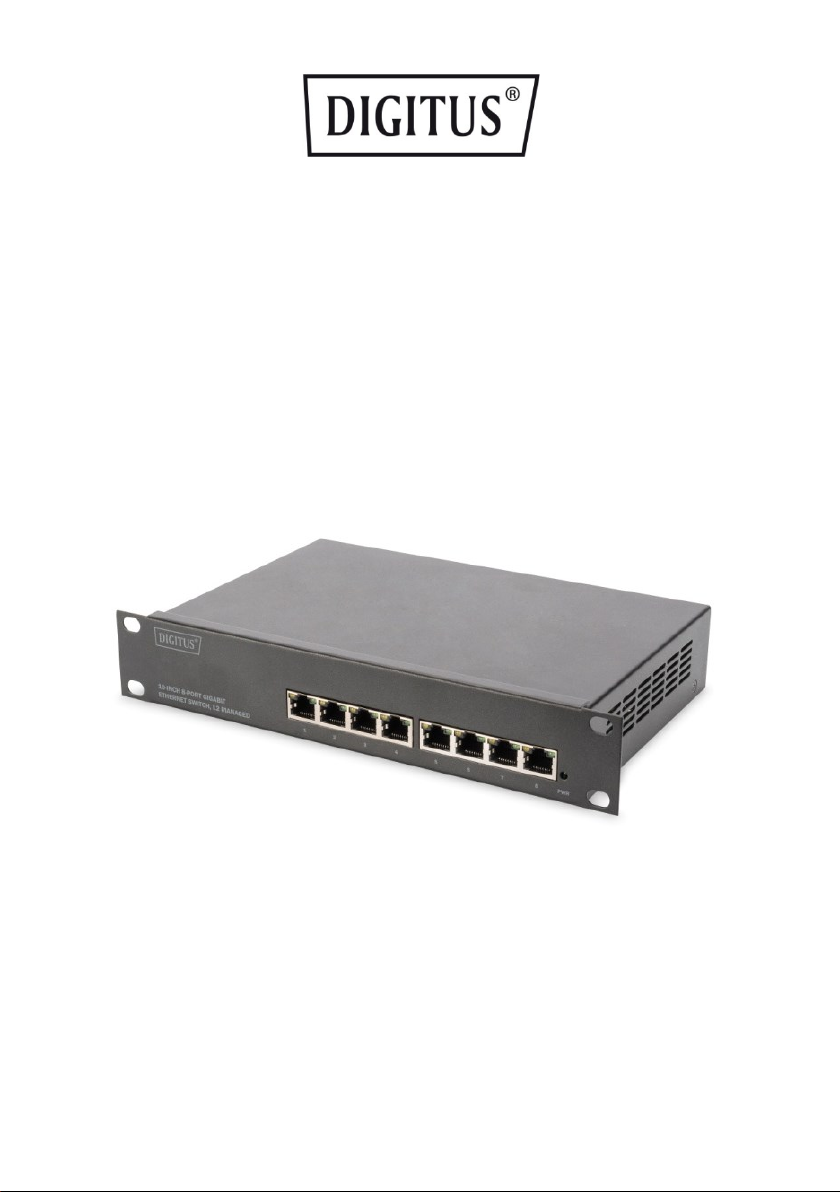
10-INCH 8-PORT GIGABIT
ETHERNET SWITCH, L2 MANAGED
User Guide
DN-80117
Page 2

2
About Guide .................................................................................................................................3
Terminology / Usage.....................................................................................................................3
Copyright and trademark .............................................................................................................3
1. Product Introduction ......................................................................... 3
Front Panel ...................................................................................................................................4
Side Panel .....................................................................................................................................4
Rear Panel .....................................................................................................................................4
2. Hardware installation ........................................................................ 5
First step: open a seal ...................................................................................................................5
Second step: switch installation ...................................................................................................5
Installation hole spacing ...............................................................................................................5
Third step: connecting power supply ...........................................................................................6
Power failure ................................................................................................................................6
3. Getting Started .................................................................................. 6
Management Option ....................................................................................................................6
Using Web-based Management ...................................................................................................7
Supported Web Browsers .............................................................................................................7
Connecting to the Switch ..............................................................................................................7
Login Web-based Management ...................................................................................................7
1. WEB page elements ..................................................................................................................9
2. The structure of Navigation tree ............................................................................................10
3. Page button Introduction .......................................................................................................10
4. Error messages .......................................................................................................................11
5. Entry Field ...............................................................................................................................11
6. Status Field .............................................................................................................................12
4. WEB page introduction .................................................................... 13
1. Login dialog Box ......................................................................................................................13
2. Main Page ...............................................................................................................................14
3. System Configuration: ............................................................................................................14
4. Port Configuration ..................................................................................................................20
5. MAC binding ...........................................................................................................................27
6. MAC filtering ...........................................................................................................................28
7. VLAN Configuration ................................................................................................................30
8. SNMP Configuration ...............................................................................................................32
9. ACL Configuraion ....................................................................................................................34
10. QoS Configuration ................................................................................................................37
11. IP Basic Configuration ...........................................................................................................39
12. Certification. Authorization. Accounting (AAA) configuration ..............................................41
13. Spanning Tree Protocol configuration ..................................................................................45
14. IGMP SNOOPING configuration ............................................................................................48
15. GMRP configuration .............................................................................................................49
16. EAPS configuration ...............................................................................................................50
17. RMON configuration .............................................................................................................52
18. Cluster configuration ............................................................................................................55
19. Log management ..................................................................................................................58
Page 3

3
About Guide
This guide provides instructions to install the Ethernet Switch.
Note: The model you have purchased may appear slightly different from the illustrations
shown in the document. Refer to the Product Instruction and Technical
Specification sections for detailed information about your switch, its components,
network connections, and technical specifications.
This guide mainly divided into 4 parts:
1. About guide: Terminology/Usage
2. Product introduction: functional overview and introduction of panel definitions
3. Hardware installation: step by step hardware installation process
4. Technical Specifications
Terminology / Usage
In this guide, the term "Switch" (first letter capitalized) refers to the Ethernet Switch, and
"switch" (first letter lower case) refers to other Ethernet switches. Some technologies refer to
terms "switch", "bridge" and "switching hubs" interchangeably, and both are commonly
accepted for Ethernet switches.
Note: indicates important information that helps a better use of the device.
Warning: indicates potential property damage or personal injury.
Copyright and trademark
The pictures and data shown in this guide are for reference only, subject to change without
notice.
1. Product Introduction
Thanks for purchasing the Managed Ethernet switch products.
This product is a network management type Gigabit Ethernet Switch. The machine comes with
8x 10/100/1000 Mbps RJ45 ports which can satisfy the full speed forwarding of ports. The
machine is a small size metal-shell device which is useful for the small office can home and the
IP solution project using, be used on the desktop or Wall mounting. Excellent performance can
help you widely use in wireless, monitoring and other fields.
Page 4
4
Front Panel
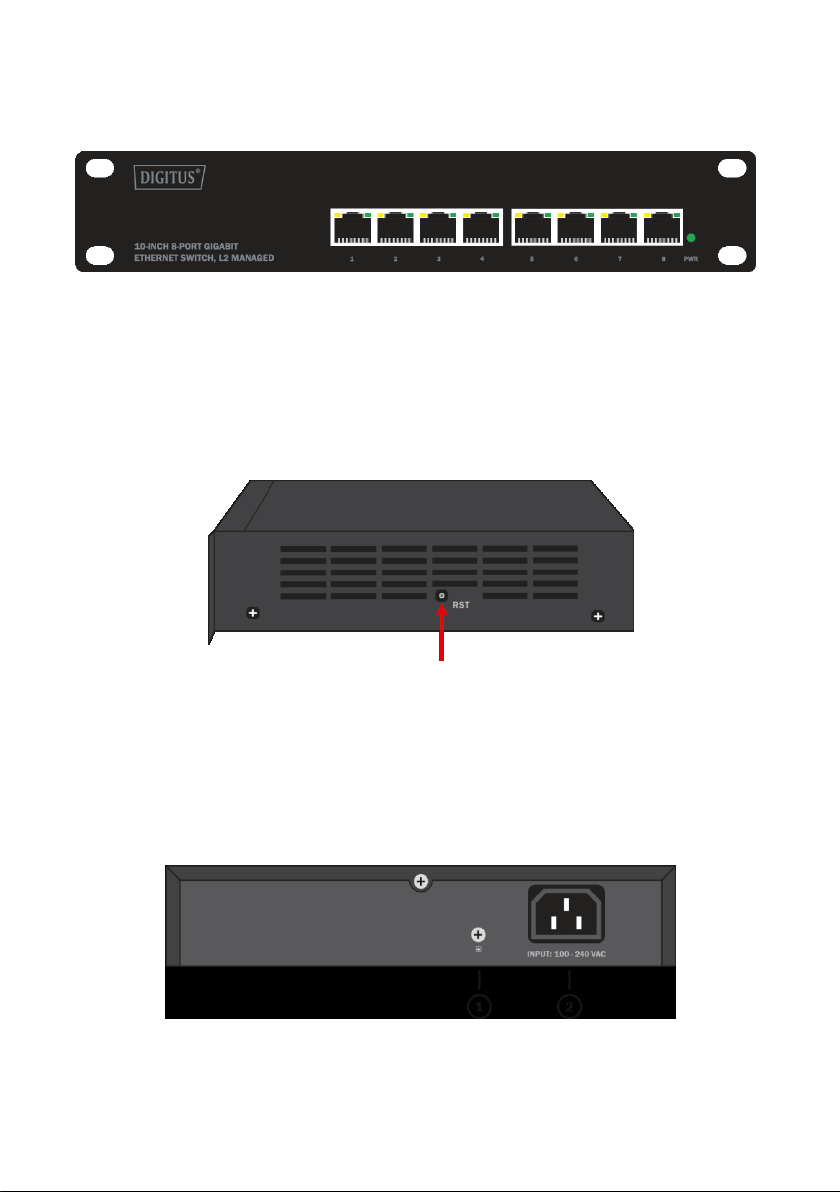
The front panel consists of LED indications and network ports
LED Lamp
Power LED: The Power LED lights up when the switch is connected to a power source.
Link/Act indicator: The light indicates the network connection through the corresponding
port. Flicker indicates that the switch is sending or receiving data.
Side Panel
RST: By pressing the Reset button for 5 seconds the switch will change back to the
default configuration and all changes will be lost.
Rear Panel
The rear panel view of the Ethernet switch consists of an AC power connector.
(1) Grounding: use specialized ground lead connect
(2) Connect the power adapter output terminal to this port.
Supports input voltages 100-240VAC
Page 5
5
2. Hardware installation
This chapter provides unpacking and installation information for the Managed Ethernet
Switch.
First step: open a seal
Open the shipping carton and carefully unpack its contents. Please consult the packing list
located in the User Manual to make sure all items are present and undamaged. If any item is
missing or damaged, please contact the local reseller for replacement.
• Switch 1pcs
• User's manual 1pcs
• AC power cord 1pcs
Second step: switch installation
For safe switch installation and operation, it is recommended that you:
• Visually inspect the power cord to see that it is secured fully to the AC power connector.
• Make sure that there is proper heat dissipation and adequate ventilation around the
switch.
• Do not place heavy objects on the switch.
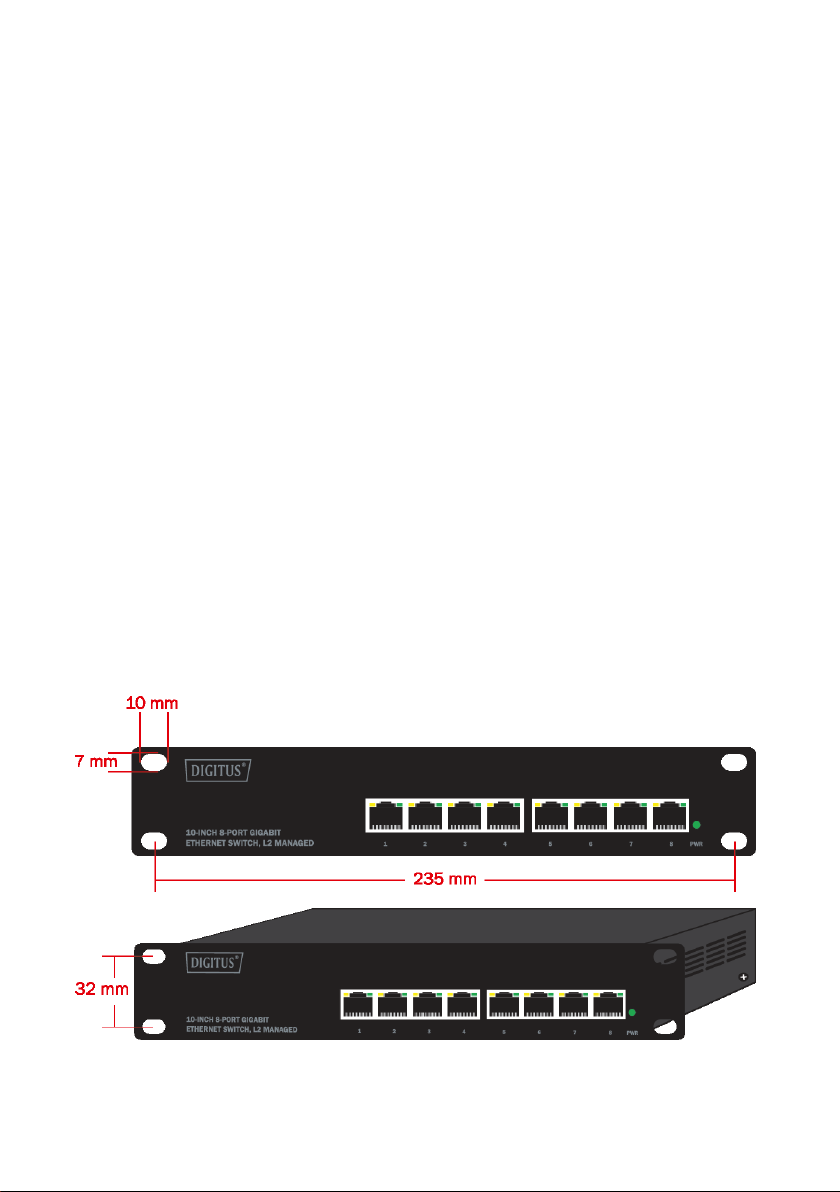
Installation hole spacing
Page 6
6
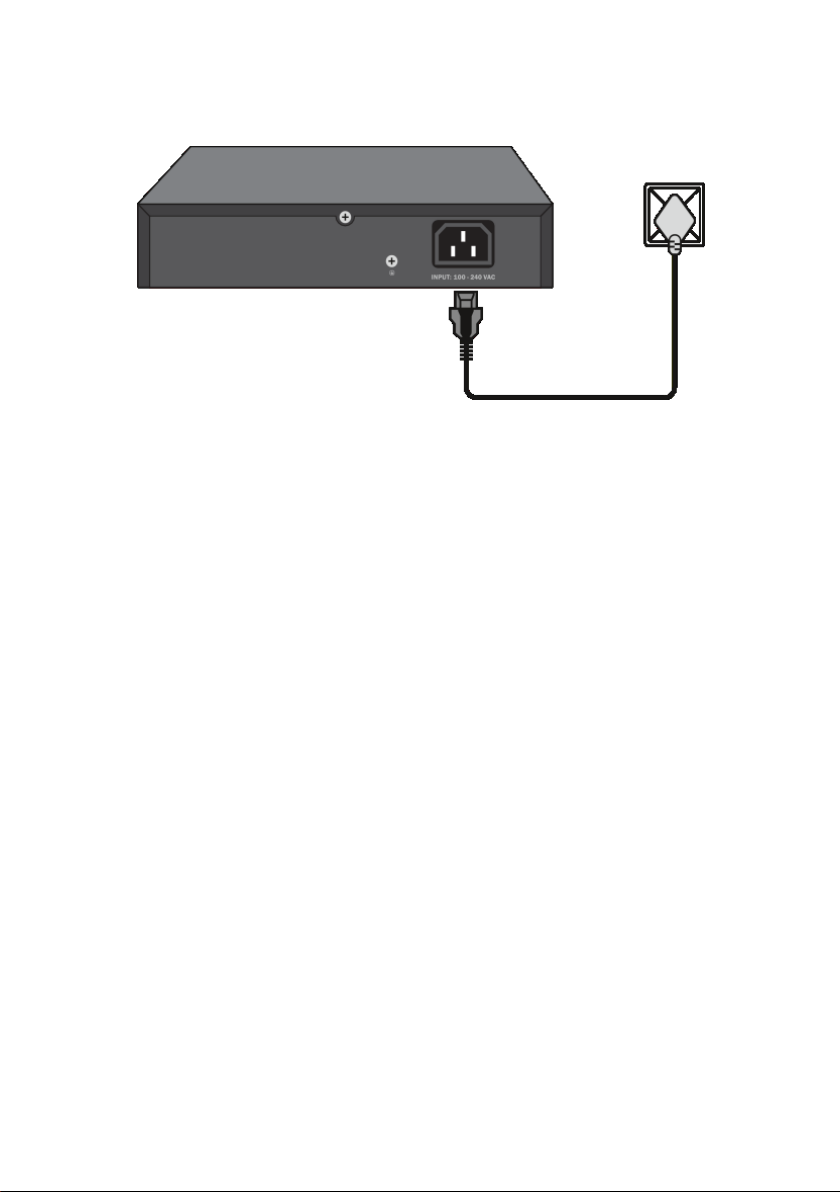
Third step: connecting power supply
Using the AC power cord to connect to of the into the AC socket on the back of the switch.
Warning: Do not turn on the power switch before power cables are connected. Power surge
may cause damage to the Switch.
Power failure
As a precaution, the switch should be unplugged in case of power failure. When power is
resumed, plug the switch back in.
3. Getting Started
This chapter introduces the management interface of Managed Ethernet switch.
Management Option
The Managed Ethernet switch can be managed through any port on the device by using the
Web-based management.
Each switch must be assigned its own IP address, which is used for communication with WebBased Management or a SNMP network manager. The PC should have an IP address in the
same range as the switch.
Please refer to the following installation instructions for the Web-based Management.
Page 7
7
Using Web-based Management
After a successful physical installation, you can configure the Switch, monitor the network
status, and display statistics using a web browser.
Supported Web Browsers
The embedded Web-based Management currently supports the following web browsers:
• Internet Explorer 6 or higher version
• Netscape 8 or higher version
• Mozilla
• Firefox 1.5/2.0 or higher version
Connecting to the Switch
You will need the following equipment to begin the web configuration of your device:
1. A PC with a RJ-45 Ethernet connection
2. A standard Ethernet cable
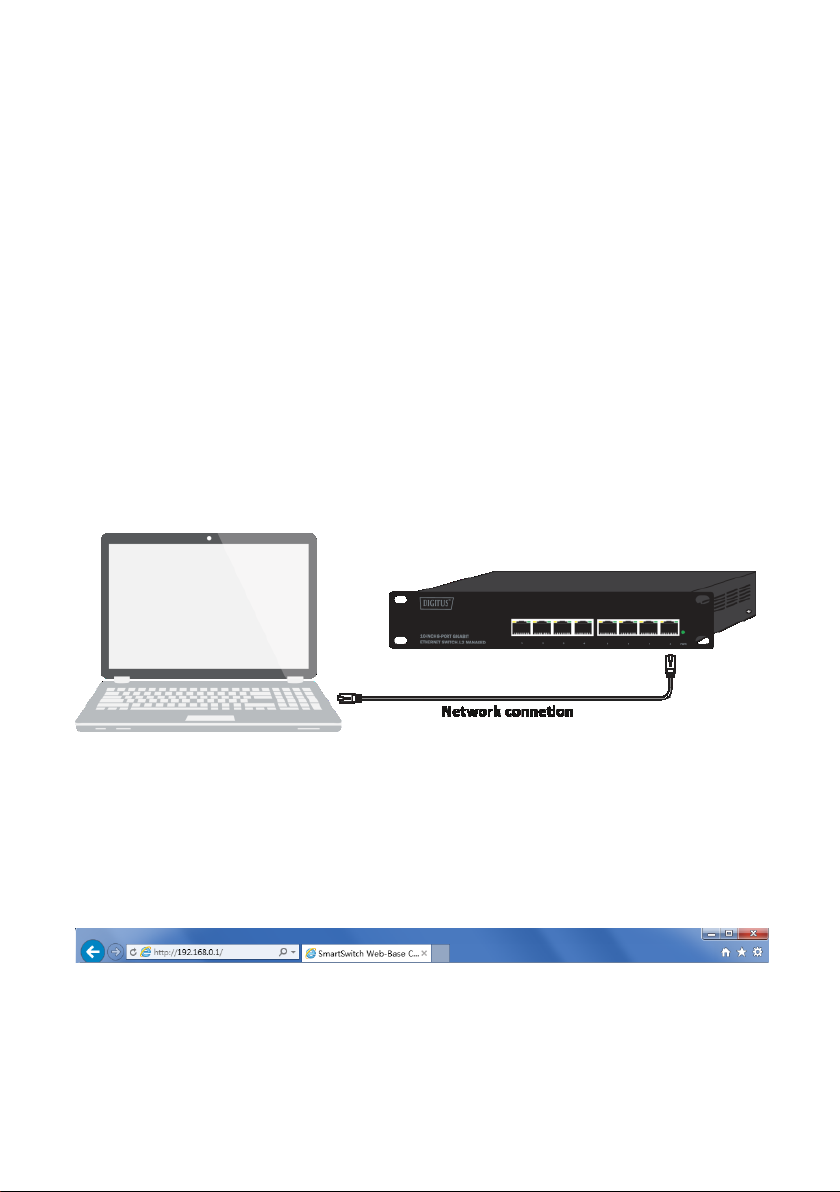
Connect the Ethernet cable to any of the ports on the front panel of the switch and to the
Ethernet port on the PC.
Login Web-based Management
In order to login and configure the switch via an Ethernet connection, the PC must have an IP
address in the same subnet as the switch. For example, if the switch has an IP address of
192.168.0.1, the PC should have an IP address of 192.168.0.x (where x is a number between 1
~ 254), and a subnet mask of 255.255.255.0. Open the web browser and enter 192.168.0.1
(the factory-default IP address) in the address bar. Then press <Enter>.
Enter the IP address in the web browser
Note: The switch's factory default IP address is 192.168.0.1 with a subnet mask of
255.255.255.0
Page 8
8
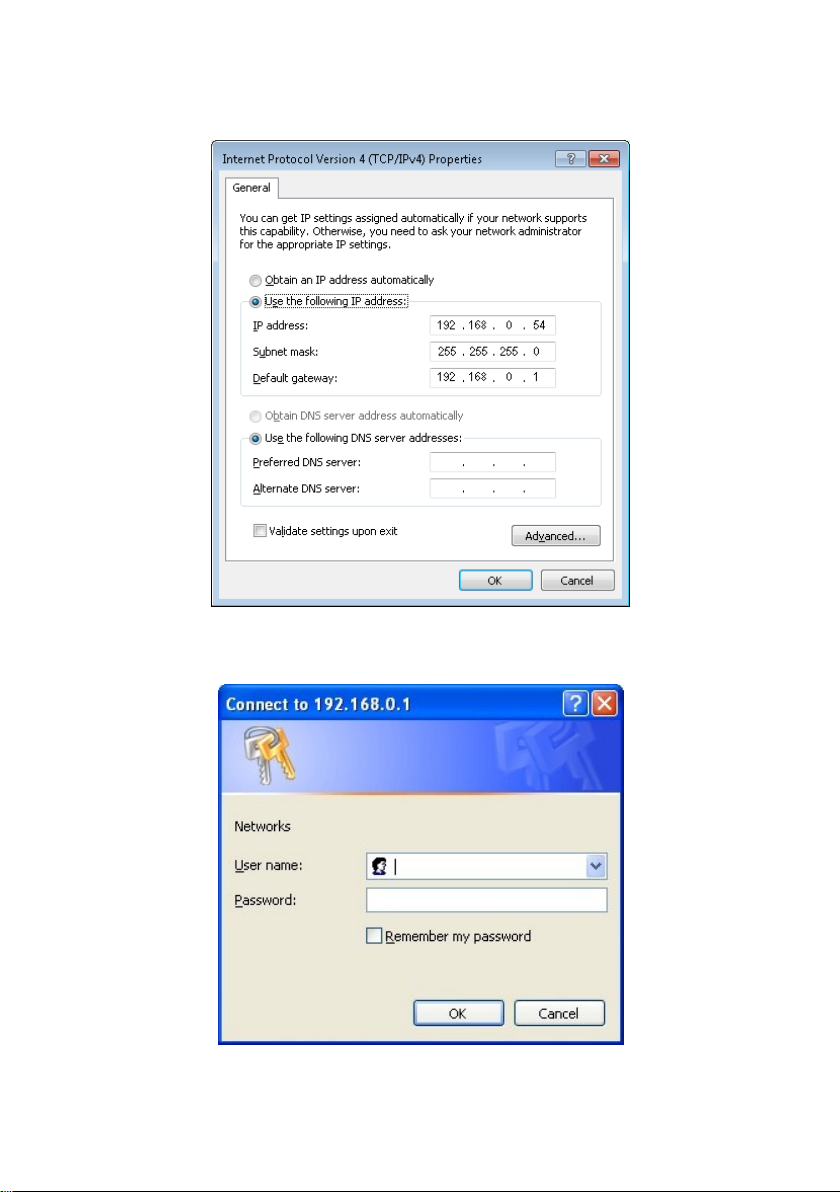
To log in to the switch, the IP address of your PC should be set in the same subnet as that of
the switch. The IP address is 192.168.0.x (”x” is any number from 2 to 254). Subnet Mask is
255.255.255.0
When the following logon dialog box appears, enter the password then click OK.
By default, the username is admin and the password is admin.
Logon Dialog Box
Page 9
9
1. WEB page elements
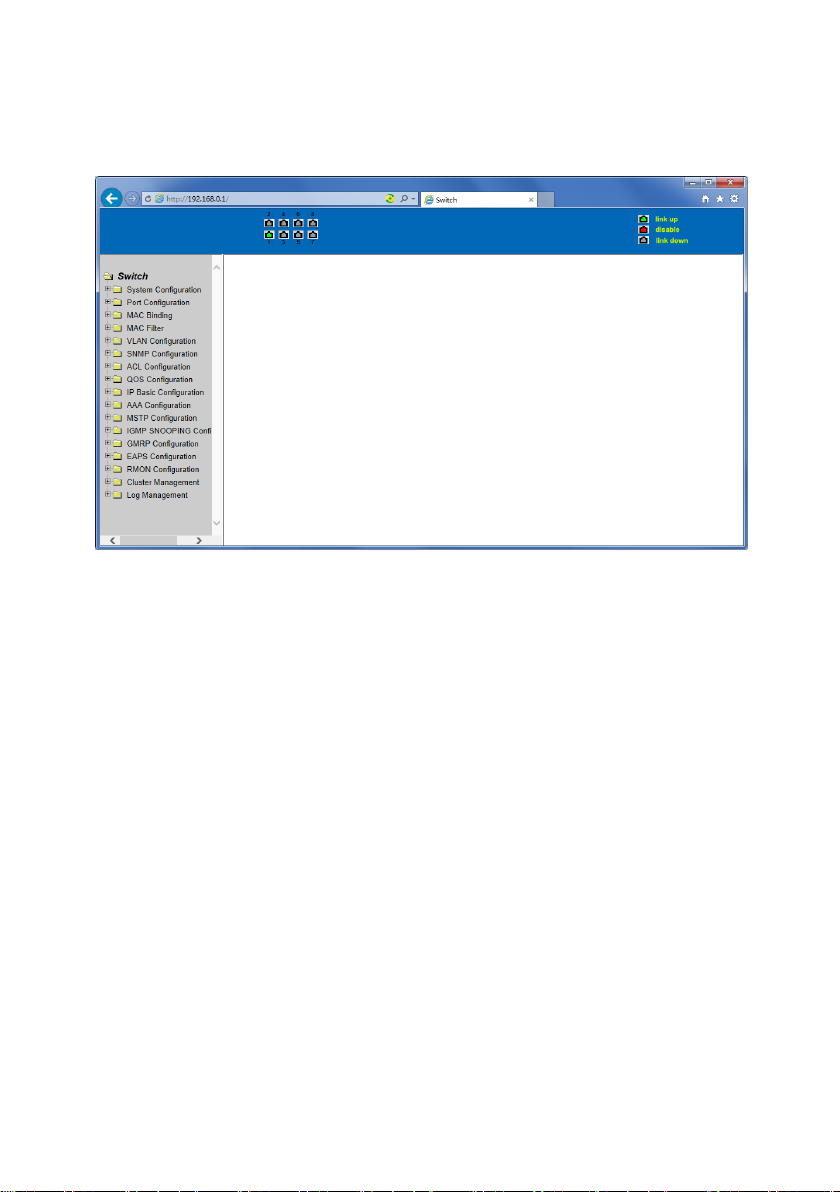
Shown in Figure 2, WEB page is mainly composed of three parts: title page, navigation tree
page and main page
Figure 2
Title page is used to display the port status
Main page is used to display the user from the navigation tree, select the page
Page 10
10
2. The structure of Navigation tree
Figure 3 shows the navigation tree organizational structure.
Navigation tree is located in the lower left of each page, using the tree display nodes of the
WEB page; users can easily find the page you want to manage the WEB. According to a
different web page functionality can be divided into different groups, each including one or
more pages. Most of the navigation tree in the name of the corresponding web page top of
page title abbreviation.
Figure 3
3. Page button Introduction
On the pages, here are some commonly used buttons. The role of these buttons are generally
the same, Form 2 on the role of these buttons are described:
Form 2
Button
Effect
Refresh
Update all fields on the page
Apply
Numerical value will be updated into the memory. Because the error-checking
should be implement by the Web Server, before the user selects the button will
be no error checking.
Delete
Delete the current record
Help
Open help pages, view the individual pages of the configuration instructions
Page 11
11
4. Error messages
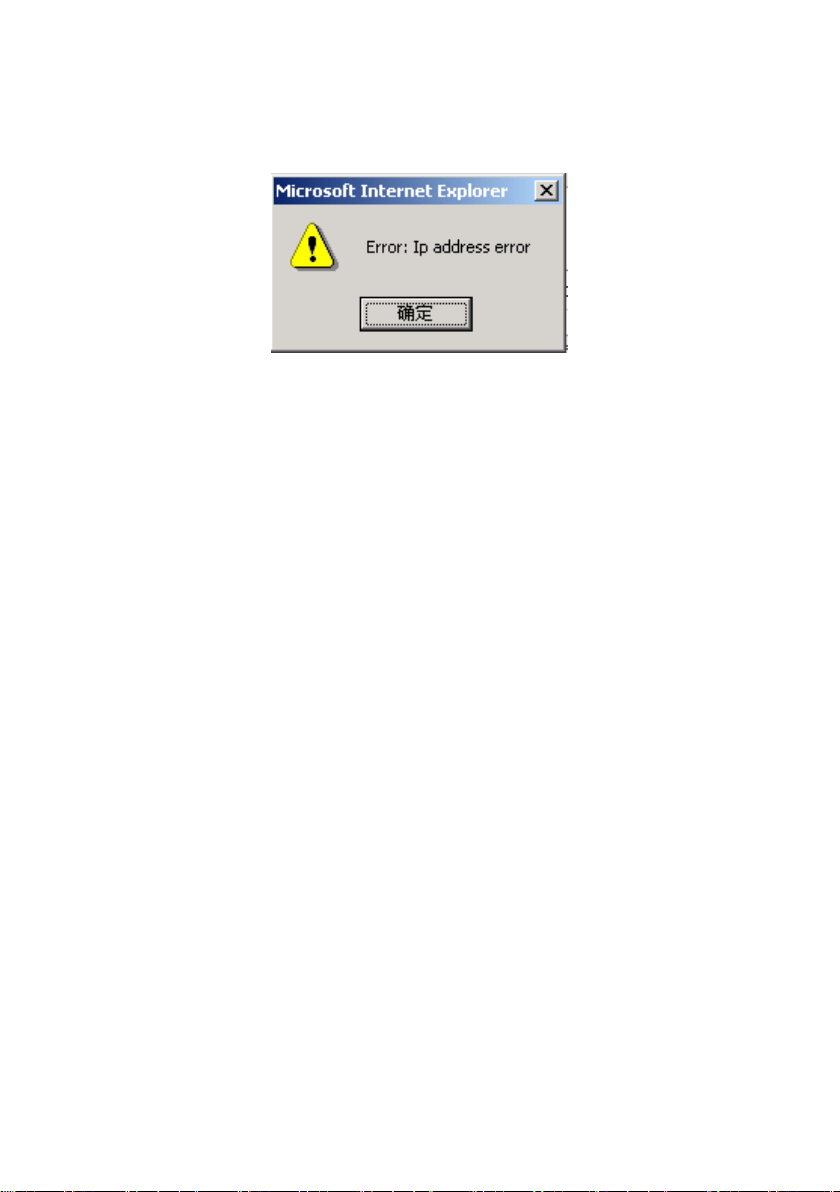
If the switch WEB server error occurred while processing user requests, it will display a dialog
box in the corresponding error message. For example, Figure 4 shows an error message dialog
box.
Figure 4
5. Entry Field
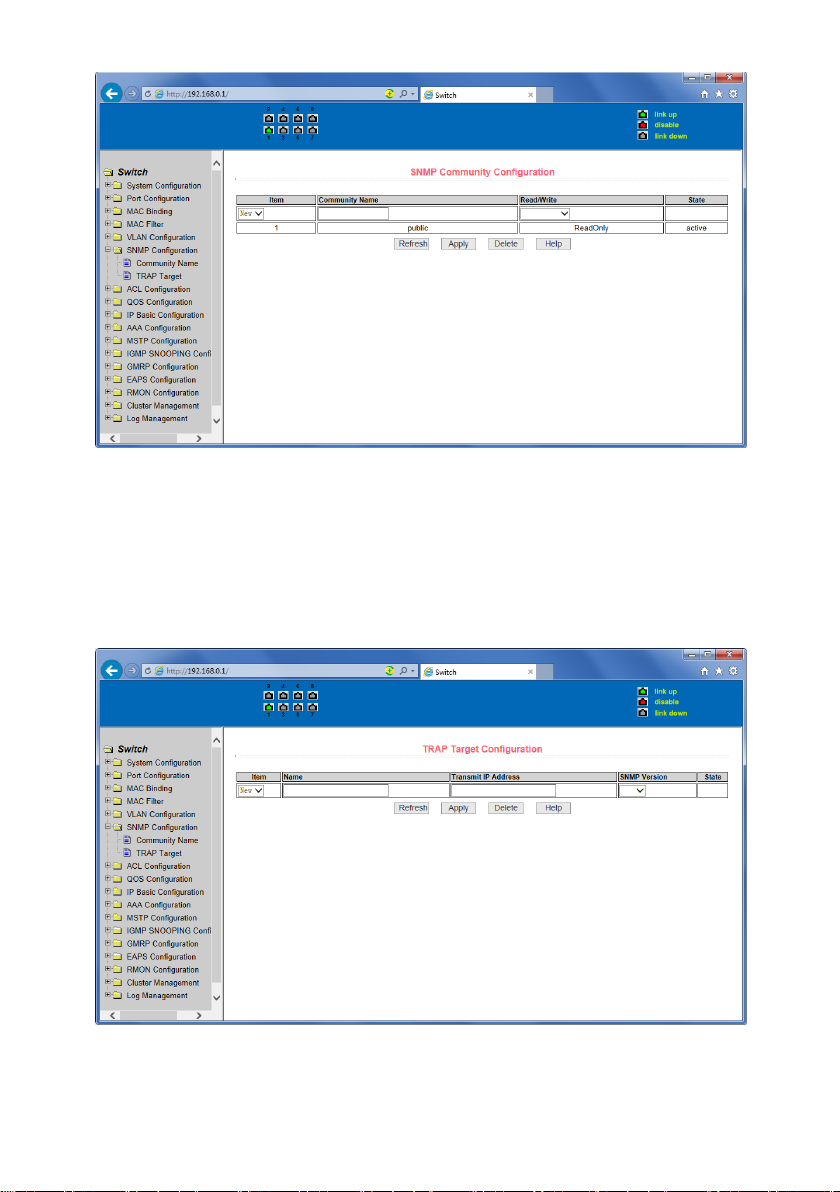
Some pages of the most left column in the table has an entry field, as shown in Figure 5,
through the field can access different rows in the table. When you choose a line for the field,
which line the corresponding information is displayed in the first line, then only the line can be
edited. The line is also known as the activities line. A time when it was first loaded, it shows
the field new, activity line is empty.
If want to add a new line , should select new from the drop-down menu of entry field, , enter
the new line’s information, and then press apply button.
If you want to edit the line already exists, it is necessary select the appropriate line number of
the drop-down menu, according to need to edit the line, and then press the apply button, you
will see a corresponding change in the table displayed.
If you want to delete a row, select the line number accordingly from entry field’s drop-down
menu, then press the delete key, this line will disappear from the table.
Page 12
12
Figure 5
6. Status Field
Some pages of the most right column in the table there is a state field, as shown in Figure 6,
the field displays the line status. Since all row state changes are processed in-house, so the
status field is read-only. Once the line information of the entry filed into force, the line will
automatically become the active state the status active.
Figure 6 the web page of status field
Page 13
13
4. WEB page introduction
Switch switches WEB pages organized into groups, each including one or more of the
WEB pages. The following are introduced one by one on each page.
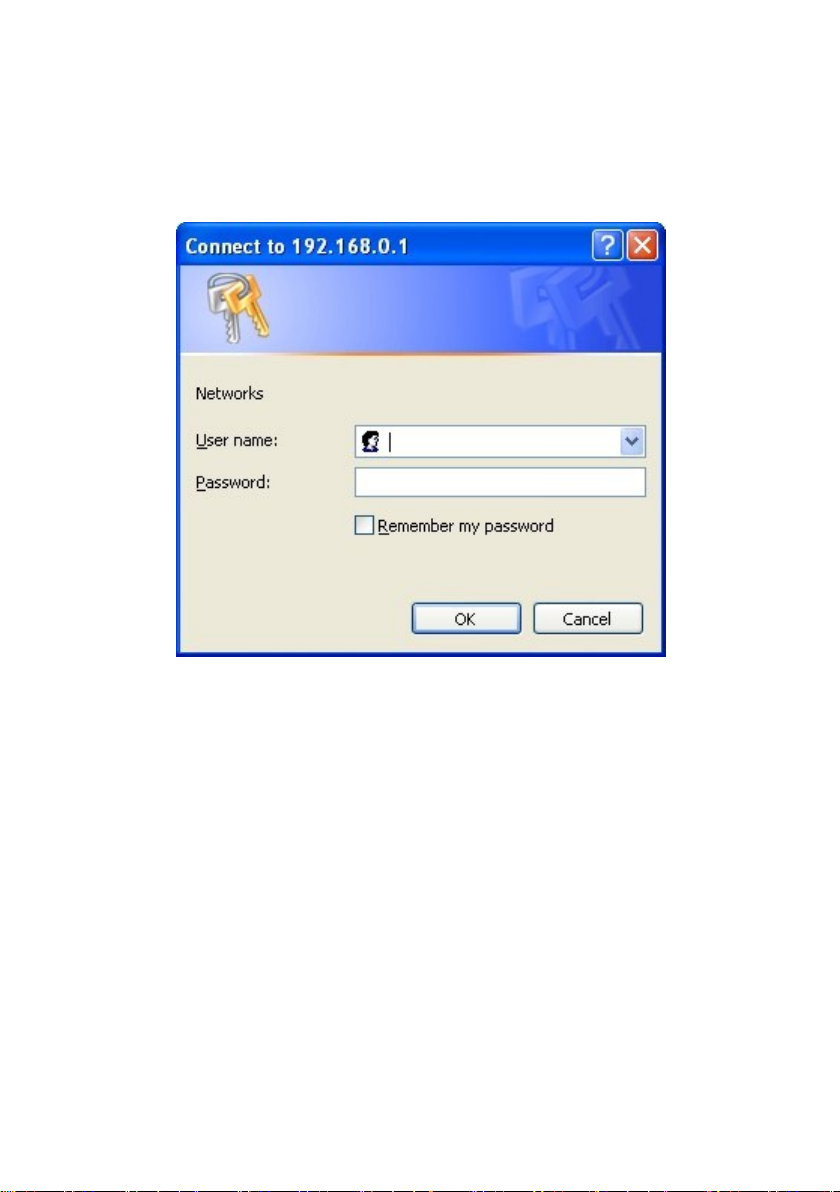
1. Login dialog Box
Figure 7 WEB browsing session of the login page
Figure 7 shows the login dialog box. The logon dialog box will be displayed while the user login
the web page at the first time. When the user filled out the correct user name and password,
then click the Enter button can log on to the switch Web server. Passwords are case-sensitive;
the anonymous user password can be maximum set up to 16 characters, while the multi-user
name and password can be set up to 11 characters. The default username is admin and
password is admin.
Page 14
14
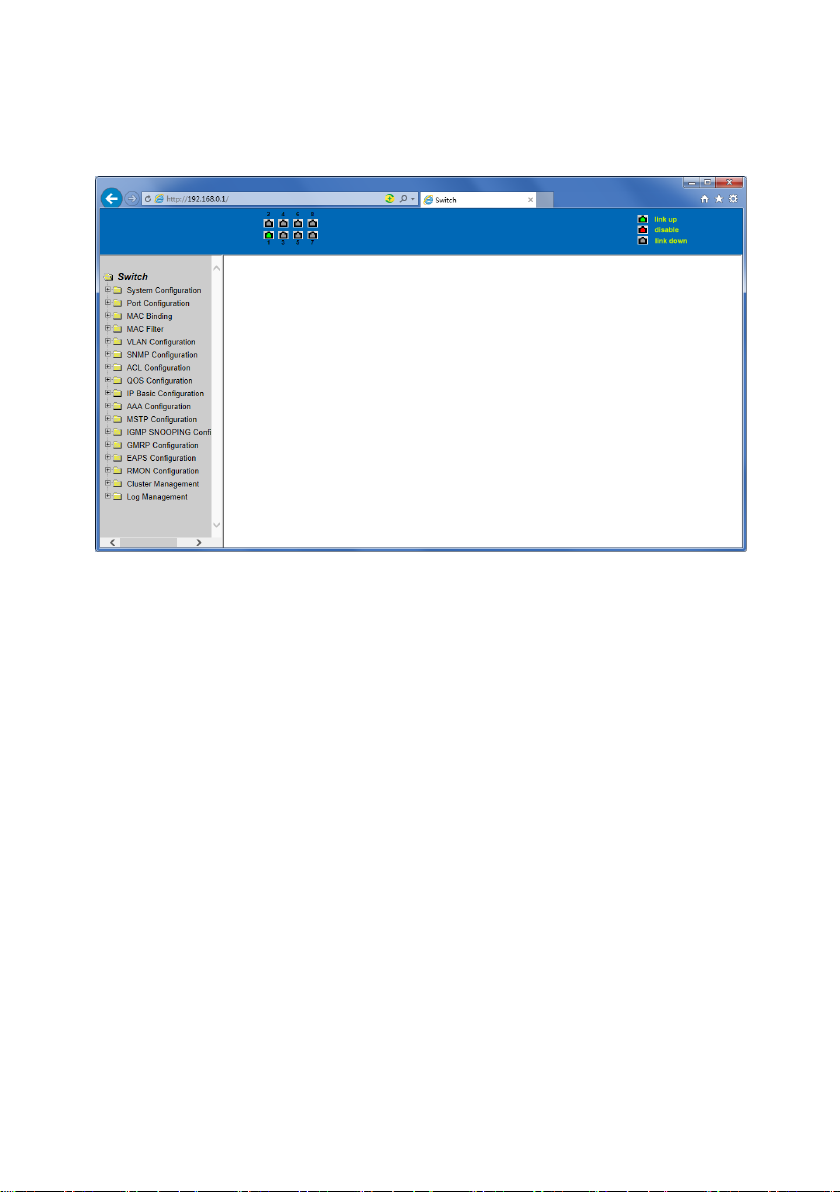
2. Main Page
Figure 8 shows the WEB main page of Switch. This page will be displayed after the user logs in
web pages
Figure 8 Switch main page
3. System Configuration:
(1) Basic information page
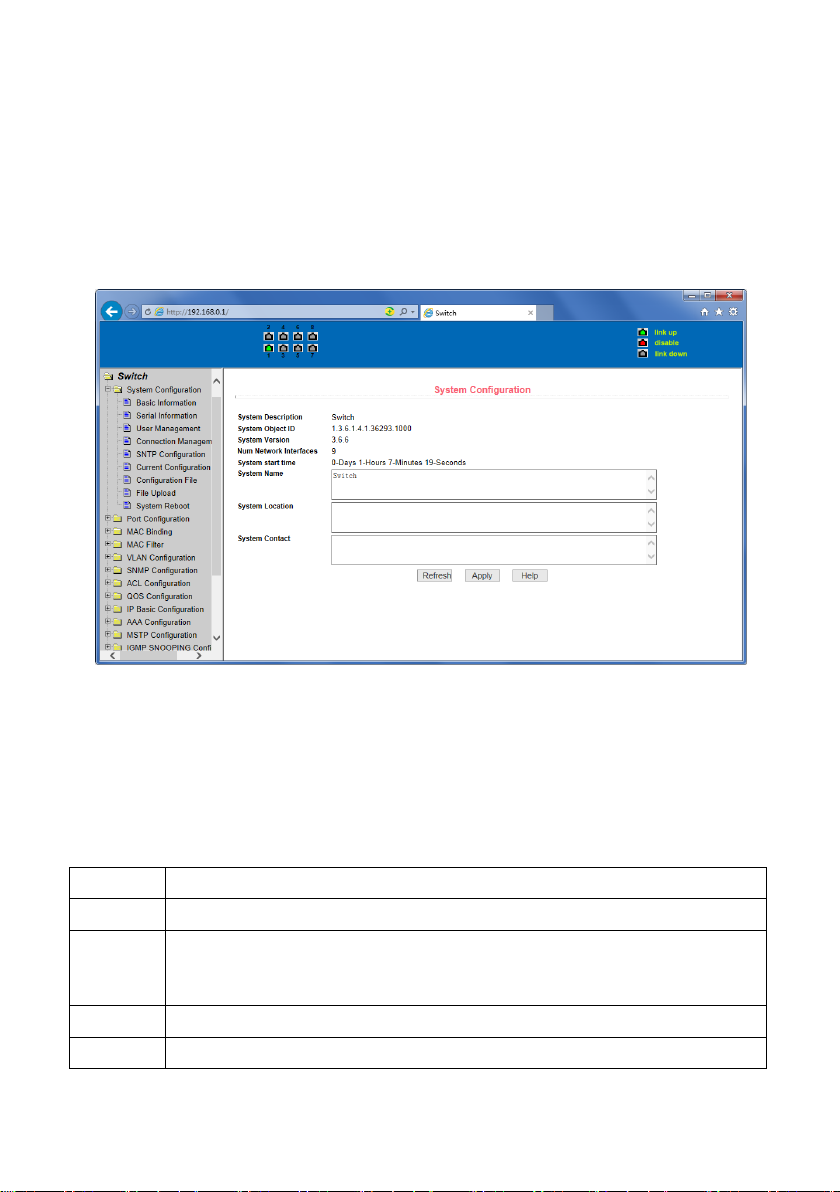
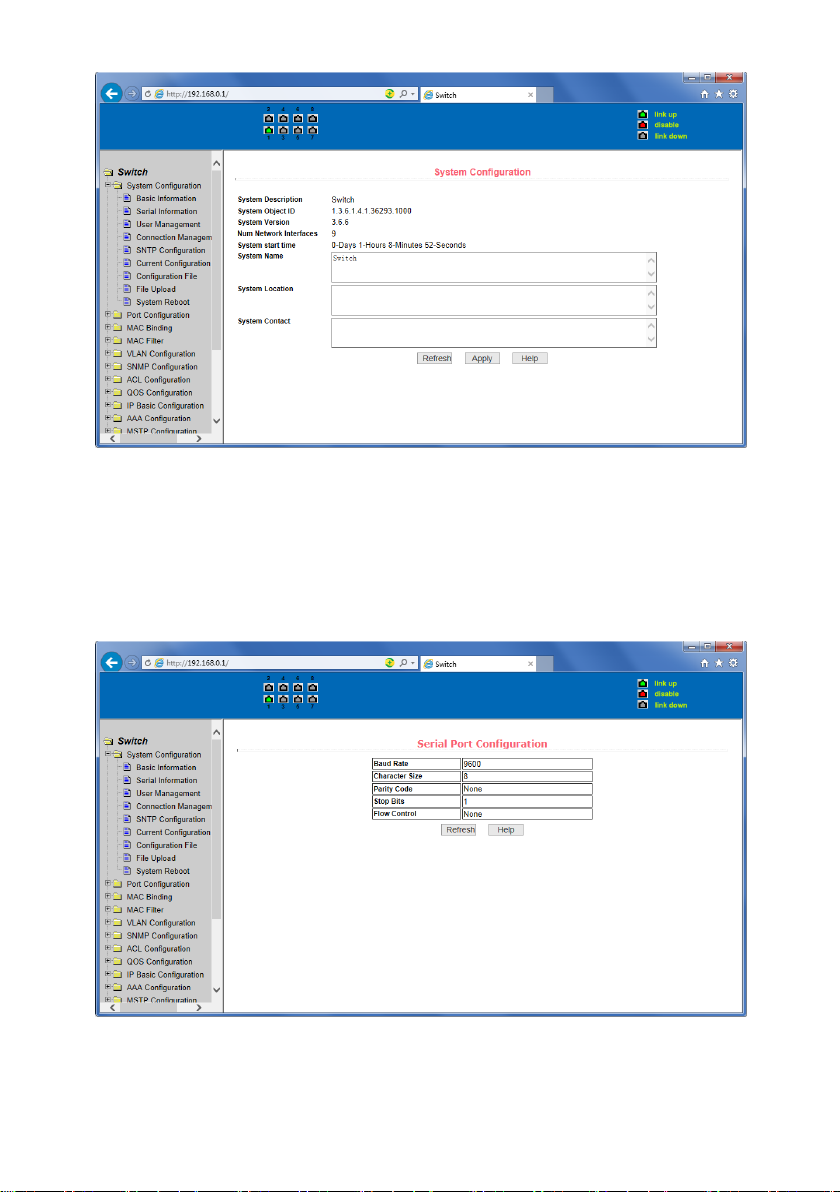
Figure 9 is the basic information of configuration page; users can configure the basic
information for the switch.
System Description displays the description of the relevant parameters of system.
System descriptor ID displays system in the network identity management.
The system version number is displayed the current software version number of switches.
The number of switches interface displays the current number of interfaces in the switch.
The system start-up time display switches from start to the present time.
The system name as the switch’s system name in the network, the user can modify the system
name.
The systematic location as the switch’s physical location showing at the network, the user can
modify the system locations.
System Contact shows the contacts person and details of the current node, the user can
modify the system contact.
Page 15
15
Figure 9 Basic information Page
(2) Serial port information page
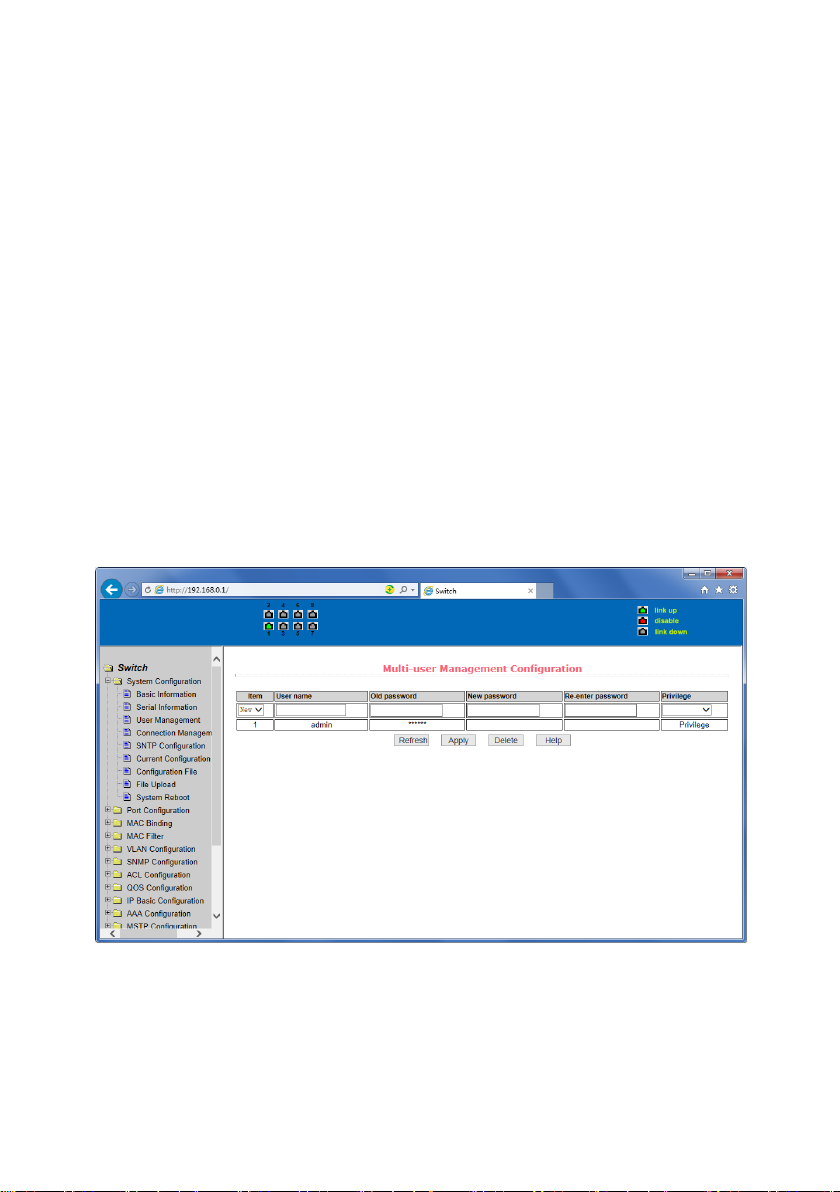
Figure 10 is a serial port configuration page; the page displays serial baud rate and other
related information. When the host through the serial port terminals (such as Windows,
HyperTerminal) to the management of switches, serial console on the COM port configuration
must be consistent with this page information.
Figure 10 Serial port information page
Page 16
16
(3) User management page
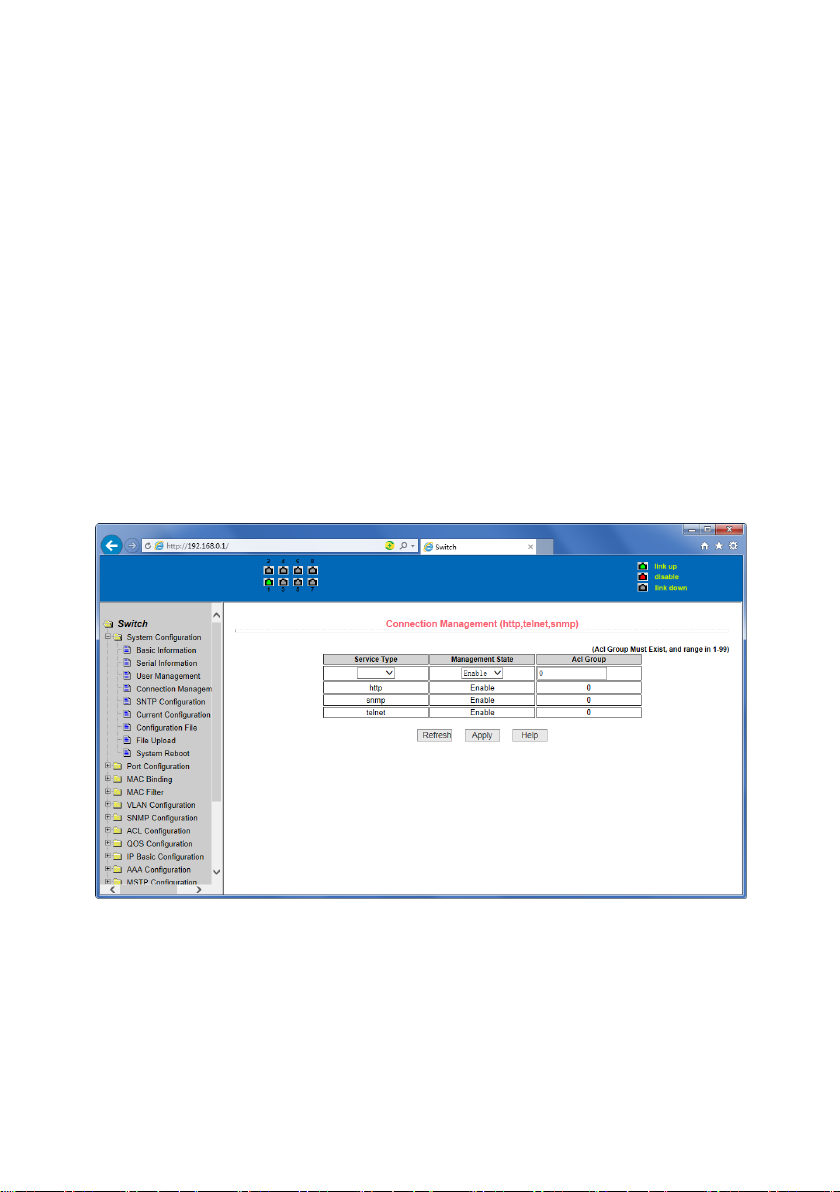
Figure 11 is a user management page, the user can modify this switch anonymous user (admin)
password, Telnet and the Web without opening a multi-user, they all use the same anonymous
user's password. Passwords are case-sensitive, and can be up to 16 characters. If you want to
change your password, the user need to enter the new password twice, once the user clicks
the application button, the new password is activated, then if the switch is not enabled multiuser, will display the login dialog box (as shown in Figure 7), require the user to re - login the
web page, with a new anonymous user password.
Meanwhile through this page user can configure the multi-user, switch if in the default is no
multi-users, that is, not enabled the multi-user management functionality, at this time does
not require multi-user login user name and password authentication. For Telnet, when adding
a user name, multi-user management features were enabled, and when removed all of the
user, multi-user management functionality has been closed. For the Web, when adding a user
name, if it is privileged user, multi-user management functionality was enabled, when all of
the privileges users have been deleted, multi-user management functionality has been closed.
When the multi-user management features enabled, the anonymous user's password will not
take effect, log Telnet and the Web requires a multi-user user name and password
authentication. When the multi-user management function is turned off, at this time if the
configured anonymous user's password, log on Telnet, and Web need anonymous user's
password authentication.
Figure 11 user’s management page
Page 17
17
(4) Security Management Page
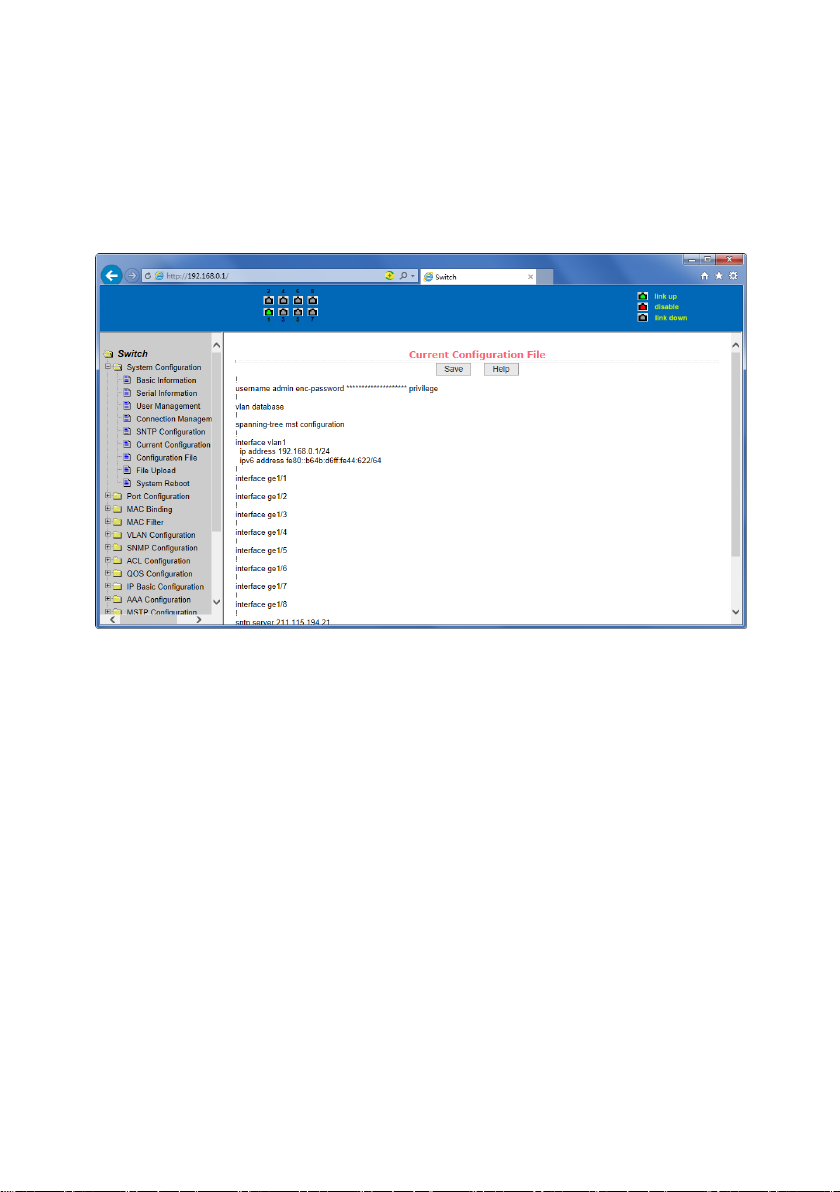
Figure 12 is Security management configuration page, through the page's configuration, , the
administrator can control network management services TELNET, WEB and SNMP, you can
open (enable) or off (disable) these services, these services can be mounted up with standards
IP ACL group ,and the implementation of the source IP address control, control access to the
host of these services
When the Switch default ,TELNET, WEB and SNMP services are open and no ACL filtering, that
is, all hosts have access to the switch of these three services. If the administrator for safety, do
not want to provide one or several services, which can shut down one or several services. If
the administrator only hope that the specified host could access one or several services , can
do the ACL filtering for one or several services. As a service to do ACL filtering, you need to
open the service, and to select an IP standard ACL group (1-99),the primary factor it’s the ACL
group must be present.
Note that, if the administrator on this page control the WEB services (such as closing WEB
Services) may cause users to no longer use the WEB page, then you can log switches by other
means and to control the use of WEB service allows users to WEB page (such as the Open the
WEB service).
Figure 12 Security management page
Page 18
18
(5) Configure the current page
Figure 13 is the current configuration page. the user can view the current configuration of the
switch on this page. Save key is to store the current system configuration in the configuration
file. Because the storage operation requires erase& write FLASH chips, which take up some
time. When the user was configured on the page and hope to restart the switch from using
these configurations are not lost, you must exit the page before the current configuration
page, click the Save button.
Figure 13 the current configuration page
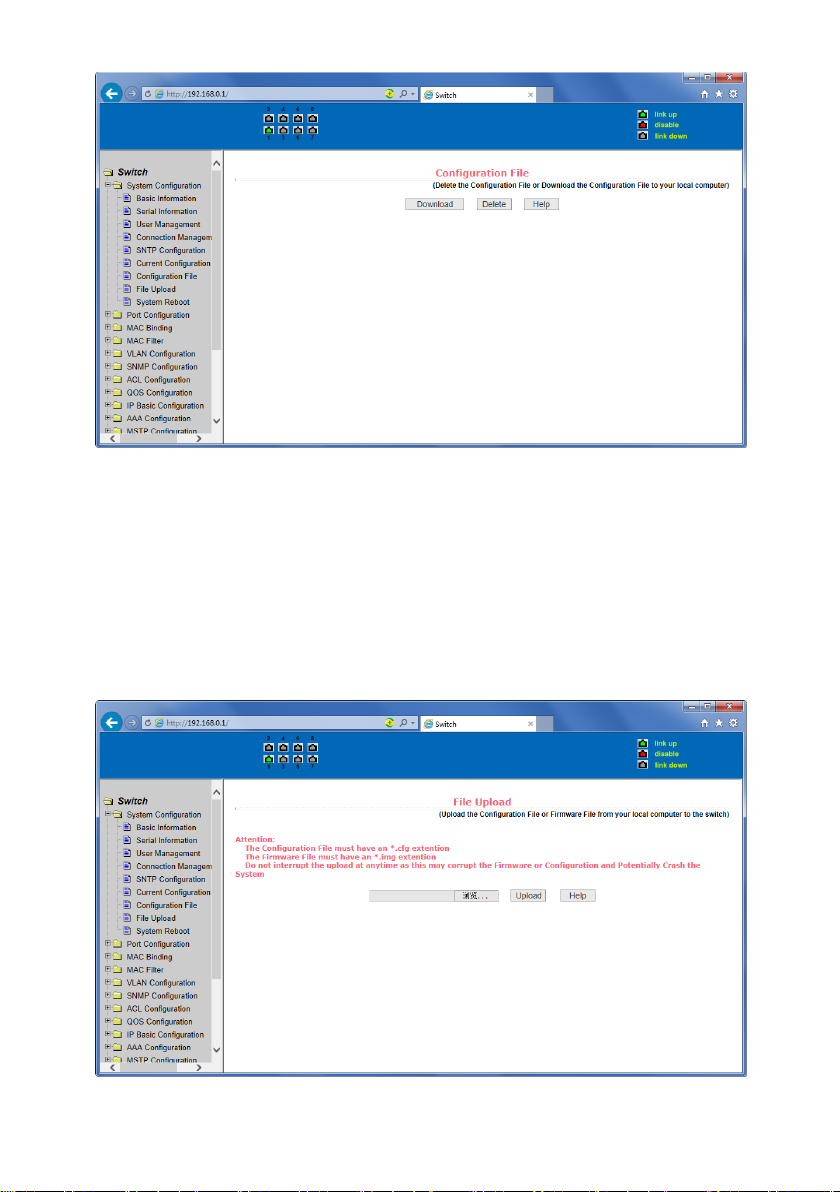
(6) Configuration page
Figure 14 is profile configuration page. This page allows users to view the system's initial
configuration. The initial configuration is actually the configuration file in the FLASH, when the
configuration file does not exist in FLASH, the system starts using the default configuration.
Delete key to delete the configuration file in the FLASH. Click the Delete button, will pop up a
dialog box ,that will prompts the user sure to delete the configuration file or not, according to
the dialog box to determine if it's ok, otherwise click Cancel button. Download button is used
to downloaded a configuration file to the PC. Click to download button, will pop up a dialog
box, users select Save and save the configuration file directory path. Download the
configuration file names are as switch.cfg.
Page 19
19
Figure14 Configuration file page
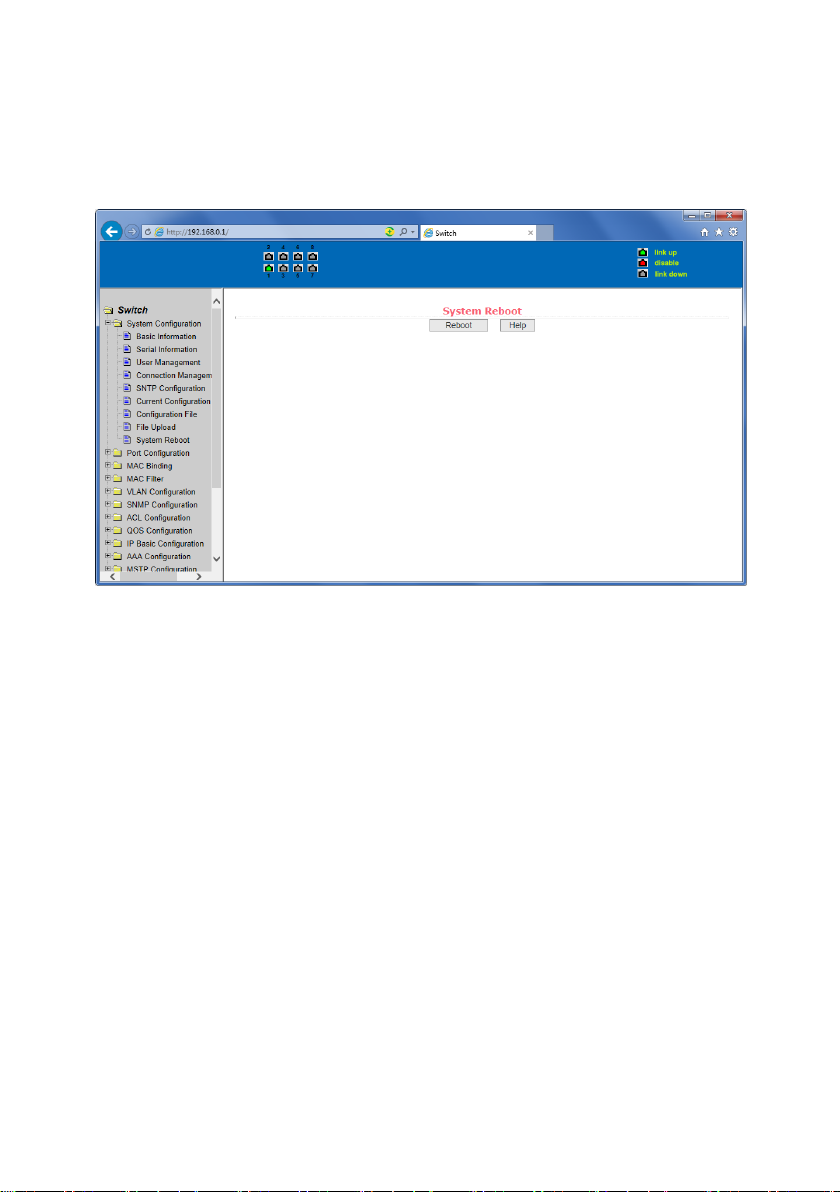
(7) File upload page
Figure 15 is a file upload page, through this page a user can upload a configuration file and
mapping files to the switch. Click the Browse button to select the upload configuration file or
image file in the directory path on the PC. Click Upload button upload a configuration file or
image file, configuration file extension must be *. cfg, image file must be provided by the
manufacturer and the file name extension must be *. img. Transmission before the return of
the results page, please do not click on other pages, or restart the switch; otherwise, the file
transfer will lead to failure caused by system crashes.
Figure 15 File Upload Page
Page 20
20
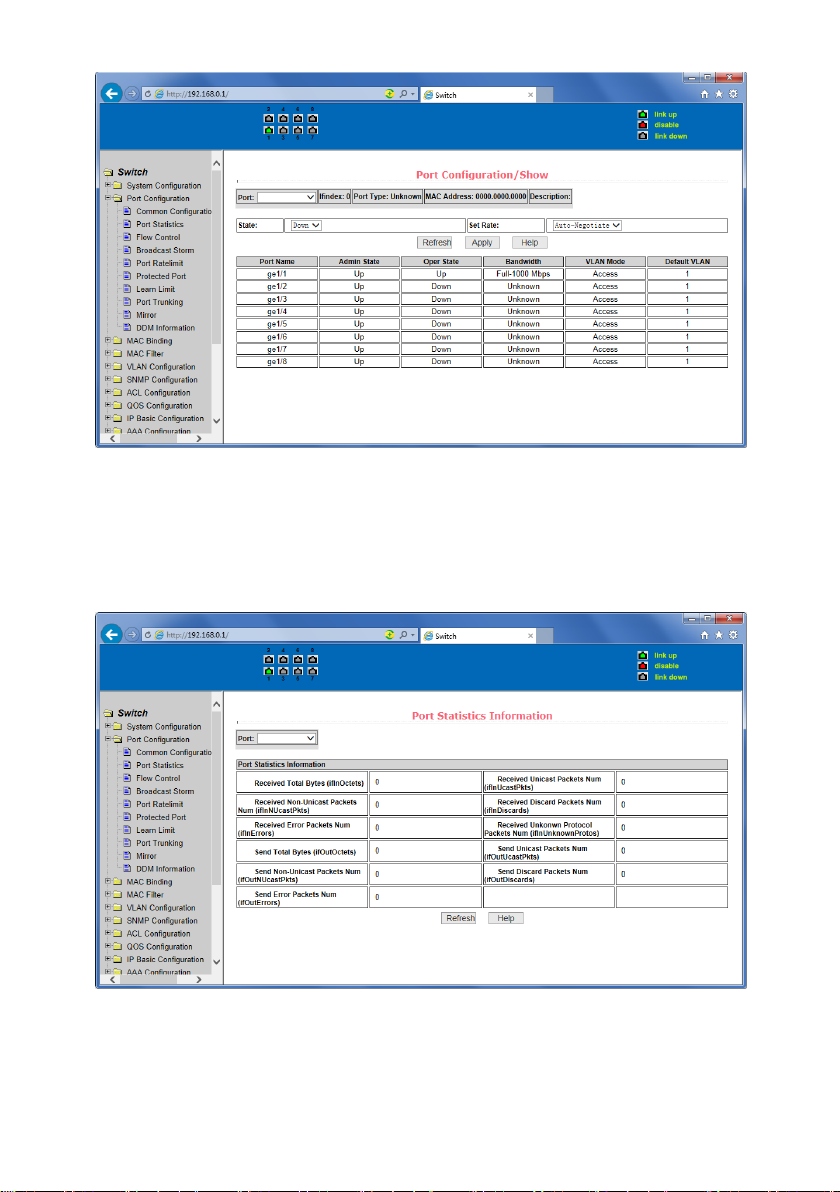
(8) System reset page
Figure 16 is system reset page, through this page users to restart the switch. When you click on
Restart button, will pop up a dialog box that prompts the user to determine whether or restart
the switch, If it is determined according to OK button, otherwise click Cancel button. Restart
will no longer open the Web page.
Figure 16 System reset page
4. Port Configuration
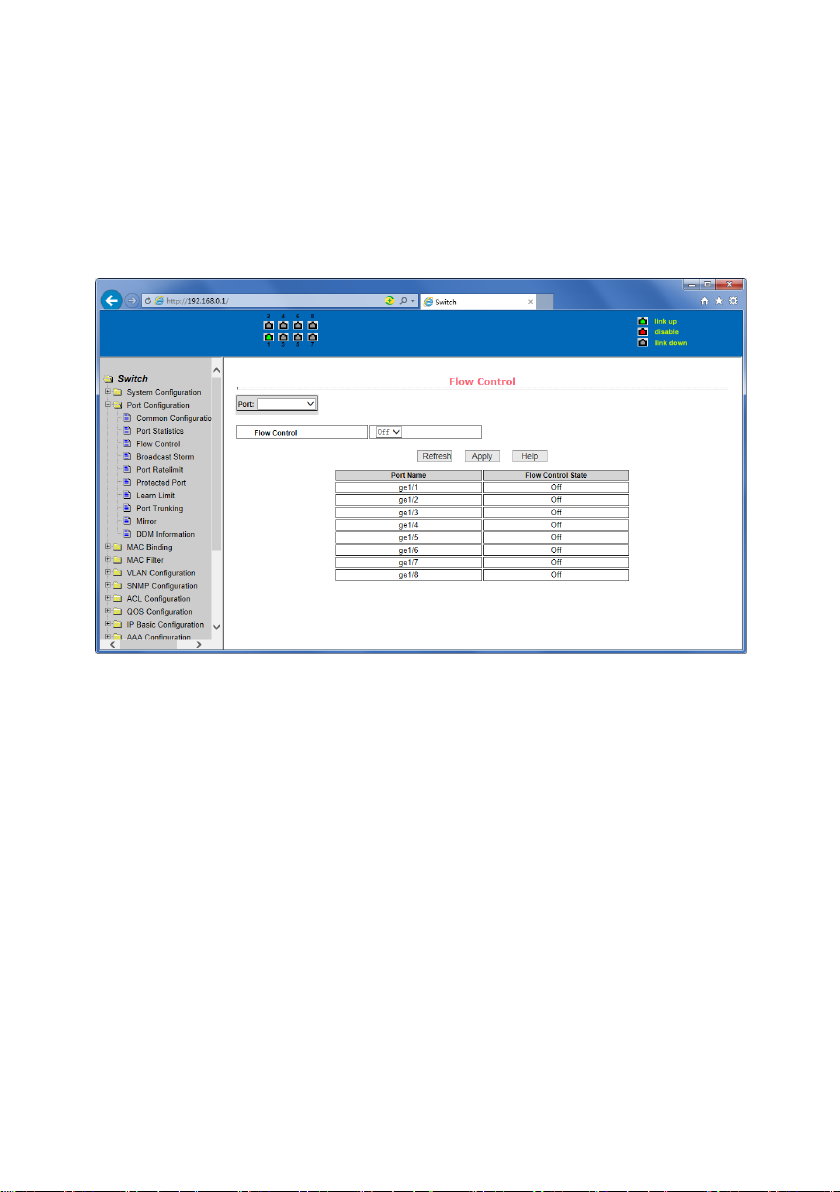
(1) Port configuration / port -display page
Figure 17 is the port configuration / port -display page. Users can enable or disable the port to
the page, set the port speed, or View all ports of the basic information.
To set a specific port, users need to select the appropriate port name on port drop-down
menu,. The default port status is up, can select the drop-down menu -down to disable the
port. Users can also choose to set the speed of the drop-down menu to set the speed of the
port, such as the mandatory half-duplex port 10M (half-10) and so on. On this page the user
can view all ports other basic information.
Page 21
21
Figure 17 port configuration and port - display page
(2) Port Statistics Page
Figure 18 is the port statistics information page. To view a particular port, users need to select
the appropriate port name in the port drop-down menu. Users can view the statistics
information of send and receive packets on this page.
Figure 18 Port Statistics Page
Page 22
22
(3) Flow control page
Figure 19 is the flow control page. Users can enable and disable each port’s send and receive
flow control through this page.
Flow control by sending the side of the drop-down on or off to open or close the sending side
of flow control, flow control through the receiving side of the drop-down on or off to open or
close the receiver-side flow control, while on and off also shows the port to send side and
receiving-side flow control is turned on or off.
Figure 19 Flow control page
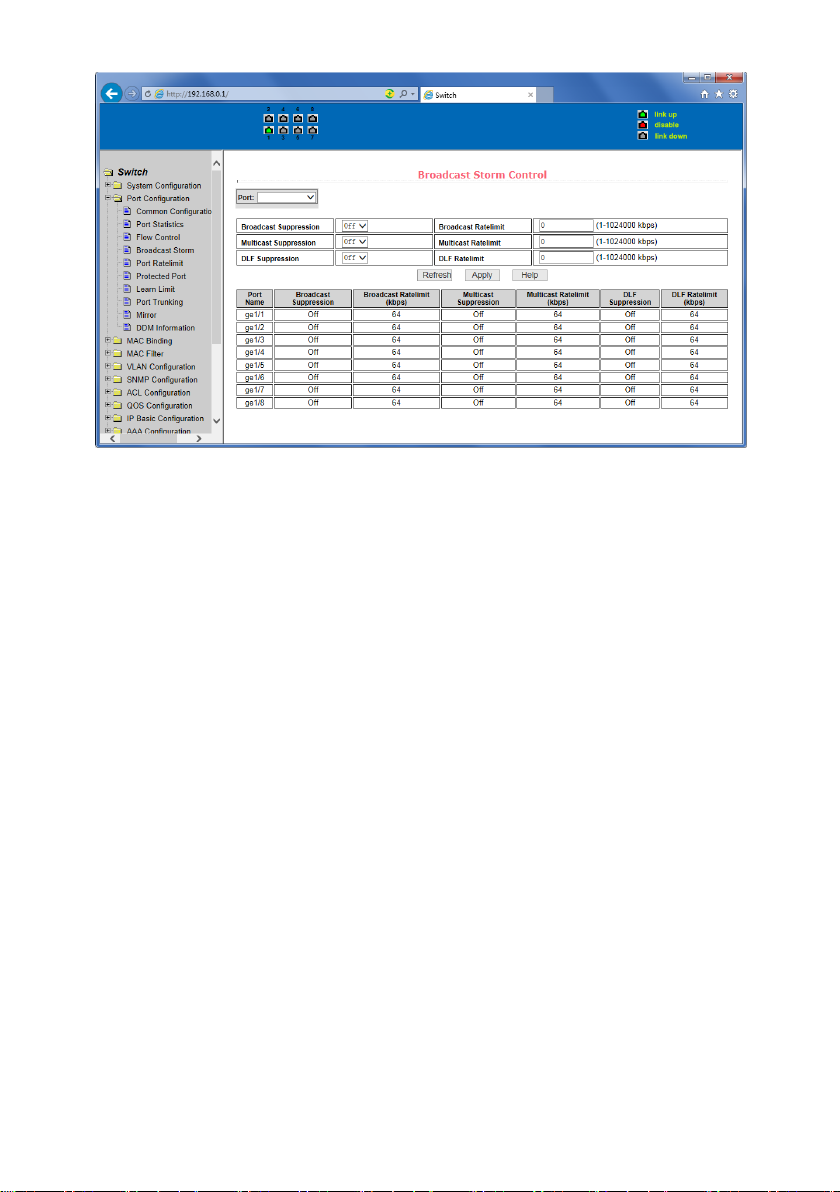
(4) Broadcast storm control page
Figure 20 is the Broadcast Storm Control page. This page is used to do the suppression for
configure port broadcast packets, multicast packets and DLF packet.
From the Port drop-down bar select to configure ports. Through the on and off key to open
and close the port broadcast suppression, multicast, DLF inhibition and suppression. Inhibition
rate is used to configure the port inhibition speed, range 1-1024000, unit kbits. The inhibition
rate of the same port broadcast suppression, multicast and DLF inhibition is the same.
Page 23
23
Figure 20 Broadcase Storm control Page
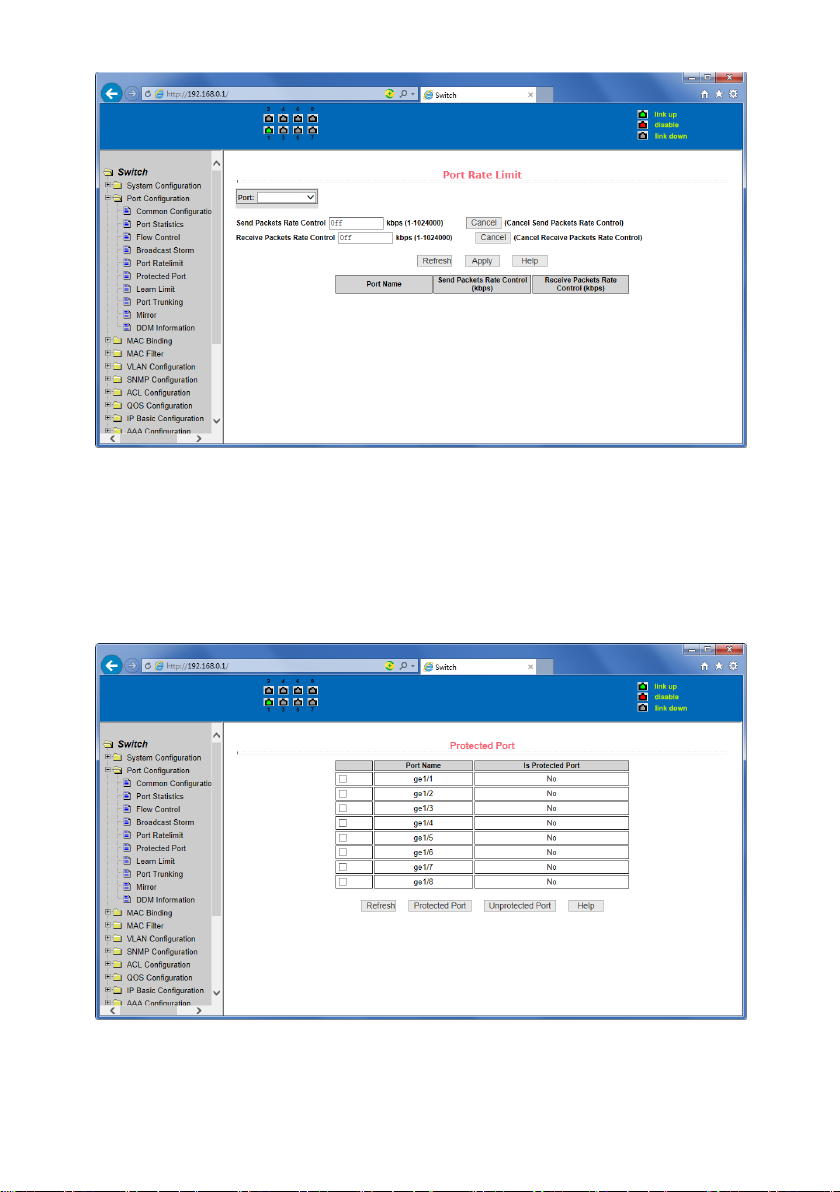
(5) Port speed limits page
Figure 21 is the port speed- limit page. This page is used to configure the port‘s send and
receive rate.
From the Port drop-down bar select the configure ports. Bandwidth control of the send data
packets is used to configure and display the bandwidth control it, the range is 1-1024000,
unit kbits, enter into force after the key press applications. If the port is not configured
bandwidth control, shown as off. Cancel button is used to cancel the corresponding data
packet to send bandwidth control. Receiving data packets are used to configure and display
the bandwidth control of receive data packets control, the range is 1-1024000, unit kbits, enter
into force after the key press applications. If the port is not configured bandwidth control,
shown as off. Cancel button is used to cancel the corresponding receiving data packets
bandwidth control.
Page 24
24
Figure 21 Port speed limit page
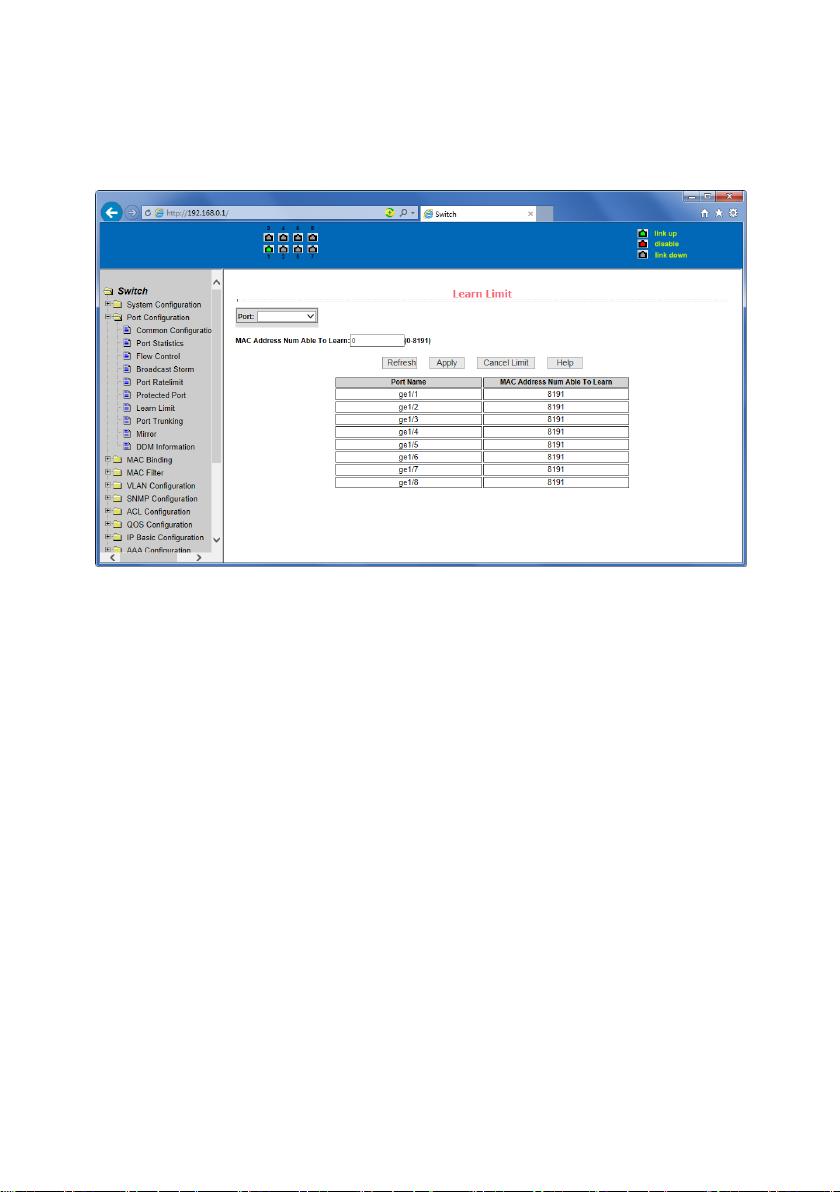
(6) Port protection page
Figure 22 is the Port protection page. This page is used to configure the port
for the protection port.
If the port is configured as a protected port, the ports can not exchange the data
with each other, protected port only with non-protected port for data exchange.
Figure 22 protected port page
Page 25
25
(7) Port Learning restrain page
Figure 23 is the port learning restrain page. This page used to restrict the port can learn of the
MAC address of the number, range is 0-8191. The default value is 8191, also is the maximum
that the port is not configured the learning restrain.
Figure 23 Port Learning restrain page
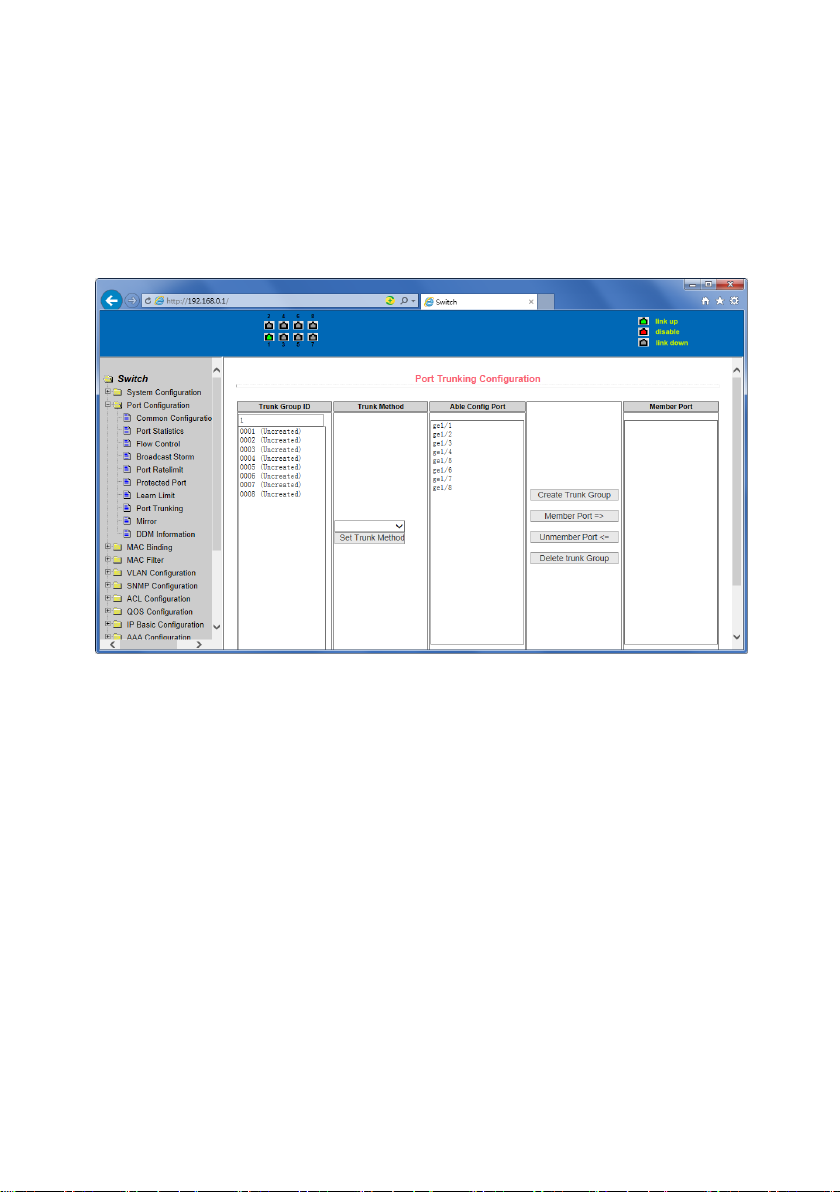
(8) Port Trunking configuration page
Figure 24 is the port trunking configuration page. This page allows the user to configure the
port trunking. This page consists of four parts: port trunking ID selection, port trunking method
selection, configurable ports and group members port.
To create or modify the port trunking, the user need to select a port trunking ID, port trunking
ID from 1 to 3. The user clicks the list box the appropriate port trunking ID, the port trunking of
information displayed in the group port. To create a Trunk group, select the appropriate ID in
the port trunking ID, click the button "Trunk ID Settings." To set the port trunking method,
select one port trunking method, click the button "polymerization Settings." To increase the
trunking ports, the port can be configured to select the trunking port in the configurable, click
on "members of the port =" "key. Aggregation from the existing port to remove a port group
member ports in the trunking port selected, click on "non-member port" = "key. To delete the
entire TRUNK group, then click the "Delete trunk group" button.
In page configuring process, at least one Trunk has been established then polymerization
settings can take effect; configured Trunking method is also applied to all on the Trunk groups;
in that already exist on the Trunk can add or remove Port members ; in the absence of the
port members situation can deletee a Trunk Group.
Page 26
26
Switch provides three kinds of port trunking methods: Based on the source MAC address,
based on the purpose MAC address, based on the source and purpose MAC addresses.
Switch switch maximum support 3 groups port trunking, can be configured to a maximum of
three Trunk Group, Trunk1 and Trunk2 can not trucking Gigabit ports, and each group can be
aggregated up to the same four attributes port. Trunk3 only be aggregated Gigabit ports, and
up to 2 Gigabit ports can be aggregated. Port aggregation method is common to all of the
Trunk.
Figure 24 Port Trunking configuration page
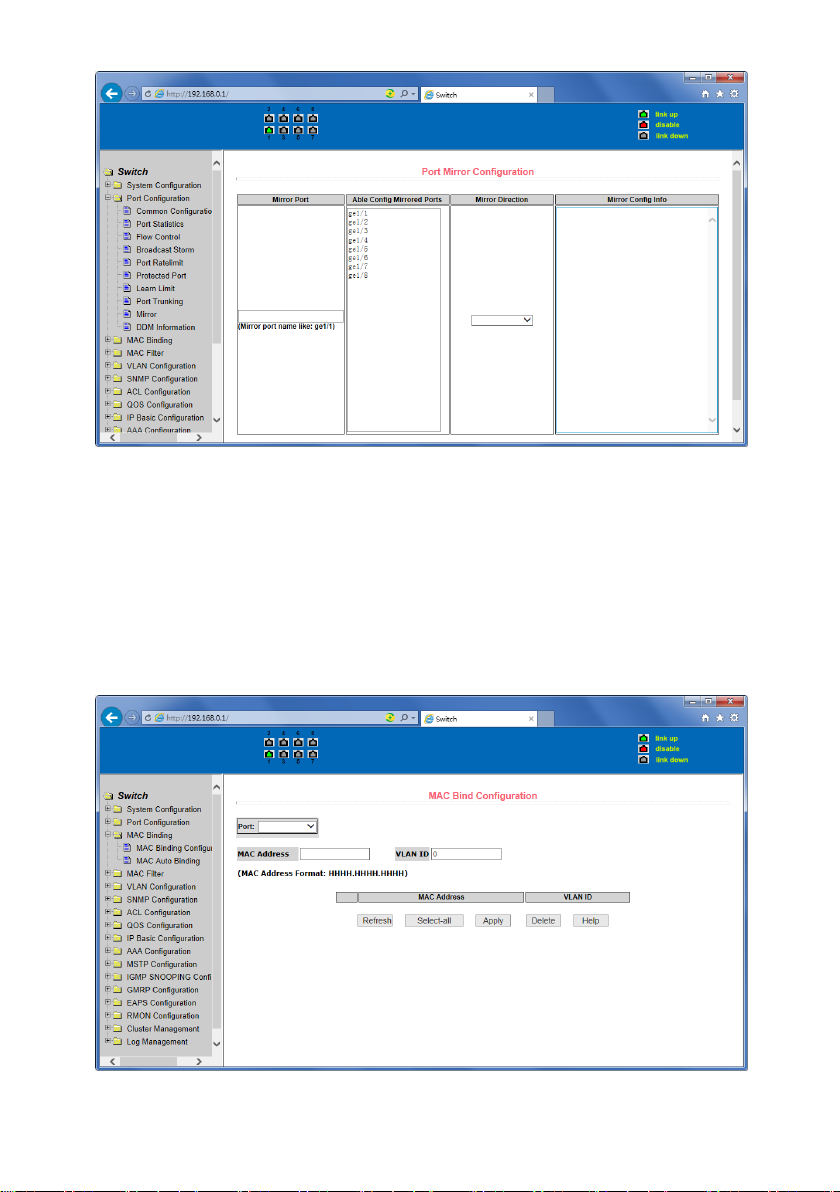
(9) Port mirroring configuration page
Figure 25 is the port mirroring configuration page .the page allows users to configure port
mirroring. Port mirroring through the mirror port to monitor the data packets of being
mirrored output port and the data packets of being mirrored input port.. mirroring Port can
only choose one, being mirrored output port and being mirrored input port can select
multiple. This page consists of four components: monitor port, configurable port, monitoring
direction and mirror configuration information. When you start to configure a mirror port,
firstly configured mirroring port from monitor ports, mirror ports can only have one, and then
select the mirror port from the configurable port, select the monitor direction, and press the
application key to entry into force, the results is displayed in the mirrored configuration
information.
When choose the RECEIVE in direction of monitor, said monitor data packets received,
TRANSMIT, said monitor data packets sent, BOTH that monitor all data sent and received
packets, NOT_RECEIVE to cancel monitoring received data packets, NOT_TRANSMIT to cancel
monitor send data packets, NEITHER cancels monitor data packets received and sent, that is
canceling monitor port.
Page 27
27
Figure25 Port mirroring configuration page
5. MAC binding
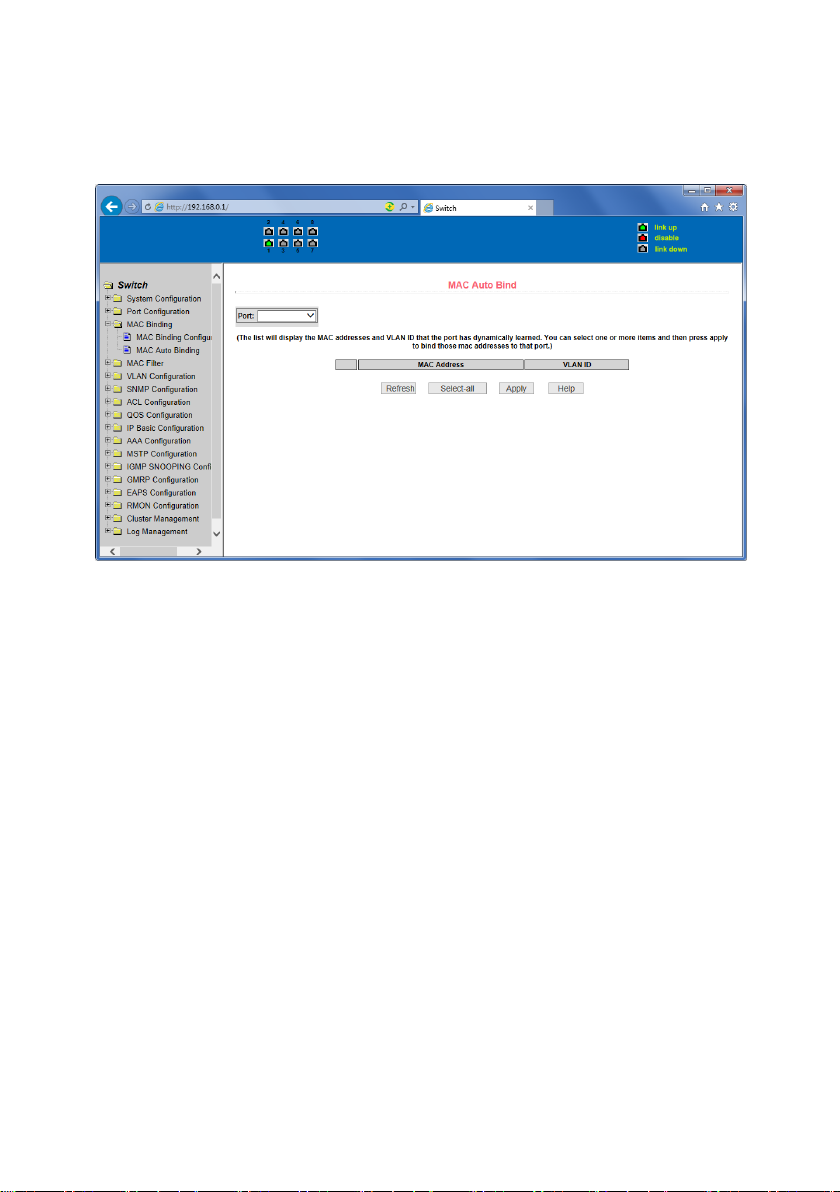
(1) MAC binding configuration page
Figure 26 is the MAC binding configuration page. This page is used to achieve the port and
MAC address binding.
MAC entries on the page is used to enter the MAC address binding, VLAN ID entry is used to
enter the MAC address of VLAN
Figure 26 the MAC binding configuration page
Page 28
28
(2) MAC binding automatic conversion page
Figure 27 is the MAC binding automatic conversion page. This page is used to achieve the port
MAC address auto-binding.Shows the hardware switch on the lay2 the exist port dynamic MAC
address and affiliated VLAN. Can choose one of the entry and convert it into static binding.
Figure 27 the MAC binding automatic conversion page
6. MAC filtering
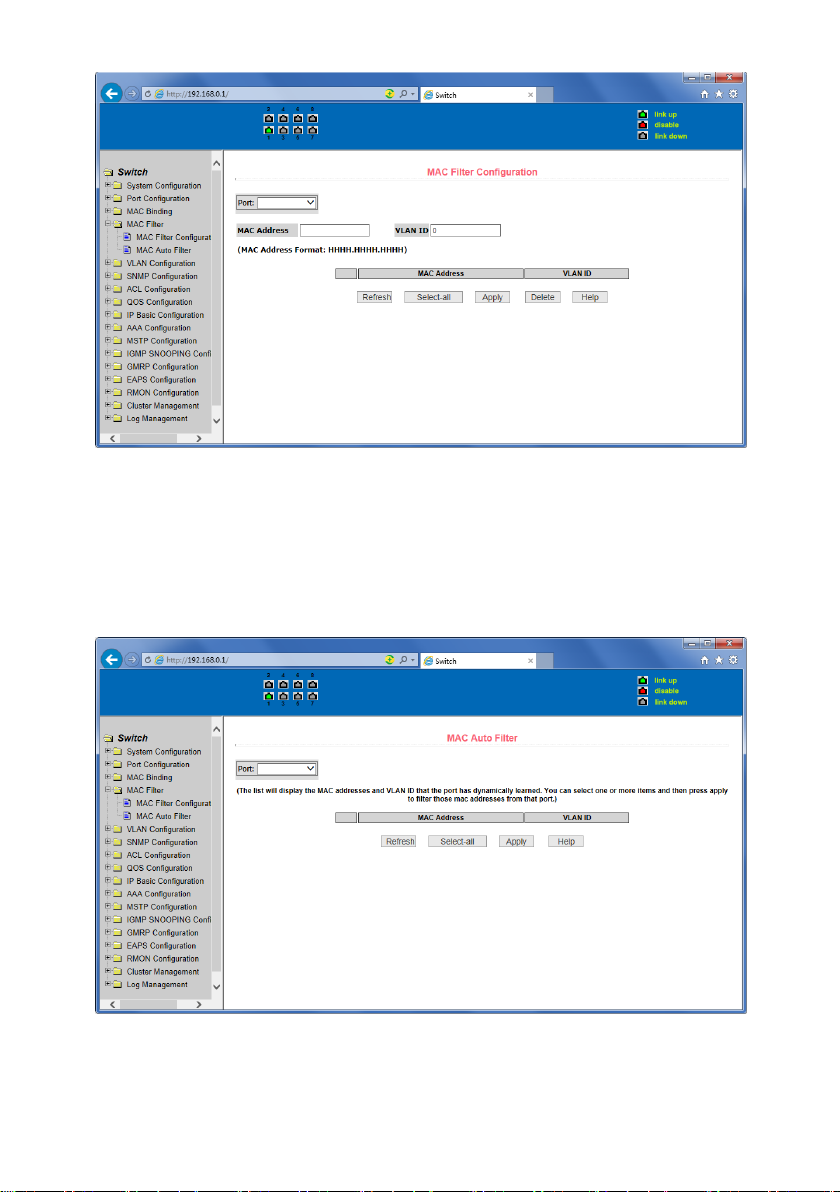
(1) MAC filtering configuration page
Figure 28 is the MAC filtering configuration page. This page is used to configure the ports on
the MAC address filtering.
MAC entries on the page is used to enter the MAC address filtering, VLAN ID entry is used to
enter the MAC address affiliated VLAN.
Page 29
29
Figure 28 the MAC filtering configuration page
(2) MAC filtering automatic conversion page
Figure 29 is the MAC filtering automatic conversion page. This page is used to achieve the port
MAC address auto-binding.
Shows the hardware switch on the lay2 the exist port dynamic MAC address and affiliated
VLAN. Can choose one of the entry and convert it into static filtering configuration
Figure 29 the MAC filtering automatic conversion page
Page 30
30
7. VLAN Configuration
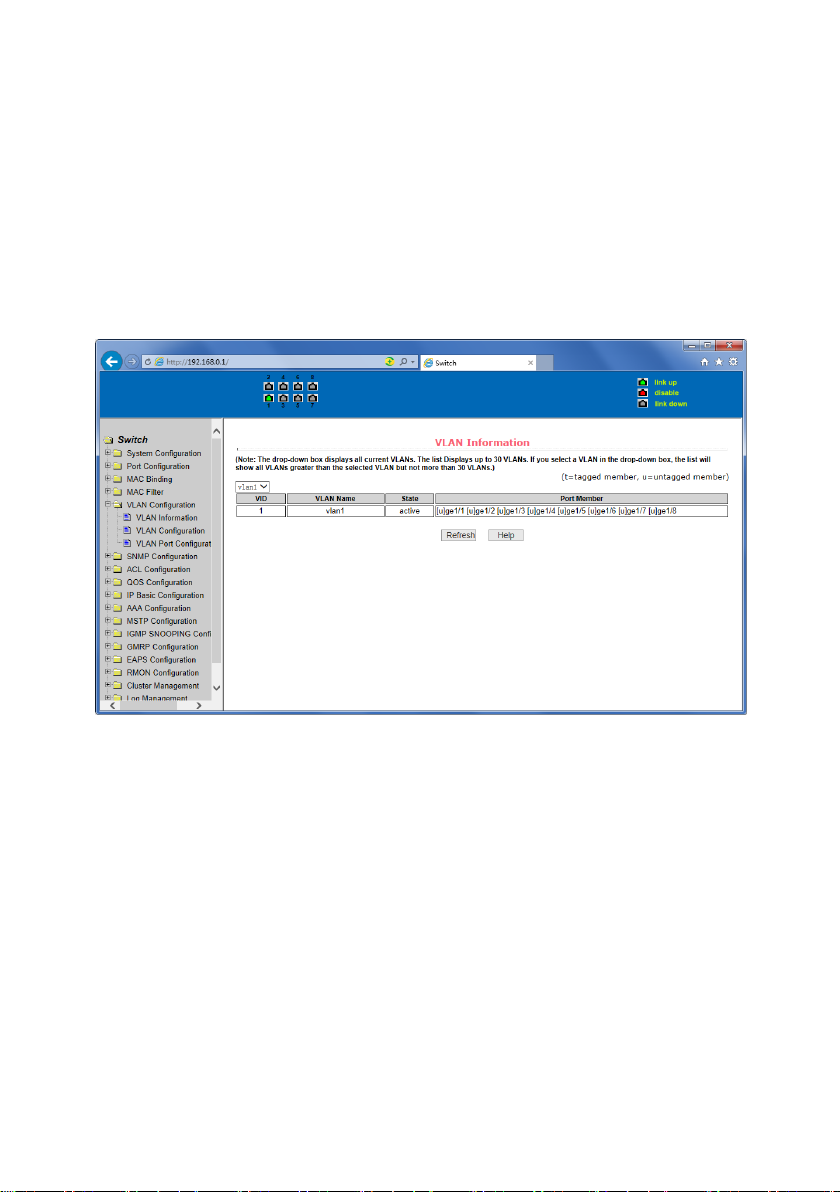
(1) VLAN information page
Figure 30 shows the current VLAN information page. This page is read-only page displays the
current VLAN configuration information l, including the VID, state and port members. Select
VLAN from the drop-down VID, shows the port information of the Port VLAN members.
A port may not be a member of VLAN, which can be VLAN-tagged or untagged members.
The meanings of characters please see the following info:
t tagged the port is the VLAN tagged member
u untagged the port is the VLAN untagged member
Figure 30 VLAN information page
(2) Static VLAN configuration page
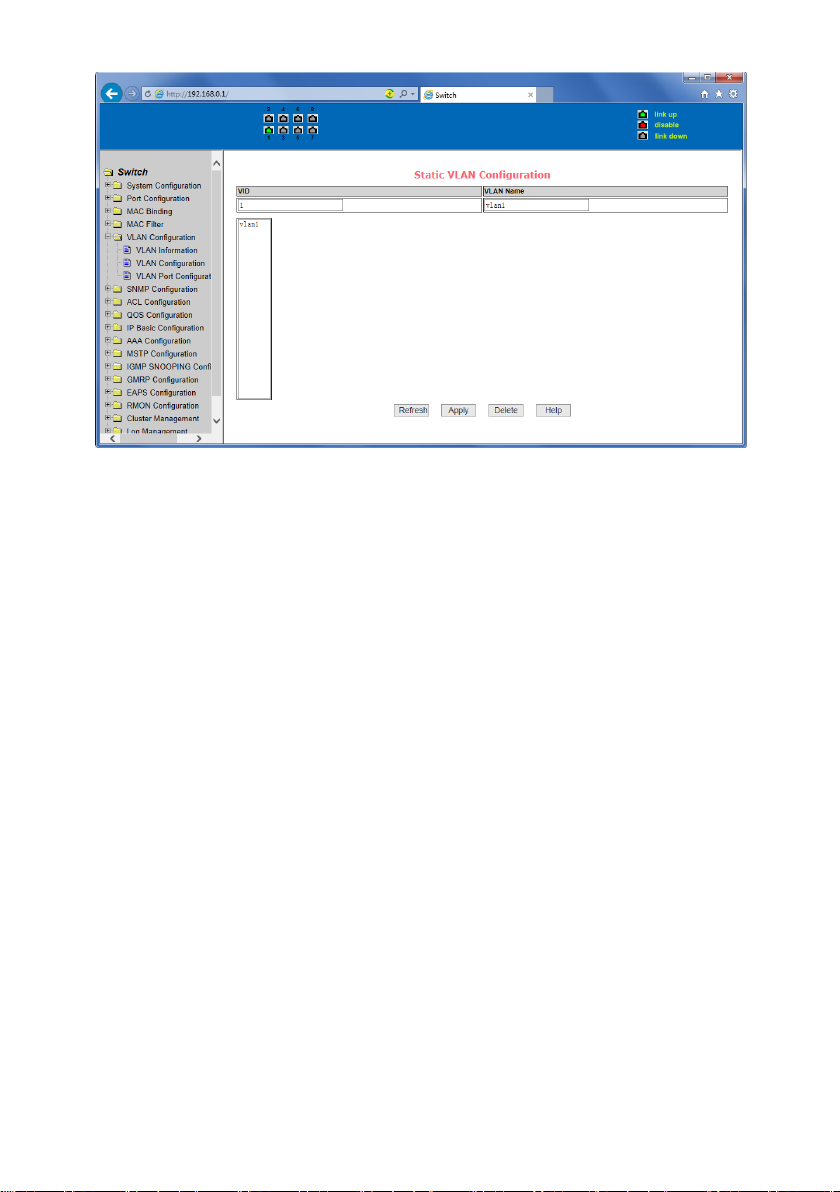
Figure 31 is the static VLAN configuration page that allows users to create VLAN.
If you want to create a new VLAN, the user input VID on activity line, ranging from 2 to 4094.
VLAN name is generated depend on VLAN ID and can not be modified. Click Apply button, then
the list box displays the user-created VLAN's VID and VLAN name. Switch by default created
VLAN1, and VLAN1 can not be removed
If you want to delete a VLAN, the user need to click the appropriate VLAN of the list box. The
VLAN will be displayed in the activity line, click the Remove (Delete) key to delete the VLAN,
the same time, the information of the VLAN to remove from the list box.
Page 31
31
Figure 31 the static VLAN configuration page
(3) VLAN port configuration page
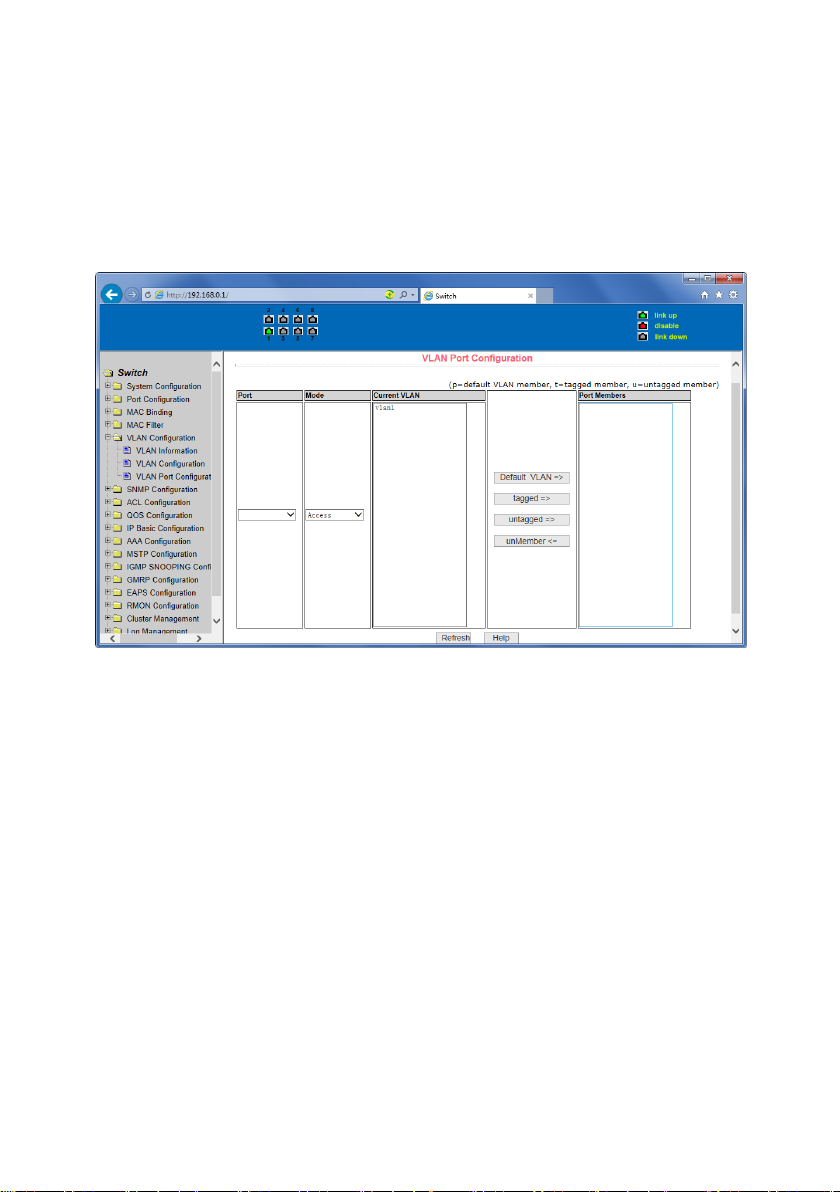
Figure 32 is a VLAN port configuration page, which is used to configure the VLAN port
configuration and display results. This page mainly consists of eight parts: port, mode, all
current VLAN, port-owned VLAN, key "default VLAN =>"," tagged =>"," untagged =>" and "nonmembers" =. "
Port is defined a designated port that will configure the VLAN
Mode Access designated the VLAN mode as the ACCESS mode, Under this mode, the port
default VLAN is the untagged member of VLAN1, the port's default VLAN is 1. Hybrid specified
port VLAN mode HYBRID model, in this mode, the port default VLAN is the untagged member
of VLAN1, the port's default VLAN is 1. Trunk specified port VLAN mode is TRUNK mode, in
which the port VLAN mode, the default is VLAN1 a tagged member of the port's default VLAN
is 1.
All current VLAN that has been created VLAN, also it’s can be configured VLAN, the user from
the list select VLAN, can be multiple-choice.
VLAN Port-owned shows the results of VLAN port configuration, [p] indicates that the port
VLAN is the default VLAN, [t] that the port is a VLAN tag members, [u] that the port is not
tagged VLAN member. When you remove VLAN, the user from the list, select the VLAN, can be
multiple-choice.
Button "default VLAN =>" to configure port the default VLAN, selected one VLAN from the
current all the VLAN.
Page 32
32
Button "tagged =>" Configured port is designated as a tagged member of VLAN, selected one
or more VLAN from the current all VLAN.
Button "untagged =>" Configure VLAN port is a designated member of the untagged, selected
one or more VLAN from the current all VLAN.
Button "non-members <= to delete the port from the specified one or more of the VLAN ,no
longer a member of the VLAN, from the port affiliated VLAN to selected one or more VLAN.
Figure 32 The VLAN port configuration page
8. SNMP Configuration
(1) SNMP share body configuration page
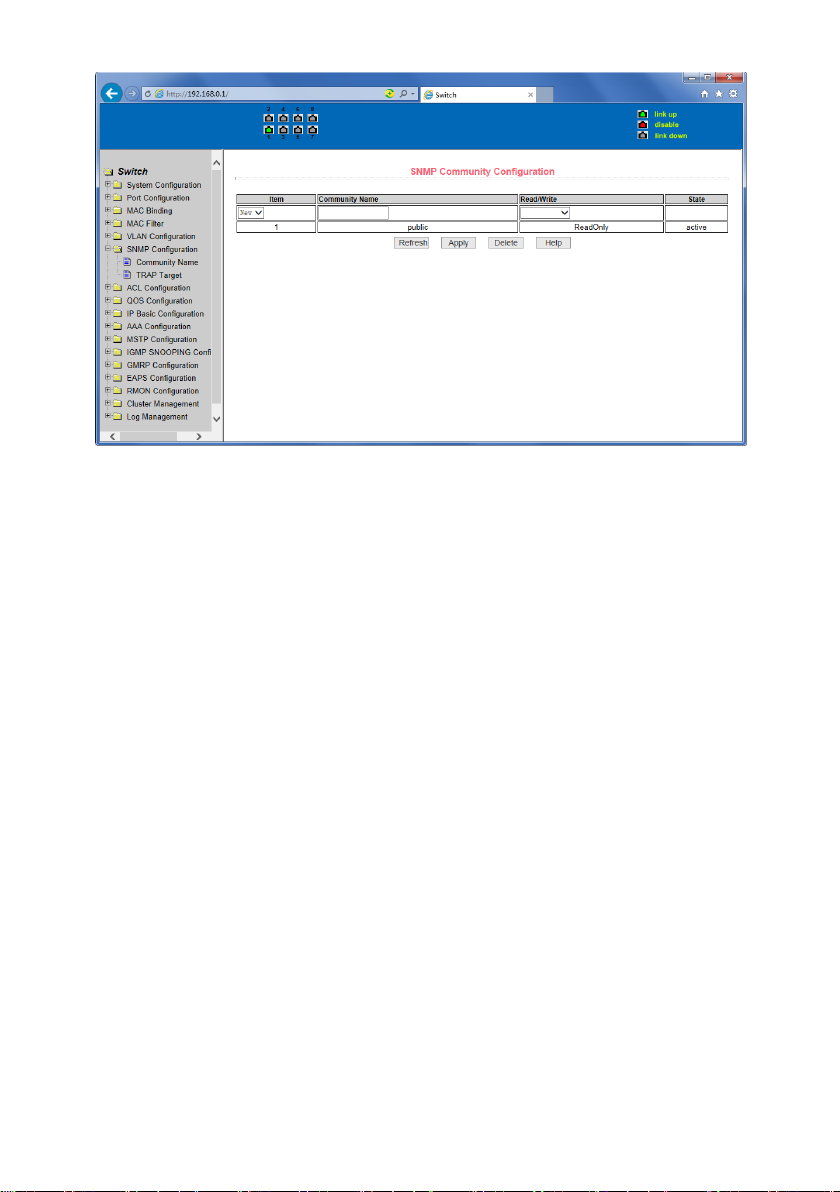
Figure 33 is a shared body of SNMP configuration page that allows users to configure the
switch common body's name and read and write access, A total of 8 entries can be configured
By default, the switch there is a share name as named public, the common body is read-only
access. With this correspondence, the activities of this page is only one entry, shared body
names are public, access is read-only access. When the switch through SNMP for network
management, you need to configure a read-write permissions to the shared body.
Page 33
33
Figure 33 a shared body of SNMP configuration page
(2) TRAP target configuration page
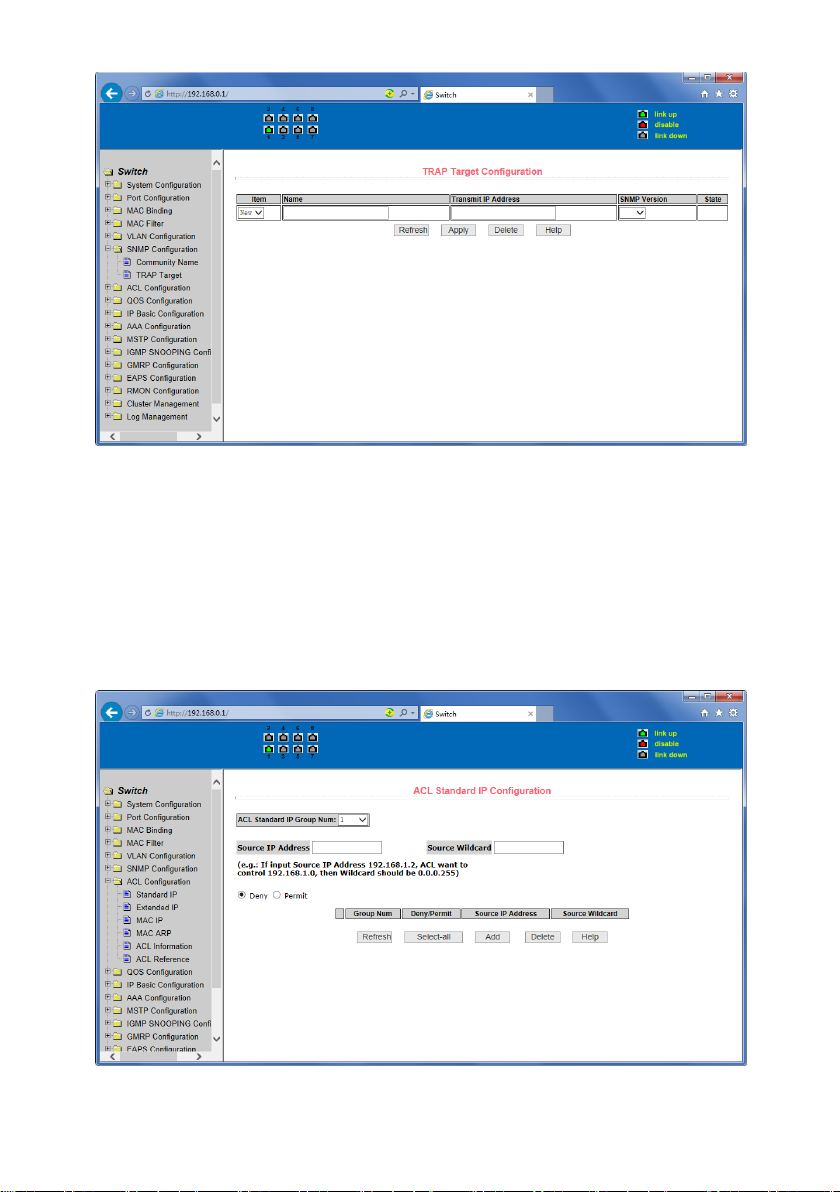
Figure 34 is theTRAP target configuration page that allows users to configure the workstation
to receive TRAP messages as well as the IP address ofTRAP protocol packets of some of the
parameters.
In the configuration entry, the name used to enter the TRAP name, IP address used to enter
the target address, SNMP version used to select the version of the TRAP packet, if you set
successful, it will show in the state to active. If the configuration was successful, SNMP TRAP
functions will take effects ,in the event of link up or link down, the switch will automatically
send a TRAP packet to the target address.
Page 34
34
Figure 34 the TRAP target configuration page
9. ACL Configuraion
(1) IP Standard ACL configuration page
Figure 35 is the IP standard ACL configuration page. users can through this page to build ACL
standard IP-rule base. User can select a ACL group number, in the group to create one or more
rules. In a rule can match only the source IP address field (with mask). The standard IP rules to
control the source IP address packet forwarding.
Figure 35 the IP standard ACL configuration page
Page 35
35
Users to configure the rules, the source IP address must be in with a mask, the rule can match
the collection of IP addresses. The address mask is use anti-code , if the rule were to match the
IP address range 192.168.0.0 to 192.168.0.255, then the IP address can be
192.168.0.1, and its mask of 0.0.0.255.
Users to configure the rules, each rule must have a filter mode: allow or deny.
The user to create a rule in the group, the system will automatically give the rule a rule
number, when to delete a rule in the group 1 rules, other rules remain unchanged, the system
will automatically give the rule a rule group sort. If the user wants to delete the entire rule set,
you can first select all, then click the delete key.
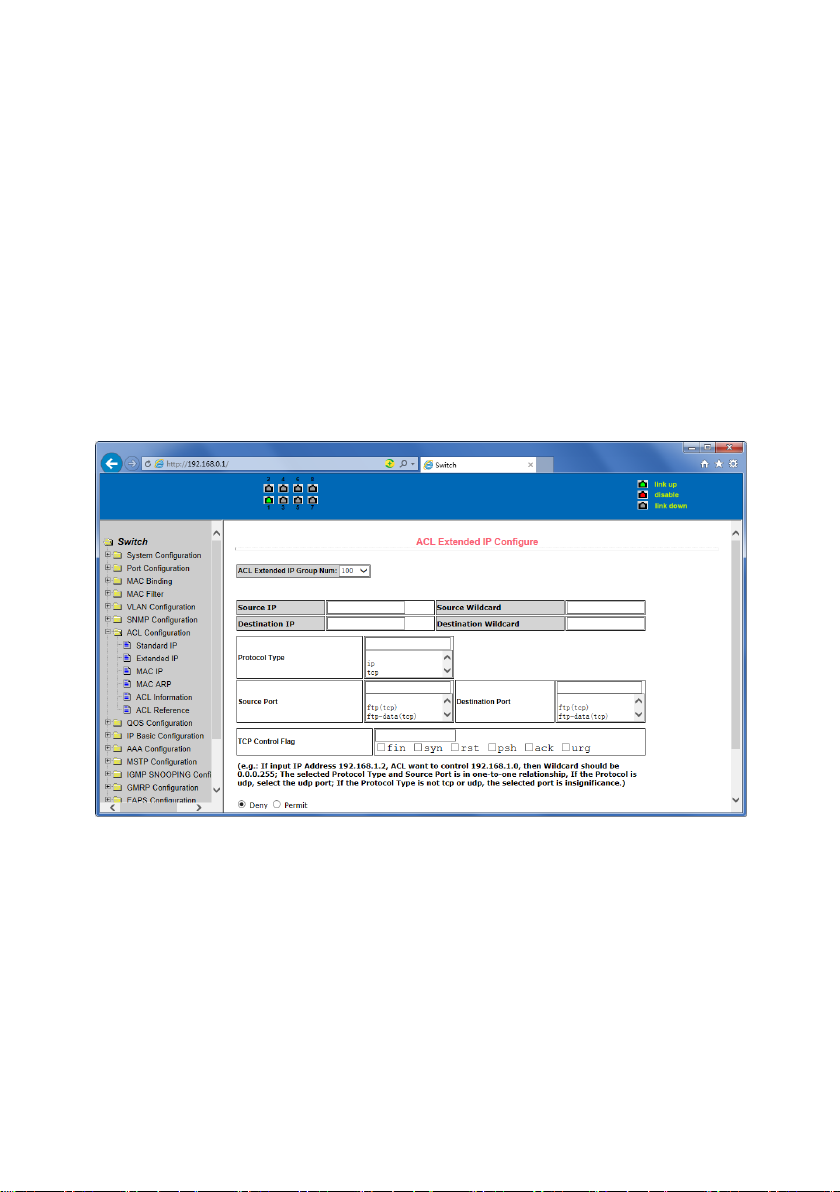
(2) IP Extended ACL configuration page
Figure 36 is the IP extended ACL configuration page. The extended IP group is an extension of
the standard IP rules. Control the packet forwarding via source IP, Destination IP, IP protocol
type and service port.
Figure 36 the IP Extended ACL configuration page
Page 36
36
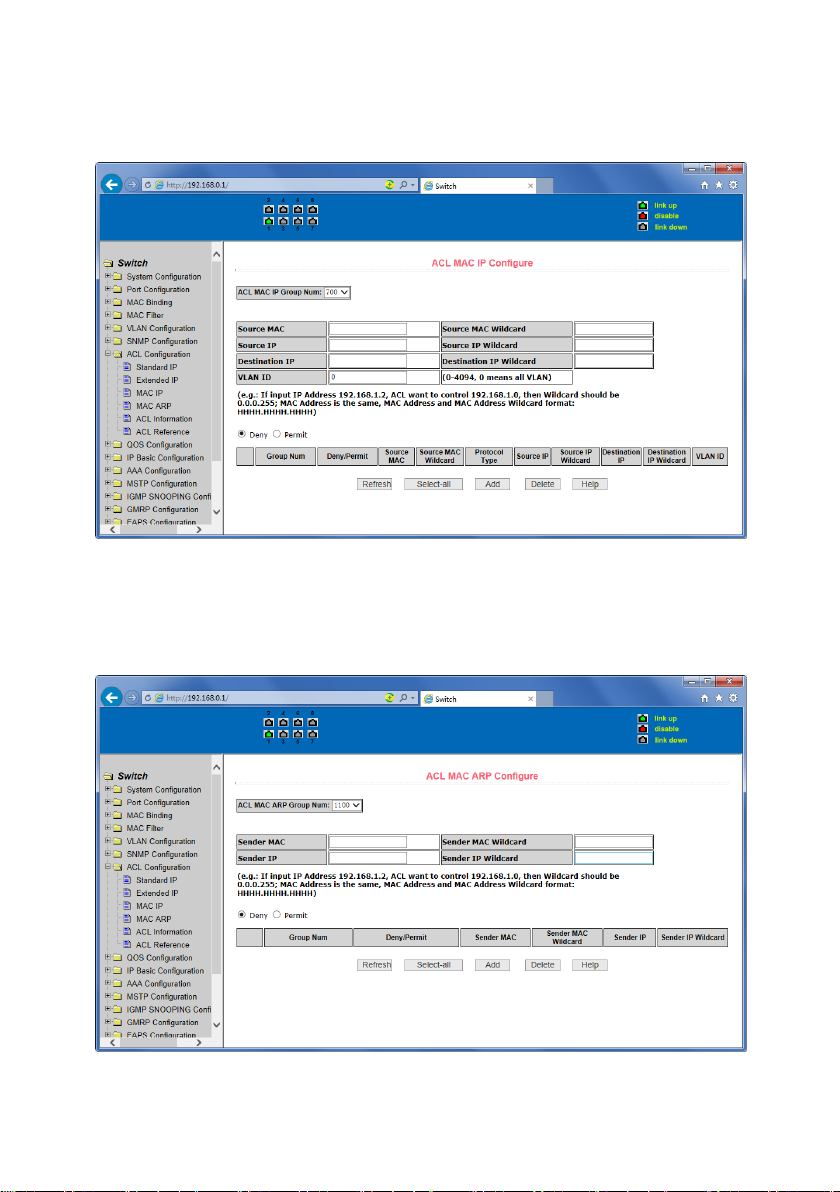
(3) MAC IP ACL configuration page
Figure 37 is the MAC IP ACL configuration page. IP MAC group can be the IP packet source and
destination MAC address and source and destination IP address control.
Figure 37 the IP Extended ACL configuration page
(4) MAC ARP ACL configuration page
Figure 38 is the MAC ARP ACL configuration page. ARP group can be the type of the operation
of the ARP packet, the sender MAC and the sender IP control.
Figure 38 the IP Extended ACL configuration page
Page 37
37
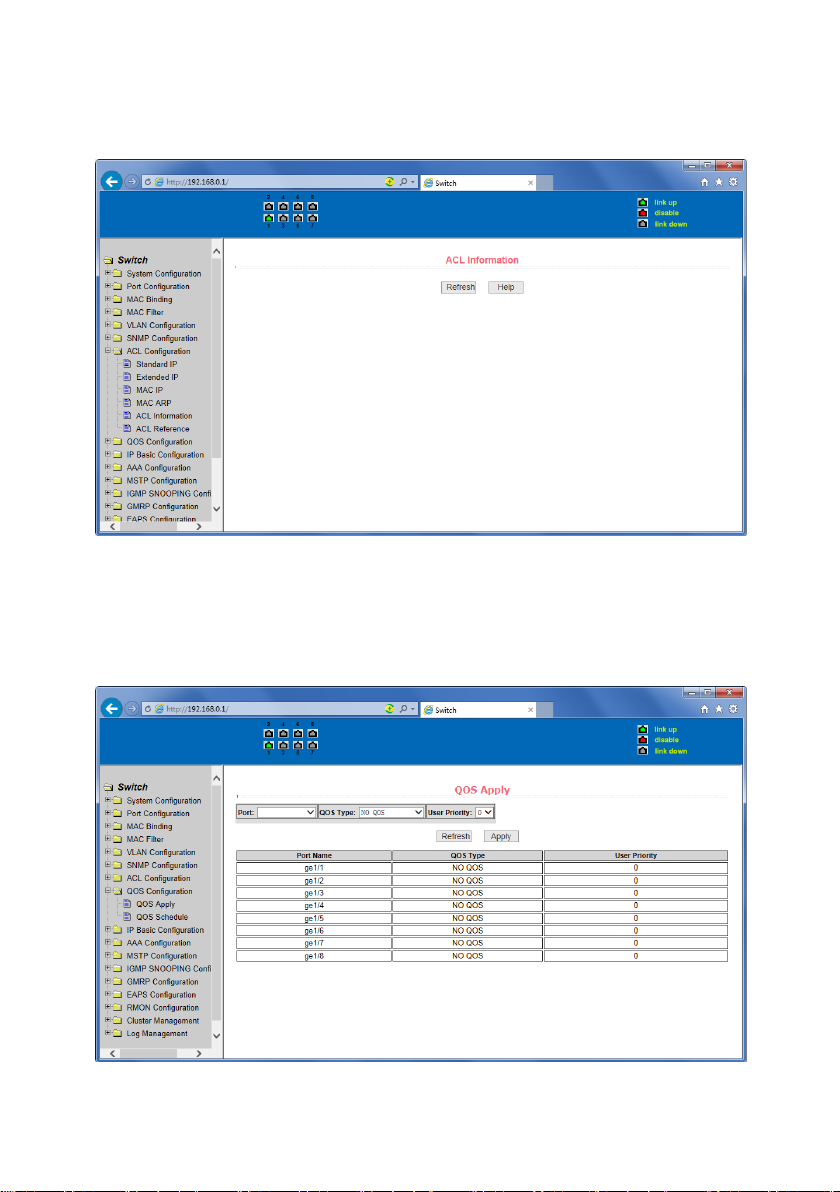
(5) ACL information page
Figure 39 is the ACL information page, which displays the current ACL rules configured in all
the information.
Figure 39 is the ACL information page
10. QoS Configuration
(1) QoS Apply Configuration Page
Figure 40 is a QoS Apply configuration page.
Figure 40 QoS Apply configuration page
Page 38
38
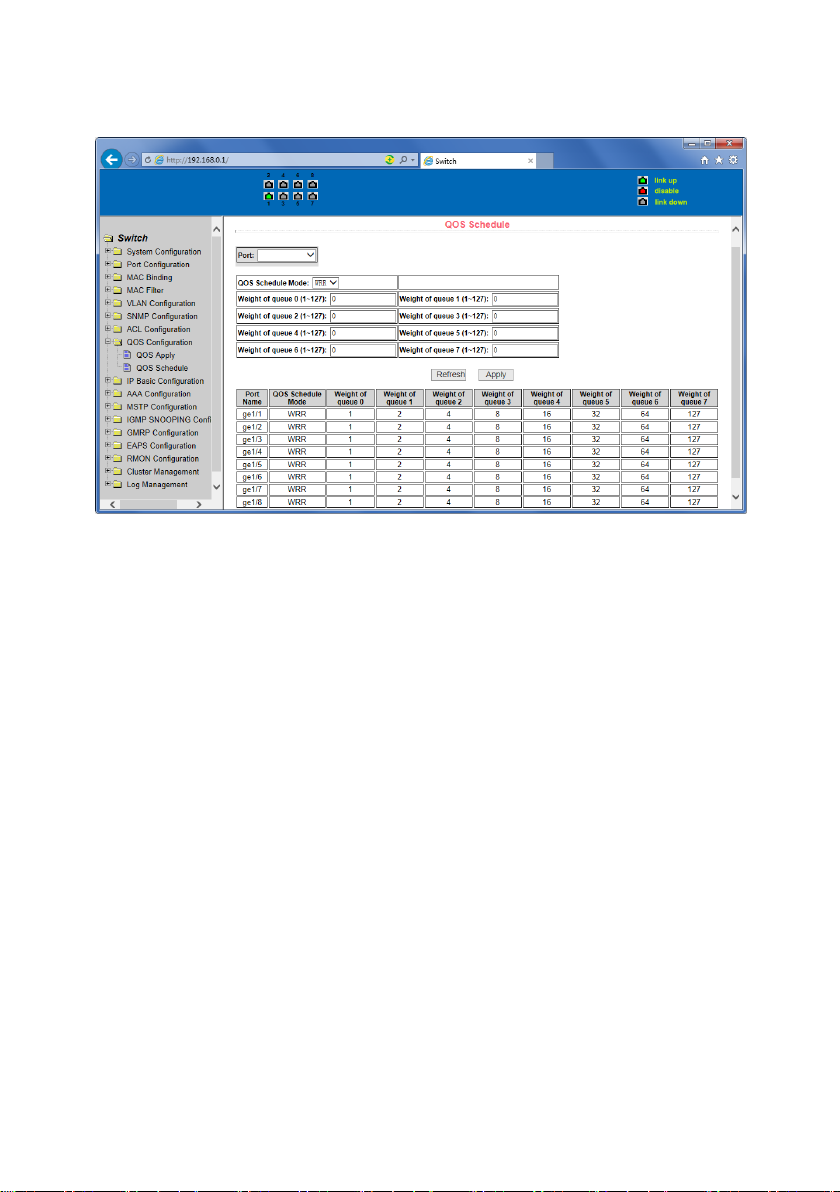
(2) QoS Schedule Configuration Page
Figure 41 is a QoS Schedule configuration page.
Figure 41 QoS Schedule configuration page
Page 39
39
11. IP Basic Configuration
(1) VLAN Interface Configuration Page
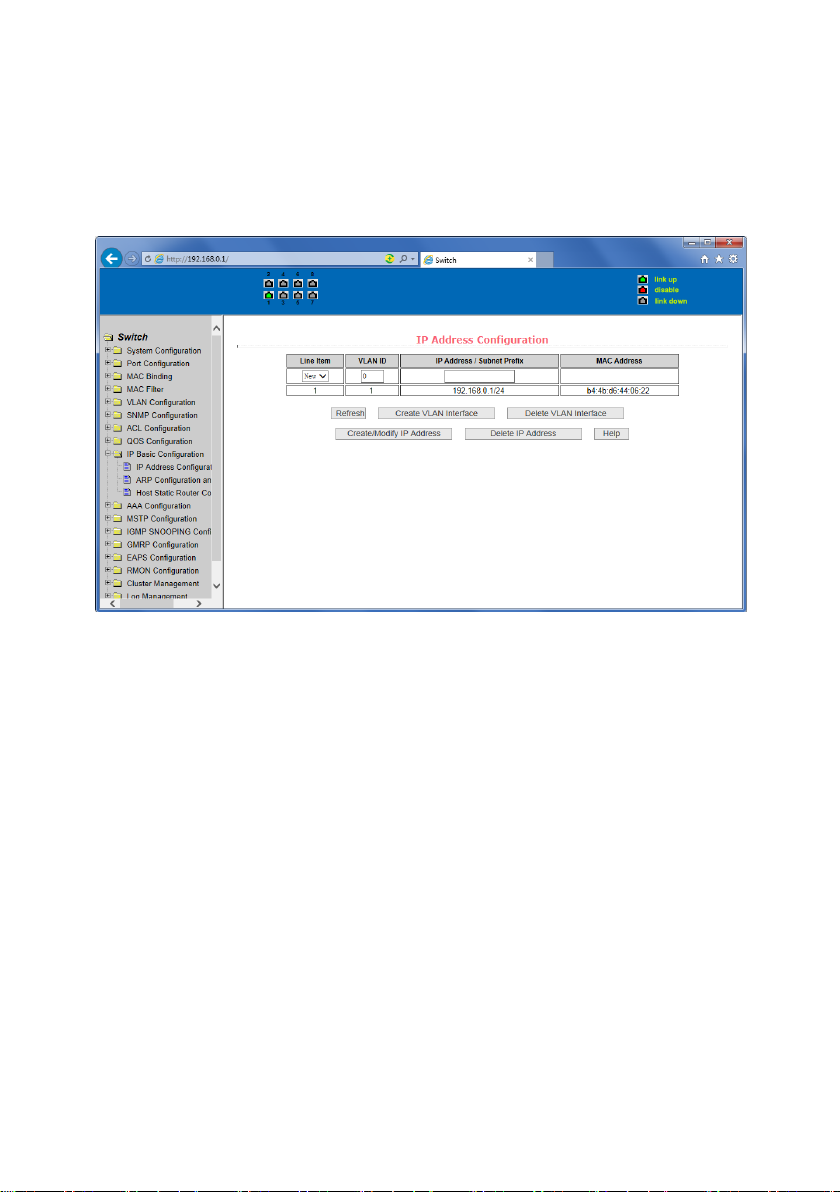
Figure 42 is a VLAN interface configuration page, users can configure the VLAN interface
through this page, delete VLAN interfaces, configure the interface IP address, remove the
interface IP address, and view interface information. VLAN already exists can only be set when
the interface can only be configured on the interface set interface address.
Figure 42 VLAN interface configuration page
Switch switch in the default have a VLAN1 interface, the interface cannot be deleted. One can
only configure a VLAN interface.
(2) ARP configuration and display page
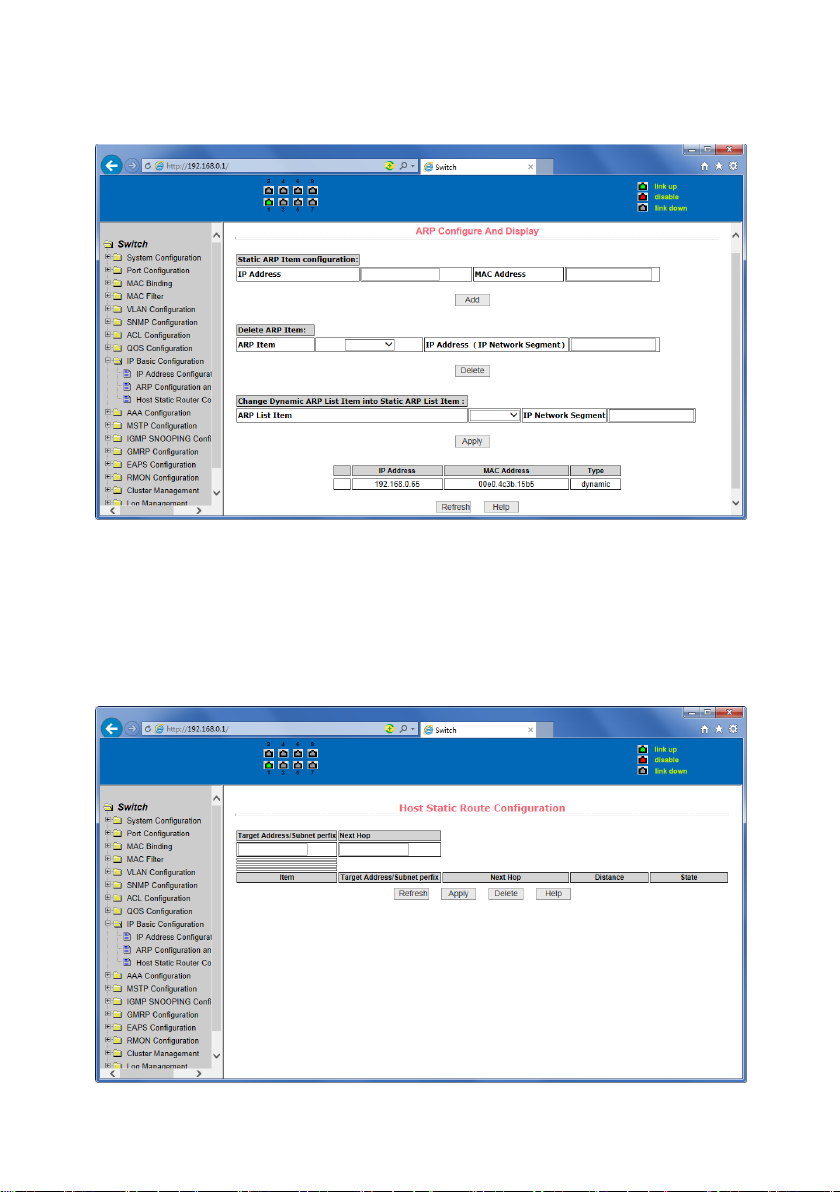
Figure 43 is the ARP configuration and display page, this page can display all of the information
of the ARP table switch, while users can configure a static ARP entries on this page, delete ARP
entries, and revised the dynamic ARP table entry to a static ARP table entry.
When a user configure a static ARP entry, the need to enter the IP address and MAC address,
MAC address must be a unicast MAC address, and then click Add button.
When a user delete an ARP entry, you can choose to delete an IP-ARP table entry, remove a
segment of the ARP table entry, delete all of the ARP table entry, delete all dynamic ARP table
entries and delete all of the static ARP table entry . For the deletion of an IP-ARP table entries,
or delete a segment of the ARP table entry required to enter in the input box, specify the IP
address or IP network segment. Then click the Delete button
When dynamic ARP table entry was revised to a static ARP table entry, you can choose to a
particular network segment or all of the dynamic ARP table entry was revised to a static ARP
Page 40
40
table entry. For the situation to a network segment is required in the input box, enter the
specified network segment. And then click Apply button
Figure 43 the ARP configuration and display page
(3) Host Static Routing configuration page
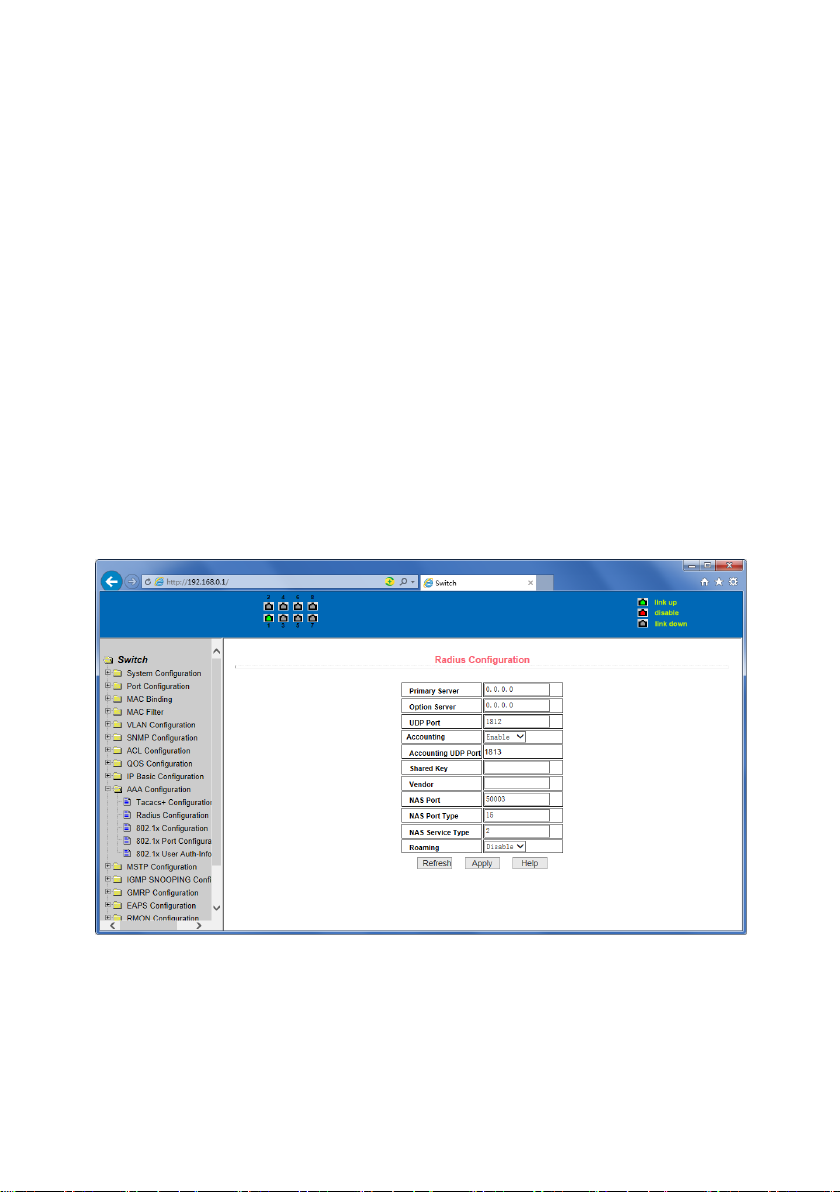
Figure 44 is the host static route configuration page, the user can through this page to add,
delete static routing switch hosts. By default, the switch is not configured to host a static
route, the user can configure the default route through this page, that is the purpose of
address / subnet prefix is 0.0.0.0 / 0 routing
Figure 44 the host static route configuration page
Page 41
41
12. Certification. Authorization. Accounting (AAA) configuration
(1) Radius Configuration Page
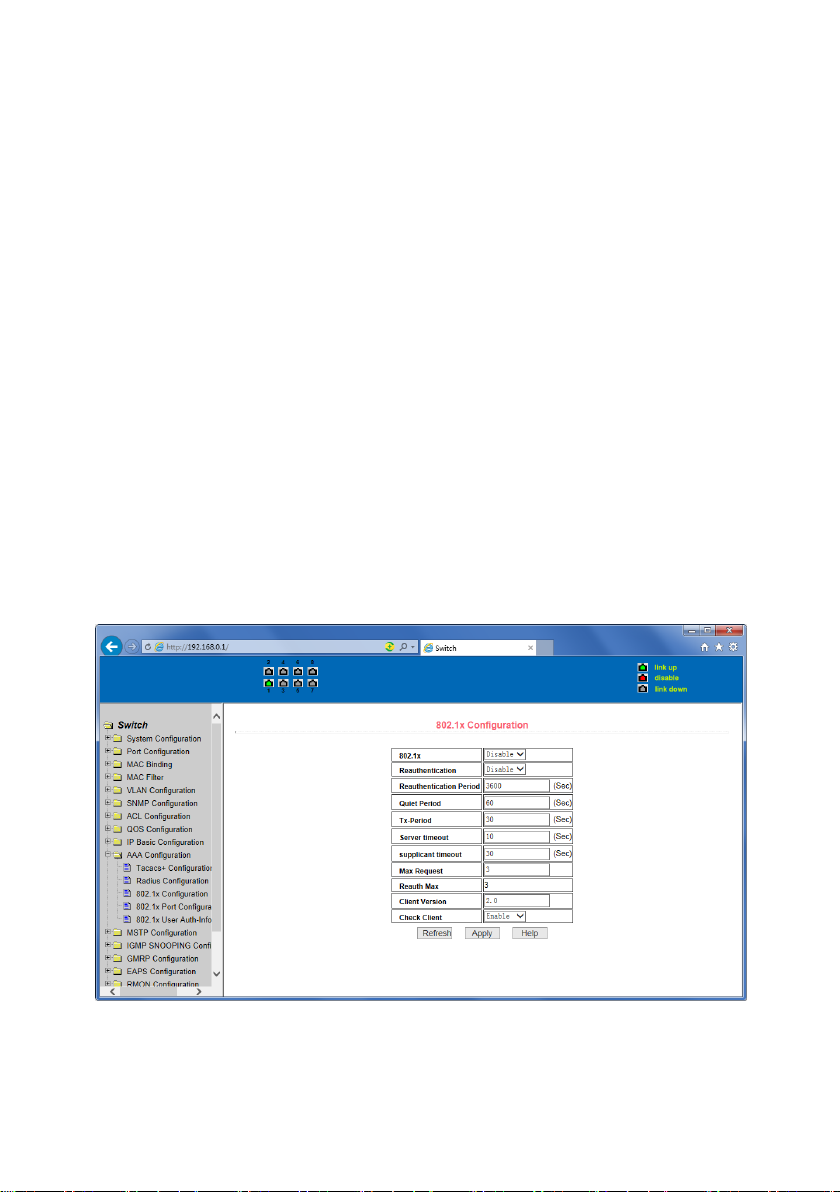
Figure 45 is the Radius configuration page, users can configure with the Radius-related
information, you can set information includes:
1. Be sure to set the Radius server's IP address before do the authentication and accounting
in this field,
2. Optional Radius server IP address, if there is spare Radius server can set this field.
3. Authentication UDP port, the default value is 1812, the user generally do not need to
modify this field.
4. Whether to activate the , the default is to start, and when you do authentication and
accounting in general to start charging.
5. Accounting UDP port, the default value is 1813.
6. Shared secret key is used to setting the shared encryption password between the switch
and the Radius server, so be sure to set the authentication and accounting in this field,
and with the same settings on the Radius server.
7. Vendor-specific information, the users typically do not need to modify this field.
8. NAS ports, NAS port type, NAS type of service, these three values do not change in
general.
9. Whether to on or off the roaming feature of Radius.
Figure 45 the Radius configuration page
Page 42
42
(2) 802.1x Configuration Page
Figure 46 is the 802.1x configuration page, users can configure 802.1x related information on
this page, including:
1. Whether to activate the 802.1x protocol, when doing authentication and accounting
must be to start 802.1x protocol.
2. Switch is to adopt a common authentication method or the expansion of authentication.
3. Whether to open re-authentication function, the default is not open .when you do
authentication and accounting based on the actual circumstances. Open the reauthentication feature will make users more reliable when using the authentication and
accounting, but it will slightly increase the network traffic.
4. Setting re-certification time interval, only to re-open the case of authentication to be
valid, the default is 3600 seconds, when you do authentication and accounting based on
the actual situation to set the value, but the value is not too small.
5. Quiet Period Timer, users typically do not need to modify this field.
6. Tx-Period Timer, users typically do not need to modify this field.
7. Server timeout timer, users typically do not need to modify this field.
8. Supplicant timeout timer, users typically do not need to modify this field.
9. Max Request number, users generally do not need to modify this field.
10. Showing Reauth Max size.
11. Client Version, the client version number.
12. Check Client, whether the certification passed then examine the client's regular flow of
packets.
Figure 46 the 802.1x configuration page
Page 43
43
(3) 802.1x port configuration page
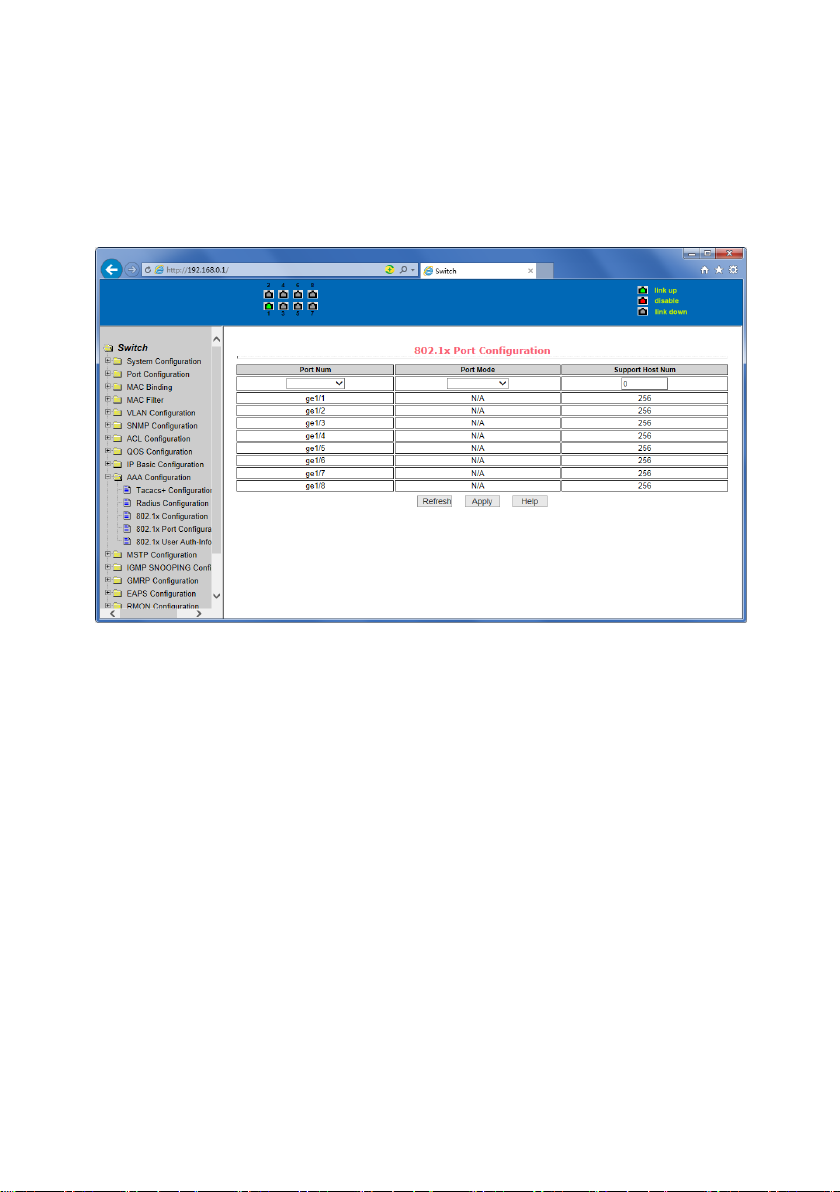
Figure 47 is the 802.1x port configuration page, the user through this page to configure the
support 802.1x port mode and hosts of the largest, at the same time you can view each port
802.1x configuration. 802.1x port model includes four types: N / A State, Auto state, Force-
authorized state and Force-unauthorized state. When a port needs to do 802.1x
Authentication, need to set Auto state, if not do authentication to access the network, to set
N / A state, the other two states are rarely used in practical applications.
Figure 47 the 802.1x port configuration page
Doing 802.1x authentication, port access, the default maximum host number is 100, the user
can modify this field, the biggest support to the 100.
Page 44
44
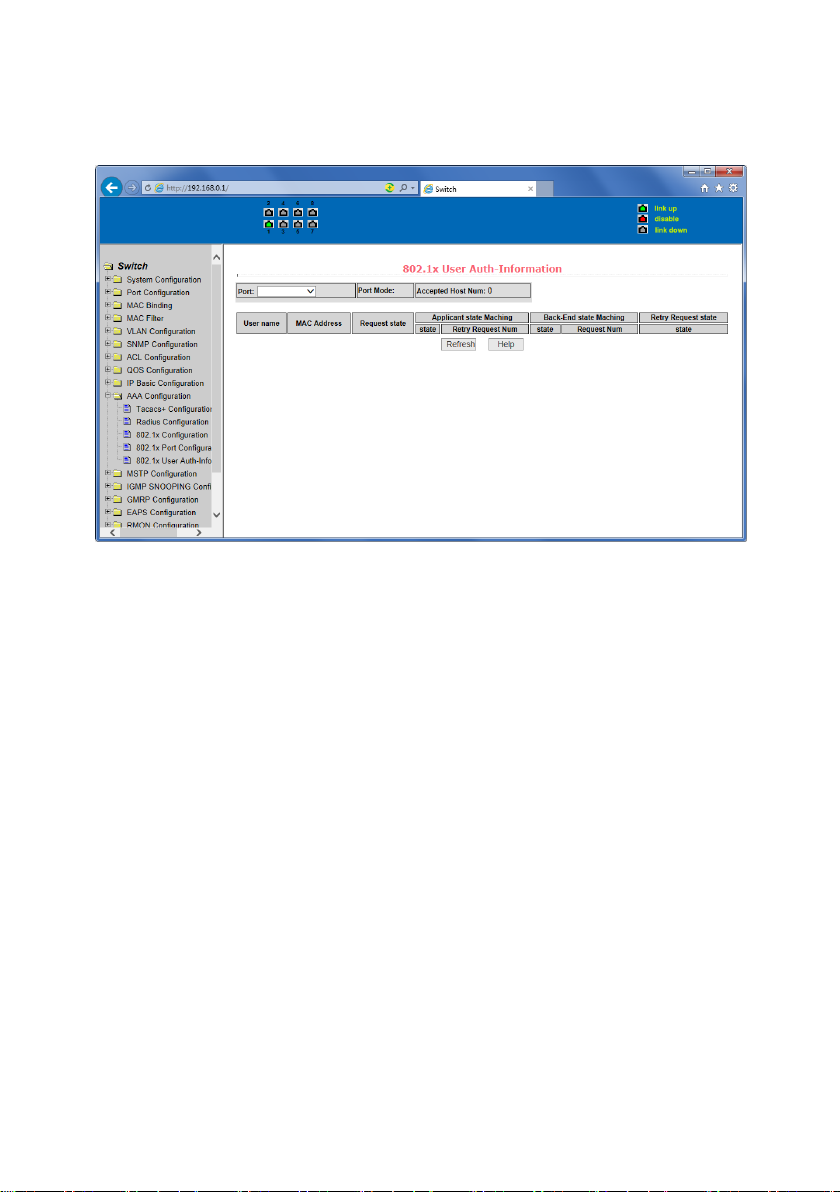
(4) 802.1x user authentication information page
Figure 48 is a 802.1x user authentication information page, the user can see through this page,
under a certain port access for all users of the state information.
Figure 48 802.1x user authentication information page
Page 45
45
13. Spanning Tree Protocol configuration
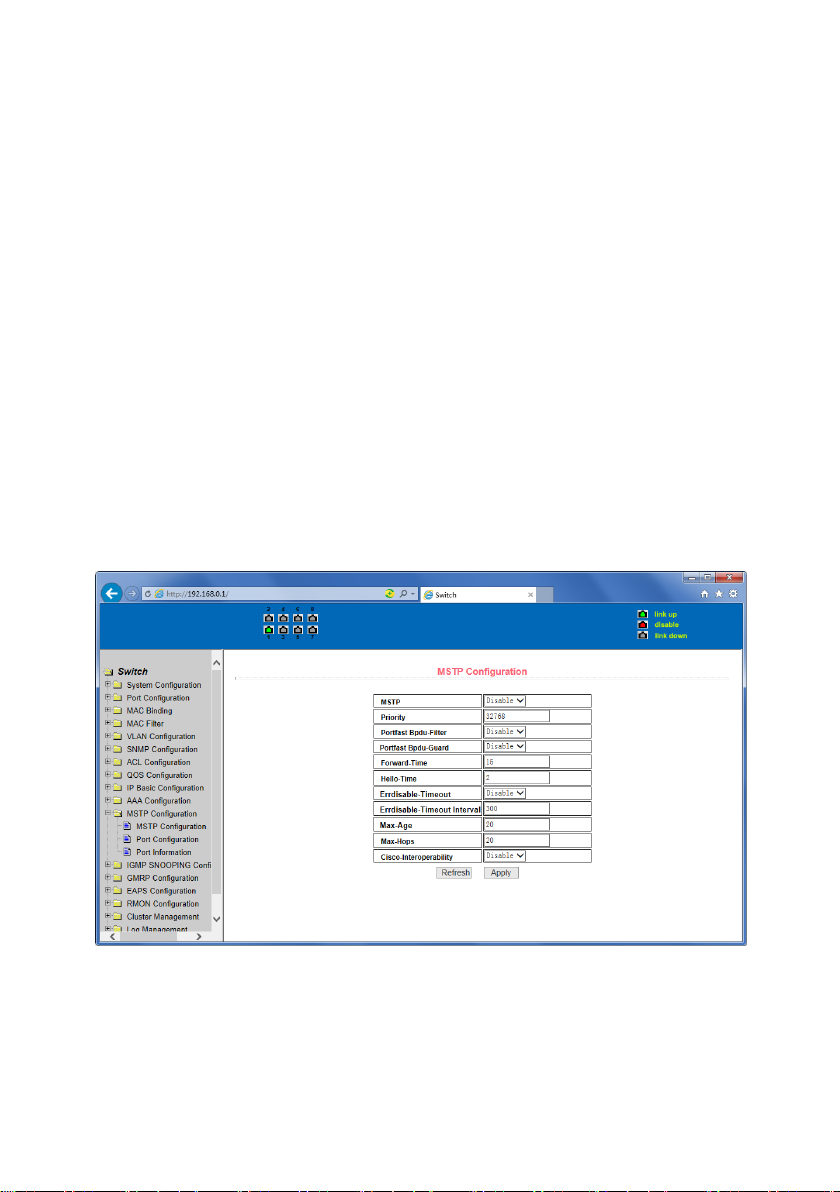
(1) MSTP global configuration page
Figure 49 is the MSTP global configuration page, through which you can configure some MSTP
related information, mainly including:
• Whether to enable MSTP.
• Configure the bridge priority. Devices with lower priority are more likely to be the root
bridge.
• Enable BPDU filtering function on the port in the portfast bpdu-filter default state.
• Enable BPDU guard function on the port in the portfast bpdu-guard default state.
• Configure the forwarding delay.
• Configure the interval for sending MSTP Hello packets.
• The errdisable mechanism is started. When a port that starts a BPDU gurad receives a
BPDU, it starts the errordisable timer. errordisable restarts this port after the configured
timeout.
• Configure errordisable timeout time.
• Configure the number of seconds the switch waits to receive spanning tree configuration
information before triggering a reconfiguration.
• Configure the number of hops specified before a BPDU is dropped in a domain.
• Start or shut down and cisco compatible spanning tree protocol.
Figure 49 MSTP Global Configuration Page
Page 46
46
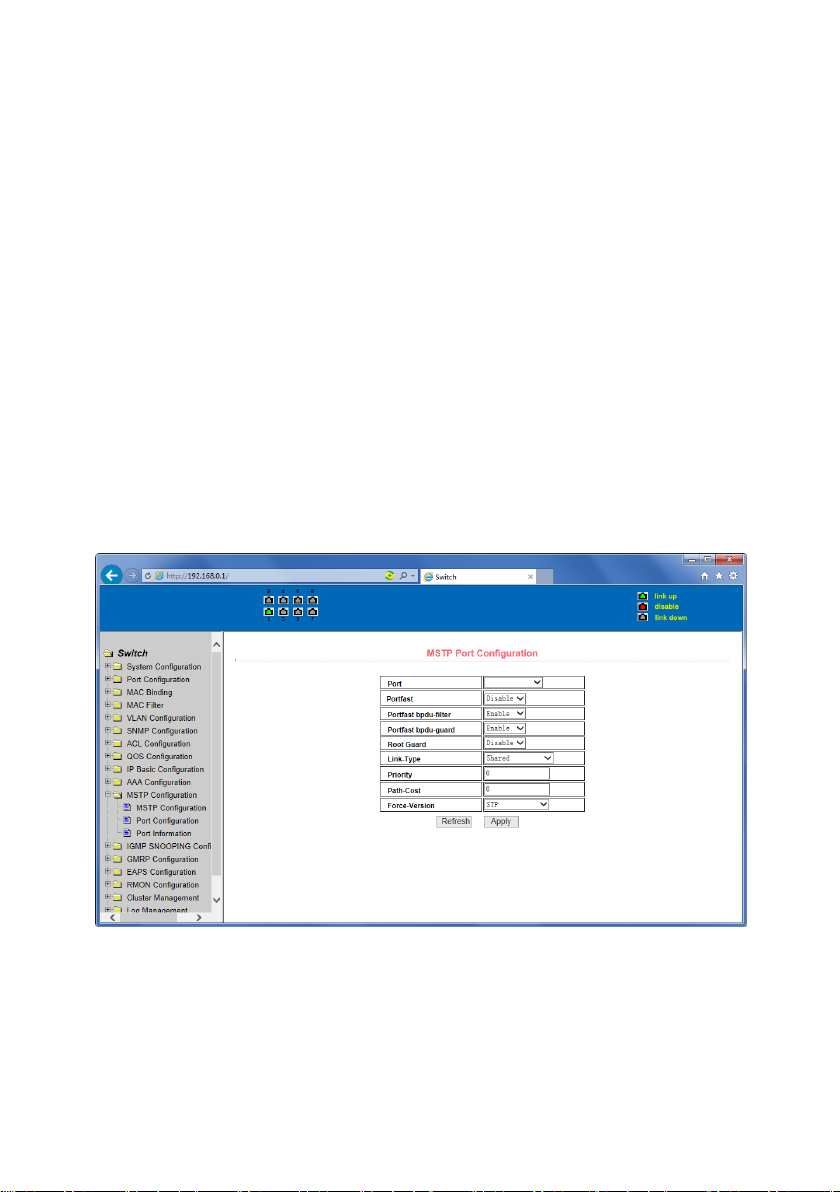
(2) MSTP port configuration page
Figure 50 is the MSTP global configuration page. Through this page, you can configure some
MSTP related information, mainly including:
• Select the port to be configured.
• Configure a port as a portfast port to enable the port from the blocking state to the
forwarding state, bypassing the listening and learning states.
• Open the BPDU filter on the selected port.
• Enable BPDU guard on the selected port.
• Enable the root guard function, and do not accept BPDU packets with a higher priority than
the bridge. Specify the switch as the root switch.
• Configure the connection type. point-to-point: The type of connection is point-to-point,
allowing fast transition of the port status. shared: Connection type is shared, does not allow
rapid conversion of port status, to go through the calculation process of 802.1D to
determine the status of the port.
• Configure the cist priority of the interface. Range 0-240, can only be a multiple of 16. The
default is 128.
• Configure the cist path cost. Range 1-200000000. The default is 20000000. Lower path costs
are more likely to be roots.
• Configure the type of protocol packets to be sent.
Figure 50 MSTP Port Configuration Page
Page 47
47
(3) MSTP configuration information page
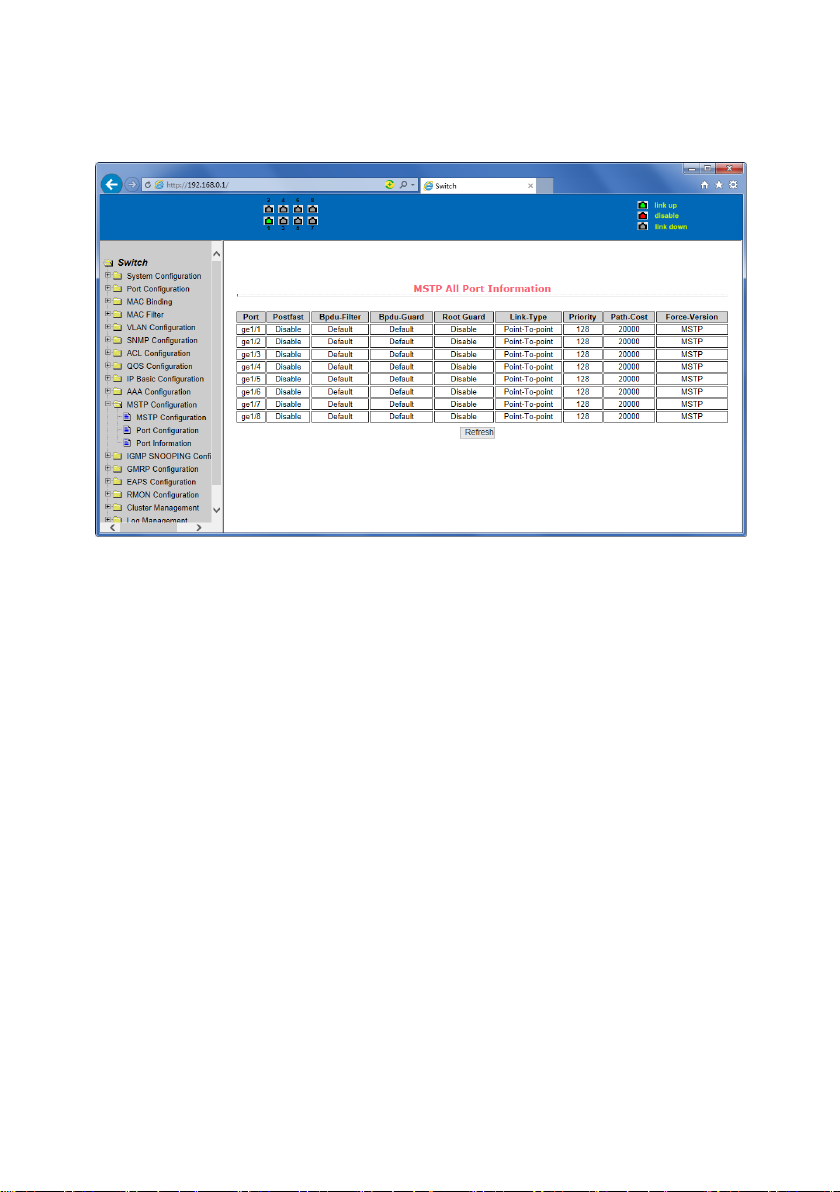
Figure 51 is the MSTP configuration information page, through which you can view some MSTP
related information
Figure 51 MSTP Configuration Information page
Page 48
48
14. IGMP SNOOPING configuration
(1) IGMP SNOOPING configuration page
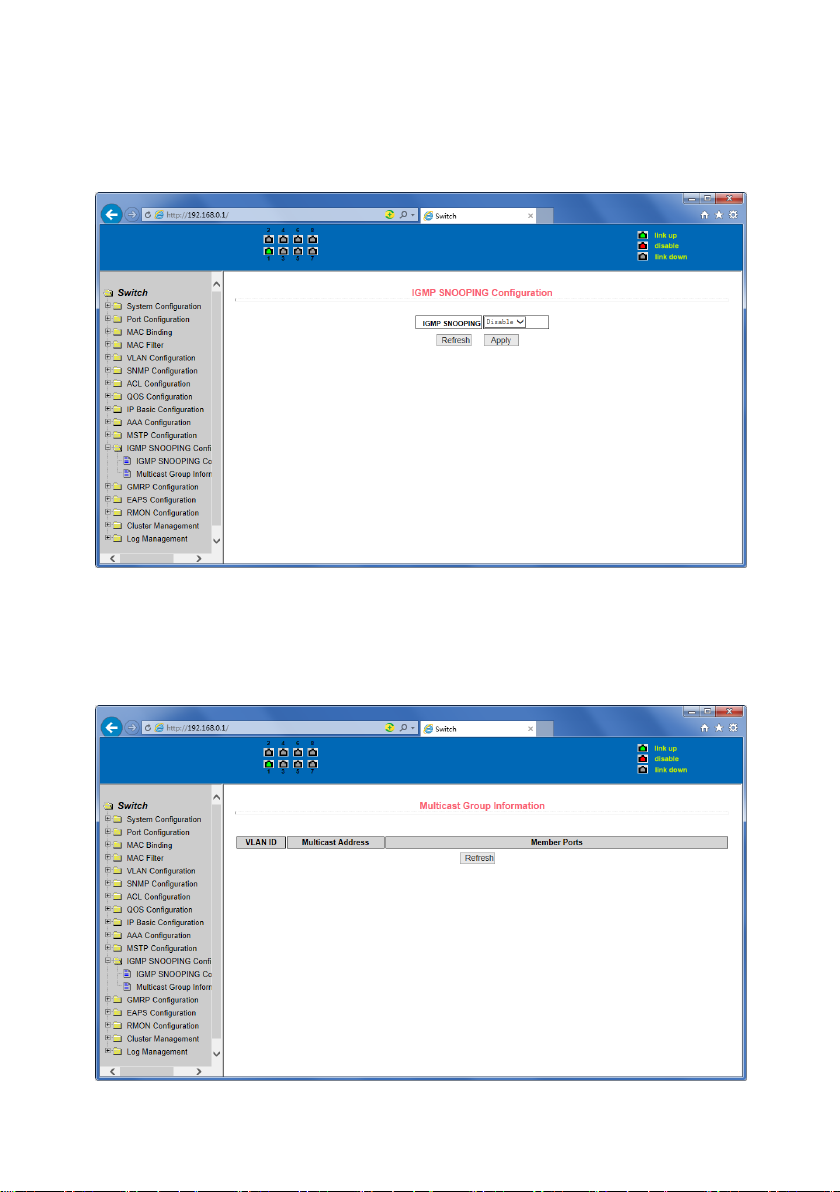
Figure 52 is the IGMP SNOOPING configuration page, through which you can start
IGMP SNOOPING.
Figure 52 IGMP SNOOPING configuration page
(2) IGMP SNOOPING information page
Figure 53 is the IGMP SNOOPING information page, which allows users to view some
information about IGMP SNOOPING.
Figure 53 IGMP SNOOPING Information page
Page 49
49
15. GMRP configuration
(1) GMRP Global Configuration Page
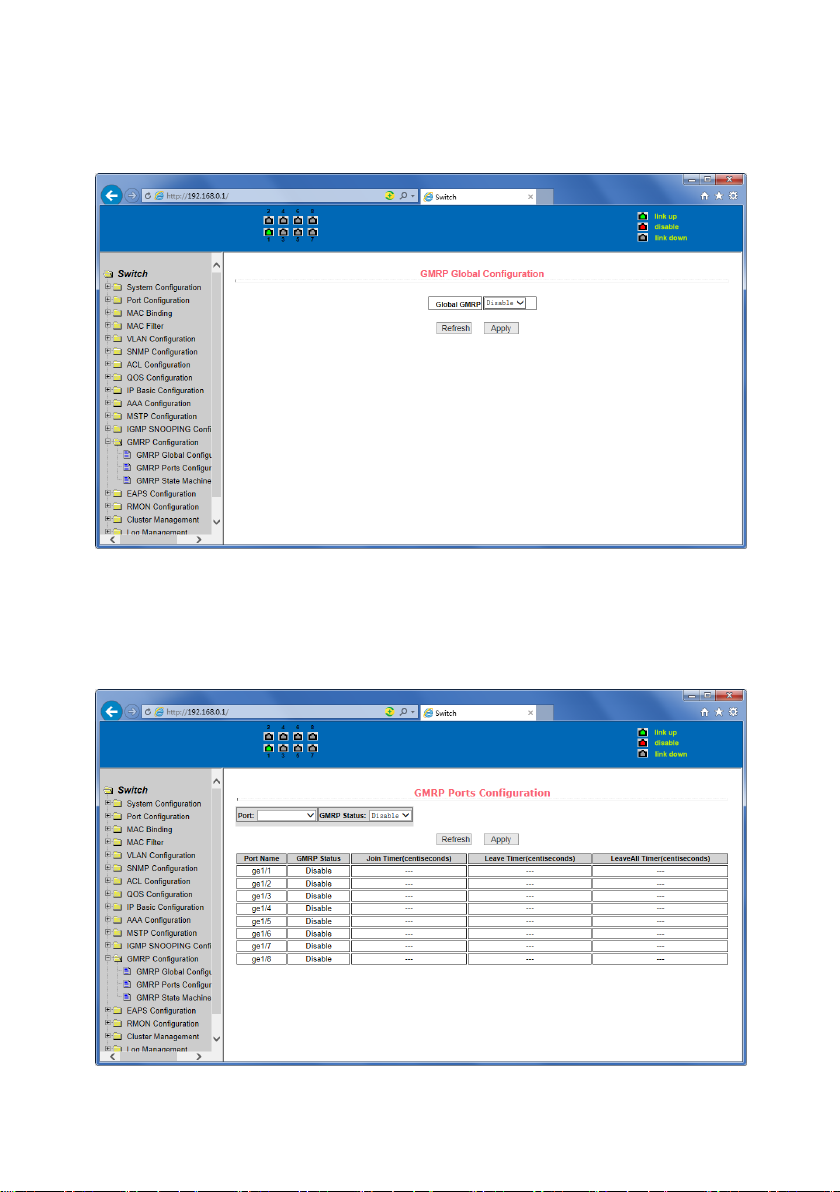
Figure 54 shows the GMRP global configuration page. Users can enable GMRP through this page.
Figure 54 GMRP Global Configuration Page
(2) GMRP port configuration page
Figure 55 shows the GMRP port configuration page. You can use this page to enable the GMRP
port and view the port information.
Figure 55 GMRP Port Configuration Page
Page 50
50
(3) GMRP state machine page
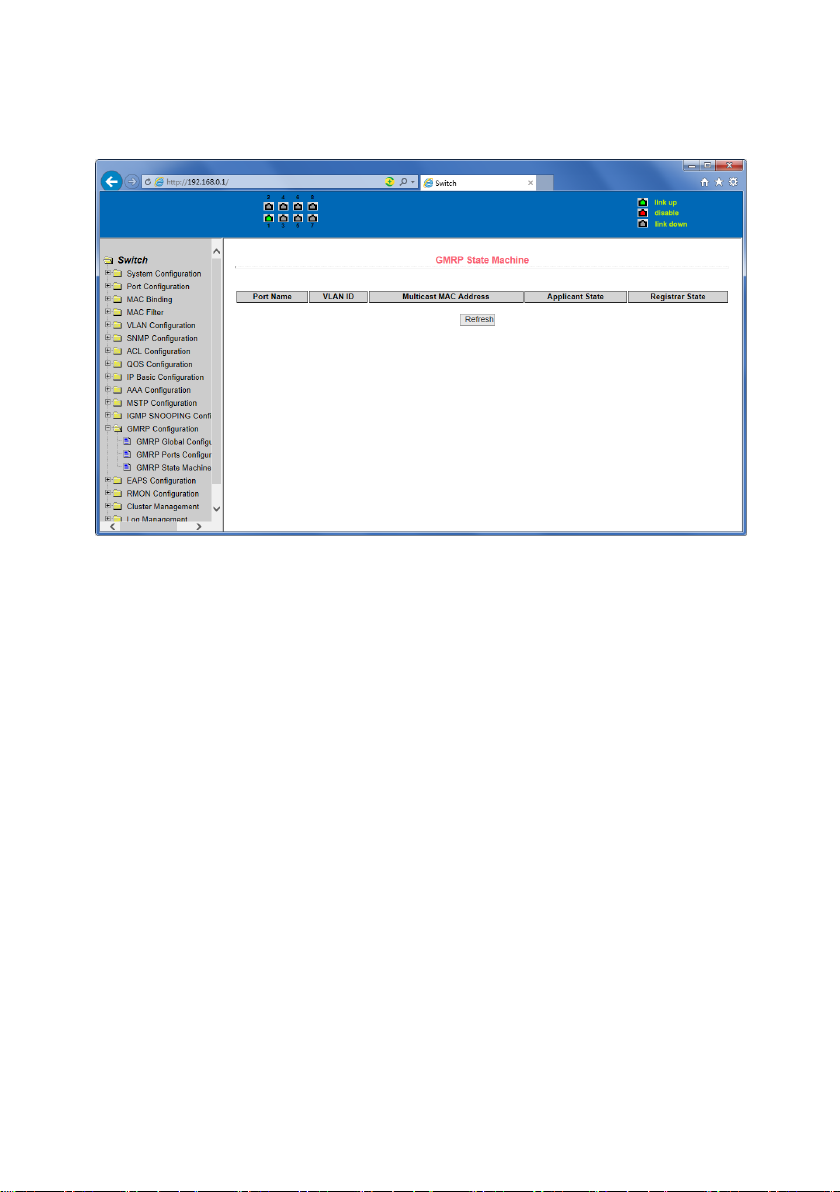
Figure 56 is the GMRP state machine page. Users can view the GMRP state machine
information through this page.
Figure 56 is the GMRP state machine page
16. EAPS configuration
(1) EAPS configuration page
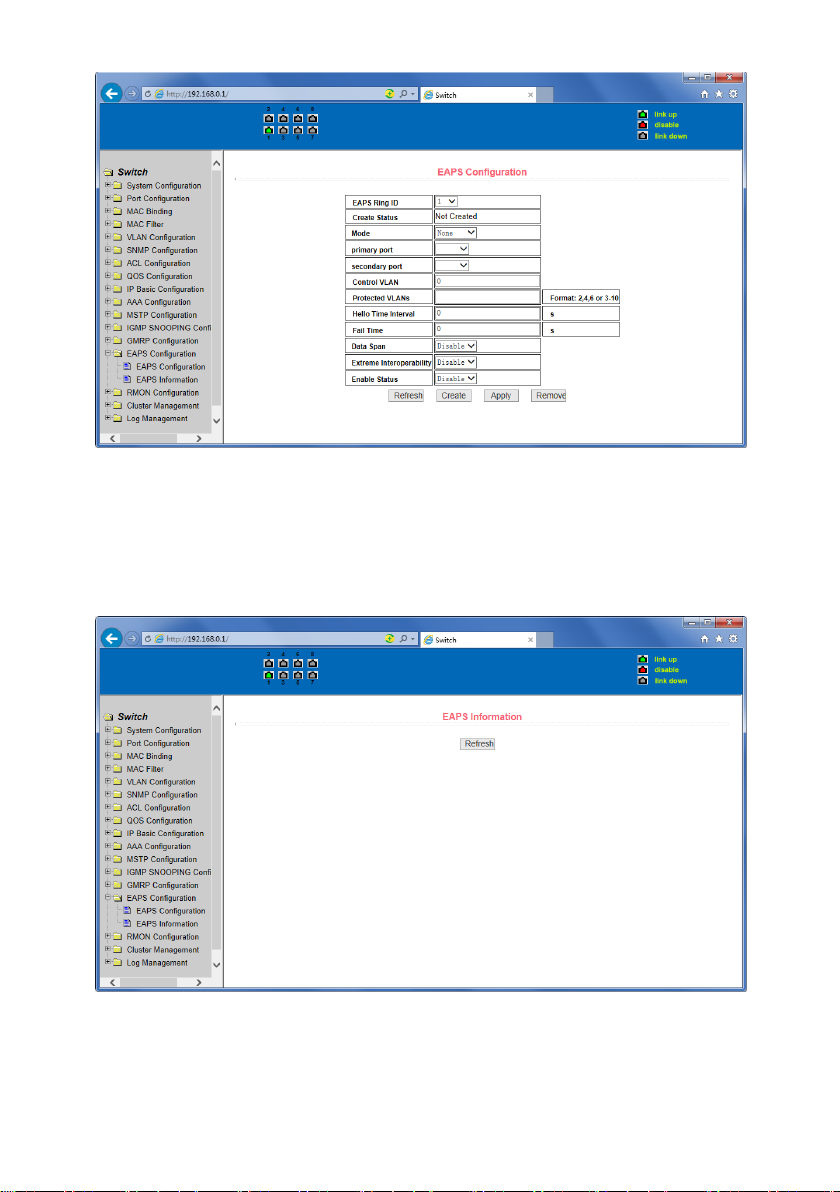
Figure 57 is an EAPS configuration page, through which you can configure some EAPS related
information, including:
• Select an EAPS ring number.
• Configure the operating node mode of an EAPS Domain.
• Configure Primary Port of EAPS Domain.
• Configure Secondary Port of EAPS Domain.
• Configure a control VLAN for EAPS Domain.
• Add one or more protected VLANs of the EAPS Domain.
• Configure an EAPS Domain to periodically send HEALTH packets. Hello-timer must be less
than fail-time.
• Set the fail-period timer of one EAPS domain to expire.
• Enable or disable compatibility with Extreme devices.
• Whether to enable
Page 51
51
Figure 57 EAPS Configuration Page
(2) EAPS information page
Figure 58 is an EAPS information page, through which users can view some EAPS related
information.
Figure 58 EAPS information page
Page 52
52
17. RMON configuration
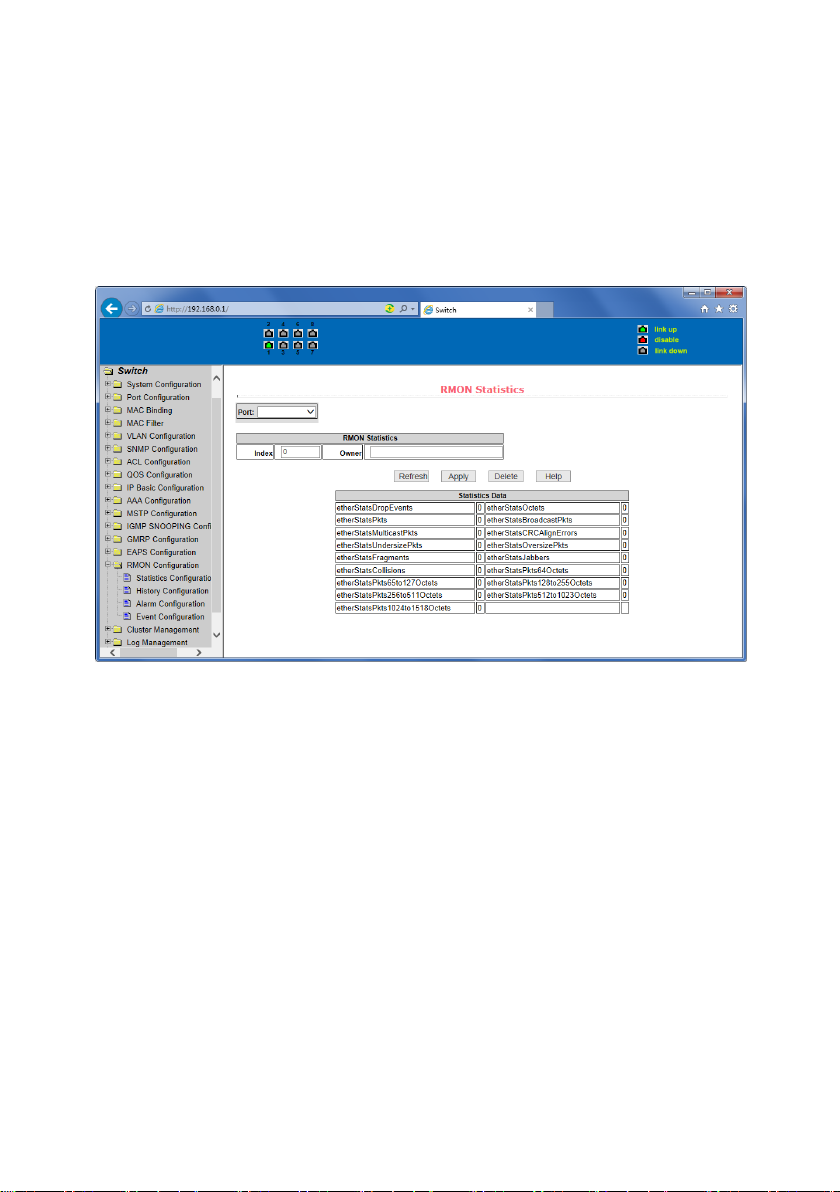
(1) RMON statistics group configuration page
Figure 59 shows the RMON statistics group configuration page. You can use this page to
configure the RMON statistics group. Select a port from the drop-down list to view/configure
the RMON statistics group configuration for this port. When not configured, the index number
is 0, fill in the correct index number (range 1 to 100), the owner is optional, you can configure
RMON statistics group for the port. The statistics table shows the port statistics from the
successful configuration.
Figure 59 RMON statistics group configuration page
(2) RMON history group configuration page
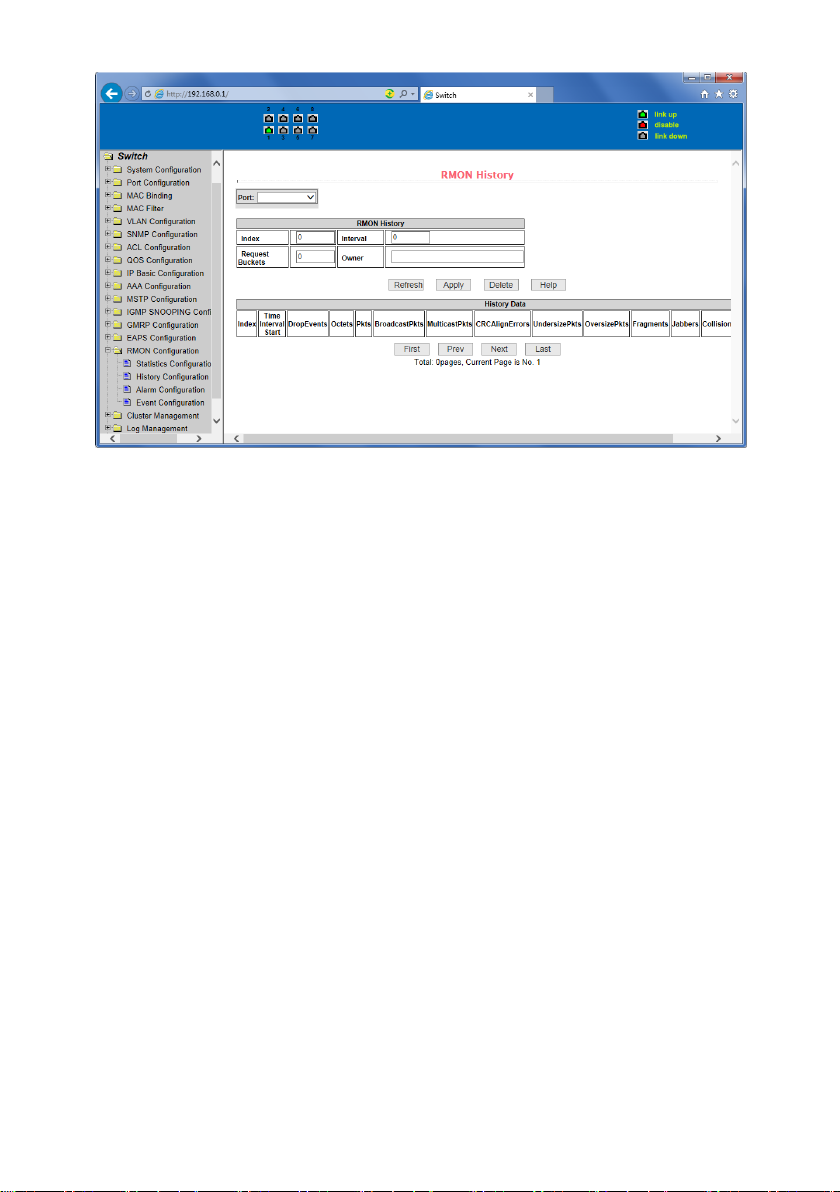
Figure 60 shows the RMON history group configuration page. You can configure the RMON
history group through this page. Select a port from the drop-down list to view/configure the
RMON history group configuration for this port. When not configured, the index number is 0,
fill in the correct index number (range is 1 to 100), interval, request Buckets, the owner is
optional, you can configure the RMON history group for the port. Interval refers to the time
interval in seconds that the data is collected. The range is 1-3600. The bucket is the allocated
storage size and it indicates how many records are stored. The range is 1-100. The statistics
table shows historical data that has been collected since the configuration was successful.
Page 53
53
Figure 60 RMON history group configuration page
(3) RMON alarm group configuration page
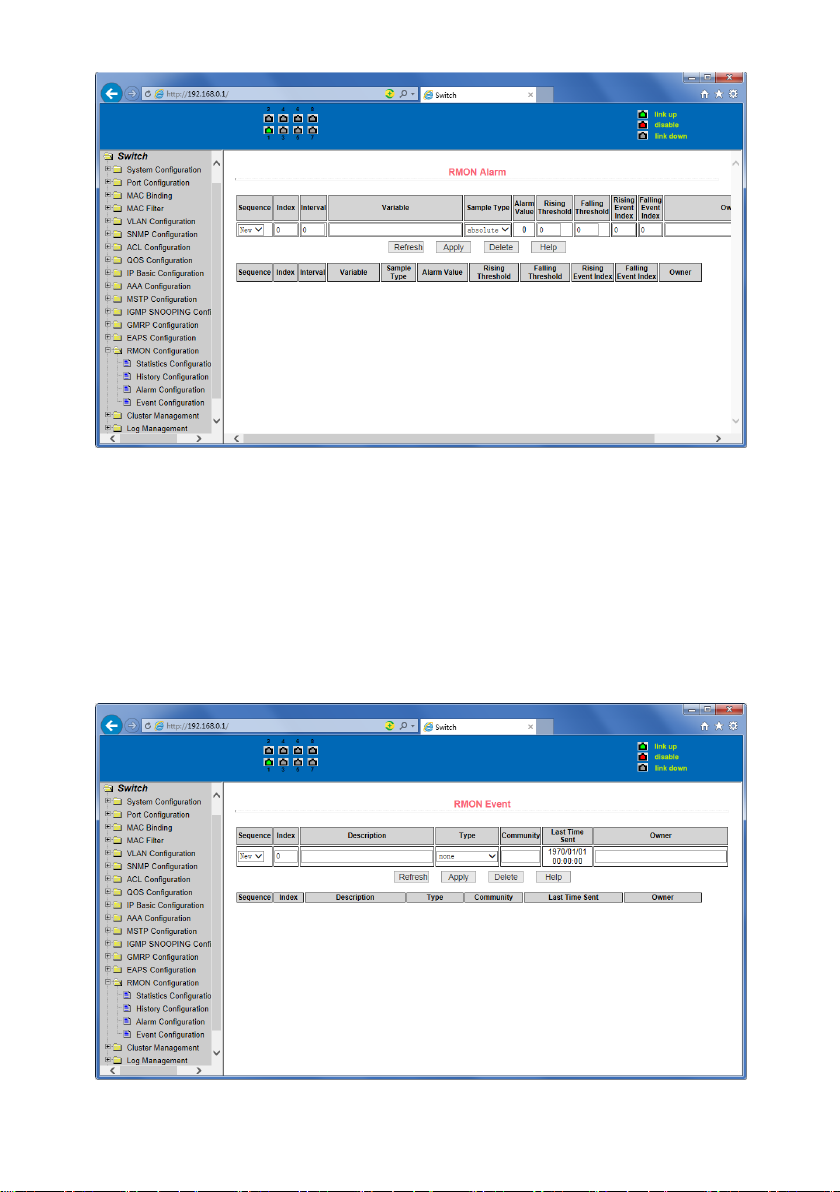
Figure 61 shows the RMON alarm group configuration page. You can use this page to create or
modify an RMON alarm group. Select a configured alarm group from the drop-down list to
view/configure its information. Select New to create it. The index number range is from 1 to
60, and the interval range is from 1 to 3600. In seconds, the monitoring object must fill in the
MIB node. The comparison method can choose absolute (absolute value) or delta (change
amount). In addition, the upper and lower limit valves must be filled in. Value, event index,
owner is optional. The alarm value is read-only and shows the sampled value when the alarm
was last issued. The event index refers to the index number of the RMON event group and
must be configured in advance.
Page 54
54
Figure 61 RMON alarm group configuration page
(4) RMON event group configuration page
Figure 62 is the RMON event group configuration page. Users can create or modify RMON
event groups through this page. Select a configured event group from the drop-down list to
view/configure its information. Select New to create it. The index number range is from 1 to
60. The description is a character string. Actions can select none (no operation), log (log),
snmp-trap (trap trap) or log-and-trap (log and Trap alarm ), Community names do not work in
this device, owners are optional. The last send time is read-only, showing the last time the
event was sent.
Figure 62 RMON Event Group Configuration Page
Page 55
55
18. Cluster configuration
(1) NDP configuration page
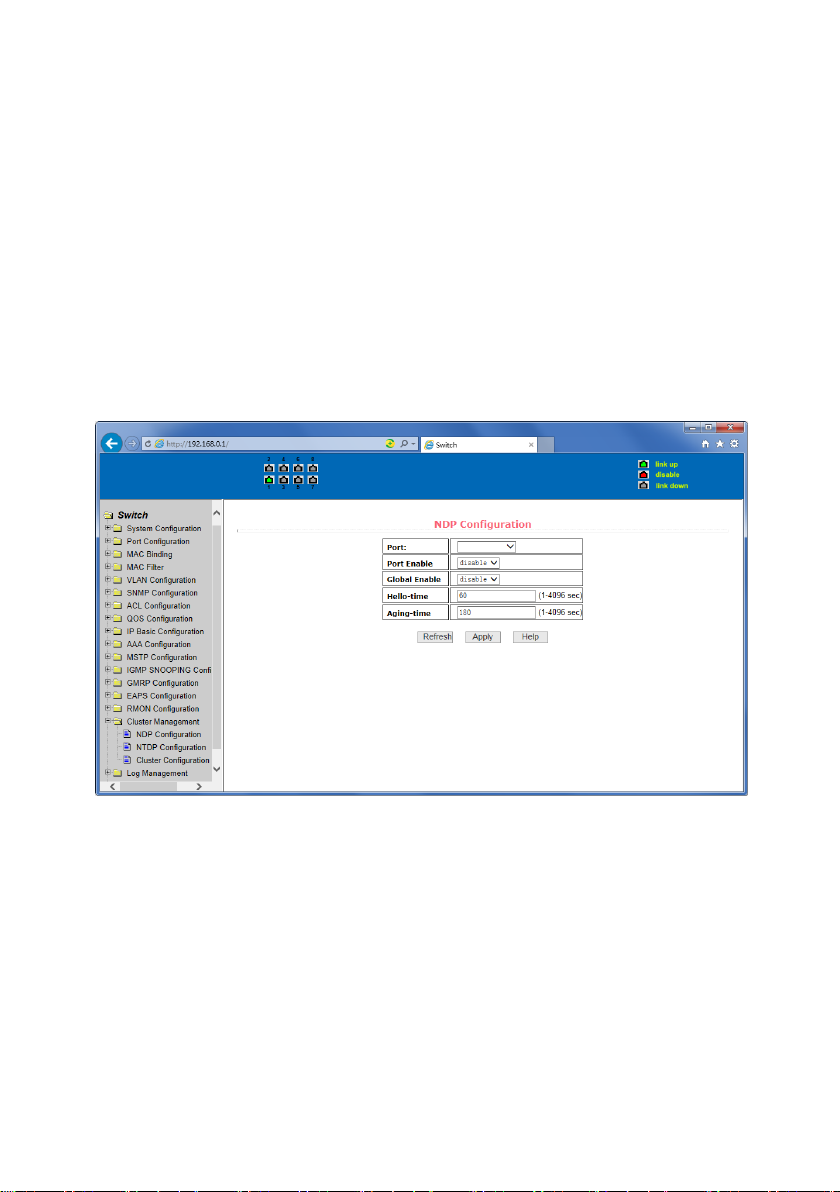
Figure 63 shows the NDP configuration page. You can use this page to configure NDP. The
configurable information includes: selecting the port, enabling the NDP function of the port,
enabling the global NDP function, the interval for sending NDP packets, and the aging time of
the NDP packets on the receiving device.
For port selection, you can select the port as required and enable the port NDP function. For
NDP to operate normally, both global and port NDP must be enabled at the same time.
Set the aging time of the NDP packets sent by the local device to the receiving device. The
valid time range is 1-4096 seconds. The default value is 180 seconds.
Set the interval for sending NDP packets. The valid time range is 1-4096 seconds and the
default is 60 seconds.
Figure 63 NDP configuration page
(2) NTDP configuration page
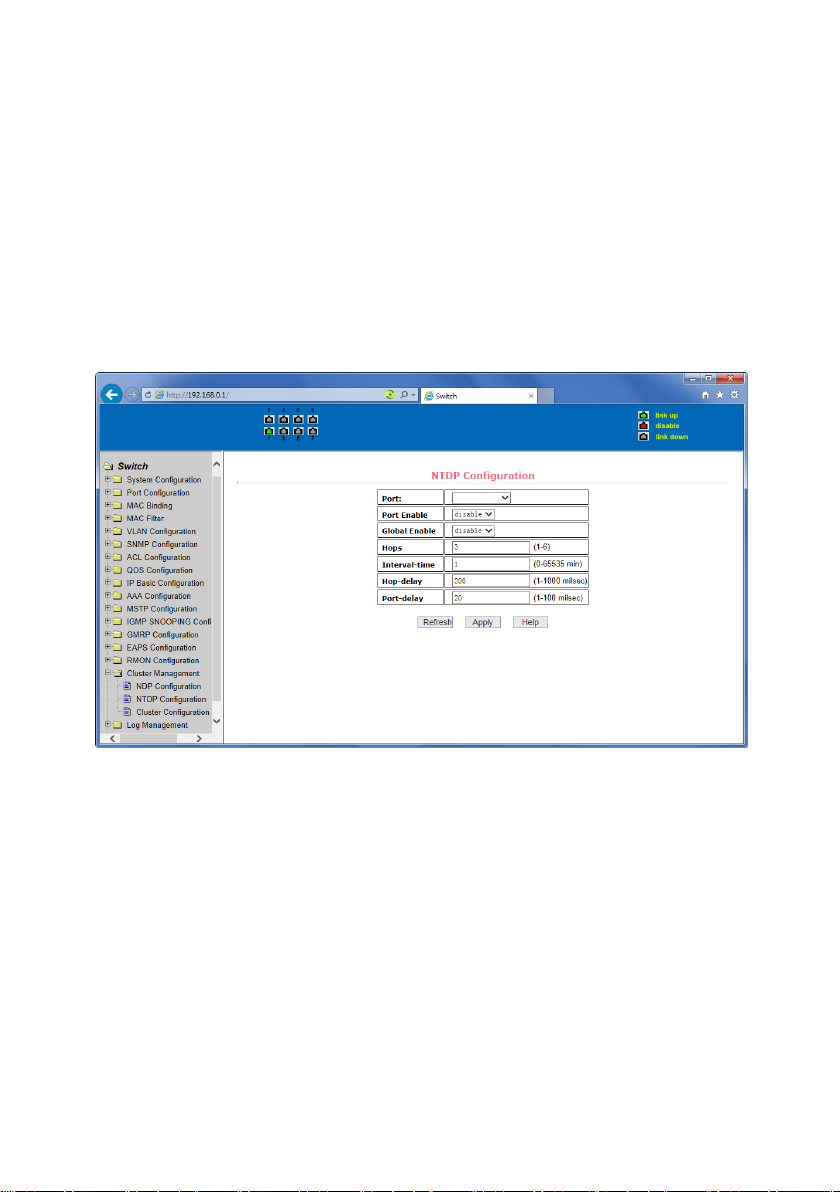
Figure 64 shows the NTDP configuration page. You can use this page to configure NTDP. The
information that can be set includes: selecting the port, enabling the NTDP function of the
port, enabling the global NTDP function, the range of the topology collection, the time interval
of collecting the regular topology, the delay time of the first port forwarding the packet, and
the forwarding of the packet by other ports delay.
For port selection, you can select the port as required and enable the NTDP function on the
port. For NTDP to operate normally, both global and port NTDP must be enabled.
Page 56
56
The range of topology collection is configured. The valid range is 1-6. In the default
configuration, the maximum number of hops from the most distant device to the topology
collection device is 3.
Set the interval for collecting the topology collection. The valid range is 0-65535 minutes. The
default configuration is 1 minute.
Set the delay for forwarding packets on the first port. The valid range is 1-1000 milliseconds.
The default value is 200 milliseconds.
Sets the delay for forwarding packets on the first port. The valid range is 1 to 100 milliseconds.
The default value is 20 milliseconds.
Figure 64 NTDP configuration page
(3) Cluster Configuration Page
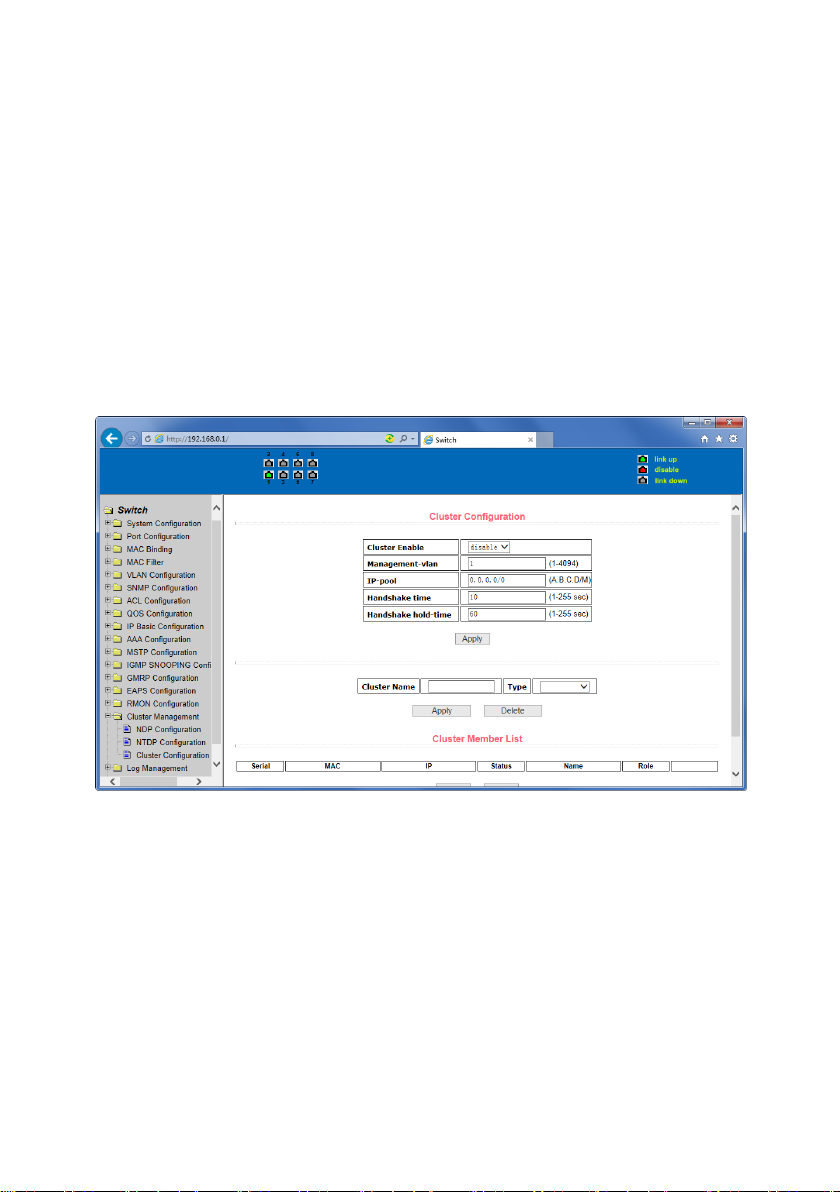
Figure 65 is the cluster configuration page. Users can configure the cluster and view the cluster
member table through this page. The information that can be set includes: enabling the cluster
function, configuring the management VLAN, the address pool of the cluster, the interval for
sending handshake packets, the effective retention time of the device, the name of the cluster,
the way to join the cluster, and deleting the cluster.
To enable the cluster function, you must enable the cluster function before the cluster
function can run normally.
Configure a management VLAN. The valid range is 1-4094. The default configuration is vlan1.
Configure a private IP address range for member devices in the cluster. The valid range of ip
addresses is 0.0.0.0 to 255.255.255.255. The valid range of the mask length is 0 to 32.
Page 57
57
Set the interval for sending handshake packets. The valid range is 1-255 seconds.
The default is 10 seconds.
Configure the device's effective retention time. The valid range is 1-255 seconds and the
default is 60 seconds.
To set up a cluster, you need to configure the cluster name and choose to join the cluster.
There are manual and automatic joining methods. After establishing a cluster, you can
automatically switch to manual, but you cannot manually switch to automatic. Manual mode
can change the cluster name.
After a cluster is established, member devices and candidate devices can be viewed in the
cluster member table. You can delete member devices or add candidate devices to member
devices according to roles.
Figure 65 Cluster Configuration Page
Page 58
58
19. Log management
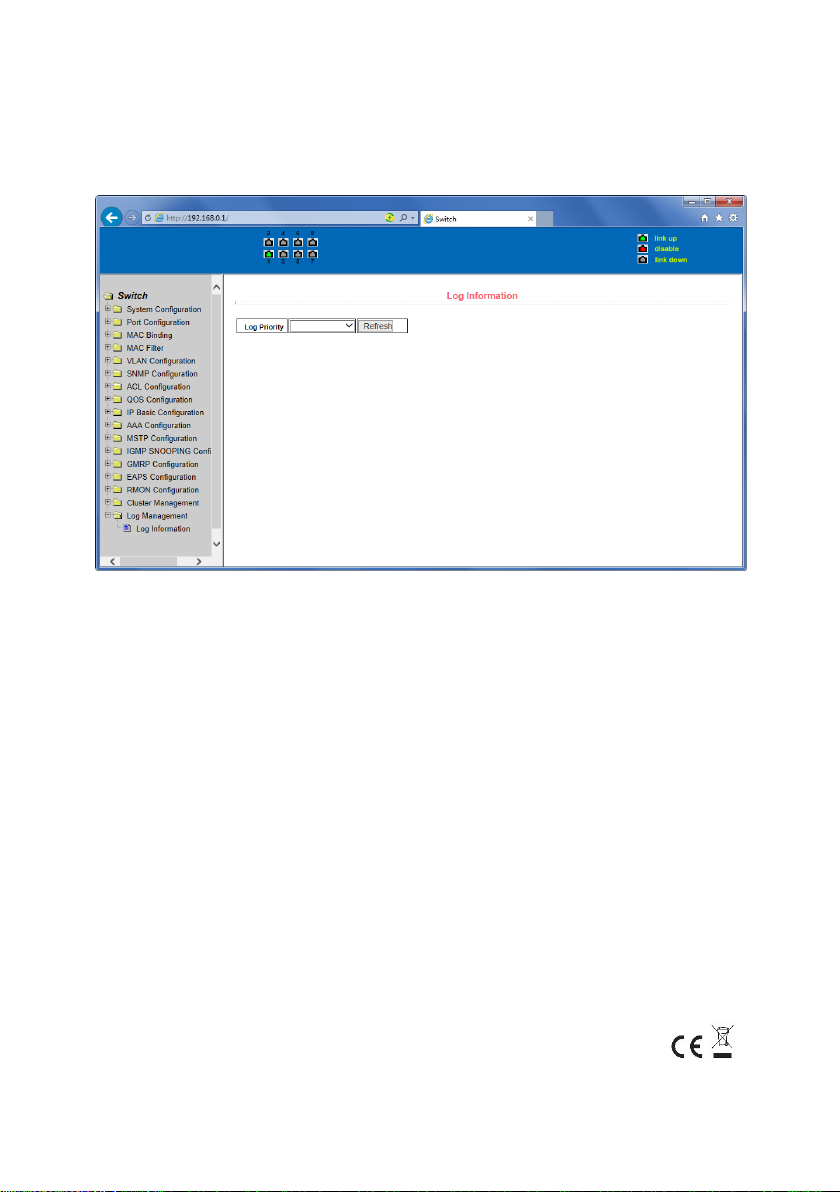
(1) Log information page
Figure 66 is the Log information page. Users can enable and view various log information
through this page.
Figure 67 Log Information Page
Critical: Output critical level information.
Debugging: Outputs debug level debugging information.
Informational: Output information information level debugging information.
Warning: Output warning level debugging information.
ALL: Output all log information
This is a Class A product. In home environment, this product may cause radio interference. In this case,
the user may be required to take appropriate measures.
Hereby Assmann Electronic GmbH, declares that the Declaration of Conformity is part of the shipping content. If the
Declaration of Conformity is missing, you can request it by post under the below mentioned manufacturer address.
www.assmann.com
Assmann Electronic GmbH
Auf dem Schüffel 3
58513 Lüdenscheid
Germany
 Loading...