

Page 1
www.denver.eu
4/2023
Page 2

Please read the safety instructions carefully before using the product for the first time
and keep the instructions for future reference.
1. This product is not a toy. Keep it out of reach of children.
2. Keep product out of the reach of children and pets to avoid chewing and
swallowing.
3. Product operating and storage temperature is from 0 degree Celsius to 40
degree Celsius. Under and over this temperature might affect the function.
4. Never open the product. Touching the inside electrics can cause electric shock.
Repairs or service should only be performed by qualified personnel.
5. Do not expose to heat, water, moisture, direct sunlight!
6. Please protect your ears against loud volume. Loud volume can damage your
ears and risk in hearing loss.
7. Bluetooth wireless technology operates within a range of about 10 m (30 feet).
The maximum communication distance may vary depending on the presence of
obstacles (people, metal objects, walls, etc.) or the electromagnetic environment.
8. Microwaves emitting from a Bluetooth device may affect the operation of
electronic medical devices.
9. The unit is not waterproof. If water or foreign objects enter the unit, it may result
in fire or electric shock. If water or a foreign object enters the unit, stop use
immediately.
10. The direct plug-in adapter is used as disconnect device, the disconnect device
shall remain readily operable. So, make sure there is space around the
power outlet for easy access.
11. Do not use non original accessories together with the product as this can make
the product functionality abnormal.
ENG 1
Page 3
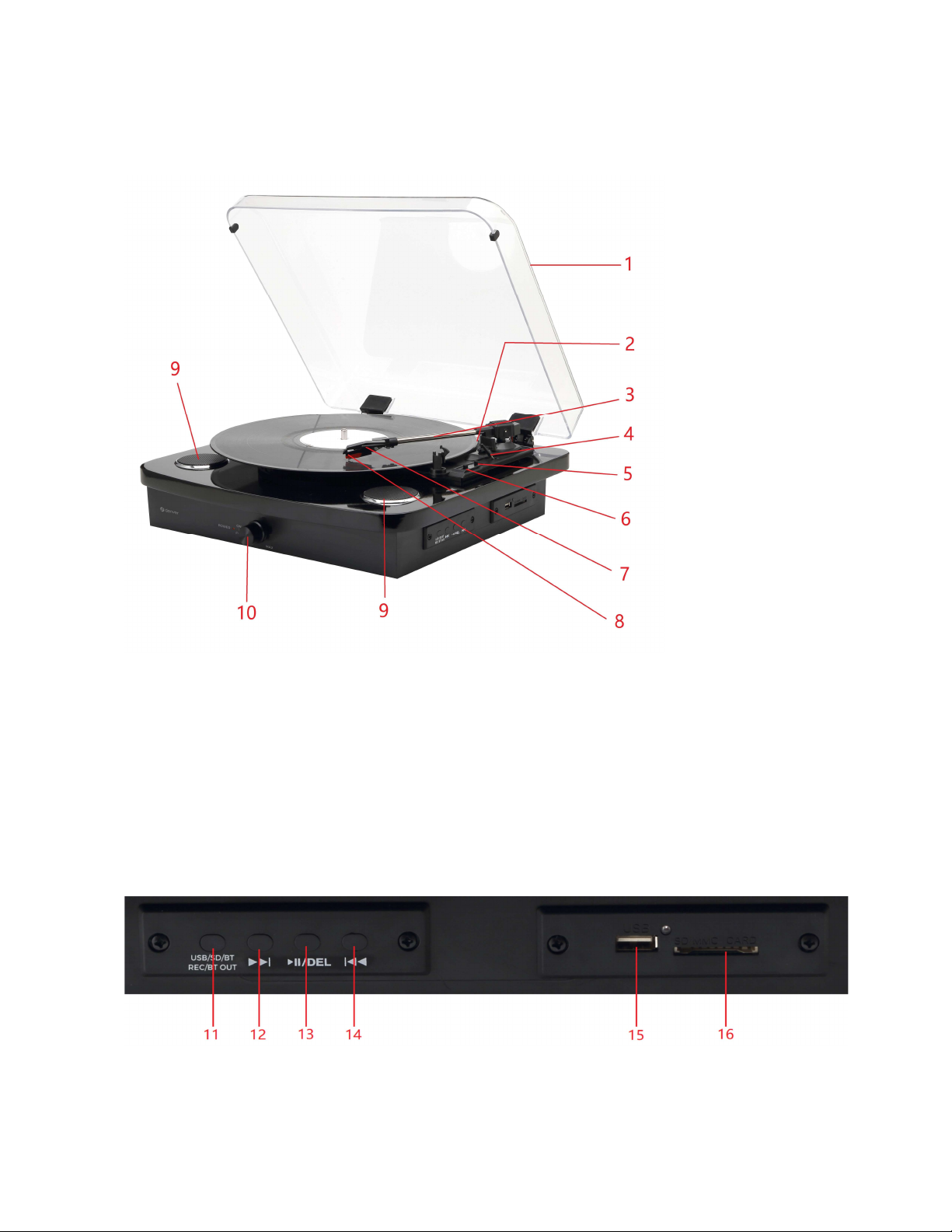
PRODUCT OVERVIEW
1. Dust cover
2. Adapter - Use this when playing 45 RPM records
3. Tone arm
4. Tone arm lift
5. Auto Stop ON/OFF switch
6. Speed selection - Three speeds for choice: 33.3, 45 and 78 RPM.
7. Cartridge
8. Stylus
9. Speaker
10. Power switch / Volume control
11. USB/SD/BT/REC/BT OUT-function mode button
ENG 2
Page 4
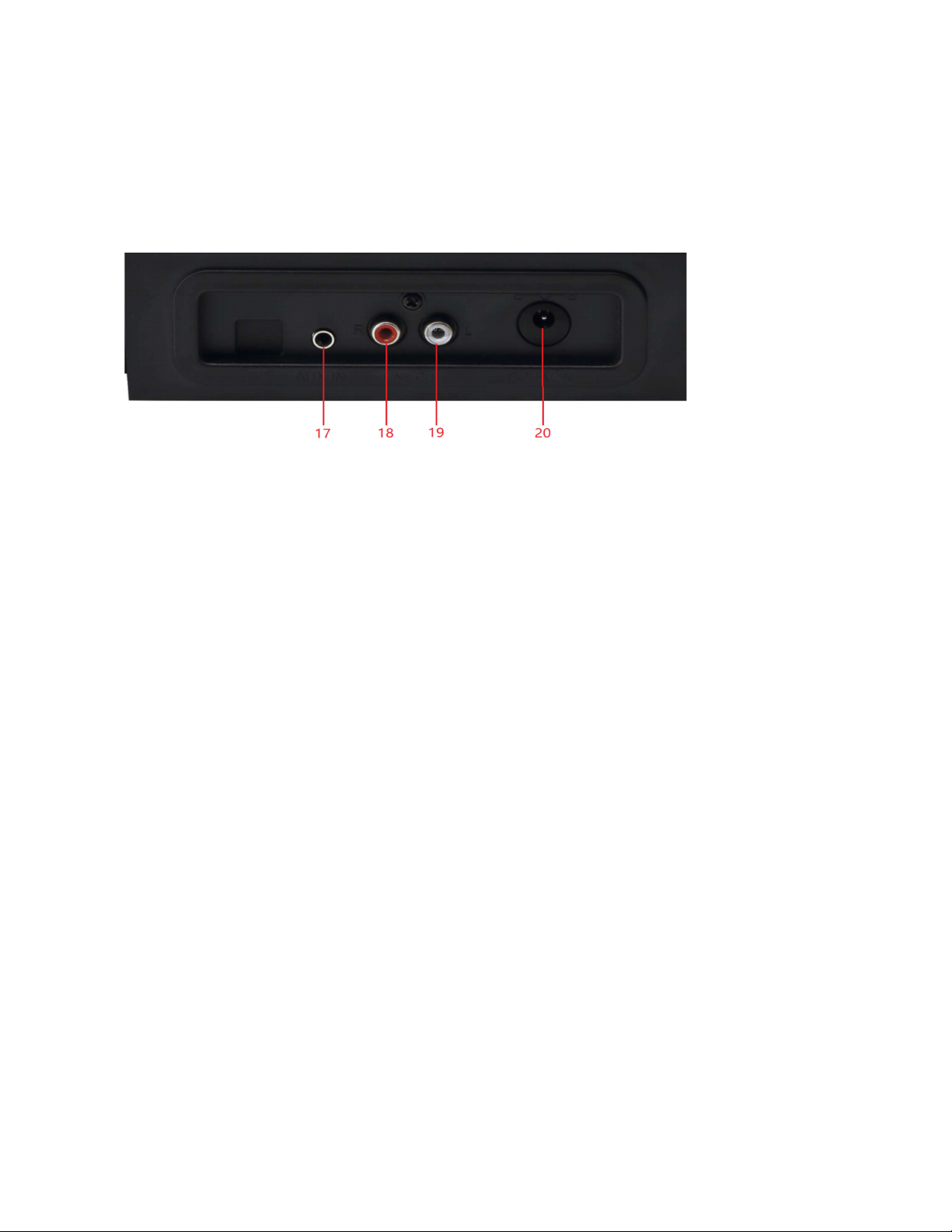
12. Next
13. Pause/play/DEL button
14. Previous
15. USB port
16. SD card slot
17. Aux in
18. Line out R channel
19. Line out L channel
20. DC power jack
ENG 3
Page 5

SETUP & BASIC OPERATION
Power Connection
Make sure that operating voltage of the unit corresponds to your home mains
voltage. Your unit can be connected to a 5V DC adaptor.
Connecting to External Audio System
You can listen to your turntable using the built-in speakers but you may wish to
connect it to your existing audio system. Connect the audio plugs to the Line
input on your mixer or amplifier using an RCA cable (not supplied).
- Red plug into R channel input.
- White plug into L channel input.
Playing a Record
Place the record of your choice on the turntable. If required, do not forget to
place the 45 RPM adaptor on the record spindle.
Choose the desired playing speed using the speed selection switch between
33.3, 45 and 78 RPM. Turn on the Rotary Power Switch, note that this also
controls volume.
Release the tone arm lock.
Carefully raise the tone arm.
Place the stylus vertically over the first track of the record, the turntable will
start turning automatically.
Lower the tone arm slowly on to the record to play.
When a record comes to the end, the turntable will stop automatically if the
auto-stop switch is in the ON position. If the switch is in the OFF position then it
will keep revolving until the tone arm is returned to the tone arm rest.
Lift up the tone arm and replace it on the tone arm rest.
Replace the protective cap on the stylus and close the tone arm lock.
Turn off power.
ENG 4
Page 6

USB/SD Recording
Place the record of your choice on the turntable. If required, do not forget to
place the 45 RPM record adapter on the record spindle.
Choose the desired playing speed using the speed selection switch between 33.3,
45 and 78 RPM. Turn on the Rotary Power Switch, note that this also
controls volume.
Release the tone arm lock.
Insert the USB or SD, press and hold the REC button, the flash of the LED
indicator besides the USB/SD connector shows that it has started recording.
When you stop the turntable or press REC button, or move the arm to LP, the
recording will stop.
USB/SD Playing
Turn on the power and insert the USB/SD and the unit will automatically play
music from USB flash or SD card.
If you are playing an LP, you need to move the tonearm back to stop the LP
music. USB/SD music will begin automatically if USB/SD is inserted. If BT is on,press USB/SD
/BT/REC/BT OUT button to select USB/SD mode, wait for a few
seconds, USB/SD music playback will begin.
DEL: to delete the music which you have recorded from LP to USB/SD device,
press and hold the DEL button, this will delete the current playing music.
Turntable cannot delete music which is not recorded by the turntable.
Connect a Bluetooth Device to the Turntable
Press the USB/SD/BT/REC/BT OUT button to choose Bluetooth mode, a blue
LED will begin flashing to indicate the turntable is in pairing mode.
Search for the turntable (named “VPL-230”) in the list of Bluetooth devices and connect.
A chime and a steady blue LED light will indicate your device has paired with
the turntable successfully.
Connect the Turntable to an External Bluetooth
Speaker
ENG 5
Page 7
Play a record before turning on pairing mode on your bluetooth speaker. Press
the USB/SD/BT/REC/BT OUT button to choose bluetooth mode. The LED light
will flash to indicate the turntable is searching for an available bluetooth
speaker.
When the turntable connects to a Bluetooth speaker, the LED light stays lit.
After the speaker is paired successfully, turntable audio signal can be
transmitted to the Bluetooth speaker.
MAINTENANCE
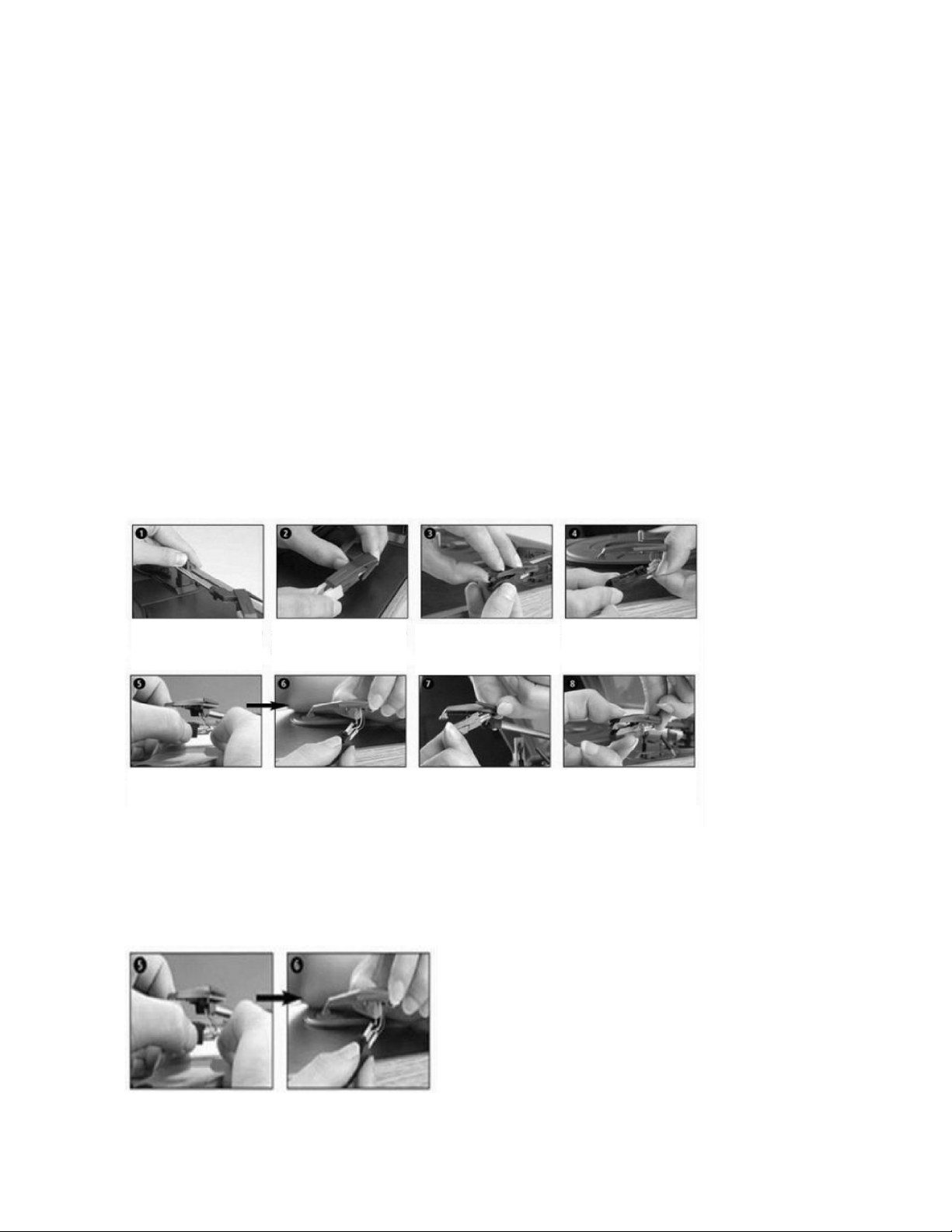
REPLACING THE STYLUS
- Refer to the figures 1-8
Push the arm lock to
releasethe tone-arm.
To fit a new one, just proceed in the opposite order,insert the audio lines accordingly,and install the
cartridge to the socket lightly.
NOTE: Please exercise extreme care while performing this operation so as to protect the tone arm and audio
line wires from any damage.
Remove cap of the
cartridge to expose the
needle out.
Separate the cartridge
from thesocket lightly.
Remove the audio lines
from the cartridge
comple tely.
INSTALLING A NEW STYLUS CARTRIDGE
- Refer to the figures 5 & 6
ENG 6
Page 8

NOTES
We advise you to clean your records with an anti-static cloth to gain maximum
enjoyment from them and to make them have a longer service life.
We would also point out that for the same reason your stylus should be replaced
periodically (approximately every 250 hours).
Dust the stylus from time to time using a very soft brush dipped in alcohol (brushing
from back to front of the cartridge).
WHEN TRANSPORTING YOUR RECORD PLAYER DO NOT FORGET TO:
- Replace the protective cap on the stylus.
- Put the rest clip into the pick-up arm.
ENG 7
Page 9
Please notice - All products are subject to change without any notice. We take reservations
for errors and omissions in the manual.
Manufacturer’s name or trade mark,
commercial registration number and address
Model identifier
Input voltage
Input AC frequency
Output voltage
Output current
Output power
Average active efficiency
Efficiency at low load (10%)
No-load power consumption
DONGGUAN WANLING ELECTRONICS
TECHNOLOGY CO.,LTD
NO. 3, PHASE 2, JINHE INDUSTRIAL ZONE
ZHANGMUTOU TOWN,DONGGUAN CITY,
GUANGDONG PROVINCE, CHINA
OBL-0501000E
100-240V
50/60HZ 0.3A MAX
5.0V
1000mA
5.0W
73.91%
78.46%
0.08W
ALL RIGHTS RESERVED, COPYRIGHT DENVER A/S
Electric and electronic equipment contains materials, components and substances that
can be hazardous to your health and the environment, if the waste material (discarded
electric and electronic equipment) is not handled correctly.
Electric and electronic equipment is marked with the crossed out trash can symbol, seen
above. This symbol signifies that electric and electronic equipment should not be disposed
of with other household waste, but should be disposed of separately.
All cities have established collection points, where electric and electronic equipment can
either be submitted free of charge at recycling stations and other collection sites, or be
collected from the households. Additional information is available at the technical
department of your city.
Hereby, Denver A/S declares that the radio equipment type VPL-230 is in compliance with
Directive 2014/53/EU. The full text of the EU declaration of conformity is available at the
following internet address: denver.eu and then click the search ICON on topline of website.
Write model number: VPL-230. Now enter product page, and RED directive is found under
downloads/other downloads.
BT Operating Frequency Range: 2.402GHz-2.480GHz
Max Output Power: 2 x 10 W / 2 x 1 W RMS
DENVER A/S
Omega 5A, Soeften
DK-8382 Hinnerup
Denmark
www.facebook.com/denver.eu
ENG 8
Page 10

Contact
Nordics
Headquarter
Denver A/S
Omega 5A, Soeften
DK-8382 Hinnerup
Denmark
Phone: +45 86 22 61 00
(Push “1” for support)
E-Mail
For technical questions, please write to:
For all other questions please write to:
Benelux
DENVER BENELUX B.V.
Barwoutswaarder 13C+D
3449 HE Woerden
The Netherlands
Phone: 0900-3437623
E-Mail: [email protected]
Spain/Portugal
DENVER SPAIN S.A
Ronda Augustes y Louis Lumiere, nº 23 – nave 16
Parque Tecnológico
46980 PATERNA
Valencia (Spain)
Spain
Phone: +34 960 046 883
Mail: [email protected]
Portugal:
Phone: +35 1255 240 294
E-Mail: [email protected]
Germany
Denver Germany GmbH Service
Max-Emanuel-Str. 4
94036 Passau
Phone: +49 851 379 369 40
E-Mail
Fairfixx GmbH
Repair and service
Rudolf-Diesel-Str. 3 TOR 2
53859 Niederkassel
(for TV, E-Mobility/Hoverboards/Balanceboards,
Smartphones & Tablets)
Tel.: +49 851 379 369 69
E-Mail: [email protected]
Austria
Lurf Premium Service GmbH
Deutschstrasse 1
1230 Wien
Phone: +43 1 904 3085
E-Mail: [email protected]
If your country is not listed above,
please write an email to
[email protected]
DENVER A/S
Omega 5A, Soeften
DK-8382 Hinnerup
Denmark
denver.eu
facebook.com/denver.eu
ENG 9
 Loading...