

Page 1

Dell EMC PowerEdge MX740c
Technical Guide
Regulatory Model: E04B Series
Regulatory Type: E04B001
Page 2

© 2019 - 2020 Dell Inc. or its subsidiaries. All rights reserved. Dell, EMC, and other trademarks are trademarks of Dell Inc. or its
subsidiaries. Other trademarks may be trademarks of their respective owners.
April 2020
Rev. A04
Page 3

Contents
1 System overview ......................................................................................................................... 5
Introduction............................................................................................................................................................................ 5
New Technologies................................................................................................................................................................. 5
2 System features...........................................................................................................................7
Product comparison ............................................................................................................................................................. 7
Specifications......................................................................................................................................................................... 8
3 Chassis view and features............................................................................................................ 11
Front view of the system.....................................................................................................................................................11
Internal system view............................................................................................................................................................ 12
Locating the Service Tag of your system......................................................................................................................... 12
4 Processor...................................................................................................................................13
Processor features...............................................................................................................................................................13
Supported processors......................................................................................................................................................... 14
Chipset...................................................................................................................................................................................17
5 Memory..................................................................................................................................... 19
6 Storage..................................................................................................................................... 22
Supported hard drives........................................................................................................................................................ 22
RAID controllers...................................................................................................................................................................22
Internal Dual SD module (IDSDM).....................................................................................................................................22
7 Networking and PCIe.................................................................................................................. 25
8 Power, thermal, and acoustics ....................................................................................................26
Power....................................................................................................................................................................................26
Thermal.................................................................................................................................................................................26
Acoustics.............................................................................................................................................................................. 27
9 Supported Operating Systems.....................................................................................................28
10 Dell EMC OpenManage systems management..............................................................................29
Server and Chassis Managers........................................................................................................................................... 30
Dell EMC consoles...............................................................................................................................................................30
Automation Enablers...........................................................................................................................................................30
Integration with third-party consoles................................................................................................................................30
Connections for third-party consoles............................................................................................................................... 30
Dell EMC Update Utilities................................................................................................................................................... 30
Dell resources.......................................................................................................................................................................30
Contents 3
Page 4

11 Appendix A. Additional specifications.......................................................................................... 32
Dimensions and weight....................................................................................................................................................... 32
Environmental specifications............................................................................................................................................. 32
Video specifications ............................................................................................................................................................33
USB ports............................................................................................................................................................................. 33
12 Appendix B. Standards compliance............................................................................................. 34
13 Appendix C: Additional resources............................................................................................... 35
14 Appendix D. Support and deployment services.............................................................................36
ProDeploy Enterprise Suite and Residency Services......................................................................................................36
ProDeploy Plus...............................................................................................................................................................36
ProDeploy....................................................................................................................................................................... 36
Basic Deployment.......................................................................................................................................................... 36
Residency Services........................................................................................................................................................37
Deployment services........................................................................................................................................................... 37
Remote Consulting Services.............................................................................................................................................. 37
Data Migration Service....................................................................................................................................................... 37
ProSupport Enterprise Suite.............................................................................................................................................. 37
ProSupport Plus...................................................................................................................................................................38
ProSupport...........................................................................................................................................................................38
ProSupport One for Data Center...................................................................................................................................... 39
Support Technologies......................................................................................................................................................... 39
Additional professional services.........................................................................................................................................40
Dell Education Services...................................................................................................................................................... 40
Dell EMC Global Infrastructure Consulting Services...................................................................................................... 40
Dell EMC Managed Services..............................................................................................................................................40
4
Contents
Page 5

1
System overview
The Dell EMC PowerEdge MX portfolio delivers a fully managed, high performance system that will free up valuable IT resources and
personnel so you can focus on innovation. Break free from the bounds of technology silos and routine, daily and time consuming
operational management to realize your IT and digital business transformations.
PowerEdge MX, a unified, high performance kinetic infrastructure, provides the agility, resiliency and efficiency to optimize a wide variety
of traditional and new, emerging data center workloads and applications. With its kinetic architecture and agile management the MX
portfolio dynamically configures compute, storage and fabric, increases team effectiveness and accelerates operations. Its responsive
design delivers the innovation and longevity customers of all sizes need for their IT and digital business transformations. PowerEdge MX
ecosystem consists of a new chassis infrastructure, compute sleds, fabric switches, and a storage sled, all managed by Dell EMC
OpenManage Enterprise-Modular Edition.
Topics:
• Introduction
• New Technologies
Introduction
Designed for PowerEdge MX kinetic infrastructure ecosystem, the PowerEdge MX740c compute sled, with dense compute, large memory
capacity and rich set of storage subsystem options, delivers the flexibility and agility needed in today’s software-defined data centers. This
full-featured, storage-rich, flexible 2-socket compute sled is ideal for many workloads including virtualization, collaborative, and softwaredefined workloads.
New Technologies
The following table shows the new technologies available on the PowerEdge MX740c:
Table 1. New technologies
Technologies Description
2nd Generation Intel(R) Xeon(R) Scalable processors
Intel® C628 chipset
DDR4 memory MX740c supports four DIMM types:
• Up to 28 cores
• Up to 3.8 GHz
• Intel® Ultra Path Interconnect (UPI), up to 10.4 GT/s, with up
to 2 links between sockets.
• Integrated PCIe Gen3 48 lanes/socket
• Intel® Platform Controller Hub (PCH)
• Optional Intel® QuickAssist Technology (QAT)
• RDIMM: Registered DIMM – Provides for higher capacity
options and advanced RAS features.
• LRDIMM: Load Reduced DIMM – Provides maximum capacity
but higher power consumption.
• NVDIMM: Non-Volatile DIMM – Provides a persistent memory
solution with NAND and DRAM that maintains data in power
loss, system crash, or normal shutdown. This solution requires a
battery as a power source for an AC loss condition.
• DCPMM: Intel® Optane™ DC persistent memory: Provides a
persistent memory solution with intel 3D cross point that
maintains data in power loss, system crash, or normal
shutdown. This solution does not require a battery for AC
power loss.
System overview 5
Page 6

Technologies Description
iDRAC with Lifecycle Controller Works in conjunction with OpenManage Enterprise – Modular,
embedded systems management solution for Dell EMC servers,
features hardware and firmware inventory and alerting, faster
performance and many more features.
6 System overview
Page 7

System features
The PowerEdge MX740c compute sled is a unique design for the PowerEdge MX7000 chassis and is not compatible with other
PowerEdge modular chassis.
The MX7000 chassis has the following features:
• Sleds
• 8 single-width or 4 double-width sleds
• Double wide sleds in slots 1-2, 3-4, 5-6, 7-8
• Power supply units
• Up to 6 front loading power supply units
• Fans
• 4 x 60 mm front fan modules
• 5 x 80 mm rear fan modules
• Right control panel ear
• Power button and LED indicators
• 2 USB Type-A and 1 USB type Micro-AB
• 1 Mini DisplayPort
• Left control panel ear - three configurations
• LCD with QuickSync
• LCD without QuickSync
• LED indicators only
For additional information, please refer to the PowerEdge MX7000 Technical Guide.
2
Topics:
• Product comparison
• Specifications
Product comparison
The following table shows the comparison between the PowerEdge MX740c (designed for PowerEdge MX7000 chassis) and PowerEdge
M640/FC640 (designed for PowerEdge M1000e/VRTX and FX2/FX2S chassis) modular compute sleds:
Table 2. Comparison table
Feature PowerEdge MX740c PowerEdge M640/FC640
Processor
Chipset
Memory
• One or two Intel® Xeon(R) Scalable Processors
• One or two 2nd Generation Intel(R) Xeon(R)
Scalable processors
• Up to 28 cores per socket
• Max TDP: 205W
• Intel® C628
• Optional Intel® QuickAssist Technology (QAT)
• 24 DIMM slots
• 12 slots enabled for NVDIMM-N or DCPMM
• Maximum capacity (RDIMM): 1.5TB
• Maximum capacity (LRDIMM): 3TB
• Maximum capacity (NVDIMM-N): 192GB
• One or two Intel® Xeon(R) Scalable Processors
• Up to 28 cores per socket
• Max TDP: 165 W
• Intel® C621
• 16 DIMM sockets
• Maximum capacity (RDIMM): 1TB
• Maximum capacity (LRDIMM): 2TB
System features 7
Page 8

Feature PowerEdge MX740c PowerEdge M640/FC640
• Maximum capacity (DCPMM): 6144GB
Storage Controllers
Drive Support
Drive Backplanes
Internal Boot Choice of BOSS (Boot Optimized Storage
I/O Slots
USB
• S140 Software RAID
• HBA330 MX
• H730P MX Performance RAID, 2GB NV cache
• H745P MX Performance RAID, internal and
external drive connect, 8GB NV cache
• HBA330 MX mini-mezz, HBA, external drive
connect, no cache
• 2.5-inch 12Gb SAS
• 2.5-inch 6Gb SATA
• 2.5-inch NVMe
• 6 x 2.5-inch SAS/SATA
• 6 x 2.5-inch SAS/SATA/NVMe
• 4 x 2.5-inch SAS/SATA/NVMe for NVDIMM
implementations
Subsystem) or IDSDM (Internal Dual SD Module)
• Two PCIe 3.0 x16 Mezz slots (Fabric A and B)
• One PCIe 3.0 x16 Mini-mezz slot (Fabric C)
• One internal USB 3.0 port
• One external USB 3.0 port
• One USB 2.0 management port to iDRAC
• One USB 3.0 + USB 2.0 port for IDSDM
• S140 Software RAID
• H330 Entry/Value RAID, no cache
• H730P Performance RAID, 2GB NV cache
• 2.5-inch 12Gb SAS
• 2.5-inch 6Gb SATA
• 2.5-inch NVMe
• 2 x 2.5-inch SAS/SATA/NVMe
Choice of BOSS (Boot Optimized Storage
Subsystem) or IDSDM (Internal Dual SD Module)
• One bNDC (Ethernet)
• Two PCIe 3.0 x8 Mezz slots (M1000e)
• Two PCIe 2.0 x8 switch mezz (VRTX)
• PCIe adapter for FX2S enablement (FX2)
• One internal USB 3.0 port
• One external USB 3.0 port
• One USB 2.0 management port to iDRAC
• One USB 3.0 + USB 2.0 port for IDSDM
Video
Management iDRAC9 iDRAC9
Security
Fans In chassis In chassis
Power Supplies Power provided by chassis Power provided by chassis
Chassis MX7000
• Integrated VGA controller in iDRAC, VGA over
LAN
• 4Gb DDR4 shared with iDRAC application
memory
• Optional TPM 1.2/2.0
• Cryptographically signed firmware
• Silicon Root of Trust
• Secure Boot
• System Lockdown
• System Erase
• Integrated VGA controller in iDRAC, VGA over
LAN
• 4Gb DDR4 shared with iDRAC application
memory
• Optional TPM 1.2/2.0
• Cryptographically signed firmware
• Silicon Root of Trust
• Secure Boot
• System Lockdown
• System Erase
• M640: M1000e / VRTX
• FC640: FX2 / FX2S
Specifications
Table 3. Technical specifications
Features Specifications
Form factor Full-height, single-width compute sled
8 System features
Page 9

Features Specifications
Processor
Processor sockets 2 sockets
Internal interconnect Intel Ultra Path Interconnect (UPI) up to 10.4 GT/s and up to two links
Chipset Intel C628
• Intel® Xeon(R) Scalable Processor Family
• 2nd Generation Intel(R) Xeon(R) Scalable processors
between sockets.
Optional Intel® QuickAssist Technology (QAT)
Memory
Drive support
Drive backplanes
RAID controller
Mezzanine slots
• Supports RDIMM, LRDIMM, NVDIMM-N, and DCPMM
• DDR4 2400 MT/s, 2666 MT/s, and 2933 MT/s
• 8GB, 16GB, 32GB, 64GB, and 128GB
• Minimum 8GB per module
• 3TB (LRDIMM) or 1.5 TB (RDIMM) maximum RAM
• Support up to 192GB NVDIMM
• Support up to 6144GB DCPMM
• 2.5-inch 12Gb SAS
• 2.5-inch 6Gb SATA
• 2.5-inch NVMe
• 6 x 2.5-inch SAS/SATA
• 6 x 2.5-inch SAS/SATA/NVMe (universal BP)
• 4 x 2.5-inch SAS/SATA/NVMe (universal BP) for NVDIMM
implementations
• S140 (SATA and NVMe)
• HBA330 MX
• PERC H730P MX Performance RAID, 2GB NV cache
• PERC H745P MX Performance RAID, internal and external drive connect,
8GB NV cache
• HBA330 Mini-Mezzanine card HBA, external drive connect, no cache
• Two PCIe 3.0 x16 Mezzanine slots (Fabrics A and B)
• One PCIe 3.0 x16 Mini-mezzanine slot (Fabric C)
Video
Internal boot options Choice of BOSS(Boot Optimized Storage Subsystem) (M.2 module) or
USB
Trusted Platform
Module
Systems management
• Integrated VGA controller in iDRAC, VGA over LAN
• 4Gb DDR4 shared with iDRAC application memory
IDSDM (Internal Dual SD Module)
• One internal and one external USB 3.0 port
• One USB 2.0 management port to iDRAC
• One USB 3.0 + USB 2.0 port for IDSDM
Optional TPM 1.2, TPM 2.0
• Embedded /At-the-Chassis:
• OpenManage Enterprise - Modular Edition
• Quick Sync 2 Bluetooth Low Entegy (BLE)/wireless module
• Embedded / At-the-Server - Compute Sled:
• iDRAC9
• iDRAC Direct
• iDRAC RESTful API with Redfish
• Consoles:
System features 9
Page 10

Features Specifications
• OpenManage Enterprise
• OpenManage Essentials
• OpenManage Power Center
• Mobility:
• OpenManage Mobile (requires OM Enterprise or OM Essentials)
10 System features
Page 11
Chassis view and features
The MX740c is a full-height, single-width, two socket compute sled for the MX7000 chassis.
Topics:
• Front view of the system
• Internal system view
• Locating the Service Tag of your system
Front view of the system
3
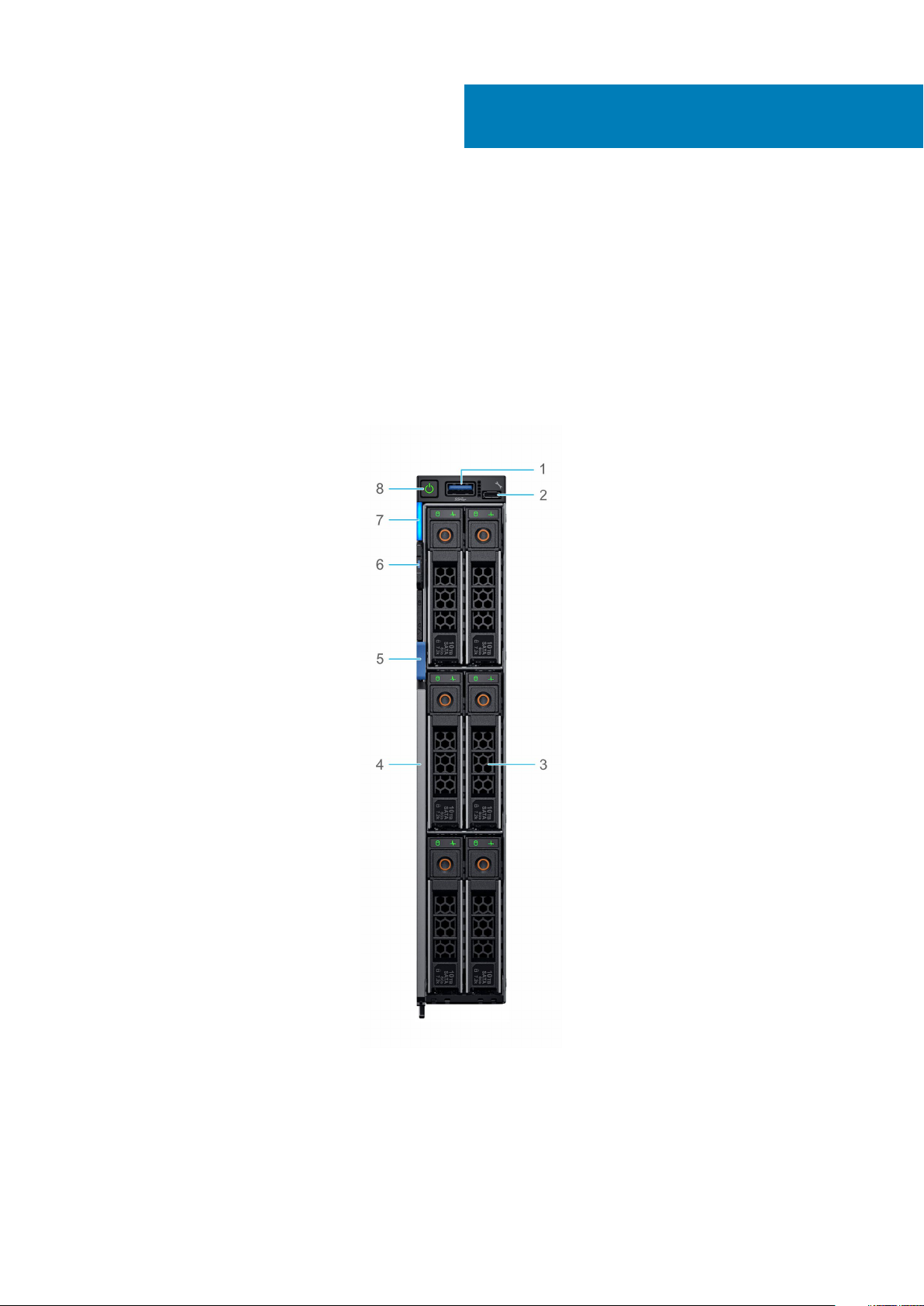
Figure 1. Front view of the 6 drive configuration
1. USB 3.0 port
2. iDRAC direct port
3. Hard Drive/SSD
4. System handle release
Chassis view and features 11
Page 12
5. System handle release button
6. Information tag
7. System status LED
8. Power button
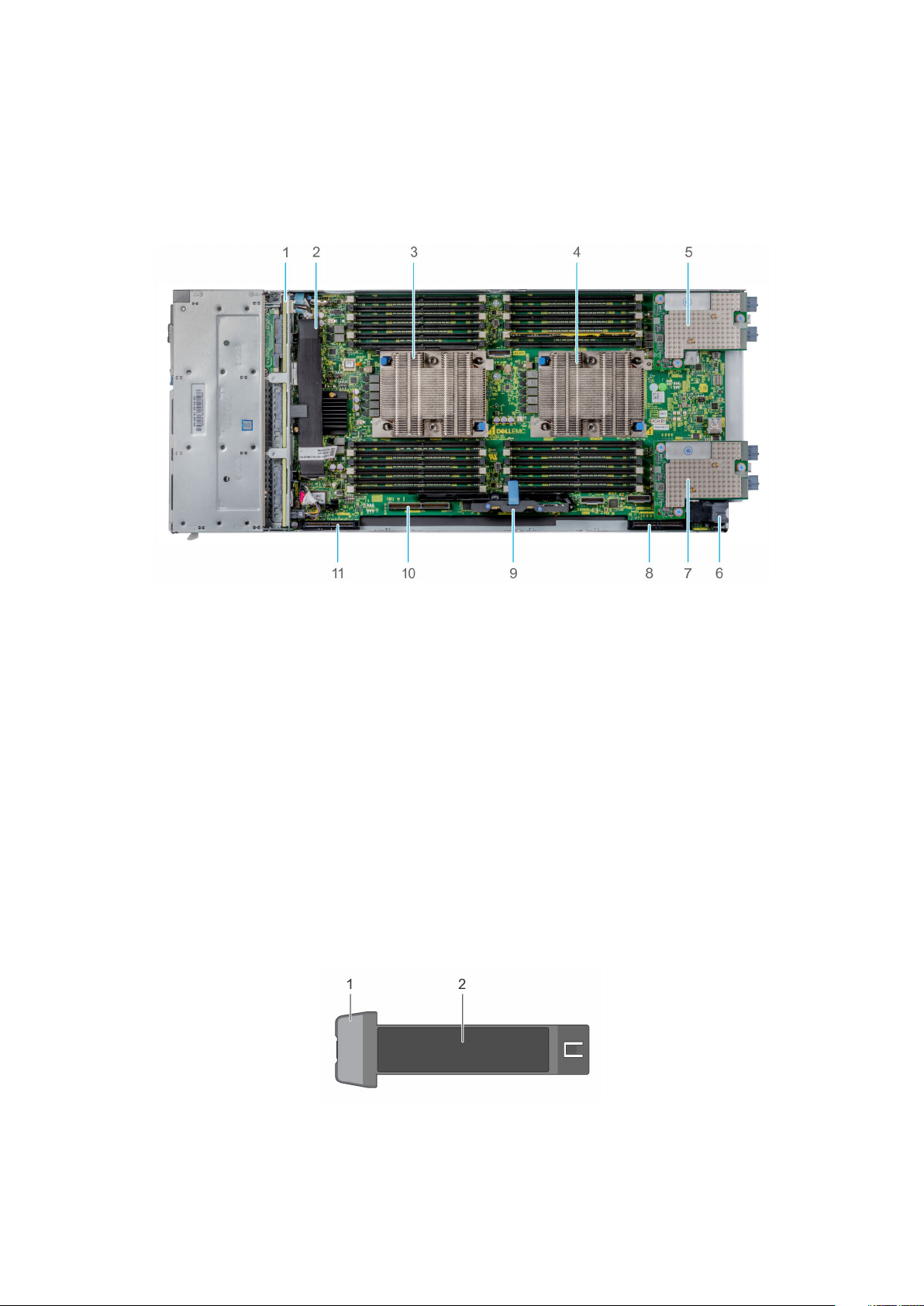
Internal system view
Figure 2. Inside the system
1. Drive backplane
2. Backplane to PERC cable
3. Processor 1 (heat sink)
4. Processor 2 (heat sink)
5. Mezzanine card A1 (Fabric A)
6. Power connector
7. Mezzanine card B1 (Fabric B)
8. Mini Mezzanine connector
9. iDRAC module
10. BOSS or IDSDM module connector
11. PERC connector
Locating the Service Tag of your system
The System Information Tab contains the system's unique Express Service Code and Service Tag. This information is used by Dell EMC to
identify system configuration, warranty terms, and to route support calls to the appropriate personnel. A Quick Resource Locator (QRL)
label on the System Information Tab links to a web page that shows the exact factory configuration and specific warranty purchased.
Figure 3. Locating Service Tag of your system
1. Information tag
2. Service tag
12
Chassis view and features
Page 13

4
Processor
The 2nd Generation Intel® Xeon® Processor Scalable Family is the most advanced compute core featuring a new core micro architecture
optimized to accelerate a wide range of compute workloads. It delivers improved TCO through the best per core performance per dollar.
The 2nd Generation Intel® Xeon® Processor Scalable Family will have named medal designations with different levels of features
according to the medal designation below:
• Platinum (8xxx) - Best performance and business agility, and hardware enhanced security.
• Gold (6xxx) - Great performance, fast memory, and more interconnect/accelerator engines.
• Gold (5xxx) - Better performance and advanced reliability.
• Silver (4xxx) - Efficient performance at lower power.
• Bronze (3xxx) - Entry performance.
Topics:
• Processor features
• Supported processors
• Chipset
Processor features
The following list highlights the features of the 2nd Generation Intel® Xeon® Scalable Processor family:
• Up to 28 cores with Intel® HT Technology (2 threads/core)
• Intel® Turbo Boost technology (excludes Bronze processors)
• Between 70W-205W TDP
• 768GB/socket memory capacity on all standard processors
• 2TB/socket memory capacity on select processors designated by "M"
• 3.84TB socket memory capacity on select processors designated by "L" for PowerEdge servers.
• Socket P
• 14nm process Technology
• Rebalanced Cache Hierarchy: 1.375MB Last level Cache/core
• 2S, 4S, 8S scalable (note: 4xxx (Silver) & 3xxx (Bronze) do not support 4S or 8S platforms
• Support for Intel AVX-512
• Intel® Ultra Path Interconnect (UPI) with bandwidth up to 10.4GT/s
• 6 DDR4 channels per CPU
• 2133, 2400, 2666, 2933 speeds at 2 DIMMs per Channel; no 3 Dimms per channel support
• MPX (Memory Protection Extensions) support
• Integration of next-generation Intel® Omni-Path Fabric controller on select -F processors
• Up to 48 PCIe lanes per CPU with x16, x8 & x4 Bifurcation support
• PCI Express 3.0 (2.5, 5.0, 8.0 GT/s)
• Separate Reference with Independent Spread Spectrum Clocking (SRIS)
• MCTP Scaling
• Per Core P-State (PCPS)
• Uncore Frequency Scaling (UFS)
• Energy Efficient Turbo (EET)
• On die PMAX detection
Processor 13
Page 14

Supported processors
Table 4. Supported processors for MX740c
Intel SKU Clock
Speed
8180M 2.50 GHz 3.80 GHz 38.50 MB 28–56 10.4 GT/s Yes Yes 205 W 2666 MT/s
8180 2.50 GHz 3.80 GHz 38.50 MB 28-56 10.4 GT/s Yes Yes 205 W 2666 MT/s
8176M 2.10 GHz 3.80 GHz 38.50 MB 28–56 10.4 GT/s Yes Yes 165 W 2666 MT/s
8176 2.10 GHz 3.80 GHz 38.50 MB 28-56 10.4 GT/s Yes Yes 165 W 2666 MT/s
8170M 2.10 GHz 3.70 GHz 35.75 MB 26–52 10.4 GT/s Yes Yes 165 W 2666 MT/s
8170 2.10 GHz 3.70 GHz 35.75 MB 26-52 10.4 GT/s Yes Yes 165 W 2666 MT/s
8168 2.70 GHz 3.70 GHz 33.00 MB 24-48 10.4 GT/s Yes Yes 205 W 2666 MT/s
8164 2.00 GHz 3.70 GHz 35.75 MB 26-52 10.4 GT/s Yes Yes 150 W 2666 MT/s
8160M 2.10 GHz 3.70 GHz 33.00 MB 24-48 10.4 GT/s Yes Yes 150 W 2666 MT/s
8160 2.10 GHz 3.70 GHz 33.00 MB 24-48 10.4 GT/s Yes Yes 150 W 2666 MT/s
8153 2.00 GHz 2.80 GHz 22.00 MB 16-32 10.4 GT/s Yes Yes 125 W 2666 MT/s
6154 3.00 GHz 3.70 GHz 24.75 MB 18-36 10.4 GT/s Yes Yes 200 W 2666 MT/s
6152 2.10 GHz 3.70 GHz 30.25 MB 22-44 10.4 GT/s Yes Yes 140 W 2666 MT/s
6150 2.70 GHz 3.70 GHz 24.75 MB 18-36 10.4 GT/s Yes Yes 165 W 2666 MT/s
6148 2.40 GHz 3.70 GHz 27.50 MB 20-40 10.4 GT/s Yes Yes 150 W 2666 MT/s
Max Turbo Cache Cores-
Threads
UPI Speed Hyper-
Threading
Turbo TDP DDR4
Speed
6146 3.20 GHz 4.20 GHz 24.75 MB 12-24 10.4 GT/s Yes Yes 165 W 2666 MT/s
6144 3.50 GHz 4.20 GHz 24.75 MB 8-16 10.4 GT/s Yes Yes 150 W 2666 MT/s
6142M 2.60 GHz 3.70 GHz 22.00 MB 16-32 10.4 GT/s Yes Yes 150 W 2666 MT/s
6142 2.60 GHz 3.70 GHz 22.00 MB 16-32 10.4 GT/s Yes Yes 150 W 2666 MT/s
6140M 2.30 GHz 3.70 GHz 24.75 MB 18-36 10.4 GT/s Yes Yes 140 W 2666 MT/s
6140 2.30 GHz 3.70 GHz 24.75 MB 18-36 10.4 GT/s Yes Yes 140 W 2666 MT/s
6138 2.00 GHz 3.70 GHz 27.50 MB 20-40 10.4 GT/s Yes Yes 125 W 2666 MT/s
6136 3.00 GHz 3.70 GHz 24.75 MB 12-24 10.4 GT/s Yes Yes 150 W 2666 MT/s
6134M 3.20 GHz 3.70 GHz 24.75 MB 8-16 10.4 GT/s Yes Yes 130 W 2666 MT/s
6134 3.20 GHz 3.70 GHz 24.75 MB 8-16 10.4 GT/s Yes Yes 130 W 2666 MT/s
6132 2.60 GHz 3.70 GHz 19.25 MB 14-28 10.4 GT/s Yes Yes 140 W 2666 MT/s
6130 2.10 GHz 3.70 GHz 22.00 MB 16-32 10.4 GT/s Yes Yes 125 W 2666 MT/s
6128 3.40 GHz 3.70 GHz 19.25 MB 6-12 10.4 GT/s Yes Yes 115 W 2666 MT/s
6126 2.60 GHz 3.70 GHz 19.25 MB 12-24 10.4 GT/s Yes Yes 125 W 2666 MT/s
5122 3.60 GHz 3.70 GHz 16.50 MB 4-8 10.4 GT/s Yes Yes 105 W 2666 MT/s
5120 2.20 GHz 3.20 GHz 19.25 MB 14-28 10.4 GT/s Yes Yes 105 W 2400 MT/s
5118 2.30 GHz 3.20 GHz 16.50 MB 12-24 10.4 GT/s Yes Yes 105 W 2400 MT/s
5117 2.00 GHz 2.80 GHz 19.25 MB 14-28 10.4 GT/s Yes Yes 105 W 2400 MT/s
4116 2.10 GHz 3.00 GHz 16.50 MB 12-24 9.6 GT/s Yes Yes 85 W 2400 MT/s
4114 2.20 GHz 3.00 GHz 13.75 MB 10-20 9.6 GT/s Yes Yes 85 W 2400 MT/s
14 Processor
Page 15

Intel SKU Clock
Speed
4112 2.60 GHz 3.00 GHz 8.25 MB 4-8 9.6 GT/s Yes Yes 85 W 2400 MT/s
4110 2.10 GHz 3.00 GHz 11.00 MB 8-16 9.6 GT/s Yes Yes 85 W 2400 MT/s
4108 1.80 GHz 3.00 GHz 11.00 MB 8-16 9.6 GT/s Yes Yes 85 W 2400 MT/s
3106 1.70 GHz - 11.00 MB 8-8 9.6 GT/s No No 85 W 2133 MT/s
3104 1.70 GHz - 8.25 MB 6-6 9.6 GT/s No No 85 W 2133 MT/s
Table 5. Supported 2nd Generation Intel Xeon Scalable Processor Specifications for MX740c
Max Turbo Cache Cores-
Threads
UPI Speed Hyper-
Threading
Turbo TDP DDR4
Speed
Intel SKU Clock
Speed
8280 2.70 GHz 4.00 GHz 3.30 GHz 38.50 MB 28-56 10.4 GT/s 205 W 2933 MT/s 1.0 TB
8280M 2.70 GHz 4.00 GHz 3.30 GHz 38.50 MB 28-56 10.4 GT/s 205 W 2933 MT/s 2.0 TB
8280L 2.70 GHz 4.00 GHz 3.30 GHz 38.50 MB 28-56 10.4 GT/s 205 W 2933 MT/s 4.5 TB
8276 2.20 GHz 4.00 GHz 3.00 GHz 38.50 MB 28-56 10.4 GT/s 165 W 2933 MT/s 1.0 TB
8276M 2.20 GHz 4.00 GHz 3.00 GHz 38.50 MB 28-56 10.4 GT/s 165 W 2933 MT/s 2.0 TB
8276L 2.20 GHz 4.00 GHz 3.00 GHz 38.50 MB 28-56 10.4 GT/s 165 W 2933 MT/s 4.5 TB
8270 2.70 GHz 4.00 GHz 3.40 GHz 35.75 MB 26-52 10.4 GT/s 205 W 2933 MT/s 1.0 TB
8268 2.90 GHz 3.90 GHz 3.50 GHz 35.75 MB 24-48 10.4 GT/s 205 W 2933 MT/s 1.0 TB
8260 2.40 GHz 3.90 GHz 3.10 GHz 35.75 MB 24-48 10.4 GT/s 165 W 2933 MT/s 1.0 TB
8260M 2.40 GHz 3.90 GHz 3.10 GHz 35.75 MB 24-48 10.4 GT/s 165 W 2933 MT/s 2.0 TB
8260L 2.40 GHz 3.90 GHz 3.10 GHz 35.75 MB 24-48 10.4 GT/s 165 W 2933 MT/s 4.5 TB
8260Y 2.40 GHz NA NA 35.75 MB 24-48 10.4 GT/s 165 W 2933 MT/s 1.0 TB
8253 2.20 GHz 3.00 GHz 2.50 GHz 22.00 MB 16-32 10.4 GT/s 125 W 2933 MT/s 1.0 TB
6262V 1.90 GHz 3.60 GHz 2.50 GHz 33.00 MB 24-48 10.4 GT/s 135 W 2400 MT/s 1.0 TB
6258R* 2.70 GHz 4.00 GHz 3.4 GHz 38.5 MB 28-56 10.4 GT/s 205W 2933 MT/s 1.0 TB
6254 3.10 GHz 4.00 GHz 3.90 GHz 24.75 MB 18-36 10.4 GT/s 200 W 2933 MT/s 1.0 TB
6252N 2.70 GHz 3.60 GHz 3.00 GHz 33.00 MB 24-48 10.4 GT/s 150 W 2933 MT/s 1.0 TB
6252 2.10 GHz 3.70 GHz 2.80 GHz 35.75 MB 24-48 10.4 GT/s 150 W 2933 MT/s 1.0 TB
6248R* 3.00 GHz 4.00 GHz 3.6 GHz 35.75 MB 24-48 10.4 GT/s 205W 2933 MT/s 1.0 TB
6248 2.50 GHz 3.90 GHz 3.20 GHz 27.50 MB 20-40 10.4 GT/s 150 W 2933 MT/s 1.0 TB
6246R* 3.40 GHz 4.10 GHz 4.0 GHz 35.75 MB 16-32 10.4 GT/s 205 W 2933 MT/s 1.0 TB
6246 3.30 GHz 4.20 GHz 4.10 GHz 24.75 MB 12-24 10.4 GT/s 165 W 2933 MT/s 1.0 TB
6244 3.60 GHz 4.40 GHz 4.30 GHz 24.75 MB 8-16 10.4 GT/s 150 W 2933 MT/s 1.0 TB
6242R* 3.10 GHz 4.10 GHz 3.8 GHz 35.75 MB 20-40 10.4 GT/s 205W 2933 MT/s 1.0 TB
6242 2.80 GHz 3.90 GHz 3.50 GHz 22.00 MB 16-32 10.4 GT/s 150 W 2933 MT/s 1.0 TB
6240R 2.40 GHz 4.00 GHz 3.20 GHz 35.75 MB 24-48 10.4 GT/s 165 W 2933 MT/s 1.0 TB
6240M 2.60 GHz 3.90 GHz 3.30 GHz 24.75 MB 18-36 10.4 GT/s 150 W 2933 MT/s 2.0 TB
6240L 2.60 GHz 3.90 GHz 3.30 GHz 24.75 MB 18-36 10.4 GT/s 150 W 2933 MT/s 4.5 TB
6240Y 2.60 GHZ 3.90 GHz 3.30 GHz 24.75 MB 18-36 10.4 GT/s 150 W 2933 MT/s 1.0 TB
6240 2.60 GHz 3.90 GHz 3.30 GHz 24.75 MB 18-36 10.4 GT/s 150 W 2933 MT/s 1.0 TB
6238R 2.20 GHz 4.00 GHz 3.00 GHz 38.5 MB 28-56 10.4 GT/s 165 W 2933 MT/s 1.0 TB
Non- AVX
Max Turbo
Non-AVX
All core
Turbo
Cache Cores-
Threads
UPI Speed TDP Max DDR4
Speed
Max
Memory
per Socket
Processor 15
Page 16

Intel SKU Clock
Speed
6238L 2.1 GHz 3.70 GHz 2.70 GHz 30.25 MB 22-44 10.4 GT/s 140 W 2933 MT/s 4.5 TB
6238M 2.1 GHz 3.70 GHz 2.70 GHz 30.25 MB 22-44 10.4 GT/s 140 W 2933 MT/s 2.0 TB
6238 2.70 GHz 3.70 GHz 2.70 GHz 30.25 MB 22-44 10.4 GT/s 140 W 2933 MT/s 1.0 TB
6234 3.3 GHz 4.00 GHz 4.00 GHz 24.75 MB 8-16 10.4 GT/s 130 W 2933 MT/s 1.0 TB
6230R 2.10 GHz 4.00 GHz 3.00 GHz 35.75 MB 26-52 10.4 GT/s 150 W 2933 MT/s 1.0 TB
6230N 2.30 GHz 3.50 GHz 2.90 GHz 27.50 MB 20-40 10.4 GT/s 125 W 2933 MT/s 1.0 TB
6230 2.10 GHz 3.90 GHz 2.80 GHz 27.50 MB 20-40 10.4 GT/s 125 W 2933 MT/s 1.0 TB
6226R 2.90 GHz 3.90 GHz 3.6 GHz 22 MB 16-32 10.4 GT/s 150 W 2933 MT/s 1.0 TB
6226 2.70 GHz 3.70 GHz 3.50 GHz 19.25 MB 12-24 10.4 GT/s 125 W 2933 MT/s 1.0 TB
6222V 1.80 GHz 3.60 GHz 2.40 GHz 27.50 MB 20-40 10.4 GT/s 115 W 2400 MT/s 1.0 TB
6208U 2.90 GHz 3.90 GHz 3.6 GHz 22 MB 16-32 10.4 GT/s 150 W 2933 MT/s 1.0 TB
5222 3.80 GHz 3.90 GHz 3.90 GHz 16.50 MB 4-8 10.4 GT/s 105 W 2933 MT/s 1.0 TB
5220R 2.20 GHz 4.00 GHz 2.9 GHz 35.75 MB 24-48 10.4 GT/s 150 W 2666 MT/s 1.0 TB
5220S 2.70 GHz 3.90 GHz 2.70 GHz 24.75 MB 18-36 10.4 GT/s 105 W 2667 MT/s 1.0 TB
5220 2.20 GHz 3.90 GHz 2.70 GHz 24.75 MB 18-36 10.4 GT/s 125 W 2666 MT/s 1.0 TB
5218R 2.10 GHz 4.00 GHz 2.90 GHz 27.5 MB 20-40 10.4 GT/s 125 W 2666 MT/s 1.0 TB
5218N 2.3 GHz 3.70 GHz 3.00 GHz 22.00 MB 16-32 10.4 GT/s 110 W 2667 MT/s 1.0 TB
5218 2.30 GHz 3.90 GHz 2.80 GHz 22.00 MB 16-32 10.4 GT/s 125 W 2666 MT/s 1.0 TB
5217 3.00 GHz 3.70 GHz 3.40 GHz 11.00 MB 8-16 10.4 GT/s 115 W 2666 MT/s 1.0 TB
5215 2.50 GHz 3.40 GHz 3.00 GHz 13.75 MB 10-20 10.4 GT/s 85 W 2666 MT/s 1.0 TB
5215M 2.50 GHz 3.40 GHz 3.00 GHz 13.75 MB 10-20 10.4 GT/s 85 W 2666 MT/s 2.0 TB
5215L 2.50 GHz 3.40 GHz 3.00 GHz 13.75 MB 10-20 10.4 GT/s 85 W 2666 MT/s 4.5 TB
4214R 2.4 GHz 3.50 GHz 3.00 GHz 16.5 MB 12-24 9.6 GT/s 100 W 2400 MT/s 1.0 TB
4210R 2.4 GHz 3.2 GHz 2.9 GHz 13.75 MB 10-20 9.6 GT/s 100 W 2400 MT/s 1.0 TB
4216 2.10 GHz 3.20 GHz 2.70 GHz 22.00 MB 16-32 9.6 GT/s 100 W 2400 MT/s 1.0 TB
4215R 3.20 GHz 4.00 GHz 3.6 GHZ 11.00 MB 8-16 9.6 GT/s 130 W 2400 MT/s 1.0 TB
4215 2.50 GHz 3.50 GHz 3.00 GHz 11.00 MB 8-16 9.6 GT/s 85 W 2400 MT/s 1.0 TB
4214 2.20 GHz 3.20 GHz 2.70 GHz 16.50 MB 12-24 9.6 GT/s 85 W 2400 MT/s 1.0 TB
4214Y 2.20 GHZ NA NA 16.5 MB 12- 24 9.6 GT/S 85 W 2400 MT/s 1.0 TB
4210 2.20 GHz 3.20 GHz 2.70 GHz 13.75 MB 10-20 9.6 GT/s 85 W 2400 MT/s 1.0 TB
4208 2.10 GHz 3.20 GHz 2.50 GHz 11.00 MB 8-16 9.6 GT/s 85 W 2400 MT/s 1.0 TB
3206R 1.9 GHz - - 11.00 MB 8-8 9.6 GT/s 85 W 2133 MT/s 1.0 TB
3204 1.90 GHz - - 8.25 MB 6-6 9.6 GT/s 85 W 2133 MT/s 1.0 TB
Non- AVX
Max Turbo
Non-AVX
All core
Turbo
Cache Cores-
Threads
UPI Speed TDP Max DDR4
Speed
Max
Memory
per Socket
NOTE: *Available 1H 2020
Table 6. Supported processor levels and features
Processor levels Features
81xx-Platinum
16 Processor
• 2S-2UPI, 2S-3UPI, 4S-2UPI, 4S-3UPI, and 8S-3UPI capability
• 6-ch DDR4 @ 2666
Page 17

Processor levels Features
• 3 UPI links @ 10.4 GT/s
• Intel® Turbo Boost
• Intel® Hyper-Threading
• Intel® AVX-512 (2 512-bit FMAs)
• 48 lanes PCIe Gen3
• Node Controller Support
• Advanced RAS
61xx-Gold
51xx1-Gold
41xx-Silver
• 2S-2UPI, 2S-3UPI, 4S-2UPI, and 4S-3UPI capability
• 6-ch DDR4 @ 2666
• 3 UPI links @ 10.4 GT/s
• Intel® Turbo Boost
• Intel® Hyper-Threading
• Intel® AVX-512 (2 512-bit FMAs)
• 48 lanes PCIe Gen3
• Node Controller Support
• Advanced RAS
• 2S-2UPI & 4S-2UPI capability
• 6-ch DDR4 @ 2400
• 2 UPI links @ 10.4 GT/s
• Intel® Turbo Boost
• Intel® Hyper-Threading
• Intel® AVX-512 (11512-bit FMA)
• 48 lanes PCIe Gen3
• Advanced RAS
• 2S-2UPI
• 6-ch DDR4 @ 2400
• 2 UPI links @ 9.6 GT/s
• Intel® Turbo Boost
• Intel® Hyper-Threading
• Intel® AVX-512 (1 512-bit FMA)
• 48 lanes PCIe Gen3
• Standard RAS
1
31xx-Bronze
• 2S-2UPI
• 6-ch DDR4 @ 2133
• 2 UPI links @ 9.6 GT/s
• Intel® AVX-512 (1 512-bit FMA)
• 48 lanes PCIe Gen3
• Standard RAS
Chipset
The PowerEdge MX740c systems use the Intel® C628 chipset with optional Intel(R) QuickAssist technology (QAT) that provides
extensive I/O support. Functions and capabilities include:
• ACPI Power Management Logic Support, Revision 4.0a
• PCI Express Base Specification Revision 3.0
• Integrated Serial ATA host controller, supports data transfer rates of up to 6 Gb/s on all ports
• xHCI USB controller with SuperSpeed USB 3.0 ports
• Direct Media Interface
• Serial Peripheral Interface
• Enhanced Serial Peripheral Interface
Processor
17
Page 18

• Flexible I/O-Allows some high speed I/O signals to be configured as PCIe* root ports, PCIe* uplink for use with certain PCH SKUs,
SATA (and sSATA), or USB 3.0.
• General Purpose Input Output (GPIO)
• Low Pin Count interface, interrupt controller, and timer functions
• System Management Bus Specification, Version 2.0
• Integrated Clock Controller / Real Time Clock Controller
• Intel® High Definition Audio and Intel® Smart Sound Technology
• Integrated 10/1 Gb Ethernet
• Integrated 10/100/1000 Mbps Ethernet MAC
• Supports Intel® Rapid Storage Technology Enterprise
• Supports Intel® Active Management Technology and Server Platform Services
• Supports Intel® Virtualization Technology for Directed I/O
• Supports Intel® Trusted Execution Technology
• JTAG Boundary Scan support
• Intel® QuickAssist Technology
• Intel® Trace Hub for debug
18 Processor
Page 19

5
Memory
The PowerEdge MX740c supports up to 24 DIMMs, with up to 3 TB of memory and speeds up to 2933 MT/s.
There are four different types of DIMMs:
• RDIMM: Registered DIMM – Provides for higher capacity options and advanced RAS features. It is the most commonly used DIMM
type, and offers the best mix of frequency, capacity, and rank structure choices.
• LRDIMM: Load Reduced DIMM – Provides maximum capacity beyond that of an RDIMM but at a higher power consumption. Uses a
buffer to reduce memory loading to a single load on all DDR signals, allowing for greater density.
• DCPMM (also known as Intel Optane DC persistent memory): Provides a large memory capacity at an affordable price. Any application
can take advantage of DCPMM in Memory Mode with a compatible operating system. Unlock more performance and persistency
when using an application that supports App Direct Mode. DCPMM is used along with RDIMMs or LRDIMMs and a maximum number
of 6 DCPMMs can be used per CPU. This persistent memory technology does not require a battery.
• NVDIMM: Non-Volatile DIMM – Provides a persistent memory solution with NAND and DRAM that maintains data in power loss,
system crash, or normal shutdown. This solution requires a battery as a power source for an AC loss condition. It can be used along
with RDIMMs.
Intel® Optane™ DC Persistent Memory (DCPMM)
Intel® Optane™ DC Persistent Memory is a new memory technology that allows customers to reach a large memory capacity at an
affordable price. Also, when operating the memory in “App Direct Mode” the memory is persistent.
DCPMMs come in three capacities: 128 GB, 256 GB, and 512 GB. DCPMMs must be accompanied by a RDIMM or LRDIMM in the first
slot of the same channel. That means each CPU may be populated with up to 6 DCPMMs and a minimum of 6 RDIMMs or LRDIMMs. For
best performance, it is recommended to have all 12 DIMMs slots per CPU populated.
Intel Optane DC persistent memory operates in two modes, Memory Mode and Application Direct Mode.
Table 7. Memory modes
Trait Memory Mode App Direct Mode
Application support Any application Application must state that it supports "App
Direct Mode"
DRAM Used as cache and is not available as system
memory.
Persistence No Yes
Both DCPMM and DRAM are available as
system memory
Supported memory
The table below lists the memory technologies supported by the PowerEdge MX740c.
Table 8. Memory technologies
Feature MX740c (DDR4)
DIMM Type RDIMM, NVDIMM-N, LRDIMM, DCPMM
Transfer Speed 2933 MT/s, 2666 MT/s, 2400 MT/s
Voltage 1.2 V (DDR4)
Supported DIMMs for MX740c with Intel(R) Xeon(R) Scalable processors.
Memory 19
Page 20

Table 9. Memory speeds
DIMM
type
RDIMM 2666 8 1 x8 1.2 V
RDIMM 2666 16 2 x8 1.2 V
RDIMM 2666 32 2 x4 1.2 V
LRDIMM 2666 64 4 x4 1.2 V
LRDIMM 2666 128 8 x4 1.2 V
NVDIMM 2666 16 1 x4 1.2 V
DCPMM 2666 128 NA x6 1.2 V
Supported DIMMs for MX740c with second Generation Intel(R) Xeon(R) Scalable processors.
Table 10. Supported memory with second Generation Intel(R) Xeon(R) Scalable processors.
DIMM Type DIMM Speed 1
RDIMM 2666 MT/s - 2666
RDIMM 2933 MT/s - 2666
RDIMM 2933 MT/s - 2666
RDIMM 2933 MT/s - 2666
L RDIMM 2666 MT/s - 2666
NVDIMM-N 2666 MT/s 16 1 x4 1.2 V
DCPMM 2666 MT/s 128 NA x6 1.2 V
DIMM speed (MT/s) DIMM capacity (GB) Ranks per DIMM Data width DIMM voltage
DPC - 2 DPC
MT/s
MT/s
MT/s
MT/s
MT/s
DIMM Capacity
(GB)
8 1 x8 1.2 V
16 2 x8 1.2 V
32 2 x4 1.2 V
64 2 x4 1.2 V
128 8 x4 1.2 V
Ranks per DIMM Data Width DIMM voltage
Memory speed
The MX740c supports memory speeds of 2933 MT/s, 2666 MT/s, and 2400 MT/s depending on the processor installed. All memory
operates at the same voltage. By default, the speed is the highest common supported speed between the CPUs and DIMMs. The
operating speed of the memory is also determined by the maximum speed that is supported by the processor, the speed settings, and the
operating voltage of the system that are in the BIOS.
The table below lists the memory configuration and performance details for MX740c, based on the quantity and type of DIMMs per
memory channel.
Memory configurations
The MX740c servers support flexible memory configurations ranging from capacities of 8 GB (minimum) to 3 TB (maximum). The
MX740c supports up to 12 DIMMs per processor (up to 24 DIMMs in a dual- processor configuration). Each server has six memory
channels per processor, with each channel supporting up to 2 DIMMs.
System supports a flexible memory configuration, according to the following population rules:
• Speed: If DIMMs of different speeds are mixed, all channels across all processors operate at the slowest DIMM's common frequency.
• DIMM type: Only one type of DIMM is allowed per system: RDIMM, or LRDIMM. These types cannot be mixed.
• DIMMs with different data widths can be mixed. For 14G, DIMMs with x4 and x8 data widths are supported and mixing is allowed.
• Can mix DIMMs with different capacities.
• Population rules require the largest capacity DIMM be placed first (slot A1 populated first, then A2, and so on. The second CPU
mirrors the first CPU population).
• Maximum of two different capacity DIMMs allowed in a system.
20
Memory
Page 21

• Mixing of DIMMs with different ranks are allowed.
• Maximum of two different rank DIMMs allowed in a system.
Memory RAS features
Reliability, Availability, and Serviceability (RAS) features help keep the system online and operational without significant impact to
performance, and can decrease data loss and crashing due to errors. RAS aids in rapid, accurate diagnosis of faults which require service.
The table below describes the memory RAS features supported on the MX740C.
Table 11. RAS features
Feature Description
Dense configuration optimized profile Increased memory reliability can be a result from this selectable
platform profile that adjusts parameters to reduce faults regarding
refresh rates, speed, temperature, and voltage.
Memory demand and patrol scrubbing Demand scrubbing is the ability to write corrected data back to the
memory once a correctable error is detected on a read transaction.
Patrol scrubbing proactively searches the system memory,
repairing correctable errors.
Recovery from single DRAM device failure (SDDC) Recovery from Single DRAM Device Failure (SDDC) provides error
checking and correction that protects against any single memory
chip failure and multi bit errors from any portion of a single memory
chip.
Failed DIMM isolation This feature provides the ability to identify a specific failing DIMM
channel pair, thereby enabling the user to replace only the failed
DIMM pair.
Memory mirroring Memory mirroring is a method of keeping a duplicate (secondary or
mirrored) copy of the contents of memory as a redundant backup
for use if the primary intrasocket memory fails. The mirrored copy
of the memory is stored in memory of the same processor socket.
Memory address parity protection This feature provides the ability to detect transient errors on the
address lines of the DDR channel.
Memory sparing (rank) Memory sparing allocates one rank per channel as a spare. If
excessive correctable errors occur in a rank or channel, they are
moved to the spare area while the operating system is running to
prevent the errors from causing an uncorrectable failure.
Memory thermal throttling This feature helps to optimize power or performance and can also
be used to prevent DIMMs from overheating.
Memory 21
Page 22

6
Storage
With a variety of storage controllers and drive types, the PowerEdge MX740c provides expandability that allows you to tailor your storage
to match your workload and operational demands. Options include boot devices, a portfolio of PERC controllers and HBAs, SAS and SATA
hard drives and SSDs, and NVMe SSDs.
Topics:
• Supported hard drives
• RAID controllers
• Internal Dual SD module (IDSDM)
Supported hard drives
The MX740c supports up to six 2.5-inch, hot-swappable SAS, SATA hard drives, SSDs, or PCIe NVMe PCIe SSD drives. The drives are
supplied in a hot-swappable drive carrier and connect to the system board or RAID controller through the backplane.
NOTE: When NVDIMMs are installed in the MX740c, the available 2.5-inch drive bays are reduced to 4 to accommodate
the battery needed to protect the DIMMs during a power loss.
RAID controllers
PERC provides a base RAID HW controller without consuming a PCIe slot by using a small form factor and high density connector to the
system board.
The following table shows the PERC series offerings.
Table 12. Supported PERC controllers
RAID controllers Interface
S140 Software
RAID
HBA330 MX 12Gb/s SAS 6Gb/s
H730P MX 12Gb/s SAS 6Gb/s
H745P MX 12Gb/s SAS 6Gb/s
HBA330 mini-mezz 12Gb/s SAS No Cache No RAID Pass-
Support
6Gb/s SATA
NVMe
SATA
SATA
SATA
Cache
Memory
Size
No Cache 0,1,5,10 Software RAID 6 Internal drive
No Cache No RAID Pass-
2GB NV 0,1,5,6,10,50,60 Hardware RAID 6 Internal drive
8GB NV 0,1,5,6,10,50,60 Hardware RAID 6 internal, 112
RAID Levels RAID Support MX740c Max
No RAID SAS
Thru Only
Through Only
HBA
No RAID SAS
HBA
Drives
Supported
6 Internal drive
from MX5016s
storage sled
112 For use with
support
support
support
For use with both
internal drives and
MX5016s storage
sled
MX5016s storage
sled
Internal Dual SD module (IDSDM)
The PowerEdge MX740c supports an optional Internal Dual SD module (IDSDM). The IDSDM module supports two microSD cards which
are available in capacities of 16GB, 32GB, and 64GB. There are two dip switches on the IDSDM module for write-protection. One IDSDM
card slot is dedicated for redundancy.
The IDSDM shares the same location as the BOSS-S1 module and connects using a Dell EMC-proprietary PCIe x1 slot that uses a USB
interface to the host.
22 Storage
Page 23

NOTE: The PowerEdge MX740c supports either the optional IDSDM or the BOSS S-1 module but cannot support both
simultaneously.
The intended use of IDSDM is to support hypervisor boot: a minimal OS that primarily resides in memory and does not depend on the
IDSDM heavily for I/O. Writes should be minimized as the SD media can wear out.
The IDSDM card provides the following features:
• Full RAID-1 functionality
• Enables support for Secure Digital eXtended Capacity (SDXC) cards
• USB interface to the host system
• I2C interface to the host system and onboard EEPROM for out-of-band status reporting
• Dual card operation - maintains a mirrored configuration by using SD cards in both the slots and provides redundancy
• In addition to the redundancy setting, a separate BIOS setup option exists for IDSDM port enable or disable
It is recommended that customers use Dell EMC branded microSD cards associated with the IDSDM configured systems.
vFlash
vFlash is a dedicated microSD card on the iDRAC module and is connected to and controlled by iDRAC. It emulates USB flash storage to
the operating system (OS), but its contents can be updated remotely through the iDRAC network. Some applications of vFlash include:
• Backup and restore the platform in case you need to replace the motherboard.
• Download a custom image and instruct the BIOS to boot to it.
• Store data for the local OS user.
vFlash microSD cards are available in 16GB capacities. It is recommended that customers use Dell EMC branded microSD cards associated
with the iDRAC module.
Boot Optimized Storage Solution (BOSS)
BOSS is a simple RAID solution card designed specifically for booting the system's operating system, which supports up to two 6 Gbps
M.2 SATA drives. This card has a x8 connector using PCIe gen 2.0 x2 lanes, available only in the low-profile and half-height form factor.
The following table shows the specifications for the BOSS module:
Table 13. BOSS module specifications
Feature BOSS-S1 Card
RAID Levels RAID 1
Support for NON-RAID disks Yes (supports up to two disks)
Stripe Size 64K
Battery Back Unit No
Non-Volatile Cache No
VC Cache Function No Cache - Write through only
Maximum number of virtual disks 1
Maximum number of virtual disks per disk group 1
Maximum number of drives supported 2
Drive Type 6Gbps M.2 SATA SSDs
PCIe Support Gen 2
Disk Cache Policy Drive Default
TRIM Non-RAID Disk mode only
Storage 23
Page 24

Management applications for the BOSS-S1 controller
The management applications enable you to manage and configure the RAID system, create and manage the disk group, and provide
online maintenance. The management applications for BOSS card include:
• Unified Extensible Firmware Interface (UEFI) RAID Configuration Utility - Storage management application integrated into the
System BIOS (F2).
• Dell EMC OpenManage Storage Management - Enables you to perform controller and enclosure functions for all the supported
the RAID controllers and enclosures from a single graphical or command-line interface. For more information, see the Dell EMC
OpenManage Storage Management User's Guide
BOSS features
The BOSS card support the following features:
• Fast initialization
• SMART Info
• Auto-Rebuild
• Non-RAID migration
• TRIM (Non-RAID PD)
NOTE: For the most up-to-date and detailed information, please visit www.dell.com/PERC
24 Storage
Page 25

Networking and PCIe
The following list are supported mezzanine cards for the PowerEdge MX740c:
Table 14. Networking and PCIe components
Device Fabric Ports Max Port Speed Supported Fabric Slots
Intel® XXV710 Dual Port 25GbE
Mezz Ethernet Adapter
QLogic 41232 Dual Port 25GbE
Ethernet Mezz Adapter
QLogic 41262 Dual Port 25GbE
Storage Offload Ethernet Mezz
Adapter
Mellanox ConnectX-4 LX Dual
Port 25GbE Ethernet Mezz
Adapter
Emulex LPm31002 Dual Port FC16
Mini-Mezz Adapter
Emulex LPm32002 Dual Port FC32
Mini-Mezz Adapter
QLogic 2692 Dual Port FC16 MiniMezz Adapter
QLogic 2742 Dual Port FC32 MiniMezz Adapter
Dell EMC PERC HBA330 MX MiniMezz Adapter
Ethernet 2 25Gb Fabric A, Fabric B
Ethernet 2 25Gb Fabric A, Fabric B
Ethernet (CNA) 2 25Gb Fabric A, Fabric B
Ethernet 2 25Gb Fabric A, Fabric B
Fibre Channel 2 16Gb Fabric C
Fibre Channel 2 32Gb Fabric C
Fibre Channel 2 16Gb Fabric C
Fibre Channel 2 32Gb Fabric C
SAS 2 12Gb Fabric C
7
Mezzanine card slots
The following list are the supported internal PCIe slots for the PowerEdge MX740c:
• Two PCIe Gen3 x16 mezzanine card slots (Fabric A and Fabric B)
• One PCIe Gen3 x16 mini-mezzanine card slot (Fabric C)
Networking and PCIe 25
Page 26

8
Power, thermal, and acoustics
Power
Lower overall system-level power draw is a result of Dell EMC’s breakthrough system design. PowerEdge servers maximize performance
per watt through a combination of power and cooling, energy efficient technologies, and Dell EMC PowerEdge 14G tools. Additionally,
PowerEdge servers have an extensive collection of sensors that automatically track thermal activity, which helps regulate temperature
thereby reducing server noise and power consumption.
Dell EMC Enterprise Infrastructure Planning Tool is a power planning tool that is now available as a standalone executable and will support
PSU sizing in addition to workload estimates. EPIT is located at www.dell.com/calc
The MX740c obtains power from the MX7000 chassis which contains the power supplies. For detailed information about chassis power
please consult the MX7000 Technical Guide.
Thermal
PowerEdge servers have an extensive collection of sensors that automatically track thermal activity, which helps regulate temperature
thereby reducing server noise and power consumption. The sensors in the MX740c interact with the chassis management services
module which regulates fan speed. All fans which cool the MX740c are contained in the MX7000 chassis.
Thermal management of PowerEdge MX740c delivers high performance for the right amount of cooling to components at the lowest fan
speeds across a wide range of ambient temperatures from 10°C to 35°C (50°F to 95°F) and to extended ambient temperature ranges
(see Environmental Specifications section). The benefits to you are lower fan power consumption (lower server system power and data
center power consumption) and greater acoustical versatility.
For detailed information about thermal please consult the MX7000 Technical Guide.
Table 15. Thermal restriction matrix
Ambient Support 25 ° C 30 ° C 35 ° C 40 ° C ~ 45 ° C
CPU No restriction No restriction No restriction (The
recommended operating
temperature for
processors with Thermal
Design Power (TDP) >
165W is under 32°C)
DIMM No restriction No restriction No restriction Does not support
Drives No restriction No restriction No restriction Does not support NVMe
Mezzanine Cards No restriction No restriction No restriction Does not support
Expanded Operating
Temperature
Does not support
processor with TDP >
140W
Does not Support Gold
6146 Gold 6144 Gold 6134
Gold 6132 Gold 6128 Gold
5122
No support for
6234(130W8c),
5217(115W8c) and
5222(105W4c)
processors.
NVDIMM
(PCIe SSDs)
mezzanine cards with
power above 30W
26 Power, thermal, and acoustics
Page 27

Acoustics
For detailed information about acoustics please consult the MX7000 Technical Guide.
Power, thermal, and acoustics 27
Page 28

Supported Operating Systems
The Dell EMC PowerEdge MX740c sled supports the following operating systems:
• Canonical(R) Ubuntu(R) Server LTS
• Citrix(R) XenServer(R)
• Microsoft(R) Windows Server(R) with Hyper-V
• Red Hat(R) Enterprise Linux
• SUSE(R) Linux Enterprise server
• VMware(R) ESXi(R)
For more information about the specific versions and editions, go to www.dell.com/ossupport.
9
28 Supported Operating Systems
Page 29
10
Dell EMC OpenManage systems management
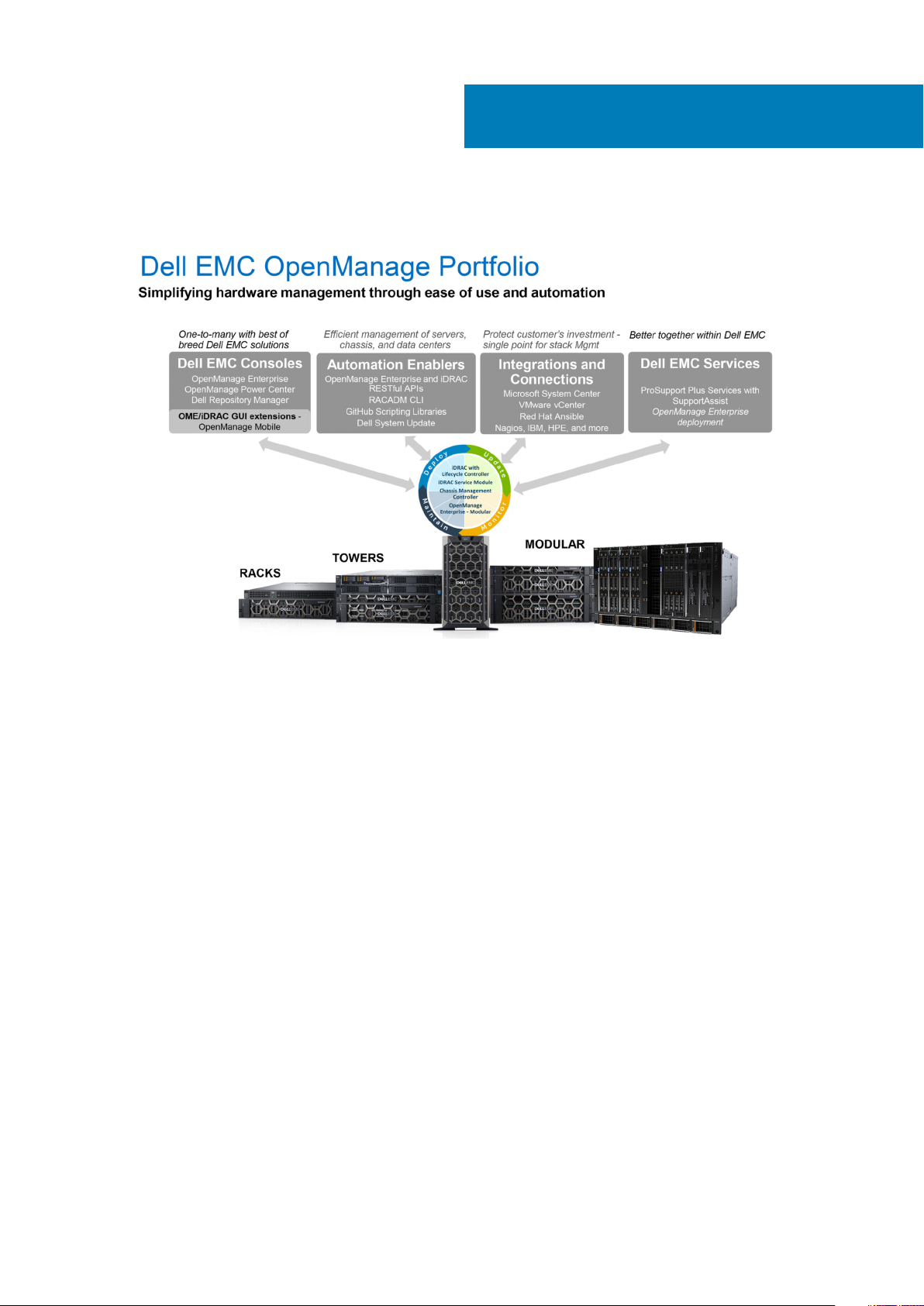
Figure 4. Dell EMC OpenManage Portfolio
Dell EMC delivers management solutions that help IT Administrators effectively deploy, update, monitor, and manage IT assets.
OpenManage solutions and tools enable you to quickly respond to problems by helping them to manage Dell EMC servers effectively and
efficiently; in physical, virtual, local, and remote environments, operating in-band, and out-of-band (agent-free). The OpenManage
portfolio includes innovative embedded management tools such as the integrated Dell Remote Access Controller (iDRAC), Chassis
Management Controller and Consoles like OpenManage Enterprise, OpenManage Power Manager plug in, and tools like Repository
Manager.
Dell EMC has developed comprehensive systems management solutions based on open standards and has integrated with management
consoles that can perform advanced management of Dell hardware. Dell EMC has connected or integrated the advanced management
capabilities of Dell hardware into offerings from the industry's top systems management vendors and frameworks such as Ansible, thus
making Dell EMC platforms easy to deploy, update, monitor, and manage.
The key tools for managing Dell EMC PowerEdge servers are iDRAC and the one-to-many OpenManage Enterprise console. OpenManage
Enterprise helps the system administrators in complete lifecycle management of multiple generations of PowerEdge servers. Other tools
such as Repository Manager, which enables simple yet comprehensive change management.
OpenManage tools integrate with systems management framework from other vendors such as VMware, Microsoft, Ansible, and
ServiceNow. This enables you to use the skills of the IT staff to efficiently manage Dell EMC PowerEdge servers.
Topics:
• Server and Chassis Managers
• Dell EMC consoles
• Automation Enablers
• Integration with third-party consoles
• Connections for third-party consoles
• Dell EMC Update Utilities
• Dell resources
Dell EMC OpenManage systems management 29
Page 30

Server and Chassis Managers
• Integrated Dell Remote Access Controller (iDRAC)
• Dell EMC OpenManage Enterprise Modular (OME-M)
• iDRAC Service Module (iSM)
Dell EMC consoles
• Dell EMC OpenManage Enterprise
• Dell EMC Repository Manager (DRM)
• Dell EMC OpenManage Enterprise Power Manager plugin to OpenManage Enterprise
• Dell EMC OpenManage Mobile (OMM)
Automation Enablers
• OpenManage Ansible Modules
• iDRAC RESTful APIs (Redfish)
• Standards-based APIs (Python, PowerShell)
• RACADM Command Line Interface (CLI)
• GitHub Scripting Libraries
Integration with third-party consoles
• Dell EMC OpenManage Integrations with Microsoft System Center
• Dell EMC OpenManage Integration for VMware vCenter (OMIVV)
• Dell EMC OpenManage Ansible Modules
• Dell EMC OpenManage Integration with ServiceNow
Connections for third-party consoles
• Micro Focus and other HPE tools
• OpenManage Connection for IBM Tivoli
• OpenManage Plug-in for Nagios Core and XI
Dell EMC Update Utilities
• Dell System Update (DSU)
• Dell EMC Repository Manager (DRM)
• Dell EMC Update Packages (DUP)
• Dell EMC Server Update Utility (SUU)
• Dell EMC Platform Specific Bootable ISO (PSBI)
Dell resources
For additional information about white papers, videos, blogs, forums, technical material, tools, usage examples, and other information, go
to the OpenManage page at www.dell.com/openmanagemanuals or the following product pages:
Table 16. Dell resources
Resource Location
Integrated Dell Remote Access Controller (iDRAC) www.dell.com/idracmanuals
iDRAC Service Module (iSM) www.dell.com/support/article/sln310557
OpenManage Ansible Modules www.dell.com/support/article/sln310720
30 Dell EMC OpenManage systems management
Page 31

Resource Location
OpenManage Essentials (OME) www.dell.com/support/article/sln310714
OpenManage Enterprise Modular www.dell.com/OME-modular
OpenManage Mobile (OMM) www.dell.com/support/article/sln310980
OpenManage Integration for VMware vCenter (OMIVV) www.dell.com/support/article/sln311238
OpenManage Integration for Microsoft System Center
(OMIMSSC)
Dell EMC Repository Manager (DRM) www.dell.com/support/article/sln312652
Dell EMC System Update (DSU) www.dell.com/support/article/sln310654
Dell EMC Platform Specific Bootable ISO (PSBI) Dell.com/support/article/sln296511
OpenManage Connections for Partner Consoles www.dell.com/support/article/sln312320
OpenManage Enterprise Power Manager www.dellemc.com/solutions/openmanage/power-
OpenManage Integration with ServiceNow (OMISNOW) Dell.com/support/article/sln317784
NOTE: Features may vary by server. Please refer to the product page on www.dell.com/manuals for details.
www.dell.com/support/article/sln312177
management.htm
Dell EMC OpenManage systems management 31
Page 32
Appendix A. Additional specifications
Topics:
• Dimensions and weight
• Environmental specifications
• Video specifications
• USB ports
Dimensions and weight
11
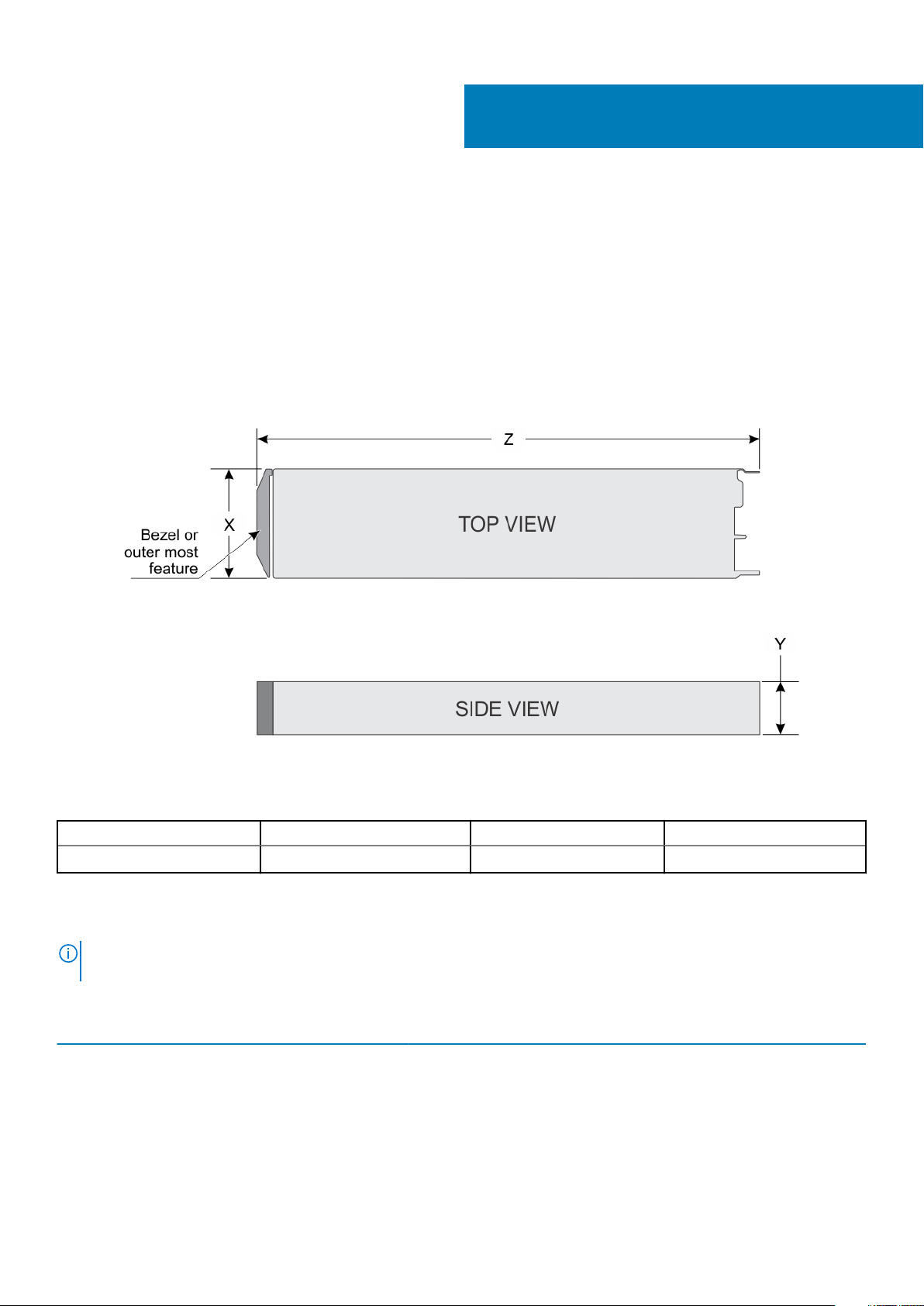
Figure 5. Dimensions and weight
Table 17. System dimensions of the PowerEdge MX740c
X Y Z (handle closed) Max weight
250.2 mm (9.85 inches) 42.15 mm (1.65 inches) 620.35 mm (24.42 inches) 9.5 kg (20.94 lbs)
Environmental specifications
For additional information about environmental certifications, please refer to the Product Environmental
NOTE:
Datasheet located with the Manuals & Documents on www.dell.com/poweredgemanuals.
Table 18. Temperature specifications
Temperature Specifications
Storage –40°C to 65°C (–40°F to 149°F)
Continuous operation (for altitude less than 950 m or 3117
ft)
Maximum temperature gradient (operating and storage) 20°C/h (68°F/h)
10°C to 35°C (50°F to 95°F) with no direct sunlight on the equipment.
32 Appendix A. Additional specifications
Page 33

Table 19. Relative humidity specifications
Relative humidity Specifications
Storage 5% to 95% RH with 33°C (91°F) maximum dew point. Atmosphere must be
noncondensing always.
Operating 10% to 80% relative humidity with 29°C (84.2°F) maximum dew point.
Table 20. Maximum vibration specifications
Maximum vibration Specifications
Operating 0.26 G
Storage 1.87 G
Table 21. Maximum shock specifications
Maximum shock Specifications
Operating Six consecutively executed shock pulses in the positive and negative x, y,
and z axes of 6 G for up to 11 ms.
Storage Six consecutively executed shock pulses in the positive and negative x, y,
and z axes (one pulse on each side of the system) of 71 G for up to 2 ms.
Table 22. Maximum altitude specifications
Maximum altitude Specifications
Operating
3048 m (10,000 ft)
at 5 Hz to 350 Hz (all operation orientations).
rms
at 10 Hz to 500 Hz for 15 min (all six sides tested).
rms
Storage 12,000 m (39,370 ft)
Table 23. Operating temperature derating specifications
Operating temperature derating Specifications
Up to 35°C (95°F) Maximum temperature is reduced by 1°C/300 m (1°F/547 ft) above 950 m
(3,117 ft).
35°C to 40°C (95°F to 104°F) Maximum temperature is reduced by 1°C/175 m (1°F/319 ft) above 950 m
(3,117 ft).
40°C to 45°C (104°F to 113°F) Maximum temperature is reduced by 1°C/125 m (1°F/228 ft) above 950 m
(3,117 ft).
Video specifications
Table 24. Video specifications
Type Description
Video type Matrox G200 graphics controller integrated with iDRAC
Video memory 4 Gb DDR4 shared with iDRAC application memory
USB ports
The Dell EMC PowerEdge MX740c system supports:
• One USB 3.0-compliant port on the front of the system
• One micro USB/iDRAC Direct USB 2.0-compliant port on the front of the system
• One USB 3.0-compliant internal port
The micro USB 2.0-compliant port on the front of the system can only be used as an iDRAC Direct management
NOTE:
port.
Appendix A. Additional specifications 33
Page 34

Appendix B. Standards compliance
Table 25. Industry standard documents
Standard URL for information and specifications
ACPI Advance Configuration and Power Interface Specification,
v2.0c
Ethernet IEEE 802.3-2005 standards.ieee.org/getieee802/802.3.html
HDG Hardware Design Guide Version 3.0 for Microsoft Windows
Server
IPMI Intelligent Platform Management Interface, v2.0 intel.com/design/servers/ipmi
DDR4 Memory DDR4 SDRAM Specification jedec.org/standards-documents/docs/jesd79-4.pdf
PCI Express PCI Express Base Specification Rev. 2.0 and 3.0 pcisig.com/specifications/pciexpress
PMBus Power System Management Protocol Specification, v1.2 pmbus.info/specs.html
SAS Serial Attached SCSI, v1.1 t10.org
SATA Serial ATA Rev. 2.6; SATA II, SATA 1.0a Extensions, Rev. 1.2 sata-io.org
SMBIOS System Management BIOS Reference Specification, v2.7 dmtf.org/standards/smbios
TPM Trusted Platform Module Specification, v1.2 and v2.0 trustedcomputinggroup.org
UEFI Unified Extensible Firmware Interface Specification, v2.1 uefi.org/specifications
USB Universal Serial Bus Specification, Rev. 2.0 usb.org/developers/docs
acpi.info
microsoft.com/whdc/system/platform/pcdesign/desguide/
serverdg.mspx
12
34 Appendix B. Standards compliance
Page 35

Appendix C: Additional resources
Table 26. Additional resources
Resource Description of contents Location
Installation and Service Manual
This manual, available in PDF format, provides the following
information:
• Chassis features
• System Setup program
• System messages
• System codes and indicators
• System BIOS
• Remove and replace procedures
• Troubleshooting
• Diagnostics
• Jumpers and connectors
Dell.com/Support/Manuals
13
Getting Started Guide
Information Update This document ships with the system, is also available in PDF
System Information Label The system information label documents the system board layout
Quick Resource Locator (QRL) This code on the chassis can be scanned by a phone application
Enterprise Infrastructure
Planning Tool (EPIT)
This guide ships with the system, and is also available in PDF
format. This guide provides the following information:
• Initial setup steps
• Key system features
• Technical specifications
format online, and provides information on system updates.
and system jumper settings. Text is minimized due to space
limitations and translation considerations. The label size is
standardized across platforms.
to access additional information and resources for the server,
including videos, reference materials, service tag information, and
Dell EMC contact information.
The Dell EMC online EPIT enables easier and more meaningful
estimates to help you determine the most efficient configuration
possible. Use EPIT to calculate the power consumption of your
hardware, power infrastructure, and storage.
Dell.com/Support/Manuals
Dell.com/Support/Manuals
Outside the system chassis cover
Outside the system chassis cover
Dell.com/calc
Appendix C: Additional resources 35
Page 36
14
Appendix D. Support and deployment services
ProDeploy Enterprise Suite and Residency Services
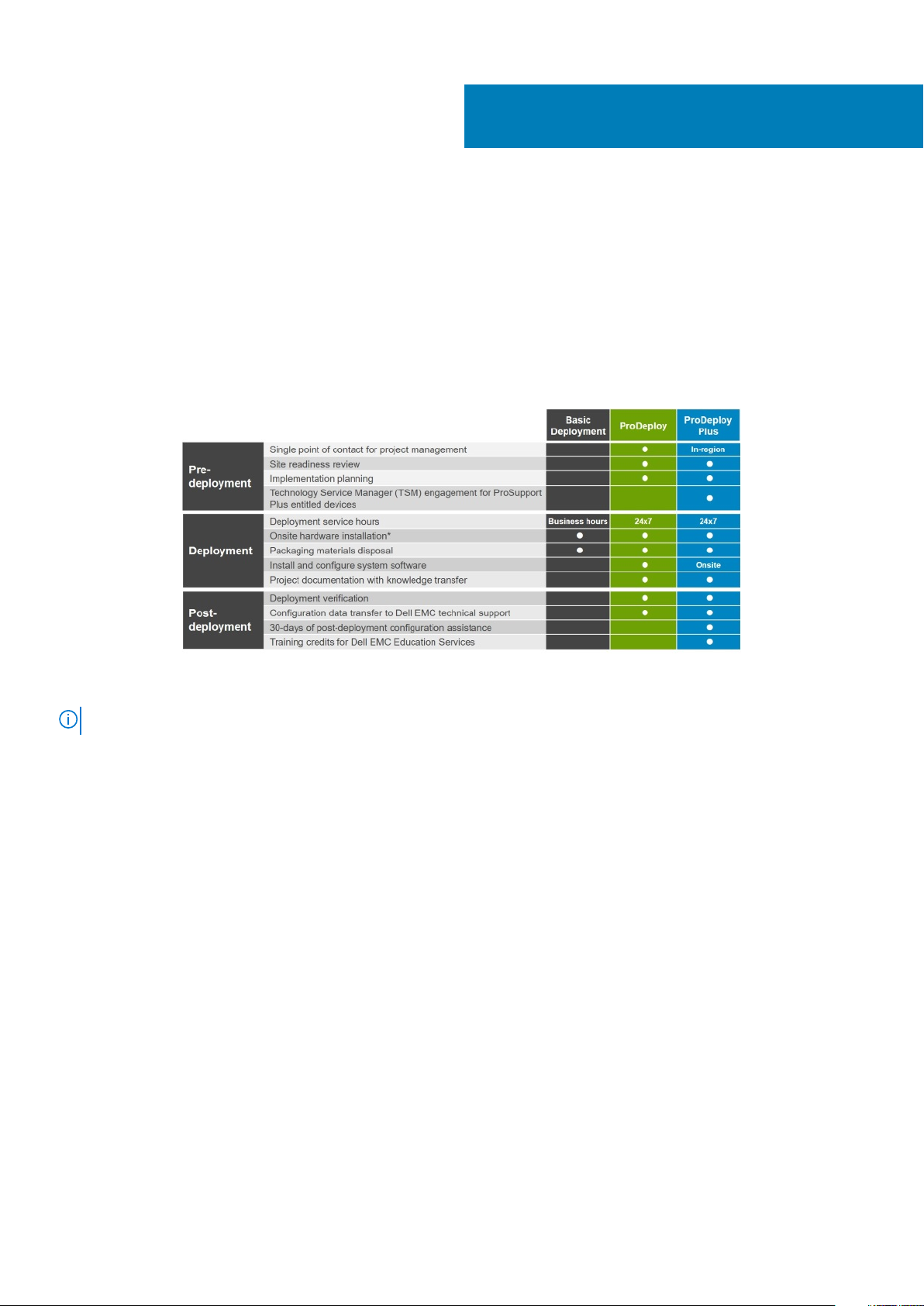
ProDeploy Enterprise Suite gets your server out of the box and into optimized production—fast. Our elite deployment engineers with
broad and deep experience utilizing best-in-class processes along with our established global scale can help you around the clock and
around the globe. From simple to the most complex server installations and software integration, we take the guess work and risk out of
deploying your new server technology.
Figure 6. ProDeploy Enterprise Suite capabilities
NOTE: Hardware installation not applicable on selected software products.
ProDeploy Plus
From beginning to end, ProDeploy Plus provides the skill and scale needed to successfully execute demanding deployments in today's
complex IT environments. Certified Dell EMC experts start with extensive environmental assessments and detailed migration planning and
recommendations. Software installation includes set up of most versions of Dell EMC SupportAssist and OpenManage system
management utilities. Post-deployment configuration assistance, testing, and product orientation services are also available.
ProDeploy
ProDeploy provides full service installation and configuration of both server hardware and system software by certified deployment
engineers including set up of leading operating systems and hypervisors as well as most versions of Dell EMC SupportAssist and
OpenManage system management utilities. To prepare for the deployment, we conduct a site readiness review and implementation
planning exercise. System testing, validation, and full project documentation with knowledge transfer complete the process.
Basic Deployment
Basic Deployment delivers worry-free professional installation by experienced technicians who know Dell EMC servers inside and out.
36 Appendix D. Support and deployment services
Page 37

Residency Services
Residency Services helps customers transition to new capabilities quickly with the assistance of on-site or remote Dell EMC experts
whose priorities and time you control. Residency experts can provide post implementation management and knowledge transfer related to
a new technology acquisition or day-to-day operational management of the IT infrastructure.
Deployment services
Deployment services details and exceptions can be found in service description documents at the Enterprise Configuration and
Deployment pageon Dell.com.
Remote Consulting Services
When you are in the final stages of your PowerEdge server implementation, you can rely on Dell EMC Remote Consulting Services, and
our certified technical experts to help you optimize your configuration with best practices for your software, virtualization, server, storage,
networking, and systems management.
Data Migration Service
Protect your business and data with our single point of contact to manage your data migration project. Your project manager will work
with our experienced team of experts to create a plan using industry-leading tools and proven processes based on global best practices to
migrate your existing files and data so your business system get up and running quickly and smoothly.
ProSupport Enterprise Suite
With Dell EMC ProSupport Services, we can help you keep your operation running smoothly, so you can focus on running your business.
We will help you maintain peak performance and availability of your most essential workloads. Dell EMC ProSupport is a suite of support
services that enable you to build the solution that is right for your organization. Choose support models based on how you use technology
and where you want to allocate resources. From the desktop to the data center, address everyday IT challenges, such as unplanned
downtime, mission-critical needs, data and asset protection, support planning, resource allocation, software application management and
more. Optimize your IT resources by choosing the right support model.
Appendix D. Support and deployment services
37
Page 38
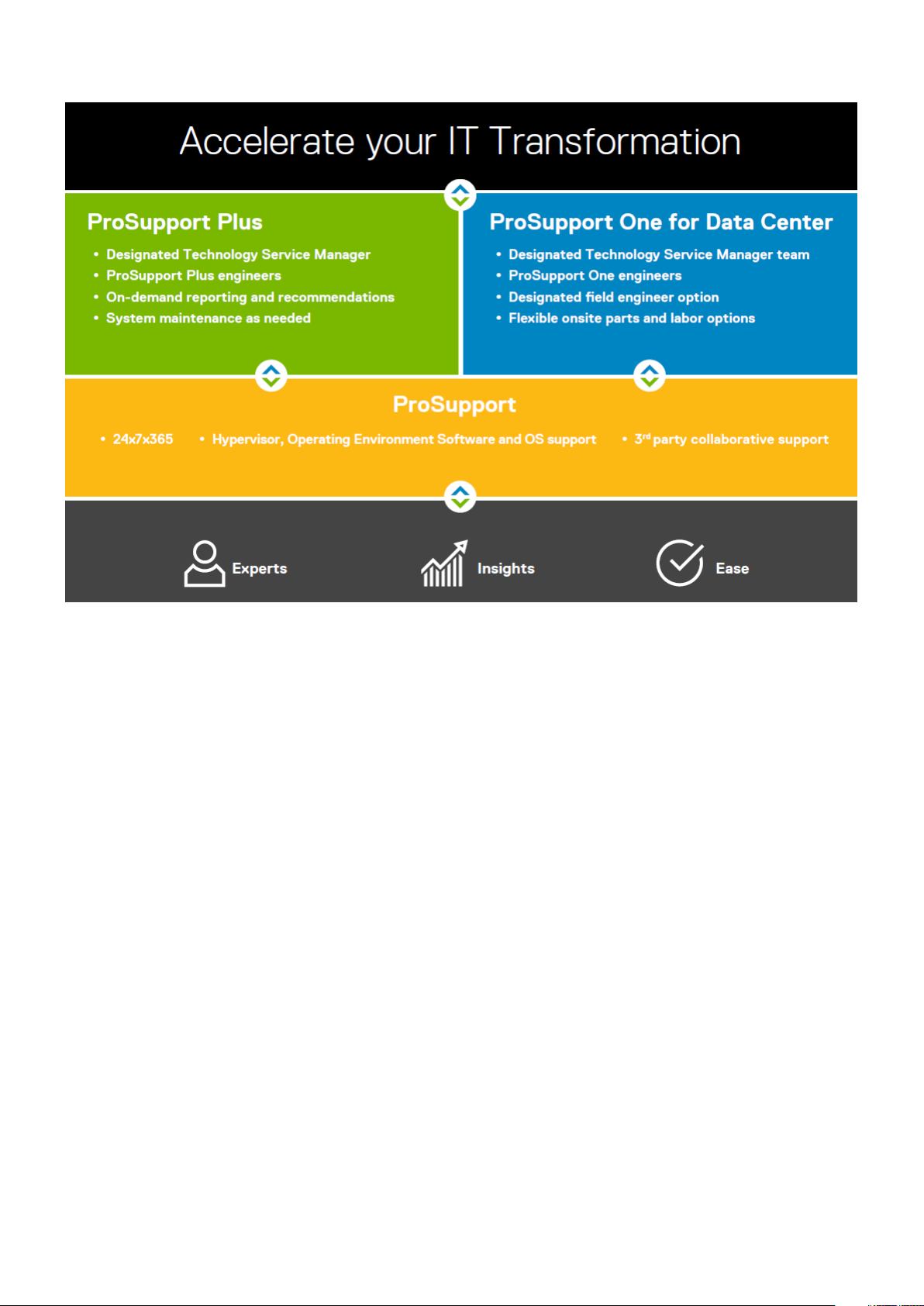
Figure 7. ProSupport Enterprise Suite
ProSupport Plus
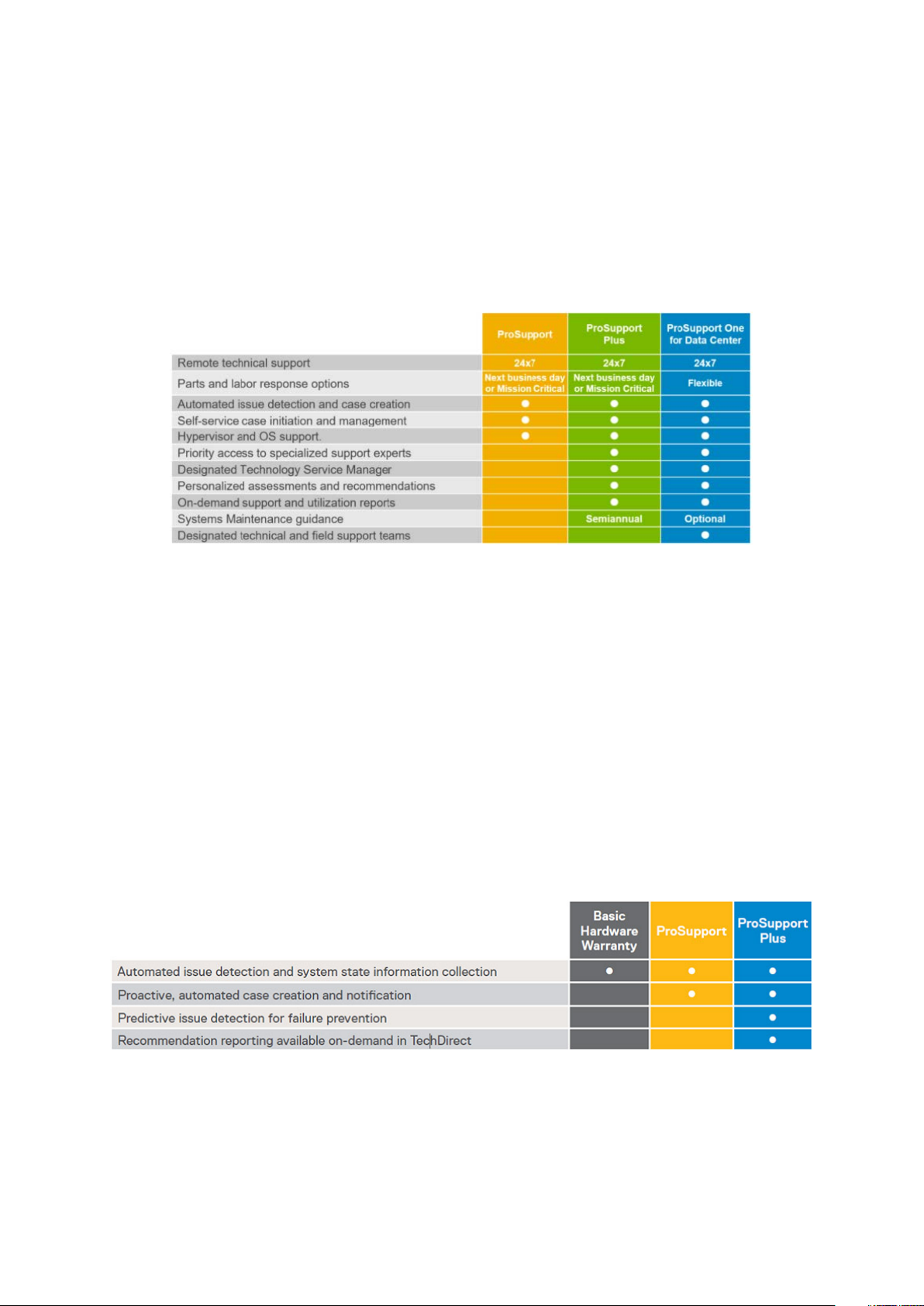
When you purchase PowerEdge servers, we recommend ProSupport Plus, our proactive and preventative support, for business-critical
systems. ProSupport Plus provides all the benefits of ProSupport, plus the following:
• An assigned Technology Service Manager who knows your business and your environment
• Access to senior ProSupport engineers for faster issue resolution
• Personalized, preventive recommendations based on analysis of support trends and best practices from across the Dell EMC customer
base to reduce support issues and improve performance
• Predictive analysis for issue prevention and optimization enabled by SupportAssist
• Proactive monitoring, issue detection, notification and automated case creation for accelerated issue resolution enabled by
SupportAssist
• On-demand reporting and analytics-based recommendations enabled by SupportAssist and TechDirect
ProSupport
Our ProSupport service offers highly trained experts around the clock and around the globe to address your IT needs. We will help you
minimize disruptions and maximize availability of your PowerEdge server workloads with:
• 24x7x365 access to certified hardware and software experts
• Collaborative 3rd party support
• Hypervisor and OS support
• Consistent level of support available for Dell EMC hardware, software and solutions
• Onsite parts and labor response options including next business day or four-hour mission critical
38
Appendix D. Support and deployment services
Page 39
ProSupport One for Data Center
ProSupport One for Data Center offers flexible site-wide support for large and distributed data centers with more than 1,000 assets. This
offering is built on standard ProSupport components that leverage our global scale but are tailored to your company's needs. While not for
everyone, it offers a truly unique solution for Dell EMC's largest customers with the most complex environments.
• Team of assigned Technology Services Managers with remote, on-site options
• Assigned ProSupport One technical and field engineers who are trained on your environment and configurations
• On-demand reporting and analytics-based recommendations enabled by SupportAssist and TechDirect
• Flexible on-site support and parts options that fit your operational model
• A tailored support plan and training for your operations staff
Figure 8. Enterprise Support feature comparison
Support Technologies
Powering your support experience with predictive, data-driven technologies.
SupportAssist
The best time to solve a problem is before it happens. The automated proactive and predictive technology SupportAssist* helps reduce
steps and time to resolution, often detecting issues before they become a crisis. Benefits include:
• Value - SupportAssist is available to all customers at no additional charge.
• Improve productivity - replace manual, high-effort routines with automated support.
• Accelerate time to resolution - receive issue alerts, automatic case creation and proactive contact from Dell EMC experts.
• Gain insight and control - optimize enterprise devices with on-demand ProSupport Plus reporting in TechDirect and get predictive
issue detection before the problem starts.
SupportAssist is included with all support plans but features vary based on service level agreement.
Figure 9. SupportAssist model
Get started at Dell.com/SupportAssist
Appendix D. Support and deployment services
39
Page 40

TechDirect
Boost your IT teams productivity when supporting Dell EMC systems. With over 1.4 million self-dispatches processed each year,
TechDirect has proven its effectiveness as a support tool. You can:
• Self-dispatch replacement parts
• Request technical support
• Integrate APIs into your help desk
Or, access all your Dell EMC certification and authorization needs. Train your staff on Dell EMC products as TechDirect allows you to:
• Download study guides
• Schedule certification and authorization exams
• View transcripts of completed courses and exams
Register at techdirect.dell.com
Additional professional services
Dell Education Services
Dell Education Services offers the PowerEdge server training courses designed to help you achieve more with your hardware investment.
The curriculum is designed in conjunction with the server development team, as well as Dell EMC’s technical support team, to ensure that
the training delivers the information and practical, hands-on skills you and your team need to confidently manage and maintain your Dell
EMC server solution. To learn more or register for a class today, visit LearnDell.com/Server.
Dell EMC Global Infrastructure Consulting Services
Dell EMC Global Infrastructure Consulting Services use skilled solution architects, innovative tools, automated analysis and Dell EMC’s
intellectual property to give rapid insight into the root causes of unnecessary complexity. We seek better answers than traditional service
models, and our strategy is to help quickly identify high-impact, short-duration projects that deliver return on investment (ROI) and free
up resources. The results are practical, action-oriented plans with specific, predictable, measurable outcomes. From data center
optimization to server virtualization to systems management, our consulting services can help build a more efficient enterprise.
Dell EMC Managed Services
Dell EMC Managed Services are a modular set of lifecycle services designed to help you automate and centrally configure, deploy, and
manage your day-to-day data center operations. These services extend your existing on-premise IT infrastructure with off-premise cloud
services designed to better address challenges with mobility, highly distributed organizations, security, compliance, business continuity,
and disaster preparedness.
40
Appendix D. Support and deployment services
 Loading...