

Page 1
Liquid crystal displays
16 characters2 lines COG module
RCM2090R
The RCM2090R is a reflective TN type liquid crystal module with a built-in controller / driver LSI and a display capacity
of 16 characters2 lines.
Applications
Printers, copiers, facsimiles, etc.
Features
1) Wide viewing angle and high contrast.
2) 57 dot character matrix with cursor.
3) Interfaces with 4-bit MPUs.
4) Displays up to 237 characters and special symbols
5) Custom character patterns are displayed with the
character RAM.
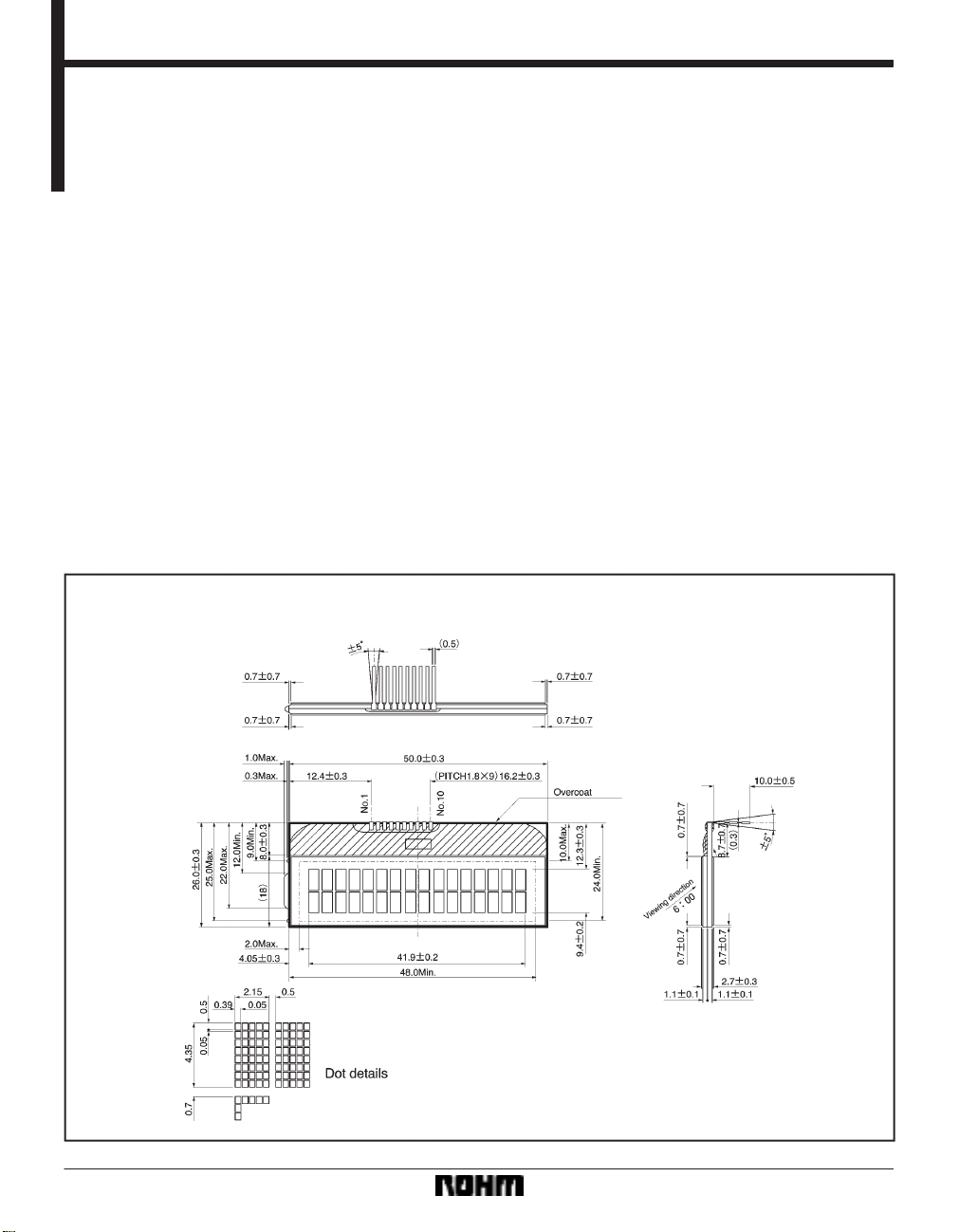
External dimensions (Units: mm)
6) Abundant instruction set including clear display , cursor on / off, and character blinking.
7) Compact and lightweight for easy assembly to the
host instrument.
8) Operable on single 5V power supply.
9) Low power consumption.
21
Page 2
Liquid crystal displays RCM2090R
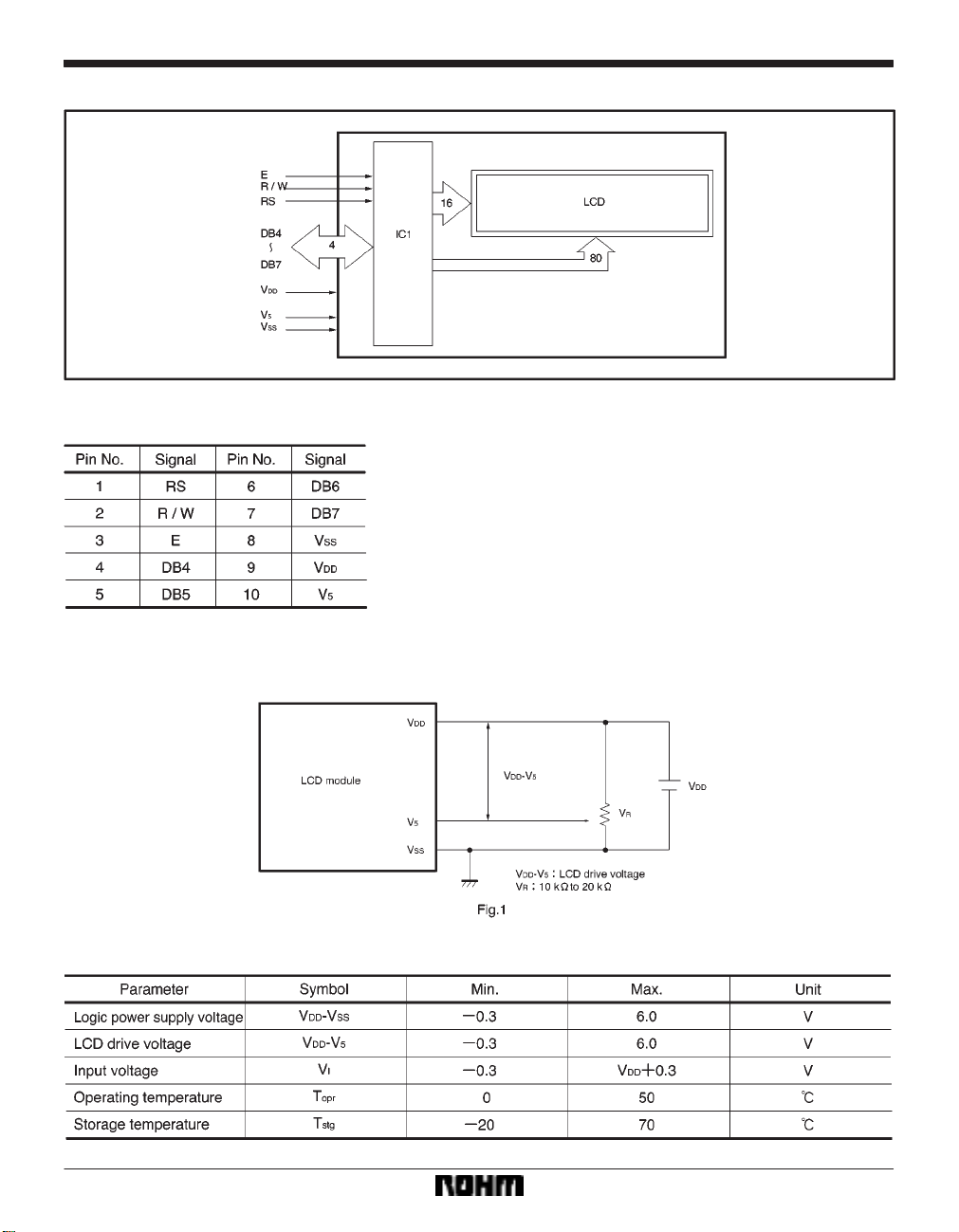
FBlock diagram
FPin assignments
FPower supply example
FAbsolute maximum ratings (Ta = 25_C)
22
Page 3
Liquid crystal displays RCM2090R
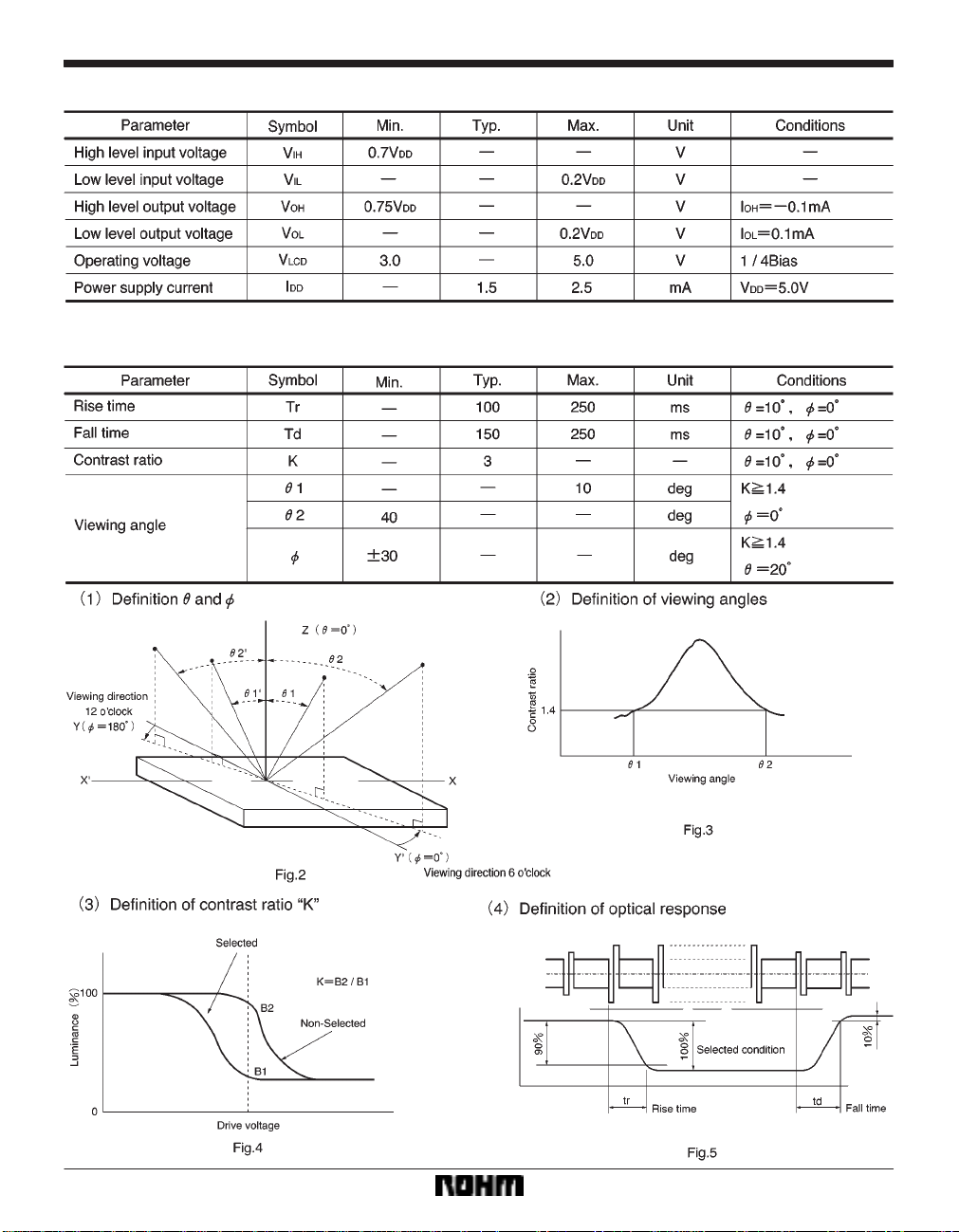
FElectrical characteristics (VDD = 5.0V±0.25 V, Ta = 25_C)
FOptical characteristics (Ta = 25_C)
When viewing from below
23
Page 4

Liquid crystal displays RCM2090R
Pin functions
Timing chart
(1) Writing
24
Page 5

Liquid crystal displays RCM2090R
(2) Reading
25
Page 6

Liquid crystal displays RCM2090R
Instructions
(Example 1) When fosc = 270kHz
250
40µs
270
= 37µs
26
Page 7

Liquid crystal displays RCM2090R
Character code and corresponding character pattern
27
Page 8

Liquid crystal displays RCM2090R
FReset function
When you turn on the power supply, the module automatically returns to its initial (reset) settings. At the initial settings,
the busy flag (BF) becomes
instructions are carried out.
(1) Clear display
(2) Function set
8-bit interface data length (DL = 1)
Two line display (N = 1)
SEG signal transfer direction SEG1SEG50SEG51SEG100 (SD1 = 0, SD2 = 0)
COM signal transfer direction COM1COM16 (CD = 0)
(3) Display on / off control
Display off (D = 0)
Cursor off (C = 0)
Blinking off (B = 0)
(4) Entry mode set
)1 (increment) (I / D = 1)
No shift (S = 0)
∗The internal reset circuit may not operate properly due to conditions with the power supply. If this is the case, use the
appropriate instruction to reset the settings.
FOperation notes
(1) Handling precautions
S Protect the module from strong shocks as they can
cause damage or defective operation.
S The polarizing plate on the surface of the module is
soft and can easily be scratched. Wipe away dirt and
dust using an alcohol-based cleanser.
S If the liquid crystal panel is damaged and liquid crystal
contacts your clothing or body, wash immediately with
soap and water.
S If the module is to be used for long periods subjected
to direct sunlight, employ a filter to block the ultraviolet
rays.
S Do not use the module in areas of high temperature
or high humidity. Do not use the module in locations
exposed to direct sunlight or fluorescent light.
S A protective film (polyethylene) is pasted over ROHM
liquid crystal modules to protect the panel surfaces.
When peeling this film off, be sure to peel as slow as
possible in order to minimize the generation of static
electricity.
(2) Precautions during operation
S Do not connect or disconnect the module while the
power supply is turned on.
S Input the input signal after the module power supply
is turned on. When turning it off, turn off the input signal first. Otherwise the IC may be damaged by the
latch-up phenomenon.
28
“1.” The busy status last 10 ms from when VDD reaches 4.5V. At the initial settings, following
(3) Precautions during installation
S Be sure to use a grounded soldering iron when per-
forming any installation procedures.
S Be careful to avoid damage from static electricity. A
CMOS-IC is used in the modules circuitry that can be
easily damaged by static electricity .
(4) Precautions during unit assembly
S In order to protect the polarizing plate from dirt or
scratches, it is recommended to use a protective cover on the front surface.
(5) Precautions for COG module
S Do not subject the front and back surfaces of the IC
to light. Doing so may cause defective operation.
S When peeling off the protective film of the panel, use
of an ion blower or other device to reduce the generation of static electricity is recommended.
S No special measures are taken to prevent the genera-
tion of static electricity on the module. Therefore, be
sure to take the appropriate measures to prevent the
generation of electrical charge on the LCD module by
the design of the product itself.
 Loading...