

Page 1

COGNEX
®
DataMan™ 700 Series
Quick Reference Guide
Page 2

ii DataMan 700 Series Quick Reference Guide
Section Title
1
DataMan 700 Series Quick Reference Guide iii
xxxx • xxxxx • xxxxx • xxxxx • xxxxx
Page 2
Getting Started
Physical Layout • Installation • USB and PS/2 Keyboard
Connections • RS-232 Serial Connections • Changing
Cables
Page 4
1
Using the Reader
Page 13
3
Trigger Types • The Setup Tool • Setup Tool General
Toolbar
1
Compliance Statements and
Warnings
Page 18
4
Agency Compliance Statements • Specications
and Precautions • Laser Information • Models and
Accessories
Reading Distances
2D Code Reading Distances • 1D Code Reading
Distances • Setting the Focus Position
2
Page 10
Page 3
?
>
?
?
105
40
65
105
40
65
?
4 DataMan 700 Series Quick Reference Guide DataMan 700 Series Quick Reference Guide 5
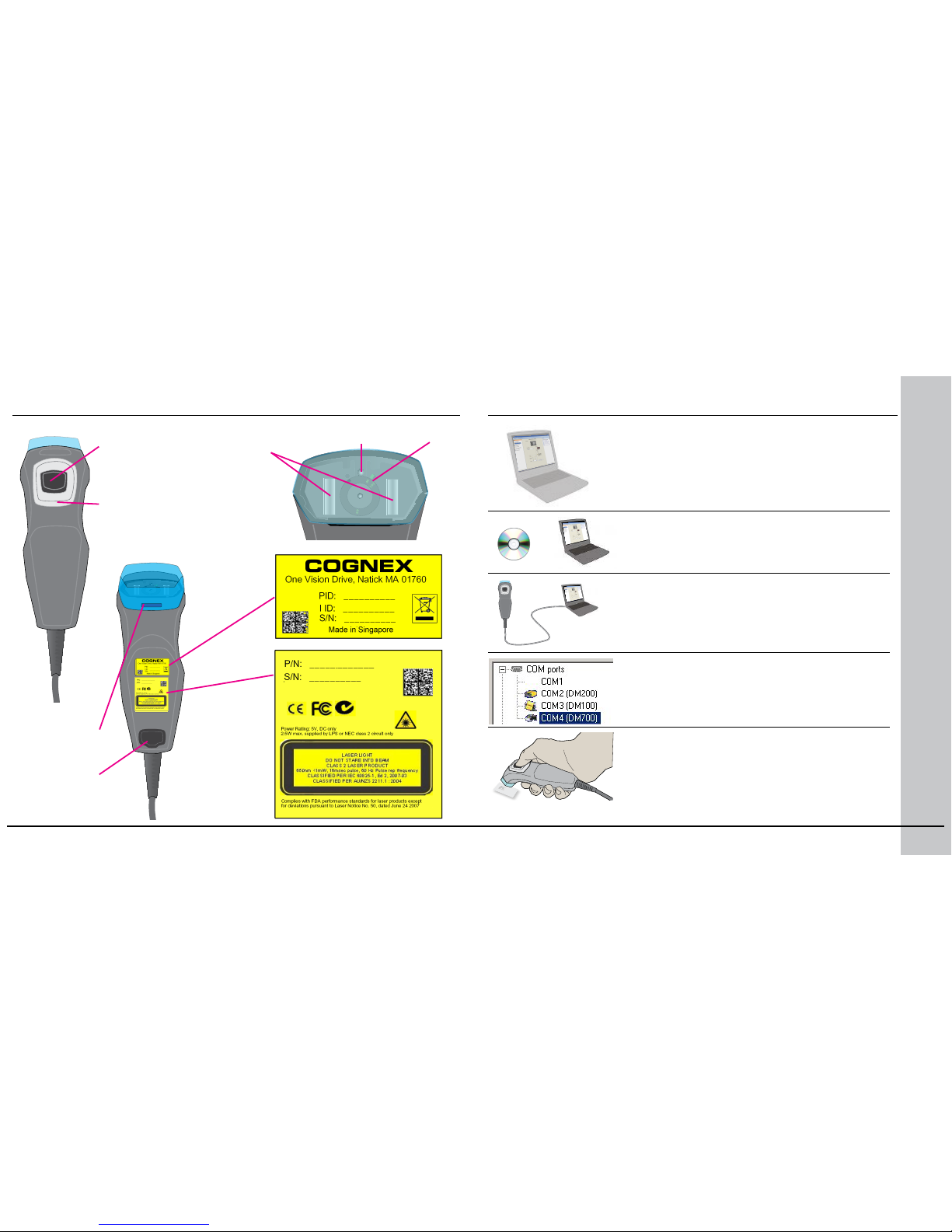
Physical Layout
Trigger (press and
hold to read)
Illumination
LEDs
Aiming laser Lens
Indicator lamp
• Green: read
• Red: no read
Cable lock
Lens cover
Release
Installation
Check the Release Notes for a full list of
system prerequisites.
Insert CD-ROM and follow on-screen prompts
to install software.
Connect reader to PC.
• See pages 6-7 for connection details.
• Reader auto-detects USB, RS-232 and PS/2
connections.
Launch Setup Tool and click Refresh.
• Reader appears under COM ports as DM700
• Click Connect.
Start reading codes.
• See section Setting the Focus Position
on page 12 to adjust lens for desired
reading distance.
• Pages 10-11 list reading distances.
Page 4
?
6 DataMan 700 Series Quick Reference Guide DataMan 700 Series Quick Reference Guide 7
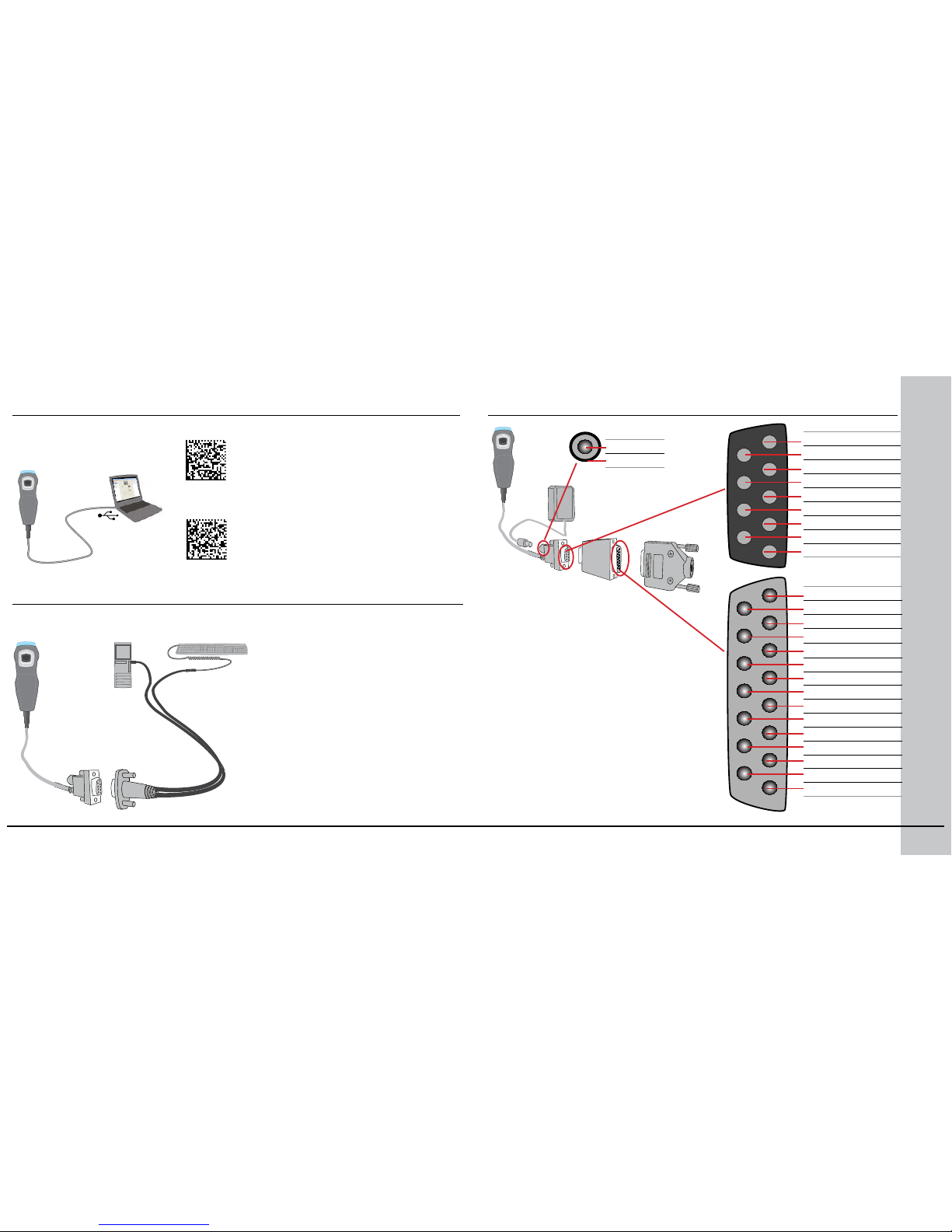
USB and PS/2 Keyboard Connections
USB Keyboard
USB Serial
PS/2 Keyboard
3
4
1 2
USB
1. Connect serial cable. Do
not connect power supply;
reader powered through PS/2
connection.
2. Connect keyboard wedge
cable. Reader automatically
detects connection type.
3. (Optional) PS/2 keyboard;
with no keyboard present, all
keyboard input comes from
reader.
4. PC with PS/2 keyboard
connector.
1. Connect USB cable (DM700USB-00) to USB port.
2. Scan code for serial port or
keyboard emulation. Note:
You must use serial emulation
mode to connect to the
DataMan Setup Tool.
RS-232 Serial Connections
1 +6 – +24 PWR
9 N/C
2 N/C
10 N/C
3 N/C
11 CTS
4 N/C
12 RTS
5 N/C
13 N/C
6 RxD
14 N/C
7 TxD
15 N/C
8 GND
5 GND
9 Reserved
4 N/C
8 RTS
3 RxD
7 CTS
2 TxD
6 N/C
1 +6 VDC PWR
+6 VDC
GND
1
4
2
3
DM100-PWR-00
DMA-24VKIT-00
1. 6VDC power supply
2. Serial cable (DM700-RS232-00).
Provide +5 to +6 VDC to connector
on reverse or on pin 1.
3. (Optional) 24V to 5V power supply
adapter (not included). Provide +6 to
+24 VDC on pin 1; connect shield to
ground. Adapter also converts TTLlevel RS-232 signals to true RS-232
levels.
4. (Optional) Screw terminal plug
(included with 24V-6V power supply
adapter); use for your equipment.
Page 5
2
1
8 DataMan 700 Series Quick Reference Guide DataMan 700 Series Quick Reference Guide 9
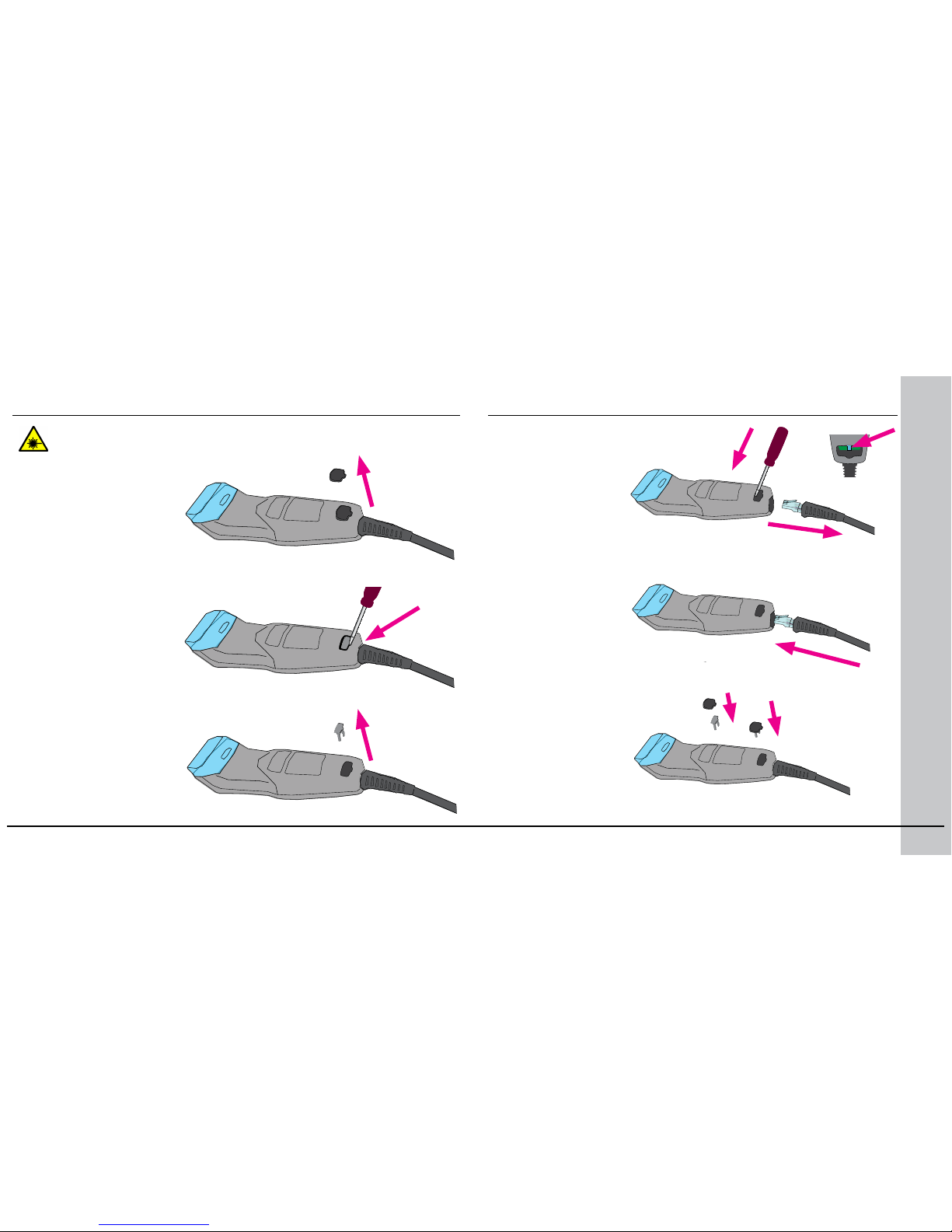
Changing Cables
Remove rubber plug.
Release cable lock using
at-head screwdriver.
Remove cable lock.
Disconnect DataMan from Power before adjusting focus.
Using ne screwdriver,
pick, or similar
instrument, press
RJ48 plug release tab
while withdrawing
cable.
Insert new cable,
noting orientation
of RJ48 plug. Press
cable in until it
locks in place.
1. Attach rubber
plug to cable
lock.
2. Press plug and
lock into unit
until it locks in
place.
Page 6
(40 mm)
(40 mm)
40
65
105
40
65
105
6 mil
8 mil
10 mil
12 mil
750
750S
20mm
mm
40 60 80 100 120 140 160 180
20
20
20
40
40
40
60
60
60 80 100 120 140 160 180
13 mil
750
750S
0
10 DataMan 700 Series Quick Reference Guide DataMan 700 Series Quick Reference Guide 11
(40 mm)
40
65
105
6 mil
8 mil
10 mil
12 mil
750
750S
20mm
40 60 80 100 120 140 160 180
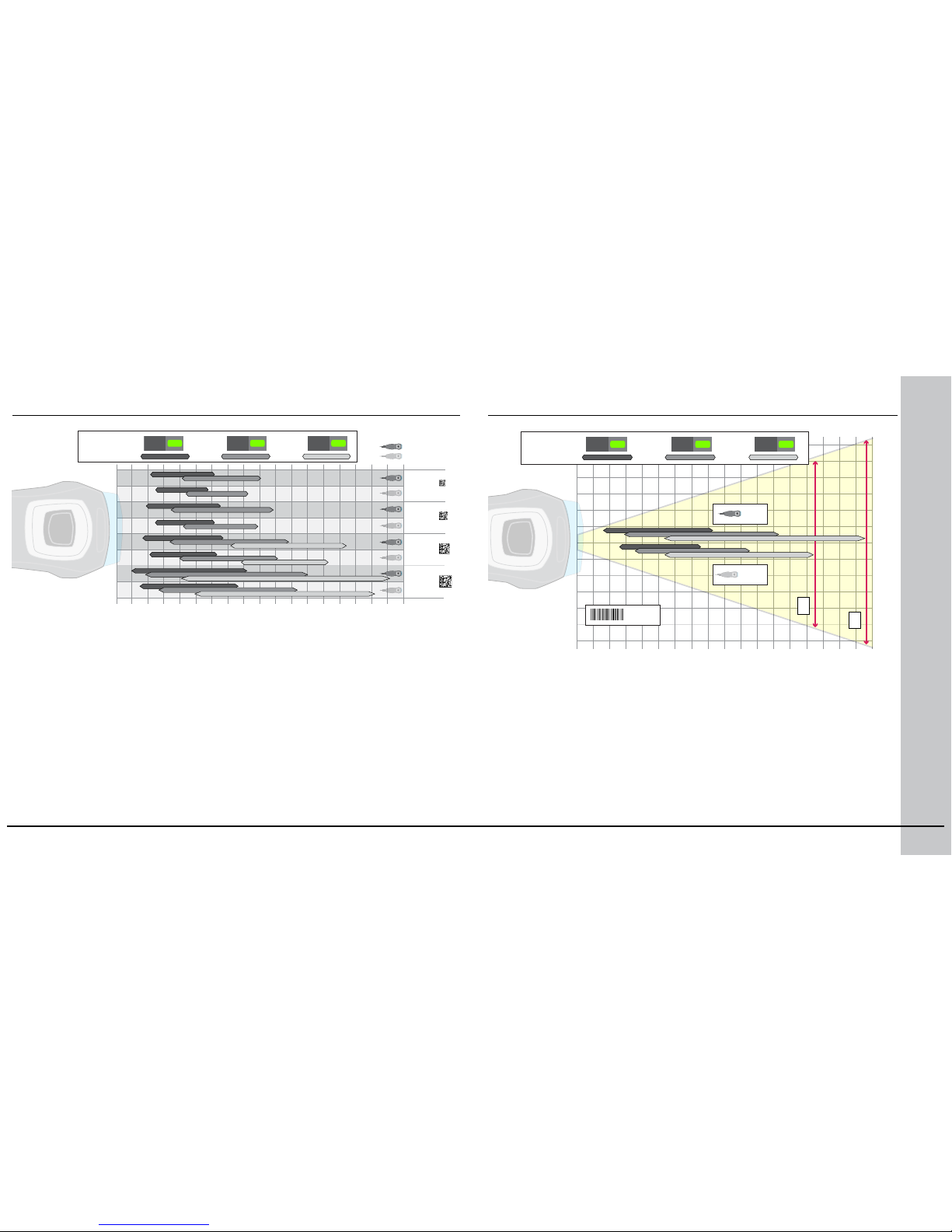
2D Code Reading Distances
A range of reading distances are available for different code sizes and focus
positions (40mm, 65mm, and 105mm). Select a focus position that allows you
to read the desired code sizes at the desired working distance.
Focus
Position
1D Code Reading Distances
Focus
Position
1
2
1. 102mm maximum code width at 143mm distance with 105mm focus
setting (750S)
2. 140mm maximum code width at 177mm distance with 105mm focus
setting (750)
Page 7
105
40
65
12 DataMan 700 Series Quick Reference Guide DataMan 700 Series Quick Reference Guide 13
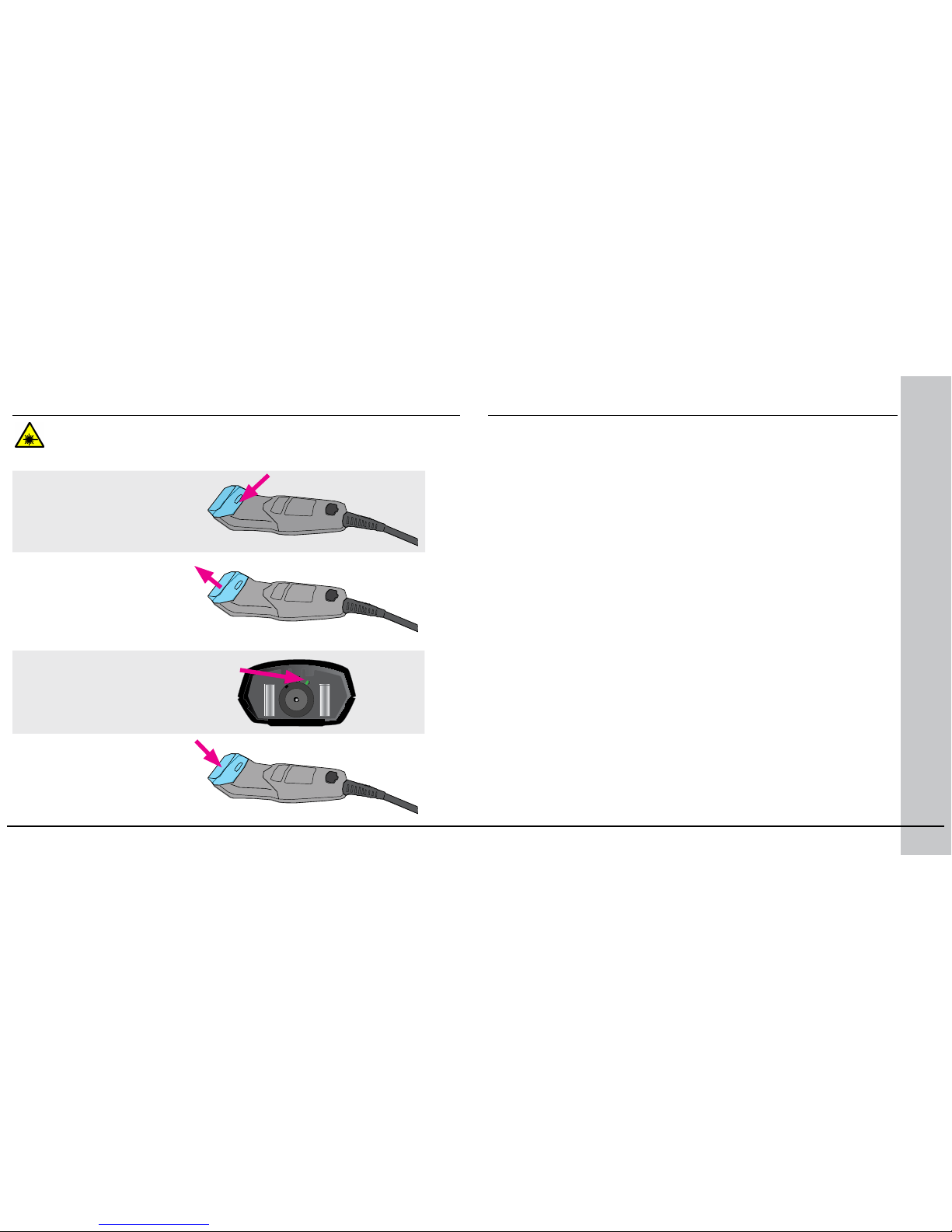
Disconnect DataMan from Power before adjusting focus.
Setting the Focus Position
Release lens cover latch using
screwdriver tip or coin.
Remove lens cover.
Align focus position to mark.
Replace lens cover.
Trigger Types
A DataMan 750 reader supports two trigger types:
• Presentation: Repeatedly scans for a symbol and decodes it
whenever one is detected. The reader relies on an internal timing
mechanism to acquire images.
• Manual (default): Begins acquiring images when you press the
trigger button on the reader, and continues acquiring images until a
symbol is found and decoded or you release the button.
Page 8
14 DataMan 700 Series Quick Reference Guide DataMan 700 Series Quick Reference Guide 15
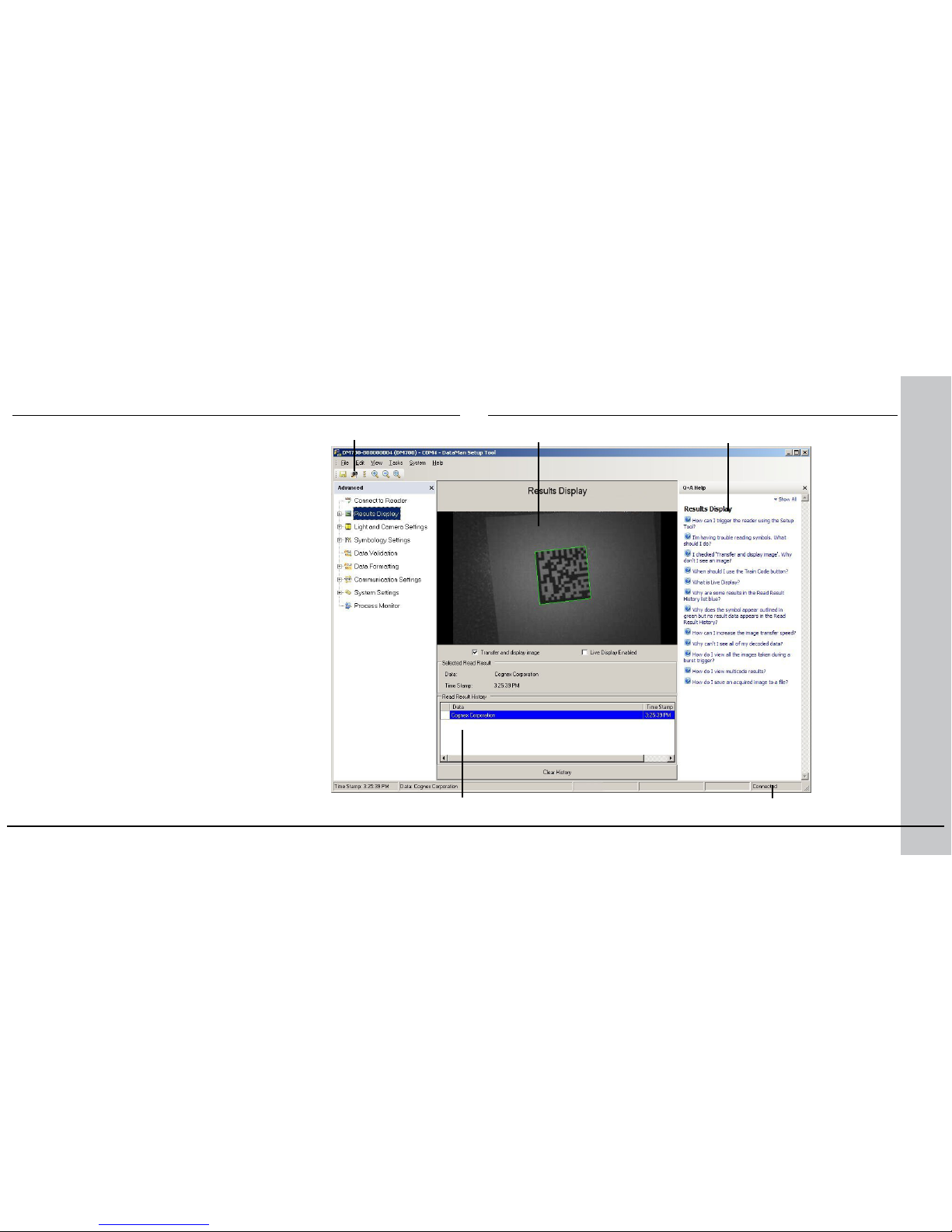
The Setup Tool
Connect to Reader
Establish a connection to the reader
Results Display
View results
Light and Camera Settings
Choose a trigger type and other acquisition
parameters
System Settings
Congure input and output signals
Trigger button
Latest image Context based help
Read history Connection status
Connect the reader to the Setup Tool to congure it
with the type of symbologies it will decode as well
as other parameters, such as the type of trigger
it will use and the format of the results it will
generate.
Page 9
16 DataMan 700 Series Quick Reference Guide DataMan 700 Series Quick Reference Guide 17
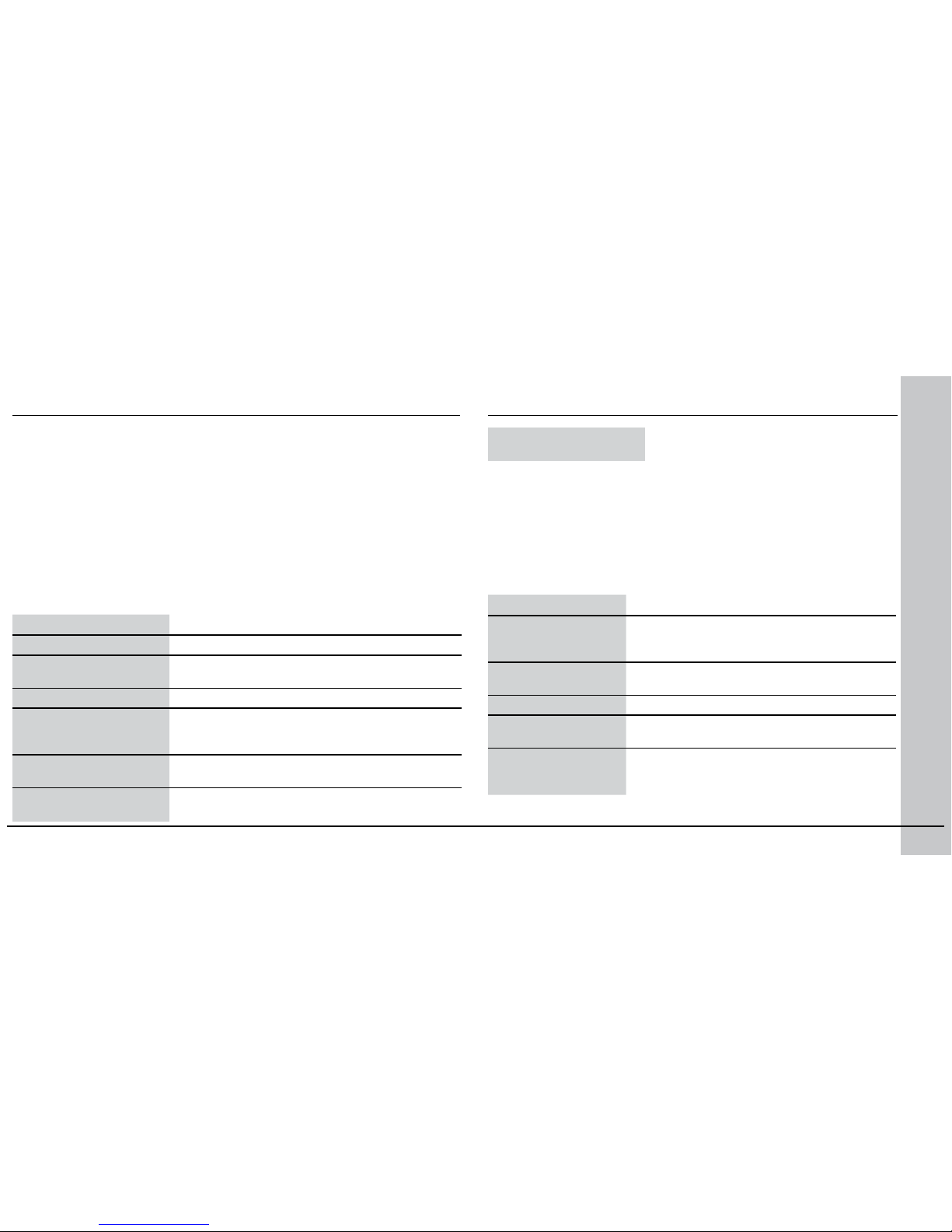
Use the Setup Tool General Toolbar
File Menu
Open Conguration Open a saved .cfg conguration le.
Save Conguration Create a .cfg conguration le of current run-
time parameters.
Print Conguration Code Not supported on the DataMan 200.
Restore Device Load a saved device conguration .cdc le,
with run-time parameters plus device-specic
information for a particular DataMan 200.
Backup Device Create a device conguration .cdc le for a
specic reader.
Load Image Load an 8-bit uncompressed grey-scale .bmp or
.jpg image for analysis.
System Menu
Save Settings Save the current parameters to non-volatile
memory, which allows the reader to restore
these settings each time you reboot it.
Reset Conguration Reset all conguration parameters in RAM
(volatile memory) to the default settings.
Update Firmware Update the reader software.
Upload Feature Key Unlock additional features available in the
reader software if you have the right key.
VeriCode License Add VeriCode decoding by entering a license
string provided by Veritek. Ask your Cognex
sales representative for details.
Each reader can store its current set of run-time parameters to a conguration
(.cfg) le, which contains information such as the enabled symbologies and
how any output data should be formatted.
The same conguration le can be loaded onto multiple readers, as the le
does not contain identication information such as the device name of the
reader used to create it.
A reader can also generate a Cognex device conguration (.cdc) le, which
stores the set of run-time parameters plus any identication data, such as the
name of the device, trigger type, and so on. Cognex recommends generating a
device conguration le for each reader to allow you to restore a reader to its
operating state with minimal effort.
Use the File menu of the Setup Tool to manage .cfg and .cdc les:
Save Image Save the latest acquired image with the
.jpg or .bmp le format.
Use the Edit menu for standard Cut, Copy and Paste operations.
Use the View menu to view reader information (serial number, rmware
version, and so on) and to enable and disable various elements of the
Setup Tool, and the Tasks menu to switch between various Setup Tool
options.
Use the System menu to manage the current settings on the reader
and to upgrade the features it currently supports:
Use the Help menu to display Setup Tool version information.
Page 10
18 DataMan 700 Series Quick Reference Guide DataMan 700 Series Quick Reference Guide 19
The DataMan 700 series meets or exceeds the requirements of all applicable standards organizations for safe
operation. However, as with any electrical equipment, the best way to ensure safe operation is to operate them
according to the agency guidelines that follow. Please read these guidelines carefully before using your device.
Regulator Specication
USA FCC Part 15, Class A
FDA/CDRH Laser Notice No 50
Canada ICES-003
European Community EN55022 (CISPR 22) Class A
EN55024:1998 +A1:2001 +A2: 2003
EN60950
EN60825-1
Australia C-TICK, AS/NZS CISPR 22 / EN 55022 for Class A Equipment
Japan J55022, Class A
Agency Compliance Statements
FCC Class A Compliance Statement
This equipment has been tested and found to comply with the limits for a Class A digital device, pursuant to
Part 15 of the FCC rules. These limits are designed to provide reasonable protection against harmful interference when the equipment is operated in a commercial environment. This equipment generates, uses, and
can radiate radio frequency energy and, if not installed and used in accordance with the instructions, may
cause harmful interference to radio communications. Operation of this equipment in a residential area is likely
to cause harmful interference, in which case the user will be required to correct the interference at personal
expense.
Canadian Compliance
This Class A digital apparatus complies with Canadian ICES-003.
Cet appareil numérique de la classe A est conforme à la norme NMB-003 du Canada.
C-Tick Statement
N15641
Conforms to AS/NZS CISPR 22/ EN 55022 for Class A Equipment.
European Compliance
The CE mark on the product indicates that the system has been tested to and conforms with the
provisions noted within the 2004/108/EC Electromagnetic Compatibility Directive and the 2006/95/
EC Low Voltage Directive.
For further information please contact:
Cognex Corporation
One Vision Drive
Natick, MA 01760
USA
Cognex Corporation shall not be liable for use of our product with equipment (i.e., power supplies,
personal computers, etc.) that is not CE marked and does not comply with the Low Voltage Directive.
Laser Safety Statement
Complies with FDA performance standards for laser products except for deviations pursuant to Laser
Notice No. 50, dated June 24, 2007.
This device has been tested in accordance with IEC60825-1 2nd ed., and has been certied to be
under the limits of a Class 2 Laser device.
Use of controls or adjustments or performance of procedures other than those specied herein may
result in hazardous radiation exposure.
Page 11
20 DataMan 700 Series Quick Reference Guide DataMan 700 Series Quick Reference Guide 21
UL and cUL Statement
UL and cUL listed: UL60950-1 1st ed. and CSA C22.2 No.60950-1 1st ed.
For European Community Users
Cognex complies with Directive 2002/96/EC OF THE EUROPEAN PARLIAMENT AND OF THE COUNCIL of 27
January 2003 on waste electrical and electronic equipment (WEEE).
This product has required the extraction and use of natural resources for its production. It may contain hazardous substances that could impact health and the environment, if not properly disposed.
In order to avoid the dissemination of those substances in our environment and to diminish the pressure on
the natural resources, we encourage you to use the appropriate take-back systems for product disposal. Those
systems will reuse or recycle most of the materials of the product you are disposing in a sound way.
The crossed out wheeled bin symbol informs you that the product should not be disposed of along with municipal waste and invites you to use the appropriate separate take-back systems for product disposal.
If you need more information on the collection, reuse, and recycling systems, please contact your local or
regional waste administration.
You may also contact your supplier for more information on the environmental performance of this product.
Specications and Precautions
Weight 110 g
Operating Temperature 0ºC — 50ºC (32ºF — 122ºF)
Storage Temperature 0ºC — 60ºC (32ºF — 140ºF)
Maximum Humidity 95% (non-condensing)
ESD Safety (DataMan
750 only)
EN61000-4-2, IEC 61340-5-2, IEC 61340-5-1
Vibration EN61373 including IEC 60068-2-6 and 60068-2-27
Codes Data Matrix
TM
(DataMan 750: ECC 0, 50, 80, 100,
140, and 200; DataMan 750S: ECC200); QR Code
and microQR Code; UPC/EAN/JAN; Codabar,
Interleaved 2 of 5, Code 39, Code 128, and Code 93,
Pharma, Postal, RSS/CS, PDF 417, MicroPDF 417
Power Supply
Requirements
5-6 VDC 2.5 W maximum LPS or NEC class 2 power
supply
• CAUTION: Cable shield must be connected to earth ground to
achieve listed ESD ratings.
• CAUTION: This device requires the use of an LPS or NEC class 2
power supply
Page 12
22 DataMan 700 Series Quick Reference Guide DataMan 700 Series Quick Reference Guide 23
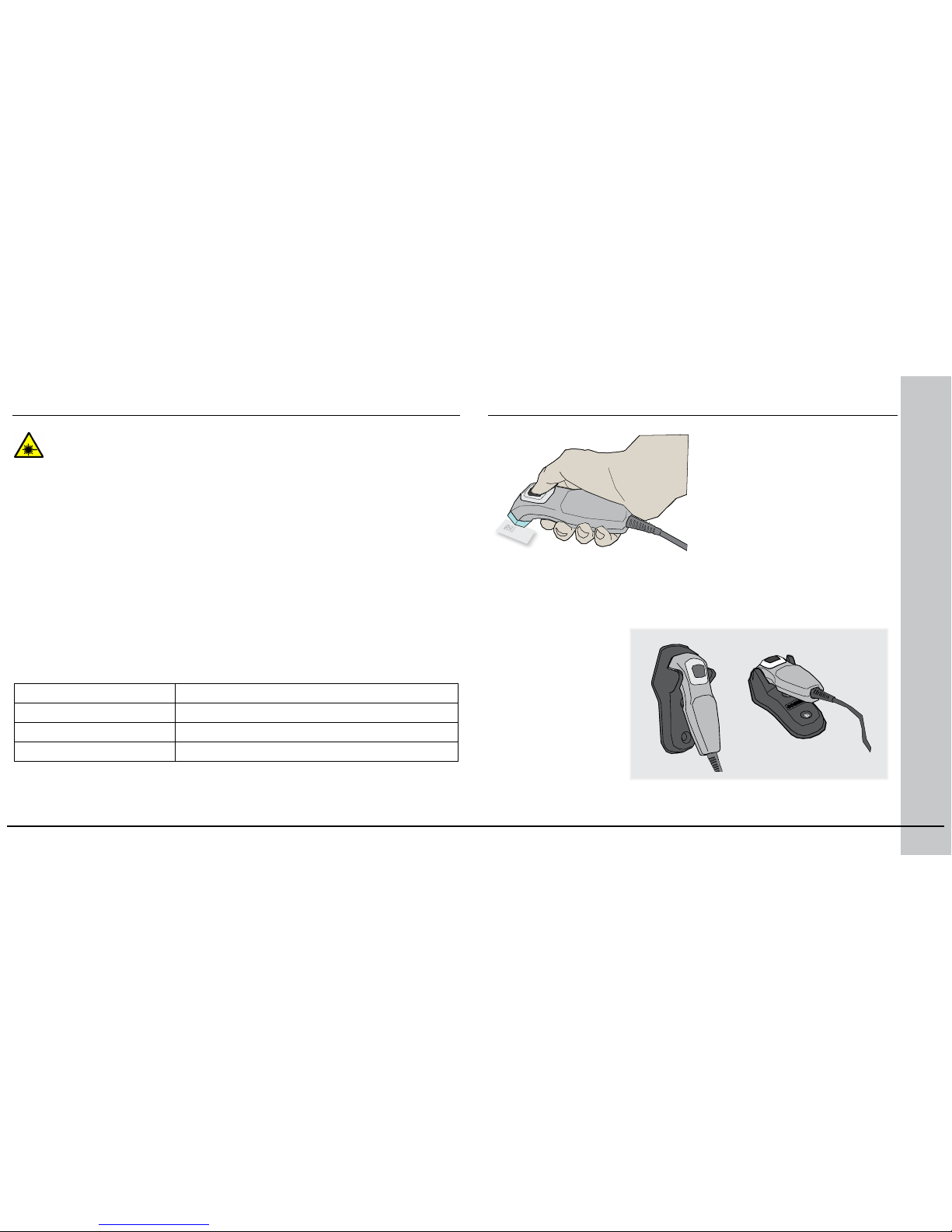
Laser Information
LASER LIGHT, DO NOT STARE INTO BEAM: CLASS 2 LASER PRODUCT
FAILURE TO FOLLOW THESE INSTRUCTIONS MAY CAUSE SERIOUS INJURY
• Use of controls or adjustments or performance of procedures other than
those specied herein may result in hazardous radiation exposure.
• Do not attempt to service or repair this product -- return it to Cognex for
service.
• Do not permit anyone other than Cognex Corporation or Cognex-authorized
personnel to service, repair, or adjust this product.
• Do not attempt to open or modify this device except as described in this
document.
• Do not direct or reect laser light toward people or reective objects.
• Do not operate this device if it is damaged or if the covers or seals are
missing or damaged.
This Laser Product is designated as Class 2 during all procedures of operation.
Wavelength 650 nm
Laser Power for classication < 1 mW
Beam Diameter < 3mm at aperture
Divergence < 1.5 mrad
For assistance contact Cognex Corporation at http://support.cognex.com
COGNEX
Models and Accessories
DM700-HOLDER-00
DataMan 750 and 750S
The DataMan 750 includes
the Cognex IDMax reading
algorithm for reading difcult
2D codes which include low
contrast and damaged codes.
The DataMan 750S uses
standard 1D and 2D reading
algorithms for reading high
quality 1D and 2D codes.
Page 13
P/N 590-7112
Copyright © 2010 Cognex Corporation All Rights Reserved. This document may not be
copied in whole or in part, nor transferred to any other media or language, without the
written permission of Cognex Corporation. The hardware and portions of the software
described in this document may be covered by one or more of the U.S. patents listed
on the Cognex web site http://www.cognex.com/patents.asp. Other U.S. and foreign
patents are pending. Cognex, the Cognex logo, and DataMan are trademarks, or
registered trademarks, of Cognex Corporation.
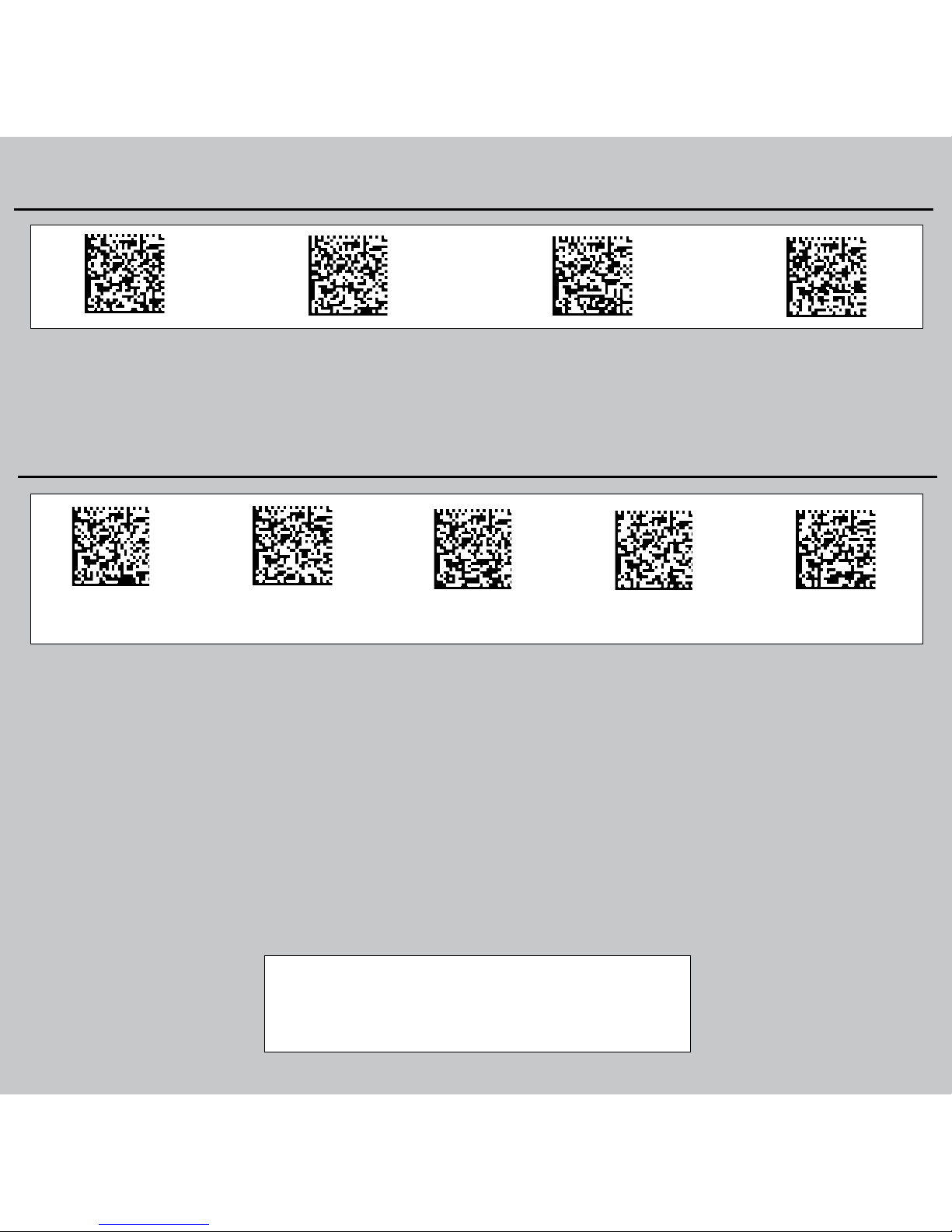
Reader Control Codes
Hard Reset USB KeyboardUSB SerialSoft Reset
US English German French Spanish Japanese
Keyboard Language
 Loading...