

Page 1
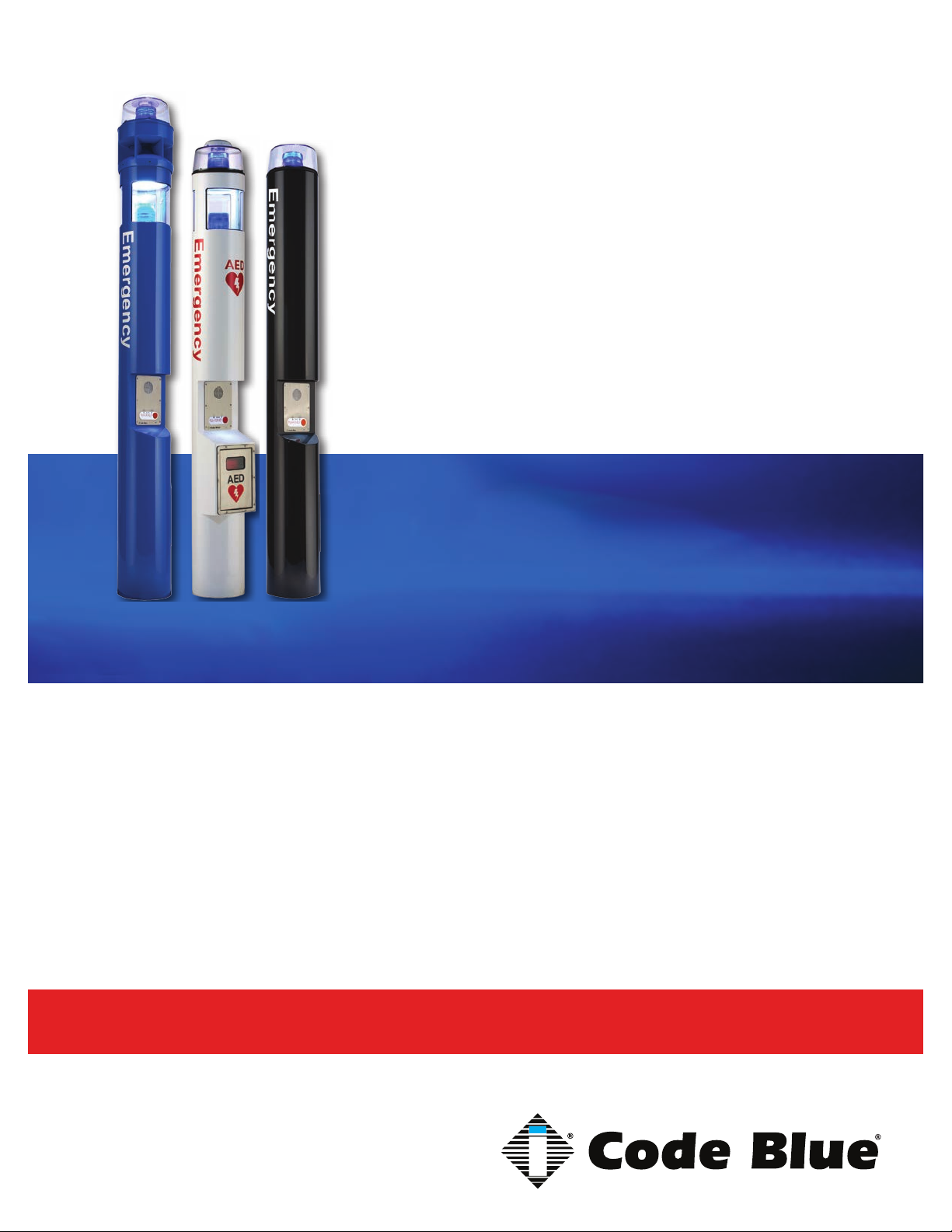
CB 1 Series
CB 1 Series with Public Address
CB 1-s with AED Housing
CB 1-w with Solar/GSM/Wireless
Installation, Configuration, Operation & Troubleshooting
CB 1-e
CB 1-s
CB 1-d
Administrator Guide
800.205.7186 • www.codeblue.com
Page 2

CB 1 Series
Administrator Guide
WARNING
ONLY QUALIFIED PERSONNEL SHOULD INSTALL THESE UNITS. THE INSTALLATION
SHOULD CONFORM TO ALL LOCAL CODES. IN SOME COUNTRIES, A CERTIFIED ELECTRICIAN MAY BE REQUIRED.
NOTICE TO USERS
Copyright © Code Blue Corporation. All rights reserved. This guide or software described herein, in
whole or part, shall not be reproduced, translated or reduced to any machine-readable form without
prior written approval from Code Blue Corporation.
CODE BLUE CORPORATION PROVIDES NO WARRANTY WITH REGARD TO THIS GUIDE, THE
SOFTWARE OR OTHER INFORMATION CONTAINED HEREIN AND HEREBY EXPRESSLY DISCLAIMS ANY IMPLIED WARRANTIES OF MERCHANTABILITY OR FITNESS FOR ANY PARTICULAR PURPOSE WITH REGARD TO THIS GUIDE, THE SOFTWARE OR SUCH OTHER INFORMATION. IN NO EVENT SHALL CODE BLUE CORPORATION BE LIABLE FOR ANY INCIDENTAL,
CONSEQUENTIAL, OR SPECIAL DAMAGES, WHETHER BASED ON TORT, CONTRACT, OR
OTHERWISE, ARISING OUT OF OR IN CONNECTIONS WITH THIS GUIDE, THE SOFTWARE
OR OTHER INFORMATION CONTAINED HEREIN OR THE USE THEREOF.
Code Blue Corporation reserves the right to make any modications to this guide or the information
contained herein at any time without notice. The software described herein may also be governed
by the terms of a separate user license agreement.
Code Blue® is a registered trademark of Code Blue Corporation.
Code Blue • 259 Hedcor Street • Holland, MI 49423 USA • 800.205.7186 • www.codeblue.com
GU-157-Epage 2 of 71
Page 3

Administrator Guide
Table of Contents
Section Page
2 Introduction.................................................................................... 5
3 Getting Started............................................................................... 7
4 Spare Parts..................................................................................... 9
5 Power Requirements.....................................................................12
6 Software Conguration.................................................................14
7 CB 1-e Low Voltage Exploded View.............................................15
8 CB 1-e High Voltage Exploded View............................................16
9 CB 1-s Low Voltage Exploded View.............................................17
10 CB 1-s High Voltage Exploded View............................................18
CB 1 Series
11 CB 1-d Low Voltage Exploded View.............................................19
12 CB 1-d High Voltage Exploded View............................................20
13 IP Color Camera Installation Instructions...................................21
14 CB 1-s, CB 1-e, CB 1-d Installation Instructions........................22
15 CB 1 Series Tower Base Gasket Installation Instructions..........24
16 CB 1-s with AED Housing Installation Instructions....................26
17 CB 1-w Installation Instructions...................................................28
18 CB 1 Series Anchor Bolt Installation Instructions......................34
19 Overhead Camera Mount Installation Instructions.....................35
20 Line Power Installation Instructions............................................37
21 CB 1 Series Public Address Installation Instructions................38
22 NIghtCharge® Installation Instructions........................................40
23 Solar and WindAssist™ Installation Instructions.......................42
24 AED Access Instructions..............................................................46
25 S-1000/S-1050 Installation Instructions.......................................47
26 LED Retro Area Light Installation Instructions...........................49
27 PoE Installation Instructions........................................................53
28 Blank Ring Installation Instructions............................................54
29 CB 1 Series Deck Mount Installation Instructions......................55
30 CB 1-e, CB 1-d, CB 1-s Standard Wiring (with Hammond Transformer)....56
31 CB 1-e, CB 1-d, CB 1-s Standard Wiring (with Multi-tap Power Brick).....57
32 CB 1 Series NightCharge Wiring..................................................58
Code Blue • 259 Hedcor Street • Holland, MI 49423 USA • 800.205.7186 • www.codeblue.com
GU-157-Epage 3 of 71
Page 4

Administrator Guide
33 CB 1 Series with Public Address Wiring.....................................59
34 CB 1-w Standard Wiring................................................................61
35 GSM Wireless Wiring Diagram.....................................................62
36 CB 1-s with AED, Public Address and IP Wireless.....................63
37 CB 1-s with AED Wiring.................................................................64
38 Multi Tap Transformer Wiring.......................................................65
39 Maintenance Schedule..................................................................66
40 CB 1-s with AED Access and Maintenance.................................68
41 Locating Unit Serial Numbers.......................................................69
42 Warranty..........................................................................................70
43 Download Information...................................................................71
CB 1 Series
Code Blue • 259 Hedcor Street • Holland, MI 49423 USA • 800.205.7186 • www.codeblue.com
GU-157-Epage 4 of 71
Page 5

CB 1 Series
Administrator Guide
2 Introduction
Thank you for choosing the CB 1 Series for your Code Blue application.
The CB 1 Series of products are the original Code Blue pedestal units that set the industry
standard for rugged construction, full feature availability and high visibility. The CB 1 Series is easily
recognized throughout a full 360-degree area. The user friendly lighted faceplate and the integral
area light ensure rapid location in an open environment. The high output strobe is easily identiable
by security when activated.
The CB 1 Series is an excellent choice for walkways, parks, college and commercial campus areas,
open landscape areas and anywhere a freestanding pedestal unit is required.
The exclusive analog InterAct and VoIP speakerphones are designed for maximum reliability,
vandal resistance, auxiliary functions, mass notication control, and fault monitoring and reporting
capability. (See IA4100 or IP5000 guides for more information.)
Our unmistakable craftsmanship makes our Help Points® the most rugged on the market,
withstanding the punishment of natural and man-made disasters. With durable construction, our
pedestal units can meet any requirement or purpose. CB 1 Series units have a rugged steel
construction, shatterproof Lexan Lens, industrial engineering grade reective graphics and weather,
UV and grafti resistant paint. They are illuminated by a high-powered, 270 lumens/92 candela LED
blue beacon/strobe.
Other options include:
• IP and analog phones
• Long-life LED area light
• Low power consumption LED faceplate light
• Camera and card reader openings
• Temperature controlled automated external debrillator (AED) housing
• 360° Public Address Speaker (PAS)
• Color IP camera
• Custom cut-out stainless steel plates
• Mounting rings
• Overhead Camera Mount
• Second opening
Code Blue • 259 Hedcor Street • Holland, MI 49423 USA • 800.205.7186 • www.codeblue.com
GU-157-Epage 5 of 71
Page 6
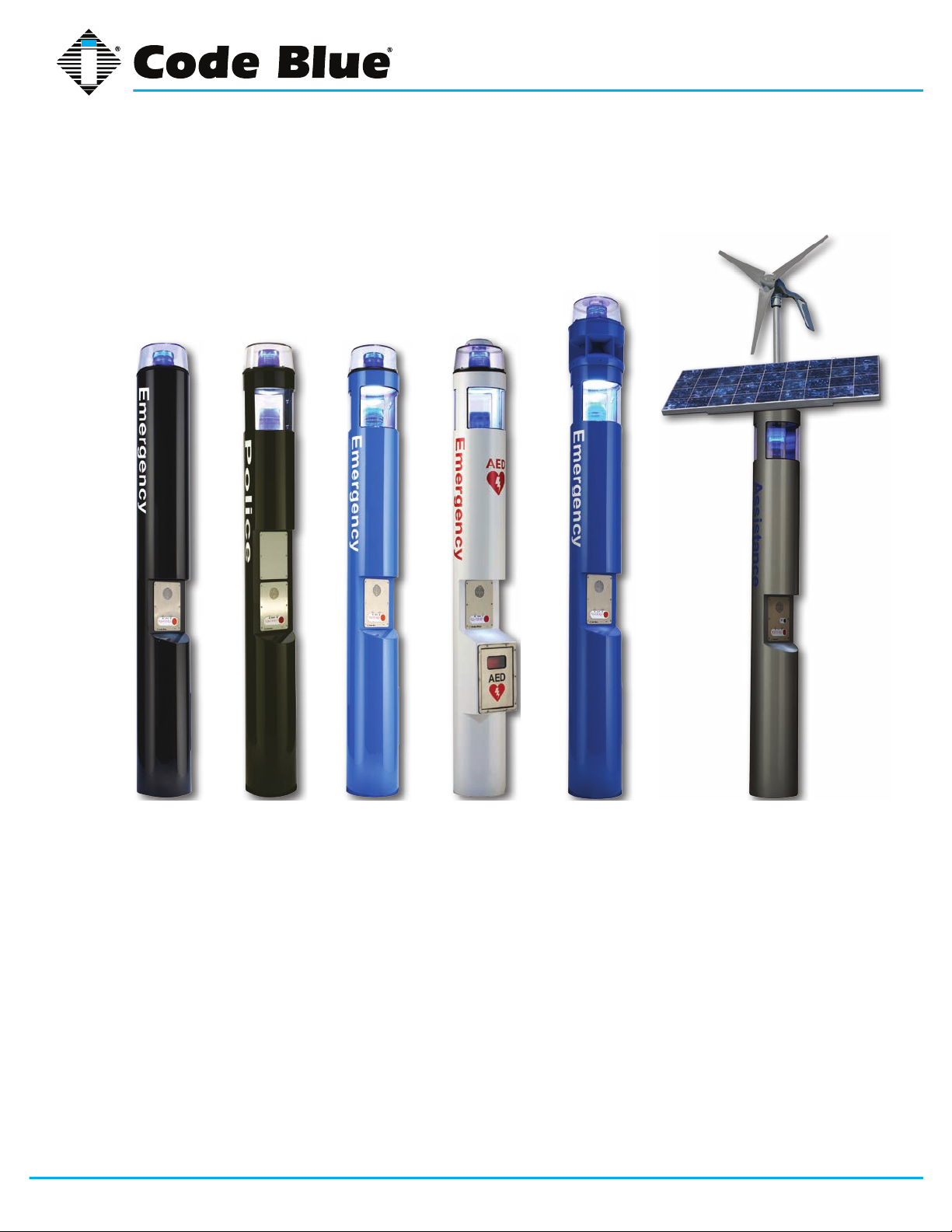
CB 1 Series
CB 1-s
CB 1-d
Administrator Guide
This guide contains all of the CB 1 Series information for the CB 1-e, CB 1-d, CB 1-s, CB 1-s with
Public Address and the CB 1-w with WindAssist™. This guide contains a general overview of the CB
1 Series options and its application, installation and wiring.
CB 1-e
Code Blue • 259 Hedcor Street • Holland, MI 49423 USA • 800.205.7186 • www.codeblue.com
CB 1-s with
AED Housing
CB 1-s with
Public Address
CB 1-w with
WindAssist
GU-157-Epage 6 of 71
Page 7
CB 1 Series
Administrator Guide
3 Getting Started
Basic Install Instructions
1. EIA/TIA, ANSI, CSA and BICSI cabling or similar standards shall be adhered to for proper
operation of Code Blue communication devices connected to copper or ber infrastructures.
Communications cable and electrical cable in the same conduit is not an acceptable instal-
lation and shall not be supported. Analog phones require a minimum of 23mA for proper
operation (26-29mA recommended).
2. Each analog speakerphone requires its own phone line or PBX extension. Multiple units
shall not be supported.
3. Speakerphones require programming before operation. Consult the User Guide or Admin istrator Guide enclosed with the unit or visit www.codeblue.com > Support > Downloads to
read or download manuals.
4. If you are installing IP speakerphones, please read the appropriate manuals and consult
with your Network Administrator.
5. Size electrical wiring based on length of run.
6. Consult the enclosed document packet for internal wiring instructions.
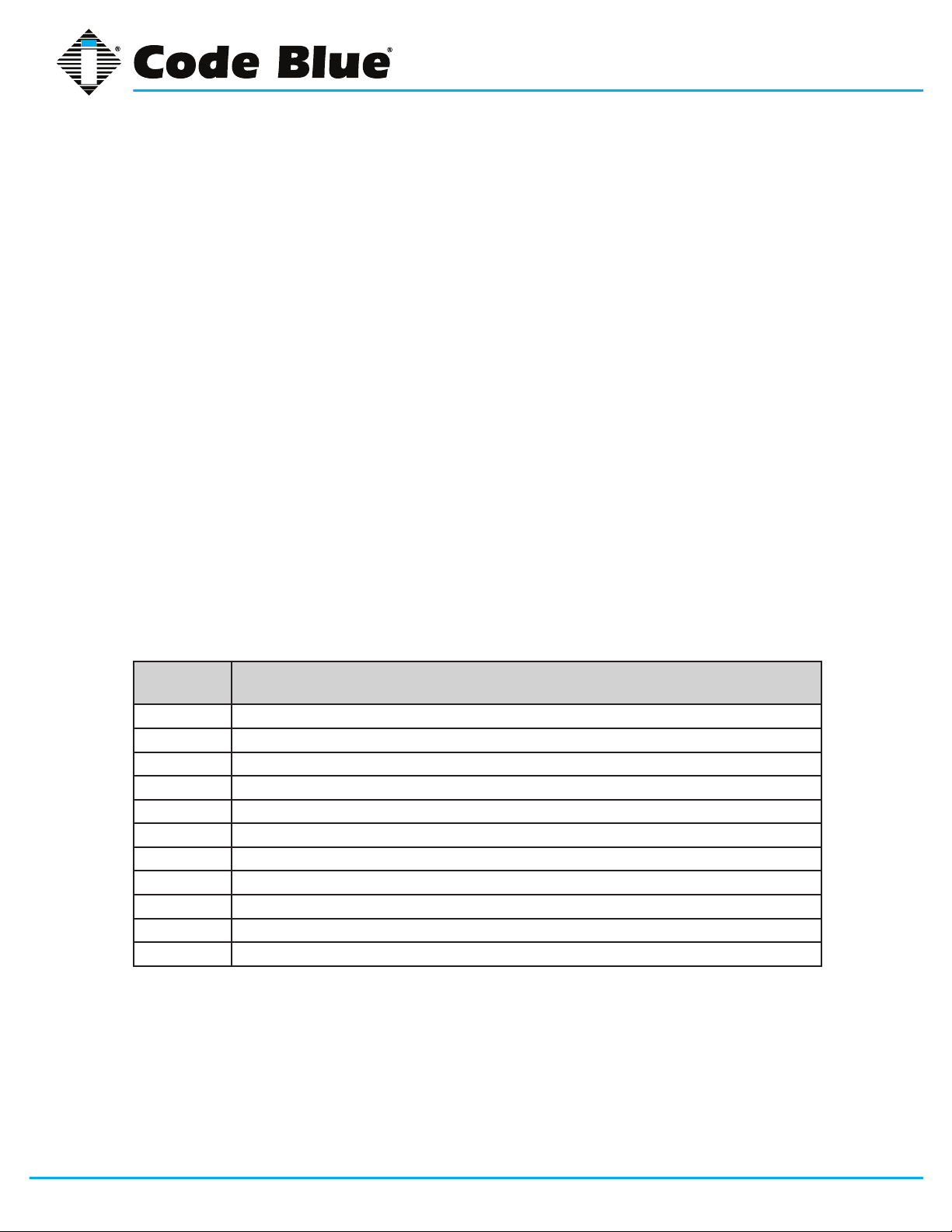
What’s Included
Quantity Part Description
1 Anchor Bolt Kit (4 L-Bolts, 8 Washers, 4 Hex Nuts, 1 Cardboard Template)
1 Security Bit
1 Enclosure (CB 1-s, CB 1-d, CB 1-w (Solar), CB 1-e, CB1-s w/AED)
2 Access Door Screws
2 Key fobs – CB1-s w/AED only
1 URL listing sheet of Installation, Programming, Wiring & Warranty locations
2 55AMP Batteries (Solar Only)
1 55AMP Battery (NightCharge
1 PAS Top (PAS Option Only)
1 Dome Top Assembly (Solar not Included)
1 WindAssist™ (Solar Option Only)
®
Only)
Code Blue • 259 Hedcor Street • Holland, MI 49423 USA • 800.205.7186 • www.codeblue.com
GU-157-Epage 7 of 71
Page 8

CB 1 Series
Administrator Guide
CB 1-e, CB 1-d, CB 1-s Tools Required
1. Ladder to reach the top of the units
2. Drill and security bit for removing and inserting security screws on phone, dome top and
access door
3. 11/8 socket set and extension for installing anchor bolts or Deck Mount Kits
4. 3/8 socket set to mount the mounting plate containing the new toroid transformer (PAS only)
5. Phillips head screwdriver and at head screwdriver
6. 1/2-inch wrench for NightCharge® batteries, if required
CB 1-s with AED Tools Required
1. Ladder to reach the top of the units
2. Drill and security bit for removing and inserting security screws on phone, dome top and
access door
3. 11/8 socket set and extension for installing anchor bolts
4. Phillips head screwdriver and at head screwdriver
CB 1-w with WindAssist™ Tools Required
1. Ladder to reach the top of the units
2. Drill and security bit for removing and inserting security screws on phone, dome top and
access door
3. 11/8 socket set and extension for installing anchor bolts
4. Phillips head screwdriver and at head screwdriver
5. 1/2-inch wrench for solar batteries
Code Blue • 259 Hedcor Street • Holland, MI 49423 USA • 800.205.7186 • www.codeblue.com
GU-157-Epage 8 of 71
Page 9
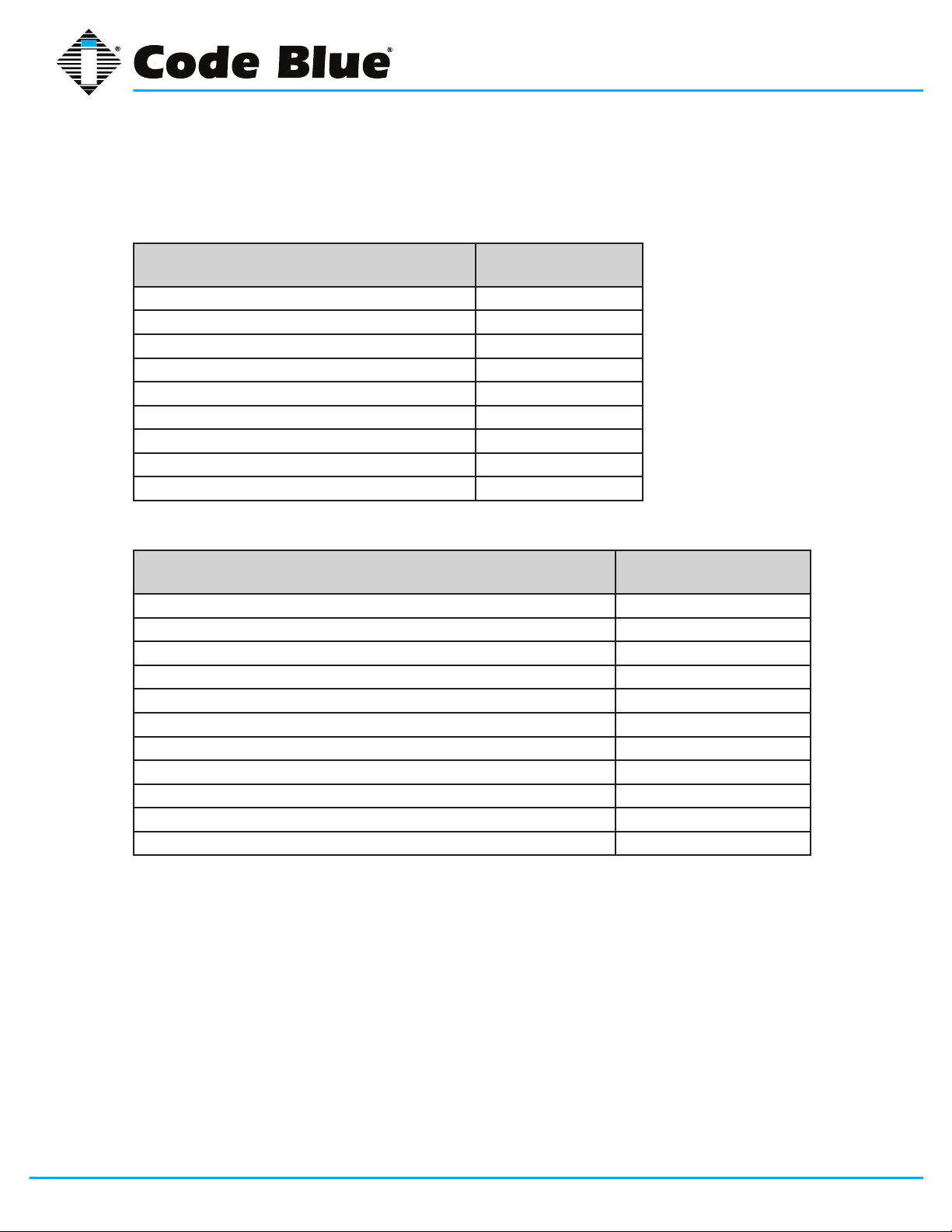
4 Spare Parts
CB 1-e
Part Part Number
LED Strobe Light 40159
Dome Top Lens 41402
LED Faceplate Light 40196
Faceplate Screws 41544 (6pk)
Dome Top Screws 41500 (3pk)
Access Door Screws 41545 (2pk)
Manifold R/B 5-way 40101
Analog Surge Suppressor 41471
IP Surge Suppressor 41421
CB 1 Series
Administrator Guide
CB 1-d
Part Part Number
LED Strobe Light 40159
LED Area Light 41539
Dome Top Lens 41402
LED Faceplate Light 40196
Faceplate Screws 41544 (6pk)
Dome Top Screws 41500 (3pk)
Access Door Screws 41545 (2pk)
Blank Lexan Plate 40067
Manifold R/B 5-way 40101
Analog Surge Suppressor 41471
IP Surge Suppressor 41421
Code Blue • 259 Hedcor Street • Holland, MI 49423 USA • 800.205.7186 • www.codeblue.com
GU-157-Epage 9 of 71
Page 10
Administrator Guide
CB 1-s
Part Part Number
LED Strobe Light 40159
Dome Top Lens 41402
LED Area Light 41539
LED Faceplate Light 40196
Faceplate Screws 41544 (6pk)
Dome Top Screws 41500 (3pk)
Access Door Screws 41545 (2pk)
Manifold R/B 5-way 40101
Analog Surge Suppressor 41471
IP Surge Suppressor 41421
CB 1-s with AED Housing
Part Part Number
CB 1 Series
LED Strobe Light 40159
LED Area Light 41539
Dome Top Lens 41402
LED Faceplate Light 40196
Faceplate Screws 41544 (6pk)
Dome Top Screws 41500 (3pk)
Access Door Screws 41545 (2pk)
Manifold R/B 5-way 40101
Analog Surge Suppressor 41471
IP Surge Suppressor 41421
AED Housing Door Release Mechanism 41104
AED Housing Heater 41105
AED Housing Thermostat 41106
AED Housing Door Controller 41107
AED Housing Retro Fit Kit 40012
Code Blue • 259 Hedcor Street • Holland, MI 49423 USA • 800.205.7186 • www.codeblue.com
GU-157-Epage 10 of 71
Page 11

Administrator Guide
CB 1-w
Part Part Number
LED Strobe Light 40159
Dome Top Lens 41402
LED Faceplate Light 40196
Faceplate Screws 41544 (6pk)
Dome Top Screws 41500 (3pk)
Access Door Screws 41545 (2pk)
Solar Batteries (2) 41537
GSM 40023
CB 1-e, CB 1-d, CB 1-s Additional Options
Part Part Number
CB 1 Series
GSM 40022
NightCharge
NightCharge Batteries (1) 41537
Public Address Top Need Color for Part#
Overhead Camera Mount Need Color for Part#
Multi Tap Transformer
120V Triad Transformer
Directory Plate Assembly 40056
Color IP Camera with Mounting Plate 41420
Blank Lexan Plate Assembly 40067
Service Plate - Lexan w/graphics (This Location Being Serviced) 40208
Blank Mounting Rings – 5.25 in, 5.25 in with Antenna post, 16.5 in Need Color for Part#
Deck Mount Kit 40215
®
(powers accessories) 120V, 240V, 277V, 347V 40104
(will not power accessories) 41247
45005
Code Blue • 259 Hedcor Street • Holland, MI 49423 USA • 800.205.7186 • www.codeblue.com
GU-157-Epage 11 of 71
Page 12
CB 1 Series
Administrator Guide
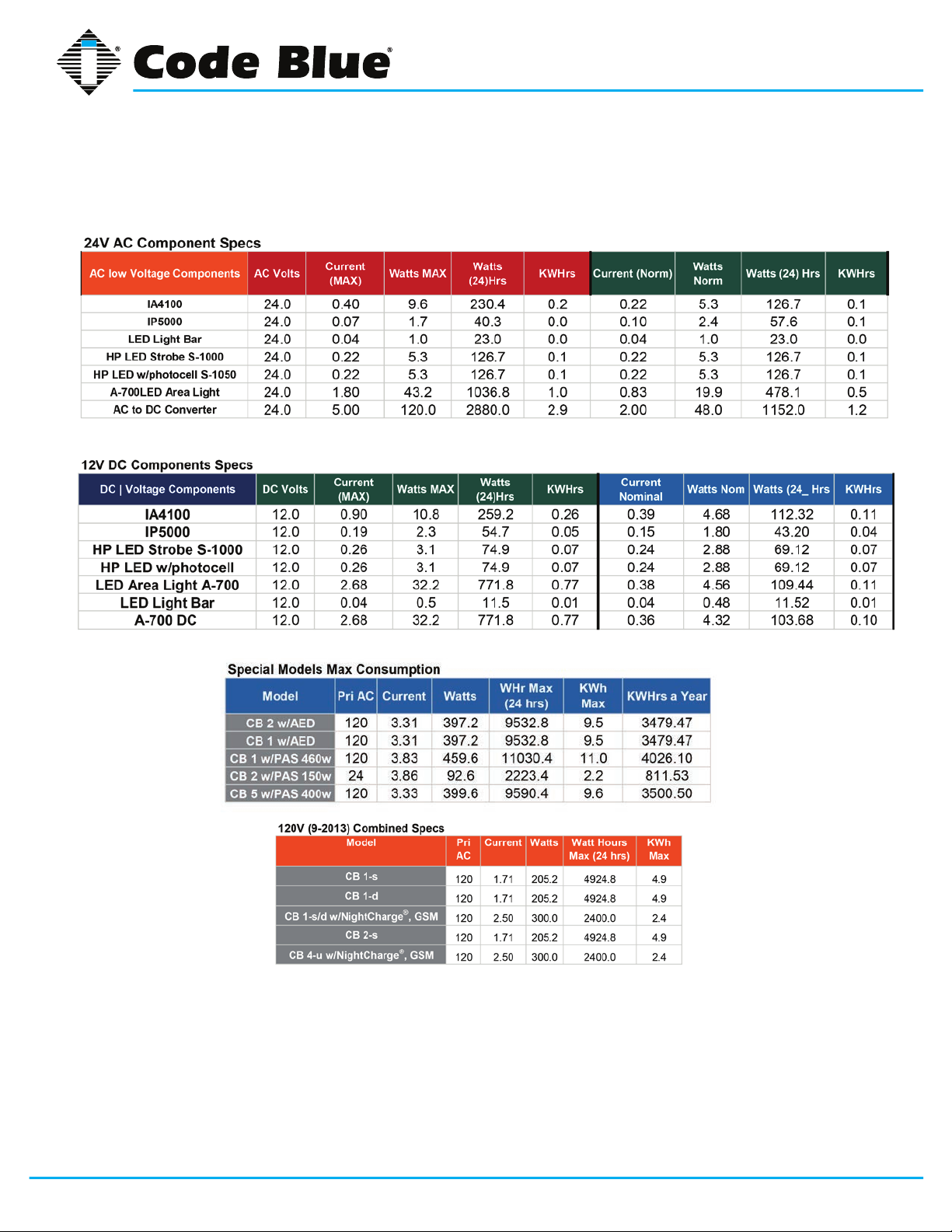
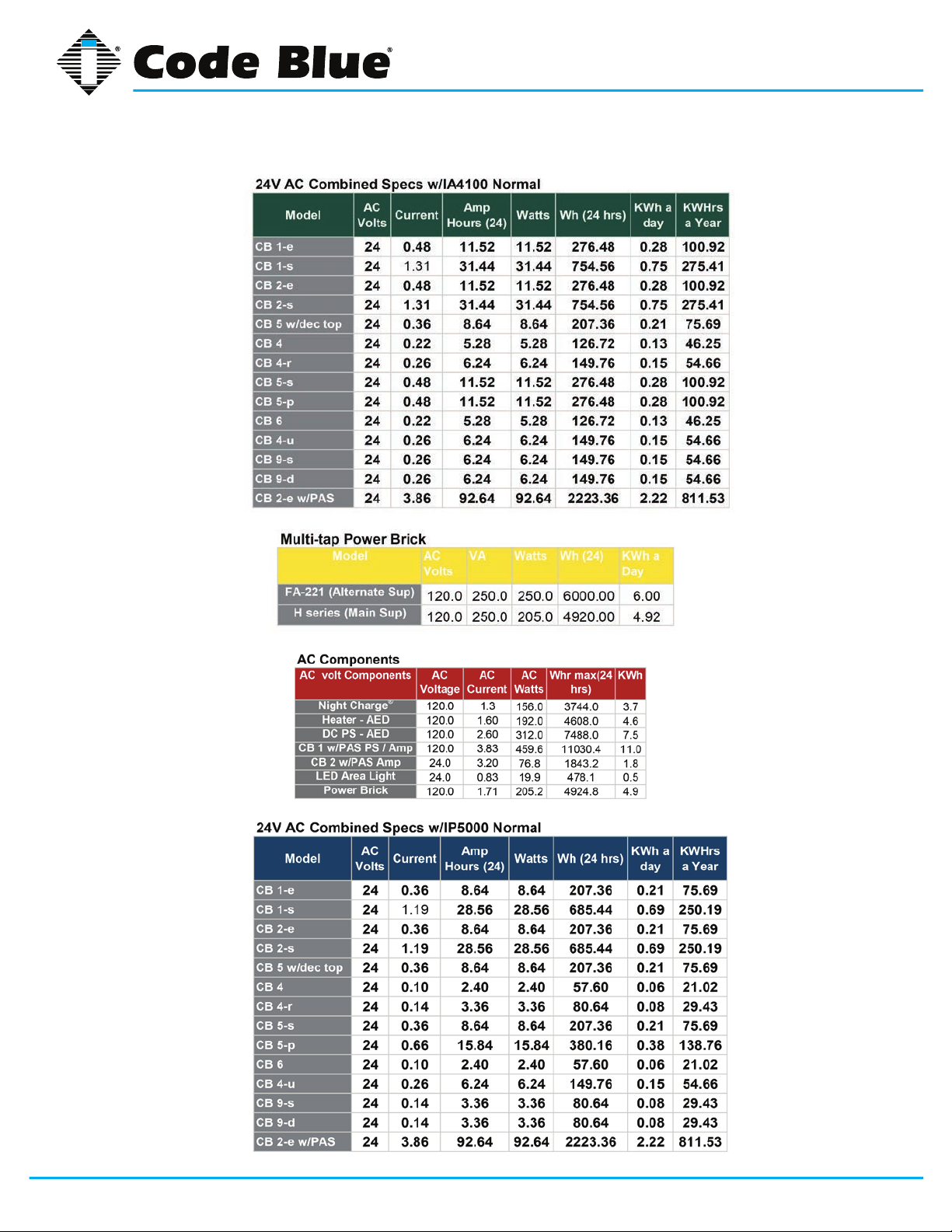
5 Power Requirements
(The following power requirements include the 9 Series and also ALL OTHER Code Blue units.)
Code Blue • 259 Hedcor Street • Holland, MI 49423 USA • 800.205.7186 • www.codeblue.com
GU-157-Epage 12 of 71
Page 13
CB 1 Series
Administrator Guide
Code Blue • 259 Hedcor Street • Holland, MI 49423 USA • 800.205.7186 • www.codeblue.com
GU-157-Epage 13 of 71
Page 14

CB 1 Series
Administrator Guide
6 Software Configuration
Blue Alert® MNS Software
Blue Alert MNS (Mass Notication Software) lls a need in the marketplace for an incident response
solution that is both comprehensive and cost-effective, while also providing an efcient way to detect
and respond. The advanced mass notication system allows responders to deliver multi-layered
emergency notications via a wide range of platforms, including email, text message (SMS), emer-
gency phones, public address speakers, social media, desktop alerts and more, quickly informing
and directing people in emergency situations.
Blue Alert® EMS
Blue Alert EMS is an advanced software solution that handles all incoming events effectively by remotely controlling emergency communication devices with an easy-to-use Graphical User Interface
(GUI). You also will have the ability to open gates and AED access doors, turn LED beacon/strobes
on or off, transfer calls to Public Address Systems to make area wide announcements and incorporate other ancillary devices and applications while the system securely archives data for future
reference.
ToolVox®
A sophisticated emergency management platform for your blue light phone network, ToolVox offers
unique real-time monitoring and provisioning options for emergency phones and public address
speakers, effectively acting as a hub for connecting Help Points® and other Code Blue devices. Using our proprietary incident response software, Blue Alert® MNS and EMS, you can send alerts via
outdoor platforms, such as blue light phones and public address speakers. It also provides connections to PBX, public telephone (PSTN) and Internet (ISP) networks, in addition to third party security
platforms.
Code Blue • 259 Hedcor Street • Holland, MI 49423 USA • 800.205.7186 • www.codeblue.com
GU-157-Epage 14 of 71
Page 15
CB 1 Series
2
4
1a
3
5
7
8
9
12
6
10
11
1b
1c
Administrator Guide
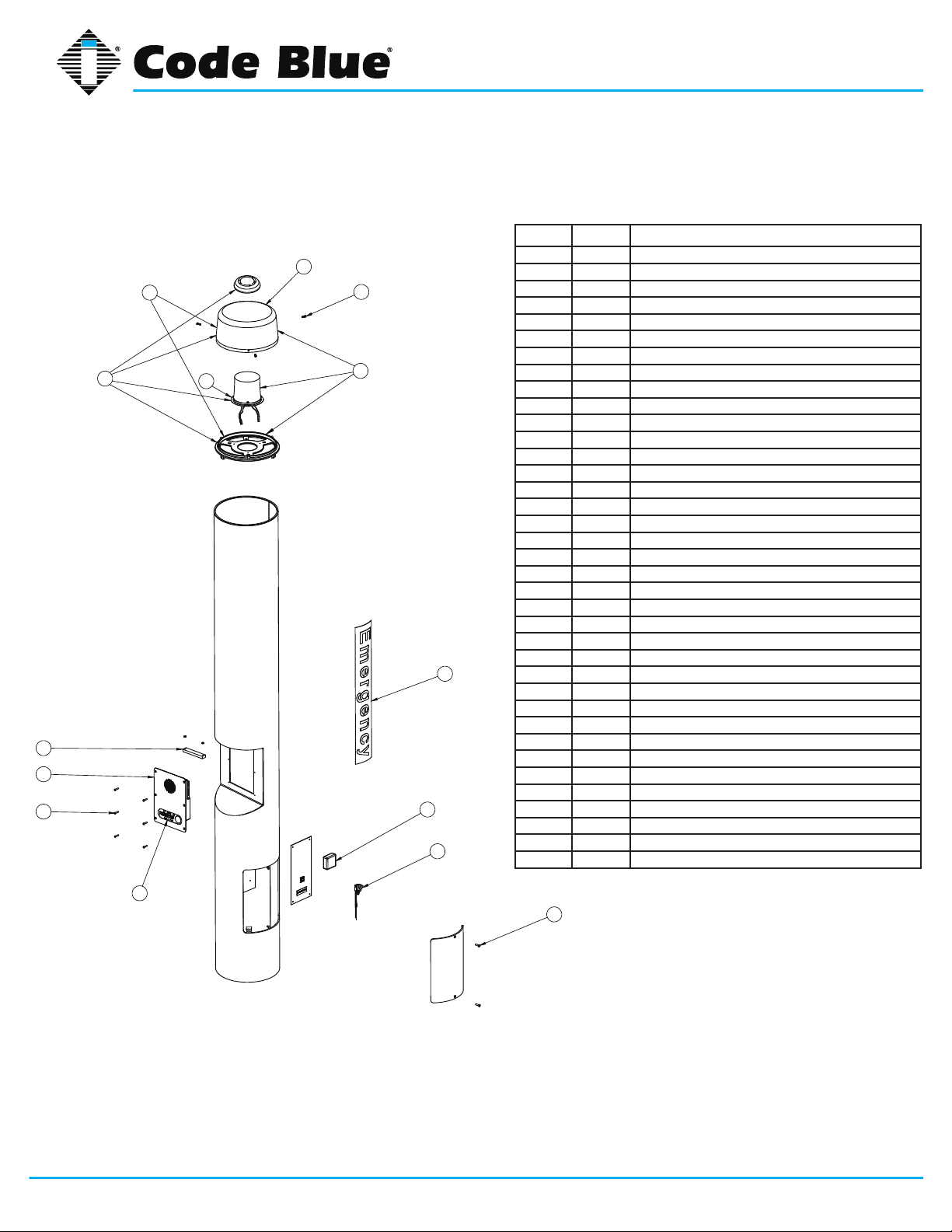
7 CB 1-e Low Voltage Exploded View
BALL # PART # DESCRIPTION
1a 40260 Dome Top Kit with Strobe
1b 40165 Dome Top Kit w/o Strobe
1c 40166 Dome Top Kit with Strobe & Active Vent
2 41402 Dome Top Lens
3 40159 LED Blue Beacon Strobe
4 41418 Button Head Security Screws (3 pk)
5 CALL Standard / Custom Graphic
6 41471 Analog Surge Suppressor
6 41421 IP Surge Suppressor
7 41548 LED Faceplate Light
8 50001 Single Button IA4100 Analog Phone – PUSH FOR HELP
8 50002 Double Button IA4100 Analog Phone – PUSH FOR HELP
8 50003 Keypad IA4100 Analog Phone – PUSH FOR HELP
8 50004 Single Button IA4100 Analog Phone – EMERGENCY
8 50005 Double Button IA4100 Analog Phone – EMERGENCY
8 50006 Keypad IA4100 Analog Phone – EMERGENCY
8 50007 Single Button IA4100 Analog Phone – EMERGENCY/EMERGENCIA
8 50008 Double Button IA4100 Analog Phone – EMERGENCY/EMERGENCIA
8 50009 Keypad IA4100 Analog Phone – EMERGENCY/EMERGENCIA
8 50101 Single Button IP5000 Phone – PUSH FOR HELP
8 50102 Double Button IP5000 Phone – PUSH FOR HELP
8 50103 Keypad IP5000 Phone – PUSH FOR HELP
8 50104 Single Button IP5000 Phone – EMERGENCY
8 50105 Double Button IP5000 Phone – EMERGENCY
8 50106 Keypad IP5000 Phone – EMERGENCY
8 50107 Single Button IP5000 Phone – EMERGENCY/EMERGENCIA
8 50108 Double Button IP5000 Phone – EMERGENCY/EMERGENCIA
8 50109 Keypad IP5000 Phone – EMERGENCY/EMERGENCIA
9 41544 Faceplate Security Screw 10x24 (6 pk)
10 40101 Manifold R/B 5-way
11 41545 Access Door Security Screws (2 pk)
12 40357 Bezel Assembly IA4100 Analog Phone – PUSH FOR HELP
12 40407 Bezel Assembly IA4100 Analog Phone – EMERGENCY
12 40408 Bezel Assembly IA4100 Analog Phone – EMERGENCY/EMERGENCIA
12 40313 Bezel Assembly IP5000 Analog Phone – PUSH FOR HELP
12 40405 Bezel Assembly IP5000 Analog Phone – EMERGENCY
12 40406 Bezel Assembly IP5000 Analog Phone – EMERGENCY/EMERGENCIA
DISCLAIMER: Product design and component use subject to change without notice. Product shown reasonably represents current offering and
is intended to assist in component identication. Reference the model and serial number from the unit ID tag and contact manufacturer to conrm
replacement part version and availability.
Code Blue • 259 Hedcor Street • Holland, MI 49423 USA • 800.205.7186 • www.codeblue.com
GU-157-Epage 15 of 71
Page 16
CB 1 Series
2
4
1a
3
5
7
8
9
12
11
1b
1c
10
6
Administrator Guide
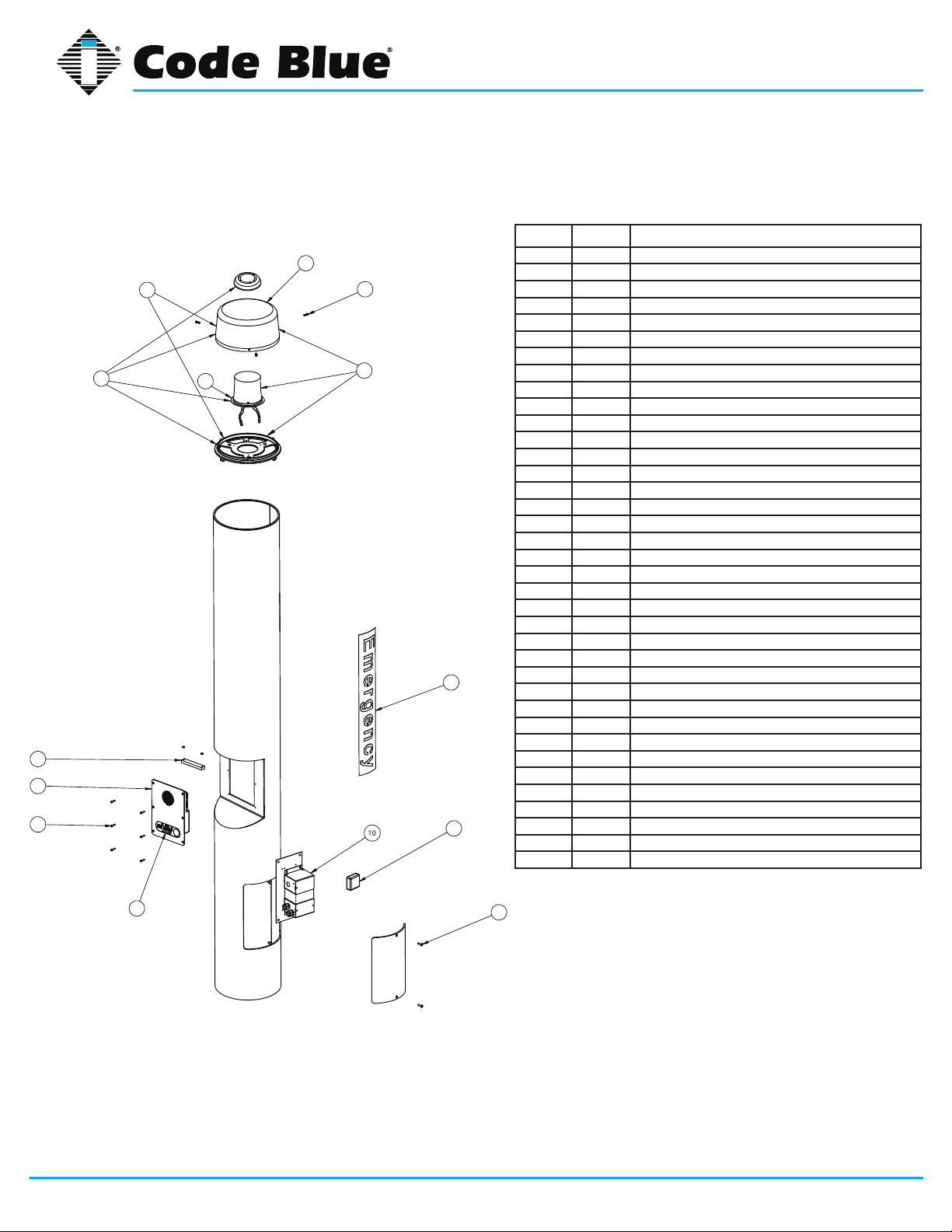
8 CB 1-e High Voltage Exploded View
BALL # PART # DESCRIPTION
1a 40260 Dome Top Kit with Strobe
1b 40165 Dome Top Kit w/o Strobe
1c 40166 Dome Top Kit with Strobe & Active Vent
2 41402 Dome Top Lens
3 40159 LED Blue Beacon Strobe
4 41418 Button Head Security Screws (3 pk)
5 CALL Standard / Custom Graphic
6 41471 Analog Surge Suppressor
6 41421 IP Surge Suppressor
7 41548 LED Faceplate Light
8 50001 Single Button IA4100 Analog Phone – PUSH FOR HELP
8 50002 Double Button IA4100 Analog Phone – PUSH FOR HELP
8 50003 Keypad IA4100 Analog Phone – PUSH FOR HELP
8 50004 Single Button IA4100 Analog Phone – EMERGENCY
8 50005 Double Button IA4100 Analog Phone – EMERGENCY
8 50006 Keypad IA4100 Analog Phone – EMERGENCY
8 50007 Single Button IA4100 Analog Phone – EMERGENCY/EMERGENCIA
8 50008 Double Button IA4100 Analog Phone – EMERGENCY/EMERGENCIA
8 50009 Keypad IA4100 Analog Phone – EMERGENCY/EMERGENCIA
8 50101 Single Button IP5000 Phone – PUSH FOR HELP
8 50102 Double Button IP5000 Phone – PUSH FOR HELP
8 50103 Keypad IP5000 Phone – PUSH FOR HELP
8 50104 Single Button IP5000 Phone – EMERGENCY
8 50105 Double Button IP5000 Phone – EMERGENCY
8 50106 Keypad IP5000 Phone – EMERGENCY
8 50107 Single Button IP5000 Phone – EMERGENCY/EMERGENCIA
8 50108 Double Button IP5000 Phone – EMERGENCY/EMERGENCIA
8 50109 Keypad IP5000 Phone – EMERGENCY/EMERGENCIA
9 41544 Faceplate Security Screw 10x24 (6 pk)
10 40104 Power Brick 120V, 240V, 277V, 347V
11 41545 Access Door Security Screws (2 pk)
12 40357 Bezel Assembly IA4100 Analog Phone – PUSH FOR HELP
12 40407 Bezel Assembly IA4100 Analog Phone – EMERGENCY
12 40408 Bezel Assembly IA4100 Analog Phone – EMERGENCY/EMERGENCIA
12 40313 Bezel Assembly IP5000 Analog Phone – PUSH FOR HELP
12 40405 Bezel Assembly IP5000 Analog Phone – EMERGENCY
12 40406 Bezel Assembly IP5000 Analog Phone – EMERGENCY/EMERGENCIA
DISCLAIMER: Product design and component use subject to change without notice. Product shown reasonably represents current offering and
is intended to assist in component identication. Reference the model and serial number from the unit ID tag and contact manufacturer to conrm
replacement part version and availability.
Code Blue • 259 Hedcor Street • Holland, MI 49423 USA • 800.205.7186 • www.codeblue.com
GU-157-Epage 16 of 71
Page 17
CB 1 Series
Administrator Guide
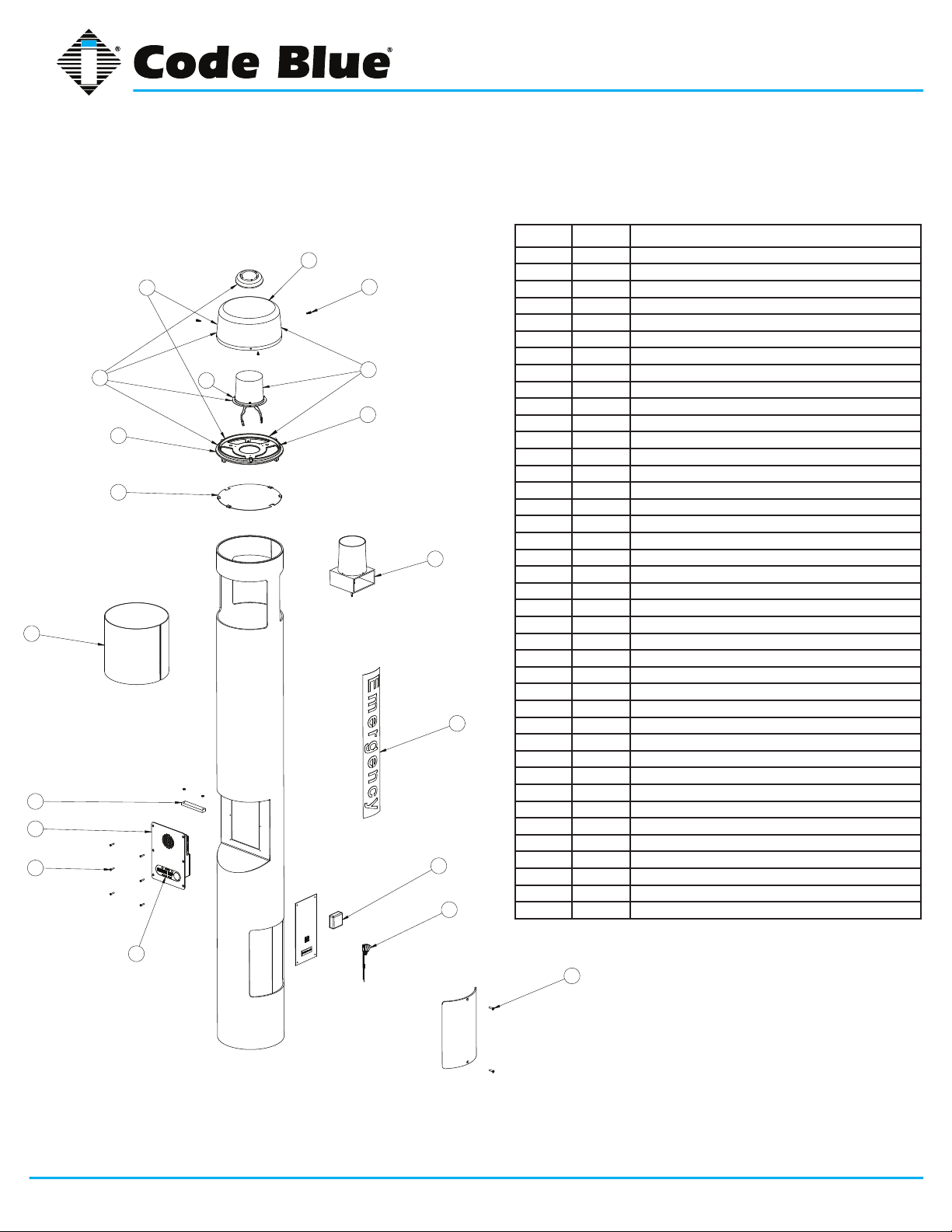
9 CB 1-s Low Voltage Exploded View
BALL # PART # DESCRIPTION
2
1b
1c
7
5
7
10
11
12
3
4
1a
9
6
8
9
13
1a 40260 Dome Top Kit with Strobe
1b 40165 Dome Top Kit w/o Strobe
1c 40166 Dome Top Kit with Strobe & Active Vent
2 41402 Dome Top Lens
3 40159 LED Blue Beacon Strobe
4 41418 Button Head Security Screws (3 pk)
5 40393 Reective Disk
6 41539 LED Area Light
7 41410 HID Lens
8 CALL Standard / Custom Graphic
9 41471 Analog Surge Suppressor
9 41421 IP Surge Suppressor
10 41548 LED Faceplate Light
11 50001 Single Button IA4100 Analog Phone – PUSH FOR HELP
11 50002 Double Button IA4100 Analog Phone – PUSH FOR HELP
11 50003 Keypad IA4100 Analog Phone – PUSH FOR HELP
11 50004 Single Button IA4100 Analog Phone – EMERGENCY
11 50005 Double Button IA4100 Analog Phone – EMERGENCY
11 50006 Keypad IA4100 Analog Phone – EMERGENCY
11 50007 Single Button IA4100 Analog Phone – EMERGENCY/EMERGENCIA
11 50008 Double Button IA4100 Analog Phone – EMERGENCY/EMERGENCIA
11 50009 Keypad IA4100 Analog Phone – EMERGENCY/EMERGENCIA
11 50101 Single Button IP5000 Phone – PUSH FOR HELP
11 50102 Double Button IP5000 Phone – PUSH FOR HELP
11 50103 Keypad IP5000 Phone – PUSH FOR HELP
11 50104 Single Button IP5000 Phone – EMERGENCY
11 50105 Double Button IP5000 Phone – EMERGENCY
11 50106 Keypad IP5000 Phone – EMERGENCY
11 50107 Single Button IP5000 Phone – EMERGENCY/EMERGENCIA
11 50108 Double Button IP5000 Phone – EMERGENCY/EMERGENCIA
11 50109 Keypad IP5000 Phone – EMERGENCY/EMERGENCIA
12 41544 Faceplate Security Screw 10x24 (6 pk)
13 40101 Manifold R/B 5-way
14 41545 Access Door Security Screws (2 pk)
15 40357 Bezel Assembly IA4100 Analog Phone – PUSH FOR HELP
15 40407 Bezel Assembly IA4100 Analog Phone – EMERGENCY
15 40408 Bezel Assembly IA4100 Analog Phone – EMERGENCY/EMERGENCIA
15 40313 Bezel Assembly IP5000 Analog Phone – PUSH FOR HELP
15 40405 Bezel Assembly IP5000 Analog Phone – EMERGENCY
15 40406 Bezel Assembly IP5000 Analog Phone – EMERGENCY/EMERGENCIA
15
14
DISCLAIMER: Product design and component use subject to change without notice. Product shown reasonably represents current offering and
is intended to assist in component identication. Reference the model and serial number from the unit ID tag and contact manufacturer to conrm
replacement part version and availability.
Code Blue • 259 Hedcor Street • Holland, MI 49423 USA • 800.205.7186 • www.codeblue.com
GU-157-Epage 17 of 71
Page 18
CB 1 Series
Administrator Guide
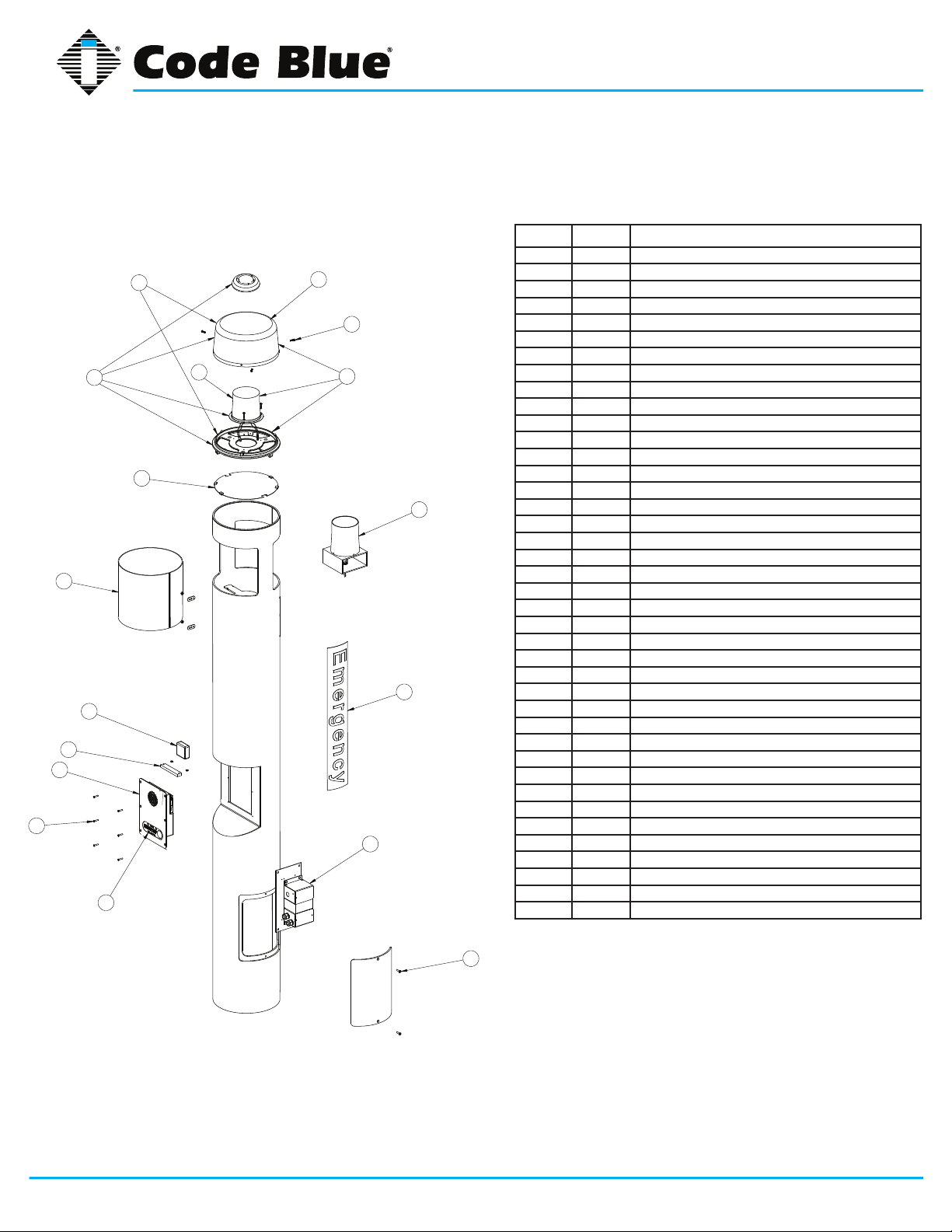
10 CB 1-s High Voltage Exploded View
BALL # PART # DESCRIPTION
1a 40260 Dome Top Kit with Strobe
1b
1c
5
7
9
10
11
12
15
3
2
4
1a
6
8
13
1b 40165 Dome Top Kit w/o Strobe
1c 40166 Dome Top Kit with Strobe & Active Vent
2 41402 Dome Top Lens
3 40159 LED Blue Beacon Strobe
4 41418 Button Head Security Screws (3 pk)
5 40393 Reective Disk
6 41539 LED Area Light
7 41410 HID Lens
8 CALL Standard / Custom Graphic
9 41471 Analog Surge Suppressor
9 41421 IP Surge Suppressor
10 41548 LED Faceplate Light
11 50001 Single Button IA4100 Analog Phone – PUSH FOR HELP
11 50002 Double Button IA4100 Analog Phone – PUSH FOR HELP
11 50003 Keypad IA4100 Analog Phone – PUSH FOR HELP
11 50004 Single Button IA4100 Analog Phone – EMERGENCY
11 50005 Double Button IA4100 Analog Phone – EMERGENCY
11 50006 Keypad IA4100 Analog Phone – EMERGENCY
11 50007 Single Button IA4100 Analog Phone – EMERGENCY/EMERGENCIA
11 50008 Double Button IA4100 Analog Phone – EMERGENCY/EMERGENCIA
11 50009 Keypad IA4100 Analog Phone – EMERGENCY/EMERGENCIA
11 50101 Single Button IP5000 Phone – PUSH FOR HELP
11 50102 Double Button IP5000 Phone – PUSH FOR HELP
11 50103 Keypad IP5000 Phone – PUSH FOR HELP
11 50104 Single Button IP5000 Phone – EMERGENCY
11 50105 Double Button IP5000 Phone – EMERGENCY
11 50106 Keypad IP5000 Phone – EMERGENCY
11 50107 Single Button IP5000 Phone – EMERGENCY/EMERGENCIA
11 50108 Double Button IP5000 Phone – EMERGENCY/EMERGENCIA
11 50109 Keypad IP5000 Phone – EMERGENCY/EMERGENCIA
12 41544 Faceplate Security Screw 10x24 (6 pk)
13 40104 Power Brick 120V, 240V, 277V, 347V
14 41545 Access Door Security Screws (2 pk)
15 40357 Bezel Assembly IA4100 Analog Phone – PUSH FOR HELP
15 40407 Bezel Assembly IA4100 Analog Phone – EMERGENCY
15 40408 Bezel Assembly IA4100 Analog Phone – EMERGENCY/EMERGENCIA
15 40313 Bezel Assembly IP5000 Analog Phone – PUSH FOR HELP
15 40405 Bezel Assembly IP5000 Analog Phone – EMERGENCY
15 40406 Bezel Assembly IP5000 Analog Phone – EMERGENCY/EMERGENCIA
14
DISCLAIMER: Product design and component use subject to change without notice. Product shown reasonably represents current offering and
is intended to assist in component identication. Reference the model and serial number from the unit ID tag and contact manufacturer to conrm
replacement part version and availability.
Code Blue • 259 Hedcor Street • Holland, MI 49423 USA • 800.205.7186 • www.codeblue.com
GU-157-Epage 18 of 71
Page 19
CB 1 Series
Administrator Guide
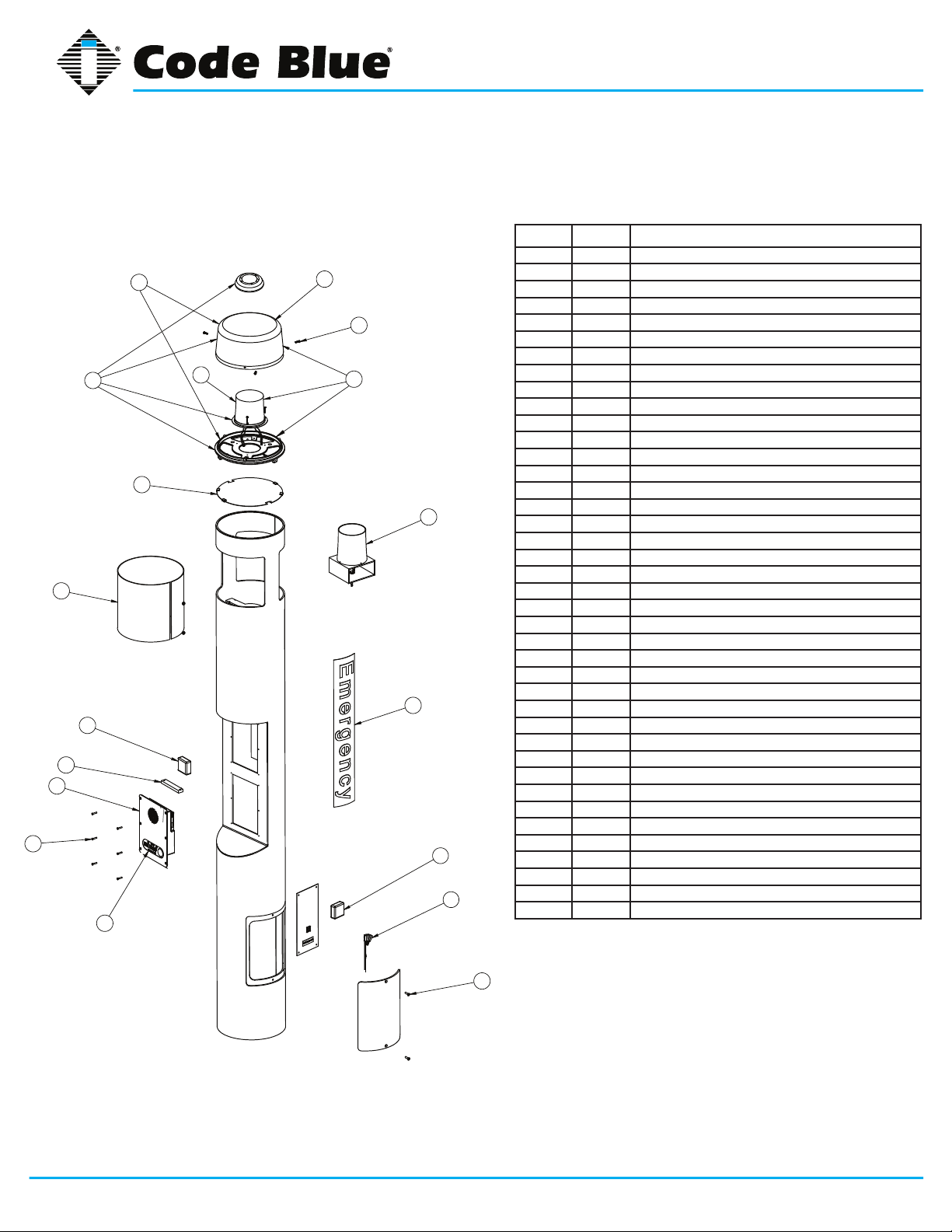
11 CB 1-d Low Voltage Exploded View
BALL # PART # DESCRIPTION
1a 40260 Dome Top Kit with Strobe
1b
1c
5
7
9
10
11
12
15
3
2
4
1a
6
8
7
13
1b 40165 Dome Top Kit w/o Strobe
1c 40166 Dome Top Kit with Strobe & Active Vent
2 41402 Dome Top Lens
3 40159 LED Blue Beacon Strobe
4 41418 Button Head Security Screws (3 pk)
5 40393 Reective Disk
6 41539 LED Area Light
7 41410 HID Lens
8 CALL Standard / Custom Graphic
9 41471 Analog Surge Suppressor
9 41421 IP Surge Suppressor
10 41548 LED Faceplate Light
11 50001 Single Button IA4100 Analog Phone – PUSH FOR HELP
11 50002 Double Button IA4100 Analog Phone – PUSH FOR HELP
11 50003 Keypad IA4100 Analog Phone – PUSH FOR HELP
11 50004 Single Button IA4100 Analog Phone – EMERGENCY
11 50005 Double Button IA4100 Analog Phone – EMERGENCY
11 50006 Keypad IA4100 Analog Phone – EMERGENCY
11 50007 Single Button IA4100 Analog Phone – EMERGENCY/EMERGENCIA
11 50008 Double Button IA4100 Analog Phone – EMERGENCY/EMERGENCIA
11 50009 Keypad IA4100 Analog Phone – EMERGENCY/EMERGENCIA
11 50101 Single Button IP5000 Phone – PUSH FOR HELP
11 50102 Double Button IP5000 Phone – PUSH FOR HELP
11 50103 Keypad IP5000 Phone – PUSH FOR HELP
11 50104 Single Button IP5000 Phone – EMERGENCY
11 50105 Double Button IP5000 Phone – EMERGENCY
11 50106 Keypad IP5000 Phone – EMERGENCY
11 50107 Single Button IP5000 Phone – EMERGENCY/EMERGENCIA
11 50108 Double Button IP5000 Phone – EMERGENCY/EMERGENCIA
11 50109 Keypad IP5000 Phone – EMERGENCY/EMERGENCIA
12 41544 Faceplate Security Screw 10x24 (6 pk)
13 40101 Manifold R/B 5-way
14 41545 Access Door Security Screws (2 pk)
15 40357 Bezel Assembly IA4100 Analog Phone – PUSH FOR HELP
15 40407 Bezel Assembly IA4100 Analog Phone – EMERGENCY
15 40408 Bezel Assembly IA4100 Analog Phone – EMERGENCY/EMERGENCIA
15 40313 Bezel Assembly IP5000 Analog Phone – PUSH FOR HELP
15 40405 Bezel Assembly IP5000 Analog Phone – EMERGENCY
15 40406 Bezel Assembly IP5000 Analog Phone – EMERGENCY/EMERGENCIA
14
DISCLAIMER: Product design and component use subject to change without notice. Product shown reasonably represents current offering and
is intended to assist in component identication. Reference the model and serial number from the unit ID tag and contact manufacturer to conrm
replacement part version and availability.
Code Blue • 259 Hedcor Street • Holland, MI 49423 USA • 800.205.7186 • www.codeblue.com
GU-157-Epage 19 of 71
Page 20
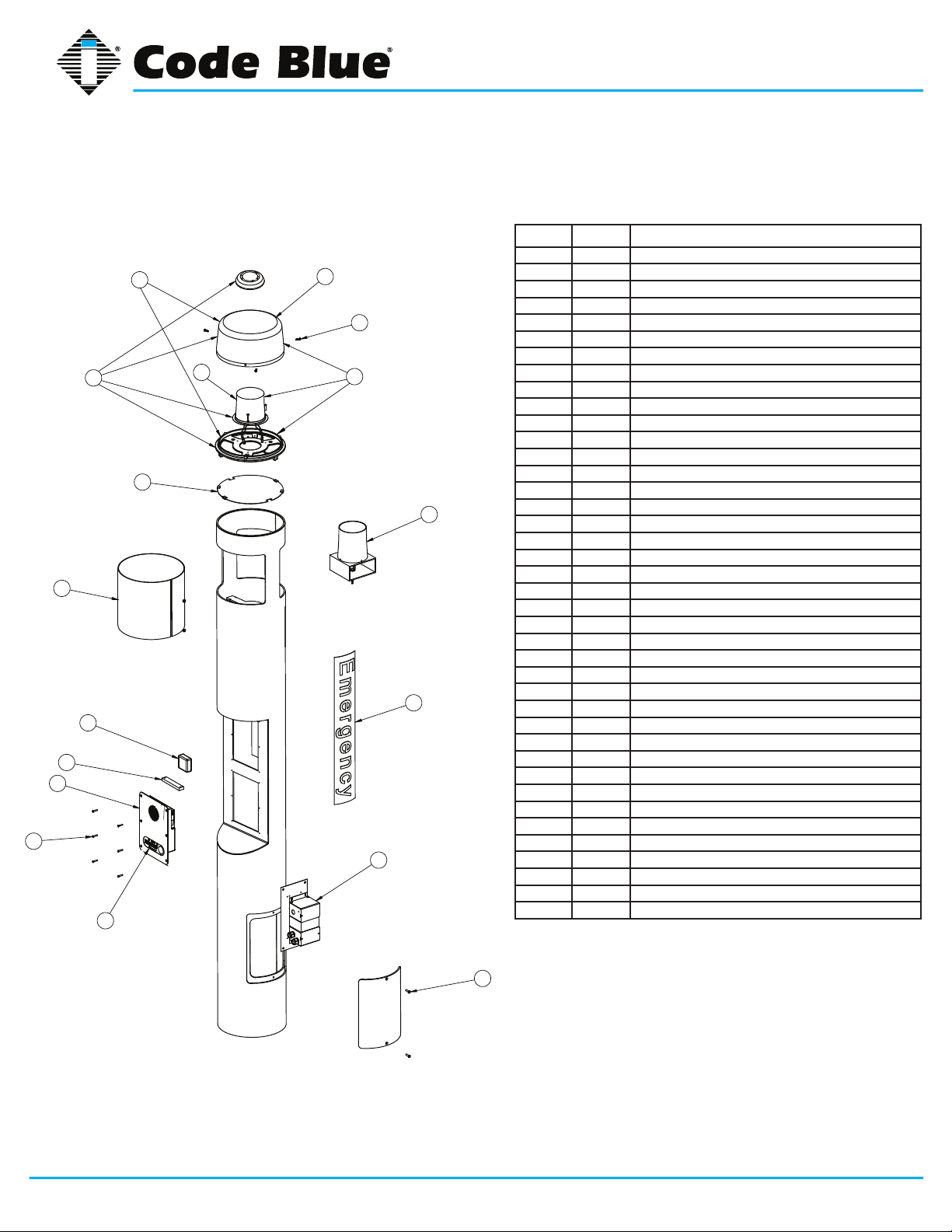
CB 1 Series
Administrator Guide
12 CB 1-d High Voltage Exploded View
BALL # PART # DESCRIPTION
1a 40260 Dome Top Kit with Strobe
1b
1c
5
7
9
10
11
12
15
3
2
4
1a
6
8
13
1b 40165 Dome Top Kit w/o Strobe
1c 40166 Dome Top Kit with Strobe & Active Vent
2 41402 Dome Top Lens
3 40159 LED Blue Beacon Strobe
4 41418 Button Head Security Screws (3 pk)
5 40393 Reective Disk
6 41539 LED Area Light
7 41410 HID Lens
8 CALL Standard / Custom Graphic
9 41471 Analog Surge Suppressor
9 41421 IP Surge Suppressor
10 41548 LED Faceplate Light
11 50001 Single Button IA4100 Analog Phone – PUSH FOR HELP
11 50002 Double Button IA4100 Analog Phone – PUSH FOR HELP
11 50003 Keypad IA4100 Analog Phone – PUSH FOR HELP
11 50004 Single Button IA4100 Analog Phone – EMERGENCY
11 50005 Double Button IA4100 Analog Phone – EMERGENCY
11 50006 Keypad IA4100 Analog Phone – EMERGENCY
11 50007 Single Button IA4100 Analog Phone – EMERGENCY/EMERGENCIA
11 50008 Double Button IA4100 Analog Phone – EMERGENCY/EMERGENCIA
11 50009 Keypad IA4100 Analog Phone – EMERGENCY/EMERGENCIA
11 50101 Single Button IP5000 Phone – PUSH FOR HELP
11 50102 Double Button IP5000 Phone – PUSH FOR HELP
11 50103 Keypad IP5000 Phone – PUSH FOR HELP
11 50104 Single Button IP5000 Phone – EMERGENCY
11 50105 Double Button IP5000 Phone – EMERGENCY
11 50106 Keypad IP5000 Phone – EMERGENCY
11 50107 Single Button IP5000 Phone – EMERGENCY/EMERGENCIA
11 50108 Double Button IP5000 Phone – EMERGENCY/EMERGENCIA
11 50109 Keypad IP5000 Phone – EMERGENCY/EMERGENCIA
12 41544 Faceplate Security Screw 10x24 (6 pk)
13 40104 Power Brick 120V, 240V, 277V, 347V
14 41545 Access Door Security Screws (2 pk)
15 40357 Bezel Assembly IA4100 Analog Phone – PUSH FOR HELP
15 40407 Bezel Assembly IA4100 Analog Phone – EMERGENCY
15 40408 Bezel Assembly IA4100 Analog Phone – EMERGENCY/EMERGENCIA
15 40313 Bezel Assembly IP5000 Analog Phone – PUSH FOR HELP
15 40405 Bezel Assembly IP5000 Analog Phone – EMERGENCY
15 40406 Bezel Assembly IP5000 Analog Phone – EMERGENCY/EMERGENCIA
14
DISCLAIMER: Product design and component use subject to change without notice. Product shown reasonably represents current offering and
is intended to assist in component identication. Reference the model and serial number from the unit ID tag and contact manufacturer to conrm
replacement part version and availability.
Code Blue • 259 Hedcor Street • Holland, MI 49423 USA • 800.205.7186 • www.codeblue.com
GU-157-Epage 20 of 71
Page 21
CB 1 Series
Administrator Guide
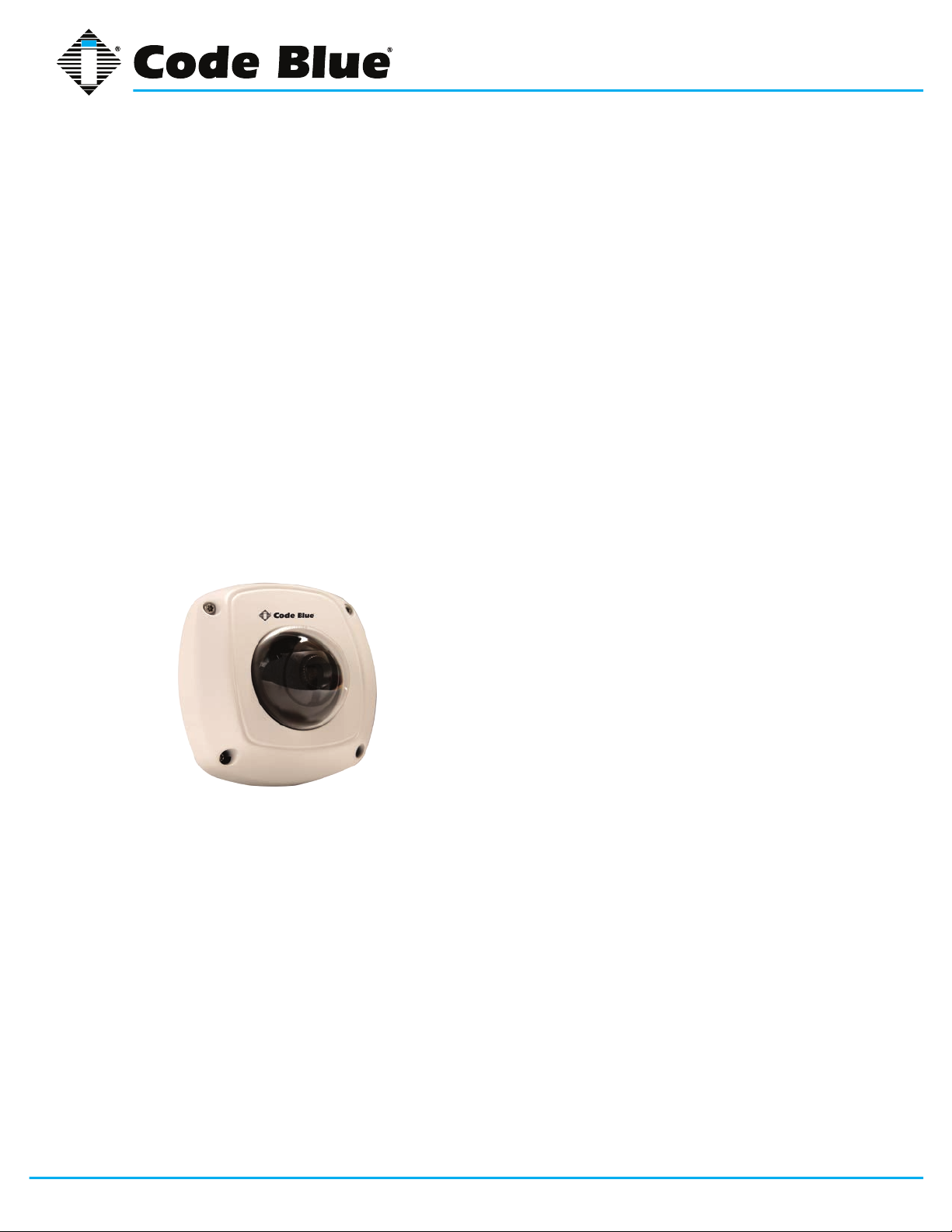
13 IP Color Camera Installation Instructions
Color IP Camera Option
HIKVISION Network Mini Dome Camera for Second Opening
The HIKVISION Mini Dome Network IP Camera installed in this unit is a Code Blue 3rd Party Part-
ner product. Model # DS-2CD7153-E.
The network camera is set with the following factory default settings:
• IP Address: 192.0.0.64
• Camera is accessed on IP Port 8000
• User Name: admin
• Password: 12345
For additional support, contact HIKVISION at:
Website: http://www.hikvision-usa.com/support.html
Phone: 1-909-895-0400, 6 a.m. to 6 p.m. PST
Email: techsupport@hikvisionusa.com
Note: Please contact Code Blue Customer Service if a custom cutout is needed on the CB 9-d for
third party products, such as a card reader or a custom camera to mount on the second opening
plate.
Contact Code Blue Customer Service at 800-205-7186 or customerservice@codeblue.com.
Code Blue • 259 Hedcor Street • Holland, MI 49423 USA • 800.205.7186 • www.codeblue.com
GU-157-Epage 21 of 71
Page 22

CB 1 Series
Administrator Guide
14 CB 1-e, CB 1-d, CB 1-s Installation Instructions
1.0 FOUNDATION (see anchor bolt installation instructions)
2.0 SET THE UNIT
2.1 Screw one set of nuts and washers onto the anchor bolts – After the foundation has set,
screw one set of nuts followed by one set of washers onto the anchor bolts. Set the nuts so the
lowest washer is about 2½ inches above the concrete and at an even height. To accomplish
this, use a small level and check from front to back, side to side and diagonally. These nuts
are NOT adjustable after the unit is in place. The bottom edge of the Code Blue unit will be
½-inch above the concrete when installed.
IMPORTANT: The leveling of the bottom nuts is crucial to the leveling of the unit. A small error
in the adjustment of these will be magnied after installation.
IMPORTANT: A ½-inch minimum air gap is required between the foundation and the unit.
Moisture problems may result if this condition is not complied with.
2.2 Set the Code Blue unit on the anchor bolts – Align the phone plate in the desired direction
and lift the Code Blue unit over the anchor bolts. The unit may be lifted using the bracket on
the inside of the unit. Note that the unit weighs approximately 330 pounds. Use appropriate
lifting materials and methods to avoid possible injury and/or damage.
2.3 Secure the Code Blue unit – Access the mounting studs through the door on the side of the
unit. Place the second washer, then nut and tighten the mounting nuts onto the anchor bolts.
This may be more convenient if a long socket, extension and universal joint is used to tighten
the hardware.
3.0 INSTALL THE AREA LIGHT (CB 1-s and CB 1-d only)
3.1 Remove packing material – Remove all packing material and ensure that the bulb is tight.
3.2 Install the light xture – Place the xture on the bracket, just below the lens at the top of the
unit.
3.3 Connect the cord – The power cord must be plugged into the plug near the bracket at the
top of the pedestal.
4.0 INSTALL THE DOME TOP ASSEMBLY
4.1 Remove the clear Lexan dome from the black metal casting. The casting complete with strobe
should be brought to the top of the unit (pedestal) where the wiring will be connected (match
black and red wire connectors; match yellow to yellow connectors). After the wiring is complete,
set the white disc on top of the lens located inside the unit (CB 1-s and CB 1-d only). Set the
casting on top of the pedestal and fasten the casting to the bollard by reaching through the
openings and tightening the three 10-24 X 1-inch stainless steel thumbscrews against the
inner wall. Finally, reattach the clear Lexan dome to the black metal casting with the security
screws provided.
NOTE: Take care not to overdrive the security screws against the Lexan as fracturing may occur.
5.0 WIRING (refer to additional wiring instructions for the CB 1-s and CB 1-d)
5.1 Ground – The ground (green) wire should be stripped and fastened to the supplied grounding
lug.
Code Blue • 259 Hedcor Street • Holland, MI 49423 USA • 800.205.7186 • www.codeblue.com
See diagrams next page
GU-157-Epage 22 of 71
Page 23

CB 1 Series
Administrator Guide
5.2 24V AC supply – Bring the power connection into the unit and using the proper crimping tool,
attach the incoming power wires to the appropriate black and red manifold wires.
5.3 120V AC supply – Bring the incoming power into the junction box. Using the proper crimping
tool, attach and fasten each of the incoming power wires to the power brick’s white/yellow and
black/brown wires.
(CB 1-s as shown)
Figure 2
All wiring must be installed and connected by experienced and certied personnel to meet
local and national electrical codes, and will include a service disconnect.
Code Blue • 259 Hedcor Street • Holland, MI 49423 USA • 800.205.7186 • www.codeblue.com
GU-157-Epage 23 of 71
Page 24

CB 1 Series
Administrator Guide
15 CB 1 Series Tower Base Gasket Installation Instructions
1.0 FOUNDATION (see anchor bolt installation instructions)
2.0 SET THE UNIT
2.1 Screw one set of nuts and washers onto the anchor bolts. After the foundation
has set, screw one set of nuts, followed by one set of washers, onto the anchor
bolts. Set the nuts so the lowest washer is about 2½ inches above the concrete
at an even height.
To accomplish this, use a small level and check from front to back, side to side
and diagonally. These nuts are NOT adjustable after the unit is in place.
The bottom edge of the Code Blue unit will be ½-inch above the concrete when
installed.
2.2 Set the Code Blue unit on the anchor bolts. Align the phone plate in the
desired direction and lift the Code Blue unit over the anchor bolts. The
unit may be lifted using the bracket on the inside of the unit. Note that the unit
weighs approximately 200-400 pounds and that the 9 Series does not contain a
bracket on the inside of the unit. Use appropriate lifting materials and
methods to avoid possible injury and/or damage.
IMPORTANT: Leveling the bottom nuts is
crucial to leveling the unit. A small error will be
magnied after installation.
IMPORTANT: A ½-inch minimum air gap is
required between the foundation and the unit to
prevent moisture problems.
Code Blue • 259 Hedcor Street • Holland, MI 49423 USA • 800.205.7186 • www.codeblue.com
GU-157-Epage 24 of 71
Page 25

CB 1 Series
Administrator Guide
3.0 Install the Base Gasket
3.1 Access the mounting studs through the access door on the side of the unit.
3.2 Set the gasket on the bolts and cut a small hole where the conduit is located.
Stretch the screen tightly around the conduit pipe. Slide the gasket over the bolts to the
base of unit.
3.3 Place the second washer on the anchor bolt and place the nut on top.
Tighten the mounting nuts onto the anchor bolts. This may be more convenient
if a long socket, extension and universal joint is used to tighten the hardware.
*For an extra-strong seal, a bead of silicone caulk can be put on the
gasket from bolt hole to bolt hole before setting the gasket into place and
around the conduit.
Code Blue • 259 Hedcor Street • Holland, MI 49423 USA • 800.205.7186 • www.codeblue.com
GU-157-Epage 25 of 71
Page 26

CB 1 Series
Administrator Guide
16 CB 1-s with AED Installation Instructions
1.0 FOUNDATION (see anchor bolt installation instructions)
2.0 SET THE UNIT
2.1 Screw one set of nuts and washers onto the anchor bolts – After the foundation has set,
screw one set of nuts followed by one set of washers onto the anchor bolts. Set the nuts so the
lowest washer is about 2½ inches above the concrete and at an even height. To accomplish
this, use a small level and check from front to back, side to side and diagonally. These nuts
are NOT adjustable after the unit is in place. The bottom edge of the Code Blue unit will be
½-inch above the concrete when installed.
IMPORTANT: The leveling of the bottom nuts is crucial to the leveling of the unit. A small error
in the adjustment of these will be magnied after installation.
IMPORTANT: A ½-inch minimum air gap is required between the foundation and the unit.
Moisture problems may result if this condition is not complied with.
2.2 Set the Code Blue unit on the anchor bolts – Align the phone plate in the desired direction
and lift the Code Blue unit over the anchor bolts. The unit may be lifted using the bracket on
the inside of the unit. Note that the unit weighs approximately 360 pounds. Use appropriate
lifting materials and methods to avoid possible injury and/or damage.
2.3 Secure the Code Blue unit – Access the mounting studs through the door on the side of the
unit. Place the second washer, then nut and tighten the mounting nuts onto the anchor bolts.
This may be more convenient if a long socket, extension and universal joint is used to tighten
the hardware.
3.0 INSTALL THE AREA LIGHT (CB 1-s/1-d with AED Housing only)
3.1 Remove packing material – Remove all packing material and ensure that the bulb is tight.
3.2 Install the light xture – Place the xture on the bracket, just below the lens at the top of the
unit.
3.3 Connect the cord – The power cord must be plugged into the plug near the bracket at the
top of the bollard.
4.0 INSTALL THE DOME TOP ASSEMBLY
4.1 Remove the clear Lexan dome from the black metal casting. The casting complete with strobe
should be brought to the top of the unit (pedestal) where the wiring will be connected (match
black and red wire connectors; match yellow to yellow connectors). After the wiring is complete,
set the white disc on top of the lens located inside the unit (CB 1-s/1-d with AED Housing only).
Set the casting on top of the pedestal and fasten the casting to the unit by reaching through
the casting openings and tightening the three 10-24 X 1-inch stainless steel thumbscrews
against the inner wall. Finally, reattach the clear Lexan dome to the black metal casting with
the security screws provided.
NOTE: Take care not to overdrive the security screws against the Lexan as fracturing may occur.
All wiring must be installed and connected by experienced and certied personnel to meet
local and national electrical codes, and will include a service disconnect.
Code Blue • 259 Hedcor Street • Holland, MI 49423 USA • 800.205.7186 • www.codeblue.com
See diagrams next page
GU-157-Epage 26 of 71
Page 27

CB 1 Series
Administrator Guide
5.0 WIRING (refer to additional wiring instructions for the DFB 1-s and DFB 1-d)
5.1 Ground – The ground (green) wire should be stripped and fastened to the supplied grounding
lug.
5.2 24V AC supply – Using the proper crimping tool, attach a #8 fork to each of the incoming
power wires and fasten them to the terminal screws labeled “Line” and “Neutral.”
5.3 120V AC supply – Using the proper crimping tool, attach a #8 fork to each of the incoming
power wires and fasten tem to the terminals as labeled on the transformer. After completing
the wire connections, install the supplied terminal covers.
Figure 1
All wiring must be installed and connected by experienced and certied personnel to meet
local and national electrical codes, and will include a service disconnect.
Code Blue • 259 Hedcor Street • Holland, MI 49423 USA • 800.205.7186 • www.codeblue.com
GU-157-Epage 27 of 71
Page 28

CB 1 Series
Administrator Guide
17 CB 1-w Installation Instructions
IMPORTANT NOTICE
The following list is provided as a checklist for items required prior to installation or items that
will be required on installation site:
1. Batteries must be FULLY bench charged before installation.
2. A local cellular dealer must provide a SIM card before unit can place calls.
3. Hand/Powered tools, including torque wrench; truck or mechanical lift for the CB 1 unit.
4. At least two people and ladders for attaching support collar, adjusting solar panel, etc.
1.0 FOUNDATION – (see Anchor Bolt Installation Instructions)
2.0 SET THE UNIT
2.1 Turn One Set Of Nuts And Washers Onto The Anchor Bolts – After the foundation has set,
turn one set of nuts followed by one set of washers onto the anchor bolts. Set the nuts so the
lowest washer is about 2½ inches above the concrete and at an even height. To accomplish
this, use a small level and check from front to back, side to side and diagonally. These nuts
are NOT adjustable after the unit is in place. The bottom edge of the Code Blue unit will be
½-inch above the concrete when installed.
IMPORTANT: The leveling of the bottom nuts is crucial to the leveling of the unit. A small error
in the adjustment of these will be magnied after installation.
IMPORTANT: A ½-inch minimum air gap is required between the foundation and the unit.
Moisture problems may result if this condition is not complied with.
2.2 Set The Code Blue Unit On The Anchor Bolts – Align the phone plate in the desired direc-
tion and lift the Code Blue unit over the anchor bolts. The unit may be lifted using the I-bolt
provided and screwed into one of the solar threaded holes used to mount the solar panel. Note
that the unit weighs approximately 400 pounds. Use appropriate lifting materials and methods
to avoid possible injury and/or damage.
2.3 Secure The Code Blue Unit – Access the mounting studs through the door on the side of the
unit, place the second set of washers and nuts on the studs and tighten the mounting nuts
onto the anchor bolts. This may be more convenient if a long socket, extension and universal
joint is used to tighten the hardware.
3.0 INSTALL THE SOLAR PANEL AND WIND GENERATOR
3.1 Adjustable universal mount
3.1.1 Attach The Aluminum Pole – Place a combination washer (rubber, then metal) on each
of the three 5/8 bolts with Loctite treated threads. Attach the pole to the top of the unit.
See Fig. 1 below.
NOTE: Completely coat Loctite around the threads. Loctite MUST dry for 24 hours before
being exposed to moisture.
NOTE: Each time the bolts are removed, they must be retreated with the Loctite PST.
CAUTION: Loctite PST is a skin irritant – use the enclosed rubber gloves to treat the
threads.
Code Blue • 259 Hedcor Street • Holland, MI 49423 USA • 800.205.7186 • www.codeblue.com
See diagrams next page
GU-157-Epage 28 of 71
Page 29

Dispose of gloves when completed.
CB 1 Series
Administrator Guide
HEX BOLT
METAL WASHER
RUBBER WASHER
APPLY LOCTITE
TO THREADS OF NUT
APPLY LOCTITE TO
THREADS OF BOLT
SOLAR COLLAR
GASKET
SOLAR BOLLARD
Figure 1
3.1.2 Attach The Stainless Steel Sleeve – The sleeve must be attached to the center of
the solar panel and set at the correct angle based on the unit’s latitude. Use the two 3/8
bolts and nuts and four 3/8 washers provided. See the chart below for recommended
settings (Fig. 2).
3.1.3 Position The Solar Panel – Slide the sleeve and panel assembly over the collar.
32º to 44º latitude 60º from horizontal
23.5º to 32º latitude 45º from horizontal
23.5º S to 23.5º N latitude 30º from horizontal
Figure 2
NOTE: Panel must face south and be at the proper angle.
3.1.4 Once the panel is set in place, the two 3/8 set-screws should be tightened so that the
panel is facing due south.
3.1.5 Wiring – Both the CB 1-w unit and the solar panel assembly are pre-wired from the fac-
tory with sufcient length wires to make the opposing connection with the exception of the
antenna wire. The installer may choose to use one set as a “sh-tape” to pull the wires
to the necessary opposing connection or shorten both sets of wires to make a “wire-nut”
connection between the two wire sets within the stainless steel collar. Attach the antenna
mount to the top of the solar panel using one of the top bracket cross head screws. The
antenna wire must be run through the steel collar and passed to the solar panel conduit
and run out of the power distribution box. Run the antenna cable along the back side of
the solar panel frame.
CAUTION: Be sure wires are not pinched during panel assembly to unit. A shorted wire
or loose connection will cause unit to fail.
4.0 INSTALL THE BATTERIES
NOTE: Batteries must be fully bench charged before installation.
4.1 Place The Batteries Into The Unit – Insert the battery shelf plates into the bottom access
door.
Code Blue • 259 Hedcor Street • Holland, MI 49423 USA • 800.205.7186 • www.codeblue.com
GU-157-Epage 29 of 71
Page 30

CB 1 Series
Administrator Guide
One battery should be placed on each shelf.
4.2 Connect The Wires – First connect the red wire to the positive (+) lugs on the batteries, then
connect the black wire to the negative (-) lugs.
WARNING: Reversing the battery wires (reversed polarity) will cause damage to the charge
controller.
CELLULAR RETRO INSTRUCTIONS
TELULAR SX-5E & CALLFINDER CX100FX2 TO GSM-4
Installation Instructions
Retrot Instructions Telular & CallFinder
We strongly advise reading these instruction before any work is started. In addition, the age of these
units is possible the actual wiring may have changed by others, therefore the wiring guides provided
are originals and here for your reference.
Some early 2002 designs: a total rebuild is more effective and easier to accomplish. Contact customer
service a rebuild kit.
Telular GSM Removal Instructions Specically
Current Installations: If you still have a Telular cellular F.C.T. (Fixed Cellular Terminal),
inside your CB1 NightCharge™ or CB1w (Solar), CB8 NightCharge™ or CB8 Solar
enclosure, it is a hardwired internal harness. The wiring in the enclosure is bundled;
therefore removing two wires from the bundled group is very time consuming. You
may choose to reuse existing wiring, cutting and splicing the power wires is acceptable, if doing so, use self-sealing splices.
Consideration: abandoning the original power wires will require you to identify the
harness and power panel in order to properly attach the new GSM-4 power wires.
Review the list below for the most common congurations.
Hint: Cellular power terminate on the same buss as the Battery.
Models involved in this Retro – Visual Refer document Attached
CB1 CB8
D and S NightCharge™ 2002, 2005, 20t10 NightCharge™ 2002, 2005, 2010
W Solar 2005, 2008, 2010 - 2013 Solar 2005, 2008, 2010 - 2013
Code Blue • 259 Hedcor Street • Holland, MI 49423 USA • 800.205.7186 • www.codeblue.com
GU-157-Epage 30 of 71
Page 31

CB 1 Series
Administrator Guide
Multitech CallFinder™ Removal
The CallFinder unit is very similar to the New GSM-4.
Antenna connector and Antenna requirements are identical. Power connector is different in that the
center connector is larger, therefore the power cable must be exchanged. Phone line connectors are
also identical, RJ-11.
Step by Step
a. Remove Service Door
b. Disable Power - Disable the main source of power, as well as Storage/Battery power
(positive)
l Solar powered enclosures: Remove battery Positive terminal from
the Barrier Strip and insulate against accidental contact with Barrier
Strip
c. Remove Code Blue Phone, 6 screws, then tilt the top of the faceplate outward and lift out.
l Then disconnect (unplug) all connections, and set phone aside.
d. Locate the CallFinder, it’s behind the phone and up. You should be able to see all three
connections.
e. Unscrew the antenna tting
f. Unplug the RJ-11 phone cable.
g. Unscrew the threaded power connector, and mark this wire, you’ll need to trace this wire later.
h. Left up the CallFinder ¼” and forward, gently lower and remove.
i. With a #1 Philips screwdriver remove the two SIM cover plate.
l Remove the SIM card with tweezers or needle nose plyers, and set
aside. The same SIM card can be reused in the GSM-4.
j. Next, lets follow the power harness wire to the terminal block, and remove the old CallFinder
power forks from the Barrier Strip marking Positive and Negative.
k. Next take the GSM-4 Power cable and prep the wire as shown in Cellular Retro
Instructions Doc supplied Page 3
l Connected to the Positive and Negative terminal marked earlier.
l. Now GOTO “Installing the GSM-4” step 5
Code Blue • 259 Hedcor Street • Holland, MI 49423 USA • 800.205.7186 • www.codeblue.com
GU-157-Epage 31 of 71
Page 32

CB 1 Series
Administrator Guide
GSM-4
Installing the GSM-4
1. Before mounting the GSM-4 blue box, open the blue
box and insert the SIM Card into the SIM Card holder.
Unlock the card holder and tilt it up. Now insert the SIM
card with the contacts facing the PCB. Set the SIM card
hold down at parallel with the board and slide to lock
position. Next return box cover back on and secure
screw in place.
2. Place the new GSM-4 (Blue box) in the same location,
using same hanging method as the Telular Box did.
3. The new antenna (pulled in when you removed the
original antenna), can now be threaded on to the GSM-4
SMA bulkhead tting on the side of the blue box.
4. GSM-4 Power connection: ID the positive and negative
terminal from the previous device and mate the wire
connections
5. GSM-4 modular phone cable will directly plug into the CB2000 or IA4100 series phones di-
rectly. If you have the IA3100 speaker phone, it has a screw terminal connector in place of a
Phone jack. Suggest you reuse the IA3100 phone cable in place of the GSM-4 phone cable.
The RJ-11 connector will t through the water tight tting without damaging the RJ end.
6. Review all electrical connections related to the GSM-4: Antenna, Phone line, Power (along
with its correct polarity). CONNECT BATTERY POWER, BACK UP, THEN MAIN POWER in
the case of NightCharge™
7. Watch the status lights on the GSM-4 for registration, is the middle LED indicator constant =
Registered. See GSM-4 LED Indicator Readout below
8. Place the speakerphone back into the enclosure, and replace the screws.
9. Activate the phone to test the GSM-4 ability to place a call. If you’re able to place a complete
a call, it’s time to wrap it up. If not call Tech Support for assistance.
10. Replace the service door and screws
Code Blue • 259 Hedcor Street • Holland, MI 49423 USA • 800.205.7186 • www.codeblue.com
GU-157-Epage 32 of 71
Page 33

GSM-4 LED Indicator Readout
CB 1 Series
Administrator Guide
Name
Power supply
l
GSM network
l
Telephone line
l
Meaning
• Light = GSM-4 is powered
• Flashes once in 2s = HW error, contact the manufacturer
• Light = registered to GSM
• Flashes once in 1s = not registered, SIM card inserted
• Flashes once in 3s = not registered, SIM card not inserted
• Flashes 4 times quickly = enter your PIN
• Flashes 8 times quickly = enter your PUK
• Flashes quickly continuously = all functions are blocked. Your SIM doesn’t
correspond to the GSM operator lock
• No light = standby
• Flashes quickly = seized line or ringing
• Light = call
• Flashes once in 3s = data connection in progress
On FAX models:
• Flashes 2 times then pause = fax connection in progress; after power on
signalize need of FW upgrade
• Flashes 3 times then pause = fax connection in progress
Code Blue • 259 Hedcor Street • Holland, MI 49423 USA • 800.205.7186 • www.codeblue.com
GU-157-Epage 33 of 71
Page 34

CB 1 Series
Administrator Guide
18 CB 1 Series Anchor Bolt Installation Instructions
1.0 FOUNDATION
1.1 Conduit – Electrical and telephone line conduit, with a maximum combined diameter of
four inches, should be run up through the center of the foundation hole. A minimum of four
inches and a maximum of six inches of conduit above the nished grade level is required. To
ensure proper grounding, a ½-inch x 8-foot copper rod should be inserted in the center of the
foundation and tied to the steel bollard.
NOTE: Follow all national and local codes governing this installation.
1.2 Pour the Foundation – The foundation should be at least 24 inches in diameter and to the
correct depth for the frost line in your area, with a minimum depth of at least three feet (follow
local building codes for foundations).
1.3 Set the Anchor Bolts in the Wet Foundation – Four 24-inch L-shaped anchor bolts and an
aligning template are supplied for anchoring the Code Blue unit. The bolts should be set into
the foundation so that six inches are left showing above the nished grade level. The anchor
bolts should be aligned, using the supplied template in such a way that the phone faceplate
on the unit will face in the desired direction.
2.0 WIRING
2.1 Pull power and phone line up through the conduits – A minimum of two feet of wire must be
available from the conduit for electrical and communications wiring.
KEEP CONDUIT
CONTAINED WITHIN
4.00" DIAMETER
24.00
4.00
PHONE FACEPLATE DIRECTION
FOR ANCHOR BOLTS
4.00
8.00
BOLT CIRCLE
6.00
TO BE DETERMINED
BY FROST LINE AND
LOCAL CODES
USE PROVIDED TEMPLATE TO LOCATE ANCHOR BOLTS
Code Blue • 259 Hedcor Street • Holland, MI 49423 USA • 800.205.7186 • www.codeblue.com
GU-157-Epage 34 of 71
Page 35

CB 1 Series
Administrator Guide
19 Overhead Camera Mount Installation Instructions
TOOLS REQUIRED
Access Panel
Security Bit
7/16
Wrench
Allen
Wrench
Ladder
1.0 RETRO-FITTING EXISTING UNIT
1.1 If applicable, remove dome top assembly prior to installation. New style dome top
assembly is required to access installation screws on overhead camera mount.
2.0 INSTALL CAMERA MOUNT
2.1 Locate and install the three ½ x 1-inch hex Allen screws from the inside of the mounting ring. Be sure the Allen screws do not extend beyond the outside of the ring.
2.2 Install the camera mount on top of the unit. Rotate to desired position.
NOTE: If retrotting existing unit with three countersunk holes near the top of the bol-
lard, the Overhead Camera Mount may be rotated to align the clearance holes with
holes in the unit. The three countersunk screws and nuts provided may be used to
cover these holes. The three Allen screws MUST be used to secure the Overhead
Camera Mount to the unit.
2.3 Verify camera mount is evenly positioned to ensure gasket seal is seated appropriately
360 degrees.
2.4 Apply downward pressure while simultaneously tightening the three ½-inch set screws
until snug against the inside of the pedestal.
3.0 INSTALL CAMERA
3.1 Camera and wiring (by others) is installed into the male 1 ½ NPT.
4.0 INSTALL THE DOME TOP ASSEMBLY
4.1 Remove the clear Lexan dome from the black metal casting.
4.2 The casting, complete with strobe, should be brought to the top of the unit (Overhead
Camera Mount) where the wiring will be connected (see wiring instructions).
4.3 After the wiring is complete, set the casting on top of the unit and fasten the casting to
the Overhead Camera Mount by reaching through the casting openings and tightening
the three 10-24 X 1-inch stainless steel thumbscrews against the inner wall.
4.4 Finally, reattach the clear Lexan dome to the black metal casting with the security
screws provided.
All wiring must be installed and connected by experienced and certied personnel to meet local and national electrical codes,
and will include a service disconnect.
Code Blue • 259 Hedcor Street • Holland, MI 49423 USA • 800.205.7186 • www.codeblue.com
GU-157-Epage 35 of 71
Page 36

Overhead
CB 1 Series
Administrator Guide
Lexan Dome Top
1
2
LED Area Light
3
Dome Metal Casting
4
Overhead Camera Mount
5
Gasket Seal
6
CB Unit
Code Blue • 259 Hedcor Street • Holland, MI 49423 USA • 800.205.7186 • www.codeblue.com
GU-157-Epage 36 of 71
Page 37

CB 1 Series
Administrator Guide
20 Line Power Installation Instructions
(Excludes NightCharge® and Solar Options)
IMPORTANT: All wiring shall comply with national and local codes governing this installation. It is
the responsibility of the installer to ensure these conditions are complied with.
1.0 SUPPLY WIRING
1.1 Pulling the power wires – Wire should be a minimum of 14 AWG and be pulled into the unit,
leaving a minimum of two feet of wire from the opening of the conduit.
1.2 Pulling the communications wire (if needed) – Communications wire must be shielded phone
line. The phone line must be pulled into the unit using a separate conduit from the power,
and be run so as to extend a minimum of two feet out of the phone opening.
2.0 CONNECT THE POWER WIRES
2.1 Make the connections – Locate the grounding lug and connect the ground wire.
2.2 Using 115V AC supply – Connect the colored (hot) wire to the black wire, and connect the
white or gray (neutral) wire to the white wire.
2.3 Higher voltage supply – If the unit was ordered for a higher voltage, a pre-wired power brick
will be located on the top of the electrical panel with a 24 volt secondary to supply the low
voltage manifold and power brick to supply the area light. Connect the colored (hot) wire and
the white or gray (neutral) wire to the white wire in the junction box.
3.0 CONNECT THE PHONE LINE (if required) – See phone Installation Instructions.
4.0 APPLY POWER – The unit should become operational immediately after the power is ener-
gized.
Code Blue • 259 Hedcor Street • Holland, MI 49423 USA • 800.205.7186 • www.codeblue.com
GU-157-Epage 37 of 71
Page 38

CB 1 Series
Administrator Guide
21 CB 1 Series Public Address Installation Instructions
1.0 FOUNDATION (see Anchor Bolt Installation Instructions)
2.0 SET THE UNIT
2.1 Screw one set of nuts and washers onto the anchor bolts – After the foundation has set,
screw one set of nuts followed by one set of washers onto the anchor bolts. Set the nuts so
the lowest washer is about 2½ inches above the concrete and at an even height. To accomplish this, use a small level and check from front to back, side to side and diagonally. These
nuts are NOT adjustable after the unit is in place. The bottom edge of the Code Blue unit will
be ½-inch above the concrete when installed.
MPORTANT: The leveling of the bottom nuts is crucial to the leveling of the unit. A small er-
ror in the adjustment of these will be magnied after installation.
MPORTANT: A ½-inch minimum air gap is required between the foundation and the unit.
Moisture problems may result if this condition is not complied with.
2.2 Set the Code Blue unit on the anchor bolts – Align the phone plate in the desired direc-
tion and lift the Code Blue unit over the anchor bolts. The unit may be lifted using the bracket
on the inside of the unit.
Note that the unit weighs approximately 390 pounds. Use appropriate lifting materials and
methods to avoid possible injury and/or damage.
2.3 Secure the Code Blue unit – Access the mounting studs through the door on the side
of the unit. Place the second washer then nut and then tighten the mounting nuts onto the
anchor bolts. This may be more convenient if a long socket, extension and universal joint is
used to tighten the hardware.
3.0 INSTALL THE DOME TOP ASSEMBLY
3.1 Remove the clear Lexan dome from the black metal casting. The casting, complete with
strobe, should be brought to the top of the unit where the wiring will be connected (match
black and red wire connectors; match yellow to yellow connectors).
3.2 After the wiring is complete, set the white disc on top of the lens located inside the unit (CB
1-d/1-s with Public Address only).
3.3 Set the casting on top of the unit and fasten the casting by reaching through the casting
openings and tightening the three 10-24 X 1-inch stainless steel thumbscrews against the
inner wall.
3.4 Finally, reattach the clear Lexan dome to the black metal casting with the security screws
provided.
NOTE: Take care not to overdrive the security screws against the Lexan as fracturing may
occur.
4.0 WIRING (refer to PAS WIRING DIAGRAM for additional details)
4.1 Ground – The ground (green) wire should be stripped and fastened to the supplied grounding lug.
4.2 24V AC supply – Using the proper crimping tool, attach a #8 fork to each of the incoming
power wires and fasten them to the terminal screws labeled “Line” and “Neutral.”
See diagrams next page
Code Blue • 259 Hedcor Street • Holland, MI 49423 USA • 800.205.7186 • www.codeblue.com
GU-157-Epage 38 of 71
Page 39

CB 1 Series
Administrator Guide
4.3 120V AC supply – Using the proper crimping tool, attach a #8 fork to each of the incoming
power wires and fasten tem to the terminals as labeled on the transformer. After completing
the wire connections, install the supplied terminal covers.
Figure 1
(PAS 1-s as shown)
Figure 2
All wiring must be installed and connected by experienced and certied personnel to meet
local and national electrical codes, and will include a service disconnect.
Code Blue • 259 Hedcor Street • Holland, MI 49423 USA • 800.205.7186 • www.codeblue.com
GU-157-Epage 39 of 71
Page 40

Administrator Guide
22 NIghtCharge® Installation Instructions
CAUTION: Do NOT apply power to the unit until all other conditions are made. See
Step 6.
IMPORTANT: All wiring shall comply with national and local codes governing this installation.
It is the responsibility of the installer to ensure these conditions are complied with.
1.0 SUPPLY WIRING
1.1 Pulling the power wires – Wire should be a minimum of 14 AWG and be pulled into
the unit, leaving a minimum of two feet of wire from the opening of the conduit.
1.2 Pulling the communications wire (if needed) – Communications wire must be shielded
phone line. The phone line must be pulled into the unit using a separate conduit from
the power, and run to extend a minimum of two feet out of the phone opening.
2.0 CONNECT THE PHONE LINE (if needed) – See phone installation instructions.
CB 1 Series
3.0 OPTIONAL DIGITAL TRANSCEIVER (Model CB 1)
3.1 Remove GSM digital panel assembly from carton and hang over mounting plate inside
unit behind phone opening.
3.2 The antenna is installed inside the dome top assembly at the factory.
NOTE: Dome top assembly may need to be rotated so antenna is positioned to achieve
best signal.
3.3 Attach antenna cable male TNC tting to the GSM enclosure female TNC tting.
3.4 Attach the GSM positive Red wire to terminal strip screw #8 location and the negative
Black wire to terminal strip location #5.
3.5 Attach the phone wires from the GSM assembly to terminals 1 and 2 on the IA4100
4 pin connector.
3.6 Set up GSM card. Refer to GSM digital set up instructions.
4.0 OPTIONAL DIGITAL TRANSCEIVER
4.1 Remove GSM digital housing assembly from carton and mount assembly to the pole
using banding provided.
4.2 The antenna is installed to the 2-gang bell box at the factory. Mount the antenna assembly to the pole using the banding provided. Assembly may need to be rotated to
achieve best signal.
4.3 Attach antenna cable male TNC tting to the GSM enclosure female TNC tting.
4.4 Attach the GSM positive red wire to terminal strip screw #8 location and the negative
black wire to terminal strip location #5.
Code Blue • 259 Hedcor Street • Holland, MI 49423 USA • 800.205.7186 • www.codeblue.com
GU-157-Epage 40 of 71
Page 41

4.5 Attach the phone wires from the GSM assembly to terminals 1 and 2 on the IA4100
4 pin connector.
4.6 Set up GSM card. Refer to GSM digital set up instructions.
5.0 CONNECT THE POWER WIRES
5.1 Make the connections – First, locate the grounding lug and connect the ground wire,
leaving a minimum of six inches of slack. Second, using #8 forks, connect the power
wires.
5.2 Using 115V AC supply: Connect the colored (hot) wire to the terminal screw furthest
to the left (#1) on the terminal strip. Connect the white (neutral) wire to the terminal
screw second to the left (#2) on the terminal strip.
5.3 Higher voltage supply: If the unit was ordered for a higher voltage, a multi-tap transformer will be located at the top of the electrical panel. Be sure to connect your power
wires to the correct terminal screws on the top of the transformer as labeled. Complete
the connection by attaching the terminal cover that is supplied.
CB 1 Series
Administrator Guide
IMPORTANT: If the power is applied to the incorrect terminal screws, damage will occur to
the unit. This damage will NOT be covered by any Code Blue warranty.
6.0 INSTALL THE BATTERY
IMPORTANT: Batteries MUST be fully bench charged before installation.
6.1 Place the battery into the unit – The battery should be placed in the bottom of the unit
(in a CB 1 or CB 9 unit the battery shelf will need to be set in place rst).
6.2 Connect the wires – First connect the blue wire to the positive lug on the battery, then
connect the black wire to the negative lug.
7.0 APPLY POWER
7.1 Once power is applied, the unit will start the charging process.
Code Blue • 259 Hedcor Street • Holland, MI 49423 USA • 800.205.7186 • www.codeblue.com
GU-157-Epage 41 of 71
Page 42

CB 1 Series
SOLAR BOLLARD
SOLAR COLLAR
HEX BOLT
APPLY LOCTITE TO
THREADS OF BOLT
Administrator Guide
23 Solar and WindAssist™ Installation Instructions
IMPORTANT NOTICE
The following list is provided as a checklist for items required prior to installation or items that
will be required on installation site:
1. Batteries must be FULLY bench charged before installation.
2. A local cellular dealer must provide a SIM card before unit can place calls.
3. Hand/Powered tools, including torque wrench, truck or mechanical lift for the CB 1 unit.
4. At least two persons and ladders for attaching support collar, adjusting solar panel, etc.
1.0 FOUNDATION – (see Anchor Bolt Installation Instructions)
2.0 SET THE UNIT
2.1 Turn one set of nuts and washers onto the anchor bolts – After the foundation has set, turn
one set of nuts followed by one set of washers onto the anchor bolts. Set the nuts such that the
lowest washer is about 2½ inches above the concrete and at an even height. To accomplish
this, use a small level and check from front to back, side to side and diagonally. These nuts
are NOT adjustable after the unit is in place. The bottom edge of the Code Blue unit will be
½-inch above the concrete when installed.
IMPORTANT: The leveling of the bottom nuts is crucial to the leveling of the unit. A small error
in the adjustment of these will be magnied after installation.
IMPORTANT: A ½-inch minimum air gap is required between the foundation and the unit.
Moisture problems may result if this condition is not complied with.
2.2 Set the Code Blue unit on the anchor bolts – Align the phone plate in the desired direction
and lift the Code Blue unit over the anchor bolts. The unit may be lifted using the I-bolt provided
and screwed into one of the solar threaded holes used to mount the solar panel. Note that the
unit weighs approximately 400 pounds. Use appropriate lifting materials and methods to avoid
possible injury and/or damage.
2.3 Secure the Code Blue unit – Access the mounting studs through the door on the side of the
unit, place the second set of washers and nuts on the studs and tighten the mounting nuts
onto the anchor bolts. This may be more convenient if a long socket, extension and universal
joint is used to tighten the hardware.
3.0 INSTALL THE SOLAR PANEL AND WIND GENERATOR
3.1 Adjustable universal mount
3.1.1 Attach the aluminum pole – Place a combination washer (rubber, then metal) on each
of the three 5/8 bolts with Loctite treated threads. Attach the pole to the top of the unit.
See Fig. 1.
NOTE: Completely coat Loctite around the threads. Loctite
MUST dry for 24 hours before being exposed to moisture.
NOTE: Each time the bolts are removed, they must be
retreated with the Loctite PST.
CAUTION: Loctite PST is a skin irritant – use the enclosed
rubber gloves to treat the threads. Dispose of gloves when
completed.
Code Blue • 259 Hedcor Street • Holland, MI 49423 USA • 800.205.7186 • www.codeblue.com
METAL WASHER
RUBBER WASHER
APPLY LOCTITE
TO THREADS OF NUT
GASKET
Figure 1
GU-157-Epage 42 of 71
Page 43

CB 1 Series
Administrator Guide
3.1.2 Attach the aluminum bracket to the solar panel – Use the four 3/8 bolts and nuts
and four 3/8 washers provided. Fish the pull wire out of the pull box to facilitate pulling
the solar and wind generator wires into the unit for connection.
3.1.3 Mount and position the solar panel – Slide the aluminum bracket sleeve over the pole.
The sleeve will rest on the collar of the aluminum pole just above the pull box. Point the
solar panel due south and securely tighten the two 3/8 set-screws. Feed the power and
antenna wires through the open hole in the bottom of the pull box. Attach the connector
with the supplied lock nut and allow the wires to hang out of the box.
3.2 Attach blades to the blade hub - Assembly requires mounting the blades on the blade hub,
securing the hub to the turbine body and installing the nosecone on the blade hub. The necessary hex key (Allen wrench) is furnished with WindAssist.
3.2.1 Torque Specications
3.2.1.1 Blade to hub screw, 1/4 - 20 x 1.25, socket head screw 10 ft. lbs. (13.6 Nm)
3.2.1.2 Hub to rotor nut, 5/8-18, 50 ft. lbs. (68 Nm)
3.2.1.3 Yaw clamp bolts, M5-0.8 x 35 mm 6 ft. lbs. (8 Nm)
3.2.2 Start the assembly by mounting the blades (callout 1) to the blade hub as shown in Fig.
2. Place a nylock nut (callout 4) in the hexagonal detent on the back of the blade hub
while positioning the blade on the hub. The blades must be “tilted” into position on the
hub and can only be installed in one orientation.
3.2.3 Place a washer (callout 2) on a 1/4 - 20 socket head screw (callout 3) and coat the screw
threads with Tef-Gel. Pass the screw through the base of the blade and screw it into the
nylock nut. Tighten the screw to 10 ft. lbs. (13.6 Nm).
3.2.4 Repeat for the remaining two blades.
NOTE: Nylock nuts may only be used one time; replace after each use.
3.3 Turbine wiring – Before mounting the turbine,
3
2
1- blades
2- washer
3- 1/4 - 20 socket head screw
4- nylock nut
nut in the hexagonal detent at the center of the hub. Coat the shaft threads and blade
hub bore with Tef-Gel and “spin” the hub completely onto the turbine alternator shaft.
Fully tighten hub to 50 ft. lbs. (67.79 Nm) by inserting a 5/16 inch hex key wrench in the
turbine alternator shaft and attempting to turn the shaft while holding the blades.
1
mate the red, black and green connectors of the
turbine to the pre-installed wire harness in the
mounting pole.
3.4 Mount the wind generator – Route the wires
down the tower and slide the turbine yaw over the
tower top. After the yaw is completely lowered onto
the tower top, lift the yaw approximately 1/8 inch (3
mm) to 1/4 inch (6 mm) so the only contact between
the yaw and tower top is through the rubber isolation
pad. This will reduce noise and vibration transmis-
sion to the tower.
3.4.1 Once the yaw is positioned on the tower, se-
cure the yaw clamp screws using the supplied 5/32
inch hex key wrench. Torque to 5 ft. lbs. (6.8 Nm).
4
If blade/hub assembly is not already installed on
turbine, it may be installed now. Position the 5/8-18
Code Blue • 259 Hedcor Street • Holland, MI 49423 USA • 800.205.7186 • www.codeblue.com
GU-157-Epage 43 of 71
Page 44

CB 1 Series
Administrator Guide
3.4.2 Snap the nosecone into position over the outside edges of the blade hub.
3.4.3 Make sure all three edges of the nosecone snap over the edge of the blade hub. After
installation tug on the nosecone to make sure it is securely attached.
3.5 Fish the wires into the unit and connect them to the battery – Use the existing pull wire
and attach the solar panel, wind generator and antenna wires to pull down into the unit. Once
the wires are into the unit, separate them. Attach the supplied forks to each black and red wire.
The green wire should be attached to the existing ground lug on the bottom of the panel. One
set of wires will have white electrical tape approximately 8-10 inches from the end. These are
the solar panel wires.
3.6 Attach the solar panel wires – Connect the red wire to the solar charge controller on the
positive (+) lug and the black wire on the negative (-) lug. These lugs are under the sunshine
icon (See Figure 3).
3.7 Attach the wind generator wires – Connect the
red wire to the center screw terminal on the stop switch.
Connect the black wire to the same screw terminal the
existing black wire is connected to (See Figure 3).
3.7.1 When the stop switch is pushed towards the panel
the unit is in charging mode.
3.7.2 When the stop switch is centered, it is not charging
and the blades are in a free spin mode.
3.7.3 When the stop switch is pulled toward the access
door, the blades will stop for maintenance.
4.0 INSTALL THE BATTERIES
NOTE: Batteries must be FULLY bench charged before installation.
WARNING: Reversing the battery wires (reversed polarity) will cause damage to the solar charge
controller, wind generator GSM and IP wireless circuits and is NOT covered by the warranty.
4.1 Place the batteries into the unit – Insert the battery shelf plates into the bottom access door.
One battery should be placed on each shelf.
4.2 Connect the wires – Connect the large gauge wires with yellow rings to the bottom battery
along with the smaller gauge blue ringed wires. Connect the red wires to the positive (+) lugs
on the batteries, then connect the black wires to the negative (-) lugs. Install the second battery shelf plate and insert the top battery. Connect the small gauge yellow ringed wires to the
battery. Connect the red wire to the positive (+) lugs on the batteries, then connect the black
wire to the negative (-) lugs (See Figure 4).
5.0 INSTALLING THE GSM CELLULAR UNIT
NOTE: A local cellular dealer must provide a SIM card before it can place calls.
5.1 Installation
5.1.1 Remove the GSM unit from its shipping box.
Code Blue • 259 Hedcor Street • Holland, MI 49423 USA • 800.205.7186 • www.codeblue.com
GU-157-Epage 44 of 71
Page 45

Figure 5
CB 1 Series
Administrator Guide
5.1.2 Use a small Phillips screwdriver to remove the SIM cover screw that is closest to the
edge of the chassis. Loosen the second SIM screw slightly, rotate the cover 180 degrees,
and re-tighten the second SIM screw slightly to keep the SIM compartment open (See
Figure 5).
5.1.3 Orient the SIM to match the marking in the SIM
compartment (the notched part of the SIM should
be near the outer edge of the GSM unit). Insert the
SIM into its receptacle (a small needle-nosed pliers
can be helpful). Loosen the SIM cover screw slightly,
rotate the SIM cover 180 degrees to its closed position and tighten both SIM cover screws.
5.1.4 Copy the unit’s IMEI and Serial Number on
the back for the cellular carrier before remounting
the unit to the hanger plate.
5.1.5 Attach the antenna to the GSM unit.
5.1.6 Be sure that the VOICE/DATA switch is in the
“VOICE” position.
5.1.7 Connect power to the GSM unit.
5.1.8 Connect the RJ-11 cable to the FXS port on the rear of the GSM unit.
NOTE: The FXO port is not used; see Figure 6
Figure 6
5.1.9 Mount the GSM unit on the plate behind the phone with the mounting plate provided.
6.0 NMO MOUNT ANTENNA ASSEMBLY
6.1 Insert MTPM assembly through 5/8” mount plate hole and tighten securely with lock washer
and hex nuts provided.
6.2 Use one seal gasket for watertight seal
around 3/4” brass mount.
6.3 Attach antenna base securely to mount,
then use an N-type connector to connect
the mount to the cable.
6.4 See Figure 7 for antenna parts assembly.
MTMP mount
coax
brass mount
mount plate
dual-band antenna
Code Blue • 259 Hedcor Street • Holland, MI 49423 USA • 800.205.7186 • www.codeblue.com
GU-157-Epage 45 of 71
Page 46

CB 1 Series
Administrator Guide
24 AED Access Instructions
The following four methods can be used to access the Automated External Debrillator (AED)
device:
1. When the red button is depressed, the unit will make a call. After the call has been an-
swered, the answering party can then depress the 6 key on their telephone keypad. This will
release the door latch, giving the caller access to the AED device.
2. The units have a key fob supplied at the time of purchase. This key fob can be used within
approximately a 20-foot radius to release the door latch, giving the caller access to the AED
device.
3. The unit can be called and placed into two-way monitor mode. At this time, the person call
ing the unit can depress the 6 key on their telephone keypad which, will provide access to
the AED device.
4. The access panel on the back of the Code Blue unit is removed and the manual latch re
lease is pulled, granting access to the AED device.
Typically, AED manufacturers recommend that the device be checked once per week for proper operation. Some units will give an audible “chirp” if the self diagnostics have failed and the unit needs
service; others may use another indicator to verity its status. Refer to manufacturers’ maintenance
instructions for correct diagnostic testing to ascertain whether the device requires service or not.
In addition, review the manufacturer’s replacement policy for pad and battery replacement. Pay
close attention to the AED temperature specications and note that the life of the AED battery can
be greatly affected by extreme heat or cold environments, reducing the capacity by up to 50 percent.
Code Blue • 259 Hedcor Street • Holland, MI 49423 USA • 800.205.7186 • www.codeblue.com
GU-157-Epage 46 of 71
Page 47

Administrator Guide
25 S-1000 & S-1050 Installation Instructions
NOTE: Instructions pertain to
Model S-1000 LED Beacon/Strobe and
Model S-1050 LED Beacon/Strobe only
CB 1 Series
M3159-R/BK
M3159-Y/Y
DRY CONTACT
CLOSED = "ON"
RED
BLACK
YELLOW (FLASH MODE)
YELLOW (FLASH MODE)
POSITIVE (12-24V DC or AC)
COMMON (GROUND)
CAUTION: REMOVE ALL POWER FROM UNIT BEFORE SERVICING.
ATTENTION: WHEN REPLACING A BEACON/STROBE ON THE MODEL CB 5
SERIES ONLY, MOUNTING SCREW THREADS MUST BE COATED TO PREVENT
WATER LEAKAGE INTO THE UNIT.
OPERATION
To activate the LEDs in the PRIMARY-STEADYBURN MODE, connect the BLACK and RED
wires to 12-24 volts AC or DC.
When in PRIMARY-STEADYBURN MODE, to change the LEDs to SECONDARY-FLASH MODE,
connect both YELLOW control wires together (i.e., CLOSED = ON).
PHOTOCELL FEATURE (S-1050 MODEL)
The Steadyburn Mode will be ON in dark or night ambient environments and OFF in bright or
daylight ambient environments. The S-1050 LED Beacon/Strobe has two built-in photo response
features: (a) dawn/dusk transition delay of 15-30 minutes and (b) transient light acknowledgement
delay of at least 3 minutes.
Code Blue • 259 Hedcor Street • Holland, MI 49423 USA • 800.205.7186 • www.codeblue.com
GU-157-Epage 47 of 71
Page 48

CB 1 Series
Administrator Guide
PROGRAMMING PRIMARY & SECONDARY MODES
1. Remove power from unit.
2. Short the Yellow wires together.
3. Restore power to the unit and wait until the unit begins to ash. Once the unit begins to ash,
remove the short. The unit will alternately demonstrate the Secondary-Flash Mode and PrimarySteadyburn Mode that will be displayed during operation. For approximately 4 seconds the
Secondary-Flash Mode will be demonstrated, followed by the Primary-Steadyburn Mode.
4. To select the next mode of operation, momentarily short the yellow wires. The unit will cycle to
the next mode in the list above.
MODE NUMBER PRIMARY-STEADYBURN MODE SECONDARY-FLASH MODE
1 High Single - 60 FPM
2 OFF Single - 60 FPM
3 Low Single - 60 FPM
4 High Single - 150 FPM
5 OFF Single - 150 FPM
6 Low Single - 150 FPM
7 High Single - 375 FPM
8 OFF Single - 375 FPM
9 Low Single - 375 FPM
10 High Neobe - 75
11 OFF Neobe - 75
12 Low Neobe - 75
13 High Neobe - 150
14 OFF Neobe - 150
15 Low Neobe - 150
16 High Double - 125
17 OFF Double - 125
18 Low Double - 125
19 High Double - 250
20 OFF Double - 250
21 Low Double - 250
5. There are seven Flash Modes and three Steadyburn Modes combinations to choose from.
6. When you reach the desired mode of operation, remove power from the unit. You MUST leave
power disconnected for 20 seconds BEFORE reapplying. When power is reapplied, the unit will
operate as programmed above.
NOTE: If you do not leave power disconnected for 20 seconds before reapplying power, the light
will default to Program Mode.
INPUT VOLTAGE RANGE: 12-24V AC or DC
0
TEMPERATURE RATING: -40
TYPICAL POWER CONSUMPTION AT 25
Voltage Flash Mode Steady Mode - High
12V DC 0.24 A Max 0.24 A
24V DC 0.12 A Max 0.12 A
12V AC 1.1 A rms Max 0.53 A rms
24V AC 0.22 A rms Max 0.22 A rms
NOTE: Average current draw in Flash Mode will vary by selected Flash Mode. The above maximum amperage draw is
stated at Single 60 FPM.
Code Blue • 259 Hedcor Street • Holland, MI 49423 USA • 800.205.7186 • www.codeblue.com
C to +650 C (-400 F to 1490 F)
0
C
GU-157-Epage 48 of 71
Page 49

CB 1 Series
Administrator Guide
26 LED Retro Area Light Installation Instructions
CB 1-D AND CB 1-S RETROFIT INSTALLATION
This manual provides instructions for upgrading
existing Code Blue units to the new A-700 LED
Low Voltage Area Light.
CB 1-s and CB 1-d standing pedestal and CB
2-s wall mount units manufactured between
1995 to 2005 have plug-in power strips. After
2005, a terminal strip, along with a transformer,
was used to power components.
IMPORTANT: Read through the entire
instruction packet to become familiar with
the type of enclosures and their internal
components.
Code Blue • 259 Hedcor Street • Holland, MI 49423 USA • 800.205.7186 • www.codeblue.com
GU-157-Epage 49 of 71
Page 50

CB 1 Series
Administrator Guide
CB 1-D/CB 1-S COMPONENT NAMES & ENCLOSURE LOCATIONS
To assist with identifying the major electrical components of the CB 1-d and CB 1-s free-standing
pedestals, callouts are depicted in the photo and mirrored illustration below.
REQUIRED TOOLS
• Zip ties (short & long assortment)
• Crimp on wire forks (18 gauge)
• Code Blue security bit & driver
• #2 Philips screwdriver
• 90° drill and drill bits
• Taps for #6 screws
• Digital volt meter
• Conduit punch
• Wire cutters
• 10-foot ladder
• Crimpers
HPS or Metal Halide
Fig. 1
Strobe or
Beacon/Strobe
70-watt Area Light
Phone Faceplate
Light Bar
Faceplate
(connected to
speakerphone
electronics)
Power Panel
Transformer or
Power Strip
Access Door
Code Blue • 259 Hedcor Street • Holland, MI 49423 USA • 800.205.7186 • www.codeblue.com
GU-157-Epage 50 of 71
Page 51

CONVERTING 120 VOLT PLUG-IN STRIP TO A-700 LED
1. Remove the clear dome top lens
2. Remove strobe light Casting and set aside
3. Remove reector plate
4. Reach down, alongside the area light and
unplug the three prong plug
5. Uncouple and discard old area light
6. Set the new LED area light in the position and
plug the transformer in (the transformer can
be located in the LED area light channel or
below on the power strip)
7. Set the new reector plate in place
8. Replace the dome top and secure
PARTS LIST
• (1) #11804, A-700 LED Area Light
9. Replace the dome top lens and secure
10. Test unit
• (1) #11950, Red/Black Wire Harness
• (1) #11878, Plug-in Transformer
CB 1 Series
Administrator Guide
Fig. 3
1. S-100 120V AC, obsolete
(#10151)
2. HPS Area Light
(#40024) or
Metal Halide 120V AC
(#40070)
3. 7-watt Fluorescent
Phone Faceplate
Light, obsolete
4. 6 Plug-in Slot Power
Strip, obsolete
Fig. 2
Code Blue • 259 Hedcor Street • Holland, MI 49423 USA • 800.205.7186 • www.codeblue.com
GU-157-Epage 51 of 71
Page 52

UPGRADING CURRENT AREA LIGHT TO A-700 LED
CB 1 Series
Administrator Guide
CALLOUTS
1. Low Voltage Strobe (#10620) or LED Beacon/
Strobe (#41070)
2. HPS or Metal Halide xture, 120V AC only
3. LED Faceplate Light (#10921)
4. Faceplate/speakerphone electronics
5. Power Panel w/Terminal JBox Block & 120-
24V Transformer
6. Phone Line Surge Suppressor w/Ground Wire
for earth ground
Fig. 4
PARTS LIST
• (1) #11804, A-700 LED Area Light
• (1) #11950, Red/Black Wire Harness
The following instructions pertain to modifying
high voltage HPS/Metal Halide xtures to A-700
LED low voltage area light
1. Disconnect power to the unit
2. Remove Dome Top Lens, then loosen the
three thumb screws on the lower inside edge
of the metal casting
3. Lift casting and unplug strobe light wiring
4. Secure wires, so they don’t fall down inside
the unit
5. Lift reector plate from enclosure
6. Lift light xture, locating the power cable and
unplug; remove light out of the unit
7. Disconnect HPS/Metal Halide light power
cable from the 120 volt side of the transform-
ers
8. Grab the power cable at the top of the unit
and cut the zip tie holding it to the cross
member
9. Fully remove cable out of unit
10. Install the new LED area light with a plug-in
wire harness (part #11950)
11. These wires will connect to the terminal strip
as illustrated in the wiring diagram
12. Replace reector plate and reconnect the
strobe light
13. Line up the casting and tighten thumb
screws
14. Replace clear lens and secure with button
head screws removed earlier
14. WIRING: Follow the low voltage wiring
diagram. The red wire goes on terminal #4
and black to terminal #7 as shown in Wire
Diagram 3.
15. Reapply power and test
Code Blue • 259 Hedcor Street • Holland, MI 49423 USA • 800.205.7186 • www.codeblue.com
GU-157-Epage 52 of 71
Page 53

2
802.3af / at Switch
LAN 2
LAN 1
WAN
PoE
PAS
Control
Aux ports
PAS
Audio
+ -+ -
Power | Battery
S-550
S1000
Ethernet
1
IP5000 Connector Side
Grounding:
Should a ground be needed,
there’s a ground screw on the
enclosure with grounding logo
next to it.
When the splitter is mounted to
the mounting bracket the bracket
becomes the ground to the
chassis of the enclosure,
however local codes may require
a ground wire be attached to the
screw in order to comply.
4
3
Data +PoE
DATA
1b
LED Faceplate Light Bar
12VDC
PoE
CB14591 PoE Splitter
2.6
2.1
1.3
1
First, Electrical connection: All 3
Code Blue device’s should to be
connected to the 5 place manifold
Special Note: Notice the power cable is
connected to the Battery / Alternative Power
port of the IP5000. – See Item 1b
2
Second: Manifolds fused red lead
and black wires are secured to
spring cage connector on the
CB14591. SEE DIAGRAM
Third Step: Connect the DATA
cable RJ-45 from the Splitter
“DATA” to the IP5000 WAN PoE
port.
3
4
Fourth Step: Plug in the Ethernet
PoE Cat 5e Cable to Data+PoE
Input jack on the Splitters.
Upon PoE Negotiation with the
PoE switch port, power will be
granted to the Splitter, and the
indicator along with the device
attached will turn on.
Item
InRush
(i)
InRush
Wattage
Norm (i)
802.3af
Wattage
802.3at
Wattage
IP5000 0.22 2.64 0.09 1.08 1.08
FP LED 0.08 0.96 0.04 0.48 0.48
Combo LED 0.3 3.6 0.26 3.12 3.12
Total s 0.6 7.20 0.39 4.68 4.68
CAT5e
< 3ft
in out
GRD
3ft
Cat5e
Cust
Cat5e
27 PoE Installation Instructions
CB 1 Series
Administrator Guide
Code Blue • 259 Hedcor Street • Holland, MI 49423 USA • 800.205.7186 • www.codeblue.com
GU-157-Epage 53 of 71
Page 54

CB 1 Series
Administrator Guide
28 Blank Ring Installation Instructions
Code Blue has blank Mounting Rings available as optional features for its 1 Series Pedestal Help
Points® (CB 1-w not included). Designed in three varieties, these rings allow a customer to internally
and externally mount third party communication and security equipment to their unit to enhance connectivity and functionality.
INSTALLATION:
All Rings: CB 1-e, CB 1-s and CB 1-d (including Public Address and AED Housing Options)
TOOLS REQUIRED:
• Allen wrenches • Security bit • Ladder (if retrotting) • Mounting Ring with screws
INSTRUCTIONS:
• If applicable, remove dome top assembly using security bit prior to installation. New style
dome top assembly (part #40259) is required to access installation screws on Mounting
Ring. Locate and install the three ½ x 1-inch hex Allen screws from the inside of the Mount
ing Ring using the Allen wrench. Be sure the Allen screws do not extend beyond the outside
of the ring.
• Install the mounting ring on top of the unit. Rotate to desired position.
o NOTE: If retrotting existing unit with three countersunk holes near the top of the
unit, the Mounting Ring may be rotated to align the clearance holes with holes in
the unit. The three countersunk screws and nuts provided may be used to cover
these holes. The three Allen screws MUST be used to secure the mounting ring
to the unit.
o NOTE: If installed on a unit with an Overhead Camera Mount, the Mounting Ring
should be mounted on top of the Overhead Camera Mount ring.
• Verify Mounting Ring is evenly positioned to ensure gasket seal is seated appropriately 360
degrees.
• Apply downward pressure while simultaneously tightening the three ½-inch set screws until
Mounting Ring is snug against the inside of the unit.
• Install Beacon/Strobe Dome Top Assembly.
POWER:
• The 1 Series power conguration is only intended to support the electronics Code Blue
installs as standard equipment.
*IF A CUSTOMER INSTALLS THEIR OWN POWER SOURCE, IT WILL VOID THE ENCLOSURE’S
UL LISTING.
Please contact Customer Service with any questions or concerns.
Email: customerservice@codeblue.com
Phone: 616-392-8396, Opt. 2
Code Blue • 259 Hedcor Street • Holland, MI 49423 USA • 800.205.7186 • www.codeblue.com
GU-157-Epage 54 of 71
Page 55

CB 1 Series
Administrator Guide
29 CB 1 Series Deck Mount Installation Instructions
1.0 DECK MOUNT FOUNDATION
1.1 Drill Deck Holes – Drill four holes through the deck or oor for the four 3/4” threaded rods.
The holes should be aligned, using the template provided in such a way that the phone face-
plate on the unit will face in the desired direction (see gure below).
1.2 Drill a fth hole in the center to accommodate the conduit.
1.3 Position Upper Deck Plate – Position the rst plate working from above the deck.
1.3.1 Thread a nut and washer on the end of each rod so that approximately six inches extends beyond the base of the washer.
1.3.2 Insert each rod through the top side of the plate, plate gasket, and down through the
four holes in the deck.
NOTE: The top of the plate is the side with the tapered edge.
1.4 Position Lower Deck Plate – Position the second plate working from below the deck. Have
another worker hold the upper plate and rods in place from above the deck.
1.4.1 Place the second plate gasket and then the second plate over the threaded rods.
1.4.2 Secure the second plate with nuts and washers provided. If required, readjust the nuts
so that six inches of the rods are above the top of the upper plate (see gure below).
1.5 Secure Lower Nuts – To prevent tampering, it is advisable to tack weld the lower nuts to the
threaded rod.
2.0 WIRING
2.1 Pull power and phone line through conduits – A minimum of two feet of wire must be available from the conduit for electrical and communications wiring.
2.2 Conduit – Electrical and telephone line conduit is run through the deck and the center openings (two-inch diameter) of the upper and lower deck plates. A minimum of four inches and a
maximum of six inches of conduit above the upper plate is required.
Ø14.00
DECK PLATE
Ø8.00
BOLT CIRCLE
CB 1 Base
ALLOW
1/2" GAP FOR
VENTING
ELECTRICAL
AND TELEPHONE
LINE CONDUIT
6.00
3/4" THREADED ROD OF SUFFICENT
LENGTH TO PASS THROUGH DECK
AND ALLOW A MINIMUM OF 6”
ABOVE THE TOP DECK PLATE.
PHONE
FACEPLATE
DIRECTION
B B
Code Blue • 259 Hedcor Street • Holland, MI 49423 USA • 800.205.7186 • www.codeblue.com
GU-157-Epage 55 of 71
Page 56

CB 1 Series
Administrator Guide
30 CB 1-e, CB 1-d, CB 1-s Standard Wiring (prior to 03/2013)
(with Hammond Transformer)
Product wiring diagram shown reasonably represents current offering and is intended to assist in component identication and service. Earlier product
production may have different components and wiring connections. Reference the model and serial number from the unit ID tag and contact
manufacturer to conrm replacement part version and availability.
Code Blue • 259 Hedcor Street • Holland, MI 49423 USA • 800.205.7186 • www.codeblue.com
GU-157-Epage 56 of 71
Page 57

31 CB 1-e, CB 1-d, CB 1-s Standard Wiring
-
-
/
(with Multi-tap Power Brick)
CB 1 Series
Administrator Guide
Product wiring diagram shown reasonably represents current offering and is intended to assist in component identication and service. Earlier product
production may have different components and wiring connections. Reference the model and serial number from the unit ID tag and contact
manufacturer to conrm replacement part version and availability.
Code Blue • 259 Hedcor Street • Holland, MI 49423 USA • 800.205.7186 • www.codeblue.com
GU-157-Epage 57 of 71
Page 58

32 CB 1 Series NightCharge® Wiring
an d
/
CB 1 Series
Administrator Guide
Product wiring diagram shown reasonably represents current offering and is intended to assist in component identication and service. Earlier product
production may have different components and wiring connections. Reference the model and serial number from the unit ID tag and contact
manufacturer to conrm replacement part version and availability.
Code Blue • 259 Hedcor Street • Holland, MI 49423 USA • 800.205.7186 • www.codeblue.com
GU-157-Epage 58 of 71
Page 59

33 CB 1 Series with Public Address Wiring
CB 1 Series
Administrator Guide
Code Blue • 259 Hedcor Street • Holland, MI 49423 USA • 800.205.7186 • www.codeblue.com
GU-157-Epage 59 of 71
Page 60

CB 1 Series
Administrator Guide
Code Blue • 259 Hedcor Street • Holland, MI 49423 USA • 800.205.7186 • www.codeblue.com
GU-157-Epage 60 of 71
Page 61

34 CB 1-w Standard Wiring
(Solar)
(NightCharge®)
-
4-u
CB 1 Series
Administrator Guide
Product wiring diagram shown reasonably represents current offering and is intended to assist in component identication and service. Earlier product
production may have different components and wiring connections. Reference the model and serial number from the unit ID tag and contact
manufacturer to conrm replacement part version and availability.
Code Blue • 259 Hedcor Street • Holland, MI 49423 USA • 800.205.7186 • www.codeblue.com
GU-157-Epage 61 of 71
Page 62

35 GSM Wireless Wiring Diagram
®
®
W
IR ELE SS
(
NO T SU PPL IED BY COD E BLU E
)
CB 1 Series
Administrator Guide
Product wiring diagram shown reasonably represents current offering and is intended to assist in component identication and service. Earlier product
production may have different components and wiring connections. Reference the model and serial number from the unit ID tag and contact
manufacturer to conrm replacement part version and availability.
Code Blue • 259 Hedcor Street • Holland, MI 49423 USA • 800.205.7186 • www.codeblue.com
GU-157-Epage 62 of 71
Page 63

CB 1 Series
DFB1 w / PAS-IP w/Optional Wireless
Administrator Guide
36 CB 1-s with AED, Public Addres and IP Wireless
PAS 1 Module
PAS1 G2
Amplifier
PAS1 360°
Speaker
Array
LED AREA Lite
LED Faceplate
light
Lighting
PAS Power Supply
5 Amp
24VAC
Interconnect
Cable
AC to DC Converter
Converter
24V AC to
12V DC @ 5A
24V AC
Input
12 V DC
output
IA4100
Accessory
Power
Acc Pwr
Chassis Ground
Battery
1
Aux
Inputs
Aux input 1
Optional IP Wireless / IP5000 Only
Secure Mesh™
Ethernet
AED Door Release Circuit
Mag Door Sw
Aux Outputs
1 2 3
1
3
Aux input
Aux 1 Strobe
2
2
4
N.O.
N.C.
Door Release Mech
Red / Blu: Door Mech
Org / Org: Phones Aux Output #2
Red / Blk: Power 12 V DC
Brn / Brn: Unused
PAS
Control
Surge Protector
Ethernet
in out
PAS
Audio
GRD
LAN
PoE
Surge Protector
in out
120V AC
75 watt Heating Element
Toroidal Transformer
120 V AC @ 3.2 amps to
V AC 54./24./17.5/9.5
380V A
120V AC
IP5000
Power & Battery
+ -+ -
1
Phone line
Optional Battery for IP5000 and IA4100 is used incase of power failure
operations. Battery does not provide power for anything but the phone
Product wiring diagram shown reasonably represents current offering and is intended to assist in component identication and service. Earlier product
production may have different components and wiring connections. Reference the model and serial number from the unit ID tag and contact
manufacturer to conrm replacement part version and availability.
Code Blue • 259 Hedcor Street • Holland, MI 49423 USA • 800.205.7186 • www.codeblue.com
LANLAN
Aux ports
Aux 1
Strobe
GRD
PAS
Control
PAS
Audio
GU-157-Epage 63 of 71
Page 64

37 CB 1-s with AED Wiring
CB 1 Series
Administrator Guide
Product wiring diagram shown reasonably represents current offering and is intended to assist in component identication and service. Earlier product production may have different components and wiring connections. Reference the model and serial number from the unit ID tag and contact the manufacturer to conrm
replacement part version and availability. The information contained herein is subject to change without notice.
Code Blue • 259 Hedcor Street • Holland, MI 49423 USA • 800.205.7186 • www.codeblue.com
GU-157-Epage 64 of 71
Page 65

38 Multi Tap Transformer Wiring
Power
Incoming
Supplier
from
Primary Side of the
Transformer
CB 1 Series
Administrator Guide
y
Secondar
Transformer
Side of the
Source L1 (White)
Source L2 (Black)
Source L1 (White)
Neutral
120
Capped
Capped
T
Multi-Ta ransformer Primary
p
Hot
White
Yellow
Black
Brown
Gray
Blue
White
Primary Volt Amps 250
y
Secondar olt Amps 160
ETL – UL ______________
V
24 VAC
C
to
24 VA 2V DC
1
Converter
Joined
Hot
Source
Source
Source
Only connect one HO ir
point matchin
Code Blue • 259 Hedcor Street • Holland, MI 49423 USA • 800.205.7186 • www.codeblue.com
Hot
Hot
L2
L2
L2
240
277
347
T w
g
y
ou
r
s
e to t
ource voltage.
Black
Yellow
Brown
Gray
Blue
he
voltage
12VDC
12VDC
Low Voltage Outputs
5 AmpsA C
5 AmpsD C
24VAC
2a mp fuse
12VDC
2a mp fuse
GU-157-Epage 65 of 71
Page 66

39 Maintenance Schedule
LEGEND
CB 1 Series
Administrator Guide
Guard tasks
G T
DAILY OR WEEKLY
G
MONTHLY OR QUARTERLY
G
G
Perform functional communications check
Action: Press red button
Strobe activates
Red LED “Call Placed” light turns on
Message plays
Call connects, green LED “Call Received” light turns on
Conrm conversation clarity with dispatch
Visually check lighting functions:
Faceplate light Beacon Strobe
Visually inspect unit for damage to:
Faceplate
Piezo button
Microphone (pest infestation, damage or obstructions)
Speaker (pest infestation, damage or obstructions)
Check batteries
T
Functioning with full charge
Recharging fully, including NightCharge
Technician tasks
®
/Solar units (NOTE: recommend mid- to late afternoon inspection)
BIANNUALLY
Remove access door and faceplate assembly to inspect the following:
T
G
G
T
T
Code Blue • 259 Hedcor Street • Holland, MI 49423 USA • 800.205.7186 • www.codeblue.com
Ensure all electrical connections are secure
Check all phone connections for corrosion (If corroded, clean and coat with dielectric gel or replace)
Ensure all battery connections are tight and clean
Verify no stains exist around gasket areas (Stains indicate leaking and gasket should be replaced)
Verify moisture weep hole on cabinet bottom is open and unobstructed
Verify bottom of bollards are at least 1/2 inch above footing and free of obstructions (Only applies to CB 1, CB
5 and CB 9 units)
Apply automotive paint sealant to unit exterior for protecting nish against environmental pollutants (Suggested
products include Black Magic Wet Shine Liquid Wax, Nu Finish NFP-80, and 5 Star Shine )
Clean and coat exterior stainless steel cabinets with cleaner/polish (Suggested products include Chase Products'
Champion Sprayon Stainless Steel Cleaner to help protect nish against environmental pollutants)
Visually conrm line-of-sight is still clear to base station (i.e., conrm that new tree growth, new building construction
or other obstructions are not blocking view of base station)
ANNUALLY
Replace batteries used with NightCharge
communication manufacturer to ensure optimal performance)
®
, cellular or RF systems (Replace with batteries recommended by the
GU-157-Epage 66 of 71
Page 67

CB 1 Series
Administrator Guide
UNIT SURFACE MAINTENANCE
The painted and stainless steel Code Blue models require periodic care to sustain their aesthetic appearance. Units located
outdoors are vulnerable to harsh environmental conditions, including UV rays, acid rain, diesel fumes and airborn iron particles
(i.e., dust) which over time may cause unit discoloring. To prevent pollutants developing harmful chemical reactions on Code
Blue units, an appropriate surface maintenance schedule should be adhered to. The Surface Care Frequency table below
provides general guidelines to assist in conguring a schedule. Please note that the frequency of care required to guard the
Code Blue unit’s surface from damage will also be dictated by local environmental characteristics.
LEGEND: POLLUTANTS LEVEL
Low
Low/Moderate
Moderate
Moderate/High
High
SURFACE CARE FREQUENCY
Painted
Stainless Steel
See scheduled tasks under Biannually for suggested paint sealants or stainless steel cleaners.
ê
êê
êêê
êêêê
ккккк
MONTHLY BIMONTHLY QUARTERLY BIANNUAL ANNUAL
ккккк êêêê êêê ê
ккккк êêêê êêê ê
AVERAGE COMPONENT LIFE
Component life is based on various mechanical, operational and environmental factors. Your local Code Blue dealer can
assist you with a regularly scheduled maintenance program customized to your individual site requirements.
Code Blue strongly recommends contacting a local CB dealer to establish a proactive maintenance schedule.
Code Blue • 259 Hedcor Street • Holland, MI 49423 USA • 800.205.7186 • www.codeblue.com
GU-157-Epage 67 of 71
Page 68

CB 1 Series
Administrator Guide
40 CB 1-s with AED Access and Maintenance
The following methods can be used to access the Automated External Debrillator (AED)
device:
1. When the red button is depressed, the unit will make a call. After the call has been an swered, the answering party can depress the 6 key on their telephone keypad. This will
release the door latch, giving the caller access to the AED device.
2. The units have a key fob supplied at the time of purchase. This key fob can be used within a
20-foot radius to release the door latch, giving the caller access to the AED device.
3. The unit can be called and placed into two-way monitor mode. At this time, the person call
ing the unit can depress the 6 key on their telephone keypad, which will provide access to
the AED device.
4. The access panel on the back of the Code Blue unit is removed and the manual latch re lease is pulled, granting access to the AED device.
Typically, AED manufacturers recommend that the device be checked once per week for proper operation. Some units will give an audible “chirp” if the self-diagnostics have failed and the unit needs
service. Others may use another indicator to verity its status. Refer to manufacturer’s maintenance
instructions for correct diagnostic testing to ascertain whether the device requires service or not.
In addition, review the manufacturer’s replacement policy for pad and battery replacement. Pay
close attention to the AED temperature specications and consider the life of the AED battery, which
can be greatly affected by extreme heat or cold environments and reduce the capacity by up to 50
percent.
Code Blue • 259 Hedcor Street • Holland, MI 49423 USA • 800.205.7186 • www.codeblue.com
GU-157-Epage 68 of 71
Page 69

CB 1 Series
Administrator Guide
41 Locating Unit Serial Numbers
Remove the access plate cover with the special security bit. The serial number will be listed on the
manufacturer’s label located on the backside of the access plate cover (1).
1
Code Blue • 259 Hedcor Street • Holland, MI 49423 USA • 800.205.7186 • www.codeblue.com
GU-157-Epage 69 of 71
Page 70

CB 1 Series
Administrator Guide
42 Warranty
Code Blue Corporation provides a limited warranty on this product. Refer to your sales agreement
to establish the terms. In addition, Code Blue’s standard warranty language, as well as information
regarding support for this product while under warranty, is available at
www.codeblue.com/support/downloads.
In Case of Breakdown
In case of system breakdown, discontinue use and contact :
Tech Support at tss@codeblue.com or call 800-205-7186, option 3.
In Case of Abnormal Operation
If the unit emits smoke or an unusual smell, if water or other foreign material enters the enclosure,
or if you drop the unit or damage the enclosure, power off the unit immediately and contact:
Code Blue Customer Service at customerservice@codeblue.com or call Customer Service at
800-205-7186, option 2.
Code Blue • 259 Hedcor Street • Holland, MI 49423 USA • 800.205.7186 • www.codeblue.com
GU-157-Epage 70 of 71
Page 71

CB 1 Series
Download Information
Administrator Guide
43 Download Information
Main Location: www.codeblue.com/support/downloads
Code Blue now has a centralized location where you can find Installation, Setup, Information,
Configuration & Operation instructions.
1. CB 1 Series Administrator Guide: www.codeblue.com/resources/guides
2. CB 2 Series Administrator Guide: www.codeblue.com/resources/guides
3. CB 4 Series Administrator Guide: www.codeblue.com/resources/guides
4. CB 5 Series Administrator Guide: www.codeblue.com/resources/guides
5. CB 6 Series Administrator Guide: www.codeblue.com/resources/guides
6. CB 9 Series Administrator Guide: www.codeblue.com/resources/guides
7. IA4100 Administrator Guide: www.codeblue.com/resources/guides
8. IA3100 to IA4100 Upgrade Installation: www.codeblue.com/support/downloads
9. IP5000 Administrator Guide: www.codeblue.com/resources/guides
10. IP1500/2500 Administrator Guide: www.codeblue.com/resources/guides
11. IA500 Administrator Guide: www.codeblue.com/resources/guides
12. ToolVox
13. ToolVox X3 Administrator Guide: www.codeblue.com/support/downloads
14. ToolVox UPD User Guide: www.codeblue.com/resources/guides
15. ToolVox Quick Start: www.codeblue.com/support/downloads
16. Public Address Administrator Guide: www.codeblue.com/resources/guides
17. Blue Alert
18. Blue Alert® EMS User Guide: www.codeblue.com/resources/guides
19. Blue Alert® Mobile User Guide: www.codeblue.com/resources/guides
20. S-1000 LED Strobe User Guide: www.codeblue.com/resources/guides
21. IP1500 and IP2500 Firmware: www.codeblue.com/support/downloads
22. IP5000 Versions 1.X & 2.X Firmware: www.codeblue.com/support/downloads
®
Administrator Guide (prior to Aug 2014): www.codeblue.com/support/downloads
®
MNS User Guide: www.codeblue.com/resources/guides
For Legacy IA3100 Information:
www.codeblue.com/wp-content/uploads/gu-145_IA3100_Admin_Guide.pdf
These Guides should contain all the information needed for your application. If further information is
needed, please contact customerservice@codeblue.com.
Code Blue • 259 Hedcor Street • Holland, MI 49423 USA • 800.205.7186 • www.codeblue.com
GU-157-Epage 71 of 71
 Loading...