

Page 1

Cisco ME 3800X and ME 3600X Switch
System Message Guide, Cisco IOS Release
12.2(52)EY
Cisco IOS Release 12.2(52)EY
October 2010
Americas Headquarters
Cisco Systems, Inc.
170 West Tasman Drive
San Jose, CA 95134-1706
USA
http://www.cisco.com
Tel: 408 526-4000
800 553-NETS (6387)
Fax: 408 527-0883
Text Part Number: OL-23408-01
Page 2

THE SPECIFICATIONS AND INFORMATION REGARDING THE PRODUCTS IN THIS MANUAL ARE SUBJECT TO CHANGE WITHOUT NOTICE. ALL
STATEMENTS, INFORMATION, AND RECOMMENDATIONS IN THIS MANUAL ARE BELIEVED TO BE ACCURATE BUT ARE PRESENTED WITHOUT
WARRANTY OF ANY KIND, EXPRESS OR IMPLIED. USERS MUST TAKE FULL RESPONSIBILITY FOR THEIR APPLICATION OF ANY PRODUCTS.
THE SOFTWARE LICENSE AND LIMITED WARRANTY FOR THE ACCOMPANYING PRODUCT ARE SET FORTH IN THE INFORMATION PACKET THAT
SHI
PPED WITH THE PRODUCT AND ARE INCORPORATED HEREIN BY THIS REFERENCE. IF YOU ARE UNABLE TO LOCATE THE SOFTWARE LICENSE
OR LIMITED WARRANTY, CONTACT YOUR CISCO REPRESENTATIVE FOR A COPY.
The Cisco implementation of TCP header compressio
domain version of the UNIX operating system. All rights reserved. Copyright © 1981, Regents of the University of California.
NOTWITHSTANDING ANY OTHER WARRANTY HEREIN, ALL DOCUMENT FILES AND SOFTWARE OF THESE SUPPLIERS ARE PROVIDED “AS IS” WITH
ALL FAUL
LIMITA
DEALING, USAGE, OR TRADE PRACTICE.
IN NO EVENT SHALL CISCO OR ITS SUPPLIERS BE LIABLE FOR ANY INDIRECT, SPECIAL, CONSEQUENTIAL, OR INCIDENTAL DAMAGES, INCLUDING,
WITH
OR ITS SUPPLIERS HAVE BEEN ADVISED OF THE POSSIBILITY OF SUCH DAMAGES.
Cisco and the Cisco Logo are trademarks of Cisco Systems, Inc. and/or
www.cisco.com/go/trademarks. Third party trademarks mentioned are the property of their respective owners. The use of the word partner does not imply a partn
relationship between Cisco and any other company. (1005R)
Any Internet Protocol (IP) addresses and phone numbers used in this docu
output, network topology diagrams, and other figures included in the document are shown for illustrative purposes only. Any use of actual IP addresses or phone numbers in
illustrative content is unintentional and coincidental.
Cisco ME 3800X and ME 3600X Switch System Message Guide
© 2010 Cisco Systems, Inc. All rights reserved.
TS. CISCO AND THE ABOVE-NAMED SUPPLIERS DISCLAIM ALL WARRANTIES, EXPRESSED OR IMPLIED, INCLUDING, WITHOUT
TION, THOSE OF MERCHANTABILITY, FITNESS FOR A PARTICULAR PURPOSE AND NONINFRINGEMENT OR ARISING FROM A COURSE OF
OUT LIMITATION, LOST PROFITS OR LOSS OR DAMAGE TO DATA ARISING OUT OF THE USE OR INABILITY TO USE THIS MANUAL, EVEN IF CISCO
n is an adaptation of a program developed by the University of California, Berkeley (UCB) as part of UCB’s public
its affiliates in the U.S. and other countries. A listing of Cisco's trademarks can be found at
ership
ment are not intended to be actual addresses and phone numbers. Any examples, command display
Page 3

Purpose
Preface
This guide describes the Cisco ME 3800X and ME 3600X switch-specific system messages that you
might encounter. For a complete list of Cisco IOS system error messages, see the Cisco IOS Software
System Error Messages, Cisco IOS Release 12.2.
or h
This guide does not describe how to install your switch
switch. It also does not provide detailed information about commands that have been created or changed
for use by the switch. For hardware installation information, see the hardware installation guide and the
getting started guide shipped with your switch. For software information, see the software configuration
guide and the command reference for this release. For the latest documentation updates, see the release
notes for this release.
ow to configure software features on your
Conventions
This publication uses these conventions to convey instructions and information:
Command descriptions use these conventions:
• Commands and keywords are in boldface text.
• Arguments for which you supply values are in italic.
• Square brackets ([ ]) mean optional elements.
• Braces ({ }) group required choices, and vertical bars ( | ) separate the alternative elements.
• Braces and vertical bars within square brackets ([{ | }]) mean a required choice within an optional
Interactive examples use these conventions:
• Terminal sessions and system displays are in screen font.
• Information you enter is in boldface screen font.
• Nonprinting characters, such as passwords or tabs, are in angle brackets (< >).
Notes use this convention and symbol:
Note Means reader take note. Notes contain helpful suggestions or references to materials not in this manual.
element.
OL-23408-01
Cisco ME 3400E, ME 3400, and ME 2400 Ethernet Access Switch System Message Guide
iii
Page 4
Related Publications
These documents provide complete information about the switch and are available from these Cisco.com
sites:
ME 3800X switch:
http://www.cisco.com/en/US/products/ps10965/tsd_products_support_series_home.html
ME 3600X switch:
http://www.cisco.com/en/US/products/ps10956/tsd_products_support_series_home.html
Note Before installing, configuring, or upgrading the switch, see these documents:
• For initial configuration information, see the “Configuring the Switch with the CLI-Based Setup
Program” appendix in the hardware installation guide.
• For upgrading information, see the “Downloading Software” section in the release notes.
• Release Notes for the Cisco ME 3800X and ME 3600X Switch
Preface
Note See the release notes on Cisco.com for the latest information.
• Cisco ME 3800X and ME 3600X Switch Software Configuration Guide
• Cisco ME 3800X and ME 3600X Switch Command Reference
• Cisco ME 3800X and ME 3600X System Message Guide
• Cisco ME 3800X and ME 3600X Switch Hardware Installation Guide
• Cisco ME 3800X and ME 3600X Switch Getting Started Guide
• Installation Notes for the Cisco ME 3800X and ME 3600X Switch Power-Supply and Fan Modules
• Regulatory Compliance and Safety Information for the Cisco ME 3800X and ME 3600X Switches
• Cisco Small Form-Factor Pluggable Modules Installation Notes
• Cisco CWDM GBIC and CWDM SFP Installation Notes
These compatibility matrix documents are available from this Cisco.com site:
http://www.cisco.com/en/US/products/hw/modules/ps5455/products_device_support_tables_list.html
• Cisco Gigabit Ethernet Transceiver Modules Compatibility Matrix
• Cisco 100-Megabit Ethernet SFP Modules Compatibility Matrix
• Cisco CWDM SFP Transceiver Compatibility Matrix
• Cisco Small Form-Factor Pluggable Modules Compatibility Matrix
• Compatibility Matrix for 1000BASE-T Small Form-Factor Pluggable Modules
Cisco ME 3400E, ME 3400, and ME 2400 Ethernet Access Switch System Message Guide
iv
OL-23408-01
Page 5

Preface
Obtaining Documentation and Submitting a Service Request
For information on obtaining documentation, submitting a service request, and gathering additional
information, see the monthly What’s New in Cisco Product Documentation, which also li
revised Cisco technical documentation:
http://www.cisco.com/en/US/docs/general/whatsnew/whatsnew.html
at
Subscribe to the Wh
and set content to be delivered directly to your desktop using a reader application. The RSS feeds are a free
service and Cisco currently supports RSS version 2.0.
’s New in Cisco Product Documentation as a Really Simple Syndication (RSS) feed
sts all new and
OL-23408-01
Cisco ME 3400E, ME 3400, and ME 2400 Ethernet Access Switch System Message Guide
v
Page 6

Preface
Cisco ME 3400E, ME 3400, and ME 2400 Ethernet Access Switch System Message Guide
vi
OL-23408-01
Page 7

CONTENTS
Preface iii
Purpose iii
Conventions iii
Related Publications iv
Obtaining Documentation and Submitting a Service Request v
CHAPTER
CHAPTER
1 System Message Overview 1-1
How to Read System Messages 1-1
Error Message Traceback Reports 1-5
Output Interpreter 1-5
Bug Toolkit 1-5
Contacting TAC 1-5
2 Messages and Recovery Procedures 2-1
ACLMGR Messages 2-3
AUTHMGR Messages 2-6
BACKUP_INTERFACE Messages 2-7
BADTRANSCEIVER Messages 2-8
BSPATCH Messages 2-8
CISL Messages 2-9
EC Messages 2-9
ENVIRONMENT Messages 2-13
EPM Messages 2-14
ETHCNTR Messages 2-14
FRNTEND_CTRLR Messages 2-15
GBIC_SECURITY Messages 2-15
GBIC_SECURITY_CRYPT Messages 2-17
GBIC_SECURITY_UNIQUE Messages 2-18
HARDWARE Messages 2-18
HCPU_PROT_MGR Messages 2-20
HLFM Messages 2-21
IDBMAN Messages 2-22
OL-23408-01
Cisco ME 3400E, ME 3400, and ME 2400 Ethernet Access Switch System Message Guide
vii
Page 8

Contents
IFMGR Messages 2-24
IGMP_QUERIER Messages 2-25
ILET Messages 2-26
MAC_LIMIT Messages 2-26
MAC_MOVE Messages 2-27
PAGP_DUAL_ACTIVE Messages 2-27
PHY Messages 2-28
PIMSN Messages 2-30
PLATFORM Messages 2-30
PLATFORM_ENV Messages 2-31
PLATFORM_PBR Messages 2-34
PLATFORM_PM Messages 2-35
PLATFORM_UCAST Messages 2-36
PLATFORM_VLAN Messages 2-38
PM Messages 2-39
PORT_SECURITY Messages 2-45
QOSMGR Messages 2-46
REP Messages 2-55
RMON Messages 2-56
SCC Messages 2-56
SCHED Messages 2-57
SPANTREE Messages 2-57
SPANTREE_FAST Messages 2-64
SPANTREE_VLAN_SW Messages 2-64
STORM_CONTROL Messages 2-65
SUDI Messages 2-66
SUPERVISOR Messages 2-66
SUPQ Messages 2-67
SW_VLAN Messages 2-68
TCAMMGR Messages 2-73
UDLD Messages 2-74
VQPCLIENT Messages 2-75
I
NDEX
Cisco ME 3400E, ME 3400, and ME 2400 Ethernet Access Switch System Message Guide
viii
OL-23408-01
Page 9

CHAP T ER
1
System Message Overview
This guide describes the Cisco ME 3800X and 3600X Ethernet Access switches system messages.
During operation, the system software sends these messages to the console (and, optionally, to a logging
server on another system). Not all system messages mean problems with your system. Some messages
are informational, and others can help diagnose problems with communications lines, internal hardware,
or the system software.
Note For information about system messages that are not Cisco ME switch platform-specific, see the Cisco
IOS Software System Messages for Cisco IOS Release 12.2S.
• How to Read System Messages, page 1-1
• Error Message Traceback Reports, page 1-5
How to Read System Messages
System log messages can contain up to 80 characters and a percent sign (%), which follows the optional
sequence number or time-stamp information, if configured. Messages appear in this format:
seq no:timestamp: %facility-severity-MNEMONIC:description
By default, a switch sends the output from system messages to a logging process.
Each system message begins with a percent
%FACILITY-SEVERITY-MNEMONIC: Message-text
• FACILITY is two or more uppercase letters that show the facility to which the message refers. A
facility can be a hardware device, a protocol, or a module of the system software. Tab le 1-1 lists the
facility codes.
These messages are described in Chapter 2, “Messages and Recovery Procedures,” in alphabetic
o
rder by facility code with the most severe (lo
Ta b l e 1-1 Facility Codes
Facility Code Description Location
ACLMGRR ACL manager “ACLMGR Messages” section on
AUTHMG R Authorization manager “AUTHMGR Messages” section on
sign (%) and is struct
west number) errors described first.
ured as follows:
page 2-3
page 6
al
OL-23408-01
Cisco ME 3400E, ME 3400, and ME 2400 Ethernet Access Switch System Message Guide
1-1
Page 10

How to Read System Messages
Table 1-1 Facility Codes (continued)
Facility Code Description Location
BACKUP_INTERFACE Backup Interface “BACKUP_INTERFACE Messages”
BADTRANSCEIVER Bad Transceiver “BADTRANSCEIVER Messages”
BSPATCH BS Patch “BSPATCH Messages” section on
CISL Cisco IOS Software
EC EtherChannel “EC Messages” section on page 2-9
ENVIRONMENT Environment “ENVIRONMENT Messages” section
EPM Enforcement Policy Module “EPM Messages” section on page 14
ETHCNTR Ethernet Controller “ETHCNTR Messages” section on
FRNTEND_CTRLR Front-end controller “FRNTEND_CTRLR Messages”
GBIC_SECURITY Gigabit Interface Converter
GBIC_SECURITY_CRYPT GBIC and SFP module
GBIC_SECURITY_UNIQUE GBIC and SFP module
HARDWARE Hardware “HARDWARE Messages” section on
HCPU_PROT_MGR CPU protection manager “HCPU_PROT_MGR Messages”
HLFM Local forwarding manager “HLFM Messages” section on
IDBMAN Interface database
IFMGR Interface manager “IFMGR Messages” section on
IGMP_QUERIER Internet Group Management
ILET Cisco IOS License
MAC_LIMIT MAC address table entries “MAC_LIMIT Messages” section on
MAC_MOVE Host activity “MAC_MOVE Messages” section on
Licensing
u
(GBIC) mod
form-factor pluggable (SFP)
module security
ity
secur
ity
secur
manager process
ocol
Prot
Enforc
le and small
(IGMP) querier
ement T
est messages
Chapter 1 System Message Overview
section on page 2-7
section on page 2-8
page 2-8
“CISL Messages” section on page 2-9
on page 2-13
page 2-14
section on page 2-15
“GBIC_SECURITY Messages” section
on page 2-15
“G
BIC_SECURITY_CRYPT
Messages” section on page 2-17
“G
BIC_SECURITY_UNIQUE
Messages” section on page 2-18
page 2-18
section on page 2-20
page 2-21
“IDBMAN Messages” section on
page 2-22
page 2-24
“IGMP_QUERIER Messages” section
on page 2-25
“ILET Messages” section on page 2-26
page 2-26
page 2-27
Cisco ME 3400E, ME 3400, and ME 2400 Ethernet Access Switch System Message Guide
1-2
OL-23408-01
Page 11
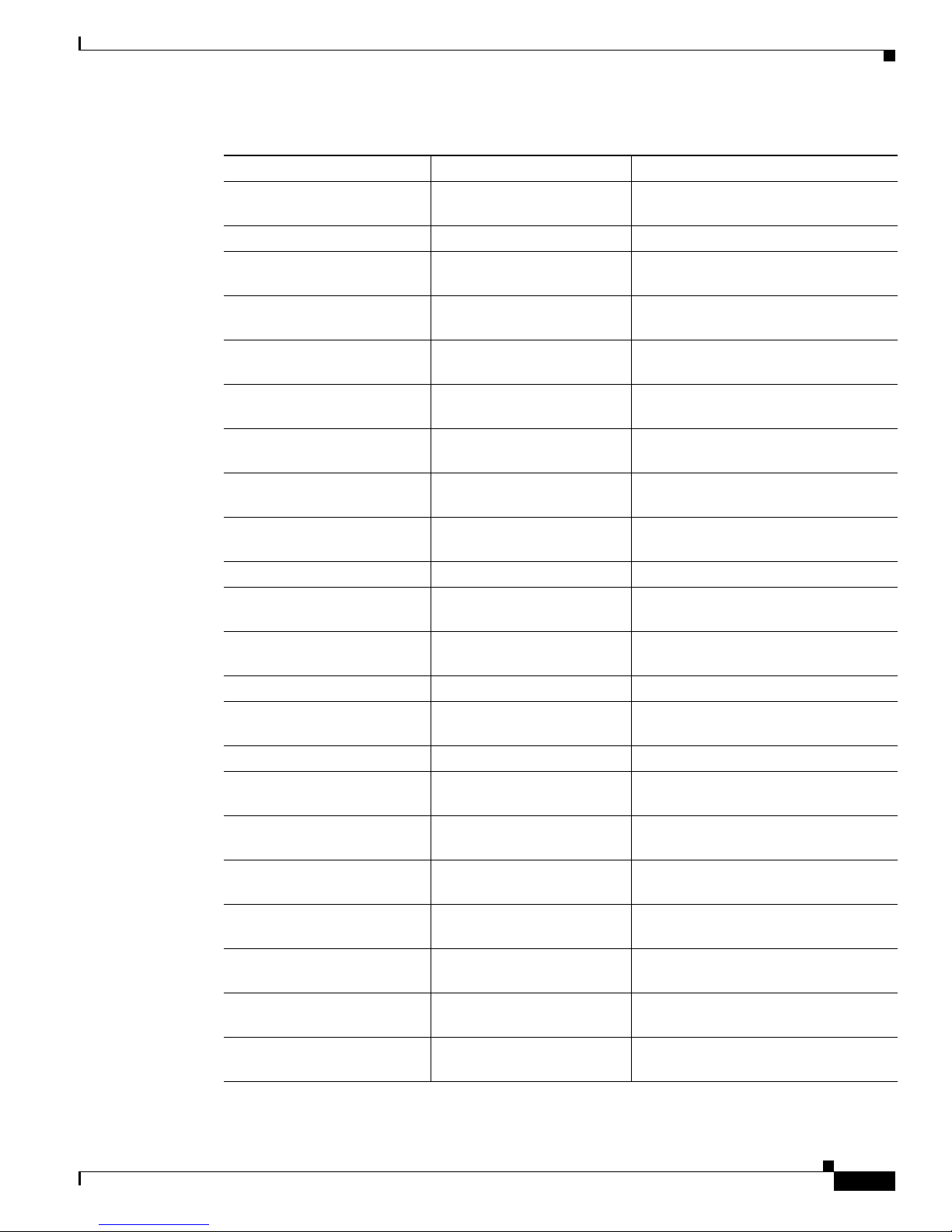
Chapter 1 System Message Overview
Table 1-1 Facility Codes (continued)
Facility Code Description Location
PAGP_DUAL_ACTIVE Port Aggregation Protocol
PHY PHY “PHY Messages” section on page 2-28
PIMSN Protocol Independent
PLATFORM Low-level platform-specific “PLATFORM Messages” section on
PLATFORM_ENV Platform-specific
PLATFORM_PBR Policy-based routing “PLATFORM_PBR Messages” section
PLATFORM_PM Port manager “PLATFORM_PM Messages” section
PLATFORM_UCAST Platform unicast routing “PLATFORM_UCAST Messages”
PLATFORM_VLAN VLAN “PLATFORM_VLAN Messages”
PM Port manager “PM Messages” section on page 2-39
PORT SECURITY Port security “PORT_SECURITY Messages”
QOSMGR QoS manager “QOSMGR Messages” section on
REP Resilient Ethernet Protocol “REP Messages” section on page 2-55
RMON Remote network monitoring “RMON Messages” section on
SCC Service Contract Center “SCC Messages” section on page 2-56
SCHED ScheduleMessages “SCHED Messages” section on
SPANTREE Spanning tree “SPANTREE Messages” section on
SPANTREE_FAST Spanning-tree fast
SPANTREE_VLAN_SW Spanning-tree VLAN switch “SPANTREE_VLAN_SW Messages”
STORM_CONTROL Storm control “STORM_CONTROL Messages”
SUDI Secure Unique Device
SUPERVISOR Supervisor ASIC “SUPERVISOR Messages” section on
(PAgP) dual-active detection
lti
cast (PIM) snooping
Mu
ironmental
v
en
n
vergence
co
i
Identif
er (UDI)
How to Read System Messages
“PAGP_DUAL_ACTIVE Messages”
section on page 2-27
“PIMSN Messages” section on
page 2-30
page 2-30
“PLATFORM_ENV Messages” section
on page 2-31
on page 2-34
on page 2-35
section on page 2-36
section on page 2-38
section on page 2-45
page 2-46
page 2-56
page 2-57
page 2-57
“SPANTREE_FAST Messages” section
on page 2-64
section on page 2-64
section on page 2-65
“SUDI Messages” section on page 2-66
page 2-66
OL-23408-01
Cisco ME 3400E, ME 3400, and ME 2400 Ethernet Access Switch System Message Guide
1-3
Page 12

How to Read System Messages
Table 1-1 Facility Codes (continued)
Facility Code Description Location
SUPQ Supervisor queue “SUPQ Messages” section on
SW_VLAN VLAN manager “SW_VLAN Messages” section on
TCAMMGR Ternary content addressable
UDLD UniDirectional Link
VQPCLIENT VLAN Query Protocol
• SEVERITY is a single-digit code from 0 to 7 that reflects the severity of the condition. The lower
Ta b l e 1-2 Message Severity Levels
Chapter 1 System Message Overview
page 2-67
page 2-68
“TCAMMGR Messages” section on
man
memory
te
ction (UDLD)
De
ager
(VQP) client
the number, the more serious the situation. Ta b le 1-2 lists the message severity levels.
page 2-73
“UDLD Messages” section on
page 2-74
“VQPCLIENT Messages” section on
page 2-75
Severity Level Description
0 – emergency System is unusable.
1 – alert Immediate action required.
2 – critical Critical condition.
3 – error Error condition.
4 – warning Warning condition.
5 – notification Normal but significant condition.
6 – informational Informational message only.
7 – debugging Message that appears during debugging only.
• MNEMONIC is a code that uniquely identifies the message.
• Message-text is a text string describing the condition. This portion of the message sometimes
contains detailed information about the event, including terminal port numbers, network addresses,
or addresses that correspond to locations in the system memory address space. Because the
information in these variable fields changes from message to message, it is represented here by short
strings enclosed in square brackets ([ ]). A decimal number, for example, is represented as [dec].
Table 1-3 lists the variable fields in messages.
Ta b l e 1-3 Variable Fields
Representation Type of Information
[dec] Decimal integer
[char] Single character
[chars] Character string
[enet] Ethernet address (for example, 0000.FEED.00C0)
Cisco ME 3400E, ME 3400, and ME 2400 Ethernet Access Switch System Message Guide
1-4
OL-23408-01
Page 13

Chapter 1 System Message Overview
Table 1-3 Variable Fields (continued)
Representation Type of Information
[hex] Hexadecimal integer
[inet] Internet address
This example shows a partial switch system message:
00:00:46: %LINK-3-UPDOWN: Interface Port-channel1, changed state to up
00:00:47: %LINK-3-UPDOWN: Interface GigabitEthernet0/1, changed state to up
00:00:47: %LINK-3-UPDOWN: Interface GigabitEthernet0/2, changed state to up
00:00:48: %LINEPROTO-5-UPDOWN: Line protocol on Interface Vlan1, changed state to down
00:00:48: %LINEPROTO-5-UPDOWN: Line protocol on Interface GigabitEthernet0/1, changed
state to down 2
*Mar 1 1
18:47:02: %SYS-5-CONFIG_I: Configured from console by vty2 (10.34.195.36)
*Mar 1 18:48:50.483 UTC: %SYS-5-CONFIG_I: Configured from console by vty2 (10.34.195.36)
8:46:11: %SYS-5-CONFIG_I: Configured from console by vty2 (10.34.195.36)
Error Message Traceback Reports
Error Message Traceback Reports
Some messages describe internal errors and contain traceback information. Include this information
when you report a problem to your technical support representative.
This message example includes traceback information:
-Process= "Exec", level= 0, pid= 17
-Traceback= 1A82 1AB4 6378 A072 1054 1860
Some system messages ask you to copy the error messages and take further action. These online tools
also provide more information about system error messages.
Output Interpreter
The Output Interpreter provides additional information and suggested resolutions based on the output of
many CLI commands, such as the show tech-support privileged EXEC command.
https://www.cisco.com/pcgi-bin/Support/OutputInterpreter/home.pl
Bug Toolkit
The Bug Toolkit provides information on open and closed caveats and allows you to search for all known
bugs in a specific Cisco IOS Release.
http://tools.cisco.com/Support/BugToolKit/
Contacting TAC
If you cannot determine the nature of the error, see the “Obtaining Documentation and Submitting a
Service Request” section on page v for further information.
OL-23408-01
Cisco ME 3400E, ME 3400, and ME 2400 Ethernet Access Switch System Message Guide
1-5
Page 14

Error Message Traceback Reports
Chapter 1 System Message Overview
Cisco ME 3400E, ME 3400, and ME 2400 Ethernet Access Switch System Message Guide
1-6
OL-23408-01
Page 15

CHAP T ER
2
Messages and Recovery Procedures
This chapter describes the Cisco ME 3800X and 3600X switches system messages in alphabetical order
by facility. Note that some messages apply only to specific switches and are never seen on the other
switches.
v
Within each facility, the messages are listed by severity le
7 is the lowest severity level. Each message is followed by an explanation and a recommended action.
Note The messages listed in this chapter do not include the hostname or the date/time-stamp designation that
appears only if the software is configured for system log messaging.
• ACLMGR Messages, page 2-3
• AUTHMGR Messages, page 2-6
• BACKUP_INTERFACE Messages, page 2-7
• BADTRANSCEIVER Messages, page 2-8
• BSPATCH Messages, page 2-8
• CISL Messages, page 2-9
els 0 to 7: 0 is the highest severity level, and
OL-23408-01
• EC Messages, page 2-9
• ENVIRONMENT Messages, page 2-13
• EPM Messages, page 2-14
• ETHCNTR Messages, page 2-14
• FRNTEND_CTRLR Messages, page 2-15
• GBIC_SECURITY Messages, page 2-15
• GBIC_SECURITY_CRYPT Messages, page 2-17
• GBIC_SECURITY_UNIQUE Messages, page 2-18
• HARDWARE Messages, page 2-18
• HCPU_PROT_MGR Messages, page 2-20
• HLFM Messages, page 2-21
• IDBMAN Messages, page 2-22
• IFMGR Messages, page 2-24
• IGMP_QUERIER Messages, page 2-25
Cisco ME 3400E, ME 3400, and ME 2400 Ethernet Access Switch System Message Guide
2-1
Page 16

• ILET Messages, page 2-26
• MAC_LIMIT Messages, page 2-26
• MAC_MOVE Messages, page 2-27
• PAGP_DUAL_ACTIVE Messages, page 2-27
• PHY Messages, page 2-28
• PIMSN Messages, page 2-30
• PLATFORM Messages, page 2-30
• PLATFORM_ENV Messages, page 2-31
• PLATFORM_PBR Messages, page 2-34
• PLATFORM_PM Messages, page 2-35
• PLATFORM_UCAST Messages, page 2-36
• PLATFORM_VLAN Messages, page 2-38
• PM Messages, page 2-39
• PORT_SECURITY Messages, page 2-45
Chapter 2 Messages and Recovery Procedures
• QOSMGR Messages, page 2-46
• REP Messages, page 2-55
• RMON Messages, page 2-56
• SCC Messages, page 2-56
• SCHED Messages, page 2-57
• SPANTREE Messages, page 2-57
• SPANTREE_FAST Messages, page 2-64
• SPANTREE_VLAN_SW Messages, page 2-64
• STORM_CONTROL Messages, page 2-65
• SUDI Messages, page 2-66
• SUPERVISOR Messages, page 2-66
• SUPQ Messages, page 2-67
• SW_VLAN Messages, page 2-68
• TCAMMGR Messages, page 2-73
• UDLD Messages, page 2-74
• VQPCLIENT Messages, page 2-75
Cisco ME 3400E, ME 3400, and ME 2400 Ethernet Access Switch System Message Guide
2-2
OL-23408-01
Page 17

Chapter 2 Messages and Recovery Procedures
ACLMGR Messages
Error Message ACLMGR-2-NOMAP: Cannot create ACL Manager data structures for VLAN Map
[chars].
ACLMGR Messages
Explanation
The ACL manager could not allocate the data structures needed to describe a VLAN
map into a form that can be loaded into hardware. This error is most likely caused by lack of free
memory. [chars] is the VLAN map name.
Recommended Action Reduce other system activity to ease memory demands.
Error Message ACLMGR-2-NOVLB: Cannot create memory block for VLAN [dec].
Explanation
The ACL manager could not save per-VLAN information needed for its correct
operation. Some per-interface features, such as access groups or VLAN maps, will not be configured
correctly. [dec] is the VLAN number.
Recommended Action Change configuration to reduce memory usage.
Error Message ACLMGR-2-NOVMR: Cannot generate hardware representation of access list
[chars]
Explanation
Available resources are not sufficient to create a hardware representation of the ACL. A
lack of available logical operation units or specialized hardware resources can cause this problem.
Logical operation units are needed for a TCP flag match or a test other than eq (ne, gt, lt, or range)
on TCP, UDP, or SCTP port numbers.
Recommended Action Modify the ACL configuration to use fewer resources, or rename the ACL with
a name or number that alphanumerically precedes the other ACL names or numbers.
OL-23408-01
Error Message ACLMGR-3-ACLTCAMFULL: Acl Tcam Full. Drop packets on Output Acl label
[dec] on [chars] [chars].
Explanation
The platform-specific ACL TCAM cannot support the number of configured ACLs.
[dec] is the label number, and [chars] represents the layer. The first [chars] is Layer 3, and the second
[chars] is Layer 2. If only one layer of TCAM is full, only one string is displayed, and the other
string is NULL.
Recommended Action Reduce the number of IP or MAC access lists to be applied to interfaces.
Error Message ACLMGR-3-AUGMENTFAIL: Augmenting of access-map [chars] on [chars]
label [dec] failed.
Explanation
The system ran out of CPU DRAM when trying to merge internally required elements
with the configured access maps. The first [chars] is the access-map name, the second [chars] is the
direction in which the map was applied (input or output), and [dec] is the label number.
Recommended Action Reduce other system activity to ease memory demands.
Cisco ME 3400E, ME 3400, and ME 2400 Ethernet Access Switch System Message Guide
2-3
Page 18

ACLMGR Messages
Chapter 2 Messages and Recovery Procedures
Error Message ACLMGR-3-IECPORTLABELERROR: ACL labels are out-of-sync on interface
[chars], label [dec] is not available on asic [dec].
Explanation
An internal software error has occurred. [chars] is the interface name. The first [dec] is
the label associated with the ACL, and the second [dec] is the ASIC number.
Recommended Action Copy the message exactly as it appears on the console or in the system log.
Research and attempt to resolve the error by using the Output Interpreter. Use the Bug Toolkit to
look for similar reported problems. If you still need assistance, open a case with the TAC, or provide
your Cisco technical support representative with your information. For more information about these
online tools and about contacting Cisco, see the “Error Message Traceback Reports” section on
page 1-5.
Error Message ACLMGR-3-INSERTFAIL: Insert of access-map [chars] #[dec] into [chars]
label [dec] failed.
Explanation
The system ran out of CPU memory when trying to merge sections of an access map.
The first [chars] is the map name, and the second [chars] is the direction in which the map was
applied. The first [dec] is the entry number, and the second [dec] is the label number.
Recommended Action Reduce other system activity to ease memory demands. For example, remove
any ACLs that have been defined but are not used. Use simpler ACLs with fewer access control
entries (ACEs). Use fewer VLANs, and remove any unneeded VLANs from the VLAN database.
Error Message ACLMGR-3-INTTABLE: Not in truth table: VLMAP [dec] RACL [dec] Mcb [dec]
Feat [dec].
Explanation
An unrecoverable software error occurred while trying to merge the configured input
features. [dec] are internal action codes.
Recommended Action Copy the message exactly as it appears on the console or in the system log.
Research and attempt to resolve the error by using the Output Interpreter. Use the Bug Toolkit to
look for similar reported problems. If you still need assistance, open a case with the TAC, or provide
your Cisco technical support representative with your information. the information you have
gathered. For more information about these online tools and about contacting Cisco, see the “Error
Message Traceback Reports” section on page 1-5.
Error Message ACLMGR-3-MAXRECURSION: Too many ([dec]) levels of recursion while
merging ACLs (code [dec]).
Explanation
The configuration is too complicated for the platform-specific ACL merge code to
support. The most likely cause is too many separate access lists in a single VLAN map or policy
map. The first [dec] is the number of levels of recursion. The second [dec] is an internal code number
of the merge stage that encountered the problem.
Recommended Action Reduce the number of IP or MAC access lists (considered separately) in any
one VLAN or policy map to fewer than the number of levels reported by this log message.
Cisco ME 3400E, ME 3400, and ME 2400 Ethernet Access Switch System Message Guide
2-4
OL-23408-01
Page 19

Chapter 2 Messages and Recovery Procedures
Error Message ACLMGR-3-MERGEFAIL: [chars] ACL merge error [dec] ([chars]) on [chars]
label [dec].
ACLMGR Messages
Explanation
The ACL manager could not complete the merge of the configured features into a form
suitable for loading into the hardware. Packets potentially affected by this feature will be sent to the
CPU for processing. The most likely cause is specifying an ACL that is too large or too complex for
the system. The first [chars] is the ACL-type error (ip or mac), the first [dec] is the error code, the
second [chars] is the message string for the preceding error code, the second [dec] is the label
number, and the third [chars] is either input or output.
Recommended Action Specify a smaller and less complicated configuration.
Error Message ACLMGR-3-NOLABEL: Cannot allocate [chars] label for interface [chars].
Explanation
the ACL manager could not allocate a label for the features on this interface. This
means that the hardware cannot be programmed to implement the features, and packets for this
interface will be filtered in the software. There is a limit of 256 labels per direction. The first [chars]
is the direction (input or output), and the second [chars] is the interface name.
Recommended Action Use a simpler configuration. Use the same ACLs on multiple interfaces, if
possible.
Error Message ACLMGR-3-OUTTTABLE: Not in truth table: RACL [dec] VLMAP [dec].
Explanation
An unrecoverable software error occurred while trying to merge the configured output
features. [dec] are internal action codes.
Recommended Action Copy the message exactly as it appears on the console or in the system log.
Research and attempt to resolve the error by using the Output Interpreter. Use the Bug Toolkit to
look for similar reported problems. If you still need assistance, open a case with the TAC, or provide
your Cisco technical support representative with your information. For more information about these
online tools and about contacting Cisco, see the “Error Message Traceback Reports” section on
page 1-5.
Error Message ACLMGR-3-QOSTTABLE: Not in truth table: ACL [dec] in map, action [dec].
Explanation
A software error occurred while trying to merge a quality of service (QoS) policy map.
The first [dec] is the ACL number, and the second [dec] is the action corresponding to the specified
ACL number.
Recommended Action Copy the message exactly as it appears on the console or in the system log.
Research and attempt to resolve the error by using the Output Interpreter. Use the Bug Toolkit to
look for similar reported problems. If you still need assistance, open a case with the TAC, or provide
your Cisco technical support representative with your information. For more information about these
online tools and about contacting Cisco, see the “Error Message Traceback Reports” section on
page 1-5.
OL-23408-01
Cisco ME 3400E, ME 3400, and ME 2400 Ethernet Access Switch System Message Guide
2-5
Page 20

AUTHMGR Messages
Chapter 2 Messages and Recovery Procedures
Error Message ACLMGR-3-RELOADED: Reloading [chars] label [dec] feature.
Explanation
The ACL manager can now load more of the configured features on this label into the
hardware. One or more features had previously been unloaded because of lack of space. [chars] is
the direction (input or output), and [dec] is the label number.
Recommended Action No action is required.
Error Message ACLMGR-3-UNKNOWNACTION: Unknown VMR access group action [hex].
Explanation
Recommended Action Copy the message exactly as it appears on the console or in the system log.
An internal software error has occurred. [hex] is an internal action code.
Research and attempt to resolve the error by using the Output Interpreter. Use the Bug Toolkit to
look for similar reported problems. If you still need assistance, open a case with the TAC, or provide
your Cisco technical support representative with your information. For more information about these
online tools and about contacting Cisco, see the “Error Message Traceback Reports” section on
page 1-5.
Error Message ACLMGR-3-UNLOADING: Unloading [chars] label [dec] feature.
Explanation
The ACL manager could not fit the complete configuration into the hardware, so some
features will be applied in the software. Some or all of the packets in a VLAN are forwarded by the
CPU. Multicast packets might be dropped entirely instead of being forwarded. [chars] is the
direction (input or output), and [dec] is the label number.
Recommended Action Use a simpler configuration. Use the same ACLs on multiple interfaces, if
possible.
AUTHMGR Messages
Error Message AUTHMGR-5-SECURITY_VIOLATION: Security violation on the interface
[chars], new MAC address ([enet) is seen. AuditSessionID [chars]
Explanation
The interface mode does not support the number of hosts that are attached to the interface. This is a
security violation, and the interface has been error-disabled. The first [chars] is the interface, [enet]
is the Ethernet address of the host, and the second [chars] is the session ID.
Recommended Action Make sure that the interface is configured to support the number of hosts that
are attached to it. Enter the shutdown interface configuration command followed by no shutdown
interface configuration command to restart the interface.
A host on the interface attempted to access the network or attempted an authentication.
Cisco ME 3400E, ME 3400, and ME 2400 Ethernet Access Switch System Message Guide
2-6
OL-23408-01
Page 21

Chapter 2 Messages and Recovery Procedures
Error Message AUTHMGR-5-VLANASSIGN: VLAN [dec] assigned to Interface [chars]
AuditSessionID [chars]
BACKUP_INTERFACE Messages
Explanation
A VLAN was assigned. [dec] is the VLAN ID, the first [chars] is the interface, and the
second [chars] is the session ID.
Recommended Action No action is required.
Error Message AUTHMGR-7-FAILOVER: Failing over from [chars] for client ([chars]) on
Interface [chars] AuditSessionID [chars]
Explanation
The authorization manager is failing over from the current authentication method to
another method. The first [chars] is the current authentication method, the second [chars] is the
client ID, the third [chars] is the interface, and th
Recommended Action No action is required.
Error Message AUTHMGR-7-NOMOREMETHODS: Exhausted all authentication methods for
client ([chars]) on Interface [chars] AuditSessionID [chars]
Explanation
All available authentication methods have been tried for the client, but authentication
e fourth [chars] is the session ID.
failed. The first [chars] is the client ID, the second [chars] is the interface, and the third [chars] is the
session ID.
Recommended Action No action is required. If local authorization has been configured, the port is
authorized based on the local authorization method. Otherwise, authentication is restarted according
to the configured reauthentication period.
Error Message AUTHMGR-7-RESULT: Authentication result [chars] from [chars] for
client [chars] on Interface [chars] AuditSessionID [chars]
Explanation
This messages provides authentication results. The first [chars] is the status of the
authentication, the second [chars] is the authentication method, the third [chars] is the client ID, the
fourth [chars] is the interface, and the fifth [chars] is the session ID.
Recommended Action No action is required.
BACKUP_INTERFACE Messages
Error Message BACKUP_INTERFACE-5-VLB_NON_TRUNK: Warning: Flexlink VLB is not
allowed on non-trunk ports. Please configure [chars] to be a trunk port.
Explanation
interface name.
Recommended Action Change the interface to trunking mode.
Flex Link VLAN load-balancing (VLB) detected a nontrunk port. [chars] is the
OL-23408-01
Cisco ME 3400E, ME 3400, and ME 2400 Ethernet Access Switch System Message Guide
2-7
Page 22

BADTRANSCEIVER Messages
BADTRANSCEIVER Messages
Error Message BADTRANSCEIVER, PHY, LOG_WARNING: An innapropriate transceiver has
been inserted in interface [chars].
Chapter 2 Messages and Recovery Procedures
Explanation
Recommended Action Remove the transceiver. If it was purchased from Cisco, contact your Cisco
representative to have the transceiver replaced.
A defective module is installed in the specified interface. [chars] is the interface.
BSPATCH Messages
Error Message BSPATCH-1-RELOAD: System will reboot to activate newly patched Boot
Loader.
Explanation
Recommended Action If this message recurs, copy it exactly as it appears on the console or in the
system log. Research and attempt to resolve the error by using the Output Interpreter. Use the Bug
Toolkit to look for similar reported problems. If you still need assistance, open a case with the TAC,
or provide your Cisco technical support representative with your information. For more information
about these online tools and about contacting Cisco, see the “Error Message Traceback Reports”
section on page 1-5.
Error Message BSPATCH-1-PATCHED: Boot Loader patch ([chars]) installed.
The switch automatically reboots after the boot loader is patched.
Explanation
setting.
Recommended Action If this message recurs, copy it exactly as it appears on the console or in the
system log. Research and attempt to resolve the error by using the Output Interpreter. Use the Bug
Toolkit to look for similar reported problems. If you still need assistance, open a case with the TAC,
or provide your Cisco technical support representative with your information. For more information
about these online tools and about contacting Cisco, see the “Error Message Traceback Reports”
section on page 1-5.
Error Message BSPATCH-3-FAILED: Failed to install Boot Loader patch ([chars]).
Explanation
register setting.
Recommended Action Copy the message exactly as it appears on the console or in the system log.
Research and attempt to resolve the error by using the Output Interpreter. Use the Bug Toolkit to
look for similar reported problems. If you still need assistance, open a case with the TAC, or provide
your Cisco technical support representative with your information. For more information about these
online tools and about contacting Cisco, see the “Error Message Traceback Reports” section on
page 1-5.
A boot loader patch installed successfully. [chars] is the SDRAM refresh timer register
The switch did not apply a boot loader patch. [chars] is the SDRAM refresh timer
Cisco ME 3400E, ME 3400, and ME 2400 Ethernet Access Switch System Message Guide
2-8
OL-23408-01
Page 23

Chapter 2 Messages and Recovery Procedures
CISL Messages
Error Message CISL-1-DEVICE_CERT_NOT_PRESENT: Device Certificate used for licensing
is not present
CISL Messages
EC Messages
Error Message EC-4-NOMEM: Not enough memory available for [chars].
Explanation
Recommended Action Copy the message exactly as it appears on the console or in the system log.
Research and attempt to resolve the error by using the Output Interpreter. Use the Bug Toolkit to
look for similar reported problems. If you still need assistance, open a case with the TAC, or provide
your Cisco technical support representative with your information. For more information about these
online tools and about contacting Cisco, see the “Error Message Traceback Reports” section on
page 1-5.
Explanation
(PAgP) EtherChannel could not obtain the memory it needed to initialize the required data
structures. [chars] is the data structure name.
Recommended Action Copy the message exactly as it appears on the console or in the system log.
Research and attempt to resolve the error by using the Output Interpreter. Use the Bug Toolkit to
look for similar reported problems. If you still need assistance, open a case with the TAC, or provide
your Cisco technical support representative with your information. For more information about these
online tools and about contacting Cisco, see the “Error Message Traceback Reports” section on
page 1-5.
An error occurred while retrieving the device certificate used for licensing.
The Link Aggregation Control Protocol (LACP) or the Port Aggregation Protocol
Error Message EC-5-BUNDLE: Interface [chars] joined port-channel [chars].
Explanation
interface, and the second [chars] is the EtherChannel interface.
Recommended Action No action is required.
Error Message EC-5-CANNOT_ALLOCATE_AGGREGATOR: Aggregator limit reached, cannot
allocate aggregator for group [dec].
Explanation
Recommended Action Change the port attributes of the ports in the group so that they match and join
the same aggregator.
OL-23408-01
The listed interface joined the specified EtherChannel. The first [chars] is the physical
A new aggregator cannot be allocated in the group. [dec] is the affected group.
Cisco ME 3400E, ME 3400, and ME 2400 Ethernet Access Switch System Message Guide
2-9
Page 24

EC Messages
Chapter 2 Messages and Recovery Procedures
Error Message EC-5-CANNOT_BUNDLE1: Port-channel [chars] is down, port [chars] will
remain stand-alone.
Explanation
The aggregation port is down. The port remains standalone until the aggregation port is
up. The first [chars] is the EtherChannel, and the second [chars] is the port number.
Recommended Action Ensure that the other ports in the bundle have the same configuration.
Error Message EC-5-CANNOT_BUNDLE2: [chars] is not compatible with [chars] and will
be suspended ([chars]).
Explanation
The interface has different interface attributes than other ports in the EtherChannel. For
the interface to join the bundle (EtherChannel), change the interface attributes to match the
EtherChannel attributes. The first [chars] is the interface to be bundled, the second [chars] is the
physical interface (a switch port or a routed port) that is already in the bundle, and the third [chars]
is the reason for the incompatibility.
Recommended Action Change the interface attributes to match the EtherChannel attributes.
Error Message EC-5-CANNOT_BUNDLE_LACP: [chars] is not compatible with aggregators in
channel [dec] and cannot attach to them ([chars]).
Explanation
The port has different port attributes than the port channel or ports within the port
channel. The first [chars] is the incompatible port, [dec] is the channel group number, and the last
[chars] is the reason.
Recommended Action For the port to join the bundle, change the port attributes so that they match the
port.
Error Message EC-5-COMPATIBLE: [chars] is compatible with port-channel members.
Explanation
A port was not operational because its attributes were different from those of the port
channel or ports within the port channel. The system has detected that the attributes of the port now
match the port-channel attributes. [chars] is the affected port.
Recommended Action No action is required.
Error Message EC-5-DONTBNDL: [chars] suspended: incompatible remote port with
[chars]
Explanation
The configuration of the remote port is different from the configuration of other remote
ports in the bundle. A port can only join the bundle when the configuration of the local port and the
configuration of the remote port are the same as other ports already in the bundle. The first [chars]
is the name of the local interface that is being suspended, and the second [chars] is the name of the
local interface that is already bundled.
Recommended Action Make sure that the configuration of the remote ports is the same for all ports in
the bundle.
Cisco ME 3400E, ME 3400, and ME 2400 Ethernet Access Switch System Message Guide
2-10
OL-23408-01
Page 25

Chapter 2 Messages and Recovery Procedures
Error Message EC-5-ERRPROT: Channel protocol mismatch for interface [chars] in group
[dec]: the interface can not be added to the channel group.
EC Messages
Explanation
The interface cannot be added to the channel group with the specified mode. [chars] is
the interface, and [dec] is the channel group.
Recommended Action Change the channel group or the mode for the interface.
Error Message EC-5-ERRPROT2: Command rejected: the interface [chars] is already part
of a channel with a different type of protocol enabled.
Explanation
The interface cannot be selected for the specified protocol because it is already part of
a channel with a different protocol. [chars] is the interface.
Recommended Action Remove the interface from the channel group.
Error Message EC-5-ERRPROT3: Command rejected: the interface [chars] is already part
of a channel.
Explanation
The interface cannot be unselected for the specified protocol because it is already part
of a channel group. [chars] is the interface.
Recommended Action Remove the interface from the channel group.
Error Message EC-5-L3DONTBNDL1: [chars] suspended: PAgP not enabled on the remote
port.
Explanation
PAgP is enabled on the Layer 3 interface, but the partner port is not enabled for PAgP.
In this mode, the port is placed in a suspended state. [chars] is the Layer 3 interface.
Recommended Action Enable PAgP on the remote side by using the channel-group interface
configuration command.
Error Message EC-5-L3DONTBNDL2: [chars] suspended: LACP currently not enabled on the
remote port.
Explanation
LACP is enabled on a Layer 3 interface but is not enabled on the partner port. The port
is put in a suspended state. [chars] is the interface name.
Recommended Action Enable LACP on the remote side.
Error Message EC-5-NOLACP: Invalid EC mode, LACP not enabled.
Explanation
The EtherChannel mode cannot be set because LACP is not included in the software
image.
Recommended Action Install a software image that includes LACP, and set the EC mode to on.
OL-23408-01
Cisco ME 3400E, ME 3400, and ME 2400 Ethernet Access Switch System Message Guide
2-11
Page 26

EC Messages
Chapter 2 Messages and Recovery Procedures
Error Message EC-5-NOPAGP: Invalid EC mode, PAgP not enabled.
Explanation
PAgP is not included in the Cisco IOS image and that the EtherChannel mode cannot be
set to desirable or auto.
Recommended Action Obtain an image with PAgP included, or set the mode to on by using the
channel-group channel-group-number mode on interface configuration command.
Error Message EC-5-PORTDOWN: Shutting down [chars] as its port-channel is
admin-down.
Explanation
The administrative state of the port is controlled by the administrative state of its
aggregate port. If the administrative state of the aggregate port is down, the administrative state of
the port is also forced to be down. [chars] is the physical interface.
Recommended Action Enter the no shutdown interface configuration command on the aggregate port
to activate the aggregation port.
Error Message EC-5-STAYDOWN: [chars] will remain down as its port-channel [chars] is
admin-down.
Explanation
The administrative state of the aggregation port overrides that of the affected port. If the
aggregation port is administratively down, all ports in the aggregation port are forced to be
administratively down. The first [chars] is the physical interface, and the second [chars] is the
EtherChannel.
Recommended Action Enter the no shutdown interface configuration command on the aggregation
port to activate (unshut) the aggregation port.
Error Message EC-5-STAYDOWN: no-shut not allowed on [chars]. Module [dec] not online.
Explanation
An interface with an EtherChannel configuration cannot be enabled by using the no
shutdown interface configuration command because it is a member of an EtherChannel group and
that EtherChannel group has been administratively shut down. The interface has an EtherChannel
configuration, but no information is available yet about its port channel. [chars] is the interface, and
[dec] is the module.
Recommended Action No action is required. Wait until the module is online to find out the
port-channel setting of the EtherChannel.
Error Message EC-5-UNBUNDLE: Interface [chars] left the port-channel [chars].
Explanation
The listed interface left the specified EtherChannel. The first [chars] is the physical
interface, which can be a switch port or a routed port, and the second [chars] is the EtherChannel.
Recommended Action No action is required.
Cisco ME 3400E, ME 3400, and ME 2400 Ethernet Access Switch System Message Guide
2-12
OL-23408-01
Page 27

Chapter 2 Messages and Recovery Procedures
ENVIRONMENT Messages
Error Message ENVIRONMENT-3-OVERTEMP: Internal Temperature crossed over Max
Temperature Threshold
ENVIRONMENT Messages
Explanation
Recommended Action This could be a hardware failure. If a power-supply or fan module failed,
The switch internal temperature is higher than the maximum temperature threshold.
replace it. Check that the ambient temperature is not too high. Use the show environment
temperature status privileged EXEC command to display the temperature sensor values and the
temperature thresholds. Check that proper air flow is maintained. If the message appears again,
contact TAC or your Cisco representative to have the switch replaced.
Error Message ENVIRONMENT-3-UNDERTEMP: Internal Temperature crossed under Min
Temperature Threshold
Explanation
Recommended Action Check that the ambient temperature is not too low. Use the show environment
The switch internal temperature is lower than the minimum temperature threshold.
temperature status privileged EXEC command to display the temperature sensor values and the
temperature thresholds. If the message appears again, contact TAC or your Cisco representative to
have the switch replaced.
Error Message ENVIRONMENT-4-SECONDARY_UNDERTEMP: Internal Temperature returns to
Safe Temperature Range from Cold Condition
Explanation
The switch internal temperature was lower than the configured minimum threshold but
is now within the normal range.
OL-23408-01
Recommended Action No action is required.
Error Message ENVIRONMENT-3-OVERVOLT: [chars] Line Exceeds High Threshold Limit
Current Voltage (mV): [dec]
Explanation
The voltage rail is higher than the maximum voltage threshold. [chars] is the voltage
rail, and [dec] is the voltage.
Recommended Action If the message appears again, contact TAC or your Cisco representative to have
the switch replaced.
Error Message ENVIRONMENT-3-UNDERVOLT: [chars] Line Exceeds Low Threshold Limit
Current Voltage (mV): [dec]
Explanation
The voltage rail is lower than the minimum voltage threshold. [chars] is the voltage rail,
and [dec] is the voltage.
Recommended Action If the message appears again, contact TAC or your Cisco representative to have
the switch replaced.
Cisco ME 3400E, ME 3400, and ME 2400 Ethernet Access Switch System Message Guide
2-13
Page 28

EPM Messages
Chapter 2 Messages and Recovery Procedures
Error Message ENVIRONMENT-4-SECONDARY_OVERVOLT: [chars] Line Returns to Normal Range
Current Voltage (mV): [dec]
Explanation
normal range. [chars] is the voltage rail, and [dec] is the voltage.
Recommended Action No action is required.
Error Message ENVIRONMENT-4-SECONDARY_UNDERVOLT: [chars] Line Returns to Normal
Range Current Voltage (mV): [dec]
Explanation
normal range. [chars] is the voltage rail, and [dec] is the voltage.
Recommended Action No action is required.
EPM Messages
Error Message EPM-6-AUTH_ACL: POLICY [chars]| EVENT [chars]
Explanation
The first [chars] is the dACL policy, and the second [chars] is the event.
Recommended Action No action is required.
The voltage rail was higher than the maximum voltage threshold but is now within the
The voltage rail was lower than the minimum voltage threshold but is now within the
The switch has sent or received a download request for a downloadable ACL (dACL).
ETHCNTR Messages
Error Message ETHCNTR-3-HALF_DUX_COLLISION_EXCEED_THRESHOLD: Collision at [chars]
exceed threshold. Consider as loop-back.
Explanation
loopback. [chars] is the port where the threshold was exceeded.
Recommended Action No action is required. The port goes into error-disabled mode until the problem
is resolved.
Error Message ETHCNTR-3-LOOP_BACK_DETECTED:, Loop-back detected on [chars]. The port
is forced to linkdown.
Explanation
loopback condition might be caused by a balun cable being accidentally connected to the port, or
there might be a loop in the network. [chars] is the port.
Recommended Action Examine the cables. If a balun cable is connected, and the loopback condition
is desired, No action is required. Otherwise, connect the correct cable, and bring the port up by using
the no shutdown interface configuration command. We do not recommend using the no keepalive
interface command to disable keepalives. The cause of this network loop must be found and
The collisions at a half-duplex port exceeded the threshold, and the port is treated as a
A keepalive packet has been looped back to the port that sent the keepalive. The
Cisco ME 3400E, ME 3400, and ME 2400 Ethernet Access Switch System Message Guide
2-14
OL-23408-01
Page 29

Chapter 2 Messages and Recovery Procedures
corrected. Although disabling keepalives prevents the port from being error disabled, it does not
resolve the cause of the problem and can affect network stability. See CSCea46385 for more
information.
Error Message ETHCNTR-3-NO_HARDWARE_RESOURCES: Not enough hardware resources.
Shutting down [chars].
FRNTEND_CTRLR Messages
Explanation
name, such as Gi0/1, or the VLAN name, such as VLAN0002.
Recommended Action Reduce the total number of VLANs and routed ports to less than 1023. To
preserve configuration and connections across reboots, save the configuration.
There are too many VLANs and routed ports configured. [chars] is the short interface
FRNTEND_CTRLR Messages
Error Message FRNTEND_CTRLR-1-MGR_TXQ_FULL: The front end controller Tx queue
reached watermark level.
Explanation
switch software.
Recommended Action Try reloading the switch. If this does not resolve the issue, this might be a
hardware problem. Contact the Cisco technical support representative.
Error Message FRNTEND_CTRLR-2-SUB_INACTIVE: The front end controller [dec] is
inactive.
Explanation
inactive on the port controlled by the front-end controller. This does not affect the traffic on the port.
[dec] is the controller number.
There are too many messages in the queue between the front-end controller and the
The front-end controller that controls the LEDs and the fan-control features is now
Recommended Action Reset the switch. If the problem is not resolved by resetting the switch, contact
your Cisco technical support representative because there might be a problem with the switch.
GBIC_SECURITY Messages
Note The switch supports small form-factor pluggable (SFP) modules and does not support Gigabit Interface
Converter (GBIC) modules. Although the error message text refers to GBIC interfaces and modules, the
messages from the switch actually refer to the SFP module interfaces and modules.
OL-23408-01
Cisco ME 3400E, ME 3400, and ME 2400 Ethernet Access Switch System Message Guide
2-15
Page 30

GBIC_SECURITY Messages
Error Message GBIC_SECURITY-4-EEPROM_CRC_ERR: EEPROM checksum error for GBIC in
[chars].
Chapter 2 Messages and Recovery Procedures
Explanation
The GBIC in the specified port has invalid EEPROM data. [chars] is the port in which
the GBIC is inserted.
Recommended Action Remove the GBIC from the port.
Error Message GBIC_SECURITY-4-EEPROM_READ_ERR: Error in reading GBIC serial ID in
[chars].
Explanation
An error occurred while the switch was reading the GBIC type from the EEPROM.
[chars] is the port in which the GBIC is inserted.
Recommended Action Remove the GBIC from the port.
Error Message GBIC_SECURITY-4-EEPROM_SECURITY_ERR: GBIC in [chars] failed security
check.
Explanation
The GBIC in the specified port has invalid EEPROM data. [chars] is the port in which
the GBIC is inserted.
Recommended Action Remove the GBIC from the port.
Error Message GBIC_SECURITY-4-GBIC_INTERR: Internal error occurred in setup for GBIC
interface [chars].
Explanation
The system could not allocate resources or had some other problem during the setup for
the specified SFP module interface. [chars] is the interface in which the SFP module is installed.
Recommended Action Reload the switch by using the reload privileged EXEC command. If the
problem persists, find out more about the error by using the show tech-support privileged EXEC
command. Copy the message exactly as it appears on the console or in the system log. Research and
attempt to resolve the error by using the Output Interpreter. Use the Bug Toolkit to look for similar
reported problems. If you still need assistance, open a case with the TAC, or provide your Cisco
technical support representative with your information. For more information about these online tools
and about contacting Cisco, see the “Error Message Traceback Reports” section on page 1-5.
Error Message GBIC_SECURITY-6-SFP_INSERTED: Transceiver SFP [chars] module inserted
in [chars]
Explanation
The online insertion and removal (OIR) facility detected a newly inserted transceiver
module for the interface specified in the message. The first [chars] is the module, and the second
[chars] is the interface.
Recommended Action No action is required.
Cisco ME 3400E, ME 3400, and ME 2400 Ethernet Access Switch System Message Guide
2-16
OL-23408-01
Page 31

Chapter 2 Messages and Recovery Procedures
Error Message GBIC_SECURITY-6-SFP_REMOVED: Transceiver SFP [chars] module removed
from [chars]
GBIC_SECURITY_CRYPT Messages
Explanation
The OIR facility detected the removal of a transceiver module from the interface
specified in the message. The first [chars] is the module, and the second [chars] is the interface.
Recommended Action No action is required.
GBIC_SECURITY_CRYPT Messages
Note The switch supports SFP modules and does not support GBIC modules. Although the error message text
refers to GBIC interfaces and modules, the messages from the switch actually refer to the SFP module
interfaces and modules.
Error Message GBIC_SECURITY_CRYPT-4-ID_MISMATCH: Identification check failed for
GBIC in port [chars]
Explanation
its identity. [chars] is the port.
Recommended Action Ensure that the Cisco IOS software running on the switch supports the SFP
module. You might need to upgrade your software. Otherwise, verify that the SFP module was
obtained from Cisco or from a supported vendor.
The SFP module was identified as a Cisco SFP module, but the system could not verify
Error Message GBIC_SECURITY_CRYPT-4-UNRECOGNIZED_VENDOR: GBIC in port [chars]
manufactured by an unrecognized vendor
Explanation
The SFP module was identified as a Cisco SFP module, but the switch could not match
its manufacturer with one on the known list of Cisco SFP module vendors. [chars] is the port.
Recommended Action Ensure that the Cisco IOS software running on the switch supports the SFP
module. You might need to upgrade your software.
Error Message GBIC_SECURITY_CRYPT-4-VN_DATA_CRC_ERROR: GBIC in port [chars] has bad
crc
Explanation
The SFP module was identified as a Cisco SFP module, but it does not have valid CRC
in the EEPROM data. [chars] is the port.
Recommended Action Ensure that the Cisco IOS software running on the switch supports the SFP
module. You might need to upgrade your software. Even if the SFP module is unrecognized by the
switch, the SFP module might still operate properly but have limited functionality.
OL-23408-01
Cisco ME 3400E, ME 3400, and ME 2400 Ethernet Access Switch System Message Guide
2-17
Page 32

GBIC_SECURITY_UNIQUE Messages
GBIC_SECURITY_UNIQUE Messages
Note The switch supports SFP modules and does not support GBIC modules. Although the error message text
refers to GBIC interfaces and modules, the messages from the switch actually refer to the SFP module
interfaces and modules.
Error Message GBIC_SECURITY_UNIQUE-3-DUPLICATE_GBIC: GBIC interface [dec]/[dec] is
a duplicate of GBIC interface [dec]/[dec].
Chapter 2 Messages and Recovery Procedures
Explanation
number match that of another interface on the system. The first [dec]/[dec] is the interface of the
duplicate SPF module, and the second [dec]/[dec] is the interface of the existing module.
Recommended Action Cisco SFP modules are assigned unique serial numbers. Verify that the module
was obtained from Cisco or from a supported vendor.
Error Message GBIC_SECURITY_UNIQUE-4-DUPLICATE_SN: GBIC interface [dec]/[dec] has
the same serial number as another GBIC interface.
Explanation
that of another interface on the system. [dec]/[dec] is the interface in which the duplicate module is
installed.
Recommended Action Cisco SFP modules are assigned unique serial numbers. Verify that the module
was obtained from Cisco or from a supported vendor.
The SFP module was identified as a Cisco SFP module, but its vendor ID and serial
The SFP module was identified as a Cisco SFP module, but its serial number matches
HARDWARE Messages
Error Message HARDWARE-2-FAN_ERROR: Fan [chars] Failure
Explanation
Recommended Action This is a hardware failure. The fan might recover automatically. If the fan
failure persists, copy the message exactly as it appears on the console or in the system log. Research
and attempt to resolve the error by using the Output Interpreter. Use the Bug Toolkit to look for
similar reported problems. If you still need assistance, open a case with the TAC, or provide your
Cisco technical support representative with your information. For more information about the online
tools and about contacting Cisco, see the “Error Message Traceback Reports” section on page 1-5.
Cisco ME 3400E, ME 3400, and ME 2400 Ethernet Access Switch System Message Guide
2-18
The switch fan is not working. [chars] is the fan name.
OL-23408-01
Page 33

Chapter 2 Messages and Recovery Procedures
Error Message HARDWARE-3-ASICNUM_ERROR: [traceback] Port-ASIC number [dec] is
invalid
HARDWARE Messages
Explanation
Recommended Action Copy the message exactly as it appears on the console, or in the system log.
The port ASIC number is invalid. [dec] is the port ASIC number.
Research and attempt to resolve the error by using the Output Interpreter. Use the Bug Toolkit to
look for similar reported problems. If you still need assistance, open a case with the TAC, or provide
your Cisco technical support representative with your information. For more information about these
online tools and about contacting Cisco, see the “Error Message Traceback Reports” section on
page 1-5.
Error Message HARDWARE-3-INDEX_ERROR: Index value [dec] is invalid.
Explanation
Recommended Action Copy the message exactly as it appears on the console or in the system log.
The index in the hardware table is out-of-range. [dec] is the index value.
Research and attempt to resolve the error by using the Output Interpreter. Use the Bug Toolkit to
look for similar reported problems. If you still need assistance, open a case with the TAC, or provide
your Cisco technical support representative with your information. For more information about these
online tools and about contacting Cisco, see the “Error Message Traceback Reports” section on
page 1-5.
Error Message HARDWARE-3-INTRNUM_ERROR: Port-ASIC Interrupt number [dec] is invalid.
Explanation
The interrupt ID used in a port ASIC is invalid. [dec] is the interrupt number.
Recommended Action Copy the message exactly as it appears on the console or in the system log.
Research and attempt to resolve the error by using the Output Interpreter. Use the Bug Toolkit to
look for similar reported problems. If you still need assistance, open a case with the TAC, or provide
your Cisco technical support representative with your information. For more information about these
online tools and about contacting Cisco, see the “Error Message Traceback Reports” section on
page 1-5.
Error Message HARDWARE-3-PORTNUM_ERROR: [traceback] port number [dec] is invalid
Explanation
Recommended Action Copy the message exactly as it appears on the console or in the system log.
The port number is out of range. [dec] is the port number.
Research and attempt to resolve the error by using the Output Interpreter. Use the Bug Toolkit to
look for similar reported problems. If you still need assistance, open a case with the TAC, or provide
your Cisco technical support representative with your information. For more information about these
online tools and about contacting Cisco, see the “Error Message Traceback Reports” section on
page 1-5.
OL-23408-01
Cisco ME 3400E, ME 3400, and ME 2400 Ethernet Access Switch System Message Guide
2-19
Page 34

HCPU_PROT_MGR Messages
Error Message HARDWARE-3-STATS_ERROR: Statistics ID [dec] is invalid.
Chapter 2 Messages and Recovery Procedures
Explanation
The statistics ID used is out of range. The statistics supported by the port ASIC are
identified by an ID. [dec] is the statistics ID.
Recommended Action Copy the message exactly as it appears on the console or in the system log.
Research and attempt to resolve the error by using the Output Interpreter. Use the Bug Toolkit to
look for similar reported problems. If you still need assistance, open a case with the TAC, or provide
your Cisco technical support representative with your information. For more information about these
online tools and about contacting Cisco, see the “Error Message Traceback Reports” section on
page 1-5.
HCPU_PROT_MGR Messages
Error Message HCPU_PROT_MGR-4-PROGRAM_POLICER_FAIL: Could not program policer for
port.
Explanation
Recommended Action Copy the message exactly as it appears on the console or in the system log.
Research and attempt to resolve the error by using the Output Interpreter. Use the Bug Toolkit to
look for similar reported problems. If you still need assistance, open a case with the TAC, or provide
your Cisco technical support representative with your information. For more information about these
online tools and about contacting Cisco, see the “Error Message Traceback Reports” section on
page 1-5.
A hardware error could have occurred.
Cisco ME 3400E, ME 3400, and ME 2400 Ethernet Access Switch System Message Guide
2-20
OL-23408-01
Page 35

Chapter 2 Messages and Recovery Procedures
HLFM Messages
Error Message HLFM-3-MACFREE_ERROR: MAC address [enet], vlan [dec] is still
referenced; cannot free.
HLFM Messages
Explanation
An attempt was made to free a MAC address before releasing all references to it. [enet]
is the MAC address, and [dec] is the VLAN ID.
Recommended Action Copy the message exactly as it appears on the console or in the system log.
Research and attempt to resolve the error by using the Output Interpreter. Use the Bug Toolkit to
look for similar reported problems. If you still need assistance, open a case with the TAC, or provide
your Cisco technical support representative with your information. For more information about these
online tools and about contacting Cisco, see the “Error Message Traceback Reports” section on
page 1-5.
Error Message HLFM-3-MAP_ERROR: IP address [IP_address] not in mac tables,
mac-address [enet], vlan [dec].
Explanation
The IP address and MAC address tables are out of sync. [IP_address] is the IP address,
[enet] is the MAC address, and [dec] is the VLAN ID.
Recommended Action Copy the message exactly as it appears on the console or in the system log.
Research and attempt to resolve the error by using the Output Interpreter. Use the Bug Toolkit to
look for similar reported problems. If you still need assistance, open a case with the TAC, or provide
your Cisco technical support representative with your information. For more information about these
online tools and about contacting Cisco, see the “Error Message Traceback Reports” section on
page 1-5.
OL-23408-01
Error Message HLFM-3-MOD_SD: Failed to modify Station Descriptor with index [dec],
vlan [dec], di [dec], error [dec], mad [dec], ref-count [dec].
Explanation
The forwarding manager attempted to modify a station descriptor that is no longer in
use or is invalid. The first [dec] is the station index, the second [dec] is the VLAN ID, the third [dec]
is the destination index, the fourth [dec] is the error code, the fifth [dec] is the MAC address
descriptor, and the sixth [dec] is the ref-count for this MAC address descriptor.
Recommended Action Copy the message exactly as it appears on the console or in the system log.
Research and attempt to resolve the error by using the Output Interpreter. Use the Bug Toolkit to
look for similar reported problems. If you still need assistance, open a case with the TAC, or provide
your Cisco technical support representative with your information. For more information about these
online tools and about contacting Cisco, see the “Error Message Traceback Reports” section on
page 1-5.
Cisco ME 3400E, ME 3400, and ME 2400 Ethernet Access Switch System Message Guide
2-21
Page 36

IDBMAN Messages
IDBMAN Messages
Error Message IDBMAN-3-AGGPORTMISMATCH: [chars]: [chars]([dec] / [dec]) does not
match internal slot/port state [chars]([dec] / [dec]).
Chapter 2 Messages and Recovery Procedures
Explanation
There is an internal error that caused the software to use an invalid aggregate port. The
first [chars] is the name of the function where the error occurred. The second and third [chars] are
the port-channel names, and the ([dec] / [dec]) are the slot and port numbers (slot/port).
Recommended Action Copy the message exactly as it appears on the console or in the system log.
Research and attempt to resolve the error by using the Output Interpreter. Use the Bug Toolkit to
look for similar reported problems. If you still need assistance, open a case with the TAC, or provide
your Cisco technical support representative with your information. For more information about these
online tools and about contacting Cisco, see the “Error Message Traceback Reports” section on
page 1-5.
Error Message IDBMAN-3-DELETEDAGGPORT: [chars]([dec] / [dec]) Group [dec] has been
deleted, but is being reused.
Explanation
There is an internal error that caused a deleted interface to be reused for a new aggregate
port. [chars] is the port-channel name, and the ([dec] / [dec]) are the slot and port numbers
(slot/port). The last [dec] is the channel-group number.
Recommended Action Copy the message exactly as it appears on the console or in the system log.
Research and attempt to resolve the error by using the Output Interpreter. Use the Bug Toolkit to
look for similar reported problems. If you still need assistance, open a case with the TAC, or provide
your Cisco technical support representative with your information. For more information about these
online tools and about contacting Cisco, see the “Error Message Traceback Reports” section on
page 1-5.
2-22
Error Message IDBMAN-3-INVALIDAGGPORTBANDWIDTH: [chars]([dec] / [dec]) has an
invalid bandwidth value of [dec].
Explanation
There is an internal error that caused an invalid bandwidth to be used for an aggregate
port. [chars] is the port-channel name. The ([dec] / [dec]) are the slot and port numbers (slot/port).
The last [dec] is the bandwidth.
Recommended Action Copy the message exactly as it appears on the console or in the system log.
Research and attempt to resolve the error by using the Output Interpreter. Use the Bug Toolkit to
look for similar reported problems. If you still need assistance, open a case with the TAC, or provide
your Cisco technical support representative with your information. For more information about these
online tools and about contacting Cisco, see the “Error Message Traceback Reports” section on
page 1-5.
Cisco ME 3400E, ME 3400, and ME 2400 Ethernet Access Switch System Message Guide
OL-23408-01
Page 37

Chapter 2 Messages and Recovery Procedures
Error Message IDBMAN-3-INVALIDPORT: [chars]: trying to use invalid port number [dec]
( Max [dec] ).
IDBMAN Messages
Explanation
There is an internal error that caused the software to use an invalid port number. [chars]
is the interface name. The first [dec] is the port number that is invalid, and the second [dec] is the
maximum allowed value for a port number.
Recommended Action Copy the message exactly as it appears on the console or in the system log.
Research and attempt to resolve the error by using the Output Interpreter. Use the Bug Toolkit to
look for similar reported problems. If you still need assistance, open a case with the TAC, or provide
your Cisco technical support representative with your information. For more information about these
online tools and about contacting Cisco, see the “Error Message Traceback Reports” section on
page 1-5.
Error Message IDBMAN-3-INVALIDVLAN: [chars]: trying to use invalid Vlan [dec].
Explanation
There is an internal error that caused the software to use an invalid VLAN. [chars] is the
interface name, and [dec] is the VLAN number that is invalid.
Recommended Action Copy the message exactly as it appears on the console or in the system log.
Research and attempt to resolve the error by using the Output Interpreter. Use the Bug Toolkit to
look for similar reported problems. If you still need assistance, open a case with the TAC, or provide
your Cisco technical support representative with your information. For more information about these
online tools and about contacting Cisco, see the “Error Message Traceback Reports” section on
page 1-5.
Error Message IDBMAN-3-NOTANAGGPORT: [chars]( [dec] / [dec] ) is not an aggregate
port.
Explanation
There is an internal error that caused an interface that is not an aggregate port to be used
for aggregate port operations. [chars] is the interface name, and ([dec] / [dec]) are the slot and port
number (slot/port).
Recommended Action Copy the message exactly as it appears on the console or in the system log.
Research and attempt to resolve the error by using the Output Interpreter. Use the Bug Toolkit to
look for similar reported problems. If you still need assistance, open a case with the TAC, or provide
your Cisco technical support representative with your information. For more information about these
online tools and about contacting Cisco, see the “Error Message Traceback Reports” section on
page 1-5.
Error Message IDBMAN-3-PORTNOTINAGGPORT: [chars]([dec] / [dec]) is not present in
Aggport [chars [([dec] / [dec]).
Explanation
An internal error has been detected. A port that was supposed to be in an aggregate port
was not. The first [chars] is the interface name, and the second [chars] is the port-channel name. The
([dec] / [dec]) are the slot and port numbers (slot/port).
Recommended Action Copy the message exactly as it appears on the console or in the system log.
Research and attempt to resolve the error by using the Output Interpreter. Use the Bug Toolkit to
look for similar reported problems. If you still need assistance, open a case with the TAC, or provide
OL-23408-01
Cisco ME 3400E, ME 3400, and ME 2400 Ethernet Access Switch System Message Guide
2-23
Page 38

IFMGR Messages
Chapter 2 Messages and Recovery Procedures
your Cisco technical support representative with your information. For more information about these
online tools and about contacting Cisco, see the “Error Message Traceback Reports” section on
page 1-5.
Error Message IDBMAN-3-VLANNOTSET: [chars]: Vlan [dec] not set since it already has
Vlan [dec].
Explanation
An interface VLAN was not set to the requested value because of an internal error.
[chars] is the interface name. The first [dec] is the new VLAN number, and the second [dec] is the
currently assigned VLAN number.
Recommended Action Copy the message exactly as it appears on the console or in the system log.
Research and attempt to resolve the error by using the Output Interpreter. Use the Bug Toolkit to
look for similar reported problems. If you still need assistance, open a case with the TAC, or provide
your Cisco technical support representative with your information. For more information about these
online tools and about contacting Cisco, see the “Error Message Traceback Reports” section on
page 1-5.
Error Message IDBMAN-4-ACTIVEPORTSINAGGPORT: [chars]( [dec] / [dec] ) has [dec]
active ports, but is being removed.
Explanation
An internal error removed an aggregate port with active ports. [chars] is the
port-channel name, and the ([dec] / [dec]) are the slot and port number (slot/port). The last [dec] is
the number of currently active ports.
Recommended Action Copy the message exactly as it appears on the console or in the system log.
Research and attempt to resolve the error by using the Output Interpreter. Use the Bug Toolkit to
look for similar reported problems. If you still need assistance, open a case with the TAC, or provide
your Cisco technical support representative with your information. For more information about these
online tools and about contacting Cisco, see the “Error Message Traceback Reports” section on
page 1-5.
IFMGR Messages
Error Message IFMGR-3-IFINDEX_PERSIST_ENTRY_CORRUPT: [chars] seems to be corrupted.
Trying to read [dec] size
Explanation
number of bytes being read from the IfIndex table when the corruption was detected.
Recommended Action Use the delete nvram:ifindex-table privileged EXEC command to delete the
IfIndex table.
Cisco ME 3400E, ME 3400, and ME 2400 Ethernet Access Switch System Message Guide
2-24
The IfIndex table is corrupted. [chars] is the path to the IfIndex file, and [dec] is the
OL-23408-01
Page 39

Chapter 2 Messages and Recovery Procedures
Error Message IFMGR-3-INVALID_PERSISTENT_DATA: Invalid persistent data
IGMP_QUERIER Messages
Explanation
Recommended Action Copy the message exactly as it appears on the console or in the system log.
The interface manager attempted to write invalid persistent data.
Research and attempt to resolve the error by using the Output Interpreter. Use the Bug Toolkit to
look for similar reported problems. If you still need assistance, open a case with the TAC, or provide
your Cisco technical support representative with your information. For more information about these
online tools and about contacting Cisco, see the “Error Message Traceback Reports” section on
page 1-5.
IGMP_QUERIER Messages
Error Message IGMP_QUERIER-4-NO_IP_ADDR_CFG: The IGMP querier cannot send out
General Query messages in VLAN [dec] because there is no IP address configured on
the system.
Explanation
configured at either the global or per-VLAN level. [dec] is the VLAN number.
Recommended Action Configure a source IP address for the IGMP querier.
Error Message IGMP_QUERIER-4-PIM_ENABLED: The IGMP querier is operationally disabled
in VLAN [dec] because PIM has been enabled on the SVI.
An IP address for the Internet Group Management Protocol (IGMP) querier was not
Explanation
Protocol-Independent Multicast (PIM) was detected on the switch virtual interface
(SVI). Do not enable the IGMP querier when PIM is enabled on the SVI. [dec] is the VLAN number.
Recommended Action Ensure that PIM is disabled on the SVI.
Error Message IGMP_QUERIER-4-SNOOPING_DISABLED: The IGMP querier is operationally
disabled in VLAN [dec] because IGMP snooping has been disabled in this VLAN.
Explanation
IGMP snooping was detected in a disabled state on this VLAN. The IGMP querier
function should not be operationally enabled when IGMP snooping is disabled. [dec] is the VLAN
numbers.
Recommended Action Confirm that IGMP snooping is enabled both globally and on the VLAN.
Error Message IGMP_QUERIER-6-PIM_DISABLED: The IGMP querier is now operationally
enabled in VLAN [dec] because PIM is no longer enabled on the SVI.
Explanation
PIM is disabled on the SVI, and the IGMP querier function is now enabled. [dec] is the
VLAN number.
Recommended Action No action is required.
OL-23408-01
Cisco ME 3400E, ME 3400, and ME 2400 Ethernet Access Switch System Message Guide
2-25
Page 40

ILET Messages
Chapter 2 Messages and Recovery Procedures
Error Message IGMP_QUERIER-6-SNOOPING_ENABLED: The IGMP querier is now operationally
enabled in VLAN [dec] because IGMP snooping is no longer disabled.
Explanation
[dec] is the VLAN number.
Recommended Action No action is required.
ILET Messages
Error Message ILET-1-AUTHENTICATION_FAIL: This Switch may not have been manufactured
by Cisco or with Cisco’s authorization. This product may contain software that
was copied in violation of Cisco’s license terms. If your use of this product is
the cause of a support issue, Cisco may deny operation of the product, support
under your warranty or under a Cisco technical support program such as Smartnet.
Please contact Cisco’s Technical Assistance Center for more information.
Explanation
Recommended Action Contact your Cisco sales representative for assistance.
Error Message ILET-1-DEVICE_AUTHENTICATION_FAIL: The [chars] inserted in this switch
may not have been manufactured by Cisco or with Cisco's authorization. If your use
of this product is the cause of a support issue, Cisco may deny operation of the
product, support under your warranty or under a Cisco technical support program
such as Smartnet. Please contact Cisco's Technical Assistance Center for more
information.
IGMP snooping was enabled. As a result, the IGMP querier function is now enabled.
A license authentication failure occurred for the switch.
Explanation
A license authentication failure occurred for a component installed in the switch.
[chars] is the component.
Recommended Action Contact your Cisco sales representative for assistance.
MAC_LIMIT Messages
Error Message MAC_LIMIT-4-DROP: Vlan [dec] with Configured limit = [dec] has
currently [dec] Entries.
Explanation
maximum number allowed. The first [dec] is the VLAN ID, the second [dec] is the maximum
number of MAC address entries, and the third [dec] is the number of entries in the MAC address
table.
Recommended Action Contact your system administrator to configure this action.
The number of MAC address table entries for a VLAN is less than or equal to the
Cisco ME 3400E, ME 3400, and ME 2400 Ethernet Access Switch System Message Guide
2-26
OL-23408-01
Page 41

Chapter 2 Messages and Recovery Procedures
Error Message MAC_LIMIT-4-ENFORCE: Enforcing limit on Vlan [dec] with Configured
limit = [dec].
MAC_MOVE Messages
Explanation
The number of MAC address entries for the VLAN exceeds the maximum number
allowed. The configured action is to limit the number of entries to the maximum allowed. The first
[dec] is the VLAN ID, and the second [dec] is the maximum number of MAC address entries.
Recommended Action Contact your system administrator to configure this action.
Error Message MAC_LIMIT-4-EXCEED: Vlan [dec] with Configured limit = [dec] has
currently [dec] Entries.
Explanation
The number of MAC address entries for a VLAN exceeds the maximum number
allowed. The first [dec] is the VLAN ID, the second [dec] is the maximum number of MAC address
entries, and the third [dec] is the number of entries in the MAC address table.
Recommended Action Contact your system administrator to configure this action.
MAC_MOVE Messages
Error Message MAC_MOVE-4-NOTIF: Host [enet] in vlan [dec] is flapping between port
[chars] and port [chars].
Explanation
host, [dec] is the VLAN ID, the first [chars] is the first port, and the second [chars] is the second port.
The host is moving between the specified ports. [enet] is the Ethernet address of the
Recommended Action Check your network for loops.
PAGP_DUAL_ACTIVE Messages
Error Message PAGP_DUAL_ACTIVE-3-OBJECT_CREATE_FAILED: Unable to create [chars]
Explanation
Recommended Action No action is required.
Error Message PAGP_DUAL_ACTIVE-3-RECOVERY_TRIGGER: PAgP running on [chars] informing
virtual switches of dual-active: new active id [enet], old id [enet]
Explanation
switches are in a dual-active scenario. The interface is informing virtual switches of this, which
causes one switch to go into recovery mode. [chars] is the interface, the first [enet] is the new active
ID, and the second [enet] is the ID that it replaces.
Recommended Action No action is required.
The switch cannot create the specified managed object. [chars] is the object name.
PAgP received a new active ID on the specified interface, which means that all virtual
OL-23408-01
Cisco ME 3400E, ME 3400, and ME 2400 Ethernet Access Switch System Message Guide
2-27
Page 42

PHY Messages
Chapter 2 Messages and Recovery Procedures
Error Message PAGP_DUAL_ACTIVE-3-REGISTRY_ADD_ERR: Failure in adding to [chars]
registry
Explanation
Recommended Action No action is required.
PHY Messages
Error Message PHY-4-BADTRANSCEIVER: An inappropriate transceiver has been inserted
in interface [chars].
Explanation
Recommended Action Remove the transceiver. If the transceiver is a Cisco device, contact your Cisco
technical support representative.
Error Message PHY-4-CHECK_SUM_FAILED: SFP EEPROM data check sum failed for SFP
interface [chars].
Explanation
vendor data information to verify whether it is correct. [chars] is the interface in which the SFP
module is installed.
Recommended Action Remove and then reinsert the SFP module. If it fails again with the same error
message, the SFP module might be defective.
The switch could not add a function to the registry. [chars] is the registry name.
A transceiver that should not be used is in the specified interface.
The SFP module was identified as a Cisco SFP module, but the system cannot read the
Error Message PHY-4-EXCESSIVE_ERRORS: Excessive FCS, data, or idle word errors found
on interface [chars].
Explanation
The system detected excessive frame check sequence (FCS), data word, or idle word
errors on the specified interface. [chars] is the interface.
Recommended Action Enter the show interface privileged EXEC command on the specified
interface, and check for cyclic redundancy check (CRC) and other input errors. If errors are
excessive, enter the shutdown interface configuration command and then the no shutdown interface
configuration command to reset the interface.
Error Message PHY-4-MODULE_DUP: SFPs in [chars] and in [chars] have duplicate
vendor-id and serial numbers.
Explanation
The SFP module was identified as a Cisco SFP module, but its vendor ID and serial
number match that of another SFP module in the system. The first [chars] is the interface in which
the SFP module is installed, the second [chars] is the interface where the duplicate SFP module is
installed.
Recommended Action Copy the message exactly as it appears on the console or in the system log.
Research and attempt to resolve the error by using the Output Interpreter. Use the Bug Toolkit to
look for similar reported problems. If you still need assistance, open a case with the TAC, or provide
Cisco ME 3400E, ME 3400, and ME 2400 Ethernet Access Switch System Message Guide
2-28
OL-23408-01
Page 43

Chapter 2 Messages and Recovery Procedures
your Cisco technical support representative with your information. For more information about these
online tools and about contacting Cisco, see the “Error Message Traceback Reports” section on
page 1-5.
Error Message PHY-4-SFP_NOT_SUPPORTED: The SFP in [chars] is not supported
PHY Messages
Explanation
Recommended Action Copy the message exactly as it appears on the console or in the system log.
The SFP module type is not supported on this switch. [chars] is the interface.
Research and attempt to resolve the error by using the Output Interpreter. Use the Bug Toolkit to
look for similar reported problems. If you still need assistance, open a case with the TAC, or provide
your Cisco technical support representative with your information. For more information about these
online tools and about contacting Cisco, see the “Error Message Traceback Reports” section on
page 1-5.
Error Message PHY-4-UNSUPPORTED_SFP_CARRIER: Unsupported SFP carrier module found in
[chars]
Explanation
The SFP carrier module was identified as an unsupported, non-Cisco SFP carrier
module. [chars] is the unsupported module.
Recommended Action Copy the message exactly as it appears on the console or in the system log.
Research and attempt to resolve the error by using the Output Interpreter. Use the Bug Toolkit to
look for similar reported problems. If you still need assistance, open a case with the TAC, or provide
your Cisco technical support representative with your information. For more information about these
online tools and about contacting Cisco, see the “Error Message Traceback Reports” section on
page 1-5.
Error Message PHY-4-UNSUPPORTED_TRANSCEIVER: Unsupported transceiver found in
[chars]
OL-23408-01
Explanation
The SFP module was identified as an unsupported, non-Cisco SFP module. [chars] is
the unsupported module.
Recommended Action Copy the message exactly as it appears on the console or in the system log.
Research and attempt to resolve the error by using the Output Interpreter. Use the Bug Toolkit to
look for similar reported problems. If you still need assistance, open a case with the TAC, or provide
your Cisco technical support representative with your information. For more information about
these online tools and about contacting Cisco, see the “Error Message Traceback Reports” section
on page 1-5.
Cisco ME 3400E, ME 3400, and ME 2400 Ethernet Access Switch System Message Guide
2-29
Page 44

PIMSN Messages
PIMSN Messages
Error Message PIMSN-6-IGMPSN_GLOBAL: PIM Snooping global runtime mode [chars] due to
IGMP Snooping [chars].
Chapter 2 Messages and Recovery Procedures
Explanation
When IGMP snooping is disabled, Protocol Independent Multicast (PIM) snooping is
disabled. When IGMP snooping is re-enabled, PIM snooping is re-enabled. The first [chars] is the
PIM snooping mode, and the second [chars] is the IGMP snooping mode.
Recommended Action No action is required.
Error Message PIMSN-6-IGMPSN_VLAN: PIM Snooping runtime mode on vlan [dec] [chars]
due to IGMP Snooping [chars].
Explanation
When IGMP snooping is disabled, PIM snooping is disabled. When IGMP snooping is
re-enabled, PIM snooping is re-enabled. [dec] is the VLAN ID, the first [chars] is the PIM snooping
mode, and the second [chars] is the IGMP snooping mode.
Recommended Action No action is required.
PLATFORM Messages
Error Message PLATFORM-1-CRASHED: [chars].
Explanation
the description of the error message.
The system is trying to display the failure message from the previous failure. [chars] is
2-30
Recommended Action Copy the message exactly as it appears on the console or in the system log.
Research and attempt to resolve the error by using the Output Interpreter. Use the Bug Toolkit to
look for similar reported problems. If you still need assistance, open a case with the TAC, or provide
your Cisco technical support representative with your information. For more information about these
online tools and about contacting Cisco, see the “Error Message Traceback Reports” section on
page 1-5.
Error Message PLATFORM-3-NO_HARDWARE_RESOURCES: Not enough hardware resources.
Shutting down [chars].
Explanation
There are too many VLANs and routed ports. [chars] is the short interface name, such
as Gi0/1, or the VLAN name, such as VLAN0002.
Recommended Action Reduce the total number of VLANs and routed ports to less than 1023. To
preserve configurations and connections across reboots, save the configuration.
Cisco ME 3400E, ME 3400, and ME 2400 Ethernet Access Switch System Message Guide
OL-23408-01
Page 45

Chapter 2 Messages and Recovery Procedures
PLATFORM_ENV Messages
Error Message PLATFORM_ENV-1-FRU_PS_SIGNAL_FAULTY: [chars] signal on power supply
[dec] is faulty
PLATFORM_ENV Messages
Explanation
The specified power supply signal is faulty. [chars] is the input or output signal value,
and [dec] is the power supply number.
Recommended Action No action is required.
Error Message PLATFORM_ENV-1-FRU_PS_SIGNAL_OK: [chars] signal on power supply [dec]
is restored
Explanation
The specified power supply signal is restored. [chars] is the input or output signal value,
and [dec] is the power supply number.
Recommended Action Copy the message exactly as it appears on the console or in the system log.
Research and attempt to resolve the error by using the Output Interpreter. Use the Bug Toolkit to
look for similar reported problems. If you still need assistance, open a case with the TAC, or provide
your Cisco technical support representative with your information. For more information about these
online tools and about contacting Cisco, see the “Error Message Traceback Reports” section on
page 1-5.
Error Message PLATFORM_ENV-3-ENV_INIT_FAIL: Environmental Driver Initialization
Error
Explanation
The environmental (pSoC) driver did not initialize. The switch cannot determine the
system, voltage rail, thermal, and fan status.
OL-23408-01
Recommended Action If the message appears again, upgrade the firmware or replace the driver.
Error Message PLATFORM_ENV-3-GLUE_INIT_FAIL: Hardware Tracking Driver
Initialization Error
Explanation
The hardware tracking (control field-programmable gate array (FPGA)) driver did not
initialize. The switch cannot determine the field-replaceable unit (FRU) power supply, small
form-factor pluggable (SFP) module, FPGA, serial peripheral interface (SPI), Joint Test Action
Group (JTAG), and alarm status
Recommended Action If the message appears again, replace the control FPGA.
Cisco ME 3400E, ME 3400, and ME 2400 Ethernet Access Switch System Message Guide
2-31
Page 46

PLATFORM_ENV Messages
Error Message PLATFORM_ENV-3-GLUE_INTR_NOT_FUNCTIONING: Hardware Tracking Driver:
State Change Detection not functioning
Chapter 2 Messages and Recovery Procedures
Explanation
The hardware tracking (control FPGA) driver no longer detects state changes. The
switch cannot determine FRU power supply, SFP module, FPGA, SPI, JTAG, and alarm state
changes.
Recommended Action If the message appears again, upgrade the control FPGA. If the message
appears even after upgrading the control FPGA, contact TAC or your Cisco representative to have
the switch replaced.
Error Message PLATFORM_ENV-3-THERMAL_NOT_FUNCTIONING: Temperature Sensor is not
functioning
Explanation
The temperature sensor is not working properly. The switch cannot determine the
voltage rail behavior.
Recommended Action If the message appears again, restart the switch.
Error Message PLATFORM_ENV-3-VOLTAGE_NOT_FUNCTIONING: Voltage Rail Sensors are not
functioning
Explanation
The voltage rail sensors are not working properly. The switch cannot determine the
voltage rail behavior.
Recommended Action If the message appears again, upgrade the control FPGA. If the message
appears even after upgrading the control FPGA, contact TAC or your Cisco representative to have
the switch replaced.
Error Message PLATFORM_ENV-1-DUAL_PWR: Faulty internal power supply [chars]
detected.
Explanation
A faulty internal power supply was detected in one of the two power supplies on the
switch. [chars] is the power supply name.
Recommended Action Copy the message exactly as it appears on the console or in the system log.
Research and attempt to resolve the error by using the Output Interpreter. Use the Bug Toolkit to
look for similar reported problems. If you still need assistance, open a case with the TAC, or provide
your Cisco technical support representative with your information. For more information about these
online tools and about contacting Cisco, see the “Error Message Traceback Reports” section on
page 1-5.
Error Message PLATFORM_ENV-1-EXTERNAL_ALARM_CONTACT_ASSERT: Alarm asserted: [chars]
Explanation
Recommended Action No action is required.
An alarm is detected on an external contact. [chars] is the alarm.
Cisco ME 3400E, ME 3400, and ME 2400 Ethernet Access Switch System Message Guide
2-32
OL-23408-01
Page 47

Chapter 2 Messages and Recovery Procedures
Error Message PLATFORM_ENV-1-EXTERNAL_ALARM_CONTACT_CLEAR: Alarm cleared: [chars]
PLATFORM_ENV Messages
Explanation
Recommended Action No action is required.
Error Message PLATFORM_ENV-1-FRU_PS_FAN_FAILED: Faulty PS [chars] fan detected
Explanation
Recommended Action Replace the faulty fan.
Error Message PLATFORM_ENV-1-FRU_PS_FAN_OK: PS [chars] fan ok
Explanation
Recommended Action No action is required.
Error Message PLATFORM_ENV-1-FRU_PS_OIR: FRU Power Supply [chars]
Explanation
Recommended Action No action is required.
An alarm is no longer detected on an external contact. [chars] is the alarm.
Failure detected in the specified power supply fan. [chars] is the fan.
The specified power supply fan is working properly. [chars] is the fan.
The specified power supply is inserted or removed. [chars] is the power supply.
OL-23408-01
Cisco ME 3400E, ME 3400, and ME 2400 Ethernet Access Switch System Message Guide
2-33
Page 48

PLATFORM_PBR Messages
PLATFORM_PBR Messages
Error Message PLATFORM_PBR-2-NO_RMAP: Cannot create PBR data structures for
route-map [chars].
Chapter 2 Messages and Recovery Procedures
Explanation
The policy based routing (PBR) manager could not allocate the internal data structures
for this route-map. A likely cause is lack of available memory. [chars] is the route-map.
Recommended Action Simplify the configuration so that it requires less memory.
Error Message PLATFORM_PBR-3-INSTALL_FAIL: Policy route-map [chars] not installed in
hardware.
Explanation
The PBR manager could not install the complete route-map in hardware, so the packets
are forwarded to the CPU for processing. [chars] is the route-map.
Recommended Action Simplify route-map configurations. For example, use the same route-map on
multiple interfaces.
Error Message PLATFORM_PBR-3-NO_LABEL: Cannot allocate label for route-map [chars].
Explanation
The PBR manager could not allocate a label for this route-map. As a result, the hardware
cannot be programmed to implement policy routing. There is a limit of 247 labels for policy routing.
[chars] is the route-map.
Recommended Action Simplify the configuration with label sharing. Use the same route-maps on
multiple interfaces, if possible.
2-34
Error Message PLATFORM_PBR-3-UNSUPPORTED_RMAP: Route-map [chars] not supported for
Policy-Based Routing.
Explanation
The route-map attached to an interface for policy routing contains an action that is not
supported. This is a hardware limitation. [chars] is the route-map.
Recommended Action Use the route-map map-tag permit global configuration command and the set
ip next-hop ip-address route-map configuration command to reconfigure the route map to use only
these supported actions.
Error Message PLATFORM_PBR-4-CPU_SUPPORTED_ACTION: Set action in sequence [dec] of
route-map [chars] supported by forwarding to CPU.
Explanation
The route-map attached to an interface for policy-based routing contains an action that
is not supported in hardware, so the packets are forwarded to the CPU for processing. The route-map
actions that invoke this forwarding are set interface, set ip default next-hop, set default interface,
or set ip df. [dec] is the action number, and [chars] is the route-map.
Recommended Action Use the set ip next-hop ip-address route-map configuration command to
reconfigure the route map action to route the packet to the specified next hop.
Cisco ME 3400E, ME 3400, and ME 2400 Ethernet Access Switch System Message Guide
OL-23408-01
Page 49

Chapter 2 Messages and Recovery Procedures
Error Message PLATFORM_PBR-4-RETRY_INSTALL: Route-map [chars] installed in hardware
upon retry.
PLATFORM_PM Messages
Explanation
The PBR manager was able to fit the complete configuration into the hardware. One or
more route-maps previously did not load because of lack of resources. [chars] is the route-map.
Recommended Action No action is required.
PLATFORM_PM Messages
Error Message PLATFORM_PM-3-IFCOUNTERROR: Unit number [dec] of interface [chars] is
more than max allowed value of [dec].
Explanation
count, [chars] is the interface, and [dec] is the maximum number of interfaces.
Recommended Action Copy the message exactly as it appears on the console or in the system log.
Research and attempt to resolve the error by using the Output Interpreter. Use the Bug Toolkit to
look for similar reported problems. If you still need assistance, open a case with the TAC, or provide
your Cisco technical support representative with your information. For more information about these
online tools and about contacting Cisco, see the “Error Message Traceback Reports” section on
page 1-5.
Error Message PLATFORM_PM-3-INTVLANINUSE: internal vlan-id [dec] allocated for
interface [chars] is still in use.
There are too many interfaces configured for the interface type. [dec] is the interface
Explanation
An internal VLAN ID allocated for an interface is still in use. [dec] is the VLAN ID,
and [chars] is the interface.
Recommended Action Copy the message exactly as it appears on the console or in the system log.
Research and attempt to resolve the error by using the Output Interpreter. Use the Bug Toolkit to
look for similar reported problems. If you still need assistance, open a case with the TAC, or provide
your Cisco technical support representative with your information. For more information about these
online tools and about contacting Cisco, see the “Error Message Traceback Reports” section on
page 1-5.
Error Message PLATFORM_PM-3-NOINTVLAN: internal vlan of interface [chars] is not
active for vlan-id [dec].
Explanation
The internal vlan_data is not active for the given VLAN ID. [chars] is the interface, and
[dec] is the VLAN ID.
Recommended Action Copy the message exactly as it appears on the console or in the system log.
Research and attempt to resolve the error by using the Output Interpreter. Use the Bug Toolkit to
look for similar reported problems. If you still need assistance, open a case with the TAC, or provide
your Cisco technical support representative with your information. For more information about these
online tools and about contacting Cisco, see the “Error Message Traceback Reports” section on
page 1-5.
OL-23408-01
Cisco ME 3400E, ME 3400, and ME 2400 Ethernet Access Switch System Message Guide
2-35
Page 50

PLATFORM_UCAST Messages
PLATFORM_UCAST Messages
Error Message PLATFORM_UCAST-3-ADJ: [chars].
Chapter 2 Messages and Recovery Procedures
Explanation
The adjacency module for unicast routing encountered an error. [chars] describes the
error.
Recommended Action Copy the message exactly as it appears on the console or in the system log.
Research and attempt to resolve the error by using the Output Interpreter. Use the Bug Toolkit to
look for similar reported problems. If you still need assistance, open a case with the TAC, or provide
your Cisco technical support representative with your information. For more information about these
online tools and about contacting Cisco, see the “Error Message Traceback Reports” section on
page 1-5.
Error Message PLATFORM_UCAST-3-ARP: [chars].
Explanation
Recommended Action Copy the message exactly as it appears on the console or in the system log.
The ARP module for unicast routing encountered an error. [chars] describes the error.
Research and attempt to resolve the error by using the Output Interpreter. Use the Bug Toolkit to
look for similar reported problems. If you still need assistance, open a case with the TAC, or provide
your Cisco technical support representative with your information. For more information about these
online tools and about contacting Cisco, see the “Error Message Traceback Reports” section on
page 1-5.
Error Message PLATFORM_UCAST-3-CEF: [chars].
Explanation
The Cisco Express Forwarding (CEF) module for unicast routing encountered an error.
[chars] describes the error.
Recommended Action Copy the message exactly as it appears on the console or in the system log.
Research and attempt to resolve the error by using the Output Interpreter. Use the Bug Toolkit to
look for similar reported problems. If you still need assistance, open a case with the TAC, or provide
your Cisco technical support representative with your information. For more information about these
online tools and about contacting Cisco, see the “Error Message Traceback Reports” section on
page 1-5.
Error Message PLATFORM_UCAST-3-DYNAMIC: [chars].
Explanation
The dynamic address tracking mechanism for unicast routing encountered an error.
[chars] describes the error.
Recommended Action Copy the message exactly as it appears on the console or in the system log.
Research and attempt to resolve the error by using the Output Interpreter. Use the Bug Toolkit to
look for similar reported problems. If you still need assistance, open a case with the TAC, or provide
your Cisco technical support representative with your information. For more information about these
online tools and about contacting Cisco, see the “Error Message Traceback Reports” section on
page 1-5.
Cisco ME 3400E, ME 3400, and ME 2400 Ethernet Access Switch System Message Guide
2-36
OL-23408-01
Page 51

Chapter 2 Messages and Recovery Procedures
Error Message PLATFORM_UCAST-3-ERROR: [chars].
PLATFORM_UCAST Messages
Explanation
Recommended Action Copy the message exactly as it appears on the console or in the system log.
An internal unicast routing error occurred. [chars] describes the error.
Research and attempt to resolve the error by using the Output Interpreter. Use the Bug Toolkit to
look for similar reported problems. If you still need assistance, open a case with the TAC, or provide
your Cisco technical support representative with your information. For more information about these
online tools and about contacting Cisco, see the “Error Message Traceback Reports” section on
page 1-5.
Error Message PLATFORM_UCAST-3-HSRP: [chars].
Explanation
The Hot Standby Router Protocol (HSRP) module for unicast routing encountered an
error. [chars] describes the error.
Recommended Action Copy the message exactly as it appears on the console or in the system log.
Research and attempt to resolve the error by using the Output Interpreter. Use the Bug Toolkit to
look for similar reported problems. If you still need assistance, open a case with the TAC, or provide
your Cisco technical support representative with your information. For more information about these
online tools and about contacting Cisco, see the “Error Message Traceback Reports” section on
page 1-5.
Error Message PLATFORM_UCAST-3-INTERFACE: [chars].
Explanation
Recommended Action Copy the message exactly as it appears on the console or in the system log.
A unicast routing interface error occurred. [chars] describes the error.
Research and attempt to resolve the error by using the Output Interpreter. Use the Bug Toolkit to
look for similar reported problems. If you still need assistance, open a case with the TAC, or provide
your Cisco technical support representative with your information. For more information about these
online tools and about contacting Cisco, see the “Error Message Traceback Reports” section on
page 1-5.
Error Message PLATFORM_UCAST-3-RPC: [chars].
Explanation
Recommended Action Copy the message exactly as it appears on the console or in the system log.
The RPC module for unicast routing encountered an error. [chars] describes the error.
Research and attempt to resolve the error by using the Output Interpreter. Use the Bug Toolkit to
look for similar reported problems. If you still need assistance, open a case with the TAC, or provide
your Cisco technical support representative with your information. For more information about these
online tools and about contacting Cisco, see the “Error Message Traceback Reports” section on
page 1-5.
OL-23408-01
Cisco ME 3400E, ME 3400, and ME 2400 Ethernet Access Switch System Message Guide
2-37
Page 52

PLATFORM_VLAN Messages
Error Message PLATFORM_UCAST-6-PREFIX: One or more, more specific prefixes could not
be programmed into TCAM and are being covered by a less specific prefix
Chapter 2 Messages and Recovery Procedures
Explanation
A more specific prefix could not be programmed into TCAM and is covered by a less
specific prefix. This could be a temporary condition. The output of the show platform ip unicast
failed route privileged EXEC command lists the failed prefixes.
Recommended Action No action is required.
PLATFORM_VLAN Messages
Error Message PLATFORM_VLAN-3-LOCK_FAIL: Failed to lock vlan-id [dec], associated
mapped vlan id value [dec].
Explanation
system or if the VLAN ID is not active. The first [dec] is the VLAN ID, and the second [dec] is the
mapped-vlan-id (MVID).
Recommended Action Copy the message exactly as it appears on the console or in the system log.
Research and attempt to resolve the error by using the Output Interpreter. Use the Bug Toolkit to
look for similar reported problems. If you still need assistance, open a case with the TAC, or provide
your Cisco technical support representative with your information. For more information about these
online tools and about contacting Cisco, see the “Error Message Traceback Reports” section on
page 1-5.
The VLAN lock operation failed. This can occur if the VLAN is already active in the
Error Message PLATFORM_VLAN-3-MVID_ERROR: Mapped Vlan ID value [dec] associated with
vlan-id [dec] is invalid.
Explanation
An active VLAN is not correctly associated with a mapped-vlan-id (MVID). The first
[dec] is the VLAN ID, and the second [dec] is the MVID.
Recommended Action Copy the message exactly as it appears on the console or in the system log.
Research and attempt to resolve the error by using the Output Interpreter. Use the Bug Toolkit to
look for similar reported problems. If you still need assistance, open a case with the TAC, or provide
your Cisco technical support representative with your information. For more information about these
online tools and about contacting Cisco, see the “Error Message Traceback Reports” section on
page 1-5.
Error Message PLATFORM_VLAN-3-UNLOCK_FAIL: Failed to unlock vlan-id [dec],
associated mapped vlan id value [dec].
Explanation
The switch did not unlock a VLAN ID. The most likely cause is that the VLAN is
already unlocked. The first [dec] is the VLAN ID, and the second [dec] is the MVID.
Recommended Action Copy the message exactly as it appears on the console or in the system log.
Research and attempt to resolve the error by using the Output Interpreter. Use the Bug Toolkit to
look for similar reported problems. If you still need assistance, open a case with the TAC, or provide
your Cisco technical support representative with your information. For more information about these
online tools and about contacting Cisco, see the “Error Message Traceback Reports” section on
page 1-5.
Cisco ME 3400E, ME 3400, and ME 2400 Ethernet Access Switch System Message Guide
2-38
OL-23408-01
Page 53

Chapter 2 Messages and Recovery Procedures
PM Messages
Error Message PM-2-LOW_SP_MEM: Switch process available memory is less than [dec]
bytes.
PM Messages
Explanation
The available memory for the switch processor is low. This can occur when too many
Layer 2 VLANs are configured. [dec] is the available memory.
Recommended Action Remove VLANs from the system to reduce memory usage.
Error Message PM-2-NOMEM: Not enough memory available for [chars].
Explanation
The port manager (PM) subsystem could not obtain the memory it needed to initialize
the specified operation. [chars] is the port manager operation.
Recommended Action Copy the message exactly as it appears on the console or in the system log.
Research and attempt to resolve the error by using the Output Interpreter. Use the Bug Toolkit to
look for similar reported problems. If you still need assistance, open a case with the TAC, or provide
your Cisco technical support representative with your information. For more information about these
online tools and about contacting Cisco, see the “Error Message Traceback Reports” section on
page 1-5.
Error Message PM-3-INTERNALERROR: Port Manager Internal Software Error ([chars]:
[chars]: [dec]: [chars]).
Explanation
An internal software error occurred in the port manager. The parameters identify the
problem for Cisco technical support. The first [chars] is the error message, and the second [chars]
is the filename. [dec] is the line number, and the last [chars] is the function name.
OL-23408-01
Recommended Action Copy the message exactly as it appears on the console or in the system log.
Research and attempt to resolve the error by using the Output Interpreter. Use the Bug Toolkit to
look for similar reported problems. If you still need assistance, open a case with the TAC, or provide
your Cisco technical support representative with your information. For more information about these
online tools and about contacting Cisco, see the “Error Message Traceback Reports” section on
page 1-5.
Error Message PM-4-BAD_APP_ID: an invalid application id ([dec]) was detected.
Explanation
Recommended Action Copy the message exactly as it appears on the console or in the system log.
The port manager detected an invalid request. [dec] is the application ID.
Research and attempt to resolve the error by using the Output Interpreter. Use the Bug Toolkit to
look for similar reported problems. If you still need assistance, open a case with the TAC, or provide
your Cisco technical support representative with your information. For more information about these
online tools and about contacting Cisco, see the “Error Message Traceback Reports” section on
page 1-5.
Cisco ME 3400E, ME 3400, and ME 2400 Ethernet Access Switch System Message Guide
2-39
Page 54

PM Messages
Chapter 2 Messages and Recovery Procedures
Error Message PM-4-BAD_APP_REQ: an invalid [chars] request by the ’[chars]’
application was detected.
Explanation
The port manager detected an invalid request. The first [chars] is the invalid request, and
the second [chars] is the application making the request.
Recommended Action Copy the message exactly as it appears on the console or in the system log.
Research and attempt to resolve the error by using the Output Interpreter. Use the Bug Toolkit to
look for similar reported problems. If you still need assistance, open a case with the TAC, or provide
your Cisco technical support representative with your information. For more information about these
online tools and about contacting Cisco, see the “Error Message Traceback Reports” section on
page 1-5.
Error Message PM-4-BAD_CARD_COOKIE: an invalid card cookie was detected.
Explanation
Recommended Action Copy the message exactly as it appears on the console or in the system log.
The port manager detected an invalid request.
Research and attempt to resolve the error by using the Output Interpreter. Use the Bug Toolkit to
look for similar reported problems. If you still need assistance, open a case with the TAC, or provide
your Cisco technical support representative with your information. For more information about these
online tools and about contacting Cisco, see the “Error Message Traceback Reports” section on
page 1-5.
Error Message PM-4-BAD_CARD_SLOT: an invalid card slot ([dec]) was detected.
Explanation
Recommended Action Copy the message exactly as it appears on the console or in the system log.
The port manager detected an invalid request. [dec] is the slot number.
Research and attempt to resolve the error by using the Output Interpreter. Use the Bug Toolkit to
look for similar reported problems. If you still need assistance, open a case with the TAC, or provide
your Cisco technical support representative with your information. For more information about these
online tools and about contacting Cisco, see the “Error Message Traceback Reports” section on
page 1-5.
Error Message PM-4-BAD_COOKIE: [chars] was detected.
Explanation
Recommended Action Copy the message exactly as it appears on the console or in the system log.
The port manager detected an invalid request. [chars] is the invalid request.
Research and attempt to resolve the error by using the Output Interpreter. Use the Bug Toolkit to
look for similar reported problems. If you still need assistance, open a case with the TAC, or provide
your Cisco technical support representative with your information. For more information about these
online tools and about contacting Cisco, see the “Error Message Traceback Reports” section on
page 1-5.
Cisco ME 3400E, ME 3400, and ME 2400 Ethernet Access Switch System Message Guide
2-40
OL-23408-01
Page 55

Chapter 2 Messages and Recovery Procedures
Error Message PM-4-BAD_HA_ENTRY_EVENT: Invalid Host access entry event ([dec]) is
received.
PM Messages
Explanation
An invalid host access entry event was received. The host access table entry event
should be an add, delete, or update event. [dec] is the event that is received.
Recommended Action Copy the message exactly as it appears on the console or in the system log.
Research and attempt to resolve the error by using the Output Interpreter. Use the Bug Toolkit to
look for similar reported problems. If you still need assistance, open a case with the TAC, or provide
your Cisco technical support representative with your information. For more information about these
online tools and about contacting Cisco, see the “Error Message Traceback Reports” section on
page 1-5.
Error Message PM-4-BAD_PORT_COOKIE: an invalid port cookie was detected.
Explanation
Recommended Action Copy the message exactly as it appears on the console or in the system log.
The port manager detected an invalid request.
Research and attempt to resolve the error by using the Output Interpreter. Use the Bug Toolkit to
look for similar reported problems. If you still need assistance, open a case with the TAC, or provide
your Cisco technical support representative with your information. For more information about these
online tools and about contacting Cisco, see the “Error Message Traceback Reports” section on
page 1-5.
Error Message PM-4-BAD_PORT_NUMBER: an invalid port number ([dec]) was detected.
Explanation
Recommended Action Copy the message exactly as it appears on the console or in the system log.
The port manager detected an invalid request. [dec] is the port number.
Research and attempt to resolve the error by using the Output Interpreter. Use the Bug Toolkit to
look for similar reported problems. If you still need assistance, open a case with the TAC, or provide
your Cisco technical support representative with your information. For more information about these
online tools and about contacting Cisco, see the “Error Message Traceback Reports” section on
page 1-5.
Error Message PM-4-BAD_VLAN_COOKIE: an invalid vlan cookie was detected.
Explanation
Recommended Action Copy the message exactly as it appears on the console or in the system log.
The port manager detected an invalid request.
Research and attempt to resolve the error by using the Output Interpreter. Use the Bug Toolkit to
look for similar reported problems. If you still need assistance, open a case with the TAC, or provide
your Cisco technical support representative with your information. For more information about these
online tools and about contacting Cisco, see the “Error Message Traceback Reports” section on
page 1-5.
OL-23408-01
Cisco ME 3400E, ME 3400, and ME 2400 Ethernet Access Switch System Message Guide
2-41
Page 56

PM Messages
Chapter 2 Messages and Recovery Procedures
Error Message PM-4-BAD_VLAN_ID: an invalid vlan id ([dec]) was detected.
Explanation
Recommended Action Copy the message exactly as it appears on the console or in the system log.
The port manager detected an invalid request. [dec] is the VLAN ID.
Research and attempt to resolve the error by using the Output Interpreter. Use the Bug Toolkit to
look for similar reported problems. If you still need assistance, open a case with the TAC, or provide
your Cisco technical support representative with your information. For more information about these
online tools and about contacting Cisco, see the “Error Message Traceback Reports” section on
page 1-5.
Error Message PM-4-ERR_DISABLE: [chars] error detected on [chars], putting [chars]
in err-disable state.
Explanation
The port manager detected a misconfiguration or misbehavior and error-disabled the
interface. A recovery is attempted after the configured retry time (the default is 5 minutes). [chars]
is the port where the threshold was exceeded. The first [chars] is the error, and both the second and
third [chars] are the affected interface.
Recommended Action Copy the message exactly as it appears on the console or in the system log.
Research and attempt to resolve the error by using the Output Interpreter. Use the Bug Toolkit to
look for similar reported problems. If you still need assistance, open a case with the TAC, or provide
your Cisco technical support representative with your information. For more information about these
online tools and about contacting Cisco, see the “Error Message Traceback Reports” section on
page 1-5.
Error Message PM-4-ERR_DISABLE_VP: [chars] error detected on [chars], vlan [dec].
Putting in err-disable state.
Explanation
The virtual port (the port-VLAN pair) is error-disabled when it detects a
misconfiguration or misbehavior. If configured, a recovery will be attempted after the configured
retry time (default time is 5 minutes). The first [chars] is the error, and the second [chars] is the port.
Recommended Action Copy the message exactly as it appears on the console or in the system log.
Research and attempt to resolve the error by using the Output Interpreter. Use the Bug Toolkit to
look for similar reported problems. If you still need assistance, open a case with the TAC, or provide
your Cisco technical support representative with your information. For more information about these
online tools and about contacting Cisco, see the “Error Message Traceback Reports” section on
page 1-5.
Error Message PM-4-ERR_RECOVER: Attempting to recover from [chars] err-disable state
on [chars].
Explanation
The port manager is trying to restart an error-disabled interface. The first [chars] is the
error, and the second [chars] is the interface.
Recommended Action Copy the message exactly as it appears on the console or in the system log.
Research and attempt to resolve the error by using the Output Interpreter. Use the Bug Toolkit to
look for similar reported problems. If you still need assistance, open a case with the TAC, or provide
your Cisco technical support representative with your information. For more information about these
online tools and about contacting Cisco, see the “Error Message Traceback Reports” section on
page 1-5.
Cisco ME 3400E, ME 3400, and ME 2400 Ethernet Access Switch System Message Guide
2-42
OL-23408-01
Page 57

Chapter 2 Messages and Recovery Procedures
Error Message PM-4-ERR_RECOVER_VP: Attempting to recover from [chars] err-disable
state on [chars], vlan [dec].
PM Messages
Explanation
The port manager is trying to restart an error-disabled virtual port. The first [chars] is
the error, the second [chars] is the virtual port, and [dec] is the VLAN ID.
Recommended Action Copy the message exactly as it appears on the console or in the system log.
Research and attempt to resolve the error by using the Output Interpreter. Use the Bug Toolkit to
look for similar reported problems. If you still need assistance, open a case with the TAC, or provide
your Cisco technical support representative with your information. For more information about these
online tools and about contacting Cisco, see the “Error Message Traceback Reports” section on
page 1-5.
Error Message PM-4-EXT_VLAN_INUSE: VLAN [dec] currently in use by [chars].
Explanation
The port manager did not allocate the VLAN for external use because the VLAN is
being used by another feature. [dec] is the VLAN that is being used, and [chars] is the feature that
is using it.
Recommended Action Reconfigure the feature (for example, the routed port) to use another internal
VLAN or to request another available VLAN.
Error Message PM-4-EXT_VLAN_NOTAVAIL: VLAN [dec] not available in Port Manager.
Explanation
The port manager did not allocate the requested VLAN. The VLAN is probably being
used as an internal VLAN by other features. [dec] is the requested VLAN.
Recommended Action Configure a different VLAN on the device.
Error Message PM-4-INACTIVE: putting [chars] in inactive state because [chars].
Explanation
The port is inactive because the port manager could not create a virtual port for the
switch port and VLAN. The reason for this condition is specified in the error message. The first
[chars] is the interface name, and the second [chars] is the reason.
Recommended Action Copy the message exactly as it appears on the console or in the system log.
Research and attempt to resolve the error by using the Output Interpreter. Use the Bug Toolkit to
look for similar reported problems. If you still need assistance, open a case with the TAC, or provide
your Cisco technical support representative with your information. For more information about these
online tools and about contacting Cisco, see the “Error Message Traceback Reports” section on
page 1-5.
Error Message PM-4-INT_FAILUP: [chars] failed to come up. No internal VLAN available.
Explanation
The port manager did not allocate an internal VLAN. The interface cannot be enabled.
[chars] is the interface name.
Recommended Action Remove the extended-range VLAN by using the no vlan vlan-id global
configuration command to free up resources.
OL-23408-01
Cisco ME 3400E, ME 3400, and ME 2400 Ethernet Access Switch System Message Guide
2-43
Page 58

PM Messages
Chapter 2 Messages and Recovery Procedures
Error Message PM-4-INT_VLAN_NOTAVAIL: Failed to allocate internal VLAN in Port
Manager.
Explanation
Recommended Action Delete some extended-range VLANs created by users, or remove some features
The port manager did not find any available internal VLAN.
(such as routed ports) that require internal VLAN allocation. To delete extended-range VLANs, use
the no vlan vlan-id global configuration command. To delete a routed port, use the no switchport
interface configuration command.
Error Message PM-4-INVALID_HOST_ACCESS_ENTRY: Invalid Host access entry type ([dec])
is received.
Explanation
An invalid host access entry type was received. The host access entry should be a
configured or a dynamic type. [dec] is the entry type that is received.
Recommended Action Copy the message exactly as it appears on the console or in the system log.
Research and attempt to resolve the error by using the Output Interpreter. Use the Bug Toolkit to
look for similar reported problems. If you still need assistance, open a case with the TAC, or provide
your Cisco technical support representative with your information. For more information about these
online tools and about contacting Cisco, see the “Error Message Traceback Reports” section on
page 1-5.
Error Message PM-4-LIMITS: The number of vlan-port instances on [chars] exceeded the
recommended limit of [dec].
Explanation
The total number of individual VLAN ports on the module or switch has exceeded the
recommended limit. VLANs can be counted more than once. If VLAN 1 is carried on ten interfaces,
it counts as ten VLAN ports. On some platforms, bundling is also ignored for purposes of this count.
If eight interfaces on the same module are in one bundle, and the port channel is carrying VLAN 1,
it counts as eight VLAN ports. [chars] is the module name (for example, switch or the module
number), and [dec] is the recommended limit.
Recommended Action Reduce the number of trunks and VLANs configured in the module or switch
as recommended in [dec]. Enter the show interfaces trunk privileged EXEC command to see the
total number of trunks and VLANs.
Error Message PM-4-NO_SUBBLOCK: No PM subblock found for [chars].
Explanation
The port manager did not find the subblock for this interface. [chars] is the interface
name.
Recommended Action Copy the message exactly as it appears on the console or in the system log.
Research and attempt to resolve the error by using the Output Interpreter. Use the Bug Toolkit to
look for similar reported problems. If you still need assistance, open a case with the TAC, or provide
your Cisco technical support representative with your information. For more information about these
online tools and about contacting Cisco, see the “Error Message Traceback Reports” section on
page 1-5.
Cisco ME 3400E, ME 3400, and ME 2400 Ethernet Access Switch System Message Guide
2-44
OL-23408-01
Page 59

Chapter 2 Messages and Recovery Procedures
Error Message PM-4-PORT_BOUNCED: Port [chars] was bounced by [chars].
PORT_SECURITY Messages
Explanation
During a change-over when the port was in the link-down state, the port manager
restarted the port. A port can be restarted only when the port data structures are not consistent in the
active and standby supervisors. Active ports in the link-down state return to the link-up state when
the port is restarted. The first [chars] is the port number, and the second [chars] is the re-activation
event.
Recommended Action No action is required.
Error Message PM-4-TOO_MANY_APP: application ’[chars]’ exceeded registration limit.
Explanation
Recommended Action Copy the message exactly as it appears on the console or in the system log.
The port manager detected an invalid request. [chars] is the application.
Research and attempt to resolve the error by using the Output Interpreter. Use the Bug Toolkit to
look for similar reported problems. If you still need assistance, open a case with the TAC, or provide
your Cisco technical support representative with your information. For more information about these
online tools and about contacting Cisco, see the “Error Message Traceback Reports” section on
page 1-5.
Error Message PM-4-UNKNOWN_HOST_ACCESS: Invalid Host access value ([dec]) is
received.
Explanation
The host access table is being accessed with an invalid host access value. [dec] is the
value that is received.
Recommended Action Copy the message exactly as it appears on the console or in the system log.
Research and attempt to resolve the error by using the Output Interpreter. Use the Bug Toolkit to
look for similar reported problems. If you still need assistance, open a case with the TAC, or provide
your Cisco technical support representative with your information. For more information about these
online tools and about contacting Cisco, see the “Error Message Traceback Reports” section on
page 1-5.
PORT_SECURITY Messages
Error Message PORT_SECURITY-2-PSECURE_VIOLATION: Security violation occurred caused
by MAC [enet] on port [chars].
Explanation
address of the unauthorized device, and [chars] is the secure port.
Recommended Action Identify the device that attempted to connect on the secure port. Notify your
network system administrator of this condition.
An unauthorized device attempted to connect on a secure port. [enet] is the MAC
OL-23408-01
Cisco ME 3400E, ME 3400, and ME 2400 Ethernet Access Switch System Message Guide
2-45
Page 60

QOSMGR Messages
Chapter 2 Messages and Recovery Procedures
Error Message PORT_SECURITY-2-PSECURE_VIOLATION_VLAN: Security violation on port
[chars] due to MAC address [enet] on VLAN [dec]
Explanation
An unauthorized device attempted to connect on a secure trunk port. [chars] is the
secure port, [enet] is the MAC address of the unauthorized device, and [dec] is the VLAN ID.
Recommended Action Identify the device that attempted to connect through the secure trunk port.
Notify your network system administrator of this condition.
Error Message PORT_SECURITY-6-ADDR_REMOVED: Address [dec]:[enet] exists on port
[chars]. It has been removed from port [chars].
Explanation
A routed port is reconfigured as a switch port. The address in the previous switch
configuration conflicts with the running configuration and has been deleted. [dec]:[enet] is the MAC
address of the port, and [chars] is the reconfigured port.
Recommended Action No action is required.
Error Message PORT_SECURITY-6-ADDRESSES_REMOVED: Maximum system secure address count
reached. Some secure addresses configured on port [chars] removed.
Explanation
Some configured and sticky MAC addresses on the specified port were removed from
the configuration. The number of secure addresses that the system supports was exceeded. This
condition occurs only during hot swapping or port-mode changes (for example, when the port is
converted from a Layer 3 to a Layer 2 port). [chars] is the port.
Recommended Action No action is required.
Error Message PORT_SECURITY-6-VLAN_REMOVED: VLAN [int] is no longer allowed on port
[chars]. Its port security configuration has been removed.
Explanation
VLAN list change and is removed from the configuration. [int] is the VLAN ID, and [chars] is the
switch port assigned to the VLAN.
Recommended Action No action is required.
QOSMGR Messages
Error Message QOSMGR-3-CANNOT_ERR_DISABLE_DUE_TO_INTERNAL_ERR: Can not put port in
err-disable due to an internal error [chars].
Explanation
software cannot find.
Recommended Action Copy the message exactly as it appears on the console or in the system log.
Research and attempt to resolve the error by using the Output Interpreter. Use the Bug Toolkit to
look for similar reported problems. If you still need assistance, open a case with the TAC, or provide
A configured VLAN has been excluded either due to a port-mode change or an allowed
An internal software error has occurred. [chars] is the description of the feature that the
Cisco ME 3400E, ME 3400, and ME 2400 Ethernet Access Switch System Message Guide
2-46
OL-23408-01
Page 61

Chapter 2 Messages and Recovery Procedures
your Cisco technical support representative with your information. For more information about these
online tools and about contacting Cisco, see the “Error Message Traceback Reports” section on
page 1-5.
Error Message QOSMGR-3-HW_PROGRAM_PORT_SHAPE_FAIL: Error in programming hardware for
port shape for interface [chars].
QOSMGR Messages
Explanation
An internal software error has occurred. [chars] is the description of the feature that the
software cannot find.
Recommended Action Copy the message exactly as it appears on the console or in the system log.
Research and attempt to resolve the error by using the Output Interpreter. Use the Bug Toolkit to
look for similar reported problems. If you still need assistance, open a case with the TAC, or provide
your Cisco technical support representative with your information. For more information about these
online tools and about contacting Cisco, see the “Error Message Traceback Reports” section on
page 1-5.
Error Message QOSMGR-3-HW_PROGRAM_SHAPE_CLASS_FAIL: Error in programming hardware
for port shape for interface [chars].
Explanation
An internal software error has occurred. [chars] is the description of the feature that the
software cannot find.
Recommended Action Copy the message exactly as it appears on the console or in the system log.
Research and attempt to resolve the error by using the Output Interpreter. Use the Bug Toolkit to
look for similar reported problems. If you still need assistance, open a case with the TAC, or provide
your Cisco technical support representative with your information. For more information about these
online tools and about contacting Cisco, see the “Error Message Traceback Reports” section on
page 1-5.
OL-23408-01
Error Message QOSMGR-3-HW_PROGRAM_POL_RATE_FAIL: Error in programming the configured
police rate in policy class [chars].
Explanation
An internal software error has occurred. [chars] is the description of the feature that the
software cannot find.
Recommended Action Copy the message exactly as it appears on the console or in the system log.
Research and attempt to resolve the error by using the Output Interpreter. Use the Bug Toolkit to
look for similar reported problems. If you still need assistance, open a case with the TAC, or provide
your Cisco technical support representative with your information. For more information about these
online tools and about contacting Cisco, see the “Error Message Traceback Reports” section on
page 1-5.
Error Message QOSMGR-3-FAIL_TO_MATCH_QOS_LABEL: Failed to match to QoS labels.
Explanation
Recommended Action Copy the message exactly as it appears on the console or in the system log.
An internal software error has occurred.
Research and attempt to resolve the error by using the Output Interpreter. Use the Bug Toolkit to
look for similar reported problems. If you still need assistance, open a case with the TAC, or provide
Cisco ME 3400E, ME 3400, and ME 2400 Ethernet Access Switch System Message Guide
2-47
Page 62

QOSMGR Messages
Chapter 2 Messages and Recovery Procedures
your Cisco technical support representative with your information. For more information about
these online tools and about contacting Cisco, see the “Error Message Traceback Reports” section
on page 1-5.
Error Message QOSMGR-3-FAIL_TO_UPDATE_TX_QOS_LABEL: Failed to update transmit QoS
label to queue mapping.
Explanation
Recommended Action Copy the message exactly as it appears on the console or in the system log.
An internal software error has occurred.
Research and attempt to resolve the error by using the Output Interpreter. Use the Bug Toolkit to
look for similar reported problems. If you still need assistance, open a case with the TAC, or provide
your Cisco technical support representative with your information. For more information about these
online tools and about contacting Cisco, see the “Error Message Traceback Reports” section on
page 1-5.
Error Message QOSMGR-3-HW_PROGRAM_Q_SHAPE_FAIL: Error in programming hardware for
queue shape in policy class.
Explanation
Recommended Action Copy the message exactly as it appears on the console or in the system log.
An internal software error has occurred.
Research and attempt to resolve the error by using the Output Interpreter. Use the Bug Toolkit to
look for similar reported problems. If you still need assistance, open a case with the TAC, or provide
your Cisco technical support representative with your information. For more information about these
online tools and about contacting Cisco, see the “Error Message Traceback Reports” section on
page 1-5.
Error Message QOSMGR-3-POLICER_PER_PORT_EXCEEDED: Policers per port limit exceeded
in hardware.
2-48
Explanation
Recommended Action Copy the message exactly as it appears on the console or in the system log.
An internal software error has occurred.
Research and attempt to resolve the error by using the Output Interpreter. Use the Bug Toolkit to
look for similar reported problems. If you still need assistance, open a case with the TAC, or provide
your Cisco technical support representative with your information. For more information about these
online tools and about contacting Cisco, see the “Error Message Traceback Reports” section on
page 1-5.
Error Message QOSMGR-3-HW_PROGRAM_WRITE_PORT_POLICER_FAIL: Failed to program port
policer.
Explanation
Recommended Action Copy the message exactly as it appears on the console or in the system log.
An internal software error has occurred.
Research and attempt to resolve the error by using the Output Interpreter. Use the Bug Toolkit to
look for similar reported problems. If you still need assistance, open a case with the TAC, or provide
your Cisco technical support representative with your information. For more information about these
online tools and about contacting Cisco, see the “Error Message Traceback Reports” section on
page 1-5.
Cisco ME 3400E, ME 3400, and ME 2400 Ethernet Access Switch System Message Guide
OL-23408-01
Page 63

Chapter 2 Messages and Recovery Procedures
Error Message QOSMGR-3-CANNOT_ALLOC_POL_FOR_PLCMAP: Failed to allocate policer for
policy-maps.
QOSMGR Messages
Explanation
Recommended Action Copy the message exactly as it appears on the console or in the system log.
An internal software error has occurred.
Research and attempt to resolve the error by using the Output Interpreter. Use the Bug Toolkit to
look for similar reported problems. If you still need assistance, open a case with the TAC, or provide
your Cisco technical support representative with your information. For more information about these
online tools and about contacting Cisco, see the “Error Message Traceback Reports” section on
page 1-5.
Error Message QOSMGR-3-FAIL_GET_AGG_POLICER: Failed to get aggregate policers.
Explanation
Recommended Action Copy the message exactly as it appears on the console or in the system log.
An internal software error has occurred.
Research and attempt to resolve the error by using the Output Interpreter. Use the Bug Toolkit to
look for similar reported problems. If you still need assistance, open a case with the TAC, or provide
your Cisco technical support representative with your information. For more information about these
online tools and about contacting Cisco, see the “Error Message Traceback Reports” section on
page 1-5.
Error Message QOSMGR-3-FAIL_UPDATE_HARDWARE_FOR_TBLMAP: Failed to update hardware
for table-map.
Explanation
Recommended Action Copy the message exactly as it appears on the console or in the system log.
An internal software error has occurred.
Research and attempt to resolve the error by using the Output Interpreter. Use the Bug Toolkit to
look for similar reported problems. If you still need assistance, open a case with the TAC, or provide
your Cisco technical support representative with your information. For more information about these
online tools and about contacting Cisco, see the “Error Message Traceback Reports” section on
page 1-5.
Error Message QOSMGR-3-UPDATE_QUEUE_THSHLD_FAIL: Failed to update queue threshold.
Explanation
Recommended Action Copy the message exactly as it appears on the console or in the system log.
An internal software error has occurred.
Research and attempt to resolve the error by using the Output Interpreter. Use the Bug Toolkit to
look for similar reported problems. If you still need assistance, open a case with the TAC, or provide
your Cisco technical support representative with your information. For more information about these
online tools and about contacting Cisco, see the “Error Message Traceback Reports” section on
page 1-5.
OL-23408-01
Cisco ME 3400E, ME 3400, and ME 2400 Ethernet Access Switch System Message Guide
2-49
Page 64

QOSMGR Messages
Chapter 2 Messages and Recovery Procedures
Error Message QOSMGR-3-NULL_POLICER: Internal Error Invalid Policer.
Explanation
Recommended Action Copy the message exactly as it appears on the console or in the system log.
An internal software error has occurred.
Research and attempt to resolve the error by using the Output Interpreter. Use the Bug Toolkit to
look for similar reported problems. If you still need assistance, open a case with the TAC, or provide
your Cisco technical support representative with your information. For more information about these
online tools and about contacting Cisco, see the “Error Message Traceback Reports” section on
page 1-5.
Error Message QOSMGR-3-POLICER_RES_COUNT: Internal Error Invalid Policer count.
Explanation
Recommended Action Copy the message exactly as it appears on the console or in the system log.
An internal software error has occurred.
Research and attempt to resolve the error by using the Output Interpreter. Use the Bug Toolkit to
look for similar reported problems. If you still need assistance, open a case with the TAC, or provide
your Cisco technical support representative with your information. For more information about these
online tools and about contacting Cisco, see the “Error Message Traceback Reports” section on
page 1-5.
Error Message QOSMGR-3-MERGE_RES_COUNT: Internal Error Invalid count.
Explanation
An internal software error has occurred.
Recommended Action Copy the message exactly as it appears on the console or in the system log.
Research and attempt to resolve the error by using the Output Interpreter. Use the Bug Toolkit to
look for similar reported problems. If you still need assistance, open a case with the TAC, or provide
your Cisco technical support representative with your information. For more information about these
online tools and about contacting Cisco, see the “Error Message Traceback Reports” section on
page 1-5.
Error Message QOSMGR-3-POLICYMAP_NOT_FOUND: Cannot find policymap for [chars].
Explanation
Recommended Action Copy the message exactly as it appears on the console or in the system log.
An internal software error has occurred. [chars] is the policy-map name.
Research and attempt to resolve the error by using the Output Interpreter. Use the Bug Toolkit to
look for similar reported problems. If you still need assistance, open a case with the TAC, or provide
your Cisco technical support representative with your information. For more information about these
online tools and about contacting Cisco, see the “Error Message Traceback Reports” section on
page 1-5.
Cisco ME 3400E, ME 3400, and ME 2400 Ethernet Access Switch System Message Guide
2-50
OL-23408-01
Page 65

Chapter 2 Messages and Recovery Procedures
Error Message QOSMGR-3-QUEUE_PTR_ERROR: queue pointers out of order [hex] [hex]
[hex] [hex].
QOSMGR Messages
Explanation
An internal software error has occurred. [hex] [hex] [hex] [hex] are the
software-computed queue pointer values. The parameters provide error details for Cisco Technical
Support.
Recommended Action Copy the message exactly as it appears on the console or in the system log.
Research and attempt to resolve the error by using the Output Interpreter. Use the Bug Toolkit to
look for similar reported problems. If you still need assistance, open a case with the TAC, or provide
your Cisco technical support representative with your information. For more information about these
online tools and about contacting Cisco, see the “Error Message Traceback Reports” section on
page 1-5.
Error Message QOSMGR-3-FEATURE_NOT_FOUND: Cannot find feature for [chars].
Explanation
An internal software error has occurred. [chars] is the description of the feature that the
software cannot find.
Recommended Action Copy the message exactly as it appears on the console or in the system log.
Research and attempt to resolve the error by using the Output Interpreter. Use the Bug Toolkit to
look for similar reported problems. If you still need assistance, open a case with the TAC, or provide
your Cisco technical support representative with your information. For more information about these
online tools and about contacting Cisco, see the “Error Message Traceback Reports” section on
page 1-5.
Error Message QOSMGR-3-NO_VMR_QOSLABEL: qm_generate_vmrs have no qos label.
Explanation
Recommended Action Copy the message exactly as it appears on the console or in the system log.
An internal software error has occurred.
Research and attempt to resolve the error by using the Output Interpreter. Use the Bug Toolkit to
look for similar reported problems. If you still need assistance, open a case with the TAC, or provide
your Cisco technical support representative with your information. For more information about these
online tools and about contacting Cisco, see the “Error Message Traceback Reports” section on
page 1-5.
Error Message QOSMGR-3-NO_POLICER_QOSLABEL: Creating port Class Label Failed.
Explanation
Recommended Action Copy the message exactly as it appears on the console or in the system log.
An internal software error has occurred.
Research and attempt to resolve the error by using the Output Interpreter. Use the Bug Toolkit to
look for similar reported problems. If you still need assistance, open a case with the TAC, or provide
your Cisco technical support representative with your information. For more information about these
online tools and about contacting Cisco, see the “Error Message Traceback Reports” section on
page 1-5.
OL-23408-01
Cisco ME 3400E, ME 3400, and ME 2400 Ethernet Access Switch System Message Guide
2-51
Page 66

QOSMGR Messages
Chapter 2 Messages and Recovery Procedures
Error Message QOSMGR-3-RESERVE_COUNT_ERROR: Reserved Count Exceeding total [dec].
Explanation
An internal software error has occurred in the allocated reserved buffers. [dec] is the
reserved count computed by the software.
Recommended Action Copy the message exactly as it appears on the console or in the system log.
Research and attempt to resolve the error by using the Output Interpreter. Use the Bug Toolkit to
look for similar reported problems. If you still need assistance, open a case with the TAC, or provide
your Cisco technical support representative with your information. For more information about these
online tools and about contacting Cisco, see the “Error Message Traceback Reports” section on
page 1-5.
Error Message QOSMGR-3-RESOURCE_INTERNAL: Internal Error in resource allocation.
Explanation
Recommended Action Copy the message exactly as it appears on the console or in the system log.
An internal software error has occurred.
Research and attempt to resolve the error by using the Output Interpreter. Use the Bug Toolkit to
look for similar reported problems. If you still need assistance, open a case with the TAC, or provide
your Cisco technical support representative with your information. For more information about these
online tools and about contacting Cisco, see the “Error Message Traceback Reports” section on
page 1-5.
Error Message QOSMGR-3-VMRSEQ_INVALID: Internal Error Invalid VMR sequence.
Explanation
Recommended Action Copy the message exactly as it appears on the console or in the system log.
An internal software error has occurred.
Research and attempt to resolve the error by using the Output Interpreter. Use the Bug Toolkit to
look for similar reported problems. If you still need assistance, open a case with the TAC, or provide
your Cisco technical support representative with your information. For more information about these
online tools and about contacting Cisco, see the “Error Message Traceback Reports” section on
page 1-5.
Error Message QOSMGR-3-FILTERTYPE_INVALID: Internal Error Invalid Policy filtertype
[dec].
Explanation
Recommended Action Check if any other messages indicate resource failure. If other messages
An internal software error has occurred. [dec] is the invalid filter type identification.
indicate that the hardware resources are exceeded, retry the command with a smaller configuration.
Find out more about the error by using the show tech-support privileged EXEC command. Copy the
message exactly as it appears on the console or in the system log. Research and attempt to resolve
the error by using the Output Interpreter. Use the Bug Toolkit to look for similar reported problems.
If you still need assistance, open a case with the TAC, or provide your Cisco technical support
representative with your information. For more information about these online tools and about
contacting Cisco, see the “Error Message Traceback Reports” section on page 1-5.
Cisco ME 3400E, ME 3400, and ME 2400 Ethernet Access Switch System Message Guide
2-52
OL-23408-01
Page 67

Chapter 2 Messages and Recovery Procedures
Error Message QOSMGR-3-INITIALIZING_INTERNAL_LINK_FAIL: Failed to initialize
internal link [dec].
QOSMGR Messages
Explanation
Recommended Action Check if any other messages indicate resource failure. If other messages
An internal software error has occurred. [dec] is the interface.
indicate that the hardware resources are exceeded, retry the command with a smaller configuration.
Find out more about the error by using the show tech-support privileged EXEC command. Copy the
message exactly as it appears on the console or in the system log. Research and attempt to resolve
the error by using the Output Interpreter. Use the Bug Toolkit to look for similar reported problems.
If you still need assistance, open a case with the TAC, or provide your Cisco technical support
representative with your information. For more information about these online tools and about
contacting Cisco, see the “Error Message Traceback Reports” section on page 1-5.
Error Message QOSMGR-4-COMMAND_FAILURE: Execution of [chars] command failed.
Explanation
The command to configure a QoS setting failed. This is possibly due to lack of
hardware resources. [chars] is the description of the command.
Recommended Action Look for any other messages that indicate resource failure. If other messages
indicate that the hardware resources are exceeded, retry the command with a smaller configuration.
Find out more about the error by using the show tech-support privileged EXEC command. Copy the
message exactly as it appears on the console or in the system log. Research and attempt to resolve
the error by using the Output Interpreter. Use the Bug Toolkit to look for similar reported problems.
If you still need assistance, open a case with the TAC, or provide your Cisco technical support
representative with your information. For more information about these online tools and about
contacting Cisco, see the “Error Message Traceback Reports” section on page 1-5.
Error Message QOSMGR-4-HARDWARE_PROGRAMMING_ERROR: Hardware programming error
encountered for policymap [chars].
Explanation
Recommended Action Copy the message exactly as it appears on the console or in the system log.
An internal software error has occurred. [chars] is the policy-map name.
Research and attempt to resolve the error by using the Output Interpreter. Use the Bug Toolkit to
look for similar reported problems. If you still need assistance, open a case with the TAC, or provide
your Cisco technical support representative with your information. For more information about these
online tools and about contacting Cisco, see the “Error Message Traceback Reports” section on
page 1-5.
Error Message QOSMGR-4-POLICER_PLATFORM_NOT_SUPPORTED: Policer configuration has
exceeded hardware limitation for policymap [chars].
Explanation
The policy-map configuration has exceeded the limitation of the hardware. An attempt
to configure more policers in all policy maps (by using the police or police aggregate policy-map
class configuration command) than supported by hardware, which is not allowed, causes this
condition. [chars] is the policy-map name.
Recommended Action Reconfigure the class maps or the policy maps, or delete the policy map from
some interfaces.
OL-23408-01
Cisco ME 3400E, ME 3400, and ME 2400 Ethernet Access Switch System Message Guide
2-53
Page 68

QOSMGR Messages
Chapter 2 Messages and Recovery Procedures
Error Message QOSMGR-4-POLICER_POLICY_NOT_SUPPORTED: Number of policers has exceeded
per policy hardware limitation for policymap [chars].
Explanation
The policy-map configuration has exceeded the limitation of the hardware. You
configured more policers in a policy map (by using the police or police aggregate policy-map class
configuration command) than supported. [chars] is the policy-map name.
Recommended Action Reconfigure the class map or the policy map, and reduce the number of
policers.
Error Message QOSMGR-4-QOSLABEL_EXCEED_MAX: Hardware limitation was reached for
policymaps.
Explanation
The policy map configuration has exceeded the limitations of the hardware, specifically
the number of QoS labels. The QoS label entries needed by this particular policy map configuration,
along with the ones already allocated for any other policy maps attached to interfaces, cause the total
number of required entries to exceed the limit supported by the hardware for the switch.
Recommended Action Reconfigure the class map, reduce number of classes in the policy map, or
reduce or reconfigure the actions associated with classes to reduce the number of QoS labels.
Error Message
resources.
Explanation
QOSMGR-4-QOS_TCAM_RESOURCE_EXCEED_MAX: Exceede
d a maximum of QoS TCAM
The number of QoS TCAM entries required for all attached QoS policies exceeds the
maximum number of QoS TCAM entries.
Recommended Action Reconfigure the class map or reduce the number of classes in the policy map
to reduce the number of TCAM entries.
Cisco ME 3400E, ME 3400, and ME 2400 Ethernet Access Switch System Message Guide
2-54
OL-23408-01
Page 69

Chapter 2 Messages and Recovery Procedures
Error Message QOSMGR-4-VLAN_LABEL_EXCEED_MAX: Exceeded a maximum of active vlan
classifications.
REP Messages
Explanation
policies exceeds the maximum number of VLAN classifications that are supported by this hardware.
Recommended Action Reconfigure the attached per-port, per-vlan QoS policies to reduce the number
of VLANs used for classification.
REP Messages
Error Message REP-3-INVALIDPKT: received invalid pkt: [chars]
Explanation
information about the invalid packet.
Recommended Action Copy the message exactly as it appears on the console or in the system log.
Research and attempt to resolve the error by using the Output Interpreter. Use the Bug Toolkit to
look for similar reported problems. If you still need assistance, open a case with the TAC, or provide
your Cisco technical support representative with your information. For more information about these
online tools and about contacting Cisco, see the “Error Message Traceback Reports” section on
page 1-5.
Error Message REP-3-NOPPPROC: [traceback] Failed to create REP LSL Fast Hello Process
The number of VLAN classifications required for all attached per-port, per-VLAN QoS
The switch has received an invalid Resilient Ethernet Protocol (REP) packet. [chars] is
Explanation
The switch cannot exchange hello packets with its REP neighbors because the Link
Status Layer (LSL) age timer is set to more than 3 seconds.
Recommended Action Reload the switch.
Error Message REP-4-LINKSTATUS: [chars] (segment [dec]) is [chars]
Explanation
The REP-interface link status has changed. The first [chars] is the interface name. The
[dec] is the REP segment number of the interface, and the second [chars] is the new link status.
Recommended Action No action is required.
Error Message REP-5-PREEMPTIONFAIL: can not perform preemption on segment [dec] due
to [char]
Explanation
The REP preempt operation failed. This could be due to an invalid port ID or a
neighbor_offset number specified with the rep block port interface configuration command. This
could also be caused by entering the rep block port preferred interface configuration command if
there is no REP port configured with the preferred keyword. [dec] is the segment number, and
[char] is the reason for the failure.
Recommended Action Correct the configuration. Run REP manual preemption on the primary edge
port by using the rep preempt segment command.
OL-23408-01
Cisco ME 3400E, ME 3400, and ME 2400 Ethernet Access Switch System Message Guide
2-55
Page 70

RMON Messages
RMON Messages
Error Message RMON-5-FALLINGTRAP: Falling trap is generated because the value of
[chars] has fallen below the falling-threshold value [dec].
Chapter 2 Messages and Recovery Procedures
Explanation
falling threshold value. [chars] is the MIB object, and [dec] is the threshold value.
Recommended Action Take appropriate action on the specified MIB object.
Error Message RMON-5-RISINGTRAP: Rising trap is generated because the value of
[chars] exceeded the rising-threshold value [dec].
Explanation
rising threshold value. [chars] is the MIB object, and [dec] is the threshold value.
Recommended Action Take appropriate action on the specified object.
SCC Messages
Error Message SCC-1-AUTHENTICATION_FAIL: This Switch may not have been manufactured
by Cisco or with Cisco's authorization. This product may contain software that
was copied in violation of Cisco's license terms. If your use of this product is
the cause of a support issue, Cisco may deny operation of the product, support
under your warranty or under a Cisco technical support program such as Smartnet.
Please contact Cisco's Technical Assistance Center for more information.
A falling trap has been generated. The value of the specified MIB object is below the
A rising trap has been generated. The value of the specified MIB object is above the
2-56
Explanation
Recommended Action Copy the message exactly as it appears on the console or in the system log.
A smart cookie authentication failure occurred.
Research and attempt to resolve the error by using the Output Interpreter. Use the Bug Toolkit to
look for similar reported problems. If you still need assistance, open a case with the TAC, or provide
your Cisco technical support representative with your information. For more information about these
online tools and about contacting Cisco, see the “Error Message Traceback Reports” section on
page 1-5.
Cisco ME 3400E, ME 3400, and ME 2400 Ethernet Access Switch System Message Guide
OL-23408-01
Page 71

Chapter 2 Messages and Recovery Procedures
SCHED Messages
Error Message SCHED-3-UNEXPECTEDEVENT: [traceback] [process information] Process
received unknown event (maj [hex], min [hex])
SCHED Messages
Explanation
[hex] is the minor event number.
Recommended Action Copy the message exactly as it appears on the console or in the system log.
Research and attempt to resolve the error by using the Output Interpreter. Use the Bug Toolkit to
look for similar reported problems. If you still need assistance, open a case with the TAC, or provide
your Cisco technical support representative with your information. For more information about these
online tools and about contacting Cisco, see the “Error Message Traceback Reports” section on
page 1-5.
An event was not processed. The first [hex] is the major event number, and the second
SPANTREE Messages
Error Message SPANTREE-2-BLOCK_BPDUGUARD_VP: Received BPDU on port [chars], vlan
[dec] with BPDU Guard enabled. Disabling vlan.
Explanation
spanning tree BPDU guard feature was enabled and configured to shut down the VLAN. The VLAN
was placed in the error-disabled state. [chars] is the interface, and [dec] is the VLAN.
Recommended Action Either remove the device sending BPDUs or disable the BPDU guard feature.
You can configure the BPDU guard feature either locally on the interface or globally on all ports
enabled with Port Fast. Enter the clear errdisable privileged EXEC command to re-enable the
interface and VLAN.
ABridge Protocol Data Unit (BPDU) was received on an interface and a VLAN . The
Error Message SPANTREE-2-BLOCK_PVID_LOCAL: Blocking [chars] on [chars]. Inconsistent
local vlan.
Explanation
will be held in the spanning-tree blocking state until the port VLAN ID (PVID) inconsistency is
resolved. The listed spanning-tree instance is that of the native VLAN ID of the listed interface. The
first [chars] is the interface, and the second [chars] is the spanning-tree instance.
Recommended Action Verify that the configuration of the native VLAN ID is consistent on the
interfaces on each end of the 802.1Q trunk connection. When corrected, spanning tree automatically
unblocks the interfaces, as appropriate.
OL-23408-01
The spanning-tree port associated with the listed spanning-tree instance and interface
Cisco ME 3400E, ME 3400, and ME 2400 Ethernet Access Switch System Message Guide
2-57
Page 72

SPANTREE Messages
Chapter 2 Messages and Recovery Procedures
Error Message SPANTREE-2-BLOCK_PVID_PEER: Blocking [chars] on [chars]. Inconsistent
peer vlan.
Explanation
The spanning-tree port associated with the listed spanning-tree instance and interface
will be held in the spanning-tree blocking state until the port VLAN ID (PVID) inconsistency is
resolved. The listed spanning-tree instance is that of the native VLAN ID of the interface on the peer
switch to which the listed interface is connected. The first [chars] is the interface, and the second
[chars] is the spanning-tree instance.
Recommended Action Verify that the configuration of the native VLAN ID is consistent on the
interfaces on each end of the 802.1Q trunk connection. When interface inconsistencies are
corrected, spanning tree automatically unblocks the interfaces.
Error Message SPANTREE-2-CHNL_MISCFG: Detected loop due to etherchannel
misconfiguration of [chars] [chars].
Explanation
A misconfiguration of a channel group has been detected. For example, the ports on one
side of the EtherChannel either are not configured to be in the channel or did not bundle into the
channel and the other side has successfully bundled the ports into the EtherChannel. The first [chars]
is the port, and the second [chars] is the VLAN.
Recommended Action Identify the local ports using the show interfaces status err-disabled
privileged EXEC command, and then check the EtherChannel configuration on the remote device
by using the show etherchannel summary privileged EXEC command on the remote device. After
the configuration is correct, enter the shutdown and then no shutdown interface configuration
commands on the associated port-channel interfaces.
Error Message SPANTREE-2-LOOPGUARD_BLOCK: Loop guard blocking port [chars] on
[chars].
Explanation
The spanning-tree message age timer has expired because no BPDUs were received
from the designated bridge. Because this condition could be caused by a unidirectional-link failure,
the interface is placed in the blocking state and marked as loopguard-inconsistent to prevent possible
loops from being created. The first [chars] is the port name, and the second [chars] is the
spanning-tree mode displayed in the show spanning-tree privileged EXEC command.
Recommended Action Enter the show spanning-tree inconsistentports privileged EXEC command
to review the list of interfaces with loopguard inconsistencies. Find out why devices connected to
the listed ports are not sending BPDUs. One reason might be that they are not running the Spanning
Tree Protocol (STP). If so, you should disable loop guard on the inconsistent interfaces by using the
spanning-tree guard none interface configuration command or by starting the STP on the remote
side of the links.
Error Message SPANTREE-2-LOOPGUARD_CONFIG_CHANGE: Loop guard [chars] on port [chars]
on [chars].
Explanation
The spanning-tree loopguard configuration for the listed interface has been changed. If
enabled, the interface is placed into the blocking state. It is marked as loopguard-inconsistent when
the message-age timer expires because no BPDUs were received from the designated bridge. This
Cisco ME 3400E, ME 3400, and ME 2400 Ethernet Access Switch System Message Guide
2-58
OL-23408-01
Page 73

Chapter 2 Messages and Recovery Procedures
feature is mainly used to detect unidirectional links. The first [chars] is the loopguard state (enable
or disable), the second [chars] is the interface name, and the third [chars] is the spanning-tree
instance.
Recommended Action Verify that this is the desired configuration for the listed interface. Correct it if
this is not the desired configuration.
Error Message SPANTREE-2-LOOPGUARD_UNBLOCK: Loop guard unblocking port [chars] on
[chars].
SPANTREE Messages
Explanation
The listed interface has received a BPDU. If the inconsistency was caused by a
unidirectional link failure, the problem no longer exists. The loopguard-inconsistency is cleared for
the interface, which is taken out of the blocking state, if appropriate. The first [chars] is the port
name, and the second [chars] is the spanning-tree mode displayed in the show spanning-tree
privileged EXEC command.
Recommended Action No action is required.
Error Message SPANTREE-2-PVSTSIM_FAIL: Superior PVST BPDU received on VLAN [dec]
port [chars], claiming root [dec]:[enet]. Invoking root guard to block the port.
Explanation
Root guard blocked a port that might cause a spanning-tree loop. When a PVST+ switch
is connected to an Multiple Spanning Tree (MST) switch, the Internal Spanning Tree (IST) root
(MSTOO) becomes the root for all PVST+ spanning trees. A loop can occur if any of the PVST+
spanning trees have a better root than IST. To prevent the loop, root guard blocks the port on the
MST switch that receives the superior message from the PVST+ side. The first [dec] is the VLAN
ID, [chars] is the short interface name, such as Gi0/1, the second [dec] is the root bridge priority,
and [enet] is the root bridge MAC address.
Recommended Action When spanning tree converges after a new switch or switch port is added to the
topology, root guard might temporarily block the port and then automatically restore it. If the port
remains blocked, identify the root bridge from this error message, and configure a less favorable
priority for the VLAN spanning tree. There could be other superior PVST roots, and the port cannot
recover until all such roots are cleared. Alternatively, try disabling and then enabling the VLAN
port.
Error Message SPANTREE-2-RECV_1Q_NON_1QTRUNK: Received 802.1Q BPDU on non 802.1Q
trunk [chars] [chars].
Explanation
mode but was not using 802.1Q encapsulation. The first [chars] is the interface, and the second
[chars] is the VLAN.
Recommended Action Verify that the configuration and operational state of the listed interface and
that of the interface to which it is connected are in the same mode (access or trunk). If the mode is
trunk, verify that both interfaces have the same encapsulation (none or 802.1Q). When the
encapsulation is consistent, spanning tree automatically unblocks the interface.
OL-23408-01
The interface that received a Shared Spanning Tree Protocol (SSTP) BPDU was in trunk
Cisco ME 3400E, ME 3400, and ME 2400 Ethernet Access Switch System Message Guide
2-59
Page 74

SPANTREE Messages
Chapter 2 Messages and Recovery Procedures
Error Message SPANTREE-2-RECV_BAD_TLV: Received SSTP BPDU with bad TLV on [chars]
[chars].
Explanation
The listed interface received an SSTP BPDU without the VLAN ID tag. The BPDU is
discarded. The first [chars] is the interface, and the second [chars] is the VLAN that received the
SSTP BPDU.
Recommended Action If this message recurs, copy the message exactly as it appears on the console
or in the system log. Research and attempt to resolve the error by using the Output Interpreter. Use
the Bug Toolkit to look for similar reported problems. If you still need assistance, open a case with
the TAC, or provide your Cisco technical support representative with your information. For more
information about these online tools and about contacting Cisco, see the “Error Message Traceback
Reports” section on page 1-5.
Error Message SPANTREE-2-RECV_PVID_ERR: Received BPDU with inconsistent peer vlan id
[dec] on [chars] [chars].
Explanation
The listed interface received an SSTP BPDU that is tagged with a VLAN ID that does
not match the VLAN ID that received the BPDU. This occurs when the native VLAN is not
consistently configured on both ends of an 802.1Q trunk. [dec] is the VLAN ID, the first [chars] is
the port, and the second [chars] is the VLAN.
Recommended Action Verify that the configurations of the native VLAN ID is consistent on the
interfaces on each end of the 802.1Q trunk connection. When the configurations are consistent,
spanning tree automatically unblocks the interfaces.
Error Message SPANTREE-2-ROOTGUARD_BLOCK: Root guard blocking port [chars] on
[chars].
Explanation
The listed interface received a BPDU that advertises a superior spanning-tree root
bridge (lower bridge ID, lower path cost, and so forth) than that in use. The interface is put into
blocking state and marked as root-guard inconsistent to prevent a suboptimal spanning-tree
topology from forming. The first [chars] is the port name, and the second [chars] is the spanning-tree
mode displayed in the output of the show spanning-tree privileged EXEC command.
Recommended Action Enter the show spanning-tree inconsistentports privileged EXEC command
to review the list of interfaces with root-guard inconsistencies. Find out why devices connected to
the listed ports are sending BPDUs with a superior root bridge, and take action to prevent more
occurrences. When the inaccurate BPDUs have been stopped, the interfaces automatically recover
and resume normal operation. Make sure that it is appropriate to have root guard enabled on the
interface.
Error Message SPANTREE-2-ROOTGUARD_CONFIG_CHANGE: Root guard [chars] on port [chars]
on [chars].
Explanation
The spanning-tree root guard configuration for the listed interface has changed. If
enabled, any BPDU received on this interface that advertises a superior spanning-tree root bridge
(lower bridge ID, lower path cost, and so forth) to that already in use causes the interface to be put
Cisco ME 3400E, ME 3400, and ME 2400 Ethernet Access Switch System Message Guide
2-60
OL-23408-01
Page 75

Chapter 2 Messages and Recovery Procedures
into the blocking state and marked as root-guard inconsistent. The first [chars] is the root-guard state
(enable or disable), the second [chars] is the interface, and the third [chars] is the spanning-tree
instance.
Recommended Action Verify that this is the desired configuration for the listed interface. Correct it if
it is not the desired configuration.
Error Message SPANTREE-2-ROOTGUARD_UNBLOCK: Root guard unblocking port [chars] on
[chars].
SPANTREE Messages
Explanation
The listed interface is no longer receiving BPDUs advertising a superior root bridge
(lower bridge ID, lower path cost, and so forth). The root-guard inconsistency is cleared for the
interface, and the blocking state is removed from the interface. The first [chars] is the port name,
and the second [chars] is the spanning-tree mode displayed in show spanning-tree privileged EXEC
command.
Recommended Action No action is required.
Error Message SPANTREE-2-UNBLOCK_CONSIST_PORT: Unblocking [chars] on [chars]. Port
consistency restored.
Explanation
The port VLAN ID or port type inconsistencies have been resolved, and spanning tree
will unblock the listed interface of the listed spanning-tree instance. The first [chars] is the interface,
and the second [chars] is the spanning-tree instance.
Recommended Action No action is required.
Error Message SPANTREE-3-BAD_PORTNUM_SIZE: Rejected an attempt to set the port
number field size to [dec] bits (valid range is [dec] to [dec] bits).
Explanation
An error occurred in the platform-specific code that caused it to request more or less
bits than are possible. The first [dec] is the number of bits for the port number, and the second and
third [dec] describe the valid range.
Recommended Action Copy the message exactly as it appears on the console or in the system log.
Research and attempt to resolve the error by using the Output Interpreter. Use the Bug Toolkit to
look for similar reported problems. If you still need assistance, open a case with the TAC, or provide
your Cisco technical support representative with your information. For more information about these
online tools and about contacting Cisco, see the “Error Message Traceback Reports” section on
page 1-5.
OL-23408-01
Cisco ME 3400E, ME 3400, and ME 2400 Ethernet Access Switch System Message Guide
2-61
Page 76

SPANTREE Messages
Chapter 2 Messages and Recovery Procedures
Error Message SPANTREE-3-PORT_SELF_LOOPED: [chars] disabled.- received BPDU src mac
([enet]) same as that of interface.
Explanation
The listed interface received a BPDU with a source MAC address that matches the one
assigned to the listed interface. This means that a port might be looped back to itself, possibly
because of an installed diagnostic cable. The interface will be administratively shut down. [chars] is
the interface that received the BPDU, and [enet] is the source MAC address.
Recommended Action Verify the interface configuration, and test any cable connected to the interface.
When the problem is resolved, re-enable the interface by using the no shutdown interface
configuration command.
Error Message SPANTREE-4-PORT_NOT_FORWARDING: [chars] [chars] [chars] [chars].
Explanation
A port-not-forwarding alarm is set or cleared. The first [chars] is the mode, and the
second [chars] is the severity. The third [chars] is the interface name, and the fourth [chars] is the
alarm string.
Recommended Action Copy the message exactly as it appears on the console or in the system log.
Research and attempt to resolve the error by using the Output Interpreter. Use the Bug Toolkit to
look for similar reported problems. If you still need assistance, open a case with the TAC, or provide
your Cisco technical support representative with your information. For more information about these
online tools and about contacting Cisco, see the “Error Message Traceback Reports” section on
page 1-5.
Error Message SPANTREE-5-EXTENDED_SYSID: Extended SysId [chars] for type [chars].
Explanation
The extended system ID feature is either enabled or disabled for the given type of
spanning tree. If enabled, the spanning-tree instance identifier is stored in the lower portion of the
bridge ID priority field and limits the allowed values for the bridge priority from 0 to 61440, in
increments of 4096. If disabled, the bridge ID priority field consists only of the configured priority,
but some spanning-tree features might not be available on a given platform (for example, support
for 4096 VLANs). On some platforms, this feature might be mandatory. The first [chars] is the
extended system ID state (enable or disable), and the second [chars] is the spanning-tree instance.
Recommended Action No action is required.
Error Message SPANTREE-5-ROOTCHANGE: Root Changed for [chars] [dec]: New Root Port
is [chars]. New Root Mac Address is [enet].
Explanation
The root switch changed for a spanning-tree instance. The first [chars] and [dec] is the
interface ID for the previous root port, the second [chars] is the interface ID for the new root port,
and [enet] is the Ethernet address of the new root port.
Recommended Action No action is required.
Cisco ME 3400E, ME 3400, and ME 2400 Ethernet Access Switch System Message Guide
2-62
OL-23408-01
Page 77

Chapter 2 Messages and Recovery Procedures
Error Message SPANTREE-5-TOPOTRAP: Topology Change Trap for [chars] [dec].
SPANTREE Messages
Explanation
A trap was generated because of a topology change in the network. [chars] and [dec] is
the interface ID.
Recommended Action No action is required.
Error Message SPANTREE-6-PORTADD_ALL_VLANS: [chars] added to all Vlans
Explanation
Recommended Action No action is required.
Error Message SPANTREE-6-PORTDEL_ALL_VLANS: [chars] deleted from all Vlans
Explanation
Recommended Action No action is required.
Error Message SPANTREE-6-PORT_STATE: Port [chars] instance [dec] moving from [chars]
to [chars].
Explanation
The interface has been added to all VLANs. [chars] is the added interface.
The interface has been deleted from all VLANs. [chars] is the deleted interface.
The port state changed. The first [chars] is the interface name. [dec] is the spanning-tree
instance ID. The second [chars] is the old state (such as listening, learning, or forwarding, and so
forth), and the third [chars] is the new state.
Recommended Action No action is required.
Error Message SPANTREE-7-BLOCK_PORT_TYPE: Blocking [chars] on [chars]. Inconsistent
port type.
Explanation
The listed interface is in the spanning-tree blocking state until the port-type
inconsistency is resolved. The first [chars] is the interface, and the second [chars] is the
spanning-tree instance.
Recommended Action Verify that the configuration and operational states of the listed interface and
those of the interface to which it is connected are in the same mode (access or trunk). If the mode
is trunk, verify that both interfaces have the same encapsulation (none or 802.1Q). When these
parameters are consistent, spanning tree automatically unblocks the interface.
Error Message SPANTREE-7-PORTDEL_SUCCESS: [chars] deleted from Vlan [dec].
Explanation
The interface has been deleted from VLAN. [chars] is the interface, and [dec] is the
VLAN ID.
Recommended Action No action is required.
OL-23408-01
Cisco ME 3400E, ME 3400, and ME 2400 Ethernet Access Switch System Message Guide
2-63
Page 78

SPANTREE_FAST Messages
Error Message SPANTREE-7-RECV_1Q_NON_TRUNK: Received 802.1Q BPDU on non trunk
[chars] [chars].
Chapter 2 Messages and Recovery Procedures
Explanation
An SSTP BPDU was received on the listed interface, which is not an operational
trunking interface. The first [chars] is the port name, and the second [chars] is the VLAN name.
Recommended Action Verify that the configuration and operational state of the listed interface and
that of the interface to which it is connected are in the same mode (access or trunk). If the mode is
trunk, verify that both interfaces have the same encapsulation (none or 802.1Q). When these
parameters are consistent, spanning tree automatically unblocks the interface.
SPANTREE_FAST Messages
Error Message SPANTREE_FAST-7-PORT_FWD_UPLINK: [chars] [chars] moved to Forwarding
(UplinkFast).
Explanation
the listed interface has been selected as the new path to the root switch for the listed
spanning-tree instance. The first [chars] is the spanning-tree instance, and the second [chars] is the
interface.
Recommended Action No action is required.
SPANTREE_VLAN_SW Messages
Error Message SPANTREE_VLAN_SW-2-MAX_INSTANCE: Platform limit of [dec] STP instances
exceeded. No instance created for [chars] (port [chars]).
Explanation
The number of currently active VLAN spanning-tree instances has reached a
platform-specific limit. No additional VLAN instances are created until the existing number of
instances drops below the platform limit. [dec] is the spanning-tree instance limit, first [chars] is the
smallest VLAN number of those VLANs that cannot have spanning-tree instances created, and
second [chars] is the port number.
Recommended Action Reduce the number of currently active spanning-tree instances by either
disabling some of the currently active spanning-tree instances or deleting the VLANs associated
with them. You must manually enable the spanning trees that could not be created because of limited
instances.
Error Message SPANTREE_VLAN_SHIM-3-ADD_REGISTRY_FAILED: Subsystem [chars] fails to
add callback function [chars]
Explanation
A subsystem did not add its callback functions. Use this message only for debugging.
The first [chars] is the subsystem name, and the second [chars] is the function name.
Recommended Action No action is required.
Cisco ME 3400E, ME 3400, and ME 2400 Ethernet Access Switch System Message Guide
2-64
OL-23408-01
Page 79

Chapter 2 Messages and Recovery Procedures
Error Message SPANTREE_VLAN_SHIM-2-MAX_INSTANCE: Platform limit of [dec] STP
instances exceeded. No instance created for [chars] (port [chars]).
STORM_CONTROL Messages
Explanation
The number of VLAN spanning-tree instances has reached the maximum limit. No
additional VLAN instances will be created until the number of instances drops below the maximum
limit. [dec] is the maximum, the first [chars] is the VLAN for which an STP instance is not created,
and the second [chars] is the port number.
For example, when you are configuring spanning tree and the maximum is 128 instances:
–
If the switch has already created 128 instances and you enter the vlan 200-1000 global interface
configuration command, the first [chars] is 200, and an STP instance for VLAN 200 is not
created. STP instances are also not created for the remainder of the VLANs in the range.
–
If the switch has already created 100 instances and you enter the vlan 200-1000 global interface
configuration command, the first [chars] is 228. The switch creates STP instances for VLAN
200 to VLAN 227, but not for VLAN 228. STP instances are also not created for the remainder
of the VLANs in the range.
Recommended Action Reduce the number of active spanning-tree instances by either disabling some
or deleting the VLANs associated with them. To create STP instances, manually create them. If you
do not, the switch automatically creates an STP instances when a VLAN is created.
For example, if the switch has already created 128 instances
and you want to create an STP instance
for VLAN 200, remove a spanning-tree instance with one of these commands:
–
To delete one of the VLANs, enter the no vlan vlan-id configuration command.
–
To disable spanning tree on a per-VLAN basis. enter the no spanning-tree vlan-id
configuration command.
Enter the spanni
ng-tree 200 configuration command to create an instance for VLAN 200.
STORM_CONTROL Messages
Error Message STORM_CONTROL-3-FILTERED: A [chars] storm detected on [chars]. A
packet filter action has been applied on the interface.
Explanation
values. The system is filtering the excess traffic. The first [chars] is the traffic type, and the second
[chars] is the interface.
Recommended Action Determine and fix the root cause of the excessive traffic on the interface.
Error Message STORM_CONTROL-3-SHUTDOWN: A packet storm was detected on [chars]. The
interface has been disabled.
Explanation
values. Since the interface is configured to shutdown if a packet storm event is detected, it has been
placed in an error-disabled state. [chars] is the affected interface.
Recommended Action You can enable error-disabled recovery by using the errdisable recovery
global configuration command to automatically re-enable the interface. You should determine and
fix the root cause of the excessive traffic on the interface.
The amount of traffic detected on the interface has exceeded the configured threshold
The amount of traffic detected on the interface has exceeded the configured threshold
OL-23408-01
Cisco ME 3400E, ME 3400, and ME 2400 Ethernet Access Switch System Message Guide
2-65
Page 80

SUDI Messages
SUDI Messages
Error Message SUDI-1-INTERNAL_ERROR: Secure UDI encountered an internal error
Chapter 2 Messages and Recovery Procedures
Explanation
Recommended Action Copy the message exactly as it appears on the console or in the system log.
Research and attempt to resolve the error by using the Output Interpreter. Use the Bug Toolkit to
look for similar reported problems. If you still need assistance, open a case with the TAC, or provide
your Cisco technical support representative with your information. For more information about these
online tools and about contacting Cisco, see the “Error Message Traceback Reports” section on
page 1-5.
Error Message SUDI-1-VALIDATION_ERROR: Secure UDI validation failed
Explanation
Identifier (UDI) data; parsing the UDI data; validating the UDI data through cryptographic checks;
or a mismatch occurred in the UDI. The error prevented the switch from authenticating itself.
Recommended Action Copy the message exactly as it appears on the console or in the system log.
Research and attempt to resolve the error by using the Output Interpreter. Use the Bug Toolkit to
look for similar reported problems. If you still need assistance, open a case with the TAC, or provide
your Cisco technical support representative with your information. For more information about these
online tools and about contacting Cisco, see the “Error Message Traceback Reports” section on
page 1-5.
An internal error prevented the switch from authenticating itself.
An error occured during one of the following events: when retrieving the Unique Device
SUPERVISOR Messages
Error Message SUPERVISOR-3-FATAL: [chars].
Explanation
Recommended Action Copy the message exactly as it appears on the console or in the system log.
Research and attempt to resolve the error by using the Output Interpreter. Use the Bug Toolkit to
look for similar reported problems. If you still need assistance, open a case with the TAC, or provide
your Cisco technical support representative with your information. For more information about these
online tools and about contacting Cisco, see the “Error Message Traceback Reports” section on
page 1-5.
An internal error occurred in the supervisor ASIC. [chars] is the detailed error message.
Cisco ME 3400E, ME 3400, and ME 2400 Ethernet Access Switch System Message Guide
2-66
OL-23408-01
Page 81

Chapter 2 Messages and Recovery Procedures
SUPQ Messages
Error Message SUPQ-3-THROTTLE_CPU_QUEUE: Invalid application ID [dec] used for
throttling.
SUPQ Messages
Explanation
An application has passed an invalid application ID for throttle check. [dec] is the
internal application identifier.
Recommended Action Copy the message exactly as it appears on the console or in the system log.
Research and attempt to resolve the error by using the Output Interpreter. Use the Bug Toolkit to
look for similar reported problems. If you still need assistance, open a case with the TAC, or provide
your Cisco technical support representative with your information. For more information about these
online tools and about contacting Cisco, see the “Error Message Traceback Reports” section on
page 1-5.
Error Message SUPQ-4-CPUHB_RECV_STARVE: [chars].
Explanation
The system has detected that messages directed to the CPU are delayed. [chars] is the
detailed error message.
Recommended Action Copy the message exactly as it appears on the console or in the system log.
Research and attempt to resolve the error by using the Output Interpreter. Use the Bug Toolkit to
look for similar reported problems. If you still need assistance, open a case with the TAC, or provide
your Cisco technical support representative with your information. For more information about these
online tools and about contacting Cisco, see the “Error Message Traceback Reports” section on
page 1-5.
Error Message SUPQ-4-CPUHB_SLOW_TRANSMIT: [chars].
OL-23408-01
Explanation
The system is warning you about a slowdown of the sending interface. [chars] is the
detailed error message.
Recommended Action Copy the message exactly as it appears on the console or in the system log.
Research and attempt to resolve the error by using the Output Interpreter. Use the Bug Toolkit to
look for similar reported problems. If you still need assistance, open a case with the TAC, or provide
your Cisco technical support representative with your information. For more information about these
online tools and about contacting Cisco, see the “Error Message Traceback Reports” section on
page 1-5.
Error Message SUPQ-4-CPUHB_TX_FAIL: [chars].
Explanation
The system is warning you about the sending interface discarding the heartbeat
message. [chars] is the detailed error message.
Recommended Action Copy the message exactly as it appears on the console or in the system log.
Research and attempt to resolve the error by using the Output Interpreter. Use the Bug Toolkit to
look for similar reported problems. If you still need assistance, open a case with the TAC, or provide
Cisco ME 3400E, ME 3400, and ME 2400 Ethernet Access Switch System Message Guide
2-67
Page 82

SW_VLAN Messages
Chapter 2 Messages and Recovery Procedures
your Cisco technical support representative with your information. For more information about these
online tools and about contacting Cisco, see the “Error Message Traceback Reports” section on
page 1-5.
Error Message SUPQ-4-PORT_QUEUE_STUCK: Port queue Stuck for asic [dec] port [dec]
queue [dec].
Explanation
The system has detected that an interface queue is not being cleared in a reasonable
time. The first [dec] is the ASIC, the second [dec] is the interface, and the third [dec] is the queue
number.
Recommended Action Copy the message exactly as it appears on the console or in the system log.
Research and attempt to resolve the error by using the Output Interpreter. Use the Bug Toolkit to
look for similar reported problems. If you still need assistance, open a case with the TAC, or provide
your Cisco technical support representative with your information. For more information about these
online tools and about contacting Cisco, see the “Error Message Traceback Reports” section on
page 1-5.
Error Message SUPQ-4-RECV_QUEUE_STUCK: Receive queue Stuck for asic [dec] queue
[dec].
Explanation
The system has detected that the receive queue is not being cleared in a reasonable time.
The first [dec] is the ASIC, and the second [dec] is the queue number.
Recommended Action Copy the message exactly as it appears on the console or in the system log.
Research and attempt to resolve the error by using the Output Interpreter. Use the Bug Toolkit to
look for similar reported problems. If you still need assistance, open a case with the TAC, or provide
your Cisco technical support representative with your information. For more information about these
online tools and about contacting Cisco, see the “Error Message Traceback Reports” section on
page 1-5.
SW_VLAN Messages
Error Message SW_VLAN-3-MALLOC_FAIL: Failed to allocate [dec] bytes
Explanation
Recommended Action Copy the message exactly as it appears on the console or in the system log.
Research and attempt to resolve the error by using the Output Interpreter. Use the Bug Toolkit to
look for similar reported problems. If you still need assistance, open a case with the TAC, or provide
your Cisco technical support representative with your information. For more information about these
online tools and about contacting Cisco, see the “Error Message Traceback Reports” section on
page 1-5.
Cisco ME 3400E, ME 3400, and ME 2400 Ethernet Access Switch System Message Guide
2-68
Memory allocation failed. [dec] is the number of bytes.
OL-23408-01
Page 83

Chapter 2 Messages and Recovery Procedures
Error Message SW_VLAN-3-VLAN_DAT_CACHE_SEQUENCE: Out of sequence vlan.dat sync
message. Expected: [dec]; received: [dec].
SW_VLAN Messages
Explanation
The vlan.dat file is synchronized to the STANDBY through one or more checkpoint
messages from ACTIVE. The sequence number for each set of checkpoint messages starts with 1.
These messages are cached at the STANDBY until the end-of-set indicator is received. The
STANDBY received a checkpoint message with a sequence number that does not match the expected
sequence number. The first [dec] is the expected checkpoint message sequence number, and the
second [dec] is the received checkpoint message sequence number.
Recommended Action Copy the message exactly as it appears on the console or in the system log.
Research and attempt to resolve the error by using the Output Interpreter. Use the Bug Toolkit to
look for similar reported problems. If you still need assistance, open a case with the TAC, or provide
your Cisco technical support representative with your information. For more information about these
online tools and about contacting Cisco, see the “Error Message Traceback Reports” section on
page 1-5.
Error Message SW_VLAN-3-VLAN_PM_NOTIFICATION_FAILURE: VLAN Manager synchronization
failure with Port Manager over [chars].
Explanation
The VLAN manager dropped a notification from the port manager because of a lack of
ready pool space. [chars] is the type of port manager notification.
Recommended Action Copy the message exactly as it appears on the console or in the system log.
Research and attempt to resolve the error by using the Output Interpreter. Use the Bug Toolkit to
look for similar reported problems. If you still need assistance, open a case with the TAC, or provide
your Cisco technical support representative with your information. For more information about these
online tools and about contacting Cisco, see the “Error Message Traceback Reports” section on
page 1-5.
OL-23408-01
Error Message SW_VLAN-3-VTP_PROTOCOL_ERROR: VTP protocol code internal error
[chars].
Explanation
The VTP code encountered an unexpected error while processing a configuration
request, a packet, or a timer expiration. [chars] is the internal error.
Recommended Action Copy the message exactly as it appears on the console or in the system log.
Research and attempt to resolve the error by using the Output Interpreter. Use the Bug Toolkit to
look for similar reported problems. If you still need assistance, open a case with the TAC, or provide
your Cisco technical support representative with your information. For more information about these
online tools and about contacting Cisco, see the “Error Message Traceback Reports” section on
page 1-5.
Error Message SW_VLAN-4-BAD_PM_VLAN_COOKIE_RETURNED: VLAN manager unexpectedly
received a bad PM VLAN cookie from the Port Manager, VLAN indicated [dec].
Explanation
The VLAN manager received an upcall and a VLAN cookie from the port manager that
translated to a bad VLAN number. [dec] is the VLAN ID.
Recommended Action Find out more about the error by using the show tech-support privileged EXEC
command. Copy the message exactly as it appears on the console or in the system log. Research and
attempt to resolve the error by using the Output Interpreter. Use the Bug Toolkit to look for similar
Cisco ME 3400E, ME 3400, and ME 2400 Ethernet Access Switch System Message Guide
2-69
Page 84

SW_VLAN Messages
Chapter 2 Messages and Recovery Procedures
reported problems. If you still need assistance, open a case with the TAC, or provide your Cisco
technical support representative with your information. For more information about these online tools
and about contacting Cisco, see the “Error Message Traceback Reports” section on page 1-5.
Error Message SW_VLAN-4-BAD_STARTUP_VLAN_CONFIG_FILE: Failed to configure VLAN from
startup-config. Fallback to use VLAN configuration file from non-volatile memory.
Explanation
The VLAN software did not use the VLAN configuration from the startup-configuration
file. It will use the binary VLAN configuration file in NVRAM.
Recommended Action No action is required.
Error Message SW_VLAN-4-BAD_VLAN_CONFIGURATION_FILE: VLAN configuration file
contained incorrect verification word [hex].
Explanation
The VLAN configuration file read by the VLAN manager did not begin with the correct
value. The VLAN configuration file is invalid, and it has been rejected. [hex] is the incorrect
verification value.
Recommended Action Find out more about the error by using the show tech-support privileged EXEC
command. Copy the message exactly as it appears on the console or in the system log. Research and
attempt to resolve the error by using the Output Interpreter. Use the Bug Toolkit to look for similar
reported problems. If you still need assistance, open a case with the TAC, or provide your Cisco
technical support representative with your information. For more information about these online tools
and about contacting Cisco, see the “Error Message Traceback Reports” section on page 1-5.
Error Message SW_VLAN-4-BAD_VLAN_CONFIGURATION_FILE_VERSION: VLAN configuration
file contained unknown file version [dec].
Explanation
The VLAN configuration file read by the VLAN manager contained an unrecognized
file version number, which might mean an attempt to regress to an older version of the VLAN
manager software. [dec] is the file version number.
Recommended Action Find out more about the error by using the show tech-support privileged EXEC
command. Copy the message exactly as it appears on the console or in the system log. Research and
attempt to resolve the error by using the Output Interpreter. Use the Bug Toolkit to look for similar
reported problems. If you still need assistance, open a case with the TAC, or provide your Cisco
technical support representative with your information. For more information about these online tools
and about contacting Cisco, see the “Error Message Traceback Reports” section on page 1-5.
Error Message SW_VLAN-4-BAD_VLAN_TIMER_ACTIVE_VALUE: Encountered incorrect VLAN
timer active value [chars].
Explanation
Because of a software error, a VLAN timer was detected as active when it should have
been inactive or as inactive when it should have been active. [chars] is the VLAN timer active value.
Recommended Action Copy the message exactly as it appears on the console or in the system log.
Research and attempt to resolve the error by using the Output Interpreter. Use the Bug Toolkit to
look for similar reported problems. If you still need assistance, open a case with the TAC, or provide
Cisco ME 3400E, ME 3400, and ME 2400 Ethernet Access Switch System Message Guide
2-70
OL-23408-01
Page 85

Chapter 2 Messages and Recovery Procedures
your Cisco technical support representative with your information. For more information about these
online tools and about contacting Cisco, see the “Error Message Traceback Reports” section on
page 1-5.
Error Message SW_VLAN-4-EXT_VLAN_INTERNAL_ERROR: Extended VLAN manager received an
internal error [dec] from [chars] [chars].
SW_VLAN Messages
Explanation
An unexpected error code was received by the VLAN manager from the
extended-range VLAN configuration software. [dec] is the error code. The first [chars] is the
function, and the second [chars] describes the error code.
Recommended Action Copy the message exactly as it appears on the console or in the system log.
Research and attempt to resolve the error by using the Output Interpreter. Use the Bug Toolkit to
look for similar reported problems. If you still need assistance, open a case with the TAC, or provide
your Cisco technical support representative with your information. For more information about these
online tools and about contacting Cisco, see the “Error Message Traceback Reports” section on
page 1-5.
Error Message SW_VLAN-4-EXT_VLAN_INVALID_DATABASE_DATA: Extended VLAN manager
received bad data of type [chars] value [dec] from function [chars].
Explanation
Invalid data was received by the extended-range VLAN manager from an
extended-range VLAN configuration database routine. The first [chars] is the data type, [dec] is the
number received, and the second [chars] is the function name.
Recommended Action Copy the message exactly as it appears on the console or in the system log.
Research and attempt to resolve the error by using the Output Interpreter. Use the Bug Toolkit to
look for similar reported problems. If you still need assistance, open a case with the TAC, or provide
your Cisco technical support representative with your information. For more information about these
online tools and about contacting Cisco, see the “Error Message Traceback Reports” section on
page 1-5.
Error Message SW_VLAN-4-IFS_FAILURE: VLAN manager encountered file operation error
call = [chars] / file = [chars] / code = [dec] ([chars]) / bytes transferred =
[dec].
Explanation
(IFS) call while reading the VLAN database. The first [chars] is the function call name, the second
[chars] is the file name, [dec] is the error code, the third [chars] is the textual interpretation of the
error code, and the second [dec] is the number of bytes transferred.
Recommended Action Copy the message exactly as it appears on the console or in the system log.
Research and attempt to resolve the error by using the Output Interpreter. Use the Bug Toolkit to
look for similar reported problems. If you still need assistance, open a case with the TAC, or provide
your Cisco technical support representative with your information. For more information about these
online tools and about contacting Cisco, see the “Error Message Traceback Reports” section on
page 1-5.
OL-23408-01
The VLAN manager received an unexpected error return from a Cisco IOS file system
Cisco ME 3400E, ME 3400, and ME 2400 Ethernet Access Switch System Message Guide
2-71
Page 86

SW_VLAN Messages
Chapter 2 Messages and Recovery Procedures
Error Message SW_VLAN-4-NO_PM_COOKIE_RETURNED: VLAN manager unexpectedly received a
null [chars] type cookie from the Port Manager, data reference [chars].
Explanation
The VLAN manager queried the port manager for a reference cookie but received a
NULL pointer instead. The first [chars] is the type of port manager cookie, and the second [chars]
is the interface or VLAN that is the source of the problem.
Recommended Action Copy the message exactly as it appears on the console or in the system log.
Research and attempt to resolve the error by using the Output Interpreter. Use the Bug Toolkit to
look for similar reported problems. If you still need assistance, open a case with the TAC, or provide
your Cisco technical support representative with your information. For more information about these
online tools and about contacting Cisco, see the “Error Message Traceback Reports” section on
page 1-5.
Error Message SW_VLAN-4-STARTUP_EXT_VLAN_CONFIG_FILE_FAILED: Failed to configure
extended range VLAN from startup-config. Error [chars].
Explanation
The VLAN software did not use an extended-range VLAN configuration from the
startup configuration file. All extended-range VLAN configurations are lost after the system boots
up. [chars] is a description of the error code.
Recommended Action No action is required.
Error Message SW_VLAN-4-VLAN_CREATE_FAIL: Failed to create VLANs [chars]: [chars].
Explanation
The specified VLANs could not be created. The port manager might not have completed
the VLAN creation requests because the VLANs already exist as internal VLANs. The first [chars]
is the VLAN ID, and the second [chars] describes the error.
Recommended Action Check the internal VLAN usage by using show vlan internal usage privileged
EXEC command, reconfigure the feature that is using the internal VLANs, and try to create the
VLANs again. If this message appears again, copy the message exactly as it appears on the console
or in the system log. Research and attempt to resolve the error by using the Output Interpreter. Use
the Bug Toolkit to look for similar reported problems. If you still need assistance, open a case with
the TAC, or provide your Cisco technical support representative with your information. For more
information about these online tools and about contacting Cisco, see the “Error Message Traceback
Reports” section on page 1-5.
Error Message SW_VLAN-6-OLD_CONFIG_FILE_READ: Old version [dec] VLAN configuration
file detected and read OK. Version [dec] files will be written in the future.
Explanation
The VLAN software detected an old version of the VLAN configuration file format. It
interpreted the file, but it will use the new format in the future. The first [dec] is the old version
number, and the second [dec] is the new version number.
Recommended Action No action is required.
Cisco ME 3400E, ME 3400, and ME 2400 Ethernet Access Switch System Message Guide
2-72
OL-23408-01
Page 87

Chapter 2 Messages and Recovery Procedures
Error Message SW_VLAN-6-VLAN_DAT_CACHE_EXISTS: Unexpected vlan.dat cache exists.
Removing the cache and continuing the sync with new set.
TCAMMGR Messages
Explanation
Recommended Action No action is required.
Error Message SW_VLAN-6-VTP_DOMAIN_NAME_CHG: VTP domain name changed to [chars].
Explanation
This message does not affect switch functionality.
The VTP domain name was changed through the configuration to the name specified in
the message. [chars] is the changed domain name.
Recommended Action No action is required.
TCAMMGR Messages
Error Message TCAMMGR-3-GROW_ERROR: cam region [dec] can not grow.
Explanation
entries, and a caller requested to add more CAM entries. [dec] is the CAM region.
Recommended Action Copy the message exactly as it appears on the console or in the system log.
Research and attempt to resolve the error by using the Output Interpreter. Use the Bug Toolkit to
look for similar reported problems. If you still need assistance, open a case with the TAC, or provide
your Cisco technical support representative with your information. For more information about these
online tools and about contacting Cisco, see the “Error Message Traceback Reports” section on
page 1-5.
The specified CAM region is configured as a static region with a fixed number of
OL-23408-01
Error Message TCAMMGR-3-HANDLE_ERROR: cam handle [hex] is invalid.
Explanation
Recommended Action Copy the message exactly as it appears on the console or in the system log.
The CAM handle used by the caller is not valid. [hex] is the handle value.
Research and attempt to resolve the error by using the Output Interpreter. Use the Bug Toolkit to
look for similar reported problems. If you still need assistance, open a case with the TAC, or provide
your Cisco technical support representative with your information. For more information about these
online tools and about contacting Cisco, see the “Error Message Traceback Reports” section on
page 1-5.
Error Message TCAMMGR-3-INDEX_ERROR: cam value/mask index [dec] is invalid.
Explanation
Recommended Action Copy the message exactly as it appears on the console or in the system log.
The CAM index used by the caller is not valid. [dec] is the index value.
Research and attempt to resolve the error by using the Output Interpreter. Use the Bug Toolkit to
look for similar reported problems. If you still need assistance, open a case with the TAC, or provide
your Cisco technical support representative with your information. For more information about these
online tools and about contacting Cisco, see the “Error Message Traceback Reports” section on
page 1-5.
Cisco ME 3400E, ME 3400, and ME 2400 Ethernet Access Switch System Message Guide
2-73
Page 88

UDLD Messages
Chapter 2 Messages and Recovery Procedures
Error Message TCAMMGR-3-MOVE_ERROR: cam entry move from index [int] to index [int]
failed.
Explanation
Recommended Action Copy the message exactly as it appears on the console or in the system log.
A CAM entry could not be moved from one index to another. [int] is the index value.
Research and attempt to resolve the error by using the Output Interpreter. Use the Bug Toolkit to
look for similar reported problems. If you still need assistance, open a case with the TAC, or provide
your Cisco technical support representative with your information. For more information about these
online tools and about contacting Cisco, see the “Error Message Traceback Reports” section on
page 1-5.
Error Message TCAMMGR-3-REGION_ERROR: cam region [dec] is invalid.
Explanation
Recommended Action Copy the message exactly as it appears on the console or in the system log.
The CAM region is not valid. [dec] is the region.
Research and attempt to resolve the error by using the Output Interpreter. Use the Bug Toolkit to
look for similar reported problems. If you still need assistance, open a case with the TAC, or provide
your Cisco technical support representative with your information. For more information about these
online tools and about contacting Cisco, see the “Error Message Traceback Reports” section on
page 1-5.
Error Message TCAMMGR-3-REGMASK_ERROR: invalid cam region [dec] mask [dec] pair.
Explanation
A caller attempted to install an entry with an invalid mask for the region. Only a
predetermined set of masks is allowed in a region. The first [dec] is the region, and the second [dec]
is the mask.
Recommended Action Copy the message exactly as it appears on the console or in the system log.
Research and attempt to resolve the error by using the Output Interpreter. Use the Bug Toolkit to
look for similar reported problems. If you still need assistance, open a case with the TAC, or provide
your Cisco technical support representative with your information. For more information about these
online tools and about contacting Cisco, see the “Error Message Traceback Reports” section on
page 1-5.
UDLD Messages
Error Message UDLD-0-STOPPED:UDLD process stopped:[chars].
Explanation
unique system identifier that is being used by UDLD. The system identifier is used to identify the
device that is sending the UDLD packets. [chars] is the UDLD process name.
Recommended Action Reload the switch by using the reload privileged EXEC command. If the
problem persists, copy the message exactly as it appears on the console or in the system log.
Research and attempt to resolve the error by using the Output Interpreter. Use the Bug Toolkit to
look for similar reported problems. If you still need assistance, open a case with the TAC, or provide
The UniDirectional Link Detection (UDLD) process stopped because it cannot read the
Cisco ME 3400E, ME 3400, and ME 2400 Ethernet Access Switch System Message Guide
2-74
OL-23408-01
Page 89

Chapter 2 Messages and Recovery Procedures
your Cisco technical support representative with your information. For more information about these
online tools and about contacting Cisco, see the “Error Message Traceback Reports” section on
page 1-5.
VQPCLIENT Messages
Error Message VQPCLIENT-2-TOOMANY: Interface [chars] shutdown by active host limit.
VQPCLIENT Messages
Explanation
The system has shut down the specified interface because too many hosts have requested
access to that interface. [chars] is the interface name.
Recommended Action To enable the interface, remove the excess hosts, and enter the no shutdown
interface configuration command on the interface.
Error Message VQPCLIENT-3-VLANNAME: Invalid VLAN ([chars]) in response.
Explanation
Recommended Action Ensure that the VLAN exists on the switch. Verify the VMPS configuration by
The VMPS has specified an unknown VLAN name. [chars] is the invalid VLAN name.
using the show vmps privileged EXEC command.
OL-23408-01
Cisco ME 3400E, ME 3400, and ME 2400 Ethernet Access Switch System Message Guide
2-75
Page 90

VQPCLIENT Messages
Chapter 2 Messages and Recovery Procedures
Cisco ME 3400E, ME 3400, and ME 2400 Ethernet Access Switch System Message Guide
2-76
OL-23408-01
Page 91
INDEX
A
abbreviations
char, variable field
chars, variable field 14
dec, variable field 14
enet, variable field 14
hex, variable field 15
inet, variable field 15
access control list manager messages
See ACLMGR messages
ACLMGR messages
14
13
B
BACKUP_INTERFACE messages 17
BADTRANSCEIVER messages 18
boot loader patch messages
See BSPATCH messages
BSPATCH messages
bug toolkit 15
18
D
See EC messages
Ethernet controller messages
See ETHCNTR messages
F
facility codes 11
Flex Link messages
See BACKUP_INTERFACE messages
format of system messages
FRNTEND_CTRLR messages 115
11
G
GBIC_SECURITY_CRYPT messages 117
GBIC_SECURITY_UNIQUE messages 118
GBIC_SECURITY messages 115
H
HARDWARE messages 118
HCPU_PROT_MGR messages 120
HLFM messages 121
date/time-stamp designations 11
E
EC messages 19
environmental messages
See PLATFORM_ENV messages
ETHCNTR messages
EtherChannel messages
OL-23408-01
114
I
IDBMAN messages 122
IGMP_QUERIER messages 125
interface description block manager messages
See IDBMAN messages
Internet Group Management Protocol messages
See IGMP_QUERIER messages
Cisco ME 3400E, ME 3400, and ME 2400 Ethernet Access Switch System Message Guide
1
Page 92

Index
L
local forwarding manager messages
See HLFM messages
M
MAC_LIMIT messages 126
MAC_MOVE messages 127
MAC address table messages 126
message codes 11
message mnemonic code 14
messages
ACLMGR
BACKUP_INTERFACE 17
BADTRANSCEIVER 18
BSPATCH 18
EC 19
ETHCNTR 114
FRNTEND_CTRLR 115
GBIC_SECURITY 115
GBIC_SECURITY_CRYPT 117
GBIC_SECURITY_UNIQUE 118
HARDWARE 118
HCPU_PROT_MGR 120
HLFM 121
IDBMAN 122
IGMP_QUERIER 125
MAC_LIMIT 126
MAC_MOVE 127
PHY 128
PIMSN 130
PLATFORM 130
PLATFORM_ENV 131
PLATFORM_PBR 134
PLATFORM_PM 135
PLATFORM_UCAST 136
PLATFORM_VLAN 138
PM 139
13
PORT_SECURITY 145
QOSMGR 146
REP 155
RMON 156
SPANTREE 157
SPANTREE_FAST 164
SPANTREE_VLAN_SW 164
STORM_CONTROL 165
SUDI 166
SUPERVISOR 166
SUPQ 167
SW_VLAN 168
TCAMMGR 173
UDLD 174
VQPCLIENT 175
message severity levels 14
O
output interpreter 15
P
PHY messages 128
PIMSN messages 130
PIM snooping messages 130
PLATFORM_ENV messages 131
PLATFORM_PBR messages 134
PLATFORM_PM messages 135
PLATFORM_UCAST messages 136
PLATFORM_VLAN messages 138
PLATFORM messages 130
PM messages 139
policy-based routing messages
See PLATFORM_PBR messages
PORT_SECURITY messages
port manager messages
See PM messages
145
Cisco ME 3400E, ME 3400, and ME 2400 Ethernet Access Switch System Message Guide
2
OL-23408-01
Page 93

Index
port manager messages, platform
See PLATFORM_PM messages
Q
QOSMGR messages 146
quality of service manager messages
See QOSMGR messages
R
REP messages 155
Resilient Ethernet protocol messages
See REP messages
RMON messages
156
S
secure UDI validation messages
See SUDI messages
SFP identification messages
small form-factor pluggable module messages
See GBIC_SECURITY_CRYPT messages
See GBIC_SECURITY_UNIQUE messages
See GBIC_SECURITY messages
spanning-tree fast-convergence messages
See SPANTREE_FAST messages
spanning tree per-VLAN messages
See SPANTREE_VLAN_SW messages
Spanning Tree Protocol (STP)
SPANTREE_FAST messages 164
SPANTREE_VLAN_SW messages 164
SPANTREE messages 157
STORM_CONTROL messages 165
SUDI messages 166
SUPERVISOR messages 166
supervisor queue messages
See SUPQ messages
117
158
SUPQ messages
167
SW_VLAN messages 168
system messages
facility codes
11
format 11
message text definition 14
mnemonic code 14
severity levels 14
variable fields 14
T
tables
facility codes
11
message severity levels 14
variable fields 14
TAC, contacting 15
TCAMMGR messages 173
ternary content addressable memory manager messages
See TCAMMGR messages
time-stamp information
11
traceback reports 15
transceiver messages 18
U
UDLD messages 174
unicast routing messages
See PLATFORM_UCAST messages
UniDirectional Link Detection messages
See UDLD messages
V
VLAN manager messages
See SW_VLAN messages
VLAN Query Protocol client messages
See VQPCLIENT messages
OL-23408-01
Cisco ME 3400E, ME 3400, and ME 2400 Ethernet Access Switch System Message Guide
3
Page 94

Index
VQPCLIENT messages 175
Cisco ME 3400E, ME 3400, and ME 2400 Ethernet Access Switch System Message Guide
4
OL-23408-01
 Loading...