

Page 1
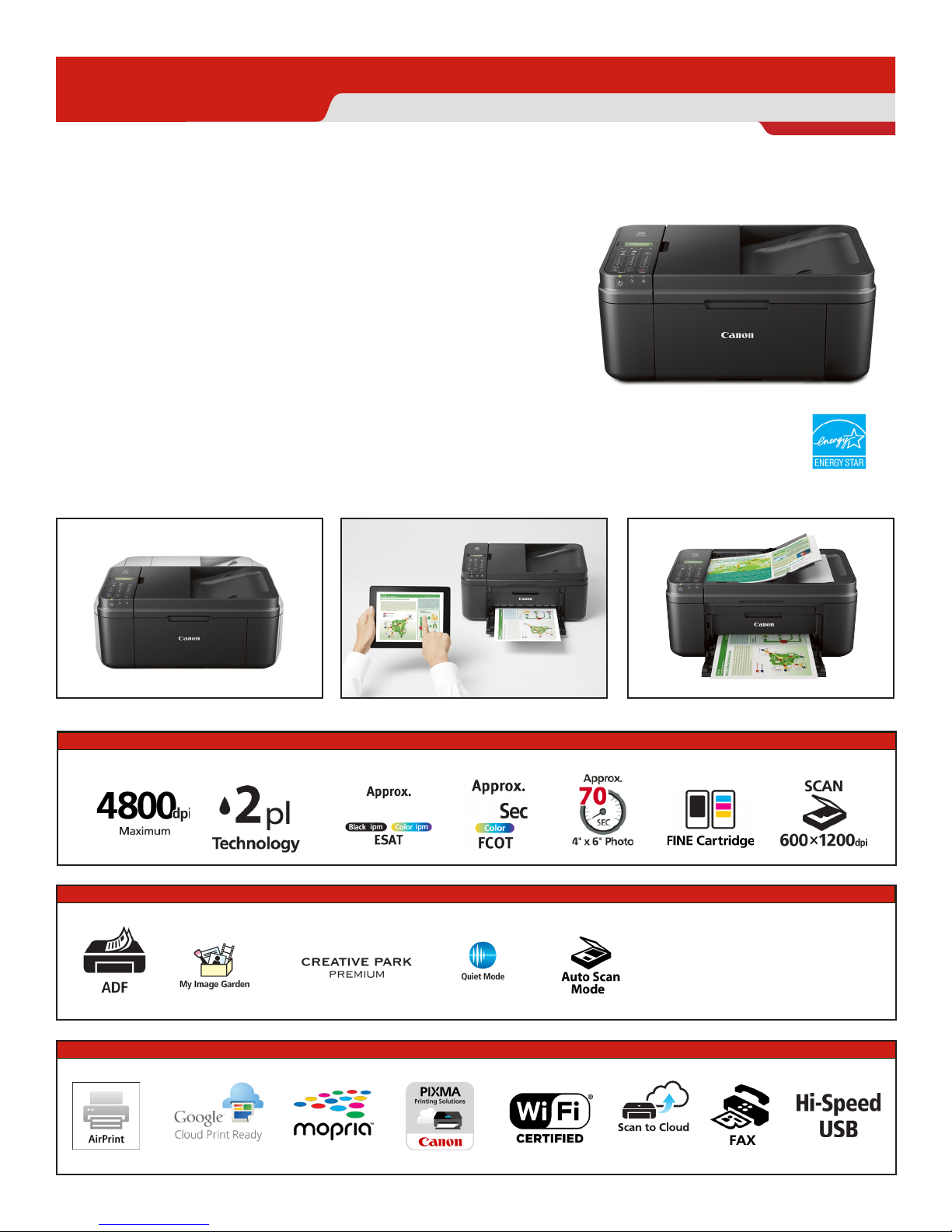
PIXMA MX492
Canon
Small Footprint and Business Quality Printing right from your
Tablet or Smartphone
•
New space saving design is approx. 30% smaller than
previous MX models.
•
Enjoy new levels of printing convenience utilizing features
such as AirPrint
from your tablet or Smartphone.
The fully integrated Auto Document Feeder is elegantly
•
designed to be both functional and practical.
Need help setting up? We are here for you with
•
100% US-based Service & Support.
TM
and Google Cloud PrintTM to easily print
Wireless Office All-In-One Printer
1,2
Setup Sheet
Version 1.0
Print • Copy • Scan • Fax
FEATURES
SPEED & QUALITY
EASE OF USE
CONNECTIVITY
1
3
7
2
8.8 4.4
4
8
10
28
11
4
5 6
9
12
Page 2
Canon
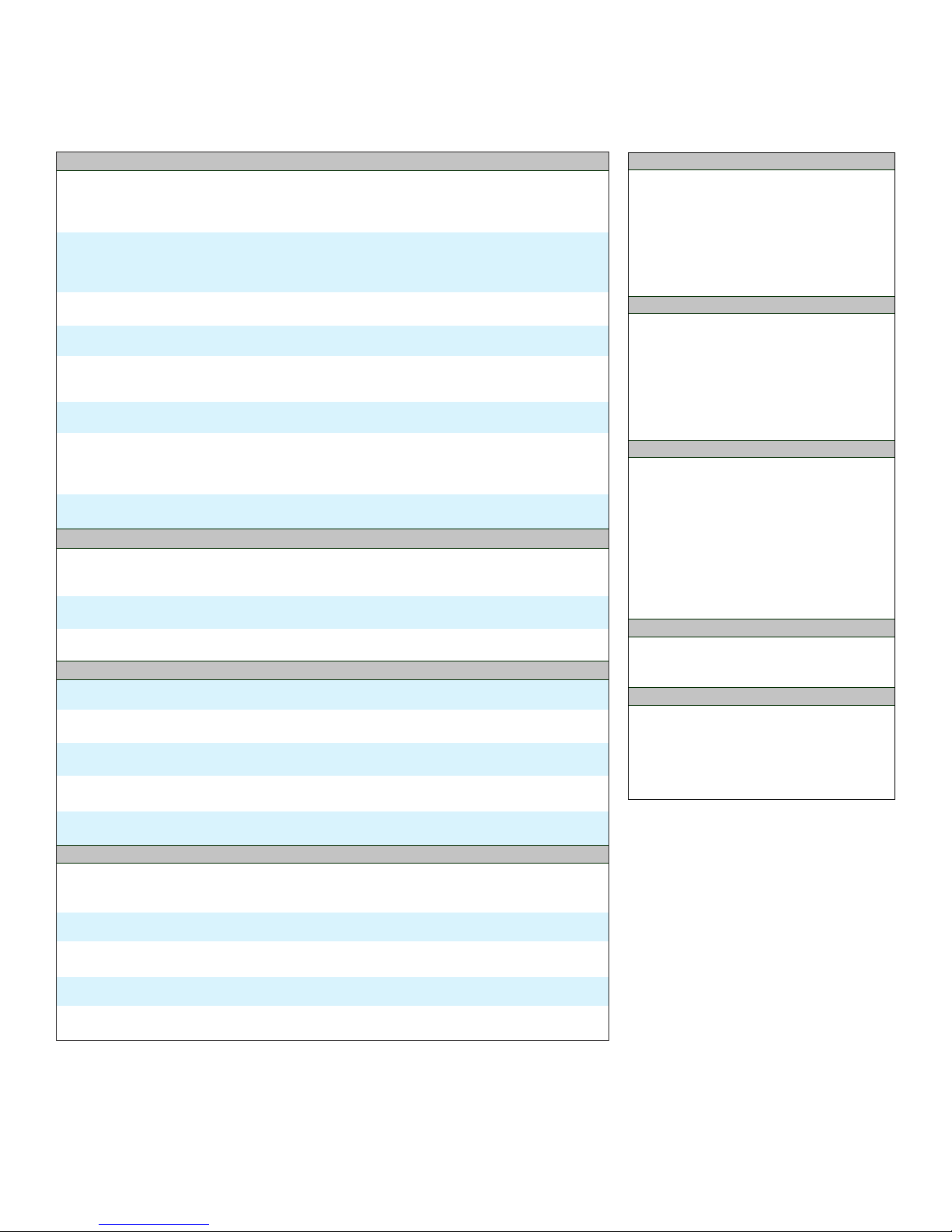
TECHNICAL SPECIFICATIONS
PRINT
Print Features
AirPrint1, Borderless Printing13, Document Printing, Full HD Movie Print14, Special Filters,
Google Cloud Print2, My Image Garden7, Photo Printing, PIXMA Printing Solutions11,
Template Print, Quiet Mode, Wireless Printing
Print Speed
4” x 6” Borderless Photo: Approx. 70 seconds
ESAT (Black): Approx. 8.8 ipm
ESAT (Color): Approx. 4.4 ipm
4,5
Number of Nozzles
Pigment Black: 320 / Color: 960 / Total: 1,280
Picoliter Size (Color)
2 and 5
Print Resolution
Color: Up to 4800 x 1200 dpi
Black: Up to 600 x 600 dpi
3
Paper Sizes
4” x 6”, 5” x 7”, 8” x 10”, Letter, Legal, U.S. #10 Envelopes
Media Compatibility
Plain: Plain Paper, High Resolution Paper; Super High Gloss: Photo Paper Pro Platinum, Glossy:
Photo Paper Plus Glossy II, Photo Paper Glossy; Semi-Gloss: Photo Paper Plus Semi-Gloss,
Photo Paper Pro Luster; Matte: Matte Photo Paper; Envelope: U.S.# 10 Envelope
Paper Tray Capacity (Plain Paper)
Auto Sheet Feeder: 100 Sheets ADF: 20 Sheets
COPY
Copy Features
Auto Document Feeder (ADF), AE (Auto Exposure) Copy, Borderless Copy, Collated Copy, 2-on-1 Copy,
4-on-1 Copy, Fit-to-Page, Preset Copy Ratios, Frame Erase Copy (Flatbed), Zoom
Copy Speed
ESAT: 3.6 ipm (Color)
Reduction/Enlargement
25% – 400%
SCAN
Scan Features
Auto Scan Mode9, Network Scan, PDF Password Security, Push Scan, Send to Cloud
Scanning Element
Contact Image Sensor (CIS)
Scanning Resolution
600 x 1200 dpi (Optical), 19,200 x 19,200 dpi (Interpolated), ADF: 600 x 600 dpi (Optical)
Maximum Color Depth
48-bit internal/24-bit external
Maximum Document Size
Flatbed: 8.5” x 11” ADF: 8.5” x 14”
FAX
FAX Features
Answering Machine Connectivity, Caller Rejection, Check RX Fax Info., Dial Search, Extra Fine Mode,
Fax Reception Reject, Fax Number Re-Entry, Memory Transmission, Redial, Remote Reception
Modem Speed (Up to)
33.6 Kbps (Super G3 color FAX)
Transmission Speed
Black: Approx. 3 sec per page Color: Approx. 1 min per page
Memory Capacity
Approx. 50 Pages
Group Dialing
19 Locations
4
6
14
15
16
12
PIXMA MX492
Wireless Office All-In-One Printer
GENERAL
Standard Interface
Wireless LAN (IEEE 802.11b/g/n)12
Hi-Speed USB
General Features
Full Dot Matrix LCD, Access Point Mode, Auto
Power Off, Dual Color Gamut Processing
Technology, Fully Integrated Auto Document
Feeder (ADF), Quiet Mode, Wireless Printing
OS COMPATIBILITY
Computer Operating Systems:
Windows® 8, Windows 8.1, Windows 8.1 Update,
Windows 7, Windows 7 SP1, Window Vista SP1,
Vista SP2, Windows XP SP3 32-bit
Mac OS X v10.7.5- v10.10
Mobile Operating Systems:
iOS, Android, Windows RT
18
SOFTWARE (WINDOWS/MAC)
Setup Software and User’s Guide CD-ROM
PIXMA MX492 Printer Driver
Easy-WebPrint EX
My Image Garden
Full HD Movie Print14, CREATIVE PARK PREMIUM8,
Special Filters, Image Correction/Enhance, Auto
Document Fix, PDF Password Security, and scanning
are accessed through My Image Garden
Quick Menu
Network Tool
Speed Dial Utility
WARRANTY
1-Year limited warranty with InstantExchange
Program. 1-Year toll-free technical phone
support.
19
7
20
BOX CONTENTS
PIXMA MX492 Wireless Office All-In-One Printer
Power Cord
FINE Cartridges
Setup CD-ROM
Telephone Line Cable
Manuals and other documents
12
18
Page 3
Canon
Wireless Office All-In-One Printer
PIXMA MX492
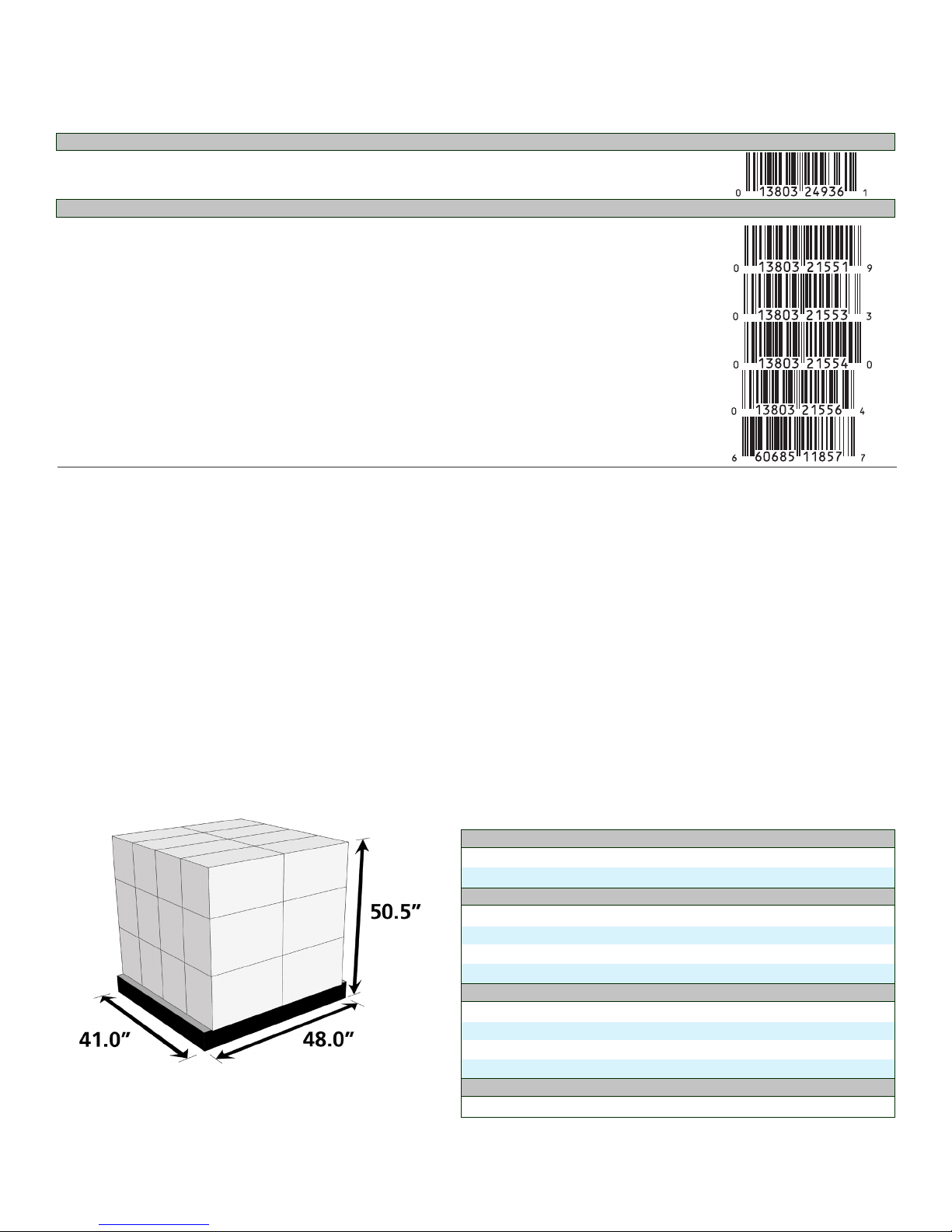
ORDERING INFORMATION
MODEL NUMBER DESCRIPTION ITEM NUMBER UPC CODE
PIXMA MX492 Wireless Office All-In-One Printer 0013C002AA
COMPATIBLE INK
PG-245XL XL Black Ink Cartridge 8278B001AA
PG-245 Black Ink Cartridge 8279B001AA
CL-246XL XL Color Ink Cartridge 8280B001AA
CL-246 Color Ink Cartridge 8281B001AA
PG-245XL/CL-246XL Combo XL Cartridge/Paper 8728B005AB
Pack with GP-601 Paper Combo Pack
FOR REFERENCE ONLY
PALLET INFORMATION
ORIGIN
Country of Origin Vietnam
Tariff Number 8443310000
PRODUCT INFORMATION
Individual Printer Dimensions 17.2” (W) x 11.7” (D) x 7.5” (H)
Individual Box Dimensions 21.9” (W) x 10.3” (D) x 15.0” (H)
Weight of Individual Printer 13.0 lbs.
Weight of Individual Box 17.2 lbs.
PALLET INFORMATION
Number of Boxes per Pallet 24
Dimensions (Pallet and Boxes) 41.0” (W) x 48.0” (D) x 50.5” (H)
Dimensions without Pallet 41.0” (W) x 43.8” (D) x 45.0” (H)
Loaded Pallet Weight 462.8” lbs.
DATE
Availability February 2015
Page 4
Sp ecif icat ionS ar e Su bje ct t o ch ang e wi tho ut n otic e. all vi ewSc reen an d pr int er o utp ut i mag eS a re S imu late d.
1
AirPrint functionality requires an iPad, iPhone 3GS or later, or iPod touch 3rd generation or later device running iOS 4.2 or later, and an AirPrint-enabled printer connected to the same network as your iOS
device. A printer connected to the USB port of your Mac, PC, AirPort Base Station, or Time Capsule is not supported.
2
Requires an Internet connection and Google account. Subject to Google Terms of Service. Certain exceptions may apply.
3
Resolution may vary based on printer driver setting. Color ink droplets can be placed with a horizontal pitch of 1/4800 inch at minimum.
4
ISO/IEC 24734, 24735 define the default print and copy speed measurement methods. Print speeds are the averages of ESAT in Office Category Test for the default simplex mode, ISO/IEC 24734, excluding time
to print the first set. Copy speed is the average of FCOT, ISO/IEC 24735 Annex D. ADF copy speed is the average of ESAT in General Performance Test for the default simplex mode, ISO/IEC 24735, excluding time
to copy the first set. See www.usa.canon.com/ipm for additional details.
Photo print speeds are based on the standard mode driver setting using photo test pattern(s) and select Canon Photo Paper. Print speed is measured as soon as first page begins to feed into printer and will
5
vary depending on system configuration, interface, software, document complexity, print mode, types of paper used, and page coverage. See www.usa.canon.com/printspeed for additional information.
6
Optical resolution is a measure of maximum hardware sampling resolution, based on ISO 14473 standard.
7
To install using Windows® OS, .NET Framework 4 is required. Compatible still image formats are PDF (created using Canon PDF Creator only), JPEG (Exif), TIFF, and PNG. Compatible video formats are MOV (from
select Canon digital cameras only) and MP4 (from select Canon digital camcorders only).
CREATIVE PARK PREMIUM is a premium content service available exclusively to users only when all of the colors of genuine Canon inks and all of the software that came with the printer are properly installed.
8
For network users, Auto Scan Mode is only available when scanning at a computer using MP Navigator EX software and selecting the 1-click feature then “Save to PC.”
9
Mopria functionality requires a Mopria-certified mobile devices with Android 4.4 operating system or later with the Mopria Print Service pre-loaded and a Mopria-enabled printer connected to the same network
10
as your Mopria-certified device. The Mopria experience is also available on Android 4.4 mobile devices with a download of the Mopria Print Service from Google Play.
Wireless printing requires a working Ethernet network with wireless 802.11b/g or n capability. Wireless performance may vary based on terrain and distance between the printer and wireless network clients.
11
Requires an Internet connection and the PIXMA Printing Solutions (“PPS”) app, available for free on the App Store and at Google Play. Compatible with iPad, iPhone 3GS or later, and iPod touch 3rd generation
12
or later devices running iOS 5.1 or later, and Android mobile devices running Android 2.3 or later. Your device must be connected to the same working network with wireless 802.11 b/g/n capability as your
printer. For users of compatible Apple mobile devices, document printing requires Apple AirPrint, which requires an AirPrint-enabled printer connected to the same network as your iOS device. A printer connected to the USB port of your Mac, PC, AirPort Base station, or Time Capsule is not supported.
Envelopes and High Resolution Paper are NOT supported for borderless printing.
13
14
“Full HD Movie Print” is available from “MOV” and “MP4” movie files created by select Canon EOS Digital SLRs, PowerShot, and VIXIA digital cameras and camcorders. Requires PC or Mac with Intel® processor
and Canon ZoomBrowser EX 6.5 or later or Canon ImageBrowser 6.5 or later for “MOV” files, or Canon ImageBrowser EX 1.0 or later for “MOV” or “MP4” files. Print quality is determined by the video resolution.
Function does not upscale video resolution.
15
The Public Switched Telephone Network currently supports fax modem speeds of 28.8 Kbps or lower, depending on telephone line conditions. Sending and receiving fax machines need to conform to ITU-T v.34
guidelines.
16
Black & white document fax transmission speed is based on default setting using ITU-T No.1 chart. Color document fax transmission speed is based on default setting using Canon Color Fax Test Sheet. Actual
transmission speed may vary depending on document complexity, fax setting at receiving end, and line conditions etc.
17
Page count is based on ITU-T No.1 chart or Canon FAX Standard Chart No.1.
18
System requirements vary by application. For Mac OS, an Internet connection is required during software installation. For Windows OS, .NET Framework 4 is required to install My Image Garden, Quick Menu,
and Easy-WebPrint EX software.
19
Easy-WebPrint EX requires Internet Explorer 7 or 8 for Windows, Internet Explorer 9 or 10 for Windows Vista SP2 (or later) or Windows 7, or Safari 4.0 – 5.0 for Mac OS X v10.5.8 – 10.6.x.
20
Warranty programs are subject to certain conditions and restrictions. See www.usa.canon.com/support for details.
©2015 Canon U.S.A., Inc. Canon and PIXMA are registered trademarks of Canon Inc. in the U.S. and may be registered trademarks or trademarks in other countries. Microsoft,
Windows, the Windows logo and Internet Explorer are trademarks or registered trademarks of the Microsoft group of companies in the U.S. and other countries. AirPort, Apple, iPad,
iPhone, iPod touch and Time Capsule are registered trademarks of Apple Inc. AirPrint is a trademark of Apple Inc. App Store is a service mark of Apple Inc. iOS is a trademark or
registered trademark of Cisco in the U.S. and other countries and is used under license. Android and Google Play are trademarks of Google Inc. Mopria is a trademark of the Mopria
Alliance. The USB-IF logo is a trademark of Universal Serial Bus Implementers Forum, Inc. Wi-Fi is a registered trademark of the Wi-Fi Alliance. The ‘Wi-Fi CERTIFIED’ logo is a certification
mark of the Wi-Fi Alliance. The Wi-Fi Protected Setup Mark is a mark of the Wi-Fi Alliance. All other product and brand names are trademarks of their respective owners. As an ENERGY
STAR® partner, Canon U.S.A., Inc. has determined that this product meets the ENERGY STAR® guidelines for energy efficiency.
 Loading...