

Page 1
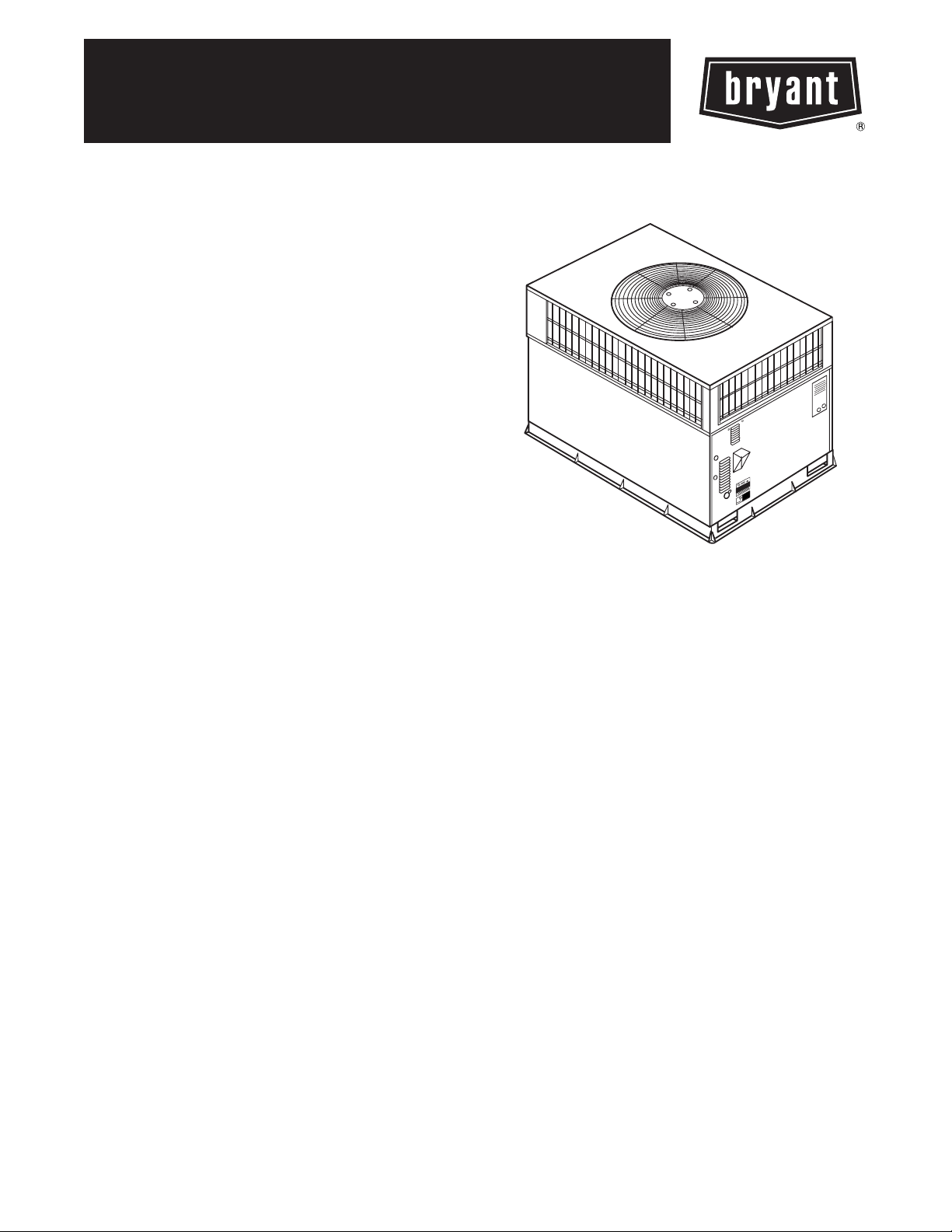
574D
SINGLE ---PACKAGED AIR CONDITIONER GAS FURNACE
SYSTEM WITH PURONR (R---410A) REFRIGERANT SINGLE AND
THREE PHASE
1--- 1/2 ---5 NOMINAL TONS (SIZES 018--- 060)
Installation Instructions
NOTE: Read the entire instruction manual before starting the
installation.
NOTE: Installer: Make sure the Owner’s Manual and Service
Instructions are left with the unit after installation.
TABLE OF CONTENTS
PAGE
SAFETY CONSIDERATIONS 1.........................
INTRODUCTION 2...................................
RECEIVING AND INSTALLATION 2--12.................
Check Equipment 2..................................
Identify Unit 2....................................
Inspect Shipment 2.................................
Provide Unit Support 2...............................
Roof Curb 2......................................
Slab Mount 2.....................................
Ground Mount 2..................................
Field Fabricate Ductwork 2............................
Provide Clearances 6.................................
Rig and Place Unit 6.................................
Inspection 6......................................
Use of Rigging Bracket 6............................
Connect Condensate Drain 8...........................
Install Flue Hood 8...................................
Install Gas Piping 9..................................
Install Duct Connections 9--10..........................
Configuring Units for Downflow (Vertical)
Discharge 9--10...................................
Install Electrical Connections 11........................
High--Voltage Connections 11........................
Special Procedures for 208--V Operation 11..............
Control Voltage Connections 11.......................
Heat Anticipator Setting 12..........................
Transformer Protection 12...........................
P R E -- S T A R T -- U P 1 2 -- 1 3................................
START--UP 13--19.....................................
Check for Refrigerant Leaks 13.........................
Start--Up Heating & Make Adjustments 13................
Check Heating Control 13...........................
Check Gas Input 13................................
Adjust Gas Input 14................................
Check Burner Flame 14.............................
Airflow and Temperature Rise 14......................
Heating Sequence of Operation 18.....................
Limit Switches 18.................................
Rollout Switch 18.................................
Start--Up Cooling & Make Adjustments 18................
Checking Cooling Control Operation 18................
Checking & Adjusting Refrigerant Charge 18............
Indoor Airflow and Airflow Adjustments 19.............
Cooling Sequence of Operation 19.....................
MAINTENANCE 23--2 6................................
Air Filter 23......................................
Indoor Blower and Motor 23.........................
Flue Gas Passageways 24............................
Induced Draft (Combustion Air) Blower 24..............
Limit Switch 24...................................
Burner Ignition 24.................................
Main Bu rners 24...................................
Outdoor Coil, Indoor Coil, & Condensate Drain Pan 24....
Outdoor Fan 25...................................
Electrical Controls and Wiring 25.....................
Refrigerant Circuit 26...............................
Gas Input 26......................................
Evaporator Airflow 26..............................
Puron Items 26....................................
TROUBLESHOOTING 27..............................
START--UP CHECKLIST 27............................
SAFETY CONSIDERATIONS
Installation and servicing of this equipment can be hazardous due
to mechanical and electrical components. Only trained and
qualified personnel should install, repair, or service this equipment.
Untrained personnel can perform basic maintenance functions such
as cleaning and replacing air filters. All other operations must be
performed by trained service personnel. When working on this
equipment, observe precautions in the literature, on tags, and on
labels attached to or shipped with the unit and other safety
precautions that may apply.
Follow all safety codes. Installation must be in compliance with
local and national building codes. Wear safety glasses, protective
clothing, and work gloves. Have fire extinguisher available. Read
these instructions thoroughly and follow all warnings or cautions
included in literature and attached to the unit.
Fig. 1 -- Unit 574D
(Low NOx Model Available)
A99338
1
Page 2
Recognize safety information. This is the safety--alert symbol
When you see this symbol on the unit and in instructions or manuals, be alert to the potential for personal injury. Understand these
signal words: DANGER, WARNING, and CAUTION. These
words are used with the safety--alert symbol. DANGER identifies
the most serious hazards which will result in severe personal injury
or death. WARNING signifies hazards which could result in personal injury or death. CAUTION is used to identify unsafe practices which may result in minor personal injury or product and property damage. NOTE is used to highlight suggestions which will
result in enhanced installation, reliability, or operation.
!
WARNING
ELECTRICAL SHOCK HAZARD
Failure to follow this warning could result in personal
injury or death.
Before installing or servicing system, always turn off main
574D
power to system. There may be more than one disconnect
switch. Turn off accessory heater power switch if
applicable.
!
WARNING
FIRE, EXPLOSION, ELECTRICAL SHOCK AND
CARBON MONOXIDE POISONING HAZARD
Failure to follow this warning could result in personal
injury or unit damage.
A qualified installer or agency must use only
factory--authorized kits or accessories when modifying this
product.
have it examined by transportation inspectors before removal.
.
Forward claim papers directly to transportation company.
Manufacturer is not responsible for any damage incurred in transit.
Check all items against shipping list. Immediately notify the
nearest equipment distribution office if any item is missing. To
prevent loss or damage, leave all parts in original packages until
installation.
Step 2 — Provide Unit Support
For hurricane tie downs, contact distributor for details and PE
(Professional Engineering) Certificate if required.
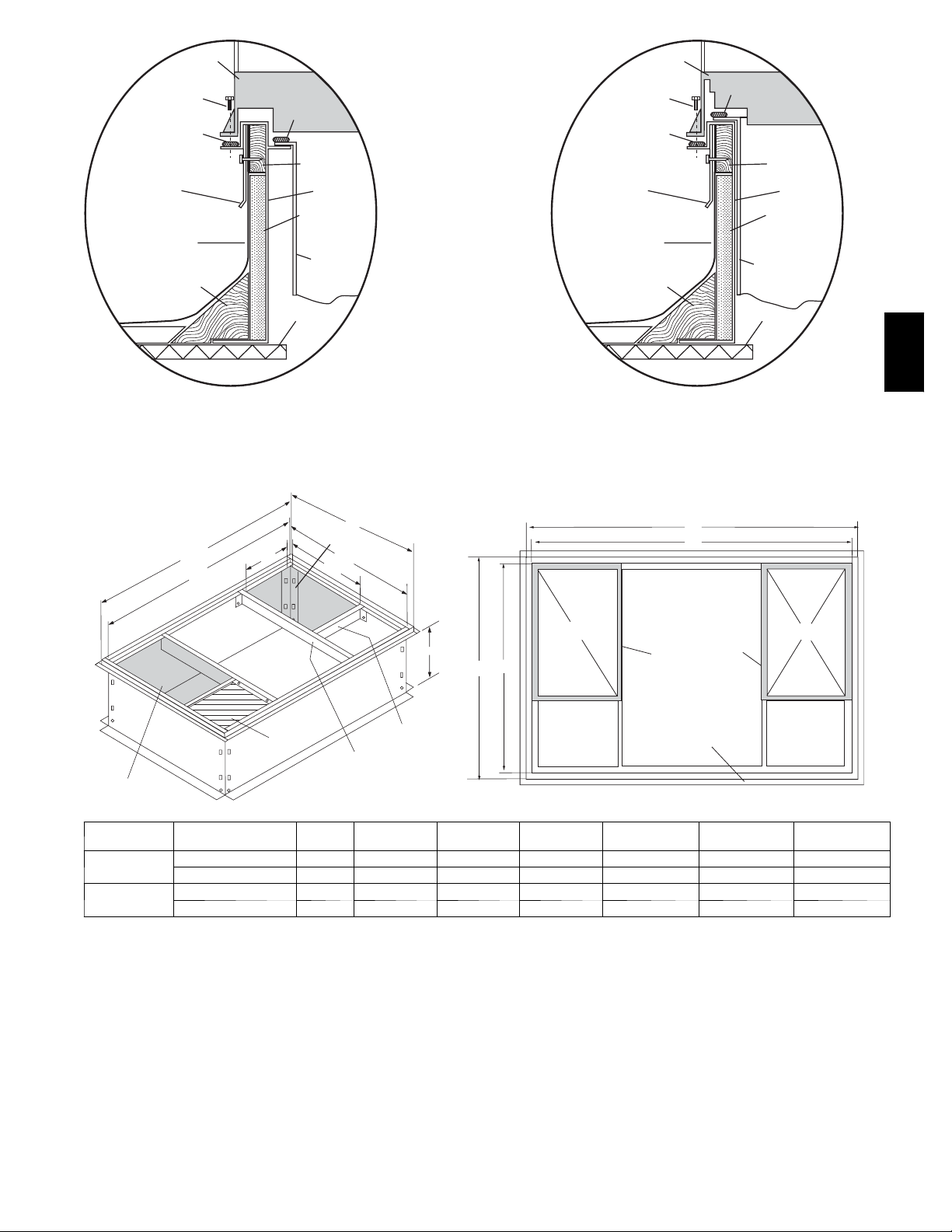
ROOF CURB
Install accessory roof curb in accordance with instructions shipped
with curb (See Fig. 5). Install insulation, cant strips, roofing, and
flashing. Ductwork must be attached to curb.
IMPORTANT: The gasketing of the unit to the roof curb is
critical for a water tight seal. Install gasketing material supplied
with the roof curb. Improperly applied gasketing also can result in
air leaks and poor unit performance.
Curb should be level to within 1/4 in. This is necessary for unit
drain to function properly. Refer to accessory roof curb installation
instructions for additional information as required.
SLAB MOUNT
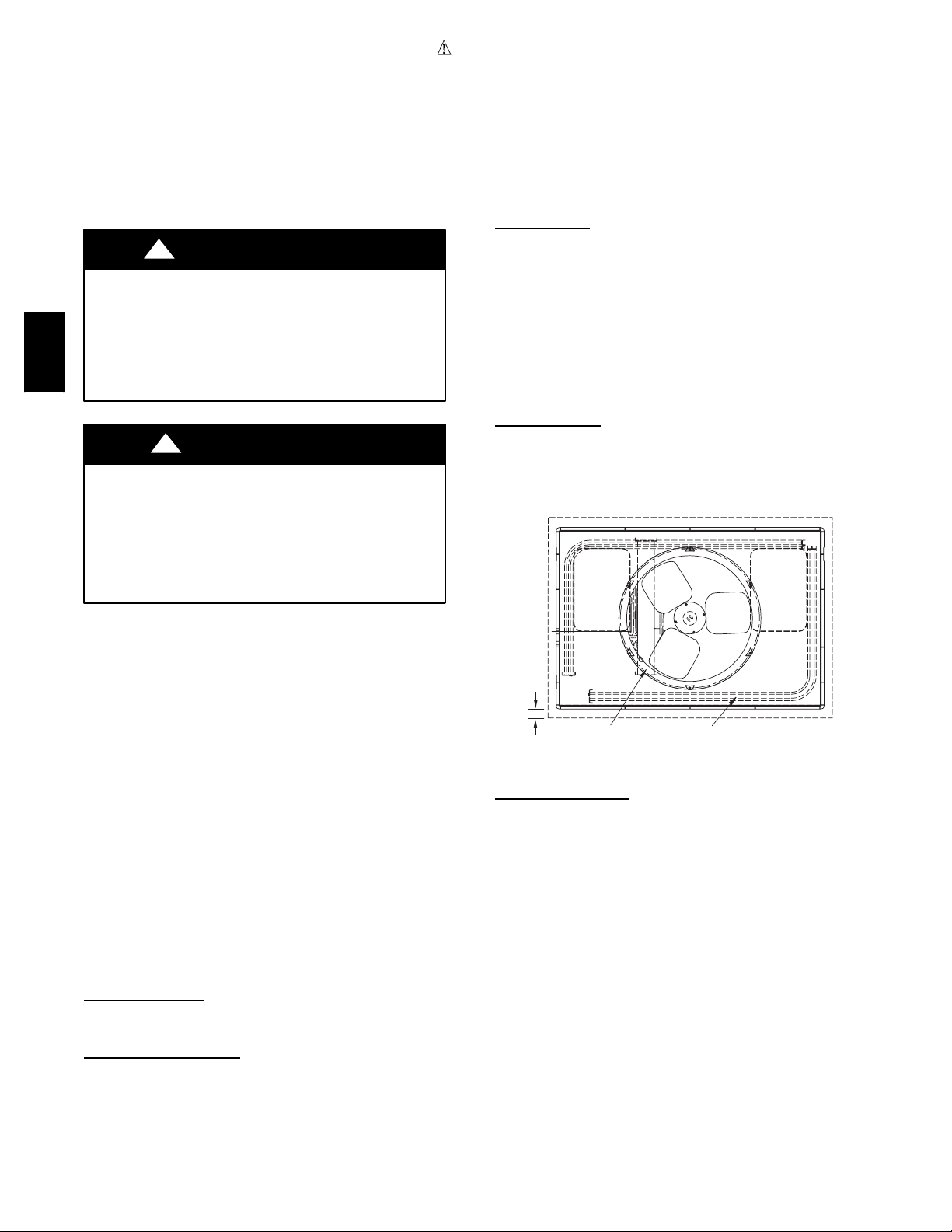
Place the unit on a solid, level concrete pad that is a minimum of 4
in. (101.6 mm) thick with 2 in. (50.8 mm) above grade (See Fig.
2). The slab should extend approximately 2 in. beyond the casing
on all 4 sides of the unit. Do not secure the unit to the slab except
when required by local codes.
OPTIONAL
RETURN
AIR
OPENING
OPTIONAL
SUPPLY
AIR
OPENING
INTRODUCTION
The 574D unit (see Fig. 1) is a fully self--contained, combination
Category I gas heating/electric cooling unit designed for outdoor
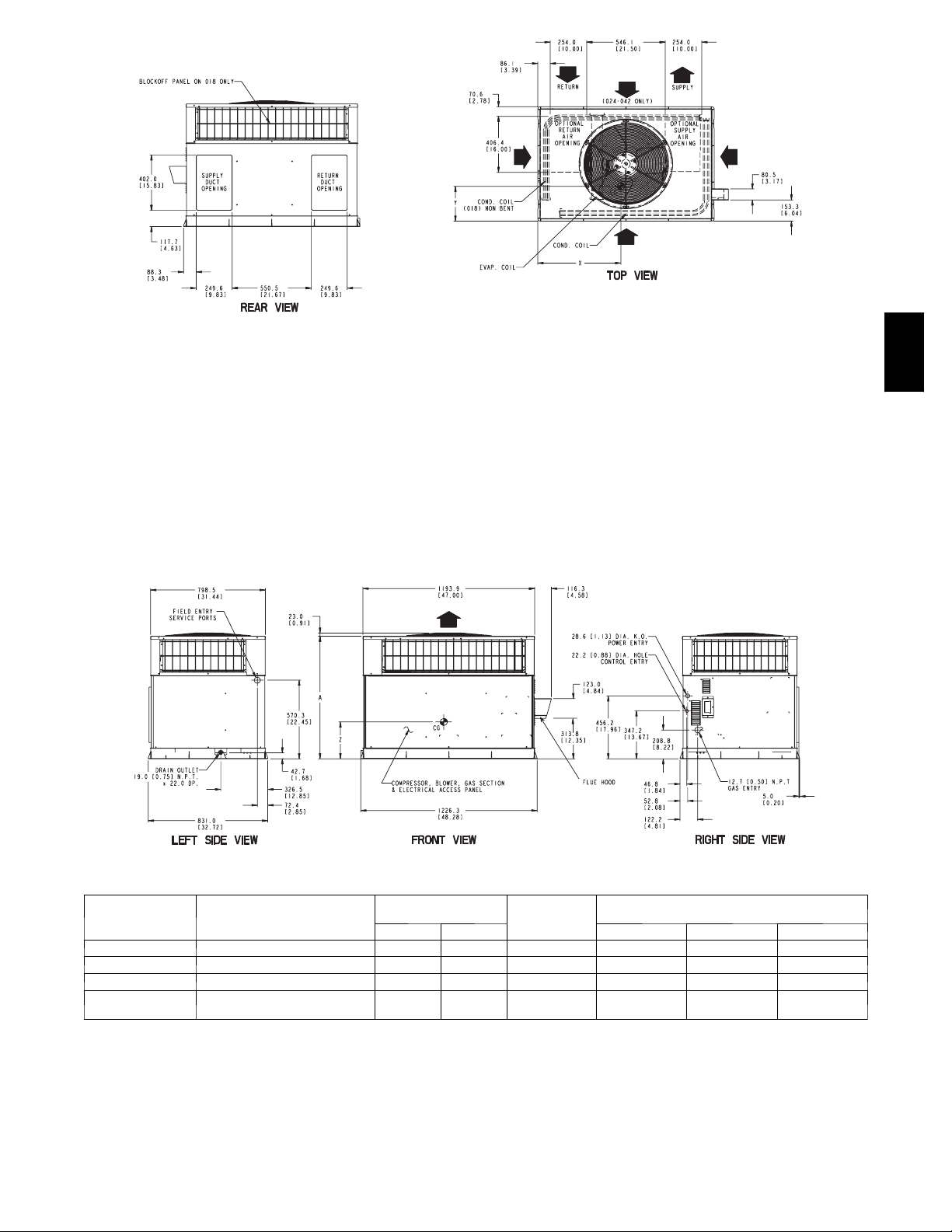
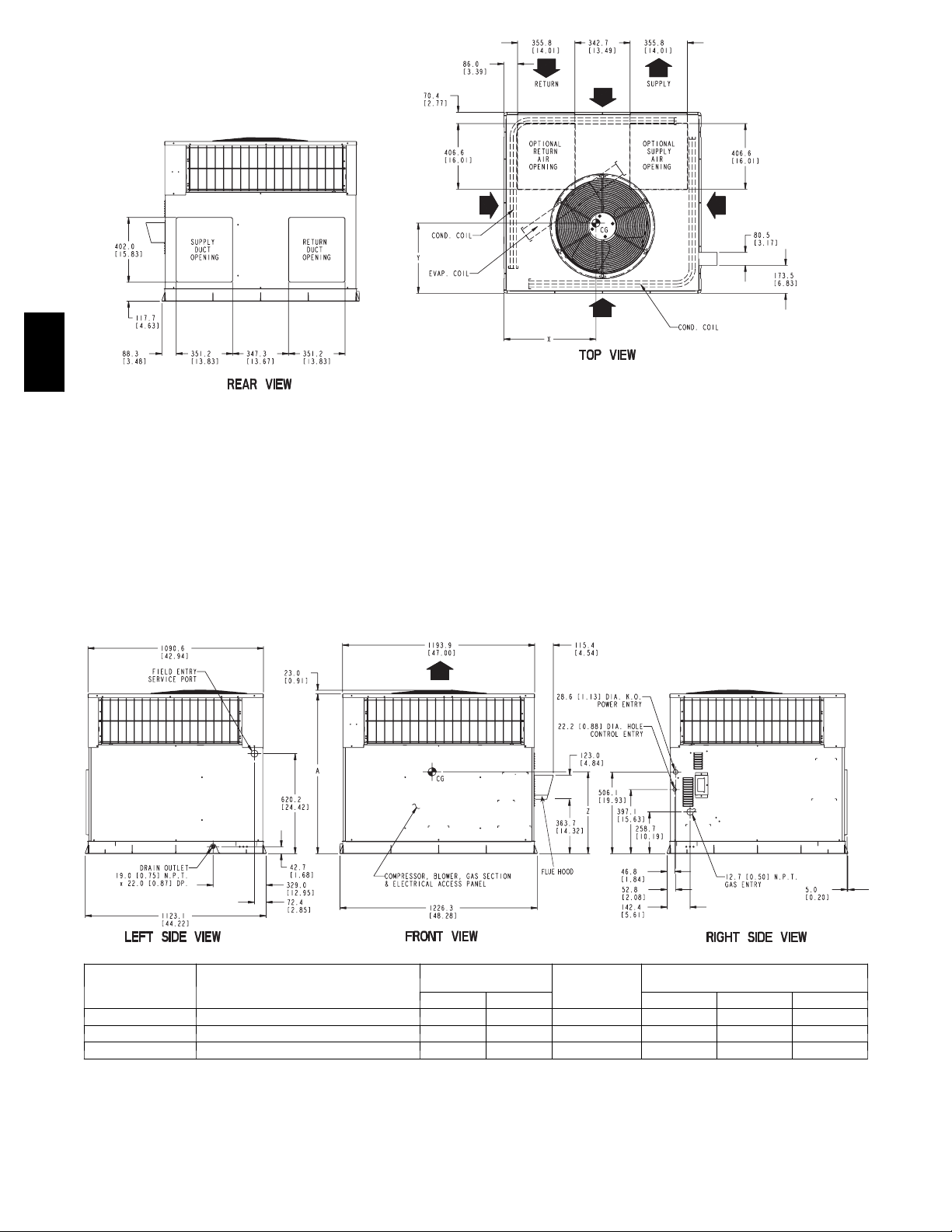
installation (See Fig. 3 and 4 for unit dimensions). All unit sizes
have return and discharge openings for both horizontal and
downflow configurations, and are factory shipped with all
downflow duct openings covered. Units may be installed either on
a rooftop, a cement slab, or directly on the ground, if local codes
permit (See Fig. 5 for roof curb dimensions).
Models with an N in the fifth position of the model number are
dedicated Low NOx units designed for California installations.
These models meet the California maximum oxides of nitrogen
(NOx) emissions requirements of 40 nanograms/joule or less as
shipped from the factory and must be installed in California Air
Quality Management Districts or any other regions in North
America where a Low NOx rule exists.
NOTE: Low NOx requirements apply only to natural gas
installations.
RECEIVING AND INSTALLATION
Step 1 — Check Equipment
IDENTIFY UNIT
The unit model number and serial number are stamped on the unit
information plate. Check this information against shipping papers.
INSPECT SHIPMENT
Inspect for shipping damage while unit is still on shipping pallet. If
unit appears to be damaged or is torn loose from its anchorage,
2"
EVAP. COIL COND. COIL
C99096
Fig. 2 -- Slab Mounting Details
GROUND MOUNT
The unit may be installed either on a slab or placed directly on the
ground, if local codes permit. Place the unit on level ground
prepared with gravel for condensate discharge.
Step 3 — Field Fabricate Ductwork
Secure all ducts to roof curb and building structure on vertical
discharge units. Do not connect ductwork to unit. For horizontal
applications, unit is provided with flanges on the horizontal
openings. All ductwork should be secured to the flanges. Insulate
and weatherproof all external ductwork, joints, and roof openings
with counter flashing and mastic in accordance with applicable
codes.
Ducts passing through an unconditioned space must be insulated
and covered with a vapor barrier.
If a plenum return is used on a vertical unit, the return should be
ducted through the roof deck to comply with applicable fire codes.
A minimum clearance is not required around ductwork. Cabinet
return--air static shall not exceed -- .25 in. wc.
2
Page 3
*
REQUIRED CLEARANCE TO COMBUSTIBLE MATL
(
R
efe
r t
o
M
aximu
m
O
perating
C
learance
TOP OF UNIT...................................................................................14.00 [355.6]
DUCT SIDE OF UNIT.........................................................................2.00 [50.8]
SIDE OPPOSITE DUCTS ................................................................14.00 [355.6]
BOTTOM OF UNIT.............................................................................0.50 [12.7]
NEC. REQUIRED CLEARANCES.
BETWEEN UNITS, POWER ENTRY SIDE....................................42.00 [1066.8]
UNIT AND UNGROUNDED SURFACES, POWER ENTRY SIDE .36.00 [914.0]
UNIT AND BLOCK OR CONCRETE WALLS AND OTHER
GROUNDED SURFACES, POWER ENTRY SIDE.........................42.00 [1066.8]
LEGEND
CG - Center of Gravity
COND - Condensor
EVAP - Evaporator
NEC - National Electrical Code
REQ’D - Required
NOTE: Dimensions are in in. [mm]
.
s
)
INCHES [mm]
INCHES [mm]
REQUIRED CLEARANCE FOR OPERATION AND SERVICING
EVAP. COIL ACCESS SIDE............................................................36.00 [914.0]
POWER ENTRY SIDE....................................................................42.00 [1066.8]
(EXCEPT FOR NEC REQUIREMENTS)
UNIT TOP.......................................................................................48.00 [1219.2]
SIDE OPPOSITE DUCTS ..............................................................36.00 [914.0]
DUCT PANEL .................................................................................12.00 [304.8]
*MINIMUM DISTANCES: IF UNIT IS PLACED LESS THAN 12.00 [304.8] FROM
WALL SYSTEM, THEN SYSTEM PERFORMANCE MAYBE COMPROMISE.
INCHES [mm]
574D
A05166
UNIT
ELECTRICAL
CHARACTERISTICS
UNIT WEIGHT
lb kg X Y Z
UNIT HEIGHT
IN. [MM]
“A”
CENTER OF GRAVITY
IN. [MM]
574D018 208/230--1 --60 282 127.9 37.02 [940] 23.3 [591.8] 15.5 [393.7] 15.5 [393.7]
574D024 208/230--1 --60 296 134.2 37.02 [940] 23.6 [599.4] 15.8 [401.3] 15.7 [398.8]
574D030 208/230--1 --60, 208/230--3--60 313 142.0 39.02 [991] 23.3 [591.8] 15.7 [398.8] 15.8 [401.3]
574D036
208/230--1 --60, 208/230--3--60,
460--3--60
338 153.3 41.02 [1042] 23.0 [584.2] 15.8 [401.3] 16.6 [421.6]
Fig. 3 -- 574D018--036 Unit Dimensions
3
Page 4
574D
REQUIRED CLEARANCE TO COMBUSTIBLE MATL
TOP OF UNIT...................................................................................14.00 [355.6]
DUCT SIDE OF UNIT.........................................................................2.00 [50.8]
SIDE OPPOSITE DUCTS ................................................................14.00 [355.6]
BOTTOM OF UNIT.............................................................................0.50 [12.7]
ELECTRIC HEAT PANEL.................................................................36.00 [914.4]
NEC. REQUIRED CLEARANCES.
BETWEEN UNITS, POWER ENTRY SIDE ....................................42.00 [1066.8]
UNIT AND UNGROUNDED SURFACES, POWER ENTRY SIDE .36.00 [914.0]
UNIT AND BLOCK OR CONCRETE WALLS AND OTHER
GROUNDED SURFACES, POWER ENTRY SIDE.........................42.00 [1066.8]
.
INCHES [mm]
INCHES [mm]
REQUIRED CLEARANCE FOR OPERATION AND SERVICING
EVAP. COIL ACCESS SIDE............................................................36.00 [914.0]
POWER ENTRY SIDE....................................................................42.00 [1066.8]
(EXCEPT FOR NEC REQUIREMENTS)
UNIT TOP.......................................................................................48.00 [1219.2]
SIDE OPPOSITE DUCTS ..............................................................36.00 [914.0]
DUCT PANEL .................................................................................12.00 [304.8] *
*MINIMUM DISTANCES: IF UNIT IS PLACED LESS THAN 12.00 [304.8] FROM
WALL SYSTEM, THEN SYSTEM PERFORMANCE MAYBE COMPROMISE.
LEGEND
CG - Center of Gravity
COND - Condensor
EVAP - Evaporator
NEC - National Electrical Code
REQ’D - Required
INCHES [mm]
NOTE: Dimensions are in in. [mm]
A05142
UNIT
ELECTRICAL
CHARACTERISTICS
UNIT WEIGHT
lb kg X Y Z
UNIT HEIGHT
IN. [MM]
“A”
CENTER OF GRAVITY
IN. [MM]
574D042 208/230--1 --60, 208/230--3--60, 460--3--60 401 181.9 42.98 [1092] 25.5 [647.7] 20.5 [520.7] 17.1 [434.3]
574D048 208/230--1 --60, 208/230--3--60, 460--3--60 418 189.6 42.98 [1092] 25.2 [640.1] 20.7 [525.8] 17.4 [442.0]
574D060 208/230--1 --60, 208/230--3--60, 460--3--60 446 202.3 46.98 [1193] 25.5 [647.7] 21.0 [533.4] 17.6 [447.0]
Fig. 4 -- 574D042--060 Unit Dimensions
4
Page 5
HVAC unit
Scre w
(NO TE A)
*Gask eting
outer flange
Flashing field
supplied
Roofing material
field supplied
Cant str ip
field supplied
base
Gask eting
inner flange*
Wood nailer*
Roof curb*
Insulation (field
supplied)
Ductwork
field supplied
HVAC unit
Scre w
(NOTE A)
*Gask eting
outer flange
Flashing field
supplied
Roofing material
field supplied
Cant str ip
field supplied
base
Gask eting
inner flange*
Ductwork
field supplied
Wood nailer*
Roof curb*
Insulation (field
supplied)
*Provided with roof curb
Roof Curb for Small Cabinet
Note A: When unit mounting scre w is used,
Return opening
UNIT SIZE
574D018--036
574D042--060
retainer bra cke t must also be used.
G
F
(B X C)
ODS CATALOG
NUMBER
CPRFCURB006A00 8 (203) 11 (279) 16--1/2 (419) 28--3/4 (730) 30 --3/8 (771) 44--5/16 (1126) 45 --15/16 (1167)
CPRFCURB007A00 14 (356) 11 (279) 16--1/2 (419) 28--3/4 (730) 30 --3/8 (771) 44 --5/16 (1126) 45 --15/16 (1167)
CPRFCURB008A00 8 (203) 16--3/16 (411) 17--3/8 (441) 40--1/4 (1022) 41--15/16 (1065) 44--7/16 (1129) 46 --1/16 (1169)
CPRFCURB009A00 14 (356) 16 --3/16 (411) 17--3/8 (441) 40--1/4 (1022) 41--15/16 (1065) 44--7/16 (1129) 46--1/16 (1169)
B Typ.
Insulated
deck pan
Roof
E
Supply opening
(B x C)
D
C Typ.
Short
Support
Long
Support
A
IN. (MM)BIN. (MM)
A
E
C
IN. (MM)
*Provided with roof curb
Roof Curb for Large Cabinet
Note A: When unit mounting scre w is used,
retainer bra cket must also be used.
G
F
R/A
D
Insulated
deck pan
D
IN. (MM)
Gask et around
duct
Gask et around
outer edge
E
IN. (MM)
F
IN. (MM)
Roof
S/A
NOTES:
1. Roof curb must be set up for unit being installed.
2. Seal strip must be applied, as required, to unit being installed.
3. Roof curb is made of 16-- gauge steel.
4. Attach ductwork to curb (flanges of duct rest on curb).
5. Insulated panels: 1-- in. thick fiberglass 1 lb. density.
6. When unit mounting screw is used (see Note A), a retainer bracket m ust be used as well. This bracket must also be used when required b y code for hurricaneorseismic
conditions. This bracket is available through Micrometl.
Fig. 5 -- Roof Curb Dimensions
A05308
G
IN. (MM)
574D
Step 4 — Provide Clearances
The required minimum operating and service clearances are shown
in Fig. 3 and 4. Adequate combustion, ventilation and condenser
air must be provided in accordance with section 5.3, Air for
Combustion and Ve ntilation, of the National Fuel Gas Code ANSI
(American National Standards Institute) Z223.1 or applicable
provisions of local building code. In Canada, follow sections 7.2,
7.3, or 7.4 or Can/CGA (Canadian Gas Association) B149
Installation Codes or applicable provisions of local building code.
5
Page 6
IMPORTANT: Do not restrict outdoor airflow. An air restriction
at either the outdoor-- air inlet or the fan discharge may be
detrimental to compressor life.
The condenser fan pulls air through the condenser coil and
discharges it through the top grille. Be sure that the fan discharge
does not recirculate to the condenser coil. Do not locate the unit in
either a corner or under an overhead obstruction. The minimum
clearance under a partial overhang (such as a normal house
overhang) is 48-- in. (1219.19 mm) above the unit top. The
maximum horizontal extension of a partial overhang must not
exceed 48--in. (1219.19 mm).
Do not place the unit where water, ice, or snow from an overhang
or roof will damage or flood the unit. Do not install the unit on
carpeting or other combustible materials. Slab--mounted units
should be at least 4 in. above the highest expected water and runoff
levels. Do not use unit if it has been under water.
Step 5 — Rig and Place Unit
Rigging and handling of this equipment can be hazardous for
many reasons due to the installation location (roofs, elevated
574D
structures, etc.).
Only trained, qualified crane operators and ground support staff
should handle and install this equipment.
When working with this equipment, observe precautions in the
literature, on tags, stickers, and labels attached to the equipment,
and any other safety precautions that might apply.
Training for operators of the lifting equipment should include, but
not be limited to, the following:
1. Application of the lifter to the load, and adjustment of the
lifts to adapt to various sizes or kinds of loads.
2. Instruction in any special operation or precaution.
3. Condition of the load as it relates to operation of the lifting
kit, such as balance, temperature, etc.
Follow all applicable safety codes. Wear safety shoes and work
gloves.
INSPECTION
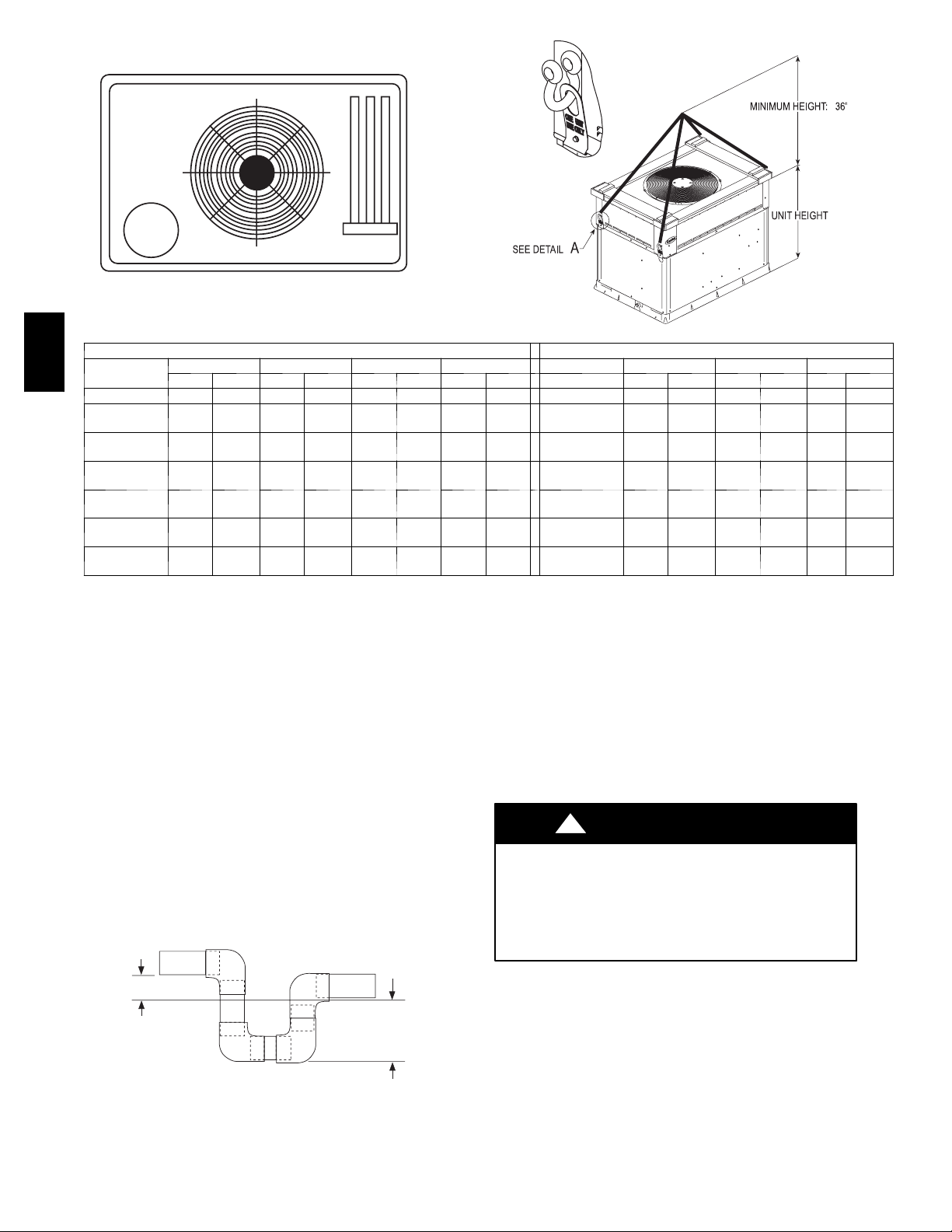
The lifting/rigging bracket is engineered and designed to be
installed only on Small Packaged Products. This bracket is to be
used to rig/lift a Small Packaged Product onto roofs or other
elevated structures.
Prior to initial use, and at monthly intervals, all rigging brackets
and straps should be visually inspected for any damage, evidence
of wear, structural deformation, or cracks. Particular attention
should be paid to excessive wear at hoist hooking points and load
support areas. Brackets or straps showing any kind of wear in these
areas must not be used and should be discarded.
!
WARNING
UNIT FALLING HAZARD
Failure to follow this warning could result in personal
injury or death.
Never stand beneath rigged units or lift over people.
!
WARNING
PROPERTY DAMAGE HAZARD
Failure to follow this warning could result in personal
injury/death or property damage.
Rigging brackets for one unit use only. When removing a
unit at the end of its useful life, use a new set of brackets.
USE OF RIGGING BRACKET
Field Installation of Rigging Bracket (if not alr
eady
installed)
1. Remove unit from shipping carton. Leave top shipping skid
on the unit for use as a spreader bar to prevent the rigging
straps from damaging the unit. If the skid is not available,
use a spreader bar of sufficient length to protect the unit
from damage.
2. Remove 4 screws in unit corner posts.
3. Attach each of the 4 metal rigging brackets under the panel
rain lip (See Fig. 6). Use the screws removed in step 2
above to secure the brackets to the unit.
!
WARNING
PROPERTY DAMAGE HAZARD
Failure to follow this warning could result in personal
injury/death or property damage.
Rigging bracket MUST be under the rain lip to provide
adequate lifting.
!
WARNING
PROPERTY DAMAGE HAZARD
Failure to follow this warning could result in personal
injury/death or property damage.
Do not strip screws when re--securing the unit. If a screw is
stripped, replace the stripped one with a larger diameter screw
(included). When straps are taut, the clevis should be a
minimum of 36 in. (914.4 mm) above the unit top cover.
Rigging/Lifting of Unit
1. Bend top of brackets down approximately 30 degrees from
the corner posts.
2. Attach straps of equal length to the rigging brackets at
opposite ends of the unit. Be sure straps are rated to hold the
weight of the unit (See Fig. 6).
3. Attach a clevis of sufficient strength in the middle of the
straps. Adjust the clevis location to ensure unit is lifted level
with the ground.
4. Remove corner post screws and rigging brackets, then
re--install screws.
After the unit is placed on the roof curb or mounting pad, remove
the top crating.
6
Page 7
UNIT SIZE 018040 024040 024060 030040 030060 036060 036090 042060 042090
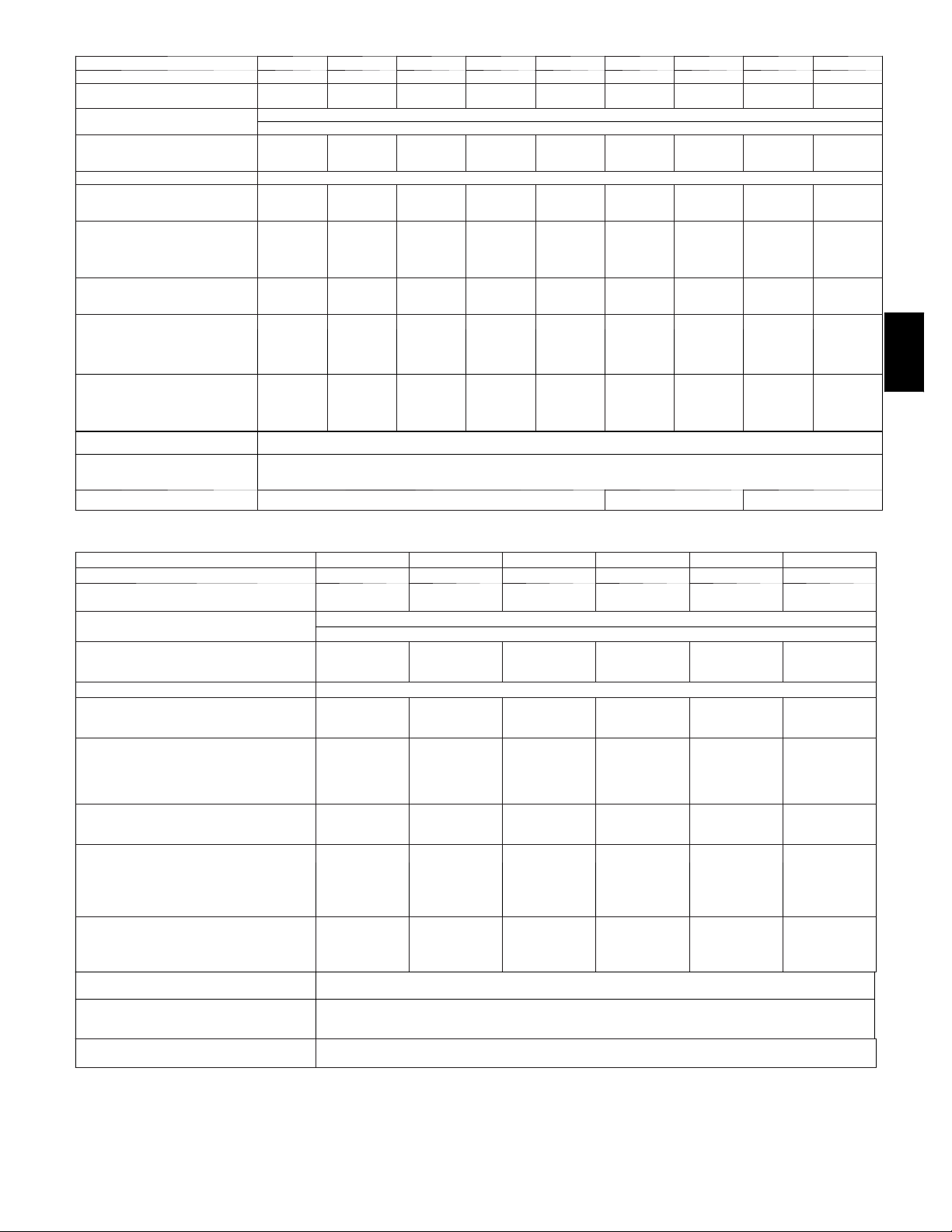
Table 1 – Physical Data -- Unit 574D
NOMINAL CAPACITY (ton) 1 --- 1 / 2 2 2 2 --- 1 / 2 2 --- 1 / 2 3 3 3 --- 1 / 2 3 --- 1 / 2
OPERATIN G WEIGHT (lb)
OPERATIN G WEIGHT(kg)
COMPRESSORS
Quantity
REFRIGERANT (R --- 410A)
Quantity (lb.)
Quantity (kg)
REFRIGERAN T METER ING DEV ICE TXV
CONDENSER COIL
Rows...Fins/in.
Face Area (sq ft )
CONDENSER FAN
Nominal Cfm
Diameter (in.)
Diameter (mm)
Motor Hp (Rpm)
EVAPORATOR COIL
Rows...Fins/in.
Face Area (sq ft )
INDOOR BLOWER
Nominal Airflow (Cfm)
Size (in.)
Size (mm)
Motor HP (RPM)
FURNACE SECTION*
Burner Orifice No.
(Qty...Drill Size)
Natural Gas
Propane Gas
HIGH-- PRESSURE SWITCH
(psig) Cut-- out Reset (Auto)
LOSS--OF--CHARGE / LOW-- PRESSURE SWITCH (Liquid Line) (psig)
cut-- out Reset (auto)
RETURN--- AIR FILTERS (in.)†}
Throwaway
282
127.9
5.0
2.3
1...21
10.2
2200
22
558.8
1/8 (825)
3...17
3.7
650
10x10
254x254
1/4 (825)
2...44
2...50
296
134.2
6.9
3.1
2...21
10.2
2200
22
558.8
1/8 (825)
3...17
3.7
800
10x10
254x254
1/3 (1050)
2...44
2...50
296
134.2
6.9
3.1
2...21
10.2
2200
22
558.8
1/8 (825)
3...17
3.7
800
10x10
254x254
1/3 (1050)
2...38
2...46
20x24x1
508x610x25 (mm)
313
142.0
8.0
3.6
2...21
11.9
2800
22
558.8
1/8 (825)
3...17
3.7
1000
10x10
254x254
1/3 (1050)
2...44
2...50
313
142.0
Scroll
1
8.0
3.6
2...21
11.9
2800
22
558.8
1/8 (825)
3...17
3.7
1000
10x10
254x254
1/3 (1050)
2...38
2...46
650 +/-- 15
420 +/-- 25
20 +/-- 5
45 +/-- 10
338
153.3
9.2
4.2
2...21
13.6
3000
22
558.8
1/8 (825)
4...17
3.7
1200
10x10
254x254
1/2 (1000)
2...38
2...46
24x30x1
610x762x25 (mm)
338
153.3
9.2
4.2
2...21
13.6
3000
22
558.8
1/8 (825)
4...17
3.7
1200
10x10
254x254
1/2 (1000)
3...38
3...46
401
181.9
8.8
4.0
2...21
19.4
3500
22
558.8
1/8 (825)
3...17
4.7
1400
11x10
279.4x254
1/2 (1075)
2...38
2...46
24x36x1
610x914x25 (mm)
401
181.9
8.8
4.0
2...21
3500
558.8
1/8 (825)
3...17
4.7
1400
11x10
279.4x254
1/2 (1075)
2...38
2...46
19.4
22
574D
Table 1—Physical Data Con’t -- Unit 574D
UNIT SIZE 048090 048115 048130 060090 060115 060130
NOMINAL CAPACITY (ton) 4 4 4 5 5 5
OPERATING WEIGHT (lb)
OPERATING WEIGHT (kg)
COMPRESSORS
Quantity
REFRIGERANT (R--410A)
Quantity (lb.)
Quantity (kg)
REFRIGERANT METERING DEVICE TXV
CONDENSER COIL
Rows...Fins/in.
Face Area (sq ft)
CONDENSER FAN
Nominal Cfm
Diameter (in.)
Diameter (mm)
Motor Hp (Rpm)
EVAPORATOR COIL
Rows...Fins/in.
Face Area (sq ft)
INDOOR BLOWER
Max
Size (In.)
Size (mm)
Motor HP (RPM)
FURNACE SECTION*
Burner Orifice No. (Qty...Drill Size)
Natural Gas
Propane Gas
HIGH-- PRESSURE SWITCH
(psig) Cut --out Reset (Auto)
LOSS-- OF -- CHARGE / LOW--PRESSURE
SWITCH (Liquid Line) (psig) cut --out Reset
(auto)
RETURN-- AIR FILTERS (in.)†}
Throwaway
*Based on altitude of 0 to 2000 ft.
{ Required filter sizes shown are based on the larger of the ARI (Air Conditioning and Refrigeration Institute) rated cooling airflow or the heating airflow velocity
of 300 ft/minute for throwaway type or 450 ft/minute for high--- capacity type. Air filter pressure drop for non --- standard filters must not exceed 0.08 in. wc.
} If using accessory filter rack refer to the filter rack installation instructions for correct filter sizes and quantity.
418
189.6
9.0
4.1
2...21
19.4
3500
22
558.8
1/4 (1100)
3...17
5.7
1600
11x10
279.4x254
1/2 (1075)
3...38
3...46
418
189.6
9.0
4.1
2...21
19.4
3500
22
558.8
1/4 (1100)
3...17
5.7
1600
11x10
279.4x254
1/2 (1075)
3...33
3...42
418
189.6
9.0
4.1
2...21
19.4
3500
22
558.8
1/4 (1100)
3...17
5.7
1600
11x10
279.4x254
1/2 (1075)
3...31
3...41
610x914x25 (mm)
Scroll
1
650 +/-- 15
420 +/-- 25
20 +/-- 5
45 +/-- 10
24x36x1
446
202.3
10.5
4.8
2...21
19.4
4200
22
558.8
1/4 (1100)
4...17
5.7
2000
11x10
279.4x254
1.0 (1040)
3...38
3...46
446
202.3
10.5
4.8
2...21
19.4
4200
22
558.8
1/4 (1100)
4...17
5.7
2000
11x10
279.4x254
1.0 (1040)
3...33
3...42
446
202.3
10.5
4.8
2...21
19.4
4200
22
558.8
1/4 (1100)
4...17
5.7
2000
11x10
279.4x254
1.0 (1040)
3...31
3...41
7
Page 8
12
DETAIL A
34
A07216
CORNER WEIGHTS (SMALL CABINET) CORNER WEIGHTS (LARGE CABINET)
574D
Unit
Total Weight 282 127.9 296 134.2 313 142.0 338 153.3 Total Weight 401 181.9 418 189.6 446 202.3
Corner
Weight 1
Corner
Weight 2
Corner
Weight 3
Corner
Weight 4
Rigging
Weight
Shipping
Weight
Step 6 — Connect Condensate Drain
NOTE: When installing condensate drain connection be sure to
comply with local codes and restrictions.
Model 574D disposes of condensate water through a 3/4 in. NPT
fitting which exits through the base on the evaporator coil access
side. See Fig. 3 & 4 for location.
Condensate water can be drained directly onto the roof in rooftop
installations (where permitted) or onto a gravel apron in ground
level installations. Install a field--supplied 2--in. (50.8 mm)
condensate trap at the end of condensate connection to ensure
proper drainage. Make sure that the outlet of the trap is at least 1 in.
(25.4 mm) lower than the drain--pan condensate connection to
prevent the pan from overflowing (See Fig. 7). Prime the trap with
water. When using a gravel apron, make sure it slopes away from
the unit.
Connect a drain tube using a minimum of 3/4--in. PVC or 3/4--in.
copper pipe (all field--supplied) at the outlet end of the 2--in. (50.8
mm) trap. Do not undersize the tube. Pitch the drain tube
downward at a slope of at least 1 --in. for every 10 ft of horizontal
run. Be sure to check the drain tube for leaks.
1" min.
018 024 030 036 Unit 042 048 060
lb kg lb kg lb kg lb kg Total Weight lb kg lb kg lb kg
73 33.1 59 26.8 55 25.1 72 32.5
60 27.4 84 38.0 95 42.9 89 40.3
95 43.0 81 36.8 78 35.2 95 43.0
54 24.4 72 32.6 85 38.7 83 37.5
301 136.5 315 142.9 332 150.6 357 161.9
336 152.4 350 158.7 367 166.4 392 177.8
Corner
Weight 1
Corner
Weight 2
Corner
Weight 3
Corner
Weight 4
Rigging
Weight
Shipping
Weight
68 30.6 62 28.1 54 24.5
119 53.8 135 61.2 158 71.7
60 27.2 64 29.2 81 36.6
155 70.3 157 71.1 154 69.7
423 191.8 440 199.5 468
463 210.0 480 217.7 508 230.4
Fig. 6 -- 574D Unit Corner Weights (in Pounds) and Suggested Rigging
Step 7 — Install Flue Hood
The flue assembly is secured and shipped in the return air duct.
Remove duct cover to locate the assembly (See Fig. 9 and 10).
NOTE: Dedicated low NOx models MUST be installed in
California Air Quality Management Districts where a Low NOx
rule exists.
These models meet the California maximum oxides of nitrogen
(NOx) emissions requirements of 40 nanograms/joule or less as
shipped from the factory.
NOTE: Low NOx requirements apply only to natural gas
installations.
!
WARNING
CARBON MONOXIDE POISONING HAZARD
Failure to follow this warning could result in personal
injury or death.
The venting system is designed to ensure proper venting.
TRAP
OUTLET
Fig. 7 -- Condensate Trap
2" min.
C00009
The flue hood assembly must be installed as indicted in this
section of the unit installation instructions.
Install the flue hood as follows:
1. This installation must conform with local building codes
and with the National Fuel Gas Code (NFGC), ANSI
Z223.1 (in Canada, CAN/CGA B149.1, and B149.2) or
NFPA (National Fire Protection Association) latest revision.
Refer to Provincial and local plumbing or wastewater codes
and other applicable local codes.
2. Remove flue hood from shipping location (inside the return
section of the blower compartment--see Fig. 9 & 10). Remove the return duct cover to locate the flue hood. Place
flue hood assembly over flue panel. Orient screw holes in
flue hood with holes in the flue panel.
8
A05161
212.2
Page 9
3. Secure flue hood to flue panel by inserting a single screw on
the right side and the left side of the hood.
Step 8 — Install Gas Piping
The gas supply pipe enters the unit through the access hole
provided. The gas connection to the unit is made to the 1/2--in.
FPT gas inlet on the gas valve.
Install a gas supply line that runs to the heating section. Refer to
Table 2 and the NFGC for gas pipe sizing. Do not use cast--iron
pipe. It is recommended that a black iron pipe is used. Check the
local utility for recommendations concerning existing lines. Size
gas supply piping for 0.5 in. wc maximum pressure drop. Never
use pipe smaller than the 1/2--in. FPT gas inlet on the unit gas
valve.
For natural gas applications, the gas pressure at unit gas connection
must not be less than 4.0 in. wc or greater than 13 in. wc while the
unit is operating. For propane applications, the gas pressure must
not be less than 7.0 in. wc or greater than 13 in. wc at the unit
connection.
A 1/8--in. NPT plugged tapping, accessible for test gauge
connection, must be installed immediately upstream of the gas
supply connection to the gas valve.
When installing the gas supply line, observe local codes pertaining
to gas pipe installations. Refer to the NFGC ANSI Z223.1-- 2005
NFPA latest edition (in Canada, CAN/CGA B149.1).
NOTE: In the state of Massachusetts:
1. Gas supply connections MUST be performed by a licensed
plumber or gas fitter.
2. When flexible connectors are used, the maximum length
shall not exceed 36 inches (915 mm).
3. When lever handle type manual equipment shutoff valves
are used, they shall be T--handle valves.
4. The use of copper tubing for gas piping is NOT approved
by the state of Massachusetts.
In the absence of local building codes, adhere to the following
pertinent recommendations:
1. Avoid low spots in long runs of pipe. Grade all pipe 1/4 in.
for every 15 ft of length to prevent traps. Grade all
horizontal runs downward to risers. Use risers to connect to
heating section and to meter.
2. Protect all segments of piping system against physical and
thermal damage. Support all piping with appropriate straps,
hangers, etc. Use a minimum of one hanger every 6 ft (1.8
m). For pipe sizes larger than 1/2 in., follow
recommendations of national codes.
3. Apply joint compound (pipe dope) sparingly and only to
male threads of joint when making pipe connections. Use
only pipe dope that is resistant to action of liquefied
petroleum gases as specified by local and/or national codes.
Never use Teflon tape.
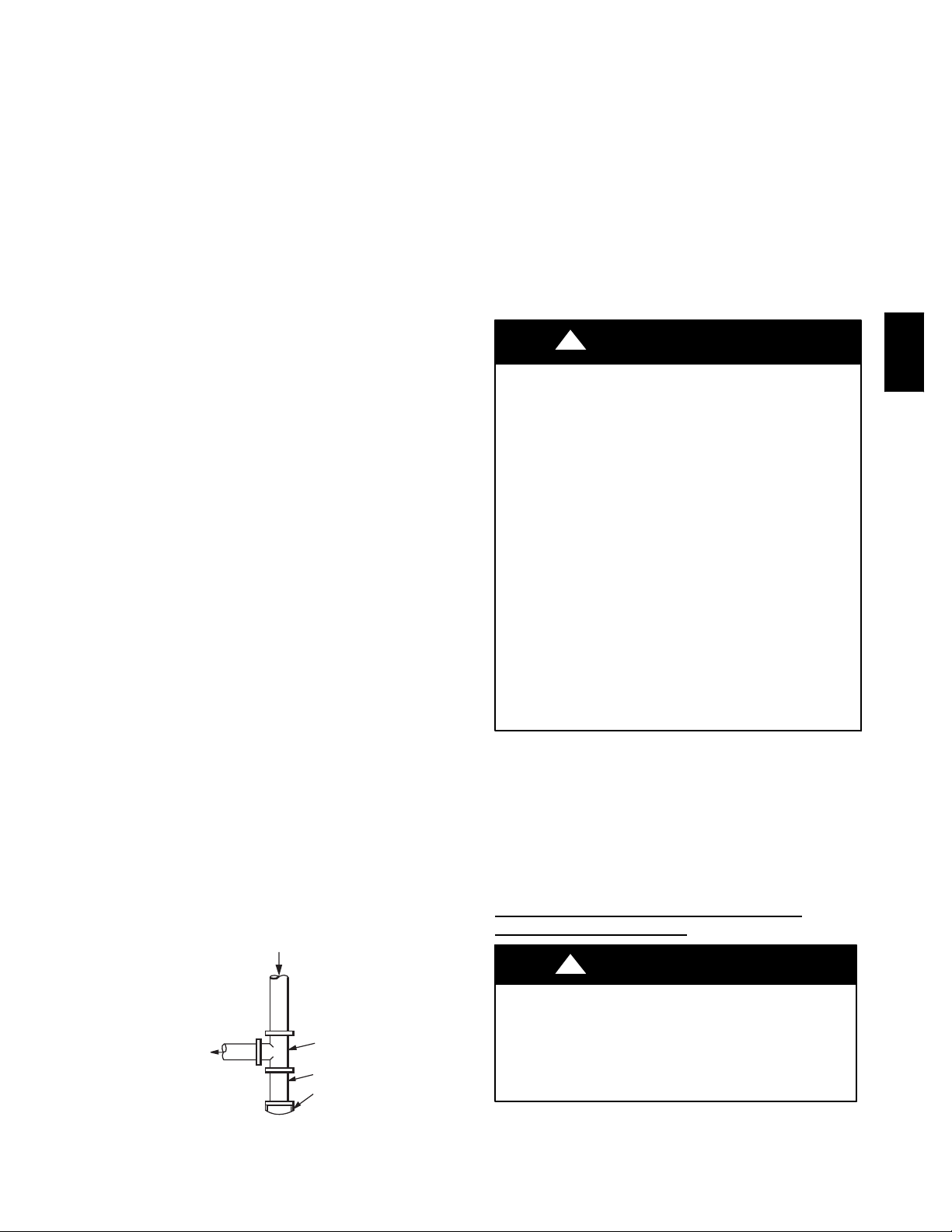
4. Install sediment trap in riser leading to heating section (See
Fig. 8). This drip leg functions as a trap for dirt and
condensate.
IN
5. Install an accessible, external, manual main shutoff valve in
gas supply pipe within 6 ft (1.8 m) of heating section.
6. Install ground--joint union close to heating section between
unit manual shutoff and external manual main shut--off
valve.
7. Pressure test all gas piping in accordance with local and
national plumbing and gas codes before connecting piping
to unit.
NOTE: Pressure test the gas supply system after the gas supply
piping is connected to the gas valve. The supply piping must be
disconnected from the gas valve during the testing of the piping
systems when test pressure is in excess of 0.5 psig. Pressure test the
gas supply piping system at pressures equal to or less than 0.5 psig.
The unit heating section must be isolated from the gas piping
system by closing the external main manual shutoff valve and
slightly opening the ground--joint union.
!
WARNING
FIRE OR EXPLOSION HAZARD
Failure to follow this warning could result in personal injury,
death and/or property damage.
--Connect gas pipe to unit using a backup wrench to avoid
damaging gas controls.
--Never purge a gas line into a combustion chamber. Never
test for gas leaks with an open flame. Use a commercially
available soap solution made specifically for the detection of
leaks to check all connections.
--Use proper length of pipe to avoid stress on gas control
manifold.
--If a flexible connector is required or allowed by authority
having jurisdiction, black iron pipe shall be installed at
furnace gas valve and extend a minimum of 2 in. outside
furnace casing.
--If codes allow a flexible connector, always use a new
connector. do not use a connector which has previously
serviced another gas appliance.
8. Check for gas leaks at the field--installed and
factory--installed gas lines after all piping connections have
been completed. Use soap--and--water solution (or method
specified by local codes and/or regulations).
Step 9 — Install Duct Connections
The unit has duct flanges on the supply-- and return--air openings
on the side and bottom of the unit. For downshot applications, the
ductwork connects to the roof curb (See Fig. 3 and 4 for
connection sizes and locations).
CONFIGURING UNITS FOR DOWNFLOW
(VERTICAL)
DISCHARGE
!
WARNING
574D
OUT
Fig. 8 -- Sediment Trap
TEE
NIPPLE
CAP
C99020
ELECTRICAL SHOCK HAZARD
Failure to follow this warning could result in personal
injury or death.
Before installing or servicing system, always turn off main
power to system. There may be more than one disconnect
switch.
1. Open all electrical disconnects before starting any service
work.
9
Page 10
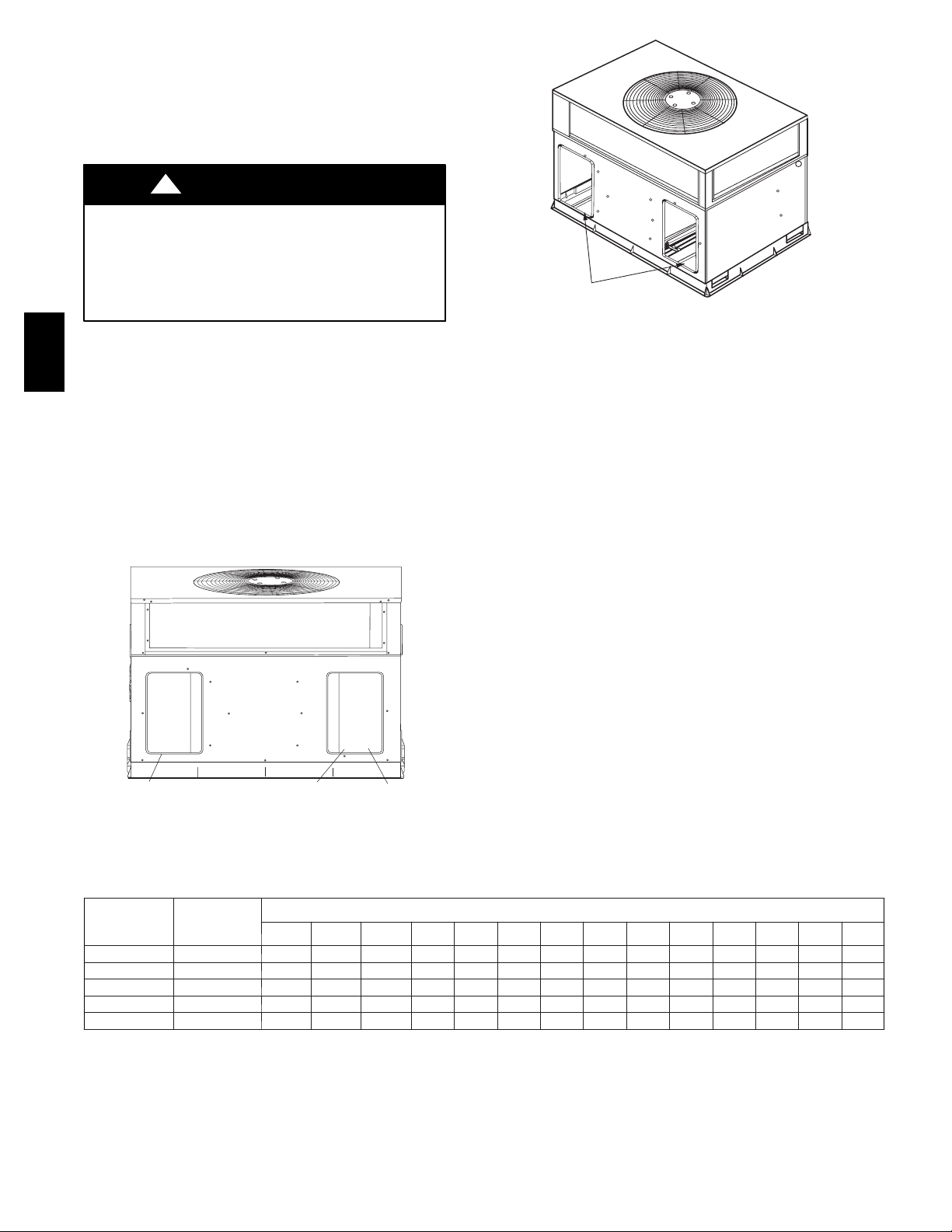
2. Remove horizontal (metal) duct covers to access vertical
(downflow) discharge duct knockouts in unit base.
3. Use a screwdriver and hammer to remove the panels in the
bottom of the unit base (See Fig. 10).
4. If unit ductwork is to be attached to vertical opening flanges
on the unit base (jackstand applications only), do so at this
time.
!
CAUTION
PROPERTY DAMAGE HAZARD
Failure to follow this caution may result in property
damage.
Collect ALL screws that were removed. Do not leave
screws on rooftop as permanent damage to the roof may
occur.
5. It is recommended that the base insulation around the
574D
perimeter of the vertical return-- air opening be secured to
the base with aluminum tape. Applicable local codes may
require aluminum tape to prevent exposed fiberglass.
6. Cover both horizontal duct openings with the provided duct
covers. Ensure opening is air-- and watertight.
7. After completing unit conversion, perform all safety checks
and power up unit.
NOTE: The design and installation of the duct system must be in
accordance with the standards of the NFPA for installation of
nonresidence--type air conditioning and ventilating systems, NFPA
90A or residence--type, NFPA 90B; and/or local codes and
ordinances.
SUPPLY
DUCT
OPENING
RETURN
DUCT
OPENING
VENT HOOD
SHIPPING
LOCATION
Fig. 9 -- Supply and Return Duct Opening
A05143
DUCT COVERS REMOVED
C99012
Fig. 10 -- Vertical Duct Cover Removed
Adhere to the following criteria when selecting, sizing, and
installing the duct system:
1. Units are shipped for horizontal duct installation (by
removing duct covers).
2. Select and size ductwork, supply--air registers, and
return--air grilles according to American Society of Heating,
Refrigeration and Air Conditioning Engineers (ASHRAE)
recommendations.
3. Use flexible transition between rigid ductwork and unit to
prevent transmission of vibration. The transition may be
screwed or bolted to duct flanges. Use suitable gaskets to
ensure weather--tight and airtight seal.
4. All units must have field--supplied filters or accessory filter
rack installed in the return-- air side of the unit.
Recommended sizes for filters are shown in Table 1.
5. Size all ductwork for maximum required airflow (either
heating or cooling) for unit being installed. Avoid abrupt
duct size increases or decreases or performance may be
affected.
6. Adequately insulate and weatherproof all ductwork located
outdoors. Insulate ducts passing through unconditioned
space, and use vapor barrier in accordance with latest issue
of Sheet Metal and Air Conditioning Contractors National
Association (SMACNA) and Air Conditioning Contractors
of America (ACCA) minimum installation standards for
heating and air conditioning systems. Secure all ducts to
building structure.
7. Flash, weatherproof, and vibration isolate all openings in
building structure in accordance with local codes and good
building practices.
Table 2 – Maximum Gas Flow Capacity*
NOMINAL
IRON PIPE
SIZE (IN.)
1/2 .622 175 120 97 82 73 66 61 57 53 50 44 40 — —
3/4 .824 360 250 200 170 151 138 125 118 110 103 93 84 77 72
1 1.049 680 465 375 320 285 260 240 220 205 195 175 160 145 135
1--1/4 1.380 1400 950 770 600 580 530 490 460 430 400 360 325 300 280
1--1/2 1.610 2100 1460 1180 990 900 810 750 690 650 620 550 500 460 430
*Capacity of pipe in cu ft of gas per hr for gas pressure of 0.5 psig or less. Pressure drop of 0.5 - -- in. wc (based on a 0.60 specific gravity gas). Refer to Table,
National Fire Protection Association NFPA 54.
{ This length includes an ordinary number of fittings.
INTERNAL
DIAMETER
(IN.)
LENGTH OF PIPE (FT)†
10 20 30 40 50 60 70 80 90 100 125 150 175 200
10
Page 11

Step 10 — Install Electrical Connections
!
WARNING
ELECTRICAL SHOCK HAZARD
Failure to follow this warning could result in personal
injury or death.
The unit cabinet must have an uninterrupted, unbroken
electrical ground. This ground may consist of an electrical
wire connected to the unit ground screw in the control
compartment, or conduit approved for electrical ground
when installed in accordance with NEC, ANSI/NFPA
American National Standards Institute/National Fire
Protection Association (latest edition) (in Canada, Canadian
Electrical Code CSA C22.1) and local electrical codes.
!
UNIT COMPONENT DAMAGE HAZARD
Failure to follow this caution may result in damage to the
unit being installed.
1. Make all electrical connections in accordance with NEC
ANSI/NFPA (latest edition) and local electrical codes
governing such wiring. In Canada, all electrical
connections must be in accordance with CSA standard
C22.1 Canadian Electrical Code Part 1 and applicable
local codes. Refer to unit wiring diagram.
2. Use only copper conductor for connections between
field--supplied electrical disconnect switch and unit. DO
NOT USE ALUMINUM WIRE.
3. Be sure that high-- voltage power to unit is within
operating voltage range indicated on unit rating plate. On
3--phase units, ensure phases are balanced within 2
percent. Consult local power company for correction of
improper voltage and/or phase imbalance.
4. Insulate low--voltage wires for highest voltage contained
within conduit when low--voltage control wires are in
same conduit as high--voltage wires.
5. Do not damage internal components when drilling
through any panel to mount electrical hardware, conduit,
etc.
HIGH--VOLTAGE CONNECTIONS
When routing power leads into unit, use only copper wire between
disconnect and unit. The high voltage leads should be in a conduit
until they enter the duct panel; conduit termination at the duct
panel must be watertight.
The unit must have a separate electrical service with a
field--supplied, waterproof disconnect switch mounted at, or within
sight from, the unit. Refer to the unit rating plate, NEC and local
codes for maximum fuse/circuit breaker size and minimum circuit
amps (ampacity) for wire sizing.
The field--supplied disconnect switch box may be mounted on the
unit over the high--voltage inlet hole when the standard power and
low--voltage entry points are used (See Fig. 3 and 4 for acceptable
location).
See unit wiring label and Fig. 11 for reference when making high
voltage connections. Proceed as follows to complete the
high--voltage connections to the unit.
Single phase units:
1. Run the high--voltage (L1, L2) and ground lead into the
control box.
2. Connect ground lead to chassis ground connection.
CAUTION
3. Locate the black and yellow wires connected to the line side
of the contactor.
4. Connect field L1 to black wire on connection 11 of the
compressor contactor.
5.ConnectfieldwireL2toyellowwireonconnection23of
the compressor contactor.
Three--phase units:
1. Run the high--voltage (L1, L2, L3) and ground lead into the
control box.
2. Connect ground lead to chassis ground connection.
3. Locate the black and yellow wires connected to the line side
of the contactor.
4. Connect field L1 to black wire on connection 11 of the
compressor contactor.
5.ConnectfieldwireL2toyellowwireonconnection13of
the compressor contactor.
6. Connect field wire L3 to blue wire from compressor.
SPECIAL PROCEDURES FOR 208--V OPERATION
!
WARNING
ELECTRICAL SHOCK HAZARD
Failure to follow this warning could result in personal
injury or death.
Make sure the power supply to the unit is switched OFF
before making any wiring changes. With disconnect switch
open, move black wire from transformer (3/16 in.) terminal
marked 230 to terminal marked 208. This retaps transformer
to primary voltage of 208 vac.
!
WARNING
ELECTRICAL SHOCK FIRE/EXPLOSION HAZARD
Failure to follow this warning could result in personal
injury or death and property damage.
Before making any wiring changes, mak e sure the gas
supply is switched off first. Then switch off the power
supply to the unit and install lockout tag.
CONTROL VOLTAGE CONNECTIONS
Do not use any type of power--stealing thermostat. Unit control
problems may result.
Use no. 18 American Wire Gage (AWG) color--coded, insulated
(35_C minimum) wires to make the control voltage connections
between the thermostat and the unit. If the thermostat is located
more than 100 ft (30.5 m) from the unit (as measured along the
control voltage wires), use no. 16 AWG color--coded, insulated
(35_C minimum) wires.
STANDARD CONNECTION
Remove knockout hole located in the flue panel adjacent to the
control access panel (See Fig. 3 and 4). Remove the rubber
grommet from the installer’s packet (included with unit) and install
grommet in the knockout opening. Provide a drip loop before
running wire through panel.
574D
11
Page 12

HIGH VOLTAGE
T
POWER LEADS
(SEE UNIT WIRING
LABEL)
FIELD-SUPPLIED
FUSED DISCONNECT
WHT(W1)
YEL(Y)
GRN(G)
RED(R)
BRN(C)
W
Y
G
R
C
CONTROL BOX
LOW-VOLTAGE
POWER LEADS
(SEE UNIT
WIRING LABEL)
GR
SPLICE BOX
Fig. 11 -- High-- and Control--Voltage Connections
574D
Run the low--voltage leads from the thermostat, through the inlet
hole, and into unit low--voltage splice box.
Locate five 18--gage wires leaving control box. These low--voltage
connection leads can be identified by the colors red, green, yellow,
brown, and white (See Fig. 11). Ensure the leads are long enough
to be routed into the low--voltage splice box (located below right
side of control box). Route leads through hole in bottom of control
box and make low--voltage connections (See Fig. 11). Secure all
cut wires, so that they do not interfere with operation of unit.
HEAT ANTICIP ATOR SETTING
The room thermostat heat anticipator must be properly adjusted to
ensure proper heating performance. Set the heat anticipator, using
an ammeter between the W and R terminals to determine the exact
required setting.
NOTE: For thermostat selection purposes, use 0.18 amp for the
approximate required setting. Failure to make a proper heat
anticipator adjustment will result in improper operation, discomfort
to the occupants of the conditioned space, and inefficient energy
utilization; however, the required setting may be changed slightly
to provide a greater degree of comfort for a particular installation.
TRANSFORMER PROTECTION
The transformer is of the energy-- limiting type. It is set to withstand
a 30--sec. overload or shorted secondary condition. If an overload
or short is present, correct overload condition and check for blown
fuse on gas control board. Replace fuse as required with correct
size and rating.
POWER
SUPPLY
THERMOSTA
(TYPICAL)
A05144
PRE--START--UP
!
WARNING
FIRE, EXPLOSION, ELECTRICAL SHOCK
HAZARD
Failure to follow this warning could result in personal
injury or death.
1. Follow recognized safety practices and wear protective
goggles when checking or servicing refrigerant system.
2. Do not operate compressor or provide any electric power
to unit unless compressor terminal cover is in place and
secured.
3. Do not remove compressor terminal cover until all
electrical sources are disconnected and tagged.
4. Relieve and recover all refrigerant from system before
touching or disturbing anything inside terminal box if
refrigerant leak is suspected around compressor
terminals.
5. Never attempt to repair soldered connection while
refrigerant system is under pressure.
6. Do not use torch to remove any component. System
contains oil and refrigerant under pressure.
To remove a component, wear protective goggles and
proceed as follows:
a. Shut off electrical power to unit and install
lockout tag.
b. Relieve and reclaim all refrigerant from system
using both high-- and low--pressure ports.
c. Cut component connecting tubing with tubing
cutter and remove component from unit.
d. Carefully unsweat remaining tubing stubs when
necessary. Oil can ignite when exposed to torch
flame.
Use the Start--Up Checklist supplied at the end of this book and
proceed as follows to inspect and prepare the unit for initial
start--up:
1. Remove access panel.
2. Read and follow instructions on all DANGER, WARNING,
CAUTION, and INFORMATION labels attached to, or
shipped with unit.
3. Make the following inspections:
a. Inspect for shipping and handling damage, such as
broken lines, loose parts, disconnected wires, etc.
b. Inspect for oil at all refrigerant tubing connections and
on unit base. Detecting oil generally indicates a
refrigerant leak.
c. Leak-- test all refrigerant tubing connections using
electronic leak detector, or liquid--soap solution. If a
refrigerant leak is detected, see following Check for
Refrigerant Leaks section.
d. Inspect all field-- and factory--wiring connections. Be
sure that connections are completed and tight.
e. Ensure wires do not touch refrigerant tubing or sharp
sheet metal edges.
f. Inspect coil fins. If damaged during shipping and
handling, carefully straighten fins with a fin comb.
12
Page 13

!
WARNING
FIRE, EXPLOSION HAZARD
Failure to follow this warning could result in personal
injury, death or property damage.
Do not purge gas supply into the combustion chamber. Do
not use a match or other open flame to check for gas leaks.
4. Verify the following conditions:
a. Make sure gas line is free of air. Before lighting the unit
for the first time, perform the following with the gas
valve in the OFF position:
NOTE: If the gas supply pipe was not purged before connecting
the unit, it will be full of air. It is recommended that the ground
joint union be loosened, and the supply line be allowed to purge
until the odor of gas is detected. Never purge gas lines into a
combustion chamber. Immediately upon detection of gas odor,
retighten the union. Allow 5 minutes to elapse, then light unit.
b. Make sure that condenser--fan blade is correctly
positioned in fan orifice. Top 1/3 of condenser--fan
blade should be within fan orifice venturi.
c. Ensure fan hub is positioned correctly with respect to
motor housing (See Fig. 12).
d. Make sure that air filter(s) is in place.
e. Make sure that condensate drain trap is filled with water
to ensure proper drainage.
f. Make sure that all tools and miscellaneous loose parts
have been removed.
MOTOR
FAN GRILLE
properly aligned. Unstable operation my occur when the burner
orifices in the manifold are misaligned.
Follow the lighting instructions on the heating section operation
label (located inside the burner or blower access door) to start the
heating section.
NOTE: Make sure that gas supply has been purged, and that all
gas piping has been checked for leaks.
574D
MANIFOLD PIPE PLUG
C99019
Fig. 13 -- Burner Assembly
BURNER FLAME
1/8" MAX BETWEEN
MOTOR AND FAN HUB
Fig. 12 -- Fan Blade Clearance
MOTOR SHAFT
1/2ý
C99009
START--UP
Step 1 — Check for Refrigerant Leaks
Proceed as follows to locate and repair a refrigerant leak and to
charge the unit:
1. Locate leak and make sure that refrigerant system pressure
has been relieved and reclaimed from both high-- and
low--pressure ports.
2. Repair leak following accepted practices.
NOTE: Install a filter drier whenever the system has been opened
for repair.
3. Add a small charge of Puron (R--410A) refrigerant vapor to
system and leak --test unit.
4. Recover refrigerant from refrigerant system and evacuate to
500 microns if no additional leaks are found.
5. Charge unit with Puron (R--410A) refrigerant, using a
volumetric charging cylinder or accurate scale. Refer to unit
rating plate for required charge.
Step 2 — Start--up Heating and Make Adjustments
Complete the required procedures given in the Pre--Start--Up
section before starting the unit. Do not jumper any safety devices
when operating the unit. Make sure that burner orifices are
BURNER
MANIFOLD
C99021
Fig. 14 -- Monoport Burner
CHECK HEATING CONTROL
Start and check the unit for proper heating control operation as
follows (see furnace lighting instructions located inside burner or
blower access panel):
1. Place room thermostat SYSTEM switch in the HEAT
position and the fan switch is placed in AUTO position.
2. Set the heating temperature control of the thermostat above
room temperature.
3. The induced--draft motor will start.
4. After a call for heating, the main burner should light within
5 sec. If the burners do not light, there is a 22--sec. delay
before another 5--sec. try. If the burners still do not light,
this sequence is repeated. If the burners do not light within
15 minutes from the initial call for heat, there is a lockout.
To reset the control, break the 24--v power to W.
5. The evaporator fan will turn on 45 sec. after the flame has
been established. The evaporator fan will turn off 45 sec.
after the thermostat has been satisfied.
13
Page 14

CHECK GAS INPUT
Check gas input and manifold pressure after unit start--up (See
Table 3). If adjustment is required proceed as follows:
S The rated gas inputs shown in Table 3 are for altitudes from sea
level to 2000 ft above sea level. These inputs are based on natural
3
gas with a heating value of 1050 Btu/ft
propane gas with a heating value of 2500 Btu/ft
gravity.
S For elevations above 2000 ft, reduce input 4% for each 1000 ft
above sea level. For example at 2500 ft. a 10% total derate is
required.
S When the gas supply being used has a different heating value or
specific gravity, refer to national and local codes, or contact your
distributor to determine the required orifice size.
574D
!
UNIT DAMAGE HAZARD
Failure to follow this caution may result in reduced unit
and/or component life.
Do Not redrill an orifice. Improper drilling (burrs,
out--of--round holes, etc.) can cause excessive burner noise
and misdirection of burner flame. If orifice hole appears
damaged or it is suspected to have been redrilled, check
orifice hole with a numbered drill bit of correct size.
CAUTION
at 0.65 specific gravity, or
3
ADJUST GAS INPUT
The gas input to the unit is determined by measuring the gas flow
at the meter or by measuring the manifold pressure. Measuring the
gas flow at the meter is recommended for natural gas units. The
manifold pressure must be measured to determine the input of
propane gas units.
Measure Gas Flow (Natural Gas Units)
Minor adjustment to the gas flow can be made by changing the
manifold pressure. The manifold pressure must be maintained
between 3.4 and 3.6 in. wc.
If larger adjustments are required, change main burner orifices
following the recommendations of national and local codes.
NOTE: All other appliances that use the same meter must be
turned off when gas flow is measured at the meter.
Proceed as follows:
1. Turn off gas supply to unit.
2. Remove pipe plug on manifold (See Fig. 13) and connect
manometer. Turn on gas supply to unit.
3. Record number of seconds for gas meter test dial to make
one revolution.
4. Divide number of seconds in Step 3 into 3600 (number of
seconds in one hr).
5. Multiply result of Step 4 by the number of cubic feet (cu ft)
shown for one revolution of test dial to obtain cubic feet (cu
ft) of gas flow per hour.
6. Multiply result of Step 5 by Btu heating value of gas to
obtain total measured input in Btuh. Compare this value
with heating input shown in Table 3 (Consult the local gas
supplier if the heating value of gas is not known).
EXAMPLE: Assume that the size of test dial is 1 cu ft, one
revolution takes 32 sec, and the heating value of the gas is 1050
3
. Proceed as follows:
Btu/ft
1. 32 sec. to complete one revolution.
2. 3600 ÷ 32 = 112.5.
3.112.5x1=112.5ft3ofgasflow/hr.
at 1.5 specific
4. 112.5 x 1050 = 118,125 Btuh input.
If the desired gas input is 115,000 Btuh, only a minor change in the
manifold pressure is required.
Observe manifold pressure and proceed as follows to adjust gas
input:
1. Remove cover screw over regulator adjustment screw on
gas valve.
2. Turn regulator adjustment screw clockwise to increase gas
input, or turn regulator adjustment screw counterclockwise
to decrease input. Manifold pressure must be between 3.4
and 3.6 in. wc.
!
WARNING
FIRE AND UNIT DAMAGE HAZARD
Failure to follow this warning could result in personal
injury or death and/or property damage.
Unsafe operation of the unit may result if manifold pressure
is outside this range.
3. Replace cover screw cap on gas valve.
4. Turn off gas supply to unit. Remove manometer from
pressure tap and replace pipe plug on gas valve. Turn on gas
to unit and check for leaks.
Measure Manifold Pressure (Propane Units)
The main burner orifices on a propane gas unit are sized for the
unit rated input when the manifold pressure reading matches the
level specified in Table 3.
Proceed as follows to adjust gas input on a propane gas unit:
1. Turn off gas to unit.
2. Remove pipe plug on manifold and connect manometer
(See Fig. 13).
3. Turn on gas to unit.
4. Remove cover screw over regulator adjustment screw on
gas valve.
5. Adjust regulator adjustment screw to the correct manifold
pressure, as specified in Table 3. Turn adjusting screw
clockwise to increase manifold pressure, or turn adjusting
screw counterclockwise to decrease manifold pressure.
6. Replace cover screw.
7. Turn off gas to unit. Remove manometer from pressure tap.
Replace pipe plug on gas valve, then turn on gas to unit.
Check for leaks.
CHECK BURNER FLAME
With burner access panel removed, observe the unit heating
operation. Watch the burner flames to see if they are light blue and
soft in appearance, and that the flames are approximately the same
for each burner. Propane will have blue flame (See Fig. 14). Refer
to the Maintenance section for information on burner removal.
AIRFLOW AND TEMPERATURE RISE
The heating section for each size unit is designed and approved for
heating operation within the temperature--rise range stamped on the
unit rating plate.
Table 8 shows the approved temperature rise range for each heating
input, and the air delivery cfm at various temperature rises. The
heating operation airflow must produce a temperature rise that falls
within the approved range.
Refer to Indoor Airflow and Airflow Adjustments section to adjust
heating airflow when required.
An LED (light--emitting diode) indicator is provided on the control
board to monitor operation. The control board is located by
removing the burner access panel. During normal operation, the
LED is continuously on (See Table 4 for error codes).
14
Page 15

574D
Fig. 15 -- 208/230--1 --60 Wiring Diagram
15
A07230
Page 16

574D
Fig. 16 -- 208/230--3 --60 Wiring Diagram
16
A07232
Page 17

574D
Fig. 17 -- 460-- 3--60 Wiring Diagram
17
A07231
Page 18

Table 3 – Heating Inputs
NUMBER
OF
MANIFOLD
PRESSURE
(IN.WC)
ORIFICES
HEATING INPUT
(BTUH)
40,000 2 4.0 13.0 4.0 13.0 3.5 3.5
60,000 2 4.0 13.0 4.0 13.0 3.5 3.5
90,000 3 4.0 13.0 4.0 13.0 3.5 3.4
115,000 3 4.0 13.0 4.0 13.0 3.5 3.7
130,000 3 4.0 13.0 4.0 13.0 3.5 3.5
*When a unit is converted to propane, different size orifices must be used. See separate, natural--- to ---propane conversion kit instructions.
{Based on altitudes from sea level to 2000 ft above sea level. For altitudes above 2000 ft, reduce input rating 4 percent for each additional 1000 ft above sea
level. In Canada, fr o m 2000 ft above sea level to 4500 ft above sea level, derate the unit 10 percent.
GAS SUPPLY PRESSURE (IN. WC)
Natural{ Propane*{
Min Max Min Max Natural{ Propane*†
HEATING SEQUENCE OF OPERATION
(See Fig. 15--17 and unit wiring label.)
On a call for heating, terminal W of the thermostat is energized,
starting the induced--draft motor. When the hall--effect sensor on
the induced-- draft motor senses that it has reached the required
speed, the burner sequence begins. This function is performed by
the integrated gas control (IGC). The indoor (evaporator)-- fan
574D
motor is energized 45 sec after flame is established. When the
thermostat is satisfied and W is de--energized, the burners stop
firing and the indoor (evaporator) fan motor shuts off after a
45--sec time--off delay.
LIMIT SWITCHES
Normally closed limit switch (LS) completes the control circuit.
Should the leaving--air temperature rise above the maximum
allowable temperature, the limit switch opens and the control
circuit “breaks.” Any interruption in the control circuit instantly
closes the gas valve and stops gas flow to the burners and pilot.
The blower motor continues to run until LS resets.
When the air temperature at the limit switch drops to the
low--temperature setting of the limit switch, the switch closes and
completes the control circuit. The direct--spark ignition system
cycles and the unit returns to normal heating operation.
Table 4 – LED Indications
ERROR CODE LED INDICATION
Normal Operation On
Hardware Failure Off
Fan On/Off Delay Modified 1Flash
Limit Switch Fault 2 Flashes
Flame Sense Fault 3 Flashes
Four Consecutive Limit Switch Faults 4 Flashes
Ignition Lockout Fault 5 Flashes
Induced-- Draft Motor Fault 6 Flashes
Rollout Switch Fault 7 Flashes
Internal Control Fault 8 Flashes
Temporary Lock-- Out (1 hr) 9 Flashes
NOTES:
1. There is a 3 sec pause between error code displays.
2. If more than one error code exists, all applicable error codes will be displayed in numerical sequence.
3. This chart is on the wiring diagram located inside the burner access
panel.
ROLLOUT SWITCH
The function of the rollout switch is to close the main gas valve in
the event of flame rollout. The switch is located above the main
burners. When the temperature at the rollout switch reaches the
maximum allowable temperature, the control circuit trips, closing
the gas valve and stopping gas flow to the burners. The indoor
(evaporator) fan motor (IFM) and induced draft motor continue to
run until switch is reset. The IGC LED will display FAULT CODE
7.
Step 3 — Start--up Cooling and Make Adjustments
Complete the required procedures given in the Pre--Start--Up
section before starting the unit. Do not jumper any safety devices
when operating the unit. Do not operate the compressor when the
outdoor temperature is below 40°F(4.4°C) (unless accessory
low--ambient kit is installed). Do not rapid--cycle the compressor.
Allow 5 minutes between on cycles to prevent compressor damage.
CHECKING COOLING CONTROL OPERATION
Start and check the unit for proper cooling control operation as
follows:
1. Place room thermostat SYSTEM switch in OFF position.
Observe that blower motor starts when FAN switch is
placed in ON position and shuts down when FAN switch is
placed in AUTO position.
2. Place SYSTEM switch in COOL position and FAN switch
in AUTO position. Set cooling control below room
temperature. Observe that compressor, condenser fan, and
evaporator blower motors start. Observe that cooling cycle
shuts down when control setting is satisfied. The evaporator
fan will continue to run for 30 sec.
3. When using an auto--changeover room thermostat, place
both SYSTEM and FAN switches in AUTO positions.
Observe that unit operates in Heating mode when
temperature control is set to call for heating (above room
temperature) and operates in Cooling mode when
temperature control is set to call for cooling (below room
temperature).
IMPORTANT: Three--phase, scroll compressors are direction
oriented. Unit must be checked to ensure proper compressor
3--phase power lead orientation. If not corrected within 5 minutes,
the internal protector will shut off the compressor. The 3--phase
power leads to the unit must be reversed to correct rotation. When
turning backwards, the difference between compressor suction and
discharge pressures will be minimal.
CHECKING AND ADJUSTING REFRIGERANT
CHARGE
The refrigerant system is fully charged with PuronR (R--410A)
refrigerant and is tested and factory sealed. Allow system to operate
a minimum of 15 minutes before checking or adjusting charge.
NOTE: Adjustment of the refrigerant charge is not required unless
the unit is suspected of not having the proper PuronR (R--410A)
charge.
The charging label and the tables shown refer to system
temperatures and pressures in cooling mode only. A refrigerant
charging label is attached to the outside of the service access door.
The chart includes the required liquid line temperature at given
discharge line pressures and outdoor ambient temperatures.
An accurate subcooling, thermocouple-- or thermistor--type
thermometer, and a gauge manifold are required when using the
subcooling charging method for evaluating the unit charge. Do not
18
Page 19

use mercury or small dial--type thermometers because they are not
adequate for this type of measurement.
!
WARNING
!
UNIT DAMAGE HAZARD
Failure to follow this caution may result in unit damage.
When evaluating the refrigerant charge, an indicated
adjustment to the specified factory charge must always be
very minimal. If a substantial adjustment is indicated, an
abnormal condition exists somewhere in the cooling system,
such as insufficient airflow across either coil or both coils.
Proceed as follows:
1. Remove caps from low-- and high --pressure service fittings.
2. Using hoses with valve core depressors, attach low-- and
high--pressure gauge hoses to low-- and high-- pressure
service fittings, respectively.
3. Start unit in Cooling Mode and let unit run until system
pressures stabilize.
4. Measure and record the following:
a. Outdoor ambient-- air temperature (°F(°C)db).
b. Liquid line temperature (°F(°C).
c. Discharge (high--side) pressure (psig).
5. Using “Cooling Charging Charts,” compare outdoor--air
temperature(°F(°C) db) with the discharge line pressure
(psig) to determine desired system operating liquid line
temperature (See Table 6).
6. Compare actual liquid line temperature with desired liquid
line temperature. Using a tolerance of ± 2°F(±1.1°C), add
refrigerant if actual temperature is more than 2°F(±1.1°C)
higher than proper liquid line temperature, or remove
refrigerant if actual temperature is more than 2°F(±1.1°C)
lower than required liquid line temperature.
NOTE: If the problem causing the inaccurate readings is a
refrigerant leak, refer to the Check for Refrigerant Leaks section.
CAUTION
INDOOR AIRFLOW AND AIRFLOW ADJUST-
MENTS
!
CAUTION
UNIT OPERATION HAZARD
Failure to follow this caution may result in unit damage.
For cooling operation, the recommended airflow is 350 to
450 cfm for each 12,000 Btuh of rated cooling capacity. For
heating operation, the airflow must produce a temperature
rise that falls within the range stamped on the unit rating
plate.
Table 8 shows the temperature rise in each heating mode. Refer to
these tables to determine the desired heating airflow for the system
being installed. (See Table 9 for wet coil pressure drop).
NOTE: Be sure that all supply--and return--air grilles are open,
free from obstructions, and adjusted properly. Airflow can be
changed using the User Interface.
ELECTRICAL SHOCK HAZARD
Failure to follow this warning could result in personal
injury or death.
Disconnect electrical power to the unit and install lockout
tag before changing blower speed.
Airflow can be changed by changing the lead connections of the
blower motor.
All 574D units are factor wired for low speed except sizes 030 and
048 which are wired for medium speed.
FOR 208/230V
For color coding on the 208/230V motor leads, see Table 5.
Table 5 – Color Coding for 208/230V Motor Leads
BLACK = HIGH SPEED
Blue = Medium Speed
Red = Low Speed
To change the speed of the indoor fan motor (IFM), remove the fan
motor speed leg lead from the blower relay (BR). This wire is
attached to terminal blower motor (BM) of the integrated gas
control (IGC) board for single--phase units. To change the speed,
remove and replace with lead for desired blower motor speed.
Insulate the removed lead to avoid contact with chassis parts.
COOLING SEQUENCE OF OPERATION
With the room thermostat SYSTEM switch in the COOL position
and the FAN switch in the AUTO position, the cooling sequence
of operation is as follows:
1. When the room temperature rises to a point that is slightly
above the cooling control setting of the thermostat, the
thermostat completes the circuit between thermostat
terminal R to terminals Y and G.
2. The normally open contacts of energized contactor (C) close
and complete the circuit through compressor motor
(COMP) to condenser (outdoor) fan motor (OFM). Both
motors start instantly.
3. The set of normally open contacts of energized relay BM
close and complete the circuit through evaporator blower
(indoor) fan motor (IFM).
NOTE: Once the compressor has started and then stopped, it
should not be started again until 5 minutes have elapsed. The
cooling cycle remains on until the room temperature drops to a
point that is slightly below the cooling control setting of the room
thermostat. At this point, the thermostat breaks the circuit between
thermostat terminal R to terminals Y and G. These open circuits
deenergize contactor coil C. The condenser and compressor motors
stop. After a 30--sec. delay, the blower motor stops. The unit is in a
standby condition, waiting for the next call for cooling from the
room thermostat.
574D
19
Page 20

Required Subcooling oF (oC)
Model Size
1- Measure Discharge line pressure by attaching a gauge to the service port.
2- Measure the Liquid line temperature by attaching a temperature sensing
device to it.
3- Insulate the temperature sensing device so that the Outdoor Ambient
doesn’t affect the reading.
4- Refer to the required Subcooling in the table based on the model size and
the Outdoor Ambient temperature.
5- Interpolate if the Outdoor ambient temperature lies in between the table
values.
6- Find the Pressure Value in the table corresponding to the the measured
Pressure of the Compressor Discharge line.
7- Read across from the Pressure reading to obtain the Liquid line
temperature for a required Subcooling
8- Add Charge if the measured temperature is higher than the table value.
574D
9 - Remove charge if the measured temperature is lower than the table value.
75 (24) 85 (29) 95 (35) 105 (41) 115 (46)
018 13 (7.2) 14 (7.8) 15 (5.0) 16 (8.9) 16 (8.9)
024 10 (5.6) 11 (6.1) 11 (6.1) 12 (6.7) 13 (7.2)
030 12 (6.7) 13 (7.2) 14 (7.8) 15 (5.0) 15 (5.0)
036 14 (7.8) 14 (7.8) 14 (7.8) 14 (7.8) 14 (7.8)
042 11 (6.1) 11 (6.1) 11 (6.1) 10 (5.6) 9 (5.0)
048 8 (4.4) 7 (3.9) 7 (3.9) 7 (3.9) 6 (3.3)
060 14 (7.8) 13 (7.2) 12 (6.7) 11 (6.1) 10 (5.6)
Charging Procedure
50ES500006 REV 2.0
Outdoor Ambient Temperature
Table6–CoolingChargingChart
Required Liquid Line Temperature for a Specific Subcooling (R-410A)
Pressure
(psig)
189 66 61 56 51 46 41 1303 19 16 13 11 8 5
196 68 63 58 53 48 43 1351 20 17 15 12 9 6
203 71 66 61 56 51 46 1399 21 19 16 13 10 8
210 73 68 63 58 53 48 1448 23 20 17 14 11 9
217 75 70 65 60 55 50 1496 24 21 18 15 13 10
224 77 72 67 62 57 52 1544 25 22 19 16 14 11
231 79 74 69 64 59 54 1593 26 23 20 18 15 12
238 81 76 71 66 61 56 1641 27 24 21 19 16 13
245 82 77 72 67 62 57 1689 28 25 22 20 17 14
252 84 79 74 69 64 59 1737 29 26 23 21 18 15
260 86 81 76 71 66 61 1792 30 27 25 22 19 16
268 88 83 78 73 68 63 1848 31 29 26 23 20 17
276 90 85 80 75 70 65 1903 32 30 27 24 21 19
284 92 87 82 77 72 67 1958 33 31 28 25 22 20
292 94 89 84 79 74 69 2013 35 32 29 26 23 21
300 96 91 86 81 76 71 2068 36 33 30 27 24 22
309 98 93 88 83 78 73 2130 37 34 31 28 26 23
318 100 95 90 85 80 75 2192 38 35 32 29 27 24
327 102 97 92 87 82 77 2254 39 36 33 31 28 25
336 104 99 94 89 84 79 2316 40 37 34 32 29 26
345 106 101 96 91 86 81 2378 41 38 35 33 30 27
354
364 110 105 100 95 90 85 2509 43 40 38 35 32 29
374 112 107 102 97 92 87 2578 44 41 39 36 33 30
384 113 108 103 98 93 88 2647 45 42 40 37 34 31
394 115 110 105 100 95 90 2716 46 44 41 38 35 32
404 117 112 107 102 97 92 2785 47 45 42 39 36 33
414 119 114 109 104 99 94 2854 48 46 43 40 37 34
424 121 116 111 106 101 96 2923 49 47 44 41 38 35
434 123 118 113 108 103 98 2992 50 48 45 42 39 36
444 124 119 114 109 104 99 3061 51 48 46 43 40 37
454 126 121 116 111 106 101 3130 52 49 47 44 41 38
464 128 123 118 113 108 103 3199 53 50 48 45 42 39
474 129 124 119 114 109 104 3268 54 51 48 46 43 40
484 131 126 121 116 111 106 3337 55 52 49 47 44 41
494 132 127 122 117 112 107 3406 56 53 50 47 45 42
504 134 129 124 119 114 109 3475 57 54 51 48 46 43
514 136 131 126 121 116 111 3544 58 55 52 49 46 44
524 137 132 127 122 117 112 3612 58 56 53 50 47 45
534 139 134 129 124 119 114 3681 59 56 54 51 48 45
5 10152025
108 103 98 93 88 83 2440 42 39 36 34 31 28
Pressure
(kPa)
Required Subcooling (
3 6 8 11 14
o
C)Required Subcooling (oF)
Table 7 – Filter Pressure Drop Table (in. wc)
FILTER SIZE
500 600 700 800 900 1000 1100 1200 1300 1400 1500 1600 1700 1800 1900 2000 2100 2200 2300
20X20X1 0.05 0.07 0.08 0.1 0.12 0.13 0.14 0.15 — — — — — — — — — — —
24X30X1 — — — 0.04 0.05 0.06 0.07 0.07 0.08 0.09 0.1 — — — — — — — —
24X36X1 — — — — — — — 0.06 0.07 0.07 0.08 0.09 0.09 0.10 0.11 0.12 0.13 0.14 0.14
CFM
Table 8 – Dry Coil Air Delivery* -- Horizontal and Downflow Discharge --
Unit 574D024--060 (Deduct 10% for 208 Volts)
Unit
574D018040
574D024040
Heating Rise
o
Range
F(°C)
30 --- 60
( 1 7 --- 33 )
20 --- 50
( 1 1 --- 28 )
Motor
Speed
1
Low
High
1
Low
Medium
High
Watts 260 243 229 217 209 --- --- --- --- --- --- --- ---
0.1 0.2 0.3 0.4 0.5 0.6 0.7 0.8 0.9
CFM 859 775 667 536 382 --- --- --- --- --- --- --- ---
Heating RiseoF
°C
Watts 340 328 317 307 300 294 --- --- --- --- --- ---
CFM 1064 948 820 680 528 364 --- --- --- --- --- ---
Heating RiseoF
°C
Watts 311 309 304 301 286 290 286 280 --- ---
CFM 935 885 820 757 686 583 423 263 --- ---
Heating RiseoF
°C
Watts 411 405 398 390 379 357 357 345 327
CFM 1195 1155 1100 1028 957 868 769 647 365
Heating RiseoF
°C
Watts 528 518 509 492 477 467 447 435 421
CFM 1484 1421 1368 1279 1185 1088 970 853 712
Heating RiseoF
°C
35
19
NA
32
18
25
14
20
11
39
22
32
18
34
19
26
14
21
12
External Static Pressure (in. wc)
45
56
25
37
20
37
20
27
15
22
12
NA NA NA NA NA
31
44
57
25
40
22
29
16
23
13
NA NA NA NA
32
44
NA NA NA NA
24
31
35
17
19
25
28
14
15
39
46
22
26
31
352042
17
NA
23
20
Page 21

Unit
574D024060
574D030040
574D030060
574D036060
574D036090
574D042060
574D042090
Table 8 Con’t—Dry Coil Air Delivery* -- Horizontal and Downflow Discharge --
Unit 574D024--060 (Deduct 10% for 208 Volts)
Heating Rise
o
F(°C)
Range
35 --- 65
( 1 9 --- 36 )
20 --- 50
( 1 1 --- 28 )
35 --- 65
( 1 9 --- 36 )
25 --- 55
( 1 4 --- 31 )
40 --- 70
( 2 2 --- 39 )
25 --- 55
( 1 4 --- 31 )
40 --- 70
( 2 2 --- 39 )
Motor
Speed
Low
Medium
High
Low
Medium
High
Low
Medium
High
Low
Medium
High
Low
Medium
High
Low
Medium
High
Low
Medium
High
1
1
1
1
1
1
1
Watts 311 309 304 301 286 290 286 280 --- ---
0.1 0.2 0.3 0.4 0.5 0.6 0.7 0.8 0.9
CFM 935 885 820 757 686 583 423 263 --- ---
Heating RiseoF
°C
Watts 411 405 398 390 379 357 357 345 327
CFM 1195 1155 1100 1028 957 868 769 647 365
Heating RiseoF
°C
Watts 528 518 509 492 477 467 447 435 421
CFM 1484 1421 1368 1279 1185 1088 970 853 712
Heating RiseoF
°C
Watts 311 309 304 301 286 290 286 280 --- ---
CFM 935 885 820 757 686 583 423 263 --- ---
Heating RiseoF
°C
Watts 411 405 398 390 379 357 357 345 327
CFM 1195 1155 1100 1028 957 868 769 647 365
Heating RiseoF
°C
Watts 528 518 509 492 477 467 447 435 421
CFM 1484 1421 1368 1279 1185 1088 970 853 712
Heating RiseoF
°C
Watts 311 309 304 301 286 290 286 280 --- ---
CFM 935 885 820 757 686 583 423 263 --- ---
Heating RiseoF
°C
Watts 411 405 398 390 379 357 357 345 327
CFM 1195 1155 1100 1028 957 868 769 647 365
Heating RiseoF
°C
Watts 528 518 509 492 477 467 447 435 421
CFM 1484 1421 1368 1279 1185 1088 970 853 712
Heating RiseoF
°C
Watts 439 429 415 401 395 380 356 339 329
CFM 1242 1170 1089 994 917 837 702 570 442
Heating RiseoF
°C
Watts 503 491 479 461 450 436 418 404 389
CFM 1320 1244 1162 1081 1005 897 767 662 541
Heating RiseoF
°C
Watts 641 627 623 609 601 588 571 559 548
CFM 1362 1288 1205 1119 1033 933 826 714 580
Heating RiseoF
°C
Watts 439 429 415 401 395 380 356 339 329
CFM 1242 1170 1089 994 917 837 702 570 442
Heating RiseoF
°C
Watts 503 491 479 461 450 436 418 404 389
CFM 1320 1244 1162 1081 1005 897 767 662 541
Heating RiseoF
°C
Watts 641 627 623 609 601 588 571 559 548
CFM 1362 1288 1205 1119 1033 933 826 714 580
Heating RiseoF
°C
Watts 559 540 522 503 483 464 445 425 406
CFM 1405 1370 1330 1283 1230 1171 1106 1034 957
Heating RiseoF
°C
Watts 665 647 629 609 589 567 545 521 497
CFM 1593 1552 1505 1452 1394 1330 1260 1184 1102
Heating RiseoF
°C
Watts 815 795 775 754 734 715 695 676 656
CFM 1764 1710 1652 1591 1525 1456 1383 1306 1225
Heating RiseoF
°C
Watts 559 540 522 503 483 464 445 425 406
CFM 1405 1370 1330 1283 1230 1171 1106 1034 957
Heating RiseoF
°C
Watts 665 647 629 609 589 567 545 521 497
CFM 1593 1552 1505 1452 1394 1330 1260 1184 1102
Heating RiseoF
°C
Watts 815 795 775 754 734 715 695 676 656
CFM 1764 1710 1652 1591 1525 1456 1383 1306 1225
Heating RiseoF
°C
48
51
27
28
38
39
21
22
NA NA NA
32
34
18
19
25
26
14
14
20
21
11
12
48
51
27
28
38
39
21
22
NA NA NA
36
38
20
21
34
36
19
20
33
35
18
19
54
58
30
32
51
54
28
30
50
52
28
29
32
33
18
18
28
29
16
16
26
26
14
14
48
49
27
27
42
43
24
24
NA NA
External Static Pressure (in. wc)
55
59
30
33
41
44
23
24
35
20
37
40
20
22
27
29
15
16
22
23
12
13
55
59
30
33
41
44
23
24
35
20
41
45
23
25
39
42
22
23
37
40
21
22
62
68
34
38
58
62
32
35
56
60
31
34
34
35
19
19
30
31
17
17
27
28
15
16
51
53
28
29
45
46
25
26
41
42
23
24
NA NA NA NA NA
47
52
59
26
29
38
41
21
23
44
NA NA NA NA
24
31
35
17
19
25
28
14
15
33
46
26
39
22
31
17
NA NA
532963
35
46
NA
26
352042
23
NA NA NA NA NA
47
52
59
26
29
38
41
21
23
49
54
27
30
45
50
25
28
44
48
24
27
NA NA
33
46
532963
26
35
NA NA NA
NA NA NA
54
NA NA
30
NA NA NA NA NA
67
NA NA NA NA
37
65
NA NA NA NA
36
37
38
41
20
21
32
34
18
19
30
31
16
17
55
58
30
32
48
51
27
28
44
46
25
26
442447
23
36
20
33
18
61
34
54
30
49
27
382141
341937
65
36
573261
522955
26
23
20
NA
34
31
574D
21
Page 22

Table 8 Con’t—Dry Coil Air Delivery* -- Horizontal and Downflow Discharge --
Unit 574D024--060 (Deduct 10% for 208 Volts)
Unit
574D048090
574D048115
Heating Rise
o
F(°C)
Range
25 --- 55
( 1 4 --- 31 )
35 --- 65
( 1 9 --- 36 )
574D
574D048130
574D060090
574D060115
574D060130
* Air delivery values are without air filter and are for dry coil (See Table 15 -- 574D Wet Coil Pressure Drop table).
1
Factory--shipped heating/cooling speed
40 --- 70
( 2 2 --- 39 )
25 --- 55
( 1 4 --- 31 )
35 --- 65
( 1 9 --- 36 )
40 --- 70
( 2 2 --- 39 )
Motor
Speed
Low
Medium
High
Low
Medium
High
Low
Medium
High
Low
Medium
High
Low
Medium
High
Low
Medium
High
1
1
1
1
1
1
Watts 627 617 607 584 567 548 528 503 480
0.1 0.2 0.3 0.4 0.5 0.6 0.7 0.8 0.9
CFM 1550 1530 1493 1461 1414 1361 1320 1250 1177
Heating RiseoF
°C
Watts 771 755 734 711 690 665 639 607 572
CFM 1798 1771 1734 1687 1645 1595 1530 1449 1355
Heating RiseoF
°C
Watts 969 941 908 887 858 827 804 767 748
CFM 2124 2071 2000 1944 1876 1811 1735 1647 1555
Heating RiseoF
°C
Watts 627 617 607 584 567 548 528 503 480
CFM 1550 1530 1493 1461 1414 1361 1320 1250 1177
Heating RiseoF
°C
Watts 771 755 734 711 690 665 639 607 572
CFM 1798 1771 1734 1687 1645 1595 1530 1449 1355
Heating RiseoF
°C
Watts 969 941 908 887 858 827 804 767 748
CFM 2124 2071 2000 1944 1876 1811 1735 1647 1555
Heating RiseoF
°C
Watts 627 617 607 584 567 548 528 503 480
CFM 1550 1530 1493 1461 1414 1361 1320 1250 1177
Heating RiseoF
°C
Watts 771 755 734 711 690 665 639 607 572
CFM 1798 1771 1734 1687 1645 1595 1530 1449 1355
Heating RiseoF
°C
Watts 969 941 908 887 858 827 804 767 748
CFM 2124 2071 2000 1944 1876 1811 1735 1647 1555
Heating RiseoF
°C
Watts 786 769 754 736 722 705 684 658 616
CFM 2027 1960 1901 1821 1759 1693 1616 1513 1354
Heating RiseoF
°C
Watts 873 849 833 815 798 782 763 748 704
CFM 2095 2026 1962 1887 1817 1748 1679 1583 1439
Heating RiseoF
°C
Watts 1012 993 981 963 948 927 904 886 846
CFM 2184 2109 2036 1963 1886 1812 1729 1647 1496
Heating RiseoF
°C
Watts 786 769 754 736 722 705 684 658 616
CFM 2027 1960 1901 1821 1759 1693 1616 1513 1354
Heating RiseoF
°C
Watts 873 849 833 815 798 782 763 748 704
CFM 2095 2026 1962 1887 1817 1748 1679 1583 1439
Heating RiseoF
°C
Watts 1012 993 981 963 948 927 904 886 846
CFM 2184 2109 2036 1963 1886 1812 1729 1647 1496
Heating RiseoF
°C
Watts 786 769 754 736 722 705 684 658 616
CFM 2027 1960 1901 1821 1759 1693 1616 1513 1354
Heating RiseoF
°C
Watts 873 849 833 815 798 782 763 748 704
CFM 2095 2026 1962 1887 1817 1748 1679 1583 1439
Heating RiseoF
°C
Watts 1012 993 981 963 948 927 904 886 846
CFM 2184 2109 2036 1963 1886 1812 1729 1647 1496
Heating RiseoF
°C
44
44
24
24
38
38
21
21
32
33
18
18
56
56
31
31
48
49
27
27
41
42
23
23
63
64
35
35
54
55
30
31
46
47
26
26
33
34
19
19
32
33
18
19
31
32
17
18
43
44
24
24
41
43
23
24
39
41
22
23
48
50
27
28
47
48
26
27
45
46
25
26
NA = Not allowed for heating speed
Note: Deduct field--supplied air filter pressure drop and wet coil pressure drop to obtain external static pressure available for ducting.
External Static Pressure (in. wc)
45
46
25
26
39
40
22
22
34
35
19
19
58
59
32
33
50
51
28
28
43
44
24
25
65
67
36
37
56
58
31
32
49
50
27
28
36
37
20
21
34
36
19
20
33
34
18
19
45
47
25
26
44
46
24
25
42
44
24
24
51
54
28
30
50
52
28
29
48
50
27
28
48
50
27
41
23
36
20
61
34
52
29
46
26
69
38
59
33
52
29
38
21
37
21
36
20
49
27
47
26
46
25
55
31
54
30
52
29
51
28
28
42
44
24
25
37
39
21
22
63
65
35
36
54
56
30
31
48
50
26
28
NA NA NA NA
61
64
34
35
54
56
30
31
40
42
22
23
39
40
21
22
37
39
21
22
51
53
28
30
49
51
27
29
48
50
26
28
58
60
32
34
56
58
31
32
54
56
30
31
54
NA
30
472650
28
412343
24
NA NA
603364
35
522955
31
67
NA
37
593363
35
452550
28
432447
26
412345
25
573264
35
543060
33
522958
32
64
NA
36
623468
38
593365
36
22
Page 23

Table 9 – 574D Wet Coil Pressure Drop
UNIT
SIZE
018 0.011 0.013 0.018 0.022 -- -- -- -- -- -- -- -- -- -- -- -024 -- 0.030 0.037 0.044 0.053 0.063 -- -- -- -- -- -- -- -- -- -030 -- -- 0.037 0.044 0.053 0.063 0.072 0.081 0.105 -- -- -- -- -- -- -036 -- -- -- -- 0.05 0.061 0.072 0.080 0.090 0.110 -- -- -- -- -- -042 -- -- -- -- -- 0.044 0.051 0.059 0.065 0.072 0.080 0.088 0.095 0.105 -- -048 -- -- -- -- -- -- -- 0.044 0.050 0.053 0.059 0.066 0.072 0.077 0.086 -060 -- -- -- -- -- -- -- -- -- -- 0.079 0.087 0.095 0.102 0.113 0.123
500 600 700 800 900 1000 1100 1200 1300 1400 1500 1600 1700 1800 1900 2000
STANDARD CFM (S.C.F.M.)
MAINTENANCE
To ensure continuing high performance and to minimize the
possibility of premature equipment failure, periodic maintenance
must be performed on this equipment. This unit should be
inspected at least once each year by a qualified service person. To
troubleshoot unit, refer to Table 10, Troubleshooting Chart.
NOTE TO EQUIPMENT OWNER: Consult your local dealer
about the availability of a maintenance contract.
!
WARNING
PERSONAL INJURY AND UNIT DAMAGE
HAZARD
Failure to follow this warning could result in personal
injury or death and unit component damage.
The ability to properly perform maintenance on this
equipment requires certain expertise, mechanical skills,
tools and equipment. If you do not possess these, do not
attempt to perform any maintenance on this equipment,
other than those procedures recommended in the Owner’s
Manual.
!
WARNING
ELECTRICAL SHOCK HAZARD
Failure to follow these warnings could result in personal
injury or death:
1. Turn off electrical power to the unit before performing
any maintenance or service on this unit.
2. Use extreme caution when removing panels and parts.
3. Never place anything combustible either on or in contact
with the unit.
!
CAU-
3. Inspect blower motor and wheel for cleanliness at the
beginning of each heating and cooling season. Clean when
necessary. For first heating and cooling season, inspect
blower wheel bi-- monthly to determine proper cleaning
frequency.
4. Check electrical connections for tightness and controls for
proper operation each heating and cooling season. Service
when necessary.
5. Ensure electric wires are not in contact with refrigerant
tubing or sharp metal edges.
6. Check and inspect heating section before each heating
season. Clean and adjust when necessary.
7. Check flue hood and remove any obstructions, if necessary.
AIR FILTER
IMPORTANT: Never operate the unit without a suitable air filter
in the return--air duct system. Always replace the filter with the
same dimensional size and type as originally installed. See Table 1
for recommended filter sizes.
Inspect air filter(s) at least once each month and replace
(throwaway-- type) or clean (cleanable--type) at least twice during
each cooling season and twice during the heating season, or
whenever the filter becomes clogged with dust and lint.
INDOOR BLOWER AND MOTOR
NOTE: All motors are pre--lubricated. Do not attempt to lubricate
these motors.
For longer life, operating economy, and continuing efficiency,
clean accumulated dirt and grease from the blower wheel and
motor annually.
!
WARNING
ELECTRICAL SHOCK HAZARD
Failure to follow this warning could result in personal
injury or death.
Disconnect and tag electrical power to the unit before
cleaning and lubricating the blower motor and wheel.
574D
UNIT OPERATION HAZARD
Failure to follow this caution may result in improper
operation.
Errors made when reconnecting wires may cause improper
and dangerous operation. Label all wires prior to
disconnecting when servicing.
The minimum maintenance requirements for this equipment are as
follows:
1. Inspect air filter(s) each month. Clean or replace when
necessary.
2. Inspect indoor coil, drain pan, and condensate drain each
cooling season for cleanliness. Clean when necessary.
TION
To clean the blower motor and wheel:
1. Remove and disassemble blower assembly as follows:
a. Remove unit access panel.
b. Disconnect motor lead from blower relay (BM).
Disconnect yellow lead from terminal L2 of the
contactor.
c. On all units remove blower assembly from unit.
Remove screws securing blower to blower partition and
slide assembly out. Be careful not to tear insulation in
blower compartment.
d. Ensure proper reassembly by marking blower wheel and
motor in relation to blower housing before disassembly.
e. Loosen setscrew(s) that secures wheel to motor shaft,
remove screws that secure motor mount brackets to
23
Page 24

housing, and slide motor and motor mount out of
housing.
2. Remove and clean blower wheel as follows:
a. Ensure proper reassembly by marking wheel orientation.
b. Lift wheel from housing. When handling and/or
cleaning blower wheel, be sure not to disturb balance
weights (clips) on blower wheel vanes.
c. Remove caked--on dirt from wheel and housing with a
brush. Remove lint and/or dirt accumulations from
wheel and housing with vacuum cleaner, using soft
brush attachment. Remove grease and oil with mild
solvent.
d. Reassemble wheel into housing.
e. Reassemble motor into housing. Be sure setscrews are
tightened on motor shaft flats and not on round part of
shaft.
f. Reinstall unit access panel.
3. Restore electrical power to unit. Start unit and check for
574D
proper blower rotation and motor speeds during heating and
cooling cycles.
FLUE GAS PASSAGEWAYS
To inspect the flue collector box and upper areas of the heat
exchanger:
1. Remove the combustion blower wheel and motor assembly
according to directions in the Combustion--Air Blower
section.
2. Remove the 3 screws holding the blower housing to the flue
collector box cover (See Fig. 1 8 --21).
3. Remove the 12 screws holding the flue collector box cover
(See Fig. 20--21) to the heat exchanger assembly. Inspect
the heat exchangers.
4. Clean all surfaces, as required, using a wire brush.
INDUCED DRAFT (COMBUSTION AIR) BLOWER
Clean periodically to assure proper airflow and heating efficiency.
Inspect blower wheel every fall and periodically during the heating
season. For the first heating season, inspect blower wheel
bimonthly to determine proper cleaning frequency.
To inspect blower wheel, remove draft hood assembly. Shine a
flashlight into opening to inspect wheel. If cleaning is required,
remove motor and wheel as follows:
1. Remove unit access panel (See Fig. 19).
2. Remove the 7 screws that attach induced--draft motor
mounting plate to blower housing (See Fig. 20).
3. Slide the motor and blower wheel assembly out of the
blower housing (See Fig. 20). Clean the blower wheel. If
additional cleaning is required, continue with Steps 4 and 5.
4. To remove blower, remove 2 setscrews.
5. To remove motor and cooling fan assembly, remove 4
screws that hold blower housing to mounting plate.
6. To reinstall, reverse the procedure outlined above.
LIMIT SWITCH
Remove unit access panel. Limit switch is located on the blower
partition.
BURNER IGNITION
Unit is equipped with a direct spark ignition 100 percent lockout
system. Ignition module is located in the control box (See Fig.
18).Module contains a self--diagnostic LED. During servicing,
refer to label diagram for LED interpretation.
If lockout occurs, unit may be reset by either momentarily
interrupting power supply to unit or by turning selector switch to
OFF position at the thermostat.
MAIN BURNERS
At the beginning of each heating season, inspect for deterioration
or blockage due to corrosion or other causes. Observe the main
burner flames and adjust, if necessary.
Removal of Gas T
To remove the gas train for servicing:
1. Shut off main gas valve.
2. Shut off power to unit and install lockout tag.
3. Remove unit access panel (See Fig. 19).
4. Disconnect gas piping at unit gas valve.
5. Remove wires connected to gas valve. Mark each wire.
6. Remove ignitor and sensor wires at the ignitor module.
7. Remove the mounting screw that attaches the burner rack to
the unit base (See Fig. 18).
8. Slide the burner rack out of the unit (See Fig. 18 and 21).
9. To reinstall, reverse the procedure outlined above.
rain
OUTDOOR COIL, INDOOR COIL, AND CONDENSA TE DRAIN P
Inspect the condenser coil, evaporator coil, and condensate drain
pan at least once each year.
The coils are easily cleaned when dry; therefore, inspect and clean
the coils either before or after each cooling season. Remove all
obstructions, including weeds and shrubs, that interfere with the
airflow through the condenser coil.
Straighten bent fins with a fin comb. If coated with dirt or lint,
clean the coils with a vacuum cleaner, using the soft brush
attachment. Be careful not to bend the fins. If coated with oil or
grease, clean the coils with a mild detergent and water solution.
Rinse coils with clear water, using a garden hose. Be careful not to
splash water on motors, insulation, wiring, or air filter(s). For best
results, spray condenser coil fins from inside to outside the unit. On
units with an outer and inner condenser coil, be sure to clean
between the coils. Be sure to flush all dirt and debris from the unit
base.
Inspect the drain pan and condensate drain line when inspecting
the coils. Clean the drain pan and condensate drain by removing all
foreign matter from the pan. Flush the pan and drain trough with
clear water. Do not splash water on the insulation, motor, wiring, or
air filter(s). If the drain trough is restricted, clear it with a
“plumbers snake” or similar probe device.
AN
24
Page 25

T
IGNITION MODULE
A
FLUE
COLLECTOR
BOX
INDUCED DRAFT MOTOR MOUNT
BLOWER
HOUSING
BURNER
RACK
MOUNTING
SCREW
ROLLOU
SWITCH
Fig. 18 -- Blower Housing and Flue Collector Box
A05119
Fig. 21 -- Burner Rack Removed
OUTDOOR FAN
!
CAUTION
UNIT OPERATION HAZARD
Failure to follow this caution may result in damage to unit
components.
Keep the condenser fan free from all obstructions to ensure
proper cooling operation. Never place articles on top of the
unit.
C99086
574D
Front
ccess Panel
Fig. 19 -- Unit Access Panel
Fig. 20 -- Removal of Motor and Blower Wheel
A07151
BLOWER
HOUSING
2 SETSCREWS
(HIDDEN)
C99085
1. Remove 6 screws holding outdoor grille and motor to top
cover.
2. Turn motor/grille assembly upside down on top cover to
expose fan blade.
3. Inspect the fan blades for cracks or bends.
4. If fan needs to be removed, loosen setscrew and slide fan off
motor shaft.
5. When replacing fan blade, position blade so that the hub is
1/8 in. away from the motor end (1/8 in. (3.175mm) of
motor shaft will be visible) (See Fig. 12).
6. Ensure that setscrew engages the flat area on the motor shaft
when tightening.
7. Replace grille.
ELECTRICAL CONTROLS AND WIRING
Inspect and check the electrical controls and wiring annually. Be
sure to turn off the electrical power to the unit.
Remove access panel to locate all the electrical controls and wiring.
Check all electrical connections for tightness. Tighten all screw
connections. If any smoky or burned connections are noticed,
disassemble the connection, clean all the parts, re--strip the wire
end and reassemble the connection properly and securely.
After inspecting the electrical controls and wiring, replace all the
panels. Start the unit, and observe at least one complete cooling
cycle to ensure proper operation. If discrepancies are observed in
operating cycle, or if a suspected malfunction has occurred, check
each electrical component with the proper electrical
instrumentation. Refer to the unit wiring label when making these
checks.
25
Page 26

REFRIGERANT CIRCUIT
Annually inspect all refrigerant tubing connections and the unit
base for oil accumulations. Detecting oil generally indicates a
refrigerant leak.
!
WARNING
EXPLOSION, PERSONAL INJURY HAZARD
Failure to follow this warning could result in personal
injury, death or property damage.
System under pressure. Relieve pressure and recover all
refrigerant before system repair or final unit disposal. Use
all service ports and open all flow--control devices,
including solenoid valves.
If oil is detected or if low cooling performance is suspected,
leak--test all refrigerant tubing using an electronic leak-- detector,
halide torch, or liquid--soap solution. If a refrigerant leak is
574D
detected, refer to the Check for Refrigerant Leaks section.
If no refrigerant leaks are found and low cooling performance is
suspected, refer to the Checking and Adjusting Refrigerant Charge
section.
GAS INPUT
The gas input does not require checking unless improper heating
performance is suspected. If a problem exists, refer to the Start--Up
section.
EVAPORATOR AIRFLOW
The heating and/or cooling airflow does not require checking
unless improper performance is suspected. If a problem exists, be
sure that all supply-- and return--air grilles are open and free from
obstructions, and that the air filter is clean. When necessary, refer to
the Indoor Airflow and Airflow Adjustments section to check the
system airflow.
PURON ITEMS
METERING DEVICE
(Thermostatic Expansion Valve
)
This metering device is a hard shutoff, balance port TXV. The
TXV maintains a constant superheat at the evaporator exit resulting
in higher overall system efficiency.
PRESSURE SWITCHES
Pressure switches are protective devices wired into control circuit
(low voltage). They shut off compressor if abnormally high or low
pressures are present in the refrigeration circuit. These pressure
switches are specifically designed to operate with Puron (R--410A)
systems. R--22 pressure switches must not be used as replacements
for the Puron (R--410A) system.
LOSS OF CHARGE SWITCH
This switch is located on the liquid line and protects against low
suction pressures caused by such events as loss of charge, low
airflow across indoor coil, dirty filters, etc. It opens on a pressure
drop at about 20 psig. If system pressure is above this, switch
should be closed. To check switch:
1. Turn off all power to unit.
2. Disconnect leads on switch.
3. Apply ohm meter leads across switch. You should have
continuity on a good switch.
NOTE: Because these switches are attached to refrigeration
system under pressure, it is not advisable to remove this device for
troubleshooting unless you are reasonably certain that a problem
exists. If switch must be removed, remove and recover all system
charge so that pressure gauges read 0 psi. Never open system
without breaking vacuum with dry nitrogen.
HIGH--PRESSURE SWITCH
The high--pressure switch is located in the discharge line and
protects against excessive condenser coil pressure. It opens at 650
psig.
High pressure may be caused by a dirty outdoor coil, failed fan
motor, or outdoor air recirculation. To check switch:
1. Turn off all power to unit.
2. Disconnect leads on switch.
3. Apply ohm meter leads across switch. You should have
continuity on a good switch.
COPELAND SCROLL COMPRESSOR (PURON
REFRIGERANT)
The compressor used in this product is specifically designed to
operate with Puron (R--410A) refrigerant and cannot be
interchanged.
The compressor is an electrical (as well as mechanical) device.
Exercise extreme caution when working near compressors. Power
should be shut off, if possible, for most troubleshooting techniques.
Refrigerants present additional safety hazards.
!
WARNING
FIRE/EXPLOSION HAZARD
Failure to follow this warning could result in personal
injury or death and/or property damage.
Wear safety glasses and gloves when handling refrigerants.
Keep torches and other ignition sources away from
refrigerants and oils.
The scroll compressor pumps refrigerant throughout the system by
the interaction of a stationary and an orbiting scroll. The scroll
compressor has no dynamic suction or discharge valves, and it is
more tolerant of stresses caused by debris, liquid slugging, and
flooded starts. The compressor is equipped with an anti-- rotational
device and an internal pressure relief port. The anti--rotational
device prevents the scroll from turning backwards and replaces the
need for a cycle protector. The pressure relief port is a safety
device, designed to protect against extreme high pressure. The
relief port has an operating range between 550 (26.34 kPa) and 625
psi (29.93 kPa) differential pressure.
The Copeland scroll compressor uses Mobil 3MAF POE oil.
Copeland Ultra 22 CC should be used if additional oil is needed in
the field. Mobil Arctic EAL22CC or ICI Emkarate RL22 or 32CF
oil may be used to recharge these compressors if Ultra 22 is not
available.
!
WARNING
UNIT OPERATION AND SAFETY HAZARD
Failure to follow this warning could result in personal
injury or equipment damage.
This system uses Puron (R--410A) refrigerant which has
higher operating pressures than R--22 and other refrigerants.
No other refrigerant may be used in this system. Gauge set,
hoses, and recovery system must be designed to handle
Puron. If you are unsure, consult the equipment
manufacturer.
REFRIGERANT SYSTEM
This information covers the refrigerant system of the 574D,
including the compressor oil needed, servicing systems on roofs
containing synthetic materials, the filter drier and refrigerant
charging.
26
Page 27

Compressor Oil
The compressor in this system uses a polyolester (POE) oil, Mobil
3MAF POE. This oil is extremely hygroscopic, meaning it absorbs
water readily. POE oils can absorb 15 times as much water as other
oils designed for HCFC and CFC refrigerants. Take all necessary
precautions to avoid exposure of the oil to the atmosphere.
SERVICING SYSTEMS ON ROOFS WITH SYNTHETICMA
POE (polyolester) compressor lubricants are known to cause long
term damage to some synthetic roofing materials.
Exposure, even if immediately cleaned up, may cause
embrittlement (leading to cracking) to occur in one year or more.
When performing any service that may risk exposure of
compressor oil to the roof, take appropriate precautions to protect
roofing. Procedures which risk oil leakage include, but are not
limited to, compressor replacement, repairing refrigerant leaks,
replacing refrigerant components such as filter drier, pressure
switch, metering device, coil, accumulator, or reversing valve.
TERIALS
Synthetic Roof Precautionary Procedure
1. Cover extended roof working area with an impermeable
polyethylene (plastic) drip cloth or tarp. Cover an
approximate 10 X 10 ft. area.
2. Cover area in front of the unit service panel with a terry
cloth shop towel to absorb lubricant spills and prevent
run--offs, and protect drop cloth from tears caused by tools
or components.
3. Place terry cloth shop towel inside unit immediately under
component(s) to be serviced and prevent lubricant run--offs
through the louvered openings in the unit base.
4. Perform required service.
5. Remove and dispose of any oil contaminated material per
local codes.
LIQUID LINE FILTER DRIER
This filter drier is specifically designed to operate with Puron. Use
only factory-- authorized components. Filter drier must be replaced
whenever the refrigerant system is opened. When removing a filter
drier, use a tubing cutter to cut the drier from the system. Do not
unsweat a filter drier from the system. Heat from unsweating will
release moisture and contaminants from drier into system.
PURON (R--410A) REFRIGERANT CHARGING
Refer to unit information plate and charging chart. Some R--410A
refrigerant cylinders contain a dip tube to allow liquid refrigerant to
flow from cylinder in upright position. For cylinders equipped
with a dip tube, charge Puron units with cylinder in upright
position and a commercial metering device in manifold hose.
Charge refrigerant into suction--line.
TROUBLESHOOTING
Use the Troubleshooting Guides (See Tables 10-- 12) if problems
occur with these units.
START--UP CHECKLIST
Use Start--Up checklist to ensure proper start--up procedures are
followed.
574D
27
Page 28

PURONR (R--410A) QUICK REFERENCE GUIDE
S Puron refrigerant operates at 50-- 70 percent higher pressures than R--22. Be sure that servicing equipment and replacement
components are designed to operate with Puron
S Puron refrigerant cylinders are rose colored.
S Recovery cylinder service pressure rating must be 400 psig, DOT 4BA400 or DOT BW400.
S Puron systems should be charged with liquid refrigerant. Use a commercial type metering device in the manifold hose when charging
into suction line with compressor operating
S Manifold sets should be 700 psig high side and 180 psig low side with 550 psig low--side retard.
S Use hoses with 700 psig service pressure rating.
S Leak detectors should be designed to detect HFC refrigerant.
S Puron, as with other HFCs, is only compatible with POE oils.
S Vacuum pumps will not remove moisture from oil.
S Do not use liquid--line filter driers with rated working pressures less than 600 psig.
S Do not leave Puron suction line filter driers in line longer than 72 hrs.
574D
S Do not install a suction--line filter drier in liquid line.
S POE oils absorb moisture rapidly. Do not expose oil to atmosphere.
S POE oils may cause damage to certain plastics and roofing materials.
S Wrap all filter driers and service valves with wet cloth when brazing.
S A factory approved liquid--line filter drier is required on every unit.
S Do NOT use an R--22 TXV.
S If indoor unit is equipped with an R--22 TXV or piston metering device, it must be changed to a hard shutoff Puron TXV.
S Never open system to atmosphere while it is under a vacuum.
S When system must be opened for service, recover refrigerant, evacuate then break vacuum with dry nitrogen and replace filter driers.
Evacuate to 500 microns prior to recharging.
S Do not vent Puron into the atmosphere.
S Do not use capillary tube coils.
S Observe all warnings, cautions,andbold text.
S All indoor coils must be installed with a hard shutoff Puron TXV metering device.
28
Page 29

SYMPTOM CAUSE REMEDY
Compressor and condenser fan will not start.
Compressor will not start but condenser fan
runs
Three--phase scroll compressor
makes excessive noise, and there may be a
low pressure differential.
Compressor cycles (other than normally satisfying UI)
Compressor operates continuously
Excessive head pressure
Head pressure too low
Excessive suction pressure
Suction pressure too low
Table 10 – Troubleshooting Chart
Power failure Call power company
Fuse blown or circuit breaker tripped Replace fuse or reset circuit breaker
Defective contactor, transformer, or high--pressure,
loss--of--charge or low--pressure switch
Insufficient line voltage Determine cause and correct
Incorrect or faulty wiring Check wiring diagram and rewire correctly
UI setting too high
Faulty wiring or loose connections in compressor circuit
Compressor motor burned out, seized, or Determine cause
internal overload open Replace compressor
Defective run/start capacitor, overload, start relay Determine cause and replace
One leg of 3--phase power dead
Low input voltage (20% low) Determine cause and correct
Scroll compressor is rotating in the wrong direction
Refrigerant overcharge or undercharge
Defective compressor Replace and determine cause
Insufficient line voltage Determine cause and correct
Blocked outdoor coil Determine cause and correct
Defective run/start capacitor Determine cause and replace
Faulty outdoor fan motor or capacitor Replace
Restriction in refrigerant system Locate restriction and remove
Dirty air filter Replace filter
Unit undersized for load Decrease load or increase unit size
UI temperature set too low Reset UI
Low refrigerant charge Locate leak, repair, and recharge
Air in system
Outdoor coil dirty or restricted Clean coil or remove restriction
Dirty air filter Replace filter
Dirty condenser coil Clean coil
Refrigerant overcharged Recover excess refrigerant
Air in system
Condenser air restricted or air short--cycling Determine cause and correct
Low refrigerant charge Check for leaks, repair, and recharge.
Restriction in liquid tube Remove restriction
High heat load Check for source and eliminate
Compressor valves leaking Replace compressor
Refrigerant overcharged Recover excess refrigerant
Dirty air filter Replace filter
Low refrigerant charge Check for leaks, repair and recharge
Metering device or low side restricted Remove source of restriction
Insufficient evaporator airflow
Temperature too low in conditioned area Reset UI
Outdoor ambient below 55°F Install low--ambient kit
Filter drier restricted Replace filter
Replace component
Lower UI temperature setting below room temperature
Check wiring and repair or replace
Replace fuse or reset circuit breaker
Determine cause
Correct the direction of rotation by reversing the
3--phase power leads to the unit. Shut down unit
to allow pressures to equalize.
Recover refrigerant, evacuate system, and re-
charge to capacities shown on rating plate
Recover refrigerant, evacuate system, and recharge
Recover refrigerant, evacuate system, and recharge
Increase air quantity
Check filter–replace if necessary
574D
29
Page 30

Table 11 – Troubleshooting Guide–Heating
SYMPTOM CAUSE REMEDY
Burners will not ignite
Inadequate heating
574D
Poor flame characteristics
Water in gas line Drain. Install drip leg.
No power to furnace Check power supply fuses, wiring or circuit breaker.
No 20--v power supply to control circuit
Mis--wired or loose connections Check all wiring and wire nut connections
Misaligned spark electrodes
No gas at main burners
Dirty air filter Clean or replace filter as necessary
Gas input to furnace too low Check gas pressure at manifold match with that on unit nameplate
Unit undersized for application Replace with proper unit or add additional unit
Restricted airflow Clean or replace filter. Remove any restriction.
Limit switch cycles main burners
Incomplete combustion results in: Aldehyde odors,
carbon monoxide, sooting flame, floating flame
Check transformer.
NOTE: Some transformers have internal over--current protection
that requires a cool--down period to reset.
Check flame ignition and sense electrode positioning.
Adjust as necessary.
1. Check gas line for air. Purge as necessary. NOTE: After purging
gas line of air, wait at least 5 minutes for any gas to dissipate before attempting to light unit.
2. Check gas valve.
Check rotation of blower, temperature rise of unit. Adjust as necessary.
1. Tighten all screws around burner compartment
2. Cracked heat exchanger. Replace.
3. Unit over--fired. Reduce input (change orifices or adjust gas line
or manifold pressure).
4. Check burner alignment.
5. Inspect heat exchanger for blockage. Clean as necessary.
Table 12 – Troubleshooting Guide–LED Error Codes
SYMPTOM CAUSE REMEDY
Hardware failure
(LED OFF)
Fan ON/OFF delay modified
(LED/FLASH)
Limit switch faults
(LED 2 flashes)
Flame sense fault
(LED 3 flashes)
4 consecutive limit switch
faults
(LED 4 flashes)
Ignition lockout
(LED 5 flashes)
Induced--draft motor fault
(LED 6 flashes)
Rollout switch fault
(LED 7 flashes)
Internal control fault
(LED 8 flashes)
Temporary software lockout
(LED 9 flashes)
*WARNING : If the IGC must be replaced, be sure to ground yourself to dissipate any electrical charge that my be present before handling new control
board. The IGC is sensitive to static electricity and my be damaged if the necessary precautions are not taken.
IMPORTANT: Refer to Table 11---Troubleshooting Guide ---Heating for additional troubleshooting analysis.
LEGEND
IGC—Integrated Gas Unit Controller
LED—Light---Emitting Diode
Loss of power to control module (IGC)*.
High limit switch opens during heat exchanger warm-up period before fan--on delay expires. Limit switch
opens within three minutes after blower--off delay timing in heating mode.
High temperature limit switch is open.
The IGC* sensed flame that should not be present. Reset unit. If problem persists, replace control board.
Inadequate airflow to unit.
Unit unsuccessfully attempted ignition for 15 minutes.
IGC does not sense that induced--draft motor is operating.*
Rollout switch has opened.
Microprocessor has sensed an error in the software or
hardware.
Electrical interference impeding IGC software
Check 5--amp fuse son IGC*, power to unit, 24--v circuit breaker,
and transformer. Units without a 24--v circuit breaker have an internal overload in the 24--v transformer. If the overload trips, allow 10
minutes for automatic reset.
Ensure unit is fired on rate; ensure temperature rise is correct.
Ensure unit’s external static pressure is within application guidelines.
Check the operation of the indoor (evaporator) fan motor. Ensure
that the supply--air temperature rise is in accordance with the range
on the unit nameplate. Clean or replace filters.
Check the operation of the indoor (evaporator) fan motor and that
supply--air temperature rise agrees with range on unit nameplate
information.
Check ignitor and flame sensor electrode spacing, gaps, etc. Ensure that fame sense and ignition wires are properly terminated.
Verify that unit is obtaining proper amount of gas.
Check for proper voltage. If motor is operating, check the speed
sensor plug/IGC Terminal J2 connection. Proper connection:
PIN 1 -- White
PIN 2 -- Red
PIN 3 -- Black
Rollout switch will automatically reset, but IGC* will continue to
lockout unit. Check gas valve operation. Ensure that induced--draft
blower wheel is properly secured to motor shaft. Inspect heat exchanger. Reset unit at unit disconnect.
If error code is not cleared by resetting unit power, replace the
IGC*.
Reset 24--v. to control board or turn thermostat off, then on again.
Fault will automatically reset itself in one (1) hour.
30
Page 31

START-UP CHECKLIST
g
(Remove and Store in Job File)
I. Preliminary Information
MODEL NO.:_________________________________
SERIAL NO.:__________________________________
DATE:_______________________________________
TECHNICIAN:_________________________________
II. PRE-START-UP (Insert checkmark in box as each item is completed)
( ) VERIFY THAT ALL PACKING MATERIALS HAVE BEEN REMOVED FROM UNIT
( ) REMOVE ALL SHIPPING HOLD DOWN BOLTS AND BRACKETS PER INSTALLATION INSTRUCTIONS
( ) CHECK ALL ELECTRICAL CONNECTIONS AND TERMINALS FOR TIGHTNESS
( ) CHECK GAS PIPING FOR LEAKS (WHERE APPLICABLE)
( ) CHECK THAT INDOOR (EVAPORATOR) AIR FILTER IS CLEAN AND IN PLACE
( ) VERIFY THAT UNIT INSTALLATION IS LEVEL
( ) CHECK FAN WHEEL, AND PROPELLER FOR LOCATION IN HOUSING/ORIFICE AND SETSCREW TIGHTNESS
III. START-UP
ELECTRICAL
SUPPLY VOLTAGE __________________________________
COMPRESSOR AMPS_________________________________
INDOOR (EVAPORATOR) FAN AMPS___________
TEMPERATURES
OUTDOOR (CONDENSER) AIR TEMPERATURE ___________DB
RETURN-AIR TEMPERATURE ___________DB ___________WB
COOLING SUPPLY AIR ___________DB ___________WB
GAS HEAT SUPPLY AIR ___________
PRESSURES
GAS INLET PRESSURE
GAS MANIFOLD PRESSURE
REFRIGERANT SUCTION ___________PSIG SUCTION LINE TEMP*___________
REFRIGERANT DISCHARGE ___________PSIG DISCHARGE TEMP†___________
( ) VERIFY REFRIGERANT CHARGE USING CHARGING CHARTS
GAS HEAT TEMPERATURE RISE
TEMPERATURE RISE (See Literature) RANGE
MEASURED TEMPERATURE RISE
*Measured at suction inlet to compressor
†Measured at liquid line leavin
___________
___________
___________
condenser.
IN.WG
IN.WG
___________
574D
31
Page 32

574D
E2008 Bryant Heating & Cooling Systems D 7310 W. Morris St. D Indianapolis, IN 46231 Printed in U.S.A. Edition Da te: 01/08
Manufacturer reserves the r ight to discontinue, or c hange at any time, specifications or designs without notice and without incurring obligations.
32
Catalog No. II574D--- 03
Replaces: II574D --- 18 --- 2
 Loading...