

Page 1
DIGITAL CALIPER INSTRUCTIONS
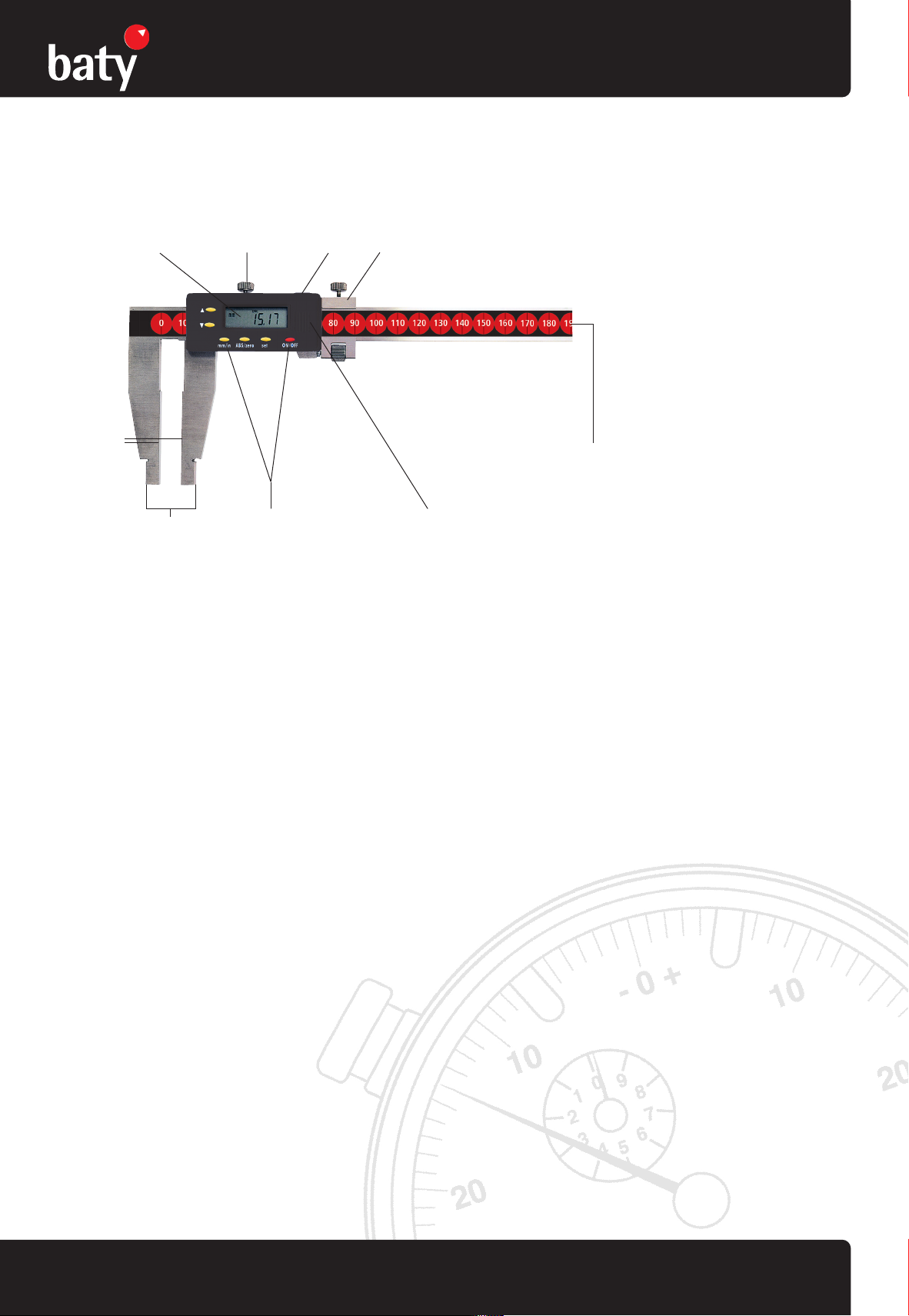
Large Digital Workshop Caliper
Please carefully review these instructions to ensure proper and accurate use of your new Digital Caliper.
Locking screw Fine Adjustment Slider
External
Measuring
Jaws
Data OutputElectronics
Model shown: DC-60
Scale
Battery coverFunction buttonsInternal Measuring Jaws
Instructions:
• Operating Condition: Temperature: 5 - 40º, Relative Humidity: ≤ 80%
• Never apply voltage on any part of this Digital Caliper or engrave with an electro probe to avoid damaging the electronics
• Prevent any liquid from contacting the protective sticker
• Preset a starting point of measurement correctly (please refer to Operations). Unless presetting, do not press the 'SET' button purposely for
fear of measurement error
Functions:
• ON/OFF: Press <ON/OFF> button once to turn on. Press this button again to turn off
• Zero setting: Press <ZERO> function button
• Change measuring mode: Press <mm/in> function button
• Absolute/incremental: Press<ABS> button, to return to zero function, press this button again
• Set: Presetting button
• Hold: data hold button
Technical Specifications:
Resolution: 0.01mm/0.0005"
Accuracy: 0-600mm/±0.07mm
Repeatability: 0.01mm/0.0005"
Battery: 3.0V CR2032 Lithium
Battery life: Approx 1 year
Measuring speed: 3m per second
Instructions for Data Output:
• Preset zero and metric/inch system
• Connect the end of the interface cable to the computer, the other to the data output port of this Caliper
• Start the Caliper and software
• Move the slider to the position you want and press the button on control box for data output
Battery Replacement:
Once display begins flashing or even no display, slide the cover open as the arrow shows and replace with a new battery (CR 2032)
Note:
• The positive pole of the battery must face out.
• Please preset the starting point over again after battery replacement
For more information visit www.baty.co.uk precision measuring instruments
Page 2

DIGITAL CALIPER INSTRUCTIONS
Large Digital Workshop Caliper
Operations:
ON/OFF Button
• Press ON/OFF button at any position when the power is off, this Caliper will be ready to work and display the measuring value
• Press ON/OFF at any position when the power is on, this Caliper will switch off
ABS/INC Button
• Press ABS button in absolute mode (without "ABS"), this Caliper is ready for absolute measurement
• Press ABS button in relative mode (with "ABS" displaying), this Caliper is ready for relative measurement and simultaneously displays
"ABS", showing relative mode.
• Press ABS at any position for relative/absolute measurement interchange
ZERO Button
• In relative mode, press ZERO button to set the current point to zero and this Caliper will display zero
• In absolute mode, press ZERO button to set the current point to the preset value and this Caliper will display this value
mm/in Button
• Press mm/in button at any position for metric/inch conversion
Set Button and Internal Measuring (Easy one touch set)
• For presetting a starting point (the value has been preset to zero in the factory)
• With each one press on this button at any position, the current point is set to the preset value and displays on the LCD.
The details are as follows:
No. of
times
pressed Preset value
1 0.5"/12.7mm optional measuring
2 0.8"/20.32mm optional measuring
3 1"/25.4mm for optional measuring
4 2"/50.8mm for optional measuring
5 3"/76.2mm for optional measuring
6 4"/101.6mm for optional measuring
7 5"/127mm for optional measuring
8 6"/152.4mm for optional measuring
9 0.3935"/10mm for optional measuring
10 0.7870"/20mm for optional measuring of 600mm calipers
11 0.9840"/25mm for optional measuring
12 1.9685"/50mm for optional measuring
13 0 standard, after internal and optional measuring, please set for normal measuring
• The process is circulative. The preset value is held even after powering off.
HOLD Button
• Press "H" button at any position, this Caliper will hold the value as before and display "H" on the LCD. The data will not change even if
you move the slider
• Press "H" button once again to release hold state (no character "H" displays), then this Caliper displays the measured value
Restart this Caliper after powering off by pressing ON/OFF button, it will keep the last state (mm/in, ABS/INC, SET).
For more information visit www.baty.co.uk precision measuring instruments
 Loading...