

Page 1

1
© 2011 BOSS Corporation U.S.
All rights reserved. No part of this publication may be reproduced in any form without the
written permission of BOSS Corporation U.S.
BR80WS03
Workshop
MICRO BR® BR-80 Digital Recorder
Record
Page 2
2
About the BOSS MICRO BR® BR-80 Workshop Booklets
The BOSS MICRO BR® BR-80 is an awesome portable tool for any songwriter
or musician, especially if you’re a guitarist. Packed into its convenient,
pocket-sized body are three incredibly useful tools: a stereo recorder for
capturing ideas and live sounds using the high-quality built-in mics, an
eight-track multitrack recorder for developing your songs, and an irresistibly
fun eBand jamming system. The BR-80 also contains a library of acclaimed
BOSS COSM® amps and effects, as well as tons of rhythms you can use in your
songs. If you’re a computer user, the BR-80 can serve as an effect-packed
USB audio interface for your recording software, and it comes with a copy of
SONAR X1 LE for Windows.
Each MICRO BR® BR-80 Workshop booklet focuses on one topic, and is
intended as a companion to the MICRO BR® BR-80 Owner’s Manual.
About This Booklet
Though it’s also an eight-track recording studio, one of the great things
about the BR-80 is how it can be turned instantly into a straight-ahead
stereo recorder for quickly grabbing song ideas and the sounds of your life.
This booklet explains how to get the most from the BR-80’s LIVE REC mode.
Understanding the Symbols in This Booklet
Throughout this booklet, you’ll come across information that deserves
special attention—that’s the reason it’s labeled with one of the following
symbols.
A note is something that adds information about the topic at hand.
A tip offers suggestions for using the feature being discussed.
Warnings contain important information that can help you avoid
possible damage to your equipment, your data, or yourself.
What We’ll Talk About Here
In the Getting to Know the BR-80 Workshop booklet, we introduced you to
using the BR-80 as a stereo recorder in LIVE REC mode. Here we’re going to
dig in a bit, reviewing the basics, and discussing:
• recording options—since the BR-80 allows you to record various types
of audio files.
• the LIVE REC metronome—to help maintain a steady beat in your LIVE
REC songs.
• playback modes—that let you play back LIVE REC songs in various ways.
• recording tips—that’ll help you get the best LIVE REC songs possible.
• how to manage LIVE REC songs—naming them, loading them, and
erasing them, if need be.
• how to use LIVE REC songs—on your computer, sharing them with
friends, or using them as the basis of BR-80 eight-track recordings.
The BR-80 refers to each LIVE REC recording as a “song,” whether it’s a
fragment, a sound effect, or anything else recorded in LIVE REC mode.
You can fill up as many BR-80 SD cards with LIVE REC recordings as
you like.
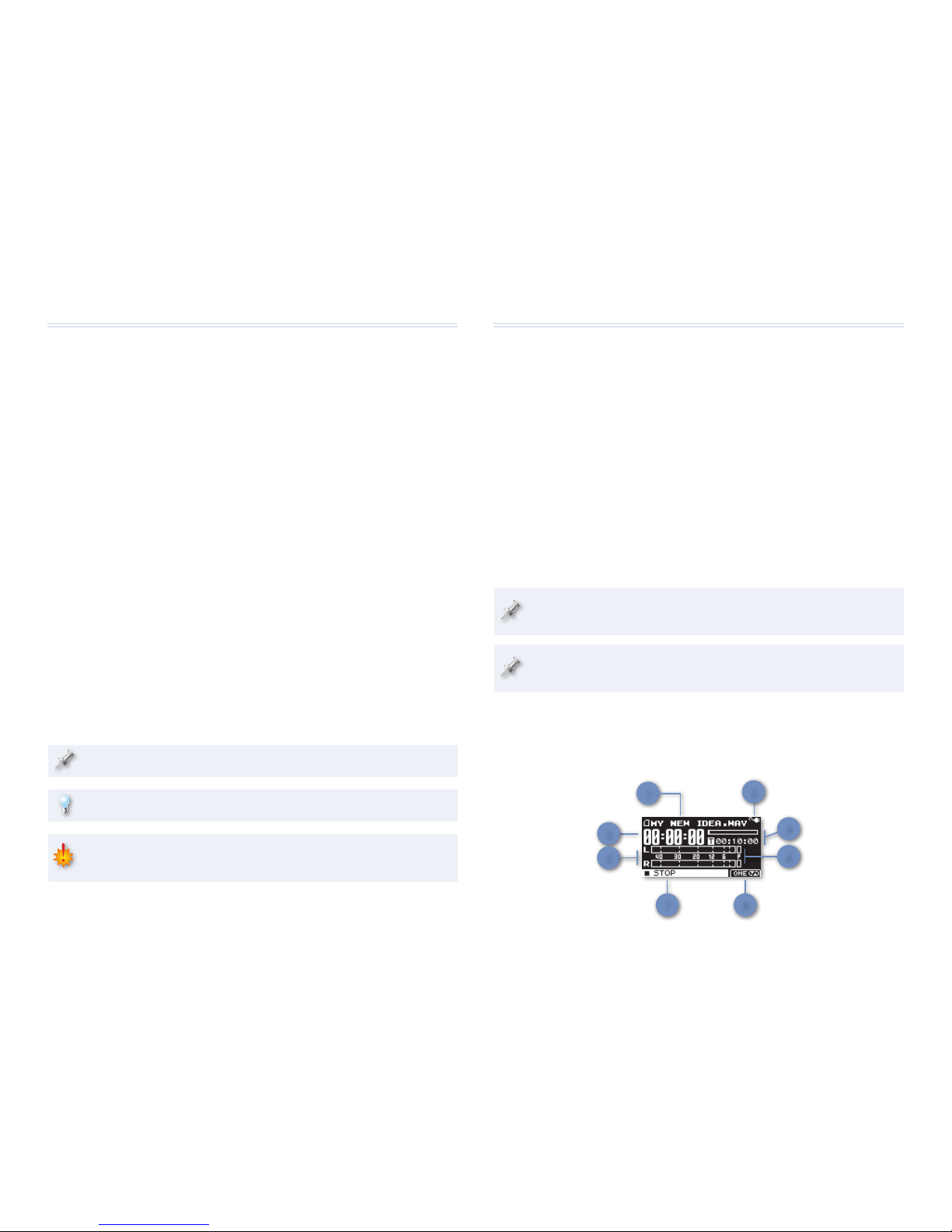
Understanding the LIVE REC Home Screen
The LIVE REC home screen provides lots of information you may find useful.
Here’s what’s what on the screen:
7 8
3
1
2
5
6
4
Page 3
3
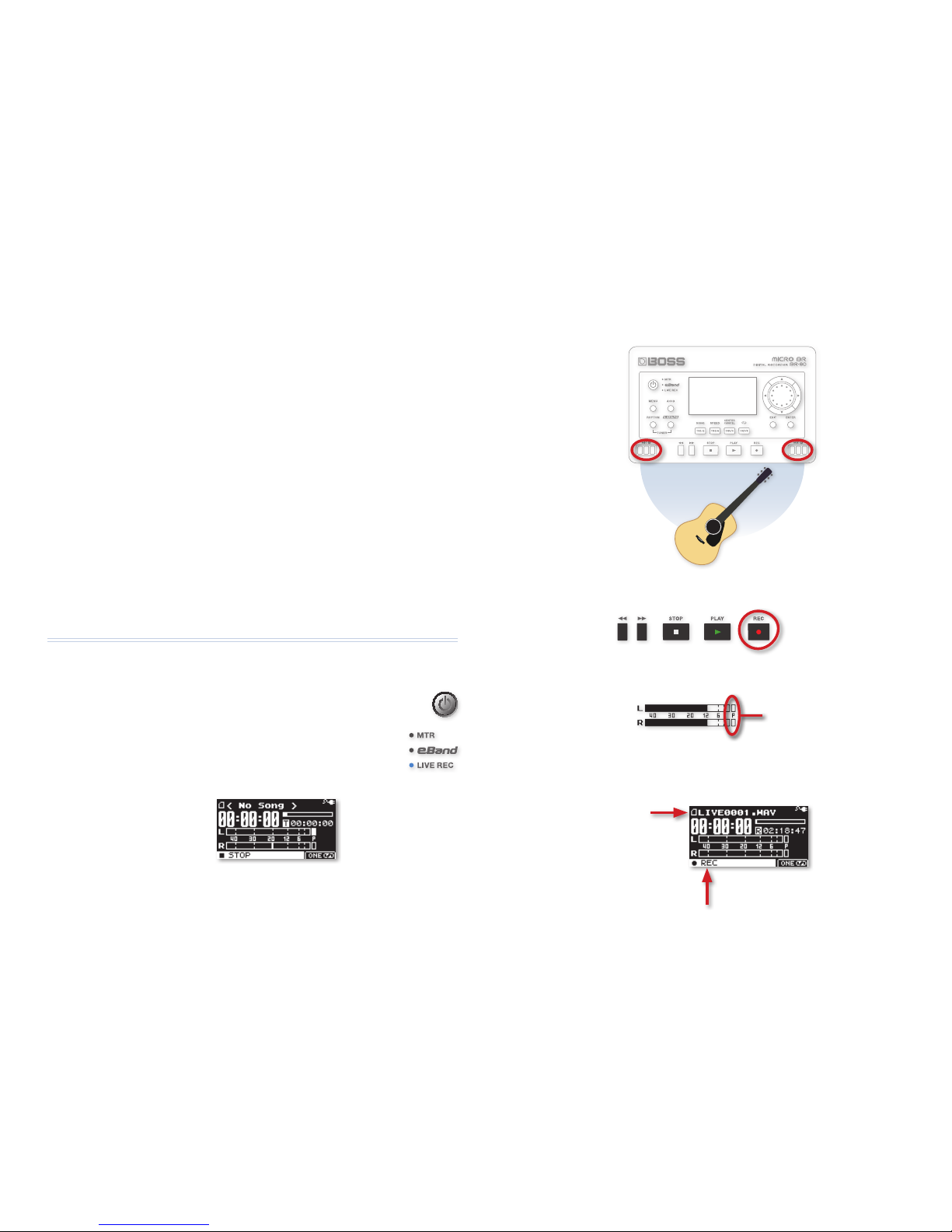
3 Point the BR-80’s two built-in mics in the direction of whatever it is
you want to record. (We’ll give you some miking tips on page 6.)
4 Press the BR-80’s REC button so it flashes.
5 Turn the REC LEVEL wheel on the BR-80’s right edge so your onscreen
level is as loud as possible without lighting the Peak indicators.
Peak
Indicators
The words “REC” and “STANDBY” alternate in the status-message area
to show you’re in Record Standby mode, and the BR-80 automatically
names the song you’re about to record.
“REC” alternates with “STANDBY.”
The new
song’s name
1 Name of the current LIVE REC song—during recording and playback.
(Before recording your first LIVE REC song, this shows “No Song.”)
2 Power indicator—that shows an AC-plug icon when you’re using a
Roland PSA-series AC adapter (purchased separately) or a battery
icon that shows the strength of your installed batteries’ charge.
3 Your location—in the current song, in hours, minutes, and seconds.
4 Time bar and numeric readout—that during
• recording—show the remaining recording time available on the
installed SD card.
• playback—shows your location in the song with the time bar,
and the length of the song with the readout.
5 Input meters—show you your recording level as you play, sing, etc.
6 Peak indicators—light when your recording level is too loud.
7 Status message—tells you the current state of the BR-80’s recorder.
8 Playback mode indicator—that shows your current playback mode.
(More on playback modes later.)
Recording in LIVE REC Mode: A Quick Review
LIVE REC mode is the mode in which the BR-80 operates as a two-track
stereo recorder. To get into LIVE REC mode:
1 If it’s not already turned on, turn on the BR-80 by holding
down its Power button for a few seconds.
2 If the LIVE REC indicator isn’t already lit, touch the
Power button briefly once or twice to enter LIVE REC
mode and light the LIVE REC indicator—the LIVE REC
home screen appears.
Page 4

4
Using the LIVE REC Metronome
To record along with the metronome:
1 On the LIVE REC home screen, press RHYTHM to display
the METRONOME window and turn the metronome on.
You can toggle the metronome on and off using the RHYTHM button.
Select a metronome setting you want to adjust using the 3 and 4
buttons, and turn the Value dial to set its value.
• BEAT—sets the time signature the metronome uses.
• TEMPO—sets the speed of the metronome, in beats per minute.
• LEVEL—sets the volume of the metronome.
• REC—determines whether or not the metronome’s recorded
along with your audio. (Unless you want the metronome sound
as part of your recording, set this to OFF.)
When the metronome’s on, you hear a ding at the start of each
measure. To turn the ding off, set the left digit of the BEAT value to 0
by selecting 0/1, 0/2, 0/4, or 0/8.
After Recording: Name Your Song
We recommend naming your new song right away, so you don’t forget what
it is and have difficulty finding it later on. Here’s how to do this.
1 On the LIVE REC home screen, press the MENU button to
display LIVE REC mode’s Menu screen.
6 Press the PLAY 4 button to begin recording—the status message
shows “REC” as you record.
7 When you’re done recording, press STOP —the display looks
something like this.
The recording’s title
8 To hear the new song, press PLAY 4 , and then press STOP when
you’re done listening.
The LIVE REC Metronome
The BR-80 provides a built-in metronome as a rhythm guide
for you as you record in LIVE REC mode. (The metronome
can be recorded if you like.) You won’t need a metronome for
some situations—such as recording sound effects or a freetempo music idea that doesn’t involve a beat—but it’s a very
important tool when you’re recording
• a full song per formance—since it’ll keep your tempo steady, something
you’ll want for many musical styles.
• a song fragment—since you never know when a quick LIVE REC
recording will sound so good you decide to use as an element in a fully
arranged song in MTR mode. Recording along with the metronome
makes it easy to lay the resulting LIVE REC recording into an MTR song
at the exact location you need it to be. Some editing tools in MTR mode
also use bars and beats to identify song sections for editing, and using
a metronome allows you to take full advantage of these tools.
BOSS DB-90
Page 5

5
Playing Back Songs in LIVE REC Mode
Loading LIVE REC Songs
So far, we’ve talked about recording and playing back a LIVE REC song you’ve
just recorded. Here’s how to load and play a previously recorded song that’s
stored on your SD card.
1 On the LIVE REC home screen, turn the Value dial to select the song
you want to hear—the selected song’s name appears at the top of
the screen.
Playback Mode
The BR-80 can play back a song in quite a few ways. To toggle between the
various playback modes, press the TR7/8 button.
The current playback mode is shown in the lower right corner of the screen.
If you see: the BR-80 plays
the currently selected LIVE REC song over and over.
each of the LIVE REC songs on your SD card once,
starting with the current song.
all of your LIVE REC songs through once, and then
again until you hit the STOP button.
a random selection of your LIVE REC songs one time
each.
a random and repeating selection of your LIVE REC
songs.
the currently selected song once through.
2 Highlight SONG—as shown above, and then press ENTER to display
the Menu > Song screen.
3 Highlight the INFO icon as shown at the bottom of the previous page,
and then press ENTER to show the song’s information.
4 With the Song name highlighted, press ENTER again to reveal the
SONG NAME screen.
5 Turn the Value dial to select the first character of your
song’s new name.
6 Press the 4 button to select the second character
position, and turn the Value dial to select the desired
second character for the new name.
7 Repeat Step 6 until you finish naming your song.
8 Press ENTER when you’re done, and then ENTER again to confirm
your intention and complete the procedure.
Page 6

6
There are two things to consider. Try to:
• aim the BR-80 and its mics properly at the sound source
• choose the best distance from the sound source
Take Aim
First of all, remember that the BR-80 mics are on the face of the BR-80, not its
sides—the mics take in sound most directly at the top of the BR-80. To aim
the BR-80 properly, think of its mics as being its ears.
Finding the best position for the BR-80:
1 Listen to whatever it is you want to record. Try closing your eyes—so
you’re not distracted by what you see or what you assume to be the
best location—and move around until you like what you hear.
2 When you’ve got the best spot, try to position the BR-80 so that it’s as
close to that location as possible.
It’s perfectly okay to record with the BR-80 on its edge propped up
against something if that’s wher e you find the best sound. You can
record with it in any position.
When you’re capturing a far-away sound, the optimal position for the
BR-80 is harder to p redict. Your best bet is to try a few test recordings
and see what you get.
LIVE REC Mode Recording Tips
Selecting the Best File Format
The BR-80 can record a few different kinds of 44.1 kHz audio files. By default,
it records .WAV files. To see your options or change file types:
1 On the LIVE REC home screen, press the MENU button.
2 Highlight the WAV/MP3 REC SETUP icon, and then press
ENTER to show the REC SETUP screen.
3 Turn the Value dial and select
• WAV—to record uncompressed 16-bit .WAV LIVE REC songs. This
is the default setting, and gets you the best audio quality.
• MP3–64kbps—to record MP3 files at a 64-bit rate. While this is
the lowest-quality setting, 64-bit MP3s take up the least amount
of space, allowing you to fit more songs on your SD card.
• MP3–128kbps—to increase the sound quality a bit while still
saving storage space.
• MP3–192kbps—to record songs at the same quality you get
from most MP3 download services, but taking up more space.
• MP3–320kbps—to record MP3 songs at the highest quality.
These songs are slightly smaller and more space-efficient than
plain uncompressed .WAV files, and with just slightly less quality.
4 Press EXIT twice when you’re done to return to the home screen.
Getting the Most from the BR-80 Mics
The BR-80’s built-in mics are high-quality mics, making it pretty easy to make
great LIVE REC recordings. Other than setting your recording level correctly,
the single biggest factor in getting the absolute best sound is how you
position the mics in relation to whatever it is you’re recording.
Page 7

7
Using LIVE REC Songs
Of course you can simply play back LIVE REC songs in LIVE REC mode to
study them, learn them, or just enjoy them. But here are some other things
you can do with your LIVE REC recordings.
Playing LIVE REC Songs in eBand Mode
In eBand mode—which we discussed at length in the Jam BR-80 Workshop
booklet—you can find all of the LIVE REC songs on your SD card in the eBand
song list. This allows you to listen to your recordings and sing or play along.
1 Press the SONG•TR1/2 button in eBand mode and turn the Value dial
or press 6 down to find the LIVE REC songs on your SD card.
2 Press ENTER, and then select the desired song.
3 Press ENTER again to load the song.
Using LIVE REC Songs on Your Computer
Your LIVE REC files are .WAV files—by default—or MP3 files, either of which
can be handled by:
• iTunes or a similar program—You can listen to your LIVE REC songs, and/
or transfer them to your personal music player, or burn audio CDs of
them.
• standalone CD-burning programs—These programs allow you to burn
audio CDs of your LIVE REC songs.
• email and browser programs—You can email or post LIVE REC songs
online.
• DAWs (“Digital Audio Workstations”)—You can use your LIVE REC song in
DAW arrangements.
• audio editing programs—You can trim, chop up, or otherwise process
your LIVE REC song in one of these applications.
Up Close or Far Away
Moving close to your sound source or far away lets you affect a few things
sonically :
• level—The closer to the sound source you are, the louder it is. If you’re
recording something so loud that it’s too loud for the BR-80 even with
the REC LEVEL wheel turned all the way down, move away a bit.
• the proximity effect—As you move closer to the sound source, the more
of its low-frequency content, or bass, you’ll get.
• ambience—The closer you are to the sound source, the more you
capture its sound alone. The further back you are, the more you get the
sound of the room or space it’s in.
The same things happen with your ears, but who thinks of these things
as we go through life?
Erasing LIVE REC Songs
If you’d like to clear a LIVE REC song from your SD card to free up space, or
just be done with it:
1 Select the song you want to erase on the LIVE REC home screen.
2 Press the MENU button to display the LIVE REC Menu screen.
3 Highlight SONG if it’s not already selected, and then press ENTER.
4 Highlight ERASE, and then press ENTER to display the
SONG ERASE screen
5 When the BR-80 asks if you’re sure you want to proceed, press ENTER.
6 Press ENTER to complete the process, or EXIT to cancel it.
Page 8

8
Incorporating a LIVE REC Song in MTR Mode
You can use a LIVE REC song as the basis of a new song in MTR mode, or
incorporate it into an existing song. Either way, the way you do this is to
import your stereo LIVE REC recording onto a pair of the MTR song’s tracks.
If you want to import a LIVE REC recording into an existing song,
the song and your LIVE REC recording have to use the same tempo—
otherwise, they won’t be able lock together rhythmically.
1 In LIVE REC mode, select the song you want to use.
2 Press the RHYTHM button to make note of the tempo of the
song—assuming that you recorded it with the metronome as we
suggested—and then press EXIT.
3 Briefly touch the Power button once to switch into MTR mode.
4 Create a new song that uses the tempo from Step 2 above, or load
the MTR song into which you want to import the LIVE REC song.
Creating a new song and loading one are described on page 57 of the
Owner’s Manual. To see or set a song’s tempo, press RHYTHM after you
create or load the song and dial in the desired tempo.
5 Press the MENU button to show MTR mode’s Menu screen.
6 Highlight the TRACK EDIT icon—shown above—and then press
ENTER.
7 Highlight the IMPORT icon, and then press ENTER to
display the TRACK IMPORT screen.
To move a LIVE REC song to your computer, you’ll need to connect the BR-80
to your computer via USB, as explained on page 4 of the Jam BR-80
Workshop booklet. (If your computer can read SD cards, you can also grab
LIVE REC files directly from the card, if you prefer.)
Once you’ve got the BR-80 (or SD card)
mounted on your computer as a removable
drive, here’s how to find your LIVE REC songs.
In this booklet, we’re going to assume you know how to use your
computer. If you don’t, please consult its documentation as needed.
1 Double-click your BR-80 icon on your computer to reveal the
ROLAND folder inside.
2 Double-click the ROLAND folder to reveal its contents.
(You may not see
all of the files
shown here.)
3 Double-click the LIVEREC folder to display your LIVE REC songs.
4 Drag the song you want to copy to your computer’s desktop or some
other location of your choosing.
Page 9

9
The End
We hope you’ve found this workshop helpful. Keep an eye out for other
MICRO BR® BR-80 Workshop booklets available for downloading at
www.Rolandus.com.
8 Set SOURCE to LIVE REC CURRENT SONG, as shown above.
9 Press 6 once to highlight the track value, and then turn the Value
dial to select a stereo pair of tracks for your LIVE REC song—TR12,
TR34, TR56, or TR78.
10 Press 4 once to highlight the V-Track value, and turn the Value dial
to select the V-Tracks for your LIVE REC song.
If you’re importing your LIVE REC song into an already-existing song,
pay attention to the two square boxes to the right as you dial in V-Track
values—the boxes represent the selected V-Tracks on the left and
right side of your stereo pair of tracks. If a V-Track you selec t already
contains a recording, its box is filled in. If not, it hasn’t yet been used.
Be careful: If you import your LIVE REC song somewhere that already
contains data, it’ll replace that older data.
11 Press ENTER to display the second TRACK IMPORT screen. This
screen is where you choose the time location at which the LIVE REC
recording is placed.
12 You can set TYPE to
• TIME—to choose the LIVE REC song’s placement by hours,
minutes, seconds, and hundredths of a second.
• MEASURE—to choose its location by bars and beats. This is the
easiest way to precisely position your LIVE REC recording, and
one of the reasons we suggested you record in LIVE REC mode
using the metronome.
13 Set the TO parameter to the desired location at which your LIVE REC
song is to be imported.
14 Press ENTER—when the BR-80 asks if you’re sure you want to proceed,
press ENTER again to finish the operation, or EXIT to cancel it.
 Loading...