

Page 1
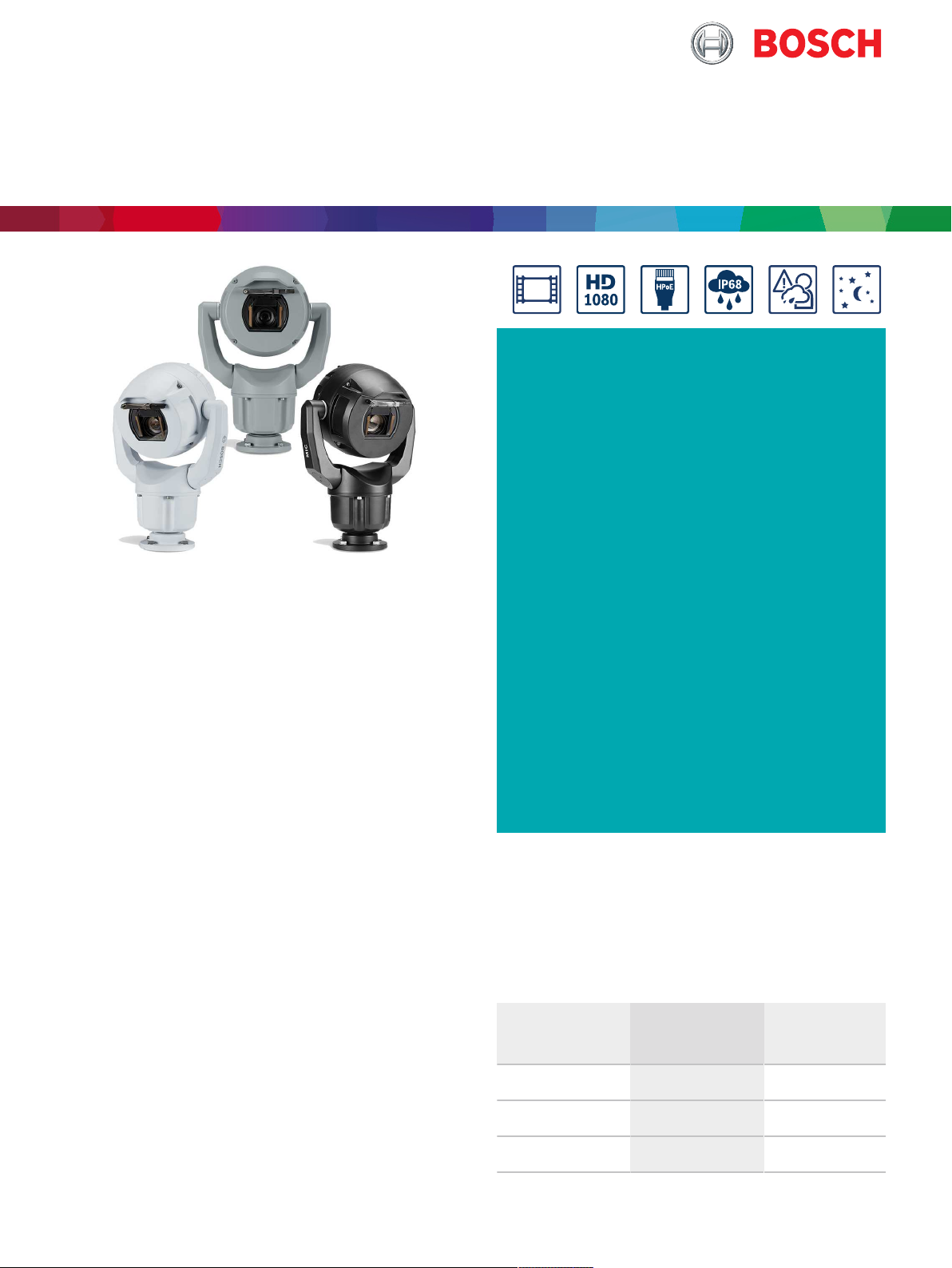
Video - MIC IP starlight 7100i
H.265
MIC IP starlight 7100i
u Starlight camera technology with excellent low-
light sensitivity (color = 0.0047 lx) and High
dynamic range (120 dB) (to see details in bright
and dark areas simultaneously)
u Exceptional strength and ruggedness for any
outdoor application including traffic monitoring
(bridges, tunnels, or highways), perimeter
protection, city surveillance, and mining
The MIC IP starlight 7100i camera is an advanced PTZ
surveillance platform for mission-critical applications.
With starlight imaging technology and excellent lowlight sensitivity, the camera is the perfect solution for
robust and high-quality imaging needs.
The camera’s ruggedized design meets customer
expectations in demanding environments that exceed
the capabilities of conventional IP cameras. Even in
installations subject to harsh shock/vibration
conditions and/or extreme weather, the camera
provides high-quality video images.
The camera is the ideal choice for:
• Transportation: highways, bridges/tunnels, and
ports
• Critical infrastructure: power generation/
transmission, refineries/pipelines, and mining
• High-security: government facilities and data
centers
u Built-in CameraTrainer to train the camera to
recognize user-specified target objects, such as
moving and non-moving objects, to alert
operators of unusual scene activity
u Edge intelligence with Intelligent Tracking and
object detection even when the camera is
moving
u Optional illuminator with multispectral LEDs
that distribute IR light uniformly in the field (up
to 550 m (1804.50 ft)) to avoid dark spots or an
over-illuminated scene
• Mission-critical applications involving harsh
environments that require high-resolution imaging
• Complex scenes with many details under any
lighting condition
• Installations where downtime is undesired because
of high service costs
The table that follows identifies the differences
between the basic models and the enhanced models.
Feature Enhanced models
(MIC-7522-Z30BR, -
WR, -GR)
Anti-backlash drive train
Window defroster
Local storage (SD card)
X
X
X
Basic models
(MIC-7522-Z30B, -
W, -G)
Page 2

Video - MIC IP starlight 7100i
2 | 14
Functions
cold as -25 °C (-13 °F). The defroster starts
automatically at <= 5 °C (41 °F). Even in very cold
Exceptional low-light performance
The latest sensor technology combined with the
sophisticated noise suppression results in an
exceptional sensitivity in color. The low-light
performance is so good that the camera continues to
provide excellent color performance even with a
minimum of ambient light.
High dynamic range
The dynamic range of the camera is outstanding and is
obvious in real-world performance comparisons. In
extended dynamic range mode, the camera uses an
electronic shutter to capture four images with
different exposure time and reproduce a high-contrast
frame. The result is that you can view details in both
the bright areas (highlights) and the dark areas
(shadows) of a scene at the same time. You can easily
distinguish objects and features (for example, faces)
with bright backlight.
Ruggedized design for extreme applications
The camera is designed to last in surveillance
applications that are beyond the mechanical
capabilities of conventional positioning systems. The
entire metal body is anodized and has been
engineered to withstand high-impact, low-frequency
vibration. The camera models comply to IK10 rating
for impact resistance and to the IEC 60068 standards
applicable to vibration and shock.
The camera has a closed-loop positioning system. The
system allows the camera to maintain its position
under continuous vibration or after an extreme shock
event, even without homing or pre-position
calibration.
The camera benefits from Bosch domain knowledge in
material engineering and coatings. As a result, the
superior metallurgy and the finish of the camera
provide unprecedented protection against corrosion.
environments, where other cameras suffer from
frosted windows, the enhanced MIC models let you
see more and see better.
Both the defroster and the IP67 kit, correctly installed
on the connectors in the camera base, help to
decrease condensation on the camera window.
Note: This feature is available on enhanced models
only.
Robust design rated to an industry-leading IP68,
Type 6P, IK10
Subjected and certified to rigorous dust and
immersion tests (IP68, Type 6P) and impact test
(IK10), MIC cameras are perfectly suited for
installation in even the most unforgiving
environments. Anodized aluminum housing and
robust, powder coat paint give unequalled corrosion
protection to each MIC camera. Reliable O-ring seals
completely protect the internal components from the
external environment, meaning that there is no need
to pressurize the camera. To guarantee unit integrity,
the factory tests each MIC camera for leaks before
shipping.
Pan and tilt drive mechanism
The pan and tilt mechanism is a ruggedized, directdrive system. The brushless motors directly control
the pan and tilt movement using a finely-tuned gear
train designed to minimize backlash and support
continuous operation without significant wear and
tear.
Note: The anti-backlash drivetrain is available on
enhanced models only.
With a full 360º continuous rotation pan and 290º tilt
control (on upright models without illuminators) and
super-quick pan (120°/second) and tilt (90°/second)
for exceptional viewing capability, the camera
outperforms other cameras in its class.
The camera has been tested to and meets the ISO
12944:6 standard C5-M - very high (marine) on
Aluminum Housing Components.
Snap to zoom
Drawing a box in the image will trigger the camera to
zoom to the correct position.
Defroster on the viewing window
For installations in environments where ice build-up or
condensation is a possibility, the enhanced MIC
models have an automatic defrosting function. The
inside of the camera window has a transparent
coating that puts heat directly on the glass. The heat
on the glass helps to decrease and to prevent a buildup of ice as well as condensation on the camera
window.
Dual-mode Illumination
The MIC illuminator accessory (sold separately) has IR
LEDs and White light LEDs. The illuminator is fieldinstallable.
Note: The cameras in this product family are
compatible with MIC-ILx-400 models only. The
distances and the performance depend on the
environmental light conditions.
Based on the same technology used to de-ice aircraft
windscreens, the defroster can melt 1 cm (0.4 in.) of
accumulated ice in five minutes in environments as
Represented by:
Europe, Middle East, Africa: Germany: North America: Asia-Pacific:
Bosch Security Systems B.V.
P.O. Box 80002
5600 JB Eindhoven, The Netherlands
Phone: + 31 40 2577 284
[email protected]
emea.boschsecurity.com
Bosch Sicherheitssysteme GmbH
Robert-Bosch-Ring 5
85630 Grasbrunn
Germany
www.boschsecurity.com
Bosch Security Systems, LLC
130 Perinton Parkway
Fairport, New York, 14450, USA
Phone: +1 800 289 0096
Fax: +1 585 223 9180
[email protected]
www.boschsecurity.us
Robert Bosch (SEA) Pte Ltd, Security Systems
11 Bishan Street 21
Singapore 573943
Phone: +65 6571 2808
Fax: +65 6571 2699
[email protected]
www.boschsecurity.asia
Data subject to change without notice | 202104091833 | V9 | April 09, 2021 © Bosch Security Systems 2021
Page 3

Video - MIC IP starlight 7100i
3 | 14
The following table identifies the application for each
type of LED.
Application
Close-range illumination
Long-range detection
Identification and deterrent
Type of illuminator
940 nm IR LEDs
850 nm IR LEDs
White light LEDs
The MIC camera can steer the IR beam dynamically to
match the illumination intensity with the camera’s
field of view according to the zoom level.
Beam intensity is controlled automatically or manually,
depending on user preference. Decreasing intensity
reduces overexposure.
The patented, integrated Constant Light technology
delivers a consistent level of illumination performance
throughout the life of the product, even in fluctuating
temperatures.
White light mode allows operators to capture full
scene details in color or use the light as a deterrent
effect.
H.265 high-efficiency video encoding
The camera is designed on the most efficient and
powerful H.264 and H.265/HEVC encoding platform.
The camera is capable of delivering high-quality and
high-resolution video with very low network load. With
a doubling of encoding efficiency, H.265 is the new
compression standard of choice for IP video
surveillance systems.
Intelligent streaming
Smart encoding capabilities, together with Intelligent
Dynamic Noise Reduction technology and analytics,
reduce the bandwidth consumption to extremely low
levels. Only relevant information in the scene, like
motion, or objects found with the analytics, need to
be encoded.
The camera is capable of quad streaming which allows
the camera to deliver independent, configurable
streams for live viewing, recording, or remote
monitoring via constrained bandwidths.
Recording and storage management
Control recording management with the
BoschVideoRecordingManager application, or use
the local storage and iSCSI targets in the camera
directly without any recording software.
Use a memory card of a maximum of 2 TB for
recording "at the edge" or for Automatic Network
Replenishment (ANR) technology to improve the
reliability of the recording.
Pre-alarm recording in RAM reduces bandwidth
consumption on the network and extends the
effective life of the memory card.
Note: The memory card feature is available for
enhanced models only.
IntelligentVideoAnalytics on the edge
The camera includes the latest release of
IntelligentVideoAnalytics application for use on prepositions.
Designed for mission-critical applications, the video
analytics can reliably detect, track, and analyze
moving objects while suppressing unwanted alarms
from spurious sources in the image, even in harsh
weather conditions.
Advanced tasks like multiple line crossing, loitering,
idle / removed object detection, crowd density
estimation, occupancy and people counting are
available for live alarming and forensic search. Object
filters based on size, speed, direction, aspect ratio,
and color can be defined.
A simplified calibration mode reduces installation time
significantly, because you only need to enter the
installation height once for each camera, independent
of pre-positions.
After the camera is calibrated, the analytics engine
can automatically classify objects as upright person,
car, bike, or truck.
Support for specific use cases
The video analytics software offers easy setup by
providing optimal default values for several
applications. Calibrate the camera, then simply select
the desired use case and adapt the offered alarm
fields and lines to your field of view. This is available
for the following scenarios:
• Intrusion detection: small area, single alarm field
• Intrusion detection: long distance, two alarm fields
have to trigger
• People counting
• Traffic monitoring: wrong way detection
• Traffic monitoring: automatic incident detection
with wrong way detection, pedestrian detection,
slow vehicles, stopped vehicles and dropped
objects
Video Analytics while camera is moving
Outside of pre-positions and even while the PTZ
camera is moving, whether on guard tours or
manually, the IntelligentVideoAnalytics application
can detect and start alarms when objects are in alarm
fields. These alarm fields are defined once across all
PTZ camera views. The camera can automatically
Represented by:
Europe, Middle East, Africa: Germany: North America: Asia-Pacific:
Bosch Security Systems B.V.
P.O. Box 80002
5600 JB Eindhoven, The Netherlands
Phone: + 31 40 2577 284
[email protected]
emea.boschsecurity.com
Data subject to change without notice | 202104091833 | V9 | April 09, 2021 © Bosch Security Systems 2021
Bosch Sicherheitssysteme GmbH
Robert-Bosch-Ring 5
85630 Grasbrunn
Germany
www.boschsecurity.com
Bosch Security Systems, LLC
130 Perinton Parkway
Fairport, New York, 14450, USA
Phone: +1 800 289 0096
Fax: +1 585 223 9180
[email protected]
www.boschsecurity.us
Robert Bosch (SEA) Pte Ltd, Security Systems
11 Bishan Street 21
Singapore 573943
Phone: +65 6571 2808
Fax: +65 6571 2699
[email protected]
www.boschsecurity.asia
Page 4

Video - MIC IP starlight 7100i
4 | 14
trigger an alarm if any part of a field within the
camera's view becomes active while on a guard tour
sweeping across the monitored areas.
CameraTrainer
Based on examples of target objects and non-target
objects, the new CameraTrainer program uses
machine learning to allow the user to define objects of
interest and generate detectors for them. In contrast
to the moving objects that the Intelligent Video
Analytics application detects, the CameraTrainer
program detects both moving and non-moving objects
and classifies them immediately. Using Configuration
Manager, you can configure the CameraTrainer
program using both live video as well as recordings
available through the respective camera. The resulting
detectors can be downloaded and uploaded for
distribution to other cameras.
A free of charge license is required to activate the
CameraTrainer program.
Intelligent Tracking
When the IntelligentVideoAnalytics application in the
camera detects objects or individuals, the camera can
automatically activate the Intelligent Tracking feature,
which controls the pan/tilt/zoom actions of the
camera to track objects and keep them in view.
The newest generation of the Intelligent Tracking
feature ensures smoother camera motion for more
comfortable viewing and more reliable tracking of
objects even under challenging scenes.
Areas with potentially interfering background motion
(moving trees, pulsating lights, and busy roads) can
be masked out.
The camera supports 2Intelligent Tracking modes:
• Auto mode: In this mode, the camera follows any
object that has triggered an alarm in the
IntelligentVideoAnalytics application. This mode is
most useful for scenarios where the alarm cases
can be clearly defined, for example, when no
motion is expected at all.
• Click mode: In this mode, users can click on any
object detected by the IntelligentVideoAnalytics
application to enable the camera to track the
movement of the selected object. This mode is
most useful for scenarios where normal scene
activity is expected.
Image Stabilization
Cameras on unstable mounts can move sufficiently to
change the field of view. The higher the zoom value,
the larger the change of the field of view. This change
can make images unusable.
The camera has an Image stabilization algorithm that
lets the camera sense continuous vibration. If it
detects vibration, the camera corrects the shaky video
in the vertical axis and the horizontal axis. The result
is excellent image clarity and a stable field of view on
the monitor. The Image stabilization function is
important to eliminate movement that unstable
camera mounts cause.
Simple set-up
The camera has a very intuitive user interface that
allows fast and easy configuration. Configurable scene
modes are provided with the best settings for a
variety of applications.
• Standard
This mode is optimized for most standard scenes both
indoor and outdoor.
• Sensitivity boost
This mode provides maximum sensitivity in low light
scenes by using longer exposure times, resulting in
bright images even in extreme low light.
• Fast movement
This mode is used for monitoring fast moving objects
like cars in traffic scenes. Motion artifacts are
minimized and the image is optimized for a sharp and
detailed picture in color and monochrome.
• Vibrant
This mode provides a more vivid image with increased
contrast, sharpness, and saturation.
• Color Only (Traffic)
In this mode, the camera does not switch to
monochrome mode at low light levels. The mode is
optimized to minimize motion artifacts and to capture
the color of vehicles/pedestrians and traffic lights,
even at night, for scenarios such as city surveillance
and traffic monitoring.
• Illuminator
This mode gives optimized performance when using
the MIC illuminator accessory.
Custom mode #1 and Custom mode #2 give users the
option to customize 2 scene modes of their own.
Auto Exposure (AE) region and Focus region
With the Auto Exposure (AE) function, the camera
computes the lighting condition of the entire scene.
Then the camera determines the optimum level of iris,
gain, and shutter speed.
In AE region mode, users can designate a specified
area of the scene, based on pre-positions. The camera
computes the lighting condition of the specified area.
Then the camera determines the optimum level of iris,
gain, and shutter speed to get an image.
Focus region mode, unlike normal auto focus mode,
allows users to focus on a specified area of the scene.
Represented by:
Europe, Middle East, Africa: Germany: North America: Asia-Pacific:
Bosch Security Systems B.V.
P.O. Box 80002
5600 JB Eindhoven, The Netherlands
Phone: + 31 40 2577 284
[email protected]
emea.boschsecurity.com
Bosch Sicherheitssysteme GmbH
Robert-Bosch-Ring 5
85630 Grasbrunn
Germany
www.boschsecurity.com
Bosch Security Systems, LLC
130 Perinton Parkway
Fairport, New York, 14450, USA
Phone: +1 800 289 0096
Fax: +1 585 223 9180
[email protected]
www.boschsecurity.us
Robert Bosch (SEA) Pte Ltd, Security Systems
11 Bishan Street 21
Singapore 573943
Phone: +65 6571 2808
Fax: +65 6571 2699
[email protected]
www.boschsecurity.asia
Data subject to change without notice | 202104091833 | V9 | April 09, 2021 © Bosch Security Systems 2021
Page 5

Video - MIC IP starlight 7100i
5 | 14
Data security
Special measures are necessary to ensure the highest
level of security for device access and data transport.
On initial setup, the camera is only accessible over
secure channels. You must set a service-level
password in order to access camera functions.
Web browser and viewing client access can be
protected using HTTPS or other secure protocols that
support state-of-the-art TLS 1.2 protocol with updated
cipher suites including AES encryption with 256 bit
keys. No software can be installed in the camera, and
only authenticated firmware can be uploaded. A threelevel password protection with security
recommendations allows users to customize device
access. Network and device access can be protected
using 802.1x network authentication with EAP/TLS
protocol. Superior protection from malicious attacks
is guaranteed by the Embedded Login Firewall, onboard Trusted Platform Module (TPM) and Public Key
Infrastructure (PKI) support.
The advanced certificate handling offers:
• Self-signed unique certificates automatically
created when required
• Client and server certificates for authentication
• Client certificates for proof of authenticity
• Certificates with encrypted private keys
Software sealing
After camera configuration is set and should not be
changed, system administrators can enable software
protection that seals the camera configuration. Any
change of the sealing status and any change to static
configuration, accidentally or intentional, will break
the seal. The camera then sends an alarm message
that the video management system can use to start an
appropriate alarm scenario. The camera creates a
separate log file of all changes that have an effect on
the sealing status.
System integration and ONVIF conformance
The camera conforms to the specifications for ONVIF
ProfileS and ONVIF Profile G. (ONVIF is the acronym
for Open Network Video Interface Forum.) For H.265
configuration, the camera also supports Media Service
2, which is part of ONVIF Profile T. Compliance with
these standards guarantees interoperability between
network video products, regardless of manufacturer.
Third-party integrators can easily access the internal
feature set of the camera for integration into large
projects. For more information, see the Bosch
Integration Partner Program (IPP) website
(ipp.boschsecurity.com).
Ease of installation
The camera has been designed for quick and easy
installation, a key feature from Bosch IP video security
products.
The camera supports mounting in upright, inverted, or
canted orientation. The on-site canting functionality
lets installers tilt down the upper section of the
camera at a 35° angle. At this angle, operators can see
the scene directly below the camera.
Power options
The camera can be powered by a network compliant
to High Power-over-Ethernet using a Bosch model of
High PoE Midspan (sold separately). With this
configuration, only a single cable connection
(Cat5e/Cat6 Shielded Twisted Pair (STP)) is needed
to view, to power, and to control the camera.
For maximum reliability, the camera can operate with
a redundant power system of a High PoE Midspan and
a separate 24 VAC power source connected
simultaneously. If either the High PoE or 24 VAC
power source fails, the camera seamlessly transitions
to the remaining power source.
The 60 W midspan can supply power to models
without an illuminator accessory. The 95 W midspans
can supply power to all models of MIC IP starlight
7100i, including models with the illuminator
accessory.
The camera can also accept a standard 24 VAC power
source if a High PoE network interface will not be
used. User-supplied wiring must be in compliance
with electrical codes (Class 2 power levels).
Refer to the table in the Installation/configuration
notes section for more information.
Camera Diagnostics
The camera has several built-in sensors / advanced
diagnostics that display warnings on the camera’s
OSD about the health of the camera. The diagnostics
log records the events such as:
• Low voltage - a drop in incoming power below the
level where the camera becomes non-functional
• High temperature - the internal temperature
exceeds specifications
• Low temperature - the internal temperature
exceeds minimum levels
• High humidity - the internal humidity exceeds 70%
• High vibration - the acceptable level of acceleration
forces was exceeded
• Total hours of camera operation
• Illuminator aging history
Certain events also appear on the camera’s OSD.
These diagnostic records are available for the
installation or service technician to review.
Represented by:
Europe, Middle East, Africa: Germany: North America: Asia-Pacific:
Bosch Security Systems B.V.
P.O. Box 80002
5600 JB Eindhoven, The Netherlands
Phone: + 31 40 2577 284
[email protected]
emea.boschsecurity.com
Bosch Sicherheitssysteme GmbH
Robert-Bosch-Ring 5
85630 Grasbrunn
Germany
www.boschsecurity.com
Bosch Security Systems, LLC
130 Perinton Parkway
Fairport, New York, 14450, USA
Phone: +1 800 289 0096
Fax: +1 585 223 9180
[email protected]
www.boschsecurity.us
Robert Bosch (SEA) Pte Ltd, Security Systems
11 Bishan Street 21
Singapore 573943
Phone: +65 6571 2808
Fax: +65 6571 2699
[email protected]
www.boschsecurity.asia
Data subject to change without notice | 202104091833 | V9 | April 09, 2021 © Bosch Security Systems 2021
Page 6

Video - MIC IP starlight 7100i
6 | 14
Unsurpassed reliability
As with all Bosch products, the camera is designed
using the industry’s best design process and is
subjected to the most stringent testing standards
such as HALT (highly accelerated life testing), which
pushes the limits of products to ensure reliability
throughout their lifetime.
Project Assistant
Project Assistant by Bosch is the market’s most easy-
to-use app for initial installation and basic
configuration of IP cameras. Off-site and without
connection to the camera, basic configurations can be
created and then shared with colleagues. On-site,
these pre-configurations can be pushed onto the
camera, making the installation procedure easier and
less time-consuming. Cameras previously configured
can be integrated as well. The app allows easy viewing
and adjustment of the camera's field of view. The app
automatically generates a comprehensive report of the
commissioned cameras.
Certifications and approvals
For a full list of all related certifications/standards,
refer to the Product Tests Report, available on the
online catalog, on the Documents tab of the product
page for your device. If the document is unavailable on
the product page, contact your sales representative.
Electromagnetic
Compatibility (EMC)
Complies with FCC 47 CFR Part 15, ICES-003,
and CE regulations, including latest versions of:
EN 50130-4
EN 50121-4 (Railway applications)
EN 55032
CISPR 32
Product Safety
Complies with UL, CE, CSA, EN, and IEC
Standards including:
UL 62368-1
UL 60950-1, Ed. 2
CAN/CSA-C22.2 No. E60950-1-07
EN 62368-1
EN 60950-1
EN 60950-22
CAN/CSA-C22.2 No. 62368-1-14
IEC 62368-1 Ed.2*
IEC 60950-1 Ed.2**
IEC 60950-22 Ed.2
** Except the Steady-state test (5.4.10.2.3) for
Australia
Region Regulatory compliance/quality marks
Europe
CE
ST-VS 2019-L-001 DoC MIC Ultra
Declaration of Conformity (DoC) - MIC IP
ultra 7100i, MIC IP starlight 7100i
USA
UL
US-34299-UL 60950-1 for MIC IP ultra
7100i, MIC IP starlight 7100i
Installation/configuration notes
In the table below, an "X" identifies the power source
options for MIC IP camera models.
Camera models 60 W midspan 95 W midspan 24 VAC PSU*
Models with illuminator X
Models without
X
X
X
X
illuminator
* recommended: 24V at 100VA, 4A with a slow blow fuse
Mounting Bracket Options
Bosch designed MIC IP 7100i cameras for use in
outdoor applications. In an enclosed installation area
(for example, in a foundry, near a furnace, etc.),
temperatures outside of the camera might exceed
+65°C (+149°F). If you install a camera in an
enclosed area, make sure that the operating
temperature of the camera is a maximum of +60°C
(+140°F). Make sure that air circulates around the
camera to supply cooling.
The following figure identifies the optional mounting
brackets for MIC cameras. Refer to the datasheets of
each bracket for details. Some brackets may not be
available in all regions.
Marks
UL, CE, WEEE, RCM, EAC, VCCI, FCC, RoHS
* Except the Steady-state test (6.2.2.2) for Australia
Represented by:
Europe, Middle East, Africa: Germany: North America: Asia-Pacific:
Bosch Security Systems B.V.
P.O. Box 80002
5600 JB Eindhoven, The Netherlands
Phone: + 31 40 2577 284
[email protected]
emea.boschsecurity.com
Data subject to change without notice | 202104091833 | V9 | April 09, 2021 © Bosch Security Systems 2021
Bosch Sicherheitssysteme GmbH
Robert-Bosch-Ring 5
85630 Grasbrunn
Germany
www.boschsecurity.com
Bosch Security Systems, LLC
130 Perinton Parkway
Fairport, New York, 14450, USA
Phone: +1 800 289 0096
Fax: +1 585 223 9180
[email protected]
www.boschsecurity.us
Robert Bosch (SEA) Pte Ltd, Security Systems
11 Bishan Street 21
Singapore 573943
Phone: +65 6571 2808
Fax: +65 6571 2699
[email protected]
www.boschsecurity.asia
Page 7
Video - MIC IP starlight 7100i
Video performance - Sensitivity
Monochrome
Video performance ‑ Dynamic range
High dynamic range
120 dB
7 | 14
0.0013 lx
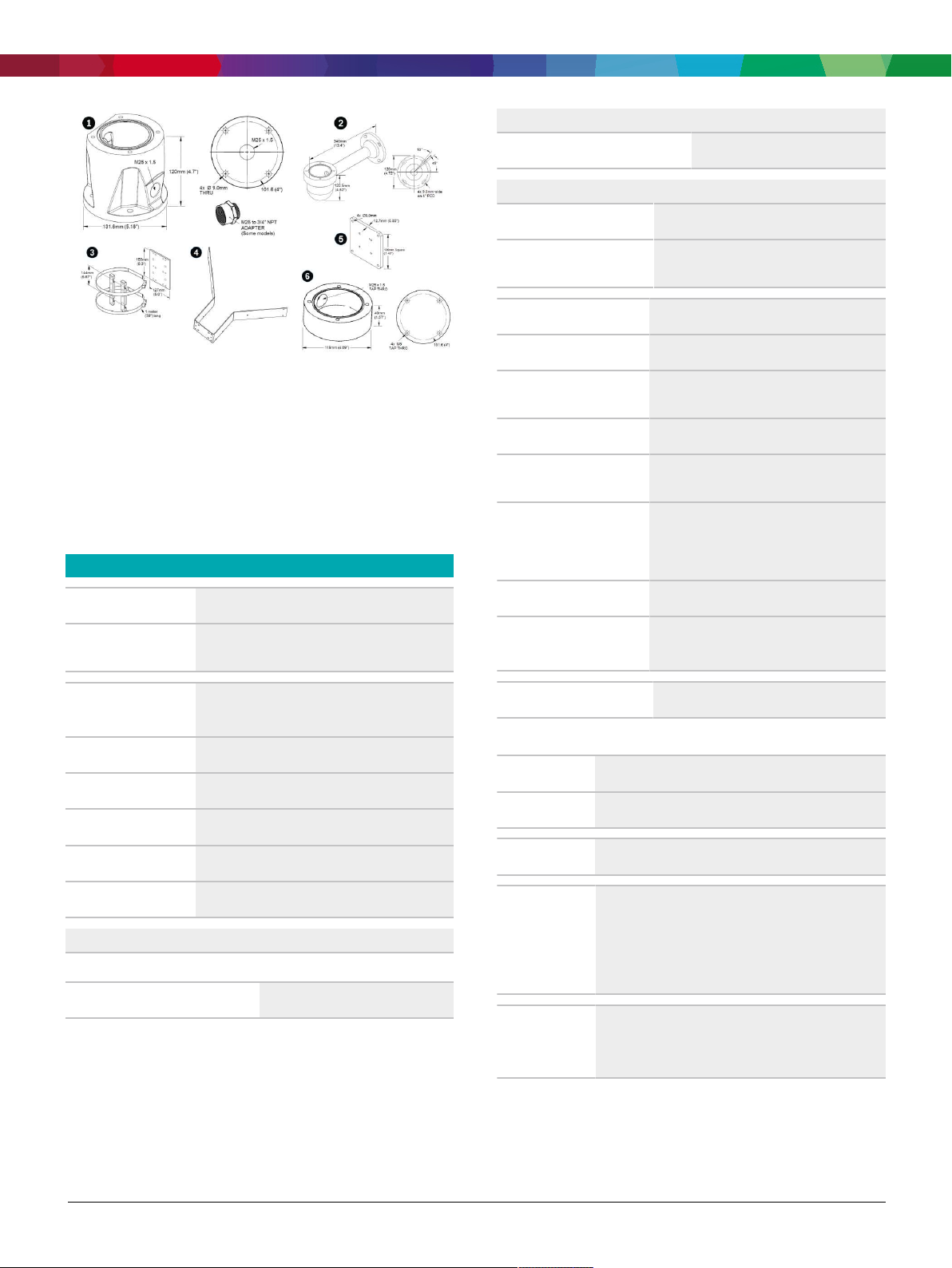
Fig.1:
Optional Mounts, MIC IP 7100i series
1 Deep conduit adapter 4 Corner mount bracket
2 Wall mount bracket 5 Wall mount spreader plate
3 Pole mount bracket 6 Shallow conduit adapter
For more options, refer to the MIC IP cameras
Accessory Quick Selection Guide (https://
media.boschsecurity.com/fs/media/pb/media/
support_1/tools/
mic_ip_cameras_accessory_quick_selection_guide.pdf).
Technical specifications
Imager
Effective Picture
1/2 in. CMOS sensor
1937 x 1097 (2.12 MP)
Elements (Pixels)
Lens
30x motorized Zoom; 6.6 mm to 198 mm; F1.5
to F4.8
Field of View (FOV)
Focus
Iris
2.1° to 58.3°
Automatic with manual override
Automatic with manual override
Measured according to IEC
62676 Part 5)
Gain control
Aperture Correction
Electronic Shutter Speed
(AES)
Signal-to-Noise Ratio (SNR)
Backlight compensation
(BLC)
White balance
Day/night
Defog mode feature
Noise Reduction
Video content analysis
Analysis type
Configurations
IntelligentVideoAnalytics
Off / Global VCA / Profiles 1 - 16
106 dB
AGC, Fixed, Region per pre-position
Horizontal and vertical
1/1 sec to 1/60,000 sec
>55dB
On │ Off │ Intelligent Auto Exposure (IAE)
2000 K to 10,000 K
ATW, AWB Hold, Extended ATW, Manual,
Sodium Lamp Auto, Sodium Lamp
Monochrome │ Color │ Auto
Improves visibility when viewing foggy or
other low-contrast scenes.
Intelligent Dynamic Noise Reduction
Digital Zoom
Day/Night switch
12x
Automatic IR cut filter
Video performance - Sensitivity
(3100K, reflectivity 89%, 1/30, F1.6, 30 IRE)
Color
0.0047 lx
Calibration
Alarm rules
(combinable)
Object filters
Automatic self-calibrating when height is set
Any object, Object in field, Crossing line, Entering field,
Leaving field, Loitering, Following route, Idle object,
Removed object, Counter, Occupancy, Crowd
detection, Condition change, Similarity search,
Tampering
Duration, Size, Aspect ratio v/h, Speed, Direction,
Object classes (Upright persons, Bikes, Cars, Trucks),
Color
Represented by:
Europe, Middle East, Africa: Germany: North America: Asia-Pacific:
Bosch Security Systems B.V.
P.O. Box 80002
5600 JB Eindhoven, The Netherlands
Phone: + 31 40 2577 284
[email protected]
emea.boschsecurity.com
Data subject to change without notice | 202104091833 | V9 | April 09, 2021 © Bosch Security Systems 2021
Bosch Sicherheitssysteme GmbH
Robert-Bosch-Ring 5
85630 Grasbrunn
Germany
www.boschsecurity.com
Bosch Security Systems, LLC
130 Perinton Parkway
Fairport, New York, 14450, USA
Phone: +1 800 289 0096
Fax: +1 585 223 9180
[email protected]
www.boschsecurity.us
Robert Bosch (SEA) Pte Ltd, Security Systems
11 Bishan Street 21
Singapore 573943
Phone: +65 6571 2808
Fax: +65 6571 2699
[email protected]
www.boschsecurity.asia
Page 8

Video - MIC IP starlight 7100i
8 | 14
DORI Distance to Object
WIDE 1X
TELE 30X
Scene
width
Detection
25pixels/m
69m
(226ft)
2095m
(6873ft)
77m
(253ft)
(8pixels/ft)
Observation
63pixels/m
27m
(89ft)
831m
(2726ft)
31m
(102ft)
(19pixels/ft)
Recognition
125pixels/m
14m
(46ft)
419m
(1375ft)
15m
(49ft)
(38pixels/ft)
Identification
250pixels/m
7m
(23ft)
210m
(689ft)
8m
(26ft)
(76pixels/ft)
Miscellaneous
Sectors
4, 6, 8, 9, 12, or 16 user-selectable, independent
Sectors, each with 20 characters per Title
Privacy Masks
32 individually configurable Privacy Masks; maximum
8 per Pre-position; programmable with 3, 4 or 5
corners; selectable color of Black, White, Gray, or
Mosaic, as well as an “Auto” option in which the
camera selects the most prevalent of the three colors
in the background scene as the pattern color.
Alarm control
Washer Pump
Interface
Camera status
monitoring
Diagnostics
Network
Standard/Video
compression
Streaming
Resolution (H x V)
1080p HD
Rules-based logic supports basic and complex predefined user-specified commands
In its most basic form, a “rule” could define which
input(s) should activate which output(s).
Control functions integrated. Alarm/Washer Interface
Unit (MIC-ALM-WAS-24, sold separately ) provides
electrical interface to a washer pump device (usersupplied ).
Integrated sensors monitor operational status such as
internal temperature, humidity level, incoming
voltage level, vibration, and shock events.
Various status conditions are tracked in the internal
diagnostic log. Critical fault conditions will also be
displayed on screen.
H.265, H.264 (ISO/IEC 14496), M-JPEG, JPEG
Four (4) streams: Two (2) configurable streams
in H.264 or H.265
One (1) I-frames-only stream based on first
stream
One (1) M-JPEG Stream
1920 x 1080
Virtual Masks
Pre-positions
Guard Tours
24 individually configurable Virtual Masks to hide
parts of the scene (background motion such as
moving trees, pulsating lights, busy roads, etc.)
which should not be considered for flow analysis to
trigger Intelligent Tracking.
256 Pre-positions, each with 20 characters per Title
Custom Recorded Tours - two (2), total duration 30
minutes:
Pre-position tour - one (1), consisting of up to 256
720p HD
1.3 MP 5:4 (cropped)
D1 4:3 (cropped)
640x 480
432p SD
288p SD
1280 x 720
1280x 1024
704 x 480
640 x 480
768 x 432
512 x 288
scenes consecutively, and one (1) customized with
144p SD
Protocols
256 x 144
IPv4, IPv6, UDP, TCP, HTTP, HTTPS, RTP/RTCP,
IGMP V2/V3, ICMP, ICMPv6, RTSP, FTP, ARP,
DHCP, APIPA (Auto-IP, link local address), NTP
Supported
Languages
up to 256 user-defined scenes
English, Czech, Dutch, French, German, Italian,
Polish, Portuguese, Russian, Spanish, Japanese,
Chinese
(SNTP), SNMP(V1,V3, MIB-II), 802.1x, DNS,
DNSv6, DDNS (DynDNS.org, selfHOST.de, no-
Represented by:
Europe, Middle East, Africa: Germany: North America: Asia-Pacific:
Bosch Security Systems B.V.
P.O. Box 80002
5600 JB Eindhoven, The Netherlands
Phone: + 31 40 2577 284
[email protected]
emea.boschsecurity.com
Bosch Sicherheitssysteme GmbH
Robert-Bosch-Ring 5
85630 Grasbrunn
Germany
www.boschsecurity.com
Bosch Security Systems, LLC
130 Perinton Parkway
Fairport, New York, 14450, USA
Phone: +1 800 289 0096
Fax: +1 585 223 9180
[email protected]
www.boschsecurity.us
Robert Bosch (SEA) Pte Ltd, Security Systems
11 Bishan Street 21
Singapore 573943
Phone: +65 6571 2808
Fax: +65 6571 2699
[email protected]
www.boschsecurity.asia
Data subject to change without notice | 202104091833 | V9 | April 09, 2021 © Bosch Security Systems 2021
Page 9

Video - MIC IP starlight 7100i
9 | 14
ip.com), SMTP, iSCSI, UPnP(SSDP),
DiffServ(QoS), LLDP, SOAP, Dropbox™, CHAP,
digest authentication
Note: Dropbox is a trademark of Dropbox, Inc.
Ethernet
10BASE-T/100BASE-TX, auto-sensing, half/ full
duplex, Auto-MDI-X
Encryption
Ethernet connector
GOP structure
Overall IP Delay
TLS 1.0, TLS 1.1, TLS 1.2, DES, 3DES, AES
RJ45
IP, IBP, IBBP
60 fps: 166 ms (typical)
30 fps: 233 ms (typical)
Interoperability
ONVIF ProfileS, ONVIF Profile G, ONVIF Profile T
The table that follows shows the average typical
optimized bitrate, in kbits/s, for different frame rates:
FPS
60
30
25
15
8
H.264
4490
2740
2410
1690
1090
H.265
3360
2060
1810
1260
820
Variable Pan Speed 0.2°/second - 120°/second
Variable Tilt Speed 0.2°/second - 90°/second
Speed of Intelligent
>0.2°/second (minimum)
Tracking
Speed of Pre-
120°/second
positions
Pre-position
+/-0.05°
Accuracy
Proportional Pan /
Yes
Tilt to Zoom
Audible Noise <65 dB
Electrical
Input voltage
21-30 VAC, 50/60 Hz; High Power over
Ethernet 56VDC nominal
Power Consumption
40 W
(typical), without
illuminator
Power Consumption
70 W
(typical), with illuminator
Current consumption, 24
~3.15A
VAC
Current consumption,
~1.5A
High PoE
Redundant configuration
Connect both a High PoE Midspan and a
separate 24 VAC power source. If either power
source fails, the camera automatically switches
to the other power source.
4
670
500
Surge protection
Built-in surge protection for power, data, and
network interfaces (Refer to the A&E
2
1
420
260
Actual bitrate may vary depending on the scene,
picture settings, and encoder profile settings.
Mechanical
310
190
Specifications for details.)
Communications / Software Control
Camera Setup/Control
Via Internet Explorer web browser version 7.0
or later, Bosch Configuration Manager, BVMS
(BVMS), BoschVideoClient (BVC), or support
for third party software
Drive Unit Brushless, integral pan/tilt motor drive
Supported mounting
Upright, Inverted, Canted
Software Update
Network firmware upload
orientation
Pan Range 360° continuous rotation
Tilt Angle 290° (with or without illuminator)
Tilt Range (With or without illuminator) Upright: -55° to +90°;
Inverted: -95° to +55°; Canted: -80° to +65°
Represented by:
Europe, Middle East, Africa: Germany: North America: Asia-Pacific:
Bosch Security Systems B.V.
P.O. Box 80002
5600 JB Eindhoven, The Netherlands
Phone: + 31 40 2577 284
[email protected]
emea.boschsecurity.com
Bosch Sicherheitssysteme GmbH
Robert-Bosch-Ring 5
85630 Grasbrunn
Germany
www.boschsecurity.com
Serial protocols
Bosch Security Systems, LLC
130 Perinton Parkway
Fairport, New York, 14450, USA
Phone: +1 800 289 0096
Fax: +1 585 223 9180
[email protected]
www.boschsecurity.us
Bosch OSRD, Pelco P/D, Forward Vision, and
Cohu
Note: A separate license (MVS-FCOM-PRCL)
is required.
Robert Bosch (SEA) Pte Ltd, Security Systems
11 Bishan Street 21
Singapore 573943
Phone: +65 6571 2808
Fax: +65 6571 2699
[email protected]
www.boschsecurity.asia
Data subject to change without notice | 202104091833 | V9 | April 09, 2021 © Bosch Security Systems 2021
Page 10

Video - MIC IP starlight 7100i
10 | 14
Local Storage
Memory card slot
User Connections
Accessory Interface/
Control Data
Chassis ground
Input voltage, without
illuminator
Input voltage, with
illuminator
User-supplied full SD card (maximum 2 TB) on
enhanced models only
Recommended: Sony Industrial SD cards
RS-485, simplex, user-selectable baud rate or
auto-baud
Used to communicate with optional Alarm/
washer interface box (MIC-ALM-WAS-24) or with
Bosch OSRD, Pelco P/D, Forward Vision, and
Cohu serial protocols.
Ground wire with connector lug
RJ45 connector to 60 W High PoE Midspan
(NPD-6001B) or 95 W High PoE Midspan
(NPD-9501A or NPD-9501-E), or 21-30 VAC,
50/60 Hz; Female-to-female RJ45 coupler
included
RJ45 connector to 95 W High PoE Midspan
(NPD-9501A or NPD-9501-E)* or 21-30 VAC,
50/60 Hz; Female-to-female RJ45 coupler
included
Note: Unit includes internal heater and fan.
Ingress Protection
Rating/Standard
IEC 60529 IP66 / IP68 / Type 6P (dust and
immersion) when installed on a MIC-DCA, or on a
MIC wall mount with a MIC-SCA.
IP67 (moisture and dust) with the IP67 Connector
Kit (MIC-9K-IP67-5PK) on the connectors in the
camera base. This kit is also required when using
non-Bosch mounts.
External Mechanical
IEC 62262 IK10 (excluding glass window)
Impact
(IK Code / Impact
rating)
Operating temperature
NEMA TS 2-2003
(R2008), para2.1.5.1
-40 °C to +65 °C (-40 °F to +149 °F)
-34ºC to +74ºC (-30ºF to +165ºF) for 15
hours
using fig.2.1 test profile
Cold Start-up Temperature
-40 °C (-40 °F)
(Requires 60-minute warm-up prior to PTZ
operations.)
Storage temperature
-45 °C to +70 °C (-49 °F to +158 °F)
Power, Camera
Video and Control
* Must purchase NPD-9501A or NPD-9501-E in order to use the High PoE
solution.
Audio
24 VAC (power supply)
RJ45 100BASE-TX Ethernet; RS-485 half-duplex
57600 baud (dedicated for MIC-ALM-WAS-24)
Humidity
Wind Load
0-100%
Sustained winds up to 161 kph (100 mph)
Upright or inverted camera with illuminator will
hold its position in gusts up to 241 kph (150
mph).
Canted camera with illuminator will hold its
position in gusts up to 257 km/h (160 mph).
Compression
Signal-to-Noise Ratio
(SNR)
Mode
User connections
G.711, AAC, and L16 (live and recording)
Audio-in: 47dBA (A-weighting)
Audio out: 50dBA (A-weighting)
Two-way, full duplex audio communication
Line in: 15k ohm typical, 1.0Vrms, max
Line out: 0.8Vrms at 12K ohm, typical
Vibration
Coefficient of Drag:
• Without illuminator 0.91
• With illuminator 0.946
IEC 60068-2-6: 10-150 Hz, 1.0G (0.5G on
canted unit), 10m/s², 20 Sweeps
NEMA TS-2 Section 2.2.8: 5-30 Hz, 0.5G
MIL-STD-167-1A
Environmental
The customer is responsible for making sure that the
Shock
installation complies with the specified stresses that
follow.
Represented by:
Europe, Middle East, Africa: Germany: North America: Asia-Pacific:
Bosch Security Systems B.V.
P.O. Box 80002
5600 JB Eindhoven, The Netherlands
Phone: + 31 40 2577 284
[email protected]
emea.boschsecurity.com
Bosch Sicherheitssysteme GmbH
Robert-Bosch-Ring 5
85630 Grasbrunn
Germany
www.boschsecurity.com
Bosch Security Systems, LLC
130 Perinton Parkway
Fairport, New York, 14450, USA
Phone: +1 800 289 0096
Fax: +1 585 223 9180
[email protected]
www.boschsecurity.us
IEC 60068-2-27, Test Ea: Shock, half sine
impulse, 11 ms, 45G (20G on canted unit), nonrepetitive shocks (three shocks in each axis and
Robert Bosch (SEA) Pte Ltd, Security Systems
11 Bishan Street 21
Singapore 573943
Phone: +65 6571 2808
Fax: +65 6571 2699
[email protected]
www.boschsecurity.asia
Data subject to change without notice | 202104091833 | V9 | April 09, 2021 © Bosch Security Systems 2021
Page 11
Video - MIC IP starlight 7100i
3.5 mm
(0.14 in.)
400.34 mm
(15.76 i
n
.)
287.93 mm
(11.34 in.)
210.65mm
(8.29 in)
374.5 m
m
(14.7 in.)
260.25 mm
(10.2 in.)
11 | 14
Power Service
Transients
Power Interruption
MIL-STD-810 Military
Standard Test Methods
MIL-DTL-901 Military
Standard Test Methods
Salt Mist Spray
(Corrosion Test)
in each direction)
NEMA TS 2 Section 2.2.9 Shock (Impact)
Test Half sine wave 11 ms, 10G
NEMA TS2 Section 2.2.7.2
NEMA TS2 Section 2.2.10
MIL-STD-810-G, 501.5 High Temperature; MILSTD-810-G, 502.5 Low Temperature; MILSTD-810-G, 503.5 Temperature Shock; MILSTD-810-G, 505.5 Solar Radiation; MILSTD-810-G, 506.5 Rain; MIL-STD-810-G, 509.5
Salt Fog; MIL-STD-810-G, 510.5 Sand and Dust
MIL-DTL-901E when subjected to Grade B, Class
I, Type A, lightweight shock testing;
MIL-DTL-901E when subjected to Grade B, Class
I, Type A, medium weight shock testing
ISO 12944-6: C5-M (High); Aluminum Housing
Components
Canting
Color
Color
Color
Standard Finish
On-site canting functionality
Black (RAL 9005)
White (RAL 9010)
Grey (RAL 7001)
Corrosion-resistant, powder coat paint, sand finish
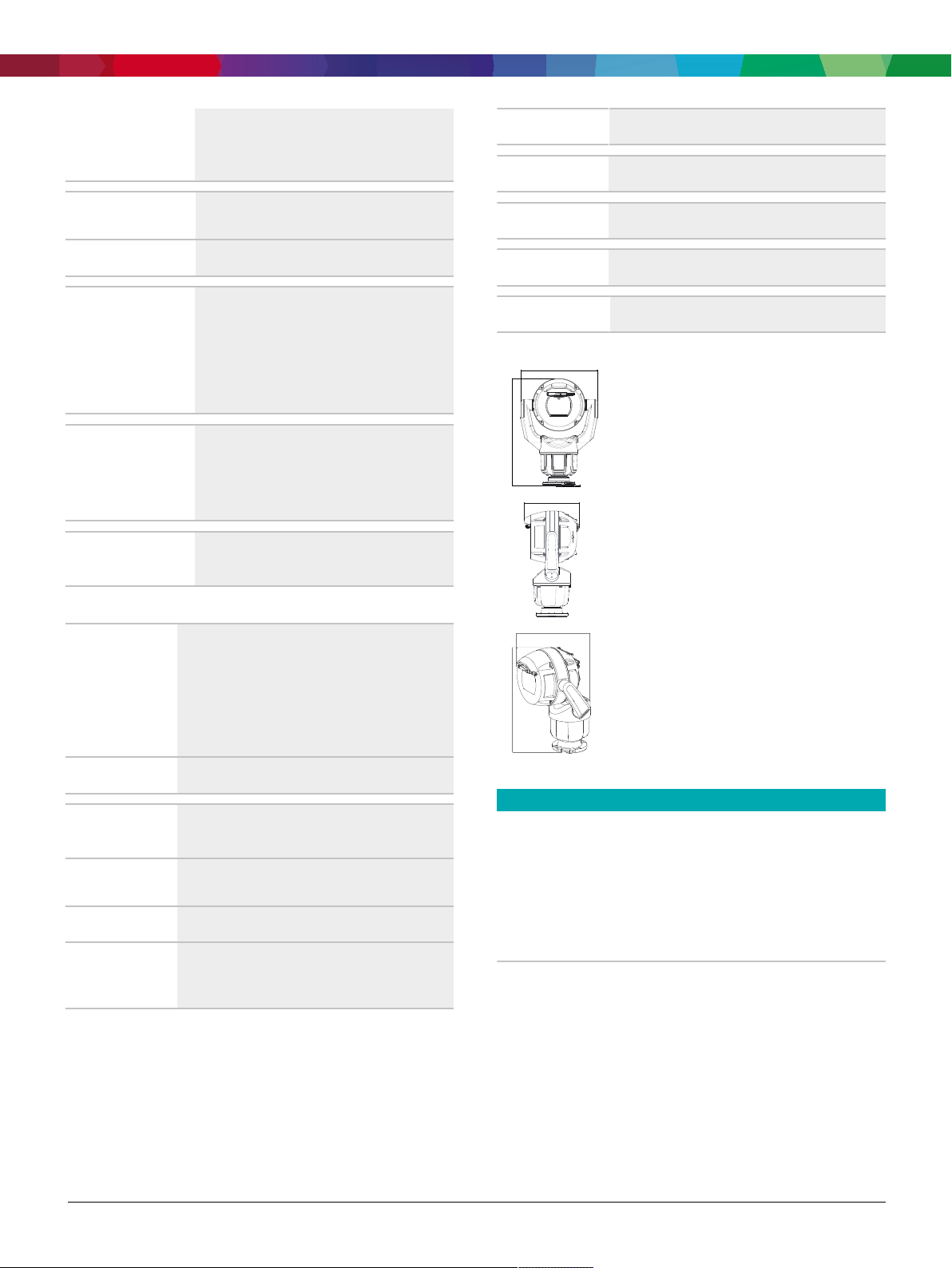
Dimensional Drawings
Construction
Dimensions (W x H x
D)
Weight
Window
Construction
Material
Window Wiper
Sunshield
(to prevent sun load
in hot climates)
Without illuminator accessory or sunshield:
Upright, Inverted
:
287.93 mm x 400.34 mm x 210.65 mm
(11.34 in. x 15.76 in. x 8.29 in.)
Canted
:
260.25 mm (10.2 in.) x 374.5 mm (14.7 in.)
8.7 Kg (19.2 lb)
Flat glass (with defroster on enhanced models only)
Defroster starts automatically at <= 5°C (41°F).
Anodized cast aluminum
Integrated, long-life silicone wiper
Optional (sold separately)
Fig.2:
Canted
Ordering information
MIC-7522-Z30BR PTZ 2MP HDR 30x IP68 enhanced
black
Ruggedized PTZ camera; 1080p, 30x, starlight imaging,
defroster, SD card slot.
Black (RAL 9005). Sand finish.
Easy install with DCA (sold separately). Optional
illuminator (sold separately).
Order number MIC-7522-Z30BR | F.01U.359.795
Represented by:
Europe, Middle East, Africa: Germany: North America: Asia-Pacific:
Bosch Security Systems B.V.
P.O. Box 80002
5600 JB Eindhoven, The Netherlands
Phone: + 31 40 2577 284
[email protected]
emea.boschsecurity.com
Data subject to change without notice | 202104091833 | V9 | April 09, 2021 © Bosch Security Systems 2021
Bosch Sicherheitssysteme GmbH
Robert-Bosch-Ring 5
85630 Grasbrunn
Germany
www.boschsecurity.com
Bosch Security Systems, LLC
130 Perinton Parkway
Fairport, New York, 14450, USA
Phone: +1 800 289 0096
Fax: +1 585 223 9180
[email protected]
www.boschsecurity.us
Robert Bosch (SEA) Pte Ltd, Security Systems
11 Bishan Street 21
Singapore 573943
Phone: +65 6571 2808
Fax: +65 6571 2699
[email protected]
www.boschsecurity.asia
Page 12

Video - MIC IP starlight 7100i
12 | 14
MIC-7522-Z30WR PTZ 2MP HDR 30x IP68 enhanced
white
Ruggedized PTZ camera; 1080p, 30x, starlight imaging,
defroster, SD card slot.
White (RAL 9010). Sand finish.
Easy install with DCA (sold separately). Optional
illuminator (sold separately).
Order number MIC-7522-Z30WR | F.01U.359.796
MIC-7522-Z30GR PTZ 2MP HDR 30x IP68 enhanced
gray
Ruggedized PTZ camera; 1080p, 30x, starlight imaging,
defroster, SD card slot.
Grey (RAL 7001) color. Sand finish.
Easy install with DCA (sold separately). Optional
illuminator (sold separately).
Order number MIC-7522-Z30GR | F.01U.359.797
MIC-7522-Z30B PTZ 2MP HDR 30x IP68 black
Ruggedized, outdoor PTZ camera; 1080p HD, 30x,
starlight imaging, H.265, IVA
Black (RAL 9005). Sand finish.
Easy install with DCA (sold separately). Optional
illuminator (sold separately).
Order number MIC-7522-Z30B | F.01U.353.588
MIC-7522-Z30W PTZ 2MP HDR 30x IP68 white
Ruggedized, outdoor PTZ camera; 1080p HD, 30x,
starlight imaging, H.265, IVA
White (RAL 9010). Sand finish.
Easy install with DCA (sold separately). Optional
illuminator (sold separately).
Order number MIC-7522-Z30W | F.01U.353.589
MIC-7522-Z30G PTZ 2MP HDR 30x IP68 gray
Ruggedized, outdoor PTZ camera; 1080p HD, 30x,
starlight imaging, H.265, IVA
Grey (RAL 7001) color. Sand finish.
Easy install with DCA (sold separately). Optional
illuminator (sold separately).
Order number MIC-7522-Z30G | F.01U.353.590
Accessories
MIC-ILB-400 Illuminator, white-IR light, black
Illuminator accessory for certain MIC IP cameras, IR
Light (850 nm/940 nm) + White light LEDs
Black (RAL 9005). Sand finish.
Order number MIC-ILB-400 | F.01U.370.191
MIC-ILW-400 Illuminator, white-IR light, white
Illuminator accessory for certain MIC IP cameras, IR
Light (850 nm/940 nm) + White light LEDs
White (RAL 9010). Sand finish.
Order number MIC-ILW-400 | F.01U.370.192
MIC-ILG-400 Illuminator, white-IR light, gray
Illuminator accessory for certain MIC IP cameras, IR
Light (850 nm/940 nm) + White light LEDs
Grey (RAL 7001) color. Sand finish.
Order number MIC-ILG-400 | F.01U.370.193
NPD-6001B Midspan, 60W, single port, AC in
60 W indoor midspan for cameras without illuminators
Order number NPD-6001B | F.01U.347.358
F.01U.392.458
NPD-9501A Midspan, 95W, single port, AC in
95 W indoor midspan for AUTODOME 7000 and MIC IP
cameras with or without illuminators
Order number NPD-9501A | F.01U.392.336
F.01U.286.250
VG4-A-PSU1 PSU, 120VAC, for AUTODOME, MIC7000
Power supply for AUTODOME 7000, MIC IP cameras
without illuminators.
120VAC in, 24VAC out
Order number VG4-A-PSU1 | F.01U.261.377
F.01U.009.667 F.01U.081.593
VG4-A-PSU2 Power supply, 230VAC, AUTODOME,
MIC7000
Power supply for AUTODOME 7000, MIC IP cameras
without illuminators.
230VAC in, 24VAC out
Order number VG4-A-PSU2 | F.01U.009.668
F.01U.096.639 F.01U.097.433 F.01U.081.604
F.01U.261.378
MIC-ALM-WAS-24 Interface box, alarm, washer pump,
24VAC
Grey polycarbonate interface box for alarms and washer
pump connections for MIC IP cameras
Order number MIC-ALM-WAS-24 | F.01U.286.248
MIC-DCA-HB Deep conduit mount, M25 holes, black
DCA mount for MIC7000 family and MIC IP fusion 9000i
cameras. Aluminum. Two M25 holes for conduit/cable
glands.
Black (RAL 9005) color.
Order number MIC-DCA-HB | F.01U.286.244
MIC-DCA-HBA Deep conduit mount, M25 holes, black
DCA mount for MIC7000 and MIC IP fusion 9000i
cameras. Aluminum. Two M25 holes for conduit/cable
glands. Includes an conduit adapter (male M25 to female
3/4" NPT). Available in specific regions only.
Black (RAL 9005) color.
Order number MIC-DCA-HBA | F.01U.303.166
MIC-DCA-HW Deep conduit mount, two M25 holes,
white
DCA mount for MIC7000 family and MIC IP fusion 9000i
cameras. Aluminum. Two M25 holes for conduit/cable
glands.
White (RAL 9010) color.
Order number MIC-DCA-HW | F.01U.286.245
Represented by:
Europe, Middle East, Africa: Germany: North America: Asia-Pacific:
Bosch Security Systems B.V.
P.O. Box 80002
5600 JB Eindhoven, The Netherlands
Phone: + 31 40 2577 284
[email protected]
emea.boschsecurity.com
Data subject to change without notice | 202104091833 | V9 | April 09, 2021 © Bosch Security Systems 2021
Bosch Sicherheitssysteme GmbH
Robert-Bosch-Ring 5
85630 Grasbrunn
Germany
www.boschsecurity.com
Bosch Security Systems, LLC
130 Perinton Parkway
Fairport, New York, 14450, USA
Phone: +1 800 289 0096
Fax: +1 585 223 9180
[email protected]
www.boschsecurity.us
Robert Bosch (SEA) Pte Ltd, Security Systems
11 Bishan Street 21
Singapore 573943
Phone: +65 6571 2808
Fax: +65 6571 2699
[email protected]
www.boschsecurity.asia
Page 13

Video - MIC IP starlight 7100i
13 | 14
MIC-DCA-HWA Deep conduit mount, M25 holes,white
DCA mount for MIC7000 and MIC IP fusion 9000i
cameras. Aluminum. Two M25 holes for conduit/cable
glands. Includes an conduit adapter (male M25 to female
3/4" NPT). Available in specific regions only.
White (RAL 9010) color.
Order number MIC-DCA-HWA | F.01U.303.167
MIC-DCA-HG Deep conduit mount, two M25 holes, grey
DCA mount for MIC7000 family and MIC IP fusion 9000i
cameras. Aluminum. Two M25 holes for conduit/cable
glands.
Grey (RAL 7001) color.
Order number MIC-DCA-HG | F.01U.286.246
MIC-DCA-HGA Deep conduit mount, M25 holes,grey
DCA mount for MIC7000 and MIC IP fusion 9000i
cameras. Aluminum. Two M25 holes for conduit/cable
glands. Includes an conduit adapter (male M25 to female
3/4" NPT). Available in specific regions only.
Grey (RAL 7001) color.
Order number MIC-DCA-HGA | F.01U.303.168
MIC-WMB-BD Wall mount bracket , black
Wall mount bracket, black sand finish (RAL9005)
Order number MIC-WMB-BD | F.01U.143.155
MIC-WMB-WD Wall mount bracket, white
Wall mount bracket, white sand finish (RAL9010)
Order number MIC-WMB-WD | F.01U.143.156
MIC-WMB-MG Wall mount for rugged PTZ camera, grey
Wall Mount Bracket.
Grey (RAL 7001) color. Sand finish.
Order number MIC-WMB-MG | F.01U.296.299
MIC-SCA-BD Shallow conduit adapter, black sand
Shallow conduit adapter for a MIC-WMB, a MIC-PMB, or
a MIC-SPR, black sand finish (RAL9005)
Order number MIC-SCA-BD | F.01U.143.153
MIC-SCA-WD Shallow conduit adapter, white sand
Shallow conduit adapter for a MIC-WMB, a MIC-PMB, or
MIC-CMB-MG Corner mount bracket, grey sand
Corner mount bracket.
Grey (RAL 7001) color. Sand finish.
Order number MIC-CMB-MG | F.01U.296.296
MIC-SPR-BD Wall mount spreader plate, black sand
Aluminum spreader plate suitable for brickwork surface
mounting, black sand finish (RAL9005)
Order number MIC-SPR-BD | F.01U.143.164
MIC-SPR-WD Wall mount spreader plate, white sand
Aluminum spreader plate suitable for brickwork surface
mounting, white sand finish (RAL9010)
Order number MIC-SPR-WD | F.01U.143.163
MIC-SPR-MG Wall mount spreader plate, grey sand
Aluminum spreader plate suitable for brickwork surface
mounting.
Grey (RAL 7001) color. Sand finish.
Order number MIC-SPR-MG | F.01U.296.298
MIC-M25XNPT34 Adapter, M25 to 3/4"NPT, stainless
steel
Stainless Steel M25 to ¾” NPT thread adapter
Order number MIC-M25XNPT34 | F.01U.301.975
MIC-WKT-IR Washer kit, MIC IR
Washer kit for MIC IP starlight 7000i and MIC IP fusion
9000i camera models
Washer kit for analog infrared MIC camera models
Order number MIC-WKT-IR | F.01U.087.255
MIC-IP67-5PK Connector kit, IP67, 5pcs
5-pack weather protection kit for MIC7000 cameras.
Provides an IP67-rated barrier against dust or moisture.
Recommended when MIC camera is mounted directly to
installation surface (instead of onto a MIC-DCA or MIC
wall mount).
Order number MIC-IP67-5PK | F.01U.294.750
MIC-7100I-SNSHLD-W Sunshield for MIC 7100i white
Sunshield for MIC IP ultra 7100i camera models
Order number MIC-7100I-SNSHLD-W | F.01U.353.591
a MIC-SPR mount, white sand finish (RAL9010)
Order number MIC-SCA-WD | F.01U.143.154
MIC-SCA-MG Conduit adapter, shallow, grey sand
Shallow conduit adapter for a MIC-WMB, a MIC-PMB, or
a MIC-SPR.
Grey (RAL 7001) color. Sand finish.
Order number MIC-SCA-MG | F.01U.296.297
MIC-PMB Pole mount bracket
Pole mount bracket (includes 2x455mm stainless steel
banding straps for pole diameters 75 to 145mm)
Order number MIC-PMB | F.01U.087.283
MIC-CMB-BD Corner mount bracket, black
Corner mount bracket, black sand finish (RAL9005)
Order number MIC-CMB-BD | F.01U.143.158
MIC-CMB-WD Corner mount bracket, white
Software Options
MVS-FCOM-PRCL License key for serial protocol
Serial Protocol Software License (e-license) for IP
Cameras
Order number MVS-FCOM-PRCL | F.01U.314.101
MVC-CT-PTZ License for PTZs
CameraTrainer license for Intelligent Video
Analytics7.10 on PTZ cameras.
Free-of-charge software module.
Order number MVC-CT-PTZ | F.01U.365.079
MVS-FNTCIP NTCIP for moving cameras
NTCIP license for moving cameras
Available in NAM region only.
Order number MVS-FNTCIP | F.01U.329.682
Corner mount bracket, white sand finish (RAL9010)
Order number MIC-CMB-WD | F.01U.143.159
Represented by:
Europe, Middle East, Africa: Germany: North America: Asia-Pacific:
Bosch Security Systems B.V.
P.O. Box 80002
5600 JB Eindhoven, The Netherlands
Phone: + 31 40 2577 284
[email protected]
emea.boschsecurity.com
Bosch Sicherheitssysteme GmbH
Robert-Bosch-Ring 5
85630 Grasbrunn
Germany
www.boschsecurity.com
Bosch Security Systems, LLC
130 Perinton Parkway
Fairport, New York, 14450, USA
Phone: +1 800 289 0096
Fax: +1 585 223 9180
[email protected]
www.boschsecurity.us
Robert Bosch (SEA) Pte Ltd, Security Systems
11 Bishan Street 21
Singapore 573943
Phone: +65 6571 2808
Fax: +65 6571 2699
[email protected]
www.boschsecurity.asia
Data subject to change without notice | 202104091833 | V9 | April 09, 2021 © Bosch Security Systems 2021
Page 14

Video - MIC IP starlight 7100i
Services
EWE-MIC7IF-IW 12mths full wrty ext MIC IP 7000i
12 months warranty extension
Order number EWE-MIC7IF-IW | F.01U.382.951
14 | 14
Represented by:
Europe, Middle East, Africa: Germany: North America: Asia-Pacific:
Bosch Security Systems B.V.
P.O. Box 80002
5600 JB Eindhoven, The Netherlands
Phone: + 31 40 2577 284
[email protected]
emea.boschsecurity.com
Data subject to change without notice | 202104091833 | V9 | April 09, 2021 © Bosch Security Systems 2021
Bosch Sicherheitssysteme GmbH
Robert-Bosch-Ring 5
85630 Grasbrunn
Germany
www.boschsecurity.com
Bosch Security Systems, LLC
130 Perinton Parkway
Fairport, New York, 14450, USA
Phone: +1 800 289 0096
Fax: +1 585 223 9180
[email protected]
www.boschsecurity.us
Robert Bosch (SEA) Pte Ltd, Security Systems
11 Bishan Street 21
Singapore 573943
Phone: +65 6571 2808
Fax: +65 6571 2699
[email protected]
www.boschsecurity.asia
 Loading...