

Page 1
Care and use guide
Contents page
Features 2
To operate 2
Cleaning and maintenance 3
Battery replacement 3
Troubleshooting guide 4
Technical speci cations 4
Conductivity and understanding
the measuring scales 5
Bluelab measurement conversion chart 6
Product guarantee 8
Cleaning kits 9
Contact details 9
Page 2
1.0 To operate
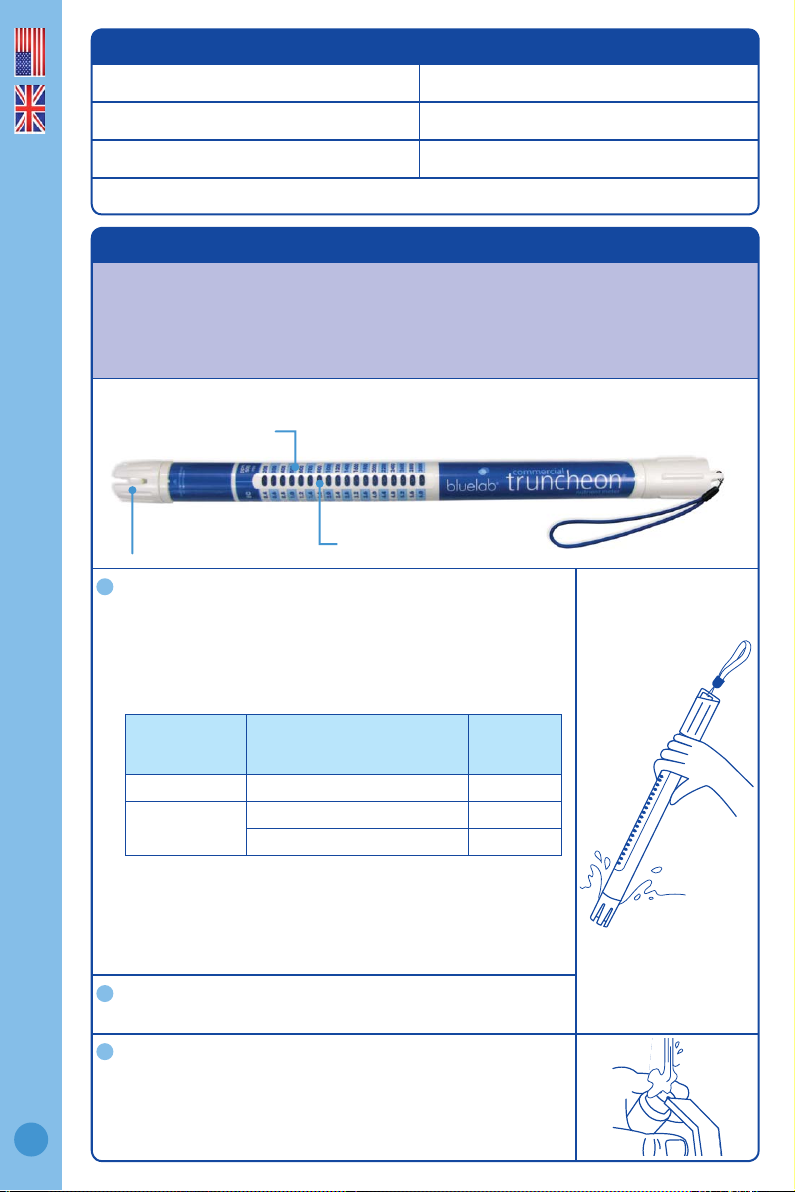
Using the Bluelab Commercial Truncheon® Nutrient Meter (see Figure 1) to
measure nutrient conductivity involves placing the probe sensor head in the
solution, followed by measuring and reading conductivity values on the stem
scale indicator light.
Figure 1. Bluelab Commercial Truncheon® Nutrient Meter
Measure conductivity
Place probe into nutrient solution and take reading as
indicated by the fl ashing lights.
Note: If the lights are dancing between two values, the reading
is between those two values. Some example readings are
shown in the table below:
Note: For very cold or very hot temperatures it will take 1-2
minutes for the probe to reach solution temperature. To help
decrease time taken to reach the solution temperature, place
the probe in an area where there is a strong movement of
solution, or stir solution with the probe.
Obtain another reading
To take another reading, simply place back in solution.
Clean probe
We recommend the probe be cleaned once every two
weeks according to the Cleaning and Maintenance
instructions. This can vary depending on frequency of use.
Features
Fully waterproof Battery operated
Auto on/off function No buttons, switches or knobs
No calibration required Daylight readable blue LED’s
Provided with EC, CF, ppm 500 and ppm 700 scales
English
1
Probe
Stem Scale
Value indicator light
Lights fl ashing
between these
EC values
0.8 and 1.0 0.8 - 1.0, 0.8 - 1.0, 0.8 - 1.0 0.9
2.8 and 3.2
Repeating pattern of
fl ashing lights (EC)
2.8 - 2.8 - 3.2, 2.8 - 2.8 - 3.2 2.9
2.8 - 3.2 - 3.2, 2.8 - 3.2 - 3.2 3.1
Reading
EC value
2
2
3
Page 3

2.0 Cleaning and maintenance
Cleaning the Commercial Truncheon Meter probe frequently ensures accurate
readings. Clean the probe with a liquid scourer cream used in home bathrooms
and kitchens such as ‘Jif’, ‘Liquid Vim’, ‘Soft Scrub’, ‘Cif’, or ‘Viss’. Never use
scented varieties of cleaner as they affect the probe functions.
Remove shroud
Twist the shroud 90 degrees and then remove the
shroud.
Clean probe face
Place one or two drops of unscented liquid scourer,
such as ‘Jif’, ‘Liquid Vim’, ‘Soft Scrub’, ‘Cif, or ‘Viss’
on the probe face. Rub probe face with your fi nger or
Bluelab Chamois fi rmly and vigorously to clean.
Rinse probe
Rinse off all traces of cleaner under running water
using the same fi nger or other side of Bluelab
Chamois. Check that the water forms a fi lm on the
probe face with no ‘beads’ of water. If beading is
present repeat the cleaning process.
Replace shroud
3.0 Battery replacement
The Commercial Truncheon Meter is powered with 3 x AA type standard or
alkaline batteries. Do not use rechargeable batteries. Do not mix brands of
batteries. Do not mix old with new. Do not put upside down. Follow these steps
to replace the batteries.
Remove old batteries
Unfasten battery cap and tip out old batteries.
Check for corrosion
Batteries that have been inside the unit for a long length
of time may corrode. Check battery contacts and batteries
for any sign of corrosion. Contacts should be cleaned fi rst if
corrosion is found before proceeding to step 3.
Fit new batteries
Insert the new batteries positive (+) end down into the body.
Replace battery cap
Refasten battery cap. There must be no space left between
the cap and body to ensure the unit remains 100%
waterproof.
1
English
2
3
4
Twist
3
1
2
3
4
Remove
Page 4

4.0 Troubleshooting guide
Trouble Correction
Truncheon Meter turns off
before reading taken.
Take out of solution for 3-5 seconds.
Dip in solution again and take reading.
Truncheon Meter not lighting
when dipped in solution.
Clean the probe. If this is unsuccessful, replace
batteries. Do not use rechargeable batteries.
Truncheon Meter gives low
readings.
Clean the probe.
Ensure unscented cleaner is used eg. plain ‘Jif’, ‘Soft
Scrub’, ‘Liquid Vim’, ‘Cif’ or ‘Viss’.
5.0 Technical speci cations
Range
0.4 – 6.0 EC 200 – 3000 ppm (EC x 500)
4 – 60 CF 280 – 4200 ppm (EC x 700)
Resolution 0.1 EC, 1 CF, 50 ppm (500), 70 ppm (700)
Accuracy at 2.77EC and
25°C / 77 °F
± 0.1 EC, ± 1 CF, ± 50 ppm (1385 ppm at 500 ppm),
± 70 ppm (1939 ppm at 700 ppm)
Temperature compensation Automatic
Operating temperature 0 - 50 °C, 32 - 122 °F
Calibration Not required
Limitation of liability
Under no circumstances shall Bluelab Corporation Limited be liable for any claims,
losses, costs and damages of any nature whatsoever (including any consequential loss)
that result from the use of, or the inability to use, these instructions.
English
4
Page 5

Conductivity and understanding the measuring scales
Conductivity tells you how much food is in your solution.
Getting a grip on the different measuring scales
All these scales measure the concentration of dissolved solids in a solution. They just
use different processes and scales to do so.
EC is the only absolute measure of conductivity for nutrient solutions. EC is measured
in millisiemens mS/cm
2
. It’s the standard everywhere outside North America. It
also gives the most accurate conductivity measure. This is because different tester
manufacturers use different standards to convert from EC to ppm - often resulting in
inaccurate and confusing ppm readings (use our conversion chart on page 6).
CF is closely related to EC. It just doesn’t have the decimal point.
ppm verses TDS. The ppm 500 scale is the same as TDS. TDS - Total Dissolved Solids
- is represented as ppm by some meters. A TDS reading of 50 means that there are 50
milligrams of dissolved solids in each litre of water. 50ppm.
The ppm 700 scale as no relation to TDS, so 70 milligrams of dissolved solids in a
litre of water is 70 ppm. However, the actual ppm of a solution can only be measured
accurately by chemical analysis.
Understanding these scales
We saw that EC measures are the most accurate. Most ppm meters measure in EC. They
then convert this to a ppm value.
The conversion factor from EC to ppm can vary, but those most widely used for measuring
nutrient solutions are the ‘EC x 500’ scale. It is worth remembering the ppm 500 scale is
sometimes called TDS.
No ifs or buts!
Measure conductivity every day.
• If you don’t know which ppm scale to use, ask your nutrient
manufacturer or use EC
• Avoid over-diluting or cover-concentrating your nutrient solution
• Start with a quality nutrient
• Completely change the reservoir solution every 7 days
• Top up the nutrient level between changes - so your plants have
the right amount of food.
English
5
Page 6

Bluelab measurement conversion chart
mS/cm2
Millisiemen per cm
2
EC CF
ppm 500
TDS
ppm 700
0.1 0.1 1 50 70
0.2 0.2 2 100 140
0.3 0.3 3 150 210
0.4 0.4 4 200 280
0.5 0.5 5 250 350
0.6 0.6 6 300 420
0.7 0.7 7 350 490
0.8 0.8 8 400 560
0.9 0.9 9 450 630
1.0 1.0 10 500 700
1.1 1.1 11 550 770
1.2 1.2 12 600 840
1.3 1.3 13 650 910
1.4 1.4 14 700 980
1.5 1.5 15 750 1050
1.6 1.6 16 800 1120
1.7 1.7 17 850 1190
1.8 1.8 18 900 1260
1.9 1.9 19 950 1330
2.0 2.0 20 1000 1400
2.1 2.1 21 1050 1470
2.2 2.2 22 1100 1540
2.3 2.3 23 1150 1610
2.4 2.4 24 1200 1680
2.5 2.5 25 1250 1750
2.6 2.6 26 1300 1820
2.7 2.7 27 1350 1890
2.8 2.8 28 1400 1960
2.9 2.9 29 1450 2030
3.0 3.0 30 1500 2100
3.1 3.1 31 1550 2170
3.2 3.2 32 1600 2240
3.3 3.3 33 1650 2310
3.4 3.4 34 1700 2380
3.5 3.5 35 1750 2450
3.6 3.6 36 1800 2520
English
6
Page 7

Bluelab Commercial Truncheon® Nutrient Meter
product guarantee
Bluelab Corporation Limited guarantees this product for a period of 5 years
(60 months) from the date of sale to the original purchaser. The product
will be repaired or replaced, should it be found faulty due to component
failure, or faulty workmanship. The faulty product should be returned to
the point of purchase.
The guarantee is null and void should any internal parts or fi xed external parts
be tampered with or altered in any way, or should the unit have been incorrectly
operated, or in any way be maltreated. This guarantee does not cover reported faults which are shown
to be caused by any or all of the following: contaminated measuring tip (see instruction manual
for cleaning instructions), broken glassware or drying of the pH probe glassware, fl at or damaged
batteries or batteries that have been incorrectly inserted, or damaged battery contacts or connections
caused by incorrect battery replacement or ingress of moisture from incorrect positioning of the
battery cap and waterproof seal.
NO RESPONSIBILITY will be accepted by Bluelab or any of its agents or resellers should any
damage or unfavourable conditions result from the use of this product, should it be faulty or
incorrectly operated.
Register your guarantee online at: www.getbluelab.com
Or ll out the form below and post, email or fax to:
Bluelab Corporation Limited
8 Whiore Avenue, Tauriko Industrial Park, Tauranga 3110, New Zealand
Fax: +64 7 578 0847 Email: support@getbluelab.com
Product details
Product name
Serial number
Date purchased
Purchaser details
Purchaser’s name
Address
City
Country
Email (optional)
Purchased from (Dealers details)
Purchased from
Address
City
Country
Phone number
(optional)
y
ea
r
O
R
R
E
P
L
A
C
E
M
E
E
E
N
T
English
P
E
R
B
A
L
E
U
L
B
year
P
R
O
D
U
C
R
I
A
5
T
O
R
R
E
P
L
A
C
E
M
E
N
T
E
E
T
N
A
R
A
G
U
7
Page 8

Bluelab Probe Care Kits
The instrument is only as accurate as the probe is clean!
Probe cleaning is one of the most important parts of owning and operating
any Bluelab meter, monitor or controller. If the probe is contaminated
(dirty) it a ects the accuracy of the reading displayed.
The probe surface is where the instrument takes the reading of the solution. The information is sent
English
back from the probe to the electronic brain of the instrument.
A calculation is then done in the instrument’s brain or micro computer and a reading is displayed. If the
information sent back from the probe is inaccurate due to probe surface contamination then the reading
will be inaccurate. Cleaning the probes is a very easy task and will prolong the life of the probes.
Bluelab Probe Care Kit - pH
contents:
› Cleaning instructions inside box lid
› 500ml pH4 and pH7 Calibration solutions
› Decanter vessels
› Bluelab pH Probe Cleaner
› Toothbrush (probe cleaning instrument)
Bluelab Probe Care Kit Conductivity contents:
› Cleaning instructions inside box lid
› 500ml 2.77EC conductivity standard solution
› Decanter vessel
› Bluelab Conductivity Probe Cleaner
› Bluelab Chamois (probe cleaning instrument)
If you need assistance or advice - we’re here to help you.
Phone: +64 7 578 0849 Fax: +64 7 578 0847
Email: support@getbluelab.com
Looking for specifi cations or technical advice?
Visit us online @ www.getbluelab.com
Bluelab Corporation Limited
8 Whiore Avenue, Tauriko Industrial Park
Tauranga 3110, New Zealand
Version 1: TRUNCOMV2_071212_1
8
© Copyright 2012, all rights reserved, Bluelab Corporation Limited
 Loading...