

Page 1
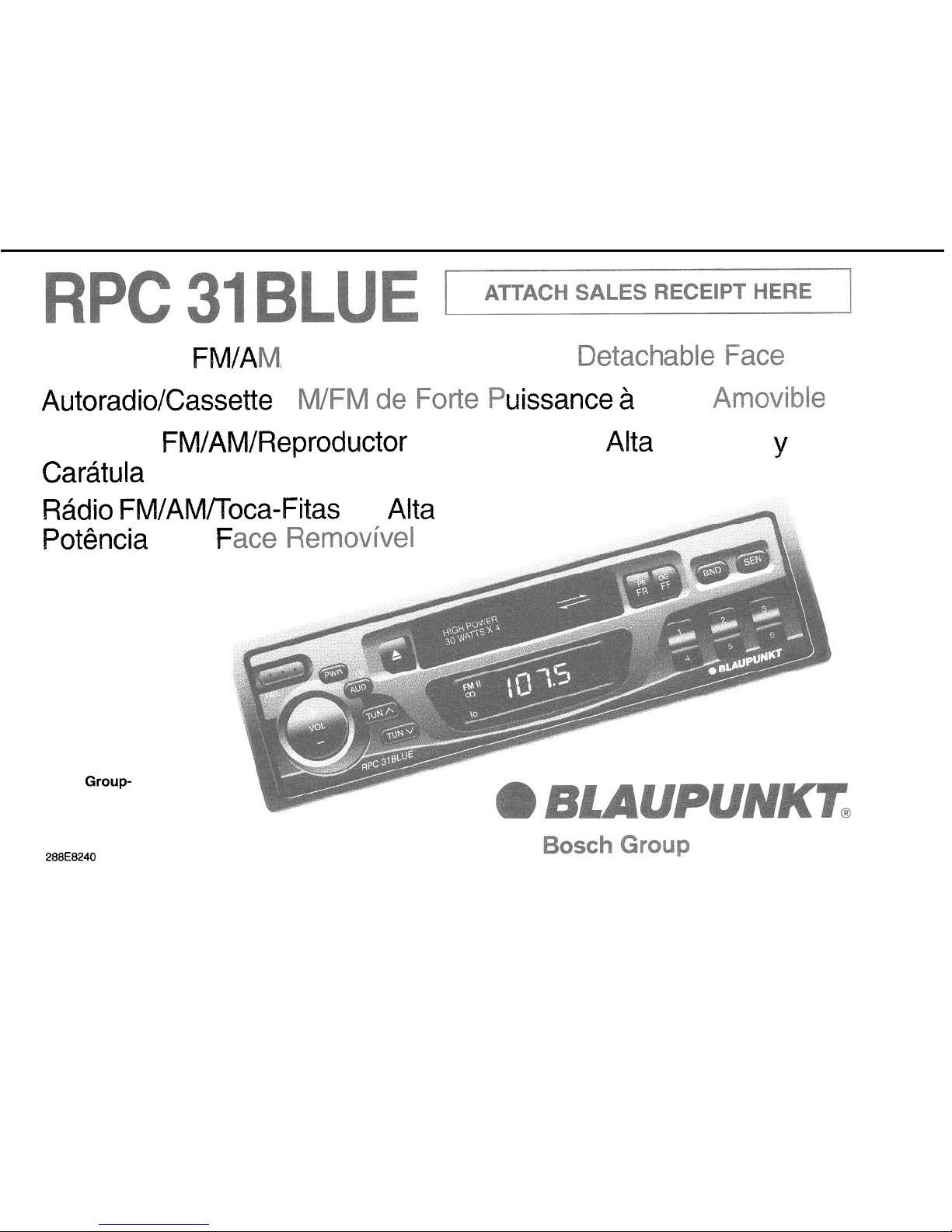
High-Power
FM/A
/Cassette Receiver with
AutoradiolCassette A
uissance a
Receptor FM/AM/Reproductor de Cassette de
Cartitula Desmontable
R&dio FWAWV’Toca-Fitas
Pot&Ma
Robert Bosch Corporation
Sales
Group-
Blaupunkt Division
2800 South 25th Avenue
Broadview, Illinois 60153
288E8240
corn
F
de
Alta
Face
Alta
Potencia y con
Page 2
FCC WARNING
The equipment has been tested and found to comply with the
Ikmtts
for a Class Et
device,
pursuant to Pad 15 of the FCC Rules These llmlts are destgned to prowde reasonable
protectlon against harmful interference In a resldentlal Installatton This equtpment generates, uses, and can radiate radio frequency energy, and, If not Installed and used
tn
accordance with Instructions. may cause harmful Interference with radio communlcatlons However, there IS no guarantee that radio Interference
WIII
not occur In particular
lnstallatlon If this equipment does cause harmful Interference to radio or televlslon reception, which can be determlned by turning the equipment off and on, the user IS encouraged
to consult the dealer or an experienced
radloflV technuan
for help
You are cautroned that any changes or modlflcatlons not expressly approved In this manual could
void
your authority to operate
th!s equpment.
OWNER’S RECORD
The model and warranty, numbers are located on the top of the unit. Record the serial number in the space provided below. Refer to these numbers whenever you call upon your
Blaupunkt dealer regarding this product.
WarrantyNumber_~ ~~~ _
~.
._~~
FEATURES
Congratulations on your purchase of this Blaupunkt FM/AM/Cassette
Receiver
Its Optimum Fteceptlon Control (ORC IV)
qlartz
FM and AM Tuner and high-quality, cassette tape
player provide the ultimate In sound reproduction
*
Tuner Features:
-
ORC IV Tuner
-
12
FM16
AM Presets
Travelstore FM/AM
-
Automatic and Manual Tuning
l Cassette Features:
-
Autoreverse Cassette Mechanism
-
True Fast-Forward/Rewind
-
Hard Permalloy Tape Head
Your unit’s detachable front faceplate makes the unit useless to would-be thieves.
*
Audio Features:
-
4 x 30 Watt Max. Integrated
Amplifier
-
Volume/Balance/Fader Controls
-
Adjustable Turn-On Volume-Level
-
Separate Bass and Treble Controls
l General Features:
-
Detachable Faceplate for Security
-
Switchable Clock/Function LCD Display
-
Quick-Connect Wire Harness
-
176 x 50 x 153.5 mm (7 x 2 x 6 in.)
DIN Chassis
-
Snap-In DIN Sleeve 8 Mounting Hardware
PRECAUTIONS
*
If your vehtcle was parked In direct sunlight resulting In a conslderable rise tn temperature InsIde the
vehcle.
allow the unit to cool
off before operatlnq your
urxt.
*
If no power
conne&bn
is supplied to the unit. check the connections first. If everything is in order, check the fuse.
l
If
no sound comes from the speakers of a two-speaker system, set the fader control to the center position.
l You are cautioned
tha,t
any changes or modifications not expressly approved in this manual could void your warranty.
*
If you have any questlons or problems concerning your unit that are not covered in this manual, please contact your Blaupunkt dealer.
DETACHABLE FACE
1
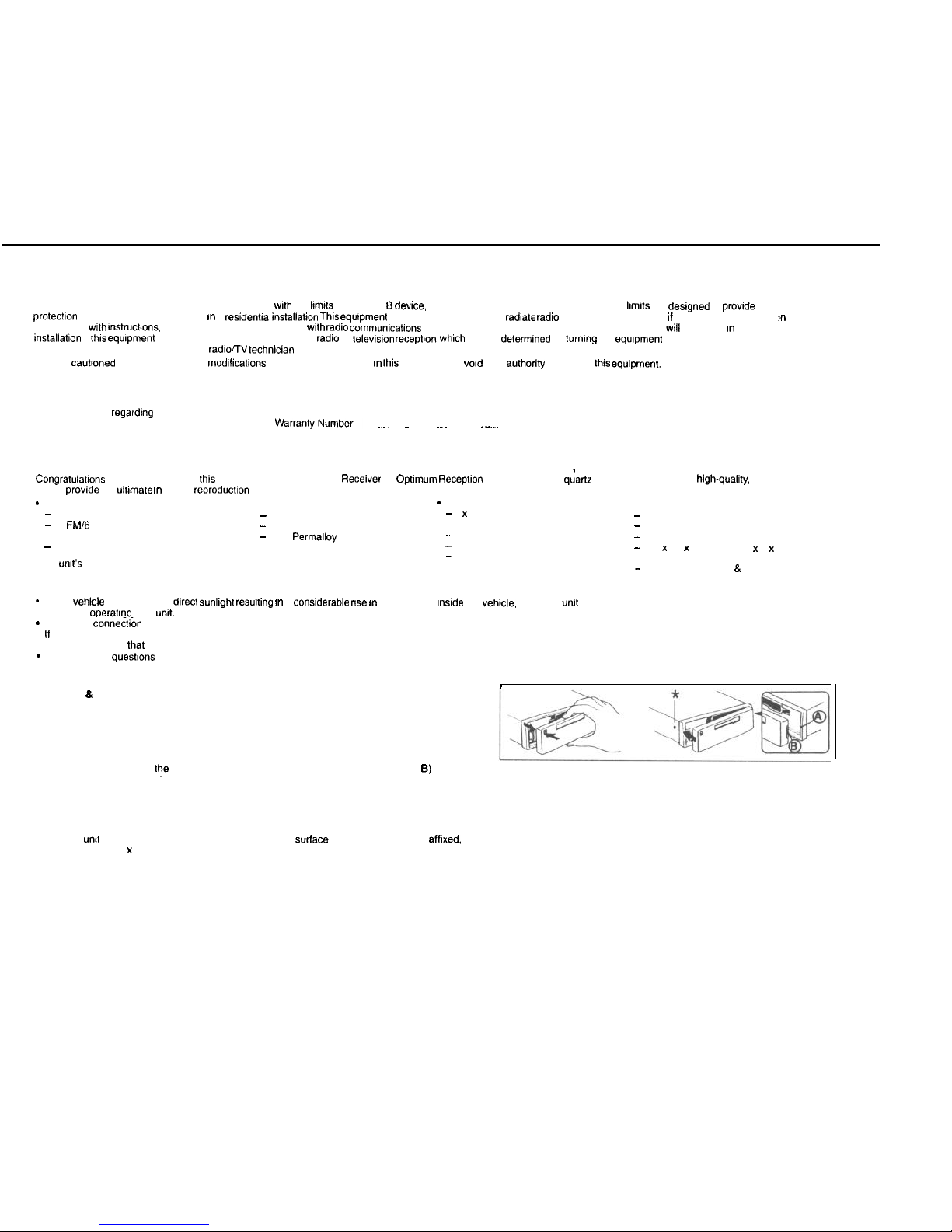
Detaching & Attaching the Face: The face of this unit can be detached and taken with you to prevent
it from being stolen.
Detaching the Face: Before detaching the face, be sure to press the PWR Button first. Then press the
REL (Release) Button and detach the face by gently pulling it off as illustrated.
Note: Do not pull it straight out from the chassis. Be sure not to drop the face when detaching it from
the chassis.
Attaching the Face: Apply the right hand side of the face to the chassis by sliding (part B) of the face to (part A) at the front of the chassis. Gently push the left side of the face
against the front of the chassis until it snaps into place.
Note: Make sure that the face is inserted right side up. Do not press against the display window. Do not press hard against the face when attaching it to the chassis, it may be easily
attached with gentle pressure. Do not expose the face to direct sunlight, heat sources such as hot air ducts or leave it in a humid place. Never leave it on the dash board of a vehicle
parked in direct sunlight. where there may be a considerable rise in temperature inside the vehicle.
Affixing Faceplate For Retail Display: The faceplate can be affixed to the unit’s chassis, which is desirable for a retail display, for example. This should only be done in situations
where the
untt
can be accessed from behind the mounting
suriace.
Once the faceplate is afflxed. the release keys cannot be used to remove the chassis. To affix faceplate, obtain
the small bolt (M2.6 x 10) from hardware pack and drive it into the upper hole at the front of the left side of the chassis using a Phillips screwdriver. The bolt will self-thread the hole.
(See above’)
Page 3

ELECTRICAL CONNECTIONS AND INSTALLATION
dl~?#&‘zO!
To avoid the aggravation of costly mistakes and serious damage that could make you feel this way, please carefully read all of the instructions before you begin. You’ll
be glad you did!
GENERAL
RECOMMENDATfONS
-
If you’re not confident that you can install the unit correctly, have it installed by a qualified Blaupunkt installation technician.
l
Use this unit only with negative ground 12 Volt (11-16 Volt) direct current (DC).
l
Be
sure to detach the faceplate before you start to connect or install the unit.
l
If you use the unit’s connector with or without an adapter, make sure that function of the leads (wires) of the connector match the function of the leads in the mating connectors!
l
If your vehicle’s radio wire harness is not compatible with this unit’s harness connector, you can either a. buy an adapter harness at a car audio store -or- b. cut off the unit’s
connector and use a different type of connection.
-
We recommend making and testing all electrical connections before installing the unit.
-
Connect the leads (wires) according to instructions and diagram below unless the speaker’s or amplifier’s manual states that this is O.K.
ELECTRICAL CONNECTION INSTRUCTIONS - ff vou cannot use
the unit’s connector with or
without an
adapter.
1
2.
3
4
5.
6
7
6
9.
Disconnect the vehicle battery’s negative
terminal
before making connections.
Connect speakers following the guidelines in the SPEAKER CONNECTION section below.
Connect the black (power ground) lead to a grounded metal
part
on the vehicle. We recommend grounding all audio system black ground leads (head unit, CD changer, etc.) to a
common
groundrng
point, preferably a non-painted surface under the instrument panel.
Connect the yellow (constant power) input lead to a source of constant battery power, preferably a terminal to an appropriate slot in the fuse box.
Connect the red (turn-on power) input lead only after the other leads are connected. Be sure to connect the red lead to a positive (+) 12 Volt power terminal that is energized only
when the Ignition key is set to the on position or accessory position,
Cover the ends of any unused leads with electrical tape. This will prevent them from touching the
vehicle
or each other and causing a shod-circuit and damage to the radio or vehicle.
Reconnect the vehicle’s battery.
Verifv that no fuses have blown,
Plug’the
harness
Into
the
umt
10. Attach the faceplate and test the unit.
Once the
connectrons
have been successfully made, you can
begin
to
rnstall
the
unit.
SPEAKER
CONNECTtONS
l
You can connect a speaker (regular, co-axial or
trt-axial
speakers or component speaker system, all hereafter referred
to simply as “speaker”) to each of the units’ four pairs of speaker leads,
Connecting the Speaker Leads
To prevent short circuits or serfous damage to
the unit
and/or
speakers:
*
Connect the speaker leads only as indicated in the wiring diagram.
*
Only
rrsn sponknrs lhnt hnvn irnpodnncn
rntings of 4 ohms or higher and have power-handling capabilities greater than
the head unit’s stated power level.
-
The unit’s internal amplifier is designed to handle a
4-ohm
load on each pair of speaker leads.
l
DON’T connect two speakers to a single pair of speaker leads (“in parallel”) unless both speakers each have at least 6
ohms impedance.
*
DON’T connect the left and right speaker leads to each other or to the same speakers,
*
DON’T connect the front and rear speaker leads to each other or to the same speakers.
l
DON’T connect the negative speaker leads to each other.
l
DON’T connect the positive speaker leads to each other.
l
DON’T connect any active speakers (with built-in
amplifiersjto
the speaker leads,
Addlng CD Changer: You can easily play compact discs through this unit by adding the Blaupunkt CDC-RF6
6-Disc
Compact Disc Changer. The space-saving CDC-RF6 easily plugs into the unit’s antenna jack and comes complete with its
own commander control. See your Blaupunkt dealer for details!
Page 4

INSTALLATION
Recommendations
l
Carefully choose the mounting location so that the unit won’t interfere with normal driving.
l
Avord
mounting locations where the unit would be subject to high temperatures, such as from direct sunlight or hot air from the heater, or
where it would subject to dust, dirt or excessive
vibration.
l
The illustration below shows a typical installation, however, you may need to adjust the installation, depending on the unit. If you have questions or need additional installation
hardware, consult your
Elaupunkt
dealer.
l
Make sure the unit is firmly anchored (preferably at both front and back)
and does not vibrate.
Mounting The Unit In Most Dashboards
1
Install the Sleeve in the dashboard.
2
3
Select and bend the appropriate tabs to hold the sleeve firmly in place.
A.B.Attach the Mounting Strap to the underside of the dashboard, using screw.
Anach the back of the unit to the mounting strap using the support stem bolt and hardware,
Bend these tabs
Mounting the Unit in a Japanese
Car
I
I
You
may have
dtffrculty mountrng
this unit in some Japanese cars
In
thus
case, consult your Blaupunkt dealer.
Removing the Unit
Use the Release Keys as shown below. Keep them in a safe place in case you need them
,.
In
me
tuture.
MAINTENANCE
Fuse Replacement
When
replacrng
the fuse, be sure to use one with the correct amperage.
whrch
will be stated on the fuse case. Never use a fuse that has a stated amperage exceeding the one
supplred
for
thus unrt.
as
thus
could cause
malfunctron
and
serious
damage to the
unrt.
SPECIFICATIONS
Audio Power
Soecifications
Power Output end Total Harmonic Distortion: 10 watts per channel
mrnimum
continuous average output into 4 ohms, 4 channels driven, from
30-15000
Hz with no more than 1%
total
harmonrc drstortron.
Othefipe&!cati.oqe
Tuner
FM
Tuning Range:
87.5 - 108.0 MHz
Audio
07.5
-
107.9 MHz
Speaker Impedance:
10.7 MHz
Maximum Amp Power:
18
dBf
RMS Power:
4-0
ohms
lntennedrate
Frequency:
FM Mono
Sensrtrvrtv:
Selectivity:
’
Signal-to-Noise Ratio:
Harmonic distortion at 1
kHz:
Separation:
Frequency Response:
AM
Tuning Range:
531-l ,602
kHz
530-1.710
kHz
Seek lo
sensrtivrty
Seek
sensrtivrty:
55
dBuV
lntermedrate
Frequency:
35
dBpV
450
kHz
SIgnal-to-Noise Ratro
45
dB
Des!gn and
Specifications
subject to change wrthoui
nobce.
75 dB at 400
kHz
65 dB (stereo), 70 dB (mono)
0.7% (stereo), 0.5% (mono)
30
dB
30-l 5,000 Hz f 3
dB
Bass Control:
Treble Control:
Cassette
Signal-to-Noise Ratio:
Tape Wow and Flutter:
Tape Frequency Response:
General
Dimensions
(w/o
projecting parts/controls):
Mass.
Power Requirement (neg.
grnd.):
Operating Temperature:
Suppked
Accessones:
30 Watts x 4 (at 4 ohms)
lOWattsx4
ilOdB@ 100Hz
ilOdB@
10kHz
53
dB
0.10%
50-15.000 Hz f 3
dB
170 x 50 x 153.5 mm
7 x 2 x 6 in.
Approx. 1.4 kg (3.0 lb.)
12 V DC car battery
15°F to
12o”F,
-10°C to 50°C
l
Unit
l
Faceplate
l
Mounting Hardware
. DIN Sleeve
l
Owner’s Manual in English, French, Spanish and Portuguese
Page 5

INSTRUCTIONS - GENERAL OPERATION
RADIO OPERATION
“Press” means momenfaly press of less than l/Z second
Turning Unit 0”
Band
Selection
Press the BND
Buff~n
as needed to access the
deswd
band, FMI FMII or AM
Vehicle
lg”,f,on must
be on To fur”
unlf
on. press PWR
Buffon
Turning Unit Off
Press the PWR
Buffon to turn
the
umf
off
Automatic Stereo/Mono Reception Adjustment
When a” FM stereo program with a signal strength of at least 50 dBf is tuned in the
_
r........ ~~
_I~.
Volume
Press + or - to
qutckly tncrease
or decrease the volume to the
dewed
level The volume
level IS
tndrcafed
I” the
Display Wmdow
To make a
ftne adfusfmenfs
to the volume level,
press the other
part
ol the
buffon
before the volume level
dwppears
from the
dwplay
You can the” gradually
adjust
the volume I”
elfher
dIrecton,
maklng
prease
adfusfmenf
easy
slereo ~“alcator ( a )
appears I” the
Display WIndow
II the rw,
b,ereo
program IS
v,ea~
and
“01s~.
the
unlf aufomaf~cally
blends the signals, ekmlnaflng the
“we
and gradually
co”veRs to the
monaural
or “mono”
mcde
The slereo symbol
WIII disappear from
the
Display
Automatic Seek Tuning
Select the
dewed
band. Press and release the A or V buffon to seek the next receivable
station. To stop seeking and return to the
prewusly
tuned frequency, press the other
ot
the A or V buttons. If the frequency is already stored on a preset button on the active
band, the preset number will appear briefly.
Manual Tuning
Select the desired band. To begin manual tuning, press and hold the A 01 V buffon lot
0.5 seconds. Four seconds after you complete your adjustments, the Tuning Controls
(A V) Buttons revert to Seek Tuning. II the frequency is already stored on a preset button
on
the active band, the preset number will appear brielly.
Travelstore
This
feature allows you to automatically store 6 receivable FM and 6 receivable AM
SfafKms.
which IS espeaally handy when you travel lo a different reception area.
Select the dewed band. The” press BND Button again
for
2
seconds.
Beginning
wifh
fhe last station
recetved
the unit automatically scans the band for
the
six
stations with strong signals. Once completed. the
unit
returns to
the
previously-tuned
trequency.
Selecting Preset Stations
Choose the desired band using the BND Button. Press the preset
buffo”
that has the
desired station.
Adjustable Turn-On Volume
Flrsf adfusf
the volume lo the (maximum) volume level desired when the unit is fumed on.
Press and hold the PWR
Button
for more than
two
seconds. The unit turns
oft
and the
turn-on volume level is
memonzed.
When the unit is fumed on. the volume will be at the
memorized level, eve” i! the unit was fumed
of1
while the volume was at a higher level.
However, If the volume 8s fumed
off
when
the
volume level is lower than the stored
Tum-
0” volume level. the volume will be at the lower level when the unit is turned back on.
Setfing the Clock
Turn the unit
0”.
Press the
AU0
Button for
low
seconds until the clock starts blinking.
(The display
wll
change
alfer
two seconds. Ignore this and continue to hold for two more
seconds.) Once the clock stalls blinking. Press the A Button to set the hour, and press
the V
Button
to set the minutes. (To change the minute indicator to the nearest hour
(:OO).
you
can
press the BND Burton.) Press the AUD Button again to activate the clock.
Changing the Information Displayed
*
To change the dlspfsy priority in the radio mode from
cloCk to luncfion 01
function
to
clock, press the AUD Button lor two seconds. The display priority changes.
l To change the display temporarily in the radio mode from
CloCk to
function
or
function to clock, press and release the AUD Button: After five seconds, the display
changes back to the
priorafy
Information.
Bass and Treble
Press and release as many times as needed AUD
Buffon to
select the Bass mode, once
more to
reach the Treble mode. The level is
indlcafed
I” the Display Window. Press
the
+
Buffon or-Button to
increase or decrease the level.’
Bsla”cs
Press AUD
Button
as needed to select the Balance mode The balance IS
lndlcafed
I” the
Display Wtndow
Press the + Button to
fncrease
the letf speaker
output
or press the
-
Button to
increase
the
raghf
speaker
oulpuf to
the
desired
level
*
Fader
Press AUD Button as needed to select the Fader mode The level ot output for front and
back speakers IS lnduxfed I” the
Dasplay Wmdow
Press the + Buffo” to decrease the
rear
speaker output Press the - Button to decrease the front speaker output
*
*
Five seconds
affer
you complete your adjustments, the
unit
wll automatically
return to
the volume
mcde
and fhe
dlsplav
wll reverl back to the
Driorlfv
display, clock or function.
You
can also
press and release AUD as needed to
ret&” to iOLUME, which
appears
alfer FADER t” the AUD Button cycle
AfJD Baton
Summary
*
Pressing and
releasing
the AUD Button accesses these modes in this succession:
*
Temporary Display Change(s). Bass, Treble, Balance, Fader, Volume.
*
Pressmg the AUD Button for two Seconds changes the display priority between clock
and funchon.
* Pressmg
the AUD Button for tour seconds accesses the time adjustment
mode.
*
While I” any AUD
mode,
it no button is pressed for five seconds, the unit returns to the
volume adjustment mode and priorlfy display.
Manually Storing Individual Presets
1. Tune in the desired station using seek 01 manual tuning.
2. Press the preset
button
on which you want to
store
the station for 2 seconds. To
confl[m that the station is stored, the audio mutes femporanly. the frequency blinks in
the display. and the preset number appears briefly.
CASSETTE PLAYER OPERATION
Casseffe Tape Play:
. Insert casseffe
lnfo
Cassette
Door.
Note: Make
sure
that the side of
the
casseffe
with
the tape exposed is lacing to the right side and
that
all slack has bee” removed from
the tape prior to insertion.
*
The insertion of the casseffe will automatically override the radio, and the cassette will
begin to play. When the casseffe deck is being used, the display will indicafe which
direction the tape is going.
. The tape wll continue to play until ejected
after
which the radio will play.
Autoreverse Tape Function
. Automatic: When the end 01 the tape (side A or B, program 1 or 2) is reached, the
tape will automatically reverse direction and play the other side of the tape.
*
Manual: To reverse tape direction
dung
playback, press
the
PROG (Program)
Buttons. The change in direcfiw and I” tape program will be
conlwmed
in the Display.
Fast Winding of Tape
No matter which side 01 the tape that is playing:
*
To fast-forward the tape. press the FF Button. The direction
arrow
wll blink to
conlirm
the fast-forwarding.
. To fast-rewnd the fape, press the FR Buffo”. The
direcflon
arrow stays on and the
oppos~fe
arrow blinks to
conilrm
the last-rewnding.
Ejecting The Tape
Press the Cassette
Eject Button to ejecf the
tape. The radio will play.
TROUBLESHOOTING GUIDE
The
fOffOw+“g check Will aSSlSf I”
the
COrreCtlO” of mOSf
problems which you may encounter wfh your unit. Before gang through the check list below,
refer
back to the
connection a”d
operaflng procedures.
General
NO sound.
Trouble
lndicsfions do not appear on the
display window.
Cause/Sofuffon
*
Adjust the volume wlfh the + button.
*
With a P-speaker system. set the fader control to the center position.
I
*
Remove the front panel and clean the connectors wfh a
cotton
swab and
isopropyl
alcohol (90% or
higher)
wfh a” !“Iouf
mofon -- NOT a
side-to-side mof,on
Radio reception -(Make sure the antenna is connected. extended, and dry inside)
Trouble
Preset
s1a1ions
are not receivable.
*
The broadcast is too weak.
Automatic tuning is not possible.
*
The broadcast IS
too
weak.
-->
Use manual tuning.
Travelstore leature does not complete
storing of six stations.
*
Not enough broadcast frequencies are
recewable.
Cause/Solution
If
the above
menffoned SOIUIIO”S
do “of help to lmpmve the
s~fuaf~o”.
consult your neatest
Blaupunkt
dealer or I” the USAcall l-600-266-2528
For dealer referral or product brochure call 1-600-950-2526
 Loading...