

Page 1
6/29/07 10:27 PMiPhone Disassembly
Page 1 of 5http://stream.ifixit.com/
AC Adapters
Accessories
Hard Drives
RAM
Tools
Wireless
PowerBook G3
PowerBook G4 Ti
PowerBook G4 Al
iBook G3
iBook G4
MacBook
iPod 1st Gen
iPod 2nd Gen
iPod 3rd Gen
iPod 4th Gen
iPod Photo
iPod 5th Gen
iPod Mini
iPod Nano
iPod Shuffle
Support
Contact Us
ID Your Mac
ID Your iPod
Purchasing
Conditions & Warranty
Purchase Orders
Our Privacy Policy
iFixit
iFixit> iPhone Live Disassembly
2007-06 -29 18:44:13
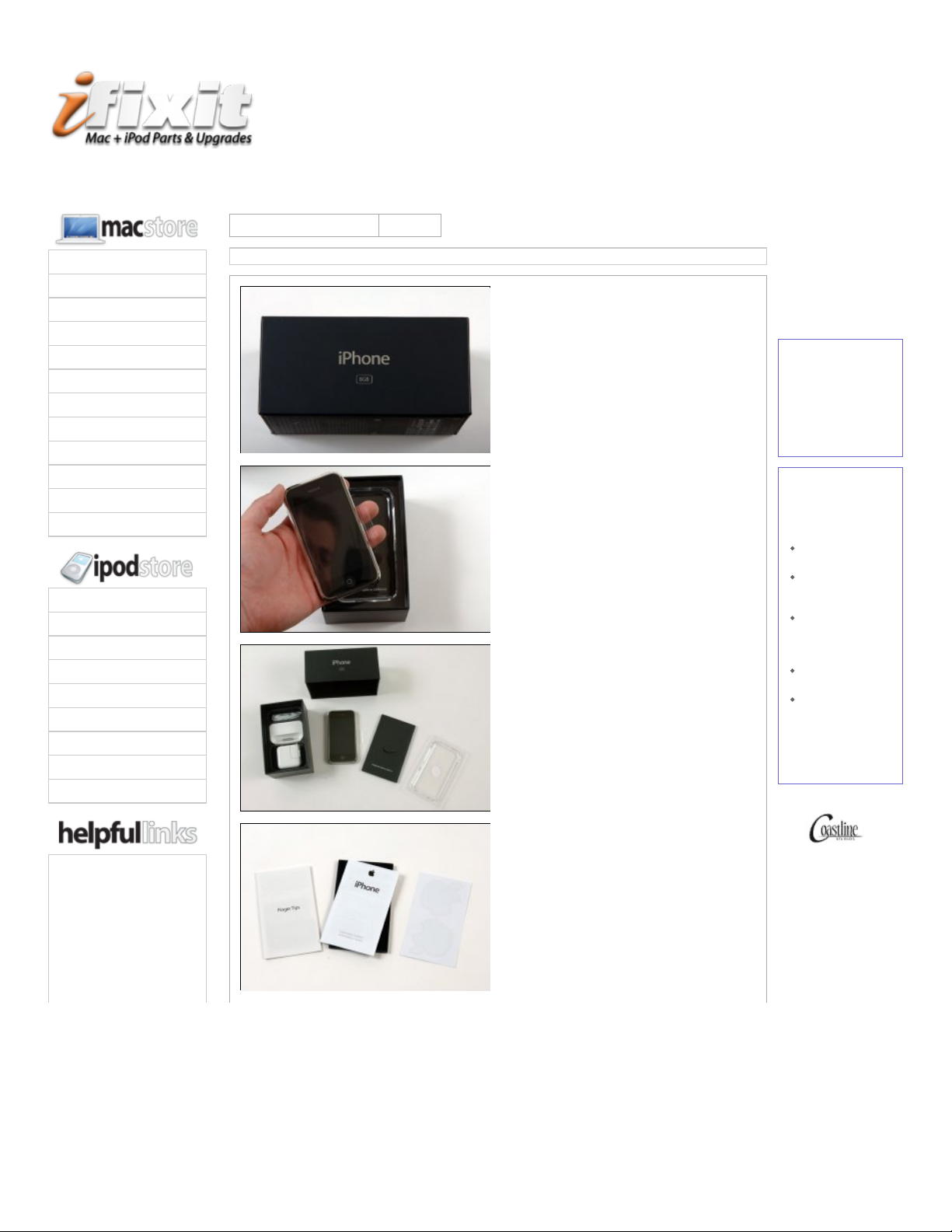
We've procured our iPhone, and it's on
the way to our photo studio now.
We purchased two 8 GB iPhones.
The phone has arrived!
2007-06 -29 18:49:34
OK, so here's a quick overview of the
basics.
The iPhone is 4.5x2.4x0.5", and
weighs 4.8 ounces (0.3 pounds). For
reference, 18 iPhones weigh the
same as 1 MacBook Pro.
The display is 3.5" diagonal, 480x320
resolution. That's 153,600 pixels, or
12% as many as a 15" MacBook Pro.
2007-06 -29 18:50:44
If you can't tell, we're stalling while we
figure out how to get it open.
The iPhone supports four major different
wireless protocols.
The List: Quad- band GSM (850, 900,
1800, 1900 MHz), 802.11b/g WiFi, EDGE,
and Bluetooth 2.0 + EDR.
2007-06 -29 19:11:08
Random facts:
The iPhone has a 2 Megapixel
camera.
It also has H.264 video decoding,
most likely in hardware.
Sorry for the server hiccup, we should be
back online.
digg it
15
diggs
Free Fixit Guides
Sad Mac? Broken
iPod? Fixit yourself.
Our free Fixit Guides
show you how to
repair your machine.
Mac | iPod
Parts Store
Need parts? We have
over a thousand Mac
and iPod parts in our
store.
iPod Batteries
from $14.95
iPod Screens
starting at
$39.95
60 GB
PowerBook hard
drives only
$59.95
8x SuperDrives
only $119.95
1 GB RAM Chips
just $79.95
Use the coupon code
IPHONELAUNCH in
our store for $5 off
any order.
photography by
Search
Guides Troubleshoot Sell Help Contact
Page 2
6/29/07 10:27 PMiPhone Disassembly
Page 2 of 5http://stream.ifixit.com/
About Us
Press Releases
Why?
2007-06 -29 19:13:33
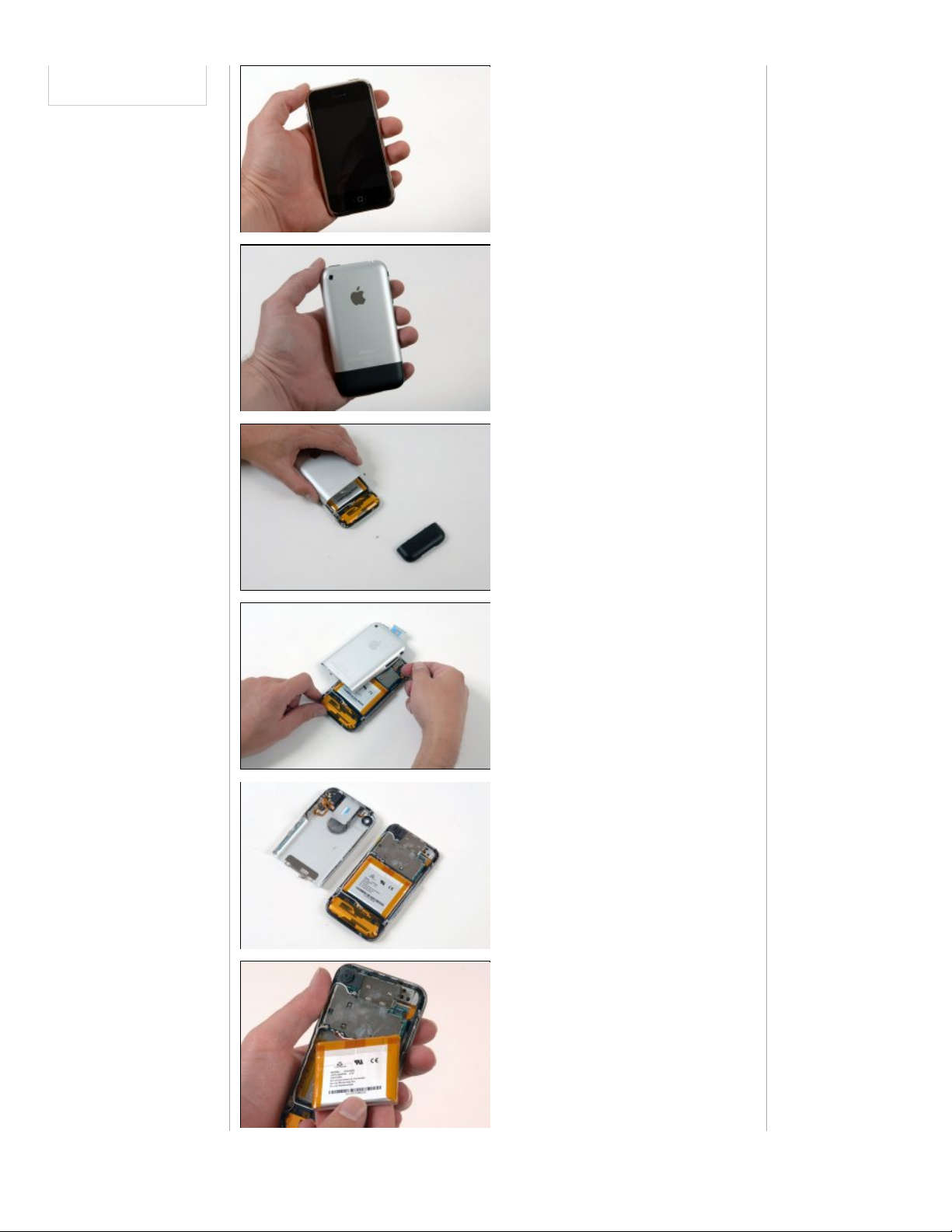
Front of the iPhone. The battery was
partially charged when we got it.
2007-06 -29 19:14:23
iPhone's back.
2007-06 -29 19:27:25
We've got the iPhone apart. It was a little
bit tricky.
We removed the black antenna plate first.
You can see the grounding screw on the
back panel holding the antenna cable and
connecting the front and back case.
2007-06 -29 19:21:20
Separating the front and back case.
There's a headphone jack cable to
disconnect before you can completely
remove the back panel.
2007-06 -29 19:30:33
At last! The moment you've all been
waiting for.
The battery is huge, and soldered to the
logic board.
You can see the SIM card bracket and
headphone jack on the rear panel.
2007-06 -29 19:27:41
The battery has Apple model # 616 -0290
L1S1376APPC.
3.7 V Li -Ion Polymer battery
You can see at least two antenna cables
connecting to the logic board.
Page 3
6/29/07 10:27 PMiPhone Disassembly
Page 3 of 5http://stream.ifixit.com/
2007-06 -29 19:29:35
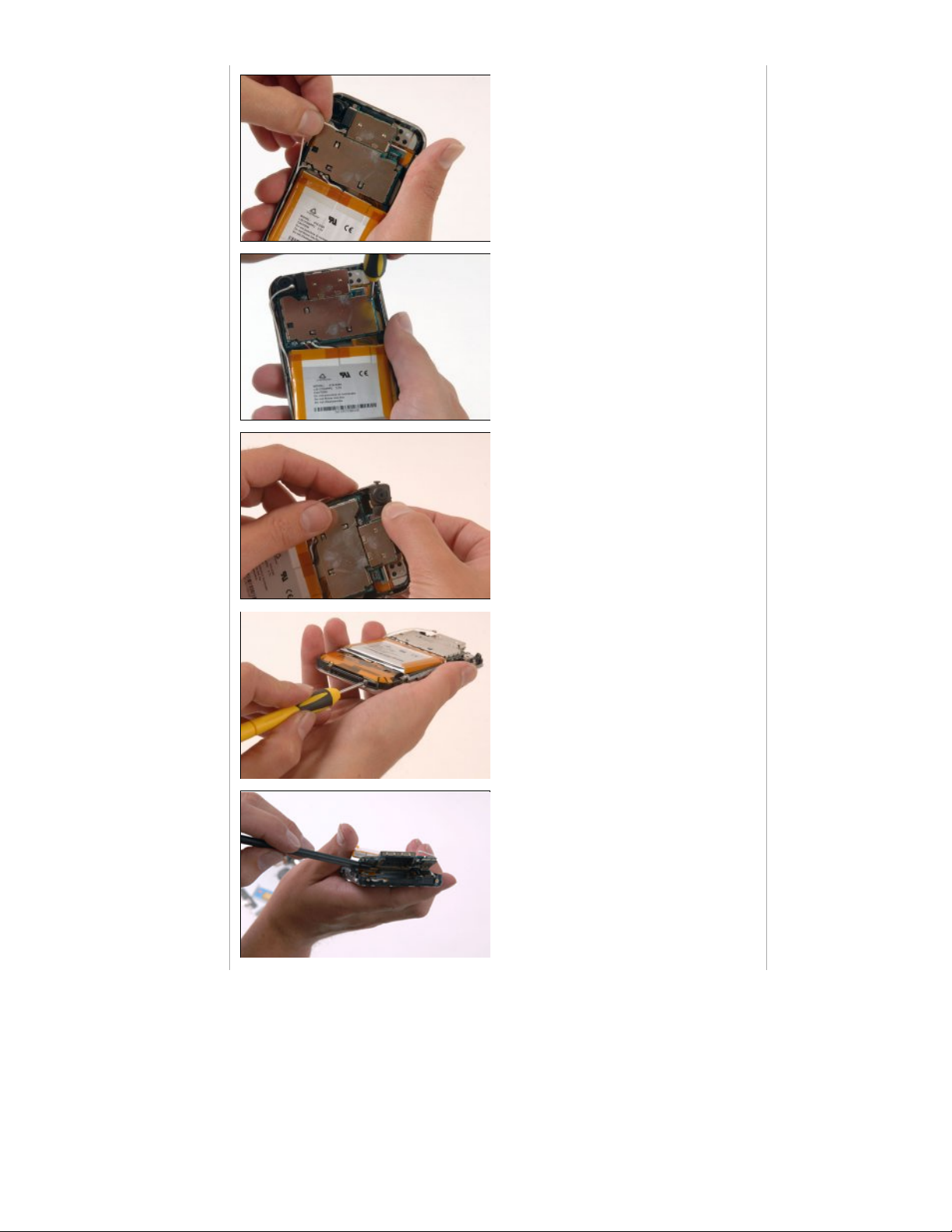
Disconnecting the two antenna cables.
There's a dab of glue underneath both of
the antenna connectors, presumably for
reliability.
One has to imagine that Apple was extra paranoid about reliability on this phone.
They've certainly learned their lessons
from the iPod.
2007-06 -29 19:35:37
Removing three Phillips #00 screws
securing the logic board to the front
panel. The screws are:
Where the screwdriver is
Underneath the black camera in the
upper right hand corner.
To the left of the battery wires that
are soldered to the logic board.
2007-06 -29 19:38:34
Removing the camera, on the top of the
phone. This is the standard camera.
2007-06 -29 19:38:59
Removing ten Phillips #00 screws around
the perimeter of the iPhone.
2007-06 -29 19:38:59
Lifting up the logic board. There are three
connectors underneath. They are speaker,
touch sensor, and display cables.
Disconnect the two connectors on the left
side of the image.
Page 4
6/29/07 10:27 PMiPhone Disassembly
Page 4 of 5http://stream.ifixit.com/
2007-06 -29 19:38:59
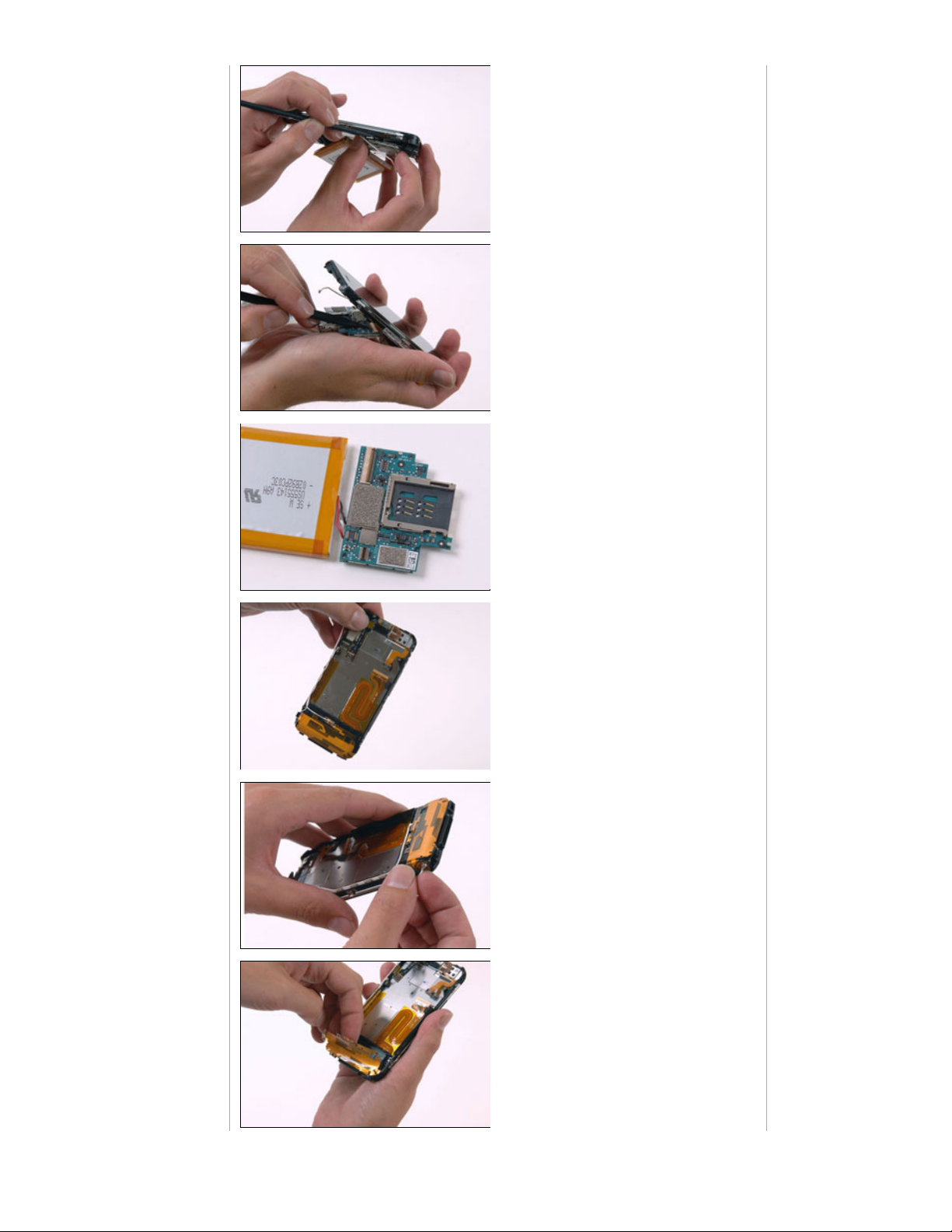
Disconnect the remaining connector.
2007-06 -29 19:38:59
Flip up the retaining bar to free the dock
connector cable.
2007-06 -29 19:38:59
Close-up shot of the logic board. The logic
board is two layers thick, so it's difficult to
see components.
We haven't found a way to pry the two
sections apart without damaging the logic
board, so it's virtually impossible to tell
you what's in there.
2007-06 -29 19:38:59
View of the iPhone with the logic board
and battery removed.
2007-06 -29 19:38:59
Disconnect the antenna cable to the left
of the dock connector.
2007-06 -29 19:38:59
Peel up the antenna ribbon sheet from the
large black plastic piece
You can now see why the iPhone has
the black lower section of the back
case. The antenna encompasses this
entire region.
Page 5
6/29/07 10:27 PMiPhone Disassembly
Page 5 of 5http://stream.ifixit.com/
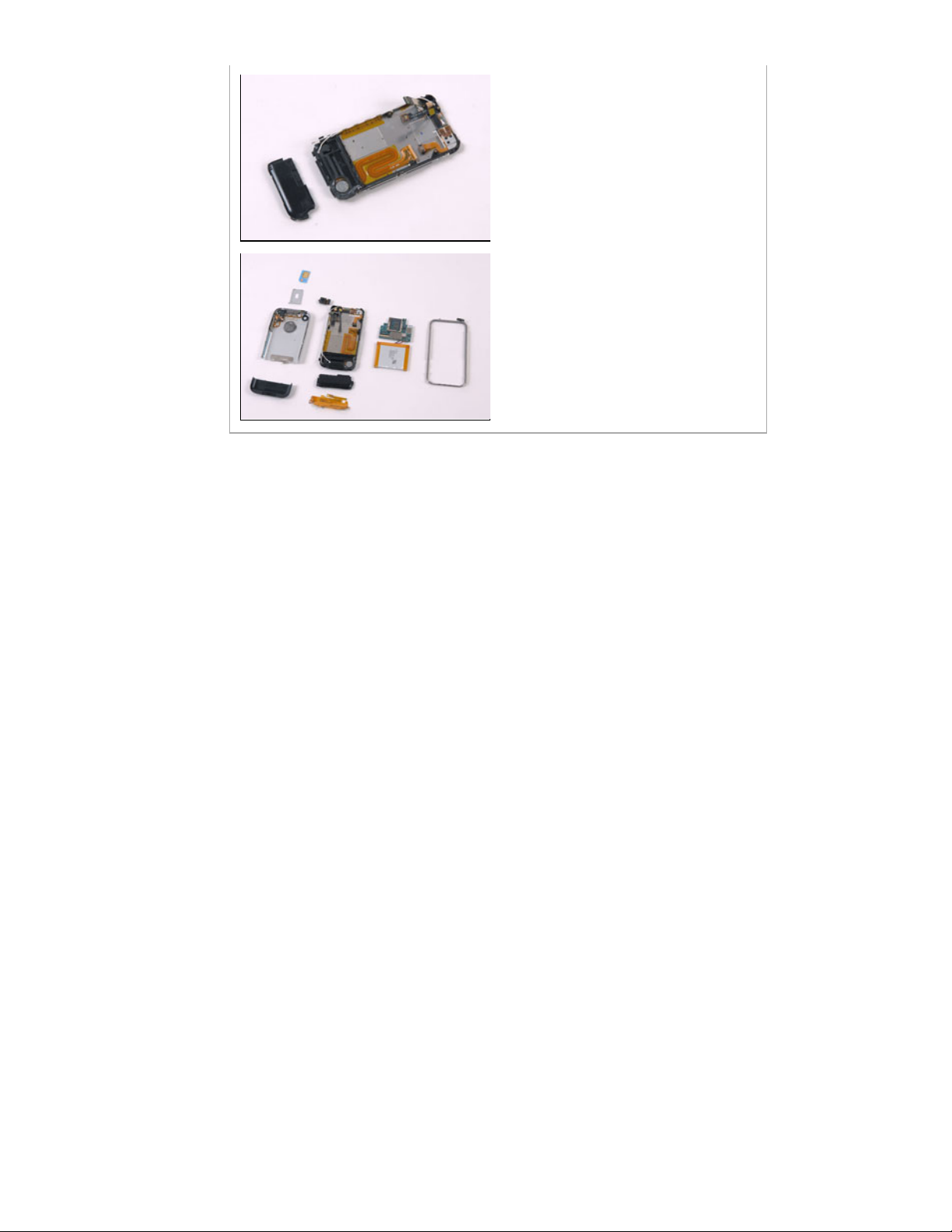
2007-06 -29 19:38:59
Remove the hollow black plastic piece
that was covered by the antenna.
There is some empty space within it
— the only open internal space.
2007-06 -29 19:38:59
The iPhone is completely apart!
The phone had about 16 screws total,
unlike many iPods. The iPod Nano only
has three screws.
9393 Eagle Vista Way, Atascadero, CA 93422
phone: 1.866.613.4948 int'l: 1.805.464.0573 fax: 1.805.464.0451
© iFixit 2007
All rights reserved.
 Loading...