

Page 1

WT
-2000PCI
802.11g Turbo Wireless LAN
PCI Card
User’s Manual
AirLive WT-2000PCI User’s Manual
0
Page 2

COPYRIGHT
Copyright ©2005/2006 by this company. All rights reserved. No part of this
publication may be reproduced, transmitted, transcribed, stored in a retrieval system,
or translated into any language or computer language, in any form or by any means,
electronic, mechanical, magnetic, optical, chemical, manual or otherwise, without the
prior written permission of this company
This company makes no representations or warranties, either expressed or implied,
with respect to the contents hereof and specifically disclaims any warranties,
merchantability or fitness for any particular purpose. Any software described in this
manual is sold or licensed "as is". Should the programs prove defective following their
purchase, the buyer (and not this company, its distributor, or its dealer) assumes the
entire cost of all necessary servicing, repair, and any incidental or consequential
damages resulting from any defect in the software. Further, this company reserves the
right to revise this publication and to make changes from time to time in the contents
hereof without obligation to notify any person of such revision or changes.
All brand and product names mentioned in this manual are trademarks and/or
registered trademarks of their respective holders.
Federal Communication Commission
Interference Statement
This equipment has been tested and found to comply with the limits for a Class B
digital device, pursuant to Part 15 of FCC Rules. These limits are designed to
provide reasonable protection against harmful interference in a residential installation.
This equipment generates, uses, and can radiate radio frequency energy and, if not
installed and used in accordance with the instructions, may cause harmful
interference to radio communications. However, there is no guarantee that
interference will not occur in a particular installation. If this equipment does cause
harmful interference to radio or television reception, which can be determined by
turning the equipment off and on, the user is encouraged to try to correct the
interference by one or more of the following measures:
1. Reorient or relocate the receiving antenna.
2. Increase the separation between the equipment and receiver.
3. Connect the equipment into an outlet on a circuit different from that to which the
receiver is connected.
4. Consult the dealer or an experienced radio technician for help.
FCC Caution
This equipment must be installed and operated in accordance with provided
instructions and a minimum 20 cm spacing must be provided between computer
1
AirLive WT-2000PCI User’s Manual
Page 3

mounted antenna and person’s body (excluding extremities of hands, wrist and feet)
during wireless modes of operation.
This device complies with Part 15 of the FCC Rules. Operation is subject to the
following two conditions: (1) this device may not cause harmful interference, and (2)
this device must accept any interference received, including interference that may
cause undesired operation.
Any changes or modifications not expressly approved by the party responsible for
compliance could void the authority to operate equipment.
Federal Communication Commission (FCC) Radiation Exposure Statement
This equipment complies with FCC radiation exposure set forth for an uncontrolled
environment. In order to avoid the possibility of exceeding the FCC radio frequency
exposure limits, human proximity to the antenna shall not be less than 20cm (8 inches)
during normal operation.
The antenna(s) used for this transmitter must not be co-located or operating in
conjunction with any other antenna or transmitter.
R&TTE Compliance Statement
This equipment complies with all the requirements of DIRECTIVE 1999/5/EC OF THE
EUROPEAN PARLIAMENT AND THE COUNCIL of March 9, 1999 on radio
equipment and telecommunication terminal Equipment and the mutual recognition of
their conformity (R&TTE)
The R&TTE Directive repeals and replaces in the directive 98/13/EEC
(Telecommunications Terminal Equipment and Satellite Earth Station Equipment) As
of April 8, 2000.
Safety
This equipment is designed with the utmost care for the safety of those who install and
use it. However, special attention must be paid to the dangers of electric shock and
static electricity when working with electrical equipment. All guidelines of this and of
the computer manufacture must therefore be allowed at all times to ensure the safe
use of the equipment.
EU Countries Intended for Use
The ETSI version of this device is intended for home and office use in Austria,
Belgium, Denmark, Finland, France, Germany, Greece, Ireland, Italy, Luxembourg,
the Netherlands, Portugal, Spain, Sweden, and the United Kingdom.
The ETSI version of this device is also authorized for use in EFTA member states:
Iceland, Liechtenstein, Norway, and Switzerland.
EU Countries Not intended for use
None.
AirLive WT-2000PCI User’s Manual
2
Page 4

CONTENTS
1 INTRODUCTION .................................................................................... 4
1.1 Features ......................................................................................................... 5
1.2 Specifications ................................................................................................. 5
1.3 Package Contents .......................................................................................... 5
2 INSTALLATION PROCEDURE ................................................................ 7
2.1 Install the Hardware .......................................................................................... 7
2.2 Install the Driver and Utility ............................................................................... 7
3 CONFIGURATION UTILITY .................................................................. 10
3.1 Site Survey ................................................................................................... 13
3.2 Profile ........................................................................................................... 14
3.2.1Configure the Profile ................................................................. 15
3.2.1.1 Configuration.................................................................. 16
3.2.1.2 Authentication and Security ............................................ 18
3.2.1.3 802.1x Setting-Certification............................................. 21
3.2.1.4 802.1x Setting-CA Server ............................................... 23
3.3 Link Status.................................................................................................... 24
3.4 Statistics ....................................................................................................... 25
3.5 Advance........................................................................................................ 25
3.6 About ............................................................................................................ 28
3.7 Turbo Mode................................................................................................... 28
3.8 WMM Function ............................................................................................. 29
4 TROUBLESHOOTING .......................................................................... 32
3
AirLive WT-2000PCI User’s Manual
Page 5

1 Introduction
Thank you for purchasing the 802.11g Wireless LAN PCI Card. This card complies with IEEE 802.11g
standard, which supports up to 54Mbps high-speed wireless network connections. It can also work with
IEEE 802.11b devices. When the card connects to 11b devices, the link speed will be up to 11Mbps.
This card enables higher data throughput than the IEEE 802.11g standard (up to 54Mbps). It supports
specific ways to increase the data transfer rate at a time; compress the data and decrease the waiting
time to send the next data to the Routers or APs. This feature is called Turbo Mode. When the card is
connecting to the Routers or APs with the proprietary Turbo Mode feature, the wireless network will be
more effective.
For WLAN security issues, this card supports 64/128-bit WEP data encryption that protects your
wireless network from eavesdropping. It also supports WPA (Wi-Fi Protected Access) feature that
combines IEEE 802.1x and TKIP (Temporal Key Integrity Protocol) technologies. Client users are
required to authorize before accessing to APs or AP Routers, and the data transmitted in the network is
encrypted/decrypted by a dynamically changed secret key. Furthermore, this card supports WPA2
function, WPA2 provides a stronger encryption mechanism through AES (Advanced Encryption
Standard), which is a requirement for some corporate and government users.
When you use the devices such as Voice over Internet Protocol (VoIP) phones, televisions, VCRs and
MP3 players, how can you speed up the audio, video and voice data to pass through the wireless
network? IEEE 802.11e Quality of Service (QoS) (The Wi-Fi Alliance defined WMM as a profile of the
IEEE 802.11e) extensions for 802.11 networks will help to define the priorities of the data traffics by the
data categories to provide enhanced multimedia support. This card supports the advanced technology
for sure.
The power consumption of the card is also very low. This card provides several levels of power saving
modes allowing user customizes the way of saving the power from his/her portable or handheld
devices.
This card is cost-effective, together with the versatile features; it is the best solution for you to build your
wireless network.
AirLive WT-2000PCI User’s Manual
4
Page 6

1.1 Features
• Works with both IEEE 802.11b and IEEE 802.11g products.
• High-speed transfer data rate - up to 54Mbps.
• Supports Turbo Mode to enhance the data transfer speed within the specific wireless
network.
• Supports WMM function to meet the multi-media data bandwidth requirement.
• Supports 64/128-bit WEP, WPA (TKIP with IEEE 802.1x), WPA2 (AES with IEEE 802.1x)
functions for high level of security.
• Detachable antenna with long length cable provides convenience to locate the antenna.
• Automatic fallback increases data security and reliability.
• Supports the most popular operating system: Windows 98SE/Me/2000/XP.
• Supports 32-bit PCI interface.
1.2 Specifications
• Standard: IEEE 802.11b/g
• Interface: 32-bit PCI
• Frequency Band: 2.4000 ~ 2.4835GHz (Industrial Scientific Medical Band)
• Modulation: OFDM with BPSK, QPSK, 16QAM, 64QAM (11g)
BPSK, QPSK, CCK (11b)
• Data Rate: 54/48/36/24/18/12/11/9/6/5.5/2/1Mbps auto fallback
• Security: 64/128-bit WEP Data Encryption, WPA (TKIP with IEEE 802.1x), WPA2 (AES with
IEEE 802.1x)
Note: WPA2 is enabled in Windows 2000/XP.
• Antenna: External detachable dipole antenna (Connector: RP-SMA connector, Cable Length:
94 cm)
• Drivers: Windows 98SE/Me/2000/XP
• LEDs: Link, TX/RXTransmit Power: 16dBm~18dBm
• Dimension: 19(H) x 130(W) x 121(D) mm
• Weight: 46g
• Temperature: 32~131°F (0 ~ 55°C)
• Humidity: Max. 95% (NonCondensing)
• Certification: FCC, CE
1.3 Package Contents
Before you begin the installation, please check the items of your package. The package should include
AirLive WT-2000PCI User’s Manual
5
Page 7

the following items:
• One PCI Card
• One CD (Driver/Utility/User’s Manual.)
• One Quick Guide
If any of the above items is missing, contact your supplier as soon as possible.
AirLive WT-2000PCI User’s Manual
6
Page 8
2 Installation Procedure
Before you proceed with the installation, please notice following descriptions.
Note1: The following installation was operated under Windows XP. (Procedures are similar for
Windows 98SE/Me/2000.)
Note2: If you have installed the Wireless PCI Card driver & utility before, please uninstall the old
version first.
2.1 Install the Hardware
A. Turn off your computer and remove its cover.
B. Insert the PCI card to an available PCI slot firmly.
C. Secure this card to the rear of the computer chassis and put back the cover.
D. Secure the antenna to the antenna connector of the card.
E. Turn on the computer.
2.2 Install the Driver and Utility
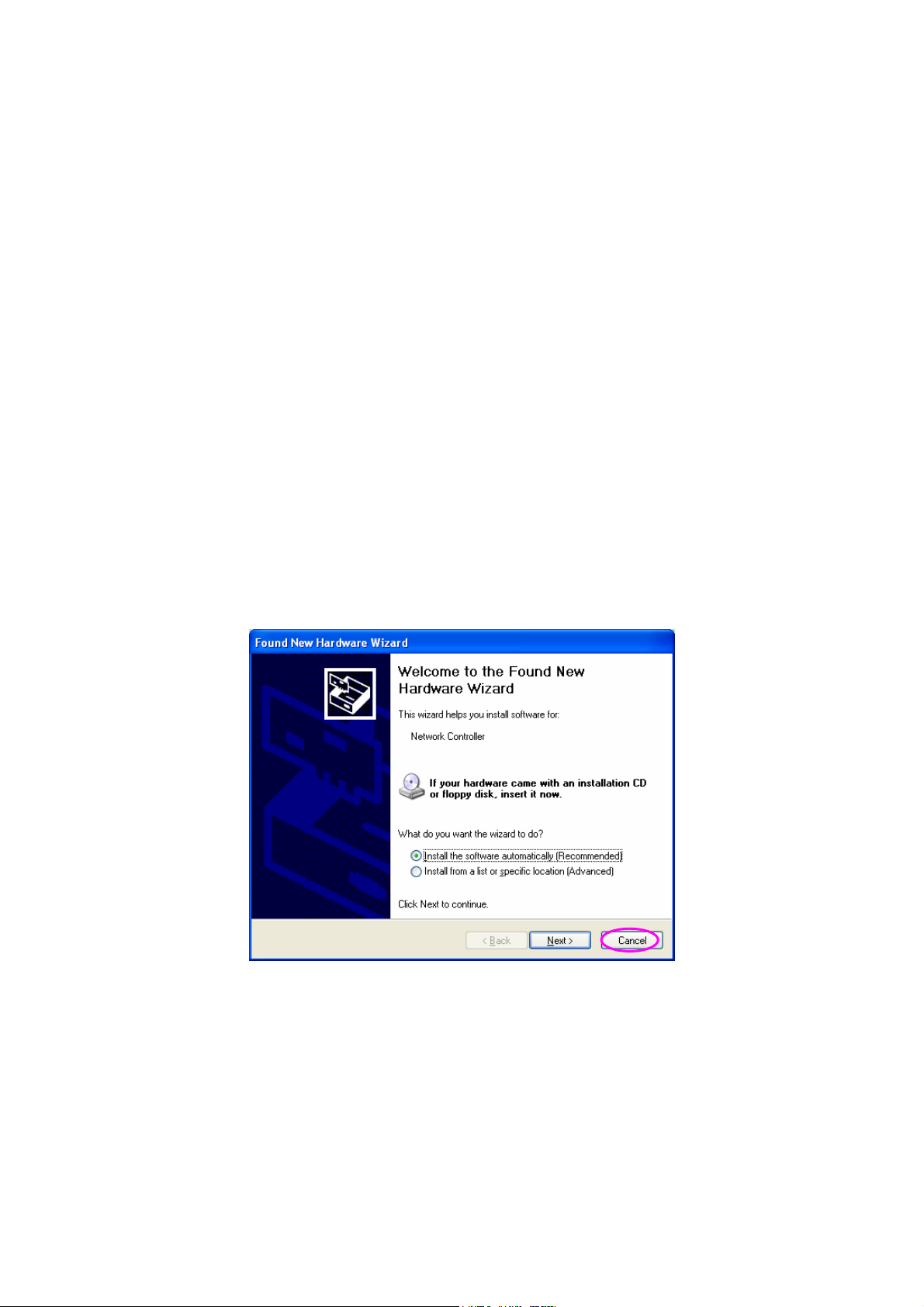
A. “Found New Hardware Wizard” is displayed after the PCI card is installed and the computer
is restarted. Click “Cancel”.
AirLive WT-2000PCI User’s Manual
7
Page 9
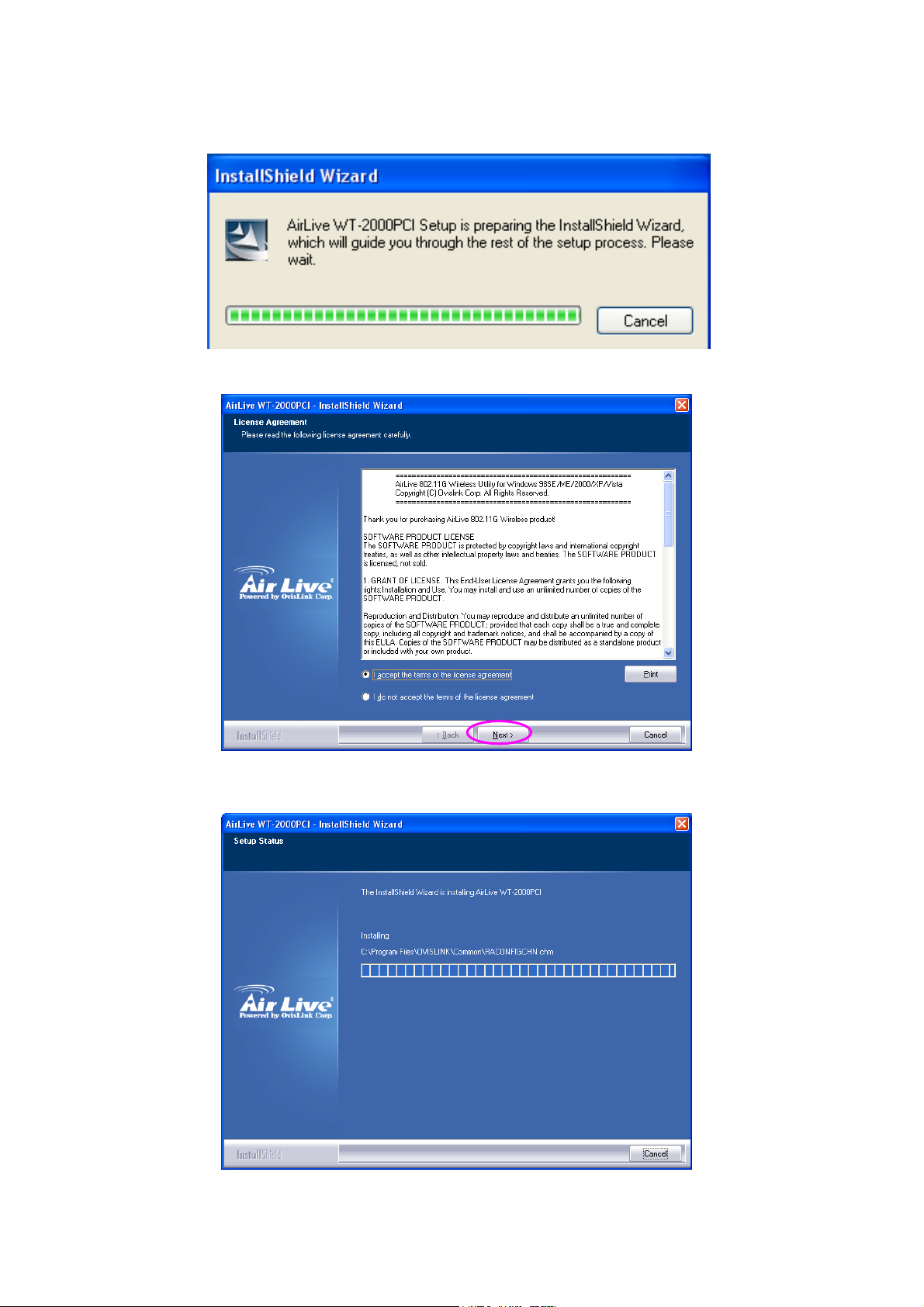
B. Insert the Installation CD to your CD-ROM Drive. Execute the “setup” program.
C. Click “Next” to process the installation if you accept the license agreement.
D. The system starts to install the software of the card.
AirLive WT-2000PCI User’s Manual
8
Page 10
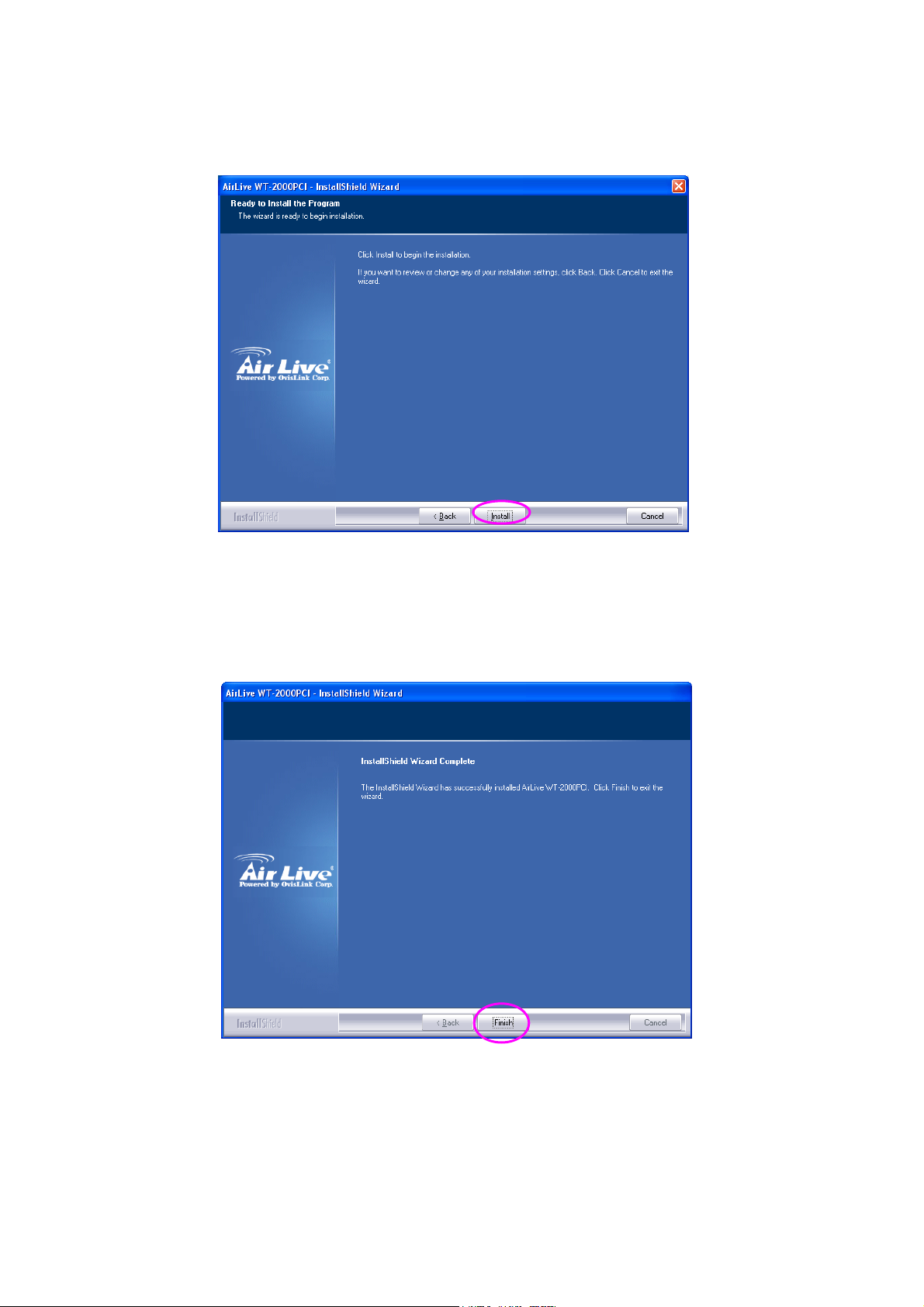
E. The system will automatically detect the card and display “Hardware Installation” screen.
Click “Install” to continue.
F. Please click “Finish” to complete the installation.
AirLive WT-2000PCI User’s Manual
9
Page 11
3 Configuration Utility
The Configuration Utility is a powerful application that helps you configure the PCI card and monitor the
link status and the statistics during the communication process.
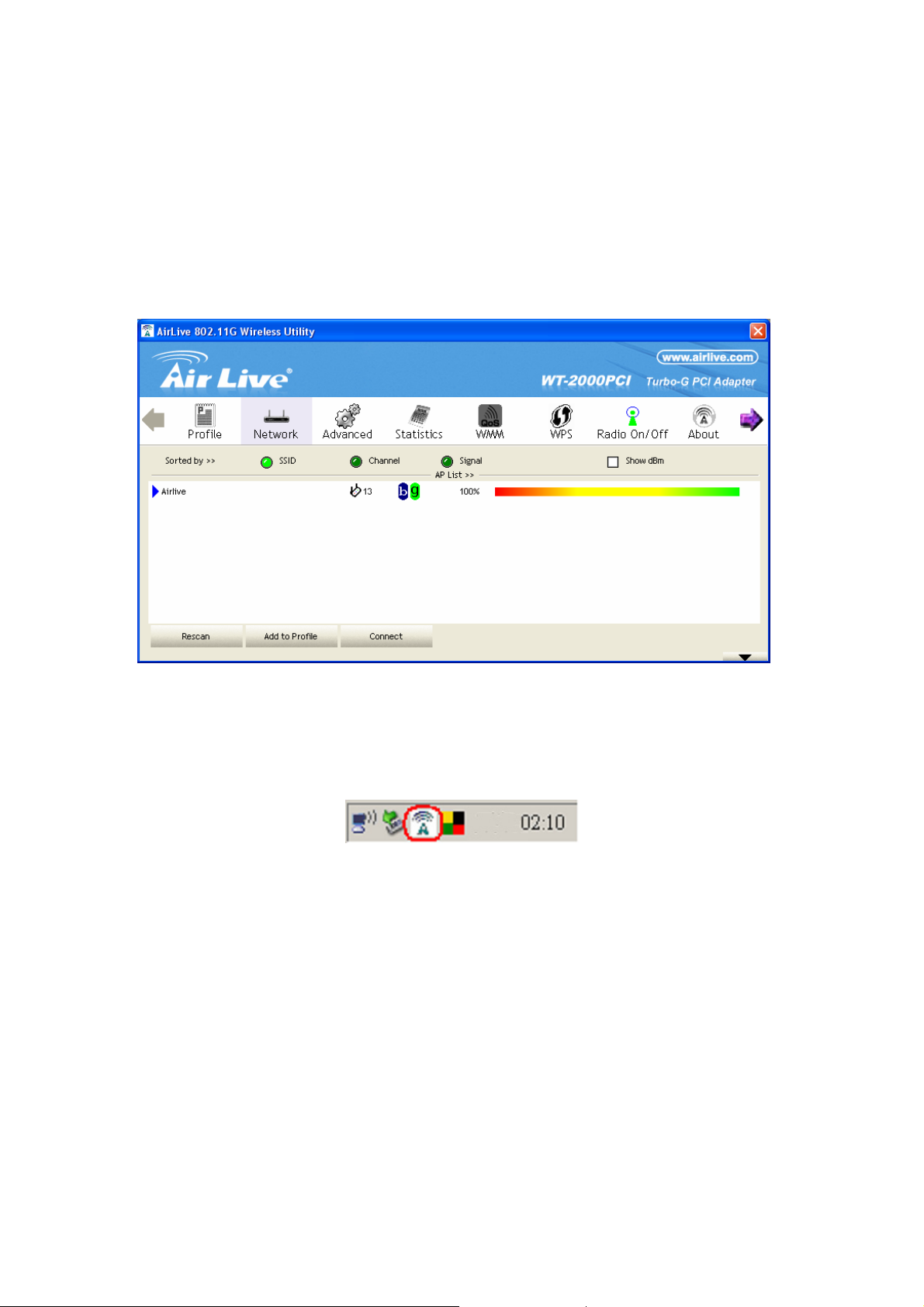
When the card is installed, the configuration utility will be displayed automatically. This card will auto
connect to wireless device which has better signal strength and no wireless security setting.
The Configuration Utility appears as an icon on the system tray of Windows while the card is running.
You can open the utility by double-click on the icon.
Right click the icon, there are some items for you to operate the configuration utility.
z Lauch Config Utilities
Select “Lauch Config Utilities” to open the Configuration Utility tool.
z Use Zero Configuration as Configuration Utility
z Select “Use Zero Configuration as Configuration Utility” to use Windows XP built-in wireless
configuration utility (Windows Zero Configuration) to configure the card.
z Exit
Select “Exit” to close the Configuration Utility tool.
AirLive WT-2000PCI User’s Manual
10
Page 12
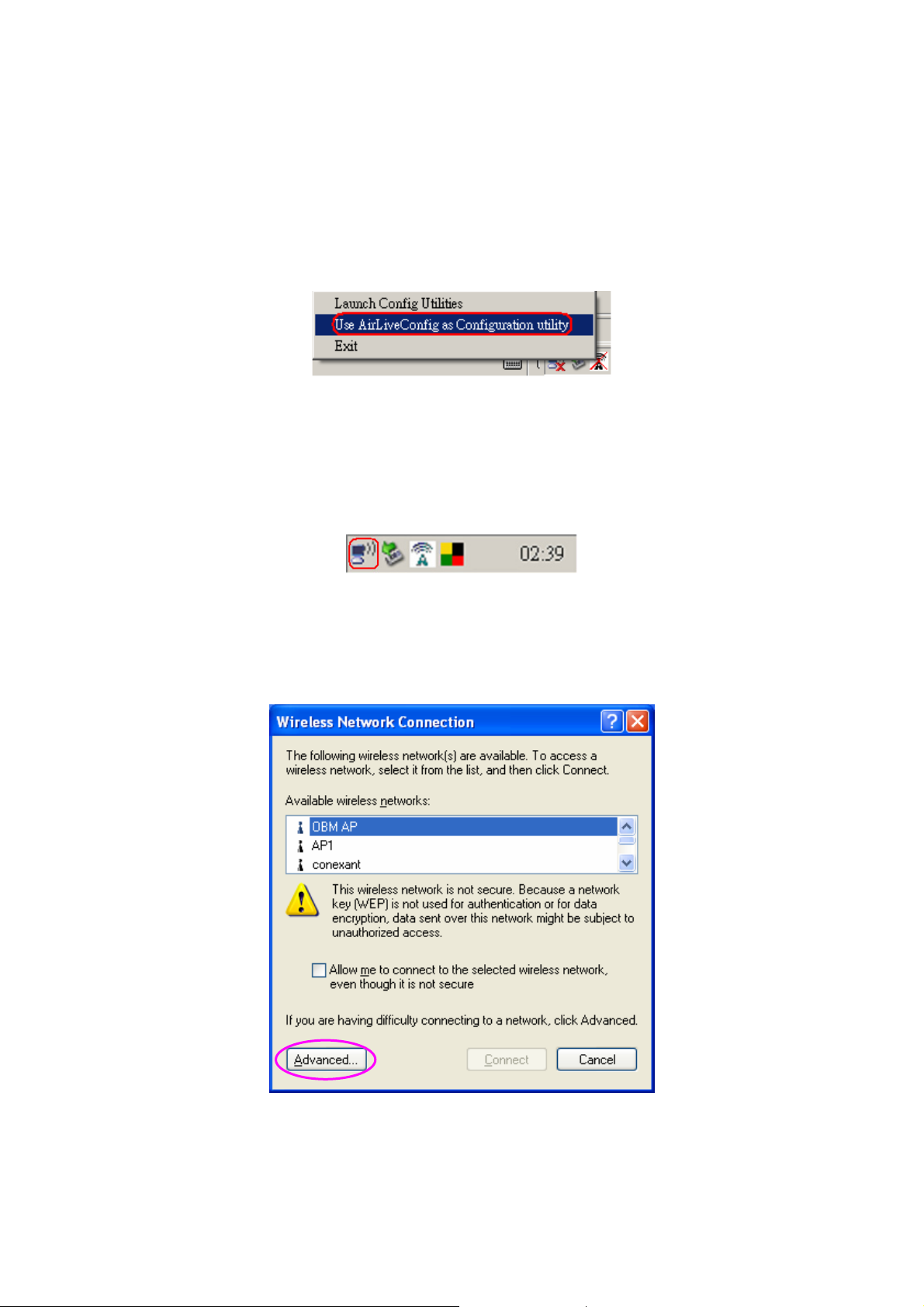
In Windows XP, there is a “Windows Zero Configuration Tool” for you to setup wireless clients. By
default, this “Windows Zero Configuration Tool” is enabled. If you want to use the Utility for the card,
please follow one of the ways as below.
First Way
Right click the icon in the system tray and select “Use RaConfig as Configuration Utility”.
Second Way
A. Right-click the icon and select “View Available Wireless Networks”.
B. Click “Advanced”.
11
AirLive WT-2000PCI User’s Manual
Page 13
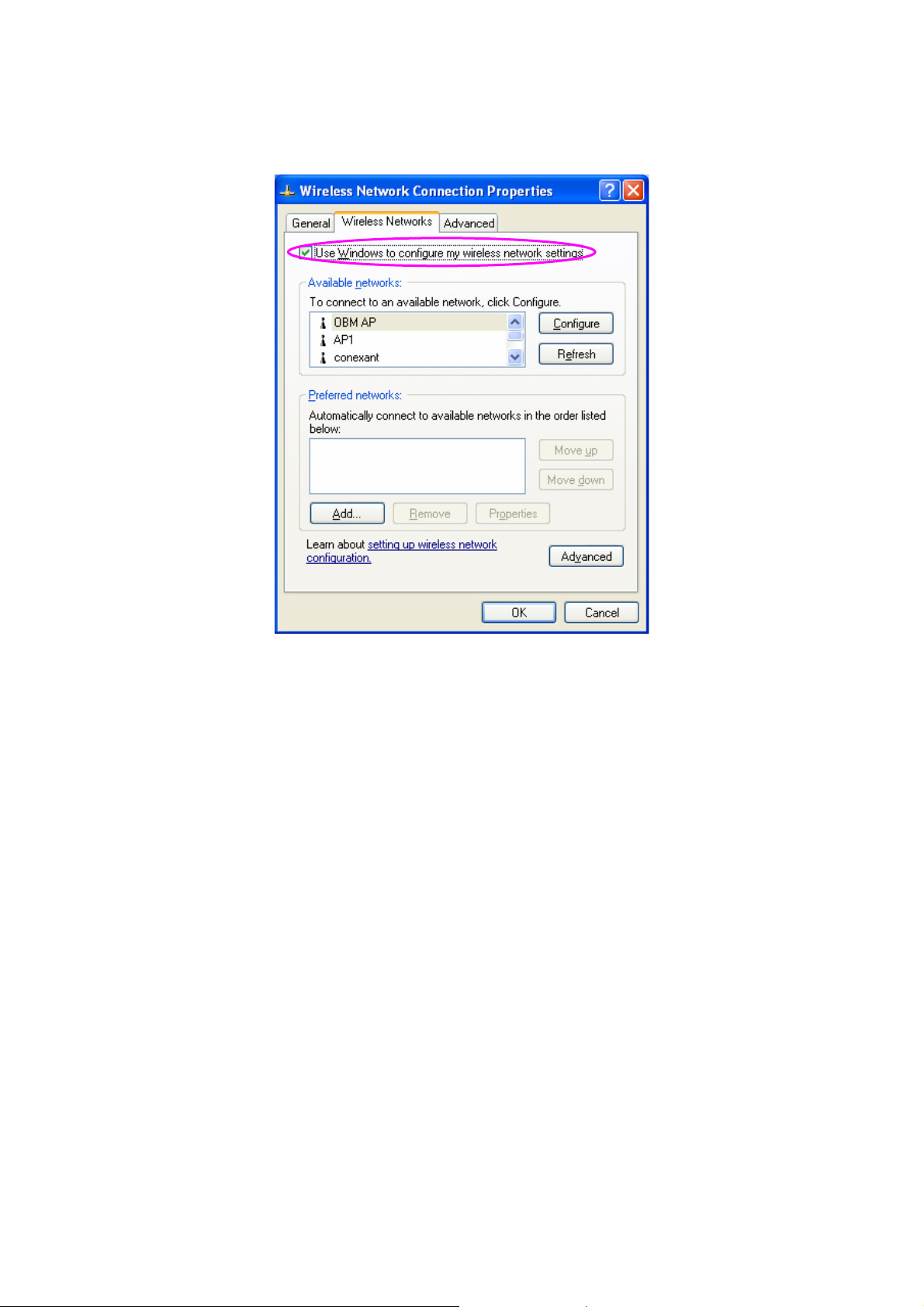
C. Uncheck “Use Windows to configure my wireless network settings” to enable the utility for the
card.
Note: If “Wireless Zero Configuration” is enabled, you can only configure the advance setting or check
the link status and statistics from the configuration utility of the card.
AirLive WT-2000PCI User’s Manual
12
Page 14
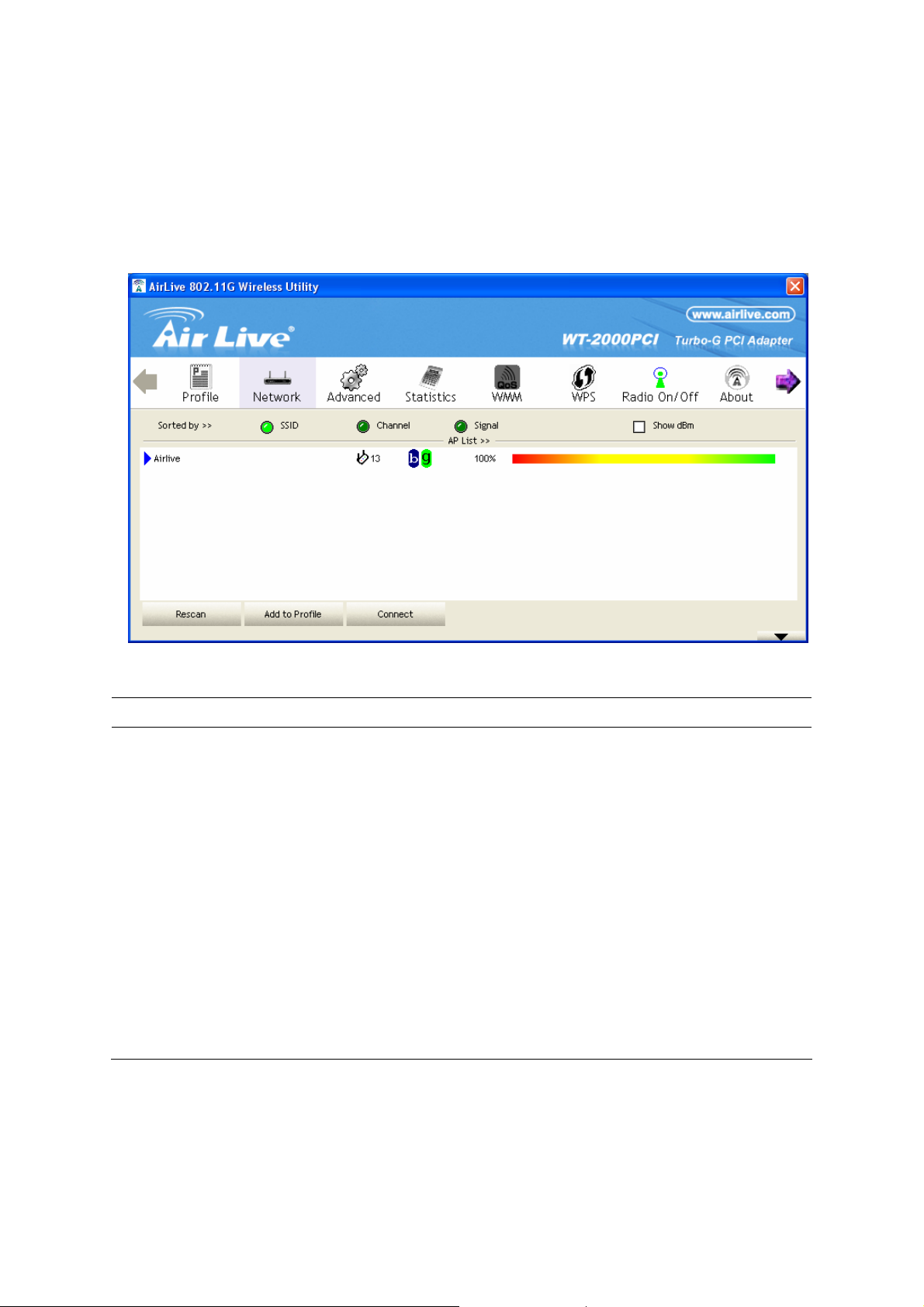
3.1 Site Survey
When you open the Configuration Utility, the system will scan all the channels to find all the access
points/stations within the accessible range of your card and automatically connect to the wireless
device with the highest signal strength. From the “Site Survey”, all the networks nearby will be listed.
You can change the connection to another networks or add one of the networks to your own profile list.
Parameter Description
Available Networks This list shows all available wireless networks within range of your
card. It also displays the information of the networks including the
SSID, BSSID, Signal Strength, Channel, Encryption,
Authentication and Network Type. If you want to connect to any
networks on the list, double-click the item on the list, and the card
will automatically connect to the selected network.
Rescan Button Click “Rescan” button to collect the new information of all the
Connect Button
Add to Profile Button
wireless networks nearby.
Click “Connect” to connect to the selected network.
Add the selected network to Profiles list.
AirLive WT-2000PCI User’s Manual
13
Page 15
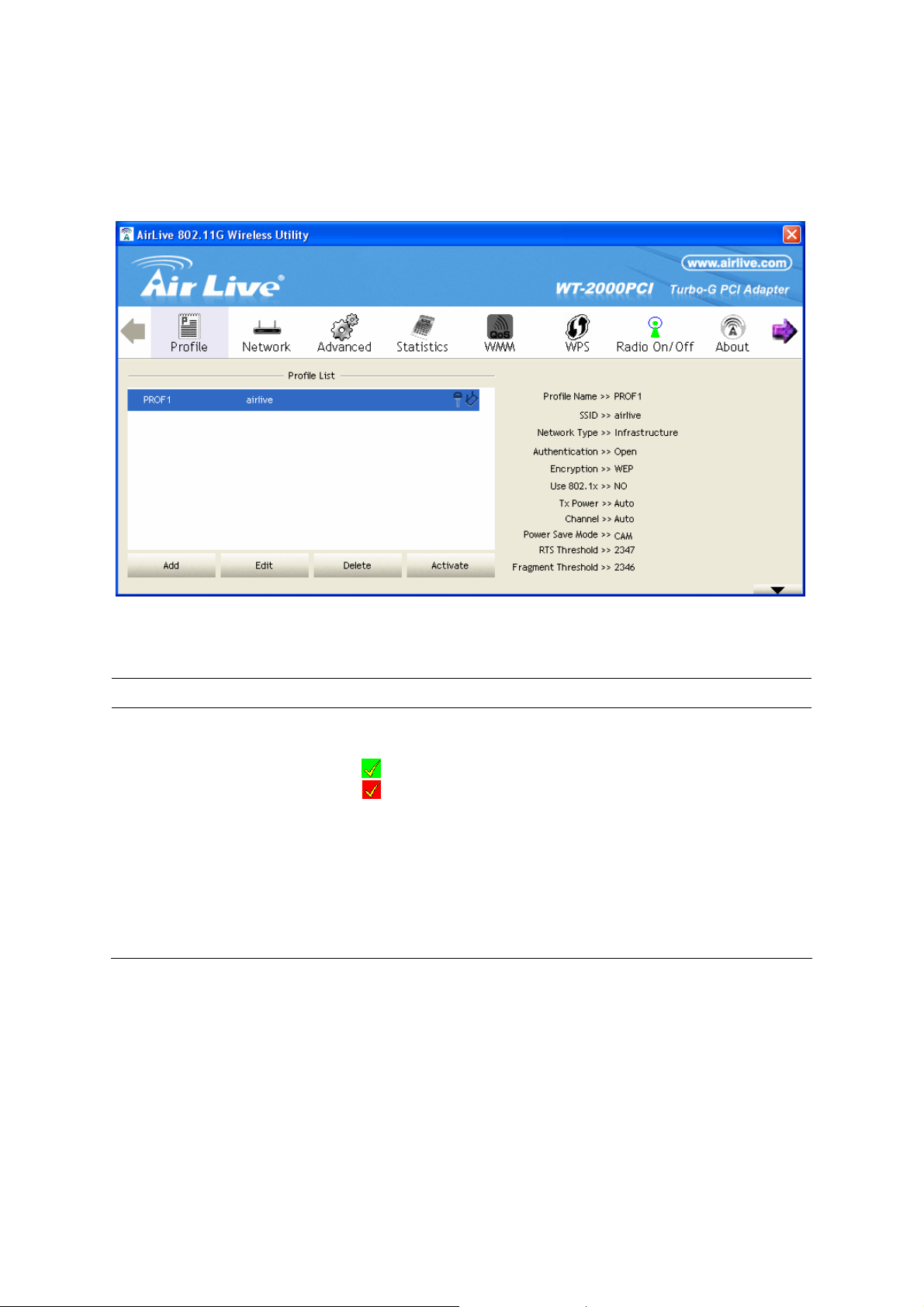
3.2 Profile
The “Profiles List” is for you to manage the networks you connect to frequently. You are able to
Add/Delete/Edit/Activate a profile.
Parameter Description
Profiles List The profiles list display all the profiles and the relative settings of
the profiles including Profile Name, SSID, Channel, etc.
This sign indicates the activated profile is been connecting.
This sign indicates the activated profile is not been
connecting.
Add/Delete/Edit Button
Activate Button Click “Activate” to connect to the selected profile. When a profile is
Click these buttons to add/delete/edit the selected profiles.
activated, the card will be initially connected to the profile.
AirLive WT-2000PCI User’s Manual
14
Page 16
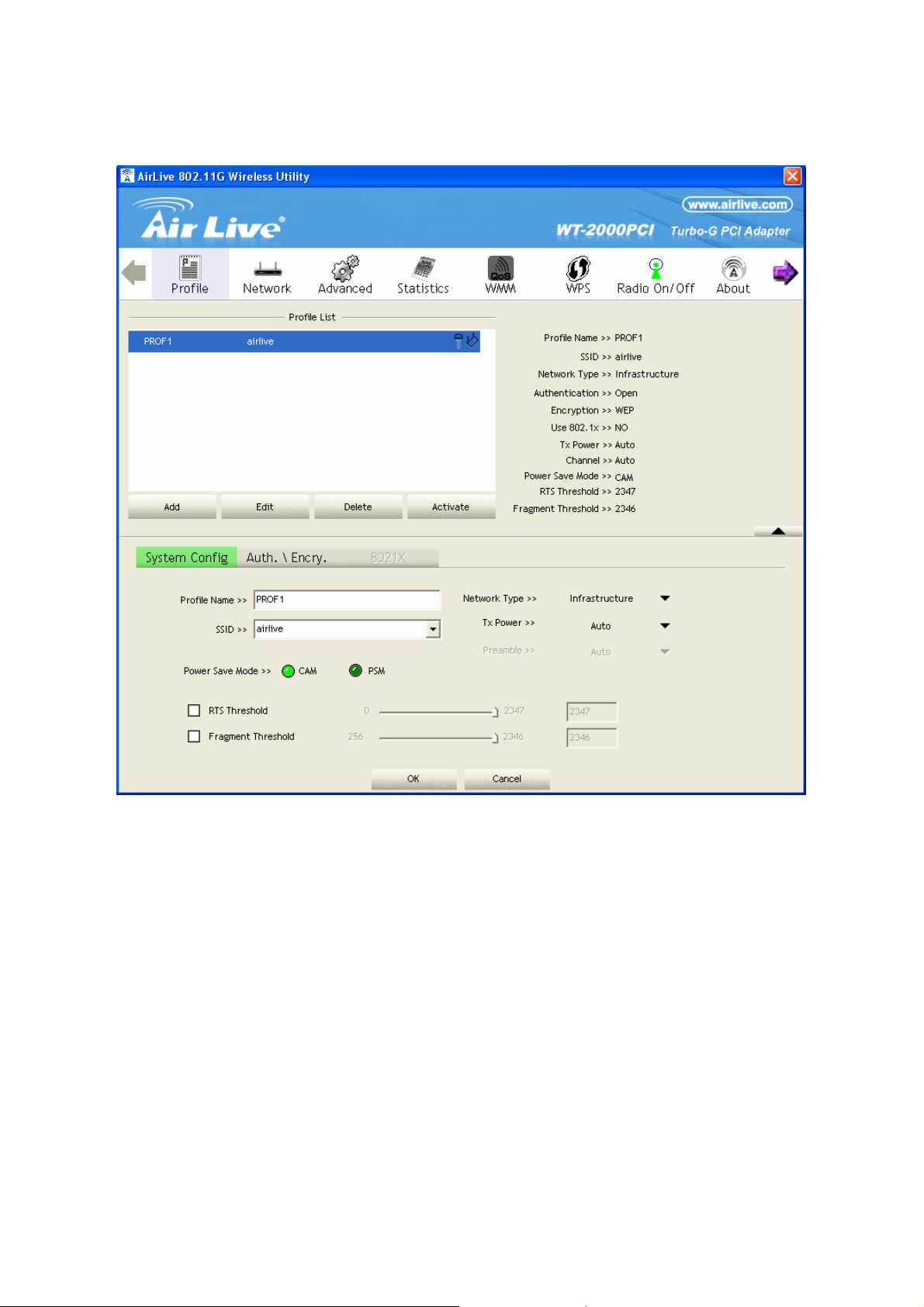
3.2.1 Configure the Profile
15
AirLive WT-2000PCI User’s Manual
Page 17

3.2.1.1 Configuration
Parameter Description
Profile Name Define a recognizable profile name for you to identify the different
networks.
SSID The SSID (up to 32 printable ASCII characters) is the unique name
identified in a WLAN. The ID prevents the unintentional merging of two
co-located WLANs.
You may specify a SSID for the card and then only the device with the
same SSID can interconnect to the card. If you want to add the network
nearby to the profile list, pull down the menu, all the networks will be
listed for you to add one of them to the profile list.
Parameter Description
PSM (Power Saving Mode) The power saving function is only available when the network type is in
Infrastructure.
CAM (Constantly Awake Mode) – The card will always set in active
mode.
PSM (Power Saving Mode) – Enable the card in the power saving
mode when it is idle.
Network Type Infrastructure – This operation mode requires the presence of an
802.11 Access Point. All communication is done via the Access Point or
Router.
Ad-Hoc – Select this mode if you want to connect to another wireless
stations in the Wireless LAN network without through an Access Point
or Router.
TX Power If you want to lower the transmit power of the card for saving the power
of the system, you can select the lower percentages from the list. The
lower power will cause the lower signal strength and the coverage
range.
Ad Hoc Wireless Mode When the card is set in Ad Hoc (Peer to Peer Mode), you can designate
the wireless connection mode for the Ad Hoc network.
802.11 B only – This card can be compatible with both 802.11g and
802.11b wireless stations. If there are only 802.11b wireless stations in
the network, you can set the card to this mode.
802.11 B/G mix – If you have a mix of 802.11b and 802.11g wireless
stations in your network, it is recommended to setting the card to this
mode. This mode is also the default setting.
802.11 G only – This card can be compatible with both 802.11g and
802.11b wireless stations. If there are only 802.11g wireless stations in
the network, you can set the card to this mode.
Preamble
AirLive WT-2000PCI User’s Manual
The preamble defines the length of the CRC block for communication
16
Page 18
among wireless devices. This option is only active in the Ad Hoc
network.
There are two modes including Auto and Long Preamble. If
“Auto“ mode is selected, the card will auto switch the preamble mode
depending on the wireless devices the card is connecting to.
Parameter Description
RTS Threshold Minimum packet size required for an RTS (Request To Send). For
packets smaller than this threshold, an RTS is not sent and the packet
is transmitted directly to the wireless network. Select a setting within a
range of 0 to 2347 bytes. Minor change is recommended.
Fragment Threshold The value defines the maximum size of packets; any packet size larger
than the value will be fragmented. If you have decreased this value and
experience high packet error rates, you can increase it again, but it will
likely decrease overall network performance. Select a setting within a
range of 256 to 2346 bytes. Minor change is recommended.
Channel This setting is only available for Ad Hoc mode. Select the number of the
radio channel used for the networking. The channel setting should be
the same with the network you are connecting to.
AirLive WT-2000PCI User’s Manual
17
Page 19

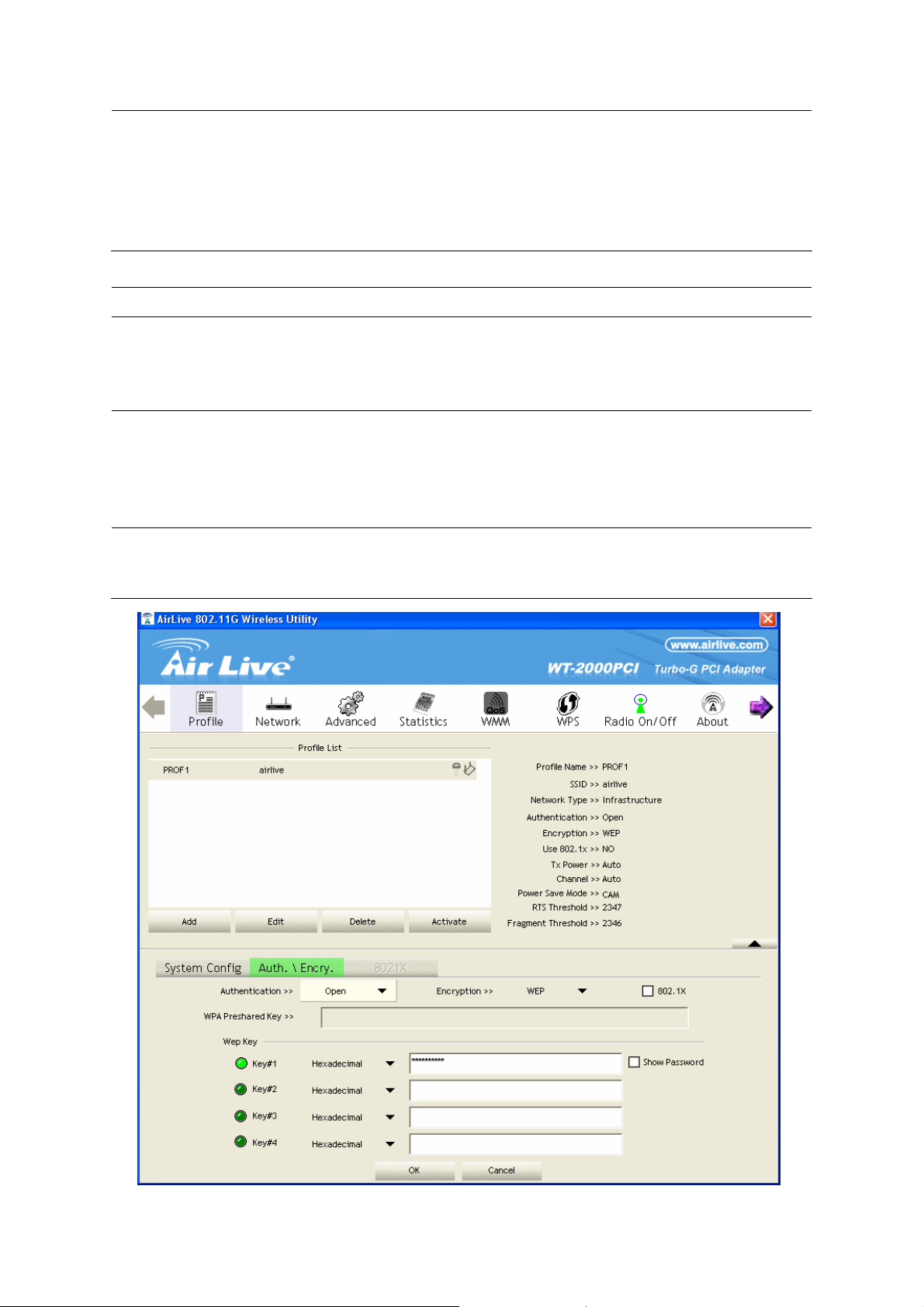
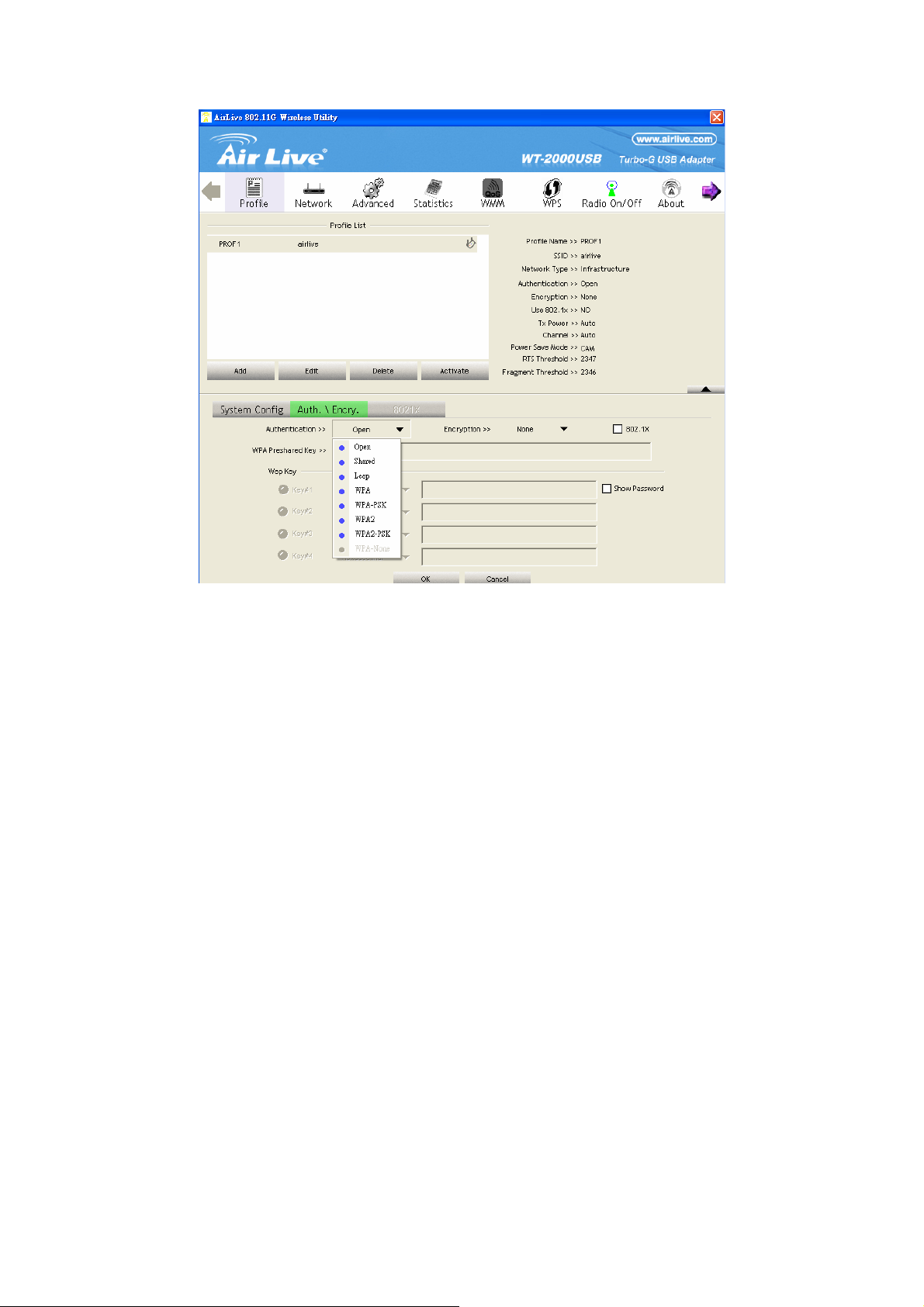
3.2.1.2 Authentication and Security
Parameter Description
Authentication Type This setting has to be consistent with the wireless networks that
the card intends to connect.
Open – No authentication is needed among the wireless network.
Shared – Only wireless devices using a shared key (WEP Key
identified) are allowed to connecting each other.
Parameter Description
Authentication Type LEAP – LEAP is a pre-EAP, Cisco-proprietary protocol, with many
of the features of EAP protocols. Cisco controls the ability of other
vendors to implement this protocol, so it should be selected for
use only when limited vendor choice for client, access-point, and
server products is not a concern. When you have set up LEAP
authentication, you have to enter the user name and password of
your computer.
WPA – WPA provides a scheme of mutual authentication using
either IEEE 802.1x/Extensible Authentication Protocol (EAP)
authentication or pre-shared key (PSK) technology. It provides a
high level of assurance to enterprises, small businesses and
home users that data will remain protected and that only
authorized users may access their networks. For enterprises that
have already deployed IEEE 802.1x authentication, WPA offers
the advantage of leveraging existing authentication databases
and infrastructure.
WPA-PSK – It is a special mode designed for home and small
business users who do not have access to network authentication
servers. In this mode, known as Pre-Shared Key, the user
manually enters the starting password in their access point or
gateway, as well as in each wireless stations in the network.
WPA-PSK takes over automatically from that point, keeping
unauthorized users that don't have the matching password from
joining the network, while encrypting the data traveling between
authorized devices.
WPA2 – Like WPA, WPA2 supports IEEE 802.1x/EAP
authentication or PSK technology. It also includes a new
advanced encryption mechanism using the Advanced Encryption
Standard (AES). AES is required to the corporate user or
government users. The difference between WPA and WPA2 is that
WPA2 provides data encryption via the AES. In contrast, WPA
uses Temporal Key Integrity Protocol (TKIP).
AirLive WT-2000PCI User’s Manual
18
Page 20

WPA2-PSK – WPA2-PSK is also for home and small business.
The difference between WPA-PSK and WPA2-PSK is that
WPA2-PSK provides data encryption via the AES. In contrast,
WPA-PSK uses Temporal Key Integrity Protocol (TKIP).
802.1x Setting When you have set the Authentication Type to Open, Shared,
WPA or WPA2, you can also enable IEEE 802.1x setting to use
the authentication server or certification server to authenticate
client users.
Parameter Description
Encryption Mode None – Disable the encryption mode.
WEP – Enable the WEP Data Encryption. When the item is
selected, you have to continue setting the WEP Encryption keys.
TKIP – TKIP (Temporal Key Integrity Protocol) changes the
temporal key every 10,000 packets (a packet is a kind of message
transmitted over a network.) This insures much greater security
than the standard WEP security.
AES – AES has been developed to ensure the highest degree of
security and authenticity for digital information and it is the most
advanced solution defined by IEEE 802.11i for the security in the
wireless network.
Note: All devices in the network should use the same encryption
method to ensure the communication.
WPA Pre-Shared Key The WPA-PSK key can be from 8 to 64 characters and can be
letters or numbers. This same key must be used on all of the
wireless stations in the network.
WEP Key
(Key1 ~ Key4)
The WEP keys are used to encrypt data transmitted in the
wireless network. There are two types of key length: 64-bit and
128-bit. Select the default encryption key from Key 1 to Key 4 by
selected the radio button.
Fill the text box by following the rules below.
64-bit – Input 10-digit Hex values (in the “A-F”, “a-f” and “0-9”
range) or 5-digit ASCII characters (including “a-z” and “0-9”) as
the encryption keys. For example: “0123456aef“ or “test1”.
128-bit – Input 26-digit Hex values (in the “A-F”, “a-f” and “0-9”
range) or 13-digit ASCII characters (including “a-z” and “0-9”) as
the encryption keys. For example:
“01234567890123456789abcdef“ or “administrator”.
AirLive WT-2000PCI User’s Manual
19
Page 21
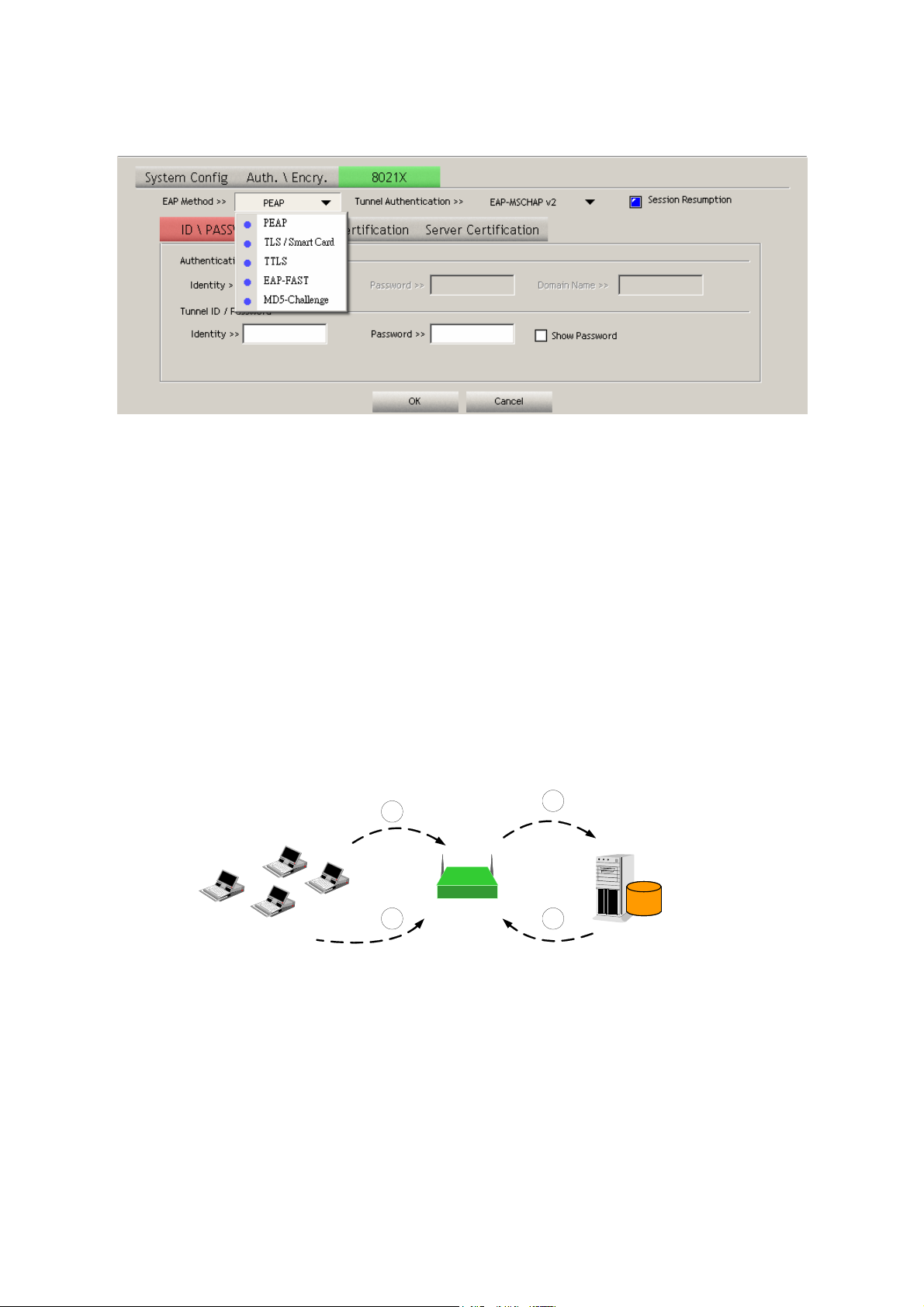
The IEEE 802.1X specification describes a protocol that can be used for authenticating both clients and
servers on a network. The authentication algorithms and methods are those provided by the Extensible
Authentication Protocol (EAP), a method of authentication that has been in use for a number of years
on networks that provide Point-to-Point Protocol (PPP) support as many internet service providers and
enterprises do.
When an AP acting as an authenticator detects a wireless station on the LAN, it sends an EAP-Request
for the user's identity to the device. (EAP, or the Extensible Authentication Protocol, is an authentication
protocol that runs before network layer protocols transmit data over the link.) In turn, the device
responds with its identity, and the AP relays this identity to an authentication server, which is typically
an external RADIUS server.
An example for MD5 Authentication
3
RADIUS
Server
IEEE 802.1x
Access Client
RADIUS
Client
1
(1) Client requests to login the
network.
(2) Login with username,
password.
AirLive WT-2000PCI User’s Manual
2
Access Point
4
Windows 2000 IAS
(Internet Authentication
Service)
(3) Send username, password to
RADIUS server.
(4) Approve or deny user
login to the LAN.
20
Page 22

3.2.1.3 802.1x Setting-Certification
Parameter Description
Authentication Type The EAP authentication protocols this card has supported are
included as follows. This setting has to be consistent with the
wireless APs or Routers that the card intends to connect.
PEAP &TTLS – PEAP and TTLS are similar and easier than TLS
in that they specify a stand-alone authentication protocol be used
within an encrypted tunnel. TTLS supports any protocol within its
tunnel, including CHAP, MS-CHAP, MS-CHAPv2, PAP and
EAP-MD5. PEAP specifies that an EAP-compliant authentication
protocol must be used; this card supports EAP-MSCHAP v2,
EAP-TLS/Smart card and Generic Token Card. The client
certificate is optional required for the authentication.
TLS/Smart Card –TLS is the most secure of the EAP protocols
but not easy to use. It requires that digital certificates be
exchanged in the authentication phase. The server presents a
certificate to the client. After validating the server’s certificate, the
client presents a client certificate to the server for validation.
MD5-Challenge – MD5-Challenge is the easiest EAP Type. It
requires the wireless station to enter a set of user name and
password as the identity to RADIUS Server.
Session Resumption There are “Disabled”, “Reauthentication”, “Roaming”, “SameSsid”
and “Always” selections for you to choose whether to recovery the
session in different status.
Identity Enter the name as the identity for the server.
Password Enter the password as the identity for the server.
Use Client Certificate A client certificate is required for TLS, and is optional for TTLS and
PEAP. This forces a client certificate to be selected from the
appropriate Windows Certificate Store and made available to the
RADIUS server for certification.
AirLive WT-2000PCI User’s Manual
21
Page 23
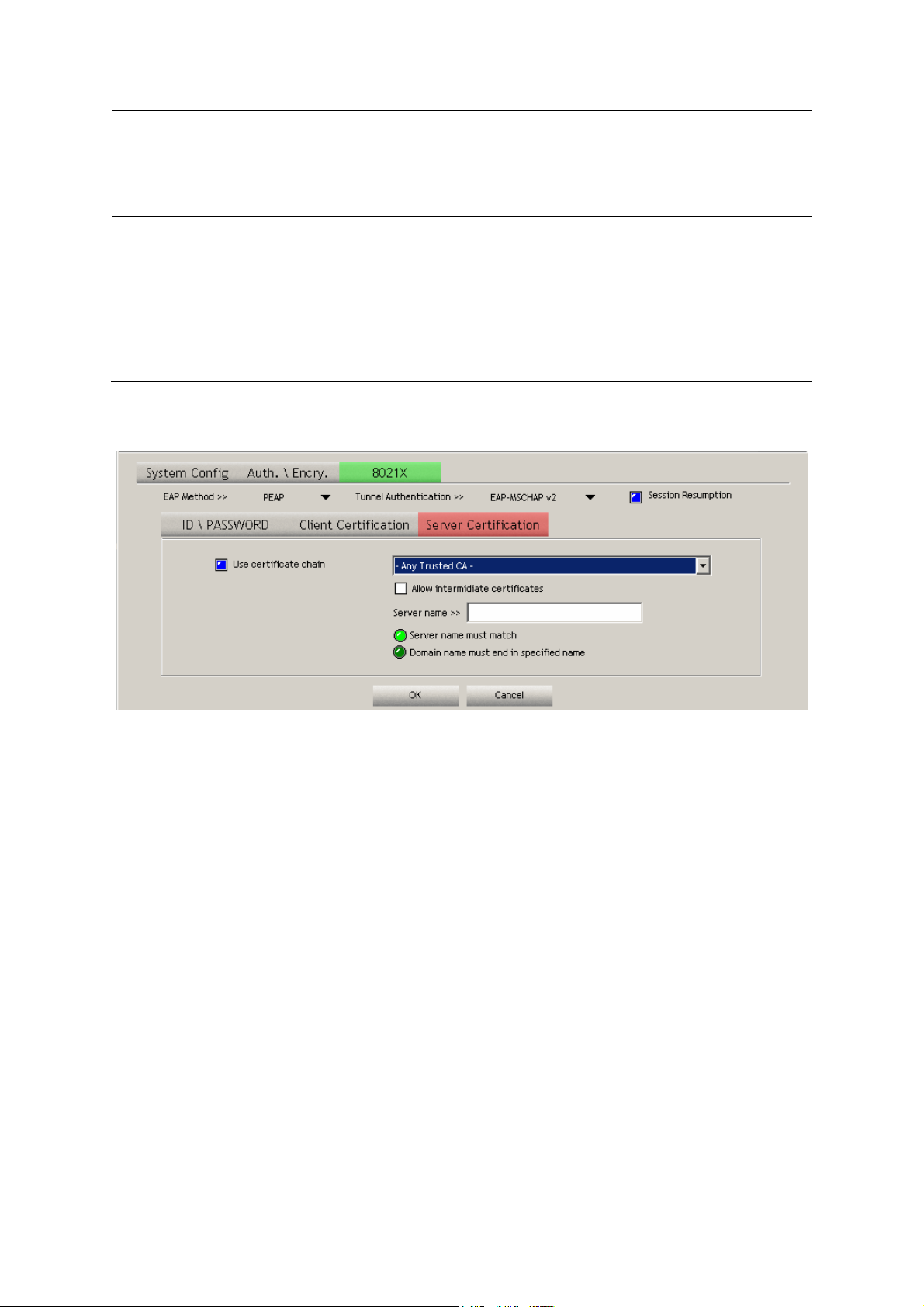
Parameter Description
Tunneled Authentication
Protocol When the authentication type is PEAP or TTLS, select a protocol
to be used to build the encrypted tunnel.
Identity This is the protected user EAP Identity used for authentication.
The identity specified may contain up to 63 ASCII characters, is
case sensitive and takes the form of a Network Access Identifier,
consisting of <name of the user>@<user’s home realm>. The
user’s home realm is optional and indicates the routing domain.
Password The password used for authentication. It may contain up to 63
ASCII characters and is case sensitive.
AirLive WT-2000PCI User’s Manual
22
Page 24

3.2.1.4 802.1x Setting-CA Server
Parameter Description
Use Certificate Chain When the EAP authentication type such as TLS, TTLS or PEAP is
selected and required a certification to tell the client what server
credentials to accept from the authentication server in order to
verify the server, you have to enable this function.
Certificate Issuer Choose the server from the list to issue the certificate. If “Any
Trusted CA” is selected, any CA included in the list (provided by
the Microsoft Certificate Store) is permitted.
Parameter Description
Allow Intermediate Certificates A server designates an issuer as a trusted root
authority by placing the issuer's self-signed certificate,
which contains the issuer's public key, into the trusted
root certification authority certificate store of the host
computer. Intermediate or subordinate certification
authorities are trusted only if they have a valid
certification path from a trusted root certification
authority.
Server Name Enter the authentication server name.
Server name must match exactly When selected, the server name must match exactly the server
name found on the certificate.
Domain name must end in
specified name
When selected, the server name field identifies a domain. The
certificate must use a server name belonging to this domain or to
one of its sub-domains (e.g. zeelans.com, where the server is
blueberry.zeelans.com) but it may be any name used in the
certificate name field.
AirLive WT-2000PCI User’s Manual
23
Page 25
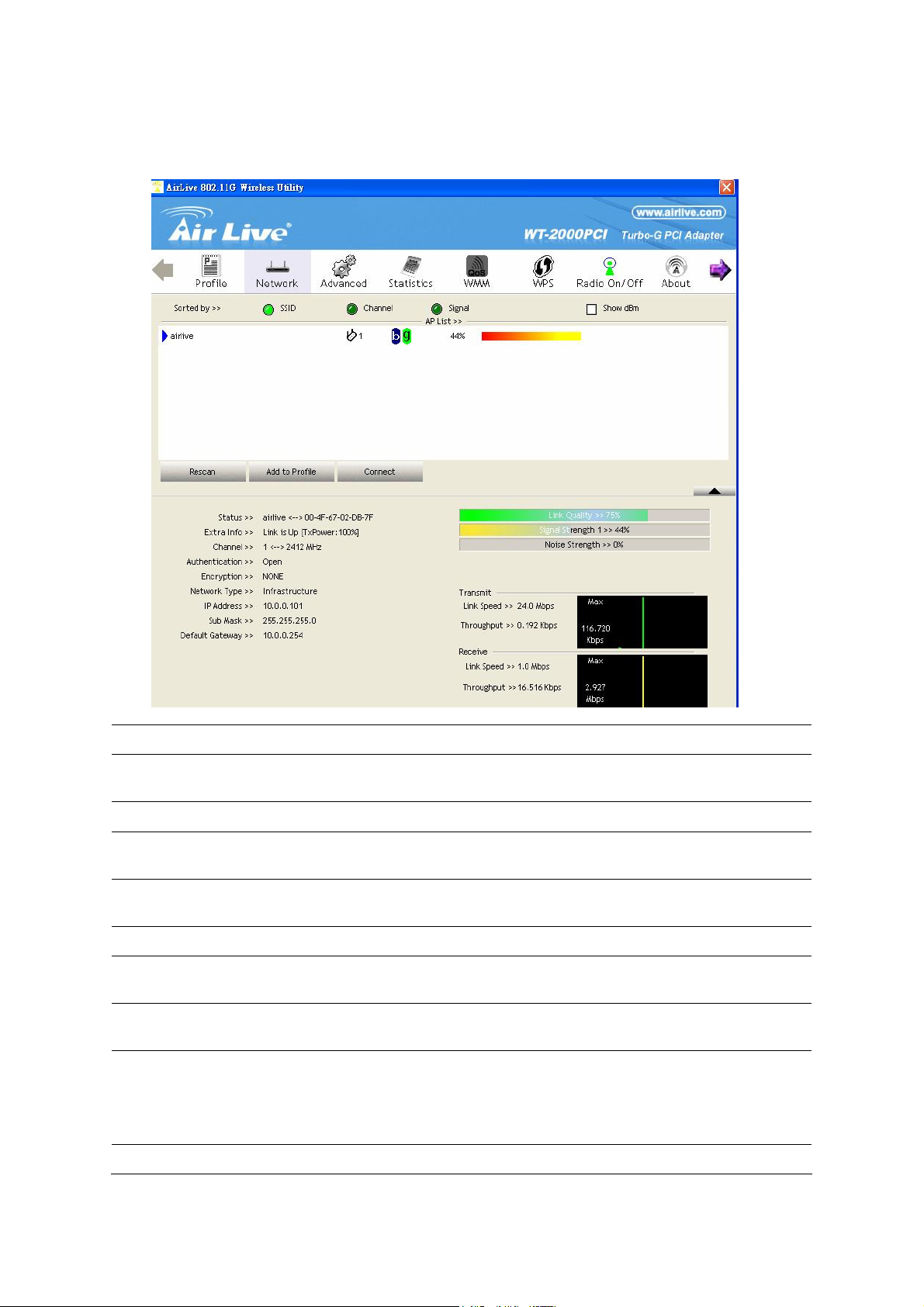
3.3 Link Status
From the “Link Status” option, you can view all the information of the network you are connecting to.
Parameter Description
Status Display the SSID and MAC ID of the network the card is
connecting to.
Extra Info Display the link status.
Channel Display the number of the radio channel and the frequency used
for the networking.
Link Speed (Mbps) Display the transmission and reception rate of the network. The
maximum transmission rate is 54Mbps.
Throughput (Kbits/sec) Display the speed of data transmitted and received.
Link Quality This bar indicates the quality of the link. The higher the
percentage, the better the quality.
dBm If you want to know the signal strength in the unit of dBm, select
this check box.
Signal Strength This bar shows the signal strength level. The higher percentage
shown in the bar, the more radio signal been received by the card.
This indicator helps to find the proper position of the wireless
device for quality network operation.
Noise Level Display the noise level in the wireless environment.
AirLive WT-2000PCI User’s Manual
24
Page 26
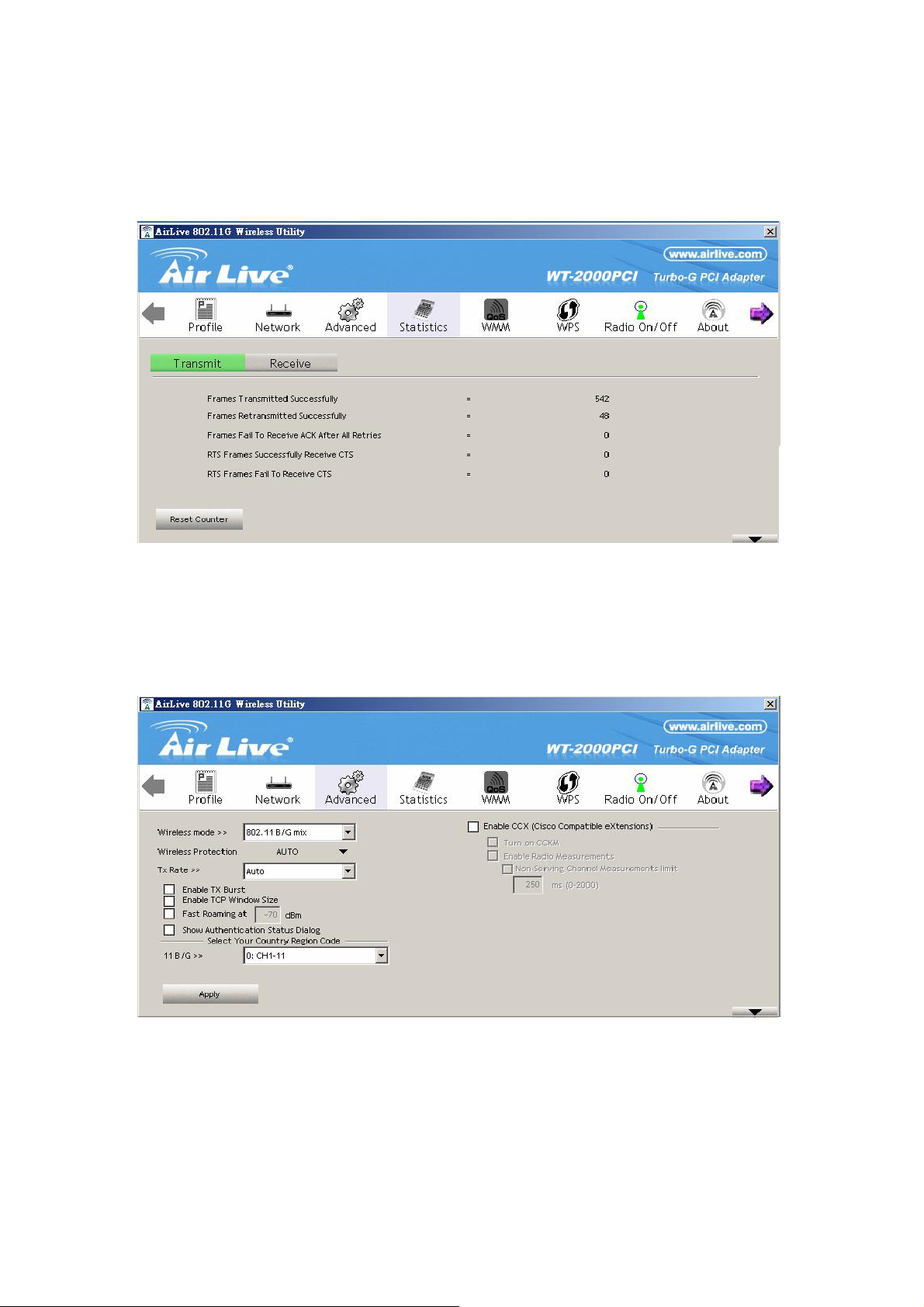
3.4 Statistics
This option enables you to view the statistic information of the connection including transmit statistics
and receive statistics. You may reset the counters by clicking ”Reset Counter”.
3.5 Advance
This option enables you to configure more advanced settings, for example: wireless mode, protection
mode and etc.
25
AirLive WT-2000PCI User’s Manual
Page 27

Parameter Description
Wireless Mode 802.11 B/G mix – If you have a mix of 802.11b and 802.11g
wireless stations in your network, it is recommended to setting the
card to this mode. This mode is also the default setting.
802.11 B only – This card can be compatible with both 802.11g
and 802.11b wireless stations. If there are only 802.11b wireless
stations in the network, you can set the card to this mode.
802.11 G only – This card can be compatible with both 802.11g
and 802.11b wireless stations. If there are only 802.11g wireless
stations in the network, you can set the card to this mode.
Select Your Country Region Code The available channel differs from different countries. For
example: USA (FCC) is channel 1-11, Europe (ETSI) is channel
1-13. The operating frequency channel will be restricted to the
country user located before importing. If you are in different
country, you have to adjust the channel setting to comply the
regulation of the country.
B/G Protection If you have a mix of 802.11b and 802.11g wireless stations in the
network, it is recommended to enable the protection mechanism.
This mechanism can decrease the rate of data collision between
802.11b and 802.11g wireless stations. When the protection mode
is enabled, the throughput of the card will be a little lower due to
many of frame traffic should be transmitted.
Auto – Based on the status of the network and automatically
disable/enable protection mode.
On – Always enable the protection mode.
Off – Always disable the protection mode.
Tx Rate There are several options including
Auto/1/2/5.5/11/6/9/12/18/24/36/48/54Mbps for you to select.
When the “Auto” is selected, the device will choose the most
suitable transmission rate automatically. The higher data rate you
designated in the network, the shorter distance is allowed
between the card and the wireless stations.
When the wireless mode is “802.11 B only”, the maximum data
rate is 11Mbps (11b) so that there are only “Auto/1/2/5.5/11Mbps”
options you can select.
Tx BURST
AirLive WT-2000PCI User’s Manual
Tx Burst enables the card to deliver the better throughput in the
same period and environment.
26
Page 28

Parameter Description
Enable TCP Window Size The TCP Window is the amount of data a sender can send on a
particular connection before it gets an acknowledgment back from
the receiver that it has gotten some of it. When the Router or AP
the card is connecting to have set up the TCP Window, you can
enable the parameter to meet the data size for the Router or AP
connection. The larger TCP Window the better performance.
Fast Roaming at -70dBm When you want to fast roaming to the network nearby without
intercepting the wireless connection especially the card is applied
to the multimedia application or a voice call, you can enable the
parameter. The card will fast roaming to the near network when
the receive sensitivity (signal strength) is lower to the value you
have set up.
Turn Off RF Button If you want to turn off the radio of the card temporarily, click this
button. To turn on the radio, click this button again.
CCX 2.0 CCX 2.0 (Cisco Compatible Extensions) is developed by Cisco for
the radio monitoring and fast roaming.
LEAP Turn on CCKM During normal operation, LEAP-enabled client devices mutually
authenticate with a new access point by performing a complete
LEAP authentication, including communication with the main
RADIUS server.
When you configure your wireless LAN for fast re-association,
however, LEAP-enabled client devices roam from one access
point to another without involving the main server. Using Cisco
Centralized Key Management (CCKM), an access point
configured to provide Wireless Domain Services (WDS) takes the
place of the RADIUS server and authenticates the client so
quickly that there is no perceptible delay in voice or other
time-sensitive applications.
Enable Radio Measurement When this parameter is enabled, the Cisco AP can run the radio
monitoring through the associated CCX-compliant clients to
continuously monitor the WLAN radio environment and discover
any new APs that are transmitting beacons.
Non-Serving Channel
Measurements
Limit xxx milliseconds (0-2000)
The Cisco AP can perform monitoring measurements through the
CCX-compliant clients on the non-serving channels when this
parameter is enabled.
It limits the channel measurement time. The default value is 250
milliseconds.
AirLive WT-2000PCI User’s Manual
27
Page 29

3.6 About
By choosing this option, you can click the hyperlink to connect the website for the information of the
wireless chipset vendor and review basic information about the Utility such as the Driver, Utility and
EEPROM Version. The MAC Address of the card is displayed in the screen as well.
3.7 Turbo Mode
This card supports specific ways to increase the data transfer rate at a time; compress the data and
decrease the waiting time to send the next data to the Routers or APs, this feature (known as Turbo
Mode) enables higher throughput than IEEE 802.11g standard (Up to 54Mbps).
When the card is connecting to the Routers or APs with the proprietary Turbo Mode feature, the Turbo
Mode will be enabled automatically without any configuration.
AirLive WT-2000PCI User’s Manual
28
Page 30
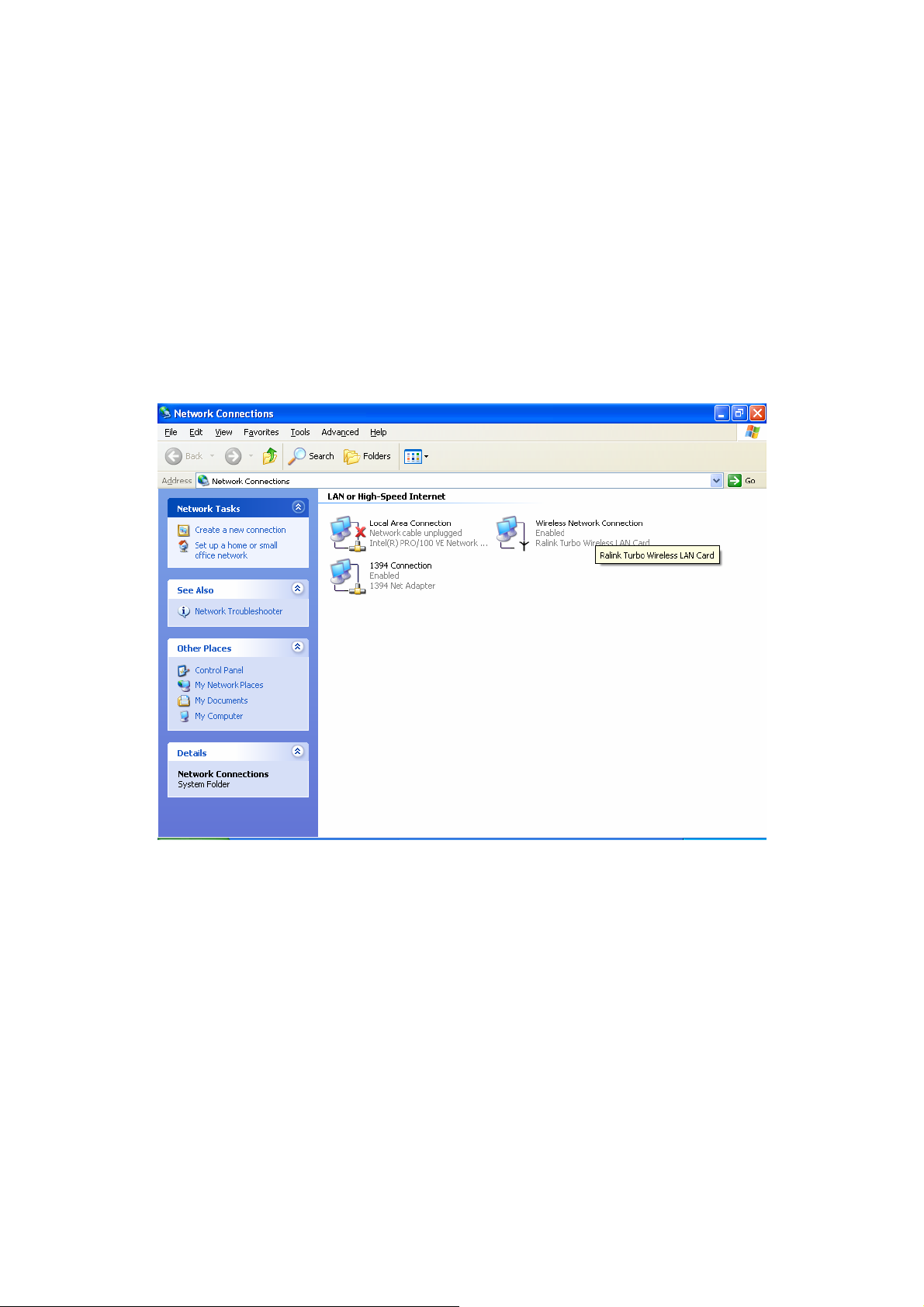
3.8 WMM Function
In addition to the Turbo Mode, this card also supports WMM function. When you use the devices such
as Voice over Internet Protocol (VoIP) phones, televisions, VCRs and MP3 players, IEEE 802.11e
Quality of Service (QoS) (The Wi-Fi Alliance defined WMM as a profile of the IEEE 802.11e) extensions
for 802.11 networks will help to define the priorities of the data traffics by the data categories to provide
enhanced multimedia support.
When the card is connected to the AP or Router with WMM function, you can enable the function of the
card by following the steps below.
A. In the Desktop of the computer, right click “My Network Places” and select “Properties”.
29
AirLive WT-2000PCI User’s Manual
Page 31
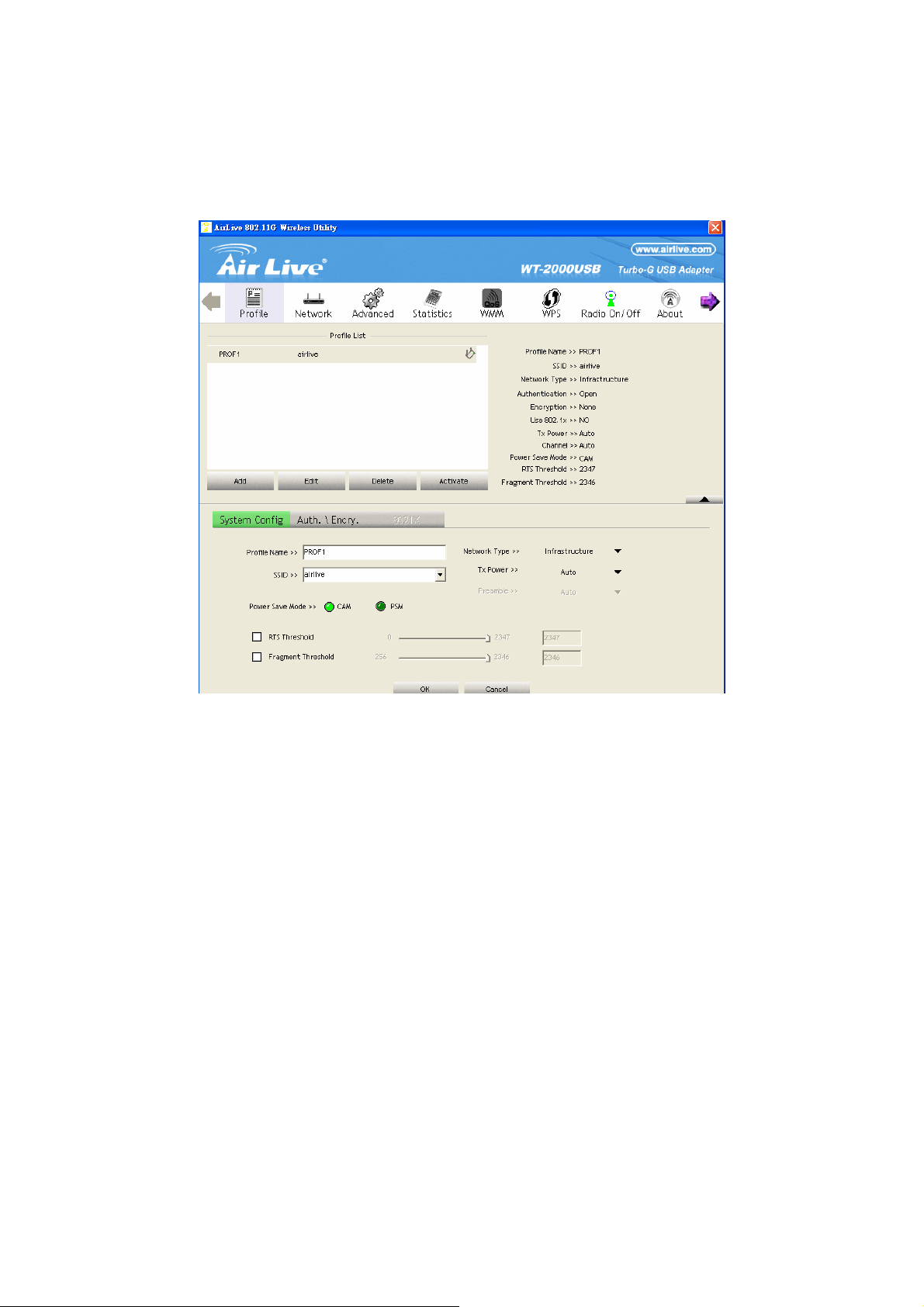
B. Right Click the “Wireless Network Connection” and select “Properties”.
C. Click “Configure…”.
D. Select “Advanced” page, enable the “WMM Capable”.
AirLive WT-2000PCI User’s Manual
30
Page 32
31
AirLive WT-2000PCI User’s Manual
Page 33

4 Troubleshooting
This chapter provides solutions to problems usually encountered during the installation and operation
of the adapter.
1. What is the IEEE 802.11g standard?
802.11g is the new IEEE standard for high-speed wireless LAN communications that provides
for up to 54 Mbps data rate in the 2.4 GHz band. 802.11g is quickly becoming the next
mainstream wireless LAN technology for the home, office and public networks.
802.11g defines the use of the same OFDM modulation technique specified in IEEE 802.11a
for the 5 GHz frequency band and applies it in the same 2.4 GHz frequency band as IEEE
802.11b. The 802.11g standard requires backward compatibility with 802.11b.
The standard specifically calls for:
A. A new physical layer for the 802.11 Medium Access Control (MAC) in the 2.4 GHz
frequency band, known as the extended rate PHY (ERP). The ERP adds OFDM as a
mandatory new coding scheme for 6, 12 and 24 Mbps (mandatory speeds), and 18, 36, 48
and 54 Mbps (optional speeds). The ERP includes the modulation schemes found in
802.11b including CCK for 11 and 5.5 Mbps and Barker code modulation for 2 and 1 Mbps.
B. A protection mechanism called RTS/CTS that governs how 802.11g devices and 802.11b
devices interoperate.
2. What is the IEEE 802.11b standard?
The IEEE 802.11b Wireless LAN standard subcommittee, which formulates the standard for the
industry. The objective is to enable wireless LAN hardware from different manufactures to
communicate.
3. What does IEEE 802.11 feature support?
The product supports the following IEEE 802.11 functions:
z CSMA/CA plus Acknowledge Protocol
z Multi-Channel Roaming
z Automatic Rate Selection
z RTS/CTS Feature
z Fragmentation
z Power Management
4. What is Ad-hoc?
An Ad-hoc integrated wireless LAN is a group of computers, each has a Wireless LAN adapter,
Connected as an independent wireless LAN. Ad hoc wireless LAN is applicable at a
departmental scale for a branch or SOHO operation.
5. What is Infrastructure?
An integrated wireless and wireless and wired LAN is called an Infrastructure configuration.
Infrastructure is applicable to enterprise scale for wireless access to central database, or
wireless application for mobile workers.
AirLive WT-2000PCI User’s Manual
32
Page 34

6. What is BSS ID?
A specific Ad hoc LAN is called a Basic Service Set (BSS). Computers in a BSS must be
configured with the same BSS ID.
7. What is WEP?
WEP is Wired Equivalent Privacy, a data privacy mechanism based on a 40 bit shared key
algorithm, as described in the IEEE 802 .11 standard.
8. What is TKIP?
TKIP is a quick-fix method to quickly overcome the inherent weaknesses in WEP security,
especially the reuse of encryption keys. TKIP is involved in the IEEE 802.11i WLAN security
standard, and the specification might be officially released by early 2003.
9. What is AES?
AES (Advanced Encryption Standard), a chip-based security, has been developed to ensure
the highest degree of security and authenticity for digital information, wherever and however
communicated or stored, while making more efficient use of hardware and/or software than
previous encryption standards. It is also included in IEEE 802.11i standard. Compare with AES,
TKIP is a temporary protocol for replacing WEP security until manufacturers implement AES at
the hardware level.
10. Can Wireless products support printer sharing?
Wireless products perform the same function as LAN products. Therefore, Wireless products
can work with Netware, Windows 2000, or other LAN operating systems to support printer or
file sharing.
11. Would the information be intercepted while transmitting on air?
WLAN features two-fold protection in security. On the hardware side, as with Direct Sequence
Spread Spectrum technology, it has the inherent security feature of scrambling. On the
software side, WLAN series offer the encryption function (WEP) to enhance security and
Access Control. Users can set it up depending upon their needs.
12. What is DSSS?What is FHSS?And what are their differences?
Frequency-hopping spread-spectrum (FHSS) uses a narrowband carrier that changes
frequency in a pattern that is known to both transmitter and receiver. Properly synchronized,
the net effect is to maintain a single logical channel. To an unintended receiver, FHSS appears
to be short-duration impulse noise. Direct-sequence spread-spectrum (DSSS) generates a
redundant bit pattern for each bit to be transmitted. This bit pattern is called a chip (or chipping
code). The longer the chip is, the greater the probability that the original data can be recovered.
Even if one or more bits in the chip are damaged during transmission, statistical techniques
embedded in the radio can recover the original data without-the need for retransmission. To an
unintended receiver, DSSS appears as low power wideband noise and is rejected (ignored) by
most narrowband receivers.
33
AirLive WT-2000PCI User’s Manual
Page 35

13. What is Spread Spectrum?
Spread Spectrum technology is a wideband radio frequency technique developed by the
military for use in reliable, secure, mission-critical communication systems. It is designed to
trade off bandwidth efficiency for reliability, integrity, and security. In other words, more
bandwidth is consumed than in the case of narrowband transmission, but the trade off
produces a signal that is, in effect, louder and thus easier to detect, provided that the receiver
knows the parameters of the spread-spectrum signal being broadcast. If a receiver is not tuned
to the right frequency, a spread –spectrum signal looks like background noise. There are two
main alternatives, Direct Sequence Spread Spectrum (DSSS) and Frequency Hopping Spread
Spectrum (FHSS).
AirLive WT-2000PCI User’s Manual
34
 Loading...