

Page 1
921 Corporate Way, Fremont, CA 94539, USA
Tel: +1-510-490-8024 Fax: +1-510-623-7268
Web: http://www.actisys.com
E-mail: [email protected]
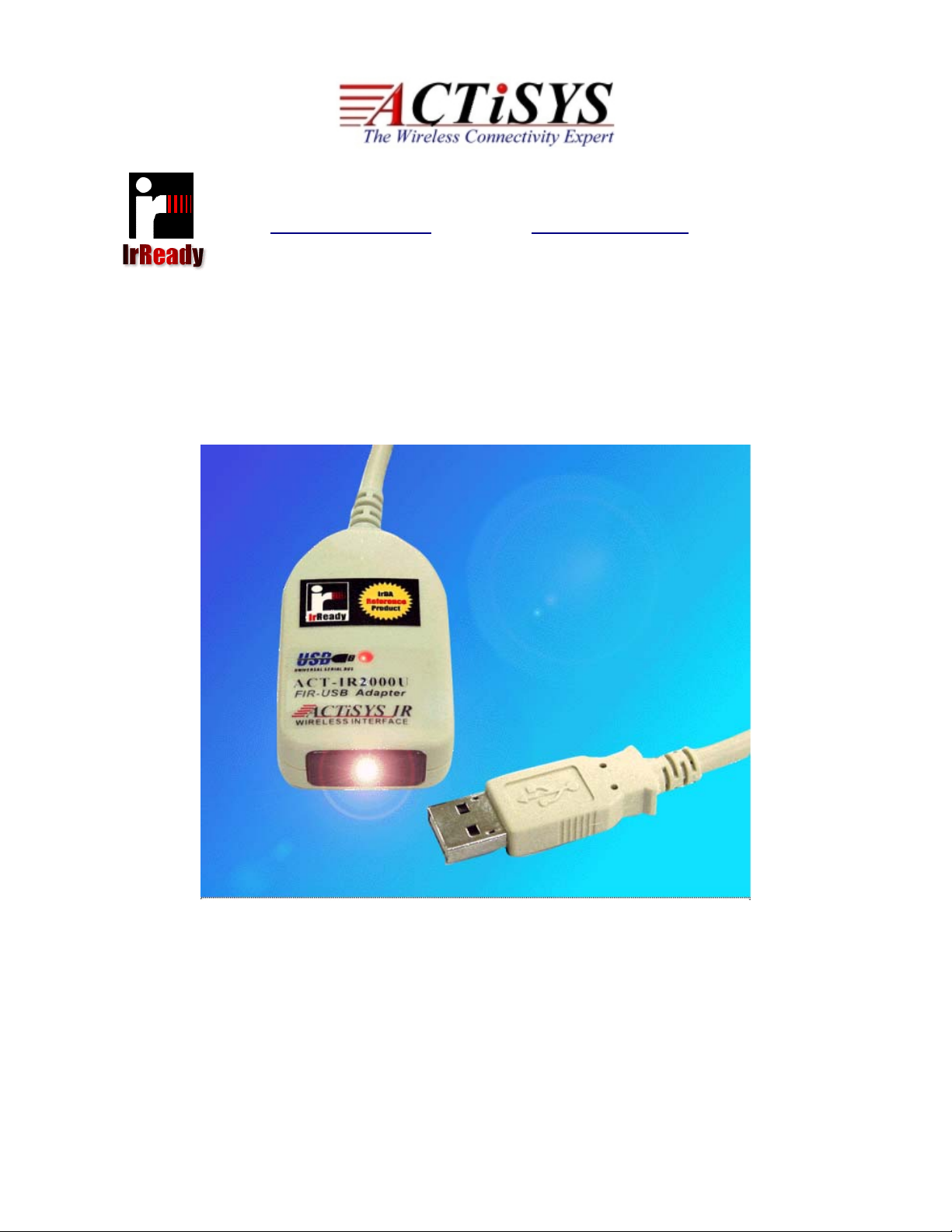
ACT-IR2000UL
IrReady FIR USB Adapte
r
User’s Manual
July 6, 2007
Ver. 1.6
© Copyright 2002-2007 ACTiSYS Corporation,
All Rights Reserved
Page 2
The Infrared Wireless Expert
ACT-IR2000UL
User’s Manual
Please install driver BEFORE you plug in ACT-IR2000UL to computer USB port.
FCC & VCCI Compliance Statement
This device complies with part 15 of the FCC Rules. Operation is subject to the following two
conditions:
(1)This device may not cause harmful interference, and (2) this device must accept any interference
received, including interference that may cause undesired operation.
WARNING-FCC Regulations state that any unauthorized changes or modifications to this
equipment not expressly approved by the manufacturer could void the user authority to operate this
equipment
NOTE: This equipment has been tested and found to comply with the limits for Class B digital
device, pursuant to Part 15 of the FCC Rules. This equipment generates, uses, and can radiate
radio frequency energy and, if not installed and used in accordance with the instru ctions, may cause
harmful interference to radio communications. However, there is no guarantee that interference will
nor occur in a particular installation. If this equipment does cause harmful interference to radio or
television reception, which can be determined by turning the equipment off and on, the user is
encouraged to try to correct the interference by one or more of the following measures:
-Increase the separation between the equipment and receiver.
-Reorient or relocate the receiving antenna.
-Connect the equipment into an outlet on a circuit different from that to which the receiver is
connected.
-Consult the dealer or an experienced radio/TV technician for help.
This equipment is in the 2nd Class category (information equipment to be used in a residential area
there to) and conforms to the standards set by the Voluntary Control Council For Interference by
Data Processing Equipment and Electronic Office Machines aimed at preventing radio interference
in such residential area.
When used near a radio or TV receiver, it may become the cause of radio interference. Read the
instructions for correct handling.
NOTE: Must be used with shielded cable only.
FOR YOU RECORDS
For your assistance in reporting this product in case of loss or theft, please record below the model
number and serial, which are located on the bottom of the case. Please retain this information.
Model Number Serial Number
Date of Purchase Place of Purchase
All indicated copyrights and trademarks in the following pages are copyrights and trademarks of
their respective corporations.
© Copyright 2002-2007 ACTiSYS Corp. Page 2 of 20 Jul 6, 2007
Version. 1.6
Page 3

The Infrared Wireless Expert
ACT-IR2000UL
User’s Manual
TABLE OF CONTENTS
REVISION HISTORY................................................................................................................................................. 4
1 INTRODUCTION....................................................................................................................................................... 5
2 PACKAGING CHECK LIST .................................................................................................................................... 5
3 SYSTEM REQUIREMENTS..................................................................................................................................... 5
4 BIOS SETUP ............................................................................................................................................................... 5
5 DRIVER INSTALLATION FOR WINDOWS 2000/ME/98SE .............................................................................. 6
6 DRIVER INSTALLATION FOR WINDOWS XP................................................................................................... 8
7 DRIVER INSTALLATION FOR WINDOWS VISTA .......................................................................................... 11
8 WINDOWS XP NATIVE DRIVER REMOVE PROCEDURE............................................................................ 12
9 DRIVER REMOVAL FOR WINDOWS XP/2000/ME/98SE................................................................................15
10 TROUBLE SHOOTING........................................................................................................................................... 17
11 PRECAUTIONS........................................................................................................................................................ 18
12 WARRANTY INFORMATION .............................................................................................................................. 19
13 CONTACT INFORMATION.................................................................................................................................. 20
© Copyright 2002-2007 ACTiSYS Corp. Page 3 of 20 Jul 6, 2007
Version. 1.6
Page 4
The Infrared Wireless Expert
REVISION HISTORY
Revision History
Revision Date Comment
1.5a 7/15/2003 Released
1.5b 3/10/2004
1.6 7/06/2007
Added warning message on Driver installation before plugging
USB dongle
Overall reformatted; Added feature & Chapter for Vista OS.
Extracted Technical Chapter. Updated Corporate address
ACT-IR2000UL
User’s Manual
© Copyright 2002-2007 ACTiSYS Corp. Page 4 of 20 Jul 6, 2007
Version. 1.6
Page 5

The Infrared Wireless Expert
ACT-IR2000UL
User’s Manual
1 INTRODUCTION
ACTiSYS ACT-IR2000UL is an advanced wireless Fast Infrared USB adapter designed to replace the
serial port or FIR controller based FIR/SIR wireless peripheral through the PC USB (Universal Serial Bus)
port. Taking advantage of the true plug-and-play nature and high bandwidth of USB, ACT-IR2000UL offers
the easiest conversion of existing wireless to the legacy-free personal computer platform with the
following features:
z No external driver required in Vista OS (Vista has Native driver for it), just plug & play.
z Fully compliant to USB specification 1.1 and IrDA specification 1.1
z Full-speed (12 Mbps) USB device operation
z Supports FIR (4Mbps) and all SIR speeds (9.6, 19.2, 38.4, 57.6 and 115.2 kbps).
z Bus-powered device. Obtain power from USB port. No external power supply required.
z Low power consumption in standby mode (Standby current less than 0.5 mA).
z Not occupy PC's COM or Parallel port and has no complicated hardware port and resource setting
and conflict, such as IO address / IRQ / DMA numbers.
z True PNP (Plug And Play) device. Without re-installing USB driver when re-plugs in.
z Package size: 2.4"L x 1.4"W x 0.74"H, 65.0 g (2.4 oz).
2 PACKAGING CHECK LIST
The package includes
1. ACT-IR2000UL USB Dongle
2. ACT-USB Adapter Driver and CD for User’s manual.
3 SYSTEM REQUIREMENTS
To use ACT-IR2000UL, your computer MUST meet the following requirements.
1. Windows 98SE/ME/2000/XP/Vista.
2. One unoccupied USB port.
4 BIOS SETUP
Before you use this device, You MUST enable your computer USB port in BIOS Settings.
© Copyright 2002-2007 ACTiSYS Corp. Page 5 of 20 Jul 6, 2007
Version. 1.6
Page 6
The Infrared Wireless Expert
ACT-IR2000UL
User’s Manual
5 DRIVER INSTALLATION FOR WINDOWS 2000/ME/98SE
Following are the instructions to properly install ACT-IR2000UL Series under, Windows 2000, Windows ME, and
Windows 98SE.
Important: Do
NOT use Windows’ Native Driver. Please use the driver on this CD to assure a smooth
installation.
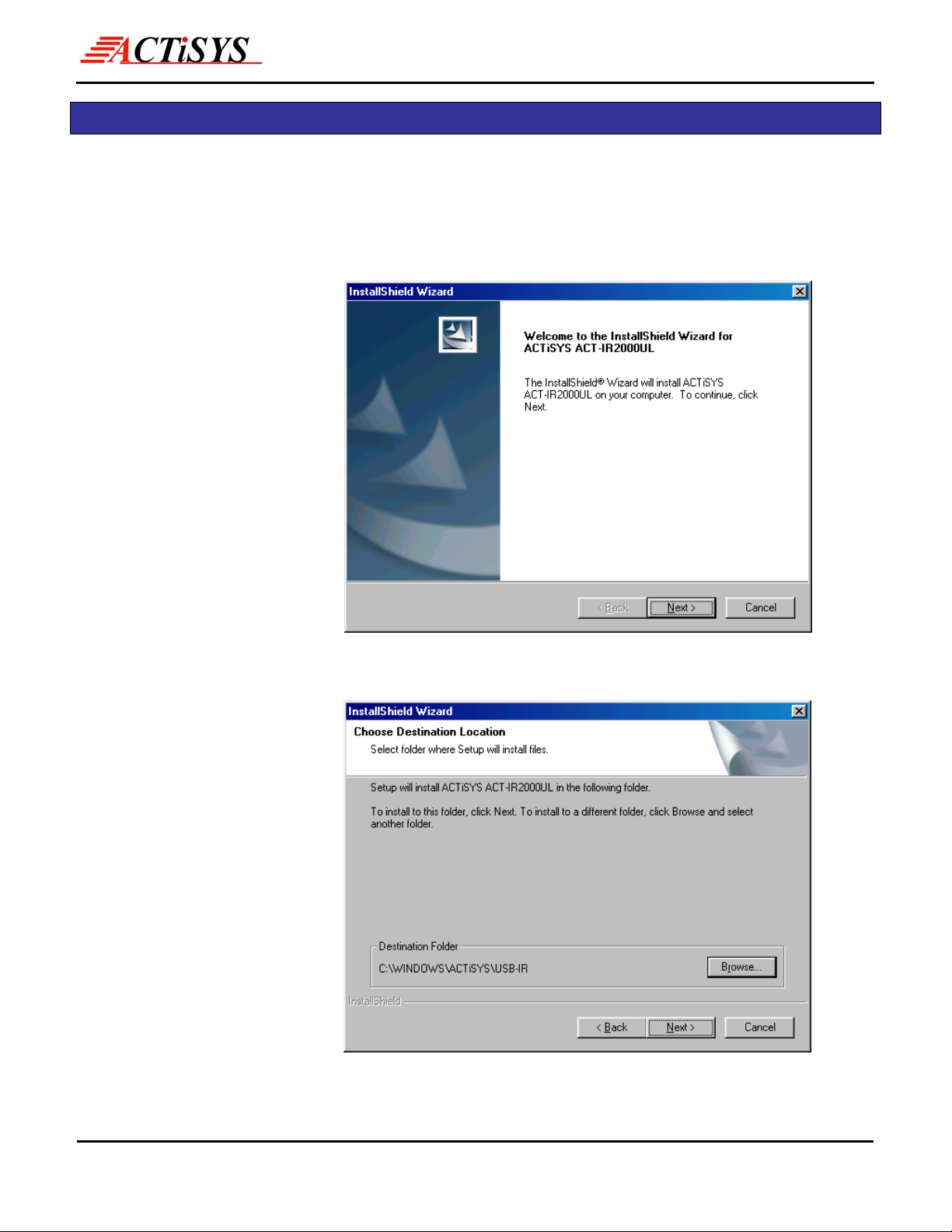
1. Insert the attached CD to
CD-ROM, Windows will
display install manual.
Please click Installation
then will execute
InstallShield Wizard.
Please Click on Next to
continue.
2. The Installer will install
ACT-IR2000UL in the
Destination Folder. To
install to a different folder,
click Browse and select
one. To continue, click on
Next.
© Copyright 2002-2007 ACTiSYS Corp. Page 6 of 20 Jul 6, 2007
Version. 1.6
Page 7
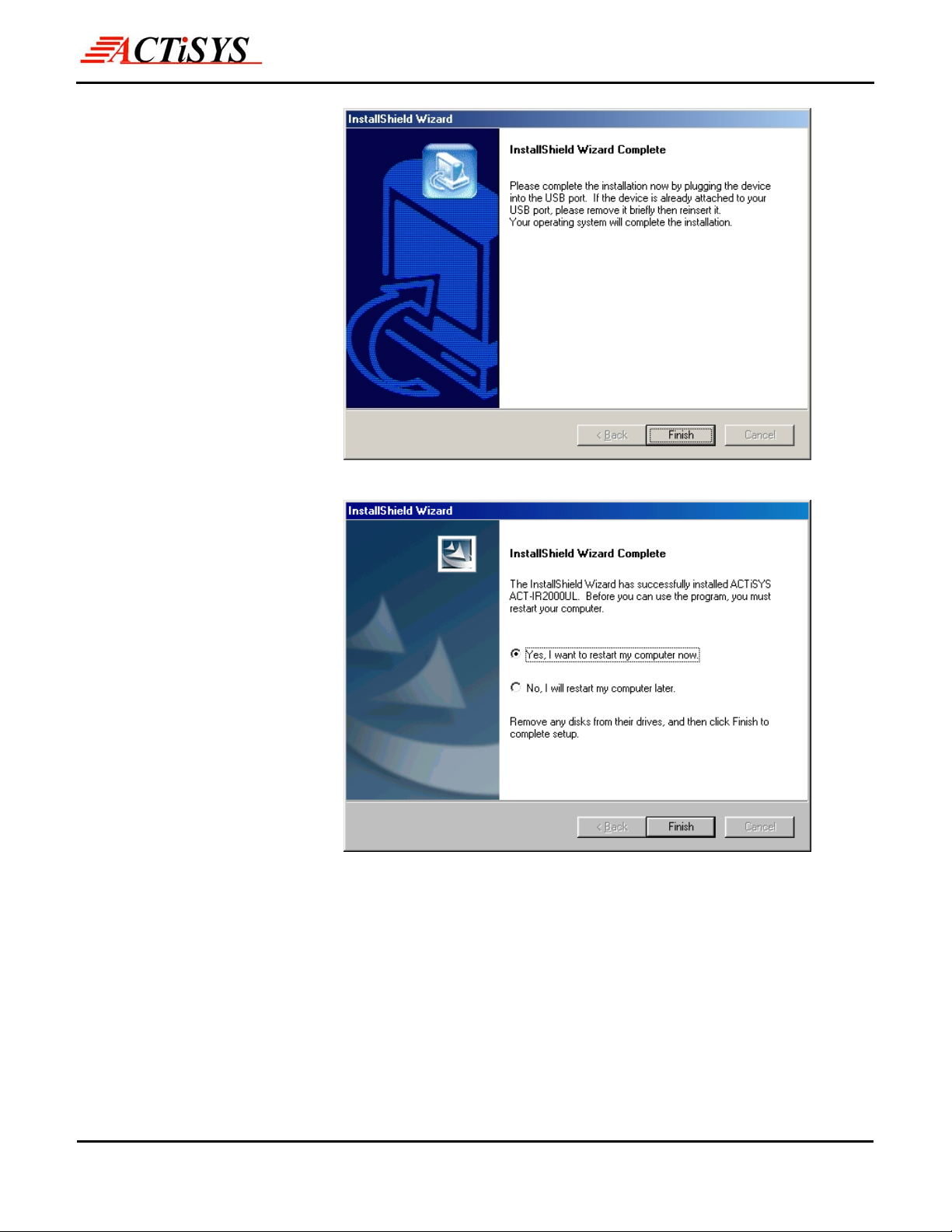
3. To complete the
installation, plug the
ACTiSYS
ACT-IR2000UL Series
into the USB port. If the
ACTiSYS
ACT-IR2000UL Series is
already plugged in,
remove it then re-insert it.
Click on Finish to
continue.
The Infrared Wireless Expert
ACT-IR2000UL
User’s Manual
4. Windows will now detect
the ACTiSYS
ACT-IR2000UL Series.
In some operating
systems, you may need
to restart your computer.
If so, click “Yes” to
continue and the
Installation is now
complete.
© Copyright 2002-2007 ACTiSYS Corp. Page 7 of 20 Jul 6, 2007
Version. 1.6
Page 8
The Infrared Wireless Expert
6 DRIVER INSTALLATION FOR WINDOWS XP
Following are the instructions to properly install ACT-IR2000UL Series under Windows XP.
ACT-IR2000UL
User’s Manual
Important: Do
smooth installation. If you have plugged ACT-IR2000UL into USB port and mistakenly loaded
WindowsXP Native Driver, please refer to the “IR2000UL WindowsXP Nativ e Driv er Remove Procedure”
to remove the driver and follow the “ACTiSYS ACT-IR2000UL Series Driver Inst allation for Windows XP” to
re-install the driver.
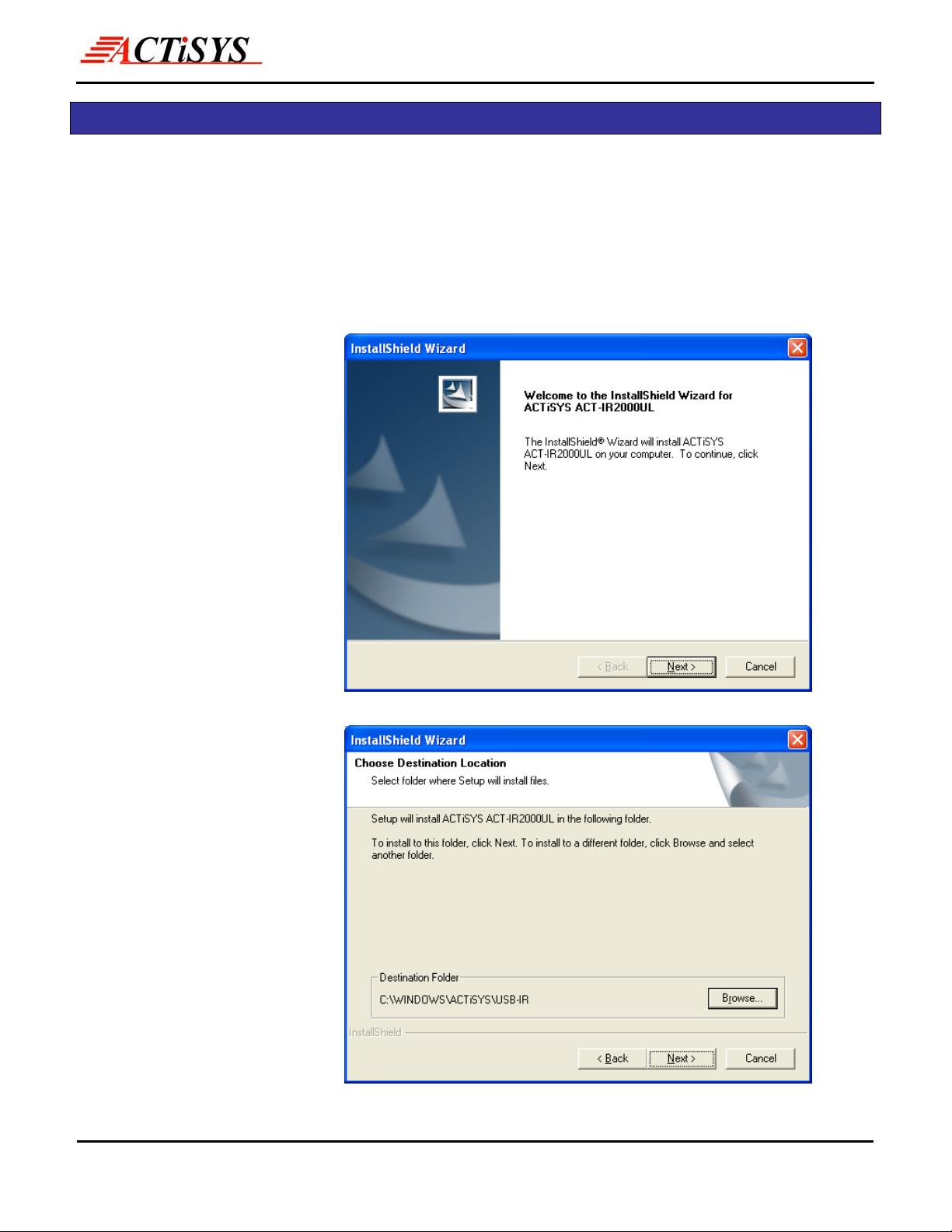
1. Insert the attached CD to
CD-ROM, Windows will
display install manual.
Please click Installation,
then execute InstallShield
Wizard. Please Click on
Next to continue.
NOT use Windows’ Native Driver. Please use the driver on this CD to assure a
2. The Installer will install
ACTiSYS
ACT-IR2000UL in the
Destination Folder. To
install to a different
folder, click Browse and
select one. To continue,
click on Next.
© Copyright 2002-2007 ACTiSYS Corp. Page 8 of 20 Jul 6, 2007
Version. 1.6
Page 9
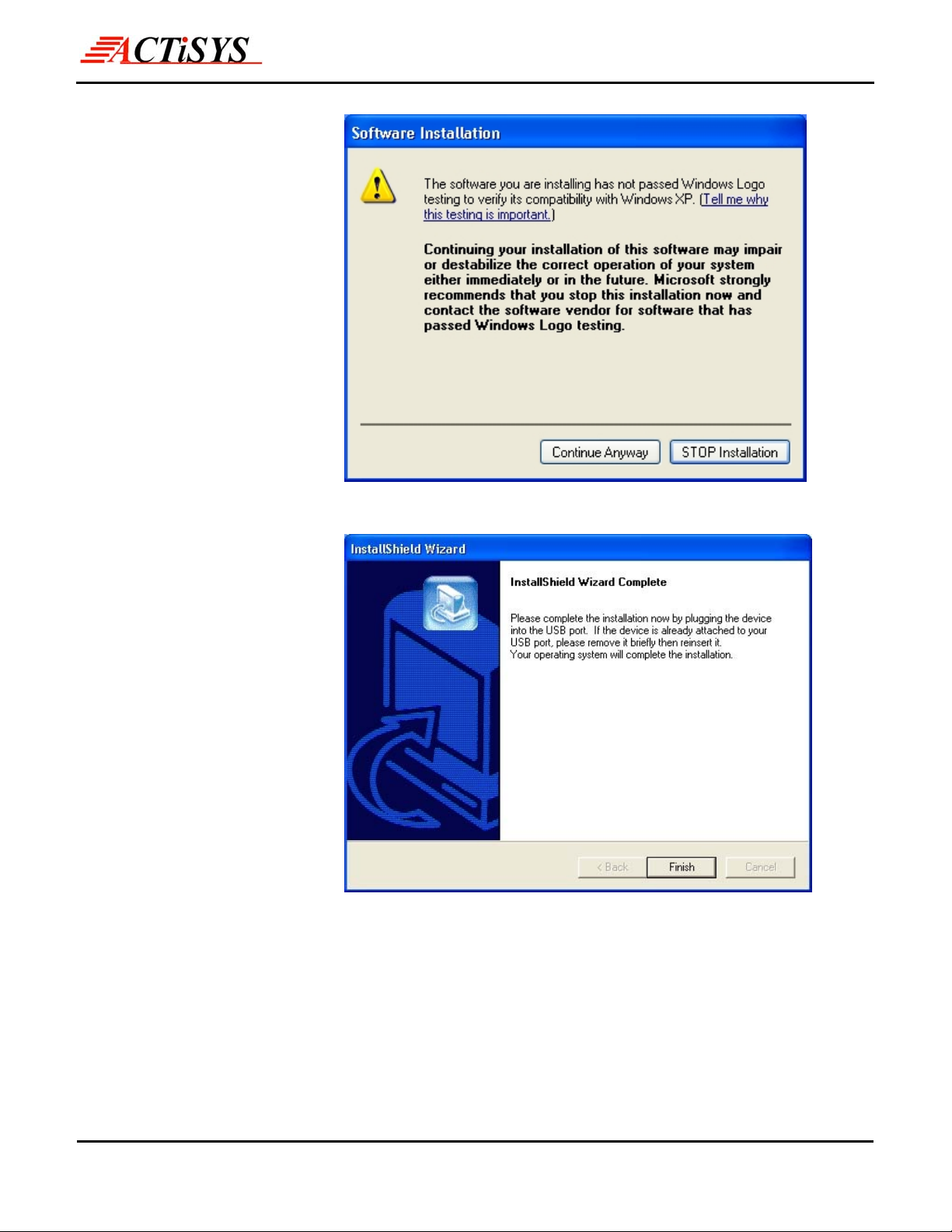
3. Click on Continue
Anyway to continue
The Infrared Wireless Expert
ACT-IR2000UL
User’s Manual
4. Insert the ACTiSYS
ACT-IR2000UL Series
into the USB Jack and
click on Finish.
© Copyright 2002-2007 ACTiSYS Corp. Page 9 of 20 Jul 6, 2007
Version. 1.6
Page 10
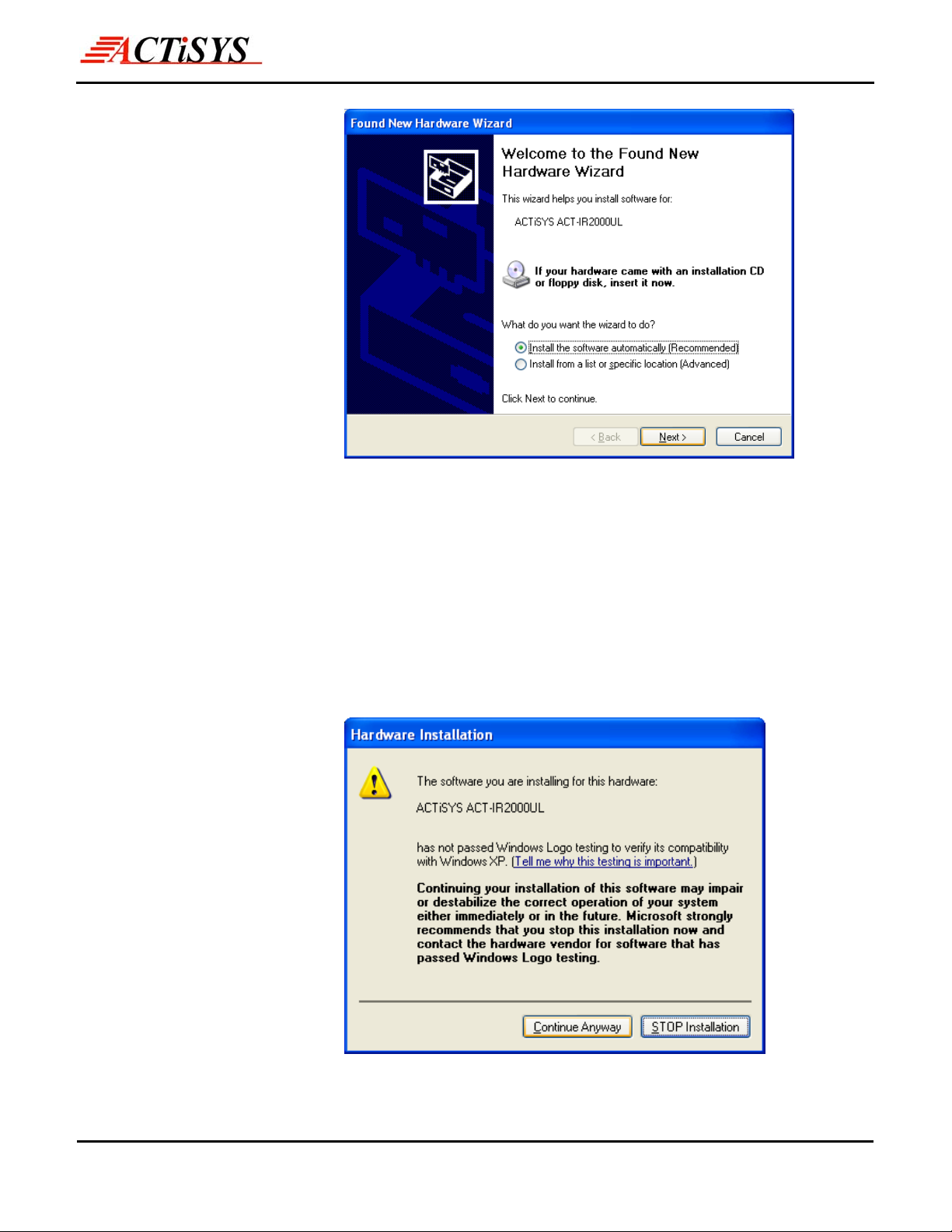
5. WinXP will detect
ACT-IR2000UL Series.
Select “Install the
software automatically
(Recommended)”.
Please note you should
take the CD out of the
CD-ROM BEFORE
clicking on Next.
The Infrared Wireless Expert
If you keep the CD in the CDROM, Windows XP will
ACT-IR2000UL
User’s Manual
6. WinXP will detect the
updated drivers. Click on
Continue Anyway to
continue.
automatically search for all drivers compatible with
ACT-IR2000UL. You will see a window with a choice of
different drivers, please select the OEM one. If you install
the driver to WindowsXP, the driver will automaticall y
copy to Hard disk (C:\Windows). Please highlight
"C:\Windows\inf\oem0.inf" and click "OK" button,
Windows XP will automatically install ACT-IR2000UL.
© Copyright 2002-2007 ACTiSYS Corp. Page 10 of 20 Jul 6, 2007
Version. 1.6
Page 11
The Infrared Wireless Expert
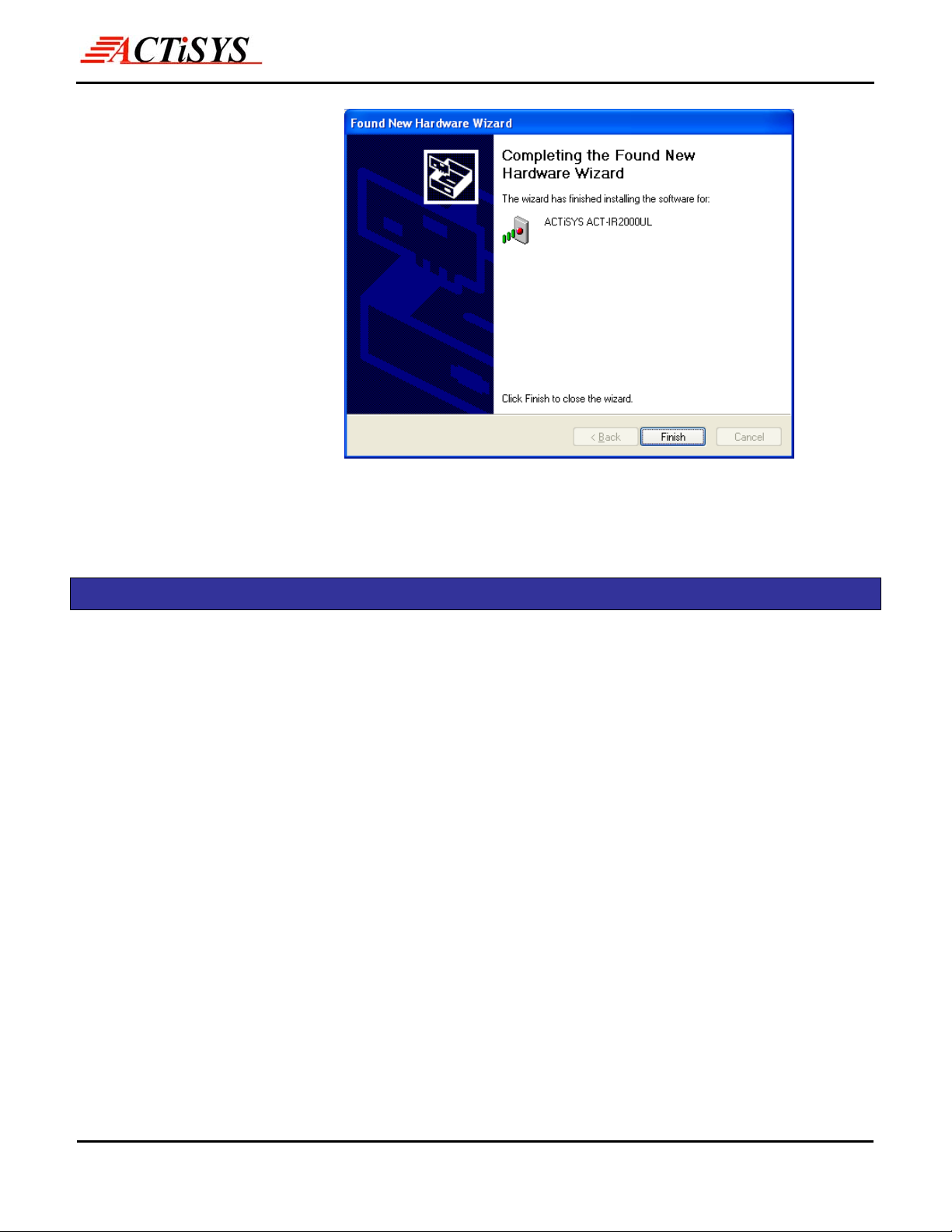
7. Click on Finish to
ACT-IR2000UL
User’s Manual
complete the installation.
7 DRIVER INSTALLATION FOR WINDOWS VISTA
Windows Vista has its native driver for ACT-IR2000UL. Only you need to do is Plug & Play.
© Copyright 2002-2007 ACTiSYS Corp. Page 11 of 20 Jul 6, 2007
Version. 1.6
Page 12
The Infrared Wireless Expert
ACT-IR2000UL
User’s Manual
8 WINDOWS XP NATIVE DRIVER REMOVE PROCEDURE E DRIVER REMOVE PROCEDURE
Your ACTiSYS ACT-IR2000UL is shipped with the latest driver on the CD. If you had already installed
the Windows XP Native Driver, the following steps will remove the Nativ e Driver and then y ou can follow
the ACTiSYS ACT-IR2000UL Installation Instruction to install the latest driver.
How do you know whether you have the Windows XP native driver?
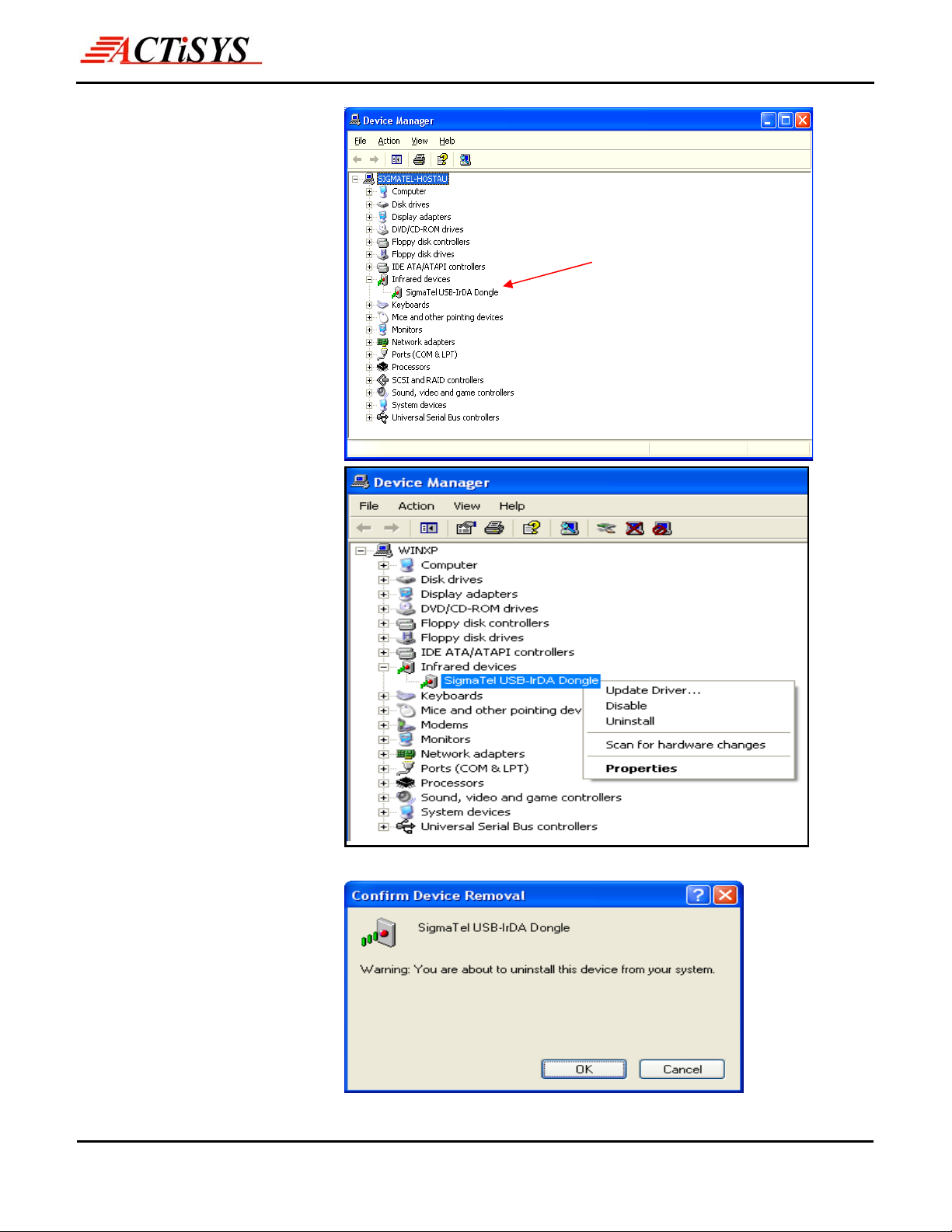
Answer: It is YES, if your product name is “SigmaTel USB-IrDA Dongle.” Figure 1 and 2 will tell you
whether this is the case or not.
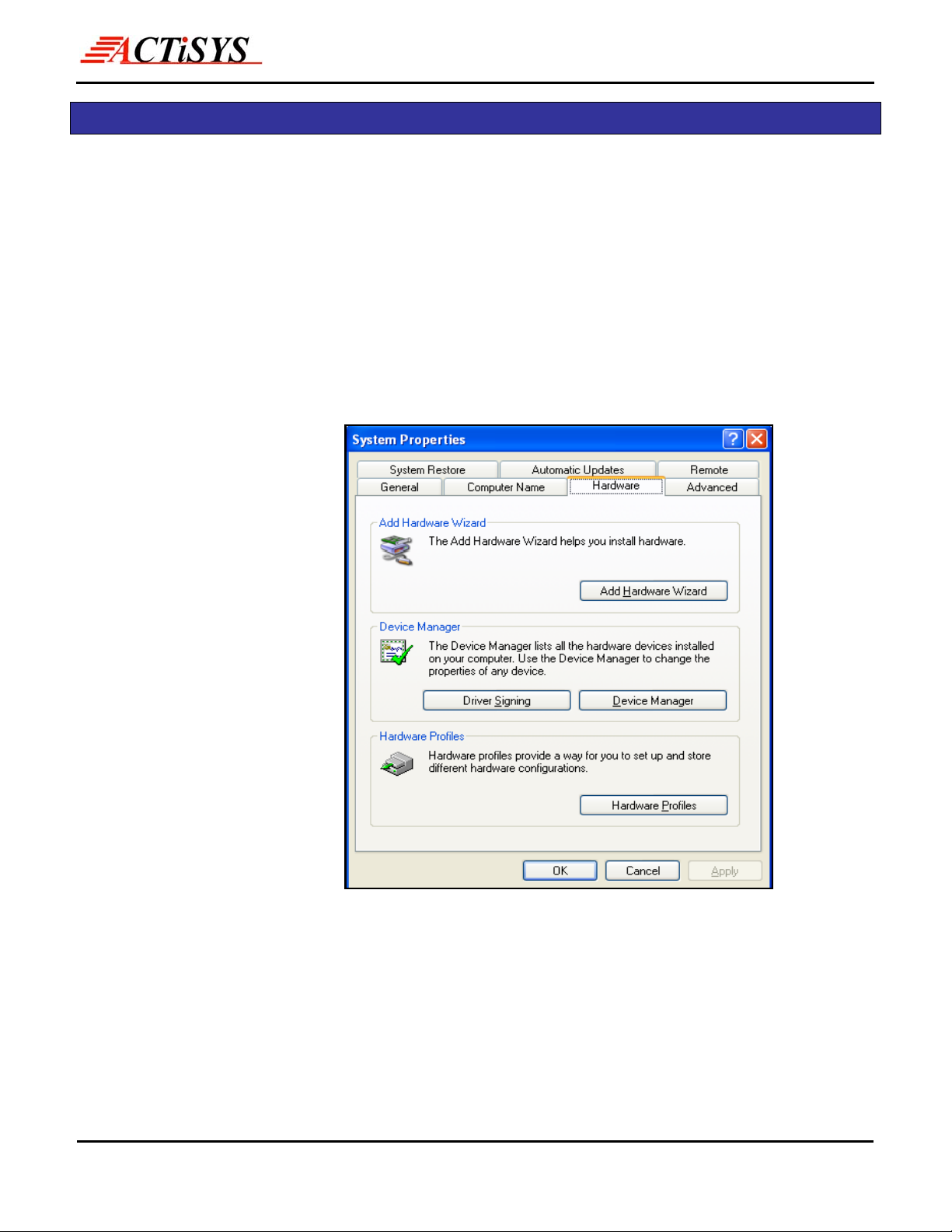
1. Go to Control Panel, click
System Icon then click
“Device Manager”
© Copyright 2002-2007 ACTiSYS Corp. Page 12 of 20 Jul 6, 2007
Version. 1.6
Page 13
The Infrared Wireless Expert
2. You will see “Infrared
Devices” at the Device
Manager. Click and it will
show “SigmaTel USB-IrDA
ACT-IR2000UL
User’s Manual
Dongle”
3. Right click on “SigmaTel
USB-IrDA Dongle”
Click on Uninstall.
You will see a “Confirm
4.
Device Removal”
Window then press OK.
© Copyright 2002-2007 ACTiSYS Corp. Page 13 of 20 Jul 6, 2007
Version. 1.6
Page 14
The Infrared Wireless Expert
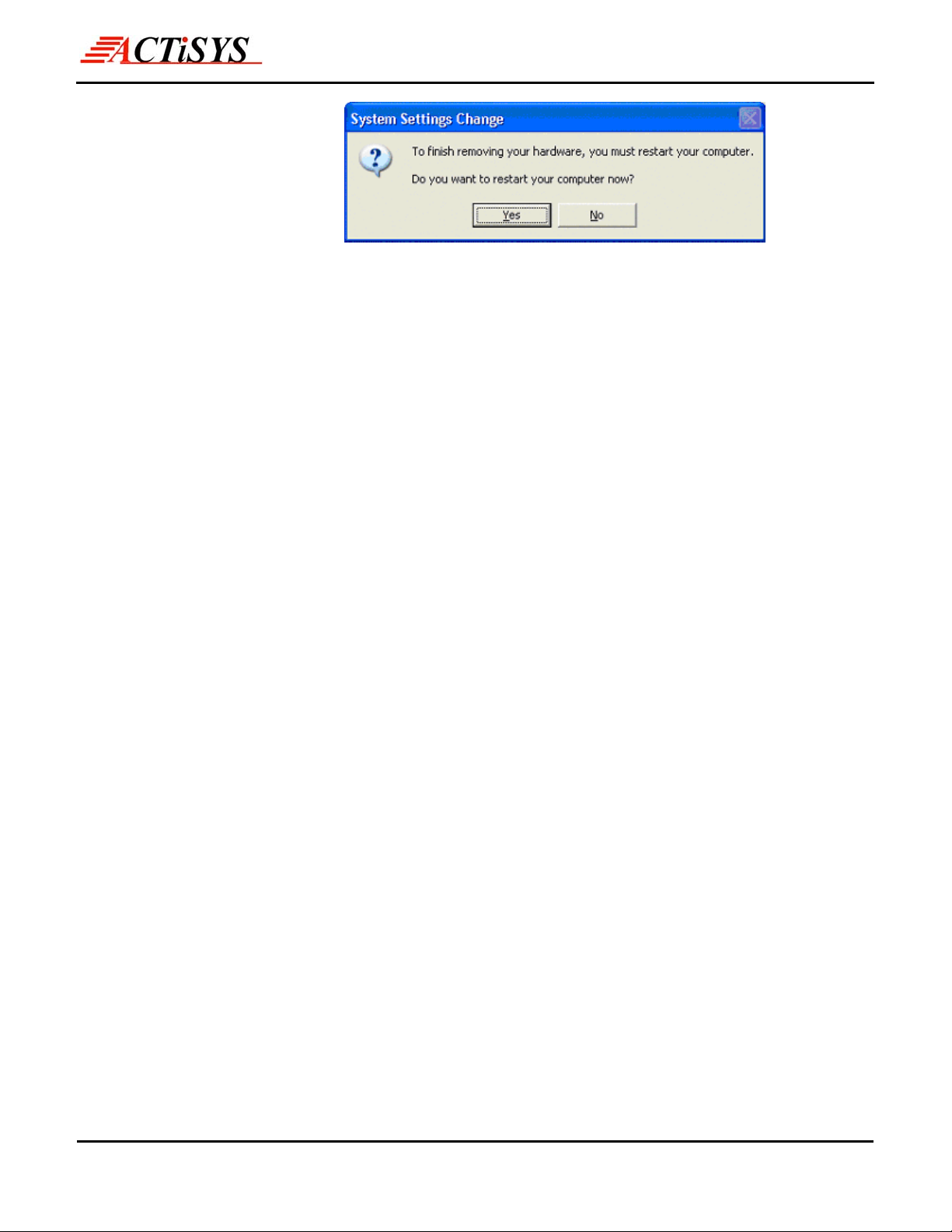
5. You have completed the
removal of the Windows
XP Native Driver. Click
ACT-IR2000UL
User’s Manual
on Yes.
Congratulation! You have successfully removed the Windows XP Native
Driver for the USB Infrared Adapter.
Before the PC is restarting, you should un-plug your ACT-IR2000UL USB
connector from the PC’s USB port.
Please refer to ACTiSYS ACT-IR2000UL Installation Instructions for
Windows XP Home or Professional.
© Copyright 2002-2007 ACTiSYS Corp. Page 14 of 20 Jul 6, 2007
Version. 1.6
Page 15
The Infrared Wireless Expert
ACT-IR2000UL
User’s Manual
9 DRIVER REMOVAL FOR WINDOWS XP/2000/ME/98SE
Following are the instructions to properly uninstall ACTiSYS ACT-IR2000UL Series under Windows XP,
Windows 2000, Windows ME, and Windows 98SE.
Important: Please keep the ACTiSYS ACT-IR2000UL Series plugging into the computer until prompted
to remove it.
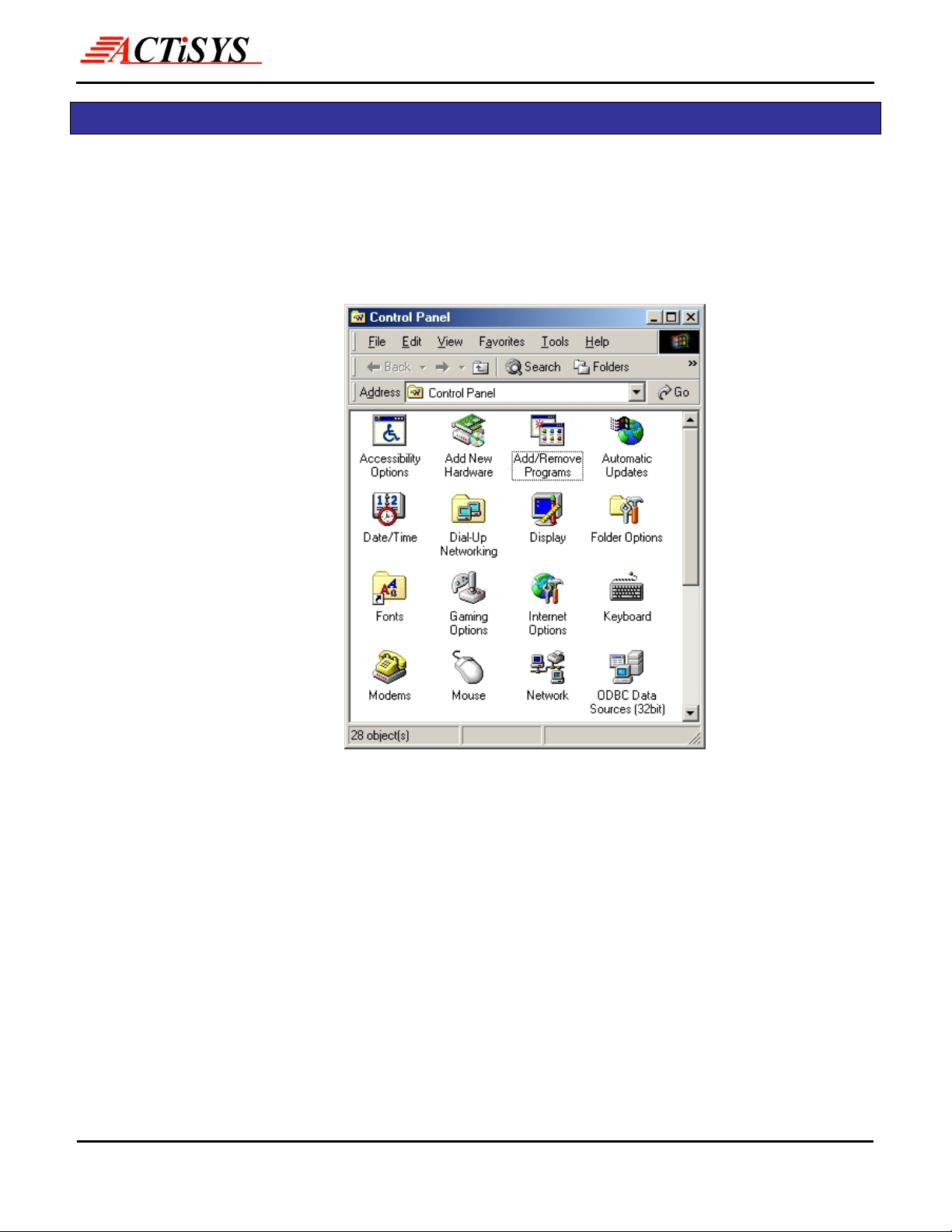
1. Open the Control Panel
and select Add /
Remove Programs.
© Copyright 2002-2007 ACTiSYS Corp. Page 15 of 20 Jul 6, 2007
Version. 1.6
Page 16
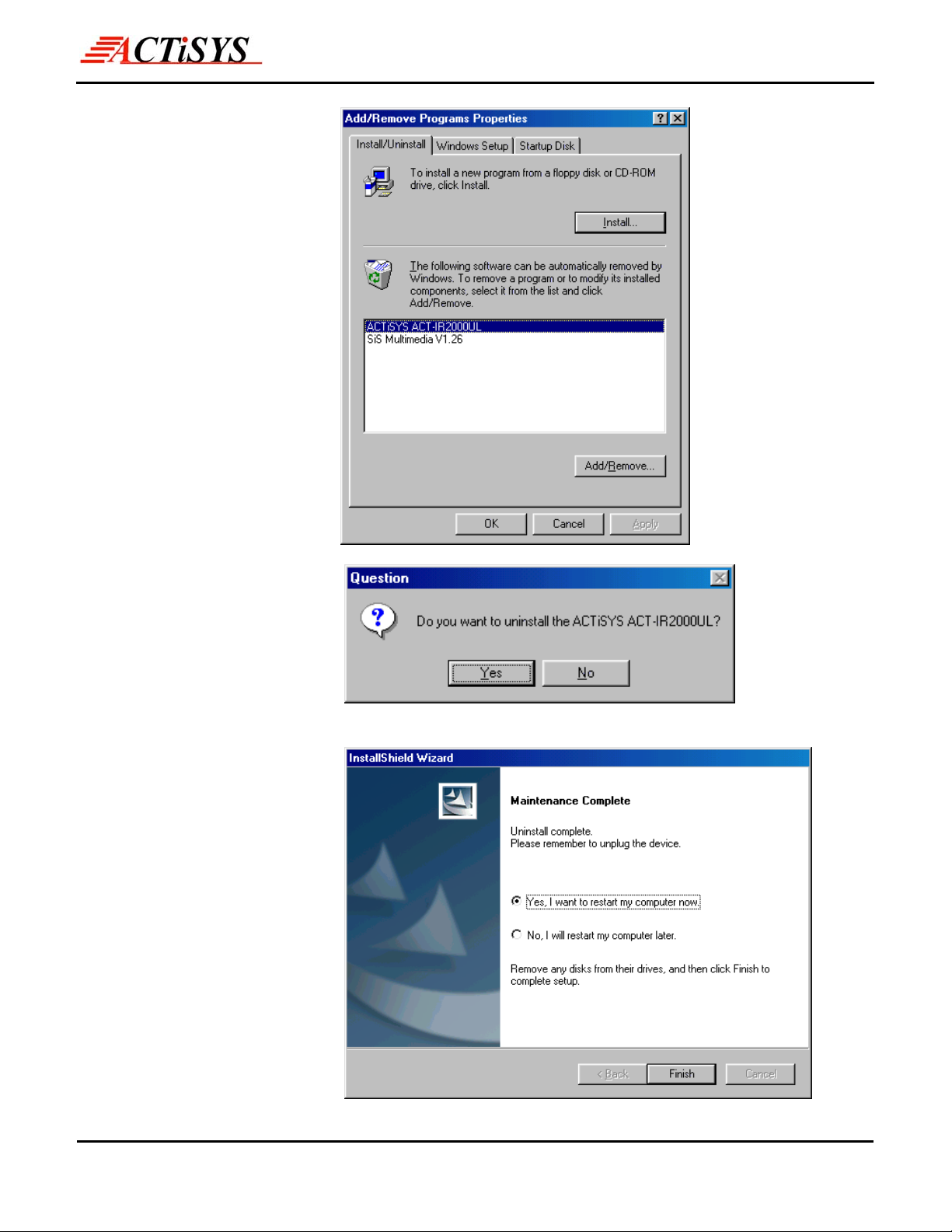
2. Select ACTiSYS
ACT-IR2000UL Series
from the list. Click on the
Add/Remove button to
begin the uninstall
process.
The Infrared Wireless Expert
ACT-IR2000UL
User’s Manual
3. To continue, click the
Yes button to uninstall
the ACTiSYS
ACT-IR2000UL Adapter.
4. To complete the removal
process, click the Finish
button. Unplug the
ACTiSYS
ACT-IR2000UL Series
from your USB jack.
© Copyright 2002-2007 ACTiSYS Corp. Page 16 of 20 Jul 6, 2007
Version. 1.6
Page 17

A
The Infrared Wireless Expert
ACT-IR2000UL
User’s Manual
10 TROUBLE SHOOTING
For help on general and miscellaneous problems you may be experiencing with your printing, refer to the
following pages for possible solutions. Look up your problem and try the solution.
Symptom Problem Solution
Can not establish link
(General)
File Transfer between
IR-equipped PDA and
ACT-IR device-attached
host computer stops before
finishing up and an error
1. The two IR devices are
not aligned properly.
2. Distance is too near or
far.
3. Device is inactivated
4. BIOS setting incorrect
5. Installation is not correct.
The infrared
communication is
interfered. For example,
something blocks out the
infrared beam or the burst
1. Properly align them
again
2. Move one device to a
proper distance.
3. Enable the device by IR
monitor.
4. Correct the BIOS
Setting.
5. Refer to un-installation
guide to remove the
device, then install
again.
Check to find out the
source of interference and
eliminate it before trying
again.
message appears.
The device work well
before. But after I unplug it
then plug, it does not work
again.
of string light source, etc.
Improper unplug and plug
procedure
Before you unplug it, you
should disable the device.
nd enable the device after
you plug it into your
computer
© Copyright 2002-2007 ACTiSYS Corp. Page 17 of 20 Jul 6, 2007
Version. 1.6
Page 18

The Infrared Wireless Expert
ACT-IR2000UL
User’s Manual
11 PRECAUTIONS
To ensure trouble-free operation, please observe the following precautions:
Optical communications are easily affected by external light sources, weak batteries, transfer
distance, transfer angle, etc. Any of these conditions may cause a data transfer failure,
incomplete, missing or incorrect data. Make sure that the wireless interface is away from direct
sunlight and other strong light source.
z Do not terminate arbitrarily during file transfer process between DUT and computers
until finished. Otherwise DUT internal data integrity may be damaged, which is due
to the violation of DUT’s.
z Do not expose the unit to moisture, as this will damage the internal circuitry.
z Do not expose the unit to extreme temperatures. It should not be placed in direct sunlight or in a
closed vehicle, neither should it be placed near heaters nor other heat sources.
z Do not store the unit in a humid or dusty place.
z Use a soft, dry cloth to clean the unit. Do not use a wet cloth or any solvent.
z Do not drop the unit or handle the unit carelessly.
CAUTION:
z Never touch the pins of computer connection terminal. An Electro Static Discharge can damage the internal
circuits. If this device requires any servicing, use only an ACTiSYS service dealer, an ACTiSYS approved
service facility, or an ACTiSYS repair service.
z When exchanging data with host computer, be sure the appropriate serial communication port is available
and is not in conflict with other peripheral device or software.
© Copyright 2002-2007 ACTiSYS Corp. Page 18 of 20 Jul 6, 2007
Version. 1.6
Page 19
The Infrared Wireless Expert
ACT-IR2000UL
User’s Manual
12 WARRANTY INFORMATION
ACTiSYS Corporation warrants the first end-user purchaser, for a period of 1 year from the date of purchase,
that this wireless interface (The Product) will be free from defective workmanship and materials, and agrees
that it will, at its option, either repair the defect or replace the defective Product or part thereof at no charge to
the purchaser for parts or for labor.
This warranty does not apply to any appearance items of the Product, any consumable items such as paper,
ink ribbon, or batteries supplied with the Product, or to any equipment or any hardware, software, firmware, or
peripheral other than the Product. This warranty does not apply to any Product the exterior of which has
been damaged or defected, which has been subjected to misu se, ab normal se rvice or h andling, or which ha s
been altered or modified in design, construction or interfacing. Tampering with Label Voids Warranty.
In order to enforce the rights under this limited warrant y, the purchaser should mail, ship or carry the Product,
together with proof of purchase, to ACTiSYS.
The limited warranty described above is in addition to whatever implied warranties may be granted to
purchasers by law. To the extent permitted by applicable law, ALL IMPLIED WARRANTIES INCLUDE THE
WARRANTIES OF MERCHANT ABILITY AND FITNESS FOR USER ARE LIMITED TO A PERIOD OF 1
YEAR FROM THE DATE OF PURCHASE. Some states do not allow limitations on how long an implied
warranty lasts, so the above limitation may not apply to you.
Neither the sales personnel of the seller nor any other person is authorized to m ake any warranties other t han
those described above, nor to extend the duration of any warranties beyond the time period described above
on behalf of ACTiSYS. Corporation.
The warranties described above shall be the sole and exclusive remedy available to the purchaser.
Correction of defects, in the manner and for the period of time described above, shall constitute full
satisfaction of all claims, whether based on contract, negligence, strict liability or otherwise. In no event
shall ACTiSYS Corporation be liable or in any way responsible, for any damages or defects in the Product
which were caused by repair or attempted repairs performed by anyone other than ACTiSYS technician.
Nor shall ACTiSYS Corporation be liable or in any way responsible for any incidental or consequential
economic or property damage. Some states do not allow the exclusion of incidental or consequential
damages, so the above exclusion may not apply to you.
FOR YOU RECORDS
For your assistance in reporting this product in case of loss or theft, please record below the model
number and serial, which are located on the bottom of the case. Please retain this information.
Model Number: Serial Number:
© Copyright 2002-2007 ACTiSYS Corp. Page 19 of 20 Jul 6, 2007
Date of Purchase:
Version. 1.6
Page 20
The Infrared Wireless Expert
13 CONTACT INFORMATION
ACT-IR2000UL
User’s Manual
ACTiSYS Corporation
921 Corporate Way,
Fremont, CA 94539, USA
TEL:+1-510-490-8024, FAX:+1-510-623-7268
E-Mail: [email protected]
Web: http://www.actisys.com
© Copyright 2002-2007 ACTiSYS Corp. Page 20 of 20 Jul 6, 2007
Version. 1.6
 Loading...