

Page 1
Page 2

Preface
ii
3
M Toll RFID Reader 6204 Quick Start Guide
3M Toll RFID Reader 6204
Quick Start Guide
V1.2
July 15, 2013
© 3M 2013. All Rights Reserved
.
3M is a trademark of 3M. All other trademarks are the property of their respective owners. Specifications are subject to change without
notice.
This product is covered by one or more of the following patents: U.S. Patent No. 7,199,713, 7,209,040, 6,346,881, and 6,617,962.
Disclaimer and Limitation of Liability
The content of this manual is for information use only and is subject to change without notice. 3M assumes no responsibility or liability for
any errors or inaccuracies that may appear in this publication. No part of this manual may be reproduced in any form or by any means,
electronic, mechanical, recording, or otherwise, without the prior written permission of 3M.
3M RFID products are not designed, intended, authorized or warranted to be suitable for life support applications or any other life critical
applications which could involve potential risk of death, personal injury, property damage, or environmental damage.
FCC Notice
This equipment has been tested and found to comply with the limits for a Class B digital device, pursuant to Part 15 of the FCC Rules.
These limits are designed to provide reasonable protection against harmful interference in a residential installation. This equipment
generates, uses, and can radiate radio frequency energy and, if not installed and used in accordance with the instructions, may cause
harmful interference to radio communications. However, there is no guarantee that interference will not occur in a particular installation. If
this equipment does cause harmful interference to radio or television reception, which can be determined by turning the equipment off and
on, the user is encouraged to try to correct the interference by one or more of the following measures:
x Reorient or relocate the receiving antenna.
x Increase the separation between the equipment and receiver.
x Connect the equipment into an outlet on a circuit different from that to which the receiver is connected.
x Consult 3M or an experienced radio/TV technician for help.
Le présent appareil est conforme aux CNR d'Industrie Canada applicables aux appareils radio exempts de licence. L'exploitation est
autorisée aux deux conditions suivantes : (1) l'appareil ne doit pas produire de brouillage, et (2) l'utilisateur de l'appareil doit accepter tout
brouillage radioélectrique subi, même si le brouillage est susceptible d'en compromettre le fonctionnement.
This Class B digital apparatus complies with Canadian ICES-003.
Cet appareil numérique de la classe B est conforme à la norme NMB-003 du Canada.
3M Traffic Safety and Security Systems
Motor Vehicle Safety Systems
Building 3
11705 Research Blvd
Austin, TX 78759
Web:
www.3m.com
Page 3

Preface
3M Toll RFID Reader 6204 Quick Start Guide iii
Preface
The 3M Toll RFID Reader 6204 Quick Start Guide is designed to allow you
quickly install, configure, and operate your reader. This guide only provides
instructions for a basic installation and you should refer to the 3M Toll RFID
Reader 6204 User’s Guide and Programmer’s Reference Guide for more
detailed programming, configuration, and operation instructions.
Information Included in this Guide
Information provided in this guide includes:
h Reader Overview
h Reader Equipment Installation
h Reader Software Installation
h Reader Configuration
h Reader Operation
h Specifications
h Safety Instructions
Intended Audience
This document is intended for those who wish to quickly setup and operate
the 6204. Before attempting to install, configure, and operate this product,
you should be familiar with the following:
h Windows-based software installation and operation
h Device communication parameters including Ethernet and serial
communications
h RFID reader configuration including antenna placement and RF
h Basic digital input/output control
Page 4

Preface
iv
3
M Toll RFID Reader 6204 Quick Start Guide
T
his page intentionally left blank.
Page 5
1
2 3 4 5 6 7
Reader Overview
3
M Toll RFID Reader 6204 Quick Start Guide 1
1 Reader Overview
1.1.
Reader Hardware
The 3M Toll RFID Reader 6204 is a multi-protocol, multi-regional Radio
Frequency Identification (RFID) System that operates in the 860 – 960 MHz
UHF band. The reader is configured at the factory to operate within a
specific regulatory region (for example: FCC Part 90).
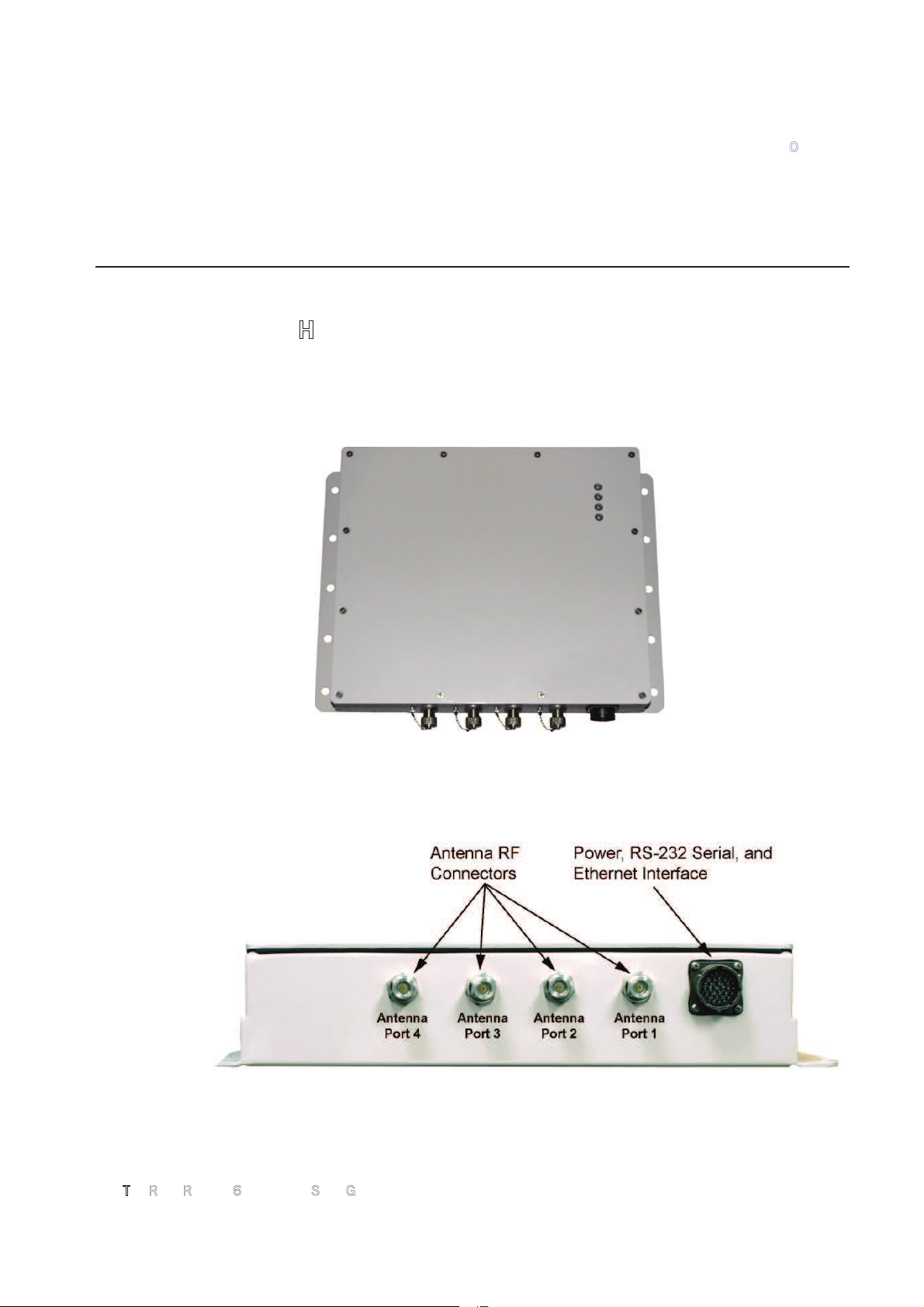
Figure 1
3M Toll RFID Reader 6204 UHF Reader
As shown in the following figure, the 6204 supports four Tx/Rx antennas
(not shown). The reader is also equipped with RS-232 serial and Ethernet
interfaces.
Figure 2
3M Toll RFID Reader 6204 Power and I/O Connections
Page 6

1
2 3 4 5 6 7
Reader Overview
2
3
M Toll RFID Reader 6204 Quick Start Guide
1.2.
Reader Software
The 3M Toll RFID Reader 6204 is shipped with two software applications
that you can use to configure and control the reader.
Reader Startup Tool (RST)
The RST is a Microsoft Windows based application you install on your
computer. With RST, you can view all readers on your network. After
selecting a reader, you can modify its communication, network, and
operational parameters. You can also read tags, review tag data, and
perform diagnostics. This RST is primarily intended for initially configuring a
reader prior to deployment. After deployment, use the Embedded Reader
Configuration Tool (RCT). Detailed information on the RST is provided in
Chapter 5.
Embedded Reader Configuration Tool (RCT)
This RCT is an embedded reader application that allows you to access your
readers across a LAN or WAN. Enter the IP address of the reader into your
Web browser and the RCT allows you to fully modify and operate the reader.
With the same functionality as the RST, this application allows you to modify
the reader’s communication, network, and operational parameters. You can
also read tags, review tag data, perform diagnostics, and upload new
software. This application is primarily intended for configuring and
managing deployed readers. Detailed information on the RCT is provided in
Chapter 6.
Page 7
1
2
3 4 5 6 7
Reader Equipment Installation
3M Toll RFID Reader 6204 Quick Start Guide 3
2 Reader Equipment Installation
2.1.
Mechanical Installation
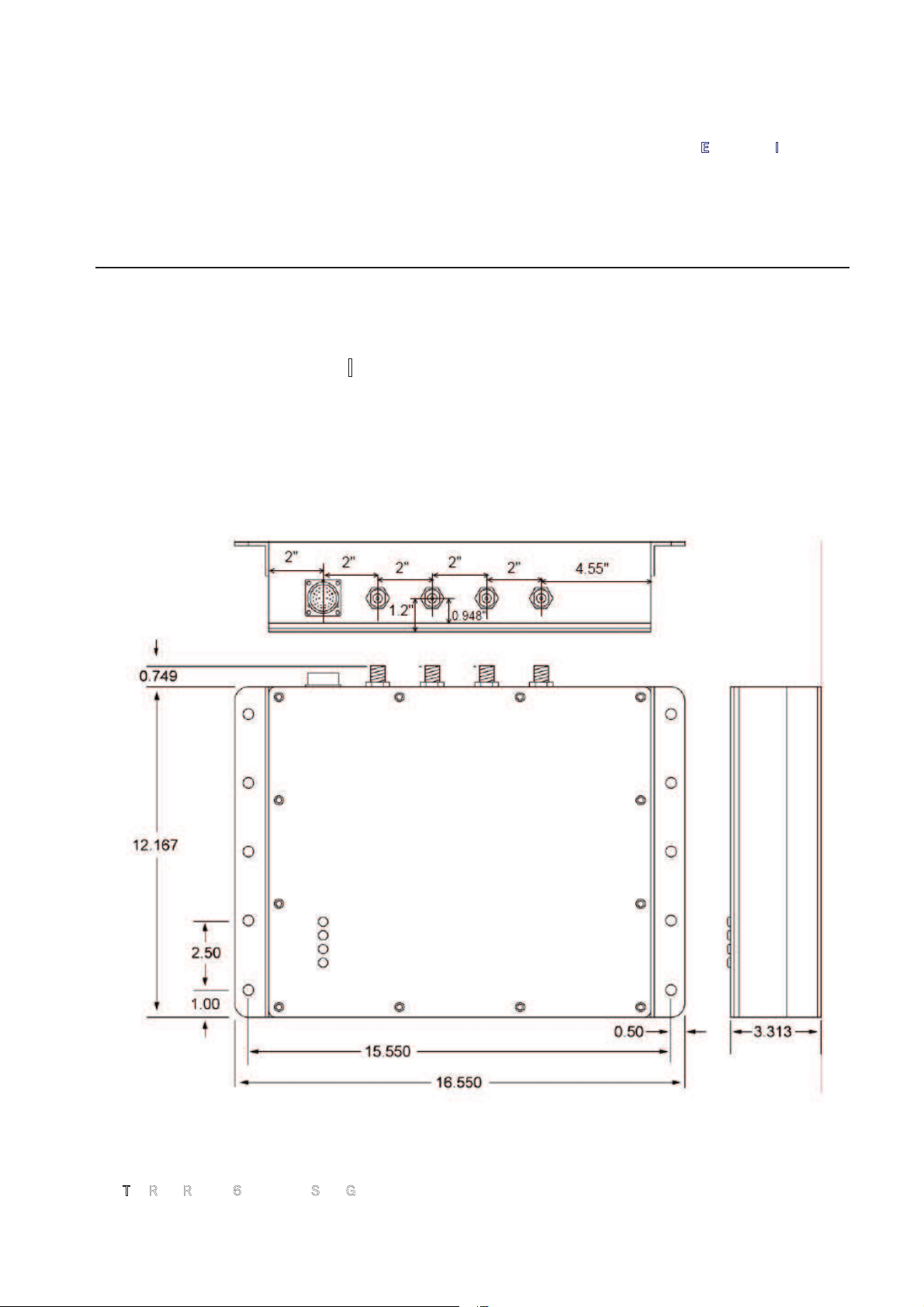
The 3M Toll RFID Reader 6204 is available with two mounting flanges
suitable for most pole and wall mount applications. Any mounting surface
must be able to support a minimum static load of 11.0 pounds (5 kg) plus
any additional live load due to environmental conditions.
Figure 3
6204 Mechanical Dimensions and Mounting Hole Locations (Dimensions in Inches)
Page 8
1
2
3 4 5 6 7
Reader Equipment Installation
4
3
M Toll RFID Reader 6204 Quick Start Guide
To mount the 6204 reader assembly, refer to Figure 3 and perform the
following:
1
Prepare the mounting surface to accept the 10 mounting bolts. The
hole pattern should match that shown in Figure 3 and the mounting
surface must be able to support 11 lbs (5 kg).
2
Mount the reader.
3 Locate the Interface Cable.
4
Connect the cable to the reader’s bulk head connector and twist to lock
in place.
5
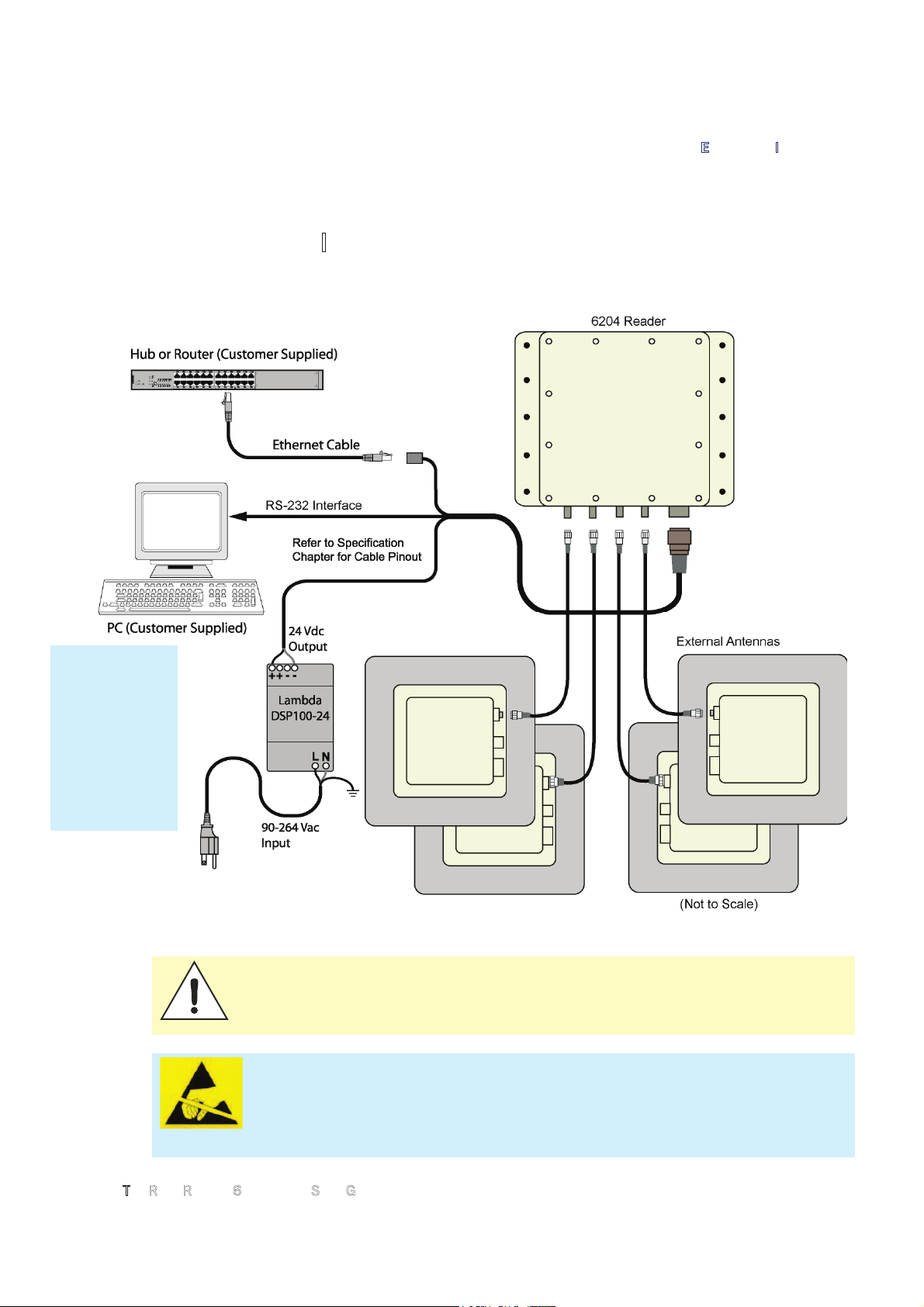
Connect the antenna cables (see Figure 4).
6
Adjust the angle of the antennas and tighten the hardware.
WARNING:
FCC Radiation Exposure Statement. The antennas used for this transmitter
must be installed to provide a separation distance of at least 1 meter from all
persons and must not be co-located or operating in conjunction with any other
antenna or transmitter.
Page 9
1
2
3 4 5 6 7
Reader Equipment Installation
3M Toll RFID Reader 6204 Quick Start Guide 5
2.2.
Electrical Installation
A general installation diagram is shown in the following figure. Refer to
Chapter 7 – Specifications for specific information.
Figure 4
3M Toll RFID Reader 6204 Electrical Connections
Caution:
The 3M Toll RFID Reader 6204 is designed to meet the regulatory
requirements in those jurisdictions in which it is offered. Changes or
modifications not expressly approved by 3M for compliance could void the
user's authority to operate the equipment.
ATTENTION
3M Toll RFID Reader 6204 antenna ports may be susceptible to damage
from static discharge or other high voltage. Use proper Electrostatic
Discharge (ESD) precautions to avoid static discharge when handling or
making connections to the 3M Toll RFID Reader 6204 antenna or
communication ports. Equipment failure can result if the antenna or
communication ports are subjected to ESD.
Installation
Notice
Installation of
the 3M Toll
RFID Reader
6204 is only to
be performed by
trained, 3M
approved
personnel.
Page 10

1
2
3 4 5 6 7
Reader Equipment Installation
6
3
M Toll RFID Reader 6204 Quick Start Guide
2.2.1.
Connecting the Serial Port
The 6204 RS-232 serial port provides communication up to 115200 Baud.
This port is accessed through the bulkhead connector on the reader. If you
are using the serial port for reader communication, connect a serial cable
from the COM port on your PC to the serial port on the reader. See Figure 2
for location of the connector.
Refer to the Section 6.1.8 for details on the bulkhead connector.
2.2.2.
Connecting and Configuring the Ethernet Port
The 6204 Ethernet port is accessed through the bulkhead connector. If you
are communicating with your reader across a Local Area Network (LAN),
connect an Ethernet cable from your hub or router to the bulkhead
connector.
By default, the reader is configured to use a DHCP server to obtain its IP
address and related information. In the event a DHCP server is unavailable,
the reader will boot with an IP address in the 169.254.x.x subnet.
In the absence of other readers on the same network, and if no other
network traffic is observed which references 169.254.1.1, the reader will
select that address; otherwise, it will select a random address on the
169.254.x.x subnet.
IP address settings can be changed using RST. Refer to the View or Change
the Reader’s Network Settings section in Chapter 5.
Refer to the Section 6.1.8 for details on the bulkhead connector.
Page 11
1
2
3 4 5 6 7
Reader Equipment Installation
3M Toll RFID Reader 6204 Quick Start Guide 7
2.2.3.
Connecting the External Antenna
The 6204 supports four external Tx/Rx antennas. Connect the antenna to
the antenna port located on the bottom of the reader.
Refer to Chapter 7 in the 3M Toll RFID Reader 6204 User’s Guide for
specific information regarding the external antenna and antenna cable.
Caution:
The 3M Toll RFID Reader 6204 is equipped with four external RF ports. If
activated, these RF ports must be properly terminated with a 50 ohm load or a
functional UHF antenna before power up. Always power down the reader before
removing an antenna or load from an RF port.
ATTENTION
The 3M Toll RFID Reader 6204 antenna ports may be susceptible to
damage from static discharge or other high voltage. Use proper
Electrostatic Discharge (ESD) precautions to avoid static discharge
when handling or making connections to the 6204 reader antenna or
communication ports. Equipment failure can result if the antenna or
communication ports are subjected to ESD.
2.2.4.
Connecting Digital Inputs/Outputs
The 6204 is equipped with a general purpose digital input/output (I/O) port
that provides four optically isolated 5-24 VDC input signals and four opencollector output signals. The digital inputs can be used as general purpose
inputs or to trigger the reader for tag reading. These inputs can be
configured to provide an external read trigger from proximity sensors, photo
switches, or other devices.
The digital outputs can be used as general purpose outputs, to indicate tag
reading activity, or to indicate the reader is transmitting (RF On). The
outputs can also be configured to trigger conveyor gates or other access
control and sorting devices. For detailed information on configuring the
digital inputs and outputs refer to Chapter 7 in the 3M Toll RFID Reader
6204 User’s Guide.
Page 12
1
2
3 4 5 6 7
Reader Equipment Installation
8
3
M Toll RFID Reader 6204 Quick Start Guide
2.2.5.
Connecting the Power
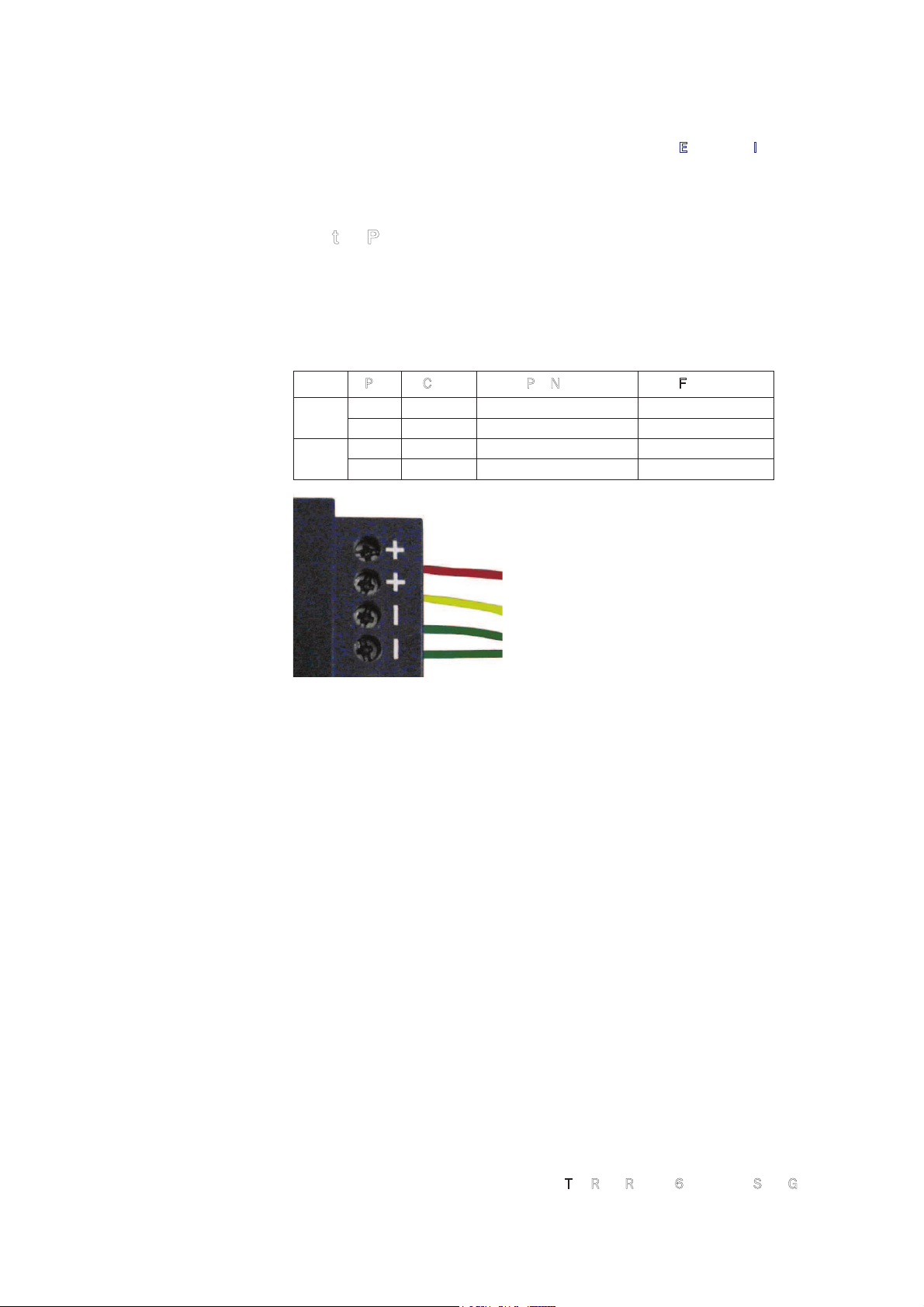
The 6204 operates on 24 Vdc provided through the bulkhead connector on
the rear of the reader.
The bulkhead power connections are as follows. Note that both pairs must
be connected.
Pair Pin Color Pin Name Function
9 T Red +24 VDC Power
U Green 24 VDC GND Ground
16 h Yellow +24 VDC Heater Power
j Green 24 VDC GND Heater Ground
Connect the power supply to the reader cable as shown and connect the
power supply to your 100–240 Vac, 50-60 Hz power source. Allow 30
seconds for the reader to initialize.
Refer to the Section 6.1.8 for details on the bulkhead connector.
Page 13
1 2
3
4 5 6 7
RST Software Installation
3M Toll RFID Reader 6204 Quick Start Guide 9
3 Reader Startup Tool (RST) Software Installation
3.1.
Installing RST Software
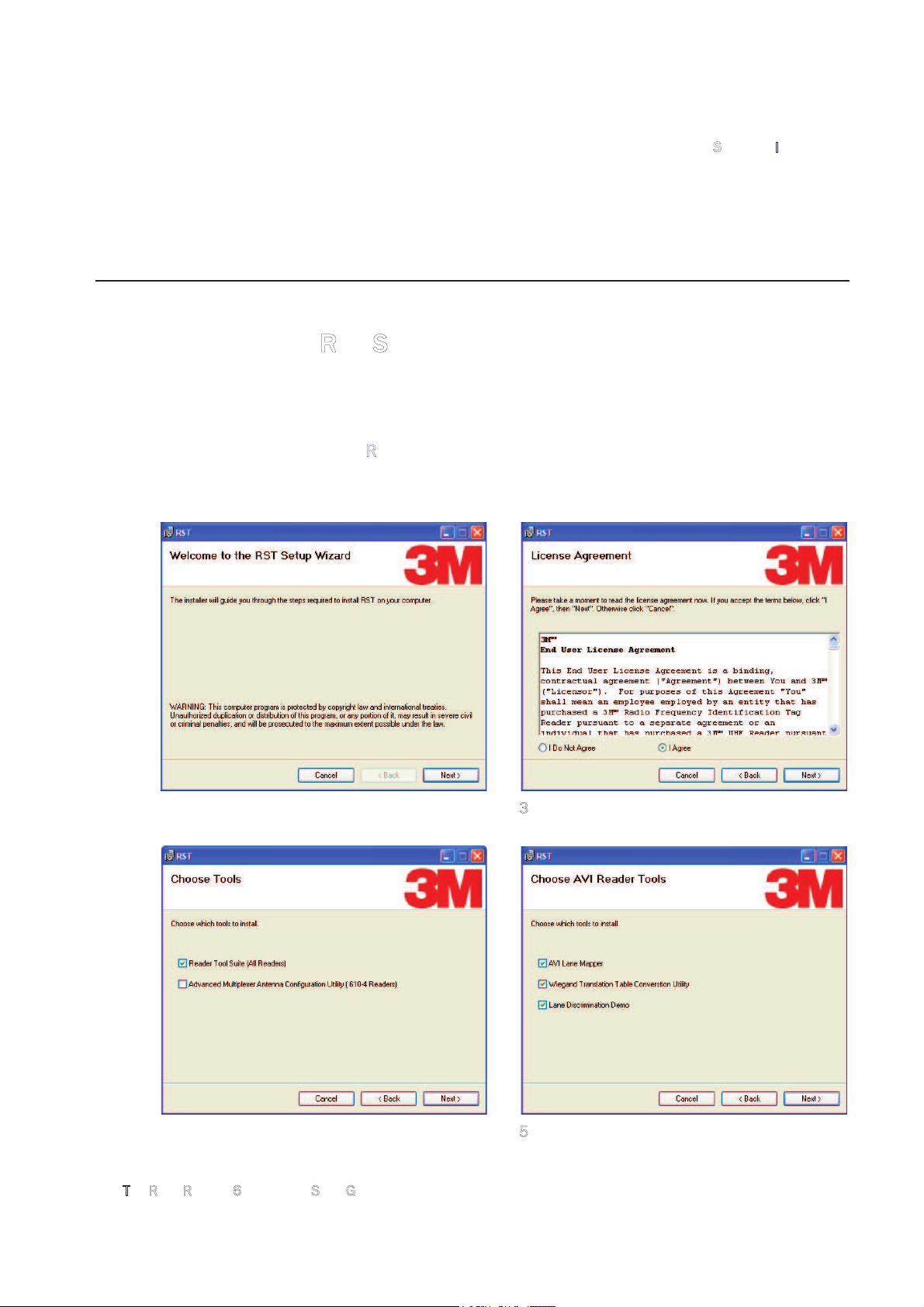
The 3M Toll RFID Reader 6204 is delivered with a Microsoft Windows
application called Reader Startup Tool (RST). You can use this application to
initially configure your reader as well as read and display tag data.
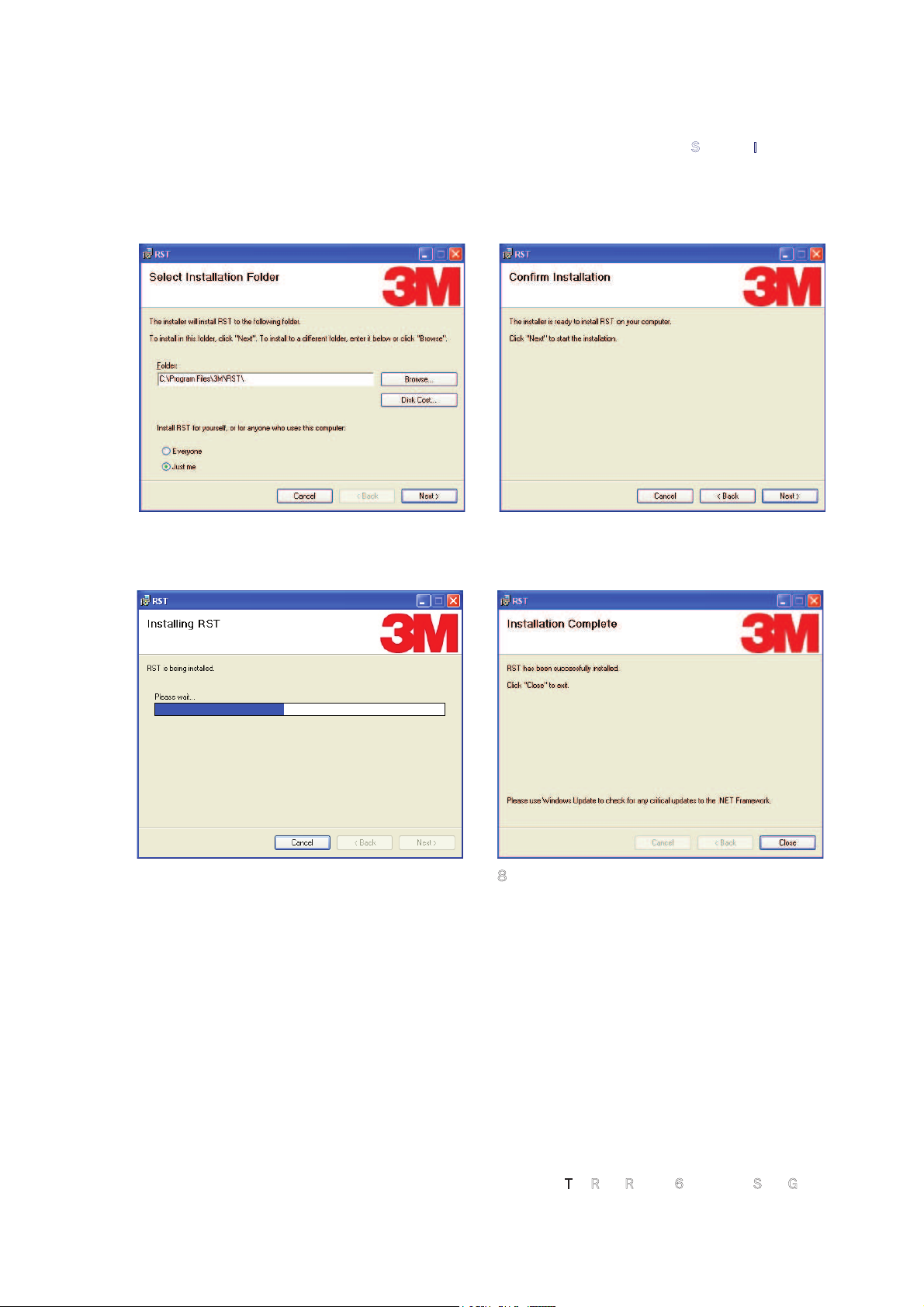
Install RST
1 To install RST, load your product CD and double-click the
RSTInstaller
.msi file:
2 Press
Next>
3 Read the License Agreement. Select
I Agree
and press
Next>
4 Select Reader Tool Suite. Press
Next>
. 5 Choose the AVI Reader Tools you need.
Press
Next>
.
Page 14
1 2
3
4 5 6 7
RST Software Installation
10
3
M Toll RFID Reader 6204 Quick Start Guide
5 Verify the path and folder where RST will be
installed. Press
Next>.
6
Press
Next>.
7
Monitor the progress of the installation. 8 After the installation completes, press
Close.
Page 15

1 2
3
4 5 6 7
RST Software Installation
3M Toll RFID Reader 6204 Quick Start Guide 11
3.2.
Windows 7 Setup
If you have a Windows 7 operating system, your firewall may block UDP
traffic and consequently RST may not discover your readers. Perform the
following to configure your system:
For Microsoft Firewall
1 Log into your computer as Administrator.
2
Navigate to the Control Panel and select
Control Panel ń System and Security
.
3
Select
Allow a program through Windows firewall
.
4
Scroll down the list and locate
Startup Tool
, check it, and press OK.
5
If Startup Tool is not in the list, press
Allow another program
.
6
Locate
Startup Tool
, check it, and press OK.
7
Restart RST and it should discover readers.
For Third-Party Firewalls
1 Log into your computer as Administrator.
2
Set your firewall to allow RST to receive UDP traffic on port 50000 and
50001.
Page 16
1 2 3
4
5 6 7
Reader Configuration
12
3
M Toll RFID Reader 6204 Quick Start Guide
4 Reader Configuration
4.1.
Start the Reader Startup Tool (RST)
To begin using your reader, open the RST application.
Open RST
1 From your Windows desktop, select:
StartĺProgramsĺ3MĺReader Startup Tool (RST)
2
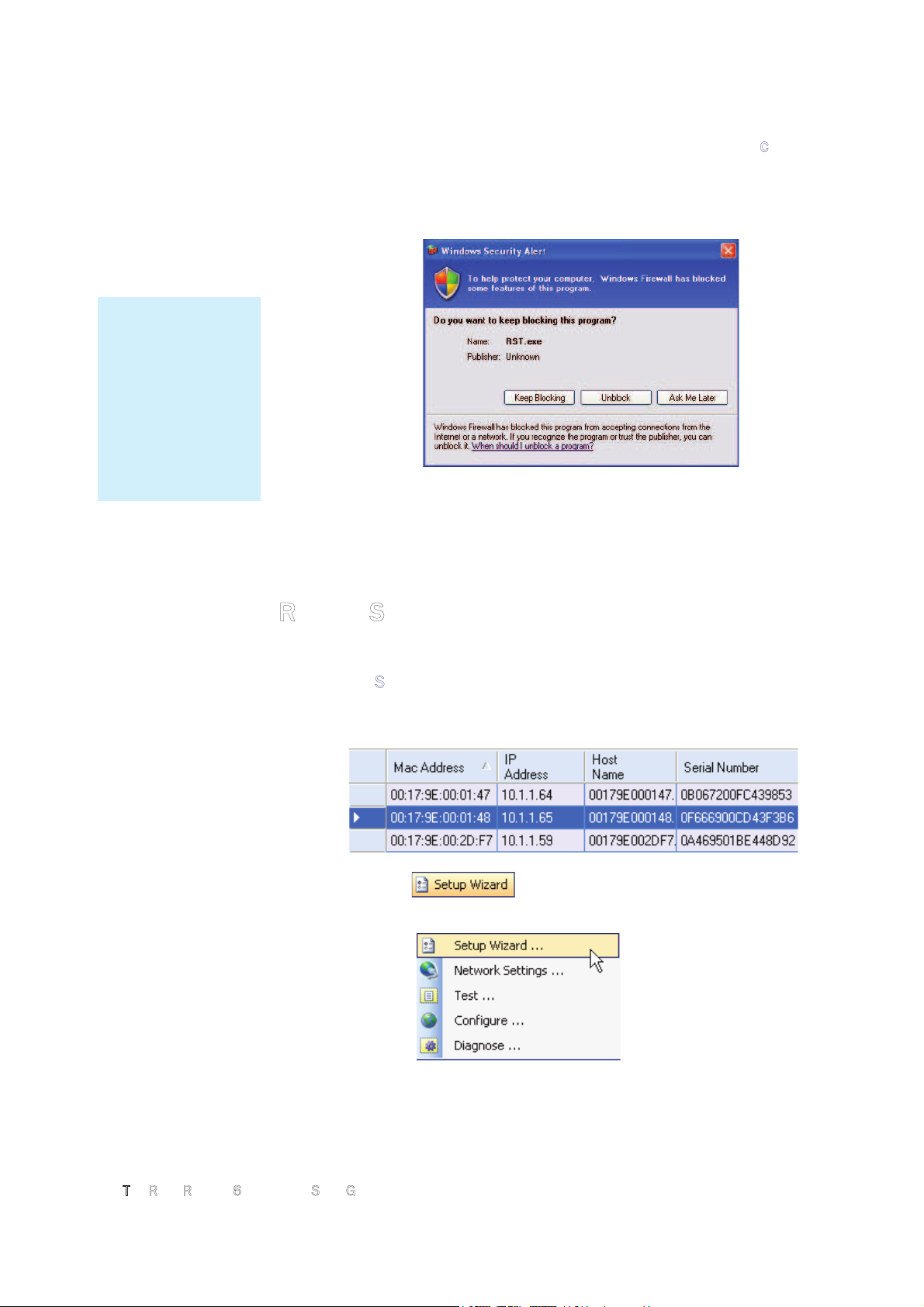
If this is the first time starting the RST application, you may receive a
Windows Security Alert. This warning indicates that the firewall is
blocking the RST application.
3 If the warning window is hidden under the RST windows, collapse the
RST window.
Page 17
1 2 3
4
5 6 7
Reader Configuration
3M Toll RFID Reader 6204 Quick Start Guide 13
4
Press Unblock.
5
Press
Refresh
on the RST
6
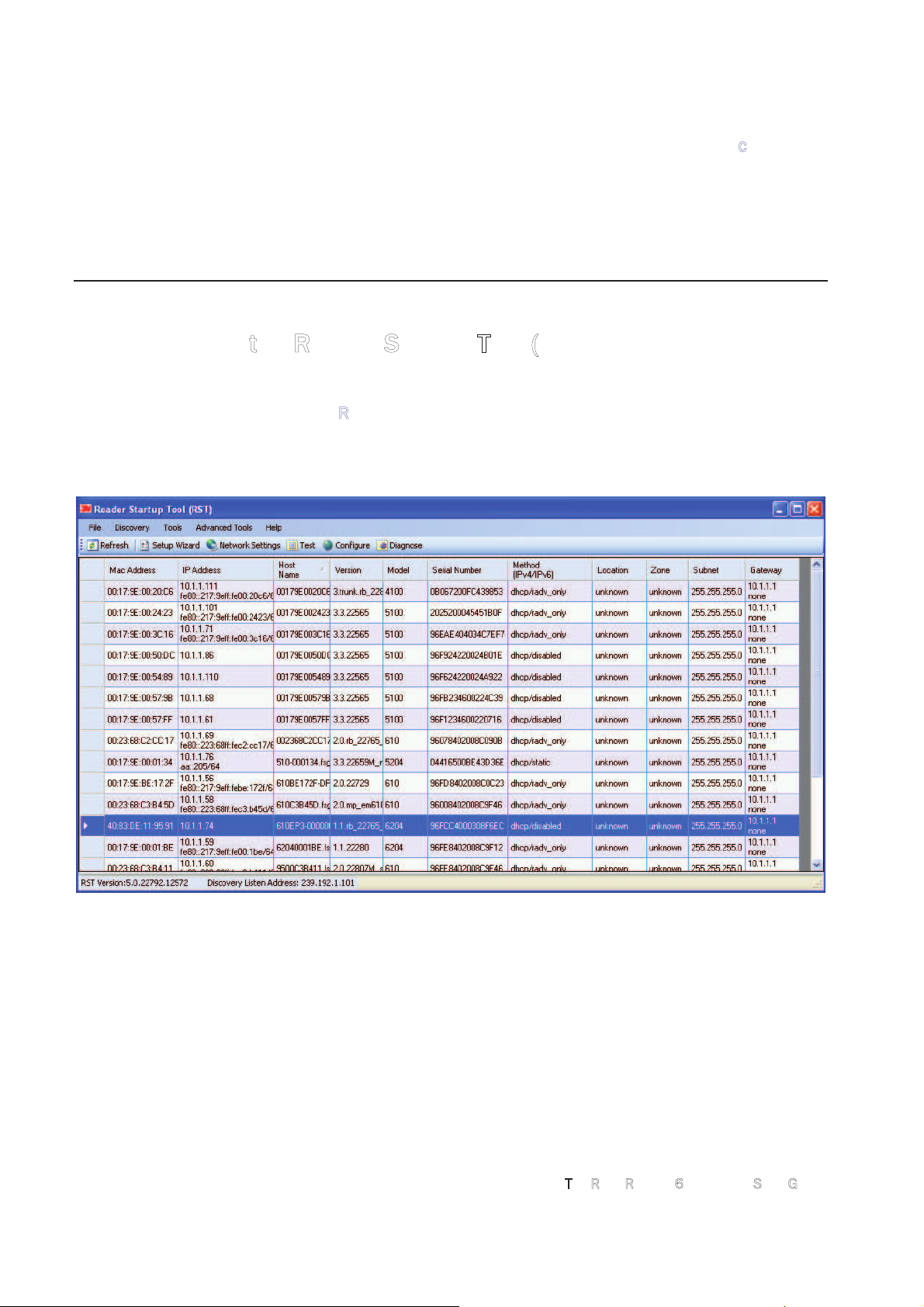
The RST main page will display any readers currently connected to the
network.
4.2.
Initial Reader Setup
To configure a specific reader, perform the following:
Reader Setup
1 Select the reader on the main RST page by clicking the button to the left
of the reader Mac address.
2
Press the
button on the RST tool bar or select
Setup
Wizard
from the
Tools
pull-down menu.
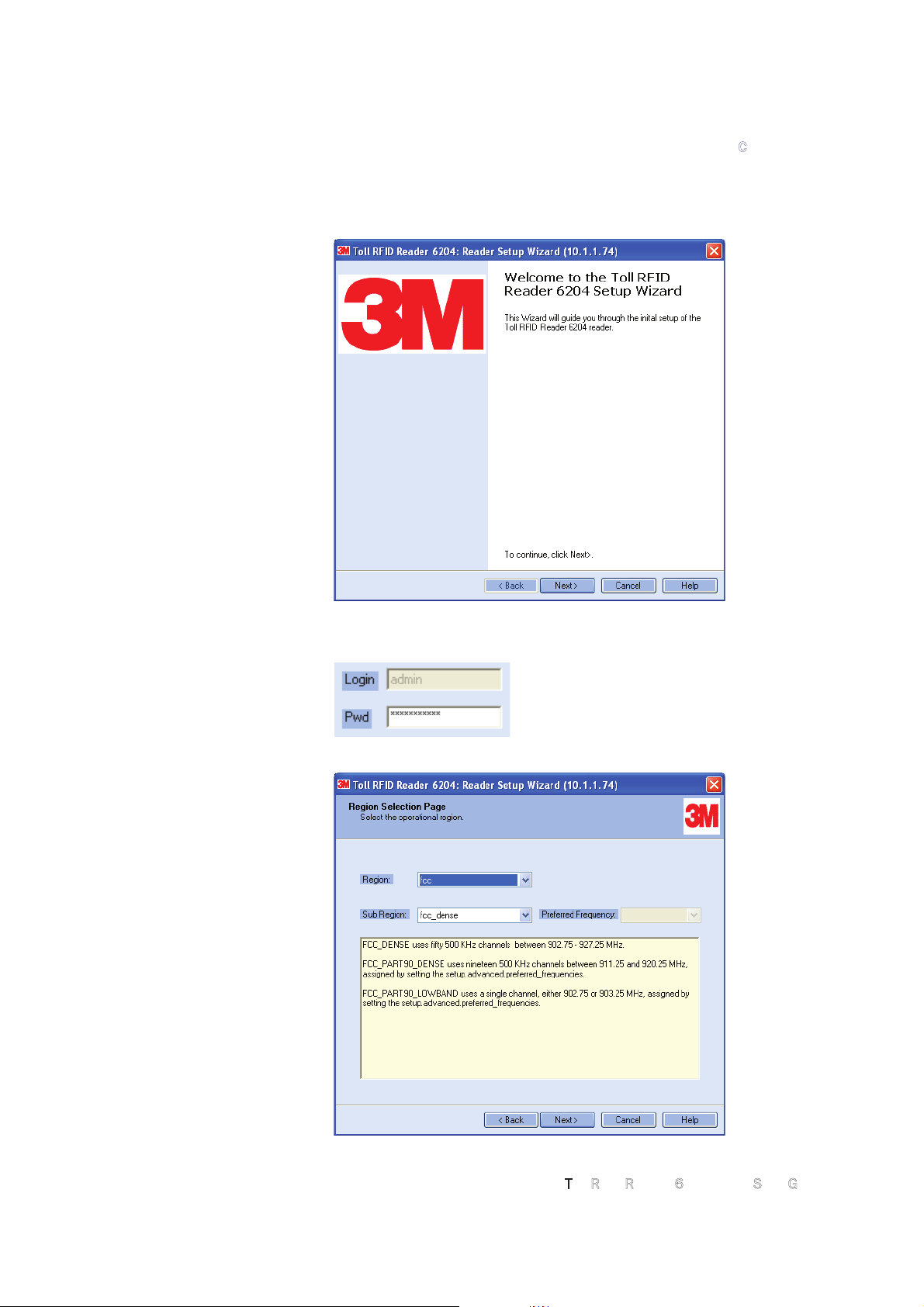
3
The Reader Setup Wizard (RSW) is displayed.
NOTE:
Earlier versions of
Microsoft Windows™
may not provide the
Security Alert popup.
IF RST does not
discover your reader,
check your Windows
Firewall/Security
settings.
Page 18
1 2 3
4
5 6 7
Reader Configuration
14
3
M Toll RFID Reader 6204 Quick Start Guide
4
Press
Next>
and enter the Login (
admin
) and Password. If this is the
first time configuring your reader, enter: readeradmin.
5
After entering your Login and Password, press
Next>
6
Select the Region and Sub Region and press
Next>
.
Page 19
1 2 3
4
5 6 7
Reader Configuration
3M Toll RFID Reader 6204 Quick Start Guide 15
7
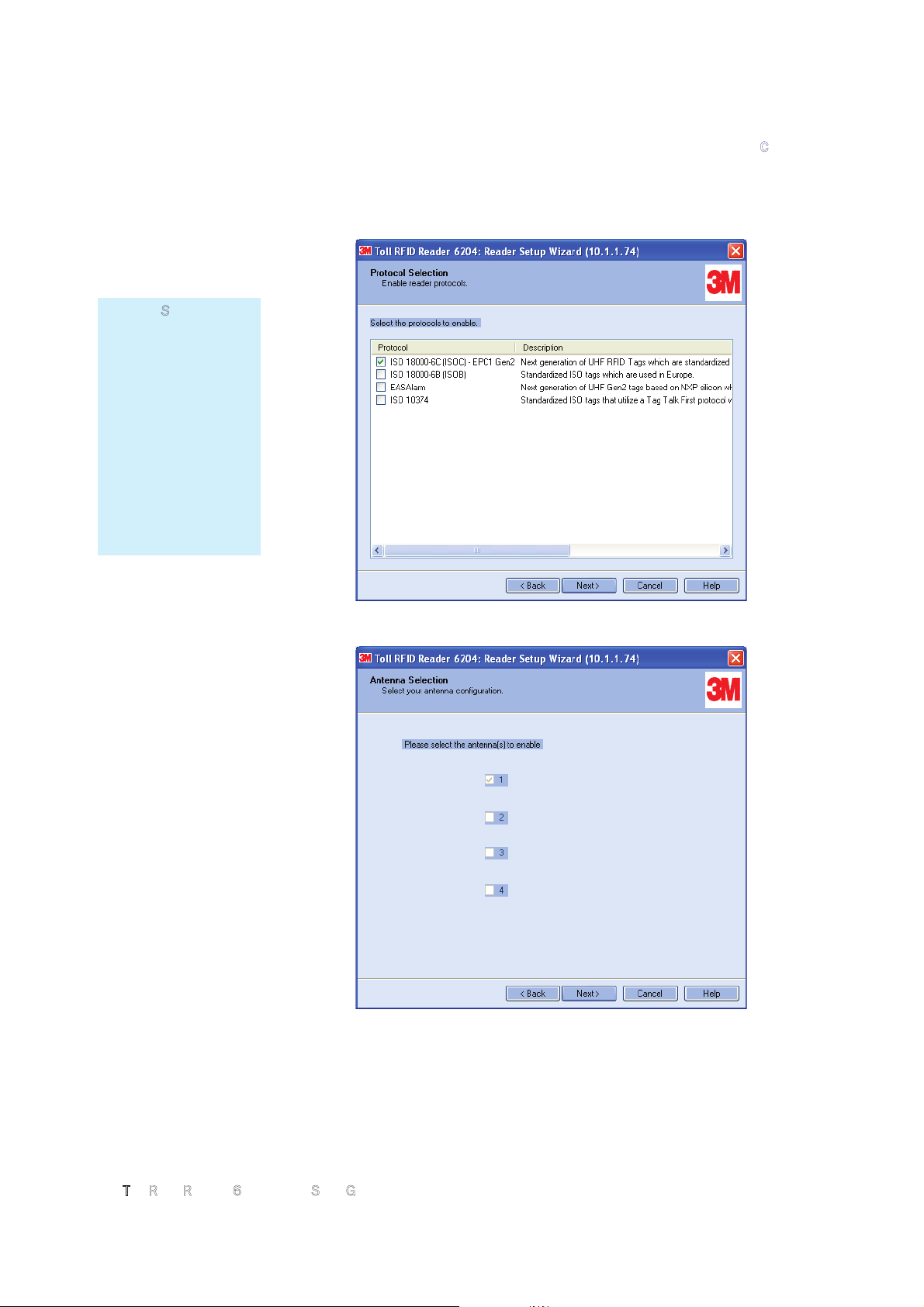
Select the protocol of the tags you will be reading and press
Next>
.
8
Select the antennas you will be installing and press
Next>
.
Custom Setup
If your installation
type differs from one
of the choices shown
in the Setup Wizard,
you can always
customize your setup
later using the
embedded web
interface capability.
See the Advanced
Setup chapter in this
guide for more
information.
Page 20
1 2 3
4
5 6 7
Reader Configuration
16
3
M Toll RFID Reader 6204 Quick Start Guide
9
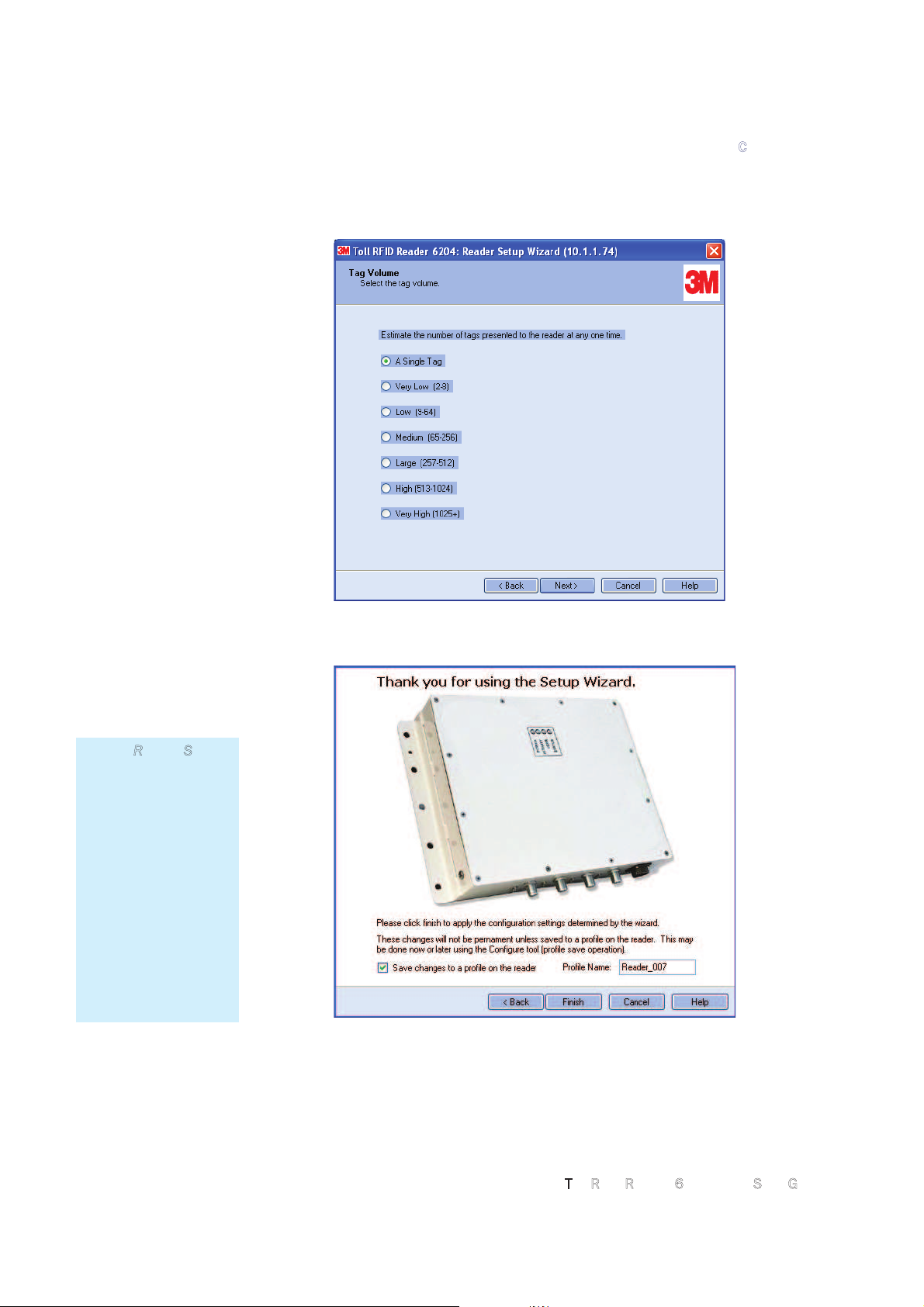
Estimate the number of tags that will be presented to the reader at any
one time and press
Next>
.
1
0 It is highly recommended that you save the reader setup as a profile.
Select
Save changes to a profile…
, enter a
Profile Name
, and press
Finish
to complete the initial reader setup.
Saving Reader Setup
Reader setup
information should be
saved as a profile. In
the event that you
need to reboot or
power down a reader,
the reader setup can
be quickly reloaded
by loading the profile.
If you don’t save the
reader setup, you can
loose the information
if the reader is
rebooted.
Page 21
1 2 3 4
5
6 7
Reader Operation
3M Toll RFID Reader 6204 Quick Start Guide 17
5 Reader Operation
5.1.
Basic Operation with the Reader Startup Tool
The 3M Toll RFID Reader 6204 can be operated either from the RST
application or by logging directly into the reader’s embedded web interface.
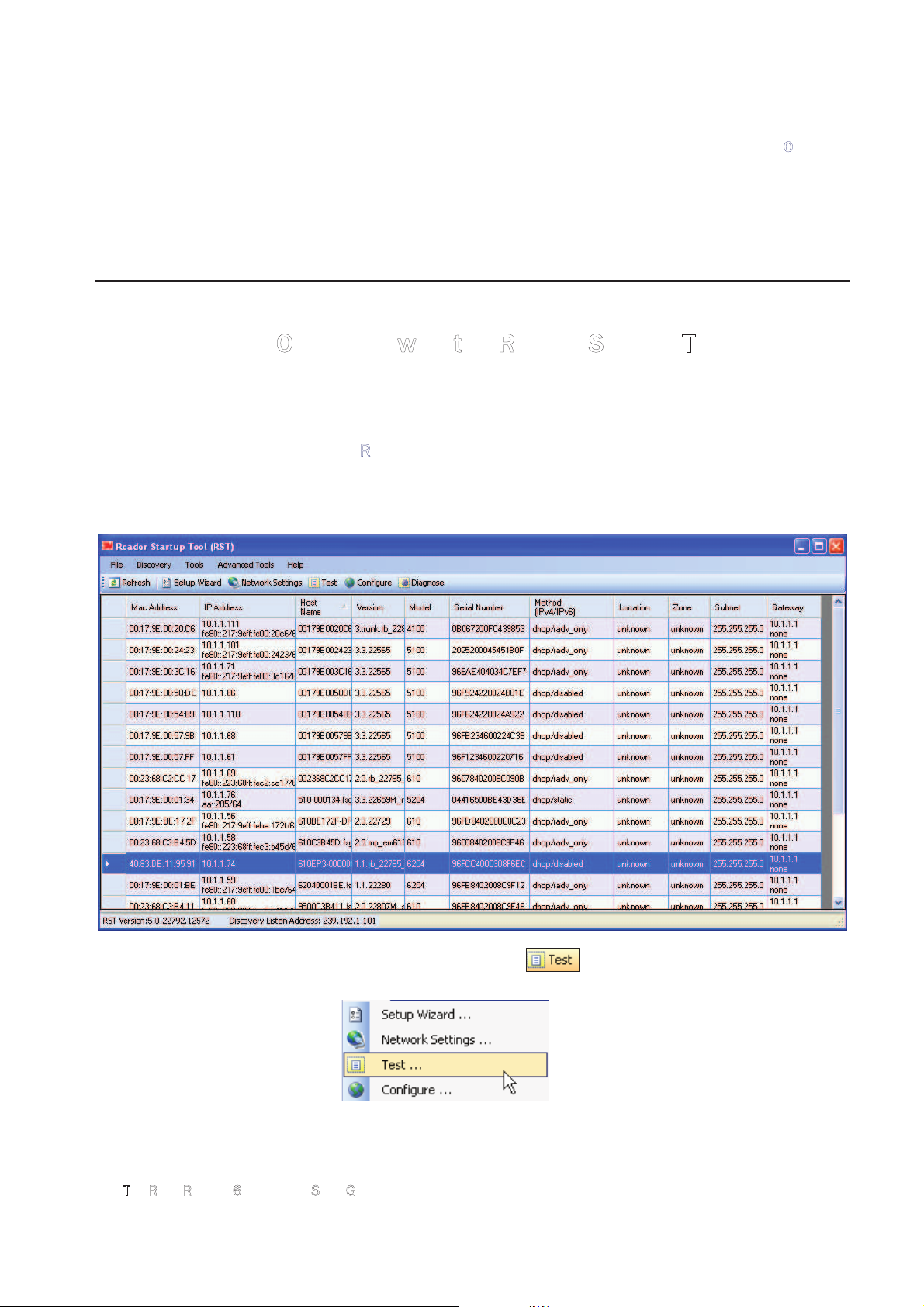
To operate the reader from RST, perform the following:
Open RST
1 From your Windows desktop, select:
StartĺProgramsĺ3MĺReader Startup Tool (RST)
2
Select a reader and press on the RST tool bar or select
Test
from the
Tools
pull-down menu.
Page 22
1 2 3 4
5
6 7
Reader Operation
18
3
M Toll RFID Reader 6204 Quick Start Guide
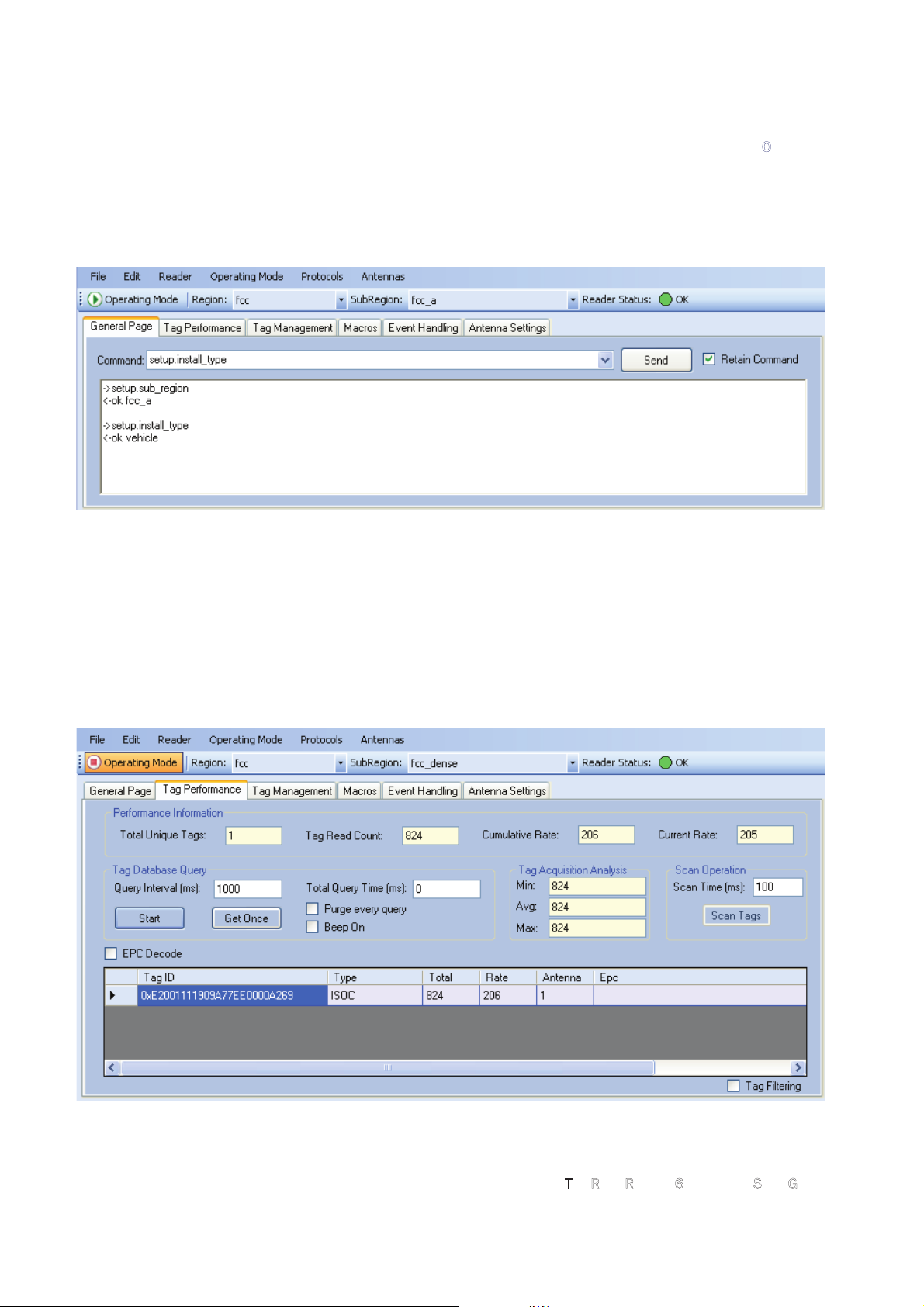
3 The Reader Test Tool (RTT) is displayed.
4
Login to the reader. From the pull-down menu select
ReaderĺLogin…
.
5
For administrator login, select
admin
. The initial password (
Pwd
) is
readeradmin. See Advanced Setup section to change the password.
6
Verify the Operating Mode is set to
Active
. From the pull-down menu
select
Operating ModeĺActive
.
7
Select the
Tag Performance
tab and press
Start
.
8
Place tags in front of antenna and verify tags are read and displayed.
Page 23
1 2 3 4
5
6 7
Reader Operation
3M Toll RFID Reader 6204 Quick Start Guide 19
5.2.
Deployed Reader Operation with RCT
Once your readers are deployed, you can access them directly using the
embedded Reader Configuration Tool (RCT). To access a particular reader,
perform the following:
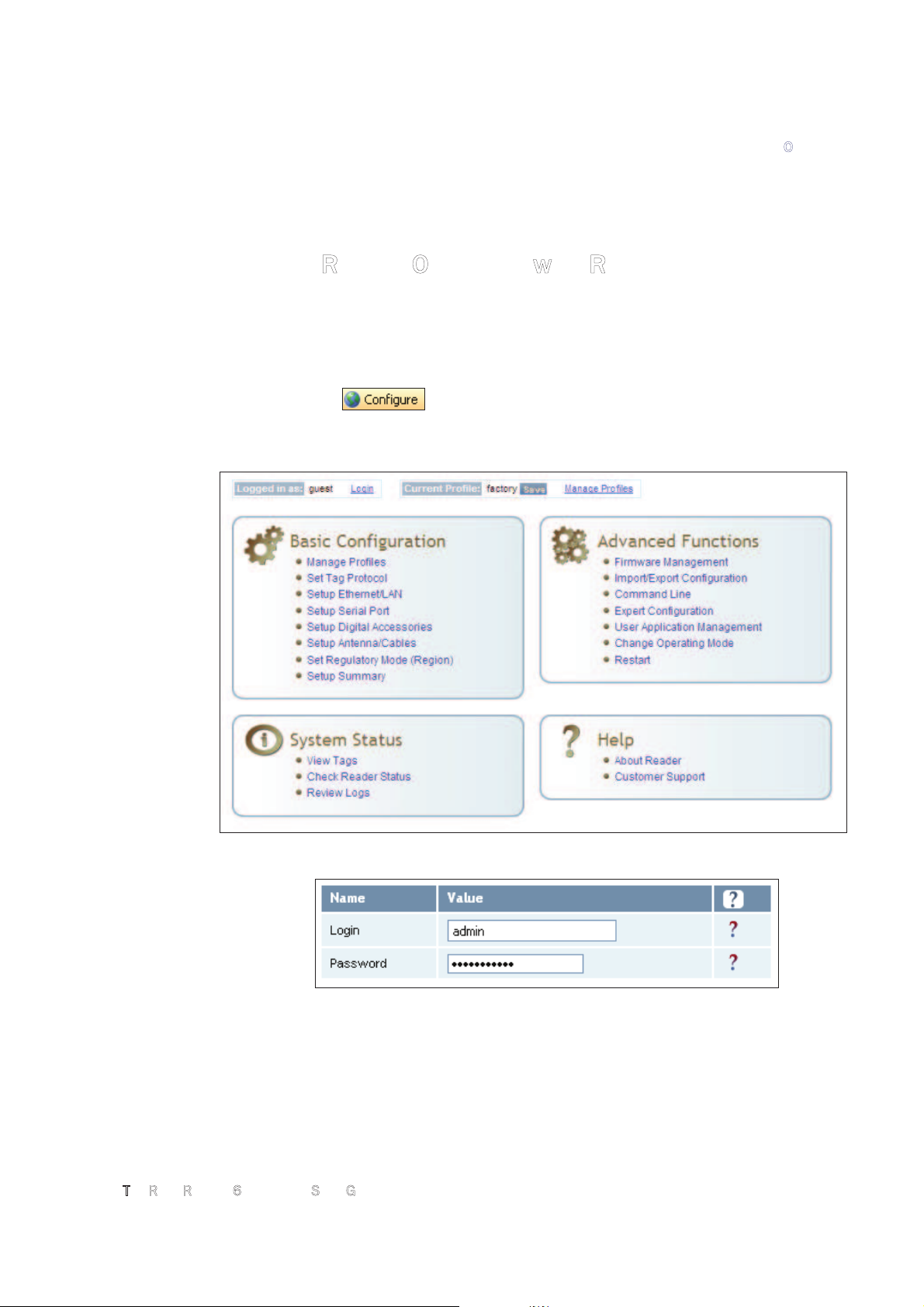
1
Enter the reader’s IP address into your web browser, press the
button on the RST tool bar or select
Configure
from the
Tools
pull-down menu.
2
The reader’s RCT interface is displayed.
3
Log into the reader. Press
Login
for the login screen.
4
The default login is
guest
. If you need administrator privileges, login as
admin
and enter
readeradmin
as the password.
5
Press
Submit
.
6
Select
Basic Configuration ńSetup Antenna/Cables
to configure the
antennas, gain, and power settings.
Page 24
1 2 3 4
5
6 7
Reader Operation
20
3
M Toll RFID Reader 6204 Quick Start Guide
7 Select
Advanced Functions ńChange Operating Mode
to verify the
reader is in the proper mode.
8
Select
Basic Configuration ńSet Tag Protocol
to verify the reader is
configured for the proper tag protocol.
9
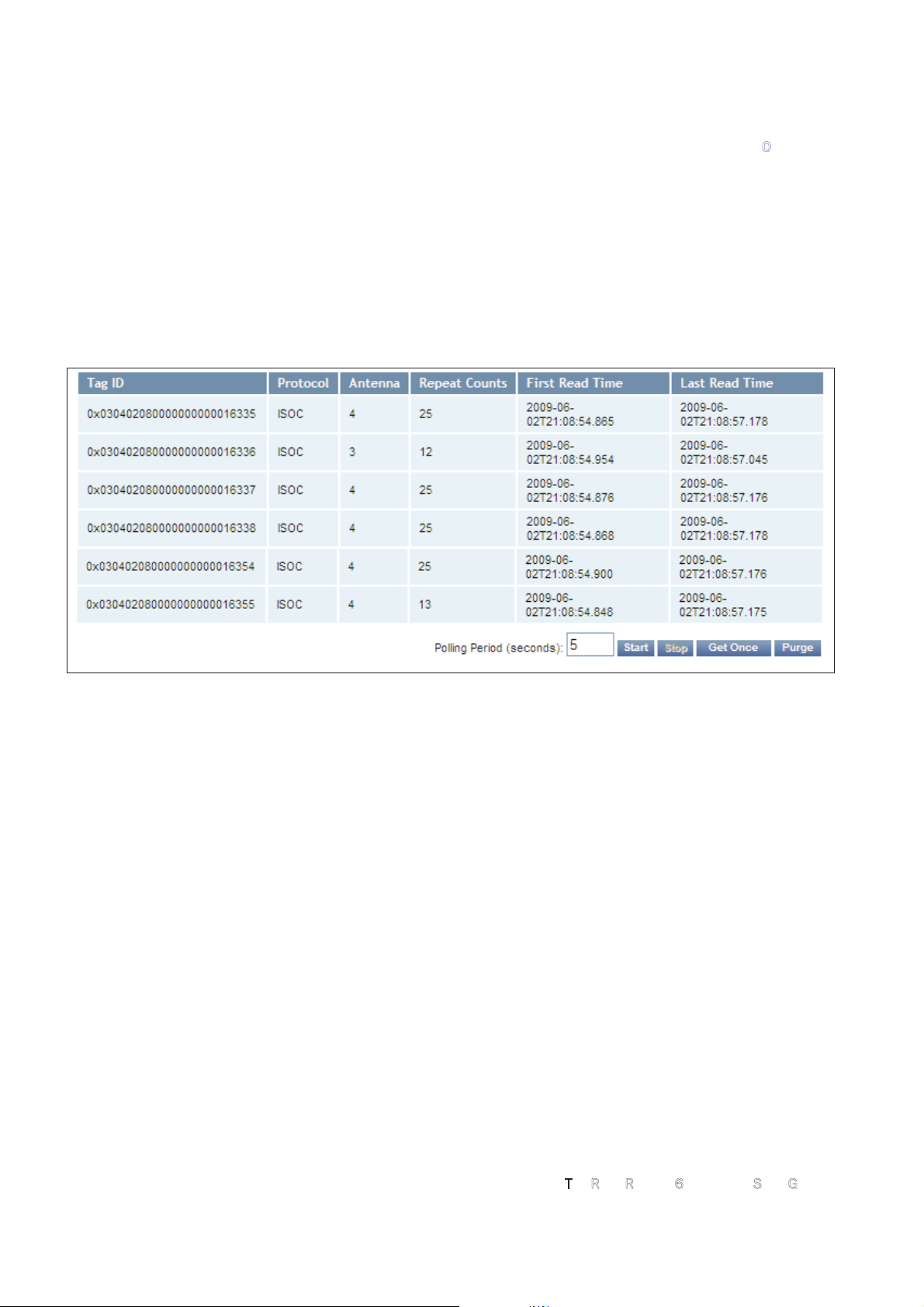
Press
System Status ńView Tags
to view tag data.
10 If you need to configure additional changes to your reader, refer to
Chapter 7 – Reader Configuration Tool for information on using RCT to
adjust configuration variables and parameters.
Page 25
1 2 3 4 5
6
7
Specifications
3M Toll RFID Reader 6204 Quick Start Guide 21
6 Specifications
6.1.1.
Reader Specifications
Frequency 902 – 928 MHz
RF Power 10 mW – 2W conducted (33 dBm)
Power Consumption 10W (typical while idle)
18W (typical at 1W conducted output power)
22W (maximum at 2W conducted output power)
Connections RS-232, Digital I/O, Ethernet LAN
Input Voltage 24 Vdc
Input Current 1.5A maximum at 24 Vdc
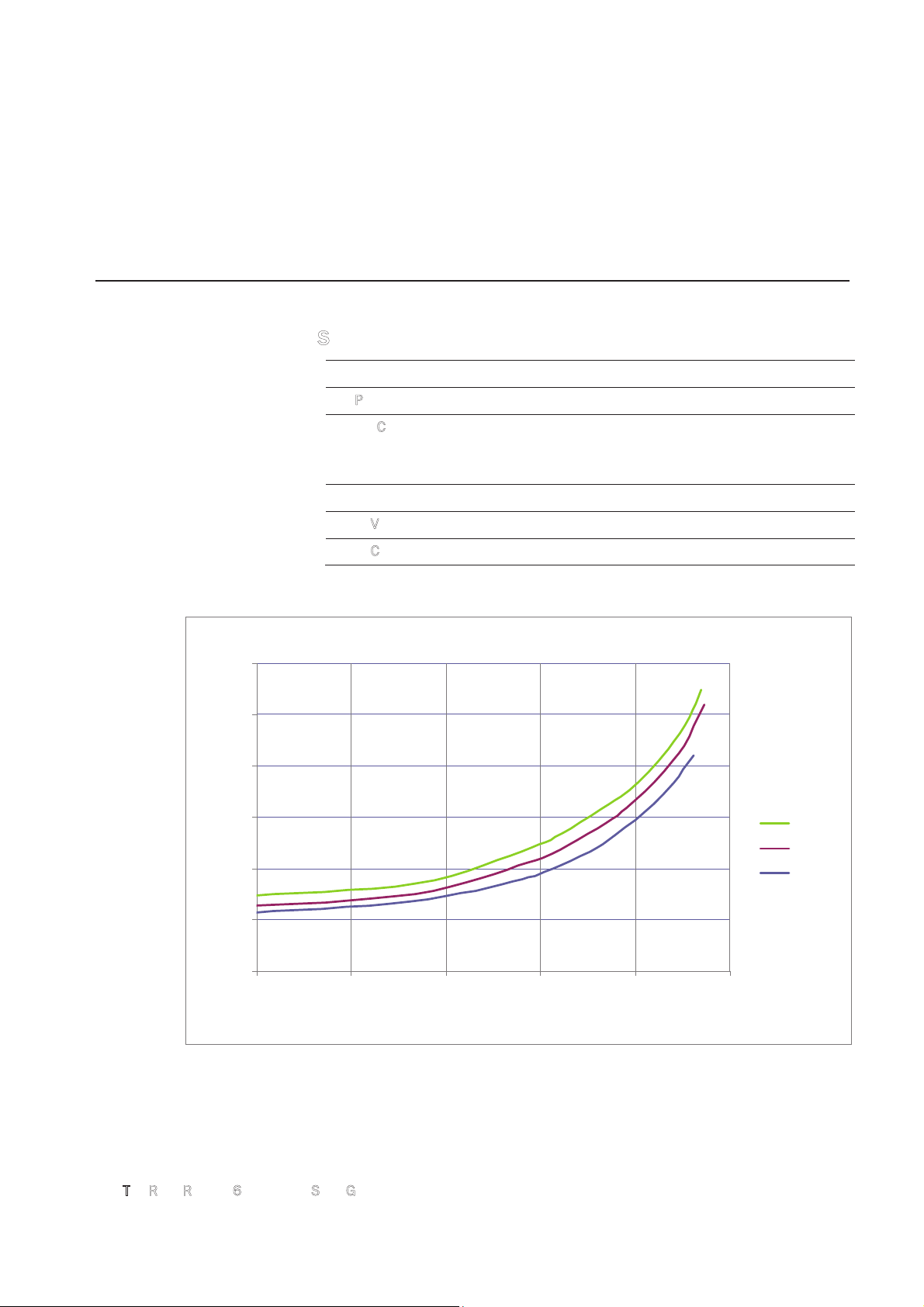
ActiveModeDCCurrentDrawvsTransmittedPower
0.4
0.5
0.6
0.7
0.8
0.9
1
10 15 20 25 3 0 35
Transm ittedP ow e r (dBm )
DC Curr e nt dr aw (A )
+60 d egC
+25 d egC
Ͳ20degC
Figure 5
Typical Power Consumption versus Conducted Output Power at 910 MHz
Page 26
1 2 3 4 5
6
7
Specifications
22
3
M Toll RFID Reader 6204 Quick Start Guide
6.1.2.
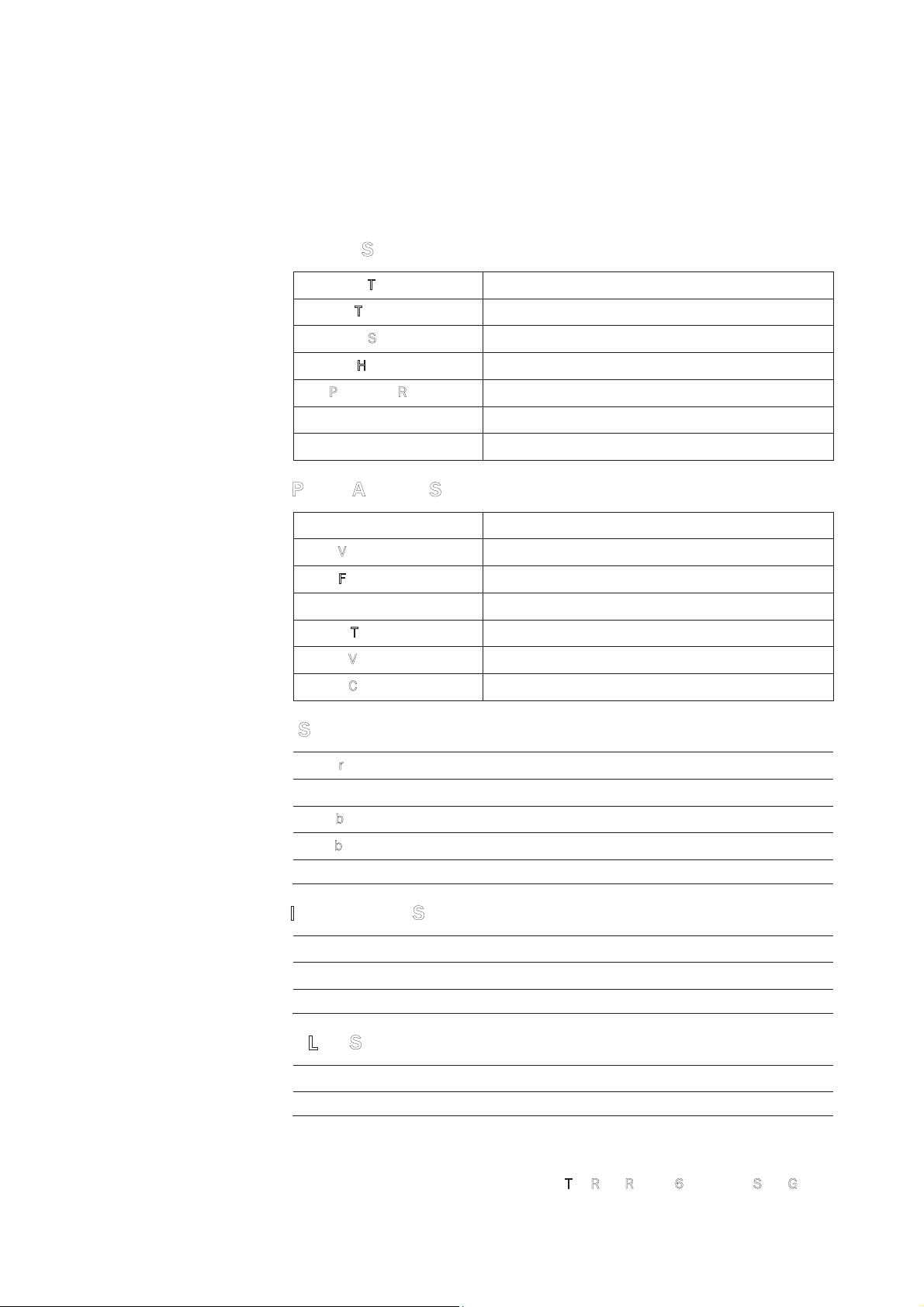
Environmental Specifications
Operating Temperature -40 °F to 131 °F (-40 °C to 55 °C)
Storage Temperature -40 °F to 185 °F (-40 °C to 85 °C)
Maximum Shock 1 foot (0.3 meter) drop to any corner
Relative Humidity 100%, condensing
Int’l Protection Rating IP67
Dimensions 16.5 x 12.2 x 3.4 in (419 x 310 x 86 mm)
Weight 11.0 lbs (5 kgs)
6.1.3.
AC/DC Power Adapter Specifications
Model Lambda DSP100-24
Input Voltage 90 – 264 Vac,
Input Frequency 47 to 63 Hz
Power 100.8 W
Holdup Time 10 ms (115 Vac)
Output Voltage 24 VDC
Output Current 4.2 A
6.1.4.
RS-232 Specifications
Baud rate 1200 - 115200 (Default = 115200)
Parity None
Data bits 8
Stop bits 1
Signals
Refer to Section 6.1.8 for cable pin out.
6.1.5.
Digital Input/Output Specifications
Input 5 to 24 Vdc, 1 to 5 mA, Optically Isolated
Output Open Collector (3 to 40 V, 100 mA Max)
Signals
Refer to Section 6.1.8 for cable pin out.
6.1.6.
Ethernet LAN Specifications
Ethernet 10/100 BaseT
Signals
Refer to Section 6.1.8 for cable pin out.
Page 27
1 2 3 4 5
6
7
Specifications
24
3
M Toll RFID Reader 6204 Quick Start Guide
Site License –
Customer Disclaimer
Customer (end user) acknowledges that a site license is required for each reader
system location. It is the customer’s responsibility to file for the site license and
submit the appropriate filing payment. 3M can assist with the completion of
forms. United States filings require completion and submission of FCC Form 601
with Schedule D and H. Canadian filings require completion and submission of
Industry Canada Forms IC2365BB and IC2430BB.
Licence d'Etat-client Avertissement
Client (utilisateur final) reconnaît que le site d'une licence est requise pour
chaque lecteur emplacement du système. Il incombe au client de déposer pour la
licence d'exploitation et soumettre le paiement du dépôt approprié. 3M peut aider
à la réalisation de formes. Unis dépôts États exigent l'achèvement et la
soumission du formulaire FCC 601 à l'annexe D et H. dépôts canadiennes exigent
l'achèvement et la soumission de Industrie Canada Formulaires IC2365BB et
IC2430BB
Caution:
This equipment complies with FCC Part 90 and Industry Canada.RSS-137 rules.
This device complies with FCC Part 15 and Industry Canada license exempt RSS
standard(s). Operation is subject to the following two conditions: (1) this device
may not cause interference, and (2) this device must accept any interference,
including interference that may cause undesired operation of the device.
Cet appareil est conforme à FCC Partie15 de Industrie Canada RSS standard
exempts de licence (s). Son utilisation est soumise à Les deux conditions
suivantes: (1) cet appareil ne peut pas provoquer d’interférences et (2) cet
appareil doit accepter Toute interférence, y compris les interférences qui peuvent
causer un mauvais fonctionnement du dispositif.
Any changes or modifications not expressly approved by 3M could void the user’s
authority to operate the equipment.
The professional installer will need to calculate and verify the reader’s power
output allowable based on the antenna (gain) used and cabling (loss) effects.
This value will be used in the user’s submission of their site license application.
The maximum antenna gain plus cable effects for a given output power can be
calculated by:
44.8 dBm (ERP) - Pout
where Pout is the measured RF output power (dBm)
Reader output power is limited to a maximum of 2W under all conditions. When
operating at that power level, the maximum permissible antenna gain is 11.2dBd.
Page 28

1 2 3 4 5
6
7
Specifications
3M Toll RFID Reader 6204 Quick Start Guide 25
WARNING:
FCC Radiation Exposure Statement. The antennas used for this transmitter
must be installed to provide a separation distance of at least 1 meter from all
persons and must not be co-located or operating in conjunction with any other
antenna or transmitter.
This device complies with Health Canada’s Safety Code. The installer of this
device should ensure that RF radiation is not emitted in excess of the Health
Canada’s requirement. Information can be obtained at:
http://www.hc-sc.gc.ca/ewh-semt/pubs/radiation/radio_ guidelignes_direct-eng.php
Cet appareil est conforme avec Santé Canada Code de sécurité 6. Le
programme d’installation de cet appareil doit s’assurer que les rayonnements
RF n’est pas émis au-delà de I’exigence de Santé Canada. Les informations
peuvent être obtenues:
http://www.hc-sc.gc.ca/ewhsemt/pubs/radiation/radio_ guide-lignes_direct-eng.php
Page 29
1 2 3 4 5
6
7
Specifications
26
3
M Toll RFID Reader 6204 Quick Start Guide
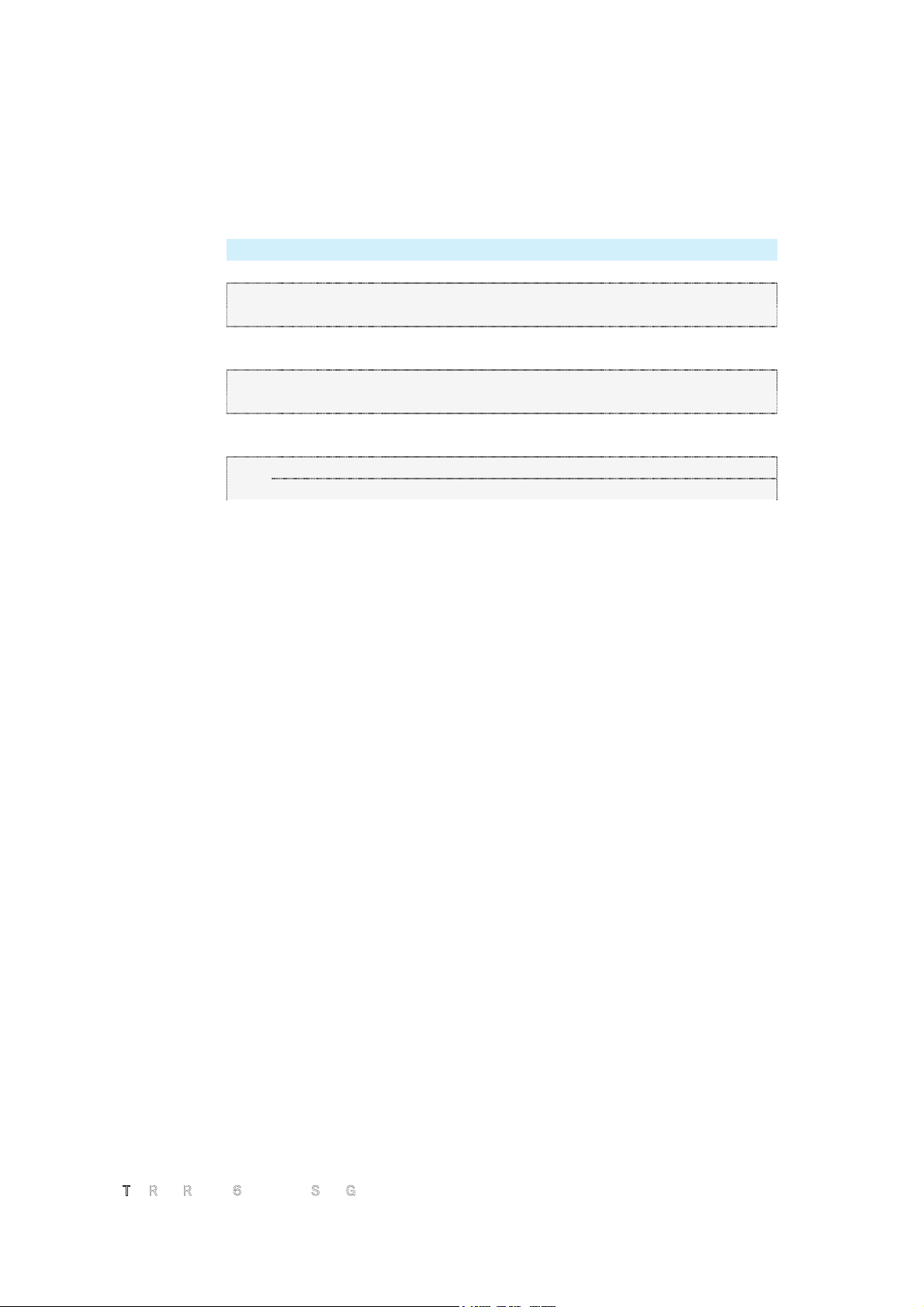
6.1.8.
Bulkhead Connector/Interface Cable Pinout
N
ote: Drawing is for cable socket on reader.
WARNING:
Do not use the 6204 with a wire harness from previous installations. Power
pins have been moved!
Verify power wiring prior to first powering up unit!
Pair Pin Color Pin Name Function
1
A Black
Tx+ Ethernet
B Green Tx- Ethernet
2
C Black Rx+ Ethernet
D Orange Rx- Ethernet
3
E Blue
VC2+ Ethernet
F Black VC2- Ethernet
4
G Black VC2+ Ethernet
H Brown VC2- Ethernet
5
J Black
RS-232 TXD (to WIM RXD) Serial or WIM Port
K Red RS-232 RXD (to WIM TXD) Serial or WIM Port
6
L Black DTR (Short to Pin N DSR) Serial or WIM Port
M White RS-232 GND (to WIM SGND) Serial or WIM Port
7
N Black DSR (Short to Pin L DTR) Serial or WIM Port
P Yellow RS-232 CTS (to WIM RTS) Serial or WIM Port
8
R Red RS-232 RTS (to WIM CTS) Serial or WIM Port
S White No Connect Not Applicable
9
T Red +24 VDC Power
U Green 24 VDC GND Ground
10
V Red DIN Ref 1 To (+5 to +24)VRef Digital Input Common
W Blue DIN1 Digital Input 1
11 X Red
DIN2
Digital Input 2
Page 30
1 2 3 4 5
6
7
Specifications
3M Toll RFID Reader 6204 Quick Start Guide 27
Pair Pin Color Pin Name Function
Y Yellow
DIN Ref 2 To (+5 to +24)VRef Digital Input Common
12
Z Red
DIN3 Digital Input 3
a Brown
DIN4 Digital Input 4
13
b Red GND Ground (Reader)
c Orange DOUT1 Digital Output 1
14
d Green
DOUT2 Digital Output 2
e White
DOUT3 Digital Output 3
15
f Green
DOUT4 Digital Output 4
g Blue GND Ground (Reader)
16
h
Yellow
+24 VDC Heater Power
j
Green
24 VDC GND Heater Ground
Page 31
1 2 3 4 5 6 7 8
9
Safety Instructions
28
3
M Toll RFID Reader 6204 Quick Start Guide
7 Safety Instructions
7.1.
Power Disconnect Device
The plug on the power supply cord is intended to be the power disconnect
device. As a result, the power source (socket or outlet) shall be located near
the equipment and shall be easily accessible.
7.2.
RF Safety
WARNING:
Part 90 Radiation Exposure Statement. The antennas used for this transmitter
must be installed to provide a separation distance of at least 1 meter from all
persons and must not be co-located or operating in conjunction with any other
antenna or transmitter.
Caution:
The 3M Toll RFID Reader 6204 UHF Reader is equipped with four (4) RF
ports. To prevent reader damage, active RF ports must be properly
terminated with a 50 ohm load or a functional UHF antenna before power up.
UHF Readers are factory configured to operate on RF port 1. As a result, port
1 must be properly terminated before initially powering on the reader. Before
activating any additional RF ports, they must also be properly terminated.
Never power up the reader unless the appropriate loads or antennas are
connected. Always power down the reader before removing an antenna or
load from an RF port.
7.3.
Electrostatic Discharge
ATTENTION
3M Toll RFID Reader 6204 antenna ports may be susceptible to
damage from static discharge or other high voltage. Use proper
Electrostatic Discharge (ESD) precautions to avoid static discharge
when handling or making connections to the 6204 reader antenna or
communication ports. Equipment failure can result if the antenna or
communication ports are subjected to ESD.
7.4.
Regulatory Compliance
Caution:
The 3M Toll RFID Reader 6204 is designed to meet the regulatory
requirements in those jurisdictions in which it is offered. Changes or
modifications not expressly approved by 3M for compliance could void the
user's authority to operate the equipment.
Page 32

3
M Toll RFID Reader 6204 Quick Start Guide
This page intentionally left blank.
Page 33

3M Toll RFID Reader 6204
Quick Start Guide
 Loading...