

Page 1
70-km Gigabit Ethernet
GBIC Transceiver
Installation Guide
For 3Com Gigabit Interface Converter (GBIC) Transceivers
Description
The Gigabit Interface Converter (GBIC) ports on your system connect to
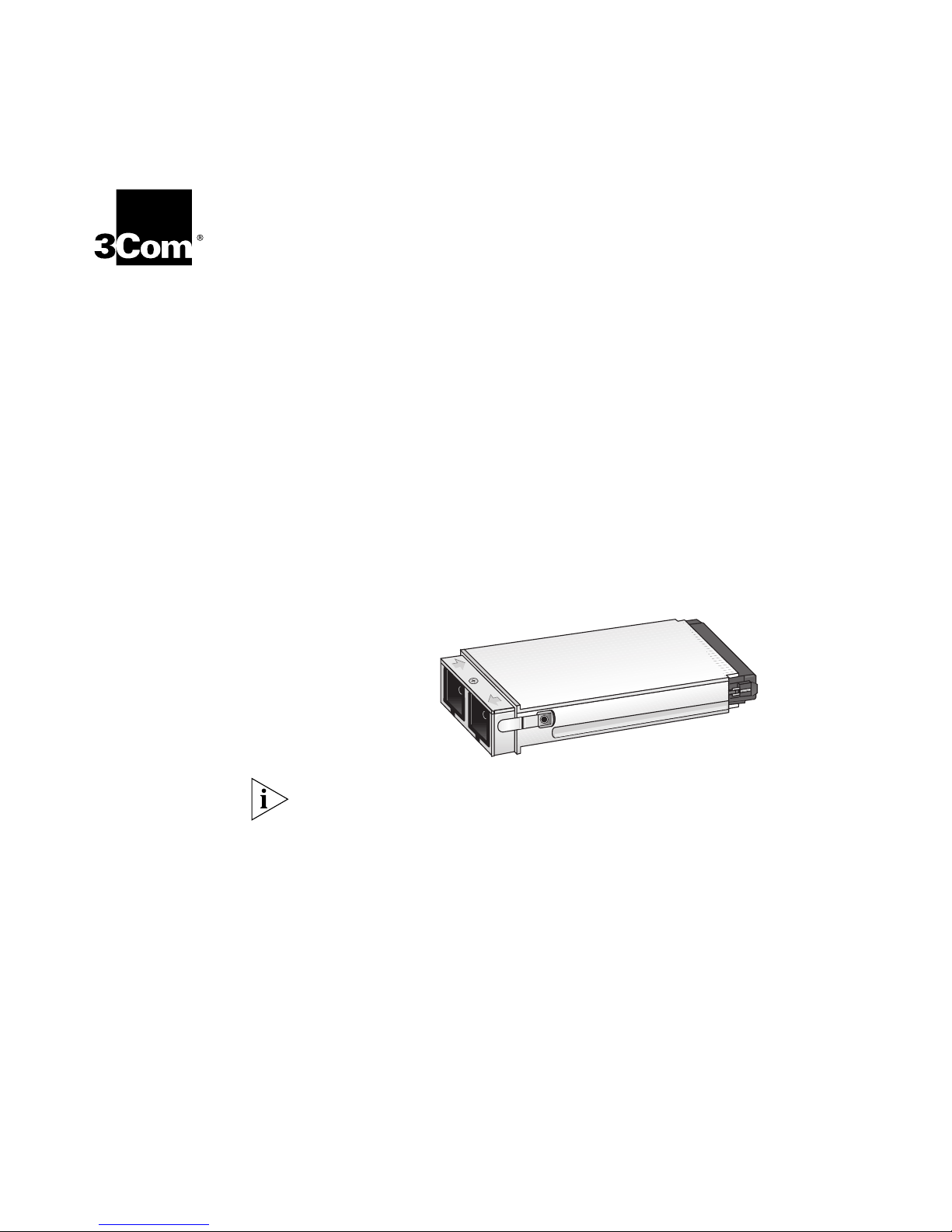
Gigabit Ethernet networks through a GBIC transceiver (Figure 1),
providing a high-speed connection over fiber-optic cable. The transceiver
connects to the network using a fiber-optic duplex Subscriber Connector
(SC). You can remove and replace the transceiver with the system on
(which is called hot-swapping).
Figure 1
To ensure optimal performance, compatibility, and regulatory compliance,
use only GBIC transceivers that 3Com supports. For a list of currently
supported GBICs, see this 3Com Web site:
http://www.3Com.com/gigabit_ethernet/gbics
70-km Gigabit Ethernet GBIC Fiber-Optic Transceiver
For the most up-to-date information about this and other 3Com
products, always see the User Guides and Release Notes at this 3Com
Web site:
http://support.3Com.com/nav/switches.htm
Page 2

70-km Gigabit Ethernet GBIC Transceiver Installation Guide
2
Table 1 shows the transmission range and other data for this connection.
Ta b l e 1
Fiber Type
Single-mode 9µm core PC 10 – 70 km (6.2 – 43.4 mi)
Table 2 shows the optical parameters of the
Ta b l e 2
Parameter Symbol Min Typ Max Units Notes/Conditions
Transmitter
Receiver
70-km Gigabit Ethernet GBIC Single-Mode Transmission Range
Minimum
Diameter
(microns)
Connector End
Polish
Transmission Range
70-km Gigabit Ethernet GBIC.
Optical Parameters
Wavelength
Optical output
power
Optical input
power
λ
P
P
1540 1550 1570 nm
c
–4 N/A N/A dBm Average power
out
–24 N/A N/A dBm BER< 10
in
coupled into
single-mode fiber
-12
with
PRBS 27 –1 test data
pattern
@ 1.25Gb/s
Safety Precautions
Be sure to follow all safety precautions when you replace a GBIC
transceiver in the system. To avoid electric shocks and burns to yourself
and damage to the equipment, read and follow these warnings:
WARNINGS: When the system is on:
■ Never insert a metal object such as a screwdriver or a finger with
jewelry into open module slots.
■ Do not touch any connections inside the chassis with your hands or
fingers.
Fiber Safety Precautions
The GBIC ports on your system use lasers. To ensure your safety when you
install or work with these GBIC systems, read and comply with the
precautions in this section.
Page 3
70-km Gigabit Ethernet GBIC Transceiver Installation Guide
3
WARNING: The fiber optic lasers used in 3Com GBIC ports meet the
regulatory requirements for casual exposure to the eye. As with any
source of bright light, however, 3Com recommends that you do not look
into the laser light source.
FDA Class 1 Laser Device
This product complies with U.S. Department of Health and Human
Services Rules 21 CFR Subchapter J applicable at date of manufacture.
CLASS 1
LASER PRODUCT
IEC 825, Class 1 Laser Devices are for connection only to Class 1 Laser
Devices. Multimode and single-mode fiber optic interfaces use lasers.
Inserting the
Transceiver
Before you connect the system to the Gigabit Ethernet network, first
insert the transceiver into the GBIC port on the system, as described in
®
this section. The procedure is similar for all relevant CoreBuilder
chassis.
To ensure optimal performance, compatibility, and regulatory compliance,
use only GBIC transceivers that 3Com supports. For a list of GBIC devices
that are qualified for the CoreBuilder 3500, 9000, and 9400, see this
3Com Web site:
http://www.3com.com/gigabit_ethernet/gbics
Read and follow the instructions in “Safety Precautions” earlier in this
1
guide.
Orient the transceiver so that the duplex SC connector is toward you.
2
CAUTION: GBIC transceivers are keyed and can be properly inserted only
one way. If the transceiver does not click when you insert it, turn it over
and reinsert it.
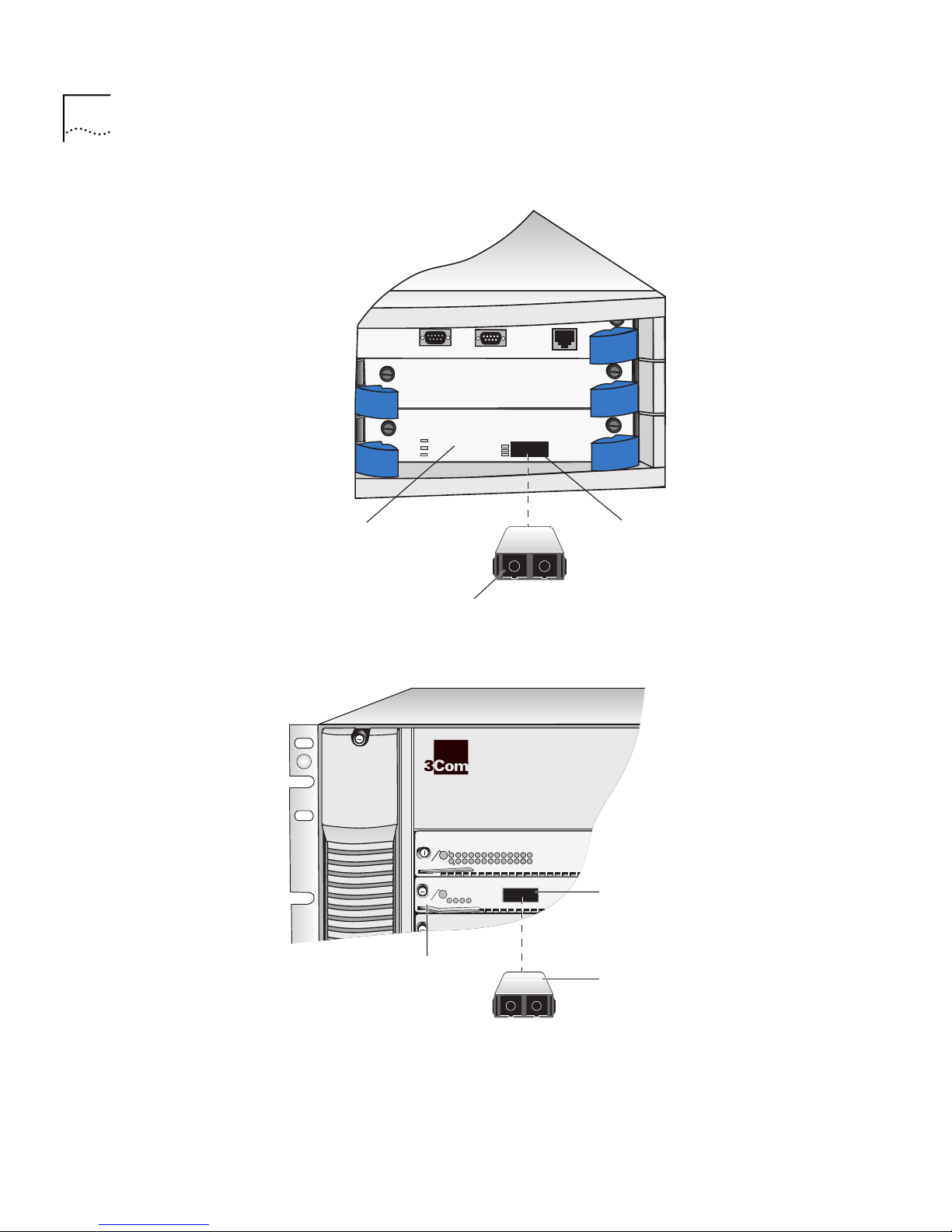
Figure 2 shows how to insert the transceiver into a CoreBuilder 3500
a
GBIC port.
Figure 3 shows how to insert the transceiver into a GBIC port on the
b
CoreBuilder 9000 7-slot chassis. Installation in the 8-slot and 16-slot
chassis is the same except that the chassis ports are oriented vertically.
Page 4
70-km Gigabit Ethernet GBIC Transceiver Installation Guide
1000 BASE (GBIC)
3C35330
PWR
INS
ERR
L
E
T
INS
MODEM
TERMINAL
ETHERNET
10BT
R
M
O
D
S
T
A
T
1
2
2
3
4
1
RX
TX
RX
TX
R
P
R
I
M
O
D
S
T
A
T
S
E
C
123456789
1
0
1
1
1
2
1
3
1
4
1
5
1
6
1
7
1
8
1
9
2
0
2
1
2
2
2
3
2
4
P
R
I
M
O
D
S
T
A
T
S
E
C
123456789
1
0
1
1
1
2
1
3
1
4
1
5
1
6
1
7
1
8
1
9
2
0
2
1
2
2
2
3
2
4
P
R
I
M
O
D
S
T
A
T
S
E
C
123456789
1
0
1
1
1
2
1
3
1
4
1
5
1
6
1
7
1
8
1
9
2
0
2
1
2
2
2
3
2
4
5
6
7
8
9
4
Figure 2
Inserting the 70-km GBIC Transceiver in a CoreBuilder 3500
1000BASE GBIC module
Duplex SC connector
GBIC port
Figure 3
Inserting the 70-km GBIC Transceiver in a CoreBuilder 9000
GBIC port
GEN Interface
module
Duplex SC
connector
Page 5

70-km Gigabit Ethernet GBIC Transceiver Installation Guide
Gently slide the transceiver into the GBIC port until it clicks into place.
3
CAUTION: GBIC transceivers are keyed and can be properly inserted only
one way. If the transceiver does not click when you insert it, turn it over
and reinsert it.
You are now ready to cable the system to the Gigabit Ethernet network.
4
Removing the Transceiver
To replace an existing GBIC transceiver, compress the side tabs and gently
pull the old transceiver out of the port.
5
Troubleshooting
Transceivers
After you insert the GBIC transceiver into the port, the system software
verifies the transceiver operation, as discussed in this section.
To ensure optimal performance, compatibility, and regulatory compliance,
use only GBIC transceivers that 3Com supports. For a list of currently
supported GBICs, see this 3Com Web site:
http://www.3com.com/gigabit_ethernet/gbics
If the transceiver is not working properly, the system displays an
appropriate error message, as described in the following sections.
“Unqualified GBIC” Error
If the system detects an unqualified GBIC or a problem with the integrity
of the GBIC, it sets the port type to
description at the display (
Uqual.GBIC), and captures the error in the
Unqualified GBIC, displays a short
event log.
WARNING
The GBIC in Port xx is NOT approved by 3Com & may violate
electromagnetic emission or safety requirements for your
country. Refer to 3Com's web page
(www.3com.com/gigabit_ethernet/gbics) for our current
approved list.
Using a newer version GBIC transceiver (GBIC91, GBIC92, or GBIC97) in a
system running older code (pre-Release 3.0) can generate the above
message. For a list of GBIC devices that are qualified for the CoreBuilder
3500, 9000, and 9400, see this 3Com Web site:
http://www.3com.com/gigabit_ethernet/gbics
Page 6

70-km Gigabit Ethernet GBIC Transceiver Installation Guide
6
The event log may show one of the following informational messages:
■ Unqualified GBIC: I2C read error
Meaning
Corrective action
Meaning
Corrective action
Meaning
The transceiver, which connects to the module host board through a
20-pin connector is not seated properly, and a clean connection
cannot be established.
To correct this problem, completely remove the transceiver and then
reinsert it. If the problem persists, contact 3Com Technical Support.
For contact information in the United States and Canada, call
1-800-NET-3COM. For the number to call in other locations, visit the
3Com Web site:
■ Unqualified GBIC: Checksum match error
http://www.3com.com/util/enterprise.html
The system uses checksum error detection to verify the integrity of the
GBIC data. If the system detects a problem with the data, it displays
an error message that indicates a checksum failure.
Although this condition does not necessarily indicate that the GBIC
transceiver will not function in the system, replace the transceiver to
ensure proper operation.
■ Unqualified GBIC: MODDEF Value – xx
■ Unqualified GBIC: Transceiver byte(s) error
For both of these messages, the value (xx) of this GBIC type is not a
Module Definition 4 GBIC (Serial Identification) as defined by the
Gigabit Interface Converter specification.
Corrective action
Replace this transceiver with a GBIC that is qualified by 3Com.
Page 7

70-km Gigabit Ethernet GBIC Transceiver Installation Guide
GBIC Disable Error
If the system detects that the transceiver cannot emit the proper laser
signal, it disables the port, sets the port type to
description (
GBIC Disable), and captures the error in the event log.
disabled, displays a short
The following message appears in the event log:
Due to excessive TxFault conditions, GBIC Port xx has been
disabled.
7
Meaning
Corrective action
Excessive Tx Fault conditions indicate a faulty GBIC.
Replace the transceiver. If the problem persists, contact network supplier
or 3Com Technical Support. For contact information, see the Technical
Support appendix in the Getting Started Guide for your system.
“Unapproved GBIC” Error
Supported transceivers are those that 3Com has specifically tested and
qualified for use with 3Com GBIC systems. Pretesting at 3Com ensures
proper functionality, compatibility, and regulatory compliance.
If the system detects a transceiver that 3Com does not support, it sets the
port type to
Unappr.GBIC), and captures the error in the event log.
(
WARNING
The GBIC in Port xx is NOT approved by 3Com & may violate
electromagnetic emission or safety requirements for your
country. Refer to 3Com's web page
(www.3com.com/gigabit_ethernet/gbics) for our current
approved list.
Unqualified GBIC, displays a short description,
The following informational message is shown in the event log:
Unqualified GBIC: Unqualified vendor part number
Corrective action
Although this report does not necessarily indicate that the GBIC
transceiver will not function properly with the system, it does indicate
that 3Com has not qualified the transceiver and does not support it.
Page 8

70-km Gigabit Ethernet GBIC Transceiver Installation Guide
8
Incorrect Value in the Ethernet Display Field (CoreBuilder 3500)
An incorrect value appears in the Ethernet display field when all of these
conditions are true:
■ Your CoreBuilder 3500 is running system software at Release 2.1 or
earlier.
■ You have installed or reinstalled a new or replacement GBIC (for
example, Model Number 3CGBIC91, 3CGBIC92 or 3CGBIC97).
■ You enter the ethernet summary or the ethernet detail command
for the first time.
Calculating the Link
Budget for the 70-km
GBIC Transceiver
When all of these conditions are true, the text
appears in the
portType field of the Ethernet display even though the
(GBIC) Non-qualified
GBIC is qualified and functions properly. Disregard this incorrect value.
The 70-km GBIC has an optical budget of 20 dB and operates at a
wavelength of 1550 nm. Calculate potential link distances as follows:
■ Minimum launch power is –4 dBm.
■ Minimum receive sensitivity is –24 dBm.
The optical budget is arrived at by subtracting the minimum receive
sensitivity of –24 dBm from the minimum launch power of –4 dBm,
which yields an optical budget of 20 dB.
■ Allow 0.25 dB attenuation per kilometer of single-mode fiber at
1550 nm.
■ Allow 0.5 dB attenuation per mating connector.
Page 9

70-km Gigabit Ethernet GBIC Transceiver Installation Guide
Sample Calculations
System A
60 km of fiber with 8 mating connectors:
60 km of single-mode fiber
1
x 0.25 dB per km
= 15 dB fiber attenuation
8 mating connectors
2
x 0.50 dB per connector
= 4 dB connector attenuation
15 dB fiber attenuation
3
+ 4 dB connector attenuation
= 19 dB total link attenuation
System B
75 km of fiber with 2 mating connectors:
75 km of single-mode fiber
1
x 0.25 dB per km
= 18.75 dB fiber attenuation
9
2 mating connectors
2
x 0.50 dB per connector
= 1 dB connector attenuation
18.75 dB fiber attenuation
3
+ 1dB connector attenuation
= 19.75 dB total link attenuation
System C
90 km of fiber with 4 mating connectors:
90 km of single-mode fiber
1
x 0.19 dB per km
= 17.1 dB fiber attenuation
4 mating connectors
2
x 0.5 dB per connector
= 2 dB connector attenuation
17.1 dB fiber attenuation
3
+ 2 dB connector attenuation
= 19.1 dB total link attenuation
Page 10

10
70-km Gigabit Ethernet GBIC Transceiver Installation Guide
The budget figures for all three of the sample systems reflect conservative
values for fiber attenuation and connector attenuation to assure
operation at 70 km under typical to less-than-ideal conditions. Link
distances of greater than 70 km can be attained when conditions allow.
Fiber attenuation of 0.19 dB per km and lower is possible, allowing link
lengths beyond 70 km. Consult your fiber installer to obtain actual link
attenuation values at 1550 nm for the fiber intended for use with the
70-km GBIC transceiver.
Page 11

3Com Corporation L
3Com GBIC Transceivers
IMITED WARRANTY
ARDWARE
H
EAR
Y
2000 W
BTAINING WARRANTY
O
ERVICE
S
ARRANTY
3Com warrants to the end user (“Customer”) that this hardware product will be free from defects in workmanship
and materials, under normal use and service, for one (1) year from the date of purchase from 3Com or its authorized
reseller.
3Com’s sole obligation under this express warranty shall be, at 3Com’s option and expense, to repair the defective
product or part, deliver to Customer an equivalent product or part to replace the defective item, or if neither of the
two foregoing options is reasonably available, 3Com may, in its sole discretion, refund to Customer the purchase
price paid for the defective product. All products that are replaced will become the property of 3Com. Replacement
products may be new or reconditioned. 3Com warrants any replaced or repaired product or part for ninety (90) days
from shipment, or the remainder of the initial warranty period, whichever is longer.
In addition to the Hardware Warranty and Software Warranty stated above, 3Com warrants that each product sold
or licensed to Customer on and after January 1, 1998, that is date sensitive will continue performing properly with
regard to such date data on and after January 1, 2000, provided that all other products used by Customer in
connection or combination with the 3Com product, including hardware, software, and firmware, accurately
exchange date data with the 3Com product, with the exception of those products identified at 3Com’s Web site,
http://www.3com.com/products/yr2000.html, as not meeting this standard. If it appears that any product that is
stated to meet this standard does not perform properly with regard to such date data on and after January 1, 2000,
and Customer notifies 3Com before the later of April 1, 2000, or ninety (90) days after purchase of the product from
3Com or its authorized reseller, 3Com shall, at its option and expense, provide a software update which would effect
the proper performance of such product, repair such product, deliver to Customer an equivalent product to replace
such product, or, if none of the foregoing is feasible, refund to Customer the purchase price paid for such product.
Any software update or replaced or repaired product will carry a Year 2000 Warranty for ninety (90) days after
purchase or until April 1, 2000, whichever is later.
Customer must contact a 3Com Corporate Service Center or an Authorized 3Com Service Center within the
applicable warranty period to obtain warranty service authorization. Dated proof of purchase from 3Com or its
authorized reseller may be required. Products returned to 3Com’s Corporate Service Center must be preauthorized
by 3Com with a Return Material Authorization (RMA) number or User Service Order (USO) number marked on the
outside of the package, and sent prepaid and packaged appropriately for safe shipment, and it is recommended that
they be insured or sent by a method that provides for tracking of the package. Responsibility for loss or damage does
not transfer to 3Com until the returned item is received by 3Com. The repaired or replaced item will be shipped to
Customer, at 3Com’s expense, not later than thirty (30) days after 3Com receives the defective product.
3Com shall not be responsible for any software, firmware, information, or memory data of Customer contained in,
stored on, or integrated with any products returned to 3Com for repair, whether under warranty or not.
Dead- or Defective-on-Arrival
workmanship within the first forty-eight (48) hours of installation but no later than thirty (30) days after the date of
purchase, and this is verified by 3Com, it will be considered dead- or defective-on-arrival (DOA) and a replacement
shall be provided by advance replacement. The replacement product will normally be shipped not later than three (3)
business days after 3Com’s verification of the DOA product, but may be delayed due to export or import procedures.
The shipment of advance replacement products is subject to local legal requirements and may not be available in all
locations. When an advance replacement is provided and Customer fails to return the original product to 3Com
within fifteen (15) days after shipment of the replacement, 3Com will charge Customer for the replacement product,
at list price.
Advance Replacement
will make commercially reasonable efforts to ship the replacement product not later than five (5) business days after
receiving the request for advance replacement, but may be delayed due to product availability or export or import
procedures. The shipment of advance replacement products is subject to local legal requirements and may not be
available in all locations. When an advance replacement is provided and Customer fails to return the original product
to 3Com within fifteen (15) days after shipment of the replacement, 3Com will charge Customer for the
replacement, at list price. This advance replacement is different from the fee-based Advance Hardware Replacement
Service, which is available as a contracted service offering.
INCLUDED SERVICES:
Telephone Support,
of purchase, on a commercially reasonable efforts basis. Please refer to the Technical Support appendix in the Getting
Started Guide for telephone numbers.
3Com’s Web and Bulletin Board Services
some software maintenance releases at no charge.
with coverage for basic troubleshooting only, will be provided for ninety (90) days from the date
. In the event a product completely fails to function or exhibits a defect in materials or
is provided for ninety (90) days, after which time it may be available for a specified fee. 3Com
provide 3Knowledgebase, bug tracking, documentation, release notes, and
Page 12

ARRANTIES EXCLUSIVE
W
IF A 3COM PRODUCT DOES NOT OPERATE AS WARRANTED ABOVE, CUSTOMER’S SOLE REMEDY FOR BREACH OF
THAT WARRANTY SHALL BE REPAIR, REPLACEMENT, OR REFUND OF THE PURCHASE PRICE PAID, AT 3COM’S
OPTION. TO THE FULL EXTENT ALLOWED BY LAW, THE FOREGOING WARRANTIES AND REMEDIES ARE EXCLUSIVE
AND ARE IN LIEU OF ALL OTHER WARRANTIES, TERMS, OR CONDITIONS, EXPRESS OR IMPLIED, EITHER IN FACT OR
BY OPERATION OF LAW, STATUTORY OR OTHERWISE, INCLUDING WARRANTIES, TERMS, OR CONDITIONS OF
MERCHANTABILITY, FITNESS FOR A PARTICULAR PURPOSE, SATISFACTORY QUALITY, CORRESPONDENCE WITH
DESCRIPTION, AND NONINFRINGEMENT, ALL OF WHICH ARE EXPRESSLY DISCLAIMED. 3COM NEITHER ASSUMES
NOR AUTHORIZES ANY OTHER PERSON TO ASSUME FOR IT ANY OTHER LIABILITY IN CONNECTION WITH THE SALE,
INSTALLATION, MAINTENANCE, OR USE OF ITS PRODUCTS.
3COM SHALL NOT BE LIABLE UNDER THIS WARRANTY IF ITS TESTING AND EXAMINATION DISCLOSE THAT THE
ALLEGED DEFECT OR MALFUNCTION IN THE PRODUCT DOES NOT EXIST OR WAS CAUSED BY CUSTOMER’S OR
ANY THIRD PERSON’S MISUSE, NEGLECT, IMPROPER INSTALLATION OR TESTING, UNAUTHORIZED ATTEMPTS TO
OPEN, REPAIR, OR MODIFY THE PRODUCT, OR ANY OTHER CAUSE BEYOND THE RANGE OF THE INTENDED USE, OR
BY ACCIDENT, FIRE, LIGHTNING, POWER CUTS OR OUTAGES, OTHER HAZARDS, OR ACTS OF GOD.
IMITATION OF LIABILITY
L
ISCLAIMER
D
OVERNING LAW
G
3Com Corporation
5400 Bayfront Plaza
Santa Clara, California
95052-8145
TO THE FULL EXTENT ALLOWED BY LAW, 3COM ALSO EXCLUDES FOR ITSELF AND ITS SUPPLIERS ANY LIABILITY,
WHETHER BASED IN CONTRACT OR TORT (INCLUDING NEGLIGENCE), FOR INCIDENTAL, CONSEQUENTIAL,
INDIRECT, SPECIAL, OR PUNITIVE DAMAGES OF ANY KIND, OR FOR LOSS OF REVENUE OR PROFITS, LOSS OF
BUSINESS, LOSS OF INFORMATION OR DATA, OR OTHER FINANCIAL LOSS ARISING OUT OF OR IN CONNECTION
WITH THE SALE, INSTALLATION, MAINTENANCE, USE, PERFORMANCE, FAILURE, OR INTERRUPTION OF ITS
PRODUCTS, EVEN IF 3COM OR ITS AUTHORIZED RESELLER HAS BEEN ADVISED OF THE POSSIBILITY OF SUCH
DAMAGES, AND LIMITS ITS LIABILITY TO REPAIR, REPLACEMENT, OR REFUND OF THE PURCHASE PRICE PAID, AT
3COM’S OPTION. THIS DISCLAIMER OF LIABILITY FOR DAMAGES WILL NOT BE AFFECTED IF ANY REMEDY
PROVIDED HEREIN SHALL FAIL OF ITS ESSENTIAL PURPOSE.
Some countries, states, or provinces do not allow the exclusion or limitation of implied warranties or the limitation of
incidental or consequential damages for certain products supplied to consumers, or the limitation of liability for
personal injury, so the above limitations and exclusions may be limited in their application to you. When the implied
warranties are not allowed to be excluded in their entirety, they will be limited to the duration of the applicable
written warranty. This warranty gives you specific legal rights which may vary depending on local law.
This Limited Warranty shall be governed by the laws of the State of California, U.S.A., excluding its conflicts of laws
principles and excluding the United Nations Convention on Contracts for the International Sale of Goods.
3Com Corporation
Copyright © 2000, 3Com Corporation. All rights reserved. No part of this documentation may be reproduced in
any form or by any means or used to make any derivative work (such as translation, transformation, or
adaptation) without written permission from 3Com Corporation. 3Com Corporation reserves the right to revise
this documentation and to make changes in content from time to time without obligation on the part of
3Com Corporation to provide notification of such revision or change.
3Com Corporation provides this documentation without warranty, term, or condition of any kind, either implied
or expressed, including, but not limited to, the implied warranties, terms, or conditions of merchantability,
satisfactory quality, and fitness for a particular purpose. 3Com may make improvements or changes in the
product(s) and/or the program(s) described in this documentation at any time.
3Com registered trademarks are registered in the United States and may or may not be registered in other
countries. 3Com, the 3Com logo, CoreBuilder, and SuperStack are registered trademarks of 3Com Corporation.
All other company and product names may be trademarks of the respective companies with which they are
associated.
, 5400 Bayfront Plaza, P.O. Box 58145, Santa Clara, CA 95052-8145 (408) 326-5000
http://www.3com.com/
Part No.10013642
Published February 2000
 Loading...