

Page 1

ZTE ZIP
Quick Start Guide
ZTE Australia provides dedicated support with a local call
centre and social media outreach. Search ‘ZTE Australia’
on Facebook , Google+ and Twitter to keep in touch.
© ZTE 2016 Ver 1.0 March 2016
1
Page 2
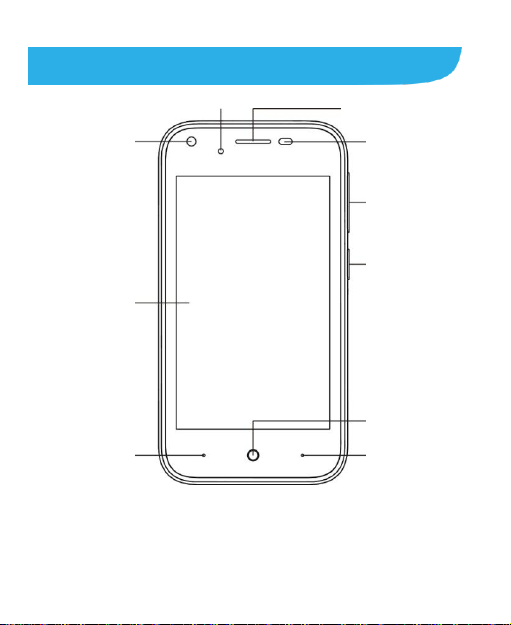
Front Camera
Touch Screen
Menu
Home
Power Key
Volume Keys
Sensor
LED
Back
Receiver
Getting to Know Your Phone
2
Page 3
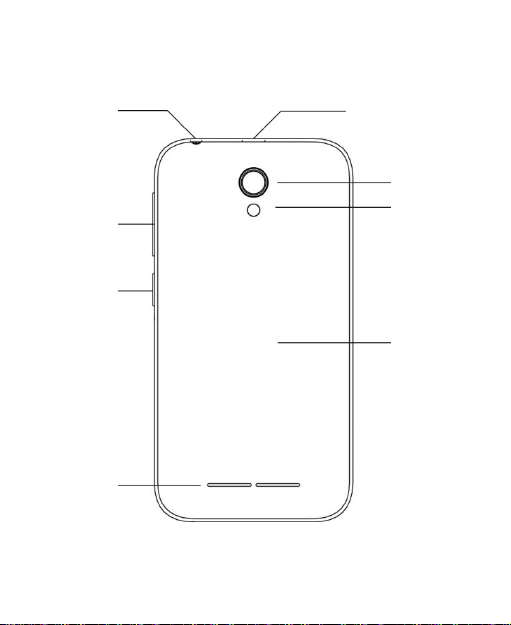
Volume Key
Power Key
Loud Speaker
Camera
Flash Lamp
Back Cover
Headset Jack
Charging/USB Jack
3
Page 4

Power Key
Press and hold to power on, select phone modes, turn
on/off airplane mode, or restart, or power off.
Press to wake up your phone.
Home Key
Touch to return to the Home Screen from any
application or screen.
Hold to see Google search.
Menu Key
Touch and hold to see recently used applications.
Back Key
Touch to go to the previous screen.
Volume Keys
Press or hold to turn the volume up or down. Control the in
call volume during a call, music and games volume when
using media, or control the Ring volume from the home
screen. Press Volume Down and the Power key to do a
screen capture.
Starting Up
Switch off your phone before installing or replacing the battery
or the SIM card. The microSDHC™ card is optional and is
4
Page 5
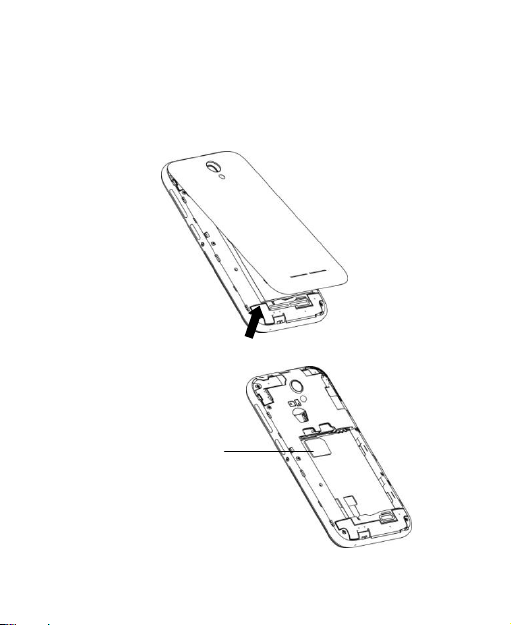
Micro SIM card
used to add more media storage eg. for Photos and Music.
Unmount the microSDHC card before removing it.
1. Place your finger in the slot at the bottom of the back cover to
lift and remove the cover.
2. Hold the SIM card with its cut corner oriented as shown and
slip it into the card holder.
5
Page 6
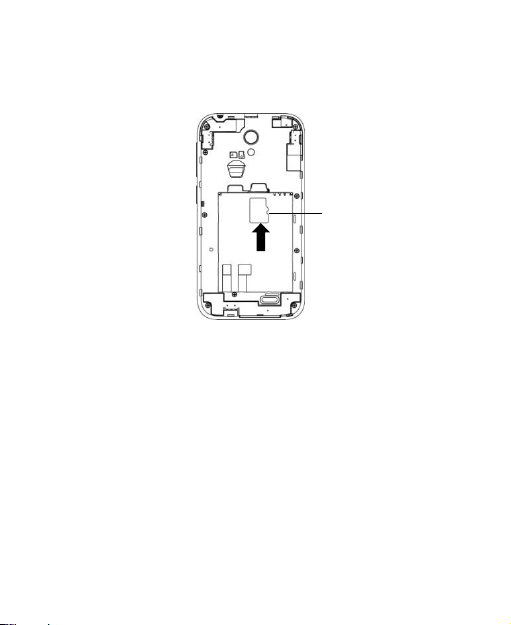
microSDHC
card
3. Hold your microSDHC card with the metal contacts facing
down and slide it into the microSDHC card slot.
4. Align the connectors on the phone and the battery and
slide the battery into the compartment. Then gently press
the battery down until it is secured.
5. Align the back cover with the back of the phone and press
the cover back into place. Make sure all the tabs are secure
and there are no gaps around the cover.
6
Page 7
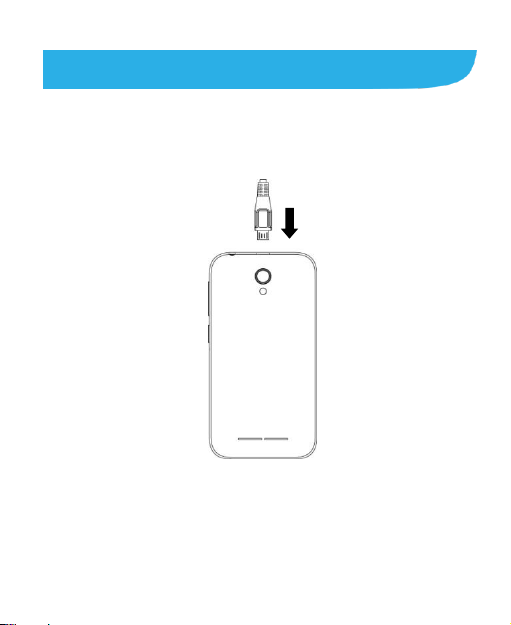
Charging the Battery
1. Connect the adapter to the charging jack. Ensure that the
adapter is inserted with the correct orientation. Do not force
the connector into the charging jack.
2. Connect the charger to a standard AC power outlet.
3. Disconnect the charger when the battery is fully charged.
7
Page 8
Powering On/Off Your Phone
Make sure the battery is charged before powering on.
Press and hold the Power Key to turn on your phone.
To turn it off, press and hold the Power Key to open the
options menu. Touch Power off.
Make and Answer Calls
On the home screen, touch the button to open the Dialler.
Touch a recently called number or press to open the Dial
Pad and touch to make the call.
Answer an incoming Call - Slide the icon from middle to
right to answer the call.
Messaging
Touch the Messaging icon on the home screen. Touch to
write a new message. Add the phone number, text and press
to send.
8
Page 9

Connect to a Computer
1. Connect using a USB lead. Install the PC drivers if required
then select MTP on the handset to browse the handset folders
on your PC.
2. Use Google Drive to share files in the cloud.
3. Connect via Bluetooth to share files with other devices.
MAC users need to download the File Transfer app from
Android onto your MAC device.
9
 Loading...