

Page 1
®
®
Assembly Manual
®
®
Page 2 / 8
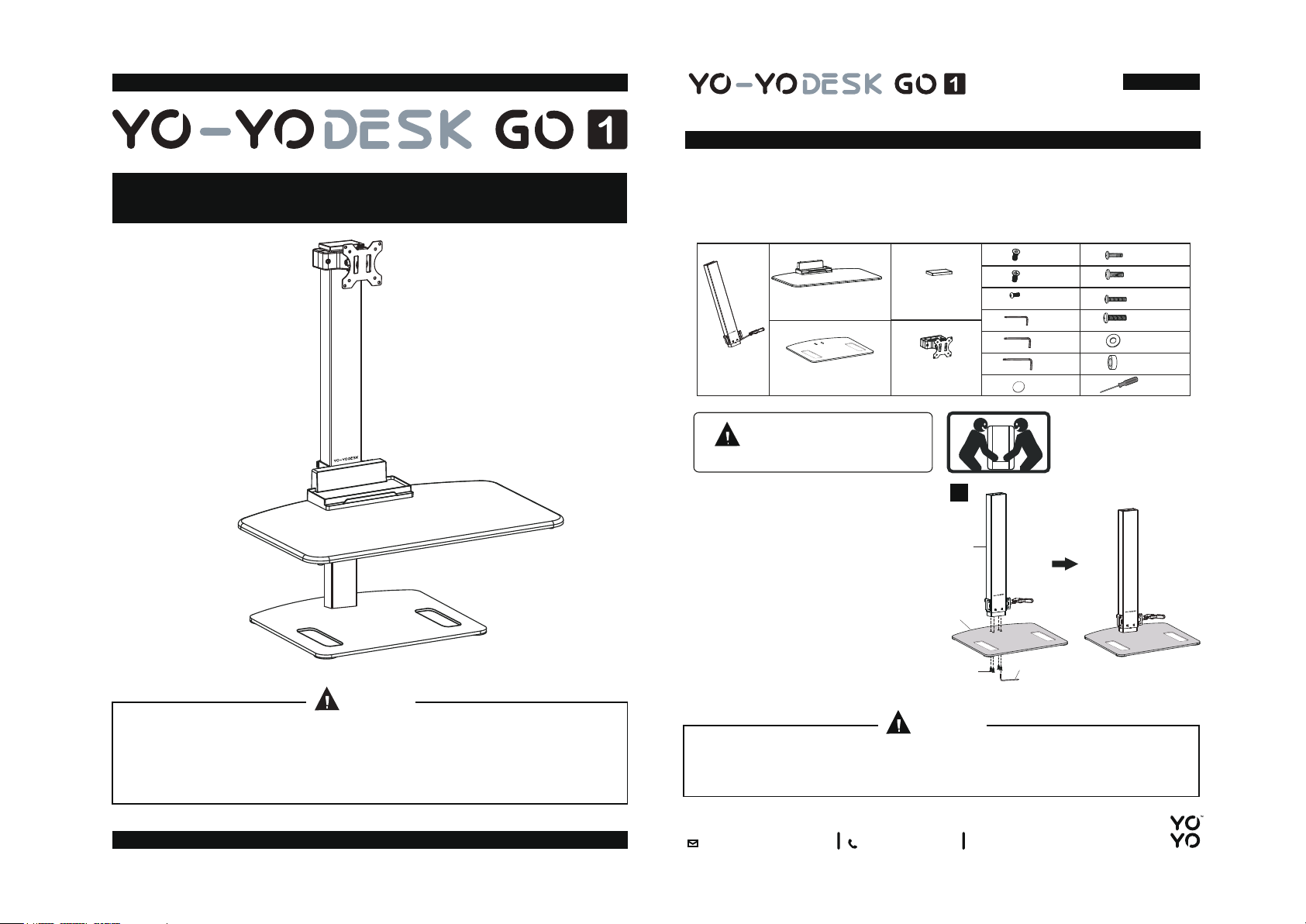
ASSEMBLY KIT
The following items are included in your Yo-YoDesk GO, please check you have
each of them. If there are any tools or components missing, please contact customer
services on +44 01793 575 082.
B
C
®
1 x
Monitor Pole
A
Worktop1 x
Base Plate1 x
Yo-Yo DESK GO
D
4 x
Top Cap1 x
Monitor Arm1 x
3 x
4 x
1 x
E
1 x
1 x
4 x
F M
Screws
Screws
Screws
4mm
Allen Keys
5mm
Allen Keys
6mm
Allen Keys
4 x
4 x
G
4 x
H
I
4 x
J
4 x
K
4 x
L
1 x
M4x12
Screws
M5x12
N
Screws
M4x16
O
Screws
M5x16
P
Screws
D5
Q
Screw Collars
D8
R
Screw Collars
S
Screwdriver
®
CAUTION
We highly recommend Yo-YoDesk GO is assembled by two people together.
Please first read all instructions carefully before assembling. Retain this manual
for future reference. The specifications may vary slightly from the illustrations and
are subject to change without notice.
Yo-Yo DESK GO
WARNING
WEIGHT TOLERANCE LEVEL
TWO PEOPLE REQUIRED
1
We recommend a combined weight of
desk equipment (ie laptop & monitor
screen of 5 - 7kg) for optimal counter-
A
balance. Below 5kg may make the
transition between sitting & standing
positions more stiff.
The Maximum weight tolerance
C
®
®
is 7kg.
ASSEMBLY STEP 1
F
J
1) Align Base Plate with the Monitor Pole & then screw them together.
CAUTION
Please place the Yo-Yo DESK GO on a surface suitable to hold the entire base
of the Yo-Yo DESK GO otherwise you may cause damage when operating the
Yo-Yo DESK GO.
sales@yo-yodesk.co.uk
+44 01793 575 082
Page 2
®
®
Page 3 / 8
®
®
Page 4 / 8
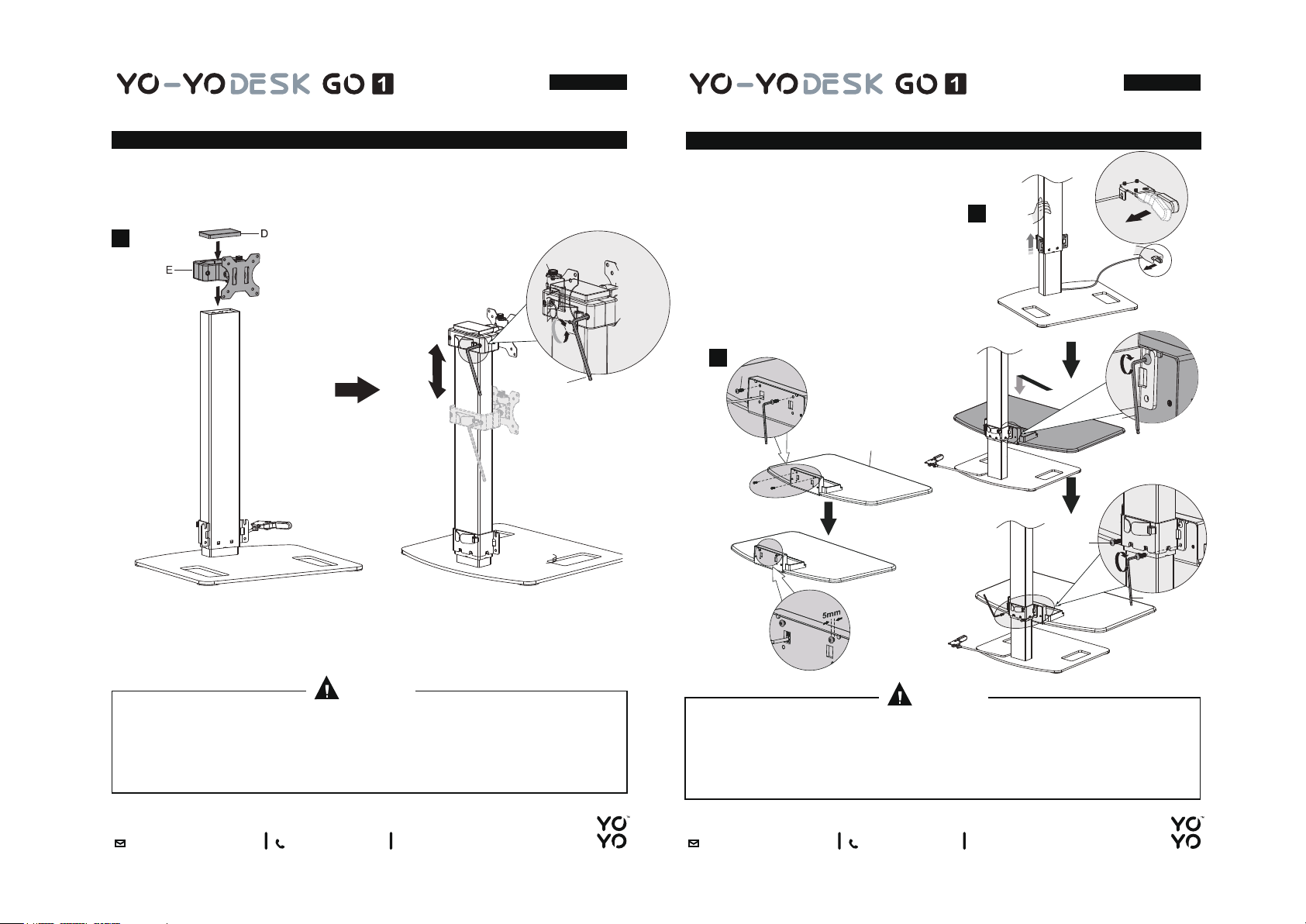
ASSEMBLY STEP 2
2) i Fit the Monitor Arm over the Monitor Pole.
Place the Top Cap on top of the Monitor Pole.ii
2
ASSEMBLY STEP 3
3) i Insert the Four Screws at the back
of the Worktop. Screw them in
partly, avoid screwing in too tightly
to allow some free movement.
Place Worktop over the bottom of
ii
the Monitor Pole, aligning the Four
Screws with the Monitor Pole, &
then tighten carefully.
3a
J
H
I
B
3b
I
H
I
CAUTION
When attaching the Monitor Arm, avoid excessive screwdriver force. Excessive
force may prevent or restrict the up/down movement of your monitor.
sales@yo-yodesk.co.uk
+44 01793 575 082
CAUTION
Do not press lever to avoid pole rising. Please tighten firmly. If not, Worktop
may drop down when pressure is applied.
sales@yo-yodesk.co.uk
+44 01793 575 082
Page 3

®
®
Page 5 / 8
®
®
Page 6 / 8
ASSEMBLY STEP 4
4) i Screw in the Up/Down Lever placing it underneath the RIGHT SIDE
of the Worktop.
4
®
ASSEMBLY STEP 5
5a,b & c) Attach the monitor on to the Monitor Arm.
5a
5b
G
5c
Q
M/N
R
Q
O/P
CAUTION
Always test the Up/Down Lever by pressing inwards once it has been attached.
sales@yo-yodesk.co.uk
+44 01793 575 082
K
CAUTION
Avoid excessive screwdriver force as this may restrict full swivel, tilt and rotation.
sales@yo-yodesk.co.uk
+44 01793 575 082
Page 4

®
®
Page 7 / 8
®
®
Page 8 / 8
ASSEMBLY STEP 6
6) To operate, use right hand to push Up/Down Lever in & if necessary when
moving downwards apply pressure with your LEFT HAND to the back of the
Worktop. Apply pressure on the left corner pressing the lever simultaneously.
Sufficient weight on the Worktop should limit the necessity to do this. Pads can be
placed on the bottom of the base for better adherence to the surface.
6
®
CAUTION
Please place the Yo-Yo Desk GO on a surface suitable to hold the entire base
Yo-Yo DESK GO
of the Yo-Yo Desk GO otherwise you may cause damage when operating the
Yo-Yo DESK GO
Yo-Yo Desk GO.
Yo-Yo DESK GO
CAUTION
When attaching the Monitor Arm, avoid excessive screwdriver force.
Excessive force may prevent or restrict the up/down movement of your monitor.
CAUTION
Please tighten firmly. If not, Worktop may drop down when pressure is applied.
Always test the Up/Down Lever by pressing inwards once it has been attached.
CAUTION
Avoid excessive screwdriver force as this may restrict full swivel, tilt and rotation.
CAUTION
Avoid pushing down from the front of the Worktop. Always place hand to the
back to maintain optimal stability when moving up/down.
sales@yo-yodesk.co.uk
+44 01793 575 082
CAUTION
Avoid pushing down from the front of the Worktop. Always place hand to the
back to maintain optimal stability when moving up/down.
sales@yo-yodesk.co.uk
+44 01793 575 082
 Loading...