

Page 1
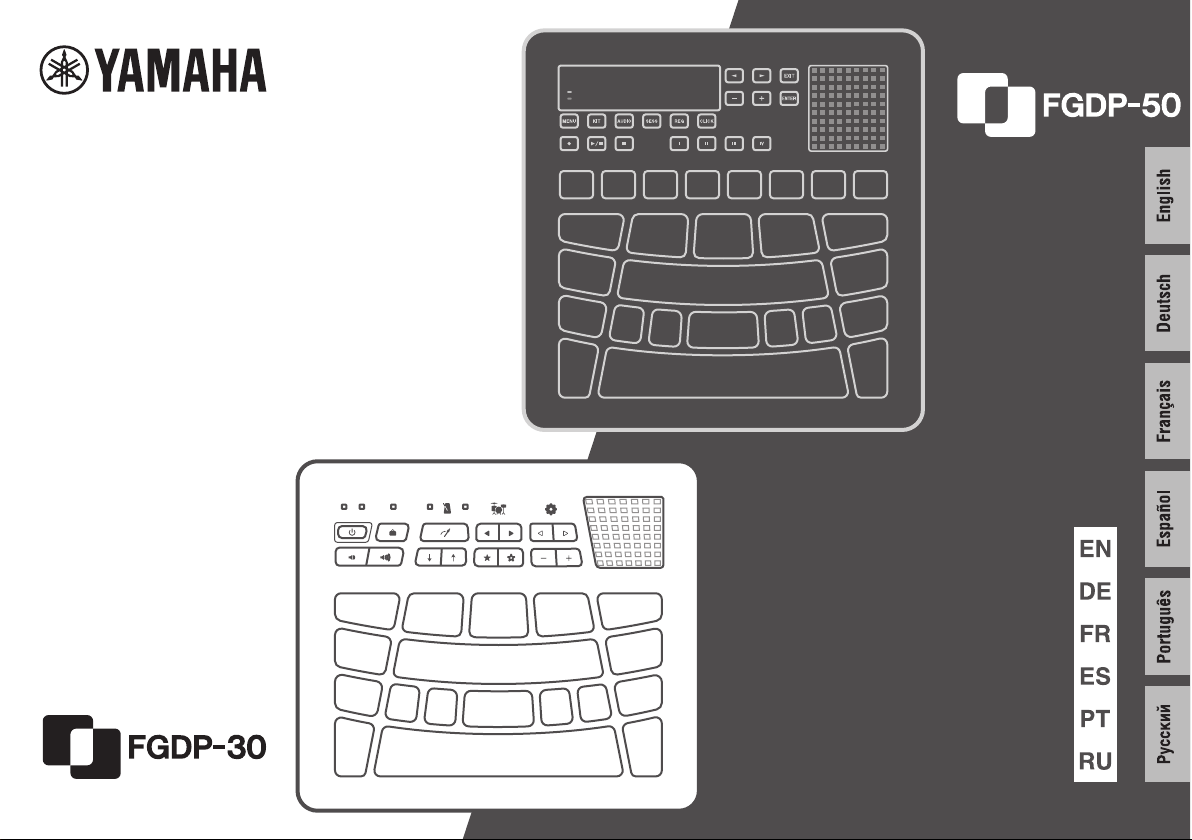
Finger drum pad
Surface de percussion tactile
Драм-машина
Startup Guide
Kurzanleitung
Guide de démarrage
Guía de inicio
Guia de inicialização
Руководство по запуску
Page 2

FCC INFORMATION (U.S.A.)
1. IMPORTANT NOTICE: DO NOT MODIFY THIS UNIT!
This product, when installed as indicated in the instructions contained in this manual, meets FCC requirements. Modifications not expressly approved
by Yamaha may void your authority, granted by the FCC, to use the product.
2. IMPORTANT: When connecting this product to accessories and/or another product use only high quality shielded cables. Cable/s supplied with this
product MUST be used. Follow all installation instructions. Failure to follow instructions could void your FCC authorization to use this product in the
USA.
3. NOTE: This product has been tested and found to comply with the requirements listed in FCC Regulations, Part 15 for Class “B” digital devices.
Compliance with these requirements provides a reasonable level of assurance that your use of this product in a residential environment will not result
in harmful interference with other electronic devices. This equipment generates/uses radio frequencies and, if not installed and used according to the
instructions found in the users manual, may cause interference harmful to the operation of other electronic devices. Compliance with FCC regulations
does not guarantee that interference will not occur in all installations. If this product is found to be the source of interference, which can be
determined by turning the unit “OFF” and “ON”, please try to eliminate the problem by using one of the following measures:
- Relocate either this product or the device that is being affected by the interference.
- Utilize power outlets that are on different branch (circuit breaker or fuse) circuits or install AC line filter/s.
- In the case of radio or TV interference, relocate/reorient the antenna. If the antenna lead-in is 300 ohm ribbon lead, change the lead-in to co-axial
type cable.
If these corrective measures do not produce satisfactory results, please contact the local retailer authorized to distribute this type of product. If you
cannot locate the appropriate retailer, please contact Yamaha Corporation of America, 6600 Orangethorpe Avenue, Buena Park, CA 90620, U.S.A.
The above statements apply ONLY to those products distributed by Yamaha Corporation of America or its subsidiaries.
(529-M04 FCC class B YCA 02)
2 FGDP-50 FGDP-30 Startup Guide
Page 3
COMPLIANCE INFORMATION STATEMENT
(Supplier’s declaration of conformity procedure)
Responsible Party: Yamaha Corporation of America
Address: 6600 Orangethorpe Avenue,
Buena Park, CA. 90620, U.S.A.
Telephone: 714-522-9011
Type of Equipment: Finger Drum Pad
Model Name: FGDP-50, FGDP-30
This device complies with Part 15 of the FCC Rules.
Operation is subject to the following two conditions:
1) this device may not cause harmful interference, and
2) this device must accept any interference received, including
interference that may cause undesired operation.
(529-M02 FCC sdoc YCA 02)
This device contains a lithium-ion battery.
After usage, you may recycle the battery, but you never attempt to
remove it by yourself. Have the device inspected by qualified Yamaha
service personnel. If there is no Yamaha personnel in your area,
dispose of it properly according to relevant environmental laws and
disposal rules in your area.
Cet appareil contient une pile au lithium-ion.
Recyclez la pile après utilisation mais ne l'ôtez jamais par vous-même.
Faites inspecter l'unité par un technicien Yamaha qualifié. Si vous ne
trouvez pas de technicien Yamaha qualifié dans votre région, mettez
la pile au rebut conformément aux lois et aux règlementations
environnementales en vigueur localement.
Important Notice:
U.S. LIMITED WARRANTY for Customers in the
United States
For detailed information about this Yamaha product and warranty
service, please either visit the following website address (printable file
is available at our website) or contact Customer Service at the address
or telephone number identified below.
Website Address:
Yamaha.io/SynthAndStageWarranty
Customer Service:
Yamaha Corporation of America
6600 Orangethorpe Avenue, Buena Park, CA 90620-1273
Telephone: 800-854-1569
(582-M02)
FGDP-50 FGDP-30 Startup Guide 3
Page 4
PRECAUTIONS
Contents
PRECAUTIONS ................................................................................................. 4
About the Manuals .................................................................................... 10
Included Accessories ................................................................................. 10
Controls .......................................................................................................... 11
Charging ........................................................................................................ 14
Turning the Power On/Off ....................................................................... 15
Playing the Finger Drum Pads ............................................................... 16
Various Functions (FGDP-50) .................................................................. 19
Various Functions (FGDP-30) .................................................................. 21
Specifications ............................................................................................... 22
Troubleshooting ......................................................................................... 25
The model number, serial number, power requirements, etc., may be
found on or near the name plate, which is at the bottom of the unit.
You should note this serial number in the space provided below and
retain this manual as a permanent record of your purchase to aid
identification in the event of theft.
Model No.
Serial No.
(1003-M06 plate bottom en 01)
PRECAUTIONS
PLEASE READ CAREFULLY BEFORE PROCEEDING
Especially in the case of children, a guardian should provide
guidance on how to properly use and handle the product before
actual use.
Please keep this manual in a safe and handy place for future
reference.
WARNING
Always follow the basic precautions listed below to avoid the
possibility of serious injury or even death from electrical
shock, short-circuiting, damages, fire, explosion or other
hazards. These precautions include, but are not limited to,
the following:
Power supply
• Do not place the USB cable near heat sources such as heaters or
radiators. Also, do not excessively bend or otherwise damage
the cable, or place heavy objects on it.
• Do not touch the product, the USB cable or the USB power
adaptor during an electrical storm.
• Use only the correct voltage specified for the product. The
required voltage is printed on the name plate of the product.
• Use only the specified USB power adaptor (page 14).
• Use only the supplied USB cable. Do not use the USB cable for
other devices.
4 FGDP-50 FGDP-30 Startup Guide
Page 5

PRECAUTIONS
• Check the USB adaptor plug periodically and remove any dirt
or dust which may have accumulated on it.
• Insert the USB power adaptor plug firmly all the way into the
AC outlet. Using the product when it is not plugged in
sufficiently can cause dust to accumulate on the plug, possibly
resulting in fire or skin burns.
• When setting up the product, make sure that the AC outlet you
are using is easily accessible. If some trouble or malfunction
occurs, immediately turn off the power and disconnect the USB
power adaptor plug from the outlet.
• Do not connect the product to an electrical outlet using a
multi-plug outlet extender. Doing so can result in lower sound
quality, or possibly cause overheating in the outlet.
• When disconnecting the cable, always hold the plug itself and
not the cord. Pulling by the cord can damage it and cause
electric shocks or a fire.
• If not using the product for long periods of time, be sure to
disconnect the USB cable and the USB power adaptor from the
AC outlet.
Do not disassemble
• This product contains no user-serviceable parts. Do not
attempt to disassemble the internal parts or modify them in
any way.
Water warning
• Do not expose the product to rain, use it near water or in damp
or wet conditions, or place on it any containers (such as vases,
bottles or glasses) containing liquids which might spill into any
openings or places where water may drop. A liquid such as
water getting into the product may cause a fire, electric shocks,
or malfunctions.
• Never insert or remove a power plug with wet hands.
Fire warning
• Do not place any burning items or open flames near the
product, and do not dispose of product in fire, since they may
cause a fire or explosion.
Handling
• Magnetism from this product may affect electro-medical
devices, such as a heart pacemaker implant or defibrillator
implant.
- Keep the product away from a heart pacemaker implant or a
defibrillator implant.
Batteries
• Do not subject the product to mechanical shock or drop.
Failure to comply may result in fire, electric shock, explosion, or
malfunction.
FGDP-50 FGDP-30 Startup Guide
5
Page 6
PRECAUTIONS
• Do not expose the product to excessive dust or vibrations, or
extreme cold or heat (such as in direct sunlight, near a heater,
or in a car during the day), low air pressure to prevent the
possibility of explosion of built-in battery, product
disfiguration, damage to the internal components or unstable
operation.
• Never charge when the product is wet. Doing so may cause
electric shock, fire, or malfunction due to short circuiting.
• When charging, follow the instructions that came with the
instructions of the connected device. Use only the specified
charger device and within the range of 5°C–35°C.
Charging with an unspecified charger or at a temperature
outside the range may cause leakage, overheating, explosion,
or malfunction.
If you notice any abnormality
• If any of the following problems occur, immediately turn off the
power and disconnect the USB cable from the power source.
Also, avoid touching the product in the following conditions.
Finally have the device inspected by Yamaha service personnel.
- The USB cable or plug becomes frayed or damaged.
- Unusual smells or smoke are emitted.
- When it seems that the product is overheating.
- Some object, or water has been dropped into the product.
- There is a sudden loss of sound during use of the product.
- Cracks or other visible damage appear on the product.
When the power cannot be turned off by normal operation,
press and hold the and buttons at the same time to
turn the power off.
CAUTION
Always follow the basic precautions listed below to avoid the
possibility of physical injury to you or others, or damage to
the product or other property. These precautions include, but
are not limited to, the following:
Location
• Do not place the product in an unstable position or a location
with excessive vibration, where it might accidentally fall over
and cause injury.
• Before moving the product, remove all connected cables, to
prevent damage to the cables or injury to anyone who might
trip over them.
Connections
• Before connecting the product to other devices, turn off the
power for all devices. Before turning the power on or off for all
devices, set all volume levels to minimum.
• Be sure to set the volumes of all devices at their minimum
levels and gradually raise the volume controls while playing the
product to set the desired listening level.
6 FGDP-50 FGDP-30 Startup Guide
Page 7
NOTICE
Handling
• Do not insert foreign materials such as metal or paper into any
openings or gaps of the product. Failure to observe this may
cause a fire, electric shocks, or malfunctions.
• Do not rest your weight on, or place heavy objects on the
product, and do not use excessive force on the buttons,
switches or connectors.
• Do not use the product or headphones for a long period of
time at a high or uncomfortable volume level, since this can
cause permanent hearing loss. If you experience any hearing
loss or ringing in the ears, consult a physician.
• Remove the USB cable from the AC outlet before cleaning the
unit. Failure to observe this may cause electric shocks.
Yamaha cannot be held responsible for damage caused by
improper use or modifications to the product, or data that is
lost or destroyed.
Always turn off the power when the product is not in use.
Even when the product power is turned off (lamps are off or LCD
screen is off), electricity is still flowing to the product at the
minimum level.
When you are not using the product for a long time, make sure
you unplug the USB cable from the power source.
(DMI-10)
NOTICE
To avoid the possibility of malfunction/damage to the product,
damage to data, or damage to other property, follow the notices
below.
Rechargeable battery
• This product contains a lithium-ion battery.
• Charge the battery every six months to maintain its power. If
you don’t use the battery for a long time, you may not be able
to charge it.
• Rechargeable batteries have a limited lifespan. The capacity
will gradually decrease depending on how it is stored, the
environment in which it is used, how often it is used, and how
much time passes.
• The battery is not removable by the user.
Recycle
• Lithium-ion batteries can be recycled. After
usage, you may recycle the battery, but never
attempt to remove it by yourself. Have the device
inspected by qualified Yamaha service personnel.
If there are no Yamaha service personnel in your
area, dispose of it properly according to relevant
environmental laws and disposal rules in your
area.
FGDP-50 FGDP-30 Startup Guide
7
Page 8
NOTICE
Information for users on collection and disposal of
old equipment:
This symbol on the products, packaging, and/or
accompanying documents means that used
electrical and electronic products should not be
mixed with general household waste.
For proper treatment, recovery and recycling of old
products, please take them to applicable collection
points, in accordance with your national legislation.
By disposing of these products correctly, you will
help to save valuable resources and prevent any
potential negative effects on human health and the
environment which could otherwise arise from
inappropriate waste handling.
For more information about collection and
recycling of old products, please contact your local
municipality, your waste disposal service or the
point of sale where you purchased the items.
For business users in the European Union:
If you wish to discard electrical and electronic
equipment, please contact your dealer or supplier
for further information.
Information on Disposal in other Countries
outside the European Union:
This symbol is only valid in the European Union. If
you wish to discard these items, please contact your
local authorities or dealer and ask for the correct
method of disposal.
(58-M02 WEEE en 01)
Handling
• Do not use this product in the vicinity of a TV, radio, stereo
equipment, mobile phone, or other electric devices. Otherwise,
this product or the other device may generate noise.
• When you use the product along with an app on your smart
device, such as a smartphone or tablet, we recommend that
you enable “Airplane Mode” on the device to avoid noise
caused by communication.
• Depending on the condition of surrounding radio waves, the
product may possibly malfunction.
• Do not place vinyl, plastic or rubber objects on the product,
since this might discolor the product.
• Do not press the LCD screen on the FGDP-50 with your finger
because it is a sensitive, precision-made part. Doing so might
cause an appearance abnormality, such as a stripe on the LCD,
although this abnormality should disappear again within a
short time.
Maintenance
• When cleaning the product, use a soft and dry (or slightly
damp) cloth. Do not use paint thinners, solvents, alcohol,
cleaning fluids, or chemical-impregnated wiping cloths.
Storage
• Do not expose the product for a long time to excessive dust or
vibrations, or extreme cold or heat (such as in direct sunlight,
8 FGDP-50 FGDP-30 Startup Guide
Page 9

INFORMATION
near a heater, or in a car during the day) in order to prevent the
possibility of disfiguration, damage to the internal components
or unstable operation.
• Store with the pad side up. If you store it with the other side
facing up and the pad side down, unstable operation may
result.
Saving data
• Some of the data of this product are stored when the power is
turned off. However, the saved data may be lost due to some
failure, an operational mistake, etc. From the FGDP-50, save
your important data onto a USB flash drive. Information about
the data automatically stored in the product and the USB flash
drives that can be used with the FGDP-50 can be found in the
User Guide (HTML).
• To protect against data loss through USB flash drive damage,
we recommend that you save your important data onto spare
USB flash drive or an external device such as a computer as
backup data.
INFORMATION
About copyrights
copying for personal use, it is prohibited to “reproduce or
*2
divert”
using the content, consult with a copyright expert.
If you create music or perform with the contents through the
original use of the product, and then record and distribute
them, the permission of Yamaha Corporation is not required
regardless of whether the distribution method is paid or free of
charge.
*1: The word “content” includes a computer program, audio data,
*2: The phrase “reproduce or divert” includes taking out the content
without the permission of the copyright holder. When
Accompaniment Style data, MIDI data, waveform data, voice
recording data, music score, and score data, etc.
itself in this product, or recording and distributing it without
changes in a similar manner.
About this manual
• The illustrations as shown in this manual are for instructional
purposes only.
• Unless indicated otherwise, the illustrations as shown in this
manual are based on the FGDP-50.
• The designation “NOTE” as shown in this manual indicates
instructions and supplementary explanations for optimum use.
• The company names and product names in this manual are the
trademarks or registered trademarks of their respective
companies.
• The copyright of the “content”*1 installed in this product
belongs to Yamaha Corporation or its copyright holder. Except
as permitted by copyright laws and other relevant laws, such as
FGDP-50 FGDP-30 Startup Guide
9
Page 10
About the Manuals
Thank you for purchasing the Yamaha Finger Drum Pad FGDP-50 and/or FGDP-30.
These finger drum pad instruments allow you to easily and conveniently play drum and percussion sounds with your fingers.
They were specially designed to be a highly portable ‘mobile drum kit’ that anyone can enjoy anywhere and at any time. In addition,
these instruments are exceptionally useful for experienced finger-drumming players, for beginners who want to learn and get better at
finger drumming, for actual drummers who want to enjoy playing easily, and for composers/producers who want to create original
rhythms.
In order to take full advantage of the FGDP’s functionality and enjoy performing with it, please read this guide carefully before use.
After you have read this guide, keep it in a safe and handy place for future reference.
Included Accessories
• Startup Guide (this book)
• Online Member Product Registration
• USB A – micro-USB B cable (1.5 m)
About the Manuals
The following two manuals are available for the product.
Startup Guide (this book) To help you use the product immediately, these explanations focus on product overview and basic
operations.
User Guide (HTML) This explains all information about this product, including
information provided in the Startup Guide.
https://manual.yamaha.com/mi/de/fgdp50/index_q.html
https://manual.yamaha.com/mi/de/fgdp30/index_q.html
FGDP-50 FGDP-30
10 FGDP-50 FGDP-30 Startup Guide
Page 11
Controls
FGDP-50
Controls
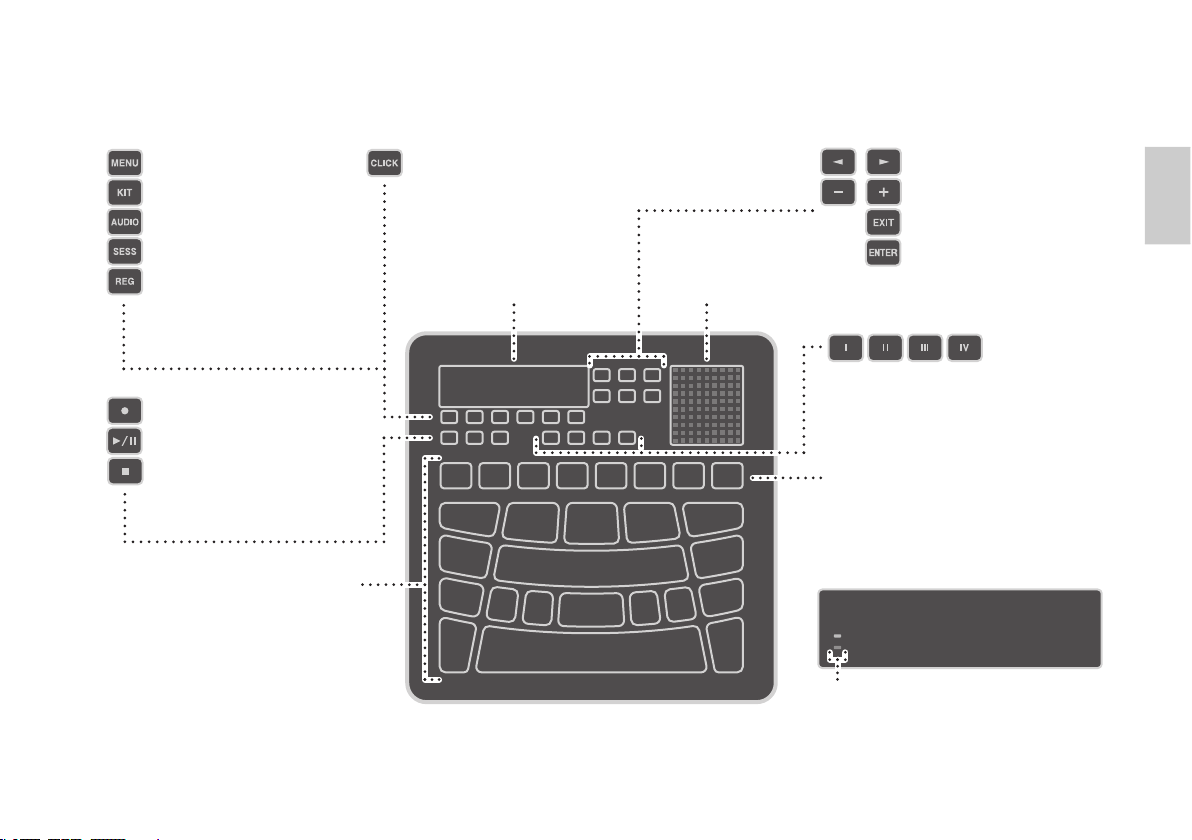
Menu button
Kit button
Audio button
Session Creator button
Registration button
(Changing various settings: p.19)
Record button
Playback/Pause button
Stop button
(Playing and recording audio
files: p.19)
Pads
(Playing the Finger Drum Pads: p.16)
Click button
(Starting and stopping the click: p.18)
LCD screen Built-in speaker
Select buttons
Minus/Plus buttons
Exit button
Enter button
(Changing various settings:
p.19)
Registration memory buttons
(Registration Memory: p.20)
RGB square pads (p.20)
LCD screen
Standby/On indicator
(Charging: p.14)
FGDP-50 FGDP-30 Startup Guide
11
Page 12
Controls
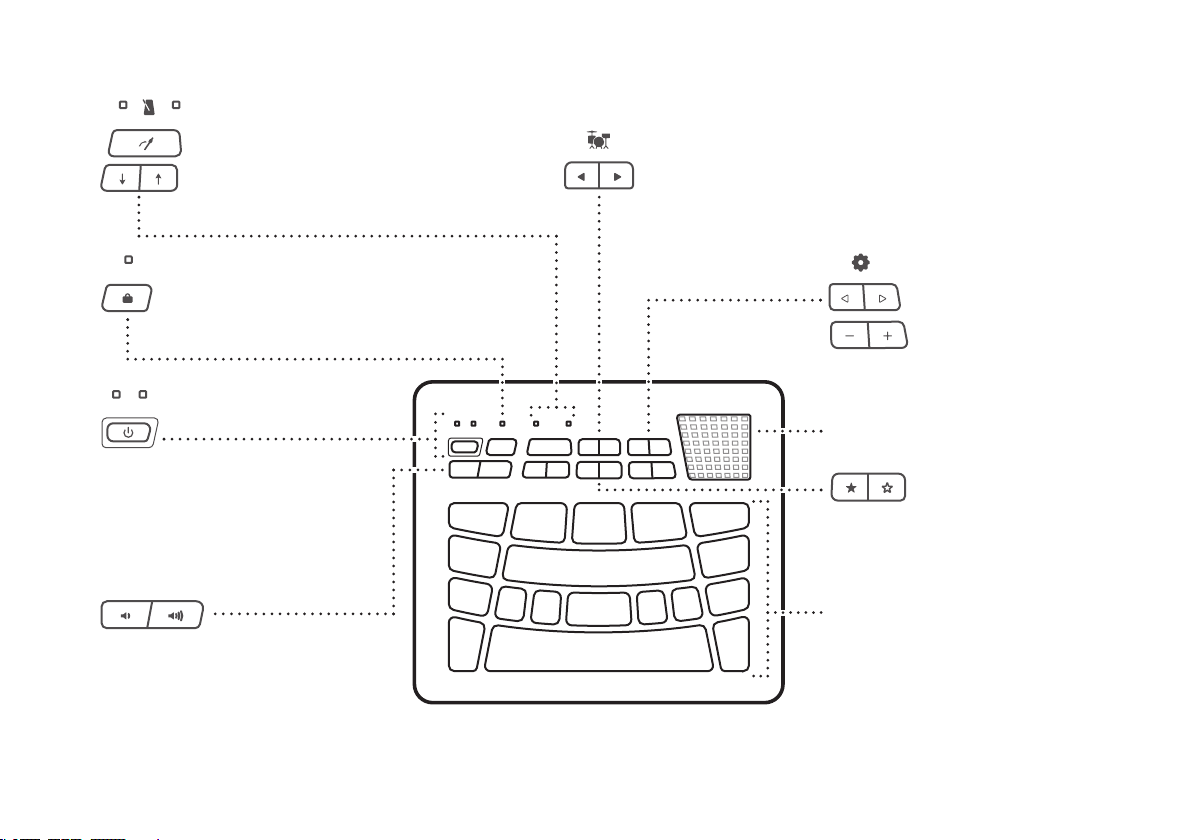
FGDP-30
Click lamps and button
Tempo Decrease/Increase buttons
(Starting and stopping the click: p.18)
Kit Select buttons
(Selecting the Kit: p.21)
Lock lamp and button
(Panel Lock: p.21)
Standby/On lamps and button
(Charging: p.14,
Turning the Power On/Off: p.15)
Volume Down/Up buttons
12 FGDP-50 FGDP-30 Startup Guide
Select buttons
Minus/Plus buttons
(Changing the settings: p.21)
Built-in speaker
Registration memory buttons
(Registration Memory: p.21)
Pads
(Playing the Finger Drum Pads: p.16)
Page 13
FGDP-50
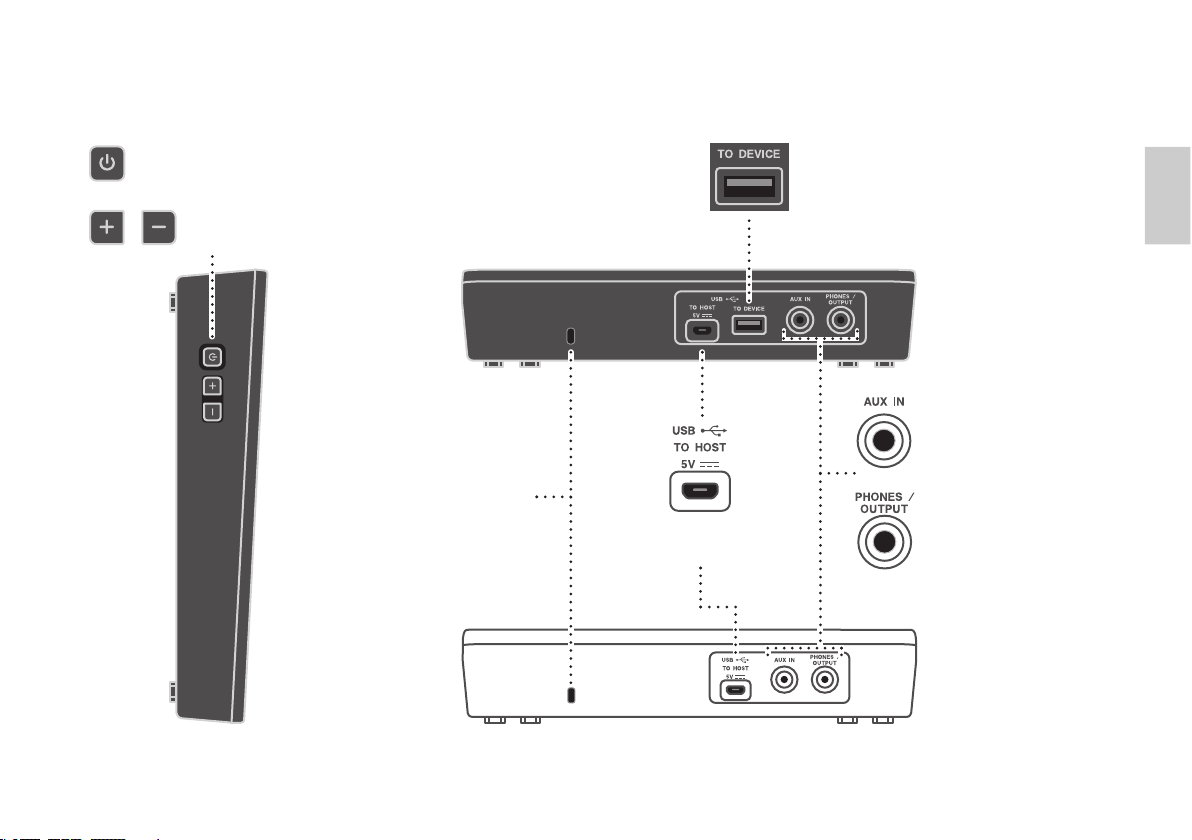
FGDP-50
FGDP-30
Side Back
Controls
Standby/On button
(Turning the Power On/Off: p.15)
Up/Down
volume buttons
Security slot
USB TO HOST
terminal
USB TO DEVICE terminal
* This terminal is for a USB flash drive only.
AUX IN jack
PHONES/OUTPUT
jack
FGDP-50 FGDP-30 Startup Guide
13
Page 14
Charging
2
3
Charging
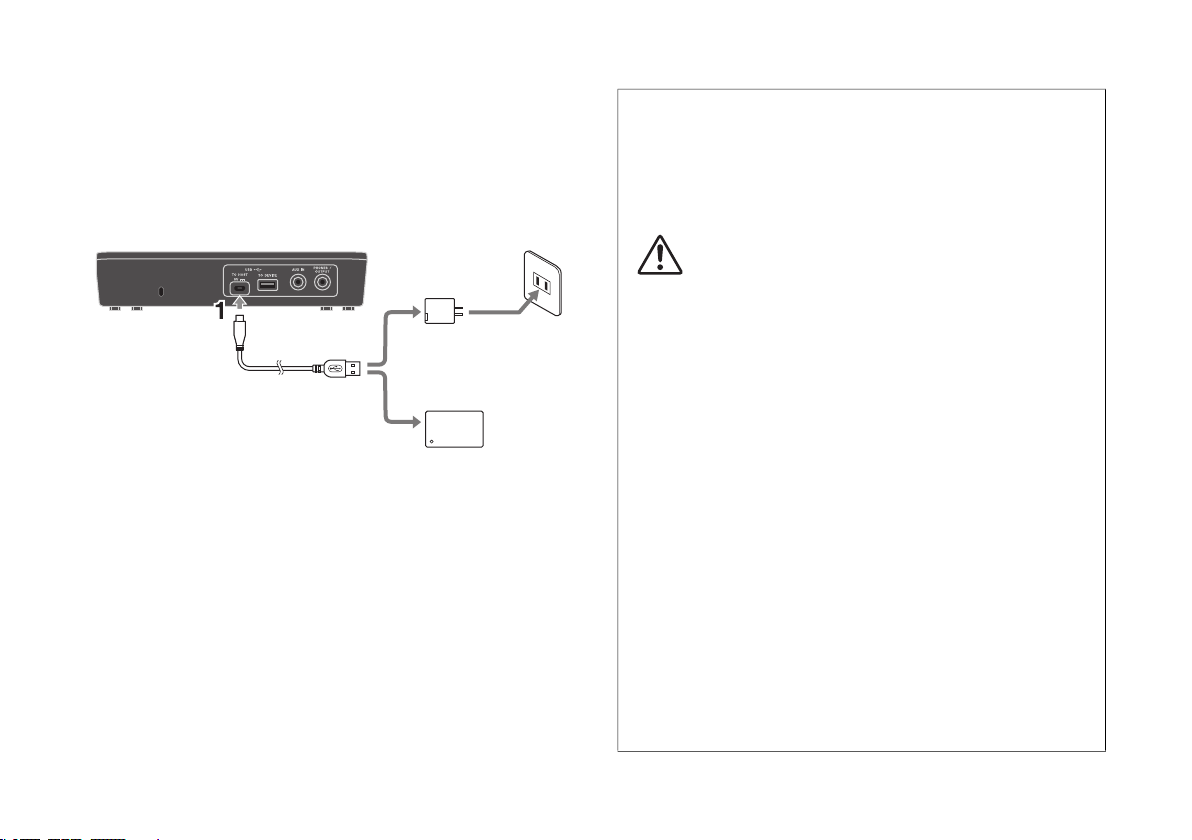
This product can be used after charging by connecting to an AC
outlet or a USB mobile battery in order as illustrated below. In
particular, before using for the first time after unpacking, make
sure to fully charge this product until the Standby/On indicator
(red) turns off.
USB power adaptor
(commercially available)
USB cable (supplied)
* The shapes of the plug and outlet may
differ depending on your locale.
NOTE
• The product can be used even while charging.
• When battery power is insufficient or abnormal, the Standby/On
indicator (red) or lamp (red) will blink.
• The estimated time from low battery to full charge is 1–3 hours, when
the product power is off (depending on the usage environment and
battery usage.)
• To recharge the battery after a full charge, you will need to unplug the
USB cable, and then connect it again.
or
2
USB mobile battery
(commercially available)
USB power adaptor / USB mobile battery
requirements
Output voltage DC 5V
Output current 1.5 A or greater USB BC specification
compatible products
CAUTION
Make sure to use a USB power adaptor or USB mobile battery
with the specifications above. Using the wrong adaptors or
batteries can result in damage to the product or overheating.
Follow the instructions that come with the connected USB power
adaptor or the USB mobile battery.
NOTICE
• Use a USB mobile battery that has a low-current mode
function, etc., and can supply power to devices with current
consumption of 25 mA or less. If you cannot charge the battery
with a UBS mobile battery, try a USB power adapter to see if
you can charge the battery from a power outlet.
• When the product is turned on and power turns off suddenly
and unexpectedly, your USB power adaptor or USB mobile
battery may not meet the requirements or may be damaged.
Try using another adaptor or battery that meets the
requirements, etc. If it should appear to be malfunctioning,
please consult Yamaha service personnel.
NOTE
When connected to a computer USB port or a USB power adaptor
with less output current than 1.5 A, the remaining battery power
may decrease even while charging (the Standby/On indicator or
lamp is lit in red).
14 FGDP-50 FGDP-30 Startup Guide
Page 15
Turning the Power On/Off
Turning the Power On/Off
Turning the power on
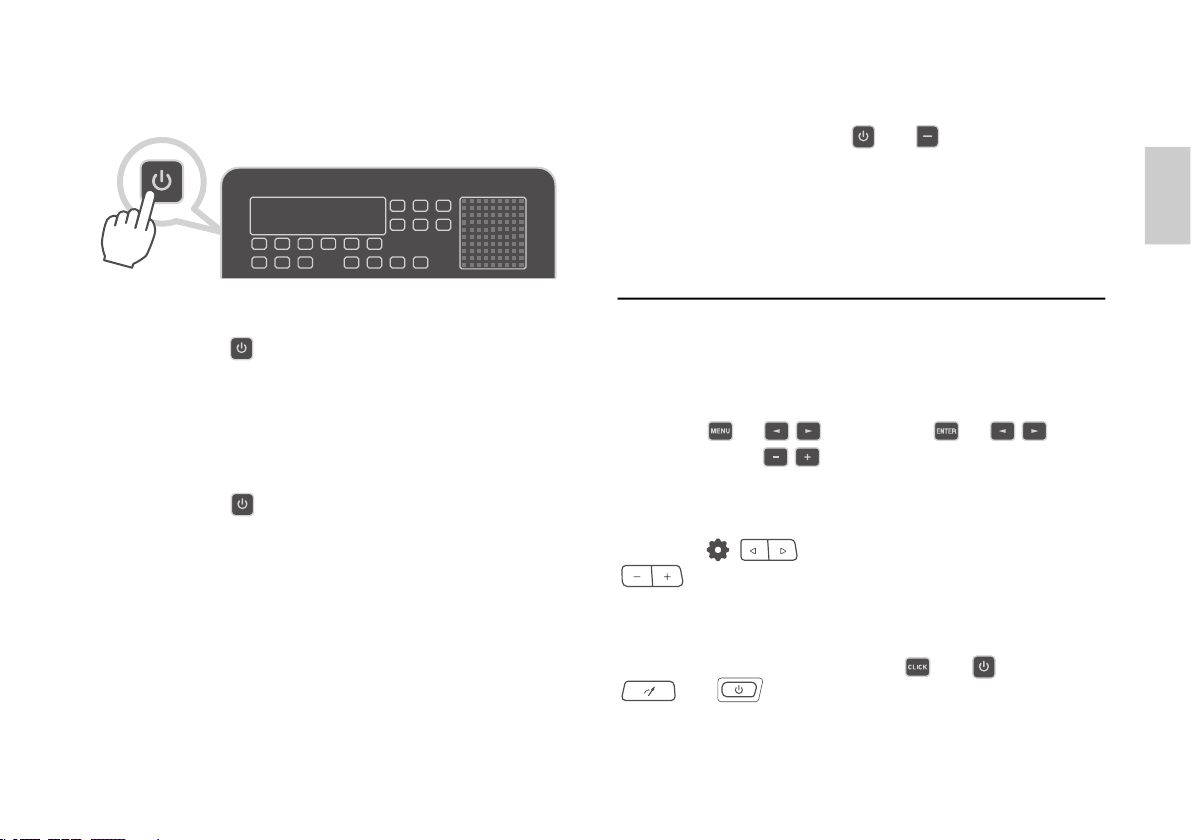
Press and hold the button until the LCD screen (FGDP-50) or
lamps (FGDP-30) light.
NOTE
When the battery is empty, the product will not be turned on until it has
been charged to a certain amount.
Turning the power off
Press and hold the button until the LCD screen (FGDP-50) or
lamps (FGDP-30) goes out.
NOTE
• When the power is off, the product settings are saved automatically.
(Some settings may not be saved; refer to the HTML User Guide for
details.)
• When the battery is low, the product will turn off automatically.
Forced power off
If the product behaves abnormally and no operation can be
performed, press and hold the and buttons at the same
time to force the power off.
NOTICE
When forcing the power off, the product settings will not be saved.
Auto Power Off
To prevent unnecessary power consumption, this product
automatically turns the power off after a certain period of
inactivity. The time that elapses before power is automatically
turned off can be changed by the following operations:
FGDP-50: “Utility”
“AutoPowerOff”
(The currently selected item or setting value is shown on the LCD
screen.)
FGDP-30: “Utility Auto Power Off Time”
(The currently selected item or setting value is sounded by voice
in English.)
When the power is off, press and hold and (FGDP-50) /
and (FGDP-30) at the same time to turn on the
power, the Auto Power Off Time setting will be “Disabled.”
FGDP-50 FGDP-30 Startup Guide
15
Page 16
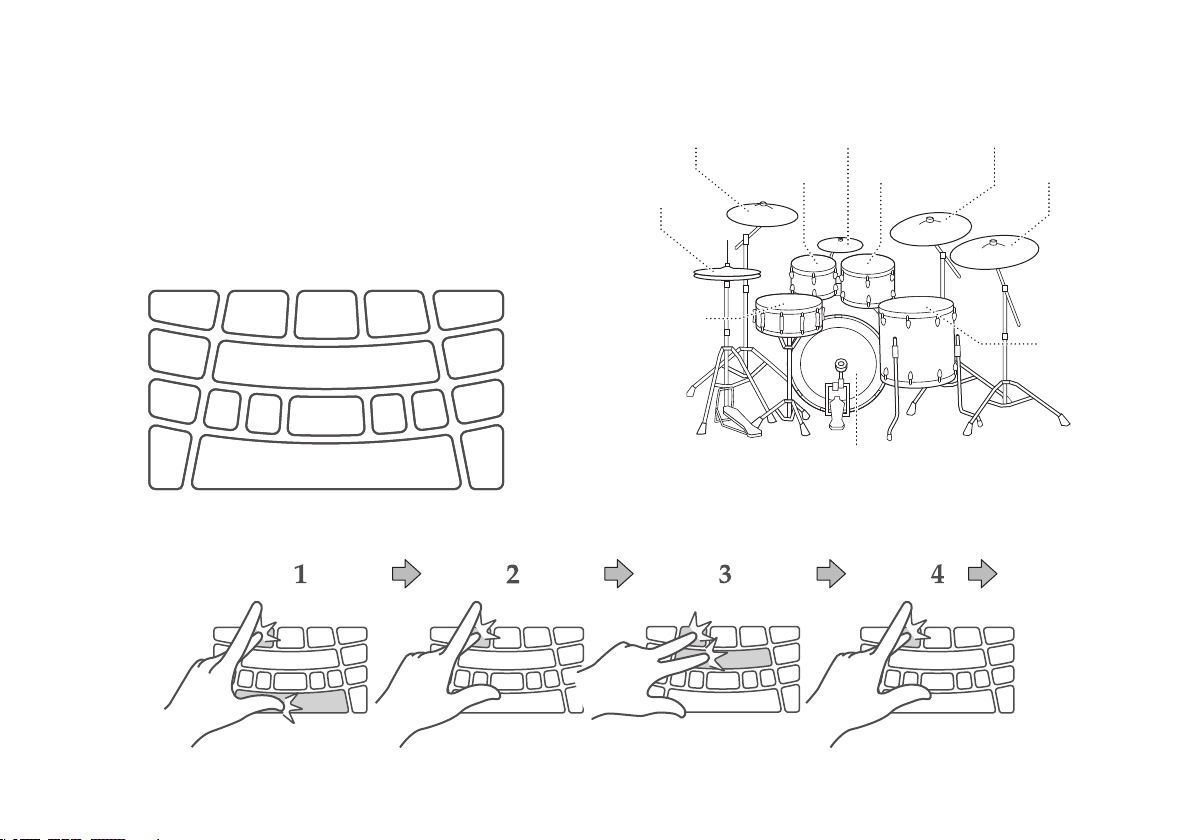
Playing the Finger Drum Pads
C2
H2
S1
R2 R1
S2
T6
M2 M1
T5
T4 T3
T2
T1
K
H1H3
C1
Playing the Finger Drum Pads
When you hit the pad with your finger, you will hear the sounds
assigned to each pad. The intensity of the sound changes
according to the strength of your playing. First, try playing a basic
8-beat pattern. We recommend starting out by using your middle
(second) finger to hit the upper hi-hat, your thumb to hit the
lower kick, and your index (first) finger to hit the middle snare.
You can play with either your left or right hand.
Pad Layout “Left” (see p.18)
Crash cymbal
Hi-hat cymbal
Snare drum
Splash cymbal
High tom Mid tom
Kick
(Bass drum)
Crash cymbal
Ride cymbal
Low tom
When playing
with the left hand
16 FGDP-50 FGDP-30 Startup Guide
Back to 1
Page 17
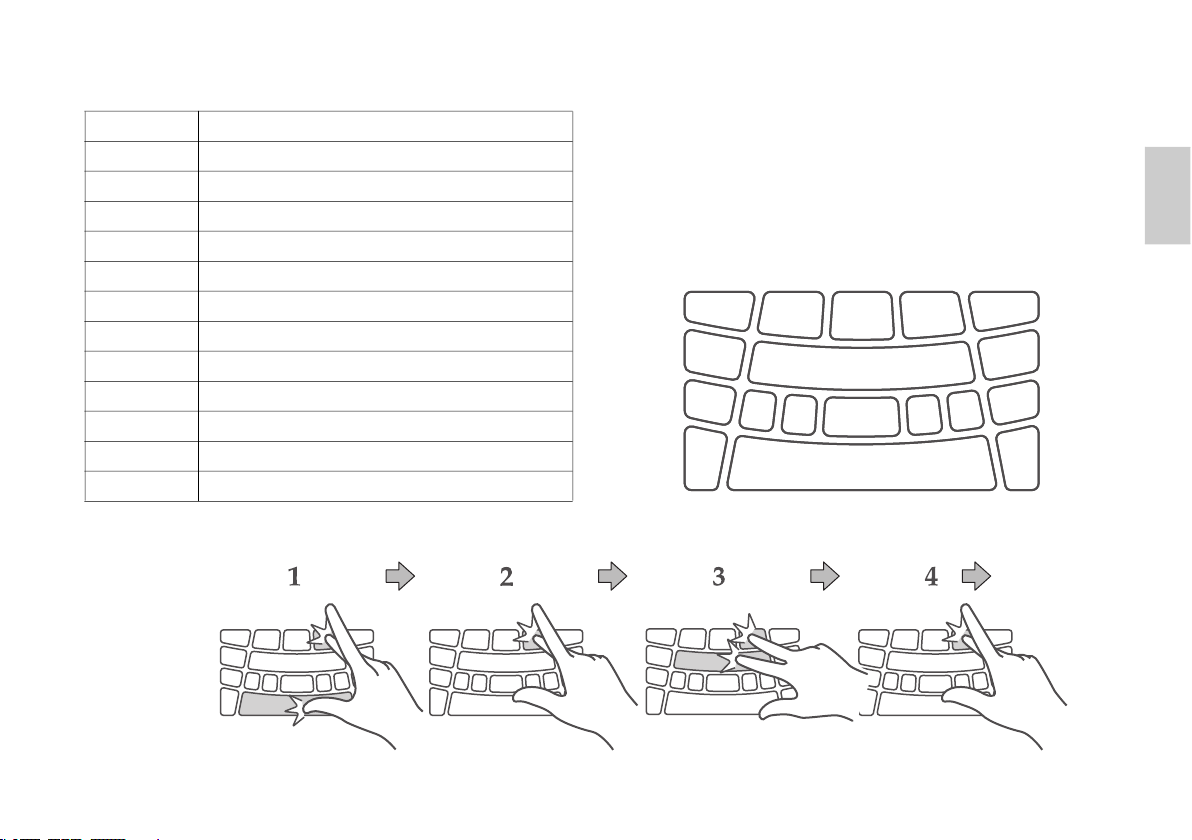
Factory-shipped instrument sounds (preset kit 1)
C1
H2
S1
R1 R2
S2
T1
M1 M2
T2
T3 T4
T5
T6
K
H3H1
C2
C1, C2 Crash cymbal
H1, H3 Hi-hat cymbal (close)
H2 Hi-hat cymbal (open)
R1 Ride cymbal (cup)
R2 Ride cymbal (bow)
S1 Snare drum (open shot)
S2 Snare drum (open rim shot)
T1, T6 Low tom
T2, T5 Mid tom
T3, T4 High tom
K Kick (bass drum)
M1 Snare drum (closed rim shot)
M2 Splash cymbal
Playing the Finger Drum Pads
Pad Layout “Right” (factory default)
When playing
with the right hand
Back to 1
FGDP-50 FGDP-30 Startup Guide
17
Page 18
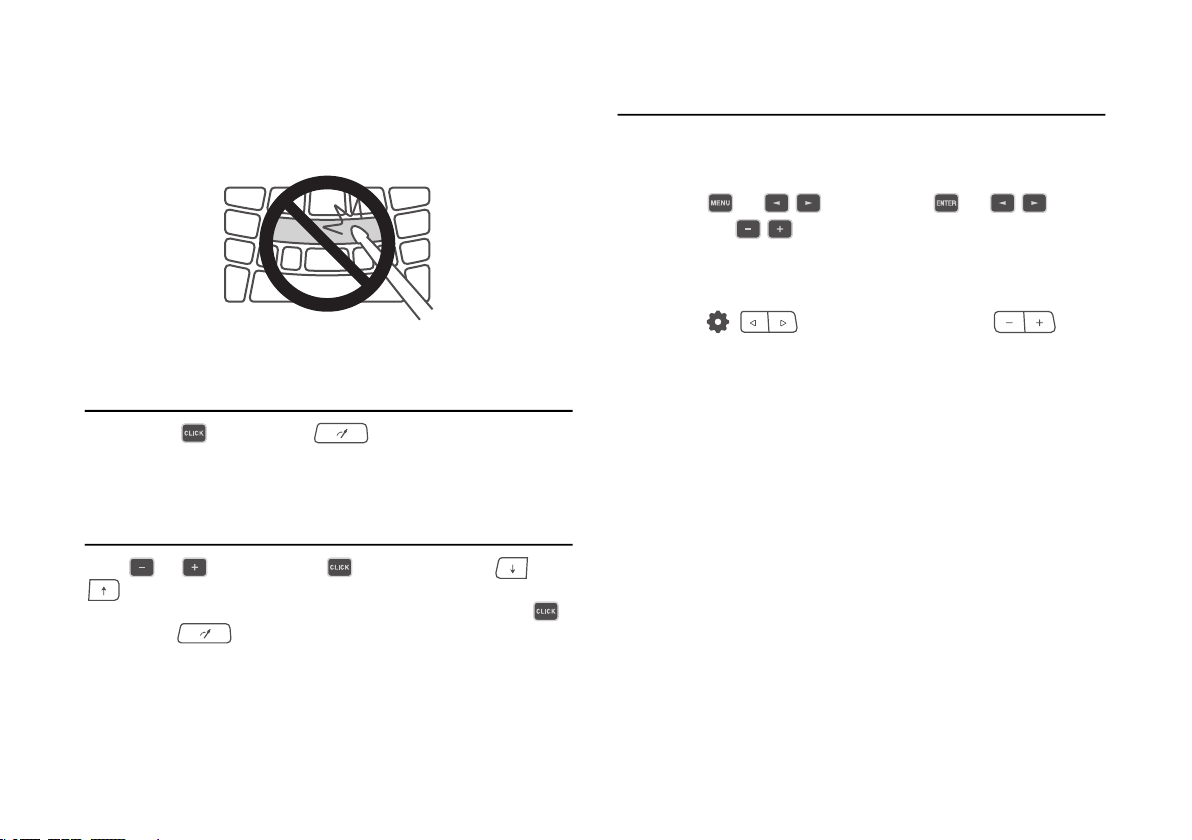
Playing the Finger Drum Pads
NOTICE
This product is designed for playing with the your fingers. Do not hit
the product with anything other than your fingers, such as sticks.
Doing so may cause damage to the product.
Starting and stopping the click
Briefly press (FGDP-50) or (FGDP-30) to start the
click. To stop the click, briefly press the button again.
Changing the tempo
Press or while pressing (FGDP-50) / press or
(FGDP-30) to change the tempo.
If you hit one of the pad three times or more while pressing
(FGDP-50) / (FGDP-30), the tempo will be set by the
average interval between pad hits.
The changed tempo is shown on the LCD screen (FGDP-50) or
sounded by voice in English (FGDP-30).
Changing the pad assignments
The sounds and functions assigned to the pads can be inverted
left or right.
FGDP-50: “Utility”
“PadLayout”
(The currently selected item or setting value is shown on the LCD
screen.)
FGDP-30: “Utility Pad Layout”
(The currently selected item or setting value is sounded by voice
in English.)
18 FGDP-50 FGDP-30 Startup Guide
Page 19
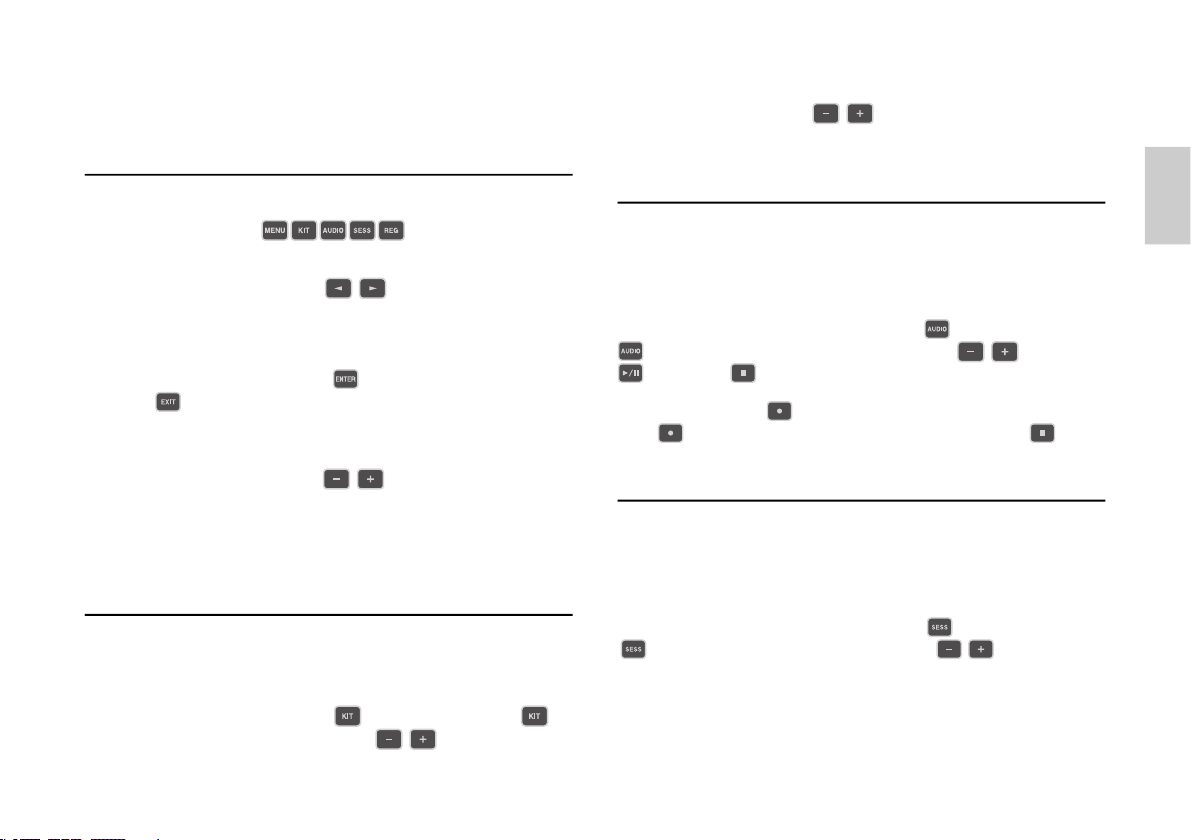
Various Functions (FGDP-50)
Various Functions (FGDP-50)
Changing various settings
The settings can be changed by the following operations.
1. Press one of the buttons and
select the function (mode) you want to change.
2. Briefly press one of the buttons to select
the item you want to set.
Press and hold one of the buttons to continuously scroll
through the items.
(If there are submenus, press to move to the submenu.
Press to return to the menu one level up.)
The currently selected item or setting value is shown on the
LCD screen.
3. Briefly press one of the buttons to change
the value.
Press and hold one of the buttons to continuously scroll
through the values.
Selecting the Kit (sound set)
A Kit is a collection of sounds from different type of musical
instruments, etc. The Kit can be changed by the following
operations.
Move to the home screen of mode (e.g., press
button twice) select a Kit with .
The Kit name will be shown on the LCD screen.
Press and hold one of the buttons to continuously scroll
though the Kits.
Playing and recording audio files
An audio file on the USB flash drive can be played back while
performance can be recorded to the USB flash drive as an audio
file.
The available audio format is WAV (44.1 kHz, 16-bit, stereo).
Playback: Move to the home screen of mode (e.g., press
button twice) select an audio file with . Play with
, stop with .
Recording: Press for recording standby start recording
with (your performance) stop recording with .
Using the Session Creator (backing Phrases)
This product provides various full instrumental backing phrases as
a “Session Creator,” which can be played back as accompaniment
to your pad performance. Each phrase consists of six sections:
INTRO, MAIN A, MAIN B, MAIN C, MAIN D and ENDING.
Playback: Move to the home screen of mode (e.g., press
button twice) select a Session with hit
[7 START/STOP] of the RGB square pad.
Change Section: Hit one of the [2 INTRO/ENDING] to
[6 MAIN D] of the RGB square pad.
FGDP-50 FGDP-30 Startup Guide
19
Page 20
Various Functions (FGDP-50)
Stop: Hit [7 START/STOP] of the RGB square pad.
NOTE
You can mute the drum part by briefly pressing [1 DRUM MUTE] of the
RGB square pad or playback only the drum part by briefly pressing
[8 DRUM SOLO] of the RGB square pad.
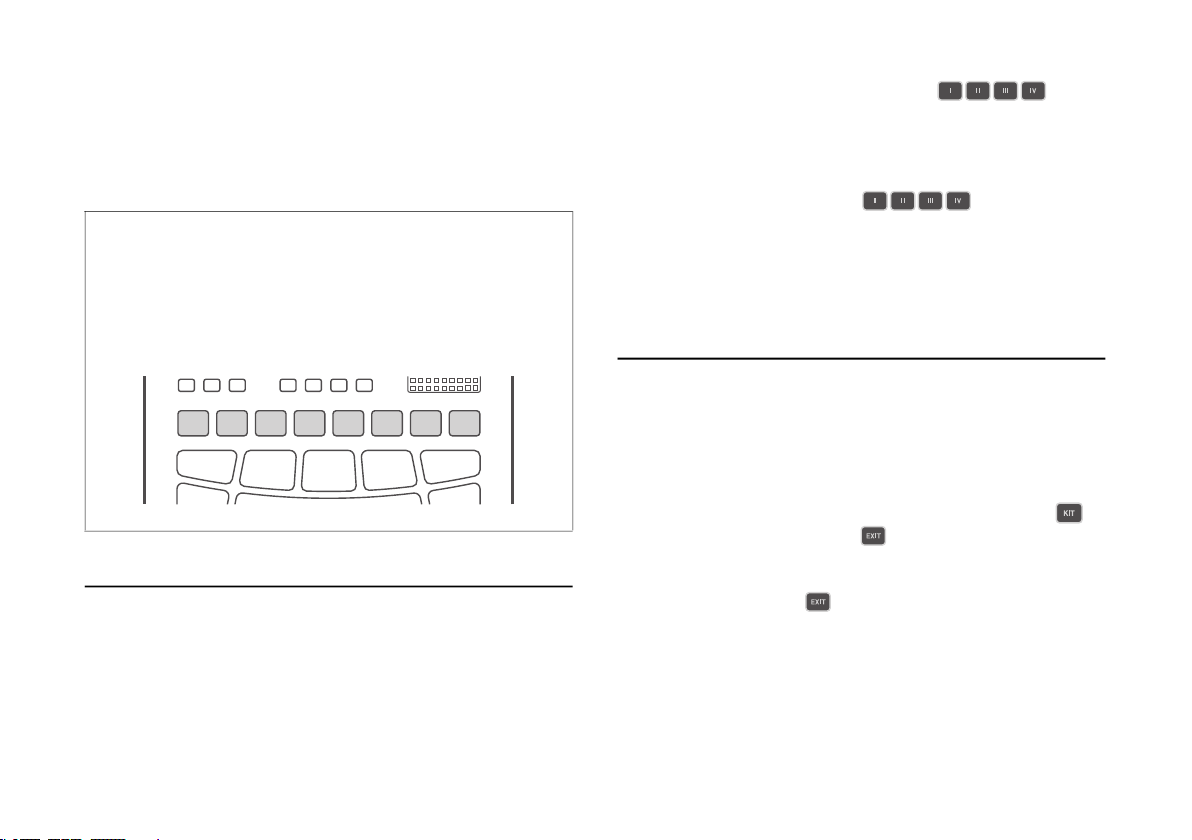
RGB Square Pads
These are self-illuminating pads which light colorfully in time
with performance, making it visually interesting as well as
providing additional pads/sounds for you to play.
In Session Creator (p.19), these are also used to select a
section.
Registration Memory
A batch of settings can be registered to a button, and you can
recall these settings anytime with a single touch. This convenient
function is called Registration Memory. Register or recall the
settings with the following operations.
Registration: Press and hold one of the
buttons until the LCD screen indicates that registration is
complete.
The current settings will be registered to the pressed button.
Recall: Briefly press one of the buttons.
NOTICE
Do not hold down the button if you just want to recall a registration,
since holding down the button will register and overwrite the
settings.
Panel Lock
To prevent unintended operation by accidentally touching an
unnecessary button during performance, all buttons other than
the pads can be temporarily disabled (locked). Buttons for power
operation and panel unlocking are active even when Panel Lock is
enabled.
Lock: Move to the home screen of each mode (e.g., press
button twice) press and hold until the LCD screen shows
the panel is locked.
Unlock: Press and hold until the LCD screen shows the
panel is unlocked.
20 FGDP-50 FGDP-30 Startup Guide
Page 21
Various Functions (FGDP-30)
Various Functions (FGDP-30)
Selecting the Kit (sound set)
A Kit is a collection of sounds from different types of musical
instruments, etc. The Kit can be changed with the following
operations.
Select a Kit with .
Press and hold one of the buttons to continuously scroll though
the Kits.
Registration Memory
A batch of settings can be registered to a button, and you can
recall these settings anytime with a single touch. This convenient
function is called Registration Memory. Register or recall the
settings with the following operations.
Registration: Press and hold one of the buttons until
the English voice prompts you.
The current settings will be registered to the pressed button.
Recall: Briefly press one of the buttons.
NOTICE
Do not hold down the button if you just want to recall a
registration, since holding down the button will register and
overwrite the settings.
Changing the settings
The settings can be changed with the following operations.
1. Select the setting you want to change with
.
Press and hold one of the buttons to continuously scroll
through the settings.
The currently selected setting is sounded by voice in English.
2. Briefly press to change the value.
Press and hold one of the buttons to continuously scroll
through the values.
Panel Lock
To prevent unintended operation by accidentally touching an
unnecessary button during performance, the buttons other than
the pads can be temporarily disabled (locked). Buttons for power
operation and panel unlocking are active even when Panel Lock is
enabled.
Press and hold until the lock lamp lights up.
Unlock (disable) Panel Lock by performing the same operation
again.
FGDP-50 FGDP-30 Startup Guide
21
Page 22
Specifications
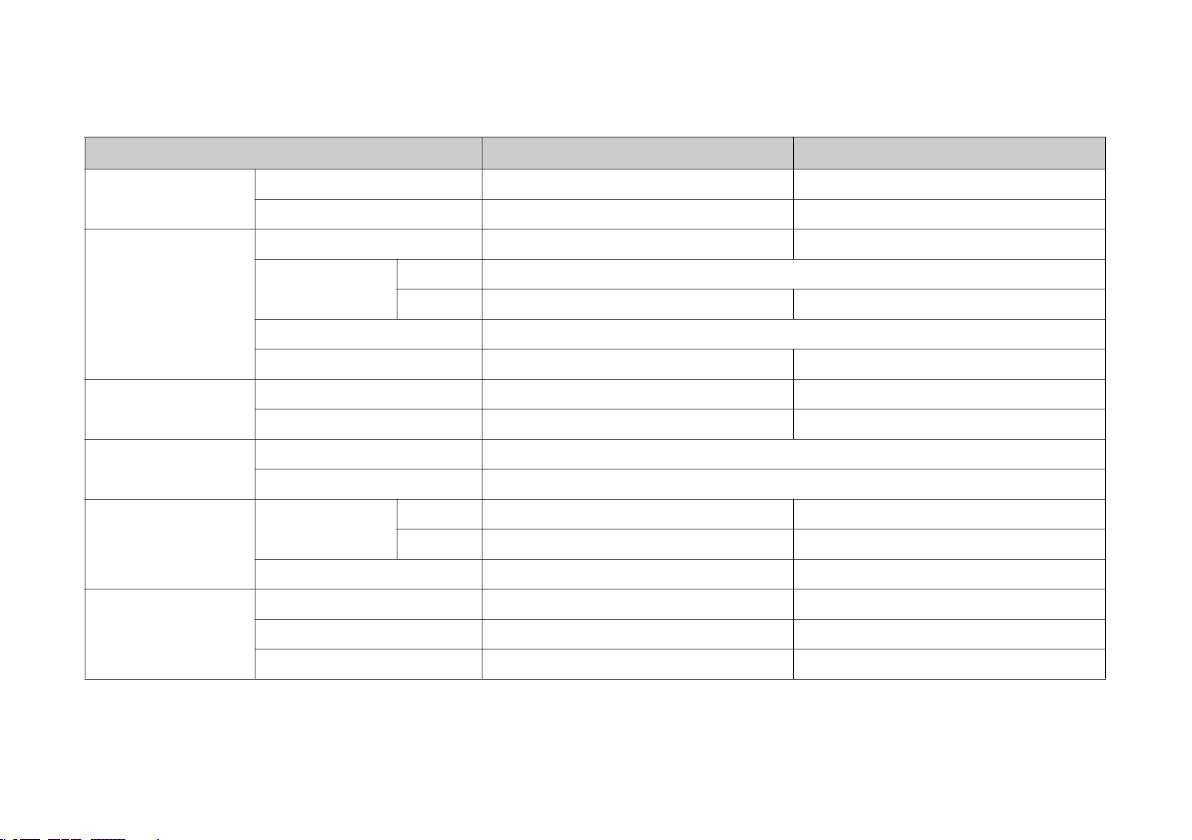
Specifications
Product Name FGDP-50 FGDP-30
Size/Weight Dimensions (W × D × H) 223 × 223 × 51 mm 223 × 195 × 49 mm
Weight 1.1 kg 1.0 kg
Pads Drum Pads (RGB square pads) 26 (8) 18 (—)
Number of Trigger
Settings
After Touch Polyphonic, Channel
Assignable Functions Yes —
Other Interfaces Display LCD with backlight —
Voice Guide — English
Tone Generator Type AWM2
Polyphony (max.) 64
Kits Number of Kits Preset 48 39
Kit Edit Yes Yes (only some parameter)
Voices Number of Voices 1500 1212
Note Repeat Each Pad —
Humanize Each Pad —
Preset 12
User 50 Preset overwrite
User 50 Preset overwrite
22 FGDP-50 FGDP-30 Startup Guide
Page 23
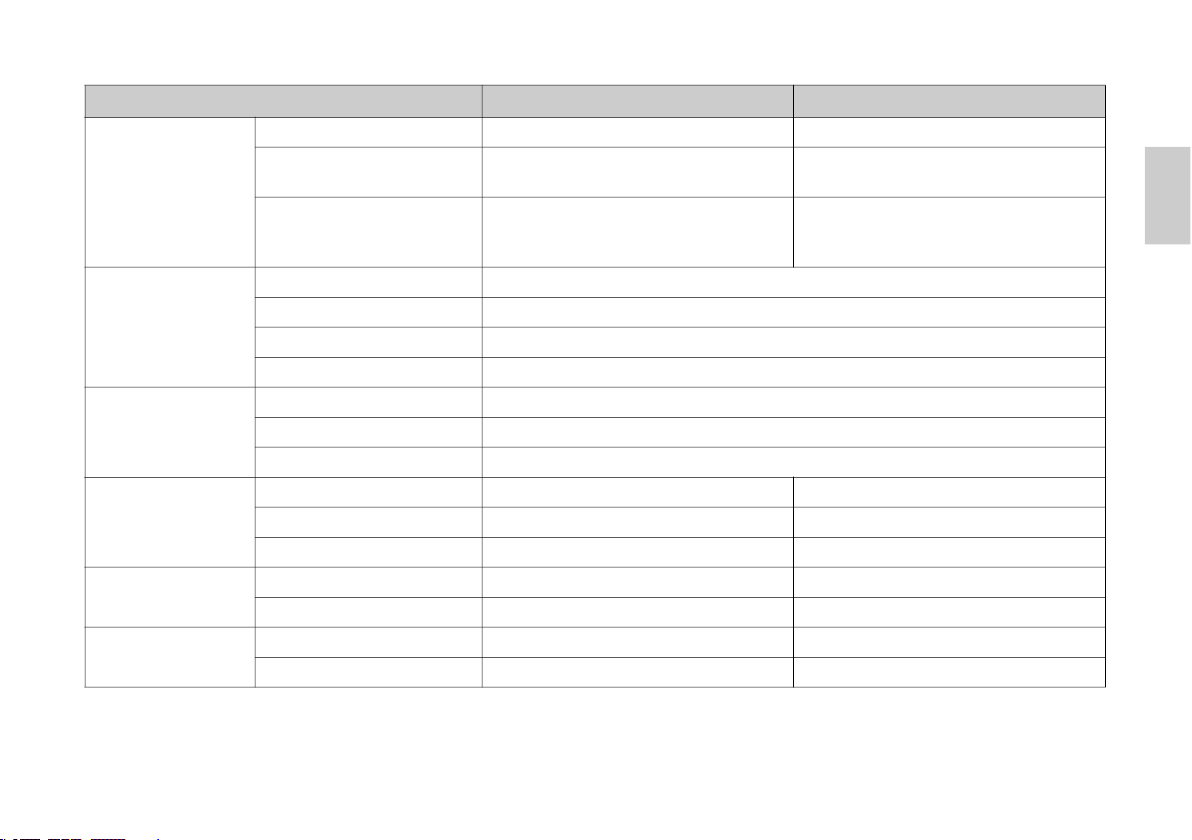
Product Name FGDP-50 FGDP-30
User Samples Number of User Samples (max.) 100 —
Sample Format WAV, AIFF
(44.1 kHz, 16-bit, mono/stereo)
Sample Time (max.) approx. 600 seconds (mono),
approx. 300 seconds (stereo),
approx. 20 seconds per file
Effects Reverb 11
Chorus 10
Variation 23
Speaker EQ Type 5
Click Tempo 30 – 300, Tap Tempo
Patterns 1/4, 1/4T, 1/8, 1/8T, 1/16, 1/16T, Clave
Beats 1 – 16
Session Creator Number of Session Creators 23 —
Sections Intro, Main × 4, Ending —
Parts Drum, Bass, Other × 4 —
USB Audio Player/
Recorder
Registration Memory Preset 4 Buttons × 5 Banks 2 Buttons × 1 Bank
Recording Time (max.) approx. 80 minutes per file —
Audio Format WAV (44.1 kHz, 16 bit, stereo) —
User 4 Buttons × 50 Banks Preset overwrite
—
—
Specifications
FGDP-50 FGDP-30 Startup Guide
23
Page 24
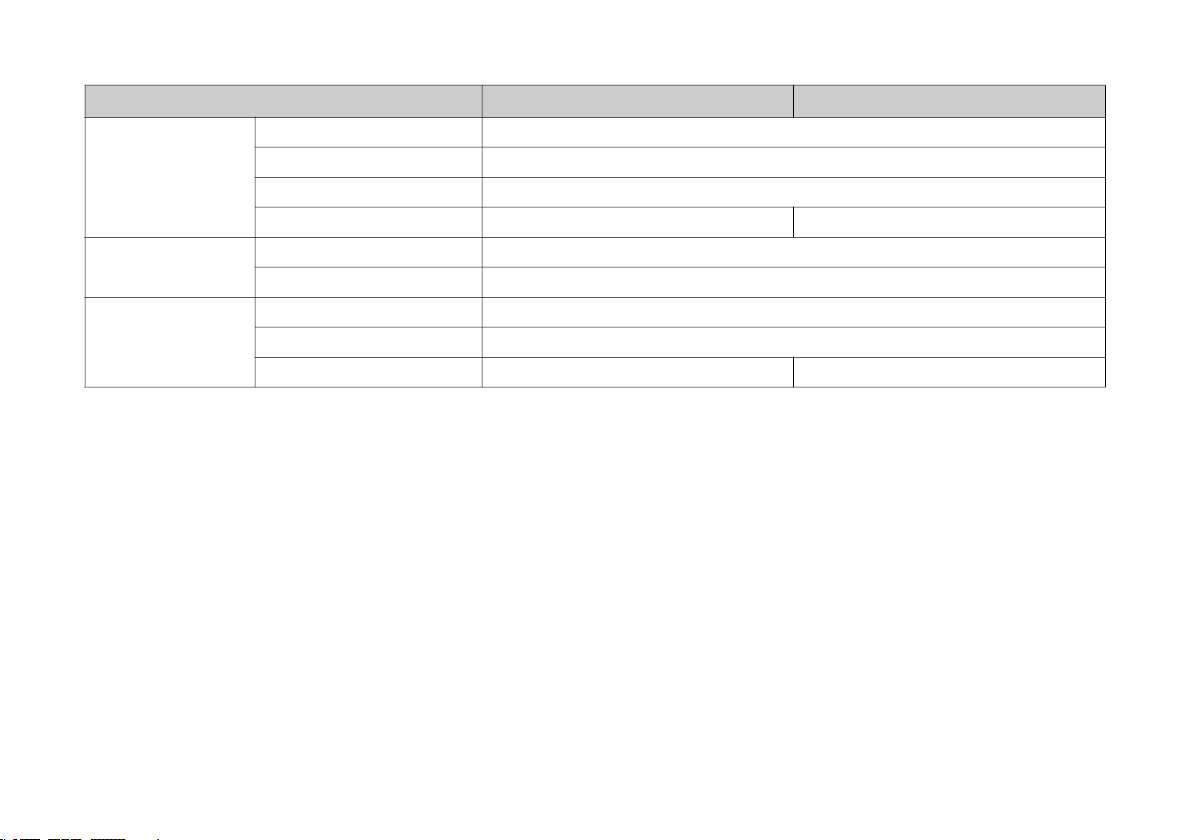
Specifications
Product Name FGDP-50 FGDP-30
Connectivity PHONES/OUTPUT Stereo mini jack
AUX IN Stereo mini jack
USB TO HOST Micro B
USB TO DEVICE Type A —
Sound System Amplifiers 2.5 W
Built-in speaker 4 cm × 1
Power Supply Power Supply USB power adaptor 5 V/1.5 A or greater USB BC specification compatible products
Internal Battery 1400 mAh, 4.5 Wh 3 hours
Power Consumption 7 W 4 W
*The contents of this manual apply to the latest specifications as of the publishing date. To obtain the latest manual, access the Yamaha website then
download the manual file. Since specifications, equipment or separately sold accessories may not be the same in every locale, please check with your
Yamaha dealer.
24 FGDP-50 FGDP-30 Startup Guide
Page 25
Troubleshooting
FGDP-50
https://manual.yamaha.com/mi/de/fgdp50/index_q.html
FGDP-30
https://manual.yamaha.com/mi/de/fgdp30/index_q.html
Troubleshooting
FGDP-50 FGDP-30 Startup Guide
25
Page 26
Page 27
Page 28
For details of products, please contact your nearest Yamaha representative or the authorized distributor listed below.
Pour plus de détails sur les produits, veuillez-vous adresser à Yamaha ou au distributeur le plus proche de vous figurant dans la liste suivante.
Die Einzelheiten zu Produkten sind bei Ihrer unten aufgeführten Niederlassung und bei Yamaha Vertragshändlern in den jeweiligen Bestimmungsländern erhältlich.
Para detalles sobre productos, contacte su tienda Yamaha más cercana o el distribuidor autorizado que se lista debajo.
NORTH AMERICA
CANADA
Yamaha Canada Music Ltd.
135 Milner Avenue, Toronto, Ontario M1S 3R1,
Canada
Tel: +1-416-298-1311
U.S.A.
Yamaha Corporation of America
6600 Orangethorpe Avenue, Buena Park, CA 90620,
U.S.A.
Tel: +1-714-522-9011
CENTRAL & SOUTH AMERICA
MEXICO
Yamaha de México, S.A. de C.V.
Av. Insurgentes Sur 1647 Piso 9, Col. San José
Insurgentes, Delegación Benito Juárez, CDMX,
C.P. 03900, México
Tel: +52-55-5804-0600
BRAZIL
Yamaha Musical do Brasil Ltda.
Praça Professor José Lannes, 40-Cjs 21 e 22,
Brooklin Paulista Novo CEP 04571-100 – São Paulo –
SP, Brazil
Tel: +55-11-3704-1377
ARGENTINA
Yamaha Music Latin America, S.A.,
Sucursal Argentina
Olga Cossettini 1553, Piso 4 Norte,
Madero Este-C1107CEK,
Buenos Aires, Argentina
Tel: +54-11-4119-7000
PANAMA AND OTHER LATIN AMERICAN
REGIONS/CARIBBEAN REGIONS
Yamaha Music Latin America, S.A.
Edificio Torre Davivienda, Piso: 20 Avenida Balboa,
Marbella, Corregimiento de Bella Vista, Ciudad de
Panamá, Rep. de Panamá
Tel: +507-269-5311
EUROPE
THE UNITED KINGDOM/IRELAND
Yamaha Music Europe GmbH (UK)
Sherbourne Drive, Tilbrook, Milton Keynes,
MK7 8BL, U.K.
Tel: +44-1908-366700
GERMANY
Yamaha Music Europe GmbH
Siemensstrasse 22-34, 25462 Rellingen, Germany
Tel: +49-4101-303-0
SWITZERLAND/LIECHTENSTEIN
Yamaha Music Europe GmbH,
Branch Switzerland in Thalwil
Seestrasse 18a, 8800 Thalwil, Switzerland
Tel: +41-44-3878080
AUSTRIA/CROATIA/
HUNGARY/ROMANIA/SLOVAKIA/SLOVENIA
Yamaha Music Europe GmbH, Branch Austria
Schleiergasse 20, 1100 Wien, Austria
Tel: +43-1-60203900
POLAND
Yamaha Music Europe
Sp.z o.o. Oddział w Polsce
ul. Młynarska 48, 01-171 Warszawa, Poland
Tel: +48-22-880-08-88
BULGARIA
Dinacord Bulgaria LTD.
Bul.Iskarsko Schose 7 Targowski Zentar Ewropa 1528
Sofia, Bulgaria
Tel: +359-2-978-20-25
MALTA
Olimpus Music Ltd.
Valletta Road, Mosta MST9010, Malta
Tel: +356-2133-2093
NETHERLANDS/BELGIUM/LUXEMBOURG
Yamaha Music Europe, Branch Benelux
Wattbaan 1 3439ML Nieuwegein,
The Netherlands
Tel: +31-347-358040
CZECH REPUBLIC
/
FRANCE
Yamaha Music Europe
7 rue Ambroise Croizat, Zone d'activités de Pariest,
77183 Croissy-Beaubourg, France
Tel: +33-1-6461-4000
ITALY
Yamaha Music Europe GmbH, Branch Italy
Via Tinelli N.67/69 20855 Gerno di Lesmo (MB), Italy
Tel: +39-039-9065-1
SPAIN/PORTUGAL
Yamaha Music Europe GmbH Ibérica,
Sucursal en España
Ctra. de la Coruña km. 17,200, 28231
Las Rozas de Madrid, Spain
Tel: +34-91-639-88-88
GREECE
Philippos Nakas S.A. The Music House
19th klm. Leof. Lavriou 190 02 Peania – Attiki, Greece
Tel: +30-210-6686260
SWEDEN
Yamaha Music Europe GmbH Germany
Filial Scandinavia
JA Wettergrensgata 1, 400 43 Göteborg, Sweden
Tel: +46-31-89-34-00
DENMARK
Yamaha Music Denmark,
Fillial of Yamaha Music Europe GmbH, Tyskland
Generatorvej 8C, ST. TH., 2860 Søborg, Denmark
Tel: +45-44-92-49-00
FINLAND
F-Musiikki Oy
Antaksentie 4
FI-01510 Vantaa, Finland
Tel: +358 (0)96185111
NORWAY
Yamaha Music Europe GmbH Germany Norwegian Branch
c/o Box 30053, 400 43 Göteborg, Sweden
Tel: +47-6716-7800
Page 29
ICELAND
Hljodfaerahusid Ehf.
Sidumula 20
IS-108 Reykjavik, Iceland
Tel: +354-525-5050
CYPRUS
Nakas Music Cyprus Ltd.
Nikis Ave 2k
1086 Nicosia
Tel: + 357-22-511080
Major Music Center
21 Ali Riza Ave. Ortakoy
P.O.Box 475 Lefkoşa, Cyprus
Tel: (392) 227 9213
RUSSIA
Yamaha Music (Russia) LLC.
Room 37, entrance 7, bld. 7, Kievskaya street,
Moscow, 121059, Russia
Tel: +7-495-626-5005
OTHER EUROPEAN REGIONS
Yamaha Music Europe GmbH
Siemensstrasse 22-34, 25462 Rellingen, Germany
Tel: +49-4101-303-0
AFRICA
Yamaha Music Gulf FZE
JAFZA-16, Office 512, P.O.Box 17328,
Jebel Ali FZE, Dubai, UAE
Tel: +971-4-801-1500
MIDDLE EAST
TURKEY
Dore Muzik
Yeni Sülün Sokak No. 10
Levent İstanbul / Turkiye
Tel: +90-212-236-3640
Fax: +90-212-259-5567
ISRAEL
RBX International Co., Ltd.
P.O Box 10245, Petach-Tikva, 49002
Tel: (972) 3-925-6900
OTHER REGIONS
Yamaha Music Gulf FZE
JAFZA-16, Office 512, P.O.Box 17328,
Jebel Ali FZE, Dubai, UAE
Tel: +971-4-801-1500
ASIA
MAINLAND CHINA
Yamaha Music & Electronics (China) Co., Ltd.
2F, Yunhedasha, 1818 Xinzha-lu, Jingan-qu,
Shanghai, China
Tel: +86-400-051-7700
INDIA
Yamaha Music India Private Limited
P-401, JMD Megapolis, Sector-48, Sohna Road,
Gurugram-122018, Haryana, India
Tel: +91-124-485-3300
INDONESIA
PT Yamaha Musik Indonesia Distributor
Yamaha Music Center Bldg. Jalan Jend. Gatot
Subroto Kav. 4, Jakarta 12930, Indonesia
Tel: +62-21-520-2577
KOREA
Yamaha Music Korea Ltd.
11F, Prudential Tower, 298, Gangnam-daero,
Gangnam-gu, Seoul, 06253, Korea
Tel: +82-2-3467-3300
MALAYSIA
Yamaha Music (Malaysia) Sdn. Bhd.
No.8, Jalan Perbandaran, Kelana Jaya, 47301
Petaling Jaya, Selangor, Malaysia
Tel: +60-3-78030900
SINGAPORE
Yamaha Music (Asia) Private Limited
Block 202 Hougang Street 21, #02-00,
Singapore 530202, Singapore
Tel: +65-6740-9200
TAIWAN
Yamaha Music & Electronics Taiwan Co., Ltd.
2F., No.1, Yuandong Rd., Banqiao Dist.,
New Taipei City 22063, Taiwan
Tel: +886-2-7741-8888
THAILAND
Siam Music Yamaha Co., Ltd.
3, 4, 15, 16th Fl., Siam Motors Building,
891/1 Rama 1 Road, Wangmai,
Pathumwan, Bangkok 10330, Thailand
Tel: +66-2215-2622
VIETNAM
Yamaha Music Vietnam Company Limited
15th Floor, Nam A Bank Tower, 201-203 Cach Mang
Thang Tam St., Ward 4, Dist.3,
Ho Chi Minh City, Vietnam
Tel: +84-28-3818-1122
OTHER ASIAN REGIONS
https://asia.yamaha.com/
OCEANIA
AUSTRALIA
Yamaha Music Australia Pty. Ltd.
Level 1, 80 Market Street, South Melbourne,
VIC 3205 Australia
Tel: +61-3-9693-5111
NEW ZEALAND
Music Works LTD
P.O.BOX 6246 Wellesley, Auckland 4680,
New Zealand
Tel: +64-9-634-0099
REGIONS AND TRUST
TERRITORIES IN PACIFIC OCEAN
https://asia.yamaha.com/
Head Office/Manufacturer: Yamaha Corporation 10-1, Nakazawa-cho, Naka-ku, Hamamatsu, 430-8650, Japan
Importer (European Union): Yamaha Music Europe GmbH Siemensstrasse 22-34, 25462 Rellingen, Germany
Importer (United Kingdom): Yamaha Music Europe GmbH (UK) Sherbourne Drive, Tilbrook, Milton Keynes, MK7 8BL, United Kingdom
DMI32
Page 30
VFW2090
Yamaha Web Site (English only)
https://www.yamahasynth.com/
Yamaha Downloads
https://download.yamaha.com/
© 2023 Yamaha Corporation
Published 05/2023
MWES-A0
10-1 Nakazawa-cho, Naka-ku, Hamamatsu, 430-8650 Japan
 Loading...