

Page 1

Yamaha CS-700
Integrators Reference Guide
Revision 4.5
4/16/2019
Yamaha Unified Communications
144 North Road, Suite 3250
Sudbury, MA 01776
978-610-4040
Page 2

Table of Contents
1 Overview ............................................................................................................................................... 8
2 USB Description .................................................................................................................................... 8
2.1 VID and PID ................................................................................................................................... 9
2.2 Interface Definitions for the USB HUB Component ...................................................................... 9
2.3 Interface Definitions for the Audio Component ........................................................................... 9
2.3.1 Audio Report ......................................................................................................................... 9
2.3.2 Speaker Volume Synchronization ....................................................................................... 10
2.4 Interface Definitions for the Camera Component ...................................................................... 11
2.4.1 Video Configuration and Status .......................................................................................... 11
2.4.2 Video Stream ....................................................................................................................... 12
3 IP Interface .......................................................................................................................................... 13
echo ............................................................................................................................................. 14
4 Library Interface .................................................................................................................................. 14
4.1 USB Library Reference ................................................................................................................ 15
CsDevComm_Mode enum .......................................................................................................... 15
devAttach .................................................................................................................................... 15
devDetach ................................................................................................................................... 16
isConnected ................................................................................................................................. 16
coreCliCmd .................................................................................................................................. 16
notifCtrl ....................................................................................................................................... 17
updateFirmware .......................................................................................................................... 17
downloadLogs
importConfig ............................................................................................................................... 18
exportConfig ................................................................................................................................ 19
5 API Command Reference .................................................................................................................... 19
5.1 Overview ..................................................................................................................................... 19
5.2 Categories ................................................................................................................................... 20
5.2.1 System ................................................................................................................................. 20
5.2.1.1 System Properties ........................................................................................................... 20
............................................................................................................................. 18
product ........................................................................................................................................ 20
base-sernum ............................................................................................................................... 21
voip-capable ................................................................................................................................ 21
base-ver ....................................................................................................................................... 22
systemname ................................................................................................................................ 22
md5-password ............................................................................................................................ 23
Yamaha CS-700 Integrators Reference Guide 2
Page 3

enable-btn-camera...................................................................................................................... 24
enable-btn-audio ........................................................................................................................ 24
enable-btn-volume ..................................................................................................................... 25
enable-btn-bluetooth.................................................................................................................. 26
enable-led-call ............................................................................................................................. 26
region .......................................................................................................................................... 27
dst-enabled ................................................................................................................................. 28
dst-start-rules .............................................................................................................................. 29
dst-end-rules ............................................................................................................................... 29
time-zone .................................................................................................................................... 30
recent-call-enabled ..................................................................................................................... 31
require-https ............................................................................................................................... 32
power-saving-mode .................................................................................................................... 33
power-saving-time ...................................................................................................................... 33
auto-deploy ................................................................................................................................. 34
enable-deploy ............................................................................................................................. 35
provisioning-interval ................................................................................................................... 35
snmp-enable ............................................................................................................................... 36
snmp-community ........................................................................................................................ 37
snmp-contact-name .................................................................................................................... 37
snmp-device-location .................................................................................................................. 38
dialer-connection-mode ............................................................................................................. 38
snmp-address .............................................................................................................................. 40
verbose-log-enabled ................................................................................................................... 40
ui-mask ........................................................................................................................................ 41
5.2.1.2 System Statuses .............................................................................................................. 42
usb-conn-status ........................................................................................................................... 42
upgrade-status ............................................................................................................................ 42
camera-upgrade-status ............................................................................................................... 43
power-saving-status .................................................................................................................... 44
usb-aud-rx-status ........................................................................................................................ 44
usb-aud-tx-status ........................................................................................................................ 45
5.2.1.3 System Commands .......................................................................................................... 45
regnotify ...................................................................................................................................... 45
restart .......................................................................................................................................... 46
set reset-setting .......................................................................................................................... 46
5.2.2 Audio ................................................................................................................................... 47
5.2.2.1 Audio Properties ............................................................................................................. 47
eq ................................................................................................................................................ 47
high-pass-filter ............................................................................................................................ 47
analog-audio-in-mode ................................................................................................................. 48
analog-audio-in-gain ................................................................................................................... 49
speaker-volume .......................................................................................................................... 50
Yamaha CS-700 Integrators Reference Guide 3
Page 4

ring-tone...................................................................................................................................... 50
ringer-volume .............................................................................................................................. 51
5.2.2.2 Audio Statuses................................................................................................................. 52
speaker-mute .............................................................................................................................. 52
mute ............................................................................................................................................ 52
mic-conn-status ........................................................................................................................... 53
5.2.3 Camera ................................................................................................................................ 53
5.2.3.1 Camera Properties .......................................................................................................... 53
camera-ptz-home ........................................................................................................................ 53
camera-flicker ............................................................................................................................. 54
camera-image-defaults ............................................................................................................... 55
5.2.3.2 Camera Statuses.............................................................................................................. 56
camera-status ............................................................................................................................. 56
camera-stream ............................................................................................................................ 56
camera-door ................................................................................................................................ 57
camera-mute ............................................................................................................................... 57
camera-pan ................................................................................................................................. 58
camera-tilt ................................................................................................................................... 59
camera-zoom .............................................................................................................................. 59
camera-backlight ......................................................................................................................... 60
camera-brightness ...................................................................................................................... 61
camera-contrast .......................................................................................................................... 61
camera-saturation ....................................................................................................................... 62
camera-sharpness ....................................................................................................................... 63
camera-hue ................................................................................................................................. 63
camera-gamma ........................................................................................................................... 64
5.2.3.3 Camera Commands ......................................................................................................... 65
cam-save-as-default .................................................................................................................... 65
cam-apply-defaults ..................................................................................................................... 65
cam-image-save-as-default ......................................................................................................... 66
cam-image-apply-defaults .......................................................................................................... 66
cam-zoom-in ............................................................................................................................... 66
cam-zoom-out ............................................................................................................................. 67
cam-pan-left ................................................................................................................................ 67
cam-pan-right .............................................................................................................................. 67
cam-tilt-up ................................................................................................................................... 68
cam-tilt-down .............................................................................................................................. 68
5.2.4 Bluetooth ............................................................................................................................ 69
5.2.4.1 Bluetooth Properties ....................................................................................................... 69
bt-enable ..................................................................................................................................... 69
bt-mac
......................................................................................................................................... 69
bt-name ....................................................................................................................................... 70
Yamaha CS-700 Integrators Reference Guide 4
Page 5

bt-pin ........................................................................................................................................... 70
bt-pair-timeout ........................................................................................................................... 71
5.2.4.2 Bluetooth Statuses .......................................................................................................... 72
bt-status ...................................................................................................................................... 72
bt-paired-list ................................................................................................................................ 72
bt-connected ............................................................................................................................... 73
5.2.4.3 Bluetooth Commands ..................................................................................................... 74
bt-pair .......................................................................................................................................... 74
bt-unpair ..................................................................................................................................... 74
bt-disconnect .............................................................................................................................. 74
nfc-enable ................................................................................................................................... 75
5.2.5 Call ....................................................................................................................................... 76
5.2.5.1 Call Statuses .................................................................................................................... 76
status ........................................................................................................................................... 76
status-all ...................................................................................................................................... 77
call-info ........................................................................................................................................ 77
number ........................................................................................................................................ 78
caller ............................................................................................................................................ 79
start-time .................................................................................................................................... 79
codec ........................................................................................................................................... 80
call-quality ................................................................................................................................
5.2.5.2 Call Commands................................................................................................................ 81
... 80
dial ............................................................................................................................................... 81
answer ......................................................................................................................................... 82
hangup ........................................................................................................................................ 82
hold ............................................................................................................................................. 83
resume ........................................................................................................................................ 83
swap ............................................................................................................................................ 84
join .............................................................................................................................................. 84
transfer ........................................................................................................................................ 85
play ring-tone .............................................................................................................................. 85
5.2.6 Network .............................................................................................................................. 86
5.2.6.1 Network Properties ......................................................................................................... 86
mac .............................................................................................................................................. 86
dhcp ............................................................................................................................................. 86
ip.................................................................................................................................................. 87
subnet ......................................................................................................................................... 87
gateway ....................................................................................................................................... 88
dns1 ............................................................................................................................................. 89
dns2 ............................................................................................................................................. 89
vlan .............................................................................................................................................. 90
vlan-id .......................................................................................................................................... 91
Yamaha CS-700 Integrators Reference Guide 5
Page 6

ntp1 ............................................................................................................................................. 91
ntp2 ............................................................................................................................................. 92
ntp3 ............................................................................................................................................. 93
ntp4 ............................................................................................................................................. 93
dot1x-enabled ............................................................................................................................. 94
dot1x-identity .............................................................................................................................. 95
dot1x-password .......................................................................................................................... 95
5.2.6.2 Network Commands ....................................................................................................... 96
set net-commit ............................................................................................................................ 96
5.2.7 VoIP ..................................................................................................................................... 96
5.2.7.1 VoIP Properties ............................................................................................................... 96
registrar ....................................................................................................................................... 96
registrar-backup .......................................................................................................................... 97
realm ........................................................................................................................................... 98
proxy ........................................................................................................................................... 98
reg-use-proxy .............................................................................................................................. 99
user ........................................................................................................................................... 100
password ................................................................................................................................... 100
id................................................................................................................................................ 101
name ......................................................................................................................................... 101
reg-timeout ............................................................................................................................... 102
rereg-delay ................................................................................................................................ 103
use-timer ................................................................................................................................... 103
timer-se ..................................................................................................................................... 104
timer-min-se .............................................................................................................................. 105
use-100rel ................................................................................................................................. 106
auto-update-nat ........................................................................................................................ 106
dtmf-method ............................................................................................................................. 107
dtmf-rtp-payload-type ................................................................... Error! Bookmark not defined.
media-onhold-method .............................................................................................................. 108
use-srtp ..................................................................................................................................... 109
rtp-port ...................................................................................................................................... 110
set-qos ....................................................................................................................................... 110
udp-tcp-selection ...................................................................................................................... 111
local-port ................................................................................................................................... 112
ip-addr ....................................................................................................................................... 112
bound-addr ............................................................................................................................... 113
no-refer-sub .............................................................................................................................. 114
min-size ..................................................................................................................................... 115
allow-strict ................................................................................................................................ 115
stun-srv ..................................................................................................................................... 116
use-ice ....................................................................................................................................... 117
ice-regular ................................................................................................................................. 118
Yamaha CS-700 Integrators Reference Guide 6
Page 7

ice-max-hosts ............................................................................................................................ 118
ice-no-rtcp ................................................................................................................................. 119
use-turn ..................................................................................................................................... 120
turn-srv ...................................................................................................................................... 120
turn-user ................................................................................................................................... 121
turn-passwd .............................................................................................................................. 122
turn-tcp ..................................................................................................................................... 122
codec1 ....................................................................................................................................... 123
codec2 ....................................................................................................................................... 124
codec3 ....................................................................................................................................... 124
codec4 ....................................................................................................................................... 125
codec5 ....................................................................................................................................... 126
ptime ......................................................................................................................................... 127
mwi ............................................................................................................................................ 127
vm-number ............................................................................................................................... 128
vm-count ................................................................................................................................... 129
do-not-disturb ........................................................................................................................... 129
auto-answer .............................................................................................................................. 130
duration ..................................................................................................................................... 131
dial-plan .................................................................................................................................... 131
always-forwarding..................................................................................................................... 132
always-forwarding-num ............................................................................................................ 133
busy-forwarding ........................................................................................................................ 133
busy-forwarding-num ............................................................................................................... 134
noanswer-forwarding ............................................................................................................... 134
noanswer-forwarding-num ....................................................................................................... 135
noanswer-delay ......................................................................................................................... 136
5.2.7.2 VoIP Statuses ................................................................................................................. 136
registration ................................................................................................................................ 136
5.2.7.3 VoIP Commands ............................................................................................................ 137
set dtmf ..................................................................................................................................... 137
set voip-commit ........................................................................................................................ 138
6 Provisioning ....................................................................................................................................... 138
6.1 Provisioning Files ....................................................................................................................... 139
6.2 Provisioning File Parameters ..................................................................................................... 140
7 SNMP ................................................................................................................................................. 158
Appendix A – Volume Mappings ............................................................................................................... 162
Appendix B – Crestron Integration TCP/IP ................................................................................................ 163
Yamaha CS-700 Integrators Reference Guide 7
Page 8

1 Overview
The Yamaha CS-700 provides standard USB 3.0 and USB 2.0 communication links to a host processor (PC). It also
provides an IP interface for management and VoIP calling. This guide describes the interfaces that hosts and
external clients can use to manage and monitor the CS-700.
Clients can communicate with the device through these interface mechanisms:
• USB
o USB HID (Human Interface Device)
o USB Bulk
• IP
o Telnet
o Provisioning per DHCP option 66 or 150 over HTTP, TFTP or FTP
o SNMP
For the USB interface we provide a C library to enable a host application to easily integrate with the CS-700.
The guide is organized as follows:
• USB Description – Details the USB interfaces to the host, including the hub, audio and camera
components.
• IP Interface – Describes the IP interface that can be used to create applications to manage and control the
device over IP.
• Library Interface – Describes the C library interface that can be used to create applications to manage and
control the device over USB.
• API Command Reference – Provide details of the API commands and notifications that can be
communicated between the host and device via the library, and the IP interface.
• Provisioning – Describes how to provision the device via an IP connection using DHCP options 66 and 150.
• SNMP – Describes SNMP support and the corresponding MIB for querying device status and for receiving
traps.
2 USB Description
When the CS-700 USB interface is connected to a host PC, four components of the CS-700 will enumerate with the
host:
• USB HUB - provides both 2.0 and 3.0 USB connectivity
• USB Audio - speaker and microphone, USB 2.0
• USB Camera - supports USB 3.0 and 2.0
The host processor connects directly to the HUB chip. The HUB chip then connects to the other USB components in
the system as shown in the diagram below:
Host HUB Audio
Camera
The section below lists the CS-700 USB VIDs and PIDs, and the sections that follow describe each of the device's
USB interfaces.
Yamaha CS-700 Integrators Reference Guide 8
Page 9

Component
VID
PID
Comment
HUB USB v3.1
0x0499
0x4031
USB v3.1 port
HUB USB v2.0
0x0499
0x4033
USB v2.0 port
Audio
0x0499
0x4030
Audio Class
Camera
0x0499
0x4032
Video Class
Description
Endpoint/
Report ID
Report
Value
Notes
2.1 VID and PID
The CS-700 Vendor IDs (VID) and Product IDs (PID) for each component are shown below.
2.2 Interface Definitions for the USB HUB Component
The USB HUB component will enumerate to the host as a Universal Serial Bus controller. It will be displayed within
the Host’s Device Manager as two devices: a USB 3.0 Certified Hub and a USB 2.0 Certified Hub. Once the HUB
chip enumerates with the Host Processor, it will initiate the enumeration of the other Cannonball components.
The Hub will enumerate as follows:
• Universal Serial Bus Controller, USB 2.0 MTT Hub
• Universal Serial Bus Controller, USB 3.0 Hub
2.3 Interface Definitions for the Audio Component
The USB Audio chip will enumerate the following interfaces:
• Interface 0; Audio Control: ep0, input type (0x101), output type (0x405), bma-control (3)
• Interface 1; Audio Output: Streaming, ep1 (OUT), ISOC- async, 2 channel, 48 KHz, 16/24 bit, 192 bytes
• Interface 2; Audio Input: Streaming, ep2 (IN), ISOC- sync, 2 channel, 48 KHz, 16/24 bit, 288 bytes
• Interface 3; HID: ep4 (IN), ep5 (OUT), 6 Report IDs:
o ID 1: Input, Consumer Page, Volume +/-, size 1, count 2
o ID 2: Input, Custom Call Control Settings Page, size 8, count 1
o ID 3: Output, Telephony Page, (Mute, Hook, Flash Answer), size 1, count 5
o ID 4: IN/OUT, Custom Communications Page, size 8, count 31 (IN); 8, count 1 (OUT)
o ID 5: IN/OUT, Skype Reports, (Mute, Hook, Flash) IN; (Mute, Hook, Ring, Hold) OUT
o ID 6: OUT, Custom Audio Settings, (Room Properties), size 8, count 7 (OUT)
• Interface 4; BULK: ep7 (IN), ep8 (OUT), 64 bytes (Upgrade)
2.3.1 Audio Report
Yamaha CS-700 Integrators Reference Guide 9
Page 10
Description
Endpoint/
Report ID
Report
Value
Notes
Mic Mute States
Mute
ep5 / 0x04
0x08
Host Application to CS-700
Unmute
ep5 / 0x04
0x09
Host Application to CS-700
Call States
Ringing (incoming call)
ep5 / 0x04
0x05 In Progress
ep5 / 0x04
0x04
On Hold
ep5 / 0x04
0x07 Ended
ep5 / 0x04
0x06
Description
Report ID
Report
Value
Notes
Telephony Page
0x03
-
(Currently unused in Cannonball)
Skype
0x05
-
See skype specification for details
CS-700 Audio Parameters
0x06
-
Room Property Parameters (4)
(Currently unused in Cannonball)
Mic Mute States
Mic Mute
ep0 / 0x06
0x00
Control Transfer from Host
Mic Unmute
ep0 / 0x06
0x01
Control Transfer from Host
Speaker Volume Gain
Speaker volume
ep0 / 0x02
value
To CS-700 from Host
Speaker Volume Control
Volume Up
ep4 / 0x01
0x01
Host responds with Control Transfer
above)
Volume Down
ep4 / 0x01
0x02
Host responds with Control Transfer
above)
Mic Mute States
Mute
ep4 / 0x02
0x02
CS-700 VoIP App to Host
Unmute
ep4 / 0x02
0x00
CS-700 VoIP App to Host
Call Control
Off Hook (answer)
ep4 / 0x02
0x04
On Hook (hang up)
ep4 / 0x02
0x01 Hold
ep4 / 0x02
0x05
Resume
ep4 / 0x02
0x06
System Control
Restart System
ep4 / 0x02
0x03
Not supported
speaker gain value on ep0 (see
speaker gain value on ep0 (see
#People, EQ, MicHP, Reverb
2.3.2 Speaker Volume Synchronization
The speaker volume can be controlled from the device by using the volume up/down cap-touch buttons on the
base unit.
Yamaha CS-700 Integrators Reference Guide 10
Page 11

Description
ID
Report Value
Notes
Video Control ID
ep0/4
The speaker volume range is 1 to 18. The host range is greater. In order to sync volume with the host, the device
range is mapped to the host range. When the volume is changed from the device, the device sends one or more
volume up/down reports to the host to achieve the best match based on the mapping. Likewise, when the host
sends to the device a speaker volume that the user selected on the host, the device maps that setting to a value in
the 1 to 18 range. See diagram below.
Device OS Application
Volume Button Press Adjust Volume
*Map Gain to Index Send Gain
Adjust Volume on App
Adjust Volume Send Gain to OS
*Map Gain to Index Send Gain
* Appendix A indicates the speaker volume mappings.
2.4 Interface Definitions for the Camera Component
The USB Camera interface will conform to USB Device Class Definition for Video Devices, version 1.5.
The USB Camera chip will enumerate the following interfaces:
USB 2.0
• Interface 0; BULK: ep1 (in/out), 512 bit packet size
USB 3.0
• Interface 0; Video Control: Interrupt, ep2 (IN), 1024 bit packet size
• Interface 1; Video Streaming: BULK, ep3 (IN), 1024 bit packet size
2.4.1 Video Configuration and Status
The video controls for pan, tilt and zoom (PTZ) are implemented digitally in the camera.
The video controls for brightness, contrast, sharpness, saturation, balance, backlight compensation and gain are
implemented in the camera image processor.
The host will use GET_CUR and SET_CUR requests to set the desired parameter. When the camera is enumerated,
the VC_INPUT_TERMINAL descriptor and VC_PROCESSING_UNIT descriptor will set the appropriate flags for the
parameters is supports. It will also define an endpoint for interrupt support to report local changes back to the
host.
Yamaha CS-700 Integrators Reference Guide 11
Page 12

Zoom
0x0B
value
Range: 1->22
PanTilt
0x0D
value
Range: +/- 30, Range: +/- 18
Roll
0x0F
value
Not Used
Exposure
0x04
value
Not Used
Privacy
0x11
value
Not Used
Video Processing ID
ep0/2
Backlight
0x01
value
Range: 0->5
Brightness
0x02
value
Range: 0->250
Contrast
0x03
value
Range: 60->140
Saturation
0x07
value
Range: 50->150
Sharpness
0x08
value
Range: 0->255
Hue
0x06
value
Range: 0->180
Gamma
0x09
value
Range: 1->255
Flicker
0x05
value
1-50Hz, 2-60Hz
2.4.2 Video Stream
Skype video specifications* specify the following:
• USB 2.0
o 640 x 480 , 30 fps, YUY2 color space
o 640 x 360 , 30 fps, YUY2 color space
• USB 3.0
o 1920 x 1080 , 30 fps, YUY2/NV12 color space
o 1280 x 720 , 30 fps, YUY2/NV12 color space
o 640 x 360 , 30 fps, YUY2/NV12 color space
Note: The CS-700 video camera only supports uncompressed video formats, which limits the resolution in USB 2.0.
* Skype 2.0: Skype and Lync Video Capture Specification (Doc # H100693)
Skype 3.0: Skype for Business Video Capture Specification (Doc # H100693)
Yamaha CS-700 Integrators Reference Guide 12
Page 13
3 IP Interface
Integrators wanting to communicate programmatically with the CS-700 for device management or operational
control may use the CS-700 IP Management Interface.
The interface supports these features:
• Connect to a device via IP
• Transmit API commands
• Receive API responses and asynchronous notifications
The API commands are described in section 5, API Command Reference
If the host can access the device via an IP connection, then the client can communicate via the IP-supported
commands.
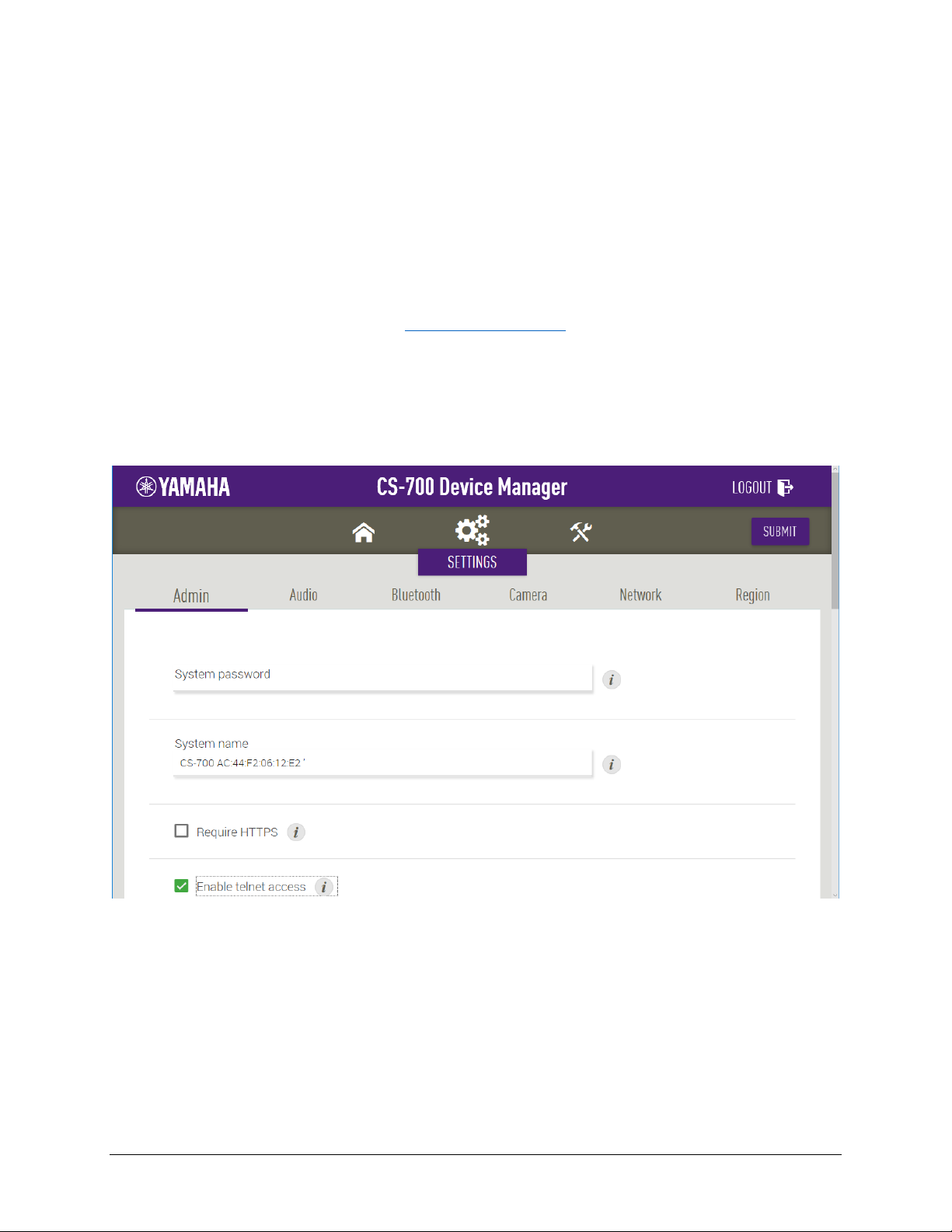
To use an IP connection for the control, with the CS-700 being the server, the “Enable telnet access”
check box on the Admin Settings page has to be checked.
.
To start the IP connection, provide the IP address, port number, user name and password in a telnet
client to establish the connection. The login username is roomcontrol and the password is Yamaha-CS-
700, both case sensitive. The port number is the standard Telnet port 23. If it is required to see the API
commands echoed back to the telnet client, execute “set echo 1” command after each successful login.
Yamaha CS-700 Integrators Reference Guide 13
Page 14

Action
Definition
set
set echo <0|1>
Parameter
Description
0
Turn off screen echo
1
Turn on screen echo
echo
Description: This will make sure the users of the CLI on telnet can see what they are typing by allowing
commands to be echoed back.
Property Actions: set
Command Definition:
Parameters:
CLI Format Examples:
set echo 1
Supported Products: CS700-AV, CS700-SP
Available in API Version: 1.0
4 Library Interface
Integrators wanting to communicate programmatically with the CS-700 for device management or operational
control will find it most convenient to use the CS-700 Management Library. This is a C library that is available for
Windows, and MacOS. It enables developers to access the device using higher-level functions without needing to
directly manage the low-level USB HID or bulk interface.
The library supports these features:
• Connect to a device via USB
• Transmit API commands
• Receive API responses and asynchronous notifications
• Upgrade firmware
• Download logs
• Import and export configuration files
The API commands are described in section 5, API Command Reference
If the host is connected directly to the device via USB, then a client application can communicate via the USB
interface.
The Library interface is described below.
.
Yamaha CS-700 Integrators Reference Guide 14
Page 15

Parameter
Description
Mode
The USB connection mode, Auto, HID or Bulk, chosen from enum CsDevComm_Mode.
debug_callback
Pointer to callback function to handle debug messages.
Msg
Pointer to debug message.
event_callback
Pointer to callback function to handle events.
Type
Type of event as listed in table below.
Value
Description
-1
General error
0
Success
1
No device connected
2
Failed authentication
Type
Description
0xFF
Device disconnected
4.1 USB Library Reference
This section describes the CS-700 Management Library's C interface. The header file is distributed with the CS-700
SDK.
CsDevComm_Mode enum
Description: Enumeration of USB connections type. The client should specify the connection type, Auto,
HID, or Bulk, at the start of a session. Auto will select Bulk if available otherwise HID. Bulk
is preferable when upgrading firmware.
Syntax:
typedef enum {
CsDevComm_Mode_Auto = 0,
CsDevComm_Mode_Hid,
CsDevComm_Mode_Bulk,
CsDevComm_Mode_Num
} CsDevComm_Mode;
devAttach
Description: Establish USB communication with a device.
Syntax:
EXPORT int __cdecl devAttach(int mode, void(*debug_callback)(char *msg),
void(*event_callback)(int type));
Parameters:
Return Values:
Event Types:
Yamaha CS-700 Integrators Reference Guide 15
Page 16

Value
Description
-1
General error
0
Success
Value
Description
-1
General error
0
Not connected
1
Connected HID
2
Conned Bulk
Parameter
Description
cmd
CLI command string (see API Command Reference)
rsp
Pointer to response string
len
Bytes available in response string
devDetach
Description: Disconnect session.
Syntax:
EXPORT void __cdecl devDetach(void);
Return Values:
isConnected
Description: Get the USB connection status.
Syntax:
EXPORT int __cdecl isConnected(void);
Return Values:
coreCliCmd
Description: Send a CLI-format command to the device. The commands are defined in in section 5,
Command Reference.
Syntax:
EXPORT int __cdecl coreCliCmd(char *cmd, char *rsp, int len);
Parameters:
Yamaha CS-700 Integrators Reference Guide 16
API
Page 17

Value
Description
-1
General failure
0
Success
Parameter
Description
mode
Enable/disable notifications
notif_callback_t
Pointer to callback function to handle CLI notification
msg
Callback function parameter: Notification message string (see API Command
Reference)
Value
Description
-1
General failure
0
Success
Parameter
Description
bundle
Complete file path of upgrade bundle
update_firmware_
callback_t
Pointer to callback function to handle upgrade progress notifications
nPercent
Callback function parameter: Percent completion. A value of -1 indicates an upgrade
error.
Return Values:
notifCtrl
Description: Enable/disable notifications and register a callback function to handle CLI-format
notifications. The notifications are defined in section 5, API Command Reference
Notifications are automatically disabled if device is disconnected.
Syntax:
EXPORT int __cdecl notifCtrl(int mode, void(*notif_callback_t)(char *msg));
Parameters:
.
Return Values:
updateFirmware
Description: Update firmware on the CS-700 device. The host PC must have access to a proper firmware
bundle.
Syntax:
EXPORT int __cdecl updateFirmware(char *bundle, void(*update_firmware_callback_t)(int
nPercent));
Parameters:
Yamaha CS-700 Integrators Reference Guide 17
Page 18

Value
Description
-1
General failure
0
Success
Parameter
Description
filepath
Directory on host to which the log file will be saved
download_logs_
callback_t
Pointer to callback function to handle download progress notifications
nPercent
Callback function parameter: Percent completion. A value of -1 indicates a download
error.
logname
Returned name of downloaded log file
Value
Description
-1
General failure
0
Success
Parameter
Description
configFile
Complete file path of config file
import_config_
callback_t
Pointer to callback function to handle import progress notifications
nPercent
Callback function parameter: Percent completion. A value of -1 indicates an import
Return Values:
downloadLogs
Description: Download a zipped log file to the specified directory.
Syntax:
EXPORT int __cdecl downloadLogs(char *filepath, void(*download_logs_callback_t)(int
nPercent, char *logname));
Parameters:
Return Values:
importConfig
Description: Import a configuration XML file to the CS-700 device. The host PC must have access to a
proper configuration file. The output of this is the zipped config file after completion.
Syntax:
EXPORT int __cdecl importConfig(char *configFile, void(*import_config_callback_t)(int
nPercent, char *filepath));
Parameters:
Yamaha CS-700 Integrators Reference Guide 18
Page 19

error.
filepath
Callback function parameter: Returned name of downloaded config file.
Value
Description
-1
General failure
0
Success
Parameter
Description
filepath
Directory on host to which the config file will be saved
export_config_
callback_t
Pointer to callback function to handle export progress notifications
nPercent
Callback function parameter: Percent completion. A value of -1 indicates an
export error.
filepath
Callback function parameter: Returned name of downloaded config file.
Value
Description
-1
General failure
0
Success
Return Values:
exportConfig
Description: Export the CS-700 configuration settings to an XML file on the host.
Syntax:
EXPORT int __cdecl exportConfig(char *filepath,
void(*export_config_callback_t)(int nPercent, char *filepath));
Parameters:
Return Values:
5 API Command Reference
This section describes the API commands and notifications that can be transmitted between a device and host
using the IP telnet interface and the library interface defined in section 3 and section 4 above.
5.1 Overview
The API is organized by functional Category, such as Audio and Camera, and within each category are listed the
properties, status items and commands that are available for that category. Notifications are identified with their
corresponding property or status item.
Yamaha CS-700 Integrators Reference Guide 19
Page 20

<parameter>
Items in angle brackets are parameters
<"call-status">
A quoted item represents the name of a parameter further described
in the Parameters section.
<0|1|2>
A list of possible values are separated by vertical bars.
<connected|disconnected>
An unquoted parameter is a literal value.
<0..10>
A range of values is separated by an ellipsis.
<"paired"> [<"mac"> <"name">]
Square brackets designate optional parameters.
[<"mac"> <"name">]+
A list of repeating values is designated by a plus sign.
The table below describes the command syntax.
For properties, the description lists the actions that can be performed on the property, including:
get – property can be read; this is true of all properties
set – property can be set
notify – when the property changes, a notification is sent to registered clients
The Command Definition and Parameters tables describe each supported action and associated parameters and
values.
5.2 Categories
The API is organized by these Categories:
• System (sys)
• Audio
• Camera
• Bluetooth (bt)
• Bluetooth Low Energy (ble)
• Call
• Network (net)
• VoIP
The sections below describe the interfaces supported in each category.
Changes to properties in the Network group must be applied by the net-commit command. See Appendix B –
Crestron Integration TCP/IP for re-registration sequence with the SIP server.
Changes to properties in the VoIP group must be applied by the voip-commit command. See Appendix B –
Crestron Integration TCP/IP for re-registration sequence with the SIP server.
5.2.1 System
5.2.1.1 System Properties
product
Description: Product name. Read-only set at manufacturing.
Property Actions: get
Yamaha CS-700 Integrators Reference Guide 20
Page 21

Action
Definition
get
get product
response
val product <"name">
Parameter
Description
name
String. Product name.
Valid values are CS-700 and CS-700-SP
Action
Definition
get
get base-sernum
response
val base-sernum <"number">
Parameter
Description
number
String. Device serial number.
Command Definition:
Parameters:
CLI Format Examples:
get product
val product CS-700
Supported Products: CS700-AV, CS700-SP
Available in API Version: 1.0
base-sernum
Description: Query product serial number. Read-only set at manufacturing.
Property Actions: get
Command Definition:
Parameters:
CLI Format Examples:
get base-sernum
val base-sernum CSS701000062
Supported Products: CS700-AV, CS700-SP
Available in API Version: 1.0
voip-capable
Description: Is VoIP supported on the device. This capability is set at the factory and cannot be changed.
Property Actions: get
Yamaha CS-700 Integrators Reference Guide 21
Page 22

Action
Definition
get
get voip-capable
response
val voip-capable <0|1>
Parameter
Description
0
Device does not support VoIP
1
Device does support VoIP
Action
Definition
get
get base-ver
response
val base-ver <"version">
Parameter
Description
version
String. Firmware bundle version.
Command Definition:
Parameters:
CLI Format Examples:
get voip-capable
val voip-capable 0
Supported Products: CS700-AV, CS700-SP
Available in API Version: 1.0
base-ver
Description: Query product version.
Property Actions: get
Command Definition:
Parameters:
CLI Format Examples:
get base-ver
val base-ver 1.1.0.212
Supported Products: CS700-AV, CS700-SP
Available in API Version: 1.0
systemname
Description: Specifies the system name.
Yamaha CS-700 Integrators Reference Guide 22
Page 23

Action
Definition
get
get systemname
response
val systemname <"system-name">
set
set systemname <"system-name">
notify
notify sys.systemname <"system-name">
Parameter
Description
systemname
System name string
Action
Definition
set
set md5-password <"password">
notify
notify sys.md5-password <"password">
Parameter
Description
password
Password string as MD5 sum (32 hexadecimal numbers)
Property Actions: set, get, notify
Default Value: Product name concatenated with the MAC address
Command Definition:
Parameters:
CLI Format Examples:
get systemname
val systemname CS-700 AC:44:F2:11:22:33
set systemname CS-700-MAINCONF
notify sys.systemname CS-700-MAINCONF
Supported Products: CS700-AV, CS700-SP
Available in API Version: 1.0
md5-password
Description: Administrator password for the device, stored as MD5 sum.
Property Actions: set
Default Value: 5735c3a7aa6ffcfe6ab123835584db75 (7386 as MD5 sum)
Command Definition:
Parameters:
CLI Format Examples:
set md5-password 5735c3a7aa6ffcfe6ab123835584db75
Yamaha CS-700 Integrators Reference Guide 23
Page 24

Action
Definition
get
get enable-btn-camera
response
val enable-btn-camera <0|1>
set
set enable-btn-camera <0|1>
notify
notify sys.enable-btn-camera <0|1>
Parameter
Description
0
Disable button
1
Enable button
Action
Definition
get
get enable-btn-audio
response
val enable-btn-audio <0|1>
set
set enable-btn-audio <0|1>
Supported Products: CS700-AV, CS700-SP
Available in API Version: 1.0
enable-btn-camera
Description: Enable/disable the camera button on the main unit.
Property Actions: set, get, notify
Default Value: 1
Command Definition:
Parameters:
CLI Format Examples:
get enable-btn-camera
val enable-btn-camera 1
set enable-btn-camera 1
notify sys.enable-btn-camera 1
Supported Products: CS700-AV, CS700-SP
Available in API Version: 1.0
enable-btn-audio
Description: Enable/disable the microphone mute button on the main unit.
Property Actions: set, get, notify
Default Value: 1
Command Definition:
Yamaha CS-700 Integrators Reference Guide 24
Page 25

notify
notify sys.enable-btn-audio <0|1>
Parameter
Description
0
Disable button
1
Enable button
Action
Definition
get
get enable-btn-volume
response
val enable-btn-volume <0|1>
set
set enable-btn-volume <0|1>
notify
notify sys.enable-btn-volume <0|1>
Parameter
Description
0
Disable button
1
Enable button
Parameters:
CLI Format Examples:
get enable-btn-audio
val enable-btn-audio 1
set enable-btn-audio 1
notify sys.enable-btn-audio 1
Supported Products: CS700-AV, CS700-SP
Available in API Version: 1.0
enable-btn-volume
Description: Enable/disable the speaker volume buttons on the main unit.
Property Actions: set, get, notify
Default Value: 1
Command Definition:
Parameters:
CLI Format Examples:
get enable-btn-volume
val enable-btn-volume 1
set enable-btn-volume 1
notify sys.enable-btn-volume 1
Supported Products: CS700-AV, CS700-SP
Yamaha CS-700 Integrators Reference Guide 25
Page 26

Action
Definition
get
get enable-btn-bluetooth
response
val enable-btn-bluetooth <0|1>
set
set enable-btn-bluetooth <0|1>
notify
notify sys.enable-btn-bluetooth <0|1>
Parameter
Description
0
Disable button
1
Enable button
Action
Definition
get
get enable-led-call
response
val enable-led-call <0|1>
set
set enable-led-call <0|1>
notify
notify sys.enable-led-call <0|1>
Available in API Version: 1.0
enable-btn-bluetooth
Description: Enable/disable the Bluetooth button on the main unit.
Property Actions: set, get, notify
Default Value: 1
Command Definition:
Parameters:
CLI Format Examples:
get enable-btn-bluetooth
val enable-btn-bluetooth 1
set enable-btn-bluetooth 1
notify sys.enable-btn-bluetooth 1
Supported Products: CS700-AV, CS700-SP
Available in API Version: 1.0
enable-led-call
Description: Enable/disable the call state LED on the main unit.
Property Actions: set, get, notify
Default Value: 1
Command Definition:
Yamaha CS-700 Integrators Reference Guide 26
Page 27

Parameter
Description
0
Disable LED
1
Enable LED
Action
Definition
get
get region
response
val region <1..24>
set
set region <1..24>
notify
notify sys.region <1..24>
Parameter
Description
1
Argentina
2
Australia
3
Belgium
4
Brazil
5
Canada
6
Chile
7
China
8
Costa Rica
9
France
10
Germany
11
Hong Kong
12
India
Parameters:
CLI Format Examples:
get enable-led-call
val enable-led-call 1
set enable-led-call 1
notify sys.enable-led-call 1
Supported Products: CS700-AV, CS700-SP
Available in API Version: 1.0
region
Description: Region in which device is operating, setting by index.
Property Actions: set, get, notify
Default Value: 23
Command Definition:
Parameters:
Yamaha CS-700 Integrators Reference Guide 27
Page 28

13
Israel
14
Italy
15
Japan
16
Malaysia
17
Mexico
18
New Zealand
19
Singapore
20
South Africa
21
Taiwan
22
United Kingdom
23
USA
24
Venezuela
Action
Definition
get
get dst-enabled
response
val dst-enabled <0|1>
set
set dst-enabled <0|1>
notify
notify sys.dst-enabled <0|1>
Parameter
Description
0
Disable DST
1
Enable DST
CLI Format Examples:
get region
val region 23
set region 23
notify sys.region 23
Supported Products: CS700-SP
Available in API Version: 1.1
dst-enabled
Description: Enables the system to automatically adjust the time according to the specified Daylight
Savings Time (DST) rules. If enabled, the DST rules must be provided. If disabled, the system
will not adjust for DST.
Property Actions: set, get, notify
Default Value: 1
Command Definition:
Parameters:
CLI Format Examples:
Yamaha CS-700 Integrators Reference Guide 28
Page 29

Action
Definition
get
get dst-start-rules
response
val dst-start-rules <"start-rule">
set
set dst-start-rules <"start-rule">
notify
notify sys.dst-start-rules <"start-rule">
Parameter
Description
start-rule
String. Format: month:week:day:hour
get dst-enabled
val dst-enabled 1
set dst-enabled 1
notify sys.dst-enabled 1
Supported Products: CS700-AV, CS700-SP
Available in API Version: 1.0
dst-start-rules
Description: Indicates the month, week, day (Sunday = 1, Saturday = 7) and hour when daylight savings
time starts. A week value of 5 indicates the last week of the month. The default is the US
DST rule of the second Sunday in March at 2 AM.
Property Actions: set, get, notify
Default Value: 3:2:1:2
Command Definition:
Parameters:
CLI Format Examples:
get dst-start-rules
val dst-start-rules 3:2:1:2
set dst-start-rules 3:2:1:2
notify sys.dst-start-rules 3:2:1:2
Supported Products: CS700-AV, CS700-SP
Available in API Version: 1.0
dst-end-rules
Description: Indicates the month, week, day (Sunday = 1, Saturday = 7) and hour that daylight savings
time ends. The default is the US DST rule of the first Sunday in November at 2 AM.
Property Actions: set, get, notify
Yamaha CS-700 Integrators Reference Guide 29
Page 30

Action
Definition
get
get dst-end-rules
response
val dst-end-rules <"end-rule">
set
set dst-end-rules <"end-rule">
notify
notify sys.dst-end-rules <"end-rule">
Parameter
Description
end-rule
String. Format: month:week:day:hour
Action
Definition
get
get time-zone
response
val time-zone <0..32>
set
set time-zone <0..32>
notify
notify sys.time-zone <0..32>
Parameter
Description
0
-11:00 American Samoa
1
-10:00 Hawaii
2
-9:00 Alaska
3
-8:00 Pacific Time
4
-7:00 Mountain Time
Default Value: 11:1:1:2
Command Definition:
Parameters:
CLI Format Examples:
get dst-end-rules
val dst-end-rules 11:1:1:2
set dst-end-rules 11:1:1:2
notify sys.dst-end-rules 11:1:1:2
Supported Products: CS700-AV, CS700-SP
Available in API Version: 1.0
time-zone
Description: Time zone setting by index.
Property Actions: set, get, notify
Default Value: 13
Command Definition:
Parameters:
Yamaha CS-700 Integrators Reference Guide 30
Page 31

5
-6:00 Central Time
6
-5:00 Eastern Time
7
-4:30 Caracas
8
-4:00 Atlantic Time
9
-3:30 Newfoundland
10
-3:00 Brazil / Argentina
11
-2:00 Mid Atlantic
12
-1:00 Azores
13
0:00 GMT
14
+1:00 Berlin/Paris
15
+2:00 Athens
16
+3:00 Kuwait
17
+3:30 Tehran
18
+4:00 Abu Dhabi
19
+4:30 Kabul
20
+5:00 Islamabad
21
+5:30 Mumbai
22
+5:45 Kathmandu
23
+6:00 Dhaka
24
+6:30 Yangon
25
+7:00 Bangkok
26
+8:00 Beijing/Hong Kong
27
+9:00 Tokyo
28
+9:30 Adelaide
29
+10:00 Sydney
30
+11:00 New Caledonia
31
+12:00 Auckland
32
+13:00 Nuku'alofa
CLI Format Examples:
get time-zone
val time-zone 13
set time-zone 13
notify sys.time-zone 13
Supported Products: CS700-AV, CS700-SP
Available in API Version: 1.0
recent-call-enabled
Description: Enables or disable the Recent Calls list.
Property Actions: set, get, notify
Default Value: 1
Command Definition:
Yamaha CS-700 Integrators Reference Guide 31
Page 32

Action
Definition
get
get recent-call-enabled
response
val recent-call-enabled <0|1>
set
set recent-call-enabled <0|1>
notify
notify sys.recent-call-enabled <0|1>
Parameter
Description
0
Disable recent call list
1
Enable recent call list
Action
Definition
get
get require-https
response
val require-https <0|1>
set
set require-https <0|1>
notify
notify sys.require-https <0|1>
Parameter
Description
0
Do not require HTTPS
1
Require HTTPS
Parameters:
CLI Format Examples:
get recent-call-enabled
val recent-call-enabled 1
set recent-call-enabled 1
notify sys.recent-call-enabled 1
Supported Products: CS700-SP
Available in API Version: 1.1
require-https
Description: –Specify if HTTPS is required on Web UI login.
Property Actions: set, get, notify
Default Value: 0
Command Definition:
Parameters:
CLI Format Examples:
get require-https
val require-https 0
set require-https 0
Yamaha CS-700 Integrators Reference Guide 32
Page 33

Action
Definition
get
get power-saving-mode
response
val power-saving-mode <0|1>
set
set power-saving-mode <0|1>
notify
notify sys.power-saving-mode <0|1>
Parameter
Description
0
Power save mode is off
1
Power save mode is on
Action
Definition
notify sys.require-https 0
Supported Products: CS700-AV, CS700-SP
Available in API Version: 1.0
power-saving-mode
Description: Configure power saving mode setting.
Property Actions: set, get, notify
Default Value: 1
Command Definition:
Parameters:
CLI Format Examples:
get power-saving-mode
val power-saving-mode 1
set power-saving-mode 1
notify sys.power-saving-mode 1
Supported Products: CS700-AV, CS700-SP
Available in API Version: 1.0
power-saving-time
Description: Configure power saving time in minutes.
Property Actions: set, get, notify
Default Value: 20
Command Definition:
Yamaha CS-700 Integrators Reference Guide 33
Page 34

get
get power-saving-time
response
val power-saving-time <"timeout">
set
set power-saving-time <"timeout">
notify
notify sys.power-saving-time <"timeout">
Parameter
Description
timeout
Power save timeout in minutes
Action
Definition
get
get auto-deploy
response
val auto-deploy <0|1>
set
set auto-deploy <0|1>
notify
notify sys.auto-deploy <0|1>
Parameter
Description
0
Disable auto-discovery of provisioning server
1
Enable auto-discovery of provisioning server
Parameters:
CLI Format Examples:
get power-saving-time
val power-saving-time 20
set power-saving-time 20
notify sys.power-saving-time 20
Supported Products: CS700-AV, CS700-SP
Available in API Version: 1.0
auto-deploy
Description: Enable auto provisioning server.
Property Actions: set, get, notify
Default Value: 1
Command Definition:
Parameters:
CLI Format Examples:
get auto-deploy
val auto-deploy 1
set auto-deploy 1
Yamaha CS-700 Integrators Reference Guide 34
Page 35

Action
Definition
get
get enable-deploy
response
val enable-deploy <0|1>
set
set enable-deploy <0|1>
notify
notify sys.enable-deploy <0|1>
Parameter
Description
0
Disable provisioning
1
Enable provisioning
Action
Definition
notify sys.auto-deploy 1
Supported Products: CS700-AV, CS700-SP
Available in API Version: 1.0
enable-deploy
Description: Enable provisioning server.
Property Actions: set, get, notify
Default Value: 1
Command Definition:
Parameters:
CLI Format Examples:
get enable-deploy
val enable-deploy 1
set enable-deploy 1
notify sys.enable-deploy 1
Supported Products: CS700-AV, CS700-SP
Available in API Version: 1.0
provisioning-interval
Description: Specify the provisioning interval for the device, in minutes.
Property Actions: set, get, notify
Default Value: 1440 (1 day)
Command Definition:
Yamaha CS-700 Integrators Reference Guide 35
Page 36

get
get provisioning-interval
response
val provisioning-interval <1..44640>
set
set provisioning-interval <1..44640>
notify
notify sys.provisioning-interval <1..44640>
Parameter
Description
1..44640
Provisioning interval in minutes
Action
Definition
get
get snmp-enable
response
val snmp-enable <0|1>
set
set snmp-enable <0|1>
notify
notify sys.snmp-enable <0|1>
Parameter
Description
0
Disable SNMP
1
Enable SNMP
Parameters:
CLI Format Examples:
get provisioning-interval
val provisioning-interval 1440
set provisioning-interval 1440
notify sys.provisioning-interval 1440
Supported Products: CS700-AV, CS700-SP
Available in API Version: 1.0
snmp-enable
Description: Enable or disable SNMP support.
Property Actions: set, get, notify
Default Value: 0
Command Definition:
Parameters:
CLI Format Examples:
get snmp-enable
val snmp-enable 1
set snmp-enable 1
notify sys.snmp-enable 1
Yamaha CS-700 Integrators Reference Guide 36
Page 37

Action
Definition
get
get snmp-community
response
val snmp-community <"community">
set
set snmp-community <"community">
notify
notify sys.snmp-community <"community">
Parameter
Description
community
Read-only community string
Action
Definition
get
get snmp-contact-name
response
val snmp-contact-name <"contact">
Supported Products: CS700-AV, CS700-SP
Available in API Version: 1.0
snmp-community
Description: Specifies the SNMP read-only community string used for queries from the server and
transmitted traps. Read-only indicates the authorization level. The device does not support
write operations initiated through SNMP.
Property Actions: set, get, notify
Default Value: public
Command Definition:
Parameters:
CLI Format Examples:
get snmp-community
val snmp-community it-support
set snmp-community it-support
notify sys.snmp-community it-support
Supported Products: CS700-AV, CS700-SP
Available in API Version: 1.0
snmp-contact-name
Description: Specifies the contact name, typically the system administrator. This string is informational
and can include an email address. It is not associated with traps.
Property Actions: set, get, notify
Command Definition:
Yamaha CS-700 Integrators Reference Guide 37
Page 38

set
set snmp-contact-name <"contact">
notify
notify sys.snmp-contact-name <"contact">
Parameter
Description
contact
String. Contact name.
Action
Definition
get
get snmp-device-location
response
val snmp-device-location <"location">
set
set snmp-device-location <"location">
notify
notify sys.snmp-device-location <"location">
Parameter
Description
location
String. Device location.
Parameters:
CLI Format Examples:
get snmp-contact-name
val snmp-contact-name "Jessica Taylor <[email protected]>"
set snmp-contact-name Jessica Taylor <[email protected]>
notify sys.snmp-contact-name Jessica Taylor <[email protected]>
Supported Products: CS700-AV, CS700-SP
Available in API Version: 1.0
snmp-device-location
Description: Specifies the location of the device for informational purposes.
Property Actions: set, get, notify
Command Definition:
Parameters:
CLI Format Examples:
get snmp-device-location
val snmp-device-location "Bldg 12 Conf Room CB"
set snmp-device-location Bldg 12 Conf Room CB
notify sys.snmp-device-location Bldg 12 Conf Room CB
Supported Products: CS700-AV, CS700-SP
Available in API Version: 1.0
dialer-connection-mode
Yamaha CS-700 Integrators Reference Guide 38
Page 39

Action
Definition
get
get dialer-connection-mode
response
val dialer-connection-mode <ip|rc|disconnected>
set
set dialer-connection-mode <rc|disconnected>
notify
notify sys.dialer-connection-mode <ip|rc|disconnected>
Parameter
Description
ip
Connected via IP dialer
rc
Connected via Room Control
disconnected
Dialer is not connected
Action
Current state
disconnected
Current state ip
Current state rc
set dialer-connection-mode
No state change
IP dialer
disconnected
New state is
set dialer-connection-mode
New state is rc
IP dialer
rc
No state change
Connect IP dialer
IP dialer becomes
state is ip
No state change
No state change
Disconnect IP dialer
No state change
IP dialer
disconnected
No state change
Description: Specifies the type of connection the tablet or dialer makes with the base.
Property Actions: set, get, notify
Default Value: disconnected
Command Definition:
Parameters:
The following table show the state of dialer-connection-mode after an action from the dialer or from the CLI.
disconnected
disconnection
disconnected
and new state is
rc
disconnection;
and new state is
connected and new
disconnection
and new state is
CLI Format Examples:
get dialer-connection-mode
val dialer-connection-mode ip
set dialer-connection-mode rc
notify sys.dialer-connection-mode rc
Supported Products: CS700-SP
Yamaha CS-700 Integrators Reference Guide 39
Page 40

Action
Definition
get
get snmp-address
response
val snmp-address <"address">
set
set snmp-address <"address">
notify
notify sys.snmp-address <"address">
Parameter
Description
address
String. IP address or DNS name. Leave blank to disable traps.
Action
Definition
get
get verbose-log-enabled
response
val verbose-log-enabled <0|1>
set
set verbose-log-enabled <0|1>
notify
notify sys.verbose-log-enabled <0|1>
Available in API Version: 1.1
snmp-address
Description: Specifies SNMP server address to which traps will be sent.
Property Actions: set, get, notify
Command Definition:
Parameters:
CLI Format Examples:
get snmp-address
val snmp-address 200.200.210.152
set snmp-address 200.200.210.152
notify sys.snmp-address 200.200.210.152
Supported Products: CS700-AV, CS700-SP
Available in API Version: 1.0
verbose-log-enabled
Description: Enable verbose logging.
Property Actions: set, get, notify
Default Value: 0
Command Definition:
Yamaha CS-700 Integrators Reference Guide 40
Page 41

Parameter
Description
0
Disable verbose logging
1
Enable verbose logging
Action
Definition
get
get ui-mask
response
val ui-mask <”bit mask”>
set
set ui-mask <”bit mask”>
notify
notify sys.ui-mask <”bit mask”>
Parameter
Description
bit mask
0 All menus are enabled in the dialer
1
For future use, value is ignored
2
For future use, value is ignored
4
Do not allow modifications of call forwarding
8
Do not allow modifications of call history
16
Do not allow modifications of contacts
32
Do not allow modifications of DND
Parameters:
CLI Format Examples:
get verbose-log-enabled
val verbose-log-enabled 0
set verbose-log-enabled 0
notify sys.verbose-log-enabled 0
Supported Products: CS700-AV, CS700-SP
Available in API Version: 1.0
ui-mask
Description: Enable or disable menus in dialer via a bit mask.
Property Actions: set, get, notify
Default Value: 0
Command Definition:
Parameters:
CLI Format Examples:
get ui-mask
val ui-mask 0
Yamaha CS-700 Integrators Reference Guide 41
Page 42

Action
Definition
get
get usb-conn-status
response
val usb-conn-status <0|1>
notify
notify sys.usb-conn-status <0|1>
Parameter
Description
0
USB is not connected.
1
USB is connected.
// this prevents the dialer from modifying DND
set ui-mask 32
notify sys.ui-mask 32
// this prevents the dialer from modifying DND and call forwarding 32 + 4 = 36
set ui-mask 36
notify sys.ui-mask 36
Supported Products: CS700-SP
Available in API Version: 1.1
5.2.1.2 System Statuses
usb-conn-status
Description: Query USB connection status.
Property Actions: get, notify
Command Definition:
Parameters:
CLI Format Examples:
get usb-conn-status
val usb-conn-status 1
notify sys.usb-conn-status 1
Supported Products: CS700-AV, CS700-SP
Available in API Version: 1.0
upgrade-status
Description: Query upgrade status. .
Property Actions: get, notify
Yamaha CS-700 Integrators Reference Guide 42
Page 43

Action
Definition
get
get upgrade-status
response
val upgrade-status <"status">
notify
notify sys.upgrade-status <"status">
Parameter
Description
Ready
Ready for upgrade
Downloading
Downloading upgrade file
Failed
Upgrade failed.
Flashing
Writing upgrade to flash memory.
WaitingCallEnd
If any call is active, upgrade suspended until call ends.
Rebooting
Upgrade complete, rebooting system.
Action
Definition
get
get camera-upgrade-status
response
val camera-upgrade-status <"upgrade-status">
notify
notify sys.camera-upgrade-status <"upgrade-status">
Parameter
Description
Started
Upgrade has started.
Downloading
Downloading upgrade file.
Rebooting
Rebooting after upgrade.
Complete
Upgrade successful and complete.
Failed
Upgrade failed
pmuterogress
Progress of update. This string will be followed by percent complete.
Current
This is synonymous with complete. Revision of upgrade and current FW match.
Command Definition:
Parameters:
CLI Format Examples:
get upgrade-status
val upgrade-status Flashing
notify sys.upgrade-status Flashing
Supported Products: CS700-AV, CS700-SP
Available in API Version: 1.0
camera-upgrade-status
Description: Indicates the camera module upgrade status.
Property Actions: get, notify
Command Definition:
Parameters:
Yamaha CS-700 Integrators Reference Guide 43
Page 44

Action
Definition
get
get power-saving-status
response
val power-saving-status <0|1>
notify
notify sys.power-saving-status <0|1>
Parameter
Description
0
Not in standby
1
In standby
Action
Definition
get
get usb-aud-rx-status
response
val usb-aud-rx-status <0|1>
notify
notify sys.usb-aud-rx-status <0|1>
CLI Format Examples:
get camera-upgrade-status
val camera-upgrade-status Downloading
notify sys.camera-upgrade-status Downloading
Supported Products: CS700-AV, CS700-SP
Available in API Version: 1.0
power-saving-status
Description: System standby status.
Property Actions: get, notify
Command Definition:
Parameters:
CLI Format Examples:
get power-saving-status
val power-saving-status 0
notify sys.power-saving-status 0
Supported Products: CS700-AV, CS700-SP
Available in API Version: 1.0
usb-aud-rx-status
Description: Query state of USB RX audio stream (RX audio being received, stopped).
Property Actions: get, notify
Command Definition:
Yamaha CS-700 Integrators Reference Guide 44
Page 45

Parameter
Description
0
USB audio RX stream is closed
1
USB audio RX stream is open
Action
Definition
get
get usb-aud-tx-status
response
val usb-aud-tx-status <0|1>
notify
notify sys.usb-aud-tx-status <0|1>
Parameter
Description
0
USB audio TX stream is closed
1
USB audio TX stream is open
Parameters:
CLI Format Examples:
get usb-aud-rx-status
val usb-aud-rx-status 1
notify sys.usb-aud-rx-status 1
Supported Products: CS700-AV, CS700-SP
Available in API Version: 1.0
usb-aud-tx-status
Description: Query state of USB TX audio stream (TX audio being sent, stopped).
Property Actions: get, notify
Command Definition:
Parameters:
CLI Format Examples:
get usb-aud-tx-status
val usb-aud-rx-status 1
notify sys.usb-aud-tx-status 1
Supported Products: CS700-AV, CS700-SP
Available in API Version: 1.0
5.2.1.3 System Commands
regnotify
Description: Register client for notifications.
Yamaha CS-700 Integrators Reference Guide 45
Page 46

Action
Definition
execute
regnotify
Action
Definition
execute
restart
Action
Definition
execute
set reset-setting <"category">
Parameter
Description
all
Reset all properties
voip
Reset VoIP properties
audio
Reset audio properties
network
Reset network properties
camera
Reset camera properties
bt
Reset Bluetooth properties
contacts
Delete all VoIP contacts
Command Definition:
Parameters: None
CLI Format Examples:
regnotify
Supported Products: CS700-AV, CS700-SP
Available in API Version: 1.0
restart
Description: Restart system.
Command Definition:
Parameters: None
CLI Format Examples:
restart
Supported Products: CS700-AV, CS700-SP
Available in API Version: 1.0
set reset-setting
Description: Reset settings by category.
Command Definition:
Parameters:
Yamaha CS-700 Integrators Reference Guide 46
Page 47

call-history
Delete call history
Action
Definition
get
get eq
response
val eq <1|2|3>
set
set eq <1|2|3>
notify
notify audio.eq <1|2|3>
Parameter
Description
1
Voice
2
Bass boost
3
Treble boost
CLI Format Examples:
set reset-setting all
Supported Products: CS700-AV, CS700-SP
Available in API Version: 1.0
5.2.2 Audio
5.2.2.1 Audio Properties
eq
Description: EQ setting used to adjust the speaker frequencies to your preference for the room and the
types of calls.
Property Actions: set, get, notify
Default Value: 1
Command Definition:
Parameters:
CLI Format Examples:
get eq
val eq 1
set eq 1
notify audio.eq 1
Supported Products: CS700-AV, CS700-SP
Available in API Version: 1.0
high-pass-filter
Yamaha CS-700 Integrators Reference Guide 47
Page 48

Action
Definition
get
get high-pass-filter
response
val high-pass-filter <0..4>
set
set high-pass-filter <0..4>
notify
notify audio.high-pass-filter <0..4>
Parameter
Description
0
None
1
110 Hz
2
140 Hz
3
175 Hz
4
225 Hz
Action
Definition
get
get analog-audio-in-mode
response
val analog-audio-in-mode <0|1>
Description: High-Pass filter setting. High-Pass filters are provided to adjust to room and application
requirements. Use the High-Pass filter in rooms that have a high background noise in the
low frequencies (air conditioning, lighting fixtures, etc.). All filters are bi-quad filters,
reducing the signal by 6dB per octave.
Property Actions: set, get, notify
Default Value: 0
Command Definition:
Parameters:
CLI Format Examples:
get high-pass-filter
val high-pass-filter 0
set high-pass-filter 0
notify audio.high-pass-filter 0
Supported Products: CS700-AV, CS700-SP
Available in API Version: 1.0
analog-audio-in-mode
Description: For the TV audio in port, select the gain setting mode, either auto or manual.
Property Actions: set, get, notify
Default Value: 0
Command Definition:
Yamaha CS-700 Integrators Reference Guide 48
Page 49

set
set analog-audio-in-mode <0|1>
notify
notify audio.analog-audio-in-mode <0|1>
Parameter
Description
0
Automatic gain setting
1
Manually specify gain setting
Action
Definition
get
get analog-audio-in-gain
response
val analog-audio-in-gain <-12..40>
set
set analog-audio-in-gain <-12..40>
notify
notify audio.analog-audio-in-gain <-12..40>
Parameter
Description
-12, -11.5..40
Manual gain setting
This value can be increased or decreased by 0.5dB
Parameters:
CLI Format Examples:
get analog-audio-in-mode
val analog-audio-in-mode 0
set analog-audio-in-mode 0
notify audio.analog-audio-in-mode 0
Supported Products: CS700-AV, CS700-SP
Available in API Version: 1.0
analog-audio-in-gain
Description: For the TV audio in port, if analog-audio-in-mode is manual, then this is the gain value in
dB. This value can be increased or decreased by 0.5dB.
Property Actions: set, get, notify
Default Value: 4.5
Command Definition:
Parameters:
CLI Format Examples:
get analog-audio-in-gain
val analog-audio-in-gain 4.5
set analog-audio-in-gain 4.5
Yamaha CS-700 Integrators Reference Guide 49
Page 50

Action
Definition
get
get speaker-volume
response
val speaker-volume <1..18>
set
set speaker-volume <1..18>
notify
notify audio.speaker-volume <1..18>
Parameter
Description
1..18
Volume setting
Action
Definition
get
get ring-tone
response
val ring-tone <0..5>
set
set ring-tone <0..5>
notify audio.analog-audio-in-gain 4.5
Supported Products: CS700-AV, CS700-SP
Available in API Version: 1.0
speaker-volume
Description: Configure speaker volume for calls.
Property Actions: set, get, notify
Default Value: 13
Command Definition:
Parameters:
CLI Format Examples:
get speaker-volume
val speaker-volume 12
set speaker-volume 12
notify audio.speaker-volume 12
Supported Products: CS700-AV, CS700-SP
Available in API Version: 1.0
ring-tone
Description: VoIP ring-tone selection.
Property Actions: set, get, notify
Default Value: 0
Command Definition:
Yamaha CS-700 Integrators Reference Guide 50
Page 51

notify
notify audio.ring-tone <0..5>
Parameter
Description
0..5
Ring-tone index
Action
Definition
get
get ringer-volume
response
val ringer-volume <1..18>
set
set ringer-volume <1..18>
notify
notify audio.ringer-volume <1..18>
Parameter
Description
1..18
Ringer volume level
Parameters:
CLI Format Examples:
get ring-tone
val ring-tone 0
set ring-tone 0
notify audio.ring-tone 0
Supported Products: CS700-SP
Available in API Version: 1.1
ringer-volume
Description: Configure VoIP ringer volume.
Property Actions: set, get, notify
Default Value: 13
Command Definition:
Parameters:
CLI Format Examples:
get ringer-volume
val ringer-volume 7
set ringer-volume 7
notify audio.ringer-volume 7
Supported Products: CS700-SP
Available in API Version: 1.1
Yamaha CS-700 Integrators Reference Guide 51
Page 52

Action
Definition
get
get speaker-mute
response
val speaker-mute <0|1>
notify
notify audio.speaker-mute <0|1>
Parameter
Description
0
Speaker is not muted
1
Speaker is muted
Action
Definition
get
get mute
response
val mute <0|1>
set
set mute <0|1>
notify
notify audio.mute <0|1>
Parameter
Description
0
Unmute mics
1
Mute mics
5.2.2.2 Audio Statuses
speaker-mute
Description: Query speaker mute status.
Property Actions: get, notify
Command Definition:
Parameters:
CLI Format Examples:
get speaker-mute
val speaker-mute 1
notify audio.speaker-mute 1
Supported Products: CS700-AV, CS700-SP
Available in API Version: 1.1
mute
Description: Mute microphones.
Property Actions: set, get, notify
Command Definition:
Parameters:
Yamaha CS-700 Integrators Reference Guide 52
Page 53

Action
Definition
get
get mic-conn-status
response
val mic-conn-status <”mic_number”> <connected|disconnected>
notify
notify audio.mic-conn-status <connected|disconnected>
Parameter
Description
connected
External mic is connected
disconnected
External mic is disconnected
CLI Format Examples:
get mute
val mute 0
set mute 0
notify audio.mute 0
Supported Products: CS700-AV, CS700-SP
Available in API Version: 1.0
mic-conn-status
Description: Query external mic connection status.
Property Actions: get, notify
Command Definition:
Parameters:
CLI Format Examples:
get mic-conn-status
val mic-conn-status 1 connected
notify audio.mic-conn-status connected
Supported Products: CS700-AV, CS700-SP
Available in API Version: 1.0
5.2.3 Camera
5.2.3.1 Camera Properties
camera-ptz-home
Description: Default PTZ settings for home position. When the device detects that the upstream USB
connection has been established, either at startup or after a USB disconnection, it will
revert to the default PTZ settings. Calling set on this property will move the camera to the
newly set PTZ position. See cam-save-as-defaults to save current PTZ to home setting.
Yamaha CS-700 Integrators Reference Guide 53
Page 54

Action
Definition
get
get camera-ptz-home
response
val camera-ptz-home <"pan"> <"tilt"> <"zoom">
set
set camera-ptz-home <"pan"> <"tilt"> <"zoom">
notify
notify camera.camera-ptz-home <"pan"> <"tilt"> <"zoom">
Parameter
Description
-30..30
Pan setting (default value is 0)
-18..18
Tilt setting (default value is 0)
1..22
Zoom setting (default value is 1)
Action
Definition
get
get camera-flicker
response
val camera-flicker <1|2>
set
set camera-flicker <1|2>
notify
notify camera.camera-flicker <1|2>
Parameter
Description
1
50Hz
2
60Hz
Property Actions: set, get, notify
Default Value: 0 0 1
Command Definition:
Parameters:
CLI Format Examples:
get camera-ptz-home
val camera-ptz-home 0 0 1
set camera-ptz-home 0 0 1
notify camera.camera-ptz-home 0 0 1
Supported Products: CS700-AV, CS700-SP
Available in API Version: 1.0
camera-flicker
Description: Camera's flicker setting.
Property Actions: set, get, notify
Default Value: 2
Command Definition:
Parameters:
Yamaha CS-700 Integrators Reference Guide 54
Page 55

Action
Definition
get
get camera-image-defaults
response
val camera-image-defaults <"backlight"> <"brightness">
<"contrast"> <"saturation"> <"sharpness"> <"hue"> <"gamma">
set
set camera-image-defaults <"backlight"> <"brightness">
<"contrast"> <"saturation"> <"sharpness"> <"hue"> <"gamma">
notify
notify camera.camera-image-defaults <"backlight"> <"brightness">
<"contrast"> <"saturation"> <"sharpness"> <"hue"> <"gamma">
Parameter
Description
0..5
Backlight setting
0..250
Brightness setting
60..140
Contrast setting
50..150
Saturation setting
0..255
Sharpness setting
0..180
Hue setting
1..255
Gamma setting
CLI Format Examples:
get camera-flicker
val camera-flicker 2
set camera-flicker 2
notify camera.camera-flicker 2
Supported Products: CS700-AV, CS700-SP
Available in API Version: 1.0
camera-image-defaults
Description: Camera image default settings. These are Backlight, Brightness, Contrast, Saturation,
Sharpness, Hue, and Gamma.
Property Actions: set, get, notify
Default Values: 3 125 110 100 85 90 255
Command Definition:
Parameters:
CLI Format Examples:
get camera-image-defaults
val camera-image-defaults 1 125 110 100 85 90 220
set camera-image-defaults 1 125 110 100 85 90 220
notify camera.camera-image-defaults 1 125 110 100 85 90 220
Yamaha CS-700 Integrators Reference Guide 55
Page 56

Action
Definition
get
get camera-status
response
val camera-status
<off|initializing|reconnecting|unconnected|power_save|resync|on>
notify
notify camera.camera-status
<off|initializing|reconnecting|unconnected|power_save|resync|on>
Parameter
Description
off
Camera is off
initializing
Camera subsystem is initializing
upgrading
Camera module's firmware is being upgraded
reconnecting
Camera is coming online
unconnected
Camera is not connected to USB
power_save
Camera is in power save mode
resync
Camera is updating user parameters
on
Camera is powered on and available for streaming
Supported Products: CS700-AV, CS700-SP
Available in API Version: 1.1
5.2.3.2 Camera Statuses
camera-status
Description: Query camera state.
Property Actions: get, notify
Command Definition:
Parameters:
CLI Format Examples:
get camera-status
val camera-status on
notify camera.camera-status on
Supported Products: CS700-AV, CS700-SP
Available in API Version: 1.0
camera-stream
Description: Query state of camera stream (video being sent, stopped)
Property Actions: get, notify
Command Definition:
Yamaha CS-700 Integrators Reference Guide 56
Page 57

Action
Definition
get
get camera-stream
response
val camera-stream <open|closed>
notify
notify camera.camera-stream <open|closed>
Parameter
Description
open
USB video stream is open
closed
USB video stream is closed
Action
Definition
get
get camera-door
response
val camera-door <open|closed>
notify
notify camera.camera-door <open|closed>
Parameter
Description
open
Camera privacy door is open
closed
Camera privacy door is closed
Parameters:
CLI Format Examples:
get camera-stream
val camera-stream open
notify camera.camera-stream open
Supported Products: CS700-AV, CS700-SP
Available in API Version: 1.0
camera-door
Description: Query state of camera door.
Property Actions: get, notify
Command Definition:
Parameters:
CLI Format Examples:
get camera-door
val camera-door open
notify camera.camera-door open
Supported Products: CS700-AV, CS700-SP
Available in API Version: 1.0
camera-mute
Yamaha CS-700 Integrators Reference Guide 57
Page 58

Action
Definition
get
get camera-mute
response
val camera-mute <0|1>
set
set camera-mute <0|1>
notify
notify camera.camera-mute <0|1>
Parameter
Description
0
Camera video is not muted
1
Camera video is muted
Action
Definition
get
get camera-pan
response
val camera-pan <-30..30>
set
set camera-pan <-30..30>
notify
notify camera.camera-pan <-30..30>
Parameter
Description
-30..30
Pan setting
Description: Camera video "mute” or stop state.
Property Actions: set, get, notify
Command Definition:
Parameters:
CLI Format Examples:
get camera-mute
val camera-mute 0
set camera-mute 0
notify camera.camera-mute 0
Supported Products: CS700-AV, CS700-SP
Available in API Version: 1.0
camera-pan
Description: Camera's digital pan setting. Camera can only be panned when zoomed in.
Property Actions: set, get, notify
Default Value: 0
Command Definition:
Parameters:
Yamaha CS-700 Integrators Reference Guide 58
Page 59

Action
Definition
get
get camera-tilt
response
val camera-tilt <-18..18>
set
set camera-tilt <-18..18>
notify
notify camera.camera-tilt <-18..18>
Parameter
Description
-18..18
Tilt setting
CLI Format Examples:
get camera-pan
val camera-pan 0
set camera-pan 0
notify camera.camera-pan 0
Supported Products: CS700-AV, CS700-SP
Available in API Version: 1.0
camera-tilt
Description: Camera's digital tilt setting. Camera can only be tilted when zoomed in.
Property Actions: set, get, notify
Default Value: 0
Command Definition:
Parameters:
CLI Format Examples:
get camera-tilt
val camera-tilt 0
set camera-tilt 0
notify camera.camera-tilt 0
Supported Products: CS700-AV, CS700-SP
Available in API Version: 1.0
camera-zoom
Description: Camera's digital zoom setting. When zoom is set to 1, the pan and tilt settings will be forced
to zero.
Property Actions: set, get, notify
Yamaha CS-700 Integrators Reference Guide 59
Page 60

Action
Definition
get
get camera-zoom
response
val camera-zoom <1..22>
set
set camera-zoom <1..22>
notify
notify camera.camera-zoom <1..22>
Parameter
Description
1..22
Zoom setting
Action
Definition
Get
get camera-backlight
response
val camera-backlight <0..5>
Set
set camera-backlight <0..5>
Notify
notify camera.camera-backlight <0..5>
Parameter
Description
0
Off
1..5
Camera Backlight level.
Default Value: 1
Command Definition:
Parameters:
CLI Format Examples:
get camera-zoom
val camera-zoom 1
set camera-zoom 1
notify camera.camera-zoom 1
Supported Products: CS700-AV, CS700-SP
Available in API Version: 1.0
camera-backlight
Description: Backlight compensation for camera.
Property Actions: set, get, notify
Default Value: 3
Command Definition:
Parameters:
Yamaha CS-700 Integrators Reference Guide 60
Page 61

Action
Definition
get
get camera-brightness
response
val camera-brightness <0..250>
set
set camera-brightness <0..250>
notify
notify camera.camera-brightness <0..250>
Parameter
Description
0..250
Camera Brightness level.
CLI Format Examples:
get camera-backlight
val camera-backlight 2
set camera-backlight 2
notify camera.camera-backlight 2
Supported Products: CS700-AV, CS700-SP
Available in API Version: 1.1
camera-brightness
Description: Camera Brightness level
Property Actions: set, get, notify
Default Value: 125
Command Definition:
Parameters:
CLI Format Examples:
get camera-brightness
val camera-brightness 125
set camera-brightness 125
notify camera.camera-brightness 125
Supported Products: CS700-AV, CS700-SP
Available in API Version: 1.1
camera-contrast
Description: Camera Contrast level
Yamaha CS-700 Integrators Reference Guide 61
Page 62

Action
Definition
get
get camera-contrast
response
val camera-contrast <60..140>
set
set camera-contrast <60..140>
notify
notify camera.camera-contrast <60..140>
Parameter
Description
60..140
Camera Contrast level.
Action
Definition
get
get camera-saturation
response
val camera-saturation <50..150>
set
set camera-saturation <50..150>
notify
notify camera.camera-saturation <50..150>
Parameter
Description
50..150
Camera Saturation level.
Property Actions: set, get, notify
Default Value: 110
Command Definition:
Parameters:
CLI Format Examples:
get camera-contrast
val camera-contrast 110
set camera-contrast 110
notify camera.camera-contrast 110
Supported Products: CS700-AV, CS700-SP
Available in API Version: 1.1
camera-saturation
Description: Camera Saturation level
Property Actions: set, get, notify
Default Value: 100
Command Definition:
Parameters:
Yamaha CS-700 Integrators Reference Guide 62
Page 63

Action
Definition
get
get camera-sharpness
response
val camera-sharpness <0..255>
set
set camera-sharpness <0..255>
notify
notify camera.camera-sharpness <0..255>
Parameter
Description
0..255
Camera Sharpness level.
CLI Format Examples:
get camera-saturation
val camera-saturation 100
set camera-saturation 100
notify camera.camera-saturation 100
Supported Products: CS700-AV, CS700-SP
Available in API Version: 1.1
camera-sharpness
Description: Camera Sharpness level
Property Actions: set, get, notify
Default Value: 85
Command Definition:
Parameters:
CLI Format Examples:
get camera-sharpness
val camera-sharpness 100
set camera-sharpness 100
notify camera.camera-sharpness 100
Supported Products: CS700-AV, CS700-SP
Available in API Version: 1.1
camera-hue
Description: Camera Hue level
Property Actions: set, get, notify
Default Value: 90
Yamaha CS-700 Integrators Reference Guide 63
Page 64

Action
Definition
get
get camera-hue
response
val camera-hue <0..180>
set
set camera-hue <0..180>
notify
notify camera.camera-hue <0..180>
Parameter
Description
0..180
Camera Hue level.
Action
Definition
Get
get camera-gamma
Response
val camera-gamma <1..255>
Set
set camera-gamma <1..255>
Notify
notify camera.camera-gamma <1..255>
Parameter
Description
1..255
Camera Gamma level.
Command Definition:
Parameters:
CLI Format Examples:
get camera-hue
val camera-hue 100
set camera-hue 100
notify camera.camera-hue 100
Supported Products: CS700-AV, CS700-SP
Available in API Version: 1.1
camera-gamma
Description: Camera Gamma level
Property Actions: set, get, notify
Default Value: 255
Command Definition:
Parameters:
CLI Format Examples:
get camera-gamma
val camera-gamma 100
Yamaha CS-700 Integrators Reference Guide 64
Page 65

Action
Definition
execute
cam-save-as-default
Action
Definition
execute
cam-apply-defaults
set camera-gamma 100
notify camera.camera-gamma 100
Supported Products: CS700-AV, CS700-SP
Available in API Version: 1.1
5.2.3.3 Camera Commands
cam-save-as-default
Description: Save the camera's current PTZ settings as the default values.
Command Definition:
Parameters: None
CLI Format Examples:
cam-save-as-default
Supported Products: CS700-AV, CS700-SP
Available in API Version: 1.0
cam-apply-defaults
Description: Apply the camera's default PTZ settings. These settings are also automatically applied when
the device detects that the upstream USB connection has been established, either at
startup or after a USB disconnection.
Command Definition:
Parameters: None
CLI Format Examples:
cam-apply-defaults
Supported Products: CS700-AV, CS700-SP
Available in API Version: 1.0
Yamaha CS-700 Integrators Reference Guide 65
Page 66

Action
Definition
execute
cam-image-save-as-default
Action
Definition
execute
cam-image-apply-defaults
Action
Definition
Execute
cam-zoom-in
Notify
notify camera.zoom <1..22>
cam-image-save-as-default
Description: Save the camera's current Backlight, Brightness, Contrast, Saturation, Sharpness, Hue, and
Gamma settings as the default values.
Command Definition:
Parameters: None
CLI Format Examples:
cam-image-save-as-default
Supported Products: CS700-AV, CS700-SP
Available in API Version: 1.1
cam-image-apply-defaults
Description: Apply the camera's default Backlight, Brightness, Contrast, Saturation, Sharpness, Hue, and
Gamma settings. These settings are also automatically applied when the device detects that
the upstream USB connection has been established, either at startup or after a USB
disconnection.
Command Definition:
Parameters: None
CLI Format Examples:
cam-image-apply-defaults
Supported Products: CS700-AV, CS700-SP
Available in API Version: 1.1
cam-zoom-in
Description: Zoom in the camera by one level.
Command Definition:
Parameters: None
Yamaha CS-700 Integrators Reference Guide 66
Page 67

Action
Definition
Execute
cam-zoom-out
Notify
notify camera.zoom <1..22>
Action
Definition
Execute
cam-pan-left
Notify
notify camera.pan <-30..30>
CLI Format Examples:
cam-zoom-in
notify camera.zoom 2
Supported Products: CS700-AV, CS700-SP
Available in API Version: 1.1
cam-zoom-out
Description: Zoom out the camera by one level.
Command Definition:
Parameters: None
CLI Format Examples:
cam-zoom-out
notify camera.zoom 1
Supported Products: CS700-AV, CS700-SP
Available in API Version: 1.1
cam-pan-left
Description: Pan the camera left by one level.
Command Definition:
Parameters: None
CLI Format Examples:
cam-pan-left
notify camera.pan 10
Supported Products: CS700-AV, CS700-SP
Available in API Version: 1.1
cam-pan-right
Description: Pan the camera right by one level.
Command Definition:
Yamaha CS-700 Integrators Reference Guide 67
Page 68

Action
Definition
Execute
cam-pan-right
Notify
notify camera.pan <-30..30>
Action
Definition
Execute
cam-tilt-up
Notify
notify camera.tilt <-18..18>
Action
Definition
Execute
cam-tilt-down
Notify
notify camera.tilt <-18..18>
Parameters: None
CLI Format Examples:
cam-pan-right
notify camera.pan 8
Supported Products: CS700-AV, CS700-SP
Available in API Version: 1.1
cam-tilt-up
Description: Tilt the camera up by one level.
Command Definition:
Parameters: None
CLI Format Examples:
cam-tilt-up
notify camera.tilt 8
Supported Products: CS700-AV, CS700-SP
Available in API Version: 1.1
cam-tilt-down
Description: Tilt the camera down by one level.
Command Definition:
Parameters: None
CLI Format Examples:
cam-tilt-down
notify camera.tilt 5
Supported Products: CS700-AV, CS700-SP
Available in API Version: 1.1
Yamaha CS-700 Integrators Reference Guide 68
Page 69

Action
Definition
get
get bt-enable
response
val bt-enable <0|1>
set
set bt-enable <0|1>
notify
notify bt.bt-enable <0|1>
Parameter
Description
0
Disable
1
Enable
Action
Definition
get
get bt-mac
response
val bt-mac <"mac">
5.2.4 Bluetooth
5.2.4.1 Bluetooth Properties
bt-enable
Description: Enable or disable Bluetooth.
Property Actions: set, get, notify
Default Value: 1
Command Definition:
Parameters:
CLI Format Examples:
get bt-enable
val bt-enable 0
set bt-enable 0
notify bt.bt-enable 0
Supported Products: CS700-AV, CS700-SP
Available in API Version: 1.0
bt-mac
Description: Get the Bluetooth device's MAC address advertised over the air. This is read-only and set in
manufacturing.
Property Actions: get
Command Definition:
Yamaha CS-700 Integrators Reference Guide 69
Page 70

Parameter
Description
mac
MAC address of connected device
Action
Definition
get
get bt-name
response
val bt-name <"name">
set
set bt-name <"name">
notify
notify bt.bt-name <"name">
Parameter
Description
name
String. Name of device.
Parameters:
CLI Format Examples:
get bt-mac
val bt-mac AC:14:22:01:23:45
Supported Products: CS700-AV, CS700-SP
Available in API Version: 1.0
bt-name
Description: The Bluetooth basic-rate device name advertised over the air.
Property Actions: set, get, notify
Default Value: The product name concatenated with the Bluethooth’s MAC address - i.e., "Yamaha CS-700
" + last 2 bytes of the Bluetooth’s MAC address.
Command Definition:
Parameters:
CLI Format Examples:
get bt-name
val bt-name Yamaha CS-700:22:33
set bt-name CS700-MAINCONF
notify bt.bt-name CS700-MAINCONF
Supported Products: CS700-AV, CS700-SP
Available in API Version: 1.0
bt-pin
Description: The Bluetooth basic-rate pin for pairing. Pins are 4 digits.
Yamaha CS-700 Integrators Reference Guide 70
Page 71

Action
Definition
get
get bt-pin
response
val bt-pin <"pin">
set
set bt-pin <"pin">
notify
notify bt.bt-pin <"pin">
Parameter
Description
pin
4-digit string
Action
Definition
get
get bt-pair-timeout
response
val bt-pair-timeout <0..120>
set
set bt-pair-timeout <0..120>
notify
notify bt.bt-pair-timeout <0..120>
Parameter
Description
0
No timeout
1..120
Pairing timeout in seconds
Property Actions: set, get, notify
Default Value: 0000
Command Definition:
Parameters:
CLI Format Examples:
get bt-pin
val bt-pin 0000
set bt-pin 0000
notify bt.bt-pin 0000
Supported Products: CS700-AV, CS700-SP
Available in API Version: 1.0
bt-pair-timeout
Description: Bluetooth basic-rate pairing timeout in seconds. After this time, the pairing mode will stop.
A value of 0 indicates no timeout.
Property Actions: set, get, notify
Default Value: 60
Command Definition:
Parameters:
Yamaha CS-700 Integrators Reference Guide 71
Page 72

Action
Definition
get
get bt-status
response
val bt-status
<Off|Initializing|Updating|Pairing|Enabled|Connecting|Connected>
notify
notify bt.bt-status
<Off|Initializing|Updating|Pairing|Enabled|Connecting|Connected>
Parameter
Description
Off
Bluetooth is off
Initializing
Bluetooth subsystem is initializing
Updating
Bluetooth processor firmware is being upgraded
Pairing
Bluetooth is in pairing mode
Enabled
Bluetooth is enabled and on
Connecting
Bluetooth is on and connecting
Connected
A device is connected
CLI Format Examples:
get bt-pair-timeout
val bt-pair-timeout 60
set bt-pair-timeout 60
notify bt.bt-pair-timeout 60
Supported Products: CS700-AV, CS700-SP
Available in API Version: 1.0
5.2.4.2 Bluetooth Statuses
bt-status
Description: Get the Bluetooth device status.
Property Actions: get, notify
Command Definition:
Parameters:
CLI Format Examples:
get bt-status
val bt-status Connected
notify bt.bt-status Connected
Supported Products: CS700-AV, CS700-SP
Available in API Version: 1.0
bt-paired-list
Yamaha CS-700 Integrators Reference Guide 72
Page 73

Action
Definition
get
get bt-paired-list
response
val bt-paired-list <"mac"> <"name"> [<"mac"> <"name">]+
Parameter
Description
Mac
MAC address of paired device.
name
String. Name of paired device.
Action
Definition
get
get bt-connected
response
val bt-connected [<"mac"> <"name">]
notify
notify bt.bt-connected [<"mac"> <"name">]
Parameter
Description
mac
MAC address of connected device.
name
String. Name of connected device.
Description: Get a list of paired Bluetooth basic-rate devices. Return space-separated MAC address and
name pairs.
Property Actions: get
Command Definition:
Parameters:
CLI Format Examples:
get bt-paired-list
val bt-paired-list D4:B3:77:EF:31:94 ADR6301 D4:B3:77:EF:31:95 ADR6302
Supported Products: CS700-AV, CS700-SP
Available in API Version: 1.0
bt-connected
Description: Get Bluetooth basic-rate device connected status. If a device is connected, returns its MAC
address, name, and profiles.
Property Actions: get, notify
Command Definition:
Parameters:
CLI Format Examples:
get bt-connected
val bt-connected D4:B3:77:EF:31:94 ADR6301 a2dp,hsp
notify bt.bt-connected D4:B3:77:EF:31:94 SAMSUNG-G925V
Yamaha CS-700 Integrators Reference Guide 73
Page 74

Action
Definition
execute
bt-pair <0|1>
Parameter
Description
0
Cancel pairing
1
Initiate pairing
Action
Definition
Execute
bt-unpair <all>
Parameter
Description
All
Remove all paired devices
Supported Products: CS700-AV, CS700-SP
Available in API Version: 1.0
5.2.4.3 Bluetooth Commands
bt-pair
Description: Initiate Bluetooth pairing mode from the device in order to pair a phone.
Command Definition:
Parameters:
CLI Format Examples:
bt-pair 1
Supported Products: CS700-AV, CS700-SP
Available in API Version: 1.0
bt-unpair
Description: Remove all Bluetooth devices in the paired devices list. If a device is connected, it will be
disconnected.
Command Definition:
Parameters:
CLI Format Examples:
bt-unpair all
Supported Products: CS700-AV, CS700-SP
Available in API Version: 1.0
bt-disconnect
Yamaha CS-700 Integrators Reference Guide 74
Page 75

Action
Definition
Execute
bt-disconnect
Action
Definition
get
get nfc-enable
response
val nfc-enable <0|1>
set
set nfc-enable <0|1>
notify
notify bt.nfc-enable <0|1>
Parameter
Description
0
Disable NFC and NFC LED
1
Enable NFC and NFC LED
Description: Disconnect the connected Bluetooth device.
Command Definition:
Parameters: None
CLI Format Examples:
bt-disconnect
Supported Products: CS700-AV, CS700-SP
Available in API Version: 1.0
nfc-enable
Description: Enable/disable NFC and the NFC logo LED on the main unit.
Property Actions: set, get, notify
Default Value: 1
Command Definition:
Parameters:
CLI Format Examples:
get nfc-enable
val nfc-enable 1
set nfc-enable 1
notify bt.nfc-enable 1
Supported Products: CS700-AV, CS700-SP
Available in API Version: 1.1
Yamaha CS-700 Integrators Reference Guide 75
Page 76

Action
Definition
Get
get status <1..3|usb|bt>
Response
val status <1..3|usb|bt> <"call-status">
Notify
notify call.status <1..3|usb|bt> <"call-status">
Parameter
Description
1
VoIP line 1
2
VoIP line 2
3
VoIP line 3 (used for transfer)
usb
USB line
bt
Bluetooth line
call-status
String as shown below for each call type.
VoIP Calls
idle
Initialization state.
incoming
Receiving incoming VoIP call.
calling
Initiating outgoing VoIP call.
failed
Outgoing call attempt failed; it is followed by “disconnected” when the attempt is
disconnected.
connected
Call is connected.
onhold
Call is on hold.
connected-inconf
Call is in a conference.
disconnected
Not in a call or phone is not registered.
update
The call is transferred by the far end (with some call managers the call state will remain
“connected” after the transfer).
missed
Incoming VoIP call missed due to Do-Not-Disturb.
USB Calls
active
USB audio is active.
idle
Initialization state.
incoming
Incoming USB call signal is received from host.
inactive
USB audio is not active.
connected
Call is connected.
onhold
USB audio is on hold.
connected-inconf
Call is in a conference.
BT Calls
5.2.5 Call
5.2.5.1 Call Statuses
status
Description: Query a call status.
Property Actions: get, notify
Command Definition:
Parameters:
Yamaha CS-700 Integrators Reference Guide 76
Page 77

active
BT audio is active.
idle
Initialization state.
incoming
Incoming BT call signal is received from connected phone.
inactive
BT audio is not active.
connected
Call is connected.
onhold
BT audio is on hold.
connected-inconf
Call is in a conference.
Action
Definition
get
get status-all
response
val status-all line1:<”status1”> line2:<”status2”>
line3:<”status3”> bt:<”statusbt”> usb:<”statususb”>
Parameter
Description
status1
VoIP line 1 call status
status2
VoIP line 2 call status
status3
VoIP line 3 call status
statusbt
Bluetooth call status
statususb
USB call status
CLI Format Examples:
get status 1
val status 1 connected
notify call.status 1 connected
Supported Products: CS700-AV, CS700-SP
Available in API Version: 1.0, VoIP Available in API Version: 1.1
status-all
Description: Query all call status. See "call-status" property for description of status types.
Property Actions: get
Command Definition:
Parameters:
CLI Format Examples:
get status-all
val status-all line1:disabled line2:disabled line3:disabled bt:idle usb:idle
Supported Products: CS700-AV, CS700-SP
Available in API Version: 1.0, VoIP Available in API Version: 1.1
call-info
Yamaha CS-700 Integrators Reference Guide 77
Page 78

Action
Definition
get
get call-info <1..3, bt, usb>
response
val call-info <1..3> <"name"> <"number"> <"call-status">
Parameter
Description
1
VoIP line 1
2
VoIP line 2
3
VoIP transfer line
name
String. Name of caller.
number
String. Phone number.
call-status
Call status as described in the "get status" parameter description.
Action
Definition
get
get number <1..3>
response
val number <1..3> <"number">
Parameter
Description
1
VoIP line 1
2
VoIP line 2
3
VoIP line 3 (used for transfer)
number
Caller's phone number
Description: Query call information with given call id.
Property Actions: get
Command Definition:
Parameters:
CLI Format Examples:
get call-info 1
val call-info 1 Blake 7823 connected
Supported Products: CS700-AV, CS700-SP
Available in API Version: 1.0, VoIP Available in API Version: 1.1
number
Description: Query a caller number.
Property Actions: get
Command Definition:
Parameters:
CLI Format Examples:
get number 1
Yamaha CS-700 Integrators Reference Guide 78
Page 79

Action
Definition
get
get caller <1..3>
response
val caller <1..3> <"name">
Parameter
Description
1
VoIP line 1
2
VoIP line 2
3
VoIP line 3 (used for transfer)
name
Caller's name
Action
Definition
get
get start-time <1..3>
response
val start-time <1..3> <"time">
Parameter
Description
1
VoIP line 1
2
VoIP line 2
3
VoIP line 3 (used for transfer)
val number 1 7823
Supported Products: CS700-SP
Available in API Version: 1.1
caller
Description: Query a caller name.
Property Actions: get
Command Definition:
Parameters:
CLI Format Examples:
get caller 1
val caller 1 Blake
Supported Products: CS700-SP
Available in API Version: 1.1
start-time
Description: Query call start time. Return value is in format HH:MM:SS in 24-hour time.
Property Actions: get
Command Definition:
Parameters:
Yamaha CS-700 Integrators Reference Guide 79
Page 80

time
HH:MM:SS in 24-hour time
Action
Definition
get
get codec <1..3>
response
val codec <1..3> <codec-index>
Parameter
Description
1
VoIP line 1
2
VoIP line 2
3
VoIP line 3 (used for transfer)
codec-index
<0..5>
Codec ID as listed below
0
Disabled
1
G.722
2
G.711U
3
G.711A
4
G729
5
G729
CLI Format Examples:
get start-time 1
val start-time 1 13:22:41
Supported Products: CS700-SP
Available in API Version: 1.1
codec
Description: Query call codec.
Property Actions: get
Command Definition:
Parameters:
CLI Format Examples:
get codec 1
val codec 1 2
Supported Products: CS700-SP
Available in API Version: 1.1
call-quality
Description: Query call quality.
Note: The response is a comma separate list of values.
Property Actions: get
Yamaha CS-700 Integrators Reference Guide 80
Page 81

Action
Definition
get
get call-quality <1..3>
response
val call-quality <1..3> <list>
Parameter
Description
1
VoIP line 1
2
VoIP line 2
3
VoIP line 3 (used for transfer)
tx_packets
Number of transmitted packets
rx_packets
Number of received packets
tx_octets
Number of transmitted octets
rx-octets
Number of received octets
tx-packet-size
Transmit packet size
rx-packet-size
Receive packet size
lost-packets
Number of lost packets
discardedpackets
Number of discarded packets
jitter-ms
Detected jitter in ms
max-jitter-ms
Max detected jitter in ms
min-jitter-ms
Min detected jitter in ms
buffer-level-ms
Jitter buffer size in ms
local-ip
Local IP address
local-port
Local port number
remote-ip
Remote IP address
remote-port
Remote port number
Action
Definition
execute
dial <"voip-line-id"> <"number">
Command Definition:
Parameters:
CLI Format Examples:
get call-quality 1
val call-quality 1
224,227,35840,36320,20,10,12,11,0,20,0,20,200.200.210.131,4000,200.200.210.190,4000
Supported Products: CS700-SP
Available in API Version: 1.1
5.2.5.2 Call Commands
dial
Description: Dial of VoIP call with the given number.
Command Definition:
Yamaha CS-700 Integrators Reference Guide 81
Page 82

Parameter
Description
1
VoIP line 1
2
VoIP line 2
3
VoIP line 3 (used for transfer)
Number
VoIP number to dial
Action
Definition
execute
answer <1..2|usb|bt>
Parameter
Description
line-id
<1..2|usb|bt>
Line ID of call to be answered.
Action
Definition
execute
hangup <1..3|usb|bt>
Parameter
Description
line-id
<1..3|usb|bt>
Line ID of call to be hung up
Parameters:
CLI Format Examples:
dial 1 7823
Supported Products: CS700-SP
Available in API Version: 1.1
answer
Description: Answer the given call.
Command Definition:
Parameters:
CLI Format Examples:
answer 1
Supported Products: CS700-AV, CS700-SP
Available in API Version: 1.0, VoIP(Line ID) Available in API Version: 1.1
hangup
Description: Hang up the given call.
Command Definition:
Parameters:
Yamaha CS-700 Integrators Reference Guide 82
Page 83

Action
Definition
execute
hold <1..2|usb|bt|all>
Parameter
Description
line-id
<1..2|usb|bt|all>
Line ID of call to be held, or hold all lines
Action
Definition
execute
resume <1..2|usb|bt>
Parameter
Description
line-id
<1..2|usb|bt>
Line ID of call to be resumed
CLI Format Examples:
hangup 1
Supported Products: CS700-AV, CS700-SP,
Available in API Version: 1.0, VoIP(Line ID) Available in API Version: 1.1
hold
Description: Hold the given call.
Command Definition:
Parameters:
CLI Format Examples:
hold 1
Supported Products: CS700-AV, CS700-SP
Available in API Version: 1.0, VoIP(Line ID) Available in API Version: 1.1
resume
Description: Resume the given call.
Command Definition:
Parameters:
CLI Format Examples:
resume 1
Supported Products: CS700-AV, CS700-SP
Available in API Version: 1.0, VoIP(Line ID) Available in API Version: 1.1
Yamaha CS-700 Integrators Reference Guide 83
Page 84

Action
Definition
execute
swap <"held-line-id"> <"active-line-id">
Parameter
Description
held-line-id
<1..2|usb|bt>
Line ID of call that is currently on hold; this call will be resumed
active-line-id
<1..2|usb|bt>
Line ID of call that is currently active; this call will be placed on hold
Action
Definition
execute
join <"line-id1" “mix-state”> <"line-id2" “mix_state”> [<"lineid3" “mix_state”>] [<"line-id4" “mix_state”>]
Parameter
Description
line-id1
<1..2|usb|bt>
Line ID1 of call to be mixed or not mixed
line-id2
<1..2|usb|bt>
Line ID2 of call to be mixed or not mixed
line-id3
<1..2|usb|bt>
Line ID3 of call to be mixed or not mixed [optional]
line-id4
<1..2|usb|bt>
Line ID4 of call to be mixed or not mixed [optional]
mix_state
0
Separate lines (not mixed)
1
Join lines (mix)
swap
Description: Swap the source call with the target call, used for swapping held calls.
Command Definition:
Parameters:
CLI Format Examples:
swap 1 2
Supported Products: CS700-AV, CS700-SP
Available in API Version: 1.0, VoIP(Line ID) Available in API Version: 1.1
join
Description: Join allows the individual lines to be mixed (joined) or not mixed (separated). Used for
conferencing existing calls. Any “line-id” not specified will default to a mix state of 0.
Command Definition:
Parameters:
CLI Format Examples:
Yamaha CS-700 Integrators Reference Guide 84
Page 85

Action
Definition
execute
transfer <"source-line-id"> <"target-line-id">
Parameter
Description
source-line-id
<1..2>
Line ID of call being transferred
target-line-id
<3>
Line ID of call to which the source will be transferred
Action
Definition
execute
play ring-tone <0..5>
Parameter
Description
0..5
Ring-tone index
Join (mix) only VoIP lines 1 and 2
join 1 1 2 1 usb 0 bt 0
join 1 1 2 1
Separate (not mixed) all calls from a conference
join 1 0 2 0 usb 0 bt 0
Supported Products: CS700-SP
Available in API Version: 1.1
transfer
Description: Transfer the source call to target call. The target call was previously initiated and can either
be in an “establishing” state (blind transfer) or a “connected” state (acknowledged
transfer). After the call has been successfully transferred, both lines are released.
Command Definition:
Parameters:
CLI Format Examples:
hold 1
dial 3 6175551212
transfer 1 3
Supported Products: CS700-SP
Available in API Version: 1.1
play ring-tone
Description: Play ring tone by index.
Command Definition:
Parameters:
Yamaha CS-700 Integrators Reference Guide 85
Page 86

Action
Definition
get
get mac
response
val mac <"mac-address">
Parameter
Description
mac-address
MAC address
Action
Definition
get
get dhcp
response
val dhcp <0|1>
set
set dhcp <0|1>
CLI Format Examples:
play ring-tone 0
Supported Products: CS700-SP
Available in API Version: 1.1
5.2.6 Network
5.2.6.1 Network Properties
mac
Description: Main unit's MAC address. Read-only value set at manufacturing.
Property Actions: get
Command Definition:
Parameters:
CLI Format Examples:
get mac
val mac AC:14:22:01:23:46
Supported Products: CS700-AV, CS700-SP
Available in API Version: 1.0
dhcp
Description: Enables or disables DHCP. If DHCP is disabled, the Static IP Address, Subnet Mask, and
Default Gateway must be specified.
Property Actions: set, get, notify
Default Value: 1
Command Definition:
Yamaha CS-700 Integrators Reference Guide 86
Page 87

notify
notify net.dhcp <0|1>
Parameter
Description
0
Disable DHCP
1
Enable DHCP
Action
Definition
get
get ip
response
val ip <"ip-address">
set
set ip <"ip-address">
notify
notify net.ip <"ip-address">
Parameter
Description
ip-address
IP address
Parameters:
CLI Format Examples:
get dhcp
val dhcp 1
set dhcp 1
notify net.dhcp 1
Supported Products: CS700-AV, CS700-SP
Available in API Version: 1.0
ip
Description: Current IP Address assigned to the device.
Property Actions: set, get, notify
Command Definition:
Parameters:
CLI Format Examples:
get ip
val ip 192.168.1.103
set ip 192.168.1.103
notify net.ip 192.168.1.103
Supported Products: CS700-AV, CS700-SP
Available in API Version: 1.0
subnet
Yamaha CS-700 Integrators Reference Guide 87
Page 88

Action
Definition
get
get subnet
response
val subnet <"subnet-address">
set
set subnet <"subnet-address">
notify
notify net.subnet <"subnet-address">
Parameter
Description
subnet-address
String. IP address.
Action
Definition
get
get gateway
response
val gateway <"gateway-address">
set
set gateway <"gateway-address">
notify
notify net.gateway <"gateway-address">
Parameter
Description
gateway-address
String. IP address.
Description: Subnet Mask to determine the subnet to which the device belongs.
Property Actions: set, get, notify
Command Definition:
Parameters:
CLI Format Examples:
get subnet
val subnet 255.255.255.0
set subnet 255.255.255.0
notify net.subnet 255.255.255.0
Supported Products: CS700-AV, CS700-SP
Available in API Version: 1.0
gateway
Description: The Default Gateway is the device's default router on the IP network.
Property Actions: set, get, notify
Command Definition:
Parameters:
CLI Format Examples:
get gateway
Yamaha CS-700 Integrators Reference Guide 88
Page 89

Action
Definition
get
get dns1
response
val dns1 <"dns-address">
set
set dns1 <"dns-address">
notify
notify net.dns1 <"dns-address">
Parameter
Description
dns-address
String. IP address.
Action
Definition
get
get dns2
response
val dns2 <"dns-address">
set
set dns2 <"dns-address">
val gateway 192.168.3.1
set gateway 192.168.3.1
notify net.gateway 192.168.3.1
Supported Products: CS700-AV, CS700-SP
Available in API Version: 1.0
dns1
Description: Address of the primary Domain Name System (DNS) server.
Property Actions: set, get, notify
Command Definition:
Parameters:
CLI Format Examples:
get dns1
val dns1 192.168.3.45
set dns1 192.168.3.45
notify net.dns1 192.168.3.45
Supported Products: CS700-AV, CS700-SP
Available in API Version: 1.0
dns2
Description: Address of the secondary Domain Name System (DNS) server.
Property Actions: set, get, notify
Command Definition:
Yamaha CS-700 Integrators Reference Guide 89
Page 90

notify
notify net.dns2 <"dns-address">
Parameter
Description
dns-address
String. IP address.
Action
Definition
get
get vlan
response
val vlan <0|1|2>
set
set vlan <0|1|2>
notify
notify net.vlan <0|1|2>
Parameter
Description
0
Manually specify VLAN ID. If the environment uses Voice VLAN but the Voice VLAN ID
cannot be detected, choose this, and specify the ID in the VLAN ID field, net.vlan-id
1
Disable VLAN. Switches off VLAN capabilities
2
Automatically detect VLAN ID. should be used in environments that provide a Voice
identifier and register in that network
Parameters:
CLI Format Examples:
get dns2
val dns2 192.168.3.46
set dns2 192.168.3.46
notify net.dns2 192.168.3.46
Supported Products: CS700-AV, CS700-SP
Available in API Version: 1.0
vlan
Description: Specifies VLAN behavior and support for the device. .
Property Actions: set, get, notify
Default Value: 2
Command Definition:
Parameters:
VLAN with automatic detection, in which case the device will determine the VLAN
CLI Format Examples:
get vlan
val vlan 2
set vlan 2
notify net.vlan 2
Yamaha CS-700 Integrators Reference Guide 90
Page 91

Action
Definition
get
get vlan-id
response
val vlan-id <1..4094>
set
set vlan-id <1..4094>
notify
notify net.vlan-id <1..4094>
Parameter
Description
1..4094
VLAN ID
Action
Definition
get
get ntp1
response
val ntp1 <"ntp-address">
Supported Products: CS700-AV, CS700-SP
Available in API Version: 1.0
vlan-id
Description: The manually specified VLAN ID. If the VLAN mode is automatic, this is the detected VLAN
ID if VLAN is active.
Property Actions: set, get, notify
Default Value: 3
Command Definition:
Parameters:
CLI Format Examples:
get vlan-id
val vlan-id 3
set vlan-id 3
notify net.vlan-id 3
Supported Products: CS700-AV, CS700-SP
Available in API Version: 1.0
ntp1
Description: Configure first NTP (Network Time Protocol) server address.
Property Actions: set, get, notify
Default Value: 0.pool.ntp.org
Command Definition:
Yamaha CS-700 Integrators Reference Guide 91
Page 92

set
set ntp1 <"ntp-address">
notify
notify net.ntp1 <"ntp-address">
Parameter
Description
ntp-address
String. IP address or URL or DNS name.
Action
Definition
get
get ntp2
response
val ntp2 <"ntp-address">
set
set ntp2 <"ntp-address">
notify
notify net.ntp2 <"ntp-address">
Parameter
Description
ntp-address
String. IP address or URL or DNS name.
Parameters:
CLI Format Examples:
get ntp1
val ntp1 0.pool.ntp.org
set ntp1 0.pool.ntp.org
notify net.ntp1 0.pool.ntp.org
Supported Products: CS700-AV, CS700-SP
Available in API Version: 1.0
ntp2
Description: Configure second NTP (Network Time Protocol) server address.
Property Actions: set, get, notify
Default Value: 1.pool.ntp.org
Command Definition:
Parameters:
CLI Format Examples:
get ntp2
val ntp2 1.pool.ntp.org
set ntp2 1.pool.ntp.org
notify net.ntp2 1.pool.ntp.org
Supported Products: CS700-AV, CS700-SP
Available in API Version: 1.0
Yamaha CS-700 Integrators Reference Guide 92
Page 93

Action
Definition
get
get ntp3
response
val ntp3 <"ntp-address">
set
set ntp3 <"ntp-address">
notify
notify net.ntp3 <"ntp-address">
Parameter
Description
ntp-address
String. IP address or URL or DNS name.
Action
Definition
get
get ntp4
response
val ntp4 <"ntp-address">
set
set ntp4 <"ntp-address">
notify
notify net.ntp4 <"ntp-address">
ntp3
Description: Configure third NTP (Network Time Protocol) server address.
Property Actions: set, get, notify
Default Value: 2.pool.ntp.org
Command Definition:
Parameters:
CLI Format Examples:
get ntp3
val ntp3 2.pool.ntp.org
set ntp3 2.pool.ntp.org
notify net.ntp3 2.pool.ntp.org
Supported Products: CS700-AV, CS700-SP
Available in API Version: 1.0
ntp4
Description: Configure fourth NTP (Network Time Protocol) server address.
Property Actions: set, get, notify
Default Value: none
Command Definition:
Parameters:
Yamaha CS-700 Integrators Reference Guide 93
Page 94

Parameter
Description
ntp-address
String. IP address or URL or DNS name.
Action
Definition
get
get dot1x-enabled
response
val dot1x-enabled <0|1>
set
set dot1x-enabled <0|1>
notify
notify net.dot1x-enabled <0|1>
Parameter
Description
0
Disable 802.1x authentication
1
Enable 802.1x authentication
CLI Format Examples:
get ntp4
val ntp4 3.pool.ntp.org
set ntp4 3.pool.ntp.org
notify net.ntp4 3.pool.ntp.org
Supported Products: CS700-AV, CS700-SP
Available in API Version: 1.0
dot1x-enabled
Description: Enables 802.1x authentication to access the network. When enabled, the 802.1x
authentication type and the required credentials also need to be specified. MD5
authentication requires a username and password.
Property Actions: set, get, notify
Default Value: 0
Command Definition:
Parameters:
CLI Format Examples:
get dot1x-enabled
val dot1x-enabled 0
set dot1x-enabled 0
notify net.dot1x-enabled 0
Supported Products: CS700-AV, CS700-SP
Available in API Version: 1.0
Yamaha CS-700 Integrators Reference Guide 94
Page 95

Action
Definition
get
get dot1x-identity
response
val dot1x-identity <"user-name">
set
set dot1x-identity <"user-name">
notify
notify net.dot1x-identity <"user-name">
Parameter
Description
username
String.
Action
Definition
get
get dot1x-password
response
val dot1x-password <"password">
set
set dot1x-password <"password">
notify
notify net.dot1x-password <"password">
Parameter
Description
password
String.
dot1x-identity
Description: Set a 802.1x authentication identity – required for MD5.
Property Actions: set, get, notify
Command Definition:
Parameters:
CLI Format Examples:
get dot1x-identity
val dot1x-identity testuser
set dot1x-identity testuser
notify net.dot1x-identity testuser
Supported Products: CS700-AV, CS700-SP
Available in API Version: 1.0
dot1x-password
Description: Set a 802.1x authentication password – required for MD5.
Property Actions: set, get, notify
Command Definition:
Parameters:
CLI Format Examples:
Yamaha CS-700 Integrators Reference Guide 95
Page 96

Action
Definition
execute
set net-commit
Action
Definition
get
get registrar
response
val registrar <"address">
set
set registrar <"address">
notify
notify voip.registrar <"address">
get dot1x-password
val dot1x-password 5321
set dot1x-password 5321
notify net.dot1x-password 5321
Supported Products: CS700-AV, CS700-SP
Available in API Version: 1.0
5.2.6.2 Network Commands
set net-commit
Description: Apply network configuration changes. You must send the "net-commit" command to apply
any changes to the network settings.
Command Definition:
Parameters: None
CLI Format Examples:
set net-commit
Supported Products: CS700-AV, CS700-SP
Available in API Version: 1.0
5.2.7 VoIP
5.2.7.1 VoIP Properties
registrar
Description: The IP address or DNS name of the SIP registrar server. Required for VoIP call support.
Property Actions: set, get, notify
Command Definition:
Parameters:
Yamaha CS-700 Integrators Reference Guide 96
Page 97

Parameter
Description
address
String. IP address or DNS name.
Action
Definition
get
get registrar-backup
response
val registrar-backup <"address">
set
set registrar-backup <"address">
notify
notify voip.registrar-backup <"address">
Parameter
Description
address
String. IP address or DNS name.
CLI Format Examples:
get registrar
val registrar 200.200.210.150
set registrar 200.200.210.150
notify voip.registrar 200.200.210.150
Supported Products: CS700-SP
Available in API Version: 1.1
registrar-backup
Description: The IP address or DNS name of a failover SIP registrar. It should be configured with the
failover or secondary SIP registrar IP address or domain name if applicable. If no failover or
secondary SIP registrar is present in the VoIP infrastructure, this field should be left blank.
When this field is specified, the phone will register with the primary SIP registrar (the
'registrar' property) if it is accessible. If the primary SIP registrar becomes inaccessible via
UDP or TCP, the phone will attempt to register with the backup registrar. If the phone
successfully registered with the backup registrar, it will switch to the backup registrar to
perform outgoing calls and receive incoming calls. While the phone is registered with the
backup registrar, it will monitor the primary SIP registrar connection. Once the primary SIP
registrar becomes available again, the phone will roll back to register with the primary
registrar and route SIP traffic from/to the primary registrar.
Property Actions: set, get, notify
Command Definition:
Parameters:
CLI Format Examples:
get registrar-backup
val registrar-backup 200.200.210.151
set registrar-backup 200.200.210.151
notify voip.registrar-backup 200.200.210.151
Yamaha CS-700 Integrators Reference Guide 97
Page 98

Action
Definition
get
get realm
response
val realm <"realm">
set
set realm <"realm">
notify
notify voip.realm <"realm">
Parameter
Description
realm
Realm string
Action
Definition
get
get proxy
Supported Products: CS700-SP
Available in API Version: 1.1
realm
Description: Realm of the credential to authenticate against the VoIP server. The value here must match
the realm sent by the server in the WWW-Authenticate or Proxy-Authenticate header in
the 401/407 response. An asterisk ('*') causes the endpoint to respond to any realms.
Property Actions: set, get, notify
Default Value: *
Command Definition:
Parameters:
CLI Format Examples:
get realm
val realm *
set realm *
notify voip.realm *
Supported Products: CS700-SP
Available in API Version: 1.1
proxy
Description: The outbound SIP proxy server's IP address or name. If there are multiple SIP proxies,
separate the addresses by a comma. Also note that if the allow strict routing option is set
and you have a SIP proxy that is configured for loose routing, add the designation after the
proxy's address, for example, '10.134.129.101;lr'.
Property Actions: set, get, notify
Command Definition:
Yamaha CS-700 Integrators Reference Guide 98
Page 99

response
val proxy <"sip-proxy">
set
set proxy <"sip-proxy">
notify
notify voip.proxy <"sip-proxy">
Parameter
Description
sip-proxy
String. IP address or name. Separate multiple addresses by a comma. Add ";lr" suffix for
loose routing.
Action
Definition
get
get reg-use-proxy
response
val reg-use-proxy <0..3>
set
set reg-use-proxy <0..3>
notify
notify voip.reg-use-proxy <0..3>
Parameter
Description
0
No proxy
1
Outbound only
2
Acc only
3
All
Parameters:
CLI Format Examples:
get proxy
val proxy 10.123.234.14;lr
set proxy 10.123.234.14;lr
notify voip.proxy 10.123.234.14;lr
Supported Products: CS700-SP
Available in API Version: 1.1
reg-use-proxy
Description: Indicates whether the SIP proxy server(s) specified in "proxy" property should be used
when registering. Selecting this option will add the listed proxy server(s) to the route
headers of the SIP REGISTER request.
Property Actions: set, get, notify
Default Value: 0
Command Definition:
Parameters:
CLI Format Examples:
get reg-use-proxy
val reg-use-proxy 0
Yamaha CS-700 Integrators Reference Guide 99
Page 100

Action
Definition
get
get user
response
val user <"user-name">
set
set user <"user-name">
notify
notify voip.user <"user-name">
Parameter
Description
user-name
String. SIP username.
Action
Definition
get
get password
response
val password <"password">
set
set password <"password">
set reg-use-proxy 0
notify voip.reg-use-proxy 0
Supported Products: CS700-SP
Available in API Version: 1.1
user
Description: SIP username for the account used to authenticate with the SIP registrar and proxies.
Required for VoIP support.
Property Actions: set, get, notify
Command Definition:
Parameters:
CLI Format Examples:
get user
val user testuser
set user testuser
notify voip.user testuser
Supported Products: CS700-SP
Available in API Version: 1.1
password
Description: SIP password for the account used to authenticate with the SIP registrar and proxies.
Required for VoIP call support.
Property Actions: set, get, notify
Command Definition:
Yamaha CS-700 Integrators Reference Guide 100
 Loading...