

Page 1
Xerox® Phaser® 6510
Italiano
Deutsch
Español
Português
Guida rapida per l'utente
Kurzübersicht
Guía de uso rápido
Guia de utilização rápida
IT
DE
ES
PT
Quick Use Guide
Guide d'utilisation rapide
Color Printer • Imprimante couleur •
Stampante a colori
•
Farbdrucker •
Impresora de color
•
Impressora em cores •
607E16180 Rev A
© 2016 Xerox Corporation. All Rights Reserved. Xerox®, Xerox and Design®, and Phaser®
are trademarks of Xerox Corporation in the United States and/or other countries. BR18643
www.xerox.com/office/6510support
www.xerox.com/office/businessresourcecenter
www.xerox.com/msds (U.S./Canada)
www.xerox.com/environment_europe
www.xerox.com/office/6510supplies
More Information
Informations supplémentaires
Ulteriori informazioni
Weitere Informationen
Más información
Mais informações
EN
FR
IT
DE
ES
PT
ES
Antes de utilizar la impresora, lea los capítulos sobre
seguridad y normativas en la Guía del usuario
disponible en Xerox.com, o bien, la Guía de referencia
de seguridad, normativa, reciclaje y eliminación de
productos en el disco de Software and
Documentation (Software y documentación).
Las Material Safety Data Sheets (EE.UU./Canadá) y
la información medioambiental (Europa) están
disponibles online.
FR
Avant d’utiliser votre imprimante, lisez les chapitres
relatifs à la sécurité et aux réglementations du Guide
de l'utilisateur disponible sur Xerox.com ou le Guide de
référence sur la sécurité, la réglementation, le
recyclage et la mise au rebut sur le CD-ROM Software
and Documentation (Logiciel et documentation).
La Fiche de données de sécurité du matériel
(États-Unis/Canada) et les informations de protection
de l’environnement (Europe) sont disponibles en ligne.
PT
Antes de operar a impressora, leia os capítulos sobre
segurança e regulamentação no Guia do usuário
disponível em Xerox.com ou o Guia de referência
sobre segurança, regulamentação, reciclagem e
descarte no Software and Documentation disc (CD de
software e documentação).
As Fichas de informações de segurança de produtos
químicos (EUA/Canadá) e informações ambientais
(Europa) estão disponíveis on-line.
IT
Prima di utilizzare la stampante, leggere i capitoli
relativi alla normativa e alla sicurezza nella Guida per
l'utente disponibile su Xerox.com oppure la Guida
relativa a sicurezza, normative, riciclaggio e
smaltimento sul disco Software and Documentation
(Software e documentazione).
Material Safety Data Sheets (USA/Canada) e
informazioni ambientali (Europa) sono disponibili
online.
EN
Before operating your printer, read the safety and
regulatory chapters in the User Guide available on
Xerox.com, or the Safety, Regulatory, Recycling, and
Disposal Reference Guide on the Software and
Documentation disc.
Material Safety Data Sheets (US/Canada) and
environmental information (Europe) are available
online.
DE
Vor der Inbetriebnahme des Druckers die Kapitel zu
Sicherheit und gesetzlichen Bestimmungen im
Benutzerhandbuch unter Xerox.com bzw. das
Referenzhandbuch zu Sicherheit, gesetzlichen
Bestimmungen, Recycling und Entsorgung auf der
Software and Documentation disc (Datenträger mit
Software und Dokumentation) lesen.
Material Safety Data Sheets (USA/Kanada) und
Umweltinformationen (Europa) sind online verfügbar.
www.xerox.com/office/
businessresourcecenter
Templates, tips, and tutorials
Modèles, conseils et didacticiels
Modelli, suggerimenti ed esercitazioni
Vorlagen, Tipps und Lehrgänge
Plantillas, consejos y lecciones prácticas
Modelos, dicas e tutoriais
EN
FR
IT
DE
ES
PT
Printer supplies
Consommables pour l'imprimante
Materiali di consumo della stampante
Druckerverbrauchsmaterial
Consumibles de la impresora
Suprimentos da impressora
EN
FR
IT
DE
ES
PT
www.xerox.com/office/6510supplies
Page 2
www.xerox.com/office/6510support
2
1
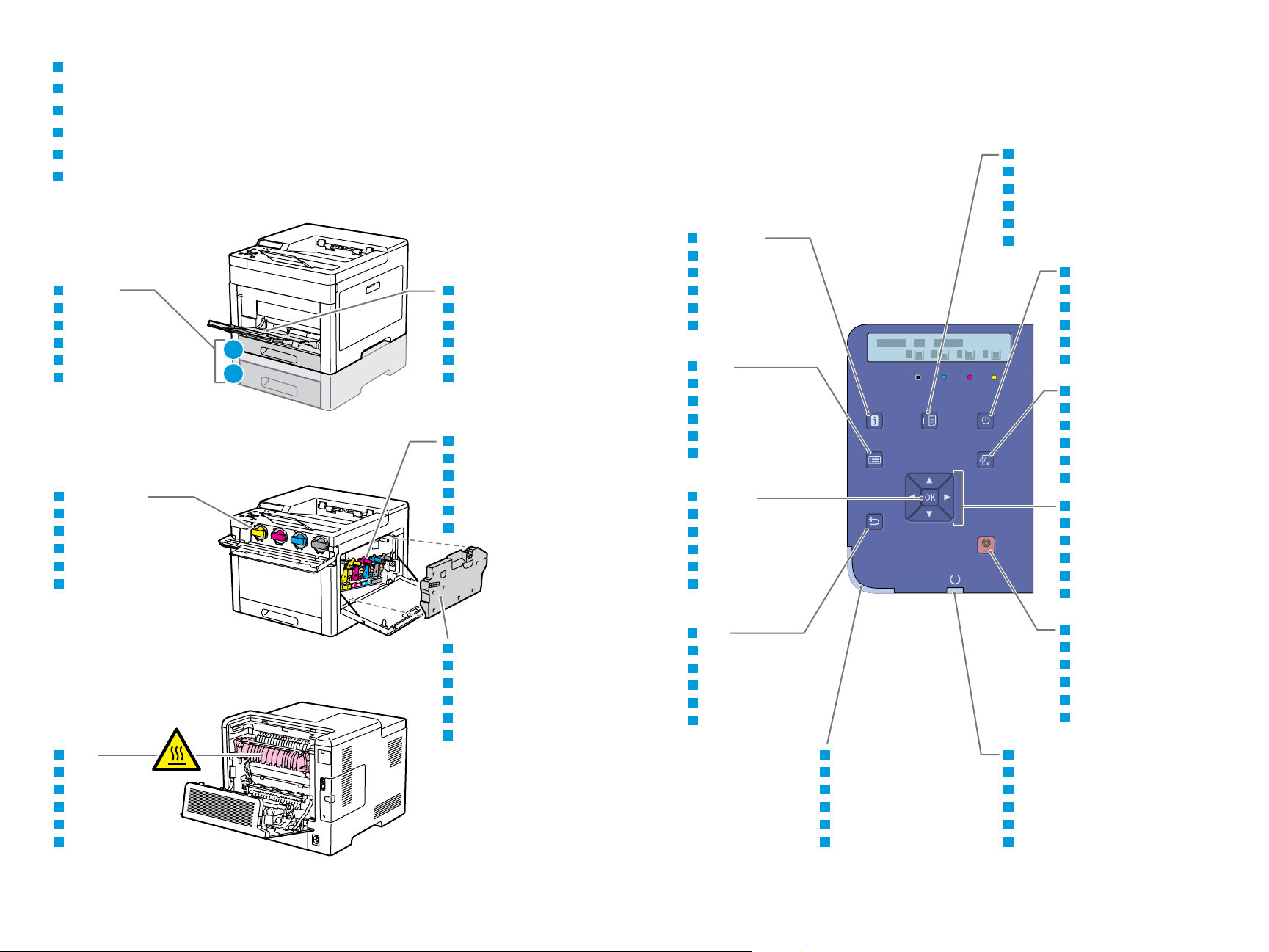
Printer Tour
Tour d’horizon de l’imprimante
Panoramica della stampante
Drucker im Überblick
Recorrido por la impresora
Roteiro da impressora
FR
IT
DE
ES
PT
EN
Bypass Tray
Départ manuel
Vassoio bypass
Zusatzzufuhr
Bandeja especial
Bandeja manual
EN
FR
IT
DE
ES
PT
Trays 1–2
Magasins 1-2
Vassoi 1–2
Behälter 1–2
Bandejas 1-2
Bandejas 1 e 2
EN
FR
IT
DE
ES
PT
Toner Cartridges
Cartouches de toner
Cartucce toner
Tonerpatronen
Cartuchos de tóner
Cartuchos de toner
EN
FR
IT
DE
ES
PT
Drum Cartridges
Modules photorécepteurs
Cartucce fotoricettore
Trommeleinheiten
Cartuchos de cilindro
Cartuchos do fotorreceptor
EN
FR
IT
DE
ES
PT
Waste Cartridge
Bac de récupération
Contenitore residui
Sammelbehälter
Cartucho de residuos
Cartucho de resíduos
EN
FR
IT
DE
ES
PT
Fuser
Four
Fusore
Fixiermodul
Fusor
Fusor
EN
FR
IT
DE
ES
PT
Cancel Job
Annuler le travail
Annulla lavoro
Auftrag abbrechen
Cancelar trabajo
Cancelar trabalho
Printer Ready/Processing
Imprimante disponible/traitement en cours
Stampante pronta/Elaborazione in corso
Drucker bereit/Verarbeitung
Impresora preparada/procesando
Impressora pronta/Processando
Printer Status
Etat de l'imprimante
Stato stampante
Druckerstatus
Estado de la impresora
Status da impressora
Information
Informations
Informazioni
Informationen
Información
Informações
Back
Précédent
Indietro
Zurück
Atrás
Voltar
Menu
Menu
Menu
Menü
Menú
Menu
OK/Accept
OK/Accepter
OK/Accetta
OK/Akzeptieren
OK/Aceptar
OK/Aceitar
Menu Navigation/Adjustments
Navigation menu/réglages
Navigazione menu/Regolazioni
Navigation/Einstellungen
Navegación/ajustes de menú
Ajustes/Navegação de Menu
Pause Printing
Interrompre l'impression
Pausa stampa
Druck anhalten
Pausa de impresión
Pausar impressão
Print Menu
Imprimer le menu
Menu Stampa
Druckmenü
Menú de impresión
Menu Imprimir
Power/Wake
Mise sous tension/Réveil
Alimentazione/Riattivazione
Betrieb/Aktivieren
Encendido/activación
Energia/Despertar
EN
FR
IT
DE
ES
PT
EN
FR
IT
DE
ES
PT
EN
FR
IT
DE
ES
PT
EN
FR
IT
DE
ES
PT
EN
FR
IT
DE
ES
PT
EN
FR
IT
DE
ES
PT
EN
FR
IT
DE
ES
PT
EN
FR
IT
DE
ES
PT
EN
FR
IT
DE
ES
PT
EN
FR
IT
DE
ES
PT
EN
FR
IT
DE
ES
PT
2
Page 3

3
www.xerox.com/office/6510support
2
1
www.xerox.com/rmlna (U.S./Canada)
www.xerox.com/rmleu
X: 76–216 mm (3–8.5 in.)
Y: 148–356 mm (5.8–14 in.)
X: 76–216 mm (3–8.5 in.)
Y: 191–356 mm (7.5–14 in.)
X: 76–216 mm (3–8.5 in.)
Y: 127–356 mm (5–14 in.)
1
2
YY
XX
YY
XX
XX
YY
60–220 g/m
2
(16 lb. Bond–80 lb. Cover)
4 x 6 ...........................4 x 6 in.
5 x 7 ...........................5 x 7 in.
Statement*..............5.5 x 8.5 in.
Executive* ................7.25 x 10.5 in.
8 x 10*.......................8 x 10 in.
Letter* .......................8.5 x 11 in.
Folio* .........................8.5 x 13 in.
Legal* ........................8.5 x 14 in.
A6 ...............................105 x 148 mm
A5* .............................148 x 210 mm
A4* .............................210 x 297 mm
215 x 315* ...............215 x 315 mm
Monarch ...................3.9 x 7.5 in.
#10.............................4.12 x 9.5 in.
DL ...............................110 x 220 mm
C6 ...............................114 x 162 mm
1
2
60–220 g/m
2
(16 lb. Bond–80 lb. Cover)
Executive* ................7.25 x 10.5 in.
Letter* .......................8.5 x 11 in.
Folio* .........................8.5 x 13 in.
Legal* ........................8.5 x 14 in.
A5* .............................148 x 210 mm
A4* .............................210 x 297 mm
21
Trays 1–2
Magasins 1-2
Vassoi 1–2
Behälter 1–2
Bandejas 1-2
Bandejas 1 e 2
EN
FR
IT
DE
ES
PT
Bypass Tray
Départ manuel
Vassoio bypass
Zusatzzufuhr
Bandeja especial
Bandeja manual
FR
IT
DE
ES
PT
EN
EN
FR
IT
DE
ES
PT
60–80 g/m
2
(16–20 lb. Bond)
Recycled
Recyclé
Riciclata
Umweltpapier
Reciclado
Reciclado
EN
FR
IT
DE
ES
PT
75–105 g/m
2
(20–28 lb. Bond)
Plain
Standard
Standard
Normalpapier
Común
Comum
EN
FR
IT
DE
ES
PT
60–90 g/m
2
(20–24 lb. Bond)
Custom 1
Personnalisé 1
Personalizzato 1
Benutzerdefiniert 1
Personalizado 1
Personalizado 1
EN
FR
IT
DE
ES
PT
106–176 g/m
2
(28 lb. Bond–65 lb. Cover)
Lightweight Cardstock
Support cartonné fin
Cartoncino leggero
Leichtkarton
Cartulina ligera
Cartão de baixa gramatura
Lightweight Glossy Cardstock
Support cartonné glacé fin
Cartoncino lucido leggero
Leichter Glanzkarton
Cartulina ligera brillante
Cartão brilhante de baixa
gramatura
177–220 g/m
2
(65–80 lb. Cover)
Cardstock
Carte
Cartoncino
Karton
Cartulina para tarjeta
Cartão
EN
FR
IT
DE
ES
PT
EN
FR
IT
DE
ES
PT
Glossy Cardstock
Carte glacée
Cartoncino lucido
Glanzkarton
Cartulina brillante
Cartão brilhante
Supported Paper
Papier pris en charge
Carta supportata
Unterstütztes Material
Papeles admitidos
Papel compatível
EN
FR
IT
DE
ES
PT
Custom Size
Format personnalisé
Formato personalizzato
Benutzerdefiniert
Tamaño personalizado
Tamanho Personalizado
EN
FR
IT
DE
ES
PT
EN
FR
IT
DE
ES
PT
*
6510 DN/DNI
60–176 g/m
2
(16 lb. Bond–65 lb. Cover)
2-Sided
Recto verso
Fronte/retro
2-seitig
A doble cara
2 Faces
EN
FR
IT
DE
ES
PT
Page 4

4
www.xerox.com/office/6510support
1 2
1 2
3 4
1
2
Y
Y > 297 mm (11.7 in.)
Custom
Folio
Legal
Basic Printing
Impression standard
Stampa di base
Einfacher Druckbetrieb
Impresión básica
Impressão básica
FR
IT
DE
ES
PT
EN
Trays 1–2
Magasins 1-2
Vassoi 1–2
Behälter 1–2
Bandejas 1-2
Bandejas 1 e 2
EN
FR
IT
DE
ES
PT
Bypass Tray
Départ manuel
Vassoio bypass
Zusatzzufuhr
Bandeja especial
Bandeja manual
EN
FR
IT
DE
ES
PT
EN
FR
IT
DE
ES
PT
At the printer control panel, change size and type settings. In the Xerox print driver, select printing options.
Modifiez les paramètres du format et du type dans le panneau de commande de l'imprimante. Sélectionnez les
options d’impression dans le pilote d’imprimante Xerox.
Sul pannello comandi della stampante, cambiare le impostazioni di formato e tipo. Nel driver di stampa Xerox,
selezionare le opzioni di stampa.
Am Steuerpult des Druckers die Einstellungen für Format und Art ändern. Im Xerox-Druckertreiber
Druckoptionen auswählen.
En el panel de control, cambie las opciones de tipo y tamaño de papel. En el controlador de impresión Xerox,
seleccione las opciones de impresión.
No painel de controle da impressora, altere as configurações de tamanho e tipo. No driver de impressão Xerox,
selecione as opções de impressão.
Page 5

5
1 2 3
1 2
1 2
3
1
2
Paper Jams
Incidents papier
Inceppamenti carta
Materialstaus
Atascos de papel
Atolamentos de Papel
FR
IT
DE
ES
PT
EN
www.xerox.com/office/6510support
http://xxx.xxx.xxx.xxx
The Xerox® Embedded Web Server enables you to access printer configuration details, paper and supplies
status, job status, and diagnostic functions over a network. To connect, in a Web browser, type the printer IP
address shown on the Configuration Report.
Le serveur Web intégré Xerox
®
vous permet d’obtenir les détails de configuration de l’imprimante, l’état du
papier, des consommables, et des travaux, ainsi que des fonctions de diagnostic sur un réseau. Pour vous
connecter, saisissez dans un navigateur Web l’adresse IP de l’imprimante indiquée sur le relevé de configuration.
Server web integrato di Xerox
®
consente di accedere alle informazioni di configurazione della stampante, allo
stato della carta e dei materiali di consumo, allo stato dei lavori e alle funzioni di diagnostica su una rete. Per
eseguire la connessione, digitare in un browser Web l'indirizzo IP della stampante mostrato sul Rapporto di
configurazione.
Der integrierte Webserver von Xerox
®
Server ermöglicht den Zugriff auf Druckerkonfigurationsdetails, Papierund Verbrauchsmaterialstand, Auftragsstatus sowie Diagnosefunktionen über ein Netzwerk. Im Webbrowser
die im Konfigurationsbericht angegebene IP-Adresse des Druckers eingeben.
El servidor web interno de Xerox® permite acceder a los datos de configuración de la impresora, el estado de
consumibles y papel, el estado del trabajo y las funciones de diagnóstico a través de una red. Para conectarse
desde un navegador web, escriba la dirección IP que figura en el informe de configuración.
O Servidor da Web incorporado Xerox
®
permite o acesso aos detalhes da configuração da impressora, status
do papel e suprimentos, status do trabalho e funções de diagnóstico pela rede. Para conectar-se, em um
navegador de Web, digite o endereço IP da impressora exibido no Relatório de configuração.
FR
IT
DE
ES
PT
EN
Embedded Web Server
Serveur Web intégré
Server web integrato
Integrierter Webserver
Servidor web interno
Servidor da Web incorporado
FR
IT
DE
ES
PT
EN
 Loading...